WO2017006444A1 - 情報取得装置、情報取得プログラム及び情報取得方法 - Google Patents
情報取得装置、情報取得プログラム及び情報取得方法 Download PDFInfo
- Publication number
- WO2017006444A1 WO2017006444A1 PCT/JP2015/069576 JP2015069576W WO2017006444A1 WO 2017006444 A1 WO2017006444 A1 WO 2017006444A1 JP 2015069576 W JP2015069576 W JP 2015069576W WO 2017006444 A1 WO2017006444 A1 WO 2017006444A1
- Authority
- WO
- WIPO (PCT)
- Prior art keywords
- information acquisition
- information
- web page
- source code
- keyword
- Prior art date
- Legal status (The legal status is an assumption and is not a legal conclusion. Google has not performed a legal analysis and makes no representation as to the accuracy of the status listed.)
- Ceased
Links
Images




Classifications
-
- G—PHYSICS
- G06—COMPUTING OR CALCULATING; COUNTING
- G06F—ELECTRIC DIGITAL DATA PROCESSING
- G06F16/00—Information retrieval; Database structures therefor; File system structures therefor
Definitions
- the present invention relates to an information acquisition device, an information acquisition program, and an information acquisition method.
- Businesses providing various services to users who use personal computers (PCs), tablet terminal devices, mobile terminal devices, and the like are increasing.
- As one of the services there is a service that obtains information posted on a Web page browsed by a user, creates a database of information requested by the user, and extracts the requested information for browsing are known.
- Patent Documents As a method for displaying the search result of information resources, a technique for searching for information resources and displaying the search results in a collapsible or expandable format based on a user selection display criterion or hierarchy is known (for example, Patent Documents). 1).
- an identified character string is identified by associating an index key with a frequent character string that is equal to or higher than a threshold (see, for example, Patent Document 2).
- a system that distributes location content that is updated irregularly on the Internet in real time is known.
- an update notification indicating that the location content has been updated is notified, the article is collected, and index information including the location is stored in the database.
- a system that distributes to a user who has encoded an index information list of the latest location content is known when the update is performed (see, for example, Patent Document 3).
- access information to the map according to the code is collected for the web page, and the map requested to be displayed and the URL of the requesting web page are stored in association with each other.
- the technique to do is known (for example, refer patent document 4).
- the information acquisition device that stores information that the user wants to use as a database acquires, for example, store information from a Web page that publishes store information in response to a request from the user.
- Store information to be acquired includes items such as store name, map information, and event information, for example.
- the information acquisition device acquires store information from the Web server, the information acquisition device acquires information corresponding to each item from the HTML (HyperText Markup Language) format source code of the Web page.
- HTML HyperText Markup Language
- the Web page may contain various information in addition to the store name, map information, and event information.
- the information acquisition device may acquire information different from the store name as the store name.
- the present invention aims to improve the accuracy of acquiring a name from within a Web page.
- the storage unit stores keywords corresponding to Web pages.
- the processing unit searches the source code of the Web page using a keyword corresponding to the Web page, and sets an aggregate before and after the keyword included in the source code as the first and second information acquisition candidates. Next, the processing unit performs an Internet search using the keyword and the first and second information acquisition candidates, and stores the information acquisition candidate corresponding to the proper noun in the storage unit in association with the Web page.
- FIG. 1 is a diagram illustrating an example of an information acquisition apparatus, a terminal device, and a Web server according to the present embodiment.
- the user can browse the web page by using the terminal device 300.
- the terminal device 300 is realized by, for example, a computer, a tablet terminal device, a mobile terminal device, or the like.
- the terminal device 300 can access the information acquisition apparatus 100 and the Web server 200 via the Internet.
- the terminal device 300 includes an authentication unit 301, a processing unit 302, and an input / output unit 303.
- the authentication unit 301 is used to authenticate access from the terminal device 300 to the information acquisition apparatus 100.
- the input / output unit 303 is used for transmitting and receiving information to and from the information acquisition apparatus 100 and a keyboard for inputting an ID (Identification) and password for authentication.
- the processing unit 302 executes a display process for browsing a Web page.
- the Web server 200 is a server that holds the HTML source code of the Web page.
- a URL Uniform Resource Locator
- the Web server 200 When the Web server 200 holds the HTML source code corresponding to the input URL, the Web server 200 provides the source code to the terminal device 300. Thereby, the user can browse the Web page via the terminal device 300.
- the information acquisition apparatus 100 automatically acquires “store information” related to the store from the source code of the Web page.
- the store information includes, for example, a store name, a telephone number, map information, a store overview, and an address.
- the information acquisition device 100 stores the acquired store information as a database.
- the user can also browse store information of a favorite store from the information acquisition device 100 via the terminal device 300.
- the information acquisition apparatus 100 is a server for providing a user with a service that enables information that the user wants to use is stored in a database and can be browsed.
- the information acquisition apparatus 100 includes an authentication unit 101, an input / output unit 102, a storage unit 110, and a processing unit 120.
- the authentication unit 101 authenticates the ID and password input from the terminal device 300.
- the input / output unit 102 is used for acquiring information from the Web server 200, accessing the Internet, and transmitting / receiving information to / from the terminal device 300.
- the storage unit 110 stores information such as “keywords” (described later) used in store information and services.
- the processing unit 120 performs source code analysis processing for automatically acquiring store information from a Web page, Internet search result analysis, and the like.
- the user starts using the service provided by the information acquisition apparatus 100.
- the authentication unit 101 of the information acquisition apparatus 100 authenticates the user using the ID and password input from the input / output unit 303 of the terminal device 300.
- the ID and password authenticated by the authentication unit 101 are held in an authentication DB (database) 113 in the storage unit 110.
- the URL of the Web page that the user wants to browse is input to the terminal device 300.
- the terminal device 300 accesses the Web server 200 that holds the source code of the Web page corresponding to the input URL.
- the terminal device 300 acquires the source code of the Web page from the Web server 200, the user can browse the Web page via the terminal device 300.
- the input / output unit 303 of the terminal device 300 requests the information acquisition device 100 to acquire store information of the Web page.
- the request for acquiring store information of the Web page being browsed may be realized by pressing a favorite registration button or the like on the Web page displayed on the screen of the terminal device 300.
- the store information of the Web page being browsed is, for example, a search result output when the user inputs input items such as accommodation conditions from the accommodation site. For example, what is searched for “hotel”, “inn”, “public inn”, etc. as input items and output as a search result belongs to the category of “store name”.
- the terminal device 300 transmits the information of the category into which the Web page is classified together with the store information acquisition request.
- the processing unit 120 of the information acquisition apparatus 100 starts crawling the Web page.
- the processing unit 120 reads a keyword corresponding to the category to which the Web page to be acquired belongs from the crawl DB 111 in the storage unit 110.
- the crawl DB 111 includes a category for classifying Web pages, a keyword associated with the category, and the like. For example, when a web page of an accommodation facility is an acquisition target, the web page is classified into the category “accommodation”. Then, the processing unit 120 reads from the crawl DB 111 a keyword “hot spring, hotel, kaku, ontake, manor, bower, Japan Inn” associated with the “stay” category.
- the processing unit 120 acquires the source code of the Web page to be acquired from the Web server 200 via the input / output unit 102.
- the processing unit 120 searches the acquired source code using the keyword read from the crawl DB 111.
- the processing unit 120 sets the sentences before and after the corresponding part as a result of searching the source code using keywords as information acquisition candidates. For example, when the processing unit 120 searches the source code with the keyword “hot spring” corresponding to “accommodation”, the description “Arima hot spring“ Arima ABC hotel ”” corresponds. The processing unit 120 sets “Arima” in front of the keyword “hot spring” as the first information acquisition candidate. The processing unit 120 sets “Arima ABC Hotel” after the keyword “hot spring” as a second information acquisition candidate.
- the information acquisition candidate may be an aggregate of a plurality of words such as “Arima”, “ABC”, and “Hotel”.
- the processing unit 120 performs an Internet search using the first information acquisition candidate, the second information acquisition candidate, and the keyword.
- the processing unit 120 performs an AND search of the first information acquisition candidate “Arima” and the keyword “hot spring” on the Internet, and determines whether there is a corresponding store name. Further, the processing unit 120 performs an AND search of the second information acquisition candidate “Arima ABC hotel” and the keyword “hot spring” on the Internet, and determines whether there is a corresponding store name.
- the processing unit 120 uses the keyword, the first information acquisition candidate, or the second information acquisition candidate used for the search as store information. Confirm and store in the content DB 112.
- the content DB 112 is a database that stores store information such as store names, telephone numbers, map information, store overviews, and addresses.
- the processing unit 120 performs an AND search on the Internet for the second information acquisition candidate “Arima ABC hotel” and the keyword “hot spring”, and as a result, the store name “Arima ABC hotel” is found. Then, the processing unit 120 stores “Arima ABC Hotel”, which is an information acquisition candidate, in the content DB 112 as a store name in the store information.
- the information acquisition apparatus 100 extracts a keyword (proprietary noun) corresponding to an item from the Web page by extracting a keyword related to the category and an information acquisition candidate considered to be highly related to the keyword. The accuracy of acquiring can be improved.
- the information acquisition apparatus 100 acquires the word “hot spring” and the word “information acquisition candidate“ Arima ABC Hotel ”, and accurately acquires the store name from the source code.
- the processing unit 120 executes the processes (4.3) to (4.5) for each keyword.
- a plurality of keywords “hot spring, hotel, kaku, mitake, manor, bower, and Japanese inn” are set for the category “accommodation”.
- the processes (4.3) to (4.5) are executed for “hot spring, hotel, cabinet, mitake, villa, bower, and Japan Inn”, respectively.
- the categories and keywords in the crawl DB 111 may be set in advance. Moreover, the category and keyword in the crawl DB 111 may be set by the user.
- the crawl DB 111 may include information for designating a tag in the source code to be searched using a keyword. By narrowing the information to be searched in the source code, the search process using the keyword of the processing unit 120 can be speeded up.
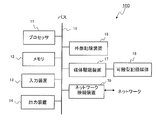
- FIG. 2 is a diagram for explaining an example of the hardware configuration of the information acquisition apparatus.
- the information acquisition device 100 includes a processor 11, a memory 12, a bus 15, an external storage device 16, and a network connection device 19. Further, as an option, the information acquisition device 100 may include an input device 13, an output device 14, and a medium driving device 17.
- the information acquisition apparatus 100 may be realized by a computer, for example.
- the processor 11 can be an arbitrary processing circuit including a central processing unit (CPU).
- the processor 11 operates as the authentication unit 101 and the processing unit 120.
- the processor 11 can execute, for example, a program stored in the external storage device 16.
- the memory 12 operates as the storage unit 110, and includes a crawl DB 111, a content DB 112, and an authentication DB 113. Further, the memory 12 appropriately stores data obtained by the operation of the processor 11 and data used for processing of the processor 11.
- the network connection device 19 is used for communication with other devices and operates as the input / output unit 102.
- the input device 13 is realized as, for example, a button, a keyboard, or a mouse
- the output device 14 is realized as a display or the like.
- the bus 15 connects the processor 11, the memory 12, the input device 13, the output device 14, the external storage device 16, the medium drive device 17, and the network connection device 19 so that data can be exchanged between them.
- the external storage device 16 stores programs, data, and the like, and provides the stored information to the processor 11 and the like as appropriate.
- the medium driving device 17 can output the data of the memory 12 and the external storage device 16 to the portable storage medium 18 and can read programs, data, and the like from the portable storage medium 18.
- the portable storage medium 18 includes a floppy (registered trademark) disk, a Magnet-Optical (MO) disk, a Compact Disc Recordable (CD-R), and a Digital Versatile Disc Recordable (DVD-R). Any storage medium can be used.
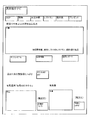
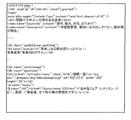
- FIG. 3A and 3B are diagrams for explaining examples of Web pages and source codes.
- FIG. 3A is an example of a Web page for introducing hot springs browsed by the user on the terminal device 300.
- the web page includes text for introducing a hot spring.
- the information contained in the Web page includes various information such as “hot springs with a history of over 1000 years in Kansai”, “equipped with air conditioning and heating, 10 restaurants and extraordinar crab dishes”, “Arima hot spring“ Arima ABC Hotel ””, etc. Information.
- FIG. 3B is a diagram illustrating an example of source code corresponding to the Web page of FIG. 3A.
- the source code is an HTML code for displaying a web page on the terminal device 300.
- tags such as ⁇ title>, ⁇ meta>, and ⁇ h2> are designated for each sentence displayed on the terminal device 300 on the Web page.
- ⁇ title> describes a store name or the like.
- FIGS. 3A and 3B there is actually no such regulation, and a sentence different from the store name may be posted in the ⁇ title> tag as shown in FIGS. 3A and 3B. Therefore, if the information in the ⁇ title> tag of the source code in FIG. 3B is acquired as a store name, it is stored in the content DB 112 as a store name “hot springs with a history of over 1000 years in Kansai”.
- the information acquisition apparatus 100 includes information other than the store name in the information in the ⁇ title> tag of the source code and the store name is included in the other tag,
- the correct store name can be acquired by using the first and second information acquisition candidates.
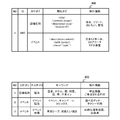
- FIG. 4 is a diagram illustrating an example of information stored in the crawl DB.
- the crawl DB 111 stores tag designation information 400 and keyword information 450.
- the tag designation information 400 includes tag information for designating a tag to be crawled when the processing unit 120 crawls the source code of the Web page.
- the keyword information 450 holds a keyword that the processing unit 120 performs crawling in the tag designated by the tag designation information 400.
- the tag designation information 400 includes NO, ID, category, similar tag, and exclusion information.
- NO is a number assigned to manage tag designation information.
- the ID is identification information assigned to a user who uses the information acquisition apparatus 100.
- the category is a classification name for classifying the content in the Web page. The category is classified into, for example, “store name” and “event”.
- the store name is the name of a store such as a hotel or restaurant.
- the event is information on an event being performed at the store.
- the similar tag is information indicating a tag that may be associated with each category in the source code of the Web page.
- the category “store name” is associated with tags such as ⁇ title>, ⁇ common_onsen>, ⁇ description Stop>, ⁇ spotUnitTl>.
- the processing unit 120 of the information acquisition apparatus 100 does not search the entire source code of the Web page when searching for the source code of the Web page by a keyword as in the process of (4.2), but in the tag designation information 400. You may search the text in the tag matched with the category. In this way, by setting the information to be searched within the tag, the processing unit 120 can increase the search speed of the source code using the keyword, and the search time is shortened.
- the exclusion information is a character string or a word to be excluded from the information acquisition candidate when the information acquisition candidate is selected in the process shown in (4.3) of the processing unit 120.
- the exclusion information associated with the category “store name” of the tag designation information 400 for example, a place name is set.
- the processing unit 120 determines that “Arima” before the keyword “Onsen” is the place name in the processing of (4.3), Not considered as an information acquisition candidate. In this way, information that is not acquired as information acquisition candidates can be excluded by setting the tag designation information 400.
- the tag designation information 400 further holds similar tags and exclusion information for the category “event”.
- the processing unit 120 can acquire store information related to an event by performing the processes (1) to (4.5) for a name or a proper noun that is different from the store name such as an event.
- searching for a web page source code with a keyword related to the category “event” the processing unit 120 of the information acquisition apparatus 100 matches the category in the tag designation information 400 without searching the entire source code of the web page. You may search the sentence in the tag provided.
- the tag designation information 400 also includes exclusion information including a character string or a word to be excluded from information acquisition candidates to be acquired in association with the category “event”.
- the keyword information 450 includes NO, category, middle category, keyword, and exclusion information.
- NO is an identification number assigned to manage the keyword information 450.
- the category is a category of the tag designation information 400.
- the middle category is a category that is further classified.
- the keyword information 450 categorizes and holds the category “store name”, for example, in the middle category “accommodation”.
- the keyword information 450 holds “hot spring, hotel, kaku, mitake, manor, bower, Japan Inn” as a keyword related to the category “stay” in the category “store name”.
- the processing unit 120 reads out these keywords in the process of (4.2) and uses them for searching the source code. In this way, by setting a keyword in which the category “store name” is further classified into the middle category, the source code can be searched with various keywords. Further, the keyword information 450 includes exclusion information. Note that the category and the middle category when the keyword is read from the crawl DB 111 in the process of (4.2) may be input via the terminal device 300 by a user operation.
- the keyword information 450 holds “event, campaign, topics” as keywords related to the category “event, lodging” in the category “event”.
- the processing unit 120 reads out these keywords in the process of (4.2) and uses them for searching the source code. In this way, by setting a keyword in which the category “event” is further classified into the middle category, the source code can be searched with various keywords. Further, the keyword information 450 includes exclusion information.
- FIG. 5 is a diagram illustrating an example of store information stored in the content DB.
- the store information 460 includes information such as NO, telephone, middle category, store name, event, map information, summary, address, and memo.
- NO is an identification number assigned to manage the store information 460.
- a telephone number installed in the store is set for the phone of the store information 460.
- the category is a classification name into which stores are classified.
- the store name is the name of the store.
- the store name is information that is determined as information to be acquired when the processing unit 120 performs an AND search between the information acquisition candidate and the keyword in the process (4.5) and the store name corresponds. For example, the processing unit 120 performs an AND search on the Internet for the information acquisition candidate “Arima ABC Hotel” and the keyword “hot spring”. When the store name “Arima ABC Hotel” is found in the Internet search results, the processing unit 120 determines the information acquisition candidate “Arima ABC Hotel” as information to be acquired as the store information 460 and stores it in the store information 460.
- the event is information on the event being performed at the store.
- the processing unit 120 can extract events included in the source code of FIG. 3B by using the keyword information 450.
- the keyword corresponding to the accommodation category at the event is “event, campaign, topics”.
- the processing unit 120 searches the acquired source code using the keyword read from the crawl DB 111.
- the source code of FIG. 3B includes the word “topics”.
- the processing unit 120 uses words or sentences before and after the keyword “topics” as information acquisition candidates.
- the processing unit 120 sets “information list” and “Mediterranean fair” as information acquisition candidates.
- the processing unit 120 performs an Internet search using information acquisition candidates and keywords. However, the “information list” is not searched.
- the processing unit 120 stores the information in the content DB 112 as an event of store information. If there is a sentence that leads to the “Mediterranean Fair”, the processing unit 120 may store all the sentence in the content DB 112.
- the map information holds a URL that provides a map of a place with a store name.
- the overview is an overview of the store.
- the address is a store address.
- the memo is a memo about a store that can be input by the user.
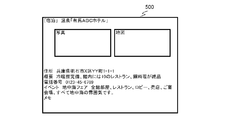
- FIG. 6 is a diagram for explaining an example of store information displayed on the terminal device.
- the store information 500 is a display example when the store information 460 stored in the content DB 112 of the information acquisition apparatus 100 is viewed from the terminal device 300.
- the store information 500 in FIG. 6 is an example of the store name “Arima ABC Hotel” in FIG.
- the store information 460 stored in the content DB 112 is displayed as a Web page as shown in FIG.
- the map displayed on the terminal device 300 is displayed via a map application executed by specifying a URL included in the map information included in the store information 460.
- FIG. 7 is a sequence diagram illustrating an example of processing of the information acquisition apparatus, the terminal device, and the Web server according to the present embodiment.
- the authentication unit 101 of the information acquisition apparatus 100 authenticates the user using the ID and password input from the input / output unit 303 of the terminal device 300 (step S101).
- the processing unit 302 of the terminal device 300 acquires the web page source code corresponding to the URL input by the user from the web server 200 and displays the web page on the screen (step S102).
- the input / output unit 303 of the terminal device 300 acquires a request for acquiring store information of the Web page being browsed from the user (step S103).
- the input / output unit 303 of the terminal device 300 transmits the store information acquisition request for the Web page, the source code of the Web page to be acquired, and the category information for classifying the Web page to the information acquisition apparatus 100 (Step S104).
- the processing unit 120 of the information acquisition apparatus 100 reads a keyword related to the Web page to be acquired from the crawl DB 111 in the storage unit 110 (step S105).
- the processing unit 120 of the information acquisition apparatus 100 searches the acquired source code using the keyword read from the crawl DB 111 (step S106).
- the processing unit 120 of the information acquisition apparatus 100 sets the sentences before and after the corresponding portion as a result of searching the source code using the keyword as information acquisition candidates (step S107).
- the processing unit 120 of the information acquisition apparatus 100 performs an Internet search using information acquisition candidates and keywords (step S108).
- the processing unit 120 of the information acquisition apparatus 100 determines the information acquisition candidate used for the search as the information to be acquired as the store information, and the content DB 112 as the store information. (Step S109).
- the processing unit 120 of the information acquisition apparatus 100 determines the information acquisition candidate used for the search as information to be acquired as store information, and stores the content as store information. It memorize
- the input / output unit 102 of the information acquisition apparatus 100 notifies the terminal device 300 that the processing corresponding to the acquisition request for the store information on the Web page has been completed (step S111).
- the input / output unit 102 of the information acquisition device 100 transmits the store information stored in the content DB 112 to the terminal device 300 (step S112).
- the terminal device 300 reads and displays store information from the information acquisition device 100 (step S114).
- the information acquisition apparatus 100 can increase the possibility that the store name can be acquired from a sentence including other information of the store name in the source code.
- FIG. 8 is a flowchart for explaining an example of authentication processing of a terminal device.
- the processing in step S101 in FIG. 7 will be described in more detail using the flowchart shown in FIG.
- the input / output unit 303 of the terminal device 300 transmits the input ID and password to the information acquisition apparatus 100 (step S201).
- the input / output unit 303 of the terminal device 300 receives the authentication result response from the authentication unit 101 of the information acquisition apparatus 100 (step S202).
- the processing unit 302 of the terminal device 300 determines whether or not there is a request for access to the information acquisition apparatus 100 from the user (step S203).
- the processing unit 302 determines whether or not a predetermined time has elapsed since the authentication in step S202 (step S204). If the predetermined time has not elapsed since the authentication (NO in step S204), the processing unit 302 repeats the process from step S203. When a predetermined time has passed since the authentication, the processing unit 302 displays on the screen of the terminal device 300 that it cannot be used due to a timeout (step S205).
- the input / output unit 303 of the terminal device 300 receives the result of the access request from the information acquisition device 100 (step S206).
- the terminal device 300 can use the service provided by the information acquisition apparatus 100 (step S207).
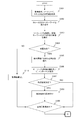
- FIGS. 9A and 9B are flowcharts illustrating an example of search processing by the information acquisition apparatus. The processing in steps S105 to S110 in FIG. 7 will be described in more detail with reference to FIGS. 9A and 9B.
- the input / output unit 102 of the information acquisition apparatus 100 acquires information such as the source code of the Web page to be acquired and the category into which the Web page is classified from the terminal device 300 (step S301).
- the processing unit 120 of the information acquisition apparatus 100 reads a keyword related to the Web page to be acquired from the crawl DB 111 in the storage unit 110 (step S302).
- the processing unit 120 of the information acquisition apparatus 100 searches the source code and extracts a plurality of keywords and words before and after the keywords (step S303).
- the processing unit 120 of the information acquisition apparatus 100 determines whether words before and after the keyword are extracted as a result of step S303 (step S304). When the words before and after the keyword are extracted (YES in step S304), the processing unit 120 of the information acquisition apparatus 100 excludes the word included in the exclusion information from the extracted word (information acquisition candidate) (step S305).
- the processing unit 120 of the information acquisition apparatus 100 performs an Internet search using information acquisition candidates and keywords (step S306).
- the processing unit 120 of the information acquisition apparatus 100 determines whether or not information representing proper nouns has been acquired by a search using the Internet (step S307).
- the processing unit 120 of the information acquisition apparatus 100 determines the information acquisition candidate used for the search as information to be acquired as store information. , It is associated with the store information (step S308).
- the processing unit 120 of the information acquisition apparatus 100 determines whether information such as an information acquisition candidate for all items such as a store name and an event acquired from the store information has been acquired (step S309).
- step S309 When the processing unit 120 of the information acquisition apparatus 100 has not acquired information such as information acquisition candidates for all items such as the store name and event acquired by the store information (NO in step S309), the processing starts from step S302. repeat.
- the processing unit 120 of the information acquisition apparatus 100 determines that there is no information acquisition candidate (step S310).
- step S310 ends, the processing unit 120 of the information acquisition apparatus 100 executes step S309.
- the processing unit 120 executes the process of step S309.
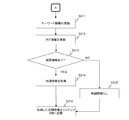
- the processing unit 120 of the information acquisition apparatus 100 updates the keyword information 450 when there is a keyword update via the terminal device 300 by the user (step S311).
- the processing unit 120 of the information acquisition apparatus 100 updates the tag designation information 400 (step S312).
- the processing unit 120 of the information acquisition apparatus 100 determines whether map information related to the store is included in the source code (step S313).
- the input / output unit 102 of the information acquisition apparatus 100 acquires the map information from, for example, a server that provides the map information (step S314). ).
- step S313 When the map information related to the store is not included in the source code (NO in step S313), the processing unit 120 of the information acquisition apparatus 100 sets information indicating that there is no map information related to the store information (step S313). S315).
- step S314 or step S315 ends, the processing unit 120 of the information acquisition apparatus 100 stores information acquisition candidates, map information, and the like as store information in the content DB 112 (step S316).
- the information acquisition apparatus 100 can increase the possibility that the store name can be acquired from a sentence including other information of the store name in the source code.
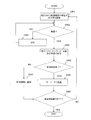
- FIG. 10 is a flowchart for explaining an example of processing for updating keyword information.
- the flowchart in FIG. 10 is an example of processing when the processing of step S311 is executed by the processing unit 120 of the information acquisition apparatus 100 instead of registration from the user.
- the processing unit 120 of the information acquisition apparatus 100 recognizes the word or sentence of the information acquisition candidate determined to be acquired in step S308 (step S401).
- the processing unit 120 of the information acquisition apparatus 100 determines whether or not a word or sentence that has been determined as an information acquisition candidate is a word that has been minimally divided (step S402).
- step S403 the processing unit 120 of the information acquisition apparatus 100 divides the word or sentence so as to be the minimum division.
- the processing unit 120 of the information acquisition apparatus 100 performs an Internet search using AND for the category, keyword, and information acquisition candidate word in the keyword information 460 (step S404).
- the processing unit 120 of the information acquisition apparatus 100 determines whether there is a corresponding word (proper noun) (step S405). If there is a corresponding word as a result of the Internet search (YES in step S405), the processing unit 120 of the information acquisition apparatus 100 registers the corresponding word (proper noun) as a keyword in the keyword information 460 (step S406).
- Step S407 the processing unit 120 of the information acquisition apparatus 100 registers the information acquisition candidate word used for the Internet search in step S404 in the keyword information 460 as exclusion information.
- Step S408 the processing unit 120 of the information acquisition apparatus 100 determines whether or not the process of updating the keyword information 460 has been executed with all the information acquisition candidates determined as words.
- the processing unit 120 of the information acquisition apparatus 100 repeats the process from step S401.
- the processing unit 120 of the information acquisition apparatus 100 ends the process of updating the keyword information 460.
- the information acquisition apparatus 100 extracts a keyword associated with a category and an information acquisition candidate that is considered to be highly related to the keyword, so that the name corresponding to the item from the Web page.
- the accuracy of acquiring (proprietary noun) can be improved.
- Information Acquisition Device 101 Authentication Unit 102 Input / Output Unit 110 Storage Unit 111 Crawl DB 112 Content DB 113 Authentication DB 120 Processing Unit 200 Web Server 300 Terminal Device 301 Authentication Unit 302 Processing Unit 303 Input / Output Unit 400 Tag Specification Information 450 Keyword Information 460 Store Information
Landscapes
- Engineering & Computer Science (AREA)
- Theoretical Computer Science (AREA)
- Data Mining & Analysis (AREA)
- Databases & Information Systems (AREA)
- Physics & Mathematics (AREA)
- General Engineering & Computer Science (AREA)
- General Physics & Mathematics (AREA)
- Information Transfer Between Computers (AREA)
- Information Retrieval, Db Structures And Fs Structures Therefor (AREA)
Abstract
記憶部は、Webページに対応したキーワードを記憶している。処理部は、Webページに対応するキーワードを用いてWebページのソースコードを検索し、ソースコードに含まれるキーワードの前後の集合体を第1及び第2の情報取得候補とする。次に処理部は、キーワード及び第1及び第2の情報取得候補を用いたインターネット検索をし、固有名詞が該当した情報取得候補をWebページに関連付けて記憶部に記憶させる。
Description
本発明は、情報取得装置、情報取得プログラム及び情報取得方法に関する。
パーソナルコンピュータ(PC)、タブレット型端末機器、モバイル端末機器などを利用するユーザに対して、多様なサービスを提供するビジネスが増加している。サービスの1つとして、ユーザが閲覧しているWebページに掲載されている情報を取得し、該ユーザが求めている情報をデータベース化し、求めている情報を抽出して閲覧できるようにするサービスも知られている。
情報資源を検索した結果を表示する方法として、情報資源を検索し、ユーザ選択表示基準又は階層に基づきコラプシブル、エクスパンダブルのフォーマットで検索結果を表示する技術が知られている(例えば、特許文献1を参照)。
情報の検索方法として、閾値以上の頻出文字列に対して索引キーを対応付けることで、特定される文字列を識別する方法が知られている(例えば、特許文献2を参照)。
インターネット上で不定期に更新される位置コンテンツを、リアルタイムで配信するシステムが知られている。位置コンテンツが更新されたことを示す更新通知が通知されると当該記事を収集し、位置を含むインデックス情報をデータベースに格納する。更新が行われたことを契機に、最新の位置コンテンツのインデックス情報一覧を符号化した利用者に配信するシステムが知られている(例えば、特許文献3を参照)。
ウェブページの情報をデータベース化する技術として、ウェブページを対象に、コードに従った地図へのアクセス情報を収集し、表示要求のあった地図と、要求元のウェブページのURLとを関連付けて蓄積する技術が知られている(例えば、特許文献4を参照)。
ユーザが利用したい情報をデータベース化し記憶する情報取得装置は、例えば、ユーザからの要求により、店舗情報を公開するWebページから店舗情報などを取得する。取得する店舗情報は、例えば、店舗名称、地図情報、イベント情報などの項目を含む。情報取得装置がWebサーバから店舗情報を取得する際、情報取得装置は、WebページのHTML(HyperText Markup Language)形式のソースコードより各項目に対応する情報を取得する。
ところが、Webページには、店舗名称、地図情報、イベント情報の他にも様々な情報が含まれていることがある。一例として、店舗名称が文章内に含まれているWebページから情報取得装置が新しく店舗名称を取得する場合、情報取得装置が店舗名称とは異なる情報を店舗名称として取得しまうことがある。
1つの側面において、本発明は、Webページ内から名称を取得する精度を向上させることを目的とする。
記憶部は、Webページに対応したキーワードを記憶している。処理部は、Webページに対応するキーワードを用いてWebページのソースコードを検索し、ソースコードに含まれるキーワードの前後の集合体を第1及び第2の情報取得候補とする。次に処理部は、キーワード及び第1及び第2の情報取得候補を用いたインターネット検索をし、固有名詞が該当した情報取得候補をWebページに関連付けて記憶部に記憶させる。
Webページ内から名称を取得する精度を向上させることができる。
以下、図面を参照しながら、実施形態を詳細に説明する。
図1は、本実施形態に係る情報取得装置、端末機器、Webサーバの例を説明する図である。ユーザは、端末機器300を用いることで、Webページの閲覧などが可能である。端末機器300は、例えば、コンピュータ、タブレット型端末機器、モバイル端末機器などで実現される。端末機器300は、インターネットを介して情報取得装置100、Webサーバ200にアクセス可能である。端末機器300は、認証部301、処理部302、入出力部303を備える。認証部301は、端末機器300から情報取得装置100へのアクセスを認証するために用いられる。入出力部303は、認証のためのID(Identification)やパスワードを入力するためのキーボードや、情報取得装置100との情報の送受信に用いられる。処理部302は、Webページを閲覧するための表示処理などを実行する。
図1は、本実施形態に係る情報取得装置、端末機器、Webサーバの例を説明する図である。ユーザは、端末機器300を用いることで、Webページの閲覧などが可能である。端末機器300は、例えば、コンピュータ、タブレット型端末機器、モバイル端末機器などで実現される。端末機器300は、インターネットを介して情報取得装置100、Webサーバ200にアクセス可能である。端末機器300は、認証部301、処理部302、入出力部303を備える。認証部301は、端末機器300から情報取得装置100へのアクセスを認証するために用いられる。入出力部303は、認証のためのID(Identification)やパスワードを入力するためのキーボードや、情報取得装置100との情報の送受信に用いられる。処理部302は、Webページを閲覧するための表示処理などを実行する。
Webサーバ200は、WebページのHTMLのソースコードを保持しているサーバである。ユーザが端末機器300からWebページを閲覧する際、ユーザは、端末機器300に閲覧したいWebページのURL(Uniform Resource Locator)を入力する。入力されたURLに対応するHTMLのソースコードをWebサーバ200が保持している場合、Webサーバ200は、該ソースコードを端末機器300に提供する。これにより、ユーザは、端末機器300を介してWebページを閲覧可能となる。
情報取得装置100は、例えば、お気に入りの店舗として登録したいWebページをユーザから指定されると、該Webページのソースコードから店舗に関係する「店舗情報」を自動的に取得する。店舗情報には、例えば、店舗名、電話番号、地図情報、店舗概要、住所などが含まれる。情報取得装置100は、取得した店舗情報をデータベースとして記憶する。ユーザは、端末機器300を介して、情報取得装置100からお気に入りの店舗の店舗情報を閲覧することもできる。言い換えると、情報取得装置100は、ユーザが利用したい情報をデータベース化しておき、閲覧可能とするサービスをユーザに提供するためのサーバである。
情報取得装置100は、認証部101、入出力部102、記憶部110、処理部120を備える。認証部101は、端末機器300から入力されたIDやパスワードを認証する。入出力部102は、Webサーバ200からの情報の取得や、インターネットへのアクセスや、端末機器300との情報の送受信に用いられる。記憶部110は、店舗情報やサービスで使用される「キーワード」(後述する)などの情報を記憶している。処理部120は、Webページから店舗情報を自動的に取得するためのソースコードの解析処理や、インターネットの検索結果の解析などをする。
以下に、ユーザのお気に入りの店舗情報を情報取得装置100が取得する際の、情報取得装置100、端末機器300、Webサーバ200の処理の例を順に説明する。
(1)ユーザは、情報取得装置100が提供するサービスの利用を開始する。情報取得装置100の認証部101は、端末機器300の入出力部303から入力されたID及びパスワードを用いて、ユーザの認証をする。なお、認証部101が認証するID及びパスワードは、記憶部110内の認証DB(データベース)113に保持されている。
(2)端末機器300に、ユーザが閲覧したいWebページのURLが入力される。端末機器300は、入力されたURLに対応するWebページのソースコードを保持するWebサーバ200にアクセスする。端末機器300がWebページのソースコードをWebサーバ200から取得することで、ユーザは、端末機器300を介してWebページを閲覧できる。
(3)端末機器300に閲覧中のWebページの店舗情報を取得する要求がユーザから入力されると、端末機器300の入出力部303は、情報取得装置100にWebページの店舗情報の取得要求を送信する。閲覧中のWebページの店舗情報を取得する要求は、端末機器300の画面に表示されているWebページ上のお気に入り登録用のボタンなどが押下されることで実現されてもよい。閲覧中のWebページの店舗情報は、例えば、ユーザが宿泊サイトから宿泊条件などの入力項目を入力した際に出力された検索結果である。例えば、入力項目として「ホテル」「旅館」「公共の宿」などと検索をして検索結果として出力されるものは、「店舗名称」のカテゴリに属する。端末機器300は、店舗情報の取得要求に併せて、Webページが分類されるカテゴリの情報を送信する。
(4)情報取得装置100の処理部120は、端末機器300からWebページの店舗情報の取得要求を受信すると、Webページのクローリングを開始する。
(4.1)処理部120は、記憶部110内のクロールDB111から取得対象のWebページが属するカテゴリに対応するキーワードを読み出す。クロールDB111は、Webページを分類するカテゴリと、カテゴリに関連付けられたキーワードなどを含む。例えば、宿泊施設のWebページを取得対象とする場合、該Webページは、「宿泊」のカテゴリに分類されている。すると、処理部120は、「宿泊」のカテゴリに関連付けられているキーワード「温泉、ホテル、閣、御苑、荘、亭、日本イン」などをクロールDB111から読み出す。
(4.2)処理部120は、入出力部102を介して取得対象のWebページのソースコードをWebサーバ200から取得する。処理部120は、クロールDB111から読み出したキーワードを用いて、取得したソースコード内を検索する。
(4.3)処理部120は、キーワードを用いてソースコード内を検索した結果で該当した箇所の前後の文章を情報取得候補とする。例えば、処理部120が「宿泊」に対応するキーワード「温泉」でソースコード内を検索すると、『有馬温泉「有馬ABCホテル」』という記載が該当する。処理部120は、キーワード「温泉」の前の「有馬」を第1の情報取得候補とする。処理部120は、キーワード「温泉」の後の「有馬ABCホテル」を第2の情報取得候補とする。なお、「有馬ABCホテル」のように、情報取得候補は「有馬」、「ABC」、「ホテル」のような複数の単語の集合体であってもよい。
(4.4)処理部120は、第1の情報取得候補と第2の情報取得候補及びキーワードを用いたインターネット検索を行う。処理部120は、第1の情報取得候補「有馬」とキーワード「温泉」とのAND検索をインターネット上で行い、該当する店舗名称があるか否かを判定する。更に、処理部120は、第2の情報取得候補「有馬ABCホテル」とキーワード「温泉」とのAND検索をインターネット上で行い、該当する店舗名称があるか否かを判定する。
(4.5)処理部120は、インターネットを用いた検索で固有名詞を表す情報を取得できた場合、検索に用いたキーワード、第1の情報取得候補又は第2の情報取得候補を店舗情報として確定し、コンテンツDB112に記憶させる。コンテンツDB112は、店舗名、電話番号、地図情報、店舗概要、住所などの店舗情報を記憶するデータベースである。処理部120は、第1の情報取得候補「有馬」とキーワード「温泉」とのAND検索をインターネット上で行った結果、「有馬」という店舗の店舗名称が見つからなかったものとする。一方、処理部120は、第2の情報取得候補「有馬ABCホテル」とキーワード「温泉」のAND検索をインターネット上で行った結果、「有馬ABCホテル」という店舗名称が見つかったものとする。すると処理部120は、情報取得候補である「有馬ABCホテル」を店舗情報内の店舗名としてコンテンツDB112に記憶させる。
インターネットによる検索を実行することで、店舗名称が得られた情報取得候補は、キーワードと関連性が高いと考えられる。本実施形態に係る情報取得装置100は、カテゴリに関連するキーワードと、キーワードと関連性の高いと考えられる情報取得候補とを抽出することで、Webページ内から項目に対応した名称(固有名詞)を取得する精度を向上させることができる。図1の例において情報取得装置100は、キーワード「温泉」という単語と情報取得候補「有馬ABCホテル」という単語を取得し、ソースコードから店舗名を正確に取得している。なお、1つのカテゴリに対して複数のキーワードが設定されている場合、処理部120は、(4.3)~(4.5)の処理をキーワード毎に実行する。例えば、上述の例では、カテゴリ「宿泊」に対して複数のキーワード「温泉、ホテル、閣、御苑、荘、亭、日本イン」が設定されている。この場合、「温泉、ホテル、閣、御苑、荘、亭、日本イン」に対してそれぞれ(4.3)~(4.5)の処理が実行される。
なお、クロールDB111におけるカテゴリ及びキーワードは、予め設定されていてもよい。また、クロールDB111におけるカテゴリ及びキーワードは、ユーザにより設定されてもよい。クロールDB111は、キーワードを用いた検索対象となるソースコード内のタグを指定するための情報を含んでいてもよい。ソースコード内で検索対象となる情報を狭めることで、処理部120のキーワードを用いた検索処理を高速化することができる。
図2は、情報取得装置のハードウェア構成の例を説明する図である。情報取得装置100は、プロセッサ11、メモリ12、バス15、外部記憶装置16、ネットワーク接続装置19を備える。さらにオプションとして、情報取得装置100は、入力装置13、出力装置14、媒体駆動装置17を備えても良い。情報取得装置100は、例えば、コンピュータなどで実現されることがある。
プロセッサ11は、Central Processing Unit(CPU)を含む任意の処理回路とすることができる。プロセッサ11は、認証部101、処理部120として動作する。なお、プロセッサ11は、例えば、外部記憶装置16に記憶されたプログラムを実行することができる。メモリ12は、記憶部110として動作し、クロールDB111、コンテンツDB112、認証DB113を含む。さらに、メモリ12は、プロセッサ11の動作により得られたデータや、プロセッサ11の処理に用いられるデータも、適宜、記憶する。ネットワーク接続装置19は、他の装置との通信に使用され、入出力部102として動作する。
入力装置13は、例えば、ボタン、キーボード、マウス等として実現され、出力装置14は、ディスプレイなどとして実現される。バス15は、プロセッサ11、メモリ12、入力装置13、出力装置14、外部記憶装置16、媒体駆動装置17、ネットワーク接続装置19の間を相互にデータの受け渡しが行えるように接続する。外部記憶装置16は、プログラムやデータなどを格納し、格納している情報を、適宜、プロセッサ11などに提供する。媒体駆動装置17は、メモリ12や外部記憶装置16のデータを可搬記憶媒体18に出力することができ、また、可搬記憶媒体18からプログラムやデータ等を読み出すことができる。ここで、可搬記憶媒体18は、フロッピー(登録商標)ディスク、Magnet-Optical(MO)ディスク、Compact Disc Recordable(CD-R)やDigital Versatile Disc Recordable(DVD-R)を含む、持ち運びが可能な任意の記憶媒体とすることができる。
図3A及び図3Bは、Webページとソースコードの例を説明する図である。図3Aは、端末機器300でユーザにより閲覧される温泉を紹介するためのWebページの例である。Webページには、温泉を紹介するための文章が含まれる。Webページに含まれる情報は、例えば、「関西で千年以上の歴史ある温泉」、「冷暖房完備、館内には10のレストラン、鯛料理が絶品」、「有馬温泉「有馬ABCホテル」」などの様々な情報である。
図3Bは、図3AのWebページに対応するソースコードの一例を示す図である。ソースコードは、Webページを端末機器300に表示させるためのHTMLコードである。ソースコードでは、Webページで端末機器300に表示される文章の夫々に対して、<title>、<meta>、<h2>などのタグが指定される。
Webページを制作する際に、例えば、<title>のタグにはWebページの題名を記載する。そのため、多くの場合<title>には店舗名称などが記載される。しかし、実際にはそのような規定はなく、図3A及び図3Bのように、<title>タグに店舗名称とは異なる文章が掲載されることもあり得る。そのため、図3Bのソースコードの<title>タグ内の情報を店舗名称として取得してしまうと、「関西で千年以上の歴史ある温泉」という店舗名称としてコンテンツDB112に記憶されてしまう。
情報取得装置100は、ソースコードの<title>タグ内の情報に店舗名称以外の情報が含まれており、且つ、他のタグ内に店舗名称が含まれている場合であっても、キーワード、第1及び第2の情報取得候補を用いることで正しい店舗名称を取得できる。
図4は、クロールDBに記憶されている情報の例を説明する図である。クロールDB111は、タグ指定情報400とキーワード情報450を記憶する。タグ指定情報400は、処理部120がWebページのソースコード内をクローリングする際に、クローリング対象となるタグを指定するためのタグ情報を含む。次に、キーワード情報450は、処理部120がタグ指定情報400で指定されるタグ内でクローリングをするキーワードを保持している。
タグ指定情報400は、NO、ID、カテゴリ、類似タグ、除外情報を含む。NOは、タグ指定情報を管理するために割り当てられる番号である。IDは、情報取得装置100を利用するユーザに割り当たれられる識別情報である。カテゴリは、Webページ内のコンテンツを分類するための分類名称である。カテゴリは、例えば、「店舗名称」や「イベント」などに分類される。店舗名称は、ホテルやレストランなどの店舗の名称である。イベントは、店舗で実施されているイベントの情報である。類似タグは、各カテゴリがWebページのソースコード内で関連付けられている可能性のあるタグを示す情報である。タグ指定情報400において、カテゴリ「店舗名称」には<title>、<common_onsen>、<description Stop>、<spotUnitTl>などのタグに関連付けられている。情報取得装置100の処理部120は、(4.2)の処理のようにWebページのソースコードをキーワードで検索する際に、Webページのソースコード全体を検索せずに、タグ指定情報400内のカテゴリに対応付けられたタグ内の文章を検索してもよい。このように、検索する情報をタグ内とすることで処理部120は、キーワードを用いたソースコードの検索速度を上げることができ、検索に係る時間が短縮される。
除外情報は、処理部120の(4.3)に示す処理で情報取得候補を選択する際に、情報取得候補から除外する文字列又は単語である。タグ指定情報400のカテゴリ「店舗名称」に対応付けられた除外情報には、例えば、地名と設定されている。すると、ソースコード内に有馬温泉「有馬ABCホテル」という記載がある場合、処理部120は、(4.3)の処理においてキーワード「温泉」の前の「有馬」を地名であると判定し、情報取得候補としない。このように、情報取得候補として取得しない情報をタグ指定情報400に設定することで除外できる。
タグ指定情報400は、更に、カテゴリ「イベント」についても類似タグ及び除外情報を保持している。処理部120は、イベントなどの店舗名称とは異なる名称や固有名詞などについて(1)~(4.5)の処理をすることでイベントに関する店舗情報を取得することができる。タグ指定情報400において、カテゴリ「イベント」には<description content>、<table border>、<class=“topic”>などのタグに関連付けられている。情報取得装置100の処理部120は、カテゴリ「イベント」に関するキーワードでWebページのソースコードを検索する場合に、Webページのソースコード全体を検索せずに、タグ指定情報400内のカテゴリに対応付けられたタグ内の文章を検索してもよい。タグ指定情報400は、カテゴリ「イベント」に対応付けて取得したい情報取得候補から除外したい文字列又は単語を含む除外情報も含む。
キーワード情報450は、NO、カテゴリ、中カテゴリ、キーワード、除外情報を含む。NOは、キーワード情報450を管理するために割り当てられる識別番号である。カテゴリは、タグ指定情報400のカテゴリである。中カテゴリは、カテゴリを更に細かく分類したものである。キーワード情報450は、カテゴリ「店舗名称」を更に細かい、例えば、「宿泊」という中カテゴリに分類して保持している。
キーワード情報450は、カテゴリ「店舗名称」の中カテゴリ「宿泊」に関連するキーワードとして「温泉、ホテル、閣、御苑、荘、亭、日本イン」を保持している。処理部120は、これらのキーワードを(4.2)の処理で読み出し、ソースコードの検索に用いる。このように、カテゴリ「店舗名称」を更に細かい中カテゴリに分類したキーワードを設定することで、様々なキーワードでソースコードを検索することができる。更に、キーワード情報450は、除外情報を含む。なお、(4.2)の処理でキーワードをクロールDB111から読み出す際のカテゴリ及び中カテゴリは、ユーザの操作によって端末機器300を介して入力されてもよい。
キーワード情報450は、カテゴリ「イベント」の中カテゴリ「イベント、宿泊」に関連するキーワードとして「イベント、キャンペーン、トピックス」を保持している。処理部120は、これらのキーワードを(4.2)の処理で読み出し、ソースコードの検索に用いる。このように、カテゴリ「イベント」を更に細かい中カテゴリに分類したキーワードを設定することで、様々なキーワードでソースコードを検索することができる。更に、キーワード情報450は、除外情報を含む。
図5は、コンテンツDBに記憶される店舗情報の例を説明する図である。店舗情報460は、NO、電話、中カテゴリ、店舗名、イベント、地図情報、概要、住所、メモなどの情報を含む。NOは、店舗情報460を管理するために割り当てられる識別番号である。店舗情報460の電話には、店舗に設置されている電話番号が設定される。カテゴリは、店舗が分類される分類名である。
店舗名は、店舗の名称である。この店舗名は、処理部120が(4.5)の処理で情報取得候補とキーワードとのAND検索をし、店舗名称が該当した場合に取得する情報として確定された情報である。例えば、処理部120は、情報取得候補「有馬ABCホテル」とキーワード「温泉」のAND検索をインターネット上で行う。「有馬ABCホテル」という店舗名称がインターネットの検索結果で見つかった場合、処理部120は、有馬ABCホテルという情報取得候補を店舗情報460として取得する情報として確定し、店舗情報460に格納させる。
イベントは、店舗で実施されているイベントの情報である。処理部120は、図3Bのソースコードに含まれるイベントを、キーワード情報450を用いることで抽出できる。キーワード情報450においてイベントにおける宿泊のカテゴリに対応するキーワードは、「イベント、キャンペーン、トピックス」である。処理部120は、クロールDB111から読み出したキーワードを用いて、取得したソースコード内を検索する。図3Bのソースコードは、「トピックス」という単語を含む。処理部120は、キーワード「トピックス」の前後の単語又は文章を情報取得候補とする。図3Bのソースコードの例では、処理部120は、「情報一覧」と「地中海フェア」を情報取得候補とする。次に、処理部120は、情報取得候補及びキーワードを用いたインターネット検索を行う。しかし、「情報一覧」は、検索にはかからない。処理部120は、「地中海フェア」がインターネット検索に該当した場合、該情報を店舗情報のイベントとしてコンテンツDB112に記憶させる。なお、処理部120は、「地中海フェア」につながる文章がある場合、該文章全てをコンテンツDB112に記憶させてもよい。
地図情報は、店舗名のある場所の地図を提供するURLを保持する。概要は、店舗についての概要である。住所は、店舗の住所である。メモは、ユーザにより入力可能な店舗についてのメモである。
図6は、端末機器で表示される店舗情報の例を説明する図である。店舗情報500は、情報取得装置100のコンテンツDB112に記憶された店舗情報460を端末機器300から閲覧した場合の表示例である。
図6の店舗情報500では、図5の店舗名「有馬ABCホテル」についての例である。ユーザが端末機器300を介して情報取得装置100からお気に入りとして登録した情報を閲覧する場合、コンテンツDB112に記憶されている店舗情報460は、図6のようなWebページとして表示される。端末機器300に表示される地図は、店舗情報460に含まれる地図情報に含まれるURLを指定して実行される地図アプリなどを介して表示される。
図7は、本実施形態に係る情報取得装置、端末機器、Webサーバの処理の例を説明するシーケンス図である。情報取得装置100の認証部101は、端末機器300の入出力部303から入力されたID及びパスワードを用いて、ユーザの認証をする(ステップS101)。端末機器300の処理部302は、ユーザにより入力されたURLに対応するWebページのソースコードを保持するWebサーバ200から取得し、Webページを画面上に表示する(ステップS102)。端末機器300の入出力部303は、ユーザから閲覧中のWebページの店舗情報を取得する要求を取得する(ステップS103)。端末機器300の入出力部303は、情報取得装置100にWebページの店舗情報の取得要求及び取得対象のWebページのソースコード及びWebページが分類されるカテゴリ情報を送信する(ステップS104)。
情報取得装置100の処理部120は、記憶部110内のクロールDB111から取得対象のWebページに関連するキーワードを読み出す(ステップS105)。情報取得装置100の処理部120は、クロールDB111から読み出したキーワードを用いて、取得したソースコード内を検索する(ステップS106)。情報取得装置100の処理部120は、キーワードを用いてソースコード内を検索した結果で該当した箇所の前後の文章を情報取得候補とする(ステップS107)。
情報取得装置100の処理部120は、情報取得候補とキーワードを用いたインターネット検索を行う(ステップS108)。情報取得装置100の処理部120は、インターネットを用いた検索で固有名詞を表す情報が取得できた場合、検索に用いた情報取得候補を店舗情報として取得する情報として確定し、店舗情報としてコンテンツDB112に記憶させる(ステップS109)。情報取得装置100の処理部120は、ンターネットを用いた検索で固有名詞を表す情報が取得できた場合、検索に用いた情報取得候補を店舗情報として取得する情報として確定し、店舗情報としてコンテンツDB112に記憶させる(ステップS110)。
情報取得装置100の入出力部102は、Webページの店舗情報の取得要求に対応する処理が完了したことを端末機器300に通知する(ステップS111)。情報取得装置100の入出力部102は、端末機器300からの閲覧要求に応じて、コンテンツDB112に記憶した店舗情報を端末機器300に送信する(ステップS112)。端末機器300は、情報取得装置100から店舗情報を読み出し表示させる(ステップS114)。
このように、本実施形態に係る情報取得装置100は、ソースコード中に店舗名称の他の情報を含む文章から、店舗名称を取得できる可能性を高めることができる。
図8は、端末機器の認証処理の例を説明するフローチャートである。図8に示すフローチャートを用いて、図7のステップS101の処理をより詳細に説明する。端末機器300の入出力部303は、入力されたID及びパスワードを情報取得装置100に送信する(ステップS201)。端末機器300の入出力部303は、情報取得装置100の認証部101から認証の結果応答を受信する(ステップS202)。端末機器300の処理部302は、ユーザからの情報取得装置100へのアクセス要求があるか否かを判定する(ステップS203)。ユーザからの情報取得装置100へのアクセス要求がない場合(ステップS203でNO)、処理部302は、ステップS202の認証から所定の時間経過したか否かを判定する(ステップS204)。認証から所定の時間経過していない場合(ステップS204でNO)、処理部302は、処理をステップS203から繰り返す。認証から所定の時間経過している場合、処理部302は、端末機器300の画面にタイムアウトにより利用できない旨を表示する(ステップS205)。
ユーザからの情報取得装置100へのアクセス要求がある場合(ステップS203でYES)、端末機器300の入出力部303は、情報取得装置100からのアクセス要求の結果を受信する(ステップS206)。端末機器300は、情報取得装置100が提供するサービスを利用可能となる(ステップS207)。
図9A及び図9Bは、情報取得装置による検索処理の例を説明するフローチャートである。図9Aと図9Bを用いて、図7のステップS105~ステップS110の処理をより詳しく説明する。
情報取得装置100の入出力部102は、端末機器300から取得対象のWebページのソースコードとWebページが分類されるカテゴリなどの情報を取得する(ステップS301)。情報取得装置100の処理部120は、記憶部110内のクロールDB111から取得対象のWebページに関連するキーワードを読み出す(ステップS302)。情報取得装置100の処理部120は、ソースコード内を検索し、複数のキーワード及びキーワード前後の単語を抽出する(ステップS303)。情報取得装置100の処理部120は、ステップS303の結果としてキーワード前後の単語が抽出されたか否かを判定する(ステップS304)。キーワード前後の単語が抽出された場合(ステップS304でYES)、情報取得装置100の処理部120は、抽出された単語(情報取得候補)から除外情報に含まれる単語を除外する(ステップS305)。
情報取得装置100の処理部120は、情報取得候補とキーワードを用いたインターネット検索を行う(ステップS306)。情報取得装置100の処理部120は、インターネットを用いた検索で固有名詞を表す情報が取得できたか否かを判定する(ステップS307)。インターネットを用いた検索で固有名詞を表す情報が取得できた場合(ステップS307でYES)、情報取得装置100の処理部120は、検索に用いた情報取得候補を店舗情報として取得する情報として確定し、店舗情報に関連付ける(ステップS308)。情報取得装置100の処理部120は、店舗情報で取得する店舗名称、イベントなどの全ての項目についての情報取得候補などの情報を取得したか否かを判定する(ステップS309)。情報取得装置100の処理部120は、店舗情報で取得する店舗名称、イベントなどの全ての項目についての情報取得候補などの情報を取得していない場合(ステップS309でNO)、処理をステップS302から繰り返す。キーワード前後の単語が抽出されなかった場合(ステップS304でNO)、情報取得装置100の処理部120は、情報取得候補なしとする(ステップS310)。ステップS310が終了すると、情報取得装置100の処理部120は、ステップS309を実行する。インターネットを用いた検索で固有名詞を表す情報が取得できなかった場合(ステップS307でNO)、処理部120は、ステップS309の処理を実行する。
情報取得装置100の処理部120は、ユーザによる端末機器300を介したキーワードのアップデートがある場合、キーワード情報450を更新する(ステップS311)。情報取得装置100の処理部120は、ユーザによる端末機器300を介したタグ指定情報400のアップデートがある場合、タグ指定情報400を更新する(ステップS312)。情報取得装置100の処理部120は、店舗に関連する地図情報がソースコードに含まれていたか否かを判定する(ステップS313)。店舗に関連する地図情報がソースコードに含まれている場合(ステップS313でYES)、情報取得装置100の入出力部102は、例えば、地図情報を提供するサーバから地図情報を取得する(ステップS314)。店舗に関連する地図情報がソースコードに含まれていない場合(ステップS313でNO)、情報取得装置100の処理部120は、店舗情報に関連する地図情報がないことを示す情報を設定する(ステップS315)。ステップS314又はステップS315の処理が終了すると、情報取得装置100の処理部120は、店舗情報として情報取得候補や地図情報などをコンテンツDB112に記憶させる(ステップS316)。
このように、本実施形態に係る情報取得装置100は、ソースコード中に店舗名称の他の情報を含む文章から、店舗名称を取得できる可能性を高めることができる。
図10は、キーワード情報を更新する処理の例を説明するフローチャートである。図10のフローチャートは、ステップS311の処理を、ユーザからの登録ではなく情報取得装置100の処理部120が実行する場合の処理の例である。情報取得装置100の処理部120は、ステップS308で取得すると確定させた情報取得候補の単語又は文章を認識する(ステップS401)。情報取得装置100の処理部120は、情報取得候補として確定された単語又は文章が最小分割された単語であるか否かを判定する(ステップS402)。情報取得候補として確定された単語又は文章が最小分割された単語でない場合(ステップS402でNO)、情報取得装置100の処理部120は、最小分割となるように単語又は文章を分割する(ステップS403)。情報取得装置100の処理部120は、ステップS403の処理が終了すると、処理をステップS402から繰り返す。
情報取得装置100の処理部120は、キーワード情報460の中カテゴリ、キーワード、情報取得候補の単語をANDによるインターネット検索を実行する(ステップS404)。情報取得装置100の処理部120は、該当する単語(固有名詞)があるか否かを判定する(ステップS405)。インターネット検索の結果該当する単語がある場合(ステップS405でYES)、情報取得装置100の処理部120は、該当する単語(固有名詞)をキーワードとしてキーワード情報460に登録する(ステップS406)。インターネット検索の結果該当する単語がなかった場合(ステップS405でNO)、情報取得装置100の処理部120は、ステップS404でインターネット検索に使用した情報取得候補の単語を除外情報としてキーワード情報460に登録する(ステップS407)。ステップS406又はステップS407の処理が終了すると、情報取得装置100の処理部120は、全ての情報取得候補と確定された単語で、キーワード情報460を更新する処理が実行されたか否かを判定する(ステップS408)。キーワード情報460を更新する処理が全ての候補情報で終了していない場合(ステップS408でNO)、情報取得装置100の処理部120は、処理をステップS401から繰り返す。キーワード情報460を更新する処理が全ての候補情報で終了している場合(ステップS408でYES)、情報取得装置100の処理部120は、キーワード情報460を更新する処理を終了する。
このように、本実施形態に係る情報取得装置100は、カテゴリに関連するキーワードと、キーワードと関連性の高いと考えられる情報取得候補とを抽出することで、Webページ内から項目に対応した名称(固有名詞)を取得する精度を向上させることができる。
100 情報取得装置
101 認証部
102 入出力部
110 記憶部
111 クロールDB
112 コンテンツDB
113 認証DB
120 処理部
200 Webサーバ
300 端末機器
301 認証部
302 処理部
303 入出力部
400 タグ指定情報
450 キーワード情報
460 店舗情報
101 認証部
102 入出力部
110 記憶部
111 クロールDB
112 コンテンツDB
113 認証DB
120 処理部
200 Webサーバ
300 端末機器
301 認証部
302 処理部
303 入出力部
400 タグ指定情報
450 キーワード情報
460 店舗情報
Claims (10)
- Webページのソースコードから固有名詞を表す情報を取得する情報取得装置において、
前記Webページに対応したキーワードを記憶している記憶部と、
前記Webページに対応するキーワードを用いて前記Webページのソースコードを検索し、前記ソースコードに含まれる前記キーワードの前後の集合体を第1及び第2の情報取得候補とし、前記キーワード及び前記第1及び前記第2の情報取得候補を用いたインターネット検索をし、固有名詞が該当した情報取得候補を前記Webページに関連付けて前記記憶部に記憶させる処理部と、を有する
ことを特徴とする情報取得装置。 - 前記処理部は、
固有名詞が該当した情報取得候補が対応付けられた前記ソースコード内のタグ情報を前記記憶部に記憶させる
ことを特徴とする請求項1に記載の情報取得装置。 - 前記処理部は、
固有名詞が該当した情報取得候補を、前記Webページに対応するキーワードとして前記記憶部に記憶させる
ことを特徴とする請求項1又は2に記載の情報取得装置。 - 前記記憶部は、前記Webページのソースコードを検索する際に検索対象から除外する単語である除外情報を記憶し、
前記処理部は、前記除外情報に含まれる単語を、前記Webページのソースコードの検索対象から除外する
ことを特徴とする請求項1~3の何れかに記載の情報取得装置。 - Webページのソースコードから固有名詞を表す情報を取得する処理において、
前記Webページに対応したキーワードを用いて前記ソースコードを検索し、
前記ソースコードに含まれる前記キーワードの前後の集合体を第1及び第2の情報取得候補とし、
前記キーワード及び前記第1及び前記第2の情報取得候補を用いたインターネット検索をし、
固有名詞を得られた情報取得候補を前記Webページに関連付けて記憶部に記憶させる
処理をコンピュータに実行させる情報取得プログラム。 - 固有名詞が該当した情報取得候補が対応づけられた前記ソースコード内のタグ情報を前記記憶部に記憶させる
処理をコンピュータに実行させる請求項5に記載の情報取得プログラム。 - 固有名詞が該当した情報取得候補を、前記Webページが属するカテゴリに対応するキーワードとして前記記憶部に記憶させる
処理をコンピュータに実行させる請求項5に記載の情報取得プログラム。 - Webページのソースコードから固有名詞を表す情報を取得する際に、
前記Webページに対応したキーワードを用いて前記ソースコードを検索し、
前記ソースコードに含まれる前記キーワードの前後の集合体を第1及び第2の情報取得候補とし、
前記キーワード及び前記第1及び前記第2の情報取得候補を用いたインターネット検索をし、
固有名詞を得られた情報取得候補を前記Webページに関連付けて記憶部に記憶させる
処理をコンピュータに実行させる情報取得方法。 - 固有名詞が該当した情報取得候補が対応づけられた前記ソースコード内のタグ情報を前記記憶部に記憶させる
処理をコンピュータに実行させる請求項8に記載の情報取得方法。 - 固有名詞が該当した情報取得候補を、前記Webページが属するカテゴリに対応するキーワードとして前記記憶部に記憶させる
処理をコンピュータに実行させる請求項8に記載の情報取得方法。
Priority Applications (1)
| Application Number | Priority Date | Filing Date | Title |
|---|---|---|---|
| PCT/JP2015/069576 WO2017006444A1 (ja) | 2015-07-07 | 2015-07-07 | 情報取得装置、情報取得プログラム及び情報取得方法 |
Applications Claiming Priority (1)
| Application Number | Priority Date | Filing Date | Title |
|---|---|---|---|
| PCT/JP2015/069576 WO2017006444A1 (ja) | 2015-07-07 | 2015-07-07 | 情報取得装置、情報取得プログラム及び情報取得方法 |
Publications (1)
| Publication Number | Publication Date |
|---|---|
| WO2017006444A1 true WO2017006444A1 (ja) | 2017-01-12 |
Family
ID=57684967
Family Applications (1)
| Application Number | Title | Priority Date | Filing Date |
|---|---|---|---|
| PCT/JP2015/069576 Ceased WO2017006444A1 (ja) | 2015-07-07 | 2015-07-07 | 情報取得装置、情報取得プログラム及び情報取得方法 |
Country Status (1)
| Country | Link |
|---|---|
| WO (1) | WO2017006444A1 (ja) |
Citations (4)
| Publication number | Priority date | Publication date | Assignee | Title |
|---|---|---|---|---|
| JP2008130034A (ja) * | 2006-11-24 | 2008-06-05 | Yahoo Japan Corp | 有名人の別表現の自動抽出装置、方法 |
| JP2009129098A (ja) * | 2007-11-21 | 2009-06-11 | Kddi Corp | 情報検索装置およびコンピュータプログラム |
| WO2013038519A1 (ja) * | 2011-09-14 | 2013-03-21 | 株式会社マイニングブラウニー | ウェブページ解析装置およびウェブページ解析用プログラム |
| JP2014132479A (ja) * | 2011-04-28 | 2014-07-17 | Ird Corp | データベース構築装置、商標侵害検知装置、データベース構築方法、およびプログラム |
-
2015
- 2015-07-07 WO PCT/JP2015/069576 patent/WO2017006444A1/ja not_active Ceased
Patent Citations (4)
| Publication number | Priority date | Publication date | Assignee | Title |
|---|---|---|---|---|
| JP2008130034A (ja) * | 2006-11-24 | 2008-06-05 | Yahoo Japan Corp | 有名人の別表現の自動抽出装置、方法 |
| JP2009129098A (ja) * | 2007-11-21 | 2009-06-11 | Kddi Corp | 情報検索装置およびコンピュータプログラム |
| JP2014132479A (ja) * | 2011-04-28 | 2014-07-17 | Ird Corp | データベース構築装置、商標侵害検知装置、データベース構築方法、およびプログラム |
| WO2013038519A1 (ja) * | 2011-09-14 | 2013-03-21 | 株式会社マイニングブラウニー | ウェブページ解析装置およびウェブページ解析用プログラム |
Similar Documents
| Publication | Publication Date | Title |
|---|---|---|
| CN101262477B (zh) | 用于检测多个ip地址的系统和方法 | |
| CN101262433B (zh) | 用于访问网络资源的系统和方法 | |
| CN104903886B (zh) | 基于社交图谱信息的结构化搜索查询 | |
| KR100645608B1 (ko) | 사용자 방문 유알엘 로그를 이용한 정보 검색 서비스 제공 서버 및 그 방법 | |
| EP2557511B1 (en) | Information processing device, information processing method, information processing programme, and recording medium | |
| US20120036153A1 (en) | Mobile system, search system and search result providing method for mobile search | |
| CN104090757B (zh) | 针对浏览器的富媒体信息展示方法 | |
| JP5379978B2 (ja) | 検索システム及び検索方法 | |
| JP2007272390A (ja) | リソース管理装置、タグ候補選定方法及びタグ候補選定プログラム | |
| CN104090923B (zh) | 一种浏览器中的富媒体信息的展示方法和装置 | |
| CN113168426A (zh) | 书签管理及信息搜索服务提供系统及利用其的书签管理及信息搜索服务提供方法 | |
| WO2016162843A1 (en) | Processing a search query and retrieving targeted records from a networked database system | |
| CN101894109A (zh) | 一种数据库建立方法和装置 | |
| US10262064B2 (en) | Information processing apparatus, information processing method, information processing program, recording medium having stored therein information processing program | |
| KR20160069402A (ko) | 이용자 반응형 웹페이지 제공 방법 | |
| JP4987687B2 (ja) | 配信サーバ及び配信方法 | |
| TWI647638B (zh) | 互動式推薦系統與方法 | |
| JP2011002982A (ja) | コンテンツ提供装置、コンテンツ提供方法およびコンテンツ提供プログラム | |
| JP2007072596A (ja) | 情報共有システムおよび情報共有方法 | |
| KR101517916B1 (ko) | Url 치환 시스템, 이와 교신 가능한 이용자 단말 및 url 치환 방법 | |
| WO2017006444A1 (ja) | 情報取得装置、情報取得プログラム及び情報取得方法 | |
| JP4464713B2 (ja) | 支援サーバ、支援システム及び支援方法 | |
| JP5416023B2 (ja) | 閲覧端末及び方法 | |
| JP2006235875A (ja) | 情報ナビゲーション方法及び装置及びプログラム | |
| JP2008191894A (ja) | Webサーバ |
Legal Events
| Date | Code | Title | Description |
|---|---|---|---|
| 121 | Ep: the epo has been informed by wipo that ep was designated in this application |
Ref document number: 15897707 Country of ref document: EP Kind code of ref document: A1 |
|
| NENP | Non-entry into the national phase |
Ref country code: DE |
|
| 122 | Ep: pct application non-entry in european phase |
Ref document number: 15897707 Country of ref document: EP Kind code of ref document: A1 |
|
| NENP | Non-entry into the national phase |
Ref country code: JP |