WO2014147923A1 - ユーザビリティチェック結果出力方法、装置およびプログラム - Google Patents
ユーザビリティチェック結果出力方法、装置およびプログラム Download PDFInfo
- Publication number
- WO2014147923A1 WO2014147923A1 PCT/JP2014/000084 JP2014000084W WO2014147923A1 WO 2014147923 A1 WO2014147923 A1 WO 2014147923A1 JP 2014000084 W JP2014000084 W JP 2014000084W WO 2014147923 A1 WO2014147923 A1 WO 2014147923A1
- Authority
- WO
- WIPO (PCT)
- Prior art keywords
- screen
- check
- inspection
- usability
- result output
- Prior art date
- Legal status (The legal status is an assumption and is not a legal conclusion. Google has not performed a legal analysis and makes no representation as to the accuracy of the status listed.)
- Ceased
Links
Images








Classifications
-
- G—PHYSICS
- G06—COMPUTING OR CALCULATING; COUNTING
- G06F—ELECTRIC DIGITAL DATA PROCESSING
- G06F8/00—Arrangements for software engineering
- G06F8/70—Software maintenance or management
- G06F8/77—Software metrics
-
- G—PHYSICS
- G06—COMPUTING OR CALCULATING; COUNTING
- G06F—ELECTRIC DIGITAL DATA PROCESSING
- G06F3/00—Input arrangements for transferring data to be processed into a form capable of being handled by the computer; Output arrangements for transferring data from processing unit to output unit, e.g. interface arrangements
- G06F3/01—Input arrangements or combined input and output arrangements for interaction between user and computer
- G06F3/048—Interaction techniques based on graphical user interfaces [GUI]
- G06F3/0484—Interaction techniques based on graphical user interfaces [GUI] for the control of specific functions or operations, e.g. selecting or manipulating an object, an image or a displayed text element, setting a parameter value or selecting a range
- G06F3/04847—Interaction techniques to control parameter settings, e.g. interaction with sliders or dials
-
- G—PHYSICS
- G06—COMPUTING OR CALCULATING; COUNTING
- G06F—ELECTRIC DIGITAL DATA PROCESSING
- G06F3/00—Input arrangements for transferring data to be processed into a form capable of being handled by the computer; Output arrangements for transferring data from processing unit to output unit, e.g. interface arrangements
- G06F3/01—Input arrangements or combined input and output arrangements for interaction between user and computer
- G06F3/048—Interaction techniques based on graphical user interfaces [GUI]
- G06F3/0484—Interaction techniques based on graphical user interfaces [GUI] for the control of specific functions or operations, e.g. selecting or manipulating an object, an image or a displayed text element, setting a parameter value or selecting a range
- G06F3/04842—Selection of displayed objects or displayed text elements
-
- G—PHYSICS
- G06—COMPUTING OR CALCULATING; COUNTING
- G06F—ELECTRIC DIGITAL DATA PROCESSING
- G06F3/00—Input arrangements for transferring data to be processed into a form capable of being handled by the computer; Output arrangements for transferring data from processing unit to output unit, e.g. interface arrangements
- G06F3/01—Input arrangements or combined input and output arrangements for interaction between user and computer
- G06F3/048—Interaction techniques based on graphical user interfaces [GUI]
- G06F3/0484—Interaction techniques based on graphical user interfaces [GUI] for the control of specific functions or operations, e.g. selecting or manipulating an object, an image or a displayed text element, setting a parameter value or selecting a range
- G06F3/04845—Interaction techniques based on graphical user interfaces [GUI] for the control of specific functions or operations, e.g. selecting or manipulating an object, an image or a displayed text element, setting a parameter value or selecting a range for image manipulation, e.g. dragging, rotation, expansion or change of colour
-
- G—PHYSICS
- G06—COMPUTING OR CALCULATING; COUNTING
- G06F—ELECTRIC DIGITAL DATA PROCESSING
- G06F8/00—Arrangements for software engineering
- G06F8/30—Creation or generation of source code
- G06F8/38—Creation or generation of source code for implementing user interfaces
Definitions
- the present invention relates to a usability check result output method, a usability check result output device, and a usability check result output program for checking a user interface on a screen.
- Non-Patent Document 1 discloses a tool that automatically evaluates usability such as readability on a WEB page screen and easy-to-understand contents and extracts problems to be improved.
- Non-Patent Document 2 discloses selenium, which is an application software test automation tool.
- Non-Patent Document 1 the inspection results of the tools described in Non-Patent Document 1 are collectively displayed as the inspection results for all screens. Therefore, there is a problem that it is difficult to understand the correspondence between the inspected item and the inspection result.
- an object of the present invention is to provide a usability check result output method, a usability check result output device, and a usability check result output program capable of easily displaying the correspondence between the inspected item and the inspection result.
- the usability check result output method acquires screen information of a screen to be inspected, inspects the screen based on a pre-stored check rule, and if there is an item that does not conform to the check rule, The inspection result is displayed on the screen.
- the usability check result output apparatus does not conform to the input unit that acquires screen information of the screen to be inspected, the inspection unit that inspects the screen based on a pre-stored check rule, and the check rule When there is an item, a display processing unit for displaying an inspection result on the screen is provided.
- the usability check result output program includes an input process for acquiring screen information of a screen to be inspected in a computer, an inspection process for inspecting the screen based on a check rule stored in advance, and the check rule When there is an item that does not conform to the above, display processing for displaying the inspection result on the screen is executed.
- the present invention can display the correspondence between the inspected item and the inspection result in an easy-to-understand manner.
- Embodiment 1 FIG. Embodiments of a usability check result output apparatus according to the present invention will be described below with reference to the drawings.
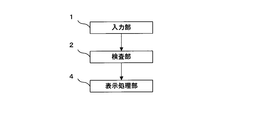
- FIG. 1 is a block diagram showing the configuration of the usability check result output device of this embodiment.
- the usability check result output device of the present embodiment includes an input unit 1, an inspection unit 2, a check rule storage unit 3, and a display processing unit 4.
- the input unit 1, the inspection unit 2, and the display processing unit 4 are realized by, for example, hardware designed to perform specific arithmetic processing or the like or an information processing device such as a CPU (Central Processing Unit) that operates according to a program.
- the check rule storage unit 3 is realized by a storage device such as a general HDD (Hard Disk Drive).
- the input unit 1 acquires screen information that defines the user interface of the screen to be inspected. For example, when the screen is a WEB page displayed on a general browser, the input unit 1 acquires an HTML (HyperText Markup Language) source as screen information.
- the input unit 1 may acquire screen information such as coordinate information, color information, and text information in the displayed screen from the browser.
- the screen to be inspected is not limited to a WEB page, but may be a screen that displays a user interface.
- the inspection unit 2 acquires the check rule from the check rule storage unit 3 and inspects whether the screen information acquired from the input unit 1 conforms to the check rule.
- the check rule storage unit 3 stores a check rule for inspecting the user interface on the screen.
- the check rule is, for example, a rule from the viewpoint of consistency regarding display and operation, ease of viewing information, and the like, and is stored in advance by a designer or the like.
- the check rule storage unit 3 stores an error message, a supplement message, a response method, and the like associated with each check rule.
- the check rule may be described in a program for causing the CPU to execute the operation of the inspection unit 2, and in that case, the check rule storage unit 3 is unnecessary.
- the display processing unit 4 displays a message box indicating an item that does not conform to the check rule in the inspection on the screen of the display device or the like, and displays the inspection result in the message box.
- the inspection result is, for example, an error message stored in the check rule storage unit 3.
- the display processing unit 4 may display the inspection result on a screen including an item that does not meet the check rule in the inspection, and does not necessarily have to display it using a message box indicating the item.
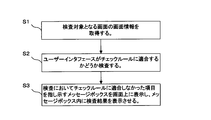
- FIG. 2 is a flowchart showing the operation of the usability check result output apparatus of this embodiment.
- the user sends an instruction for starting the inspection to the usability check result output apparatus.
- the display processing unit 4 may display a setting screen on which the user can make detailed settings for inspection.
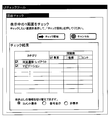
- FIG. 3 is an explanatory diagram illustrating an example of a setting screen. Specifically, for example, the user selects a category to be inspected on the setting screen as shown in FIG. 3 and presses a check start button.
- the setting screen is configured so that the user can select the contents to be checked according to the importance. In the example shown in FIG. 3, the user can select from three types of “important”, “recommended”, and “hint”.
- the setting screen may be configured such that the user can select the type of rule that the user wants to check. Also, as shown in FIG. 3, the number of problems (the number of items that do not conform to the check rule) may be displayed when an inspection to be described later is completed.
- the setting screen is configured so that the user can switch the display method of the check result. In the example illustrated in FIG. 3, the user can select a display method from three types of “comment display”, “number display”, and “non-display”.
- the input unit 1 acquires screen information that defines the user interface of the screen to be inspected (step S1).
- the input unit 1 acquires an HTML source.
- the input unit 1 may acquire coordinate information, color information, and text information in the screen from a browser, for example. Both a method of acquiring screen information from an HTML source and a method of acquiring from a browser may be used, or only one of them may be used.
- the input unit 1 uses a function of a general script language such as javascript (registered trademark) in order to acquire screen information such as coordinate information, color information, and text information in the screen from the browser. By acquiring screen information from the browser, the input unit 1 can also acquire information that cannot be acquired from HTML sources, such as the distance between text and buttons, the size of radio buttons, and the like.
- javascript registered trademark
- the inspection unit 2 acquires the check rule from the check rule storage unit 3 and checks whether the screen information acquired from the input unit 1 conforms to the check rule (step S2).
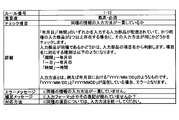
- FIG. 4 is an explanatory diagram illustrating an example of a check rule. As shown in FIG. 4, the design content of the check rule includes a rule number, importance, check item, error message, supplemental message, and handling method in addition to the details of the check rule.
- FIG. 5 is an explanatory diagram illustrating an example of a text box displayed on the screen.
- “YYYY / MM / DD” and “YYYYMMDD” are mixed as input methods for date. Therefore, the inspection unit 2 determines that there is an error based on the check rule shown in FIG.
- the display processing unit 4 displays a message box indicating an item that does not conform to the check rule in the inspection on the screen of a display device or the like, and displays the inspection result in the message box (step S3).
- the inspection result is, for example, an error message stored in the check rule storage unit 3 in association with the check rule.
- the display processing unit 4 uses the coordinate information of the screen acquired by the input unit 1 in order to determine the display position of the message box.
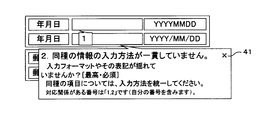
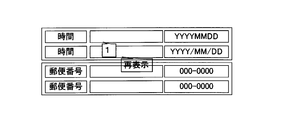
- FIG. 6 is an explanatory diagram showing an example of a screen on which the inspection result is displayed.
- the display processing unit 4 displays a message box indicating an item that does not match the check rule in the inspection, and displays an error message stored in the check rule storage unit 3.
- the user can easily check the problematic item compared to the case where the error message is displayed in a list. be able to.
- FIG. 7 is an explanatory diagram showing another example of a screen on which the inspection result is displayed.
- the display processing unit 4 displays detailed contents in the message box.
- the display processing unit 4 displays a supplemental message and a handling method in a message box as detailed contents.
- the display processing unit 4 may display the supplementary message and the corresponding method in the message box from the beginning. However, since other items are hidden, the supplementary message is displayed only when the mouse pointer is placed on the message box. It is preferable to display the corresponding method.
- the display processing unit 4 may transmit other message boxes excluding related message boxes. Thereby, it is possible to emphasize only those related to the message box selected by the user.
- the display processing unit 4 may display only a number in one message box and omit the message display. For example, in FIG. 6, since it is shown that the display method of the date is not consistent in two items, only the number (“1” in FIG. 7) is displayed in one item. In addition, a message box indicating the other item displays a description indicating a related number (“the numbers with corresponding relationship are“ 1 ”and“ 2 ”” in FIG. 7) ”. When all related messages are displayed, other items are hidden, so the display processing unit 4 displays only the numbers for the related items to minimize the range for hiding other items. Can do.
- the display processing unit 4 may display the message boxes in different colors according to the importance of the check rule. For example, the display processing unit 4 displays items with high importance in a conspicuous color such as red. As a result, the user can easily find a message regarding the check rule having a high importance.
- the display processing unit 4 may display the problem item in a red frame. Thereby, a problem item can be highlighted.
- the display processing unit 4 may display a list of inspection results and give a link to the corresponding screen in the list.
- the user can select and display only the part that the user wants to particularly check from the list of examination results.
- the display processing unit 4 may display a minimize button 41 in the message box as shown in FIG.
- the user presses the minimize button 41.
- FIG. 8 is an explanatory diagram showing an example of a screen on which a minimized message box is displayed. As shown in FIG. 8, by minimizing the message box, the user can refer to the items on the back. Also, as shown in FIG. 8, the minimized message box may be transparent. In the minimized message box, “redisplay” is described, and when the user clicks the message box, the message shown in FIG. 7 is redisplayed.
- the usability check result output apparatus of the present embodiment displays an error message so as to point to an item in the immediate vicinity of the problematic item, the user has a problem as compared with the case where the error message is displayed in a list. Items can be easily confirmed.
- FIG. 9 is a block diagram illustrating a configuration of the usability check result output apparatus according to the second embodiment.
- the functions of the input unit 1, the check rule storage unit 3, and the display processing unit 4 are the same as those in the first embodiment, and thus description thereof is omitted.
- the option setting unit 5 sets the inspection standard based on the user's selection. For example, the option setting unit 5 sets a reference screen based on a user's selection. In this case, the inspection unit 2 performs the inspection by comparing another screen with the reference screen.
- the option setting unit 5 may set detailed inspection criteria based on user input.
- the inspection unit 2 acquires a check rule from the check rule storage unit 3 and acquires setting contents from the option setting unit 5. The inspection unit 2 inspects whether the screen information acquired from the input unit 1 meets the inspection rule set by the check rule and option setting unit 5.
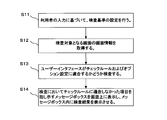
- FIG. 10 is a flowchart illustrating the operation of the usability check result output apparatus according to the second embodiment.
- the option setting unit 5 displays an option setting screen for accepting option settings related to inspection, and sets inspection criteria based on user input (step S11). For example, the option setting unit 5 sets a reference screen based on a user's selection. In this case, the inspection unit 2 performs the inspection by comparing another screen with the reference screen.
- the option setting unit 5 may set detailed inspection standards based on user input.
- FIG. 11 is an explanatory diagram showing an example of an option setting screen.
- the user decides a reference screen and wants to inspect by comparing another screen with the reference screen, the user presses the automatic setting button 51 while displaying the reference screen. Further, when the user wants to set the contents to be inspected, the user presses the setting button 52 for the desired item.
- FIG. 12 is an explanatory diagram showing an example of a check criteria setting screen.
- FIG. 12 is a screen displayed when the button arrangement order setting button 52 in FIG. 11 is pressed. For example, when there are three types of buttons having the button names “OK”, “Cancel”, and “Apply”, the user inputs the button names in the text boxes in the order in which they are to be arranged.
- the input unit 1 acquires screen information that defines the user interface of the screen to be inspected (step S12).
- the process of step S12 is the same as the process of step S1 in FIG.
- the inspection unit 2 acquires a check rule from the check rule storage unit 3 and acquires setting contents from the option setting unit 5.
- the inspection unit 2 inspects whether the screen information acquired from the input unit 1 meets the inspection rule set by the check rule and option setting unit 5 (step S13).
- the inspection unit 2 performs an inspection by comparing another screen with a reference screen, the reference screen and the inspection target screen regarding the inspection items such as the button position, the text content, and the background or character color And compare.
- the inspection unit 2 inspects the screen based on the criteria.
- the display processing unit 4 displays a message box on the screen indicating an item that does not conform to the check rule in the inspection, and displays the inspection result in the message box (step S14).
- the process of step S14 is the same as the process of step S3 in FIG.
- the usability check result output apparatus can inspect the screen according to the user's request because the user can freely customize the inspection method.
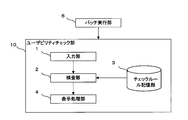
- FIG. FIG. 13 is a block diagram illustrating a configuration of a usability check result output apparatus according to the third embodiment.
- the usability check result output device of this embodiment includes a batch execution unit 6 and a usability check unit 10. Since the configuration in the usability check unit 10 is the same as the configuration shown in the first embodiment, description thereof is omitted.
- the batch execution unit 6 causes the usability check unit 10 to execute processing on a file in which a program that realizes a screen to be inspected is described.
- the batch execution unit 6 causes the usability check unit 10 to execute processing on screen information described in a source file such as HTML.
- the batch execution unit 6 may automatically display a screen to be inspected, automatically perform operations such as login and text input, and execute processing by the usability check unit 10 on the screen.
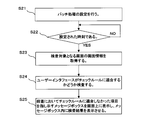
- FIG. 14 is a flowchart showing the operation of the usability check result output apparatus of this embodiment.
- the process from step S23 to step S25 is the same as the process from step S1 of 1st Embodiment to step S3, specific description is abbreviate
- the user performs settings related to batch processing (step S21). Specifically, the user sets a storage destination of a program file (for example, HTML) that realizes a screen to be inspected. Further, the user sets a time for executing the batch processing.
- a program file for example, HTML
- the batch execution unit 6 causes the usability check unit 10 to execute processing on the program file that realizes the screen to be inspected (YES in step S22) when the preset time is reached (YES in step S22) (steps S23 to S25).
- FIG. 15 is an explanatory diagram illustrating an example of batch processing.
- a user saves a source file such as HTML from a client-side PC (Personal computer) to a server repository.
- the batch execution unit 6 causes the usability check unit 10 to execute the process on the program file that realizes the screen to be inspected at a preset time.
- the inspection unit 2 performs inspection using only the source file without actually displaying the screen, and thus executable program files are limited.
- the inspection of the inspection unit 2 can be executed with respect to HTML but cannot be partially executed with respect to jsp, php, cgi, and the like.
- FIG. 16 is an explanatory diagram showing another example of batch processing.
- the user saves a source file such as HTML from the client PC to the server repository.
- the batch execution unit 6 causes the simulation processing unit 20 of the server to deploy the screen to be inspected at a preset time.
- an automatic test tool disclosed in Non-Patent Document 2 is used.
- the simulation processing unit 20 of the server automatically displays a screen to be inspected, and automatically performs operations such as login and text input.
- the batch execution part 6 performs the process by the usability check part 10 using the program file which implement
- the inspection unit 2 can inspect all the screens as in the case where the user manually performs the inspection.
- the usability check unit 10 of the present embodiment may include the option setting unit 5 described in the second embodiment. In this case, the user sets options before the batch is executed.
- the usability check result output device of the present embodiment for example, by setting the user to execute batch processing every night at night, it is possible to easily know the problems of the development stage screen that is changed daily. Can do. Moreover, according to the usability check result output apparatus of the present embodiment, it is possible to save the user from performing the inspection.
- FIG. 17 is a block diagram showing a configuration of a main part of the usability check result output apparatus according to the present invention.
- the usability check result output apparatus according to the present invention does not conform to the check rule, the input unit 1 for acquiring screen information of the screen to be inspected, the inspection unit 2 for inspecting the screen based on the check rules stored in advance.
- a display processing unit 4 that displays the inspection result on the screen is provided.
- a display processing unit (for example, display processing unit 4) displays a message box indicating an item that does not conform to the check rule on the screen, and first text information (for example, an error message) as an inspection result in the message box. ) Display usability check result output device. According to such a usability check result output device, the user can easily confirm the problematic item.
- the second text information indicating a more detailed examination result than the first text information in the message box may be displayed.
- the user can display a supplemental message, a response method, and the like as necessary.
- the usability check result output device may be configured such that the display processing unit displays a different color as the color of the message box according to the importance of the check rule. According to such a usability check result output device, the user can easily find a message related to a check rule with high importance.
- the usability check result output device includes an option setting unit (for example, option setting unit 5) for setting an inspection standard based on a user's selection, and the inspection unit is based on the check rule and the inspection standard.
- the screen information may be inspected. According to such a usability check result output apparatus, since the user can freely customize the inspection method, the screen can be inspected according to the user's desire.
- the usability check result output device stores the setting of the time for performing batch processing, and when the set time comes, the batch execution unit (for example, the processing of the input unit, the inspection unit, and the display processing unit) It may be configured to include a batch execution unit 6). According to such a usability check result output device, it is possible to save the user from performing the inspection.
- the present invention is used for checking the usability of the user interface of the WEB site.
Landscapes
- Engineering & Computer Science (AREA)
- General Engineering & Computer Science (AREA)
- Theoretical Computer Science (AREA)
- Physics & Mathematics (AREA)
- General Physics & Mathematics (AREA)
- Software Systems (AREA)
- Human Computer Interaction (AREA)
- Debugging And Monitoring (AREA)
- User Interface Of Digital Computer (AREA)
- Stored Programmes (AREA)
Abstract
Description
以下、本発明によるユーザビリティチェック結果出力装置の実施形態を、図面を参照して説明する。
図9は、第2の実施形態のユーザビリティチェック結果出力装置の構成を示すブロック図である。図9において、入力部1、チェックルール記憶部3および表示処理部4の機能は、第1の実施形態と同じであるため、説明を省略する。
図13は、第3の実施形態のユーザビリティチェック結果出力装置の構成を示すブロック図である。図13に示すように、本実施形態のユーザビリティチェック結果出力装置は、バッチ実行部6とユーザビリティチェック部10とを備える。ユーザビリティチェック部10内の構成は、第1の実施形態に示した構成と同じであるため、説明を省略する。
図15は、バッチ処理の例を示す説明図である。利用者は、クライアント側のPC(Personal computer)からサーバのリポジトリにHTML等のソースファイルを保存する。そして、バッチ実行部6は、予め設定された時刻になると、検査対象となる画面を実現するプログラムファイルに対し、ユーザビリティチェック部10による処理を実行させる。図15に示す例では、検査部2は、実際に画面を表示させずにソースファイルのみを用いて検査を行うため、実行可能なプログラムファイルが限られる。例えば、検査部2の検査は、HTMLに関しては実行可能であるがjsp、php、cgi等には一部実行できない。
2 検査部
3 チェックルール記憶部
4 表示処理部
5 オプション設定部
6 バッチ実行部
Claims (10)
- 検査対象の画面の画面情報を取得し、
予め記憶されたチェックルールに基づいて、前記画面の検査を行い、
前記チェックルールに適合しない項目がある場合、前記画面上に検査結果を表示する
ことを特徴とするユーザビリティチェック結果出力方法。 - チェックルールに適合しない項目を指し示すメッセージボックスを画面上に表示し、前記メッセージボックス内に検査結果として第1のテキスト情報を表示する
請求項1記載のユーザビリティチェック結果出力方法。 - メッセージボックスの上にマウスポインタが置かれた場合、当該メッセージボックス内に第1のテキスト情報より詳細な検査結果を示す第2のテキスト情報を表示する
請求項2記載のユーザビリティチェック結果出力方法。 - チェックルールの重要度に応じて異なる色を、メッセージボックスの色として表示する
請求項2または請求項3記載のユーザビリティチェック結果出力方法。 - 利用者の選択に基づいて、検査基準の設定を行い、
チェックルールおよび前記検査基準に基づいて画面情報の検査を行う
請求項1から請求項4のうちのいずれか1項に記載のユーザビリティチェック結果出力方法。 - バッチ処理を行う時刻の設定を記憶し、設定された時刻になった場合、画面情報の取得処理、画面の検査処理および検査結果の表示処理を実行させる
請求項1から請求項5のうちのいずれか1項に記載のユーザビリティチェック結果出力方法。 - 検査対象の画面の画面情報を取得する入力部と、
予め記憶されたチェックルールに基づいて、前記画面の検査を行う検査部と、
前記チェックルールに適合しない項目がある場合、前記画面上に検査結果を表示する表示処理部とを備えた
ことを特徴とするユーザビリティチェック結果出力装置。 - 表示処理部は、チェックルールに適合しない項目を指し示すメッセージボックスを画面上に表示し、前記メッセージボックス内に検査結果として第1のテキスト情報を表示する
請求項7記載のユーザビリティチェック結果出力装置。 - コンピュータに、
検査対象の画面の画面情報を取得する入力処理と、
予め記憶されたチェックルールに基づいて、前記画面の検査を行う検査処理と、
前記チェックルールに適合しない項目がある場合、前記画面上に検査結果を表示する表示処理とを
実行させるためのユーザビリティチェック結果出力プログラム。 - コンピュータに、
表示処理で、チェックルールに適合しない項目を指し示すメッセージボックスを画面上に表示させ、前記メッセージボックス内に検査結果として第1のテキスト情報を表示させる
請求項9記載のユーザビリティチェック結果出力プログラム。
Priority Applications (2)
| Application Number | Priority Date | Filing Date | Title |
|---|---|---|---|
| US14/778,736 US20160048315A1 (en) | 2013-03-19 | 2014-01-10 | Usability-check-result output method, device, and program |
| JP2015506566A JPWO2014147923A1 (ja) | 2013-03-19 | 2014-01-10 | ユーザビリティチェック結果出力方法、装置およびプログラム |
Applications Claiming Priority (2)
| Application Number | Priority Date | Filing Date | Title |
|---|---|---|---|
| JP2013056650 | 2013-03-19 | ||
| JP2013-056650 | 2013-03-19 |
Publications (1)
| Publication Number | Publication Date |
|---|---|
| WO2014147923A1 true WO2014147923A1 (ja) | 2014-09-25 |
Family
ID=51579632
Family Applications (1)
| Application Number | Title | Priority Date | Filing Date |
|---|---|---|---|
| PCT/JP2014/000084 Ceased WO2014147923A1 (ja) | 2013-03-19 | 2014-01-10 | ユーザビリティチェック結果出力方法、装置およびプログラム |
Country Status (3)
| Country | Link |
|---|---|
| US (1) | US20160048315A1 (ja) |
| JP (1) | JPWO2014147923A1 (ja) |
| WO (1) | WO2014147923A1 (ja) |
Cited By (1)
| Publication number | Priority date | Publication date | Assignee | Title |
|---|---|---|---|---|
| KR20200092452A (ko) * | 2019-01-04 | 2020-08-04 | 울산과학기술원 | Gui 디자인에 대한 피드백을 제공하는 방법 및 장치 |
Citations (4)
| Publication number | Priority date | Publication date | Assignee | Title |
|---|---|---|---|---|
| JPH05150953A (ja) * | 1991-11-30 | 1993-06-18 | Nec Corp | コンソール装置 |
| JP2008234011A (ja) * | 2007-03-16 | 2008-10-02 | Hitachi Ltd | 設計ルール管理方法、設計ルール管理プログラム、ルール構築装置およびルールチェック装置 |
| JP2010218303A (ja) * | 2009-03-17 | 2010-09-30 | Nec Corp | Gui評価結果提示装置、gui評価結果提示方法およびgui評価結果提示プログラム |
| JP2011227884A (ja) * | 2010-03-31 | 2011-11-10 | Broadband Security Inc | ファイルのアップロード遮断システム及びファイルのアップロード遮断方法 |
Family Cites Families (7)
| Publication number | Priority date | Publication date | Assignee | Title |
|---|---|---|---|---|
| JP2570592B2 (ja) * | 1993-09-17 | 1997-01-08 | 日本電気株式会社 | インタラクティブ型マルチウインドウプログラム自動テスト装置 |
| US6782510B1 (en) * | 1998-01-27 | 2004-08-24 | John N. Gross | Word checking tool for controlling the language content in documents using dictionaries with modifyable status fields |
| US6611802B2 (en) * | 1999-06-11 | 2003-08-26 | International Business Machines Corporation | Method and system for proofreading and correcting dictated text |
| US7100119B2 (en) * | 2002-11-01 | 2006-08-29 | Microsoft Corporation | Page bar control |
| JP4788840B2 (ja) * | 2008-09-29 | 2011-10-05 | 日本電気株式会社 | Gui評価システム、gui評価方法およびgui評価用プログラム |
| JP4793511B2 (ja) * | 2008-09-29 | 2011-10-12 | 日本電気株式会社 | Gui評価システム、gui評価方法およびgui評価プログラム |
| JP2010273457A (ja) * | 2009-05-21 | 2010-12-02 | Toshiba Corp | 広域分散型電力系統監視制御システム |
-
2014
- 2014-01-10 JP JP2015506566A patent/JPWO2014147923A1/ja active Pending
- 2014-01-10 US US14/778,736 patent/US20160048315A1/en not_active Abandoned
- 2014-01-10 WO PCT/JP2014/000084 patent/WO2014147923A1/ja not_active Ceased
Patent Citations (4)
| Publication number | Priority date | Publication date | Assignee | Title |
|---|---|---|---|---|
| JPH05150953A (ja) * | 1991-11-30 | 1993-06-18 | Nec Corp | コンソール装置 |
| JP2008234011A (ja) * | 2007-03-16 | 2008-10-02 | Hitachi Ltd | 設計ルール管理方法、設計ルール管理プログラム、ルール構築装置およびルールチェック装置 |
| JP2010218303A (ja) * | 2009-03-17 | 2010-09-30 | Nec Corp | Gui評価結果提示装置、gui評価結果提示方法およびgui評価結果提示プログラム |
| JP2011227884A (ja) * | 2010-03-31 | 2011-11-10 | Broadband Security Inc | ファイルのアップロード遮断システム及びファイルのアップロード遮断方法 |
Cited By (2)
| Publication number | Priority date | Publication date | Assignee | Title |
|---|---|---|---|---|
| KR20200092452A (ko) * | 2019-01-04 | 2020-08-04 | 울산과학기술원 | Gui 디자인에 대한 피드백을 제공하는 방법 및 장치 |
| KR102225356B1 (ko) * | 2019-01-04 | 2021-03-09 | 울산과학기술원 | Gui 디자인에 대한 피드백을 제공하는 방법 및 장치 |
Also Published As
| Publication number | Publication date |
|---|---|
| US20160048315A1 (en) | 2016-02-18 |
| JPWO2014147923A1 (ja) | 2017-02-16 |
Similar Documents
| Publication | Publication Date | Title |
|---|---|---|
| US9805007B2 (en) | Visual state comparator | |
| US8312450B2 (en) | Widgetizing a web-based application | |
| Wang et al. | SNPEVG: a graphical tool for GWAS graphing with mouse clicks | |
| US10614156B1 (en) | System and method for using a dynamic webpage editor | |
| US20090019133A1 (en) | System, method and computer program for updating a web page in a web browser | |
| US20120278698A1 (en) | Method and system for processing a webpage | |
| CN103793224B (zh) | 一种窗口的显示方法和装置 | |
| JP6045050B2 (ja) | ユーザインタフェース一貫性チェック方法、装置およびプログラム | |
| WO2013058081A1 (ja) | 業務支援装置、業務支援システム、業務支援方法およびプログラムを記録した記録媒体 | |
| CN114442892B (zh) | 页面信息分析方法、装置、电子设备和计算机可读介质 | |
| US10970088B2 (en) | User interface help control device, and information storage medium | |
| WO2014147923A1 (ja) | ユーザビリティチェック結果出力方法、装置およびプログラム | |
| JP2020129392A5 (ja) | ||
| US20150347354A1 (en) | Discrete source code timelines | |
| JP6068639B2 (ja) | ユーザインタフェース検査方法、装置およびプログラム | |
| Czerniak et al. | The Influence of task-oriented human-machine interface design on usability objectives | |
| JP7563480B2 (ja) | ユーザインタフェース拡張システム、ユーザインタフェース拡張方法及びユーザインタフェース拡張プログラム | |
| CN114442890A (zh) | 用于移动端网页的信息分析方法、装置、设备和可读介质 | |
| KR20170047605A (ko) | 솔루션의 테스트 자동화 시스템 및 방법 | |
| EP4592850A1 (en) | System, method, and program for testing website | |
| US11810229B2 (en) | Graph display device having display control function for converting two-dimensional graph to three-dimensional graph and displaying three-dimensional graph, and corresponding graph display method and nontransitory computer readable recording medium | |
| US12554544B2 (en) | Framework for provisioning an application resource for an application in use with a controlled content repository | |
| Jackson et al. | Vissurvey. js-a web based javascript application for visualisation evaluation user studies | |
| Perez et al. | GO-Ship software and manuals | |
| Roberts et al. | VisSurvey. js–A Web Based Javascript Application for visualisation Evaluation User Studies |
Legal Events
| Date | Code | Title | Description |
|---|---|---|---|
| 121 | Ep: the epo has been informed by wipo that ep was designated in this application |
Ref document number: 14767560 Country of ref document: EP Kind code of ref document: A1 |
|
| ENP | Entry into the national phase |
Ref document number: 2015506566 Country of ref document: JP Kind code of ref document: A |
|
| NENP | Non-entry into the national phase |
Ref country code: DE |
|
| WWE | Wipo information: entry into national phase |
Ref document number: 14778736 Country of ref document: US |
|
| 122 | Ep: pct application non-entry in european phase |
Ref document number: 14767560 Country of ref document: EP Kind code of ref document: A1 |