WO2014109398A1 - 表示装置及びプログラム - Google Patents
表示装置及びプログラム Download PDFInfo
- Publication number
- WO2014109398A1 WO2014109398A1 PCT/JP2014/050357 JP2014050357W WO2014109398A1 WO 2014109398 A1 WO2014109398 A1 WO 2014109398A1 JP 2014050357 W JP2014050357 W JP 2014050357W WO 2014109398 A1 WO2014109398 A1 WO 2014109398A1
- Authority
- WO
- WIPO (PCT)
- Prior art keywords
- image
- display
- unit
- display device
- object obj
- Prior art date
- Legal status (The legal status is an assumption and is not a legal conclusion. Google has not performed a legal analysis and makes no representation as to the accuracy of the status listed.)
- Ceased
Links
Images















Classifications
-
- H—ELECTRICITY
- H04—ELECTRIC COMMUNICATION TECHNIQUE
- H04N—PICTORIAL COMMUNICATION, e.g. TELEVISION
- H04N13/00—Stereoscopic video systems; Multi-view video systems; Details thereof
- H04N13/10—Processing, recording or transmission of stereoscopic or multi-view image signals
- H04N13/106—Processing image signals
- H04N13/128—Adjusting depth or disparity
-
- H—ELECTRICITY
- H04—ELECTRIC COMMUNICATION TECHNIQUE
- H04N—PICTORIAL COMMUNICATION, e.g. TELEVISION
- H04N13/00—Stereoscopic video systems; Multi-view video systems; Details thereof
- H04N13/30—Image reproducers
- H04N13/302—Image reproducers for viewing without the aid of special glasses, i.e. using autostereoscopic displays
-
- H—ELECTRICITY
- H04—ELECTRIC COMMUNICATION TECHNIQUE
- H04N—PICTORIAL COMMUNICATION, e.g. TELEVISION
- H04N13/00—Stereoscopic video systems; Multi-view video systems; Details thereof
- H04N13/30—Image reproducers
- H04N13/332—Displays for viewing with the aid of special glasses or head-mounted displays [HMD]
- H04N13/344—Displays for viewing with the aid of special glasses or head-mounted displays [HMD] with head-mounted left-right displays
Definitions
- the present invention relates to a display device and a program.
- the present application is Japanese Patent Application No. 2013-2868 filed on January 10, 2013, Japanese Patent Application No. 2013-72375 filed on March 29, 2013, and Japanese Patent Application 2013 filed on January 10, 2013. -2870, claiming priority based on Japanese Patent Application No. 2013-2869 filed on January 10, 2013, the contents of which are incorporated herein.
- a plurality of images with ratios of pixel values for example, brightness, luminance, hue, saturation
- pixel values for example, brightness, luminance, hue, saturation
- a display method in which a user who sees a plurality of images superimposed on each other feels (perceives) a stereoscopic effect see, for example, Patent Document 1.
- two images with a luminance ratio according to the depth position of a three-dimensional image are displayed on the front display surface and the back display surface at different depth positions. By generating binocular parallax, the user can perceive a stereoscopic effect.
- the image displayed on the display surface can be made to feel a three-dimensional effect.
- the three-dimensional effect of the object is emphasized. There was a problem that users could not even make it feel.
- the display method as described above has a problem that it is impossible to change the stereoscopic effect of an object (display target) based on a user instruction.
- Patent Document 2 simply follows a moving object and shoots and displays it as a stereoscopic image (three-dimensional image). Therefore, even if the background changes according to the movement of the target, there is a problem that the user may not be able to feel the sense of depth of the target according to the change of the background.
- a stereoscopic image having a depth width corresponding to the distance between the display surface in front of the depth position and the display surface in the back as viewed from the user is perceived by the user. That is, in the display method as described above, the maximum depth width (maximum depth width) of a three-dimensional image that can be expressed depends on the distance between the display surface in the depth direction and the display surface in the back. ing.
- An object of an aspect of the present invention is to provide a display device that can enhance the stereoscopic effect of an object that a user feels when viewing the object.
- Another object is to provide a display device that can change the stereoscopic effect of an object (display target) based on a user instruction.
- Another object is to provide a display device and a program that can display the object so that the user can feel the depth of the object.
- Another object is to provide a display device capable of expanding the depth width of a stereoscopic image perceived by the user.
- a transmissive display unit an imaging unit that images a predetermined object and generates an image, and the image generated by the predetermined object and the imaging unit overlap each other.
- the display control unit is configured to display the image generated by the imaging unit on the display unit.
- a program includes a transmission type display unit, and an imaging unit that captures an image of a predetermined object and generates an image.
- a display control step for displaying the image generated by the imaging unit on the display unit is executed so that the image generated by the above-mentioned image overlaps with the image generated by the imaging unit.
- a display device is based on a transmissive display unit, an imaging unit that captures an image of a first object and generates an image, and information on a second object that is different from the first object.
- a control unit that causes the display unit to display the image generated by the imaging unit such that the first object and the image generated by the imaging unit overlap each other.
- a program different from the first object in a computer of a display device that includes a transmissive display unit and an imaging unit that captures an image of the first object and generates an image. Based on the information regarding the two objects, a control step is executed to display the image generated by the imaging unit on the display unit so that the first target and the image generated by the imaging unit overlap.
- the display device includes a transmissive display unit, a position setting unit that sets a depth position of an image displayed by the display unit based on a depth position of the object, and the object.
- a display control unit configured to display an image indicating the object on the display unit so that the image and the object overlap each other;
- a program includes a position setting step for setting a depth position of an image displayed on the display unit based on a depth position of an object on a computer of a display device having a transmissive display unit. And a display control step of causing the display unit to display an image indicating the object such that the image indicating the object and the object overlap each other.
- the aspect of the present invention it is possible to emphasize the stereoscopic effect of an object that the user feels when viewing the object.
- the three-dimensional effect of an object can be changed based on a user's instruction.
- it can display so that the depth feeling of object can be actualized more.
- the depth width of the stereoscopic image perceived by the user can be expanded.
- movement of the display apparatus of this embodiment It is a schematic diagram which shows an example of a structure of the display apparatus by the 11th Embodiment of this invention. It is a schematic diagram which shows an example of the binocular parallax image which the display apparatus of this embodiment displays. It is a schematic diagram which shows an example of a structure of the display apparatus by the 12th Embodiment of this invention. It is a schematic diagram which shows an example of a structure of the modification of the display apparatus of this embodiment. It is a schematic diagram which shows the example of application of a display apparatus.
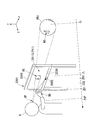
- FIG. 1 is a schematic diagram illustrating an example of a schematic configuration of the display device 10 according to the first embodiment of the present invention.
- the display device 10 of the present embodiment is a device including a head-up display (HUD) provided in the vehicle 20, for example.
- HUD head-up display
- an XYZ rectangular coordinate system is set, and the positional relationship of each part will be described with reference to this XYZ rectangular coordinate system.
- a direction in which the display device 10 displays an image is a positive direction of the Z axis, and orthogonal directions on a plane perpendicular to the Z axis direction are an X axis direction and a Y axis direction, respectively.
- the X-axis direction is the horizontal direction of the display device 10
- the Y-axis direction is the vertical upward direction of the display device 10.
- the vehicle 20 travels with the ( ⁇ Z) direction as the traveling direction.
- the display device 10 displays an image on the display surface 105 which is a part (or all) of the windshield WS of the vehicle 20.
- the image displayed on the display surface 105 is the ( ⁇ Z) direction from the position of the display surface 105 when an observer (a user of the display device 10 such as the driver of the vehicle 20) views from the viewpoint position VP. It is an image which produces the virtual image VI in the position distant from this.
- the viewpoint position VP is the position of the eyes of the observer sitting on the driver's seat.
- the display device 10 displays an image indicating an object (display target) OBJ in the ( ⁇ Z) direction that is the traveling direction of the vehicle 20 as a virtual image VI.
- the object OBJ is, for example, a road sign RS indicating a speed limit of a road on which the vehicle 20 travels.
- the display device 10 includes an imaging unit 101, a display control unit 103, and a display unit 104.
- the imaging unit 101 is attached to a predetermined position in the passenger compartment of the vehicle 20, and captures an image in the ( ⁇ Z) direction that is the traveling direction of the vehicle 20 through the windshield WS to generate an image.
- the imaging unit 101 when there is a road sign RS indicating the speed limit in the traveling direction of the vehicle 20, the imaging unit 101 generates an image including the road sign RS. That is, the imaging unit 101 captures an image of a predetermined object OBJ and generates an image (object image) including an image of the predetermined object OBJ.
- the display control unit 103 includes a detection unit 102.
- the detection unit 102 detects the object OBJ when an image of the object OBJ to be detected is included in the image generated by imaging by the imaging unit 101. Specifically, the detection unit 102 uses the pixel value pattern of the object OBJ (for example, the road sign RS) stored in advance in the storage unit 106 and the pixel value pattern in the image generated by the imaging unit 101. Compare. Next, the detection unit 102 detects an image of the detection target object OBJ included in the image generated by the imaging unit 101 based on the comparison result of the pixel value patterns. As described above, when the object OBJ to be detected is the road sign RS, the detection unit 102 detects an image of a portion indicating the road sign from the image generated by the imaging unit 101.
- the detection unit 102 detects an image of a portion indicating the road sign from the image generated by the imaging unit 101.
- the display control unit 103 generates an image to be displayed on the display unit 104 based on the image indicating the object OBJ (for example, the road sign RS) detected by the detection unit 102. At this time, when the display unit 104 displays the virtual image VI, the display control unit 103 causes the road sign RS as the object OBJ to overlap the image of the road sign RS indicated by the virtual image VI when viewed from the viewpoint position VP. Thus, an image (object image) including an image indicating the road sign RS is generated.
- the display control unit 103 views the direction of the predetermined object OBJ from the predetermined viewpoint position VP via the display unit 104, the image of the predetermined object OBJ by the light transmitted through the display unit 104 and the imaging unit The object image is displayed on the display unit 104 so that the image of the predetermined object OBJ included in the object image generated by the image 101 overlaps. That is, when the display control unit 103 looks at the direction of the predetermined object OBJ from the predetermined viewpoint position VP, the apparent size of the image of the predetermined object OBJ and the image of the road sign RS by the virtual image VI is the same.
- An object image is generated so that
- the virtual image VI is displayed at a depth position between the depth position of the object OBJ (position in the Z-axis direction) and the depth position of the viewpoint position VP. Accordingly, when the image of the predetermined object OBJ and the image of the road sign RS by the virtual image VI appear to overlap each other when viewed from the viewpoint position VP, the road by the virtual image VI is larger than the size of the image of the predetermined object OBJ. The size of the image of the sign RS is small.
- the display control unit 103 determines the size of the image of the object OBJ so that the apparent size of the image of the predetermined object OBJ viewed from the viewpoint position VP and the image of the road sign RS by the virtual image VI are the same.
- the object image is generated by reducing the size of the image of the object OBJ from the virtual image VI.
- the display unit 104 projects an image indicating the road sign RS generated by the display control unit 103 onto the display surface 105 of the windshield WS.
- the driver of the vehicle 20 recognizes the virtual image VI indicating the road sign RS when the image displayed on the display surface 105 by the display unit 104 is viewed from the viewpoint position VP.
- the virtual image VI indicating the road sign RS and the road sign RS as the object OBJ overlap. Looks like.
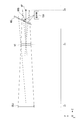
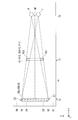
- FIG. 2 is a schematic diagram illustrating an example of a positional relationship between the virtual image VI and the object OBJ displayed by the display unit 104 according to the present embodiment.
- the position Z 0 is a position in the Z-axis direction of the viewpoint position VP.
- the position Z 1 the virtual image VI (e.g., an image showing a road sign RS) is the position of the Z-axis direction
- the position Z 2 the position of the Z-axis direction of the object OBJ (e.g., road signs RS) It is.
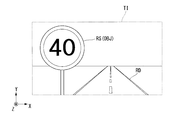
- FIG. 3 is a schematic diagram illustrating an example of an image TI captured by the imaging unit 101 of the present embodiment.
- the imaging unit 101 generates an image obtained by imaging the traveling direction of the vehicle 20 as described above. Specifically, when there is a road RD and a road sign RS in the traveling direction of the vehicle 20, the imaging unit 101 indicates a road sign indicating the road RD in the traveling direction of the vehicle 20 and the speed limit of the vehicle 20. An image including RS is generated.
- the road sign RS is an object OBJ that is predetermined as a detection target of the detection unit 102.
- the object OBJ (e.g., road signs RS) is in a position Z 2. In other words, the imaging unit 101 generates an image including the road sign RS at position Z 2.
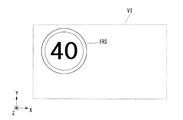
- FIG. 4 is a schematic diagram illustrating an example of a virtual image VI displayed by the display unit 104 of the present embodiment.
- the virtual image VI is an image indicating the object OBJ (for example, the road sign RS) detected by the detection unit 102.
- the display unit 104 projects an image IRS indicating the road sign RS detected by the detection unit 102 onto the display surface 105 of the windshield WS.
- the display unit 104 includes a virtual image optical system such as a lens.
- the display device 10 superimposes and displays the object OBJ and the virtual image VI (for example, the image IRS indicating the road sign RS) indicating the object OBJ.
- a stereoscopic effect can be given to the object OBJ observed by the observer (for example, the driver of the vehicle 20). That is, when the observer sees the object OBJ and the virtual image VI indicating the object OBJ in an overlapping manner, the observer recognizes a stereoscopic image in which the object OBJ jumps out in the Z-axis direction.
- a mechanism for giving a viewer a stereoscopic effect with the virtual image VI displayed by the display device 10 will be described with reference to FIGS.
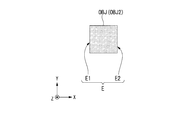
- FIG. 5 is a schematic diagram illustrating an example of the object OBJ of the present embodiment.
- the object OBJ may be the road sign RS, but here, the case where the object OBJ is a square pattern will be described as an example.
- This square pattern is a square pattern in which four sides of equal length intersect at right angles at each vertex.
- This rectangular pattern has four sides as contour lines that separate the outside and the inside of the rectangular pattern.
- An observer who sees the square pattern recognizes the contour line as the edge portion E of the square pattern when the difference in brightness between the outside and the inside of the square pattern is large. That is, the edge portion E is a portion of the object OBJ in which the difference in ambient brightness is relatively larger than the difference in brightness in other portions.
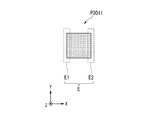
- each side can be an edge portion E, but here, of each edge portion E, two sides parallel to the Y-axis direction of the square pattern are respectively edge portions E1 (left side edge portions).
- the edge portion E2 (right side edge portion) will be described.
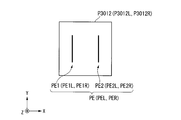
- FIG. 6 is a schematic diagram illustrating an example of the virtual image VI of the present embodiment.
- the virtual image VI is an image including an edge image PE1 indicating the edge portion E1 of the rectangular pattern and an edge image PE2 indicating the edge portion E2. That is, when the object OBJ is a square pattern as described above, the display unit 104 displays the virtual image VI including the edge image PE1 and the edge image PE2 corresponding to the edge portion E1 and the edge portion E2, respectively.
- the edge image PE is described as an image showing the edge portions of the left side and the right side of the quadrangle, but is not limited thereto.
- the edge image PE may be an image showing the edge portions of the upper side and the lower side of the rectangle, or may be an image showing the edge portions of all the sides of the rectangle.
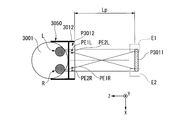
- FIG. 7 is a schematic diagram illustrating an example of a positional relationship among the object OBJ, the virtual image VI, and the viewpoint position VP in the present embodiment.
- the viewpoint position VP at a position Z see superimposed and the virtual image VI in the position Z 1, and the object OBJ at the position Z 2.
- the virtual image VI is an image including the edge image PE1 and the edge image PE2 corresponding to the edge portion E1 and the edge portion E2 of the square pattern as the object OBJ.
- the position in the X direction of the edge portion E1 of the square pattern is the position X2
- the position in the X direction of the edge portion E2 is the position X5.
- the display unit 104 displays the virtual image VI so that the edge portion E1 at the position X2 and the edge image PE1 of the virtual image VI appear to overlap at the viewpoint position VP.
- the display unit 104 displays the virtual image VI so that the edge portion E2 at the position X5 and the edge image PE2 of the virtual image VI appear to overlap at the viewpoint position VP.
- the observer superimposes the virtual image VI displayed in this way and the object OBJ (for example, a square pattern), a step with such a small luminance that cannot be recognized on the retina image of the observer is formed.
- a virtual contour edge
- steps of brightness for example, luminance
- the virtual image VI and the object OBJ are recognized as one object.
- the virtual contour is slightly shifted and perceived as binocular parallax.
- the apparent depth position of the object OBJ changes.
- the optical image IML viewed by the left eye L and the optical image IMR viewed by the right eye R will be described in this order, and a mechanism for changing the apparent depth position of the object OBJ will be described.
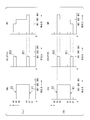
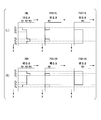
- FIG. 8 is a schematic diagram illustrating an example of an optical image IM that is visible to the left and right eyes of the observer in the present embodiment.
- FIG. 8 (L) is a schematic diagram showing an example of an optical image IML that can be seen by the left eye L of the observer.
- the edge image PE 1 and the edge portion E 1 are in the range from the position X 2 to the position X 3. Appear to overlap.
- edge portion E1 of the square pattern is located at the position X2, the edge image PE1 and the edge portion E1 are located on the left eye L of the observer inside the square pattern (in the + X direction) than the edge portion E1.
- Appear to overlap Further, at the position of the left eye L of the viewpoint position VP at a position Z 0, looking at the object OBJ and the virtual image VI, edge image PE2 and the edge E2 is visible overlap in the region of the position X5 ⁇ position X6.
- the edge portion E2 of the square pattern is at the position X5, the edge image PE2 and the edge portion E2 are outside the square pattern (+ X direction) than the edge portion E2 in the left eye L of the observer.
- Appear to overlap since the edge portion E2 of the square pattern is at the position X5, the edge image PE2 and the edge portion E2 are outside the square pattern (+ X direction) than the edge portion E2 in the left eye L of the observer.
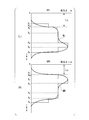
- FIG. 9 is a graph showing an example of the brightness of the optical image IM at the viewpoint position VP of the present embodiment.
- 9L is a graph showing an example of the brightness of the optical image IML at the position of the left eye L at the viewpoint position VP.
- an optical image IML having a brightness obtained by combining the brightness of the object OBJ and the brightness of the virtual image VIL seen from the position of the left eye L is generated.
- the brightness inside the square pattern viewed from the viewpoint position VP is brightness BR2.
- the brightness outside the rectangular pattern viewed from the viewpoint position VP is brightness 0 (zero).
- the position of the edge portion E1 of the pattern square at the position Z 2 is the position X2
- the position of the edge portion E2 is the position X5.
- the brightness viewed from the viewpoint position VP of the square pattern is the brightness BR2 at the positions X2 to X5, and the brightness at the positions from the position X2 to the ( ⁇ X) direction and from the position X5 to the (+ X) direction. 0 (zero).
- the brightness viewed from the viewpoint position VP of the edge image PE1 and the edge image PE2 of the virtual image VI is brightness BR1.
- the edge image PE1 of the virtual image VIL seen from the position of the left eye L is displayed so as to overlap the edge portion E1 of the square pattern in the range of the position X2 to the position X3.
- the edge image PE2 of the virtual image VIL is displayed so as to overlap with the edge portion E2 of the square pattern in the range from the position X5 to the position X6. Therefore, the brightness of the virtual image VIL viewed from the viewpoint position VP is brightness BR1 at positions X2 to X3 and positions X5 to X6, and brightness 0 (zero) at other positions in the X direction.
- the brightness of the optical image IML is brightness BR3 from position X2 to position X3, brightness BR2 from position X3 to position X5, brightness BR1 from position X5 to position X6, ( ⁇ X) direction from position X2, and position.
- the brightness is 0 (zero) at a position in the (+ X) direction from X6.
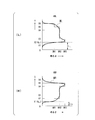
- FIG. 10 is a graph illustrating an example of a contour portion of the object OBJ that the observer recognizes based on the optical image IM in the present embodiment.
- FIG. 10 (L) is a graph showing an example of a contour portion of the object OBJ recognized by the observer based on the optical image IML at the position of the left eye L of the observer.
- the contour portion of the object OBJ is a portion in which the change in brightness is larger than the change in brightness in the surrounding portions in the portion of the optical image showing the object OBJ.
- the distribution of brightness of the image recognized by the observer by the optical image IML formed on the retina of the left eye L of the observer at the viewpoint position VP is as shown by a waveform WL in FIG. .
- the observer observes the position on the X-axis where the change in the brightness of the recognized optical image IML is maximized (that is, the gradient of the waveform WL is maximized) on the contour portion of the object OBJ being observed. Recognize that there is.
- the observer observing the optical image IML sets the X EL position (that is, the position of the distance L EL from the origin O of the X axis) shown in FIG. Recognize that
- optical image IML that can be seen by the left eye L of the observer and the position of the contour portion by the optical image IML have been described.
- optical image IMR that can be seen by the observer's right eye R and the position of the contour portion by the optical image IMR will be described.
- FIG. 8R is a schematic diagram illustrating an example of an optical image IMR that is visible to the right eye R of the observer in the present embodiment.
- the edge image PE 1 and the edge portion E 1 are located at positions X 1 to X. It appears to overlap in the range of X2. This is different from the position X2 to the position X3 in which the edge image PE1 and the edge portion E1 appear to overlap each other at the position of the left eye L.
- edge portion E1 of the rectangular pattern is at the position X2
- the edge image PE1 and the edge portion E1 are located outside the rectangular pattern from the edge portion E1 in the right eye R of the observer ( -X direction) appears to overlap. This is different from the fact that the edge image PE1 and the edge portion E1 appear to overlap with the left eye L of the observer at a position inside the square pattern (in the + X direction) than the edge portion E1.
- the edge image PE1 and the edge portion E1 is visible overlap in a range of positions X4 ⁇ position X5. This is different from the fact that when the object OBJ and the virtual image VI are viewed at the position of the left eye L, the edge image PE1 and the edge portion E1 appear to overlap in the range from the position X5 to the position X6. Further, as described above, since the edge portion E2 of the square pattern is located at the position X5, the edge image PE2 and the edge portion E2 are located on the right eye R of the observer inside the square pattern (see FIG. -X direction) appears to overlap. This is different from the fact that the left image L of the observer appears to overlap the edge image PE2 and the edge portion E2 at a position outside the square pattern (in the + X direction) with respect to the edge portion E2.
- FIG. 9R is a graph illustrating an example of the brightness of the optical image IMR at the position of the right eye R at the viewpoint position VP.
- an optical image IMR having a brightness obtained by combining the brightness of the object OBJ and the brightness of the virtual image VIR seen from the position of the right eye R is generated.
- the brightness viewed from the viewpoint position VP of the rectangular pattern as the object OBJ is the same as the brightness at the position of the left eye L.
- a specific example of brightness viewed from the viewpoint position VP of the virtual image VIR will be described.
- the brightness viewed from the viewpoint position VP of the edge image PE1 and the edge image PE2 of the virtual image VIR is brightness BR1.
- the edge image PE1 of the virtual image VIR seen from the position of the right eye R is displayed so as to overlap the edge portion E1 of the square pattern in the range of the position X1 to the position X2.
- the edge image PE1 of the virtual image VIL seen from the position of the left eye L is displayed so as to overlap the edge portion E1 of the square pattern in the range from the position X2 to the position X3.
- the edge image PE2 of the virtual image VIR is displayed so as to overlap the edge portion E2 of the square pattern in the range of the position X4 to the position X5.
- the edge image PE2 of the virtual image VIL is displayed so as to overlap the edge portion E2 of the square pattern in the range of the position X5 to the position X6.
- the brightness viewed from the viewpoint position VP of the virtual image VIR is brightness BR1 at positions X1 to X2 and position X4 to position X5, and brightness 0 (zero) at other positions in the X direction.
- the brightness of the optical image IMR is brightness BR1 from position X1 to position X2, brightness BR2 from position X2 to position X4, brightness BR3 from position X4 to position X5, ( ⁇ X) direction from position X1, and position.
- the brightness is 0 (zero) at the position in the (+ X) direction from X5.
- This is different from the brightness of the optical image IML in that the position X2 to position X3 is brightness BR3, the position X3 to position X5 is brightness BR2, and the position X5 to position X6 is brightness BR1.
- FIG. 10R is a graph showing an example of a contour portion of the object OBJ recognized by the observer based on the optical image IMR at the position of the observer's right eye R.
- the distribution of brightness of the image recognized by the observer by the optical image IMR formed on the retina of the right eye R of the observer at the viewpoint position VP is as shown by a waveform WR in FIG. .
- the observer observes the position on the X axis where the change in the brightness of the recognized optical image IMR is maximized (that is, the gradient of the waveform WR is maximized) at the contour of the object OBJ being observed. Recognize that there is. Specifically, an observer is observing an optical image IMR, the position of the X ER shown in FIG. 10 (R) (i.e., the origin O of the distance L ER of position in the X-axis) contour of the square pattern Recognize that This is different from the case where the observer observing the optical image IML recognizes the position of the distance L EL from the origin O of the X axis as the outline portion of the square pattern.
- the viewer recognizes the position X EL contour portion of square left eye L is observed, the position X ER of contour of the square right eye R is observed as binocular parallax. Then, the observer recognizes the quadrilateral pattern as a stereoscopic image (three-dimensional image) based on the binocular parallax of the contour portion.
- the display device 10 causes the observer (eg, the driver of the vehicle 20) at the viewpoint position VP to recognize the stereoscopic image of the object OBJ (eg, the road sign RS).
- the observer eg, the driver of the vehicle 20
- the viewpoint position VP to recognize the stereoscopic image of the object OBJ (eg, the road sign RS).
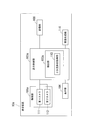
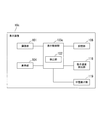
- FIG. 11 is a configuration diagram illustrating an example of the configuration of the display device 10 according to the present embodiment.
- the display device 10 includes an imaging unit 101, a display control unit 103, a display unit 104, and a storage unit 106.
- the display unit 104 projects an image based on input image information onto a transmissive display surface 105 that can transmit incident light. That is, the display unit 104 includes a projection unit 120 that projects an image (object image) onto the display surface 105. Specifically, the display surface 105 is a part (or all) of the windshield WS of the vehicle 20 as described above.
- the display unit 104 includes a virtual image optical system (not shown) such as a lens for projecting an image on the display surface 105 on the upper surface of the dashboard of the vehicle 20, and projects the image toward the windshield WS.
- the virtual image optical system based on such curvature or slope in the display surface 105 of the windshield WS, as the virtual image VI is displayed at the position Z 1 described above, the focus has been designed in advance.
- the imaging unit 101 generates an image obtained by capturing an image of light incident on the display unit 104. Specifically, as described above, the imaging unit 101 is attached to a predetermined position in the passenger compartment of the vehicle 20, and an image in the ( ⁇ Z) direction that is the traveling direction of the vehicle 20 is displayed on the windshield WS. An image is generated through imaging.
- the detection unit 102 included in the display control unit 103 detects a predetermined object OBJ from the image generated by the imaging unit 101. Specifically, the detection unit 102 detects the object OBJ as follows. Information indicating the shape of the object OBJ to be detected is stored in the storage unit 106 provided in the display device 10 in advance. For example, information indicating the shape of the circular display board of the road sign RS and the columnar column is stored in the storage unit 106 in advance. The detection unit 102 performs pattern matching of the image generated by the imaging unit 101 based on information indicating the shape of the road sign RS stored in advance in the storage unit 106, and adds the road sign RS to the image generated by the imaging unit 101. It is determined whether an image is included. Next, when it is determined that the image of the road sign RS is included in the image generated by the imaging unit 101, the detection unit 102 extracts the image of the road sign RS from the image generated by the imaging unit 101.
- the display control unit 103 causes the display unit 104 to display a virtual image VI (object image) indicating the predetermined object OBJ detected by the detection unit 102.
- a virtual image VI object image
- the display control unit 103 views the direction of the predetermined object OBJ from the viewpoint position VP through the display surface 105, the image of the predetermined object OBJ by the light transmitted through the display surface 105 and the virtual image VI are obtained.
- the virtual image VI is displayed on the display unit 104 so as to overlap.
- the display control unit 103 detects based on information indicating the position and direction in which the imaging unit 101 images the object OBJ and information indicating the characteristics of a virtual image optical system (not shown) included in the display unit 104.
- the position and size at which the image of the road sign RS output by the unit 102 is displayed are set.
- the display control unit 103 outputs the set image to the display unit 104.
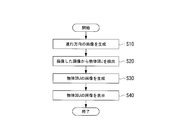
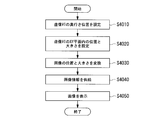
- FIG. 12 is a flowchart illustrating an example of the operation of the display device 10 according to the present embodiment.
- the imaging unit 101 captures the traveling direction of the vehicle 20 and generates an image of the traveling direction (step S10).
- the detection unit 102 detects an object OBJ (for example, a road sign RS) from the image generated in step S10.
- an object OBJ for example, a road sign RS
- the display control unit 103 acquires an image indicating the object OBJ (for example, the road sign RS) detected by the detection unit 102 in step S20, and generates an image to be displayed on the display unit 104 (step S30).
- the object OBJ for example, the road sign RS
- the display unit 104 displays the image generated by the display control unit 103 in step S30 on the display surface 105 of the windshield WS (step S40).
- the display device 10 of this embodiment includes the imaging unit 101, the display control unit 103, and the transmissive display unit 104 that can transmit incident light.
- the imaging unit 101 generates an image obtained by capturing an image of light incident on the display unit 104.
- the display control unit 103 includes a detection unit 102.
- the detection unit 102 detects a predetermined object OBJ from the image generated by the imaging unit 101.
- the display control unit 103 when viewing the direction of the predetermined object OBJ from the predetermined viewpoint position via the display surface 105 of the display unit 104, the image of the predetermined object OBJ by the light transmitted through the display unit 104, The object image is displayed on the display unit 104 so that the image (object image) indicating the predetermined object OBJ detected by the detection unit 102 overlaps.
- the display device 10 causes the object OBJ and the image (object image) indicating the object OBJ to overlap when the observer (user) views the display surface 105 from the viewpoint position VP.
- an image showing the object OBJ can be shown to the observer.
- the image showing the object OBJ is an image that gives a stereoscopic effect by giving binocular parallax to the contour portion of the object OBJ.
- the stereoscopic effect of the object OBJ is emphasized and felt by an observer who sees the object OBJ and an image showing the object OBJ in an overlapping manner. That is, the display device 10 can emphasize the stereoscopic effect of the object OBJ that the observer (user) feels when viewing the object OBJ.
- the display unit 104 included in the display device 10 of the present embodiment displays a virtual image VI as an image (object image) indicating the object OBJ at a position between the predetermined object OBJ and the display surface 105. Accordingly, the display unit 104 can set a position for displaying an image showing the object OBJ without being restricted by the position of the display surface 105.
- the binocular parallax generated in the contour portion of the object OBJ can be increased as compared with the case where the distance is close.
- the distance in the Z direction between the object OBJ and the image showing the object OBJ is large, the degree to which the stereoscopic effect of the object OBJ is emphasized can be increased as compared with the case where the distance is close.
- the distance in the Z direction between the object OBJ and the image indicating the object OBJ is large, it is more difficult to overlap the positions of the object OBJ and the image indicating the object OBJ than when the distance is close. Therefore, the positions of the object OBJ and the image showing the object OBJ can be easily overlapped by reducing the distance in the Z direction between the object OBJ and the image showing the object OBJ.
- the display unit 104 displays the virtual image VI as an image (object image) indicating the object OBJ. Accordingly, the display device 10 can easily set the distance in the Z direction between the object OBJ and an image (object image) indicating the object OBJ without being restricted by the position of the display surface 105.
- the display control unit 103 included in the display device 10 displays an image in which the amount of information of the image indicating the predetermined object OBJ included in the image generated by the imaging unit 101 is reduced, as an image indicating the object OBJ ( (Object image) is displayed on the display unit 104.
- the image in which the information amount of the image showing the predetermined object OBJ is reduced is an image showing the edge portion E of the image showing the predetermined object OBJ.
- the image in which the information amount of the image showing the predetermined object OBJ is reduced may be an image showing a high frequency component.
- the calculation load of the display control unit 103 increases.
- the display device 10 can reduce the calculation load of the display control unit 103 as compared with the case of displaying an image that does not reduce the amount of information. Thereby, the display apparatus 10 can reduce the extent of the calculation delay and the increase in component costs.
- the display control unit 103 included in the display device 10 of the present embodiment displays an image (object image) indicating the object OBJ on the display unit 104 based on the timing at which the detection unit detects the predetermined object OBJ. Also good. Thereby, the display device 10 does not always display an image indicating the object OBJ on the display unit 104, but displays an image indicating the object OBJ at a timing when a predetermined object OBJ (for example, a road sign RS) is detected. Can do.
- a predetermined object OBJ for example, a road sign RS
- the display device 10 can display an image showing the object OBJ to call attention to at the timing when the viewer (for example, the driver of the vehicle 20) wants to call attention.
- the display device 10 always displays an image by displaying an image that emphasizes the stereoscopic effect of the object OBJ at the timing at which the observer (for example, the driver of the vehicle 20) wants to draw attention.
- the degree of alerting the observer can be improved as compared with.
- FIG. 13 is a configuration diagram showing an example of the configuration of the display device 10a according to the first modification of the present embodiment.
- the display device 10a includes an imaging unit 101a, a detection unit 102a, and a display control unit 103a.
- the imaging unit 101a includes a first camera 111 and a second camera 112.
- the first camera 111 and the second camera 112 constitute a stereo camera, and each of the objects OBJ is imaged and an image thereof is generated.
- the first camera 111 generates a first image.
- the second camera generates a second image.
- the detection unit 102a includes a three-dimensional shape acquisition unit 113.
- the three-dimensional shape acquisition unit 113 acquires the first image acquired by the first camera 111 of the imaging unit 101a and the second image acquired by the second camera 112 and acquired.
- a stereoscopic image of the object OBJ is generated based on the image and the second image. That is, the three-dimensional shape acquisition unit 113 acquires the three-dimensional shape of the detected predetermined object OBJ.
- the display control unit 103a sets the brightness of the image based on the distance between the object OBJ and the viewpoint position VP, and causes the display unit 104 to display the virtual image VI having the set brightness. Specifically, based on the three-dimensional shape of the object OBJ acquired by the three-dimensional shape acquisition unit 113, the display control unit 103a brightens the part near the viewpoint position VP in the object OBJ as compared with the far part.
- the virtual image VI is displayed on the display unit 104. That is, the display control unit 103a displays an image that emphasizes the stereoscopic effect of the predetermined object OBJ generated based on the three-dimensional shape acquired by the three-dimensional shape acquisition unit 113 as an image (object image) indicating the object OBJ.
- the image that enhances the stereoscopic effect of the predetermined object OBJ is, for example, an image in which a portion near the portion far from the viewpoint position VP in the predetermined object OBJ is bright. That is, based on the three-dimensional shape acquired by the three-dimensional shape acquisition unit 113, the display control unit 103a displays an image in which a portion near a portion far from the viewpoint position VP among the predetermined object OBJ is bright, and an object OBJ. The displayed image (object image) is displayed on the display unit 104.
- the object OBJ in a bright portion of the image (object image) showing the object OBJ superimposed on the object OBJ, the object OBJ is in front (+ Z direction), and in a dark portion, the object OBJ is in the back ( ⁇ Z direction). Is recognized by the observer (user). Therefore, when an image in which a portion closer to the viewpoint position VP is brighter than a portion of the predetermined object OBJ that is bright is displayed as an image indicating the object OBJ, the observer recognizes the stereoscopic effect of the object OBJ more emphasized. Is done.
- the display device 10a improves the degree of emphasizing the stereoscopic effect of the object OBJ by displaying, as an image indicating the object OBJ, an image in which the portion of the object OBJ that is closer to the viewpoint position VP is brighter. Can be made.
- the display device 10a may include an image generation unit 114.
- the image generation unit 114 generates an image that emphasizes the stereoscopic effect of the predetermined object OBJ based on the three-dimensional shape acquired by the three-dimensional shape acquisition unit 113.
- the image that enhances the stereoscopic effect of the predetermined object OBJ is, for example, an image in which a portion near the portion far from the viewpoint position VP in the predetermined object OBJ is bright.
- the display device 10a can set the brightness of an image (object image) showing the object OBJ based on the three-dimensional shape of the object OBJ, so that the display device 10a is not based on the three-dimensional shape of the object OBJ.
- the brightness of the image showing the object OBJ can be set with high accuracy. That is, the display device 10a can improve the accuracy of enhancing the stereoscopic effect of the object OBJ.
- FIG. 14 is a configuration diagram showing an example of the configuration of the display device 10b according to the second modification of the present embodiment.
- the display device 10b includes a detection unit 102b, a display control unit 103b, a sign detection unit 116, and a moving speed acquisition unit 117.
- the sign detection unit 116 detects a part of the image indicating the speed display from the image of the road sign RS detected by the detection unit 102b. That is, the sign detection unit 116 detects the speed indicated by the road sign RS.
- the moving speed acquisition unit 117 acquires information indicating the moving speed of the vehicle 20 from the vehicle control device 30. That is, the moving speed acquisition unit 117 acquires the moving speed of the display device 10b (own device).
- the display control unit 103b displays an image ( (Object image) is displayed on the display unit 104.
- the display device 10b does not display an image (object image) indicating the object OBJ when moving at a speed lower than the speed limit indicated by the road sign RS (for example, the vehicle 20 is traveling).
- an image showing the object OBJ can be displayed. Therefore, the display device 10b can display an image showing the object OBJ when the traveling vehicle 20 exceeds the speed limit.
- the display apparatus 10b can alert the observer (user, for example, the driver of the vehicle 20) that the speed limit is exceeded.
- the detection unit 102b may include a distance detection unit 115.
- the distance detection unit 115 detects a distance to a predetermined object OBJ. Further, the display control unit 103b causes the display unit 104 to display an image (object image) indicating the object OBJ when the distance detected by the distance detection unit 115 is closer than a predetermined distance.
- the display device 10b does not display an image (object image) indicating the object OBJ when the object OBJ is far away, and indicates the object OBJ when the object OBJ approaches the predetermined distance.
- An image can be displayed. Therefore, the display device 10b displays an image showing the object OBJ when a person suddenly jumps out ahead of the traveling vehicle 20 or when the distance between the other vehicles 20 is too close. Can do. Thereby, the display apparatus 10b can call attention to the observer (user, for example, the driver of the vehicle 20) when danger is approaching forward.
- FIG. 15 is a configuration diagram illustrating an example of a configuration of a display device 10c according to a third modification of the present embodiment.
- the display device 10 c includes a display control unit 103 c and a motion speed detection unit 118.
- the motion speed detector 118 detects the motion speed of the predetermined object OBJ detected by the detector 102.
- the moving speed is a moving speed of the object OBJ in the X direction or the Y direction.
- the display control unit 103c Based on the movement speed of the object OBJ detected by the movement speed detection unit 118, the display control unit 103c displays, as an image (object image) indicating the object OBJ, an image of a portion of the object OBJ having a low movement speed. To display.
- the display device 10c does not display an image (object image) indicating the object OBJ in a portion where the moving speed in the X direction or the Y direction is large in the object OBJ, and the display device 10c moves in the X direction or the Y direction.
- An image showing the object OBJ can be displayed for a portion where the moving speed is low.
- the object OBJ is a person walking on a sidewalk
- the hand and foot portions having a high movement speed compared to the trunk part having a low movement speed are images indicating the person who is the object OBJ (object image). )
- an image (object image) showing the object OBJ is superimposed on a portion of the object OBJ where the moving speed in the X direction or the Y direction is high
- the object OBJ and the image showing the object OBJ overlap.
- the degree of emphasizing the stereoscopic effect may be reduced. Therefore, the display device 10c does not display an image showing the object OBJ in a portion where the moving speed in the X direction or the Y direction is high, so that the degree to which the stereoscopic effect is emphasized is not reduced. Can do.
- the display device 10c may include a position detection unit 119 (viewpoint position detection unit).
- the position detection unit 119 detects the position of the observer's (user) head or eyes as the viewpoint position VP.
- the display control unit 103c based on the information indicating the viewpoint position VP detected by the position detection unit 119, the image of the predetermined object OBJ by the light transmitted through the display surface 105 (display unit), and the object OBJ An image indicating the object OBJ is displayed on the display unit 104 so that the image indicating the image (object image) is overlapped. Accordingly, the display device 10c can change the viewpoint position VP following the change in the position of the observer (user).
- the imaging unit (imaging units 101 and 101a) is in the vehicle interior of the vehicle 20 and images the object OBJ through the windshield WS.
- the imaging units (imaging units 101 and 101a) are set at predetermined positions at which the display control unit (display control units 103, 103a, 103b, and 103c) can set the position and size of an image displayed on the display unit 104.
- the vehicle 20 is installed outside the passenger compartment.
- the imaging unit (imaging units 101 and 101a) may be outside the passenger compartment of the vehicle 20 (for example, in the vicinity of a headlamp (not shown)) and may image the object OBJ without passing through the windshield WS.
- the display devices can prevent a reduction in the degree of freedom of the position where the imaging unit (imaging units 101 and 101a) is installed. .
- the present invention is not limited to this.
- the image (object image) showing the object OBJ only needs to be seen overlapping the object OBJ when viewed from the viewpoint position VP.
- the image (object image) showing the object OBJ is displayed at the position of the display surface 105. It may be a real image. Even if comprised in this way, the three-dimensional effect of the object OBJ which a user feels can be emphasized.
- the display devices do not require a virtual image optical system, so that the configuration of the display unit 104 can be simplified.
- the display unit 104 projects an image on the display surface 105 of the windshield WS has been described, but the present invention is not limited to this.
- the image displayed on the display unit 104 only needs to be able to be seen superimposed on the object OBJ at the viewpoint position VP.
- the display unit 104 may be configured to display an image on a transmissive liquid crystal display surface.
- FIG. 16 is a block diagram showing an example of the configuration of a display device 10d according to the second embodiment of the present invention.
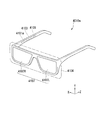
- the display device 10d is a head mounted display (HMD) mounted on the head of an observer (user), and includes a first eyepiece optical system 105d as a display surface 105 that transmits incident light. Different from the embodiment.
- HMD head mounted display
- the image displayed on the eyepiece optical system 105d is an image that generates a virtual image VI at a position away from the position of the display surface 105 in the ( ⁇ Z) direction when viewed by the observer from the viewpoint position VP.
- the viewpoint position VP is the position of the eyes of the user wearing the display device 10d that is a head-mounted display.
- the display surface 105 includes a left-eye display unit (not shown) that displays an image for the left eye of the observer, and a right-eye display unit (not shown) that displays an image for the right eye of the observer. Yes.
- the eyepiece optical system 105d displays a left eye image on the left eye display unit and a right eye image on the right eye display unit of the display surface 105, respectively.
- the imaging unit 101 is provided at a predetermined position of the head mounted display (for example, a position between the left eye display unit and the right eye display unit).
- the imaging unit 101 is, for example, a video camera, and generates an image by capturing the direction in which the observer views from the viewpoint position VP.
- the display control unit 103 displays information indicating the position and direction in which the imaging unit 101 images the object (display target) OBJ and the characteristics of the optical systems of the left eye display unit and the right eye display unit (not shown) included in the display surface 105. Based on the information shown, the position and size at which the image of the road sign RS is displayed are set. Next, the display control unit 103 outputs the set image to the display unit 104.
- the display device 10d can emphasize the stereoscopic effect of the object OBJ that the observer (user) feels, like the display device of the first embodiment described above.
- FIG. 17 is a schematic diagram illustrating an example of a schematic configuration of the display device 2001 according to the third embodiment of the present invention.
- a direction in which the display device 2001 displays an image is a positive direction of the Z axis, and orthogonal directions on a plane perpendicular to the Z axis direction are an X axis direction and a Y axis direction, respectively.
- the X-axis direction is the horizontal direction of the display device 2001
- the Y-axis direction is the vertically upward direction of the display device 2001.
- the outline of the configuration of the display device 2001 will be described.
- the display device 2001 of this embodiment includes a display unit 2010.
- Display unit 2010 has a display surface 2011S for displaying an image in the depth position Z 1.
- the user U also referred to as an observer in the following description
- the display surface 2011S is a transmissive screen such as a liquid crystal display or a liquid crystal projector. Since the display surface 2011S is a transmissive screen, when the observer U views the display surface 2011S from the viewpoint position VP, the image displayed on the display surface 2011S appears to overlap the object OBJ.
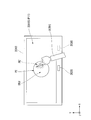
- the object OBJ is, as shown in FIG. 17, it will be described a ball placed in the depth position Z 2.
- the sphere is a robot head.
- the head of this robot has a nose NS.
- the display surface 2011S displays an image P11 including an edge image PE (contour image) indicating the contour portion of the object OBJ.
- the display surface 2011S includes an outline portion of the object OBJ and an edge image PE indicated by the image P11 displayed on the display surface 2011S when the observer U views the display surface 2011S and the object OBJ from the viewpoint position VP.
- the edge image PE is displayed in such a manner as to overlap.
- the image P11 displayed on the display surface 2011S may include not only the edge image PE but also an image showing the object OBJ as it is, and also includes an image showing the outline portion (edge portion) of the object OBJ in an emphasized manner. You may go out.
- the edge image PE may be an image of a high frequency portion of the frequency component of the pixel value for displaying the object OBJ.
- the image P11 includes only the edge image PE will be described.
- the display device 2001 can deform the stereoscopic image SI of the object OBJ based on an instruction from the observer U.
- the observer U instructs the display device 2001 to deform the shape of the head of the robot that is the object OBJ with the index finger of the right hand RH.
- the observer U moves the right hand RH so as to press the head of the robot of the object OBJ that can be seen through the display surface 2011S with the index finger.
- the robot head of the object OBJ is made of a flexible material such as clay, for example.
- the shape of the object OBJ can be changed by pressing the surface of the robot head with a finger. If the robot's nose NS of the object OBJ is directly pushed with the index finger, the robot deforms so that the height of the robot's nose NS is lowered.
- the display device 2001 can display by changing the shape of the object OBJ as if it was actually touching and deforming the object OBJ. it can. For example, when the observer U performs an operation (instruction) to press on the object OBJ, the display device 2001 displays an image that appears to reduce the height of the nose NS of the robot. As a result, the display device 2001 can make the object OBJ appear to be deformed to the observer U even when the observer U moves his index finger without directly touching the nose NS of the robot.
- the display apparatus 2001 detects this instruction and changes a part of the display content of the image P11 displayed over the object OBJ. To do. Thereby, when the observer U sees the image P11 and the object OBJ in an overlapping manner, it looks as if the object OBJ has been deformed.
- an operation instruction
- the display apparatus 2001 detects this instruction and changes a part of the display content of the image P11 displayed over the object OBJ. To do.
- the observer U sees the image P11 and the object OBJ in an overlapping manner, it looks as if the object OBJ has been deformed.
- a specific configuration for changing a part of the display content of the image P11 will be described.
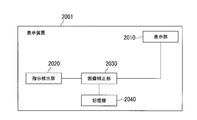
- the display device 2001 includes an instruction detection unit 2020 and an image correction unit 2030.
- the instruction detection unit 2020 includes a device such as a motion sensor or a stereo camera that detects the position of the head of the observer U, the movement of the index finger, and the position, and the viewpoint position VP of the observer U and the observation The instruction of the person U is detected.
- the instruction of the observer U is, for example, an operation of inserting the index finger of the right hand RH at a certain depth position with respect to the display device 2001.
- the observer U presents the index finger of the right hand RH in front of the display device 2001 so as to point at the object OBJ.
- the instruction detection unit 2020 detects the position of the observer U pointing at the position of the index finger of the right hand RH by detecting the position of the index finger of the right hand RH. In addition, the instruction detection unit 2020 detects the position of the eye of the observer U's head as the viewpoint position VP.
- the image correction unit 2030 corrects the edge image PE based on the detection result of the instruction detection unit 2020. An example of image correction according to the instruction of the observer U will be described with reference to FIG.
- FIG. 18 is a schematic diagram illustrating an example of an image to be corrected by the image correction unit 2030 of the present embodiment.
- the instruction detection unit 2020 detects that the observer U is pointing out the index finger of the right hand RH. Specifically, the instruction detection unit 2020 detects the coordinates of the index finger of the observer U based on the image of the observer U's right hand RH.
- the image correction unit 2030 performs correction to add the edge image PE ′ to the edge image PE included in the image P11 based on the coordinates of the index finger of the observer U detected by the instruction detection unit 2020.
- This edge image PE ' is an image in which the height of the nose NS of the robot is changed by changing the stereoscopic effect of the object OBJ.
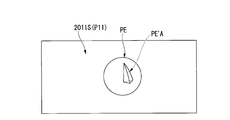
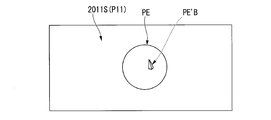
- FIGS. 19A to 19C are schematic diagrams illustrating an example of a change in an image corrected by the image correction unit 2030 of the present embodiment.
- the image correcting unit 2030 changes the image as shown in FIGS. 19A to 19C as the forefinger of the observer U moves from the front of the depth position to the back.
- the image correction unit 2030 performs the edge image PE′A illustrated in FIG. 19A with respect to the edge image PE included in the image P11. Perform correction to add.
- the image correction unit 2030 performs the edge image PE′B shown in FIG.
- the image correction unit 2030 performs an image P13 (third) shown in FIG. 19C with respect to the edge image PE included in the image P11. (Image) is added.
- the edge image PE′A shown in FIG. 19A is an image in which the height of the nose NS of the robot is changed by changing the stereoscopic effect of the head of the robot of the object OBJ.
- the edge image PE′B shown in FIG. 19B is an image in which the stereoscopic effect of the object OBJ is further changed as compared with the edge image PE′A shown in FIG. 19A.
- the edge image PE′B is an image obtained by further changing the height of the nose NS of the robot shown in FIG. 19A.
- an image P13 (third image) illustrated in FIG. 19C is an image that changes the appearance of the object OBJ by being displayed over the object OBJ.
- the image P13 (third image) is an image showing a state in which the robot head of the object OBJ bursts like a balloon and the inside of the robot head can be seen.
- the image correction unit 2030 gradually decreases the height of the nose NS of the robot of the object OBJ.
- the robot's head bursts and changes to an image in which the inside of the robot's head can be seen. In this way, by changing the image P11 based on the instruction of the observer U, the display device 2001 can display the image as if the object OBJ was deformed.
- the display device 2001 provides a stereoscopic effect to the object OBJ by displaying the edge image PE on the contour portion of the object OBJ and generating a stereoscopic image SI of the object OBJ.
- the depth position of the stereoscopic image SI perceived by the observer U will be described with reference to FIG.
- FIG. 20 is a schematic diagram illustrating an example of the depth position of the stereoscopic image SI generated by the image P11 and the object OBJ.
- the display surface 2011S displays an image P11 in the depth position Z 1.
- the display surface 2011S emits a first light beam R11 based on the image P11.
- the first light beam R11 emitted from the display surface 2011S is observed as an optical image of the image P11 by the observer at the viewpoint position VP.
- the object OBJ is placed in the depth position Z 2.
- This object OBJ emits a second light beam R12.
- the second light beam R12 emitted from the object OBJ is observed as an optical image of the object OBJ by the observer at the viewpoint position VP.
- the observer recognizes the stereoscopic image SI in which the object OBJ is stereoscopically displayed by simultaneously observing the first light beam R11 and the second light beam R12 at the viewpoint position VP.
- a mechanism for the observer to recognize the stereoscopic image SI will be described later.
- the depth position of the stereoscopic image SI is a position in the Z-axis direction (depth direction) of the stereoscopic image SI recognized by the observer.
- the depth position of the stereoscopic image SI is indicated by a distance in the Z direction with reference to the depth position of the object OBJ.
- FIG. 21 is a schematic diagram illustrating an example of a specific configuration of the display device 2001 of the present embodiment.
- the display device 2001 includes a display unit 2010, an instruction detection unit 2020, an image correction unit 2030, and a storage unit 2040.
- the storage unit 2040 information on the image P11 displayed on the display unit 2010 is stored in advance. Specifically, in the storage unit 2040, information indicating the depth position of the instruction detected by the instruction detection unit 2020 and image information displayed according to the depth position are associated with each other as information of the image P11. It is remembered. More specifically, the storage unit 2040 stores the depth position ZD1 and the edge image PE′A (see FIG. 19A) in association with each other. The storage unit 2040 stores the depth position ZD2 and the edge image PE′B (see FIG. 19B) in association with each other. The storage unit 2040 stores the depth position ZD3 and the edge image PE′C in association with each other.
- the instruction detection unit 2020 detects an instruction from the observer U. As described above, this instruction is an instruction indicating a depth position where the stereoscopic image SI of the object OBJ is generated. Specifically, the instruction detection unit 2020 detects an instruction that the observer U sets the index finger to the depth position ZD1. In the above-described example, the instruction that the observer U sets the index finger to the depth position ZD1 is an instruction to display an image (see, for example, FIG. 19A) that changes the height of the nose NS of the robot. The image in which the height of the nose NS of the robot is changed is an example of an image in which the depth position where the stereoscopic image SI of the object OBJ is generated is changed. That is, the instruction detection unit 2020 detects an instruction indicating the depth position where the stereoscopic image SI of the object OBJ is generated.
- the image correction unit 2030 corrects the image P11 displayed on the display unit 2010 based on the instruction of the observer U detected by the instruction detection unit 2020. Specifically, the image correction unit 2030 acquires information indicating the depth position of the instruction of the observer U detected by the instruction detection unit 2020. Further, the image correction unit 2030 reads out from the storage unit 2040 image information stored in association with information indicating the depth position of the acquired instruction. For example, when the observer U detects an instruction to set the index finger to the depth position ZD1, the image correction unit 2030 reads the edge image PE′A stored in association with the depth position ZD1 from the storage unit 2040.
- the image correcting unit 2030 reads the edge image PE′B stored in association with the depth position ZD2 from the storage unit 2040 when the observer U detects an instruction to set the index finger to the depth position ZD2. Further, the image correcting unit 2030 reads out the edge image PE′C stored in association with the depth position ZD3 from the storage unit 2040 when the observer U detects an instruction to set the index finger to the depth position ZD3.
- the edge images PE′A to C are images having different depth positions where the stereoscopic image SI is generated. That is, the image correction unit 2030 selects an image based on the detected depth position of the instruction from among the images having different depth positions where the stereoscopic image SI is generated, and reads out the image from the storage unit 2040.
- the image correction unit 2030 adds the read image to the image P11 and outputs it to the display unit 2010. That is, the image correction unit 2030 corrects the image P11 with the read image, and outputs the corrected image to the display unit 2010 as the image P11. Accordingly, the image correction unit 2030 can change the depth position where the stereoscopic image SI is generated based on the detected instruction. That is, the image correction unit 2030 changes the depth position where the stereoscopic image SI is generated by correcting the image based on the detected instruction.
- the display unit 2010 can transmit incident light and displays an image corresponding to an image of the transmitted object OBJ by light and imparting a stereoscopic effect to the object OBJ.
- the display device 2001 displays the contour portion of the object OBJ and the edge image PE indicating the contour portion in an overlapping manner.
- the display apparatus 2001 can give a stereoscopic effect to the object OBJ observed by the observer U. That is, the observer U perceives a stereoscopic image in which the object OBJ jumps out in the Z-axis direction when the contour portion of the object OBJ and the contour image indicating the contour portion are overlapped.
- a mechanism for giving a stereoscopic effect to the observer U by an image displayed by the display device 2001 will be described with reference to FIGS.
- FIG. 5 is a schematic diagram illustrating an example of the object OBJ of the present embodiment. So far, the case where the object OBJ is a sphere (for example, the head of a robot with a nose NS) has been described, but here, as an example, the case where the object OBJ is a quadrangle will be described.
- the display surface 2011S displays a square image as the object OBJ.
- This quadrilateral is a figure in which four sides of equal length intersect at right angles at each vertex.
- This quadrangle has four sides as contour lines that separate the outside and the inside of the quadrangle. The observer who sees this rectangle perceives this contour line as the edge portion E of the rectangle when the difference in brightness between the outside and the inside of the rectangle is large.
- the edge portion E is a portion of the object OBJ in which the difference in ambient brightness is relatively larger than the difference in brightness in other portions.
- each side can be an edge portion E.
- two sides of each edge portion E that are parallel to the Y-axis direction will be described as an edge portion E1 and an edge portion E2, respectively.
- FIG. 6 is a schematic diagram illustrating an example of an image P11 of the present embodiment.
- the image P11 is an image including an edge image PE1 indicating the edge portion E1 on the left side of the rectangle and an edge image PE2 indicating the edge portion E2 on the right side of the rectangle.
- the display surface 2011S displays an image P11 including the edge image PE1 and the edge image PE2 corresponding to the edge portion E1 and the edge portion E2, respectively.
- the edge image PE is described as an image showing the edge portions of the left side and the right side of the quadrangle, but is not limited thereto.
- the edge image PE may be an image showing the edge portions of the upper side and the lower side of the rectangle, or may be an image showing the edge portions of all the sides of the rectangle.
- FIG. 7 is a schematic diagram illustrating an example of a positional relationship among the object OBJ, the image P11, and the viewpoint position VP in the present embodiment.
- the viewpoint position VP in the depth position Z see superimposed with the object OBJ in the depth position Z 2, and an image P11 in the depth position Z 1.
- the image P11 is an image including the edge image PE1 and the edge image PE2.
- the display surface 2011S displays the image P11 so that the square edge portion E1 that is the object OBJ and the edge image PE1 of the image P11 appear to overlap each other at the viewpoint position VP. Further, the display surface 2011S displays the image P11 so that the square edge portion E2 that is the object OBJ and the edge image PE2 of the image P11 appear to overlap at the viewpoint position VP. In this way, when the observer superimposes the object OBJ and the image P11 showing the object OBJ (for example, a quadrangle), there is a minute luminance step that cannot be recognized on the observer's retina image.
- a virtual contour (edge) is perceived between steps of brightness (for example, luminance), and the object OBJ and the image P11 are perceived as one image.
- the virtual contour is slightly shifted and perceived as binocular parallax.
- the apparent depth position of the object OBJ changes.
- the optical image IML viewed by the left eye L and the optical image IMR viewed by the right eye R will be described in this order, and a mechanism for changing the apparent depth position of the object OBJ will be described.
- FIG. 8 is a schematic diagram illustrating an example of an optical image IM that can be seen by an observer's eye in the present embodiment.
- FIG. 8 (L) is a schematic diagram showing an example of an optical image IML that can be seen by the left eye L of the observer.
- the edge image PE1 and the edge portion E1 is, the position X2 ⁇ position Overlaps in the X3 range. That is, the edge image PE1 appears to overlap the square inside the square edge portion E1 (+ X direction).
- the position of the outer (+ X direction) of the edge image PE2 are square edges E2 X5 ⁇ It appears in the range of position X6.
- FIG. 9 is a graph showing an example of the brightness of the optical image IM at the viewpoint position VP of the present embodiment.
- 9L is a graph showing an example of the brightness of the optical image IML at the position of the left eye L at the viewpoint position VP.
- This image P11L includes an edge image PE1 and an edge image PE2.
- the left eye L of the observer U viewed from the viewpoint position VP generates an optical image IML having a brightness obtained by combining the brightness of the object OBJ and the brightness of the edge image PE1 and the edge image PE2 in the image P11L.
- the brightness inside the rectangle of the object OBJ viewed from the viewpoint position VP is brightness BR2.
- the brightness of the outside of the rectangle of the object OBJ viewed from the viewpoint position VP is brightness 0 (zero).
- the position of appearance in the depth position Z 2 of the edge portion E1 is the position X2.
- the brightness of the object OBJ viewed from the viewpoint position VP is the brightness BR2 at the positions X2 to X5, and the brightness is 0 at the positions from the position X2 to the ( ⁇ X) direction and from the position X5 to the (+ X) direction. (Zero).
- the brightness viewed from the viewpoint position VP of the edge image PE1 of the image P11L is the brightness BR1.
- the brightness viewed from the viewpoint position VP of the edge image PE2 of the image P11L is the brightness BR1.
- This edge image PE1 is displayed in the range from position X2 to position X3.
- the edge image PE2 is displayed in the range from the position X5 to the position X6.
- the brightness viewed from the viewpoint position VP of the image P11 is the brightness BR1 at the positions X2 to X3 and the positions X5 to X6, and the brightness is 0 (zero) at the other positions in the X direction.
- the brightness of the optical image IML is brightness BR3 from position X2 to position X3, brightness BR2 from position X3 to position X5, brightness BR1 from position X5 to position X6, ( ⁇ X) direction from position X2, and position.
- the brightness is 0 (zero) at a position in the (+ X) direction from X6.
- FIG. 10 is a graph illustrating an example of a contour portion of the image P11 that the observer perceives based on the optical image IM in the present embodiment.
- FIG. 10 (L) is a graph showing an example of a contour portion of the object OBJ perceived by the observer based on the optical image IML at the position of the left eye L of the observer.
- the contour portion of the object OBJ is a portion in which the change in brightness is larger than the change in brightness in the surrounding portions in the optical image portion of the object OBJ.
- the distribution of brightness of the image recognized by the observer by the optical image IML formed on the retina of the left eye L of the observer at the viewpoint position VP is as shown by a waveform WL in FIG. .
- the observer observes the position on the X-axis where the change in the brightness of the recognized optical image IML is maximized (that is, the gradient of the waveform WL is maximized) at the contour portion of the image P11L being observed. Perceived to be.
- the observer observing the optical image IML has a quadrangular contour portion at the position of X EL shown in FIG. 10L (that is, the position of the distance L EL from the origin O of the X axis). I perceive.
- optical image IML that can be seen by the left eye L of the observer and the position of the contour portion by the optical image IML have been described.
- optical image IMR that can be seen by the observer's right eye R and the position of the contour portion by the optical image IMR will be described.
- edge image PE1 is outside the rectangular edge portion E1 ( -X direction) appears in the range of position X1 to position X2.
- the image P11R is an image when the image P11 is viewed from the position of the right eye R.
- edge image PE2 and the edge E2 are overlapped in a range of positions X4 ⁇ position X5 appear.
- the edge image PE2 appears to overlap the square inside (+ X direction) the square edge portion E2. This is different from the fact that the edge image PE2 and the edge portion E2 appear to overlap the left eye L of the observer in the range from the position X5 to the position X6 outside the edge portion E2 in the square (+ X direction). .
- This image P11R includes an edge image PE1 and an edge image PE2.
- the brightness of the optical image at the position of the right eye R of the observer will be described with reference to FIG.
- FIG. 9R is a graph showing an example of the brightness of the optical image IMR at the position of the right eye R at the viewpoint position VP.
- the right eye R of the observer U viewed from the viewpoint position VP generates an optical image IMR having a brightness obtained by combining the brightness of the object OBJ and the brightness of the edge image PE1 and the edge image PE2 in the image P11R.
- the brightness inside the rectangle of the object OBJ viewed from the viewpoint position VP is brightness BR2.
- the brightness of the outside of the rectangle of the object OBJ viewed from the viewpoint position VP is brightness 0 (zero).
- the brightness of the object OBJ viewed from the viewpoint position VP is the brightness BR2 at the positions X2 to X5, and the brightness is 0 at the positions from the position X2 to the ( ⁇ X) direction and from the position X5 to the (+ X) direction. (Zero).
- the brightness viewed from the viewpoint position VP of the image P11L is the brightness BR2 from the position X2 to the position X5, and the brightness is from the position X2 to the ( ⁇ X) direction and from the position X5 to the (+ X) direction. Same as 0 (zero).
- the brightness of the edge image PE1 viewed from the viewpoint position VP is the brightness BR1.
- the brightness of the edge image PE2 viewed from the viewpoint position VP is the brightness BR1.
- the edge image PE1 is displayed outside the quadrangular edge portion E1 in the range from the position X1 to the position X2.
- the edge image PE2 is displayed in the range of the position X4 to the position X5. That is, the brightness viewed from the viewpoint position VP of the image P11R is brightness BR1 at positions X1 to X2 and positions X4 to X5, and brightness 0 (zero) at other positions in the X direction.
- the brightness viewed from the viewpoint position VP of the image P11L is brightness BR1 at positions X2 to X3 and position X5 to position X6, and brightness 0 (zero) at other positions in the X direction. Is different.
- the brightness of the optical image IMR is brightness BR1 from position X1 to position X2, brightness BR2 from position X2 to position X4, brightness BR3 from position X4 to position X5, ( ⁇ X) direction from position X1, and position.
- the brightness is 0 (zero) at the position in the (+ X) direction from X5.
- This is different from the brightness of the optical image IML in that the position X2 to position X3 is brightness BR3, the position X3 to position X5 is brightness BR2, and the position X5 to position X6 is brightness BR1.
- FIG. 10R is a graph illustrating an example of a contour portion of the object OBJ perceived by the observer based on the optical image IMR at the position of the right eye R of the observer.
- the distribution of brightness of the image recognized by the observer by the optical image IMR formed on the retina of the right eye R of the observer at the viewpoint position VP is as shown by a waveform WR in FIG. .
- the observer observes the position on the X-axis where the change in the brightness of the recognized optical image IMR is maximized (that is, the gradient of the waveform WR is maximized) at the contour portion of the image P11R being observed. Perceived to be. Specifically, the observer who is observing the optical image IMR has a quadrangular outline at the position of XER shown in FIG. 10R (that is, the position of distance LER from the origin O of the X axis). I perceive. This is different from an observer observing the optical image IML perceiving the position of the distance L EL from the origin O of the X axis as a rectangular outline.
- the viewer perceives the position X EL contour portion of square left eye L is observed, the position X ER of contour of the square right eye R is observed as binocular parallax. Then, the observer perceives the quadrangle as a stereoscopic image SI (three-dimensional image) based on the binocular parallax of the contour portion.
- SI three-dimensional image
- FIG. 22 is a flowchart illustrating an example of a pixel value correcting operation in the display device 2001 of the present embodiment.
- the display unit 2010 displays an edge image PE indicating the contour portion of the object OBJ (step S2010).
- the image correction unit 2030 reads the image information of the image P11 from the storage unit 2040, and outputs the read image information to the display unit 2010.
- the display unit 2010 displays the image P11 based on the image information output by the image correction unit 2030.
- This image P11 includes an edge image PE showing the contour portion of the object OBJ.
- the display unit 2010 may display an edge image PE indicating the contour portion of the object OBJ in accordance with an instruction from the observer U. Specifically, the display unit 2010 displays an edge image PE indicating the contour of the object OBJ when the instruction detection unit 2020 detects an instruction from the observer U.
- the instruction detection unit 2020 detects the instruction of the observer U (step S2020). Specifically, the instruction detection unit 2020 detects the movement of the index finger of the right hand RH of the observer U, and detects the index finger's coordinates as an instruction of the observer U when the index finger moves to a predetermined coordinate range. To do. Information indicating the coordinates of the index finger includes information indicating the depth position of the index finger.
- the image correction unit 2030 corrects the image information to be output to the display unit 2010 based on the instruction of the observer U detected in step S2020 (step S2030). Specifically, the image correction unit 2030 reads image information from the storage unit 2040 based on the information indicating the depth position of the index finger detected in step S2020. For example, when the observer U detects an instruction to set the index finger to the depth position ZD1, the image correction unit 2030 reads the edge image PE′A stored in association with the depth position ZD1 from the storage unit 2040. Further, the image correction unit 2030 adds the read image to the image P11 and outputs it to the display unit 2010. That is, the image correction unit 2030 outputs the corrected edge image PE obtained by correcting the image P11 with the read edge image PE to the display unit 2010.
- the display unit 2010 displays the corrected edge image PE corrected in step S2030 (step S2040). In this way, the display device 2001 displays the stereoscopic image SI of the object OBJ.
- the display device 2001 of this embodiment includes the display unit 2010, the instruction detection unit 2020, and the image correction unit 2030.
- the display device 2001 can change the stereoscopic effect of the object OBJ based on the instruction of the observer U.
- the display unit 2010 of the display device 2001 displays an image that changes the appearance of the object OBJ to an appearance different from the appearance of the object OBJ based on the depth position where the stereoscopic image SI indicated by the detected instruction is generated. Thereby, the display apparatus 2001 can change the external appearance of the object OBJ according to the depth position which the observer U instruct
- the target for displaying the edge image PE is the object OBJ, but is not limited thereto.
- the display device 2001 may display the edge image PE with respect to an image displayed by a display unit other than the display unit 2010.
- the display device 2001 may include a second display unit 2012 in addition to the display unit 2010.
- the second display unit 2012 includes a transmissive display surface 2012S stacked on the display surface 2011S of the display unit 2010.
- the second display unit 2012 displays an image showing the object OBJ as a second image.
- the display unit 2010 displays an image corresponding to the second image displayed by the second display unit 2012, which gives a stereoscopic effect to the object OBJ indicated in the second image as the first image. .
- the second display unit 2012 displays an image showing the head of the robot with the nose NS of the object OBJ
- the display unit 2010 displays an edge image PE showing the outline of the nose NS.
- the image correction unit 2030 can change the depth position where the stereoscopic image SI occurs by correcting the image based on the detected instruction.
- the display device 2001 can change the stereoscopic effect of the image of the object OBJ based on an instruction from the observer U.
- the second display unit 2012 displays an image showing the object OBJ based on the detected instruction and a third image different from the second image. It may be displayed.
- the second image there is an image showing the appearance of the object OBJ.
- An example of the third image is an image showing the internal structure of the object OBJ.
- the second display unit 2012 displays an image showing the appearance of the object OBJ as a second image.
- the second display unit 2012 displays an image showing the internal structure of the object OBJ as a third image.
- the display device 2001 displays an image showing the appearance and internal structure of the object OBJ, that is, an image that changes to an appearance different from the appearance of the object OBJ, based on an instruction from the observer U. be able to.
- the present invention is not limited thereto.
- a case where the object OBJ is an electronic circuit board will be described below.
- the display unit 2010 displays an image that gives a stereoscopic effect of the components of the electronic circuit board of the object OBJ as the edge image PE corresponding to the depth position ZD1.
- the display unit 2010 displays an image that emphasizes (or reduces) the stereoscopic effect of the electronic circuit board component of the object OBJ as the edge image PE corresponding to the depth position ZD2 in the ⁇ Z direction with respect to the depth position ZD1. To do.
- the image that emphasizes (or reduces) the three-dimensional effect of the electronic circuit board component of the object OBJ is more than the image that gives the three-dimensional effect of the electronic circuit board component of the object OBJ. It is an image that the observer U can feel stronger (or weaker).
- the display unit 2010 displays the internal structure of the component on the electronic circuit board as an image P13 (third image) that changes the appearance of the object OBJ corresponding to the depth position ZD3 in the ⁇ Z direction with respect to the depth position ZD2. The image shown is displayed. Further, the display unit 2010 displays an image showing a circuit diagram of the electronic circuit as an image P13 (third image) that changes the appearance of the object OBJ corresponding to the depth position ZD4 that is in the ⁇ Z direction with respect to the depth position ZD3. To do.
- the image correction unit 2030 increases (or decreases) the stereoscopic effect of the electronic circuit of the object OBJ as the depth position of the index finger of the observer U moves from the depth position ZD1 to the depth position ZD2. Change the image. Further, when the depth position of the index finger of the observer U is at the depth position ZD3, the image correction unit 2030 changes the image to an image showing the internal structure of the component on the electronic circuit board. Further, when the depth position of the index finger of the observer U is at the depth position ZD4, the image correction unit 2030 changes the image to an image showing a circuit diagram of the electronic circuit. Even in this specific example, by changing the image P11 based on the instruction of the observer U, the display device 2001 can display the image as if the object OBJ was deformed.
- the second display unit 2012 displays an image selected from a plurality of images according to the depth position where the stereoscopic image SI indicated by the detected instruction is generated. You may display as a 2nd image.
- the image correction unit 2030 selects an image from the storage unit 2040 based on the depth position of the instruction detected by the instruction detection unit 2020, and outputs the selected image to the second display unit 2012. .
- the second display unit 2012 displays the image output by the image correction unit 2030.
- the display device 1 can display an image that is changed to an appearance different from the appearance of the object OBJ based on an instruction from the observer U. Accordingly, it is possible to perform an expression in which the appearance of the object OBJ is changed according to the distance that the observer U has moved the index finger in the depth direction.
- the display device 2001 may include a head mounted display 2010a.
- the head mounted display 2010a includes a display unit 2104 corresponding to the display unit 2010 described above.
- the display unit 2104 includes a left eye display surface 2107L and a right eye display surface 2107R as a display surface 2107 corresponding to the display surface 2011S.
- the head mounted display 2010a displays the image P11 on the left eye display surface 2107L and the right eye display surface 2107R.
- the display unit 2010 of the display device 2001 or the display unit 2104 of the head-mounted display 2010a displays an image that is different in appearance from the image of the object OBJ and is related to the object OBJ based on the detected instruction. It may be displayed.
- the head mounted display 2010a of the display device 2001 includes a light reduction surface 2108 corresponding to the display surface 2107
- the head mounted display 2010 a includes a light reducing surface 2108 corresponding to the display surface 2107.
- the dimming surface 2108 includes, for example, a left eye dimming surface 2108L including a liquid crystal panel and a right eye dimming surface 2108R, and dimmes light transmitted through the display surface 2107.
- the display device 2001 can reduce (or block) light from the object OBJ, and thus can be less affected by light from the object OBJ. For this reason, the display device 2001 including the light reduction surface 2108 can easily display an image different from the appearance of the object OBJ. Further, in this case, the display device 2001 can display an image related to the object OBJ on the display surface 2107. For example, the display device 2001 can easily display an image showing the inside of the object OBJ as an image related to the object OBJ.
- the display device 2001 may include a head mounted display 2010c as a display unit.
- the head mounted display 2010c may include a detection unit 2102c such as an image sensor.
- the detection unit 2102c detects the shape of the object OBJ.
- the image correction unit 2030 generates the edge image PE based on the shape of the object OBJ detected by the detection unit 2102c.
- the display device 2001 can display the stereoscopic image SI of the object OBJ even if the object OBJ has various shapes.
- the display unit 2010 (or the display unit 2104) has been described as displaying the edge image PE included in the image information read from the storage unit 2040, the present invention is not limited to this.
- the display device 2001 when an image of the object OBJ imaged by a camera or the like is input to the display device 2001, the display device 2001 generates an edge image PE by detecting the contour portion of the object OBJ from the input image. May be.
- the instruction detection unit 2020 of the display device 2001 may include a contour detection unit that detects the contour of the object OBJ.
- the instruction detection unit 2020 includes a camera that captures an image of the object OBJ, and detects an edge by detecting a contour from the image of the object OBJ captured by the camera using an edge detection method such as a known differential filter.
- An image PE is generated.
- the display device 2001 can also display the edge image PE that is not stored in the storage unit 2040, and therefore can display the edge image PE for various objects OBJ.
- the display unit 2010 (or the display unit 2104) can display the edge image PE showing the contour portion of the object OBJ smaller than the size of the object OBJ.
- the display device 2001 can display the object OBJ and the edge image PE indicating the outline of the object OBJ with the same apparent size for the observer U.
- FIG. 25 is a diagram illustrating an overview of a display device 3100 according to the fourth embodiment.
- an XYZ rectangular coordinate system is set, and the positional relationship of each part will be described with reference to this XYZ rectangular coordinate system.
- the Z axis and the X axis that are orthogonal to each other are determined in parallel to the horizontal plane, and the direction in which the display device 3100 displays an image from the viewpoint position of the user 3001 is the negative direction of the Z axis.
- An axis perpendicular to the horizontal plane is taken as the Y axis.
- the user 3001 is in a posture standing along the Y axis.
- the display device 3100 of this embodiment is a portable transmissive display that is portable to the user 3001, and here, a transmissive head mounted display will be described as an example.
- the display device 3100 is mounted on the head of the user 3001 and displays an image so as to be visually recognized with respect to the viewpoint position of the user 3001, and the direction of the viewpoint position of the user 3001 via the displayed image ( Transmits light incident in the + Z direction.
- the user 3001 holds his hand P3011 (first object) against the background P3013 (second object, curtain in this figure), and the display device 3100 displays the held hand P3011 and the background P3013. Visible through an image.
- the background P3013 (second target) is at a position (distant position) that is farther from the user 3001 than the hand P3011 (first target) of the user 3001. Therefore, the user 3001 can see the background P3013 and the hand P3011 held in front of the background P3013 by the optical image (light) that transmits the image displayed on the display device 3100. In addition, the user 3001 can superimpose an image displayed on the display device 3100 on the hand P3011 or the background P3013.
- the display device 3100 includes a display unit 3012 having a left eye display unit 3012L and a right eye display unit 3012R, an imaging unit 3020, and a distance measuring sensor 3031.
- the display unit 3012 is a transmissive display unit that can transmit incident light, and displays an image in front of the eyes (viewpoint position) of the user 3001 wearing the display device 3100.
- the display unit 3012 includes an optical system (not shown) such as a lens, and displays an image as a virtual image at the viewpoint position of the user 3001.
- the display unit 3012 transmits an optical image (light) incident in the direction of the viewpoint position of the user 3001 (+ Z direction) through the displayed image.
- the imaging unit 3020 is provided between the left eye display unit 3012L and the right eye display unit 3012R, and the direction in which an optical image (light) that can be transmitted by the display unit 3012 enters, that is, the viewpoint of the user 3001.
- the direction ( ⁇ Z direction) seen through the display unit 3012 from the position direction is photographed.
- the distance measuring sensor 3031 is provided between the left eye display unit 3012L and the right eye display unit 3012R, similarly to the imaging unit 3020, and is in the direction ( ⁇ Z direction) that the user 3001 views through the display device 3100. Measure the distance to the background and object.
- the display device 3100 displays an image based on the image of the hand P3011 detected from the image captured by the imaging unit 3020 on the display unit 3012.
- the display unit 3012 displays an image based on the image of the hand P3011 detected from the image captured by the imaging unit 3020 as a virtual image (see reference symbol P3012).
- an image (virtual image) displayed on the display device 3100 (display unit 3012) is also referred to as a display image P3012.
- the image based on the image of the hand P3011 is, for example, the edge image PE of the edge portion of the hand P3011.
- the display device 3100 displays the edge image PE at a position corresponding to the position of the hand P3011 (substance) that is seen through in the display image P3012 to be displayed.
- the position corresponding to the position of the hand P3011 is, for example, on the XY plane in the direction ( ⁇ Z direction) from the viewpoint position of the user 3001 toward the hand P3011 (substance) via the image displayed on the display unit 3012.
- the position overlaps the position of the hand P3011 (substance).
- the position in the depth direction (Z direction) of the edge image PE (virtual image) displayed at this time is a position (position visually recognized as a virtual image) different from the position of the hand P3011 (substance).
- the edge image PE (virtual image) is displayed so as to be visually recognized as a virtual image at a position farther than the position of the hand P3011 (substance) in the depth direction (Z direction).
- the user 3001 recognizes the hand P3011 as a three-dimensional image (three-dimensional image) by superimposing the hand P3011 (substance) and the edge image PE (virtual image) of the edge portion of the hand P3011. That is, the display device 3100 displays the hand P3011 so that it can be recognized as a stereoscopic image (three-dimensional image) to the user 3001. Details of the process of displaying the edge image PE so that it can be recognized as a stereoscopic image (three-dimensional image) will be described later.
- the display device 3100 controls the display of the edge image PE of the edge portion of the hand P3011 displayed on the display unit 3012 according to the distance from the background P3013 measured by the distance measuring sensor 3031.
- the display device 3100 displays the three-dimensional image (three-dimensional image) that the hand P3011 can be seen in the front or back depending on the distance from the background P3013 measured by the distance measuring sensor 3031.
- the display device 3100 displays an edge image PE such that the hand P3011 can be seen in the foreground when the hand P3011 is on the convex portion according to the unevenness of the background P3013 (the unevenness of the curtain folds).
- the display device 3100 displays an edge image PE such that the hand P3011 can be seen in the back when the hand P3011 is in the recess, according to the unevenness of the background P3013 (the unevenness of the curtain folds).
- FIG. 26 is a diagram for explaining display of a stereoscopic image (three-dimensional image) of the hand P3011 according to the distance from the background P3013.
- the user 3001 holds the hand P3011 over the position in front of the background P3013 (the curtain in this figure). Then, it is assumed that the user 3001 moves the hand P3011 held in the lateral direction (X direction) while maintaining a distance from the user 3001 substantially.
- the display device 3100 when the hand P3011 is on the convex portion of the background P3013 (in this figure, the convex portion of the curtain fold), the hand P3011 can be seen in the foreground as compared to the case where the hand P3011 is in the concave portion of the background P3013.
- the edge image PE is displayed so as to overlap the position of the hand P3011.
- the hand P3011 when the hand P3011 is in the concave portion of the background P3013 (in this figure, the concave portion of the curtain fold), the hand P3011 can be seen deeper than when the hand P3011 is in the convex portion of the background P3013.
- the edge image PE is displayed so as to overlap the position of the hand P3011.
- the user 3001 recognizes that the hand P3011 is in front (for example, the position of the distance La) when the hand P3011 is on the convex portion of the background P3013 (see the reference P3011 (a)), and When there is a hand P3011 in the recess, the hand P3011 is recognized as being in the back (for example, a position at a distance Lb farther than the distance La) (see symbol P3011 (b)).
- the display device 3100 displays the depth of the hand (three-dimensional effect) or the sense of depth (three-dimensional effect) according to the unevenness of the background P3013. Can be displayed with different strengths. Therefore, the display device 3100 can display to the user 3001 so that the user can feel the depth feeling (stereoscopic feeling) of the hand P3011 with respect to the background P3013.
- FIG. 26 an example in which the display device 3100 displays a stereoscopic image (three-dimensional image) in which the hand P3011 can be seen either in front or in the back according to the distance from the background P3013 measured by the distance measuring sensor 3031.
- a stereoscopic image three-dimensional image
- the hand P3011 can be seen either in front or in the back according to the distance from the background P3013 measured by the distance measuring sensor 3031.
- it is not limited to changing to the front or back binary value, but may be changed stepwise or continuously according to the distance from the background P3013.
- the imaging unit 3020 and the distance measuring sensor 3031 are located in the vicinity. Since the optical axes of the imaging unit 3020 and the distance measuring sensor 3031 are substantially coincident and the user 3001 can shoot and measure the distance from the center of the left eye and the right eye (directly in front), the hand P3011 (first object) The edge image PE of the hand P3011 (first object) can be overlaid with high accuracy. That is, from the viewpoint of associating the first target (hand P3011) captured by the imaging unit 3020 with the position of the second target (background P3013) corresponding to the position of the first target (hand P3011), the present embodiment. As in the configuration of the display device 3100, the imaging unit 3020 and the distance measuring sensor 3031 can be located closer to each other.
- FIG. 27 is a perspective view illustrating an example of a configuration of a display unit 3012 included in the display device 3100.
- the display unit 3012 includes an optical system (not shown) such as a lens, and displays a virtual image to the user 3001.
- the display unit 3012 includes a left eye display unit 3012L and a right eye display unit 3012R.
- the left eye display unit 3012L of the display unit 3012 is worn by the user 3001
- the left eye image P3012L included in the display image P3012 is displayed so that the left eye L of the user 3001 can visually recognize it.
- the right eye display unit 3012R of the display unit 3012 displays the right eye image P3012R included in the display image P3012 so as to be viewed by the right eye R of the user 3001.
- the display unit 3012 transmits, for example, the first light beam R11 (light) that is reflected light of the object P3011 in the transmission direction (+ Z direction).
- the transmission direction is the (+ Z) direction.
- the left eye display unit 3012L of the display unit 3012 transmits the left eye first light beam R11L of the incident first light beam R11.
- the right eye display unit 3012R of the display unit 3012 transmits the right eye first light beam R11R out of the incident first light beam R11.
- the left eye display unit 3012L transmits the incident left eye first light beam R11L and emits the left eye second light beam R12L.
- the left eye second light beam R12L and the left eye first light beam R11L are visually recognized by the left eye of the user 3001 who is looking in the ( ⁇ Z) direction as a corresponding optical image.
- the right eye display unit 3012R transmits the incident right eye first light beam R11R and emits the right eye second light beam R12R. That is, the right eye second light beam R12R and the right eye first light beam R11R are visually recognized by the right eye of the user 3001 who is looking in the ( ⁇ Z) direction as the corresponding optical image.
- the display unit 3012 transmits at least part of the light beam R (light) that is reflected light of the background P3013 (second target) in the transmission direction (+ Z direction).
- FIG. 28 is a schematic diagram illustrating an example of an object P3011 in the present embodiment.
- FIG. 29 is a schematic diagram illustrating an example of a display image P3012 in the present embodiment.
- the target object P3011 is, for example, a rectangular object (target object) when viewed from the user 3001 as shown in FIG.
- the four sides constituting the quadrangle can be edge portions, but in the following description, for the sake of convenience, the left side edge portion E1 indicating the left side of the quadrangle and the right side edge portion E2 indicating the right side are illustrated.
- the edge portion E will be described.
- the display image P3012 is, for example, an image including a left-side edge image PE1 indicating the left-side edge portion E1 of the object P3011 and a right-side edge image PE2 indicating the right-side edge portion E2 as shown in FIG.
- the edge portion (which may be simply expressed as an edge or an edge region) is, for example, the brightness of an adjacent pixel or a neighboring pixel (for example, the pixel of the image captured by the imaging unit 3020 of the object P3011). , Brightness) is a part where the brightness changes suddenly.
- the edge portion E indicates a theoretical line segment having no width on the left side or the right side of the quadrangle shown in FIG.
- the display image P3012 includes a left-eye image P3012L displayed by the left-eye display unit 3012L of the display unit 3012 and a right-eye image P3012R displayed by the right-eye display unit 3012R of the display unit 3012.
- the left eye image P3012L is an image including a left side edge image PE1L and a right side edge image PE2L.
- This right-eye image P3012R is an image including a left-side edge image PE1R and a right-side edge image PE2R. Since the left-eye image P3012L and the right-eye image P3012R are the same image, in the following description, the two images are collectively referred to as a display image P3012 unless otherwise distinguished.
- FIG. 30 is a schematic diagram illustrating an example of an image displayed by the display device 3100 according to the present embodiment.
- the display unit 3012 transmits the reflected light (first light beam R11) from the object P3011 in the ( ⁇ Z) direction, and makes the object P3011 visible to the user 3001. Further, the display unit 3012 displays a display image P3012 as a virtual image in the ( ⁇ Z) direction so that the user 3001 can visually recognize it.
- the display image P3012 is displayed at a position separated from the position of the object P3011 by a predetermined distance Lp in the (+ Z) direction.
- the display unit 3012 is a display unit included in a transmissive head-mounted display that transmits light. Therefore, the object P3011 and the display image P3012 displayed on the display unit 3012 are visually recognized by the user 3001 so as to overlap each other.
- the predetermined distance Lp is a distance between the depth position of the object P3011 and the depth position where the display image P3012 is displayed.
- the depth position is a position in the Z-axis direction.
- the predetermined distance Lp is determined in advance based on the position of the object P3011 in the Z-axis direction and the position of the user 3001 in the Z-axis direction.
- the display unit 3012 visually recognizes the left side edge portion E1 of the object P3011 and the left side edge image PE1L of the left eye image P3012L corresponding to the edge portion. In this way, the left-eye image P3012L is displayed. Similarly, the display unit 3012 displays the right eye so that the right edge portion E2 in the object P3011 and the right edge image PE2R of the right eye image P3012R corresponding to the edge portion are visually recognized. A work image P3012R is displayed.
- the left-eye display unit 3012L of the display unit 3012 has a left-side edge on the left eye L of the user 3001 and on the ( ⁇ X) side (that is, outside the quadrangle) of the left-side edge part E1 of the quadrangle indicated by the object P3011.
- the left-eye image P3012L as a virtual image is displayed so that the portion E1 and the left-side edge image PE1L of the left-eye image P3012L are visually recognized.
- the left eye display unit 3012L is connected to the left eye L of the user 3001 on the ( ⁇ X) side of the square right side edge part E2 indicated by the object P3011 (that is, inside the square) and the left side edge part E2 and the left side
- the left-eye image P3012L as a virtual image is displayed so that the right-side edge image PE2L of the eye image P3012L is visually recognized.
- the right eye display unit 3012R of the display unit 3012 is connected to the right eye R of the user 3001 on the (+ X) side (that is, outside the rectangle) of the right edge portion E2 of the rectangle indicated by the object P3011.
- the right-eye image P3012R as a virtual image is displayed so that the portion E2 and the right-side edge image PE2R of the right-eye image P3012R are visually recognized. Further, the right eye display unit 3012R is connected to the right eye R of the user 3001 on the (+ X) side of the left edge portion E1 of the quadrangle indicated by the object P3011 (that is, on the inner side of the quadrangle) and the right eye edge portion E1 and the right eye.
- the right-eye image P3012R as a virtual image is displayed so that the left-side edge image PE1R of the work image P3012R is visually recognized.
- the display unit 3012 transmits the light of the displayed object P3011 in the transmission direction, and displays the display image P3012 corresponding to the object P3011 in the transmission direction.
- the user 3001 recognizes a stereoscopic image (three-dimensional image) from the object P3011 and the display image P3012.
- the user 3001 observes the object P3011 and the edge image PE corresponding to the edge part E of the object P3011 at a position where the corresponding parts of these images overlap.
- the user 3001 perceives an image at a depth position within the display surface in accordance with the luminance ratio between the object P3011 and the edge image PE.
- a virtual edge is perceived between steps of brightness (for example, luminance) and recognized as one object.
- the user 3001 may change the depth position of the image by causing a slight shift in the virtual edge recognized by the left eye L and the right eye R and perceiving it as binocular parallax. Be recognized. Next, this mechanism will be described in detail with reference to FIGS.
- FIG. 31 is a schematic diagram showing an example of the optical image IM in the present embodiment.
- the optical image IM is an image in which the object P3011 and the display image P3012 are visually recognized by the user 3001.
- the optical image IM includes an optical image IML visually recognized by the left eye L of the user 3001 and an optical image IMR visually recognized by the right eye R of the user 1.
- the object P3011, the display image P3012, and the optical image IM are shown in the positional relationship in this order toward the positive direction of the Z axis. It is represented as an image viewed from the direction of the viewing position of the user 3001 (+ Z direction).
- the object P3011 visually recognized by the left eye L of the user 3001 is referred to as an object P3011L
- the object P3011 visually recognized by the right eye R of the user 3001 is referred to as an object P3011R.
- an optical image IML visually recognized by the left eye L of the user 3001 will be described.
- an optical image IML is formed by combining the object P3011L visually recognized by the left eye L and the left-eye image P3012L of the display image P3012.
- the left side of the left side edge portion E1 of the quadrilateral indicated by the object P3011 is on the ( ⁇ X) side (that is, outside the quadrilateral).
- An optical image IML is formed by combining the image indicating the edge portion E1 and the left-side edge image PE1L.
- an image showing the right edge portion E2 and the right edge image PE2L are synthesized on the ( ⁇ X) side (that is, inside the rectangle) of the square right edge portion E2 indicated by the object P3011.
- the formed optical image IML is formed.
- FIG. 32 is a graph showing an example of the brightness distribution of the optical image IM in the present embodiment.
- the X coordinates X 1 to X 6 shown in FIG. 32 are the X coordinates corresponding to the brightness change points of the optical image IM.
- the case of the brightness value BR will be described as an example of the brightness of the display image P3012 image and the brightness of the reflected light from the object P3011.
- the object P3011L visually recognized by the left eye L will be described assuming that the luminance value BR is zero at the X coordinates X 1 to X 2 .
- the object P3011L has the brightness value BR2 at the X coordinates X 2 to X 6 .
- the left-eye image P3012L has the luminance value BR1 at the X coordinates X 1 to X 2 and the X coordinates X 4 to X 5 and is zero at the X coordinates X 2 to X 4 . Therefore, the brightness (for example, luminance) of the optical image IML visually recognized by the left eye L becomes the luminance value BR1 at the X coordinates X 1 to X 2 .
- the brightness of the optical image IML is the luminance value BR2 at the X coordinates X 2 to X 4 and the X coordinates X 5 to X 6 , and the luminance value BR1 and the luminance value BR2 at the X coordinates X 4 to X 5
- the luminance value BR3 which is the synthesized brightness is obtained.
- FIG. 33 is a graph showing an example of binocular parallax that occurs in the left eye L and the right eye R in the present embodiment.
- the distribution of brightness of the image recognized by the user 3001 by the optical image IML imaged on the retina of the left eye L is as shown by the waveform WL in FIG.
- the user 3001 determines the position on the X-axis where the change in the brightness of the visually recognized image is maximum (that is, the inclination of the waveform WL is maximum) at the edge portion of the object being viewed. Recognize that there is.
- the user 3001 is viewing the X EL position shown in FIG. 33 (that is, the position of the distance L EL from the origin O of the X axis) for the waveform WL on the left eye L side. It is recognized as an edge part on the left side of the.
- the optical image IML recognized by the left eye L of the user 3001 has been described.
- the difference between the optical image IMR visually recognized by the right eye R of the user 3001 and the optical image IML will be described, and the mechanism for recognizing a stereoscopic image (three-dimensional image) based on the difference will be described with reference to FIG. Will be described with reference to FIG.
- FIG. 31 in the right eye R of the user 3001, an optical image IMR in which the object P3011R visually recognized by the right eye R and the right eye image P3012R are combined is formed. Further, as shown in FIG.
- the brightness (for example, the brightness value BR) of the optical image IMR visually recognized by the right eye R is the left eye in the X coordinates X 1 to X 3 and the X coordinates X 4 to X 6 . This is different from the brightness of the optical image IML visually recognized by L.
- the brightness distribution of the image recognized by the user 3001 is as shown by the waveform WR in FIG.
- the user 3001 for example, the waveform WR of the right eye R side, edges of the square are viewing the position of the X ER shown in FIG.
- the user 3001 recognizes the position X EL of the edge portion of the square left eye L is viewing, and a position X ER of the edge portion of the square right eye R is visually recognized as binocular parallax. Then, the user 3001 recognizes the quadrangular image as a stereoscopic image (three-dimensional image) based on the binocular parallax of the edge portion.
- the display device 3100 may cause the user 3001 to recognize the object P3011 as a stereoscopic image (three-dimensional image) that appears on the front side (near side) of the actual position.
- the display image P3012 may be displayed at a position away from the position of the object P3011 by a predetermined distance in the ( ⁇ Z) direction.
- the display device 3100 may cause the user 3001 to recognize the object P3011 as a three-dimensional image (three-dimensional image) that moves away from the actual position to the rear side (back side).
- the display device 3100 displays the display image P3012 (virtual image) at a position that is separated from the position of the object P3011 by a predetermined distance in the ( ⁇ Z) direction. It is said.
- the display device 3100 can set the degree of depth (stereoscopic) of the object P3011 recognized by the user 3001 by changing the brightness of the edge image PE included in the display image P3012. For example, the display device 3100 can increase the degree of depth (stereoscopic effect) of the object P3011 recognized by the user 3001 in accordance with increasing the brightness of the edge image PE. On the other hand, the display device 3100 can reduce the degree of the sense of depth (three-dimensional effect) of the object P3011 recognized by the user 3001 in accordance with the reduction of the brightness of the edge image PE.
- the hand P3011 can be displayed to the user 3001 so as to be recognized as a stereoscopic image (three-dimensional image). Further, the display device 3100 can set the degree of depth (stereoscopic) feeling of the hand P3011 recognized by the user 3001 by changing the brightness of the edge image PE of the hand P3011 included in the display image P3012. .
- the display device 3100 displays the hand P3011 (target object P3011) and the display image P3012 so that the edge portion in the hand P3011 (target object P3011) and the edge image PE are visually recognized correspondingly. indicate.
- each image displayed by the display device 3100 of the present embodiment is visually recognized by the user 3001 so that the edge portion in the hand P3011 (target object P3011) and the edge image PE are not separated by the user 3001. Therefore, the display device 3100 of this embodiment can display a stereoscopic image with high accuracy.
- FIG. 34 is a schematic block diagram illustrating an example of the configuration of the display device 3100.
- the display device 3100 includes a display unit 3012, an imaging unit 3020, a distance detection unit 3030, a distance measuring sensor 3031, a detection unit 3040, and a control unit 3050.
- the display unit 3012 is a transmissive display unit that can transmit incident light. As described with reference to FIGS. 25 and 27, the display unit 3012 includes the left eye display unit 3012L and the right eye display unit 3012R, and displays a virtual image to the user 3001. In other words, the display unit 3012 displays an image so as to be visually recognized with respect to the user's viewpoint position, and an optical image (light) incident in the direction of the viewpoint position of the user 3001 (+ Z direction) via the displayed image. Transparent.
- the imaging unit 3020 is provided between the left eye display unit 3012L and the right eye display unit 3012R, and captures the direction in which the user 3001 views through the display unit 3012 ( ⁇ Z direction). That is, the imaging unit 3020 captures at least a direction ( ⁇ Z direction) in which an optical image (light) that can be transmitted through the display unit 3012 enters. For example, the imaging unit 3020 captures an area including the first target (for example, the hand P3011) on the side where the display unit 3012 displays an image (virtual image) with respect to the viewpoint position of the user 3001.
- the area captured by the imaging unit 3020 corresponds to the display area of the display unit 3012.
- the imaging unit 3020 captures an area corresponding to the area of the optical image that is transmitted through the display unit 3012.
- the imaging unit 3020 may capture a region including at least an optical image region transmitted through the display unit 3012, or one of the optical image regions transmitted through the display unit 3012. You may image
- the imaging unit 3020 supplies the captured image to the detection unit 3040.
- the distance detection unit 3030 uses the relative distance between the display device 3100 and the second object as a distance to a second object (background P3013, for example, a curtain in FIG. 25) that is in the direction in which the imaging unit 3020 takes an image and is different from the first object. To detect. That is, the distance detection unit 3030 detects the relative distance from the user 3001 wearing the display device 3100 on the head to the second target (background P3013). Thereby, the distance detection unit 3030 can detect, for example, the unevenness of the background P3013 (the unevenness of the curtain folds in FIG. 25). For example, the distance detection unit 3030 detects the unevenness of the background P3013 according to the detected change in the relative distance. The distance detection unit 3030 may detect the unevenness of the background P3013 based on whether the distance is shorter than a predetermined threshold.
- the distance detection unit 3030 detects the relative distance between the display device 3100 and the second object (background P3013) based on the detection result of the distance measuring sensor 3031, for example.
- the distance measuring sensor 3031 is provided between the left eye display unit 3012L and the right eye display unit 3012R.
- the distance measuring sensor 3031 may be provided in the vicinity of the imaging unit 3020, or may be provided integrally with the imaging unit 3020.
- the distance measuring sensor 3031 may be, for example, an infrared sensor that detects the distance to the target using infrared reflection, or may be a laser sensor, an ultrasonic sensor, or the like without being limited to the infrared sensor. Good.
- the detection unit 3040 detects the first target image from the image captured by the imaging unit 3020. For example, the detection unit 3040 detects an image (image region) of the hand P3011 of the user 1 as the first target from the image captured by the imaging unit 3020. In addition, the detection unit 3040 supplies information indicating the detected image (image region) of the hand P3011 of the user 3001 to the control unit 3050.
- the control unit 3050 determines the position of the first target (hand P3011) in the display unit 3012 (the position of the optical image of the hand P3011 transmitted through the display unit 3012) according to the information related to the second target (background P3013).
- photographed on the position corresponding to is displayed. That is, the control unit 3050 sets the first target at a position corresponding to the position of the first target in accordance with the information about the second target that is in the direction ( ⁇ Z direction) in which the imaging unit 3020 captures the image and is different from the first target.
- An image based on the image is displayed on the display unit 3012.
- the position corresponding to the position of the first target (hand P3011) is, for example, a direction ( ⁇ Z) from the viewpoint position of the user 3001 toward the first target (hand P3011) via the image displayed on the display unit 3012.
- (Direction) is a position overlapping the first object (hand P3011). That is, when the direction of the first target (hand P3011) is viewed from the viewpoint position of the user 3001 via the image displayed on the display unit 3012, the display unit 3012 is positioned so as to overlap the first target (hand P3011). is there.
- the display unit 3012 displays the first target (hand P3011).
- An image based on the image of the first object (hand P3011) is displayed at a position that overlaps with.
- a display area of an image (virtual image) displayed on the display unit 3012 with respect to a viewpoint position of the user 3001 wearing the display device 3100 and a shooting area (view angle) of the imaging unit 3020 are associated in advance.
- the control unit 3050 displays an image based on the image of the first target (hand P3011) detected from the image captured by the imaging unit 3020 at a position overlapping the first target (hand P3011).
- the image based on the image of the first object (hand P3011) is, for example, an edge image PE that shows the edge portion of the image of the first object (hand P3011).
- the control unit 3050 Based on the detection result of the detection unit 3040, the control unit 3050 generates an edge image PE obtained by extracting the edge portion of the image of the first target (hand P3011) from the image captured by the imaging unit 3020.
- the control unit 3050 generates an edge image PE in which an edge portion is extracted by performing edge processing of the contour by, for example, pattern matching or the like on the image captured by the imaging unit 3020.
- the control unit 3050 may generate an edge image PE in which an edge portion is extracted by applying a differential filter such as a Laplacian filter to the image captured by the imaging unit 3020.
- the control unit 3050 generates an edge image PE indicating the extracted edge portion as an image based on the image of the first object (hand P3011).
- the information regarding the second object is information indicating the distance to the second object (background P3013), for example.
- the information regarding the second target (background P3013) is information indicating the unevenness of the background P3013 (the unevenness of the folds of the curtain), for example, as shown in FIG.
- the control unit 3050 acquires the distance to the background P3013 where the user 3001 holds the hand P3011. Thereby, the control unit 3050 acquires, for example, whether the background P3013 at the position where the hand P3011 is held is a concave portion or a convex portion.
- control unit 3050 determines the position corresponding to the position of the first object (hand P3011) on the display unit 3012 according to the detection result of the distance detection unit 3030 (for example, information indicating the unevenness of the background P3013).
- An image based on the image of the first object (hand P3011) (for example, the edge image PE of the hand P3011) is displayed on the one object (position overlapping with the hand P3011).
- control unit 3050 sets the brightness of the edge portion of the edge image PE according to information related to the second object (background P3013) (for example, information indicating the unevenness of the background P3013).
- the control unit 3050 changes the brightness of the edge portion of the edge image PE included in the display image P3012 according to information indicating the unevenness of the background P3013.
- the control unit 3050 sets the degree of depth (three-dimensional effect) of the first target (hand P3011) recognized by the user 3001 according to the unevenness of the background P3013.
- control unit 3050 increases the brightness of the edge portion of the edge image PE of the hand P3011 displayed on the display unit 3012 in the concave portion of the background P3013. Thereby, the control unit 3050 increases the degree of depth (stereoscopic effect) of the hand P3011 recognized by the user 3001, and causes the user 3001 to recognize the position of the hand P3011 behind the actual position.
- control unit 3050 reduces the brightness of the edge portion of the edge image PE of the hand P3011 displayed on the display unit 3012 in the convex portion of the background P3013. As a result, the control unit 3050 reduces the degree of depth (stereoscopic effect) of the hand P3011 recognized by the user 3001, and causes the user 3001 to recognize that the position of the hand P3011 is in the same position as the actual position. .
- FIG. 35 is a flowchart showing an example of the operation of the display device 3100 in the present embodiment.
- the imaging unit 3020 captures the direction ( ⁇ Z direction) that the user 3001 views through the display unit 3012.
- the detection unit 3040 detects an image of the first target (for example, the hand P3011 of the user 1) from the image captured by the imaging unit 3020. Then, the detection unit 3040 supplies information indicating the image (image region) of the detected first target (for example, the hand P3011 of the user 3001) to the control unit 3050 (step S110).
- the distance detection unit 3030 detects a relative distance between the display device 3100 and the second object (background P3013) as a distance to a second object (background P3013, for example, a curtain in FIG. 25) different from the first object.
- the distance detection unit 3030 detects the unevenness of the background P3013 according to the detected change in the relative distance.
- the distance detection unit 3030 supplies the detection result to the control unit 3050 (step S120).
- control unit 3050 extracts the edge portion of the image of the first target (hand P3011) from the image captured by the imaging unit 3020 based on the detection result of the detection unit 3040 (step S130). Further, the control unit 3050 sets the brightness of the edge portion according to the unevenness of the background P3013 based on the detection result of the distance detection unit 3030, and generates the edge image PE of the first target (hand P3011) ( Step S140).
- control unit 3050 displays the generated edge image PE (the display image P3012 including the edge image PE) on the display unit 3012 so as to overlap the first target (hand P3011), and ends the processing ( Step S150).
- the display device 3100 includes the transmissive display unit 3012 that can transmit incident light, and the imaging unit that captures at least the incident direction of light that can be transmitted through the display unit 3012. 3020 and a detection unit 3040 that detects an image of the first target (for example, the hand P3011) from the image captured by the imaging unit 3020.
- the control unit 3050 included in the display device 3100 includes a first display unit 3012 that displays information on a second target (for example, background P3013) that is different from the first target in the direction in which the imaging unit 3020 captures an image. An image based on the first target image is displayed at a position corresponding to the target position.
- the display device 3100 displays an image that allows the user 3001 to recognize the sense of depth (three-dimensional effect) of the first object (for example, the hand P3011) according to the information regarding the second object (for example, the background P3013). be able to.
- the display device 3100 sets (changes) the depth feeling (stereoscopic effect) of the hand P3011 according to the information related to the background P3013, thereby enhancing the depth feeling (stereoscopic effect) of the hand P3011 and causing the user 3001 to visually recognize it. be able to. Therefore, according to the present embodiment, it is possible to display the first object (for example, the hand P3011) so that the user can feel the sense of depth more.
- the information regarding the second object is information indicating the distance to the second object, for example.
- the display device 3100 causes the user 3001 to recognize the sense of depth (three-dimensional effect) of the first target (for example, the hand P3011) according to the information indicating the distance to the second target (for example, the background P3013). Can be displayed.
- the display device 3100 can make the user 3001 visually recognize the depth feeling (three-dimensional effect) of the hand P3011 by changing the depth feeling (three-dimensional effect) of the hand P3011 according to the unevenness of the background P3013. .
- control unit 3050 generates an edge image PE indicating the edge portion of the first target image as an image based on the first target image.
- the display device 3100 displays the edge image PE indicating the edge portion of the image of the first object (for example, the hand P3011) at a position corresponding to the position of the first object (for example, the hand P3011), thereby allowing the user to
- the first object for example, the hand P3011 can be recognized as a stereoscopic image (three-dimensional image) by 3001.
- control unit 3050 sets the brightness of the edge portion of the edge image PE according to the information related to the second object.
- the display apparatus 3100 can set the depth feeling (three-dimensional effect) of the first target for the user 3001 according to the information regarding the second target.
- the display device 3100 can set the brightness of the edge portion of the edge image PE of the hand P3011 according to the unevenness of the background P3013.
- the display device 3100 can change the feeling of depth (stereoscopic effect) of the hand P3011 by changing the brightness of the edge portion of the edge image PE according to the unevenness of the background P3013. Therefore, the display device 3100 can emphasize the depth feeling (three-dimensional effect) of the hand P3011 and cause the user 3001 to visually recognize it according to the unevenness of the background P3013.
- the display device 3100 can display the depth of the first object (for example, the hand P3011) so that the user can feel the depth according to the distance to the second object (unevenness of the background P3013). it can.
- the case where the position of the display image P3012 (virtual image) to be displayed is farther than the position of the hand P3011 with respect to the display unit 3012 has been described as an example.
- You may comprise so that the position of the image P3012 (virtual image) may be near.
- the user 3001 may be made to recognize that the position of the hand P3011 is in front of the actual position by increasing the degree of depth (stereoscopic effect) of the hand P3011.
- the control unit 3050 may reduce the brightness of the edge portion of the edge image PE of the hand P3011 displayed on the display unit 3012 in the concave portion of the background P3013.
- the control unit 3050 reduces the degree of depth (stereoscopic effect) of the hand P3011 recognized by the user 3001, and causes the user 3001 to recognize that the position of the hand P3011 is in the same position as the actual position. be able to.
- the control unit 3050 may increase the brightness of the edge portion of the edge image PE of the hand P3011 displayed on the display unit 3012 in the convex portion of the background P3013.
- the control unit 3050 increases the degree of depth (stereoscopic effect) of the hand P3011 recognized by the user 3001, and allows the user 3001 to recognize that the position of the hand P3011 is in front of the actual position. it can.
- the left eye display unit 3012L and the right eye display unit 3012R included in the display unit 3012 may display images having binocular parallax, respectively.
- the display device 3100 displays an edge image having binocular parallax on the left eye display unit 3012L and the right eye display unit 3012R, and changes the parallax amount to thereby determine the depth of the hand P3011 recognized by the user 3001.
- the degree of feeling three-dimensional effect
- the control unit 3050 sets the position of the edge portion instead of setting the brightness of the edge portion of the edge image PE according to the information on the second object. Different from form.
- symbol is attached
- the control unit 3050 determines the edge portion of the edge image PE in the display image P3012 (virtual image) to be displayed on the display unit 3012 according to the information related to the second target (background P3013) (for example, information indicating the unevenness of the background P3013).
- the position of the edge portion of the edge image PE set by the control unit 3050 means that the direction of the hand P3011 (substance) ( ⁇ Z direction) is viewed from the viewpoint position of the user 3001 via the display unit 3012. This is the display position (position on the XY plane) of the edge portion of the edge image PE (virtual image) that appears to overlap the hand P3011 (substance) with respect to the position of the hand P3011 (substance).
- control unit 3050 changes the position of the edge portion of the edge image PE included in the display image P3012 according to information indicating the unevenness of the background P3013.
- control unit 3050 sets the degree of depth (three-dimensional effect) of the first target (hand P3011) recognized by the user 3001 according to the unevenness of the background P3013.
- the control unit 3050 sets the position of the edge portion of the edge image PE of the first object (hand P3011) outside or inside.
- the display device 3100 sets the degree of depth (stereoscopic) that the user 3001 feels when viewing the first target (hand P3011) and the display image P3012 (edge image PE) in an overlapping manner.
- the control unit 3050 sets the position of the edge portion so that the binocular parallax increases, and the degree of depth (stereoscopic effect). In the case of lowering, the position of the edge portion is set so that the binocular parallax is reduced.
- the processing of setting the position of the edge portion according to the information about the second target is performed by replacing the processing of setting the brightness of the edge portion in step S140 with the position of the edge portion in FIG. This can be realized by executing the setting process.
- the display device 3100 executes processing similar to steps S110, S120, and S130 shown in FIG.
- the control unit 3050 instead of the process of step S140 illustrated in FIG. 35, the control unit 3050, based on the detection result of the distance detection unit 3030, the edge image PE of the first object (hand P3011) according to the unevenness of the background P3013. Set the position of the edge part. 35, the control unit 3050 has the edge image PE (display image P3012 including the edge image PE) at a position such that it overlaps the first target (hand P3011) on the display unit 3012. Is displayed and the process is terminated.
- the control unit 3050 generates an edge image indicating the edge portion of the first target image as an image based on the first target image, and determines the edge image according to the information about the second target. Set the position of the edge part.
- the display apparatus 3100 can set the depth feeling (three-dimensional effect) of the first target for the user 3001 according to the information regarding the second target.
- the display device 3100 can set the position of the edge portion of the edge image PE of the hand P3011 according to the unevenness of the background P3013.
- the display device 3100 can change the feeling of depth (stereoscopic effect) of the hand P3011 by changing the position of the edge portion of the edge image PE according to the unevenness of the background P3013. Therefore, the display device 3100 can make the user 3001 visually recognize the depth feeling (three-dimensional effect) of the hand P3011 according to the unevenness of the background P3013.
- the depth of the first object is determined according to the distance to the second object (for example, the unevenness of the background P3013), similarly to the fourth embodiment. It is possible to display the feeling so that it can be realized more.
- the display device 3100 includes, for example, a drive unit (not shown) that drives an optical system (not shown) on which the display unit 3012 displays the display image P3012 (virtual image), and the display image P3012 displayed on the display unit 3012.
- the position of the (virtual image) in the depth direction (Z direction) may be moved.
- the control part 3050 controls the drive part (not shown) which drives this optical system (not shown) according to the information which shows the distance with respect to a 2nd object (background P3013 unevenness
- the position of the display image P3012 (virtual image) may be moved to the near side or the far side of the position of the entity.
- the display device 3100 can change the degree of the sense of depth (stereoscopic effect) of the hand P3011 recognized by the user 3001 according to the distance to the second target (unevenness of the background P3013). Therefore, the display device 3100 can display the depth of the first object (for example, the hand P3011) so that the user can feel the depth according to the distance to the second object (unevenness of the background P3013).
- the display device 3100 in the present embodiment is different from the display device 3100 in the fourth embodiment described with reference to FIG. 25 in the arrangement of the imaging unit 3020 and the distance measuring sensor 3031.
- the display device 3100 includes an imaging unit 3020 on the right side surface of the display unit 3012 (the right outer surface of the right eye display unit 3012R), and on the left side surface of the display unit 3012 (the left outer surface of the left eye display unit 3012L).
- a distance measuring sensor 3031 is provided.
- the display device 3100 can realize the same functions as those of the imaging unit 3020 and the distance measuring sensor 3031 of the display device 3100 illustrated in FIG. 25, and thus is similar to the display device 3100 illustrated in FIG.
- a process of displaying an image based on the image of the first object at a position corresponding to the position of the first object (hand P3011) in the display unit 3012 can be executed according to information on the second object (background P3013).
- the display device 3100 of the present embodiment like the display devices 3100 of the above-described embodiments, has a sense of depth of the first object (for example, the hand P3011) according to the distance to the second object (unevenness of the background P3013). Can be displayed so that the user can feel more.
- the imaging unit 3020 is arranged on one side (right side) of the display unit 3012, and the distance measuring sensor 3031 is arranged on the other side (left side).
- the optical axes of the imaging unit 3020, the distance measuring sensor 3031, and the display unit 3012 coincide with each other when viewed from the side (from the + X direction or the ⁇ X direction), the position information can be obtained more accurately. Therefore, this configuration is a configuration that can accurately acquire position information.
- the display device 3100 according to the present embodiment does not include the distance measuring sensor 3031 and the image capturing unit 3020 includes two image capturing units as compared with the display device 3100 according to the fourth embodiment described with reference to FIG. That is different.
- the imaging unit 3020 is a stereo camera, for example, and includes a right imaging unit on the right side of the display unit 3012 (the right outer surface of the right eye display unit 3012R), and the left side of the display unit 3012 (the left side of the left eye display unit 3012L).
- the left imaging unit is provided on the outer surface of the camera.
- the display device 3100 in the present embodiment detects the distance to the second object using the principle of triangulation based on the images taken by the two imaging units.
- the imaging unit 3020 supplies the image captured by the right imaging unit and the image captured by the left imaging unit to the distance detection unit 3030. That is, the distance detection unit 3030 is supplied with an image captured by the right imaging unit and an image captured by the left imaging unit, instead of the detection result of the distance measuring sensor 3031.
- the distance detection unit 3030 uses the triangulation principle based on the image captured by the right imaging unit and the image captured by the left imaging unit supplied from the imaging unit 3020, and the display device 3100 and the second one.
- the relative distance to the target (background P3013, for example, the curtain in FIG. 25) is detected.
- the distance detection unit 3030 is captured by the two imaging units included in the imaging unit 3020 instead of the detection result of the distance measuring sensor 3031 of the display device 3100 illustrated in FIG. Based on the image, the relative distance between the display device 3100 and the second object is detected. That is, the distance detection unit 3030 has the same configuration as that of the distance detection unit 3030 shown in FIG. 34, and the distance between the display device 3100 and the second object (background P3013, for example, the curtain in FIG. 25). A relative distance to the second object can be detected.
- the display device 3100 displays an image based on the image of the first object at a position corresponding to the position of the first object (hand P3011) on the display unit 3012 according to information about the second object (background P3013). Processing to display can be executed. Accordingly, the display device 3100 of the present embodiment, like the display devices 3100 of the above-described embodiments, has a sense of depth of the first object (for example, the hand P3011) according to the distance to the second object (unevenness of the background P3013). Can be displayed so that the user can feel more.
- each of the two imaging units (the left imaging unit and the right imaging unit) is arranged on the left side and the right side of the display unit 3012, respectively.
- distance measurement is performed using the principle of triangulation using two image pickup units, it is advantageous to accurately measure the distance when the two image pickup units are separated from each other. Therefore, in this way, each of the two imaging units can be arranged in a state where the distance is left between the left side and the right side of the display unit 3012.
- the position information can be obtained more accurately when the optical axes of the imaging unit 3020 for photographing and ranging and the optical axes of the display unit 3012 coincide with each other when viewed from the side (from the + X direction or the ⁇ X direction). Therefore, the configuration shown in this figure is also a configuration that can accurately acquire position information.
- the display device 3100 uses the information regarding the second object (for example, the background) as information indicating the characteristics of the second object instead of the information indicating the distance to the second object.
- the display device 3100 according to the present embodiment includes an extraction unit that extracts the feature of the second target from the image captured by the imaging unit 3020.
- the function of this extraction unit will be described as being provided in the control unit 3050.
- the display device 3100 according to the present embodiment includes a display unit 3012, an imaging unit 3020, a detection unit 3040, and a control unit 3050 in the configuration of the display device 3100 shown in FIG. 34, and a distance detection unit. 3030 and the distance measurement sensor 3031 may not be provided. Description of the same components as those shown in FIG. 34 is omitted.
- the control unit 3050 extracts the feature of the second target (the feature of the image of the second target) from the image captured by the imaging unit 3020 as the feature of the second target.
- the control unit 3050 causes the display unit 3012 to display an image based on the image of the first target in a position corresponding to the position of the first target in accordance with the extracted information indicating the characteristics of the second target. For example, the control unit 3050 sets the degree of the depth feeling (three-dimensional effect) of the first object recognized by the user 3001 according to the information indicating the characteristics of the second object.
- the feature of the image of the second object is, for example, a pattern of the second object (for example, background), a predetermined region (characteristic region), or the like.
- the feature of the image of the second object is an operation button (operation button area) on the touch panel as described below.
- the first target in this case is a finger that operates the touch panel.
- the control unit 3050 displays a finger edge image PE at a position corresponding to the finger position on the display unit 3012 in accordance with information indicating an operation button (operation button region) on the touch panel.
- control unit 3050 when the feature of the second target image is extracted from the image picked up by the image pickup unit 3020, the control unit 3050 performs a process of extracting by template matching, a process of extracting by an evaluation value regarding a feature point, and a process of extracting by a correlation function Any processing may be performed.
- FIGS. 36A and 36B are diagrams illustrating display of a three-dimensional image (three-dimensional image) of a finger according to information indicating an operation button area.
- the user 3001 moves the finger P15 along the surface of the touch panel P16 on which the operation buttons are displayed.
- a state where the finger P15 is on the operation button see reference numeral P15 (c)
- a state between the operation button and the operation button see reference numeral P15 (d)
- a three-dimensional image (three-dimensional image) of the finger P15 will be described with reference to FIG.
- the display device 3100 points the edge image PE so that the finger P15 can be seen in front of the finger P15 between the operation button and the operation button. It is displayed so as to overlap the position of P15.
- the edge image PE in which the finger P15 can be seen in the back is more than when the finger P15 is on the operation button. Is displayed so as to overlap the position of the finger P15.
- the user 3001 recognizes that the finger P15 is in front (for example, the position of the distance Lc) (see reference numeral P15 (c)), and the touch panel.
- the finger P15 is recognized as being in the back (for example, a position at a distance Ld farther than the distance Lc) (see reference numeral P15 (d)).
- the display device 3100 can display so that the user 3001 can feel the sense of depth (three-dimensional effect) of the finger P15 with respect to the operation button of the touch panel P16.
- FIG. 37 is a flowchart showing an example of the operation of the display device 3100 in the present embodiment.
- the first object is the finger P15 of the user 3001
- the second object is the touch panel P16
- the second object is the operation button (operation button of the operation button P16). Region).
- the imaging unit 3020 captures the direction ( ⁇ Z direction) that the user 3001 views through the display unit 3012.
- the detection unit 3040 detects an image of the first target (for example, the finger P15) from the image captured by the imaging unit 3020. Then, the detection unit 3040 supplies information indicating the detected image (image region) of the first target (for example, the finger P15 of the user 1) to the control unit 3050 (step S210).
- control unit 3050 extracts, for example, an operation button (operation button area) on the touch panel P16 as a feature of the second object (for example, the touch panel P16) different from the first object.
- control unit 3050 supplies information indicating the extracted feature of the second target (for example, the operation button (operation button region)) to the control unit 3050 (step S220).
- the control unit 3050 includes information indicating the extracted characteristics of the second target (for example, the operation button (operation button area) of the touch panel P16) and the first target (for example, the finger P15) detected by the detection unit 3040.
- Each positional relationship is detected based on information indicating the image (image region). That is, the control unit 3050 determines the positional relationship (relative positional relationship) between the position of the feature of the second object (for example, the operation button (operation button region)) and the position of the first object (for example, the finger P15). It detects (step S223).
- the control unit 3050 extracts an edge portion of the image of the first target (for example, the finger P15) from the image captured by the imaging unit 3020 (step S230). Further, the control unit 3050 sets the brightness of the edge portion according to the positional relationship detected in step S223, and generates the edge image PE of the first target (for example, the finger P15) (step S240).
- the control unit 3050 sets the brightness of the edge portion so that the finger P15 can be seen in front when the finger P15 is on the operation button of the touch panel P16 (for example, the brightness is reduced). ) Generate an edge image PE. On the other hand, when the finger P15 is between the operation buttons on the touch panel P16, the control unit 3050 sets the brightness of the edge portion so that the finger P15 can be seen in the back (for example, the brightness is increased). A) An edge image PE is generated.
- control unit 3050 displays the generated edge image PE (the display image P12 including the edge image PE) on the display unit 3012 so as to overlap the first target (for example, the finger P15), and ends the processing. (Step S250).
- the control unit 3050 corresponds to the position of the first target (for example, the finger P15) on the display unit 3012 according to the information indicating the characteristic of the second target (for example, the operation button of the touch panel P16).
- An image based on the first target image is displayed at the position.
- the control unit 3050 determines the edge image of the first target at a position corresponding to the position of the first target (for example, the finger P15) according to information indicating the feature of the second target (for example, the operation button of the touch panel P16). Display PE.
- the display device 3100 causes the user 3001 to recognize the sense of depth (three-dimensional effect) of the first target (for example, the finger P15) according to the information indicating the characteristic of the second target (for example, the operation button of the touch panel P16).
- Such an image can be displayed.
- the display device 3100 can set (change) the brightness of the edge portion of the edge image PE of the finger P15 according to the position of the finger P15 with respect to the operation button of the touch panel P16. Therefore, the display device 3100 allows the user 3001 to visually emphasize the depth feeling (stereoscopic effect) of the finger P15 according to the position of the finger P15 relative to the operation button according to the position of the finger P15 relative to the operation button. it can.
- the display device 3100 displays the depth of the first object (for example, the finger P15) so that the user can feel the depth according to the characteristics of the second object (for example, the operation button of the touch panel P16). can do. Therefore, according to this embodiment, it is possible to display the first object (for example, the finger P15) so that the sense of depth can be realized more.
- control unit 3050 sets the brightness of the edge portion of the edge image PE according to the information indicating the feature of the second target (for example, the operation button of the touch panel P16) has been described.
- the position of the edge portion of the edge image PE may be set.
- the display device 3100 of the present embodiment sets the brightness of the edge portion according to the positional relationship between the touch panel P16 and the finger P15.
- the display device 3100 of the present embodiment sets the brightness of the edge portion according to the movement of the finger P15 (for example, pressing of the operation button).
- FIG. 38 is a diagram for explaining display of a stereoscopic image (three-dimensional image) according to the present embodiment.
- the display device 3100 displays an edge image PE in which the finger P15 can be seen in the foreground, and between the operation button and the operation button.
- the edge image PE is displayed so that the finger P15 can be seen in the back.
- the display device 3100 displays the edge image PE so as to further emphasize the movement of the pressed finger P15. .
- the display device 3100 increases the brightness of the edge portion so that the finger P15 can be seen in the back as compared with the case where the finger P15 is between the operation buttons so as to further emphasize the movement of the pressed finger P15.
- the set edge image PE is displayed.
- the display device 3100 detects whether or not the finger P15 has pressed the operation button based on the image of the finger P15 detected from the image captured by the imaging unit 3020.
- the control unit 3050 detects whether or not a movement of the finger P15 pressing the operation button has occurred based on a change in the size or shape of the image area of the finger P15 detected by the detection unit 3040.
- the display device 3100 may have a configuration including two imaging units (for example, a configuration including the imaging unit 3020 according to the sixth embodiment), and triangulation based on images captured by the two imaging units. The distance to the finger P15 may be detected using the above principle.
- the control unit 3050 detects the finger P15 based on the change in the distance to the finger P15 detected (for example, detected by the distance detection unit 3030 according to the sixth embodiment) based on the images captured by the two imaging units. It may be detected whether or not a movement of pressing the operation button has occurred.
- the display device 3100 may be configured to include a distance measuring sensor (for example, the distance measuring sensor 3031 illustrated in FIG. 34), and the distance to the finger P15 is determined based on the detection result of the distance measuring sensor. It may be detected.
- FIG. 39 is a flowchart showing an example of the operation of the display device 3100 in the present embodiment.
- the process shown in FIG. 39 is different from the process shown in FIG. 37 in steps S225, S227, and S240A.
- the control unit 3050 determines the position of the feature of the second object (for example, the operation button (operation button area)), the position of the first object (for example, the finger P15), It is determined whether or not is overlapped by a predetermined value or more (step S225).
- the above-mentioned predetermined value is, for example, a value indicating the degree of overlap of the position of the finger P15 with respect to the operation button, and it is determined whether or not the position of the finger P15 overlaps a position where the operation button can be pressed. It is predetermined as a value.
- step S225 When it is determined in step S225 that the overlap between the position of the feature of the second object (for example, the operation button (operation button area)) and the position of the first object (for example, the finger P15) is equal to or greater than a predetermined value.
- the control unit 3050 detects the movement of the first object (for example, the finger P15). For example, based on the image of the finger P15 detected from the image captured by the imaging unit 3020, the control unit 3050 detects whether or not the finger P15 has moved to press the operation button (step S227).
- step S225 it is determined that the overlap between the position of the feature of the second object (for example, the operation button (operation button area)) and the position of the first object (for example, the finger P15) is less than a predetermined value.
- the control unit 3050 proceeds to the process of step S230 without executing the process of step S227 for detecting the movement of the first object (for example, the finger P15).
- the control unit 3050 extracts an edge portion of the image of the first target (for example, the finger P15) from the image captured by the imaging unit 3020 (step S230). Further, the control unit 3050 sets the brightness of the edge portion according to the positional relationship detected in step S223 and the movement of the first target (for example, the finger P15) detected in step S227, and the first target An edge image PE (for example, finger P15) is generated (step S240A).
- an edge image PE for example, finger P15
- the control unit 3050 when there is a finger P15 between the operation buttons on the touch panel P16, the control unit 3050 has the finger P15 on the operation button and the finger P15 presses the operation button.
- the edge image PE in which the brightness of the edge portion is set (for example, the brightness is increased) is generated so that the finger P15 can be seen in the back as compared with the case where there is no movement to perform.
- the control unit 3050 moves the finger P15 between the operation button and the operation button.
- An edge image PE in which the brightness of the edge portion is set (for example, the brightness is reduced) is generated so that the finger P15 can be seen in front of the case.
- control unit 3050 further emphasizes the movement of the pressed finger P15 when the finger P15 is on the operation button of the touch panel P16 and the finger P15 moves to press the operation button.
- a simple edge image PE is generated.
- the control unit 3050 increases the brightness of the edge portion so that the finger P15 can be seen in the back as compared with the case where the finger P15 is between the operation buttons so as to further emphasize the movement of the pressed finger P15.
- the set edge image PE is generated (for example, the brightness is further increased as compared with the case where the finger P15 is between the operation buttons).
- control unit 3050 displays the generated edge image PE (the display image P12 including the edge image PE) on the display unit 3012 so as to overlap the first target (for example, the finger P15), and ends the processing. (Step S250).
- the control unit 3050 displays an image based on the image of the first target at a position corresponding to the position of the first target on the display unit 3012 according to the information about the second target and the movement of the first target. Display.
- the control unit 3050 determines the first target according to the information indicating the characteristic of the second target (for example, the operation button of the touch panel P16) and the movement of the first target (for example, the movement of the finger P15 pressing the operation button).
- the brightness of the edge part of the edge image PE of the first object (for example, finger P15) displayed at the position corresponding to the position of the object (for example, finger P15) is set.
- the display device 3100 performs the first response according to the information indicating the characteristic of the second object (for example, the operation button of the touch panel P16) and the movement of the first object (for example, the movement of the finger P15 pressing the operation button).
- An image that allows the user 3001 to recognize the sense of depth (three-dimensional effect) of the target (for example, the finger P15) can be displayed.
- the display device 3100 can set (change) the brightness of the edge portion of the edge image PE of the finger P15 according to the movement of the finger P15 with respect to the operation button of the touch panel P16. Therefore, the display device 3100 can make the user 3001 visually emphasize the sense of depth (three-dimensional effect) of the finger P15 according to the movement of the finger P15 with respect to the operation button.
- the display device 3100 is configured so that the first target (for example, the finger) corresponds to the characteristics of the second target (for example, the operation button of the touch panel P16) and the movement of the first target (for example, the finger P15). P15) can be displayed so that the sense of depth can be realized more. Therefore, according to this embodiment, it is possible to display the first object (for example, the finger P15) so that the sense of depth can be realized more.
- the display device 3100 may set the position (position on the XY plane) of the edge portion of the edge image PE instead of setting the brightness of the edge portion of the edge image PE.
- the display device 3100 displays information corresponding to information indicating the characteristics of the second object (for example, the operation button of the touch panel P16) or the movement of the first object (for example, the movement of the finger P15 pressing the operation button).
- the position in the depth direction (Z direction) of the edge image PE (virtual image) displayed on the part 3012 may be moved.
- control part 3050 demonstrated the example which displays the display image P3012 containing edge image PE on the display part 3012, it is not restricted to this.
- the control unit 3050 determines that the pixel value of the pixel of the display image P3012 visually recognized by the user 3001 corresponding to the first target (for example, the hand P3011 or the finger P15) corresponds to the depth position of the stereoscopic image visually recognized by the user 3001.
- the display image P3012 that has been set may be displayed on the display unit 3012.
- the pixel value includes the luminance value of the pixel.
- control unit 3050 may cause the display unit 3012 to display a display image P3012 including the image (captured image) of the first object (for example, the hand P3011 or the finger P15) itself instead of the edge image PE.
- the control unit 3050 sets the first target at a position overlapping the first target (for example, the hand P3011 or the finger P15) according to the information about the second target (for example, the unevenness of the background P3013, the operation button of the touch panel P16).
- the image itself for example, the hand P3011 or the finger P15 may be displayed.
- the display image P3012 visually recognized by the user 3001 corresponding to the first target is, for example, the first target with respect to the surface (virtual image plane) of the image displayed by the display unit 3012.
- An image in which (for example, the hand P3011 or the finger P15) is projected may be used.
- the user 3001 is an image in which the first target (for example, the hand P3011 or the finger P15) is projected, and the pixel value of each pixel is the first target (for example, the hand P3011 or the finger P15).
- the display image P3012 set to a luminance different from the reflected light of each part of the first part and the first object (for example, the hand P3011 or the finger P15) are visually recognized.
- the control unit 3050 can cause the display unit 3012 to display a display image P3012 that allows the user 3001 to visually recognize a precise stereoscopic image. That is, the display device 3100 can display a precise stereoscopic image.
- the display device 3100 has been described by taking a twin-lens type head-mounted display as an example.
- the hand P3011 or the finger P15 has been described as an example of the first object, but the present invention is not limited to this.
- the first target may be a part of another human body, and is not limited to a part of the human body, but may be an object such as a pointing stick, or an optically projected pointer or cursor. It may be any other target.
- the second object is not limited to the curtain or the touch panel P16 as the background P3013, and may be any other object.
- FIG. 40 is a schematic diagram illustrating an example of a schematic configuration of the display device 4010 according to the tenth embodiment of the present invention.
- the display device 4010 of this embodiment is a device including a head mounted display HMD that is mounted on the head of an observer U (user), for example.
- HMD head mounted display
- U observer
- a direction in which the display device 4010 displays an image is a positive direction of the Z axis, and orthogonal directions on a plane perpendicular to the Z axis direction are an X axis direction and a Y axis direction, respectively.
- the X-axis direction is the horizontal direction of the display device 4010
- the Y-axis direction is the vertically upward direction of the display device 4010.
- an observer U wears a head mounted display HMD and observes the depth direction ( ⁇ Z) direction.
- Display device 4010 displays an image on display surface 4105 provided in head mounted display HMD.
- the image displayed on the display surface 4105 is a virtual image VI at a position away from the position of the display surface 4105 in the ( ⁇ Z) direction when the observer U (user of the display device 4010) views from the viewpoint position VP. It is an image that gives rise to.
- the viewpoint position VP is the position of the eye of the observer U.
- the display device 4010 displays an image showing the object OBJ in the depth direction ( ⁇ Z) as viewed from the observer U as a virtual image VI.
- the object OBJ is, for example, a picture drawn on a panel PNL hung on a wall surface. On this panel PNL, an object OBJ1, an object OBJ2, and an object OBJ3 are drawn in the X direction.
- the display device 4010 displays the virtual images VI1 to 3 corresponding to the objects OBJ1 to OBJ3 at positions away from the position of the display surface 4105 in the ( ⁇ Z) direction.
- a specific example of the object OBJ and the virtual image VI will be described with reference to FIG.
- FIG. 41 is a schematic diagram illustrating an example of an object OBJ that is a display target of the display device 4010 of the present embodiment.
- the objects OBJ1 to OBJ3 are respectively drawn on the panel PNL.
- the objects OBJ1 to OBJ3 are circular, square, and triangular patterns (figures), respectively.
- FIG. 42 is a schematic diagram illustrating an example of an image showing the object OBJ displayed by the display device 4010 of the present embodiment.
- the display device 4010 displays a circular contour (edge) image as a virtual image VI1 showing the object OBJ1.
- the contour (edge) image is an image showing a contour portion of the object OBJ.
- the display device 4010 displays quadrilateral and triangular contour (edge) images as virtual images VI2 to VI3 showing the objects OBJ2 to OBJ3.
- FIG. 43 is a schematic diagram illustrating an example of an outline of a configuration in which the display device 4010 of the present embodiment displays a virtual image VI.
- the display device 4010 includes a liquid crystal panel LP as an eyepiece optical system OP, a lens group LS, and a half mirror HM.
- the liquid crystal panel LP emits light of an image showing the object OBJ
- the light of the image showing the object OBJ is irradiated to the half mirror HM through the lens group LS.
- the display device 4010 displays the virtual image VI indicating the object OBJ.
- the display device 4010 can change the position in the depth direction where the virtual image VI is displayed by controlling the eyepiece optical system OP. Specifically, the display device 4010 sets the position of the liquid crystal panel LP in the Y direction to positions Y 0 to Y 2 . As a result, the position of the virtual image VI in the depth direction changes to positions Z v0 to Z v2 . In this way, the display device 4010 changes the position in the depth direction where the virtual image VI is displayed.
- the display device 4010 superimposes and displays the object OBJ and the virtual image VI indicating the object OBJ.
- a stereoscopic effect can be given to the object OBJ observed by the observer U. That is, when the observer U sees the object OBJ and the virtual image VI indicating the object OBJ in an overlapping manner, the observer U recognizes a stereoscopic image in which the object OBJ jumps out in the Z-axis direction.
- the mechanism for giving a stereoscopic effect to the observer U by the virtual image VI displayed by the display device 4010 is the same as in the first embodiment, and a description thereof will be omitted.
- FIG. 44 is a configuration diagram illustrating an example of a configuration of the display device 4010 according to the present embodiment.
- the display device 4010 includes a position setting unit 4101, a display control unit 4103, a display unit 4104, and a storage unit 4106.
- the display unit 4104 projects an image based on input image information onto a transmissive display surface 4105 that can transmit incident light.
- the display unit 4104 includes a projection unit (not shown) that projects an image (object image) onto the display surface 4105.
- the projection unit is, for example, an eyepiece optical system OP including a liquid crystal panel LP, a lens group LS, and the like.
- the position setting unit 4101 sets the position where the virtual image VI is displayed at a position separated from the object OBJ by a distance dz in the Z direction (depth direction), as shown in FIG. At this time, when the observer U views the virtual image VI and the object OBJ superimposed from the viewpoint position VP via the display surface 4105, the position setting unit 4101 can reproduce the stereoscopic image of the object OBJ. The position where the virtual image VI is displayed is set.
- the display control unit 4103 displays a virtual image VI indicating the object OBJ on the display unit 4104.
- the display control unit 4103 when the observer U visually recognizes the object OBJ via the display unit 4104, a virtual image VI that is an image showing the object OBJ displayed at the depth position set by the position setting unit 4101; A virtual image VI, which is an image showing the object OBJ, is displayed on the display unit 4104 so as to overlap with the object OBJ visually recognized via the display unit 4104.
- the display control unit 4103 when the observer U views the direction of the predetermined object OBJ from the viewpoint position VP through the display surface 4105, the display control unit 4103 includes an image of the predetermined object OBJ by light transmitted through the display surface 4105, and The virtual image VI is displayed on the display unit 4104 so that it overlaps the virtual image VI. Specifically, the display control unit 4103 acquires information on an image (edge image) indicating the contour (edge) portion of the object OBJ stored in advance in the storage unit 4106. Next, the display control unit 4103 determines that the acquired edge image is based on the depth position where the virtual image VI set by the position setting unit 4101 is displayed and information indicating the characteristics of the eyepiece optical system OP included in the display unit 4104.
- the position and size on the XY plane displayed as the virtual image VI are set.
- the display control unit 4103 outputs the set image to the display unit 4104. That is, when the object OBJ is viewed from the viewpoint position VP via the display unit 4104, the image showing the object OBJ displayed at the depth position set by the position setting unit 4101 and the image of the object OBJ overlap. Then, an image showing the object OBJ is displayed on the display unit 4104.
- the image of the object OBJ is an image by light transmitted through the display unit 4104.
- the three-dimensional image of the object OBJ observed by the observer U is generated between the virtual image VI indicating the object OBJ and the object OBJ.
- the stereoscopic image of the object OBJ is generated between the depth position where the virtual image VI is displayed and the depth position of the object OBJ. Accordingly, if the distance in the depth direction between the virtual image VI indicating the object OBJ and the object OBJ (that is, the distance dz) is increased, the depth width of the stereoscopic image can be increased.
- the depth width of the stereoscopic image is a difference between the position closest to the viewer (+ Z direction) and the position farthest ( ⁇ Z direction) in the stereoscopic image recognized by the observer U.
- the virtual image VI and the image of the object OBJ appear to overlap each other as compared with the case where the distance dz is short.
- the range (for example, viewing angle) becomes narrow.
- the observer U may not be able to recognize the stereoscopic image.
- the range (for example, the viewing angle) of the viewpoint position VP in which the observer U can recognize the stereoscopic image becomes narrower.
- the observer U may recognize the stereoscopic image with only a slight change in the position of the observer U. It may not be possible.
- the distance dz between the virtual image VI and the object OBJ in the depth direction is increased within the range of the distance dz where the virtual image VI and the object OBJ are not separated. Can do.
- the maximum value of the distance dz at which the virtual image VI and the object OBJ are not separated is the maximum value dzmax
- the depth width of the stereoscopic image is when the distance dz between the virtual image VI and the object OBJ is the maximum value dzmax. Become the maximum.
- the maximum value dzmax is determined in advance based on the distance between the depth position of the object OBJ and the viewpoint position VP.
- This maximum value dzmax is stored in the storage unit 4106 in advance.
- the position setting unit 4101 sets the depth position of the virtual image VI based on the maximum value dzmax stored in the storage unit 4106. That is, the position setting unit 4101 sets the depth position of the virtual image VI (image) displayed on the display unit 4104 based on the depth position of the object OBJ.
- the display unit 4104 can display the virtual image VI on the back side ( ⁇ Z direction) from the object OBJ when viewed from the observer U at the viewpoint position VP. That is, the display unit 4104 can display the virtual images VI on the front side (+ Z direction) and the back side ( ⁇ Z direction) with reference to the depth position of the object OBJ. Even if the virtual image VI is in front of the object OBJ (+ Z direction) or the virtual image VI is in the back ( ⁇ Z direction) of the object OBJ, the image of the virtual image VI and the object OBJ. And the observer U who sees from the viewpoint position VP recognize the stereoscopic image of the object OBJ.
- the position setting unit 4101 sets the depth position at which the virtual image VI is displayed in the front (+ Z direction) range and the back ( ⁇ Z direction) range with reference to the depth position of the object OBJ. That is, the position setting unit 4101 is between the first depth position before (+ Z direction) the depth position of the object OBJ and the second depth position behind ( ⁇ Z direction) the depth position of the object OBJ.
- the depth position of the virtual image VI as an image showing the object OBJ is set.
- the front (+ Z direction) range and the back ( ⁇ Z direction) range are ranges in the depth direction that sandwich the depth position of the object OBJ. That is, the position setting unit 4101 sets the depth position of the image indicating the object OBJ in the range in the depth direction across the depth position of the object OBJ.
- the position setting unit 4101 is based on the depth position of the object OBJ as a reference between the position away from the front (+ Z direction) by the maximum value dzmax and the position away from the back ( ⁇ Z direction) by the maximum value dzmax.
- the depth position where the virtual image VI is displayed is set.
- FIG. 45 is a flowchart showing an example of the operation of the display device 4010 of this embodiment.
- the position setting unit 4101 sets the depth position where the virtual image VI is displayed (step S4010). Specifically, the position setting unit 4101 reads from the storage unit 4106 a maximum value dzmax that is predetermined based on the depth position of the object OBJ and the viewpoint position VP. Here, the maximum value dzmax is the maximum value of the distance dz between the object OBJ and the virtual image VI. Next, the position setting unit 4101 uses a depth position of the object OBJ as a reference, and a position separated by a maximum value dzmax in front (+ Z direction) and a position separated by a maximum value dzmax in the back ( ⁇ Z direction). In the meantime, the depth position where the virtual image VI is displayed is set. The position setting unit 4101 controls the eyepiece optical system OP included in the display unit 4104 based on the depth position set in this way, and displays the virtual image VI at the set depth position.
- the display control unit 4103 sets the position and size of the virtual image VI in the XY plane based on the depth position of the virtual image VI set by the position setting unit 4101 in step S4010 (step S4020).
- the position and size in the XY plane of the virtual image VI displayed at the depth position of the distance dz from the panel PNL are, as shown in FIG. 7 described above, the viewpoint position VP and the object OBJ in the XY plane. It can be calculated by a geometric calculation based on the position and size and the distance dz (for example, a calculation using a trigonometric function).
- the display control unit 4103 performs XY of the virtual image VI by geometric calculation using the distance dz as a parameter. Set the position and size in the plane.
- the display control unit 4103 sets the position and size of the image showing the object OBJ based on the position and size in the XY plane of the virtual image VI set in step S4020 (step S4030). Specifically, the display control unit 4103 reads information on an image indicating the object OBJ from the storage unit 4106. Next, the display control unit 4103 converts the position and size of the read image based on the position and size in the XY plane of the virtual image VI set in step S4020, and the position of the image indicating the object OBJ Set the size. Here, the display control unit 4103 converts the position and size of the read image by affine transformation, for example.
- the display control unit 4103 supplies the display unit 4104 with information on the image of the virtual image VI whose position and size are set in step S4030 (step S4040).
- the display unit 4104 displays the virtual image VI based on the image information supplied from the display control unit 4103 in step S4040 (step S4050).
- the display device 4010 of this embodiment includes the position setting unit 4101, the display control unit 4103, and the transmissive display unit 4104 that can transmit incident light.
- the position setting unit 4101 sets the depth position of the image displayed on the display unit 4104 based on the depth position of the object OBJ with the direction from the predetermined viewpoint position VP to the predetermined object OBJ as the depth direction.
- the display control unit 4103 displays an image indicating the object OBJ displayed at the depth position set by the position setting unit 4101 and the display unit 4104 when the object OBJ is viewed from the viewpoint position VP via the display unit 4104.
- An image showing the object OBJ is displayed on the display unit 4104 so that the image of the object OBJ by the transmitted light overlaps.
- the position setting unit 4101 sets the depth position of the virtual image VI (image) displayed on the display unit 4104 based on the depth position of the object OBJ. Accordingly, the display device 4010 displays the virtual image VI and the object OBJ superimposed on the observer U from the viewpoint position VP without separating the virtual image VI and the image of the object OBJ. As described above, the display device 4010 includes the position setting unit 4101 so that the depth position of the virtual image VI can be set variably. Thereby, the display device 4010 can expand the depth width of the stereoscopic image perceived by the observer (user) because the depth position of the display surface for displaying the stereoscopic image is not fixed.
- the position setting unit 4101 uses a depth position of the object OBJ as a reference, and a position separated by a maximum value dzmax toward the front (+ Z direction) and a position separated by a maximum value dzmax toward the back ( ⁇ Z direction). In the meantime, the depth position where the virtual image VI is displayed is set. That is, the position setting unit 4101 sets the depth position of the image indicating the object OBJ in the range in the depth direction across the depth position of the object OBJ. In this way, the display device 4010 not only displays the virtual image VI on the front side (+ Z direction) of the object OBJ but also displays the virtual image VI on the back side ( ⁇ Z direction) of the object OBJ.
- the display device 4010 can widen the depth width of the stereoscopic image as compared with the case where the virtual image VI is displayed only on the front side (+ Z direction) of the object OBJ. Specifically, the display device 4010 can double the depth width of the stereoscopic image as compared with the case where the virtual image VI is displayed only on the front side (+ Z direction) of the object OBJ. That is, the display device 4010 can expand the depth width of the stereoscopic image perceived by the observer (user).
- the display device 4010 can stereoscopically display the objects OBJ1 to OBJ3 at different depth positions.
- the display device 4010 displays the virtual image VI indicating the object OBJ as a frame image (frame image).
- the position setting unit 4101 sets the depth position of the virtual image VI indicating the object OBJ for each frame. Specifically, the position setting unit 4101 sets the virtual image VI1 shown in FIGS. 42A to 42C as the first frame, the virtual image VI2 as the second frame, and the virtual image VI3 as the third frame for each frame.
- the display control unit 4103 causes the display unit 4104 to display an image showing the object OBJ for each frame, and the position setting unit 4101 sets the depth position of the image showing the object OBJ for each frame.
- the display device 4010 can change the depth width of the stereoscopic image of the object OBJ for each frame.
- the display device 4010 displays a three-dimensional image as an example
- the object OBJ drawn on the panel PNL that is, targeting a still image
- the present invention is not limited thereto.
- the target object OBJ on which the display device 4010 displays a stereoscopic image may be a moving object.
- the panel PNL may be a display surface such as a movie or digital signage
- the object OBJ may be a moving image displayed on the display surface.
- OBJ1 to OBJ3 shown in FIG. 41 may be a pattern that moves in the XY plane on panel PNL.
- the display device 4010 displays the virtual image VI indicating the object OBJ as a frame image that follows the movement of the object.
- the display control unit 4103 sets the display position and size of the image indicating the object OBJ by converting the position and size of the image stored in the storage unit 4106 as an example.
- information on images that have been converted into various positions and sizes may be stored in advance as image information indicating the object OBJ.
- the display control unit 4103 reads, from the storage unit 4106, information on an image having a position and size corresponding to the position and size of the virtual image VI set in step S4020 in the XY plane. Even in this way, the display control unit 4103 can set the position and size of the image showing the object OBJ.
- FIG. 46 and 47 a display device 4010a according to an eleventh embodiment of the present invention is described with reference to FIGS. 46 and 47.
- FIG. The display device 4010a of this embodiment is different from the above-described embodiment in that a virtual image VI having binocular parallax can be displayed.
- symbol is attached
- FIG. 46 is a schematic diagram showing an example of the configuration of the display device according to the eleventh embodiment of the present invention.
- the display device 4010a is, for example, a head-mounted display HMD attached to the head of an observer (user), and includes the position setting unit 4101a and the parallax image display unit 4107 in the above-described embodiment. And different.
- the display device 4010a includes a parallax image display unit 4107 that can display a virtual image VI as a display unit 4104 using parallax images having binocular parallax.
- the head mounted display HMD can display different images on the left eye L and the right eye R of the observer U to wear. That is, the parallax image display unit 4107 includes a left eye display unit 4107L that displays an image on the left eye L of the observer U and a right eye display unit 4107R that displays an image on the right eye R of the observer U. .
- the parallax image display unit 4107 displays the virtual image VI as a parallax image having binocular parallax by giving parallax to an image displayed on the left eye L and an image displayed on the right eye R.
- An example of the virtual image VI displayed by the display device 4010a is shown in FIG.
- FIG. 47 is a schematic diagram showing an example of a binocular parallax image displayed by the display device 4010a according to the eleventh embodiment of the present invention.
- the parallax image display unit 4107 displays the virtual image VI shown in FIG.
- the parallax image display unit 4107 displays the virtual image VI shown in FIG.
- the position setting unit 4101a displays the virtual image VI1L indicating the object OBJ1 on the left side ( ⁇ X direction) with respect to the center line CL1 of the virtual image VI1, as shown in FIG. To set the display position.
- the parallax image display unit 4107 displays the virtual image VI1R indicating the object OBJ1 on the right side (+ X direction) with respect to the center line CL1 of the virtual image VI1.
- the position setting unit 4101a also sets binocular parallax for each of the virtual images VI indicating the objects OBJ2 to OBJ3.
- the position setting unit 4101a sets the depth position of the virtual image VI based on the parallax image displayed by the parallax image display unit 4107 by setting the binocular parallax. Accordingly, the display device 4010a can variably set the depth position of the virtual image VI without including an eyepiece optical system that changes the position of the virtual image VI as shown in FIG.
- the display device 4010a is a binocular head mounted display HMD that displays an image on both eyes of the observer U
- the present invention is not limited thereto.
- the display device 4010a may be a one-eye type head-mounted display HMD that displays an image on one of the left eye L and the right eye R of the observer U.
- binocular parallax can be generated by displaying the virtual image VI on one eye of the observer U and not displaying the virtual image VI on the other eye. Therefore, even with this configuration, the display device 4010a can cause the observer U who views the virtual image VI and the image of the object OBJ to perceive a stereoscopic image of the object OBJ.
- the display device 4010b of the present embodiment is different from the above-described embodiments in that it includes a detection unit 4102 that detects a distance in the depth direction from the viewpoint position VP to the object OBJ.
- a detection unit 4102 that detects a distance in the depth direction from the viewpoint position VP to the object OBJ.
- symbol is attached
- FIG. 48 is a schematic diagram showing an example of the configuration of a display device 4010b according to the twelfth embodiment of the present invention.
- the display device 4010b includes a detection unit 4102.
- the detection unit 4102 includes a distance measuring sensor, and detects a distance dVP in the depth direction from the viewpoint position VP to the object OBJ shown in FIG.
- the distance dVI in the depth direction between the viewpoint position VP of the display device 4010b and the displayed virtual image VI is fixed and does not change
- the depth position of the display device 4010b changes.
- the distance dz between the virtual image VI and the image of the object OBJ also changes.
- the distance dz between the virtual image VI and the object OBJ increases. Therefore, when the observer U moves, the distance dz may exceed the above-described maximum value dzmax.
- This maximum value dzmax is a limit distance dz perceived by the observer U without separation between the virtual image VI and the image of the object OBJ viewed from the viewpoint position VP. Accordingly, when the observer U moves and the distance dz between the virtual image VI and the object OBJ exceeds the above-described maximum value dzmax, a situation occurs in which the observer U cannot perceive the stereoscopic image of the object OBJ.
- the position setting unit 4101 (or the position setting unit 4101a, which is the same in the following description) of the display device 4010b sets the depth position of the virtual image VI indicating the object OBJ based on the distance dVP detected by the detection unit 4102. To do. Specifically, as illustrated in FIG. 48B, the position setting unit 4101 reduces the distance dVI between the viewpoint position VP and the virtual image VI and decreases the virtual image when the distance dVP detected by the detection unit 4102 decreases. Set the depth position of VI. Further, as illustrated in FIG. 48C, the position setting unit 4101 increases the distance dVI between the viewpoint position VP and the virtual image VI and increases the depth of the virtual image VI when the distance dVP detected by the detection unit 4102 increases.
- the position setting unit 4101 sets the distance between the depth position of the image indicating the object OBJ and the object OBJ to be within a predetermined range, and the position setting unit 4101 Set the depth position.
- the display device 4010b allows the observer U to move the object OBJ within the range of the depth position of the virtual image VI that can be set by the position setting unit 4101. 3D images can be perceived. That is, the display device 4010b can extend the display range of the stereoscopic image of the object OBJ, compared to the case where the detection unit 4102 is not provided.
- the display device 4010b of the present embodiment is different from the above-described embodiments in that the distance dz between the virtual image VI and the object OBJ is variable and the depth position of the virtual image VI is set.
- symbol is attached
- FIG. 49 is a schematic diagram illustrating an example of a configuration of a modified example of the display device 4010b of the present embodiment.
- the position setting unit 4101 sets the depth position of the virtual image VI based on the distance dVP detected by the detection unit 4102. Specifically, as shown in FIG. 49A, the position setting unit 4101 reduces the distance dz between the virtual image VI and the object OBJ and reduces the depth position of the virtual image VI when the distance dVP is small. Set. Further, as shown in FIG. 49B, the position setting unit 4101 sets the depth position of the virtual image VI by increasing the distance dz between the virtual image VI and the object OBJ when the distance dVP is large. .
- the position setting unit 4101 sets the distance between the depth position of the image indicating the object OBJ and the object OBJ to be within a predetermined range, and the position setting unit 4101 Set the depth position.
- the predetermined range is a range in which a stereoscopic image of the object OBJ is generated when the image of the object OBJ and an image showing the object OBJ are viewed from the viewpoint position VP.
- the limit distance dz perceived by the observer U without separation between the virtual image VI and the image of the object OBJ viewed from the viewpoint position VP that is, the maximum value dzmax is the viewpoint position VP of the display device 4010b.
- the distance dVP between the object and the image of the object OBJ.
- the maximum value dzmax is small
- the maximum value dzmax is large. This is because when the distance dVP is small (for example, in the case of FIG. 49 (a)), compared with the case where the distance dVP is large (for example, in the case of FIG. 49 (b)), This is because the convergence angle (angle ⁇ in the figure) increases and the virtual image VI and the image of the object OBJ are easily separated.
- the display device 4010b variably sets the maximum value dzmax based on the distance dVP detected by the detection unit 4102. That is, the position setting unit 4101 sets the depth position of the image indicating the object OBJ in the range where the stereoscopic image is generated based on the distance detected by the detection unit 4102. Thereby, the display device 4010b can expand the depth width of the stereoscopic image while displaying the virtual image VI in a range where the stereoscopic image of the object OBJ is perceived when the position of the observer U changes.
- a display device 4010c according to a thirteenth embodiment of the present invention is described with reference to FIG.
- the planar object OBJ such as a still image or a moving image displayed on the panel PNL has been described.
- the display device 4010c of this embodiment is different from the above-described embodiments in that the object OBJ is a three-dimensional object.
- symbol is attached
- FIG. 24 is a schematic diagram showing an example of the configuration of a display device 4010c according to the thirteenth embodiment of the present invention.
- the display device 4010c displays the virtual image VI on the object OBJ that is a spherical three-dimensional object.
- the detection unit 4102c included in the display device 4010c includes, for example, a three-dimensional shape sensor, and detects the distance between the display device 4010c and the object OBJ that is a three-dimensional object at each point on the surface of the object OBJ.
- the position setting unit 4101 is located at a position away from each point on the surface of the object OBJ by a predetermined distance. Sets the display position of the virtual image VI. Specifically, the position setting unit 4101 sets the display position of the virtual image VI by setting binocular parallax for each pixel corresponding to each point on the surface of the object OBJ for the image displaying the virtual image VI.
- the display device 4010c can cause the observer U to perceive a stereoscopic image of the object OBJ. That is, the display device 4010c can change (for example, emphasize) the stereoscopic effect of the object OBJ perceived by the observer U.
- the display device 4010c may set the depth position of the virtual image VI based on the range of the focal length of the eye of the observer U.
- the range of the focal length of the eyes of the observer U that is, the range in which the eyes of the observer U can be focused is, for example, within 2 to 3 m in the depth direction.
- a difference in depth position due to binocular parallax is less likely to occur. Therefore, even if the virtual image VI is displayed on the object OBJ that is farther than the range of the focal length, the observer U recognizes the virtual image VI and the image of the object OBJ together. A stereoscopic image may not be perceived. Therefore, the display device 4010c may be configured not to display the virtual image VI when there is no object OBJ within the range of the focal length of the eye of the observer U.
- the display device 4010c includes a storage unit 4106 that stores focal length information indicating the range of the focal length of the eye.
- information indicating the maximum value (for example, 3 m) of the range of the focal length of the eye is stored as the focal length information.
- the position setting unit 4101 reads the focal length information from the storage unit 4106, the distance between the display device 4010c detected by the detection unit 4102c and the object OBJ that is a three-dimensional object, and the focal point of the eye indicated by the read focal length information. Compare the maximum distance range.
- the position setting unit 4101 displays the virtual image VI when the distance between the display device 4010c and the solid object OBJ is smaller than the maximum value of the focal length range.
- the position setting unit 4101 does not display the virtual image VI when the distance between the display device 4010c and the object OBJ that is a three-dimensional object is larger than the maximum value of the focal length range. That is, the position setting unit 4101 sets the depth position of the image indicating the object OBJ based on the focal length information stored in the storage unit 4106 and the distance detected by the detection unit 4102c.
- the display device 4010c can cause the observer U to perceive a stereoscopic image of the object OBJ. That is, the display device 4010c can change (for example, emphasize) the stereoscopic effect of the object OBJ perceived by the observer U.
- FIG. 50 is a schematic diagram illustrating an application example of the display device 4010.
- the display device 4010 is applied to a movie theater.
- the above-described display devices (display devices 4010a, 4010b, and 4010c) can be similarly applied.
- the above-described screen SC as the panel PNL is installed, and the observer U wears a display device 4010 that is a head-mounted display HMD on the head and views the screen SC.
- An image is displayed on the screen SC by a projector (not shown).
- This image includes an image showing the object OBJ.
- This object OBJ is, for example, an image of the face of a movie hero.
- the display device 4010 When viewing the image of the object OBJ from the viewpoint position VP, the display device 4010 displays the virtual image VI indicating the object OBJ so that the image of the object OBJ and the virtual image VI indicating the object OBJ overlap.
- the display device 4010 the depth position Z 1 apart forward direction (+ Z direction) by a distance dz from the depth position Z2 of the screen SC, and displays a virtual image VI.
- the viewer U is the depth position between the depth position Z 1 and depth position Z 2, i.e., than the screen SC in the depth position of the front (+ Z direction), perceives a stereoscopic image of the object OBJ.
- the display device 4010 the depth position away to the rear direction (-Z direction) by a distance dz from the depth position Z 2 of the screen SC, may display a virtual image VI.
- the observer U perceives a stereoscopic image of the object OBJ at a depth position deeper ( ⁇ Z direction) than the screen SC.
- the stereoscopic effect of the image of the object OBJ displayed on the screen SC can be enhanced by displaying the virtual image VI so as to overlap the image displayed on the screen SC.
- the display device 4010 displays the virtual image VI at a depth position in front of the screen SC (+ Z direction). To do. Thereby, the display device 4010 can emphasize that the main character of the movie is moving in front of the screen SC (+ Z direction).
- the display device 4010 displays the virtual image VI at a depth position deeper ( ⁇ Z direction) than the screen SC. Is displayed. Thereby, the display device 4010 can emphasize that the main character of the movie is moving in front of the screen SC ( ⁇ Z direction).
- the object OBJ may be an image of an airplane, a spacecraft, a meteorite, or the like.
- the object OBJ is an image of an airplane, spacecraft, meteorite, etc.
- the airplane, spacecraft, meteorite, etc. fly in front of the screen SC (+ Z direction) (or move away from the back ( ⁇ Z direction)). In this way, the stereoscopic effect can be emphasized.
- the display device 4010 when the main character and background of a movie are displayed on the screen SC, for example, the virtual image VI indicating only the main character is displayed, thereby enhancing the stereoscopic effect of the background. Without emphasizing the three-dimensionality of the hero.
- the display device 4010 can also not display the virtual image VI when, for example, the main character of the movie is not displayed on the screen SC and only the background is displayed. Further, the display device 4010 can display the screen SC so that the depth position of the virtual image VI matches the depth position of the screen SC, for example, when a background is displayed.
- the display device 4010 can display the three-dimensional image of the main character only when the main character and background of the movie are displayed on the screen SC. The feeling can be emphasized.
- a plurality of head mounted displays HMD can be used.
- the viewpoint position VP can be set for each head mounted display HMD. Therefore, even when a plurality of observers U see one screen SC from each viewpoint position VP, the display device 4010 displays a three-dimensional image of the object OBJ displayed on the screen SC for each observer U. The feeling can be emphasized.
- the display device 4010 is applied to a movie theater
- the present invention is not limited thereto.
- the display device 4010 by applying the display device 4010 to a game device, the stereoscopic effect of the image displayed by the game device can be emphasized.
- each part with which each display apparatus (display apparatus 10, 10a, 10b, 10c, 10d, 2001, 4010, 4010a, 4010b, 4010c. These are generically described as a display apparatus.)
- the distance detection unit 3030, the detection unit 3040, or the control unit 3050 may be realized by dedicated hardware, or may be realized by a memory and a microprocessor.
- Each unit included in the display device, and the distance detection unit 3030, the detection unit 3040, or the control unit 3050 includes a memory and a CPU (central processing unit), and stores a program for realizing the functions of the above-described units.
- the function may be realized by loading and executing.
- a program for realizing the functions of each unit included in the display device and the distance detection unit 3030, the detection unit 3040, or the control unit 3050 is recorded on a computer-readable recording medium and recorded on the recording medium. You may perform the process by each part mentioned above by making a computer system read and run a program.
- the “computer system” includes an OS and hardware such as peripheral devices.
- the “computer system” includes a homepage providing environment (or display environment) if a WWW system is used.
- the “computer-readable recording medium” refers to a storage device such as a flexible medium, a magneto-optical disk, a portable medium such as a ROM or a CD-ROM, and a hard disk incorporated in a computer system.
- the “computer-readable recording medium” dynamically holds a program for a short time like a communication line when transmitting a program via a network such as the Internet or a communication line such as a telephone line.
- a volatile memory in a computer system serving as a server or a client in that case, and a program that holds a program for a certain period of time are also included.
- the program may be a program for realizing a part of the functions described above, and may be a program capable of realizing the functions described above in combination with a program already recorded in a computer system.
- image correction unit 3001 user, 3012 display unit, 3020 imaging unit, 3030 distance detection unit, 3040 detection unit, 3050 control unit, 3100 display device.
Landscapes
- Engineering & Computer Science (AREA)
- Multimedia (AREA)
- Signal Processing (AREA)
- Controls And Circuits For Display Device (AREA)
- Testing, Inspecting, Measuring Of Stereoscopic Televisions And Televisions (AREA)
Abstract
表示装置は、透過型の表示部と、所定の物体を撮像し、画像を生成する撮像部と、前記所定の物体と前記撮像部によって生成された前記画像とが重なるように、前記撮像部によって生成された前記画像を前記表示部へ表示させる表示制御部とを備える。
Description
本発明は、表示装置及びプログラムに関する。
本願は、2013年1月10日に出願された特願2013-2868号、2013年3月29日に出願された特願2013-72375号、2013年1月10日に出願された特願2013-2870号、2013年1月10日に出願された特願2013-2869号に基づき優先権を主張し、その内容をここに援用する。
本願は、2013年1月10日に出願された特願2013-2868号、2013年3月29日に出願された特願2013-72375号、2013年1月10日に出願された特願2013-2870号、2013年1月10日に出願された特願2013-2869号に基づき優先権を主張し、その内容をここに援用する。
近年、例えば、立体像(3次元画像)の奥行き位置に応じた画素値(例えば、明るさ、輝度、色相、彩度)の比を付けた複数の画像を、奥行き位置の異なる複数の表示面に表示させることによって、これら複数の画像を重ねて見たユーザに立体感を感じさせる(知覚させる)表示方法が知られている(例えば、特許文献1を参照)。
特許文献1に記載の表示方法によれば、例えば、3次元画像の奥行き位置に応じて輝度比を付けた二つの画像を、奥行き位置の異なる手前の表示面と奥の表示面とに表示して両眼視差を生じさせることにより、ユーザに立体感を知覚させることができる。
特許文献1に記載の表示方法によれば、例えば、3次元画像の奥行き位置に応じて輝度比を付けた二つの画像を、奥行き位置の異なる手前の表示面と奥の表示面とに表示して両眼視差を生じさせることにより、ユーザに立体感を知覚させることができる。
また、動きのある対象を立体像(3次元画像)として撮影して表示する装置がある(例えば、特許文献2を参照)。
しかしながら、上記のような表示方法によっては、表示面に表示されている画像については立体感を感じさせることができるものの、ユーザの眼の前にある物体について、その物体の立体感を強調してユーザに感じさせる、ということまではできないという問題があった。
また、上記のような表示方法においては、ユーザの指示に基づいて、物体(表示対象)の立体感を変化させることまではできないという問題があった。
特許文献2に記載の装置は、動きのある対象を単に追従して撮影して立体像(3次元画像)として表示する。そのため、対象が動くことに応じて背景が変化したとしても、ユーザは、背景の変化に応じた対象の奥行き感を感じることができないことがあるという問題があった。
また、上記のような表示方法においては、ユーザから見て奥行き位置の手前にある表示面と、奥にある表示面との距離に応じた奥行き幅を有する立体像が、ユーザに知覚される。すなわち、上記のような表示方法においては、表現可能な立体像の奥行き幅の最大値(最大奥行き幅)は、奥行き方向の手前にある表示面と、奥にある表示面との距離に依存している。
しかしながら、上記のような表示方法によっては、手前にある表示面と、奥にある表示面との距離が固定されているため、立体像の最大奥行き幅が固定されてしまう。したがって、上記のような表示方法によっては、ユーザに知覚される立体像の奥行き幅を拡大することができないという問題があった。
本発明の態様は、物体を見た場合にユーザが感じる物体の立体感を強調することができる表示装置を提供することを目的とする。
また、別の目的は、ユーザの指示に基づいて、物体(表示対象)の立体感を変化させることができる表示装置を提供することにある。
また、別の目的は、対象の奥行き感をより実感できるように表示することができる表示装置及びプログラムを提供することにある。
また、別の目的は、ユーザに知覚される立体像の奥行き幅を拡大することができる表示装置を提供することにある。
本発明の一態様に係る表示装置は、透過型の表示部と、所定の物体を撮像し、画像を生成する撮像部と、前記所定の物体と前記撮像部によって生成された前記画像とが重なるように、前記撮像部によって生成された前記画像を前記表示部へ表示させる表示制御部とを備える。
また、本発明の一態様に係るプログラムは、透過型の表示部と、所定の物体を撮像して画像を生成する撮像部と、を有する表示装置のコンピュータに、前記所定の物体と前記撮像部によって生成された前記画像とが重なるように、前記撮像部によって生成された前記画像を前記表示部へ表示させる表示制御ステップを実行させる。
また、本発明の一態様に係る表示装置は、透過型の表示部と、第1対象を撮像し、画像を生成する撮像部と、前記第1対象とは異なる第2対象に関する情報に基づいて、前記第1対象と前記撮像部によって生成された前記画像とが重なるように、前記撮像部によって生成された前記画像を前記表示部へ表示させる制御部とを備える。
また、本発明の一態様に係るプログラムは、透過型の表示部と、第1対象を撮像して画像を生成する撮像部と、を有する表示装置のコンピュータに、前記第1対象とは異なる第2対象に関する情報に基づいて、前記第1対象と前記撮像部によって生成された前記画像とが重なるように、前記撮像部によって生成された前記画像を前記表示部へ表示させる制御ステップを実行させる。
また、本発明の一態様に係る表示装置は、透過型の表示部と、前記表示部が表示する画像の奥行き位置を、物体の奥行き位置に基づいて設定する位置設定部と、前記物体を示す画像と前記物体とが重なるように、前記物体を示す画像を前記表示部に表示させる表示制御部とを備える。
また、本発明の一態様に係るプログラムは、透過型の表示部を有する表示装置のコンピュータに、前記表示部が表示する画像の奥行き位置を、物体の奥行き位置に基づいて設定する位置設定ステップと、前記物体を示す画像と前記物体とが重なるように、前記物体を示す画像を前記表示部に表示させる表示制御ステップと、を実行させる。
本発明の態様によれば、物体を見た場合にユーザが感じる物体の立体感を強調することができる。
また、本発明の態様によれば、ユーザの指示に基づいて、物体(表示対象)の立体感を変化させることができる。
また、本発明の態様によれば、対象の奥行き感をより実感できるように表示することができる。
また、本発明の態様によれば、ユーザに知覚される立体像の奥行き幅を拡大することができる。
また、本発明の態様によれば、ユーザの指示に基づいて、物体(表示対象)の立体感を変化させることができる。
また、本発明の態様によれば、対象の奥行き感をより実感できるように表示することができる。
また、本発明の態様によれば、ユーザに知覚される立体像の奥行き幅を拡大することができる。
[第1の実施形態]
以下、図面を参照して、本発明の第1の実施形態を説明する。
図1は、本発明の第1の実施形態における表示装置10の構成の概要の一例を示す概要図である。本実施形態の表示装置10とは、例えば、車両20に備えられるヘッドアップディスプレイ(HUD)を含む装置である。以下、各図の説明においてはXYZ直交座標系を設定し、このXYZ直交座標系を参照しつつ各部の位置関係について説明する。表示装置10が画像を表示している方向をZ軸の正の方向とし、このZ軸方向に垂直な平面上の直交方向をそれぞれX軸方向及びY軸方向とする。ここでX軸方向は、表示装置10の水平方向とし、Y軸方向は表示装置10の鉛直上方向とする。この図1において、車両20は、(-Z)方向を進行方向として走行する。
以下、図面を参照して、本発明の第1の実施形態を説明する。
図1は、本発明の第1の実施形態における表示装置10の構成の概要の一例を示す概要図である。本実施形態の表示装置10とは、例えば、車両20に備えられるヘッドアップディスプレイ(HUD)を含む装置である。以下、各図の説明においてはXYZ直交座標系を設定し、このXYZ直交座標系を参照しつつ各部の位置関係について説明する。表示装置10が画像を表示している方向をZ軸の正の方向とし、このZ軸方向に垂直な平面上の直交方向をそれぞれX軸方向及びY軸方向とする。ここでX軸方向は、表示装置10の水平方向とし、Y軸方向は表示装置10の鉛直上方向とする。この図1において、車両20は、(-Z)方向を進行方向として走行する。
表示装置10は、車両20のフロントガラスWSの一部(または全部)である表示面105に画像を表示する。この表示面105に表示される画像とは、視点位置VPから観察者(表示装置10のユーザ。例えば、車両20の運転者)が見た場合に、表示面105の位置から(-Z)方向に離れた位置に虚像VIを生じさせる画像である。この場合、視点位置VPとは、運転席に着座する観察者の眼の位置である。この表示装置10は、車両20の進行方向である(-Z)方向にある物体(表示対象)OBJを示す画像を、虚像VIとして表示する。この物体OBJとは、例えば、車両20が走行する道路の制限速度を示す道路標識RSである。
次に、この表示装置10が虚像VIとして物体OBJを示す画像を表示する構成の概要について説明する。表示装置10は、撮像部101と、表示制御部103と、表示部104とを備えている。撮像部101は、車両20の車室内の所定の位置に取り付けられており、車両20の進行方向である(-Z)方向の像を、フロントガラスWSを介して撮像して、画像を生成する。ここで、撮像部101は、車両20の進行方向に制限速度を示す道路標識RSがある場合には、その道路標識RSを含む画像を生成する。すなわち、撮像部101は、所定の物体OBJの像を撮像して、所定の物体OBJの画像を含む画像(物体画像)を生成する。
表示制御部103は、検出部102を備えている。この検出部102は、撮像部101が撮像して生成した画像に検出対象の物体OBJの画像が含まれている場合には、その物体OBJを検出する。具体的には、検出部102は、記憶部106に予め記憶されている物体OBJ(例えば、道路標識RS)の画素値のパターンと、撮像部101が生成した画像内の画素値のパターンとを比較する。次に、検出部102は、画素値のパターンの比較の結果に基づいて、撮像部101が生成した画像に含まれる検出対象の物体OBJの画像を検出する。上述したように、検出対象の物体OBJが道路標識RSである場合には、検出部102は、撮像部101が生成した画像から道路標識を示す部分の画像を検出する。
表示制御部103は、検出部102が検出した物体OBJ(例えば、道路標識RS)を示す画像に基づいて、表示部104に表示させる画像を生成する。このとき表示制御部103は、虚像VIを表示部104が表示した場合に、視点位置VPから見て、物体OBJとしての道路標識RSと、この虚像VIが示す道路標識RSの画像とが重なるようにして、道路標識RSを示す画像を含む画像(物体画像)を生成する。すなわち、表示制御部103は、所定の視点位置VPから表示部104を介して所定の物体OBJの方向を見た場合に、表示部104を透過する光による所定の物体OBJの像と、撮像部101が生成した物体画像に含まれる所定の物体OBJの画像とが重なるように、物体画像を表示部104に表示させる。つまり、表示制御部103は、所定の視点位置VPから所定の物体OBJの方向を見た場合に、所定の物体OBJの像と、虚像VIによる道路標識RSの画像との見かけの大きさが同じになるように、物体画像を生成する。ここで、虚像VIは、物体OBJの奥行き位置(Z軸方向の位置)と視点位置VPの奥行き位置との間の奥行き位置に表示される。したがって、視点位置VPから見て、所定の物体OBJの像と、虚像VIによる道路標識RSの画像とが重なるように見える場合には、所定の物体OBJの像の大きさよりも、虚像VIによる道路標識RSの画像の大きさが小さくなっている。よって、表示制御部103は、視点位置VPから見た、所定の物体OBJの像と、虚像VIによる道路標識RSの画像との見かけの大きさが同じになるように、物体OBJの像の大きさよりも、虚像VIによる物体OBJの画像の大きさを小さくして、物体画像を生成する。
表示部104は、表示制御部103が生成した道路標識RSを示す画像を、フロントガラスWSの表示面105に投影する。車両20の運転者は、表示部104が表示面105に表示する画像を視点位置VPから見た場合に、道路標識RSを示す虚像VIを認識する。車両20の運転者には、フロントガラスWSを介して進行方向である(-Z)方向を見た場合に、この道路標識RSを示す虚像VIと、物体OBJとしての道路標識RSとが重なるように見える。
この表示部104が表示する虚像VIと、物体OBJとの位置の関係について、図2を参照して説明する。
図2は、本実施形態の表示部104が表示する虚像VIと物体OBJとの位置の関係の一例を示す模式図である。ここで、位置Z0とは、視点位置VPのZ軸方向の位置である。また、位置Z1とは、虚像VI(例えば、道路標識RSを示す画像)のZ軸方向の位置であり、位置Z2とは、物体OBJ(例えば、道路標識RS)のZ軸方向の位置である。
図2は、本実施形態の表示部104が表示する虚像VIと物体OBJとの位置の関係の一例を示す模式図である。ここで、位置Z0とは、視点位置VPのZ軸方向の位置である。また、位置Z1とは、虚像VI(例えば、道路標識RSを示す画像)のZ軸方向の位置であり、位置Z2とは、物体OBJ(例えば、道路標識RS)のZ軸方向の位置である。
次に、図3を参照して、撮像部101が撮像する物体OBJの画像TIの一例について説明する。
図3は、本実施形態の撮像部101が撮像した画像TIの一例を示す模式図である。撮像部101は、上述したように車両20の進行方向を撮像した画像を生成する。具体的には、車両20の進行方向に道路RDと、道路標識RSとがある場合には、撮像部101は、車両20の進行方向にある道路RDと、車両20の制限速度を示す道路標識RSとを含む画像を生成する。ここで、道路標識RSとは、検出部102の検出対象として予め定められている物体OBJである。この物体OBJ(例えば、道路標識RS)は、位置Z2にある。つまり、撮像部101は、位置Z2にある道路標識RSを含む画像を生成する。
図3は、本実施形態の撮像部101が撮像した画像TIの一例を示す模式図である。撮像部101は、上述したように車両20の進行方向を撮像した画像を生成する。具体的には、車両20の進行方向に道路RDと、道路標識RSとがある場合には、撮像部101は、車両20の進行方向にある道路RDと、車両20の制限速度を示す道路標識RSとを含む画像を生成する。ここで、道路標識RSとは、検出部102の検出対象として予め定められている物体OBJである。この物体OBJ(例えば、道路標識RS)は、位置Z2にある。つまり、撮像部101は、位置Z2にある道路標識RSを含む画像を生成する。
次に、表示部104が表示する虚像VIの一例について説明する。
図4は、本実施形態の表示部104が表示する虚像VIの一例を示す模式図である。この虚像VIとは、検出部102が検出した物体OBJ(例えば、道路標識RS)を示す画像である。表示部104は、検出部102が検出した道路標識RSを示す画像IRSをフロントガラスWSの表示面105に投影する。
図4は、本実施形態の表示部104が表示する虚像VIの一例を示す模式図である。この虚像VIとは、検出部102が検出した物体OBJ(例えば、道路標識RS)を示す画像である。表示部104は、検出部102が検出した道路標識RSを示す画像IRSをフロントガラスWSの表示面105に投影する。
再び、図2を参照して説明を続ける。表示部104は、レンズなどの虚像光学系を備えている。この表示部104が備える虚像光学系は、車両20の運転者が、視点位置VPから表示面105を見た場合に、虚像VIが位置Z1に認識されるように、フロントガラスWSの表示面105における曲率や傾斜などに基づいて、焦点が予め設計されている。
ここで、表示装置10は、物体OBJと、その物体OBJを示す虚像VI(例えば、道路標識RSを示す画像IRS)とを重ねて表示する。これにより、観察者(例えば、車両20の運転者)が観察する物体OBJに立体感を与えることができる。つまり、観察者は、物体OBJと、その物体OBJを示す虚像VIとを重ねて見た場合、物体OBJがZ軸方向に飛び出すような立体像を認識する。この表示装置10が表示する虚像VIによって観察者に立体感を与える仕組みについて、図5から図10を参照して説明する。
図5は、本実施形態の物体OBJの一例を示す模式図である。上述したように物体OBJは道路標識RSであってもよいが、ここでは、物体OBJが、四角形のパターンである場合を一例にして、以下説明する。この四角形のパターンとは、等しい長さの4辺が各頂点においてそれぞれ直角に交わる正方形のパターンである。この四角形のパターンは、四角形のパターンの外部と内部とを分ける輪郭線としての4辺を有している。この四角形のパターンを見る観察者は、四角形のパターンの外部と内部との明るさの差が大きい場合に、この輪郭線を、四角形のパターンのエッジ部分Eであると認識する。つまり、エッジ部分Eとは、物体OBJのうち、周囲の明るさの差が他の部分の明るさの差に比して相対的に大きい部分である。四角形のパターンの場合、各辺がエッジ部分Eになりうるが、ここでは、各エッジ部分Eのうち、四角形のパターンのY軸方向に平行な2辺を、それぞれエッジ部分E1(左辺エッジ部分)およびエッジ部分E2(右辺エッジ部分)として説明する。
次に、図6を参照して、この四角形のパターンに対応する虚像VIの一例について説明する。
図6は、本実施形態の虚像VIの一例を示す模式図である。上述したように物体OBJが四角形のパターンである場合、虚像VIとは、四角形のパターンのエッジ部分E1を示すエッジ画像PE1、およびエッジ部分E2を示すエッジ画像PE2を含む画像である。
つまり、表示部104は、物体OBJが上述したように四角形のパターンである場合、そのエッジ部分E1およびエッジ部分E2にそれぞれ対応するエッジ画像PE1およびエッジ画像PE2を含む虚像VIを表示する。
図6は、本実施形態の虚像VIの一例を示す模式図である。上述したように物体OBJが四角形のパターンである場合、虚像VIとは、四角形のパターンのエッジ部分E1を示すエッジ画像PE1、およびエッジ部分E2を示すエッジ画像PE2を含む画像である。
つまり、表示部104は、物体OBJが上述したように四角形のパターンである場合、そのエッジ部分E1およびエッジ部分E2にそれぞれ対応するエッジ画像PE1およびエッジ画像PE2を含む虚像VIを表示する。
なお、ここでは一例として、エッジ画像PEとは、四角形の左辺および右辺のエッジ部分を示す画像であるとして説明するが、これに限られない。例えば、エッジ画像PEとは、四角形の上辺および下辺のエッジ部分を示す画像であってもよく、また四角形のすべての各辺のエッジ部分を示す画像であってもよい。
次に、図7を参照して、物体OBJとしての四角形のパターンの位置と、エッジ画像PE1およびエッジ画像PE2を含む虚像VIの位置と、観察者の視点位置VPとの位置の関係について説明する。
図7は、本実施形態における物体OBJと虚像VIと視点位置VPとの位置の関係の一例を示す模式図である。観察者は、位置Z0にある視点位置VPから、位置Z1にある虚像VIと、位置Z2にある物体OBJとを重ねて見る。この虚像VIとは、上述したように、物体OBJとしての四角形のパターンのエッジ部分E1およびエッジ部分E2に対応するエッジ画像PE1およびエッジ画像PE2を含む画像である。ここで、四角形のパターンのエッジ部分E1のX方向の位置は、位置X2であり、エッジ部分E2のX方向の位置は、位置X5である。上述したように、表示部104は、位置X2にあるエッジ部分E1と、虚像VIのエッジ画像PE1とが視点位置VPにおいて重なって見えるように、虚像VIを表示する。同様に表示部104は、位置X5にあるエッジ部分E2と、虚像VIのエッジ画像PE2とが視点位置VPにおいて重なって見えるように、虚像VIを表示する。このように表示される虚像VIと、物体OBJ(例えば、四角形のパターン)とを、観察者が重ねて見ると、観察者の網膜像上では認識できないくらいの微小な輝度の段差ができる。このような場合においては、明るさ(例えば、輝度)の段差間に仮想的な輪郭(エッジ)を知覚して、虚像VIと物体OBJとを1つの物体として認識する。このとき、左眼Lが見る光学像IMLと、右眼Rが見る光学像IMRとには両眼視差が生じるため、この仮想的な輪郭にも少しだけずれが生じて両眼視差として知覚して、物体OBJの見かけの奥行き位置が変化する。以下、この左眼Lが見る光学像IML、右眼Rが見る光学像IMRの順に説明し、あわせて物体OBJの見かけの奥行き位置が変化する仕組みについて説明する。
図7は、本実施形態における物体OBJと虚像VIと視点位置VPとの位置の関係の一例を示す模式図である。観察者は、位置Z0にある視点位置VPから、位置Z1にある虚像VIと、位置Z2にある物体OBJとを重ねて見る。この虚像VIとは、上述したように、物体OBJとしての四角形のパターンのエッジ部分E1およびエッジ部分E2に対応するエッジ画像PE1およびエッジ画像PE2を含む画像である。ここで、四角形のパターンのエッジ部分E1のX方向の位置は、位置X2であり、エッジ部分E2のX方向の位置は、位置X5である。上述したように、表示部104は、位置X2にあるエッジ部分E1と、虚像VIのエッジ画像PE1とが視点位置VPにおいて重なって見えるように、虚像VIを表示する。同様に表示部104は、位置X5にあるエッジ部分E2と、虚像VIのエッジ画像PE2とが視点位置VPにおいて重なって見えるように、虚像VIを表示する。このように表示される虚像VIと、物体OBJ(例えば、四角形のパターン)とを、観察者が重ねて見ると、観察者の網膜像上では認識できないくらいの微小な輝度の段差ができる。このような場合においては、明るさ(例えば、輝度)の段差間に仮想的な輪郭(エッジ)を知覚して、虚像VIと物体OBJとを1つの物体として認識する。このとき、左眼Lが見る光学像IMLと、右眼Rが見る光学像IMRとには両眼視差が生じるため、この仮想的な輪郭にも少しだけずれが生じて両眼視差として知覚して、物体OBJの見かけの奥行き位置が変化する。以下、この左眼Lが見る光学像IML、右眼Rが見る光学像IMRの順に説明し、あわせて物体OBJの見かけの奥行き位置が変化する仕組みについて説明する。
図8は、本実施形態における観察者の左右眼に見える光学像IMの一例を示す模式図である。このうち、図8(L)は、観察者の左眼Lに見える光学像IMLの一例を示す模式図である。同図に示すように、位置Z0にある視点位置VPの左眼Lの位置において、物体OBJと虚像VIとを見ると、エッジ画像PE1とエッジ部分E1とが、位置X2~位置X3の範囲において重なって見える。上述したように四角形のパターンのエッジ部分E1は位置X2にあるため、観察者の左眼Lには、エッジ画像PE1とエッジ部分E1とが、エッジ部分E1よりも四角形のパターンの内側(+X方向)の位置において重なって見える。また、位置Z0にある視点位置VPの左眼Lの位置において、物体OBJと虚像VIとを見ると、エッジ画像PE2とエッジ部分E2とが、位置X5~位置X6の範囲において重なって見える。上述したように四角形のパターンのエッジ部分E2は位置X5にあるため、観察者の左眼Lには、エッジ画像PE2とエッジ部分E2とが、エッジ部分E2よりも四角形のパターンの外側(+X方向)の位置において重なって見える。
このとき、観察者の左眼Lの位置における光学像の明るさについて、図9を参照して説明する。
図9は、本実施形態の視点位置VPにおける光学像IMの明るさの一例を示すグラフである。このうち、図9(L)は、視点位置VPの左眼Lの位置における光学像IMLの明るさの一例を示すグラフである。視点位置VPの左眼Lの位置においては、物体OBJの明るさと、左眼Lの位置から見える虚像VILの明るさとが合成された明るさの光学像IMLが生じる。ここで、物体OBJとしての四角形のパターンの視点位置VPから見た明るさ、および虚像VILの視点位置VPから見た明るさの具体例について説明する。視点位置VPから見た四角形のパターンの内部の明るさは、明るさBR2である。また、視点位置VPから見た四角形のパターンの外部の明るさは、明るさ0(ゼロ)である。上述したように、位置Z2における四角形のパターンのエッジ部分E1の位置は位置X2であり、エッジ部分E2の位置は位置X5である。したがって、四角形のパターンの視点位置VPから見た明るさは、位置X2~位置X5において明るさBR2であり、位置X2から(-X)方向、および位置X5から(+X)方向の位置において明るさ0(ゼロ)である。
図9は、本実施形態の視点位置VPにおける光学像IMの明るさの一例を示すグラフである。このうち、図9(L)は、視点位置VPの左眼Lの位置における光学像IMLの明るさの一例を示すグラフである。視点位置VPの左眼Lの位置においては、物体OBJの明るさと、左眼Lの位置から見える虚像VILの明るさとが合成された明るさの光学像IMLが生じる。ここで、物体OBJとしての四角形のパターンの視点位置VPから見た明るさ、および虚像VILの視点位置VPから見た明るさの具体例について説明する。視点位置VPから見た四角形のパターンの内部の明るさは、明るさBR2である。また、視点位置VPから見た四角形のパターンの外部の明るさは、明るさ0(ゼロ)である。上述したように、位置Z2における四角形のパターンのエッジ部分E1の位置は位置X2であり、エッジ部分E2の位置は位置X5である。したがって、四角形のパターンの視点位置VPから見た明るさは、位置X2~位置X5において明るさBR2であり、位置X2から(-X)方向、および位置X5から(+X)方向の位置において明るさ0(ゼロ)である。
また、虚像VIのエッジ画像PE1およびエッジ画像PE2の視点位置VPから見た明るさは、明るさBR1である。上述したように、左眼Lの位置から見える虚像VILのエッジ画像PE1は、位置X2~位置X3の範囲において、四角形のパターンのエッジ部分E1と重なるように表示される。また、虚像VILのエッジ画像PE2は、位置X5~位置X6の範囲において、四角形のパターンのエッジ部分E2と重なるように表示される。したがって、虚像VILの視点位置VPから見た明るさは、位置X2~X3および位置X5~位置X6において明るさBR1であり、その他のX方向の位置において明るさ0(ゼロ)である。
したがって、物体OBJと虚像VILとを視点位置VPにおいて重ねて見た場合、その光学像IMLの明るさは、次に説明するようになる。すなわち光学像IMLの明るさは、位置X2~位置X3が明るさBR3、位置X3~位置X5が明るさBR2、位置X5~位置X6が明るさBR1、位置X2から(-X)方向、および位置X6から(+X)方向の位置において明るさ0(ゼロ)である。
次に、光学像IMLを見た観察者が物体OBJの輪郭部を認識する仕組みについて説明する。
図10は、本実施形態における観察者が光学像IMに基づいて認識する物体OBJの輪郭部の一例を示すグラフである。このうち、図10(L)は、観察者の左眼Lの位置における光学像IMLに基づいて、観察者が認識する物体OBJの輪郭部の一例を示すグラフである。ここで、物体OBJの輪郭部とは、物体OBJを示す光学像の部分のうち、明るさの変化が周囲の部分の明るさの変化に比して大きい部分である。視点位置VPにいる観察者の左眼Lの網膜上に結像された光学像IMLによって、観察者に認識される画像の明るさの分布は、図10(L)の波形WLのようになる。このとき、観察者は、認識した光学像IMLの明るさの変化が最大になる(つまり、波形WLの傾きが最大になる)X軸上の位置を、観察している物体OBJの輪郭部であると認識する。具体的には、光学像IMLを観察している観察者は、図10(L)に示すXELの位置(つまり、X軸の原点Oから距離LELの位置)を四角形のパターンの輪郭部であると認識する。
図10は、本実施形態における観察者が光学像IMに基づいて認識する物体OBJの輪郭部の一例を示すグラフである。このうち、図10(L)は、観察者の左眼Lの位置における光学像IMLに基づいて、観察者が認識する物体OBJの輪郭部の一例を示すグラフである。ここで、物体OBJの輪郭部とは、物体OBJを示す光学像の部分のうち、明るさの変化が周囲の部分の明るさの変化に比して大きい部分である。視点位置VPにいる観察者の左眼Lの網膜上に結像された光学像IMLによって、観察者に認識される画像の明るさの分布は、図10(L)の波形WLのようになる。このとき、観察者は、認識した光学像IMLの明るさの変化が最大になる(つまり、波形WLの傾きが最大になる)X軸上の位置を、観察している物体OBJの輪郭部であると認識する。具体的には、光学像IMLを観察している観察者は、図10(L)に示すXELの位置(つまり、X軸の原点Oから距離LELの位置)を四角形のパターンの輪郭部であると認識する。
ここまで、観察者の左眼Lに見える光学像IMLと、光学像IMLによる輪郭部の位置とについて説明した。次に、観察者の右眼Rに見える光学像IMRと、光学像IMRによる輪郭部の位置とについて説明する。
図8(R)は、本実施形態における観察者の右眼Rに見える光学像IMRの一例を示す模式図である。図8(R)に示すように、位置Z0にある視点位置VPの右眼Rの位置において、物体OBJと虚像VIとを見ると、エッジ画像PE1とエッジ部分E1とが、位置X1~位置X2の範囲において重なって見える。これは、左眼Lの位置において、エッジ画像PE1とエッジ部分E1とが重なって見える位置が、位置X2~位置X3の範囲であることと相違する。また、上述したように四角形のパターンのエッジ部分E1は位置X2にあるため、観察者の右眼Rには、エッジ画像PE1とエッジ部分E1とが、エッジ部分E1よりも四角形のパターンの外側(-X方向)の位置において重なって見える。これは、観察者の左眼Lには、エッジ画像PE1とエッジ部分E1とが、エッジ部分E1よりも四角形のパターンの内側(+X方向)の位置において重なって見えることと相違する。
また、位置Z0にある視点位置VPの右眼Rの位置において、物体OBJと虚像VIとを見ると、エッジ画像PE1とエッジ部分E1とが、位置X4~位置X5の範囲において重なって見える。これは、左眼Lの位置において、物体OBJと虚像VIとを見ると、エッジ画像PE1とエッジ部分E1とが、位置X5~位置X6の範囲において重なって見えることと相違する。また、上述したように四角形のパターンのエッジ部分E2は位置X5にあるため、観察者の右眼Rには、エッジ画像PE2とエッジ部分E2とが、エッジ部分E2よりも四角形のパターンの内側(-X方向)の位置において重なって見える。これは、観察者の左眼Lには、エッジ画像PE2とエッジ部分E2とが、エッジ部分E2よりも四角形のパターンの外側(+X方向)の位置において重なって見えることと相違する。
このとき、観察者の右眼Rの位置における光学像の明るさについて、図9(R)を参照して説明する。この図9(R)は、視点位置VPの右眼Rの位置における光学像IMRの明るさの一例を示すグラフである。視点位置VPの右眼Rの位置においては、物体OBJの明るさと、右眼Rの位置から見える虚像VIRの明るさとが合成された明るさの光学像IMRが生じる。このうち、物体OBJとしての四角形のパターンの視点位置VPから見た明るさは、左眼Lの位置における明るさと同一である。虚像VIRの視点位置VPから見た明るさの具体例について説明する。虚像VIRのエッジ画像PE1およびエッジ画像PE2の視点位置VPから見た明るさは、明るさBR1である。上述したように、右眼Rの位置から見える虚像VIRのエッジ画像PE1は、位置X1~位置X2の範囲において、四角形のパターンのエッジ部分E1と重なるように表示される。これは、左眼Lの位置から見える虚像VILのエッジ画像PE1が、位置X2~位置X3の範囲において、四角形のパターンのエッジ部分E1と重なるように表示されることと相違する。また、虚像VIRのエッジ画像PE2は、位置X4~位置X5の範囲において、四角形のパターンのエッジ部分E2と重なるように表示される。これは、虚像VILのエッジ画像PE2が、位置X5~位置X6の範囲において、四角形のパターンのエッジ部分E2と重なるように表示されることと相違する。
したがって、虚像VIRの視点位置VPから見た明るさは、位置X1~X2および位置X4~位置X5において明るさBR1であり、その他のX方向の位置において明るさ0(ゼロ)である。これは、虚像VILの視点位置VPから見た明るさが、位置X2~X3および位置X5~位置X6において明るさBR1であることと相違する。
したがって、物体OBJと虚像VIRとを視点位置VPにおいて重ねて見た場合、その光学像IMRの明るさは、次に説明するようになる。すなわち光学像IMRの明るさは、位置X1~位置X2が明るさBR1、位置X2~位置X4が明るさBR2、位置X4~位置X5が明るさBR3、位置X1から(-X)方向、および位置X5から(+X)方向の位置において明るさ0(ゼロ)である。これは、光学像IMLの明るさが、位置X2~位置X3が明るさBR3、位置X3~位置X5が明るさBR2、位置X5~位置X6が明るさBR1であることと相違する。
次に、光学像IMRを見た観察者が、物体OBJの輪郭部を認識する仕組みについて説明する。図10(R)は、観察者の右眼Rの位置における光学像IMRに基づいて、観察者が認識する物体OBJの輪郭部の一例を示すグラフである。視点位置VPにいる観察者の右眼Rの網膜上に結像された光学像IMRによって、観察者に認識される画像の明るさの分布は、図10(R)の波形WRのようになる。このとき、観察者は、認識した光学像IMRの明るさの変化が最大になる(つまり、波形WRの傾きが最大になる)X軸上の位置を、観察している物体OBJの輪郭部であると認識する。具体的には、光学像IMRを観察している観察者は、図10(R)に示すXERの位置(つまり、X軸の原点Oから距離LERの位置)を四角形のパターンの輪郭部であると認識する。これは、光学像IMLを観察している観察者は、X軸の原点Oから距離LELの位置を四角形のパターンの輪郭部であると認識することと相違する。
これにより、観察者は、左眼Lが観察する四角形の輪郭部の位置XELと、右眼Rが観察する四角形の輪郭部の位置XERとを両眼視差として認識する。そして、観察者は、輪郭部の両眼視差に基づいて四角形のパターンを立体像(3次元画像)として認識する。
ここまで、表示装置10が、視点位置VPにいる観察者(例えば、車両20の運転者)に物体OBJ(例えば、道路標識RS)の立体像を認識させる仕組みについて説明した。
以下、この表示装置10の具体的な構成及び動作について説明する。
以下、この表示装置10の具体的な構成及び動作について説明する。
まず、図11を参照して、表示装置10の構成について説明する。
図11は、本実施形態の表示装置10の構成の一例を示す構成図である。表示装置10は、撮像部101と、表示制御部103と、表示部104と、記憶部106とを備えている。
図11は、本実施形態の表示装置10の構成の一例を示す構成図である。表示装置10は、撮像部101と、表示制御部103と、表示部104と、記憶部106とを備えている。
表示部104は、入射する光を透過可能な透過型の表示面105に対して、入力される画像情報に基づく画像を投影する。すなわち、表示部104は、表示面105に対して画像(物体画像)を投影する投影部120を備えている。具体的には、この表示面105とは、上述したように、車両20のフロントガラスWSの一部(または全部)である。表示部104は、表示面105に画像を投影するためのレンズなどの不図示の虚像光学系を車両20のダッシュボード上面に備えており、フロントガラスWSに向けて画像を投影する。この虚像光学系は、フロントガラスWSの表示面105における曲率や傾斜などに基づいて、上述した位置Z1に虚像VIが表示されるように、焦点が予め設計されている。
撮像部101は、表示部104に入射する光による像を撮像した画像を生成する。具体的には、撮像部101は、上述したように、車両20の車室内の所定の位置に取り付けられており、車両20の進行方向である(-Z)方向の像を、フロントガラスWSを介して撮像して、画像を生成する。
表示制御部103が備える検出部102は、撮像部101が生成した画像から所定の物体OBJを検出する。具体的には、検出部102は次のようにして物体OBJを検出する。表示装置10が備える記憶部106には、予め検出対象の物体OBJの形状を示す情報が記憶されている。例えば、記憶部106には、予め道路標識RSの円形の表示板と円柱形の支柱との形状を示す情報が記憶されている。検出部102は、記憶部106が予め記憶する道路標識RSの形状を示す情報に基づいて、撮像部101が生成した画像のパターンマッチングを行って、撮像部101が生成した画像に道路標識RSの画像が含まれているか否かを判定する。次に、検出部102は、撮像部101が生成した画像に道路標識RSの画像が含まれていると判定した場合には、撮像部101が生成した画像から道路標識RSの画像を抽出する。
表示制御部103は、検出部102が検出した所定の物体OBJを示す虚像VI(物体画像)を表示部104に表示させる。このとき表示制御部103は、視点位置VPから表示面105を介して所定の物体OBJの方向を見た場合に、表示面105を透過する光による所定の物体OBJの像と、虚像VIとが重なるように、虚像VIを表示部104に表示させる。具体的には、表示制御部103は、撮像部101が物体OBJを撮像する位置および方向を示す情報と、表示部104が備える不図示の虚像光学系の特性を示す情報とに基づいて、検出部102が出力する道路標識RSの画像が表示される位置および大きさを設定する。次に、表示制御部103は、設定した画像を表示部104に出力する。
次に、図12を参照して、表示装置10の動作について説明する。
図12は、本実施形態の表示装置10の動作の一例を示すフローチャートである。
図12は、本実施形態の表示装置10の動作の一例を示すフローチャートである。
撮像部101は、車両20の進行方向を撮像して進行方向の画像を生成する(ステップS10)。
次に、検出部102は、ステップS10において生成された画像から、物体OBJ(例えば、道路標識RS)を検出する。
次に、表示制御部103は、ステップS20において検出部102が検出した物体OBJ(例えば、道路標識RS)を示す画像を取得して、表示部104に表示させる画像を生成する(ステップS30)。
次に、表示部104は、ステップS30において表示制御部103が生成した画像を、フロントガラスWSの表示面105に表示する(ステップS40)。
以上、説明したように、本実施形態の表示装置10は、撮像部101と、表示制御部103と、入射する光を透過可能な透過型の表示部104とを備えている。この撮像部101は、表示部104に入射する光による像を撮像した画像を生成する。この表示制御部103は、検出部102を備えている。検出部102は、撮像部101が生成した画像から所定の物体OBJを検出する。また表示制御部103は、所定の視点位置から表示部104の表示面105を介して所定の物体OBJの方向を見た場合に、表示部104を透過する光による所定の物体OBJの像と、検出部102が検出した所定の物体OBJを示す画像(物体画像)とが重なるように、物体画像を表示部104に表示させる。
このように構成することにより、表示装置10は、観察者(ユーザ)が視点位置VPから表示面105を見た場合に、物体OBJと、物体OBJを示す画像(物体画像)とが重なるようにして、観察者に物体OBJを示す画像を見せることができる。上述したように、この物体OBJを示す画像とは、物体OBJの輪郭部に両眼視差を与えることにより立体感を感じさせる画像である。このため、物体OBJと、物体OBJを示す画像とを重ねて見る観察者には、物体OBJの立体感が強調されて感じられる。すなわち、表示装置10は、物体OBJを見た場合に観察者(ユーザ)が感じる物体OBJの立体感を強調することができる。
また、本実施形態の表示装置10が備える表示部104は、所定の物体OBJと表示面105との間の位置に、物体OBJを示す画像(物体画像)としての虚像VIを表示する。これにより、表示部104は、表示面105の位置に制約されずに物体OBJを示す画像を表示する位置を設定することができる。ここで、物体OBJと物体OBJを示す画像とのZ方向の距離が離れている場合、近い場合に比して物体OBJの輪郭部に生じる両眼視差を大きくすることができる。このため、物体OBJと物体OBJを示す画像とのZ方向の距離が離れている場合には、近い場合に比して物体OBJの立体感が強調される程度を大きくすることができる。一方、物体OBJと物体OBJを示す画像とのZ方向の距離が離れている場合、近い場合に比して物体OBJと物体OBJを示す画像との位置を重ねることがより難しくなる。このため、物体OBJと物体OBJを示す画像とのZ方向の距離を近づけることにより、物体OBJと物体OBJを示す画像との位置を重ねやすくすることができる。つまり、物体OBJと物体OBJを示す画像(物体画像)との距離を適切な範囲に調整できれば、立体感の強調の程度と、位置の重ねやすさとを調整することができる。ここで、表示部104は、物体OBJを示す画像(物体画像)として虚像VIを表示する。これにより、表示装置10は、物体OBJと物体OBJを示す画像(物体画像)とのZ方向の距離を、表示面105の位置に制約されずに容易に設定することができる。
また、本実施形態の表示装置10が備える表示制御部103は、撮像部101が生成した画像に含まれる所定の物体OBJを示す画像の情報量を低減させた画像を、物体OBJを示す画像(物体画像)として表示部104に表示させる。ここで、所定の物体OBJを示す画像の情報量を低減させた画像とは、所定の物体OBJを示す画像のエッジ部分Eを示す画像である。なお、所定の物体OBJを示す画像の情報量を低減させた画像とは、高周波成分を示す画像であってもよい。ここで、画像の情報量が多い場合には、表示制御部103の演算負荷が大きくなる。このため、表示制御部103の演算能力が低い場合には演算遅延によって表示に遅延が発生することにより、遅延が発生しない場合に比して物体OBJと物体OBJを示す画像とを重ねることが難しくなるという問題が生じる。また、演算遅延を発生させないために、表示制御部103の演算能力を向上させると、表示装置10の部品コストが上昇するという問題が生じる。一方、画像の情報量が少ない場合にはこれらの問題を低減することができる。すなわち、表示装置10は、情報量を低減させない画像を表示させる場合に比して、表示制御部103の演算負荷を低減させることができる。これにより、表示装置10は、演算遅延や部品コストの上昇の程度を低減させることができる。
また、本実施形態の表示装置10が備える表示制御部103は、検出部が前記所定の物体OBJを検出したタイミングに基づいて、物体OBJを示す画像(物体画像)を表示部104に表示させてもよい。これにより、表示装置10は、常に表示部104に物体OBJを示す画像を表示させるのではなく、所定の物体OBJ(例えば、道路標識RS)を検出したタイミングで物体OBJを示す画像を表示させることができる。したがって、観察者(例えば、車両20の運転者)に注意を喚起させる物体OBJ(例えば、制限速度を示す道路標識RS)を、予め検出対象の物体OBJとして設定しておくことにより、表示装置10は、観察者(例えば、車両20の運転者)に注意を喚起させたいタイミングで、注意を喚起させる物体OBJを示す画像を表示させることができる。このように、表示装置10は、観察者(例えば、車両20の運転者)に注意を喚起させたいタイミングで、物体OBJの立体感を強調する画像を表示することにより、常に画像を表示する場合に比して観察者に注意を喚起させる程度を向上させることができる。
[第1の変形例]
次に、本実施形態の第1の変形例による表示装置10aについて、図13を参照して説明する。なお、上述した実施形態と同一の構成については、同一の符号を付してその説明を省略する。
次に、本実施形態の第1の変形例による表示装置10aについて、図13を参照して説明する。なお、上述した実施形態と同一の構成については、同一の符号を付してその説明を省略する。
図13は、本実施形態の第1の変形例による表示装置10aの構成の一例を示す構成図である。表示装置10aは、撮像部101aと、検出部102aと、表示制御部103aとを備えている。
撮像部101aは、第1カメラ111と、第2カメラ112とを備えている。この第1カメラ111と第2カメラ112とは、ステレオカメラを構成しており、物体OBJをそれぞれ撮像して、その画像を生成する。第1カメラ111は、第1画像を生成する。第2カメラは、第2画像を生成する。
検出部102aは、3次元形状取得部113を備えている。この3次元形状取得部113は、撮像部101aの第1カメラ111が撮像して生成した第1画像と、第2カメラ112が撮像して生成した第2画像とを取得し、取得した第1画像と第2画像とに基づいて、物体OBJの立体画像を生成する。すなわち、3次元形状取得部113は、検出した所定の物体OBJの3次元形状を取得する。
表示制御部103aは、物体OBJと視点位置VPとの距離に基づいて画像の明るさを設定して、設定した明るさの虚像VIを表示部104に表示させる。具体的には、表示制御部103aは、3次元形状取得部113が取得した物体OBJの3次元形状に基づいて、物体OBJのうち視点位置VPに近い部分を、遠い部分に比して明るくした虚像VIを、表示部104に表示させる。すなわち、表示制御部103aは、3次元形状取得部113が取得した3次元形状に基づいて生成される所定の物体OBJの立体感を強調する画像を、物体OBJを示す画像(物体画像)として表示部104に表示させる。ここで、所定の物体OBJの立体感を強調する画像とは、例えば、所定の物体OBJのうち視点位置VPとの距離が遠い部分より近い部分が明るい画像である。つまり、表示制御部103aは、3次元形状取得部113が取得した3次元形状に基づいて、所定の物体OBJのうち視点位置VPとの距離が遠い部分より近い部分が明るい画像を、物体OBJを示す画像(物体画像)として表示部104に表示させる。
ここで、物体OBJに重ねられる物体OBJを示す画像(物体画像)の明るさが明るい部分は、物体OBJが手前(+Z方向)に、暗い部分は物体OBJが奥(-Z方向)にあるように観察者(ユーザ)に認識される。したがって、所定の物体OBJのうち視点位置VPとの距離が遠い部分より近い部分が明るい画像を、物体OBJを示す画像として表示すると、観察者には、物体OBJの立体感がより強調されて認識される。つまり、表示装置10aは、物体OBJのうち視点位置VPとの距離が遠い部分より近い部分が明るい画像を、物体OBJを示す画像として表示することにより、物体OBJの立体感を強調する程度を向上させることができる。
また、表示装置10aは、画像生成部114を備えていてもよい。この画像生成部114は、3次元形状取得部113が取得した3次元形状に基づいて、所定の物体OBJの立体感を強調する画像を生成する。ここで、所定の物体OBJの立体感を強調する画像とは、例えば、所定の物体OBJのうち視点位置VPとの距離が遠い部分より近い部分が明るい画像である。
これにより、表示装置10aは、物体OBJの3次元形状に基づいて物体OBJを示す画像(物体画像)の明るさを設定することができるため、物体OBJの3次元形状に基づかない場合に比して物体OBJを示す画像の明るさを高精度に設定することができる。つまり、表示装置10aは、物体OBJの立体感を強調する精度を向上させることができる。
[第2の変形例]
次に、本実施形態の第2の変形例による表示装置10bについて、図14を参照して説明する。なお、上述した実施形態および変形例と同一の構成については、同一の符号を付してその説明を省略する。
次に、本実施形態の第2の変形例による表示装置10bについて、図14を参照して説明する。なお、上述した実施形態および変形例と同一の構成については、同一の符号を付してその説明を省略する。
図14は、本実施形態の第2の変形例による表示装置10bの構成の一例を示す構成図である。表示装置10bは、検出部102bと、表示制御部103bと、標識検出部116と、移動速度取得部117とを備えている。
標識検出部116は、検出部102bが検出した道路標識RSの画像の中から、速度表示を示す画像の部分を検出する。すなわち、標識検出部116は、道路標識RSに示される速度を検出する。
移動速度取得部117は、車両制御装置30から、車両20の移動速度を示す情報を取得する。すなわち、移動速度取得部117は、表示装置10b(自装置)の移動速度を取得する。
表示制御部103bは、移動速度取得部117が取得した移動速度が、標識検出部116が検出した道路標識RSに示される速度を所定の速度以上超えている場合に、道路標識RSを示す画像(物体画像)を表示部104に表示させる。
これにより、表示装置10bは、道路標識RSが示す制限速度以下で移動(例えば、車両20が走行)している場合には、物体OBJを示す画像(物体画像)を表示させないでおき、制限速度を超えて移動している場合には、物体OBJを示す画像を表示させることができる。したがって、表示装置10bは、走行中の車両20が制限速度を超えた場合に、物体OBJを示す画像を表示させることができる。これにより、表示装置10bは、観察者(ユーザ。例えば、車両20の運転者)に、制限速度を超えているとの注意を喚起することができる。
なお、検出部102bは、距離検出部115を備えていてもよい。この距離検出部115は、所定の物体OBJまでの距離を検出する。
また、表示制御部103bは、距離検出部115により検出された距離が所定の距離より近い場合に、物体OBJを示す画像(物体画像)を表示部104に表示させる。
また、表示制御部103bは、距離検出部115により検出された距離が所定の距離より近い場合に、物体OBJを示す画像(物体画像)を表示部104に表示させる。
これにより、表示装置10bは、物体OBJが遠くにある場合には、物体OBJを示す画像(物体画像)を表示させないでおき、所定の距離まで物体OBJに近づいた場合には、物体OBJを示す画像を表示させることができる。したがって、表示装置10bは、走行中の車両20の前方に急に人が飛び出してきた場合や、前方の他の車両20との車間距離が近すぎる場合に、物体OBJを示す画像を表示させることができる。これにより、表示装置10bは、観察者(ユーザ。例えば、車両20の運転者)に、前方に危険が迫っている場合に、注意を喚起することができる。
[第3の変形例]
次に、本実施形態の第3の変形例による表示装置10cについて、図15を参照して説明する。なお、上述した実施形態および変形例と同一の構成については、同一の符号を付してその説明を省略する。
図15は、本実施形態の第3の変形例による表示装置10cの構成の一例を示す構成図である。表示装置10cは、表示制御部103cと、動き速度検出部118とを備えている。
次に、本実施形態の第3の変形例による表示装置10cについて、図15を参照して説明する。なお、上述した実施形態および変形例と同一の構成については、同一の符号を付してその説明を省略する。
図15は、本実施形態の第3の変形例による表示装置10cの構成の一例を示す構成図である。表示装置10cは、表示制御部103cと、動き速度検出部118とを備えている。
動き速度検出部118は、検出部102が検出した所定の物体OBJの動き速度を検出する。ここで動き速度とは、X方向またはY方向への物体OBJの移動速度である。
表示制御部103cは、動き速度検出部118が検出した物体OBJの動き速度に基づいて、物体OBJのうちの動き速度が遅い部分の画像を、物体OBJを示す画像(物体画像)として表示部104に表示させる。
これにより、表示装置10cは、物体OBJのうち、X方向またはY方向への移動速度が大きい部分については、物体OBJを示す画像(物体画像)を表示させないでおき、X方向またはY方向への移動速度が小さい部分については、物体OBJを示す画像を表示させることができる。ここで、物体OBJのうち、X方向またはY方向への移動速度が大きい部分については、移動速度が小さい部分に比して、物体OBJを示す画像(物体画像)を重ねて表示することが難しい。例えば、物体OBJが歩道を歩く人間である場合に、移動速度が小さい体幹の部分に比して、移動速度が大きい手先や足先の部分は、物体OBJである人間を示す画像(物体画像)を重ねて表示することが難しい。このため、物体OBJのうち、X方向またはY方向への移動速度が大きい部分に物体OBJを示す画像(物体画像)を重ねて表示しようとすると、物体OBJと、物体OBJを示す画像との重なりにずれが生じて、立体感が強調される程度が低減してしまうことがある。したがって、表示装置10cは、X方向またはY方向への移動速度が大きい部分については、物体OBJを示す画像を表示しないようにすることで、立体感が強調される程度が低減されないようにすることができる。
また、表示装置10cは、位置検出部119(視点位置検出部)を備えていてもよい。この位置検出部119は、観察者(ユーザ)の頭部または目の位置を視点位置VPとして検出する。
この場合には、表示制御部103cは、位置検出部119が検出した視点位置VPを示す情報に基づいて、表示面105(表示部)を透過する光による所定の物体OBJの像と、物体OBJを示す画像(物体画像)とが重なるように、物体OBJを示す画像を表示部104に表示させる。これにより、表示装置10cは、観察者(ユーザ)の位置の変化に追従して視点位置VPを変化させることができる。
以上、第1の実施形態とその変形例において、撮像部(撮像部101、101a)が、車両20の車室内にあり、フロントガラスWSを介して物体OBJを撮像する構成について説明したが、これに限られない。撮像部(撮像部101、101a)は、表示制御部(表示制御部103、103a、103b、103c)が、表示部104に表示させる画像の位置および大きさを設定することができる所定の位置にあればよく、車両20の車室外の位置に設置されていてもよい。例えば、撮像部(撮像部101、101a)は、車両20の車室外(例えば、前照灯(不図示)の近傍)にあり、フロントガラスWSを介さずに物体OBJを撮像してもよい。このように構成しても、ユーザが感じる物体OBJの立体感を強調することができる。また、このように構成することにより、表示装置(表示装置10、10a、10b、10c)は、撮像部(撮像部101、101a)を設置する位置の自由度が低下することを防ぐことができる。
また、第1の実施形態とその変形例において、物体OBJを示す画像(物体画像)が、虚像VIである場合について説明したが、これに限られない。物体OBJを示す画像(物体画像)は、視点位置VPから見た場合に、物体OBJと重なって見えればよく、例えば、物体OBJを示す画像(物体画像)は、表示面105の位置に表示される実像であってもよい。このように構成しても、ユーザが感じる物体OBJの立体感を強調することができる。また、このように構成することにより、表示装置(表示装置10、10a、10b、10c)は、虚像光学系が不要になるため、表示部104の構成を簡略化することができる。
また、第1の実施形態とその変形例において、表示部104がフロントガラスWSの表示面105に画像を投影する構成について説明したが、これに限られない。表示部104が表示する画像は、視点位置VPにおいて物体OBJと重ねて見ることができればよく、例えば、表示部104が透過型の液晶表示面に画像を表示する構成であってもよい。
[第2の実施形態]
次に、本発明の第2の実施形態による表示装置10dについて、図16を参照して説明する。なお、上述した実施形態および変形例と同一の構成については、同一の符号を付してその説明を省略する。
図16は、本発明の第2の実施形態による表示装置10dの構成の一例を示す構成図である。この表示装置10dは、観察者(ユーザ)の頭部に装着されるヘッドマウントディスプレイ(HMD)であり、入射する光を透過する表示面105としての接眼光学系105dを備える点が、第1の実施形態と異なる。この接眼光学系105dに表示される画像とは、視点位置VPから観察者が見た場合に、表示面105の位置から(-Z)方向に離れた位置に虚像VIを生じさせる画像である。この場合、視点位置VPとは、ヘッドマウントディスプレイである表示装置10dを装着するユーザの眼の位置である。
次に、本発明の第2の実施形態による表示装置10dについて、図16を参照して説明する。なお、上述した実施形態および変形例と同一の構成については、同一の符号を付してその説明を省略する。
図16は、本発明の第2の実施形態による表示装置10dの構成の一例を示す構成図である。この表示装置10dは、観察者(ユーザ)の頭部に装着されるヘッドマウントディスプレイ(HMD)であり、入射する光を透過する表示面105としての接眼光学系105dを備える点が、第1の実施形態と異なる。この接眼光学系105dに表示される画像とは、視点位置VPから観察者が見た場合に、表示面105の位置から(-Z)方向に離れた位置に虚像VIを生じさせる画像である。この場合、視点位置VPとは、ヘッドマウントディスプレイである表示装置10dを装着するユーザの眼の位置である。
この表示面105は、観察者の左眼に対して画像を表示する不図示の左眼表示部と、観察者の右眼に対して画像を表示する不図示の右眼表示部とを備えている。接眼光学系105dは、表示面105が備える左眼表示部に左眼画像を、右眼表示部に右眼画像をそれぞれ表示する。
撮像部101は、ヘッドマウントディスプレイの所定の位置(例えば、左眼表示部と右眼表示部との間の位置)に備えられている。この撮像部101は、例えば、ビデオカメラであり、視点位置VPから観察者が見る方向を撮像して画像を生成する。
表示制御部103は、撮像部101が物体(表示対象)OBJを撮像する位置および方向を示す情報と、表示面105が備える不図示の左眼表示部および右眼表示部の光学系の特性を示す情報とに基づいて、道路標識RSの画像が表示される位置および大きさを設定する。次に、表示制御部103は、設定した画像を表示部104に出力する。
このように構成しても、表示装置10dは、上述した第1の実施形態の表示装置と同様に、観察者(ユーザ)が感じる物体OBJの立体感を強調することができる。
[第3の実施形態]
以下、図面を参照して、本発明の第3の実施形態を説明する。
図17は、本発明の第3の実施形態における表示装置2001の構成の概要の一例を示す概要図である。以下、各図の説明においてはXYZ直交座標系を設定し、このXYZ直交座標系を参照しつつ各部の位置関係について説明する。表示装置2001が画像を表示している方向をZ軸の正の方向とし、Z軸方向に垂直な平面上の直交方向をそれぞれX軸方向及びY軸方向とする。ここでは、X軸方向は、表示装置2001の水平方向とし、Y軸方向は表示装置2001の鉛直上方向とする。以下、この表示装置2001の構成の概要について説明する。
以下、図面を参照して、本発明の第3の実施形態を説明する。
図17は、本発明の第3の実施形態における表示装置2001の構成の概要の一例を示す概要図である。以下、各図の説明においてはXYZ直交座標系を設定し、このXYZ直交座標系を参照しつつ各部の位置関係について説明する。表示装置2001が画像を表示している方向をZ軸の正の方向とし、Z軸方向に垂直な平面上の直交方向をそれぞれX軸方向及びY軸方向とする。ここでは、X軸方向は、表示装置2001の水平方向とし、Y軸方向は表示装置2001の鉛直上方向とする。以下、この表示装置2001の構成の概要について説明する。
本実施形態の表示装置2001は、表示部2010を備えている。表示部2010は、奥行き位置Z1に画像を表示する表示面2011Sを備えている。ユーザU(以下の説明において、観察者ともいう。)は、奥行き位置ZVPに定められている視点位置VPから、この表示面2011Sと、物体(表示対象)OBJとを見る。ここで、表示面2011Sとは、例えば、液晶ディスプレイや液晶プロジェクタなどの透過型スクリーンである。この表示面2011Sは、透過型スクリーンであるため、観察者Uが視点位置VPから表示面2011Sを見た場合に、表示面2011Sが表示する画像と、物体OBJとが重なるように見える。
ここでは、一例として、物体OBJが、図17に示すように、奥行き位置Z2に置かれた球である場合について説明する。一例として、この球とは、ロボットの頭部である。
このロボットの頭部には、鼻NSが付いている。表示面2011Sは、物体OBJの輪郭部を示すエッジ画像PE(輪郭画像)を含む画像P11を表示する。この表示面2011Sは、観察者Uが視点位置VPから表示面2011Sと物体OBJとを重ねて見た場合に、物体OBJの輪郭部と、表示面2011Sが表示する画像P11が示すエッジ画像PEとが重なるようにして、エッジ画像PEを表示する。
このロボットの頭部には、鼻NSが付いている。表示面2011Sは、物体OBJの輪郭部を示すエッジ画像PE(輪郭画像)を含む画像P11を表示する。この表示面2011Sは、観察者Uが視点位置VPから表示面2011Sと物体OBJとを重ねて見た場合に、物体OBJの輪郭部と、表示面2011Sが表示する画像P11が示すエッジ画像PEとが重なるようにして、エッジ画像PEを表示する。
なお、表示面2011Sが表示する画像P11は、エッジ画像PEだけでなく物体OBJをそのまま示す画像を含んでいてもよく、また、物体OBJの輪郭部分(エッジ部分)を強調して示す画像を含んでいてもよい。また、このエッジ画像PEとは、物体OBJを表示する画素値の周波数成分のうち、高周波部分の画像であってもよい。以下、画像P11が、エッジ画像PEのみを含む場合について説明する。
観察者Uが、視点位置VPから画像P11と物体OBJとを重ねて見ると、観察者Uの左眼Lと右眼Rとの間において、輪郭部の重なり方に差が生じる。すなわち、観察者Uが、視点位置VPから奥行き位置が相違する画像P11と物体OBJとを重ねて見ると、両眼視差が生じる。この両眼視差によって、観察者Uは、ロボットの頭部の立体像を知覚する。
この表示装置2001は、物体OBJの立体像SIを、観察者Uの指示に基づいて変形させることができる。以下、表示装置2001が表示する画像を、観察者Uの指示に基づいて変形させる場合の一例について説明する。この例において、観察者Uは、物体OBJであるロボットの頭部の形状を右手RHの人差し指で変形するように、表示装置2001に対して指示をする。具体的には、観察者Uは、表示面2011Sを通して見える物体OBJのロボットの頭部を人差し指で押すように右手RHを動かす。この物体OBJのロボットの頭部は、例えば、粘土など柔軟性のある材質でできている。このため、物体OBJのロボットの頭部の表面を指で押すことによって形状を変形することが可能である。仮に、物体OBJのロボットの鼻NSを人差し指で直接押し込めば、ロボットの鼻NSの高さが低くなるように変形する。
この表示装置2001は、観察者Uが物体OBJに触れていなくても、指示を行うことにより、実際に物体OBJに触れて変形させたかのように、物体OBJの形状を変形させて表示することができる。例えば、表示装置2001は、物体OBJに対して、観察者Uが押す動作(指示)をした場合に、ロボットの鼻NSの高さが低くなるように見える画像を表示する。これにより、表示装置2001は、観察者Uがロボットの鼻NSに直接触れずに人差し指を動かした場合であっても、観察者Uに対して、物体OBJが変形したように見せることができる。具体的には、表示装置2001は、観察者Uが押す動作(指示)をした場合に、この指示を検出して、物体OBJに重ねて表示している画像P11の一部の表示内容を変更する。これにより、観察者Uが画像P11と物体OBJとを重ねて見た場合、あたかも物体OBJが変形したかのように見える。以下、画像P11の表示内容の一部を変更する具体的な構成について説明する。
この表示装置2001は、指示検出部2020と、画像補正部2030とを備えている。この指示検出部2020は、モーションセンサやステレオカメラなど、観察者Uの頭部の位置と、人指し指の動き、および位置とを検出する装置を備えており、観察者Uの視点位置VP、および観察者Uの指示を検出する。ここで、観察者Uの指示とは、例えば、表示装置2001に対して、ある奥行き位置に右手RHの人差し指を差し出す動作である。この例において、観察者Uは、物体OBJを指差すように表示装置2001の前に右手RHの人差し指を差し出す。指示検出部2020は、この右手RHの人差し指の位置を検出することにより、物体OBJであるロボットの頭部のうち、観察者Uが指差している部分を検出する。また、指示検出部2020は、観察者Uの頭部の眼の位置を視点位置VPとして検出する。画像補正部2030は、指示検出部2020の検出結果に基づいて、エッジ画像PEを補正する。この観察者Uの指示による画像の補正の一例について、図18を参照して説明する。
図18は、本実施形態の画像補正部2030が補正する画像の一例を示す模式図である。この例の場合、指示検出部2020は、観察者Uが右手RHの人差し指を差し出していることを検出する。具体的には、指示検出部2020は、観察者Uの右手RHの画像に基づいて、観察者Uの人差し指の座標を検出する。画像補正部2030は、指示検出部2020が検出した観察者Uの人差し指の座標に基づいて、画像P11に含まれるエッジ画像PEに対してエッジ画像PE’を付加する補正を行う。このエッジ画像PE’とは、物体OBJの立体感を変化させることにより、ロボットの鼻NSの高さを変化させる画像である。このエッジ画像PE’によりロボットの鼻NSの高さ、すなわち物体OBJの立体感が変化するため、観察者Uは、差し出した人差し指によってロボットの鼻NSの高さが変化したように感じる。次に、観察者Uの人差し指の奥行き位置に応じて、画像P11が変化する様子について、図19A~19Cを参照して説明する。
図19A~19Cは、本実施形態の画像補正部2030が補正する画像の変化の一例を示す模式図である。この具体例の場合、観察者Uの人差し指が奥行き位置の手前から奥に移動するにつれて、画像補正部2030は、図19A~19Cに示すように画像を変化させる。例えば、観察者Uの人差し指が奥行き位置ZD1(図17を参照。)にある場合には、画像補正部2030は、画像P11に含まれるエッジ画像PEに対して図19Aに示すエッジ画像PE’Aを付加する補正を行う。また、観察者Uの人差し指が奥行き位置ZD2(図17を参照。)にある場合には、画像補正部2030は、画像P11に含まれるエッジ画像PEに対して図19Bに示すエッジ画像PE’Bを付加する補正を行う。また、観察者Uの人差し指が奥行き位置ZD3(図17を参照。)にある場合には、画像補正部2030は、画像P11に含まれるエッジ画像PEに対して図19Cに示す画像P13(第3画像)を付加する補正を行う。
ここで、図19Aに示すエッジ画像PE’Aとは、物体OBJのロボットの頭部の立体感を変化させることにより、ロボットの鼻NSの高さを変化させる画像である。また、図19Bに示すエッジ画像PE’Bとは、図19Aに示すエッジ画像PE’Aよりも物体OBJの立体感をさらに変化させた画像である。具体的には、エッジ画像PE’Bとは、図19Aに示すロボットの鼻NSの高さをさらに変化させた画像である。
また、図19Cに示す画像P13(第3画像)とは、物体OBJに重ねて表示することにより、物体OBJの外観を変化させる画像である。具体的には、画像P13(第3画像)とは、物体OBJのロボットの頭部があたかも風船のように破裂してロボットの頭部の内部が見えた状態を示す画像である。
また、図19Cに示す画像P13(第3画像)とは、物体OBJに重ねて表示することにより、物体OBJの外観を変化させる画像である。具体的には、画像P13(第3画像)とは、物体OBJのロボットの頭部があたかも風船のように破裂してロボットの頭部の内部が見えた状態を示す画像である。
この画像補正部2030は、観察者Uの人差し指の奥行き位置が、奥行き位置ZD1から奥行き位置ZD3に移動することに伴い、物体OBJのロボットの鼻NSの高さが徐々に低くなり、さらには、このロボットの頭部が破裂してロボットの頭部の内部が見える画像に変化させる。このように、観察者Uの指示に基づいて画像P11を変化させることにより、表示装置2001は、あたかも物体OBJが変形したかのように画像を表示することができる。
ここまで、表示装置2001が表示する画像の具体例について説明した。上述したように、この表示装置2001は、物体OBJの輪郭部に重ねてエッジ画像PEを表示して、物体OBJの立体像SIを生じさせることにより、物体OBJに立体感を付与する。次に、図20を参照して、観察者Uが知覚する立体像SIの奥行き位置について説明する。
図20は、画像P11と物体OBJとによって生じる立体像SIの奥行き位置の一例を示す模式図である。上述したように、表示面2011Sは、奥行き位置Z1に画像P11を表示する。この表示面2011Sは、画像P11に基づく第1光束R11を発する。表示面2011Sから発せられた第1光束R11は、視点位置VPにいる観察者に画像P11の光学像として観察される。同様に、物体OBJは、奥行き位置Z2に置かれている。この物体OBJは、第2光束R12を発する。物体OBJから発せられた第2光束R12は、視点位置VPにいる観察者に物体OBJの光学像として観察される。観察者は、視点位置VPにおいて、第1光束R11と第2光束R12とを同時に観察することにより、物体OBJが立体表示された立体像SIを認識する。この観察者が立体像SIを認識する仕組みについては、後述する。
ここで、立体像SIの奥行き位置とは、観察者が認識する立体像SIのZ軸方向(奥行き方向)の位置である。具体的には、立体像SIの奥行き位置は、物体OBJの奥行き位置を基準にしたZ方向の距離によって示される。例えば、表示面2011Sと物体OBJとの間のZ軸方向の距離が距離Lzである場合、立体像SIの奥行き位置は、物体OBJの奥行き位置Z2を距離La=0とし、表示面2011Sの奥行き位置Z1を距離La=Lzとした距離Laによって示される。
この立体像SIの奥行き位置は、表示面2011Sが表示するエッジ画像PEの画素値(例えば、明るさ)に依存する。例えば、表示面2011Sが表示するエッジ画像PEの明るさをより明るくすると、立体像SIの奥行き位置は、距離La=0(すなわち、物体OBJ)に近づく。逆に、表示面2011Sが表示するエッジ画像PEの明るさをより暗くすれば、立体像SIの奥行き位置は、距離La=Lz(すなわち、表示面2011S)に近づく。このように、立体像SIの奥行き位置は、エッジ画像PEの明るさに応じて、距離La=0~Lzの間において変化する。
次に、図21を参照して、表示装置2001の具体的な構成について説明する。
図21は、本実施形態の表示装置2001の具体的な構成の一例を示す模式図である。表示装置2001は、表示部2010と、指示検出部2020と、画像補正部2030と、記憶部2040とを備えている。
図21は、本実施形態の表示装置2001の具体的な構成の一例を示す模式図である。表示装置2001は、表示部2010と、指示検出部2020と、画像補正部2030と、記憶部2040とを備えている。
記憶部2040には、表示部2010が表示する画像P11の情報が、予め記憶されている。具体的には、記憶部2040には、指示検出部2020が検出した指示の奥行き位置を示す情報と、この奥行き位置に応じて表示される画像の情報とが関連付けられて、画像P11の情報として記憶されている。より具体的には、記憶部2040には、奥行き位置ZD1と、エッジ画像PE’A(図19Aを参照。)とが関連付けられて記憶されている。また、記憶部2040には、奥行き位置ZD2と、エッジ画像PE’B(図19Bを参照。)とが、関連付けられて記憶されている。また、記憶部2040には、奥行き位置ZD3と、エッジ画像PE’Cとが、関連付けられて記憶されている。
指示検出部2020は、観察者Uによる指示を検出する。上述したように、この指示とは、物体OBJの立体像SIが生じる奥行き位置を示す指示である。具体的には、指示検出部2020は、観察者Uが人差し指を奥行き位置ZD1にする指示を検出する。上述の例において、この観察者Uが人差し指を奥行き位置ZD1にする指示とは、ロボットの鼻NSの高さを変化させる画像(例えば、図19Aを参照。)を表示する指示である。このロボットの鼻NSの高さを変化させる画像とは、物体OBJの立体像SIが生じる奥行き位置を変化させた画像の一例である。すなわち、指示検出部2020は、物体OBJの立体像SIが生じる奥行き位置を示す指示を検出する。
画像補正部2030は、指示検出部2020が検出した観察者Uの指示に基づいて、表示部2010が表示する画像P11を補正する。具体的には、画像補正部2030は、指示検出部2020が検出した観察者Uの指示の奥行き位置を示す情報を取得する。また、画像補正部2030は、取得した指示の奥行き位置を示す情報に関連付けて記憶されている画像の情報を記憶部2040から読み出す。例えば、画像補正部2030は、観察者Uが人差し指を奥行き位置ZD1にする指示が検出された場合、奥行き位置ZD1に関連付けて記憶されているエッジ画像PE’Aを記憶部2040から読み出す。また、画像補正部2030は、観察者Uが人差し指を奥行き位置ZD2にする指示が検出された場合、奥行き位置ZD2に関連付けて記憶されているエッジ画像PE’Bを記憶部2040から読み出す。また、画像補正部2030は、観察者Uが人差し指を奥行き位置ZD3にする指示が検出された場合、奥行き位置ZD3に関連付けて記憶されているエッジ画像PE’Cを記憶部2040から読み出す。ここで、エッジ画像PE’A~Cとは、立体像SIが生じる奥行き位置が相違する画像である。すなわち、画像補正部2030は、立体像SIが生じる奥行き位置が相違する画像のなかから、検出された指示の奥行き位置に基づく画像を選択して記憶部2040から読み出す。また、画像補正部2030は、読み出した画像を画像P11に付加して表示部2010に出力する。すなわち、画像補正部2030は、読み出した画像によって画像P11を補正し、補正した画像を画像P11として表示部2010に出力する。これにより、画像補正部2030は、検出された指示に基づいて、立体像SIが生じる奥行き位置を可変することができる。すなわち、画像補正部2030は、検出された指示に基づいて画像を補正することにより、立体像SIが生じる奥行き位置を可変にする。
表示部2010は、上述したように、入射する光を透過可能であり、透過した物体OBJの光による像に対応する画像であってこの物体OBJに立体感を付与する画像を表示する。
このようにして、表示装置2001は、物体OBJの輪郭部と、その輪郭部を示すエッジ画像PEとを重ねて表示する。これにより、表示装置2001は、観察者Uが観察する物体OBJに立体感を与えることができる。つまり、観察者Uは、物体OBJの輪郭部と、その輪郭部を示す輪郭画像とを重ねて見た場合、物体OBJがZ軸方向に飛び出すような立体像を知覚する。この表示装置2001が表示する画像によって観察者Uに立体感を与える仕組みについて、図5~図10を参照して説明する。
図5は、本実施形態の物体OBJの一例を示す模式図である。ここまで、物体OBJが球(例えば、鼻NSが付いているロボットの頭部)である場合について説明したが、ここでは一例として、物体OBJが四角形である場合について、以下説明する。
表示面2011Sは、物体OBJとしての四角形の画像を表示する。この四角形とは、等しい長さの4辺が各頂点においてそれぞれ直角に交わる図形である。この四角形は、四角形の外部と内部とを分ける輪郭線としての4辺を有している。この四角形を見る観察者は、四角形の外部と内部との明るさの差が大きい場合に、この輪郭線を、四角形のエッジ部分Eであると知覚する。つまり、エッジ部分Eとは、物体OBJのうち、周囲の明るさの差が他の部分の明るさの差に比して相対的に大きい部分である。四角形の場合、各辺がエッジ部分Eになりうるが、ここでは、各エッジ部分Eのうち、四角形のY軸方向に平行な2辺を、それぞれエッジ部分E1およびエッジ部分E2として説明する。
表示面2011Sは、物体OBJとしての四角形の画像を表示する。この四角形とは、等しい長さの4辺が各頂点においてそれぞれ直角に交わる図形である。この四角形は、四角形の外部と内部とを分ける輪郭線としての4辺を有している。この四角形を見る観察者は、四角形の外部と内部との明るさの差が大きい場合に、この輪郭線を、四角形のエッジ部分Eであると知覚する。つまり、エッジ部分Eとは、物体OBJのうち、周囲の明るさの差が他の部分の明るさの差に比して相対的に大きい部分である。四角形の場合、各辺がエッジ部分Eになりうるが、ここでは、各エッジ部分Eのうち、四角形のY軸方向に平行な2辺を、それぞれエッジ部分E1およびエッジ部分E2として説明する。
次に、図6を参照して、この四角形に対応する画像P11の一例について説明する。
図6は、本実施形態の画像P11の一例を示す模式図である。上述したように物体OBJが四角形である場合、画像P11とは、四角形の左辺のエッジ部分E1を示すエッジ画像PE1、および四角形の右辺のエッジ部分E2を示すエッジ画像PE2を含む画像である。
図6は、本実施形態の画像P11の一例を示す模式図である。上述したように物体OBJが四角形である場合、画像P11とは、四角形の左辺のエッジ部分E1を示すエッジ画像PE1、および四角形の右辺のエッジ部分E2を示すエッジ画像PE2を含む画像である。
すなわち、物体OBJが四角形である場合、表示面2011Sは、そのエッジ部分E1およびエッジ部分E2にそれぞれ対応するエッジ画像PE1およびエッジ画像PE2を含む画像P11を表示する。
なお、ここでは一例として、エッジ画像PEとは、四角形の左辺および右辺のエッジ部分を示す画像であるとして説明するが、これに限られない。例えば、エッジ画像PEとは、四角形の上辺および下辺のエッジ部分を示す画像であってもよく、また四角形のすべての各辺のエッジ部分を示す画像であってもよい。
次に、図7を参照して、物体OBJとしての四角形の位置と、エッジ画像PE1およびエッジ画像PE2を含む画像P11の位置と、観察者の視点位置VPとの位置関係について説明する。
図7は、本実施形態における物体OBJと画像P11と視点位置VPとの位置関係の一例を示す模式図である。観察者は、奥行き位置Z0にある視点位置VPから、奥行き位置Z2にある物体OBJと、奥行き位置Z1にある画像P11とを重ねて見る。この画像P11とは、上述したように、エッジ画像PE1と、エッジ画像PE2とを含む画像である。
表示面2011Sは、物体OBJである四角形のエッジ部分E1と、画像P11のエッジ画像PE1とが視点位置VPにおいて重なって見えるように、画像P11を表示する。
また、表示面2011Sは、物体OBJである四角形のエッジ部分E2と、画像P11のエッジ画像PE2とが視点位置VPにおいて重なって見えるように、画像P11を表示する。このようにして物体OBJと、物体OBJ(例えば、四角形)を示す画像P11とを、観察者が重ねて見ると、観察者の網膜像上において認識できないくらいの微小な輝度の段差ができる。このような場合においては、明るさ(例えば、輝度)の段差間に仮想的な輪郭(エッジ)を知覚して、物体OBJと画像P11とを1つの画像として知覚する。このとき、左眼Lが見る光学像IMLと、右眼Rが見る光学像IMRとには両眼視差が生ずるため、この仮想的な輪郭にも少しだけずれが生じて両眼視差として知覚して、物体OBJの見かけの奥行き位置が変化する。以下、この左眼Lが見る光学像IML、右眼Rが見る光学像IMRの順に説明し、あわせて物体OBJの見かけの奥行き位置が変化する仕組みについて説明する。
また、表示面2011Sは、物体OBJである四角形のエッジ部分E2と、画像P11のエッジ画像PE2とが視点位置VPにおいて重なって見えるように、画像P11を表示する。このようにして物体OBJと、物体OBJ(例えば、四角形)を示す画像P11とを、観察者が重ねて見ると、観察者の網膜像上において認識できないくらいの微小な輝度の段差ができる。このような場合においては、明るさ(例えば、輝度)の段差間に仮想的な輪郭(エッジ)を知覚して、物体OBJと画像P11とを1つの画像として知覚する。このとき、左眼Lが見る光学像IMLと、右眼Rが見る光学像IMRとには両眼視差が生ずるため、この仮想的な輪郭にも少しだけずれが生じて両眼視差として知覚して、物体OBJの見かけの奥行き位置が変化する。以下、この左眼Lが見る光学像IML、右眼Rが見る光学像IMRの順に説明し、あわせて物体OBJの見かけの奥行き位置が変化する仕組みについて説明する。
図8は、本実施形態における観察者の眼に見える光学像IMの一例を示す模式図である。このうち、図8(L)は、観察者の左眼Lに見える光学像IMLの一例を示す模式図である。同図に示すように、奥行き位置Z0にある視点位置VPの左眼Lの位置において、物体OBJと画像P11Lとを重ねて見ると、エッジ画像PE1とエッジ部分E1とが、位置X2~位置X3の範囲において重なって見える。すなわち、エッジ画像PE1が四角形のエッジ部分E1の内側(+X方向)に、四角形と重なって見える。また、奥行き位置Z0にある視点位置VPの左眼Lの位置において、物体OBJと画像P11Lとを重ねて見ると、エッジ画像PE2が四角形のエッジ部分E2の外側(+X方向)の位置X5~位置X6の範囲に見える。
このとき、観察者の左眼Lの位置における光学像の明るさについて、図9を参照して説明する。
図9は、本実施形態の視点位置VPにおける光学像IMの明るさの一例を示すグラフである。このうち、図9(L)は、視点位置VPの左眼Lの位置における光学像IMLの明るさの一例を示すグラフである。
図9は、本実施形態の視点位置VPにおける光学像IMの明るさの一例を示すグラフである。このうち、図9(L)は、視点位置VPの左眼Lの位置における光学像IMLの明るさの一例を示すグラフである。
視点位置VPの左眼Lの位置においては、左眼Lの位置から物体OBJと、画像P11Lとが重なるようにして見える。この画像P11Lには、エッジ画像PE1と、エッジ画像PE2とが含まれる。
このとき、視点位置VPから見る観察者Uの左眼Lには、物体OBJの明るさと、画像P11L内のエッジ画像PE1およびエッジ画像PE2の明るさとが合成された明るさの光学像IMLが生じる。ここで、物体OBJの明るさ、および画像P11の明るさの具体例について説明する。視点位置VPから見た物体OBJの四角形の内部の明るさは、明るさBR2である。また、視点位置VPから見た物体OBJの四角形の外部の明るさは、明るさ0(ゼロ)である。ここで、左眼Lの位置から四角形のエッジ部分E1を見た場合に、エッジ部分E1の奥行き位置Z2における見た目の位置は、位置X2である。また、左眼Lの位置から四角形のエッジ部分E2を見た場合に、エッジ部分E2の奥行き位置Z2における見た目の位置は、位置X5である。したがって、物体OBJの視点位置VPから見た明るさは、位置X2~位置X5において明るさBR2であり、位置X2から(-X)方向、および位置X5から(+X)方向の位置において明るさ0(ゼロ)である。
また、画像P11Lのエッジ画像PE1の視点位置VPから見た明るさは、明るさBR1である。同様に、画像P11Lのエッジ画像PE2の視点位置VPから見た明るさは、明るさBR1である。このエッジ画像PE1は、位置X2~位置X3の範囲に表示される。また、エッジ画像PE2は、位置X5~位置X6の範囲に表示される。したがって、画像P11の視点位置VPから見た明るさは、位置X2~X3および位置X5~位置X6において明るさBR1であり、その他のX方向の位置において明るさ0(ゼロ)である。
したがって、物体OBJと、画像P11Lとを視点位置VPにおいて重ねて見た場合、その光学像IMLの明るさは、次に説明するようになる。すなわち光学像IMLの明るさは、位置X2~位置X3が明るさBR3、位置X3~位置X5が明るさBR2、位置X5~位置X6が明るさBR1、位置X2から(-X)方向、および位置X6から(+X)方向の位置において明るさ0(ゼロ)である。
次に、光学像IMLを見た観察者が画像P11Lの輪郭部を知覚する仕組みについて説明する。
図10は、本実施形態における観察者が光学像IMに基づいて知覚する画像P11の輪郭部の一例を示すグラフである。このうち、図10(L)は、観察者の左眼Lの位置における光学像IMLに基づいて、観察者が知覚する物体OBJの輪郭部の一例を示すグラフである。ここで、物体OBJの輪郭部とは、物体OBJの光学像の部分のうち、明るさの変化が周囲の部分の明るさの変化に比して大きい部分である。視点位置VPにいる観察者の左眼Lの網膜上に結像された光学像IMLによって、観察者に認識される画像の明るさの分布は、図10(L)の波形WLのようになる。このとき、観察者は、認識した光学像IMLの明るさの変化が最大になる(つまり、波形WLの傾きが最大になる)X軸上の位置を、観察している画像P11Lの輪郭部であると知覚する。具体的には、光学像IMLを観察している観察者は、図10(L)に示すXELの位置(つまり、X軸の原点Oから距離LELの位置)を四角形の輪郭部であると知覚する。
図10は、本実施形態における観察者が光学像IMに基づいて知覚する画像P11の輪郭部の一例を示すグラフである。このうち、図10(L)は、観察者の左眼Lの位置における光学像IMLに基づいて、観察者が知覚する物体OBJの輪郭部の一例を示すグラフである。ここで、物体OBJの輪郭部とは、物体OBJの光学像の部分のうち、明るさの変化が周囲の部分の明るさの変化に比して大きい部分である。視点位置VPにいる観察者の左眼Lの網膜上に結像された光学像IMLによって、観察者に認識される画像の明るさの分布は、図10(L)の波形WLのようになる。このとき、観察者は、認識した光学像IMLの明るさの変化が最大になる(つまり、波形WLの傾きが最大になる)X軸上の位置を、観察している画像P11Lの輪郭部であると知覚する。具体的には、光学像IMLを観察している観察者は、図10(L)に示すXELの位置(つまり、X軸の原点Oから距離LELの位置)を四角形の輪郭部であると知覚する。
ここまで、観察者の左眼Lに見える光学像IMLと、光学像IMLによる輪郭部の位置とについて説明した。次に、観察者の右眼Rに見える光学像IMRと、光学像IMRによる輪郭部の位置とについて説明する。
図8(R)に示すように、奥行き位置Z0にある視点位置VPの右眼Rの位置において、物体OBJと、画像P11Rとを見ると、エッジ画像PE1が四角形のエッジ部分E1の外側(-X方向)の位置X1~位置X2の範囲に見える。ここで、画像P11Rとは、右眼Rの位置から画像P11を見た場合の画像である。また、奥行き位置Z0にある視点位置VPの右眼Rの位置において、物体OBJと、画像P11Rとを見ると、エッジ画像PE2とエッジ部分E2とが、位置X4~位置X5の範囲において重なって見える。すなわち、エッジ画像PE2が四角形のエッジ部分E2の内側(+X方向)に、四角形と重なって見える。これは、観察者の左眼Lには、エッジ画像PE2とエッジ部分E2とが、エッジ部分E2よりも四角形の外側(+X方向)の位置X5~位置X6の範囲において重なって見えることと相違する。
視点位置VPの右眼Rの位置においては、画像P11Rと、物体OBJとが重なるようにして見える。この画像P11Rには、エッジ画像PE1と、エッジ画像PE2とが含まれる。このとき、観察者の右眼Rの位置における光学像の明るさについて、図9(R)を参照して説明する。
図9(R)は、視点位置VPの右眼Rの位置における光学像IMRの明るさの一例を示すグラフである。視点位置VPから見る観察者Uの右眼Rには、物体OBJの明るさと、画像P11R内のエッジ画像PE1およびエッジ画像PE2の明るさとが合成された明るさの光学像IMRが生じる。ここで、物体OBJの明るさ、および画像P11Rの明るさの具体例について説明する。視点位置VPから見た物体OBJの四角形の内部の明るさは、明るさBR2である。また、視点位置VPから見た物体OBJの四角形の外部の明るさは、明るさ0(ゼロ)である。ここで、右眼Rの位置から四角形のエッジ部分E1を見た場合に、エッジ部分E1の奥行き位置Z2における見た目の位置は、位置X2である。また、右眼Rの位置から四角形のエッジ部分E2を見た場合に、エッジ部分E2の奥行き位置Z2における見た目の位置は、位置X5である。したがって、視点位置VPから見た物体OBJの明るさは、位置X2~位置X5において明るさBR2であり、位置X2から(-X)方向、および位置X5から(+X)方向の位置において明るさ0(ゼロ)である。これは、画像P11Lの視点位置VPから見た明るさが、位置X2~位置X5において明るさBR2であり、位置X2から(-X)方向、および位置X5から(+X)方向の位置において明るさ0(ゼロ)であることと同じである。
また、視点位置VPから見たエッジ画像PE1の明るさは、明るさBR1である。同様に、視点位置VPから見たエッジ画像PE2の明るさは、明るさBR1である。このエッジ画像PE1は、位置X1~位置X2の範囲において、四角形のエッジ部分E1の外側に表示される。また、エッジ画像PE2は、位置X4~位置X5の範囲に表示される。すなわち、画像P11Rの視点位置VPから見た明るさは、位置X1~位置X2および位置X4~位置X5において明るさBR1であり、その他のX方向の位置において明るさ0(ゼロ)である。これは、画像P11Lの視点位置VPから見た明るさが、位置X2~X3および位置X5~位置X6において明るさBR1であり、その他のX方向の位置において明るさ0(ゼロ)であることと相違する。
したがって、物体OBJと画像P11Rとを視点位置VPにおいて重ねて見た場合、その光学像IMRの明るさは、次に説明するようになる。すなわち光学像IMRの明るさは、位置X1~位置X2が明るさBR1、位置X2~位置X4が明るさBR2、位置X4~位置X5が明るさBR3、位置X1から(-X)方向、および位置X5から(+X)方向の位置において明るさ0(ゼロ)である。これは、光学像IMLの明るさが、位置X2~位置X3が明るさBR3、位置X3~位置X5が明るさBR2、位置X5~位置X6が明るさBR1であることと相違する。
次に、光学像IMRを見た観察者が、画像P11Rの輪郭部を知覚する仕組みについて説明する。図10(R)は、観察者の右眼Rの位置における光学像IMRに基づいて、観察者が知覚する物体OBJの輪郭部の一例を示すグラフである。視点位置VPにいる観察者の右眼Rの網膜上に結像された光学像IMRによって、観察者に認識される画像の明るさの分布は、図10(R)の波形WRのようになる。このとき、観察者は、認識した光学像IMRの明るさの変化が最大になる(つまり、波形WRの傾きが最大になる)X軸上の位置を、観察している画像P11Rの輪郭部であると知覚する。具体的には、光学像IMRを観察している観察者は、図10(R)に示すXERの位置(つまり、X軸の原点Oから距離LERの位置)を四角形の輪郭部であると知覚する。これは、光学像IMLを観察している観察者は、X軸の原点Oから距離LELの位置を四角形の輪郭部であると知覚することと相違する。
これにより、観察者は、左眼Lが観察する四角形の輪郭部の位置XELと、右眼Rが観察する四角形の輪郭部の位置XERとを両眼視差として知覚する。そして、観察者は、輪郭部の両眼視差に基づいて四角形を立体像SI(3次元画像)として知覚する。
ここまで、表示装置1が、視点位置VPにいる観察者Uに物体OBJの立体像を認識させる仕組みについて説明した。
次に、表示装置2001の動作の具体例について、図22を参照して説明する。
図22は、本実施形態の表示装置2001における画素値の補正動作の一例を示すフローチャートである。表示部2010は、物体OBJの輪郭部を示すエッジ画像PEを表示する(ステップS2010)。具体的には、画像補正部2030は、記憶部2040から画像P11の画像情報を読み出し、読み出した画像情報を表示部2010に出力する。表示部2010は画像補正部2030が出力した画像情報に基づいて、画像P11を表示する。この画像P11には、物体OBJの輪郭部を示すエッジ画像PEが含まれている。
なお、このステップS2010において、表示部2010は、観察者Uの指示に応じて物体OBJの輪郭部を示すエッジ画像PEを表示してもよい。具体的には、表示部2010は、指示検出部2020が観察者Uの指示を検出すると、物体OBJの輪郭部を示すエッジ画像PEを表示する。
次に、指示検出部2020は、観察者Uの指示を検出する(ステップS2020)。具体的には、指示検出部2020は、観察者Uの右手RHの人差し指の動きを検出し、この人差し指が所定の座標範囲に移動した場合に、この人差し指の座標を観察者Uの指示として検出する。
この人差し指の座標を示す情報には、人差し指の奥行き位置を示す情報が含まれる。
この人差し指の座標を示す情報には、人差し指の奥行き位置を示す情報が含まれる。
次に、画像補正部2030は、ステップS2020において検出された観察者Uの指示に基づいて、表示部2010に出力する画像情報を補正する(ステップS2030)。具体的には、画像補正部2030は、ステップS2020において検出された人差し指の奥行き位置を示す情報に基づいて、記憶部2040から画像の情報を読み出す。例えば、画像補正部2030は、観察者Uが人差し指を奥行き位置ZD1にする指示が検出された場合、奥行き位置ZD1に関連付けて記憶されているエッジ画像PE’Aを記憶部2040から読み出す。また、画像補正部2030は、読み出した画像を画像P11に付加して表示部2010に出力する。すなわち、画像補正部2030は、読み出したエッジ画像PEによって画像P11を補正した補正後のエッジ画像PEを表示部2010に出力する。
次に、表示部2010は、ステップS2030において補正された、補正後のエッジ画像PEを表示する(ステップS2040)。このようにして、表示装置2001は、物体OBJの立体像SIを表示する。
以上、説明したように、本実施形態の表示装置2001は、表示部2010と、指示検出部2020と、画像補正部2030とを備えている。この指示検出部2020と、画像補正部2030とを備えることにより、表示装置2001は、観察者Uの指示に基づいて、物体OBJの立体感を変化させることができる。
また、表示装置2001の表示部2010は、検出された指示が示す立体像SIが生じる奥行き位置に基づいて、物体OBJの外観を、物体OBJの外観とは異なる外観に変化させる画像を表示する。これにより、表示装置2001は、観察者Uが指示した奥行き位置に応じて物体OBJの外観を変化させることができる。
また、上述の表示装置2001は、エッジ画像PEを表示する対象が物体OBJであったが、これに限られない。例えば、表示装置2001は、表示部2010以外の表示部が表示する画像に対して、エッジ画像PEを表示してもよい。この場合、表示装置2001は、表示部2010に加えて、第2表示部2012を備えていてもよい。この第2表示部2012は、表示部2010の表示面2011Sに積層される透過型の表示面2012Sを備えている。この第2表示部2012は、物体OBJを示す画像を第2画像として表示する。この場合、表示部2010は、第2表示部2012が表示する第2画像に対応する画像であって、この第2画像に示される物体OBJに立体感を付与する画像を第1画像として表示する。例えば、第2表示部2012は、物体OBJの鼻NSが付いているロボットの頭部を示す画像を表示し、表示部2010は、この鼻NSの輪郭部を示すエッジ画像PEを表示する。このように構成しても、画像補正部2030は、検出された指示に基づいて画像を補正することにより、立体像SIが生じる奥行き位置を可変にすることができる。このように構成した場合には、表示装置2001は、観察者Uの指示に基づいて、物体OBJの画像の立体感を変化させることができる。
また、表示装置2001が第2表示部2012を備える場合には、第2表示部2012は、検出された指示に基づいて、物体OBJを示す画像であって第2画像とは異なる第3画像を表示してもよい。ここで、第2画像の一例としては、物体OBJの外観を示す画像がある。また、第3画像の一例としては、物体OBJの内部構造を示す画像がある。一例として、観察者Uが指示として右手RHの人差し指を奥行き位置ZD1に移動させた場合、第2表示部2012は、物体OBJの外観を示す画像を、第2画像として表示する。また、観察者Uが指示として右手RHの人差し指を奥行き位置ZD2に移動させた場合、第2表示部2012は、物体OBJの内部構造を示す画像を、第3画像として表示する。このように構成することにより、表示装置2001は、観察者Uの指示に基づいて、物体OBJの外観や内部構造を示す画像、すなわち、物体OBJの外観とは異なる外観に変化させる画像を表示することができる。
またこれまで、一例として、物体OBJがロボットの頭部であり、表示装置2001がロボットの頭部に対して画像を表示する場合について説明したが、これに限られない。例えば、物体OBJが電子回路の基板である場合について、以下説明する。なお、以下の説明で使用されるZD1、ZD2、ZD3の奥行き位置関係は、図17で使用された記号と同様の奥行き位置関係であるとして説明する。この場合、表示部2010は、奥行き位置ZD1に対応するエッジ画像PEとして、物体OBJの電子回路基板の部品の立体感を与える画像を表示する。また、表示部2010は、奥行き位置ZD1よりも-Z方向にある奥行き位置ZD2に対応するエッジ画像PEとして、物体OBJの電子回路基板の部品の立体感を強調する(もしくは減少する)画像を表示する。この物体OBJの電子回路基板の部品の立体感を強調する(もしくは減少する)画像とは、物体OBJの電子回路基板の部品の立体感を与える画像よりも電子回路の基板の部品の立体感をより強く(もしくは弱く)観察者Uが感じることができる画像である。また、表示部2010は、奥行き位置ZD2よりも-Z方向にある奥行き位置ZD3に対応する物体OBJの外観を変化させる画像P13(第3画像)として、この電子回路基板上の部品の内部構造を示す画像を表示する。また、表示部2010は、奥行き位置ZD3よりも-Z方向にある奥行き位置ZD4に対応する物体OBJの外観を変化させる画像P13(第3画像)として、この電子回路の回路図を示す画像を表示する。
この場合、画像補正部2030は、観察者Uの人差し指の奥行き位置が、奥行き位置ZD1から奥行き位置ZD2に移動することに伴い、物体OBJの電子回路の立体感が増加(もしくは減少)するように画像を変化させる。また、画像補正部2030は、観察者Uの人差し指の奥行き位置が、奥行き位置ZD3にある場合には、電子回路基板上の部品の内部構造を示す画像に変化させる。また、画像補正部2030は、観察者Uの人差し指の奥行き位置が、奥行き位置ZD4にある場合には、この電子回路の回路図を示す画像に変化させる。この具体例の場合においても、観察者Uの指示に基づいて画像P11を変化させることにより、表示装置2001は、あたかも物体OBJが変形したかのように画像を表示することができる。
また、表示装置2001が第2表示部2012を備える場合には、第2表示部2012は、検出された指示が示す立体像SIが生じる奥行き位置に応じて、複数の画像から選択された画像を第2画像として表示してもよい。この場合、具体的には、画像補正部2030は、指示検出部2020が検出した指示の奥行き位置に基づいて、記憶部2040から画像を選択し、選択した画像を第2表示部2012に出力する。第2表示部2012は、画像補正部2030が出力した画像を表示する。このように構成することにより、表示装置1は、観察者Uの指示に基づいて、物体OBJの外観とは異なる外観に変化させる画像を表示することができる。これにより、観察者Uが人差し指を奥行き方向に移動させた距離に応じて、物体OBJの見え方を変化させる表現が可能になる。
なお、上記において、立体像SIの奥行き位置は、エッジ画像PEの明るさに応じて、距離La=0~Lzの間において変化するとしたが、これに限られない。立体像SIの奥行き位置は、エッジ画像PEの明るさに応じて、距離La=0~Lzの範囲外において変化する場合もありうる。すなわち、立体像SIの奥行き位置は、手前にある表示面よりも手前の奥行き位置の範囲、または奥にある表示面よりも奥の奥行き位置の範囲において変化する場合もありうる。
なお、図23に示すように、表示装置2001は、ヘッドマウントディスプレイ2010aを備えていてもよい。このヘッドマウントディスプレイ2010aは、上述した表示部2010に相当する表示部2104を備えている。この表示部2104は、表示面2011Sに相当する表示面2107としての、左眼表示面2107Lと右眼表示面2107Rとを備えている。ヘッドマウントディスプレイ2010aは、この左眼表示面2107Lと右眼表示面2107Rとに画像P11を表示する。このように構成することにより、表示装置2001の構成を簡素化することができる。また、このように構成することにより、表示装置2001では固定されている視点位置VPを可変にすることができる。
なお、表示装置2001の表示部2010、またはヘッドマウントディスプレイ2010aの表示部2104は、検出された指示に基づいて、物体OBJの像と外観が相違する画像であって、物体OBJに関連する画像を表示してもよい。以下、表示装置2001のヘッドマウントディスプレイ2010aが表示面2107に対応する減光面2108を備えている場合について説明する。このヘッドマウントディスプレイ2010aは、表示面2107に対応する減光面2108を備えている。この減光面2108は、例えば、液晶パネルを備える左眼減光面2108Lと右眼減光面2108Rとを備えており、表示面2107を透過する光を減光する。これにより、表示装置2001は、物体OBJからの光を減光(または、遮光)できるため、物体OBJからの光の影響を受けにくくすることができる。このため、減光面2108を備える表示装置2001は、物体OBJの外観とは異なる画像を表示しやすくすることができる。さらに、この場合において、表示装置2001は、表示面2107に物体OBJに関連する画像を表示することができる。例えば、表示装置2001は、物体OBJの内部を示す画像を物体OBJに関連する画像として表示しやすくすることができる。
また、図24に示すように表示装置2001は、表示部としてのヘッドマウントディスプレイ2010cを備えていてもよい。この場合、ヘッドマウントディスプレイ2010cは、イメージセンサなどの検出部2102cを備えていてもよい。この検出部2102cは、物体OBJの形状を検出する。この場合には、画像補正部2030は、この検出部2102cが検出した物体OBJの形状に基づいて、エッジ画像PEを生成する。このように構成することにより、表示装置2001は、物体OBJが様々な形状であっても、物体OBJの立体像SIを表示することができる。
また、表示部2010(または、表示部2104)は、記憶部2040から読み出した画像情報に含まれるエッジ画像PEを表示するものとして説明したがこれに限られない。例えば、カメラなどによって撮像された物体OBJの画像が表示装置2001に入力される場合には、表示装置2001は、この入力される画像から物体OBJの輪郭部を検出することによりエッジ画像PEを生成してもよい。また、この場合には、表示装置2001の指示検出部2020が、物体OBJの輪郭部を検出する輪郭検出部を備えていてもよい。この場合、指示検出部2020は、物体OBJの画像を撮像するカメラを備えており、既知の微分フィルタ等のエッジ検出方法によって、このカメラが撮像した物体OBJの画像から輪郭部を検出してエッジ画像PEを生成する。このように構成することにより、表示装置2001は、記憶部2040に記憶されていないエッジ画像PEをも表示することができるため、さまざまな物体OBJについてエッジ画像PEを表示することができる。
また、表示部2010(または、表示部2104)は、物体OBJの輪郭部を示すエッジ画像PEを、この物体OBJの大きさよりも小さくして表示することができる。これにより、表示装置2001は、観察者Uに対して物体OBJと、この物体OBJの輪郭部を示すエッジ画像PEとの見かけの大きさを揃えて表示することができる。
[第4の実施形態]
以下、図面を参照して、本発明の第4の実施形態を説明する。
まず、図25及び図26を参照して、第4実施形態の概要を説明する。図25は、第4実施形態における表示装置3100の概要を説明する図である。
なお、各図の説明においてはXYZ直交座標系を設定し、このXYZ直交座標系を参照しつつ各部の位置関係について説明する。互いに直交するZ軸とX軸とが水平面に対して平行に定められ、ユーザ3001の視点位置から表示装置3100が画像を表示している方向をZ軸の負の方向とする。また、水平面に垂直な軸をY軸とする。また、ユーザ3001は、Y軸に沿って立っている姿勢である。
以下、図面を参照して、本発明の第4の実施形態を説明する。
まず、図25及び図26を参照して、第4実施形態の概要を説明する。図25は、第4実施形態における表示装置3100の概要を説明する図である。
なお、各図の説明においてはXYZ直交座標系を設定し、このXYZ直交座標系を参照しつつ各部の位置関係について説明する。互いに直交するZ軸とX軸とが水平面に対して平行に定められ、ユーザ3001の視点位置から表示装置3100が画像を表示している方向をZ軸の負の方向とする。また、水平面に垂直な軸をY軸とする。また、ユーザ3001は、Y軸に沿って立っている姿勢である。
本実施形態の表示装置3100は、ユーザ3001に可搬される可搬型の透過型ディスプレイであって、ここでは透過型のヘッドマウントディスプレイを例として説明する。この表示装置3100は、ユーザ3001の頭部に装着されており、ユーザ3001の視点位置に対して視認可能なように画像を表示するとともに、表示した画像を介してユーザ3001の視点位置の方向(+Z方向)へ入射する光を透過する。ユーザ3001は、背景P3013(第2対象、この図ではカーテン)に対して自分の手P3011(第1対象)をかざしており、そのかざした手P3011と背景P3013とを、表示装置3100が表示する画像を介して視認可能である。なお、背景P3013(第2対象)は、ユーザ3001の手P3011(第1対象)よりユーザ3001に対して離れた位置(遠い位置)にある。よって、ユーザ3001は、表示装置3100が表示する画像を透過する光学像(光)により、背景P3013及び背景P3013の手前にかざした手P3011を見ることができる。また、ユーザ3001は、手P3011または背景P3013に、表示装置3100が表示する画像を重ねて見ることができる。
表示装置3100は、左眼表示部3012Lと右眼表示部3012Rとを有する表示部3012と、撮像部3020、と測距センサ3031と、を備えている。
表示部3012は、入射する光を透過可能な透過型の表示部であって、表示装置3100を装着するユーザ3001の眼(視点位置)の前において画像を表示する。ここで、表示部3012は、レンズなどの光学系(不図示)を備えており、ユーザ3001の視点位置に対して虚像としての画像を表示する。また、表示部3012は、表示した画像を介してユーザ3001の視点位置の方向(+Z方向)へ入射する光学像(光)を透過する。
表示部3012は、入射する光を透過可能な透過型の表示部であって、表示装置3100を装着するユーザ3001の眼(視点位置)の前において画像を表示する。ここで、表示部3012は、レンズなどの光学系(不図示)を備えており、ユーザ3001の視点位置に対して虚像としての画像を表示する。また、表示部3012は、表示した画像を介してユーザ3001の視点位置の方向(+Z方向)へ入射する光学像(光)を透過する。
撮像部3020は、左眼表示部3012Lと右眼表示部3012Rとの間に設けられており、表示部3012が透過可能な光学像(光)の入射してくる方向、即ち、ユーザ3001の視点位置の方向から表示部3012を介して見える方向(-Z方向)を撮影する。測距センサ3031は、撮像部3020と同様に左眼表示部3012Lと右眼表示部3012Rとの間に設けられており、ユーザ3001が表示装置3100を介して見る方向(-Z方向)にある背景や対象との距離を測定する。
表示装置3100は、撮像部3020が撮影した画像から検出した手P3011の画像に基づく画像を表示部3012に表示する。ここで、表示部3012は、撮像部3020が撮影した画像から検出した手P3011の画像に基づく画像を虚像(符号P3012参照)として表示する。なお、以下の説明において、表示装置3100(表示部3012)が表示する画像(虚像)を表示画像P3012とも称する。また、手P3011の画像に基づく画像とは、例えば、手P3011のエッジ部分のエッジ画像PEである。
例えば、表示装置3100は、表示する表示画像P3012において、透過して見える手P3011(実体)の位置に対応する位置にこのエッジ画像PEを表示する。ここで、手P3011の位置に対応する位置とは、例えば、ユーザ3001の視点位置から表示部3012が表示した画像を介して手P3011(実体)へ向かう方向(-Z方向)において、XY平面上で手P3011(実体)の位置に重なる位置である。なお、このとき表示されるエッジ画像PE(虚像)の奥行き方向(Z方向)の位置は、手P3011(実体)の位置とは異なる位置(虚像として視認される位置)である。この図25に示す例では、エッジ画像PE(虚像)は、奥行き方向(Z方向)において手P3011(実体)の位置よりも奥側の位置に虚像として視認されるように表示される。
ユーザ3001は、手P3011(実体)と手P3011のエッジ部分のエッジ画像PE(虚像)とを重ねて見ることにより、手P3011を立体像(3次元画像)として認識する。即ち、表示装置3100は、ユーザ3001に対して、手P3011を立体像(3次元画像)として認識可能なように表示する。なお、立体像(3次元画像)として認識可能なようにエッジ画像PEを表示する処理について詳しくは後述する。
例えば、表示装置3100は、表示する表示画像P3012において、透過して見える手P3011(実体)の位置に対応する位置にこのエッジ画像PEを表示する。ここで、手P3011の位置に対応する位置とは、例えば、ユーザ3001の視点位置から表示部3012が表示した画像を介して手P3011(実体)へ向かう方向(-Z方向)において、XY平面上で手P3011(実体)の位置に重なる位置である。なお、このとき表示されるエッジ画像PE(虚像)の奥行き方向(Z方向)の位置は、手P3011(実体)の位置とは異なる位置(虚像として視認される位置)である。この図25に示す例では、エッジ画像PE(虚像)は、奥行き方向(Z方向)において手P3011(実体)の位置よりも奥側の位置に虚像として視認されるように表示される。
ユーザ3001は、手P3011(実体)と手P3011のエッジ部分のエッジ画像PE(虚像)とを重ねて見ることにより、手P3011を立体像(3次元画像)として認識する。即ち、表示装置3100は、ユーザ3001に対して、手P3011を立体像(3次元画像)として認識可能なように表示する。なお、立体像(3次元画像)として認識可能なようにエッジ画像PEを表示する処理について詳しくは後述する。
また、表示装置3100は、測距センサ3031により測定された背景P3013との距離に応じて、表示部3012に表示した手P3011のエッジ部分のエッジ画像PEの表示を制御する。例えば、表示装置3100は、測距センサ3031により測定された背景P3013との距離に応じて、手P3011が手前又は奥の何れかに見える立体像(3次元画像)として認識可能なように表示する。具体的には、表示装置3100は、背景P3013の凹凸(カーテンのひだの凹凸)に応じて、凸部に手P3011がある場合には手P3011が手前に見えるようなエッジ画像PEを表示する。一方、表示装置3100は、背景P3013の凹凸(カーテンのひだの凹凸)に応じて、凹部に手P3011がある場合には手P3011が奥に見えるようなエッジ画像PEを表示する。
図26は、背景P3013との距離に応じた手P3011の立体像(3次元画像)の表示を説明する図である。この図においては、ユーザ3001が、背景P3013(この図ではカーテン)の手前の位置に手P3011をかざしている。そして、ユーザ3001が、そのかざした手P3011をユーザ3001からの距離を実質的に保ったまま横方向(X方向)に移動させたとする。表示装置3100は、背景P3013の凸部(この図ではカーテンのひだの凸部)に手P3011がある場合には、背景P3013の凹部に手P3011がある場合よりも手P3011が手前に見えるようなエッジ画像PEを手P3011の位置に重なるように表示する。一方、表示装置3100は、背景P3013の凹部(この図ではカーテンのひだの凹部)に手P3011がある場合には、背景P3013の凸部に手P3011がある場合よりも手P3011が奥に見えるようなエッジ画像PEを手P3011の位置に重なるように表示する。これにより、ユーザ3001は、背景P3013の凸部に手P3011がある場合には手P3011が手前(例えば、距離Laの位置)にあるように認識し(符号P3011(a)参照)、背景P3013の凹部に手P3011がある場合には手P3011が奥(例えば、距離Laよりも遠い距離Lbの位置)にあるように認識する(符号P3011(b)参照)。これにより、ユーザ3001が凹凸のある背景P3013に手P3011をかざして動かした場合、表示装置3100は、背景P3013の凹凸にあわせて手の奥行き感(立体感)、又は、奥行き感(立体感)の強弱を変えて表示することができる。よって、表示装置3100は、背景P3013に対する手P3011の奥行き感(立体感)を実感できるようにユーザ3001に対して表示することができる。
なお、図26では、表示装置3100が、測距センサ3031により測定された背景P3013との距離に応じて、手P3011が手前又は奥の何れかに見える立体像(3次元画像)を表示する例を示したが、手前又は奥の2値に変化することに限られるものではなく、背景P3013との距離に応じて段階的又は連続的に変化するようにしてもよい。
なお、本実施形態による表示装置3100の構成では、撮像部3020と測距センサ3031とが近傍の位置にある。撮像部3020と測距センサ3031との光軸が実質的に一致しており、ユーザ3001の左眼と右眼の中心(真正面)から撮影及び測距ができるため、手P3011(第1対象)に手P3011(第1対象)のエッジ画像PEを精度よく重ねることができる。即ち、撮像部3020が撮影する第1対象(手P3011)と、その第1対象(手P3011)の位置に対応する第2対象(背景P3013)の位置との対応付けという観点では、本実施形態の表示装置3100の構成のように撮像部3020と測距センサ3031とがより近い位置にある構成にできる。
(立体像(3次元画像)を表示する処理の説明)
次に、図27から図33を参照して、立体像(3次元画像)として認識可能なようにエッジ画像PEを表示する処理について詳しく説明する。ここでは、説明をわかりやすくするために、手P3011(第1対象)を、四角形の物体(対象物)に置き換えて、対象物P3011と称して説明する。
次に、図27から図33を参照して、立体像(3次元画像)として認識可能なようにエッジ画像PEを表示する処理について詳しく説明する。ここでは、説明をわかりやすくするために、手P3011(第1対象)を、四角形の物体(対象物)に置き換えて、対象物P3011と称して説明する。
まず、図27を参照して、表示部3012について説明する。図27は、表示装置3100が備える表示部3012の構成の一例を示す斜視図である。表示部3012は、レンズなどの光学系(不図示)を備えており、ユーザ3001に対して虚像を表示する。また、表示部3012は、左眼表示部3012Lと右眼表示部3012Rとを備えている。この表示部3012の左眼表示部3012Lは、ユーザ3001に装着された場合に、表示画像P3012に含まれる左眼用画像P3012Lをユーザ3001の左眼Lに視認されるように表示する。同様に、表示部3012の右眼表示部3012Rは、表示画像P3012に含まれる右眼用画像P3012Rをユーザ3001の右眼Rに視認されるように表示する。
また、表示部3012は、例えば、対象物P3011の反射光である第1光束R11(光)を透過方向(+Z方向)へ透過させる。ここで、透過方向は(+Z)方向である。例えば、表示部3012の左眼表示部3012Lは、入射する第1光束R11のうちの左眼第1光束R11Lを透過させる。同様に、表示部3012の右眼表示部3012Rは、入射する第1光束R11のうちの右眼第1光束R11Rを透過させる。このようにして左眼表示部3012Lは、入射する左眼第1光束R11Lを透過させるとともに、左眼第2光束R12Lを発する。この左眼第2光束R12L及び左眼第1光束R11Lは、対応する光学像として(-Z)方向を見ているユーザ3001の左眼に視認される。同様に、右眼表示部3012Rは、入射する右眼第1光束R11Rを透過させるとともに、右眼第2光束R12Rを発する。つまり、この右眼第2光束R12R及び右眼第1光束R11Rは、対応する光学像として(-Z)方向を見ているユーザ3001の右眼に視認される。なお、表示部3012は、背景P3013(第2対象)の反射光である光束R(光)の少なくとも一部も、透過方向(+Z方向)へ透過させる。
次に、図28及び図29を参照して、本実施形態における実体の対象物(第1対象)である対象物P3011と、対象物P3011(第1対象)のエッジ部分のエッジ画像PEを含む表示画像P3012について説明する。なお、ここで、以下の図面において画像を示す場合には、便宜上、画像の明るさ又は対象物からの反射光が明るい(例えば、輝度が高い)部分を薄く示している。
図28は、本実施形態における対象物P3011の一例を示す模式図である。図29は、本実施形態における表示画像P3012の一例を示す模式図である。対象物P3011は、例えば、図28に示すようにユーザ3001から見た場合に四角形の物体(対象物)である。ここで、対象物P3011においては、四角形を構成する4辺がそれぞれエッジ部分になりうるが、以下の説明においては、便宜上、四角形の左辺を示す左辺エッジ部分E1及び右辺を示す右辺エッジ部分E2をエッジ部分Eとして説明する。
図28は、本実施形態における対象物P3011の一例を示す模式図である。図29は、本実施形態における表示画像P3012の一例を示す模式図である。対象物P3011は、例えば、図28に示すようにユーザ3001から見た場合に四角形の物体(対象物)である。ここで、対象物P3011においては、四角形を構成する4辺がそれぞれエッジ部分になりうるが、以下の説明においては、便宜上、四角形の左辺を示す左辺エッジ部分E1及び右辺を示す右辺エッジ部分E2をエッジ部分Eとして説明する。
表示画像P3012は、例えば、図29に示すように対象物P3011の左辺エッジ部分E1を示す左辺エッジ画像PE1及び、右辺エッジ部分E2を示す右辺エッジ画像PE2を含む画像である。ここで、エッジ部分(単にエッジ、又はエッジ領域と表現してもよい)とは、例えば、撮像部3020が対象物P3011撮影した画像の画素のうち、隣接する又は近傍の画素の明るさ(例えば、輝度)が急変する部分である。例えば、エッジ部分Eは、図28に示す四角形の左辺または右辺の、幅が無い理論的な線分を示すとともに、例えば、表示部3012の解像度に応じた有限の幅を有するエッジ周囲の領域をも示している。表示画像P3012には、表示部3012の左眼表示部3012Lが表示する左眼用画像P3012Lと、表示部3012の右眼表示部3012Rが表示する右眼用画像P3012Rとが含まれる。この左眼用画像P3012Lとは、左辺エッジ画像PE1Lと、右辺エッジ画像PE2Lとを含む画像である。この右眼用画像P3012Rとは、左辺エッジ画像PE1Rと、右辺エッジ画像PE2Rとを含む画像である。これら左眼用画像P3012L及び右眼用画像P3012Rは、同一の画像であるため、以下の説明において両画像を特に区別しない場合には、表示画像P3012と総称して説明する。
次に、図30を参照して、表示装置3100が、対象物P3011の位置に対応させて表示画像P3012を表示する構成について説明する。図30は、本実施形態における表示装置3100によって表示される画像の一例を示す模式図である。
表示部3012は、(-Z)方向にある対象物P3011からの反射光(第1光束R11)を透過して、ユーザ3001に対して対象物P3011を視認可能とする。また、表示部3012は、ユーザ3001に視認されるように(-Z)方向に虚像としての表示画像P3012を表示する。この図では、表示画像P3012は、対象物P3011の位置から(+Z)方向に所定の距離Lpだけ離れている位置に表示される。上述したように表示部3012とは、光を透過させる透過型のヘッドマウントディスプレイが備える表示部である。このため、対象物P3011と表示部3012に表示される表示画像P3012とは、ユーザ3001によって重なるように視認される。ここで、所定の距離Lpとは、対象物P3011の奥行き位置と、表示画像P3012が表示されている奥行き位置の間の距離である。ここで、奥行き位置とは、Z軸方向の位置である。この所定の距離Lpは、対象物P3011のZ軸方向の位置と、ユーザ3001のZ軸方向の位置とに基づいて予め定められる。
表示部3012は、(-Z)方向にある対象物P3011からの反射光(第1光束R11)を透過して、ユーザ3001に対して対象物P3011を視認可能とする。また、表示部3012は、ユーザ3001に視認されるように(-Z)方向に虚像としての表示画像P3012を表示する。この図では、表示画像P3012は、対象物P3011の位置から(+Z)方向に所定の距離Lpだけ離れている位置に表示される。上述したように表示部3012とは、光を透過させる透過型のヘッドマウントディスプレイが備える表示部である。このため、対象物P3011と表示部3012に表示される表示画像P3012とは、ユーザ3001によって重なるように視認される。ここで、所定の距離Lpとは、対象物P3011の奥行き位置と、表示画像P3012が表示されている奥行き位置の間の距離である。ここで、奥行き位置とは、Z軸方向の位置である。この所定の距離Lpは、対象物P3011のZ軸方向の位置と、ユーザ3001のZ軸方向の位置とに基づいて予め定められる。
また、図30に示すように、表示部3012は、対象物P3011の左辺エッジ部分E1と、このエッジ部分に対応している左眼用画像P3012Lの左辺エッジ画像PE1Lとが、対応して視認されるように左眼用画像P3012Lを表示する。同様に、表示部3012は、対象物P3011内の右辺エッジ部分E2と、このエッジ部分に対応している右眼用画像P3012Rの右辺エッジ画像PE2Rとが、対応して視認されるように右眼用画像P3012Rを表示する。
すなわち、表示部3012の左眼表示部3012Lは、ユーザ3001の左眼Lに、対象物P3011によって示される四角形の左辺エッジ部分E1の(-X)側(つまり、四角形の外側)に、左辺エッジ部分E1と左眼用画像P3012Lの左辺エッジ画像PE1Lとが重なって視認されるように、虚像としての左眼用画像P3012Lを表示する。また、左眼表示部3012Lは、ユーザ3001の左眼Lに、対象物P3011によって示される四角形の右辺エッジ部分E2の(-X)側(つまり、四角形の内側)に、右辺エッジ部分E2と左眼用画像P3012Lの右辺エッジ画像PE2Lとが重なって視認されるように、虚像としての左眼用画像P3012Lを表示する。同様に、表示部3012の右眼表示部3012Rは、ユーザ3001の右眼Rに、対象物P3011によって示される四角形の右辺エッジ部分E2の(+X)側(つまり、四角形の外側)に、右辺エッジ部分E2と右眼用画像P3012Rの右辺エッジ画像PE2Rとが重なって視認されるように、虚像としての右眼用画像P3012Rを表示する。また、右眼表示部3012Rは、ユーザ3001の右眼Rに、対象物P3011によって示される四角形の左辺エッジ部分E1の(+X)側(つまり、四角形の内側)に、左辺エッジ部分E1と右眼用画像P3012Rの左辺エッジ画像PE1Rが重なって視認されるように、虚像としての右眼用画像P3012Rを表示する。このようにして、表示部3012(表示部)は、表示される対象物P3011の光を透過の方向に透過させるとともに、対象物P3011に対応する表示画像P3012を透過の方向に表示する。
次に、ユーザ3001によって、対象物P3011と表示画像P3012とから立体像(3次元画像)が認識される仕組みについて説明する。まず、ユーザ3001は、対象物P3011と、対象物P3011のエッジ部分Eに対応するエッジ画像PEとを、これらの画像の対応する部分が重なるような位置で観察する。これにより、ユーザ3001は、対象物P3011とエッジ画像PEとの輝度比に合わせて表示面間内の奥行き位置に像を知覚する。例えば、ユーザ3001が四角形のパターンを観察したとき、ユーザ3001の網膜像上では認識できないくらいの微小な輝度の段差ができる。このような場合においては、明るさ(例えば、輝度)の段差間に仮想的なエッジを知覚して1つの物体として認識する。このとき、ユーザ3001には、左眼Lと右眼Rとにおいて認識される仮想的なエッジに微小なずれが生じて両眼視差として知覚されることにより、像の奥行き位置が変化するように認識される。次に、この仕組みについて、図31から図33を参照して、詳細に説明する。
図31は、本実施形態における光学像IMの一例を示す模式図である。ここで、光学像IMとは、対象物P3011及び表示画像P3012がユーザ3001によって視認される像である。光学像IMには、ユーザ3001の左眼Lに視認される光学像IMLと、ユーザ1の右眼Rに視認される光学像IMRとが含まれる。この図では、Z軸の正方向に向かって、対象物P3011、表示画像P3012、光学像IM、の順となる位置関係で示しているが、ユーザ3001に視認されるそれぞれの像は、便宜上、ユーザ3001の視認位置の方向(+Z方向)から見た像として表している。ここで、ユーザ3001の左眼Lに視認される対象物P3011を対象物P3011Lとし、ユーザ3001の右眼Rに視認される対象物P3011を対象物P3011Rとする。
まず、ユーザ3001の左眼Lに視認される光学像IMLについて説明する。図31に示すように、ユーザ3001の左眼Lにおいては、左眼Lに視認される対象物P3011Lと、表示画像P3012のうちの左眼用画像P3012Lとが合成された光学像IMLが結像する。具体的には、図30を参照して説明したように、左眼Lにおいては、対象物P3011によって示される四角形の左辺エッジ部分E1の(-X)側(つまり、四角形の外側)に、左辺エッジ部分E1を示す画像と左辺エッジ画像PE1Lとが合成された光学像IMLが結像する。
また、左眼Lにおいては、対象物P3011によって示される四角形の右辺エッジ部分E2の(-X)側(つまり、四角形の内側)に、右辺エッジ部分E2を示す画像と右辺エッジ画像PE2Lとが合成された光学像IMLが結像する。
また、左眼Lにおいては、対象物P3011によって示される四角形の右辺エッジ部分E2の(-X)側(つまり、四角形の内側)に、右辺エッジ部分E2を示す画像と右辺エッジ画像PE2Lとが合成された光学像IMLが結像する。
次に、図31の場合において、左眼Lに視認されている光学像IMLの明るさの分布を図32を参照して説明する。図32は、本実施形態における光学像IMの明るさの分布の一例を示すグラフである。ここで、図32に示すX座標X1~X6は、光学像IMの明るさの変化点に対応するX座標である。ここでは、表示画像P3012画像の明るさ及び対象物P3011からの反射光の明るさの一例として、輝度値BRの場合について説明する。また、左眼Lに視認される対象物P3011Lは、X座標X1~X2において輝度値BRがゼロとして説明する。また、対象物P3011Lは、X座標X2~X6において輝度値BR2である。また、左眼用画像P3012Lは、X座標X1~X2及びX座標X4~X5において輝度値BR1であり、X座標X2~X4においてゼロである。したがって、左眼Lに視認される光学像IMLの明るさ(例えば、輝度)は、X座標X1~X2において輝度値BR1になる。また、光学像IMLの明るさは、X座標X2~X4及びX座標X5~X6において、輝度値BR2になり、X座標X4~X5において輝度値BR1と輝度値BR2とが合成された明るさである輝度値BR3になる。
次に、ユーザ3001の左眼Lにエッジ部分が視認される仕組みについて説明する。
図33は、本実施形態における左眼Lと右眼Rとに生じる両眼視差の一例を示すグラフである。左眼Lの網膜上に結像された光学像IMLによって、ユーザ3001に認識される画像の明るさの分布は、図33の波形WLのようになる。ここで、ユーザ3001は、例えば、視認される画像の明るさの変化が最大になる(つまり、波形WLの傾きが最大になる)X軸上の位置を、視認している物体のエッジ部分であると認識する。本実施形態の場合、ユーザ3001は、例えば、左眼L側の波形WLについて、図33に示すXELの位置(つまり、X軸の原点Oから距離LELの位置)を視認している四角形の左辺側のエッジ部分であると認識する。
図33は、本実施形態における左眼Lと右眼Rとに生じる両眼視差の一例を示すグラフである。左眼Lの網膜上に結像された光学像IMLによって、ユーザ3001に認識される画像の明るさの分布は、図33の波形WLのようになる。ここで、ユーザ3001は、例えば、視認される画像の明るさの変化が最大になる(つまり、波形WLの傾きが最大になる)X軸上の位置を、視認している物体のエッジ部分であると認識する。本実施形態の場合、ユーザ3001は、例えば、左眼L側の波形WLについて、図33に示すXELの位置(つまり、X軸の原点Oから距離LELの位置)を視認している四角形の左辺側のエッジ部分であると認識する。
ここまで、ユーザ3001の左眼Lに認識される光学像IMLについて説明した。次に、ユーザ3001の右眼Rに視認される光学像IMRについての、光学像IMLとの相違点を説明し、その相違点によって立体像(3次元画像)を認識する仕組みについて、再び図31から図33を参照して説明する。図31に示すように、ユーザ3001の右眼Rにおいては、右眼Rに視認される対象物P3011Rと、右眼用画像P3012Rとが合成された光学像IMRが結像する。
また、図32に示すように、右眼Rに視認される光学像IMRの明るさ(例えば、輝度値BR)は、X座標X1~X3及びX座標X4~X6において、左眼Lに視認される光学像IMLの明るさと相違している。この右眼Rの網膜上に合成された光学像IMRによって、ユーザ3001に認識される画像の明るさの分布は、図33の波形WRのようになる。ここで、ユーザ3001は、例えば、右眼R側の波形WRについて、図33に示すXERの位置(つまり、X軸の原点Oから距離LERの位置)を視認している四角形のエッジ部分であると認識する。これにより、ユーザ3001は、左眼Lが視認する四角形のエッジ部分の位置XELと、右眼Rが視認する四角形のエッジ部分の位置XERとを両眼視差として認識する。そして、ユーザ3001は、エッジ部分の両眼視差に基づいて四角形の画像を立体像(3次元画像)として認識する。
また、図32に示すように、右眼Rに視認される光学像IMRの明るさ(例えば、輝度値BR)は、X座標X1~X3及びX座標X4~X6において、左眼Lに視認される光学像IMLの明るさと相違している。この右眼Rの網膜上に合成された光学像IMRによって、ユーザ3001に認識される画像の明るさの分布は、図33の波形WRのようになる。ここで、ユーザ3001は、例えば、右眼R側の波形WRについて、図33に示すXERの位置(つまり、X軸の原点Oから距離LERの位置)を視認している四角形のエッジ部分であると認識する。これにより、ユーザ3001は、左眼Lが視認する四角形のエッジ部分の位置XELと、右眼Rが視認する四角形のエッジ部分の位置XERとを両眼視差として認識する。そして、ユーザ3001は、エッジ部分の両眼視差に基づいて四角形の画像を立体像(3次元画像)として認識する。
なお、図30から図33を参照して、表示画像P3012(虚像)が、対象物P3011の位置から(+Z)方向に所定の距離Lpだけ離れている位置に表示される例を説明した。これにより、表示装置3100は、対象物P3011を実際の位置よりも前側(手前側)に出てくるような立体像(3次元画像)としてユーザ3001に認識させてもよい。一方、表示画像P3012(虚像)が、対象物P3011の位置から(―Z)方向に所定の距離だけ離れている位置に表示されるようにしてもよい。これにより、表示装置3100は、対象物P3011を実際の位置よりも後ろ側(奥側)に遠ざかるような立体像(3次元画像)としてユーザ3001に認識させてもよい。なお、図25に示す本実施形態の例は、表示装置3100が、表示画像P3012(虚像)を、対象物P3011の位置から(―Z)方向に所定の距離だけ離れている位置に表示する例としている。
また、表示装置3100は、表示画像P3012に含まれるエッジ画像PEの明るさを変化させることにより、ユーザ3001が認識する対象物P3011の奥行き感(立体感)の度合いを設定することができる。例えば、表示装置3100は、エッジ画像PEの明るさを増加させることに応じて、ユーザ3001が認識する対象物P3011の奥行き感(立体感)の度合いを高めることができる。一方、表示装置3100は、エッジ画像PEの明るさを低下させることに応じて、ユーザ3001が認識する対象物P3011の奥行き感(立体感)の度合いを低下させることができる。
即ち、上述の対象物P3011を、図25及び図26に示すユーザ3001の手P3011に置き換えて適用すれば、表示装置3100は、手P3011(実体)に手P3011のエッジ画像PEを重ねて表示することにより、ユーザ3001に対して、手P3011を立体像(3次元画像)として認識可能なように表示することができる。また、表示装置3100は、表示画像P3012に含まれる手P3011のエッジ画像PEの明るさを変化させることにより、ユーザ3001が認識する手P3011の奥行き感(立体感)の度合いを設定することができる。
なお、本実施形態の表示装置3100は、手P3011(対象物P3011)内のエッジ部分と、エッジ画像PEとが、対応して視認されるように手P3011(対象物P3011)および表示画像P3012を表示する。これにより、本実施形態の表示装置3100が表示する各画像は、手P3011(対象物P3011)内のエッジ部分と、エッジ画像PEとが、ユーザ3001によって分離しないように視認される。したがって、本実施形態の表示装置3100は、立体像を高精度に表示することができる。
(表示装置3100の構成)
次に、図34を参照して、表示装置3100の構成の一例について詳しく説明する。図34は、表示装置3100の構成の一例を示す概略ブロック図である。表示装置3100は、表示部3012と、撮像部3020と、距離検出部3030と、測距センサ3031と、検出部3040と、制御部3050と、を備えている。
次に、図34を参照して、表示装置3100の構成の一例について詳しく説明する。図34は、表示装置3100の構成の一例を示す概略ブロック図である。表示装置3100は、表示部3012と、撮像部3020と、距離検出部3030と、測距センサ3031と、検出部3040と、制御部3050と、を備えている。
表示部3012は、入射する光を透過可能な透過型の表示部である。表示部3012は、図25及び図27を参照して説明したように左眼表示部3012Lと右眼表示部3012Rとを備え、ユーザ3001に対して虚像を表示する。即ち、表示部3012は、ユーザの視点位置に対して視認可能なように画像を表示するとともに、表示した画像を介してユーザ3001の視点位置の方向(+Z方向)へ入射する光学像(光)を透過する。
撮像部3020は、左眼表示部3012Lと右眼表示部3012Rとの間に設けられており、ユーザ3001が表示部3012を介して見る方向(-Z方向)を撮影する。即ち、撮像部3020は、少なくとも表示部3012が透過可能な光学像(光)の入射してくる方向(-Z方向)を撮影する。
例えば、撮像部3020は、ユーザ3001の視点位置に対して表示部3012が画像(虚像)を表示する側にある第1対象(例えば、手P3011)を含む領域を撮影する。ここで、撮像部3020が撮像する領域は、表示部3012の表示領域に対応している。つまり、撮像部3020は、表示部3012を介して透過してくる光学像の領域に対応した領域を撮影する。なお、撮像部3020は、表示部3012を介して透過してくる光学像の領域が少なくとも含まれる領域を撮影してもよいし、表示部3012を介して透過してくる光学像の領域の一部が含まれる領域を撮影してもよい。また、撮像部3020は、撮影した画像を検出部3040に供給する。
例えば、撮像部3020は、ユーザ3001の視点位置に対して表示部3012が画像(虚像)を表示する側にある第1対象(例えば、手P3011)を含む領域を撮影する。ここで、撮像部3020が撮像する領域は、表示部3012の表示領域に対応している。つまり、撮像部3020は、表示部3012を介して透過してくる光学像の領域に対応した領域を撮影する。なお、撮像部3020は、表示部3012を介して透過してくる光学像の領域が少なくとも含まれる領域を撮影してもよいし、表示部3012を介して透過してくる光学像の領域の一部が含まれる領域を撮影してもよい。また、撮像部3020は、撮影した画像を検出部3040に供給する。
距離検出部3030は、撮像部3020が撮影する方向にあって第1対象と異なる第2対象(背景P3013、例えば図25ではカーテン)に対する距離として、表示装置3100と第2対象との相対距離を検出する。即ち、距離検出部3030は、表示装置3100を頭部に装着したユーザ3001から第2対象(背景P3013)までの相対距離を検出する。これにより、距離検出部3030は、例えば、背景P3013の凹凸(図25ではカーテンのひだの凹凸)を検出することができる。例えば、距離検出部3030は、検出した相対距離の変化に応じて、背景P3013の凹凸を検出する。なお、距離検出部3030は、予め定められた閾値より短い距離であるか否かに基づいて、背景P3013の凹凸を検出してもよい。
ここで、距離検出部3030は、例えば、測距センサ3031の検知結果に基づいて、表示装置3100と第2対象(背景P3013)との相対距離を検出する。測距センサ3031は、左眼表示部3012Lと右眼表示部3012Rとの間に設けられている。例えば、測距センサ3031は、撮像部3020の近傍の位置に設けられていてもよいし、又は、撮像部3020と一体化されて設けられていてもよい。ここで、測距センサ3031は、例えば、赤外線の反射を利用して対象までの距離を検知する赤外線方式のセンサとしてもよいし、赤外線方式に限らずレーザ方式や超音波方式等のセンサとしてもよい。
検出部3040は、撮像部3020が撮影した画像から第1対象の画像を検出する。例えば、検出部3040は、撮像部3020が撮影した画像から第1対象としてユーザ1の手P3011の画像(画像領域)を検出する。また、検出部3040は、検出したユーザ3001の手P3011の画像(画像領域)を示す情報を、制御部3050に供給する。
制御部3050は、第2対象(背景P3013)に関する情報に応じて、表示部3012において第1対象(手P3011)の位置(表示部3012を介して透過してくる手P3011の光学像の位置)に対応する位置に、撮像部3020が撮影した第1対象(手P3011)の画像に基づく画像を表示させる。即ち、制御部3050は、撮像部3020が撮影する方向(-Z方向)にあって第1対象と異なる第2対象に関する情報に応じて、第1対象の位置に対応する位置に第1対象の画像に基づく画像を表示部3012に表示させる。
ここで、第1対象(手P3011)の位置に対応する位置とは、例えば、ユーザ3001の視点位置から表示部3012が表示した画像を介して第1対象(手P3011)へ向かう方向(-Z方向)において第1対象(手P3011)に重なる位置である。即ち、ユーザ3001の視点位置から表示部3012が表示した画像を介して第1対象(手P3011)の方向を見た場合に、表示部3012において第1対象(手P3011)に重なるような位置である。つまり、制御部3050は、ユーザ3001の視点位置から、表示部3012が表示した画像を介して第1対象(手P3011)の方向を見た場合に、表示部3012において第1対象(手P3011)に重なるような位置に第1対象(手P3011)の画像に基づく画像を表示させる。
なお、例えば、表示装置3100を装着したユーザ3001の視点位置に対して表示部3012が表示する画像(虚像)の表示領域と、撮像部3020の撮影領域(画角)とが、予め対応付けられている。これにより、制御部3050は、撮像部3020が撮影した画像から検出した第1対象(手P3011)の画像に基づく画像を、第1対象(手P3011)に重なるような位置に表示する。
また、第1対象(手P3011)の画像に基づく画像とは、例えば、第1対象(手P3011)の画像のエッジ部分を示すエッジ画像PEである。制御部3050は、検出部3040の検出結果に基づいて、撮像部3020が撮影した画像から第1対象(手P3011)の画像のエッジ部分を抽出したエッジ画像PEを生成する。ここで、制御部3050は、撮像部3020が撮影した画像に対して、例えば、パターンマッチング等により輪郭のエッジ処理を行うことによってエッジ部分を抽出したエッジ画像PEを生成する。なお、制御部3050は、撮像部3020が撮影した画像に対して、ラプラシアンフィルタなどの微分フィルタを適用することによってエッジ部分を抽出したエッジ画像PEを生成してもよい。また、制御部3050は、抽出したエッジ部分を示すエッジ画像PEを、第1対象(手P3011)の画像に基づく画像として生成する。
また、第2対象(背景P3013)に関する情報とは、例えば、第2対象(背景P3013)に対する距離を示す情報である。具体的には、第2対象(背景P3013)に関する情報とは、例えば図25に示すように、背景P3013の凹凸(カーテンのひだの凹凸)を示す情報である。制御部3050は、距離検出部3030の検出結果に基づいて、ユーザ3001が手P3011をかざした背景P3013に対する距離を取得する。これにより、制御部3050は、例えば、手P3011をかざした位置における背景P3013が凹部又は凸部の何れであるかを取得する。
このように、制御部3050は、距離検出部3030の検出結果(例えば、背景P3013の凹凸を示す情報)に応じて、表示部3012において第1対象(手P3011)の位置に対応する位置(第1対象(手P3011)に重なるような位置)に第1対象(手P3011)の画像に基づく画像(例えば、手P3011のエッジ画像PE)を表示させる。
また、制御部3050は、第2対象(背景P3013)に関する情報(例えば、背景P3013の凹凸を示す情報)に応じて、エッジ画像PEのエッジ部分の明るさを設定する。例えば、制御部3050は、背景P3013の凹凸を示す情報に応じて、表示画像P3012に含まれるエッジ画像PEのエッジ部分の明るさを変化させる。これにより、制御部3050は、背景P3013の凹凸に応じて、ユーザ3001が認識する第1対象(手P3011)の奥行き感(立体感)の度合いを設定する。
具体的には、例えば、制御部3050は、背景P3013の凹部においては、表示部3012に表示させる手P3011のエッジ画像PEのエッジ部分の明るさを増加させる。これにより、制御部3050は、ユーザ3001が認識する手P3011の奥行き感(立体感)の度合いを高めて、手P3011の位置が実際の位置よりも奥にあるようにユーザ3001に認識させる。
一方、制御部3050は、背景P3013の凸部においては、表示部3012に表示させる手P3011のエッジ画像PEのエッジ部分の明るさを低下させる。これにより、制御部3050は、ユーザ3001が認識する手P3011の奥行き感(立体感)の度合いを低下させて、手P3011の位置が実際の位置と同様の位置にあるようにユーザ3001に認識させる。
(表示装置3100の動作の説明)
次に、本実施形態における表示装置3100の動作を説明する。
図35は、本実施形態における表示装置3100の動作の一例を示すフローチャートである。
次に、本実施形態における表示装置3100の動作を説明する。
図35は、本実施形態における表示装置3100の動作の一例を示すフローチャートである。
まず、撮像部3020は、ユーザ3001が表示部3012を介して見る方向(-Z方向)を撮影する。検出部3040は、撮像部3020が撮影した画像から第1対象(例えば、ユーザ1の手P3011)の画像を検出する。そして、検出部3040は、検出した第1対象(例えば、ユーザ3001の手P3011)の画像(画像領域)を示す情報を、制御部3050に供給する(ステップS110)。
次に、距離検出部3030は、第1対象と異なる第2対象(背景P3013、例えば図25ではカーテン)に対する距離として、表示装置3100と第2対象(背景P3013)との相対距離を検出する。また、距離検出部3030は、検出した相対距離の変化に応じて、背景P3013の凹凸を検出する。また、距離検出部3030は、検出結果を制御部3050に供給する(ステップS120)。
続いて、制御部3050は、検出部3040の検出結果に基づいて、撮像部3020が撮影した画像から第1対象(手P3011)の画像のエッジ部分を抽出する(ステップS130)。また、制御部3050は、距離検出部3030の検出結果に基づいて、背景P3013の凹凸に応じてエッジ部分の明るさを設定して、第1対象(手P3011)のエッジ画像PEを生成する(ステップS140)。
そして、制御部3050は、表示部3012において第1対象(手P3011)に重なるような位置に、生成したエッジ画像PE(エッジ画像PEを含む表示画像P3012)を表示させて、処理を終了する(ステップS150)。
以上説明したように、本実施形態の表示装置3100は、入射する光を透過可能な透過型の表示部3012と、少なくとも表示部3012が透過可能な光の入射してくる方向を撮影する撮像部3020と、撮像部3020が撮影した画像から第1対象(例えば、手P3011)の画像を検出する検出部3040と、を備えている。また、表示装置3100が備えている制御部3050は、撮像部3020が撮影する方向にあって第1対象と異なる第2対象(例えば、背景P3013)に関する情報に応じて、表示部3012において第1対象の位置に対応する位置に第1対象の画像に基づく画像を表示させる。
これにより、表示装置3100は、第2対象(例えば、背景P3013)に関する情報に応じた第1対象(例えば、手P3011)の奥行き感(立体感)をユーザ3001に認識させるような画像を表示することができる。例えば、表示装置3100は、手P3011の奥行き感(立体感)を背景P3013に関する情報に応じて設定(変更)することにより、手P3011の奥行き感(立体感)を強調してユーザ3001に視認させることができる。よって、本実施形態によれば、第1対象(例えば、手P3011)の奥行き感をより実感できるように表示することができる。
これにより、表示装置3100は、第2対象(例えば、背景P3013)に関する情報に応じた第1対象(例えば、手P3011)の奥行き感(立体感)をユーザ3001に認識させるような画像を表示することができる。例えば、表示装置3100は、手P3011の奥行き感(立体感)を背景P3013に関する情報に応じて設定(変更)することにより、手P3011の奥行き感(立体感)を強調してユーザ3001に視認させることができる。よって、本実施形態によれば、第1対象(例えば、手P3011)の奥行き感をより実感できるように表示することができる。
なお、本実施形態において、第2対象(例えば、背景P3013)に関する情報は、例えば、第2対象に対する距離を示す情報である。これにより、表示装置3100は、第2対象(例えば、背景P3013)に対する距離を示す情報に応じた第1対象(例えば、手P3011)の奥行き感(立体感)をユーザ3001に認識させるような画像を表示することができる。例えば、表示装置3100は、手P3011の奥行き感(立体感)を背景P3013の凹凸に応じて変更することにより、手P3011の奥行き感(立体感)を強調してユーザ3001に視認させることができる。
また、制御部3050は、第1対象の画像のエッジ部分を示すエッジ画像PEを、第1対象の画像に基づく画像として生成する。これにより、表示装置3100は、第1対象(例えば、手P3011)の位置に対応する位置に第1対象(例えば、手P3011)の画像のエッジ部分を示すエッジ画像PEを表示することによって、ユーザ3001に対して第1対象(例えば、手P3011)を立体像(3次元画像)として認識させることができる。
また、制御部3050は、第2対象に関する情報に応じて、エッジ画像PEのエッジ部分の明るさを設定する。これにより、表示装置3100は、第2対象に関する情報に応じて、ユーザ3001に対して第1対象の奥行き感(立体感)を設定することができる。例えば、表示装置3100は、背景P3013の凹凸に応じて、手P3011のエッジ画像PEのエッジ部分の明るさを設定することができる。要するに、表示装置3100は、背景P3013の凹凸に応じてエッジ画像PEのエッジ部分の明るさを変更することによって、手P3011の奥行き感(立体感)を変更することができる。よって、表示装置3100は、背景P3013の凹凸に応じて、手P3011の奥行き感(立体感)を強調してユーザ3001に視認させることができる。
このように、本実施形態の表示装置3100は、第2対象に対する距離(背景P3013の凹凸)に応じて、第1対象(例えば、手P3011)の奥行き感をより実感できるように表示することができる。
なお、上記実施形態では、表示部3012に対する手P3011の位置より、表示する表示画像P3012(虚像)の位置が遠い場合を例に説明したが、表示部3012に対する手P3011の位置よりも表示する表示画像P3012(虚像)の位置が近いように構成してもよい。そして、手P3011の奥行き感(立体感)の度合いを高めることにより、手P3011の位置が実際の位置よりも手前にあるようにユーザ3001に認識させてもよい。具体的には、例えば、制御部3050は、背景P3013の凹部においては、表示部3012に表示させる手P3011のエッジ画像PEのエッジ部分の明るさを低下させてもよい。これにより、制御部3050は、ユーザ3001が認識する手P3011の奥行き感(立体感)の度合いを低下させて、手P3011の位置が実際の位置と同様の位置にあるようにユーザ3001に認識させることができる。一方、制御部3050は、背景P3013の凸部においては、表示部3012に表示させる手P3011のエッジ画像PEのエッジ部分の明るさを増加させてもよい。これにより、制御部3050は、ユーザ3001が認識する手P3011の奥行き感(立体感)の度合いを高めて、手P3011の位置が実際の位置よりも手前にあるようにユーザ3001に認識させることができる。
また、表示部3012が備えている左眼表示部3012Lと右眼表示部3012Rとが互いに両眼視差を有する画像をそれぞれ表示する構成としてもよい。例えば、表示装置3100は、この左眼表示部3012Lと右眼表示部3012Rとに両眼視差を有するエッジ画像を表示するとともに、その視差量を変えることによって、ユーザ3001が認識する手P3011の奥行き感(立体感)の度合いを変えてもよい。
[第5の実施形態]
次に、本発明の第5実施形態を説明する。第5実施形態は、制御部3050が、第2対象に関する情報に応じて、エッジ画像PEのエッジ部分の明るさを設定するのに代えて、エッジ部分の位置を設定することが、第4実施形態と異なる。なお、上述した各実施形態と同一の構成については同一の符号を付してその説明を省略する。
次に、本発明の第5実施形態を説明する。第5実施形態は、制御部3050が、第2対象に関する情報に応じて、エッジ画像PEのエッジ部分の明るさを設定するのに代えて、エッジ部分の位置を設定することが、第4実施形態と異なる。なお、上述した各実施形態と同一の構成については同一の符号を付してその説明を省略する。
制御部3050は、第2対象(背景P3013)に関する情報(例えば、背景P3013の凹凸を示す情報)に応じて、表示部3012に表示させる表示画像P3012(虚像)内のエッジ画像PEのエッジ部分の位置を設定する。ここで、制御部3050が設定するエッジ画像PEのエッジ部分の位置とは、ユーザ3001の視点位置から表示部3012を介して手P3011(実体)の方向(-Z方向)を見た場合に、手P3011(実体)に重なって見えるエッジ画像PE(虚像)のエッジ部分の、手P3011(実体)の位置に対する表示位置(XY平面上の位置)である。
例えば、制御部3050は、背景P3013の凹凸を示す情報に応じて、表示画像P3012に含まれるエッジ画像PEのエッジ部分の位置を変化させる。これにより、制御部3050は、背景P3013の凹凸に応じて、ユーザ3001が認識する第1対象(手P3011)の奥行き感(立体感)の度合いを設定する。
例えば、制御部3050は、背景P3013の凹凸を示す情報に応じて、表示画像P3012に含まれるエッジ画像PEのエッジ部分の位置を変化させる。これにより、制御部3050は、背景P3013の凹凸に応じて、ユーザ3001が認識する第1対象(手P3011)の奥行き感(立体感)の度合いを設定する。
例えば、制御部3050は、第1対象(手P3011)のエッジ画像PEのエッジ部分の位置に対して外側や内側に設定する。これにより、表示装置3100は、ユーザ3001が第1対象(手P3011)と表示画像P3012(エッジ画像PE)とを重ねて見た場合に感じる奥行き感(立体感)の度合いを設定する。具体的には、制御部3050は、例えば、奥行き感(立体感)の度合いを高める場合には、両眼視差が大きくなるようにエッジ部分の位置を設定し、奥行き感(立体感)の度合いを低下させる場合には、両眼視差が小さくなるようにエッジ部分の位置を設定する。
次に、本実施形態における表示装置3100の動作について説明する。本実施形態において、第2対象に関する情報に応じてエッジ部分の位置を設定する処理の動作は、図35において、ステップS140のエッジ部の明るさを設定する処理に代えて、エッジ部分の位置を設定する処理を実行することにより実現できる。
まず、表示装置3100は、図35に示すステップS110、S120、S130と同様の処理を実行する。次に、図35に示すステップS140の処理に代えて、制御部3050は、距離検出部3030の検出結果に基づいて、背景P3013の凹凸に応じて第1対象(手P3011)のエッジ画像PEのエッジ部分の位置を設定する。そして、図35に示すステップS150の処理と同様に、制御部3050は、表示部3012において第1対象(手P3011)に重なるような位置に、エッジ画像PE(エッジ画像PEを含む表示画像P3012)を表示させて、処理を終了する。
以上説明したように、制御部3050は、第1対象の画像のエッジ部分を示すエッジ画像を、第1対象の画像に基づく画像として生成するとともに、第2対象に関する情報に応じて、エッジ画像のエッジ部分の位置を設定する。これにより、表示装置3100は、第2対象に関する情報に応じて、ユーザ3001に対して第1対象の奥行き感(立体感)を設定することができる。例えば、表示装置3100は、背景P3013の凹凸に応じて、手P3011のエッジ画像PEのエッジ部分の位置を設定することができる。要するに、表示装置3100は、背景P3013の凹凸に応じてエッジ画像PEのエッジ部分の位置を変更することによって、手P3011の奥行き感(立体感)を変更することができる。よって、表示装置3100は、背景P3013の凹凸に応じて、ユーザ3001に対して手P3011の奥行き感(立体感)を強調して視認させることができる。
このように、本実施形態の表示装置3100は、上記第4実施形態と同様に、第2対象に対する距離(例えば、背景P3013の凹凸)に応じて、第1対象(例えば、手P3011)の奥行き感をより実感できるように表示することができる。
なお、表示装置3100は、例えば、表示部3012が表示画像P3012(虚像)を表示する光学系(不図示)を駆動する駆動部(不図示)を備えて、表示部3012に表示する表示画像P3012(虚像)の奥行き方向(Z方向)の位置を移動させてもよい。そして、制御部3050は、第2対象に対する距離(背景P3013の凹凸)を示す情報に応じて、この光学系(不図示)を駆動する駆動部(不図示)を制御することにより、手P3011(実体)の位置の手前側又は奥側に表示画像P3012(虚像)の位置を移動させてもよい。これにより、表示装置3100は、第2対象に対する距離(背景P3013の凹凸)に応じて、ユーザ3001が認識する手P3011の奥行き感(立体感)の度合いを変化させることができる。よって、表示装置3100は、第2対象に対する距離(背景P3013の凹凸)に応じて、第1対象(例えば、手P3011)の奥行き感をより実感できるように表示することができる。
[第6の実施形態]
次に、本発明の第6実施形態を説明する。
本実施形態における表示装置3100は、図25を用いて説明した第4実施形態における表示装置3100に対して、撮像部3020及び測距センサ3031の配置が異なる。ここでは、表示装置3100は、表示部3012の右側面(右眼表示部3012Rの右側の外面)に撮像部3020を備え、表示部3012の左側面(左眼表示部3012Lの左側の外面)に測距センサ3031を備えている。
次に、本発明の第6実施形態を説明する。
本実施形態における表示装置3100は、図25を用いて説明した第4実施形態における表示装置3100に対して、撮像部3020及び測距センサ3031の配置が異なる。ここでは、表示装置3100は、表示部3012の右側面(右眼表示部3012Rの右側の外面)に撮像部3020を備え、表示部3012の左側面(左眼表示部3012Lの左側の外面)に測距センサ3031を備えている。
このような配置による構成であっても、表示装置3100は、図25に示す表示装置3100の撮像部3020及び測距センサ3031と同様の機能を実現できるため、図25に示す表示装置3100と同様に、第2対象(背景P3013)に関する情報に応じて表示部3012において第1対象(手P3011)の位置に対応する位置に第1対象の画像に基づく画像を表示する処理を実行することができる。よって、本実施形態の表示装置3100は上述した各実施形態の表示装置3100と同様に、第2対象に対する距離(背景P3013の凹凸)に応じて、第1対象(例えば、手P3011)の奥行き感をより実感できるように表示することができる。
なお、本実施形態における表示装置3100の構成では、表示部3012の一方の側(右側)に撮像部3020が配置され、他方の側(左側)に測距センサ3031が配置されている。ここで、撮像部3020、測距センサ3031、及び、表示部3012、のそれぞれの光軸が横から(+X方向又は-X方向から)見て一致した方が正確に位置情報を取得することができるため、この構成は、正確に位置情報を取得することができる構成である。
[第7の実施形態]
次に、本発明の第7実施形態を説明する。
本実施形態における表示装置3100は、図25を用いて説明した第4実施形態における表示装置3100に対して、測距センサ3031を備えていないこと、及び、撮像部3020が2つの撮像部を有することが異なる。撮像部3020は、例えばステレオカメラであって、表示部3012の右側面(右眼表示部3012Rの右側の外面)に右側撮像部を備え、表示部3012の左側面(左眼表示部3012Lの左側の外面)に左側撮像部を備えている。本実施形態における表示装置3100は、この2つの撮像部が撮影した画像に基づいて、三角測量の原理を利用して第2対象までの距離を検出する。
次に、本発明の第7実施形態を説明する。
本実施形態における表示装置3100は、図25を用いて説明した第4実施形態における表示装置3100に対して、測距センサ3031を備えていないこと、及び、撮像部3020が2つの撮像部を有することが異なる。撮像部3020は、例えばステレオカメラであって、表示部3012の右側面(右眼表示部3012Rの右側の外面)に右側撮像部を備え、表示部3012の左側面(左眼表示部3012Lの左側の外面)に左側撮像部を備えている。本実施形態における表示装置3100は、この2つの撮像部が撮影した画像に基づいて、三角測量の原理を利用して第2対象までの距離を検出する。
具体的には、撮像部3020は、右側撮像部が撮影した画像と左側撮像部が撮影した画像とを、距離検出部3030に供給する。つまり、距離検出部3030には、測距センサ3031の検知結果に代えて、右側撮像部が撮影した画像と左側撮像部が撮影した画像とが供給される。
そして、距離検出部3030は、撮像部3020から供給される右側撮像部が撮影した画像と左側撮像部が撮影した画像とに基づいて、三角測量の原理を利用して、表示装置3100と第2対象(背景P3013、例えば図25ではカーテン)との相対距離を検出する。
このように、本実施形態の表示装置3100において、距離検出部3030は、図25に示す表示装置3100の測距センサ3031の検知結果に代えて、撮像部3020が備える2つの撮像部が撮影した画像に基づいて、表示装置3100と第2対象との相対距離を検出する構成である。
すなわち、距離検出部3030は、このような構成であっても、図34に示す距離検出部3030と同様に、第2対象(背景P3013、例えば図25ではカーテン)に対する距離として、表示装置3100と第2対象との相対距離を検出することができる。そのため、本実施形態の表示装置3100は、第2対象(背景P3013)に関する情報に応じて表示部3012において第1対象(手P3011)の位置に対応する位置に第1対象の画像に基づく画像を表示する処理を実行することができる。よって、本実施形態の表示装置3100は上述した各実施形態の表示装置3100と同様に、第2対象に対する距離(背景P3013の凹凸)に応じて、第1対象(例えば、手P3011)の奥行き感をより実感できるように表示することができる。
すなわち、距離検出部3030は、このような構成であっても、図34に示す距離検出部3030と同様に、第2対象(背景P3013、例えば図25ではカーテン)に対する距離として、表示装置3100と第2対象との相対距離を検出することができる。そのため、本実施形態の表示装置3100は、第2対象(背景P3013)に関する情報に応じて表示部3012において第1対象(手P3011)の位置に対応する位置に第1対象の画像に基づく画像を表示する処理を実行することができる。よって、本実施形態の表示装置3100は上述した各実施形態の表示装置3100と同様に、第2対象に対する距離(背景P3013の凹凸)に応じて、第1対象(例えば、手P3011)の奥行き感をより実感できるように表示することができる。
なお、本実施形態における表示装置3100の構成では、2つの撮像部(左側撮像部、右側撮像部)のそれぞれが、表示部3012の左側と右側とにそれぞれ配置されている。2つの撮像部を用いて三角測量の原理を利用して測距する場合には、2つの撮像部の互いの距離が離れている方が正確に距離を測定するのに有利である。そのため、このように、2つの撮像部のそれぞれが表示部3012の左側と右側とに距離が離れた状態でそれぞれ配置されている構成にできる。また、撮影及び測距を行う撮像部3020、及び、表示部3012の各光軸が、横から(+X方向又は-X方向から)見て一致した方が正確に位置情報を取得することができるため、この図に示す構成も、正確に位置情報を取得することができる構成である。
[第8の実施形態]
次に、本発明の第8実施形態を説明する。
本実施形態における表示装置3100は、第2対象(例えば、背景)に関する情報を、第2対象に対する距離を示す情報に代えて、第2対象の特徴を示す情報とする点が、上述した各実施形態と異なる。例えば、本実施形態における表示装置3100は、撮像部3020が撮像した画像から第2対象の特徴を抽出する抽出部を備えている。以下、この抽出部の機能を、制御部3050が備えているものとして説明する。なお、本実施形態における表示装置3100は、図34に示す表示装置3100の構成における、表示部3012と、撮像部3020と、検出部3040と、制御部3050と、を備えており、距離検出部3030と、測距センサ3031と、を備えていない構成であってもよい。図34に示す各構成と同様の構成についてはその説明を省略する。
次に、本発明の第8実施形態を説明する。
本実施形態における表示装置3100は、第2対象(例えば、背景)に関する情報を、第2対象に対する距離を示す情報に代えて、第2対象の特徴を示す情報とする点が、上述した各実施形態と異なる。例えば、本実施形態における表示装置3100は、撮像部3020が撮像した画像から第2対象の特徴を抽出する抽出部を備えている。以下、この抽出部の機能を、制御部3050が備えているものとして説明する。なお、本実施形態における表示装置3100は、図34に示す表示装置3100の構成における、表示部3012と、撮像部3020と、検出部3040と、制御部3050と、を備えており、距離検出部3030と、測距センサ3031と、を備えていない構成であってもよい。図34に示す各構成と同様の構成についてはその説明を省略する。
制御部3050は、第2対象の特徴として、撮像部3020が撮像した画像から第2対象の特徴(第2対象の画像の特徴)を抽出する。制御部3050は、抽出した第2対象の特徴を示す情報に応じて、表示部3012において第1対象の位置に対応する位置に第1対象の画像に基づく画像を表示させる。例えば、制御部3050は、第2対象の特徴を示す情報に応じて、ユーザ3001が認識する第1対象の奥行き感(立体感)の度合いを設定する。
ここで、第2対象の画像の特徴とは、例えば、第2対象(例えば、背景)の模様や所定の領域(特徴的な領域)等である。一例として、第2対象(例えば、背景)の画像の特徴とは、以下に説明するようなタッチパネルにおける操作釦(操作釦の領域)である。また、一例として、この場合の第一対象とは、タッチパネルを操作する指である。この例において、制御部3050は、タッチパネルにおける操作釦(操作釦の領域)を示す情報に応じて、表示部3012において指の位置に対応する位置に指のエッジ画像PEを表示させる。
なお、制御部3050は、撮像部3020が撮像した画像から第2対象の画像の特徴を抽出する場合、テンプレートマッチングにより抽出する処理、特徴点に関する評価値により抽出する処理、相関関数により抽出する処理、等何れの処理を行ってもよい。
図36A、36Bを参照して、第2対象としての背景にタッチパネルP16があって、タッチパネルP16の手前にユーザ3001の指P15がある場合の立体像(3次元画像)の表示の一例を説明する。図36A、36Bは、操作釦の領域を示す情報に応じた指の立体像(3次元画像)の表示を説明する図である。図36Aに示すように、ユーザ3001は、操作釦が表示されたタッチパネルP16の表面に沿って、指P15を動かしている。この図において、指P15が、操作釦の上にある状態(符号P15(c)参照)と、操作釦と操作釦との間にある状態(符号P15(d)参照)とを示している。
図36Bを参照して、指P15の立体像(3次元画像)を説明する。表示装置3100は、タッチパネルP16の操作釦の上に指P15がある場合には、操作釦と操作釦との間に指P15がある場合よりも指P15が手前に見えるようなエッジ画像PEを指P15の位置に重なるように表示する。一方、表示装置3100は、タッチパネルP16の操作釦と操作釦との間に指P15がある場合には、操作釦の上に指P15がある場合よりも指P15が奥に見えるようなエッジ画像PEを指P15の位置に重なるように表示する。これにより、ユーザ3001は、タッチパネルP16の操作釦の上に指P15がある場合には指P15が手前(例えば、距離Lcの位置)にあるように認識し(符号P15(c)参照)、タッチパネルP16の操作釦と操作釦との間に指P15がある場合には指P15が奥(例えば、距離Lcよりも遠い距離Ldの位置)にあるように認識する(符号P15(d)参照)。これにより、表示装置3100は、ユーザ3001がタッチパネルP16の操作釦に対する指P15の奥行き感(立体感)を実感できるように表示することができる。
次に、本実施形態における表示装置3100の動作を説明する。図37は、本実施形態における表示装置3100の動作の一例を示すフローチャートである。ここでは、上述した図36A、36Bに示すように、例えば、第1対象がユーザ3001の指P15、第2対象がタッチパネルP16、及び、第2対象の特徴がタッチパネルP16の操作釦(操作釦の領域)、として説明する。
まず、撮像部3020は、ユーザ3001が表示部3012を介して見る方向(-Z方向)を撮影する。検出部3040は、撮像部3020が撮影した画像から第1対象(例えば、指P15)の画像を検出する。そして、検出部3040は、検出した第1対象(例えば、ユーザ1の指P15)の画像(画像領域)を示す情報を、制御部3050に供給する(ステップS210)。
次に、制御部3050は、第1対象と異なる第2対象(例えば、タッチパネルP16)の特徴として、例えば、タッチパネルP16における操作釦(操作釦の領域)を抽出する。また、制御部3050は、抽出した第2対象の特徴(例えば、操作釦(操作釦の領域))を示す情報を制御部3050に供給する(ステップS220)。
続いて、制御部3050は、抽出した第2対象の特徴(例えば、タッチパネルP16の操作釦(操作釦の領域))を示す情報と、検出部3040が検出した第1対象(例えば、指P15)の画像(画像領域)を示す情報とに基づいて、それぞれの位置関係を検出する。即ち、制御部3050は、第2対象の特徴(例えば、操作釦(操作釦の領域))の位置と、第1対象(例えば、指P15)の位置と、の位置関係(相対位置関係)を検出する(ステップS223)。
次に、制御部3050は、検出部3040の検出結果に基づいて、撮像部3020が撮影した画像から第1対象(例えば、指P15)の画像のエッジ部分を抽出する(ステップS230)。
また、制御部3050は、ステップS223において検出した位置関係に応じてエッジ部分の明るさを設定して、第1対象(例えば、指P15)のエッジ画像PEを生成する(ステップS240)。
また、制御部3050は、ステップS223において検出した位置関係に応じてエッジ部分の明るさを設定して、第1対象(例えば、指P15)のエッジ画像PEを生成する(ステップS240)。
具体的には、制御部3050は、タッチパネルP16の操作釦の上に指P15がある場合には指P15が手前に見えるようにエッジ部分の明るさを設定した(例えば、明るさを低下させた)エッジ画像PEを生成する。一方、制御部3050は、タッチパネルP16の操作釦と操作釦との間に指P15がある場合には指P15が奥に見えるようにエッジ部分の明るさを設定した(例えば、明るさを増加させた)エッジ画像PEを生成する。
そして、制御部3050は、表示部3012において第1対象(例えば、指P15)に重なるような位置に、生成したエッジ画像PE(エッジ画像PEを含む表示画像P12)を表示させて、処理を終了する(ステップS250)。
以上説明したように、制御部3050は、第2対象の特徴(例えば、タッチパネルP16の操作釦)を示す情報に応じて、表示部3012において第1対象(例えば、指P15)の位置に対応する位置に第1対象の画像に基づく画像を表示させる。例えば、制御部3050は、第2対象の特徴(例えば、タッチパネルP16の操作釦)を示す情報に応じて、第1対象(例えば、指P15)の位置に対応する位置に第1対象のエッジ画像PEを表示させる。
これにより、表示装置3100は、第2対象の特徴(例えば、タッチパネルP16の操作釦)を示す情報に応じた第1対象(例えば、指P15)の奥行き感(立体感)をユーザ3001に認識させるような画像を表示することができる。例えば、表示装置3100は、指P15のエッジ画像PEのエッジ部分の明るさをタッチパネルP16の操作釦に対する指P15の位置に応じて設定(変更)することができる。よって、表示装置3100は、操作釦に対する指P15の位置に応じて、ユーザ3001に対して操作釦に対する指P15の位置に応じて指P15の奥行き感(立体感)を強調して視認させることができる。
このように、本実施形態の表示装置3100は、第2対象の特徴(例えば、タッチパネルP16の操作釦)に応じて、第1対象(例えば、指P15)の奥行き感をより実感できるように表示することができる。よって、本実施形態によれば、第1対象(例えば、指P15)の奥行き感をより実感できるように表示することができる。
なお、本実施形態において、制御部3050が、第2対象の特徴(例えば、タッチパネルP16の操作釦)を示す情報に応じて、エッジ画像PEのエッジ部分の明るさを設定する例を説明したが、上記第5実施形態で説明したように、エッジ画像PEのエッジ部分の位置を設定してもよい。
[第9の実施形態]
次に、図38及び図39を参照して、本発明の第9実施形態を説明する。なお、上述した各実施形態と同一の構成については同一の符号を付してその説明を省略する。本実施形態の表示装置3100は、上述した第8実施形態の表示装置3100と同様に、タッチパネルP16と指P15との位置関係に応じてエッジ部分の明るさを設定する。加えて、本実施形態の表示装置3100は、指P15の動き(例えば、操作釦の押下)に応じて、エッジ部分の明るさを設定する。
次に、図38及び図39を参照して、本発明の第9実施形態を説明する。なお、上述した各実施形態と同一の構成については同一の符号を付してその説明を省略する。本実施形態の表示装置3100は、上述した第8実施形態の表示装置3100と同様に、タッチパネルP16と指P15との位置関係に応じてエッジ部分の明るさを設定する。加えて、本実施形態の表示装置3100は、指P15の動き(例えば、操作釦の押下)に応じて、エッジ部分の明るさを設定する。
図38は、本実施形態の立体像(3次元画像)の表示を説明する図である。図36Bに示した例と同様に、表示装置3100は、操作釦の上に指P15がある場合には指P15が手前に見えるようなエッジ画像PEを表示し、操作釦と操作釦との間に指P15がある場合には指P15が奥に見えるようなエッジ画像PEを表示する。さらに、表示装置3100は、操作釦の上に指P15があって、且つ、指P15が操作釦を押下した場合には、押下した指P15の動きをさらに強調するようにエッジ画像PEを表示する。例えば、表示装置3100は、押下した指P15の動きをさらに強調するように、操作釦と操作釦との間に指P15がある場合よりも指P15が奥に見えるようにエッジ部分の明るさを設定したエッジ画像PEを表示する。
これにより、例えばこの図38に示すように、ユーザ3001は、タッチパネルP16の操作釦の上に指P15があって、且つ、指P15が操作釦を押下した場合には、操作釦と操作釦との間に指P15がある場合よりも指P15が奥(例えば、距離Ldよりも遠い距離Leの位置)にあるように認識する(符号P15(e)参照)。
ここで、表示装置3100は、撮像部3020が撮像した画像から検出された指P15の画像に基づいて、指P15が操作釦を押下したか否かを検出する。例えば、制御部3050は、検出部3040が検出した指P15の画像領域の大きさや形の変化に基づいて、指P15が操作釦を押下する動きが生じたか否かを検出する。なお、表示装置3100は、2つの撮像部を有する構成(例えば、第6実施形態による撮像部3020を備える構成)であってもよく、その2つの撮像部が撮影した画像に基づいて、三角測量の原理を利用して指P15までの距離を検出してもよい。例えば、制御部3050は、2つの撮像部が撮影した画像に基づいて検出した(例えば、第6実施形態による距離検出部3030が検出した)指P15までの距離の変化に基づいて、指P15が操作釦を押下する動きが生じたか否かを検出してもよい。なお、表示装置3100は、測距センサ(例えば、図34に示す、測距センサ3031)を備えた構成であってもよく、その測距センサの検知結果に基づいて、指P15までの距離を検出してもよい。
次に、本実施形態における表示装置3100の動作を説明する。図39は、本実施形態における表示装置3100の動作の一例を示すフローチャートである。この図39に示す処理は、図37に示す処理に対してステップS225、S227、S240Aの処理が異なる。
制御部3050は、ステップS223において検出した位置関係に基づいて、第2対象の特徴(例えば、操作釦(操作釦の領域))の位置と、第1対象(例えば、指P15)の位置と、が所定値以上重なっているか否かを判定する(ステップS225)。ここで、上述の所定値とは、例えば、操作釦に対する指P15の位置の重なり度合いを示す値であって、指P15の位置が操作釦を押下可能な位置に重なっているか否かを判定する値として予め定められている。
ステップS225において第2対象の特徴(例えば、操作釦(操作釦の領域))の位置と、第1対象(例えば、指P15)の位置と、の重なりが所定値以上であると判定された場合、制御部3050は、第1対象(例えば、指P15)の動きを検出する。例えば、制御部3050は、撮像部3020が撮像した画像から検出された指P15の画像に基づいて、指P15が操作釦を押下する動きが生じたか否かを検出する(ステップS227)。
一方、ステップS225において第2対象の特徴(例えば、操作釦(操作釦の領域))の位置と、第1対象(例えば、指P15)の位置と、の重なりが所定値未満であると判定された場合、制御部3050は、第1対象(例えば、指P15)の動きを検出するステップS227の処理を実行せずに、ステップS230の処理に進める。
次に、制御部3050は、検出部3040の検出結果に基づいて、撮像部3020が撮影した画像から第1対象(例えば、指P15)の画像のエッジ部分を抽出する(ステップS230)。
また、制御部3050は、ステップS223において検出した位置関係と、ステップS227において検出した第1対象(例えば、指P15)の動きと、に応じてエッジ部分の明るさを設定して、第1対象(例えば、指P15)のエッジ画像PEを生成する(ステップS240A)。
また、制御部3050は、ステップS223において検出した位置関係と、ステップS227において検出した第1対象(例えば、指P15)の動きと、に応じてエッジ部分の明るさを設定して、第1対象(例えば、指P15)のエッジ画像PEを生成する(ステップS240A)。
具体的には、制御部3050は、タッチパネルP16の操作釦と操作釦との間に指P15がある場合には、操作釦の上に指P15があって、且つ、指P15が操作釦を押下する動きがない場合よりも指P15が奥に見えるようにエッジ部分の明るさを設定した(例えば、明るさを増加させた)エッジ画像PEを生成する。一方、制御部3050は、タッチパネルP16の操作釦の上に指P15があって、且つ、指P15が操作釦を押下する動きがない場合には、操作釦と操作釦との間に指P15がある場合よりも指P15が手前に見えるようにエッジ部分の明るさを設定した(例えば、明るさを低下させた)エッジ画像PEを生成する。さらに、制御部3050は、タッチパネルP16の操作釦の上に指P15があって、且つ、指P15が操作釦を押下する動きがあった場合には、押下した指P15の動きをさらに強調するようなエッジ画像PEを生成する。例えば、制御部3050は、押下した指P15の動きをさらに強調するように、操作釦と操作釦との間に指P15がある場合よりも指P15が奥に見えるようにエッジ部分の明るさを設定した(例えば、操作釦と操作釦との間に指P15がある場合よりも明るさをさらに増加させた)エッジ画像PEを生成する。
そして、制御部3050は、表示部3012において第1対象(例えば、指P15)に重なるような位置に、生成したエッジ画像PE(エッジ画像PEを含む表示画像P12)を表示させて、処理を終了する(ステップS250)。
以上説明したように、制御部3050は、第2対象に関する情報と第1対象の動きとに応じて、表示部3012において第1対象の位置に対応する位置に第1対象の画像に基づく画像を表示させる。例えば、制御部3050は、第2対象の特徴(例えば、タッチパネルP16の操作釦)を示す情報と第1対象の動き(例えば、指P15が操作釦を押下する動き)とに応じて、第1対象(例えば、指P15)の位置に対応する位置に表示する第1対象(例えば、指P15)のエッジ画像PEのエッジ部分の明るさを設定する。
これにより、表示装置3100は、第2対象の特徴(例えば、タッチパネルP16の操作釦)を示す情報と第1対象の動き(例えば、指P15が操作釦を押下する動き)とに応じた第1対象(例えば、指P15)の奥行き感(立体感)をユーザ3001に認識させるような画像を表示することができる。例えば、表示装置3100は、指P15のエッジ画像PEのエッジ部分の明るさを、タッチパネルP16の操作釦に対する指P15の動きに応じて設定(変更)することができる。よって、表示装置3100は、操作釦に対する指P15の動きに応じて、ユーザ3001に対して指P15の奥行き感(立体感)を強調して視認させることができる。
このように、本実施形態の表示装置3100は、第2対象の特徴(例えば、タッチパネルP16の操作釦)と第1対象(例えば、指P15)の動きに応じて、第1対象(例えば、指P15)の奥行き感をより実感できるように表示することができる。よって、本実施形態によれば、第1対象(例えば、指P15)の奥行き感をより実感できるように表示することができる。なお、表示装置3100は、エッジ画像PEのエッジ部分の明るさを設定するのに代えて、エッジ画像PEのエッジ部分の位置(XY平面上の位置)を設定してもよい。また、表示装置3100は、第2対象の特徴(例えば、タッチパネルP16の操作釦)を示す情報、または、第1対象の動き(例えば、指P15が操作釦を押下する動き)に応じて、表示部3012に表示するエッジ画像PE(虚像)の奥行き方向(Z方向)の位置を移動させてもよい。
なお、制御部3050が、エッジ画像PEを含む表示画像P3012を表示部3012に表示させる例を説明したが、これに限られない。制御部3050は、第1対象(例えば、手P3011又は指P15)に対応してユーザ3001に視認される表示画像P3012の画素の画素値が、ユーザ3001に視認される立体像の奥行き位置に応じて設定されている表示画像P3012を表示部3012に表示させてもよい。ここで、画素値には、画素の輝度値が含まれる。
また、制御部3050は、エッジ画像PEに代えて、第1対象(例えば、手P3011又は指P15)の画像(撮影画像)そのもの、を含む表示画像P3012を表示部3012に表示させてもよい。例えば、制御部3050は、第2対象に関する情報(例えば、背景P3013の凹凸、タッチパネルP16の操作釦)に応じて、第1対象(例えば、手P3011又は指P15)と重なる位置に、第1対象(例えば、手P3011又は指P15)の画像そのものを表示させてもよい。
また、第1対象(例えば、手P3011又は指P15)に対応してユーザ3001に視認される表示画像P3012は、例えば、表示部3012が表示する画像の面(虚像面)に対して第1対象(例えば、手P3011又は指P15)が射影された画像であってもよい。この場合には、ユーザ3001は、第1対象(例えば、手P3011又は指P15)が射影された画像であって、且つ、各画素の画素値が第1対象(例えば、手P3011又は指P15)の各部分の反射光と異なる輝度に設定されている表示画像P3012と、第1対象(例えば、手P3011又は指P15)とを重ねて視認する。
これにより、制御部3050は、ユーザ3001が精密な立体像を視認することができる表示画像P3012を表示部3012に表示させることができる。つまり、表示装置3100は、精密な立体像を表示することができる。
また、制御部3050は、エッジ画像PEに代えて、第1対象(例えば、手P3011又は指P15)の画像(撮影画像)そのもの、を含む表示画像P3012を表示部3012に表示させてもよい。例えば、制御部3050は、第2対象に関する情報(例えば、背景P3013の凹凸、タッチパネルP16の操作釦)に応じて、第1対象(例えば、手P3011又は指P15)と重なる位置に、第1対象(例えば、手P3011又は指P15)の画像そのものを表示させてもよい。
また、第1対象(例えば、手P3011又は指P15)に対応してユーザ3001に視認される表示画像P3012は、例えば、表示部3012が表示する画像の面(虚像面)に対して第1対象(例えば、手P3011又は指P15)が射影された画像であってもよい。この場合には、ユーザ3001は、第1対象(例えば、手P3011又は指P15)が射影された画像であって、且つ、各画素の画素値が第1対象(例えば、手P3011又は指P15)の各部分の反射光と異なる輝度に設定されている表示画像P3012と、第1対象(例えば、手P3011又は指P15)とを重ねて視認する。
これにより、制御部3050は、ユーザ3001が精密な立体像を視認することができる表示画像P3012を表示部3012に表示させることができる。つまり、表示装置3100は、精密な立体像を表示することができる。
なお、上記実施形態では、表示装置3100が、二眼タイプのヘッドマウントディスプレイを例に説明したが、これに限られるものではなく、例えば、一眼タイプのヘッドマウントディスプレイであってもよい。
なお、上記実施形態では、第1対象として手P3011又は指P15を例として説明したが、これに限られるものではない。例えば、第1対象は、他の人体の一部であってもよいし、人体の一部に限らず、指示棒等の物体、又は、光学的に投影されるポインタやカーソル等であってもよいし、また、それ以外の何れの対象であってもよい。また、第2対象は、背景P3013としてのカーテン又はタッチパネルP16に限られるものではなく、それ以外の何れの対象物であってもよい。
[第10の実施形態]
以下、図面を参照して、本発明の第10の実施形態を説明する。
図40は、本発明の第10の実施形態における表示装置4010の構成の概要の一例を示す概要図である。本実施形態の表示装置4010とは、例えば、観察者U(ユーザ)の頭部に装着されるヘッドマウントディスプレイHMDを含む装置である。以下、各図の説明においてはXYZ直交座標系を設定し、このXYZ直交座標系を参照しつつ各部の位置関係について説明する。表示装置4010が画像を表示している方向をZ軸の正の方向とし、このZ軸方向に垂直な平面上の直交方向をそれぞれX軸方向及びY軸方向とする。ここでX軸方向は、表示装置4010の水平方向とし、Y軸方向は表示装置4010の鉛直上方向とする。この図40において、観察者Uは、ヘッドマウントディスプレイHMDを装着して奥行き方向(-Z)方向を観察する。
以下、図面を参照して、本発明の第10の実施形態を説明する。
図40は、本発明の第10の実施形態における表示装置4010の構成の概要の一例を示す概要図である。本実施形態の表示装置4010とは、例えば、観察者U(ユーザ)の頭部に装着されるヘッドマウントディスプレイHMDを含む装置である。以下、各図の説明においてはXYZ直交座標系を設定し、このXYZ直交座標系を参照しつつ各部の位置関係について説明する。表示装置4010が画像を表示している方向をZ軸の正の方向とし、このZ軸方向に垂直な平面上の直交方向をそれぞれX軸方向及びY軸方向とする。ここでX軸方向は、表示装置4010の水平方向とし、Y軸方向は表示装置4010の鉛直上方向とする。この図40において、観察者Uは、ヘッドマウントディスプレイHMDを装着して奥行き方向(-Z)方向を観察する。
表示装置4010は、ヘッドマウントディスプレイHMDが備える表示面4105に画像を表示する。この表示面4105に表示される画像とは、視点位置VPから観察者U(表示装置4010のユーザ)が見た場合に、表示面4105の位置から(-Z)方向に離れた位置に虚像VIを生じさせる画像である。この場合、視点位置VPとは、観察者Uの眼の位置である。この表示装置4010は、観察者Uからみて奥行き方向(-Z)方向にある物体OBJを示す画像を、虚像VIとして表示する。この物体OBJとは、例えば、壁面に掛けられているパネルPNLに描かれている絵である。このパネルPNLには、X方向に物体OBJ1、物体OBJ2、物体OBJ3が描かれている。
表示装置4010は、物体OBJ1~3に対応する虚像VI1~3を、表示面4105の位置から(-Z)方向に離れた位置に虚像VIを表示する。この物体OBJと虚像VIとの具体例について、図41を参照して説明する。
図41は、本実施形態の表示装置4010の表示対象である物体OBJの一例を示す模式図である。上述したように、パネルPNLには、物体OBJ1~3がそれぞれ描かれている。
ここでは、物体OBJ1~3とは、それぞれ円形、四角形、三角形のパターン(図形)である。
ここでは、物体OBJ1~3とは、それぞれ円形、四角形、三角形のパターン(図形)である。
次に、図42を参照して、表示装置4010が表示する物体OBJを示す画像(虚像VI)について説明する。
図42は、本実施形態の表示装置4010が表示する物体OBJを示す画像の一例を示す模式図である。表示装置4010は、図42(a)に示すように、物体OBJ1を示す虚像VI1としての円形の輪郭(エッジ)画像を表示する。ここで、輪郭(エッジ)画像とは、物体OBJの輪郭部を示す画像である。同様に、表示装置4010は、図42(b)(c)に示すように、物体OBJ2~3を示す虚像VI2~3としての四角形および三角形の輪郭(エッジ)画像を表示する。
図42は、本実施形態の表示装置4010が表示する物体OBJを示す画像の一例を示す模式図である。表示装置4010は、図42(a)に示すように、物体OBJ1を示す虚像VI1としての円形の輪郭(エッジ)画像を表示する。ここで、輪郭(エッジ)画像とは、物体OBJの輪郭部を示す画像である。同様に、表示装置4010は、図42(b)(c)に示すように、物体OBJ2~3を示す虚像VI2~3としての四角形および三角形の輪郭(エッジ)画像を表示する。
次に、図43を参照して、この表示装置4010が物体OBJを示す画像(虚像VI)を表示する構成の概要について説明する。
図43は、本実施形態の表示装置4010が虚像VIを表示する構成の概要の一例を示す模式図である。表示装置4010は、接眼光学系OPとしての液晶パネルLPと、レンズ群LSと、ハーフミラーHMとを備えている。液晶パネルLPが物体OBJを示す画像の光を発すると、この物体OBJを示す画像の光は、レンズ群LSを介してハーフミラーHMに照射される。このとき、視点位置VPから、ハーフミラーHMに照射される光を観察すると、ハーフミラーHMを介して(-Z)方向、つまり奥行き方向に虚像VIが生じる。このようにして表示装置4010は、物体OBJを示す虚像VIを表示する。
図43は、本実施形態の表示装置4010が虚像VIを表示する構成の概要の一例を示す模式図である。表示装置4010は、接眼光学系OPとしての液晶パネルLPと、レンズ群LSと、ハーフミラーHMとを備えている。液晶パネルLPが物体OBJを示す画像の光を発すると、この物体OBJを示す画像の光は、レンズ群LSを介してハーフミラーHMに照射される。このとき、視点位置VPから、ハーフミラーHMに照射される光を観察すると、ハーフミラーHMを介して(-Z)方向、つまり奥行き方向に虚像VIが生じる。このようにして表示装置4010は、物体OBJを示す虚像VIを表示する。
また、表示装置4010は、接眼光学系OPを制御することにより、虚像VIが表示される奥行き方向の位置を変化させることができる。具体的には、表示装置4010は、液晶パネルLPのY方向の位置を位置Y0~Y2に設定する。これにより、虚像VIの奥行き方向の位置は、位置Zv0~Zv2に変化する。このようにして、表示装置4010は、虚像VIが表示される奥行き方向の位置を可変にする。
ここで、表示装置4010は、物体OBJと、その物体OBJを示す虚像VIとを重ねて表示する。これにより、観察者Uが観察する物体OBJに立体感を与えることができる。つまり、観察者Uは、物体OBJと、その物体OBJを示す虚像VIとを重ねて見た場合、物体OBJがZ軸方向に飛び出すような立体像を認識する。この表示装置4010が表示する虚像VIによって観察者Uに立体感を与える仕組みは、第1の実施形態と同様であり、説明を省略する。
以下、この表示装置4010の具体的な構成及び動作について説明する。
まず、図44を参照して、表示装置4010の構成について説明する。
図44は、本実施形態の表示装置4010の構成の一例を示す構成図である。表示装置4010は、位置設定部4101と、表示制御部4103と、表示部4104と、記憶部4106とを備えている。
図44は、本実施形態の表示装置4010の構成の一例を示す構成図である。表示装置4010は、位置設定部4101と、表示制御部4103と、表示部4104と、記憶部4106とを備えている。
表示部4104は、入射する光を透過可能な透過型の表示面4105に対して、入力される画像情報に基づく画像を投影する。具体的には、表示部4104は、表示面4105に対して画像(物体画像)を投影する不図示の投影部を備えている。図43を参照して説明したように、この投影部とは、例えば、液晶パネルLPやレンズ群LSなどを備える接眼光学系OPである。
位置設定部4101は、図40に示したように、物体OBJからZ方向(奥行き方向)に距離dzだけ離れた位置に、虚像VIが表示される位置を設定する。このとき、位置設定部4101は、観察者Uが視点位置VPから表示面4105を介して虚像VIと物体OBJとを重ねて見た場合に、物体OBJの立体像が再現可能な奥行き方向の範囲に、虚像VIが表示される位置を設定する。
表示制御部4103は、物体OBJを示す虚像VIを表示部4104に表示させる。このとき表示制御部4103は、観察者Uが表示部4104を介して物体OBJを視認する場合に、位置設定部4101が設定する奥行き位置に表示される物体OBJを示す画像である虚像VIと、表示部4104を介して視認される物体OBJとが重なるようにして、物体OBJを示す画像である虚像VIを表示部4104に表示させる。例えば、表示制御部4103は、観察者Uが視点位置VPから表示面4105を介して所定の物体OBJの方向を見た場合に、表示面4105を透過する光による所定の物体OBJの像と、虚像VIとが重なるように、虚像VIを表示部4104に表示させる。具体的には、表示制御部4103は、記憶部4106に予め記憶されている物体OBJの輪郭(エッジ)部分を示す画像(エッジ画像)の情報を取得する。次に、表示制御部4103は、位置設定部4101が設定した虚像VIが表示される奥行き位置と、表示部4104が備える接眼光学系OPの特性を示す情報とに基づいて、取得したエッジ画像が虚像VIとして表示されるXY平面上の位置と大きさとを設定する。次に、表示制御部4103は、設定した画像を表示部4104に出力する。すなわち、視点位置VPから表示部4104を介して物体OBJを見た場合に、位置設定部4101が設定する奥行き位置に表示される物体OBJを示す画像と、物体OBJの像とが重なるようにして、物体OBJを示す画像を表示部4104に表示させる。この物体OBJの像とは、表示部4104を透過する光による像である。
ここで、観察者Uに観察される物体OBJの立体像は、物体OBJを示す虚像VIと、物体OBJとの間に生じる。具体的には、物体OBJの立体像は、虚像VIが表示される奥行き位置と、物体OBJの奥行き位置との間に生じる。したがって、物体OBJを示す虚像VIと、物体OBJとの間の奥行き方向の距離(すなわち、距離dz)を大きくすれば、立体像の奥行き幅を大きくすることができる。なお、ここで立体像の奥行き幅とは、観察者Uに認識される立体像のうちの、最も手前(+Z方向)の位置と、最も奥(-Z方向)の位置との差である。一方、物体OBJを示す虚像VIと、物体OBJとの奥行き方向の距離dzが離れていると、距離dzが近い場合に比べて、虚像VIと物体OBJの像とが重なって見える視点位置VPの範囲(例えば、視野角)が狭くなる。ここで、虚像VIと物体OBJの像とが重ならずに分離して観察者Uに観察された場合には、観察者Uが立体像を認識できなくなることがある。すなわち、物体OBJを示す虚像VIと、物体OBJとの奥行き方向の距離dzが離れるほど、観察者Uが立体像を認識することができる視点位置VPの範囲(例えば、視野角)が狭くなる。観察者Uが立体像を認識することができる視点位置VPの範囲(例えば、視野角)が狭くなると、観察者Uの位置が少し変化しただけで、観察者Uが立体像を認識することができなくなることがある。このため、立体像の奥行き幅を大きくするためには、虚像VIと物体OBJの像とが分離しない距離dzの範囲内において、虚像VIと、物体OBJとの奥行き方向の距離dzを大きくすることができる。ここで、虚像VIと物体OBJの像とが分離しない距離dzの最大値を最大値dzmaxとすると、虚像VIと物体OBJとの距離dzが最大値dzmaxである場合に、立体像の奥行き幅が最大になる。
本実施形態においては、物体OBJの奥行き位置と、視点位置VPとの距離に基づいて、この最大値dzmaxが予め定められている。この最大値dzmaxは、記憶部4106に予め記憶されている。位置設定部4101は、記憶部4106に記憶されている最大値dzmaxに基づいて、虚像VIの奥行き位置を設定する。すなわち、位置設定部4101は、表示部4104が表示する虚像VI(画像)の奥行き位置を、物体OBJの奥行き位置に基づいて設定する。
また、表示部4104は、視点位置VPにいる観察者Uから見て、物体OBJより奥(-Z方向)側にも、虚像VIを表示することができる。つまり、表示部4104は、物体OBJの奥行き位置を基準にして、手前(+Z方向)と、奥(-Z方向)とに、それぞれ虚像VIを表示することができる。また、虚像VIが物体OBJよりも手前(+Z方向)にある場合であっても、虚像VIが物体OBJよりも奥(-Z方向)にある場合であっても、虚像VIと物体OBJの像とを視点位置VPから重ねて見た観察者Uは、物体OBJの立体像を認識する。
そこで、位置設定部4101は、物体OBJの奥行き位置を基準にして、手前(+Z方向)の範囲と、奥(-Z方向)の範囲とに、虚像VIが表示される奥行き位置を設定する。
すなわち、位置設定部4101は、物体OBJの奥行き位置よりも手前(+Z方向)の第1の奥行き位置と、物体OBJの奥行き位置よりも奥(-Z方向)の第2の奥行き位置との間に、物体OBJを示す画像としての虚像VIの奥行き位置を設定する。ここで、物体OBJの奥行き位置を基準にして、手前(+Z方向)の範囲、および奥(-Z方向)の範囲とは、物体OBJの奥行き位置を挟む奥行き方向の範囲である。すなわち、位置設定部4101は、物体OBJの奥行き位置を挟む奥行き方向の範囲に、物体OBJを示す画像の奥行き位置を設定する。
すなわち、位置設定部4101は、物体OBJの奥行き位置よりも手前(+Z方向)の第1の奥行き位置と、物体OBJの奥行き位置よりも奥(-Z方向)の第2の奥行き位置との間に、物体OBJを示す画像としての虚像VIの奥行き位置を設定する。ここで、物体OBJの奥行き位置を基準にして、手前(+Z方向)の範囲、および奥(-Z方向)の範囲とは、物体OBJの奥行き位置を挟む奥行き方向の範囲である。すなわち、位置設定部4101は、物体OBJの奥行き位置を挟む奥行き方向の範囲に、物体OBJを示す画像の奥行き位置を設定する。
上述したように、観察者Uが虚像VIと物体OBJの像とを視点位置VPから重ねて見た場合に、虚像VIと物体OBJとの距離dzが最大値dzmax以下であれば、これらの像が分離せずに観察者Uに知覚される。したがって、位置設定部4101は、物体OBJの奥行き位置を基準にして、手前(+Z方向)に最大値dzmaxだけ離れた位置と、奥(-Z方向)に最大値dzmaxだけ離れた位置との間において、虚像VIが表示される奥行き位置を設定する。
次に、図45を参照して、表示装置4010の動作について説明する。
図45は、本実施形態の表示装置4010の動作の一例を示すフローチャートである。
図45は、本実施形態の表示装置4010の動作の一例を示すフローチャートである。
位置設定部4101は、虚像VIが表示される奥行き位置を設定する(ステップS4010)。具体的には、位置設定部4101は、物体OBJの奥行き位置と、視点位置VPとに基づいて予め定められている最大値dzmaxを、記憶部4106から読み出す。ここで、最大値dzmaxとは、物体OBJと虚像VIとの距離dzの最大値である。次に、位置設定部4101は、物体OBJの奥行き位置を基準にして、手前(+Z方向)に最大値dzmaxだけ離れた位置と、奥(-Z方向)に最大値dzmaxだけ離れた位置との間に、虚像VIが表示される奥行き位置を設定する。位置設定部4101は、このようにして設定した奥行き位置に基づいて、表示部4104が備える接眼光学系OPを制御して、虚像VIを設定した奥行き位置に表示させる。
次に、表示制御部4103は、ステップS4010において位置設定部4101が設定した虚像VIの奥行き位置に基づいて、虚像VIのXY平面内の位置と大きさとを設定する(ステップS4020)。ここで、パネルPNLから距離dzの奥行き位置に表示される虚像VIのXY平面内の位置および大きさは、上述した図7に示したように、視点位置VPと、物体OBJのXY平面内の位置および大きさと、距離dzとに基づく幾何学的な演算(例えば、三角関数を用いた演算)によって算出することができる。すなわち、視点位置VPと、物体OBJのXY平面内の位置および大きさとが予め測定されている場合に、表示制御部4103は、距離dzをパラメータにした幾何学的な演算によって、虚像VIのXY平面内の位置と大きさとを設定する。
次に、表示制御部4103は、ステップS4020において設定した虚像VIのXY平面内の位置と大きさとに基づいて、物体OBJを示す画像の位置と大きさを設定する(ステップS4030)。具体的には、表示制御部4103は、物体OBJを示す画像の情報を記憶部4106から読み出す。次に、表示制御部4103は、ステップS4020において設定した虚像VIのXY平面内の位置と大きさとに基づいて、読み出した画像の位置と大きさを変換して、物体OBJを示す画像の位置と大きさを設定する。ここで、表示制御部4103は、例えばアフィン変換によって、読み出した画像の位置と大きさを変換する。
次に、表示制御部4103は、ステップS4030において位置と大きさとを設定した虚像VIの画像の情報を表示部4104に供給する(ステップS4040)。
次に、表示部4104は、ステップS4040において表示制御部4103から供給される画像の情報に基づいて、虚像VIを表示する(ステップS4050)。
以上、説明したように、本実施形態の表示装置4010は、位置設定部4101と、表示制御部4103と、入射する光を透過可能な透過型の表示部4104とを備えている。この位置設定部4101は、所定の視点位置VPから所定の物体OBJへの方向を奥行き方向にして、表示部4104が表示する画像の奥行き位置を、物体OBJの奥行き位置に基づいて設定する。また、表示制御部4103は、視点位置VPから表示部4104を介して物体OBJを見た場合に、位置設定部4101が設定する奥行き位置に表示される物体OBJを示す画像と、表示部4104を透過する光による物体OBJの像とが重なるようにして、物体OBJを示す画像を表示部4104に表示させる。
上述したように、この位置設定部4101は、表示部4104が表示する虚像VI(画像)の奥行き位置を、物体OBJの奥行き位置に基づいて設定する。これにより、表示装置4010は、虚像VIと物体OBJの像とを分離させないようにして、観察者Uに、虚像VIと物体OBJの像とを視点位置VPから重ねて見せる。このように表示装置4010は、位置設定部4101を備えることにより、この虚像VIの奥行き位置を可変にして設定することができる。これにより、表示装置4010は、立体像を表示する為の表示面の奥行き位置が固定されていないため、観察者(ユーザ)に知覚される立体像の奥行き幅を拡大することができる。
また、この位置設定部4101は、物体OBJの奥行き位置を基準にして、手前(+Z方向)に最大値dzmaxだけ離れた位置と、奥(-Z方向)に最大値dzmaxだけ離れた位置との間において、虚像VIが表示される奥行き位置を設定する。すなわち、位置設定部4101は、物体OBJの奥行き位置を挟む奥行き方向の範囲に、物体OBJを示す画像の奥行き位置を設定する。このように、表示装置4010は、虚像VIを物体OBJの手前(+Z方向)側に表示するだけでなく、虚像VIを物体OBJの奥(-Z方向)側にも表示する。これにより、表示装置4010は、虚像VIを物体OBJの手前(+Z方向)側だけに表示する場合と比較して、立体像の奥行き幅を広くすることができる。具体的には、表示装置4010は、虚像VIを物体OBJの手前(+Z方向)側だけに表示する場合と比較して、立体像の奥行き幅を2倍にすることができる。つまり、表示装置4010は、観察者(ユーザ)に知覚される立体像の奥行き幅を拡大することができる。
なお、これまで物体OBJ1~3を同じ奥行き位置に立体表示する場合を一例として説明したが、これに限られない。例えば、表示装置4010は、物体OBJ1~3を、それぞれ互いに異なる奥行き位置に立体表示させることもできる。この場合には、表示装置4010は、物体OBJを示す虚像VIをフレーム画像(コマ画像)として表示する。また、このとき位置設定部4101は、物体OBJを示す虚像VIの奥行き位置を、フレームごとに設定する。具体的には、位置設定部4101は、図42(a)~(c)に示した虚像VI1を第1フレームに、虚像VI2を第2フレームに、虚像VI3を第3フレームにして、フレームごとに虚像VIの奥行き位置を設定する。すなわち、表示制御部4103は、物体OBJを示す画像をフレームごとに表示部4104に表示させ、位置設定部4101は、物体OBJを示す画像の奥行き位置をフレームごとに設定する。これにより、表示装置4010は、物体OBJの立体像の奥行き幅をフレームごとに変化させることができる。
なお、これまでパネルPNLに描かれた物体OBJを(つまり静止画を対象にして)、表示装置4010が立体像を表示する場合を一例として説明したが、これに限られない。表示装置4010が立体像を表示する対象の物体OBJは、動く物体であってもよい。例えば、パネルPNLは、映画やデジタルサイネージなどの表示面であってもよく、物体OBJは、表示面に表示される動画像であってもよい。例えば、図41に示したOBJ1~3は、パネルPNL上のXY平面内を動くパターンであってもよい。この場合には、表示装置4010は、物体OBJを示す虚像VIを物体の動きに追従するフレーム画像として表示する。
なお、上述において表示制御部4103は、記憶部4106に記憶されている画像の位置と大きさとを変換することによって、物体OBJを示す画像の表示位置と大きさとを設定する場合を一例として説明したが、これに限られない。例えば、記憶部4106には、物体OBJを示す画像の情報として、様々な位置と大きさとに変換済みの画像の情報が、予め記憶されていてもよい。この場合には、表示制御部4103は、ステップS4020において設定された虚像VIのXY平面内の位置と大きさとに対応する位置と大きさの画像の情報を、記憶部4106から読みだす。このようにしても、表示制御部4103は、物体OBJを示す画像の位置と大きさを設定することができる。
[第11の実施形態]
次に、本発明の第11の実施形態による表示装置4010aについて、図46および図47を参照して説明する。本実施形態の表示装置4010aは、両眼視差を有する虚像VIを表示することができる点において、上述した実施形態と相違する。なお、上述した実施形態と同一の構成については、同一の符号を付してその説明を省略する。
次に、本発明の第11の実施形態による表示装置4010aについて、図46および図47を参照して説明する。本実施形態の表示装置4010aは、両眼視差を有する虚像VIを表示することができる点において、上述した実施形態と相違する。なお、上述した実施形態と同一の構成については、同一の符号を付してその説明を省略する。
図46は、本発明の第11の実施形態による表示装置の構成の一例を示す模式図である。
この表示装置4010aは、例えば、観察者(ユーザ)の頭部に装着されるヘッドマウントディスプレイHMDであり、位置設定部4101aと、視差画像表示部4107とを備えている点において、上述の実施形態と異なる。
この表示装置4010aは、例えば、観察者(ユーザ)の頭部に装着されるヘッドマウントディスプレイHMDであり、位置設定部4101aと、視差画像表示部4107とを備えている点において、上述の実施形態と異なる。
この表示装置4010a(ヘッドマウントディスプレイHMD)は、表示部4104としての、両眼視差を有する視差画像によって虚像VIを表示可能な視差画像表示部4107を備えている。具体的には、このヘッドマウントディスプレイHMDは、装着する観察者Uの左眼Lと右眼Rとに、それぞれ互いに異なる画像を表示することができる。すなわち、視差画像表示部4107は、観察者Uの左眼Lに画像を表示する左眼表示部4107Lと、観察者Uの右眼Rに画像を表示する右眼表示部4107Rとを備えている。視差画像表示部4107は、左眼Lに表示する画像と、右眼Rに表示する画像とに視差を付与することにより、両眼視差を有する視差画像によって虚像VIを表示する。この表示装置4010aが表示する虚像VIの一例を図47に示す。
図47は、本発明の第11の実施形態による表示装置4010aが表示する両眼視差画像の一例を示す模式図である。この視差画像表示部4107は、左眼Lに対して、図47(L)に示す虚像VIを表示する。また、視差画像表示部4107は、右眼Rに対して、図47(R)に示す虚像VIを表示する。
このとき位置設定部4101aは、左眼Lに表示する画像について、図47(L)に示すように、物体OBJ1を示す虚像VI1Lを、虚像VI1の中心線CL1に対して左側(-X方向)にずらして表示位置を設定する。また、視差画像表示部4107は、図47(R)に示すように、右眼Rに表示する画像について、物体OBJ1を示す虚像VI1Rを、虚像VI1の中心線CL1に対して右側(+X方向)にずらして表示位置を設定する。位置設定部4101aは、物体OBJ2~3を示す虚像VIについても、それぞれ両眼視差を設定する。このようにして位置設定部4101aは、両眼視差を設定することにより、視差画像表示部4107が表示する視差画像による虚像VIの奥行き位置を設定する。これにより、表示装置4010aは、図43に示すような虚像VIの位置を可変にする接眼光学系を備えていなくても、虚像VIの奥行き位置を可変に設定することができる。
なお、これまで表示装置4010aが、観察者Uの両眼に画像を表示する両眼型のヘッドマウントディスプレイHMDである場合を一例として説明したが、これに限られない。例えば、表示装置4010aは、観察者Uの左眼L、右眼Rのいずれかの一方の眼に画像を表示する片眼型のヘッドマウントディスプレイHMDであってもよい。この場合には、観察者Uの一方の眼に虚像VIを表示し、他方の眼に虚像VIを表示しないことにより両眼視差を生じさせることができる。したがって、このように構成しても、表示装置4010aは、虚像VIと物体OBJの像とを重ねて見る観察者Uに、物体OBJの立体像を知覚させることができる。
[第12の実施形態]
次に、本発明の第12の実施形態による表示装置4010bについて、図48を参照して説明する。本実施形態の表示装置4010bは、視点位置VPから物体OBJまでの奥行き方向の距離を検出する検出部4102を備える点において、上述した各実施形態と相違する。なお、上述した各実施形態と同一の構成については、同一の符号を付してその説明を省略する。
次に、本発明の第12の実施形態による表示装置4010bについて、図48を参照して説明する。本実施形態の表示装置4010bは、視点位置VPから物体OBJまでの奥行き方向の距離を検出する検出部4102を備える点において、上述した各実施形態と相違する。なお、上述した各実施形態と同一の構成については、同一の符号を付してその説明を省略する。
図48は、本発明の第12の実施形態による表示装置4010bの構成の一例を示す模式図である。表示装置4010bは、検出部4102を備えている。この検出部4102は、測距センサを備えており、図48(a)に示す視点位置VPから物体OBJまでの奥行き方向の距離dVPを検出する。
ここで、表示装置4010bの視点位置VPと、表示される虚像VIとの奥行き方向の距離dVIが固定されて変化しない場合には、表示装置4010bの奥行き位置が変化すると、その奥行き位置の変化に伴って、虚像VIと物体OBJの像との距離dzも変化する。例えば、表示装置4010bを装着した観察者Uが、パネルPNLから遠ざかる方向(+Z方向)に移動すると、虚像VIと物体OBJの像との距離dzも大きくなる。したがって、観察者Uが移動すると、距離dzが上述した最大値dzmaxを超えてしまうことがある。この最大値dzmaxとは、視点位置VPから重ねて見た虚像VIと物体OBJの像とが、分離せずに観察者Uに知覚される限界の距離dzである。したがって、観察者Uが移動して、虚像VIと物体OBJの像との距離dzが、上述した最大値dzmaxを超えてしまうと、物体OBJの立体像を観察者Uが知覚できない状況が生ずる。
そこで、表示装置4010bの位置設定部4101(または、位置設定部4101a。以下の説明において同じ。)は、検出部4102が検出した距離dVPに基づいて、物体OBJを示す虚像VIの奥行き位置を設定する。具体的には、図48(b)に示すように、位置設定部4101は、検出部4102が検出した距離dVPが小さくなれば、視点位置VPと虚像VIとの距離dVIを小さくして、虚像VIの奥行き位置を設定する。また、位置設定部4101は、図48(c)に示すように、検出部4102が検出した距離dVPが大きくなれば、視点位置VPと虚像VIとの距離dVIを大きくして、虚像VIの奥行き位置を設定する。すなわち、位置設定部4101は、検出部4102が検出した距離に基づいて、物体OBJを示す画像の奥行き位置と物体OBJとの距離が所定の範囲内になるようにして、物体OBJを示す画像の奥行き位置を設定する。
これにより、表示装置4010bは、表示装置4010bを装着した観察者Uが移動した場合であっても、位置設定部4101が設定可能な虚像VIの奥行き位置の範囲内において、観察者Uに物体OBJの立体像を知覚させることができる。つまり、表示装置4010bは、検出部4102を備えない場合に比較して物体OBJの立体像の表示範囲を拡張することができる。
[変形例]
次に、上述した表示装置4010bの変形例について、図49を参照して説明する。本実施形態の表示装置4010bは、虚像VIと物体OBJの像との距離dzを可変にして、虚像VIの奥行き位置を設定する点において、上述した各実施形態と相違する。なお、上述した各実施形態と同一の構成については、同一の符号を付してその説明を省略する。
次に、上述した表示装置4010bの変形例について、図49を参照して説明する。本実施形態の表示装置4010bは、虚像VIと物体OBJの像との距離dzを可変にして、虚像VIの奥行き位置を設定する点において、上述した各実施形態と相違する。なお、上述した各実施形態と同一の構成については、同一の符号を付してその説明を省略する。
図49は、本実施形態の表示装置4010bの変形例の構成の一例を示す模式図である。位置設定部4101は、検出部4102が検出する距離dVPに基づいて、虚像VIの奥行き位置を設定する。具体的には、位置設定部4101は、図49(a)に示すように、距離dVPが小さい場合には、虚像VIと物体OBJの像との距離dzを小さくして、虚像VIの奥行き位置を設定する。また、位置設定部4101は、図49(b)に示すように、距離dVPが大きい場合には、虚像VIと物体OBJの像との距離dzを大きくして、虚像VIの奥行き位置を設定する。すなわち、位置設定部4101は、検出部4102が検出した距離に基づいて、物体OBJを示す画像の奥行き位置と物体OBJとの距離が所定の範囲内になるようにして、物体OBJを示す画像の奥行き位置を設定する。また、この所定の範囲とは、物体OBJの像と物体OBJを示す画像とを視点位置VPから重ねて見た場合に、物体OBJの立体像が生じる範囲である。
ここで、視点位置VPから重ねて見た虚像VIと物体OBJの像とが、分離せずに観察者Uに知覚される限界の距離dz、すなわち最大値dzmaxは、表示装置4010bの視点位置VPと物体OBJの像との距離dVPに依存して変化する。具体的には、距離dVPが小さい場合には、最大値dzmaxが小さくなり、距離dVPが大きい場合には、最大値dzmaxが大きくなる。これは、距離dVPが小さい場合(例えば、図49(a)の場合)には、距離dVPが大きい場合(例えば、図49(b)の場合)と比較すると、観察者Uから見込んだ場合の輻輳角(同図の角θ)が大きくなり、虚像VIと物体OBJの像とが分離しやすくなるためである。
このように、表示装置4010bは、検出部4102が検出する距離dVPに基づいて最大値dzmaxを可変に設定する。すなわち、位置設定部4101は、検出部4102が検出した距離に基づいて、立体像が生じる範囲に物体OBJを示す画像の奥行き位置を設定する。
これにより、表示装置4010bは、観察者Uの位置が変化した場合に物体OBJの立体像が知覚される範囲に虚像VIを表示しつつ、立体像の奥行き幅を拡張することができる。
これにより、表示装置4010bは、観察者Uの位置が変化した場合に物体OBJの立体像が知覚される範囲に虚像VIを表示しつつ、立体像の奥行き幅を拡張することができる。
[第13の実施形態]
次に、本発明の第13の実施形態による表示装置4010cについて、図24を参照して説明する。上述した各実施形態においては、パネルPNLに表示される静止画または動画などの平面状の物体OBJについて説明した。本実施形態の表示装置4010cは、物体OBJが立体物である点において、上述した各実施形態と相違する。なお、上述した各実施形態と同一の構成については、同一の符号を付してその説明を省略する。
次に、本発明の第13の実施形態による表示装置4010cについて、図24を参照して説明する。上述した各実施形態においては、パネルPNLに表示される静止画または動画などの平面状の物体OBJについて説明した。本実施形態の表示装置4010cは、物体OBJが立体物である点において、上述した各実施形態と相違する。なお、上述した各実施形態と同一の構成については、同一の符号を付してその説明を省略する。
図24は、本発明の第13の実施形態による表示装置4010cの構成の一例を示す模式図である。表示装置4010cは、例えば、球状の立体物である物体OBJに対して、虚像VIを表示する。表示装置4010cが備える検出部4102cは、例えば、3次元形状センサを備えており、表示装置4010cと、立体物である物体OBJとの間の距離を、物体OBJの表面の各点において検出する。位置設定部4101は、検出部4102cが検出した、表示装置4010cと、立体物である物体OBJとの間の距離に基づいて、物体OBJの表面の各点から所定の距離だけ離れた位置に、虚像VIの表示位置を設定する。具体的には、位置設定部4101は、虚像VIを表示する画像について、物体OBJの表面の各点に対応する画素ごとに両眼視差を設定することにより、虚像VIの表示位置を設定する。
このように構成しても、表示装置4010cは、物体OBJの立体像を観察者Uに知覚させることができる。つまり、表示装置4010cは、観察者Uに知覚される物体OBJの立体感を変化させる(例えば、強調する)ことができる。
なお、表示装置4010cは、観察者Uの眼の焦点距離の範囲に基づいて、虚像VIの奥行き位置を設定してもよい。ここで、観察者Uの眼の焦点距離の範囲、つまり、観察者Uの眼が焦点を合わせることが可能な範囲は、例えば、奥行き方向に2~3m以内である。この焦点距離の範囲よりも遠くにある物体OBJについては、両眼視差による奥行き位置の差が生じにくくなる。したがって、この焦点距離の範囲よりも遠くにある物体OBJに対して虚像VIを表示しても、観察者Uには、虚像VIと物体OBJの像とが一体となって認識されてしまうため、立体像が知覚されないことがある。そこで、表示装置4010cは、観察者Uの眼の焦点距離の範囲内に物体OBJがない場合には、虚像VIを表示しないように構成してもよい。
具体的には、表示装置4010cは、眼の焦点距離の範囲を示す焦点距離情報が記憶されている記憶部4106を備えている。この記憶部4106には、焦点距離情報として、眼の焦点距離の範囲の最大値(例えば、3m)を示す情報が記憶されている。位置設定部4101は、記憶部4106から焦点距離情報を読み出して、検出部4102cが検出した表示装置4010cと立体物である物体OBJとの間の距離と、読み出した焦点距離情報が示す眼の焦点距離の範囲の最大値とを比較する。位置設定部4101は、表示装置4010cと立体物である物体OBJとの間の距離が、焦点距離の範囲の最大値よりも小さい場合には、虚像VIを表示する。また、位置設定部4101は、表示装置4010cと立体物である物体OBJとの間の距離が、焦点距離の範囲の最大値よりも大きい場合には、虚像VIを表示しない。すなわち、位置設定部4101は、記憶部4106に記憶される焦点距離情報と、検出部4102cが検出した距離とに基づいて、物体OBJを示す画像の奥行き位置を設定する。
このように構成しても、表示装置4010cは、物体OBJの立体像を観察者Uに知覚させることができる。つまり、表示装置4010cは、観察者Uに知覚される物体OBJの立体感を変化させる(例えば、強調する)ことができる。
この表示装置4010の具体的な適用例について図50を参照して説明する。
図50は、表示装置4010の適用例を示す模式図である。ここでは、一例として、表示装置4010を映画館に適用した場合について説明する。なお、上述した各表示装置(表示装置4010a、4010b、4010c)も同様に適用することができる。この映画館には、上述したパネルPNLとしてのスクリーンSCが設置されており、観察者Uは、ヘッドマウントディスプレイHMDである表示装置4010を頭部に装着して、このスクリーンSCを見る。このスクリーンSCには、不図示の映写機によって画像が表示される。この画像には、物体OBJを示す画像が含まれている。この物体OBJとは、例えば、映画の主人公の顔の画像である。
図50は、表示装置4010の適用例を示す模式図である。ここでは、一例として、表示装置4010を映画館に適用した場合について説明する。なお、上述した各表示装置(表示装置4010a、4010b、4010c)も同様に適用することができる。この映画館には、上述したパネルPNLとしてのスクリーンSCが設置されており、観察者Uは、ヘッドマウントディスプレイHMDである表示装置4010を頭部に装着して、このスクリーンSCを見る。このスクリーンSCには、不図示の映写機によって画像が表示される。この画像には、物体OBJを示す画像が含まれている。この物体OBJとは、例えば、映画の主人公の顔の画像である。
表示装置4010は、視点位置VPからこの物体OBJの画像を見た場合に、物体OBJの画像と物体OBJを示す虚像VIとが重なるようにして、物体OBJを示す虚像VIを表示する。ここで、表示装置4010は、スクリーンSCの奥行き位置Z2から手前方向(+Z方向)に距離dzだけ離れた奥行き位置Z1に、虚像VIを表示する。これにより、観察者Uは、奥行き位置Z1と奥行き位置Z2との間の奥行き位置に、すなわち、スクリーンSCよりも手前(+Z方向)の奥行き位置に、物体OBJの立体像を知覚する。なお、表示装置4010は、スクリーンSCの奥行き位置Z2から奥方向(-Z方向)に距離dzだけ離れた奥行き位置に、虚像VIを表示してもよい。この場合には、観察者Uは、スクリーンSCよりも奥(-Z方向)の奥行き位置に、物体OBJの立体像を知覚する。
この表示装置4010によれば、スクリーンSCに表示される画像に重ねるようにして虚像VIを表示することにより、スクリーンSCに表示されるオブジェクトOBJの画像の立体感を強調することができる。例えば、スクリーンSCに画像として表示される映画の主人公がスクリーンSCの手前(+Z方向)に移動する場合に、表示装置4010は、スクリーンSCよりも手前(+Z方向)の奥行き位置に虚像VIを表示する。これにより、表示装置4010は、映画の主人公がスクリーンSCの手前(+Z方向)に移動していることを強調することができる。また、スクリーンSCに画像として表示される映画の主人公がスクリーンSCの奥(-Z方向)に移動する場合に、表示装置4010は、スクリーンSCよりも奥(-Z方向)の奥行き位置に虚像VIを表示する。これにより、表示装置4010は、映画の主人公がスクリーンSCの手前(-Z方向)に移動していることを強調することができる。なお、この物体OBJとは、飛行機、宇宙船または隕石などの画像であってもよい。物体OBJが、飛行機、宇宙船または隕石などの画像である場合には、飛行機、宇宙船または隕石などがスクリーンSCの手前(+Z方向)に飛来する(または、奥(-Z方向)に遠ざかる)ように立体感を強調することができる。
また、この表示装置4010によれば、スクリーンSCに、例えば映画の主人公と背景とが表示されている場合には、主人公のみを示す虚像VIを表示することにより、背景の立体感を強調することなく、主人公の立体感を強調することができる。また、この表示装置4010は、スクリーンSCに、例えば映画の主人公が表示されておらず、背景のみが表示されている場合には、虚像VIを表示しないこともできる。また、この表示装置4010は、スクリーンSCに、例えば背景が表示されている場合には、虚像VIの奥行き位置をスクリーンSCの奥行き位置に一致させるようにして表示することもできる。このように背景の立体感を強調せずに、主人公の立体感を強調することができるため、表示装置4010は、スクリーンSCに映画の主人公と背景とが表示される場合に、主人公のみの立体感を強調することができる。
また、表示装置4010を映画館に適用する場合に、複数のヘッドマウントディスプレイHMDを用いることもできる。複数のヘッドマウントディスプレイHMDを用いることにより、ヘッドマウントディスプレイHMDごとに視点位置VPを設定することができる。したがって、複数の観察者Uが、それぞれの視点位置VPから1つのスクリーンSCを見た場合においても、表示装置4010は、それぞれの観察者Uについて、スクリーンSCに表示されるオブジェクトOBJの画像の立体感を強調することができる。
なお、表示装置4010を映画館に適用した場合について説明したが、これに限られない。
例えば、表示装置4010をゲーム装置に適用することにより、このゲーム装置が表示する画像の立体感を強調することができる。
例えば、表示装置4010をゲーム装置に適用することにより、このゲーム装置が表示する画像の立体感を強調することができる。
以上、本発明の実施形態を図面を参照して詳述してきたが、具体的な構成はこの実施形態に限られるものではなく、本発明の趣旨を逸脱しない範囲で適宜変更を加えることができる。上述した各実施形態に記載の構成を組み合わせてもよい。
なお、上記の実施形態における各表示装置(表示装置10、10a、10b、10c、10d、2001、4010、4010a、4010b、4010c。以下、これらを総称して表示装置と記載する。)が備える各部、及び距離検出部3030、検出部3040、又は、制御部3050は、専用のハードウェアにより実現されるものであってもよく、また、メモリおよびマイクロプロセッサにより実現させるものであってもよい。
なお、表示装置が備える各部、及び距離検出部3030、検出部3040、又は、制御部3050は、メモリおよびCPU(中央演算装置)により構成され、上述の各部の機能を実現するためのプログラムをメモリにロードして実行することによりその機能を実現させるものであってもよい。
また、表示装置が備える各部、及び距離検出部3030、検出部3040、又は、制御部3050の機能を実現するためのプログラムをコンピュータ読み取り可能な記録媒体に記録して、この記録媒体に記録されたプログラムをコンピュータシステムに読み込ませ、実行することにより、上述の各部による処理を行ってもよい。なお、ここでいう「コンピュータシステム」とは、OSや周辺機器等のハードウェアを含むものとする。
また、「コンピュータシステム」は、WWWシステムを利用している場合であれば、ホームページ提供環境(あるいは表示環境)も含むものとする。
また、「コンピュータ読み取り可能な記録媒体」とは、フレキシブルディスク、光磁気ディスク、ROM、CD-ROM等の可搬媒体、コンピュータシステムに内蔵されるハードディスク等の記憶装置のことをいう。さらに「コンピュータ読み取り可能な記録媒体」とは、インターネット等のネットワークや電話回線等の通信回線を介してプログラムを送信する場合の通信線のように、短時間の間、動的にプログラムを保持するもの、その場合のサーバやクライアントとなるコンピュータシステム内部の揮発性メモリのように、一定時間プログラムを保持しているものも含むものとする。また上記プログラムは、前述した機能の一部を実現するためのものであってもよく、さらに前述した機能をコンピュータシステムにすでに記録されているプログラムとの組み合わせで実現できるものであってもよい。
また、「コンピュータ読み取り可能な記録媒体」とは、フレキシブルディスク、光磁気ディスク、ROM、CD-ROM等の可搬媒体、コンピュータシステムに内蔵されるハードディスク等の記憶装置のことをいう。さらに「コンピュータ読み取り可能な記録媒体」とは、インターネット等のネットワークや電話回線等の通信回線を介してプログラムを送信する場合の通信線のように、短時間の間、動的にプログラムを保持するもの、その場合のサーバやクライアントとなるコンピュータシステム内部の揮発性メモリのように、一定時間プログラムを保持しているものも含むものとする。また上記プログラムは、前述した機能の一部を実現するためのものであってもよく、さらに前述した機能をコンピュータシステムにすでに記録されているプログラムとの組み合わせで実現できるものであってもよい。
10、10a、10b、10c、10d…表示装置、101、101a…撮像部、102、102a、102b…検出部、103、103a、103b、103c…表示制御部、104…表示部、106…記憶部、111…第1カメラ、112…第2カメラ、113…3次元形状取得部、114…画像生成部、115…距離検出部、116…標識検出部、117…移動速度取得部、118…動き速度検出部、119…位置検出部。
2001…表示装置、2010、2104…表示部、2020…指示検出部、2030…画像補正部。
3001 ユーザ、3012 表示部、3020 撮像部、3030 距離検出部、3040 検出部、3050 制御部、3100 表示装置。
4010、4010a、4010b、4010c…表示装置、4101、4101a…位置設定部、4102、4102c…検出部、4103…表示制御部、4104…表示部、4106…記憶部、4107…視差画像表示部。
2001…表示装置、2010、2104…表示部、2020…指示検出部、2030…画像補正部。
3001 ユーザ、3012 表示部、3020 撮像部、3030 距離検出部、3040 検出部、3050 制御部、3100 表示装置。
4010、4010a、4010b、4010c…表示装置、4101、4101a…位置設定部、4102、4102c…検出部、4103…表示制御部、4104…表示部、4106…記憶部、4107…視差画像表示部。
Claims (23)
- 透過型の表示部と、
所定の物体を撮像し、画像を生成する撮像部と、
前記所定の物体と前記撮像部によって生成された前記画像とが重なるように、前記撮像部によって生成された前記画像を前記表示部へ表示させる表示制御部とを備える
ことを特徴とする表示装置。 - 請求項1に記載の表示装置であって、
前記表示制御部は、前記所定の物体と前記表示部との間に、前記画像を虚像として前記表示部に表示させる
ことを特徴とする表示装置。 - 請求項1または請求項2に記載の表示装置であって、
前記表示制御部は、前記撮像部によって生成された前記画像の情報量が低減された画像を前記表示部に表示させる
ことを特徴とする表示装置。 - 請求項1から請求項3のいずれか一項に記載の表示装置であって、
前記表示部を装着するユーザの視点位置を検出する視点位置検出部とを備え、
前記表示制御部は、前記視点位置検出部によって検出された前記ユーザの視点位置に基づいて、前記所定の物体と前記撮像部によって生成された前記画像とが重なるように、前記撮像部によって生成された前記画像を前記表示部へ表示させる
ことを特徴とする表示装置。 - 請求項1から請求項4のいずれか一項に記載の表示装置であって、
前記表示制御部は、前記画像の明るさを設定して、前記画像を前記表示部に表示させる
ことを特徴とする表示装置。 - 請求項3に記載の表示装置であって、
前記画像の情報量が低減された画像とは、前記画像のエッジ部分を示す画像、もしくは前記画像の高周波成分を示す画像である
ことを特徴とする表示装置。 - 請求項5に記載の表示装置であって、
前記表示制御部は、前記表示部に表示される前記画像の明るさを制御して、観察者に認識される前記所定の物体の奥行き位置を変化させる
ことを特徴とする表示装置。 - 請求項1から請求項7のいずれか一項に記載の表示装置であって、
前記表示制御部は、観察者が知覚する前記画像の大きさが前記所定の物体の大きさより小さくなるように、前記画像を前記表示部に表示させる
ことを特徴とする表示装置。 - 請求項2に記載の表示装置であって、
前記虚像の大きさが前記所定の物体の大きさよりも小さい
ことを特徴とする表示装置。 - 透過型の表示部と、所定の物体を撮像して画像を生成する撮像部と、を有する表示装置のコンピュータに、
前記所定の物体と前記撮像部によって生成された前記画像とが重なるように、前記撮像部によって生成された前記画像を前記表示部へ表示させる表示制御ステップ
を実行させるためのプログラム。 - 透過型の表示部と、
第1対象を撮像し、画像を生成する撮像部と、
前記第1対象とは異なる第2対象に関する情報に基づいて、前記第1対象と前記撮像部によって生成された前記画像とが重なるように、前記撮像部によって生成された前記画像を前記表示部へ表示させる制御部とを備える
ことを特徴とする表示装置。 - 請求項11に記載の表示装置であって、
前記第2対象に関する情報は、前記第2対象の特徴を示す情報であり、
前記撮像部によって撮像された画像から前記第2対象の特徴を示す情報を取得する取得部とを備える
ことを特徴とする表示装置。 - 請求項12に記載の表示装置であって、
前記制御部は、前記第2対象の特徴を示す情報と前記第1対象の動きとに応じて、前記第1対象と前記撮像部によって生成された前記画像とが重なるように、前記撮像部によって生成された前記画像を前記表示部へ表示させる
ことを特徴とする表示装置。 - 請求項12または請求項13に記載の表示装置であって、
前記制御部は、前記第1対象の位置と前記第2対象の位置との重なり度合いが所定の値以上である場合、前記表示部に表示される前記画像の明るさを第1の明るさに設定し、前記第1対象の位置と前記第2対象の位置との重なり度合いが前記所定の値未満である場合、前記表示部に表示される前記画像の明るさを前記第1の明るさとは異なる第2の明るさに設定する
ことを特徴とする表示装置。 - 請求項14に記載の表示装置であって、
前記第1対象の位置と前記第2対象の位置との重なり度合いが所定の値以上である場合に、前記第1対象が所定の動作をしているか否かを検出する検出部とを備え、
前記制御部は、前記検出部による検出があった時に、前記画像の明るさを前記第1の明るさから第3の明るさに設定する
ことを特徴とする表示装置。 - 請求項11に記載の表示装置であって、
前記第2対象に関する情報は、前記第2対象と前記表示部との距離であり、
前記第2対象と前記表示部との距離を取得するための取得部とを備える
ことを特徴とする表示装置。 - 透過型の表示部と、第1対象を撮像して画像を生成する撮像部と、を有する表示装置のコンピュータに、
前記第1対象とは異なる第2対象に関する情報に基づいて、前記第1対象と前記撮像部によって生成された前記画像とが重なるように、前記撮像部によって生成された前記画像を前記表示部へ表示させる制御ステップ
を実行させるためのプログラム。 - 透過型の表示部と、
前記表示部が表示する画像の奥行き位置を、物体の奥行き位置に基づいて設定する位置設定部と、
前記物体を示す画像と前記物体とが重なるように、前記物体を示す画像を前記表示部に表示させる表示制御部とを備える
ことを特徴とする表示装置。 - 請求項18に記載の表示装置であって、
前記位置設定部は、前記物体の奥行き位置よりも手前の第1の奥行き位置と、前記物体の奥行き位置よりも奥の第2の奥行き位置との間に、前記物体を示す画像の奥行き位置を設定する
ことを特徴とする表示装置。 - 請求項18または請求項19に記載の表示装置であって、
前記表示制御部は、前記物体を示す画像をフレームごとに前記表示部に表示させ、
前記位置設定部は、前記物体を示す画像の奥行き位置を、前記フレームごとに設定する
ことを特徴とする表示装置。 - 請求項18から請求項20のいずれか一項に記載の表示装置であって、
前記物体を示す画像とは、前記物体を示す虚像であって、
前記表示部は、前記位置設定部が設定する前記奥行き位置に、前記物体を示す画像としての虚像を表示する
ことを特徴とする表示装置。 - 請求項18から請求項21のいずれか一項に記載の表示装置であって、
視点位置から前記物体までの奥行き方向の距離を検出する検出部とを備え、
前記検出部が検出した前記距離に基づいて、前記物体を示す画像の奥行き位置と前記物体との距離が所定の範囲内になるように、前記物体を示す画像の前記奥行き位置を設定し、
前記所定の範囲とは、前記物体の像と前記物体を示す画像とを前記視点位置から重ねて見た場合に、前記物体の立体像が生じる範囲であり、
前記位置設定部は、前記検出部が検出した前記距離に基づいて、前記立体像が生じる範囲に前記物体を示す画像の前記奥行き位置を設定する
ことを特徴とする表示装置。 - 透過型の表示部を有する表示装置のコンピュータに、
前記表示部が表示する画像の奥行き位置を、物体の奥行き位置に基づいて設定する位置設定ステップと、
前記物体を示す画像と前記物体とが重なるように、前記物体を示す画像を前記表示部に表示させる表示制御ステップと、
を実行させるためのプログラム。
Applications Claiming Priority (8)
| Application Number | Priority Date | Filing Date | Title |
|---|---|---|---|
| JP2013002868 | 2013-01-10 | ||
| JP2013-002870 | 2013-01-10 | ||
| JP2013-002868 | 2013-01-10 | ||
| JP2013-002869 | 2013-01-10 | ||
| JP2013002869 | 2013-01-10 | ||
| JP2013002870 | 2013-01-10 | ||
| JP2013-072375 | 2013-03-29 | ||
| JP2013072375 | 2013-03-29 |
Publications (1)
| Publication Number | Publication Date |
|---|---|
| WO2014109398A1 true WO2014109398A1 (ja) | 2014-07-17 |
Family
ID=51167042
Family Applications (1)
| Application Number | Title | Priority Date | Filing Date |
|---|---|---|---|
| PCT/JP2014/050357 Ceased WO2014109398A1 (ja) | 2013-01-10 | 2014-01-10 | 表示装置及びプログラム |
Country Status (1)
| Country | Link |
|---|---|
| WO (1) | WO2014109398A1 (ja) |
Cited By (1)
| Publication number | Priority date | Publication date | Assignee | Title |
|---|---|---|---|---|
| CN109309828A (zh) * | 2017-07-28 | 2019-02-05 | 三星电子株式会社 | 图像处理方法和图像处理装置 |
Citations (2)
| Publication number | Priority date | Publication date | Assignee | Title |
|---|---|---|---|---|
| JP2000155855A (ja) * | 1998-06-30 | 2000-06-06 | Tobishima Corp | 仮想現実感を利用した施工支援情報システム。 |
| JP2006208451A (ja) * | 2005-01-25 | 2006-08-10 | Konica Minolta Photo Imaging Inc | 映像表示装置 |
-
2014
- 2014-01-10 WO PCT/JP2014/050357 patent/WO2014109398A1/ja not_active Ceased
Patent Citations (2)
| Publication number | Priority date | Publication date | Assignee | Title |
|---|---|---|---|---|
| JP2000155855A (ja) * | 1998-06-30 | 2000-06-06 | Tobishima Corp | 仮想現実感を利用した施工支援情報システム。 |
| JP2006208451A (ja) * | 2005-01-25 | 2006-08-10 | Konica Minolta Photo Imaging Inc | 映像表示装置 |
Cited By (4)
| Publication number | Priority date | Publication date | Assignee | Title |
|---|---|---|---|---|
| CN109309828A (zh) * | 2017-07-28 | 2019-02-05 | 三星电子株式会社 | 图像处理方法和图像处理装置 |
| CN109309828B (zh) * | 2017-07-28 | 2022-03-22 | 三星电子株式会社 | 图像处理方法和图像处理装置 |
| US11634028B2 (en) | 2017-07-28 | 2023-04-25 | Samsung Electronics Co., Ltd. | Image processing method of generating an image based on a user viewpoint and image processing device |
| US12054047B2 (en) | 2017-07-28 | 2024-08-06 | Samsung Electronics Co., Ltd. | Image processing method of generating an image based on a user viewpoint and image processing device |
Similar Documents
| Publication | Publication Date | Title |
|---|---|---|
| EP3574361B1 (en) | Systems and method for augmented reality ophthalmic surgical microscope projection | |
| US20210283496A1 (en) | Realistic Virtual/Augmented/Mixed Reality Viewing and Interactions | |
| JP6717377B2 (ja) | 情報処理装置、情報処理方法、及びプログラム | |
| US8441435B2 (en) | Image processing apparatus, image processing method, program, and recording medium | |
| US9986228B2 (en) | Trackable glasses system that provides multiple views of a shared display | |
| CN114080800B (zh) | 利用双摄像头进行连续摄像头捕捉 | |
| KR102079097B1 (ko) | 투명 디스플레이를 이용한 증강현실 구현 장치 및 그 방법 | |
| JP5996814B1 (ja) | 仮想空間の画像をヘッドマウントディスプレイに提供する方法及びプログラム | |
| KR20150093831A (ko) | 혼합 현실 환경에 대한 직접 상호작용 시스템 | |
| US10032313B2 (en) | Head-mounted device and method of enabling non-stationary user to perform 3D drawing interaction in mixed-reality space | |
| WO2017204581A1 (ko) | 혼합현실을 이용한 가상현실 시스템 및 그 구현방법 | |
| CN104076513A (zh) | 头戴式显示装置、头戴式显示装置的控制方法、以及显示系统 | |
| CA2576010A1 (en) | Head mounted display with wave front modulator | |
| US11956415B2 (en) | Head mounted display apparatus | |
| JP6349660B2 (ja) | 画像表示装置、画像表示方法、および画像表示プログラム | |
| JP2017187667A (ja) | 頭部装着型表示装置およびコンピュータープログラム | |
| US20210295587A1 (en) | Stylized image painting | |
| US20170302904A1 (en) | Input/output device, input/output program, and input/output method | |
| JP2017102696A (ja) | 頭部装着型表示装置およびコンピュータープログラム | |
| US20200150916A1 (en) | Multi-panel display system and method for jointly displaying a scene | |
| JP6446465B2 (ja) | 入出力装置、入出力プログラム、および入出力方法 | |
| JP2016197816A (ja) | ヘッドマウントディスプレイ及び制御方法 | |
| JP6315427B2 (ja) | 表示制御装置、表示制御方法、表示制御プログラム、および投影装置 | |
| WO2024122191A1 (ja) | 画像処理装置及び方法、プログラム、記憶媒体 | |
| US12506854B2 (en) | Object positioning system and method for near-eye display |
Legal Events
| Date | Code | Title | Description |
|---|---|---|---|
| 121 | Ep: the epo has been informed by wipo that ep was designated in this application |
Ref document number: 14737719 Country of ref document: EP Kind code of ref document: A1 |
|
| NENP | Non-entry into the national phase |
Ref country code: DE |
|
| 122 | Ep: pct application non-entry in european phase |
Ref document number: 14737719 Country of ref document: EP Kind code of ref document: A1 |
|
| NENP | Non-entry into the national phase |
Ref country code: JP |