WO2013057787A1 - 印刷システム、印刷装置、印刷方法、及びプログラム - Google Patents
印刷システム、印刷装置、印刷方法、及びプログラム Download PDFInfo
- Publication number
- WO2013057787A1 WO2013057787A1 PCT/JP2011/073908 JP2011073908W WO2013057787A1 WO 2013057787 A1 WO2013057787 A1 WO 2013057787A1 JP 2011073908 W JP2011073908 W JP 2011073908W WO 2013057787 A1 WO2013057787 A1 WO 2013057787A1
- Authority
- WO
- WIPO (PCT)
- Prior art keywords
- printing device
- printing
- authentication token
- search request
- Prior art date
- Legal status (The legal status is an assumption and is not a legal conclusion. Google has not performed a legal analysis and makes no representation as to the accuracy of the status listed.)
- Ceased
Links
Images





Classifications
-
- G—PHYSICS
- G06—COMPUTING OR CALCULATING; COUNTING
- G06F—ELECTRIC DIGITAL DATA PROCESSING
- G06F3/00—Input arrangements for transferring data to be processed into a form capable of being handled by the computer; Output arrangements for transferring data from processing unit to output unit, e.g. interface arrangements
- G06F3/12—Digital output to print unit, e.g. line printer, chain printer
- G06F3/1201—Dedicated interfaces to print systems
- G06F3/1202—Dedicated interfaces to print systems specifically adapted to achieve a particular effect
- G06F3/1222—Increasing security of the print job
-
- G—PHYSICS
- G06—COMPUTING OR CALCULATING; COUNTING
- G06F—ELECTRIC DIGITAL DATA PROCESSING
- G06F3/00—Input arrangements for transferring data to be processed into a form capable of being handled by the computer; Output arrangements for transferring data from processing unit to output unit, e.g. interface arrangements
- G06F3/12—Digital output to print unit, e.g. line printer, chain printer
- G06F3/1201—Dedicated interfaces to print systems
- G06F3/1223—Dedicated interfaces to print systems specifically adapted to use a particular technique
- G06F3/1236—Connection management
-
- G—PHYSICS
- G06—COMPUTING OR CALCULATING; COUNTING
- G06F—ELECTRIC DIGITAL DATA PROCESSING
- G06F3/00—Input arrangements for transferring data to be processed into a form capable of being handled by the computer; Output arrangements for transferring data from processing unit to output unit, e.g. interface arrangements
- G06F3/12—Digital output to print unit, e.g. line printer, chain printer
- G06F3/1201—Dedicated interfaces to print systems
- G06F3/1223—Dedicated interfaces to print systems specifically adapted to use a particular technique
- G06F3/1237—Print job management
- G06F3/1238—Secure printing, e.g. user identification, user rights for device usage, unallowed content, blanking portions or fields of a page, releasing held jobs
-
- G—PHYSICS
- G06—COMPUTING OR CALCULATING; COUNTING
- G06F—ELECTRIC DIGITAL DATA PROCESSING
- G06F3/00—Input arrangements for transferring data to be processed into a form capable of being handled by the computer; Output arrangements for transferring data from processing unit to output unit, e.g. interface arrangements
- G06F3/12—Digital output to print unit, e.g. line printer, chain printer
- G06F3/1201—Dedicated interfaces to print systems
- G06F3/1278—Dedicated interfaces to print systems specifically adapted to adopt a particular infrastructure
- G06F3/1285—Remote printer device, e.g. being remote from client or server
Definitions
- the present invention relates to a printing system that prints an image based on a file attached to an e-mail, a printing apparatus, a printing apparatus control method, and a program.
- the transmission terminal transmits the electronic file to be printed to the e-mail address of the printing device by attaching it to the e-mail.
- a print document management server having a mail server function extracts and stores an electronic file attached to an e-mail addressed to an e-mail address assigned to a printing device. Then, the print document management server converts the stored electronic file into an image format that can be printed by the designated printing device.
- the printing device periodically inquires of the print document management server whether the print data addressed to itself exists, and if it detects that the print data addressed to itself exists in the print document management server, the print device acquires the print data. Print.
- the present invention provides an authentication printing system capable of suitably permitting or rejecting printing in a printing system that prints an image based on a file attached to an e-mail. Objective.
- a printing system comprises: A printing system in which a terminal that requests printing of an electronic file by transmitting an electronic mail including the electronic file and a printing device that prints an image based on the electronic file included in the electronic mail are connected via a network
- the terminal includes a search request transmitting unit that transmits a search request for searching for a printing device to the network when printing an electronic file, and a response of the search request by the search request transmitting unit as a response of the printing device.
- a search response receiving means for receiving an e-mail address and an authentication token, and an e-mail including the authentication token received by the search response receiving means and the electronic file is transmitted to the e-mail address received by the search response receiving means.
- a search response transmission unit that transmits a search response including the authentication token and an e-mail address assigned to the printing device to a device that is a transmission source of the search request; a mail reception unit that receives an e-mail including an electronic file; Printing means for printing an electronic file included in the received e-mail when the authentication token issued by the printing device is included in the e-mail received by the mail receiving means.
- the printing device has a holding unit that holds an authentication token, a search request receiving unit that receives a search request for searching for a printing device from the network, and the holding unit when the search request is received by the search request receiving unit.
- Search response sending means for sending a search response including an authentication token and an e-mail address assigned to the printing device to the sending source device of the search request, and mail receiving means for receiving an e-mail containing an electronic file
- printing means for printing the received e-mail when the authentication token issued by the printing device is included in the e-mail received by the mail receiving means.
- FIG. 2 is a block diagram illustrating an example of a hardware configuration of a terminal 110.
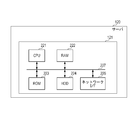
- FIG. 2 is a block diagram illustrating an example of a hardware configuration of a server 120.
- FIG. 2 is a block diagram illustrating an example of a hardware configuration of a printing device 140.
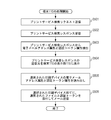
- FIG. 4 is a flowchart showing processing executed on a terminal 110.
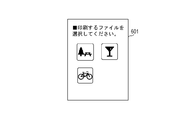
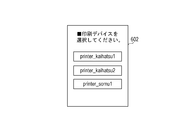
- 6 is a diagram illustrating an example of a screen for selecting a print file and a print device in the terminal 110.
- FIG. 6 is a diagram illustrating an example of a screen for selecting a print file and a print device in the terminal 110.
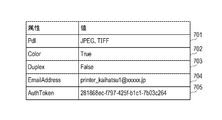
- FIG. 6 is a diagram illustrating an example of a print search response transmitted by the printing device 140.
- FIG. 6 is a flowchart illustrating a print service search response transmission process executed by the print device 140.
- 3 is a flowchart showing processing executed by a server 120.
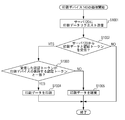
- 4 is a flowchart illustrating a printing process executed by the printing device 140.
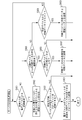
- 6 is a flowchart illustrating processing for changing an authentication token, which is executed by the printing device.
- 10 is a flowchart illustrating processing for changing an authentication token, which is executed by the printing device 140 in the second embodiment.
- 10 is a flowchart illustrating a printing process executed by the printing device 140 in the second embodiment.
- 10 is a flowchart illustrating a printing process executed by the printing device 140 in the third embodiment.
- FIG. 10 is a diagram illustrating an authentication token held by the printing device in the fourth embodiment.
- 10 is a flowchart illustrating processing executed by the server 120 in the fifth embodiment.
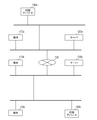
- FIG. 1 is a block diagram showing an example of the configuration of a printing system according to the present embodiment.
- a plurality of terminals 110a to 110c, a plurality of servers 120a to 120b, and a plurality of printing devices 140a to 140b are connected to a network.
- the terminals 110a to 110c are terminals having a function of sending and receiving electronic mail, and are, for example, personal computers and mobile terminals.
- the servers 120a and 120b are document management servers having a mail server function for managing electronic mail and a function for converting a file attached to the mail into a printable format and transmitting it to a printing device.
- the printing devices 140a to 140c are devices that have a function of acquiring data from the server 120 and printing, and are, for example, digital multifunction peripherals for offices and home inkjet printers.
- the terminal 110a can communicate with the server 120a using an e-mail protocol, and similarly, the terminals 110b to 110c can communicate with the server 120b using an e-mail protocol.
- the terminals 110a to 110c can communicate with terminals on other networks via the server 120a and the WAN 130.
- Each of the terminals 110a to 110c can search for a printing device in the same subnetwork set by a router (not shown) by multicast.
- the terminals 110a to 110c are simply referred to as the terminals 110 unless the terminals 110a to 110c are particularly distinguished.
- the servers 120a and 120b are also referred to as the server 120
- the printing devices 140a and 140b are also referred to as the printing device 140.
- FIG. 1 is described as an example of the printing system of the present embodiment.
- Communication between the terminal 110 and the server 120, communication between the terminal 110 and the print device 140, and communication between the server 120 and the print device 140 are LAN.
- communication may be performed via the WAN, or communication may be performed via one or a plurality of servers such as a mobile phone base station server.
- FIG. 2 is a diagram illustrating an example of a hardware configuration of the terminal 110.
- the terminal 110 includes a control unit 111, an operation unit 113, and a display unit 115, and the control unit 111 is connected to the operation unit 113 and the display unit 115.
- the control unit 111 includes a CPU 231, a ROM 232, a RAM 233, a flash memory 234, an operation unit I / F 235, a display unit I / F 236, and a network interface 237 for connecting the terminal 110 to a network. These units are connected via a system bus 238.
- the ROM 232 stores a control program for the control unit 111 to control operations of the operation unit 113, the operation unit 113, and the display unit 115, and an e-mail transmission / reception program for the terminal 110 to transmit / receive e-mails to the server 120. Yes.
- the CPU 231 controls the operations of the operation unit 113 and the display unit 115 by reading the control program stored in the ROM 232 into the RAM 233, analyzing and executing the program.
- the CPU 231 of the control unit 111 executes transmission / reception of electronic mail data by reading the electronic mail transmission / reception program stored in the flash memory 234 into the RAM and analyzing it.
- the control unit 111 In transmitting the e-mail data, the control unit 111 sends the electronic data (hereinafter also referred to as an electronic file) stored in the flash memory 234 to the e-mail according to the user input from the operation unit 113 via the operation unit I / F 235. You can send it as an attachment.
- the control unit 111 can control the display unit 115 via the display unit I / F 236 to display the content of the e-mail received from the server 120 on the display unit 115.
- the flash memory 234 stores a program for executing processing shown in a flowchart of FIG. Then, the CPU 231 reads this program into the RAM 233 and analyzes it, whereby the terminal 110 executes the processing of the flowchart of FIG.
- the control unit 121 included in the server 120 includes a CPU 221, a RAM 222, a ROM 223, an HDD 224, and a network I / F (network interface) 226, which are connected via a system bus 227. ing.
- the network I / F 226 is connected to the network I / F of the printing device 140 via the WAN 130, and transmits and receives files.
- the ROM 223 stores a control program for controlling the operation of the server 120, and the CPU 221 reads out this control program to the RAM 222 for analysis and execution, whereby the control unit 121 controls the operation of the entire server 120.
- the HDD 224 stores an e-mail transmission / reception program for transmitting / receiving e-mail to / from the terminal 110. Then, the CPU 221 reads and analyzes this e-mail transmission / reception program into the RAM 222, whereby e-mail transmission / reception between the terminal 110 and the server 120 is performed.
- the HDD 224 stores a file transmission / reception program for transmitting / receiving files to / from the printing device 140 and a printing program for performing image processing on the received file.
- the CPU 221 reads this file transmission / reception program into the RAM 222 and analyzes it, whereby the server 120 executes file transmission / reception processing with the printing device 140. Further, the CPU 221 reads out the print program to the RAM 222 and analyzes it, so that the server 120 executes image processing on the file.
- the HDD 224 has a print program for analyzing the data of the email received from the terminal 110 and executing the processing shown in the flowcharts of FIGS. 7 and 16 to be described later on the file attached to the email. It is remembered. Then, the CPU 221 reads out the print program to the RAM 222 and analyzes it, whereby the server 120 executes various processes on the received file.
- the control unit 141 of the printing device 140 is electrically connected to the printer 145, and on the other hand, connected to an external device (for example, the terminal 110, the server 120, etc.) via the network. Yes.
- an external device for example, the terminal 110, the server 120, etc.
- the CPU 201 comprehensively controls access to various connected devices based on a control program or the like stored in the ROM 203, and also comprehensively controls various processes performed by the control unit 141.
- the RAM 202 is a system work memory for the CPU 201 to operate and also a memory for temporarily storing image data.
- the RAM 202 includes a nonvolatile SRAM that retains stored contents even after the power is turned off, and a DRAM that erases the stored contents after the power is turned off.
- the ROM 203 stores a boot program for the device.
- the HDD 204 is a hard disk drive and can store system software and image data.
- the HDD 204 stores a program for executing processing shown in a flowchart described later.
- the CPU 201 reads this program into the RAM 202 and analyzes it, whereby the printing device 140 executes processing.
- the operation unit I / F 205 is an interface unit for connecting the system bus 207 and the operation unit 143.
- the operation unit I / F 205 receives image data to be displayed on the operation unit 143 from the system bus 207 and outputs the image data to the operation unit 143 and outputs information input from the operation unit 143 to the system bus 207.
- the network I / F 206 is connected to the WAN 130 and the system bus 207 to input / output information.
- the network I / F 206 is connected to the network I / F of the server 120 via the WAN 130, and transmits and receives files.
- the image bus I / F 208 is an interface that connects the system bus 207 and an image bus 212 that transfers image data at high speed, and operates as a bus bridge that converts a data structure.
- the image bus 212 is a transmission path for exchanging image data, and is configured by a PCI bus or IEEE1394. Further, a RIP (Raster Image Processor) 209, a device I / F 210, and a printer image processing unit 211 are connected to the image bus 212.
- a RIP Raster Image Processor
- the RIP 209 generates raster data based on DL (Display List) generated by converting the PDL (Page Description Language) data received from the network I / F 206 by the CPU 201.
- DL Display List
- PDL Page Description Language
- the device I / F 210 is an interface that connects the printer 145 and the control unit 141, and temporarily stores input / output data using image data conversion and a buffer memory (not shown).
- the printer image processing unit 211 performs processing such as color conversion, filter processing, and resolution conversion on the output image data output to the printer 145.
- the control unit 111 of the terminal 110 displays a print target file selection screen as shown in FIG. 6A on the display unit 115, and selects a print target file from the list of files displayed on the screen 601 by the user. To determine the file to be printed.
- step S501 when the file to be printed is determined on the file selection screen in FIG. 6A, the control unit 111 of the terminal 110 transmits a print service search request to the network.
- the print service search request indicates, for example, Multicast DNS (hereinafter referred to as mDNS) _printer, _pdl-datastream, _ipp service search, and the like.
- mDNS Multicast DNS
- _pdl-datastream a print service search of Service Location Protocol (hereinafter referred to as SLP).
- SLP Service Location Protocol
- the print service search request is transmitted by multicast to the network to which the terminal 110 belongs, separated by the router.
- the print service search request is transmitted to the network by multicast, if the print device is installed within the same network (or the same subnetwork), the print device transmits a response to the print service search request. .
- the multicast packet transmitted to the network is set so that it is not transmitted to other networks separated by the router.
- the control unit 111 of the terminal 110 receives a print service search response (FIG. 7) from the printing device.
- the print service search response includes at least an e-mail address attribute of the printing device and authentication token attribute information.
- This authentication token is used when authentication is performed by the printing device.
- only a terminal belonging to the same network as the printing device can acquire the authentication token attribute of the printing device, while the printing device has a system configuration that allows only printing of an e-mail with the authentication token attribute added. ing.
- the print service search response shown in FIG. 7 is an example of a print service search response received from the printing device in S502.
- Reference numeral 701 denotes a format that can be printed by the printing device 140 that is the transmission source of the search response.
- the example shown in FIG. 7 indicates that this printing device can print JPEG and TIFF data formats.
- Reference numeral 702 denotes whether the printing device 140 can perform color printing. In the example of FIG. 7, since True is set, the printing device 140 can perform color printing.
- Reference numeral 703 denotes whether the printing device 140 can perform duplex printing. The example of FIG. 7 indicates that the printing device 140 cannot perform duplex printing because False is set.
- Reference numeral 704 denotes an electronic mail address assigned to the printing device 140. In the example of FIG. 7, printer_kaihatsu1 @ xxxx. jp is assigned to the printing device 140 as an email address attribute.
- Reference numeral 705 denotes an authentication token held by the printing device 140.
- “281868ec-f797-425f-b1c1-7b03c264” indicates that the authentication token of the printing device 140.
- the authentication token generation process will be described later, but the authentication token is periodically changed at predetermined time intervals.
- control unit 111 of the terminal 110 extracts information on the email address attribute and the authentication token attribute from the print service search response received in S502, and manages the information in association with each printing device.
- step S504 the control unit 111 of the terminal 110 displays a list of print service search response transmission sources on the display unit 115 as a print device selection screen.
- this list is displayed, the information of the e-mail address attribute extracted in S503 is displayed.
- the user of the terminal 110 can designate a printing device by selecting an e-mail address of a desired printing device from one or more searched printing devices.
- the information displayed in the list may not be information on the e-mail address attribute as long as the information can identify the printing device.
- FIG. 6B is a screen that is changed from FIG. 6A and displayed when the print service search response is received in S502.
- the terminal 110 displays the list of printing devices searched in S501 and S502 as a list 602 in FIG. 6B.
- the terminal 110 receives selection of a device for printing a print target file by an operation from the user via the operation unit 113.
- the terminal 110 starts processing for transmitting an e-mail with an authentication token to the selected printing device, and the control unit 111 of the terminal 110 print data described in and after S505. Perform the transmission process.
- control unit 111 of the terminal 110 reads the e-mail address attribute and authentication token attribute of the selected printing device from the attribute data extracted in S503.
- step S506 the control unit 111 of the terminal 110 attaches the print target file selected by the user to the e-mail. Further, the authentication token attribute read in S505 is added to the header portion of the e-mail. Then, the e-mail to which the authentication token attribute is added is transmitted to the destination indicated by the e-mail address attribute read in S505, and the processing of this flowchart ends.
- a print service search response process in the printing device 140 according to the present embodiment will be described with reference to FIG. 8 is performed by a printing device belonging to the same network as the terminal 110 when a print search service request is transmitted from the terminal 110 in S502.
- step S ⁇ b> 801 the control unit 141 of the printing device 140 receives a print service search request from the terminal 110.
- step S ⁇ b> 802 the control unit 141 of the printing device 140 transmits a print service search response including the e-mail address attribute and the authentication token attribute as illustrated in FIG. 7 to the terminal 110.
- the attribute information included in the print service search response is stored in the SRAM in the RAM 202 of the printing device 140.
- processing is started when a predetermined request is received from the terminal 110 or the printing device 140.
- control unit 121 of the server 120 determines whether or not an e-mail addressed to the printing device has been received. If YES, the process proceeds to S902, and if NO, the process proceeds to S905.
- control unit 121 of the server 120 stores the electronic file attached to the received electronic mail data in the HDD 224.
- the authentication token is extracted and stored in the HDD 224 in a state linked to the attached electronic file.
- control unit 121 of the server 120 specifies the format of the electronic file extracted in S902. Then, it is determined whether or not the destination printing device can print in the specified format (that is, whether or not the printing device supports printing in the above format).
- the server 120 holds in advance a table in which formats supported by the printing device are registered.
- the format supported by the printing device is notified to the server 120, and the server 120 registers the format in the table. If it is determined in S903 that the format of the electronic file is not a format that can be printed by the transmission destination printing device (NO in S903), the process proceeds to S904. In step S ⁇ b> 904, the control unit 121 of the server 120 converts the format of the electronic data into a format supported by the transmission destination printing device and stores it in the HDD 224.
- control unit 121 of the server 120 saves correspondence information indicating the correspondence between the electronic file and the printing device on which the electronic file is printed in the HDD 224. .
- step S ⁇ b> 905 the control unit 121 of the server 120 determines whether a request (print data existence confirmation request) for confirming whether the print data addressed to the self device exists in the server 120 is received from the print device 140. . If it is determined that the print data existence confirmation request has been received, the process advances to step S906 to check whether the print data addressed to the print device exists in the HDD 224 by referring to the correspondence information stored in the HDD 224.
- step S906 If it is determined in step S906 that print data exists, the process advances to step S907 to transmit a notification indicating that print data exists (print data existence notification).
- the print data presence notification includes an ID for identifying the print data.
- step S ⁇ b> 908 the control unit 121 of the server 120 determines whether a request for acquiring print data (print data request) is received from the print device 140. If it is determined that the print data request has been received, the process proceeds to S909. If it is determined that the print data request has not been received, the process proceeds to S901.
- step S909 the control unit 121 of the server 120 transmits the print data and the authentication token associated with the print data to the print device 140 in response to the received print data request. If there is no print data addressed to the print device 140, the print device is notified that there is no print data as a response to the print data request received in step S905, and the processing of this flowchart ends.
- the printing device 140 Prior to the processing of this flowchart, the printing device 140 periodically transmits a print data existence confirmation request to the server 120 at regular time intervals. Then, the processing of this flowchart is started in response to reception of a print data existence notification indicating that print data exists from the server 120.
- step S ⁇ b> 1001 the control unit 141 of the print device 140 transmits a print data request to the server 120.
- step S1002 the control unit 141 of the printing device 140 determines whether print data and an authentication token have been received from the server 120. If the print device 140 has received the print data and the authentication token from the server 120, the process proceeds to S1003. If the print device 140 has not received the authentication token, the process proceeds to S1006.
- step S1003 the control unit 141 of the printing device 140 performs authentication by determining whether the authentication token received together with the print data in step S1002 matches the authentication token held by the printing device 140.
- step S1004 the control unit 141 of the printing device 140 performs rendering processing on the received print data using the printer image processing unit 211, and sends intermediate data (for example, display list data) to the printer 145 via the device I / F 210. Print.
- control unit 141 of the printing device 140 discards the print data received in S1002 in S1005.
- FIG. 11 is a flowchart showing an authentication token change process in the printing device 140 of this embodiment.
- the control unit 141 of the printing device 140 sets a random value in the authentication token and stores the authentication token in the RAM 202 in S1101.
- step S1102 the control unit 141 of the printing device 140 WAITs for a certain period of time.
- step S ⁇ b> 1103 the control unit 141 of the printing device 140 sets a random value again to the authentication token and stores it in the RAM 202.
- the authentication token included in the print service search response transmitted by the printing device 140 in S802 is the authentication token held in the RAM 202 in S1103.
- the print service search mechanism is used to obtain an authentication token and an e-mail address as long as the terminal belongs to the same network as the printing device.
- the authentication token of the printing device 140 is changed. Then, printing cannot be executed, so that damage caused by leakage of the e-mail address can be minimized.
- FIG. 12 is a flowchart of processing executed by the printing device 140 in the present embodiment. The processing of each step in this flowchart is realized by the CPU 201 executing a program stored in the HDD 204 of the printing device 140.
- the control unit 141 of the printing device 140 sets a random value in the authentication token and stores it in the RAM 202 in step S1201.
- step S1202 the control unit 141 of the printing device 140 WAITs for a predetermined time.
- step S1203 the control unit 141 of the printing device 140 determines whether the authentication token update suppression flag indicating that the change of the authentication token is temporarily suppressed is ON.
- the authentication token suppression flag is stored in the printing device 140 in association with the authentication token.
- FIG. 13 is a flowchart of printing processing executed by the printing device 140 in the present embodiment. In this flowchart, processing is started in response to reception of a print data existence notification from the server 120.
- step S1301 the control unit 141 of the printing device 140 turns on the authentication token update suppression flag.
- step S ⁇ b> 1302 the control unit 141 of the print device 140 transmits a print data request to the server 120.
- step S1303 the control unit 141 of the printing device 140 determines whether print data and an authentication token have been received from the server 120.
- the control unit 141 of the print device 140 determines in step S1304 whether the received authentication token matches the authentication token held by the print device 140.
- step S1305 the control unit 141 of the printing device 140 performs rendering processing on the received print data in the printer image processing unit 211, and sends intermediate data (for example, display list data) to the printer 145 via the device I / F 210. Print.
- control unit 141 of the printing device 140 discards the received print data in S1306.
- control unit 141 of the printing device 140 transmits a print data request to the server 120 in S1410.
- step S1307 when the control unit 141 of the printing device 140 determines that there is other print data in the server 120, the print data request is transmitted again in step S1302, thereby continuously performing the printing process. If the control unit 141 of the printing device 140 determines in step S1307 that there is no print data in the server 120, the authentication token suppression flag is turned OFF in step S1308, and the processing of this flowchart ends.
- “Reserved printing” here means that printing is started by inputting a print instruction on the panel of the operation unit 143 of the printing device 140.
- the purpose of the third embodiment is that a user who can perform an operation on the print device 140 is regarded as a valid user even when authentication token mismatch occurs and printing is rejected. Is to prevent the failure.
- FIG. 14 is a flowchart showing a printing process executed by the printing device 140.
- step S ⁇ b> 1401 the control unit 141 of the printing device 140 transmits a print data request to the server 120.
- step S1402 the control unit 141 of the printing device 140 determines whether print data and an authentication token have been received from the server 120.
- the control unit 141 of the print device 140 determines whether the received authentication token matches the authentication token held by the print device 140. If the authentication tokens match in the determination of S1403, the process proceeds to S1404.
- step S ⁇ b> 1404 the control unit 141 of the printing device 140 performs rendering processing on the received print data using the printer image processing unit 211, and sends intermediate data (for example, display list data) to the printer 145 via the device I / F 210. Print. If the print device 140 does not receive print data and an authentication token from the server 120, no processing is performed. If the authentication tokens do not match in the determination in S1403, in S1405, the control unit 141 of the printing device 140 changes the printing of the received print data to reserved printing using the authentication token as a password.
- the print data received in S1402 is associated with the authentication token, and is stored in the HDD 204 until a print instruction is given from the operation unit 143 by the user.
- the print data stored (retained) in the HDD 204 when the user inputs a print instruction through the operation unit 143 of the print device 140 is printed.
- the user may be prompted to enter a password when printing the retained print data. Furthermore, by using an authentication token as a password to be input by the user, there is an advantage that a user who does not know the authentication token cannot print the retained print data.
- an authorized user When using an authentication token as a password for starting the reservation printing process, an authorized user must know the authentication token. Therefore, for example, when the printing device selection screen of FIG. 6B is displayed, the authentication token of the printing device is also displayed, and the user is notified of the authentication token.
- control unit 141 of the printing device 140 waits for a certain time in S1406, and then repeats the processing from S1401.
- the configuration in which the authentication token is periodically changed has been described.
- the authentication token may be updated in the printing device 140 after the printing device receives the print data and before printing is started. In this case, there is a problem that printing fails even when an email is sent with an authentication token added.
- the printing device 140 holds a plurality of authentication tokens and sets an expiration date for each of them, thereby solving this problem.
- FIG. 15 is an example of an authentication token held in the HDD 204 of the printing device 140 of this embodiment. As shown in FIG. 15, in this embodiment, the printing device 140 holds a plurality of authentication tokens whose expiration date is 60 minutes. An authentication token is issued every 30 minutes.
- 1501 is an authentication token issued at 8:00 on 2011/5/23 and valid until 9:00 on 2011/5/23.
- 1502 is issued at 8:30 on 2011/5/23 and is valid until 9:30 on 2011/5/23
- 1503 is issued at 9:00 on 2011/5/23 and is issued on 10 of 2011/5/23. : Effective until 0:00.
- the printing device 140 compares authentication tokens in the sixth embodiment, but a configuration in which the server 120 compares authentication tokens will be described.
- FIG. 16 is a flowchart of processing in the server 120 of this embodiment.
- the control unit 121 of the server 120 receives a print data request and an authentication token from the print device 140.
- the control unit 121 of the server 120 confirms whether the print data addressed to the print device 140 that transmitted the print data request exists in the HDD 224 by referring to the correspondence information stored in the HDD 224. If the print data addressed to the print device 140 exists, the process advances to step S1603. If the print data does not exist, the print device is notified that there is no print data as a response to the print data request, and the process of this flowchart ends.
- step S1603 the control unit 121 of the server 120 acquires the print data that is stored in the HDD 224 and that is addressed to the print device that has transmitted the print data request, and the authentication token associated with the print data. Then, the acquired authentication token is compared with the authentication token received from the printing device 140 in step S1601. If they match as a result of the comparison in S1603, the process proceeds to S1604. In step S ⁇ b> 1604, the control unit 121 of the server 120 transmits the print data acquired in step S ⁇ b> 1602 to the print device 140.
- the printing device 140 since the server 120 confirms the match of the authentication token, the printing device 140 has an effect that the process of confirming the match of the authentication token is not necessary.
- the present invention can also be realized by executing the following processing. That is, software (program) that realizes the functions of the above-described embodiments is supplied to a system or apparatus via a network or various storage media, and a computer (or CPU, MPU, or the like) of the system or apparatus reads the program. It is a process to be executed.
Landscapes
- Engineering & Computer Science (AREA)
- Theoretical Computer Science (AREA)
- Human Computer Interaction (AREA)
- Physics & Mathematics (AREA)
- General Engineering & Computer Science (AREA)
- General Physics & Mathematics (AREA)
- Computer Security & Cryptography (AREA)
- Accessory Devices And Overall Control Thereof (AREA)
- Information Transfer Between Computers (AREA)
Abstract
電子データを電子メールに添付して印刷デバイスに送信することにより印刷するシステムでは、電子メールアドレスがひとたび漏洩すると誰でも印刷デバイスに印刷データを送信可能なため何らかの認証が必要とされている。 そこで、本発明のシステムは、端末と印刷デバイスとサーバとから構成されるシステムであって、端末がネットワークに対して印刷サービス検索要求を送信する手段と、印刷デバイスが印刷サービス検索要求を受信した場合に印刷サービス検索応答を送信する手段と、印刷デバイスは検索応答で認証トークンを送信する手段と、端末が電子メールにて印刷データを送信する際に認証トークンも送信する手段と、端末により送信された認証トークンと印刷デバイス自体が保持している認証トークンが一致するかを判断し、その判断の結果に応じて印刷を許可する手段と、を備えることを特徴とする。
Description
本発明は、電子メールに添付されたファイルに基づき画像を印刷する印刷システム、印刷装置、印刷装置の制御方法、及びプログラムに関するものである。
近年、PCやモバイル端末等が印刷デバイスの電子メールアドレス宛てに添付ファイルを含む電子メールを送信することによって、上記添付ファイルを印刷デバイスで印刷するシステムが知られている(特開2002-132638号公報を参照)。
この場合、送信端末は、印刷デバイスの電子メールアドレス宛てに印刷対象の電子ファイルを電子メールに添付する形で送信する。メールサーバ機能を持つ印刷文書管理サーバは、印刷デバイスに割り当てられた電子メールアドレス宛ての電子メールに添付された電子ファイルを抽出し、格納する。そして印刷文書管理サーバは、格納された電子ファイルを指定された印刷デバイスが印刷できる画像フォーマットに変換する。印刷デバイスは、自分宛ての印刷データが存在するかどうかを定期的に印刷文書管理サーバに問い合わせ、自分宛ての印刷データが印刷文書管理サーバに存在することを検知した場合、本印刷データを取得し印刷を行う。
上述した印刷システムでは、印刷デバイスの電子メールアドレスがひとたび漏えいすると、不正なユーザから大量の電子ファイルが送信される等の攻撃を受ける可能性があり、セキュリティ面で問題がある。
そのため、印刷デバイスの電子メールアドレス宛てに送信された電子ファイルの印刷を無条件に許可するのではなく何らかの方法で印刷を許可したり拒否したりする仕組みが求められる。
本発明は、上記の問題に鑑みて、電子メールに添付されたファイルに基づき画像を印刷する印刷システムにおいて好適に印刷を許可したり拒否したりすることが可能な認証印刷システムを提供することを目的とする。
上記目的を達成するため、本発明による印刷システムは、
電子ファイルを含む電子メールを送信することにより前記電子ファイルの印刷要求を行なう端末と、電子メールに含まれる電子ファイルに基づく画像を印刷する印刷デバイスとがネットワークを介して接続されている印刷システムであって、前記端末は、電子ファイルの印刷を行う場合にネットワークに対して印刷デバイスを検索する検索リクエストを送信する検索リクエスト送信手段と、前記検索リクエスト送信手段による検索リクエストの応答として、印刷デバイスの電子メールアドレスと認証トークンを受信する検索レスポンス受信手段と、前記検索レスポンス受信手段で受信した電子メールアドレス宛てに、前記検索レスポンス受信手段で受信した認証トークンと前記電子ファイルを含む電子メールを送信するメール送信手段と、前記印刷デバイスは、認証トークンを保持する保持手段と、ネットワークから印刷デバイスを検索する検索リクエストを受信する検索リクエスト受信手段と、前記検索リクエスト受信手段で検索リクエストを受信した場合、前記保持手段に保持された認証トークンと前記印刷デバイスに割り当てられた電子メールアドレスとを含む検索レスポンスを前記検索リクエストの送信元の装置に送信する検索レスポンス送信手段と、電子ファイルを含む電子メールを受信するメール受信手段と、前記メール受信手段により受信された電子メールに前記印刷デバイスが発行した認証トークンが含まれている場合に、前記受信された電子メールに含まれる電子ファイルの印刷を行う印刷手段とを有することを特徴とする。
電子ファイルを含む電子メールを送信することにより前記電子ファイルの印刷要求を行なう端末と、電子メールに含まれる電子ファイルに基づく画像を印刷する印刷デバイスとがネットワークを介して接続されている印刷システムであって、前記端末は、電子ファイルの印刷を行う場合にネットワークに対して印刷デバイスを検索する検索リクエストを送信する検索リクエスト送信手段と、前記検索リクエスト送信手段による検索リクエストの応答として、印刷デバイスの電子メールアドレスと認証トークンを受信する検索レスポンス受信手段と、前記検索レスポンス受信手段で受信した電子メールアドレス宛てに、前記検索レスポンス受信手段で受信した認証トークンと前記電子ファイルを含む電子メールを送信するメール送信手段と、前記印刷デバイスは、認証トークンを保持する保持手段と、ネットワークから印刷デバイスを検索する検索リクエストを受信する検索リクエスト受信手段と、前記検索リクエスト受信手段で検索リクエストを受信した場合、前記保持手段に保持された認証トークンと前記印刷デバイスに割り当てられた電子メールアドレスとを含む検索レスポンスを前記検索リクエストの送信元の装置に送信する検索レスポンス送信手段と、電子ファイルを含む電子メールを受信するメール受信手段と、前記メール受信手段により受信された電子メールに前記印刷デバイスが発行した認証トークンが含まれている場合に、前記受信された電子メールに含まれる電子ファイルの印刷を行う印刷手段とを有することを特徴とする。
また本発明による印刷デバイスは、認証トークンを保持する保持手段と、ネットワークから印刷デバイスを検索する検索リクエストを受信する検索リクエスト受信手段と、前記検索リクエスト受信手段で検索リクエストを受信した場合、前記保持手段に認証トークンと前記印刷デバイスに割り当てられた電子メールアドレスとを含む検索レスポンスを前記検索リクエストの送信元の装置に送信する検索レスポンス送信手段と、電子ファイルを含む電子メールを受信するメール受信手段と、前記メール受信手段により受信された電子メールに前記印刷デバイスが発行した認証トークンが含まれる場合に、前記受信された電子メールの印刷を行う印刷手段とを有することを特徴とする。
本発明の効果によれば、電子メールに添付されたファイルに基づき画像を印刷する印刷システムにおいて好適に印刷を許可したり拒否したりすることが可能となる。
以下、本発明を実施するための形態について図面を用いて説明する。
(実施形態1)
図1は本実施形態の印刷システムの構成の一例を示すブロック図である。
図1の印刷システムの例では、複数台の端末110a~c、及び複数台のサーバ120a~b、及び複数台の印刷デバイス140a~bがネットワークに接続されている。端末110a~cは、電子メールを送受信する機能を有する端末であり、例えばパーソナルコンピュータやモバイル端末などである。サーバ120a~bは、電子メールを管理するメールサーバ機能やメールに添付されたファイルを印刷可能な形式に変換して印刷デバイスに送信する機能をもつ文書管理サーバである。印刷デバイス140a~cは、サーバ120からデータを取得して印刷する機能を有するデバイスであり、例えばオフィス向けのディジタル複合機や家庭用のインクジェットプリンタなどである。
図1は本実施形態の印刷システムの構成の一例を示すブロック図である。
図1の印刷システムの例では、複数台の端末110a~c、及び複数台のサーバ120a~b、及び複数台の印刷デバイス140a~bがネットワークに接続されている。端末110a~cは、電子メールを送受信する機能を有する端末であり、例えばパーソナルコンピュータやモバイル端末などである。サーバ120a~bは、電子メールを管理するメールサーバ機能やメールに添付されたファイルを印刷可能な形式に変換して印刷デバイスに送信する機能をもつ文書管理サーバである。印刷デバイス140a~cは、サーバ120からデータを取得して印刷する機能を有するデバイスであり、例えばオフィス向けのディジタル複合機や家庭用のインクジェットプリンタなどである。
端末110aはサーバ120aと電子メールのプロトコルで通信することができ、同じく端末110b~cはサーバ120bと電子メールのプロトコルで通信することができる。
また端末110a~cは、サーバ120a及びWAN130を介して他のネットワーク上の端末と通信可能である。
また端末110a~cのそれぞれは、不図示のルータによって設定されている同一のサブネットワーク内の印刷デバイスをマルチキャストにより検索することができる。
なお、以降の説明では、特に端末110a~cを区別しない限りは、端末110a~cを単に端末110と称する。同じくサーバ120a~bも同様にサーバ120と称し、印刷デバイス140a~bも印刷デバイス140と称する。
また、図1は本実施形態の印刷システムの一例として説明したものであり、端末110とサーバ120間の通信や端末110と印刷デバイス140間の通信、サーバ120と印刷デバイス140間の通信はLAN又はWANを介して通信しても良いし、間に携帯電話基地局のサーバなど1又は複数のサーバを経由した通信でも良い。
次に、図1の印刷システムを構成する、端末110、サーバ120、及び印刷デバイス140のそれぞれのハードウェア構成図について説明する。
図2は、端末110のハードウェア構成の一例を示す図である。
図2で示されるように、端末110は、制御部111、操作部113、及び表示部115を有し、制御部111は、操作部113と表示部115と接続する。
図2で示されるように、端末110は、制御部111、操作部113、及び表示部115を有し、制御部111は、操作部113と表示部115と接続する。
制御部111は、CPU231、ROM232、RAM233、フラッシュメモリ234、操作部I/F235、表示部I/F236、及び、端末110をネットワークと接続するためのネットワークインタフェース237を有している。そしてこれら各部がシステムバス238を介して接続されている。ROM232には、制御部111が操作部113および操作部113および表示部115の動作を制御するための制御プログラム、端末110がサーバ120へ電子メールを送受信するための電子メール送受信プログラムが記憶されている。
CPU231はROM232に記憶された制御プログラムをRAM233に読み出し、解析、実行することで操作部113および表示部115の動作を制御する。
また、制御部111のCPU231は、フラッシュメモリ234に記憶された電子メール送受信プログラムをRAMに読み出し、解析することで電子メールデータの送受信を実行する。
電子メールデータの送信にあたって、制御部111は、操作部113からの操作部I/F235を介したユーザ入力に従い、フラッシュメモリ234に記憶されている電子データ(以下、電子ファイルともいう)を電子メールに添付して送信することができる。一方電子メールデータの受信にあたっては、制御部111は、表示部I/F236を介して表示部115を制御し、サーバ120から受信した電子メールの内容を表示部115に表示させることができる。
またフラッシュメモリ234には、後述する図5のフローチャートで示される処理を実行するためのプログラムが記憶されている。そして、CPU231がこのプログラムをRAM233に読み出し、解析することで、端末110は図5のフローチャートの処理を実行する。
次に図3を用いて、サーバ120のハードウェア構成について詳細に説明する。
図3に示されるように、サーバ120が備える制御部121は、CPU221、RAM222、ROM223、HDD224、ネットワークI/F(ネットワークインタフェース)226を有しており、これらはシステムバス227を介して接続されている。ネットワークI/F226はWAN130を介して印刷デバイス140のネットワークI/Fと接続されており、ファイルの送受信を行う。
図3に示されるように、サーバ120が備える制御部121は、CPU221、RAM222、ROM223、HDD224、ネットワークI/F(ネットワークインタフェース)226を有しており、これらはシステムバス227を介して接続されている。ネットワークI/F226はWAN130を介して印刷デバイス140のネットワークI/Fと接続されており、ファイルの送受信を行う。
ROM223にはサーバ120の動作を制御するための制御プログラムが記憶されており、CPU221がこの制御プログラムをRAM222へ読み出して、解析、実行することで制御部121はサーバ120全体の動作を制御している。また、HDD224には、端末110と電子メールを送受信するための電子メール送受信プログラムが記憶されている。そしてCPU221が、この電子メール送受信プログラムをRAM222へ読み出して解析することで、端末110とサーバ120との電子メールの送受信が行われる。
また、HDD224には印刷デバイス140とファイルを送受信するためのファイル送受信プログラム、および受信したファイルに対して画像処理を施すための印刷プログラムが記憶されている。このファイル送受信プログラムをCPU221がRAM222へ読み出して、解析することで、サーバ120は印刷デバイス140とファイルの送受信処理を実行する。また、この印刷プログラムをCPU221がRAM222へ読み出して解析することでサーバ120はファイルに対して画像処理を実行する。
また、HDD224には、端末110から受信した電子メールのデータを解析し、電子メールに添付されたファイルに対して後述の図7や図16のフローチャートに示される処理を実行するための印刷プログラムが記憶されている。そして、CPU221が、この印刷プログラムをRAM222へ読み出して解析することで、サーバ120は受信したファイルに対して各種処理を実行する。
次に、図4を用いて、印刷デバイス140のハードウェア構成について詳細に説明する。
図4に示されるように、印刷デバイス140の制御部141は、プリンタ145と電気的に接続されており、一方ではネットワークを介して外部の装置(例えば端末110やサーバ120等)と接続されている。これにより画像データなどのファイルやデバイス情報の入出力が可能となっている。
図4に示されるように、印刷デバイス140の制御部141は、プリンタ145と電気的に接続されており、一方ではネットワークを介して外部の装置(例えば端末110やサーバ120等)と接続されている。これにより画像データなどのファイルやデバイス情報の入出力が可能となっている。
CPU201は、ROM203に記憶された制御プログラム等に基づいて接続中の各種デバイスとのアクセスを統括的に制御すると共に、制御部141で行われる各種処理についても統括的に制御する。
RAM202は、CPU201が動作するためのシステムワークメモリであり、かつ画像データを一時記憶するためのメモリでもある。このRAM202は、記憶した内容を電源オフ後も保持しておく不揮発性SRAM及び電源オフ後には記憶した内容が消去されてしまうDRAMにより構成されている。
ROM203には装置のブートプログラムなどが格納されている。HDD204はハードディスクドライブであり、システムソフトウェアや画像データを格納することが可能となっている。このHDD204には、後述のフローチャートに示される処理を実行するためのプログラムが記憶されている。そしてCPU201が、このプログラムをRAM202へ読み出して解析することで、印刷デバイス140は処理を実行する。
操作部I/F205は、システムバス207と操作部143とを接続するためのインタフェース部である。この操作部I/F205は、操作部143に表示するための画像データをシステムバス207から受け取り操作部143に出力すると共に、操作部143から入力された情報をシステムバス207へと出力する。
ネットワークI/F206はWAN130及びシステムバス207に接続し、情報の入出力を行う。また、ネットワークI/F206はWAN130を介してサーバ120のネットワークI/Fと接続されており、ファイルの送受信も行う。
画像バスI/F208は、システムバス207と画像データを高速で転送する画像バス212とを接続するインタフェースであり、データ構造を変換するバスブリッジとして動作する。
画像バス212は画像データのやり取りをするための伝送路であり、PCIバスまたはIEEE1394で構成されている。また、この画像バス212には、RIP(Raster Image Processor)209、デバイスI/F210、プリンタ画像処理部211が接続される。
RIP209は、ネットワークI/F206から受信したPDL(Page Description Language)データをCPU201で変換して生成するDL(DisplayList)に基づきラスタデータを生成する。
デバイスI/F210は、プリンタ145と制御部141とを接続するインタフェースであり、画像データの変換、および、不図示のバッファメモリを用いて入出力データを一時的に保持する。
プリンタ画像処理部211は、プリンタ145へ出力する出力画像データに対して、色変換、フィルタ処理、解像度変換等の処理を行う。
次に図5を用いて、本実施形態の端末110において実行される処理の詳細について説明する。この図5のフローチャートの処理は、電子ファイルの印刷をするための操作をユーザから受け付けたことに従って開始されるものである。
まずS501の処理に先立って、端末110の制御部111は、図6Aのような印刷対象ファイルの選択画面を表示部115表示し、ユーザから601に表示されたファイルの一覧から印刷対象ファイルの選択を受け付け、印刷対象のファイルを決定する。
図6Aのファイル選択画面で印刷対象のファイルが決定されたことを受けて、S501において、端末110の制御部111は、プリントサービス検索リクエストをネットワークに送信する。
プリントサービス検索リクエストとは、例えば、Multicast DNS(以下、mDNSと称する)の_printer、_pdl-datastream、_ippサービス検索等を指す。他にも、Service Location Protocol(以下、SLPと称する)のprintサービス検索等であってもよい。
プリントサービス検索リクエストは、ルータで区切られた、端末110が属するネットワークにマルチキャストで送信される。プリントサービス検索リクエストがマルチキャストでネットワークに送信された場合、もし同一ネットワーク(又は同一サブネットワーク)の範囲内に印刷デバイスが設置されていれば、その印刷デバイスは上記プリントサービス検索リクエストに対する応答を送信する。
なお、本実施形態では、ネットワークに送信されたマルチキャストパケットは、ルータで区切られた他のネットワークへは送信されないような設定がルータにされていることを前提としている。
S502において端末110の制御部111は、端末110と同一のネットワーク内に印刷デバイスがあれば、その印刷デバイスからプリントサービス検索レスポンス(図7)を受信する。プリントサービス検索レスポンスには少なくとも印刷デバイスの電子メールアドレス属性と、認証トークン属性の情報とが含まれている。この認証トークンは、印刷デバイスで認証を行う際に使用するものである。本実施形態では、印刷デバイスと同一ネットワークに属する端末だけがこの印刷デバイスの認証トークン属性を取得でき、一方で印刷デバイスは認証トークン属性が付加された電子メールの印刷だけを許可するシステム構成となっている。
図7を参照して、電子メールアドレス属性と認証トークン属性の情報を含むプリントサービス検索レスポンスの詳細を説明する。図7で示されるプリントサービス検索レスポンスは、S502で印刷デバイスから受信するプリントサービス検索レスポンスの一例である。
701は検索レスポンスの送信元である印刷デバイス140が印刷可能なフォーマットを示す。図7に示す例では、この印刷デバイスがJPEG、TIFFデータフォーマットを印刷できることを示す。702は印刷デバイス140がカラー印刷できるか否かを示す。図7の例では、Trueが設定されているため印刷デバイス140がカラー印刷できることを示す。703は印刷デバイス140が両面印刷できるか否かを示す。図7の例では、Falseが設定されているため印刷デバイス140が両面印刷できないことを示す。704は印刷デバイス140に割り当てられている電子メールアドレスを示す。図7の例では、printer_kaihatsu1@xxxxx.jpが印刷デバイス140に電子メールアドレス属性として割り当てられていることを示す。705は印刷デバイス140の保持している認証トークンを示す。本実施形態では、“281868ec-f797-425f-b1c1-7b03c264”が印刷デバイス140の認証トークンであることを示す。なお、認証トークンの生成処理については後述するが、認証トークンは所定の時間間隔で定期的に変更される。
S503において、端末110の制御部111は、S502で受信したプリントサービス検索レスポンスから電子メールアドレス属性と認証トークン属性の情報を抽出し、上記印刷デバイスごとに関連付けて管理する。
S504において端末110の制御部111は、プリントサービス検索レスポンス送信元の一覧を印刷デバイス選択画面として表示部115にリスト表示する。このリスト表示を行う際には、S503で抽出した電子メールアドレス属性の情報を表示する。これにより、端末110のユーザは、検索された1又は複数の印刷デバイスの中から所望の印刷デバイスの電子メールアドレスを選択することにより印刷デバイスの指定を行うことができる。なおリスト表示される情報は、印刷デバイスを識別できる情報であれば、電子メールアドレス属性の情報でなくてもよい。
図6Bは、S502でプリントサービス検索レスポンスを受信したことにより図6Aから遷移し表示される画面である。
端末110は、S501、S502にて検索された印刷デバイス一覧を図6Bの602のように一覧表示する。図6Bの画面で、端末110は、ユーザからの操作部113を介した操作により、印刷対象ファイルを印刷するためのデバイスの選択を受け付ける。ユーザが所望の印刷デバイスを選択すると、端末110は選択された印刷デバイスへの認証トークン付きの電子メールを送信するための処理を開始し、端末110の制御部111はS505以降で説明する印刷データの送信処理を行う。
S505において、端末110の制御部111は、選択された印刷デバイスの電子メールアドレス属性と認証トークン属性を、S503において抽出した属性データより読み出す。
S506において、端末110の制御部111は、ユーザにより選択された印刷対象ファイルを電子メールに添付する。更に、S505で読み出した認証トークン属性を、その電子メールのヘッダ部分に付加する。そして、S505で読み出した電子メールアドレス属性が示す宛先へ、認証トークン属性が付加された電子メールを送信し、本フローチャートの処理を終了する。
次に図8を用いて、本実施形態の印刷デバイス140におけるプリントサービス検索レスポンス処理について説明する。図8のフローチャートの処理は、端末110からS502でプリント検索サービスリクエストが送信された場合に、端末110と同一ネットワークに属する印刷デバイスが行うものである。
S801において、印刷デバイス140の制御部141は、端末110からプリントサービス検索リクエストを受信する。
S802において、印刷デバイス140の制御部141は、電子メールアドレス属性と認証トークン属性を含んだ図7で示したようなプリントサービス検索レスポンスを端末110に送信する。プリントサービス検索レスポンスに含まれる属性情報は、印刷デバイス140のRAM202におけるSRAMに保存されている。
次に、図9を用いて、本実施形態のサーバ120で実行される処理の詳細について説明する。図9のフローチャートは、端末110や印刷デバイス140から所定の要求を受信したことにより処理が開始される。
S901において、サーバ120の制御部121は、印刷デバイス宛ての電子メールを受信したか否かを判定し、YESと判定した場合はS902に進み、NOと判定した場合はS905に進む。
S902において、サーバ120の制御部121は、受信した電子メールデータに添付されている電子ファイルをHDD224に保存する。なお、電子メールデータに認証トークンが付加されている場合は当該認証トークンを抽出し、添付された電子ファイルと紐づけた状態でHDD224に保存する。
S903において、サーバ120の制御部121は、S902で抽出した電子ファイルのフォーマットを特定する。そして、特定したフォーマットで送信先の印刷デバイスが印刷可能か否か(すなわち上記フォーマットでの印刷を印刷デバイスがサポートしているか否か)を判断する。
なお、このS903での判断を行うために、サーバ120は印刷デバイスのサポートするフォーマットを登録したテーブルをあらかじめ保持しているものとする。
本テーブルの生成方法としては、例えば、印刷デバイスがサーバ120にサポートするフォーマットを通知し、サーバ120がそれをテーブルに登録することにより生成する。S903において電子ファイルのフォーマットが、送信先印刷デバイスの印刷できるフォーマットでないと判定した場合(S903でNO)はS904に進む。S904では、サーバ120の制御部121は、電子データのフォーマットを送信先印刷デバイスがサポートしているフォーマットに変換してHDD224に保存する。
一方電子ファイルのフォーマットが送信先印刷デバイスでサポートしているフォーマットであると判定した場合(S903でNO)、上記フォーマット変換をサーバ120では行うことなく本フローチャートの処理を終了する。
なお、S902およびS904にて電子ファイルがHDD224に保存される際、サーバ120の制御部121は、電子ファイルと該電子ファイルが印刷される印刷デバイスとの対応関係を示す対応情報をHDD224に保存する。
S905において、サーバ120の制御部121は、印刷デバイス140から、自デバイス宛ての印刷データがサーバ120に存在するかを確認する要求(印刷データの存在確認要求)を受信したか否かを判定する。印刷データの存在確認要求を受信したと判定した場合はS906に進み、この印刷デバイス宛ての印刷データがHDD224に存在するかを、HDD224に保存されている対応情報を参照することで確認する。
S906で印刷データが存在すると判定した場合はS907に進み、印刷データが存在することを示す通知(印刷データの存在通知)を送信する。なお、この印刷データの存在通知には、印刷データを識別するIDなどが含まれている。
S906で印刷データが存在しないと判定した場合、S905にて受信した印刷データの存在確認要求の応答として、当該要求を送信した印刷デバイス宛ての印刷データはサーバ120に存在しないことを印刷デバイスに通知し、本フローチャートの処理を終了する。
次にS908において、サーバ120の制御部121は、印刷デバイス140から印刷データを取得する要求(印刷データリクエスト)を受信したか否かを判定する。印刷データリクエストを受信したと判定した場合はS909に進み、受信していないと判定した場合はS901に進む。
S909において、サーバ120の制御部121は、受信した印刷データリクエストに応じて、印刷デバイス140に印刷データと印刷データに紐づけられた認証トークンを送信する。なお、印刷デバイス140宛ての印刷データが存在しない場合にはS905で受信した印刷データリクエストの応答として印刷データが存在しないことを印刷デバイスに通知し、本フローチャートの処理を終了する。
次に図10を用いて、本実施形態の印刷デバイス140で実行される印刷処理について説明する。なお、このフローチャートの処理に先立ち、印刷デバイス140は、サーバ120に対して印刷データの存在確認要求を一定時間間隔で定期的に送信する。そして、サーバ120から印刷データが存在することを示す印刷データの存在通知を受信したことに従って本フローチャートの処理が開始される。
S1001において、印刷デバイス140の制御部141は、サーバ120に印刷データリクエストを送信する。
S1002において、印刷デバイス140の制御部141は、サーバ120から印刷データおよび認証トークンを受信したか否かを判断する。印刷デバイス140がサーバ120から印刷データおよび認証トークンを受信した場合はS1003に進み、認証トークンを受信していない場合はS1006に進む。
S1003において、印刷デバイス140の制御部141は、S1002で印刷データとともに受信した認証トークンが印刷デバイス140の保持する認証トークンと一致するか判断することにより認証を行う。
S1003の判断にて認証トークンが一致した場合S1004に進む。S1004では、印刷デバイス140の制御部141は、受信した印刷データをプリンタ画像処理部211でレンダリング処理を行い、デバイスI/F210を経由してプリンタ145に中間データ(例えばディスプレイリストデータ)を送り、印刷を行う。
S1003の判断にて認証トークンが一致しなかった場合、S1005において印刷デバイス140の制御部141は、S1002で受信した印刷データを破棄する。
次に、印刷デバイス140が保持する認証トークンを定期的に変更する構成について説明する。
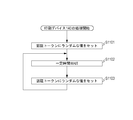
図11は、本実施形態の印刷デバイス140における認証トークン変更処理を示すフローチャートである。印刷デバイス140は、起動すると、S1101において印刷デバイス140の制御部141が認証トークンにランダムな値をセットしてRAM202に保持する。
S1102において印刷デバイス140の制御部141は一定時間処理をWAITする。S1103において印刷デバイス140の制御部141は認証トークンに再度ランダムな値をセットしRAM202に保持する。なお、S802において印刷デバイス140が送信するプリントサービス検索レスポンスに含まれる認証トークンは、S1103においてRAM202に保持されている認証トークンである。
本実施形態では、プリントサービス検索の仕組みを用いて、印刷デバイスと同一のネットワークに属する端末であれば認証トークンと電子メールアドレスを取得できる構成とした。このような構成としたことにより、同一ネットワーク内に属する端末のみ印刷を許可するとともに、他のネットワークに属する端末からの印刷を禁止することができる。その結果、他のネットワーク上のユーザの端末から電子メールで大量データのファイルが送信される等の攻撃を受けることを防止できる。
更に本実施形態では、このように認証トークンを定期的に変更することにより、電子メールアドレスと認証トークンが他のネットワークに属する端末のユーザに漏えいしたとしても、印刷デバイス140の認証トークンが変更されると印刷の実行ができなくなるので、電子メールアドレスの漏洩による被害を最小限にすることができる。
(実施形態2)
実施形態1では、印刷データリクエストの送信後に印刷デバイス140が保持する認証トークンが変更されると、正規のユーザからの印刷要求であっても印刷拒否されてしまうという問題がある。
実施形態1では、印刷データリクエストの送信後に印刷デバイス140が保持する認証トークンが変更されると、正規のユーザからの印刷要求であっても印刷拒否されてしまうという問題がある。
この問題に鑑みて、実施形態2では、認証トークンの認証トークン抑制フラグがONの場合には認証トークンの変更を抑制するものである。
実施形態2のシステム構成、ハードウェア構成については実施形態1と同様であるので説明を省略する。
図12は、本実施形態において印刷デバイス140で実行される処理のフローチャートである。このフローチャートの各ステップの処理は、印刷デバイス140のHDD204に格納されているプログラムをCPU201が実行することで実現される。
印刷デバイス140は、起動すると、S1201において印刷デバイス140の制御部141が認証トークンにランダムな値をセットしRAM202に保持する。
S1202において、印刷デバイス140の制御部141は一定時間処理をWAITする。S1203において印刷デバイス140の制御部141は、認証トークンの変更を一時的に抑制することを示す認証トークン更新抑制フラグがONであるかどうか判断する。なお認証トークン抑制フラグは、認証トークンに紐づけて印刷デバイス140で保管されている。
認証トークン抑制フラグがONであると判断した場合(S1203でYES)、認証トークンを更新することはせず、S1202において再度一定時間WAITする処理に遷移する。またS1203の判断結果がNOであれば、S1204において、S1201と同様の手順で認証トークンの更新処理を行ったあと、S1202においてWAITする処理に遷移する。
図13は、本実施形態において印刷デバイス140で実行される印刷処理のフローチャートである。このフローチャートは、サーバ120から印刷データの存在通知を受信したことに従って処理が開始される。
S1301において、印刷デバイス140の制御部141は、認証トークン更新抑制フラグをONにする。
S1302において、印刷デバイス140の制御部141は、サーバ120に印刷データリクエストを送信する。
S1303において、印刷デバイス140の制御部141は、サーバ120から印刷データおよび認証トークンを受信したか判断する。印刷デバイス140がサーバ120から印刷データおよび認証トークンを受信した場合、S1304において印刷デバイス140の制御部141は、受信した認証トークンが印刷デバイス140の保持する認証トークンと一致するか判断する。
前記S1304にて認証トークンが一致すると判断した場合はS1305に進む。S1305において、印刷デバイス140の制御部141は、受信した印刷データをプリンタ画像処理部211でレンダリング処理を行い、デバイスI/F210を経由してプリンタ145に中間データ(例えばディスプレイリストデータ)を送り、印刷を行う。
また、S1403にて認証トークンが一致しないと判断した場合、S1306において印刷デバイス140の制御部141は、受信した印刷データを破棄する。
S1305またはS1306の処理が完了した後、印刷デバイス140の制御部141は、S1410において、サーバ120に印刷データリクエストを送信する。
S1307において、印刷デバイス140の制御部141はサーバ120に他にも印刷データがあると判断した場合、S1302にて印刷データリクエストを再度送信することで、印刷処理を継続して行う。S1307において印刷デバイス140の制御部141はサーバ120に印刷データがないと判断した場合、S1308において認証トークン抑制フラグをOFFにし、本フローチャートの処理を終了する。
(実施形態3)
実施形態3では、実施形態1のS1003での判断で認証トークンが一致しなかった場合であっても、印刷データを破棄せず、留め置き印刷とする構成について説明する。
実施形態3では、実施形態1のS1003での判断で認証トークンが一致しなかった場合であっても、印刷データを破棄せず、留め置き印刷とする構成について説明する。
ここでいう留め置き印刷とは、印刷デバイス140の操作部143のパネル上で印刷指示を入力することにより印刷が開始されるものである。
実施形態3の目的は、認証トークンの不一致が発生し印刷拒否された場合であっても、印刷デバイス140での操作を行うことが可能なユーザであれば正当なユーザであるものとみなし、印刷が失敗することを防ぐということである。
図14は、印刷デバイス140で実行される印刷処理を示すフローチャートである。
S1401において、印刷デバイス140の制御部141は、サーバ120に印刷データリクエストを送信する。S1402において印刷デバイス140の制御部141はサーバ120から印刷データおよび認証トークンを受信したか判断する。印刷デバイス140がサーバ120から印刷データおよび認証トークンを受信した場合、S1403において印刷デバイス140の制御部141は、受信した認証トークンが印刷デバイス140の保持する認証トークンと一致するか判断する。S1403の判断にて認証トークンが一致した場合S1404に進む。
S1404において、印刷デバイス140の制御部141は、受信した印刷データをプリンタ画像処理部211でレンダリング処理を行い、デバイスI/F210を経由してプリンタ145に中間データ(例えばディスプレイリストデータ)を送り、印刷を行う。印刷デバイス140がサーバ120から印刷データおよび認証トークンを受信しなかった場合、何も処理を行わない。また、S1403の判断にて認証トークンが一致しなかった場合、S1405において印刷デバイス140の制御部141は、受信した印刷データの印刷を、認証トークンをパスワードとした留め置き印刷に変更する。
具体的には、S1402で受信した印刷データと認証トークンを紐づけて、ユーザからの操作部143での印刷指示があるまでHDD204に保存する。
そして、印刷デバイス140の操作部143で、印刷指示をユーザが入力したことでHDD204に保存された(留め置かれた)印刷データの印刷を行う。
なお、留め置かれた印刷データの印刷を行うにあたり、ユーザにパスワードを入力させるようにしてもよい。更に、ユーザに入力させるパスワードとして認証トークンをパスワードとすることにより、認証トークンを知らないユーザは留め置かれた印刷データの印刷を行うことができないという利点がある。
留め置き印刷の処理開始のためのパスワードとして認証トークンを使用する場合は、正規のユーザ自身が認証トークンを知っている必要がある。そのため、例えば図6Bの印刷デバイスの選択画面を表示する際に、その印刷デバイスの認証トークンも表示する等し、ユーザに認証トークンを通知しておく。
S1404またはS1405の処理が完了した後、印刷デバイス140の制御部141は、S1406において一定時間待機した後、S1401からの処理を繰り返す。
(実施形態4)
実施形態1では認証トークンを定期的に変更する構成を説明した。しかし、実施形態1の場合、印刷デバイスが印刷データを受信してから印刷を開始するまでの間に印刷デバイス140にて認証トークンが更新される場合がある。この場合、正当に認証トークンを付加してメールを送信した場合であっても印刷が失敗するという課題がある。
実施形態1では認証トークンを定期的に変更する構成を説明した。しかし、実施形態1の場合、印刷デバイスが印刷データを受信してから印刷を開始するまでの間に印刷デバイス140にて認証トークンが更新される場合がある。この場合、正当に認証トークンを付加してメールを送信した場合であっても印刷が失敗するという課題がある。
そこで実施形態4では、印刷デバイス140が複数の認証トークンを保持し、それぞれに有効期限を設けることにより本課題を解決する。
なお、実施形態4におけるシステム構成やハードウェア構成については、実施形態1と同様であるので説明を省略する。
図15は、本実施形態の印刷デバイス140のHDD204で保持する認証トークンの例である。図15に示されるように、本実施形態では、印刷デバイス140は有効期限を60分とする複数の認証トークンを保持している。また認証トークンは30分ごとに発行される。
1501は2011/5/23の8:00に発行され、2011/5/23の9:00まで有効である認証トークンであることを示している。
同様に1502は2011/5/23の8:30に発行され2011/5/23の9:30まで有効、また1503は2011/5/23の9:00に発行され2011/5/23の10:00まで有効であることを示している。
本実施形態では、認証トークンの発行時、既に保持されている認証トークンが期限切れになるまでに30分の猶予がある。すなわち、常に2つの認証トークンを有効な状態であるため、認証トークンの切り替わりで正しいユーザからの印刷データが破棄されることを防止することができる。
(実施形態5)
実施形態1においては、実施形態6では、印刷デバイス140が認証トークンの比較を行っているが、サーバ120が認証トークンの比較を行う構成について説明する。
実施形態1においては、実施形態6では、印刷デバイス140が認証トークンの比較を行っているが、サーバ120が認証トークンの比較を行う構成について説明する。
図16は、本実施形態のサーバ120における処理のフローチャートである。
S1601において、サーバ120の制御部121は、印刷デバイス140から印刷データリクエストと認証トークンを受信する。
S1601において、サーバ120の制御部121は、印刷デバイス140から印刷データリクエストと認証トークンを受信する。
S1602においてサーバ120の制御部121は印刷データリクエストを送信した印刷デバイス140宛ての印刷データがHDD224に存在するかを、HDD224に保存されている対応情報を参照することで確認する。印刷デバイス140宛ての印刷データが存在する場合はS1603に進み、存在しない場合は、印刷データリクエストの応答として印刷データが存在しないことを印刷デバイスに通知し、本フローチャートの処理を終了する。
S1603において、サーバ120の制御部121は、HDD224に保存されている、印刷データリクエストを送信した印刷デバイス宛ての印刷データと、その印刷データに紐づけられた認証トークンとを取得する。そして、取得した認証トークンと、S1601において印刷デバイス140から受信した認証トークンを比較する。S1603での比較の結果一致した場合はS1604に進む。S1604では、サーバ120の制御部121は、S1602で取得した印刷データを印刷デバイス140に送信する。
またS1603の比較の結果一致しなかった場合は、S1605において、HDD224に保存されている印刷データを破棄し本フローチャートの処理を終了する。
本実施形態によれば、サーバ120が認証トークンの一致を確認するので、印刷デバイス140は、認証トークンの一致を確認する処理が不要となるという効果がある。
(他の実施形態)
また、本発明は、以下の処理を実行することによっても実現される。即ち、上述した実施形態の機能を実現するソフトウェア(プログラム)を、ネットワーク又は各種記憶媒体を介してシステム或いは装置に供給し、そのシステム或いは装置のコンピュータ(またはCPUやMPU等)がプログラムを読み出して実行する処理である。
また、本発明は、以下の処理を実行することによっても実現される。即ち、上述した実施形態の機能を実現するソフトウェア(プログラム)を、ネットワーク又は各種記憶媒体を介してシステム或いは装置に供給し、そのシステム或いは装置のコンピュータ(またはCPUやMPU等)がプログラムを読み出して実行する処理である。
本発明は上記実施の形態に制限されるものではなく、本発明の精神及び範囲から離脱することなく、様々な変更及び変形が可能である。従って、本発明の範囲を公にするために以下の請求項を添付する。
110 端末
120 サーバ
140 印刷デバイス
120 サーバ
140 印刷デバイス
Claims (13)
- 電子ファイルを含む電子メールを送信することにより前記電子ファイルの印刷要求を行なう端末と、電子メールに含まれる電子ファイルに基づく画像を印刷する印刷デバイスとがネットワークを介して接続されている印刷システムであって、
前記端末は、
電子ファイルの印刷を行う場合にネットワークに対して印刷デバイスを検索する検索リクエストを送信する検索リクエスト送信手段と、
前記検索リクエスト送信手段による検索リクエストの応答として、印刷デバイスの電子メールアドレスと認証トークンを受信する検索レスポンス受信手段と、
前記検索レスポンス受信手段で受信した電子メールアドレス宛てに、前記検索レスポンス受信手段で受信した認証トークンと前記電子ファイルを含む電子メールを送信するメール送信手段と、
前記印刷デバイスは、
認証トークンを保持する保持手段と、
ネットワークから印刷デバイスを検索する検索リクエストを受信する検索リクエスト受信手段と、
前記検索リクエスト受信手段で検索リクエストを受信した場合、前記保持手段に保持された認証トークンと前記印刷デバイスに割り当てられた電子メールアドレスとを含む検索レスポンスを前記検索リクエストの送信元の装置に送信する検索レスポンス送信手段と、
電子ファイルを含む電子メールを受信するメール受信手段と、
前記メール受信手段により受信された電子メールに前記印刷デバイスが発行した認証トークンが含まれている場合に、前記受信された電子メールに含まれる電子ファイルの印刷を行う印刷手段と
を有することを特徴とする印刷システム。 - 前記検索リクエストはマルチキャストにより送信されることを特徴とする請求項1に記載の印刷システム。
- 前記印刷デバイスは前記保持手段に保持された認証トークンを所定の時間間隔で変更する変更手段を更に有することを特徴とする請求項1又は2に記載の印刷システム。
- 前記印刷デバイスは、サーバに印刷デバイス宛ての印刷データが複数蓄積されている場合、前記変更手段による認証トークンの変更を抑制する抑制手段を更に有することを特徴とする請求項3に記載の印刷システム。
- 前記印刷デバイスは、前記メール受信手段で受信した認証トークンと前記保持手段に保持されている認証トークンとが一致しない場合、前記受信した認証トークンと一致する認証トークンをユーザから入力されたことに応じて印刷を行う印刷制御手段を更に有することを特徴とする請求項1ないし4のいずれか1項に記載の印刷システム。
- 前記印刷デバイスは有効期限が異なる複数の認証トークンを保持する手段を更に有することを特徴とする請求項1ないし5のいずれか1項に記載の印刷システム。
- 前記印刷システムは、前記端末から送信された電子メールを管理するサーバを更に有し、
前記印刷デバイスは、
前記サーバに前記印刷デバイスが保持する認証トークンを送信する手段を更に有し、
前記サーバは、
前記端末から送信された電子メールに含まれる電子ファイルに紐づいた認証トークンと、前記印刷デバイスから送信された認証トークンとが一致するかを判断し、その判断の結果に応じて前記印刷デバイスに電子ファイルを送信するかを決定する手段と、
を有することを特徴とする請求項1ないし6のいずれか1項に記載の印刷システム。 - 認証トークンを保持する保持手段と、
ネットワークから印刷デバイスを検索する検索リクエストを受信する検索リクエスト受信手段と、
前記検索リクエスト受信手段で検索リクエストを受信した場合、前記保持手段に認証トークンと前記印刷デバイスに割り当てられた電子メールアドレスとを含む検索レスポンスを前記検索リクエストの送信元の装置に送信する検索レスポンス送信手段と、
電子ファイルを含む電子メールを受信するメール受信手段と、
前記メール受信手段により受信された電子メールに前記印刷デバイスが発行した認証トークンが含まれる場合に、前記受信された電子メールの印刷を行う印刷手段と
を有することを特徴とする印刷デバイス。 - 前記検索リクエストは、マルチキャストにより送信されることを特徴とする請求項8に記載の印刷デバイス。
- 前記印刷デバイスは前記保持手段に保持された認証トークンを所定の時間間隔で変更する変更手段を更に有することを特徴とする請求項8又は9に記載の印刷デバイス。
- 前記印刷デバイスは、サーバに印刷デバイス宛ての印刷データが複数蓄積されている場合、前記変更手段による認証トークンの変更を抑制する抑制手段を更に有することを特徴とする請求項10のいずれか1項に記載の印刷デバイス。
- 前記印刷デバイスは、前記メール受信手段で受信した認証トークンと印刷デバイスが保持している認証トークンとが一致しない場合、前記受信した認証トークンと一致する認証トークンをユーザから入力されたことに応じて印刷を行う印刷制御手段を更に有することを特徴とする請求項8ないし11のいずれか1項に記載の印刷デバイス。
- 前記印刷デバイスは有効期限が異なる複数の認証トークンを保持する手段を更に有することを特徴とする請求項8ないし12のいずれか1項に記載の印刷デバイス。
Priority Applications (3)
| Application Number | Priority Date | Filing Date | Title |
|---|---|---|---|
| PCT/JP2011/073908 WO2013057787A1 (ja) | 2011-10-18 | 2011-10-18 | 印刷システム、印刷装置、印刷方法、及びプログラム |
| JP2013539433A JP5905019B2 (ja) | 2011-10-18 | 2011-10-18 | 印刷システム、印刷装置、印刷方法、及びプログラム |
| US13/652,063 US8670139B2 (en) | 2011-10-18 | 2012-10-15 | Printing device for transmitting print authentication token and electronic mail address in response to a request |
Applications Claiming Priority (1)
| Application Number | Priority Date | Filing Date | Title |
|---|---|---|---|
| PCT/JP2011/073908 WO2013057787A1 (ja) | 2011-10-18 | 2011-10-18 | 印刷システム、印刷装置、印刷方法、及びプログラム |
Publications (1)
| Publication Number | Publication Date |
|---|---|
| WO2013057787A1 true WO2013057787A1 (ja) | 2013-04-25 |
Family
ID=48085801
Family Applications (1)
| Application Number | Title | Priority Date | Filing Date |
|---|---|---|---|
| PCT/JP2011/073908 Ceased WO2013057787A1 (ja) | 2011-10-18 | 2011-10-18 | 印刷システム、印刷装置、印刷方法、及びプログラム |
Country Status (3)
| Country | Link |
|---|---|
| US (1) | US8670139B2 (ja) |
| JP (1) | JP5905019B2 (ja) |
| WO (1) | WO2013057787A1 (ja) |
Cited By (2)
| Publication number | Priority date | Publication date | Assignee | Title |
|---|---|---|---|---|
| US9854108B2 (en) | 2014-10-29 | 2017-12-26 | Seiko Epson Corporation | Printing management server, printing system, and printing management method |
| JP2018140590A (ja) * | 2017-02-28 | 2018-09-13 | コニカミノルタ株式会社 | 画像形成装置、画像形成装置の制御方法、および画像形成装置の制御プログラム |
Families Citing this family (7)
| Publication number | Priority date | Publication date | Assignee | Title |
|---|---|---|---|---|
| JP5744796B2 (ja) * | 2012-06-29 | 2015-07-08 | 京セラドキュメントソリューションズ株式会社 | ネットワーク装置検索システム、ネットワーク装置、及び、ネットワーク検索プログラム |
| JP6040642B2 (ja) * | 2012-09-03 | 2016-12-07 | セイコーエプソン株式会社 | 印刷制御装置、印刷システムおよび印刷制御プログラム |
| US9306930B2 (en) | 2014-05-19 | 2016-04-05 | Bank Of America Corporation | Service channel authentication processing hub |
| US9836594B2 (en) | 2014-05-19 | 2017-12-05 | Bank Of America Corporation | Service channel authentication token |
| US20160019013A1 (en) * | 2014-07-17 | 2016-01-21 | Sharp Kabushiki Kaisha | Image forming apparatus and network system including the same |
| US9729735B2 (en) * | 2015-08-21 | 2017-08-08 | Xerox Corporation | Intelligent pre-conversion of document formats for predicted printer selection |
| JP2018097449A (ja) * | 2016-12-09 | 2018-06-21 | セイコーエプソン株式会社 | 受注システム、プリンター |
Citations (3)
| Publication number | Priority date | Publication date | Assignee | Title |
|---|---|---|---|---|
| JP2007112063A (ja) * | 2005-10-21 | 2007-05-10 | Ricoh Co Ltd | 画像形成装置および印刷方法 |
| JP2007265392A (ja) * | 2006-03-03 | 2007-10-11 | Ricoh Co Ltd | 情報処理装置、プログラム及び該プログラムを記憶した記憶媒体 |
| JP2011198017A (ja) * | 2010-03-19 | 2011-10-06 | Brother Industries Ltd | 印刷装置およびプログラム |
Family Cites Families (2)
| Publication number | Priority date | Publication date | Assignee | Title |
|---|---|---|---|---|
| JP2002132638A (ja) | 2000-10-23 | 2002-05-10 | Ricoh Co Ltd | インターネット印刷システム |
| JP4735494B2 (ja) * | 2006-09-21 | 2011-07-27 | カシオ電子工業株式会社 | 認証印刷システム |
-
2011
- 2011-10-18 WO PCT/JP2011/073908 patent/WO2013057787A1/ja not_active Ceased
- 2011-10-18 JP JP2013539433A patent/JP5905019B2/ja not_active Expired - Fee Related
-
2012
- 2012-10-15 US US13/652,063 patent/US8670139B2/en not_active Expired - Fee Related
Patent Citations (3)
| Publication number | Priority date | Publication date | Assignee | Title |
|---|---|---|---|---|
| JP2007112063A (ja) * | 2005-10-21 | 2007-05-10 | Ricoh Co Ltd | 画像形成装置および印刷方法 |
| JP2007265392A (ja) * | 2006-03-03 | 2007-10-11 | Ricoh Co Ltd | 情報処理装置、プログラム及び該プログラムを記憶した記憶媒体 |
| JP2011198017A (ja) * | 2010-03-19 | 2011-10-06 | Brother Industries Ltd | 印刷装置およびプログラム |
Cited By (2)
| Publication number | Priority date | Publication date | Assignee | Title |
|---|---|---|---|---|
| US9854108B2 (en) | 2014-10-29 | 2017-12-26 | Seiko Epson Corporation | Printing management server, printing system, and printing management method |
| JP2018140590A (ja) * | 2017-02-28 | 2018-09-13 | コニカミノルタ株式会社 | 画像形成装置、画像形成装置の制御方法、および画像形成装置の制御プログラム |
Also Published As
| Publication number | Publication date |
|---|---|
| US20130094048A1 (en) | 2013-04-18 |
| JP5905019B2 (ja) | 2016-04-20 |
| US8670139B2 (en) | 2014-03-11 |
| JPWO2013057787A1 (ja) | 2015-04-02 |
Similar Documents
| Publication | Publication Date | Title |
|---|---|---|
| JP5905019B2 (ja) | 印刷システム、印刷装置、印刷方法、及びプログラム | |
| EP2624460B1 (en) | Information processing apparatus, information processing system, and data conversion method | |
| US9779369B2 (en) | Process flow definition creating system, process flow definition creating device, and a method of creating process flow definition | |
| US20130194633A1 (en) | Information processing system, information processing apparatus, and data conversion method | |
| CN111381784A (zh) | 图像形成装置、图像形成方法、存储介质及打印系统 | |
| US11681486B2 (en) | Information processing apparatus, method of controlling the same, and recording medium for setting a default printing apparatus | |
| US9323482B2 (en) | Print control system, method of controlling printing, and recording medium | |
| JP5558681B2 (ja) | デバイス検索装置、デバイス検索装置の制御方法、及びコンピュータプログラム | |
| EP2296317B1 (en) | Management of events upon identification of the event notification source | |
| JP2013164836A (ja) | 情報処理システム、ネットワークシステムおよび情報処理方法 | |
| JP5510434B2 (ja) | ネットワークシステム、情報処理装置およびその制御方法、ならびにコンピュータープログラム | |
| US20140240765A1 (en) | Job performing control system, job performing system and job performing control method | |
| US9179034B2 (en) | Information processing system and information processing method for distributing job data among plurality of first information processing devices | |
| CN113434095B (zh) | 图像形成装置、打印系统、控制方法、以及存储介质 | |
| EP2845090B1 (en) | Transmitting a job to a destination | |
| US9760327B2 (en) | Determining rendering systems utilizing printer locations and rendering system attributes | |
| US9509879B2 (en) | Image processing apparatus, method for controlling image processing apparatus, and storage medium | |
| JP7022519B2 (ja) | 携帯端末とその制御方法、及び記憶媒体 | |
| CN106375632B (zh) | 信息处理设备、信息处理系统和信息处理方法 | |
| US9531650B2 (en) | Method and apparatus of issuing email account | |
| WO2023022752A1 (en) | Sharing service associated with image forming apparatus | |
| JP6838497B2 (ja) | 情報処理システム及び情報処理方法 | |
| JP5679506B2 (ja) | 出力管理装置、出力管理システム及びプログラム | |
| JP5935384B2 (ja) | 印刷装置の管理装置、印刷装置管理システムおよびプログラム | |
| JP2017027273A (ja) | 情報処理装置、情報処理方法、及びプログラム |
Legal Events
| Date | Code | Title | Description |
|---|---|---|---|
| 121 | Ep: the epo has been informed by wipo that ep was designated in this application |
Ref document number: 11874142 Country of ref document: EP Kind code of ref document: A1 |
|
| ENP | Entry into the national phase |
Ref document number: 2013539433 Country of ref document: JP Kind code of ref document: A |
|
| NENP | Non-entry into the national phase |
Ref country code: DE |
|
| 122 | Ep: pct application non-entry in european phase |
Ref document number: 11874142 Country of ref document: EP Kind code of ref document: A1 |