WO2012172651A1 - 電子化支援装置、電子化支援方法、および電子化支援プログラム - Google Patents
電子化支援装置、電子化支援方法、および電子化支援プログラム Download PDFInfo
- Publication number
- WO2012172651A1 WO2012172651A1 PCT/JP2011/063677 JP2011063677W WO2012172651A1 WO 2012172651 A1 WO2012172651 A1 WO 2012172651A1 JP 2011063677 W JP2011063677 W JP 2011063677W WO 2012172651 A1 WO2012172651 A1 WO 2012172651A1
- Authority
- WO
- WIPO (PCT)
- Prior art keywords
- character
- user
- screen
- paper
- support apparatus
- Prior art date
- Legal status (The legal status is an assumption and is not a legal conclusion. Google has not performed a legal analysis and makes no representation as to the accuracy of the status listed.)
- Ceased
Links
Images





Classifications
-
- H—ELECTRICITY
- H04—ELECTRIC COMMUNICATION TECHNIQUE
- H04N—PICTORIAL COMMUNICATION, e.g. TELEVISION
- H04N1/00—Scanning, transmission or reproduction of documents or the like, e.g. facsimile transmission; Details thereof
- H04N1/0035—User-machine interface; Control console
- H04N1/00405—Output means
- H04N1/00408—Display of information to the user, e.g. menus
-
- H—ELECTRICITY
- H04—ELECTRIC COMMUNICATION TECHNIQUE
- H04N—PICTORIAL COMMUNICATION, e.g. TELEVISION
- H04N2201/00—Indexing scheme relating to scanning, transmission or reproduction of documents or the like, and to details thereof
- H04N2201/0077—Types of the still picture apparatus
- H04N2201/0081—Image reader
Definitions
- the present invention relates to an electronic support device, an electronic support method, and an electronic support program for promoting the digitization of paper information.
- Patent Document 1 the current state of the image forming apparatus main body is displayed on the display panel screen of an operation unit provided in the image forming apparatus such as a copying machine, a facsimile, or a printer.
- the technology regarding the electric equipment apparatus etc. made to display correspondingly is disclosed.
- An object of the present invention is to provide an electronic support device, an electronic support method, and an electronic support program.
- the computerization support apparatus is based on the number of instructions for paper digitization performed by the user and / or the number of papers digitized.
- a control unit that trains a predetermined character and / or generates a predetermined event provided to a user is provided.
- the computerization support apparatus further includes a display unit in the computerization support apparatus, and the control unit arranges a goat character imitating a goat on a screen generated by a document management application. Based on the first display execution means for displaying the screen on which the goat character is arranged on the display unit and the number of times and / or the number of the goat characters, the display mode of the food character imitating the goat food is set. It further comprises setting means and second display executing means for displaying the bait character in the display form set by the setting means on the screen.
- the computerization support apparatus further includes a display unit in the computerization support apparatus, and the control unit displays a character imitating an organism or a device on a screen generated by a document management application.
- a third display execution means for arranging and displaying the screen on which the character is arranged on the display unit, and a cumulative determination for determining whether the cumulative number of times and / or the cumulative number of sheets has reached a predetermined value
- a first changing means for changing a display form of the character displayed on the screen when the provided item is used on the screen; And butterflies.
- the computerization support apparatus is the above-mentioned computerization support apparatus, wherein the control unit is an emotion imitating a life form or a device on a screen generated by the document management application having a household account book function.
- a fourth display executing means for arranging a character whose expression is designed, displaying the screen on which the character is arranged on the display unit, and executing optical character recognition processing on the image data relating to the electronic receipt.
- a first extraction means for extracting the amount of money described in the receipt, and a total amount and / or a certain amount of expense that is totaled by the document management application based on the amount of money extracted by the first extraction means.
- Amount determination means for determining whether or not the total amount of money is below a target amount preset by the user, and the amount determination means
- a second changing means for changing the emotional expression of the character displayed on the screen to a perceived good mood when it is determined that the total amount is below the target amount; , Provided.
- the control unit is designed to express an emotional expression imitating a life form or a device on a screen generated by the document management application.
- a fifth display executing means for arranging the character and displaying the screen on which the character is arranged on the display unit; and executing optical character recognition processing or handwritten character recognition processing on the image data relating to the digitized paper.
- Second extraction means for extracting characters described on the paper, identification means for identifying a predetermined word from the characters extracted by the second extraction means, and the identification means identifies the word
- it is characterized by comprising third change means for changing the emotional expression of the character displayed on the screen.
- the computerization support apparatus is the computerization support apparatus, wherein the control unit develops a game executed by the document management application based on the emotion expression state of the character. It further comprises a determining means for determining.
- the computerization support apparatus further includes a storage unit in the computerization support apparatus, and the storage unit uses a plurality of storage areas for storing image data relating to the digitized paper.
- the control unit arranges a plurality of designated areas prepared for each user for causing the user to designate the storage area on the screen generated by the document management application, Sixth display execution means for displaying the screen in which a plurality of the designated areas are arranged on the display unit, and when the designated area is designated by the user, an electronic user who has performed the digitization
- a specifying means for specifying a data storage person who is a data executor or the specified user, and a data user who is a user corresponding to the specified area, and the electronic data specified by the specifying means
- An execution person or the data storage person, and the storage execution means for storing the image data in the storage area corresponding to the data user specified by the specification means, and a mood and / or imitation of an organism or device Or, the parameters of the character corresponding to the computerized person or the data storage
- the control unit determines a type of the paper based on image data regarding the digitized paper, and the determination unit. And a second changing means for changing the parameter of the character for which the parameter relating to the nutritional state has been set based on the determination result in.
- An electronic support apparatus is connected to an information communication terminal that is accessible from the outside via a network in the electronic support apparatus, and the control unit is an electronic paper
- the image processing apparatus further includes storage execution means for storing image data relating to the information communication terminal.
- control unit synchronizes data managed in the computerization support apparatus with data provided in the information communication terminal. And further comprising a synchronizing means.
- the computerization support apparatus is characterized in that, in the computerization support apparatus, the control unit further includes a capture unit that captures data provided by the information communication terminal. .
- the present invention also relates to an electronic support method, and the electronic support method according to the present invention is a paper electronic performed by a user, which is executed by the control unit of an electronic support device having a control unit. And a control step of nurturing a predetermined character and / or generating a predetermined event provided to the user based on the number of instructions for conversion and / or the number of digitized paper sheets.
- the present invention also relates to an electronic support program, and the electronic support program according to the present invention is a sheet of paper made by a user to be executed by the control unit of the electronic support device provided with the control unit. Including a control step of nurturing a predetermined character and / or generating a predetermined event provided to a user based on the number of instructions for electronic conversion and / or the number of electronic sheets. .
- the present invention relates to a recording medium, and the computer-readable recording medium according to the present invention is characterized in that the computerization support program according to the present invention is recorded.
- a predetermined character is raised and / or a predetermined event is provided to the user. Is generated. As a result, it is possible to prevent the user from feeling bothered by the digitization of the paper information, and as a result, it is possible to promote the digitization of the paper information.
- a goat character imitating a goat is placed on the screen generated by the document management application, the screen on which the goat character is placed is displayed on the display unit, and the number and / or the number of the goats are displayed. Based on this, the display form of the food character imitating goat's food is set, and the food character of the set display form is displayed on the screen.
- the sense of nurturing goats can be provided to users as a motivation to digitize paper information.
- the continuation of digitization of paper information can be continued, and paper resources can be reduced. There is an effect that the effective use of space can be realized.
- a character imitating an organism or a device is placed on the screen generated by the document management application, the screen on which the character is placed is displayed on the display unit, and the cumulative number of times and / or Alternatively, it is determined whether or not the cumulative number of sheets has reached a predetermined value. If it is determined that the cumulative number has reached a predetermined value, a predetermined item that can be used on the screen is provided to the user and provided. When the selected item is used on the screen, the display form of the character displayed on the screen is changed. This makes it possible to provide the user with a sense of playing with the character as a motivation to digitize the paper information. As a result, the paper information can continue to be digitized, leading to a reduction in paper resources and effective use of space. There is an effect that the utilization can be realized.
- the character on which the emotional expression imitating the life form or the device is arranged, and the screen on which the character is arranged Is displayed on the display unit
- optical character recognition processing is executed on the image data relating to the electronic receipt, the amount described in the receipt is extracted, and the document management application calculates the amount based on the extracted amount It is determined whether the total amount and / or the total amount of a certain expense amount is below the target amount preset by the user, and it is determined that the total amount is below the target amount In this case, the emotional expression of the character displayed on the screen is changed to one that is recognized as being in good mood.
- a character that is designed to express an emotional expression imitating a life form or device is placed, and the screen on which the character is placed is displayed on the display unit.
- performing optical character recognition processing or handwritten character recognition processing on the image data relating to the digitized paper extracting the characters described on the paper, identifying a predetermined word from the extracted characters, When the word is identified, the emotional expression of the character displayed on the screen is changed.
- the development of the game being executed by the document management application is determined based on the emotional expression state of the character, it is possible to provide the user with a motive for digitizing the information on the paper. As a result, it is possible to continue the digitization of the paper information, thereby reducing the paper resources and effectively utilizing the space.
- the storage unit is set with a plurality of storage areas for storing image data relating to digitized paper for each user, and is stored on the screen generated by the document management application.
- a plurality of designated areas prepared for each user for designating the area are arranged, the screen on which the plurality of designated areas are arranged is displayed on the display unit, and the designated area is designated by the user.
- the computerized person who executed the digitization or the data storage person who is the designated user and the data user who is the user corresponding to the designated area are identified and identified.
- a computerized person or data storage person, and image data is stored in a storage area corresponding to the specified data user, and is related to the state of mood and / or nutrition that imitates an organism or device.
- Parameter is set, among the characters that have been prepared for each user, the parameters of the character corresponding to the specified electronic executor or data preservers, changing for the better.
- the type of the paper is determined based on the image data regarding the digitized paper, and the parameter of the character in which the parameter regarding the nutritional state is set is changed based on the determination result.
- the image data relating to the digitized paper is stored in the information communication terminal, connected to the information communication terminal that can be accessed from the outside via the network, the image data is stored in time, There is an effect that anyone can handle the image data anytime and anywhere, without being limited to the place and the terminal.
- data managed by the computerization support apparatus is synchronized with data provided by the information communication terminal, so that the data in the computerization support apparatus can be enriched. There is an effect.
- the data provided by the information communication terminal is taken into the computerization support apparatus, the data in the computerization support apparatus can be enhanced.
- FIG. 1 is a block diagram illustrating an example of the configuration of the computerization support apparatus.
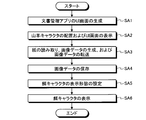
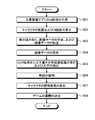
- FIG. 2 is a flowchart illustrating an example of a first process executed by the computerization support apparatus.
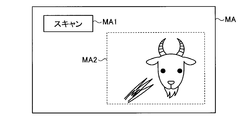
- FIG. 3 is a diagram illustrating an example of a UI screen.
- FIG. 4 is a flowchart illustrating an example of second processing executed by the computerization support apparatus.
- FIG. 5 is a diagram illustrating an example of a UI screen.
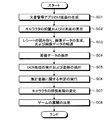
- FIG. 6 is a flowchart illustrating an example of a third process executed by the computerization support apparatus.
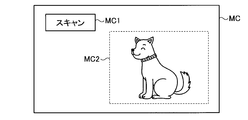
- FIG. 7 is a diagram illustrating an example of a UI screen.
- FIG. 8 is a flowchart illustrating an example of a fourth process executed by the computerization support apparatus.
- FIG. 1 is a block diagram illustrating an example of the configuration of the computerization support apparatus.
- FIG. 2 is a flowchart illustrating an example of a first process executed by the computerization support apparatus.
- FIG. 3 is a diagram
- FIG. 9 is a flowchart illustrating an example of a fifth process executed by the computerization support apparatus.
- FIG. 10 is a diagram illustrating an example of a UI screen.
- FIG. 11 is a flowchart illustrating an example of a sixth process executed by the computerization support apparatus.
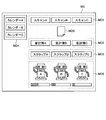
- FIG. 12 is a diagram illustrating an example of a UI screen.
- FIG. 1 is a block diagram illustrating an example of the configuration of the computerization support apparatus.
- the computerization support apparatus 100 is communicably connected to the image forming apparatus 200 and is communicably connected to an information communication terminal 300 that can be accessed from the outside via a network 400.
- the image forming apparatus 200 may be communicably connected to the computerization support apparatus 100 via the network 400.
- the image forming apparatus 200 is, for example, a scanner, a copier, or a facsimile, and generates image data related to the paper by digitizing the paper set as a reading target.
- the image forming apparatus 200 may be described as the scanner 200.
- the information communication terminal 300 is, for example, a server or storage operated in a data center that provides a cloud service (for example, a service that provides a right to use data, software, or hardware via a network). is there.
- a document management application having a household account book function, a scrapbook function, and a calendar function is installed in the information communication terminal 300.
- the information communication terminal 300 may be described as the server 300.
- the network 400 is, for example, the Internet, an intranet, or a LAN (Local Area Network).
- the computerization support apparatus 100 is, for example, a commercially available personal computer, and includes a control unit 102, a communication interface unit 104, a storage unit 106, and an input / output interface unit 108.
- a document management application having a household account book function, a scrapbook function, and a calendar function is installed.
- Each unit included in the computerization support apparatus 100 is connected to be communicable via an arbitrary communication path.
- the communication interface unit 104 communicatively connects the computerization support apparatus 100 to the image forming apparatus 200 and the network 400 via a communication apparatus such as a router and a wired or wireless communication line such as a dedicated line.
- the communication interface unit 104 has a function of communicating data with other devices via a communication line.
- the input device 112 and the output device 114 are connected to the input / output interface unit 108.
- a speaker including a home television
- a speaker can be used as the output device 114.
- the input device 112 in addition to a keyboard, a mouse, and a microphone, a monitor that realizes a pointing device function in cooperation with the mouse can be used.
- the output device 114 may be described as the monitor 114
- the input device 112 may be described as the keyboard 112 or the mouse 112.
- the storage unit 106 includes a document management application data storage unit 106a.
- the storage unit 106 stores a computer program for performing various processes by giving instructions to a CPU (Central Processing Unit) in cooperation with an OS (Operating System).
- a memory device such as a RAM (Random Access Memory) / ROM (Read Only Memory), a fixed disk device such as a hard disk, a flexible disk, an optical disk, or the like can be used.
- the document management application data storage unit 106a stores image data and the like placed under the management of the document management application.
- a plurality of storage areas for storing image data and the like regarding digitized paper are set for each user.
- the control unit 102 includes a CPU or the like that controls the computerization support apparatus 100 in an integrated manner.
- the control unit 102 has an internal memory for storing a control program, a program defining various processing procedures, and necessary data, and performs information processing for executing various processes based on these programs.
- the control unit 102 nurtures and / or uses a predetermined character (for example, a goat character described later) based on the number of instructions for digitizing paper and / or the number of digitized paper performed by the user.
- a predetermined event for example, an item described later
- the control unit 102 includes a display execution unit 102a, a setting unit 102b, an accumulation determination unit 102c, a provision unit 102d, a change unit 102e, an extraction unit 102f, an amount determination unit 102g, an identification unit 102h, a determination unit 102i, a specification unit 102j, and a save execution.
- the display execution unit 102a includes first display execution means, second display execution means, third display execution means, fourth display execution means, fifth display execution means, and sixth display execution means of the present invention. is there.
- the display execution unit 102a arranges a goat character imitating a goat on the screen generated by the document management application, and displays the screen on which the goat character is arranged on the monitor 114.
- the display execution unit 102a displays the bait character in the display form set by the setting unit 102b on the screen.
- the display execution unit 102a arranges a character on which an emotional expression is imitated on a screen generated by the document management application, imitating an organism (for example, a plant or an animal) or a device (for example, a robot).
- the arranged screen is displayed on the monitor 114.
- the display execution unit 102a displays, on the screen generated by the document management application, a plurality of designated areas prepared for each user for causing the user to designate a storage area, and a mood and / or model imitating an organism or device.
- a plurality of characters prepared for each user in which parameters related to nutritional status are set and a plurality of parameters set for the character are arranged, and the plurality of the designated area, the character, and the parameter are arranged. Is displayed on the monitor 114.
- the setting unit 102b displays a bait character display form (for example, grass) that simulates goat bait (for example, grass) based on the number of paper digitization instructions performed by the user and / or the number of electronic paper sheets. Set the amount of food (size) etc. on the screen.
- a bait character display form for example, grass
- goat bait for example, grass
- the accumulation determination unit 102c determines whether or not the accumulation of the number of instructions for digitizing paper performed by the user and / or the accumulation of the number of digitized paper has reached a predetermined value.
- the providing unit 102d plays a predetermined item that can be used on the screen (for example, the user uses it to play with the character). To make it possible to get a feeling of being in the mood).
- the changing unit 102e includes the first changing means, the second changing means, and the third changing means of the present invention.
- the changing unit 102e changes the display form of the character displayed on the screen.
- the amount determining unit 102g determines that the total amount is less than the target amount
- the changing unit 102e expresses the emotional expression of the character displayed on the screen (for example, emotion, gesture, mood, etc.) ) Is changed to something that is recognized as being in good mood.
- the change unit 102e changes the emotional expression of the character displayed on the screen when a predetermined word is identified by the identification unit 102h.
- the extraction unit 102f includes the first extraction means and the second extraction means of the present invention.
- the extraction unit 102f performs optical character recognition (OCR) processing on the image data relating to the electronic receipt, and extracts the amount of money described in the receipt.
- OCR optical character recognition
- the extraction unit 102f performs optical character recognition processing or handwritten character recognition processing on the image data relating to the digitized paper, and extracts characters described on the paper.
- the amount determination unit 102g is a total amount of all expenses and / or a certain item (for example, food expenses, daily necessities expenses, water charges, electricity charges, totaled by the document management application based on the amounts extracted by the extraction section 102f. It is determined whether the sum of the amount of clothes) is less than the target amount preset by the user.
- the identification unit 102h identifies a predetermined word (for example, the characters “chocolate” or “cream”) from the characters extracted by the extraction unit 102f.
- the determination unit 102i determines the development of the game being executed by the document management application based on the emotional expression state of the character.
- the specifying unit 102j is an electronic executor who is the user who executed the digitization or a data saver who is the specified user, And a data user who is a user corresponding to the designated area.
- the storage execution unit 102k stores the computerized person or data storage person specified by the specifying part 102j and the image data in a storage area corresponding to the data user specified by the specifying part 102j.
- the changing unit 102m includes the first changing means and the second changing means of the present invention.
- the changing unit 102m is an electronic executor identified by the identifying unit 102j among the characters prepared for each user in which parameters related to the state of mood and / or nutrition that imitate a life form or device are set. Change the character parameter corresponding to the data saver to a better one.
- the changing unit 102m changes the parameter of the character in which the parameter related to the nutritional state is set based on the determination result in the determining unit 102n.
- the determining unit 102n determines the type of the paper based on the image data regarding the digitized paper.
- the storage executing unit 102p stores the image data transferred from the image forming apparatus 200 in the document management application data storage unit 106a when the user activates the document management application installed in the computerization support apparatus 100.
- the storage execution unit 102p stores the image data transferred from the image forming apparatus 200 in the information communication terminal 300.
- the synchronization unit 102q synchronizes data managed by the computerization support apparatus 100 with data provided by the information communication terminal 300.
- the capturing unit 102r captures data provided by the information communication terminal 300 into the computerization support apparatus 100.
- the user operates the input device 112 to start the document management application installed in the computerization support device 100.
- the control unit 102 activates the document management application and generates a user interface screen (UI screen) including a scan button of the document management application (step SA1).
- UI screen user interface screen
- the display execution unit 102a places a goat character imitating a goat on the UI screen generated in step SA1, and displays the UI screen on which the goat character is placed on the monitor 114 (step SA2).
- the user sets paper in the scanner 200, operates the input device 112, and presses the scan button to cause the scanner 200 to read the set paper.
- the scanner 200 digitizes the set paper to generate image data relating to the paper, and transfers the generated image data to the computerization support apparatus 100 (step SA3).
- the storage execution unit 102p stores the image data transferred in step SA3 in a management folder corresponding to the document management application data storage unit 106a (step SA4).
- the storage execution unit 102p manages the image data transferred from the scanner 200 under the management of the activated document management application. It may be stored in a management folder in the server 300 so as to be placed.
- the setting unit 102b Based on the number of times the scan button is pressed and / or the number of papers digitized by the scanner 200 (for example, the number of papers to be read), the setting unit 102b imitates a goat bait (for example, grass). Is set (for example, the size of the bait character) (step SA5). For example, the setting unit 102b sets a display form that allows the user to recognize that a lot of food is given to the goat when the number of times or the number is large.
- a goat bait for example, grass
- the setting unit 102b sets a display form that allows the user to recognize that a lot of food is given to the goat when the number of times or the number is large.
- the display execution unit 102a displays the bait character in the display form set in step SA5 in the vicinity of the goat character displayed on the UI screen (for example, a position where the user can recognize that the goat is fed). (Step SA6).
- the UI screen MA includes a scan button MA1 and a character display area MA2.
- the scan button MA1 is a button for causing the user to start reading the paper set in the scanner 200.
- the character display area MA2 is an area for displaying a goat character and a bait character.
- the user operates the input device 112 to start the document management application installed in the computerization support device 100.
- the control unit 102 activates the document management application and generates a UI screen including a scan button of the document management application (step SB1).
- the display execution unit 102a arranges a character imitating an organism (for example, a plant or an animal) or a device (for example, a robot) on the UI screen generated in step SB1, and displays the UI screen on which the character is arranged.
- the information is displayed on the monitor 114 (step SB2).
- the user sets paper in the scanner 200, operates the input device 112, and presses the scan button to cause the scanner 200 to read the set paper.
- the scanner 200 digitizes the set paper to generate image data related to the paper, and transfers the generated image data to the computerization support apparatus 100 (step SB3).
- the storage execution unit 102p stores the image data transferred in step SB3 in a management folder corresponding to the document management application data storage unit 106a (step SB4).
- the accumulation determination unit 102c determines whether or not the accumulation of the number of times the scan button has been pressed and / or the accumulation of the number of digitized sheets has reached a predetermined value (step SB5).
- the providing unit 102d determines an electronic predetermined item (for example, a present box in which a plant seed is placed) that can be used on the UI screen. ) Is provided to the user on the UI screen (step SB6).
- an electronic predetermined item for example, a present box in which a plant seed is placed
- the UI screen MB includes a scan button MB1, an item display area MB2, and a character display area MB3.
- the scan button MB1 is a button for causing the user to start reading the paper set in the scanner 200.
- the item display area MB2 is an area for displaying items.
- the character display area MB3 is an area for displaying a character.
- the changing unit 102e changes the display form of the character displayed on the UI screen. (Step SB7). For example, when the character is a plant and the item is a present box in which the seed of the plant is put, the changing unit 102e grows the plant or uses the number or amount of the plant when the seed is used. Increase it.
- the user operates the input device 112 to start the document management application installed in the computerization support device 100.
- the control unit 102 activates the document management application and generates a UI screen including a scan button of the document management application (step SC1).
- the display execution unit 102a arranges a character on which the emotional expression is designed, imitating an organism (for example, a plant or an animal) or a device (for example, a robot) on the UI screen generated in step SC1, and the character is displayed.
- the arranged UI screen is displayed on the monitor 114 (step SC2).
- the user sets a receipt on the scanner 200, operates the input device 112, and presses the scan button to cause the scanner 200 to read the set paper.
- the scanner 200 digitizes the set receipt to generate image data related to the receipt, and transfers the generated image data to the digitization support apparatus 100 (step SC3).
- the storage execution unit 102p stores the image data transferred in step SC3 in a management folder corresponding to the document management application data storage unit 106a (step SC4).
- the extraction unit 102f performs OCR processing on the image data relating to the electronic receipt, and extracts the amount of money described in the receipt (step SC5).
- the amount determining unit 102g determines that the total amount and / or the total amount of the certain amount of money, which is totaled by the document management application based on the amount extracted in step SC5, is less than the target amount preset by the user. It is determined whether or not (step SC6).
- step SC6 When it is determined in step SC6 that the total amount is below the target amount, the changing unit 102e changes the emotional expression of the character displayed on the UI screen to one that is recognized as being in good mood. (Step SC7).
- the UI screen MC includes a scan button MC1 and a character display area MC2.
- the scan button MC1 is a button for causing the user to start reading the paper set in the scanner 200.
- the character display area MC2 is an area for displaying a character.
- the determination unit 102i determines the development of the game being executed by the document management application based on the emotional expression state of the character after the change in Step SC7 (Step SC8).
- the user operates the input device 112 to start the document management application installed in the computerization support device 100.
- the control unit 102 activates the document management application and generates a UI screen including a scan button of the document management application (step SD1).
- the display execution unit 102a arranges a character on which the emotional expression is designed, imitating an organism (for example, a plant or an animal) or a device (for example, a robot) on the UI screen generated in step SD1, and the character is displayed.
- the arranged UI screen is displayed on the monitor 114 (step SD2).
- the user sets a paper on which a plurality of characters are written in the scanner 200, operates the input device 112 and presses the scan button, thereby causing the scanner 200 to read the set paper.
- the scanner 200 digitizes the set paper to generate image data relating to the paper, and transfers the generated image data to the computerization support apparatus 100 (step SD3).
- the storage execution unit 102p stores the image data transferred in step SD3 in a management folder corresponding to the document management application data storage unit 106a (step SD4).
- the extraction unit 102f performs OCR processing or handwritten character recognition processing on the image data relating to the digitized paper, and extracts characters written on the paper (step SD5).
- the identification unit 102h identifies a predetermined word (for example, the characters “chocolate” or “cream”) from the characters extracted in step SD5 (step SD6).
- step SD6 When the predetermined word is identified in step SD6, the changing unit 102e changes the emotion expression of the character displayed on the UI screen to a preset one according to the word (step SD7). ).
- the determination unit 102i determines the development of the game being executed by the document management application based on the emotional expression state of the character after the change in Step SD7 (Step SD8).
- User A operates the input device 112 to activate the document management application installed in the computerization support device 100.
- the control unit 102 activates the document management application, and includes a plurality of scan buttons (specifically, a scan button for the user A, a scan button for the user B, and a scan for the user C) of the document management application.
- a UI screen including a scan button is generated (step SE1).
- the display execution unit 102a displays, on the UI screen generated in step SE1, a plurality of designated areas, life forms (for example, plants or animals) or devices (for example) prepared for each user for allowing the user to designate a storage area. For example, a character imitating a robot) and parameters related to the mood and / or nutrition status set for the character are arranged, and the designated area, the character, and the UI screen on which the parameter is arranged are monitored. 114 (step SE2).
- the UI screen MD includes an area MD1 for displaying a scan button for each user, an area MD2 for registering image data in each user's household account book, and registering the image data in each user's scrapbook.
- a region MD3 for registering image data in the calendar of each user a region MD5 for displaying characters and parameters for each user, a paper icon MD6 simulating paper, Is included.
- the paper icon MD6 is displayed after any one of the scan buttons displayed in the area MD1 is pressed.
- a plurality of scan buttons for each user are displayed in area MD1.
- scan button A for user A, scan button B for user B, and scan button C for user C are displayed in area MD1.
- identification information as a designated area for identifying the household account book of each user (specifically, characters “household account book A” for identifying the household account book of the user A, user B) Character “household account book B” and character “household account book C” for identifying the household account book of user C) are displayed.
- identification information as a designated area for identifying each user's scrapbook (specifically, characters “scrap A” for identifying the scrapbook of user A, user B ’s A character “scrap B” for identifying the scrapbook and a character “scrap C” for identifying the scrapbook of the user C are displayed.
- identification information as a designated area for identifying each user's calendar (specifically, a character “calendar A” for identifying the calendar of the user A and a calendar of the user B are displayed.
- a character “Calendar B” for identifying and a character “Calendar C” for identifying the calendar of the user C are displayed.
- the image data is registered in the household account book, scrapbook, or calendar corresponding to the identification information of the drop destination.
- the area MD5 a plurality of characters and a plurality of parameters for each user (specifically, a plurality of indicators for displaying the parameters) are displayed.
- the user A sets the paper previously deposited from the user B or the user C in the scanner 200, operates the input device 112, and presses the scan button A to set the paper A
- the scanned paper is read by the scanner 200.
- the display execution unit 102a displays a paper icon (paper icon MD6 shown in FIG. 10) on the UI screen, and the scanner 200 digitizes the set paper to generate image data related to the paper, and the generated image data Is transferred to the computerization support apparatus 100 (step SE3).
- User A operates the input device 112, drags the paper icon displayed on the UI screen, and drops it on the household account book, scrapbook, or calendar of user B or user C.
- the specifying unit 102j specifies the user A as an electronic executor (data storage person), and the drop destination is the household account book, scrapbook, or the user B or the user C. Since it is a calendar, user B or user C is specified as a data user (step SE4).
- the storage execution unit 102k stores the identification information (for example, ID) of the computerized execution person (specifically, user A) identified in step SE4 and the image data transferred in step SE3 as a document management application data storage unit.
- the data is stored in a storage area corresponding to the data user (specifically, user B or user C) specified in step SE4 in 106a (step SE5).
- the changing unit 102m changes (increases) the parameter corresponding to the computerized person (specifically, user A) identified in step SE4 displayed on the UI screen to a better one, For example, the scale of the indicator of the computerized person (specifically, user A) displayed in the area MD5 shown in FIG. 10 is increased (step SE6).
- the user operates the input device 112 to start the document management application installed in the computerization support device 100.
- the control unit 102 activates the document management application and generates a UI screen including a scan button of the document management application (step SF1).
- the display execution unit 102a displays a character imitating an organism (for example, a plant or an animal) or a device (for example, a robot) on the UI screen generated in step SF1, and a nutritional state (specifically set) for the character. Specifically, parameters relating to nutrition balance are arranged, and the character and the UI screen on which the parameters are arranged are displayed on the monitor 114 (step SF2).
- the user sets paper in the scanner 200, operates the input device 112, and presses the scan button to cause the scanner 200 to read the set paper.
- the scanner 200 digitizes the set paper to generate image data related to the paper, and transfers the generated image data to the computerization support apparatus 100 (step SF3).
- the storage execution unit 102p stores the image data transferred in step SF3 in a management folder corresponding to the document management application data storage unit 106a (step SF4).
- the determining unit 102n determines the type of the paper (for example, a receipt, an invoice, a recipe, contact information, or miscellaneous information) based on the image data regarding the digitized paper (step SF5).
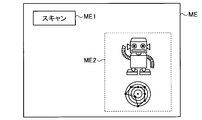
- the changing unit 102m changes the character parameter (specifically, nutrition balance) and, for example, displays a radar chart relating to nutrition balance displayed in the region ME2 shown in FIG. Then, it is changed to one according to the changed parameter (step SF6).
- the character parameter specifically, nutrition balance
- the changing unit 102m changes the character parameter (specifically, nutrition balance) and, for example, displays a radar chart relating to nutrition balance displayed in the region ME2 shown in FIG. Then, it is changed to one according to the changed parameter (step SF6).
- the UI screen ME includes a scan button ME1 and a region ME2.
- the scan button ME1 is a button for causing the user to start reading the paper set in the scanner 200.
- the area ME2 is an area for displaying characters and parameters (specifically, a radar chart for displaying the parameters).
- a predetermined character is trained and / or provided to a user based on the number of instructions for digitizing paper and / or the number of digitized paper performed by the user. Generate a predetermined event.
- a document management application (with a household account book function, a scrapbook function, and a calendar function) that manages digitized documents to allow users to continuously digitize paper information.
- a character with a goat motif is placed on the UI screen, the number of digitized paper sheets and / or the number of times of digitization is converted into the amount of goat bait, and this bait is placed in the vicinity of the character.
- the user can be encouraged to promote digitization.
- the user can be encouraged to continuously digitize paper information, and paper resources can be reduced and space can be effectively utilized.
- the accumulation of the number of digitized papers and / or the accumulation of the number of digitizations reaches a certain numerical value, an item is provided to the user, and the provided item is used. In the case of a failure, the character display form is changed.
- the user can be encouraged to promote digitization.
- the user can be encouraged to continuously digitize paper information, and paper resources can be reduced and space can be effectively utilized.
- the OCR process is performed on the electronic receipt to extract the amount described in the receipt, and the total amount or all specific items that have been pre-aggregated If the total amount related to the amount of the item is less than the target amount set in advance by the user, the character's mood is improved and the game development is determined based on the mood state.
- This will encourage the user to promote digitization work by providing the user with a motivation to digitize the information in the receipt, so that the character's mood improves and the development of the game changes. it can.
- the user can be encouraged to continuously digitize paper information, and paper resources can be reduced and space can be effectively utilized.
- the mood of the character is changed, and the development of the game is determined based on the mood state.
- This will encourage users to promote digitization work by providing users with the motivation to digitize paper information that the character's mood changes and the development of the game changes. it can.
- the user can be encouraged to continuously digitize paper information, and paper resources can be reduced and space can be effectively utilized.
- the present embodiment it is possible to store digitized image data of a plurality of users, and a certain user performs paper digitization work, and the image data related to the paper is stored in a certain storage destination.
- the user who performed the digitization work is determined when the image data is stored, and both the user who uses the image data stored in the storage destination and the determined user (storer) are identified. If the user who uses the record and the saver are different from each other, it is assumed that the saver has taken over the digitization work instead of the user, and the character attached to the saver Increase the parameter.
- the promotion of digitization work can be used by providing the user with the motivation to digitize the paper information instead of the user who uses it, as the parameter of his / her character increases. Can work on the person.
- the user can be encouraged to continuously digitize paper information, and paper resources can be reduced and space can be effectively utilized.
- the parameter (nutrition balance) of the character is changed based on the type of digitized paper (for example, the content of information described on the paper). Accordingly, the user can be encouraged to promote the digitization work by providing the user with a change in parameters as a motivation for digitizing various pieces of paper information around him. In addition, the user can be encouraged to continuously digitize paper information, and paper resources can be reduced and space can be effectively utilized.
- digitized data can be stored in the cloud server.
- a plurality of terminals for example, a smartphone, a tablet terminal, or a mobile phone having a communication function
- a plurality of users for example, a smartphone, a tablet terminal, or a mobile phone having a communication function
- data managed by the computerization support apparatus 100 is synchronized with accessible data managed by a cloud server that provides a cloud service (such as, for example, “Fricer”).
- the accessible data managed by the computer can be imported into the computerization support apparatus 100.
- OCR processing or handwritten character recognition processing is performed on stored data to recognize words from the data, and related information of the data is automatically collected from the recognized words.
- the collected related information can be displayed. Thereby, the user can obtain the relevant information of the data without searching by himself / herself.
- the character in the document management application that manages the digitized data is changed, and the user intentionally responds to the generated change. Advance a game that can be operated. As described above, in this embodiment, since a game element that does not proceed unless the user converts the paper into data is provided, the troublesomeness of the data conversion of the paper can be reduced. Data can be promoted.
- the computerization support apparatus 100 performs processing in a stand-alone form has been described as an example, but the computerization support apparatus 100 is requested by a client terminal (which is a separate casing from the computerization support apparatus 100). Depending on the process, the processing result may be returned to the client terminal.
- all or a part of the processes described as being automatically performed can be manually performed, or all of the processes described as being manually performed can be performed.
- a part can be automatically performed by a known method.
- each illustrated component is functionally conceptual and does not necessarily need to be physically configured as illustrated.
- each device of the computerization support device 100 is interpreted by a CPU (Central Processing Unit) and the CPU. It may be realized by a program to be executed, or may be realized as hardware by wired logic.
- the program is recorded on a recording medium to be described later, and is mechanically read by the computerization support apparatus 100 as necessary. That is, in the storage unit 106 such as a ROM or an HDD (Hard Disk Drive), a computer program for giving instructions to the CPU in cooperation with an OS (Operating System) and performing various processes is recorded.
- This computer program is executed by being loaded into the RAM, and constitutes a control unit in cooperation with the CPU.
- this computer program may be stored in an application program server connected to the computerization support apparatus 100 via an arbitrary network, and may be downloaded in whole or in part as necessary. It is.
- the computerization support program according to the present invention may be stored in a computer-readable recording medium, or may be configured as a program product.
- the “recording medium” is any memory card, USB memory, SD card, flexible disk, magneto-optical disk, ROM, EPROM, EEPROM, CD-ROM, MO, DVD, Blu-ray Disc, etc. Of “portable physical media”.
- program is a data processing method described in an arbitrary language or description method, and may be in any form such as source code or binary code.
- program is not necessarily limited to a single configuration, but is distributed in the form of a plurality of modules and libraries, or in cooperation with a separate program typified by an OS (Operating System). Including those that achieve the function.
- OS Operating System
- a well-known configuration and procedure can be used for a specific configuration for reading a recording medium, a reading procedure, an installation procedure after reading, and the like in each device described in the embodiment.
- Various databases (document management application data storage unit 106a) stored in the storage unit 106 are storage units such as a memory device such as a RAM and a ROM, a fixed disk device such as a hard disk, a flexible disk, and an optical disk.
- Various programs, tables, databases, web page files, etc. used for various processes and website provision are stored.
- the computerization support apparatus 100 may be configured as an information processing apparatus such as a known personal computer or workstation, or may be configured by connecting an arbitrary peripheral device to the information processing apparatus.
- the computerization support apparatus 100 may be realized by installing software (including programs, data, and the like) that enables the information processing apparatus to realize the computerization support method according to the present invention.
- the specific form of distribution / integration of the devices is not limited to that shown in the figure, and all or a part of them may be functional or physical in arbitrary units according to various additions or according to functional loads. Can be distributed and integrated. That is, the above-described embodiments may be arbitrarily combined and may be selectively implemented.
- the computerization support apparatus, the computerization support method, and the computerization support program according to the present invention can be implemented in many industrial fields, particularly the image processing field that handles scanners, and are extremely useful. is there.
Landscapes
- Engineering & Computer Science (AREA)
- Human Computer Interaction (AREA)
- Multimedia (AREA)
- Signal Processing (AREA)
- User Interface Of Digital Computer (AREA)
Abstract
利用者に紙の情報の電子化作業の煩わしさを感じさせないようにすることができ、その結果、紙の情報の電子化を促進させることができる電子化支援装置、電子化支援方法、および電子化支援プログラムを提供することを課題とする。本実施形態によれば、文書管理アプリケーションによって生成された画面に、山羊を模した山羊キャラクタを配置し、当該山羊キャラクタが配置された当該画面を表示部に表示し、利用者が行った紙の電子化の指示の回数及び/又は電子化した紙の枚数に基づいて、山羊の餌を模した餌キャラクタの表示形態を設定し、設定された表示形態の餌キャラクタを画面上に表示する。
Description
本発明は、紙の情報の電子化を促進させるための電子化支援装置、電子化支援方法、および電子化支援プログラムに関する。
紙の情報を電子化することで、様々なメリットがあることは知られている。メリットとして、例えば、紙の保存場所および当該保存場所の確保が不要になること、紙の保存のために確保しておいた保存場所を別の用途に活用できること(スペースの有効活用)、電子化されたデータで情報の伝達(共有)が可能となること、紙の使用量を減らす、つまりペーパレス化を促進させることができること、および、ペーパレス化に因り紙資源の削減などの環境改善に貢献することができること、などが挙げられる。
なお、特許文献1には、複写機、ファクシミリ、またはプリンタなどの画像形成装置に設けられた操作部の表示パネル画面に、当該画像形成装置本体の現在状態を、仮想生命体の成長過程ないし姿勢と対応させて表示するようにした電気機器装置等に関する技術が開示されている。
しかしながら、上述したメリットがあるとはいえ、紙でも情報のやり取りができるのは事実であるので、情報を扱う人にとって紙の情報の電子化は必須なものではない。また、電子化したデータを有効に活用するためには、紙の情報の電子化作業以外にも、例えば電子化したデータを閲覧用のPCに移動させる作業などが必要となる場合がある。従って、このような現状であるが故に、利用者は紙の情報の電子化作業を煩わしく感じる場合があるという問題点があった。
本発明は、上記に鑑みてなされたものであって、利用者に紙の情報の電子化作業の煩わしさを感じさせないようにすることができ、その結果、紙の情報の電子化を促進させることができる電子化支援装置、電子化支援方法、および電子化支援プログラムを提供することを目的とするものである。
上述した課題を解決し、目的を達成するために、本発明にかかる電子化支援装置は、利用者が行った紙の電子化の指示の回数及び/又は電子化した紙の枚数に基づいて、所定のキャラクタを育成する及び/又は利用者に提供される所定のイベントを発生させる制御部を備えたことを特徴とする。
また、本発明にかかる電子化支援装置は、前記の電子化支援装置において、表示部をさらに備え、前記制御部は、文書管理アプリケーションによって生成された画面に、山羊を模した山羊キャラクタを配置し、当該山羊キャラクタが配置された当該画面を前記表示部に表示する第一表示実行手段と、前記回数及び/又は前記枚数に基づいて、前記山羊の餌を模した餌キャラクタの表示形態を設定する設定手段と、前記設定手段で設定された前記表示形態の前記餌キャラクタを、前記画面上に表示する第二表示実行手段と、をさらに備えたこと、を特徴とする。
また、本発明にかかる電子化支援装置は、前記の電子化支援装置において、表示部をさらに備え、前記制御部は、文書管理アプリケーションによって生成された画面に、生命体または機器を模したキャラクタを配置し、当該キャラクタが配置された当該画面を前記表示部に表示する第三表示実行手段と、前記回数の累積及び/又は前記枚数の累積が所定値に達しているか否かを判定する累積判定手段と、前記累積判定手段で前記累積が前記所定値に達していると判定された場合には、前記画面上で利用可能な所定のアイテムを利用者に提供する提供手段と、前記提供手段で提供された前記アイテムが前記画面上で利用された場合には、当該画面上に表示されている前記キャラクタの表示形態を変化させる第一変化手段と、を備えたこと、を特徴とする。
また、本発明にかかる電子化支援装置は、前記の電子化支援装置において、前記制御部は、家計簿機能を有する前記文書管理アプリケーションによって生成された画面に、生命体又は機器を模した、感情表現がデザインされたキャラクタを配置し、当該キャラクタが配置された当該画面を前記表示部に表示する第四表示実行手段と、電子化したレシートに関する画像データに対して光学文字認識処理を実行して、当該レシートに記載されている金額を抽出する第一抽出手段と、前記第一抽出手段で抽出された前記金額に基づいて前記文書管理アプリケーションで集計された、合計金額及び/又は或る費目の金額の集計金額が、利用者によって予め設定された目標金額を下回っているか否かを判定する金額判定手段と、前記金額判定手段で前記集計金額が前記目標金額を下回っていると判定された場合には、前記画面上に表示されている前記キャラクタの前記感情表現を、機嫌が良いと認識されるものに変化させる第二変化手段と、を備えたこと、を特徴とする。
また、本発明にかかる電子化支援装置は、前記の電子化支援装置において、前記制御部は、前記文書管理アプリケーションによって生成された画面に、生命体又は機器を模した、感情表現がデザインされたキャラクタを配置し、当該キャラクタが配置された当該画面を前記表示部に表示する第五表示実行手段と、電子化した紙に関する画像データに対して光学文字認識処理又は手書き文字認識処理を実行して、当該紙に記載されている文字を抽出する第二抽出手段と、前記第二抽出手段で抽出された前記文字から所定の単語を識別する識別手段と、前記識別手段で前記単語が識別された場合には、前記画面上に表示されている前記キャラクタの前記感情表現を変化させる第三変化手段と、を備えたこと、を特徴とする。
また、本発明にかかる電子化支援装置は、前記の電子化支援装置において、前記制御部は、前記キャラクタの前記感情表現の状態に基づいて、前記文書管理アプリケーションによって実行されているゲームの展開を決定する決定手段をさらに備えたこと、を特徴とする。
また、本発明にかかる電子化支援装置は、前記の電子化支援装置において、記憶部をさらに備え、前記記憶部には、電子化した紙に関する画像データを保存するための複数の保存領域が利用者毎に設定されており、前記制御部は、前記文書管理アプリケーションによって生成された画面に、前記保存領域を利用者に指定させるための利用者毎に用意された複数の指定領域を配置し、複数の当該指定領域が配置された当該画面を前記表示部に表示する第六表示実行手段と、利用者によって前記指定領域が指定された場合には、前記電子化を実行した利用者である電子化実行者若しくは当該指定した利用者であるデータ保存者、及び当該指定領域に対応する利用者であるデータ利用者を特定する特定手段と、前記特定手段で特定された前記電子化実行者若しくは前記データ保存者、及び前記画像データを、前記特定手段で特定された前記データ利用者に対応する前記保存領域に保存する保存実行手段と、生命体又は機器を模した、機嫌及び/又は栄養の状態に関するパラメータが設定された、利用者毎に用意されたキャラクタのうち、前記特定手段で特定された前記電子化実行者又は前記データ保存者に対応する前記キャラクタの前記パラメータを、より良いものに変更する第一変更手段と、をさらに備えたこと、を特徴とする。
また、本発明にかかる電子化支援装置は、前記の電子化支援装置において、前記制御部は、電子化された紙に関する画像データに基づいて当該紙の種類を判別する判別手段と、前記判別手段での判別結果に基づいて、栄養の状態に関するパラメータが設定されたキャラクタの当該パラメータを変更する第二変更手段とをさらに備えたこと、を特徴とする。
また、本発明にかかる電子化支援装置は、前記の電子化支援装置において、外部からのアクセスが可能な情報通信端末とネットワークを介して接続されており、前記制御部は、電子化された紙に関する画像データを前記情報通信端末に格納する格納実行手段をさらに備えたこと、を特徴とする。
また、本発明にかかる電子化支援装置は、前記の電子化支援装置において、前記制御部は、当該電子化支援装置で管理されているデータを、前記情報通信端末で提供されているデータと同期する同期手段をさらに備えたこと、を特徴とする。
また、本発明にかかる電子化支援装置は、前記の電子化支援装置において、前記制御部は、前記情報通信端末で提供されているデータを取り込む取込手段をさらに備えたこと、を特徴とする。
また、本発明は電子化支援方法に関するものであり、本発明にかかる電子化支援方法は、制御部を備えた電子化支援装置の前記制御部で実行される、利用者が行った紙の電子化の指示の回数及び/又は電子化した紙の枚数に基づいて、所定のキャラクタを育成する及び/又は利用者に提供される所定のイベントを発生させる制御ステップを含むこと、を特徴とする。
また、本発明は電子化支援プログラムに関するものであり、本発明にかかる電子化支援プログラムは、制御部を備えた電子化支援装置の前記制御部に実行させるための、利用者が行った紙の電子化の指示の回数及び/又は電子化した紙の枚数に基づいて、所定のキャラクタを育成する及び/又は利用者に提供される所定のイベントを発生させる制御ステップを含むこと、を特徴とする。
また、本発明は記録媒体に関するものであり、本発明にかかるコンピュータ読み取り可能な記録媒体は、本発明にかかる前記の電子化支援プログラムを記録したことを特徴とする。
本発明によれば、利用者が行った紙の電子化の指示の回数及び/又は電子化した紙の枚数に基づいて、所定のキャラクタを育成する及び/又は利用者に提供される所定のイベントを発生させる。これにより、利用者に紙の情報の電子化作業の煩わしさを感じさせないようにすることができ、その結果、紙の情報の電子化を促進させることができるという効果を奏する。
また、本発明によれば、文書管理アプリケーションによって生成された画面に、山羊を模した山羊キャラクタを配置し、当該山羊キャラクタが配置された当該画面を表示部に表示し、回数及び/又は枚数に基づいて、山羊の餌を模した餌キャラクタの表示形態を設定し、設定された表示形態の餌キャラクタを、画面上に表示する。これにより、山羊を育成していく感覚を、紙の情報を電子化させる動機として利用者へ提供することができ、この結果、紙の情報の電子化の継続、延いては紙の資源削減およびスペースの有効活用を実現させることができるという効果を奏する。
また、本発明によれば、文書管理アプリケーションによって生成された画面に、生命体または機器を模したキャラクタを配置し、当該キャラクタが配置された当該画面を表示部に表示し、回数の累積及び/又は枚数の累積が所定値に達しているか否かを判定し、累積が所定値に達していると判定された場合には、画面上で利用可能な所定のアイテムを利用者に提供し、提供されたアイテムが画面上で利用された場合には、当該画面上に表示されているキャラクタの表示形態を変化させる。これにより、キャラクタと遊ぶ感覚を、紙の情報を電子化させる動機として利用者へ提供することができ、この結果、紙の情報の電子化の継続、延いては紙の資源削減およびスペースの有効活用を実現させることができるという効果を奏する。
また、本発明によれば、家計簿機能を有する文書管理アプリケーションによって生成された画面に、生命体又は機器を模した、感情表現がデザインされたキャラクタを配置し、当該キャラクタが配置された当該画面を表示部に表示し、電子化したレシートに関する画像データに対して光学文字認識処理を実行して、当該レシートに記載されている金額を抽出し、抽出された金額に基づいて文書管理アプリケーションで集計された、合計金額及び/又は或る費目の金額の集計金額が、利用者によって予め設定された目標金額を下回っているか否かを判定し、集計金額が目標金額を下回っていると判定された場合には、画面上に表示されているキャラクタの前記感情表現を、機嫌が良いと認識されるものに変化させる。これにより、レシートの情報を電子化させる動機を利用者へ提供することができ、この結果、紙の情報の電子化の継続、延いては紙の資源削減およびスペースの有効活用を実現させることができるという効果を奏する。
また、本発明によれば、文書管理アプリケーションによって生成された画面に、生命体又は機器を模した、感情表現がデザインされたキャラクタを配置し、当該キャラクタが配置された当該画面を表示部に表示し、電子化した紙に関する画像データに対して光学文字認識処理又は手書き文字認識処理を実行して、当該紙に記載されている文字を抽出し、抽出された文字から所定の単語を識別し、単語が識別された場合には、画面上に表示されているキャラクタの感情表現を変化させる。これにより、紙の情報を電子化させる動機を利用者へ提供することができ、この結果、紙の情報の電子化の継続、延いては紙の資源削減およびスペースの有効活用を実現させることができるという効果を奏する。
また、本発明によれば、キャラクタの感情表現の状態に基づいて、文書管理アプリケーションによって実行されているゲームの展開を決定するので、紙の情報を電子化させる動機を利用者へ提供することができ、この結果、紙の情報の電子化の継続、延いては紙の資源削減およびスペースの有効活用を実現させることができるという効果を奏する。
また、本発明によれば、記憶部には、電子化した紙に関する画像データを保存するための複数の保存領域が利用者毎に設定されており、文書管理アプリケーションによって生成された画面に、保存領域を利用者に指定させるための利用者毎に用意された複数の指定領域を配置し、複数の当該指定領域が配置された当該画面を表示部に表示し、利用者によって指定領域が指定された場合には、電子化を実行した利用者である電子化実行者若しくは当該指定した利用者であるデータ保存者、及び当該指定領域に対応する利用者であるデータ利用者を特定し、特定された電子化実行者若しくはデータ保存者、及び画像データを、特定されたデータ利用者に対応する保存領域に保存し、生命体又は機器を模した、機嫌及び/又は栄養の状態に関するパラメータが設定された、利用者毎に用意されたキャラクタのうち、特定された電子化実行者又はデータ保存者に対応するキャラクタのパラメータを、より良いものに変更する。これにより、データ利用者の代わりに紙の情報を電子化させる動機を利用者へ提供することができ、この結果、紙の情報の電子化の継続、延いては紙の資源削減およびスペースの有効活用を実現させることができるという効果を奏する。
また、本発明によれば、電子化された紙に関する画像データに基づいて当該紙の種類を判別し、判別結果に基づいて、栄養の状態に関するパラメータが設定されたキャラクタの当該パラメータを変更するので、身の回りの様々な紙の情報を電子化させる動機を利用者へ提供することができるという効果を奏する。
また、本発明によれば、外部からのアクセスが可能な情報通信端末とネットワークを介して接続されており、電子化された紙に関する画像データを情報通信端末に格納するので、画像データを時間、場所、および端末に制限されずに扱う、つまり画像データを何時でも何処でも誰でも扱うことができるという効果を奏する。
また、本発明によれば、電子化支援装置で管理されているデータを、情報通信端末で提供されているデータと同期するので、当該電子化支援装置内のデータの充実化を図ることができるという効果を奏する。
また、本発明によれば、情報通信端末で提供されているデータを電子化支援装置に取り込むので、当該電子化支援装置内のデータの充実化を図ることができるという効果を奏する。
以下に、本発明にかかる電子化支援装置、電子化支援方法、および電子化支援プログラムの実施形態を図面に基づいて詳細に説明する。なお、本実施形態により本発明が限定されるものではない。
[1.構成]
本実施形態にかかる電子化支援装置の構成を、図1を参照して説明する。図1は、電子化支援装置の構成の一例を示すブロック図である。
本実施形態にかかる電子化支援装置の構成を、図1を参照して説明する。図1は、電子化支援装置の構成の一例を示すブロック図である。
電子化支援装置100は、画像形成装置200と通信可能に接続され、また外部からのアクセスが可能な情報通信端末300とネットワーク400を介して通信可能に接続されている。なお、画像形成装置200は、ネットワーク400を介して電子化支援装置100と通信可能に接続されてもよい。
画像形成装置200は、例えばスキャナ、コピー機、またはファクシミリなどであり、読み取り対象としてセットされた紙を電子化して当該紙に関する画像データを生成する。なお、以下では、画像形成装置200をスキャナ200として記載する場合がある。
情報通信端末300は、例えば、クラウドサービス(例えば、データ、ソフトウェア、またはハードウェアの利用権を、ネットワークを介して提供するサービスなど)を提供するデータセンター内で運用されているサーバまたはストレージなどである。情報通信端末300には、家計簿機能、スクラップブック機能、およびカレンダー機能を持つ文書管理アプリケーションがインストールされている。なお、以下では、情報通信端末300をサーバ300として記載する場合がある。
ネットワーク400は、例えばインターネット、イントラネット、またはLAN(Local Area Network)などである。
電子化支援装置100は、例えば市販のパーソナルコンピュータなどであり、制御部102、通信インターフェース部104、記憶部106、および入出力インターフェース部108を備えている。電子化支援装置100には、家計簿機能、スクラップブック機能、およびカレンダー機能を持つ文書管理アプリケーションがインストールされている。電子化支援装置100が備えている各部は、任意の通信路を介して通信可能に接続されている。
通信インターフェース部104は、ルータ等の通信装置および専用線等の有線または無線の通信回線を介して、電子化支援装置100を、画像形成装置200およびネットワーク400に通信可能に接続する。通信インターフェース部104は、他の装置と通信回線を介してデータを通信する機能を有する。
入出力インターフェース部108には、入力装置112および出力装置114が接続されている。出力装置114には、モニタ(家庭用テレビを含む)の他、スピーカやプリンタを用いることができる。入力装置112には、キーボード、マウスおよびマイクの他、マウスと協働してポインティングデバイス機能を実現するモニタを用いることができる。なお、以下では、出力装置114をモニタ114とし、入力装置112をキーボード112またはマウス112として記載する場合がある。
記憶部106は、文書管理アプリデータ記憶部106aを備えている。記憶部106には、OS(Operating System)と協働してCPU(Central Processing Unit)に命令を与えて各種処理を行うためのコンピュータプログラムなどが記録されている。記憶部106として、例えば、RAM(Random Access Memory)・ROM(Read Only Memory)等のメモリ装置、ハードディスクのような固定ディスク装置、フレキシブルディスク、または光ディスク等を用いることができる。
文書管理アプリデータ記憶部106aには、文書管理アプリケーションの管理下に置かれる画像データ等が格納される。文書管理アプリデータ記憶部106aには、電子化した紙に関する画像データ等を保存するための複数の保存領域が利用者毎に設定されている。
制御部102は、電子化支援装置100を統括的に制御するCPU等から成る。制御部102は、制御プログラムと各種の処理手順等を規定したプログラムと所要データとを格納するための内部メモリを有し、これらプログラムに基づいて種々の処理を実行するための情報処理を行う。制御部102は、利用者が行った紙の電子化の指示の回数及び/又は電子化した紙の枚数に基づいて、所定のキャラクタ(例えば、後述する山羊キャラクタなど)を育成する及び/又は利用者に提供される所定のイベント(例えば、後述するアイテムなど)を発生させる。制御部102は、表示実行部102a、設定部102b、累積判定部102c、提供部102d、変化部102e、抽出部102f、金額判定部102g、識別部102h、決定部102i、特定部102j、保存実行部102k、変更部102m、判別部102n、格納実行部102p、同期部102q、および取込部102rを備えている。
表示実行部102aは、本発明の第一表示実行手段、第二表示実行手段、第三表示実行手段、第四表示実行手段、第五表示実行手段、および第六表示実行手段を包含するものである。表示実行部102aは、文書管理アプリケーションによって生成された画面に、山羊を模した山羊キャラクタを配置し、当該山羊キャラクタが配置された当該画面をモニタ114に表示する。表示実行部102aは、設定部102bで設定された表示形態の餌キャラクタを、画面上に表示する。表示実行部102aは、文書管理アプリケーションによって生成された画面に、生命体(例えば植物または動物など)又は機器(例えばロボットなど)を模した、感情表現がデザインされたキャラクタを配置し、当該キャラクタが配置された当該画面をモニタ114に表示する。表示実行部102aは、文書管理アプリケーションによって生成された画面に、保存領域を利用者に指定させるための利用者毎に用意された複数の指定領域と、生命体又は機器を模した、機嫌及び/又は栄養の状態に関するパラメータが設定された、利用者毎に用意された複数のキャラクタと、当該キャラクタに設定されている複数のパラメータとを配置し、複数の当該指定領域、当該キャラクタ、および当該パラメータが配置された当該画面をモニタ114に表示する。
設定部102bは、利用者が行った紙の電子化の指示の回数及び/又は電子化した紙の枚数に基づいて、山羊の餌(例えば草など)を模した餌キャラクタの表示形態(例えば、画面上での餌の量(大きさ)など)を設定する。
累積判定部102cは、利用者が行った紙の電子化の指示の回数の累積及び/又は電子化した紙の枚数の累積が所定値に達しているか否かを判定する。
提供部102dは、累積判定部102cで累積が所定値に達していると判定された場合には、画面上で利用可能な所定のアイテム(例えば、利用者がそれを利用することでキャラクタと遊んでいる感覚を得ることを実現可能とするもの)を利用者に提供する。
変化部102eは、本発明の第一変化手段、第二変化手段、および第三変化手段を包含するものである。変化部102eは、提供部102dで提供されたアイテムが画面上で利用された場合には、当該画面上に表示されているキャラクタの表示形態を変化させる。変化部102eは、金額判定部102gで集計金額が目標金額を下回っていると判定された場合には、画面上に表示されているキャラクタの感情表現(例えば、喜怒哀楽、仕草、または機嫌など)を、機嫌が良いと認識されるものに変化させる。変化部102eは、識別部102hで所定の単語が識別された場合には、画面上に表示されているキャラクタの感情表現を変化させる。
抽出部102fは、本発明の第一抽出手段および第二抽出手段を包含するものである。抽出部102fは、電子化したレシートに関する画像データに対して光学文字認識(OCR)処理を実行して、当該レシートに記載されている金額を抽出する。抽出部102fは、電子化した紙に関する画像データに対して光学文字認識処理又は手書き文字認識処理を実行して、当該紙に記載されている文字を抽出する。
金額判定部102gは、抽出部102fで抽出された金額に基づいて文書管理アプリケーションで集計された、全費目の合計金額及び/又は或る費目(例えば、食費、日用品費、水道代、電気代、被服費など)の金額の集計金額が、利用者によって予め設定された目標金額を下回っているか否かを判定する。
識別部102hは、抽出部102fで抽出された文字から所定の単語(例えば、文字「チョコ」または「クリーム」など)を識別する。
決定部102iは、キャラクタの感情表現の状態に基づいて、文書管理アプリケーションによって実行されているゲームの展開を決定する。
特定部102jは、画面上に表示されている指定領域が利用者によって指定された場合には、電子化を実行した利用者である電子化実行者若しくは当該指定した利用者であるデータ保存者、及び当該指定領域に対応する利用者であるデータ利用者を特定する。
保存実行部102kは、特定部102jで特定された電子化実行者若しくはデータ保存者、及び画像データを、特定部102jで特定されたデータ利用者に対応する保存領域に保存する。
変更部102mは、本発明の第一変更手段および第二変更手段を包含するものである。変更部102mは、生命体又は機器を模した、機嫌及び/又は栄養の状態に関するパラメータが設定された、利用者毎に用意されたキャラクタのうち、特定部102jで特定された電子化実行者又はデータ保存者に対応するキャラクタのパラメータを、より良いものに変更する。変更部102mは、判別部102nでの判別結果に基づいて、栄養の状態に関するパラメータが設定されたキャラクタの当該パラメータを変更する。
判別部102nは、電子化された紙に関する画像データに基づいて当該紙の種類を判別する。
格納実行部102pは、利用者が電子化支援装置100にインストールされている文書管理アプリケーションを起動させた場合、画像形成装置200から転送された画像データを文書管理アプリデータ記憶部106aに保存する。格納実行部102pは、利用者が情報通信端末300にインストールされている文書管理アプリケーションを起動させた場合、画像形成装置200から転送された画像データを情報通信端末300に保存する。
同期部102qは、電子化支援装置100で管理されているデータを、情報通信端末300で提供されているデータと同期する。
取込部102rは、情報通信端末300で提供されているデータを電子化支援装置100に取り込む。
[2.処理]
上述した構成の電子化支援装置100等で実行される、電子化支援のための各種処理の一例について、図2から図12を参照して説明する。
上述した構成の電子化支援装置100等で実行される、電子化支援のための各種処理の一例について、図2から図12を参照して説明する。
[2-1.第一の処理]
電子化支援のための第一の処理の一例について、図2および図3を参照して説明する。
電子化支援のための第一の処理の一例について、図2および図3を参照して説明する。
利用者は、入力装置112を操作して、電子化支援装置100にインストールされている文書管理アプリケーションを起動させる。
制御部102は、文書管理アプリケーションを起動し、当該文書管理アプリケーションの、スキャンボタンを含むユーザーインターフェース画面(UI画面)を生成する(ステップSA1)。
表示実行部102aは、ステップSA1で生成されたUI画面に、山羊を模した山羊キャラクタを配置し、当該山羊キャラクタが配置された当該UI画面をモニタ114に表示する(ステップSA2)。
利用者は、紙をスキャナ200にセットし、入力装置112を操作してスキャンボタンを押下することで、当該セットされた紙をスキャナ200に読み取らせる。
スキャナ200は、セットされた紙を電子化して当該紙に関する画像データを生成し、生成した画像データを電子化支援装置100に転送する(ステップSA3)。
格納実行部102pは、ステップSA3で転送された画像データを、文書管理アプリデータ記憶部106aに対応する管理フォルダに保存する(ステップSA4)。なお、利用者がサーバ300にインストールされている文書管理アプリケーションを起動させた場合には、格納実行部102pは、スキャナ200から転送された画像データを、当該起動された文書管理アプリケーションの管理下に置かれるように、サーバ300内の管理フォルダに保存してもよい。
設定部102bは、スキャンボタンが押下された回数及び/又はスキャナ200で電子化された紙の枚数(例えば紙の読み取り枚数など)に基づいて、山羊の餌(例えば草など)を模した餌キャラクタの表示形態(例えば餌キャラクタの大きさなど)を設定する(ステップSA5)。例えば、設定部102bは、当該回数又は当該枚数が多い場合には、山羊にたくさんの餌が与えられていると利用者が認知できる表示形態を設定する。
表示実行部102aは、ステップSA5で設定された表示形態の餌キャラクタを、UI画面に表示されている山羊キャラクタの近傍(例えば、山羊に餌が与えられていると利用者が認知できる位置など)に表示する(ステップSA6)。
ここで、ステップSA6の処理が終了した時点でモニタ114に表示されているUI画面の一例を、図3を参照して説明する。UI画面MAは、スキャンボタンMA1およびキャラクタ表示領域MA2を含んでいる。スキャンボタンMA1は、利用者にスキャナ200にセットされた紙の読み取りを開始させるためのボタンである。キャラクタ表示領域MA2は、山羊キャラクタおよび餌キャラクタを表示させるための領域である。
[2-2.第二の処理]
電子化支援のための第二の処理の一例について、図4および図5を参照して説明する。なお、上述した処理で説明した内容と重複するものは省略する場合がある。
電子化支援のための第二の処理の一例について、図4および図5を参照して説明する。なお、上述した処理で説明した内容と重複するものは省略する場合がある。
利用者は、入力装置112を操作して、電子化支援装置100にインストールされている文書管理アプリケーションを起動させる。
制御部102は、文書管理アプリケーションを起動し、当該文書管理アプリケーションの、スキャンボタンを含むUI画面を生成する(ステップSB1)。
表示実行部102aは、ステップSB1で生成されたUI画面に、生命体(例えば植物または動物など)または機器(例えばロボットなど)を模したキャラクタを配置し、当該キャラクタが配置された当該UI画面をモニタ114に表示する(ステップSB2)。
利用者は、紙をスキャナ200にセットし、入力装置112を操作してスキャンボタンを押下することで、当該セットされた紙をスキャナ200に読み取らせる。
スキャナ200は、セットされた紙を電子化して当該紙に関する画像データを生成し、生成した画像データを電子化支援装置100に転送する(ステップSB3)。
格納実行部102pは、ステップSB3で転送された画像データを、文書管理アプリデータ記憶部106aに対応する管理フォルダに保存する(ステップSB4)。
累積判定部102cは、スキャンボタンが押下された回数の累積及び/又は電子化された紙の枚数の累積が所定値に達しているか否かを判定する(ステップSB5)。
提供部102dは、ステップSB5で累積が所定値に達していると判定された場合には、UI画面上で利用可能な電子的な所定のアイテム(例えば植物の種が入れられているプレゼント箱など)を、利用者にUI画面上で提供する(ステップSB6)。
ここで、ステップSB6の処理が終了した時点でモニタ114に表示されているUI画面の一例を、図5を参照して説明する。UI画面MBは、スキャンボタンMB1、アイテム表示領域MB2、およびキャラクタ表示領域MB3を含んでいる。スキャンボタンMB1は、利用者にスキャナ200にセットされた紙の読み取りを開始させるためのボタンである。アイテム表示領域MB2は、アイテムを表示させるための領域である。キャラクタ表示領域MB3は、キャラクタを表示させるための領域である。
図4の説明に戻り、利用者により、ステップSB6で提供されたアイテムがUI画面上で利用された場合には、変化部102eは、当該UI画面上に表示されているキャラクタの表示形態を変化させる(ステップSB7)。例えば、キャラクタが植物であり、アイテムが植物の種が入れられているプレゼント箱であった場合、変化部102eは、当該種が利用されると当該植物を成長させたり当該植物の数または量を増やしたりする。
[2-3.第三の処理]
電子化支援のための第三の処理の一例について、図6および図7を参照して説明する。なお、上述した処理で説明した内容と重複するものは省略する場合がある。
電子化支援のための第三の処理の一例について、図6および図7を参照して説明する。なお、上述した処理で説明した内容と重複するものは省略する場合がある。
利用者は、入力装置112を操作して、電子化支援装置100にインストールされている文書管理アプリケーションを起動させる。
制御部102は、文書管理アプリケーションを起動し、当該文書管理アプリケーションの、スキャンボタンを含むUI画面を生成する(ステップSC1)。
表示実行部102aは、ステップSC1で生成されたUI画面に、生命体(例えば植物または動物など)または機器(例えばロボットなど)を模した、感情表現がデザインされたキャラクタを配置し、当該キャラクタが配置された当該UI画面をモニタ114に表示する(ステップSC2)。
利用者は、レシートをスキャナ200にセットし、入力装置112を操作してスキャンボタンを押下することで、当該セットされた紙をスキャナ200に読み取らせる。
スキャナ200は、セットされたレシートを電子化して当該レシートに関する画像データを生成し、生成した画像データを電子化支援装置100に転送する(ステップSC3)。
格納実行部102pは、ステップSC3で転送された画像データを、文書管理アプリデータ記憶部106aに対応する管理フォルダに保存する(ステップSC4)。
抽出部102fは、電子化されたレシートに関する画像データに対してOCR処理を実行して、当該レシートに記載されている金額を抽出する(ステップSC5)。
金額判定部102gは、ステップSC5で抽出された金額に基づいて文書管理アプリケーションで集計された、合計金額及び/又は或る費目の金額の集計金額が、利用者によって予め設定された目標金額を下回っているか否かを判定する(ステップSC6)。
変化部102eは、ステップSC6で集計金額が目標金額を下回っていると判定された場合には、UI画面上に表示されているキャラクタの感情表現を、機嫌が良いと認識されるものに変化させる(ステップSC7)。
ここで、ステップSC7の処理が終了した時点でモニタ114に表示されているUI画面の一例を、図7を参照して説明する。UI画面MCは、スキャンボタンMC1およびキャラクタ表示領域MC2を含んでいる。スキャンボタンMC1は、利用者にスキャナ200にセットされた紙の読み取りを開始させるためのボタンである。キャラクタ表示領域MC2は、キャラクタを表示させるための領域である。
図6の説明に戻り、決定部102iは、ステップSC7で変化させた後のキャラクタの感情表現の状態に基づいて、文書管理アプリケーションによって実行されているゲームの展開を決定する(ステップSC8)。
[2-4.第四の処理]
電子化支援のための第四の処理の一例について、図8等を参照して説明する。なお、上述した処理で説明した内容と重複するものは省略する場合がある。
電子化支援のための第四の処理の一例について、図8等を参照して説明する。なお、上述した処理で説明した内容と重複するものは省略する場合がある。
利用者は、入力装置112を操作して、電子化支援装置100にインストールされている文書管理アプリケーションを起動させる。
制御部102は、文書管理アプリケーションを起動し、当該文書管理アプリケーションの、スキャンボタンを含むUI画面を生成する(ステップSD1)。
表示実行部102aは、ステップSD1で生成されたUI画面に、生命体(例えば植物または動物など)または機器(例えばロボットなど)を模した、感情表現がデザインされたキャラクタを配置し、当該キャラクタが配置された当該UI画面をモニタ114に表示する(ステップSD2)。
利用者は、複数の文字が記載されている紙をスキャナ200にセットし、入力装置112を操作してスキャンボタンを押下することで、当該セットされた紙をスキャナ200に読み取らせる。
スキャナ200は、セットされた紙を電子化して当該紙に関する画像データを生成し、生成した画像データを電子化支援装置100に転送する(ステップSD3)。
格納実行部102pは、ステップSD3で転送された画像データを、文書管理アプリデータ記憶部106aに対応する管理フォルダに保存する(ステップSD4)。
抽出部102fは、電子化された紙に関する画像データに対してOCR処理又は手書き文字認識処理を実行して、当該紙に記載されている文字を抽出する(ステップSD5)。
識別部102hは、ステップSD5で抽出された文字から所定の単語(例えば、文字「チョコ」または「クリーム」など)を識別する(ステップSD6)。
変化部102eは、ステップSD6で所定の単語が識別された場合には、UI画面上に表示されているキャラクタの感情表現を、当該単語に応じて予め設定されているものに変化させる(ステップSD7)。
ここで、ステップSD7の処理が終了した時点でモニタ114に表示されているUI画面の一例は、上述した図7と同様ものである。
図8の説明に戻り、決定部102iは、ステップSD7で変化させた後のキャラクタの感情表現の状態に基づいて、文書管理アプリケーションによって実行されているゲームの展開を決定する(ステップSD8)。
[2-5.第五の処理]
電子化支援のための第五の処理の一例について、図9および図10を参照して説明する。なお、上述した処理で説明した内容と重複するものは省略する場合がある。また、ここでは、利用者Aが、利用者Bまたは利用者Cに代わって紙の情報の電子化作業を行い、電子化された紙に関する画像データを文書管理アプリデータ記憶部106aに設けられている利用者Bまたは利用者Cに対応する保存領域に格納させる場合に行われる処理について、説明する。
電子化支援のための第五の処理の一例について、図9および図10を参照して説明する。なお、上述した処理で説明した内容と重複するものは省略する場合がある。また、ここでは、利用者Aが、利用者Bまたは利用者Cに代わって紙の情報の電子化作業を行い、電子化された紙に関する画像データを文書管理アプリデータ記憶部106aに設けられている利用者Bまたは利用者Cに対応する保存領域に格納させる場合に行われる処理について、説明する。
利用者Aは、入力装置112を操作して、電子化支援装置100にインストールされている文書管理アプリケーションを起動させる。
制御部102は、文書管理アプリケーションを起動し、当該文書管理アプリケーションの、複数のスキャンボタン(具体的には、利用者A用のスキャンボタン、利用者B用のスキャンボタン、および利用者C用のスキャンボタン)を含むUI画面を生成する(ステップSE1)。
表示実行部102aは、ステップSE1で生成されたUI画面に、保存領域を利用者に指定させるための利用者毎に用意された複数の指定領域、生命体(例えば植物または動物など)又は機器(例えばロボットなど)を模したキャラクタ、並びに当該キャラクタに設定されている機嫌及び/又は栄養の状態に関するパラメータを配置し、当該指定領域、当該キャラクタ、及び当該パラメータが配置された当該UI画面を、モニタ114に表示する(ステップSE2)。
ここで、ステップSE2の処理が終了した時点でモニタ114に表示されているUI画面の一例を、図10を参照して説明する。UI画面MDは、各利用者用のスキャンボタンを表示させるための領域MD1と、画像データを各利用者の家計簿に登録させるための領域MD2と、画像データを各利用者のスクラップブックに登録させるための領域MD3と、画像データを各利用者のカレンダーに登録させるための領域MD4と、各利用者用のキャラクタおよびパラメータを表示させるための領域MD5と、紙を模した紙アイコンMD6と、を含んでいる。ただし、紙アイコンMD6は、領域MD1に表示されている何れかのスキャンボタンが押下された後に表示されるものである。
領域MD1には、各利用者用の複数のスキャンボタン(具体的には、利用者A用のスキャンボタンA、利用者B用のスキャンボタンB、および利用者C用のスキャンボタンC)が表示されている。領域MD2には、各利用者の家計簿を識別するための、指定領域としての識別情報(具体的には、利用者Aの家計簿を識別するための文字「家計簿A」、利用者Bの家計簿を識別するための文字「家計簿B」、および利用者Cの家計簿を識別するための文字「家計簿C」)が表示されている。領域MD3には、各利用者のスクラップブックを識別するための、指定領域としての識別情報(具体的には、利用者Aのスクラップブックを識別するための文字「スクラップA」、利用者Bのスクラップブックを識別するための文字「スクラップB」、および利用者Cのスクラップブックを識別するための文字「スクラップC」)が表示されている。領域MD4には、各利用者のカレンダーを識別するための、指定領域としての識別情報(具体的には、利用者Aのカレンダーを識別するための文字「カレンダーA」、利用者Bのカレンダーを識別するための文字「カレンダーB」、および利用者Cのカレンダーを識別するための文字「カレンダーC」)が表示されている。紙アイコンMD6が何れかの識別情報に対応する指定領域にドロップされると、画像データは当該ドロップ先の識別情報に対応する家計簿、スクラップブック、またはカレンダーに登録される。領域MD5には、各利用者用の複数のキャラクタおよび複数のパラメータ(具体的には、当該パラメータを表示するための複数のインジケータ)が表示されている。
図9の説明に戻り、利用者Aは、利用者Bまたは利用者Cから事前に預かった紙をスキャナ200にセットし、入力装置112を操作してスキャンボタンAを押下することで、当該セットされた紙をスキャナ200に読み取らせる。
表示実行部102aは、UI画面上に紙アイコン(図10に示す紙アイコンMD6)を表示し、スキャナ200は、セットされた紙を電子化して当該紙に関する画像データを生成し、生成した画像データを電子化支援装置100に転送する(ステップSE3)。
利用者Aは、入力装置112を操作して、UI画面に表示された紙アイコンをドラッグして、利用者Bまたは利用者Cの家計簿、スクラップブック、またはカレンダーにドロップする。
特定部102jは、スキャンボタンAが押下されたことから、利用者Aを電子化実行者(データ保存者)として特定し、ドロップ先が利用者Bまたは利用者Cの家計簿、スクラップブック、またはカレンダーであることから、利用者Bまたは利用者Cをデータ利用者として特定する(ステップSE4)。
保存実行部102kは、ステップSE4で特定された電子化実行者(具体的には利用者A)の識別情報(例えばIDなど)及びステップSE3で転送された画像データを、文書管理アプリデータ記憶部106a内の、ステップSE4で特定されたデータ利用者(具体的には利用者Bまたは利用者C)に対応する保存領域に保存する(ステップSE5)。
変更部102mは、UI画面に表示されている、ステップSE4で特定された電子化実行者(具体的には利用者A)に対応するパラメータを、より良いものに変更する(上昇させる)と共に、例えば図10に示す領域MD5に表示されている電子化実行者(具体的には利用者A)のインジケータの目盛りを増やす(ステップSE6)。
[2-6.第六の処理]
電子化支援のための第六の処理の一例について、図11および図12を参照して説明する。なお、上述した処理で説明した内容と重複するものは省略する場合がある。
電子化支援のための第六の処理の一例について、図11および図12を参照して説明する。なお、上述した処理で説明した内容と重複するものは省略する場合がある。
利用者は、入力装置112を操作して、電子化支援装置100にインストールされている文書管理アプリケーションを起動させる。
制御部102は、文書管理アプリケーションを起動し、当該文書管理アプリケーションの、スキャンボタンを含むUI画面を生成する(ステップSF1)。
表示実行部102aは、ステップSF1で生成されたUI画面に、生命体(例えば植物または動物など)または機器(例えばロボットなど)を模したキャラクタ、及び当該キャラクタに設定されている栄養の状態(具体的には栄養バランス)に関するパラメータを配置し、当該キャラクタおよび当該パラメータが配置された当該UI画面をモニタ114に表示する(ステップSF2)。
利用者は、紙をスキャナ200にセットし、入力装置112を操作してスキャンボタンを押下することで、当該セットされた紙をスキャナ200に読み取らせる。
スキャナ200は、セットされた紙を電子化して当該紙に関する画像データを生成し、生成した画像データを電子化支援装置100に転送する(ステップSF3)。
格納実行部102pは、ステップSF3で転送された画像データを、文書管理アプリデータ記憶部106aに対応する管理フォルダに保存する(ステップSF4)。
判別部102nは、電子化された紙に関する画像データに基づいて当該紙の種類(例えば、レシート、請求書、レシピ、連絡情報、または雑貨情報など)を判別する(ステップSF5)。
変更部102mは、ステップSF5での判別結果に基づいて、キャラクタのパラメータ(具体的には栄養バランス)を変更すると共に、例えば図12に示す領域ME2に表示されている、栄養バランスに関するレーダーチャートを、当該変更された後のパラメータに応じたものに変更する(ステップSF6)。
ここで、ステップSF6の処理が終了した時点でモニタ114に表示されているUI画面の一例を、図12を参照して説明する。UI画面MEは、スキャンボタンME1および領域ME2を含んでいる。スキャンボタンME1は、利用者にスキャナ200にセットされた紙の読み取りを開始させるためのボタンである。領域ME2は、キャラクタおよびパラメータ(具体的には、当該パラメータを表示するためのレーダーチャート)を表示させるための領域である。
[3.本実施形態のまとめ、及び他の実施形態]
以上、本実施形態によれば、利用者が行った紙の電子化の指示の回数及び/又は電子化した紙の枚数に基づいて、所定のキャラクタを育成する及び/又は利用者に提供される所定のイベントを発生させる。具体的には、利用者に紙の情報の電子化作業を継続的に行わせるため、電子化された文書を管理する文書管理アプリケーション(家計簿機能とスクラップブック機能とカレンダー機能を持つもの)のUI画面上に、山羊をモチーフにしたキャラクタを配置し、電子化した紙の枚数および/または電子化の回数を山羊の餌の量に変換し、この餌を当該キャラクタの近傍に配置する。これにより、山羊を育成していく感覚を、紙の情報を電子化させる動機として利用者に提供することで、電子化作業の促進を利用者に働きかけることができる。また、紙の情報を継続的に電子化することを利用者に促し、紙の資源削減およびスペースの有効活用を促すことができる。また、具体的には、電子化した紙の枚数の累積および/または電子化の回数の累積が或る一定の数値に達すると、利用者にアイテムを提供し、そして、提供したアイテムが利用された場合には、キャラクタの表示形態を変化させる。これにより、キャラクタと遊ぶ感覚を、紙の情報を電子化させる動機として利用者に提供することで、電子化作業の促進を利用者に働きかけることができる。また、紙の情報を継続的に電子化することを利用者に促し、紙の資源削減およびスペースの有効活用を促すことができる。
以上、本実施形態によれば、利用者が行った紙の電子化の指示の回数及び/又は電子化した紙の枚数に基づいて、所定のキャラクタを育成する及び/又は利用者に提供される所定のイベントを発生させる。具体的には、利用者に紙の情報の電子化作業を継続的に行わせるため、電子化された文書を管理する文書管理アプリケーション(家計簿機能とスクラップブック機能とカレンダー機能を持つもの)のUI画面上に、山羊をモチーフにしたキャラクタを配置し、電子化した紙の枚数および/または電子化の回数を山羊の餌の量に変換し、この餌を当該キャラクタの近傍に配置する。これにより、山羊を育成していく感覚を、紙の情報を電子化させる動機として利用者に提供することで、電子化作業の促進を利用者に働きかけることができる。また、紙の情報を継続的に電子化することを利用者に促し、紙の資源削減およびスペースの有効活用を促すことができる。また、具体的には、電子化した紙の枚数の累積および/または電子化の回数の累積が或る一定の数値に達すると、利用者にアイテムを提供し、そして、提供したアイテムが利用された場合には、キャラクタの表示形態を変化させる。これにより、キャラクタと遊ぶ感覚を、紙の情報を電子化させる動機として利用者に提供することで、電子化作業の促進を利用者に働きかけることができる。また、紙の情報を継続的に電子化することを利用者に促し、紙の資源削減およびスペースの有効活用を促すことができる。
また、本実施形態によれば、電子化されたレシートに対してOCR処理を実行して当該レシートに記載されている金額を抽出し、予め集計された、全ての費目の合計金額または或る特定の費目の金額に関する集計金額が利用者によって予め設定された目標額より下回っていた場合には、キャラクタの機嫌を好転させ、当該機嫌の状態に基づいてゲームの展開を決定する。これにより、キャラクタの機嫌が好転し、そしてゲームの展開が変わっていく様を、レシートの情報を電子化させる動機として利用者に提供することで、電子化作業の促進を利用者に働きかけることができる。また、紙の情報を継続的に電子化することを利用者に促し、紙の資源削減およびスペースの有効活用を促すことができる。
また、本実施形態によれば、電子化された紙に対してOCR処理または手書き文字認識処理を実行して当該紙内の文字を抽出し、抽出した文字に所定の単語が含まれていた場合にはキャラクタの機嫌を変化させ、当該機嫌の状態に基づいてゲームの展開を決定する。これにより、キャラクタの機嫌が変化し、そしてゲームの展開が変わっていく様を、紙の情報を電子化させる動機として利用者に提供することで、電子化作業の促進を利用者に働きかけることができる。また、紙の情報を継続的に電子化することを利用者に促し、紙の資源削減およびスペースの有効活用を促すことができる。
また、本実施形態によれば、複数の利用者の電子化された画像データが保存可能であり、或る利用者が、紙の電子化作業を行い、当該紙に関する画像データを或る保存先に保存した際、当該電子化作業を行った利用者を画像データ保存時に判別し、当該保存先に保存された画像データを利用する利用者と当該判別された利用者(保存者)の両方を記録し、そして、当該利用する利用者と保存者が異なる場合には、当該利用する利用者の代わりに当該保存者が電子化作業を肩代わりしたと見做し、当該保存者に付随するキャラクタのパラメータを上昇させる。これにより、自分(保存者)のキャラクタのパラメータが上昇する様を、当該利用する利用者の代わりに紙の情報を電子化させる動機として利用者に提供することで、電子化作業の促進を利用者に働きかけることができる。また、紙の情報を継続的に電子化することを利用者に促し、紙の資源削減およびスペースの有効活用を促すことができる。
また、本実施形態によれば、電子化された紙の種類(例えば、紙に記載されている情報の内容など)に基づいてキャラクタのパラメータ(栄養バランス)を変化させる。これにより、パラメータが変化する様を、身の回りの様々な紙の情報を電子化させる動機として利用者に提供することで、電子化作業の促進を利用者に働きかけることができる。また、紙の情報を継続的に電子化することを利用者に促し、紙の資源削減およびスペースの有効活用を促すことができる。
また、本実施形態によれば、電子化されたデータをクラウドサーバに保存することができる。これにより、保存した場合には、端末、場所、および時間などに制限されず、何時でも何処でも誰でもデータを扱うことができる。例えば、複数の端末(例えば、スマートフォン、タブレット端末、または通信機能を備えた携帯電話など)、つまり複数の利用者で、データを閲覧したり更新したりすることができる。
また、本実施形態によれば、電子化支援装置100で管理されているデータを、クラウドサービス(例えばFricerなど)を提供するクラウドサーバで管理されているアクセス可能なデータと同期させたり、クラウドサーバで管理されているアクセス可能なデータを電子化支援装置100にインポートしたりすることができる。これにより、クラウドサーバに在るデータまたはWeb上に在るデータを収集したり任意に統合したりして、画像データの関連情報を収集したり蓄積することが可能となり、画像データの関連情報を充実させることができる。
また、本実施形態によれば、保存しているデータに対してOCR処理または手書き文字認識処理を実行して当該データから単語を認識し、認識した単語から当該データの関連情報を自動で収集し、収集した関連情報を表示することができる。これにより、利用者は、当該データの関連情報を自分で検索せずに得ることができる。
また、本実施形態によれば、紙を電子化すると、電子化されたデータを管理する文書管理アプリケーション内のキャラクタの変化を生じさせ、当該生じさせた変化に応じて、利用者が意図的に操作できるゲームを進行させる。このように、本実施形態には利用者が紙をデータ化しなければ進行することがないゲーム的要素が設けられているので、紙のデータ化の作業の煩わしさを軽減させることができ、紙のデータ化を促進させることができる。
さらに、本発明は、上述した実施形態以外にも、請求の範囲に記載した技術的思想の範囲内において種々の異なる実施の形態にて実施されてよいものである。
例えば、電子化支援装置100がスタンドアローンの形態で処理を行う場合を一例に説明したが、電子化支援装置100は、クライアント端末(電子化支援装置100とは別筐体である)からの要求に応じて処理を行い、その処理結果を当該クライアント端末に返却するようにしてもよい。
また、実施形態において説明した各処理のうち、自動的に行われるものとして説明した処理の全部または一部を手動的に行うこともでき、あるいは、手動的に行われるものとして説明した処理の全部または一部を公知の方法で自動的に行うこともできる。
このほか、上記文献中や図面中で示した処理手順、制御手順、具体的名称、各処理の登録データや検索条件等のパラメータを含む情報、画面例、データベース構成については、特記する場合を除いて任意に変更することができる。
また、電子化支援装置100に関して、図示の各構成要素は機能概念的なものであり、必ずしも物理的に図示の如く構成されていることを要しない。
例えば、電子化支援装置100の各装置が備える処理機能、特に制御部102にて行われる各処理機能については、その全部または任意の一部を、CPU(Central Processing Unit)および当該CPUにて解釈実行されるプログラムにて実現してもよく、また、ワイヤードロジックによるハードウェアとして実現してもよい。尚、プログラムは、後述する記録媒体に記録されており、必要に応じて電子化支援装置100に機械的に読み取られる。すなわち、ROMまたはHDD(Hard Disk Drive)などの記憶部106などには、OS(Operating System)と協働してCPUに命令を与え、各種処理を行うためのコンピュータプログラムが記録されている。このコンピュータプログラムは、RAMにロードされることによって実行され、CPUと協働して制御部を構成する。
また、このコンピュータプログラムは、電子化支援装置100に対して任意のネットワークを介して接続されたアプリケーションプログラムサーバに記憶されていてもよく、必要に応じてその全部または一部をダウンロードすることも可能である。
また、本発明にかかる電子化支援プログラムを、コンピュータ読み取り可能な記録媒体に格納してもよく、また、プログラム製品として構成することもできる。ここで、この「記録媒体」とは、メモリーカード、USBメモリ、SDカード、フレキシブルディスク、光磁気ディスク、ROM、EPROM、EEPROM、CD-ROM、MO、DVD、および、Blu-ray Disc等の任意の「可搬用の物理媒体」を含むものとする。
また、「プログラム」とは、任意の言語や記述方法にて記述されたデータ処理方法であり、ソースコードやバイナリコード等の形式を問わない。なお、「プログラム」は必ずしも単一的に構成されるものに限られず、複数のモジュールやライブラリとして分散構成されるものや、OS(Operating System)に代表される別個のプログラムと協働してその機能を達成するものをも含む。なお、実施の形態に示した各装置において記録媒体を読み取るための具体的な構成、読み取り手順、あるいは、読み取り後のインストール手順等については、周知の構成や手順を用いることができる。
記憶部106に格納される各種のデータベース等(文書管理アプリデータ記憶部106a)は、RAM、ROM等のメモリ装置、ハードディスク等の固定ディスク装置、フレキシブルディスク、および、光ディスク等のストレージ手段であり、各種処理やウェブサイト提供に用いる各種のプログラム、テーブル、データベース、および、ウェブページ用ファイル等を格納する。
また、電子化支援装置100は、既知のパーソナルコンピュータ、ワークステーション等の情報処理装置として構成してもよく、また、該情報処理装置に任意の周辺装置を接続して構成してもよい。また、電子化支援装置100は、該情報処理装置に本発明にかかる電子化支援方法を実現させるソフトウェア(プログラム、データ等を含む)を実装することにより実現してもよい。
更に、装置の分散・統合の具体的形態は図示するものに限られず、その全部または一部を、各種の付加等に応じて、または、機能負荷に応じて、任意の単位で機能的または物理的に分散・統合して構成することができる。すなわち、上述した実施形態を任意に組み合わせて実施してもよく、実施形態を選択的に実施してもよい。
以上のように、本発明にかかる電子化支援装置、電子化支援方法、および電子化支援プログラムは、産業上の多くの分野、特にスキャナを扱う画像処理分野で実施することができ、極めて有用である。
100 電子化支援装置
102 制御部
102a 表示実行部
102b 設定部
102c 累積判定部
102d 提供部
102e 変化部
102f 抽出部
102g 金額判定部
102h 識別部
102i 決定部
102j 特定部
102k 保存実行部
102m 変更部
102n 判別部
102p 格納実行部
102q 同期部
102r 取込部
104 通信インターフェース部
106 記憶部
106a 文書管理アプリデータ記憶部
108 入出力インターフェース部
200 画像形成装置
300 情報通信端末
400 ネットワーク
102 制御部
102a 表示実行部
102b 設定部
102c 累積判定部
102d 提供部
102e 変化部
102f 抽出部
102g 金額判定部
102h 識別部
102i 決定部
102j 特定部
102k 保存実行部
102m 変更部
102n 判別部
102p 格納実行部
102q 同期部
102r 取込部
104 通信インターフェース部
106 記憶部
106a 文書管理アプリデータ記憶部
108 入出力インターフェース部
200 画像形成装置
300 情報通信端末
400 ネットワーク
Claims (13)
- 利用者が行った紙の電子化の指示の回数及び/又は電子化した紙の枚数に基づいて、所定のキャラクタを育成する及び/又は利用者に提供される所定のイベントを発生させる制御部を備えたこと
を特徴とする電子化支援装置。 - 表示部をさらに備え、
前記制御部は、
文書管理アプリケーションによって生成された画面に、山羊を模した山羊キャラクタを配置し、当該山羊キャラクタが配置された当該画面を前記表示部に表示する第一表示実行手段と、
前記回数及び/又は前記枚数に基づいて、前記山羊の餌を模した餌キャラクタの表示形態を設定する設定手段と、
前記設定手段で設定された前記表示形態の前記餌キャラクタを、前記画面上に表示する第二表示実行手段と、
をさらに備えたこと、
を特徴とする請求項1に記載の電子化支援装置。 - 表示部をさらに備え、
前記制御部は、
文書管理アプリケーションによって生成された画面に、生命体または機器を模したキャラクタを配置し、当該キャラクタが配置された当該画面を前記表示部に表示する第三表示実行手段と、
前記回数の累積及び/又は前記枚数の累積が所定値に達しているか否かを判定する累積判定手段と、
前記累積判定手段で前記累積が前記所定値に達していると判定された場合には、前記画面上で利用可能な所定のアイテムを利用者に提供する提供手段と、
前記提供手段で提供された前記アイテムが前記画面上で利用された場合には、当該画面上に表示されている前記キャラクタの表示形態を変化させる第一変化手段と、
を備えたこと、
を特徴とする請求項1に記載の電子化支援装置。 - 前記制御部は、
家計簿機能を有する前記文書管理アプリケーションによって生成された画面に、生命体又は機器を模した、感情表現がデザインされたキャラクタを配置し、当該キャラクタが配置された当該画面を前記表示部に表示する第四表示実行手段と、
電子化したレシートに関する画像データに対して光学文字認識処理を実行して、当該レシートに記載されている金額を抽出する第一抽出手段と、
前記第一抽出手段で抽出された前記金額に基づいて前記文書管理アプリケーションで集計された、合計金額及び/又は或る費目の金額の集計金額が、利用者によって予め設定された目標金額を下回っているか否かを判定する金額判定手段と、
前記金額判定手段で前記集計金額が前記目標金額を下回っていると判定された場合には、前記画面上に表示されている前記キャラクタの前記感情表現を、機嫌が良いと認識されるものに変化させる第二変化手段と、
を備えたこと、
を特徴とする請求項2または3に記載の電子化支援装置。 - 前記制御部は、
前記文書管理アプリケーションによって生成された画面に、生命体又は機器を模した、感情表現がデザインされたキャラクタを配置し、当該キャラクタが配置された当該画面を前記表示部に表示する第五表示実行手段と、
電子化した紙に関する画像データに対して光学文字認識処理又は手書き文字認識処理を実行して、当該紙に記載されている文字を抽出する第二抽出手段と、
前記第二抽出手段で抽出された前記文字から所定の単語を識別する識別手段と、
前記識別手段で前記単語が識別された場合には、前記画面上に表示されている前記キャラクタの前記感情表現を変化させる第三変化手段と、
を備えたこと、
を特徴とする請求項2から4のいずれか1つに記載の電子化支援装置。 - 前記制御部は、前記キャラクタの前記感情表現の状態に基づいて、前記文書管理アプリケーションによって実行されているゲームの展開を決定する決定手段をさらに備えたこと、
を特徴とする請求項4または5に記載の電子化支援装置。 - 記憶部をさらに備え、
前記記憶部には、電子化した紙に関する画像データを保存するための複数の保存領域が利用者毎に設定されており、
前記制御部は、
前記文書管理アプリケーションによって生成された画面に、前記保存領域を利用者に指定させるための利用者毎に用意された複数の指定領域を配置し、複数の当該指定領域が配置された当該画面を前記表示部に表示する第六表示実行手段と、
利用者によって前記指定領域が指定された場合には、前記電子化を実行した利用者である電子化実行者若しくは当該指定した利用者であるデータ保存者、及び当該指定領域に対応する利用者であるデータ利用者を特定する特定手段と、
前記特定手段で特定された前記電子化実行者若しくは前記データ保存者、及び前記画像データを、前記特定手段で特定された前記データ利用者に対応する前記保存領域に保存する保存実行手段と、
生命体又は機器を模した、機嫌及び/又は栄養の状態に関するパラメータが設定された、利用者毎に用意されたキャラクタのうち、前記特定手段で特定された前記電子化実行者又は前記データ保存者に対応する前記キャラクタの前記パラメータを、より良いものに変更する第一変更手段と、
をさらに備えたこと、
を特徴とする請求項2から6のいずれか1つに記載の電子化支援装置。 - 前記制御部は、
電子化された紙に関する画像データに基づいて当該紙の種類を判別する判別手段と、
前記判別手段での判別結果に基づいて、栄養の状態に関するパラメータが設定されたキャラクタの当該パラメータを変更する第二変更手段と
をさらに備えたこと、
を特徴とする請求項2から7のいずれか1つに記載の電子化支援装置。 - 外部からのアクセスが可能な情報通信端末とネットワークを介して接続されており、
前記制御部は、電子化された紙に関する画像データを前記情報通信端末に格納する格納実行手段をさらに備えたこと、
を特徴とする請求項2から8のいずれか1つに記載の電子化支援装置。 - 前記制御部は、当該電子化支援装置で管理されているデータを、前記情報通信端末で提供されているデータと同期する同期手段をさらに備えたこと、
を特徴とする請求項9に記載の電子化支援装置。 - 前記制御部は、前記情報通信端末で提供されているデータを取り込む取込手段をさらに備えたこと、
を特徴とする請求項9または10に記載の電子化支援装置。 - 制御部を備えた電子化支援装置の前記制御部で実行される、
利用者が行った紙の電子化の指示の回数及び/又は電子化した紙の枚数に基づいて、所定のキャラクタを育成する及び/又は利用者に提供される所定のイベントを発生させる制御ステップを含むこと、
を特徴とする電子化支援方法。 - 制御部を備えた電子化支援装置の前記制御部に実行させるための、
利用者が行った紙の電子化の指示の回数及び/又は電子化した紙の枚数に基づいて、所定のキャラクタを育成する及び/又は利用者に提供される所定のイベントを発生させる制御ステップを含むこと、
を特徴とする電子化支援プログラム。
Priority Applications (1)
| Application Number | Priority Date | Filing Date | Title |
|---|---|---|---|
| PCT/JP2011/063677 WO2012172651A1 (ja) | 2011-06-15 | 2011-06-15 | 電子化支援装置、電子化支援方法、および電子化支援プログラム |
Applications Claiming Priority (1)
| Application Number | Priority Date | Filing Date | Title |
|---|---|---|---|
| PCT/JP2011/063677 WO2012172651A1 (ja) | 2011-06-15 | 2011-06-15 | 電子化支援装置、電子化支援方法、および電子化支援プログラム |
Publications (1)
| Publication Number | Publication Date |
|---|---|
| WO2012172651A1 true WO2012172651A1 (ja) | 2012-12-20 |
Family
ID=47356678
Family Applications (1)
| Application Number | Title | Priority Date | Filing Date |
|---|---|---|---|
| PCT/JP2011/063677 Ceased WO2012172651A1 (ja) | 2011-06-15 | 2011-06-15 | 電子化支援装置、電子化支援方法、および電子化支援プログラム |
Country Status (1)
| Country | Link |
|---|---|
| WO (1) | WO2012172651A1 (ja) |
Citations (2)
| Publication number | Priority date | Publication date | Assignee | Title |
|---|---|---|---|---|
| JPH10322775A (ja) * | 1997-03-17 | 1998-12-04 | Bandai Co Ltd | 携帯用電子機器装置 |
| JP2006081155A (ja) * | 2004-08-09 | 2006-03-23 | Kyocera Mita Corp | 電気機器装置、画像形成装置及びその動作プログラム |
-
2011
- 2011-06-15 WO PCT/JP2011/063677 patent/WO2012172651A1/ja not_active Ceased
Patent Citations (2)
| Publication number | Priority date | Publication date | Assignee | Title |
|---|---|---|---|---|
| JPH10322775A (ja) * | 1997-03-17 | 1998-12-04 | Bandai Co Ltd | 携帯用電子機器装置 |
| JP2006081155A (ja) * | 2004-08-09 | 2006-03-23 | Kyocera Mita Corp | 電気機器装置、画像形成装置及びその動作プログラム |
Similar Documents
| Publication | Publication Date | Title |
|---|---|---|
| Stern | Measuring manhood: Race and the science of masculinity, 1830–1934 | |
| JP6691280B1 (ja) | 管理システム及び管理方法 | |
| JP5984215B2 (ja) | 動的マニュアル作成装置及びその方法並びにコンピュータプログラム | |
| JP5225210B2 (ja) | キオスク端末装置 | |
| JP2024014945A (ja) | サーバ装置、サーバ装置用プログラム及び端末装置用プログラム | |
| JP6126189B1 (ja) | 表示制御方法、端末、情報処理装置、及びプログラム | |
| Williams | Black women and black power | |
| WO2012172651A1 (ja) | 電子化支援装置、電子化支援方法、および電子化支援プログラム | |
| Pfundmair et al. | Wanna play? The role of self-construal when using gadgets to cope with ostracism | |
| US20100110893A1 (en) | System and method for providing user feedback in association with content in a network | |
| JP2016071394A (ja) | 感動情報提供装置、感動情報提供方法、および、感動情報提供プログラム | |
| JP2018014075A (ja) | アプリケーション作成支援システム | |
| JP6496078B2 (ja) | 分析支援装置、分析支援方法、および分析支援プログラム | |
| Caramelli | The title: herald of scientific communication | |
| JP2016071087A (ja) | 動画情報配信システム及びサーバ | |
| Bracey et al. | Controlled rummage as artistic strategy: exposing the bummock of the lace archive | |
| Keith | How did the empire strike back? Lessons for today from The Empire Strikes Back: Race and Racism in 70s' Britain | |
| JP7453107B2 (ja) | 調査支援システムおよび調査支援方法 | |
| JP2024134247A (ja) | 入力項目推奨支援装置、入力項目推奨支援方法、プログラム及び記録媒体 | |
| Murphy | The Senses in Religious Communities, 1600–1800: early modern ‘convents of pleasure’NICKY HALLETT | |
| WO2026053884A1 (ja) | 施策提案装置、施策提案方法、施策提案プログラム、作成方法および学習済みモデル | |
| Ritchie | Balenciaga: shaping fashion | |
| JP5704341B2 (ja) | 運動支援装置、運動支援方法およびプログラム | |
| Newell et al. | Searching for dry land on the horizon: Italian party and electoral politics in the summer of 2015 | |
| Kistnareddy | Vénus Noire: Black Women and Colonial Fantasies in Nineteenth Century France: by Robin Mitchell, Athens, University of Georgia Press, 2020, 186 pp., $34.95 (paperback), ISBN 9780820354323 |
Legal Events
| Date | Code | Title | Description |
|---|---|---|---|
| 121 | Ep: the epo has been informed by wipo that ep was designated in this application |
Ref document number: 11867920 Country of ref document: EP Kind code of ref document: A1 |
|
| NENP | Non-entry into the national phase |
Ref country code: DE |
|
| 122 | Ep: pct application non-entry in european phase |
Ref document number: 11867920 Country of ref document: EP Kind code of ref document: A1 |
|
| NENP | Non-entry into the national phase |
Ref country code: JP |