WO2012161285A1 - 情報表示装置、情報表示方法、非一時的な記録媒体、ならびに、プログラム - Google Patents
情報表示装置、情報表示方法、非一時的な記録媒体、ならびに、プログラム Download PDFInfo
- Publication number
- WO2012161285A1 WO2012161285A1 PCT/JP2012/063394 JP2012063394W WO2012161285A1 WO 2012161285 A1 WO2012161285 A1 WO 2012161285A1 JP 2012063394 W JP2012063394 W JP 2012063394W WO 2012161285 A1 WO2012161285 A1 WO 2012161285A1
- Authority
- WO
- WIPO (PCT)
- Prior art keywords
- screen
- information
- tracing operation
- tracing
- information display
- Prior art date
- Legal status (The legal status is an assumption and is not a legal conclusion. Google has not performed a legal analysis and makes no representation as to the accuracy of the status listed.)
- Ceased
Links
Images



Classifications
-
- G—PHYSICS
- G06—COMPUTING OR CALCULATING; COUNTING
- G06F—ELECTRIC DIGITAL DATA PROCESSING
- G06F1/00—Details not covered by groups G06F3/00 - G06F13/00 and G06F21/00
- G06F1/16—Constructional details or arrangements
- G06F1/1613—Constructional details or arrangements for portable computers
- G06F1/1633—Constructional details or arrangements of portable computers not specific to the type of enclosures covered by groups G06F1/1615 - G06F1/1626
- G06F1/1684—Constructional details or arrangements related to integrated I/O peripherals not covered by groups G06F1/1635 - G06F1/1675
- G06F1/1694—Constructional details or arrangements related to integrated I/O peripherals not covered by groups G06F1/1635 - G06F1/1675 the I/O peripheral being a single or a set of motion sensors for pointer control or gesture input obtained by sensing movements of the portable computer
-
- G—PHYSICS
- G06—COMPUTING OR CALCULATING; COUNTING
- G06F—ELECTRIC DIGITAL DATA PROCESSING
- G06F3/00—Input arrangements for transferring data to be processed into a form capable of being handled by the computer; Output arrangements for transferring data from processing unit to output unit, e.g. interface arrangements
- G06F3/01—Input arrangements or combined input and output arrangements for interaction between user and computer
- G06F3/048—Interaction techniques based on graphical user interfaces [GUI]
- G06F3/0484—Interaction techniques based on graphical user interfaces [GUI] for the control of specific functions or operations, e.g. selecting or manipulating an object, an image or a displayed text element, setting a parameter value or selecting a range
- G06F3/0485—Scrolling or panning
-
- G—PHYSICS
- G06—COMPUTING OR CALCULATING; COUNTING
- G06F—ELECTRIC DIGITAL DATA PROCESSING
- G06F3/00—Input arrangements for transferring data to be processed into a form capable of being handled by the computer; Output arrangements for transferring data from processing unit to output unit, e.g. interface arrangements
- G06F3/01—Input arrangements or combined input and output arrangements for interaction between user and computer
- G06F3/048—Interaction techniques based on graphical user interfaces [GUI]
- G06F3/0487—Interaction techniques based on graphical user interfaces [GUI] using specific features provided by the input device, e.g. functions controlled by the rotation of a mouse with dual sensing arrangements, or of the nature of the input device, e.g. tap gestures based on pressure sensed by a digitiser
- G06F3/0488—Interaction techniques based on graphical user interfaces [GUI] using specific features provided by the input device, e.g. functions controlled by the rotation of a mouse with dual sensing arrangements, or of the nature of the input device, e.g. tap gestures based on pressure sensed by a digitiser using a touch-screen or digitiser, e.g. input of commands through traced gestures
- G06F3/04883—Interaction techniques based on graphical user interfaces [GUI] using specific features provided by the input device, e.g. functions controlled by the rotation of a mouse with dual sensing arrangements, or of the nature of the input device, e.g. tap gestures based on pressure sensed by a digitiser using a touch-screen or digitiser, e.g. input of commands through traced gestures for inputting data by handwriting, e.g. gesture or text
Definitions
- the present invention relates to an information display device using a touch panel, an information display device capable of quickly scrolling an image displayed on a screen by a tracing operation on both sides of the touch panel, an information display method, a non-temporary recording medium, and The present invention relates to a program for realizing these on a computer.
- Touch panels are used in various information display devices such as mobile phone devices, PDAs, and portable game devices. Since only a part of the information is displayed on the display screen, it is necessary to perform a scroll operation when the user wants to browse all the information.
- Patent Document 1 discloses that in a game device, the load caused by the image display scroll process is reduced, and the visibility of the player is improved.
- the present invention solves the above problems, and in an information display device using a touch panel, an information display device capable of quickly scrolling an image displayed on a screen by a tracing operation on both sides of the touch panel, and information It is an object to provide a display method, a non-transitory recording medium, and a program for realizing these on a computer.
- the information display device includes a display unit, a front surface detection unit, a back surface detection unit, and an inclination measurement unit, and is configured as follows.
- the display unit displays information on the screen in a scrollable manner.
- the display unit displays information on the screen in a scrollable manner in response to an operation on the touch panel.
- a device for displaying a screen an LDC (Liquid Crystal Display), a CRT (Cathode Ray Tube) or the like is used.
- the front detection unit detects a front tracing operation with respect to the front of the screen
- the back detection unit detects a rear tracing operation with respect to the rear of the screen.
- the touch panel provided on the front of the screen is touched on the front and detected by the resistive film method or the capacitive method, and reflected on the screen scroll display. Even when a rear surface drag operation is performed on the touch panel provided on the rear surface of the screen, it is detected by the same method and reflected on the scroll display of the screen.
- the tilt measuring unit measures the tilt of the screen.
- the tilt measuring unit is for measuring the tilt of the screen displaying the image.
- the tilt measuring unit measures the tilt of the screen using an acceleration sensor or an angular velocity sensor built in the apparatus.
- the display unit (a) scrolls information on the screen in the direction of the front stroking operation when a front stroking operation is detected, and (b) a tilt measured while the information is scrolled on the screen. If the predetermined acceleration acceleration condition is satisfied, the backside tracing operation is detected, and the backside tracing operation satisfies the predetermined tracing acceleration condition, the speed at which the information is scrolled is increased.
- the user performs a front-side tracing operation on the touch panel provided on the front side of the screen, and performs a rear-side tracing operation on the touch panel provided on the rear side while performing a scrolling operation of information on the front-side screen.
- the information scrolling speed can be increased by satisfying a predetermined inclination acceleration condition and a predetermined tracing acceleration condition.
- the user when the user wants to increase the scrolling speed when performing the scrolling operation, the user performs the tracing operation on both the front and back touch panels and increases the scrolling speed if a certain condition is satisfied. Can do. Accordingly, when the user wants to proceed to the next process quickly or when there is an icon to be operated at the end of the displayed screen, the scroll speed is increased by the user performing a double-sided tracing operation. Operation becomes possible.
- the information display device satisfies a predetermined tilt acceleration condition when the direction from the back of the screen to the front of the screen determined from the measured tilt has a component opposite to gravity.
- the information display device increases the speed of scrolling information only when the direction from the back of the screen to the front of the screen determined from the measured tilt has a component opposite to gravity. be able to. From these characteristics, when the user performs a double-side scroll operation with an unstable holding method, the risk of dropping the device from the hand or other double-sided tracing operation can be reduced.
- the distance between the detected trajectory on the screen of the front tracing operation and the detected trajectory on the screen of the rear tracing operation is within a predetermined distance range, and the directions of the both trajectories are in the predetermined direction. If it is within the range, a predetermined tracing acceleration condition is satisfied.
- the scrolling speed is not increased.
- the scroll speed is increased when the operation state during the double-sided tracing operation satisfies a certain condition, the user can stably perform the operation of increasing the scroll speed.
- the predetermined direction range is a range in which the directions of both loci have opposite components.
- the direction of the trajectory of the front trace operation and the direction of the rear trace operation are opposite, that is, when the front trace operation is performed from the bottom of the screen and the rear trace operation is performed from the top to the bottom,
- the condition is that the angle is within a range of 150 ° to 180 °.
- the present invention since the direction of the trajectory of the front tracing operation and the direction of the trajectory of the back tracing operation are opposite, it is set as a condition that the scroll speed can be increased. It is possible to eliminate the instability of gripping the device.
- the predetermined distance range is a range where both loci intersect.
- an operation in which the trajectory of the front tracing operation intersects the trajectory of the rear tracing operation i.e., the operation is performed so that the finger performing the front operation and the finger performing the rear operation overlap. Stability can be achieved.
- the information display device further displays on the screen whether or not the measured inclination satisfies a predetermined inclination acceleration condition.
- the fact that the tilt acceleration condition is satisfied is displayed on the screen, so that the user can recognize that an operation for increasing the scroll speed is possible. After the user recognizes this display, the user starts the rear surface tracing operation.
- An information display method is an information display method executed by an information display device, and the information display device includes a display unit, a front surface detection unit, a back surface detection unit, and an inclination measurement unit, and displays A process, a front surface detection process, a back surface detection process, and an inclination measurement process are provided and configured as follows.
- the display unit displays information on the screen in a scrollable manner.
- the front surface detection unit detects a front surface tracing operation with respect to the front surface of the screen.
- the back surface detection unit detects a back surface tracing operation with respect to the back surface of the screen.
- the tilt measurement unit measures the tilt of the screen.
- the display unit detects (a) a front tracing operation, the information is scrolled in the direction of the front tracing operation on the screen, and (b) measured while the information is scrolled on the screen.
- a front tracing operation the information is scrolled in the direction of the front tracing operation on the screen
- a backside tracing operation is detected, and the backside tracing operation satisfies a predetermined tracing acceleration condition, the speed at which the information is scrolled is increased.
- a program according to another aspect of the present invention causes a computer to function as an information display device, and the information display device includes a display unit, a front surface detection unit, a back surface detection unit, and an inclination measurement unit.
- the display unit displays information on the screen in a scrollable manner.
- the front surface detection unit detects a front surface tracing operation with respect to the front surface of the screen.
- the back surface detection unit detects a back surface tracing operation with respect to the back surface of the screen.
- the tilt measuring unit measures the tilt of the screen.
- the display unit (a) scrolls the information in the direction of the front tracing operation on the screen when the front tracing operation is detected, and (b) the measured inclination is predetermined while the information is scrolled on the screen.
- the back acceleration operation is satisfied and the back tracing operation is detected, and the back tracing operation satisfies the predetermined tracing acceleration condition, the speed of scrolling the information is increased.
- program of the present invention can be stored in a computer-readable non-transitory information recording medium such as a compact disk, flexible disk, hard disk, magneto-optical disk, digital video disk, magnetic tape, and semiconductor memory.
- a computer-readable non-transitory information recording medium such as a compact disk, flexible disk, hard disk, magneto-optical disk, digital video disk, magnetic tape, and semiconductor memory.
- the above program can be distributed and sold via a computer communication network independently of the computer on which the program is executed.
- the non-temporary information recording medium can be distributed and sold independently of the computer.
- an information display device using a touch panel
- an information display device an information display method, and a non-temporary recording medium capable of quickly scrolling an image displayed on the screen by a tracing operation on both sides of the touch panel.
- programs for realizing them on a computer can be provided.
- FIG. 1 It is a figure which shows schematic structure of the typical portable terminal device with which the information display apparatus which concerns on this embodiment is implement
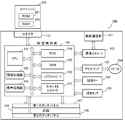
- FIG. 1 is a schematic diagram showing a schematic configuration of a typical portable terminal in which an information display device according to an embodiment of the present invention is realized.
- the portable terminal 100 includes a wireless communication unit 101, a communication controller 102, a sound amplifier 103, a speaker 104, an operation key 105, a display unit 106, a first touch panel 107, and a second touch panel 108.
- a tilt sensor 109 and a control unit 150 Examples of portable terminals include portable game devices and PDAs.
- the wireless communication unit 101 is a unit that performs wireless communication with a wireless communication unit of another portable terminal, and receives predetermined data via an antenna (not shown) built in the portable terminal 100. Send and receive. Note that the wireless communication unit 101 can also perform wireless communication with a predetermined access point.
- the wireless communication unit 101 is assigned a unique MAC (Media Access Control) address.
- the communication controller 102 controls the wireless communication unit 101 and mediates wireless communication performed between the control unit 150 and the control unit of another portable terminal according to a predetermined protocol. Further, when the portable terminal 100 is connected to the Internet via a nearby wireless access point or the like, between the control unit 150 and the wireless access point or the like according to a protocol compliant with a wireless LAN (Local Area Network). Intermediary of wireless communication performed in
- the sound amplifier 103 amplifies the audio signal generated by the control unit 150 and supplies it to the speaker 104.
- the speaker 104 is composed of, for example, a stereo speaker, and outputs predetermined sound effects, music sounds, voices, and the like according to the voice signal amplified by the sound amplifier 103.
- the operation key 105 includes a key switch or the like appropriately disposed on the portable terminal 100, and receives a predetermined instruction input such as on / off of the portable terminal 100 or change of manner mode according to the operation.
- the screen 106 is composed of an LCD or the like, and appropriately displays a predetermined selection button or the like under the control of an LCD controller 156 described later. Further, the screen 106 displays a selection button (icon) or the like necessary for a user or the like to input a selection instruction by touching the touch panel 107.
- the first touch panel 107 is disposed so as to overlap the front surface of the screen 106, and receives input from a touch pen or a user's finger.
- the second touch panel 108 is disposed so as to overlap the back surface of the screen 106.
- the first touch panel 107 and the second touch panel 108 are composed of, for example, a pressure-sensitive touch sensor panel, detects pressure of a touch pen or the like, and detects a touch operation such as contact and its position (touch position). Note that the touch panel 107 may detect and detect contact with a user's finger or the like from a change in capacitance, for example.
- the tilt sensor 109 is built in the portable terminal 100 and can measure the movement of the portable terminal 100 in the axial direction. That is, an operation of moving, rotating, or tilting the portable terminal 100 held by the user from the horizontal is measured.
- the measurement result is supplied to the control unit 150, and is used for processing in which the image processing unit 152 generates image data corresponding to the measurement result.
- a gyro sensor or the like that detects angular acceleration can be used.
- a CPU Central Processing Unit
- an image processing unit 152 an audio processing unit 153
- a ROM Read Only Memory
- RAM Random Access Memory
- An LCD controller 156 and a touch panel controller 157 are provided.
- the CPU 151 is connected to each component of the portable terminal 100 and controls the operation of the entire portable terminal 100. Further, the CPU 151 exchanges control signals and data with each component of the portable terminal 100.
- the image processing unit 152 processes the image data read from the ROM 154 or the image data processed by the CPU 151, and stores them in the RAM 155. Note that image data or the like can be directly output from the image processing unit 152 to the screen 106.
- the voice processing unit 153 processes the voice data read from the ROM 154 and the music data processed by the CPU 151, and then stores them in the RAM 155. Note that audio data or the like can be directly output from the audio processing unit 153 to the sound amplifier 103.
- the ROM 154 stores, for example, control programs and data necessary for selecting items displayed on the screen 106, and outputs them to the CPU 151, the RAM 155, and the like.
- the RAM 155 stores display image data processed by the image processing unit 152, work data for the CPU 151 to execute various processes according to the program, and the like, and the CPU 151, the screen 106, and the like. Output to.
- the LCD controller 156 controls the screen 106 to display a predetermined display image.
- the LCD controller 156 converts the image data stored in the RAM 155 into a display signal at a predetermined synchronization timing, and outputs it to the screen 106.
- the LCD controller 156 displays a predetermined selection button or the like on the screen 106.
- the touch panel controller 157 detects and detects contact (touch operation) with the first touch panel 107 and the second touch panel 108 by a touch pen or a user's finger. For example, in a state where a predetermined selection button or the like is displayed on the screen 106, detection of contact and release (leaving) to the first touch panel 107 and their positions are detected.
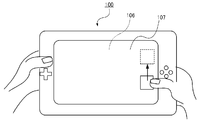
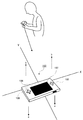
- FIG. 2 and 3 are external views illustrating examples of operations of the portable terminal by the user.
- the portable terminal 100 is provided with the first touch panel 107 on the front surface of the screen 106 as described above.
- the left and right ends of the portable terminal 100 are held with both hands.
- the user grasps the left and right sides of the portable terminal 100 with both hands, and uses the thumb of the right hand to touch the right end of the first touch panel 107. Trace the operation.
- FIG. 2 the user scrolls the right end of the first touch panel 107 upward using the thumb of the right hand, and the image displayed on the screen is scrolled upward.
- the user can perform the same operation using an input controller provided in the portable terminal 100 as necessary.
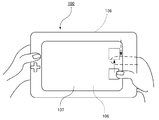
- the portable terminal 100 is provided with a second touch panel 108 on the back surface, and the user can trace the second touch panel 108 with a finger or the like.
- the user performs a tracing operation on the first touch panel 107 on the front surface of the portable terminal device 100 and simultaneously performs a tracing operation on the second touch panel 108 on the back surface, thereby satisfying a predetermined condition.
- the scroll speed of the image displayed on the screen 106 can be increased. That is, in FIG.
- the user performs a tracing operation on the first touch panel 107 on the front surface with the thumb and performs a tracing operation on the second touch panel 108 on the rear surface with the index finger. Increase the scrolling speed of the information displayed in. Details of the operation control will be described later.
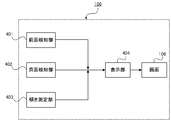
- FIG. 4 is a diagram illustrating a functional conceptual configuration of the portable terminal 100 according to the present embodiment.
- the portable terminal 100 includes a front surface detection unit 401, a back surface detection unit 402, an inclination measurement unit 403, and a display unit 404.
- the front surface detection unit 401 detects whether or not a tracing operation has been performed on the first touch panel 107 disposed on the front surface of the screen 106.
- the tracing operation is detected by a method as shown in FIG.
- the point where the finger first touches is set as the start point P1, and the point on the touch panel coordinates is specified as (X1, Y1), for example.
- a point where the finger goes into a non-contact state via a locus A having a predetermined distance from the start point P1 is defined as an end point P2 and specified as (X2, Y2).
- the coordinate information is also detected as vector information, and the direction of the vector, that is, the direction of the tracing operation is detected and reflected in the scroll direction.
- the start point, end point, trajectory length, and vector direction are stored in the RAM 155 as coordinate information.
- These pieces of coordinate information are converted by the CPU 151 as information for scrolling the image displayed at 106, and the distance of the locus A moved from the start point P1 to the end point P2 is used as the scroll amount, and the direction of the vector, that is, the locus is drawn.
- a process of reflecting the direction in the scroll direction is performed, and the image displayed on the screen 106 is scrolled through the process of the image processing unit 152.
- the image is the distance of the trajectory between the start point P1 and the end point P2, ie, Scrolls horizontally by X2-X1 minutes and vertically by Y2-Y1 minutes.
- the scrolling can be performed both in the vertical direction and in the horizontal direction at the same time, or the scrolling may be set only in one direction.
- the front surface detection unit 401 functions as the touch panel controller 157.
- the scroll amount may be scrolled by the same amount as the length of the trajectory trajectory, that is, the scroll operation may be scrolled at the same speed as the trace operation, but a trace operation longer than a certain length was performed within a predetermined time.
- the scrolling speed may be increased according to the length.
- the scroll display period can be limited to the period from when the finger or the like actually touches the touch panel until it is released, or after the release, the scroll continues with inertial motion while attenuating. You can also.
- the back surface detection unit 402 detects a tracing operation of the second touch panel 108 provided on the back surface of the screen 106. Similar to the front surface detection unit 401, the start point and the end point of the finger touching the second touch panel 108 are detected, and the movement distance and vector direction are detected from the movement locus of the finger. The back surface detection unit 402 detects a back surface tracing operation on the premise that the front surface tracing operation by the front surface detection unit 401 is detected. The back surface detection unit 402 functions as the touch panel controller 157.
- the tilt measurement unit 403 measures the tilt of the portable terminal 100 with respect to the horizontal plane, that is, the tilt of the screen 106, using the tilt sensor 109 built in the portable terminal 100.
- the tilt sensor for example, a uniaxial acceleration sensor is used.
- the acceleration sensor is a sensor that detects an acceleration of the sensor itself, that is, a speed change per second, and can also detect a gravitational acceleration.
- MEMS Micro Electro Mechanical Systems
- a gyro sensor that is a sensor for detecting an angle or an angular velocity can be used. Also in this case, it is preferable to use a MEMS type gyro sensor.
- the single-axis acceleration sensor (tilt sensor) 109 built in the portable terminal 100 is an X-axis direction when the horizontal axis of the portable terminal 100 is the X axis and the vertical axis is the Y axis.
- the output voltage of the acceleration sensor 109 increases and exhibits a maximum value in a state where it is inclined by 90 °.
- the inclination angle ⁇ can be detected.
- the inclination of the portable terminal 100 can also be obtained using a MEMS gyro sensor.
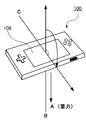
- an “inclination acceleration condition” refers to a condition for allowing a double-sided tracing operation to be detected if the screen 106 of the portable terminal 100 satisfies a predetermined tilt condition. For example, when the direction from the back surface of the screen 106 determined from the measured tilt toward the front surface of the screen 106 has a component opposite to gravity, the tilt acceleration condition is satisfied.
- the direction from the back surface of the screen 106 toward the front surface of the screen 106 is indicated by a vector B.
- Vector B has a component opposite to the vector direction A of gravity.
- Vector C has an angle of 90 ° with the direction of gravity (vector A). If this angle exceeds 90 °, the direction of gravity (vector A) and the direction from the back surface to the front surface of the screen 106 are in the same direction as gravity.
- the angle ⁇ between the direction from the back surface of the screen 106 toward the front surface of the screen 106 and the vector A is in the range of 90 ° ⁇ ⁇ 270 °
- the direction of gravity and the direction from the back surface of the screen 106 toward the front surface are gravity. Will face in the opposite direction.
- an arbitrary value can be set.
- the display unit 404 scrolls and displays an image displayed on the screen 106 based on the results detected by the front surface detection unit 402 and the back surface detection unit 403. If the tilt acceleration condition is satisfied, a message to that effect is displayed on the screen 106. The user recognizes on the screen 106 that the double-sided touch panel operation is possible and “the scrolling speed can be increased” and the like on the second touch panel 108 on the back side by recognizing that the tilt acceleration condition is satisfied. Recognize that the drag operation is possible.
- the image processing unit 157, the LCD controller, and the like function as the display unit 404.
- the predetermined tilt acceleration condition is satisfied while the front-side tracing operation is detected, and further, the scrolling speed is increased by satisfying the predetermined tracing acceleration condition. be able to.
- the “tracing acceleration condition” is a condition under which a scroll speed can be accelerated if a predetermined condition is satisfied after a backside tracing operation is detected.
- the distance between the trajectory on the screen of the front tracing operation and the trajectory on the screen of the rear tracing operation is within a predetermined distance range, and the directions of both trajectories are within the predetermined direction.
- first tracing acceleration condition the fact that the distance between the trajectory on the screen of the front tracing operation and the trajectory on the screen of the rear tracing operation is within a predetermined distance range
- second tracing acceleration condition By satisfying both the first tracing acceleration condition and the second tracing acceleration condition, the tracing acceleration condition is satisfied.
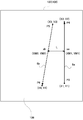
- FIG. 8 on the first touch panel 107 arranged on the front surface of the screen 106, the locus of the tracing operation using a finger or the like is indicated by a solid line 8a, and on the second touch panel 108 arranged on the back surface of the screen 106.
- a locus in which the user performs a tracing operation using a finger or the like is indicated by a dotted line 8b.
- the front tracing operation is performed from the start point P3 to the end point P4 as indicated by the solid line 8a. At this time, coordinates are detected from (X1, Y1) to (X2, Y2) according to the tracing operation. Further, the rear surface tracing operation is performed from the start point P5 toward the end point 6, as indicated by a dotted line 8b. At this time, coordinates are detected according to the tracing operation from (X3, Y3) to (X4, Y4). These pieces of coordinate information are temporarily stored in the RAM 155 or the like.
- the distance between the trajectory on the front tracing operation screen and the trajectory on the rear tracing operation screen is obtained as follows.
- An intermediate point of the solid line 8 a that is the locus of the front surface is obtained from the coordinate information stored in the RAM 155. That is, from the coordinates (X1, Y1) of the start point P3 and the coordinates (X2, Y2) of the end point P4, the intermediate point xa is obtained as the coordinates (XM1, YM1). Further, the intermediate point of the dotted line 8 b that is the locus of the back surface is obtained from the coordinate information stored in the RAM 155.
- the intermediate point xb is obtained as the coordinates (XM2, YM2). Then, the distance L between the two points is obtained from the obtained coordinate information of the intermediate point xa and the intermediate point xb, and this value is the distance between the trajectory on the front tracing operation screen and the trajectory on the rear tracing operation screen. .
- the first tracing acceleration condition is satisfied.
- the distance is within the predetermined distance range, for example, a case where the length of the distance L is 0 ⁇ L ⁇ 10 (mm) can be set. If the detected distance L is within the above range, the first tracing acceleration condition is satisfied.
- the distance L can be set to an arbitrary value within a range that does not hinder the operation.
- FIGS. 9A and 9B An example of obtaining the distance between the trajectory on the front trace operation screen and the trajectory on the rear trace operation screen will be described with reference to specific examples shown in FIGS. 9A and 9B.
- the locus of the front tracing operation is indicated by 9a
- the locus of the rear tracing operation is indicated by 9b.
- the midpoint between the two loci is obtained by xc and xd, respectively. If the distance l between xc and xd is within the range of 0 ⁇ l ⁇ 10 (mm), the first tracing acceleration condition is satisfied.
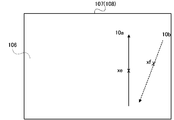
- FIG. 9B the locus of the front tracing operation is indicated by 9c
- the locus of the rear tracing operation is indicated by 9d.
- the midpoint of both trajectories is indicated by xe and xf, respectively.
- the place where both trajectories intersect is an intermediate point, so the distance between xc and xd is 0, which satisfies the first tracing acceleration condition.
- the distance between the two loci is preferably 0, which is a state where the two loci intersect. That is, if an operation is performed so that the two trajectories intersect, the user operates with the fingers crossed, so that the device can be gripped in a stable posture, and a safe operation is possible.
- the “tracing acceleration condition” means that the trajectory of the front tracing operation and the trajectory of the rear tracing operation satisfy the “first tracing acceleration condition” and that the directions of both trajectories are within a predetermined direction range. It is necessary to satisfy “acceleration conditions”.
- the directions of both loci are within a predetermined direction range” is, for example, a range having components in which the directions of both loci are opposite. Specifically, the directions of both loci are detected as shown in FIG.
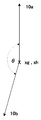
- the locus of the front tracing operation that traces the first touch panel 107 on the screen 106 is indicated by a solid line 10a
- the locus of the rear tracing operation that traces the second touch panel 108 on the rear side of the screen 106 is indicated by a dotted line 10b.
- the respective trajectories are trajectories having angles on the front surface and the back surface, and indicate that such a tracing operation has been performed.
- the angle between the two loci can be obtained by superimposing these loci on each of the intermediate points xg and xh. If the angle ⁇ formed by both loci is 90 ° ⁇ ⁇ 270 °, the direction of both loci can be said to be components in the opposite direction. For example, the case where the angle ⁇ falls within the range of 150 ° ⁇ ⁇ 180 °. It can be set as a range in which the directions of both loci have opposite components. When it is determined that the directions of the two loci are opposite, the second tracing acceleration condition is satisfied. If the “tracing acceleration condition” described above is satisfied, the scroll speed is set to a value accelerated than in the case of only the front tracing operation.
- the process is started through an initialization process.
- a program stored in the ROM 201 of the cartridge 200 as information necessary for starting information processing is read into the storage unit (RAM 155).
- the tilt measuring unit 403 measures the tilt of the portable terminal 100.
- the tilt is measured by a tilt sensor 109 built in the portable terminal 100.
- a tilt sensor 109 a uniaxial acceleration sensor or a gyro sensor for detecting angular velocity is used.
- the uniaxial acceleration sensor as shown in FIG. 6, how much the Y axis that is perpendicular to the X axis is inclined about the X axis that is parallel to the vertical axis of the portable terminal 100. taking measurement. That is, the tilt sensor 109 detects in which direction the portable terminal 100 is tilted up and down around the X axis.
- a similar tilt measurement can be performed using a gyro sensor.
- the point of time when it is determined whether or not the tilt acceleration condition is satisfied may be while the user's finger performs a tracing operation directly on the first touch panel 107 and is in contact with the first touch panel 107, It is also possible while the scroll process continues after the finger is released from the first touch panel 107.
- An inclination acceleration condition is obtained from the inclination obtained by the inclination sensor 109.
- the tilt acceleration condition for example, when the direction from the back surface to the front surface of the screen 106 has a component opposite to gravity, it is determined that the tilt acceleration condition is satisfied. If this inclination acceleration condition is not satisfied (NO; Step S1102), only the front surface tracing operation is detected (Step S1103).
- the front surface detection part 401 detects the tracing operation with the 1st touch panel 107 which is a front surface touch panel (step S1103). If it is detected that the front surface tracing operation has been performed (YES; step S1104), the coordinate information of the front surface tracing operation is written in the RAM 155, and further read processing is performed.
- the CPU 151 sets a predetermined scroll speed for the read information (step S1105). Then, the image on the screen 106 is scrolled at the set scroll speed (step S1112).
- the display unit 404 displays on the screen 106 that the condition for accelerating the scroll speed is satisfied (step S1106).
- the user recognizes from the information displayed on the screen 106 that a back-side tracing operation is also possible.
- the front surface detection unit 401 and the back surface detection unit 402 are in a detectable state, and the first touch panel 107 and the second touch panel 108 detect a tracing operation (step S1107).
- step S1108 If there is a front tracing operation (YES; step S1108), it is further detected whether or not there is a rear tracing operation (step S1109). If there is no front trace operation (NO; step S1108), the scroll process is not performed, and the process proceeds to another process (step S1113).
- step S1109 If there is no back-tracing operation (NO; step S1109), it is considered that only the front-side operation has been performed, the predetermined scroll speed is set (step S1105), and the image on the screen 106 is scrolled at the set speed (step S1105). S1112).
- Step S1110 it is determined whether or not a tracing acceleration condition is satisfied. That is, the distance between the trajectory on the front tracing operation screen 106 that is the “first tracing acceleration condition” and the trajectory on the rear tracing operation screen 106 is within a predetermined distance range, and “the second tracing acceleration condition”. The direction of both trajectories, which is the “acceleration condition”, is within a range of a predetermined direction.
- Step S1112 If the tracing acceleration condition is not satisfied (NO; step S1110), it is considered that only the front tracing operation has been performed, and the predetermined scrolling speed is set (step S1105), and the image on the screen 106 is scrolled at the set speed. (Step S1112).
- step S1111 the scroll speed accelerated from the time of only the front tracing operation is set (step S1111), and the screen 106 is scrolled at the set speed.
- An image is displayed (step S1112).
- the setting for accelerating the scrolling speed may be set in association with the speed of the front tracing operation or the speed of the rear tracing operation. For example, the higher the tracing operation speed, the higher the degree of acceleration can be set.
- step S1113 When the scroll speed is set to a predetermined value or when the scroll speed is set to be accelerated, the screen image is scrolled at each set speed, and the process proceeds to other processing (step S1113).
- Other processing includes processing for stopping the scroll processing and other information processing.
- any location can be used according to the application of the portable terminal. That is, the front tracing operation and the rear tracing operation may be performed at both ends in the left-right direction of the portable terminal, or may be performed at both ends in the vertical direction of the portable terminal device. For example, scrolling can be performed in the vertical direction by tracing either of the left and right ends, and scrolling can be performed in the horizontal direction by performing a tracing operation at either of the vertical ends. .
- the scrolling speed is increased if certain conditions are met by starting the back-tracing operation while scrolling using the front-side stroking operation. Can be made.
- the user's attitude toward the terminal is often inclined as the operation progresses.
- the user tends to tilt the portable terminal in the vertical direction with respect to the horizontal plane. It is beneficial for such a user to measure the tilt by the tilt measuring unit shown in the present embodiment and enable the double-sided tracing operation on the portable terminal only when a certain condition is satisfied.
- the operation can be performed intuitively and quickly.
- the information display device using the touch panel, the information display device, the information display method, and the like, which can quickly scroll the image displayed on the screen by the tracing operation on both sides of the touch panel, It is possible to provide a non-transitory recording medium and a program for realizing these on a computer.
Landscapes
- Engineering & Computer Science (AREA)
- Theoretical Computer Science (AREA)
- General Engineering & Computer Science (AREA)
- Computer Hardware Design (AREA)
- Human Computer Interaction (AREA)
- Physics & Mathematics (AREA)
- General Physics & Mathematics (AREA)
- Position Input By Displaying (AREA)
- User Interface Of Digital Computer (AREA)
Abstract
情報をスクロール可能に画面(106)に表示する表示部(404)、画面(106)前面に対する前面なぞり操作を検知する前面検知部(401)、画面(106)の背面に対する背面なぞり操作を検知する背面検知部(402)、と画面(106)の傾きを測定する傾き測定部(403)とからなる情報表示装置(100)である。、前面なぞり操作が検知されると、画面(106)において情報を当該前面なぞり操作の方向にスクロールし、画面(106)において情報がスクロールされている間、測定された傾きが所定の傾き加速条件を満たし、背面なぞり操作が検知され、当該背面なぞり操作が所定のなぞり加速条件を満たす場合、当該情報をスクロールする速度を増加させる。
Description
本発明は、タッチパネルを使用した情報表示装置において、タッチパネルの両面のなぞり操作により画面に表示された画像を迅速にスクロールすることができる情報表示装置、情報表示方法、非一時的な記録媒体、ならびにこれらをコンピュータにて実現するプログラムに関する。
タッチパネルは、携帯電話装置、PDA、携帯型ゲーム装置など多方面の情報表示装置で使用されている。表示画面には情報の一部のみが表示されるので、ユーザが全ての情報を閲覧したい場合には、スクロール操作を行う必要がある。
例えば、特許文献1には、ゲーム装置において、画像表示のスクロール処理による負荷を軽減し、プレイヤの見やすさを向上することが開示されている。
例えば、特許文献1には、ゲーム装置において、画像表示のスクロール処理による負荷を軽減し、プレイヤの見やすさを向上することが開示されている。
一方で、画面の情報量が多いときには、スクロール操作に時間を要し、ユーザの操作性向上のためにも、改善が望まれている。
また、近年は、タッチパネルを両面に備えた情報表示装置も製品化されており、このような製品により実現される機能の多様化に伴い、機能を実現するための操作の迅速性への要望はより強くなってきている。
また、近年は、タッチパネルを両面に備えた情報表示装置も製品化されており、このような製品により実現される機能の多様化に伴い、機能を実現するための操作の迅速性への要望はより強くなってきている。
本発明は、上記のような課題を解決するもので、タッチパネルを使用した情報表示装置において、タッチパネルの両面のなぞり操作により画面に表示された画像を迅速にスクロールすることができる情報表示装置、情報表示方法、非一時的な記録媒体、ならびにこれらをコンピュータにて実現するプログラムを提供することを目的とする。
以上の目的を達成するため、本発明の原理にしたがって、下記の発明を開示する。
本発明の第1の観点に係る情報表示装置は、表示部、前面検知部、背面検知部、傾き測定部を備え、以下のように構成する。
すなわち、表示部は、情報をスクロール可能に画面に表示する。
表示部は、タッチパネル上での操作に対応して、情報をスクロール可能に画面に表示するものである。画面を表示する装置として、LDC(Liquid Crystal Display)、CRT(Cathode Ray Tube)等が用いられる。
また、前面検知部は、画面の前面に対する前面なぞり操作を検知し、背面検知部は、画面の背面に対する背面なぞり操作を検知する。
画面の前面に設けられたタッチパネルに前面なぞり操作をしたことを、抵抗膜方式あるいは静電容量方式により検知して、画面のスクロール表示に反映させる。画面の背面に設けられたタッチパネルに背面なぞり操作をした場合にも同様の方式で検知して、画面のスクロール表示に反映させる。
傾き測定部は、画面の傾きを測定する。
傾き測定部は、画像を表示している画面の傾きを測定するためのものであり、例えば、装置内部に内蔵された加速度センサや角速度センサを用いて、画面の傾きを測定する。
傾き測定部は、画像を表示している画面の傾きを測定するためのものであり、例えば、装置内部に内蔵された加速度センサや角速度センサを用いて、画面の傾きを測定する。
ここで、表示部は、(a)前面なぞり操作が検知されると、画面において情報を当該前面なぞり操作の方向にスクロールし、(b)画面において情報がスクロールされている間、測定された傾きが所定の傾き加速条件を満たし、背面なぞり操作が検知され、当該背面なぞり操作が所定のなぞり加速条件を満たす場合、当該情報をスクロールする速度を増加させる。
すなわち、ユーザが、画面の前面に設けられたタッチパネルに対して前面なぞり操作を行い、前面の画面の情報のスクロール操作を行っている間に、背面に設けられたタッチパネルに対して背面なぞり操作を行う。そのときに、所定の傾き加速条件及び所定のなぞり加速条件を満たすことにより、情報のスクロール速度を増加させることができる。
本発明によれば、ユーザがスクロール操作を行う際に、スクロール速度を早くしたい場合には、前面及び背面の両方のタッチパネルのなぞり操作を行い、一定の条件を満たせば、スクロール速度を増加させることができる。
従って、早く次の処理に進みたい場合、あるいは表示される画面の末端に、操作すべきアイコンがある場合などに、ユーザが、両面なぞり操作を行うことで、スクロール速度は増加されるので、速やかな動作が可能となる。
従って、早く次の処理に進みたい場合、あるいは表示される画面の末端に、操作すべきアイコンがある場合などに、ユーザが、両面なぞり操作を行うことで、スクロール速度は増加されるので、速やかな動作が可能となる。
情報表示装置は、測定された傾きから求められた画面の背面から画面の前面へ向かう向きが、重力と逆向きの成分を有する場合、所定の傾き加速条件が満たされる。
すなわち、情報表示装置の向きが、操作中に、重力と逆向きの成分を有するようにユーザにより把持された場合、例えば、装置の向きが水平位置に対して、90°以上傾いた場合などは、画面の背面から画面の前面へ向かう向きが、重力と逆向きの成分を有しておらず、傾き加速条件が満たされないこととなる。その結果、スクロールの加速処理ができないことになる。
本発明によれば、情報表示装置は、測定された傾きから求められた画面の背面から画面の前面へ向かう向きが、重力と逆向きの成分を有する場合にのみ情報のスクロールの速度を増加させることができる。このような特徴から、ユーザが不安定な持ち方で両面スクロール操作をすることで、該装置を手から落下したり、その他両面なぞり操作に起因するリスクを減少させることができる。
情報表示装置は、検知された前面なぞり操作の画面における軌跡と、検知された背面なぞり操作の画面における軌跡と、の距離が、所定の距離範囲内であり、当該両軌跡の向きが所定の向き範囲内である場合、所定のなぞり加速条件が満たされる。
本発明によれば、画面の両面をなぞり操作することができる状態において、前面なぞり操作の軌跡と背面なぞり操作の軌跡を検知して、両軌跡の距離が所定距離内で、かつ所定の向き範囲内でなければスクロール速度を増加させないことにしている。このように、両面なぞり操作時の操作状態が一定の条件を満たした場合にスクロール速度を増加させることにしたので、ユーザはスクロール速度を増加させる操作を安定的に実施することができる。
情報表示装置は、所定の向き範囲は、両軌跡の向きが逆向きの成分を有する範囲である。
前面なぞり操作の軌跡と背面なぞり操作の軌跡の向きが逆向き、すなわち、前面なぞり操作を画面の下から上、背面なぞり操作を上から下というなぞり操作をした場合に、その両軌跡の向きが例えば150°から180°という範囲内であることを条件とする。
本発明によれば、前面なぞり操作の軌跡と背面なぞり操作の軌跡の向きが逆向きであることを、スクロール速度を増加させることができる条件としたので、両軌跡の向きが同方向となることで生じる装置把持の不安定さを解消することができる。
情報表示装置は、所定の距離範囲は、両軌跡が交差する範囲である。
本発明によれば、前面なぞり操作の軌跡と背面なぞり操作の軌跡が交差するような操作、すなわち、前面操作をする指と背面操作をする指とが重なるように操作させることで、より操作の安定を図ることができる。
情報表示装置は、表示部は、測定された傾きが所定の傾き加速条件を満たすか否かを画面にさらに表示する。
本発明によれば、傾き加速条件が満たされていることが画面に表示されることで、ユーザにスクロール速度を増加させる操作が可能であることを認識させることができる。ユーザは、この表示を認識してから、背面なぞり操作を開始することになる。
本発明のその他の観点に係る情報表示方法は、情報表示装置が実行する情報表示方法であって、情報表示装置は、表示部、前面検知部、背面検知部、傾き測定部を有し、表示工程、前面検知工程、背面検知工程、傾き測定工程、を備え、以下のように構成する。
表示工程では、表示部が、情報をスクロール可能に画面に表示する。前面検知工程では、前面検知部が、画面の前面に対する前面なぞり操作を検知する。背面検知工程では、背面検知部が、画面の背面に対する背面なぞり操作を検知する。傾き測定工程では、傾き測定部が画面の傾きを測定する。
さらに、表示工程では表示部が、(a)前面なぞり操作が検知されると、画面において情報を前面なぞり操作の方向にスクロールし、(b)画面において情報がスクロールされている間、測定された傾きが所定の傾き加速条件を満たし、背面なぞり操作が検知され、背面なぞり操作が所定のなぞり加速条件を満たす場合、当該情報をスクロールする速度を増加させる。
本発明のその他の観点に係るプログラムは、コンピュータを情報表示装置として機能させ、情報表示装置は、表示部、前面検知部、背面検知部、傾き測定部を備える。
表示部は、情報をスクロール可能に画面に表示する。前面検知部は、画面の前面に対する前面なぞり操作を検知する。背面検知部は、画面の背面に対する背面なぞり操作を検知する。傾き測定部は画面の傾きを測定する。
さらに、表示部は、(a)前面なぞり操作が検知されると、画面において情報を前面なぞり操作の方向にスクロールし、(b)画面において情報がスクロールされている間、測定された傾きが所定の傾き加速条件を満たし、背面なぞり操作が検知され、背面なぞり操作が所定のなぞり加速条件を満たす場合、当該情報をスクロールする速度を増加させる。
また、本発明のプログラムは、コンパクトディスク、フレキシブルディスク、ハードディスク、光磁気ディスク、ディジタルビデオディスク、磁気テープ、半導体メモリ等のコンピュータ読取可能な非一時的な情報記録媒体に記憶することができる。
上記プログラムは、プログラムが実行されるコンピュータとは独立して、コンピュータ通信網を介して配布・販売することができる。また、非一時的な上記情報記録媒体は、コンピュータとは独立して配布・販売することができる。
本発明によれば、タッチパネルを使用した情報表示装置において、タッチパネルの両面のなぞり操作により画面に表示された画像を迅速にスクロールすることができる情報表示装置、情報表示方法、非一時的な記録媒体、ならびにこれらをコンピュータにて実現するプログラムを提供することができる。
以下に本発明の実施形態を説明する。以下では、理解を容易にするため、ゲーム用の情報処理装置を利用して本発明が実現される実施形態を説明するが、以下に説明する実施形態は説明のためのものであり、本願発明の範囲を制限するものではない。したがって、当業者であればこれらの各要素を均等なものに置換した実施形態を採用することが可能であるが、これらの実施形態も本発明の範囲に含まれる。
(実施形態1)
図1は、本発明の実施の形態に係る情報表示装置が実現される典型的な携帯型端末機の概要構成を示す模式図である。
図1は、本発明の実施の形態に係る情報表示装置が実現される典型的な携帯型端末機の概要構成を示す模式図である。
携帯型端末機100は、無線通信部101と、通信コントローラ102と、サウンドアンプ103と、スピーカ104と、操作キー105と、表示部106と、第1のタッチパネル107と、第2のタッチパネル108と、傾きセンサ109と、制御部150と、を備える。
なお、携帯型端末機の例としては、携帯型ゲーム装置、PDAなどがある。
なお、携帯型端末機の例としては、携帯型ゲーム装置、PDAなどがある。
無線通信部101は、他の携帯型端末機の無線通信部との間で、無線通信を行うユニットであり、携帯型端末機100に内蔵されたアンテナ(図示せず)を介して所定のデータを送受信する。なお、無線通信部101は、所定のアクセスポイントとの間で、無線通信を行うこともできる。また、無線通信部101には、固有のMAC(Media Access Control)アドレスが付与されている。
通信コントローラ102は、無線通信部101を制御し、所定のプロトコルに従って、制御部150と他の携帯型端末機の制御部との間で行われる無線通信の仲立ちをする。また、携帯型端末機100を、近傍の無線アクセスポイント等を介してインターネットに接続する場合には、無線LAN(Local Area Network)に準拠したプロトコルに従って、制御部150と無線アクセスポイント等との間で行われる無線通信の仲立ちをする。
サウンドアンプ103は、制御部150で生成された音声信号を増幅し、スピーカ104に供給する。また、スピーカ104は、例えば、ステレオスピーカ等からなり、サウンドアンプ103で増幅された音声信号に従って、所定の効果音や楽曲音、音声等を出力する。
操作キー105は、携帯型端末機100に適宜配置されたキースイッチ等からなり、操作にしたがって携帯型端末機100のオンオフやマナーモード変更等の所定の指示入力を受け付ける。
画面106は、LCD等からなり、後述するLCDコントローラ156の制御によって、所定の選択ボタン等を適宜表示する。また、画面106は、ユーザ等がタッチパネル107に接触することで選択指示を入力するのに必要な選択ボタン(アイコン)等を表示する。
第1のタッチパネル107は、画面106の前面に重ねて配置され、タッチペンやユーザの指による入力を受け付ける。第2のタッチパネル108は、画面106の背面に重ねて配置されている。第1のタッチパネル107及び第2のタッチパネル108は、例えば、感圧式のタッチセンサパネルからなり、タッチペン等の圧力を検知し、接触等のタッチ操作およびその位置(タッチ位置)等を検出する。なお、タッチパネル107は、例えば、静電容量の変化からユーザの指等の接触を検知・検出するものであってもよい。
傾きセンサ109は、携帯型端末機100に内蔵されており、携帯型端末機100の軸方向の動きを測定することが可能となっている。すなわち、ユーザが把持している携帯型端末機100を移動させたり、回転させたり、水平から傾けたりする動作を測定する。 この測定結果は、制御部150へ供給され、画像処理部152が測定結果に応じた画像データを生成する処理などに使用される。
なお、このような傾きセンサ108としては、角加速度を検出するジャイロセンサ等を用いることができる。
なお、このような傾きセンサ108としては、角加速度を検出するジャイロセンサ等を用いることができる。
また、図1に示す制御部150は、CPU(Central Processing Unit)151と、画像処理部152と、音声処理部153と、ROM(Read Only Memory)154と、RAM(Random Access Memory)155と、LCDコントローラ156と、タッチパネルコントローラ157と、を備える。
CPU 151は、携帯型端末機100の各構成要素と接続されており、携帯型端末機100全体の動作を制御する。また、CPU 151は、携帯型端末機100の各構成要素と制御信号やデータのやりとりを行う。
画像処理部152は、例えば、ROM154から読み出された画像データや、CPU 151で処理された画像データを加工処理した後、これらをRAM 155に記憶させる。なお、画像処理部152から画像データ等を、直接画面106に出力することも可能である。
音声処理部153は、例えば、ROM 154から読み出された音声データや、CPU151で処理された楽曲データを加工処理した後、これらをRAM 155に記憶させる。なお、音声処理部153から音声データ等を、直接サウンドアンプ103に出力することも可能である。
ROM 154は、例えば、画面106に表示された項目等の選択を行うのに必要な制御プログラムやデータ等を記憶しており、これらをCPU 151、RAM 155などに出力する。
RAM 155は、画像処理部152で加工された表示用の画像データや、CPU 151がプログラムに従った各種処理を実行するためのワークデータ等を記憶しており、これらをCPU 151や画面106等に出力する。
LCDコントローラ156は、画面106を制御し、所定の表示用画像を表示させる。例えば、LCDコントローラ156は、RAM 155に記憶された画像データを所定の同期タイミングで表示信号に変換し、画面106に出力する。また、LCDコントローラ156は、画面106に所定の選択ボタン等を表示させる。
タッチパネルコントローラ157は、タッチペンやユーザの指による第1のタッチパネル107及び第2のタッチパネル108への接触(タッチ操作)を検知・検出する。例えば、画面106に所定の選択ボタン等が表示されている状態で、第1のタッチパネル107への接触や解放(離れること)の検知及び、それらの位置を検出する。
図2及び図3は、ユーザによる携帯型端末機の操作例を示す外観図である。
図2に示すように、携帯型端末機100には、上述したように、画面106の前面に第1のタッチパネル107が設けられている。ユーザが第1のタッチパネル107を操作するときには、携帯型端末機100の左右両端部を両手で保持して操作する。
ユーザは、一般的には、画面に表示された画像のスクロール操作を行う場合には、携帯型端末機100の左右を両手で把持し、右手の親指を用いて、第1のタッチパネル107の右端をなぞり操作する。
図2において、ユーザが右手の親指を用いて、第1のタッチパネル107の右端を上方向になぞり操作をすることにより、画面に表示された画像は、上方向にスクロールされる。ユーザは、必要に応じて、携帯型端末機100に設けられた入力用コントローラを用いて、同様の操作することもできる。
図2に示すように、携帯型端末機100には、上述したように、画面106の前面に第1のタッチパネル107が設けられている。ユーザが第1のタッチパネル107を操作するときには、携帯型端末機100の左右両端部を両手で保持して操作する。
ユーザは、一般的には、画面に表示された画像のスクロール操作を行う場合には、携帯型端末機100の左右を両手で把持し、右手の親指を用いて、第1のタッチパネル107の右端をなぞり操作する。
図2において、ユーザが右手の親指を用いて、第1のタッチパネル107の右端を上方向になぞり操作をすることにより、画面に表示された画像は、上方向にスクロールされる。ユーザは、必要に応じて、携帯型端末機100に設けられた入力用コントローラを用いて、同様の操作することもできる。
一方、図3に示すように、携帯型端末機100には、背面に第2のタッチパネル108が設けられており、ユーザは、指などで背面の第2のタッチパネル108をなぞり操作することができる。
本実施形態に係る発明によれば、ユーザが携帯型端末装置100の前面の第1のタッチパネル107のなぞり操作をすると同時に、背面の第2のタッチパネル108のなぞり操作をし、所定の条件を満たすことにより、画面106に表示された画像のスクロール速度を増加させることができる。
すなわち、図3において、ユーザは、親指で前面の第1のタッチパネル107上を上方向になぞり操作し、人指し指で、背面の第2のタッチパネル108上を下方向になぞり操作することで、画面106に表示された情報のスクロール速度を増加させる。操作制御の詳細については、後述する。
本実施形態に係る発明によれば、ユーザが携帯型端末装置100の前面の第1のタッチパネル107のなぞり操作をすると同時に、背面の第2のタッチパネル108のなぞり操作をし、所定の条件を満たすことにより、画面106に表示された画像のスクロール速度を増加させることができる。
すなわち、図3において、ユーザは、親指で前面の第1のタッチパネル107上を上方向になぞり操作し、人指し指で、背面の第2のタッチパネル108上を下方向になぞり操作することで、画面106に表示された情報のスクロール速度を増加させる。操作制御の詳細については、後述する。
次に、本実施形態の携帯型端末機100の機能的な構成について説明する。
図4は、本実施形態に係る携帯型端末機100の機能的な概念構成を示す図である。図4に示すように、携帯型端末機100は、前面検知部401、背面検知部402、傾き測定部403と、表示部404を備える。
図4は、本実施形態に係る携帯型端末機100の機能的な概念構成を示す図である。図4に示すように、携帯型端末機100は、前面検知部401、背面検知部402、傾き測定部403と、表示部404を備える。
前面検知部401は、画面106の前面に配置される第1のタッチパネル107になぞり操作があったか否かを検知する。
タッチパネルにおいて、なぞり操作がされた場合には、図5に示すような方法でなぞり操作が検知される。
最初に指が接触した点を始点P1とし、タッチパネルの座標上の点を例えば(X1,Y1)として特定する。指が始点P1から所定距離を有する軌跡Aを経て、非接触状態になる点を終点P2とし、(X2,Y2)として特定する。
また、座標情報は、ベクトル情報としても検知され、ベクトルの方向すなわち、なぞり操作の方向を検知して、スクロールの方向に反映させる。
始点、終点、軌跡の長さ、ベクトルの方向は、座標情報として、RAM 155に記憶される。
タッチパネルにおいて、なぞり操作がされた場合には、図5に示すような方法でなぞり操作が検知される。
最初に指が接触した点を始点P1とし、タッチパネルの座標上の点を例えば(X1,Y1)として特定する。指が始点P1から所定距離を有する軌跡Aを経て、非接触状態になる点を終点P2とし、(X2,Y2)として特定する。
また、座標情報は、ベクトル情報としても検知され、ベクトルの方向すなわち、なぞり操作の方向を検知して、スクロールの方向に反映させる。
始点、終点、軌跡の長さ、ベクトルの方向は、座標情報として、RAM 155に記憶される。
これらの座標情報は、106に表示された画像をスクロールさせる情報として、CPU 151で変換され、始点P1から終点P2まで動いた軌跡Aの距離を、スクロール量に、ベクトルの向き、すなわち軌跡の描く向きをスクロールの方向に反映させる処理を行い、画像処理部152の処理を経て、画面106上に表示された画像をスクロールする。
具体的には、図5に示すように、指をタッチパネル上で上方向に、始点P1から終点P2へ移動させた場合、画像は上方向に始点P1と終点P2間の軌跡の距離分、すなわち水平方向にX2-X1分、垂直方向にY2-Y1分スクロールさせられる。
なお、スクロールは、上下方向及び水平方向の両方同時にすることもできるし、どちらか一方の方向のみにスクロールするような設定にしてもよい。
前面検知部401は、タッチパネルコントローラ157が機能する。
具体的には、図5に示すように、指をタッチパネル上で上方向に、始点P1から終点P2へ移動させた場合、画像は上方向に始点P1と終点P2間の軌跡の距離分、すなわち水平方向にX2-X1分、垂直方向にY2-Y1分スクロールさせられる。
なお、スクロールは、上下方向及び水平方向の両方同時にすることもできるし、どちらか一方の方向のみにスクロールするような設定にしてもよい。
前面検知部401は、タッチパネルコントローラ157が機能する。
なお、スクロール量は、なぞり操作をした軌跡の長さと同じ量をスクロールする、すなわち、なぞり操作と同じ速度でスクロールさせてもよいが、一定の長さ以上のなぞり操作を所定時間内に行った場合に、その長さに応じてスクロールの速度を増加させてもよい。
また、スクロール表示をする期間は、実際に指等がタッチパネルに接触してから解放されるまでの間に限定することもできるし、解放された後も減衰しながら慣性運動でスクロールを継続させることもできる。
また、スクロール表示をする期間は、実際に指等がタッチパネルに接触してから解放されるまでの間に限定することもできるし、解放された後も減衰しながら慣性運動でスクロールを継続させることもできる。
背面検知部402は、画面106の背面に設けられた第2のタッチパネル108のなぞり操作を検知するものである。
前面検知部401と同様に、第2のタッチパネル108に接触した指の始点と終点を検知し、指の移動軌跡から移動距離、ベクトルの方向を検知する。
背面検知部402は、前面検知部401による前面なぞり操作が検知されることが前提として、背面のなぞり操作を検知する。
なお、背面検知部402は、タッチパネルコントローラ157が機能する。
前面検知部401と同様に、第2のタッチパネル108に接触した指の始点と終点を検知し、指の移動軌跡から移動距離、ベクトルの方向を検知する。
背面検知部402は、前面検知部401による前面なぞり操作が検知されることが前提として、背面のなぞり操作を検知する。
なお、背面検知部402は、タッチパネルコントローラ157が機能する。
傾き測定部403は、携帯型端末機100に内蔵された傾きセンサ109により、携帯型端末機100の水平面に対する傾きすなわち画面106の傾きを測定する。
傾きセンサとしては、例えば、1軸加速度センサが用いられる。加速度センサは、センサ自体の加速度、すなわち1秒当たりの速度変化を検出するセンサであり、重力加速度も検出できるものである。本実施形態における携帯型端末機100には、小型の装置に適したMEMS(Micro Electro Mechanical Systems)型加速度センサを使用することが望ましい。
傾きセンサとしては、例えば、1軸加速度センサが用いられる。加速度センサは、センサ自体の加速度、すなわち1秒当たりの速度変化を検出するセンサであり、重力加速度も検出できるものである。本実施形態における携帯型端末機100には、小型の装置に適したMEMS(Micro Electro Mechanical Systems)型加速度センサを使用することが望ましい。
また、傾きセンサとして、角度あるいは角速度を検出するセンサであるジャイロセンサを用いることも可能である。この場合にもMEMS型ジャイロセンサを用いるのが好ましい。
MEMS型加速度センサを用いて、本実施形態における携帯型端末機の傾きを測定する方法を、図6を用いて説明する。
携帯型端末機100に内蔵された1軸の加速度センサ(傾きセンサ)109は、携帯型端末機100の横方向の軸をX軸、縦方向の軸をY軸とした場合、X軸方向の動的加速度に反応する。加速度が働いていない場合、すなわち、ゲーム機が地面に対して水平の状態であれば、センサは0グラムを示すオフセット電圧を出力するので、傾きは0と判断される。
携帯型端末機100に内蔵された1軸の加速度センサ(傾きセンサ)109は、携帯型端末機100の横方向の軸をX軸、縦方向の軸をY軸とした場合、X軸方向の動的加速度に反応する。加速度が働いていない場合、すなわち、ゲーム機が地面に対して水平の状態であれば、センサは0グラムを示すオフセット電圧を出力するので、傾きは0と判断される。
携帯型端末機100を、X軸を中心にして上下方向(矢印a、b方向)に回転させると、加速度センサ109の出力電圧は増加し、90°傾斜した状態で最大値を示す。この原理を利用して、傾きの角度θを検出することができる。
なお、携帯型端末機100の傾きは、MEMS型ジャイロセンサを用いて求めることもできる。
なお、携帯型端末機100の傾きは、MEMS型ジャイロセンサを用いて求めることもできる。
加速度センサ109により求められた傾きから、「傾き加速条件」を求める。ここで、「傾き加速条件」とは、携帯型端末機100の画面106が、所定の傾き条件を満たしていれば、両面のなぞり操作を検知できるようになるための条件をいう。
たとえば、測定された傾きから求められた画面106の背面から画面106の前面に向かう向きが、重力と逆向きの成分を有する場合に、傾き加速条件を満たすことにする。
たとえば、測定された傾きから求められた画面106の背面から画面106の前面に向かう向きが、重力と逆向きの成分を有する場合に、傾き加速条件を満たすことにする。
図7に示すように、携帯型端末機100は、ユーザに地面に対して水平に掴まれている状態の時は、画面106の背面から画面106の前面に向かう向きが、ベクトルBで示すように重力のベクトル方向Aと逆向きの成分を有する。
ユーザが携帯型端末機100を操作しているときに、携帯型端末機100が、ベクトルBの位置から90°傾き、ベクトルCの状態になった場合を考える。ベクトルCは、重力の方向(ベクトルA)と90°をなす角度を有する。このなす角度が90°を超えると、重力の方向(ベクトルA)と画面106の背面から前面に向かう向きが重力と同じ方向を向くことになる。
従って、画面106の背面から画面106の前面に向かう向きとベクトルAとのなす角度αが、90°<α<270°の範囲では、重力の方向と画面106の背面から前面に向かう向きが重力と反対方向を向くことになる。
角度αの範囲は、上述の範囲内であれば、任意の値を設定することができる。
ユーザが携帯型端末機100を操作しているときに、携帯型端末機100が、ベクトルBの位置から90°傾き、ベクトルCの状態になった場合を考える。ベクトルCは、重力の方向(ベクトルA)と90°をなす角度を有する。このなす角度が90°を超えると、重力の方向(ベクトルA)と画面106の背面から前面に向かう向きが重力と同じ方向を向くことになる。
従って、画面106の背面から画面106の前面に向かう向きとベクトルAとのなす角度αが、90°<α<270°の範囲では、重力の方向と画面106の背面から前面に向かう向きが重力と反対方向を向くことになる。
角度αの範囲は、上述の範囲内であれば、任意の値を設定することができる。
このような傾き加速条件を設定することにより、ユーザが不安定な状態で携帯型端末機を把持している時には、背面のスクロールを行ってもスクロール速度を増加する操作を行うことができないようになっている。
表示部404は、前面検知部402、背面検知部403により検知された結果に基づき、画面106に表示される画像をスクロール表示するものである。
また、傾き加速条件が満たされた場合には、その旨を画面106に表示する。
ユーザは、傾き加速条件が満たされたことを「両面タッチパネル操作が可能です。」「スクロール速度を早くできます。」等の表示を画面106で認知することにより、背面の第2のタッチパネル108のなぞり操作が可能であることを認識する。
画像処理部157、LCDコントローラ等が表示部404として機能する。
また、傾き加速条件が満たされた場合には、その旨を画面106に表示する。
ユーザは、傾き加速条件が満たされたことを「両面タッチパネル操作が可能です。」「スクロール速度を早くできます。」等の表示を画面106で認知することにより、背面の第2のタッチパネル108のなぞり操作が可能であることを認識する。
画像処理部157、LCDコントローラ等が表示部404として機能する。
本実施形態においては、前面なぞり操作が検知されている間に、所定の傾き加速度条件を満足することを前提に、更に、所定のなぞり加速条件を満たしていることで、スクロールする速度を増加させることができる。
「なぞり加速条件」とは、背面なぞり操作が検知された後、所定条件を満たせばスクロール速度を加速することができる条件である。
たとえば、前面なぞり操作の画面における軌跡と、背面なぞり操作の画面における軌跡との距離が、所定の距離範囲内であり、かつ、両軌跡の向きが所定の向きの範囲内であるときをいう。
ここで、前面なぞり操作の画面における軌跡と、背面なぞり操作の画面における軌跡との距離が、所定の距離範囲内であることを、「第1のなぞり加速条件」といい、両軌跡の向きが所定の向きの範囲内であることを、「第2のなぞり加速条件」という。
この第1のなぞり加速条件及び第2のなぞり加速条件の双方が満たされることで、なぞり加速条件が満たされることになる。
たとえば、前面なぞり操作の画面における軌跡と、背面なぞり操作の画面における軌跡との距離が、所定の距離範囲内であり、かつ、両軌跡の向きが所定の向きの範囲内であるときをいう。
ここで、前面なぞり操作の画面における軌跡と、背面なぞり操作の画面における軌跡との距離が、所定の距離範囲内であることを、「第1のなぞり加速条件」といい、両軌跡の向きが所定の向きの範囲内であることを、「第2のなぞり加速条件」という。
この第1のなぞり加速条件及び第2のなぞり加速条件の双方が満たされることで、なぞり加速条件が満たされることになる。
前面なぞり操作の画面における軌跡と、背面なぞり操作の画面における軌跡との距離が、所定の距離範囲内であることを検知する原理について、図8を用いて説明する。
図8において、画面106の前面に配置された第1のタッチパネル107上を、指等を用いてなぞり操作をした軌跡を実線8aで示し、画面106の背面に配置された第2のタッチパネル108上を指等を用いてなぞり操作をした軌跡を点線8bで示す。
図8において、画面106の前面に配置された第1のタッチパネル107上を、指等を用いてなぞり操作をした軌跡を実線8aで示し、画面106の背面に配置された第2のタッチパネル108上を指等を用いてなぞり操作をした軌跡を点線8bで示す。
前面のなぞり操作は、実線8aで示すように、始点P3から終点P4に向かって行われる。このとき座標は(X1,Y1)から(X2,Y2)まで、なぞり操作に従って検知されることになる。
また、背面のなぞり操作は、点線8bで示すように、始点P5から終点6に向かって行われる。このとき座標は(X3,Y3)から(X4,Y4)まで、なぞり操作にしたがって検知されることになる。
これらの座標情報は、一旦、RAM 155等に記憶される。
また、背面のなぞり操作は、点線8bで示すように、始点P5から終点6に向かって行われる。このとき座標は(X3,Y3)から(X4,Y4)まで、なぞり操作にしたがって検知されることになる。
これらの座標情報は、一旦、RAM 155等に記憶される。
本実施形態において、前面なぞり操作の画面における軌跡と、背面なぞり操作の画面における軌跡との距離は、以下のようにして求められる。
前面の軌跡である実線8aの中間点を、RAM 155に記憶された座標情報より求める。すなわち、始点P3の座標(X1,Y1)と終点P4の座標(X2,Y2)から、その中間点であるxaを座標(XM1,YM1)として求める。
更に、背面の軌跡である点線8bの中間点を、RAM 155に記憶された座標情報より求める。
すなわち、始点P5の座標(X3,Y3)と終点P6の座標(X4,Y4)から、その中間点であるxbを座標(XM2,YM2)として求める。
そして、求められた中間点xa及び中間点xbの座標情報から、2点の距離Lが求められ、この値が前面なぞり操作の画面における軌跡と、背面なぞり操作の画面における軌跡との距離となる。
前面の軌跡である実線8aの中間点を、RAM 155に記憶された座標情報より求める。すなわち、始点P3の座標(X1,Y1)と終点P4の座標(X2,Y2)から、その中間点であるxaを座標(XM1,YM1)として求める。
更に、背面の軌跡である点線8bの中間点を、RAM 155に記憶された座標情報より求める。
すなわち、始点P5の座標(X3,Y3)と終点P6の座標(X4,Y4)から、その中間点であるxbを座標(XM2,YM2)として求める。
そして、求められた中間点xa及び中間点xbの座標情報から、2点の距離Lが求められ、この値が前面なぞり操作の画面における軌跡と、背面なぞり操作の画面における軌跡との距離となる。
距離Lが、所定の距離範囲内であれば、第1のなぞり加速条件を満たすことになる。所定の距離範囲内であるときとは、例えば、距離Lの長さが0≦L≦10(mm)である場合を設定することができる。
検出された距離Lが、上述の範囲内であれば、第1のなぞり加速条件を満たしたことになる。距離Lは、操作に支障がない範囲で任意の値を設定することが可能である。
検出された距離Lが、上述の範囲内であれば、第1のなぞり加速条件を満たしたことになる。距離Lは、操作に支障がない範囲で任意の値を設定することが可能である。
前面なぞり操作の画面における軌跡と、背面なぞり操作の画面における軌跡との距離を求める実例について、図9A、Bに示す具体例を用いて説明する。
図9Aにおいて、前面なぞり操作の軌跡を9aで示し、背面なぞり操作の軌跡を9bで示す。両軌跡の中間点は、それぞれxc及びxdで求められている。xcとxd間の距離lが0≦l≦10(mm)の範囲内であれば、第1のなぞり加速条件を満たしたことになる。
図9Bにおいて、前面なぞり操作の軌跡を9cで示し、背面なぞり操作の軌跡を9dで示す。両軌跡の中間点は、それぞれxe及びxfで示される。この具体例の場合には、両軌跡が交わったところが中間点となっているので、xcとxdの距離は0となり、第1のなぞり加速条件を満たすことになる。
一般的には、図9Bで示すように、両軌跡の距離は、両軌跡が交差する状態である0であることが好ましい。
すなわち、両軌跡が交差するように操作すれば、ユーザは、指を交差して操作することになるので、安定した姿勢で機器を把持することができ、安全な操作が可能となる。
図9Aにおいて、前面なぞり操作の軌跡を9aで示し、背面なぞり操作の軌跡を9bで示す。両軌跡の中間点は、それぞれxc及びxdで求められている。xcとxd間の距離lが0≦l≦10(mm)の範囲内であれば、第1のなぞり加速条件を満たしたことになる。
図9Bにおいて、前面なぞり操作の軌跡を9cで示し、背面なぞり操作の軌跡を9dで示す。両軌跡の中間点は、それぞれxe及びxfで示される。この具体例の場合には、両軌跡が交わったところが中間点となっているので、xcとxdの距離は0となり、第1のなぞり加速条件を満たすことになる。
一般的には、図9Bで示すように、両軌跡の距離は、両軌跡が交差する状態である0であることが好ましい。
すなわち、両軌跡が交差するように操作すれば、ユーザは、指を交差して操作することになるので、安定した姿勢で機器を把持することができ、安全な操作が可能となる。
「なぞり加速条件」は、前面なぞり操作の軌跡と、背面なぞり操作の軌跡が「第1のなぞり加速条件」を満たすとともに、両軌跡の向きが所定の向き範囲内であるという「第2のなぞり加速条件」を満たすことが必要である。
以下、「第2のなぞり加速条件」を説明する。
「両軌跡の向きが所定の向き範囲内である」とは、例えば、両軌跡の向きが逆向きの成分を有する範囲である。具体的には、図10に示すように両軌跡の向きを検出する。
「両軌跡の向きが所定の向き範囲内である」とは、例えば、両軌跡の向きが逆向きの成分を有する範囲である。具体的には、図10に示すように両軌跡の向きを検出する。
図10Aに示すように、画面106上の第1のタッチパネル107をなぞる前面なぞり操作の軌跡を実線10aで示し、画面106の背面の第2のタッチパネル108をなぞる背面なぞり操作の軌跡を点線10bで示す。実線10aと点線10bによって示されるように、それぞれの軌跡は、前面と背面において角度をもった軌跡であり、そのようななぞり操作がされたことを示している。
この両軌跡を、図10Bで示すように、各々の中間点であるxgとxhとで重ねることにより、両軌跡のなす角度を求めることができる。両軌跡により形成される角度θが、90°<θ<270°であれば、両軌跡の向きは逆方向の成分といえるが、例えば、150°<θ<180°の範囲内に入る場合を両軌跡の向きが逆向きの成分を有する範囲として設定することができる。
両軌跡の向きが、逆向きであると判断されると、第2のなぞり加速条件が満たされることになる。
以上説明した「なぞり加速条件」が満たされれば、スクロール速度は、前面なぞり操作のみの場合よりも加速した値に設定される。
両軌跡の向きが、逆向きであると判断されると、第2のなぞり加速条件が満たされることになる。
以上説明した「なぞり加速条件」が満たされれば、スクロール速度は、前面なぞり操作のみの場合よりも加速した値に設定される。
(動作処理)
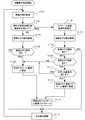
以上の構成を有する携帯型端末機100の動作処理を、図11に示すフローチャートを参照して説明する。
以上の構成を有する携帯型端末機100の動作処理を、図11に示すフローチャートを参照して説明する。
携帯型端末機100は、電源が投入されると、初期化処理を経て処理が開始される。初期化処理では、情報処理の開始に必要な情報としてカートリッジ200のROM 201に記憶されるプログラムが、記憶部(RAM 155)に読み込まれる。
情報処理が開始されると、画面106の傾きが検知される(ステップS1101)。具体的には、傾き測定部403により、携帯型端末機100の傾きが測定される。当該傾きは、携帯型端末機100に内蔵された傾きセンサ109で測定される。傾きセンサ109としては、一軸加速度センサ又は、角速度を検出するジャイロセンサなどが用いられる。
一軸加速度センサでは、図6に示すように、携帯型端末機100の縦方向の軸と並行であるX軸を中心に、X軸と垂直の角度をなすY軸が、どれだけ傾いているかを測定する。すなわち、傾きセンサ109は、携帯型端末機100がX軸を中心に上下にどの方向に傾斜しているのか、を検出する。同様な傾きの測定は、ジャイロセンサを用いても行うことができる。
一軸加速度センサでは、図6に示すように、携帯型端末機100の縦方向の軸と並行であるX軸を中心に、X軸と垂直の角度をなすY軸が、どれだけ傾いているかを測定する。すなわち、傾きセンサ109は、携帯型端末機100がX軸を中心に上下にどの方向に傾斜しているのか、を検出する。同様な傾きの測定は、ジャイロセンサを用いても行うことができる。
傾き加速条件が満たされているか否かを判断する時点は、ユーザの指が第1のタッチパネル107に直接なぞり操作をして、第1のタッチパネル107に接触している間でもよいし、ユーザの指が第1のタッチパネル107上から解放されたあと、スクロール処理が継続している間も可能である。
傾きセンサ109で求められた傾きから、傾き加速条件を求める。傾き加速条件は、例えば、画面106の背面から前面に向かう向きが、重力と逆向きの成分を有する場合を傾き加速条件が満たされたと判断する。
この傾き加速条件が満たされなければ(NO;ステップS1102)、前面なぞり操作のみを検知することになる(ステップS1103)。
この傾き加速条件が満たされなければ(NO;ステップS1102)、前面なぞり操作のみを検知することになる(ステップS1103)。
そして、前面検知部401が、前面タッチパネルである第1のタッチパネル107でのなぞり操作を検知する(ステップS1103)。前面なぞり操作があったことが検知されると(YES;ステップS1104)、前面なぞり操作の座標情報はRAM 155に書き込まれ、さらに読み出し処理が行われる。
読み出された情報は、CPU 151において、所定のスクロール速度が設定される(ステップS1105)。そして、設定されたスクロール速度で、画面106の画像はスクロールされる(ステップS1112)。
読み出された情報は、CPU 151において、所定のスクロール速度が設定される(ステップS1105)。そして、設定されたスクロール速度で、画面106の画像はスクロールされる(ステップS1112)。
一方、画面106の傾きが所定の傾き加速条件を満たせば、表示部404により、スクロール速度を加速させる条件が満たされたことが画面106に表示される(ステップS1106)。ユーザは、画面106に表示された情報から、背面なぞり操作も可能であることを認識する。
この時点で前面検知部401と背面検知部402とは、検知可能な状態となり、第1のタッチパネル107と第2のタッチパネル108とで、なぞり操作を検知する(ステップS1107)。
前面なぞり操作があれば(YES;ステップS1108)、さらに、背面なぞり操作があったか否かも検知する(ステップS1109)。前面なぞり操作がなければ(NO;ステップS1108)、スクロール処理は行わず、その他の処理(ステップS1113)に移行する。
背面なぞり操作がなければ(NO;ステップS1109)、前面操作のみがあったとみなされ、所定のスクロール速度に設定され(ステップS1105)、その設定された速度で、画面106の画像をスクロールする(ステップS1112)。
背面なぞり操作があれば(YES;ステップS1109)、なぞり加速条件を満たすか否かが判断される(ステップS1110)。すなわち、「第1のなぞり加速条件」である前面なぞり操作の画面106における軌跡と、背面なぞり操作の画面106における軌跡との距離が、所定の距離範囲内であることと、「第2のなぞり加速条件」である両軌跡の向きが所定の向きの範囲内であることである。
なぞり加速条件を満たさなければ(NO;ステップS1110)、前面なぞり操作のみがあったとみなされ、所定のスクロール速度に設定され(ステップS1105)、その設定された速度で、画面106の画像をスクロールする(ステップS1112)。
なぞり加速条件を満たさなければ(NO;ステップS1110)、前面なぞり操作のみがあったとみなされ、所定のスクロール速度に設定され(ステップS1105)、その設定された速度で、画面106の画像をスクロールする(ステップS1112)。
一方、なぞり加速条件をみたせば(YES;ステップS1110)、前面なぞり操作のみの操作時より加速されたスクロール速度が設定され(ステップS1111)、その設定された速度でスクロールするように画面106の画像が表示される(ステップS1112)。
なお、スクロール速度を加速する設定は、前面のなぞり操作の速度、または、背面のなぞり操作の速度に関連付けて、設定してもよい。
例えば、なぞり操作速度が速くなればなるほど、加速の程度を大きくする等の設定が可能である。
なお、スクロール速度を加速する設定は、前面のなぞり操作の速度、または、背面のなぞり操作の速度に関連付けて、設定してもよい。
例えば、なぞり操作速度が速くなればなるほど、加速の程度を大きくする等の設定が可能である。
所定のスクロール速度に設定された場合及び加速されたスクロール速度に設定された場合には、各々の設定された速度で画面の画像をスクロールし、その後その他の処理に移行する(ステップS1113)。
その他の処理には、スクロール処理を停止する処理やその他の情報処理が含まれる。
その他の処理には、スクロール処理を停止する処理やその他の情報処理が含まれる。
なお、タッチパネル上のなぞり操作を行う箇所は、傾き加速条件及びなぞり加速条件を満たすことができれば、いずれの箇所でも、携帯型端末機の用途に応じて、使用することができる。
すなわち、前面なぞり操作及び背面なぞり操作は、携帯型端末機の左右方向のどちらかの両端部で行ってもよいし、携帯型端末装置の上下方向のどちらかの両端部で行ってよい。
例えば、左右方向のどちらかの両端部をなぞり操作すれば、上下方向にスクロール表示が可能であり、上下方向のどちらかの両端部でなぞり操作を行えば、左右方向にスクロール表示が可能である。
すなわち、前面なぞり操作及び背面なぞり操作は、携帯型端末機の左右方向のどちらかの両端部で行ってもよいし、携帯型端末装置の上下方向のどちらかの両端部で行ってよい。
例えば、左右方向のどちらかの両端部をなぞり操作すれば、上下方向にスクロール表示が可能であり、上下方向のどちらかの両端部でなぞり操作を行えば、左右方向にスクロール表示が可能である。
以上説明したように、両面タッチパネルを備えた携帯型端末機において、前面なぞり操作をしてスクロールしている間に、背面なぞり操作を開始することにより、一定条件をみたせば、スクロール速度を増加させることができる。
携帯型端末機の場合、ユーザの端末機に対する姿勢は、操作の進行につれて傾くことが多々ある。とくに、スクロール操作を行う場合には、ユーザは携帯型端末機を水平面に対して上下方向に傾斜させる傾向がある。本実施形態に示す傾き測定部により傾きを測定し、一定条件を満たす場合のみ携帯型端末機での両面なぞり操作を可能にすることは、このようなユーザにとって有益である。
特に、操作の迅速性が求められるゲーム装置において、すばやく選択肢を選択したり、急いで次のステージに進みたい場合等には、直感的に迅速に操作を進めることができる。
携帯型端末機の場合、ユーザの端末機に対する姿勢は、操作の進行につれて傾くことが多々ある。とくに、スクロール操作を行う場合には、ユーザは携帯型端末機を水平面に対して上下方向に傾斜させる傾向がある。本実施形態に示す傾き測定部により傾きを測定し、一定条件を満たす場合のみ携帯型端末機での両面なぞり操作を可能にすることは、このようなユーザにとって有益である。
特に、操作の迅速性が求められるゲーム装置において、すばやく選択肢を選択したり、急いで次のステージに進みたい場合等には、直感的に迅速に操作を進めることができる。
また、両面なぞり操作が可能にするために、操作状態に一定の条件を課しているので、その条件を介して、両面なぞり操作時の適切な装置の把持方法、操作方法を、ユーザに示唆することができる。
本願は、2011年5月26日に出願された日本国特許出願2011-118196号の明細書、特許請求の範囲、および図面全体を参照として取り込むものとする。
以上説明したように、本発明によれば、タッチパネルを使用した情報表示装置において、タッチパネルの両面のなぞり操作により画面に表示された画像を迅速にスクロールすることができる情報表示装置、情報表示方法、非一時的な記録媒体、ならびにこれらをコンピュータにて実現するプログラムを提供することができる。
100:携帯型端末機
101:無線通信部
102:通信コントローラ
103:サウンドアンプ
104:スピーカ
105:操作キー
106:画面
107:第1のタッチパネル
108:第2のタッチパネル
109:傾きセンサ(加速度センサ)
110:コネクタ
120:タッチパネル
150:処理制御部
151:CPU
152:画像処理装置
153:音声処理部
154:ROM
155:RAM
156:LCDコントローラ
157:タッチパネルコントローラ
200:カートリッジ
201:ROM
202:RAM
401:前面検知部
402:背面検知部
403:傾き測定部
404:表示部
101:無線通信部
102:通信コントローラ
103:サウンドアンプ
104:スピーカ
105:操作キー
106:画面
107:第1のタッチパネル
108:第2のタッチパネル
109:傾きセンサ(加速度センサ)
110:コネクタ
120:タッチパネル
150:処理制御部
151:CPU
152:画像処理装置
153:音声処理部
154:ROM
155:RAM
156:LCDコントローラ
157:タッチパネルコントローラ
200:カートリッジ
201:ROM
202:RAM
401:前面検知部
402:背面検知部
403:傾き測定部
404:表示部
Claims (9)
- 情報をスクロール可能に画面(106)に表示する表示部(404)、
前記画面(106)の前面に対する前面なぞり操作を検知する前面検知部(401)、
前記画面(106)の背面に対する背面なぞり操作を検知する背面検知部(402)、
前記画面(106)の傾きを測定する傾き測定部(403)
と、を備え、
前記表示部(404)は、
(a)前記前面なぞり操作が検知されると、前記画面(106)において前記情報を当該前面なぞり操作の方向にスクロールし、
(b)前記画面(106)において前記情報がスクロールされている間、前記測定された傾きが所定の傾き加速条件を満たし、前記背面なぞり操作が検知され、当該背面なぞり操作が所定のなぞり加速条件を満たす場合、当該情報をスクロールする速度を増加させる
ことを特徴とする情報表示装置(100)。 - 請求項1に記載の情報表示装置(100)であって、
前記測定された傾きから求められた前記画面(106)の前記背面から前記画面(106)の前記前面へ向かう向きが、重力と逆向きの成分を有する場合、前記所定の傾き加速条件が満たされる
ことを特徴とする情報表示装置(100)。 - 請求項1に記載の情報表示装置(100)であって、
前記検知された前面なぞり操作の前記画面(106)における軌跡と、前記検知された背面なぞり操作の前記画面(106)における軌跡と、の距離が、所定の距離範囲内であり、当該両軌跡の向きが所定の向き範囲内である場合、前記所定のなぞり加速条件が満たされる
ことを特徴とする情報表示装置(100)。 - 請求項3に記載の情報表示装置(100)であって、
前記所定の向き範囲は、前記両軌跡の向きが逆向きの成分を有する範囲である
ことを特徴とする情報表示装置(100)。 - 請求項3に記載の情報表示装置(100)であって、
前記所定の距離範囲は、前記両軌跡が交差する範囲である
ことを特徴とする情報表示装置。 - 請求項1に記載の情報表示装置(100)であって、
前記表示部(404)は、前記測定された傾きが所定の傾き加速条件を満たすか否かを前記画面(106)にさらに表示する
ことを特徴とする情報表示装置(100)。 - 情報表示装置(100)が実行する情報表示方法であって、前記情報表示装置(100)は、表示部(404)、前面検知部(401)、背面検知部(402)、傾き測定部(403)を有し、
表示部(404)が、情報をスクロール可能に画面(106)に表示する表示工程と、
前面検知部(401)が、前記画面(106)の前面に対する前面なぞり操作を検知する前面検知工程と、
背面検知部(401)が、前記画面(106)の背面に対する背面なぞり操作を検知する背面検知工程と、
傾き計測部(403)が、前記画面(106)の傾きを測定する傾き測定工程と、
を備え、
前記表示工程は、表示部(404)が
(a)前記前面なぞり操作が検知されると、前記画面(106)において前記情報を当該前面なぞり操作の方向にスクロールし、
(b)前記画面(106)において前記情報がスクロールされている間、前記測定された傾きが所定の傾き加速条件を満たし、前記背面なぞり操作が検知され、当該背面なぞり操作が所定のなぞり加速条件を満たす場合、当該情報をスクロールする速度を増加させる
ことを特徴とする情報表示方法。 - コンピュータを、情報表示装置(100)として機能させるプログラムを記録した記録媒体であって、前記プログラムは、前記コンピュータを
情報をスクロール可能に画面(106)に表示する表示部(404)、
前記画面(106)前面に対する前面なぞり操作を検知する前面検知部(401)、
前記画面(106)の背面に対する背面なぞり操作を検知する背面検知部(402)、
前記画面(106)の傾きを測定する傾き測定部(403)、
として機能させ、
前記表示部(404)は、
(a)前記前面なぞり操作が検知されると、前記画面(106)において前記情報を当該前面なぞり操作の方向にスクロールし、
(b)前記画面(106)において前記情報がスクロールされている間、前記測定された傾きが所定の傾き加速条件を満たし、前記背面なぞり操作が検知され、当該背面なぞり操作が所定のなぞり加速条件を満たす場合、当該情報をスクロールする速度を増加させる
ように機能させることを特徴とするプログラムを記録した非一時的な記録媒体。 - コンピュータを、情報表示装置(100)として機能させるプログラムであって、前記プログラムは、前記コンピュータを
情報をスクロール可能に画面(106)に表示する表示部(404)、
前記画面(106)の前面に対する前面なぞり操作を検知する前面検知部(401)、
前記画面(106)の背面に対する背面なぞり操作を検知する背面検知部(402)、
前記画面(106)の傾きを測定する傾き測定部(403)、
として機能させ、
前記表示部(404)は、
(a)前記前面なぞり操作が検知されると、前記画面(106)において前記情報を当該前面なぞり操作の方向にスクロールし、
(b)前記画面(106)において前記情報がスクロールされている間、前記測定された傾きが所定の傾き加速条件を満たし、前記背面なぞり操作が検知され、当該背面なぞり操作が所定のなぞり加速条件を満たす場合、当該情報をスクロールする速度を増加させる
ように機能させることを特徴とするプログラム。
Applications Claiming Priority (2)
| Application Number | Priority Date | Filing Date | Title |
|---|---|---|---|
| JP2011118196A JP5091338B1 (ja) | 2011-05-26 | 2011-05-26 | 情報表示装置、情報表示方法、ならびに、プログラム |
| JP2011-118196 | 2011-05-26 |
Publications (1)
| Publication Number | Publication Date |
|---|---|
| WO2012161285A1 true WO2012161285A1 (ja) | 2012-11-29 |
Family
ID=47217357
Family Applications (1)
| Application Number | Title | Priority Date | Filing Date |
|---|---|---|---|
| PCT/JP2012/063394 Ceased WO2012161285A1 (ja) | 2011-05-26 | 2012-05-24 | 情報表示装置、情報表示方法、非一時的な記録媒体、ならびに、プログラム |
Country Status (2)
| Country | Link |
|---|---|
| JP (1) | JP5091338B1 (ja) |
| WO (1) | WO2012161285A1 (ja) |
Families Citing this family (3)
| Publication number | Priority date | Publication date | Assignee | Title |
|---|---|---|---|---|
| US9274632B2 (en) * | 2011-09-27 | 2016-03-01 | Nec Corporation | Portable electronic device, touch operation processing method, and program |
| JP2015026177A (ja) * | 2013-07-25 | 2015-02-05 | 株式会社東海理化電機製作所 | 操作装置 |
| JP2015106165A (ja) | 2013-11-28 | 2015-06-08 | 京セラ株式会社 | 電子機器 |
Citations (2)
| Publication number | Priority date | Publication date | Assignee | Title |
|---|---|---|---|---|
| JP2011076233A (ja) * | 2009-09-29 | 2011-04-14 | Fujifilm Corp | 画像表示装置、画像表示方法およびプログラム |
| JP2011103044A (ja) * | 2009-11-10 | 2011-05-26 | Sony Computer Entertainment Inc | プログラム、情報記憶媒体、情報入力装置、及びその制御方法 |
-
2011
- 2011-05-26 JP JP2011118196A patent/JP5091338B1/ja active Active
-
2012
- 2012-05-24 WO PCT/JP2012/063394 patent/WO2012161285A1/ja not_active Ceased
Patent Citations (2)
| Publication number | Priority date | Publication date | Assignee | Title |
|---|---|---|---|---|
| JP2011076233A (ja) * | 2009-09-29 | 2011-04-14 | Fujifilm Corp | 画像表示装置、画像表示方法およびプログラム |
| JP2011103044A (ja) * | 2009-11-10 | 2011-05-26 | Sony Computer Entertainment Inc | プログラム、情報記憶媒体、情報入力装置、及びその制御方法 |
Also Published As
| Publication number | Publication date |
|---|---|
| JP2012247931A (ja) | 2012-12-13 |
| JP5091338B1 (ja) | 2012-12-05 |
Similar Documents
| Publication | Publication Date | Title |
|---|---|---|
| US10936011B2 (en) | Information processing apparatus, information processing method, and program | |
| CN102693003B (zh) | 基于多输入的终端的操作方法和支持该方法的便携式终端 | |
| JP5823400B2 (ja) | 複数のタッチセンサを用いたui提供方法、およびこれを利用する携帯端末機 | |
| JP5529700B2 (ja) | 情報処理装置、その制御方法、及びプログラム | |
| JP6157885B2 (ja) | 携帯端末装置の表示制御方法 | |
| US20100265269A1 (en) | Portable terminal and a display control method for portable terminal | |
| JP2018055718A (ja) | 手姿勢制御を伴う入力デバイス | |
| US10514796B2 (en) | Electronic apparatus | |
| CN103870034A (zh) | 触控装置及其控制方法 | |
| WO2013065214A1 (ja) | 入力制御装置、入力制御方法、及び入力制御プログラム | |
| EP3660638B1 (en) | Control method for electronic apparatus and input apparatus | |
| JP2013047945A (ja) | 電子機器、制御方法および制御プログラム | |
| JP2003337962A5 (ja) | ||
| JP2012155675A (ja) | タッチパネル装置 | |
| JP6386897B2 (ja) | 電子黒板、情報処理プログラムおよび情報処理方法 | |
| TW201423548A (zh) | 游標控制方法與電腦程式產品 | |
| JP5001412B2 (ja) | ゲーム装置、ゲーム制御方法、ならびに、プログラム | |
| JP5091338B1 (ja) | 情報表示装置、情報表示方法、ならびに、プログラム | |
| KR20100136289A (ko) | 이동 단말기의 디스플레이 제어 방법 | |
| JP2016126363A (ja) | タッチスクリーンに入力する方法、携帯式電子機器およびコンピュータ・プログラム | |
| JP2013058037A (ja) | 項目選択装置、項目選択方法、ならびに、プログラム | |
| US10101905B1 (en) | Proximity-based input device | |
| JP5658211B2 (ja) | 情報表示装置、情報表示方法、ならびに、プログラム | |
| JP5081952B2 (ja) | 項目選択装置、項目選択方法、ならびに、プログラム | |
| JP2010079786A (ja) | 端末装置 |
Legal Events
| Date | Code | Title | Description |
|---|---|---|---|
| 121 | Ep: the epo has been informed by wipo that ep was designated in this application |
Ref document number: 12789194 Country of ref document: EP Kind code of ref document: A1 |
|
| NENP | Non-entry into the national phase |
Ref country code: DE |
|
| 122 | Ep: pct application non-entry in european phase |
Ref document number: 12789194 Country of ref document: EP Kind code of ref document: A1 |