WO2012091107A1 - 電子番組表表示装置、テレビジョン受像機、電子番組表表示装置の制御方法、電子番組表表示装置制御プログラムおよび該プログラムを記録したコンピュータ読み取り可能な記録媒体 - Google Patents
電子番組表表示装置、テレビジョン受像機、電子番組表表示装置の制御方法、電子番組表表示装置制御プログラムおよび該プログラムを記録したコンピュータ読み取り可能な記録媒体 Download PDFInfo
- Publication number
- WO2012091107A1 WO2012091107A1 PCT/JP2011/080443 JP2011080443W WO2012091107A1 WO 2012091107 A1 WO2012091107 A1 WO 2012091107A1 JP 2011080443 W JP2011080443 W JP 2011080443W WO 2012091107 A1 WO2012091107 A1 WO 2012091107A1
- Authority
- WO
- WIPO (PCT)
- Prior art keywords
- program guide
- electronic program
- time
- scroll
- display
- Prior art date
- Legal status (The legal status is an assumption and is not a legal conclusion. Google has not performed a legal analysis and makes no representation as to the accuracy of the status listed.)
- Ceased
Links
Images











Classifications
-
- H—ELECTRICITY
- H04—ELECTRIC COMMUNICATION TECHNIQUE
- H04N—PICTORIAL COMMUNICATION, e.g. TELEVISION
- H04N21/00—Selective content distribution, e.g. interactive television or video on demand [VOD]
- H04N21/40—Client devices specifically adapted for the reception of or interaction with content, e.g. set-top-box [STB]; Operations thereof
- H04N21/47—End-user applications
- H04N21/482—End-user interface for programme selection
- H04N21/4821—End-user interface for programme selection using a grid, e.g. sorted out by channel and broadcast time
-
- H—ELECTRICITY
- H04—ELECTRIC COMMUNICATION TECHNIQUE
- H04N—PICTORIAL COMMUNICATION, e.g. TELEVISION
- H04N21/00—Selective content distribution, e.g. interactive television or video on demand [VOD]
- H04N21/40—Client devices specifically adapted for the reception of or interaction with content, e.g. set-top-box [STB]; Operations thereof
- H04N21/47—End-user applications
-
- H—ELECTRICITY
- H04—ELECTRIC COMMUNICATION TECHNIQUE
- H04N—PICTORIAL COMMUNICATION, e.g. TELEVISION
- H04N21/00—Selective content distribution, e.g. interactive television or video on demand [VOD]
- H04N21/40—Client devices specifically adapted for the reception of or interaction with content, e.g. set-top-box [STB]; Operations thereof
- H04N21/47—End-user applications
- H04N21/482—End-user interface for programme selection
-
- H—ELECTRICITY
- H04—ELECTRIC COMMUNICATION TECHNIQUE
- H04N—PICTORIAL COMMUNICATION, e.g. TELEVISION
- H04N21/00—Selective content distribution, e.g. interactive television or video on demand [VOD]
- H04N21/40—Client devices specifically adapted for the reception of or interaction with content, e.g. set-top-box [STB]; Operations thereof
- H04N21/47—End-user applications
- H04N21/485—End-user interface for client configuration
Definitions
- the present invention relates to a device for displaying information, in particular, an electronic program guide display device for displaying an electronic program display, a television receiver, a control method for the electronic program guide display device, an electronic program guide display device control program, and the program recorded therein.
- the present invention relates to a computer-readable recording medium.
- a display device displays an electronic program guide (EPG) using the program guide information.
- EPG electronic program guide
- a plurality of program guide information is formed in a matrix with the vertical axis as the time axis and the horizontal axis as the channel number axis.
- Patent Document 1 discloses a technique for displaying the time of an electronic program guide in an analog clock format when the time axis of the electronic program guide is changed and displayed.
- Patent Document 2 discloses a technique for setting a time zone to be displayed in an electronic program guide using a clock displayed in an analog clock format.
- Japanese Patent Publication Japanese Patent Laid-Open No. 2002-320166 (published on October 31, 2002)” Japanese Patent Publication “Japanese Patent Laid-Open No. 10-276378 (published on Oct. 13, 1998)”
- Patent Document 1 only changes the time display of the electronic program guide to an analog clock format, and the time display displayed in the analog clock format is scrolled together with the electronic program guide. Therefore, the technique described in Patent Document 1 cannot solve the above-described problem.
- Patent Document 2 uses a clock to set which part of the electronic program guide is displayed on the screen. When the electronic program guide is scrolled, the electronic program guide is currently used. It is not possible to inform the user which part of the table is displayed on the screen.
- the present invention has been made in view of the above problems, and its purpose is to display which part of the electronic program guide is displayed on the screen when the electronic program guide is scrolled in the time axis direction and the scrolling is stopped. It is to realize an electronic program guide display device and the like that can be easily recognized by the user.
- an electronic program guide display device displays an electronic program guide display device that displays a matrix-displayed electronic program guide with one axis as a time axis and the other axis as a channel number axis.
- a scroll receiving unit that receives an instruction to scroll the electronic program guide in the time axis direction, and a scroll unit that scrolls the electronic program guide in the time axis direction while the scroll receiving unit receives an instruction to scroll.
- the scroll means starts scrolling the electronic program guide, a time display control means for displaying the time on the display unit, and after the scroll means stops scrolling, the scroll means is included in the electronic program guide.
- table display control unit in that it comprises are characterized.
- control method of the electronic program guide display device is a control method of an electronic program guide display device for displaying an electronic program guide displayed in matrix with one axis as a time axis and the other axis as a channel number axis.
- the time display control step for displaying the time on the display unit, and after the scrolling is stopped in the scroll step
- the electronic program guide includes the scroll step in the electronic program guide.
- the time is displayed on the display unit while the electronic program guide is scrolled in the time axis direction.
- a portion of the electronic program guide corresponding to the time displayed when the scrolling is stopped is displayed on the display unit.
- the user can easily recognize which part of the electronic program guide is displayed on the screen when scrolling is stopped by checking the time displayed on the screen while scrolling the electronic program guide. be able to. Therefore, the operability and convenience of the electronic program guide are improved.
- the electronic program guide display device may be realized by a computer, and in this case, the electronic program guide display device that realizes the electronic program guide display device by the computer by operating the computer as each of the means.
- control programs and computer-readable recording media on which the control programs are recorded also fall within the scope of the present invention.
- the electronic program guide display device includes the scroll receiving unit that receives an instruction to scroll the electronic program guide in the time axis direction, and the electronic program while the scroll receiving unit receives the scrolling instruction.
- Scroll means for scrolling the table in the time axis direction
- time display control means for displaying the time on the display unit after the scroll means starts scrolling the electronic program guide, and after the scroll means stops scrolling
- An electronic program guide display control means for displaying a portion of the electronic program guide corresponding to the time displayed by the time display control means when the scroll means stops scrolling. .
- the electronic program guide display device control method includes a scroll receiving step for receiving an instruction to scroll the electronic program guide in the time axis direction, and an electronic program while receiving an instruction to scroll in the scroll receiving step.
- a scroll step for scrolling the table in the time axis direction a time display control step for displaying the time on the display unit after starting scrolling of the electronic program guide in the scroll step, and after stopping scrolling in the scroll step,
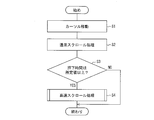
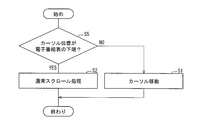
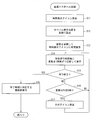
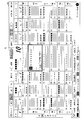
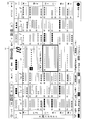
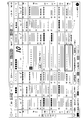
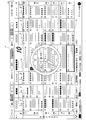
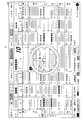
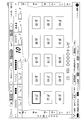
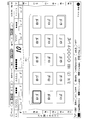
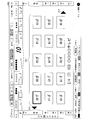
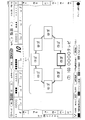
- FIG. 1 showing an embodiment of the present invention, is a block diagram illustrating a main configuration of a television device. It is a flowchart which shows the flow of the scroll process when the scroll button is kept pressed in the said television apparatus. It is a flowchart which shows the flow of a process when the scroll button is pressed once only in the said television apparatus. It is a flowchart which shows the flow of the high-speed scroll process in the said scroll process. It is a figure which shows the example of a display screen of an electronic program guide. It is a figure which shows the example of a display screen of an electronic program guide when a scroll button is pressed down.
- the television apparatus 1 creates and displays an electronic program guide (EPG) using the received program information. And even when the displayed electronic program guide is scrolled at a high speed, it is easy to use and can accurately display the electronic program guide for a user's desired time.
- EPG electronic program guide
- FIG. 1 is a block diagram illustrating a main configuration of the television device 1.
- a television apparatus 1 includes a receiving unit 2, a display control unit (time display control unit, electronic program guide display control unit, channel display control unit) 3, a display unit 4, a program information storage unit 5, an electronic The program table processing unit (scroll receiving unit, scroll unit) 6 and remote control light receiving unit 7 are included.
- the electronic program guide processing unit 6 includes a pressing time determination unit 11 and a high-speed scroll processing unit (scroll means) 12.
- the function of receiving and displaying the television broadcast in the television device 1 can be performed using a known technique, and the description thereof is omitted.
- the display control unit 3, the display unit 4, the program information storage unit 5, and the electronic program guide processing unit 6 constitute an electronic program guide display device.
- the receiving unit 2 receives TV broadcast and program information via the antenna 8.
- the receiving unit 2 performs reception processing on the received television broadcast, and then transmits it to the display control unit 3.
- the received program information is stored in the program information storage unit 5.
- the display control unit 3 causes the display unit 4 to display the television broadcast acquired from the receiving unit 2, the electronic program guide acquired from the electronic program guide processing unit 6, and the processing result for the electronic program guide.
- the display unit 4 is a display device that displays a television broadcast or an electronic program guide under the control of the display control unit 3.
- Examples of the display unit 4 include a liquid crystal display, an organic EL (Electro Luminescence) display, a plasma display, and the like.
- the program information storage unit 5 stores the program information received by the receiving unit 2.
- the contents of the program information include program contents, broadcast time, broadcast station, performer, program category, and the like.
- the electronic program guide processing unit 6 creates an electronic program guide using program information stored in the program information storage unit 5 and transmits it to the display control unit 3.
- the electronic program guide there can be listed a matrix program guide with the vertical axis representing the time axis and the horizontal channel number axis.
- the electronic program guide processing unit 6 includes a pressing time determination unit 11 and a high-speed scroll processing unit 12.
- the electronic program guide processing unit 6 performs processing on the electronic program guide based on a signal from the remote control received by the remote control light receiving unit 7, and displays the processing result. This is transmitted to the display control unit 3.
- the pressing time determination unit 11 determines whether or not a specific button on the remote control 10, specifically, a button for scrolling the electronic program guide has been pressed for a predetermined time or more from the signal received by the remote control light receiving unit 7. It is. When the pressing time determination unit 11 determines that the button has been pressed for a predetermined time or longer, the pressing time determination unit 11 notifies the high speed scroll processing unit 12 to that effect.
- the high-speed scroll processing unit 12 executes scrolling of the electronic program guide by high-speed scrolling when the notification that the button for scrolling the electronic program guide has been pressed for a predetermined time or more is acquired from the pressing time determination unit 11. is there.
- the high-speed scrolling means that the electronic program guide is scrolled not for each program but for each predetermined range. Specific processing in high-speed scrolling and a screen example displayed at that time will be described later.
- the remote control light receiving unit 7 receives a signal from the remote control 10 and transmits the contents to the electronic program guide processing unit 6.
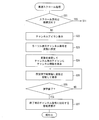
- FIGS. 2, 3, and 4 are flowcharts showing the flow of the electronic program guide scroll process in the television apparatus 1. More specifically, FIG. 2 shows a signal indicating that a button (scroll button) for scrolling the electronic program guide in the time direction is pressed from the remote controller 10 by the remote control light receiving unit 7 while the electronic program guide is being displayed. It is a flowchart which shows the flow of a process when it continues receiving.
- FIG. 3 shows that the remote control light receiving unit 7 receives a signal indicating that the scroll button for scrolling the electronic program guide in the time direction is pressed only once, while the electronic program guide is being displayed. It is a flowchart which shows the flow of a process at the time.
- FIG. 4 is a flowchart showing a process flow when the high-speed scroll process is executed.
- the electronic program guide processing unit 6 of the television apparatus 1 is a button (scroll button) that causes the remote control light receiving unit 7 to scroll the electronic program guide in the time direction from the remote controller 10 while displaying the electronic program guide.
- the cursor position program frame highlighting
- normal scrolling means that the electronic program guide is sequentially shifted and displayed every predetermined time.
- FIGS. 5 to 8 are diagrams showing examples of display screens showing cursor positions in the electronic program guide when the scroll button is pressed.
- the program frame of the selected program is highlighted at the current time, as shown in a display screen example 401 in FIG.
- a 10-channel program frame 41 at 2 pm corresponding to the current time of 2:03 pm is highlighted.
- the highlighted program frame is shifted from the program frame 41 by one program in the time direction as shown in the display screen example 501 in FIG. It becomes a program frame 51. Further, when it is accepted that the scroll button is pressed, the highlighted program frame is a program frame 61 which is the lower end of the displayed electronic program guide, as shown in a display screen example 601 in FIG. . Further, when it is accepted that the scroll button is pressed, the normal scroll process is started. FIG. 8 shows that the electronic program guide is displayed with a shift of one hour in the normal scroll process and the cursor position is at 7 o'clock. Thereafter, the normal scroll process is repeated every time the scroll button is pressed once.
- FIG. 2 shows the processing when the scroll button is continuously pressed.
- the highlighted program frame is shifted from the program frame 41 by one program in the time direction as shown in the display screen example 501 in FIG. .
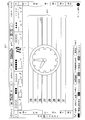
- the highlighted program frame is a program frame 61 that is the lower end of the displayed electronic program guide, as shown in a display screen example 601 in FIG. Become.
- the normal scroll process is entered as shown in FIG.
- the pressing time determination unit 11 of the electronic program guide processing unit 6 determines whether or not the pressing time of the scroll button after entering the normal scrolling process has reached a predetermined time or more.
- the predetermined time is, for example, 1 second.
- the predetermined time is not limited to this, and can be arbitrarily set, for example, 3 seconds.
- the high-speed scroll processing unit 12 of the electronic program guide processing unit 6 executes high-speed scroll processing for scrolling the electronic program guide at high speed. (S4, scroll step). At this time, the cursor may be displayed or may not be displayed.
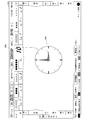
- the high-speed scroll processing unit 12 first displays a time display icon superimposed on the electronic program guide (S11).
- a screen example in which the time display icon is displayed superimposed on the electronic program guide is shown as a display screen example 701 in FIG.
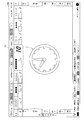
- the time display icon 71 is an analog clock-type icon, and its size is about 3 hours in the vertical time frame and about 1 channel in the horizontal direction.
- the clock display icon is not limited to this, and can have an arbitrary size.
- the display position is not limited to the center of the screen and can be displayed at an arbitrary position.
- the high-speed scroll processing unit 12 sets the cursor display time, which is the time of the highlighted program frame, as a variable (S12). Then, the time is displayed on the time display icon with reference to the variable (S13, time display control step).
- the variable is set to 7:00 pm
- the time display icon 71 is a display indicating 7:00 pm.
- the high-speed scroll processing unit 12 updates the variable by one hour each time the pressing time of the scroll button exceeds a predetermined time and displays it on the time display icon (S14). Note that the update of the variable is not limited to one hour at a time, and an arbitrary time interval can be set.
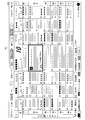
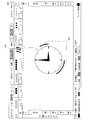
- FIG. 10 shows a state where high-speed scrolling has progressed for three hours from the state shown in FIG.
- a display screen example 801 shown in FIG. 10 shows a state in which the time indicated by the time display icon 81 is 10 hours ahead of the time display icon 71 by 3 hours.
- FIG. 12 shows a screen example in which date icons are displayed superimposed on the electronic program guide.
- the date icon 101 is displayed at the center of the electronic program guide.
- the date icon 101 indicates that it is Thursday on the 27th.
- the size of the date icon 101 is 3 hours in the vertical time frame and 3 channels in the horizontal direction. Note that the date icon is not limited to this, and can have any size.
- the display format is not limited to the above form, and only the date may be displayed, or the month may be displayed. Further, the display position is not limited to the center of the screen and can be displayed at an arbitrary position.
- the high-speed scroll processing unit 12 When the high-speed scroll processing unit 12 accepts that the scroll button has been pressed (YES in S15), the high-speed scroll processing unit 12 displays the electronic program guide in which the program frame at the time indicated by the variable at that time is highlighted (S18, Electronic program guide display control step). Thus, the scroll process in the television apparatus 1 is completed.
- the time of scrolling to the center of the electronic program guide is displayed every hour, and the program frame at the end point is highlighted when the scroll button is pressed.
- time display icon In the above-described embodiment, the case where the time display icon is in the analog clock format has been described, but the time display icon is not limited to this.
- the time display icon may be in the form of a digital clock, for example. This will be described with reference to FIG. FIG. 11 shows a case where the time display icon is in a digital clock format.
- the time display icon 91 In the display screen example 901 of FIG. 11, the time display icon 91 is displayed in the central portion of the electronic program guide in a digital clock format.
- the size of the time display icon 91 is 4 hours in the vertical time frame and 5 channels in the horizontal direction.
- time display icon is not limited to this, and may be in any format as long as it can be displayed in time. Further, the size of the time display icon can be set to an arbitrary size. Further, the display position is not limited to the center of the screen and can be displayed at an arbitrary position.
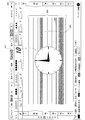
- the electronic program guide may be color-coded according to the program genre or the like for each program frame. This will be described with reference to FIG.
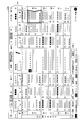
- FIG. 13 is a diagram showing a part of an electronic program guide color-coded according to program content.
- the drama is yellow
- the variety is blue
- the information program such as news / weather forecast is white
- the left side portion of the program frame is color-coded.
- a time display icon 115 is displayed superimposed on the electronic program guide.
- the color coding is not limited to the above method, and for example, the right side of the program frame may be color-coded, or the entire area inside the program frame may be colored.
- the character information when the electronic program guide is color-coded, when high-speed scrolling is executed, the character information may be blanked and only the color information may be scrolled. As a result, the process of scrolling the character information becomes unnecessary, and the processing load can be reduced.
- the electronic program guide having the vertical time axis and the horizontal channel number axis has been described as an example.
- the format of the electronic program guide is not limited to this.
- the electronic program guide may be a channel number axis in the vertical direction and a time axis in the horizontal direction.
- the electronic program guide is not limited to a matrix.
- the high-speed scrolling is executed when normal scrolling continues for a predetermined time or more.
- the high-speed scrolling execution is not limited to this.
- the remote controller may be provided with a high-speed scroll button, and when receiving that the high-speed scroll button is pressed, the high-speed scroll may be executed from the beginning.
- the remote control is equipped with a jog dial, and according to the speed at which the jog dial is rotated, normal scrolling is performed when the jog dial rotation speed is below a predetermined value, and high speed scrolling is performed when the jog dial rotation speed is greater than a predetermined value. It may be a thing.
- the configuration has been described in which the character information indicating the program content of the electronic program guide is scrolled during high-speed scrolling. For example, only the time axis and the channel number axis of the electronic program guide are left, and the rest It may be configured to be in a blank state, display a time display icon, and scroll at high speed.
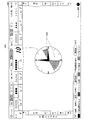
- a display screen example 1501 of the electronic program guide having this configuration is shown in FIG. In the display screen example 1501, the character information portion of the program is blank and a time display icon 151 is displayed.
- the character information portion of the program is completely blank.
- a configuration may be adopted in which only the border lines indicating the boundaries of the programs and the boundaries of the channels are left.
- the left and right character information indicating the time and date displayed in FIG. 15 may be blank.
- the time display icon displayed on the display unit 4 by the high-speed scroll processing unit 12 may include both an analog clock format and a digital clock format.
- FIG. 16 shows a case where the time display icon includes both an analog clock format and a digital clock format.
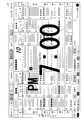
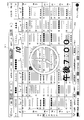
- the clock display icon indicates 7:00 in the analog clock format portion 1611 and “7:00 pm” in the digital clock format portion 1612.
- the date may be included in the digital clock format part of the clock display icon.
- FIG. 17 shows an example in which the date is included in the digital clock format part.
- “April 26, 2010 (Monday) 7:00 pm” is indicated in the digital clock format portion 1712. Thereby, the user can recognize clearly until a date.
- the user can easily recognize whether the time indicated by the time display icon is morning or afternoon.
- the structure which displays the image which shows whether it is the daytime or the night may be displayed under the time display icon which the high-speed scroll process part 12 displays on the display part 4.
- FIG. This can be realized by assigning images corresponding to day and night time zones and the display control unit 3 displaying the images according to the displayed time zones.
- the sun is used as an image showing the daytime
- the moon is used as an image showing the nighttime.
- a daytime / nighttime image display 1912 is displayed below the time display icon 1911 in the analog clock format.
- the sun is displayed on the front surface, and therefore, 7 am is shown.
- the daytime and nighttime image display is arranged with the sun and moon facing each other in a circle.
- the circle is displayed such that the surface that is nearly perpendicular to the display screen is the circle surface.
- the sun is displayed in the foreground, the moon is located at the farthest position. Is displayed.
- the sun and the moon rotate once in 24 hours, the sun is displayed in the foreground at 12:00 noon (12:00 pm), and the moon is displayed in the foreground at 12:00 midnight (midnight). That is, from 6 am to 6 pm, the sun is in front, and from 6 pm to 6 am, the moon is in front.
- it may be configured such that the determination of morning and afternoon is based on an image instead of the determination of daytime and nighttime. That is, a configuration may be adopted in which different images are allocated between midnight and 12:00 pm and between 12:00 pm and midnight, and these are arranged in a circle and rotated.
- time zone to which the image is assigned is not limited to two, and may be any number.
- the date bar 2112 is divided into eight equal bars in the horizontal direction, and a date is assigned to each.
- 24th to 31st are allocated, indicating that it is 26th. Thereby, a user can be made to recognize a date visually easily.
- the calendar is composed of, for example, a date area for 8 days and a display bar, and indicates the date by the position of the display bar in the date area.
- the display bar 2213 is located in the 26th area, indicating that it is the 26th.
- the display bar 2213 moves the date area in the order of 24 days ⁇ 25 days ⁇ 26 days ⁇ ...
- This embodiment differs from the first embodiment in that the cursor moves, scrolls at low speed, and scrolls at high speed in the channel axis direction in addition to the time axis direction.
- the program frame of the selected program is highlighted at the current time.
- the 10-frame program frame 2311 at 2 pm corresponding to the current time 2:03 pm is highlighted.
- the highlighted program frame is shifted to the right by one channel. Further, when it is accepted that the scroll button corresponding to the right direction of the channel axis is pressed, the highlighted program frame is shifted to the right side of the channel axis, and the highlighted program frame is the right edge of the display screen.
- the program frame 2511 in the display screen example 2501 in FIG. Further, when the scroll button is pressed, as shown in a display screen example 2601 in FIG. 26, the electronic program guide itself moves one channel at a time in the left direction of the channel axis.
- the scroll button is kept pressed as it is, the time axis and the channel number axis are left as shown in the display screen example 2701 in FIG. 27, and only the channel number axis 2712 is scrolled. Highlight the frame. Further, channel display icons 2611 indicating the channel information of the channel indicated by the highlighted channel number frame are displayed in the remaining area in the scrolling order.
- the logo and name of “xxx television” with channel number 2 and 3 digit number 103 are displayed as channel display icons.
- the highlighted program frame moves to the left and when it reaches the left end, only the channel axis scrolls and the channel number frame on the right end of the channel axis Highlighted.
- FIG. 23 is a flowchart showing the flow of high-speed scroll processing. Note that the flow of processing until the high-speed scroll processing starts is the same as that in FIG.
- the high speed scroll processing unit 12 determines whether or not the scroll direction is the time axis direction (S21). If the scroll direction is the time axis direction (YES in S21), the process proceeds to step S11 in FIG.
- the high-speed scroll processing unit 12 displays a channel display icon (S22, display screen example 2701). .
- the high-speed scroll processing unit 12 sets the channel number displayed by the channel display icon as a variable (S23). Then, a channel display icon indicating the channel is displayed with reference to the variable (S24). In the display screen example 2701 of FIG. 27, since the channel number indicated by the channel display icon is 10, the variable is set to 10.
- the high-speed scroll processing unit 12 updates the variable every time the scroll button is pressed for a predetermined time and displays a channel display icon corresponding to the updated channel (S25).
- the high-speed scroll processing unit 12 When the high-speed scroll processing unit 12 accepts that the scroll button has been pressed (YES in S26), the high-speed scroll processing unit 12 displays an electronic program guide in which the channel number indicated by the variable at that time is the center of the channel axis (S27). .
- the above is the flow of the high-speed scroll process.
- a high-speed scroll button or the like may be provided directly in the high-speed scroll without going through the order of cursor movement ⁇ low-speed scroll ⁇ high-speed scroll.
- FIG. 28 An example of displaying a list of logo icons will be described with reference to FIG.
- the logo icon at the upper left of the display screen is highlighted in the logo icon list display 2811.
- the highlighting is shifted to the right logo icon every time the scroll button is pressed for a predetermined time. Then, when the highlighted logo icon reaches the right end, the logo icon at the left end of the second row is highlighted next.
- channel information (channel number, three-digit number, broadcasting station name) of the channel corresponding to the highlighted logo icon is displayed at the bottom of the display unit.
- the user can easily visually recognize the channel displayed after the scrolling is finished, and can easily recognize the scroll amount to the desired channel.
- an icon indicating that the logo icon does not fit on one screen may be displayed.
- the icon on the lower right of the first page is displayed so that the logo icon overlaps, and the upper left icon and the lower right icon are the same for intermediate pages.
- the display is such that the logo icons overlap.
- the upper left icon is displayed with the logo icons overlapping.
- a plurality of logo icons are displayed as a list (list display 2911), and the upper left and lower right icons are displayed such that the logo icons overlap.
- the logo icon list display shows how many pages in total, and what page is currently displayed. Show. Here, it is shown that the total number of pages is 4, and the current page is the second page.
- an icon for example, a right-pointing arrow
- an icon indicating that there is a continuation is displayed at the lower right of the first page.
- An icon indicating that there is an icon may be displayed, an icon indicating that there is a continuation in the lower right, and an icon indicating that there is a continuation in the upper left may be displayed for the last page. .
- a plurality of logo icons are displayed in a list (list display 3011), and an arrow 3012 is displayed on the upper left of the display unit, and an arrow 3013 is displayed on the lower right. This allows the user to recognize that the previous page and the subsequent page exist on this page.
- the structure which displays the logo icon which shows each broadcast station in a circle shape may be sufficient. This will be described with reference to FIG.
- the logo icons are arranged in a circle (circle-shaped list display 3111), and the logo icon located in the lower center is highlighted.
- the circle has a shape such that the lower center is the front and the upper center is the rear. Further, the highlighted logo icon and the corresponding channel information of the broadcasting station are displayed at the bottom of the display section.
- the circle rotates and the logo icon placed at the bottom center changes.
- the display may be thinned away from the lower center of the circle.
- the logo icon near the upper part of the circle shape may be displayed in an overlapping manner. This will be described with reference to FIG. In the display screen example 3201 of FIG. 32, logo icons near the upper part of the circle shape are displayed in an overlapping manner (circle shape list display 3211).
- the movement of the logo icon is as follows.
- the circle rotates and moves to the position where the rear (upper) logo icon overlaps. At that position, a predetermined number of logo icons appear on the front of the logo icon. Stop until overlaid.
- a predetermined number of logo icons are superimposed on the front face of the logo icon, the logo icon rotates in a circle and is placed on the front face of the logo icon at the next position. Thereafter, the same operation is repeated, and when a predetermined number of logo icons are superimposed on the front surface of the logo icons, they move to the next position in a circle shape.
- the circle-shaped logo icon may be configured such that the size of the logo icon is large at the lower part (front face) and smaller from the lower part.
- An example of changing the size of the logo icon is shown in FIG.
- the logo icon arranged in the lower part is the largest, and the size of the logo icon decreases as the distance from the lower part increases (circle-shaped list display 3311). Accordingly, the user can easily recognize the channel of the electronic program guide displayed when the scrolling is stopped, and can visually entertain the user.
- This embodiment differs from the first and second embodiments in that the display control unit (reservation identification information display means) 3 displays the reservation identification information on the display unit 4 while the high-speed scroll processing unit 12 is scrolling at high speed. It is a point to do.
- the reservation identification information may be displayed in association with the time display icon or may be displayed independently of the time display icon.
- the reservation identification information is information for identifying these time zones when reservations such as program viewing reservation and video recording reservation are made.
- the reservation identification information By displaying the reservation identification information, it is possible to present to the user the reserved time zone even during high-speed scrolling. Therefore, the user can check the reserved program by stopping the scrolling at the reserved time even during high-speed scrolling.
- Reservation identification information can be displayed when the television apparatus 1 gives a recording instruction even when a reservation is made for viewing or recording on the television apparatus 1 or when recording is performed outside the television apparatus 1.
- Display example 1 A first example of displaying reservation identification information will be described with reference to FIG.
- an analog clock display icon 3402 is displayed as a time display icon.
- the display color of the hands 3403 in the analog clock display icon 3402 is changed depending on whether there is a reservation or not. For example, in a normal state, the color of the needle portion 3403 is displayed in black, and the color of the needle portion 3403 is displayed in red during a reserved time zone.
- the needle portion 3403 is displayed in black during a normal time zone, and the needle portion 3403 is displayed in red during a reserved time zone. Therefore, by recognizing the color of the needle portion 3403, the user can easily recognize whether or not the time zone currently being scrolled is a reserved time zone during high-speed scrolling.
- Display example 2 Next, a second example of displaying reservation identification information will be described with reference to FIG.
- an analog clock display icon 3502 is displayed as a time display icon.
- a reserved time display 3503 indicating a time zone in which there is a reservation is displayed on the outer periphery of the analog clock display icon 3502.
- 2 o'clock to 3 o'clock and 6 o'clock to 8 o'clock are displayed as reserved time zones.
- the analog clock display icon 3502 is displayed for 12 hours, if the display at 12 o'clock is exceeded during high-speed scrolling, the reserved time zone for the next 12 hours is displayed.
- an analog clock display icon 3602 is displayed as a time display icon.
- a reserved time display 3603 indicating a time zone in which a reservation is made is displayed in the internal area of the analog clock display icon 3602.
- 2 o'clock to 3 o'clock and 6 o'clock to 8 o'clock are displayed as reserved time zones.
- analog clock display icon 3602 is displayed for 12 hours like the analog clock display icon 3502, so if the display at 12 o'clock is exceeded during high-speed scrolling, the reserved time zone for the next 12 hours is displayed. .
- an analog clock display icon 3702 is displayed as a time display icon.
- reservation time displays 3703 and 3704 indicating the time slots in which reservations are made are displayed in a plurality of rings displayed on the outer periphery of the analog clock display icon 3702.
- the multiple wheels are displayed as annual rings, with the innermost wheel showing the current time from 12:00 to 12:00, and the second wheel from the inside showing 12 hours from 12:00 to the next 12:00. The time zone every 12 hours from the current time is shown.
- the reservation time zone display displayed on the wheel corresponding to the time zone currently being scrolled among the plurality of wheels is displayed in a color different from the reservation time zone display displayed on the other wheels.
- the reserved time zone display 3705 displayed on the second wheel from the inside is displayed in a different color from the other reserved time zone displays 3704. Therefore, in this case, it is indicated that the current time is being scrolled in the time zone from 12 o'clock to 12 o'clock after the current time.
- annual rings are displayed in quadruple (that is, for two days), but the number of rings is not limited to this. For example, if eight days (16 folds) are displayed, it can be the same as the number of days that the electronic program guide is currently distributed, and information for identifying the reserved time zone for the distributed electronic program guide is as follows: It can be said that all are displayed.
- a date display indicating the date of the ring part of the annual ring may be performed. By displaying the date, it is possible to make the user easily recognize what day the ring portion indicates.
- Display example 5 Next, a fifth example of displaying reservation identification information will be described with reference to FIG.
- an analog clock display icon 3802 is displayed as a time display icon, and a calendar 3803 is displayed behind the analog clock display icon 3802.
- the calendar includes, for example, a date area for 8 days and a display bar.
- the calendar indicates the date being scrolled according to the position of the display bar in the date area, and the display bar moves in the date area along with the scroll.
- the display bar 3804 since the display bar 3804 is located in the second half of the fifth day, it indicates that the current scrolling position is the second half of the fifth day from the current time.
- a reservation time display 3805 indicating a time zone in which a reservation is made is displayed in the calendar 3803.
- the display screen example 3801 it is shown that the second half of the third day and almost the whole of the seventh day are reserved time zones.
- an analog clock display icon 3902 is displayed as a time display icon, and a date bar 3903 indicating dates for eight days is displayed below the analog clock display icon 3902.
- the date bar 3903 is divided into eight equal bars in the horizontal direction, each of which is assigned a date, and displays an area corresponding to the currently scrolling date differently from the other areas.
- the display screen example 3901 since the area corresponding to the 17th is displayed differently from the other areas, it indicates that the 17th is currently being scrolled.
- a reservation time display 3904 indicating a time zone in which a reservation is made is displayed in the internal area of the date bar 3903.
- the latter half of the 18th day and almost the entire 21st day are reserved time zones.
- An electronic program guide display device is an electronic program guide display device that displays an electronic program guide displayed in matrix form with one axis as a time axis and the other axis as a channel number axis.
- Scroll receiving means for receiving an instruction to scroll in the time axis direction
- scroll means for scrolling the electronic program guide in the time axis direction while the scroll receiving means receives the scroll instruction
- the scroll means for the electronic program Time display control means for displaying the time on the display unit after starting the table scrolling, and the time when the scroll means stops scrolling in the electronic program guide after the scroll means stops scrolling.
- Electronic program guide display control means for displaying a portion corresponding to the time displayed by the display control means. It is characterized in Rukoto.
- control method of the electronic program guide display device is a control method of an electronic program guide display device for displaying an electronic program guide displayed in matrix with one axis as a time axis and the other axis as a channel number axis.
- the time display control step for displaying the time on the display unit, and after the scrolling is stopped in the scroll step
- the electronic program guide includes the scroll step in the electronic program guide.
- the time is displayed on the display unit while the electronic program guide is scrolled in the time axis direction.
- a portion of the electronic program guide corresponding to the time displayed when the scrolling is stopped is displayed on the display unit.
- the user can easily recognize which part of the electronic program guide is displayed on the screen when scrolling is stopped by checking the time displayed on the screen while scrolling the electronic program guide. be able to. Therefore, the operability and convenience of the electronic program guide are improved.
- the scroll means increases the scroll speed after a predetermined time has elapsed since the start of scrolling of the electronic program guide, and the time display control means
- the scroll means may start the time display after increasing the scroll speed.
- the time display control means may display the time superimposed on the electronic program guide.
- the time is displayed superimposed on the electronic program guide, so that the user can easily and clearly recognize the time zone between scrolls.
- the time display control means may display time in an analog clock format.
- the time is displayed in an analog clock format, so that the user can intuitively recognize the time zone between scrolls.
- the scroll means may leave only the time axis and the channel number axis of the electronic program guide and leave the rest blank when the scroll speed is increased. .
- the time display control means may display time in both an analog clock format and a digital clock format.
- the time since the time is displayed in both an analog clock format and a digital clock format, the time can be presented visually and clearly to the user.
- the time display control means may change the color of the time displayed in the morning and in the afternoon.
- the time display control means divides 24 hours per day into a plurality of time zones, assigns an image corresponding to each time zone, and includes a time zone in which the time is included.
- the image assigned to may be displayed.
- the approximate time zone can be presented to the user by the displayed image.
- the user can visually recognize the time based on the displayed time and image. For example, if a moon image is assigned to a night time zone and a sun image is assigned to a day time zone, the user can determine whether the time is a day time or a night time depending on the displayed time and image. You can visually recognize the time.
- the image is arranged in a circle shape having a surface that can be viewed in a direction substantially perpendicular to the display surface
- the time display control means includes: The display position of the image arranged in the circle shape is changed so that the circle rotates according to the change of the display time, and the image assigned to the time zone including the display time is changed. , It may be displayed at the frontmost position of the circle.
- the images are arranged in a circle shape, and the display position of the image changes so that the circle rotates as the time of display changes. Thereby, it is possible to visually present the approximate time zone of the changing time to the user.
- the time display control means displays the date superimposed on the electronic program guide
- the electronic program guide display control means has the scroll means for scrolling. After the stop, the portion corresponding to the date and time displayed by the time display control means when the scroll means stops scrolling may be displayed in the electronic program guide.
- the date is displayed in addition to the time. Therefore, the date of the electronic program guide displayed when scrolling is stopped can be clearly presented to the user.
- the time display control means may display the date by a slide bar in which the bar-shaped area is divided into a plurality of sections and a date is assigned to each section.
- the date is displayed by the slide bar in which the rod-shaped area is divided into a plurality of sections and the date is assigned to each section, so that the user can visually recognize the date.
- the time display control means displays a calendar by displaying a calendar including a plurality of dates and displaying a mark in a date area of the calendar. Also good.
- the date can be presented by the mark displayed in the date area of the calendar, so that the date can be visually presented to the user.
- the scroll receiving means receives an instruction to scroll the electronic program guide in the channel axis direction, and the scroll means instructs the scroll receiving means to scroll in the channel axis direction.
- the electronic program guide is scrolled in the channel axis direction, and the electronic program guide display device displays channel information indicating a channel number after the scroll means starts scrolling the electronic program guide.
- Channel display control means for displaying on the display section, wherein the electronic program guide display control means is channel information displayed by the channel display control means when the scroll means stops scrolling in the electronic program guide. The part corresponding to the channel indicated by may be displayed.
- the channel information is displayed on the display unit while the electronic program guide is scrolled in the channel axis direction.
- the scrolling is stopped, a portion of the electronic program guide corresponding to the channel indicated by the channel information displayed when the scrolling is stopped is displayed on the display unit.
- the user can easily recognize which part of the electronic program guide is displayed on the screen when the scrolling is stopped by checking the channel information displayed on the screen. can do. Therefore, the operability and convenience of the electronic program guide are improved.
- the channel display control means displays a list of channel information of a plurality of channels, highlights one of the channel information displayed in the list, and the scroll means scrolls.
- the channel information to be highlighted is changed while the electronic program guide display control means highlights the channel display control means when the scroll means stops scrolling in the electronic program guide.
- the channel portion corresponding to the channel information may be displayed.
- the channel information is displayed in a list, one of the displayed channel information is highlighted, and the highlighted channel information is changed while the scroll means is scrolling.
- the channel information can be presented to the user in a list, and when the scrolling is stopped, it is possible to easily recognize which electronic program guide corresponding to the channel indicated by which channel information is displayed. .
- the channel display control means arranges the channel information of a plurality of channels in a circle shape having a surface that is viewed in a direction substantially perpendicular to the display surface as a circle surface.
- the channel information display position is changed so that the circle rotates, and the channel information arranged at the position where it is visually recognized as being in the forefront of the circle.
- the electronic program guide display control means changes the position of the electronic program guide so that the channel display control means is at the forefront of the circle when the scroll means stops scrolling. The part of the channel corresponding to the displayed channel information may be displayed.
- the channel information is arranged in a circle shape, and the display position of the channel information is changed so that the circle rotates with scrolling. Then, when the scrolling is stopped, an electronic program guide corresponding to the channel indicated by the channel information displayed at the position visually recognized as being in the front is displayed. Thereby, it can be visually shown to the user that the channel is being scrolled.
- reservation identification information that can identify a reserved time zone for viewing or recording a program in association with the time display displayed by the time display control means while the scroll means is scrolling. You may provide the reservation identification information display means displayed on the said display part.
- the reservation identification information that can identify the reserved time zone for viewing or recording a program is displayed in association with the time display displayed by the time display control means. This makes it possible to present to the user a time zone during which viewing or recording of a program is reserved during scrolling.
- the user can recognize the time zone in which viewing or recording of the program is reserved during scrolling, the user can stop the scrolling in the time zone and check the reserved program.
- the analog format time display indicates a reserved time zone for viewing or recording a program.
- Reservation identification information display means for changing the color of the hands of the time display of the format may be provided.
- the display color of the hands at the reserved time zone is changed. Thereby, it can show visually that it is a reservation time zone to a user. Further, the user can easily recognize that it is a reserved time zone during scrolling.
- the time display control means displays the time in an analog format
- the reservation identification information capable of identifying a reserved time zone for viewing or recording a program is displayed as the time in the analog format.
- the reservation identification information that can identify the reservation time zone is displayed on the outer periphery or the internal area of the analog time display.
- zone can be shown with a list with respect to a user. Further, the user can recognize the reserved time zone at a time while scrolling.
- the time display control means displays time in an analog format
- a plurality of rings are provided on the outer periphery of the analog format time display so as to form an annual ring
- Allotment from the current time to 12 o'clock is assigned to the innermost ring of the relevant wheel, and after 12 o'clock, one outer ring is assigned every 12 hours, so that a reservation time zone for watching or recording a program can be identified.
- Reservation identification information display means for displaying the identification information at a corresponding position on the wheel may be provided.
- a plurality of rings are provided on the outer periphery of the analog time display so as to have an annual ring shape, and each ring is assigned to the innermost ring from the current time to 12:00, After 12:00, one outer ring is assigned every 12 hours.
- the reservation identification information which can identify a reservation time slot
- reservation identification information that can identify a reserved time zone for viewing or recording a program is displayed on a date area in the calendar.
- Reservation identification information display means for displaying at a corresponding position may be provided.
- the reservation identification information for identifying the reservation time zone is displayed at the corresponding position on the date area in the calendar. Thereby, a reservation time slot
- reservation identification information that can identify a reserved time zone for viewing or recording a program is displayed in the date area in the slide bar.
- Reservation identification information display means for displaying at a corresponding position above may be provided.
- the reservation identification information that can identify the reservation time zone is displayed at the corresponding position on the date area in the slide bar. Thereby, a reservation time slot
- a television receiver including the electronic program guide display device can also achieve the above-described effects.
- each block of the television device 1, in particular, the display control unit 3 and the electronic program guide processing unit (pressing time determination unit 11, high-speed scroll processing unit 12) 6 is a logic formed on an integrated circuit (IC chip). It may be realized by hardware by a circuit, or may be realized by software using a CPU (central processing unit).
- the television apparatus 1 includes a CPU that executes instructions of a control program that implements each function, a ROM (read memory) that stores the program, a RAM (random access memory) that expands the program, the program,
- a storage device such as a memory for storing various data is provided.
- An object of the present invention is to provide a recording medium in which a program code (execution format program, intermediate code program, source program) of a control program of the television apparatus 1 which is software that realizes the above-described functions is recorded in a computer-readable manner, This can also be achieved by supplying the television apparatus 1 and reading and executing the program code recorded on the recording medium by the computer (or CPU or MPU (microprocessor unit)).
- the recording medium examples include tapes such as a magnetic tape and a cassette tape, a magnetic disk such as a floppy (registered trademark) disk / hard disk, a CD-ROM (compact disk-read-only memory) / MO (magneto-optical) / Discs including optical discs such as MD (Mini Disc) / DVD (digital versatile disc) / CD-R (CD Recordable), IC cards (including memory cards) / optical cards, mask ROM / EPROM (erasable) Programmable read-only memory) / EEPROM (electrically erasable and programmable programmable read-only memory) / semiconductor memory such as flash ROM, or logic circuits such as PLD (Programmable logic device) and FPGA (Field Programmable Gate Array) be able to.
- a magnetic disk such as a floppy (registered trademark) disk / hard disk
- the television apparatus 1 may be configured to be connectable to a communication network, and the program code may be supplied via the communication network.
- the communication network is not particularly limited as long as it can transmit the program code.
- Internet intranet, extranet, LAN (local area network), ISDN (integrated area services digital area), VAN (value-added area network), CATV (community area antenna television) communication network, virtual area private network (virtual area private network), A telephone line network, a mobile communication network, a satellite communication network, etc. can be used.
- the transmission medium constituting the communication network may be any medium that can transmit the program code, and is not limited to a specific configuration or type.
- IEEE institute of electrical and electronic engineers 1394, USB, power line carrier, cable TV line, telephone line, ADSL (asynchronous digital subscriber loop) line, etc. wired such as IrDA (infrared data association) or remote control , Bluetooth (registered trademark), IEEE802.11 wireless, HDR (high data rate), NFC (Near field communication), DLNA (Digital Living Network Alliance), mobile phone network, satellite line, terrestrial digital network, etc.
- IrDA infrared data association
- Bluetooth registered trademark
- IEEE802.11 wireless wireless
- HDR high data rate
- NFC Near field communication
- DLNA Digital Living Network Alliance
- mobile phone network satellite line, terrestrial digital network, etc.
- the present invention can also be realized in the form of a computer data signal embedded in a carrier wave in which the program code is embodied by electronic transmission.
- the time during which the electronic program guide is scrolled can be recognized appropriately, which is suitable for a digital broadcast compatible TV or the like that displays the electronic program guide.
Landscapes
- Engineering & Computer Science (AREA)
- Multimedia (AREA)
- Signal Processing (AREA)
- Human Computer Interaction (AREA)
- Two-Way Televisions, Distribution Of Moving Picture Or The Like (AREA)
- User Interface Of Digital Computer (AREA)
Abstract
テレビ装置(1)は、電子番組表処理部(6)が電子番組表のスクロールを開始した後、時刻を表示部に表示するとともに、スクロールを停止した後、上記電子番組表のうち、スクロールを停止した時点で表示していた時刻に対応する部分を表示する表示制御部(3)を備えている。
Description
本発明は、情報を表示する装置、特に電子番組表示を表示する電子番組表表示装置、テレビジョン受像機、電子番組表表示装置の制御方法、電子番組表表示装置制御プログラムおよび該プログラムを記録したコンピュータ読み取り可能な記録媒体に関するものである。
従来から、テレビ放送におけるデジタル放送では、番組だけでなく番組案内情報が伝送されており、表示装置は、この番組案内情報を用いて電子番組表(EPG)を表示している。電子番組表は、例えば、縦軸を時間軸、横軸をチャンネル番号軸として、複数の番組案内情報が、マトリックス状に形成されているものである。
そして、特許文献1には、電子番組表の時間軸を変化させて表示させるときに、電子番組表の時間表示を、アナログ時計形式で行う技術が開示されている。
また、特許文献2には、アナログ時計形式で表示された時計を用いて、電子番組表で表示する時間帯を設定する技術が開示されている。
しかしながら、上述した従来の構成では、電子番組表を時間軸方向にスクロールさせているときに、スクロールを停止したら電子番組表のどの部分が画面に表示されるのかを、ユーザが認識し難いという問題があった。
特許文献1に記載された技術は、電子番組表の時間表示をアナログ時計形式にしただけであり、アナログ時計形式で表示された時間表示は電子番組表とともにスクロールされる。したがって、特許文献1に記載の技術では、上述した問題を解決することができない。
また、特許文献2に記載の技術は、電子番組表のどの部分を画面に表示するかを設定するために時計を用いるというものであり、電子番組表をスクロールさせたときに、現在、電子番組表のどの部分が画面に表示されているのかをユーザに知らせ得るものではない。
本発明は、上記の問題点に鑑みてなされたものであり、その目的は、電子番組表を時間軸方向にスクロールさせているときに、スクロールを停止したら電子番組表のどの部分が画面に表示されるのかを、ユーザが容易に認識できる電子番組表表示装置等を実現することにある。
上記課題を解決するために、本発明に係る電子番組表表示装置は、一方の軸を時間軸とし、他方の軸をチャンネル番号軸としてマトリックス表示された電子番組表を表示する電子番組表表示装置であって、上記電子番組表を時間軸方向にスクロールする指示を受け付けるスクロール受付手段と、上記スクロール受付手段がスクロールする指示を受け付けている間、電子番組表を時間軸方向にスクロールするスクロール手段と、上記スクロール手段が上記電子番組表のスクロールを開始した後、時刻を表示部に表示する時刻表示制御手段と、上記スクロール手段がスクロールを停止した後、上記電子番組表のうち、上記スクロール手段がスクロールを停止した時点で上記時刻表示制御手段が表示していた時刻に対応する部分を表示する電子番組表表示制御手段と、を備えていることを特徴としている。
また、本発明に係る電子番組表表示装置の制御方法は、一方の軸を時間軸とし、他方の軸をチャンネル番号軸としてマトリックス表示された電子番組表を表示する電子番組表表示装置の制御方法であって、上記電子番組表を時間軸方向にスクロールする指示を受け付けるスクロール受付ステップと、上記スクロール受付ステップでスクロールする指示を受け付けている間、電子番組表を時間軸方向にスクロールするスクロールステップと、上記スクロールステップで上記電子番組表のスクロールを開始した後、時刻を表示部に表示する時刻表示制御ステップと、上記スクロールステップでスクロールを停止した後、上記電子番組表のうち、上記スクロールステップでスクロールを停止した時点で上記時刻表示制御ステップで表示していた時刻に対応する部分を表示する電子番組表表示制御ステップと、を含むことを特徴としている。
上記の構成または方法によれば、電子番組表を時間軸方向にスクロールしている間、表示部に時刻が表示される。そして、スクロールを停止すると、電子番組表のうち、スクロールを停止したときに表示されていた時刻に対応する部分が表示部に表示される。
よって、ユーザは、電子番組表をスクロールしている間、画面に表示された時刻を確認することによって、スクロールを停止したら電子番組表のどの部分が画面に表示されるかを、容易に認識することができる。よって、電子番組表の操作性・利便性が向上する。
なお、上記電子番組表表示装置は、コンピュータによって実現してもよく、この場合には、コンピュータを上記各手段として動作させることにより上記電子番組表表示装置をコンピュータにて実現させる電子番組表表示装置の制御プログラム、およびそれを記録したコンピュータ読み取り可能な記録媒体も、本発明の範疇に入る。
以上のように、本発明に係る電子番組表表示装置は、電子番組表を時間軸方向にスクロールする指示を受け付けるスクロール受付手段と、上記スクロール受付手段がスクロールする指示を受け付けている間、電子番組表を時間軸方向にスクロールするスクロール手段と、上記スクロール手段が上記電子番組表のスクロールを開始した後、時刻を表示部に表示する時刻表示制御手段と、上記スクロール手段がスクロールを停止した後、上記電子番組表のうち、上記スクロール手段がスクロールを停止した時点で上記時刻表示制御手段が表示していた時刻に対応する部分を表示する電子番組表表示制御手段と、を備えている構成である。
また、本発明に係る電子番組表表示装置の制御方法は、電子番組表を時間軸方向にスクロールする指示を受け付けるスクロール受付ステップと、上記スクロール受付ステップでスクロールする指示を受け付けている間、電子番組表を時間軸方向にスクロールするスクロールステップと、上記スクロールステップで上記電子番組表のスクロールを開始した後、時刻を表示部に表示する時刻表示制御ステップと、上記スクロールステップでスクロールを停止した後、上記電子番組表のうち、上記スクロールステップでスクロールを停止した時点で上記時刻表示制御ステップで表示していた時刻に対応する部分を表示する電子番組表表示制御ステップと、を含む方法で有る。
これにより、ユーザは、電子番組表をスクロールしている間、画面に表示された時刻を確認することによって、スクロールを停止したら電子番組表のどの部分が画面に表示されるかを、容易に認識することができるという効果を奏する。よって、電子番組表の操作性・利便性が向上するという効果を奏する。
〔実施の形態1〕
本発明の一実施の形態について図1から図15に基づいて説明すれば、以下のとおりである。本実施の形態に係るテレビ装置1は、受信した番組情報を用いて電子番組表(EPG)を作成し、表示するものである。そして、表示した電子番組表を高速でスクロールしたときであっても、使い勝手がよく、ユーザの所望の時間の電子番組表を的確に表示できるものである。
本発明の一実施の形態について図1から図15に基づいて説明すれば、以下のとおりである。本実施の形態に係るテレビ装置1は、受信した番組情報を用いて電子番組表(EPG)を作成し、表示するものである。そして、表示した電子番組表を高速でスクロールしたときであっても、使い勝手がよく、ユーザの所望の時間の電子番組表を的確に表示できるものである。
(テレビ装置1の要部構成)
まず、図1を用いて本実施の形態に係るテレビ装置1の要部構成について説明する。図1は、テレビ装置1の要部構成を示すブロック図である。図1に示すように、テレビ装置1は、受信部2、表示制御部(時刻表示制御手段、電子番組表表示制御手段、チャンネル表示制御手段)3、表示部4、番組情報記憶部5、電子番組表処理部(スクロール受付手段、スクロール手段)6、およびリモコン受光部7を含む構成である。また、電子番組表処理部6は、押下時間判定部11、および高速スクロール処理部(スクロール手段)12を含む構成である。なお、テレビ装置1においてテレビ放送を受信し、表示する機能については、公知の技術を用いて可能であり、その説明は省略する。
まず、図1を用いて本実施の形態に係るテレビ装置1の要部構成について説明する。図1は、テレビ装置1の要部構成を示すブロック図である。図1に示すように、テレビ装置1は、受信部2、表示制御部(時刻表示制御手段、電子番組表表示制御手段、チャンネル表示制御手段)3、表示部4、番組情報記憶部5、電子番組表処理部(スクロール受付手段、スクロール手段)6、およびリモコン受光部7を含む構成である。また、電子番組表処理部6は、押下時間判定部11、および高速スクロール処理部(スクロール手段)12を含む構成である。なお、テレビ装置1においてテレビ放送を受信し、表示する機能については、公知の技術を用いて可能であり、その説明は省略する。
また、テレビ装置1に含まれる各ブロックのうち、表示制御部3、表示部4、番組情報記憶部5、および電子番組表処理部6により電子番組表表示装置が構成される。
受信部2は、アンテナ8を介して、テレビ放送および番組情報を受信するものである。受信部2は、受信したテレビ放送に対し、受信処理を行った後、表示制御部3に送信する。また、受信した番組情報については、番組情報記憶部5に格納する。
表示制御部3は、受信部2から取得したテレビ放送や、電子番組表処理部6から取得した電子番組表、および電子番組表に対する処理結果を、表示部4に表示させるものである。
表示部4は、表示制御部3の制御により、テレビ放送や電子番組表を表示する表示デバイスである。表示部4の例としては、液晶ディスプレイ、有機EL(Electro Luminescence)ディスプレイ、プラズマディスプレイ等が挙げられる。
番組情報記憶部5は、受信部2が受信した番組情報を記憶しているものである。番組情報の内容としては、番組内容、放送時間、放送局、出演者、番組のカテゴリー等が挙げられる。
電子番組表処理部6は、番組情報記憶部5に記憶されている番組情報を用いて電子番組表を作成し、表示制御部3に送信するものである。電子番組表の例としては、縦を時間軸、横をチャンネル番号軸としたマトリクス表示の番組表を挙げることができる。また、電子番組表処理部6は、押下時間判定部11および高速スクロール処理部12を含み、リモコン受光部7で受光したリモコンからの信号に基づいて、電子番組表に対する処理を行い、処理結果を表示制御部3に送信するものである。
押下時間判定部11は、リモコン受光部7で受信した信号から、リモコン10の特定のボタン、具体的には電子番組表をスクロールするボタンが所定時間以上、押下されているか否かを判定するものである。そして、押下時間判定部11は、上記ボタンが所定時間以上、押下されていると判定すると、その旨を高速スクロール処理部12へ通知する。
高速スクロール処理部12は、押下時間判定部11から、電子番組表をスクロールするボタンが所定時間以上、押下されているとの通知を取得すると、電子番組表のスクロールを高速スクロールで実行するものである。ここで、高速スクロールとは、電子番組表のスクロールを1番組ごとではなく、所定の範囲ごとにスクロールすることを言う。高速スクロールにおける具体的な処理、およびそのときに表示される画面例については後述する。
リモコン受光部7は、リモコン10からの信号を受信し、その内容を電子番組表処理部6に送信するものである。
(テレビ装置1におけるスクロール処理の流れ)
次に、図2~10を用いて、テレビ装置1における電子番組表のスクロール処理の流れについて説明する。図2、3、4は、テレビ装置1における電子番組表のスクロール処理の流れを示すフローチャートである。より詳細には、図2は、電子番組表を表示中に、リモコン受光部7で、リモコン10から、電子番組表を時間方向にスクロールさせるボタン(スクロールボタン)が押下されていることを示す信号を受信し続けたときの処理の流れを示すフローチャートである。
次に、図2~10を用いて、テレビ装置1における電子番組表のスクロール処理の流れについて説明する。図2、3、4は、テレビ装置1における電子番組表のスクロール処理の流れを示すフローチャートである。より詳細には、図2は、電子番組表を表示中に、リモコン受光部7で、リモコン10から、電子番組表を時間方向にスクロールさせるボタン(スクロールボタン)が押下されていることを示す信号を受信し続けたときの処理の流れを示すフローチャートである。
また、図3は、電子番組表を表示中に、リモコン受光部7で、リモコン10から、電子番組表を時間方向にスクロールさせるスクロールボタンが押下されていることを示す信号を1回だけ受信したときの処理の流れを示すフローチャートである。また、図4は、高速スクロール処理を実行するときの処理の流れを示すフローチャートである。
まず、スクロールボタンが1回だけ押下された場合のカーソル移動およびスクロールの動作を説明する。図3に示すように、テレビ装置1の電子番組表処理部6は、電子番組表を表示中に、リモコン受光部7で、リモコン10から、電子番組表を時間方向にスクロールさせるボタン(スクロールボタン)が押下されていることを示す信号を受信すると(スクロール受付ステップ)、電子番組表におけるカーソル位置(番組枠の強調表示)が電子番組表の下端にあるか否かを判定する(S5)。カーソル位置が電子番組表の下端にない場合(S5でNO)、電子番組表におけるカーソル位置を下に移動させる(S1)。
一方、カーソル位置が電子番組表の下端にある場合(S5でYES)、通常スクロールを行う(S2、スクロールステップ)。ここで、通常スクロールとは、電子番組表を所定の時間毎に順次ずらして表示していくことをいう。
図5~8を用いて、カーソル位置の移動について具体的に説明する。図5~8は、スクロールボタンが押下されたときの電子番組表におけるカーソル位置を示す表示画面例を示す図である。まず、電子番組表が表示されたときは、図5の表示画面例401に示すように、現在時刻において、選択されている番組の番組枠が強調表示されている。ここでは、現在時刻である午後2時03分に対応する午後2時の10チャンネルの番組枠41が強調表示されている。
そして、スクロールボタンが押下されていることを示す信号を受け付けると、図6の表示画面例501に示すように強調表示される番組枠が、番組枠41から1番組分、時間方向にずれて、番組枠51となる。さらに、スクロールボタンが押下されていることを受け付けると、強調表示される番組枠は、図7の表示画面例601に示すように、表示されている電子番組表の下端である番組枠61となる。さらに、スクロールボタンが押下されていることを受け付けると通常スクロール処理に入る。図8は、通常スクロール処理で電子番組表が1時間分ずれて表示され、カーソル位置が7時の番組にあることを示している。この後、スクロールボタンを1回押下される毎に通常スクロール処理を繰り返す。
次に、スクロールボタンを押下し続ける場合の処理を図2で示す。スクロールボタンが押下されていることを受け付けると、図6の表示画面例501に示すように強調表示される番組枠が、番組枠41から1番組分、時間方向にずれて、番組枠51となる。さらに、スクロールボタンが押下されていることを受け付け続けると、強調表示される番組枠は、図7の表示画面例601に示すように、表示されている電子番組表の下端である番組枠61となる。さらに、スクロールボタンが押下されていることを受け付け続けると図8に示すように通常スクロール処理に入る。
通常スクロール処理に入ると、電子番組表処理部6の押下時間判定部11は、通常スクロール処理に入ってからのスクロールボタンの押下時間が所定時間以上となったか否かを判定する。ここで、所定時間とは、例えば1秒である。なお、所定時間は、これに限られず、例えば、3秒等、任意に設定できる。
そして、スクロールボタンの押下時間が所定時間以上になったと判定すると(S3でYES)、電子番組表処理部6の高速スクロール処理部12は、電子番組表を高速にスクロールする高速スクロール処理を実行する(S4、スクロールステップ)。このとき、カーソルは表示されていてもよいし、表示されていなくてもよい。
高速スクロール処理の流れについて、図4を用いて説明する。図4に示すように、高速スクロール処理部12は、まず、時間表示アイコンを電子番組表に重畳して表示する(S11)。時間表示アイコンが電子番組表に重畳して表示された画面例を図9に表示画面例701として示す。ここでは、時間表示アイコン71は、アナログ時計形式のアイコンであり、その大きさは、縦が時間枠で3時間分、横が1チャンネル分程度である。なお、時計表示アイコンは、これに限られず、任意の大きさとすることができる。また、表示位置も画面中央に限らず、任意の位置に表示することができる。
次に、高速スクロール処理部12は、強調表示されている番組枠の時間であるカーソル表示時間を変数として設定する(S12)。そして、その変数を参照して時間表示アイコンに時間を表示する(S13、時刻表示制御ステップ)。図9の表示画面例701では、カーソル表示時間が午後7時なので、変数が午後7時に設定され、時間表示アイコン71は、午後7時を示す表示となる。
そして、高速スクロール処理部12は、スクロールボタンの押下時間が所定時間を超える毎に、変数を1時間ずつ更新して、時間表示アイコンに表示させる(S14)。なお、変数の更新は1時間ずつに限定されず、任意の時間間隔を設定することができる。
図10に、図9に示す状態から3時間分、高速スクロールが進んだ状態を示す。図10に示す表示画面例801では、時間表示アイコン81の示す時刻が、時間表示アイコン71から3時間進んで10時となった状態を示している。
その後、スクロールボタンの押下が終了する前に、変数が午前0時となると(S15でNO、S16でYES)、高速スクロール処理部12は、日付および曜日を示す日付アイコンを電子番組表に重畳して表示する(S17)。日付アイコンが電子番組表に重畳して表示された画面例を図12に示す。図12の表示画面例1001では、電子番組表の中央部分に日付アイコン101が表示されている。ここでは、日付アイコン101は、27日木曜日であること示している。また、日付アイコン101の大きさは、縦が時間枠で3時間分、横が3チャンネル分である。なお、日付アイコンは、これに限られず、任意の大きさとすることができる。また、表示形式も上記形態に限られるものではなく、日付だけを表示するものであってもよいし、月まで表示するものであってもよい。また、表示位置も画面中央に限らず、任意の位置に表示することができる。
そして、高速スクロール処理部12は、スクロールボタンの押下が終了したことを受け付けると(S15でYES)、そのときの変数が示す時刻の番組枠が強調表示された電子番組表を表示させる(S18、電子番組表表示制御ステップ)。以上で、テレビ装置1におけるスクロール処理が終了する。
以上のように、本実施の形態では、スクロールボタンが押下され続けていると、まず、番組枠毎に強調表示がずれていく。その後、通常スクロールが実行される。そして、通常スクロール実行後、所定の時間が経過すると、高速スクロールが実行される。
そして、高速スクロールでは、電子番組表の中央部分にスクロールしている時刻が1時間ごとに表示され、スクロールボタンの押下の終了により、終了時点における番組枠が強調表示される。
これにより、ユーザに対し、高速スクロール中に、スクロールしている時刻を適切かつ容易に認識させることができるとともに、ユーザが目的とする時刻の番組枠を強調表示した電子番組表を表示させることができる。
(付記事項1)
上述した実施の形態では、時間表示アイコンがアナログ時計形式の場合を説明したが、時間表示アイコンは、これに限られない。時間表示アイコンは、例えば、デジタル時計形式であってもよい。図11を用いて説明する。図11は、時間表示アイコンが、デジタル時計形式の場合を示す。図11の表示画面例901では、時間表示アイコン91が、デジタル時計形式で、電子番組表の中央部分に表示されている。時間表示アイコン91の大きさは、縦が、時間枠で4時間分、横が5チャンネル分である。
上述した実施の形態では、時間表示アイコンがアナログ時計形式の場合を説明したが、時間表示アイコンは、これに限られない。時間表示アイコンは、例えば、デジタル時計形式であってもよい。図11を用いて説明する。図11は、時間表示アイコンが、デジタル時計形式の場合を示す。図11の表示画面例901では、時間表示アイコン91が、デジタル時計形式で、電子番組表の中央部分に表示されている。時間表示アイコン91の大きさは、縦が、時間枠で4時間分、横が5チャンネル分である。
なお、時間表示アイコンは、これに限られず、時間表示できる形式であれば、どのような形式であってもよい。また、時間表示アイコンの大きさは、任意の大きさとすることができる。また、表示位置も画面中央に限らず、任意の位置に表示することができる。
(付記事項2)
また、電子番組表が、番組枠毎に番組のジャンル等に応じて色分けされていてもよい。図13を用いて説明する。図13は、番組内容に応じて色分けされた電子番組表の一部を示す図である。図13の表示画面例1101では、ドラマを黄色、バラエティを青、ニュース・天気予報等の情報番組を白で、番組枠の左辺部分が色分けされている。また、電子番組表に重畳して時間表示アイコン115が表示されている。
また、電子番組表が、番組枠毎に番組のジャンル等に応じて色分けされていてもよい。図13を用いて説明する。図13は、番組内容に応じて色分けされた電子番組表の一部を示す図である。図13の表示画面例1101では、ドラマを黄色、バラエティを青、ニュース・天気予報等の情報番組を白で、番組枠の左辺部分が色分けされている。また、電子番組表に重畳して時間表示アイコン115が表示されている。
これにより、高速スクロール中で、ユーザに対し、番組内容を示す文字情報を認識させることができない場合であっても、電子番組表の色を認識させることがきる。よって、ユーザに対し、高速スクロール中でも、番組のジャンルを認識させることができる。
なお、色分けは、上記の方法に限られず、例えば、番組枠の右辺が色分けされているものであってもよいし、番組枠の内側の領域全体が色づけされているものであってもよい。
また、電子番組表が色分けされている場合に、高速スクロールが実行されると、文字情報を空白にし色情報のみスクロールされるものであってもよい。これにより、文字情報をスクロールする処理が不要となるので、処理負荷を軽くすることができる。
(付記事項3)
また、上述した実施の形態は、電子番組表が、日付毎にタブ形式で表示されるものの場合にも適用することができる。日付毎にタブ形式で表示される電子番組表の例を図14に示す。図14に示すように、表示画面例1201では、1日分の電子番組表が1シートになっており、日付をタブ201により変更できるようになっている。また、電子番組表に重畳して時間表示アイコン121が表示されている。
また、上述した実施の形態は、電子番組表が、日付毎にタブ形式で表示されるものの場合にも適用することができる。日付毎にタブ形式で表示される電子番組表の例を図14に示す。図14に示すように、表示画面例1201では、1日分の電子番組表が1シートになっており、日付をタブ201により変更できるようになっている。また、電子番組表に重畳して時間表示アイコン121が表示されている。
このような、日付毎にタブ形式で表示される電子番組表の場合は、スクロールボタンが押下された場合に、1日の最後の番組枠までカーソル位置が移動すると、タブを切り替えて次の日の最初の番組枠からスクロールするようにすることで、上記実施の形態と同じ効果を奏することができる。
また、高速スクロールの場合は、表示時間のみ進行させるので、スクロールボタンの押下が終了した時点における日付のタブを前面に表示すればよい。
(付記事項4)
また、上述した実施の形態では、縦が時間軸、横がチャンネル番号軸とした電子番組表を例に説明したが、電子番組表の形式はこれに限られるものではない。例えば、縦がチャンネル番号軸、横が時間軸の電子番組表であってもよい。さらに、電子番組表はマトリクス状で限られるものではない。
また、上述した実施の形態では、縦が時間軸、横がチャンネル番号軸とした電子番組表を例に説明したが、電子番組表の形式はこれに限られるものではない。例えば、縦がチャンネル番号軸、横が時間軸の電子番組表であってもよい。さらに、電子番組表はマトリクス状で限られるものではない。
(付記事項5)
また、上述した実施の形態では、通常スクロールが所定の時間以上続くと、高速スクロールが実行される構成として説明したが、高速スクロールの実行はこれに限られるものではない。リモコンに高速スクロールボタンを備え、当該高速スクロールボタンが押下されていることを受け付けると、最初から高速スクロールを実行するものであってもよい。
また、上述した実施の形態では、通常スクロールが所定の時間以上続くと、高速スクロールが実行される構成として説明したが、高速スクロールの実行はこれに限られるものではない。リモコンに高速スクロールボタンを備え、当該高速スクロールボタンが押下されていることを受け付けると、最初から高速スクロールを実行するものであってもよい。
また、リモコンにジョグダイヤルを備え、ジョグダイヤルが回転されるスピードに応じ、ジョグダイヤルの回転速度が所定値以下の場合は通常スクロールを実行し、ジョグダイヤルの回転速度が所定値より大きい場合は高速スクロールを実行するものであってもよい。
(付記事項6)
また、上述した実施の形態では、高速スクロール中に、電子番組表の番組内容を示す文字情報がスクロールする構成について記載したが、例えば、電子番組表の時間軸およびチャンネル番号軸のみ残し、残りを空白状態にし、時間表示アイコンを表示して高速スクロールする構成であってもよい。この構成の電子番組表の表示画面例1501を図15に示す。表示画面例1501では、番組の文字情報の部分が空白となり時間表示アイコン151が表示されている。
また、上述した実施の形態では、高速スクロール中に、電子番組表の番組内容を示す文字情報がスクロールする構成について記載したが、例えば、電子番組表の時間軸およびチャンネル番号軸のみ残し、残りを空白状態にし、時間表示アイコンを表示して高速スクロールする構成であってもよい。この構成の電子番組表の表示画面例1501を図15に示す。表示画面例1501では、番組の文字情報の部分が空白となり時間表示アイコン151が表示されている。
なお、図15では番組の文字情報の部分が完全に空白となっているが、番組毎の境界やチャンネルの境界を示す枠線だけ残す構成であってもよい。あるいは、図15で表示されている時刻や日付を示す左右両端の文字情報も空白とする構成としてもよい。
これにより、文字情報をスクロールする処理を行う必要がなくなるので、処理負荷を軽くすることができる。
本発明は上述した実施の形態に限定されるものではなく、請求項に示した範囲で種々の変更が可能である。すなわち、請求項に示した範囲で適宜変更した技術的手段を組み合わせて得られる実施形態についても本発明の技術的範囲に含まれる。
(付記事項7)
また、高速スクロール処理部12が表示部4に表示させる時間表示アイコンは、アナログ時計形式、およびデジタル時計形式の両方を含むものであってもよい。図16に、時間表示アイコンに、アナログ時計形式およびデジタル時計形式の両方が含まれる場合を示す。図16に示す表示画面例1601では、時計表示アイコンの、アナログ時計形式部分1611で7時を示すとともに、デジタル時計形式部分1612で「午後7:00」と示している。
また、高速スクロール処理部12が表示部4に表示させる時間表示アイコンは、アナログ時計形式、およびデジタル時計形式の両方を含むものであってもよい。図16に、時間表示アイコンに、アナログ時計形式およびデジタル時計形式の両方が含まれる場合を示す。図16に示す表示画面例1601では、時計表示アイコンの、アナログ時計形式部分1611で7時を示すとともに、デジタル時計形式部分1612で「午後7:00」と示している。
これにより、ユーザは、視覚的に、容易に7時であることを認識することができるとともに、午後7時であることを明確に認識することができる。
また、時計表示アイコンのデジタル時計形式部分に、日付が含まれていてもよい。デジタル時計形式の部分に、日付が含まれている例を図17に示す。図17の表示画面例1701では、デジタル時計形式部分1712に「2010年4月26日(月)午後7:00」と示されている。これにより、ユーザは、年月日まで明確に認識することができる。
(付記事項8)
また、高速スクロール処理部12が表示部4に表示させる時計アイコンがアナログ時計形式の場合に、午前と午後とで、アナログ時計の時計部分の領域の色を変更する構成であってもよい。図18を参照して説明する。図18の表示画面例1801に示すように、時間表示アイコン1811のアナログ時計領域1812の色を、午前と午後とによって変更する。
また、高速スクロール処理部12が表示部4に表示させる時計アイコンがアナログ時計形式の場合に、午前と午後とで、アナログ時計の時計部分の領域の色を変更する構成であってもよい。図18を参照して説明する。図18の表示画面例1801に示すように、時間表示アイコン1811のアナログ時計領域1812の色を、午前と午後とによって変更する。
これにより、ユーザは、時間表示アイコンが示している時間が午前であるの、または午後であるのかを容易に認識することができる。
(付記事項9)
また、高速スクロール処理部12が表示部4に表示させる時間表示アイコンの下部に、日中か夜間かを示すイメージを表示させる構成であってもよい。これは、日中および夜間の時間帯にそれに対応するイメージを割り当て、表示制御部3が、表示している時間帯に応じて当該イメージを表示することにより実現できる。
また、高速スクロール処理部12が表示部4に表示させる時間表示アイコンの下部に、日中か夜間かを示すイメージを表示させる構成であってもよい。これは、日中および夜間の時間帯にそれに対応するイメージを割り当て、表示制御部3が、表示している時間帯に応じて当該イメージを表示することにより実現できる。
この例を具体的な様子を、図19、20を参照して説明する。ここでは、日中を示すイメージとして太陽を、夜間を示すイメージとして月を用いている。
図19に示す表示画面例1901では、アナログ時計形式の時間表示アイコン1911の下部に日中夜間イメージ表示1912が表示されている。そして、日中夜間イメージ表示1912において、太陽が前面に表示されているので、午前7時を示している。
日中夜間イメージ表示は、太陽と月とがサークル状に対向した位置で配置されている。また、サークルは、表示画面に対し、垂直に近い面がサークル面となるような表示となっており、太陽が最も前面に表示されているときは、月が最も遠くの位置に配置されているように表示される。
そして、太陽および月は24時間で1回転し、昼の12時(午後12時)に太陽が最も前面に表示され、夜の12時(午前0時)に月が最も前面に表示される。すなわち、午前6時から午後6時までは、太陽が前面となり、午後6時から午前6時までは、月が前面となる。
したがって、図20の表示画面例2001では、日中夜間イメージ表示2012において、月が前面に表示されているので、午後7時であることを示している。
なお、日中および夜間の判別ではなく、午前および午後の判別をイメージにより行う構成であってもよい。すなわち、午前0時から午後12時までと午後12時から午前0時までとで、異なるイメージを割り当てて、これらをサークル状に配置して、回転させる構成であってもよい。
また、イメージが割り当てられる時間帯は2つに限られず、いくつであってもよい。
(付記事項10)
また、高速スクロール処理部12が表示部4に表示させる時間表示アイコンの下部に、日付を示す日付バーを表示する構成であってもよい。図21を参照して説明する。図21に示す表示画面例2101では、時間表示アイコン2111の下部に8日分の日付を示す日付バー2112が表示されている。
また、高速スクロール処理部12が表示部4に表示させる時間表示アイコンの下部に、日付を示す日付バーを表示する構成であってもよい。図21を参照して説明する。図21に示す表示画面例2101では、時間表示アイコン2111の下部に8日分の日付を示す日付バー2112が表示されている。
日付バー2112は、図21に示すように、横方向にバーが8等分されており、それぞれに日付が割り当てられている。表示画面例2101では、24日~31日が割り当てられており、26日であることを示している。これにより、ユーザに対し、日付を視覚的に容易に認識させることができる。
(付記事項11)
また、電子番組表の時間軸およびチャンネル番号軸のみ残し、残りの領域に日付を示すカレンダーを表示する構成であってもよい。図22を参照して説明する。図22に示す表示画面例2201では、時間表示アイコン2211の背部にカレンダー2212が表示されている。
また、電子番組表の時間軸およびチャンネル番号軸のみ残し、残りの領域に日付を示すカレンダーを表示する構成であってもよい。図22を参照して説明する。図22に示す表示画面例2201では、時間表示アイコン2211の背部にカレンダー2212が表示されている。
カレンダーは、例えば、8日分の日付領域と表示棒とからなり、日付領域における表示棒の位置によって、日付を示すものである。表示画面例2201のカレンダー2212では、表示棒2213が26日の領域に位置しているので、26日であることを示している。また、表示棒2213は、スクロールとともに日付領域を、24日→25日→26日→…、と移動するものである。
〔実施の形態2〕
本発明の他の実施の形態について図23から図33に基づいて説明すれば、以下のとおりである。なお、説明の便宜上、上記の実施の形態1において示した部材と同一の機能を有する部材には、同一の符号を付し、その説明を省略する。
本発明の他の実施の形態について図23から図33に基づいて説明すれば、以下のとおりである。なお、説明の便宜上、上記の実施の形態1において示した部材と同一の機能を有する部材には、同一の符号を付し、その説明を省略する。
本実施の形態において、上記実施の形態1と異なるのは、時間軸方向に加え、チャンネル軸方向にも、カーソル移動、低速スクロール、および高速スクロールする点である。
近年、インターネットを介したネットテレビ、CS放送、BS放送など、テレビのチャンネルの多様化に伴いチャンネル数が増加している。これにより、電子番組表を一画面で行うことが困難になってきており、何ページにもわたって、表示されている場合もある。したがって、電子番組表をチャンネル軸方向にスクロールさせるときに、時間軸方向にスクロールする場合と同様に、スクロールを停止したら電子番組表のどの部分が画面に表示されるのかを、ユーザに容易に認識させることができれば、利便性・操作性が向上する。
チャンネル軸方向に、カーソル移動、低速スクロール、および高速スクロールする場合の表示画面例について、図24~27を参照して説明する。
まず、図24の表示画面例2401に示すように、現在時刻において、選択されている番組の番組枠が強調表示されている。ここでは、現在時刻である午後2時03分に対応する午後2時の10チャンネルの番組枠2311が強調表示されている。
そして、チャンネル軸の右方向に対応するスクロールボタンが押下されていることを示す信号を受け付けると、強調表示される番組枠が1チャンネル分、右方向にずれる。さらに、チャンネル軸の右方向に対応するスクロールボタンが押下されていることを受け付けると、同様に強調表示される番組枠がチャンネル軸の右方向にずれ、強調表示される番組枠が表示画面の右端になり、図25の表示画面例2501の番組枠2511のようになる。さらに、スクロールボタンが押下されると、図26の表示画面例2601に示すように、電子番組表自体が、チャンネル軸の左側方向に1チャンネル分ずつ、移動していく。
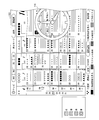
そして、そのまま、スクロールボタンが押下され続けると、図27の表示画面例2701に示すように時間軸およびチャンネル番号軸を残し、チャンネル番号軸2712のみをスクロールさせるとともに、チャンネル番号軸の右端のチャンネル番号枠を強調表示する。さらに、残りの領域に、強調表示しているチャンネル番号枠が示すチャンネルのチャンネル情報を示すチャンネル表示アイコン2611をスクロールされる順に表示させる。
表示画面例2701では、チャンネル番号2、3桁番号103の「××××テレビ」のロゴおよび名称がチャンネル表示アイコンとして表示されている。
また、スクロール方向が反対方向、すなわち左方向であれば、強調表示される番組枠が左方向に移動し、左端までくると、チャンネル軸のみがスクロールするとともに、チャンネル軸の右端のチャンネル番号枠が強調表示される。
次に、本実施の形態における高速スクロール処理の流れについて、図23を参照して説明する。図23は、高速スクロール処理の流れを示すフローチャートである。なお、高速スクロール処理に入るまでの処理の流れは、図2と同様である。
高速スクロールに入ると、高速スクロール処理部12は、スクロール方向が時間軸方向か否かを判定する(S21)。スクロール方向が時間軸方向であれば(S21でYES)、図4のステップS11に進む。
一方、スクロール方向が時間軸方向でなければ(S21でNO)、すなわち、スクロール方向がチャンネル軸方向であれば、高速スクロール処理部12は、チャンネル表示アイコンを表示する(S22、表示画面例2701)。
次に、高速スクロール処理部12は、チャンネル表示アイコンによって表示されているチャンネル番号を変数として設定する(S23)。そして、その変数を参照して当該チャンネルを示すチャンネル表示アイコンを表示する(S24)。図27の表示画面例2701では、チャンネル表示アイコンが示すチャンネル番号が10なので、変数が10に設定される。そして、高速スクロール処理部12は、スクロールボタンの押下時間が所定時間を超える毎に、変数を更新して、更新後のチャンネルに対応するチャンネル表示アイコンを表示させる(S25)。
そして、高速スクロール処理部12は、スクロールボタンの押下が終了したことを受け付けると(S26でYES)、そのときの変数が示すチャンネル番号がチャンネル軸の中央となる電子番組表を表示させる(S27)。以上が、高速スクロール処理の流れである。
なお、カーソル移動→低速スクロール→高速スクロールという順番を経ずに、高速スクロールボタン等を設けて、直接、高速スクロールに行う構成であってもよい。
(付記事項12)
上述した実施の形態では、チャンネル表示アイコンを1つだけ表示し、これを切り替える構成について説明したが、これとは異なる表示を行う構成であってもよい。例えば、放送局それぞれのロゴを示すロゴアイコンを一覧表示して、そのうちの1つを強調表示し、スクロールボタンの押下時間が所定時間を経過する毎に、強調表示されるロゴアイコンを移動させていってもよい。移動方向は、例えば、ラスタスキャン順を挙げることができる。
上述した実施の形態では、チャンネル表示アイコンを1つだけ表示し、これを切り替える構成について説明したが、これとは異なる表示を行う構成であってもよい。例えば、放送局それぞれのロゴを示すロゴアイコンを一覧表示して、そのうちの1つを強調表示し、スクロールボタンの押下時間が所定時間を経過する毎に、強調表示されるロゴアイコンを移動させていってもよい。移動方向は、例えば、ラスタスキャン順を挙げることができる。
ロゴアイコンを一覧表示する場合の例を、図28を参照して説明する。図28の表示面例2801の場合は、ロゴアイコンの一覧表示2811のうち、表示画面左上のロゴアイコンが強調表示されている。そして、この強調表示が、スクロールボタンの押下時間が所定時間を経過する毎に、右のロゴアイコンにずれていく。そして、強調表示されるロゴアイコンが右端までくると、2段目の左端のロゴアイコンが次に強調表示される。
さらに、表示画面例2801では、強調表示されているロゴアイコンと対応するチャンネルのチャンネル情報(チャンネル番号、3桁番号、放送局名)が表示部下部に表示されている。
これにより、ユーザは、スクロール終了後に表示されるチャンネルを視覚的に容易に認識することができるとともに、所望のチャンネルまでのスクロール量を容易に認識することができる。
さらに、放送局の数が多く、表示するロゴアイコンが一画面に収まらないとき、一画面に収まっていないことを示すアイコンを表示する構成であってもよい。
例えば、表示するロゴアイコンが複数ページにわたる場合、1ページ目の右下のアイコンを、ロゴアイコンが重なっているような表示にし、途中ページについては、左上のアイコンと右下のアイコンとを同様にロゴアイコンが重なっているような表示とし、最終ページについては、左上のアイコンのみ、ロゴアイコンが重なっている表示とする。
図29を参照して説明する。図29の表示画面例2901では、複数のロゴアイコンが一覧表示(一覧表示2911)されるとともに、左上および右下のアイコンが、ロゴアイコンが重なっているような表示となっている。さらに、表示部下部には、強調表示されているロゴアイコンと対応するチャンネルのチャンネル情報とともに、ロゴアイコンの一覧表示が全体で何ページあり、現在表示しているのが何ページ目であるのかを示している。ここでは、全ページが4頁であり、現在表示しているのが2ページ目であることが示されている。
そして、強調表示されているロゴアイコンが右下まで進んだ状態で、さらにスクロールボタンが押下され続けた場合、次のページのロゴアイコン一覧が表示されるとともに、当該ページの左上のアイコン(ロゴアイコン)が強調表示される。
また、例えば、表示するロゴアイコンが複数ページにわたる場合、1ページ目の右下に続きがあることを示すアイコン(例えば、右向きの矢印)を表示し、途中ページについては、左上に前に続きがあることを示すアイコン(例えば、左向きの矢印)を表示するとともに、右下に続きがあることを示すアイコンを表示し、最終ページについては、左上に続きあることを示すアイコンを表示してもよい。
図30を参照して説明する。図30の表示画面例3001では、複数のロゴアイコンが一覧表示(一覧表示3011)されるとともに、表示部の左上に矢印3012が、右下に矢印3013が表示されえている。これにより、このページには、前のページと後のページとが存在していることをユーザに認識させることができる。
(付記事項13)
また、それぞれの放送局を示すロゴアイコンをサークル状に表示する構成であってもよい。図31を参照して説明する。図31の表示画面例3101では、ロゴアイコンがサークル状に配置されており(サークル状一覧表示3111)、下部中央に位置するロゴアイコンが強調表示されている。サークルは、下部中央が最も前面となり、上部中央が最も後となるような形状である。さらに、表示部下部に強調表示されているロゴアイコンと対応する放送局のチャンネル情報が表示されている。
また、それぞれの放送局を示すロゴアイコンをサークル状に表示する構成であってもよい。図31を参照して説明する。図31の表示画面例3101では、ロゴアイコンがサークル状に配置されており(サークル状一覧表示3111)、下部中央に位置するロゴアイコンが強調表示されている。サークルは、下部中央が最も前面となり、上部中央が最も後となるような形状である。さらに、表示部下部に強調表示されているロゴアイコンと対応する放送局のチャンネル情報が表示されている。
そして、スクロールボタンが押下され続けると、サークルが回転し、下部中央に配置されるロゴアイコンが入れ替わる。なお、サークルの下部中央から離れるにしたがって、表示が薄くなっていく構成であってもよい。
これにより、視覚的に放送局をわかりやすく表示することができる。
また、放送局の数が多く、ロゴアイコンがサークル状に表示しきれない場合、サークル状の上部付近のロゴアイコンを重ねて表示する構成であってもよい。図32を参照して説明する。図32の表示画面例3201では、サークル状の上部付近のロゴアイコンが重ねて表示されている(サークル状一覧表示3211)。
この場合、ロゴアイコンの移動は次のようになる。スクロールボタンが押下されることにより、サークルが回転し、後部(上部)のロゴアイコンが重なっている位置まで移動したロゴアイコンは、その位置で、所定の数のロゴアイコンが当該ロゴアイコンの前面に重ねられるまで停止する。所定の数のロゴアイコンが当該ロゴアイコンの前面に重ねられると、当該ロゴアイコンはサークル状で回転し、次の位置のロゴアイコンの前面に配置される。その後は同様の動作を繰り返し、所定の数のロゴアイコンが当該ロゴアイコンの前面に重ねられると、サークル状の次の位置に移動する。
また、サークル状のロゴアイコンを大きさを、下部(前面)は大きく、下部から離れるしたがって小さくする構成であってもよい。ロゴアイコンの大きさを変える例を図33に示す。図33の表示画面例3301では、下部に配置されているロゴアイコンが最も大きく、下部から離れるにしたがって、ロゴアイコンの大きさが小さくなっている(サークル状一覧表示3311)。これにより、ユーザに対し、スクロールを停止したときに表示される電子番組表のチャンネルを容易に認識させることができるとともに、視覚的にユーザを楽しませることができる。
〔実施の形態3〕
本発明の他の実施の形態について図34から図39に基づいて説明すれば、以下のとおりである。なお、説明の便宜上、上記の実施の形態1において示した部材と同一の機能を有する部材には、同一の符号を付し、その説明を省略する。
本発明の他の実施の形態について図34から図39に基づいて説明すれば、以下のとおりである。なお、説明の便宜上、上記の実施の形態1において示した部材と同一の機能を有する部材には、同一の符号を付し、その説明を省略する。
本実施の形態において、上記実施の形態1、2と異なるのは、高速スクロール処理部12が高速スクロール中に、表示制御部(予約識別情報表示手段)3が表示部4に予約識別情報を表示する点である。詳細は後述するが、予約識別情報は、時間表示アイコンに関連させて表示させてもよいし、時間表示アイコンとは独立に表示させてもよい。ここで、予約識別情報とは、番組の視聴予約、録画予約等の予約がされている場合に、これらの時間帯を識別するための情報である。
予約識別情報を表示することにより、高速スクロール中であっても、ユーザに対し、予約がされている時間帯を提示することができる。よって、ユーザは、高速スクロール中であっても、予約がされている時間でスクロールを停止して、予約番組を確認することができる。
予約識別情報の表示は、テレビ装置1で視聴または録画の予約を行う場合や、テレビ装置1の外部で録画する場合であっても、録画の指示をテレビ装置1で行う場合に可能である。
(表示例1)
予約識別情報を表示する第1の例について、図34を参照して説明する。図34の表示画面例3401では、時間表示アイコンとしてアナログ時計表示アイコン3402が表示されている。そして、本表示例では、予約がある場合とない場合とで、アナログ時計表示アイコン3402における針部3403の表示の色を変える。例えば、通常の状態では針部3403の色を黒で表示し、予約がある時間帯は針部3403の色を赤で表示する。
予約識別情報を表示する第1の例について、図34を参照して説明する。図34の表示画面例3401では、時間表示アイコンとしてアナログ時計表示アイコン3402が表示されている。そして、本表示例では、予約がある場合とない場合とで、アナログ時計表示アイコン3402における針部3403の表示の色を変える。例えば、通常の状態では針部3403の色を黒で表示し、予約がある時間帯は針部3403の色を赤で表示する。
これにより、高速スクロール中、通常の時間帯は針部3403が黒色で表示され、予約がある時間帯は針部3403が赤色で表示されることになる。よって、ユーザは、針部3403の色を認識することにより、高速スクロール中に、現在スクロール中の時間帯が、予約がされている時間帯であるか否かを容易に認識することができる。
(表示例2)
次に、予約識別情報を表示する第2の例について、図35を参照して説明する。図35の表示画面例3501では、時間表示アイコンとしてアナログ時計表示アイコン3502が表示されている。そして、本表示例では、予約がある時間帯を示す予約時間表示3503が、アナログ時計表示アイコン3502の外周部に表示されている。
次に、予約識別情報を表示する第2の例について、図35を参照して説明する。図35の表示画面例3501では、時間表示アイコンとしてアナログ時計表示アイコン3502が表示されている。そして、本表示例では、予約がある時間帯を示す予約時間表示3503が、アナログ時計表示アイコン3502の外周部に表示されている。
表示画面例3501では、2時から3時までと6時から8時までが予約されている時間帯として表示されている。
なお、アナログ時計表示アイコン3502は、12時間表示なので、高速スクロール中に12時の表示を超えると、次の12時間分における予約されている時間帯が表示される。
これにより、ユーザは、高速スクロール中、予約されている時間帯を視覚的に、容易に認識することができる。
(表示例3)
次に、予約識別情報を表示する第3の例について、図36を参照して説明する。図36の表示画面例3601では、時間表示アイコンとしてアナログ時計表示アイコン3602が表示されている。そして、本表示例では、予約がある時間帯を示す予約時間表示3603が、アナログ時計表示アイコン3602の内部領域に表示されている。
次に、予約識別情報を表示する第3の例について、図36を参照して説明する。図36の表示画面例3601では、時間表示アイコンとしてアナログ時計表示アイコン3602が表示されている。そして、本表示例では、予約がある時間帯を示す予約時間表示3603が、アナログ時計表示アイコン3602の内部領域に表示されている。
表示画面例3601では、2時から3時までと6時から8時までが予約されている時間帯として表示されている。
なお、アナログ時計表示アイコン3602は、アナログ時計表示アイコン3502と同様に12時間表示なので、高速スクロール中に12時の表示を超えると、次の12時間分における予約されている時間帯が表示される。
これにより、ユーザは、高速スクロール中、予約されている時間帯を視覚的に、容易に認識することができる。
(表示例4)
次に、予約識別情報を表示する第4の例について、図37を参照して説明する。図37の表示画面例3701では、時間表示アイコンとしてアナログ時計表示アイコン3702が表示されている。そして、本表示例では、予約がある時間帯を示す予約時間表示3703、3704が、アナログ時計表示アイコン3702の外周部に表示された複数の輪の中に表示されている。この複数の輪は年輪状に表示されており、一番内側の輪が現在時刻から12時までを示し、内側から2番目の輪が12時から次の12時までの12時間を示すというように、現在時刻から12時間分ごとの時間帯を示している。
次に、予約識別情報を表示する第4の例について、図37を参照して説明する。図37の表示画面例3701では、時間表示アイコンとしてアナログ時計表示アイコン3702が表示されている。そして、本表示例では、予約がある時間帯を示す予約時間表示3703、3704が、アナログ時計表示アイコン3702の外周部に表示された複数の輪の中に表示されている。この複数の輪は年輪状に表示されており、一番内側の輪が現在時刻から12時までを示し、内側から2番目の輪が12時から次の12時までの12時間を示すというように、現在時刻から12時間分ごとの時間帯を示している。
また、複数の輪のうち、現在スクロール中の時間帯に対応する輪に表示されている予約時間帯表示は、他の輪に表示されている予約時間帯表示と異なる色で表示されている。表示画面例3701に示す例では、内側から2番目の輪に表示されている予約時間帯表示3705が他の予約時間帯表示3704と異なる色で表示されている。よって、この場合は、現在時刻から一度12時を過ぎ、その後さらに12時を過ぎるまでの時間帯を、現在スクロール中であること示している。
なお、表示画面例3701では、年輪状の輪は4重(すなわち、2日分)で表示されているが、輪の数はこれに限られない。例えば8日分(16重)表示すれば、現在、電子番組表が配信されている日数と同じとすることができ、配信されている電子番組表分の予約時間帯を識別するための情報は全て表示するということができる。
また、年輪状の輪の部分の日付を示す日付表示を行ってもよい。日付を表示することで、当該輪の部分が何日を示しているかを、ユーザに対し容易に認識させることができる。
(表示例5)
次に、予約識別情報を表示する第5の例について、図38を参照して説明する。図38の表示画面例3801では、時間表示アイコンとしてアナログ時計表示アイコン3802が表示されているとともに、アナログ時計表示アイコン3802の背後にカレンダー3803が表示されている。
次に、予約識別情報を表示する第5の例について、図38を参照して説明する。図38の表示画面例3801では、時間表示アイコンとしてアナログ時計表示アイコン3802が表示されているとともに、アナログ時計表示アイコン3802の背後にカレンダー3803が表示されている。
カレンダーは、例えば、8日分の日付領域と表示棒とからなり、日付領域における表示棒の位置によってスクロール中の日付を示し、表示棒がスクロールとともに日付領域を移動するものである。表示画面例3801のカレンダー3803では、表示棒3804が5日目の後半に位置しているので、現在スクロール中の位置が現在時刻から5日目の後半であることを示している。
そして、本表示例では、予約がある時間帯を示す予約時間表示3805が、カレンダー3803内に表示されている。表示画面例3801では、3日目の後半と7日目のほぼ全体が予約されている時間帯であることが示されている。
(表示例6)
次に、予約識別情報を表示する第6の例について、図39を参照して説明する。図39の表示画面例3901では、時間表示アイコンとしてアナログ時計表示アイコン3902が表示されているとともに、アナログ時計表示アイコン3902の下部に8日分の日付を示す日付バー3903が表示されている。
次に、予約識別情報を表示する第6の例について、図39を参照して説明する。図39の表示画面例3901では、時間表示アイコンとしてアナログ時計表示アイコン3902が表示されているとともに、アナログ時計表示アイコン3902の下部に8日分の日付を示す日付バー3903が表示されている。
日付バー3903は、横方向にバーが8等分されており、それぞれに日付が割り当てられているとともに、現在スクロール中の日付に対応する領域を他の領域と異なる表示をするものである。表示画面例3901では、17日に対応する領域が他の領域と異なる表示となっているので、現在、17日をスクロール中で有ることを示している。
そして、本表示例では、予約がある時間帯を示す予約時間表示3904が、日付バー3903の内部領域に表示されている。表示画面例3901では、18日の後半と21日のほぼ全体が予約されている時間帯であることが示されている。
(その他)
なお、本発明は以下のように記載することもできる。本発明に係る電子番組表表示装置は、一方の軸を時間軸とし、他方の軸をチャンネル番号軸としてマトリックス表示された電子番組表を表示する電子番組表表示装置であって、上記電子番組表を時間軸方向にスクロールする指示を受け付けるスクロール受付手段と、上記スクロール受付手段がスクロールする指示を受け付けている間、電子番組表を時間軸方向にスクロールするスクロール手段と、上記スクロール手段が上記電子番組表のスクロールを開始した後、時刻を表示部に表示する時刻表示制御手段と、上記スクロール手段がスクロールを停止した後、上記電子番組表のうち、上記スクロール手段がスクロールを停止した時点で上記時刻表示制御手段が表示していた時刻に対応する部分を表示する電子番組表表示制御手段と、を備えていることを特徴としている。
なお、本発明は以下のように記載することもできる。本発明に係る電子番組表表示装置は、一方の軸を時間軸とし、他方の軸をチャンネル番号軸としてマトリックス表示された電子番組表を表示する電子番組表表示装置であって、上記電子番組表を時間軸方向にスクロールする指示を受け付けるスクロール受付手段と、上記スクロール受付手段がスクロールする指示を受け付けている間、電子番組表を時間軸方向にスクロールするスクロール手段と、上記スクロール手段が上記電子番組表のスクロールを開始した後、時刻を表示部に表示する時刻表示制御手段と、上記スクロール手段がスクロールを停止した後、上記電子番組表のうち、上記スクロール手段がスクロールを停止した時点で上記時刻表示制御手段が表示していた時刻に対応する部分を表示する電子番組表表示制御手段と、を備えていることを特徴としている。
また、本発明に係る電子番組表表示装置の制御方法は、一方の軸を時間軸とし、他方の軸をチャンネル番号軸としてマトリックス表示された電子番組表を表示する電子番組表表示装置の制御方法であって、上記電子番組表を時間軸方向にスクロールする指示を受け付けるスクロール受付ステップと、上記スクロール受付ステップでスクロールする指示を受け付けている間、電子番組表を時間軸方向にスクロールするスクロールステップと、上記スクロールステップで上記電子番組表のスクロールを開始した後、時刻を表示部に表示する時刻表示制御ステップと、上記スクロールステップでスクロールを停止した後、上記電子番組表のうち、上記スクロールステップでスクロールを停止した時点で上記時刻表示制御ステップで表示していた時刻に対応する部分を表示する電子番組表表示制御ステップと、を含むことを特徴としている。
上記の構成または方法によれば、電子番組表を時間軸方向にスクロールしている間、表示部に時刻が表示される。そして、スクロールを停止すると、電子番組表のうち、スクロールを停止したときに表示されていた時刻に対応する部分が表示部に表示される。
よって、ユーザは、電子番組表をスクロールしている間、画面に表示された時刻を確認することによって、スクロールを停止したら電子番組表のどの部分が画面に表示されるかを、容易に認識することができる。よって、電子番組表の操作性・利便性が向上する。
本発明に係る電子番組表表示装置では、上記スクロール手段は、上記電子番組表のスクロールを開始してから所定の時間が経過した後、スクロール速度を高速化するものであり、上記時刻表示制御手段は、上記スクロール手段がスクロール速度を高速化した後、時刻表示を開始するものであってもよい。
上記の構成によれば、電子番組表の高速スクロールが開始されるまでは、時刻表示が行われないので、時計表示による電子番組表の視認性の低下を回避することができる。
本発明に係る電子番組表表示装置では、上記時刻表示制御手段は、上記電子番組表に重畳して、時刻を表示するものであってもよい。
上記の構成によれば、電子番組表に重畳して時刻が表示されるので、ユーザに対し、スクロールの間の時間帯を容易に、かつ明確に認識させることができる。
本発明に係る電子番組表表示装置では、上記時刻表示制御手段は、アナログ時計形式で時刻を表示するものであってもよい。
上記の構成によれば、アナログ時計形式で時刻を表示するので、ユーザに対し、スクロールの間の時間帯を、直感的に認識させることができる。
本発明に係る電子番組表表示装置では、上記スクロール手段は、スクロール速度を高速化したときに、電子番組表の時間軸およびチャンネル番号軸のみ残し、残りを空白状態とするものであってもよい。
上記の構成によれば、文字情報をスクロールする処理を行う必要がなくなるので、処理負荷を軽くすることができる。
本発明に係る電子番組表表示装置では、上記時刻表示制御手段は、アナログ時計形式およびデジタル時計形式の両方で時刻を表示するものであってもよい。
上記の構成によれば、アナログ時計形式とデジタル時計形式との両方で時刻が表示されるので、ユーザに対し、視覚的かつ明確に時刻を提示することができる。
本発明に係る電子番組表表示装置では、上記時刻表示制御手段は、午前と午後とで表示する時刻の色を異ならせるものであってもよい。
上記の構成によれば、午前と午後とで表示する時刻の色が異なるので、表示している時刻が午前であるのか、または午後であるのかを明確にユーザに提示することができる。
特にアナログ時計形式の場合やデジタル時計形式で12時間表示の場合は、表示している時刻が午前なのか午後なのかが判別できないので、上記の構成により、午前であることまたは午後であることを、ユーザに対し明確に提示することができる。
本発明に係る電子番組表表示装置では、上記時刻表示制御手段は、1日24時間を複数の時間帯に分割し、各時間帯に対応するイメージを割り当て、時刻とともに該時刻が含まれる時間帯に割り当てられたイメージを表示するものであってもよい。
上記の構成によれば、表示されたイメージにより、おおよその時間帯をユーザに提示することができる。これにより、ユーザは、表示された時刻およびイメージにより、当該時刻を視覚的に認識することができる。例えば、夜の時間帯に月のイメージが割り当てられ、昼の時間帯に太陽のイメージが割り当てられていれば、ユーザは表示されている時刻およびイメージにより、その時刻が昼の時刻なのか夜の時刻なのかを視覚的に認識することができる。
本発明に係る電子番組表表示装置では、上記イメージは、表示面に対し略垂直な方向に視認されるような面をサークル面とするサークル状に配置されており、上記時刻表示制御手段は、表示する時刻の変動に応じて、上記サークル状に配置されているイメージの表示位置を、該サークルが回転するように変化させ、表示している時刻が含まれる上記時間帯に割り当てられたイメージを、上記サークルの最も前面となる位置に表示するものであってもよい。
上記の構成によれば、イメージがサークル状に配置され、表示する時刻変動とともに、イメージの表示位置が、サークルが回転するように変化する。これにより、ユーザに対し、変動している時刻のおおよその時間帯を、視覚的に提示することができる。
本発明に係る電子番組表表示装置では、上記時刻表示制御手段は、上記電子番組表に重畳して、日付を表示するものであり、上記電子番組表表示制御手段は、上記スクロール手段がスクロールを停止した後、上記電子番組表のうち、上記スクロール手段がスクロールを停止した時点で上記時刻表示制御手段が表示していた日付および時刻に対応する部分を表示するものであってもよい。
上記の構成によれば、時刻に加え日付を表示する。これにより、ユーザに対し、スクロールを停止したときに表示される電子番組表の日付を明確に提示することできる。
本発明に係る電子番組表表示装置では、上記時刻表示制御手段は、棒状領域を複数の区画に区切り、それぞれの区画に日付を割り当てたスライドバーにより、日付を表示するものであってもよい。
上記の構成によれば、棒状領域を複数の区画に区切り、それぞれの区画に日付を割り当てたスライドバーにより日付を表示するので、ユーザに対し、日付を視覚的に認識させることができる。
本発明に係る電子番組表表示装置では、上記時刻表示制御手段は、複数の日付が含まれるカレンダーを表示し、該カレンダーの日付領域に目印を表示することにより、日付を表示するものであってもよい。
上記の構成によれば、カレンダーの日付領域に表示された目印により日付を提示することができるので、ユーザに対し、日付を視覚的に提示することができる。
本発明に係る電子番組表表示装置では、上記スクロール受付手段は、上記電子番組表をチャンネル軸方向にスクロールする指示を受け付け、上記スクロール手段は、上記スクロール受付手段がチャンネル軸方向にスクロールする指示を受け付けている間、電子番組表をチャンネル軸方向にスクロールするものであって、当該電子番組表表示装置は、上記スクロール手段が上記電子番組表のスクロールを開始した後、チャンネル番号を示すチャンネル情報を表示部に表示するチャンネル表示制御手段を備え、上記電子番組表表示制御手段は、上記電子番組表のうち、上記スクロール手段がスクロールを停止した時点で上記チャンネル表示制御手段が表示していたチャンネル情報が示すチャンネルに対応する部分を表示するものであってもよい。
上記の構成によれば、電子番組表をチャンネル軸方向にスクロールしている間、表示部にチャンネル情報が表示される。そして、スクロールを停止すると、電子番組表のうち、スクロールを停止したときに表示されていたチャンネル情報が示すチャンネルに対応する部分が表示部に表示される。
よって、ユーザは、電子番組表をスクロールしている間、画面に表示されたチャンネル情報を確認することによって、スクロールを停止したら電子番組表のどの部分が画面に表示されるかを、容易に認識することができる。よって、電子番組表の操作性・利便性が向上する。
本発明に係る電子番組表表示装置では、上記チャンネル表示制御手段は、複数のチャンネルのチャンネル情報を一覧表示するとともに、一覧表示されているチャンネル情報の1つを強調表示し、上記スクロール手段がスクロールしている間、強調表示するチャンネル情報を変更し、上記電子番組表表示制御手段は、上記電子番組表のうち、上記スクロール手段がスクロールを停止した時点で上記チャンネル表示制御手段が強調表示していたチャンネル情報に対応するチャンネルの部分を表示するものであってもよい。
上記の構成によれば、チャンネル情報が一覧表示されるとともに、一覧表示されているチャンネル情報の1つが強調表示され、スクロール手段がスクロールしている間、強調表示されるチャンネル情報が変更される。これにより、ユーザに対し、チャンネル情報を一覧で提示できるうえに、スクロールを停止したときに、どのチャンネル情報が示すチャンネルに対応する電子番組表が表示されるかを、容易に認識させることができる。
本発明に係る電子番組表表示装置では、上記チャンネル表示制御手段は、複数のチャンネルのチャンネル情報を、表示面に対し略垂直な方向に視認されるような面をサークル面とするサークル状に配置するとともに、上記スクロール手段がスクロールしている間、上記サークルが回転するように上記チャンネル情報の表示位置を変更させて、該サークルの最も前面にあるように視認される位置に配置されるチャンネル情報を変更し、上記電子番組表表示制御手段は、上記電子番組表のうち、上記スクロール手段がスクロールを停止した時点で上記チャンネル表示制御手段が上記サークルの最も前面にあるように視認される位置に表示していたチャンネル情報に対応するチャンネルの部分を表示するものであってもよい。
上記の構成によれば、チャンネル情報がサークル状に配置されて、スクロールとともにサークルが回転するようにチャンネル情報の表示位置が変更される。そして、スクロールを停止した時点で、前面にあるように視認される位置に表示されているチャンネル情報が示すチャンネルに対応する電子番組表が表示される。これにより、ユーザに対し、チャンネルがスクロールされていることを視覚的に提示することができる。
本発明に係る電子番組表表示装置では、上記スクロール手段がスクロール中に上記時刻表示制御手段が表示する時刻表示と対応させて、番組の視聴または録画の予約時間帯を識別可能な予約識別情報を上記表示部に表示する予約識別情報表示手段を備えていてもよい。
上記の構成によれば、時刻表示制御手段が表示する時刻表示と対応させて、番組の視聴または録画の予約時間帯を識別可能な予約識別情報が表示される。これにより、スクロール中に、番組の視聴または録画が予約されている時間帯をユーザに提示することができる。
また、ユーザは、スクロール中に、番組の視聴または録画が予約されている時間帯を認識できることにより、当該時間帯でスクロールを停止して、予約番組を確認することができる。
本発明に係る電子番組表表示装置では、上記時刻表示制御手段がアナログ形式で時刻を表示する場合に、該アナログ形式の時刻表示が、番組の視聴または録画の予約時間帯を示すとき、上記アナログ形式の時刻表示の針部の色を変更する予約識別情報表示手段を備えていてもよい。
上記の構成によれば、アナログ形式の時刻表示において、予約時間帯のときの針部の表示の色が変更される。これにより、ユーザに対し、予約時間帯であることを視覚的に提示することができる。また、ユーザは、スクロール中に、予約時間帯であることを容易に認識することができる。
本発明に係る電子番組表表示装置では、上記時刻表示制御手段がアナログ形式で時刻を表示する場合に、番組の視聴または録画の予約時間帯を識別可能な予約識別情報を、上記アナログ形式の時刻表示における対応する時間帯の外周部または内部領域に表示する予約識別情報表示手段を備えていてもよい。
上記の構成によれば、アナログ形式の時刻表示の外周部または内部領域に予約時間帯を識別可能な予約識別情報が表示される。これにより、ユーザに対し、予約時間帯を一覧で提示することができる。また、ユーザは、スクロール中に、予約時間帯を一度に認識することができる。
本発明に係る電子番組表表示装置では、上記時刻表示制御手段がアナログ形式で時刻を表示する場合に、該アナログ形式の時刻表示の外周部に、年輪状となるように複数の輪を設け、現在時刻から12時までを当該輪の最も内側の輪に割り当てるとともに、該12時以降、12時間ごとに1つずつ外側の輪を割り当て、番組の視聴または録画の予約時間帯を識別可能な予約識別情報を、上記輪における対応する位置に表示する予約識別情報表示手段を備えていてもよい。
上記の構成によれば、アナログ形式の時刻表示の外周部に年輪状となるように複数の輪が設けられ、それぞれの輪について、現在時刻から12時までが最も内側の輪に割り当てられ、該12時以降、12時間ごとに1つずつ外側の輪が割り当てられる。そして、予約時間帯を識別可能な予約識別情報が、上記輪における対応する位置に表示される。
これにより、12時間分以上先の予約時間帯であっても表示することができるので、ユーザに対し、12時間分以上先の予約時間帯も提示することができる。
本発明に係る電子番組表表示装置では、上記時刻表示制御手段が上記カレンダーを表示する場合に、番組の視聴または録画の予約時間帯を識別可能な予約識別情報を、上記カレンダーにおける日付領域上の対応する位置に表示する予約識別情報表示手段を備えていてもよい。
上記の構成によれば、カレンダーにおける日付領域上の対応する位置に予約時間帯を識別可能な予約識別情報が表示される。これにより、ユーザに対し、視覚的に予約時間帯を提示することができる。
本発明に係る電子番組表表示装置では、上記時刻表示制御手段が上記スライドバーを表示する場合に、番組の視聴または録画の予約時間帯を識別可能な予約識別情報を、上記スライドバーにおける日付領域上の対応する位置に表示する予約識別情報表示手段を備えていてもよい。
上記の構成によれば、スライドバーにおける日付領域上の対応する位置に予約時間帯を識別可能な予約識別情報が表示される。これにより、ユーザに対し、視覚的に予約時間帯を提示することができる。
上記電子番組表表示装置を含むテレビジョン受像機も、上述した効果を奏することができる。
(ソフトウェアによる構成)
最後に、テレビ装置1の各ブロック、特に表示制御部3、および電子番組表処理部(押下時間判定部11、高速スクロール処理部12)6は、集積回路(ICチップ)上に形成された論理回路によってハードウェア的に実現していてもよいし、CPU(central processing unit)を用いてソフトウェア的に実現してもよい。
最後に、テレビ装置1の各ブロック、特に表示制御部3、および電子番組表処理部(押下時間判定部11、高速スクロール処理部12)6は、集積回路(ICチップ)上に形成された論理回路によってハードウェア的に実現していてもよいし、CPU(central processing unit)を用いてソフトウェア的に実現してもよい。
後者の場合、テレビ装置1は、各機能を実現する制御プログラムの命令を実行するCPU、上記プログラムを格納したROM(read only memory)、上記プログラムを展開するRAM(random access memory)、上記プログラムおよび各種データを格納するメモリ等の記憶装置(記録媒体)などを備えている。そして、本発明の目的は、上述した機能を実現するソフトウェアであるテレビ装置1の制御プログラムのプログラムコード(実行形式プログラム、中間コードプログラム、ソースプログラム)をコンピュータで読み取り可能に記録した記録媒体を、上記テレビ装置1に供給し、そのコンピュータ(またはCPUやMPU(microprocessor unit))が記録媒体に記録されているプログラムコードを読み出し実行することによっても、達成可能である。
上記記録媒体としては、例えば、磁気テープやカセットテープ等のテープ類、フロッピー(登録商標)ディスク/ハードディスク等の磁気ディスクやCD-ROM(compact disc read-only memory)/MO(magneto-optical)/MD(Mini Disc)/DVD(digital versatile disk)/CD-R(CD Recordable)等の光ディスクを含むディスク類、ICカード(メモリカードを含む)/光カード等のカード類、マスクROM/EPROM(erasable programmable read-only memory)/EEPROM(electrically erasable and programmable read-only memory)/フラッシュROM等の半導体メモリ類、あるいはPLD(Programmable logic device)やFPGA(Field Programmable Gate Array)等の論理回路類などを用いることができる。
また、テレビ装置1を通信ネットワークと接続可能に構成し、上記プログラムコードを通信ネットワークを介して供給してもよい。この通信ネットワークは、プログラムコードを伝送可能であればよく、特に限定されない。例えば、インターネット、イントラネット、エキストラネット、LAN(local area network)、ISDN(integrated services digital network)、VAN(value-added network)、CATV(community antenna television)通信網、仮想専用網(virtual private network)、電話回線網、移動体通信網、衛星通信網等が利用可能である。また、この通信ネットワークを構成する伝送媒体も、プログラムコードを伝送可能な媒体であればよく、特定の構成または種類のものに限定されない。例えば、IEEE(institute of electrical and electronic engineers)1394、USB、電力線搬送、ケーブルTV回線、電話線、ADSL(asynchronous digital subscriber loop)回線等の有線でも、IrDA(infrared data association)やリモコンのような赤外線、Bluetooth(登録商標)、IEEE802.11無線、HDR(high data rate)、NFC(Near Field Communication)、DLNA(Digital Living Network Alliance)、携帯電話網、衛星回線、地上波デジタル網等の無線でも利用可能である。なお、本発明は、上記プログラムコードが電子的な伝送で具現化された、搬送波に埋め込まれたコンピュータデータ信号の形態でも実現され得る。
電子番組表を高速にスクロールした場合でも、適切かつ容易にスクロールしている時間を認識できるので、電子番組表を表示するデジタル放送対応テレビ等に好適である。
1 テレビ装置(テレビジョン受像機)
3 表示制御部(時刻表示制御手段、電子番組表表示制御手段、チャンネル表示制御手段、予約識別情報表示手段)
5 番組情報記憶部
6 電子番組表処理部(スクロール受付手段、スクロール手段)
11 押下時間判定部
12 高速スクロール処理部(スクロール手段)
3 表示制御部(時刻表示制御手段、電子番組表表示制御手段、チャンネル表示制御手段、予約識別情報表示手段)
5 番組情報記憶部
6 電子番組表処理部(スクロール受付手段、スクロール手段)
11 押下時間判定部
12 高速スクロール処理部(スクロール手段)
Claims (25)
- 一方の軸を時間軸とし、他方の軸をチャンネル番号軸としてマトリックス表示された電子番組表を表示する電子番組表表示装置であって、
上記電子番組表を時間軸方向にスクロールする指示を受け付けるスクロール受付手段と、
上記スクロール受付手段がスクロールする指示を受け付けている間、電子番組表を時間軸方向にスクロールするスクロール手段と、
上記スクロール手段が上記電子番組表のスクロールを開始した後、時刻を表示部に表示する時刻表示制御手段と、
上記スクロール手段がスクロールを停止した後、上記電子番組表のうち、上記スクロール手段がスクロールを停止した時点で上記時刻表示制御手段が表示していた時刻に対応する部分を表示する電子番組表表示制御手段と、
を備えていることを特徴とする電子番組表表示装置。 - 上記スクロール手段は、上記電子番組表のスクロールを開始してから所定の時間が経過した後、スクロール速度を高速化するものであり、上記時刻表示制御手段は、上記スクロール手段がスクロール速度を高速化した後、時刻表示を開始するものあることを特徴とする請求項1に記載の電子番組表表示装置。
- 上記時刻表示制御手段は、上記電子番組表に重畳して、時刻を表示することを特徴とする請求項1または2に記載の電子番組表表示装置。
- 上記時刻表示制御手段は、アナログ時計形式で時刻を表示することを特徴とする請求項1~3のいずれか1項に記載の電子番組表表示装置。
- 上記スクロール手段は、スクロール速度を高速化したときに、電子番組表の時間軸およびチャンネル番号軸のみ残し、残りを空白状態とすることを特徴とする請求項1~4のいずれか1項に記載の電子番組表表示装置。
- 上記時刻表示制御手段は、アナログ時計形式およびデジタル時計形式の両方で時刻を表示することを特徴とする請求項1~5のいずれか1項に記載の電子番組表表示装置。
- 上記時刻表示制御手段は、午前と午後とで表示する時刻の色を異ならせることを特徴とする請求項1~6のいずれか1項に記載の電子番組表表示装置。
- 上記時刻表示制御手段は、1日24時間を複数の時間帯に分割し、各時間帯に対応するイメージを割り当て、時刻とともに該時刻が含まれる時間帯に割り当てられたイメージを表示することを特徴とする請求項1~7のいずれか1項に記載の電子番組表表示装置。
- 上記イメージは、表示面に対し略垂直な方向に視認されるような面をサークル面とするサークル状に配置されており、
上記時刻表示制御手段は、表示する時刻の変動に応じて、上記サークル状に配置されているイメージの表示位置を、該サークルが回転するように変化させ、表示している時刻が含まれる上記時間帯に割り当てられたイメージを、上記サークルの最も前面にあるように視認される位置に表示することを特徴とする請求項8に記載の電子番組表表示装置。 - 上記時刻表示制御手段は、上記電子番組表に重畳して、日付を表示するものであり、
上記電子番組表表示制御手段は、上記スクロール手段がスクロールを停止した後、上記電子番組表のうち、上記スクロール手段がスクロールを停止した時点で上記時刻表示制御手段が表示していた日付および時刻に対応する部分を表示することを特徴とする請求項1~9のいずれか1項に記載の電子番組表表示装置。 - 上記時刻表示制御手段は、棒状領域を複数の区画に区切り、それぞれの区画に日付を割り当てたスライドバーにより、日付を表示することを特徴とする請求項10に記載の電子番組表表示装置。
- 上記時刻表示制御手段は、複数の日付が含まれるカレンダーを表示し、該カレンダーの日付領域に目印を表示することにより、日付を表示することを特徴とする請求項10に記載の電子番組表表示装置。
- 上記スクロール受付手段は、上記電子番組表をチャンネル軸方向にスクロールする指示を受け付け、
上記スクロール手段は、上記スクロール受付手段がチャンネル軸方向にスクロールする指示を受け付けている間、電子番組表をチャンネル軸方向にスクロールするものであって、
当該電子番組表表示装置は、上記スクロール手段が上記電子番組表のチャンネル軸方向へのスクロールを開始した後、チャンネル番号を示すチャンネル情報を表示部に表示するチャンネル表示制御手段を備え、
上記電子番組表表示制御手段は、上記電子番組表のうち、上記スクロール手段がスクロールを停止した時点で上記チャンネル表示制御手段が表示していたチャンネル情報が示すチャンネルに対応する部分を表示することを特徴とする請求項1に記載の電子番組表表示装置。 - 上記チャンネル表示制御手段は、複数のチャンネルのチャンネル情報を一覧表示するとともに、一覧表示されているチャンネル情報の1つを強調表示し、上記スクロール手段がスクロールしている間、強調表示するチャンネル情報を変更し、
上記電子番組表表示制御手段は、上記電子番組表のうち、上記スクロール手段がスクロールを停止した時点で上記チャンネル表示制御手段が強調表示していたチャンネル情報に対応するチャンネルの部分を表示することを特徴とする請求項13に記載の電子番組表表示装置。 - 上記チャンネル表示制御手段は、複数のチャンネルのチャンネル情報を、表示面に対し略垂直な方向に視認されるような面をサークル面とするサークル状に配置するとともに、上記スクロール手段がスクロールしている間、上記サークルが回転するように上記チャンネル情報の表示位置を変更させて、該サークルの最も前面にあるように視認される位置に配置されるチャンネル情報を変更し、
上記電子番組表表示制御手段は、上記電子番組表のうち、上記スクロール手段がスクロールを停止した時点で上記チャンネル表示制御手段が上記サークルの最も前面にあるように視認される位置に表示していたチャンネル情報に対応するチャンネルの部分を表示することを特徴とする請求項13に記載の電子番組表表示装置。 - 上記スクロール手段がスクロール中に上記時刻表示制御手段が表示する時刻表示と対応させて、番組の視聴または録画の予約時間帯を識別可能な予約識別情報を上記表示部に表示する予約識別情報表示手段を備えていることを特徴とする請求項1~15のいずれか1項に記載の電子番組表表示装置。
- 上記時刻表示制御手段がアナログ形式で時刻を表示する場合に、該アナログ形式の時刻表示が、番組の視聴または録画の予約時間帯を示すとき、上記アナログ形式の時刻表示の針部の色を変更する予約識別情報表示手段を備えていることを特徴とする請求項4に記載の電子番組表表示装置。
- 上記時刻表示制御手段がアナログ形式で時刻を表示する場合に、番組の視聴または録画の予約時間帯を識別可能な予約識別情報を、上記アナログ形式の時刻表示における対応する時間帯の外周部または内部領域に表示する予約識別情報表示手段を備えていることを特徴とする請求項4に記載の電子番組表表示装置。
- 上記時刻表示制御手段がアナログ形式で時刻を表示する場合に、該アナログ形式の時刻表示の外周部に、年輪状となるように複数の輪を設け、現在時刻から12時までを当該輪の最も内側の輪に割り当てるとともに、該12時以降、12時間ごとに1つずつ外側の輪を割り当て、番組の視聴または録画の予約時間帯を識別可能な予約識別情報を、上記輪における対応する位置に表示する予約識別情報表示手段を備えていることを特徴とする請求項4に記載の電子番組表表示装置。
- 上記時刻表示制御手段が上記カレンダーを表示する場合に、番組の視聴または録画の予約時間帯を識別可能な予約識別情報を、上記カレンダーにおける日付領域上の対応する位置に表示する予約識別情報表示手段を備えていることを特徴とする請求項12に記載の電子番組表表示装置。
- 上記時刻表示制御手段が上記スライドバーを表示する場合に、番組の視聴または録画の予約時間帯を識別可能な予約識別情報を、上記スライドバーにおける日付領域上の対応する位置に表示する予約識別情報表示手段を備えていることを特徴とする請求項11に記載の電子番組表表示装置。
- 請求項1~21のいずれか1項に記載の電子番組表表示装置を含むテレビジョン受像機。
- 請求項1~21のいずれか1項に記載の電子番組表表示装置を動作させる電子番組表表示装置制御プログラムであって、コンピュータを上記の各手段として機能させるための電子番組表表示装置制御プログラム。
- 請求項23に記載の電子番組表表示装置制御プログラムを記録したコンピュータ読み取り可能な記録媒体。
- 一方の軸を時間軸とし、他方の軸をチャンネル番号軸としてマトリックス表示された電子番組表を表示する電子番組表表示装置の制御方法であって、
上記電子番組表を時間軸方向にスクロールする指示を受け付けるスクロール受付ステップと、
上記スクロール受付ステップでスクロールする指示を受け付けている間、電子番組表を時間軸方向にスクロールするスクロールステップと、
上記スクロールステップで上記電子番組表のスクロールを開始した後、時刻を表示部に表示する時刻表示制御ステップと、
上記スクロールステップでスクロールを停止した後、上記電子番組表のうち、上記スクロールステップでスクロールを停止した時点で上記時刻表示制御ステップで表示していた時刻に対応する部分を表示する電子番組表表示制御ステップと、を含むことを特徴とする電子番組表表示装置の制御方法。
Applications Claiming Priority (6)
| Application Number | Priority Date | Filing Date | Title |
|---|---|---|---|
| JP2010294118 | 2010-12-28 | ||
| JP2010-294118 | 2010-12-28 | ||
| JP2011249941 | 2011-11-15 | ||
| JP2011-249941 | 2011-11-15 | ||
| JP2011285815A JP2015039090A (ja) | 2010-12-28 | 2011-12-27 | 電子番組表表示装置、テレビジョン受像機、電子番組表表示装置の制御方法、電子番組表表示装置制御プログラムおよび該プログラムを記録したコンピュータ読み取り可能な記録媒体 |
| JP2011-285815 | 2011-12-27 |
Publications (1)
| Publication Number | Publication Date |
|---|---|
| WO2012091107A1 true WO2012091107A1 (ja) | 2012-07-05 |
Family
ID=46383195
Family Applications (1)
| Application Number | Title | Priority Date | Filing Date |
|---|---|---|---|
| PCT/JP2011/080443 Ceased WO2012091107A1 (ja) | 2010-12-28 | 2011-12-28 | 電子番組表表示装置、テレビジョン受像機、電子番組表表示装置の制御方法、電子番組表表示装置制御プログラムおよび該プログラムを記録したコンピュータ読み取り可能な記録媒体 |
Country Status (2)
| Country | Link |
|---|---|
| JP (1) | JP2015039090A (ja) |
| WO (1) | WO2012091107A1 (ja) |
Cited By (2)
| Publication number | Priority date | Publication date | Assignee | Title |
|---|---|---|---|---|
| WO2014058022A1 (ja) * | 2012-10-10 | 2014-04-17 | シャープ株式会社 | 電子番組表表示装置およびテレビジョン受像機 |
| WO2015151314A1 (ja) * | 2014-03-31 | 2015-10-08 | 株式会社Jvcケンウッド | 情報表示装置、情報表示方法、情報表示プログラム |
Families Citing this family (1)
| Publication number | Priority date | Publication date | Assignee | Title |
|---|---|---|---|---|
| JP6347395B2 (ja) * | 2017-07-12 | 2018-06-27 | 宗介 住井 | 画像送信システム |
Citations (4)
| Publication number | Priority date | Publication date | Assignee | Title |
|---|---|---|---|---|
| JP2002044554A (ja) * | 2000-07-27 | 2002-02-08 | Sharp Corp | 電子番組ガイド表示制御装置 |
| JP2002507718A (ja) * | 1997-10-21 | 2002-03-12 | ヘップ、ヴォルカー | 計時器 |
| JP2005094595A (ja) * | 2003-09-19 | 2005-04-07 | Matsushita Electric Ind Co Ltd | 電子機器 |
| JP2005252970A (ja) * | 2004-03-08 | 2005-09-15 | Sharp Corp | 番組情報提供装置 |
-
2011
- 2011-12-27 JP JP2011285815A patent/JP2015039090A/ja active Pending
- 2011-12-28 WO PCT/JP2011/080443 patent/WO2012091107A1/ja not_active Ceased
Patent Citations (4)
| Publication number | Priority date | Publication date | Assignee | Title |
|---|---|---|---|---|
| JP2002507718A (ja) * | 1997-10-21 | 2002-03-12 | ヘップ、ヴォルカー | 計時器 |
| JP2002044554A (ja) * | 2000-07-27 | 2002-02-08 | Sharp Corp | 電子番組ガイド表示制御装置 |
| JP2005094595A (ja) * | 2003-09-19 | 2005-04-07 | Matsushita Electric Ind Co Ltd | 電子機器 |
| JP2005252970A (ja) * | 2004-03-08 | 2005-09-15 | Sharp Corp | 番組情報提供装置 |
Cited By (5)
| Publication number | Priority date | Publication date | Assignee | Title |
|---|---|---|---|---|
| WO2014058022A1 (ja) * | 2012-10-10 | 2014-04-17 | シャープ株式会社 | 電子番組表表示装置およびテレビジョン受像機 |
| JP2014078838A (ja) * | 2012-10-10 | 2014-05-01 | Sharp Corp | 電子番組表表示装置およびテレビジョン受像機 |
| WO2015151314A1 (ja) * | 2014-03-31 | 2015-10-08 | 株式会社Jvcケンウッド | 情報表示装置、情報表示方法、情報表示プログラム |
| JP2015191643A (ja) * | 2014-03-31 | 2015-11-02 | 株式会社Jvcケンウッド | 情報表示装置、情報表示方法、情報表示プログラム |
| US9816835B2 (en) | 2014-03-31 | 2017-11-14 | JVC Kenwood Corporation | Information display device, information display method, and information display program |
Also Published As
| Publication number | Publication date |
|---|---|
| JP2015039090A (ja) | 2015-02-26 |
Similar Documents
| Publication | Publication Date | Title |
|---|---|---|
| JP5367191B2 (ja) | メニュー表示装置、メニュー表示方法、メニュー表示プログラム、メニュー表示装置を備えたテレビジョン受像機、及び、記録媒体 | |
| JP5308509B2 (ja) | メニュー画面の表示制御方法 | |
| US9910559B2 (en) | Menu screen display control method and display control device for exchanging icons of a menu based on user instruction | |
| US8599314B2 (en) | Display device, program, and storage medium | |
| JP5272070B2 (ja) | アニメーション生成装置、テレビジョン受像機、アニメーション生成方法、プログラム、および記録媒体 | |
| US20250392784A1 (en) | Display Control Device, Display Control Method, and Program | |
| WO2012091107A1 (ja) | 電子番組表表示装置、テレビジョン受像機、電子番組表表示装置の制御方法、電子番組表表示装置制御プログラムおよび該プログラムを記録したコンピュータ読み取り可能な記録媒体 | |
| JP5464622B1 (ja) | 電子番組表表示装置およびテレビジョン受像機 | |
| US20100205633A1 (en) | Display apparatus, display method, and display program | |
| JP2007049552A (ja) | 映像表示装置、そのリモートコントロール装置、及び電子番組表表示方法 | |
| CN103283217B (zh) | 显示控制装置、电视接收机、显示控制方法 | |
| US7631275B2 (en) | User interface screen spotlight effect | |
| JP5778231B2 (ja) | メニュー表示装置、メニュー表示方法、メニュー表示プログラム、メニュー表示装置を備えたテレビジョン受像機、及び、記録媒体 | |
| JP2006217432A (ja) | 番組情報表示装置 | |
| JP2008193152A (ja) | スケジュール表提示装置、スケジュール表提示方法、スケジュール表提示プログラム及びスケジュール表生成装置 | |
| JP4615329B2 (ja) | 電子番組表表示装置 | |
| JP2011078048A (ja) | 電子番組表表示装置、電子番組表表示方法、プログラムおよび記録媒体 | |
| KR20100068605A (ko) | 전자프로그램가이드 표시 방법 |
Legal Events
| Date | Code | Title | Description |
|---|---|---|---|
| 121 | Ep: the epo has been informed by wipo that ep was designated in this application |
Ref document number: 11852756 Country of ref document: EP Kind code of ref document: A1 |
|
| NENP | Non-entry into the national phase |
Ref country code: DE |
|
| 122 | Ep: pct application non-entry in european phase |
Ref document number: 11852756 Country of ref document: EP Kind code of ref document: A1 |