WO2012056847A1 - 立体映像出力装置、立体映像出力方法、立体映像出力プログラムおよびコンピュータ読み取り可能な記録媒体、ならびに、立体映像表示装置 - Google Patents
立体映像出力装置、立体映像出力方法、立体映像出力プログラムおよびコンピュータ読み取り可能な記録媒体、ならびに、立体映像表示装置 Download PDFInfo
- Publication number
- WO2012056847A1 WO2012056847A1 PCT/JP2011/072281 JP2011072281W WO2012056847A1 WO 2012056847 A1 WO2012056847 A1 WO 2012056847A1 JP 2011072281 W JP2011072281 W JP 2011072281W WO 2012056847 A1 WO2012056847 A1 WO 2012056847A1
- Authority
- WO
- WIPO (PCT)
- Prior art keywords
- stereoscopic
- video
- video data
- initial
- viewer
- Prior art date
- Legal status (The legal status is an assumption and is not a legal conclusion. Google has not performed a legal analysis and makes no representation as to the accuracy of the status listed.)
- Ceased
Links
Images




Classifications
-
- H—ELECTRICITY
- H04—ELECTRIC COMMUNICATION TECHNIQUE
- H04N—PICTORIAL COMMUNICATION, e.g. TELEVISION
- H04N13/00—Stereoscopic video systems; Multi-view video systems; Details thereof
- H04N13/30—Image reproducers
- H04N13/332—Displays for viewing with the aid of special glasses or head-mounted displays [HMD]
- H04N13/341—Displays for viewing with the aid of special glasses or head-mounted displays [HMD] using temporal multiplexing
-
- G—PHYSICS
- G02—OPTICS
- G02B—OPTICAL ELEMENTS, SYSTEMS OR APPARATUS
- G02B30/00—Optical systems or apparatus for producing three-dimensional [3D] effects, e.g. stereoscopic images
- G02B30/20—Optical systems or apparatus for producing three-dimensional [3D] effects, e.g. stereoscopic images by providing first and second parallax images to an observer's left and right eyes
- G02B30/22—Optical systems or apparatus for producing three-dimensional [3D] effects, e.g. stereoscopic images by providing first and second parallax images to an observer's left and right eyes of the stereoscopic type
-
- H—ELECTRICITY
- H04—ELECTRIC COMMUNICATION TECHNIQUE
- H04N—PICTORIAL COMMUNICATION, e.g. TELEVISION
- H04N13/00—Stereoscopic video systems; Multi-view video systems; Details thereof
- H04N13/10—Processing, recording or transmission of stereoscopic or multi-view image signals
- H04N13/106—Processing image signals
- H04N13/128—Adjusting depth or disparity
-
- H—ELECTRICITY
- H04—ELECTRIC COMMUNICATION TECHNIQUE
- H04N—PICTORIAL COMMUNICATION, e.g. TELEVISION
- H04N13/00—Stereoscopic video systems; Multi-view video systems; Details thereof
- H04N13/30—Image reproducers
- H04N13/398—Synchronisation thereof; Control thereof
Definitions
- the present invention relates to a stereoscopic video output apparatus, a stereoscopic video output method, a stereoscopic video output program, a computer-readable recording medium, and a stereoscopic video display apparatus that output a stereoscopic video viewed by a viewer using an appropriate stereoscopic effect. Is.
- Such stereoscopic video technology basically uses binocular parallax caused by the distance between the left and right eyes.
- viewing the stereoscopic video can be realized by separately displaying the video for the right eye and the video for the left eye, which are exclusively for the stereoscopic video, and allowing the viewer to watch with only the right eye and the left eye of the viewer.
- a stereoscopic device that uses binocular parallax can make a 3D feel only by fusing two images with different viewpoints that the user enters from the right eye and the left eye in the brain, If there is an inappropriate system adjustment (left / right optical axis misalignment, left / right image size difference, color / brightness difference, top / bottom misalignment, left / right image light mixture (large crosstalk, etc.)) It is said that the two images on the left and right are difficult to fuse and may appear as a double image or feel uncomfortable, causing eye strain and the like.
- Patent Document 1 discloses an image quality adjustment device suitable for application to a television device that allows a viewer to adjust image quality.
- the viewer can adjust the image quality of the video by comparing the videos before and after the change of the image quality.
- Japanese Patent Publication Japanese Patent Laid-Open No. 2006-13618 (published on January 12, 2006)”
- the image quality adjustment apparatus disclosed in Patent Document 1 is a two-dimensional flat image as an adjustment target, and is not a three-dimensional image as an adjustment target.
- an object of the present invention is to provide a stereoscopic video output apparatus capable of outputting a video using an appropriate stereoscopic effect by allowing a viewer to watch videos using different stereoscopic effects and comparing them with the viewer.
- a stereoscopic video output method, a stereoscopic video output program, a computer-readable recording medium, and a stereoscopic video display device are provided.
- a stereoscopic video output device is configured such that each of the plurality of stereoscopic effects is provided when a plurality of stereoscopic effects set in initial video data for displaying a stereoscopic image is given.
- stereoscopic video output device it is possible to display a plurality of stereoscopic images using each of a plurality of video data, which is initial video data in which each of a plurality of stereoscopic effects is set, on the display screen of the display device.
- a viewer who views this display screen can view and compare a plurality of stereoscopic images having different stereoscopic effects.
- the stereoscopic video output method when a plurality of stereoscopic effects set in the initial video data for displaying a stereoscopic video are given, the initial video data in which each of the plurality of stereoscopic effects is set.
- stereoscopic video output method it is possible to display a plurality of stereoscopic videos using each of a plurality of video data, which is initial video data in which each of a plurality of stereoscopic effects is set, on the display screen.
- a viewer who views this display screen can view and compare a plurality of stereoscopic images having different stereoscopic effects.
- the stereoscopic video output device may be realized by a computer.
- a control program for a stereoscopic video output device that realizes the stereoscopic video output device by a computer by causing the computer to operate as the respective means.
- a computer-readable recording medium on which it is recorded also fall within the scope of the present invention.
- the stereoscopic image output device of the present invention is configured so that each of the plurality of stereoscopic effects is set.
- each of the plurality of stereoscopic effects is set when a plurality of stereoscopic effects set in the initial video data for displaying the stereoscopic image is given.
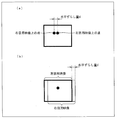
- FIG. 1 is a block diagram illustrating a schematic configuration of a stereoscopic video output apparatus according to an embodiment of the present invention. It is a schematic diagram for explaining a three-dimensional effect, and (a) is a case where the right-eye video and the left-eye video are matched, and (b) is a shift in the horizontal direction shift amount d between the right-eye video and the left-eye video. It represents the case of arranging like this. It is a schematic diagram for demonstrating operation
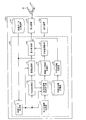
- FIG. 1 is a block diagram showing a schematic configuration of a stereoscopic video output apparatus 10 according to Embodiment 1 of the present invention.
- the stereoscopic video output device 10 is mounted on a stereoscopic video display device 100 that displays a stereoscopic video to a viewer.
- the stereoscopic video display device 100 displays the stereoscopic video output by the stereoscopic video output device 10 to the viewer.
- the mounting of the stereoscopic video output device 10 is not limited to a stereoscopic video display device such as the stereoscopic video display device 100.
- the stereoscopic video output device 10 is mounted on a recording / playback device that records or plays back a stereoscopic video. May be.
- the stereoscopic video output device 10 is a BD (Blu-Ray (registered trademark) Disc), DVD (Digital Versatile Disc), HDD (Hard Disc Drive).
- a stereoscopic video may be output using video data recorded on the recording medium.
- the stereoscopic video display device 100 includes a video data storage device (video data storage unit) 101, a display device 102, and an operation device 103.
- the video data storage device 101 stores video data required when the stereoscopic video display device 100 displays a stereoscopic video.
- the video data storage device 101 acquires and stores video data via the Internet or terrestrial digital broadcasting.
- the stereoscopic video display device 100 may store video data read from the recording medium as long as it can reproduce the recording medium as described above.
- video data is for right-eye video that the user (here, the viewer) views only with the right eye and for left-eye that is viewed only with the left eye. Includes data for pictures.
- the integrated video data is a set of a right-eye video and a left-eye video.
- a magnetic disk device capable of increasing the capacity such as a hard disk drive (hereinafter referred to as “HDD”) can be used.
- HDD hard disk drive
- the display device 102 displays a stereoscopic video and displays the stereoscopic video to a user (here, a viewer).
- a display device 102 an LCD (liquid crystal display), a PDP (plasma display panel), or a CRT (cathode-ray tube) display can be used.
- the display device 102 can perform wireless communication with shutter glasses (for example, liquid crystal shutter glasses) 41 that the viewer wears for stereoscopic viewing.
- the display device 102 displays the video for the right eye and the video for the left eye while alternately switching them at a constant cycle.
- the shutter glasses 41 communicate wirelessly with the display device 102, and synchronize with the timing of switching between the right-eye video and the left-eye video, so that each of the right-eye liquid crystal shutter and the left-eye liquid crystal shutter has a light transmission state and a light blocking state. Switch to the state alternately.
- the viewer can view the right-eye video and the left-eye video separately with different eyes through the shutter glasses 41 and perform stereoscopic viewing based on these videos.
- the display device 102 may perform wired communication with the shutter glasses 41, or the stereoscopic video display device 100 may include a communication device capable of wireless communication or wired communication with the shutter glasses 41. Absent.
- the operation device 103 When various instructions from the viewer are input, the operation device 103 outputs the contents of the instructions to each part of the stereoscopic video display device 100 and the stereoscopic video output device 10.
- the operation device 103 is, for example, an input button or a changeover switch. Further, a numeric keypad, a keyboard, or the like may be provided.
- the stereoscopic video output device 10 includes a video data acquisition unit 11 that acquires video data, a stereoscopic effect changing unit (steric effect changing unit) 12 that changes the stereoscopic effect of the stereoscopic video, and different stereoscopic effects.
- a display control unit display control unit 14 that controls the display of the stereoscopic video
- a defect information storage unit 15 that stores defect information including each trouble shooting, and a defect information acquisition unit (defect information acquisition unit) 16 that acquires the defect information stored in the defect information storage unit 15 are provided. .
- the video data acquisition unit 11 acquires video data stored in the video data storage device 101 of the stereoscopic video display device 100.
- the video data acquisition unit 11 receives the adjustment instruction and acquires video data from the video data storage device 101. Execute.
- the video data acquisition unit 11 outputs the video data acquired from the video data storage device 101 to the stereoscopic effect change unit 12 and the screen configuration unit 13.
- the stereoscopic effect changing unit 12 When the stereoscopic effect changing unit 12 receives video data (hereinafter also referred to as “initial video data”) from the video data acquiring unit 11, the stereoscopic effect changing unit 12 detects the stereoscopic effect given to the video data.
- This stereoscopic effect (hereinafter referred to as “initial stereoscopic effect”) is a stereoscopic effect that is set when the creator who creates the video data creates the video data, and usually displays on the stereoscopic video output device 10.
- the control unit 14 outputs a stereoscopic image using this initial stereoscopic effect.
- FIG. 2 is a schematic diagram for explaining the stereoscopic effect.
- the stereoscopic video technology basically uses binocular parallax caused by the distance between the left and right eyes.
- the value of the horizontal direction shift amount d is used as an index representing the stereoscopic effect.
- the stereoscopic video output apparatus 10 changes the stereoscopic effect from the initial stereoscopic effect by increasing or decreasing the horizontal direction shift amount d corresponding to the initial stereoscopic effect. By doing so, the stereoscopic video output device 10 can output a stereoscopic video having a stereoscopic effect (hereinafter referred to as “secondary stereoscopic effect”) different from the initial stereoscopic effect.
- the index representing the three-dimensional effect is not limited to the horizontal shift amount d, and for example, the difference in size between the right-eye video and the left-eye video can be used. In short, any index can be used as long as it can express a stereoscopic effect different from the initial stereoscopic effect.
- the stereoscopic video output device 10 can use the video data as described above, and can also output a planar video.
- the stereoscopic effect changing unit 12 has a predetermined increase / decrease range in advance as to how much the horizontal displacement amount d is increased / decreased from the reference based on the horizontal displacement amount d of the initial stereoscopic effect. For example, if the predetermined increase / decrease width is to be decreased, the horizontal displacement amount d is 0.5 times, whereas if the increase / decrease amount is to be increased, the horizontal displacement amount d is 1.5 times. It is set as such.
- the predetermined increase / decrease width is determined by the viewer using a stereoscopic image using an initial stereoscopic effect, As long as the difference in stereoscopic effect can be recognized between the stereoscopic image in which the stereoscopic effect is changed as described above, the increase / decrease width may be sufficient. Needless to say, the viewer can easily recognize the difference in stereoscopic effect between the stereoscopic video and the planar video.
- the stereoscopic effect changing unit 12 increases and decreases the horizontal direction shift amount d of the initial stereoscopic effect along a predetermined increase / decrease range. Then, the stereoscopic effect changing unit 12 outputs video data (hereinafter referred to as “secondary video data”) in which the horizontal shift amount d is increased or decreased by a predetermined increase / decrease width to the screen configuration unit 13.
- secondary video data video data
- the screen composition unit 13 receives the initial video data from the video data acquisition unit 11 and the secondary video data from the stereoscopic effect changing unit 12. Upon receiving these two pieces of video data, the screen configuration unit 13 displays a plurality of stereoscopic images (in this case, including planar images) having different stereoscopic effects using the respective image data, on the display of the stereoscopic image display device 100. On the screen (display screen) of the apparatus 102, the layout configuration is determined as to how the layout is to be performed. Note that the stereoscopic video using the initial video data is referred to as “initial stereoscopic video”, and the stereoscopic video using the secondary video data is referred to as “secondary stereoscopic video”.
- the stereoscopic effect changing unit 12 changes the initial stereoscopic effect given to the initial video data as described above
- the screen composition unit 13 receives the initial video data from the video data acquiring unit 11, and Secondary video data is received from the stereoscopic effect changing unit 12.
- a plurality of stereoscopic effects may be given in advance to the initial video data.
- the screen configuration unit 13 receives from the video data acquisition unit 11 a plurality of video data that is initial video data in which each of a plurality of stereoscopic effects is set. In this case, it is not necessary to change the initial stereoscopic effect described above by the stereoscopic effect changing unit 12.
- the initial video data may be two types of test mode videos (in this case, a plane video and a stereoscopic video) having different stereoscopic effects.
- test mode videos in this case, a plane video and a stereoscopic video
- the viewer can check whether there is any malfunction in the operation of the 3D glasses and the television or the recorder before viewing the 3D content by comparing two different types of test mode videos. It becomes possible.
- the screen configuration unit 13 displays the position and size (here, horizontal width and vertical width) of each of the initial stereoscopic video and at least one secondary stereoscopic video on the screen of the display device 102. ).
- the horizontal position and the horizontal width of each stereoscopic video are the same.
- the initial stereoscopic video and the secondary stereoscopic video are displayed adjacent to each other along the vertical direction on the screen. Means that Then, the viewer can easily recognize the difference in stereoscopic effect between the initial stereoscopic video and the secondary stereoscopic video.
- the screen configuration unit 13 may be configured according to the stereoscopic video technology used by the initial video data and the secondary video data.
- the screen configuration unit 13 outputs screen configuration information indicating the screen configuration configured as described above to the display control unit 14 together with the initial video data and the secondary video data.
- the display control unit 14 outputs video data to the display device 102 of the stereoscopic video display device 100.
- the display control unit 14 has the video data storage device 101 of the stereoscopic video display device 100 and the screen configuration unit 13 as acquisition destinations of the video data.
- the display control unit 14 directly acquires from the video data storage device 101 unless the video data acquisition unit 11 acquires initial video data from the video data storage device 101.
- the display control unit 14 outputs the above initial video data to the display device 102 using the initial stereoscopic effect as it is.
- the display control unit 14 controls the display processing of the stereoscopic video by the display device 102 so that the initial stereoscopic video using the initial stereoscopic effect is displayed.
- the display control unit 14 does not acquire the initial video data from the video data storage device 101, but instead displays the screen.
- Initial video data, secondary video data, and screen configuration information are received from the configuration unit 13.
- the display control unit 14 displays the stereoscopic video by the display device 102 so that the initial stereoscopic video and the secondary stereoscopic video are displayed simultaneously along the screen configuration indicated by the screen configuration information received from the screen configuration unit 13. Control the display process.
- the defect information storage unit 15 relates to each of the stereoscopic video display device 100 and the stereoscopic video output device 10 mounted thereon when the viewer wears the shutter glasses 41 and views the stereoscopic video displayed on the display device 102.
- Fault information indicating the contents of a plurality of possible faults is stored in advance.
- this defect information includes not only the supposed defects of the stereoscopic video display device 100 and the stereoscopic video output device 10, but also the actions to be taken by the viewer in order to solve each, that is, troubleshooting. It is preferable to include.
- Such defect information is read from the defect information storage unit 15 by the defect information acquisition unit 16 and sent to the display control unit 14.
- Examples of the content of the defect included in the defect information include, for example, “Battery out of glasses (here, shutter glasses 41)” and “Out of sync of television (here, display device 102)”.
- the content of such troubleshooting includes things such as “Replace the glasses battery” and “Adjust the display state on the control panel on the back of the TV.”
- the defect information acquisition unit 16 acquires defect information stored in the defect information storage unit 15.
- the defect information acquisition unit 16 receives the “defect” instruction and receives defect information from the defect information storage unit 15. Execute the acquisition.
- the defect information acquisition unit 16 outputs the defect information acquired from the defect information storage unit 15 to the display control unit 14 and causes the display device 102 to display the defect information using the display control unit 14. The viewer can view the defect information displayed on the display device 102 in this way, and thereby perform troubleshooting.
- the display control unit 14 When the display control unit 14 receives the defect information from the defect information acquisition unit 16, the display control unit 14 causes the display device 102 to display the above-described defect information instead of the video displayed on the display device 102 until then. .
- FIGS. 3 and 4 are schematic diagrams for explaining the operation of the stereoscopic video output device 10, and each represents a screen of the display device 102.
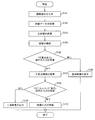
- FIG. 5 is a flowchart showing the operation of the stereoscopic video output device 10.
- the stereoscopic video output device 10 uses the display control unit 14 to display the initial video data stored in the video data storage device 101 as it is, and display the stereoscopic video display device 100. To the device 102. It is assumed that the viewer wears the shutter glasses 41 and is viewing the initial stereoscopic video displayed on the display device 102.
- Step S101 when the viewer is viewing the initial stereoscopic video, the viewer inputs an instruction to adjust the stereoscopic effect of the initial stereoscopic video using the operation device 103 of the stereoscopic video display device 100.
- Step S101 for example, when the viewer starts viewing stereoscopic video using the stereoscopic video display device 100, the viewer may input the adjustment instruction in accordance with the start.
- the viewer may issue the adjustment instruction after a predetermined viewing time has elapsed.
- the adjustment instruction may be given when the viewer considers it necessary.
- the adjustment instruction is sent to the video data acquisition unit 11 of the stereoscopic video output device 10.
- the video data acquisition unit 11 acquires the video data stored in the video data storage device 101 of the stereoscopic video display device 100 (step S102).
- step S102 the adjustment instruction is sent to the display control unit 14 at the same time.
- the display control unit 14 stops the output of the initial video data to the display device 102 before that, for example.
- the display device 102 waits for a new output from the display control unit 14.
- the video data acquisition unit 11 outputs the video data (initial video data) acquired from the video data storage device 101 to the stereoscopic effect change unit 12 and the screen configuration unit 13.
- the stereoscopic effect changing unit 12 detects and changes the stereoscopic effect (initial stereoscopic effect) given to the video data (step S103).
- the three-dimensional effect is expressed using, for example, the above-mentioned index of the horizontal direction shift amount d.
- the stereoscopic effect changing unit 12 detects the horizontal deviation amount d of the initial stereoscopic effect of the initial video data, the stereoscopic effect changing unit 12 determines the horizontal displacement amount d of the initial stereoscopic effect along the predetermined increase / decrease width. Increase or decrease and change.
- the stereoscopic effect changing unit 12 selects one of the data for the right-eye video and the data for the left-eye video included in the initial video data.
- This selection means changing the stereoscopic effect.
- the data for the right-eye video and the data for the left-eye video are each flat images. This means that the three-dimensional effect is zero for each of the data for the right-eye video and the data for the left-eye video. Therefore, even in the case of the selection described above, it can be said that the stereoscopic effect changing unit 12 has changed the initial stereoscopic effect.
- the stereoscopic effect changing unit 12 has selected data for the left-eye video included in the initial video data.
- data for the right-eye video may be selected.
- the stereoscopic effect changing unit 12 outputs the secondary video data having the secondary stereoscopic effect changed from the initial stereoscopic effect to the screen configuring unit 13 in this way.
- the screen composition unit 13 receives the initial video data from the video data acquisition unit 11 and the secondary video data from the stereoscopic effect changing unit 12. Upon receiving these two pieces of video data, the screen configuration unit 13 displays a plurality of stereoscopic images having different stereoscopic effects using the respective video data on the screen of the display device 102 of the stereoscopic video display device 100.
- the arrangement configuration is determined (step S104).
- the screen composition unit 13 receives data for the left-eye video as the secondary video data from the stereoscopic effect changing unit 12, and as a result, the second The next stereoscopic video is a planar video.
- the screen configuration unit 13 determines the arrangement of the plane image and the initial stereoscopic image on the screen of the display device 102, that is, the position and size (vertical direction and horizontal direction) of each.
- the horizontal position and the horizontal width are preferably the same between the initial stereoscopic video and the planar video.
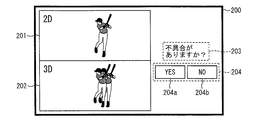
- the initial stereoscopic image and the planar image are displayed adjacent to each other along the vertical direction on the screen. Means. By doing so, the viewer can easily recognize the difference in stereoscopic effect between the initial stereoscopic video and the planar video. For example, as shown in FIG. 3, a planar video 201 and an initial stereoscopic video 202 can be displayed on the screen 200 of the display device 102.
- the screen composition unit 13 configures the position and size of the above two images on the screen 200, and inquires the viewer whether there is a problem.
- the position and size of each of the inquiry dialog box 203 and the instruction input dialog box 204 for the viewer to input an instruction as to whether or not there is a defect using the operation device 103 are also configured.
- the inquiry dialog box 203 and the instruction input dialog box 204 are displayed on the screen 200 of the display device 102 together with the planar video 201 and the initial stereoscopic video 202.
- a YES button 204a and a NO button 204b are displayed.
- the screen configuration unit 13 outputs the screen configuration information indicating the screen configuration as shown in FIG. 3 to the display control unit 14 together with the initial video data and the data for the left-eye video.
- the display control unit 14 performs video display processing by the display device 102 so that the planar video 201 and the initial stereoscopic video 202 are simultaneously displayed along the screen configuration indicated by the screen configuration information received from the screen configuration unit 13.
- the viewer views the screen 200 shown in FIG. 3 and compares the planar video 201 with the initial stereoscopic video 202. Then, the viewer determines whether or not there is a defect such as, for example, that the image looks double in the initial stereoscopic video 202 or the stereoscopic image is difficult to feel by performing the comparison ( Step S105).
- the stereoscopic video output device 10 by allowing the viewer to compare the secondary video (here, the planar video) using a stereoscopic effect different from the initial stereoscopic video, The above problems can be easily recognized. By doing so, an image using an appropriate stereoscopic effect can be output. Therefore, it is possible to allow the viewer to view an image using an appropriate stereoscopic effect.
- the viewer inputs an instruction “no defect” to the inquiry dialog box 203 using the instruction input dialog box 204 (“None” in step S105). That is, the NO button 204b is selected.
- the display control unit 14 receives the instruction input, acquires the initial video data directly from the video data storage device 101 again, and outputs it to the display device 102. Then, the display control unit 14 controls the display processing of the stereoscopic video by the display device 102 so that the initial stereoscopic video using the initial stereoscopic effect is displayed (step S106).
- the viewer uses the instruction input dialog box 204 to input a “problem” instruction to the inquiry dialog box 203 (“Yes” in step S105). That is, the YES button 204a is selected.
- the defect information acquisition unit 16 receives the instruction input and acquires the defect information from the defect information storage unit 15 (step S107).
- step S107 the defect information acquisition unit 16 outputs the defect information to the display control unit 14.
- the display control part 14 controls the display process of the stereoscopic image by the display apparatus 102 so that the malfunction information may be displayed.
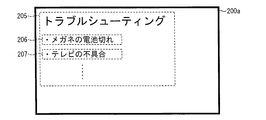
- a defect information dialog box 205 for presenting defect information can be displayed on the screen 200a of the display device 102.
- the contents of the above-described defects such as “glasses out of battery” 206 and “television defect” 207 are listed.
- the display control unit 14 stops output to the display device 102 before that and waits for video display processing by the display device 102 (step S110). In this standby period, the viewer performs the above-described troubleshooting.
- the trouble shooting target defect is “troubleshooting”.
- An instruction “no execution” is input (“NO” in step S108).
- the display control unit 14 when receiving the instruction input, the display control unit 14 obtains the video data (initial video data) stored in the video data storage device 101 of the stereoscopic video display device 100 again. Only the data for the video for use is output to the display device 102. Then, the display control unit 14 controls the display processing of the planar video by the display device 102 so that the data for the left-eye video is displayed (step S109).
- the viewer can easily recognize the defect of the stereoscopic video by allowing the viewer to view the stereoscopic video and the planar video and comparing them with the viewer. be able to.
- an image using a stereoscopic effect appropriate for the viewer can be output and displayed on the display device.
- FIG. 6 is a block diagram showing a schematic configuration of the stereoscopic video output apparatus 10a according to Embodiment 2 of the present invention. Similar to the stereoscopic video output device 10 of the first embodiment, the stereoscopic video output device 10a is also mounted on the stereoscopic video display device 100a that displays the stereoscopic video to the viewer.
- the same parts as those in the first embodiment are denoted by the same reference numerals, and detailed description thereof is omitted.
- the difference between the stereoscopic video output device 10a according to the second embodiment of the present invention and the stereoscopic video output device 10 according to the first embodiment is that a user information acquisition unit 17 and a user information association unit (association unit) 18 are used. And an association information storage unit 19 and a stereoscopic effect adjusting unit (stereoscopic effect adjusting means) 21. Furthermore, the video data acquisition unit 11a is replaced with the video data acquisition unit 11a, the stereoscopic effect change unit 12 is replaced with the stereoscopic effect change unit 12a, and the display control unit 14a is replaced with the display control unit 14a. It is.
- the video data acquisition unit 11a is different from the video data acquisition unit 11 of the first embodiment described above in that video data (initial video data) acquired from the video data storage device 101 of the stereoscopic video display device 100a. ) Is also output to the user information association unit 18.
- the video data acquisition unit 11a may execute the output of the video data to the user information association unit 18 together with the output to the stereoscopic effect change unit 12 and the screen configuration unit 13.
- the stereoscopic effect changing unit 12a is different from the stereoscopic effect changing unit 12 of the first embodiment in that at least one secondary child video data is also output to the user information associating unit 18.
- the stereoscopic effect changing unit 12a may execute the output of the secondary child video data to the user information association unit 18 together with the output to the screen configuration unit 13.
- the user information acquisition unit 17 acquires user information related to a user (here, a viewer). This user information is, for example, the viewer's age, sex, occupation, income, hobbies, and the genre of the video that the viewer wants to see.
- the user information acquisition unit 17 receives user information input by the viewer using the operation device 103, for example. At this time, as will be described later, the display control unit 14a may display a dialog box for the viewer to input user information on the screen of the display device 102. Further, the user information acquisition unit 17 outputs the user information acquired in this way to the user information association unit 18.
- the user information associating unit 18 receives user information from the user information acquiring unit 17, receives initial video data from the video data acquiring unit 11a, and at least one secondary video data from the stereoscopic effect changing unit 12a.
- a plurality of stereoscopic effects may be given to the initial video data in advance as in the first embodiment.
- the user information associating unit 18 receives from the video data acquiring unit 11a a plurality of video data that is initial video data in which each of a plurality of stereoscopic effects is set. In this case, it is not necessary to change the initial stereoscopic effect described above by the stereoscopic effect changing unit 12a.
- stereoscopic patterns may be given to the initial video data in advance.
- the viewer selects an image he / she likes among the initial stereoscopic video and at least one secondary stereoscopic video displayed on the screen of the display device 102.
- the user information association unit 18 associates the stereoscopic effect of the video selected by the viewer with the user information received from the user information acquisition unit 17.
- the user information associating unit 18 stores association information in which the stereoscopic effect and the usage information associated in this way are set as one set in the association information storage unit 19.
- the horizontal displacement amount d can be used as an index for the stereoscopic effect of a stereoscopic image.
- the user information associating unit 18 associates the horizontal direction deviation amount d of the stereoscopic effect of the stereoscopic image selected by the viewer with the user information and stores it in the association information storage unit 19. Will do.
- the association information storage unit 19 receives the association information from the user information association unit 18 and stores it.
- the association information storage unit 19 may store the association information in a list format according to genre or viewer age. By doing so, when the stereoscopic effect adjusting unit 21 refers to the association information stored in the association information storage unit 19, the efficiency of the reference process can be improved.
- the stereoscopic effect adjusting unit 21 acquires video data (initial video data) from the video data storage device 101 and adjusts the initial stereoscopic effect of the video data. Specifically, for example, when the viewer inputs his / her age or favorite genre using the operation device 103, the stereoscopic effect adjusting unit 21 stores it in the association information storage unit 19 based on the input content. The initial stereoscopic effect is adjusted with reference to the associated information.
- the stereoscopic effect adjusting unit 21 outputs the initial video data to the display control unit 14a as it is. On the other hand, if the initial stereoscopic effect is not appropriate, the stereoscopic effect adjusting unit 21 adjusts the initial stereoscopic effect to an appropriate stereoscopic effect based on the association information. Then, the stereoscopic effect adjusting unit 21 outputs video data having the adjusted stereoscopic effect to the display control unit 14a.
- the difference between the display control unit 14a and the display control unit 14 of the first embodiment is that the video data (initial video data) stored in the video data storage device 101 of the stereoscopic video display device 100a is used as the stereoscopic effect adjustment unit. It is a point to acquire via 21. As described above, when the stereoscopic effect adjusting unit 21 outputs the initial video data as it is, the display control unit 14a displays the stereoscopic video by the display device 102 so that the initial stereoscopic video using the initial stereoscopic effect is displayed. To control.
- the display device 102 performs a stereoscopic image display process so that the stereoscopic image using the adjusted stereoscopic effect is displayed. Control.
- FIGS. 7 to 12 are schematic diagrams for explaining the operation of the stereoscopic video output device 10a, and each show a screen of the display device 102.
- FIG. FIG. 13 is a flowchart showing the operation of the stereoscopic video output device 10a.
- the stereoscopic video output device 10a uses the display control unit 14a to display the initial video data stored in the video data storage device 101 as it is and display the stereoscopic video display device 100a. To the device 102. It is assumed that the viewer wears the shutter glasses 41 and is viewing the initial stereoscopic video displayed on the display device 102.
- Step S201 when the viewer is viewing the initial stereoscopic video, the viewer inputs an instruction to adjust the stereoscopic effect of the initial stereoscopic video using the operation device 103 of the stereoscopic video display device 100a.
- Step S201 for example, when the viewer starts viewing stereoscopic video using the stereoscopic video display device 100, the viewer may input the adjustment instruction in accordance with the start. Further, the adjustment instruction may be performed after a predetermined viewing time has elapsed. In short, the adjustment instruction may be given when the viewer considers it necessary.
- the adjustment instruction is sent to the video data acquisition unit 11a of the stereoscopic video output device 10a.
- the video data acquisition unit 11a acquires video data stored in the video data storage device 101 of the stereoscopic video display device 100a (step S202).
- step S202 the adjustment instruction is also sent to the display control unit 14a.
- the display control unit 14a receives this adjustment instruction, for example, the display control unit 14a stops the output of the initial video data to the display device 102 before that.
- the display device 102 waits for a new output from the display control unit 14a.
- the video data acquisition unit 11a outputs the video data (initial video data) acquired from the video data storage device 101 to the stereoscopic effect change unit 12a, the screen configuration unit 13, and the user information association unit 18.
- the stereoscopic effect changing unit 12a detects and changes the stereoscopic effect (initial stereoscopic effect) given to the video data (step S203).
- the three-dimensional effect is represented by using, for example, the above-described index of the horizontal shift amount.
- the stereoscopic effect changing unit 12a detects the horizontal displacement amount d of the initial stereoscopic effect of the initial video data, the stereoscopic effect changing unit 12a sets the horizontal displacement amount d of the initial stereoscopic effect along the predetermined increase / decrease width. Increase or decrease and change.
- the stereoscopic effect changing unit 12a outputs at least one secondary video data having the secondary stereoscopic effect changed from the initial stereoscopic effect to the screen configuring unit 13 in this way.
- the screen composition unit 13 receives initial video data from the video data acquisition unit 11 and at least one secondary video data from the stereoscopic effect changing unit 12a.
- the screen configuration unit 13 uses the video data to display a plurality of stereoscopic images having different stereoscopic effects on the screen of the display device 102 of the stereoscopic video display device 100. (Step S204).
- step S204 the screen composition unit 13 arranges the initial stereoscopic video and at least one secondary stereoscopic video on the screen of the display device 102, that is, the position and size (vertical direction and horizontal direction). Direction).
- the horizontal position and the horizontal width are the same among a plurality of stereoscopic images having different stereoscopic effects.
- the viewer can easily recognize the difference in stereoscopic effect between a plurality of stereoscopic images including the initial stereoscopic video.
- stereoscopic images 302 and 303 having different stereoscopic effects can be displayed on the screen 300a of the display device 102.
- the screen composition unit 13 configures the position and size of the above two images on the screen 200 and selects which three-dimensional image from among the plurality of three-dimensional images to the viewer.
- the inquiry dialog box 301 for inquiring about whether to do so may also be configured in position and size.
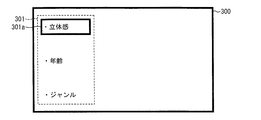
- This inquiry dialog box 301 is also used by the viewer to input user information using the operation device 103.
- the inquiry dialog box 301 is displayed on the screens 300 and 300a of the display device 102 together with the plurality of stereoscopic images.
- the screen configuration unit 13 outputs screen configuration information indicating the screen configuration as shown in FIGS. 7 and 8 to the display control unit 14a together with the initial video data and at least one secondary video data.
- the display control unit 14a performs video display processing by the display device 102 so that a plurality of stereoscopic images including the initial stereoscopic video are displayed simultaneously along the screen configuration indicated by the screen configuration information received from the screen configuration unit 13.
- the viewer views the screen 300a shown in FIG. 8 and compares the plurality of stereoscopic images 302 and 303 with each other. In FIG. 8, only two stereoscopic images 302 and 303 are displayed, but it goes without saying that other stereoscopic images can be viewed by moving the display content of the screen 300a up and down. Of course, the number of videos displayed in the screen 300a may be increased.
- the viewer determines and selects a stereoscopic image that is more appropriate by himself / herself, that is, by comparing them, (step S205).
- step S205 for example, in FIG. 7, when the viewer inputs an instruction of “stereoscopic effect” 301a to the inquiry dialog box 301, the display control unit 14a receives the instruction input and displays the initial stereoscopic video.
- Video display processing by the display device 102 may be controlled so that a plurality of stereoscopic images including the same are displayed at the same time.
- the viewer can compare the secondary video using a stereoscopic effect different from the initial stereoscopic video, thereby allowing the viewer himself / herself to select a desired stereoscopic video. Video can be selected. By doing so, an image using an appropriate stereoscopic effect can be output. Therefore, it is possible to allow the viewer to view an image using an appropriate stereoscopic effect.
- step S206 the viewer selects the 3D image 302 of “3D effect 3” on the screen 300a in FIG. 8, and then, in response to the inquiry dialog box 301 on the screen 300b in FIG.
- the instruction “No association” is input (“No” in step S206)
- the process proceeds to step S209 described later.
- step S206 when the viewer inputs an instruction “with user information association” to the inquiry dialog box 301 (“Yes” in step S206), the user information acquisition unit 17 causes the viewer to operate the operation device 103. User information to be input is received (step S207).
- step S207 when the viewer inputs an instruction of “age” 301b to the inquiry dialog box 301 in FIG. 9, for example, the display control unit 14a receives the instruction input.
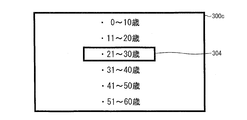
- the video display processing by the display device 102 may be controlled so that a plurality of age ranges are displayed.
- the viewer may input the age range (here, “21 to 30 years old” 304) including his / her age using the operation device 103.
- the display control unit 14a receives the instruction input.
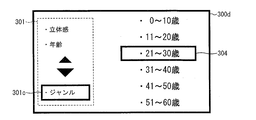
- the video display processing by the display device 102 may be controlled so that a plurality of genres are displayed as in the screen 300e shown.
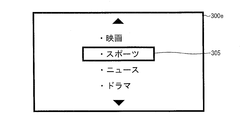
- the viewer may input his / her favorite genre (here, “sports” 305) using the operation device 103 as shown in FIG.
- step S205 the user information associating unit 18 receives a stereoscopic video selection instruction from the viewer.
- the user information associating unit 18 associates the user information output from the user information acquiring unit 17 with the stereoscopic effect of the stereoscopic image to be selected (step S208).
- step S ⁇ b> 208 the user information associating unit 18 stores association information in which the stereoscopic effect and the usage information associated in this way are set as one set in the association information storage unit 19.
- the stereoscopic video output device 10a uses the user information output from the user information acquisition unit 17 and the viewing whenever the viewer has an opportunity to view the stereoscopic video using the stereoscopic video display device 100a.
- the stereoscopic image of the stereoscopic image selected by the person is associated with each other, and a lot of association information is stored in the association information storage unit 19.
- the stereoscopic effect adjusting unit 21 executes the process of step S209 described below. That is, in this step S209, video data (initial video data) is acquired from the video data storage device 101, and the initial stereoscopic effect of the video data is adjusted.
- the stereoscopic effect adjusting unit 21 outputs the initial video data to the display control unit 14a as it is. On the other hand, if the initial stereoscopic effect is not appropriate, the stereoscopic effect adjusting unit 21 adjusts the initial stereoscopic effect to an appropriate stereoscopic effect based on the association information. Then, the stereoscopic effect adjusting unit 21 outputs video data having the adjusted stereoscopic effect to the display control unit 14a.
- the display control unit 14a controls the display processing of the stereoscopic video by the display device 102 so that the initial stereoscopic video using the initial stereoscopic effect is displayed. .
- the display device 102 performs a stereoscopic image display process so that the stereoscopic image using the adjusted stereoscopic effect is displayed. Control.
- the viewer can view a plurality of stereoscopic images having different stereoscopic effects, and the viewer can select the stereoscopic video desired by the viewer by comparing them. .
- the stereoscopic video output device 10a associates and stores the stereoscopic effect of the stereoscopic video selected by the viewer and the user information of the viewer.
- each block of the stereoscopic video output devices 10 and 10a may be configured by hardware logic, or by software using a CPU as follows. It may be realized.
- the stereoscopic video output devices 10 and 10a include a CPU (central processing unit) that executes instructions of a control program that realizes each function, a ROM (read only memory) that stores the program, and a RAM (random) that expands the program. access memory), a storage device (recording medium) such as a memory for storing the program and various data.
- the object of the present invention is to record the program code (execution format program, intermediate code program, source program) of the control program of the stereoscopic video output devices 10 and 10a, which is software that realizes the functions described above, in a computer-readable manner. This can also be achieved by supplying a recording medium to the stereoscopic video output devices 10 and 10a, and reading and executing the program code recorded on the recording medium by the computer (or CPU or MPU).
- Examples of the recording medium include a tape system such as a magnetic tape and a cassette tape, a magnetic disk such as a floppy (registered trademark) disk / hard disk, and a compact disk-ROM / MO / MD / digital video disk / compact disk-R.
- the stereoscopic video output devices 10 and 10a may be configured to be connectable to a communication network, and the program code may be supplied via the communication network.
- the communication network is not particularly limited.
- the Internet intranet, extranet, LAN, ISDN, VAN, CATV communication network, virtual private network, telephone line network, mobile communication network, satellite communication. A net or the like is available.
- the transmission medium constituting the communication network is not particularly limited.
- infrared rays such as IrDA and remote control, Bluetooth ( (Registered trademark), 802.11 wireless, HDR, mobile phone network, satellite line, terrestrial digital network, and the like can also be used.
- the present invention can also be realized in the form of a computer data signal embedded in a carrier wave in which the program code is embodied by electronic transmission.
- the present invention can also be expressed as follows. That is, the present invention is a stereoscopic video output device that outputs a stereoscopic video, and includes a stereoscopic video output unit that outputs a plurality of videos having the same video content and different stereoscopic effects. Device.
- the stereoscopic image uses binocular parallax, and the plurality of images preferably have the same horizontal position.
- One of the plurality of images is preferably a planar image.
- video content for outputting the plurality of videos is recorded in advance.
- the stereoscopic video output device includes an error specifying unit and an input unit for a user to input an error signal. After the comparison video output unit outputs the plurality of videos, the error signal is input to the input unit. In such a case, it is preferable that the error specifying means outputs an error specifying screen.
- the present invention is a stereoscopic video display device that displays a stereoscopic video, and is a stereoscopic video display device that includes the stereoscopic video output device.
- the present invention is an information recording medium that records video content including a stereoscopic video, and records a plurality of video content with different stereoscopic effects.
- the present invention is an information recording medium in which video content including a stereoscopic video is recorded, and an information recording medium in which a program for generating a plurality of videos having different stereoscopic effects from one video content is recorded.
- the apparatus further comprises a stereoscopic effect changing means for changing the initial stereoscopic effect by increasing / decreasing an initial stereoscopic effect preset in the initial video data by a predetermined increase / decrease range, wherein the display control means includes the initial video data,
- the initial video data is used on the display screen by outputting the secondary video data, which is the initial video data set with the secondary stereoscopic effect changed from the stereoscopic effect, to the display screen. It is preferable to display a stereoscopic video and a secondary stereoscopic video using the secondary video data.
- the initial stereoscopic data given to the initial video data is changed to the secondary stereoscopic effect, and the initial video data provided with the initial stereoscopic effect and the secondary video data provided with the secondary stereoscopic effect. Are output to the display screen.
- the initial video data and the secondary video data differ only in the stereoscopic effect, and the respective contents are the same.
- the initial stereoscopic video using the initial video data and the secondary stereoscopic video using the secondary video data can be displayed on the display screen.
- a viewer who views this display screen can view a stereoscopic image having different stereoscopic effects, such as an initial stereoscopic image and a secondary stereoscopic image.
- the initial video data is created using binocular parallax, and the initial stereoscopic video and the secondary stereoscopic video are in a vertical direction on the display screen when a viewer views the display screen. It is preferable to be displayed adjacent to each other.
- the horizontal position is preferably the same between the initial stereoscopic video and the secondary stereoscopic video.
- the same horizontal position means that the initial stereoscopic video and the planar video are displayed adjacent to each other along the vertical direction on the screen when the viewer views the display screen. .
- the viewer can easily recognize the difference in stereoscopic effect between the initial stereoscopic video and the secondary stereoscopic video.
- the stereoscopic effect changing means changes the initial stereoscopic effect so that the secondary stereoscopic image becomes a planar image.
- the viewer can more easily recognize the difference in stereoscopic effect between the initial stereoscopic video and the planar video that is the secondary stereoscopic video.
- a defect information storage unit that stores in advance defect information related to defects that are expected to occur when a viewer views a stereoscopic video, and the initial stereoscopic video and the secondary stereoscopic video displayed on the display screen are viewed.
- a defect information acquisition unit that acquires the defect information from the defect information storage unit when an instruction that there is a defect in viewing is input from a viewer who performs the display, the display control unit further includes the defect information acquisition unit It is preferable that the defect information is displayed on the display screen by outputting the defect information acquired by the above-described display screen.
- the viewer can see the defect information displayed on the display screen and can determine whether or not to deal with the defect.
- troubleshooting may be displayed together.
- the viewer can know the treatment to be performed and can more accurately determine whether or not the treatment should be performed.
- One of the initial stereoscopic video and the at least one secondary stereoscopic video is selected from a viewer who views the initial stereoscopic video and the at least one secondary stereoscopic video displayed on the display screen.
- an associating unit that associates the stereoscopic effect of the stereoscopic image that is the target of selection with the information about the viewer, and the stereoscopic image of the stereoscopic image that is the target of the selection that is associated by the associating unit
- the information processing apparatus further includes an association information storage unit that stores the feeling and information related to the viewer as association information.
- the stereoscopic effect suitable for the viewer when a certain viewer views a stereoscopic video, it is possible to adjust the stereoscopic effect suitable for the viewer by referring to the association information stored in the association information storage unit. For example, it is possible to adjust the stereoscopic effect suitable for the viewer based on the information such as the age and sex of the viewer and the stereoscopic effect associated with the information about the person or other viewers so far. Become.
- the apparatus further includes a stereoscopic effect adjusting unit that adjusts the initial stereoscopic video using the association information stored in the association information storage unit when the initial video data is input.
- the stereoscopic effect can be adjusted using the stereoscopic effect adjusting means.
- a plurality of stereoscopic effects are set in advance in the initial video data.
- a plurality of video data provided with each of a plurality of stereoscopic effects given in advance to the initial video data is output to the display screen.
- the plurality of video data only differ in stereoscopic effect, and each content is the same.
- a plurality of stereoscopic images using each image data can be displayed on the display screen.
- a viewer who views this display screen can view and compare a plurality of stereoscopic images having different stereoscopic effects.
- the initial video data is created using binocular parallax, and the plurality of stereoscopic videos are adjacent to each other along a vertical direction on the display screen when a viewer views the display screen. Preferably it is displayed.
- the horizontal position is preferably the same among a plurality of stereoscopic videos.
- the same horizontal position means that a plurality of stereoscopic images are displayed adjacent to each other along a vertical direction on the screen when the viewer views the display screen.
- the viewer can easily recognize the difference in stereoscopic effect between a plurality of stereoscopic images.
- the plurality of stereoscopic images preferably include a planar image.
- the viewer can more easily recognize the difference in stereoscopic effect between the stereoscopic video and the planar video.
- a defect information storage unit for preliminarily storing defect information related to defects that are expected to occur when a viewer views a stereoscopic video, and a viewer who views the plurality of stereoscopic videos displayed on the display screen.
- the apparatus further includes a defect information acquisition unit that acquires the defect information from the defect information storage unit, and the display control unit further includes the defect acquired by the defect information acquisition unit It is preferable to display the defect information on the display screen by outputting the information to the display screen.
- the viewer can see the defect information displayed on the display screen and can determine whether or not to deal with the defect.
- troubleshooting may be displayed together.
- the viewer can know the treatment to be performed and can more accurately determine whether or not the treatment should be performed.
- Associating means for associating a feeling with information about the viewer, and associating information that combines the stereoscopic effect of the stereoscopic video that is the selection target associated by the associating means and the information about the viewer. It is preferable to further include an association information storage unit.
- the stereoscopic effect suitable for the viewer when a certain viewer views a stereoscopic video, it is possible to adjust the stereoscopic effect suitable for the viewer by referring to the association information stored in the association information storage unit. For example, it is possible to adjust the stereoscopic effect suitable for the viewer based on the information such as the age and sex of the viewer and the stereoscopic effect associated with the information about the person or other viewers so far. Become.
- the apparatus further includes a stereoscopic effect adjusting unit that adjusts the stereoscopic video using the initial video data using the association information stored in the association information storage unit when the initial video data is input.
- a stereoscopic effect adjusting unit that adjusts the stereoscopic video using the initial video data using the association information stored in the association information storage unit when the initial video data is input.
- the stereoscopic effect can be adjusted using the stereoscopic effect adjusting means.
- initial video data can be stored.
- a stereoscopic video display device includes the above-described stereoscopic video output device, and a display device having a display screen that receives the plurality of video data and displays a plurality of stereoscopic videos using each of the plurality of video data. And.
- a stereoscopic video display device including the above stereoscopic video output device can be realized.
- a recording medium according to the present invention is a computer-readable recording medium that records the initial video data used in the above-described stereoscopic video output apparatus.
- the above recording medium records initial video data used for a stereoscopic video output device.
- the stereoscopic video output device can output a stereoscopic video using the initial video data recorded on the recording medium.
- the present invention is a stereoscopic video output that realizes viewing of a stereoscopic video by separately displaying a right-eye video and a left-eye video, which are dedicated to the stereoscopic video, and allowing only the viewer's right eye and left eye to view the video. It is suitable for a device and a stereoscopic video display device using the device.
Landscapes
- Engineering & Computer Science (AREA)
- Multimedia (AREA)
- Signal Processing (AREA)
- Physics & Mathematics (AREA)
- General Physics & Mathematics (AREA)
- Optics & Photonics (AREA)
- Testing, Inspecting, Measuring Of Stereoscopic Televisions And Televisions (AREA)
Abstract
立体映像を表示するための初期映像データに設定される複数の立体感が与えられたとき、複数の立体感の各々が設定された初期映像データである複数の映像データを表示装置(102)に出力することによって、表示装置(102)の画面上において複数の映像データの各々を利用する複数の立体映像を表示させる表示制御部(14)を備えている立体映像出力装置(10)である。
Description
本発明は、視聴者が視聴する立体映像を適切な立体感を用いて出力する立体映像出力装置、立体映像出力方法、立体映像出力プログラムおよびコンピュータ読み取り可能な記録媒体、ならびに、立体映像表示装置に関するものである。
近年、3次元(Three Dimensional)的な立体視を可能にする技術が急激に進歩し、映画やテレビにおける立体映像技術が普及し始めている。このような立体映像技術は、基本的に、左右の目の間隔によって生じる両眼視差を利用するものである。たとえば、立体映像専用である、右目用映像および左目用映像を別々に表示させ、視聴者の右目および左目のそれぞれの目のみで視聴させることによって、立体映像の視聴を実現することができる。
ところで、3Dコンソーシアム(3DC)安全ガイドライン部会による「3DC安全ガイドライン(2010年4月20日改訂)」によれば、立体映像を視聴したとき像が2重に見えたり、立体像が感じにくかったりする場合は、直ちに使用を中止し、表示機器やソフトの設定に間違いがないか確認調整し、それでも、2重像に見えたり、違和感を感じたりする等、立体視が成立しない場合は、利用を中止すべきである、とされている。
その理由としては、上記ガイドラインでは、両眼視差を利用する立体機器は、利用者が右目と左目から入る視点の異なる2つの映像を脳の中で融合して始めて立体を感じさせることができ、システムの調整に不適切(左右の光軸のズレ、左右画像のサイズの違い、色や輝度の差、上下のズレ、左右の映像の光の混合(クロストークが大きいなど))があると、左右2つの映像は融合しにくいため、2重像に見えたり違和感を感じ、眼精疲労などを引き起こす原因となることがある、とされている。
さらに、左右の目に与えるべき映像が左右入れ替わっても利用者(視聴者)は意外に気づかないものである。しかし、視覚疲労や不快感の原因となるので、左右逆転がおきないような配慮が望まれる、ともされている。
このような状況を考慮すれば、視聴者が視聴する立体映像の立体感を適宜調整し、適切な立体感を用いて視聴者に立体映像を視聴させることができるようにすることが重要な事柄となる。
適切な立体感を用いて視聴者に立体映像を視聴させる1つの手段として、視聴者自らがその立体感を調整可能にさせることが非常に有効である。
たとえば、特許文献1は、視聴者に画質を調整させ得るようになされたテレビジョン装置に適用して好適な画質調整装置を開示している。
この画質調整装置によれば、視聴者に画質の変更前後の映像同士を見比べさせることによって、視聴者に映像の画質を調整させることができる。
しかしながら、特許文献1に開示された画質調整装置は、その調整対象を2次元的な平面映像とするものであり、立体映像を調整対象とするものではない。
さらに、映像の画質の調整と立体画像の立体感の調整とは、その調整内容は全く異なるものであり、上記の画質調整装置を単純に、立体映像の立体感の調整に応用することはできない。
したがって、本発明の目的は、異なる立体感を用いた映像を視聴者に視聴させ、それらを視聴者に比較させることによって、適切な立体感を用いた映像を出力することができる立体映像出力装置、立体映像出力方法、立体映像出力プログラムおよびコンピュータ読み取り可能な記録媒体、ならびに、立体映像表示装置を提供することである。
上記目的を達成するために、本発明に係る立体映像出力装置は、立体映像を表示するための初期映像データに設定される複数の立体感が与えられたとき、前記複数の立体感の各々が設定された前記初期映像データである複数の映像データを表示装置に出力することによって、当該表示装置の表示画面上において前記複数の映像データの各々を利用する複数の立体映像を表示させる表示制御手段を備えている。
上記の立体映像出力装置では、複数の立体感の各々が設定された初期映像データである複数の映像データの各々を利用する複数の立体映像を表示装置の表示画面に表示させることができる。
このため、この表示画面を視聴する視聴者は、異なる立体感を持つ複数の立体映像を比較しつつ、視聴することができる。
したがって、異なる立体感を用いた映像を視聴者に視聴させ、それらを視聴者に比較させることによって、適切な立体感を用いた映像を出力することができる。
本発明に係る立体映像出力方法は、立体映像を表示するための初期映像データに設定される複数の立体感が与えられたとき、前記複数の立体感の各々が設定された前記初期映像データである複数の映像データを表示装置に出力する出力工程と、当該表示装置の表示画面上において前記複数の映像データの各々を利用する複数の立体映像を表示させる表示工程とを含む。
上記の立体映像出力方法では、複数の立体感の各々が設定された初期映像データである複数の映像データの各々を利用する複数の立体映像を表示画面に表示させることができる。
このため、この表示画面を視聴する視聴者は、異なる立体感を持つ複数の立体映像を比較しつつ、視聴することができる。
したがって、異なる立体感を用いた映像を視聴者に視聴させ、それらを視聴者に比較させることによって、適切な立体感を用いた映像を出力することができる。
なお、前記立体映像出力装置は、コンピュータによって実現してもよく、この場合には、コンピュータを前記各手段として動作させることにより前記立体映像出力装置をコンピュータにて実現させる立体映像出力装置の制御プログラム、およびそれを記録したコンピュータ読み取り可能な記録媒体も、本発明の範疇に入る。
本発明の立体映像出力装置は、以上のように、立体映像を表示するための初期映像データに設定される複数の立体感が与えられたとき、前記複数の立体感の各々が設定された前記初期映像データである複数の映像データを表示装置に出力することによって、当該表示装置の表示画面上において前記複数の映像データの各々を利用する複数の立体映像を表示させる表示制御手段を備えていることを特徴とする。
本発明に係る立体映像出力方法は、以上のように、立体映像を表示するための初期映像データに設定される複数の立体感が与えられたとき、前記複数の立体感の各々が設定された前記初期映像データである複数の映像データを表示装置に出力する出力工程と、当該表示装置の表示画面上において前記複数の映像データの各々を利用する複数の立体映像を表示させる表示工程とを含むことを特徴とする。
それゆえ、異なる立体感を用いた映像を視聴者に視聴させ、それらを視聴者に比較させることによって、適切な立体感を用いた映像を出力することができるという効果を奏する。
〔実施の形態1〕
本発明の一実施形態について図1~図5に基づいて説明すれば、以下の通りである。
本発明の一実施形態について図1~図5に基づいて説明すれば、以下の通りである。
図1は、本発明の実施の形態1に係る立体映像出力装置10の概略構成を示すブロック図である。立体映像出力装置10は、立体映像を視聴者に表示する立体映像表示装置100に搭載されている。立体映像表示装置100は、立体映像出力装置10が出力する立体映像を視聴者に表示する。
もちろん、立体映像出力装置10の搭載は、立体映像表示装置100のような立体映像表示装置に限定されるものでは無く、たとえば、立体映像を記録したり、再生したりする記録再生装置に搭載されてもよい。立体映像出力装置10が記録再生装置に搭載される場合であれば、立体映像出力装置10は、BD(Blu-Ray(登録商標) Disc)やDVD(Digital Versatile Disc)、HDD(Hard Disc Drive)といった記録媒体に記録された映像データを用いて、立体映像を出力すればよい。
(立体映像表示装置100)
立体映像表示装置100は、図1に示すように、映像データ記憶装置(映像データ記憶部)101と、表示装置102と、操作装置103と、を備えている。
立体映像表示装置100は、図1に示すように、映像データ記憶装置(映像データ記憶部)101と、表示装置102と、操作装置103と、を備えている。
映像データ記憶装置101は、立体映像表示装置100が立体映像を表示する際に必要となる映像データを記憶する。映像データ記憶装置101は、インターネットや地上デジタル放送を介して、映像データを取得し、記憶する。立体映像表示装置100は、上で述べたような記録媒体を再生可能であれば、その記録媒体から読み取った映像データを記憶してもよい。両眼視差を利用する立体映像技術においては、このような映像データは、利用者(ここでは、視聴者)が右目のみで視聴する右目用映像のためのデータと、左目のみで視聴する左目用映像のためのデータとを含んでいる。右目用映像と左目用映像とを一組とする統合映像データである。
また、映像データ記憶装置101は、たとえば、ハードディスクドライブ(以下、「HDD」と記す)などの、大容量化が可能な磁気ディスク装置を用いることができる。
表示装置102は、立体映像を表示し、利用者(ここでは、視聴者)に立体映像を表示する。表示装置102は、LCD(液晶ディスプレイ)や、PDP(プラズマディスプレイパネル)、CRT(cathode-ray tube)ディスプレイを用いることができる。
また、表示装置102は、視聴者が立体視するために装着するシャッター眼鏡(たとえば、液晶シャッター眼鏡)41との間における無線通信が可能となっている。表示装置102は、一定の周期で右目用映像と左目用映像とを交互に切り替えながら表示する。シャッター眼鏡41は、表示装置102と無線通信し、右目用映像と左目用映像との切り替わりのタイミングと同期して、その右目用液晶シャッターと左目用液晶シャッターの各々を、光透過状態と光遮断状態とに交互に切り替える。
視聴者は、このようなシャッター眼鏡41を通し、右目用映像および左目用映像をそれぞれ別の目で別々に見ることによって、それらの映像を基に立体視を行なうことが可能となる。
もちろん、表示装置102は、シャッター眼鏡41との間において有線通信を行なってもよいし、立体映像表示装置100が別途、シャッター眼鏡41と無線通信や有線通信可能な通信装置を備えていても構わない。
操作装置103は、視聴者からの各種の指示が入力されると、その指示内容を立体映像表示装置100の各部や、立体映像出力装置10に出力する。操作装置103は、たとえば、入力ボタン、切り替えスイッチなどである。また、テンキー、キーボードなどを備えていてもよい。
(立体映像出力装置10)
立体映像出力装置10は、図1に示すように、映像データを取得する映像データ取得部11と、立体映像の立体感を変更する立体感変更部(立体感変更手段)12と、異なる立体感を持つ立体映像を表示する際における配置を構成する画面構成部13と、立体映像の表示を制御する表示制御部(表示制御手段)14と、立体映像表示装置100に関し、想定される不具合やそれら不具合の各トラブルシューティングを含む不具合情報を記憶する不具合情報記憶部15と、不具合情報記憶部15に記憶された不具合情報を取得する不具合情報取得部(不具合情報取得手段)16と、を備えている。
立体映像出力装置10は、図1に示すように、映像データを取得する映像データ取得部11と、立体映像の立体感を変更する立体感変更部(立体感変更手段)12と、異なる立体感を持つ立体映像を表示する際における配置を構成する画面構成部13と、立体映像の表示を制御する表示制御部(表示制御手段)14と、立体映像表示装置100に関し、想定される不具合やそれら不具合の各トラブルシューティングを含む不具合情報を記憶する不具合情報記憶部15と、不具合情報記憶部15に記憶された不具合情報を取得する不具合情報取得部(不具合情報取得手段)16と、を備えている。
映像データ取得部11は、立体映像表示装置100の映像データ記憶装置101に記憶されている映像データを取得する。視聴者が操作装置103を用いて、後述する立体感の調整を立体映像表示装置100に指示すると、映像データ取得部11はその調整指示を受け、映像データ記憶装置101からの映像データの取得を実行する。
また、映像データ取得部11は、映像データ記憶装置101から取得した映像データを立体感変更部12および画面構成部13に出力する。
立体感変更部12は、映像データ取得部11から映像データ(以下、「初期映像データ」と記す場合もある)を受け取ると、その映像データに与えられている立体感を検出する。この立体感(以下、「初期立体感」と記す)は、映像データを作成する作成者がその映像データを作成する際に設定する立体感のことであり、通常、立体映像出力装置10の表示制御部14は、この初期立体感を用いて、立体映像を出力する。
ここで、上で述べた立体感について、図2を用いて説明する。図2は、立体感を説明するための模式図である。上述したように、立体映像技術は、基本的には左右の目の間隔によって生じる両眼視差を利用するものである。
図2の(a)に示すように、右目用映像と左目用映像とを一致させた場合、2つの映像間においては、お互いに対応する点同士が水平方向に所定の量d(以下、「水平方向ずれ量d」と記す)だけずれるよう、2つの映像が作成されている。言い方を変えると、図2の(b)に示すように、右目用映像と左目用映像とを水平方向ずらし量dだけずれるように並べた場合、2つの映像間においては、お互いに対応する点同士が一致するよう、2つの映像が作成されている。
本発明においては、立体感を表わす指標として、この水平方向ずれ量dの値を用いている。立体映像出力装置10は、初期立体感に対応する水平方向ずれ量dを増減させることによって、立体感を初期立体感から変化させる。そうすることによって、立体映像出力装置10は、初期立体感とは異なる立体感(以下、「第2次立体感」と記す)を持つ立体映像を出力することが可能となる。
もちろん、立体感を表わす指標は水平方向ずれ量dに限られるものではなく、たとえば、右目用映像および左目用映像の各々の大きさの差を用いることもできる。要は、初期立体感とは異なる立体感を表わすことができる指標であればどのようなものであっても構わない。
なお、本発明においては、2次元的な映像である平面映像は、上記の右目用映像または左目用映像のいずれか一方を利用するものとする。立体映像出力装置10はそのように映像データを用い、平面映像もあわせて出力することが可能となる。
立体感変更部12は、初期立体感の水平方向ずれ量dを基準とし、どのくらいその水平方向ずれ量dを上記基準から増減させるかについて、所定の増減幅が予め設定されている。この所定の増減幅は、たとえば、減少させる場合であれば、水平方向ずれ量dを0.5倍とし、一方、増大させる場合であれば、水平方向ずれ量dを1.5倍とする、といったように設定されている。
もちろん、上記の「0.5倍」、「1.5倍」はあくまでも一例に過ぎず、要は、上記の所定の増減幅は、視聴者が初期立体感を用いた立体映像と、上記のように立体感が変更された立体映像との間における、立体感の差異を認識することができる程度の増減幅であればよい。なお、いうまでも無いが、立体映像と平面映像との間における立体感の差異については、視聴者は容易に認識することが可能である。
このようにして立体感変更部12は、所定の増減幅に沿って、初期立体感の水平方向ずれ量dを増減させ、変更する。そして、立体感変更部12は、水平方向ずれ量dが所定の増減幅だけ増減された映像データ(以下、「第2次映像データ」と記す)を画面構成部13に出力する。
画面構成部13は、映像データ取得部11から初期映像データを受け取ると共に、立体感変更部12から第2次映像データを受け取る。画面構成部13は、この2つの映像データを受け取ると、それぞれの映像データを利用する、異なる立体感を持つ複数の立体映像(ここでは、平面映像もふくむ)を、立体映像表示装置100の表示装置102の画面(表示画面)上において、どのように配置するかについて、その配置構成を決める。なお、初期映像データを利用する立体映像を「初期立体映像」と呼び、第2次映像データを利用する立体映像を「第2次立体映像」と呼ぶ。
なお、本実施形態では、立体感変更部12が初期映像データに与えられている初期立体感を上述したように変更し、画面構成部13は映像データ取得部11から初期映像データを受け取ると共に、立体感変更部12から第2次映像データを受け取っている。但し、本発明はこれに限られるものではない。たとえば、初期映像データに複数の立体感が予め与えられていてもよい。画面構成部13は映像データ取得部11から、複数の立体感の各々が設定された初期映像データである複数の映像データを受け取ることになる。この場合、立体感変更部12による上述した初期立体感の変更は不要となる。
たとえば、初期映像データが立体感の異なる2種類のテストモード映像(ここでは、平面映像と立体映像)であればよい。後述するように、視聴者は、異なる2種類のテストモード映像同士を比較することによって、3Dメガネと、テレビまたはレコーダの動作に不具合がないかを、3Dコンテンツを視聴する前に確認することが可能となる。
具体的には、画面構成部13は、表示装置102の画面上における、初期立体映像、および、少なくとも1つの第2次立体映像のそれぞれについての位置、および大きさ(ここでは、横幅と縦幅)を決めればよい。たとえば、上述した両眼視差を利用する立体映像技術であれば、各立体映像の水平位置と横幅とが同一であることが好ましい。水平位置が同一とは、言い換えると、初期立体映像と第2次立体映像とは、視聴者が表示装置102の画面を視聴するとき、その画面上の鉛直方向に沿って、隣接するように表示されることを意味する。そうすれば、視聴者は、初期立体映像と第2次立体映像との間における立体感の差異を容易に認識することが可能となる。
もちろん、このような画面構成は単なる一例に過ぎず、要は、視聴者が上記の立体感の差異を認識することができれば、どのような構成であっても構わない。画面構成部13は、初期映像データおよび第2次映像データが用いる立体映像技術に応じ、画面構成すればよい。
画面構成部13は、このようにして構成した画面構成を示す画面構成情報を、上記の初期映像データおよび第2次映像データと共に、表示制御部14に出力する。
表示制御部14は、立体映像表示装置100の表示装置102に映像データを出力する。表示制御部14は、その映像データの取得先として、立体映像表示装置100の映像データ記憶装置101と、画面構成部13と、を持っている。
すなわち、表示制御部14は、映像データ取得部11が映像データ記憶装置101からの初期映像データの取得を実行しない限り、映像データ記憶装置101から直接取得する。
この場合、表示制御部14は、初期立体感をそのまま用いる、上記の初期映像データを表示装置102に出力する。表示制御部14は、初期立体感を利用する初期立体映像が表示されるよう、表示装置102による立体映像の表示処理を制御する。
一方、表示制御部14は、映像データ取得部11が映像データ記憶装置101からの初期映像データの取得を実行した場合、映像データ記憶装置101から初期映像データを取得せず、その代わりに、画面構成部13から、初期映像データと、第2次映像データと、画面構成情報とを受け取る。
この場合、表示制御部14は、画面構成部13から受け取った画面構成情報が示す画面構成に沿って、初期立体映像と第2次立体映像とが同時に表示されるよう、表示装置102による立体映像の表示処理を制御する。
不具合情報記憶部15は、立体映像表示装置100およびそれに搭載された立体映像出力装置10の各々に関し、視聴者がシャッター眼鏡41を装着し、表示装置102に表示される立体映像を視聴する際に起こり得る、複数の不具合の内容を示す不具合情報を予め記憶している。特に、この不具合情報は、立体映像表示装置100および立体映像出力装置10の各々の想定される不具合のみならず、それぞれを解消するために視聴者が行なうべき処置、すなわち、トラブルシューティングについてもあわせて含んでいることが好ましい。
このような不具合情報は、不具合情報取得部16により、不具合情報記憶部15から読み取られ、表示制御部14に送られることになる。
不具合情報に含まれる不具合の内容としては、たとえば、「メガネ(ここでは、シャッター眼鏡41)の電池切れ」や「テレビ(ここでは、表示装置102)の同期ずれ」といったものが挙げられる。また、それらのトラブルシューティングの内容として、「メガネの電池を交換してください。」や「テレビの背面にある制御パネル上で表示状態を調節してください。」といったものが挙げられる。
不具合情報取得部16は、不具合情報記憶部15に記憶されている不具合情報を取得する。視聴者が操作装置103を用いて、後述する「不具合あり」を立体映像表示装置100に指示すると、不具合情報取得部16はその「不具合あり」指示を受け、不具合情報記憶部15からの不具合情報の取得を実行する。
また、不具合情報取得部16は、不具合情報記憶部15から取得した不具合情報を表示制御部14に出力し、表示制御部14を用いて、その不具合情報を表示装置102に表示させる。視聴者は、このようにして表示装置102に表示される不具合情報を視聴し、それによって、トラブルシューティングを行なうことが可能となる。
なお、表示制御部14は、不具合情報取得部16から不具合情報を受け取ると、それ以前まで表示装置102が表示していた映像に代えて、上記の不具合情報を表示装置102に表示させることになる。
(立体映像出力装置10の動作)
次に、図3~図5を用いて、立体映像出力装置10の動作、すなわち、立体映像出力方法の処理手順について説明する。図3および図4は、立体映像出力装置10の動作を説明するための模式図であり、それぞれ、表示装置102の画面を表わしている。図5は、立体映像出力装置10の動作を示すフローチャートである。
次に、図3~図5を用いて、立体映像出力装置10の動作、すなわち、立体映像出力方法の処理手順について説明する。図3および図4は、立体映像出力装置10の動作を説明するための模式図であり、それぞれ、表示装置102の画面を表わしている。図5は、立体映像出力装置10の動作を示すフローチャートである。
なお、以下に述べる処理の開始前においては、立体映像出力装置10は、表示制御部14を用いて、映像データ記憶装置101に記憶されている初期映像データをそのまま、立体映像表示装置100の表示装置102に出力している。そして、視聴者はシャッター眼鏡41を装着し、表示装置102に表示されている初期立体映像を視聴しているものとする。
図5に示すように、先ず、視聴者は、上記の初期立体映像を視聴しているとき、立体映像表示装置100の操作装置103を用いて、その初期立体映像の立体感の調整指示を入力する(ステップS101)。本ステップS101においては、たとえば、視聴者は、立体映像表示装置100を用いて立体映像の視聴を開始する場合、その開始にあわせて上記の調整指示を入力してもよい。また、視聴者は、所定の視聴時間の経過後、上記の調整指示を行なうようにしてもよい。要は、視聴者が必要と考えるときに上記の調整指示を行なうようにすればよい。
次に、操作装置103を介して視聴者からの調整指示が入力されると、その調整指示が立体映像出力装置10の映像データ取得部11に送られる。映像データ取得部11は、その調整指示を受け取ると、立体映像表示装置100の映像データ記憶装置101に記憶されている映像データを取得する(ステップS102)。
本ステップS102においては、上記の調整指示は表示制御部14にも同時に送られる。表示制御部14は、この調整指示を受け取ると、たとえば、それ以前までの表示装置102への初期映像データの出力を停止する。表示装置102は、表示制御部14からの新たな出力を待機することになる。
また、映像データ取得部11は、映像データ記憶装置101から取得した映像データ(初期映像データ)を立体感変更部12および画面構成部13に出力する。
次に、立体感変更部12は、映像データ取得部11から映像データを受け取ると、その映像データに与えられている立体感(初期立体感)を検出し、変更する(ステップS103)。
本ステップS103においては、立体感はたとえば、上で述べた水平方向ずれ量dという指標を用いて表わされている。立体感変更部12は、初期映像データの初期立体感の水平方向ずれ量dを検出すると、所定の増減幅に沿って、所定の増減幅に沿って、初期立体感の水平方向ずれ量dを増減させ、変更する。
特に、本ステップS103においては、立体感変更部12は、初期映像データに含まれる、右目用映像のためのデータおよび左目用映像のためのデータのうちいずれか一方を選択する。この選択は立体感の変更を意味する。右目用映像のためのデータおよび左目用映像のためのデータは、それぞれ単体では平面映像となるものである。このことは、右目用映像のためのデータおよび左目用映像のためのデータの各々については、立体感がゼロである、ということができる。したがって、上で述べた選択の場合でも、立体感変更部12は、初期立体感を変更したといえる。以下では、立体感変更部12は、初期映像データに含まれる左目用映像のためのデータを選択したものとして説明する。もちろん、右目用映像のためのデータを選択しても構わない。
立体感変更部12は、このようにして初期立体感から変更された第2次立体感を持つ第2次映像データを画面構成部13に出力する。
次に、画面構成部13は、映像データ取得部11から初期映像データを受け取ると共に、立体感変更部12から第2次映像データを受け取る。画面構成部13は、この2つの映像データを受け取ると、それぞれの映像データを利用する、異なる立体感を持つ複数の立体映像を、立体映像表示装置100の表示装置102の画面上において、どのように配置するかについて、その配置構成を決める(ステップS104)。
特に、本ステップS104においては、画面構成部13は、上述したように、立体感変更部12からは左目用映像のためのデータを第2次映像データとして受け取ることになり、その結果、第2次立体映像は平面映像となる。画面構成部13は、この平面映像と初期立体映像との表示装置102の画面上における配置、すなわち、それぞれの位置、および大きさ(縦方向および横方向)を決めることになる。
上述したように、両眼視差を利用する立体映像技術であれば、初期立体映像と平面映像との間において水平位置と横幅とが同一であることが好ましい。水平位置が同一とは、言い換えると、初期立体映像と平面映像とは、視聴者が表示装置102の画面を視聴するとき、その画面上の鉛直方向に沿って、隣接するように表示されることを意味する。そうすれば、視聴者は、初期立体映像と平面映像との間における立体感の差異を容易に認識することが可能となる。たとえば、図3に示すように、表示装置102の画面200上に平面映像201と初期立体映像202とを表示させることができる。
また、図3に示すように、画面構成部13は、画面200上における上記の2つの映像の位置および大きさを構成すると共に、視聴者に対し、不具合があるか否かを問い合わせするための問い合わせダイアログボックス203と、不具合があるか否かについての指示を視聴者が操作装置103を用いて入力するための指示入力ダイアログボックス204とのそれぞれについても、位置および大きさも構成する。問い合わせダイアログボックス203および指示入力ダイアログボックス204は、平面映像201および初期立体映像202と共に、表示装置102の画面200上に表示されることになる。なお、指示入力ダイアログボックス204には、YESボタン204aと、NOボタン204bとが表示されている。
画面構成部13は、図3に示すような画面構成を示す画面構成情報を、上記の初期映像データおよび左目用映像のためのデータと共に、表示制御部14に出力する。
次に、表示制御部14は、画面構成部13から受け取った画面構成情報が示す画面構成に沿って、平面映像201と初期立体映像202とが同時に表示されるよう、表示装置102による映像表示処理を制御する。視聴者は、図3に示した画面200を視聴し、平面映像201と初期立体映像202とを比較する。そして、視聴者は、その比較を行なうことによって、たとえば、初期立体映像202の中において像が2重に見えたり、立体像が感じにくかったりするといった、不具合が有るか無いかについて、判断する(ステップS105)。
従来であれば、初期立体映像202のみを視聴していても、視聴者は、わずかな立体感の映像や、コンテンツ自身に映像のぼけが有っても、視聴者はその不具合を認識することが難しかった。
これに対し、立体映像出力装置10によれば、上述したように、視聴者に初期立体映像とは異なる立体感を用いた第2次映像(ここでは、平面映像)とを比較させることによって、上記のような不具合を容易に認識することができる。そうすることにより、適切な立体感を用いた映像を出力することができる。したがって、視聴者に適切な立体感を用いた映像を視聴させることができる。
たとえば、図3において、視聴者が、問い合わせダイアログボックス203に対し、指示入力ダイアログボックス204を用いて、「不具合なし」の指示を入力する(ステップS105の「無し」)。すなわち、NOボタン204bが選択される。この場合、表示制御部14は、その指示入力を受け取り、再び、映像データ記憶装置101から初期映像データを直接取得し、表示装置102に出力する。そして、表示制御部14は、初期立体感を利用する初期立体映像が表示されるよう、表示装置102による立体映像の表示処理を制御する(ステップS106)。
一方、視聴者が、問い合わせダイアログボックス203に対し、指示入力ダイアログボックス204を用いて、「不具合あり」の指示を入力する(ステップS105の「有り」)。すなわち、YESボタン204aが選択される。この場合、不具合情報取得部16は、その指示入力を受け取り、不具合情報記憶部15から不具合情報を取得する(ステップS107)。
本ステップS107においては、不具合情報取得部16は、その不具合情報を表示制御部14に出力する。そして、表示制御部14は、その不具合情報が表示されるよう、表示装置102による立体映像の表示処理を制御する。
たとえば、図4に示すように、表示装置102の画面200a上に不具合情報を提示するための不具合情報ダイアログボックス205が表示させることができる。この不具合情報ダイアログボックス205では、上述したような不具合の内容である、「メガネの電池切れ」206や「テレビの不具合」207といったものが列挙されている。
そして、視聴者は、この不具合情報ダイアログボックス205に対し、いずれかの不具合に対するトラブルシューティングを行なう場合であれば、たとえば、操作装置103を用いて、トラブルシューティング対象の不具合に対し、「トラブルシューティング実行」の指示を入力する(ステップS108の「有り」)。
この場合、「トラブルシューティング実行」の指示対象の不具合を解消するためのトラブルシューティングが表示されるようにすればよい。上述したように、「メガネの電池を交換してください。」や「テレビの背面にある制御パネル上で表示状態を調節してください。」といったものである。
また、表示制御部14は、その指示入力を受け取ると、たとえば、それ以前までの表示装置102への出力を停止し、表示装置102による映像表示処理を待機する(ステップS110)。この待機期間においては、視聴者は、上述したトラブルシューティングを実行することになる。
一方、視聴者が、この不具合情報ダイアログボックス205に対し、いずれかの不具合に対するトラブルシューティングも行なわない場合であれば、たとえば、操作装置103を用いて、トラブルシューティング対象の不具合に対し、「トラブルシューティング実行無し」の指示を入力する(ステップS108の「無し」)。
この場合、表示制御部14は、その指示入力を受け取ると、再び、立体映像表示装置100の映像データ記憶装置101に記憶されている映像データ(初期映像データ)を取得し、そのうち、たとえば、左目用映像のためのデータのみを表示装置102に出力する。そして、表示制御部14は、左目用映像のためのデータが表示されるよう、表示装置102による平面映像の表示処理を制御する(ステップS109)。
このようにして立体映像出力装置10の動作が終了する。
以上のように、立体映像出力装置10によれば、立体映像と平面映像とを視聴者に視聴させ、それらを視聴者に比較させることによって、その立体映像の不具合を視聴者に容易に認識させることができる。
したがって、視聴者に適切な立体感を用いた映像を出力し、表示装置に表示させることができる。
〔実施の形態2〕
本発明の他の実施形態について図6~図13に基づいて説明すれば、以下の通りである。本発明の実施の形態2では、視聴者による立体映像の立体感の調整を容易化する実施の形態について説明する。図6は、本発明の実施の形態2に係る立体映像出力装置10aの概略構成を示すブロック図である。上記実施の形態1の立体映像出力装置10と同様、立体映像出力装置10aも、立体映像を視聴者に表示する立体映像表示装置100aに搭載されている。以下、上記の実施の形態1と同様の部分については、同一符号を付し、その詳細な説明は省略する。
本発明の他の実施形態について図6~図13に基づいて説明すれば、以下の通りである。本発明の実施の形態2では、視聴者による立体映像の立体感の調整を容易化する実施の形態について説明する。図6は、本発明の実施の形態2に係る立体映像出力装置10aの概略構成を示すブロック図である。上記実施の形態1の立体映像出力装置10と同様、立体映像出力装置10aも、立体映像を視聴者に表示する立体映像表示装置100aに搭載されている。以下、上記の実施の形態1と同様の部分については、同一符号を付し、その詳細な説明は省略する。
本発明の実施の形態2の立体映像出力装置10aと上記の実施の形態1の立体映像出力装置10とで異なる点は、利用者情報取得部17と、利用者情報関連付け部(関連付け手段)18と、関連付け情報記憶部19と、立体感調整部(立体感調整手段)21と、を備えた点である。さらに、映像データ取得部11に代えて映像データ取得部11aを、立体感変更部12に代えて立体感変更部12aを、表示制御部14に代えて表示制御部14aを、それぞれ、備えた点である。
(立体映像出力装置10a)
図6に示すように、映像データ取得部11aが上記の実施の形態1の映像データ取得部11と異なる点は、立体映像表示装置100aの映像データ記憶装置101から取得する映像データ(初期映像データ)を利用者情報関連付け部18にも出力する点である。映像データ取得部11aは、利用者情報関連付け部18への映像データの出力を、立体感変更部12および画面構成部13への出力と共に、実行すればよい。
図6に示すように、映像データ取得部11aが上記の実施の形態1の映像データ取得部11と異なる点は、立体映像表示装置100aの映像データ記憶装置101から取得する映像データ(初期映像データ)を利用者情報関連付け部18にも出力する点である。映像データ取得部11aは、利用者情報関連付け部18への映像データの出力を、立体感変更部12および画面構成部13への出力と共に、実行すればよい。
また、立体感変更部12aが上記の実施の形態1の立体感変更部12と異なる点は、少なくとも1つの第2次子映像データを利用者情報関連付け部18にも出力する点である。立体感変更部12aは、利用者情報関連付け部18への第2次子映像データの出力を、画面構成部13への出力と共に、実行すればよい。
利用者情報取得部17は、利用者(ここでは、視聴者)に関する利用者情報を取得する。この利用者情報は、たとえば、視聴者の年齢、性別、職種、収入、趣味、視聴者が見たい映像のジャンルである。
利用者情報取得部17は、たとえば、視聴者が操作装置103を用いて入力する利用者情報を受け取る。この際、表示制御部14aは、後述するように、表示装置102の画面上に、視聴者が利用者情報を入力するためのダイアログボックスを表示させてもよい。また、利用者情報取得部17は、このようにして取得する利用者情報を利用者情報関連付け部18に出力する。
利用者情報関連付け部18は、利用者情報取得部17から利用者情報を受け取ると共に、映像データ取得部11aから初期映像データを、立体感変更部12aから少なくとも1つの第2次映像データを受け取る。
なお、本実施形態においても、上記の実施形態1と同様、初期映像データに複数の立体感が予め与えられていてもよい。利用者情報関連付け部18は映像データ取得部11aから、複数の立体感の各々が設定された初期映像データである複数の映像データを受け取ることになる。この場合、立体感変更部12aによる上述した初期立体感の変更は不要となる。
たとえば、コンテンツメーカが、視聴者に適した立体感を選択させるために、いくつかの立体感のパターンを初期映像データに予め与えておけばよい。
後述するように、視聴者は、表示装置102の画面上に表示される、初期立体映像および少なくとも1つの第2次立体映像のうち、自身が好む映像を選択する。利用者情報関連付け部18は、視聴者が選択した映像の立体感と、利用者情報取得部17から受け取った利用者情報とを関連付ける。利用者情報関連付け部18は、このようにして関連付けた立体感と利用情報とを一組とする関連付け情報を、関連付け情報記憶部19に記憶する。
上述したように、立体映像の立体感は、その指標として、水平方向ずれ量dを用いることができる。この水平方向ずれ量dを用いた場合、利用者情報関連付け部18は、視聴者が選択する立体映像の立体感の水平方向ずれ量dと利用者情報とを関連付け、関連付け情報記憶部19に記憶することになる。
関連付け情報記憶部19は、利用者情報関連付け部18から関連付け情報を受け取り、記憶する。関連付け情報記憶部19は、たとえば、関連付け情報をジャンルや視聴者の年齢別にリスト形式で記憶すればよい。そうすることにより、立体感調整部21が関連付け情報記憶部19に記憶されている関連付け情報を参照する際、その参照処理の効率化を図ることができる。
立体感調整部21は、映像データ記憶装置101から映像データ(初期映像データ)を取得し、その映像データの初期立体感を調整する。具体的には、立体感調整部21は、たとえば、視聴者が操作装置103を用いて、自身の年齢や、好みのジャンルを入力すると、その入力内容を基に、関連付け情報記憶部19に記憶されている関連付け情報を参照し、初期立体感を調整する。
初期立体感が適切な立体感であれば、立体感調整部21はそのまま初期映像データを表示制御部14aに出力する。一方、初期立体感が適切なものでなければ、立体感調整部21は、初期立体感を関連付け情報を基に、適切な立体感に調整する。そして、立体感調整部21は、その調整された立体感を持つ映像データを表示制御部14aに出力する。
表示制御部14aが上記の実施の形態1の表示制御部14と異なる点は、立体映像表示装置100aの映像データ記憶装置101に記憶されている映像データ(初期映像データ)を、立体感調整部21を介し、取得する点である。上述したように、表示制御部14aは、立体感調整部21がそのまま初期映像データを出力した場合、初期立体感を利用する初期立体映像が表示されるよう、表示装置102による立体映像の表示処理を制御する。
一方、立体感調整部21が、調整された立体感を持つ映像データを出力した場合、その調整された立体感を利用する立体映像が表示されるよう、表示装置102による立体映像の表示処理を制御する。
(立体映像出力装置10aの動作)
次に、図7~図13を用いて、立体映像出力装置10aの動作、すなわち、立体映像出力方法の処理手順について説明する。図7~図12は、立体映像出力装置10aの動作を説明するための模式図であり、それぞれ、表示装置102の画面を表わしている。図13は、立体映像出力装置10aの動作を示すフローチャートである。
次に、図7~図13を用いて、立体映像出力装置10aの動作、すなわち、立体映像出力方法の処理手順について説明する。図7~図12は、立体映像出力装置10aの動作を説明するための模式図であり、それぞれ、表示装置102の画面を表わしている。図13は、立体映像出力装置10aの動作を示すフローチャートである。
なお、以下に述べる処理の開始前においては、立体映像出力装置10aは、表示制御部14aを用いて、映像データ記憶装置101に記憶されている初期映像データをそのまま、立体映像表示装置100aの表示装置102に出力している。そして、視聴者はシャッター眼鏡41を装着し、表示装置102に表示されている初期立体映像を視聴しているものとする。
図13に示すように、先ず、視聴者は、上記の初期立体映像を視聴しているとき、立体映像表示装置100aの操作装置103を用いて、その初期立体映像の立体感の調整指示を入力する(ステップS201)。本ステップS201においては、たとえば、視聴者は、立体映像表示装置100を用いて立体映像の視聴を開始する場合、その開始にあわせて上記の調整指示を入力してもよい。また、所定の視聴時間の経過後、上記の調整指示を行なうようにしてもよい。要は、視聴者が必要と考えるときに上記の調整指示を行なうようにすればよい。
次に、操作装置103を介して視聴者からの調整指示が入力されると、その調整指示が立体映像出力装置10aの映像データ取得部11aに送られる。映像データ取得部11aは、その調整指示を受け取ると、立体映像表示装置100aの映像データ記憶装置101に記憶されている映像データを取得する(ステップS202)。
本ステップS202においては、上記の調整指示は表示制御部14aにも同時に送られる。表示制御部14aは、この調整指示を受け取ると、たとえば、それ以前までの表示装置102への初期映像データの出力を停止する。表示装置102は、表示制御部14aからの新たな出力を待機することになる。
また、映像データ取得部11aは、映像データ記憶装置101から取得した映像データ(初期映像データ)を立体感変更部12a、画面構成部13および利用者情報関連付け部18に出力する。
次に、立体感変更部12aは、映像データ取得部11aから映像データを受け取ると、その映像データに与えられている立体感(初期立体感)を検出し、変更する(ステップS203)。
本ステップS203においては、立体感はたとえば、上で述べた水平方向ずれ量という指標を用いて表わされている。立体感変更部12aは、初期映像データの初期立体感の水平方向ずれ量dを検出すると、所定の増減幅に沿って、所定の増減幅に沿って、初期立体感の水平方向ずれ量dを増減させ、変更する。
立体感変更部12aは、このようにして初期立体感から変更された第2次立体感を持つ、少なくとも1つの第2次映像データを画面構成部13に出力する。
次に、画面構成部13は、映像データ取得部11から初期映像データを受け取ると共に、立体感変更部12aから少なくとも1つの第2次映像データを受け取る。画面構成部13は、この複数の映像データを受け取ると、それぞれの映像データを利用する、異なる立体感を持つ複数の立体映像を、立体映像表示装置100の表示装置102の画面上において、どのように配置するかについて構成する(ステップS204)。
本ステップS204においては、画面構成部13は、初期立体映像と、少なくとも1つの第2次立体映像との表示装置102の画面上における配置、すなわち、それぞれの位置、および大きさ(縦方向および横方向)を構成する。
上述したように、両眼視差を利用する立体映像技術であれば、互いに異なる立体感を持つ、複数の立体映像間において水平位置と横幅とが同一であることが好ましい。そうすれば、視聴者は、初期立体映像を含む複数の立体映像間における立体感の差異を容易に認識することが可能となる。たとえば、図8に示すように、表示装置102の画面300a上に異なる立体感(ここでは、立体感3と立体感4)の立体映像302および303を表示させることができる。
また、図7に示すように、画面構成部13は、画面200上における上記の2つの映像の位置および大きさを構成すると共に、視聴者に対し、複数の立体映像のうちどの立体映像を選択するかをについて問い合わせするための問い合わせダイアログボックス301についても、位置および大きさも構成してもよい。この問い合わせダイアログボックス301は、利用者情報を視聴者が操作装置103を用いて入力するためのものでもある。この問い合わせダイアログボックス301は、上記の複数の立体映像と共に、表示装置102の画面300・300a上に表示されることになる。
画面構成部13は、図7や図8に示すような画面構成を示す画面構成情報を、上記の初期映像データおよび少なくとも1つの第2次映像データと共に、表示制御部14aに出力する。
次に、表示制御部14aは、画面構成部13から受け取った画面構成情報が示す画面構成に沿って、初期立体映像を含む複数の立体映像が同時に表示されるよう、表示装置102による映像表示処理を制御する。視聴者は、図8に示した画面300aを視聴し、複数の立体映像302、303を互いに比較する。図8では、2つの立体映像302、303のみが表示されているが、画面300aの表示内容を上下に移動させることより、他の立体映像も視聴することができることはいうまでもない。もちろん、画面300a内に表示される映像数をより多くしてもよい。
そして、視聴者は、それらの比較を行なうことによって、自身によってより適切な、つまり、好みの立体映像を判断し、選択する(ステップS205)。
本ステップS205においては、たとえば、図7において、視聴者が、問い合わせダイアログボックス301に対し、「立体感」301aの指示を入力すると、表示制御部14aは、その指示入力を受け取り、初期立体映像を含む複数の立体映像が同時に表示されるよう、表示装置102による映像表示処理を制御すればよい。
従来であれば、初期立体映像のみを視聴していても、視聴者は、なかなか自身の好みの立体感を持つ立体映像であるか否かについては、判断することが難しかった。
これに対し、立体映像出力装置10aによれば、上述したように、視聴者に初期立体映像とは異なる立体感を用いた第2次映像とを比較させることによって、視聴者自身に好みの立体映像を選択させることができる。そうすることにより、適切な立体感を用いた映像を出力することができる。したがって、視聴者に適切な立体感を用いた映像を視聴させることができる。
次に、たとえば、視聴者が、図8の画面300a上の「立体感3」の立体映像302を選択し、続いて、図9の画面300b上の問い合わせダイアログボックス301に対し、「利用者情報の関連付け無し」の指示を入力すると(ステップS206の「無し」)、後述するステップS209に進む。
一方、視聴者が、問い合わせダイアログボックス301に対し、「利用者情報の関連付け有り」の指示を入力すると(ステップS206の「有り」)、利用者情報取得部17は、視聴者が操作装置103を用いて入力する利用者情報を受け取る(ステップS207)。
本ステップS207においては、視聴者は、たとえば、図9において、視聴者が、問い合わせダイアログボックス301に対し、「年齢」301bの指示を入力すると、表示制御部14aは、その指示入力を受け取り、たとえば図10に示す画面300cのように、複数の年齢幅が表示されるよう、表示装置102による映像表示処理を制御すればよい。視聴者は、操作装置103を用いて、図10に示すように、自身の年齢が含まれる年齢幅(ここでは、「21~30歳」304)を入力すればよい。
続いて、視聴者は、たとえば、図11において、視聴者が、問い合わせダイアログボックス301に対し、「ジャンル」301cの指示を入力すると、表示制御部14aは、その指示入力を受け取り、たとえば図12に示す画面300eのように、複数のジャンルが表示されるよう、表示装置102による映像表示処理を制御すればよい。視聴者は、操作装置103を用いて、図12に示すように、自身の好みのジャンル(ここでは、「スポーツ」305)を入力すればよい。
次に、利用者情報関連付け部18は、上記のステップS205において、視聴者による立体映像の選択指示を受け取っている。利用者情報関連付け部18は、利用者情報取得部17から出力された利用者情報と、その選択指示対象の立体映像の立体感とを関連付けする(ステップS208)。本ステップS208においては、利用者情報関連付け部18は、このようにして関連付けた立体感と利用情報とを一組とする関連付け情報を、関連付け情報記憶部19に記憶する。
このようにして立体映像出力装置10aは、視聴者が立体映像表示装置100aを用いて、立体映像を視聴する機会があるごとに、利用者情報取得部17から出力された利用者情報と、視聴者が選択する立体映像の立体感とを関連付けし、多数の関連付け情報を関連付け情報記憶部19に記憶する。
その結果、たとえば、ある視聴者が立体映像を視聴するとき、立体感調整部21は、以下に述べるステップS209の処理を実行する。すなわち、本ステップS209においては、映像データ記憶装置101から映像データ(初期映像データ)を取得し、その映像データの初期立体感を調整する。
初期立体感が適切な立体感であれば、立体感調整部21はそのまま初期映像データを表示制御部14aに出力する。一方、初期立体感が適切なものでなければ、立体感調整部21は、初期立体感を関連付け情報を基に、適切な立体感に調整する。そして、立体感調整部21は、その調整された立体感を持つ映像データを表示制御部14aに出力する。
そして、表示制御部14aは、立体感調整部21がそのまま初期映像データを出力した場合、初期立体感を利用する初期立体映像が表示されるよう、表示装置102による立体映像の表示処理を制御する。
一方、立体感調整部21が、調整された立体感を持つ映像データを出力した場合、その調整された立体感を利用する立体映像が表示されるよう、表示装置102による立体映像の表示処理を制御する。
このようにして立体映像出力装置10aの動作が終了する。
以上のように、立体映像出力装置10aによれば、異なる立体感を持つ複数の立体映像を視聴者に視聴させ、それらを視聴者に比較させることによって、視聴者の好みの立体映像を選択させる。
そして、立体映像出力装置10aは、視聴者が選択する立体映像の立体感と視聴者の利用者情報を関連付けし、記憶する。
したがって、ある視聴者が立体映像を視聴するとき、その関連付け情報を参照することにより、視聴者に適切な立体感を用いた映像を出力し、表示装置に表示させることができる。
本発明は上述した各実施形態に限定されるものではなく、請求項に示した範囲で種々の変更が可能であり、異なる実施形態にそれぞれ開示された技術的手段を適宜組み合わせて得られる実施形態についても本発明の技術的範囲に含まれる。
最後に、立体映像出力装置10、10aの各ブロック(不具合情報記憶部15および関連付け情報記憶部19を除く)、ハードウェアロジックによって構成してもよいし、次のようにCPUを用いてソフトウェアによって実現してもよい。
すなわち、立体映像出力装置10、10aは、各機能を実現する制御プログラムの命令を実行するCPU(central processing unit)、前記プログラムを格納したROM(read only memory)、前記プログラムを展開するRAM(random access memory)、前記プログラムおよび各種データを格納するメモリ等の記憶装置(記録媒体)などを備えている。そして、本発明の目的は、上述した機能を実現するソフトウェアである立体映像出力装置10、10aの制御プログラムのプログラムコード(実行形式プログラム、中間コードプログラム、ソースプログラム)をコンピュータで読み取り可能に記録した記録媒体を、前記立体映像出力装置10、10aに供給し、そのコンピュータ(又はCPUやMPU)が記録媒体に記録されているプログラムコードを読み出し実行することによっても、達成可能である。
前記記録媒体としては、例えば、磁気テープやカセットテープ等のテープ系、フロッピー(登録商標)ディスク/ハードディスク等の磁気ディスクやコンパクトディスク-ROM/MO/MD/デジタルビデオデイスク/コンパクトディスク-R等の光ディスクを含むディスク系、ICカード(メモリカードを含む)/光カード等のカード系、あるいはマスクROM/EPROM/EEPROM/フラッシュROM等の半導体メモリ系などを用いることができる。
また、立体映像出力装置10、10aを通信ネットワークと接続可能に構成し、前記プログラムコードを通信ネットワークを介して供給してもよい。この通信ネットワークとしては、特に限定されず、例えば、インターネット、イントラネット、エキストラネット、LAN、ISDN、VAN、CATV通信網、仮想専用網(virtual private network)、電話回線網、移動体通信網、衛星通信網等が利用可能である。また、通信ネットワークを構成する伝送媒体としては、特に限定されず、例えば、IEEE1394、USB、電力線搬送、ケーブルTV回線、電話線、ADSL回線等の有線でも、IrDAやリモコンのような赤外線、Bluetooth(登録商標)、802.11無線、HDR、携帯電話網、衛星回線、地上波デジタル網等の無線でも利用可能である。なお、本発明は、前記プログラムコードが電子的な伝送で具現化された、搬送波に埋め込まれたコンピュータデータ信号の形態でも実現され得る。
なお、本発明は、以下のようにも表現することができる。すなわち、本発明は、立体映像を出力する立体映像出力装置であって、映像コンテンツが等しく、立体感の異なる複数の映像を出力する比較映像出力手段を備えていることを特徴とする立体映像出力装置である。
上記立体映像は両眼視差を利用しており、上記複数の映像は、水平位置が等しいことが好ましい。
上記複数の映像のうちの1つは、平面映像であることが好ましい。
上記複数の映像を出力するための映像コンテンツが予め記録されていることが好ましい。
外部から映像コンテンツを入手するコンテンツ入手手段を有しており、上記コンテンツ入手手段により入手した1つの映像コンテンツから上記複数の映像を生成する手段を有することが好ましい。
上記立体映像出力装置はエラー特定手段と、ユーザがエラー信号を入力するための入力手段を備えており、上記比較映像出力手段が上記複数の映像を出力した後、上記エラー信号が入力手段に入力された場合、上記エラー特定手段は、エラー特定画面を出力することが好ましい。
本発明は、立体映像を表示する立体映像表示装置であって、上記立体映像出力装置を備えた立体映像表示装置である。
本発明は、立体映像を含む映像コンテンツ記録した情報記録媒体であって、立体感の異なる複数の映像コンテンツを記録している情報記録媒体である。
本発明は、立体映像を含む映像コンテンツ記録した情報記録媒体であって、1つの映像コンテンツから立体感の異なる複数の映像を生成するプログラムを記録している情報記録媒体である。
前記初期映像データに予め設定された初期立体感を所定の増減幅により増減させ、前記初期立体感を変更する立体感変更手段をさらに備え、前記表示制御手段は、前記初期映像データと、前記初期立体感から変更された第2次立体感が設定された前記初期映像データである第2次映像データとを前記表示画面に出力することによって、前記表示画面上において前記初期映像データを利用する初期立体映像と前記第2次映像データを利用する第2次立体映像とを表示させることが好ましい。
この場合、初期映像データに与えられた初期立体感から第2次立体感に変更し、初期立体感が与えられていた初期映像データと、第2次立体感が与えられた第2次映像データとを表示画面に出力する。初期映像データと第2次映像データとは立体感が異なるのみであり、それぞれのコンテンツは同一のものである。
そして、初期映像データを利用する初期立体映像と、第2次映像データを利用する第2次立体映像とを表示画面に表示させることができる。
このため、この表示画面を視聴する視聴者は、初期立体映像と第2次立体映像といった、異なる立体感を持つ立体映像を比較しつつ、視聴することができる。
したがって、異なる立体感を用いた映像を視聴者に視聴させ、それらを視聴者に比較させることによって、適切な立体感を用いた映像を出力することができる。
前記初期映像データは、両眼視差を用いて作成されており、前記初期立体映像と前記第2次立体映像とは、視聴者が前記表示画面を視聴するとき、前記表示画面上の鉛直方向に沿って、隣接するように表示されることが好ましい。
両眼視差を利用する立体映像技術であれば、初期立体映像と第2次立体映像との間において水平位置が同一であることが好ましい。水平位置が同一とは、言い換えると、初期立体映像と平面映像とは、視聴者が表示画面を視聴するとき、その画面上の鉛直方向に沿って、隣接するように表示されることを意味する。
この場合、視聴者は、初期立体映像と第2次立体映像との間における立体感の差異を容易に認識することが可能となる。
前記立体感変更手段は、前記第2次立体映像が平面映像となるように、前記初期立体感を変更することが好ましい。
この場合、視聴者は、初期立体映像と第2次立体映像である平面映像との間における立体感の差異を、より容易に認識することが可能となる。
視聴者が立体映像を視聴するときに起こると想定される不具合に関する不具合情報を予め記憶する不具合情報記憶部と、前記表示画面上に表示された前記初期立体映像および前記第2次立体映像を視聴する視聴者から視聴に不具合が有るという指示が入力されると、前記不具合情報記憶部から前記不具合情報を取得する不具合情報取得手段とをさらに備え、前記表示制御手段はさらに、前記不具合情報取得手段によって取得された前記不具合情報を前記表示画面に出力することによって、当該表示画面上において前記不具合情報を表示させることが好ましい。
この場合、視聴者は、表示画面上に表示される不具合情報を見ることができ、その不具合の処置を行なうか否かについて判断することができる。
たとえば、表示される不具合を解消するために視聴者が行なうべき処置、すなわち、トラブルシューティングについてもあわせて表示すればよい。そうすることにより、視聴者は、自身がすべき処置を知ることができると共に、その処置を行なうべきか否かについて、より正確に判断することができる。
前記表示画面上に表示された前記初期立体映像および少なくとも1つの前記第2次立体映像を視聴する視聴者から、前記初期立体映像および少なくとも1つの前記第2次立体映像のいずれかを選択するという指示が入力されると、当該選択の対象となった立体映像の立体感と前記視聴者に関する情報とを関連付ける関連付け手段と、前記関連付け手段によって関連付けられた前記選択の対象となった立体映像の立体感と前記視聴者に関する情報とを一組とする関連付け情報として記憶する関連付け情報記憶部とをさらに備えていることが好ましい。
この場合、ある視聴者が立体映像を視聴するとき、関連付け情報記憶部に記憶されている関連付け情報を参照することによって、その視聴者に適した立体感に調整することができる。たとえば、視聴者の年齢や性別といった情報と、これまで本人やそれ以外の視聴者に関する情報に関連付けられた立体感とを基にして、その視聴者に適した立体感に調整することが可能となる。
前記初期映像データが入力されると、前記関連付け情報記憶部に記憶された関連付け情報を用いて、前記初期立体映像を調整する立体感調整手段をさらに備えていることが好ましい。
この場合、立体感調整手段を用いて、立体感の調整を行なうことができる。
前記初期映像データには、複数の立体感が予め設定されていることが好ましい。
この場合、初期映像データに予め与えられた複数の立体感の各々が与えられた複数の映像データを表示画面に出力する。複数の映像データは立体感が異なるのみであり、それぞれのコンテンツは同一のものである。
そして、各々の映像データを利用する複数の立体映像を表示画面に表示させることができる。
このため、この表示画面を視聴する視聴者は、異なる立体感を持つ複数の立体映像を比較しつつ、視聴することができる。
したがって、異なる立体感を用いた映像を視聴者に視聴させ、それらを視聴者に比較させることによって、適切な立体感を用いた映像を出力することができる。
前記初期映像データは、両眼視差を用いて作成されており、前記複数の立体映像は、視聴者が前記表示画面を視聴するとき、前記表示画面上の鉛直方向に沿って、隣接するように表示されることが好ましい。
両眼視差を利用する立体映像技術であれば、複数の立体映像間において水平位置が同一であることが好ましい。水平位置が同一とは、言い換えると、複数の立体映像は、視聴者が表示画面を視聴するとき、その画面上の鉛直方向に沿って、隣接するように表示されることを意味する。
この場合、視聴者は、複数の立体映像間における立体感の差異を容易に認識することが可能となる。
前記複数の立体映像は、平面映像を含むことが好ましい。
この場合、視聴者は、立体映像と平面映像との間における立体感の差異を、より容易に認識することが可能となる。
視聴者が立体映像を視聴するときに起こると想定される不具合に関する不具合情報を予め記憶する不具合情報記憶部と、前記表示画面上に表示された前記複数の立体映像を視聴する視聴者から視聴に不具合が有るという指示が入力されると、前記不具合情報記憶部から前記不具合情報を取得する不具合情報取得手段とをさらに備え、前記表示制御手段はさらに、前記不具合情報取得手段によって取得された前記不具合情報を前記表示画面に出力することによって、当該表示画面上において前記不具合情報を表示させることが好ましい。
この場合、視聴者は、表示画面上に表示される不具合情報を見ることができ、その不具合の処置を行なうか否かについて判断することができる。
たとえば、表示される不具合を解消するために視聴者が行なうべき処置、すなわち、トラブルシューティングについてもあわせて表示すればよい。そうすることにより、視聴者は、自身がすべき処置を知ることができると共に、その処置を行なうべきか否かについて、より正確に判断することができる。
前記表示画面上に表示された前記複数の立体映像を視聴する視聴者から、前記複数の立体映像のいずれかを選択するという指示が入力されると、当該選択の対象となった立体映像の立体感と前記視聴者に関する情報とを関連付ける関連付け手段と、前記関連付け手段によって関連付けられた前記選択の対象となった立体映像の立体感と前記視聴者に関する情報とを一組とする関連付け情報として記憶する関連付け情報記憶部とをさらに備えていることが好ましい。
この場合、ある視聴者が立体映像を視聴するとき、関連付け情報記憶部に記憶されている関連付け情報を参照することによって、その視聴者に適した立体感に調整することができる。たとえば、視聴者の年齢や性別といった情報と、これまで本人やそれ以外の視聴者に関する情報に関連付けられた立体感とを基にして、その視聴者に適した立体感に調整することが可能となる。
前記初期映像データが入力されると、前記関連付け情報記憶部に記憶された関連付け情報を用いて、前記初期映像データを利用する立体映像を調整する立体感調整手段をさらに備えていることが好ましい。
この場合、立体感調整手段を用いて、立体感の調整を行なうことができる。
前記初期映像データを記憶する映像データ記憶部をさらに備えていることが好ましい。
この場合、初期映像データを記憶することができる。
本発明に係る立体映像表示装置は、上記の立体映像出力装置と、前記複数の映像データが入力され、前記複数の映像データの各々を利用する複数の立体映像を表示させる表示画面を有する表示装置とを備えている。
上記の立体映像表示装置では、上記の立体映像出力装置を備えた立体映像表示装置を実現することができる。
本発明に係る記録媒体は、上記の立体映像出力装置に用いられる前記初期映像データを記録したコンピュータ読み取り可能な記録媒体である。
上記の記録媒体は、立体映像出力装置に用いられる初期映像データを記録する。立体映像出力装置は、この記録媒体に記録された初期映像データを用いて、立体映像を出力することができる。
本発明は、立体映像専用である、右目用映像および左目用映像を別々に表示させ、視聴者の右目および左目のそれぞれの目のみで視聴させることによって、立体映像の視聴を実現する立体映像出力装置、および、それを用いた立体映像表示装置に好適である。
10、10a 立体映像出力装置
11、11a 映像データ取得部
12、12a 立体感変更部(立体感変更手段)
13 画面構成部
14、14a 表示制御部(表示制御手段)
15 不具合情報記憶部
16 不具合情報取得部(不具合情報取得手段)
17 利用者情報取得部
18 利用者情報関連付け部(関連付け手段)
19 関連付け情報記憶部
21 立体感調整部(立体感調整手段)
41 シャッター眼鏡
100、100a 立体映像表示装置
101 映像データ記憶装置(映像データ記憶部)
102 表示装置
103 操作装置
11、11a 映像データ取得部
12、12a 立体感変更部(立体感変更手段)
13 画面構成部
14、14a 表示制御部(表示制御手段)
15 不具合情報記憶部
16 不具合情報取得部(不具合情報取得手段)
17 利用者情報取得部
18 利用者情報関連付け部(関連付け手段)
19 関連付け情報記憶部
21 立体感調整部(立体感調整手段)
41 シャッター眼鏡
100、100a 立体映像表示装置
101 映像データ記憶装置(映像データ記憶部)
102 表示装置
103 操作装置
Claims (19)
- 立体映像を表示するための初期映像データに設定される複数の立体感が与えられたとき、前記複数の立体感の各々が設定された前記初期映像データである複数の映像データを表示装置に出力することによって、当該表示装置の表示画面上において前記複数の映像データの各々を利用する複数の立体映像を表示させる表示制御手段を備えていることを特徴とする立体映像出力装置。
- 前記初期映像データに予め設定された初期立体感を所定の増減幅により増減させ、前記初期立体感を変更する立体感変更手段をさらに備え、
前記表示制御手段は、前記初期映像データと、前記初期立体感から変更された第2次立体感が設定された前記初期映像データである第2次映像データとを前記表示画面に出力することによって、前記表示画面上において前記初期映像データを利用する初期立体映像と前記第2次映像データを利用する第2次立体映像とを表示させることを特徴とする請求項1に記載の立体映像出力装置。 - 前記初期映像データは、両眼視差を用いて作成されており、
前記初期立体映像と前記第2次立体映像とは、視聴者が前記表示画面を視聴するとき、前記表示画面上の鉛直方向に沿って、隣接するように表示されることを特徴とする請求項2に記載の立体映像出力装置。 - 前記立体感変更手段は、前記第2次立体映像が平面映像となるように、前記初期立体感を変更することを特徴とする請求項2または3に記載の立体映像出力装置。
- 視聴者が立体映像を視聴するときに起こると想定される不具合に関する不具合情報を予め記憶する不具合情報記憶部と、
前記表示画面上に表示された前記初期立体映像および前記第2次立体映像を視聴する視聴者から視聴に不具合が有るという指示が入力されると、前記不具合情報記憶部から前記不具合情報を取得する不具合情報取得手段と
をさらに備え、
前記表示制御手段はさらに、前記不具合情報取得手段によって取得された前記不具合情報を前記表示画面に出力することによって、当該表示画面上において前記不具合情報を表示させることを特徴とする請求項2~4のいずれか1項に記載の立体映像出力装置。 - 前記表示画面上に表示された前記初期立体映像および少なくとも1つの前記第2次立体映像を視聴する視聴者から、前記初期立体映像および少なくとも1つの前記第2次立体映像のいずれかを選択するという指示が入力されると、当該選択の対象となった立体映像の立体感と前記視聴者に関する情報とを関連付ける関連付け手段と、
前記関連付け手段によって関連付けられた前記選択の対象となった立体映像の立体感と前記視聴者に関する情報とを一組とする関連付け情報として記憶する関連付け情報記憶部と
をさらに備えていることを特徴とする請求項2~5のいずれか1項に記載の立体映像出力装置。 - 前記初期映像データが入力されると、前記関連付け情報記憶部に記憶された関連付け情報を用いて、前記初期立体映像を調整する立体感調整手段をさらに備えていることを特徴とする請求項6に記載の立体映像出力装置。
- 前記初期映像データには、複数の立体感が予め設定されていることを特徴とする請求項1に記載の立体映像出力装置。
- 前記初期映像データは、両眼視差を用いて作成されており、
前記複数の立体映像は、視聴者が前記表示画面を視聴するとき、前記表示画面上の鉛直方向に沿って、隣接するように表示されることを特徴とする請求項8に記載の立体映像出力装置。 - 前記複数の立体映像は、平面映像を含むことを特徴とする請求項8または9に記載の立体映像出力装置。
- 視聴者が立体映像を視聴するときに起こると想定される不具合に関する不具合情報を予め記憶する不具合情報記憶部と、
前記表示画面上に表示された前記複数の立体映像を視聴する視聴者から視聴に不具合が有るという指示が入力されると、前記不具合情報記憶部から前記不具合情報を取得する不具合情報取得手段と
をさらに備え、
前記表示制御手段はさらに、前記不具合情報取得手段によって取得された前記不具合情報を前記表示画面に出力することによって、当該表示画面上において前記不具合情報を表示させることを特徴とする請求項8~10のいずれか1項に記載の立体映像出力装置。 - 前記表示画面上に表示された前記複数の立体映像を視聴する視聴者から、前記複数の立体映像のいずれかを選択するという指示が入力されると、当該選択の対象となった立体映像の立体感と前記視聴者に関する情報とを関連付ける関連付け手段と、
前記関連付け手段によって関連付けられた前記選択の対象となった立体映像の立体感と前記視聴者に関する情報とを一組とする関連付け情報として記憶する関連付け情報記憶部と
をさらに備えていることを特徴とする請求項8~11のいずれか1項に記載の立体映像出力装置。 - 前記初期映像データが入力されると、前記関連付け情報記憶部に記憶された関連付け情報を用いて、前記初期映像データを利用する立体映像を調整する立体感調整手段をさらに備えていることを特徴とする請求項12に記載の立体映像出力装置。
- 請求項1~13のいずれか1項に記載の立体映像出力装置であり、
前記初期映像データを記憶する映像データ記憶部をさらに備えていることを特徴とする立体映像出力装置。 - 請求項1~14のいずれか1項に記載の立体映像出力装置と、
前記複数の映像データが入力され、前記複数の映像データの各々を利用する複数の立体映像を表示させる表示画面を有する表示装置と
を備えていることを特徴とする立体映像表示装置。 - 請求項8~13のいずれか1項に記載の立体映像出力装置に用いられる前記初期映像データを記録したコンピュータ読み取り可能な記録媒体。
- 請求項1~14のいずれか1項に記載の立体映像出力装置における各手段としてコンピュータを動作させるための立体映像出力プログラム。
- 請求項17に記載の立体映像出力プログラムを記録したコンピュータ読み取り可能な記録媒体。
- 立体映像を表示するための初期映像データに設定される複数の立体感が与えられたとき、前記複数の立体感の各々が設定された前記初期映像データである複数の映像データを表示装置に出力する出力工程と、
当該表示装置の表示画面上において前記複数の映像データの各々を利用する複数の立体映像を表示させる表示工程とを含むことを特徴とする立体映像出力方法。
Priority Applications (1)
| Application Number | Priority Date | Filing Date | Title |
|---|---|---|---|
| CN201180050345.2A CN103181176B (zh) | 2010-10-28 | 2011-09-28 | 立体影像输出装置、立体影像输出方法、以及立体影像显示装置 |
Applications Claiming Priority (2)
| Application Number | Priority Date | Filing Date | Title |
|---|---|---|---|
| JP2010-242697 | 2010-10-28 | ||
| JP2010242697A JP5010022B2 (ja) | 2010-10-28 | 2010-10-28 | 立体映像出力装置、立体映像出力方法、立体映像出力プログラムおよびコンピュータ読み取り可能な記録媒体、ならびに、立体映像表示装置 |
Publications (1)
| Publication Number | Publication Date |
|---|---|
| WO2012056847A1 true WO2012056847A1 (ja) | 2012-05-03 |
Family
ID=45993577
Family Applications (1)
| Application Number | Title | Priority Date | Filing Date |
|---|---|---|---|
| PCT/JP2011/072281 Ceased WO2012056847A1 (ja) | 2010-10-28 | 2011-09-28 | 立体映像出力装置、立体映像出力方法、立体映像出力プログラムおよびコンピュータ読み取り可能な記録媒体、ならびに、立体映像表示装置 |
Country Status (3)
| Country | Link |
|---|---|
| JP (1) | JP5010022B2 (ja) |
| CN (1) | CN103181176B (ja) |
| WO (1) | WO2012056847A1 (ja) |
Citations (3)
| Publication number | Priority date | Publication date | Assignee | Title |
|---|---|---|---|---|
| JPH0974573A (ja) * | 1995-06-29 | 1997-03-18 | Matsushita Electric Ind Co Ltd | 立体cg画像生成装置 |
| JP2004007396A (ja) * | 2002-03-27 | 2004-01-08 | Sanyo Electric Co Ltd | 立体画像処理方法および装置 |
| JP2011124802A (ja) * | 2009-12-10 | 2011-06-23 | Victor Co Of Japan Ltd | 立体映像生成装置および立体映像生成方法 |
Family Cites Families (1)
| Publication number | Priority date | Publication date | Assignee | Title |
|---|---|---|---|---|
| WO2011162037A1 (ja) * | 2010-06-25 | 2011-12-29 | 富士フイルム株式会社 | 立体画像再生装置、立体画像再生システム及び立体画像再生方法 |
-
2010
- 2010-10-28 JP JP2010242697A patent/JP5010022B2/ja not_active Expired - Fee Related
-
2011
- 2011-09-28 CN CN201180050345.2A patent/CN103181176B/zh not_active Expired - Fee Related
- 2011-09-28 WO PCT/JP2011/072281 patent/WO2012056847A1/ja not_active Ceased
Patent Citations (3)
| Publication number | Priority date | Publication date | Assignee | Title |
|---|---|---|---|---|
| JPH0974573A (ja) * | 1995-06-29 | 1997-03-18 | Matsushita Electric Ind Co Ltd | 立体cg画像生成装置 |
| JP2004007396A (ja) * | 2002-03-27 | 2004-01-08 | Sanyo Electric Co Ltd | 立体画像処理方法および装置 |
| JP2011124802A (ja) * | 2009-12-10 | 2011-06-23 | Victor Co Of Japan Ltd | 立体映像生成装置および立体映像生成方法 |
Also Published As
| Publication number | Publication date |
|---|---|
| CN103181176B (zh) | 2015-05-27 |
| JP2012095232A (ja) | 2012-05-17 |
| CN103181176A (zh) | 2013-06-26 |
| JP5010022B2 (ja) | 2012-08-29 |
Similar Documents
| Publication | Publication Date | Title |
|---|---|---|
| JP5302285B2 (ja) | 立体映像出力装置、立体映像出力方法、立体映像出力プログラムおよびコンピュータ読み取り可能な記録媒体、ならびに、立体映像表示装置 | |
| CN102461181B (zh) | 用于提供3d用户界面的立体图像再现装置和方法 | |
| TWI477149B (zh) | 具有複數視圖之顯示裝置、方法、系統及媒體 | |
| US10051257B2 (en) | 3D image reproduction device and method capable of selecting 3D mode for 3D image | |
| CN103561254B (zh) | 显示方法 | |
| JP4951076B2 (ja) | 表示装置、システム、及びメガネに関する | |
| JP5053427B2 (ja) | 表示装置 | |
| JP5851625B2 (ja) | 立体視映像処理装置、立体視映像処理方法及び立体視映像処理用プログラム | |
| CN202931496U (zh) | 显示装置 | |
| US20130194296A1 (en) | Display apparatus and method for providing multi-view thereof | |
| US20120069160A1 (en) | Method for controlling ambient brightness perceived via three-dimensional glasses by adjusting ambient brightness setting, three-dimensional glasses, and video display device thereof | |
| CN103329546A (zh) | 节目信息显示装置、电视接收机、节目信息显示方法、节目信息显示程序、存储介质 | |
| CN102439553B (zh) | 用于再现立体图像、提供适于3d图像信号的用户界面的设备和方法 | |
| JP5010022B2 (ja) | 立体映像出力装置、立体映像出力方法、立体映像出力プログラムおよびコンピュータ読み取り可能な記録媒体、ならびに、立体映像表示装置 | |
| CN103024424B (zh) | 图像显示装置及其操作方法 | |
| JP5562452B2 (ja) | 表示方法、表示プログラム | |
| JP2014030238A (ja) | 表示制御装置、表示制御方法 | |
| KR20140089794A (ko) | 영상표시장치 및 그 동작방법 | |
| KR20120133876A (ko) | 삼차원 영상물 재생 및 시청 방법과 시스템 | |
| JP2012178836A (ja) | 表示装置、表示制御方法、表示制御プログラム、及びコンピュータ読み取り可能な記録媒体 | |
| JP2012085060A (ja) | 表示装置および表示方法 | |
| JP2013146043A (ja) | 3d映像表示装置、同プログラム及び同プログラムを記憶した記録媒体 | |
| JP2012175309A (ja) | 映像表示装置および映像表示方法 | |
| JP2012134749A (ja) | 映像出力装置、表示方法及び表示装置 |
Legal Events
| Date | Code | Title | Description |
|---|---|---|---|
| 121 | Ep: the epo has been informed by wipo that ep was designated in this application |
Ref document number: 11835987 Country of ref document: EP Kind code of ref document: A1 |
|
| NENP | Non-entry into the national phase |
Ref country code: DE |
|
| 122 | Ep: pct application non-entry in european phase |
Ref document number: 11835987 Country of ref document: EP Kind code of ref document: A1 |