WO2011104811A1 - 画像がレイアウトされた媒体を作成するためのシステム - Google Patents
画像がレイアウトされた媒体を作成するためのシステム Download PDFInfo
- Publication number
- WO2011104811A1 WO2011104811A1 PCT/JP2010/052713 JP2010052713W WO2011104811A1 WO 2011104811 A1 WO2011104811 A1 WO 2011104811A1 JP 2010052713 W JP2010052713 W JP 2010052713W WO 2011104811 A1 WO2011104811 A1 WO 2011104811A1
- Authority
- WO
- WIPO (PCT)
- Prior art keywords
- image
- recommended
- layout frame
- laid out
- layout
- Prior art date
- Legal status (The legal status is an assumption and is not a legal conclusion. Google has not performed a legal analysis and makes no representation as to the accuracy of the status listed.)
- Ceased
Links
Images





Classifications
-
- G—PHYSICS
- G06—COMPUTING OR CALCULATING; COUNTING
- G06Q—INFORMATION AND COMMUNICATION TECHNOLOGY [ICT] SPECIALLY ADAPTED FOR ADMINISTRATIVE, COMMERCIAL, FINANCIAL, MANAGERIAL OR SUPERVISORY PURPOSES; SYSTEMS OR METHODS SPECIALLY ADAPTED FOR ADMINISTRATIVE, COMMERCIAL, FINANCIAL, MANAGERIAL OR SUPERVISORY PURPOSES, NOT OTHERWISE PROVIDED FOR
- G06Q30/00—Commerce
- G06Q30/06—Buying, selling or leasing transactions
Definitions
- the present invention relates to a system for creating a medium on which images are laid out.
- Patent Document 1 a system has been proposed in which an image taken at a photo studio is uploaded to a server on a network, and a user can access the server from a home PC and select an image to purchase. Yes.
- the object of the present invention is to provide a method suitable for promoting sales in a system for creating a medium in which an arbitrary image is laid out.
- the present invention is a system for creating a medium in which an image is laid out, Storage means for storing an operation history related to an operation for laying out an image in the layout frame of the first medium; Identification means for identifying an image removed from an image laid out in the layout frame by an image replacement operation based on an operation history stored in the storage means; First determining means for determining at least one of the images identified by the identifying means as a recommended image for recommending purchase; Second determining means for determining a second product recommended as a layout target of the recommended image determined by the first determining means; Presenting means for presenting the recommended product and the second product to a user; It is characterized by having.
- the present invention is also a control method in a system for creating a medium on which images are laid out, An acquisition step of acquiring an operation history related to an operation for laying out an image in the layout frame of the first medium; An identification step of identifying an image removed from an image laid out in the layout frame by an image replacement operation based on the operation history acquired in the acquisition step; A first determination step of determining at least one of the images identified in the identification step as a recommended image for recommending purchase; A second determination step of determining a second product recommended as a layout target of the recommended image determined in the first determination step; A presentation step of presenting the recommended product and the second product to a user; It is characterized by having.
- the present invention is an information processing apparatus in a system for creating a medium on which images are laid out, Identification means for identifying an image removed from an image to be laid out in the layout frame by an image replacement operation during an operation for laying out the image in a predetermined layout frame; Determining means for determining at least one of the images identified by the identifying means as a recommended image recommending purchase; It is characterized by having.
- the present invention provides a method for controlling an information processing apparatus in a system for creating a medium on which an image is laid out, An identification step of identifying an image removed from an image laid out in the layout frame by an image replacement operation during an operation for laying out the image in a predetermined layout frame; A determination step of determining at least one of the images identified in the identification step as a recommended image to recommend purchase; It is characterized by having.
- the sales can be promoted by recommending the user to purchase the image replaced with another image by the image replacement operation.
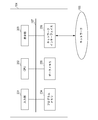
- FIG. 1 illustrates the configuration of a system for selling a laid-out product having an arbitrary image laid out on the product.
- 101 is a camera
- 102 is a photo studio management apparatus
- 103 is a management server
- 104 is a personal computer (hereinafter referred to as PC)
- 105 is a network.
- Photographers in the photo studio operate the camera 101 to shoot dozens to hundreds of photos while changing the user's poses and costumes.
- the image shot in this way is stored in the hard disk of the photo studio management apparatus 102 via a memory card in the camera 101 or a communication cable such as a USB cable.
- the photo studio management apparatus 102 is connected to the management server 103 via a network 105 such as a LAN (Local Area Network), and a photographed image is transmitted from the photo studio management apparatus 102 to the management server 103.
- a network 105 such as a LAN (Local Area Network)
- a photographed image is transmitted from the photo studio management apparatus 102 to the management server 103.
- a PC 104 is provided at the user's home, and the management server 103 can be accessed from the PC 104 via the network 105.
- the PC 104 has a homepage browsing function, and the user can browse images transmitted from the photo studio management apparatus 102 to the management server 103 by accessing and logging in to the management server 103 using the PC 104.
- the user uses the print order screen provided by the management server 103 to lay out an arbitrary image on an arbitrary product while viewing the image, and the product for which layout has been completed (hereinafter referred to as a laid-out product). Can be ordered. Order information representing an order from the user is transmitted to the management server 103.
- the photo studio management apparatus 102 can confirm the order information by communicating with the management server 103, and the photo studio creates a laid-out product based on the confirmed order information and delivers it to the user's home.
- product refers to a medium on which an image is printed.
- merchandise include, but are not limited to, photo books (album), photo mounts, calendars, postcards, key chains, stickers, and the like.
- an image recommended for purchase and a product recommended as a layout target of the image are presented to the user. How to do will be described.
- the above system configuration shows a case where the user places an order from the PC 104 at home, the user may place an order from a PC installed in the photo studio or a dedicated device.
- the management server 103 may be installed in the photo hall.
- the photo studio management device 102 and the management server 103 are not necessarily separate from each other, and may be integrated.
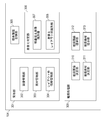
- FIG. 2 is a block diagram showing an example of the hardware configuration of the PC 104 applicable to the present invention.
- a display unit 203 displays various types of information, and is a display such as an LCD or a CRT.
- the program memory 204 is a program memory for storing a program including a processing procedure of a flowchart to be described later.
- the program memory 204 may be a ROM or a RAM in which a program is loaded from an external storage device (not shown) or the like.
- the data memory 205 is a data memory for storing data generated in various processes. The history information of a layout operation described later is stored in the data memory 205.
- the data memory 205 is a RAM, for example, but is loaded from a non-volatile external storage medium prior to processing or referred to whenever necessary.
- 206 is a network interface for communicating via the network 105.
- Reference numeral 207 denotes an address signal indicating each component to be controlled by the CPU 202, a control signal for controlling each component, and a bus for transferring data exchanged between the components. is there.
- the PC 104 has a storage drive unit for reading and writing to a storage medium such as a DVD, an external storage device such as a hard disk, etc., but these configurations are omitted here.
- FIG. 3 is a block diagram showing an example of functional blocks of the PC 104 applicable to the present invention.
- Reference numeral 301 denotes a management unit that manages various types of information, and includes an image management unit 302, a product management unit 303, and a layout frame information management unit 304.
- the image management unit 302 acquires information about a plurality of images taken at the photo studio from the management server 103 and manages the information.
- the product management unit 303 acquires information about a plurality of types of products that can be ordered from the management server 103 and manages the information.
- the product management unit 303 also manages the number of images that can be laid out for each product.
- the layout frame information management unit 304 manages various information such as the shape and size of the layout frame of each product.
- Reference numeral 305 denotes an operation history storage unit that stores a history related to a layout operation described later.
- Reference numeral 306 denotes a replacement determination unit that performs determination regarding an image replacement operation to be described later, and includes a replacement image identification unit 307 and a replacement layout frame identification unit 308.
- the replacement image identifying unit 307 identifies an image removed from the image to be laid out on the selected merchandise by the image replacement operation based on the operation history stored in the operation history storage unit 305.
- the replacement layout frame identification unit 308 identifies the layout frame in which the image identified by the replacement image identification unit 307 has been laid out so far.
- Reference numeral 309 denotes a recommendation processing unit that performs various processes related to the recommendation of images to be purchased and products, and includes a recommended image determination unit 310, a recommended product determination unit 311, a recommended image presentation unit 312, and a recommended product presentation unit 313. .
- the recommended image determination unit 310 recommends that the user purchase at least one of the images identified by the replacement image identification unit 307 among the plurality of images managed by the image management unit 302 (recommended). Image).
- the recommended product determining unit 311 determines a recommended product (recommended product) as a layout target of the recommended image determined by the recommended image determining unit 310.
- the recommended image presentation unit 312 and the recommended product presentation unit 313 respectively display a display for prompting the user to purchase the recommended image and the recommended product determined by the recommended image determination unit 310 and the recommended product determination unit 311. To do.
- All functional blocks have a mutual relationship in software or hardware.
- 301 to 305 are realized by the data memory 205
- 306 to 313 are realized by the CPU 202 executing a program stored in the program memory 204.
- the functional block is an example, and a plurality of functional blocks may constitute one functional block, or any functional block may be further divided into blocks that perform a plurality of functions.
- FIG. 4A and 4B are diagrams showing an example of a layout operation screen displayed on the display unit 203 of the PC 104.
- FIG. FIG. 4A shows a layout operation screen before an image replacement operation described later
- FIG. 4B shows a layout operation screen after the image replacement operation.
- Reference numerals 402 to 405 denote layout frames for laying out an arbitrary image.
- Reference numeral 406 denotes a candidate image display area for displaying image candidates to be laid out in the layout frames 402 to 405. The user can select any image from the candidate images displayed in the candidate image display area 406 by, for example, drag and drop, and move the image to an arbitrary layout frame in the product display area 401, thereby freely selecting the image. Can be laid out. In the example of FIG. 4A, images 001 to 004 are laid out in layout frames 402 to 405, respectively.
- the image 005 instead of the image 001 in consideration of the balance of subjects in the photo book, and the replacement operation of the image 001 and the image 005 is performed. Specifically, the image 005 is moved to the layout frame 402 by drag and drop. Then, the image 005 is laid out in the layout frame 402 and the image 001 is displayed in the candidate image display area 406 as shown in FIG.
- Replacement may be performed by the following.
- an image that has already been laid out in the layout frame may be temporarily moved out of the product display area 401 by drag and drop, and then another image may be moved to the layout frame.
- FIG. 4 the identification information of each image is displayed for easy understanding of the description (IMG001 to 005), but the display may be omitted.
- the user can display other pages of the photo book by performing a page change operation using the input unit 201, and can continue the layout operation.
- a layout completion button (not shown) is pressed, the layout operation ends, and the display is switched from the layout operation screen to an order confirmation screen (confirmation screen for quantities, charges, etc.).
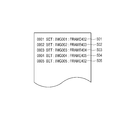
- FIG. 5 is a diagram illustrating an example of the history of layout operations described in FIG. This operation history is stored in the operation history storage unit 305.
- 501 indicates that the image 001 is laid out in the layout frame 402.
- 502 to 504 indicate that the images 002 to 004 are laid out in the layout frames 403 to 405, respectively.
- Reference numeral 505 denotes that the image 005 is laid out in the layout frame 402.
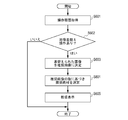
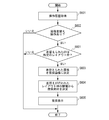
- FIG. 6 is a view showing an operation flowchart of the PC 104 in the present embodiment. For example, if the layout completion button is operated after the layout operation described in FIG. 4 is performed, the flow of FIG. 6 is started.
- the replacement determination unit 306 acquires the operation history stored in the operation history storage unit 305 (S601), and determines whether or not an image replacement operation has been performed (S602). Specifically, when a plurality of pieces of information on the same layout frame exist in the operation history and different images are laid out in the layout frame, it is determined that an image replacement operation has been performed. In the case of FIG. 5, since the information of the layout frame 402 exists at 501 and 505 and the images 001 and 005 are respectively laid out, it is determined that the image replacement operation has been performed.
- the replacement image identifying unit 307 identifies the image 001 replaced with the image 005 by the replacement operation as a replacement image. Further, the replacement layout frame identification unit 308 identifies the layout frame 402 in which the replacement image 001 has been laid out so far. When a replacement operation is performed in a plurality of layout frames, each replacement image and replacement layout frame are identified. If it is determined that there has been an image replacement operation (Yes in S602), the process proceeds to S603, and if it is determined that there has not been a replacement operation (No in S602), the process ends.
- the recommended image determination unit 310 determines the replacement image 005 identified by the replacement image identification unit 307 as an image recommended for purchase. That is, the image replaced with another image by the replacement operation is regarded as an image wondering whether or not the user purchases, and the user is suggested to print the image on another product and purchase.
- the recommended product determination unit 311 recommends a product recommended as a layout target of the replacement image 005 determined by the recommended image determination unit 310 based on the information of the layout frame 402 identified by the replacement layout frame identification unit 308.
- the material is determined (S604).
- the recommended product determination unit 311 selects a product having a layout frame that is the same as or similar to the shape of the layout frame 402 based on information managed by the layout frame information management unit 304. Determine as.
- the recommended image presentation unit 312 and the recommended product presentation unit 313 display the recommended image determined by the recommended image determination unit 310 and the recommended product determined by the recommended product determination unit 311. Encourage users to purchase.
- FIG. 7A shows an example in which an image 001 determined as a recommended image and a key ring determined as a recommended product are displayed in an aligned manner.
- a key ring having a circular layout frame shape is selected as the recommended product.
- FIG. 7B is an example in which the recommended image 001 is displayed in a form laid out in the layout frame of the key ring of the recommended product.
- a message such as "This is a recommended product for you. Do you want to buy it?"
- the recommended product is determined based on the shape of the layout frame identified by the replacement layout frame identifying unit 308.
- the recommended product is determined based on the size of the layout frame. May be. For example, when the size of the layout frame identified by the replacement layout frame identification unit 308 is larger than a predetermined threshold, it is considered that the photograph is important for the user, and a photo mount may be selected as the recommended product. Further, the size of the photo mount may be determined according to the size of the layout frame. Further, the recommended product may be determined based on both the size and shape of the layout frame identified by the replacement layout frame identifying unit 308.
- a single product cannot be determined from the size or shape of the layout frame on which the replacement operation has been performed, and a plurality of products can be applied.
- all of the plurality of products may be displayed and the user may be allowed to select which product to order the recommended image.
- the replacement operation may be performed a plurality of times.
- the images displayed in the candidate image display area 406 are sequentially laid out in the layout frame 405 and the final layout is determined while checking the configuration of the entire photo book.
- all images except for the image finally laid out in the layout frame 405, that is, the image laid out in the layout frame 405 when the layout completion button is pressed may be used as the recommended images.
- the recommended image may be determined by the following method.
- an image laid out immediately before the image laid out in the layout frame 405 is determined as a recommended image. Also good. Such an image is likely to be an image in which the user has been wondering whether or not to enter the photo book until just before. Therefore, the user's willingness to purchase can be enhanced by proposing the user to purchase the image in combination with other commercial products.
- a recommended image may be selected based on the number of times the image is laid out in the layout frame 405 from images excluding the image finally laid out in the layout frame 405. For example, it is assumed that the user is wondering which of the image 001 and the image 002 should be put in the layout frame 405, and tries to lay out a plurality of times alternately and finally decides to lay out the image 001. In this case, the image 002 is considered to be an image in which the user has been wondering whether or not to put it in the photo book until the end. Therefore, by purchasing the image 002 in combination with other products, the purchase of the user Can increase motivation. As described above, when there are a plurality of replacement images, sales can be promoted by determining an image having the largest number of layouts in the layout frame 405 or an image having more than a predetermined threshold as a recommended image. .
- the user may perform a layout operation in consideration of the composition of each image. For example, after laying out the image 006 in the layout frame 405 first, assuming that the image 005 is more suitable for the layout frame 405 and performing a replacement operation for the image 005, the image 006 is newly added to the layout frame 402. An operation such as layout may be considered. In this case, regarding the layout frame 405, the image 006 becomes a replacement image. However, since the image 006 can be purchased in a form laid out in the layout frame 402, it is necessary to recommend purchase in a form combined with other products. It is considered low. Therefore, even if the image is identified by the replacement image identifying unit 307, an image laid out in another layout frame may be excluded from the recommended image. As a result, it is possible to select and display an image with a high possibility that the user will decide to purchase.
- FIG. 8 is a diagram showing an operation flowchart of the PC 104 in the present embodiment. The processes similar to those in FIG. 6 are denoted by the same reference numerals, and the description thereof is omitted. In FIG. 8, the process of S801 is executed instead of the process of S604.
- step S ⁇ b> 801 the recommended product determination unit 311 determines a recommended product based on the number of recommended images determined by the recommended image determination unit 310. Specifically, the recommended product determination unit 311 selects, as the recommended product, a product whose number of images that can be laid out matches the number of recommended images, based on information managed by the product management unit 303. To do. For example, when the number of recommended images is three, three photo mounts are selected as recommended products.
- the recommended product determination unit 311 determines the number of images that can be laid out.
- a plurality of products may be recommended products so that the total matches the recommended number of images. For example, when the number of recommended images is seven and there is no product with seven layoutable images, six photo mounts and postcards may be determined as recommended products. If multiple products are recommended, as shown in FIG. 7A, the recommended image and the recommended product are displayed separately, and the user determines which image is to be printed on which product. It is good to make it.
- the recommended product is determined based on the number of images replaced with other images during the layout operation. Therefore, even if there are a plurality of images that the user is wondering whether or not to purchase, an appropriate product corresponding to the number of images can be selected as the recommended product.
- the system configuration diagram and the configuration of the PC 104 are the same as those shown in FIGS.
- the layout frame information management unit 304 also manages information for identifying whether or not the layout frame on which the replacement operation has been performed is the predetermined layout frame. For example, it is assumed that a layout frame having a large size or a layout frame having a characteristic shape such as a star shape or a heart shape is set as the predetermined layout frame.
- FIG. 9 is a diagram showing an operation flowchart of the PC 104 in the present embodiment. The processes similar to those in FIG. 6 are denoted by the same reference numerals, and the description thereof is omitted. In FIG. 9, the determination process of S901 is added after the process of S602.
- the recommended image determination unit 310 determines whether or not the layout frame in which the replacement operation has been performed is a predetermined layout frame (S901). Specifically, it is determined whether or not the layout frame identified by the replacement layout frame identification unit 308 is managed as a predetermined layout frame by the layout frame information management unit 304.
- the replacement image identified by the replacement image identification unit 307 is determined as the recommended image (S603). If the layout frame on which the replacement operation has been performed is not a predetermined layout frame, the recommended image determination unit 310 ends the process without determining a recommended image.
- a replacement image is presented as a recommended image only when an image replacement operation is performed in a layout frame having a large size or a layout frame having a characteristic shape.
- An image once arranged in such a predetermined layout frame is likely to be a highly important image for the user, and can be removed from the layout unavoidably due to restrictions on the number of sheets that can be laid out on the product. High nature. Therefore, by recommending purchase by combining such an image with other commercial materials, it is possible to expect improvement in the user's willingness to purchase.
- the replacement image in the layout frame is excluded from the recommended image.
- a recommended image is used regardless of whether the layout frame in which the replacement operation has been performed is a predetermined layout frame, and the replacement image in the predetermined layout frame is highlighted in comparison with other images during the recommended display in S605. You may make it do. For example, by changing the background color or displaying a predetermined message, the image may be displayed in a manner that allows the user to recognize that the image is particularly recommended.
- the system configuration diagram and the configuration of the PC 104 are the same as those shown in FIGS. Note that information indicating the priority of an image is added to each image in advance.
- the priority information is divided into five levels 1 to 5, and a high priority is set for an image obtained by photographing a favorite image or an important scene.
- the priority information may be added by the user from the PC 104, or may be added by the photographer of the photo studio from the photo studio management apparatus 102.
- the image management unit 302 also manages priority information added to each image.
- FIG. 10 is a view showing an operation flowchart of the PC 104 in the present embodiment. The processes similar to those in FIG. 6 are denoted by the same reference numerals, and the description thereof is omitted. In FIG. 10, the determination process of S1001 is added after the process of S602.
- the recommended image determination unit 310 determines whether the replacement image is an image having a predetermined priority or higher (S1001). Specifically, by referring to the information managed by the image management unit 302, the priority information added to the replacement image identified by the replacement image identification unit 307 is equal to or higher than a predetermined priority (for example, 4 or more) is determined.
- a predetermined priority for example, 4 or more
- the replacement image is determined as the recommended image (S603).
- the replacement image is excluded from the recommended image.
- a replacement image is presented as a recommended image only when a favorite image, an image of an important scene, or the like is replaced with another image.
- a favorite image an image of an important scene, or the like is replaced with another image.
- the replacement image to which priority information lower than the predetermined priority is added has been described as being excluded from the recommended image.
- all the recommended images and images with the priority information higher than the predetermined priority at the time of the recommended display in S605 are displayed as other images. You may make it highlight in comparison with. For example, by changing the background color or displaying a predetermined message, the image may be displayed in a manner that allows the user to recognize that the image is particularly recommended.
- the method of the first embodiment (S604 in FIG. 6) and the method of the second embodiment (S801 in FIG. 8) may be combined.
- the recommended product may be determined in consideration of the number of images on which the replacement operation has been performed.
- the method in the second embodiment (S801 in FIG. 8) may be used instead, or these methods are combined. It doesn't matter.
- the method of the third embodiment and the method of the fourth embodiment may be combined. That is, only images that have been replaced in a predetermined layout frame and to which priority information higher than a predetermined priority is added may be recommended images.
- the PC 104 has been described as performing all processing as an information processing apparatus.
- the processing of each embodiment may be realized in cooperation with the management server 103. That is, some of the functional blocks in FIG. 3 may be included in the management server 103, and the recommended processing may be performed by communicating operation history information and the like via the PC 104 and the network 105. .
- a part of the program stored in the program memory 204 of the PC 104 is stored in the program memory of the management server 103, and the CPU of the management server 103 executes the program.
- the management server 103 may obtain the operation history from the PC 104 to determine the recommended image and the recommended product, and the PC 104 may display only the determined recommended image and the recommended product. Further, all processing may be performed on the management server 103 side.
- the present invention can also be applied to other forms.
- the present invention can also be applied to the case where a user lays out an image photographed by his / her own camera on a product such as a photo book and orders a finished product.
- the recommended product is determined as the recommended product layout target material, but the recommended product is not necessarily determined. In other words, only images recommended for purchase may be presented to the user, and the user may be allowed to select which merchandise to lay out and purchase.
- Management Unit 302 Image Management Unit 303 Commodity Management Unit 304 Layout Frame Information Management Unit 305 Operation History Storage Unit 306 Replacement Judgment Unit 307 Replacement Image Identification Unit 308 Replacement Layout Frame Identification Unit 309 Recommended Processing Unit 310 Recommended Image Determination Unit 311 Recommended Product determining unit 312 Recommended image presenting unit 313 Recommended product presenting unit
Landscapes
- Business, Economics & Management (AREA)
- Accounting & Taxation (AREA)
- Finance (AREA)
- Strategic Management (AREA)
- Economics (AREA)
- Marketing (AREA)
- Development Economics (AREA)
- Physics & Mathematics (AREA)
- General Business, Economics & Management (AREA)
- General Physics & Mathematics (AREA)
- Engineering & Computer Science (AREA)
- Theoretical Computer Science (AREA)
- Processing Or Creating Images (AREA)
- Management, Administration, Business Operations System, And Electronic Commerce (AREA)
Abstract
Description
第1の媒体のレイアウト枠に画像をレイアウトするための操作に関する操作履歴を記憶する記憶手段と、
前記記憶手段により記憶された操作履歴に基づいて、画像の差替え操作により前記レイアウト枠にレイアウトする画像から外された画像を識別する識別手段と、
前記識別手段により識別された画像の少なくとも1つを、購入を推奨する推奨画像として決定する第1の決定手段と、
前記第1の決定手段により決定された推奨画像のレイアウト対象として推奨する第2の商材を決定する第2の決定手段と、
前記推奨商材と前記第2の商材とをユーザに提示する提示手段と、
を有することを特徴とする。
第1の媒体のレイアウト枠に画像をレイアウトするための操作に関する操作履歴を取得する取得工程と、
前記取得工程において取得した操作履歴に基づいて、画像の差替え操作により前記レイアウト枠にレイアウトする画像から外された画像を識別する識別工程と、
前記識別工程において識別された画像の少なくとも1つを、購入を推奨する推奨画像として決定する第1の決定工程と、
前記第1の決定工程において決定された推奨画像のレイアウト対象として推奨する第2の商材を決定する第2の決定工程と、
前記推奨商材と前記第2の商材とをユーザに提示する提示工程と、
を有することを特徴とする。
所定のレイアウト枠に画像をレイアウトするための操作の際に、画像の差替え操作により前記レイアウト枠にレイアウトする画像から外された画像を識別する識別手段と、
前記識別手段により識別された画像の少なくとも1つを、購入を推奨する推奨画像として決定する決定手段と、
を有することを特徴とする。
所定のレイアウト枠に画像をレイアウトするための操作の際に、画像の差替え操作により前記レイアウト枠にレイアウトする画像から外された画像を識別する識別工程と、
前記識別工程において識別された画像の少なくとも1つを、購入を推奨する推奨画像として決定する決定工程と、
を有することを特徴とする。
図1は、任意の画像を商材にレイアウトしたレイアウト済み商材を販売するためのシステムの構成について説明したものである。図1において、101はカメラ、102は写真館管理装置、103は管理サーバ、104はパーソナルコンピュータ(以下、PC)、105はネットワークである。
実施形態1では、差替え操作が行われた画像を推奨画像として決定すると共に、該画像がレイアウトされていたレイアウト枠の情報(形状、大きさ)に基づいて、推奨商材を決定する例について説明した。本実施形態では、差替え操作が行われた画像の数に基づいて、推奨商材を決定する例について説明する。
本実施形態では、商材内の複数のレイアウト枠のうち、所定のレイアウト枠において画像の差替え操作があった場合に、被差替え画像を推奨画像に決定し、他のレイアウト枠において差替え操作があった場合は、推奨画像の提示を行わない例について説明する。
本実施形態では、差替え操作により他の画像と差替えられた画像のうち、予め各画像に付加されている優先度が高い画像のみ推奨画像として決定する例について説明する。
302 画像管理部
303 商材管理部
304 レイアウト枠情報管理部
305 操作履歴記憶部
306 差替え判定部
307 被差替え画像識別部
308 差替えレイアウト枠識別部
309 推奨処理部
310 推奨画像決定部
311 推奨商材決定部
312 推奨画像提示部
313 推奨商材提示部
Claims (12)
- 画像がレイアウトされた媒体を作成するためのシステムであって、
第1の媒体のレイアウト枠に画像をレイアウトするための操作に関する操作履歴を記憶する記憶手段と、
前記記憶手段により記憶された操作履歴に基づいて、画像の差替え操作により前記レイアウト枠にレイアウトする画像から外された画像を識別する識別手段と、
前記識別手段により識別された画像の少なくとも1つを、購入を推奨する推奨画像として決定する第1の決定手段と、
前記第1の決定手段により決定された推奨画像のレイアウト対象として推奨する第2の商材を決定する第2の決定手段と、
前記推奨商材と前記第2の商材とをユーザに提示する提示手段と、
を有することを特徴とするシステム。 - 前記第2の決定手段は、前記差替え操作が行われたレイアウト枠の形状、又はサイズの少なくともいずれか一方に基づいて、前記第2の媒体を決定することを特徴とする請求項1記載のシステム。
- 前記第2の決定手段は、前記第1の決定手段により決定された推奨画像の数に基づいて、前記第2の媒体を決定することを特徴とする請求項1又は2記載のシステム。
- 前記第1の決定手段は、前記第1の媒体に含まれる複数のレイアウト枠のうち、所定のレイアウト枠にて前記差替え操作が行われた場合に、前記所定のレイアウト枠にレイアウトする画像から外された画像の少なくとも1つを、前記推奨画像として決定することを特徴とする請求項1から3のいずれかに記載のシステム。
- 前記第1の媒体へのレイアウト対象となる各画像の優先度情報を管理する管理手段を有し、
前記第1の決定手段は、前記識別手段により識別された画像の前記優先度情報に基づいて、前記推奨画像を決定することを特徴とする請求項1から4のいずれか1項に記載のシステム。 - 前記第1の決定手段は、前記識別手段により識別された画像が複数ある場合、前記レイアウト枠にレイアウトする画像として決定された画像の1つ前にレイアウトされていた画像を、前記推奨画像として決定することを特徴とする請求項1から5のいずれか1項に記載のシステム。
- 前記第1の決定手段は、前記識別手段により識別された画像が複数ある場合、前記差替え操作によって他の画像と差替えられた回数に基づいて、前記推奨画像を決定することを特徴とする請求項1から6のいずれか1項に記載のシステム。
- 前記第1の決定手段は、前記差替え操作により前記レイアウト枠にレイアウトする画像から外された画像であって、前記第1の媒体の他のレイアウト枠にレイアウトする画像として決定された画像を、前記推奨画像から除外することを特徴とする請求項1から7のいずれか1項に記載のシステム。
- 画像がレイアウトされた媒体を作成するためのシステムにおける制御方法であって、
第1の媒体のレイアウト枠に画像をレイアウトするための操作に関する操作履歴を取得する取得工程と、
前記取得工程において取得した操作履歴に基づいて、画像の差替え操作により前記レイアウト枠にレイアウトする画像から外された画像を識別する識別工程と、
前記識別工程において識別された画像の少なくとも1つを、購入を推奨する推奨画像として決定する第1の決定工程と、
前記第1の決定工程において決定された推奨画像のレイアウト対象として推奨する第2の商材を決定する第2の決定工程と、
前記推奨商材と前記第2の商材とをユーザに提示する提示工程と、
を有することを特徴とするシステムの制御方法。 - 画像がレイアウトされた媒体を作成するためのシステムにおける情報処理装置であって、
所定のレイアウト枠に画像をレイアウトするための操作の際に、画像の差替え操作により前記レイアウト枠にレイアウトする画像から外された画像を識別する識別手段と、
前記識別手段により識別された画像の少なくとも1つを、購入を推奨する推奨画像として決定する決定手段と、
を有することを特徴とする情報処理装置。 - 画像がレイアウトされた媒体を作成するためのシステムにおける情報処理装置の制御方法であって、
所定のレイアウト枠に画像をレイアウトするための操作の際に、画像の差替え操作により前記レイアウト枠にレイアウトする画像から外された画像を識別する識別工程と、
前記識別工程において識別された画像の少なくとも1つを、購入を推奨する推奨画像として決定する決定工程と、
を有することを特徴とする情報処理装置の制御方法。 - 請求項9又は11記載の制御方法をコンピュータに実行させるためのプログラム。
Priority Applications (4)
| Application Number | Priority Date | Filing Date | Title |
|---|---|---|---|
| PCT/JP2010/052713 WO2011104811A1 (ja) | 2010-02-23 | 2010-02-23 | 画像がレイアウトされた媒体を作成するためのシステム |
| JP2012501550A JP5587398B2 (ja) | 2010-02-23 | 2010-02-23 | 画像がレイアウトされた媒体を作成するためのシステム |
| CN2010800646220A CN102782716A (zh) | 2010-02-23 | 2010-02-23 | 用于创建布置有图像的介质的系统 |
| US13/032,404 US20110205595A1 (en) | 2010-02-23 | 2011-02-22 | System for creating medium having image laid out thereon, method for controlling the system, information processing apparatus in the system, and method for controlling the information processing apparatus |
Applications Claiming Priority (1)
| Application Number | Priority Date | Filing Date | Title |
|---|---|---|---|
| PCT/JP2010/052713 WO2011104811A1 (ja) | 2010-02-23 | 2010-02-23 | 画像がレイアウトされた媒体を作成するためのシステム |
Publications (1)
| Publication Number | Publication Date |
|---|---|
| WO2011104811A1 true WO2011104811A1 (ja) | 2011-09-01 |
Family
ID=44476274
Family Applications (1)
| Application Number | Title | Priority Date | Filing Date |
|---|---|---|---|
| PCT/JP2010/052713 Ceased WO2011104811A1 (ja) | 2010-02-23 | 2010-02-23 | 画像がレイアウトされた媒体を作成するためのシステム |
Country Status (4)
| Country | Link |
|---|---|
| US (1) | US20110205595A1 (ja) |
| JP (1) | JP5587398B2 (ja) |
| CN (1) | CN102782716A (ja) |
| WO (1) | WO2011104811A1 (ja) |
Cited By (1)
| Publication number | Priority date | Publication date | Assignee | Title |
|---|---|---|---|---|
| JP2017033300A (ja) * | 2015-07-31 | 2017-02-09 | 富士フイルム株式会社 | 画像処理装置、画像処理方法、プログラムおよび記録媒体 |
Families Citing this family (1)
| Publication number | Priority date | Publication date | Assignee | Title |
|---|---|---|---|---|
| CN108989191B (zh) * | 2018-08-20 | 2020-09-25 | 北京达佳互联信息技术有限公司 | 撤回图片文件的方法及其控制方法、装置及移动终端 |
Citations (4)
| Publication number | Priority date | Publication date | Assignee | Title |
|---|---|---|---|---|
| JP2001291161A (ja) * | 2000-01-27 | 2001-10-19 | Eastman Kodak Co | 写真仕上げ処理商品および/またはサービスを注文するための方法、そのためのシステムおよび装置 |
| JP2006099732A (ja) * | 2004-09-03 | 2006-04-13 | Canon Inc | 情報処理装置及び情報処理方法 |
| JP2006252052A (ja) * | 2005-03-09 | 2006-09-21 | Fuji Photo Film Co Ltd | プリントシステム |
| JP2008282132A (ja) * | 2007-05-09 | 2008-11-20 | Promise Co Ltd | Ecサイト管理装置及びコンピュータプログラム |
Family Cites Families (18)
| Publication number | Priority date | Publication date | Assignee | Title |
|---|---|---|---|---|
| US6389181B2 (en) * | 1998-11-25 | 2002-05-14 | Eastman Kodak Company | Photocollage generation and modification using image recognition |
| US6396963B2 (en) * | 1998-12-29 | 2002-05-28 | Eastman Kodak Company | Photocollage generation and modification |
| US7246044B2 (en) * | 2000-09-13 | 2007-07-17 | Matsushita Electric Works, Ltd. | Method for aiding space design using network, system therefor, and server computer of the system |
| US20040260625A1 (en) * | 2003-06-20 | 2004-12-23 | Yoshinori Usami | Digital photo print order acceptance method and digital image management method |
| US20050017985A1 (en) * | 2003-07-22 | 2005-01-27 | Lifetouch, Inc. | Method of creating and processing page layouts incorporating images |
| CN100413308C (zh) * | 2003-12-25 | 2008-08-20 | 富士胶片株式会社 | 图像编辑装置及其方法 |
| JP4700940B2 (ja) * | 2004-08-27 | 2011-06-15 | キヤノン株式会社 | 情報処理装置及びその制御方法、プログラム |
| US7725355B2 (en) * | 2004-09-03 | 2010-05-25 | Canon Kabushiki Kaisha | Information processing apparatus and method for managing order data of on-line orders, program for the same |
| US7656543B2 (en) * | 2004-11-12 | 2010-02-02 | Hewlett-Packard Development Company, L.P. | Albuming images |
| US8161377B2 (en) * | 2005-03-01 | 2012-04-17 | Hewlett-Packard Development Company, L.P. | Arranging images on pages of an album |
| JP2008035328A (ja) * | 2006-07-31 | 2008-02-14 | Fujifilm Corp | テンプレート生成装置、画像配置装置、変更テンプレート生成装置およびそのプログラム |
| KR101411324B1 (ko) * | 2007-08-14 | 2014-06-25 | 삼성전자주식회사 | 이미지 디스플레이 방법 및 상기 방법을 적용한 디스플레이장치 |
| JP2009110391A (ja) * | 2007-10-31 | 2009-05-21 | Canon Inc | 情報処理装置および制御方法および制御プログラム |
| US9152292B2 (en) * | 2009-02-05 | 2015-10-06 | Hewlett-Packard Development Company, L.P. | Image collage authoring |
| CN101510312B (zh) * | 2009-03-16 | 2013-09-11 | 广州市有福数码科技有限公司 | 制作电子相册的方法、装置及系统 |
| US8806331B2 (en) * | 2009-07-20 | 2014-08-12 | Interactive Memories, Inc. | System and methods for creating and editing photo-based projects on a digital network |
| US8289340B2 (en) * | 2009-07-30 | 2012-10-16 | Eastman Kodak Company | Method of making an artistic digital template for image display |
| US8237819B2 (en) * | 2009-07-30 | 2012-08-07 | Eastman Kodak Company | Image capture method with artistic template design |
-
2010
- 2010-02-23 CN CN2010800646220A patent/CN102782716A/zh active Pending
- 2010-02-23 WO PCT/JP2010/052713 patent/WO2011104811A1/ja not_active Ceased
- 2010-02-23 JP JP2012501550A patent/JP5587398B2/ja not_active Expired - Fee Related
-
2011
- 2011-02-22 US US13/032,404 patent/US20110205595A1/en not_active Abandoned
Patent Citations (4)
| Publication number | Priority date | Publication date | Assignee | Title |
|---|---|---|---|---|
| JP2001291161A (ja) * | 2000-01-27 | 2001-10-19 | Eastman Kodak Co | 写真仕上げ処理商品および/またはサービスを注文するための方法、そのためのシステムおよび装置 |
| JP2006099732A (ja) * | 2004-09-03 | 2006-04-13 | Canon Inc | 情報処理装置及び情報処理方法 |
| JP2006252052A (ja) * | 2005-03-09 | 2006-09-21 | Fuji Photo Film Co Ltd | プリントシステム |
| JP2008282132A (ja) * | 2007-05-09 | 2008-11-20 | Promise Co Ltd | Ecサイト管理装置及びコンピュータプログラム |
Cited By (1)
| Publication number | Priority date | Publication date | Assignee | Title |
|---|---|---|---|---|
| JP2017033300A (ja) * | 2015-07-31 | 2017-02-09 | 富士フイルム株式会社 | 画像処理装置、画像処理方法、プログラムおよび記録媒体 |
Also Published As
| Publication number | Publication date |
|---|---|
| JPWO2011104811A1 (ja) | 2013-06-17 |
| JP5587398B2 (ja) | 2014-09-10 |
| US20110205595A1 (en) | 2011-08-25 |
| CN102782716A (zh) | 2012-11-14 |
Similar Documents
| Publication | Publication Date | Title |
|---|---|---|
| US9378189B2 (en) | Layout apparatus, layout method, and computer-readable recording medium | |
| US9449411B2 (en) | Ranking image importance with a photo-collage | |
| US20110270813A1 (en) | Digital imaging system employing user personalization and image utilization profiles | |
| US20130239003A1 (en) | Digital album production and distribution architecture | |
| JP5028858B2 (ja) | 画像管理装置 | |
| WO2013184318A1 (en) | Producing personalized team photo books | |
| US20110270947A1 (en) | Digital imaging method employing user personalization and image utilization profiles | |
| JP6463231B2 (ja) | 画像処理装置、画像処理方法、プログラムおよび記録媒体 | |
| JP6771891B2 (ja) | 情報処理装置、情報処理方法及びプログラム | |
| US20160283099A1 (en) | Interactive content timeline platform | |
| US20080270922A1 (en) | Image browsing device, image browsing method, image browsing program, and image browsing system | |
| CN104995618B (zh) | 电子书题写系统 | |
| JP5587398B2 (ja) | 画像がレイアウトされた媒体を作成するためのシステム | |
| JP2014203355A (ja) | 転写自販システム | |
| US10614390B2 (en) | Information processing apparatus, information processing method, and non-transitory computer readable medium | |
| JP6168434B1 (ja) | 情報提供システム | |
| JP6823104B2 (ja) | 画像データ処理システム、画像データ処理方法および画像データ処理プログラム | |
| JP2016200909A (ja) | アルバム作成支援装置、アルバム作成支援システム、および、アルバム作成支援方法 | |
| JP6523116B2 (ja) | 画像データ処理システム、画像データ処理方法および画像データ処理プログラム | |
| JP2006157825A (ja) | 画像選択方法及び画像選択装置 | |
| JP2006228058A (ja) | プリント注文装置、制御方法、及びプログラム | |
| JP5730171B2 (ja) | 営業支援システム | |
| JP4741416B2 (ja) | 画像管理システム、画像管理方法、画像表示装置、画像表示方法、及びプログラム | |
| JP2015035113A (ja) | 販売補助システム | |
| JP5769098B2 (ja) | 記録媒体 |
Legal Events
| Date | Code | Title | Description |
|---|---|---|---|
| WWE | Wipo information: entry into national phase |
Ref document number: 201080064622.0 Country of ref document: CN |
|
| 121 | Ep: the epo has been informed by wipo that ep was designated in this application |
Ref document number: 10846478 Country of ref document: EP Kind code of ref document: A1 |
|
| WWE | Wipo information: entry into national phase |
Ref document number: 2012501550 Country of ref document: JP |
|
| NENP | Non-entry into the national phase |
Ref country code: DE |
|
| 122 | Ep: pct application non-entry in european phase |
Ref document number: 10846478 Country of ref document: EP Kind code of ref document: A1 |