WO2011007416A1 - 再生装置及び方法、並びにコンピュータプログラム - Google Patents
再生装置及び方法、並びにコンピュータプログラム Download PDFInfo
- Publication number
- WO2011007416A1 WO2011007416A1 PCT/JP2009/062724 JP2009062724W WO2011007416A1 WO 2011007416 A1 WO2011007416 A1 WO 2011007416A1 JP 2009062724 W JP2009062724 W JP 2009062724W WO 2011007416 A1 WO2011007416 A1 WO 2011007416A1
- Authority
- WO
- WIPO (PCT)
- Prior art keywords
- title
- playback
- information
- reproduction
- unbound application
- Prior art date
- Legal status (The legal status is an assumption and is not a legal conclusion. Google has not performed a legal analysis and makes no representation as to the accuracy of the status listed.)
- Ceased
Links
Images



Classifications
-
- G—PHYSICS
- G11—INFORMATION STORAGE
- G11B—INFORMATION STORAGE BASED ON RELATIVE MOVEMENT BETWEEN RECORD CARRIER AND TRANSDUCER
- G11B27/00—Editing; Indexing; Addressing; Timing or synchronising; Monitoring; Measuring tape travel
- G11B27/10—Indexing; Addressing; Timing or synchronising; Measuring tape travel
- G11B27/102—Programmed access in sequence to addressed parts of tracks of operating record carriers
- G11B27/105—Programmed access in sequence to addressed parts of tracks of operating record carriers of operating discs
-
- G—PHYSICS
- G11—INFORMATION STORAGE
- G11B—INFORMATION STORAGE BASED ON RELATIVE MOVEMENT BETWEEN RECORD CARRIER AND TRANSDUCER
- G11B2220/00—Record carriers by type
- G11B2220/20—Disc-shaped record carriers
- G11B2220/25—Disc-shaped record carriers characterised in that the disc is based on a specific recording technology
- G11B2220/2537—Optical discs
- G11B2220/2541—Blu-ray discs; Blue laser DVR discs
Definitions
- the present invention relates to a reproduction apparatus and method capable of reproducing a Blu-ray disc, and a technical field of a computer program.
- linked playback for playing back video data is often performed while executing a Java (registered trademark, hereinafter the same) application.
- the Java application and the video data to be linked are associated with each other in a reproduction unit called “title”.
- Patent Document 1 when there is a menu request during the playback of a title, information for confirming the current playback position is saved as resume information, and then there is a resume request in the menu state.
- a playback device that searches for a video stream point in the previous title indicated by the saved resume information and resumes playback from that point.
- the Java application there are a title bound application that is a Java application that can survive only in a reproduced title, and a title unbound application that is a Java application that can survive over a plurality of titles.
- the present invention has been made in view of, for example, the above problems, and a playback apparatus and method capable of appropriately playing back a title and a computer when the playback of the title is resumed after the playback of the title is interrupted
- the challenge is to provide a program.
- the playback device of the present invention indicates title unbound application information, which is information indicating the title unbound application being executed when one title is being played, and the playback position. Based on the stored title unbound application information when the playback of the one title is resumed after the playback of the one title is interrupted. And restarting means for executing the title unbound application and restarting playback of the one title based on the stored playback position information.
- the storage unit including a memory, a processor, and the like is a title unbound application that is information indicating a title unbound application being executed when one title is being played back.
- Information and reproduction position information which is information indicating the reproduction position are stored.
- a Java application can be executed.
- the title unbound application information and the playback position information need not be stored at the same timing.
- the title unbound application information is stored at the time when playback of one title is started or when a predetermined time has elapsed from that time, and when the title unbound application is started or when a predetermined time has elapsed since that time. Is done.
- the reproduction position information is periodically saved every predetermined period.
- the title unbound application information is, for example, a Title unbound Java application identifier. That is, the title unbound application information is not actual data but management information.
- the playback position information includes, for example, information for identifying a medium (for example, a Blu-ray disc) on which one title is recorded, the title number of one title, a chapter number, a playback time, a selected main video and audio. Identification information and the like are included.
- the resuming means including a memory, a processor, etc., when the reproduction of the one title is resumed after the reproduction of the one title is interrupted, based on the stored title unbound application information, The unbound application is executed, and the reproduction of the one title is resumed based on the stored reproduction position information.
- the Java application that is, the title bound application and the title unbound application that are being executed when the reproduction of the one title is interrupted.
- the state of the Java execution environment such as the sound, graphic data, and Java Virtual Machine used by the Java application must be saved.
- the capacity of all data is about 100 MB (megabytes), and there is a possibility that the writing time to a storage device such as a hard disk becomes relatively long.
- ON / OFF of the power supply of the playback device is linked with ON / OFF of the ignition key, so that it may be difficult to secure a sufficient writing time.
- the playback device holds information related to a plurality of media, a large-capacity storage device must be prepared, which increases the manufacturing cost.
- simply saving the playback position when interrupting playback of one title may not execute the title unbound application that should be executed when playback of the one title is resumed. Then, during the playback of one title, the title unbound application, for example, processing for displaying graphics at a predetermined time, communication between the title unbound application and the title bound application, etc. are hindered, and one title is It may not be played back properly.
- the title unbound application information and the reproduction position information are saved by the saving means when one title is being reproduced.
- the resuming unit executes the title unbound application based on the saved title unbound application information, and also executes the title unbound application based on the saved playback position information. Playback of the title is resumed.
- the restart means determines the title unbound application based on the saved title unbound application information. If executed, the title unbound application executed before the interruption of the reproduction of the one title is executed. Further, if the restarting unit restarts playback of one title based on the stored playback position information, the title bound application related to the one title is appropriately executed.
- the same Java environment as before the interruption of the reproduction of the one title can be constructed, and the one title can be reproduced appropriately.
- the title unbound application information is management information
- the capacity of the stored information is relatively small, for example, 100 KB (kilobytes) or less. For this reason, it is possible to cause the playback apparatus to hold information related to a plurality of media.
- the title unbound application information and playback position information can be stored appropriately.
- the storage means is provided that at least one of the title unbound application being executed and the playback position is changed when the one title is being played back.
- Update means for updating at least one of the stored title unbound application information and the stored playback position information.
- the title unbound application information and the reproduction position information can be updated relatively easily, which is very advantageous in practice.
- the playback method of the present invention indicates title unbound application information, which is information indicating the title unbound application being executed when one title is being played, and the playback position. Based on the saved title unbound application information when the reproduction of the one title is resumed after the reproduction of the one title is interrupted. And a restarting step of executing the title unbound application and restarting the playback of the one title based on the stored playback position information.
- one title can be appropriately played back as in the playback apparatus of the present invention described above.
- the computer program of the present invention reproduces the title unbound application information, which is information indicating the title unbound application being executed when one title is being played back, and playback.
- the playback device is provided with the computer program from a recording medium such as a CD-ROM (Compact Disc Only Memory) or a DVD-ROM (DVD Read Only Memory) that stores the computer program.
- a recording medium such as a CD-ROM (Compact Disc Only Memory) or a DVD-ROM (DVD Read Only Memory) that stores the computer program.
- the storage device and the restarting device are provided.
- the storage step and the restarting step are provided. Is functioned as the above-described playback device, so that one title can be appropriately played back.
- FIG. 1 is a block diagram showing the configuration of the playback apparatus according to this embodiment.
- the arrow in a figure has shown the flow of the signal.
- a playback apparatus 100 includes a title information / user input unit 101, a system controller 102, a local storage 104, a memory 105, a servo circuit 106, a spindle motor 107, an optical pickup 108, a demodulator 109, a demultiplexer 110, a video ( A video decoder 111, an audio decoder 112, and a sub-picture decoder 113 are provided.
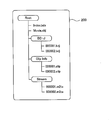
- FIG. 2 is a conceptual diagram showing an example of the file structure of the Blu-ray disc according to the present embodiment.
- the BD-J directory stores BD-J object files.
- the clip info directory stores clip info files.
- the clip info file is a file that holds attribute information of a stream recorded in the clip info file.
- a stream file is stored in the stream directory.
- the local storage 104 such as a hard disk stores sub-contents that can be used together with the content recorded on the Blu-ray disc 200. Specifically, for example, if the content recorded on the Blu-ray disc 200 is a movie content, subtitle data, dubbed data, and the like are recorded in the local storage 104.
- the sub-content recorded in the local storage 104 is typically acquired from a server arranged on the network via a communication unit (not shown).
- Sub-contents (hereinafter referred to as “update data” as appropriate) acquired from a server arranged on the network are recorded in a directory for each corresponding Blu-ray disc 200.
- FIG. 3 is a conceptual diagram showing an example of the file structure of the local storage according to the present embodiment.
- the directory name of the organization ID directory is a name indicating information for identifying a provider of content recorded on the Blu-ray disc 200 and a manufacturer of the Blu-ray disc, for example.
- the directory name of the disc ID directory is a name indicating information for identifying a Blu-ray disc on which specific content is recorded, for example.
- FIG. 3 Although not shown in FIG. 3, there are a plurality of organization ID directories corresponding to a plurality of organizations. Similarly, there are a plurality of disc ID directories corresponding to each of a plurality of Blu-ray discs.
- a manifest file (Manifest) in FIG. 3 is a file storing management information of update data.
- the update data recorded in the local storage 104 is data acquired corresponding to any of the contents recorded on the Blu-ray disc 200.
- the update data is recorded in the local storage 104 when the content recorded on the Blu-ray disc 200 is reproduced, for example.
- the playback device 100 can execute not only playback of the content recorded on the Blu-ray disc 200 but also playback of the update data recorded on the local storage 104 together with the content recorded on the Blu-ray disc 200.
- the playback device 100 constructs a virtual file system 300 (see FIG. 4) that integrates the file recorded on the Blu-ray disc 200 and the file related to the update data recorded on the local storage 104, and performs playback processing. Do.
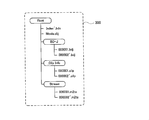
- FIG. 4 is a conceptual diagram showing an example of the file structure of the virtual file system according to the present embodiment.
- the system controller 102 performs playback control of the Blu-ray disc 200 based on a signal indicating the title to be played, playback conditions, and the like transmitted from the title information / user input unit 101. Specifically, the system controller 102 reads information recorded on the Blu-ray disc 200 while controlling the spindle motor 107 so as to rotate the Blu-ray disc 200 at a predetermined rotational speed via the servo circuit 106. The optical pickup 108 is controlled.
- a pickup read signal which is a signal indicating information read by the optical pickup 108 is transmitted to the demodulator 109 and demodulated by the demodulator 109.
- the demodulator 109 transmits a signal indicating demodulated data to the system controller 102 and the demultiplexer 110.
- a signal indicating demodulated data related to a logical information file for example, “Index.bdx” in FIG. 2
- clip data for example, “ (000001.m2ts "and” 000002.m2ts ", etc.
- the file system / logical structure data reader 103 of the system controller 102 extracts logical information file data from the signal indicating the received demodulated data.
- the system controller 102 determines a reproduction address based on the extracted logical information file data, and controls the spindle motor 107 and the optical pickup 108 via the servo circuit 106, respectively.
- FIG. 5 is a conceptual diagram showing an example of an index table file according to the present embodiment.
- the system controller 102 shifts the reproduction environment to the Movie object reproduction environment. Next, the system controller 102 acquires a Movie object file (for example, “Movie.obj” in FIG. 2) from the pointer to the acquired object, and sequentially executes the commands in the acquired Movie object file.
- a Movie object file for example, “Movie.obj” in FIG. 2
- the system controller 102 When a playlist playback command is executed in the Movie object playback environment, the system controller 102 acquires the specified playlist information and play item information, and determines a stream to be played back. Subsequently, the system controller 102 refers to an address conversion table stored in a clip info file (for example, “000001.clip” in FIG. 2) and acquires reproduction start position information.
- a clip info file for example, “000001.clip” in FIG. 2
- the system controller 102 controls the demultiplexer 110 to start decoding each elementary stream. As a result, video and audio are reproduced. At this time, the system controller 102 synthesizes and outputs the sub-picture to the video output at a predetermined timing.
- the system controller 102 reads out, for example, Java Virtual Machine stored in the memory 105, and shifts the reproduction environment to the Java execution environment. Next, the system controller 102 acquires a BD-J object file (for example, “000001.bdj” in FIG. 2) from the pointer to the acquired object.
- a BD-J object file for example, “000001.bdj” in FIG. 2
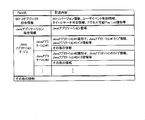
- FIG. 6 is a conceptual diagram showing an example of a BD-J object file according to the present embodiment.
- the system controller 102 acquires the designated playlist information and play item information, and determines a stream to be reproduced. Subsequently, the system controller 102 refers to the address conversion table stored in the clip info file and acquires the reproduction start position information.
- the system controller 102 controls the demultiplexer 110 to start decoding each elementary stream. As a result, video and audio are reproduced.
- update data when updated data is recorded in the local storage 104, for example, the following may be performed. That is, when the Blu-ray disc 200 is inserted into the playback device 100, the system controller 102 displays a menu that allows the user to select whether to use update data, for example. When the user selects to use the update data, the system controller 102 constructs the virtual file system 300 and executes a reproduction process based on the constructed virtual file system 300.
- the system controller 102 automatically constructs the virtual file system 300 when the Blu-ray disc 200 is inserted into the reproducing apparatus 100, and executes a reproduction process based on the constructed virtual file system 300.
- title unbound application information that is information indicating a title unbound application being executed
- the reproduction position information which is information indicating the reproduction position, is stored in the local storage 104 as reproduction return information, for example.
- the system controller 102 determines the title based on the title unbound application information included in the saved reproduction return information. While the unbound application is executed, playback of one title is resumed based on the playback position information included in the stored playback return information.
- the playback apparatus 100 it is possible to construct a Java environment similar to that before interrupting playback of one title, and to properly playback one title.
- the system controller 102 displays, for example, a screen that allows the user to select whether or not to use the playback return information when playback of one title is resumed, and uses the playback return information according to a user instruction. Then, playback of one title may be resumed. Alternatively, the system controller 102 may automatically resume playback of one title using the playback return information.
- step S101 the system controller 102 determines whether or not the Blu-ray disc 200 has been inserted into the playback apparatus 100 (or has already been inserted) (step S101). When it is determined that the Blu-ray disc 200 is not inserted (step S101: No), the system controller 102 executes the process of step S101 again.
- step S101: Yes the system controller 102 indicates that the playback return information related to the inserted Blu-ray disc 200 is, for example, local Whether or not to use the reproduction return information is determined on the condition that it is stored in the storage 104 (step S102).
- the system controller 102 determines to use the playback restoration information.
- the system controller 102 determines that the reproduction return information is not used when, for example, an instruction to not use the reproduction restoration information from the user is received via the title information / user input unit 101.
- the system controller 102 determines, for example, that the Blu-ray disc 200 has been inserted (or has already been inserted) in the process of step S101.
- the virtual file system 300 is constructed before the process of step S102.
- step S102 When it is determined in the process of step S102 that the reproduction return information is not used (step S102: No), the system controller 102 starts reproduction of the title corresponding to the first play (First Play) (step S103). Simultaneously with the start of playback of the title or after a predetermined time has elapsed from the start of playback of the title, information indicating the activated title unbound application is recorded as playback return information (step S104).
- step S102 when it is determined in the process of step S102 that the reproduction return information is used (step S102: Yes), the system controller 102 executes the reproduction return process (S200).
- the system controller 102 activates the title unbound application based on the title unbound application information included in the playback return information (step S201). At this time, the title to be resumed is not reproduced.
- the system controller 102 reproduces the title that was interrupted by the previous reproduction designated by the title number included in the reproduction return information (step S202).
- the object type of the title interrupted last time is a BD-J object.
- the system controller 102 determines whether or not a time search is possible (step S203). Note that whether or not the time search is possible may be determined by determining whether or not “Time Search UO” is valid, for example.
- step S203 When it is determined that the time search is possible (step S203: Yes), the system controller 102 automatically executes “Time Search UO”, for example, and based on the playback position information included in the playback return information, The reproduction of the title is resumed from the reproduction time (step S204).
- step S203 when it is determined that the time search is not possible (step S203: No), the system controller 102 first sets the playback position to the chapter corresponding to the chapter number based on the chapter number included in the playback return information. Set to the beginning of. Subsequently, the system controller 102 resumes playback of the title by fast-forwarding or rewinding to the vicinity of the previous playback time based on the playback position information included in the playback return information (step S205).
- the system controller 102 executes the update process after the process of step S104 or the reproduction return process (step S300).
- the system controller 102 determines whether or not the title unbound application being executed has been changed (step S301). Specifically, the system controller 102 determines whether the title unbound application being executed has been discarded (that is, terminated), or whether a new title unbound application has been started. .
- the system controller 102 updates the title unbound application information included in the playback return information (step S302). In particular, when the title unbound application is activated, the system controller 102 may also record a title number corresponding to the title.
- step S303 determines whether or not the chapter has been changed. Even when it is determined that the title unbound application has not been changed (step S301: No), the system controller 102 executes the process of step S303.
- step S304 determines whether or not the chapter search is permitted. Whether or not chapter search is permitted may be determined, for example, by referring to item information included in a playlist file.
- step S304 When it is determined that the chapter search is permitted (step S304), the system controller 102 updates the reproduction position information included in the reproduction return information (step S305). Next, the system controller 102 determines whether or not the stream has been changed (that is, whether or not another stream has been selected) (step S306). Even when it is determined that the chapter has not been changed (step S303: No) and when it is determined that the chapter search is not permitted (step S304: No), the system controller 102 performs the process of step S306. Execute.
- step S306 When it is determined that the stream has been changed (step S306: Yes), the system controller 102 updates the reproduction position information included in the reproduction return information (step S307). Next, the system controller 102 determines whether or not a predetermined time (for example, 10 seconds) has elapsed (step S308). Even when it is determined that the stream has not been changed (step S306: No), the system controller 102 executes the process of step S308.
- a predetermined time for example, 10 seconds
- step S308: Yes the system controller 102 updates the reproduction time of the reproduction position information included in the reproduction return information (step S309).
- step S309 the system controller 102 executes the process of step S105 described later (see FIG. 7).
- step S308: No the system controller 102 performs the process of step S105.
- each process of steps S301, S303, S306, and S308 is executed is not limited to the order shown in FIG.
- the reproduction return information may be updated when an instruction is given from the user.
- the system controller 102 determines whether or not the reproduction of another title different from the currently reproduced title is instructed (step S105). When it is determined that the reproduction of another title has been instructed (step S105: Yes), the system controller 102 ends the reproduction of the currently reproduced title (step S109) and executes the process of step S112 described later. To do.
- step S105 determines whether or not the reproduction of another title has been instructed. If it is determined that the reproduction of another title is not instructed (step S105: No), the system controller 102 determines whether or not the currently reproduced title has been reproduced to the end (step S106). . If it is determined that the currently played title has not been played to the end (step S106: No), the system controller 102 executes an update process.
- the system controller 102 records the playback return information (step S107). Specifically, the system controller 102, for example, the disc identifier related to the Blu-ray Disc 200, the information related to the title unbound application being executed at the start of title playback, the title so as to be played from the beginning of the title at the next playback Record the number etc.
- the system controller 102 may further record a content creator identifier related to the content recorded on the Blu-ray disc 200.
- the system controller 102 determines whether or not all reproduction has been completed (step S108). Specifically, for example, the system controller 102 determines whether or not the Blu-ray disc 200 has been removed from the playback device 100. If it is determined that all reproduction has been completed (step S108: Yes), the system controller 102 once ends the process.
- step S108 When it is determined that all reproduction has not been completed (step S108: No), the system controller 102 reproduces the title corresponding to the menu (Menu) (step S110). Next, the system controller 102 determines whether or not playback of another title has been instructed (step S111).
- step S111: No If it is determined that playback of another title is not instructed (step S111: No), the system controller 102 executes the process of step S108. On the other hand, when playback of another title is instructed (step S111: Yes), the system controller 102 is conditioned on the condition that playback return information related to the instructed other title is stored in the local storage 104, for example. Then, it is determined whether or not the reproduction return information is used (step S112). When it is determined that the reproduction return information is to be used (step S112: Yes), the system controller 102 executes a reproduction return process (step S200).
- step S112 when it is determined not to use the reproduction return information (step S112: No), the system controller 102 reproduces from the head of the other designated title (step S113) and at the same time as the reproduction of the title starts or Information indicating the activated title unbound application is recorded as reproduction return information after a predetermined time has elapsed from the start of reproduction of the title (step S114).
- the “system controller 102” according to the present embodiment is an example of “save means”, “resume means”, and “update means” according to the present invention.
- Playback Device 102
- System Controller 104
- Local Storage 105
- Memory 106
- Servo Circuit 107
- Spindle Motor 108
- Optical Pickup 200 Blu-ray Disc
Landscapes
- Signal Processing For Digital Recording And Reproducing (AREA)
Abstract
再生装置(100)は、一のタイトルが再生されている際に、実行されているタイトルアンバウンドアプリケーションを示す情報であるタイトルアンバウンドアプリケーション情報と、再生位置を示す情報である再生位置情報とを保存する保存手段(102)と、一のタイトルの再生が中断された後、一のタイトルの再生が再開される際に、保存されたタイトルアンバウンドアプリケーション情報に基づいて、タイトルアンバウンドアプリケーションを実行すると共に、保存された再生位置情報に基づいて、一のタイトルの再生を再開する再開手段(102)とを備える。
Description
本発明は、ブルーレイディスクを再生可能な再生装置及び方法、並びにコンピュータプログラムの技術分野に関する。
この種の装置では、例えば、Java(登録商標、以下同じ)アプリケーションを実行しつつ、映像データを再生する連動再生が行われることが多い。尚、連動すべきJavaアプリケーション及び映像データは、「タイトル」と呼ばれる再生単位で対応付けられている。
この種の装置として、例えば特許文献1には、タイトルの再生途中にメニュー要求があった場合、現在再生位置を確認することのできる情報をレジューム情報として保存し、その後メニュー状態でレジューム要求があった場合、保存されたレジューム情報が示す以前のタイトル内のビデオストリーム地点を探して、その地点から再生を再開する再生装置が記載されている。
ここで、Javaアプリケーションには、再生されたタイトル内のみ生存可能なJavaアプリケーションであるタイトルバウンドアプリケーションと、複数のタイトルにまたがって生存可能なJavaアプリケーションであるタイトルアンバウンドアプリケーションとが存在する。
一のタイトルが再生される場合、該一のタイトルの再生中に起動されるタイトルバウンドアプリケーション及びタイトルアンバウンドアプリケーションに加えて、一のタイトルよりも前に再生された他のタイトルの再生中に起動されたタイトルアンバウンドアプリケーションも実行される。
このため、上述の特許文献1に記載された技術のように、タイトルの再生が中断された時の再生位置を保存するだけでは、該タイトルの再生の再開時に、該タイトルを適切に再生できない可能性があるという技術的問題点がある。
本発明は、例えば上記問題点に鑑みてなされたものであり、タイトルの再生を中断した後に該タイトルの再生を再開した場合に、タイトルを適切に再生することができる再生装置及び方法、並びにコンピュータプログラムを提供することを課題とする。
本発明の再生装置は、上記課題を解決するために、一のタイトルが再生されている際に、実行されているタイトルアンバウンドアプリケーションを示す情報であるタイトルアンバウンドアプリケーション情報と、再生位置を示す情報である再生位置情報とを保存する保存手段と、前記一のタイトルの再生が中断された後、前記一のタイトルの再生が再開される際に、前記保存されたタイトルアンバウンドアプリケーション情報に基づいて、タイトルアンバウンドアプリケーションを実行すると共に、前記保存された再生位置情報に基づいて、前記一のタイトルの再生を再開する再開手段とを備える。
本発明の再生装置によれば、例えばメモリ、プロセッサ等を備えて成る保存手段は、一のタイトルが再生されている際に、実行されているタイトルアンバウンドアプリケーションを示す情報であるタイトルアンバウンドアプリケーション情報と、再生位置を示す情報である再生位置情報とを保存する。本発明に係る「一のタイトル」の再生中には、Javaアプリケーションを実行可能である。
尚、タイトルアンバウンドアプリケーション情報と再生位置情報とは、同じタイミングで保存されなくてもよい。例えば、タイトルアンバウンドアプリケーション情報は、一のタイトルの再生が開始された時点又は該時点から所定時間経過した時点、及びタイトルアンバウンドアプリケーションが起動された時点又は該時点から所定時間経過した時点で保存される。他方、再生位置情報は、所定期間毎に周期的に保存される。
タイトルアンバウンドアプリケーション情報は、例えばTitle unbound java application識別子等である。即ち、タイトルアンバウンドアプリケーション情報は、実データではなく、管理情報である。
再生位置情報には、例えば、一のタイトルが記録されているメディア(例えば、ブルーレイディスク)を識別する情報、一のタイトルのタイトル番号、チャプター番号、再生時刻、選択されている主映像及び音声を識別する情報等が含まれる。
例えばメモリ、プロセッサ等を備えて成る再開手段は、一のタイトルの再生が中断された後、該一のタイトルの再生が再開される際に、保存されたタイトルアンバウンドアプリケーション情報に基づいて、タイトルアンバウンドアプリケーションを実行すると共に、保存された再生位置情報に基づいて、該一のタイトルの再生を再開する。
本願発明者の研究によれば、以下の事項が判明している。一のタイトルの再生を中断した後に該一のタイトルの再生を再開するためには、一のタイトルの再生を中断する際に、実行されているJavaアプリケーション(即ち、タイトルバウンドアプリケーション及びタイトルアンバウンドアプリケーション)の実行状態と、該Javaアプリケーションが使用する音声、グラフィックデータ及びJava Virtual Machine等のJava実行環境の状態を保存しなければならない。
理想的には、一のタイトルの再生を中断する際に、読み込まれている全てのデータを保存することが望ましい。しかしながら、全てのデータの容量は約100MB(メガバイト)であり、例えばハードディスク等の記憶装置への書き込み時間が比較的長くなる可能性がある。特に、再生装置が自動車に搭載されている場合、再生装置の電源のON/OFFは、イグニッションキーのON/OFFと連動するため、書き込み時間を十分確保することが困難になる可能性がある。加えて、再生装置に複数のメディアに係る情報を保持させる場合、大容量の記憶装置を用意しなければならず、製造コストが増加する。
他方、一のタイトルの再生を中断する際の再生位置を保存するだけでは、該一のタイトルの再生が再開された際に、本来実行されるべきタイトルアンバウンドアプリケーションが実行されない可能性がある。すると、一のタイトルの再生中に、タイトルアンバウンドアプリケーションが、例えば所定の時刻においてグラフィックス表示を行う処理や、タイトルアンバウンドアプリケーション及びタイトルバウンドアプリケーション間の通信等が、阻害され、一のタイトルが適切に再生されない可能性がある。
しかるに本発明では、保存手段により、一のタイトルが再生されている際に、タイトルアンバウンドアプリケーション情報と再生位置情報とが保存される。一のタイトルの再生を再開する際には、再開手段により、保存されたタイトルアンバウンドアプリケーション情報に基づいて、タイトルアンバウンドアプリケーションが実行されると共に、保存された再生位置情報に基づいて、該一のタイトルの再生が再開される。
タイトルアンバウンドアプリケーション情報によって、一のタイトルの再生の中断前に実行されていたタイトルアンバウンドアプリケーションが示されるので、再開手段が、保存されたタイトルアンバウンドアプリケーション情報に基づいて、タイトルアンバウンドアプリケーションを実行すれば、一のタイトルの再生の中断前に実行されていたタイトルアンバウンドアプリケーションが実行されることとなる。また、再開手段が、保存された再生位置情報に基づいて、一のタイトルの再生を再開すれば、該一のタイトルに係るタイトルバウンドアプリケーションが適切に実行される。
この結果、一のタイトルの再生の中断前と同様のJava環境を構築することができ、一のタイトルを適切に再生することができる。また、上述の如く、タイトルアンバウンドアプリケーション情報は管理情報であるため、保存される情報の容量は、例えば100KB(キロバイト)以下と比較的小さい。このため、当該再生装置に複数のメディアに係る情報を保持させることができる。
更に、当該再生装置が自動車に搭載され、一のタイトルの再生中に、イグニッションキーがOFF状態にされたとしても、適切に、タイトルアンバウンドアプリケーション情報及び再生位置情報を保存することができる。
本発明の再生装置の一態様では、前記保存手段は、前記一のタイトルが再生されている際に、前記実行されているタイトルアンバウンドアプリケーション及び前記再生位置の少なくとも一方が変更されたことを条件に、前記保存されたタイトルアンバウンドアプリケーション情報及び前記保存された再生位置情報の少なくとも一方を更新する更新手段を含む。
この態様によれば、比較的容易にして、タイトルアンバウンドアプリケーション情報及び再生位置情報を更新することができ、実用上非常に有利である。
本発明の再生方法は、上記課題を解決するために、一のタイトルが再生されている際に、実行されているタイトルアンバウンドアプリケーションを示す情報であるタイトルアンバウンドアプリケーション情報と、再生位置を示す情報である再生位置情報とを保存する保存工程と、前記一のタイトルの再生が中断された後、前記一のタイトルの再生が再開される際に、前記保存されたタイトルアンバウンドアプリケーション情報に基づいて、タイトルアンバウンドアプリケーションを実行すると共に、前記保存された再生位置情報に基づいて、前記一のタイトルの再生を再開する再開工程とを備える。
本発明の再生装置によれば、上述した本発明の再生装置と同様に、一のタイトルを適切に再生することができる。
尚、本発明の再生方法においても、上述した本発明の再生装置における各種態様と同様の各種態様を採ることが可能である。
本発明のコンピュータプログラムは、上記課題を解決するために、コンピュータを、一のタイトルが再生されている際に、実行されているタイトルアンバウンドアプリケーションを示す情報であるタイトルアンバウンドアプリケーション情報と、再生位置を示す情報である再生位置情報とを保存する保存手段と、前記一のタイトルの再生が中断された後、前記一のタイトルの再生が再開される際に、前記保存されたタイトルアンバウンドアプリケーション情報に基づいて、タイトルアンバウンドアプリケーションを実行すると共に、前記保存された再生位置情報に基づいて、前記一のタイトルの再生を再開する再開手段とを備える再生装置として機能させる。
本発明のコンピュータプログラムによれば、当該コンピュータプログラムを格納するCD-ROM(Compact Disc Read Only Memory)、DVD-ROM(DVD Read Only Memory)等の記録媒体から、当該コンピュータプログラムを、再生装置に備えられたコンピュータに読み込んで実行させれば、或いは、当該コンピュータプログラムを、通信手段を介してダウンロードさせた後に実行させれば、上述した本発明の再生装置を比較的容易にして実現できる。これにより、上述した本発明の再生装置の場合と同様に、一のタイトルを適切に再生することができる。
尚、本発明のコンピュータプログラムにおいても、上述した本発明の再生装置における各種態様と同様の各種態様を採ることが可能である。
以上説明したように、本発明の再生装置によれば、保存手段及び再開手段を備え、本発明の再生方法によれば、保存工程及び再開工程を備え、本発明のコンピュータプログラムによれば、コンピュータを上述の再生装置として機能させるので、一のタイトルを適切に再生することができる。
本発明の作用及び他の利得は次に説明する実施するための形態から明らかにされる。
以下、本発明の再生装置に係る実施形態を図面に基づいて説明する。
(再生装置の構成)
先ず、本実施形態に係る再生装置の構成について、図1を参照して説明する。図1は、本実施形態に係る再生装置の構成を示すブロック図である。尚、図中の矢印は、信号の流れを示している。
先ず、本実施形態に係る再生装置の構成について、図1を参照して説明する。図1は、本実施形態に係る再生装置の構成を示すブロック図である。尚、図中の矢印は、信号の流れを示している。
図1において、再生装置100は、タイトル情報/ユーザ入力部101、システムコントローラ102、ローカルストレージ104、メモリ105、サーボ回路106、スピンドルモータ107、光ピックアップ108、復調器109、デマルチプレクサ110、ビデオ(Video)デコーダ111、オーディオ(Audio)デコーダ112及びサブピクチャ(Sub picture)デコーダ113を備えて構成されている。
ここで、ブルーレイディスク200のファイル構造は、例えば図2のようである。即ち、ルート(Root)ディレクトの下に、BD-J(Blu-ray Disc Java)ディレクトリ、クリップインフォ(Clip Info)ディレクトリ及びストリーム(Stream)ディレクトリが存在している。図2は、本実施形態に係るブルーレイディスクのファイル構造の一例を示す概念図である。
BD-Jディレクトリには、BD-Jオブジェクトファイルが格納されている。クリップインフォディレクトリには、クリップインフォファイルが格納されている。尚、クリップインフォファイルは、該クリップインフォファイルに記録されているストリームの属性情報を保持するファイルである。ストリームディレクトリには、ストリームファイルが格納されている。
例えばハードディスク等であるローカルストレージ104には、ブルーレイディスク200に記録されたコンテンツと併せて利用可能なサブコンテンツが記録されている。具体的には例えば、ブルーレイディスク200に記録されたコンテンツが映画コンテンツであれば、ローカルストレージ104には、字幕データや吹き替えデータ等が記録されている。尚、ローカルストレージ104に記録されたサブコンテンツは、典型的には、図示しない通信部を介して、ネットワーク上に配置されたサーバから取得される。
ネットワーク上に配置されたサーバから取得されたサブコンテンツ(以下、適宜“更新データ”と称する)は、対応するブルーレイディスク200毎にディレクトリに分けられて記録される。
ここで、ローカルストレージ104のファイル構造は、例えば図3のようである。即ち、ルートディレクトリの下に、組織ID(Organization ID)ディレクトリが存在し、該組織IDディレクトリの下にディスクID(Disc ID)ディレクトリが存在する。図3は、本実施形態に係るローカルストレージのファイル構造の一例を示す概念図である。
尚、組織IDディレクトリのディレクトリ名は、例えばブルーレイディスク200に記録されたコンテンツの提供者やブルーレイディスクの製造者を識別する情報を示す名前である。また、ディスクIDディレクトリのディレクトリ名は、例えば特定のコンテンツを記録したブルーレイディスクを識別する情報を示す名前である。
尚、図3では図示を省略しているが、組織IDディレクトリは、複数の組織各々に対応して、複数存在している。同様に、ディスクIDディレクトリも、複数のブルーレイディスク各々に対応して、複数存在している。
図3に示したディスクIDディレクトリが、図2に示したブルーレイディスク200に対応していると仮定する。ブルーレイディスク200に対応する更新データは、図3に示したディスクIDディレクトリ以下に記録される。図3における“Index´.bdx”、“000002´.bdj”、“000002´.clip”及び“000002´.m2ts”は、夫々、図2における“Index.bdx”、“000002.bdj”、“000002.clip”及び“000002.m2ts”の更新データである。尚、図3におけるマニフェストファイル(Manifest)は、更新データの管理情報を格納したファイルである。
このように、ローカルストレージ104に記録される更新データは、ブルーレイディスク200に記録されたコンテンツのいずれかに対応して取得されたデータである。更新データは、例えば、ブルーレイディスク200に記録されたコンテンツの再生に際して、ローカルストレージ104に記録される。
再生装置100は、ブルーレイディスク200に記録されたコンテンツの再生だけでなく、ブルーレイディスク200に記録されたコンテンツと併せて、ローカルストレージ104に記録された更新データの再生を実行することができる。この場合、再生装置100は、ブルーレイディスク200に記録されたファイルと、ローカルストレージ104に記録された更新データに係るファイルとを統合したバーチャルファイルシステム300(図4参照)を構築して再生処理を行う。このバーチャルファイルシステムに基づく再生処理により、あたかも一つのメディアからの再生処理と同様の再生が可能となる。図4は、本実施形態に係るバーチャルファイルシステムのファイル構造の一例を示す概念図である。
(再生装置の動作)
再び図1に戻り、システムコントローラ102は、タイトル情報/ユーザ入力部101から送信された再生すべきタイトルや再生条件等を示す信号に基づいて、ブルーレイディスク200の再生制御を行う。具体的には、システムコントローラ102は、サーボ回路106を介して、ブルーレイディスク200を所定の回転数で回転させるようにスピンドルモータ107を制御しつつ、ブルーレイディスク200に記録されている情報を読み取るように光ピックアップ108を制御する。
再び図1に戻り、システムコントローラ102は、タイトル情報/ユーザ入力部101から送信された再生すべきタイトルや再生条件等を示す信号に基づいて、ブルーレイディスク200の再生制御を行う。具体的には、システムコントローラ102は、サーボ回路106を介して、ブルーレイディスク200を所定の回転数で回転させるようにスピンドルモータ107を制御しつつ、ブルーレイディスク200に記録されている情報を読み取るように光ピックアップ108を制御する。
光ピックアップ108により読み取られた情報を示す信号であるピックアップ読取信号は復調器109に送信され、該復調器109により復調される。該復調器109は、システムコントローラ102及びデマルチプレクサ110に対し、復調データを示す信号を送信する。尚、システムコントローラ102には、論理情報ファイル(例えば、図2における“Index.bdx”等)に係る復調データを示す信号が送信され、デマルチプレクサ110には、クリップデータ(例えば、図2における“000001.m2ts”及び“000002.m2ts”等)に係る復調データを示す信号が送信される。
システムコントローラ102のファイルシステム/論理構造データ判読器103は、受信した復調データを示す信号から論理情報ファイルデータを抽出する。システムコントローラ102は、抽出された論理情報ファイルデータに基づいて再生アドレスを決定し、サーボ回路106を介して、スピンドルモータ107及び光ピックアップ108を夫々制御する。
続いて、システムコントローラ102は、図5に示すようなインデックステーブルファイル(即ち、“Index.bdx”)を参照して、再生すべきタイトルのオブジェクトタイプ、オブジェクトへのポインタを取得する。図5は、本実施形態に係るインデックステーブルファイルの一例を示す概念図である。
再生すべきタイトルのオブジェクトタイプがMovieオブジェクトである場合、システムコントローラ102は、再生環境をMovieオブジェクト再生環境に移行する。次に、システムコントローラ102は、取得したオブジェクトへのポインタよりMovieオブジェクトファイル(例えば、図2における“Movie.obj”)を取得し、該取得されたMovieオブジェクトファイル内のコマンドを順次実行する。
Movieオブジェクト再生環境において、プレイリスト再生コマンドが実行された場合、システムコントローラ102は、指定されたプレイリスト情報及びプレイアイテム情報を取得して、再生すべきストリームを決定する。続いて、システムコントローラ102は、クリップインフォファイル(例えば、図2における“000001.clip”等)に格納されたアドレス変換テーブルを参照して再生開始位置情報を取得する。
システムコントローラ102は、再生開始位置情報により示される再生位置アドレスへのアクセスが終了すると、各エレメンタリストリームのデコードを開始するようにデマルチプレクサ110を制御する。この結果、ビデオ及びオーディオが再生される。この際、システムコントローラ102は、サブピクチャを所定のタイミングでビデオ出力に合成して出力する。
他方、再生すべきタイトルのオブジェクトタイプがBD-Jオブジェクトである場合、システムコントローラ102は、メモリ105に格納されている、例えばJava Virtual Machine等を読み出して、再生環境をJava実行環境に移行する。次に、システムコントローラ102は、取得したオブジェクトへのポインタよりBD-Jオブジェクトファイル(例えば、図2における“000001.bdj”等)を取得する。
次に、システムコントローラ102は、予め定められている優先順位(例えば、図6に示すようなBD-JオブジェクトファイルにおけるJavaアプリケーションテーブルの上位4つ等)に従って、アプリケーションプログラムを、Javaアプリケーション#xパス情報を参照して実行する。図6は、本実施形態に係るBD-Jオブジェクトファイルの一例を示す概念図である。
Java実行環境において、Javaアプリケーションからプレイリスト再生を指示された場合、システムコントローラ102は、指定されたプレイリスト情報及びプレイアイテム情報を取得して、再生すべきストリームを決定する。続いて、システムコントローラ102は、クリップインフォファイルに格納されたアドレス変換テーブルを参照して再生開始位置情報を取得する。
システムコントローラ102は、再生開始位置情報により示される再生位置アドレスへのアクセスが終了すると、各エレメンタリストリームのデコードを開始するようにデマルチプレクサ110を制御する。この結果、ビデオ及びオーディオが再生される。
尚、ローカルストレージ104に更新データが記録されている場合は、例えば次のようにすればよい。即ち、システムコントローラ102が、ブルーレイディスク200が再生装置100に挿入された際に、例えば更新データを使用するか否かをユーザに選択させるメニューを表示する。ユーザが更新データを使用することを選択した場合、システムコントローラ102は、バーチャルファイルシステム300を構築して、該構築されたバーチャルファイルシステム300に基づく再生処理を実行する。
或いは、システムコントローラ102は、ブルーレイディスク200が再生装置100に挿入された際に、自動的に、バーチャルファイルシステム300を構築して、該構築されたバーチャルファイルシステム300に基づく再生処理を実行する。
本実施形態では特に、システムコントローラ102により、オブジェクトタイプがBD-Jオブジェクトである一のタイトルが再生されている際に、実行されているタイトルアンバウンドアプリケーションを示す情報であるタイトルアンバウンドアプリケーション情報と、再生位置を示す情報である再生位置情報とが、例えば再生復帰情報として、ローカルストレージ104に保存される。
そして、一のタイトルの再生が中断された後、該一のタイトルの再生が再開される際に、システムコントローラ102により、保存された再生復帰情報に含まれるタイトルアンバウンドアプリケーション情報に基づいて、タイトルアンバウンドアプリケーションが実行されると共に、保存された再生復帰情報に含まれる再生位置情報に基づいて、一のタイトルの再生が再開される。
従って、再生装置100によれば、一のタイトルの再生の中断前と同様のJava環境を構築することができ、一のタイトルを適切に再生することができる。
尚、システムコントローラ102は、一のタイトルの再生が再開される際に、例えば再生復帰情報を使用するか否かをユーザに選択させる画面を表示し、ユーザの指示に応じて再生復帰情報を使用して一のタイトルの再生を再開してよい。或いは、システムコントローラ102は、自動的に、再生復帰情報を使用して一のタイトルの再生を再開してよい。
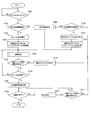
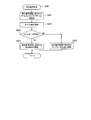
次に、再生装置100の動作について、図7のフローチャートを参照して具体的に説明する。
図7において、先ず、システムコントローラ102は、ブルーレイディスク200が、当該再生装置100に挿入された(又は、既に挿入されている)か否かを判定する(ステップS101)。ブルーレイディスク200が挿入されていないと判定された場合(ステップS101:No)、システムコントローラ102は、再びステップS101の処理を実行する。
他方、ブルーレイディスク200が挿入された(又は、既に挿入されている)と判定された場合(ステップS101:Yes)、システムコントローラ102は、挿入されたブルーレイディスク200に係る再生復帰情報が、例えばローカルストレージ104に保存されていることを条件に、該再生復帰情報を使用するか否かを判定する(ステップS102)。
ここで、システムコントローラ102は、例えばユーザからの再生復帰情報の使用指示を、タイトル情報/ユーザ入力部101を介して受信した場合に、再生復帰情報を使用すると判定する。他方、システムコントローラ102は、例えばユーザからの再生復帰情報の不使用指示を、タイトル情報/ユーザ入力部101を介して受信した場合に、再生復帰情報を使用しないと判定する。
尚、ローカルストレージ104に記録された更新データが利用される場合、システムコントローラ102は、例えば、ステップS101の処理においてブルーレイディスク200が挿入された(又は、既に挿入されている)と判定された後、ステップS102の処理の前に、バーチャルファイルシステム300を構築する。
ステップS102の処理において、再生復帰情報を使用しないと判定された場合(ステップS102:No)、システムコントローラ102は、ファーストプレイ(First Play)に対応するタイトルの再生を開始する(ステップS103)と共に、該タイトルの再生開始と同時に又は該タイトルの再生開始から所定時間経過後に、起動されているタイトルアンバウンドアプリケーションを示す情報を再生復帰情報として記録する(ステップS104)。
他方、ステップS102の処理において、再生復帰情報を使用すると判定された場合(ステップS102:Yes)、システムコントローラ102は、再生復帰処理を実行する(S200)。
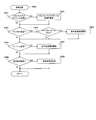
ここで、本実施形態に係る再生復帰処理について、図8のフローチャートを参照して具体的に説明する。
図8において、先ず、システムコントローラ102は、再生復帰情報に含まれるタイトルアンバウンドアプリケーション情報に基づいて、タイトルアンバウンドアプリケーションを起動する(ステップS201)。この際、再開されるべきタイトルは再生されない。
次に、システムコントローラ102は、再生復帰情報に含まれるタイトル番号により指定される前回再生を中断されたタイトルを再生する(ステップS202)。尚、前回中断されたタイトルのオブジェクトタイプは、BD-Jオブジェクトである。
続いて、システムコントローラ102は、タイムサーチが可能か否かを判定する(ステップS203)。尚、タイムサーチが可能か否かは、例えば“Time Search UO”が有効か否かを判定することによって、判定すればよい。
タイムサーチが可能であると判定された場合(ステップS203:Yes)、システムコントローラ102は、例えば“Time Search UO”を自動実行して、再生復帰情報に含まれる再生位置情報に基づいて、前回の再生時刻からタイトルの再生を再開する(ステップS204)。
他方、タイムサーチが不可能であると判定された場合(ステップS203:No)、システムコントローラ102は、再生復帰情報に含まれるチャプター番号に基づいて、先ず、再生位置を該チャプター番号に対応するチャプターの先頭に設定する。続いて、システムコントローラ102は、再生復帰情報に含まれる再生位置情報に基づいて、前回の再生時刻近傍まで、早送り又は巻き戻して、タイトルの再生を再開する(ステップS205)。
再び図7に戻り、システムコントローラ102は、ステップS104の処理又は再生復帰処理の後、更新処理を実行する(ステップS300)。
ここで、本実施形態に係る更新処理について、図9のフローチャートを参照して具体的に説明する。
図9において、システムコントローラ102は、実行されているタイトルアンバウンドアプリケーションが変更されたか否かを判定する(ステップS301)。具体的には、システムコントローラ102は、実行されているタイトルアンバウンドアプリケーションが破棄された(即ち、終了された)か否か、或いは、新たなタイトルアンバウンドアプリケーションが起動されたか否かを判定する。
タイトルアンバウンドアプリケーションが変更されたと判定された場合(ステップS301:Yes)、システムコントローラ102は、再生復帰情報に含まれるタイトルアンバウンドアプリケーション情報を更新する(ステップS302)。特に、タイトルアンバウンドアプリケーションが起動された場合、システムコントローラ102は、タイトルに対応するタイトル番号も併せて記録してよい。
次に、システムコントローラ102は、チャプターが変更されたか否かを判定する(ステップS303)。尚、タイトルアンバウンドアプリケーションは変更されていないと判定された場合(ステップS301:No)も、システムコントローラ102は、ステップS303の処理を実行する。
チャプターが変更されたと判定された場合(ステップS303:Yes)、システムコントローラ102は、チャプターサーチが許可されているか否かを判定する(ステップS304)。チャプターサーチが許可されているか否かは、例えばプレイリストファイルに含まれるアイテム情報を参照することによって、判定すればよい。
チャプターサーチが許可されていると判定された場合(ステップS304)、システムコントローラ102は、再生復帰情報に含まれる再生位置情報を更新する(ステップS305)。次に、システムコントローラ102は、ストリームが変更されたか否か(即ち、他のストリームが選択されたか否か)を判定する(ステップS306)。尚、チャプターは変更されていないと判定された場合(ステップS303:No)、及びチャプターサーチは許可されていないと判定された場合(ステップS304:No)も、システムコントローラ102は、ステップS306の処理を実行する。
ストリームが変更されたと判定された場合(ステップS306:Yes)、システムコントローラ102は、再生復帰情報に含まれる再生位置情報を更新する(ステップS307)。次に、システムコントローラ102は、所定時間(例えば10秒等)が経過したか否かを判定する(ステップS308)。尚、ストリームは変更されていないと判定された場合(ステップS306:No)も、システムコントローラ102は、ステップS308の処理を実行する。
所定時間が経過したと判定された場合(ステップS308:Yes)、システムコントローラ102は、再生復帰情報に含まれる再生位置情報の再生時刻を更新する(ステップS309)。次に、システムコントローラ102は、後述するステップS105の処理(図7参照)を実行する。尚、所定時間が経過していないと判定された場合(ステップS308:No)も、システムコントローラ102は、ステップS105の処理を実行する。
尚、ステップS301、S303、S306及びS308の各処理が実行される順番は、図9に示した順番に限られない。また、再生復帰情報は、ユーザから指示があった場合にも更新されてよい。
再び図7に戻り、システムコントローラ102は、更新処理の後、現在再生されているタイトルとは異なる他のタイトルの再生を指示されたか否かを判定する(ステップS105)。他のタイトルの再生を指示されたと判定された場合(ステップS105:Yes)、システムコントローラ102は、現在再生されているタイトルの再生を終了して(ステップS109)、後述するステップS112の処理を実行する。
他方、他のタイトルの再生は指示されていないと判定された場合(ステップS105:No)、システムコントローラ102は、現在再生されているタイトルが最後まで再生されたか否かを判定する(ステップS106)。現在再生されているタイトルが最後まで再生されていないと判定された場合(ステップS106:No)、システムコントローラ102は、更新処理を実行する。
現在再生されているタイトルが最後まで再生されたと判定された場合(ステップS106:Yes)、システムコントローラ102は、再生復帰情報を記録する(ステップS107)。具体的には、システムコントローラ102は、次回再生時に、タイトルの先頭から再生されるように、例えばブルーレイディスク200に係るディスク識別子、タイトル再生開始時に実行されていたタイトルアンバウンドアプリケーションに係る情報、タイトル番号等を記録する。システムコントローラ102は、更に、ブルーレイディスク200に記録されたコンテンツに係るコンテンツ作成者識別子も記録してよい。
次に、システムコントローラ102は、全再生が終了したか否かを判定する(ステップS108)。具体的には例えば、システムコントローラ102は、ブルーレイディスク200が当該再生装置100から取り出されたか否かを判定する。全再生が終了したと判定された場合(ステップS108:Yes)、システムコントローラ102は、一旦処理を終了する。
全再生は終了していないと判定された場合(ステップS108:No)、システムコントローラ102は、メニュー(Menu)に対応するタイトルを再生する(ステップS110)。次に、システムコントローラ102は、他のタイトルの再生を指示されたか否かを判定する(ステップS111)。
他のタイトルの再生は指示されていないと判定された場合(ステップS111:No)、システムコントローラ102は、ステップS108の処理を実行する。他方、他のタイトルの再生が指示された場合(ステップS111:Yes)、システムコントローラ102は、指示された他のタイトルに係る再生復帰情報が、例えばローカルストレージ104に保存されていることを条件に、該再生復帰情報を使用するか否かを判定する(ステップS112)。再生復帰情報を使用すると判定された場合(ステップS112:Yes)、システムコントローラ102は、再生復帰処理を実行する(ステップS200)。
他方、再生復帰情報を使用しないと判定された場合(ステップS112:No)、システムコントローラ102は、指示された他のタイトルの先頭から再生する(ステップS113)と共に、該タイトルの再生開始と同時に又は該タイトルの再生開始から所定時間経過後に、起動されているタイトルアンバウンドアプリケーションを示す情報を再生復帰情報として記録する(ステップS114)。
尚、本実施形態に係る「システムコントローラ102」は、本発明に係る「保存手段」、「再開手段」及び「更新手段」の一例である。
尚、本発明は、上述した実施形態に限られるものではなく、請求の範囲及び明細書全体から読み取れる発明の要旨、或いは思想に反しない範囲で適宜変更可能であり、そのような変更を伴う再生装置及び方法、並びにコンピュータプログラムもまた、本発明の技術的範囲に含まれるものである。
100 再生装置
102 システムコントローラ
104 ローカルストレージ
105 メモリ
106 サーボ回路
107 スピンドルモータ
108 光ピックアップ
200 ブルーレイディスク
102 システムコントローラ
104 ローカルストレージ
105 メモリ
106 サーボ回路
107 スピンドルモータ
108 光ピックアップ
200 ブルーレイディスク
Claims (4)
- 一のタイトルが再生されている際に、実行されているタイトルアンバウンドアプリケーションを示す情報であるタイトルアンバウンドアプリケーション情報と、再生位置を示す情報である再生位置情報とを保存する保存手段と、
前記一のタイトルの再生が中断された後、前記一のタイトルの再生が再開される際に、前記保存されたタイトルアンバウンドアプリケーション情報に基づいて、タイトルアンバウンドアプリケーションを実行すると共に、前記保存された再生位置情報に基づいて、前記一のタイトルの再生を再開する再開手段と
を備えることを特徴とする再生装置。 - 前記保存手段は、前記一のタイトルが再生されている際に、前記実行されているタイトルアンバウンドアプリケーション及び前記再生位置の少なくとも一方が変更されたことを条件に、前記保存されたタイトルアンバウンドアプリケーション情報及び前記保存された再生位置情報の少なくとも一方を更新する更新手段を含むことを特徴とする請求項1に記載の再生装置。
- 一のタイトルが再生されている際に、実行されているタイトルアンバウンドアプリケーションを示す情報であるタイトルアンバウンドアプリケーション情報と、再生位置を示す情報である再生位置情報とを保存する保存工程と、
前記一のタイトルの再生が中断された後、前記一のタイトルの再生が再開される際に、前記保存されたタイトルアンバウンドアプリケーション情報に基づいて、タイトルアンバウンドアプリケーションを実行すると共に、前記保存された再生位置情報に基づいて、前記一のタイトルの再生を再開する再開工程と
を備えることを特徴とする再生方法。 - コンピュータを、一のタイトルが再生されている際に、実行されているタイトルアンバウンドアプリケーションを示す情報であるタイトルアンバウンドアプリケーション情報と、再生位置を示す情報である再生位置情報とを保存する保存手段と、前記一のタイトルの再生が中断された後、前記一のタイトルの再生が再開される際に、前記保存されたタイトルアンバウンドアプリケーション情報に基づいて、タイトルアンバウンドアプリケーションを実行すると共に、前記保存された再生位置情報に基づいて、前記一のタイトルの再生を再開する再開手段とを備える再生装置として機能させることを特徴とするコンピュータプログラム。
Priority Applications (1)
| Application Number | Priority Date | Filing Date | Title |
|---|---|---|---|
| PCT/JP2009/062724 WO2011007416A1 (ja) | 2009-07-14 | 2009-07-14 | 再生装置及び方法、並びにコンピュータプログラム |
Applications Claiming Priority (1)
| Application Number | Priority Date | Filing Date | Title |
|---|---|---|---|
| PCT/JP2009/062724 WO2011007416A1 (ja) | 2009-07-14 | 2009-07-14 | 再生装置及び方法、並びにコンピュータプログラム |
Publications (1)
| Publication Number | Publication Date |
|---|---|
| WO2011007416A1 true WO2011007416A1 (ja) | 2011-01-20 |
Family
ID=43449033
Family Applications (1)
| Application Number | Title | Priority Date | Filing Date |
|---|---|---|---|
| PCT/JP2009/062724 Ceased WO2011007416A1 (ja) | 2009-07-14 | 2009-07-14 | 再生装置及び方法、並びにコンピュータプログラム |
Country Status (1)
| Country | Link |
|---|---|
| WO (1) | WO2011007416A1 (ja) |
Citations (4)
| Publication number | Priority date | Publication date | Assignee | Title |
|---|---|---|---|---|
| WO2006059661A1 (ja) * | 2004-12-01 | 2006-06-08 | Matsushita Electric Industrial Co., Ltd. | 再生装置、画像合成方法、画像合成プログラム及び集積回路 |
| JP2006523909A (ja) * | 2003-04-04 | 2006-10-19 | エルジー エレクトロニクス インコーポレーテッド | ビデオデータの再生レジュームを管理するためのデータ構造を有する記録媒体とそれによる記録及び再生方法及び装置 |
| JP2008507795A (ja) * | 2004-07-22 | 2008-03-13 | 松下電器産業株式会社 | アプリケーション連動再生を行う再生装置 |
| JP2009135947A (ja) * | 2009-01-19 | 2009-06-18 | Sony Corp | 記録媒体 |
-
2009
- 2009-07-14 WO PCT/JP2009/062724 patent/WO2011007416A1/ja not_active Ceased
Patent Citations (5)
| Publication number | Priority date | Publication date | Assignee | Title |
|---|---|---|---|---|
| JP2006523909A (ja) * | 2003-04-04 | 2006-10-19 | エルジー エレクトロニクス インコーポレーテッド | ビデオデータの再生レジュームを管理するためのデータ構造を有する記録媒体とそれによる記録及び再生方法及び装置 |
| JP2008507795A (ja) * | 2004-07-22 | 2008-03-13 | 松下電器産業株式会社 | アプリケーション連動再生を行う再生装置 |
| JP2009043403A (ja) * | 2004-07-22 | 2009-02-26 | Panasonic Corp | アプリケーション連動再生を行う再生装置、再生方法、及び再生プログラム |
| WO2006059661A1 (ja) * | 2004-12-01 | 2006-06-08 | Matsushita Electric Industrial Co., Ltd. | 再生装置、画像合成方法、画像合成プログラム及び集積回路 |
| JP2009135947A (ja) * | 2009-01-19 | 2009-06-18 | Sony Corp | 記録媒体 |
Similar Documents
| Publication | Publication Date | Title |
|---|---|---|
| CN1754225B (zh) | 再现设备、记录方法以及再现方法 | |
| RU2346343C2 (ru) | Система и способ возобновления воспроизведения | |
| CN101099213B (zh) | 使用本地存储从记录介质再现数据的方法和装置 | |
| JP2008522342A (ja) | ローカルストレージのデータファイル管理方法及び装置 | |
| CN101595526A (zh) | 视频音频再现装置 | |
| KR20060094838A (ko) | 로컬 스토리지를 이용한 기록매체 재생방법 및 재생장치 | |
| CN101057286B (zh) | 利用本地存储器从记录介质中再现出数据的方法和装置 | |
| CN101103403A (zh) | 记录介质及使用本地存储从记录介质再现数据的方法和装置 | |
| JP4386258B2 (ja) | 記録再生装置及びサーバ装置 | |
| US20050135787A1 (en) | Recording medium having a data structure for managing graphic information and recording and reproducing methods and apparatuses | |
| JP2009259356A (ja) | コンテンツ再生装置およびコンテンツ再生制御方法 | |
| WO2011007416A1 (ja) | 再生装置及び方法、並びにコンピュータプログラム | |
| JP2010522949A (ja) | 再生装置及び再生方法 | |
| US9185336B2 (en) | Disc player device | |
| EP1836708A2 (en) | Recording medium, and method and apparatus for reproducing data from recording medium using local storage | |
| JP5513202B2 (ja) | 光ディスク再生装置 | |
| JP5017317B2 (ja) | 記録方法、記録装置 | |
| JP2009505324A (ja) | データを再生するための装置及びその方法、データを記録するための装置及びその方法並びに記録媒体 | |
| JP2010086641A (ja) | コンテンツ制御プログラムおよび可搬型記録媒体 | |
| JP5004111B2 (ja) | 再生装置及び方法、並びにコンピュータプログラム | |
| JP4827976B2 (ja) | Avデータ再生方法 | |
| JP6008327B2 (ja) | ディスク再生装置、ディスク再生方法、およびプログラム | |
| JP4827941B2 (ja) | Avデータ再生方法 | |
| JP2008517355A (ja) | ローカルストレージを使用して記録媒体からデータを再生する方法および装置 | |
| KR20070120001A (ko) | 데이터를 재생하는 방법 및 장치 그리고 기록방법,기록장치 및 기록매체 |
Legal Events
| Date | Code | Title | Description |
|---|---|---|---|
| 121 | Ep: the epo has been informed by wipo that ep was designated in this application |
Ref document number: 09847314 Country of ref document: EP Kind code of ref document: A1 |
|
| NENP | Non-entry into the national phase |
Ref country code: DE |
|
| 122 | Ep: pct application non-entry in european phase |
Ref document number: 09847314 Country of ref document: EP Kind code of ref document: A1 |
|
| NENP | Non-entry into the national phase |
Ref country code: JP |