WO2010084950A1 - 情報処理装置及びプログラム - Google Patents
情報処理装置及びプログラム Download PDFInfo
- Publication number
- WO2010084950A1 WO2010084950A1 PCT/JP2010/050792 JP2010050792W WO2010084950A1 WO 2010084950 A1 WO2010084950 A1 WO 2010084950A1 JP 2010050792 W JP2010050792 W JP 2010050792W WO 2010084950 A1 WO2010084950 A1 WO 2010084950A1
- Authority
- WO
- WIPO (PCT)
- Prior art keywords
- display
- item
- unit
- image
- candidate
- Prior art date
- Legal status (The legal status is an assumption and is not a legal conclusion. Google has not performed a legal analysis and makes no representation as to the accuracy of the status listed.)
- Ceased
Links
Images










Classifications
-
- G—PHYSICS
- G06—COMPUTING OR CALCULATING; COUNTING
- G06F—ELECTRIC DIGITAL DATA PROCESSING
- G06F3/00—Input arrangements for transferring data to be processed into a form capable of being handled by the computer; Output arrangements for transferring data from processing unit to output unit, e.g. interface arrangements
- G06F3/01—Input arrangements or combined input and output arrangements for interaction between user and computer
- G06F3/048—Interaction techniques based on graphical user interfaces [GUI]
- G06F3/0487—Interaction techniques based on graphical user interfaces [GUI] using specific features provided by the input device, e.g. functions controlled by the rotation of a mouse with dual sensing arrangements, or of the nature of the input device, e.g. tap gestures based on pressure sensed by a digitiser
- G06F3/0488—Interaction techniques based on graphical user interfaces [GUI] using specific features provided by the input device, e.g. functions controlled by the rotation of a mouse with dual sensing arrangements, or of the nature of the input device, e.g. tap gestures based on pressure sensed by a digitiser using a touch-screen or digitiser, e.g. input of commands through traced gestures
-
- G—PHYSICS
- G06—COMPUTING OR CALCULATING; COUNTING
- G06F—ELECTRIC DIGITAL DATA PROCESSING
- G06F21/00—Security arrangements for protecting computers, components thereof, programs or data against unauthorised activity
- G06F21/30—Authentication, i.e. establishing the identity or authorisation of security principals
- G06F21/31—User authentication
- G06F21/36—User authentication by graphic or iconic representation
-
- G—PHYSICS
- G06—COMPUTING OR CALCULATING; COUNTING
- G06F—ELECTRIC DIGITAL DATA PROCESSING
- G06F3/00—Input arrangements for transferring data to be processed into a form capable of being handled by the computer; Output arrangements for transferring data from processing unit to output unit, e.g. interface arrangements
- G06F3/01—Input arrangements or combined input and output arrangements for interaction between user and computer
- G06F3/048—Interaction techniques based on graphical user interfaces [GUI]
- G06F3/0481—Interaction techniques based on graphical user interfaces [GUI] based on specific properties of the displayed interaction object or a metaphor-based environment, e.g. interaction with desktop elements like windows or icons, or assisted by a cursor's changing behaviour or appearance
- G06F3/0482—Interaction with lists of selectable items, e.g. menus
-
- G—PHYSICS
- G06—COMPUTING OR CALCULATING; COUNTING
- G06F—ELECTRIC DIGITAL DATA PROCESSING
- G06F2203/00—Indexing scheme relating to G06F3/00 - G06F3/048
- G06F2203/041—Indexing scheme relating to G06F3/041 - G06F3/045
- G06F2203/04104—Multi-touch detection in digitiser, i.e. details about the simultaneous detection of a plurality of touching locations, e.g. multiple fingers or pen and finger
Definitions
- the present invention relates to an information processing apparatus including an input detection unit capable of simultaneously detecting a touched position and a display unit.
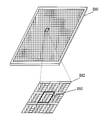
- the system liquid crystal D80 realizes a display device function based on a display signal and an input device function based on a read signal.
- the system liquid crystal D80 is described in an enlarged manner in units of pixels, and is D82, and an optical sensor is built in each pixel (D90), and an operation (touch) from the user can be detected.
- FIG. 20 is a cross-sectional view of one pixel of the system liquid crystal.
- a protective plate D902, a glass plate D904, a color filter D906, an image sensor D908, a glass plate D910, and a backlight D912 are arranged from the upper surface of the system liquid crystal (the side touched by the user).
- red D906R, green D906G, and blue D906B are arranged as RGB colors, and an image sensor is arranged for each color.
- light is emitted from the display backlight D912.
- the irradiated light is reflected by the subject (user's finger D84) in contact with the display surface (protection plate D902) of the system liquid crystal.
- the reflected light is subjected to image processing by the image sensor D908. As a result, it is detected that the subject has touched (touched) the display surface (protection plate D902) of the system liquid crystal.
- the contact positions (coordinates) of a plurality of subjects can be detected. That is, a conventional touch panel (for example, a touch panel using a resistive film, a touch panel using a change in capacitance, a touch panel using electromagnetic induction, etc.) has a single location that can be detected as a touched position.
- the touch panel using the system liquid crystal described above can simultaneously detect a plurality of touched positions.
- a candidate item such as a displayed image, number, character, symbol, and the like using a touch panel using a system liquid crystal
- the user is allowed to select a plurality of items.
- the usage method is considered.
- the displayed candidate item is displayed at an arbitrary position in the normal display area (system liquid crystal).
- the normal display area system liquid crystal
- the child level menu is not always displayed on a single screen. Therefore, it is necessary to switch the display of the menu of the child hierarchy, but for that purpose, it is necessary to separately perform a scroll operation or the like, and it cannot be said that the information processing apparatus is easy to use.
- an object of the present invention is to provide an information processing apparatus that is highly convenient for the user by changing the display state of candidate items that are not selected when selecting an item. Is to provide.
- the information processing apparatus includes an input detection unit (for example, the input detection unit 154 in FIG. 2) capable of simultaneously detecting a touched position and a display unit (for example, the display in FIG. 2).
- a candidate item display control unit for example, the control unit 100 in FIG. 2; step S150 in FIG. 5 that performs control to display a plurality of candidate items on the display unit; While a touch is detected by the input detection unit, an item selection unit that selects a selection item from the displayed candidate items based on the touched position (for example, the control unit 100 in FIG. 2; FIG. 5).
- Steps S152 and S154) and a display change control unit for example, performing control for changing and displaying candidate items other than the selection item when the selection item is selected for a predetermined time or more by the item selection unit
- the control unit 100 of FIG. 2 characterized in that it comprises a step S156, S158) in FIG. 5, a.
- the information processing apparatus includes a candidate image storage unit (for example, candidate image DB 142 in FIG. 2) that stores a plurality of images as the candidate items, and a correct image that stores a correct image from the candidate images.
- the candidate item display control unit performs control to display a plurality of images stored in the candidate image storage unit (for example, the control of FIG. 2).
- Unit 100; step S158 in FIG. 5) the item selection unit selects one or a plurality of images from the displayed candidate images (for example, the control unit 100 in FIG. 2; FIG. Step S160 of FIG. 5, if the selected image matches the correct image stored in the correct image storage unit, an authentication unit that authenticates that the user is a valid user (for example, the authentication in FIG. 2).
- Control unit 11 Characterized by further comprising the step S166, S168) in FIG.
- the authentication unit performs authentication when a touch detected in one selection item among the selection items selected by the item selection unit is released (for example, 2, the control unit 100 in FIG. 2; step S164 in FIG. 5).
- the candidate item display control unit performs control to display items in the parent hierarchy among the items of the hierarchical structure as candidate items (for example, the control unit 100 in FIG. 13; FIG. 15).
- the item selection unit selects a displayed item of the parent hierarchy based on the touch detected by the input detection unit (for example, the control unit 100 of FIG. 13; 15 including step S202 in FIG. 15, and a child hierarchy display control unit (for example, the control unit 100 in FIG. 13) that performs control to display items of child hierarchies that can be selected from the parent hierarchy selected by the parent hierarchy item selection unit.
- Step S204 of FIG.
- Uco hierarchical display change controller e.g., controller 100 in FIG. 13; step S210, S212 of FIG. 15, characterized in that it comprises a.
- the child hierarchy display change control unit performs control so that items of child hierarchies that are not displayed on the display unit are displayed (for example, the control unit 100 in FIG. 13; Step S212 in FIG. 15 is characterized.
- the program of the present invention is connected to an input detection unit (for example, the input detection unit 154 in FIG. 2) capable of simultaneously detecting a touched position and a display unit (for example, the display unit 152 in FIG. 2).
- a touch is detected by a candidate item display control function (for example, the control unit 100 in FIG. 2; step S150 in FIG. 5) for controlling the display unit to display a plurality of candidate items on the computer, and the input detection unit.
- Item selection function for selecting one or a plurality of selection items from the displayed candidate items based on the touched position (for example, control unit 100 in FIG. 2; steps S152 and S154 in FIG.
- a display change control function for example, a control to change and display candidate items other than the selection item 2 of the controller 100; step S156, S158) in FIG. 5, characterized in that to realize.
- a plurality of candidate items are displayed on the display unit, and based on the detected touch, a selection item is selected from the displayed candidate items and selected for a predetermined time or more.
- a selection item is selected from the displayed candidate items and selected for a predetermined time or more.
- candidate items other than the selected item are changed and displayed. Accordingly, since items other than the selected item change, it is possible to provide a highly convenient information processing apparatus that can be displayed at a position where it can be easily selected when the item is selected next time.
- an image as a plurality of candidate items is displayed from the images stored in the candidate image storage unit, and one or a plurality of images are selected from among the images. And about the image which is not selected, if predetermined time passes, it will change to a different image. If the selected item (image) matches the correct image, it is determined that the user has been authenticated as a valid user. Therefore, when authentication is performed using an image, even if the correct image is displayed at a location that is difficult to press when the user selects a plurality of candidates, the location of the image changes after a predetermined time has elapsed. Will be displayed at a position where it is easy to touch.
- authentication is performed when the touch detected in one of the selection items selected by the item selection unit is released. Therefore, authentication can be performed only by the user releasing the touch, and a highly convenient information processing apparatus can be provided.
- the parent hierarchy items are displayed on the display unit, the parent hierarchy items are selected based on the touch, and the child hierarchy items are displayed according to the selected parent hierarchy.
- the display of the child hierarchy item is changed. Accordingly, by selecting the parent hierarchy by touch, the display of the child hierarchy items is changed, and it is possible to provide a highly convenient information processing apparatus.
- Embodiment [1. First Embodiment] First, the first embodiment will be described. 1st Embodiment demonstrates the case where this invention is applied about the authentication system which uses an image as an item selected when authenticating that a user is a valid user. That is, first, a candidate image is displayed as a candidate item. Then, the selected image is selected as a selection item from the candidate images. Hereinafter, it explains in detail using a drawing.
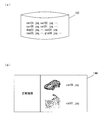
- FIG. 1A shows a case where the display screen of the mobile phone is displayed vertically
- FIG. 1B shows an example where the display screen is displayed horizontally
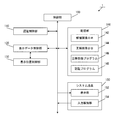
- FIG. 2 shows a functional configuration of the information processing apparatus 1.
- an authentication control unit 110 a display data control unit 120, a storage unit 140, and a system liquid crystal 150 are connected to the control unit 100 via a bus.
- a display position control unit 130 is connected to the display data control unit 120.
- the control unit 100 is a functional unit for controlling the operation of the information processing apparatus 1, and is configured by a control circuit necessary for the information processing apparatus 1, such as a CPU.
- the control unit 100 implements various processes by reading and executing various programs stored in the storage unit 140.
- the authentication control unit 110 determines whether or not the user is a valid user by determining whether or not an image selected by the user matches an image stored in a correct image DB 144 described later. It is a functional unit for performing authentication control for authentication.
- the information processing apparatus executes various processes according to the authentication result. For example, when the information processing apparatus 1 is used for entrance / exit control, entry / exit is permitted when authentication is performed correctly. Further, when the information processing apparatus 1 is used in the payment process, the payment process is executed when the authentication is correctly performed.
- the display data control unit 120 is a functional unit that controls data to be displayed on a system liquid crystal 150 (display unit 152), which will be described later, based on an instruction from the control unit 100.
- the display data control unit displays an image to be displayed on the control unit 100 and displays it at a display position based on the display position control unit 130.
- the display position control unit 130 is a functional unit that determines the display position of an image to be displayed (for example, a candidate image) and controls the display data control unit 120.
- the content of the display signal output from the display data control unit 120 to the display unit 152 is specifically controlled. Then, the display data control unit 120 outputs to the display unit 152 based on the control signal input from the display position control unit 130.
- the storage unit 140 is a functional unit that stores various data and programs for the information processing apparatus 1 to operate.
- the control unit 100 implements various functions by reading and executing the program stored in the storage unit 140.
- the storage unit 140 stores a candidate image DB 142, a correct image DB 144, a correct registration program 146, and an authentication program 148.
- the candidate image DB 142 is a DB that stores images (candidate images) to be displayed as candidates to be selected at the time of authentication.
- the candidate image is stored in the JPEG format as an example, but it is needless to say that other image formats may be used.
- the correct image DB 144 is a DB in which a correct image of authentication is registered by the user. As shown in FIG. 3B, correct images are registered in the correct image DB 144. This correct image is selected from candidate images stored in the candidate image DB 142.
- the system liquid crystal 150 is a display device that includes a display unit 152 and an input detection unit 154.
- the display unit 152 is configured by a liquid crystal display, for example, and displays various types of information based on the display control signal of the display data control unit 120.
- the input detection unit 154 includes a touch panel that can simultaneously detect a plurality of touch positions, and detects the coordinates of the location touched by the user.
- the correct registration process is a process realized by the control unit 100 reading and executing the correct answer registration program 146 stored in the storage unit 140.
- candidate images are read out from the candidate image DB 142 to create and display an image list (step S100).
- the correct image that is the correct answer is selected by the user (step S102). Note that the number of correct images selected here may be one or more.
- step S104 When an image is selected and an operation for registration as a correct image is performed (step S104; Yes), the correct image is registered in the correct image DB 144 (step S106).
- the authentication process is a process realized by the control unit 100 reading and executing the authentication program 148 stored in the storage unit 140.
- the control unit 100 randomly creates a list of candidate images from the candidate image DB 142 and displays the list (step S150).
- the number of candidate images to be displayed is a predetermined number, a number set by the user, or a number determined in consideration of the display area of the display unit 152. But it ’s okay. In the present embodiment, it is assumed that nine candidate images are displayed.
- the selected image is temporarily stored as a selected image (step S154).
- the input detection unit 154 detects a touch, and determines which candidate image is selected based on the detected position.
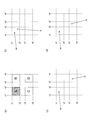
- Image A ⁇ (x1, y1)-(x2, y2)> Image B ⁇ (x3, y1)-(x4, y2)> Image C ⁇ (x1, y3)-(x2, y4)> Image D ⁇ (x3, y3)-(x4, y4)> Is displayed.
- the point selection unit determines that the image A has been selected because the point N is also in the area of the image A. In this case, two touches of point M and point N have been detected, but the image selected by the item selection unit is only image A (FIG. 6B).
- the control unit 100 determines that the image D is selected. In this case, touches at two points M and N are detected, and images A and D are selected. Thus, even when a plurality of touches are detected simultaneously, only the image A is selected as the former, and a plurality of images A and D are selected as the latter (FIG. 6C).
- the image is not selected. For example, when the coordinates of the point N are in the positions of x2 ⁇ Xn ⁇ x3 and y3 ⁇ Yn ⁇ y4, no image is selected by the point N, and only the image selected by the point M becomes the selected image (FIG. 6). (D)).
- the selected image is stored as a selected image.
- a decorative display indicating that an image has been selected for example, the selected image is reversed, displayed in a frame, or blinked may be performed.
- step S156 When the selected image is selected, that is, in a state where the candidate image is continuously touched (touch is continuously detected) (step S156; Yes), the selection is performed.
- a list of candidate images other than images is recreated and displayed again (step S158).
- the list is recreated when a predetermined time has passed regardless of the selected selected image.
- the selected selected image is a specific image set in advance.
- the list may be recreated, but a process may be added in which the list is not recreated for other images.
- the processing may be such that the list is not recreated when the selected selected image is a specific image set in advance, and the list is recreated when the selected image is another image.
- whether or not to recreate the list is determined using the image as a key, but this may be a selected position instead of the image.
- the currently displayed candidate image and the redisplayed candidate image may be different images, or such a restriction may not be provided.
- a restriction may be provided so that the same image is not displayed at the same position during redisplay.
- next image is selected from the next candidate images (step S160).
- step S160 Yes
- the next selected image is also stored as a selected image (step S162).
- step S164 it is determined whether image authentication has been executed by the user (step S164). If the user performs an operation for performing image authentication, the process proceeds to step S166 (step S164; Yes ⁇ step S166). If an operation for performing image authentication is not performed, the process starts from step S156. Are repeatedly executed (step S164; No-> step S156).
- various methods are conceivable as operations for performing image authentication. For example, it is determined that the selection state of the selected image has been released as a trigger for performing image authentication (that is, whether or not the input detection unit 154 continues to be touched (when touching with a user's finger) For example, whether or not there is a distant finger), or when the authentication button is selected by the user as a trigger for performing image authentication.
- step S166 When performing image authentication, it is determined whether or not the currently selected image matches the correct image registered in the correct image DB 144 (step S166). Here, if the selected image matches the correct image, it is determined that the authentication is successful (step S166; Yes ⁇ step S168). On the other hand, if the selected image does not match the correct image, it is determined that the authentication has failed (step S166; No ⁇ step S170).
- step S164 for example, when the selected image and the correct image match, authentication may be automatically performed.
- the operation flow in this case is shown in FIG.
- step S166 it is determined in step S166 whether the currently selected image matches the correct image. If the selected image matches the correct image, it is determined that the authentication is successful (step S166; Yes ⁇ step S168). If the selected image does not match, the process is repeatedly executed from step S156. As a result, the user can execute the authentication process without being aware of the operation “execute authentication”.
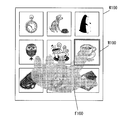
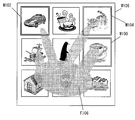
- FIG. 8 is a diagram for explaining an example of the display screen W100 displayed on the system liquid crystal 150.
- FIG. 8 is a diagram for explaining an example of the display screen W100 displayed on the system liquid crystal 150.
- step S150 nine candidate images are read from the candidate image DB 142 and displayed in a list (step S150 in FIG. 5). If the correct image used for authentication is not displayed, the user selects one arbitrary image (step S152; Yes ⁇ step S154). In this figure, the image M100 is selected (touched) by the user F100 as the selected image. In this case, the image M100 is touched with the user's index finger.
- step S158 When a predetermined time has passed in the state of FIG. 8 (step S156; Yes), candidate images other than the selected image M100 are updated and displayed (step S158).
- FIG. 9 is an example of a display screen W102 when a candidate image other than the image M100 is updated and displayed.
- the user F102 further selects an image M102 that is a correct image (step S160; Yes ⁇ step S162).
- the image M100 is selected with the user's index finger
- the image M102 is selected with the user's ring finger.
- FIG. 10 is an example of a display screen W104 when an image other than the image M100 and the image M102 is updated and displayed.
- an image M104 that is a correct image is displayed on the display screen W104.
- the user tries to select the image M104.
- the user waits until a predetermined time elapses.
- FIG. 11 is an example of a display screen W106 when candidate images other than the images M100 and M102 are updated and displayed.
- the image M104 is displayed at a location that can be easily selected by the user F106. Therefore, the user F106 further selects an image M106 that is a correct image (step S160; Yes ⁇ step S162).
- the image M100 is selected by the user's index finger
- the image M102 is selected by the user's ring finger
- the image M104 is selected by the user's middle finger.
- FIG. 12 is a diagram illustrating an example of the display screen W108 when the selection state of the image M100 in FIG. 11 is cancelled.
- the authentication control unit 110 collates the currently selected image with the correct image DB 144 (step S166). If the selected image matches the correct image, it is determined that the authentication has been successful (step S166; Yes ⁇ step S168).
- the display position and contents of an image other than the selected image change every time a predetermined time elapses. It will be.
- the user when the user selects an image (item), the user can select an image naturally without pressing it, and a highly convenient authentication system can be realized.
- the list of candidate images is recreated at a timing when a predetermined time has elapsed, but the images may be changed at other timings.
- a list of candidate images other than the selected image may be re-created at the timing when the next image is selected, and the user can arbitrarily instruct to re-create the list of candidate images. You may give by timing.
- a new candidate image is read from the candidate image DB 142 and a list of candidate images is displayed. And when an image is selected, you may perform control of moving only the position of the displayed candidate image. As described above, various methods for displaying a list of candidate images are conceivable.
- an authentication button is displayed on the same display part as another image, and authentication is performed by selecting it. It is also good. Further, the authentication button may be arranged on the front surface, side surface, back surface, etc. of the terminal instead of being displayed on the display unit, and authentication may be performed by pressing the button. In particular, when it is arranged on the side surface / back surface, it is difficult for a third party to visually recognize that the selection screen and the authentication button are pressed simultaneously.
- an example of authentication has been described. However, for example, it may be used for selecting a menu or inputting numbers. That is, the scope of application of the present invention is that an information processing apparatus capable of detecting a plurality of touched positions at the same time, when an item displayed on the information processing apparatus is being pressed, Any object whose display is updated may be used.
- FIG. 13 shows the configuration of the information processing apparatus 2 to which the present invention is applied.
- the information processing apparatus 2 includes a control unit 100, a menu control unit 210, a display data control unit 120, a display position control unit 130, a storage unit 240, and a system liquid crystal 150 (the display unit 152 and the input detection unit 154). It is configured with.
- symbol is attached
- the menu control unit 210 is a control unit that controls switching of menus to be displayed, update instructions, and the like. Control is performed to read out necessary menu items from a menu list 242 to be described later and display a menu screen.
- the storage unit 240 is a functional unit that stores various data and programs for the information processing apparatus 2 to operate.
- the control unit 100 implements various functions by reading and executing the program stored in the storage unit 240.
- the storage unit 240 stores a menu list 242 and a menu display program 244.
- the menu list 242 is a list in which menu items (for example, “Web”) in the information processing apparatus 2 are stored in association with item numbers (for example, “A”).
- item numbers for example, “A”.
- “A”, “B”, “C”, “D”, and the like indicate menus in the first layer (parent layer).
- menus of the second hierarchy (child hierarchy) corresponding to the first hierarchy (parent hierarchy) are also stored.
- “B-1” is a menu of a child hierarchy having “B” as a parent hierarchy.
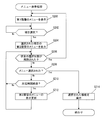
- the menu display process is a process realized by the control unit 100 reading and executing the menu display program 244 stored in the storage unit 240.
- the display data control unit 120 displays the first layer menu (step S200). Then, a menu item is selected from the displayed first hierarchy (step S202).
- step S202 When the menu item is selected by the user (step S202; Yes), a lower menu (second layer) of the selected menu item is displayed (step S204).
- step S204 a lower menu of the selected menu item is displayed (step S204).
- the process is executed again from Step S200, and the menu display of the first layer is returned (Step S206; Yes ⁇ Step S200).
- Step S206 When a predetermined time has passed without the menu item of the second layer being selected in the state where the menu of the second layer is displayed (Step S206; No ⁇ Step S208; No ⁇ Step S210; Yes), The display of the menu item in the second hierarchy is updated (step S212).
- Step S206 when the menu item of the second hierarchy is selected while the menu of the second hierarchy is displayed, the selected function is executed (Step S206; No ⁇ Step S208; Yes ⁇ Step S214).
- FIG. 16 is a diagram showing an example of a display screen W200 that displays the first hierarchy (parent hierarchy).
- a menu item K200 in the first hierarchy is displayed (step S200 in FIG. 15).
- the user F200 touches the menu item K202 “B Mail” to select it (step S202; Yes).
- the user F200 may touch with a hand (finger) or may touch with a stylus.
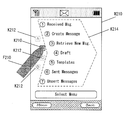
- menu item K210 in the first layer is selected by user F210.
- the menu item K212 that is not selected is displayed lightly.
- a menu item K214 in the second hierarchy (child hierarchy) associated with the selected menu item K212 is displayed (step S204).
- the menu of the second hierarchy corresponding to the menu item K210 “B Mail” has 12 menu items referring to the menu list 242 shown in FIG.
- only seven menu items can be displayed on the display screen W210. Accordingly, the menu items having the item numbers “B-1” to “B-7” are displayed on the W210, and the menu items “B-8” to “B-12” are not displayed.
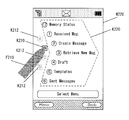
- step S210 is a display screen W220 in FIG. 18 that transitions when the selection state of the menu item K210 has elapsed for a predetermined time. Since the predetermined time has elapsed, the menu control unit 210 updates the menu display of the second hierarchy (step S210; Yes ⁇ step S212). That is, “B-12” not displayed on the display screen W210 is displayed, and “B-7” is not displayed instead.
- the display of the menu item K220 in the second hierarchy is updated and displayed every time a predetermined time elapses while the menu item K210 remains selected.
- Various methods can be considered as a method for updating the menu display. For example, when the selection state on the display screen W210 in FIG. 17 has elapsed for a predetermined time, the menu items “B-8” to “B-12” that are not displayed may be switched and displayed. Further, by displaying “B-1” and “B-2” in succession to “B-8” to “B-12”, the menu items in the second hierarchy may be displayed in succession. good.
- the menu control unit 210 may apply a visual effect when switching and displaying the second layer menu display. For example, when switching the display of the menu item of the second hierarchy, the user can perform an intuitive operation by providing an effect of rotating the menu item K210 of the first hierarchy.
- the menu list is stored and the menu display is performed based on the menu list.
- the present invention is not limited to the method described above. That is, it may be described as a menu selection process directly in the program (process).
- menu hierarchy has been described as the first hierarchy (parent hierarchy) and the second hierarchy (child hierarchy), but it is needless to say that three or more hierarchies may be used.
- the display of the menu items can be switched depending on the state of the user's touch. Therefore, the user can display the menu with a simpler operation, and can easily select the desired menu.
- the system liquid crystal is used.
- the display unit 152 and the input detection unit 154 have been described as being integrated with the information processing apparatuses 1 and 2, they may be connected as external devices.
Landscapes
- Engineering & Computer Science (AREA)
- Theoretical Computer Science (AREA)
- General Engineering & Computer Science (AREA)
- Physics & Mathematics (AREA)
- General Physics & Mathematics (AREA)
- Human Computer Interaction (AREA)
- Computer Security & Cryptography (AREA)
- Computer Hardware Design (AREA)
- Software Systems (AREA)
- User Interface Of Digital Computer (AREA)
- Position Input By Displaying (AREA)
Abstract
Description
[1.第1実施形態]
まず、第1実施形態について説明する。第1実施形態は、利用者が正当な利用者であると認証をする場合に選択する項目として画像を用いる認証システムについて、本発明を適用した場合について説明する。すなわち、まず、候補項目として候補画像を表示する。そして、候補画像の中から選択項目として選択画像が選択されることとなる。以下、図面を用いて詳細に説明する。
まず、本発明を適用した情報処理装置1の装置の概観を示す。本実施形態では、情報処理装置1の一例として携帯電話に適用した場合について説明する。例えば、図1(a)は、携帯電話の表示画面が縦表示の場合であり、図1(b)は表示画面が横表示の場合の一例を示す図である。そして、図2に情報処理装置1の機能構成を示す。情報処理装置1は、制御部100に、認証制御部110と、表示データ制御部120と、記憶部140と、システム液晶150とがバスを介して接続されている。また、表示データ制御部120には、表示位置制御部130が接続されている。
続いて、本実施形態における処理の流れについて説明する。まず、正解画像を登録する正解登録処理について図4に基づいて説明する。ここで、正解登録処理は、制御部100が、記憶部140に記憶されている正解登録プログラム146を読み出して実行することにより実現される処理である。
・画像A<(x1,y1)-(x2,y2)>
・画像B<(x3,y1)-(x4,y2)>
・画像C<(x1,y3)-(x2,y4)>
・画像D<(x3,y3)-(x4,y4)>
が表示されているとする。
続いて、本実施形態の動作例について、説明する。図8は、システム液晶150に表示された表示画面W100の一例を説明するための図である。
つづいて、第2実施形態について説明する。第2実施形態は、利用者が選択する項目として、メニュー項目を選択する場合を例にとって説明する。すなわち、まず、親階層の項目として、第1階層のメニュー項目を表示する。そして、選択された第1階層に応じて、子階層の項目である第2階層のメニュー項目が表示されることとなる。以下、図面を用いて詳細に説明する。
図13に本発明を適用した情報処理装置2の構成を示す。情報処理装置2は、制御部100と、メニュー制御部210と、表示データ制御部120と、表示位置制御部130と、記憶部240と、システム液晶150(表示部152及び入力検知部154)とを備えて構成されている。なお、第1実施形態において説明した構成要素と同一のものについては、同一の符号を付し、その説明を省略する。
つづいて、第2実施形態における処理であるメニュー表示処理について、図15を用いて説明する。メニュー表示処理は、制御部100が、記憶部240に記憶されているメニュー表示プログラム244を読み出して実行することにより実現される処理である。
つづいて、第2実施形態における動作例について図を用いて説明する。
以上、この発明の実施形態について図面を参照して詳述してきたが、具体的な構成はこの実施形態に限られるものではなく、この発明の要旨を逸脱しない範囲の設計等も特許請求の範囲に含まれる。
100 制御部
110 認証制御部
120 表示データ制御部
130 表示位置制御部
140 記憶部
142 候補画像DB
144 正解画像DB
146 正解登録プログラム
148 認証プログラム
150 システム液晶
152 表示部
154 入力検知部
210 メニュー制御部
240 記憶部
242 メニューリスト
244 メニュー表示プログラム
Claims (6)
- タッチされた位置の検出が同時に複数可能な入力検知部と、表示部とを備えた情報処理装置において、
前記表示部に複数の候補項目を表示する制御を行う候補項目表示制御部と、
前記入力検知部によりタッチが検知されている間、タッチされた位置に基づいて、前記表示された候補項目の中から選択項目を選択する項目選択部と、
前記項目選択部により、選択項目が所定時間以上選択されている場合には、前記選択項目以外の候補項目を変更して表示する制御を行う表示変更制御部と、
を備えることを特徴とする情報処理装置。 - 前記候補項目として複数の画像を記憶する候補画像記憶部と、
前記候補画像の中から正解の画像を記憶する正解画像記憶部と、
を備え、
前記候補項目表示制御部は、前記候補画像記憶部に記憶されている画像を複数表示する制御を行い、
前記項目選択部は、前記表示されている候補の画像の中から、一又は複数の画像を選択画像として選択し、
前記選択画像と、前記正解画像記憶部に記憶されている正解の画像とが一致する場合には、正当な利用者であると認証する認証部を更に有することを特徴とする請求項1に記載の情報処理装置。 - 前記認証部は、前記項目選択部により選択されている選択項目のうち、一の選択項目において検知されているタッチが解除されたときに認証を行うことを特徴とする請求項2に記載の情報処理装置。
- 前記候補項目表示制御部は、候補項目として、階層構造の項目のうち親階層の項目を表示する制御を行い、
前記項目選択部は、前記入力検知部により検知されたタッチに基づいて、前記表示された親階層の項目を選択する親階層項目選択部を含み、
前記親階層項目選択部により選択された親階層から選択可能な子階層の項目を表示する制御を行う子階層表示制御部を更に有し、
前記表示変更制御部は、前記項目選択部が、前記親階層が所定時間以上選択されている場合には、前記子階層の項目を変更して表示する制御を行う子階層表示変更制御部を含むことを特徴とする請求項1に記載の情報処理装置。 - 前記子階層表示変更制御部は、前記表示部に表示されていない子階層の項目が表示されるように制御を行うことを特徴とする請求項4に記載の情報処理装置。
- タッチされた位置の検出が同時に複数可能な入力検知部と、表示部と備えたコンピュータに、
前記表示部に複数の候補項目を表示する制御を行う候補項目表示制御機能と、
前記入力検知部によりタッチが検知されている間、タッチされた位置に基づいて、前記表示された候補項目の中から選択項目を選択する項目選択機能と、
前記項目選択機能により、選択項目が所定時間以上選択されている場合には、前記選択項目以外の候補項目を変更して表示する制御を行う表示変更制御機能と、
を実現させるためのプログラム。
Priority Applications (2)
| Application Number | Priority Date | Filing Date | Title |
|---|---|---|---|
| CN201080005098.XA CN102292697B (zh) | 2009-01-23 | 2010-01-22 | 信息处理装置 |
| US13/145,883 US20120092275A1 (en) | 2009-01-23 | 2010-01-22 | Information processing apparatus and program |
Applications Claiming Priority (2)
| Application Number | Priority Date | Filing Date | Title |
|---|---|---|---|
| JP2009012552A JP4913834B2 (ja) | 2009-01-23 | 2009-01-23 | 情報処理装置、制御方法及びプログラム |
| JP2009-012552 | 2009-01-23 |
Publications (1)
| Publication Number | Publication Date |
|---|---|
| WO2010084950A1 true WO2010084950A1 (ja) | 2010-07-29 |
Family
ID=42356000
Family Applications (1)
| Application Number | Title | Priority Date | Filing Date |
|---|---|---|---|
| PCT/JP2010/050792 Ceased WO2010084950A1 (ja) | 2009-01-23 | 2010-01-22 | 情報処理装置及びプログラム |
Country Status (4)
| Country | Link |
|---|---|
| US (1) | US20120092275A1 (ja) |
| JP (1) | JP4913834B2 (ja) |
| CN (1) | CN102292697B (ja) |
| WO (1) | WO2010084950A1 (ja) |
Families Citing this family (4)
| Publication number | Priority date | Publication date | Assignee | Title |
|---|---|---|---|---|
| US20150195226A1 (en) * | 2014-01-06 | 2015-07-09 | Desiree Gina McDowell-White | Interactive Picture Messaging System |
| JP6092818B2 (ja) * | 2014-07-01 | 2017-03-08 | 富士フイルム株式会社 | 画像処理装置、画像処理方法、画像処理プログラム、及びプリント注文受付装置 |
| JP2020052509A (ja) * | 2018-09-25 | 2020-04-02 | 富士ゼロックス株式会社 | 情報処理装置、プログラム及び情報処理システム |
| JP7471841B2 (ja) * | 2020-02-05 | 2024-04-22 | キヤノン株式会社 | 検品システム、検品方法 |
Citations (3)
| Publication number | Priority date | Publication date | Assignee | Title |
|---|---|---|---|---|
| WO2008030879A2 (en) * | 2006-09-06 | 2008-03-13 | Apple Inc. | Portable electronic device, method, and graphical user interface for displaying structured electronic documents |
| JP2008097609A (ja) * | 2006-10-11 | 2008-04-24 | Samsung Electronics Co Ltd | マルチタッチ判断装置、方法及び記録媒体 |
| JP2008152441A (ja) * | 2006-12-15 | 2008-07-03 | Hitachi Software Eng Co Ltd | 文字データ入力装置 |
Family Cites Families (8)
| Publication number | Priority date | Publication date | Assignee | Title |
|---|---|---|---|---|
| JP2576407B2 (ja) * | 1994-06-03 | 1997-01-29 | 日本電気株式会社 | ファクシミリ装置 |
| JP2001134382A (ja) * | 1999-11-04 | 2001-05-18 | Sony Corp | 図形処理装置 |
| JP2001142593A (ja) * | 1999-11-17 | 2001-05-25 | Oki Electric Ind Co Ltd | ヘルプ画面表示方法 |
| US6720860B1 (en) * | 2000-06-30 | 2004-04-13 | International Business Machines Corporation | Password protection using spatial and temporal variation in a high-resolution touch sensitive display |
| JP2005284404A (ja) * | 2004-03-26 | 2005-10-13 | Matsushita Electric Ind Co Ltd | 情報処理装置及び情報処理方法 |
| WO2007108093A1 (ja) * | 2006-03-20 | 2007-09-27 | Olympus Corporation | 情報呈示装置 |
| JP4887184B2 (ja) * | 2007-03-02 | 2012-02-29 | 株式会社リコー | 表示処理装置、表示処理方法、および表示処理プログラム |
| KR20250099420A (ko) * | 2007-09-24 | 2025-07-01 | 애플 인크. | 전자 장치 내의 내장형 인증 시스템들 |
-
2009
- 2009-01-23 JP JP2009012552A patent/JP4913834B2/ja not_active Expired - Fee Related
-
2010
- 2010-01-22 CN CN201080005098.XA patent/CN102292697B/zh not_active Expired - Fee Related
- 2010-01-22 US US13/145,883 patent/US20120092275A1/en not_active Abandoned
- 2010-01-22 WO PCT/JP2010/050792 patent/WO2010084950A1/ja not_active Ceased
Patent Citations (3)
| Publication number | Priority date | Publication date | Assignee | Title |
|---|---|---|---|---|
| WO2008030879A2 (en) * | 2006-09-06 | 2008-03-13 | Apple Inc. | Portable electronic device, method, and graphical user interface for displaying structured electronic documents |
| JP2008097609A (ja) * | 2006-10-11 | 2008-04-24 | Samsung Electronics Co Ltd | マルチタッチ判断装置、方法及び記録媒体 |
| JP2008152441A (ja) * | 2006-12-15 | 2008-07-03 | Hitachi Software Eng Co Ltd | 文字データ入力装置 |
Also Published As
| Publication number | Publication date |
|---|---|
| CN102292697A (zh) | 2011-12-21 |
| CN102292697B (zh) | 2013-08-21 |
| US20120092275A1 (en) | 2012-04-19 |
| JP4913834B2 (ja) | 2012-04-11 |
| JP2010170357A (ja) | 2010-08-05 |
Similar Documents
| Publication | Publication Date | Title |
|---|---|---|
| USRE49669E1 (en) | Information processing apparatus | |
| US8085243B2 (en) | Input device and its method | |
| US20090289916A1 (en) | Electronic device and method for switching between locked state and unlocked state | |
| US20100214239A1 (en) | Method and touch panel for providing tactile feedback | |
| US20090164930A1 (en) | Electronic device capable of transferring object between two display units and controlling method thereof | |
| CN102741794A (zh) | 处理触觉输入 | |
| CN101989174A (zh) | 信息输入装置及信息输入方法 | |
| CN102197356A (zh) | 即使检测区域小于显示器的显示区域也如相同时那样动作的触摸面板装置 | |
| JP4913834B2 (ja) | 情報処理装置、制御方法及びプログラム | |
| JP4818036B2 (ja) | タッチパネル制御装置およびタッチパネル制御方法 | |
| JP5801728B2 (ja) | タッチパネル装置及びタッチパネル装置の操作処理方法 | |
| JP2014016743A (ja) | 情報処理装置、情報処理装置の制御方法、および情報処理装置の制御プログラム | |
| JP4981946B2 (ja) | 携帯端末及び携帯端末における文字色変更方法 | |
| JP4880003B2 (ja) | 情報処理装置、制御方法及びプログラム | |
| JP6115421B2 (ja) | 入力装置および入力システム | |
| JP2008065504A (ja) | タッチパネル制御装置およびタッチパネル制御方法 | |
| JP5539415B2 (ja) | 情報処理装置及びプログラム | |
| JP2012173997A (ja) | 表示装置、表示方法、及び表示プログラム | |
| JP2014048738A (ja) | 携帯端末装置、プログラムおよびパスワード入力方法 | |
| US20080184172A1 (en) | Methods and systems for displaying input items on a display | |
| JP2013205986A (ja) | 電子機器 | |
| KR102090443B1 (ko) | 터치 제어 방법, 장치, 프로그램 및 컴퓨터 판독가능 기록매체 | |
| CN101437070A (zh) | 显示拨号信息的方法与使用该方法的移动通信装置 | |
| JP2006099178A (ja) | タッチパネル装置及びタッチパネル入力方法 | |
| WO2015093005A1 (ja) | 表示システム |
Legal Events
| Date | Code | Title | Description |
|---|---|---|---|
| WWE | Wipo information: entry into national phase |
Ref document number: 201080005098.X Country of ref document: CN |
|
| 121 | Ep: the epo has been informed by wipo that ep was designated in this application |
Ref document number: 10733557 Country of ref document: EP Kind code of ref document: A1 |
|
| DPE1 | Request for preliminary examination filed after expiration of 19th month from priority date (pct application filed from 20040101) | ||
| DPE1 | Request for preliminary examination filed after expiration of 19th month from priority date (pct application filed from 20040101) | ||
| NENP | Non-entry into the national phase |
Ref country code: DE |
|
| WWE | Wipo information: entry into national phase |
Ref document number: 5951/CHENP/2011 Country of ref document: IN |
|
| WWE | Wipo information: entry into national phase |
Ref document number: 13145883 Country of ref document: US |
|
| 122 | Ep: pct application non-entry in european phase |
Ref document number: 10733557 Country of ref document: EP Kind code of ref document: A1 |