WO2010052764A1 - テキスト表示装置 - Google Patents
テキスト表示装置 Download PDFInfo
- Publication number
- WO2010052764A1 WO2010052764A1 PCT/JP2008/070087 JP2008070087W WO2010052764A1 WO 2010052764 A1 WO2010052764 A1 WO 2010052764A1 JP 2008070087 W JP2008070087 W JP 2008070087W WO 2010052764 A1 WO2010052764 A1 WO 2010052764A1
- Authority
- WO
- WIPO (PCT)
- Prior art keywords
- sentence
- displayed
- text
- rate
- cursor
- Prior art date
- Legal status (The legal status is an assumption and is not a legal conclusion. Google has not performed a legal analysis and makes no representation as to the accuracy of the status listed.)
- Ceased
Links
Images






Classifications
-
- G—PHYSICS
- G06—COMPUTING OR CALCULATING; COUNTING
- G06F—ELECTRIC DIGITAL DATA PROCESSING
- G06F40/00—Handling natural language data
- G06F40/10—Text processing
- G06F40/103—Formatting, i.e. changing of presentation of documents
- G06F40/106—Display of layout of documents; Previewing
Definitions
- the present invention relates to a text display device, and more particularly to a text display device capable of displaying a summary of text.
- Japanese Patent Laid-Open No. 2-112068 displays a summary sentence in a large font and an original sentence in a small font.
- Japanese Patent Laid-Open No. 2001-22774 discloses a technique for displaying a document in a telop format when the summary text is larger than the window size
- Japanese Patent Laid-Open No. 11-345233 discloses a summary text according to the window size. A technique for determining the length and displaying a summary is shown.
- JP-A-9-212505 and JP-A-11-25091 As a technique capable of reflecting the user's interests and preferences in the display of the summary document, there are JP-A-9-212505 and JP-A-11-25091.
- the summarization rate is determined according to the number of accesses to documents of the same category.
- the technique disclosed in Japanese Patent Laid-Open No. 11-25091 generates and displays a summary sentence with the length of the summary sentence specified by the user.
- Japanese Patent No. 3383049 and Japanese Patent Application Laid-Open No. 2000-194702 are techniques for displaying a part designated by the user in more detail or hiding information on a part designated by the user.
- a document is folded in a tree structure. For example, only a section heading is displayed at first. When the user specifies a section of interest, the subsection headings for that section are displayed. Subsequently, when the user designates the headline of the subsection in which the user is interested, the text of the subsection is displayed.
- Japanese Patent Laid-Open No. 2000-194702 when a user specifies a portion of interest in a summary document, the original text of that portion is displayed.
- Japanese Patent Laid-Open No. 2000-194702 also discloses a technique for displaying a plurality of summary result sentences in a short order.
- Japanese Patent Laid-Open No. 2-112068 Japanese Patent Laid-Open No. 2001-22774
- Japanese Patent Laid-Open No. 9-212505 JP-A-11-25091 Japanese Patent No. 3383049 JP 2000-194702 A
- none of the above-described conventional techniques can intuitively operate the summarization rate at the location specified by the user and can keep the readability of the document high.
- headlines are displayed in detail step by step, so that at a certain summarization rate, most of the documents become headlines, and the readability of the documents is low.
- the technique disclosed in Japanese Patent Laid-Open No. 2000-194702 only displays the original text at a designated location, and therefore the document cannot be lengthened stepwise by a user operation.
- the prior art only uses a click operation of a pointing device, and there is nothing that assists the intuitive operation of the summarization rate by the user.
- the present invention makes it possible to interactively and intuitively change the summarization rate at a location designated by the user by operating a pointing device.
- a text display device identifies a text display unit having a screen for displaying text, a pointing device for operating a cursor displayed on the screen, and a sentence indicated by the cursor in the text displayed on the screen Means for calculating the moving distance of the cursor moved by the pointing device, and a summary sentence storage unit storing a plurality of summary sentences having different summarization rates for each sentence of the original text.
- a plurality of summary sentences are compared with each other, any one of the summary sentences is related to the other partial character string. Then, when the cursor traces a sentence on the screen by operating the pointing device, the translated sentence displayed on the screen is changed to a summary sentence having a different summary rate in conjunction with the movement distance of the cursor.
- the displayed summary sentence is changed to a summary sentence with a lower summary rate, and the cursor movement direction is from the end of the sentence to the beginning of the sentence.
- it is possible to intuitively change the summary rate of the noticed sentence by changing the displayed translated sentence to a summary sentence having a higher summary rate.
- the summary rate of the summary sentence to be displayed on the screen is calculated based on the moving distance of the cursor.
- the summary sentence does not include a summary sentence with 100% summary rate (omitting the whole sentence). Moreover, you may provide the summary sentence production
- summary sentences having the same original sentence can be arranged in a line according to the length of the summary sentence.
- the summary sentence of the corresponding summary rate is displayed according to the moving distance of the cursor on the screen moved by the pointing device when the sentence is traced by the pointing device, the summary sentence has a high summary rate ( When the sentence becomes shorter, only some parts in the sentence are hidden. On the contrary, when the summary rate of the summary sentence is low (when the sentence becomes long), only a plurality of portions in the sentence are newly displayed.
- the user can intuitively control the summarization ratio of the part of interest by changing the summarization ratio of the sentence in conjunction with the movement distance of the cursor on the screen moved by the pointing device. Can be changed.
- a summary sentence whose summary rate is not 100% is displayed for each sentence, the whole sentence is not omitted, and the whole sentence can be understood while being a summary sentence.
- the figure which showed the result of the dependency modification analysis of the sentence by the tree structure The figure which showed the example of user operation of the 1st Embodiment of this invention.
- FIG. 1 is a block diagram showing a hardware configuration example of a text display device according to the present invention.
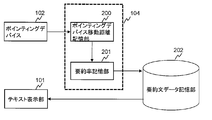
- the text display device 100 includes a text display unit 101, a pointing device 102, a CPU 103, a main storage unit 104, and an auxiliary storage unit 105. These are connected by a bus 106.
- the text display unit 101 displays a summary or original text of a document to the user.
- the pointing device 102 is used to indicate a sentence that the user wants to display in more detail.
- the pointing device 102 is used for the user to trace on the text display screen a sentence whose summary rate is to be changed for the purpose of changing the summary rate.
- the pointing device 102 is, for example, a mouse or a touch panel.
- the CPU 103 performs a series of processing such as text processing and distance calculation. Hereinafter, the processing described in this specification is performed by the CPU 103.
- the main storage unit 104 stores the moving distance of the cursor on the screen that is moved by the pointing device when a sentence on the text display screen is traced with the pointing device.
- the main storage unit 104 stores a text processing program, a summary sentence, a summary rate of each sentence of the document, and the like.
- the main storage unit 104 is, for example, a RAM.
- the auxiliary storage unit 105 stores programs for performing text processing, summary sentences, and the like.
- the auxiliary storage unit 105 is a non-volatile storage medium such as an HDD or a flash memory, for example.
- the CPU 103 executes a program stored in the auxiliary storage unit 105.
- a mouse is used as an example of the pointing device 102.
- a pointing device other than a mouse can be used in the present invention.
- text data text data in which text is written horizontally from left to right will be described as an example.
- the present invention is text data in which text is written horizontally and written from right to left, and vertical text. Applicable to data.
- WEB text will be described as an example of text data, the present invention is applicable to text data other than WEB text.
- Javascript will be described as an example of a programming language for processing text, but the present invention can also be realized in programming languages other than Javascript.
- FIG. 2 is a block diagram illustrating a configuration example of the text display device according to the first embodiment of this invention.
- the pointing device moving distance storage unit 200 stores the moving distance of the pointing device and the ID of the sentence pointed to by the pointing device.
- an ID is assigned to each sentence in the document.
- the structure of the pointing device moving distance storage unit 200 will be described later with reference to FIG.
- the process of storing the movement distance of the pointing device and the sentence ID will be described later with reference to FIG.
- the CPU 103 calculates the summary rate of the corresponding sentence from the movement distance and sentence ID held in the pointing device movement distance storage unit 200 at a determined timing, and the corresponding sentence stored in the summary rate storage unit 201.
- the summary component of the corresponding sentence is overwritten, and the constituent elements of the sentence necessary for realizing the summary ratio of the corresponding sentence are taken out from the summary sentence data storage unit 202 and displayed on the text display unit 101.
- the structure of the summary rate storage unit 201 will be described later with reference to FIG.
- the summary sentence data storage unit 202 is generated in advance from the original sentence. There are multiple types of summary sentences with different summary rates other than 0 for one sentence of the original sentence. In addition, for any two summary sentences having the same original sentence, one is the other partial character string.
- the data format of the summary sentence data storage unit 202 will be described later with reference to FIG.
- the summary rate calculation and summary sentence display processing will be described later with reference to FIG.
- a method for generating summary sentence data will be described later with reference to FIG.
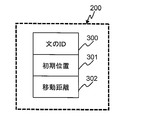
- FIG. 3 shows the structure of the pointing device moving distance storage unit 200.
- the pointing device movement distance storage unit 200 includes a storage unit 300 that holds sentence IDs, a storage unit 301 that holds the initial position of the mouse cursor, and a storage unit 302 that holds the movement distance of the mouse cursor.
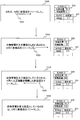
- FIG. 4 is a flowchart of a process of storing the movement distance of the pointing device and the ID of the sentence pointed to by the pointing device in the pointing device movement distance storage unit 200.
- the process branches depending on the type of event that occurred (S400).
- the ID of the sentence at the location pointed to by the mouse on the screen of the text display unit 101 is acquired by a known method. The method for acquiring the sentence ID will be described later with reference to FIG.
- the acquired sentence ID is stored in the storage unit 300 of the pointing device movement distance storage unit 200 (S401).
- the x coordinate of the position of the mouse cursor is stored as an initial position in the storage unit 301 of the pointing device moving distance storage unit 200 (S402). Note that the value of the x coordinate of the position of the mouse cursor can be obtained using Javascript.
- the x-coordinate of the current mouse cursor position is acquired, and the initial position value and difference stored in the storage unit 300 of the pointing device moving distance storage unit 200 are obtained. Calculate (S403). Subsequently, the calculated difference is stored as a movement distance in the storage unit 302 of the pointing device movement distance storage unit 200 (S404). Subsequently, the summary rate is calculated and a summary sentence is displayed (S405).
- FIG. 5 shows an example of HTML for displaying WEB text.
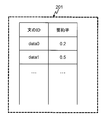
- FIG. 6 shows the structure of the summary rate storage unit 201.
- the summarization ratio recording unit 201 records the sentence ID and the current summarization ratio of the sentence corresponding to the sentence ID as a set.
- the summarization rate of the sentence with ID “data0” is 0.2
- the summarization ratio of the sentence with ID “data1” is 0.5.
- the text display unit 101 displays as follows.
- a sentence whose ID is “data0” is displayed at a summary rate of 0.2
- a sentence whose ID is “data1” is displayed at a summary rate of 0.5.
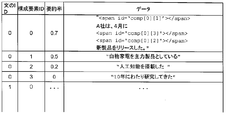
- FIG. 7 is a diagram illustrating the data format of the summary sentence data storage unit 202 using actual example sentences.
- the data format of the summary sentence data storage unit 202 is described.
- the summary sentence data is divided and held in the constituent elements constituting the sentence, and each constituent element is held in association with the sentence ID, the constituent element ID, and the summary rate.
- a sentence corresponding to the summary rate set for each sentence is displayed. For example, a numerical value representing the user's favorite summary rate is set.
- FIG. 8 shows a flowchart of the summary rate calculation and summary sentence display overwrite processing.
- the processing shown in FIG. 8 is executed at the determined timing. For example, the timing when the moving distance stored in the storage unit 302 of the pointing device moving distance storage unit 200 is a multiple of 5, or the time when the time elapsed since the start of moving the mouse is a multiple of 100 ms, Executed when the button is released.
- the sentence ID held in the storage unit 300 of the pointing device moving distance storage unit 200 and the moving distance held in the storage unit 302 of the pointing device moving distance storage unit 200 are acquired (S800).
- the acquired ID is i and the moving distance is dx.
- r (i) represents the value of the summary rate column of the row whose sentence ID is i in the summary rate recording unit 201.
- Equation (1) when the mouse is dragged to the right from the initial position and moved, dx becomes positive, so the summarization rate becomes smaller than before the mouse is moved, and the displayed sentence becomes longer. Conversely, when the mouse is dragged to the left from the initial position and moved, dx becomes negative, so the summarization rate becomes larger than before the mouse is moved, and the displayed sentence becomes shorter.
- the line with the sentence ID i and the summary rate closest to r (i) is selected (S802).
- a component can be inserted into or deleted from a tag by specifying the tag id by Javascript.
- the summary sentence data may be created manually or automatically by a program as shown below. Below, "Company A, whose main product is white goods, has released a new product with artificial intelligence that has been researched for 10 years in April.” A generation method will be described. The summarization method is not limited to the method described below.
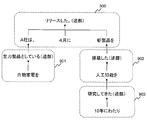
- Fig. 9 shows a dependency analysis using a known method.
- "Company A whose main product is white goods, has released a new product equipped with artificial intelligence that has been studied for 10 years in April.” The result is displayed in a tree structure.
- a dependency analysis method for example, there is Chabocha (Taku Kudo, Yuji Matsumoto, Dependency Analysis by Chunking Stage Application, Journal of Information Processing Society of Japan, Vol.43, No.6 pp.1834-1842).
- dependency analysis is performed, the sentence is divided into clauses, and it is understood which clause each clause is related to.
- the arrows in FIG. 9 indicate the previous clauses related to each clause. For example, the phrase “in April” is related to the phrase “released”. ID numbers are assigned in ascending order of tree structure.
- the broken line in FIG. 9 represents a group of clauses directly related to a predicate.
- the broken line 900 is a group of clauses related to the predicate “released.”
- the predicate “released” includes the clause “Company A”, the clauses “in April” and “new product”. Is involved.
- a broken line 901 is a group of clauses related to the predicate “assuming main product”.
- a broken line 902 is a group of clauses related to the predicate “mounted”.
- a broken line 903 is a group of clauses related to the predicate “researched”.
- the data of the component ID 0 corresponds to the broken line 900
- the data of the component ID 1 corresponds to the broken line 901
- the component ID of 2 corresponds to the broken line 902
- the data with the component ID 3 corresponds to the broken line 903.
- FIG. 10 shows an example of a user operation according to the first embodiment of the present invention.
- Reference numeral 1000 denotes a screen of the text display unit 101
- reference numeral 1001 denotes a mouse cursor.
- the states of the pointing device moving distance storage unit 200 and the summary rate storage unit 201 are shown on the right.
- the initial position of the mouse cursor stored in the pointing device moving distance storage unit 200 is 16, the moving distance is 0, and the summarization rate stored in the summarization rate storage unit 201 is 0.7.
- the screen is changed to a state 1002 and “white goods are the main product” is displayed.
- the moving distance of the mouse cursor is 116, and the summarization rate stored in the summarization rate storage unit 201 is 0.5.
- the characters decorated in bold are displayed one by one by animation.
- the mouse cursor 1003 is further moved to the right, the screen is changed to a state 1004 and “with artificial intelligence” is displayed.
- the moving distance of the mouse cursor is 266, and the summary rate stored in the summary rate storage unit 201 is 0.2. If the mouse cursor 1005 is further moved to the left in this state, the screen is changed to a state 1006, and “with artificial intelligence” is hidden.
- the hardware configuration of the text display device according to the present embodiment is the same as that shown in FIG.
- a mouse is used as an example of the pointing device 102.
- a pointing device other than a mouse can be used in the present invention.
- description will be given taking text data in which text is written horizontally and written from left to right as an example.
- the present invention can be applied to text data in which a sentence is written horizontally from right to left and vertically written text data.
- WEB text is taken as an example of text data.
- the present invention can be applied to text data other than WEB text.
- Javascript is used as an example of a programming language for processing text.
- the present invention can be realized in a programming language other than Javascript.
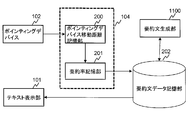
- FIG. 11 is a block diagram showing a configuration example of the text display device according to the second embodiment of the present invention.
- event processing is performed, and the pointing device moving distance storage unit 200 stores the moving distance of the pointing device and the ID of the sentence pointed to by the pointing device.
- an ID is assigned to each sentence in the document.
- the structure of the pointing device moving distance storage unit 200 is the same as that in FIG. The process of storing the movement distance of the pointing device and the sentence ID will be described later with reference to FIG.
- the summary rate of the corresponding sentence is calculated from the movement distance and sentence ID held in the pointing device movement distance storage unit 200, and the summary rate of the corresponding sentence stored in the summary rate storage unit 201 is calculated. And the constituent elements of the sentence necessary for realizing the summary rate of the corresponding sentence are taken out from the summary sentence data storage unit 202 and displayed on the text display unit 101. If there is no summary sentence data of the corresponding sentence in the summary sentence data storage unit 202, the summary sentence generation unit 1100 newly generates summary sentence data of the corresponding sentence and writes it to the summary sentence data storage unit 202.
- the structure of the summary rate storage unit 201 is the same as that in FIG.
- the summary sentence data storage unit 202 has a plurality of summary sentences with different summary rates other than 0 for one sentence of the original sentence. In addition, for any two summary sentences having the same original sentence, one is the other partial character string.
- the data format of the summary sentence data storage unit 202 is the same as that in FIG.
- the summary rate calculation and summary sentence display processing are the same as in FIG.
- the method for generating summary sentence data is the same as in FIG.
- FIG. 12 is a flowchart of processing for storing the movement distance of the pointing device and the ID of the sentence indicated by the pointing device in the pointing device movement distance storage unit 200.
- the text display device is in a standby state waiting for the user's operation.
- a mouse event occurs and the processing shown in FIG. 12 is performed.
- the process branches depending on the type of event that occurred (S1200).
- the ID of the sentence at the location pointed to by the mouse on the screen of the text display unit 101 is acquired by a known method.
- the method for acquiring the sentence ID is the same as in FIG.
- the acquired sentence ID is stored in the storage unit 300 of the pointing device movement distance storage unit 200 (S1201).
- the x coordinate of the mouse cursor position is stored as an initial position in the storage unit 301 of the pointing device moving distance storage unit 200 (S1202). Note that the x-coordinate value of the mouse cursor position can be obtained using Javascript.
- the x-coordinate of the current mouse cursor position is acquired, and the initial position value and difference stored in the storage unit 300 of the pointing device moving distance storage unit 200 are obtained. Calculate (S1205). Subsequently, the calculated difference is stored in the storage unit 302 of the pointing device moving distance storage unit 200 as a moving distance (S1206). Subsequently, the summary rate is calculated and a summary sentence is displayed (S1207).
- the present invention is applied to text data in different languages.
- the text data is written in Japanese.
- the text data is written in English.
- the present invention can be similarly applied even if the language of the text data is different.
- the first embodiment of the present invention is applied to text data written in English.
- the third embodiment of the present invention can be implemented by the same method except for the data format of the summary sentence data described with reference to FIG. 7 and the summary sentence generation method described with reference to FIG. below, only the data format of summary sentence data and the production
- FIG. 13 is a diagram illustrating the data format of the summary sentence data storage unit 202 using actual example sentences.
- the sentence “The ⁇ company (A whose core products are white-color appliances releases a new product using artificial intelligence technologies that they had researched for 10 years.”
- the data format of the data storage unit 202 is described.
- the summary sentence data is divided and held in the constituent elements constituting the sentence, and each constituent element is held in association with the sentence ID, the constituent element ID, and the summary rate.
- a sentence corresponding to the summary rate set for each sentence in advance is displayed. For example, a numerical value representing the user's favorite summary rate is set.
- the summary sentence data may be created manually or automatically by a program as shown below.
- the following explains how to automatically generate summary sentence data programmatically using the example ⁇
- the company A whose core products are white-color appliances releases a new product using artificial intelligence technologies that they had researched for 10 years. To do.
- the summarization method is not limited to the method described below.
- FIG. 14 shows a tree structure of the result of the dependency analysis of the sentence “The company A whose core products are white-color appliances releases a new product using artificial intelligence technologies that they had researched for 10 years.” It is displayed.
- Enju http://www-tsujii.is.s.u-tokyo.ac.jp/enju/.
- the sentence is divided into clauses, and it is understood which clause each clause is related to.
- the arrows in FIG. 14 indicate the previous clause that each clause is related to. For example, the phrase “a new product” relates to the clause “released”. ID numbers are assigned in ascending order of tree structure.
- the broken line in FIG. 14 represents a group of clauses directly related to a certain predicate.
- a broken line 1400 is a group of clauses related to the predicate “released”, and the clause “The company A” and the clause “a new product” are related to the predicate “released”.
- a broken line 1401 is a group of clauses related to the predicate “are white-color appliances”.
- a broken line 1402 is a group of clauses related to the predicate “using”.
- a broken line 1403 is a group of clauses related to the predicate “had researched”.
- the data with the component ID 0 corresponds to the broken line 1400
- the data with the component ID 1 corresponds to the broken line 1401
- the component ID is The data of 2 corresponds to the broken line 1402
- the data of the component ID 3 corresponds to the broken line 1403.
- the second embodiment of the present invention is applied to text data written in English.
- the fourth embodiment of the present invention can be implemented by the same method except for the data format of the summary sentence data described with reference to FIG. 7 and the summary sentence generation method described with reference to FIG.
- the data format of the summary sentence data is the same as in FIG.
- the summary sentence generation method is the same as in FIG.
Landscapes
- Engineering & Computer Science (AREA)
- Theoretical Computer Science (AREA)
- Health & Medical Sciences (AREA)
- Artificial Intelligence (AREA)
- Audiology, Speech & Language Pathology (AREA)
- Computational Linguistics (AREA)
- General Health & Medical Sciences (AREA)
- Physics & Mathematics (AREA)
- General Engineering & Computer Science (AREA)
- General Physics & Mathematics (AREA)
- Information Retrieval, Db Structures And Fs Structures Therefor (AREA)
- User Interface Of Digital Computer (AREA)
Abstract
ユーザの指定した箇所の要約率を直感的な操作により変更できるようにする。 テキストの原文の一文毎に要約率の異なる複数の要約文を記憶する。複数の要約文は、任意の2つの要約文を比較したとき、一方が他方の部分文字列の関係にある。そして、ポインティングデバイスの操作によってカーソルが画面上の文をなぞったとき、カーソルの移動距離と連動して画面上に表示される要訳文を要約率の異なる要約文に変更する。カーソルの移動方向が文の文頭から文末の方向であるとき、表示される要訳文を要約率のより小さな要約文に変更し、カーソルの移動方向が文の文末から文頭の方向であるとき、表示される要訳文を要約率のより大きな要約文に変更する。
Description
本発明は、テキスト表示装置に関し、特に、テキストを要約表示することのできるテキスト表示装置に関する。
大量の電子テキストを閲覧するのは時間がかかり、閲覧者に負担がかかる。そのため、短時間で多くの情報を理解可能にすることを目的とした、文書要約技術やテキスト表示技術の開発が多くなされている。
例えば、特開平2-112068号公報に示された技術は、要約文を大きいフォント、原文を小さいフォントで表示する。また、特開2001-22774号公報には、要約文がウィンドウサイズより大きいと文書をテロップ化して表示する技術が示されており、特開平11-345233号公報には、ウィンドウサイズにより要約文の長さを決定して要約文を表示する技術が示されている。
また、要約文書の表示において、ユーザの興味や好みを反映することが可能な技術として、特開平9-212505号公報、特開平11-25091号公報がある。特開平9-212505号公報に示された技術は、同一カテゴリの文書へのアクセス回数に応じて要約率を決定する。一方、特開平11-25091号公報に示された技術は、ユーザ指定した要約文の長さで要約文を生成し表示する。
ユーザが指定した箇所をより詳しく表示したり、ユーザが指定した箇所の情報を非表示にしたりする技術としては、特許第3383049号公報、特開2000-194702号公報がある。特許第3383049号公報に示された技術では、文書は木構造で折りたたまれており、例えば、最初はセクションの見出しのみが表示されている。ユーザが興味のあるセクションを指定すると、そのセクションのサブセクションの見出しが表示される。続いてユーザが興味のあるサブセクションの見出しを指定すると、そのサブセクションの文章が表示される。一方、特開2000-194702号公報に示された技術では、要約文書中でユーザが興味のある部分を指定すると、該当部分の原文が表示される。また、特開2000-194702号公報には、複数の要約結果文を短い順に表示する技術も示されている。
特開平2-112068号公報
特開2001-22774号公報
特開平11-345233号公報
特開平9-212505号公報
特開平11-25091号公報
特許第3383049号公報
特開2000-194702号公報
しかし、前述した従来技術には、ユーザの指定した箇所の要約率を直感的に操作でき、かつ文書の可読性を高く保つことができるものはない。例えば、特許第3383049号公報に示された技術では、見出しを段階的に詳しく表示していくため、ある要約率においては文書のほとんどが見出しとなり、文書の可読性が低い。特開2000-194702号公報に示された技術では、指定した箇所の原文を表示するだけであるため、ユーザ操作により、文書を段階的に長くしていくことができない。また、従来技術はポインティングデバイスのクリック操作を利用するものだけであり、ユーザによる要約率の直感的操作を助けるものはない。
本発明は、上記に鑑みてなされたものであって、本発明の目的は、ユーザの指定した箇所の要約率を直感的な操作により変更できるテキスト表示方法を提供することにある。また本発明の他の目的は、任意の要約率において可読性の高い要約文を表示するテキスト表示方法を提供することにある。
本発明は、ポインティングデバイスの操作により、ユーザの指定した箇所の要約率をインタラクティブ、かつ直感的に変更できるようにする。
本発明によるテキスト表示装置は、テキストを表示する画面を有するテキスト表示部と、画面上に表示されるカーソルを操作するポインティングデバイスと、画面に表示されたテキスト中でカーソルが指し示している文を同定する手段と、ポインティングデバイスによって動かされたカーソルの移動距離を計算する手段と、テキストの原文の一文毎に要約率の異なる複数の要約文を記憶した要約文記憶部とを備える。複数の要約文は、任意の2つの要約文を比較したとき、一方が他方の部分文字列の関係にある。そして、ポインティングデバイスの操作によってカーソルが画面上の文をなぞったとき、カーソルの移動距離と連動して画面上に表示される要訳文を要約率の異なる要約文に変更する。
このとき、カーソルの移動方向が文の文頭から文末の方向であるとき、表示される要約文を要約率のより小さな要約文に変更し、カーソルの移動方向が文の文末から文頭の方向であるとき、表示される要訳文を要約率のより大きな要約文に変更することにより、注目する文の要約率を直感的に変更することができる。画面上に表示すべき要約文の要約率は、カーソルの移動距離に基づいて計算される。
要約文には、要約率100%の要約文(文全体の省略)は含まれない。また、要約文を記憶している要約文記憶部の代わりに、必要に応じて文を解析して要約文を逐次生成する要約文を生成する要約文生成部を備えてもよい。
原文が同一である任意の2つの要約文においては、一方がもう一方の部分文字列となる。よって、原文が同一である要約文を、要約文の長さに従って一列に並べることができる。これにより、ポインティングデバイスにより文をなぞったときの、ポインティングデバイスにより動かされる画面上のカーソルの移動距離に応じて、対応する要約率の要約文を表示すると、要約文の要約率が高くなるとき(文章が短くなるとき)は、文中のある複数の部分が非表示になるのみである。逆に要約文の要約率が低くなるとき(文章が長くなるとき)は、文中にある複数の部分が新たに追加で表示されるのみである。
仮に、原文が同一である任意の2つの要約文において、一方がもう一方の部分文字列となっていない場合、要約率を変更すると、文中のある複数の部分が非表示になると同時に、文中のある複数の部分が新たに追加で表示される。表示部分の非表示化と未表示部分の追加表示が同時に起こるとユーザが混乱することが想像される。本発明によると、追加で表示された部分がユーザに分かりやすくなる。
ポインティングデバイスにより文をなぞったとき、ポインティングデバイスにより動かされる画面上のカーソルの移動距離と連動して当該文の要約率を変更することにより、ユーザは興味のある箇所の要約率を直感的な操作で変更できる。また一文ごとに要約率が100%でない要約文を表示するため、一文の文全体が省略されることがなく、要約文でありながら、文章全体の流れを理解することができる。
101 テキスト表示部
102 ポインティングデバイス
103 CPU
104 主記憶部
105 補助記憶部
106 バス
102 ポインティングデバイス
103 CPU
104 主記憶部
105 補助記憶部
106 バス
以下、図面を参照して本発明の実施の形態を説明する。
[第1の実施の形態]
本発明の第1の実施の形態では、日本語で書かれたテキストデータに対して、予め原文の一文一文に対し、0でない異なる要約率の要約文を複数種生成し、生成された要約文を記憶装置に記憶し、ポインティングデバイスにより文をなぞったときの、ポインティングデバイスにより動かされる画面上のカーソルの移動距離と連動して、インタラクティブに当該文の要約率を変更する。
本発明の第1の実施の形態では、日本語で書かれたテキストデータに対して、予め原文の一文一文に対し、0でない異なる要約率の要約文を複数種生成し、生成された要約文を記憶装置に記憶し、ポインティングデバイスにより文をなぞったときの、ポインティングデバイスにより動かされる画面上のカーソルの移動距離と連動して、インタラクティブに当該文の要約率を変更する。
図1は、本発明によるテキスト表示装置のハードウェア構成例を示すブロック図である。テキスト表示装置100は、テキスト表示部101、ポインティングデバイス102、CPU103、主記憶部104、補助記憶部105を備える。これらは、バス106によって接続されている。
テキスト表示部101は、文書の要約文または原文をユーザに表示する。ポインティングデバイス102は、ユーザがより詳しく表示したい文を指し示すために使われる。またポインティングデバイス102は、ユーザが要約率を変更する目的で、要約率を変更したい文をテキスト表示画面上でなぞるために使われる。ポインティングデバイス102は、例えば、マウスやタッチパネルなどである。
CPU103は、テキスト処理や距離計算などの一連の処理を行う。以下、本明細書で説明する処理は、CPU103で行われる。主記憶部104は、ポインティングデバイスでテキスト表示画面上の文をなぞったときに、ポインティングデバイスにより動かされる画面上のカーソルの移動距離を記憶する。また主記憶部104は、テキスト処理を行うプログラムや要約文や文書の各文の要約率などを記憶する。主記憶部104は、例えば、RAMである。補助記憶部105には、テキスト処理を行うプログラムや要約文などが記憶されている。補助記憶部105は、例えば、HDDまたはフラッシュメモリ等の不揮発性記憶媒体である。CPU103は、補助記憶部105に格納されているプログラムを実行する。
以下では、ポインティングデバイス102として、マウスを例にとって説明する。しかしながら、本発明においては、マウス以外のポインティングデバイスも利用可能であることは明らかである。また、テキストデータとして、横書きで左から右に文章が書かれているテキストデータを例にとって説明が、本発明は、横書きで右から左に文章が書かれているテキストデータや、縦書きのテキストデータにも適用可能である。また、テキストデータとして、WEBテキストを例にとって説明するが、本発明は、WEBテキスト以外のテキストデータにも適用可能である。また、テキストを処理するプログラム言語としてJavascriptを例にとって説明するが、本発明は、Javascript以外のプログラム言語でも実現可能である。
以下、本発明の第1の実施の形態のテキスト表示装置について説明する。図2は、本発明の第1の実施形態のテキスト表示装置の構成例を示すブロック図である。
ユーザがポインティングデバイス102を操作すると、イベント処理が行われ、ポインティングデバイス移動距離記憶部200に、ポインティングデバイスの移動距離と、ポインティングデバイスが指し示している文のIDが記憶される。ここで文書中の各文にはIDが割り振られている。ポインティングデバイス移動距離記憶部200の構造に関しては、図3を用いて後述する。ポインティングデバイスの移動距離と文のIDを記憶する処理に関しては、図4を用いて後述する。
CPU103は、決められたタイミングで、ポインティングデバイス移動距離記憶部200に保持されている移動距離と文のIDから、該当文の要約率を計算し、要約率記憶部201に記憶されている該当文の要約率を上書きし、該当文の当該要約率を実現するために必要な文の構成要素を、要約文データ記憶部202から取り出し、テキスト表示部101に表示する。要約率記憶部201の構造に関しては、図6を用いて後述する。要約文データ記憶部202は、予め、原文より生成したものである。原文の一文に対して、0でない異なる要約率の要約文が複数種ある。また、原文が同一である任意の2つの要約文に対し、一方がもう一方の部分文字列となっている。要約文データ記憶部202のデータ形式に関しては、図7を用いて後述する。要約率の計算と要約文の表示の処理に関しては、図8を用いて後述する。また要約文データの生成方法に関しては、図9を用いて後述する。
図3は、ポインティングデバイス移動距離記憶部200の構造を示す。ポインティングデバイス移動距離記憶部200は、文のIDを保持する記憶部300と、マウスカーソルの初期位置を保持する記憶部301と、マウスカーソルの移動距離を保持する記憶部302からなる。
図4は、ポインティングデバイス移動距離記憶部200に、ポインティングデバイスの移動距離と、ポインティングデバイスが指し示している文のIDを記憶する処理のフローチャートである。ユーザがマウスを操作していないときは、テキスト表示装置はユーザの操作を待つ待機状態にある。ユーザがマウスを操作すると、マウスイベントが発生し、図4に示す処理が行われる。
マウスイベントが発生すると、発生したイベントの種類により分岐する(S400)。ユーザがマウスのボタンを押した場合は、まず、マウスがテキスト表示部101の画面上で指し示す箇所にある文のIDを、既知の方法で取得する。文のIDの取得方法については、図5を用いて後述する。取得した文のIDは、ポインティングデバイス移動距離記憶部200の、記憶部300に記憶される(S401)。続いて、マウスカーソルの位置のx座標を初期位置として、ポインティングデバイス移動距離記憶部200の、記憶部301に記憶する(S402)。なお、マウスカーソルの位置のx座標の値は、Javascriptを使えば取得可能である。
ユーザがマウスをドラッグして動かした場合は、まず現在のマウスカーソルの位置のx座標を取得し、ポインティングデバイス移動距離記憶部200の、記憶部300に記憶されている初期位置の値と差分を計算する(S403)。続いて計算した差分を移動距離として、ポインティングデバイス移動距離記憶部200の、記憶部302に記憶する(S404)。続いて要約率を計算し、要約文を表示する(S405)。
ユーザがマウスのボタンを離した場合は、ポインティングデバイス移動距離記憶部200の、記憶部300に保持されている文のIDと、記憶部301に保持されている初期位置の情報を消去する(S406)。
以下では、図5を用いて、マウスカーソルがテキスト表示部101の画面上で指し示す箇所にある文のIDを取得する方法を説明する。図5は、WEBテキストを表示するHTMLの例を示している。id=‘data0’の属性をもつspanタグの中に1番目の文が入る。同様に、id=‘data1’の属性をもつspanタグの中に2番目の文が入る。同様に、id=‘data2’の属性をもつspanタグの中に3番目の文が入る。このidに対してJavascriptでイベントを割り当てることで、マウスのボタンを押したときに、マウスがテキスト表示部101の画面上で指し示す箇所にある文のIDを取得することができる。
図6は、要約率記憶部201の構造を示している。要約率記録部201では、文のIDと、それに対応する文の現在の要約率を組で記録している。図示の例では、IDが‘data0’の文の要約率は0.2、IDが‘data1’の文の要約率は0.5であり、このとき、テキスト表示部101には、後述のように、IDが‘data0’の文は要約率0.2で表示され、IDが‘data1’の文は要約率0.5で表示されている。
図7は、要約文データ記憶部202のデータ形式を、実際の例文を用いて説明した図である。図7では、「白物家電を主力製品としているA社は、4月に10年にわたり研究してきた人工知能を搭載した新製品をリリースした。」という文(文のID=0)を原文の例として、要約文データ記憶部202のデータ形式を説明している。
要約文データは、文を構成する構成要素に分割されて保持されおり、各構成要素は、文のIDと構成要素IDと要約率と関連付けられて保持されている。例えば、図7の例では、文のIDが0で要約率が0.7の要約文データは、
“<span id=‘comp[0][1]’></span>
A社は、4月に
<span id=‘comp[0][3]’></span>
<span id=‘comp[0][2]’></span>
新製品をリリースした。”
である。これをWEBブラウザで表示すると、<span>タグが非表示になり、
“A社は、4月に新製品をリリースした。”
と表示される。
“<span id=‘comp[0][1]’></span>
A社は、4月に
<span id=‘comp[0][3]’></span>
<span id=‘comp[0][2]’></span>
新製品をリリースした。”
である。これをWEBブラウザで表示すると、<span>タグが非表示になり、
“A社は、4月に新製品をリリースした。”
と表示される。
文のIDが0で要約率が0.5の要約文データは、
“<span id=‘comp[0][1]’></span>
A社は、4月に
<span id=‘comp[0][3]’></span>
<span id=‘comp[0][2]’></span>
新製品をリリースした。”
と、文のIDが0で要約率が0.5の行にあるデータ“白物家電を主力製品としている”とを組み合わせたデータになる。文のIDが0で要約率が0.5の行の、構成要素IDのカラムの値が1であるので、
“<span id=‘comp[0][1]’></span>
A社は、4月に
<span id=‘comp[0][3]’></span>
<span id=‘comp[0][2]’></span>
新製品をリリースした。”
のid=‘comp[0][1]’の<span>タグの中に、“白物家電を主力製品としている”を挿入することで得られる次のデータが、文のIDが0で要約率が0.5の要約文データとなる。
“<span id=‘comp[0][1]’></span>
A社は、4月に
<span id=‘comp[0][3]’></span>
<span id=‘comp[0][2]’></span>
新製品をリリースした。”
と、文のIDが0で要約率が0.5の行にあるデータ“白物家電を主力製品としている”とを組み合わせたデータになる。文のIDが0で要約率が0.5の行の、構成要素IDのカラムの値が1であるので、
“<span id=‘comp[0][1]’></span>
A社は、4月に
<span id=‘comp[0][3]’></span>
<span id=‘comp[0][2]’></span>
新製品をリリースした。”
のid=‘comp[0][1]’の<span>タグの中に、“白物家電を主力製品としている”を挿入することで得られる次のデータが、文のIDが0で要約率が0.5の要約文データとなる。
“<span id=‘comp[0][1]’>白物家電を主力製品としている</span>
A社は、4月に
<span id=‘comp[0][3]’></span>
<span id=‘comp[0][2]’></span>
新製品をリリースした。”
これをWEBブラウザで表示すると、<span>タグが非表示になり、
“白物家電を主力製品としているA社は、4月に新製品をリリースした。”
と表示される。ここで、comp[i][j]のiは文のIDを、jは構成要素のIDに対応する。
A社は、4月に
<span id=‘comp[0][3]’></span>
<span id=‘comp[0][2]’></span>
新製品をリリースした。”
これをWEBブラウザで表示すると、<span>タグが非表示になり、
“白物家電を主力製品としているA社は、4月に新製品をリリースした。”
と表示される。ここで、comp[i][j]のiは文のIDを、jは構成要素のIDに対応する。
同様に、文のIDが0で要約率が0.2の要約文データは、
“<span id=‘comp[0][1]’>白物家電を主力製品としている</span>
A社は、4月に
<span id=‘comp[0][3]’></span>
<span id=‘comp[0][2]’>人工知能を搭載した</span>
新製品をリリースした。”
であり、これをWEBブラウザで表示すると、<span>タグが非表示になり、
“白物家電を主力製品としているA社は、4月に人工知能を搭載した新製品をリリースした。”
と表示される。
“<span id=‘comp[0][1]’>白物家電を主力製品としている</span>
A社は、4月に
<span id=‘comp[0][3]’></span>
<span id=‘comp[0][2]’>人工知能を搭載した</span>
新製品をリリースした。”
であり、これをWEBブラウザで表示すると、<span>タグが非表示になり、
“白物家電を主力製品としているA社は、4月に人工知能を搭載した新製品をリリースした。”
と表示される。
同様に、文のIDが0で要約率が0の要約文データは、
“<span id=‘comp[0][1]’>白物家電を主力製品としている</span>
A社は、4月に
<span id=‘comp[0][3]’>10年にわたり研究してきた</span>
<span id=‘comp[0][2]’>人工知能を搭載した</span>
新製品をリリースした。”
であり、これをWEBブラウザで表示すると、<span>タグが非表示になり、
“白物家電を主力製品としているA社は、4月に10年にわたり研究してきた人工知能を搭載した新製品をリリースした。”
と表示される。
“<span id=‘comp[0][1]’>白物家電を主力製品としている</span>
A社は、4月に
<span id=‘comp[0][3]’>10年にわたり研究してきた</span>
<span id=‘comp[0][2]’>人工知能を搭載した</span>
新製品をリリースした。”
であり、これをWEBブラウザで表示すると、<span>タグが非表示になり、
“白物家電を主力製品としているA社は、4月に10年にわたり研究してきた人工知能を搭載した新製品をリリースした。”
と表示される。
本発明の第1の実施の形態では、テキスト表示装置は起動したときは、予め一文ごとに設定された要約率に対応する文が表示される。例えばユーザが好みの要約率を表す数値を設定しておく。
図8は、要約率の計算と要約文の表示の上書きの処理のフローチャートを示している。決められたタイミングで、図8に示す処理が実行される。例えば、ポインティングデバイス移動距離記憶部200の記憶部302に記憶されている移動距離が5の倍数になったタイミング、またはマウスを動かし始めてから経過した時間が100msの倍数になったタイミング、またはマウスのボタンを離したタイミングで実行される。
まず、ポインティングデバイス移動距離記憶部200の記憶部300に保持されている文のIDと、ポインティングデバイス移動距離記憶部200の記憶部302に保持されている移動距離を取得する(S800)。ここで取得したIDをi、移動距離をdxと記す。また、要約率記録部201の、文のIDがiの行の要約率のカラムの値をr(i)で表す。
次に、要約率記録部201の要約率を次式により更新する(S801)。
r(i)=r(i)-dx/C (1)
ここでCはテキスト表示部101上の距離と要約率を関係付ける定数であり、たとえばC=500などを用いる。式(1)により、マウスを初期位置より右にドラッグして動かした場合、dxは正となるため、要約率はマウスを動かす前より小さくなり、表示される文は長くなる。逆に、マウスを初期位置より左にドラッグして動かした場合、dxは負となるため、要約率はマウスを動かす前より大きくなり、表示される文は短くなる。
ここでCはテキスト表示部101上の距離と要約率を関係付ける定数であり、たとえばC=500などを用いる。式(1)により、マウスを初期位置より右にドラッグして動かした場合、dxは正となるため、要約率はマウスを動かす前より小さくなり、表示される文は長くなる。逆に、マウスを初期位置より左にドラッグして動かした場合、dxは負となるため、要約率はマウスを動かす前より大きくなり、表示される文は短くなる。
続いて、図7で示した表の中から、文のIDがiで要約率がr(i)に最も近い行を選択する(S802)。最後に、選択された行の要約率の要約文が表示されるように、構成要素を挿入または削除する(S803)。例えば、i=0でr(i)=0.21であれば、要約率が近い行は、要約率が0.2の行である。図8の処理が始まる前に、要約率が0.5の要約文データ:
“<span id=‘comp[0][1]’>白物家電を主力製品としている</span>
A社は、4月に
<span id=‘comp[0][3]’></span>
<span id=‘comp[0][2]’></span>
新製品をリリースした。”
に対応する
“白物家電を主力製品としているA社は、4月に新製品をリリースした。”
がWEBブラウザに表示されていれば、構成要素“人工知能を搭載した”が挿入されて、要約率0.2の要約文データ:
“<span id=‘comp[0][1]’>白物家電を主力製品としている</span>
A社は、4月に
<span id=‘comp[0][3]’></span>
<span id=‘comp[0][2]’>人工知能を搭載した</span>
新製品をリリースした。”
に対応する
“白物家電を主力製品としているA社は、4月に人工知能を搭載した新製品をリリースした。”
がWEBブラウザに表示される。構成要素は、Javascriptによりタグのidを指定して、タグの中に挿入または削除することが可能である。またJavascriptにより、構成要素の挿入および削除をアニメーションで表示したり、挿入や削除される構成要素を強調表示したりすることが可能である。例えば、構成要素を挿入するときには、新しく挿入される文字列を太字にし、アニメーションにより一文字ずつ表示していく。また、削除される文字列を一文字ずつ削除していく。これにより、どの構成要素が新たに挿入されたり、削除されたりしているのかが、ユーザにとって分かりやすくなる。
“<span id=‘comp[0][1]’>白物家電を主力製品としている</span>
A社は、4月に
<span id=‘comp[0][3]’></span>
<span id=‘comp[0][2]’></span>
新製品をリリースした。”
に対応する
“白物家電を主力製品としているA社は、4月に新製品をリリースした。”
がWEBブラウザに表示されていれば、構成要素“人工知能を搭載した”が挿入されて、要約率0.2の要約文データ:
“<span id=‘comp[0][1]’>白物家電を主力製品としている</span>
A社は、4月に
<span id=‘comp[0][3]’></span>
<span id=‘comp[0][2]’>人工知能を搭載した</span>
新製品をリリースした。”
に対応する
“白物家電を主力製品としているA社は、4月に人工知能を搭載した新製品をリリースした。”
がWEBブラウザに表示される。構成要素は、Javascriptによりタグのidを指定して、タグの中に挿入または削除することが可能である。またJavascriptにより、構成要素の挿入および削除をアニメーションで表示したり、挿入や削除される構成要素を強調表示したりすることが可能である。例えば、構成要素を挿入するときには、新しく挿入される文字列を太字にし、アニメーションにより一文字ずつ表示していく。また、削除される文字列を一文字ずつ削除していく。これにより、どの構成要素が新たに挿入されたり、削除されたりしているのかが、ユーザにとって分かりやすくなる。
以下では、予め生成する要約文データ202の生成方法について説明する。要約文データは人手で作成してもよいし、下記に示すようにプログラムにより自動的に生成してもよい。以下では、「白物家電を主力製品としているA社は、4月に10年にわたり研究してきた人工知能を搭載した新製品をリリースした。」を例文として、プログラムにより自動的に要約文データを生成する方法について説明する。要約方法は、以下で説明する方法の限りではない。
図9は、「白物家電を主力製品としているA社は、4月に10年にわたり研究してきた人工知能を搭載した新製品をリリースした。」という文を、既知の方法により係り受け解析した結果を木構造で表示したものである。係り受け解析の方法としては、例えば、Chabocha(工藤拓、松本裕治、チャンキングの段階適用による係り受け解析、情報処理学会論文誌、Vol.43, No.6 pp.1834-1842)などがある。係り受け解析をすると、文章が文節に分割され、それぞれの文節がどの文節に係っているかが分かる。図9の矢印は、各文節の係っている先の文節を示している。例えば、文節「4月に」は、文節「リリースした。」に係っている。IDの番号は木構造の浅い順に割り振る。
図9の破線は、ある述部に直接係っている文節のまとまりを表している。破線900は、述部「リリースした。」に係っている文節のまとまりで、述部「リリースした」には、文節「A社は、」と文節「4月に」と「新製品を」が係っている。破線901は、述部「主力製品としている」に係っている文節のまとまりである。破線902は、述部「搭載した」に係っている文節のまとまりである。破線903は、述部「研究してきた」に係っている文節のまとまりである。
図9のように係り受け解析された場合、構成要素ID0のデータは破線900に対応するものであり、構成要素IDが1のデータは破線901に対応するものであり、構成要素IDが2のデータは破線902に対応するものであり、構成要素IDが3のデータは破線903に対応するものである。
上記構成により、前述の発明の効果が実現できる。
図10は、本発明の第1の実施の形態の、ユーザ操作の例を示したものである。1000はテキスト表示部101の画面であり、1001はマウスカーソルである。右にポインティングデバイス移動距離記憶部200と要約率記憶部201の状態を示す。ポインティングデバイス移動距離記憶部200に記憶されているマウスカーソルの初期位置は16、移動距離は0、要約率記憶部201に記憶されている要約率は0.7である。この状態でマウスカーソルを右にドラッグして動かすと、画面は1002の状態になり、「白物家電を主力製品としている」が表示される。マウスカーソルの移動距離は116、要約率記憶部201に記憶されている要約率は0.5である。新しく文の構成要素が表示されるときは、太字で装飾された文字が、アニメーションにより一文字ずつ表示されていく。さらにマウスカーソル1003を右に動かすと、画面は1004の状態になり、「人工知能を搭載した」が表示される。マウスカーソルの移動距離は266、要約率記憶部201に記憶されている要約率は0.2である。この状態で、さらにマウスカーソル1005を左に動かすと、画面は1006の状態になり、「人工知能を搭載した」が非表示になる。
このように、マウスカーソルを文章の末尾の方向にドラッグして動かすと、その移動距離に応じて要約率の小さい、省略のより少ない文章が要約表示される。逆に、マウスカーソルを文章の先頭の方向にドラッグして動かすと、その移動距離に応じて要約率が大きく、省略のより多い短い文章が要約として表示される。従って、ユーザは、マウス操作によりインタラクティブかつ直感的に要約率を変更して必要な情報を効率よく取得することができる。
[第2の実施の形態]
本発明の第2の実施の形態では、日本語で書かれたテキストデータに対して、必要となったときに、該当文に対し、異なる要約率の要約文を複数生成し、生成された要約文を記憶装置に記憶し、ポインティングデバイスにより文をなぞったときの、ポインティングデバイスにより動かされる画面上のカーソルの移動距離と連動して、インタラクティブに当該文の要約率を変更する。
本発明の第2の実施の形態では、日本語で書かれたテキストデータに対して、必要となったときに、該当文に対し、異なる要約率の要約文を複数生成し、生成された要約文を記憶装置に記憶し、ポインティングデバイスにより文をなぞったときの、ポインティングデバイスにより動かされる画面上のカーソルの移動距離と連動して、インタラクティブに当該文の要約率を変更する。
本実施の形態のテキスト表示装置のハードウェア構成は、図1と同様である。以下では、ポインティングデバイス102として、マウスを例にとって説明する。しかし、本発明においては、マウス以外のポインティングデバイスも利用可能であることは明らかである。また以下では、テキストデータとして、横書きで左から右に文章が書かれているテキストデータを例にとって説明する。しかしながら、本発明は、横書きで右から左に文章が書かれているテキストデータや、縦書きのテキストデータにも適用可能であることは明らかである。また以下では、テキストデータとして、WEBテキストを例にとって説明する。しかしながら、本発明は、WEBテキスト以外のテキストデータにも適用可能であることは明らかである。また以下では、テキストを処理するプログラム言語としてJavascriptを例にとって説明する。しかしながら、本発明は、Javascript以外のプログラム言語でも実現可能であることは明らかである。
図11は、本発明の第2の実施形態のテキスト表示装置の構成例を示すブロック図である。ユーザがポインティングデバイス102を操作すると、イベント処理が行われ、ポインティングデバイス移動距離記憶部200に、ポインティングデバイスの移動距離と、ポインティングデバイスが指し示している文のIDが記憶される。ここで文書中の各文にはIDが割り振られている。ポインティングデバイス移動距離記憶部200の構造に関しては、図3と同様である。ポインティングデバイスの移動距離と文のIDを記憶する処理に関しては、図12を用いて後述する。
決められたタイミングで、ポインティングデバイス移動距離記憶部200に保持されている移動距離と文のIDから、該当文の要約率を計算し、要約率記憶部201に記憶されている該当文の要約率を上書きし、該当文の当該要約率を実現するために必要な文の構成要素を、要約文データ記憶部202から取り出し、テキスト表示部101に表示する。該当文の要約文データが要約文データ記憶部202にない場合には、要約文生成部1100により、該当文の要約文データを新たに生成し、要約文データ記憶部202に書き込む。
要約率記憶部201の構造に関しては、図6と同様である。要約文データ記憶部202には、原文の一文に対して、0でない異なる要約率の要約文が複数種ある。また、原文が同一である任意の2つの要約文に対し、一方がもう一方の部分文字列となっている。要約文データ記憶部202のデータ形式に関しては、図7と同様である。要約率の計算と要約文の表示の処理の関しては、図8と同様である。また要約文データの生成方法に関しては、図9と同様である。
図12は、ポインティングデバイス移動距離記憶部200に、ポインティングデバイスの移動距離と、ポインティングデバイスが指し示している文のIDを記憶する処理のフローチャートである。ユーザがマウスを操作していないときは、テキスト表示装置はユーザの操作を待つ待機状態にある。ユーザがマウスを操作すると、マウスイベントが発生し、図12に示す処理が行われる。
マウスイベントが発生すると、発生したイベントの種類により分岐する(S1200)。ユーザがマウスのボタンを押した場合は、まず、マウスがテキスト表示部101の画面上で指し示す箇所にある文のIDを、既知の方法で取得する。文のIDの取得方法については、図5と同様である。取得した文のIDは、ポインティングデバイス移動距離記憶部200の、記憶部300に記憶される(S1201)。続いて、マウスカーソル位置のx座標を初期位置として、ポインティングデバイス移動距離記憶部200の、記憶部301に記憶する(S1202)。なお、マウスカーソル位置のx座標の値は、Javascriptを使えば取得可能である。続いて、取得した文IDの要約文データが既に存在するかどうかをチェックする(S1203)。要約文データが既に存在する場合は、終了とする。要約文データが存在しない場合は、要約文生成部1100により要約文データを生成し、生成された要約文データを記憶部に書き込み(S1204)、終了する。要約文データの生成方法に関しては、図9と同様である。
ユーザがマウスをドラッグして動かした場合は、まず現在のマウスカーソルの位置のx座標を取得し、ポインティングデバイス移動距離記憶部200の、記憶部300に記憶されている初期位置の値と差分を計算する(S1205)。続いて、計算した差分を移動距離として、ポインティングデバイス移動距離記憶部200の、記憶部302に記憶する(S1206)。続いて要約率を計算し、要約文を表示する(S1207)。
ユーザがマウスのボタンを離した場合は、ポインティングデバイス移動距離記憶部の、記憶部300に保持されている文のIDと、記憶部301に保持されている初期位置の情報を消去する(S1208)。
本発明の第2の実施の形態の、ユーザ操作の例は図10と同様である。
[第3の実施の形態]
次に、異なる言語のテキストデータに対して本発明を適用する例について説明する。第1及び第2の実施の形態ではテキストデータは日本語で書かれていたが、本発明の第3の実施の形態では、テキストデータは英語で書かれている。テキストデータの言語が異なっても、本発明は同様に適用できる。
次に、異なる言語のテキストデータに対して本発明を適用する例について説明する。第1及び第2の実施の形態ではテキストデータは日本語で書かれていたが、本発明の第3の実施の形態では、テキストデータは英語で書かれている。テキストデータの言語が異なっても、本発明は同様に適用できる。
英語で書かれたテキストデータに対して、予め原文の一文一文に対し、0でない異なる要約率の要約文を複数種生成し、生成された要約文を記憶装置に記憶し、ポインティングデバイスにより文をなぞったときの、ポインティングデバイスにより動かされる画面上のカーソルの移動距離と連動して、インタラクティブに当該文の要約率を変更する。
本発明の第3の実施の形態は、本発明の第1の実施を英語で書かれたテキストデータに適用したものである。本発明の第3の実施の形態は、図7を用いて説明した要約文データのデータ形式と、図9を用いて説明した要約文の生成方法以外は、同じ方法で実施できる。以下では、要約文データのデータ形式と、要約文の生成方法のみを説明する。
図13は、要約文データ記憶部202のデータ形式を、実際の例文を用いて説明した図である。図13では、「The company A whose core products are white-color appliances releases a new product using artificial intelligence technologies that they had researched for 10 years.」という文(文のID=0)を原文の例として、要約文データ記憶部202のデータ形式を説明している。
要約文データは、文を構成する構成要素に分割されて保持されおり、各構成要素は、文のIDと構成要素IDと要約率と関連付けられて保持されている。例えば、図13の例では、文のIDが0で要約率が0.7の要約文データは、
“The company A
<span id=‘comp[0][1]’></span>
released a new product
<span id=‘comp[0][2]’></span>
<span id=‘comp[0][3]’></span>.”
である。これをWEBブラウザで表示すると、<span>タグが非表示になり、
“The company A released a new product.”
と表示される。
“The company A
<span id=‘comp[0][1]’></span>
released a new product
<span id=‘comp[0][2]’></span>
<span id=‘comp[0][3]’></span>.”
である。これをWEBブラウザで表示すると、<span>タグが非表示になり、
“The company A released a new product.”
と表示される。
文のIDが0で要約率が0.5の要約文データは、
“The company A
<span id=‘comp[0][1]’></span>
released a new product
<span id=‘comp[0][2]’></span>
<span id=‘comp[0][3]’></span>.”
と、文のIDが0で要約率が0.5の行にあるデータ“whose core products are white-color appliances”とを組み合わせたデータになる。文のIDが0で要約率が0.5の行の、構成要素IDのカラムの値が1であるので、
“The company A
<span id=‘comp[0][1]’></span>
released a new product
<span id=‘comp[0][2]’></span>
<span id=‘comp[0][3]’></span>.”
のid=‘comp[0][1]’の<span>タグの中に、“whose core products are white-color appliances”を挿入することで得られる次のデータが、文のIDが0で要約率が0.5の要約文データとなる。
“The company A
<span id=‘comp[0][1]’></span>
released a new product
<span id=‘comp[0][2]’></span>
<span id=‘comp[0][3]’></span>.”
と、文のIDが0で要約率が0.5の行にあるデータ“whose core products are white-color appliances”とを組み合わせたデータになる。文のIDが0で要約率が0.5の行の、構成要素IDのカラムの値が1であるので、
“The company A
<span id=‘comp[0][1]’></span>
released a new product
<span id=‘comp[0][2]’></span>
<span id=‘comp[0][3]’></span>.”
のid=‘comp[0][1]’の<span>タグの中に、“whose core products are white-color appliances”を挿入することで得られる次のデータが、文のIDが0で要約率が0.5の要約文データとなる。
“The company A
<span id=‘comp[0][1]’> whose core products are white-color appliances </span>
released a new product
<span id=‘comp[0][2]’></span>
<span id=‘comp[0][3]’></span>.”
これをWEBブラウザで表示すると、<span>タグが非表示になり、
“The company A whose core products are white-color appliances released a new product.”
と表示される。ここで、comp[i][j]のiは文のIDを、jは構成要素のIDに対応する。
<span id=‘comp[0][1]’> whose core products are white-color appliances </span>
released a new product
<span id=‘comp[0][2]’></span>
<span id=‘comp[0][3]’></span>.”
これをWEBブラウザで表示すると、<span>タグが非表示になり、
“The company A whose core products are white-color appliances released a new product.”
と表示される。ここで、comp[i][j]のiは文のIDを、jは構成要素のIDに対応する。
同様に、文のIDが0で要約率が0.2の要約文データは、
“The company A
<span id=‘comp[0][1]’> whose core products are white-color appliances </span>
released a new product
<span id=‘comp[0][2]’>using artificial intelligence technologies </span>
<span id=‘comp[0][3]’></span>.”
であり、これをWEBブラウザで表示すると、<span>タグが非表示になり、
“The company A whose core products are white-color appliances released a new product using artificial intelligence technologies.”
と表示される。
“The company A
<span id=‘comp[0][1]’> whose core products are white-color appliances </span>
released a new product
<span id=‘comp[0][2]’>using artificial intelligence technologies </span>
<span id=‘comp[0][3]’></span>.”
であり、これをWEBブラウザで表示すると、<span>タグが非表示になり、
“The company A whose core products are white-color appliances released a new product using artificial intelligence technologies.”
と表示される。
同様に、文のIDが0で要約率が0の要約文データは、
“The company A
<span id=‘comp[0][1]’> whose core products are white-color appliances </span>
released a new product
<span id=‘comp[0][2]’>using artificial intelligence technologies </span>
<span id=‘comp[0][3]’>that they had researched for 10 years </span>.”
であり、これをWEBブラウザで表示すると、<span>タグが非表示になり、
“The company A whose core products are white-color appliances releases a new product using artificial intelligence technologies that they had researched for 10 years.”
と表示される。本発明の第3実施の形態では、テキスト表示装置は起動したときは、予め一文ごとに設定された要約率に対応する文が表示される。例えばユーザが好みの要約率を表す数値を設定しておく。
“The company A
<span id=‘comp[0][1]’> whose core products are white-color appliances </span>
released a new product
<span id=‘comp[0][2]’>using artificial intelligence technologies </span>
<span id=‘comp[0][3]’>that they had researched for 10 years </span>.”
であり、これをWEBブラウザで表示すると、<span>タグが非表示になり、
“The company A whose core products are white-color appliances releases a new product using artificial intelligence technologies that they had researched for 10 years.”
と表示される。本発明の第3実施の形態では、テキスト表示装置は起動したときは、予め一文ごとに設定された要約率に対応する文が表示される。例えばユーザが好みの要約率を表す数値を設定しておく。
以下では、予め生成する要約文データ202の生成方法について説明する。要約文データは人手で作成してもよいし、下記に示すようにプログラムにより自動的に生成してもよい。以下では、「The company A whose core products are white-color appliances releases a new product using artificial intelligence technologies that they had researched for 10 years.」を例文として、プログラムにより自動的に要約文データを生成する方法について説明する。要約方法は、以下で説明する方法の限りではない。
図14は、「The company A whose core products are white-color appliances releases a new product using artificial intelligence technologies that they had researched for 10 years.」という文を、既知の方法により係り受け解析した結果を木構造で表示したものである。係り受け解析の既知の方法としては、例えば、Enju(http://www-tsujii.is.s.u-tokyo.ac.jp/enju/)などがある。係り受け解析をすると、文章が文節に分割され、それぞれの文節がどの文節に係っているかが分かる。図14の矢印は、各文節の係っている先の文節を示している。例えば、文節「a new product」は文節「released」に係っている。IDの番号は木構造の浅い順に割り振る。
図14の破線は、ある述部に直接係っている文節のまとまりを表している。破線1400は、述部「released」に係っている文節のまとまりで、述部「released」には、文節「The company A」と文節「a new product」が係っている。破線1401は、述部「are white-color appliances」に係っている文節のまとまりである。破線1402は、述部「using」に係っている文節のまとまりである。破線1403は、述部「had researched」に係っている文節のまとまりである。
図14のように係り受け解析された場合、構成要素IDが0のデータは破線1400に対応するものであり、構成要素IDが1のデータは破線1401に対応するものであり、構成要素IDが2のデータは破線1402に対応するものであり、構成要素IDが3のデータは破線1403に対応するものである。
[第4の実施の形態]
本発明の第4の実施の形態では、英語で書かれたテキストデータに対して、必要となったときに、該当文に対し、異なる要約率の要約文を複数生成し、生成された要約文を記憶装置に記憶し、ポインティングデバイスにより文をなぞったときの、ポインティングデバイスにより動かされる画面上のカーソルの移動距離と連動して、インタラクティブに当該文の要約率を変更する。
本発明の第4の実施の形態では、英語で書かれたテキストデータに対して、必要となったときに、該当文に対し、異なる要約率の要約文を複数生成し、生成された要約文を記憶装置に記憶し、ポインティングデバイスにより文をなぞったときの、ポインティングデバイスにより動かされる画面上のカーソルの移動距離と連動して、インタラクティブに当該文の要約率を変更する。
本発明の第4の実施の形態は、本発明の第2の実施を英語で書かれたテキストデータに適用したものである。本発明の第4の実施の形態は、図7を用いて説明した要約文データのデータ形式と、図9を用いて説明した要約文の生成方法以外は、同じ方法で実施できる。要約文データのデータ形式は図13と同様である。要約文の生成方法に関しては、図14と同様である。
Claims (8)
- テキストを表示する画面を有するテキスト表示部と、
前記画面上に表示されるカーソルを操作するポインティングデバイスと、
前記画面に表示されたテキスト中で前記カーソルが指し示している文を同定する手段と、
前記ポインティングデバイスによって動かされた前記カーソルの移動距離を計算する手段と、
テキストの原文の一文毎に要約率の異なる複数の要約文を記憶した要約文記憶部と、
を備え、
前記複数の要約文は、任意の2つの要約文を比較したとき、一方が他方の部分文字列の関係にあり、
前記ポインティングデバイスの操作によって前記カーソルが前記画面上の文をなぞったとき、前記カーソルの移動距離と連動して前記画面上に表示される要訳文を要約率の異なる要約文に変更することを特徴とするテキスト表示装置。 - テキストを表示する画面を有するテキスト表示部と、
前記画面上に表示されるカーソルを操作するポインティングデバイスと、
前記画面に表示されたテキスト中で前記カーソルが指し示している文を同定する手段と、
前記ポインティングデバイスによって動かされた前記カーソルの移動距離を計算する手段と、
要約文を生成する要約文生成部と、
を備え、
前記要約文生成部は、原文の一文に対して、任意の2つの要約文を比較したとき一方が他方の部分文字列の関係になっている、要約率の異なる複数の要約文を生成し、
前記ポインティングデバイスの操作によって前記カーソルが前記画面上の文をなぞったとき、前記カーソルの移動距離と連動して前記画面上に表示される要訳文を要約率の異なる要約文に変更することを特徴とするテキスト表示装置。 - 請求項1又は2記載のテキスト表示装置において、前記要約率は100%ではないことを特徴とするテキスト表示装置。
- 請求項1~3のいずれか1項記載のテキスト表示装置において、前記カーソルの移動方向が前記文の文頭から文末の方向であるとき、表示される要訳文を要約率のより小さな要約文に変更し、前記カーソルの移動方向が前記文の文末から文頭の方向であるとき、表示される要訳文を要約率のより大きな要約文に変更することを特徴とするテキスト表示装置。
- 請求項1~4のいずれか1項記載のテキスト表示装置において、前記カーソルの移動距離に基づいて前記画面上に表示すべき要約文の要約率を計算することを特徴とするテキスト表示装置。
- 請求項5記載のテキスト表示装置において、前記要約文記憶部に記憶された要約文のうち要約率が前記計算された要約率に最も近い要約文を表示することを特徴とするテキスト表示装置。
- 請求項1~6のいずれか1項記載のテキスト表示装置において、テキストの各文の現在の要約率を別々に記憶する要約率記憶部を有することを特徴とするテキスト表示装置。
- 請求項1~7のいずれか1項記載のテキスト表示装置において、表示すべき要約文が変更されたことによって前記テキスト表示部に未表示のテキストを新たに表示するときに、アニメーション及び/又は文字装飾により、新たに表示されるテキストを強調表示することを特徴とするテキスト表示装置。
Priority Applications (2)
| Application Number | Priority Date | Filing Date | Title |
|---|---|---|---|
| JP2010536601A JPWO2010052764A1 (ja) | 2008-11-05 | 2008-11-05 | テキスト表示装置 |
| PCT/JP2008/070087 WO2010052764A1 (ja) | 2008-11-05 | 2008-11-05 | テキスト表示装置 |
Applications Claiming Priority (1)
| Application Number | Priority Date | Filing Date | Title |
|---|---|---|---|
| PCT/JP2008/070087 WO2010052764A1 (ja) | 2008-11-05 | 2008-11-05 | テキスト表示装置 |
Publications (1)
| Publication Number | Publication Date |
|---|---|
| WO2010052764A1 true WO2010052764A1 (ja) | 2010-05-14 |
Family
ID=42152580
Family Applications (1)
| Application Number | Title | Priority Date | Filing Date |
|---|---|---|---|
| PCT/JP2008/070087 Ceased WO2010052764A1 (ja) | 2008-11-05 | 2008-11-05 | テキスト表示装置 |
Country Status (2)
| Country | Link |
|---|---|
| JP (1) | JPWO2010052764A1 (ja) |
| WO (1) | WO2010052764A1 (ja) |
Cited By (2)
| Publication number | Priority date | Publication date | Assignee | Title |
|---|---|---|---|---|
| JP2016164700A (ja) * | 2015-03-06 | 2016-09-08 | 富士通株式会社 | 情報処理装置、要約文編集方法、及びプログラム |
| WO2016175047A1 (ja) * | 2015-04-28 | 2016-11-03 | ソニー株式会社 | 情報処理端末、表示制御方法、およびプログラム |
Citations (3)
| Publication number | Priority date | Publication date | Assignee | Title |
|---|---|---|---|---|
| WO1998016889A1 (en) * | 1996-10-16 | 1998-04-23 | Sharp Kabushiki Kaisha | Character input apparatus and storage medium in which character input program is stored |
| JPH1115716A (ja) * | 1997-06-26 | 1999-01-22 | Toshiba Corp | 文書更新通知装置および文書更新通知方法 |
| JP2002259112A (ja) * | 2001-02-15 | 2002-09-13 | Internatl Business Mach Corp <Ibm> | デジタル文書閲覧システム、ブラウザ、文章要約システム、デジタル文書表示方法、文章要約方法、プログラム及び記憶媒体 |
-
2008
- 2008-11-05 WO PCT/JP2008/070087 patent/WO2010052764A1/ja not_active Ceased
- 2008-11-05 JP JP2010536601A patent/JPWO2010052764A1/ja active Pending
Patent Citations (3)
| Publication number | Priority date | Publication date | Assignee | Title |
|---|---|---|---|---|
| WO1998016889A1 (en) * | 1996-10-16 | 1998-04-23 | Sharp Kabushiki Kaisha | Character input apparatus and storage medium in which character input program is stored |
| JPH1115716A (ja) * | 1997-06-26 | 1999-01-22 | Toshiba Corp | 文書更新通知装置および文書更新通知方法 |
| JP2002259112A (ja) * | 2001-02-15 | 2002-09-13 | Internatl Business Mach Corp <Ibm> | デジタル文書閲覧システム、ブラウザ、文章要約システム、デジタル文書表示方法、文章要約方法、プログラム及び記憶媒体 |
Cited By (2)
| Publication number | Priority date | Publication date | Assignee | Title |
|---|---|---|---|---|
| JP2016164700A (ja) * | 2015-03-06 | 2016-09-08 | 富士通株式会社 | 情報処理装置、要約文編集方法、及びプログラム |
| WO2016175047A1 (ja) * | 2015-04-28 | 2016-11-03 | ソニー株式会社 | 情報処理端末、表示制御方法、およびプログラム |
Also Published As
| Publication number | Publication date |
|---|---|
| JPWO2010052764A1 (ja) | 2012-03-29 |
Similar Documents
| Publication | Publication Date | Title |
|---|---|---|
| US11126787B2 (en) | Generating responsive content from an electronic document | |
| US10185782B2 (en) | Mode identification for selective document content presentation | |
| US9448978B2 (en) | Rich browser-based word processor | |
| US8739073B2 (en) | User interface for document table of contents | |
| JP5916866B2 (ja) | デジタル作品のための補足情報の視覚表現 | |
| US9632986B2 (en) | Systems and methods for horizontally paginating HTML content | |
| US20130047072A1 (en) | Progressive presentation of document markup | |
| JP2016526216A (ja) | インクからテキスト表現への変換 | |
| CN108780381A (zh) | 利用手势进行笔记记录的装置和方法 | |
| CN103425485A (zh) | 面向普通用户应用的界面编辑、运行系统及方法 | |
| MXPA05005855A (es) | Metodo y aparato para ver e interactuar con una hoja de calculo desde el interior de un navegador web. | |
| US20150039991A1 (en) | Creation system for producing synchronised soundtracks for electronic media content | |
| US20070204220A1 (en) | Re-layout of network content | |
| US9460059B2 (en) | Method and apparatus for visualizing the underlying structure of a document using an interactive viewport overlay | |
| US20160034430A1 (en) | Summary views for ebooks | |
| KR100968180B1 (ko) | 사라지는 개체의 동적 구현 장치 및 방법 | |
| CN101578576A (zh) | 在网页的创作中用于支持对象选择的方法、系统和程序 | |
| WO2010052764A1 (ja) | テキスト表示装置 | |
| US7543270B1 (en) | Tracing output descriptions generated from corresponding input descriptions | |
| US20100002004A1 (en) | Exception Processing of Character Entry Sequences | |
| CN111563157A (zh) | 一种缩略图的显示方法和装置 | |
| JP2021082088A (ja) | 情報処理装置、その制御方法、プログラム、及び記憶媒体 | |
| KR102932445B1 (ko) | 워드플레이어의 효율적인 화면상 텍스트 처리 및 표시 방법 | |
| US12223255B2 (en) | Reading assistant in a browser environment | |
| CN120781808A (zh) | 一种批注同步方法、装置及相关产品 |
Legal Events
| Date | Code | Title | Description |
|---|---|---|---|
| 121 | Ep: the epo has been informed by wipo that ep was designated in this application |
Ref document number: 08877959 Country of ref document: EP Kind code of ref document: A1 |
|
| WWE | Wipo information: entry into national phase |
Ref document number: 2010536601 Country of ref document: JP |
|
| NENP | Non-entry into the national phase |
Ref country code: DE |
|
| 122 | Ep: pct application non-entry in european phase |
Ref document number: 08877959 Country of ref document: EP Kind code of ref document: A1 |