WO2009118908A1 - 地点検索装置、地点検索方法、地点検索プログラム、および記録媒体 - Google Patents
地点検索装置、地点検索方法、地点検索プログラム、および記録媒体 Download PDFInfo
- Publication number
- WO2009118908A1 WO2009118908A1 PCT/JP2008/056221 JP2008056221W WO2009118908A1 WO 2009118908 A1 WO2009118908 A1 WO 2009118908A1 JP 2008056221 W JP2008056221 W JP 2008056221W WO 2009118908 A1 WO2009118908 A1 WO 2009118908A1
- Authority
- WO
- WIPO (PCT)
- Prior art keywords
- keyword
- search
- input
- attribute
- point
- Prior art date
- Legal status (The legal status is an assumption and is not a legal conclusion. Google has not performed a legal analysis and makes no representation as to the accuracy of the status listed.)
- Ceased
Links
Images







Classifications
-
- G—PHYSICS
- G06—COMPUTING OR CALCULATING; COUNTING
- G06F—ELECTRIC DIGITAL DATA PROCESSING
- G06F16/00—Information retrieval; Database structures therefor; File system structures therefor
- G06F16/20—Information retrieval; Database structures therefor; File system structures therefor of structured data, e.g. relational data
- G06F16/29—Geographical information databases
Definitions
- the present invention relates to a point search device, a point search method, a point search program, and a recording medium.
- a mobile device such as a vehicle is equipped with a navigation device that guides a route to the destination by setting the destination.
- the destination and registered location are set by the user scrolling the map screen to identify one point on the map screen, and the user can select desired items or enter keywords from the search screen. It is also done by doing.
- search methods such as address search, name search, and genre search are used (for example, see Patent Document 1 below).
- the address search is a method of searching for a feature corresponding to the address from a database storing address information, using the address input from the user.
- the name search is a technique for searching for a feature corresponding to the name from a database that records information related to the name, using a facility name input by the user.
- the genre search is a technique for searching for a genre corresponding to an input genre from a database that records information on the genre using a genre input by a user.
- Patent Document 1 since the technique described in Patent Document 1 described above requires a user to set a search method when performing a search, a problem that is troublesome for the user is given as an example.
- the search method when the search method is set by the user by mistake, not only does the user need to re-enter from the beginning, but if the user misidentifies the search method, an appropriate search result is obtained.
- One example is the problem of not being able to.
- the point search apparatus associates a database that stores information about a plurality of points with attributes and keywords for specifying a search method.
- a table storage means for storing the table; a keyword input means for receiving a keyword input from a user; and referring to the table, the attribute input to the keyword input to the keyword input means (hereinafter referred to as “input keyword”).
- a spot search method is a spot search method for searching for a specific spot from a database storing information on a plurality of spots, a keyword input step for receiving keyword input from a user, and a search technique.
- a setting step for setting the attribute to a keyword input by the keyword input means (hereinafter referred to as “input keyword”), with reference to a table in which an attribute for specifying the keyword and a keyword are associated with each other;
- a start input step for receiving an instruction from a user, and a search method specified by an attribute set for the input keyword when a search start instruction is received, a point corresponding to the input keyword is retrieved from the database.
- a search step for searching for searching for searching for a specific spot from a database storing information on a plurality of spots.
- point search program according to claim 10 causes the computer to execute the point search method according to claim 9.
- a recording medium according to claim 11 is characterized in that the point search program according to claim 10 is recorded in a computer-readable manner.
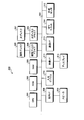
- FIG. 1 is a block diagram illustrating an example of a functional configuration of the point search apparatus according to the embodiment.
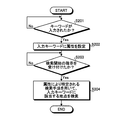
- FIG. 2 is a flowchart showing an example of a point search processing procedure of the point search apparatus according to this embodiment.
- FIG. 3 is a block diagram illustrating an example of a hardware configuration of the navigation device according to the present embodiment.
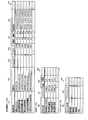
- FIG. 4 is an explanatory diagram showing an example of an attribute table recorded on the magnetic disk.
- FIG. 5 is an explanatory diagram showing an example of a search table recorded on the magnetic disk.
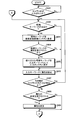
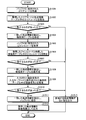
- FIG. 6A is a flowchart illustrating an example of point search processing by the navigation device.
- FIG. 6B is a flowchart of an example of the point search process by the navigation device.
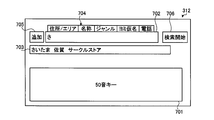
- FIG. 7 is an explanatory diagram illustrating an example of an input screen at the time of point search.
- FIG. 8 is an explanatory diagram illustrating an example of a display screen when a keyword input is received from the user.
- FIG. 9 is an explanatory diagram illustrating an example of a display screen when an attribute is set for an input keyword.
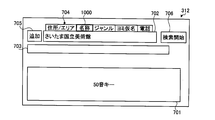
- FIG. 10 is an explanatory diagram illustrating an example of a display screen when an attribute is changed due to a keyword being changed.
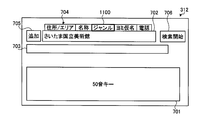
- FIG. 11 is an explanatory diagram illustrating an example of a display screen when an attribute is changed by a user's selection.
- FIG. 12 is an explanatory diagram illustrating an example of a display screen when attributes are set for a plurality of input keywords.
- FIG. 13 is a flowchart illustrating an example of area code extraction processing in the point search processing.
- FIG. 14 is a flowchart illustrating an example of a genre code extraction process in the point search process.
- FIG. 15 is a flowchart illustrating an example of the name search process in the point search process.
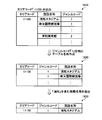
- FIG. 16 is an explanatory diagram showing an example of a search table created in the search process.
- FIG. 17 is an explanatory diagram illustrating an example of a display screen when one search result is output.
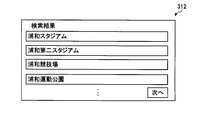
- FIG. 18 is an explanatory diagram illustrating an example of a display screen when a plurality of search results are output.
- FIG. 1 is a block diagram illustrating an example of a functional configuration of the point search apparatus according to the embodiment.
- a point search device 100 includes a table storage unit 110, a keyword input unit 120, a setting unit 130, a database 140, a start input unit 150, a search unit 160, a display unit 170, and a change input unit. 180 and a history storage unit 190.
- the table storage unit 110 stores a table in which attributes for specifying a search method are associated with keywords.
- Search methods include name search that searches for the location of the name of the location, Yomi search that searches for the location of the location and the genre search that searches for the genre of the location, the address or area of the location For example, address area search for searching for a location as a target, phone number search for searching for a location for a phone number of a location, and the like.
- the attribute is for specifying a search method. Specifically, a name attribute for specifying name search, a read attribute for specifying read search, a genre attribute for specifying genre search, and an address for specifying address area search. Area attribute, telephone number attribute for specifying telephone number search, and the like.
- the keyword is, for example, a word composed of a plurality of characters, and includes a single character kana, alphabets, numbers, and the like.
- the table storage unit 110 stores attributes that are highly likely to be searched when searching for a keyword in association with the keyword.
- the table storage unit 110 stores keywords representing place names such as “Tokyo” and “Saitama” in correspondence with address area attributes.
- a keyword representing a facility classification such as “hotel” is stored in correspondence with the genre attribute.
- a keyword indicating a unique name such as “Saitama XX Hotel” is stored as a name attribute in order to represent a specific facility name.
- the keyword input unit 120 receives keyword input from the user.
- the keyword input unit 120 includes an input button and a touch panel.
- the setting unit 130 refers to the table stored in the table storage unit 110 and sets an attribute for the keyword (hereinafter referred to as “input keyword”) input by the keyword input unit 120. Specifically, the setting unit 130 determines which keyword in the table the input keyword matches, and sets an attribute corresponding to the matched keyword as the input keyword. For example, when an input keyword “Saitama” is input, an address area attribute is set for the keyword by referring to the table. Further, when an input keyword “Saitama OO Hotel” is input, a name attribute is set for the keyword by referring to the table.
- the database 140 stores information on a plurality of points to be searched. Specifically, the information regarding the point includes information on the position and name of the point.
- the start input unit 150 receives a search start instruction from the user. Specifically, the start input unit 150 includes an input button and a touch panel.
- the search unit 160 When the search unit 160 receives a search start instruction via the start input unit 150, the search unit 160 uses the search method specified by the attribute set for the input keyword to find a point corresponding to the input keyword from the database 140. Search for. For example, when the input keyword “Saitama” is input, the search unit 160 performs a search using a search method based on an address area search.
- the display unit 170 displays and outputs the search result obtained by the search unit 160.
- the display unit 170 includes a display.
- the output of the search result is not limited to the display output by the display unit 170, but can be an audio output from an audio output unit (not shown), or both display output and audio output can be used. .
- the keyword input unit 120 can accept a plurality of keywords. For example, the keyword input unit 120 receives input of a first keyword and a second keyword. Specifically, the keyword input unit 120 receives an input of the second keyword after the input of the first keyword is completed.
- the setting unit 130 refers to the table, sets the first attribute for the first keyword, and sets the second attribute for the second keyword. Supplementing the order of the input by the keyword input unit 120 and the attribute setting by the setting unit 130, the setting unit 130 sets the first attribute for the first keyword received by the keyword input unit 120. Thereafter, the keyword input unit 120 receives an input of the second keyword. Then, the setting unit 130 sets a second attribute for the second keyword.
- the first attribute and the second attribute are different attributes.
- the search unit 160 when the search unit 160 receives a search start instruction, the search unit 160 searches for a point corresponding to the first keyword using the search method specified by the first attribute, and is specified by the second attribute. A point corresponding to the second keyword is searched using a search method. Based on the search result of the point corresponding to the first keyword and the search result of the point corresponding to the second keyword, the search unit 160 matches the points (AND search) or points included in either of the points (OR Search) is output as a search result for both.
- the change input unit 180 is an arbitrary component.
- the change input unit 180 receives a change in the attribute set in the input keyword from the user. That is, when the attribute set by the setting unit 130 is different from the attribute desired by the user, the change input unit 180 receives the change from the user, so that the attribute is changed.
- the number of times the change input unit 180 accepts a change is not limited to one, and can be accepted any number of times while a screen for accepting a change input is displayed.
- the change input unit 180 includes an input button and a touch panel.
- the search unit 160 uses the search method specified by the changed attribute to input the change. Search the database for the point corresponding to the keyword.
- the history storage unit 190 is an arbitrary component.
- the history storage unit 190 stores history information of attribute changes.
- the history storage unit 190 may store only the attributes when the change input unit 180 has received the previous change, or may store the number of times the change has been received so far for each attribute.
- the setting unit 130 refers to the table and the history information and sets an attribute for the input keyword. Specifically, the setting unit 130 sets, for example, an attribute when the previous change has been received, or an attribute with a large number of changes received so far, for the input keyword.
- the keyword input unit 120 may include a first reception unit 121, a presentation unit 122, a second reception unit 123, and an output unit 124.
- the 1st reception part 121 receives the input of a keyword from a user.
- the 1st reception part 121 consists of an input button and a touch panel.
- the presentation unit 122 extracts candidate keywords from the table based on the accepted keywords and presents them to the user.
- a candidate keyword is a keyword estimated from an input keyword.
- the number of candidate keywords presented by the presentation unit 122 varies depending on the input keyword, but is typically plural.
- a plurality of candidate keywords may be displayed on the same screen or may be displayed one by one.
- the 2nd reception part 123 receives selection of a desired keyword from a user from a candidate keyword.
- the candidate keyword received by the second reception unit 123 becomes the first candidate presented by the presentation unit 122 when the same keyword is input to the first reception unit 121 next time, for example.
- the 2nd reception part 123 consists of an input button or a touch panel.
- the output unit 124 outputs the selected candidate keyword as an input keyword.
- the keyword input unit 120 receives a keyword for new registration (hereinafter referred to as “new keyword”) from the user together with an attribute corresponding to the new keyword.
- the new keyword and attribute are arbitrary keywords and attributes selected by the user.
- the table storage unit 110 stores new keywords and attributes in the table.
- the setting unit 130 corresponds to the new keyword when the input keyword corresponds to the new keyword stored in the table storage unit 110.
- Set attributes The setting unit 130 preferentially sets an attribute corresponding to the new keyword with respect to the input keyword at the time of the next setting, with the new keyword stored in the table storage unit 110 as a reference.
- the history information of the attribute change stored in the history storage unit 190 Refer to, and set the attribute to the input keyword.
- FIG. 2 is a flowchart showing an example of the point search processing procedure of the point search apparatus 100 according to the present embodiment.
- the point search device 100 determines whether or not a keyword has been input to the keyword input unit 120 (step S201). It is in a standby state until a keyword is input (step S201: No loop). When a keyword is input (step S201: Yes), the setting unit 130 sets an attribute for the input keyword (step S202).
- step S203 No loop
- step S203: Yes the search unit 160 searches for a point corresponding to the input keyword using the search method specified by the attribute (step S204), and the series of processing ends.
- an attribute is set for an input keyword, and a spot corresponding to the input keyword is searched using a search technique specified by the attribute. Because of this, it is possible to perform a so-called free keyword search that does not require a user to set a search method when performing a search. Therefore, the user can reduce the annoyance caused by setting the search method, and can obtain appropriate search results by reducing the misperception of the search method.
- a plurality of input keywords (first keyword and second keyword) are received, attributes are set for each input keyword, and each input keyword is assigned to each input keyword using a search method specified by each attribute. If a corresponding point is searched, a plurality of keywords having different attributes can be input on the same screen. In other words, as in the past, for example, an operation of selecting an attribute and inputting a keyword is not repeated for each attribute. Therefore, it is possible to reduce the burden of the user's input operation.
- the change of the attribute set in the input keyword is received from the user, it can be changed to the attribute desired by the user when the set attribute is different from that desired by the user. Therefore, an appropriate search result reflecting the attribute desired by the user can be obtained.
- the candidate keyword is extracted and presented to the user, and the candidate keyword received from the presented keyword is output as the input keyword, the keyword input of the user can be supported, The burden of input operation can be reduced.
- the keyword desired by the user can be newly stored even if the keyword is not stored in the table. Can do.
- the input keyword corresponds to a new keyword
- a search can be performed using a search method for an attribute desired by the user. Therefore, it is possible to perform an appropriate search and speed up the search.
- FIG. 3 is a block diagram illustrating an example of a hardware configuration of the navigation device according to the present embodiment.
- a navigation device 300 includes a CPU 301, a ROM 302, a RAM 303, a magnetic disk drive 304, a magnetic disk 305, an optical disk drive 306, an optical disk 307, an audio I / F (interface) 308, and a speaker 309.
- the respective components 301 to 315 are connected by a bus 320, respectively.
- the CPU 301 governs overall control of navigation device 300.
- the ROM 302 stores various programs such as a boot program, a current position calculation program, a route search program, a route guidance program, a keyword input program, an attribute setting program, and an information search program.
- the RAM 303 is used as a work area for the CPU 301.
- the current position calculation program calculates the current position of the vehicle (the current position of the navigation device 300) based on output information from a GPS unit 314 and various sensors 315 described later.
- the route search program searches for an optimum route from the departure point to the destination using map data recorded on the magnetic disk 305 described later.
- the optimum route is the shortest (or fastest) route to the destination or the route that best meets the conditions specified by the user. Further, not only the destination but also a route to a stop point or a rest point may be searched.
- the searched guidance route is output to the audio I / F 308 and the video I / F 311 via the CPU 301.
- the route guidance program is based on guidance route information searched by executing the route search program, vehicle current location information calculated by executing the current position calculation program, and map data read from the magnetic disk 305. Real-time route guidance information is generated. The generated route guidance information is output to the audio I / F 308 and the video I / F 311 via the CPU 301.
- the keyword input program is a program for supporting the keyword input of the user.
- the candidate keyword estimated for the input keyword is extracted and presented, and the candidate keyword presented is presented Among them, a program that outputs what is received from the user as an input keyword.
- the keyword input program includes a program for recording a new keyword received from the user on the magnetic disk 305 together with an attribute corresponding to the new keyword. Note that the input of keywords and the reception of input keywords are performed using the input device 310.
- the candidate keywords are presented from the speaker 309 or the display 312.
- the keyword input unit 120 shown in FIG. 1 is realized by the CPU 301, the input device 310, and the display 312. That is, the CPU 301 executes the keyword input program, and among the candidate keywords displayed on the display 312, the input device 310 receives input from the user, thereby realizing the function of the keyword input unit 120.
- Attribute setting program is a program that sets attributes for input keywords. When a plurality of input keywords are received, an attribute is set for each input keyword. The set attribute is output to the video I / F 311 via the CPU 301.
- the setting unit 130 illustrated in FIG. 1 is realized by the CPU 301. That is, the function of the setting unit 130 is realized by the CPU 301 executing the attribute setting program.
- the information search program is a program for searching for a point corresponding to the input keyword whose attribute is set by the attribute setting program.
- the retrieved search result is output to the video I / F 311 via the CPU 301.
- the search unit 160 illustrated in FIG. 1 is realized by the CPU 301. That is, the function of the search unit 160 is realized by the CPU 301 executing the information search program.
- the magnetic disk drive 304 controls the reading / writing of the data with respect to the magnetic disk 305 according to control of CPU301.
- the magnetic disk 305 records data written under the control of the magnetic disk drive 304.
- an HD hard disk
- FD flexible disk
- Examples of information recorded on the magnetic disk 305 include a search table in which information on each point is registered, an attribute table in which attributes for specifying a search method are associated with keywords, and attribute information from the user. Record history information when changes are accepted.
- the search table records information on names and positions for each facility, address information for each facility, genre information of facilities, and the like, and is recorded in the database 140 shown in FIG. Details of the search table will be described later with reference to FIG.
- the attribute table is a table in which keywords are associated with each attribute and classified, and is recorded in the table storage unit 110 shown in FIG. Details of the attribute table will be described later with reference to FIG.
- the history information indicates, for example, a history when the attribute set for the input keyword is changed by selection from the user, and is recorded in the history storage unit 190 shown in FIG. Details of the history table will be described later with reference to FIG. Note that the table storage unit 110, the database 140, and the history storage unit 190 illustrated in FIG. 1 are realized by the magnetic disk 305.
- the optical disc drive 306 controls reading / writing of data with respect to the optical disc 307 according to the control of the CPU 301.
- the optical disk 307 is a detachable recording medium from which data is read according to the control of the optical disk drive 306.
- a writable recording medium can be used as the optical disc 307.
- the removable recording medium may be an MO, a memory card, or the like.
- the audio I / F 308 is connected to a speaker 309 for audio output.
- the speaker 309 outputs sound.
- Examples of the input device 310 include a remote controller having a plurality of keys for inputting characters, numerical values, and various instructions, a keyboard, a mouse, and a touch panel.
- the input device 310 may be realized by any one of a remote controller, a keyboard, a mouse, and a touch panel, or may be realized by a plurality of forms.
- the user uses this input device 310 to input a keyword, a search start input, an input for changing an attribute, and the like.
- the keyword input unit 120 first reception unit 121, second reception unit 123), start input unit 150, and change input unit 180 illustrated in FIG.
- the video I / F 311 is connected to the display 312.
- the video I / F 311 includes, for example, a graphic controller that controls the entire display 312, a buffer memory such as a VRAM (Video RAM) that temporarily records image information that can be displayed immediately, and a graphic controller Based on the output image data, the display 312 is configured by a control IC or the like.
- the display 312 displays data such as input keywords, candidate keywords, attributes, and search results. Various data such as icons, cursors, menus, windows, or characters and images are displayed.
- the display 312 may be a CRT, a TFT liquid crystal display, a plasma display, or the like, for example.
- the display 312 is installed near the dashboard of the vehicle, for example.
- a plurality of displays 312 may be installed in the vehicle, for example, in the vicinity of the dashboard of the vehicle or in the vicinity of the rear seat of the vehicle. Note that the presentation unit 122, the output unit 124, and the display unit 170 illustrated in FIG. 1 are realized by the display 312.
- the communication I / F 313 is connected to the network via wireless and functions as an interface between the navigation device 300 and the CPU 301.
- the communication I / F 313 is further connected to a communication network such as the Internet via wireless, and also functions as an interface between the communication network and the CPU 301.
- the GPS unit 314 receives radio waves from GPS satellites and outputs information indicating the current position of the vehicle.
- the output information of the GPS unit 314 is used when the current position of the vehicle is calculated by the CPU 301 together with output values of various sensors 315 described later.
- the information indicating the current position is information for specifying one point on the map data such as latitude / longitude and altitude.
- the various sensors 315 output information such as a vehicle speed sensor, an acceleration sensor, and an angular velocity sensor that can determine the position and behavior of the vehicle.
- the output values of the various sensors 315 are used for the calculation of the current position of the vehicle by the CPU 301 and the measurement of the change in speed and direction.
- the unit 180 and the history storage unit 190 use the programs and data recorded on the ROM 302, RAM 303, magnetic disk 305, optical disk 307, etc. in the navigation device 300 shown in FIG. The function is realized by controlling each part in the navigation device 300.
- the navigation device 300 of the present embodiment executes the various programs recorded in the ROM 302 as a recording medium in the navigation device 300, thereby providing the functions provided in the point search device 100 shown in FIG. It can be executed according to the point search processing procedure shown.
- FIG. 4 is an explanatory diagram showing an example of an attribute table recorded on the magnetic disk 305.
- the attribute table 400 shows an attribute 401, a keyword 402, and a user selection history 403.
- the attribute 401 includes a name attribute for specifying a name search, an address area attribute for specifying an address area search, a genre attribute for performing a genre search, and a telephone number attribute for specifying a phone number search.
- a name search a point search is performed for the name of the point.
- a point search is performed for a point address or area.
- the genre search is performed by searching for a genre at a point.
- the phone number search is to search for a location for the phone number of the location.
- Yomi search is a search for a spot for a spot at the spot, and a keyword entered in katakana or hiragana. Specifically, for the place name “Tokyo”, the “Yomi” attribute is set when “Tokyo” or “Tokyo” is input as an input keyword. For a place name registered as Hiragana in advance, such as “Saitama”, an address area attribute is set for the Hiragana.
- the keyword 402 is a word registered in advance for each attribute 401.
- the user selection history 403 is history information of changed attributes when an attribute change from a user is accepted.
- each attribute will be specifically described.
- the name attribute a number of proper nouns such as facility names are recorded, and branch names of affiliated stores are also recorded. That is, all the unique facilities existing on the map are recorded in the name attribute.
- the place name is recorded in the address area attribute. That is, all place names that exist on the map are recorded.
- “name” is recorded in the user selection history 403. This is because “Saitama” 411 is input and the name attribute is determined by the user when it is determined as the address area attribute. Indicates that it has been changed. This history may be the latest in the past within a predetermined period, or may be changed frequently.
- the genre attribute the genre of the facility is recorded, and the trade name of the affiliated store is also recorded.
- FIG. 5 is an explanatory diagram showing an example of a search table recorded on the magnetic disk 305.
- the search table shown in FIG. 5 includes a point information table 510, an address table 520, and a genre table 530.
- the point information table 510 includes a facility name 511, a facility reading 512, a genre code 513, an area code 514, a latitude / longitude 515, and a telephone number 516.
- Facility name 511 is the name of all facilities existing on the map.
- Facility Yomi 512 indicates the facility name 511 in katakana.
- the genre code 513 is a symbol set for each genre when the facilities are classified by genre.
- the area code 514 is a symbol set for each predetermined area.
- Latitude / longitude 515 indicates a point where the facility is located.
- a telephone number 516 indicates the telephone number of the facility.
- the address table 520 includes an address name 521, an area code 514, and a latitude / longitude 515.
- the address name 521 is all place names existing on the map. This address table 520 records an area code 514 and a latitude / longitude 515 in association with each address name 521.
- the genre table 530 includes a genre name 531 and a genre code 513.
- the genre name 531 is a name of the classification when the facilities are classified by genre, and includes a trade name of an affiliated store or the like.
- the genre table 530 records a genre code 513 in association with each genre name 531.
- FIG. 6 is a flowchart illustrating an example of the point search process performed by the navigation device 300.
- an initial screen at the time of point search is displayed in advance by accepting selection of multi-search from the user. This input screen will be described later with reference to FIG.
- the CPU 301 of the navigation device 300 determines whether a keyword has been input from the user using the input device 310 (step S601). It is in a standby state until a keyword is input (step S601: No loop). When a keyword is input (step S601: Yes), it is determined whether there is a candidate keyword (step S602).
- the candidate keyword will be described later in detail with reference to FIG. 8, and for example, “Saitama” that is estimated when “sa” is input.
- step S602 If it is determined that there is a candidate keyword (step S602: Yes), the candidate keyword is displayed in a recommended conversion candidate box displayed below the input box (step S603). And it is judged whether selection of the keyword by the user was received from the candidate keywords displayed on the recommendation conversion candidate box (step S604). When selection of a candidate keyword is accepted (step S604: Yes), the accepted candidate keyword is displayed in the input box as an input keyword (step S605).
- attributes are set for the keywords displayed in the input box (step S606).
- the attributes to be set are specifically attributes set in advance for keywords, attributes based on history information by attribute change input from the user, and new keywords when the input keyword corresponds to a new keyword. Is an attribute corresponding to.
- step S607 it is determined whether or not there is a keyword input (step S607).
- step S607: Yes the process proceeds to step S602.
- step S602 when it is determined that there is no candidate keyword (step S602: No), specifically, for example, when a keyword starting with “n” or “tsu” is input, the process proceeds to step S606.
- Set attributes using keywords as input keywords The attribute to be set at this time may be determined in advance, for example, as a name attribute.
- step S604 If no candidate keyword selection is accepted in step S604 (step S604: No), the process proceeds to step S606, and attributes are set using the keyword displayed in the input box as the input keyword. If it is determined in step S607 that there is no keyword input (step S607: No), it is determined whether an attribute change has been received from the user (step S608).
- step S608: Yes When an attribute change is accepted (step S608: Yes), the attribute is changed to the accepted attribute (step S609). Then, it is determined whether or not the input keyword other than the input keyword for which the attribute is set has been accepted (step S610). Note that the determination in step S610 is specifically a determination of whether or not the “add button” shown in FIG. 7 has been selected. On the other hand, when the attribute change is not accepted in step S608 (step S608: No), the process proceeds to step S610.
- step S610 When it is determined whether or not the input of another keyword is accepted (step S610: Yes), the input keyword with the attribute set is displayed in the input completion box (step S611). The display of the input completion box will be described later with reference to FIG. Thereafter, input of another keyword is accepted (step S612), and the process proceeds to step S602.
- step S610 when it is not accepted in step S610 that another keyword is input (step S610: No), it is determined whether or not an input for starting search is accepted (step S613). It is in a standby state until an input for search start is received (step S613: No loop).
- step S613 Yes
- step S614 a search is performed using a table for each attribute (step S614). Details of the search process will be described later with reference to FIGS. Thereafter, the search result is displayed on the display 312 (step S615), and the series of processing ends.
- FIG. 7 is an explanatory diagram illustrating an example of an input screen at the time of point search.
- the explanatory diagram shown in FIG. 7 shows a screen displayed as a premise of the flowchart shown in FIG.
- the display 312 displays a 50-sound key 701, an input box 702, a guess conversion candidate box 703, an attribute tab 704, an add button 705, and a search start button 706.
- the 50-sound key 701 lists Japanese hiragana and accepts input from the user by a touch panel.
- the input box 702 displays the keyword input from the 50 sound key 701.
- the guess conversion candidate box 703 displays candidate keywords based on the characters input from the 50-sound key 701.
- An attribute tab 704 indicates an attribute to be set as an input keyword.
- the add button 705 accepts a selection from the user when inputting another keyword having a different attribute.
- the search start button 706 accepts the start of search for a point corresponding to the input keyword displayed in the input box 702.
- FIG. 8 is an explanatory diagram illustrating an example of a display screen when a keyword input is received from the user.
- the explanatory diagram shown in FIG. 8 shows the screen displayed in step S603 of the flowchart shown in FIG.
- “sa” is displayed in the input box 702 when the user inputs “sa” of the 50-sound key 701.
- the reception of the input corresponds to the reception of the input by the first reception unit 121 illustrated in FIG.
- candidate keywords estimated from “sa” are displayed. For example, “Saitama” and “Saga” as place names, and “Circle Store” as a genre of convenience stores are displayed. Is done.
- This candidate keyword is a keyword extracted based on the latest history when the user inputs “sa”, for example.
- the display of the guess keyword corresponds to the presentation by the presentation unit 122 illustrated in FIG.
- Candidate keywords displayed in the guess conversion candidate box 703 receive selection from the user through the touch panel.
- the reception by the touch panel corresponds to the reception by the second reception unit 123 shown in FIG.
- On this display screen for example, if the user selects “Saitama” from the guess conversion candidate box 703, the display screen shown in FIG. 9 is displayed.
- FIG. 9 is an explanatory diagram illustrating an example of a display screen when an attribute is set for an input keyword.
- the explanatory diagram shown in FIG. 9 shows the screen displayed in step S606 of the flowchart shown in FIG.
- “Saitama” is displayed in the input box 702. This display corresponds to the output from the output unit 124 shown in FIG. Then, as indicated by reference numeral 900, an attribute tab 704 indicating an address area attribute corresponding to “Saitama” is activated and displayed. Also, in the candidate conversion candidate box 703, candidate keywords whose input is estimated following “Saitama” are displayed. In this display screen, if the user selects “National Art Museum” from the guess conversion candidate box 703, the display screen shown in FIG. 10 is displayed.
- FIG. 10 is an explanatory diagram illustrating an example of a display screen when an attribute is changed due to a keyword being changed.
- the explanatory diagram shown in FIG. 10 shows the screen displayed in step S606 when there is a continuous input in the flowchart shown in FIG. 6 (step S607: Yes).
- FIG. 10 “Saitama National Museum” is entered in the input box 702.
- an attribute tab 704 indicating a name attribute corresponding to “Saitama National Art Museum” is activated and displayed.
- search start button 706 When the search start button 706 is selected by the user on this display screen, a name search for a spot corresponding to “Saitama National Museum of Art” is performed.
- the add button 705 is selected on this display screen, the screen shifts to the display screen shown in FIG.
- FIG. 11 is an explanatory diagram illustrating an example of a display screen when an attribute is changed by a user's selection. Note that the explanatory diagram shown in FIG. 11 shows the screen displayed in step S609 when there is continued input in the flowchart shown in FIG. 6 (step S607: Yes).
- FIG. 11 when the user selects an item indicating the genre attribute from the attribute tab 704 of the touch panel, “Saitama National Museum” is set as the genre attribute, and the genre attribute is indicated as indicated by reference numeral 1100.
- the attribute tab 704 is activated and displayed. In this display screen, when the user selects the attribute tab 704 indicating the name attribute, the name attribute can be set again. Further, when an attribute tab 704 indicating an address area attribute, a Yomi kana attribute (corresponding to a Yomi attribute), or a telephone number attribute is selected, the corresponding attribute can be set. For example, even if a genre attribute or a telephone number attribute is set for “Saitama National Museum of Art” and a genre search or a telephone number search is performed, the search result is “not applicable”.
- FIG. 12 is an explanatory diagram illustrating an example of a display screen when attributes are set for a plurality of input keywords. Note that the explanatory diagram shown in FIG. 12 shows the screen displayed in step S611 and step S612 in the flowchart shown in FIG. Note that the display screen shown in FIG. 12 is a screen unrelated to the keywords shown in FIGS.
- input completion boxes 1201 and 1202 are displayed on the display screen.
- This input completion box 1201 displays that the address area attribute is set for the input keyword “Saitama”. This indicates that the input keyword “Saitama” is input to the input box 702, and an address area attribute is set for the input keyword.
- the input completion box 1202 displays that the genre attribute is set for the input keyword “stadium”. This indicates that, after “Saitama” is input, the user selects the add button 705, and the input keyword “stadium” is input, so that the genre attribute is set for the input keyword. .
- an input keyword “Urawa” is input in the input box 702, and an attribute tab 704 indicating the name attribute is activated and displayed as indicated by reference numeral 1203.
- the address area attribute is originally set for the keyword “Urawa”, but here the name attribute is set. This is because “Saitama” is already registered as the address area attribute, and is set in advance so as not to accept the input of the address attribute. Note that even if the address area attribute is already registered, it can be set in advance so that the input of the address area attribute can be accepted again.
- FIG. 13 is a flowchart illustrating an example of area code extraction processing in the point search processing.
- the flowchart shown in FIG. 13 shows processing when an area code is extracted from an input keyword in which an address area attribute is set.
- FIG. 13 for example, assuming the display screen shown in FIG. 12, an address area attribute is set for the input keyword “Saitama”, and a genre attribute is set for the input keyword “stadium”. It is assumed that a name attribute is set for the input keyword of “Urawa”.
- the CPU 301 of the navigation device 300 collates the input keyword of the address area (“Saitama”) with the address name in the address table 520 shown in FIG. 5 (step S1301). Then, it is determined whether there is a match as a result of the collation (step S1302). If it is determined that there is a match (step S1302: Yes), it is determined whether there are a plurality of matches (step S1303).
- the case where there are a plurality of matches is a case where a plurality of place names such as “Fujimi” are entered in the address area attribute keyword.
- the locations corresponding to “Fujimi” include “Fujimi City, Saitama Prefecture” and “Fujimi, Tsurugashima City, Saitama Prefecture”, for example.
- the user performs selection (step S1304). Note that when a user makes a selection, a plurality of place names that match the input keyword are displayed in a list, and a screen display that accepts the selection from the user is displayed.
- step S1303 an area code (see reference numeral 514 in FIG. 5) corresponding to the address name is extracted (step S1305).
- step S1303: No the area code is extracted in step S1305.
- the case where there is a single match is a case where there is only one place name in the country such as “Saitama” as the keyword of the address area attribute.
- step S1303: No since it is assumed that “Saitama” has been input as the address area attribute keyword, it is determined in step S1303 that there is a single match (step S1303: No).
- the extracted area code (“11100” for “Saitama”) is stored in the buffer 1 (for example, the drive buffer of the magnetic disk drive 304) (step S1306).
- the number in the buffer is a number determined for convenience for each search result by each attribute.
- an invalid value is stored in the buffer 1 (step S1307), and the series of processing ends. The invalid value indicates that there is no point corresponding to the input keyword.
- FIG. 14 is a flowchart showing an example of a genre code extraction process in the point search process.
- the flowchart shown in FIG. 14 shows processing when a genre code is extracted from an input keyword in which a genre attribute is set.
- step S1403 the CPU 301 of the navigation device 300 collates the input keyword of the genre name (“stadium”) with the genre name in the genre table 530 shown in FIG. 5 (step S1401). Then, it is determined whether there is a match as a result of the collation (step S1402). When it is determined that there is a match (step S1402: Yes), it is determined whether there are a plurality of matches (step S1403).
- the case where there are a plurality of matches is a case where there are input keywords included in a plurality of genres such as “car” in the address area attribute keyword.
- the category corresponding to “car” includes, for example, “automobile store” and “automobile store”.
- step S1405 a genre code (see reference numeral 513 in FIG. 5) corresponding to the genre name is extracted (step S1405).
- step S1403: No the genre code is extracted in step S1405.
- the case where there is a single match is a case where a word not included in another genre such as “stadium” is input to the keyword of the genre attribute.
- step S1403 since it is assumed that “stadium” is input as the keyword of the genre attribute, in step S1403, it is determined that there is a single match (step S1403: No).
- step S1406 the extracted genre code (“1” in the case of “stadium”) is stored in the buffer 2 (step S1406).
- step S1402 determines whether there is no match as a result of the collation (step S1402: No).
- step S1407 an invalid value is stored in the buffer 2 (step S1407), and the series of processing ends.
- FIG. 15 is a flowchart showing an example of the name search process in the point search process.
- the flowchart shown in FIG. 15 includes an input keyword in which a name attribute is set, an area code extracted by the area code extraction process shown in FIG. 13, and a genre code extracted by the genre code extraction process shown in FIG. The process at the time of specifying a facility using, is shown.
- step S1501 the CPU 301 of the navigation device 300 acquires the area code “11100” stored in the buffer 1 (step S1501). Then, the acquired area code “11100” is collated with the point information table 510 shown in FIG. 5 (step S1502). Then, it is determined whether there is a match as a result of the collation (step S1503). When it is determined that there is a match (step S1503: Yes), the matched spot information is extracted and a search table is created (step S1504). Details of the search table will be described later with reference to FIG.
- step S1505 the genre code “1” stored in the buffer 2 is acquired (step S1505). Then, the acquired genre code “1” is collated with the genre code in the search table created in step S1504 (step S1506). Then, it is determined whether there is a match as a result of the collation (step S1507). When it is determined that there is a match (step S1507: Yes), the matched spot information is extracted and the search table is recreated (step S1508).
- step S1510 the facility name input keyword (“Urawa”) is collated with the facility name in the search table recreated in step S1508 (step S1509). Then, it is determined whether there is a match as a result of the collation (step S1510). If it is determined that there is a match (step S1510: Yes), the matched point information is extracted and stored in the buffer 3 (step S1511). And the point information preserve
- step S1503 determines whether there is no match as a result of the comparison between the area code and the point information table 510 (step S1503: No).
- step S1507 determines whether there is no match as a result of the comparison between the genre code and the genre code in the search table (step S1507: No)
- step S1513 If it is determined in step S1510 that there is no match as a result of collation between the facility name input keyword and the facility name in the re-created search table (step S1510: No), the process proceeds to step S1513. To do.
- FIG. 16 is an explanatory diagram showing an example of a search table created in the search process.
- the first search table 1610 displays matching point information when there is a match as a result of matching between the acquired area code “11100” and the spot information table 510 shown in FIG. 5.
- the extracted table is shown. That is, the first search table 1610 shows the facility information when the area code “11100” (“Saitama”) is extracted from the point information table 510.
- the second search table 1620 extracts matching point information when there is a match as a result of matching between the acquired genre code “1” and the genre code in the first search table 1610. Shows the re-created table. That is, the second search table 1620 indicates the facility name when the genre code “1” (“stadium”) is extracted from the first search table 1610.
- the search result 1630 extracts the matching point information when there is a match as a result of matching between the facility name input keyword (“Urawa”) and the facility name in the second search table 1620.
- the output search result is shown. That is, the search result 1630 indicates facility information including the characters “Urawa” from the second search table 1620. That is, “Urawa Stadium” is output as the search result 1630.
- a display screen when the search result 1630 is output will be described below with reference to FIGS. 17 and 18.
- FIG. 17 is an explanatory diagram illustrating an example of a display screen when one search result is output.
- a search result screen 1710 and a map screen 1720 are displayed on the display 312.
- the search result screen 1710 displays an address of “Urawa Stadium” as a search result.
- the search result screen 1710 displays a selection button 1711 for receiving an input as to whether or not “Urawa Stadium” is set as the destination. When the user selects “Yes” among the selection buttons 1711, “Urawa Stadium” is set as the destination.
- the map screen 1720 displays a map of the surrounding area centering on “Urawa Stadium”.
- this search result screen 1710 only one search result is shown, but when there are a plurality of search results, a plurality of search results may be displayed.
- a display screen when a plurality of search results are displayed will be described below with reference to FIG.
- FIG. 18 is an explanatory diagram illustrating an example of a display screen when a plurality of search results are output.
- a plurality of search results are listed and displayed on the display 312.
- the display screen shown in FIG. 17 is displayed.
- the display screen is displayed in which each search result screen and map screen are displayed.
- an attribute is set for an input keyword, and a point corresponding to the input keyword is searched using a search method specified by the attribute.
- a so-called free keyword search that does not require the user to set a search method for the search. Therefore, the user can reduce the annoyance caused by setting the search method, and can obtain appropriate search results by reducing the misperception of the search method.
- a plurality of keywords (“Saitama”, “stadium”, “Urawa”) are accepted, attributes are set for each input keyword, and each search method specified by each attribute is used. Since the point corresponding to the input keyword is searched, it is possible to input a plurality of input keywords having different attributes on the same screen. In other words, as in the past, for example, an operation of selecting an attribute and inputting a keyword is not repeated for each attribute. Therefore, it is possible to reduce the burden of the user's input operation.
- the attribute desired by the user can be set at the next and subsequent attribute settings without the user having to change the attribute each time.
- candidate keywords are extracted and presented to the user, and candidate keywords accepted from the presented keywords are output as input keywords, so that user keyword input can be supported.
- the burden of input operation can be reduced.
- the new keyword received from the user is stored together with the attribute corresponding to the new keyword, the keyword desired by the user even if the keyword is not stored in the attribute table (see FIG. 4). Can be newly stored.
- the input keyword corresponds to a new keyword
- a search can be performed using a search method for an attribute desired by the user. Therefore, it is possible to perform an appropriate search and speed up the search.
- a search using a so-called free keyword that does not require a user to set a search method when performing a search. Can be done. Therefore, the user can reduce the annoyance caused by setting the search method, and can obtain appropriate search results by reducing the misperception of the search method.
- the point search method described in this embodiment can be realized by executing a program prepared in advance on a computer such as a personal computer or a workstation.
- This program is recorded on a computer-readable recording medium such as a hard disk, a flexible disk, a CD-ROM, an MO, and a DVD, and is executed by being read from the recording medium by the computer.
- the program may be a transmission medium that can be distributed via a network such as the Internet.
Landscapes
- Engineering & Computer Science (AREA)
- Databases & Information Systems (AREA)
- Theoretical Computer Science (AREA)
- Remote Sensing (AREA)
- Data Mining & Analysis (AREA)
- Physics & Mathematics (AREA)
- General Engineering & Computer Science (AREA)
- General Physics & Mathematics (AREA)
- Navigation (AREA)
Abstract
地点検索装置(100)は、テーブル記憶部(110)と、キーワード入力部(120)と、設定部(130)と、データベース(140)と、開始入力部(150)と、検索部(160)とを備える。テーブル記憶部(110)は、検索手法を特定するための属性とキーワードとを対応付けたテーブルを記憶する。キーワード入力部(120)は、キーワードの入力をユーザから受け付ける。設定部(130)は、テーブルを参照して、キーワード入力部(120)に入力されたキーワード(入力キーワード)に属性を設定する。データベース(140)は、複数の地点に関する情報を記憶する。開始入力部(150)は、検索開始の指示をユーザから受け付ける。検索部(160)は、検索開始の指示を受け付けた際に、入力キーワードに設定されている属性により特定される検索手法を用いて、当該入力キーワードに該当する地点をデータベース(140)から検索する。
Description
この発明は、地点検索装置、地点検索方法、地点検索プログラム、および記録媒体に関する。
近年、車両などの移動体には、目的地を設定することにより、当該目的地までの経路を誘導するナビゲーション装置が搭載されている。目的地や登録地などの設定は、ユーザが地図画面をスクロールして地図画面上の1点を特定することによっておこなわれるほか、検索画面からユーザが所望する項目を選択したりキーワードを入力したりすることによってもおこなわれる。
検索画面から目的地などを設定する場合には、住所検索、名称検索、ジャンル検索などの検索手法が用いられる(たとえば、下記特許文献1参照)。住所検索は、ユーザから入力される住所を用いて、住所の情報を格納するデータベースから当該住所に該当する地物を検索する手法である。また、名称検索は、ユーザから入力される施設名称などを用いて、名称に関する情報を記録するデータベースから当該名称に該当する地物を検索する手法である。さらに、ジャンル検索は、ユーザから入力されるジャンルを用いて、ジャンルに関する情報を記録するデータベースから、入力されたジャンルに該当するジャンルを検索する手法である。
しかしながら、上述した特許文献1に記載の技術は、検索をおこなうにあたり、ユーザからの検索手法の設定を要するため、ユーザにとって煩わしいといった問題が一例として挙げられる。また、ユーザにより検索手法が誤って設定された場合には、ユーザは最初から入力し直す必要があるだけでなく、ユーザが検索手法を誤認している場合には、適正な検索結果を得ることができないといった問題が一例として挙げられる。
上述した課題を解決し、目的を達成するため、請求項1の発明にかかる地点検索装置は、複数の地点に関する情報を記憶するデータベースと、検索手法を特定するための属性とキーワードとを対応付けたテーブルを記憶するテーブル記憶手段と、キーワードの入力をユーザから受け付けるキーワード入力手段と、前記テーブルを参照して、前記キーワード入力手段に入力されたキーワード(以下「入力キーワード」という)に前記属性を設定する設定手段と、検索開始の指示をユーザから受け付ける開始入力手段と、検索開始の指示を受け付けた際に、前記入力キーワードに設定されている属性により特定される検索手法を用いて、当該入力キーワードに該当する地点を前記データベースから検索する検索手段と、を備えることを特徴とする。
また、請求項9に記載の地点検索方法は、複数の地点に関する情報を記憶するデータベースから特定の地点を検索する地点検索方法であって、キーワードの入力をユーザから受け付けるキーワード入力工程と、検索手法を特定するための属性とキーワードとを対応付けたテーブルを参照して、前記キーワード入力手段にて入力されたキーワード(以下「入力キーワード」という)に前記属性を設定する設定工程と、検索開始の指示をユーザから受け付ける開始入力工程と、検索開始の指示を受け付けた際に、前記入力キーワードに設定されている属性により特定される検索手法を用いて、当該入力キーワードに該当する地点を前記データベースから検索する検索工程と、を含むことを特徴とする。
また、請求項10に記載の地点検索プログラムは、請求項9に記載の地点検索方法をコンピュータに実行させることを特徴とする。
また、請求項11に記載の記録媒体は、請求項10に記載の地点検索プログラムをコンピュータに読み取り可能に記録したことを特徴とする。
100 地点検索装置
110 テーブル記憶部
120 キーワード入力部
130 設定部
140 データベース
150 開始入力部
160 検索部
170 表示部
180 変更入力部
190 履歴記憶部
300 ナビゲーション装置
110 テーブル記憶部
120 キーワード入力部
130 設定部
140 データベース
150 開始入力部
160 検索部
170 表示部
180 変更入力部
190 履歴記憶部
300 ナビゲーション装置
以下に添付図面を参照して、この発明にかかる地点検索装置、地点検索方法、地点検索プログラム、および記録媒体の好適な実施の形態を詳細に説明する。
(実施の形態)
(地点検索装置の機能的構成)
この発明の実施の形態にかかる地点検索装置の機能的構成について説明する。図1は、実施の形態にかかる地点検索装置の機能的構成の一例を示すブロック図である。
(地点検索装置の機能的構成)
この発明の実施の形態にかかる地点検索装置の機能的構成について説明する。図1は、実施の形態にかかる地点検索装置の機能的構成の一例を示すブロック図である。
図1において、地点検索装置100は、テーブル記憶部110と、キーワード入力部120と、設定部130と、データベース140と、開始入力部150と、検索部160と、表示部170と、変更入力部180と、履歴記憶部190と、を備えて構成される。
テーブル記憶部110は、検索手法を特定するための属性とキーワードとを対応付けたテーブルを記憶する。検索手法は、地点の名称を対象として地点の検索をおこなう名称検索、地点のヨミを対象として地点の検索をおこなうヨミ検索、地点のジャンルを対象として検索をおこなうジャンル検索、地点の住所またはエリアを対象として地点の検索をおこなう住所エリア検索、地点の電話番号を対象として地点の検索をおこなう電話番号検索、などが挙げられる。
属性は、検索手法を特定するためのものであり、具体的には、名称検索を特定する名称属性、ヨミ検索を特定するヨミ属性、ジャンル検索を特定するジャンル属性、住所エリア検索を特定する住所エリア属性、電話番号検索を特定する電話番号属性、などが挙げられる。
キーワードは、具体的には、たとえば、複数の文字からなる単語であり、1文字の仮名、アルファベット、数字なども含む。テーブル記憶部110は、あるキーワードを検索する際に検索される可能性の高い属性を当該キーワードに対応付けて記憶する。具体例を挙げると、テーブル記憶部110は、「東京」や「さいたま」など地名を表すキーワードは、住所エリア属性に対応して記憶している。また、「ホテル」など施設の分類を表すキーワードは、ジャンル属性に対応して記憶している。さらに、「さいたま○×ホテル」など固有名称を示すキーワードは、特定の施設名称を表すため、名称属性として記憶している。
キーワード入力部120は、キーワードの入力をユーザから受け付ける。キーワード入力部120は、具体的には、入力ボタンやタッチパネルからなる。なお、キーワード入力部120へのキーワードの入力に際し、ユーザからの検索手法や属性などの設定をおこなう必要はなく、任意のキーワードを入力できるようになっている。
設定部130は、テーブル記憶部110に記憶されるテーブルを参照して、キーワード入力部120にて入力されたキーワード(以下「入力キーワード」という)に属性を設定する。具体的には、設定部130は、入力キーワードがテーブル内のどのキーワードに合致するかを判定するとともに、合致したキーワードに対応する属性を、入力キーワードに設定する。たとえば、「さいたま」という入力キーワードが入力された場合、テーブルを参照することにより、当該キーワードに住所エリア属性が設定される。また、「さいたま○×ホテル」という入力キーワードが入力された場合、テーブルを参照することにより、当該キーワードに名称属性が設定される。
データベース140は、検索対象となる複数の地点に関する情報を記憶する。地点に関する情報は、具体的には、当該地点の位置や名称の情報などである。開始入力部150は、検索開始の指示をユーザから受け付ける。開始入力部150は、具体的には、入力ボタンやタッチパネルからなる。
検索部160は、開始入力部150を介して検索開始の指示を受け付けた際に、入力キーワードに設定されている属性により特定される検索手法を用いて当該入力キーワードに該当する地点をデータベース140から検索する。たとえば、「さいたま」という入力キーワードが入力されている場合、検索部160は、住所エリア検索による検索手法を用いて、検索をおこなう。
表示部170は、検索部160による検索結果を表示出力する。表示部170は、具体的には、ディスプレイからなる。なお、検索結果の出力は、表示部170による表示出力に限らず、図示しない音声出力部からの音声出力とすることも可能であるし、表示出力および音声出力の双方を用いることも可能である。
また、本実施の形態において、キーワード入力部120は、複数のキーワードを受け付けることが可能である。たとえば、キーワード入力部120は、第1キーワードおよび第2キーワードの入力を受け付ける。キーワード入力部120は、具体的には、第1キーワードの入力が完了した後に、第2キーワードの入力を受け付ける。
この場合、設定部130は、テーブルを参照して、第1キーワードに第1属性を設定するとともに、第2キーワードに第2属性を設定する。キーワード入力部120による入力および設定部130による属性の設定の順番について補足すると、設定部130は、キーワード入力部120が受け付けた第1キーワードに対して第1属性を設定する。このあと、キーワード入力部120が第2キーワードの入力を受け付ける。そして、設定部130が当該第2キーワードに対して第2属性を設定する。なお、第1属性と第2属性とは、それぞれ異なる属性である。
また、この場合、検索部160は、検索開始の指示を受け付けた際に、第1属性により特定される検索手法を用いて第1キーワードに該当する地点を検索するとともに、第2属性により特定される検索手法を用いて第2キーワードに該当する地点を検索する。検索部160は、第1キーワードに該当する地点の検索結果、および第2キーワードに該当する地点の検索結果から、双方に合致する地点(AND検索)、または双方のいずれかに含まれる地点(OR検索)を、双方の検索結果として出力する。
また、本実施の形態において、変更入力部180は、任意の構成要素である。変更入力部180は、入力キーワードに設定されている属性の変更をユーザから受け付ける。すなわち、設定部130によって設定された属性がユーザの所望する属性とは異なる場合に、変更入力部180がユーザからの変更を受け付けることにより、属性が変更されるようになっている。変更入力部180が変更を受け付ける回数は、1回に限らず、変更入力を受け付ける画面が表示されている間は何度でも受け付けることが可能である。変更入力部180は、具体的には、入力ボタンやタッチパネルからなる。
変更入力部180を備えた構成において、検索部160は、検索開始の指示を受け付けた際に属性の変更を既に受け付けている場合には、変更後の属性により特定される検索手法を用いて入力キーワードに該当する地点をデータベースから検索する。
また、本実施の形態において、履歴記憶部190は、任意の構成要素である。履歴記憶部190は、属性の変更の履歴情報を記憶する。履歴記憶部190は、変更入力部180が前回変更を受け付けた際の属性のみを記憶してもよいし、属性ごとに、これまでに変更を受け付けた回数を記憶してもよい。
履歴記憶部190を備えた構成において、設定部130は、テーブルおよび履歴情報を参照して、入力キーワードに属性を設定する。具体的には、設定部130は、入力キーワードに対して、たとえば、前回変更を受け付けた際の属性を設定したり、これまでに変更を受け付けた回数の多い属性を設定したりする。
また、本実施の形態において、キーワード入力部120は、第1受付部121と、提示部122と、第2受付部123と、出力部124と、を備えるようにしてもよい。第1受付部121は、キーワードの入力をユーザから受け付ける。第1受付部121は、具体的には、入力ボタンやタッチパネルからなる。
提示部122は、受け付けたキーワードに基づいて、テーブルの中から候補キーワードを抽出してユーザに提示する。候補キーワードは、入力されたキーワードから推測されるキーワードである。提示部122によって提示される候補キーワードの数は、入力されたキーワードによって異なるが、代表的には複数である。なお、複数の候補キーワードを提示する際には、同一画面上に複数の候補キーワードを表示してもよいし、1キーワードずつ表示してもよい。
第2受付部123は、候補キーワードの中から所望のキーワードの選択をユーザから受け付ける。第2受付部123が受け付けた候補キーワードは、たとえば、次回、同様のキーワードが第1受付部121に入力された場合に、提示部122によって提示される筆頭の候補となる。第2受付部123は、具体的には、入力ボタンやタッチパネルからなる。出力部124は、選択された候補キーワードを入力キーワードとして出力する。
また、本実施の形態において、キーワード入力部120は、新規登録用のキーワード(以下「新規キーワード」という)を当該新規キーワードに対応する属性とともにユーザから受け付ける。新規キーワードおよび属性は、ユーザが選択する任意のキーワードおよび属性である。また、この場合、テーブル記憶部110は、新規キーワードと属性とをテーブルに記憶する。
また、このような新規キーワードを受け付けることが可能な構成において、設定部130は、入力キーワードがテーブル記憶部110に記憶されている新規キーワードに相当する場合、当該入力キーワードに、新規キーワードに対応する属性を設定する。設定部130は、新規キーワードがテーブル記憶部110に記憶されたときを基準として、つぎの設定時に、入力キーワードに対し、新規キーワードに対応する属性の設定を優先しておこなう。なお、新規キーワードに対応する属性の設定したものの、変更入力部180により属性の変更を受け付けた場合には、たとえば、更につぎの設定時には、履歴記憶部190に記憶された属性の変更の履歴情報を参照して、入力キーワードに属性を設定する。
(地点検索装置の地点検索処理手順)
つぎに、図2を用いて、地点検索装置100の地点検索処理手順について説明する。図2は、本実施の形態にかかる地点検索装置100の地点検索処理手順の一例を示すフローチャートである。
つぎに、図2を用いて、地点検索装置100の地点検索処理手順について説明する。図2は、本実施の形態にかかる地点検索装置100の地点検索処理手順の一例を示すフローチャートである。
図2のフローチャートにおいて、地点検索装置100は、キーワード入力部120にキーワードが入力されたか否かを判断する(ステップS201)。キーワードが入力されるまで待機状態にあり(ステップS201:Noのループ)、キーワードが入力されると(ステップS201:Yes)、設定部130が入力キーワードに属性を設定する(ステップS202)。
このあと、開始入力部150がユーザから検索開始の指示を受け付けるまで待機状態にある(ステップS203:Noのループ)。検索開始の指示を受け付けると(ステップS203:Yes)、検索部160が属性によって特定される検索手法を用いて、入力キーワードに該当する地点を検索し(ステップS204)、一連の処理を終了する。
以上説明したように、本実施の形態にかかる地点検索装置100によれば、入力キーワードに属性を設定し、当該属性により特定される検索手法を用いて、当該入力キーワードに該当する地点を検索するようにしたので、検索をおこなうにあたりユーザからの検索手法の設定を要することのない、所謂フリーキーワードによる検索をおこなうことができる。したがって、ユーザは、検索手法を設定することによる煩わしさを低減できるとともに、検索手法の誤認を低減することにより、適正な検索結果を得ることができる。
また、本実施の形態において、複数の入力キーワード(第1キーワードおよび第2キーワード)を受け付け、各入力キーワードに属性を設定するとともに、各属性により特定される検索手法を用いて、各入力キーワードに該当する地点を検索するようにすれば、属性の異なる複数のキーワードの入力を同一画面上にておこなうことができる。換言すれば、従来のように、たとえば、属性を選択してキーワードを入力するといった操作を属性ごとに繰り返すことがない。したがって、ユーザの入力操作の負担を軽減することができる。
また、入力キーワードに設定されている属性の変更をユーザから受け付けるようにすれば、設定された属性がユーザの所望するものと異なる場合に、ユーザの所望する属性に変更することができる。したがって、ユーザの所望する属性を反映させた適正な検索結果を得ることができる。
また、属性の変更を受け付けた履歴情報を記憶するようにし、テーブルおよび履歴情報を参照して、入力キーワードに属性を設定するようにすれば、あるキーワードにおいて、テーブルに予め登録されている属性とユーザの所望する属性とが異なるようなことがあっても、毎回ユーザが属性を変更する必要なく、次回以降の属性の設定時に、ユーザの所望する属性を設定させることができる。
また、キーワードの入力にあたり、候補キーワードを抽出してユーザに提示し、提示した中から受け付けた候補キーワードを入力キーワードとして出力するようにすれば、ユーザのキーワード入力をサポートすることができ、ユーザの入力操作の負担を軽減することができる。
また、ユーザから受け付けた、新規キーワードを当該新規キーワードに対応する属性とともに記憶するようにすれば、キーワードがテーブルに記憶されていない場合であっても、ユーザが所望するキーワードを新たに記憶させることができる。
また、入力キーワードが新規キーワードに相当する場合、当該入力キーワードに、新規キーワードに対応する属性を設定するようにすれば、ユーザが所望する属性の検索手法を用いて検索をおこなうことができる。したがって、適正な検索をおこなうことができるとともに、検索の迅速化を図ることができる。
以下に、本発明の実施例について説明する。本実施例では、車両に搭載されるナビゲーション装置によって、本発明の地点検索装置100を実施した場合の一例について説明する。
(ナビゲーション装置のハードウェア構成)
図3を用いて、本実施例にかかるナビゲーション装置のハードウェア構成について説明する。図3は、本実施例にかかるナビゲーション装置のハードウェア構成の一例を示すブロック図である。
図3を用いて、本実施例にかかるナビゲーション装置のハードウェア構成について説明する。図3は、本実施例にかかるナビゲーション装置のハードウェア構成の一例を示すブロック図である。
図3において、ナビゲーション装置300は、CPU301と、ROM302と、RAM303と、磁気ディスクドライブ304と、磁気ディスク305と、光ディスクドライブ306と、光ディスク307と、音声I/F(インターフェース)308と、スピーカ309と、入力デバイス310と、映像I/F311と、ディスプレイ312と、通信I/F313と、GPSユニット314と、各種センサ315とを備えている。また、各構成部301~315はバス320によってそれぞれ接続されている。
CPU301は、ナビゲーション装置300の全体の制御を司る。ROM302は、ブートプログラム、現在位置算出プログラム、経路探索プログラム、経路誘導プログラム、キーワード入力プログラムと、属性設定プログラム、情報検索プログラムなどの各種プログラムを記録している。また、RAM303は、CPU301のワークエリアとして使用される。
現在位置算出プログラムは、たとえば、後述するGPSユニット314および各種センサ315の出力情報に基づいて、車両の現在位置(ナビゲーション装置300の現在位置)を算出させる。
経路探索プログラムは、後述する磁気ディスク305に記録されている地図データなどを利用して、出発地から目的地までの最適な経路を探索させる。ここで、最適な経路とは、目的地までの最短(または最速)経路やユーザが指定した条件に最も合致する経路などである。また、目的地のみならず、立ち寄り地点や休憩地点までの経路を探索してもよい。探索された誘導経路は、CPU301を介して音声I/F308や映像I/F311へ出力される。
経路誘導プログラムは、経路探索プログラムを実行することによって探索された誘導経路情報、現在位置算出プログラムを実行することによって算出された車両の現在位置情報、磁気ディスク305から読み出された地図データに基づいて、リアルタイムな経路誘導情報を生成させる。生成された経路誘導情報は、CPU301を介して音声I/F308や映像I/F311へ出力される。
キーワード入力プログラムは、ユーザのキーワード入力をサポートするためのプログラムであり、入力されたキーワードを確定するに際し、入力されたキーワードに対して推測される候補キーワードを抽出して提示し、提示した候補キーワードのうち、ユーザから受け付けたものを入力キーワードとして出力するプログラムである。また、キーワード入力プログラムは、ユーザから受け付けた新規キーワードを当該新規キーワードに対応する属性とともに磁気ディスク305に記録させるプログラムを含む。なお、キーワードの入力および入力キーワードの受け付けは、入力デバイス310を用いておこなわれる。
また、候補キーワードの提示は、スピーカ309やディスプレイ312からおこなわれる。なお、図1に示したキーワード入力部120は、CPU301と入力デバイス310と、ディスプレイ312によって実現される。すなわち、CPU301がキーワード入力プログラムを実行し、ディスプレイ312に表示した候補キーワードのうち、入力デバイス310によってユーザからの入力を受け付けることにより、キーワード入力部120の機能を実現する。
属性設定プログラムは、入力キーワードに属性を設定するプログラムである。また、複数の入力キーワードを受け付けた場合には、各入力キーワードに属性を設定する。設定された属性は、CPU301を介して映像I/F311へ出力される。なお、図1に示した設定部130は、CPU301によって実現される。すなわち、CPU301が属性設定プログラムを実行することにより、設定部130の機能を実現する。
情報検索プログラムは、属性設定プログラムによって属性が設定された入力キーワードに該当する地点を検索するプログラムである。検索された検索結果は、CPU301を介して映像I/F311へ出力される。なお、図1に示した検索部160は、CPU301によって実現される。すなわち、CPU301が情報検索プログラムを実行することにより、検索部160の機能を実現する。
磁気ディスクドライブ304は、CPU301の制御にしたがって磁気ディスク305に対するデータの読み取り/書き込みを制御する。磁気ディスク305は、磁気ディスクドライブ304の制御で書き込まれたデータを記録する。磁気ディスク305としては、たとえば、HD(ハードディスク)やFD(フレキシブルディスク)を用いることができる。
磁気ディスク305に記録される情報の一例としては、各地点に関する情報を登録した検索用テーブルや、検索手法を特定するための属性とキーワードとを対応付けた属性テーブルのほか、ユーザからの属性の変更を受け付けた際の履歴情報などを記録する。検索用テーブルは、施設ごとの名称や位置に関する情報、施設ごとの住所情報、施設のジャンル情報などを記録したものであり、図1に示したデータベース140に記録されるものである。なお、検索用テーブルの詳細については、図5を用いて後述する。
また、属性テーブルは、属性ごとにキーワードを対応付けて分類したテーブルであり、図1に示したテーブル記憶部110に記録されるものである。なお、属性テーブルの詳細については、図4を用いて後述する。また、履歴情報は、たとえば、ユーザからの選択により、入力キーワードに設定する属性を変更した際の履歴を示したものであり、図1に示した履歴記憶部190に記録されるものである。なお、履歴テーブルの詳細については、図4を用いて後述する。なお、図1に示したテーブル記憶部110と、データベース140と、履歴記憶部190とは、磁気ディスク305によって実現される。
光ディスクドライブ306は、CPU301の制御にしたがって光ディスク307に対するデータの読み取り/書き込みを制御する。光ディスク307は、光ディスクドライブ306の制御にしたがってデータの読み出される着脱自在な記録媒体である。光ディスク307は、書き込み可能な記録媒体を利用することもできる。また、この着脱可能な記録媒体として、光ディスク307のほか、MO、メモリカードなどであってもよい。
音声I/F308は、音声出力用のスピーカ309に接続される。スピーカ309は、音声を出力する。入力デバイス310は、文字、数値、各種指示などの入力のための複数のキーを備えたリモコン、キーボード、マウス、タッチパネルなどが挙げられる。入力デバイス310は、リモコン、キーボード、マウス、タッチパネルのうち、いずれか一つの形態によって実現されてもよいし、複数の形態によって実現してもよい。
この入力デバイス310を用い、ユーザからキーワードの入力や、検索開始の入力のほか、属性を変更する際の入力などがおこなわれる。なお、図1に示したキーワード入力部120(第1受付部121、第2受付部123)と、開始入力部150と、変更入力部180とは、入力デバイス310によって実現される。
映像I/F311は、ディスプレイ312に接続される。映像I/F311は、具体的には、たとえば、ディスプレイ312全体の制御をおこなうグラフィックコントローラと、即時表示可能な画像情報を一時的に記録するVRAM(Video RAM)などのバッファメモリと、グラフィックコントローラから出力される画像データに基づいて、ディスプレイ312を表示制御する制御ICなどによって構成される。
ディスプレイ312には、入力キーワード、候補キーワード、属性、検索結果などのデータが表示される。アイコン、カーソル、メニュー、ウインドウ、あるいは文字や画像などの各種データが表示される。
このディスプレイ312は、たとえば、CRT、TFT液晶ディスプレイ、プラズマディスプレイなどを採用することができる。ディスプレイ312は、たとえば、車両のダッシュボード付近に設置される。ディスプレイ312は、車両のダッシュボード付近のほか、車両の後部座席周辺などに設置するなどして、車両内に複数設置してもよい。なお、図1に示した提示部122と、出力部124と、表示部170とは、ディスプレイ312によって実現される。
通信I/F313は、無線を介してネットワークに接続され、ナビゲーション装置300とCPU301とのインターフェースとして機能する。通信I/F313は、さらに、無線を介してインターネットなどの通信網に接続され、この通信網とCPU301とのインターフェースとしても機能する。
GPSユニット314は、GPS衛星からの電波を受信し、車両の現在位置を示す情報を出力する。GPSユニット314の出力情報は、後述する各種センサ315の出力値とともに、CPU301による車両の現在位置の算出に際して利用される。現在位置を示す情報は、たとえば緯度・経度、高度などの、地図データ上の1点を特定する情報である。
各種センサ315は、車速センサ、加速度センサ、角速度センサなどの、車両の位置や挙動を判断することが可能な情報を出力する。各種センサ315の出力値は、CPU301による車両の現在位置の算出や、速度や方位の変化量の測定などに用いられる。
図1に示した地点検索装置100が備えるテーブル記憶部110と、キーワード入力部120と、設定部130と、データベース140と、開始入力部150と、検索部160と、表示部170と、変更入力部180と、履歴記憶部190とは、図3に示したナビゲーション装置300におけるROM302、RAM303、磁気ディスク305、光ディスク307などに記録されたプログラムやデータを用いて、CPU301が所定のプログラムを実行し、ナビゲーション装置300における各部を制御することによってその機能を実現する。
すなわち、本実施例のナビゲーション装置300は、ナビゲーション装置300における記録媒体としてのROM302に記録されている各種プログラムを実行することにより、図1に示した地点検索装置100が備える機能を、図2に示した地点検索処理手順で実行することができる。
(磁気ディスクに記録される属性テーブルの一例)
つぎに、図4を用いて、磁気ディスク305に記録される属性テーブルの一例について説明する。図4は、磁気ディスク305に記録される属性テーブルの一例を示す説明図である。
つぎに、図4を用いて、磁気ディスク305に記録される属性テーブルの一例について説明する。図4は、磁気ディスク305に記録される属性テーブルの一例を示す説明図である。
図4において、属性テーブル400は、属性401と、キーワード402と、ユーザ選択履歴403とを示している。属性401は、名称検索を特定するための名称属性、住所エリア検索を特定するための住所エリア属性、ジャンル検索をおこなうためのジャンル属性、電話番号検索を特定するための電話番号属性、からなる。なお、名称検索は、地点の名称を対象として地点の検索をおこなうものである。住所エリア検索は、地点の住所またはエリアを対象として地点の検索をおこなうものである。ジャンル検索は、地点のジャンルを対象として検索をおこなうものである。電話番号検索は、地点の電話番号を対象として地点の検索をおこなうものである。
なお、属性401は、図示しないが、このほかにも、ヨミ検索を特定するためのヨミ属性などがあってもよい。ヨミ検索は、地点のヨミを対象として地点の検索をおこなうものであり、カタカナやひらがなで入力されたキーワードの検索をおこなうものである。具体的には、「東京」という地名に対し、「トウキョウ」や「とうきょう」が入力キーワードとして入力された場合にヨミ属性が設定される。なお、「さいたま」など、予めひらがなとして登録される地名に関しては、当該ひらがなに対して、住所エリア属性が設定される。
キーワード402は、属性401ごとに予め登録されているワードである。ユーザ選択履歴403は、ユーザからの属性の変更を受け付けた際の、変更した属性の履歴情報である。ここで、各属性について具体的に説明する。名称属性には、施設名などの固有名詞が多数記録されており、系列店などの支店名も記録されている。つまり、地図上に存在する固有の施設全てが名称属性に記録されている。
また、住所エリア属性には、地名が記録されている。つまり、地図上に存在する全ての地名が記録されている。なお、符号410に示すように、ユーザ選択履歴403には、「名称」が記録されているが、これは、「埼玉」411が入力され、住所エリア属性として判断した際に、ユーザから名称属性として変更されたことを示している。なお、この履歴は、所定期間内の過去の直近のものでもよいし、変更された回数が多いものとしてもよい。また、ジャンル属性には、施設のジャンルが記録されており、系列店などの商号も記録されている。
このような属性テーブル400には、予め記録されているキーワードのほかに、ユーザから新規に受け付けた新規キーワードを記録することも可能である。なお、新規キーワードを記録するに際しては、ユーザから当該新規キーワードとともに受け付けた、当該新規キーワードに対応する属性も記録する。
(磁気ディスクに記録される検索用テーブルの一例)
つぎに、図5を用いて、磁気ディスク305に記録される検索用テーブルの一例について説明する。図5は、磁気ディスク305に記録される検索用テーブルの一例を示す説明図である。
つぎに、図5を用いて、磁気ディスク305に記録される検索用テーブルの一例について説明する。図5は、磁気ディスク305に記録される検索用テーブルの一例を示す説明図である。
図5に示す検索用テーブルは、地点情報テーブル510と、住所テーブル520と、ジャンルテーブル530とからなる。地点情報テーブル510は、施設名称511、施設ヨミ512と、ジャンルコード513と、エリアコード514と、緯度経度515と、電話番号516とからなる。
施設名称511は、地図上に存在する全ての施設の名称である。施設ヨミ512は、施設名称511をカタカナで示したものである。ジャンルコード513は、施設をジャンル別に分類した際の、各ジャンルに設定される記号である。エリアコード514は、所定のエリアごとに設定される記号である。緯度経度515は、施設が位置する地点を示している。電話番号516は、施設の電話番号を示している。
住所テーブル520は、住所名称521と、エリアコード514と、緯度経度515とからなる。住所名称521は、地図上に存在する全ての地名である。この住所テーブル520は、住所名称521ごとにエリアコード514と緯度経度515とを対応付けて記録している。
ジャンルテーブル530は、ジャンル名称531と、ジャンルコード513とからなる。ジャンル名称531は、施設をジャンル別に分類した際の当該分類の名称であり、系列店などの商号も含む。ジャンルテーブル530は、ジャンル名称531ごとにジャンルコード513を対応付けて記録している。
(ナビゲーション装置による地点検索処理の一例)
つぎに、図6-1および図6-2(以下、図6と称す)を用いて、ナビゲーション装置300による地点検索処理の一例について説明する。図6は、ナビゲーション装置300による地点検索処理の一例を示すフローチャートである。なお、図6においては、ユーザからマルチ検索の選択を受け付けたことにより地点検索時の初期画面が予め表示されていることを前提とする。なお、この入力画面については、図7を用いて後述する。
つぎに、図6-1および図6-2(以下、図6と称す)を用いて、ナビゲーション装置300による地点検索処理の一例について説明する。図6は、ナビゲーション装置300による地点検索処理の一例を示すフローチャートである。なお、図6においては、ユーザからマルチ検索の選択を受け付けたことにより地点検索時の初期画面が予め表示されていることを前提とする。なお、この入力画面については、図7を用いて後述する。
図6において、ナビゲーション装置300のCPU301は、入力デバイス310を用いてユーザからキーワードが入力されたか否かを判断する(ステップS601)。キーワードが入力されるまで待機状態にあり(ステップS601:Noのループ)、キーワードが入力されると(ステップS601:Yes)、候補キーワードがあるか否かを判断する(ステップS602)。なお、候補キーワードは、詳細については図8を用いて後述するが、たとえば「さ」が入力された場合に推測される「さいたま」などである。
候補キーワードがあると判断した場合(ステップS602:Yes)、候補キーワードを、入力ボックスの下に表示される推奨変換候補ボックスに表示する(ステップS603)。そして、推奨変換候補ボックスに表示した候補キーワードの中から、ユーザによるキーワードの選択を受け付けたか否かを判断する(ステップS604)。候補キーワードの選択を受け付けた場合(ステップS604:Yes)、受け付けた候補キーワードを入力キーワードとして入力ボックスに表示する(ステップS605)。
そして、図4に示した属性テーブル400を用いて、入力ボックスに表示されているキーワードに属性を設定する(ステップS606)。なお、設定する属性は、具体的には、予めキーワードに設定された属性や、ユーザからの属性変更の入力による履歴情報に基づく属性のほか、入力キーワードが新規キーワードに相当する場合には新規キーワードに対応する属性である。
このあと、引き続きキーワードの入力があるか否かを判断する(ステップS607)。キーワードの入力がある場合(ステップS607:Yes)、ステップS602に移行する。ステップS602において、候補キーワードがないと判断した場合(ステップS602:No)、具体的には、たとえば、「ん」や「っ」などで始まるキーワードが入力された場合、ステップS606に移行し、当該キーワードを入力キーワードとして属性を設定する。なお、このとき設定する属性は、たとえば、名称属性とするなどして予め定めておけばよい。
また、ステップS604において候補キーワードの選択を受け付けない場合(ステップS604:No)、ステップS606に移行し、入力ボックスに表示されているキーワードを入力キーワードとして属性を設定する。ステップS607において、引き続きキーワードの入力がないと判断した場合(ステップS607:No)、ユーザから属性の変更を受け付けたか否かを判断する(ステップS608)。
属性の変更を受け付けると(ステップS608:Yes)、受け付けた属性に変更する(ステップS609)。そして、属性が設定された入力キーワードのほかに、他のキーワードを入力する旨を受け付けたか否かを判断する(ステップS610)。なお、ステップS610の判断は、具体的には、図7に示す「追加ボタン」が選択されたか否かの判断である。一方、ステップS608において、属性の変更を受け付けない場合(ステップS608:No)、ステップS610に移行する。
他のキーワードを入力する旨を受け付けたか否かを判断した場合(ステップS610:Yes)、属性が設定された入力キーワードを入力完了ボックスに表示させる(ステップS611)。なお、入力完了ボックスの表示については、図12を用いて後述する。このあと、他のキーワードの入力を受け付け(ステップS612)、ステップS602に移行する。
一方、ステップS610において、他のキーワードを入力する旨を受け付けない場合(ステップS610:No)、検索開始の入力を受け付けたか否かを判断する(ステップS613)。検索開始の入力を受け付けるまで待機状態にあり(ステップS613:Noのループ)、検索開始の入力を受け付けると(ステップS613:Yes)、属性ごとのテーブルを用いて検索をおこなう(ステップS614)。なお、検索処理の詳細については、図13~15を用いて後述する。このあと、ディスプレイ312に検索結果を表示し(ステップS615)、一連の処理を終了する。
(地点検索時における入力画面の一例)
つぎに、図7を用いて、地点検索時における入力画面の一例について説明する。図7は、地点検索時における入力画面の一例を示す説明図である。なお、図7に示す説明図は、図6に示したフローチャートの前提として表示される画面を示す。
つぎに、図7を用いて、地点検索時における入力画面の一例について説明する。図7は、地点検索時における入力画面の一例を示す説明図である。なお、図7に示す説明図は、図6に示したフローチャートの前提として表示される画面を示す。
図7において、ディスプレイ312には、50音キー701と、入力ボックス702と、推測変換候補ボックス703と、属性タブ704と、追加ボタン705と、検索開始ボタン706とが表示されている。50音キー701には、日本語のひらがなが一覧表記されており、タッチパネルにより、ユーザからの入力を受け付けるようになっている。入力ボックス702は、50音キー701から入力されたキーワードを表示する。
推測変換候補ボックス703は、50音キー701から入力された文字を基に、候補キーワードを表示する。属性タブ704は、入力キーワードに設定する属性を示すものであり、50音キー701から入力された文字に属性が設定された際に、設定された属性に対応するタブがアクティブに表示される。追加ボタン705は、属性の異なる他のキーワードを入力する場合に、ユーザからの選択を受け付ける。検索開始ボタン706は、入力ボックス702に表示されている入力キーワードに該当する地点について検索の開始を受け付ける。
(ユーザからキーワードの入力を受け付けた際の表示画面の一例)
つぎに、図8を用いて、ユーザからキーワードの入力を受け付けた際の表示画面の一例について説明する。図8は、ユーザからキーワードの入力を受け付けた際の表示画面の一例を示す説明図である。なお、図8に示す説明図は、図6に示したフローチャートのステップS603において表示される画面を示す。
つぎに、図8を用いて、ユーザからキーワードの入力を受け付けた際の表示画面の一例について説明する。図8は、ユーザからキーワードの入力を受け付けた際の表示画面の一例を示す説明図である。なお、図8に示す説明図は、図6に示したフローチャートのステップS603において表示される画面を示す。
図8において、ユーザが50音キー701の「さ」を入力したことにより、入力ボックス702には、「さ」が表示されている。なお、この入力の受け付けは、図1に示した第1受付部121による入力の受け付けに相当する。推測変換候補ボックス703には、「さ」から推測される候補キーワードが表示されており、たとえば、地名である「さいたま」、「佐賀」のほか、コンビニエンスストアのジャンルの「サークルストア」などが表示される。なお、この候補キーワードは、たとえば、ユーザが「さ」を入力した際の直近の履歴を基に抽出されたキーワードである。この推測キーワードの表示は、図1に示した提示部122による提示に相当する。
推測変換候補ボックス703に表示される候補キーワードは、タッチパネルによってユーザからの選択を受け付けるようになっている。なお、このタッチパネルによる受け付けは、図1に示した第2受付部123による受け付けに相当する。この表示画面において、たとえば、ユーザが推測変換候補ボックス703の中から「さいたま」を選択したとすると、図9に示す表示画面に移行する。
(入力キーワードに属性を設定した際の表示画面の一例)
つぎに、図9を用いて、入力キーワードに属性を設定した際の表示画面の一例について説明する。図9は、入力キーワードに属性を設定した際の表示画面の一例を示す説明図である。なお、図9に示す説明図は、図6に示したフローチャートのステップS606において表示される画面を示す。
つぎに、図9を用いて、入力キーワードに属性を設定した際の表示画面の一例について説明する。図9は、入力キーワードに属性を設定した際の表示画面の一例を示す説明図である。なお、図9に示す説明図は、図6に示したフローチャートのステップS606において表示される画面を示す。
図9において、入力ボックス702には、「さいたま」が表示されている。なお、この表示は、図1に示した出力部124による出力に相当する。そして、符号900に示すように、「さいたま」に対応する住所エリア属性を示す属性タブ704がアクティブになって表示されている。また、推測変換候補ボックス703には、「さいたま」の後に続いて入力が推測される候補キーワードが表示されている。この表示画面において、推測変換候補ボックス703の中から、ユーザが「国立美術館」を選択したとすると、図10に示す表示画面に移行する。
(キーワードが変更したことにより属性が変更した際の表示画面の一例)
つぎに、図10を用いて、キーワードが変更したことにより属性が変更した際の表示画面の一例について説明する。図10は、キーワードが変更したことにより属性が変更した際の表示画面の一例を示す説明図である。なお、図10に示す説明図は、図6に示したフローチャートにおいて、引き続き入力があった場合の(ステップS607:Yes)、ステップS606において表示される画面を示す。
つぎに、図10を用いて、キーワードが変更したことにより属性が変更した際の表示画面の一例について説明する。図10は、キーワードが変更したことにより属性が変更した際の表示画面の一例を示す説明図である。なお、図10に示す説明図は、図6に示したフローチャートにおいて、引き続き入力があった場合の(ステップS607:Yes)、ステップS606において表示される画面を示す。
図10において、入力ボックス702には、「さいたま国立美術館」が入力されている。そして、符号1000に示すように、「さいたま国立美術館」に対応する名称属性を示す属性タブ704がアクティブになって表示されている。この表示画面において、ユーザにより検索開始ボタン706が選択されると、「さいたま国立美術館」に該当する地点の名称検索がおこなわれる。一方、この表示画面において、追加ボタン705が選択されると図11に示す表示画面に移行する。
(ユーザの選択により属性が変更した際の表示画面の一例)
つぎに、図11を用いて、ユーザの選択により属性が変更した際の表示画面の一例について説明する。図11は、ユーザの選択により属性が変更した際の表示画面の一例を示す説明図である。なお、図11に示す説明図は、図6に示したフローチャートにおいて、引き続き入力があった場合の(ステップS607:Yes)、ステップS609において表示される画面を示す。
つぎに、図11を用いて、ユーザの選択により属性が変更した際の表示画面の一例について説明する。図11は、ユーザの選択により属性が変更した際の表示画面の一例を示す説明図である。なお、図11に示す説明図は、図6に示したフローチャートにおいて、引き続き入力があった場合の(ステップS607:Yes)、ステップS609において表示される画面を示す。
図11において、ユーザがタッチパネルの属性タブ704のうち、ジャンル属性を示す項目を選択したことにより、「さいたま国立美術館」がジャンル属性に設定されるとともに、符号1100に示すように、ジャンル属性を示す属性タブ704がアクティブになって表示されている。なお、この表示画面において、ユーザが名称属性を示す属性タブ704を選択することによって、再度、名称属性に設定することも可能である。また、住所エリア属性、ヨミ仮名属性(ヨミ属性に相当)、または電話番号属性を示す属性タブ704を選択すると、それぞれ対応する属性に設定することも可能になっている。なお、たとえば、「さいたま国立美術館」にジャンル属性や電話番号属性を設定し、ジャンル検索や電話番号検索をおこなったとしても、検索結果としては該当なしという検索結果となる。
(複数の入力キーワードに属性を設定した際の表示画面の一例)
つぎに、図12を用いて、複数の入力キーワードに属性を設定した際の表示画面の一例について説明する。図12は、複数の入力キーワードに属性を設定した際の表示画面の一例を示す説明図である。なお、図12に示す説明図は、図6に示したフローチャートにおいて、ステップS611およびステップS612において表示される画面を示す。なお、図12に示す表示画面は、図8~11にて示したキーワードとは無関係の画面を示している。
つぎに、図12を用いて、複数の入力キーワードに属性を設定した際の表示画面の一例について説明する。図12は、複数の入力キーワードに属性を設定した際の表示画面の一例を示す説明図である。なお、図12に示す説明図は、図6に示したフローチャートにおいて、ステップS611およびステップS612において表示される画面を示す。なお、図12に示す表示画面は、図8~11にて示したキーワードとは無関係の画面を示している。
図12において、表示画面には、入力完了ボックス1201,1202が表示されている。この入力完了ボックス1201には、「さいたま」という入力キーワードに住所エリア属性が設定されている旨が表示されている。これは、入力ボックス702に「さいたま」の入力キーワードが入力され、当該入力キーワードに住所エリア属性が設定されたことを示している。
さらに、入力完了ボックス1202には、「競技場」の入力キーワードにジャンル属性が設定されている旨が表示されている。これは、「さいたま」が入力された後に、ユーザから追加ボタン705が選択され、「競技場」の入力キーワードが入力されたことにより、当該入力キーワードにジャンル属性が設定されたことを示している。
また、この表示画面において、入力ボックス702には、「浦和」の入力キーワードが入力されており、符号1203に示すように、名称属性を示す属性タブ704がアクティブになって表示されている。なお、「浦和」のキーワードは、本来であれば住所エリア属性が設定されるが、ここでは名称属性が設定されている。これは、住所エリア属性として既に「さいたま」が登録されていることにより、住所属性の入力を受け付けないように予め設定しているためである。なお、住所エリア属性が既に登録されている場合であっても、再度、住所エリア属性の入力を受け付け可能に予め設定しておくことも可能である。
この表示画面において、ユーザが検索開始ボタン706を選択すると、3つの入力キーワードについて、設定されている各属性により、住所エリア検索、ジャンル検索、および名称検索がおこなわれる。以下に、図13~15を用いて、検索処理の詳細について説明する。
(ナビゲーション装置による検索処理の詳細の一例)
つぎに、図13~15を用いて、ナビゲーション装置300による検索処理の詳細の一例について説明する。図13は、地点検索処理におけるエリアコードの抽出処理の一例を示すフローチャートである。図13に示すフローチャートは、住所エリア属性が設定された入力キーワードからエリアコードを抽出するときの処理を示している。なお、図13においては、たとえば、図12に示した表示画面を前提とし、すなわち、「さいたま」の入力キーワードに住所エリア属性が設定され、「競技場」の入力キーワードにジャンル属性が設定され、「浦和」の入力キーワードに名称属性が設定されていることを前提とする。
つぎに、図13~15を用いて、ナビゲーション装置300による検索処理の詳細の一例について説明する。図13は、地点検索処理におけるエリアコードの抽出処理の一例を示すフローチャートである。図13に示すフローチャートは、住所エリア属性が設定された入力キーワードからエリアコードを抽出するときの処理を示している。なお、図13においては、たとえば、図12に示した表示画面を前提とし、すなわち、「さいたま」の入力キーワードに住所エリア属性が設定され、「競技場」の入力キーワードにジャンル属性が設定され、「浦和」の入力キーワードに名称属性が設定されていることを前提とする。
図13において、ナビゲーション装置300のCPU301は、住所エリアの入力キーワード(「さいたま」)と、図5に示した住所テーブル520中の住所名称とを照合する(ステップS1301)。そして、照合の結果、一致するものがあったか否かを判断する(ステップS1302)。一致するものがあったと判断した場合(ステップS1302:Yes)、一致するものが複数あるか否かを判断する(ステップS1303)。
一致するものが複数ある場合とは、具体的には、住所エリア属性のキーワードに「富士見」などの全国に複数ある地名が入力されている場合である。なお、「富士見」に該当する地は、たとえば、「埼玉県富士見市」、「埼玉県鶴ヶ島市富士見」などがある。ステップS1303において、一致するものが複数あると判断した場合(ステップS1303:Yes)、ユーザによる選択をおこなう(ステップS1304)。なお、ユーザによる選択をおこなうにあたっては、入力キーワードに一致した複数の地名をリスト表示し、ユーザからの選択を受け付ける画面表示をおこなう。
このあと、住所名称に対応するエリアコード(図5、符号514参照)を抽出する(ステップS1305)。一方、ステップS1303において、一致するものが単数であると判断した場合(ステップS1303:No)、ステップS1305におけるエリアコードの抽出をおこなう。一致するものが単数である場合とは、具体的には、住所エリア属性のキーワードに「さいたま」などの全国に一つしかない地名が入力されている場合である。なお、本フローチャートにおいては、住所エリア属性のキーワードに「さいたま」が入力されていることを前提としているため、ステップS1303においては、一致するものが単数であると判断する(ステップS1303:No)。
そして、抽出したエリアコード(「さいたま」の場合「11100」)を、バッファ1(たとえば、磁気ディスクドライブ304のドライブバッファ)に保存する(ステップS1306)。なお、バッファの数字は、各属性による検索結果ごとに便宜上定めた数字である。一方、ステップS1302において、照合の結果、一致するものがないと判断した場合(ステップS1302:No)、バッファ1に無効値を保存し(ステップS1307)、一連の処理を終了する。なお、無効値とは、当該入力キーワードに該当する地点がない旨を示すものである。
図14は、地点検索処理におけるジャンルコードの抽出処理の一例を示すフローチャートである。図14に示すフローチャートは、ジャンル属性が設定された入力キーワードからジャンルコードを抽出するときの処理を示している。
図14において、ナビゲーション装置300のCPU301は、ジャンル名称の入力キーワード(「競技場」)と、図5に示したジャンルテーブル530中のジャンル名称とを照合する(ステップS1401)。そして、照合の結果、一致するものがあったか否かを判断する(ステップS1402)。一致するものがあったと判断した場合(ステップS1402:Yes)、一致するものが複数あるか否かを判断する(ステップS1403)。
一致するものが複数ある場合とは、具体的には、住所エリア属性のキーワードに「車」など複数のジャンルに含まれる入力キーワードがある場合である。なお、「車」に該当するジャンルは、たとえば、「自動車用品店」、「自動車販売店」などがある。ステップS1403において、一致するものが複数あると判断した場合(ステップS1403:Yes)、ユーザによる選択をおこなう(ステップS1404)。なお、ユーザによる選択をおこなうにあたっては、入力キーワードに一致した複数のジャンルをリスト表示し、ユーザからの選択を受け付ける画面表示をおこなう。
このあと、ジャンル名称に対応するジャンルコード(図5、符号513参照)を抽出する(ステップS1405)。一方、ステップS1403において、一致するものが単数であると判断した場合(ステップS1403:No)、ステップS1405におけるジャンルコードの抽出をおこなう。一致するものが単数である場合とは、具体的には、ジャンル属性のキーワードに「競技場」など他のジャンルには含まれないワードが入力されている場合である。なお、本フローチャートにおいては、ジャンル属性のキーワードに「競技場」が入力されていることを前提としているため、ステップS1403においては、一致するものが単数であると判断する(ステップS1403:No)。
そして、抽出したジャンルコード(「競技場」の場合「1」)を、バッファ2に保存する(ステップS1406)。一方、ステップS1402において、照合の結果、一致するものがないと判断した場合(ステップS1402:No)、バッファ2に無効値を保存し(ステップS1407)、一連の処理を終了する。
図15は、地点検索処理における名称検索処理の一例を示すフローチャートである。図15に示すフローチャートは、名称属性が設定された入力キーワード、図13に示したエリアコードの抽出処理により抽出されたエリアコード、および図14に示したジャンルコードの抽出処理により抽出されたジャンルコード、を用いて施設を特定する際の処理を示している。
図15において、ナビゲーション装置300のCPU301は、バッファ1に保存されたエリアコード「11100」を取得する(ステップS1501)。そして、取得したエリアコード「11100」と、図5に示した地点情報テーブル510とを照合する(ステップS1502)。そして、照合の結果、一致するものがあったか否かを判断する(ステップS1503)。一致するものがあったと判断した場合(ステップS1503:Yes)、一致した地点情報を抽出し、検索用テーブルを作成する(ステップS1504)。なお、この検索用テーブルの詳細については図16を用いて後述する。
さらに、このあと、バッファ2に保存されたジャンルコード「1」を取得する(ステップS1505)。そして、取得したジャンルコード「1」と、ステップS1504にて作成した検索用テーブル中のジャンルコードとを照合する(ステップS1506)。そして、照合の結果、一致するものがあったか否かを判断する(ステップS1507)。一致するものがあったと判断した場合(ステップS1507:Yes)、一致した地点情報を抽出し、検索用テーブルを再作成する(ステップS1508)。
そして、施設名称の入力キーワード(「浦和」)と、ステップS1508にて再作成した検索用テーブルの中の施設名称とを照合する(ステップS1509)。そして、照合の結果、一致するものがあったか否かを判断する(ステップS1510)。一致するものがあったと判断した場合(ステップS1510:Yes)、一致した地点情報を抽出し、バッファ3に保存する(ステップS1511)。そして、バッファ3に保存した地点情報を検索結果として出力し(ステップS1512)、一連の処理を終了する。
一方、ステップS1503において、エリアコードと、地点情報テーブル510との照合の結果、一致するものがないと判断した場合(ステップS1503:No)、該当する地点情報がない旨を出力し(ステップS1513)、一連の処理を終了する。また、ステップS1507において、ジャンルコードと検索用テーブル中のジャンルコードとの照合の結果、一致するものがないと判断した場合(ステップS1507:No)、ステップS1513に移行する。また、ステップS1510において、施設名称の入力キーワードと、再作成した検索用テーブルの中の施設名称との照合の結果、一致するものがないと判断した場合(ステップS1510:No)、ステップS1513に移行する。
(検索処理において作成される検索用テーブルの一例)
つぎに、図16を用いて、検索処理において作成される検索用テーブルの一例について説明する。図16は、検索処理において作成される検索用テーブルの一例を示す説明図である。
つぎに、図16を用いて、検索処理において作成される検索用テーブルの一例について説明する。図16は、検索処理において作成される検索用テーブルの一例を示す説明図である。
図16において、第1検索用テーブル1610は、取得したエリアコード「11100」と、図5に示した地点情報テーブル510との照合の結果、一致するものがあった場合に、一致した地点情報を抽出したテーブルを示している。すなわち、第1検索用テーブル1610は、地点情報テーブル510の中から、エリアコード「11100」(「さいたま」)を抽出した際の施設情報を示したものである。
第2検索用テーブル1620は、取得したジャンルコード「1」と、第1検索用テーブル1610中のジャンルコードとの照合の結果、一致するものがあった場合に、一致した地点情報を抽出することにより、再作成したテーブルを示している。すなわち、第2検索用テーブル1620は、第1検索用テーブル1610の中からジャンルコード「1」(「競技場」)を抽出した際の、施設名称を示している。
検索結果1630は、施設名称の入力キーワード(「浦和」)と、第2検索用テーブル1620の中の施設名称との照合の結果、一致するものがあった場合に、一致した地点情報を抽出することにより、出力される検索結果を示している。すなわち、検索結果1630は、第2検索用テーブル1620の中から「浦和」の文字を含む施設情報を示している。つまり、「浦和スタジアム」が検索結果1630として出力されることを示している。なお、検索結果1630が出力される際の表示画面については、図17および図18を用いて以下に説明する。
(検索結果を出力した際の表示画面の一例)
つぎに、図17および図18を用いて、検索結果を出力した際の表示画面の一例について説明する。図17は、1件の検索結果を出力した際の表示画面の一例を示す説明図である。
つぎに、図17および図18を用いて、検索結果を出力した際の表示画面の一例について説明する。図17は、1件の検索結果を出力した際の表示画面の一例を示す説明図である。
図17において、ディスプレイ312には、検索結果画面1710と、地図画面1720とが表示されている。検索結果画面1710には、検索結果として「浦和スタジアム」の住所などが表示される。また、検索結果画面1710には、「浦和スタジアム」を目的地に設定するか否かの入力を受け付ける選択ボタン1711が表示されている。この選択ボタン1711のうち、ユーザが「はい」を選択すると、「浦和スタジアム」を目的地として設定する。
地図画面1720には、「浦和スタジアム」を中心に、周辺の地図が表示されている。なお、この検索結果画面1710においては、1件のみの検索結果を示しているが、検索結果が複数の場合には、複数件の検索結果を表示することもある。検索結果が複数件表示される際の表示画面については、図18を用いて以下に説明する。
図18は、複数件の検索結果を出力した際の表示画面の一例を示す説明図である。図18において、ディスプレイ312には、複数の検索結果が列挙されて表示されている。この表示画面において、たとえば、「浦和スタジアム」がユーザにより選択されると、図17に示した表示画面に移行する。なお、「浦和スタジアム」以外の他の地点がユーザにより選択された場合にも同様に、それぞれの検索結果画面や地図画面が表示された表示画面に移行する。
以上説明したように、本実施例にかかるナビゲーション装置300によれば、入力キーワードに属性を設定し、当該属性により特定される検索手法を用いて、当該入力キーワードに該当する地点を検索するようにしたので、検索をおこなうにあたりユーザからの検索手法の設定を要することのない、所謂フリーキーワードによる検索をおこなうことができる。したがって、ユーザは、検索手法を設定することによる煩わしさを低減できるとともに、検索手法の誤認を低減することにより、適正な検索結果を得ることができる。
また、本実施例において、複数のキーワード(「さいたま」、「競技場」、「浦和」)を受け付け、各入力キーワードに属性を設定するとともに、各属性により特定される検索手法を用いて、各入力キーワードに該当する地点を検索するようにしたので、属性の異なる複数の入力キーワードの入力を同一画面上にておこなうことができる。換言すれば、従来のように、たとえば、属性を選択してキーワードを入力するといった操作を属性ごとに繰り返すことがない。したがって、ユーザの入力操作の負担を軽減することができる。
また、入力キーワードに設定されている属性の変更をユーザから受け付けるようにしたので、設定された属性がユーザの所望するものと異なる場合に、ユーザの所望する属性に変更することができる。したがって、ユーザの所望する属性を反映させた適正な検索結果を得ることができる。
また、属性の変更を受け付けた履歴情報を記憶するようにし、テーブルおよび履歴情報を参照して、入力キーワードに属性を設定するようにしたので、あるキーワードにおいて、テーブルに予め登録されている属性とユーザの所望する属性とが異なるようなことがあっても、毎回ユーザが属性を変更する必要なく、次回以降の属性の設定時に、ユーザの所望する属性を設定させることができる。
また、キーワードの入力にあたり、候補キーワードを抽出してユーザに提示し、提示した中から受け付けた候補キーワードを入力キーワードとして出力するようにしたので、ユーザのキーワード入力をサポートすることができ、ユーザの入力操作の負担を軽減することができる。
また、ユーザから受け付けた、新規キーワードを当該新規キーワードに対応する属性とともに記憶するようにすれば、キーワードが属性テーブル(図4参照)に記憶されていない場合であっても、ユーザが所望するキーワードを新たに記憶させることができる。
また、入力キーワードが新規キーワードに相当する場合、当該入力キーワードに、新規キーワードに対応する属性を設定するようにすれば、ユーザが所望する属性の検索手法を用いて検索をおこなうことができる。したがって、適正な検索をおこなうことができるとともに、検索の迅速化を図ることができる。
以上説明したように、本発明の地点検索装置、地点検索方法、地点検索プログラム、および記録媒体によれば、検索をおこなうにあたりユーザからの検索手法の設定を要することのない、所謂フリーキーワードによる検索をおこなうことができる。したがって、ユーザは、検索手法を設定することによる煩わしさを低減できるとともに、検索手法の誤認を低減することにより、適正な検索結果を得ることができる。
なお、本実施例で説明した地点検索方法は、予め用意されたプログラムをパーソナル・コンピュータやワークステーションなどのコンピュータで実行することにより実現することができる。このプログラムは、ハードディスク、フレキシブルディスク、CD-ROM、MO、DVDなどのコンピュータで読み取り可能な記録媒体に記録され、コンピュータによって記録媒体から読み出されることによって実行される。またこのプログラムは、インターネットなどのネットワークを介して配布することが可能な伝送媒体であってもよい。
Claims (11)
- 複数の地点に関する情報を記憶するデータベースと、
検索手法を特定するための属性とキーワードとを対応付けたテーブルを記憶するテーブル記憶手段と、
キーワードの入力をユーザから受け付けるキーワード入力手段と、
前記テーブルを参照して、前記キーワード入力手段に入力されたキーワード(以下「入力キーワード」という)に前記属性を設定する設定手段と、
検索開始の指示をユーザから受け付ける開始入力手段と、
検索開始の指示を受け付けた際に、前記入力キーワードに設定されている属性により特定される検索手法を用いて、当該入力キーワードに該当する地点を前記データベースから検索する検索手段と、
を備えることを特徴とする地点検索装置。 - 前記キーワード入力手段は、第1キーワードおよび第2キーワードの入力を受け付け、
前記設定手段は、前記テーブルを参照して、前記第1キーワードに第1属性を設定するとともに、前記第2キーワードに第2属性を設定し、
前記検索手段は、検索開始の指示を受け付けた際に、前記第1属性により特定される検索手法を用いて前記第1キーワードに該当する地点を検索するとともに、前記第2属性により特定される検索手法を用いて前記第2キーワードに該当する地点を検索することを特徴とする請求項1に記載の地点検索装置。 - 前記入力キーワードに設定されている属性の変更をユーザから受け付ける変更入力手段をさらに備え、
前記検索手段は、検索開始の指示を受け付けた際に前記属性の変更を既に受け付けている場合には、変更後の属性により特定される検索手法を用いて前記入力キーワードに該当する地点を前記データベースから検索することを特徴とする請求項1または2に記載の地点検索装置。 - 前記属性の変更の履歴情報を記憶する履歴記憶手段をさらに備え、
前記設定手段は、前記テーブルおよび前記履歴情報を参照して、前記入力キーワードに属性を設定することを特徴とする請求項3に記載の地点検索装置。 - 前記キーワード入力手段は、
キーワードの入力をユーザから受け付ける第1受付手段と、
受け付けたキーワードに基づいて、前記テーブルの中から候補キーワードを抽出してユーザに提示する提示手段と、
前記候補キーワードの中から所望のキーワードの選択をユーザから受け付ける第2受付手段と、
選択された候補キーワードを前記入力キーワードとして出力する出力手段と、
を備えることを特徴とする請求項1~4のいずれか一つに記載の地点検索装置。 - 前記検索手法は、地点の名称を対象として地点の検索をおこなう名称検索、地点のヨミを対象として地点の検索をおこなうヨミ検索、地点のジャンルを対象として検索をおこなうジャンル検索、地点の住所またはエリアを対象として地点の検索をおこなう住所エリア検索、地点の電話番号を対象として地点の検索をおこなう電話番号検索、のうち少なくともいずれか一つの検索手法を含み、
前記属性は、前記名称検索を特定する名称属性、前記ヨミ検索を特定するヨミ属性、前記ジャンル検索を特定するジャンル属性、前記住所エリア検索を特定する住所エリア属性、前記電話番号検索を特定する電話番号属性、のうちの少なくともいずれか一つの属性を含むことを特徴とする請求項1~5のいずれか一つに記載の地点検索装置。 - 前記キーワード入力手段は、新規登録用のキーワード(以下「新規キーワード」という)を当該新規キーワードに対応する属性とともにユーザから受け付け、
前記テーブル記憶手段は、前記新規キーワードと属性とを前記テーブルに記憶することを特徴とする請求項1~6のいずれか一つに記載の地点検索装置。 - 前記設定手段は、前記入力キーワードが前記テーブル記憶手段に記憶されている前記新規キーワードに相当する場合、当該入力キーワードに、前記新規キーワードに対応する属性を設定することを特徴とする請求項7に記載の地点検索装置。
- 複数の地点に関する情報を記憶するデータベースから特定の地点を検索する地点検索方法であって、
キーワードの入力をユーザから受け付けるキーワード入力工程と、
検索手法を特定するための属性とキーワードとを対応付けたテーブルを参照して、前記キーワード入力手段にて入力されたキーワード(以下「入力キーワード」という)に前記属性を設定する設定工程と、
検索開始の指示をユーザから受け付ける開始入力工程と、
検索開始の指示を受け付けた際に、前記入力キーワードに設定されている属性により特定される検索手法を用いて、当該入力キーワードに該当する地点を前記データベースから検索する検索工程と、
を含むことを特徴とする地点検索方法。 - 請求項9に記載の地点検索方法をコンピュータに実行させることを特徴とする地点検索プログラム。
- 請求項10に記載の地点検索プログラムを記録したことを特徴とするコンピュータに読み取り可能な記録媒体。
Priority Applications (2)
| Application Number | Priority Date | Filing Date | Title |
|---|---|---|---|
| JP2010505131A JP5059187B2 (ja) | 2008-03-28 | 2008-03-28 | 地点検索装置、地点検索方法、地点検索プログラム、および記録媒体 |
| PCT/JP2008/056221 WO2009118908A1 (ja) | 2008-03-28 | 2008-03-28 | 地点検索装置、地点検索方法、地点検索プログラム、および記録媒体 |
Applications Claiming Priority (1)
| Application Number | Priority Date | Filing Date | Title |
|---|---|---|---|
| PCT/JP2008/056221 WO2009118908A1 (ja) | 2008-03-28 | 2008-03-28 | 地点検索装置、地点検索方法、地点検索プログラム、および記録媒体 |
Publications (1)
| Publication Number | Publication Date |
|---|---|
| WO2009118908A1 true WO2009118908A1 (ja) | 2009-10-01 |
Family
ID=41113135
Family Applications (1)
| Application Number | Title | Priority Date | Filing Date |
|---|---|---|---|
| PCT/JP2008/056221 Ceased WO2009118908A1 (ja) | 2008-03-28 | 2008-03-28 | 地点検索装置、地点検索方法、地点検索プログラム、および記録媒体 |
Country Status (2)
| Country | Link |
|---|---|
| JP (1) | JP5059187B2 (ja) |
| WO (1) | WO2009118908A1 (ja) |
Cited By (2)
| Publication number | Priority date | Publication date | Assignee | Title |
|---|---|---|---|---|
| JP2009258805A (ja) * | 2008-04-11 | 2009-11-05 | Pioneer Electronic Corp | 地点検索装置、地点検索方法、地点検索プログラム、および記録媒体 |
| JP2011209239A (ja) * | 2010-03-30 | 2011-10-20 | Aisin Aw Co Ltd | 施設検索装置及びプログラム |
Citations (2)
| Publication number | Priority date | Publication date | Assignee | Title |
|---|---|---|---|---|
| JP2005025525A (ja) * | 2003-07-02 | 2005-01-27 | Oki Electric Ind Co Ltd | 情報検索システム、情報検索方法及び情報検索プログラム |
| JP2007026104A (ja) * | 2005-07-15 | 2007-02-01 | Hitachi Ltd | 検索条件の表示方法 |
-
2008
- 2008-03-28 WO PCT/JP2008/056221 patent/WO2009118908A1/ja not_active Ceased
- 2008-03-28 JP JP2010505131A patent/JP5059187B2/ja active Active
Patent Citations (2)
| Publication number | Priority date | Publication date | Assignee | Title |
|---|---|---|---|---|
| JP2005025525A (ja) * | 2003-07-02 | 2005-01-27 | Oki Electric Ind Co Ltd | 情報検索システム、情報検索方法及び情報検索プログラム |
| JP2007026104A (ja) * | 2005-07-15 | 2007-02-01 | Hitachi Ltd | 検索条件の表示方法 |
Cited By (2)
| Publication number | Priority date | Publication date | Assignee | Title |
|---|---|---|---|---|
| JP2009258805A (ja) * | 2008-04-11 | 2009-11-05 | Pioneer Electronic Corp | 地点検索装置、地点検索方法、地点検索プログラム、および記録媒体 |
| JP2011209239A (ja) * | 2010-03-30 | 2011-10-20 | Aisin Aw Co Ltd | 施設検索装置及びプログラム |
Also Published As
| Publication number | Publication date |
|---|---|
| JPWO2009118908A1 (ja) | 2011-07-21 |
| JP5059187B2 (ja) | 2012-10-24 |
Similar Documents
| Publication | Publication Date | Title |
|---|---|---|
| US20110165551A1 (en) | Device and system for assisting in using equipment | |
| JP7818735B2 (ja) | 地点検索方法、地点検索プログラム、地点検索記憶媒体および地点検索装置 | |
| JP5265234B2 (ja) | 地点検索装置、端末装置、地点検索方法、地点検索プログラム、および記録媒体 | |
| JP5265233B2 (ja) | 地点検索装置、地点検索方法、地点検索プログラム、および記録媒体 | |
| JP5059187B2 (ja) | 地点検索装置、地点検索方法、地点検索プログラム、および記録媒体 | |
| JP5421403B2 (ja) | 地点リスト提示装置、地点リスト提示方法、地点リスト提示プログラム、および記録媒体 | |
| JP5242227B2 (ja) | 地点検索装置、地点検索方法、地点検索プログラム、および記録媒体 | |
| JP6472919B2 (ja) | プログラム、検索プログラム、検索装置、検索システム、施設検索装置および施設検索システム | |
| JP6072844B2 (ja) | 表示装置、提示装置、表示方法、提示方法、表示プログラム、提示プログラム、および記録媒体 | |
| JP5957555B2 (ja) | 表示方法、表示装置、表示プログラム、および記録媒体 | |
| JP5432300B2 (ja) | 地点リスト提示装置、地点リスト提示方法、地点リスト提示プログラム、および記録媒体 | |
| JP2019012552A (ja) | 検索装置、検索方法および検索プログラム | |
| JP2017091565A (ja) | 表示装置、表示方法および表示プログラム | |
| JP2013057606A (ja) | 地図表示装置 | |
| JP5883908B2 (ja) | 提示装置、提示方法、提示プログラム、および記録媒体 | |
| JP6543404B2 (ja) | 地点検索装置、地点検索方法、地点検索プログラム、表示装置、表示方法および表示プログラム | |
| JP5782499B2 (ja) | 提示装置、提示方法、提示プログラム、および記録媒体 | |
| JP5567161B2 (ja) | 出力装置、出力方法、出力プログラム、および記録媒体 | |
| JP2017091566A (ja) | 表示装置、表示方法および表示プログラム | |
| JP2009258807A (ja) | 地点検索装置、地点検索方法、地点検索プログラム、および記録媒体 | |
| JP2019079564A (ja) | プログラム、検索プログラム、検索装置、検索システム、施設検索装置および施設検索システム | |
| US10401184B2 (en) | Information processing device and information presentation system | |
| JP2007271277A (ja) | ナビゲーション装置、方法及びプログラム | |
| JP7543453B2 (ja) | アプリケーションプログラム、情報処理システム、および情報処理方法 | |
| JP5895878B2 (ja) | 入力支援システム、方法およびプログラム |
Legal Events
| Date | Code | Title | Description |
|---|---|---|---|
| 121 | Ep: the epo has been informed by wipo that ep was designated in this application |
Ref document number: 08739339 Country of ref document: EP Kind code of ref document: A1 |
|
| WWE | Wipo information: entry into national phase |
Ref document number: 2010505131 Country of ref document: JP |
|
| NENP | Non-entry into the national phase |
Ref country code: DE |
|
| 122 | Ep: pct application non-entry in european phase |
Ref document number: 08739339 Country of ref document: EP Kind code of ref document: A1 |