US5898422A - Method and system for recognition of pointers - Google Patents
Method and system for recognition of pointers Download PDFInfo
- Publication number
- US5898422A US5898422A US08/660,056 US66005696A US5898422A US 5898422 A US5898422 A US 5898422A US 66005696 A US66005696 A US 66005696A US 5898422 A US5898422 A US 5898422A
- Authority
- US
- United States
- Prior art keywords
- pointer
- shape
- determining
- whenever
- equivalent
- Prior art date
- Legal status (The legal status is an assumption and is not a legal conclusion. Google has not performed a legal analysis and makes no representation as to the accuracy of the status listed.)
- Expired - Fee Related
Links
Images


Classifications
-
- G—PHYSICS
- G06—COMPUTING OR CALCULATING; COUNTING
- G06F—ELECTRIC DIGITAL DATA PROCESSING
- G06F3/00—Input arrangements for transferring data to be processed into a form capable of being handled by the computer; Output arrangements for transferring data from processing unit to output unit, e.g. interface arrangements
- G06F3/01—Input arrangements or combined input and output arrangements for interaction between user and computer
- G06F3/048—Interaction techniques based on graphical user interfaces [GUI]
- G06F3/0481—Interaction techniques based on graphical user interfaces [GUI] based on specific properties of the displayed interaction object or a metaphor-based environment, e.g. interaction with desktop elements like windows or icons, or assisted by a cursor's changing behaviour or appearance
- G06F3/04812—Interaction techniques based on cursor appearance or behaviour, e.g. being affected by the presence of displayed objects
Definitions
- the present invention broadly relates to data processing systems.
- the invention has particular application in a multitasking pen-based computer system in which a single task is dedicated to routing user input such as keyboard, mouse or stylus events to various computer programs executing concurrently under user control.
- Pen software extensions to operating systems permit users to write directly into a window characters that are subsequently sent to a gesture and handwriting recognition engine for recognition.
- the system treats the hand printed shapes as gestures unless the window is one which accepts text such as an edit field or a text entry window.
- Pen-based systems are described generally in U.S. Pat. No. 5,252,951 by Alan Tannenbaum, et al. entitled "Graphical User Interface with Gesture Recognition in a Multi-Application Environment".
- fields that accept text indicate so by displaying an I-beam mouse pointer when the pointer is positioned over the text field.
- the operating system provides a standard I-beam mouse pointer for applications to use so that, 1) all entry fields have a uniform look and, 2) the developer of each application does not have to design and ship a custom version of an I-beam mouse pointer with its respective product.
- the pen-based system software takes advantage of this standard I-beam to know the user is writing into a text field.
- the system moves the mouse pointer to the location of the stylus. If the mouse pointer is in a text field, the pointer becomes an I-beam.
- the pen-based system is unaware of the pointer shape but compares the ID of the pointer to the ID of the system supplied I-beam pointer. If the IDs match, the system takes two actions. First, the system changes the mouse pointer from an I-beam to a pen figure to alert the user that he or she may write directly into the field with the stylus. Second, the system treats the handwritten characters primarily as text rather than gestures.
- Another problem in pen-based systems is ascertaining when an application is unable to process mouse and keyboard input.
- An application normally signals this ⁇ busy ⁇ condition by displaying an hour glass pointer. This is usually sufficient indication and the user ceases input until the hour glass pointer gets restored to the arrow pointer.
- the application is in a busy state, there is already mouse or keyboard input in the system queue that has been directed to other active applications on the desktop.
- the enqueued input cannot be dequeued and dispatched to the target application until the busy application has first, in effect, told the operating system it has finished dequeueing mouse and keyboard input.
- the operating system has no way of knowing the application is momentarily in a busy state, although the user does. If the operating system had way of detecting this busy state, it could summarily examine the input queue and dequeue/route any mouse or keyboard input that was directed at a non-busy application that was waiting on user input. The result would be the removal of a processing bottleneck.
- the system determines whether or not a non-system pointer is equivalent to a system pointer.
- the system and the non-system pointer each have pointer ID.
- the system first determines whether the pointer ID of the non-system pointer is in a table of pointer IDs and flagged in the table as being equivalent to the system pointer. Whenever the pointer ID of the non-system pointer is not in the table of pointer IDs, the system determines, based on the shape of the non-system pointer, whether the non-system pointer is equivalent to the system pointer.
- the system determines, based on shape, whether the non-system pointer is equivalent to the system pointer by comparing the non-system pointer to a predefined mask. Whenever all picture elements of the non-system pointer lie within the mask, the system determines whether the number of picture elements comprising the non-system pointer is greater than a predetermined threshold. Whenever the system determines the non-system pointer to be equivalent to the system pointer, the system adds the pointer ID of the non-system pointer to the table of pointer IDs and flags the pointer ID as being equivalent to the system pointer.
- the system may determine whether the non-system pointer is equivalent to the system pointer by first comparing the non-system pointer with a predefined course mask. If all picture elements of the non-system pointer lie within the course mask, the system then compares the non-system pointer with a predefined fine mask. Whenever all picture elements of said non-system pointer lie within the fine mask, the system determines whether the number of picture elements comprising the non-system pointer exceeds a predetermined threshold. The system may then determine whether the non-system pointer satisfies a predetermined symmetry condition.
- FIG. 1 is a hardware block diagram of a system according to the present invention.
- FIG. 2 is an architectural diagram of the major software components of the present invention.
- FIGS. 3A and 3B are pictorial representations of an editable text window displaying an I-beam and a pen pointer shape, respectively.
- FIG. 4 is a pictorial representation illustrating various I-beam pointers.
- FIGS. 5A, 5B and 5C illustrate an I-beam pointer as found in the pointer image (5A), the image left-justified (5B) and the image bottom-left-justified (5C).
- FIG. 6 illustrates a bitmap formatted as both 8-bit and 32-bit data.
- FIG. 7 illustrates I-beam pointer shape masks for VGA display resolution.
- FIG. 8 illustrates I-beam pointer shape masks for XGA display resolution.
- FIG. 9 is a diagram of a pointer table according to the present invention.
- FIGS. 10-18 are flow diagrams of a preferred software implementation of the I-beam pointer shape recognition method and system of the present invention.
- FIGS. 19-22 are flow diagrams of a preferred software implementation of an alternative embodiment of the present invention in which hour glass pointer shape recognition is performed in order to determine when applications are in a busy or unavailable state.
- FIG. 23 is a flow diagram of pointer entries being removed from the pointer table whenever an application is shut down.
- FIG. 24 is a pictorial representation of the Windows (TM) hour glass ⁇ application busy ⁇ pointer shape.
- FIGS. 25A and 25B are representations of the course and fine mask for the hour glass pointer shape.
- FIG. 26 illustrates misalignment of the hour glass pointer image and the fine mask.
- FIG. 27 illustrates the symmetry lines and quadrants of the hour glass pointer shape.
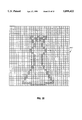
- FIG. 28 illustrates the queen pointer shape in the Chess program application.
- System 10 includes processor 11, which includes a central processing unit (CPU) 13 and random access memory 15.
- System 10 preferably also includes additional memory in the form of a hard disk storage device 17 and a floppy disk device 19.
- Floppy disk device 19 is adapted to receive a diskette 21 on which may be recorded software for programs, including a software implementation of the present invention.
- System 10 also includes user interface hardware devices including a display 23, a keyboard 25, a mouse 27, and a pen or stylus 29.
- System 10 preferably includes a printer 31.
- FIG. 2 there is illustrated a high level diagram of the major software system components of the pen-based system of the present invention.
- the output signals from pen 29, mouse 27, and keyboard 25 are connected to device drivers 33, which are modules that provide low-level I/O support to their respective devices.
- Device drivers 33 put events into system queues 35.
- the events in system queues 35 are subsequently processed by a presentation manager 37 which then routes pen and mouse events to pen extensions 39 for processing.
- a typical system includes both pen-aware applications 41 and pen-unaware applications 43.
- Pen-aware applications have the native capacity to recognize and process pen input.
- Pen-unaware applications are those that have the native capacity only to recognize and process keyboard and/or mouse input. Therefore, pen extensions 39 routes pen events directly to pen-aware applications 41.
- pen-unaware applications 43 are not capable of using pen functionality, the system includes a compatibility module 45.
- Compatibility module 45 acts as a pen-aware application on behalf of pen-unaware applications. If, for example, the user inputs handwritten character events to a pen-aware application, pen extensions 39 routes those events to compatibility module 45, which in turn routes all pen strokes to the gesture and handwriting recognition engine 47. Gesture and handwriting recognition engine 47 processes the pen stroke events and returns a recognition result to the compatibility module 45.
- compatibility module 45 routes it to a recognition event delivery subsystem 49, which accesses profiles 51 set up for the user to determine what actions to perform in a pen-unaware application in response to a particular gesture.
- some tools 53 may be invoked to perform some action on the pen-unaware application 43. If the recognition result returned to compatibility module 45 is recognized as handwriting, the resultant text string is routed directly to the appropriate pen-unaware application 43.
- a computer display screen is designated generally by the numeral 60.
- Screen 60 has displayed thereon a window 61, which in turn displays notebook 63.
- notebook 63 includes various tabs and buttons, and a text entry field 65.
- pointer is in text field 65 and it has assumed the shape of an I-beam 67. The I-beam pointer shape indicates to the user that text field 65 will accept text input from the keyboard.
- FIG. 3B which is generally similar to FIG. 3A, the system has drawn a pen-shaped pointer 69 in place of I-beam pointer of FIG. 3A.
- Pen-shaped pointer 69 indicates to the user that text field 65 will accept handwritten input in the form of characters or gestures.
- Icon bitmap 80 is a grid of 32 ⁇ 32 elements, with each element representing one picture element (pel) of VGA resolution.
- the I-beam pointer shapes illustrated in FIG. 4 include the OS/2 (TM) I-beam pointer 81 and the Windows (TM) I-beam pointer 83.
- FIG. 4 show the considerable variation in pointers at the pel level while still retaining a shape that users will recognize immediately as I-beams.
- FIG. 4 also illustrates that an I-beam pointer may be placed by the designer anywhere in the bitmap.
- FIG. 10 there is shown a high level flowchart that depicts a function in pen extensions 39 of FIG. 2 that is called for each mouse event received.
- This function is nominally called 60-100 times per second while the mouse or pen is in motion, since these are the standard reporting rates of such devices.
- the pointer shape For each incremental movement of the pointing device, the pointer shape must be redrawn at a new position.
- the operating system or application paints an I-beam pointer to inform the user that keyboard input is permissible.
- the function in FIG. 10 will cause the operating system to paint a pen pointer shape 69 of FIG. 3B instead if it is determined that the pointer is currently an I-beam.
- the ID of the current pointer is queried and it is tested to see if the current pointer is either the system I-beam, at decision block 1510, or another system pointer, at decision block 1520. If the pointer is the system I-beam, the system changes the pointer shape to the pen at block 1570 and ends at block 1580.
- the system takes no further action and ends at block 1580. Otherwise, the system accesses a pointer table 1400 according to FIG. 9 at block 1530 to determine if an entry exists for the current pointer ID.
- pointer table 1400 is a table having columns including POINTER ID 1405, PROCESS ID 1410, I-BEAM FLAG 1415.
- pointer table 1400 is constructed to hold up to 250 entries in rows 0-249. As will be explained in detail, pointer table is maintained by adding entries as new pointers are recognized and deleting entries as applications are shut down.
- pointer table 1400 contains an entry for the current pointer at decision block 1540, the system branches to test if the table entry is flagged as an I-beam at decision block 1560. If so, the system paints the pen pointer at block 1570; else the process ends at block 1580. If the test for a pointer table entry at decision block 1540 fails, another routine is called to test the pointer for the I-beam shape, indicated generally a process block 1550, and shown in detail in FIGS. 12-18. If the routine indicates the pointer is an I-beam at decision block 1560, the system changes the pointer to a pen at block 1570; else, the routine ends 1580.
- routine that tests for the I-beam shape at block 1550 of FIG. 10 is called only once for each application supplied pointer. This is because the routine of FIG. 12 makes an entry at blocks 1750 and 1780 in I-BEAM FLAG column 1415 of pointer table 1400 for each pointer flagging whether or not the pointer tested positive for the I-beam shape. Once a pointer table 1400 entry exists for a particular pointer ID, the result of the table entry test at decision block 1540 of FIG. 10 is always true and the overhead incurred by the I-beam recognition process is precluded.
- FIG. 11 there is shown what preprocessing is required at boot time to ready pen extension module 39 (FIG. 2) to test and monitor pointer shapes.
- the number of valid entries in pointer table 1400 is zeroed.
- a copy of the WindowsTM I-beam bitmap is loaded at block 1610, queried at block 1620, and moved into global memory at block 1630 to facilitate the quick testing of Windows I-beam pointers.
- the preferred OS/2 operating system is capable of executing native Windows applications by loading each Windows application in its own DOS virtual machine.
- a quirk of this implementation is that each active Windows application is given a unique I-beam pointer ID, even though the applications are all using the same Windows-supplied I-beam pointer.
- the bitmap of the standard Windows I-beam is kept in memory for fast memory to memory compares with the current pointer.
- the ID of the system supplied I-beam is queried at block 1640. This is the ID used in the test at decision block 1510 of FIG. 10.
- FIG. 12 charts the high level recognition process.
- the system calls a routine to copy the bitmap of the current pointer into memory where it can be examined and manipulated.
- FIG. 13 depicts this processing.
- pen extensions module 39 does not have the same access to bitmaps that the application has since it is running as an extension of the operating system and hence has little knowledge of the application's environment. This requires pen extensions 37 to access the bitmap data in a very indirect and roundabout manner.
- OS/2 system APIs a presentation space is allocated at block 1800 and the handle of the pointer shape bitmap is queried at block 1810.
- bitmap is set into the presentation space, which is the precursor for reading the bitmap data out of the restricted memory of the graphics engine and into pen extension's global memory at block 1830.
- bitmap data Once the bitmap data has been obtained, it is deleted from the presentation space at block 1840 and the presentation space resource is deallocated at block 1850.
- the system performs an optimized memory to memory compare at block 1710 to see if the pointer is the Windows I-beam. If the compare tests equal at 1720, an entry is added to pointer table 1400 at block 1780, the entry is flagged as an I-beam at block 1785, and the number of valid pointer table entries is incremented at 1790. The number of valid pointer entries is carefully maintained because pointer table 1400 is constructed to have 250 entries and to reduce the search time expended at block 1530, the search is suspended after the last valid entry is found.
- Bitmap array 510 for an arbitrary I-beam pointer shape.
- Bitmap array 510 is a 32 ⁇ 32 array of binary data, in which the pels of the I-beam shape are designated by ones. It will be noted that the I-beam of bitmap array 510 comprises 28 pels occupying nine columns and fourteen rows. It will further be noted that the I-beam is positioned at an arbitrary location within bitmap array 510.
- FIG. 14 illustrates the flow for the test of an approximate I-beam shape, for example the I-beam shape of FIG. 5A.
- the bitmap array is converted from 8-bit to 32-bit alignment at block 1900.
- the penalty incurred by reformatting the data is more than amply compensated for by the use of CPU instructions that operate on 32-bits at a time.
- FIG. 6 illustrates the conversion from 8-bit 600 to 32-bit 610 alignment of bit array 510.
- a pointer shape mask is selected according to the type of pointer being tested and the display resolution.
- a mask 710 for VGA resolution and a mask 810 for XGA resolution are illustrated in FIGS.
- the AND mask of the bitmap is converted to one's complement of itself in preparation for combining the AND and OR masks at block 1930. Because the shape of the pointer may be encoded into either the AND or the OR mask or both, the two masks are combined to ensure that the entire pointer shape is taken into account. And because the AND mask is normally all ones and changes to zeroes to encode the pointer shape, it is inverted at block 1920 to match the formatting of the OR mask, which is the opposite.
- bitmap has been reduced from two masks to one and in order to test the pointer shape against the mask, the pointer shape must be further isolated.
- subroutines are called to justify the pointer shape to the left, at block 1940, and then to the bottom, at block 1950, of the bitmap array.
- decision block 1945 tests at decision block 1945 to see if the pointer is blank, which is not an uncommon occurrence. If so, processing stops and the routine passes back a negative result at block 1955.
- the left and bottom justification processes results, respectively, in bitmap array 520 of FIG. 5B and bitmap array 530 of FIG. 5C.
- Another subroutine is called to determine if any bit outside the mask is set to one at block 1960. If even a single bit is set to one outside the mask, the test fails at decision block 1965 and false is returned to the calling routine at block 1985. If no bits are set to one outside the mask at decision block 1965, yet another subroutine is called at block 1975 to count the number of bits set under the shape mask. If a sufficient number of bits are set to one at decision block 1975, the pointer shape is considered to be approximately an I-beam and true is returned at block 1980.
- the threshold used to determine if the shape is an I-beam is empirically set and the algorithm currently expects counts of 17 bits set to one for VGA resolution and 24 bits set to one for XGA.
- the number of scan lines is loaded from the bitmap header. Then, the subroutine enters a loop of blocks 2010-2050 where the leftmost bit of each scan line is tested for a one at block 2010. After testing each scan line, a test is made to see if the leftmost bits were all zeroes at decision block 2020. If so, then the start of the pointer image has not yet been located, so each scan line is shifted one bit to the left at block 2030 and the shift count is incremented 2040. A test is conducted to see to the number of shifted bits is greater than or equal to the number of scan lines at decision block 2050. This test catches the case of a blank pointer shape and prevents an infinite loop.
- the subroutine simply returns true at block 2060.
- the shifting of the image to the left at block 2030 continues until finally the leftmost bit of one of the scan lines contains a one at decision block 2020. When this occurs, this image is fully left justified and the subroutine returns false at block 2070.
- FIG. 16 illustrates the flow of the next step of the recognition algorithm wherein the left justified image is bottom justified.
- the scan line pointer is set to the bottom of the bitmap array at block 2100 so that testing commences at the last or bottom scan line.
- a loop is entered at blocks 2100-2130 in which each scan line is tested in its entirety for a non-zero bit at decision block 2110. If no non-zero bits are found, the scan line pointer is decremented at block 2120. If the scan line pointer points to the top scan line of the bitmap at decision block 2130, the routine returns at block 2140. Else, the loop iterates until a non-zero scan line is found signifying the bottom of the pointer image has been located at which point the loop exits and goes to the second half of the subroutine.
- a source pointer is initialized at block 2150 to point to the scan line at the bottom of the image and the target pointer is set to point to the bottom of the bitmap array at block 2155.
- These pointers are used to execute a memory-to-memory transfer of the bitmap that effectively bottom justifies the image. This is accomplished in the loop bounded by operations 2165 through 2185 inclusive.
- each scan line is transferred at block 2160 and the source and target pointers are decrement each time at blocks 2175 and 2180, respectively.
- a test is made at decision block 2165 to see if the current source pointer is pointing at the top of the bitmap.
- the source pointer wraps around to the bottom of the bitmap at block 2170 so that the entire bitmap get transferred.
- the target pointer hits the top of the bitmap at decision block 2185, signifying the completion of the transfer and the loop exits and the subroutine returns at block 2190.
- FIG. 17 depicts the logic flow that tests the pointer image for any bit set to one outside the shape mask.
- the scan line pointer is set to the bottom of the array at block 2200, the known start of the pointer image.
- the shape mask pointer is also set to the bottom on the mask at block 2210 to keep in locked step with the bitmap scan line.
- the loop from blocks 2220-2290 inclusive inverts the mask line by taking its ones complement at block 2220 and employing an AND operation at block 2230, and tests it against its associated bitmap scan line at decision block 2240. Any shape that is approximately an I-beam will not have bits set outside the mask. If a non-zero bit is found, the subroutine returns true 2250 which will indicate a non I-beam shape to the calling routine.
- a test is made to see if the pointer reached the top of the of the bit array, signalling completion of the test at decision block 2260. If not, the scan line pointer and mask line pointer are decremented at blocks 2280 and 2290, respectively, and the loop iterates back to block 2220. If the last scan line is reached 2260 at decision block, no bits were found outside the mask and the subroutine returns false at block 2270.
- FIG. 18 is the final worker routine of the recognition algorithm. It has now been established that the all non-zero bits are under the shape mask, which signifies a close fit of the two shapes. The last task is to count the bits set under the mask to see if it qualifies as an I-beam. In actuality, the shape mask is not needed in this step since all the non-zero bits are within the mask.
- Initializing loop variables, the shift count, the scan line count, and the bit count are all cleared at blocks 2300, 2305, and 2310, respectively. Then two predefined constants, the number of non-zero mask lines and the number of non-zero mask columns, are loaded for use within the loop, at blocks 2315 and 2320, respectively.
- the current scan line pointer is set to the bottom of the bitmap array and then code falls into an inner loop 2330-2350 and an outer loop 2355-2370.
- the inner loop 2330-2350 traverses each scan line counting each non-zero bit, while the outer loop 2355-2370 iterates through each scan line.
- the leftmost bit of the current scan line is tested for a one. If it is a one, the bit count is incremented block 2335. In any case, the shift count is always incremented at block 2340 and a test is made at decision block 2345 to see if the number of bits shifted is equal to the number of non-zero columns at decision block 2345. If not, the entire scan line is shifted one bit to the left at block 2350 and the loop iterates back to decision block 2330. If the number of bits shifted equals the number of non-zero mask columns at decision block 2345, the shift count is cleared at block 2355 and the scan line pointer is decremented at block 2360 to examine the next scan line.
- FIG. 23 shows how the table is further maintained so that entries get removed when no longer needed.
- the routine in FIG. 23 gets called each time the operating system closes or shuts down an application. At entry, a check is made at decision block 2800 to see if any entries exists. If not, there is nothing to clean up and the routine ends at block 2880. If the table is not empty at decision block 2800, the process ID of the application being shut down is queried at block 2810. The number of valid entries is loaded at block 2820 and the table pointer is set to the first entry in pointer table 1400 at block 2830.
- a loop is then entered at decision block 2840 wherein each entry is tested to see if it is valid. If it is valid, the entry is tested at decision block to see if it belongs to the application being shut down. If so, the count of valid entries is decremented at block 2855 and the entry is removed from the table at block 2860. Regardless of the outcome of the test at decision 2850, the loop count is decremented at block 2865 and tested for zero 2870 at block. If not zero, there are still some valid entries in pointer table 1400 so the table pointer is incremented at block 2875 and the loop iterates back to decision block 2840.
- pointer table 1400 is constructed to contain 250 entries, only a minimum number of entries are examined in most practical cases.
- FIG. 24 there is illustrated the bitmap 2410 for the WindowsTM hour glass pointer.
- the hour glass is a ⁇ thin waisted ⁇ shape and in order for a mask to be effective, it too would have to have a thin waist. The wider the waist of the mask, the more rectangular the shape would become, resulting in a decrease of recognition accuracy.
- FIGS. 26A and 26B a misalignment of a the mask with the pointer shape can result in failure to recognize an hour glass pointer shape.
- FIG. 26A illustrates a bit array 2610 for a fine shape mask to an hour glass pointer
- FIG. 26A illustrates a bit array 2610 for a fine shape mask to an hour glass pointer
- Hour glass shape 2620 is still recognizable as an hour glass, but it is short and therefore has a low waist, as indicated at scan line midpoint 2630. Therefore, the wide top of hour glass pointer 2620 coincides with the waist, indicated at scan line midpoint 2640, of the mask of mask 2610 which would cause the recognition algorithm to fail due to non-zero bits outside the mask.
- a potential problem with shape masks is that as they get larger, such as the hour glass mask in FIG. 26B, the greater the likelihood that some non-hour glass shape will fall under the mask.
- a high bit count threshold on the order of one hundred fifty, might provide effective filtering, it is not necessarily effective in all cases.
- some other shapes for example the queen pointer shape of bitmap 2810 of FIG. 28, would pass both tests. Mistaking the queen pointer for a busy application would cause serious usability problems.
- the second embodiment employs a modified, albeit slightly longer, algorithm that uses a course 2510 and a fine mask 2520, shown in FIGS. 25A and 25B, respectively, and takes pointer image symmetry into account, as shown in FIG. 27.
- hour glass pointer image 2710 is symmetrical about both its scan line midpoint 2715 and its column midpoint 2720. Scan line midpoint 2715 and column midpoint 2720 divide pointer image 2710 into four quadrants.
- FIG. 19 shows the slightly modified logic of the second embodiment of the present invention.
- the pointer shape has already been left and bottom justified and at block 2400 a test for any non-zero bit outside the course mask in made.
- the course mask is designed to eliminate a high percentage of non-hour glass pointers while permitting considerable license in the design of the hour glass. If any bit is set outside the course mask at decision block 2410, processing is halted and false is returned at block 2495. If no bits are set at decision block 2410, the pointer shape is centered over the fine mask block 2420.
- FIG. 20 demonstrates the flow of the centering technique in order to eliminate the problem of scan line mismatches illustrated in FIGS. 26A and 26B.
- Two loops are entered in which the system counts the number of non-zero pointer scan lines at block 2500 and the number of non-zero pointer columns at block 2510.
- the resultant non-zero scan line and column counts are divided by 2 to calculate the midpoint of the pointer shape at block 2520.
- the midpoint of the fine shape mask is also calculated by taking those two known constants and dividing by 2 at block 2530.
- the midpoint X and Y of the pointer shape is subtracted from the midpoint X and Y of the fine mask at block 2540. Note that the calculated X and Y displacements may be zero or a positive number, but may never be negative since the pointer shape cannot be larger than the fine mask.
- the fine mask is left justified an amount equal to the column displacement at block 2550 and bottom justified an amount equal to the scan line displacement at block 2560.
- the net effect of these operations is to superimpose the midpoint of the fine mask over the midpoint of the pointer shape.
- the superimposition of the pointer shape and the fine mask permits the mask to have a smaller and more tightly contoured silhouette, thereby increasing recognition accuracy.
- the routine returns to the caller in at block 2570 passing the midpoint of the pointer to be used in the test for symmetry.
- FIG. 27 shows the order of the quadrants that share the midpoint of the pointer image as an origin.
- FIG. 22A is the subroutine that counts the bit under the fine mask by quadrant.
- the subroutine of FIG. 22A is identical to the previously described subroutine of FIG. 18 of the first embodiment that counts the bits under the mask, with the exception a separate bit counter is maintained for each quadrant.
- all 4 quadrant bit counters are cleared. Bit counting commences as in FIG. 18 by means of an inner and outer loop, however as non-zero bit are detected at decision block 2730, a subroutine is called at block 2732 to increment the quadrant count.
- FIG. 22B shows the logic flow of determining in which quadrant a bit is located.
- three tests are made at decision blocks 2771, 2772, and 2773 to see if the column count and the scan line count are odd or even.
- the image In order to test for symmetry, the image must be divided into symmetrical halves and if there are an odd number of columns or scan lines, the center column or scan line must be ignored since it is the axis of symmetry. In the case of an even number of columns or scan lines, the actual line of symmetry falls between the two columns or rows and the computed midpoint column and row become part of quadrants 3 and 4, or 3 and 2, respectively.
- operations 2701-2704, 2706-2709, 2716-2719 and 2721-2724 act as sieves to determine in which quadrant the newly found bit falls.
- bits found on the axis of symmetry are not counted and logic simply returns at block 2763.
- Operations 2751-2754 increment the appropriate quadrant count and the subroutine returns at block 2763.
- the testing of the bit count at decision block 2560 uses a threshold appropriate for the hour glass shape, empirically set at one hundred fifty bits. If the test fails, a negative result is returned at block 2495. Else, the pointer image is checked for symmetry at block 2470.
- FIG. 21 charts the logic flow of the symmetry checking subroutine.
- the fine shape mask for the hour glass of FIG. 25B is queried to determine if any symmetry checks are required for this particular pointer shape. If no checks are required at decision block 2610, the system simply returns to the caller a positive indication for symmetry at block 2680.
- both column and scan line symmetry are required so the operation at decision block 2620 tests true and the logic falls through to block 2630 where the columns bit counts on each side the column symmetry line are added together. These two counts are compared and if they differ by more than three pels at decision block 2640, the two sides are considered asymmetrical and the subroutine returns a negative indication at block 2690.
- a test is made for the required symmetry at decision block 2480 and a true or false indication is returned accordingly, at blocks 2490 or 2495, respectively.
- This modification incurs a slight performance penalty from having to process a second mask, superimposing the two images and checking symmetry, however the penalty is mitigated by the increased reliability of the recognition algorithm. The penalty is further mitigated by having the symmetry check be conditional by pointer type.
- the present invention is well adapted to accomplish the recognition of pointer shapes.
- the invention examines the bitmap of the pointer for the purpose of performing optical recognition to determine if the pointer shape has the visual appearance of an I-beam.
- the pointer shape is tested against a mask of an I-beam that permits a good amount of variation in I-beam size, shape and features while rejecting any shape that is not a reasonable facsimile of an I-beam.
- the invention takes into consideration many variables. For example, multiple display resolutions, e.g., VGA, SVGA and XGA resolution display drivers, may each have different pointer bitmap sizes (e.g. 32 ⁇ 32, 40 ⁇ 40). The difference in pointer resolution is made transparent to the recognition algorithm by selecting a shape mask based on pointer size. The invention is unaffected by the use of color in a mouse pointer. Variation in color is ignored and the pointer is treated as if it were monochrome.
- a pointer shape is not a standard bitmap.
- a pointer bitmap actually consists of two masks, the XOR and the AND mask, along with an array of color index values that combine to produce a pointer shape image that is transparent except for the desired pointer shape.
- the pointer shape maybe coded into either the XOR or AND mask or both.
- the XOR mask is normally zeroes and the shape is encoded by converting zero bits to one bits.
- the AND mask is normally all ones and gets converted to zeroes to encode the shape.
- the 32 ⁇ 32 pel pointer shape contains 1024 pels of which 18 or so may be used to define the shape.
- the designer of the pointer is free to encode the pointer anywhere within the boundary of the bitmap.
- the invention locates the pointer image within the bitmap and then relocates the image to the bottom left of the bitmap.
- the invention allows considerable license for creative I-beam shapes while rejecting non-I-beam shapes with high certainty.
- some pointer shapes may require extra operations in the recognition process where the pointer shape being tested is precisely aligned with a higher resolution mask.
- pointer shapes that are symmetrical in either the vertical or horizontal axes or both, the system may search for these symmetries in the pointer shape under test.
- Bitmaps are built to accommodate fast transfers at the device driver level. Therefore the top-leftmost bit ends up as the bottom-leftmost bit in the binary format.
- bitmaps are bytes arrays which means that two bits that are contiguous in the image may be separated by 15 bits if they cross a byte boundary. All of this requires significant bit manipulation of the bitmap prior to processing. Two consecutive bits can become discontiguous when treating the bitmap data as 32-bit data instead of 8-bit data. Therefore, the invention reformats the bitmap data from 8-bit to 32-bit alignment.
- Pen-based systems have very stringent performance requirements that do not allow computationally intensive operations such as optical recognition on a mouse-move or pen-down event basis for all application defined pointers.
- the process of classifying application defined pointers as text or non-text pointer shapes is optimized to point of having no discernible effect on system responsiveness or performance.
- the preferred embodiment of the invention uses optical recognition of the I-beam pointer shape to distinguish text window areas from non-text window areas
- the invention may be embodied in any task where the operating system would benefit from knowing, as does the user, the specific state of an application as a pointing device traverses said application.
- a second embodiment is described that uses recognition of an hour-glass or clock to determine when an application is currently busy and unable to process user input.
Landscapes
- Engineering & Computer Science (AREA)
- General Engineering & Computer Science (AREA)
- Theoretical Computer Science (AREA)
- Human Computer Interaction (AREA)
- Physics & Mathematics (AREA)
- General Physics & Mathematics (AREA)
- Controls And Circuits For Display Device (AREA)
- Digital Computer Display Output (AREA)
- Position Input By Displaying (AREA)
- User Interface Of Digital Computer (AREA)
- Information Retrieval, Db Structures And Fs Structures Therefor (AREA)
Priority Applications (5)
| Application Number | Priority Date | Filing Date | Title |
|---|---|---|---|
| US08/660,056 US5898422A (en) | 1996-05-31 | 1996-05-31 | Method and system for recognition of pointers |
| SG1997001040A SG52944A1 (en) | 1996-05-31 | 1997-04-03 | Method and system for recognition of pointers |
| JP9123899A JPH1083274A (ja) | 1996-05-31 | 1997-05-14 | ポインタ位置に文字データを受け入れられることを判定する方法およびシステム |
| DE69719404T DE69719404T2 (de) | 1996-05-31 | 1997-05-29 | Verfahren und System zur Erkennung von Zeigern |
| EP97303697A EP0810514B1 (de) | 1996-05-31 | 1997-05-29 | Verfahren und System zur Erkennung von Zeigern |
Applications Claiming Priority (1)
| Application Number | Priority Date | Filing Date | Title |
|---|---|---|---|
| US08/660,056 US5898422A (en) | 1996-05-31 | 1996-05-31 | Method and system for recognition of pointers |
Publications (1)
| Publication Number | Publication Date |
|---|---|
| US5898422A true US5898422A (en) | 1999-04-27 |
Family
ID=24647945
Family Applications (1)
| Application Number | Title | Priority Date | Filing Date |
|---|---|---|---|
| US08/660,056 Expired - Fee Related US5898422A (en) | 1996-05-31 | 1996-05-31 | Method and system for recognition of pointers |
Country Status (5)
| Country | Link |
|---|---|
| US (1) | US5898422A (de) |
| EP (1) | EP0810514B1 (de) |
| JP (1) | JPH1083274A (de) |
| DE (1) | DE69719404T2 (de) |
| SG (1) | SG52944A1 (de) |
Cited By (13)
| Publication number | Priority date | Publication date | Assignee | Title |
|---|---|---|---|---|
| US6064374A (en) * | 1997-01-30 | 2000-05-16 | Wacom Co., Ltd. | Cordless electronic pen with cartridge |
| US20050179674A1 (en) * | 2004-02-17 | 2005-08-18 | Microsoft Corporation | Pen data capture and injection |
| US20060238520A1 (en) * | 1998-01-26 | 2006-10-26 | Fingerworks, Inc. | User interface gestures |
| USD559856S1 (en) * | 2006-07-25 | 2008-01-15 | Samsung Electronics Co., Ltd. | Generated image for display on a portable telephone |
| US20080158146A1 (en) * | 2007-01-03 | 2008-07-03 | Apple Computer, Inc. | Irregular input identification |
| US20100149586A1 (en) * | 2008-12-11 | 2010-06-17 | Canon Kabushiki Kaisha | Method of data communication between application program and printer driver, and program therefor |
| US20110080365A1 (en) * | 2007-01-03 | 2011-04-07 | Wayne Carl Westerman | Multi-touch input discrimination |
| US20110157001A1 (en) * | 2009-07-09 | 2011-06-30 | Nokia Corporation | Method and apparatus for display framebuffer processing |
| US20110234897A1 (en) * | 2009-02-05 | 2011-09-29 | Canon Kabushiki Kaisha | Display apparatus and display method |
| US8130203B2 (en) | 2007-01-03 | 2012-03-06 | Apple Inc. | Multi-touch input discrimination |
| CN104238974A (zh) * | 2013-06-21 | 2014-12-24 | 佳能株式会社 | 信息处理装置及方法 |
| US9690599B2 (en) | 2009-07-09 | 2017-06-27 | Nokia Technologies Oy | Method and apparatus for determining an active input area |
| US11924197B1 (en) * | 2017-08-12 | 2024-03-05 | Growpath, Llc | User authentication systems and methods |
Citations (17)
| Publication number | Priority date | Publication date | Assignee | Title |
|---|---|---|---|---|
| US4625202A (en) * | 1983-04-08 | 1986-11-25 | Tektronix, Inc. | Apparatus and method for generating multiple cursors in a raster scan display system |
| US4686332A (en) * | 1986-06-26 | 1987-08-11 | International Business Machines Corporation | Combined finger touch and stylus detection system for use on the viewing surface of a visual display device |
| US5007085A (en) * | 1988-10-28 | 1991-04-09 | International Business Machines Corporation | Remotely sensed personal stylus |
| US5091866A (en) * | 1986-12-26 | 1992-02-25 | Kabushiki Kaisha Toshiba | Information processing apparatus displaying multiple windows and distinguishing indicia |
| US5157384A (en) * | 1989-04-28 | 1992-10-20 | International Business Machines Corporation | Advanced user interface |
| EP0533607A2 (de) * | 1991-08-19 | 1993-03-24 | International Business Machines Corporation | Methode und System zur mehrfacher Textselektion auf einer Rechneranzeige |
| US5231698A (en) * | 1991-03-20 | 1993-07-27 | Forcier Mitchell D | Script/binary-encoded-character processing method and system |
| US5252951A (en) * | 1989-04-28 | 1993-10-12 | International Business Machines Corporation | Graphical user interface with gesture recognition in a multiapplication environment |
| US5255363A (en) * | 1990-06-19 | 1993-10-19 | Mentor Graphics Corporation | Graph-based programming system and associated method |
| US5276816A (en) * | 1990-12-31 | 1994-01-04 | International Business Machines Corporation | Icon object interface system and method |
| US5423039A (en) * | 1990-09-06 | 1995-06-06 | Next Inc | Method and apparatus for identifying wait states and for providing a wait cursor in a computer system |
| US5442376A (en) * | 1992-10-26 | 1995-08-15 | International Business Machines Corporation | Handling multiple command recognition inputs in a multi-tasking graphical environment |
| US5442736A (en) * | 1992-04-21 | 1995-08-15 | International Business Machines Corporation | Correlation of cursor position to shapes displayed on a video display screen |
| EP0678805A1 (de) * | 1994-04-15 | 1995-10-25 | International Business Machines Corporation | Mehrere Zeiger für graphische Benutzerschnittstellen eines Rechners |
| US5473343A (en) * | 1994-06-23 | 1995-12-05 | Microsoft Corporation | Method and apparatus for locating a cursor on a computer screen |
| US5515081A (en) * | 1993-11-30 | 1996-05-07 | Borland International, Inc. | System and methods for improved storage and processing of BITMAP images |
| US5570113A (en) * | 1994-06-29 | 1996-10-29 | International Business Machines Corporation | Computer based pen system and method for automatically cancelling unwanted gestures and preventing anomalous signals as inputs to such system |
-
1996
- 1996-05-31 US US08/660,056 patent/US5898422A/en not_active Expired - Fee Related
-
1997
- 1997-04-03 SG SG1997001040A patent/SG52944A1/en unknown
- 1997-05-14 JP JP9123899A patent/JPH1083274A/ja active Pending
- 1997-05-29 EP EP97303697A patent/EP0810514B1/de not_active Expired - Lifetime
- 1997-05-29 DE DE69719404T patent/DE69719404T2/de not_active Expired - Fee Related
Patent Citations (18)
| Publication number | Priority date | Publication date | Assignee | Title |
|---|---|---|---|---|
| US4625202A (en) * | 1983-04-08 | 1986-11-25 | Tektronix, Inc. | Apparatus and method for generating multiple cursors in a raster scan display system |
| US4686332A (en) * | 1986-06-26 | 1987-08-11 | International Business Machines Corporation | Combined finger touch and stylus detection system for use on the viewing surface of a visual display device |
| US5091866A (en) * | 1986-12-26 | 1992-02-25 | Kabushiki Kaisha Toshiba | Information processing apparatus displaying multiple windows and distinguishing indicia |
| US5007085A (en) * | 1988-10-28 | 1991-04-09 | International Business Machines Corporation | Remotely sensed personal stylus |
| US5252951A (en) * | 1989-04-28 | 1993-10-12 | International Business Machines Corporation | Graphical user interface with gesture recognition in a multiapplication environment |
| US5157384A (en) * | 1989-04-28 | 1992-10-20 | International Business Machines Corporation | Advanced user interface |
| US5255363A (en) * | 1990-06-19 | 1993-10-19 | Mentor Graphics Corporation | Graph-based programming system and associated method |
| US5423039A (en) * | 1990-09-06 | 1995-06-06 | Next Inc | Method and apparatus for identifying wait states and for providing a wait cursor in a computer system |
| US5276816A (en) * | 1990-12-31 | 1994-01-04 | International Business Machines Corporation | Icon object interface system and method |
| US5231698A (en) * | 1991-03-20 | 1993-07-27 | Forcier Mitchell D | Script/binary-encoded-character processing method and system |
| EP0533607A2 (de) * | 1991-08-19 | 1993-03-24 | International Business Machines Corporation | Methode und System zur mehrfacher Textselektion auf einer Rechneranzeige |
| US5442736A (en) * | 1992-04-21 | 1995-08-15 | International Business Machines Corporation | Correlation of cursor position to shapes displayed on a video display screen |
| US5442376A (en) * | 1992-10-26 | 1995-08-15 | International Business Machines Corporation | Handling multiple command recognition inputs in a multi-tasking graphical environment |
| US5515081A (en) * | 1993-11-30 | 1996-05-07 | Borland International, Inc. | System and methods for improved storage and processing of BITMAP images |
| EP0678805A1 (de) * | 1994-04-15 | 1995-10-25 | International Business Machines Corporation | Mehrere Zeiger für graphische Benutzerschnittstellen eines Rechners |
| US5586243A (en) * | 1994-04-15 | 1996-12-17 | International Business Machines Corporation | Multiple display pointers for computer graphical user interfaces |
| US5473343A (en) * | 1994-06-23 | 1995-12-05 | Microsoft Corporation | Method and apparatus for locating a cursor on a computer screen |
| US5570113A (en) * | 1994-06-29 | 1996-10-29 | International Business Machines Corporation | Computer based pen system and method for automatically cancelling unwanted gestures and preventing anomalous signals as inputs to such system |
Non-Patent Citations (6)
| Title |
|---|
| "System Pointer Family," IBM Technical Disclosure Bulletin, vol. 37, No. 3, Mar. 1 1994, pp. 607-608. |
| IBM Technical Disclosure Bulletin , vol. 35, No. 1A, Jun. 1992, pp. 21 22, Direct Entry From Different Calendar Views Through I Beam Pointer Extension Techniques . * |
| IBM Technical Disclosure Bulletin , vol. 38, No. 9, Sep. 1995, p. 461, Data Interpretation Techniques For A Pen Based Computer . * |
| IBM Technical Disclosure Bulletin, vol. 35, No. 1A, Jun. 1992, pp. 21-22, "Direct Entry From Different Calendar Views Through I-Beam Pointer Extension Techniques". |
| IBM Technical Disclosure Bulletin, vol. 38, No. 9, Sep. 1995, p. 461, "Data Interpretation Techniques For A Pen-Based Computer". |
| System Pointer Family, IBM Technical Disclosure Bulletin, vol. 37, No. 3, Mar. 1 1994, pp. 607 608. * |
Cited By (64)
| Publication number | Priority date | Publication date | Assignee | Title |
|---|---|---|---|---|
| US6064374A (en) * | 1997-01-30 | 2000-05-16 | Wacom Co., Ltd. | Cordless electronic pen with cartridge |
| US9329717B2 (en) | 1998-01-26 | 2016-05-03 | Apple Inc. | Touch sensing with mobile sensors |
| US8441453B2 (en) | 1998-01-26 | 2013-05-14 | Apple Inc. | Contact tracking and identification module for touch sensing |
| US20070070050A1 (en) * | 1998-01-26 | 2007-03-29 | Fingerworks, Inc. | Multi-touch contact motion extraction |
| US8866752B2 (en) | 1998-01-26 | 2014-10-21 | Apple Inc. | Contact tracking and identification module for touch sensing |
| US9001068B2 (en) | 1998-01-26 | 2015-04-07 | Apple Inc. | Touch sensor contact information |
| US9804701B2 (en) | 1998-01-26 | 2017-10-31 | Apple Inc. | Contact tracking and identification module for touch sensing |
| US20090160816A1 (en) * | 1998-01-26 | 2009-06-25 | Wayne Westerman | Multi-touch contact motion extraction |
| US20090251435A1 (en) * | 1998-01-26 | 2009-10-08 | Wayne Westerman | Contact tracking and identification module for touch sensing |
| US20090251438A1 (en) * | 1998-01-26 | 2009-10-08 | Wayne Westerman | Contact tracking and identification module for touch sensing |
| US9626032B2 (en) | 1998-01-26 | 2017-04-18 | Apple Inc. | Sensor arrangement for use with a touch sensor |
| US9552100B2 (en) | 1998-01-26 | 2017-01-24 | Apple Inc. | Touch sensing with mobile sensors |
| US9448658B2 (en) | 1998-01-26 | 2016-09-20 | Apple Inc. | Resting contacts |
| US9383855B2 (en) | 1998-01-26 | 2016-07-05 | Apple Inc. | Identifying contacts on a touch surface |
| US9348452B2 (en) | 1998-01-26 | 2016-05-24 | Apple Inc. | Writing using a touch sensor |
| US8736555B2 (en) | 1998-01-26 | 2014-05-27 | Apple Inc. | Touch sensing through hand dissection |
| US9342180B2 (en) | 1998-01-26 | 2016-05-17 | Apple Inc. | Contact tracking and identification module for touch sensing |
| US8314775B2 (en) | 1998-01-26 | 2012-11-20 | Apple Inc. | Multi-touch touch surface |
| US8330727B2 (en) | 1998-01-26 | 2012-12-11 | Apple Inc. | Generating control signals from multiple contacts |
| US8334846B2 (en) | 1998-01-26 | 2012-12-18 | Apple Inc. | Multi-touch contact tracking using predicted paths |
| US8902175B2 (en) | 1998-01-26 | 2014-12-02 | Apple Inc. | Contact tracking and identification module for touch sensing |
| US20060238520A1 (en) * | 1998-01-26 | 2006-10-26 | Fingerworks, Inc. | User interface gestures |
| US8466881B2 (en) | 1998-01-26 | 2013-06-18 | Apple Inc. | Contact tracking and identification module for touch sensing |
| US8384675B2 (en) | 1998-01-26 | 2013-02-26 | Apple Inc. | User interface gestures |
| US8466880B2 (en) | 1998-01-26 | 2013-06-18 | Apple Inc. | Multi-touch contact motion extraction |
| US8466883B2 (en) | 1998-01-26 | 2013-06-18 | Apple Inc. | Identifying contacts on a touch surface |
| US8482533B2 (en) | 1998-01-26 | 2013-07-09 | Apple Inc. | Contact tracking and identification module for touch sensing |
| US8514183B2 (en) | 1998-01-26 | 2013-08-20 | Apple Inc. | Degree of freedom extraction from multiple contacts |
| US9298310B2 (en) | 1998-01-26 | 2016-03-29 | Apple Inc. | Touch sensor contact information |
| US9098142B2 (en) | 1998-01-26 | 2015-08-04 | Apple Inc. | Sensor arrangement for use with a touch sensor that identifies hand parts |
| US8576177B2 (en) | 1998-01-26 | 2013-11-05 | Apple Inc. | Typing with a touch sensor |
| US8593426B2 (en) | 1998-01-26 | 2013-11-26 | Apple Inc. | Identifying contacts on a touch surface |
| US8629840B2 (en) | 1998-01-26 | 2014-01-14 | Apple Inc. | Touch sensing architecture |
| US8633898B2 (en) | 1998-01-26 | 2014-01-21 | Apple Inc. | Sensor arrangement for use with a touch sensor that identifies hand parts |
| US8665240B2 (en) | 1998-01-26 | 2014-03-04 | Apple Inc. | Degree of freedom extraction from multiple contacts |
| US8674943B2 (en) | 1998-01-26 | 2014-03-18 | Apple Inc. | Multi-touch hand position offset computation |
| US8698755B2 (en) | 1998-01-26 | 2014-04-15 | Apple Inc. | Touch sensor contact information |
| US8730177B2 (en) | 1998-01-26 | 2014-05-20 | Apple Inc. | Contact tracking and identification module for touch sensing |
| US8730192B2 (en) | 1998-01-26 | 2014-05-20 | Apple Inc. | Contact tracking and identification module for touch sensing |
| US20050179674A1 (en) * | 2004-02-17 | 2005-08-18 | Microsoft Corporation | Pen data capture and injection |
| US7345681B2 (en) * | 2004-02-17 | 2008-03-18 | Microsoft Corporation | Pen data capture and injection |
| USD559856S1 (en) * | 2006-07-25 | 2008-01-15 | Samsung Electronics Co., Ltd. | Generated image for display on a portable telephone |
| US8243041B2 (en) | 2007-01-03 | 2012-08-14 | Apple Inc. | Multi-touch input discrimination |
| US8531425B2 (en) | 2007-01-03 | 2013-09-10 | Apple Inc. | Multi-touch input discrimination |
| US8791921B2 (en) | 2007-01-03 | 2014-07-29 | Apple Inc. | Multi-touch input discrimination |
| US9024906B2 (en) | 2007-01-03 | 2015-05-05 | Apple Inc. | Multi-touch input discrimination |
| US8542210B2 (en) | 2007-01-03 | 2013-09-24 | Apple Inc. | Multi-touch input discrimination |
| US9256322B2 (en) | 2007-01-03 | 2016-02-09 | Apple Inc. | Multi-touch input discrimination |
| US20110080365A1 (en) * | 2007-01-03 | 2011-04-07 | Wayne Carl Westerman | Multi-touch input discrimination |
| US9778807B2 (en) | 2007-01-03 | 2017-10-03 | Apple Inc. | Multi-touch input discrimination |
| US8384684B2 (en) | 2007-01-03 | 2013-02-26 | Apple Inc. | Multi-touch input discrimination |
| US8269727B2 (en) | 2007-01-03 | 2012-09-18 | Apple Inc. | Irregular input identification |
| US8130203B2 (en) | 2007-01-03 | 2012-03-06 | Apple Inc. | Multi-touch input discrimination |
| US10025429B2 (en) | 2007-01-03 | 2018-07-17 | Apple Inc. | Irregular input identification |
| US9411468B2 (en) | 2007-01-03 | 2016-08-09 | Apple Inc. | Irregular input identification |
| US20080158146A1 (en) * | 2007-01-03 | 2008-07-03 | Apple Computer, Inc. | Irregular input identification |
| US9298522B2 (en) * | 2008-12-11 | 2016-03-29 | Canon Kabushiki Kaisha | Method of data communication between application program and printer driver, and program therefor |
| US20100149586A1 (en) * | 2008-12-11 | 2010-06-17 | Canon Kabushiki Kaisha | Method of data communication between application program and printer driver, and program therefor |
| US20110234897A1 (en) * | 2009-02-05 | 2011-09-29 | Canon Kabushiki Kaisha | Display apparatus and display method |
| US9690599B2 (en) | 2009-07-09 | 2017-06-27 | Nokia Technologies Oy | Method and apparatus for determining an active input area |
| US20110157001A1 (en) * | 2009-07-09 | 2011-06-30 | Nokia Corporation | Method and apparatus for display framebuffer processing |
| CN104238974B (zh) * | 2013-06-21 | 2017-10-13 | 佳能株式会社 | 信息处理装置及方法 |
| CN104238974A (zh) * | 2013-06-21 | 2014-12-24 | 佳能株式会社 | 信息处理装置及方法 |
| US11924197B1 (en) * | 2017-08-12 | 2024-03-05 | Growpath, Llc | User authentication systems and methods |
Also Published As
| Publication number | Publication date |
|---|---|
| SG52944A1 (en) | 1998-09-28 |
| EP0810514A2 (de) | 1997-12-03 |
| EP0810514A3 (de) | 1998-09-16 |
| EP0810514B1 (de) | 2003-03-05 |
| DE69719404D1 (de) | 2003-04-10 |
| DE69719404T2 (de) | 2003-12-04 |
| JPH1083274A (ja) | 1998-03-31 |
Similar Documents
| Publication | Publication Date | Title |
|---|---|---|
| US5898422A (en) | Method and system for recognition of pointers | |
| US5862256A (en) | Distinguishing gestures from handwriting in a pen based computer by size discrimination | |
| US6356281B1 (en) | Method and apparatus for displaying translucent overlapping graphical objects on a computer monitor | |
| USRE36137E (en) | Instruction input system for electronic processor | |
| US6597383B1 (en) | Pointing apparatus and a pointing method | |
| US5920688A (en) | Method and operating system for manipulating the orientation of an output image of a data processing system | |
| KR20020000714A (ko) | 데이타 처리 시스템내의 표시영역에 적합한 아이콘 크기의자동 조정 | |
| US5926567A (en) | Method and apparatus for storing and rapidly displaying graphic data | |
| US12026809B2 (en) | Systems for generating anti-aliased vector objects | |
| US6377272B1 (en) | Method and apparatus for dynamically changing the color depth of objects displayed in a computer system | |
| EP0607130B1 (de) | Interpretation der bildposition in einem graphischen system. | |
| US4814755A (en) | Interactive display system | |
| US5499326A (en) | System and method for rapidly determining relative rectangle position | |
| JP2739036B2 (ja) | オンライン手書き文字入力装置 | |
| US5592604A (en) | Method and system for indicating boundaries of connected data subsets | |
| US5446840A (en) | System and methods for optimized screen writing | |
| US6304270B1 (en) | Method and apparatus for determining simple convex polygons | |
| US5644691A (en) | Method and apparatus for accelerated filling of polygons on a computer display by rectangular decomposition | |
| JPS642953B2 (de) | ||
| US7598954B2 (en) | Adapting and rendering graphic effects | |
| JP2801593B2 (ja) | 手書き入力式計算機 | |
| JP2630843B2 (ja) | 直線描画方法及び装置 | |
| US6507341B1 (en) | Method and apparatus in a data processing system for accelerated back-face culling using look-up tables | |
| US8451294B2 (en) | Partial window visibility | |
| KR100623305B1 (ko) | 솔라리스 기반 오픈지엘 시스템의 문자 출력 방법 |
Legal Events
| Date | Code | Title | Description |
|---|---|---|---|
| AS | Assignment |
Owner name: INTERNATIONAL BUSINESS MACHINES CORPORATION, NEW Y Free format text: ASSIGNMENT OF ASSIGNORS INTEREST;ASSIGNOR:ZETTS, J. MARK;REEL/FRAME:008034/0922 Effective date: 19960528 |
|
| CC | Certificate of correction | ||
| REMI | Maintenance fee reminder mailed | ||
| LAPS | Lapse for failure to pay maintenance fees | ||
| STCH | Information on status: patent discontinuation |
Free format text: PATENT EXPIRED DUE TO NONPAYMENT OF MAINTENANCE FEES UNDER 37 CFR 1.362 |
|
| FP | Lapsed due to failure to pay maintenance fee |
Effective date: 20030427 |