US11620823B2 - Information processing apparatus, non-transitory computer readable storage medium, information processing method, and signage system - Google Patents
Information processing apparatus, non-transitory computer readable storage medium, information processing method, and signage system Download PDFInfo
- Publication number
- US11620823B2 US11620823B2 US17/082,845 US202017082845A US11620823B2 US 11620823 B2 US11620823 B2 US 11620823B2 US 202017082845 A US202017082845 A US 202017082845A US 11620823 B2 US11620823 B2 US 11620823B2
- Authority
- US
- United States
- Prior art keywords
- signage device
- content
- store
- information
- signage
- Prior art date
- Legal status (The legal status is an assumption and is not a legal conclusion. Google has not performed a legal analysis and makes no representation as to the accuracy of the status listed.)
- Active, expires
Links
Images




Classifications
-
- G—PHYSICS
- G06—COMPUTING OR CALCULATING; COUNTING
- G06F—ELECTRIC DIGITAL DATA PROCESSING
- G06F3/00—Input arrangements for transferring data to be processed into a form capable of being handled by the computer; Output arrangements for transferring data from processing unit to output unit, e.g. interface arrangements
- G06F3/01—Input arrangements or combined input and output arrangements for interaction between user and computer
- G06F3/048—Interaction techniques based on graphical user interfaces [GUI]
- G06F3/0481—Interaction techniques based on graphical user interfaces [GUI] based on specific properties of the displayed interaction object or a metaphor-based environment, e.g. interaction with desktop elements like windows or icons, or assisted by a cursor's changing behaviour or appearance
- G06F3/04817—Interaction techniques based on graphical user interfaces [GUI] based on specific properties of the displayed interaction object or a metaphor-based environment, e.g. interaction with desktop elements like windows or icons, or assisted by a cursor's changing behaviour or appearance using icons
-
- G—PHYSICS
- G06—COMPUTING OR CALCULATING; COUNTING
- G06Q—INFORMATION AND COMMUNICATION TECHNOLOGY [ICT] SPECIALLY ADAPTED FOR ADMINISTRATIVE, COMMERCIAL, FINANCIAL, MANAGERIAL OR SUPERVISORY PURPOSES; SYSTEMS OR METHODS SPECIALLY ADAPTED FOR ADMINISTRATIVE, COMMERCIAL, FINANCIAL, MANAGERIAL OR SUPERVISORY PURPOSES, NOT OTHERWISE PROVIDED FOR
- G06Q10/00—Administration; Management
- G06Q10/08—Logistics, e.g. warehousing, loading or distribution; Inventory or stock management
- G06Q10/087—Inventory or stock management, e.g. order filling, procurement or balancing against orders
-
- G—PHYSICS
- G06—COMPUTING OR CALCULATING; COUNTING
- G06Q—INFORMATION AND COMMUNICATION TECHNOLOGY [ICT] SPECIALLY ADAPTED FOR ADMINISTRATIVE, COMMERCIAL, FINANCIAL, MANAGERIAL OR SUPERVISORY PURPOSES; SYSTEMS OR METHODS SPECIALLY ADAPTED FOR ADMINISTRATIVE, COMMERCIAL, FINANCIAL, MANAGERIAL OR SUPERVISORY PURPOSES, NOT OTHERWISE PROVIDED FOR
- G06Q30/00—Commerce
- G06Q30/02—Marketing; Price estimation or determination; Fundraising
- G06Q30/0281—Customer communication at a business location, e.g. providing product or service information, consulting
-
- G—PHYSICS
- G06—COMPUTING OR CALCULATING; COUNTING
- G06Q—INFORMATION AND COMMUNICATION TECHNOLOGY [ICT] SPECIALLY ADAPTED FOR ADMINISTRATIVE, COMMERCIAL, FINANCIAL, MANAGERIAL OR SUPERVISORY PURPOSES; SYSTEMS OR METHODS SPECIALLY ADAPTED FOR ADMINISTRATIVE, COMMERCIAL, FINANCIAL, MANAGERIAL OR SUPERVISORY PURPOSES, NOT OTHERWISE PROVIDED FOR
- G06Q30/00—Commerce
- G06Q30/06—Buying, selling or leasing transactions
- G06Q30/0601—Electronic shopping [e-shopping]
- G06Q30/0623—Electronic shopping [e-shopping] by investigating goods or services
-
- G—PHYSICS
- G06—COMPUTING OR CALCULATING; COUNTING
- G06V—IMAGE OR VIDEO RECOGNITION OR UNDERSTANDING
- G06V20/00—Scenes; Scene-specific elements
- G06V20/20—Scenes; Scene-specific elements in augmented reality scenes
-
- G—PHYSICS
- G09—EDUCATION; CRYPTOGRAPHY; DISPLAY; ADVERTISING; SEALS
- G09F—DISPLAYING; ADVERTISING; SIGNS; LABELS OR NAME-PLATES; SEALS
- G09F27/00—Combined visual and audible advertising or displaying, e.g. for public address
-
- G—PHYSICS
- G09—EDUCATION; CRYPTOGRAPHY; DISPLAY; ADVERTISING; SEALS
- G09F—DISPLAYING; ADVERTISING; SIGNS; LABELS OR NAME-PLATES; SEALS
- G09F9/00—Indicating arrangements for variable information in which the information is built-up on a support by selection or combination of individual elements
- G09F9/30—Indicating arrangements for variable information in which the information is built-up on a support by selection or combination of individual elements in which the desired character or characters are formed by combining individual elements
-
- G—PHYSICS
- G09—EDUCATION; CRYPTOGRAPHY; DISPLAY; ADVERTISING; SEALS
- G09G—ARRANGEMENTS OR CIRCUITS FOR CONTROL OF INDICATING DEVICES USING STATIC MEANS TO PRESENT VARIABLE INFORMATION
- G09G5/00—Control arrangements or circuits for visual indicators common to cathode-ray tube indicators and other visual indicators
- G09G5/36—Control arrangements or circuits for visual indicators common to cathode-ray tube indicators and other visual indicators characterised by the display of a graphic pattern, e.g. using an all-points-addressable [APA] memory
- G09G5/37—Details of the operation on graphic patterns
- G09G5/377—Details of the operation on graphic patterns for mixing or overlaying two or more graphic patterns
-
- G—PHYSICS
- G06—COMPUTING OR CALCULATING; COUNTING
- G06Q—INFORMATION AND COMMUNICATION TECHNOLOGY [ICT] SPECIALLY ADAPTED FOR ADMINISTRATIVE, COMMERCIAL, FINANCIAL, MANAGERIAL OR SUPERVISORY PURPOSES; SYSTEMS OR METHODS SPECIALLY ADAPTED FOR ADMINISTRATIVE, COMMERCIAL, FINANCIAL, MANAGERIAL OR SUPERVISORY PURPOSES, NOT OTHERWISE PROVIDED FOR
- G06Q30/00—Commerce
- G06Q30/02—Marketing; Price estimation or determination; Fundraising
- G06Q30/0241—Advertisements
- G06Q30/0277—Online advertisement
-
- G—PHYSICS
- G09—EDUCATION; CRYPTOGRAPHY; DISPLAY; ADVERTISING; SEALS
- G09G—ARRANGEMENTS OR CIRCUITS FOR CONTROL OF INDICATING DEVICES USING STATIC MEANS TO PRESENT VARIABLE INFORMATION
- G09G2354/00—Aspects of interface with display user
-
- G—PHYSICS
- G09—EDUCATION; CRYPTOGRAPHY; DISPLAY; ADVERTISING; SEALS
- G09G—ARRANGEMENTS OR CIRCUITS FOR CONTROL OF INDICATING DEVICES USING STATIC MEANS TO PRESENT VARIABLE INFORMATION
- G09G2380/00—Specific applications
- G09G2380/04—Electronic labels
Definitions
- the present invention relates to an information processing apparatus, a non-transitory computer readable storage medium, an information processing method, and a signage system.
- Digital signage causes a display (signage device) installed in a store to show content such as static images and videos.
- a display signal device
- WO 2017/013690 A discloses a signage system that causes a display to show content of product advertisement according to a predetermined schedule.
- According to some embodiments of the present invention is to provide an information processing apparatus that enables configuration of a signage with consideration of a store layout.
- an embodiment of the present disclosure provides an information processing apparatus for configuring a signage device, the information processing apparatus including: an acquisition unit configured to acquire layout information including position information of at least one signage device in a target area and a floor plan which enables identification of placement of at least one fixture placed in the target area, and content information associated with content to be displayed on the signage device; and a display control unit configured to show an icon corresponding to the signage device at a position corresponding to the position information in the floor plan, in which, when the display control unit receives a selection of the icon from a user, the display control unit shows content information set in the signage device or shows content information to be set in the signage device.
- FIG. 1 is a configuration diagram of a display system including an information processing apparatus according to a first embodiment
- FIG. 2 is a block diagram illustrating a hardware configuration of the information processing apparatus according to the first embodiment
- FIG. 3 is a flowchart illustrating an example of processing according to the first embodiment
- FIGS. 4 A and 4 B are views illustrating examples of floor plans according to the first embodiment
- FIGS. 5 A and 5 B are views illustrating examples of display screens based on operations according to the first embodiment
- FIG. 6 is a flowchart illustrating an example of processing according to a second embodiment
- FIG. 7 is a flowchart illustrating an example of processing according to a third embodiment
- FIG. 8 illustrates an example of a display screen according to a fourth embodiment
- FIG. 9 illustrates an example of a display screen when Select and register content mode is selected
- FIG. 10 illustrates an example of a display screen when Player list mode is selected
- FIG. 11 illustrates an example of a display screen when a player is selected in Player list mode
- FIG. 12 illustrates an example of a display screen when Floor plan list mode is selected
- FIG. 13 illustrates an example of a display screen when a specific floor is selected in Floor plan list mode
- FIG. 14 illustrates a state after a signage device is selected on a floor plan
- FIG. 15 illustrates an example of a display screen when New playlist mode is selected
- FIG. 16 illustrates an example of a screen according to the fourth embodiment
- FIG. 17 illustrates an example of a display screen when New list from floor plan mode is selected
- FIG. 18 is a flowchart illustrating an example of processing according to the fourth embodiment.
- FIG. 19 illustrates an example of a display screen when an error occurs in a signage device
- FIG. 20 illustrates an example of a display screen with an expired playlist
- FIG. 21 illustrates an example of a display screen with a set playlist or content being about to expire
- FIG. 22 illustrates an example of a display screen when new content is added to a management center
- FIG. 23 illustrates an example of a display screen when configuration details in a signage device includes content associated with out-of-stock products.
- FIG. 24 illustrates an example of a display screen when a predetermined type of monitor is selected.
- FIG. 1 is a block diagram schematically illustrating a signage system 1000 .
- the signage system 1000 is for displaying content such as digital advertisements on signage devices 111 placed in a store.
- the signage system 1000 includes, for example, a store system 100 and a management center 200 which are communicably connected through a network 300 .
- Examples of the network 300 include the Internet, a wide area network (WAN), a local area network (LAN), a wireless base station, a provider device, and a dedicated line.
- the management center 200 includes, for example, a management apparatus 201 , a distribution device 202 , and a signage device management terminal 203 .
- the management apparatus 201 holds original data files to be digitally displayed in a store as content 207 in, for example, a memory 23 to be described.
- the content 207 includes information such as content titles, languages, information on related products, distributable date ranges, and types of distributable signage devices.
- the management apparatus 201 holds a playlist 208 showing which content is to be shown in what order and holds layout information 209 showing a layout sketch of each store.
- the playlist 208 includes information such as campaign names, target regions, content, playing orders, times and dates of playing, and date ranges of playing.
- the layout information 209 includes image data (floor plans) that schematically shows, for example, locations of stores (including country names and store names), store numbers, store types, the placement of walls and fixtures (erectors) and positions of pillars in stores and also includes position information of the signage devices 111 to be described.
- the position information of the signage devices 111 includes information indicating where the signage devices 111 are placed on a floor plan and to which directions the signage devices 111 are facing on a floor plan. In other words, the position information of the signage devices 111 indicates positions in a store where the signage devices 111 are placed.
- the management apparatus 201 may further include a content management unit 204 , a communication unit 205 , and a layout management unit 206 .
- the content management unit 204 acquires the content 207 and the playlist 208 based on instructions from the store system 100 received by the communication unit 205 and outputs the content 207 and the playlist 208 to the communication unit 205 .
- the communication unit 205 transmits the output content 207 and playlist 208 to an information processing apparatus 101 or the distribution device 202 .
- the management apparatus 201 is a PC or a tablet terminal.
- a user interface to be described may be provided on an application in a browser driven by the management apparatus 201 . The user interface will be described later by simply describing processing provided by the information processing apparatus 101 .
- the layout management unit 206 acquires the layout information 209 based on instructions from the store system 100 received by the communication unit 205 and outputs the layout information 209 to the communication unit 205 .
- the communication unit 205 transmits the output layout information 209 to the information processing apparatus 101 .
- the distribution device 202 distributes the content 207 and the playlist 208 received from the communication unit 205 through the network 300 to a signage control device 112 of the store system 100 which is to be described.
- the signage device management terminal 203 performs, for example, remote control, setting control, and usage information collection with respect to the signage devices 111 .
- the management apparatus 201 the distribution device 202 , and the signage device management terminal 203 are described as separate bodies but may be combined in an integrated manner.
- the store system 100 includes the information processing apparatus 101 , the signage control device 112 , and the signage devices 111 .
- the information processing apparatus 101 is, for example, a smartphone, a tablet terminal, a notebook personal computer (PC), a desktop PC, a mobile phone, and a personal digital assistant (PDA). In this embodiment, the information processing apparatus 101 is described, for example, as a tablet terminal.
- the information processing apparatus 101 includes, for example, a display 102 , a display control unit 103 , an input unit 104 , a processing unit 105 , an acquisition unit 106 , and a communication unit 107 .
- the communication unit 107 of the information processing apparatus 101 acquires the layout information 209 , the playlist 208 , and the content 207 from the management apparatus 201 through the network 300 and transmits instructions from the processing unit 105 to the management apparatus 201 .
- the processing unit 105 executes a program that implements processes in a flow to be described later, and then, the processing unit 105 causes the display control unit 103 to show, on the display 102 , the user interface based on the layout information 209 and receives settings of the signage devices 111 .
- the display 102 is a display device such as a liquid crystal display panel, a plasma display panel, or an organic electro luminescence (EL) display panel.
- the display 102 shows an image such as the user interface under the control of the display control unit 103 .
- the display control unit 103 controls the display 102 to show the user interface image based on instructions from the processing unit 105 , for example.
- the input unit 104 is, for example, a touch panel, a keyboard, and a mouse that receives operation inputs from a user.
- the input unit 104 receives instructions or inputs from a user through a touch panel or a key.
- the input unit 104 may also function as the display 102 , and the display 102 and the input unit 104 may have a combined structure.
- the acquisition unit 106 acquires product information 108 from a database.
- the management apparatus 201 transmits a content file and a playlist corresponding to the configurations from the distribution device 202 to the signage control device 112 .
- the signage control device 112 controls the signage devices 111 .
- the signage devices 111 are installed in indoor or outdoor areas of a clothing store, a shopping mall, a station, an airport, or a hotel.
- Each signage device 111 includes a display 113 such as a liquid crystal display panel, a plasma display panel, and an organic EL display panel and shows content such as an image on the display 113 under the control of the signage control device 112 .
- the content shown on the display 113 is, for example, an advertising image or video.
- the signage devices 111 play and show details set based on the content file and the playlist held in the signage control device 112 .
- each signage device 111 and the signage control device 112 are described as separate bodies but may be a combined device. This embodiment will be described assuming that one or more signage devices 111 are installed in a store (target area) of a clothing store.
- FIG. 2 is a hardware configuration diagram of the information processing apparatus 101 .
- the management apparatus 201 and the signage control device 112 have a similar hardware configuration, but the information processing apparatus 101 will be described for simplicity's sake.
- the information processing apparatus 101 includes the memory 23 , a RAM 24 , a ROM 25 , a CPU 26 , a communication unit 27 , the display 102 , and the input unit 104 .
- the memory 23 stores, for example, a program executed by the CPU 26 to be described later and data used by the program.
- the CPU 26 operates based on a program stored in the ROM 25 or the memory 23 and controls each unit of the information processing apparatus 101 .
- the ROM 25 stores, for example, a boot program executed by the CPU 26 when the information processing apparatus 101 is started up and a program dependent on the hardware of the information processing apparatus 101 .
- the CPU 26 executes, for example, a program loaded on the RAM 24 to implement processes of the flow to be described. Note that the CPU 26 may acquire these programs from another device through the network 300 and execute the programs.
- the communication unit 27 receives data from another device through the network 300 , sends the data to the CPU 26 , and transmits the data and instructions prepared by the CPU 26 to the device through the network 300 .
- FIG. 3 is a flowchart illustrating an example of processing according to the first embodiment.
- the acquisition unit 106 acquires the layout information 209 output from the management apparatus 201 (S 1 ).
- the acquisition unit 106 also acquires content information output from the management apparatus 201 .
- the content information includes the content 207 and the playlist 208 .
- the display control unit 103 causes the display 102 to show a floor plan of the store based on the layout information 209 acquired in S 1 and positions (installation positions) of the signage devices 111 on the floor plan (S 2 ). Specifically, the display control unit 103 causes the display 102 to show icons corresponding to the one or more signage devices 111 installed in the store at positions corresponding to the installation positions of the signage devices 111 on the floor plan.
- FIGS. 4 A and 4 B are views illustrating examples of floor plans according to the first embodiment.
- FIGS. 4 A and 4 B illustrate floor plans of different stores.
- FIG. 4 A illustrates a floor plan of a store with six signage devices and five fixtures installed.
- FIG. 4 B illustrates a floor plan of a store with three signage devices and five fixtures installed.
- icons 111 a to 111 i corresponding to the signage devices are displayed on the floor plans.
- a floor plan of a store shown on the display 102 includes a sketch plan of the placement of fixtures and checkout counters in the store.
- the display 102 may further show the placement of columns, doors, or fitting rooms to make it easier to recognize the layout of the store.
- the floor plan enables identification of the installation positions of the one or more signage devices 111 in the store and the placement of fixtures and the like.
- a signage device to be operated by the processing unit 105 is selected based on an input by a user using the input unit 104 such as a touch panel (S 3 ).
- the floor plan illustrated in FIG. 4 A will be taken as an example and specifically described.
- the processing unit 105 selects a signage device corresponding to the icon 111 d as an object of interest. After that, the processing unit 105 determines the type of operation performed on the signage device of interest (S 4 ).
- FIGS. 5 A and 5 B are views illustrating examples of display screens based on operations according to the first embodiment.
- FIG. 5 A is an example of a display screen when content checking is performed.
- the display control unit 103 superimposes, on the floor plan, a detail-of-content 501 currently displayed on the signage device of interest.
- the detail-of-content 501 is displayed within a balloon from the icon 111 d .
- Such a display format makes it possible for a user to intuitively understand which signage device is to be operated. Note that the manner of display is not limited to one using a balloon as long as it is possible for a user to understand which signage device is associated with displayed details of content.
- FIG. 5 B is an example of a display screen when content setting is performed.
- the display control unit 103 in content setting, the display control unit 103 superimposes candidates 502 a to 502 c of to-be-displayed content on the display screen.
- a user uses the input unit 104 to select content to be displayed on the signage device of interest from one or more displayed candidates.
- the candidate 502 a content associated with the product “pants” shown with an open square is selected.
- the manner of display of the candidates 502 a to 502 c is not limited to one using a balloon as long as it is possible for a user to understand which signage device is associated with displayed details of candidate.
- the display order of content, or the display order of the candidates 502 a to 502 c may be determined based on, for example, the product information 108 acquired by the acquisition unit 106 . Specifically, for example, content associated with products with sufficient quantities in stock or products to be delivered soon may be displayed at the top. This makes it easier for a user to select content associated with products with sufficient quantities in stock or newly arrived products.
- the processing unit 105 determines whether content is selected by a user (S 7 ). When content is selected, the processing unit 105 outputs a command to display the selected content on the signage device of interest.
- FIG. 6 is a flowchart illustrating an example of processing according to a second embodiment.
- candidates are displayed on a display screen based on product availability information of a store during content setting.
- S 1 to S 3 , S 7 , and S 8 in this figure are substantially equal to those steps in FIG. 3 and will not be described in this embodiment.
- similar components to those described in the aforementioned embodiment are designated by the same reference numerals and the description thereof will be omitted.
- an acquisition unit 106 acquires product availability information of a store from, for example, a product management database in the store.
- the product availability information may be acquired from, but not limited to, an external device or the like.
- a processing unit 105 determines whether content to be displayed, or content to be set, on a signage device of interest includes content associated with out-of-stock products.
- a display control unit 103 excludes the content associated with out-of-stock products and displays candidates on a display screen (S 23 ). In other words, the display control unit 103 superimposes content associated with in-stock products as the candidates on a floor plan and displays the candidates.
- the display control unit 103 shows all content to be set in the signage device as the candidates on the display screen (S 24 ).
- Such processing prevents content associated with out-of-stock products in a store to be displayed on a signage device installed in the store.
- the status may be shown on a display 102 by, for example, pop-up. This makes it possible to quickly change configurations of a signage device, for example, on the arrival of new products.
- FIG. 7 is a flowchart illustrating an example of processing according to a third embodiment.
- candidates are displayed on a display screen based on information associated with products placed around a signage device of interest during content setting.
- S 1 to S 3 , S 7 , and S 8 in this figure are substantially equal to those steps in FIG. 3 and will not be described in this embodiment.
- similar components to those described in the aforementioned embodiments are designated by the same reference numerals and the description thereof will be omitted.
- an acquisition unit 106 acquires information associated with products placed in a store (information on the placement of products) from, for example, a product management database in the store.
- the information on the placement of products may include, for example, the placement (display positions) of the products in the store and information on intervals between signage devices.
- the information on the placement of products may be acquired from, but not limited to, an external device or the like.
- a processing unit 105 prepares a content candidate list based on a positional relation between the signage device of interest and the products placed in the store (S 32 ).
- the candidate list for example, content associated with products closer to the signage device of interest ranks higher on the list.
- a display control unit 103 shows the prepared list on a display screen.
- content associated with products on display near a signage device of interest can be easily shown on the signage device of interest, which eventually improves advertising effects of the signage device.
- a processing unit 105 has one or more modes which are used to configure a signage device. Note that similar components to those described in the aforementioned embodiments are denoted by the same reference numerals and the description thereof will be omitted.
- FIG. 8 illustrates an example of a display screen according to the fourth embodiment.
- a group of operation icons on the left of the screen is used for switching modes of a signage configuration system.
- the operation icons are shown here in the following order from the top: “Content list”, “Select and register content”, “Player list”, “Floor plan list”, “New playlist”, and “New list from floor plan”.
- a touch panel is employed as an input unit 104
- a user touches one of the group of operation icons to change modes.
- a mouse is employed as the input unit 104
- a user points the cursor at an operation icon and clicks the icon to change modes.
- a keyboard is employed as the input unit 104
- a user selects an operation icon with a key to change modes.
- the group of operation icons is shown in such an order that the signage device can be configured roughly when the modes are switched (selected) from the top in sequence. Even when a user forgets the operation procedure, such a display format enhances the user-friendliness of the signage device.
- FIG. 8 illustrates an example of a display screen when Content list mode is selected.
- Content list mode it is possible to understand all content (group of content) which is currently held by a management apparatus 201 and is to be set in any of one or more signage devices installed in a store. In addition, it is possible to check details of content, for example, by viewing the content.
- an icon “NEW” may be displayed next to newly added content.
- Such a display format enables a user to intuitively understand newly added content.
- the content are displayed, but not limited, in order of date of update.
- the display order may be changed in order of, for example, content name, display name, name of country where content is to be distributed, and expiration date.
- a keyword or the like may be input to enable searching of desired content from the content list. This makes it easy for a user to search for desired content in the list.
- FIG. 9 illustrates an example of a display screen when Select and register content mode is selected.
- the mode is changed to Select and register content mode.
- Select and register content mode for example, a user selects video files or image files and drags and drops the selected files in a predetermined area 900 on the screen so as to register the files as content in the management center 200 .
- a method of content registration is not limited to this example, and the following example may also be employed. That is, a user selects a predetermined icon displayed on the screen so that files stored in an information processing apparatus 101 are displayed selectively, and then, the user selects a file from the displayed files so as to register the selected file in the management center 200 .
- Select and register content mode enables the user to newly register the desired content in the management center 200 . Accordingly, it is possible to display content desired by a user on a signage device.
- FIG. 10 illustrates an example of a display screen when Player list mode is selected.
- the mode is changed to Player list mode.
- the screen shows players (signage devices) where content can be set, that is, one or more signage devices installed in a store.
- players signals
- the details of a signage device include configuration status of the signage device including a set playlist or content, monitor size and type of the signage device, and the presence or absence of errors.
- Player list mode for example, it is possible to search for a signage device of interest by narrowing down players to be set with keywords or the like.
- the players to be set may be narrowed down by playlists or content shown on screens or by schedules (times and dates) of the playlists or content.
- the store may be divided into a plurality of areas or floors to make it possible to refine the players per area.
- an icon 1001 that can be used to identify an error at a glance may be displayed beside a signage device with an error.
- Such a display format enables a user to easily recognize a signage device with an error.
- FIG. 11 illustrates an example of a display screen when a player is selected in Player list mode. As illustrated in FIG. 11 , for example, it is possible to confirm details of a playlist or details of a note (special mention) set in the selected player.
- Player list mode it is also possible to edit the set playlist. For example, a user can edit the playlist by selecting “Edit playlist” shown on the screen with the input unit 104 .
- FIG. 12 illustrates an example of a display screen when Floor plan list mode is selected.
- the mode is changed to Floor plan list mode.
- Floor plan list mode it is possible to configure a signage device based on floor plans of a specific store.
- Floor plan list mode for example, a floor plan list of a store is searched from country names such as Japan and the United States where signage devices are to be installed, in other words, from countries where the store is located, or from store names and store numbers.
- Layout information held by the management apparatus 201 includes metadata such as store names and store numbers, and what is shown is a list of layout information that includes metadata corresponding to search conditions.
- the layout information is provided, for example, per floor.
- the first floor and the second floor are displayed as an example of options.
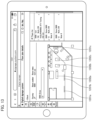
- FIG. 13 illustrates an example of a display screen when a specific floor is selected in Floor plan list mode. Assumed that a user selects the first floor. As illustrated in FIG. 13 , a floor plan of the first floor and a player list on the first floor are displayed. FIG. 13 illustrates a floor plan in which three signage devices and three fixtures are installed. As illustrated in FIG. 13 , icons 1201 a to 1201 c corresponding to the signage devices are shown on the floor plan. Simultaneously, icons corresponding to the fixtures 1202 a to 1202 c are shown.
- FIG. 14 is a view illustrating a state after a signage device is selected on a floor plan.
- the signage device corresponding to the icon 1201 c is selected.
- the display control unit 103 causes a display screen to show a content list set in the signage device selected as an object of interest.
- the screen should be changed to another screen for playlist editing.
- Floor plan list mode it is possible to edit playlists of a signage device with consideration of a store layout.
- a warning icon or symbol may be shown at the position of the signage device on the floor plan.
- a playlist after the expiration date and a playlist before the distribution time may be highlighted with different colors for easy identification.
- the orientation of the screen of the signage device may be shown by a corresponding icon.
- FIG. 15 illustrates an example of a display screen when New playlist mode is selected.
- New playlist mode it is possible to create a playlist for defining, for example, multiple pieces of content to be shown on a selected signage device, or a signage device of interest, and the playing order of the content.
- FIG. 16 illustrates an example of a screen for distribution schedule. This is for setting distribution conditions when a new playlist is set in a signage device.
- a date range and a time range of playing content on the screen it is possible to input ranges after the current date and time.
- playing of a set playlist starts on the input date and time. Since a playlist can be set at a date and time earlier than the current date and time, it is possible to enhance the user-friendliness of the signage device.
- FIG. 17 illustrates an example of a display screen when New list from floor plan mode is selected.
- the mode is changed from New list from floor plan mode.
- New list from floor plan mode it is possible to simultaneously operate a signage device in Floor plan list mode and New playlist mode by screen splitting.
- New list from floor plan mode enables a user to create a new playlist with consideration of a store layout.
- FIG. 18 is a flowchart illustrating an example of processing according to the fourth embodiment.
- the processing unit 105 determines which mode is selected by the input unit 104 .
- the processing unit 105 sets a signage device to Content list mode (S 411 ).
- the processing unit 105 transmits an instruction to the display control unit 103 to show the screen of content list, and the display control unit 103 causes the display 102 to show the screen of content list (for example, the screen illustrated in FIG. 8 ) (S 412 ).
- the processing unit 105 determines whether any content in the content list is selected (S 413 ).
- the processing unit 105 transmits an instruction to the display control unit 103 to show details of the selected content, and the display control unit 103 causes the display 102 to show the details of the selected content (S 414 ).
- the processing unit 105 sets a signage device to Select and register content mode.
- the processing unit 105 transmits an instruction to the display control unit 103 to show the display screen of Select and register content mode (for example, the screen illustrated in FIG. 8 ), and the display control unit 103 causes the display 102 to show the screen (S 421 ).
- the processing unit 105 determines whether content registration is performed (S 422 ). When the content registration is performed (Yes), the processing unit 105 transmits a file of the registered content to the communication unit 107 , and the communication unit 107 transmits the content file to the management apparatus 201 through the network 300 . Accordingly, new content is registered in the management center 200 (S 423 ).
- Player list mode is selected in S 400 .
- the processing unit 105 sets a signage device to Player list mode (S 431 ). After that, the processing unit 105 transmits an instruction to the display control unit 103 to show the screen of player list, and the display control unit 103 causes the display 102 to show the screen of player list (for example, the screen illustrated in FIG. 10 ) (S 432 ). The processing unit 105 then determines whether any player in the player list is selected (S 433 ).
- the processing unit 105 transmits an instruction to the display control unit 103 to show details of the selected player, and the display control unit 103 causes the display 102 to show the screen of the details (for example, the screen illustrated in FIG. 11 ) (S 434 ).
- the processing unit 105 sets a signage device to Floor plan list mode.
- the processing unit 105 transmits an instruction to the display control unit 103 to show the display screen of Floor plan list mode (for example, the screen illustrated in FIG. 12 ), and the display control unit 103 causes the display 102 to show the screen. (S 441 ).
- the processing unit 105 determines whether any floor plan in the floor plan list is selected (S 442 ).
- the processing unit 105 transmits an instruction to the display control unit 103 to show the selected floor plan, and the display control unit 103 causes the display 102 to show the screen of the floor plan (for example, the screen illustrated in FIG. 13 ) (S 443 ).
- the processing unit 105 determines whether any player in the floor plan is selected (S 444 ).
- the processing unit 105 transmits an instruction to the display control unit 103 to show details of the selected player, and the display control unit 103 causes the display 102 to show the screen of the details (for example, the screen illustrated in FIG. 14 ) (S 445 ).
- New playlist mode is selected in S 400 .
- the processing unit 105 sets a signage device to New playlist mode.
- the processing unit 105 transmits an instruction to the display control unit 103 to show the display screen of New playlist mode (for example, the screen illustrated in FIG. 15 ), and the display control unit 103 causes the display 102 to show the screen. (S 451 ).
- the processing unit 105 determines whether any player in the screen is selected (S 452 ). When a player is selected (Yes), the processing unit 105 transmits an instruction to the display control unit 103 to show the screen for creating a new playlist of the selected player, and the display control unit 103 causes the display 102 to show the screen (S 453 ).
- New list from floor plan mode is selected in S 400 .
- the processing unit 105 sets a signage device to New list from floor plan mode.
- the processing unit 105 transmits an instruction to the display control unit 103 to show the display screen of New list from floor plan mode (for example, the screen illustrated in FIG. 17 ), and the display control unit 103 causes the display 102 to show the screen (S 461 ).
- the steps S 442 , S 443 , S 444 , and S 453 are performed.
- the information processing apparatus 101 offers one or more modes, which makes it easier for a user to operate the apparatus.
- an image or the like is displayed on a display 102 to enable a user to intuitively understand various kinds of information such as details of each signage device and playlists in a displayed floor plan.
- an icon or a symbol representing details of a signage device is superimposed and displayed on an icon representing the signage device.
- a method for displaying such an icon or a symbol is not limited to superimposition for display. Any display method may be employed as long as a user can understand which signage device is related to the icon or the symbol. Note that similar components to those described in the aforementioned embodiments are denoted by the same reference numerals and the description thereof will be omitted.
- FIG. 19 illustrates an example of a display screen when an error occurs in a signage device.
- an error display icon 1901 is superimposed and displayed on an icon corresponding to a signage device with an error. It is more preferable that the icon corresponding to the signage device with an error should be intensified.
- Such a display format makes it possible for a user to intuitively understand which signage device contains an error.
- a detail-of-error 1902 is displayed on the screen.
- the detail-of-error 1902 includes, for example, details of position of the signage device in a store, the display size of the signage device, the type of the signage device, the name of a set playlist, a recommended way to deal with an error, and a status. Note that the detail-of-error 1902 does not necessarily include all of these details and may include any one or a combination thereof. This enables a user to quickly deal with an error.
- a player list 1903 included in a floor plan may be displayed together with the floor plan.
- a signage device it is preferable to display the signage device with an error at the top of the screen so as to enable a user to easily understand the player with an error.
- the number of errors (the number of signage devices with an error) may be displayed on the screen. This makes it possible for a user to understand the number of errors instantaneously.
- FIG. 20 illustrates an example of a display screen with an expired playlist.
- an icon 2001 representing the expiration of a set playlist is superimposed and displayed on an icon corresponding to a signage device with a set playlist expired.
- Such a display format makes it possible for a user to intuitively understand which signage device needs a new playlist to be set.
- a detail 2002 is displayed on the screen.
- the detail 2002 includes, for example, details of position of the signage device in a store, the display size of the signage device, the type of the signage device, the name of the set playlist, and the date range of the playlist. Note that the detail 2002 does not necessarily include all of these details and may include any one or a combination thereof.
- an icon 2003 representing the expiration of content may be superimposed on an icon of a corresponding signage device.
- details include, for example, details of position of the signage device in a store, the display size of the signage device, the type of the signage device, the name of the set playlist, names or the like of the expired content, and the number of pieces of the expired content. Note that the details do not necessarily include all of these details and may include any one or a combination thereof.
- an icon 2004 representing that no operation has been performed for a certain period of time is superimposed on an icon of the corresponding signage device.
- details are displayed on the screen.
- the details include, for example, details of position of the signage device in a store, the display size of the signage device, the type of the signage device, the name of the set playlist, and the time and date of the last operation. Note that the details do not necessarily include all of these details and may include any one or a combination thereof.
- Such a display format enables a user to promptly change or update playlists according to set date ranges of playing content or final operation time.
- FIG. 21 illustrates an example of a display screen with a set playlist or content being about to expire.
- an icon 2101 representing the impending expiration date of the set playlist or content is superimposed and displayed on an icon corresponding to a signage device including a set playlist or content being about to expire.
- Such a display format makes it possible for a user to intuitively understand which signage device needs a new playlist to be set.
- timings for displaying the icon 2101 may be determined by initial setting but is preferably changeable by a user.
- a detail 2102 is displayed, for example, when a user touches an icon corresponding to the signage device including the set playlist or content being about to expire.
- the detail 2102 includes, for example, details of position of the signage device in a store, the display size of the signage device, the type of the signage device, the name of the set playlist, and the date range of the playlist. Note that the detail 2102 does not necessarily include all of these details and may include any one or a combination thereof.
- the display of the detail 2102 can be used to edit or modify the playlist, or to add content to the playlist.
- the detail 2102 include a product name option 2103 and a gender type option 2104 which are used when a user select content to be added.
- “Kando pants” is selected from the product name option 2103 .
- “Women” is selected from the gender type option 2104 .
- content associated with Kando pants for women is displayed as a candidate 2105 . From the candidate 2105 , for example, a user touches “add” tab of content to add the content to the playlist. Accordingly, new content is added to the playlist.
- the playlist may be displayed as the candidate 2105 .
- a user can promptly change or update a playlist or add content according to the end of a date range of playing the playlist or content.
- FIG. 22 illustrates an example of a display screen when new content is added to the management center 200 .
- an icon 2201 representing the addition of new content to be played is superimposed and displayed on an icon corresponding to a signage device with a monitor size that can play the new content.
- Such a display format enables a user to intuitively understand a signage device in which newly added content can be set.
- a detail 2202 is displayed on the screen.
- the detail 2202 includes, for example, the display size of the signage device, the type of the signage device, and details of the newly added content. Note that the detail 2202 does not necessarily include all of these details and may include any one or a combination thereof.
- the detail 2202 can be used to add content.
- the new content is displayed as a candidate 2203 . From the candidate 2203 , for example, a user touches “add” tab of content to add content to the playlist. Accordingly, new content is added to the playlist.
- the set playlist can be changed in a similar manner.
- FIG. 23 illustrates an example of a display screen when configuration details in a signage device includes content associated with out-of-stock products.
- an icon 2301 representing the inclusion of content associated with out-of-stock products is superimposed and displayed on an icon corresponding to the signage device including the content associated with out-of-stock products in the configuration details.
- Such a display format enables a user to intuitively understand a signage device which is playing the content associated with out-of-stock products.
- a detail 2302 is displayed on the screen.
- the detail 2302 includes, for example, details of position of the signage device in a store, the display size of the signage device, the type of the signage device, the name of the set playlist, names or the like of out-of-stock products, and details or the like of content associated with the out-of-stock products included in configuration details. Note that the detail 2302 does not necessarily include all of these details and may include any one or a combination thereof.
- the processing unit 105 may be configured not to automatically play the content associated with out-of-stock products.
- an out-of-stock product arrives after the signage device is controlled not to play the content associated with out-of-stock products automatically or based on an input from the input unit 104 , it is preferable that the play of the content should be automatically resumed or an icon representing the arrival of the product should be superimposed on the icon corresponding to the signage device.
- Such a configuration makes it possible to plat content according to stock status.
- Signage devices installed in a store have various monitor sizes and types depending on installation locations. Furthermore, content to be played may differ depending on sizes and types of monitors. Therefore, hereinafter described is an example in which a display screen is shown to enable a user to intuitively understand which size of a monitor is installed in which position in a store in a displayed floor plan.
- FIG. 24 illustrates an example of a display screen when a predetermined type of monitor is selected.
- icons 2401 to 2405 representing types of monitors are displayed on the screen.
- the icons represent signage devices with monitors having different types or sizes. Assumed that a user selects the icon 2401 with the input unit 104 .
- An icon representing a signage device with a monitor having the type and size corresponding to the icon 2401 is intensified. This makes it possible for a user to intuitively understand that a signage device including a monitor having the selected type or size is installed at which position in a store.
- a computer When a computer is used to perform processing in the information processing apparatus 101 , details of functional processing to be performed by each unit in the apparatus are executed based on a program.
- the program including the details of functional processing can be recorded in a non-transitory computer-readable storage medium.
- the computer-readable storage medium include a magnetic recording device, an optical disk, a magneto-optical recording medium, and a semiconductor memory.
- the processing of each unit may be performed by executing a predetermined program on a computer.
Landscapes
- Engineering & Computer Science (AREA)
- Business, Economics & Management (AREA)
- Theoretical Computer Science (AREA)
- Physics & Mathematics (AREA)
- General Physics & Mathematics (AREA)
- Accounting & Taxation (AREA)
- Finance (AREA)
- Development Economics (AREA)
- Economics (AREA)
- Strategic Management (AREA)
- Marketing (AREA)
- General Business, Economics & Management (AREA)
- Entrepreneurship & Innovation (AREA)
- General Engineering & Computer Science (AREA)
- Game Theory and Decision Science (AREA)
- Human Computer Interaction (AREA)
- Human Resources & Organizations (AREA)
- Operations Research (AREA)
- Quality & Reliability (AREA)
- Tourism & Hospitality (AREA)
- Multimedia (AREA)
- Computer Hardware Design (AREA)
- Management, Administration, Business Operations System, And Electronic Commerce (AREA)
- Controls And Circuits For Display Device (AREA)
- User Interface Of Digital Computer (AREA)
Abstract
Description
Claims (10)
Applications Claiming Priority (3)
| Application Number | Priority Date | Filing Date | Title |
|---|---|---|---|
| JP2019199516A JP7410690B2 (en) | 2019-11-01 | 2019-11-01 | Information processing device, program, information processing method, and signage system |
| JPJP2019-199516 | 2019-11-01 | ||
| JP2019-199516 | 2019-11-01 |
Publications (2)
| Publication Number | Publication Date |
|---|---|
| US20210133451A1 US20210133451A1 (en) | 2021-05-06 |
| US11620823B2 true US11620823B2 (en) | 2023-04-04 |
Family
ID=75687429
Family Applications (1)
| Application Number | Title | Priority Date | Filing Date |
|---|---|---|---|
| US17/082,845 Active 2040-12-30 US11620823B2 (en) | 2019-11-01 | 2020-10-28 | Information processing apparatus, non-transitory computer readable storage medium, information processing method, and signage system |
Country Status (2)
| Country | Link |
|---|---|
| US (1) | US11620823B2 (en) |
| JP (1) | JP7410690B2 (en) |
Families Citing this family (2)
| Publication number | Priority date | Publication date | Assignee | Title |
|---|---|---|---|---|
| JP7520193B1 (en) | 2023-08-08 | 2024-07-22 | 株式会社ノジマ | Product purchasing support system |
| KR20260048932A (en) * | 2024-10-04 | 2026-04-13 | 삼성전자주식회사 | Electronic device and method thereof |
Citations (7)
| Publication number | Priority date | Publication date | Assignee | Title |
|---|---|---|---|---|
| US20080263467A1 (en) * | 2007-04-13 | 2008-10-23 | David Wilkins | Method for automating digital signage applications using intelligent self-configuring objects and smart templates |
| US20120047011A1 (en) * | 2010-08-23 | 2012-02-23 | Proximus Mobility, Llc. | Systems and Methods for Delivering Proximity-Based Marketing Content to Mobile Devices |
| WO2012035191A1 (en) * | 2010-09-13 | 2012-03-22 | Hyperin Inc. | Arrangement and related method for digital signage |
| US20130006790A1 (en) * | 2011-05-20 | 2013-01-03 | Apple Inc. | System and method for planning layout of a retail store |
| WO2017013690A1 (en) | 2015-07-17 | 2017-01-26 | 株式会社オプトエレクトロニクス | Esl system linked to digital signage, and esl server and electronic shelf label used therein |
| US9886678B2 (en) * | 2013-09-25 | 2018-02-06 | Sap Se | Graphic representations of planograms |
| US10275111B2 (en) * | 2012-05-18 | 2019-04-30 | Texas Emergency Network, LLC | Digital sign network |
Family Cites Families (3)
| Publication number | Priority date | Publication date | Assignee | Title |
|---|---|---|---|---|
| US6897763B2 (en) * | 2003-08-07 | 2005-05-24 | Eastman Kodak Company | Retail signage management system |
| JP5744944B2 (en) * | 2013-03-22 | 2015-07-08 | ヤフー株式会社 | Promotion information display system and promotion information display method |
| JP7023096B2 (en) * | 2017-12-12 | 2022-02-21 | 東芝テック株式会社 | Information processing equipment and programs |
-
2019
- 2019-11-01 JP JP2019199516A patent/JP7410690B2/en active Active
-
2020
- 2020-10-28 US US17/082,845 patent/US11620823B2/en active Active
Patent Citations (7)
| Publication number | Priority date | Publication date | Assignee | Title |
|---|---|---|---|---|
| US20080263467A1 (en) * | 2007-04-13 | 2008-10-23 | David Wilkins | Method for automating digital signage applications using intelligent self-configuring objects and smart templates |
| US20120047011A1 (en) * | 2010-08-23 | 2012-02-23 | Proximus Mobility, Llc. | Systems and Methods for Delivering Proximity-Based Marketing Content to Mobile Devices |
| WO2012035191A1 (en) * | 2010-09-13 | 2012-03-22 | Hyperin Inc. | Arrangement and related method for digital signage |
| US20130006790A1 (en) * | 2011-05-20 | 2013-01-03 | Apple Inc. | System and method for planning layout of a retail store |
| US10275111B2 (en) * | 2012-05-18 | 2019-04-30 | Texas Emergency Network, LLC | Digital sign network |
| US9886678B2 (en) * | 2013-09-25 | 2018-02-06 | Sap Se | Graphic representations of planograms |
| WO2017013690A1 (en) | 2015-07-17 | 2017-01-26 | 株式会社オプトエレクトロニクス | Esl system linked to digital signage, and esl server and electronic shelf label used therein |
Also Published As
| Publication number | Publication date |
|---|---|
| JP7410690B2 (en) | 2024-01-10 |
| JP2021072008A (en) | 2021-05-06 |
| US20210133451A1 (en) | 2021-05-06 |
Similar Documents
| Publication | Publication Date | Title |
|---|---|---|
| US8467955B2 (en) | Map-centric service for social events | |
| CN113849682B (en) | Video search method, device, equipment and medium | |
| CN103294390B (en) | Mobile electronic device and user interface display method | |
| US8949370B1 (en) | Mobile application generation | |
| US10402250B2 (en) | Digital signage and method of controlling the same | |
| KR101857561B1 (en) | Method and apparatus for managing of schedule in portable terminal | |
| KR20140031457A (en) | Advertising service server and digital signage device | |
| US20150081478A1 (en) | Interactive display system for food and entertainment retail establishments | |
| US11622145B2 (en) | Display device and method, and advertisement server | |
| KR102073891B1 (en) | Method of providing virtual arrangement services for event facilities and server | |
| WO2016109567A1 (en) | Bookmarking search results | |
| US20090158168A1 (en) | Apparatus and method for configuring idle screen | |
| US20140304578A1 (en) | Website Content Identification in a Content Management System | |
| US11620823B2 (en) | Information processing apparatus, non-transitory computer readable storage medium, information processing method, and signage system | |
| JP6917531B1 (en) | Information processing equipment, information processing methods and information processing programs | |
| CN112639709A (en) | Method and system for positioning animated images within a dynamic keyboard interface | |
| US20220012293A1 (en) | Discovering alternate online service providers | |
| JP5273610B2 (en) | Map server device | |
| JP2024028105A (en) | Web content display system on mobile information terminals | |
| US20090106644A1 (en) | MODIFYING PROJECTED IMAGE AREA (mask) FOR DISPLAY | |
| CN107438824A (en) | Place and events interface | |
| US20110145108A1 (en) | Method for obtaining information relating to a product, electronic device, server and system related thereto | |
| JP6571287B2 (en) | Server, information providing method, and information providing program | |
| JP6644945B1 (en) | Information providing system, information providing method, and information providing program | |
| CN114896525A (en) | Information display method and device and electronic equipment |
Legal Events
| Date | Code | Title | Description |
|---|---|---|---|
| FEPP | Fee payment procedure |
Free format text: ENTITY STATUS SET TO UNDISCOUNTED (ORIGINAL EVENT CODE: BIG.); ENTITY STATUS OF PATENT OWNER: LARGE ENTITY |
|
| AS | Assignment |
Owner name: FAST RETAILING CO., LTD., JAPAN Free format text: ASSIGNMENT OF ASSIGNORS INTEREST;ASSIGNORS:HASHIGUCHI, YUKA;SANO, AYA;REEL/FRAME:054336/0676 Effective date: 20201020 |
|
| STPP | Information on status: patent application and granting procedure in general |
Free format text: APPLICATION DISPATCHED FROM PREEXAM, NOT YET DOCKETED |
|
| STPP | Information on status: patent application and granting procedure in general |
Free format text: DOCKETED NEW CASE - READY FOR EXAMINATION |
|
| STPP | Information on status: patent application and granting procedure in general |
Free format text: NON FINAL ACTION MAILED |
|
| STPP | Information on status: patent application and granting procedure in general |
Free format text: RESPONSE TO NON-FINAL OFFICE ACTION ENTERED AND FORWARDED TO EXAMINER |
|
| STPP | Information on status: patent application and granting procedure in general |
Free format text: FINAL REJECTION MAILED |
|
| STPP | Information on status: patent application and granting procedure in general |
Free format text: RESPONSE AFTER FINAL ACTION FORWARDED TO EXAMINER |
|
| STPP | Information on status: patent application and granting procedure in general |
Free format text: NOTICE OF ALLOWANCE MAILED -- APPLICATION RECEIVED IN OFFICE OF PUBLICATIONS |
|
| STCF | Information on status: patent grant |
Free format text: PATENTED CASE |