US11372597B2 - Information processing system, and non-transitory computer readable medium - Google Patents
Information processing system, and non-transitory computer readable medium Download PDFInfo
- Publication number
- US11372597B2 US11372597B2 US16/536,363 US201916536363A US11372597B2 US 11372597 B2 US11372597 B2 US 11372597B2 US 201916536363 A US201916536363 A US 201916536363A US 11372597 B2 US11372597 B2 US 11372597B2
- Authority
- US
- United States
- Prior art keywords
- bulletins
- information
- posting
- order
- instruction
- Prior art date
- Legal status (The legal status is an assumption and is not a legal conclusion. Google has not performed a legal analysis and makes no representation as to the accuracy of the status listed.)
- Active, expires
Links
Images




Classifications
-
- G—PHYSICS
- G06—COMPUTING OR CALCULATING; COUNTING
- G06F—ELECTRIC DIGITAL DATA PROCESSING
- G06F3/00—Input arrangements for transferring data to be processed into a form capable of being handled by the computer; Output arrangements for transferring data from processing unit to output unit, e.g. interface arrangements
- G06F3/12—Digital output to print unit, e.g. line printer, chain printer
- G06F3/1201—Dedicated interfaces to print systems
- G06F3/1202—Dedicated interfaces to print systems specifically adapted to achieve a particular effect
- G06F3/1203—Improving or facilitating administration, e.g. print management
- G06F3/1205—Improving or facilitating administration, e.g. print management resulting in increased flexibility in print job configuration, e.g. job settings, print requirements, job tickets
-
- G—PHYSICS
- G06—COMPUTING OR CALCULATING; COUNTING
- G06Q—INFORMATION AND COMMUNICATION TECHNOLOGY [ICT] SPECIALLY ADAPTED FOR ADMINISTRATIVE, COMMERCIAL, FINANCIAL, MANAGERIAL OR SUPERVISORY PURPOSES; SYSTEMS OR METHODS SPECIALLY ADAPTED FOR ADMINISTRATIVE, COMMERCIAL, FINANCIAL, MANAGERIAL OR SUPERVISORY PURPOSES, NOT OTHERWISE PROVIDED FOR
- G06Q10/00—Administration; Management
- G06Q10/04—Forecasting or optimisation specially adapted for administrative or management purposes, e.g. linear programming or "cutting stock problem"
- G06Q10/047—Optimisation of routes or paths, e.g. travelling salesman problem
-
- G—PHYSICS
- G06—COMPUTING OR CALCULATING; COUNTING
- G06F—ELECTRIC DIGITAL DATA PROCESSING
- G06F3/00—Input arrangements for transferring data to be processed into a form capable of being handled by the computer; Output arrangements for transferring data from processing unit to output unit, e.g. interface arrangements
- G06F3/12—Digital output to print unit, e.g. line printer, chain printer
- G06F3/1201—Dedicated interfaces to print systems
- G06F3/1202—Dedicated interfaces to print systems specifically adapted to achieve a particular effect
- G06F3/1203—Improving or facilitating administration, e.g. print management
-
- G—PHYSICS
- G06—COMPUTING OR CALCULATING; COUNTING
- G06F—ELECTRIC DIGITAL DATA PROCESSING
- G06F3/00—Input arrangements for transferring data to be processed into a form capable of being handled by the computer; Output arrangements for transferring data from processing unit to output unit, e.g. interface arrangements
- G06F3/12—Digital output to print unit, e.g. line printer, chain printer
- G06F3/1201—Dedicated interfaces to print systems
- G06F3/1223—Dedicated interfaces to print systems specifically adapted to use a particular technique
- G06F3/1237—Print job management
- G06F3/125—Page layout or assigning input pages onto output media, e.g. imposition
- G06F3/1252—Page layout or assigning input pages onto output media, e.g. imposition for sheet based media
-
- G—PHYSICS
- G06—COMPUTING OR CALCULATING; COUNTING
- G06F—ELECTRIC DIGITAL DATA PROCESSING
- G06F3/00—Input arrangements for transferring data to be processed into a form capable of being handled by the computer; Output arrangements for transferring data from processing unit to output unit, e.g. interface arrangements
- G06F3/12—Digital output to print unit, e.g. line printer, chain printer
- G06F3/1201—Dedicated interfaces to print systems
- G06F3/1223—Dedicated interfaces to print systems specifically adapted to use a particular technique
- G06F3/1237—Print job management
- G06F3/1253—Configuration of print job parameters, e.g. using UI at the client
- G06F3/1254—Automatic configuration, e.g. by driver
-
- G—PHYSICS
- G06—COMPUTING OR CALCULATING; COUNTING
- G06F—ELECTRIC DIGITAL DATA PROCESSING
- G06F3/00—Input arrangements for transferring data to be processed into a form capable of being handled by the computer; Output arrangements for transferring data from processing unit to output unit, e.g. interface arrangements
- G06F3/12—Digital output to print unit, e.g. line printer, chain printer
- G06F3/1201—Dedicated interfaces to print systems
- G06F3/1278—Dedicated interfaces to print systems specifically adapted to adopt a particular infrastructure
- G06F3/1285—Remote printer device, e.g. being remote from client or server
-
- G—PHYSICS
- G06—COMPUTING OR CALCULATING; COUNTING
- G06Q—INFORMATION AND COMMUNICATION TECHNOLOGY [ICT] SPECIALLY ADAPTED FOR ADMINISTRATIVE, COMMERCIAL, FINANCIAL, MANAGERIAL OR SUPERVISORY PURPOSES; SYSTEMS OR METHODS SPECIALLY ADAPTED FOR ADMINISTRATIVE, COMMERCIAL, FINANCIAL, MANAGERIAL OR SUPERVISORY PURPOSES, NOT OTHERWISE PROVIDED FOR
- G06Q30/00—Commerce
- G06Q30/02—Marketing; Price estimation or determination; Fundraising
- G06Q30/0241—Advertisements
- G06Q30/0276—Advertisement creation
-
- G—PHYSICS
- G06—COMPUTING OR CALCULATING; COUNTING
- G06F—ELECTRIC DIGITAL DATA PROCESSING
- G06F3/00—Input arrangements for transferring data to be processed into a form capable of being handled by the computer; Output arrangements for transferring data from processing unit to output unit, e.g. interface arrangements
- G06F3/12—Digital output to print unit, e.g. line printer, chain printer
- G06F3/1201—Dedicated interfaces to print systems
- G06F3/1223—Dedicated interfaces to print systems specifically adapted to use a particular technique
- G06F3/1237—Print job management
- G06F3/126—Job scheduling, e.g. queuing, determine appropriate device
- G06F3/1263—Job scheduling, e.g. queuing, determine appropriate device based on job priority, e.g. re-arranging the order of jobs, e.g. the printing sequence
Definitions
- the present disclosure relates to an information processing system, and a non-transitory computer readable medium.
- Japanese Unexamined Patent Application Publication No. 2017-162467 discloses an advertisement generation system.
- the disclosed advertisement generation system includes a unit that generates, based on advertisement generation data and product data, advertisement data corresponding to a product indicated by the product data from among products described by the advertisement generation data.
- Multiple bulletins related to products may be posted in stores.
- a worker may visit each of posting locations of the bulletins to post the bulletins.
- the route the worker takes may be a detour or the worker may carry heavy bulletins for a long distance. Also, depending on the order of visitation, working efficiency of the worker may decrease.
- Non-limiting embodiments of the present disclosure relate to increasing working efficiency more in posting of multiple bulletins than when the order of visitation of a worker is not accounted for.
- aspects of certain non-limiting embodiments of the present disclosure overcome the above disadvantages and/or other disadvantages not described above.
- aspects of the non-limiting embodiments are not required to overcome the disadvantages described above, and aspects of the non-limiting embodiments of the present disclosure may not overcome any of the disadvantages described above.
- the information processing system includes an information acquisition unit that acquires information on multiple bulletins to be posted in posting locations that are different from each other, a determination unit that determines, based on the information, an order of visitation according to which a worker posting bulletins visits each of the posting locations, and an instruction unit that provides an instruction to output printed matter that accounts for the order of visitation determined.
- FIG. 1 illustrates the whole configuration of an information processing system of an exemplary embodiment
- FIG. 2 illustrates the hardware configuration of a control server, a head office terminal, and a store terminal
- FIG. 3 generally illustrates a process performed by the information processing system
- FIG. 4 illustrates the functionality of the control server
- FIG. 5 is a flowchart illustrating a process performed by the information processing system of the exemplary embodiment
- FIG. 6 illustrates a display screen of the store terminal displayed when a store operator enlists posting locations
- FIG. 7 illustrates information stored on a posting information memory
- FIG. 8 illustrates a display screen of the store terminal displayed when the store operator enlists a posting area
- FIG. 9 illustrates the display screen of the store terminal during the enlisting of printing information
- FIG. 10 illustrates a printing information memory
- FIG. 11 illustrates the display screen of the store terminal immediately before a printing instruction is provided
- FIG. 12 illustrates output an instruction sheet
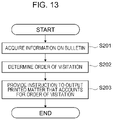
- FIG. 13 is a flowchart illustrating in detail an operation performed in step S 107 ;
- FIG. 14 illustrates another example of the instruction sheet
- FIG. 15 illustrates an image forming apparatus
- FIGS. 16A and 16B illustrate a stacked state of bulletins on the image forming apparatus.
- FIG. 1 illustrates the whole configuration of an information processing system 1 of the exemplary embodiment.
- the information processing system 1 of the exemplary embodiment includes a control server 10 , a head-office terminal 20 , an image forming apparatus (printer) 30 installed in each store, and a store terminal 40 installed in each store.
- Each of the control server 10 , the head-office terminal 20 , and the store terminal 40 includes a computer.
- the control server 10 , the head-office terminal 20 , the image forming apparatus 30 , and the store terminal 40 are connected to each other via a communication network 50 , such as the Internet.
- the image forming apparatus 30 forms an image on a sheet of paper or resin, serving as a recording medium, using an electrophotographic system or an ink-jet system.
- the image forming apparatus 30 thus generates bulletins 60 that are going to be posted in each store.
- the image forming apparatus 30 also forms an image on a paper sheet, thereby generating an instruction sheet 70 that is handed over to a worker who is going to post the bulletins 60 .
- the image formation method of the image forming apparatus 30 is not limited to the electrophotographic system or the ink-jet system.
- the image forming apparatus 30 may use a different system.
- the “bulletins 60 ” refer to printed matter that is posed at a posting location and viewed by people present close to the posting location.
- the bulletin 60 is not limited to any particular type or size.
- the bulletin 60 may be a poster.
- the bulletin 60 may be as small as a sticker that is stuck onto a product.
- the bulletin 60 is not limited to any shape.
- the bulletin 60 may have a rectangular shape, such as a poster.
- the bulletin 60 may be a strip, or may have a polygonal shape, such as a triangle.
- the posting method of the bulletin 60 is not limited to any particular method.
- the bulletin 60 may be put on a wall, like a poster.
- the bulletin 60 on a rigid strip may be fixed onto a wall with the face of the bulletin 60 perpendicular to the wall.
- FIG. 2 illustrates the hardware configuration of each of the control server 10 , the head-office terminal 20 , and the store terminal 40 .
- Each of the control server 10 , the head-office terminal 20 , and the store terminal 40 includes a computer.
- Each of the control server 10 , the head-office terminal 20 , and the store terminal 40 includes a central processing unit (CPU) 201 , a random-access memory (RAM) 202 , and a read-only memory (ROM) 203 , a storage device 204 including a hard disk, and a communication device (communication interface) 205 that performs communication with the outside.
- CPU central processing unit
- RAM random-access memory
- ROM read-only memory
- the ROM 203 , and the storage device 204 store a program executed by the CPU 201 .
- the CPU 201 reads the program stored on the ROM 203 or the storage device 204 , and executes the program using the RAM 202 as a working area.
- the functionalities of the elements described below are implemented when the CPU 201 executes the program stored on the ROM 203 or the storage device 204 .
- the program to be executed by the CPU 201 may be provided to each of the control server 10 , the head-office terminal 20 , and the store terminal 40 in the form thereof recorded on one of computer readable recording media.
- the computer readable recording media include a magnetic recording medium (a magnetic tape or a magnetic disk), an electromagnetic recording medium (an optical disk), and a semiconductor memory.
- the program to be executed by the CPU 201 may be downloaded to each of the control server 10 , the head-office terminal 20 , and the store terminal 40 via a communication system, such as the Internet. Referring to FIG. 1 , each of the head-office terminal 20 and the store terminal 40 includes a display 21 that displays information to the operator.
- FIG. 3 generally illustrates the process performed by the information processing system 1 .
- the operator in a store (hereinafter referred to as a “store operator”) enlists an image indicating the layout of the inside of the store (hereinafter referred to as a “layout image 22 ”) via the store terminal 40 .
- the store operator enlists the image of the internal structure of the store.
- the layout image 22 is transmitted to the control server 10 to be stored there.
- the operator in a head office (hereinafter referred to as a “head-office operator”) enlists a pattern of the bulletin 60 posted in each store via the head-office terminal 20 .
- the pattern of the bulletin 60 is transmitted to the control server 10 to be stored there.
- the store operator edits the bulletin 60 , enlists a positing location, a posting area, printing information, and provides an instruction to print via the store terminal 40 .
- the control server 10 provides the instruction to print to the image forming apparatus 30 in each store.
- FIG. 4 illustrates the functionalities of the control server 10 .
- FIG. 4 focuses on function blocks related to posting of the bulletin 60 .
- the control server 10 includes function blocks, namely, an information acquisition unit 101 , an order determination unit 102 , an instruction unit 103 , a posting information memory 104 , and a printing information memory 105 .
- the information acquisition unit 101 , the order determination unit 102 , and the instruction unit 103 are implemented when the CPU 201 executes the program stored on the ROM 203 or the storage device 204 .
- the posting information memory 104 and the printing information memory 105 are implemented by the storage device 204 .
- the information acquisition unit 101 acquires information on the bulletins 60 posted in each store.
- the order determination unit 102 serving as a determination unit determines an order of visitation according to which a worker (a worker who posts the bulletins 60 ) sequentially visits the positing locations (of the bulletins 60 ).
- the instruction unit 103 provides an instruction to output printed matter that accounts for the order of visitation determined by the order determination unit 102 .
- the posting information memory 104 stores information related to the bulletins 60 , such as information indicating the posting location of the bulletins 60 .
- the printing information memory 105 stores information related to the printing of the bulletins 60 , such as the number of copies of each of the bulletins 60 .
- FIG. 5 is a flowchart illustrating the process performed by the information processing system 1 of the exemplary embodiment.
- the store operator edits the bulletins 60 by operating the store terminal 40 (step S 101 ). More specifically, the store operator generates the bulletins 60 appropriate for each store by editing the pattern of the bulletins 60 enlisted on the control server 10 .
- the control server 10 determines whether the layout image 22 has been enlisted on the control server 10 (step S 102 ). If the layout image 22 has not been enlisted, the store operator operates the store terminal 40 to enlist the layout image 22 (step S 103 ). More specifically, if the layout image 22 has not been enlisted on the control server 10 , information indicating that the layout image 22 is not enlisted is displayed on the store terminal 40 . In response, the store operator enlists the layout image 22 .
- the store operator operates the store terminal 40 to enlist the posting location of each of the bulletins 60 edited (generated) in step S 101 (step S 104 ).
- the posting location is transmitted to and enlisted on the control server 10 . It will be noted that the posting location is enlisted on the control server 10 in association with the corresponding bulletin 60 .
- FIG. 6 illustrates a display screen 41 of the store terminal 40 displayed when the store operator enlists posting locations.
- the display screen 41 of FIG. 6 is displayed on the store terminal 40 when the store operator enlists the posting locations.
- An enlisted layout image 22 is displayed on the upper portion of the display screen 41 as indicated by reference number 6 A.
- the list of the bulletins 60 edited (generated) by the store operator in step S 101 is displayed on the lower portion of the display screen 41 as indicated by reference numeral 6 B. It will be noted that information on the bulletins 60 to be posted in the store is displayed on the lower portion of the display screen 41 .
- the store operator enlists the posting location of the bulletins 60 by selecting a portion of the layout image 22 of FIG. 6 . Specifically, the store operator identifies the bulletin 60 , the posting location of which is to be enlisted, from the list of the bulletins 60 (from among multiple types of bulletins 60 displayed on the lower portion of the display screen 41 ) and then selects a portion of the layout image 22 . In this way, the posting location of the bulletin 60 is selected. The posting location thus identified is transmitted to the control server 10 , and then enlisted on the control server 10 . It will be noted that the posting location is enlisted on the control server 10 in association with the bulletin 60 .
- the store operator identifies a bulletin 60 referred to as a stationery point of purchase (POP) A, and selects a portion (1) of the layout image 22 .
- the location information (location information indicating the location (1)) is associated with the bulletin 60 referred to as the stationery POP A, and is then enlisted on the control server 10 .
- the store operator also identifies the posting locations of the stationery POP B and the book POP A, and the posting locations of the stationery POP B and the book POP A are enlisted (this operation is not illustrated in FIG. 6 ).
- FIG. 7 illustrates information to be stored on the posting information memory 104 .
- the location information indicating the posting location of each bulletin 60 is enlisted on the control server 10 .
- the location information (hereinafter referred to as “posting location information”) is enlisted on the posting information memory 104 in the control server 10 .
- a position along an X axis, and a position along a Y axis in a store are enlisted as the posting location information.
- content identification (ID) and print job ID are enlisted in association with each bulletin 60 as identification information identifying each bulletin 60 .
- information on the name of each bulletin is stored on the posting information memory 104 .
- step S 105 the store operator operates the store terminal 40 to enlist a posting area where the bulletin 60 is to be posted.
- FIG. 8 illustrates the display screen 41 of the store terminal 40 when the store operator enlists the posting area.
- the layout image 22 is displayed on the upper portion of the display screen 41 of FIG. 8 , and images (1) and (2) that are posting areas of the stationery POP A and the stationery POP B are displayed on the layout image 22 .
- An image (3) that is a posting area of the book POP A of FIG. 6 is displayed as indicated by reference numeral 8 E.
- the store operator selects a portion of the layout image 22 . Specifically, in the display example, the store operator selects a rectangular area indicated by reference numeral 8 A. More specifically, the area containing the posting locations (1) and (2) is selected.
- the area selected by the store operator becomes the posting area where the bulletin 60 is to be posted.
- the store operator selects an area from the layout image 22 , and enlists the posting area.
- information on each bulletin 60 contained in the posting area (the area selected by the store operator) is displayed at a location (indicated by reference numeral 8 B) on the lower portion of the display screen 41 .
- the information on the bulletin 60 that is going to be posted in the posting area is displayed on the lower portion of the display screen 41 .
- an enlist button 44 is displayed on the bottom right corner of the display screen 41 .
- the control server 10 enlists the posting area in association with the bulletin 60 located in the posting area.
- the information on the posting area is thus enlisted on the posting information memory 104 of FIG. 7 .
- an area ID is assigned to each posting area to identify the posting area.
- the area ID is enlisted on the posting information memory 104 with the area ID associated with the bulletin 60 .
- an area ID “1” is assigned to the selected posting area (the rectangular area indicated by reference numeral 8 A of FIG. 8 ), and is enlisted on the posting information memory 104 with the area ID “1” associated with each of the stationery POP A and the stationery POP B.
- the posting areas represented by the XY coordinates are individually enlisted on the control server 10 in association with the corresponding area IDs. It will be noted that in the exemplary embodiment the area ID only is enlisted on the posting information memory 104 . Referring to reference numeral 8 E of FIG. 8 , the posting location of the book POP A (labeled with (3)) is outside the posting area, and the area ID “1” is not associated with the book POP A as illustrated by reference numeral 7 X of FIG. 7 .
- step S 106 printing information is enlisted.
- the store operator enlists the printing information by operating the store terminal 40 .
- the store operator enlists information used to print each of the bulletins 60 , such as the number of copies of each of the bulletins 60 .
- FIG. 9 illustrates the display screen 41 of the store terminal 40 during the enlisting of the printing information.
- the display screen 41 includes a posting area selection box 401 , and multiple posting areas that the store operator has enlisted are displayed in the posting area selection box 401 .
- the posting area selection box 401 is displayed in a pull-down way. When a pointer is placed on the posting area selection box 401 using a mouse, the multiple posting areas enlisted are displayed in a vertical arrangement.
- the store operator selects only one posting area.
- the store operator may select (enlist) another posting area.
- multiple posting areas are displayed in the posting area selection box 401 as illustrated in FIG. 9 .
- an area 1 is finally selected as a posting area.
- information on the bulletins 60 contained in the posting area selected by the store operator is displayed below the posting area selection box 401 and on the leftmost portion of the display screen 41 .
- the names of the bulletins 60 are displayed.
- a name display column 403 displaying the name of the bulletins 60 is arranged, and the names of the bulletins 60 contained in the selected posting area are displayed.
- printing information columns 405 are arranged to the right of the name display column 403 , and the store operator enters printing information in the printing information columns 405 .
- the printing information columns 405 include a copy count input column 405 A, a paper sheet information input column 405 B, and a tool information input column 405 C.
- the copy count input column 405 A receives the number of copies of each bulletin 60 .
- the paper sheet information input column 405 B receives information on the paper sheet used for the generation of the bulletin 60 .
- the tool information input column 405 C receives information on a tool that is used to post the bulletin 60 .
- the information on the book point of purchase (POP) A indicates that the number of copies of the book POP A is 20, that size A 5 plain paper sheets are used, and that no tool is used in the posting.
- the tool that is used to post the bulletin 60 may include a tool which serves the purpose thereof by being stored at the posting location of the bulletin 60 or a tool, such as a screw driver, which serves the purpose thereof by being carried from one posting location to another.
- an enlist button 407 is displayed on the bottom portion of the display screen 41 .
- the printing information (each piece of the printing information input to the printing information columns 405 ) input by the store operator is transmitted to the control server 10 .
- the printing information is thus enlisted on the control server 10 in association with the bulletin 60 .
- the printing information is stored on the printing information memory 105 in the control server 10 .
- FIG. 10 illustrates the printing information memory 105 .
- the printing information memory 105 in the control server 10 stores the printing information transmitted from the store terminal 40 . Specifically, the information on the number of copies, the information on the paper sheets, and the information on the presence or absence of a tool are stored on the printing information memory 105 .
- the information on the number of copies, the information on the paper sheets, and the information on the presence or absence of the tool are stored in association with each bulletin 60 on the printing information memory 105 . Specifically, the information on the number of copies, the information on the paper sheets, and the information on the presence or absence of the tool are enlisted in association with the print job ID.
- the print job ID matches the print job ID stored on the posting information memory 104 (see FIG. 7 ).
- the information on the number of copies, the information on the paper sheets, and the information on the presence or absence of the tool are associated with each bulletin 60 via the print job ID (associated with each bulletin 60 of FIG. 7 ).
- step S 107 the store operator does the final check via the store terminal 40 , and provides a print instruction.
- FIG. 11 illustrates the display screen 41 of the store terminal 40 immediately prior to when the pint instruction is provided.
- the display screen 41 of FIG. 11 includes on the top portion thereof a posting area display box 501 that displays the posting area selected by the store operator.
- the area 1 is displayed as the posting area. It will be noted that according to the exemplary embodiment the area 1 is selected on the display screen 41 of FIG. 9 , and thus the area 1 is displayed on the display screen 41 of FIG. 11 .
- the printing information input by the store operator (the printing information input in step S 106 ) is displayed. Specifically, the information on the number of copies, the information on the paper sheets, and the information on the presence or absence of the tool are displayed for each the bulletins 60 to be printed.
- a screen used to generate the instruction sheet 70 (see FIG. 1 ) is displayed on the lower portion of the display screen 41 . It will be noted that a screen (an instruction sheet generation screen) used to generate the instruction sheet 70 to be handed over to a worker who performs a posting job of the bulletin 60 is displayed on the lower portion of the display screen 41 .
- the worker posting the bulletin 60 successively visits the posting locations of the bulletins 60 in order to post the bulletins 60 there.
- the screen used to generate the instruction sheet 70 is displayed on the lower portion of the display screen 41 .
- the instruction sheet is printed matter that is to be handed over to the worker who performs the posting job of the bulletins 60 . Referring to the instruction sheet 70 , the worker performs the posting job of the bulletins 60 .
- the instruction sheet 70 includes the layout image 22 .
- information indicating the posting location of each bulletin 60 is displayed on the layout image 22 .
- determination criteria selected by the store operator are displayed on the instruction sheet generation screen. Specifically, the determination criteria are displayed in the pull-down way. Multiple determination criteria are displayed at a position labeled with reference numeral 11 G.
- the multiple determination criteria that are referred to when the order of visitation is determined are displayed at the position labeled with the reference numeral 11 G.
- the order determination unit 102 determines the order of visitation. In this operation, the order determination unit 102 determines the order of visitation, based on the determination criterion selected by the store operator. According to the exemplary embodiment, the store operator selects the determination criterion in this way.
- the store operator selects the “order of output counts” as a determination criterion.
- the order determination unit 102 determines the order of visitation, based on information on the number of copies of each bulletin 60 .
- Other determination criteria include the order of sizes, the order determined depending on the presence or absence of tools, and the order of posting locations.
- the store operator may select a determination criterion different from the order of sizes, though this operation is not described herein.
- a print button 502 is arranged on the bottom right corner of the display screen 41 of FIG. 11 .
- the print button 502 is finally selected to print the bulletins 60 and the instruction sheet 70 .
- the control server 10 provides an instruction to print to the image forming apparatus 30 installed in the store.
- the image forming apparatus 30 outputs the bulletins 60 and the instruction sheet 70 .
- FIG. 12 illustrates the output instruction sheet 70 .
- the layout image 22 is displayed on the instruction sheet 70 .
- Information indicating the posting location of each bulletin 60 is also displayed on the layout image 22 .
- information on the order of visitation is displayed on the instruction sheet 70 .
- Information on the order of visitation according to which the worker visits the posting locations of the bulletins 60 is displayed on the instruction sheet 70 .
- the information on the order of visitation is written on the instruction sheet 70 .
- the instruction sheet 70 thus accounts for the order of visitation determined by the order determination unit 102 .
- the order of visitation is from the stationery POP A to the stationery POP B.
- FIG. 13 is a flowchart illustrating in detail the process performed in step S 107 .
- the following discussion focuses on the printing process for the instruction sheet 70 .
- the information acquisition unit 101 acquires information on each of the bulletins 60 that are going to be posted (step S 201 ).
- the information acquisition unit 101 identifies the bulletin 60 contained in the posting area selected by the store operator, and acquires the information on the identified bulletin 60 .
- the information acquisition unit 101 acquires information on the number of copies of each bulletin 60 as the information on each of the bulletins 60 .
- the order of copy counts (numbers of copies of the bulletins 60 ) is selected (see reference numeral 11 G of FIG. 11 ).
- the information acquisition unit 101 acquires the information on the copy count of each bulletin 60 as the information on each bulletin 60 . More specifically, the information acquisition unit 101 refers to the information stored on the printing information memory 105 (see FIG. 10 ), and acquires the information on the copy count of each bulletin 60 .
- the order determination unit 102 determines the order of visitation when the worker sequentially visits the posting locations (step S 202 ), based on the information on the copy count acquired by the information acquisition unit 101 .
- the information acquisition unit 101 acquires the information on the copy count
- the order determination unit 102 determines the order of visitation, based on the acquired information on the copy count. More specifically, the order determination unit 102 determines the order of visitation such that the worker visits earlier a posting location where each of the bulletins 60 having a larger copy count is to be posted than a posting location where each of the bulletins 60 having a smaller copy count is to be posted.
- the instruction unit 103 outputs printed matter that accounts for the order of visitation determined by the order determination unit 102 (step S 203 ). Specifically, the instruction unit 103 provides the instruction to output the instruction sheet 70 on which the information on the order of visitation determined by the order determination unit 102 is written. More specifically, the instruction unit 103 transmits to the image forming apparatus 30 image data on the instruction sheet 70 accounting for the order of visitation and provides a printing instruction for the instruction sheet 70 to the image forming apparatus 30 .
- the image forming apparatus 30 installed in the store (see FIG. 1 ) outputs the instruction sheet 70 accounting for the order of visitation together with multiple types of the bulletins 60 .
- the instruction sheet 70 like the one illustrated in FIG. 12 is output.
- the instruction sheet 70 includes the layout image 22 , the information on the posting locations of the bulletins 60 , and the information on the order of visitation.
- the instruction sheet 70 includes, as the information on the order of visitation, information indicating that the worker visits the posting location of the stationery POP B after visiting the posting location of the stationery POP A.
- the information on the order of visitation but also the information on the posting locations of the bulletins 60 are displayed on the instruction sheet 70 of FIG. 12 .
- the information on the posting location of each bulletin 60 is displayed on the instruction sheet 70 by displaying a thumbnail image 12 X (identifying each bulletin 60 ) indicating each bulletin 60 at a position corresponding to the posting location in the layout image 22 .
- the information on the posting location of each bulletin 60 is displayed by displaying the thumbnail image 12 X of the bulletin 60 .
- the layout image 22 and the thumbnail image 12 X may not necessarily be displayed.
- only text information such as “Stationery POP A is posted on pole A, and stationery POP B is posted on pole B” may be displayed as the information indicating the posting location of the bulletins 60 .
- the order of visitation is displayed as the text information as illustrated by reference numeral 12 A of FIG. 12 .
- the order of visitation may be displayed by displaying a route in the layout image 22 .
- both the text information and the route information may be displayed together.
- the order of visitation is determined, based on the copy count of each bulletin 60 .
- the order of visitation may be determined based on another determination criterion.
- the order of visitation may be determined based on one of the other determination criteria including the “order of posting locations”, the “order of sizes”, and the “order determined depending on whether a tool is present or not”.
- the information acquisition unit 101 refers to the information (concerning the locations) stored on the posting information memory 104 (see FIG. 7 ), and acquires the information on the posting location of each bulletin 60 .
- the information acquisition unit 101 also acquires the installation location of the image forming apparatus 30 . Based on the acquired information on these locations, the information acquisition unit 101 acquires information on the distance from the image forming apparatus 30 to the posting location of each bulletin 60 .
- the order determination unit 102 determines the order of visitation, based on the information on the distances. Specifically, the order determination unit 102 determines the order of visitation such that the worker visits the bulletins 60 in the order of distances from shorter to longer distances between the image forming apparatus 30 and each of the bulletins 60 , or such that the worker visits the bulletins 60 in the order of distances from longer to shorter distances between the image forming apparatus 30 and each of the bulletins 60 .
- the information acquisition unit 101 refers to the information (concerning the sizes of paper sheets) stored on the printing information memory 105 (see FIG. 10 ), and acquires the information on the paper sheet sizes.
- the order determination unit 102 determines the order of visitation, based on the information on the sizes. Specifically, the order determination unit 102 determines the order of visitation such that the worker visits earlier the posting location of a larger bulletin 60 than the posting location of a smaller bulletin 60 .
- the information acquisition unit 101 refers to the information (concerning the tool) stored on the printing information memory 105 , and acquires the information on the tool that is going to be used in the posting of each bulletin 60 .
- the order determination unit 102 determines the order of visitation, based on the information on the tool. Specifically, the order determination unit 102 determines the order of visitation such that the worker visits earlier the posting location of a bulletin 60 that involves using a tool to post the bulletin 60 than the posting location of a bulletin 60 that does not involves using the tool to post the bulletin 60 .
- a single posting location may be selected from multiple enlisted posting locations (may be specified from multiple enlisted posting locations by the store operator).
- the order determination unit 102 determines the order of visitation according to which the worker successively visits a subpart of the posting locations of the bulletins 60 instead of visiting all the posting locations. It will be noted that the order determination unit 102 determines the order of visitation according to which the worker successively visits the subpart of the bulletins 60 contained in the posting area specified by the store operator.
- the instruction sheet 70 is output as the printed matter that accounts for the order of visitation.
- the printed matter that accounts for the order of visitation is not limited to the instruction sheet 70 .
- the printed matter that accounts for the order of visitation may be the bulletin 60 itself.
- the printed matter that accounts for the order of visitation may be the bulletin 60 that is going to be posted in the store.
- the instruction unit 103 provides an instruction to print the bulletin 60 as the instruction to output the printed matter that accounts for the order of visitation. Specifically, the instruction unit 103 provides the instruction to print the bulletins 60 such that the posting order of multiple bulletins 60 that the worker is going to post (the order of posting each bulletin 60 according to which the worker moves in accordance with the order of visitation determined by the order determination unit 102 ) matches the arrangement order of the bulletins 60 of in a pile having a stack of multiple bulletins 60 .
- the order determination unit 102 first determines the order of visitation. From the order of visitation determined by the order determination unit 102 , the instruction unit 103 then learns the order of posting each of the bulletins 60 that the worker is going to post. The instruction unit 103 provides the instruction to print the bulletins 60 such that the positing order learned matches the arrangement order of each of the bulletins 60 (the arrangement order in each pile).
- the printed matter that accounts for the order of visitation is not limited to the instruction sheet 70 only or the bulletins 60 only, but may be a combination of the instruction sheet 70 and the bulletins 60 .
- the order determination unit 102 may now determine the order of visitation of the worker to be a first posting location, a second posting location and a third posting location in that order, a bulletin 60 A may be posted at the first posting location, a bulletin 60 B may be posted at the second posting location, and a bulletin 60 C may be posted at the third posting location.
- the instruction unit 103 provides the instruction to print the bulletins 60 such that the bulletins 60 are stacked within the pile generated by the image forming apparatus 30 . For example, in the pile, the bulletin 60 C, the bulletin 60 B, and the bulletin 60 A may be stacked from bottom to top in that order, or the bulletin 60 A, the bulletin 60 B, and the bulletin 60 C may be stacked from bottom to top in that order.
- the worker visits the bulletins 60 in the order of visitation determined by the order determination unit 102 by performing the posting job of the bulletins 60 (by picking up the bulletins 60 in order from one side of the pile).
- the image forming apparatus 30 successively outputs the bulletins 60 as illustrated in FIG. 15 (illustrating the image forming apparatus 30 ). With reference to reference numeral 15 A of FIG. 15 , the image forming apparatus 30 successively stacks the bulletins 60 printed, and forms a pile 600 of the bulletins 60 . According to the exemplary embodiment, the arrangement order of the bulletins 60 in the pile 600 formed matches the posting order of the bulletins 60 .
- FIGS. 16A and 16B illustrate the stacked states of the bulletins 60 on the image forming apparatus 30 .
- the pile 600 is formed by stacking the bulletins 60 on a base plate 35 of the image forming apparatus 30 .
- the bulletins 60 are stacked in the order of the bulletin 60 C, the bulletin 60 B, and the bulletin 60 A in the order from bottom to top.
- the bulletin 60 A that is posted earlier by the worker is placed on top of the bulletins 60 B and 60 C that are posted later.
- the print surface of each bulletin looks upward.
- the bulletins 60 are stacked in the order of the bulletin 60 A, the bulletin 60 B, and the bulletin 60 C in the order from bottom to top.
- the posting order of the bulletins 60 matches the arrangement order of the bulletins 60 .
- the bulletin 60 A that is posted earlier by the worker is placed beneath the bulletins 60 B and 60 C that are posted later.
- the print surface of each bulletin looks downward. The worker thus places the pile 600 upside down in the posting job.
Landscapes
- Engineering & Computer Science (AREA)
- Theoretical Computer Science (AREA)
- Business, Economics & Management (AREA)
- Physics & Mathematics (AREA)
- General Physics & Mathematics (AREA)
- Strategic Management (AREA)
- Human Computer Interaction (AREA)
- General Engineering & Computer Science (AREA)
- Human Resources & Organizations (AREA)
- Development Economics (AREA)
- Economics (AREA)
- Game Theory and Decision Science (AREA)
- Entrepreneurship & Innovation (AREA)
- Marketing (AREA)
- General Business, Economics & Management (AREA)
- Accounting & Taxation (AREA)
- Finance (AREA)
- Operations Research (AREA)
- Quality & Reliability (AREA)
- Tourism & Hospitality (AREA)
- Information Transfer Between Computers (AREA)
- Facsimiles In General (AREA)
- Management, Administration, Business Operations System, And Electronic Commerce (AREA)
Abstract
Description
Claims (11)
Applications Claiming Priority (3)
| Application Number | Priority Date | Filing Date | Title |
|---|---|---|---|
| JP2018156545A JP2020030682A (en) | 2018-08-23 | 2018-08-23 | Information processing system and program |
| JP2018-156545 | 2018-08-23 | ||
| JPJP2018-156545 | 2018-08-23 |
Publications (2)
| Publication Number | Publication Date |
|---|---|
| US20200065033A1 US20200065033A1 (en) | 2020-02-27 |
| US11372597B2 true US11372597B2 (en) | 2022-06-28 |
Family
ID=69586998
Family Applications (1)
| Application Number | Title | Priority Date | Filing Date |
|---|---|---|---|
| US16/536,363 Active 2040-02-12 US11372597B2 (en) | 2018-08-23 | 2019-08-09 | Information processing system, and non-transitory computer readable medium |
Country Status (2)
| Country | Link |
|---|---|
| US (1) | US11372597B2 (en) |
| JP (1) | JP2020030682A (en) |
Families Citing this family (1)
| Publication number | Priority date | Publication date | Assignee | Title |
|---|---|---|---|---|
| JP2021128588A (en) * | 2020-02-14 | 2021-09-02 | トヨタ自動車株式会社 | Information processing equipment, programs, and systems |
Citations (7)
| Publication number | Priority date | Publication date | Assignee | Title |
|---|---|---|---|---|
| US20060082803A1 (en) * | 2000-09-12 | 2006-04-20 | Canon Kabushiki Kaisha | Information processing apparatus, print data forming method, print control program, and memory medium |
| US20070246532A1 (en) * | 2006-04-19 | 2007-10-25 | Grandville Printing Company | Method of printing, distributing and placing price information |
| US20140273847A1 (en) * | 2013-03-15 | 2014-09-18 | Fisher-Rosemount Systems, Inc. | Context sensitive mobile control in a process plant |
| US20170228783A1 (en) * | 2016-02-10 | 2017-08-10 | Telephone And Data Systems, Inc. | System and method for producing location-specific marketing materials for a multi-outlet enterprise |
| JP2017162467A (en) | 2016-03-04 | 2017-09-14 | キヤノンマーケティングジャパン株式会社 | Advertisement creation system, control method thereof, and program |
| US20180165047A1 (en) * | 2016-12-12 | 2018-06-14 | Kyocera Document Solutions Inc. | Image forming system and image forming method |
| US20190213212A1 (en) * | 2018-01-10 | 2019-07-11 | Trax Technologies Solutions Pte Ltd. | Using context to update product models (as amended) |
-
2018
- 2018-08-23 JP JP2018156545A patent/JP2020030682A/en active Pending
-
2019
- 2019-08-09 US US16/536,363 patent/US11372597B2/en active Active
Patent Citations (7)
| Publication number | Priority date | Publication date | Assignee | Title |
|---|---|---|---|---|
| US20060082803A1 (en) * | 2000-09-12 | 2006-04-20 | Canon Kabushiki Kaisha | Information processing apparatus, print data forming method, print control program, and memory medium |
| US20070246532A1 (en) * | 2006-04-19 | 2007-10-25 | Grandville Printing Company | Method of printing, distributing and placing price information |
| US20140273847A1 (en) * | 2013-03-15 | 2014-09-18 | Fisher-Rosemount Systems, Inc. | Context sensitive mobile control in a process plant |
| US20170228783A1 (en) * | 2016-02-10 | 2017-08-10 | Telephone And Data Systems, Inc. | System and method for producing location-specific marketing materials for a multi-outlet enterprise |
| JP2017162467A (en) | 2016-03-04 | 2017-09-14 | キヤノンマーケティングジャパン株式会社 | Advertisement creation system, control method thereof, and program |
| US20180165047A1 (en) * | 2016-12-12 | 2018-06-14 | Kyocera Document Solutions Inc. | Image forming system and image forming method |
| US20190213212A1 (en) * | 2018-01-10 | 2019-07-11 | Trax Technologies Solutions Pte Ltd. | Using context to update product models (as amended) |
Also Published As
| Publication number | Publication date |
|---|---|
| US20200065033A1 (en) | 2020-02-27 |
| JP2020030682A (en) | 2020-02-27 |
Similar Documents
| Publication | Publication Date | Title |
|---|---|---|
| US8189229B2 (en) | Image processing method, image processing apparatus and program for image position correction processing | |
| US8915187B2 (en) | Edge marking for document identification | |
| JP2003219147A (en) | Judgement method of paginating direction for processing after image generation | |
| US9641705B2 (en) | Image forming apparatus for reading indicia on a sheet and inserting images on a subsequent printed sheet at a location corresponding to the location of the read indicia | |
| JP6311023B2 (en) | Method for tracking intermediates in a printing system | |
| CN103685829A (en) | image forming device | |
| CN100411418C (en) | Image forming apparatus and method for printing scanned documents in predetermined order | |
| US11372597B2 (en) | Information processing system, and non-transitory computer readable medium | |
| US7852498B2 (en) | Post-printing process support system, post-printing process support program, and post-printing process support method | |
| EP1403081A2 (en) | Printing system, controller and display method | |
| JP2008186292A (en) | Image processor and program | |
| JP2001232887A (en) | PRINTING APPARATUS, PRINTING METHOD, AND COMPUTER-READABLE RECORDING MEDIUM RECORDING PRINT PROGRAM | |
| US8928920B2 (en) | Multi-color banner pages for print job finishing workflows | |
| JP2010072850A (en) | Image processor | |
| JP6310867B2 (en) | Office computer and program | |
| EP3151106B1 (en) | Method for tracking jobs in a reprographic apparatus, computer-program, and reprographic apparatus | |
| JP4450055B2 (en) | Image forming method and image forming apparatus | |
| CN108394178A (en) | Image forming apparatus and image formation system | |
| JP4431318B2 (en) | Document management program | |
| US7844138B2 (en) | History control apparatus | |
| JP2003048363A (en) | Print control device, printer device, and print control system | |
| JP3008448B2 (en) | Data output device | |
| US8111421B2 (en) | Order separator for photographic order fulfillment | |
| US20210281696A1 (en) | Information processing apparatus and non-transitory computer readable medium | |
| JP6702198B2 (en) | Information processing device and program |
Legal Events
| Date | Code | Title | Description |
|---|---|---|---|
| AS | Assignment |
Owner name: FUJI XEROX CO., LTD., JAPAN Free format text: ASSIGNMENT OF ASSIGNORS INTEREST;ASSIGNOR:SEGAWA, SHUHEI;REEL/FRAME:050007/0762 Effective date: 20181221 |
|
| FEPP | Fee payment procedure |
Free format text: ENTITY STATUS SET TO UNDISCOUNTED (ORIGINAL EVENT CODE: BIG.); ENTITY STATUS OF PATENT OWNER: LARGE ENTITY |
|
| STCT | Information on status: administrative procedure adjustment |
Free format text: PROSECUTION SUSPENDED |
|
| AS | Assignment |
Owner name: FUJIFILM BUSINESS INNOVATION CORP., JAPAN Free format text: CHANGE OF NAME;ASSIGNOR:FUJI XEROX CO., LTD.;REEL/FRAME:056078/0098 Effective date: 20210401 |
|
| STPP | Information on status: patent application and granting procedure in general |
Free format text: DOCKETED NEW CASE - READY FOR EXAMINATION |
|
| STPP | Information on status: patent application and granting procedure in general |
Free format text: NON FINAL ACTION MAILED |
|
| STPP | Information on status: patent application and granting procedure in general |
Free format text: RESPONSE TO NON-FINAL OFFICE ACTION ENTERED AND FORWARDED TO EXAMINER |
|
| STPP | Information on status: patent application and granting procedure in general |
Free format text: FINAL REJECTION MAILED |
|
| STPP | Information on status: patent application and granting procedure in general |
Free format text: RESPONSE AFTER FINAL ACTION FORWARDED TO EXAMINER |
|
| STPP | Information on status: patent application and granting procedure in general |
Free format text: NOTICE OF ALLOWANCE MAILED -- APPLICATION RECEIVED IN OFFICE OF PUBLICATIONS |
|
| STPP | Information on status: patent application and granting procedure in general |
Free format text: PUBLICATIONS -- ISSUE FEE PAYMENT RECEIVED |
|
| STPP | Information on status: patent application and granting procedure in general |
Free format text: PUBLICATIONS -- ISSUE FEE PAYMENT VERIFIED |
|
| STCF | Information on status: patent grant |
Free format text: PATENTED CASE |
|
| MAFP | Maintenance fee payment |
Free format text: PAYMENT OF MAINTENANCE FEE, 4TH YEAR, LARGE ENTITY (ORIGINAL EVENT CODE: M1551); ENTITY STATUS OF PATENT OWNER: LARGE ENTITY Year of fee payment: 4 |