US11140287B2 - Information processing apparatus, control method, and storage medium - Google Patents
Information processing apparatus, control method, and storage medium Download PDFInfo
- Publication number
- US11140287B2 US11140287B2 US16/937,019 US202016937019A US11140287B2 US 11140287 B2 US11140287 B2 US 11140287B2 US 202016937019 A US202016937019 A US 202016937019A US 11140287 B2 US11140287 B2 US 11140287B2
- Authority
- US
- United States
- Prior art keywords
- snapping function
- page area
- spread page
- case
- object snapping
- Prior art date
- Legal status (The legal status is an assumption and is not a legal conclusion. Google has not performed a legal analysis and makes no representation as to the accuracy of the status listed.)
- Active
Links
Images




Classifications
-
- H—ELECTRICITY
- H04—ELECTRIC COMMUNICATION TECHNIQUE
- H04N—PICTORIAL COMMUNICATION, e.g. TELEVISION
- H04N1/00—Scanning, transmission or reproduction of documents or the like, e.g. facsimile transmission; Details thereof
- H04N1/00127—Connection or combination of a still picture apparatus with another apparatus, e.g. for storage, processing or transmission of still picture signals or of information associated with a still picture
- H04N1/00132—Connection or combination of a still picture apparatus with another apparatus, e.g. for storage, processing or transmission of still picture signals or of information associated with a still picture in a digital photofinishing system, i.e. a system where digital photographic images undergo typical photofinishing processing, e.g. printing ordering
- H04N1/00185—Image output
- H04N1/00196—Creation of a photo-montage, e.g. photoalbum
-
- H—ELECTRICITY
- H04—ELECTRIC COMMUNICATION TECHNIQUE
- H04N—PICTORIAL COMMUNICATION, e.g. TELEVISION
- H04N1/00—Scanning, transmission or reproduction of documents or the like, e.g. facsimile transmission; Details thereof
- H04N1/0035—User-machine interface; Control console
- H04N1/00405—Output means
- H04N1/00408—Display of information to the user, e.g. menus
- H04N1/0044—Display of information to the user, e.g. menus for image preview or review, e.g. to help the user position a sheet
- H04N1/00442—Simultaneous viewing of a plurality of images, e.g. using a mosaic display arrangement of thumbnails
- H04N1/00456—Simultaneous viewing of a plurality of images, e.g. using a mosaic display arrangement of thumbnails for layout preview, e.g. page layout
-
- G—PHYSICS
- G06—COMPUTING OR CALCULATING; COUNTING
- G06F—ELECTRIC DIGITAL DATA PROCESSING
- G06F3/00—Input arrangements for transferring data to be processed into a form capable of being handled by the computer; Output arrangements for transferring data from processing unit to output unit, e.g. interface arrangements
- G06F3/01—Input arrangements or combined input and output arrangements for interaction between user and computer
- G06F3/048—Interaction techniques based on graphical user interfaces [GUI]
- G06F3/0481—Interaction techniques based on graphical user interfaces [GUI] based on specific properties of the displayed interaction object or a metaphor-based environment, e.g. interaction with desktop elements like windows or icons, or assisted by a cursor's changing behaviour or appearance
- G06F3/0482—Interaction with lists of selectable items, e.g. menus
-
- G—PHYSICS
- G06—COMPUTING OR CALCULATING; COUNTING
- G06F—ELECTRIC DIGITAL DATA PROCESSING
- G06F3/00—Input arrangements for transferring data to be processed into a form capable of being handled by the computer; Output arrangements for transferring data from processing unit to output unit, e.g. interface arrangements
- G06F3/01—Input arrangements or combined input and output arrangements for interaction between user and computer
- G06F3/048—Interaction techniques based on graphical user interfaces [GUI]
- G06F3/0481—Interaction techniques based on graphical user interfaces [GUI] based on specific properties of the displayed interaction object or a metaphor-based environment, e.g. interaction with desktop elements like windows or icons, or assisted by a cursor's changing behaviour or appearance
- G06F3/0483—Interaction with page-structured environments, e.g. book metaphor
-
- G—PHYSICS
- G06—COMPUTING OR CALCULATING; COUNTING
- G06F—ELECTRIC DIGITAL DATA PROCESSING
- G06F3/00—Input arrangements for transferring data to be processed into a form capable of being handled by the computer; Output arrangements for transferring data from processing unit to output unit, e.g. interface arrangements
- G06F3/01—Input arrangements or combined input and output arrangements for interaction between user and computer
- G06F3/048—Interaction techniques based on graphical user interfaces [GUI]
- G06F3/0484—Interaction techniques based on graphical user interfaces [GUI] for the control of specific functions or operations, e.g. selecting or manipulating an object, an image or a displayed text element, setting a parameter value or selecting a range
- G06F3/04842—Selection of displayed objects or displayed text elements
-
- G—PHYSICS
- G06—COMPUTING OR CALCULATING; COUNTING
- G06F—ELECTRIC DIGITAL DATA PROCESSING
- G06F3/00—Input arrangements for transferring data to be processed into a form capable of being handled by the computer; Output arrangements for transferring data from processing unit to output unit, e.g. interface arrangements
- G06F3/01—Input arrangements or combined input and output arrangements for interaction between user and computer
- G06F3/048—Interaction techniques based on graphical user interfaces [GUI]
- G06F3/0484—Interaction techniques based on graphical user interfaces [GUI] for the control of specific functions or operations, e.g. selecting or manipulating an object, an image or a displayed text element, setting a parameter value or selecting a range
- G06F3/04845—Interaction techniques based on graphical user interfaces [GUI] for the control of specific functions or operations, e.g. selecting or manipulating an object, an image or a displayed text element, setting a parameter value or selecting a range for image manipulation, e.g. dragging, rotation, expansion or change of colour
-
- G—PHYSICS
- G06—COMPUTING OR CALCULATING; COUNTING
- G06F—ELECTRIC DIGITAL DATA PROCESSING
- G06F3/00—Input arrangements for transferring data to be processed into a form capable of being handled by the computer; Output arrangements for transferring data from processing unit to output unit, e.g. interface arrangements
- G06F3/01—Input arrangements or combined input and output arrangements for interaction between user and computer
- G06F3/048—Interaction techniques based on graphical user interfaces [GUI]
- G06F3/0484—Interaction techniques based on graphical user interfaces [GUI] for the control of specific functions or operations, e.g. selecting or manipulating an object, an image or a displayed text element, setting a parameter value or selecting a range
- G06F3/04847—Interaction techniques to control parameter settings, e.g. interaction with sliders or dials
-
- G—PHYSICS
- G06—COMPUTING OR CALCULATING; COUNTING
- G06F—ELECTRIC DIGITAL DATA PROCESSING
- G06F3/00—Input arrangements for transferring data to be processed into a form capable of being handled by the computer; Output arrangements for transferring data from processing unit to output unit, e.g. interface arrangements
- G06F3/01—Input arrangements or combined input and output arrangements for interaction between user and computer
- G06F3/048—Interaction techniques based on graphical user interfaces [GUI]
- G06F3/0484—Interaction techniques based on graphical user interfaces [GUI] for the control of specific functions or operations, e.g. selecting or manipulating an object, an image or a displayed text element, setting a parameter value or selecting a range
- G06F3/0486—Drag-and-drop
-
- G—PHYSICS
- G06—COMPUTING OR CALCULATING; COUNTING
- G06F—ELECTRIC DIGITAL DATA PROCESSING
- G06F3/00—Input arrangements for transferring data to be processed into a form capable of being handled by the computer; Output arrangements for transferring data from processing unit to output unit, e.g. interface arrangements
- G06F3/01—Input arrangements or combined input and output arrangements for interaction between user and computer
- G06F3/048—Interaction techniques based on graphical user interfaces [GUI]
- G06F3/0487—Interaction techniques based on graphical user interfaces [GUI] using specific features provided by the input device, e.g. functions controlled by the rotation of a mouse with dual sensing arrangements, or of the nature of the input device, e.g. tap gestures based on pressure sensed by a digitiser
- G06F3/0488—Interaction techniques based on graphical user interfaces [GUI] using specific features provided by the input device, e.g. functions controlled by the rotation of a mouse with dual sensing arrangements, or of the nature of the input device, e.g. tap gestures based on pressure sensed by a digitiser using a touch-screen or digitiser, e.g. input of commands through traced gestures
- G06F3/04883—Interaction techniques based on graphical user interfaces [GUI] using specific features provided by the input device, e.g. functions controlled by the rotation of a mouse with dual sensing arrangements, or of the nature of the input device, e.g. tap gestures based on pressure sensed by a digitiser using a touch-screen or digitiser, e.g. input of commands through traced gestures for inputting data by handwriting, e.g. gesture or text
Definitions
- the present disclosure relates to an information processing apparatus, a control method, and a storage medium.
- Presentation material creation software or computer aided design (CAD) software includes a function of object snapping. This function improves user operability in object layout processing (Japanese Patent Application Laid-Open No. 2010-176275).
- FIG. 1 is a flowchart illustrating processing according to a first exemplary embodiment.
- FIG. 2 is a diagram illustrating an example of a layout mode selection screen.
- FIG. 3 is a diagram illustrating an example of an edit screen.
- FIGS. 4A to 4D are diagrams each illustrating an example of the edit screen.
- FIG. 5 is a diagram illustrating a schematic example of an album.
- FIG. 6 is a diagram illustrating an example of a configuration of a printing system.
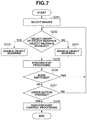
- FIG. 7 is a flowchart illustrating processing according to a second exemplary embodiment.
- FIG. 8 is a diagram illustrating an example of the edit screen.
- FIG. 9 is a flowchart illustrating processing according to a third exemplary embodiment.
- FIG. 10 is a diagram illustrating an example of the edit screen.
- FIG. 12 is a diagram illustrating an example of the edit screen.
- FIG. 13 is a flowchart illustrating processing according to a fifth exemplary embodiment.
- FIG. 14 is a diagram illustrating an example of the edit screen.
- FIGS. 15A to 15C are diagrams illustrating an example of an object snapping function.
- FIG. 6 is a configuration diagram of a printing system 1000 according to a first exemplary embodiment.
- An album edit application 90 is stored in a read-only memory (ROM) 1009 included in the information processing apparatus 1004 .
- the album edit application 90 creates album data, which is used to create an album 10 (e.g., photo album, and photo book) as illustrated in FIG. 5 , using input image data.
- the information processing apparatus 1004 outputs the album data as print data to a printer 1005 , and uploads the album data to an external server 1002 .
- the information processing apparatus 1004 includes the ROM 1009 , a random access memory (RAM) 1010 , and a central processing unit (CPU) 1011 .
- the information processing apparatus 1004 is connected with the printer 1005 , a monitor 1006 , an input device 1007 , and a storage device 1008 .
- the information processing apparatus 1004 also includes an input/output interface (not illustrated) to connect with a network 1003 .
- the album data includes a plurality of pieces of spread page data. In the spread page data, image data is arranged.
- the information processing apparatus 1004 can communicate with the external server 1002 through the network 1003 .
- the external server 1002 includes an input/output interface (not illustrated) to connect with a printer 1001 , and communicates with the printer 1001 via the input/output interface.
- the album data created with the information processing apparatus 1004 is uploaded to the external server 1002 through the network 1003 .
- the external server 1002 transmits print data based on the uploaded album data to the printer 1001 .
- the external server 1002 receives orders of album creation, manages orders of album creation, and creates print data based on the album data to instruct printing.
- a user uploads the album data created with the information processing apparatus 1004 to the external server 1002 , and performs album purchasing procedure.
- the external server 1002 transmits the print data based on the album data to the printer 1001 . Thereafter, a printed product printed by the printer 1001 is bound to create the album 10 as illustrated in FIG. 5 , and the album 10 is delivered to the user.
- FIGS. 15A to 15C An object snapping function will be described with reference to FIGS. 15A to 15C .
- Object snapping is used to automatically determine a layout position of a new object, based on a position where an object that has already been laid out is positioned.
- the object snapping function enables the user to easily align positional relationship between the object already laid out and the new object.
- An example will be described. For example, in a state where image data 51 is already laid out as illustrated in FIG. 15A , the user performs drag operation to lay out new image data 60 in a spread page area 50 . In the state of FIG.
- a guideline L is displayed. In FIG. 15B , since the new image data 60 is dragged within the predetermined range from the reference line L 2 , the guideline L is displayed on the reference line L 2 .
- the CPU 1011 performs display control processing to display the guideline.
- the image data 60 is automatically laid out along the guideline L as illustrated in FIG. 15C .
- the album edit application 90 is software that performs the object snapping function.
- FIG. 1 a flowchart illustrated in FIG. 1 .
- the processing in FIG. 1 starts.
- the album edit application 90 is started up, the user sets a size of an album, a type of a cover sheet, a bookbinding form, and a number of pages of the whole album.
- the values set at this time are displayed as initial values of bookbinding parameters illustrated in FIG. 3 . These parameters can be changed during editing, and a price can also be changed based on the change of the bookbinding parameters.
- a folder selection screen (described below) is displayed. Steps illustrated in the flowchart according to the present exemplary embodiment are realized when the CPU 1011 reads out programs relating to the processing of the flowchart from the memories, and executes the programs.
- step S 101 the CPU 1011 determines in step S 102 whether an automatic layout mode has been selected as a layout mode.
- a screen in FIG. 2 is displayed by the album edit application 90 .
- the CPU 1011 determines whether the user has selected automatic layout 21 or manual layout 22 .
- processing to determine a spread page where the image data is laid out and processing to determine a size of the image data are automatically performed.
- the automatic layout mode is selected, all of pieces of the image data selected in step S 101 are laid out in any of spread pages.
- step S 104 the CPU 1011 enables the object snapping function.
- the following processing are performed by a user operation: selection of image data to be laid out in the album data, the processing to determine the spread page where the image data is laid out, and the processing to determine the size of the image data.
- the manual layout mode is selected, only images selected by the user from the image data selected in step S 101 are laid out in the spread pages. Subsequently, after completion of the processing performed in step S 103 or S 104 , the processing proceeds to step S 105 .
- step S 105 the CPU 1011 performs edit processing.
- the CPU 1011 displays an edit screen 30 including spread pages where the image data has been already laid out.
- an edit screen illustrated in FIG. 3 is displayed.
- the edit screen 30 is provided by the album edit application 90 .
- the edit screen 30 includes a checkbox 31 for switching of the layout mode, and an order button 70 .
- the edit screen 30 further includes an image selection area 40 .
- the check box 31 receives selection whether to perform the automatic layout or the manual layout.
- the edit screen 30 further includes the spread page area 50 of the album.
- FIG. 3 illustrates a result when the user lays out the image data 51 in the spread page area 50 of the edit screen 30 in an initial state.
- the guideline is not displayed in the edit screen 30 as illustrated in FIG. 4A . Since the CPU 1011 operates in the automatic layout mode, the CPU 1011 performs the automatic layout processing based on the drop operation by the user, and determines a position where the image data 60 is laid out.
- FIG. 4B illustrates an example of the edit screen used in the manual layout mode.
- the object snapping function is enabled.
- the guideline L as an indicator mark for layout of the new image data 60 is displayed.
- the guideline L is displayed such that a space of the distance D 1 and a space of the distance D 2 from a binding portion at a center of the album become identical blank spaces, and thereby assisting layout operation for the user.
- the setting of the layout mode can be switched not only in the above-described layout mode selection screen 20 but also in the middle of editing.
- the user can instruct switching of the layout mode by switching the state of the checkbox 31 included in the edit screen 30 .
- the CPU 1011 determines whether contents of the checkbox 31 have been changed. For example, in the case where the automatic layout 21 is selected in FIG. 2 , the checkbox 31 is checked. If the user unchecks the checkbox 31 , the CPU 1011 determines that the mode has been changed from the automatic layout mode to the manual layout mode, and performs processing in and after step S 105 through step S 104 .
- step S 108 the processing performed in step S 108 is executed.
- the CPU 1011 creates, as the print control processing, print data based on the album data and transmits the print data to the printer 1005 .
- the CPU 1011 determines whether a spread page where no image data is laid out is present. In a case where it is determined that the spread page where no image data is laid out is present, the CPU 1011 displays an error message. At this time, the CPU 1011 may display the spread page where no image data is laid out, on the edit screen 30 .
- enabling and disabling of the object snapping function are switched depending on the set layout mode. Accordingly, utilization of the object snapping function only when necessary makes it possible to create the album with unity, and to improve operability in parallel.
- the present exemplary embodiment is different in the method of switching enabling and disabling of an object snapping function from the first exemplary embodiment. More specifically, in the first exemplary embodiment, enabling and disabling of the object snapping function are switched depending on whether the selected mode is the automatic layout mode. In contrast, in the second exemplary embodiment, enabling and disabling of the object snapping function are switched by receiving input to a checkbox 32 illustrated in FIG. 8 . In the second exemplary embodiment, the manual layout mode is enabled.
- the present exemplary embodiment is described below with reference to a flowchart illustrated in FIG. 7 and FIG. 8 . Steps in the flowchart according to the present exemplary embodiment are realized when the CPU 1011 reads out programs that are related to the processing of the flowchart from the memories, and executes the programs.
- step S 201 the CPU 1011 receives selection of image data from the user, Since processing performed in step S 201 is the same as the processing performed in step S 101 , detailed description of the processing is omitted.
- the CPU 1011 displays a screen illustrated in FIG. 8 .
- the checkbox 32 that receives switching of enabling and disabling of the object snapping function is displayed.
- step S 202 the CPU 1011 determines whether an object snapping mode has been enabled. More specifically, in a case where the checkbox 32 has been checked, the CPU 1011 determines that the object snapping mode has been enabled. In contrast, in a case where the checkbox 32 has not been checked, the CPU 1011 determines that the object snapping mode has not been enabled.
- step S 202 the processing proceeds to step S 203 and S 205 .
- step S 203 the CPU 1011 enables the object snapping mode, and then, in step S 205 , performs the edit processing.
- the processing in step S 205 performed through the processing in step S 203 is the same as the processing in step S 105 performed through the processing in step S 104 in FIG. 1 .
- step S 204 the CPU 1011 disables the object snapping mode, and then, in step S 205 , performs the edit processing. Accordingly, even when the user performs operation to lay out new image data to the edit screen, the guideline is not displayed, and the object snapping function is not performed.
- step S 206 the CPU 1011 determines whether the object snapping mode has been switched. More specifically, the CPU 1011 determines whether the state of the checkbox 32 has been changed, to realize the processing in step S 206 . Since processing in and after step S 207 is the same as the processing in and after step S 107 in FIG. 1 , detailed description of the processing is omitted.
- the user can switch enabling and disabling of the object snapping mode during the editing in the manual layout mode. For example, the user enables the object snapping mode in a state there the number of pieces of image data to be laid out in the spread pages is small. Thereafter, when the number of pieces of image data to be laid out in the spread pages is increased and the user feels troublesome to the guide display, the user can uncheck the checkbox 32 to improve operability.
- the manual layout mode is enabled.
- the present exemplary embodiment is different in a method of switching enabling and disabling of the object snapping function from the above-described exemplary embodiments. More specifically, the object snapping mode is disabled only while an invalid key is pressed.
- the present exemplary embodiment is described below with reference to a flowchart illustrated in FIG. 9 . Steps in the flowchart according to the present exemplary embodiment are realized when the CPU 1011 reads out programs that are related to the processing of the flowchart from the memories, and executes the programs.
- step S 301 the CPU 1011 receives selection of image data from the user. Since processing performed in step S 301 is the same as the processing performed in step S 101 , detailed description of the processing is omitted.
- the CPU 1011 enables the object snapping mode in step S 302 , and displays the edit screen 30 . For example, as illustrated in FIG. 10 , the edit screen 30 is displayed in a state where a checkbox 33 is checked.
- step S 303 the CPU 1011 performs edit processing on the album data based on operation performed on the edit screen 30 . At this timing, the object snapping mode is enabled. Thus, same processing is performed as the processing in the case where the processing in step S 105 is performed through step S 104 illustrated in FIG. 1 .
- step S 304 in a case where the checkbox 33 of the object snapping invalid key has been checked, the CPU 1011 determines whether the invalid key has been pressed. In a case where pressing of the invalid key is detected in step S 304 (YES in step S 304 ), the processing proceeds to step S 305 and S 303 .
- step S 305 the CPU 1011 disables the object snapping mode, and performs the edit processing in step S 303 . Since the object snapping mode is disabled at this timing, same processing is performed as the processing in the case where the processing in step S 205 is performed through step S 204 illustrated in FIG. 7 .
- an Alt button is used as the invalid key.
- the guide display is not performed as illustrated in FIG. 4A , and the object snapping function is also not performed.
- step S 306 is the same as the processing in and after step S 107 . Thus, detailed description of the processing is omitted.
- the CPU 1011 performs the edit processing in the state where the object snapping mode is enabled even when pressing of the invalid key is detected.
- enabling and disabling of the object snapping function is switched based on whether the object snapping invalid key is pressed. Accordingly, the object snapping function can be utilized only when necessary, and it is possible to create the album with unity and to improve operability in parallel.
- the present exemplary embodiment is different in a method of switching enabling and disabling of the object snapping function from the above-described exemplary embodiments. More specifically, enabling and disabling of the object snapping function are switched based on the number of pieces of image data laid out in the spread page area 50 .
- the present exemplary embodiment is described with reference to a flowchart illustrated in FIG. 11 , FIG. 12 , and FIGS. 4A to 4D . Steps included in the flowchart according to the present exemplary embodiment are realized when the CPU 1011 reads out programs that are related to the processing of the flowchart from the memories, and executes the programs.
- step S 404 the CPU 1011 counts a number of pieces of image data laid out in the spread page area 50 , and determines whether a count result exceeds an upper limit. In a case where it is determined that the count result exceeds the upper limit (YES in step S 404 ), the processing proceeds to step S 405 and S 403 .
- step S 405 the CPU 1011 disables the object snapping mode, and performs the edit processing in step S 403 .
- step S 403 performed after the processing in step S 405 is the same as the edit processing in step S 303 performed after the processing in step S 305 . Since processing in and after step S 406 is the same as the processing in and after step S 107 , the detailed description of the processing is omitted.
- a threshold as a reference for switching of enabling and disabling of the object snapping function is set with use of an upper limit setting item 34 illustrated in FIG. 12 .
- the object snapping function is disabled if the number of pieces of image data in the spread page area 50 exceeds five.
- the object snapping function is performed. In a case where sixth image data is further added, however, the object snapping function is not performed.
- the CPU 1011 performs the edit processing in the state where the object snapping mode is enabled even when the number of pieces of image data exceeds the upper limit.
- enabling and disabling of the object snapping function are switched based on the number of pieces of image data laid out in the spread page area 50 . Accordingly, it is possible to easily switch enabling and disabling of the object snapping function.
- the present exemplary embodiment is different in a method of switching enabling and disabling of the object snapping function from the above-described exemplary embodiments. More specifically, enabling and disabling of the object snapping function are switched based on the number of reference lines as targets of the object snapping function.
- the present exemplary embodiment will be described with reference to a flowchart illustrated in FIG. 13 , FIG. 14 , and FIGS. 4A to 4D . Steps included in the flowchart according to the present exemplary embodiment are realized when the CPU 1011 reads out programs that are related to the processing of the flowchart from the memories, and executes the programs.
- step S 504 the CPU 1011 counts a number of reference lines as the targets of the object snapping function from the image data laid out in the spread page area 50 , and determines whether a count result exceeds an upper limit. In a case where it is determined that the count result exceeds the upper limit (YES in step S 504 ), the processing proceeds to step S 505 and S 503 .
- step S 505 the CPU 1011 disables the object snapping mode, and performs the edit processing in step S 503 .
- step S 503 performed after the processing in step S 505 is the same as the edit processing in step S 303 performed after the processing in step S 305 . Since processing in and after step S 506 is the same as the processing in and after step S 107 , the detailed description of the processing is omitted.
- a threshold as a reference for switching of enabling and disabling of the object snapping function is set with use of an upper limit setting item 35 illustrated in FIG. 14 .
- the object snapping function is disabled if the number of reference lines for the object snapping function displayed in the spread page area 50 exceeds five.
- the object snapping function is performed in a case where five pieces of image data 51 to 55 are laid out as illustrated in FIG. 4D .
- four lines L 1 to L 4 are set as the reference lines for the object snapping.
- the guideline is displayed and the object snapping function is performed.
- new image data is laid out in a state where the number of reference lines for the object snapping function has reached five, however, the object snapping function is not performed.
- enabling and disabling of the object snapping function are switched based on the number of reference lines as the targets of the object snapping function in the spread page area 50 . This makes it possible to easily switch enabling and disabling of the object snapping function.
- the album edit application 90 may include all of the functions of the above-described five exemplary embodiments.
- the processing in the above-described exemplary embodiments is described as the processing performed using the album edit application 90 ; however, the processing is not limited thereto.
- the processing in the above-described exemplary embodiments may be performed using a layout edit application that newly lays out object data.
- the image data is automatically moved by the object snapping function in the case where the drop operation is performed; however, the object snapping function may be performed at any other timing.
- the reference line L 1 for the object snapping is set at the position separated by the distance D 1 from the binding position with reference to the image data 51 already laid out.
- Each of the above-described exemplary embodiments is realized by executing the following processing: supplying software (program) realizing the functions of each of the above-described exemplary embodiments to a system or an apparatus through a network or various kinds of storage media, and causing a computer (e.g., CPU, microprocessing unit (MPU), and processor) of the system or the apparatus to read out and execute the program.
- the program may be executed by a single computer or a plurality of computers in cooperation with one another. Further, it is unnecessary to realize all of the above-described processing by software, and a part or all of the processing may be realized by hardware, such as an application specific integrated circuit (ASIC).
- ASIC application specific integrated circuit
- the entire processing may be performed by a single CPU or may also be appropriately performed by a plurality of CPUs in cooperation with one another.
- Embodiment(s) of the present disclosure can also be realized by a computer of a system or apparatus that reads out and executes computer executable instructions (e.g., one or more programs) recorded on a storage medium (which may also be referred to more fully as a ‘non-transitory computer-readable storage medium’) to perform the functions of one or more of the above-described embodiment(s) and/or that includes one or more circuits (e.g., application specific integrated circuit (ASIC)) for performing the functions of one or more of the above-described embodiment(s), and by a method performed by the computer of the system or apparatus by, for example, reading out and executing the computer executable instructions from the storage medium to perform the functions of one or more of the above-described embodiment(s) and/or controlling the one or more circuits to perform the functions of one or more of the above-described embodiment(s).
- computer executable instructions e.g., one or more programs
- a storage medium which may also be referred to more fully as a
- the computer may include one or more processors (e.g., central processing unit (CPU), micro processing unit (MPU)) and may include a network of separate computers or separate processors to read out and execute the computer executable instructions.
- the computer executable instructions may be provided to the computer, for example, from a network or the storage medium.
- the storage medium may include, for example, one or more of a hard disk, a random-access memory (RAM), a read only memory (ROM), a storage of distributed computing systems, an optical disk (such as a compact disc (CD), digital versatile disc (DVD), or Blu-ray Disc (BD)TM), a flash memory device, a memory card, and the like.
Landscapes
- Engineering & Computer Science (AREA)
- General Engineering & Computer Science (AREA)
- Theoretical Computer Science (AREA)
- Human Computer Interaction (AREA)
- Physics & Mathematics (AREA)
- General Physics & Mathematics (AREA)
- Multimedia (AREA)
- Signal Processing (AREA)
- Processing Or Creating Images (AREA)
Abstract
Description
Claims (19)
Applications Claiming Priority (3)
| Application Number | Priority Date | Filing Date | Title |
|---|---|---|---|
| JPJP2019-146639 | 2019-08-08 | ||
| JP2019-146639 | 2019-08-08 | ||
| JP2019146639A JP7433803B2 (en) | 2019-08-08 | 2019-08-08 | Information processing device, control method and program |
Publications (2)
| Publication Number | Publication Date |
|---|---|
| US20210044709A1 US20210044709A1 (en) | 2021-02-11 |
| US11140287B2 true US11140287B2 (en) | 2021-10-05 |
Family
ID=74499040
Family Applications (1)
| Application Number | Title | Priority Date | Filing Date |
|---|---|---|---|
| US16/937,019 Active US11140287B2 (en) | 2019-08-08 | 2020-07-23 | Information processing apparatus, control method, and storage medium |
Country Status (2)
| Country | Link |
|---|---|
| US (1) | US11140287B2 (en) |
| JP (2) | JP7433803B2 (en) |
Families Citing this family (2)
| Publication number | Priority date | Publication date | Assignee | Title |
|---|---|---|---|---|
| CN114995690A (en) * | 2021-03-01 | 2022-09-02 | 北京字跳网络技术有限公司 | Document creation method, device, equipment and storage medium |
| JP7638773B2 (en) * | 2021-04-15 | 2025-03-04 | キヤノン株式会社 | PROGRAM, INFORMATION PROCESSING APPARATUS, AND METHOD FOR CONTROLLING INFORMATION PROCESSING APPARATUS |
Citations (14)
| Publication number | Priority date | Publication date | Assignee | Title |
|---|---|---|---|---|
| US20050044485A1 (en) * | 2003-08-18 | 2005-02-24 | Lumapix | Method and system for automatic generation of image distributions |
| US20060174568A1 (en) * | 2005-01-04 | 2006-08-10 | International Business Machines Corporation | Object editing system, object editing method and object editing program product |
| US20100199227A1 (en) * | 2009-02-05 | 2010-08-05 | Jun Xiao | Image collage authoring |
| JP2010176275A (en) | 2009-01-28 | 2010-08-12 | Sanyo Electric Co Ltd | Clinical information input device |
| US20100223568A1 (en) * | 2006-04-13 | 2010-09-02 | Su Mien Quek | Image collage builder |
| US20120206771A1 (en) * | 2011-02-11 | 2012-08-16 | Cok Ronald S | Imaging product layout method |
| US20130311329A1 (en) * | 2012-03-29 | 2013-11-21 | Digimarc Corporation | Image-related methods and arrangements |
| US20140010461A1 (en) * | 2012-07-09 | 2014-01-09 | Canon Kabushiki Kaisha | Apparatus for controlling arrangement of each image when arranging one or more images, and method thereof |
| US20140313551A1 (en) * | 2013-04-17 | 2014-10-23 | Philip Scott Lyren | Cover for handheld portable electronic device |
| US20150009359A1 (en) * | 2013-03-19 | 2015-01-08 | Groopic Inc. | Method and apparatus for collaborative digital imaging |
| US20150264301A1 (en) * | 2014-03-13 | 2015-09-17 | Google Inc. | Video chat picture-in-picture |
| US9153056B2 (en) * | 2013-03-07 | 2015-10-06 | Shutterfly, Inc. | Adaptive and fast image collage creation |
| US20160092091A1 (en) * | 2014-09-30 | 2016-03-31 | Apple Inc. | Adjusting page layouts |
| US20180220075A1 (en) * | 2017-01-30 | 2018-08-02 | Iván Eduardo Castro Calderón | Systems and methods for providing a collage based on simultaneously captured images |
Family Cites Families (4)
| Publication number | Priority date | Publication date | Assignee | Title |
|---|---|---|---|---|
| JP4258434B2 (en) * | 2004-05-25 | 2009-04-30 | セイコーエプソン株式会社 | Image arrangement apparatus, image arrangement method, and computer program |
| JP4121544B2 (en) * | 2007-06-25 | 2008-07-23 | 富士フイルム株式会社 | Image display device and image display method |
| JP5146412B2 (en) * | 2009-06-22 | 2013-02-20 | 三菱電機株式会社 | Display screen creation device |
| JP5269851B2 (en) * | 2010-09-27 | 2013-08-21 | 富士フイルム株式会社 | Image editing apparatus, image editing method and program thereof |
-
2019
- 2019-08-08 JP JP2019146639A patent/JP7433803B2/en active Active
-
2020
- 2020-07-23 US US16/937,019 patent/US11140287B2/en active Active
-
2024
- 2024-02-02 JP JP2024014590A patent/JP7679504B2/en active Active
Patent Citations (14)
| Publication number | Priority date | Publication date | Assignee | Title |
|---|---|---|---|---|
| US20050044485A1 (en) * | 2003-08-18 | 2005-02-24 | Lumapix | Method and system for automatic generation of image distributions |
| US20060174568A1 (en) * | 2005-01-04 | 2006-08-10 | International Business Machines Corporation | Object editing system, object editing method and object editing program product |
| US20100223568A1 (en) * | 2006-04-13 | 2010-09-02 | Su Mien Quek | Image collage builder |
| JP2010176275A (en) | 2009-01-28 | 2010-08-12 | Sanyo Electric Co Ltd | Clinical information input device |
| US20100199227A1 (en) * | 2009-02-05 | 2010-08-05 | Jun Xiao | Image collage authoring |
| US20120206771A1 (en) * | 2011-02-11 | 2012-08-16 | Cok Ronald S | Imaging product layout method |
| US20130311329A1 (en) * | 2012-03-29 | 2013-11-21 | Digimarc Corporation | Image-related methods and arrangements |
| US20140010461A1 (en) * | 2012-07-09 | 2014-01-09 | Canon Kabushiki Kaisha | Apparatus for controlling arrangement of each image when arranging one or more images, and method thereof |
| US9153056B2 (en) * | 2013-03-07 | 2015-10-06 | Shutterfly, Inc. | Adaptive and fast image collage creation |
| US20150009359A1 (en) * | 2013-03-19 | 2015-01-08 | Groopic Inc. | Method and apparatus for collaborative digital imaging |
| US20140313551A1 (en) * | 2013-04-17 | 2014-10-23 | Philip Scott Lyren | Cover for handheld portable electronic device |
| US20150264301A1 (en) * | 2014-03-13 | 2015-09-17 | Google Inc. | Video chat picture-in-picture |
| US20160092091A1 (en) * | 2014-09-30 | 2016-03-31 | Apple Inc. | Adjusting page layouts |
| US20180220075A1 (en) * | 2017-01-30 | 2018-08-02 | Iván Eduardo Castro Calderón | Systems and methods for providing a collage based on simultaneously captured images |
Also Published As
| Publication number | Publication date |
|---|---|
| JP7679504B2 (en) | 2025-05-19 |
| JP2021026704A (en) | 2021-02-22 |
| US20210044709A1 (en) | 2021-02-11 |
| JP2024036468A (en) | 2024-03-15 |
| JP7433803B2 (en) | 2024-02-20 |
Similar Documents
| Publication | Publication Date | Title |
|---|---|---|
| US9552792B2 (en) | Image processing apparatus, image processing method, and program for controlling the display of image data on a display | |
| US11983447B2 (en) | Control method of information processing apparatus, information processing apparatus, and storage medium | |
| JP5726221B2 (en) | Data processing device | |
| US11122169B2 (en) | Photo album creation system, photo album creation method, and non-transitory computer-readable storage medium | |
| US11048989B2 (en) | Image forming apparatus that accepts a designation of an insertion position of an insertion sheet after obtaining image data of a bundle of sheets, and related control method and storage medium | |
| US8928919B2 (en) | Computer-readable medium storing image processing program and image processing apparatus | |
| JP7679504B2 (en) | Information processing device, control method, program, and storage medium | |
| US11438471B2 (en) | Image forming apparatus and control method for displaying a preview image and displaying related objects | |
| JP5967376B2 (en) | Display device, image forming apparatus, and display control program | |
| US11842042B2 (en) | Information processing apparatus, control method, and storage medium | |
| US11461063B2 (en) | Control apparatus for displaying print preview, control method including display step of displaying print preview, and storage medium storing program that causes computer to function as units of control apparatus for displaying print preview | |
| US10341508B2 (en) | Information processing apparatus, information processing method, and non-transitory computer readable storage medium | |
| US20150009534A1 (en) | Operation apparatus, image forming apparatus, method for controlling operation apparatus, and storage medium | |
| US11695891B2 (en) | Readable storage medium, information processing apparatus, and method of controlling information processing apparatus | |
| EP3521936A1 (en) | Display input device, image forming apparatus, control method for display input device | |
| US11822839B2 (en) | Storage medium, image processing apparatus, and control method | |
| US10996909B2 (en) | Document processing for printing | |
| US12393771B2 (en) | Storage medium, information processing apparatus, and information processing method that display left and right page regions of a double-page album spread | |
| US20130188220A1 (en) | Image forming apparatus and computer | |
| US9922275B2 (en) | Image forming apparatus comprising a punch mechanism forming a punch hole in a sheet on which an image is formed by an image forming unit | |
| JP6257286B2 (en) | Information processing apparatus and method and program | |
| JP2008102882A (en) | Document processor, document processing method and document processing program | |
| JP6602276B2 (en) | Information processing apparatus, information processing apparatus control method, and program | |
| JP6626664B2 (en) | Image display device, image display method, and image display program |
Legal Events
| Date | Code | Title | Description |
|---|---|---|---|
| FEPP | Fee payment procedure |
Free format text: ENTITY STATUS SET TO UNDISCOUNTED (ORIGINAL EVENT CODE: BIG.); ENTITY STATUS OF PATENT OWNER: LARGE ENTITY |
|
| AS | Assignment |
Owner name: CANON KABUSHIKI KAISHA, JAPAN Free format text: ASSIGNMENT OF ASSIGNORS INTEREST;ASSIGNOR:HASHIMOTO, YOSHINORI;REEL/FRAME:054306/0981 Effective date: 20200709 |
|
| STPP | Information on status: patent application and granting procedure in general |
Free format text: NON FINAL ACTION MAILED |
|
| STPP | Information on status: patent application and granting procedure in general |
Free format text: RESPONSE TO NON-FINAL OFFICE ACTION ENTERED AND FORWARDED TO EXAMINER |
|
| STPP | Information on status: patent application and granting procedure in general |
Free format text: NOTICE OF ALLOWANCE MAILED -- APPLICATION RECEIVED IN OFFICE OF PUBLICATIONS |
|
| STPP | Information on status: patent application and granting procedure in general |
Free format text: PUBLICATIONS -- ISSUE FEE PAYMENT VERIFIED |
|
| STCF | Information on status: patent grant |
Free format text: PATENTED CASE |
|
| MAFP | Maintenance fee payment |
Free format text: PAYMENT OF MAINTENANCE FEE, 4TH YEAR, LARGE ENTITY (ORIGINAL EVENT CODE: M1551); ENTITY STATUS OF PATENT OWNER: LARGE ENTITY Year of fee payment: 4 |