JP7701774B2 - EDUCATIONAL VR CONTENT PROVIDING PROGRAM AND MEDICAL EDUCATIONAL VR CONTENT PROVIDING SYSTEM - Google Patents
EDUCATIONAL VR CONTENT PROVIDING PROGRAM AND MEDICAL EDUCATIONAL VR CONTENT PROVIDING SYSTEM Download PDFInfo
- Publication number
- JP7701774B2 JP7701774B2 JP2021127931A JP2021127931A JP7701774B2 JP 7701774 B2 JP7701774 B2 JP 7701774B2 JP 2021127931 A JP2021127931 A JP 2021127931A JP 2021127931 A JP2021127931 A JP 2021127931A JP 7701774 B2 JP7701774 B2 JP 7701774B2
- Authority
- JP
- Japan
- Prior art keywords
- image
- educational
- instructor
- pointer
- learner
- Prior art date
- Legal status (The legal status is an assumption and is not a legal conclusion. Google has not performed a legal analysis and makes no representation as to the accuracy of the status listed.)
- Active
Links
Images



Landscapes
- Electrically Operated Instructional Devices (AREA)
- Management, Administration, Business Operations System, And Electronic Commerce (AREA)
Description
特許法第30条第2項適用 臨床麻酔,2020年臨時増刊号 Vol.45通巻546号 真興交易株式会社医書出版部Application of Article 30, Paragraph 2 of the Patent Act Clinical Anesthesia, 2020 Special Issue Vol. Volume 45, No. 546 Shinko Trading Co., Ltd. Medical Book Publishing Department
本発明は、医療教育VR用コンテンツ提供システムに関する。 The present invention relates to a content provision system for medical education VR.
VR(Virtual Reality)は、「人工現実感」又は「仮想現実」と称されるものであり、VRによって限りなく実体験に近い体験が得られる。
従来は、危険性の高い緊急時の状況を、学習を目的に実際に再現することは困難であったが、VR(Virtual Reality)を応用すれば、安全に再現することが可能となり、様々なシーンを想定して学習されている。
VR (Virtual Reality) is also known as "artificial reality" or "virtual reality," and allows users to experience something that is as close to the real thing as possible.
In the past, it was difficult to actually recreate dangerous emergency situations for the purpose of learning, but by applying VR (Virtual Reality), it has become possible to safely recreate such situations, allowing learning to be done by assuming a variety of different scenarios.
すなわち、より現実に近い理想的な状況を何度も繰り返し体験、共有することが可能となる。このため、普段から医療チーム内において緊急時におけるシミュレーション等を各々が行うことが可能となる。
従って、VRによる疑似体験を重ねることで医療関係の学習者の経験値もあがり、実際の緊急事態でも冷静に初期対応を実施することが期待でき、例えば歯科治療の安全性の向上に貢献できる可能性があると考えられている。
In other words, it is possible to repeatedly experience and share ideal situations that are closer to reality. This makes it possible for each member of a medical team to regularly conduct simulations of emergency situations.
Therefore, it is thought that by repeatedly experiencing simulated experiences using VR, medical learners will increase their experience and be able to calmly take initial action in real emergency situations, which could contribute to improving the safety of dental treatment, for example.
例えば、特許文献1には、歯科診療実習装置(HMD)に、模擬的に各患者の年齢や性別などのプロフィー ル情報、カルテ情報、X線CT撮影された三次元CT撮影情報、インプラント治療におけるフィクスチャを埋入するためにあらかじめ設計した削孔情報やインプラント等の三次元形状データなどをメモリ(インターネットで別に取得してもよい)に記憶しておく。 For example, in Patent Document 1, profile information such as the age and sex of each patient, medical record information, 3D CT information obtained by X-ray CT, drilling information designed in advance for embedding fixtures in implant treatment, 3D shape data of implants, etc. are stored in a memory (which may be obtained separately via the Internet) of a dental treatment training device (HMD).
そして、模擬患者体をHMDで撮影し、このHMDが撮影した三次元視野映像を画面に表示して、さらにHMDがこれらを重畳表示しながら模擬実習させることが開示されている。 Then, the simulated patient body is photographed with an HMD, and the three-dimensional visual field image captured by the HMD is displayed on a screen, and the HMD further displays these images in an overlapping manner while allowing the patient to practice.
しかしながら、医療は高度な専門性、経験等を必要とするにも係わらず、特許文献1は模擬学習のコンテンツを三次元画像(3D)させて学習させるものであり、どこに視線方向を定めて注視するべきかを学習できない。 However, although medical care requires a high level of expertise and experience, the content of the simulated learning in Patent Document 1 is presented as a three-dimensional (3D) image, and it is not possible to learn where to focus one's gaze.
例えば、一般歯科医院におけるインプラント治療を含めた歯科治療の全身管理では、全身麻酔における麻酔管理の特殊性としては、術野と気道領域が一致していることや、注水と行った作業があるための呼吸管理が特に重要になる。
手術の安全は、かかわっている医療スタッフ全員で守るものであり、そのためには自分の職種の役割だけではなく、広い視野を持って様々なことを調整していきながら対応していくことが重要である。
For example, in the general dental clinic, when managing dental treatment, including implant treatment, special characteristics of general anesthesia management include the fact that the surgical field and the airway area are aligned, and respiratory management is particularly important due to procedures such as irrigation.
The safety of surgery must be ensured by all medical staff involved, and to achieve this it is important that each physician not only fulfills their own job role, but also has a broad perspective and is able to make adjustments and respond to various issues.
そのためには、日ごろからチーム医療におけるトレーニングやシミュレーション、コミニュケーションが重要であると考えられる。
従って、治療中においては、どこを常に注目して治療を進めていけばよいかを一目で把握できていく学習が望ましい。
To achieve this, it is believed that regular training, simulation, and communication in team medical care are important.
Therefore, it is desirable to learn how to grasp at a glance what to pay attention to during treatment as you proceed with treatment.
上記課題を解決するために本発明に係る教育VR用コンテンツ提供プログラムは、 医療の指導者又は学習者に装着されたヘッドマウントディスプレィの動きに基づいて、前記ヘッドマウントディスプレィに表示された患者の治療用の教育VR用画像に、医療の指導者の患者に対する注目点までの視線を示すポインタアイコンで前記教育VR用画像に表示するプログラムであって、
コンピュータを、
(A).教育VR用画像を記憶手段に記憶する手段、
(B).前記医療の指導者又は学習者に装着された前記ヘッドマウントディスプレィの動き情報を一定間隔で読み込む手段と、
(C).前記ヘッドマウントディスプレィの動き情報に基づいて前記教育VR用画像に視線中心を定めて視野範囲を決定する手段、
(D).決定した視野範囲の視野画像を前記指導者又は学習者の端末の画面に表示する手段、
(E).前記医療の指導者又は前記学習者の端末により、前記ポインタアイコンの終点となる位置を前記注目点としてこの視野画像に定義させる手段、
(F).前記終点の定義に伴って、この視野画像の中心に始点を定め、この始点の座標及び前記終点の座標を求める手段、
(G).前記視野画像の始点の座標を起点とし、この始点の座標と前記終点の座標との間に、前記起点から前記終点に向かって次第に幅が広がる縞状の三角状のアイコンをポインタアイコンとして前記視野画像に重ね、これを前記医療の指導者又は学習者のポインタ付注視画像として前記記憶手段に生成する手段、
(H).前記医療の指導者のポインタ付注視画像を学習者端末に送信して表示させる手段、
としての機能を実行させる。
In order to solve the above problems, the present invention provides an educational VR content providing program, which is a program that displays an educational VR image for treating a patient displayed on a head-mounted display worn by a medical instructor or student based on the movement of the head-mounted display, and displays a pointer icon indicating the medical instructor's line of sight to a point of interest for the patient on the educational VR image,
Computer,
(A) A means for storing educational VR images in a storage means;
(B) A means for reading movement information of the head mounted display worn by the medical instructor or student at regular intervals;
(C) A means for determining a visual field range by setting a gaze center on the educational VR image based on movement information of the head mounted display;
(D) A means for displaying a visual field image of the determined visual field range on a screen of a terminal of the instructor or the learner;
(E) A means for defining the position of the end point of the pointer icon as the point of interest in the visual field image by the terminal of the medical instructor or the student;
(F) A means for determining a starting point at the center of the field of view image in accordance with the definition of the end point , and for determining the coordinates of the starting point and the coordinates of the end point ;
(G) A means for superimposing a striped triangular icon, which is a pointer icon and gradually widens in width from the starting point to the end point between the coordinates of the starting point and the coordinates of the end point of the visual field image, on the visual field image, and generating this in the storage means as a gaze image with a pointer of the medical instructor or student ;
(H) A means for transmitting the gaze image of the medical instructor with a pointer to the learner's terminal and displaying it ;
It performs the function as.
また、前記指導者の端末は、ヘッドマウントディスプレィ、コントローラ、モニタ、パソコンを有して、通信ネットワークを介して教育VR用コンテンツサイトのサーバに接続されており、
前記学習者の端末は、ヘッドマウントディスプレィ、コントローラ、高速大容量の通信機能を有するスマートフォン、パソコンを有して、前記スマートフォンで通信ネットワークを介して前記教育用VR用コンテンツサイトのサーバに接続されており、
前記サーバを、
前記(A)~(H)の手段としての機能を実行させる。
The instructor's terminal has a head-mounted display, a controller, a monitor, and a personal computer, and is connected to a server of an educational VR content site via a communication network.
The learner's terminal has a head-mounted display, a controller, a smartphone having a high-speed, large-capacity communication function, and a personal computer, and is connected to a server of the educational VR content site via a communication network by the smartphone;
The server,
The function as the means (A) to (H) is performed.
以上のように本発明によれば、ヘッドマウントの画面に注視するべき部位又は機材の視線方向がポインタで見ているVR画像に表示される。
このため、治療中においては、どこを常に注目して治療を進めていけばよいかを一目で把握できていく学習ができる。
As described above, according to the present invention, the line of sight direction of the part or equipment to be gazed at is displayed on the head-mounted screen in the VR image viewed by the pointer.
This allows patients to learn at a glance what they should always pay attention to during treatment as they proceed with treatment.
本願発明の概要を初めに説明する。なお、歯科を代表にして説明する。
本発明は、(A)歯科の診療環境や歯科口腔外科の麻酔管理、(B)医学教育とVRの応用、(C)VRコンテンツを応用した学習と評価方法等に適用できる。
The present invention will be outlined first, taking dentistry as an example.
The present invention can be applied to (A) dental treatment environments and anesthesia management in oral and maxillofacial surgery, (B) medical education and the application of VR, and (C) learning and evaluation methods using VR content.
<(A)歯科の診療環境や歯科口腔外科の麻酔管理>
厚生労働省の2017年の調査では、歯科診療所の35%に当たる24,014施設でインプラント治療が行われていると言われている。
2007年5月には東京都内の歯科診療所でインプラント治療の受けた70歳の女性が手術中の動脈損傷がもとで死亡するという事故が起きた。これにより、歯科医師の救命能力に関する歯科模型に対して診療器具を作用させて模擬診療する問題が提言され、医療安全及び救命医療の技術取得のための体制が確保されてきた。
(A) Dental treatment environment and anesthesia management for oral and maxillofacial surgery
According to a 2017 survey by the Ministry of Health, Labor and Welfare, implant treatment is performed at 24,014 facilities, or 35% of dental clinics.
In May 2007, an accident occurred at a dental clinic in Tokyo where a 70-year-old woman died from arterial damage during implant treatment. This led to the issue of simulating dental treatment by applying dental instruments to dental models to assess the life-saving capabilities of dentists, and a system for medical safety and the acquisition of life-saving medical skills has been established.
ある研究者らによる報告によると、一般歯科医院におけるインプラント治療を含めた歯科治療の全身管理では、全身麻酔における麻酔管理の特殊性としては、術野と気道領域が一致していることや、注水と行った作業があるための呼吸管理が特に重要になる。 According to a report by some researchers, when it comes to general anesthesia management for dental treatment, including implant treatment, at general dental clinics, the special characteristics of general anesthesia management are that the surgical field and the airway area are aligned, and respiratory management is particularly important due to procedures such as water injection.
ドレーピングすることによって通常の歯科診療とは大幅に異なり、患者の表情や様子を即座に把握しづらいといった状況や、緊急時では、さらに通常の歯科診療と異なる状況となるため、医療スタッフの習熟度の違い等からスムーズな対応が困難な場合も考えられる。 Draping makes dental treatment significantly different from normal dental treatment, making it difficult to immediately grasp the patient's facial expression and condition. In an emergency, the situation is even more different from normal dental treatment, and it may be difficult to respond smoothly due to differences in the level of expertise of medical staff.
著者が行った研究では、歯科医療スタッフは患者に問題が発生した場合に、歯科医師毎に指示を求めると行った傾向があった。
しかし、実際にこういった緊急事態に遭遇した場合、歯科医師自身が狼狽してしまう可能性も考えられる。
手術の安全は、かかわっている医療スタッフ全員で守るものであり、そのためには自分の職種の役割だけではなく、広い視野を持って様々なことを調整していきながら対応していくことが重要である。
In the author's study, dental staff tended to seek guidance from individual dentists when problems arose with patients.
However, if a dentist were to actually encounter such an emergency, he or she may become flustered.
The safety of surgery must be ensured by all medical staff involved, and to achieve this it is important that each physician not only fulfills their own job role, but also has a broad perspective and is able to make adjustments and respond to various issues.
そのためには、日ごろからチーム医療におけるトレーニングやシミュレーション、コミニュケーションが重要であると考えられる。
すなわち、本発明は歯科の診療環境や歯科口腔外科の麻酔管理のための学習に適用させることができる。
To achieve this, it is believed that regular training, simulation, and communication in team medical care are important.
That is, the present invention can be applied to learning about anesthesia management in dental clinical environments and oral and maxillofacial surgery.
<(B)医学教育とVRの応用>
従来では学生を一か所に集めて講義をするという教育様式が一般的であったが、コロナ渦の現在ではオンラインによる教育が推進している状況であり、オンラインによる講義では座学が中心となってきている。
医療という専門的で高度な技術や知識を要する職種では、体験を伴う訓練が重要であると考えられ、オンラインによる座学中心の講義では臨床学習と比較して医療件の経験不足するという懸念がある。
<(B) Medical education and application of VR>
Traditionally, the standard educational format was to gather students in one place for lectures, but in the current COVID-19 pandemic, online education is becoming more common, and classroom-based learning is becoming the norm in online lectures.
In a profession such as medicine, which requires specialized skills and advanced knowledge, experiential training is considered important, and there are concerns that online classroom-based lectures will provide a lack of experience with medical issues compared to clinical learning.
VRによる疑似体験は、例えばある時点で失敗したとしても任意の過去までさかのぼって繰り返し訓練を行うことが可能であったり、純粋な教育項目を含む理想的な体験を準備することが可能であるという点では、現実体験より優れていると考えられる。
実際の臨床学習では、タイミングや地域によって病例が偏ったり、専門的すぎる病例になってしまうと行った場合もあり、医学教育の標準化といった観点からもVRは教育ツールの有効な手段の一つとして考えられる。
A simulated experience using VR is considered to be superior to a real experience in that, for example, if a person fails at a certain point, it is possible to go back to any past point and repeat the training, and it is possible to prepare an ideal experience that includes purely educational items.
In actual clinical learning, there are cases where the cases are biased or overly specialized depending on the timing or region, so VR can be considered an effective educational tool from the perspective of standardizing medical education.
近年では360度の全天周映像カメラやVRコンテンツを視聴するHead Mount Displa(以下、HMDという)も身近になり、視覚映像だけであれば簡単に記録、再生、共有ができるようになっている。
すなわち、HMDを用いたVR医学教育を学習者のレベルに応じて学習させる。
<(C)VRコンテンツを応用した学習と評価方法>
360度カメラを用いて緊急時を想定したVRコンテンツを試作し、HMD等を装着した学習者が映像を閲覧しながら研修をするようにする。
In recent years, 360-degree panoramic video cameras and Head Mounted Displays (hereinafter referred to as HMDs) for viewing VR content have become commonplace, making it easy to record, play back, and share visual images alone.
In other words, VR medical education using an HMD is provided according to the learner's level.
(C) Learning and assessment methods using VR content
We will prototype VR content using a 360-degree camera to simulate an emergency, and students wearing HMDs or other devices will be able to view the footage while undergoing training.
評価者はPCに表示される学習者の視線映像を見ることにより、学習者が緊急時に配慮すべき患者の状態が把握できているかなどについて確認ができる。
その際用いた評価シートには、それぞれの行動に対して注意すべきチェックポインタが記載されており、評価者が均一的な評価が行えるようになる。
次に、本発明に用いるVRコンテンツの概要を説明する。
By viewing the image of the learner's gaze displayed on the PC, the evaluator can check whether the learner is able to grasp the patient's condition and the necessary considerations in an emergency.
The evaluation sheet used in this case contains checkpoints that should be noted for each behavior, enabling the evaluator to make a consistent evaluation.
Next, an overview of the VR content used in the present invention will be described.
(制作した教育用VRコンテンツ)
(1)歯科治療中の偶発症に関する対応
(2)口腔外科での静脈内鎮静化での麻酔管理
の2つをテーマにVRコンテンツを制作した(図10)。
(1)の映像に関しては、過換気病候群とアナフイラルシーショックについて作成した。過換気病候群は、軽病な偶発病で致死的な転機は迎えないが、患者が激しい呼吸苦等を訴えるなどするために歯科医師が狼狽してしまい。敏速に適切な対応ができない場合もあると考えられる。
(Educational VR content created)
We created VR content on two themes: (1) How to respond to complications during dental treatment and (2) Anesthesia management for intravenous sedation in oral surgery (Figure 10).
Regarding the video in (1), we created a video about hyperventilation syndrome and anaphylactic shock. Hyperventilation syndrome is a minor, incidental illness that does not lead to a fatal outcome, but dentists may become flustered when patients complain of severe breathing difficulties, and may not be able to respond promptly and appropriately.
一方、アナフイラキシーショックは放置すると致命的な転機を迎えるため、必ず早期のアドレナリンの筋肉注射等の対応をとる必要がある。しかし、歯科医師にとってアナフイラキシーショックは頻繁に遭遇する偶発症ではなく、これまでは書籍や教育用動画、実習などを通じて自身のイメージトレーニングで学んでいた。
そこで、両者とも診断のポインタや処置内容を確認できるチェックポインタを映像に組み込みながらVRコンテンツを作成した。
On the other hand, anaphylactic shock can become fatal if left untreated, so it is necessary to take measures such as early intramuscular injection of adrenaline. However, anaphylactic shock is not a common occurrence for dentists, and until now, dentists have learned about it through books, educational videos, and practical training, and through their own image training.
Therefore, both parties created VR content by incorporating check pointers into the video that allow doctors to check diagnostic pointers and treatment details.
例えば、アナフイラキシーショックのシナリオでは、歯科医師が口腔内に局所麻酔を行ったのち、しばらくすると患者が気分不快を訴える。それを受けて歯科医師が患者をショック位にし、生体モニタを装着してバイタルサインのモニタリングを開始する。 For example, in an anaphylactic shock scenario, a dentist administers local anesthesia to the mouth, and after a while the patient complains of discomfort. The dentist then places the patient in a shock position, attaches a vital sign monitor, and begins monitoring the patient's vital signs.
通常、血管迷走神経性反射であれば血圧は自然に回復するが、その後も血圧低下を認め、前腕部に発赤の皮膚病状を認めたためアナフイラキシーショックを疑いエピペンを筋肉注射うるというシナリオである。
ポインタとしては、血管迷走神経性反射との鑑別診断や、そのために重要となる皮膚症状について察知できているか、また理解できているかを問うシナリオ構成となっている。
Normally, if it is a vasovagal reflex, blood pressure will recover naturally, but in this scenario, blood pressure continued to drop and red skin symptoms were observed in the forearm, so anaphylactic shock was suspected and an EpiPen was administered intramuscularly.
As a pointer, the scenario is structured to ask whether participants are able to recognize and understand the differential diagnosis with vasovagal reflex and the skin symptoms that are important for this purpose.
評価者は別モニタに映る学習者の視線映像から、患者が精神的な緊張や局所麻酔の痛みのために手に力が入っている様子、麻酔後の気分不快を訴えるまでの患者の表情、前腕部の皮膚の発赤などの病状について見逃さずに視線を送れているかを確認できるようにした。
学習者が視線を送れていれば、そこから何を検知したか、もしくは理解したかを筆記試験や口頭試問で評価者が確認できるようにする。
The evaluators were able to check by watching the learners' gaze on a separate monitor whether they were able to direct their gaze without missing any of the patient's symptoms, such as the patient's tense hands due to mental tension or the pain of the local anesthesia, the patient's facial expressions before complaining of discomfort after the anesthesia, or the redness of the skin on the patient's forearm.
If the learner is able to make eye contact, the evaluator will be able to confirm what the learner detected or understood through a written or oral examination.
例えば、患者が過度に緊張した状態で三叉神経領域である口腔内に強い痛み刺激を与えると、血管迷走神経性反射を起こす可能性があることや、アナフイラキシーショックを疑う場合、他にどのような症状が起こり得るか、また、映像中ではエピペントレーナなのでシリンジの色が白いがエピペンの成人用のシリンジの色は黄色と緑のどちらか、など周辺知識についても問うようにしている。 For example, when a patient is in an overly tense state and a strong painful stimulus is applied to the oral cavity, which is in the area of the trigeminal nerve, this can trigger a vasovagal reflex; if anaphylactic shock is suspected, what other symptoms can occur; and, in the video, the syringe is white because it is an Epipen trainer, but the Epipen syringe for adults is either yellow or green. We also ask about peripheral knowledge such as this.
このようにVRで偶発症患者の対応を疑似体験してもらいながら、チェックポインタごとに学習者が視線を向けていたが、またその状況を正確に把握して理解していたかを評価者が口頭や筆記試験で確認を行うことができる。 In this way, while students are given a simulated experience of dealing with a patient with an adverse event using VR, they direct their gaze at each checkpoint, and the evaluator can then verbally or through a written test confirm whether they have accurately grasped and understood the situation.
(2)のVRに関しては、歯科医院での静脈内鎮静下によるインプラント挿入術中に、経度の呼吸抑制が起こった場合を想定して映像制作した。歯科医における麻酔管理の特殊性として術野と気道領域が一致していることや、注水といった治療操作があるため、呼吸管理が特に重要となる。 (2) The VR video was created assuming mild respiratory depression during implant insertion surgery under intravenous sedation at a dental clinic. One of the unique aspects of anesthesia management in dentistry is that the surgical field and the airway area are aligned, and treatment procedures such as irrigation are performed, so respiratory management is particularly important.
現在ではインプラント挿入術は一般歯科でも多く行われるようになったが、全身麻酔法よりも静脈兄鎮静法での全身管理が多い傾向がある。
ドレーディングすることによって、通常の歯科診療とは異なる患者の表情や様子を即座に把握しづらいといった状況は、通常の歯科診療の官業とは大幅に異なるため、歯科医師のみならず歯科生成等の歯科医療スタッフも患者の状況に配慮したりバイタルサインのモニタリングなどに精通することが重要である。
Nowadays, implant insertion procedures are often performed in general dentistry, but there is a tendency for overall management to be performed using intravenous sedation rather than general anesthesia.
Because dressing makes it difficult to immediately grasp the patient's facial expression and condition, which is different from normal dental treatment, and is significantly different from the work of normal dental treatment, it is important that not only dentists but also dental medical staff such as dental nurses take into consideration the patient's condition and are familiar with monitoring vital signs.
VRすることで周囲の状況の映像も見ることができるので、手術の進行を見ながら各医療スタッフの役割や動きを学ぶことも可能となる。
歯科医療スタッフに対して行った研究では、経験が少ない歯科医療スタッフはVRコンテンツ内での視野が狭く、患者の顔周辺に視線が集まりがちなのに対し、普段からモニタリングや全身状態に配慮している歯科医療スタッフは視野が広く、全体的に視線を送る傾向があった。
Using VR, patients can also see footage of their surroundings, making it possible to learn about the roles and movements of each medical staff member while watching the progress of the surgery.
In a study conducted on dental medical staff, it was found that inexperienced dental medical staff had a narrow field of vision in VR content and tended to focus their gaze on the area around the patient's face, whereas dental medical staff who are accustomed to monitoring and paying attention to the patient's overall condition had a wider field of vision and tended to look at the entire patient.
視野が広いということは、様々な視覚情報を得ることができるはずである。VRで目配りのポインタを知ることによって、実際の医療現場でも危険な状況を察知することに役立つことを期待している。 Having a wide field of vision means you can obtain a wide variety of visual information. We hope that learning how to use the eye pointer in VR will help you detect dangerous situations in real medical settings.
(映像制作上の注意点)
映像の制作上の注意点としては、HMDの中で学習者が視線を動かした場合では、評価者はどこに注視しているかがわかり難い、どこを注視しているか学習者、評価者ともにわかるポインタを画面上に表示するようにプログラムするか(図6)、あえて離れた位置に生体モニタなどを配置して、首を振るような形で意識的に見ないと学習者が生体モニタを見ることができないような場所に配置するようにした。
(Points to note when producing video)
One thing to keep in mind when producing the video is that if the learner moves their line of sight inside the HMD, it can be difficult for the evaluator to know where the learner is looking ; therefore, we either programmed it to display a pointer on the screen that would let both the learner and evaluator know where the learner is looking (Figure 6), or we deliberately placed a bio-monitor or the like in a distant position where the learner cannot see it unless they consciously look at it, such as by turning their head.
VRは、より臨場感のある状況を体験できるが、初期研修など学習者の知識不足している場合、起きている現象を理解することができず十分な得られない可能性がある。
そこで、VRコンテンツの映像を元に2Dの映像を作成し、画面上に状況、知識を整理するのに必要な解説を加えた教育用コンテンツを別に作成した。
VR allows learners to experience situations in a more realistic way, but if they lack knowledge, such as during initial training, they may not be able to understand the phenomena that are occurring and may not be able to fully understand the experience.
Therefore, we created separate educational content by creating 2D images based on the images from the VR content and adding the necessary explanations on the screen to organize the situation and knowledge.
VRの映像に加えて別画面でモニタの状況を映し出し、常に観察ができるようにし、注目すべき場面ではチェックマークをだしたり、解説のスライドを差し込んだりする等の工夫をしている(図9(b)参照)。
通常こういうコンテンツを制作する場合では複数台のカメラやカメラマンが必要となるが、360度カメラの場合では少ない台数で済むので、必要なスペースや人員が少なくてすみ、手術室という清潔環境に適していると考えられる。
In addition to the VR image, the monitor status is displayed on a separate screen, allowing constant observation. Noteworthy scenes are highlighted with check marks or explanatory slides are inserted (see Figure 9(b)).
Normally, producing this type of content requires multiple cameras and cameramen, but with a 360-degree camera, only a few cameras are needed, so less space and personnel are needed, and it is thought to be suitable for the clean environment of an operating room.
(撮影や編集時の注意点)
360度カメラの機材に関しては、現在さまざまない機種が流通している。4Kの高解像度をもっていても、実際には拡大して視聴するために解像度が低くなったり、映像編集の際にPCを使うことができず、スマートフォンのみの編集となる機種もあり、用途に応じて選択することが重要である。
(Points to note when shooting and editing)
There are currently many different models of 360-degree camera equipment on the market. Even if they have a high resolution of 4K, some models have a lower resolution because the image is enlarged when viewed, and some models cannot be used to edit the video using a PC and can only be edited using a smartphone, so it is important to choose the model that best suits your needs.
360度カメラでは1個の魚眼レンズ付きカメラ、もしくは複数のカメラで全方向を撮影し、その映像を(画像1のように)16:9の平面映像に変形(圧縮、エンコード)して記憶する。
そして、再生するときには、その逆に変形(伸長、デコード)させ、元々の全方向映像を仮想的に再現する。
A 360-degree camera uses a single camera with a fisheye lens, or multiple cameras, to capture images in all directions, and then transforms (compresses and encodes) the images into a 16:9 flat image (as in Image 1) and stores it.
Then, when it is time to play it back, the image is transformed in the opposite way (expanded and decoded) to virtually reproduce the original omnidirectional image.
全方向の広い(=情報量が多い)映像を16:9の平面映像に詰め込むため、その平面画像の解像度が低い(情報量が少ない)と、見るときにその一部分を拡大して見るため、ますます情報量が少なく(=画質が悪く、荒く)なる。画質の低下を予防するには、記録する16:9映像をできるだけ高解像度に設定する必要がある。 Since a wide, all-round image (= high information content) is packed into a 16:9 flat image, if the resolution of that flat image is low (low information content), only a portion of it is enlarged when viewing, resulting in even less information (= poorer image quality, grainy). To prevent degradation of image quality, it is necessary to set the recorded 16:9 image to as high a resolution as possible.
現時点では4K画質が最高レベルだが、データ量が多くなるため再生や編集時にPC等によってはスムーズに見ることができなくなる可能性がある。
また、カメラの正面を主に見せたい被写体にできるだけ近づけて設置することで、見るときに拡大する比率を下げて画質の低下を避ける配置が必要である。
At present, 4K image quality is the highest level, but due to the large amount of data, it may not be possible to view the content smoothly when playing or editing it on some PCs.
In addition, the camera needs to be positioned so that the front of the camera is as close as possible to the subject that you want to show, thereby reducing the magnification ratio when viewing and avoiding a decrease in image quality.
さらに、学習者が視聴するデバイスがHMDなのか、スマートフォンなのかでもフォントのサイズやスタイルによって見え方が異なってくる。学習者にどのようなデバイスで視聴させるかも、編集上で重要な事項である。
編集に際しては撮影に使用したメーカー、機種の方式に対応していることが重要である。
Furthermore, the appearance of the text will differ depending on the font size and style, depending on whether the learner is viewing the text on an HMD or a smartphone. The type of device that the learner will use to view the text is also an important issue when editing.
When editing, it is important that the editing is compatible with the format of the manufacturer and model used for filming.
(VRコンテンツの配信)
医療情報であるので、配信におけるセキュリティは重要である。歯科における教育用コンテンツの配信サイトはいくつか存在する。
また、HMDにダウンロードする方法もある。より強い没入感を得ることができるので、より臨場感のある体験がきたいされる。しかし、デバイスが高額なために、コストがかかることが懸念される。
(Distribution of VR content)
Since this is medical information, security in distribution is important. There are several websites that distribute educational content for dentistry.
There is also a method to download the images to the HMD. This allows for a stronger sense of immersion, so a more realistic experience is desired. However, there are concerns about the cost, as the devices are expensive.
多人数に配信するのであれば、学習者各自が所有するスマートフォンをVRゴーグルにマウントする方法がよい。 If you want to broadcast to a large number of people, it is a good idea to have each learner mount their own smartphone on the VR goggles.
(コンテンツの高速配信)
今後の課題であるが、VRにより医療現場と教育現場の場をリアルタイムで結びつけることで、現任訓練(OJT)に近い形での教育が可能となると考えられる。
医療現場で使われる高精度な画像を送受信するためには、大容量で高速な通信環境が不可欠であり、そのあめには5G(第5世代移動通信システム)のような遅延がない通信方法を用いる。
(High-speed content delivery)
Although this remains a future challenge, it is believed that by using VR to connect medical and educational settings in real time, it will be possible to provide education that is closer to on-the-job training (OJT).
In order to send and receive the high-precision images used in medical settings, a large-capacity, high-speed communications environment is essential, and this requires the use of a latency-free communications method such as 5G (fifth-generation mobile communications system).
医師の大都市集中、地方の医師不足が深刻な課題となっている。遠隔地にいる専門医とリアルタイムで意見交換等をすることにより、地位格差のない医学教育に寄与するものと考えられる。
以下に、実施の形態を説明する。
The concentration of doctors in big cities and the shortage of doctors in rural areas are serious issues. By exchanging opinions in real time with specialists in remote areas, it is believed that this will contribute to medical education without status disparities.
An embodiment of the present invention will be described below.
<実施の形態>
本実施の形態は、学習者は医療関係者(歯科医師、医師、助産師、看護師、歯科衛生士、歯科技工士、理学療法士、作業療法士、救急救命士、等)の内で経験が浅い歯科医師へのVR学習を一例として説明する。また、本実施の形態では表示部等の画面に表示されたコンテンツを映像と称し、コンピュータ内で処理されるものは画像と称して説明する。
<Embodiment>
In this embodiment, the learner is a dentist with little experience among medical professionals (dentists, doctors, midwives, nurses, dental hygienists, dental technicians, physical therapists, occupational therapists, emergency medical technicians, etc.) and VR learning is described as an example. In addition, in this embodiment, the content displayed on the screen of the display unit or the like is referred to as a video, and the content processed in the computer is referred to as an image.
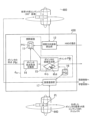
図1は本実施の形態の医療学習コンテンツ提供システムの概略構成図である。このシステムは図1に示すように、指導者側100と、医療学習者側(以下、学習者側200という)と、医療現場側(教育用演技)300と、歯科教育用コンテンツサービスサイト400(以下、サイト400という)等とを通信ネットワーク500(インタネット又は専用ネットワーク)とで接続している。 Figure 1 is a schematic diagram of the medical learning content provision system of this embodiment. As shown in Figure 1, this system connects an instructor side 100, a medical learner side (hereinafter referred to as learner side 200), a medical site side (educational performance) 300, a dental education content service site 400 (hereinafter referred to as site 400), etc., via a communication network 500 (Internet or a dedicated network).
指導者側100は、指導者端末110(パソコン)と、指導医師(以下、指導者MDiという)に装着されたHMD(以下、指導者用HMD130という)と、HMD用コントローラ(以下、指導者側HMDコントローラ120という)等を備えている。
医療現場側300は、VR用カメラ(360度カメラ:ドームカメラ)310で医療現場を撮影し、図示しないパソコン、サーバでこの撮影画像をサイト400に送信している。
The instructor's side 100 includes an instructor terminal 110 (personal computer), an HMD (hereinafter referred to as the instructor's HMD 130) worn by the instructor doctor (hereinafter referred to as the instructor MDi), and an HMD controller (hereinafter referred to as the instructor's side HMD controller 120).
The medical site side 300 captures images of the medical site using a VR camera (360-degree camera: dome camera) 310, and transmits the captured images to the
サイト400は、サイト側サーバ410と、図示しない担当者端末等を備えている。また、サイト側サーバ410は、送受信処理部420(プログラム)と、教育画像生成処理部430(プログラム)と、サイト側メモリ440と、教育VR用メモリ460等を備えている。
学習者側200は、5G対応のスマートフォン(以下、スマフォ270という)と、パソコン280(モニタでも構わない)等で構成されている。
The
The learner side 200 is composed of a 5G-compatible smartphone (hereinafter referred to as smartphone 270) and a personal computer 280 (which may be a monitor), etc.
また、学習者Aiの頭にはHMD(以下、学習者用HMD240という)が装着されている。また、学習者用HMD240にコントローラ(以下、学習者用HMDコントローラ260という)が接続されている。
さらに、学習者用HMD240に学習者注視画像生成処理部230と、HMD画像表示処理部220と、メモリ250等を備えている。メモリ250には、教育VR用コンテンツ等が読み込まれる。
HMD画像表示処理部220は、メモリ250の教育VR用コンテンツ(画像)を3D表示処理する。学習者注視画像生成処理部230は、後述するポインタ定義プログラムであり、学習者用HMDコントローラ260が示すポインタPiを3D表示する画像に定義する。なお、スマフォをマウントする形式のHMDの場合は、学習者注視画像生成処理部230及びHMD画像表示処理部220は不要である。
Furthermore, the learner Ai is fitted with an HMD (hereinafter referred to as a learner's HMD 240) on his/her head. A controller (hereinafter referred to as a learner's HMD controller 260) is connected to the learner's
Furthermore, the learner's
The HMD image
図2は本実施の形態の教育画像生成処理部430(プログラム)の概略構成図である。 図2に示すように、教育画像生成処理部430は、視野方向画像読込部12と、ポインタ始点終始定義部14と、ポインタ付画像生成部15と、画像登録部15等を備えている。
視野方向画像読込部12は、学習者側200又は指導者側100からのHMDの動き(姿勢、位置を含む)を読み込み、このHMDの動きに基づいて視線方向を求めてサイト側メモリ440の教育VR用コンテンツに視野範囲Siを定義する。
2 is a schematic diagram of the educational image generation processing unit 430 (program) of this embodiment. As shown in FIG. 2, the educational image
The field of view direction
この視野範囲Siの画像を視野画像と称する。指導者側100による視野画像の場合は、指導者側視野画像KGiと称し、学習者側200による場合は、評価試験者視野画像LGiと称する。また、学習者Aiが評価者によって評価を受ける場合には、受験者視野画像EGiと称する。これらの画像には、画像を識別するために後述する関連情報が付加されている。 The image of this visual field range Si is referred to as a visual field image. In the case of a visual field image by the instructor 100, it is referred to as an instructor's visual field image KGi, and in the case of a visual field image by the learner 200, it is referred to as an evaluator visual field image LGi. In addition, when the learner Ai is evaluated by an evaluator, it is referred to as an examinee visual field image EGi. Related information, which will be described later, is added to these images in order to identify the images.
読み込んだ視野画像は画像メモリ11に読み出すと共に、学習者側200又は指導者側100に送信(5G)して表示(3D又は2D)させる。
ポインタ始点終始定義部14は、学習者側200又は指導者側100からのアクセスによってポインタ定義プログラム(ポインタの終点定義用)を送信してダウンロードさせる。
そして、学習者側200又は指導者側100からのポインタ終点Pbiを受信する毎に画像メモリ11の視野画像(KGi、LGi、又はEGi)の上にフレームを定め、このフレームの中心座標をポインタ始点Pai(視野画像の中心座標)として定義すると共に、フレームにポインタ終点Pbiを定義(視野画像の座標)する。
The read visual field image is read into the
The pointer start and end
Then, each time a pointer end point Pbi is received from the learner side 200 or the instructor side 100, a frame is defined on the field of view image (KGi, LGi, or EGi) in the
ポインタ付画像生成部15は、レイヤの中心座標(以下、ポインタ始点Paiと称する)と、ポインタ終点Pbiとを結ぶ直線を求め、この直線に基づいた指導者注視方向ポインタアイコンPiをレイヤに定義する。この画像を注視方向ポインタ画像PWiと称する。
そして、画像メモリ11の視野画像に注視方向ポインタ画像PWiを重ね、これをポインタ付注視画像PGi(HGi、PWi)としてサイト側メモリ440に記憶して、送信させる。
The pointer-attached
Then, the gaze direction pointer image PWi is superimposed on the field of view image in the
画像登録部17は、ポインタ付注視画像PGiに関連付けられている教育VR用メモリ460の教育VR用コンテンツ(教育VR画像:360度)をサイト側メモリ440に複写(登録)すると共に、メモリ16にポインタ付注視画像PGiを複写(登録)する。これらの画像を総称してポインタ付教育VR用コンテンツMPiと称する。
そして、学習者側200(受験者側)又は評価者側からのポインタ付教育VR用コンテンツMPiの要求に伴って、ポインタ付教育VR用コンテンツMPiをその端末に送信する。
The
Then, in response to a request for educational VR content MPi with pointers from the learner side 200 (examinee side) or the evaluator side, the educational VR content MPi with pointers is transmitted to the terminal.
次に、医療学習コンテンツ提供システムの動作をシーケンス図によってさらに詳細に説明する。
初めに指導者側教育VR画像の生成について説明する。
Next, the operation of the medical learning content providing system will be described in more detail with reference to a sequence diagram.
First, the generation of the instructor's training VR image will be described.
(指導者側教育VR画像の生成)
図3は指導者側でのポイント付注視画像を生成する場合のシーケンス図である。なお、本実施の形態では、指導者側パソコン110、指導者側MDIコントローラ120、指導者側MDI130を総称して指導者側端末と称する。
(Generation of VR images for instructor's training)
3 is a sequence diagram for generating a gaze image with points on the instructor's side. In this embodiment, the instructor's PC 110, the instructor's
なお、ポイント付注視画像の生成の前に基本情報の登録を説明する。
図3に示すように、学習者側200は、スマフォ270又はパソコン(本実施の形態ではスマフォとする)を操作してサイト400のサイト側サーバ410にアクセス(ID、パスワード)して(d10)、学習者基本情報をサイト側メモリ440に記憶する(d11)。
Before generating the gaze image with a point, the registration of basic information will be described.
As shown in Figure 3, the learner 200 operates a
この学習者基本情報は、学習者名と、専門種名、年齢、性別、電話番号、メールアドレス、登録日時、学習者側HMDアドレス等よりなる。
具体的には、学習者側200のスマフォ270とサイト側サーバ410とが通信ネットワーク500を介して通信接続し、サイト側サーバ410の送受信処理部420がサイト側メモリ440に記憶する。
This basic information of the learner includes the learner's name, the name of the specialty, age, sex, telephone number, email address, registration date and time, and the learner's HMD address.
Specifically, the
一方、医療現場300(演技)の担当者は、パソコン(図示せず)を操作してサイト400(サイト側サーバ410)にアクセスし、医療教育現場基本情報をサイト側メモリ440に記憶する(d12、d14)。 Meanwhile, the person in charge at the medical site 300 (performance) operates a personal computer (not shown) to access the site 400 (site-side server 410) and stores basic information about the medical education site in the site-side memory 440 (d12, d14).
教育現場基本情報は、現場名(例えば、大学名、クリニック名等)と、登録者名と、専門種名と、年齢と、性別と、学習名(インプラント、筋肉注射、麻酔、・・・、パソコンアドレス)と、年月日時刻、教育現場画像名(教育VR画像名又は教育VR用コンテンツ名ともいう)等よりなる。 The basic information on the educational site includes the site name (e.g., university name, clinic name, etc.), the registrant's name, the specialty name, age, gender, the name of the study (implant, intramuscular injection, anesthesia, ..., computer address), date and time, and the name of the educational site image (also called the educational VR image name or educational VR content name).
一方、指導者側100の指導者MDiは、指導者側パソコン110を操作してサイト400(サイト側サーバ410)にアクセスして、指導者基本情報をサイト側メモリ440に記憶する(d16、d18)。 Meanwhile, the instructor MDi on the instructor's side 100 operates the instructor's side personal computer 110 to access the site 400 (site side server 410) and stores the instructor's basic information in the site side memory 440 (d16, d18).
指導者基本情報は、指導者名と、専門名と、所属名と、経験年数と、年齢、性別、登録年月日時刻、パソコンアドレス、指導者側HMDアドレス等よりなる。
医療現場側(教育用演技)300は、パソコンを操作して教育VR用コンテンツ(教育VR画像)をサイト側サーバ410に送信する(d20)。この教育VR用コンテンツには、撮影現場名、教育VR用コンテンツ名(歯科治療における偶発症、麻酔、・・)、患者年齢、性別、患者身長、患者名、持病・・)、撮影時刻、カメラ番号等が関連付けられている。
The instructor basic information includes the instructor's name, specialty, affiliation, years of experience, age, sex, registration date and time, PC address, instructor's HMD address, and the like.
The medical site (educational performance) 300 operates a personal computer to transmit educational VR content (educational VR images) to the site-side server 410 (d20). This educational VR content is associated with the name of the shooting site, the name of the educational VR content (complications in dental treatment, anesthesia, ...), the patient's age, sex, height, name of the patient, chronic illness, ...), the shooting time, the camera number, etc.
なお、教育VR用コンテンツ(教育VR画像)の一例を図10(a)、図10(b)に示す。図10(a)は歯科治療中の偶発症に関する対応のための教育VR画像(教育VR用コンテンツ)であり、図10(b)は、口腔外科での静脈内鎮静下の麻酔管理の教育VR画像(教育VR用コンテンツ)である。 Examples of educational VR content (educational VR images) are shown in Figures 10(a) and 10(b). Figure 10(a) is an educational VR image (educational VR content) for dealing with complications during dental treatment, and Figure 10(b) is an educational VR image (educational VR content) for anesthesia management under intravenous sedation in oral surgery.
サイト側サーバ410の送受信処理部420は、医療現場側300からの教育VR用コンテンツ(教育VR画像)を受信し、これを教育VR用メモリ460に記憶する(d24)。
教育VR用コンテンツ(教育VR画像)は、例えば歯科治療中の偶発症に関する対応のコンテンツ、口腔外科での静脈内鎮静化での麻酔管理のコンテンツ等である。
The transmission/
Educational VR content (educational VR images) includes, for example, content on how to respond to complications during dental treatment, and content on anesthesia management for intravenous sedation in oral surgery.
一方、指導者側100の指導者MDiは、指導者パソコン110を操作してサイト400(サイト側サーバ410)にアクセスして教育VR用コンテンツを取得して(d26)、指導者側HMD130に表示(初期画像ともいう)する(d28)。 Meanwhile, the instructor MDi on the instructor's side 100 operates the instructor's personal computer 110 to access the site 400 (site-side server 410) and acquires educational VR content (d26), and displays it (also called the initial image) on the instructor's side HMD 130 (d28).
初めは、教育VR用画像を予め定められた所定方向から見たときの所定視野各の画像を指導者側パソコン110に出力して指導者側HMD130に表示させるのが好ましい。
前述の教育VR用コンテンツの取得には、具体的には、指導者名、指導者コード、教育用コンテンツ名、コンテンツ種類、撮影年月日時刻等(以下、総称して指導者教育VR用要求情報という)と、ポインタ生成の有無を入力するための画面をサイト側サーバ410より送信させて入力する。
Initially, it is preferable to output images of a specific field of view when viewed from a predetermined direction for educational VR to the instructor's computer 110 and display them on the instructor's
To obtain the aforementioned educational VR content, specifically, the instructor's name, instructor code, educational content name, content type, shooting date and time, etc. (hereinafter collectively referred to as instructor training VR request information), as well as a screen for entering whether or not to generate a pointer, are transmitted from the
この入力情報をサイト側サーバ410の送受処理部420が受信して、サイト側メモリ440の指導者基本情報と照合して受け付ける。
そして、登録されている指導者の場合は、指導者教育VR用要求情報を教育画像生成処理部430に出力して起動させる。
This input information is received by the transmission/
In the case of a registered instructor, the instructor training VR request information is output to the training image
教育画像生成処理部430は、指導者教育VR用要求情報に含まれている教育用コンテンツ名、コンテンツ種類、撮影現場名、撮影年月日時刻等に該当する教育VR用コンテンツ(教育VR用画像)を教育VR用メモリ460より引き当て、この教育VR用コンテンツ(教育VR用画像)を送受処理部420に出力して、指導者パソコン110に送信する(パケット、5G)。
The educational image
このとき、ポインタ生成の要求が含まれている場合は、前述の教育VR用コンテンツ(教育VR用画像)の送信にあっては、後述するポインタを生成させるための制御プログラム(ポインタ生成プログラムともいう)と、指導者教育VR用要求情報番号と、教育VR用コンテンツの番号(コンテンツ識別コード)等を付加して送信する。 At this time, if a request for pointer generation is included, when transmitting the aforementioned educational VR content (educational VR image), a control program for generating a pointer (also called a pointer generation program) described below, the instructor training VR request information number, the educational VR content number (content identification code), etc. are added and transmitted.
一方、指導者側HMD130のコンピュータは、プログラムに基づいてジャイロセンサの姿勢θi及び位置Mi(総称して指導者側HMD動き情報Eiともいう)を一定間隔(例えば10msec、50msec、100msec、200msec、・・)で指導者側パソコン110に出力している。
Meanwhile, the computer of the instructor's
指導者側パソコン110は、指導者側HMD130の指導者側HMD動き情報Ei(姿勢θi、位置Mi、指導者側HMD130の識別情報、年月日時刻等)を受信する毎にサイト側サーバ410に送信する(d30)。
The instructor's PC 110 transmits instructor's HMD movement information Ei (posture θi, position Mi, identification information of the instructor's
この送信には、指導者教育VR用要求情報番号と、教育VR用コンテンツ番号と年月日時刻等(以下、総称して指導者側VR識別情報という)を付加する。
サイト側サーバ410の送受処理部420は、この指導者側HMD動き情報Eiを教育画像生成処理部430に出力する。
This transmission includes the instructor training VR request information number, the training VR content number, and the date, month, year, date, time, etc. (hereinafter collectively referred to as instructor's VR identification information).
The transmission/
教育画像生成処理部430は、指導者側HMD動き情報Eiを読み込み、この指導者側HMD130の動きに基づく視野方向で視野点を定義してこの視野点を中心にして姿勢θi及び位置Miに基づいて、予め定められている視野範囲Siを定義する。
The educational image
そして、この視野範囲Siの画像を指導者側視野画像KGi(指導者側VR識別情報を付加)として生成する(d32)。この処理は図2に示す視野方向画像読込部12が行っている。
Then, an image of this visual field range Si is generated as the instructor's visual field image KGi (with the instructor's VR identification information added) (d32). This process is performed by the visual field direction
そして、送受処理部420によって指導者側パソコン110に送信(5G)する(d34)。
指導者側パソコン110は、指導者側視野画像KGiを受信する毎に、指導者側HMD130に出力してそのディスプレイに表示(2D又は3D用でも構わない)させる(d36)。
Then, the data is transmitted (5G) to the instructor's personal computer 110 by the transmission/reception processing unit 420 (d34).
Every time the instructor's side personal computer 110 receives the instructor's side visual field image KGi, it outputs it to the instructor's
指導者MDiは、この指導者側視野画像KGiが注視する部分がある場合は、HMDコントローラ120を操作してポインタの終点を決定させるために所定位置にカーソルを移動させて、終点Pbiを定義する(d38)。
If there is a part in the instructor's field of view image KGi that is being gazed at, the instructor MDi operates the
この終点Pbiの情報(画面の画像における座標と、指導者側視野画像KGiの番号と、指導者側VR識別情報とを含む)を指導者側HMD130が指導者側パソコン110に出力し、指導者側パソコン110はサイト側サーバ410に送信する(d40)。
The instructor's
サイト側サーバ410の送受処理部420は、ポインタ終点Pbiを教育画像生成処理部430に出力し、教育画像生成処理部430はポインタ付注視画像生成処理を行う(d42)。
The transmission/
(ポインタ付注視画像生成処理(d42))
ポインタ付注視画像生成処理については図2を用いて説明する。
図2に示すポインタ始点終点定義部14は、ポインタPiを生成するためのフレームレイヤ(視野範囲のサイズに相当する)を画像メモリ11の指導者側視野画像KGiに上に定めると共に視野方向画像読込部12に対して現在の指導者側視野画像KGiを画像メモリ11に読み込みさせる(記憶)。
(Pointer-attached gaze image generation process (d42))
The pointer-attached gaze image generating process will be described with reference to FIG.
The pointer start point and end
さらに、表示されている指導者側視野画像KGiにフレームレイヤ(フレーム)を定義する。
そして、ポインタ終点Pbiが指導者MDiによって指定されたかどうかを判定している。
ポインタ終点Pbiは、指導者側HMDコント―ラ120によって、指定させるのが好ましい。具体的にはカーソルを指導者が注視する方向とする所定の終点位置に移動させ、マウスクリックで十字マーク等(星印、〇印等)を表示する。これをポインタ終点Pbiの定義と称する。
Furthermore, a frame layer (frame) is defined for the instructor's field of view image KGi being displayed.
Then, it is determined whether the pointer end point Pbi is specified by the instructor MDi.
The pointer end point Pbi is preferably specified by the instructor's
このポインタ終点Pbiの定義に伴って、表示されている指導者側視野画像KGiの中心の座標(以下、中心Paiと記載する)を求め(教育VR用コンテンツでの位置)、かつポインタ終点Pbiを求め画像メモリ11のフレームにこの中心Paiとポインタ終点Pbiを定義する(図11(a)参照)。そして、ポインタ始点注視画像定義部14がポインタ付画像生成部15を起動する。
In accordance with the definition of this pointer end point Pbi, the coordinates of the center of the displayed instructor's field of view image KGi (hereinafter referred to as center Pai) are obtained (position in the educational VR content), and the pointer end point Pbi is obtained and this center Pai and pointer end point Pbi are defined in the frame of the image memory 11 (see FIG. 11(a)). Then, the pointer start point gaze
ポインタ付画像生成部15は、指導者側視野画像KGiを指導者注視画像HGiとし、レイヤに、中心Paiとポインタ終点Pbiとを結ぶ指導者注視方向を示すポインタPi(アイコン)を定義する(図11(b)参照)。このフレーム画像を注視方向ポインタ画像PWiと称している。
The pointer-attached
この注視方向ポインタ画像PWiには、教育VR用コンテンツ番号、教育用コンテンツ名、指導者側HMD動き情報Ei、年月日時刻、始点Pai、終点Pbi等が関連付けられている。 This gaze direction pointer image PWi is associated with the educational VR content number, educational content name, instructor's HMD movement information Ei, date and time, start point Pai, end point Pbi, etc.
そして、ポインタ付画像生成部15は、画像メモリ11の指導者注視画像HGiに注視方向ポインタ画像PWiを重ね、これをポインタ付注視画像PGi(HGi、PWi)としてサイト側メモリ440に記憶する。
Then, the pointer-attached
このとき、教育VR用コンテンツ番号、指導者側視野画像KGiの中心Pai(フレームの中心:ポインタ付注視画像PGiの中心)、指導者名、年月日時刻等の関連情報が関連付けられる。これを総称してポインタ付注視画像情報PJi(ポインタ付注視画像PGi、教育VR用コンテンツ番号、指導者側視野画像KGiの中心Pai(フレームの中心)、指導者名、年月日時刻等)と称する。 At this time, related information such as the educational VR content number, the center Pai of the instructor's field of view image KGi (center of the frame: center of the pointer-attached gaze image PGi), the instructor's name, the date, and the time are associated. This is collectively referred to as the pointer-attached gaze image information PJi (pointer-attached gaze image PGi, educational VR content number, center Pai of the instructor's field of view image KGi (center of the frame), the instructor's name, the date, and the time, etc.).
図6は、指導者側HDM130又は指導者側パソコン110に表示されたポインタ付注視画像PGiを示している。
例えば、指導者側視野画像KG11が指導者注視画像HG1とされて、指導者注視方向ポインタアイコンPiが定義されて指導者注視方向ポインタ画像PW1となりポインタ付注視画像PG1とされ、・・・指導者側視野画像KG51が指導者注視画像HG10とされて、指導者注視方向ポインタアイコンPiが定義されて指導者注視方向ポインタ画像PW10となりポインタ付注視画像PG10とされた例である。
FIG. 6 shows a gaze image PGi with a pointer displayed on the instructor's
For example, the instructor's side field of view image KG11 is set as the instructor's gaze image HG1, and a instructor's gaze direction pointer icon Pi is defined to become the instructor's gaze direction pointer image PW1, which is set as the gaze image with a pointer PG1, ... the instructor's side field of view image KG51 is set as the instructor's gaze image HG10, and a instructor's gaze direction pointer icon Pi is defined to become the instructor's gaze direction pointer image PW10, which is set as the gaze image with a pointer PG10.
この指導者側視野画像KGi(KG1、KG2、・・・)と、ポインタ付注視画像PGi(PG1、PG2、・・・)とは順次、指導者パソコン110に出力されて表示(図6、図7参照)される。 The instructor's field of view image KGi (KG1, KG2, ...) and the pointer-attached gaze image PGi (PG1, PG2, ...) are sequentially output to the instructor's personal computer 110 and displayed (see Figures 6 and 7).
図6(a)は、患者が気分不快を訴えた場合の注視する視線方向のポインタを重ね表示した例である。図6(b)はエピペントトレーナー(登録商標)で筋肉注射する場面であり、学習者が注視する部位をポインタPiで示している画像である。すなわち、患者の表情や筋肉注射に注意を向ける場所を学習させることができる。 Figure 6 (a) shows an example in which a pointer is superimposed on the display to indicate the direction of gaze when a patient complains of discomfort. Figure 6 (b) shows an image of an intramuscular injection using the EpiPent Trainer (registered trademark), with the pointer Pi indicating the area the learner should gaze at. In other words, the learner can learn the patient's facial expression and the location to focus attention on during intramuscular injections.
具体的には、メモリ16のポインタ付注視画像PGi(教育用コンテンツ情報の番号、コンテンツ名、Pai、Pbi、ポインタコード、年月日時刻、端末アドレス・・・)を送受信処理部420に出力して指導者側パソコン110に送信させる(d43)。この送信は5Gで行う。
Specifically, the pointer-attached gaze image PGi (educational content information number, content name, Pai, Pbi, pointer code, date and time, terminal address, etc.) in the
そして、指導者側パソコン110は、指導者側HMD130にこのポインタ付注視画像PGiを表示(3D)する(d44)。 Then, the instructor's computer 110 displays (3D) this gaze image with pointer PGi on the instructor's HMD 130 (d44).
そして、指導者側HMD130、指導者側パソコン110は前述のd30に戻って(d46)、指導者側HMD130の動きに対応した画像を表示させて上記のようにポインタPi(画像中心を始点として終点側に広がる三角状のアイコンが好ましい)を定義する。
なお、図6等においては、アイコンは縞状にして示している。縞状にしないで単にベタ塗り的なアイコンでもよい。
また、教育画像生成処理部430の画像登録部17は、ポインタ付注視画像PGiに関連付けられている教育VR用コンテンツ(教育VR画像:360度)をサイト側メモリ440に複写(登録)すると共に、メモリ16にポインタ付注視画像PGiを複写(登録)する(d41)。
Then, the instructor's
6 and the like, the icons are shown in stripes, but the icons may be simply solid instead of striped.
In addition, the
なお、ポインタ付注視画像PGiの複写にあたっては、同一視野のポインタ付注視画像PGiをこのポインタ付注視画像PGiに書き換えるのが好ましい。これらの画像を総称してポインタ付教育VR用コンテンツMPiと称する。 When copying a gaze image with a pointer PGi, it is preferable to rewrite a gaze image with a pointer PGi in the same field of view with this gaze image with a pointer PGi. These images are collectively referred to as educational VR content with pointer MPi.
すなわち、経験豊富な指導医による診断のポインタや処置内容を確認できるチェックポインタを画像を組み込んだ教育VR用コンテンツを提供できている。また、VRすることで周囲の状況の映像も見ることができるので、手術の進行を見ながら各医療スタッフの役割や動きを学ぶことも可能となる。 In other words, we are able to provide educational VR content that incorporates images of diagnostic pointers provided by experienced supervising physicians and check pointers that allow patients to confirm the details of treatment. In addition, by using VR, patients can also see footage of the surrounding situation, making it possible to learn about the roles and movements of each medical staff member while watching the progress of the surgery.
また、経験が少ない歯科医療スタッフは、このVRコンテンツを見ることによって、普段からモニタリングや全身状態に配慮している歯科医療スタッフは視野が広く、全体的に視線を送る傾向があるということを把握できる。 In addition, by watching this VR content, inexperienced dental medical staff can understand that dental medical staff who are regularly monitoring and paying attention to the patient's overall condition tend to have a broader field of vision and to look at the whole patient.
さらに、VRで目配りのポインタを知ることによって、実際の医療現場でも危険な状況を察知することに役立つことになる。 Furthermore, learning about the visual pointer in VR will be useful in detecting dangerous situations in real medical settings.
(学習側)
次に学習者側のHMDを用いての学習を図4のシーケンス図を用いて説明する。
学習側200については、教育コンテンツを学習コンテンツと称して説明する。
図4に示すように、学習者はスマフォ270を操作して、サイト400にアクセスして学習者コンテンツ入手画面(図示せず)を取得する。
(Learning side)
Next, learning using the HMD on the learner's side will be described with reference to the sequence diagram of FIG.
Regarding the learning side 200, educational contents will be referred to as learning contents in the following description.
As shown in FIG. 4, a learner operates a
例えばこの画面に学習者コンテンツ名又はポインタ付注視画像PGi(教育用コンテンツ情報の番号、コンテンツ名、Pai、Pbi、ポインタコード、年月日時刻、端末アドレス・・・)若しくは試験の有無を入力し、これらの情報を学習者側VR要求情報としてサイト側サーバ410に送信する(d50)。
For example, the learner enters on this screen the name of the learner's content or the gaze image with pointer PGi (educational content information number, content name, Pai, Pbi, pointer code, date and time, terminal address, etc.) or whether or not there is an exam, and transmits this information to the
サイト側サーバ410の送受処理部420は、学習者側VR要求情報に含まれている学習名を有する学習者基本情報がサイト側メモリ440に記憶されているかどうかを判断し、記憶されている場合は、この要求を受け付ける。
The transmission/
そして、学習者側VR要求情報に含まれている画像種類を判断する。例えば、ポインタ付注視画像PGi(教育用コンテンツ情報の番号、コンテンツ名、Pai、Pbi、ポインタコード、年月日時刻、端末アドレス・・・)を要求している場合は、この学習者側VR要求情報に含まれてる学習コンテンツ名の学習VRコンテンツをサイト側メモリ440から読みだして送信させる(d52)。
Then, the image type included in the learner's VR request information is determined. For example, if a pointer-attached gaze image PGi (educational content information number, content name, Pai, Pbi, pointer code, date and time, terminal address, etc.) is requested, the learning VR content with the learning content name included in the learner's VR request information is read from the
一方、学習者側HMD240は一定間隔毎に学習者HMD動きFi(姿勢、位置)を検出している(d54)。
学習者側HMD240は、この学習者HMDの動きFiを検出する毎に、スマフォ270に出力する(d55)。
On the other hand, the learner's
Each time the learner's
スマフォ270は、学習者HMDの動きFi(姿勢、位置)をサイト側サーバ410に送信(5G)する(d56)。
サイト側サーバ410は、学習者HMDの動きFi(姿勢、位置)に該当するの送受処理部420は、サイト側メモリ440に登録されているポインタ付教育VR用コンテンツMPiにおける視野を求め(d42の処理と同様)、この視野のポインタ付注視画像PGi(PG1、PG2、・・)、指導者側視野画像KGi(KG1、KG2、・・・)を読み出し(d58)、スマフォ270に送信する(d60)。
The
The site-
視野の範囲の画像がポインタ付注視画像PGi(PG1、PG2、・・)の場合その画像又は指導者側視野画像KGi(KG1、KG2、・・・)の場合は、その画像である。
スマフォ270は、送信された画像を受信し、これを学習者側HMD240に出力する(d62)。
If the image in the visual field range is a pointer-attached gaze image PGi (PG1, PG2, . . . ), that image is selected; if the image is a leader-side visual field image KGi (KG1, KG2, . . . ), that image is selected.
The
学習者側HMD240のHMD画像処理部220は、これをメモリに記憶して(d64)、3D表示(図6参照)する(d66)。したがって、学習者は、治療中においてどこを注視するべきかを事前に学習できる。
The
(評価)
次に、学習者を試験(評価ともいう)する場合について図5のシーケンス図を用いて説明する。本実施の形態では、試験官を評価者と称し、評価される学習者を受験者と称する。
図5に示すように、評価者は端末(以下、指導者端末という)を操作してサイト400(サイト側サーバ410)にアクセス(ID、パスワード)して、評価者基本情報をサイト側メモリ440に記憶する(d70)。教育VR用コンテンツを評価試験VR用コンテンツと称する。
(evaluation)
Next, a case where a learner is tested (also called evaluation) will be described with reference to the sequence diagram of Fig. 5. In this embodiment, an examiner is called an evaluator, and a learner to be evaluated is called an examinee.
5, the evaluator operates a terminal (hereinafter referred to as the instructor terminal) to access (ID, password) the site 400 (site server 410) and stores the evaluator basic information in the site memory 440 (d70). The educational VR content is referred to as the evaluation test VR content.
例えば、学習者名と、評価者名と、評価用コンテンツ名、年月日時刻、場所等を記憶する。評価用コンテンツ名は、評価試験VR用コンテンツ(教育VR用コンテンツ)のいずれかであり、評価者が指定するのが好ましい。 For example, the learner's name, the evaluator's name, the name of the evaluation content, the date, time, location, etc. are stored. The name of the evaluation content is one of the evaluation test VR contents (educational VR contents), and is preferably specified by the evaluator.
一方、学習者はスマフォ270を操作して評価VR用コンテンツ名等の情報(以下、評価VR用コンテンツ名情報)をサイト側サーバ410に送信する(d72)。例えば、インプラント、筋肉注射、麻酔、・・・、パソコンアドレス)と、年月日時刻等の情報を入力する。
Meanwhile, the learner operates the
サイト側サーバ410の送受信処理部420は、評価VR用コンテンツ名情報を受信し、この評価VR用コンテンツ名情報に該当する評価VR用コンテンツを教育画像処理部430により引き当てさせる(d74)。
The transmission/
教育画像処理部430は、評価VR用コンテンツの初期画像を送受信処理部420により学習者側のスマフォ270に送信させる(d76)。
The educational
このとき、ポインタ生成プログラムのデータも送信する。
評価を受ける学習者側のスマフォ270は、この初期画像を学習者側HMD240に出力して3D表示させる(d78)。
At this time, the data of the pointer generation program is also transmitted.
The
一方、学習者側HMD240のコンピュータは、プログラムに基づいて学習者側HMD240の動き(姿勢、位置)を受験者側HMDの動きLEiとして一定間隔で検出している(d79)。
Meanwhile, the computer of the learner's
そして、この検出した受験者側HMDの動きLEiをスマフォ270に出力する(d80)。
スマフォ270は、受験者側HMDの動きLEi(姿勢、位置)の情報をサイト側サーバ410に送信(5G)する(d82)。
Then, the detected movement LEi of the examinee's HMD is output to the smartphone 270 (d80).
The
サイト側サーバ410は、受験者側HMDの動きLEiの情報を受信して、これを教育画像生成処理部430に出力して受験者視野画像LGiの決定処理を行う(d84)。
受験者視野画像LGiの決定処理は、受験者側HMDの動きLEi(姿勢、位置)に該当する評価試験VR用コンテンツにおける視野を求め、この視野の視野画像KGi(KG1、KG2、・・・)を、評価試験を受ける学習者への評価画像TPiとして決定する。
The
The process of determining the examinee's field of view image LGi determines the field of view in the evaluation test VR content that corresponds to the movement LEi (posture, position) of the examinee's HMD, and determines the field of view image KGi (KG1, KG2, ...) of this field of view as the evaluation image TPi for the learner taking the evaluation test.
そして、この評価画像TPi(評価試験VR用コンテンツ)をスマフォ270に送信する(d86)。
スマフォ270は、評価用画像TPi(評価試験VR用コンテンツ)を受信し、HMD240に出力する(d88)。
Then, this evaluation image TPi (content for evaluation test VR) is transmitted to the smartphone 270 (d86).
The
HMD240は、これを3D表示する(d90)。
評価を受ける学習者は、この評価用画像TGiに注視する部分がある場合は、HMDコントローラ260を操作してポインタの終点を決定させるために所定位置にカーソルを移動させて、終点Pbiを定義する(d92)。
The
If the learner being evaluated has a part to look at in the evaluation image TGi, he or she operates the
この終点Pbiの情報(画面の画像における座標と、評価用画像KGiの番号と、評価VR用コンテンツ名とを含む)をHMDコントローラ260がHMD240を介してスマフォ240に出力し、スマフォ270がこのポインタ終点Pbiをサイト側サーバ410に送信する(d96)。なお、HMD240はHMDコントローラ260からのポインタ終点Pbiを示す例えば、十字マーク表示する(d98)。
The
一方、サイト側サーバ410の送受信処理部420は、ポインタ終点Pbiをメモリに記憶し(d100)、教育画像生成処理部430がポイント終点PBiの受信かどうかを判定する(d102)。
Meanwhile, the transmission/
教育画像生成処理部430がポイント終点PBiの受信と判定した場合は、上記と同様なポイント付注視画像生成処理を行う(d104)。
If the educational image
ポイント付注視画像生成処理は、図2に示すポインタ始点終点定義部14がポインタPiを生成するためのフレームレイヤ(視野範囲のサイズに相当する)を画像メモリ11の評価試験者視野画像LGi上に定めると共に視野方向画像読込部12に対して現在の評価試験者視野画像LGiを画像メモリ11に読み込みさせる(記憶)。
In the point-attached gaze image generation process, the pointer start point and end
そして、この評価試験者視野画像LGiにフレームを定義する。
そして、ポインタ終点Pbiを画像メモリ11のフレームにポインタ終点Pbiを定義する(図11(a)参照)。そして、レイヤに、中心Paiとポインタ終点Pbiとを結ぶ評価受験者側注視方向ポインタLPi(アイコン)を定義する(図11(b)参照)。このポインタとフレームとからなる画像を注視方向ポインタ画像PWiと称している。
Then, a frame is defined in this evaluation examiner's visual field image LGi.
Then, the pointer end point Pbi is defined in the frame of the image memory 11 (see FIG. 11(a)). Then, the examinee's gaze direction pointer LPi (icon) that connects the center Pai and the pointer end point Pbi is defined in the layer (see FIG. 11(b)). The image consisting of this pointer and the frame is called the gaze direction pointer image PWi.
この注視方向ポインタ画像PWiには、教育VR用コンテンツ番号、教育用コンテンツ名、指導者側HMD動き情報Ei、年月日時刻、始点Pai、終点Pbi等が関連付けられている。 This gaze direction pointer image PWi is associated with the educational VR content number, educational content name, instructor's HMD movement information Ei, date and time, start point Pai, end point Pbi, etc.
そして、ポインタ付画像生成部15は、画像メモリ11の視野画像に注視方向ポインタ画像PWiを重ね、これをポインタ付注視画像PGi(HGi、PWi)としてサイト側メモリ440に記憶する(d108)。
Then, the pointer-attached
このとき、教育VR用コンテンツ番号、視野画像KGiの中心Pai(フレームの中心:ポインタ付注視画像PGiの中心)、指導者名、受験者名、年月日時刻等の関連情報が関連付けられる。これを総称してポインタ付注視画像情報PJi(ポインタ付注視画像PGi、教育VR用コンテンツ番号、指導者側視野画像KGiの中心Pai(フレームの中心)、指導者名、年月日時刻等)と称する。 At this time, related information such as the educational VR content number, center Pai of the field of view image KGi (center of frame: center of pointer-attached gaze image PGi), instructor's name, examinee's name, date, time, etc. are associated. This is collectively referred to as pointer-attached gaze image information PJi (pointer-attached gaze image PGi, educational VR content number, center Pai of instructor's field of view image KGi (center of frame), instructor's name, date, time, etc.).
そして、ポインタ付注視画像PGi(PG1、PG2、・・・)をスマフォ270に送信する(d110)。
スマフォ270は、このポインタ付注視画像PGi(教育用コンテンツ情報の番号、コンテンツ名、Pai、Pbi、ポインタコード、年月日時刻、端末アドレス・・・)を学習者側HMD240に出力する(d112)。
Then, the pointer-attached gaze image PGi (PG1, PG2, . . . ) is transmitted to the smartphone 270 (d110).
The
HMD240は、これを3D表示する(d114)。
そして、指導者側HMD130、スマフォ240は前述のd79に戻って(d116)、学習者側HMD130の動きに対応した画像を表示させて上記のようにポインタPi(画像中心を始点として終点側に広がる三角状のアイコン)を定義して表示させる(d116)。
The
Then, the instructor's
また、スマフォ270は、ポインタ付注視画像PGi(教育用コンテンツ情報の番号、コンテンツ名、Pai、Pbi、ポインタコード、年月日時刻、端末アドレス・・・)をパソコン280に出力して、画面に表示させる(図7参照)。従って、評価者は受験者が注視している視線方向を確認できるし、評価試験受験者側でも確認できる。
The
例えば、ポインタとしては、血管迷走神経性反射との鑑別診断や、そのために重要となる皮膚症状について察知できているか、また理解できているかを問うシナリオ構成の評価コンテンツとするのが好ましい。 For example, it would be preferable for the pointer to be assessment content structured as a scenario that asks whether the patient is aware of and understands the differential diagnosis from vasovagal reflex and the skin symptoms that are important for this purpose.
従って、評価者は、別モニタに映る学習者が定義したポインタから、患者が精神的な緊張や局所麻酔の痛みのために手に力が入っている様子、麻酔後の気分不快を訴えるまでの患者の表情、前腕部の皮膚の発赤などの病状について見逃さずに視線を送れているかを確認できる。 Therefore, the evaluator can check from the pointer defined by the learner displayed on a separate monitor whether the learner is directing his or her gaze at the patient's symptoms, such as tension in the patient's hand due to mental tension or the pain of the local anesthesia, the patient's facial expression before complaining of discomfort after the anesthesia, or redness of the skin on the patient's forearm.
学習者が視線を送れていれば、そこから何を検知したか、もしくは理解したかを筆記試験や口頭試問で評価者が確認できる。
例えば、患者が過度に緊張した状態で三叉神経領域である口腔内に強い痛み刺激を与えると、血管迷走神経性反射を起こす可能性があることや、アナフイラキシーショックを疑う場合、他にどのような症状が起こり得るか、また、映像中ではエピペントレーナなのでシリンジの色が白いがエピペンの成人用のシリンジの色は黄色と緑のどちらか、など周辺知識についても問うようにできる。
If the learner is able to make eye contact, the evaluator can determine what the learner detected or understood through a written or oral examination.
For example, questions can be asked about peripheral knowledge such as the fact that if a patient is in an overly tense state and a strong painful stimulus is applied to the oral cavity, which is in the trigeminal nerve area, it can trigger a vasovagal reflex; if anaphylactic shock is suspected, what other symptoms can occur; and that although the EpiPen syringe in the video is white because it is an EpiPen trainer, the color of the syringe for adults is either yellow or green.
このようにVRで偶発症患者の対応を疑似体験してもらいながら、チェックポインタごとに学習者が視線を向けていたが、またその状況を正確に把握して理解していたかを評価者が口頭や筆記試験で確認を行うことができる。 In this way, while students are given a simulated experience of dealing with a patient with an adverse event using VR, they direct their gaze at each checkpoint, and the evaluator can then verbally or through a written test confirm whether they have accurately grasped and understood the situation.
<他の実施の形態>
映像の制作上の注意点としては、HMDの中で学習者が視線を動かした場合では、評価者はどこに注視しているかがわかり難い、どこを注視しているか学習者、評価者ともにわかるポインタを画面上に表示するようにプログラムが必要とした例を示したが(図6、図7参照)、このプログラムを用意しなくても評価できるVRコンテンツであってもよい。
<Other embodiments>
One thing to note in producing the video is that when a learner moves their line of sight inside the HMD, it can be difficult for the evaluator to know where the learner is looking , so an example was shown in which a program was needed to display a pointer on the screen that would let both the learner and the evaluator know where the learner is looking (see Figures 6 and 7), but the VR content can also be evaluated without this program.
例えば、図8に示すように、あえて離れた位置に生体モニタなどを配置して、首を振るような形で意識的に見ないと学習者が生体モニタを見ることができないような場所に配置するようにした。 For example, as shown in Figure 8, we deliberately placed biometric monitors at a distance so that students could not see them unless they consciously looked at them by turning their heads.
また、VRは、より臨場感のある状況を体験できるが、初期研修など学習者の知識不足している場合は、起きている現象を理解することができず十分な得られない可能性がある。 In addition, while VR allows learners to experience situations in a more realistic way, if they lack knowledge, such as during initial training, they may not be able to understand the phenomena that are occurring and may not be able to fully understand the experience.
そこで、図9(a)、図9(b)に示すように、教育VR用コンテンツの映像を元に2Dの映像を作成し、画面上に状況、知識を整理するのに必要な解説を加えた教育用コンテンツを別に作成した。 Therefore, as shown in Figures 9(a) and 9(b), we created separate educational content by creating 2D images based on the images in the educational VR content and adding explanations on the screen that are necessary to organize the situation and knowledge.
例えば図9(a)に示すように、VRの映像に加えて別画面(ai)でモニタの状況を映し出し、常に観察ができるようにし、注目すべき場面ではチェックマーク(Qi)をだしたり、解説のスライドを差し込んだりする等の工夫をした(図9(b)。
また、コメントBiとして例えば「奇異呼吸は、吸気時に胸部が陥没し、吸気時に突出する自然な呼吸とは逆のパターンとなる呼吸であり、上気道閉塞で発生する。」と表示する。
For example, as shown in Fig. 9(a), in addition to the VR image, the monitor status was displayed on a separate screen (ai) so that observation could be made at all times. In noteworthy scenes, a check mark (Qi) was displayed or an explanatory slide was inserted (Fig. 9(b)).
In addition, for example, "paradoxical breathing is breathing that is the opposite pattern to natural breathing in which the chest collapses when inhaling and protrudes when inhaling, and occurs when the upper airway is obstructed" is displayed as a comment Bi.
通常こういうコンテンツを制作する場合では複数台のカメラやカメラマンが必要となるが、360度カメラの場合では少ない台数で済むので、必要なスペースや人員が少なくてすみ、手術室という清潔環境に適していると考えられる。 Normally, multiple cameras and cameramen are needed to produce this type of content, but with a 360-degree camera, only a few cameras are needed, so less space and personnel are needed, and it is thought to be suitable for the clean environment of an operating room.
また、図8に示すように、教育VR用コンテンツを、学習者が意識的に右(HMD)を向かないと生体モニタが視界に入らないように生体モニタを配置している(本来の臨床とはやや異なる状況であり、通常は麻酔科医は生体モニタの近くにいるべきである)。 As shown in Figure 8, the vital signs monitor is positioned so that the educational VR content is not visible to the learner unless the learner consciously turns to the right (towards the HMD) (this is a slightly different situation from actual clinical practice, and the anesthesiologist should normally be close to the vital signs monitor).
つまり、H1→H2→H3と向かないと生体モニタが入らないようにしている。このようなコンテンツにするとポインタ定義用プログラムは不要となる。 In other words, the vital sign monitor will not enter unless you go in the direction of H1 → H2 → H3. If you create content like this, you won't need a pointer definition program.
100 指導者側
200 学習者側
300 医療現場側
400 サイト
500 通信ネットワーク
110 指導者端末
410 サイト側サーバ
430 教育画像生成処理部
430 教育画像生成処理部
Reference Signs List 100 Instructor side 200 Learner side 300
Claims (2)
前記ヘッドマウントディスプレィに表示された患者の治療用の教育VR用画像に、医療の指導者の患者に対する注目点までの視線を示すポインタアイコンで前記教育VR用画像に表示するプログラムであって、
コンピュータを、
(A).教育VR用画像を記憶手段に記憶する手段、
(B).前記医療の指導者又は学習者に装着された前記ヘッドマウントディスプレィの動き情報を一定間隔で読み込む手段と、
(C).前記ヘッドマウントディスプレィの動き情報に基づいて前記教育VR用画像に視線中心を定めて視野範囲を決定する手段、
(D).決定した視野範囲の視野画像を前記指導者又は学習者の端末の画面に表示する手段、
(E).前記医療の指導者又は前記学習者の端末により、前記ポインタアイコンの終点となる位置を前記注目点としてこの視野画像に定義させる手段、
(F).前記終点の定義に伴って、この視野画像の中心に始点を定め、この始点の座標及び前記終点の座標を求める手段、
(G).前記視野画像の始点の座標を起点とし、この始点の座標と前記終点の座標との間に、前記起点から前記終点に向かって次第に幅が広がる縞状の三角状のアイコンをポインタアイコンとして前記視野画像に重ね、これを前記医療の指導者又は学習者のポインタ付注視画像として前記記憶手段に生成する手段、
(H).前記医療の指導者のポインタ付注視画像を学習者端末に送信して表示させる手段、としての機能を実行させる教育VR用コンテンツ提供プログラム。 Based on the movements of a head-mounted display worn by a medical instructor or student,
A program for displaying, on an educational VR image for treating a patient displayed on the head mounted display, a pointer icon indicating a line of sight of a medical instructor to a point of interest for the patient,
Computer,
(A) A means for storing educational VR images in a storage means;
(B) A means for reading movement information of the head mounted display worn by the medical instructor or student at regular intervals;
(C) A means for determining a visual field range by setting a gaze center on the educational VR image based on movement information of the head mounted display;
(D) A means for displaying a visual field image of the determined visual field range on a screen of a terminal of the instructor or the learner;
(E) A means for defining the position of the end point of the pointer icon as the point of interest in the visual field image by the terminal of the medical instructor or the student;
(F) A means for determining a starting point at the center of the field of view image in accordance with the definition of the end point, and for determining the coordinates of the starting point and the coordinates of the end point;
(G) A means for superimposing a striped triangular icon, which is a pointer icon and gradually widens in width from the starting point to the end point between the coordinates of the starting point and the coordinates of the end point of the visual field image, on the visual field image, and generating this in the storage means as a gaze image with a pointer of the medical instructor or student;
(H) A program for providing educational VR contents that executes the function of a means for transmitting the gaze image with a pointer of the medical instructor to the learner's terminal and displaying it.
前記サーバを、
前記学習者の端末は、ヘッドマウントディスプレィ、コントローラ、高速大容量の通信機能を有するスマートフォン、パソコンを有して、前記スマートフォンで通信ネットワークを介して前記教育VR用コンテンツサイトのサーバに接続されており、
前記(A)~(H)の手段としての機能を実行させる、請求項1記載の教育VR用コン テンツ提供プログラム。 The instructor's terminal has a head-mounted display, a controller, a monitor, and a personal computer, and is connected to a server of an educational VR content site via a communication network;
The server,
The learner's terminal has a head-mounted display, a controller, a smartphone having a high-speed and large-capacity communication function, and a personal computer, and is connected to a server of the educational VR content site via a communication network by the smartphone,
The educational VR content providing program according to claim 1, which executes the functions as the means (A) to (H).
Priority Applications (1)
| Application Number | Priority Date | Filing Date | Title |
|---|---|---|---|
| JP2021127931A JP7701774B2 (en) | 2021-08-04 | 2021-08-04 | EDUCATIONAL VR CONTENT PROVIDING PROGRAM AND MEDICAL EDUCATIONAL VR CONTENT PROVIDING SYSTEM |
Applications Claiming Priority (1)
| Application Number | Priority Date | Filing Date | Title |
|---|---|---|---|
| JP2021127931A JP7701774B2 (en) | 2021-08-04 | 2021-08-04 | EDUCATIONAL VR CONTENT PROVIDING PROGRAM AND MEDICAL EDUCATIONAL VR CONTENT PROVIDING SYSTEM |
Publications (2)
| Publication Number | Publication Date |
|---|---|
| JP2023022877A JP2023022877A (en) | 2023-02-16 |
| JP7701774B2 true JP7701774B2 (en) | 2025-07-02 |
Family
ID=85203979
Family Applications (1)
| Application Number | Title | Priority Date | Filing Date |
|---|---|---|---|
| JP2021127931A Active JP7701774B2 (en) | 2021-08-04 | 2021-08-04 | EDUCATIONAL VR CONTENT PROVIDING PROGRAM AND MEDICAL EDUCATIONAL VR CONTENT PROVIDING SYSTEM |
Country Status (1)
| Country | Link |
|---|---|
| JP (1) | JP7701774B2 (en) |
Citations (6)
| Publication number | Priority date | Publication date | Assignee | Title |
|---|---|---|---|---|
| JP2016081339A (en) | 2014-10-17 | 2016-05-16 | セイコーエプソン株式会社 | Head mounted display device, method for controlling the same and computer program |
| US20170053545A1 (en) | 2015-08-19 | 2017-02-23 | Htc Corporation | Electronic system, portable display device and guiding device |
| JP2018528496A (en) | 2015-05-27 | 2018-09-27 | グーグル エルエルシー | System including reader device and participant device for virtual reality travel |
| JP2019506922A (en) | 2015-12-29 | 2019-03-14 | コーニンクレッカ フィリップス エヌ ヴェKoninklijke Philips N.V. | System, controller, and method for using virtual reality devices for robotic surgery |
| JP2019537459A (en) | 2016-09-29 | 2019-12-26 | シンバイオニクス リミテッド | Method and system for medical simulation in an operating room in a virtual or augmented reality environment |
| US10810899B1 (en) | 2016-12-05 | 2020-10-20 | Google Llc | Virtual instruction tool |
-
2021
- 2021-08-04 JP JP2021127931A patent/JP7701774B2/en active Active
Patent Citations (6)
| Publication number | Priority date | Publication date | Assignee | Title |
|---|---|---|---|---|
| JP2016081339A (en) | 2014-10-17 | 2016-05-16 | セイコーエプソン株式会社 | Head mounted display device, method for controlling the same and computer program |
| JP2018528496A (en) | 2015-05-27 | 2018-09-27 | グーグル エルエルシー | System including reader device and participant device for virtual reality travel |
| US20170053545A1 (en) | 2015-08-19 | 2017-02-23 | Htc Corporation | Electronic system, portable display device and guiding device |
| JP2019506922A (en) | 2015-12-29 | 2019-03-14 | コーニンクレッカ フィリップス エヌ ヴェKoninklijke Philips N.V. | System, controller, and method for using virtual reality devices for robotic surgery |
| JP2019537459A (en) | 2016-09-29 | 2019-12-26 | シンバイオニクス リミテッド | Method and system for medical simulation in an operating room in a virtual or augmented reality environment |
| US10810899B1 (en) | 2016-12-05 | 2020-10-20 | Google Llc | Virtual instruction tool |
Also Published As
| Publication number | Publication date |
|---|---|
| JP2023022877A (en) | 2023-02-16 |
Similar Documents
| Publication | Publication Date | Title |
|---|---|---|
| US11195340B2 (en) | Systems and methods for rendering immersive environments | |
| US20250017656A1 (en) | Sensory enhanced environments for injection aid and social training | |
| CN103732297B (en) | Augmented Reality Range of Motion Therapy System and Method of Operation | |
| TW202103646A (en) | Augmented reality system and method for tele-proctoring a surgical procedure | |
| Dicheva et al. | Digital transformation in nursing education: A systematic review on computer-aided nursing education pedagogies, recent advancements and outlook on the post-COVID-19 era | |
| KR20180058656A (en) | Reality - Enhanced morphological method | |
| McBain et al. | Scoping review: the use of augmented reality in clinical anatomical education and its assessment tools | |
| Tien et al. | Measuring situation awareness of surgeons in laparoscopic training | |
| US12183215B2 (en) | Simulated reality technologies for enhanced medical protocol training | |
| US11270597B2 (en) | Simulated reality technologies for enhanced medical protocol training | |
| Komizunai et al. | An interactive endotracheal suctioning simulator which exhibits vital reactions: ESTE-SIM | |
| Fleet et al. | Current clinical and educational uses of immersive reality in anesthesia: Narrative review | |
| Jain et al. | Design and development of an integrated virtual reality (VR)-based training System for difficult airway management | |
| Cai et al. | Towards supporting adaptive training of injection procedures: Detecting differences in the visual attention of nursing students and experts | |
| Riva et al. | Virtual reality as telemedicine tool: technology, ergonomics and actual applications | |
| Morineau et al. | Task management skills and their deficiencies during care delivery in simulated medical emergency situation: A classification | |
| WO2024154647A1 (en) | Learning method and learning system | |
| JP2023022877A (en) | Education vr content provision program and medical education vr content provision system | |
| Anscombe | A different view: in Europe, virtual and immersive technologies are starting to change the landscape of medical simulation | |
| Yeon-Hee | Necessity of anatomy education for dental school students utilizing 3D and virtual reality technologies: a narrative review | |
| Demidova et al. | Technologies of virtual and augmented reality in biomedical engineering | |
| US20190347959A1 (en) | Devices and methods for interactive augmented reality | |
| Nyingi et al. | Standardizing ventrogluteal injection technique using video-based learning: bridging knowledge gaps for nurses | |
| Brunzini | Effectiveness analysis of traditional and mixed reality simulations in medical training: a methodological approach for the assessment of stress, cognitive load and performance | |
| Agarwal et al. | Virtual Reality: An Arsenal For Modern Dentistry In The Era Of COVID-19 |
Legal Events
| Date | Code | Title | Description |
|---|---|---|---|
| A80 | Written request to apply exceptions to lack of novelty of invention |
Free format text: JAPANESE INTERMEDIATE CODE: A80 Effective date: 20210824 |
|
| A621 | Written request for application examination |
Free format text: JAPANESE INTERMEDIATE CODE: A621 Effective date: 20240403 |
|
| A977 | Report on retrieval |
Free format text: JAPANESE INTERMEDIATE CODE: A971007 Effective date: 20250123 |
|
| A131 | Notification of reasons for refusal |
Free format text: JAPANESE INTERMEDIATE CODE: A131 Effective date: 20250213 |
|
| A521 | Request for written amendment filed |
Free format text: JAPANESE INTERMEDIATE CODE: A523 Effective date: 20250325 |
|
| A131 | Notification of reasons for refusal |
Free format text: JAPANESE INTERMEDIATE CODE: A131 Effective date: 20250515 |
|
| A521 | Request for written amendment filed |
Free format text: JAPANESE INTERMEDIATE CODE: A523 Effective date: 20250519 |
|
| TRDD | Decision of grant or rejection written | ||
| A01 | Written decision to grant a patent or to grant a registration (utility model) |
Free format text: JAPANESE INTERMEDIATE CODE: A01 Effective date: 20250619 |
|
| A61 | First payment of annual fees (during grant procedure) |
Free format text: JAPANESE INTERMEDIATE CODE: A61 Effective date: 20250619 |
|
| R150 | Certificate of patent or registration of utility model |
Ref document number: 7701774 Country of ref document: JP Free format text: JAPANESE INTERMEDIATE CODE: R150 |