JP7686856B2 - Image processing device, control method thereof, and program - Google Patents
Image processing device, control method thereof, and program Download PDFInfo
- Publication number
- JP7686856B2 JP7686856B2 JP2024123749A JP2024123749A JP7686856B2 JP 7686856 B2 JP7686856 B2 JP 7686856B2 JP 2024123749 A JP2024123749 A JP 2024123749A JP 2024123749 A JP2024123749 A JP 2024123749A JP 7686856 B2 JP7686856 B2 JP 7686856B2
- Authority
- JP
- Japan
- Prior art keywords
- content
- error
- image processing
- display
- screen
- Prior art date
- Legal status (The legal status is an assumption and is not a legal conclusion. Google has not performed a legal analysis and makes no representation as to the accuracy of the status listed.)
- Active
Links
Images








Classifications
-
- H—ELECTRICITY
- H04—ELECTRIC COMMUNICATION TECHNIQUE
- H04N—PICTORIAL COMMUNICATION, e.g. TELEVISION
- H04N1/00—Scanning, transmission or reproduction of documents or the like, e.g. facsimile transmission; Details thereof
- H04N1/00127—Connection or combination of a still picture apparatus with another apparatus, e.g. for storage, processing or transmission of still picture signals or of information associated with a still picture
- H04N1/00204—Connection or combination of a still picture apparatus with another apparatus, e.g. for storage, processing or transmission of still picture signals or of information associated with a still picture with a digital computer or a digital computer system, e.g. an internet server
- H04N1/00244—Connection or combination of a still picture apparatus with another apparatus, e.g. for storage, processing or transmission of still picture signals or of information associated with a still picture with a digital computer or a digital computer system, e.g. an internet server with a server, e.g. an internet server
-
- H—ELECTRICITY
- H04—ELECTRIC COMMUNICATION TECHNIQUE
- H04N—PICTORIAL COMMUNICATION, e.g. TELEVISION
- H04N1/00—Scanning, transmission or reproduction of documents or the like, e.g. facsimile transmission; Details thereof
- H04N1/0035—User-machine interface; Control console
- H04N1/00405—Output means
- H04N1/00408—Display of information to the user, e.g. menus
- H04N1/00464—Display of information to the user, e.g. menus using browsers, i.e. interfaces based on mark-up languages
-
- H—ELECTRICITY
- H04—ELECTRIC COMMUNICATION TECHNIQUE
- H04N—PICTORIAL COMMUNICATION, e.g. TELEVISION
- H04N1/00—Scanning, transmission or reproduction of documents or the like, e.g. facsimile transmission; Details thereof
- H04N1/0035—User-machine interface; Control console
- H04N1/00405—Output means
- H04N1/0048—Indicating an illegal or impossible operation or selection to the user
-
- H—ELECTRICITY
- H04—ELECTRIC COMMUNICATION TECHNIQUE
- H04N—PICTORIAL COMMUNICATION, e.g. TELEVISION
- H04N1/00—Scanning, transmission or reproduction of documents or the like, e.g. facsimile transmission; Details thereof
- H04N1/44—Secrecy systems
- H04N1/4406—Restricting access, e.g. according to user identity
- H04N1/444—Restricting access, e.g. according to user identity to a particular document or image or part thereof
-
- H—ELECTRICITY
- H04—ELECTRIC COMMUNICATION TECHNIQUE
- H04N—PICTORIAL COMMUNICATION, e.g. TELEVISION
- H04N2201/00—Indexing scheme relating to scanning, transmission or reproduction of documents or the like, and to details thereof
- H04N2201/0077—Types of the still picture apparatus
- H04N2201/0094—Multifunctional device, i.e. a device capable of all of reading, reproducing, copying, facsimile transception, file transception
Landscapes
- Engineering & Computer Science (AREA)
- Multimedia (AREA)
- Signal Processing (AREA)
- Human Computer Interaction (AREA)
- Computing Systems (AREA)
- General Engineering & Computer Science (AREA)
- Accessory Devices And Overall Control Thereof (AREA)
- Facsimiles In General (AREA)
- User Interface Of Digital Computer (AREA)
- Control Or Security For Electrophotography (AREA)
Description
画像処理装置及びその制御方法、並びにプログラムに関する。 It relates to an image processing device, a control method thereof, and a program.
近年では、屋外・店頭・公共空間・交通機関など、あらゆる場所で、ネットワークに接続したディスプレイなどを用いて情報を発信する「デジタルサイネージ」が広まりつつある。企業などのオフィスにおいても、複合機等の画像処理装置を用いた従業員に対する情報共有の支援、企業の情報統制等を目的として、デジタルサイネージの活用が注目されている。このようなデジタルサイネージ技術は、ネットワークを介したダウンロード配信またはストリーミング配信によりサイネージコンテンツを配信するため、コンテンツの変更を迅速かつ容易に行うことができるという利点がある。上述した複合機等の画像処理装置においても、ネットワークを介して接続されるコンテンツサーバからコンテンツを取得し、画像処理装置の操作部に取得したコンテンツを表示する技術が知られている。 In recent years, "digital signage," which transmits information using displays connected to a network, has become widespread in all kinds of locations, such as outdoors, in stores, in public spaces, and on public transport. The use of digital signage has also been attracting attention in corporate offices, for the purpose of supporting information sharing among employees using image processing devices such as multifunction copiers, and for the purpose of controlling corporate information. Such digital signage technology has the advantage that content can be changed quickly and easily, as signage content is distributed by download or streaming over a network. In the image processing devices such as the multifunction copiers mentioned above, a technology is also known in which content is obtained from a content server connected over a network and the obtained content is displayed on the operation unit of the image processing device.
しかしながら、設定ミスや通信障害等に起因して、画像処理装置がコンテンツサーバからのコンテンツのダウンロードやストリーミング再生に失敗し、コンテンツを表示できないケースもある。そのような場合にはコンテンツを表示できない旨を示すエラーメッセージを画像処理装置上で表示する技術が知られている(特許文献1)。 However, there are cases where the image processing device fails to download or stream content from the content server due to a setting error, communication failure, or the like, making it impossible to display the content. In such cases, there is known technology for displaying an error message on the image processing device indicating that the content cannot be displayed (Patent Document 1).
しかしながら、特許文献1のように、画像処理装置上の操作部にエラーメッセージを表示しても、エラーメッセージを見たユーザが必ずしもエラーを解消できるとは限らない。通常使用するユーザがエラーに対処可能なユーザではない環境で画像処理装置が使用される場合は、その他の機能は通常通り使用可能であるにも関わらず、サイネージコンテンツが表示できないというだけでエラーメッセージが表示されるのはユーザにとって煩わしい。その一方で、サイネージコンテンツが正常に表示できないのに、エラーメッセージが出されないと、エラーが発生していることが認識されないまま放置されてしまう。即ち、通常使用するユーザがエラーに対処可能なユーザである環境で画像処理装置が使用される場合は、エラーメッセージを表示するようにすることで早期にエラーに対処することが可能になる。
However, even if an error message is displayed on the operation unit of the image processing device as in
そこで、本発明では、サイネージコンテンツを表示できない場合にエラーメッセージを通知するか否かを切り替え可能な画像処理装置を提供することを目的とする。 The present invention aims to provide an image processing device that can switch whether or not to notify an error message when signage content cannot be displayed.
画像処理装置であって、前記画像処理装置のユーザに情報を周知するためのコンテンツであって、Webブラウザを用いて表示されるコンテンツに係る情報を登録する登録手段と、前記コンテンツを表示する所定の条件を満たした場合、前記コンテンツを表示する表示手段と、前記所定の条件を満たした場合であって、当該コンテンツを表示できないエラーが検知された場合に、当該エラーを通知する画面を表示するか否かを決定する決定手段と、前記決定手段による決定に従って前記表示手段による前記コンテンツの表示を制御する制御手段と、を有し、前記決定手段は、前記画像処理装置を操作するユーザの権限情報に応じて前記エラーを通知する画面を表示するか否かを決定することを特徴とする画像処理装置。 An image processing device comprising: a registration means for registering information relating to content for informing a user of the image processing device, the content being displayed using a web browser; a display means for displaying the content when predetermined conditions for displaying the content are met; a decision means for deciding whether to display a screen notifying of the error when the predetermined conditions are met and an error preventing the content from being displayed is detected; and a control means for controlling the display of the content by the display means in accordance with the decision made by the decision means , wherein the decision means decides whether to display the screen notifying of the error in accordance with authority information of a user operating the image processing device .
本発明によれば、サイネージコンテンツを表示できない場合にエラーメッセージを表示するか否かを切り替えることができる。 According to the present invention, it is possible to switch whether or not to display an error message when signage content cannot be displayed.
以下、本発明の実施の形態について図面を参照しながら説明する。なお、以下の実施の形態は特許請求の範囲に係る発明を限定するものでなく、また実施の形態で説明されている特徴の組み合わせの全てが発明の解決手段に必須のものとは限らない。 The following describes embodiments of the present invention with reference to the drawings. Note that the following embodiments do not limit the invention as claimed, and not all of the combinations of features described in the embodiments are necessarily essential to the solution of the invention.
(第一の実施形態)
図1は、本実施形態における情報処理システムの全体図である。画像処理装置100はLAN(Local Area Network)101を介してインターネット110に接続されている。クライアントPC102は、LAN101を介して画像処理装置100と通信可能である。コンテンツサーバ120は、広告や、掲示板等各種コンテンツ(詳細は後述する)を格納しており、LAN121を介してインターネット110に接続されている。画像処理装置100は、インターネット110を介してコンテンツサーバ120から、後述するコンテンツを取得し表示可能である。なお、ここでは、画像処理装置100、クライアントPC102、コンテンツサーバ120が1台ずつである場合を例にして説明しているが、これらの装置が複数台あっても構わない。また、コンテンツサーバ120の代わりに、画像処理装置100が自装置内にコンテンツを格納し、自装置の内部でコンテンツ取得、表示する構成でも良い。
First Embodiment
FIG. 1 is an overall view of an information processing system in this embodiment. An
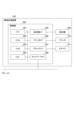
図2は、本実施形態における画像処理装置100の構成を示すブロック図である。CPU201を含む制御部200は、画像処理装置100全体の動作を制御する。CPU201は、ROM202、HDD204等に記憶された制御プログラムを読み出して読取制御や送信制御などの各種制御を行う。ROM202はブートROMであり、システムのブートプログラムが格納されている。RAM203は、CPU201の主メモリ、ワークエリア等の一時記憶領域として用いられる。HDD204は、画像データや各種プログラム、或いは各種情報テーブルを記憶する。また、HDD204には、広告、掲示板といったコンテンツサーバ120からダウンロードしたコンテンツを記憶することも可能である。また、上述したように画像処理装置100が自装置内にコンテンツを格納する場合はHDD204に記憶する。操作部I/F205は、操作部209と制御部200とを接続するためのインタフェースである。操作部209には、タッチパネル機能を有する液晶表示部やキーボードなどが備えられている。
2 is a block diagram showing the configuration of the
プリンタI/F206は、プリンタ210と制御部200とを接続するためのインタフェースである。プリンタ210で印刷すべき画像データは、プリンタI/F206を介して制御部200から転送され、プリンタ210において記録媒体上(用紙上)に印刷される。
The printer I/F 206 is an interface for connecting the
スキャナI/F207は、スキャナ211と制御部200とを接続するためのインタフェースである。スキャナ211は、原稿を読み取って画像データを生成し、スキャナI/F207を介して制御部200に入力する。
The scanner I/F 207 is an interface for connecting the
ネットワークI/F208は、制御部200をLAN101に接続するためのインタフェースである。ネットワークI/F208は、LAN101を介してインターネット110に接続されている外部装置(例えばコンテンツサーバ120)に情報を送信したり、外部装置から情報を受信したりする。
The network I/
画像処理装置100が有する機能のうち、代表的なものは以下の通りである。
・スキャナ211により原稿上の画像を読み取って生成された画像データをプリンタ210にて印刷する「コピー」機能。
・クライアントPC102等の外部から投入されたプリントジョブに基づいて画像データをプリンタ210にて印刷する「プリント」機能。
・スキャナ211により原稿上の画像を読み取って生成された画像データをネットワークI/F208を介して外部へ送信する「スキャンして送信」機能。
・スキャナ211により原稿上の画像を読み取って生成された画像データをHDD204に保存する「スキャンして保存」機能。
・HDD204に保存された画像データをプリンタ210にて印刷又はネットワークI/F208を介して外部へ送信する「保存ファイルの利用」機能。
Representative functions of the
A “copy” function in which an image on an original is read by the
A "print" function for printing image data on the
A “scan and send” function for reading an image on a document using the
A “scan and save” function for reading an image on a document using the
A “use of saved file” function for printing image data saved in the
図3は、画像処理装置100を含むシステム全体のソフトウェア構成を説明する図である。図3に示す各機能部は、画像処理装置100内のCPU201が、ROM202もしくはHDD204に格納された制御プログラムを読み出して実行することで実現される。
Figure 3 is a diagram explaining the software configuration of the entire system including the
画像処理装置100は、アプリケーション311、画面制御部303、認証処理部308、オートクリア処理部309、プリント管理部310等の機能部を有する。
The
アプリケーション311は、サイネージアプリケーション300、コピーアプリケーション312、ファックスアプリケーション313、プリントアプリケーション314など画像処理装置100の機能を利用したアプリケーション含まれる。なお、アプリケーション311には、図示しない他のアプリケーションが含まれていてもよい。以下、コンテンツサーバ120等から取得した広告、掲示板といったコンテンツを表示するサイネージアプリケーション300の詳細を説明する。
The
サイネージアプリケーション300は、画像処理装置100に搭載された組み込みのソフトウェアプログラムである。サイネージアプリケーション300は、外部通信部301、コンテンツ表示部302、コンテンツ設定部304、コンテンツ管理部305、コンテンツ設定管理テーブル306、イベント受信部307を持つ。
The
外部通信部301は、コンテンツサーバ120と通信を行ない、コンテンツサーバ120で管理されているコンテンツを取得する。また、外部通信部301とコンテンツサーバ120間で通信するための通信プロトコルは、SMB(Server Message Block)、WebDAV(Web-based Distributed Authoring and Versioning)、HTTP(Hypertext Transfer Protocol)である。なお、電子メールやファイル転送プロトコル(FTP)等の、他の通信プロトコルを用いても良い。
The
コンテンツ表示部302は、コンテンツサーバ120又はHDD204に記憶されているコンテンツをRAM203に読み込み、操作部209に出力する。コンテンツとは、テキストデータ、HTML、画像ファイル(JPEG、GIF、PNG、BMP等)、動画ファイル等のWebブラウザで閲覧可能なデータを指す。所定のイベントが発生するとコンテンツは表示され、電子看板、広告や情報共有用の掲示板、つまり情報を周知するものとして機能する。
The content display unit 302 reads content stored in the
コンテンツ設定部304は、画像処理装置100に表示するコンテンツに関する設定を行う。具体的には、画像処理装置100が有するWebサーバ機能を用いて設定を行うためのWebページをクライアントPC102に提供する。そして、クライアントPC102が有するWebブラウザによって表示される設定画面を介してユーザからの指示を受け付け、各種設定を行う。例えば、どのようなイベント発生時にどのようなコンテンツを表示すべきかをユーザがクライアントPC102上で設定する。コンテンツ設定部304で行われる設定について図5-1,2を用いて説明する。
The content setting unit 304 performs settings related to the content to be displayed on the
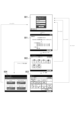
図5-1、2は、コンテンツ表示に関する設定を含む画像処理装置100の各種設定を行うための画面の例を示した図である。上述したとおり、クライアントPC102が有するWebブラウザを用いて画像処理装置100のWebサーバにアクセスすることで、図5-1、2に示す画面がクライアントPC102上に表示される。
Figures 5-1 and 5-2 are diagrams showing examples of screens for configuring various settings of the
図5-1(a)は、認証情報を入力するための認証画面の画面例を示した図である。この認証画面を介してユーザがユーザ名、パスワードを入力し、ログインボタンを押下すると、認証処理部308はユーザ認証及びログイン処理を行う。ここで、管理者権限を持つユーザがログインすると、図5-1(b)の画面が表示される。
Figure 5-1 (a) shows an example of an authentication screen for inputting authentication information. When a user inputs a user name and password via this authentication screen and presses the login button, the
図5-1(b)は、管理者権限を持つユーザに、画像処理装置100に関する各種設定を行わせるための画面の例を示した図である。画面左側に位置するメニューの中からいずれかの設定項目が選択されると、それに応じた詳細の設定項目が画面右側に表示される。例えば、ユーザが設定項目「ライセンス/その他」501を選択すると、図5-1(c)の画面が表示される。
Figure 5-1 (b) is a diagram showing an example of a screen that allows a user with administrator privileges to configure various settings related to the
図5-1(c)は、ライセンス/その他に関する詳細な設定を行うための画面の例を示した図である。設定項目502を含む各設定項目は、ハイパーリンクになっており、選択すると、その設定項目に応じたWebページが表示される。ユーザが設定項目502を選択すると、図5-2(e)~(g)に示すサイネージアプリケーション300の設定画面が表示される。
Figure 5-1 (c) is a diagram showing an example of a screen for making detailed settings related to licenses/others. Each setting item, including setting
一方、図5-1(a)において、管理者権限を持たないユーザがログインした場合、図5-1(d)の画面が表示される。 On the other hand, if a user without administrator privileges logs in to the system in Figure 5-1(a), the screen in Figure 5-1(d) will be displayed.
図5-1(d)は、管理者権限を持たないユーザに、画像処理装置100に関する各種設定を行わせるための画面の例を示した図である。この画面では、図5-1(b)の画面で表示されていた設定項目501が表示されないため、管理者権限を持たないユーザは、サイネージアプリケーション300の設定画面を表示させることが出来ない。このように、管理者権限を持つユーザにのみサイネージアプリケーション300の設定画面を表示させることにより、コンテンツに関する設定が出来るユーザを、管理者に限定することが出来る。なお、本実施形態では、コンテンツの設定が出来るユーザを、画像処理装置100全体の管理者権限を有するユーザに限定しているが、管理者権限を持たない一般のユーザも設定できるようにしても良い。また、画像処理装置100全体の管理者権限とは別に、サイネージアプリケーション300独自の管理者権限を設けて、その権限を持つユーザのみコンテンツの設定ができるようにしても良い。
Figure 5-1 (d) is a diagram showing an example of a screen for allowing a user without administrator authority to perform various settings related to the
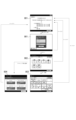
図5-2(e)~(g)は、サイネージアプリケーション300の設定画面の例を示した図である。チェックボックス503は、サイネージアプリケーション300の画面表示のON/OFFを切り替えるための設定項目である。つまりコンテンツを表示するか否か設定可能である。チェックボックス503がチェックされていない場合、図5-2(e)のように他の設定項目がグレーアウト表示され、入力できない状態になる。チェックボックス503がチェックされた場合、図5-2(f)(g)のように、設定可能な項目が、グレーアウトされていない状態で表示される。
Figures 5-2 (e) to (g) are diagrams showing examples of the setting screen of
ラジオボタン504は、外部通信部301とコンテンツサーバ120間の通信プロトコルを選択するボタンである。ラジオボタン504をSMBに選択した場合、図5-2(f)のように、SMBに関する設定項目のグレーアウトが解除され、SMBに関する各設定項目を入力できるようになる。ラジオボタン504をHTTP/WebDAVに選択した場合、図5-2(g)のように、HTTP/WebDAVに関する設定項目のグレーアウトが解除され、各設定項目を入力できるようになる。
テキストボックス505は、通信プロトコルをSMBに設定した際に入力可能となる、コンテンツのパスを入力するための入力フィールドである。パスとは、コンテンツの格納場所を示す文字列であり、SMBの場合、コンピュータ名、フォルダ名、ファイル名等を¥(円記号)や\(バックスラッシュ)で区切って示したものである。コンテンツとしては、HDD204に記憶されているファイルを指定しても良いし、コンテンツサーバ120に記憶されているファイルを指定しても良い。テキストボックス506は、通信プロトコルをSMBに設定した際に入力可能となる、コンテンツのパスにアクセスする際に使用するユーザ名を入力するための入力フィールドである。テキストボックス507は、通信プロトコルをSMBに設定した際に入力可能となる、コンテンツのパスにアクセスする際に使用するパスワードを入力するための入力フィールドである。
テキストボックス508は、通信プロトコルをHTTP/WebDAVに設定した際に入力可能となる、コンテンツのパスを入力するための入力フィールドである。HTTP/WebDAVの場合のパスは、コンテンツの格納場所を示すコンピュータ名、フォルダ名、ファイル名等を/(スラッシュ)で区切って示したものである。コンテンツとしては、HDD204に記憶されているファイルを指定しても良いし、コンテンツサーバ120に記憶されているファイルを指定しても良い。テキストボックス509は、通信プロトコルをHTTP/WebDAVに設定した際に入力可能となる、コンテンツのパスにアクセスする際に使用するユーザ名を入力するための入力フィールドである。テキストボックス510は、通信プロトコルをHTTP/WebDAVに設定した際に入力可能となる、コンテンツのパスにアクセスする際に使用するパスワードを入力するための入力フィールドである。チェックボックス511、512は、通信プロトコルをHTTP/WebDAVとした場合の暗号化通信に関する設定項目である。
The
ラジオボタン513は、コンテンツを表示するタイミングを設定可能な項目である。図7で説明するようにユーザが画像処理装置100の操作を開始する時に認証画面を表示する設定が行われている場合にコンテンツを表示するタイミングを設定するボタンである。ラジオボタン513が「ログイン後」に選択されている場合、操作開始時に認証画面を表示し、ログイン処理が行われた後にコンテンツが表示される。ラジオボタン513が「オートクリア後」に選択されている場合、オートクリア後にコンテンツが表示される。ラジオボタン513はラジオボタンの形式でなくても良く「ログイン後」「オートクリア後」の両方を選択することが可能なチェックボックス等であっても良い。
チェックボックス514は、プリント処理実行中にコンテンツを表示する機能のON/OFFを切り替えるための設定項目である。プリント実行には時間を要するため、プリント実行中のユーザが待機している間にコンテンツを表示するか否か設定できる。チェックボックス514がチェックされている場合、画像処理装置100がプリント実行時にコンテンツの表示が行われる。
Check
図5-2(g)のチェックボックス515は、コンテンツを表示できないエラーが検知された場合、エラー画面1000(図10)を画像処理装置100上に表示をするか否かを切り替えるための設定項目である。チェックボックス515がチェックされている場合、コンテンツ表示のエラーが検知された場合、操作部209にエラー画面の表示を行う。一方でチェックボックス515がチェックされていない場合、コンテンツ表示のエラーが検知された場合、操作部209にエラー画面の表示は行われない。
Check
OKボタン516は、503~515に設定された項目を、コンテンツ設定管理テーブル306に記憶させるためのボタンである。OKボタン516が押下されると、503~515の設定がコンテンツ設定管理テーブル306に記憶され、図5-1(c)の画面に戻る。キャンセルボタン517は、503~515に設定された項目をコンテンツ設定管理テーブル306に記憶せず、図5-1(c)の画面に戻るためのボタンである。
The
このように、ユーザは図5-1、2に示す設定画面を介して、サイネージアプリケーション300がコンテンツを表示するための設定情報を設定・登録することができる。なお、ここでは、コンテンツ表示に関する設定をクライアントPC102から設定させる例について示したが、画像処理装置100の操作部209を用いて設定できるようにしても良い。
In this way, the user can set and register the setting information for the
図3の説明に戻る。コンテンツ管理部305は、コンテンツ設定部304より設定されたコンテンツのパス等の設定内容をコンテンツ設定管理テーブル306に記憶する。また、コンテンツ管理部305は、コンテンツ設定管理テーブル306より記憶された設定を取得し、コンテンツ表示部302に通知する。 Returning to the explanation of FIG. 3, the content management unit 305 stores the settings such as the content path set by the content setting unit 304 in the content setting management table 306. The content management unit 305 also obtains the stored settings from the content setting management table 306 and notifies the content display unit 302.
コンテンツ設定管理テーブル306は、コンテンツ設定部304より設定されたサイネージアプリケーション300の設定値を管理するための管理テーブルである。
The content setting management table 306 is a management table for managing the setting values of the
図6は、コンテンツ設定管理テーブル306の一例を示す図である。ここでは、図5-2(g)に示すような入力が為された設定内容に基づいて生成・更新されたコンテンツ設定管理テーブル306を示している。 Figure 6 is a diagram showing an example of the content setting management table 306. Here, the content setting management table 306 is shown that has been generated and updated based on the settings entered as shown in Figure 5-2 (g).
キー601列は、サイネージアプリケーション300のそれぞれの設定項目に対応するキーを示す。
The key 601 column indicates the keys corresponding to each setting item of the
設定値602列は、サイネージアプリケーション300のそれぞれの設定項目のキーに対応する値を示す。
The setting
603行は、サイネージアプリケーション300の画面表示のON/OFFを示す項目であり、項目に対応する値(602列)が0であればOFF、1がONであることを示す。図5-2のチェックボックス503の設定が更新された際は、この値が更新される。
604行は、外部通信部301とコンテンツサーバ120間の通信プロトコルを示す項目であり、0がSMB、1がHTTP/WebDAVであることを示す。図5-2のラジオボタン504の設定が更新された際は、この値が更新される。
Line 604 is an item indicating the communication protocol between the
605行は、通信プロトコルがSMBに設定された時のコンテンツへのパスを示す項目である。図5-2のテキストボックス505の設定が更新された際は、この値が更新される。
Line 605 is an item that indicates the path to the content when the communication protocol is set to SMB. This value is updated when the setting in
606行は、通信プロトコルがSMBに設定された際にコンテンツのパスにアクセスするために使用するユーザ名を示す項目である。図5-2のテキストボックス506の設定が更新された際は、この値が更新される。 Line 606 is an item that indicates the user name to be used to access the content path when the communication protocol is set to SMB. This value is updated when the setting in text box 506 in Figure 5-2 is updated.
607行は、通信プロトコルがSMBに設定された際にコンテンツのパスにアクセスするために使用するパスワードを示す項目である。図5-2のテキストボックス507の設定が更新された際は、この値が更新される。
608行は、通信プロトコルがHTTP/WebDAVに設定された時のコンテンツのパスを示す項目である。図5-2のテキストボックス508の設定が更新された際は、この値が更新される。
609行は、通信プロトコルをHTTP/WebDAVに設定された際にコンテンツのパスにアクセスするために使用するユーザ名を示す項目である。図5-2のテキストボックス509の設定が更新された際は、この値が更新される。
Line 609 is an item that indicates the user name used to access the content path when the communication protocol is set to HTTP/WebDAV. This value is updated when the setting in
610行は、通信プロトコルがHTTP/WebDAVに設定された際にコンテンツのパスにアクセスするために使用するパスワードを示す項目である。図5-2のテキストボックス510の設定が更新された際は、この値が更新される。
611、612行は、通信プロトコルがHTTP/WebDAVに設定された場合の暗号化通信に関する設定を示す項目であり、0が選択無し、1が選択されたことを示す。図5-2のチェックボックス511、512の設定が更新された際は、この値が更新される。
613行は、サイネージ(コンテンツ)を表示するタイミングの設定を示す項目である。0が「オートクリア後」、1は「ログイン後」、3は「オートクリア後」と「ログイン後」両方が選択されたことを示す。図5のラジオボタン513の設定が更新された際は、この値が更新される。
614行は、プリント実行時にコンテンツを表示するか否かの設定を示す項目である。図5-2のチェックボックス514の設定が更新された際は、この値が更新される。
615行は、コンテンツ表示エラー検知時のエラー画面表示ON/OFFを示す項目であり、0がOFF、1がONであることを示す。図5-2のチェックボックス515の設定が更新された際は、この値が更新される。
Line 615 is an item that indicates whether the error screen display is ON or OFF when a content display error is detected, with 0 indicating OFF and 1 indicating ON. This value is updated when the setting of
図3の説明に戻る。コンテンツ管理部305は、図6のキー601を基に、コンテンツ設定管理テーブル306を参照することにより、それぞれの設定項目に関する設定値602を取得する。
Returning to the explanation of FIG. 3, the content management unit 305 references the content setting management table 306 based on the key 601 in FIG. 6 to obtain the setting
コピーアプリケーション312では、高解像度のスキャナと高速印刷が可能なプリンタを使用することで、高速、高画質のコピーが可能である。また、コピーアプリケーション312では、制御装置部に装着されているハードディスクを使用することで、連続読み取りによる大量原稿コピーも可能である。更に、コピーアプリケーション312では、スキャンした画像データを、ネットワークを介して複数台の画像処理装置に送信することで、重連コピーも可能である。
The
ファックスアプリケーション313では、G3ファクスやG4ファクスの送受信が可能なだけでなく、転送機能を利用することでファクス受信したデータを電子メール等のプロトコルに変換して転送することが可能である。また、ファックスアプリケーション313では、従来の電話回線ではなく、インターネットを利用してファクスの送受信を行うインターネットファクスも可能である。
The
プリントアプリケーション314では、PostScriptやLIPS(LBP Image Processing)といったPDL(Page Description Language)言語によりホストコンピュータから送信されるプリントデータを受信し、用紙に高速印刷することが可能な機能である。また、プリントプリントアプリケーション314では、様々なプリンタに共通なフォーマットであるBMLinks(登録商標)を外部から受信し、用紙に印刷することが可能である。更に、プリントプリントアプリケーション314では、プリンタドライバを介さずにPDF(Portable Document Format)等のアプリケーションデータを外部から直接受信し、用紙に印刷することも可能である。
The
イベント受信部307は、認証処理部308やオートクリア処理部309、プリント管理部310から通知される各種イベント情報を受信する。なお、図示しない他のモジュールからイベントが通知されても良い。
The
認証処理部308は、認証画面を操作部209やクライアントPC102に表示させ、ユーザから入力されたユーザIDやパスワード等の認証情報を用いてユーザ認証を行う。ユーザ認証が成功した場合には、認証処理部308は、当該ユーザを画像処理装置100にログインさせるためのログイン処理を行う。ログアウトの指示がされた時には、認証処理部308は、ログイン中のユーザを画像処理装置からログアウトさせるためのログアウト処理を行う。ログアウトの指示は、操作部209上に表示されるログアウトボタンがユーザにより押下された場合、又は、後述するオートクリア処理が実行された場合に発行される。認証処理部308は、ログイン処理、ログアウト処理が行われた際に、それぞれ処理が行われたことを示すイベント(ログインイベント、ログアウトイベント)を、イベント受信部307に送信する。また、認証処理部308は、後述する通り、認証画面の表示設定に基づいて、認証画面の表示タイミングの制御を行う。
The
オートクリア処理部309は、操作部209に対する操作が所定時間行われなかった場合に(以下、「所定時間」をオートクリア移行時間と称する)、オートクリア処理を実行する。オートクリア処理とは、表示されている画面での設定値/設定状態をクリアして初期値に戻す処理である。例えば、コピーに関する各種設定を行うためのコピー画面を介して設定をしている途中でユーザが画像処理装置100の前を離れ、そのままオートクリア移行時間が経過すると、途中まで設定されていた設定値がクリアされ、デフォルト設定値に戻る。この時、ユーザが画像処理装置100にログイン状態である場合は、オートクリア処理によって自動でログアウトする。オートクリア機能により、直前に使用していたユーザの設定状態を意図せずに引き継いで想定していなかった設定でコピー等を実行してしまうことや、次に使用するユーザに開示してはいけない設定内容が見えてしまうこと等を防ぐことができる。オートクリア処理部309は、オートクリア処理が行われた際に、オートクリアイベントをイベント受信部307に送信する。また、オートクリア処理が行われた際、認証処理部308はログイン中のユーザをログアウトさせるためのログアウト処理を実行する。なお、オートクリア移行時間は、ユーザが任意に設定することが可能である。
The auto-
また、オートクリア処理時に遷移する画面を設定することも可能である。オートクリア時に遷移する画面として初期画面が設定されていた場合は、操作部209の画面はそれまで表示されていた画面から初期画面に切り替わる。初期画面とは、起動時に表示する画面としてユーザによりあらかじめ設定された画面である。例えば、画像処理装置100が有する複数の機能やアプリケーションの中から使用する機能を選択するためのメインメニュー画面や、アプリケーション画面等が設定可能である。以降の説明では、オートクリア時に遷移する画面として初期画面が設定されており、初期画面としてメインメニュー画面が設定されている例について説明する。
It is also possible to set a screen to transition to during auto-clear processing. If an initial screen has been set as the screen to transition to during auto-clear, the screen of the
画面制御部303は、アプリケーションごとに管理されている画面やメインメニュー画面等を操作部209に出力する。
The
プリント管理部310は、プリントジョブの開始動作を行う。また、プリントジョブ開始をイベント受信部307へ通知する。
The
なお、認証管理部308およびオートクリア処理部309、画面制御部303、プリント管理部310は、アプリケーション311に含まれる各アプリケーションに対して共通の処理部および管理部であり、相互に連携していてもよい。また、図示しない他の共通管理部、処理部があってもよい。
The
図7は、画像処理装置100のユーザ認証に関する設定を行うために、画面制御部303が表示する画面例を示す図である。図7に示す設定画面は、管理者権限を有するユーザがログインした時のみ表示可能な画面であるとする。
Figure 7 is a diagram showing an example of a screen displayed by the
図7(a)は、画像処理装置100をユーザ認証環境下で使用するか否かを設定するための画面である。ボタン701は、ユーザ認証を有効にするためのボタンであり、このボタンが選択されている場合、画像処理装置100の各機能を使用するためにユーザ認証が必要になる。ボタン702は、ユーザ認証を無効にするためのボタンであり、このボタンが選択されている場合、ユーザ認証せずに画像処理装置100の各機能を使用することができる。
Figure 7 (a) is a screen for setting whether or not the
図7(b)(c)は、認証画面を表示するタイミングを設定するための画面である。この画面を介した設定に応じて、ユーザ認証、ログイン処理が行われるタイミングが決定される。図7(b)はボタン703が選択されているときの画面であり、図7(c)はボタン704が選択されているときの画面である。
Figures 7(b) and (c) are screens for setting the timing for displaying the authentication screen. The timing for user authentication and login processing is determined according to the settings made via this screen. Figure 7(b) shows the screen when
ボタン703は、ユーザによる画像処理装置100の操作開始時(例えばメインメニュー表示前)に認証画面を表示する設定を行うためのボタンである。このボタンが選択されている場合、ユーザが操作を開始する際に認証画面が表示され、ユーザ認証が必要となる。つまりユーザは画像処理装置100のどの機能、アプリケーションを利用する場合でも、最初にユーザ認証が必要となる。
ボタン704は、画像処理装置100の特定の機能やアプリケーションを選択した際に認証画面を表示する設定を行うためのボタンである。ボタン704が押下されると、図7(c)に示す通り、ユーザ認証が必要な機能等を選択するための画面705がポップアップ表示される。ここで、ボタン706が選択されると、図7(d)の画面に切り替わる。
図7(d)は、画像処理装置100が有する複数の機能のうち、ユーザ認証が必要な機能を選択するための画面である。図7(d)の画面を介して、ユーザ認証が必要な機能として選択された機能については、当該機能を使用する際に認証画面が表示される。一方、ユーザ認証が必要な機能として選択されなかった機能については、ユーザ認証を行うことなく当該機能を使用することができる。図7(d)では、「コピー」、「保存ファイルの利用」、「プリント」の各機能についてはユーザ認証が必要な機能として選択されている。一方、「スキャンして保存」、「スキャンして送信」、「ブラウザ」の各機能についてはユーザ認証が不要な機能である。このように、ボタン704が選択されている場合、画像処理装置100の操作開始時には認証画面が表示されず、ユーザが各機能を使用する際に、選択された機能によっては認証画面が表示され、ユーザ認証が必要となる。
Figure 7(d) is a screen for selecting a function that requires user authentication from among the multiple functions of the
図8は、サイネージアプリケーション300により、予め登録されたWebコンテンツが表示された時の画像処理装置100の画面例を示した図である。Webコンテンツ801は、コンテンツサーバ120より取得したWebコンテンツが表示されたものである。ここでは、図6のコンテンツ設定管理テーブル306を参照し、「https://guest_webdav/signage.html」で示されるHTMLファイルが表示されている。ユーザが閉じるボタン902を押下すると、Webコンテンツ801は非表示となる。なお、図8では、防災訓練のお知らせが表示されている。このように、従業員に対する通達事項をWebコンテンツとして登録し、サイネージアプリケーション300を用いて画像処理装置100に表示させることにより、従業員に対する情報共有の支援、企業の情報統制等に活用することができる。
Figure 8 is a diagram showing an example of the screen of the
続いて、Webコンテンツの表示タイミングについて説明する。上述したとおり、図5-1,2、図7の設定画面を介したWebコンテンツ表示タイミング、ユーザ認証タイミングに関する設定に応じて、表示される画面のフローは異なる。本実施形態では、画像処理装置100をサイネージとして有効活用するために、この画面フローの違いを考慮して、設定に応じた適切なタイミングでWebコンテンツを表示させるようにしている。
Next, the timing of displaying the Web content will be explained. As described above, the flow of the displayed screens differs depending on the settings regarding the timing of displaying the Web content and the timing of user authentication via the setting screens of Figures 5-1, 5-2, and 7. In this embodiment, in order to effectively utilize the
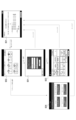
図9-1~図9-5は、サイネージアプリケーション300の表示がON(503が選択)に設定されている場合に操作部209に表示される画面のフローを示した図である。図9-1、図9-2、図9-3は、図7(a)の画面でボタン701が選択された場合、すなわち、ユーザ認証機能がONに設定された場合の画面フローを示した図である。
Figures 9-1 to 9-5 are diagrams showing the screen flow displayed on the
図9-1は、図7(b)の画面でボタン703が選択された場合、すなわち、認証画面を操作開始時に表示する設定がされた場合の画面フローを示した図である。加えて、図9-1は、図5-2の画面でラジオボタン513の選択が「ログイン後」とされた場合の画面フローである。認証画面901を介してユーザにより入力された認証情報に基づいてユーザ認証が成功し、ログイン処理が完了すると、サイネージアプリケーション300の画面801が表示される。この画面801は、図8で示した画面と同一である。ここで、画面右上の閉じるボタンが押下されると、画面801が非表示となり、メインメニュー画面902が表示される。メインメニュー画面902で「コピー」ボタンが操作されるとコピー設定画面903に遷移し、メインメニュー画面902で「スキャンして保存」ボタンが操作されるとスキャンして保存設定画面904に遷移する。
Figure 9-1 is a diagram showing the screen flow when
このように、認証画面を操作開始時に表示する設定がされており、ログイン後にWebコンテンツを表示する設定がされている場合、ユーザのログインが完了したタイミングで、サイネージアプリケーション300によりWebコンテンツが表示される。よって、ユーザが画像処理装置100を使い始めたときにWebコンテンツが表示されることとなるので、ユーザの注意を惹くことができ、社内の通達事項等を効果的にユーザに知らしめることが可能となる。
In this way, if the authentication screen is set to be displayed when operation starts and the web content is set to be displayed after login, the
図9-2は、図7(b)の画面でボタン703が選択された場合、すなわち、認証画面を操作開始時に表示する設定がされた場合の画面フローを示した図である。加えて、図9-2は、図5-2の画面でラジオボタン513の選択がオートクリア後とされた場合の画面フローである。図9-1と比較すると、ユーザが操作部209を操作しないままオートクリア移行時間が経過し、オートクリア処理が行われると、サイネージアプリケーション300の画面801が表示される。そして、画面右上の閉じるボタンが押下されると、画面801が非表示となり、認証画面901が表示される。この画面801は、図8で示した画面と同一である。また、認証画面901を介してユーザにより入力された認証情報に基づいてユーザ認証が成功し、ログイン処理が完了すると、メインメニュー画面902が表示される。
Figure 9-2 is a diagram showing the screen flow when
このように、認証画面を操作開始時に表示する設定がされており、オートクリア後にWebコンテンツを操作終了後表示する設定がされている場合、オートクリアが行われたタイミングで、サイネージアプリケーション300によりWebコンテンツが表示される。よって、ユーザが画像処理装置100を操作する前からWebコンテンツが表示されるため、画像処理装置100を操作するつもりがなく、前を通り過ぎただけのユーザに対してもWebコンテンツが目にも止まる機会が増え、広告として高い効果が期待できる。
In this way, if the authentication screen is set to be displayed when operation starts and the web content is set to be displayed after auto-clear and operation ends, the
図9-3は、図7(c)の画面でボタン704が選択され、すなわち、認証画面を機能選択時に表示する設定がされた場合の画面フローを示した図である。また、図7(d)に示す通り、認証が必要な機能として、「コピー」、「保存ファイルの利用」、「プリント」機能が選択されているものとする。加えて、図9-3は、図5-2の画面でラジオボタン513の選択が「オートクリア後」とされた場合の画面フローである。
Figure 9-3 is a diagram showing the screen flow when
この場合、認証画面901を介して入力された情報に基づきユーザ認証及びログイン処理が完了しても、サイネージアプリケーション300の画面は表示されない。その代わり、ユーザが操作部209を操作しないままオートクリア移行時間が経過し、オートクリア処理が行われると、サイネージアプリケーション300の画面801が表示される。そして、閉じるボタンが押下されると、画面801が非表示となり、メインメニュー画面902が表示される。
In this case, even if user authentication and login processing are completed based on the information entered via
このように、ユーザがログインしたタイミングでWebコンテンツを表示せずに、オートクリアが発生したタイミングで、Webコンテンツが表示される。 In this way, the web content is not displayed when the user logs in, but is displayed when auto-clear occurs.
ここでは、図5-2の画面でラジオボタン513の選択が「オートクリア後」になっているが、「ログイン後」が選択されている場合はユーザ認証が必要な機能がユーザにより選択され、ユーザがログインした後にWebコンテンツが表示されることになる。一方、ユーザ認証が不要な機能が選択された場合には、ログインが行われないため、Webコンテンツが表示されることもない。例えば、「スキャンして保存」機能を頻繁に使用し、「コピー」機能をほとんど使用しないユーザにとっては、Webコンテンツを目にする機会がほとんどなくなってしまう。これに対し、Webコンテンツの表示タイミングをオートクリア発生時にすることにより、オートクリア後に画像処理装置100を使用するユーザが操作部209を最初に操作するときにはWebコンテンツを見ることとなる。よって、使用される機能に関係なく画像処理装置100は待機中に情報共有用の装置として動作することが可能となり、通達事項等を効果的にユーザに知らしめることができる。また、仮にラジオボタン513が「ログイン後」に選択されている場合であっても、認証画面を機能選択時に表示する設定がされた場合は自動でラジオボタン513が「オートクリア後」に切り替わるようにしても良い。
Here, the
図9-4は、図7(a)の画面でボタン702が選択された場合、すなわち、ユーザ認証機能がOFFに設定された場合の画面フローを示した図である。
Figure 9-4 shows the screen flow when
この場合、図9-3の場合と同様に、オートクリアが発生したタイミングでサイネージアプリケーション300の画面801が表示される。
In this case, as in the case of Figure 9-3, the
このように、ユーザ認証機能を使用しない設定がされている場合であっても、オートクリアが発生したタイミングでWebコンテンツを表示することにより、画像処理装置100をサイネージとして有効活用することができる。図5-2の画面でラジオボタン513が「オートクリア後」「ログイン後」どちらに選択されていても、ユーザ認証機能がOFFに設定された場合には、オートクリアが発生したタイミングでサイネージアプリケーション300の画面801が表示されるようにしても良い。
In this way, even if the user authentication function is set not to be used, the
図9-5は、CPU201により実行されるプリント開始時のWebコンテンツ表示の画面フローを示した図である。ユーザがメインメニュー画面902において「プリント」機能を選択し、プリント画面905が表示される。プリント画面905が表示されている状態で、ユーザによるプリント開始操作が行われた際に、図5-2の画面でチェックボックス514がチェックされている場合、サイネージアプリケーション300の画面801が表示される。そして、閉じるボタンが押下されると、画面801が非表示となり、プリント画面905が表示される。一方で、プリント画面905が表示されている状態で、ユーザによるプリント開始操作が行われた際に、図5-2の画面でチェックボックス514がチェックされていない場合、サイネージアプリケーション300の画面801は表示されない。また、プリント画面905を表示しない状態で、プリントジョブの開始を受け付けた場合、サイネージアプリケーション300の画面801は表示されない。
Figure 9-5 is a diagram showing the screen flow of web content display at the start of printing executed by
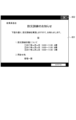
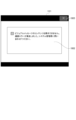
図10は、サイネージアプリケーション300により、Webコンテンツ表示のタイミングでエラーを検知した場合に、操作部209に表示するエラーの画面例1001を示した図である。つまり、通信エラー等の理由で画像処理装置100がコンテンツを表示できない場合に表示される画面の例である。エラーメッセージ表示エリア1002には、検知したエラーの内容を表示する。図10の例では、通信エラーを検知した際に「通信エラー」を知らせるためのエラー表示を行っている。エラー種別はこれに限らず、図11で説明する複数のエラー種別に応じたエラーメッセージをエラーメッセージ表示エリア1002に表示する。閉じるボタン1003が押下されるとエラー画面は非表示となる。
Figure 10 shows an
図11は、Webコンテンツ表示に関するエラーの一例を示す。エラーテーブル1100はエラーコードとエラー内容を対応付けたテーブルであり、検知されたエラーを特定、通知するために用いられる。なお、エラーテーブル1100は、画像処理装置100のHDD204に記憶しても良いし、コンテンツサーバ120に記憶するようにしても良い。
Figure 11 shows an example of an error related to the display of web content. The error table 1100 is a table that associates error codes with error contents, and is used to identify and notify detected errors. The error table 1100 may be stored in the
エラーコード1101列は、検知したエラーを画像処理装置100等が判断するためのエラーコードを示す。エラー種別1102列は、エラーコードに対応するエラー種別を示す。
The
1103行で示されるエラーは、図5-2のテキストボックス505またはテキストボックス508に入力されたコンテンツのパスに従ってWebコンテンツの取得を行う際に、Webコンテンツが存在しないなどの理由から、Webコンテンツの取得に失敗した場合に発生する「ファイルなしエラー」である。
The error shown on
1104行で示されるエラーは、図5-2のテキストボックス505に入力されたコンテンツのパスに対してアクセスするための認証が必要である場合に、テキストボックス506およびテキストボックス507の入力に従って認証を行い、認証に失敗した場合に発生する「認証エラー」である。同様に、テキストボックス508に入力されたコンテンツのパスに対して認証がかけられている場合に、テキストボックス509およびテキストボックス510の入力に従って認証を行い、認証に失敗した場合に発生する「認証エラー」も含まれる。
The error shown on
1105行で示されるエラーは、コンテンツサーバ120に対してWebコンテンツの取得を行う際に、ネットワーク障害等により、Webコンテンツの取得に失敗した場合に発生する「通信エラー」である。
The error shown on
1106行で示されるエラーは、1103~1105または1107~1109以外のエラーであり、画像形成装置100の故障などによりサイネージアプリケーション300では想定されないケースで発生する「システムエラー」である。画像形成装置100の故障等により正常にコンテンツを表示できない場合に検知されるエラーである。
The error indicated on
1107行で示されるエラーは、取得するWebコンテンツが、予め決められたコンテンツの取得可能なデータサイズ上限値を上回る場合に発生する「データサイズオーバーエラー」である。
The error shown on
1108行で示されるエラーは、取得したWebコンテンツがWebコンテンツ表示部302で表示可能なフォーマットでない場合に発生する「フォーマット不一致エラー」である。
The error shown on
続いて、本実施形態の特徴である、画像処理装置100がWebコンテンツを表示するタイミングでエラーを検知した場合にエラー表示を行うフローについて説明する。
Next, we will explain the flow for displaying an error when the
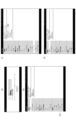
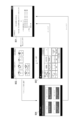
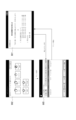
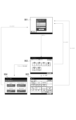
図12-1、2は、サイネージアプリケーション300の表示がONに設定されている場合に操作部209に表示される画面のフローを示した図である。さらに、エラー検知時のエラー画面表示のON/OFFがそれぞれ設定されたケースで説明を行う。
Figures 12-1 and 12-2 are diagrams showing the flow of the screen displayed on the
図12-1は、図7(b)の画面でボタン703が選択された場合、すなわち、認証画面を操作開始時に表示する設定がされた場合の画面フローを示した図である。加えて、図12-1は、図5-2の画面でラジオボタン513の選択が「ログイン後」であり、かつチェックボックス515にチェックが入力された場合の画面フローである。認証画面901を介してユーザにより入力された認証情報に基づいてユーザ認証が成功し、ログイン処理が完了したタイミングでサイネージアプリケーション300がWebコンテンツの表示エラーを検知すると、エラー画面1001が表示される。ここで、閉じるボタン1003が押下されると、画面1001が非表示となり、メインメニュー画面902が表示される。
Figure 12-1 is a diagram showing the screen flow when
このように、認証画面を操作開始時に表示する設定がされており、ログイン後にWebコンテンツを表示する、かつエラーメッセージを表示する設定がされている場合、ユーザのログインが完了したタイミングで、エラー画面1001が表示される。よって、サイネージアプリケーション300のエラーが発生した時点で速やかにエラー情報をユーザに通知することが可能となる。エラー通知を見たユーザが管理者に報告することで、エラーを迅速に解消できる可能性はある。しかし、ユーザがエラー通知を見たところで、一人でエラーを解消できる可能性は低く、管理者に報告することくらいしかできない。またWebコンテンツの表示エラーが起こったとしても画像処理装置自体は通常に使用できるため、一様にエラー表示を行うとユーザにとっては煩わしい。
In this way, if the authentication screen is set to be displayed when operation starts, and if web content is set to be displayed after login and an error message is also set to be displayed,
図12-2は、図7(b)の画面でボタン703が選択された場合、すなわち、認証画面を操作開始時に表示する設定がされた場合の画面フローを示した図である。加えて、図12-2は、図5-2の画面でラジオボタン513の選択が「ログイン後」であり、かつチェックボックス515にチェックが入力されていない場合の画面フローである。図12-1と比較すると、認証画面901を介してユーザにより入力された認証情報に基づいてユーザ認証が成功し、ログイン処理が完了したタイミングでサイネージアプリケーション300がWebコンテンツの表示エラーを検知した場合であっても、エラーの画面1001は表示されない。このように、サイネージアプリケーション300がWebコンテンツを表示するエラーを検知した場合であっても、エラー画面を表示しないように制御できる。これにより、エラーに対処することが困難なユーザがエラーメッセージを見ることが無くなる。
Figure 12-2 is a diagram showing the screen flow when
図12-1,2のようにサイネージ表示のエラー通知のONとOFFを管理者、が切り替えることができる。ここでサイネージアプリケーション300の設定を一般ユーザが可能である場合は一般ユーザもエラー通知のONとOFFを切り替えることができる。エラー通知ONにすると、エラー通知を見たユーザが管理者に報告することにより管理者がエラーに早く気づける可能性が高まる。一方、エラー通知OFFにすることで、ユーザにとって煩わしい通知表示を出すことを防ぐことができる。
As shown in Figures 12-1 and 12-2, an administrator can switch the error notification on the signage display between ON and OFF. If general users are able to configure the
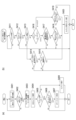
図4(a)(b)は、サイネージアプリケーション300がWebコンテンツを表示するタイミングでエラーを検知した場合に、エラー画面1001を表示する処理を示すフローチャートである。フローチャートに示す各処理はCPU201がROM202、HDD204に記憶されている制御プログラムをRAM203に読み出し実行することで実現される。
Figures 4(a) and (b) are flowcharts showing the process of displaying an
S401において、Webコンテンツ表示部302は、Webコンテンツの表示トリガー発行処理を行う。表示トリガー発行処理とは、Webコンテンツ表示部302がコンテンツを表示するイベントが起きたか否か検知する処理である。S401の処理を図4(b)のフローチャートで説明する。 In S401, the Web content display unit 302 performs a display trigger issuing process for Web content. The display trigger issuing process is a process for detecting whether an event that causes the Web content display unit 302 to display content has occurred. The process of S401 is explained using the flowchart in FIG. 4(b).
図4(b)はイベント受信部307がWebコンテンツ表示のイベントを受信し、図5-2の503~514に設定された値に従い、Webコンテンツの表示トリガー発行を行うか否か判断する処理を示している。
Figure 4 (b) shows the process in which the
S411において、イベント受信部307が、認証処理部308、からログインイベント、オートクリア処理部309からオートクリアイベント、またはプリント管理部310からプリントジョブ開始イベントを受信したか判断する。いずれかのイベントを受信したとイベント受信部307が判断した場合、処理はS412に進む。いずれのイベントも受信していないとイベント受信部307が判断した場合、処理はS411に戻りイベントの受信を待つ。
In S411, the
S412において、コンテンツ管理部305がコンテンツ設定管理テーブル306からキー603に対応する設定値を取得して、サイネージアプリケーション300の表示がONになっているか否か判断する。表示がOFFになっているとコンテンツ管理部305が判断した場合、処理を終了する。表示がONになっているとコンテンツ管理部305が判断した場合、処理はS413に進む。
In S412, the content management unit 305 obtains the setting value corresponding to key 603 from the content setting management table 306 and determines whether the display of the
S413において、イベント受信部307が、S411における受信したイベントがプリント開始イベントであるか否かを判断する。プリント開始イベントであるとイベント受信部307が判断した場合、処理はS414に進む。プリント開始イベントでないとイベント受信部307が判断した場合、処理はS416に進む。
In S413, the
S414において、コンテンツ管理部305は、コンテンツ設定管理テーブル306からキー614に対応する設定値を取得して、プリント開始時のコンテンツ表示がONになっているか判断する。表示がOFFになっているとコンテンツ管理部305が判断した場合、処理を終了する。表示がONになっているとコンテンツ管理部305が判断した場合、処理はS415に進む。 In S414, the content management unit 305 obtains the setting value corresponding to key 614 from the content setting management table 306 and determines whether the content display at the start of printing is ON. If the content management unit 305 determines that the display is OFF, the processing ends. If the content management unit 305 determines that the display is ON, the processing proceeds to S415.
S415において、画面制御部303はプリント画面905が操作部209に表示されているかを判断する。プリント画面905が表示されていないと画面制御部303が判断した場合、処理を終了する。例えば、PC等の外部装置から送信された印刷データを画像処理装置100が受信したタイミングで印刷実行する場合は、画像処理装置100の前にユーザがいる可能性が低いのでサイネージを表示しない。プリント画面905が表示されていると画面制御部303が判断した場合、ステップS420に進む。
In S415, the
S416において、イベント受信部307はS411において受信したイベントがログインイベントか、オートクリアイベントか判断する。ログインイベントであるとイベント受信部307が判断した場合、処理はS417に進む。オートクリアイベントであるとイベント受信部307が判断した場合、処理はS419に進む。
In S416, the
S417において、認証処理部308は認証画面の表示設定が、操作開始時に認証画面を表示する設定であるか否かを判断する。操作開始時に認証画面を表示する設定ではないと認証処理部308が判断した場合、すなわち、機能選択時に認証画面を表示する設定の場合、処理を終了する。つまり、ここではコピーやスキャン機能をユーザが選択した後に認証画面を表示する設定であるときは、ログインイベントが発生してもWebコンテンツの表示は行わない例を示している。操作開始時に認証画面を表示する設定であると認証処理部308が判断した場合、処理はS418に進む。
In S417, the
S418において、コンテンツ管理部305は、コンテンツ設定管理テーブル306からキー613に対応する設定値を取得して、Webコンテンツを表示するタイミングがログイン後か否かを判断する。ログイン後であるとコンテンツ管理部305が判断した場合、処理はS420に進む。ログイン後ではないとコンテンツ管理部305が判断した場合、処理は終了する。 In S418, the content management unit 305 obtains the setting value corresponding to key 613 from the content setting management table 306 and determines whether the timing for displaying the Web content is after login. If the content management unit 305 determines that the timing is after login, the process proceeds to S420. If the content management unit 305 determines that the timing is not after login, the process ends.
S419において、コンテンツ管理部305は、コンテンツ設定管理テーブル306からキー613に対応する設定値を取得して、Webコンテンツを表示するタイミングがオートクリア後か否かを判断する。オートクリア後である場合とコンテンツ管理部305が判断した場合、処理はS420に進む。オートクリア後ではないとコンテンツ管理部305が判断した場合、処理は終了する。つまり、画像処理装置100は自装置の状態が所定の条件を満たすとコンテンツ表示トリガーを発行する。
In S419, the content management unit 305 obtains the setting value corresponding to key 613 from the content setting management table 306 and determines whether the timing to display the Web content is after auto-clear. If the content management unit 305 determines that the timing is after auto-clear, the process proceeds to S420. If the content management unit 305 determines that the timing is not after auto-clear, the process ends. In other words, the
図4(a)に戻る。S402において、Webコンテンツ表示部302は、S401の処理により発行されたWebコンテンツ表示トリガーを受信したかを判断する。Webコンテンツ表示トリガーを受信したと判断した場合、S403に進む。一方で、Webコンテンツ表示トリガーを受信していないと判断した場合、S401に戻り処理を繰り返す。 Returning to FIG. 4A, in S402, the Web content display unit 302 determines whether the Web content display trigger issued by the processing of S401 has been received. If it is determined that the Web content display trigger has been received, the process proceeds to S403. On the other hand, if it is determined that the Web content display trigger has not been received, the process returns to S401 and repeats the processing.
S403において、コンテンツ管理部305はコンテンツ設定管理テーブル306を参照し、Webコンテンツのパスを取得して、Webコンテンツ表示部302に通知する。 In S403, the content management unit 305 refers to the content setting management table 306, obtains the path of the web content, and notifies the web content display unit 302.
S404において、Webコンテンツ表示部302は、S406で取得したパスに基づいて、コンテンツサーバ120よりWebコンテンツを取得し、RAM203に読み込む。
In S404, the web content display unit 302 acquires the web content from the
S405において、Webコンテンツ表示部302は、コンテンツ表示におけるエラーがあるか否かを判断する。エラーが発生したと判断した場合、S406に進む。一方で、エラーが発生していないと判断した場合、S408に進む。ここでコンテンツ表示におけるエラーがあるか否かの判断の一例を示す。コンテンツを表示する際に通信エラーによりコンテンツサーバ120からコンテンツを取得できない場合、「通信エラー」でコンテンツ表示におけるエラーがあると判断される。また予めコンテンツサーバ120からコンテンツを取得し画像処理装置内に格納しておく場合、設定されたパスにファイルが無ければ「ファイルなしエラー」を示すフラグを予めたてておく。そしてコンテンツ表示のタイミングで、当該フラグを基にして、「ファイルなしエラー」でコンテンツ表示におけるエラーがあると判断される。
In S405, the Web content display unit 302 judges whether or not there is an error in the content display. If it is judged that an error has occurred, the process proceeds to S406. On the other hand, if it is judged that no error has occurred, the process proceeds to S408. Here is an example of judging whether or not there is an error in the content display. If a communication error occurs when displaying the content and the content cannot be acquired from the
S406において、コンテンツ管理部305は、コンテンツ設定管理テーブル306からキー615に対応する設定値を取得して、エラーメッセージの表示がONになっているか否か判断する。表示がOFFになっているとコンテンツ管理部305が判断した場合、エラーメッセージを表示せず処理を終了する。表示がONになっているとコンテンツ管理部305が判断した場合、処理はS407に進む。 In S406, the content management unit 305 obtains the setting value corresponding to key 615 from the content setting management table 306 and determines whether the display of the error message is ON. If the content management unit 305 determines that the display is OFF, the processing ends without displaying the error message. If the content management unit 305 determines that the display is ON, the processing proceeds to S407.
S407において、Webコンテンツ表示部302もしくは画面制御部303は、操作部209を介してエラーメッセージの表示を行う。その際、表示するエラー内容は、エラー発生の検知時に得られるエラーコード1101に応じて適切なエラーメッセージの表示を行う。
In S407, the web content display unit 302 or the
S408において、Webコンテンツ表示部302がS404で取得されたWebコンテンツを出力し、当該Webコンテンツが操作部209に表示される。
In S408, the web content display unit 302 outputs the web content acquired in S404, and the web content is displayed on the
以上のように、本実施形態の画像処理装置100によれば、サイネージ表示の際に、エラーメッセージ表示の設定に応じて、エラーメッセージの表示制御を行う。管理者やユーザがエラーメッセージを非表示に設定することすることで、全てのユーザがエラー画面を見ずに済む。エラー画面を見ることによってユーザが混乱することを防げる。また、必要な場合にはエラーメッセージの表示をONに設定することで、エラーをユーザに気が付かせることができる。エラーに気づいたユーザが管理者等に報告することで速やかにエラーを解決させることも可能となる。
As described above, according to the
また、エラーの内容に応じてエラー通知画面を表示するか否か自動で切り替えるようにしても良い。具体的にはS405において、Webコンテンツ表示部302は、コンテンツ表示におけるエラーが発生したかを判断する際に、発生したエラーの内容を記憶しておく。そしてS407でエラーメッセージを表示する際に、当該記憶したエラー内容が特定のエラーであればエラーメッセージを表示するようにし、それ以外のエラーであればエラーメッセージを表示しないように切り替えるようにする。エラーメッセージを表示する対象となるエラーの内容は管理者やユーザが予め図5-2(e)~(g)に示すサイネージアプリケーション300の設定画面等で設定できるようにしても良い。
In addition, the system may automatically switch whether or not to display an error notification screen depending on the content of the error. Specifically, in S405, when the Web content display unit 302 determines whether an error has occurred in the content display, it stores the content of the error that has occurred. Then, when displaying an error message in S407, if the stored error content is a specific error, the system displays the error message, and if it is any other error, it switches to not displaying the error message. The content of the error for which an error message is displayed may be set in advance by an administrator or user on a setting screen of the
(第二の実施形態)
第一の実施形態では、サイネージ表示の際にエラーが発生した場合、エラー通知の表示をON/OFFできる設定を設ける例を示した。本実施形態では、エラー表示ON/OFFの設定に応じて一様にエラー通知を表示するかしないかを決めるのではなく、画像処理装置100を操作するユーザに応じてエラー通知をするか否か制御する例を示す。なお、本実施形態は第一の実施形態と基本構成は同じであるため差分のみ示す。
Second Embodiment
In the first embodiment, an example is shown in which a setting is provided that allows the display of an error notification to be turned ON/OFF when an error occurs during signage display. In this embodiment, an example is shown in which whether or not to display an error notification is controlled depending on the user operating the
図13は、本実施形態におけるWebコンテンツ表示に関するエラーが発生した場合にサイネージアプリケーション300がエラー画面1001を表示する処理を示すフローチャートである。
Figure 13 is a flowchart showing the process by which the
図13のフローチャートの基本構成は図4(a)のフローチャートと同じであるため差分のみ示す。 The basic structure of the flowchart in Figure 13 is the same as the flowchart in Figure 4(a), so only the differences are shown.
認証処理部308は予め画像処理装置100に登録してある各ユーザ情報をAdministrator,GeneralUser,DeviceAdmin,NetworkAdminといった権限情報に対応付けて記憶しておく。つまり、各ユーザ情報に管理者であるか、ネットワーク管理者であるか、一般ユーザであるかの権限情報を対応付けておく。そして例えば、管理者のみにエラー通知を行うようにし、他のユーザにはエラー通知を行わないように制御することが可能である。どの権限情報を持つユーザにエラーを通知するかは予め管理者等が設定しているものとする。
The
S1301において、Webコンテンツ表示部302は、認証処理部308から画像処理装置100を操作しているユーザの権限情報(認証ロール)を取得する。
In S1301, the web content display unit 302 obtains authority information (authentication role) of the user operating the
S1302において、Webコンテンツ表示部302は、S1301で取得した認証ロールからエラーメッセージの表示を許可するユーザであるかを判断する。エラーメッセージの表示を許可するロールであると判断した場合、S1307に進み、操作部209にエラーメッセージの表示を行う。一方で、エラーメッセージの表示を許可しないと判断した場合、操作部209にはコンテンツおよびエラーメッセージの表示を表示せずに処理を終了する。
In S1302, the web content display unit 302 determines whether the user is permitted to display an error message based on the authentication role acquired in S1301. If it is determined that the role permits the display of an error message, the process proceeds to S1307, and an error message is displayed on the
以上のように、認証ロールによる判断を加えることで、特定のユーザにのみエラーメッセージを表示することができ、より適切にエラーメッセージ表示を行うことが可能となる。また、エラーが発生した際に図11のエラーコードを参照し、エラー内容に応じてエラー通知するユーザを変更するようにしても良い。例えばエラー内容が通信エラーである場合は、エラーに対応できるネットワーク管理者にエラー通知を行うようにしても良い。また、一般ユーザでも解消できるようなエラー内容であれば全てのユーザにエラー通知を行うようにしても良い。 As described above, by adding a judgment based on the authentication role, it is possible to display an error message only to specific users, making it possible to display error messages more appropriately. Furthermore, when an error occurs, the error code in FIG. 11 can be referenced, and the user to whom the error is notified can be changed depending on the error content. For example, if the error content is a communication error, the error can be notified to a network administrator who can handle the error. Furthermore, if the error content is something that a general user can resolve, the error can be notified to all users.
(第三の実施形態)
第一の実施形態では、サイネージアプリケーション300の設定画面でエラー通知を表示するか否か設定できる例を示した。本実施形態では、サイネージアプリケーション300の設定画面に更に、コンテンツ表示の際にエラーが発生した場合に管理者にメールで通知するか否かを設定できる項目を設ける例を示す。なお、本実施形態は第一の実施形態と基本構成は同じであるため差分のみ示す。
Third Embodiment
In the first embodiment, an example is shown in which it is possible to set whether or not to display an error notification on the setting screen of
本実施形態におけるサイネージアプリケーション300の設定画面の例を図14に示す。コンテンツ表示する際にエラーが発生した場合、管理者にメールで通知するか否か設定できる項目1401を設ける。図14のようにエラーメッセージ表示(515)がOFFであり、エラーを管理者にメールで通知(1401)がONである場合、コンテンツ表示のエラーが生じてもエラー画面は表示されることはない。その代わりにエラーがあれば管理者にメール通知されるため、ユーザに通知画面を表示することなく、管理者のみにエラーが起きたことを通知することができる。ここでエラーメッセージ表示(515)がOFFに設定された場合は、エラーを管理者にメールで通知(1401)が自動でONになるようにしても良い。また、項目1401を設けずともエラーメッセージ表示(515)がOFFにされていたら、自動で管理者にエラーのメール通知がされるようにしても良い。
An example of the setting screen of the
(その他の実施形態)
なお、上記実施形態ではコピー機能、スキャナ機能等の複数の機能を有する画像処理装置100を例として説明したが、このうち一部の機能のみを有する単機能の画像処理装置にも本発明は適用可能である。また、パーソナルコンピュータやPDA、携帯電話、FAX、カメラ、ビデオカメラ、その他の画像ビューワ等、他の情報処理装置に適用しても構わない。
Other Embodiments
In the above embodiment, the
また、本発明は、以下の処理を実行することによっても実現される。即ち、上述した実施形態の機能を実現するソフトウェア(プログラム)を、ネットワーク又は各種記憶媒体を介してシステム或いは装置に供給し、そのシステム或いは装置のコンピュータ(またはCPUやMPU等)がプログラムを読み出して実行する処理である。この場合、そのコンピュータプログラム、及び該コンピュータプログラムを記憶した記憶媒体は本発明を構成することになる。 The present invention can also be realized by executing the following process. That is, software (program) that realizes the functions of the above-mentioned embodiments is supplied to a system or device via a network or various storage media, and the computer (or CPU, MPU, etc.) of the system or device reads and executes the program. In this case, the computer program and the storage medium on which the computer program is stored constitute the present invention.
201 CPU
202 ROM
203 RAM
204 HDD
208 ネットワークI/F
209 操作部
210 プリンタ
211 スキャナ
201 CPU
202 ROM
203 RAM
204 HDD
208 Network I/F
209
Claims (13)
前記画像処理装置のユーザに情報を周知するためのコンテンツであって、Webブラウザを用いて表示されるコンテンツに係る情報を登録する登録手段と、
前記コンテンツを表示する所定の条件を満たした場合、前記コンテンツを表示する表示手段と、
前記所定の条件を満たした場合であって、当該コンテンツを表示できないエラーが検知された場合に、当該エラーを通知する画面を表示するか否かを決定する決定手段と、
前記決定手段による決定に従って前記表示手段による前記コンテンツの表示を制御する制御手段と、
を有し、
前記決定手段は、前記画像処理装置を操作するユーザの権限情報に応じて前記エラーを通知する画面を表示するか否かを決定することを特徴とする画像処理装置。 An image processing device,
a registration unit for registering information related to content displayed using a web browser, the content being used to inform a user of the image processing device of information;
a display means for displaying the content when a predetermined condition for displaying the content is satisfied;
a determination means for determining whether or not to display a screen notifying the user of an error when the predetermined condition is satisfied and an error that prevents the content from being displayed is detected;
a control means for controlling display of the content by the display means in accordance with the determination by the determination means;
having
The image processing apparatus according to claim 1, wherein the determining means determines whether or not to display a screen notifying the user of the error depending on authority information of a user who operates the image processing apparatus.
前記決定手段は、前記設定画面で受け付けた設定に基づいて、前記エラーを通知する画面を表示するか否かを決定する
ことを特徴とする請求項1に記載の画像処理装置。 The method further includes providing means for providing a setting screen for accepting a setting as to whether or not to display the screen notifying the error,
The image processing apparatus according to claim 1 , wherein the determining unit determines whether or not to display the screen notifying the error based on the settings received on the setting screen.
ことを特徴とする請求項1に記載の画像処理装置。 The image processing apparatus according to claim 1 , wherein the determining means determines whether or not to display a screen notifying the user of the detected error depending on the content of the detected error.
ことを特徴とする請求項1から3のいずれか一項に記載の画像処理装置。 The image processing device according to any one of claims 1 to 3, further comprising a transmission means for transmitting an email to a user corresponding to predetermined authority information to notify the user of an error that prevents the content from being displayed, when the display means does not display a screen notifying the user of the error.
前記表示手段は、少なくとも前記認証手段でユーザが認証されたことに応じて前記コンテンツを表示する
ことを特徴とする請求項1から4のいずれか一項に記載の画像処理装置。 further comprising an authentication means for authenticating a user of the image processing device;
The image processing device according to claim 1 , wherein the display unit displays the content at least in response to the user being authenticated by the authentication unit.
ことを特徴とする請求項1から5のいずれか一項に記載の画像処理装置。 The image processing device according to claim 1 , wherein the display unit displays the content when no operation is performed on an operation unit of the image processing device for a predetermined period of time.
ことを特徴とする請求項1から5のいずれか一項に記載の画像処理装置。 The image processing apparatus according to claim 1 , wherein the display unit displays the content in response to at least the start of a print process.
ことを特徴とする請求項1から7のいずれか一項に記載の画像処理装置。 8. The image processing apparatus according to claim 1, wherein the information registered by the registration means is a path for accessing a content.
ことを特徴とする請求項1から8のいずれか一項に記載の画像処理装置。 9. The image processing apparatus according to claim 1, wherein the content displayed on the display means is an advertisement or a bulletin board.
ことを特徴とする請求項1から9のいずれか一項に記載の画像処理装置。 The image processing device according to claim 1 , wherein the error includes a communication error.
ことを特徴とする請求項1から10のいずれか一項に記載の画像処理装置。 The image processing device according to claim 1 , wherein the content is acquired from a server connected to the image processing device via a network.
前記画像処理装置のユーザに情報を周知するためのコンテンツであって、Webブラウザを用いて表示されるコンテンツに係る情報を登録する登録工程と、
前記コンテンツを表示する所定の条件を満たした場合、前記コンテンツを表示する表示工程と、
前記所定の条件を満たした場合であって、当該コンテンツを表示できないエラーが検知された場合に、当該エラーを通知する画面を表示するか否かを決定する決定工程と、
前記決定工程による決定に従って前記表示工程による前記コンテンツの表示を制御する制御工程と、
を有し、
前記決定工程では、前記画像処理装置を操作するユーザの権限情報に応じて前記エラーを通知する画面を表示するか否かを決定することを特徴とする制御方法。 A control method executed by an image processing device, comprising:
a registration step of registering information related to content for notifying a user of the image processing device of information and displayed using a web browser;
a display step of displaying the content when a predetermined condition for displaying the content is satisfied;
a determining step of determining whether or not to display a screen notifying the user of an error when the predetermined condition is satisfied and an error that causes the content to be unable to be displayed is detected;
a control step of controlling display of the content by the display step in accordance with the determination by the determination step;
having
The control method according to the present invention, wherein in the determining step, it is determined whether or not to display a screen notifying the user of the error, depending on authority information of a user who operates the image processing device .
Priority Applications (1)
| Application Number | Priority Date | Filing Date | Title |
|---|---|---|---|
| JP2024123749A JP7686856B2 (en) | 2020-07-01 | 2024-07-30 | Image processing device, control method thereof, and program |
Applications Claiming Priority (2)
| Application Number | Priority Date | Filing Date | Title |
|---|---|---|---|
| JP2020114214A JP7532116B2 (en) | 2020-07-01 | 2020-07-01 | Image processing device, control method thereof, and program |
| JP2024123749A JP7686856B2 (en) | 2020-07-01 | 2024-07-30 | Image processing device, control method thereof, and program |
Related Parent Applications (1)
| Application Number | Title | Priority Date | Filing Date |
|---|---|---|---|
| JP2020114214A Division JP7532116B2 (en) | 2020-07-01 | 2020-07-01 | Image processing device, control method thereof, and program |
Publications (2)
| Publication Number | Publication Date |
|---|---|
| JP2024144643A JP2024144643A (en) | 2024-10-11 |
| JP7686856B2 true JP7686856B2 (en) | 2025-06-02 |
Family
ID=79167357
Family Applications (2)
| Application Number | Title | Priority Date | Filing Date |
|---|---|---|---|
| JP2020114214A Active JP7532116B2 (en) | 2020-07-01 | 2020-07-01 | Image processing device, control method thereof, and program |
| JP2024123749A Active JP7686856B2 (en) | 2020-07-01 | 2024-07-30 | Image processing device, control method thereof, and program |
Family Applications Before (1)
| Application Number | Title | Priority Date | Filing Date |
|---|---|---|---|
| JP2020114214A Active JP7532116B2 (en) | 2020-07-01 | 2020-07-01 | Image processing device, control method thereof, and program |
Country Status (2)
| Country | Link |
|---|---|
| US (1) | US12047538B2 (en) |
| JP (2) | JP7532116B2 (en) |
Citations (2)
| Publication number | Priority date | Publication date | Assignee | Title |
|---|---|---|---|---|
| JP2015228169A (en) | 2014-06-02 | 2015-12-17 | コニカミノルタ株式会社 | Image content display system and display control device |
| JP2019192147A (en) | 2018-04-27 | 2019-10-31 | シャープ株式会社 | Information processing device, display device and display system |
Family Cites Families (5)
| Publication number | Priority date | Publication date | Assignee | Title |
|---|---|---|---|---|
| JP2002041953A (en) | 2000-07-26 | 2002-02-08 | Canon Inc | Image forming system |
| JP2006059206A (en) * | 2004-08-23 | 2006-03-02 | Fuji Xerox Co Ltd | Information processor, system, information processing method and program |
| JP2013242847A (en) * | 2012-04-26 | 2013-12-05 | Mitsubishi Electric Corp | Image processing terminal and image processing method |
| JP7005189B2 (en) | 2017-06-29 | 2022-01-21 | キヤノン株式会社 | Image processing device, its control method, and program |
| JP2019010863A (en) * | 2017-06-29 | 2019-01-24 | キヤノン株式会社 | Image processing device, method for controlling the same and program |
-
2020
- 2020-07-01 JP JP2020114214A patent/JP7532116B2/en active Active
-
2021
- 2021-06-28 US US17/360,433 patent/US12047538B2/en active Active
-
2024
- 2024-07-30 JP JP2024123749A patent/JP7686856B2/en active Active
Patent Citations (2)
| Publication number | Priority date | Publication date | Assignee | Title |
|---|---|---|---|---|
| JP2015228169A (en) | 2014-06-02 | 2015-12-17 | コニカミノルタ株式会社 | Image content display system and display control device |
| JP2019192147A (en) | 2018-04-27 | 2019-10-31 | シャープ株式会社 | Information processing device, display device and display system |
Also Published As
| Publication number | Publication date |
|---|---|
| US20220006908A1 (en) | 2022-01-06 |
| JP2022012401A (en) | 2022-01-17 |
| US12047538B2 (en) | 2024-07-23 |
| JP2024144643A (en) | 2024-10-11 |
| JP7532116B2 (en) | 2024-08-13 |
Similar Documents
| Publication | Publication Date | Title |
|---|---|---|
| JP7721770B2 (en) | Image processing device, control method thereof, and program | |
| JP7346672B2 (en) | Image processing device, its control method, and program | |
| US11252284B2 (en) | Image processing apparatus associating with external apparatus, control method, and storage medium | |
| US9930192B2 (en) | Image processing apparatus, image processing system, control method of image processing apparatus, and storage medium | |
| US20080037052A1 (en) | Electronic document management device, electronic document management method, recording medium recording electronic document management program, and recording medium recording program for creating electronic document | |
| US20190349492A1 (en) | Image forming apparatus equipped with operating unit, control method therefor, and storage medium | |
| JP7532116B2 (en) | Image processing device, control method thereof, and program | |
| JP7774979B2 (en) | Image processing device, server, system, and control method and program thereof | |
| US12147721B2 (en) | Image forming apparatus, method for controlling same, and storage medium | |
| JP2023162970A (en) | Information processing device, method for controlling the same, and program | |
| JP2023078811A (en) | Image processing device, control method of image processing device and program | |
| JP6433551B2 (en) | Image processing apparatus, image processing apparatus control method, and program | |
| JP2024168655A (en) | Information processing system and program | |
| JP2021100178A (en) | Image forming apparatus | |
| JP2005197856A (en) | Document processing apparatus and system |
Legal Events
| Date | Code | Title | Description |
|---|---|---|---|
| A621 | Written request for application examination |
Free format text: JAPANESE INTERMEDIATE CODE: A621 Effective date: 20240829 |
|
| A131 | Notification of reasons for refusal |
Free format text: JAPANESE INTERMEDIATE CODE: A131 Effective date: 20250218 |
|
| A521 | Request for written amendment filed |
Free format text: JAPANESE INTERMEDIATE CODE: A523 Effective date: 20250404 |
|
| TRDD | Decision of grant or rejection written | ||
| A01 | Written decision to grant a patent or to grant a registration (utility model) |
Free format text: JAPANESE INTERMEDIATE CODE: A01 Effective date: 20250422 |
|
| A61 | First payment of annual fees (during grant procedure) |
Free format text: JAPANESE INTERMEDIATE CODE: A61 Effective date: 20250521 |
|
| R150 | Certificate of patent or registration of utility model |
Ref document number: 7686856 Country of ref document: JP Free format text: JAPANESE INTERMEDIATE CODE: R150 |