JP7686826B2 - Information processing apparatus, image forming apparatus, and control method thereof - Google Patents
Information processing apparatus, image forming apparatus, and control method thereof Download PDFInfo
- Publication number
- JP7686826B2 JP7686826B2 JP2024040831A JP2024040831A JP7686826B2 JP 7686826 B2 JP7686826 B2 JP 7686826B2 JP 2024040831 A JP2024040831 A JP 2024040831A JP 2024040831 A JP2024040831 A JP 2024040831A JP 7686826 B2 JP7686826 B2 JP 7686826B2
- Authority
- JP
- Japan
- Prior art keywords
- printer
- image forming
- identification information
- user
- Prior art date
- Legal status (The legal status is an assumption and is not a legal conclusion. Google has not performed a legal analysis and makes no representation as to the accuracy of the status listed.)
- Active
Links
Images





Classifications
-
- G—PHYSICS
- G06—COMPUTING OR CALCULATING; COUNTING
- G06F—ELECTRIC DIGITAL DATA PROCESSING
- G06F3/00—Input arrangements for transferring data to be processed into a form capable of being handled by the computer; Output arrangements for transferring data from processing unit to output unit, e.g. interface arrangements
- G06F3/12—Digital output to print unit, e.g. line printer, chain printer
- G06F3/1201—Dedicated interfaces to print systems
- G06F3/1223—Dedicated interfaces to print systems specifically adapted to use a particular technique
- G06F3/1237—Print job management
- G06F3/1238—Secure printing, e.g. user identification, user rights for device usage, unallowed content, blanking portions or fields of a page, releasing held jobs
-
- G—PHYSICS
- G06—COMPUTING OR CALCULATING; COUNTING
- G06F—ELECTRIC DIGITAL DATA PROCESSING
- G06F3/00—Input arrangements for transferring data to be processed into a form capable of being handled by the computer; Output arrangements for transferring data from processing unit to output unit, e.g. interface arrangements
- G06F3/12—Digital output to print unit, e.g. line printer, chain printer
- G06F3/1201—Dedicated interfaces to print systems
- G06F3/1202—Dedicated interfaces to print systems specifically adapted to achieve a particular effect
- G06F3/1203—Improving or facilitating administration, e.g. print management
-
- G—PHYSICS
- G06—COMPUTING OR CALCULATING; COUNTING
- G06F—ELECTRIC DIGITAL DATA PROCESSING
- G06F3/00—Input arrangements for transferring data to be processed into a form capable of being handled by the computer; Output arrangements for transferring data from processing unit to output unit, e.g. interface arrangements
- G06F3/12—Digital output to print unit, e.g. line printer, chain printer
- G06F3/1201—Dedicated interfaces to print systems
- G06F3/1202—Dedicated interfaces to print systems specifically adapted to achieve a particular effect
- G06F3/1222—Increasing security of the print job
-
- G—PHYSICS
- G06—COMPUTING OR CALCULATING; COUNTING
- G06F—ELECTRIC DIGITAL DATA PROCESSING
- G06F3/00—Input arrangements for transferring data to be processed into a form capable of being handled by the computer; Output arrangements for transferring data from processing unit to output unit, e.g. interface arrangements
- G06F3/12—Digital output to print unit, e.g. line printer, chain printer
- G06F3/1201—Dedicated interfaces to print systems
- G06F3/1223—Dedicated interfaces to print systems specifically adapted to use a particular technique
- G06F3/1229—Printer resources management or printer maintenance, e.g. device status, power levels
- G06F3/1231—Device related settings, e.g. IP address, Name, Identification
-
- G—PHYSICS
- G06—COMPUTING OR CALCULATING; COUNTING
- G06F—ELECTRIC DIGITAL DATA PROCESSING
- G06F3/00—Input arrangements for transferring data to be processed into a form capable of being handled by the computer; Output arrangements for transferring data from processing unit to output unit, e.g. interface arrangements
- G06F3/12—Digital output to print unit, e.g. line printer, chain printer
- G06F3/1201—Dedicated interfaces to print systems
- G06F3/1278—Dedicated interfaces to print systems specifically adapted to adopt a particular infrastructure
- G06F3/1285—Remote printer device, e.g. being remote from client or server
- G06F3/1287—Remote printer device, e.g. being remote from client or server via internet
-
- G—PHYSICS
- G06—COMPUTING OR CALCULATING; COUNTING
- G06F—ELECTRIC DIGITAL DATA PROCESSING
- G06F3/00—Input arrangements for transferring data to be processed into a form capable of being handled by the computer; Output arrangements for transferring data from processing unit to output unit, e.g. interface arrangements
- G06F3/12—Digital output to print unit, e.g. line printer, chain printer
- G06F3/1201—Dedicated interfaces to print systems
- G06F3/1278—Dedicated interfaces to print systems specifically adapted to adopt a particular infrastructure
- G06F3/1292—Mobile client, e.g. wireless printing
-
- H—ELECTRICITY
- H04—ELECTRIC COMMUNICATION TECHNIQUE
- H04N—PICTORIAL COMMUNICATION, e.g. TELEVISION
- H04N1/00—Scanning, transmission or reproduction of documents or the like, e.g. facsimile transmission; Details thereof
- H04N1/44—Secrecy systems
- H04N1/4406—Restricting access, e.g. according to user identity
- H04N1/4413—Restricting access, e.g. according to user identity involving the use of passwords, ID codes or the like, e.g. PIN
Landscapes
- Engineering & Computer Science (AREA)
- Theoretical Computer Science (AREA)
- Human Computer Interaction (AREA)
- Physics & Mathematics (AREA)
- General Engineering & Computer Science (AREA)
- General Physics & Mathematics (AREA)
- Computer Networks & Wireless Communication (AREA)
- Multimedia (AREA)
- Signal Processing (AREA)
- Computer Security & Cryptography (AREA)
- Accessory Devices And Overall Control Thereof (AREA)
- Facsimiles In General (AREA)
Description
本発明は、サーバシステムに登録されている画像形成装置のデフォルト設定に関するものである。 The present invention relates to default settings for image forming devices registered in a server system.
クラウドサービスの普及に伴い、印刷機器もネットワーク通信機能を備え、ユーザが端末からインターネットを介して印刷指示を行うクラウドプリントサービスが提供されている。ユーザは様々な端末からインターネット上のクラウドプリントサービスにログインすると、クラウドプリントサービスに登録されているプリンタに印刷が可能となる。しかし、クラウドプリントサービスに登録されているプリンタは様々な場所に存在しており、クラウドプリントサービスに登録されているプリンタが多いと、ユーザが利用したいプリンタを選択する手間が発生する。特許文献1では、利用したいプリンタで画像コードを読み取ると、クラウドプリントサーバがプリンタに与えた物理プリンタIDがユーザの端末に通知される。そして、その物理IDとユーザIDを含む設定要求をクラウドプリントサービスに送ることでプリンタを利用可能にする方法が記載されている。 As cloud services become more widespread, printing devices are also equipped with network communication functions, and cloud print services are being provided that allow users to issue print instructions from their terminals via the Internet. When users log in to cloud print services on the Internet from various terminals, they can print to printers registered with the cloud print service. However, printers registered with the cloud print service are located in various locations, and if there are many printers registered with the cloud print service, it becomes time-consuming for the user to select the printer they want to use. In Patent Document 1, when an image code is read with the printer they want to use, the physical printer ID assigned to the printer by the cloud print server is notified to the user's terminal. The method then describes a method for making the printer available by sending a setting request including the physical ID and user ID to the cloud print service.
しかしながら、特許文献1の方法における物理IDはクラウドプリントサービスがプリンタに付与するものとなっているため、クラウドプリントサービスが全てのプリンタの物理IDを管理しなければならないという負荷が発生する。 However, since the physical ID in the method of Patent Document 1 is assigned to the printer by the cloud print service, the cloud print service is burdened with having to manage the physical IDs of all printers.
情報処理装置と、画像形成装置と、前記情報処理装置から受信した印刷データを前記画像形成装置へ送信するプリントサーバと、からなる印刷システムの制御方法であって、
前記画像形成装置を識別する識別情報であって、前記画像形成装置が有する前記識別情報を前記情報処理装置で取得する取得工程と、
前記取得工程において取得された前記識別情報を前記情報処理装置から前記プリントサーバへ送信する送信工程と、
前記識別情報を前記プリントサーバに登録させる登録工程と、
前記識別情報が示す画像形成装置を、前記情報処理装置において手動によるプリンタの選択がされなければ印刷に用いるプリンタとして予め選択されるように設定する設定工程と、を有することを特徴とする制御方法。
A control method for a printing system including an information processing device, an image forming device, and a print server that transmits print data received from the information processing device to the image forming device, comprising:
an acquisition step of acquiring, by the information processing device, identification information for identifying the image forming device, the identification information held by the image forming device;
a transmission step of transmitting the identification information acquired in the acquisition step from the information processing device to the print server ;
a registration step of registering the identification information in the print server;
a setting step of setting the image forming device indicated by the identification information so that the image forming device is pre-selected as the printer to be used for printing unless a printer is manually selected in the information processing device .
本発明の実施により、プリントサービスの負荷を軽減することが可能となる。 By implementing the present invention, it is possible to reduce the load on the print service .
以下、本発明を実施するための形態について図面を用いて説明する。 Below, the form for implementing the present invention will be explained with reference to the drawings.
<実施形態1>
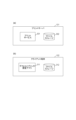
図1は本実施形態における印刷用ボットシステムの構成図を示したものである。
<Embodiment 1>
FIG. 1 shows a configuration diagram of a printing bot system according to this embodiment.
プリントサーバ101、クライアント端末102、プリンタ103がネットワーク104を介して接続されている。図1ではクライアント端末102とプリンタ103をそれぞれ1つずつ記載しているが、実際は複数であることが通常である。各サーバにおいても、複数台により負荷分散された構成であってもよい。逆に、物理的には1つのサーバが内部で仮想的に各サーバの役割を果たす構成であってもよい。また各サーバは、クラウド上に配置されたクラウドサーバでもよい。ネットワーク104はインターネットなどのWANを想定しているが、社内LANなどの閉じた環境であってもよい。クライアント端末102はPCやタブレット、スマートフォンなどを指しており、ユーザによって直接操作される端末である。クライアント端末102上では任意のアプリケーションソフトウェアを実行可能となっている。プリンタ103は物理用紙に対して実際に印刷を行うデバイスであり、ネットワーク104を介して受信した印刷データを画像データに変換して印刷する。プリントサーバ101は、外部からの印刷指示と文書データを受け付け、印刷データに変換した後、所定のプリンタ103へ印刷データを送信し、印刷指示を行う役割を持つ。クラウド環境にプリントサーバ101を配置する場合には、これをクラウドプリントサーバと呼ぶこともある。プリンタ103に印刷を行うタイミングとしては、ユーザによってプリンタ103上での操作が不要なプッシュ型の方式であってもよいし、ユーザがプリンタ103において印刷開始の操作を行ってから印刷を開始するプル型の方式であってもよい。なお、クラウドサーバ、クラウドプリントサーバは、一台以上のサーバによって構成されるサーバシステムとなっている。なお、プリンタとは、シートに画像を形成する画像形成装置である。
A
次に、図2を用いて本実施形態のシステムの持つそれぞれのデバイスにおけるハードウェア構成について説明する。 Next, the hardware configuration of each device in the system of this embodiment will be explained using Figure 2.
図2(a)はプリントサーバ101のハードウェア構成を示すブロック図である。プリントサーバ101は記憶部204、制御部201、ネットワーク通信部205を備える。記憶部204はハードディスクやSSDなどの不揮発性の記憶装置を指し、デジタルデータの保存と書き換えが可能である。
Figure 2(a) is a block diagram showing the hardware configuration of the
制御部201はCPU202とメモリ203とから構成され、プリントサーバ101の全体の動作を制御する。CPU202は記憶部204に記憶されたプログラムをメモリ203に展開し、それを実行する。メモリ203はCPU202の主記憶メモリでありワークエリアや各種プログラムを展開するための一時記憶領域として用いられる。
The
ネットワーク通信部205は外部のネットワーク104と通信を行う装置であり、ネットワーク104を介して外部のサーバやクライアント端末等とのデジタルデータの入出力を行う。
The
図2(b)はクライアント端末102のハードウェア構成を示すブロック図である。クライアント端末102は表示部216、操作部217、記憶部214、制御部211、ネットワーク通信部215を備える。表示部216は液晶ディスプレイなどユーザに対して視覚的な情報をリアルタイムに表示するための装置である。操作部217はキーボードやマウスなどによりユーザからの入力を受け付けるための装置である。タッチパネルなど、表示部216と操作部217の両方の機能を備え持つ装置を用いることもある。
Figure 2(b) is a block diagram showing the hardware configuration of the
画像読み取り部218は、デバイスのパネル上に表示されたり筐体に付帯されていたりする二次元コードを読み取るための装置である。
The
記憶部214、制御部211、ネットワーク通信部215の説明はプリントサーバ101のものと同等であるため割愛する。
The explanation of the
図2(c)はプリンタ103のハードウェア構成を示すブロック図である。プリンタ103は表示部226、操作部227、記憶部224、制御部221、ネットワーク通信部225、印刷部228を備える。表示部226はプリンタ103に備え付けのタッチパネルやLEDなど、ユーザに対して情報をリアルタイムに表示するための装置である。操作部227はユーザからの入力を受け付けるための装置であり、タッチパネルに加えてテンキーなどのハードキーを含むこともある。記憶部224、制御部221についてはプリントサーバ101のものと同等であるため説明を割愛する。ネットワーク通信部225は外部のネットワーク104と通信を行う装置であり、主に印刷データの受信を行ったり、エラーなどのプリンタ103の状態について外部のサーバ等に向けて送信したりする役割を持つ。印刷部228はカセットやトレイに用意された用紙に対して、給紙、印字、排紙の一連の動作を行うことで印刷処理を行う装置である。印字の方式は電子写真方式やインクジェット方式など特に限定されない。排紙時に使用される両面ユニットやステイプル、パンチ処理などのフィニッシング装置も印刷部228に含まれる。なお、本実施形態ではプリンタ103の例として印刷機能のみを行うシングルファンクションプリンタについて説明しているが、スキャナ機能やFAX機能も合わせて持つマルチファンクションプリンタ(複合機)を用いてもよい。
2C is a block diagram showing the hardware configuration of the
次に、図3を用いて本実施形態のシステムのそれぞれのデバイスにおけるソフトウェア構成について説明する。 Next, we will use Figure 3 to explain the software configuration of each device in the system of this embodiment.
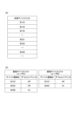
図3(a)はプリントサーバ101のソフトウェア構成を示す図である。プリントサービス301は外部から受信した印刷データを登録済みのプリンタ(例えばプリンタ103)に対して、ネットワーク104経由で送信し実行させるサービスである。ファイルストレージ302はプリントサーバ101の記憶部204内に用意された領域である。ファイルストレージ302にはプリントサービス301に登録済みのユーザ情報、ユーザの保持するプリンタに関する情報、ユーザごとのデフォルト印刷設定、印刷設定のリストなどが保存されており、プリントサービス301によって使用される。また、プリントサービス301で利用可能なデバイスを管理するのもプリントサービス301の役割である。プリントサービス301は、プリントサービスに登録されているプリンタにおいて、全利用者が利用を許可されているプリンタの一覧を共有デバイスリスト(図8(a))として管理する。また、プリントサービス301は、その共有デバイスリストのプリンタの中から個々のユーザが各自で利用するものとして選出しているプリンタの一覧を個別デバイスリスト(図8(b))として管理する。また、共有デバイスリストと個別デバイスリストはファイルストレージ302に保存される。
Figure 3A is a diagram showing the software configuration of the
図3(b)はクライアント端末102のソフトウェア構成を示すブロック図である。デフォルトプリンタ設定アプリ311は、プリントサービスにデフォルトプリンタ設定要求を出すための、ユーザとのインタフェースの役割を果たすソフトウェアアプリケーションである。具体的には、表示部216に、プリントサービス301へログインするためのUI(ログイン画面)や二次元コードを読み取るためのUIを表示する。画像読み取り部218で読み取った二次元コードからデバイス固有ID(デバイスを識別する識別情報のこと。)を抽出することや、そのデバイス固有IDを添えてデフォルトプリンタ設定要求をプリントサーバ101に送信することもデフォルトプリンタ設定アプリ311の役割である。
Figure 3(b) is a block diagram showing the software configuration of the
ファイルストレージ312はクライアント端末102の記憶部214内に用意されたユーザファイル保存用の領域であり、ユーザは画像読み取り部218で読み取った画像データや抽出した固有デバイスIDを保存することができる。デフォルトプリンタ設定アプリ311はファイルストレージ312にアクセスする権限を持つ。なお、本実施形態及びそれ以外の実施形態では、プリントサーバは一台以上のサーバにより構成されるプリントサーバーシステムとするのが好ましい。
The
次に図4、図5、および図7を用いて本実施形態におけるアプリやサービスの処理について説明する。 Next, the processing of apps and services in this embodiment will be explained using Figures 4, 5, and 7.
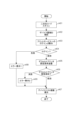
図4は、クライアント端末側(情報処理装置)のデフォルトプリンタ設定処理の例について示している。 Figure 4 shows an example of the default printer setting process on the client terminal side (information processing device).
図4に示す処理はすべてクライアント端末102の記憶部214に格納されたデフォルトプリンタ設定アプリ311のプログラムがメモリ213にロードされてCPU212によって実行される。
The processing shown in FIG. 4 is all executed by the
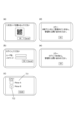
まず、デフォルトプリンタ設定アプリ311は、プリンタのパネル上に表示されているか、もしくは、プリンタの筐体に付帯している二次元コードを、画像読み取り部218でスキャンする(s401、図7(a))。次に、デフォルトプリンタ設定アプリ311は、読み取った二次元コードの画像を解析してデバイス固有IDを抽出する(s402)。そして、デフォルトプリンタ設定アプリ311は、プリントサービス301へのログインUIを表示して、ユーザ情報及びパスワードの入力を促す(s403、図7(b))。ユーザ情報に対応する正しいパスワードの入力が行われた場合に、プリントサービス301ではユーザのログインが成功したと判定する。デフォルトプリンタ設定アプリ311は、ユーザのプリントサービス301へのログインが成功したか否かを判定する(s404)。
First, the default
s404でプリントサービス301へのログインに成功したならば、デフォルトプリンタ設定アプリ311は、プリントサービス301からクレデンシャル情報を受け取る。クレデンシャル情報には、例えばIDトークンのような、認証済みユーザの属性が含まれる署名済みデータが用いられる。そして、デフォルトプリンタ設定アプリ311は、デバイス固有IDとクレデンシャル情報を添えてデフォルトプリンタ設定要求をプリントサーバ101に送信する(s405)。デフォルトプリンタ設定アプリ311は、プリントサーバ101からの応答によってデフォルトプリンタ設定が成功したか否かを判定する(s406)。s406で、デフォルトプリンタ設定が成功した場合は、デフォルトプリンタ設定アプリ311は、表示部216にプリンタ一覧画面を表示する(s407、図7(c))。プリンタ一覧画面には更新された個別デバイスリストに登録されているプリンタの一覧(701)とデフォルトプリンタ設定(702)が表示される。一方、s406で、デフォルトプリンタ設定が失敗した場合は、デフォルトプリンタ設定アプリ311は、表示部216にエラー情報を表示する(s408、図7(d))。
If the login to the
また、s406で、プリントサービス301へのログインに失敗した場合も、デフォルトプリンタ設定アプリ311は、表示部216にエラー情報を表示する(s409、図7(e))。
Also, if login to the
なお、デフォルトプリンタとは、予め選択されているプリンタであり、手動によるプリンタの選択がされなければ、それを用いて印刷が行われるプリンタとなっている。 The default printer is the printer that is pre-selected and will be used for printing unless a printer is manually selected.
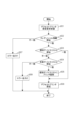
図5は、プリントサーバ101側のデフォルトプリンタ設定処理の例について示している。
Figure 5 shows an example of the default printer setting process on the
図5に示す処理はすべてプリントサーバ101の記憶部204に格納されたプリントサービス301のプログラムがメモリ203にロードされてCPU202によって実行される。
The processing shown in FIG. 5 is all performed by the
図5のフローは、プリントサービス301がデフォルトプリンタ設定要求を受信した結果、s501が始まる。
The flow in Figure 5 begins at step s501 when the
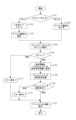
まず、プリントサービス301がデフォルトプリンタ設定要求を受信する(s501)。プリントサービス301は、受信したデフォルトプリンタ設定要求に添えてあったクレデンシャル情報を現在ログイン中のユーザ情報と照合する(s502)。s502にて、クレデンシャル情報と現在ログイン中のユーザ情報が一致した場合は、プリントサービス301は、受信したデフォルトプリンタ設定要求に添えてあったデバイス固有IDを個別デバイスリストと照合する(s503)。一方、s502にて、クレデンシャル情報と現在ログイン中のユーザ情報が不一致の場合は、プリントサービス301は、クライアント端末102にエラーを返す(s507)。s503にて、そのデバイス固有IDが個別デバイスリストに登録されているいずれかのデバイス固有IDと一致した場合は、プリントサービス301は、そのデバイス固有IDを持つプリンタをデフォルトプリンタに設定する(s506)。
First, the
一方、s503にて、そのデバイス固有IDと一致するプリンタが個別デバイスリスト内に無かった場合は、プリントサービス301は、そのデバイス固有IDを共有デバイスリストと照合する(s504)。s504にて、そのデバイス固有IDと一致するプリンタが共有デバイスリスト内にあった場合は、プリントサービス301は、そのデバイス固有IDをユーザの個別デバイスリストに記録する。これにより、プリンタをユーザ毎の利用デバイスとして登録する(s505)。そして、プリントサービス301は、さらにそのデバイス固有IDを持つプリンタをデフォルトプリンタに設定する(s506)。一方、s504にて、そのデバイス固有IDが一致するプリンタが共有デバイスリスト内に無かった場合は、プリントサービス301は、クライアント端末102にエラーを返す(s508、図7(e))。
On the other hand, if there is no printer in the individual device list that matches the device-specific ID in s503, the
以上のように、クライアント端末102におけるデフォルトプリントアプリ311とプリントサーバ101のプリントサービス301が連携して処理することにより、プリンタの固有デバイスIDを基にユーザ毎にデフォルトプリンタ設定をすることが可能となる。また、ユーザはプリンタを目の前にして操作するため、印刷対象プリンタの名称やIPアドレス等を記憶する手間が省かれ利便性が向上する。また、ユーザが印刷対象プリンタを共有プリンタのリストから毎回選択し直す必要が無いため、ユーザ作業の負荷も削減される。
As described above, the
以上のように、本実施形態では、ユーザは、ログインが行われた後で明示的にデフォルトプリンタを手動で選択する必要がなく、プリンタの表示部に表示された二次元コードをただ撮影するだけで、そのプリンタをデフォルトプリンタに設定することが可能となる。 As described above, in this embodiment, the user does not need to explicitly and manually select the default printer after logging in; simply by photographing the two-dimensional code displayed on the printer's display, the printer can be set as the default printer.
<実施形態2>
実施形態1では、ユーザがクライアント端末102のデフォルトプリンタ設定アプリ311で二次元コードを読み取ることでデフォルトプリンタを設定する方法の例について説明した。本実施形態では、さらに、管理者が容易に共有デバイスリストにプリンタを登録する方法について説明する。
<Embodiment 2>
In the first embodiment, an example of a method for setting a default printer by a user reading a two-dimensional code with the default
本実施形態に係る具体的な処理について、図6を用いて説明する。なお、ここでは実施形態1との違いについてのみ説明する。システム構成、ハードウェア/ソフトウェア構成、それぞれの処理フローについては一部を除き実施形態1と同じであるため説明を省略する。 The specific processing according to this embodiment will be described with reference to FIG. 6. Note that only the differences from embodiment 1 will be described here. The system configuration, hardware/software configuration, and respective processing flows are the same as embodiment 1 with some exceptions, so the description will be omitted.
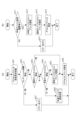
図6は、プリントサーバ101側の共有デバイスリストへの登録処理ならびにデフォルトプリンタ設定処理の例について示している。
Figure 6 shows an example of the process of registering to the shared device list on the
図6に示す処理はすべてプリントサーバ101の記憶部204に格納されたプリントサービス301のプログラムがメモリ203にロードされてCPU202によって実行される。
The processing shown in FIG. 6 is all performed by the
図6(a)のフローは、プリントサービス301がデフォルトプリンタ設定要求を受信した結果、s601が始まる。
The flow in FIG. 6(a) begins in step s601 as a result of the
s601からs607までの処理は、図5のs501からs507までの処理と同じであるため説明を省略する。s604で、共有デバイスリストに、固有デバイスIDが一致するプリンタが無い場合に、プリントサービス301は共有デバイス登録処理を実施する(s608)。
The process from s601 to s607 is the same as the process from s501 to s507 in FIG. 5, and therefore the description will be omitted. If there is no printer with a matching unique device ID in the shared device list in s604, the
共有デバイス登録処理の具体例を図6(b)に示す。 A specific example of the shared device registration process is shown in Figure 6 (b).
プリントサーバ101は、ファイルストレージ302に保存されているユーザ情報を参照し、ユーザが共有デバイス登録権限を有しているか否かを判定する(s611)。
The
s611にて、ユーザが共有デバイス登録権限を有している場合は、プリントサーバ101は、共有デバイスリストに固有デバイスIDを記録することで、プリンタを共有デバイスとして登録する(s612)。そして、プリントサーバ101は、さらにそのユーザの個別デバイスリストにその固有デバイスIDを記録することでプリンタをユーザ毎の利用デバイスとして登録する(s613)。そして、プリントサービス301は、さらにそのデバイス固有IDを持つプリンタをデフォルトプリンタに設定する(s614)。そして、s611にて、プリントサービス301は、クライアント端末102にエラーを返す(s615)。
If the user has the authority to register a shared device in s611, the
以上、本実施形態によれば、プリントサービス301は、共有デバイスリストにプリンタを登録し、デフォルトプリンタの設定を行う。
As described above, according to this embodiment, the
そのため、ユーザはプリンタを目の前にして操作するため、印刷対象プリンタの名称やIPアドレス等を記憶する手間が省かれ利便性が向上する。 As a result, users can operate the printer right in front of them, eliminating the need to memorize the name and IP address of the printer to be printed on, improving convenience.
また、プリンタの管理者自身も、新規プリンタを容易に共有デバイスリストに登録することができ、プリンタ管理作業の負荷が軽減される。 In addition, printer administrators themselves can easily register new printers in the shared device list, reducing the burden of printer management work.
<実施形態3>
実施形態1では、ユーザがクライアント端末102のデフォルトプリンタ設定アプリで二次元コードを読み取ることでデフォルトプリンタを設定する方法の例について説明した。
<Embodiment 3>
In the first embodiment, an example of the method in which the user sets the default printer by reading a two-dimensional code with the default printer setting application of the
デフォルトプリンタ設定アプリはプリンタ103にあっても良い。すなわち、本実施形態では、さらに、ユーザがプリンタ103のデフォルトプリンタ設定アプリを起動することでデフォルトプリンタを設定する方法の例について説明する。
The default printer setting app may be located on the
本実施形態に係る具体的な処理について、図9および図10を用いて説明する。なお、ここでは実施形態1との違いについてのみ説明する。システム構成、ハードウェア/ソフトウェア構成、それぞれの処理フローについては一部を除き実施形態1と同じであるため説明を省略する。 Specific processing according to this embodiment will be described with reference to Figures 9 and 10. Note that only the differences from embodiment 1 will be described here. The system configuration, hardware/software configuration, and respective processing flows are the same as embodiment 1 with some exceptions, so descriptions will be omitted.
図9(a)はプリントサーバ101のソフトウェア構成を示すブロック図である。これは図3(a)のプリントサーバ101のソフトウェア構成と同一であるため説明を省略する。
Figure 9(a) is a block diagram showing the software configuration of the
図9(b)はプリンタ103のソフトウェア構成を示すブロック図である。デフォルトプリンタ設定アプリ901は、クライアント端末102のデフォルトプリンタ設定アプリ311と同じである。
Figure 9 (b) is a block diagram showing the software configuration of the
ファイルストレージ902はプリンタ103の記憶部224内に用意されたユーザファイル保存用の領域であり、ユーザは取得した固有デバイスIDを保存することができる。デフォルトプリンタ設定アプリ901はファイルストレージ902にアクセスする権限を持つ。
The
次に本実施形態におけるアプリの処理について説明する。 Next, we will explain the app processing in this embodiment.
図10は、プリンタでデフォルトプリンタ設定アプリを実施した場合のデフォルトプリンタ処理の例について示している。 Figure 10 shows an example of default printer processing when a default printer setting app is executed on a printer.
図10に示す処理はすべてプリンタ103の記憶部224に格納されたデフォルトプリンタ設定アプリ901のプログラムがメモリ223にロードされてCPU222によって実行される。
The processing shown in FIG. 10 is all performed by the
図10のフローは、ユーザがプリンタのパネル上のUIからデフォルトプリンタ設定アプリ901を起動した結果、s1001が始まる。
The flow in Figure 10 begins at step s1001 as a result of the user launching the default
デフォルトプリンタ設定アプリ901は、プリンタのパネル上のUIから起動されると、直接プリンタからデバイス固有IDを取得する(s1001)。
When the default
s1002からs1008までの処理は、図4のs403からs409までの処理と同じであるため説明を省略する。 The processing from s1002 to s1008 is the same as the processing from s403 to s409 in Figure 4, so the explanation will be omitted.
以上、本実施形態によれば、プリンタ103のデフォルトプリンタ設定アプリ901は、プリンタの固有デバイスIDを取得し、そのプリンタの固有デバイスIDを基にユーザ毎にデフォルトプリンタ設定をすることが可能となる。
As described above, according to this embodiment, the default
また、ユーザはクライアント端末が無い場合でも容易にデフォルトプリンタ設定をすることが可能となる。 In addition, users can easily set the default printer even if they do not have a client terminal.
<実施形態4>
実施形態1では、ユーザがクライアント端末102のデフォルトプリンタ設定アプリで二次元コードを読み取ることでデフォルトプリンタを直ちに設定する方法の例について説明した。
<Embodiment 4>
In the first embodiment, an example of a method in which a user immediately sets a default printer by reading a two-dimensional code with a default printer setting application of the
本実施形態では、さらに、ユーザに「デフォルトに設定するかどうか」を確認し、確認結果に応じて設定を行う方法について説明する。 In this embodiment, we will further explain a method of confirming with the user whether or not to set the setting as the default, and then making settings based on the confirmation result.
本実施形態に係る具体的な処理について、図11および図12を用いて説明する。なお、ここでは実施形態1との違いについてのみ説明する。システム構成、ハードウェア/ソフトウェア構成、それぞれの処理フローについては一部を除き実施形態1と同じであるため説明を省略する。 Specific processing according to this embodiment will be described with reference to Figures 11 and 12. Note that only the differences from embodiment 1 will be described here. The system configuration, hardware/software configuration, and respective processing flows are the same as embodiment 1 with some exceptions, so descriptions will be omitted.
図11は、クライアント端末側のデフォルトプリンタ設定処理の例について示している。 Figure 11 shows an example of the default printer setting process on the client terminal side.
図11に示す処理はすべてクライアント端末102の記憶部214に格納されたデフォルトプリンタ設定アプリ311のプログラムがメモリ213にロードされてCPU212によって実行される。
The processing shown in FIG. 11 is all performed by the
まず、デフォルトプリンタ設定アプリ311は、スキャンのUIと手入力のUIの選択肢をユーザに提示する(s1101)。s1101にて、スキャンのUIが選択された場合は、スキャン起点の処理フローとなり、s1102、s1103、s1105、s1106は、s401からs404までの処理と同じであるため説明を省略する。一方、s1101にて、手入力のUIが選択された場合は、手入力起点の処理フローとなり、デフォルトプリンタ設定アプリ311は、ユーザによるデバイス固有IDの入力を受け付ける。手入力起点の処理フローにおいてもs1105、s1106は、s403からs404までの処理と同じであるため説明を省略する。s1106でプリントサービス301へのログインに成功したならば、デフォルトプリンタ設定アプリ311は、プリントサービス301からクレデンシャル情報を受け取る。そして、デフォルトプリンタ設定アプリ311は、デバイス固有IDやクレデンシャル情報から構成されるデフォルトプリンタ設定要求情報に、スキャン起点か手入力起点かの起点情報を追加する(s1107)。そして、デフォルトプリンタ設定アプリ311は、デフォルトプリンタ設定要求をプリントサーバ101に送信する(s1108)。s1109からs1012までの処理は、図4のs406からs408までの処理と同じであるため説明を省略する。
First, the default
図12は、プリントサーバ101側のデフォルトプリンタ設定処理の例について示している。
Figure 12 shows an example of the default printer setting process on the
図12に示す処理はすべてプリントサーバ101の記憶部204に格納されたプリントサービス301のプログラムがメモリ203にロードされてCPU202によって実行される。
The processing shown in FIG. 12 is all performed by the
図12のフローは、プリントサービス301がデフォルトプリンタ設定要求を受信した結果、s1201が始まる。
The flow in Figure 12 begins at step s1201 when the
まず、プリントサービス301がデフォルトプリンタ設定要求を受信する(s1201)。
First, the
プリントサービス301は、受信したデフォルトプリンタ設定要求に添えてあったクレデンシャル情報を現在ログイン中のユーザ情報と照合する(s1202)。s1202にて、クレデンシャル情報と現在ログイン中のユーザ情報が一致した場合は、プリントサービス301は、受信したデフォルトプリンタ設定要求に添えてあったデバイス固有IDを個別デバイスリストと照合する(s1203)。一方、s502にて、クレデンシャル情報と現在ログイン中のユーザ情報が不一致の場合は、プリントサービス301は、クライアント端末102にエラーを返す(s1208)。s1203にて、そのデバイス固有IDが個別デバイスリストに登録されているいずれかのデバイス固有IDと一致した場合は、プリントサービス301は、デフォルトプリンタ設定要求情報の起点情報から、スキャン起点か否かを判定する(s1206)。一方、s1203にて、そのデバイス固有IDと一致するプリンタが個別デバイスリスト内に無かった場合は、プリントサービス301は、そのデバイス固有IDを共有デバイスリストと照合する(s1204)。s1204にて、そのデバイス固有IDと一致するプリンタが共有デバイスリスト内にあった場合は、プリントサービス301は、そのデバイス固有IDをユーザの個別デバイスリストに記録することでプリンタをユーザ毎の利用デバイスとして登録する(s1205)。そして、プリントサービス301は、デフォルトプリンタ設定要求情報の起点情報から、スキャン起点か否かを判定する(s1206)。一方、s1204にて、そのデバイス固有IDが一致するプリンタが共有デバイスリスト内に無かった場合は、プリントサービス301は、クライアント端末102にエラーを返す(s1209、図7(e))。s1206にて、スキャン起点と判定した場合は、直ちにデフォルトプリンタに設定するため、プリントサービス301は、そのデバイス固有IDを持つプリンタをデフォルトプリンタに設定する(s1207)。一方、s1206にて、手入力起点と判定した場合は、そのデバイス固有IDを持つプリンタを「デフォルトに設定するかどうか」をユーザに確認する(s1210)。s1211にて、ユーザへの確認でユーザの同意が得られたと判定した場合は、プリントサービス301は、そのデバイス固有IDを持つプリンタをデフォルトプリンタに設定する(s1207)。一方、s1211にて、ユーザへの確認でユーザの同意が得られなかったと判定した場合は、プリントサービス301は、処理を終了する。
The
以上、本実施例によれば、プリントサービス301は、スキャン起点か手入力起点かを判定した結果に応じて、ユーザに「デフォルトに設定するかどうか」を確認し、確認結果に応じてデフォルトプリンタ設定を行う。そのため、プリンタを目の前にして操作したことが確実なスキャン起点の場合は、直ちにデフォルトプリンタの設定が可能になる。一方、プリンタを目の前にしていない場合も想定される手入力起点の場合は、ユーザに確認することで、ユーザの利便性を損なうことなく誤操作を抑制することが可能となる。
As described above, according to this embodiment, the
<その他の実施例>
本発明は、上述の実施形態の1以上の機能を実現するプログラムを、ネットワーク又は記憶媒体を介してシステム又は装置に供給し、そのシステム又は装置のコンピュータにおける1つ以上のプロセッサーがプログラムを読出し実行する処理でも実現可能である。また、1以上の機能を実現する回路(例えば、ASIC)によっても実現可能である。
<Other Examples>
The present invention can also be realized by a process in which a program for implementing one or more of the functions of the above-described embodiments is supplied to a system or device via a network or a storage medium, and one or more processors in a computer of the system or device read and execute the program. The present invention can also be realized by a circuit (e.g., ASIC) that implements one or more of the functions.
101 プリントサーバ
102 クライアント端末
103 プリンタ
301 プリントサービス
311 デフォルトプリンタ設定アプリ
101
Claims (6)
前記画像形成装置を識別する識別情報であって、前記画像形成装置が有する前記識別情報を前記情報処理装置で取得する取得工程と、
前記取得工程において取得された前記識別情報を前記情報処理装置から前記プリントサーバへ送信する送信工程と、
前記識別情報を前記プリントサーバに登録させる登録工程と、
前記識別情報が示す画像形成装置を、前記情報処理装置において手動によるプリンタの選択がされなければ印刷に用いるプリンタとして予め選択されるように設定する設定工程と、を有することを特徴とする制御方法。 A control method for a printing system including an information processing device, an image forming device, and a print server that transmits print data received from the information processing device to the image forming device, comprising:
an acquisition step of acquiring, by the information processing device, identification information for identifying the image forming device, the identification information held by the image forming device;
a transmission step of transmitting the identification information acquired in the acquisition step from the information processing device to the print server ;
a registration step of registering the identification information in the print server;
a setting step of setting the image forming device indicated by the identification information so that the image forming device is pre-selected as the printer to be used for printing unless a printer is manually selected in the information processing device .
前記登録工程は、前記リストに前記識別情報と一致する画像形成装置が登録されていない場合に、前記識別情報を前記リストに登録する工程であることを特徴とする請求項3に記載の制御方法。 the print service manages a list of image forming devices used by the user who has completed the user authentication;
4. The control method according to claim 3, wherein the registration step is a step of registering the identification information in the list when an image forming apparatus matching the identification information is not registered in the list.
前記画像形成装置を識別する識別情報であって、前記画像形成装置が有する前記識別情報を前記情報処理装置で取得する取得手段と、
前記取得手段により取得された前記識別情報を前記情報処理装置から前記プリントサーバへ送信する送信手段と、
前記識別情報を前記プリントサーバに登録させる登録手段と、
前記識別情報が示す画像形成装置を、前記情報処理装置において手動によるプリンタの選択がされなければ印刷に用いるプリンタとして予め選択されるように設定する設定手段と、を備えることを特徴とする印刷システム。 The apparatus includes an information processing device, an image forming device, and a print server that transmits print data received from the information processing device to the image forming device,
an acquisition unit that acquires, by the information processing device, identification information for identifying the image forming device, the identification information held by the image forming device;
a transmission means for transmitting the identification information acquired by the acquisition means from the information processing device to the print server ;
a registration means for registering the identification information in the print server;
a setting unit that sets the image forming device indicated by the identification information so that the image forming device is pre-selected as the printer to be used for printing unless a printer is manually selected in the information processing device .
Priority Applications (1)
| Application Number | Priority Date | Filing Date | Title |
|---|---|---|---|
| JP2024040831A JP7686826B2 (en) | 2020-01-30 | 2024-03-15 | Information processing apparatus, image forming apparatus, and control method thereof |
Applications Claiming Priority (2)
| Application Number | Priority Date | Filing Date | Title |
|---|---|---|---|
| JP2020014209A JP7463116B2 (en) | 2020-01-30 | 2020-01-30 | Information processing apparatus, image forming apparatus, and control method thereof |
| JP2024040831A JP7686826B2 (en) | 2020-01-30 | 2024-03-15 | Information processing apparatus, image forming apparatus, and control method thereof |
Related Parent Applications (1)
| Application Number | Title | Priority Date | Filing Date |
|---|---|---|---|
| JP2020014209A Division JP7463116B2 (en) | 2020-01-30 | 2020-01-30 | Information processing apparatus, image forming apparatus, and control method thereof |
Publications (2)
| Publication Number | Publication Date |
|---|---|
| JP2024071431A JP2024071431A (en) | 2024-05-24 |
| JP7686826B2 true JP7686826B2 (en) | 2025-06-02 |
Family
ID=77062046
Family Applications (2)
| Application Number | Title | Priority Date | Filing Date |
|---|---|---|---|
| JP2020014209A Active JP7463116B2 (en) | 2020-01-30 | 2020-01-30 | Information processing apparatus, image forming apparatus, and control method thereof |
| JP2024040831A Active JP7686826B2 (en) | 2020-01-30 | 2024-03-15 | Information processing apparatus, image forming apparatus, and control method thereof |
Family Applications Before (1)
| Application Number | Title | Priority Date | Filing Date |
|---|---|---|---|
| JP2020014209A Active JP7463116B2 (en) | 2020-01-30 | 2020-01-30 | Information processing apparatus, image forming apparatus, and control method thereof |
Country Status (2)
| Country | Link |
|---|---|
| US (2) | US11392334B2 (en) |
| JP (2) | JP7463116B2 (en) |
Families Citing this family (4)
| Publication number | Priority date | Publication date | Assignee | Title |
|---|---|---|---|---|
| JP7735727B2 (en) | 2021-08-31 | 2025-09-09 | 富士フイルムビジネスイノベーション株式会社 | Information processing device and information processing program |
| JP2023086021A (en) * | 2021-12-09 | 2023-06-21 | キヤノン株式会社 | Device management system, information processing device, device and device management method and program |
| EP4195022B1 (en) | 2021-12-10 | 2025-07-02 | Canon Kabushiki Kaisha | System, method for controlling server apparatus, and program |
| JP2023183237A (en) * | 2022-06-15 | 2023-12-27 | キヤノン株式会社 | Printing device, its control method and program |
Citations (1)
| Publication number | Priority date | Publication date | Assignee | Title |
|---|---|---|---|---|
| JP2015108950A (en) | 2013-12-04 | 2015-06-11 | 富士ゼロックス株式会社 | Printing system, information processing apparatus, program, and image forming apparatus |
Family Cites Families (13)
| Publication number | Priority date | Publication date | Assignee | Title |
|---|---|---|---|---|
| US20040267868A1 (en) * | 2003-06-26 | 2004-12-30 | International Business Machines Corporation | Method for monitoring print jobs in a data processing network |
| US7278579B2 (en) * | 2004-11-12 | 2007-10-09 | Siemens Medical Solutions Usa, Inc. | Patient information management system |
| CA2491385A1 (en) * | 2004-12-31 | 2006-06-30 | Bce Inc. | Printing system and method |
| JP2006244321A (en) * | 2005-03-04 | 2006-09-14 | Ricoh Co Ltd | Image forming apparatus, server and client |
| JP2006060861A (en) * | 2005-10-05 | 2006-03-02 | Ricoh Co Ltd | Facsimile machine |
| JP4389231B2 (en) * | 2007-02-22 | 2009-12-24 | セイコーエプソン株式会社 | Print job management system, default printer determination device |
| JP5346059B2 (en) * | 2011-05-20 | 2013-11-20 | シャープ株式会社 | Multifunctional image forming device |
| JP6314951B2 (en) * | 2015-10-08 | 2018-04-25 | コニカミノルタ株式会社 | Image forming system and program |
| JP2017121761A (en) * | 2016-01-08 | 2017-07-13 | ブラザー工業株式会社 | Printer and computer program |
| JP2018045523A (en) * | 2016-09-15 | 2018-03-22 | 株式会社リコー | Apparatus, information processing system, information processing method, and program |
| JP2019096024A (en) * | 2017-11-22 | 2019-06-20 | セイコーエプソン株式会社 | Print instruction device, control method for print instruction device, and print instruction program |
| JP2019164537A (en) * | 2018-03-19 | 2019-09-26 | 富士ゼロックス株式会社 | Print system, print method, and print program |
| CN110377240B (en) * | 2018-04-13 | 2024-06-14 | 富士胶片商业创新有限公司 | Message providing apparatus, message providing method, and non-transitory computer readable medium |
-
2020
- 2020-01-30 JP JP2020014209A patent/JP7463116B2/en active Active
-
2021
- 2021-01-22 US US17/156,390 patent/US11392334B2/en active Active
-
2022
- 2022-06-27 US US17/850,803 patent/US11775235B2/en active Active
-
2024
- 2024-03-15 JP JP2024040831A patent/JP7686826B2/en active Active
Patent Citations (1)
| Publication number | Priority date | Publication date | Assignee | Title |
|---|---|---|---|---|
| JP2015108950A (en) | 2013-12-04 | 2015-06-11 | 富士ゼロックス株式会社 | Printing system, information processing apparatus, program, and image forming apparatus |
Also Published As
| Publication number | Publication date |
|---|---|
| US20210240418A1 (en) | 2021-08-05 |
| US11392334B2 (en) | 2022-07-19 |
| JP2024071431A (en) | 2024-05-24 |
| JP2021121076A (en) | 2021-08-19 |
| JP7463116B2 (en) | 2024-04-08 |
| US20220326896A1 (en) | 2022-10-13 |
| US11775235B2 (en) | 2023-10-03 |
Similar Documents
| Publication | Publication Date | Title |
|---|---|---|
| JP2024071431A (en) | Information processing apparatus, image forming apparatus, and control method thereof | |
| EP2602989A2 (en) | Multi-function device and screen providing server | |
| JP6942541B2 (en) | Image forming device, its control method, and program | |
| US20070091346A1 (en) | Network print system | |
| US8860977B2 (en) | Information transmission system and method with multiple user authentication | |
| JP6202048B2 (en) | Image processing system, cloud server, image processing apparatus, and program | |
| JP6949585B2 (en) | Management server, service provider, system, control method, and program | |
| JP6762823B2 (en) | Image forming apparatus, control method of image forming apparatus, and program | |
| US20150007279A1 (en) | Communication method, device, information processing apparatus, and storage medium | |
| US20180234585A1 (en) | Authentication method and recording medium | |
| JP2019215673A (en) | Image forming apparatus, its control method and program | |
| JP2023037169A (en) | Information processing device with multi-factor authentication capability, control method, and program | |
| JP2017139013A (en) | Printing system, information processing device and program | |
| JP6237740B2 (en) | Security information update system, information processing apparatus, and security information update program | |
| JP7490405B2 (en) | Image forming apparatus, printing system, control method, and program | |
| JP6813784B2 (en) | Image processing device and its processing method and program | |
| CN114968736A (en) | Printing system and control method of printing system | |
| US12468492B2 (en) | Communication mediation device, computer-readable non-transitory recording medium storing communication mediation program, and communication mediation system for mediating communication with cloud service for storing data | |
| JP6986874B2 (en) | Image processing device and its control method and program | |
| US12008277B2 (en) | Image forming apparatus with having multi-factor authentication function executable for any kind of remote access for using image processing functions of the image forming apparatus, control method, and non-transitory computer-readable storage medium | |
| JP4534556B2 (en) | Service provision system | |
| JP7490471B2 (en) | Image processing device and method | |
| JP7204863B2 (en) | Image processing device and its control method and program | |
| JP7434521B2 (en) | Image processing device and its control method and program | |
| JP5904264B2 (en) | Printer and printer control method |
Legal Events
| Date | Code | Title | Description |
|---|---|---|---|
| A521 | Request for written amendment filed |
Free format text: JAPANESE INTERMEDIATE CODE: A523 Effective date: 20240329 |
|
| A621 | Written request for application examination |
Free format text: JAPANESE INTERMEDIATE CODE: A621 Effective date: 20240329 |
|
| A977 | Report on retrieval |
Free format text: JAPANESE INTERMEDIATE CODE: A971007 Effective date: 20241213 |
|
| A131 | Notification of reasons for refusal |
Free format text: JAPANESE INTERMEDIATE CODE: A131 Effective date: 20241217 |
|
| A521 | Request for written amendment filed |
Free format text: JAPANESE INTERMEDIATE CODE: A523 Effective date: 20250213 |
|
| TRDD | Decision of grant or rejection written | ||
| A01 | Written decision to grant a patent or to grant a registration (utility model) |
Free format text: JAPANESE INTERMEDIATE CODE: A01 Effective date: 20250422 |
|
| A61 | First payment of annual fees (during grant procedure) |
Free format text: JAPANESE INTERMEDIATE CODE: A61 Effective date: 20250521 |
|
| R150 | Certificate of patent or registration of utility model |
Ref document number: 7686826 Country of ref document: JP Free format text: JAPANESE INTERMEDIATE CODE: R150 |