JP6828014B2 - A computer implementation performed by a local computing device communicatively connected to one or more signing devices. - Google Patents
A computer implementation performed by a local computing device communicatively connected to one or more signing devices. Download PDFInfo
- Publication number
- JP6828014B2 JP6828014B2 JP2018506242A JP2018506242A JP6828014B2 JP 6828014 B2 JP6828014 B2 JP 6828014B2 JP 2018506242 A JP2018506242 A JP 2018506242A JP 2018506242 A JP2018506242 A JP 2018506242A JP 6828014 B2 JP6828014 B2 JP 6828014B2
- Authority
- JP
- Japan
- Prior art keywords
- web browser
- signature
- port
- signing
- signing device
- Prior art date
- Legal status (The legal status is an assumption and is not a legal conclusion. Google has not performed a legal analysis and makes no representation as to the accuracy of the status listed.)
- Active
Links
Images


Classifications
-
- H—ELECTRICITY
- H04—ELECTRIC COMMUNICATION TECHNIQUE
- H04L—TRANSMISSION OF DIGITAL INFORMATION, e.g. TELEGRAPHIC COMMUNICATION
- H04L67/00—Network arrangements or protocols for supporting network services or applications
- H04L67/14—Session management
- H04L67/141—Setup of application sessions
-
- G—PHYSICS
- G06—COMPUTING OR CALCULATING; COUNTING
- G06Q—INFORMATION AND COMMUNICATION TECHNOLOGY [ICT] SPECIALLY ADAPTED FOR ADMINISTRATIVE, COMMERCIAL, FINANCIAL, MANAGERIAL OR SUPERVISORY PURPOSES; SYSTEMS OR METHODS SPECIALLY ADAPTED FOR ADMINISTRATIVE, COMMERCIAL, FINANCIAL, MANAGERIAL OR SUPERVISORY PURPOSES, NOT OTHERWISE PROVIDED FOR
- G06Q20/00—Payment architectures, schemes or protocols
- G06Q20/38—Payment protocols; Details thereof
- G06Q20/40—Authorisation, e.g. identification of payer or payee, verification of customer or shop credentials; Review and approval of payers, e.g. check credit lines or negative lists
- G06Q20/401—Transaction verification
- G06Q20/4014—Identity check for transactions
-
- G—PHYSICS
- G06—COMPUTING OR CALCULATING; COUNTING
- G06F—ELECTRIC DIGITAL DATA PROCESSING
- G06F13/00—Interconnection of, or transfer of information or other signals between, memories, input/output devices or central processing units
-
- G—PHYSICS
- G06—COMPUTING OR CALCULATING; COUNTING
- G06F—ELECTRIC DIGITAL DATA PROCESSING
- G06F16/00—Information retrieval; Database structures therefor; File system structures therefor
- G06F16/90—Details of database functions independent of the retrieved data types
- G06F16/95—Retrieval from the web
- G06F16/955—Retrieval from the web using information identifiers, e.g. uniform resource locators [URL]
- G06F16/9566—URL specific, e.g. using aliases, detecting broken or misspelled links
-
- H—ELECTRICITY
- H04—ELECTRIC COMMUNICATION TECHNIQUE
- H04L—TRANSMISSION OF DIGITAL INFORMATION, e.g. TELEGRAPHIC COMMUNICATION
- H04L9/00—Cryptographic mechanisms or cryptographic arrangements for secret or secure communications; Network security protocols
- H04L9/32—Cryptographic mechanisms or cryptographic arrangements for secret or secure communications; Network security protocols including means for verifying the identity or authority of a user of the system or for message authentication, e.g. authorization, entity authentication, data integrity or data verification, non-repudiation, key authentication or verification of credentials
- H04L9/3247—Cryptographic mechanisms or cryptographic arrangements for secret or secure communications; Network security protocols including means for verifying the identity or authority of a user of the system or for message authentication, e.g. authorization, entity authentication, data integrity or data verification, non-repudiation, key authentication or verification of credentials involving digital signatures
-
- H—ELECTRICITY
- H04—ELECTRIC COMMUNICATION TECHNIQUE
- H04L—TRANSMISSION OF DIGITAL INFORMATION, e.g. TELEGRAPHIC COMMUNICATION
- H04L9/00—Cryptographic mechanisms or cryptographic arrangements for secret or secure communications; Network security protocols
- H04L9/32—Cryptographic mechanisms or cryptographic arrangements for secret or secure communications; Network security protocols including means for verifying the identity or authority of a user of the system or for message authentication, e.g. authorization, entity authentication, data integrity or data verification, non-repudiation, key authentication or verification of credentials
- H04L9/3263—Cryptographic mechanisms or cryptographic arrangements for secret or secure communications; Network security protocols including means for verifying the identity or authority of a user of the system or for message authentication, e.g. authorization, entity authentication, data integrity or data verification, non-repudiation, key authentication or verification of credentials involving certificates, e.g. public key certificate [PKC] or attribute certificate [AC]; Public key infrastructure [PKI] arrangements
-
- G—PHYSICS
- G06—COMPUTING OR CALCULATING; COUNTING
- G06V—IMAGE OR VIDEO RECOGNITION OR UNDERSTANDING
- G06V30/00—Character recognition; Recognising digital ink; Document-oriented image-based pattern recognition
- G06V30/10—Character recognition
- G06V30/14—Image acquisition
- G06V30/142—Image acquisition using hand-held instruments; Constructional details of the instruments
- G06V30/1423—Image acquisition using hand-held instruments; Constructional details of the instruments the instrument generating sequences of position coordinates corresponding to handwriting
-
- G—PHYSICS
- G06—COMPUTING OR CALCULATING; COUNTING
- G06V—IMAGE OR VIDEO RECOGNITION OR UNDERSTANDING
- G06V40/00—Recognition of biometric, human-related or animal-related patterns in image or video data
- G06V40/30—Writer recognition; Reading and verifying signatures
- G06V40/37—Writer recognition; Reading and verifying signatures based only on signature signals such as velocity or pressure, e.g. dynamic signature recognition
- G06V40/376—Acquisition
-
- H—ELECTRICITY
- H04—ELECTRIC COMMUNICATION TECHNIQUE
- H04L—TRANSMISSION OF DIGITAL INFORMATION, e.g. TELEGRAPHIC COMMUNICATION
- H04L63/00—Network architectures or network communication protocols for network security
- H04L63/16—Implementing security features at a particular protocol layer
- H04L63/168—Implementing security features at a particular protocol layer above the transport layer
Landscapes
- Engineering & Computer Science (AREA)
- Theoretical Computer Science (AREA)
- Computer Security & Cryptography (AREA)
- General Physics & Mathematics (AREA)
- Business, Economics & Management (AREA)
- Physics & Mathematics (AREA)
- Signal Processing (AREA)
- Computer Networks & Wireless Communication (AREA)
- General Engineering & Computer Science (AREA)
- Accounting & Taxation (AREA)
- Databases & Information Systems (AREA)
- General Business, Economics & Management (AREA)
- Strategic Management (AREA)
- Finance (AREA)
- Data Mining & Analysis (AREA)
- Information Transfer Between Computers (AREA)
- Position Input By Displaying (AREA)
- Computer And Data Communications (AREA)
Description
電子手書きは様々な場面で次第に重要になっている。電子手書きが一般化するにつれて、電子手書きの真正性を検証する能力もいっそう重要になった。例えば、電子手書きは、クレジットカード所持者によるクレジットカードトランザクションの承認を得るためにペン及び紙の代わりに用いられるのが今や一般的である。他の例として、銀行、小売店その他の、法的に拘束される書類への署名を得る場所において、署名パッド及び署名タブレットが用いられる。通常、必要な署名をキャプチャする機能が、署名デバイスが接続されるコンピュータ上で、または好適に構成される装置にあっては署名デバイス自体で動作する専用のソフトウェアアプリケーションの形態で備えられる(例えば、特許文献1)。 Electronic handwriting is becoming increasingly important in many situations. As electronic handwriting became more common, the ability to verify the authenticity of electronic handwriting became even more important. For example, electronic handwriting is now commonly used in place of pens and paper to obtain approval for credit card transactions by credit card holders. As another example, signature pads and signature tablets are used in banks, retail stores and other places where legally bound documents are signed. The ability to capture the required signature is typically provided on the computer to which the signature device is connected, or in the form of a dedicated software application that runs on the signature device itself in a preferably configured device (eg,). Patent Document 1).
同時に、コンシューマは、インターネットを介したより多くのデジタルコンテンツ及び多種多様な機能性へのアクセスを要求している。過去には、ウェブサイトがコンシューマに適切な機能を確保するための特定の機能性を備えた特定のウェブブラウザ(例えば、Microsoft社によって提供される、ActiveX(登録商標)機能を備えたInternet Explorer(登録商標)ブラウザ)を使用するように求めることがあった。しかし、今日のコンシューマはシームレスなアクセスを要求する。ウェブサイトがコンシューマの好みに合わない特定のブラウザまたはプラットフォームを要求すれば、コンシューマはもっと良い方法を求めて他のどこかを探すだけであろう。同様に、ビジネス向けに設計されたウェブサービスが対応していないブラウザまたはプラットフォームがあると、そのサービスのプロバイダは顧客を失うおそれがある。 At the same time, consumers are demanding access to more digital content and a wide variety of functionality over the Internet. In the past, specific web browsers with specific functionality to ensure that websites have the right functionality for consumers (eg, Internet Explorer with ActiveX® capabilities provided by Microsoft (eg, Microsoft). I was sometimes asked to use a registered trademark) browser). But today's consumers demand seamless access. If a website requires a particular browser or platform that doesn't suit the consumer's tastes, the consumer will just look elsewhere for a better way. Similarly, if a web service designed for business does not support a browser or platform, the service provider may lose customers.
一方で、サービスプロバイダは、デジタルコンテンツへのシームレスなアクセスに対する顧客の要望とセキュリティ対策込みの機能性とのバランスをとらなければならない。 On the other hand, service providers must balance customer demand for seamless access to digital content with functionality that includes security measures.
同様の符号が同様の要素を指す添付の図面に関連して以下で述べる詳細な説明は、開示される主題の様々な実施形態の説明として意図したものであり、最適な実施形態を表すことを意図していない。本開示において説明される各実施形態は例または説明図としてのみ提供され、他の実施形態に照らして好ましいとも有利であるとも解釈されるものではない。本明細書で提供される例示は、包括的であることも、主張される主題を開示された形態そのものに限定することも意図していない。 The detailed description described below in connection with the accompanying drawings in which similar reference numerals refer to similar elements is intended as an explanation of various embodiments of the subject matter disclosed and is intended to represent an optimal embodiment. Not intended. Each embodiment described in the present disclosure is provided only as an example or illustration and is not construed as preferred or advantageous in the light of other embodiments. The illustrations provided herein are not intended to be inclusive or to limit the claimed subject matter to the disclosed form itself.
以下の説明において、本開示の例示的な実施形態の完全な理解を与えるために多数の具体的詳細を説明する。しかし、当業者が具体的詳細の一部または全部を用いずに本開示の多くの実施形態を実施し得ることは明らかであろう。場合によっては、本開示の種々の態様に対して不必要に焦点をぼかさないために、周知の処理ステップを詳細には説明していない。また、本開示の実施形態は、本明細書で説明される特徴の任意の組合せを採用し得る。
I.導入
In the following description, a number of specific details will be given to provide a complete understanding of the exemplary embodiments of the present disclosure. However, it will be apparent that one of ordinary skill in the art may implement many embodiments of the present disclosure without using some or all of the specific details. In some cases, well-known processing steps are not described in detail to avoid unnecessarily blurring the various aspects of the present disclosure. Also, embodiments of the present disclosure may employ any combination of features described herein.
I. Introduction
本明細書において、最新のウェブアプリケーション及びウェブブラウザに好適な署名プラットフォームを説明する。説明される実施形態において、ローカルコンピューティングデバイスが署名デバイスに通信可能に接続される。ローカルコンピュータ上で実行されるウェブブラウザは、リモートウェブサーバ及び署名機能を提供するセキュアなローカルウェブサーバと通信する。説明される実施形態は、マルチユーザシナリオに好適な実施形態を含む。このような実施形態は、銀行支店などの多くのユーザによって多数の署名が収集される状況において特に有用となり得る。このような一実施形態において、ウェブブラウザは既知のポート番号を用いてアービトレータサービスと通信する。アービトレータサービスはウェブブラウザに、ユーザに適合するローカルウェブサーバのポート番号を通知する。ウェブブラウザは当該ポート番号を用いてローカルウェブサーバに接続し、署名機能の使用を、当該署名機能の使用がそのユーザに対して承認された場合にのみ許可する。 As used herein, a signature platform suitable for modern web applications and web browsers will be described. In the embodiments described, a local computing device is communicatively connected to the signing device. A web browser running on a local computer communicates with a remote web server and a secure local web server that provides signing capabilities. The embodiments described include embodiments suitable for multi-user scenarios. Such an embodiment can be particularly useful in situations where a large number of signatures are collected by many users, such as bank branches. In one such embodiment, the web browser uses a known port number to communicate with the arbitrator service. The arbitrator service tells the web browser the port number of the local web server that matches the user. The web browser connects to the local web server using the port number and permits the use of the signature function only if the user is authorized to use the signature function.
本明細書では、「署名デバイス」との用語は、署名用の手書き入力をキャプチャする装置のことを指す。署名デバイスは、専用の署名収集装置、または相当に構成されたスマートフォンまたはタブレットコンピュータなどの汎用装置として実施され得る。署名デバイスは必ずしも厳密に入力装置ではなく、他の機能(例えば、表示機能、データ送信機能など)を含んでいてもよい。例示的な署名デバイスに関するさらなる詳細は、以下で提供される。
A.第1の例示的な実施形態
As used herein, the term "signature device" refers to a device that captures handwritten input for signatures. The signature device can be implemented as a dedicated signature collector, or a general purpose device such as a well-configured smartphone or tablet computer. The signing device is not necessarily an input device strictly, and may include other functions (for example, display function, data transmission function, etc.). Further details regarding the exemplary signature device are provided below.
A. The first exemplary embodiment
本項においては、署名デバイス(例えば、専用の署名タブレットまたは署名の収集に好適な他の装置)に通信可能に接続されたローカルコンピューティングデバイス(デスクトップコンピュータ、ノートブックコンピュータ、または任意の他の適当なコンピューティング装置など)が、インターネットなどのネットワークを介してリモートサーバによりローカルコンピューティングデバイスに提供された電子書類にユーザが署名する機能を提供する第1の例示的な実施形態を説明する。 In this section, a local computing device (desktop computer, notebook computer, or any other suitable) communicatively connected to a signing device (eg, a dedicated signing tablet or other device suitable for collecting signatures). A first exemplary embodiment will be described in which a computing device, etc.) provides the ability for a user to sign an electronic document provided to a local computing device by a remote server via a network such as the Internet.
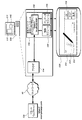
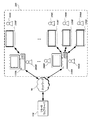
図1Aは、説明される実施形態が実施され得る例示的なシステムのブロック図である。図1Aに示す例において、ローカルコンピュータ110は、ウェブブラウザ130により、インターネットなどのネットワーク90を介してリモートウェブサーバ120と通信する。セキュリティのため、リモートウェブサーバはHTTPSを用いてウェブブラウザ130と通信し得るとともに、信頼できる認証局によって署名された証明書を用い得る。ローカルコンピュータ110は、ローカルウェブサーバ142、制御モジュール144、及びデータモジュール146を含む署名デバイス制御インスタンス140を起動する。したがって、本例においては、署名デバイス制御インスタンス140が起動されると、対応するローカルウェブサーバ142も起動される。しかし、以下で説明するように、対応するローカルウェブサーバ142を備えない署名デバイス制御インスタンス140を提供するのが好ましいこともあり得る。署名デバイス制御インスタンスをウェブブラウザ130と組み合わせて用いることが可能であるが、署名デバイス制御インスタンスはウェブブラウザ130から独立させて起動することが可能であり、ブラウザに対するプラグインコンポーネントとして提供される必要はない。署名デバイス制御インスタンス140及びローカルウェブサーバ142は、コンピュータ始動時に(例えば、ウェブブラウザ130が起動される前に)、または他の何らかのときに(例えば、署名が予定されることを示す、ユーザ入力、またはウェブブラウザ130からの入力に応答して)、起動することが可能である。
FIG. 1A is a block diagram of an exemplary system in which the embodiments described may be implemented. In the example shown in FIG. 1A, the
図1Aに示す例において、ローカルコンピュータ110は、ウェブブラウザ130及び制御モジュール144をそれぞれインタラクトするユーザインタフェース要素131及び145(例えば、アプリケーションに個別のウィンドウ)を備えたグラフィカルユーザインタフェース111を提供する。制御モジュール144は署名デバイス150を制御し、データモジュール146は、署名デバイス150からの署名に対応する署名データ(例えば、座標データ及び圧力データなどのペンイベントデータ、またはペンイベントデータ以外の署名データ(例えば、署名の画像、生体データなど))を受信する。署名データの内容は、署名デバイス制御ソフトウェアまたは署名デバイス自体の構成または機能に依存し得る。例えば、署名データは、署名のデジタル画像、ペンイベントデータ、他の署名データ、またはこのようなデータの何らかの組合せを含み得る。本例において、署名デバイスは電子書類(例えば、契約書)を表示するLCD画面151を備え、当該LCD画面は、制御モジュール144によって提供される、ペン装置152を用いて署名がなされる署名領域153と、署名が完了したことを確認する、署名を消去する、署名を取り消すなどするのに用いられ得るインタフェース要素154(例えば、「OK」、「クリア」、及び「取消」ボタン)とを含む。なされた署名に対応する署名データは、データモジュール146への入力として提供され得る。
In the example shown in FIG. 1A, the
図1Bは、ブラウザウィンドウ131及び署名キャプチャウィンドウ145を含む例示的なグラフィカルユーザインタフェース111のスクリーンショットである。図1Bに示す例において、書類及び関連するユーザインタフェース要素に対応するコード(例えば、HTMLコード及びJavaScript(登録商標)コード)は、リモートウェブサーバ120からダウンロードされてブラウザウィンドウ131内に描画される。署名デバイス制御インスタンス140は、ローカルコンピューティングデバイス上に、また図1Aに示す例においては署名デバイス152のLCD画面151上に、署名キャプチャウィンドウ145を表示させる。
FIG. 1B is a screenshot of an exemplary
一般に、署名デバイスは、デジタイザがペンの動きを検出するセンサ基板を組み込み、センサ基板表面によって生成される磁場によりペンの共振回路中にエネルギーを誘導する電磁共鳴(EMR)方式を使用し得る。その場合に、ペンの共振回路はこのエネルギーを利用してセンサ基板表面に磁気信号を返す。基板は、電子ペンがセンサ基板表面に接触しなくても、ペンから信号が受信され続けるようにペンがセンサ基板に十分に近接し続ける限り、一定時間間隔でペンの座標位置を検出する(有効な信号範囲は使用される個々の方式に依存して変化し得るが、一般に約数ミリメートルである。)。 In general, the signing device may use an electromagnetic resonance (EMR) scheme in which the digitizer incorporates a sensor substrate that detects the movement of the pen and induces energy into the resonant circuit of the pen by the magnetic field generated by the surface of the sensor substrate. In that case, the resonant circuit of the pen uses this energy to return a magnetic signal to the surface of the sensor substrate. The board detects the coordinate position of the pen at regular time intervals as long as the pen remains sufficiently close to the sensor board so that the signal continues to be received from the pen even if the electronic pen does not touch the surface of the sensor board (effective). The signal range can vary depending on the individual scheme used, but is generally about a few millimeters).
これに代えて、他の手書き入力方式を用いてもよい。例えば、電子ペンは他の無線方式を用いてもよく、または有線でデジタイザに接続されてもよい。他の例として、電子ペンはデジタイザの表面から離れて検出可能であってもなくてもよい。他の例として、電子ペンは電源供給型であってもよいし非電源供給型であってもよい。電源供給型ペンは外部電源への有線接続によって、または内蔵電池によって電源を受け取ってもよい。他の例として、電子ペンを用いずに手書きデータを入力することが可能である(例えば、感圧デジタル手書きパッド、タッチ画面、または電子ペンを必要としない何らかの他の入力装置上のスタイラスによる)。 Instead of this, another handwriting input method may be used. For example, the electronic pen may use another wireless method or may be connected to the digitizer by wire. As another example, the electronic pen may or may not be detectable away from the surface of the digitizer. As another example, the electronic pen may be a power supply type or a non-power supply type. The power-supplied pen may receive power by a wired connection to an external power source or by an internal battery. As another example, it is possible to enter handwritten data without using an electronic pen (eg, by a pressure sensitive digital handwriting pad, touch screen, or stylus on any other input device that does not require an electronic pen). ..
どのように手書きデータを収集するにしても、署名デバイスによって提供される手書きデータは、ペンイベント情報、装置情報、及び/または手書きがなされたコンテキストに関するコンテキスト情報を含み得る。ペンイベント情報は、デジタイザ表面上またはデジタイザ表面の上方のペン先のx/y位置と、手書きの開始からの時間とを含み得る。x/y座標値の他に、ペンイベント情報は、圧力(ペンフォース)、角度(方位角、仰角、及び/または回転)、及びペンダウンステータスなどの、署名デバイスの機能に属する付加情報を適宜含み得る。ペンイベント情報は、通常、署名処理中に一定間隔で収集される。 Regardless of how the handwritten data is collected, the handwritten data provided by the signing device may include pen event information, device information, and / or contextual information about the context in which the handwriting was made. The pen event information may include the x / y position of the pen tip on the digitizer surface or above the digitizer surface and the time from the start of handwriting. In addition to the x / y coordinate values, the pen event information includes additional information that belongs to the function of the signing device, such as pressure (pen force), angle (azimuth, elevation, and / or rotation), and pen down status. Can include. Pen event information is typically collected at regular intervals during the signature process.
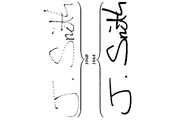
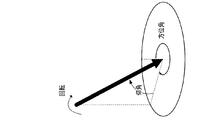
図1Cに示す例において、例示的な手書き処理106Aは、ペンが信号範囲内にとどまる限りペンがデジタイザの表面から持ち上げられているときにペンイベントを検出し続けることが可能な方式(例えば、EMR方式)を用いるペン装置及びデジタイザによって検出される複数のペンイベントを含む。署名106Aの表現106Bにおいて、ペンがアップしているときに検出される座標を明るいほうのドットで示し、ペンがダウンしている間に検出される座標を暗いほうのドットで示す。図1Dに示す例において、ペン装置について検出され得るパラメータ中に回転、仰角、及び方位角が含まれる(大きな黒矢印で示す)。
In the example shown in FIG. 1C, the
図1Aを再度参照すると、ローカルウェブサーバ142は、ActiveXコントロールなどの、これらを使用するブラウザの種類に特化して構成されなければならない、ローカルにインストールされたプラグインまたはコントロールを使用せずに、ブラウザ130がセキュアな方法で署名機能を制御することを可能とする。本例において、ローカルウェブサーバ142は、始動時にバックグラウンドで起動される。ブラウザ130はリモートウェブサーバ120からウェブページをロードする。また、ウェブページは、ウェブページがクロスドメイン方式(例えば、JSON−P(JavaScript(登録商標) Object Notation with Padding)方式、CORS(Cross−origin Resource Sharing)方式、またはWebSocketプロトコルに準拠する方式)、及びHTTP Get要求を用いてローカルウェブサーバ142に逐次の呼出しを行うことを可能とするフレームワーク(例えば、JavaScript(登録商標)フレームワーク)を提供し得る。ローカルウェブサーバ142は、これらの呼出しを受信し、呼出しを解釈し、制御モジュール144を用いて署名デバイス150を制御し得る。
Referring again to FIG. 1A, the
例示的なシナリオにおいて、ローカルコンピュータ110のユーザは、ローカルコンピュータにおいて署名デバイスを制御する関数を備えたライブラリをロードするコード(例えば、<script src="signaturesdk.js"></script>)を含むウェブページ(例えば、https://examplepage.com/demo.htm)を訪問する。signaturesdk.jsファイルは、ウェブページの一部であってそれらの関数についてのコードを提供するが、当該ウェブページはそれらの関数の実行をローカルウェブサーバに受け渡す。コードはローカルウェブサーバ142のURL(例えば、"http://localhost:")を示すクロスドメイン参照(すなわち、当該ウェブページのドメイン以外のドメインへの参照)を含み得る。コードは、JSON−P方式などのクロスドメイン方式を用いて送信され得る。JSON−P方式は、他のリモートサーバと通信するのに用いられ得るが、ここではローカルコンピュータ110上で動作するローカルウェブサーバ142と通信するのに用いられる。
In an exemplary scenario, a user on the
セキュリティのため、ローカルウェブサーバ142もHTTPSを用いてウェブブラウザ130と通信し得る。当該ローカルウェブサーバはさらに、認証局によって署名された証明書を用い得るが、この認証局は、例えば、署名デバイス制御インスタンス140に対応する署名ソフトウェアのインストール中にコンピュータ110上に生成されインストールされた固有の認証局である。このように、ウェブブラウザ130は、ローカルウェブサーバ142によって用いられる証明書を真正であるとして受理する。各コンピュータにおいて固有の認証局及び証明書を用いることによって、一方のコンピュータによって用いられる証明書/認証局が侵害されても、本システムを使用する他のすべてのコンピュータのセキュリティは必ずしも侵害されない。
For security, the
実装に依存して、ローカルウェブサーバ142は、任意選択的にさらに、ActiveXコントロールインスタンスを生成し、格納し、追跡し、最終的に廃棄し得る。このような実装において、ローカルウェブサーバ142は、各ActiveXコントロールインスタンスに対する固有かつランダムなIDを生成し、当該IDをウェブブラウザ130と共有し得る。
Depending on the implementation, the
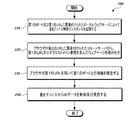
図2は、第1の例示的な実施形態に係る処理200のフローチャートである。図2に示す例において、ステップ210において、ローカルコンピューティングデバイス(例えば、図1Aに示すローカルコンピュータ110)は、第1のポート及び第1のURLに関連付けられたローカルウェブサーバを含む署名デバイス制御インスタンス(例えば、ワコム社より入手可能なSignature SDKまたはSTU SDKを用いる制御インスタンス)を起動する。署名デバイス制御インスタンスは、ローカルコンピューティングデバイスが署名デバイスを制御することを可能とし、署名デバイスから署名データを受信する。ローカルウェブサーバは第1のポートを待ち受け(Listen)する。ステップ220において、ローカルコンピューティングデバイス上で実行されているウェブブラウザは、第2のURLに関連付けられたリモートサーバからウェブページを読み出す(例えば、HTTPS接続などのセキュアな接続を介する)。
FIG. 2 is a flowchart of the
ウェブページは、ローカルコンピューティングデバイス上で描画または実行されるコードを提供する。このコードは、署名デバイスによって入力される署名に対するコンテキスト(例えば、専用の署名領域を備えた電子書類の形式による視覚的なコンテキスト)を提供する。このコードは、さらに、第1のURL(例えば、"https://localhost:")を示すクロスドメイン参照を提供する。例えば、クロスドメイン参照は、JavaScript(登録商標)などのクロスプラットフォーム記述言語コードで提供され得る。 Web pages provide code that is drawn or executed on a local computing device. This code provides a context for the signature entered by the signing device (eg, a visual context in the form of an electronic document with a dedicated signature area). The code also provides a cross-domain reference indicating a first URL (eg, "https: // localhost:"). For example, cross-domain references can be provided in cross-platform descriptive language code such as Javascript®.
ウェブページによって提供されるコードの少なくとも一部は、最新のウェブブラウザにおいて実施され得る同一発行元ポリシーを考慮して、JSON−P方式またはCORS方式などのセキュアなクロスドメイン方式を用いて提供され得る。 At least part of the code provided by a web page may be provided using a secure cross-domain method such as JSON-P or CORS, taking into account the same publisher policy that can be enforced in modern web browsers. ..
ステップ230において、ウェブブラウザは、第1のURLを用いて、署名デバイス制御インスタンスにより待ち受けされた第1のポートとの接続(例えば、HTTPS接続)を確立する。ステップ240において、ウェブブラウザは、署名デバイスからの署名データ(例えば、座標データ及び圧力データなどのペンイベントデータ、またはペンイベントデータ以外の署名データ(例えば、署名の画像、生体データなど))を制御及び受信する。例えば、図1A及び図1Bに示す例を再度参照すると、ウェブブラウザ130は、ローカルウェブサーバのURLを用いて、署名デバイス制御インスタンス140により待ち受けされた第1のポートとの接続を確立する。ブラウザウィンドウ131内において「署名」ボタンがクリックされると、ブラウザは署名デバイス制御インスタンス140を起動して署名デバイス152を制御する。
In
このようにして、ウェブブラウザは署名に対するコンテキストを提供し、ユーザ(例えば、銀行顧客)からの署名の収集を容易にすることができる。ウェブブラウザは、署名デバイスから受信したデータ、または受信したデータから生成されたデータを、リモートウェブサーバ、またはリモートウェブサーバに関連付けられたサーバへ、さらなる処理に向けて送信し得る。例えば、ウェブブラウザインスタンスが署名データを受信及び処理した後にウェブブラウザインスタンスは、必要に応じて、HTTP POST要求を用いて、またはクロスドメイン方式を用いて当該データをリモートウェブサーバにアップロードし得る。本明細書で説明される例のいずれにおいても、署名データは、署名を記録する、何かに同意を与えるか否かを判断する、署名を他の既知である本物の署名と比較してその有効性を検証する、または署名された書類を読み出すなどの多様な目的に用いられ得る。ウェブブラウザは、読み出したデータを書類データと組み合わせて(例えば、署名された書類の画像の形態で)送信し得る。
II.マルチユーザ実装
In this way, the web browser can provide a context for the signature and facilitate the collection of signatures from users (eg, bank customers). The web browser may send the data received from the signing device, or the data generated from the received data, to a remote web server, or a server associated with the remote web server, for further processing. For example, after the web browser instance receives and processes the signature data, the web browser instance may upload the data to the remote web server, if desired, using an HTTP POST request or using a cross-domain method. In any of the examples described herein, the signature data records the signature, determines whether to give consent to something, and compares the signature to other known genuine signatures. It can be used for a variety of purposes, such as verifying validity or reading signed documents. The web browser may send the read data in combination with the document data (eg, in the form of an image of a signed document).
II. Multi-user implementation
本項においては、第2、第3、及び第4の例示的な実施形態を参照して例示的なマルチユーザ実装を説明する。説明される実施形態において、ローカルコンピューティングデバイス(デスクトップコンピュータ、ノートブックコンピュータ、または任意の他の適当なコンピューティング装置)は、1つまたは複数の署名デバイスを使用する複数のユーザがリモートサーバによってインターネットなどのネットワークを介してローカルコンピューティングデバイスに、(例えば、ウェブブラウザによって)提供された電子書類に署名する機能を提供する。 In this section, exemplary multi-user implementations will be described with reference to the second, third, and fourth exemplary embodiments. In the embodiments described, the local computing device (desktop computer, notebook computer, or any other suitable computing device) is the Internet by a remote server by multiple users using one or more signing devices. Provides the ability to sign electronic documents provided (eg, by a web browser) to a local computing device over a network such as.
本明細書で説明される例示的な実施形態において、署名デバイス制御インスタンスは、ユーザインタフェース(UI)要素(例えば、Windows UI要素)を利用する特定のユーザセッション(例えば、Windowsユーザセッション)、または当該ユーザセッションによって利用可能とされる他の特徴に関連付けられ得る。このことは、例えば、署名デバイスが、使用中にアクティブなユーザセッションによって管理される画面を含む場合に有用となり得る。署名のキャプチャ時に、キャプチャされる間に署名を表示するウィンドウが生成され得る(例えば、図1Aにおいて署名デバイス150内に示される)とともに、そのウィンドウはアクティブなユーザセッションにおいて生成され得る。署名デバイス制御インスタンスは、ユーザセッションがアクティブである間にバックグラウンドで実行され得る。1つより多い署名デバイス制御インスタンスを単一のユーザセッションに関連付けることが可能である。
In an exemplary embodiment described herein, a signing device control instance is a particular user session (eg, Windows user session) that utilizes a user interface (UI) element (eg, Windows UI element), or said. It can be associated with other features made available by the user session. This can be useful, for example, if the signing device includes screens managed by the active user session in use. When capturing a signature, a window can be created to display the signature while it is being captured (eg, shown in the
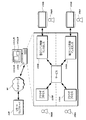
図3Aは、本明細書で説明される例示的な実施形態が実施され得る例示的なマルチユーザ環境300を示すシステム図である。図3Aに示す例において、ABC銀行の地方支店は、M人の従業員380A〜Mと、P台の署名デバイス150A〜P(例えば、専用の署名タブレット)に、(例えば、有線接続または無線接続によって)通信可能に接続されたK台のコンピュータ110A〜Kとを有する。本例において、従業員380A〜Mのいずれもが、示されたコンピュータ110A〜Kのいずれかにログインすることができ、各従業員はユーザアカウントを所有する。コンピュータ110A〜Kは、単一の接続された署名デバイス、または同時に接続された複数の署名デバイスを有し得る。営業日中に多くの顧客390A〜Xが銀行支店を訪れ得る。典型的な使用シナリオにおいて、タブレットが1人の顧客によって使用中である場合に、他の顧客はそのタブレットを使用することができない。したがって、典型的な使用シナリオにおいて、ある任意の時点にタブレットを使用している可能性がある顧客の最大数はタブレットの最大数によって制限される。
FIG. 3A is a system diagram illustrating an exemplary
例示的な使用シナリオにおいて、銀行員380Aがコンピュータ110Aにログインする。顧客390A、390B(例えば、夫婦)が到着し、銀行員380Aは彼らにそれぞれタブレット150A、150Bを使用して書類に署名するように案内する。コンピュータ110A上のウェブブラウザプロセスは、タブレット150A及び150Bを使用するアプリケーションフレームワークを含むウェブページをウェブブラウザからロードし、それをコンピュータ110Aの表示装置に表示し得る。さらに、タブレット150A、150Bは、署名された書類の画像、またはその一部分などの視覚的なコンテキストをそれぞれのタブレットの表示装置上に提供し得る。図3Aに示す例において、ウェブページはABC銀行のリモートウェブサーバ120によって供給される。これに代えて、ブラウザプロセスは様々なサーバから様々なウェブページをロードすることができ、それらのウェブページが、タブレットを使用するのに好適なアプリケーションフレームワークを含むならば、当該例は同様に機能する。
In an exemplary usage scenario,
例示的な使用シナリオにおいて、顧客390Aは、書類の対応する部分におけるタブレット150A上で自己の署名を終える。顧客390Bは、タブレット150B上での自己の署名を完了していない。顧客390Cが到着して、直ちに署名されなければならない優先事項を有している。銀行員380Bはコンピュータ110Aを自己のアカウントに切り替え、銀行員380Aのユーザアカウントをロックする。顧客390Cは現在使用されていないタブレット150Cを占有して優先事項に署名する一方、タブレット150Bはなお顧客390Bにより使用中である。顧客390Cは自己の署名を終える。銀行員380Bはコンピュータ110Aからログアウトし、銀行員380Aはコンピュータ110Aを切り替えて自己のユーザアカウントに戻す。その後、顧客390Bは自己の署名を終える。
In an exemplary usage scenario,
図3Bは、上述のマルチユーザセッションをより詳細に示すシステムである。図3Bに示す例において、銀行員380A及び380Bのユーザセッションは、コンピュータ110Aの拡大図内における破線の一方側に示されている。1つのユーザセッションがロックされ、(例えば、Windowsユーザセッションなどの、ユーザセッション間においてロックまたは切替えを行う公知の方式により)他のユーザセッションが起動されると、コンピュータ110Aは、(それぞれブラウザプロセス130A、130Bに関連付けられた)対応するブラウザウィンドウ131A、131B、及び(それぞれ署名デバイス制御インスタンス140A、140Bに関連付けられた)署名キャプチャウィンドウ145A、145Bを含む、各セッションに関連付けられたユーザインタフェース111A、111B間の切替えを行うことができる。
FIG. 3B is a system showing the above-mentioned multi-user session in more detail. In the example shown in FIG. 3B, the user sessions of
当然ながら、Windowsにおいてユーザセッションがロックされると、セッションと当該セッションの下で動作するすべてのプログラム及び処理とはアクティブのままであるが、機能が制限されてバックグラウンドで動作し、モニタ画面の制御を行わない。ロックされたユーザセッションは、マイクロフォンまたはビデオカメラなどのある入力装置を制御しなくてもよい。ユーザセッションがロックされているときに署名制御装置インスタンスはバックグラウンドで動作し続けることが可能であるが、セッションがロックされた状態でそのユーザセッションに対する新たなウィンドウは生成されない。一方、重要なことであるが、署名デバイス制御インスタンスがバックグラウンドで動作しているときに、署名デバイスはブラウザプロセスと通信し続けることが可能であり、このことを以下でより詳細に説明する。署名デバイスの種類に応じて、署名デバイスがロックされたセッションの署名デバイス制御インスタンスに接続されているときでも、ユーザは署名デバイスを使用し続けることが可能であってよい。 Of course, when a user session is locked in Windows, the session and all programs and processes running under that session remain active, but with limited functionality and running in the background on the monitor screen. No control. A locked user session does not have to control some input device, such as a microphone or video camera. The signature controller instance can continue to run in the background when the user session is locked, but no new window is created for that user session while the session is locked. On the other hand, importantly, the signing device can continue to communicate with the browser process when the signing device control instance is running in the background, which will be described in more detail below. Depending on the type of signing device, the user may be able to continue using the signing device even when the signing device is connected to the signing device control instance of the locked session.
以下でより詳細に説明するように、任意選択的に、サービス(例えば、アービトレータサービスまたはプロキシサービス)を使用して署名デバイス制御インスタンス140A及び140B間の切替えを行うことができる。
As described in more detail below, services (eg, arbitrator services or proxy services) can optionally be used to switch between signature
図3Aに示す例を再度参照すると、コンピュータ110Aに接続された3つのタブレットが存在し、3人の顧客が当該タブレットを使用する。一方、説明したばかりの例によって示すように、顧客はタブレットを共有することもでき、それは顧客がそれらを全く同時には使用しない場合であってもよい。タブレットは特定のユーザアカウントに固定される必要はない。さらに、説明される実施形態に従って、1人より多いユーザ(例えば、銀行員380A及び380B)が唯一の署名デバイスとともにコンピュータを使用することが可能である。例えば、ユーザがユーザセッションを切り替えるときに、単一の署名デバイスの制御が、各ユーザセッションの署名デバイス制御インスタンス間を行き来し得る。
A.第2の例示的な実施形態
Referencing the example shown in FIG. 3A again, there are three tablets connected to the
A. Second exemplary embodiment
本項においては、第2の例示的な実施形態を説明する。本実施形態において、同じポート番号を用いてすべての署名デバイス制御インスタンスと、それらのそれぞれのローカルウェブサーバを介して通信する。次に図3Aを参照して説明する例示的な使用シナリオにおいて、銀行員380Aがコンピュータ110Aにログインすることによってユーザセッションを生成し、所定のポート番号(例えば、8000)を待ち受けするローカルウェブサーバを用いて署名デバイス制御インスタンスを起動する。コンピュータ110A上で実行されているブラウザは、所定のポート番号を用いてローカルウェブサーバに接続する。銀行員380Aはユーザセッションをロックし、ブラウザとローカルウェブサーバとの間の接続が中断され、ローカルウェブサーバはポートの待ち受けを停止する。次いで、銀行員380Bがコンピュータ110Aにログインすることによって第2のユーザセッションを生成し、同じポート番号(本例では、8000)を待ち受けする第2のローカルウェブサーバを用いて新たな署名デバイス制御インスタンスを起動する。銀行員380Bが第2のユーザセッションをロックすると、ブラウザと第2のローカルウェブサーバとの間の接続が中断され、第2のローカルウェブサーバはポートの待ち受けを停止する。銀行員380Aが以前にロックされた自己のセッションに再度ログインする場合は、以前に中断された第1のローカルウェブサーバに関連付けられた接続が回復し、当該ウェブサーバはポートの待ち受けを再度開始する。
In this section, a second exemplary embodiment will be described. In this embodiment, the same port number is used to communicate with all signing device control instances via their respective local web servers. Next, in an exemplary usage scenario described with reference to FIG. 3A, a local web server where
こうして、本実施形態においては、オプションのサービス(図3Bを参照)は使用されず、アクティブなユーザセッションのみが、ポートを待ち受けするローカルウェブサーバを有するようになっている。本実施形態は、明快な解決手法によって複数のユーザを許容する目的を達成するが、あらゆる場合に有効である、または望ましいわけではない。例えば、ユーザがセッションをロックすると、そのローカルウェブサーバへの接続が実際に終了または中断して当該サーバがポートの待ち受けを停止するまでに遅延が生じ得る。他の例として、ユーザが以前にロックされたセッションにログインすると、ローカルウェブサーバがレディとなるまでに遅延が生じ得る。本実施形態は、ユーザセッションがロックされるとブラウザとローカルウェブサーバとの間の情報フローも停止させ、複数のユーザセッションが同時にアクティブであるシナリオには有効でない。
B.第3の例示的な実施形態
Thus, in this embodiment, no optional service (see FIG. 3B) is used, and only active user sessions have a local web server listening on the port. The present embodiment achieves the purpose of allowing multiple users by a clear solution, but is effective or not desirable in all cases. For example, when a user locks a session, there can be a delay before the connection to that local web server actually ends or is interrupted and the server stops listening on the port. As another example, if a user logs in to a previously locked session, there can be a delay before the local web server becomes ready. This embodiment also stops the information flow between the browser and the local web server when the user session is locked, and is not effective in a scenario in which a plurality of user sessions are active at the same time.
B. Third exemplary embodiment
本項においては、第3の例示的な実施形態を説明する。本実施形態においては、アービトレータサービスがブラウザプロセスを署名デバイス制御インスタンスに接続する。 In this section, a third exemplary embodiment will be described. In this embodiment, the arbitrator service connects the browser process to the signing device control instance.
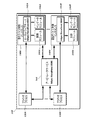
図4は、第3の例示的な実施形態または他の実施形態が実施され得る例示的なローカルコンピュータ110の他の実施形態のブロック図である。図4に示す例において、アービトレータサービス160はコンピュータ110の始動時に起動され、所定のポート番号(本例では、8000)を待ち受けするローカルホストウェブサーバを起動する。アービトレータサービス160は、Windowsサービス、Unixデーモンなどの、複数のユーザセッションによって用いられ得る任意のサービスからなり得る。
FIG. 4 is a block diagram of another embodiment of an exemplary
コンピュータ110は、N人のユーザに対する署名デバイス制御インスタンス140A〜Nを、対応するローカルウェブサーバ142A〜N、制御モジュール144A〜N、及びデータモジュール146A〜Nを用いて起動する。署名デバイス制御インスタンス140A〜Nはアービトレータサービス160と通信する。本例においては、アービトレータサービスがいくつかの署名デバイス制御インスタンス140A〜Nによって使用され得ることから、アービトレータサービスはいずれかの署名デバイス制御インスタンス140A〜Nが起動される前に起動される。
アービトレータサービス160は、ローカルウェブサーバ142A〜N(例えば、2つのローカルウェブサーバを用いるシナリオに対して、それぞれ8001、8002)の各々に異なるポートを割り当てる。ウェブブラウザプロセス130A〜Nは、ポート番号8000を介してアービトレータサービス160と通信する。ウェブブラウザプロセス130A〜Nは、アービトレータサービス160から各ローカルウェブサーバ142A〜Nに割り当てられたポート番号を、(例えば、TCPソケット接続を生成するHTTPS Get要求により)要求及び取得する。次いで、ウェブブラウザプロセス130A〜Nは、各ポート番号を用いてローカルウェブサーバ142A〜Nと(例えばHTTPS呼出しによって)直接通信することができる。ウェブブラウザプロセス130A〜Nは、ローカルウェブサーバ142A〜Nが実際に利用可能であることを確認するテストを、(例えば、各ローカルウェブサーバにHTTPS Getエコーメッセージを送信することにより)実行し得る。
The
次に図3Aを参照して説明する例示的な使用シナリオにおいて、銀行員380Aがコンピュータ110A上でユーザセッションを起動し、第1の装置制御インスタンスがローカルウェブサーバを用いて起動される(図3Bにおけるオプションのサービスは、アービトレータサービスであり、事前に起動されている。)。本シナリオにおいて、異なるローカルウェブサーバに異なるポートを割り当てるアービトレータサービスの機能が意味するところは、銀行員380Aがセッションをロックする場合に、セッションが占有ポートを有することから、ブラウザとローカルウェブサーバとの間の通信に何らの変化も生じずにすむということである。ローカルウェブサーバは、セッションがロックされている間に、(すべての可能なオープンソケット接続を用いて)待ち受けポートを開き続けてセッションの状態を容易に維持し、ブラウザに透過なセッションのロック及びアンロックを行い、ブラウザがローカルウェブサーバと通信することを可能とすることができる。このことは、例えば、ウェブページが銀行員380Aのセッションを求める要求を生成して当該銀行員のセッションがロックされている間にローカルウェブサーバがそれに応答し得る場合、または署名キャプチャに関する機能などのある一定の機能がソケット接続を開き続けることを必要とする場合に、有用となり得る。
Next, in an exemplary usage scenario described with reference to FIG. 3A,
銀行員380Bが第2のユーザセッションを生成し、第2のローカルウェブサーバを用いて新たな装置制御インスタンスが起動される場合は、ブラウザは、第1のローカルウェブサーバとの接続を開いたままで、異なるポート番号(例えば、8002)を用いて第2のローカルウェブサーバと通信することが可能である。銀行員380Aがログアウトしてユーザセッションを終了する場合は、アービトレータサービスは、(例えば、テーブルを更新することにより)ポート番号を開放して、他のユーザが当該ポート番号を使用することができるようにすることが可能である。
If the
オペレーティングシステムの中には(例えば、Windows)、ソケット接続のそれぞれの終了時に、プロセスIDなどの、ソケット接続に関する情報を提供し得るものがある。このような場合に、アービトレータサービスはその情報を使用するブラウザにリンクされたユーザを検出することが可能である。例えば、ブラウザはソケット接続を用いてアービトレータサービスを呼び出すことが可能であり、アービトレータサービスは、オペレーティングシステムを用いてブラウザのプロセスIDとそのプロセスIDに関連付けられたユーザIDとを学習することが可能である。その場合に、アービトレータサービスは、そのユーザIDに適合するポート番号を見つけることが可能である。他のオペレーティングシステムには、そのような情報を提供しないものがあり得る。しかし、アービトレータサービスは、それでも、ユーザがログインまたはログアウトするときを検出し、そのようにユーザを追跡することが可能である。 Some operating systems (eg, Windows) may provide information about a socket connection, such as a process ID, at the end of each socket connection. In such cases, the arbitrator service can detect the user linked to the browser that uses that information. For example, a browser can call an arbitrator service using a socket connection, which uses the operating system to learn the browser's process ID and the user ID associated with that process ID. It is possible. In that case, the arbitrator service can find a port number that matches the user ID. Other operating systems may not provide such information. However, the arbitrator service can still detect when a user logs in or out and track the user in that way.
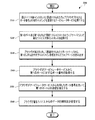
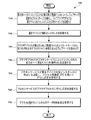
図5は、第3の例示的な実施形態に係る処理500のフローチャートである。図5に示す例において、ステップ510において、ローカルコンピューティングデバイス(例えば、図4に示すローカルコンピュータ110)は、ウェブブラウザプロセスと署名デバイス制御インスタンスに関連付けられたポート番号との間のマッピングを管理するアービトレータサービスを実行する。ステップ520において、ローカルコンピューティングデバイスは、第1のポート及び第1のURLに関連付けられたローカルウェブサーバを含む署名デバイス制御インスタンスを起動する。ステップ530において、ローカルコンピューティングデバイス上で実行されているウェブブラウザは、(例えば、HTTPS接続などのセキュアな接続を介して)第2のURLに関連付けられたリモートサーバからウェブページを読み出す。ウェブページは、ローカルコンピューティングデバイス上で描画または実行されるコード(例えば、HTML、JavaScript(登録商標)など)を提供する。当該コードは、第1のURL(例えば、"https://localhost:")を示すクロスドメイン参照を含む。ウェブページによって提供される当該コードの少なくとも一部は、最新のウェブブラウザにおいて実施され得る同一発行元ポリシーを考慮して、JSON−P方式またはCORS方式などのセキュアなクロスドメイン方式を用いて提供され得る。
FIG. 5 is a flowchart of the
ステップ540において、ブラウザは、アービトレータサービスから、(署名デバイス制御インスタンスによって待ち受けされた)第1のポートに対応するポート番号を取得し、ステップ550において、ブラウザは第1のポートとの接続(例えば、HTTPS接続)を確立する。ステップ560において、ウェブブラウザは、署名デバイスからの署名データ(例えば、座標データ及び圧力データなどのペンイベントデータ、またはペンイベントデータ以外の署名データ(例えば、署名の画像、生体データなど))を制御及び受信する。
In
アービトレータサービスのマッピング管理は、特定のユーザIDにポート番号を割り当て、プロセスIDまたはユーザIDに基づいてそれらのポート番号を読み出すことを含み得る。例えば、アービトレータサービスは、ウェブブラウザプロセスのプロセスIDを取得し、プロセスIDに関連付けられたユーザIDを取得し、(例えば、割り当てられたポート番号及びユーザIDのテーブル内のポート番号を参照することにより)ユーザIDに関連付けられたポートのポート番号を取得し得る。
C.第4の例示的な実施形態
Mapping management of the arbitrator service may include assigning port numbers to specific user IDs and reading those port numbers based on the process ID or user ID. For example, the arbitrator service gets the process ID of the web browser process, gets the user ID associated with the process ID (eg, refers to the assigned port number and the port number in the table of user IDs). By doing so, the port number of the port associated with the user ID can be obtained.
C. Fourth exemplary embodiment
本項においては、第4の例示的な実施形態を説明する。本実施形態において、ウェブブラウザはプロキシサービスを介して署名デバイス制御インスタンスと通信することが可能である。 In this section, a fourth exemplary embodiment will be described. In this embodiment, the web browser can communicate with the signing device control instance via a proxy service.
図6は、第4の例示的な実施形態または他の実施形態が実施され得る例示的なローカルコンピュータ110の他の実施形態のブロック図である。図6に示す例において、プロキシサービス170は、コンピュータ110の始動時に起動され、所定のポート番号(本例では、8000)を待ち受けするローカルホストウェブサーバを起動する。コンピュータ110は、N人のユーザに対する署名デバイス制御インスタンス140A〜Nを、対応する制御モジュール144A〜N、及びデータモジュール146A〜Nを用いて起動する。ウェブブラウザプロセス130A〜Nは、単一のポート番号8000を介してプロキシサービス170と通信し、プロキシサービスはプロセス間通信(IPC)を用いて装置制御インスタンス140A〜Nと通信する。したがって、本実施形態においては、1つのローカルウェブサーバポートのみが必要とされ、装置制御インスタンス140A〜Nは個別の独立したローカルウェブサーバを提供する必要がない。ウェブブラウザプロセス130A〜Nと装置制御インスタンス140A〜Nとの間の直接通信は全く必要とされない。
FIG. 6 is a block diagram of another embodiment of an exemplary
プロキシサービスと署名デバイス制御インスタンスとの間の通信は、ソケット、共有メモリ、ファイル、パイプ、信号、メッセージの受け渡し等を用いるなどのIPC方式を用いる多くの異なる方法で実施され得る。プロキシサービスを用いることにより、プロキシサービスがメッセージを受信してそれらを該当する署名デバイス制御インスタンスにリダイレクトするのに限られた時間を要するので、遅延が加わり得る。当該遅延は実装に依存するものであるが、付加された複雑さのオーバヘッドの処理は最小限であることから、ユーザに気付かれるものではない。プロキシ及び唯一のポート番号を用いることにより、ブラウザがプロキシに接続されさえすればよいため、システム及びブラウザサイドの構成が軽減される。また、空きポートの数が制限され(例えば、1〜65535)、セキュリティポリシーは利用可能なポート番号範囲を制限することが可能であり、多くのポート番号が他のアプリケーションにより使用された状態となり得る。したがって、アクティブなユーザそれぞれに異なるポート番号を割り当てることが可能でない場合が生じ得る。それゆえ、当該プロキシサービスは有益な代替手段を提供する。 Communication between the proxy service and the signing device control instance can be performed in many different ways using IPC methods, such as using sockets, shared memory, files, pipes, signals, message passing, and the like. By using a proxy service, delays can be added because it takes a limited amount of time for the proxy service to receive the messages and redirect them to the appropriate signing device control instance. The delay is implementation-dependent, but is unnoticed by the user as the handling of the added complexity overhead is minimal. By using a proxy and a unique port number, the system and browser-side configuration is reduced because the browser only needs to be connected to the proxy. Also, the number of free ports is limited (eg, 1-65535), security policies can limit the range of available port numbers, and many port numbers can be in use by other applications. .. Therefore, it may not be possible to assign different port numbers to each active user. Therefore, the proxy service provides a useful alternative.
次に図3Aを参照して説明する例示的な使用シナリオにおいて、銀行員380Aはコンピュータ110A上で第1のユーザセッションを起動し、第1の装置制御インスタンスが起動される(図3Bにおけるオプションのサービスは、プロキシサービスであり、事前に起動されている。)。第1のユーザセッションがアクティブである間に、ウェブブラウザはHTTPS/TCPソケット接続が開いた状態に保持されるように要求する関数を呼び出す。例として、DynamicCapture::Captureなどの関数は、タブレット上に署名をキャプチャするウィンドウを生成し得る。ブラウザとポート8000を待ち受けするローカルウェブサーバであるプロキシサービスとの間にHTTPS/TCPソケット接続が生成される。次いで、プロキシサービスはIPCを用いて第1の装置制御インスタンスと通信する。第1の装置制御インスタンスはウィンドウを生成し、タブレット上で署名キャプチャが起動する。銀行員380Aが自己のセッションをロックし、銀行員380Bが新たなセッションを起動する場合に、ブラウザは複数の装置制御インスタンスと同じポート(本例では、8000)を介して通信することが可能であることから、ブラウザと第1の装置制御インスタンスとの間の通信に何らの変化も生じずにすむ。銀行員380Aが再度ログインするときに、署名キャプチャウィンドウは開いたままであり、HTTPS/TCPソケット接続は開いたままである。署名が完了すると、ウィンドウ及びソケット接続は閉じられ得る。本例においては、署名がキャプチャされたことを伝えるHTTPS Get要求が返され得る。
In an exemplary usage scenario, which will then be described with reference to FIG. 3A, the
図7は、第3の例示的な実施形態に係る処理700のフローチャートである。図7に示す例において、ステップ710において、ローカルコンピューティングデバイス(例えば、図6に示すローカルコンピュータ110)は、ウェブブラウザプロセスと署名デバイス制御インスタンスとの間のマッピングを管理するプロキシサービスを実行する。また、プロキシサービスは、第1のポートを待ち受けするとともに第1のURLに関連付けられたローカルウェブサーバを起動する。ステップ720において、ローカルコンピューティングデバイスは署名デバイス制御インスタンスを起動する。ステップ730において、ローカルコンピューティングデバイス上で実行されているウェブブラウザプロセスは、第2のURLに関連付けられたリモートサーバから、(例えば、HTTPS接続などのセキュアな接続を介して)ウェブページを読み出す。当該ウェブページは、第1のURL(例えば、"https//localhost:")を示すクロスドメイン参照を含むコードを提供する。ウェブページによって提供される当該コードの少なくとも一部は、JSON−P方式またはCORS方式などのセキュアなクロスドメイン方式を用いて提供され得る。
FIG. 7 is a flowchart of the
ステップ740において、ブラウザプロセスは、プロキシサービスによって待ち受けされた第1のポートに署名デバイス制御呼出しを送信する。ステップ750において、プロキシサービスはIPCを用いて署名デバイス制御インスタンスに当該呼出しを送信し、呼出し応答を受信する。ステップ760において、プロキシサービスは呼出し応答をブザウザプロセスに送信する。ステップ770において、ブラウザプロセスは、署名デバイスからの署名データ(例えば、座標データ及び圧力データなどのペンイベントデータ、またはペンイベントデータ以外の署名データ(例えば、署名の画像、生体データなど))を制御及び受信する。
At
プロキシサービスのマッピング管理は、ブラウザプロセスのプロセスIDを取得し、プロセスIDに関連付けられたユーザIDを取得し、IPCを用いてユーザIDに関連付けられた署名デバイス制御インスタンスと通信するのに供される特定の情報を取得することを含み得る。
III.コンピューティング環境
The mapping management of the proxy service is provided to obtain the process ID of the browser process, obtain the user ID associated with the process ID, and use the IPC to communicate with the signing device control instance associated with the user ID. It may include obtaining specific information.
III. Computing environment
特定の例の状況に特化されない限り、本明細書で説明される実施形態または他の実施形態は、限定されるものではないが、ラップトップコンピュータ、デスクトップコンピュータ、スマートフォン、タブレットコンピュータ、専用の署名タブレット、またはこのような装置の組合せを含む任意の適当なコンピューティング装置によって実施され得る。 Unless specific to the context of a particular example, the embodiments or other embodiments described herein are, but are not limited to, laptop computers, desktop computers, smartphones, tablet computers, dedicated signatures. It can be performed by a tablet, or any suitable computing device, including a combination of such devices.
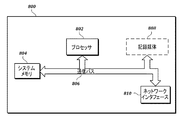
図8は、本開示の実施形態に従う使用に適した例示的なコンピューティング装置800の例示的な態様を示すブロック図である。以下の説明は、本開示の実施形態に従って使用され得る、サーバ、パーソナルコンピュータ、モバイル電話、スマートフォン、タブレットコンピュータ、組込みコンピューティング装置、及び他の現在入手可能なまたは開発途上の装置にあてはまる。
FIG. 8 is a block diagram illustrating an exemplary embodiment of an
コンピューティング装置800は、その最も基本的な構成において、通信バス806によって接続された、少なくとも1つのプロセッサ802及びシステムメモリ804を備える。装置の正確な構成及び種類に応じて、システムメモリ804は、リードオンリーメモリ(「ROM」)、ランダムアクセスメモリ(「RAM」)、EEPROM、フラッシュメモリ、または他のメモリ技術などの、揮発性メモリまたは不揮発性メモリからなり得る。当業者等は、システムメモリ804が、通常、プロセッサ802によって直接アクセス可能な及び/または同時に動作する、データモジュール及び/またはプログラムモジュールを格納することを認識するであろう。この場合に、プロセッサ802は、命令の実行をサポートすることによって、コンピューティング装置800の計算中枢として機能し得る。
In its most basic configuration, the
図8にさらに示すように、コンピューティング装置800は、ネットワークを介して他の装置と通信する1つまたは複数のコンポーネントを有するネットワークインタフェース810を備え得る。本開示の実施形態は、ネットワークインタフェース810を利用する基本サービスにアクセスして、共通のネットワークプロトコルを用いる通信を実行し得る。ネットワークインタフェース810は、さらに、WiFi(登録商標)、2G、3G、4G、LTE、WiMAX(登録商標)、Bluetooth(登録商標)などの1つまたは複数の無線通信プロトコルによって通信するように構成された無線ネットワークインタフェースを備え得る。
As further shown in FIG. 8, the
図8に示す例示的な実施形態において、コンピューティング装置800は、さらに、記録媒体808を備える。しかし、データをローカルな記録媒体に固定保持する手段を備えないコンピューティング装置を用いてサービスにアクセスし得る。したがって、図8に示す記録媒体808は任意選択による。いずれにせよ、記録媒体808は、限定されるものではないが、ハードドライブ、ソリッドステートドライブ、CD−ROM、DVDその他のディスク記憶装置、磁気テープ、磁気ディスク記憶装置などの、情報を格納することが可能な任意の技術を用いて実施される、揮発性または不揮発性、リムーバブルまたは非リムーバブルであり得る。
In the exemplary embodiment shown in FIG. 8, the
本明細書で用いる用語「コンピュータ読み取り可能な媒体」には、コンピュータ読み取り可能な命令、データ構造、プログラムモジュール、または他のデータなどの情報を格納することが可能な任意の方法または技術によって実施される、揮発性媒体及び不揮発性媒体ならびにリムーバブル媒体及び非リムーバブル媒体が含まれる。この場合に、図8に示すシステムメモリ804及び記録媒体808は、コンピュータ読み取り可能な媒体の例である。
As used herein, the term "computer-readable medium" is practiced by any method or technique capable of storing information such as computer-readable instructions, data structures, program modules, or other data. Includes volatile and non-volatile media as well as removable and non-removable media. In this case, the
説明を簡単にするため、また特許請求する主題の理解には重要でないため、図8は、多くのコンピューティング装置のいくつかの通常の構成要素を示していない。この場合に、コンピューティング装置800は、キーボード、キーパッド、マウス、トラックボール、マイクロフォン、ビデオカメラ、タッチパッド、タッチスクリーン、スタイラスなどの入力装置を備え得る。このような入力装置は、RF、赤外、シリアル、パラレル、Bluetooth(登録商標)、USBその他の、無線接続または物理接続を用いる適当な接続プロトコルを含む有線接続または無線接続によってコンピューティング装置800に接続され得る。
For simplicity of explanation and not important for understanding the claims, FIG. 8 does not show some of the usual components of many computing devices. In this case, the
任意の説明例において、データを入力装置(例えば、署名デバイス)によってキャプチャし、その後の処理に向けて送信または格納し得る。当該処理には、出力装置による表示のために後で復号化することができるようにデータを符号化することが含まれ得る。入力装置は、コンピューティング装置800から分離されるとともにコンピューティング装置800に通信可能に接続され得る、またはコンピューティング装置800の集積構成要素となり得る。コンピューティング装置800は、さらに、ディスプレイまたはタッチスクリーンなどの出力装置を備えてもよい。当該出力装置はコンピューティング装置800から分離されるとともにコンピューティング装置800に通信可能に接続され得る、またはコンピューティング装置800の集積構成要素となり得る。入力機能及び出力機能を同一の入力/出力装置(例えば、タッチスクリーン)に集積してもよい。現在知られている、または将来開発される適当な入力装置、出力装置、または組合せによる入力/出力装置を、説明に係るシステムとともに用い得る。
In any example, data may be captured by an input device (eg, a signing device) and transmitted or stored for further processing. The process may include encoding the data so that it can be later decoded for display by the output device. The input device can be separated from the
一般に、本明細書で説明されるコンピューティング装置の機能は、ハードウェアまたはソフトウェア命令に埋め込んだコンピューティングロジック内に実装可能であり、C、C++、COBOL、JAVA(登録商標)、PHP、Perl、Python、Ruby、HTML、CSS、JavaScript(登録商標),VBScript、ASPX、C#などのMicrosoft.NET(登録商標)言語といったプログラミング言語で記述可能である。コンピューティングロジックを、実行可能なプログラムにコンパイルしてもよいし、インタープリタ型のプログラミング言語で記述してもよい。一般に、本明細書で説明される機能を、増設してより大きな処理能力を提供する、他のモジュールと統合する、またはサブモジュールに分割することが可能なロジックモジュールとして実装することができる。コンピューティングロジックを、任意の種類のコンピュータ読み取り可能な媒体(例えば、メモリまたは記録媒体などの一時的でない(non-transitory)媒体)、またはコンピュータ記憶装置に格納し、また1つまたは複数の汎用または専用のプロセッサ上に格納して当該プロセッサによって実行することができ、これにより本明細書で説明される機能を提供するように構成された専用のコンピューティング装置を生成する。
IV.拡張機能及び代替手段
In general, the functionality of computing devices described herein can be implemented within computing logic embedded in hardware or software instructions, such as C, C ++, COBOL, JAVA®, PHP, Perl, Computing., Such as Python, Ruby, HTML, CSS, Javascript®, VBSscript, ASPX, C #, etc. It can be described in a programming language such as the NET (registered trademark) language. The computing logic may be compiled into an executable program or written in an interpreted programming language. In general, the functionality described herein can be implemented as a logic module that can be expanded to provide greater processing power, integrated with other modules, or subdivided into submodules. The computing logic is stored in any kind of computer-readable medium (eg, non-transitory medium such as memory or recording medium), or computer storage, and can also be one or more general purpose or It can be stored on and executed by a dedicated processor, thereby producing a dedicated computing device configured to provide the functionality described herein.
IV. Extensions and alternatives
本明細書で説明されるシステム及び装置に対する多くの代替手法が可能である。例えば、個々のモジュールまたはサブシステムを別々のモジュールまたはサブシステムに分離する、または接続してより少ない数のモジュールまたはサブシステムとすることができる。他の例として、モジュールまたはサブシステムを省略する、または他のモジュールまたはサブシステムを用いて補充することができる。他の例として、個々の装置、モジュール、またはサブシステムによって実行されるものとして示した機能を、1つまたは複数の他の装置、モジュール、またはサブシステムによって代わりに実行し得る。本開示中のいくつかの例は、特定の配置を取る特定のハードウェア構成要素を備える装置の説明を含むが、本明細書で説明される技術及びツールを変形して、異なるハードウェア構成要素、組合せ、または配置に適応させることができる。また、本開示のいくつかの例は特定の使用シナリオの説明を含むが、本明細書で説明される技術及びツールを変形して、異なる使用シナリオに適応させることができる。ソフトウェアで実施されるものとして説明される機能を、代わりにハードウェアで実施することができ、その逆も可能である。 Many alternative approaches to the systems and devices described herein are possible. For example, individual modules or subsystems can be separated or connected into separate modules or subsystems into a smaller number of modules or subsystems. As another example, modules or subsystems can be omitted or replenished with other modules or subsystems. As another example, a function shown to be performed by an individual device, module, or subsystem may be performed instead by one or more other devices, modules, or subsystems. Some examples in the present disclosure include descriptions of devices with specific hardware components that take a particular arrangement, but by modifying the techniques and tools described herein, different hardware components. , Combinations, or arrangements. Also, although some examples of the present disclosure include descriptions of specific usage scenarios, the techniques and tools described herein can be modified to adapt to different usage scenarios. Functions described as being performed in software can be performed in hardware instead, and vice versa.
本明細書で説明される技術に対する多くの代替手段が可能である。例えば、種々の技術における処理段階を別々の段階に分離する、または接続してより少ない数とすることができる。他の例として、種々の技術における処理段階を省略する、または他の技術または処理段階を用いて補充することができる。他の例として、特定の順序で起こるものとして説明される処理段階は、代わりに異なる順序で起こり得る。他の例として、一連のステップで実行されるとして説明される処理段階を、示された処理段階の1つまたは複数を同時に処理する複数のモジュールまたはソフトウェア処理を用いた並列方式で代わりに処理し得る。他の例として、個々の装置またはモジュールによって実行されるものとして示される処理段階を、1つまたは複数の他の装置またはモジュールによって代わりに実行し得る。 Many alternatives to the techniques described herein are possible. For example, the processing steps in the various techniques can be separated into separate steps or connected to a smaller number. As another example, the processing steps in the various techniques can be omitted or replenished using other techniques or processing steps. As another example, the processing steps described as occurring in a particular order can instead occur in a different order. As another example, a processing step described as being performed in a series of steps is instead processed in parallel with multiple modules or software processing that simultaneously processes one or more of the indicated processing steps. obtain. As another example, the processing steps shown as being performed by individual devices or modules may be performed instead by one or more other devices or modules.
本開示の原理、代表的な実施形態、及び動作のモードを以上で説明してきた。しかし、保護されることを意図した本開示の態様は、開示された特定の実施形態に限定されるものと解釈すべきではない。また、本明細書で説明される実施形態は、限定的ではなく例示的であるとみなすべきである。本開示の精神から逸脱することなく、他の者によって変形及び変更がなされ、等価物が採用され得ることは理解することができるであろう。本発明の例示的な実施形態を図示及び説明してきたが、本発明の精神及び範囲から逸脱することなくそれらにおいて種々の変更がなされ得ることは理解することができるであろう。 The principles, typical embodiments, and modes of operation of the present disclosure have been described above. However, aspects of this disclosure intended to be protected should not be construed as being limited to the particular embodiments disclosed. Also, the embodiments described herein should be considered exemplary rather than limiting. It will be appreciated that modifications and alterations may be made by others and equivalents may be adopted without departing from the spirit of this disclosure. Although exemplary embodiments of the invention have been illustrated and described, it will be appreciated that various modifications can be made in them without departing from the spirit and scope of the invention.
Claims (9)
複数のウェブブラウザプロセスと複数の署名デバイス制御インスタンスに関連付けられた複数のポート番号の間の複数のマッピングを管理するアービトレータサービスを実行することと、
第1のローカルウェブサーバを含む第1の署名デバイス制御インスタンスであって、第1の署名デバイスを制御して前記第1の署名デバイスから署名データを受信し、第1のURLに対応する第1のポートを待ち受けする第1の署名デバイス制御インスタンスを起動することと、
前記第1の署名デバイスによって入力される署名に対するコンテキストを示す書類と、前記第1のURLを示すクロスドメイン参照とを含むウェブページを、前記ローカルコンピューティングデバイス上で実行される第1のウェブブラウザプロセスによって、第2のURLを用いてリモートサーバから読み出すことと、
前記第1のウェブブラウザプロセスによって、前記アービトレータサービスから前記第1のポートのポート番号を取得することと、
前記第1のウェブブラウザプロセスによって、前記アービトレータサービスから取得したポート番号を用いて前記第1のポートとの接続を確立することと、
前記第1のウェブブラウザプロセスによって前記第1の署名デバイスを制御することと、
前記第1のウェブブラウザプロセスによって前記第1の署名デバイスから署名データを受信することとを含む方法。 A computer implementation method performed by a local computing device communicatively connected to one or more signing devices.
And performing arbitrator service that manages a plurality of mappings between a plurality of port numbers associated with a plurality of web browser processes and multiple signature device control instance,
A first signing device control instance that includes a first local web server that controls a first signing device to receive signature data from the first signing device and corresponds to a first URL. Launching a first signing device control instance that listens on the port of
A first web browser running on the local computing device a web page containing a document indicating the context for a signature entered by the first signing device and a cross-domain reference indicating the first URL. By the process, reading from the remote server using the second URL,
Obtaining the port number of the first port from the arbitrator service by the first web browser process,
Using the port number obtained from the arbitrator service by the first web browser process to establish a connection with the first port.
Controlling the first signing device by the first web browser process,
A method comprising receiving signature data from the first signing device by the first web browser process.
前記アービトレータサービスを、いずれかの署名デバイス制御インスタンスが起動される前に実行する方法。 The method according to claim 1.
A method of running the arbitrator service before any signing device control instance is launched.
第2のローカルウェブサーバを含む第2の署名デバイス制御インスタンスであって、前記第1の署名デバイスまたは他の制御装置を制御し、前記第1のURLに対応する第2のポートを待ち受けする第2の署名デバイス制御インスタンスを起動することと、
前記ローカルコンピューティングデバイス上で実行される第2のウェブブラウザプロセスによって、前記リモートサーバから前記ウェブページを読み出すことと、
前記第2のウェブブラウザプロセスによって、前記アービトレータサービスから前記第2のポートのポート番号を取得することと、
前記第2のウェブブラウザプロセスによって、前記アービトレータサービスから取得したポート番号を用いて前記第2のポートとの接続を確立することとを含む方法。 The method according to claim 2, further
A second signing device control instance that includes a second local web server, that controls the first signing device or other control device and listens for a second port that corresponds to the first URL. Launching the signature device control instance of 2 and
Reading the web page from the remote server by a second web browser process running on the local computing device.
Obtaining the port number of the second port from the arbitrator service by the second web browser process, and
A method comprising establishing a connection with the second port using the port number obtained from the arbitrator service by the second web browser process.
前記アービトレータサービスは、
前記第1のウェブブラウザプロセスのプロセスID(PID)を取得し、
前記PIDに関連付けられたユーザID(UID)を取得し、
前記UIDに対する前記第1のポートのポート番号を取得することによって、前記マッピングを管理する方法。 The method according to any one of claims 1 to 3.
The arbitrator service is
Obtain the process ID (PID) of the first web browser process and
Acquire the user ID (UID) associated with the PID and
A method of managing the mapping by acquiring the port number of the first port with respect to the UID.
前記アービトレータサービスは前記UID及びポート番号を保持し、前記第1のポートのポート番号は前記アービトレータサービスによって割り当てられ、前記第1のポートのポート番号を取得することは、割り当てられたポート番号及びUIDのテーブル内のポート番号を参照することを含む方法。 The method according to claim 4.
The arbitrator service holds the UID and the port number, the port number of the first port is assigned by the arbitrator service, and acquiring the port number of the first port is assigned. A method that includes referencing a port number and a port number in the UID table.
第1のURLに対応する第1のポートを待ち受けるローカルウェブサーバを起動するとともに、複数のウェブブラウザプロセスと複数の署名デバイス制御インスタンスとの間の複数のマッピングを管理するプロキシサービスを実行することと、
第1の署名デバイスを制御して前記第1の署名デバイスから署名データを受信する第1の署名デバイス制御インスタンスを起動することと、
前記第1の署名デバイスによって入力される署名に対するコンテキストを示す書類と、前記第1のURLを示すクロスドメイン参照とを含むウェブページを、前記ローカルコンピューティングデバイス上で実行される第1のウェブブラウザプロセスによって、第2のURLを用いて、リモートサーバから読み出すことと、
前記第1のウェブブラウザプロセスによって、前記プロキシサービスにより待ち受けされた前記第1のポートに署名デバイス制御呼出しを送信することと、
前記プロキシサービスによって、プロセス間通信(IPC)を用いて、前記呼出しを前記第1の署名デバイス制御インスタンスに送信して呼出し応答を受信することと、
前記プロキシサービスによって前記呼出し応答を前記第1のウェブブラウザプロセスに送信することと、
前記第1のウェブブラウザプロセスによって前記第1の署名デバイスを制御することと、
前記第1のウェブブラウザプロセスによって前記第1の署名デバイスから署名データを受信することとを含む方法。 A computer implementation method performed by a local computing device communicatively connected to one or more signing devices.
With starting the local web server Ru waiting a first port corresponding to the first URL, execute a pulp b carboxymethyl services to manage the plurality of mappings between a plurality of web browser process and a plurality of signature devices control instance To do and
To launch a first signature device control instance that controls the first signature device and receives signature data from the first signature device.
A first web browser running on the local computing device a web page containing a document indicating the context for a signature entered by the first signing device and a cross-domain reference indicating the first URL. By the process, reading from the remote server using the second URL,
Sending a signing device control call to the first port listened to by the proxy service by the first web browser process.
The proxy service uses interprocess communication (IPC) to send the call to the first signing device control instance to receive the call response.
Sending the call response to the first web browser process by the proxy service and
Controlling the first signing device by the first web browser process,
A method comprising receiving signature data from the first signing device by the first web browser process.
前記プロキシサービスを、いずれかの署名デバイス制御インスタンスが起動される前に実行する方法。 The method according to claim 6.
A method of running the proxy service before any signing device control instance is launched.
前記第1の署名デバイスまたは他の署名デバイスを制御する第2の署名デバイス制御インスタンスを起動することと、
前記ローカルコンピューティングデバイス上で実行される第2のウェブブラウザプロセスによって、前記リモートサーバから前記ウェブページを読み出すことと、
前記第2のウェブブラウザプロセスによって、前記プロキシサービスによって待ち受けされた前記第1のポートに署名デバイス制御呼出しを送信することと、
前記プロキシサービスによって、プロセス間通信(IPC)を用いて、前記呼出しを前記第2の署名デバイス制御インスタンスに送信して呼出し応答を受信することと、
前記プロキシサービスによって前記呼出し応答を前記第2のウェブブラウザプロセスに送信することを含む方法。 The method according to claim 7, further
Invoking a second signing device control instance that controls the first signing device or other signing device.
Reading the web page from the remote server by a second web browser process running on the local computing device.
Sending a signing device control call to the first port listened to by the proxy service by the second web browser process.
The proxy service uses interprocess communication (IPC) to send the call to the second signing device control instance to receive the call response.
A method comprising sending the call response to the second web browser process by the proxy service.
前記プロキシサービスは、
前記第1のウェブブラウザプロセスのプロセスID(PID)を取得し、
前記PIDに関連付けられたユーザID(UID)を取得し、
前記UIDに対する前記第1の署名デバイス制御インスタンスとのIPCを用いるのに供される情報を取得することによって、
前記マッピングを管理する方法。 The method according to any one of claims 6 to 8.
The proxy service
Obtain the process ID (PID) of the first web browser process and
Acquire the user ID (UID) associated with the PID and
By acquiring the information provided to use the IPC with the first signing device control instance for the UID.
A method of managing the mapping.
Applications Claiming Priority (3)
| Application Number | Priority Date | Filing Date | Title |
|---|---|---|---|
| US201562238445P | 2015-10-07 | 2015-10-07 | |
| US62/238,445 | 2015-10-07 | ||
| PCT/JP2016/079824 WO2017061558A1 (en) | 2015-10-07 | 2016-10-06 | Multi-user, cross-browser signature platform |
Publications (2)
| Publication Number | Publication Date |
|---|---|
| JP2019502177A JP2019502177A (en) | 2019-01-24 |
| JP6828014B2 true JP6828014B2 (en) | 2021-02-10 |
Family
ID=58487906
Family Applications (1)
| Application Number | Title | Priority Date | Filing Date |
|---|---|---|---|
| JP2018506242A Active JP6828014B2 (en) | 2015-10-07 | 2016-10-06 | A computer implementation performed by a local computing device communicatively connected to one or more signing devices. |
Country Status (3)
| Country | Link |
|---|---|
| US (1) | US10862974B2 (en) |
| JP (1) | JP6828014B2 (en) |
| WO (1) | WO2017061558A1 (en) |
Families Citing this family (16)
| Publication number | Priority date | Publication date | Assignee | Title |
|---|---|---|---|---|
| US10937097B1 (en) | 2012-02-06 | 2021-03-02 | Acorns Grow Incorporated | Systems and methods for creating excess funds from retail transactions and apportioning those funds into investments |
| US8781906B2 (en) | 2012-02-06 | 2014-07-15 | Walter Cruttenden | Systems and methods for managing consumer transaction-based investments |
| US20130332283A1 (en) * | 2012-06-11 | 2013-12-12 | Retailmenot, Inc. | Devices, methods, and computer-readable media for redemption of merchant offers |
| USD969818S1 (en) | 2013-03-14 | 2022-11-15 | Acorns Grow Inc. | Mobile device screen with graphical user interface |
| USD927508S1 (en) | 2013-03-14 | 2021-08-10 | Acorns Grow Incorporated | Mobile device screen or portion thereof with graphical user interface |
| USD928190S1 (en) | 2013-03-14 | 2021-08-17 | Acorns Grow Incorporated | Mobile device screen or portion thereof with an animated graphical user interface |
| USD972577S1 (en) | 2013-03-14 | 2022-12-13 | Acorns Grow Inc. | Mobile device screen with a graphical user interface |
| USD792890S1 (en) | 2015-05-22 | 2017-07-25 | Acorns Grow Incorporated | Display screen or portion therof with a financial data graphical user interface |
| USD928799S1 (en) | 2018-07-19 | 2021-08-24 | Acorns Grow Incorporated | Mobile device screen or portion thereof with graphical user interface |
| US11172013B2 (en) * | 2019-01-31 | 2021-11-09 | Open Text Corporation | System and method for launching and connecting to a local server from a webpage |
| US11567655B2 (en) * | 2019-02-21 | 2023-01-31 | Acorns Grow Incorporated | Secure signature creation on a secondary device |
| JP6955128B2 (en) | 2019-11-08 | 2021-10-27 | 株式会社ワコム | Artwork trading methods, trading equipment, and programs |
| USD927521S1 (en) | 2019-12-09 | 2021-08-10 | Acorns Grow Incorporated | Mobile device screen or portion thereof with a graphical user interface |
| CN112492004B (en) * | 2020-11-17 | 2023-02-17 | 深圳市晨北科技有限公司 | Method, device, system and storage medium for establishing local communication link |
| CN114968015A (en) * | 2022-05-18 | 2022-08-30 | 北京眼神智能科技有限公司 | A method, device and medium for information exchange and control of network communication module |
| CN115525163A (en) * | 2022-09-09 | 2022-12-27 | 广州市博雅信息科技有限公司 | Handwriting processing method and system based on operating system |
Family Cites Families (10)
| Publication number | Priority date | Publication date | Assignee | Title |
|---|---|---|---|---|
| KR100667742B1 (en) * | 2000-08-23 | 2007-01-11 | 삼성전자주식회사 | Method for controlling at least one controlled device of the control device |
| US20060136731A1 (en) * | 2004-12-21 | 2006-06-22 | Signaturelink, Inc. | System and method for providing an online electronic signature |
| JP4983445B2 (en) * | 2007-07-09 | 2012-07-25 | セイコーエプソン株式会社 | Network system and program |
| US8706801B2 (en) * | 2009-07-20 | 2014-04-22 | Facebook, Inc. | Rendering a web page using content communicated to a browser application from a process running on a client |
| US8601363B2 (en) | 2009-07-20 | 2013-12-03 | Facebook, Inc. | Communicating information about a local machine to a browser application |
| US8898766B2 (en) * | 2012-04-10 | 2014-11-25 | Spotify Ab | Systems and methods for controlling a local application through a web page |
| JP6074165B2 (en) * | 2012-06-01 | 2017-02-01 | キヤノン株式会社 | Information processing apparatus, information processing method, and program |
| US9235748B2 (en) | 2013-11-14 | 2016-01-12 | Wacom Co., Ltd. | Dynamic handwriting verification and handwriting-based user authentication |
| KR102144517B1 (en) * | 2013-12-31 | 2020-08-14 | 원스팬 인터내셔널 게엠베하 | Electronic signing methods, systems and apparatus |
| US9992026B2 (en) * | 2014-03-28 | 2018-06-05 | Mohammed Alawi E GEOFFREY | Electronic biometric (dynamic) signature references enrollment method |
-
2016
- 2016-10-06 JP JP2018506242A patent/JP6828014B2/en active Active
- 2016-10-06 WO PCT/JP2016/079824 patent/WO2017061558A1/en not_active Ceased
-
2018
- 2018-03-30 US US15/941,830 patent/US10862974B2/en active Active
Also Published As
| Publication number | Publication date |
|---|---|
| WO2017061558A1 (en) | 2017-04-13 |
| US20180227370A1 (en) | 2018-08-09 |
| US10862974B2 (en) | 2020-12-08 |
| JP2019502177A (en) | 2019-01-24 |
Similar Documents
| Publication | Publication Date | Title |
|---|---|---|
| JP6828014B2 (en) | A computer implementation performed by a local computing device communicatively connected to one or more signing devices. | |
| US11736529B2 (en) | Adaptive offline policy enforcement based on coniext | |
| US10664613B2 (en) | Virtualization input component | |
| CN104604204B (en) | Safely handle server certificate errors in synchronous communications | |
| US11030351B2 (en) | Secure data display | |
| EP3625721B1 (en) | Impersonating target account via account redirection | |
| US20140223532A1 (en) | Information processing system, information processing device, and authentication method | |
| US9576123B2 (en) | Pattern-based password with dynamic shape overlay | |
| US10135808B1 (en) | Preventing inter-application message hijacking | |
| US10536277B1 (en) | Contribution signatures for tagging | |
| US9275206B2 (en) | Managing sensitive information | |
| WO2019085184A1 (en) | Conference blackboard-writing file management method and apparatus, and display apparatus and storage medium | |
| JP2015531501A (en) | Managing digital receipts | |
| JP2015194861A (en) | Collation system, program, and collation method | |
| CN111598544A (en) | Method and apparatus for processing information | |
| CN108055141B (en) | Contextual interaction with an application | |
| US20210306330A1 (en) | Authentication server, and non-transitory storage medium | |
| CN103970528A (en) | Information Processing System, Information Processing Device, And Method | |
| EP3125183A1 (en) | Methods and systems for financial account access management | |
| US20190034751A1 (en) | Managing camera actions | |
| US10904011B2 (en) | Configuration updates for access-restricted hosts | |
| US12556573B2 (en) | Protecting against harm caused by malicious websites | |
| US20260010882A1 (en) | Digital account management having aggregated account display | |
| KR102825551B1 (en) | Electronic apparatus and controlling method thereof | |
| JP2015215910A (en) | Server system and request execution control method |
Legal Events
| Date | Code | Title | Description |
|---|---|---|---|
| RD05 | Notification of revocation of power of attorney |
Free format text: JAPANESE INTERMEDIATE CODE: A7425 Effective date: 20190618 |
|
| A621 | Written request for application examination |
Free format text: JAPANESE INTERMEDIATE CODE: A621 Effective date: 20190920 |
|
| A131 | Notification of reasons for refusal |
Free format text: JAPANESE INTERMEDIATE CODE: A131 Effective date: 20200602 |
|
| A521 | Request for written amendment filed |
Free format text: JAPANESE INTERMEDIATE CODE: A523 Effective date: 20200720 |
|
| A131 | Notification of reasons for refusal |
Free format text: JAPANESE INTERMEDIATE CODE: A131 Effective date: 20210105 |
|
| A521 | Request for written amendment filed |
Free format text: JAPANESE INTERMEDIATE CODE: A523 Effective date: 20210106 |
|
| TRDD | Decision of grant or rejection written | ||
| A01 | Written decision to grant a patent or to grant a registration (utility model) |
Free format text: JAPANESE INTERMEDIATE CODE: A01 Effective date: 20210119 |
|
| A61 | First payment of annual fees (during grant procedure) |
Free format text: JAPANESE INTERMEDIATE CODE: A61 Effective date: 20210120 |
|
| R150 | Certificate of patent or registration of utility model |
Ref document number: 6828014 Country of ref document: JP Free format text: JAPANESE INTERMEDIATE CODE: R150 |
|
| R250 | Receipt of annual fees |
Free format text: JAPANESE INTERMEDIATE CODE: R250 |
|
| R250 | Receipt of annual fees |
Free format text: JAPANESE INTERMEDIATE CODE: R250 |
|
| R250 | Receipt of annual fees |
Free format text: JAPANESE INTERMEDIATE CODE: R250 |