JP6558331B2 - Image processing device - Google Patents
Image processing device Download PDFInfo
- Publication number
- JP6558331B2 JP6558331B2 JP2016179130A JP2016179130A JP6558331B2 JP 6558331 B2 JP6558331 B2 JP 6558331B2 JP 2016179130 A JP2016179130 A JP 2016179130A JP 2016179130 A JP2016179130 A JP 2016179130A JP 6558331 B2 JP6558331 B2 JP 6558331B2
- Authority
- JP
- Japan
- Prior art keywords
- image
- unit
- size
- keyword
- area
- Prior art date
- Legal status (The legal status is an assumption and is not a legal conclusion. Google has not performed a legal analysis and makes no representation as to the accuracy of the status listed.)
- Expired - Fee Related
Links
Images





Landscapes
- Record Information Processing For Printing (AREA)
- Processing Or Creating Images (AREA)
- Document Processing Apparatus (AREA)
Description
本発明は、画像処理装置に関する。 The present invention relates to an image processing apparatus.
スキャナーまたは複写機などの画像処理装置が、原稿に形成された画像を読み取り、読み取った画像に含まれる文字列画像を文字列データへ変換するOCR(Optical Character Recognition)処理を実行する機能を備える場合がある。 When an image processing apparatus such as a scanner or a copying machine has a function of executing an OCR (Optical Character Recognition) process for reading an image formed on a document and converting a character string image included in the read image into character string data There is.
また、前記画像処理装置が、入力画像に対する前記OCR処理によって得た文字列データに含まれる単語に対応する発音記号または翻訳された単語などの付加情報を特定し、前記入力画像に前記付加情報を付加した画像について印刷処理を実行することが知られている(例えば、特許文献1参照)。 Further, the image processing device specifies additional information such as a phonetic symbol or a translated word corresponding to a word included in the character string data obtained by the OCR processing on the input image, and adds the additional information to the input image. It is known to execute a printing process on an added image (see, for example, Patent Document 1).
ところで、例えば名前、部署または電話番号などの既知の個別情報を申請用紙またはアンケート用紙などの定型用紙における予め定められた記入欄に記入しなければならない場合がある。この場合、前記定型用紙に前記個別情報を記入することは手間である。 By the way, for example, known individual information such as name, department or telephone number may have to be entered in a predetermined entry field on a standard form such as an application form or a questionnaire form. In this case, it is troublesome to enter the individual information on the standard paper.
本発明の目的は、名前、部署または電話番号などの既知の個別情報を定型用紙に記入する手間を省くことができる画像処理装置を提供することにある。 An object of the present invention is to provide an image processing apparatus that can save the trouble of entering known individual information such as name, department or telephone number on a standard form.
本発明の一の局面に係る画像処理装置は、登録情報取得部、キーワード検出部、最小領域サイズ特定部、有効空き領域判定部および画像合成部を備える。前記登録情報取得部は、不揮発性の記憶部から、キーワードおよび前記キーワードに対応する挿入文字列を含む登録情報を取得する。前記キーワード検出部は、入力画像データが表す一次画像から前記キーワードに相当するキーワード画像を検出する。前記最小領域サイズ特定部は、予め定められた最小サイズの文字で前記挿入文字列を表す画像が収まるサイズである最小領域サイズを特定する。前記有効空き領域判定部は、前記一次画像における前記キーワード画像の位置を基準にした予め設定された相対位置に、前記最小領域サイズ以上の無画像領域である有効空き領域が存在するか否かを判定する。前記画像合成部は、前記有効空き領域が存在するとの判定結果が得られた場合に、前記一次画像における前記有効空き領域に、前記挿入文字列を表す画像が合成された二次画像を表す出力画像データを生成する。 An image processing apparatus according to an aspect of the present invention includes a registration information acquisition unit, a keyword detection unit, a minimum region size specification unit, an effective free region determination unit, and an image composition unit. The registration information acquisition unit acquires registration information including a keyword and an insertion character string corresponding to the keyword from a nonvolatile storage unit. The keyword detection unit detects a keyword image corresponding to the keyword from a primary image represented by input image data. The minimum area size specifying unit specifies a minimum area size that is a size in which an image representing the inserted character string can be accommodated with a character having a predetermined minimum size. The effective empty area determination unit determines whether or not there is an effective empty area that is a non-image area equal to or larger than the minimum area size at a preset relative position based on the position of the keyword image in the primary image. judge. When the determination result that the effective empty area exists is obtained, the image composition unit outputs an image representing a secondary image in which an image representing the insertion character string is synthesized with the effective empty area in the primary image. Generate image data.
本発明によれば、名前、部署または電話番号などの既知の個別情報を定型用紙に記入する手間を省くことができる画像処理装置を提供することが可能になる。 According to the present invention, it is possible to provide an image processing apparatus that can save the trouble of entering known individual information such as name, department, or telephone number on a standard form.
以下、添付図面を参照しながら、本発明の実施形態について説明する。なお、以下の実施形態は、本発明を具体化した一例であって、本発明の技術的範囲を限定する性格を有さない。 Hereinafter, embodiments of the present invention will be described with reference to the accompanying drawings. In addition, the following embodiment is an example which actualized this invention, Comprising: It does not have the character which limits the technical scope of this invention.
[画像処理装置10の構成]
画像処理装置10は、原稿900に形成された一次画像Gx0を読み取り、読み取った一次画像Gx0に他の画像を合成し、合成後の二次画像Gy0を出力する処理を実行可能である。
[Configuration of Image Processing Device 10]
The
二次画像Gy0の出力処理は、例えば、二次画像Gy0をシート901に形成する印刷処理、または、二次画像Gy0を表す二次画像データDy0を通信回線100を通じて外部装置へ送信する処理などである。二次画像データDy0は出力画像データの一例である。
The output process of the secondary image Gy0 is, for example, a printing process for forming the secondary image Gy0 on the
例えば、画像処理装置10が、複写機、ファクシミリ装置または複合機などであることが考えられる。なお、図1において、原稿900およびシート901が仮想線で示されている。シート901は、紙またはフィルムなどのシート状の画像形成媒体である。
For example, it is conceivable that the
通信回線100は、例えばLAN(Local Area Network)である。また、通信回線100がLANおよびインターネットであることの他、通信回線100が公衆電話回線であることなども考えられる。
The
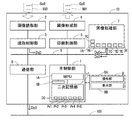
図1に示されるように、画像処理装置10は、主制御部1、画像読取部2、読取制御部3、画像形成部4、印刷制御部5、通信部6、画像処理部7および操作表示部8などを備える。主制御部1、読取制御部3、印刷制御部5、通信部6および画像処理部7は、バス9を通じて相互にデータの受け渡しが可能である。
As shown in FIG. 1, the
画像読取部2は、原稿900に光を走査する不図示の光学系、および原稿900からの反射光の光量を画素ごとに検出して一次画像データDx0を出力する不図示のイメージセンサーなどを備える。画像読取部2は、原稿900の画像を読み取り、読み取り画像を表す一次画像データDx0を生成する処理を実行する。以下、その処理のことを画像読取処理と称する。なお、一次画像データDx0は入力画像データの一例である。
The
読取制御部3は、画像読取部2を制御し、画像読取部2から一次画像データDx0を取得する。さらに、読取制御部3は、一次画像データDx0を画像処理部7または通信部6へ転送する。
The
画像形成部4は、周知の電子写真方式またはインクジェット方式の画像形成処理によってシート901に画像を形成する。
The
印刷制御部5は、画像処理部7から印刷用画像データを取得し、前記印刷用画像データに基づく画像をシート901に形成する処理を画像形成部4に実行させる。前述の二次画像Gy0を表す二次画像データDy0は、前記印刷用画像データの一例である。
The
通信部6は、通信回線100を通じて外部装置との間でデータの送受信を行う。画像処理装置10と前記外部装置との間のデータの送受信は、全て通信部6を通じて行われる。さらに、通信部6は、バス9を通じて主制御部1、読取制御部3および印刷制御部5などの各要素機器とデータの受け渡しを行う。
The communication unit 6 transmits / receives data to / from an external device through the
画像処理部7は、一次画像データDx0および通信部6を通じて得られる印刷ジョブデータに対する各種の画像処理を実行する。後述するように、画像処理部7は、一次画像Gx0に含まれる文字列画像を文字列データへ変換する文字認識処理を実行する機能を備える。即ち、画像処理装置10は、OCR処理を実行する機能を備える。
The
読取制御部3、印刷制御部5および画像処理部7は、例えばDSP(Digital Signal Processor)またはASIC(Application Specific Integrated Circuit)などによって構成される。
The
操作表示部8は、ユーザーインターフェイスであり、操作部8Aおよび表示部8Bを含む。操作部8Aは、ユーザーの操作に従って情報を入力するデバイスであり、例えばタッチパネルおよび操作ボタンなどを含む。表示部8Bは、情報を表示するデバイスであり、例えば液晶表示パネルおよび通知ランプなどを含む。
The
主制御部1は、画像処理装置10を統括して制御する。例えば、主制御部1は、操作表示部8に操作メニューなどを表示させる。さらに、主制御部1は、操作部8Aに対する操作を通じて入力される入力情報および各種センサーの検出結果に応じて他の制御部に制御指令を出力する。
The
図2に示されるように、主制御部1は、MPU(Micro Processor Unit)1A、RAM(Random Access Memory)1Bおよび二次記憶部1Cなどを備える。
As shown in FIG. 2, the
MPU(1A)は、各種の演算およびデータ処理を実行するプロセッサーである。RAM12は、MPU(1A)に実行させるためのプログラムPr1〜Pr5を一時記憶する揮発性の主記憶部である。 The MPU (1A) is a processor that executes various operations and data processing. The RAM 12 is a volatile main storage unit that temporarily stores programs Pr1 to Pr5 to be executed by the MPU (1A).
二次記憶部1Cは、コンピューター読取可能な不揮発性の記憶部である。二次記憶部1Cは、MPU(1A)に各種の処理を実行させるためのプログラムPr1〜Pr5、MPU(1A)によって参照されるデータおよびMPU(1A)によって書き込まれるデータを記憶する。
The
本実施形態において、画像処理装置10のユーザーに関する情報を含む登録データD0が、予め二次記憶部1Cに記憶されている。例えば、図2に示されるように、登録データD0は、複数の項目データD1と複数の項目データD1にそれぞれ対応付けられた複数の個人データD2とを含む。
In the present embodiment, registration data D0 including information related to the user of the
図2に示される例では、複数の項目データD1は、ユーザーの識別データを表すユーザーID(D1a)と、ユーザーの名前D1bと、ユーザーが所属する部署D1cなどを含む。個人データD2は、複数の項目データD1に対応するユーザーの個別データである。 In the example shown in FIG. 2, the plurality of item data D1 includes a user ID (D1a) representing user identification data, a user name D1b, a department D1c to which the user belongs, and the like. The personal data D2 is individual data of the user corresponding to the plurality of item data D1.
登録データD0は、パスワードなどの不図示の登録認証情報も含む。主制御部1のMPU(1A)は、操作表示部8を通じて入力される入力認証情報を予め二次記憶部1Cに記憶されている前記登録認証情報と照合するユーザー認証処理を実行する。MPU(1A)は、認証プログラムPr1を実行することにより、前記ユーザー認証処理を実行する。
The registration data D0 also includes registration authentication information (not shown) such as a password. The MPU (1A) of the
MPU(1A)は、前記ユーザー認証処理に成功したユーザーに対してのみ、画像処理装置10の利用を許容する。
The MPU (1A) allows the use of the
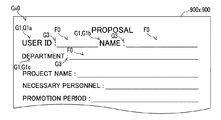
ところで、例えば名前、部署または電話番号などの既知の個別情報を申請用紙またはアンケート用紙などの定型用紙900xにおける予め定められた記入欄に記入しなければならない場合がある(図3参照)。
By the way, there are cases where known individual information such as name, department or telephone number has to be entered in a predetermined entry field on a
図3に示される定型用紙900xには、ユーザーID(D1a)、名前D1bおよび部署D1cに対応する個人データD2の内容を記載すべき記入欄F0が含まれる。このような定型用紙900xの記入欄F0に個人データD2の内容を記入することは手間である。
The
なお、登録データD0におけるユーザーID(D1a)、名前D1bおよび部署D1cなどに対応する個人データD2は、前記個別情報の一例である。 The personal data D2 corresponding to the user ID (D1a), name D1b, department D1c, etc. in the registration data D0 is an example of the individual information.
画像処理装置10は、後述する文字列画像合成処理を実行することにより、登録データD0に含まれるユーザーID(D1a)、名前D1bおよび部署D1cなどの項目データD1に対応する個人データD2の内容を定型用紙900xに記入する手間を省くことができる。
The
前記文字列画像合成処理は、項目データD1の内容をキーワードとし、一次画像Gx0における前記キーワードを表す画像の隣の記入欄F0に、前記キーワードに対応する挿入文字列を表す画像を合成し、合成後の二次画像Gy0を出力する処理である。本実施形態において、前記キーワードに対応する前記挿入文字列は、項目データD1に対応する個人データD2が表す文字列である。 In the character string image composition processing, the content of the item data D1 is used as a keyword, and an image representing the insertion character string corresponding to the keyword is synthesized in the entry field F0 next to the image representing the keyword in the primary image Gx0. This is a process of outputting the subsequent secondary image Gy0. In the present embodiment, the insertion character string corresponding to the keyword is a character string represented by the personal data D2 corresponding to the item data D1.
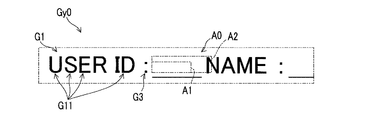
以下の説明において、一次画像Gx0に前記キーワードに相当する文字列の画像のことをキーワード画像G1と称する(図3,6〜10参照)。本実施形態において、キーワード画像G1は、項目データD1が表す文字列の画像である。 In the following description, an image of a character string corresponding to the keyword in the primary image Gx0 is referred to as a keyword image G1 (see FIGS. 3 and 6 to 10). In the present embodiment, the keyword image G1 is a character string image represented by the item data D1.
図3に示される一次画像Gx0は、ユーザーID(D1a)に相当する第1キーワード画像G1aと、名前D1bに相当する第2キーワード画像G1bと、部署D1cに相当する第3キーワード画像G1cとを含む。 The primary image Gx0 shown in FIG. 3 includes a first keyword image G1a corresponding to the user ID (D1a), a second keyword image G1b corresponding to the name D1b, and a third keyword image G1c corresponding to the department D1c. .
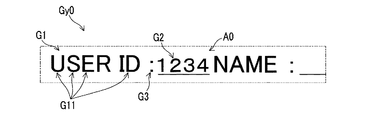
また、前記挿入文字列を表す画像のことを挿入画像G2と称する(図7,9,10参照)。本実施形態において、挿入画像G2は、個人データD2が表す文字列の画像である。 An image representing the insertion character string is referred to as an insertion image G2 (see FIGS. 7, 9, and 10). In the present embodiment, the insertion image G2 is a character string image represented by the personal data D2.
画像処理部7は、前記文字列画像合成処理を実行するために、登録情報取得部7A、キーワード検出部7B、領域サイズ特定部7C、近傍非文字判定部7D、有効空き領域判定部7Eおよび画像合成部7Fを含む。また、主制御部1のMPU(1A)は、前記文字列画像合成処理が実行される前に、準備処理を実行する。
In order to execute the character string image composition process, the
[準備処理]
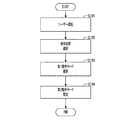
以下、図4に示されるフローチャートを参照しつつ、前記準備処理の手順の一例について説明する。以下の説明において、S101〜S104は、前記準備処理において実行される工程の識別符号を表す。
[Preparation process]
Hereinafter, an example of the preparation process will be described with reference to the flowchart shown in FIG. In the following description, S101 to S104 represent identification codes of steps executed in the preparation process.
<工程S101>
前記準備処理において、MPU(1A)は、操作部8Aに対する入力操作を通じて前記入力認証情報を取得し、前記ユーザー認証処理を実行する。MPU(1A)は、前記ユーザー認証処理に成功した場合、処理を次の工程S102へ移行させる。
<Step S101>
In the preparation process, the MPU (1A) acquires the input authentication information through an input operation on the
なお、図4に示されていないが、MPU(1A)は、前記ユーザー認証処理に失敗した場合、予め定められたエラーメッセージを表示部8Bに表示させた上で、工程S101の処理を繰り返す。工程S101の処理は、認証プログラムPr1を実行するMPU(1A)によって実現される。
Although not shown in FIG. 4, when the user authentication process fails, the MPU (1A) displays a predetermined error message on the
<工程S102>
前記ユーザー認証処理が成功した場合、MPU(1A)は、操作部8Aに対する選択操作に従って、一次画像Gx0におけるキーワード画像G1の位置を基準にした相対位置を選択する相対位置選択処理を実行する。
<Step S102>
When the user authentication process is successful, the MPU (1A) executes a relative position selection process for selecting a relative position based on the position of the keyword image G1 in the primary image Gx0 in accordance with a selection operation on the
前記相対位置は、例えば一次画像Gx0におけるキーワード画像G1の右方の位置または下方の位置などである。前記相対位置選択処理において、MPU(1A)は、少なくともキーワード画像G1に対する右方の位置および下方の位置を含む予め定められた複数の候補位置の中から、後述する有効空き領域A0の有無の判定に用いられる前記相対位置を選択する。 The relative position is, for example, a right position or a lower position of the keyword image G1 in the primary image Gx0. In the relative position selection process, the MPU (1A) determines whether or not there is an effective empty area A0 to be described later from a plurality of predetermined candidate positions including at least a right position and a lower position with respect to the keyword image G1. The relative position used in the above is selected.
例えば、複数の候補位置が、キーワード画像G1に対する右方の位置、下方の位置および左方の位置を含むことが考えられる。また、MPU(1A)が、複数の項目データD1それぞれについて個別に前記相対位置を選択することも考えられる。この場合、MPU(1A)は、前記キーワードごとに前記相対位置を選択することになる。 For example, the plurality of candidate positions may include a right position, a lower position, and a left position with respect to the keyword image G1. It is also conceivable that the MPU (1A) individually selects the relative position for each of the plurality of item data D1. In this case, the MPU (1A) selects the relative position for each keyword.
工程S102の処理は、相対位置選択プログラムPr2を実行するMPU(1A)によって実現される。工程S102の処理を実行するMPU(1A)は、相対位置選択部の一例である。 The process of step S102 is realized by the MPU (1A) that executes the relative position selection program Pr2. The MPU (1A) that executes the process of step S102 is an example of a relative position selection unit.
図3に示されるような定型用紙900xが原稿900として用いられる場合、工程S102において、キーワード画像G1の右方の位置が、前記相対位置として選択される。
When the
<工程S103>
また、前記ユーザー認証処理が成功した場合、MPU(1A)は、第1動作モード選択処理も実行する。前記第1動作モード選択処理において、MPU(1A)は、操作部8Aに対するモード指定操作に従って、前記第1動作モードとして1回モードおよび繰り返しモードの一方を選択する。
<Step S103>
If the user authentication process is successful, the MPU (1A) also executes a first operation mode selection process. In the first operation mode selection process, the MPU (1A) selects one of the once mode and the repeat mode as the first operation mode in accordance with the mode designation operation on the
後述するように、前記1回モードは、一次画像Gx0において前記キーワードごとに最初に検出される有効な記入欄F0にのみ挿入画像G2を合成する動作モードである。一方、前記繰り返しモードは、一次画像Gx0において前記キーワードごとに検出される全ての有効な記入欄F0に挿入画像G2を合成する動作モードである。 As will be described later, the one-time mode is an operation mode in which the insertion image G2 is synthesized only in the valid entry field F0 detected first for each keyword in the primary image Gx0. On the other hand, the repetition mode is an operation mode in which the insertion image G2 is combined with all valid entry fields F0 detected for each keyword in the primary image Gx0.
工程S103の処理は、第1動作モード選択プログラムPr3を実行するMPU(1A)によって実現される。工程S103の処理を実行するMPU(1A)は、動作モード選択部の一例である。 The process of step S103 is realized by the MPU (1A) that executes the first operation mode selection program Pr3. The MPU (1A) that executes the process of step S103 is an example of an operation mode selection unit.
<工程S104>
また、前記ユーザー認証処理が成功した場合、MPU(1A)が、第2動作モード設定処理を実行する場合もある。前記第2動作モード設定処理において、MPU(1A)は、操作部8Aに対する設定操作に従って、原稿900(定型用紙900x)が画像形成用のシート901として用いられる原稿追記モードを動作モードとして設定可能である。
<Step S104>
When the user authentication process is successful, the MPU (1A) may execute the second operation mode setting process. In the second operation mode setting process, the MPU (1A) can set, as an operation mode, an original writing mode in which the original 900 (
前記第2動作モードの初期値は通常モードである。前記第2動作モードが前記通常モードである場合に、前記文字列画像合成処理が実行される。前記第2動作モードが前記原稿追記モードである場合、図11に示される付加画像生成処理が、前記文字列画像合成処理の代わりに実行される。 The initial value of the second operation mode is the normal mode. When the second operation mode is the normal mode, the character string image composition process is executed. When the second operation mode is the original document addition mode, the additional image generation process shown in FIG. 11 is executed instead of the character string image synthesis process.
操作部8Aに対する前記設定操作が行われない場合、工程S104の処理はスキップされ、前記通常モードが前記第2動作モードとして自動的に設定される。工程S104の処理がスキップされた場合、または工程S104の処理が終了した場合に、前記準備処理が終了する。
When the setting operation is not performed on the
工程S104の処理は、第2動作モード設定プログラムPr4を実行するMPU(1A)によって実現される。工程S104の処理を実行するMPU(1A)は、原稿追記モード設定部の一例である。 The process of step S104 is realized by the MPU (1A) that executes the second operation mode setting program Pr4. The MPU (1A) that executes the process of step S104 is an example of a document appending mode setting unit.
[文字列画像合成処理]
次に、図5に示されるフローチャートを参照しつつ、前記文字列画像合成処理の手順の一例について説明する。以下の説明において、S201,S202,…は、前記文字列画像合成処理において実行される工程の識別符号を表す。
[String image composition processing]
Next, an example of the procedure of the character string image composition processing will be described with reference to the flowchart shown in FIG. In the following description, S201, S202,... Represent process identification codes executed in the character string image composition process.
前記通常モードが前記第2動作モードとして設定された状態で、操作部8Aに対して予め定められた開始操作が行われた場合に、主制御部1のMPU(1A)が、前記文字列画像合成処理を開始させる。ユーザーは、一次画像Gx0が形成された原稿900(定型用紙900x)を画像処理装置10の原稿台または原稿搬送装置にセットした上で、操作部8Aに対する前記開始操作を行う。
When a predetermined start operation is performed on the
<工程S201>
まず、読取制御部3が、画像読取部2に対して前記画像読取処理を実行させる。これにより、画像読取部2は、原稿900に形成された一次画像Gx0を読み取り、一次画像Gx0を表す一次画像データDx0を生成する。一次画像データDx0は、画像処理部7へ転送される。
<Step S201>
First, the
<工程S202>
次に、画像処理部7の登録情報取得部7Aが、二次記憶部1Cから、前記ユーザー認証処理に成功した前記ユーザーに対応する登録データD0を取得する。以下、画像処理部7は、工程S202で取得した登録データD0に含まれる複数の項目データD1および個人データD2を、前記キーワードおよび前記キーワードに対応する前記挿入文字列として用いる。
<Step S202>
Next, the registration
<工程S203>
次に、キーワード検出部7Bが、工程S202で得られた複数の前記キーワードのうちの1つを選択する。キーワード検出部7Bは、工程S203の処理を実行するごとに、複数の前記キーワードのうちの1つを順番に選択する。選択された前記キーワードが、以下の処理で用いられる。
<Step S203>
Next, the
<工程S204>
次に、キーワード検出部7Bが、一次画像データDx0が表す一次画像Gx0から、工程S203で選択された前記キーワードに相当するキーワード画像G1を検出する。
<Step S204>
Next, the
工程S204において、キーワード検出部7Bは、周知の文字認識処理を実行することにより、一次画像データDx0に含まれる文字列画像を文字列データへ変換する。さらに、キーワード検出部7Bは、前記文字列データから前記キーワードと一致する文字列を検索する。そして、キーワード検出部7Bは、前記キーワードと一致する文字列に対応する前記文字列画像をキーワード画像G1として検出する(図3参照)。
In step S204, the
前記文字認識処理において、キーワード検出部7Bは、一次画像Gx0における文字列の行方向を特定し、特定した前記行方向と予め設定された言語の種類とに応じて、一次画像Gx0における文字認識の起点および方向を特定する。
In the character recognition process, the
キーワード検出部7Bは、一次画像Gx0からキーワード画像G1を検出できなかった場合、処理を後述する工程S212へ移行させる。また、キーワード検出部7Bは、一次画像Gx0からキーワード画像G1を検出した場合、処理を次の工程S205へ移行させる。
If the keyword image G1 cannot be detected from the primary image Gx0, the
<工程S205>
工程S205において、領域サイズ特定部7Cが、最小領域サイズおよび基準領域サイズを特定する処理を実行する。
<Step S205>
In step S205, the region size specifying unit 7C executes processing for specifying the minimum region size and the reference region size.
前記最小領域サイズは、予め定められた最小サイズの文字で前記挿入文字列を表す挿入画像G2が収まるサイズである。例えば、前記最小サイズが9ポイントの文字のサイズ相当であり、前記挿入文字列の文字数が10文字である場合、領域サイズ特定部7Cは、9ポイントのサイズの文字を10文字分並べるために必要なサイズを前記最小領域サイズとして特定する。 The minimum area size is a size in which an insertion image G2 representing the insertion character string can be accommodated with characters of a predetermined minimum size. For example, when the minimum size is equivalent to the character size of 9 points and the number of characters in the inserted character string is 10, the area size specifying unit 7C is necessary to arrange the characters of 9 points in size for 10 characters. Is specified as the minimum area size.
予め定められた前記最小サイズの情報は、文字自体のサイズの情報と文字間隔の情報とを含む。領域サイズ特定部7Cは、前記最小領域サイズを特定する際に、前記最小文字サイズの情報における前記文字自体のサイズと文字間隔との比を、挿入画像G2における文字画像のサイズと文字間隔との比として採用する。 The predetermined minimum size information includes character size information and character spacing information. When specifying the minimum area size, the area size specifying unit 7C calculates the ratio between the size of the character itself and the character interval in the information on the minimum character size, and calculates the ratio between the size of the character image and the character interval in the insertion image G2. Adopt as a ratio.
一方、前記基準領域サイズを特定する処理において、領域サイズ特定部7Cは、まず、工程S204で検出されたキーワード画像G1に含まれる文字画像のサイズである基準文字サイズを特定する。例えば、領域サイズ特定部7Cは、キーワード画像G1に含まれる最大の文字画像のサイズ、または、キーワード画像G1に含まれる文字画像の平均サイズを前記基準文字サイズとして特定する。 On the other hand, in the process of specifying the reference area size, the area size specifying unit 7C first specifies the reference character size that is the size of the character image included in the keyword image G1 detected in step S204. For example, the region size specifying unit 7C specifies the size of the largest character image included in the keyword image G1 or the average size of the character images included in the keyword image G1 as the reference character size.
また、領域サイズ特定部7Cは、キーワード画像G1に含まれる文字画像自体のサイズと隣り合う2つの文字画像の間隔である文字間隔との組合せを前記基準文字サイズとして特定する。 Further, the region size specifying unit 7C specifies a combination of the size of the character image itself included in the keyword image G1 and the character interval that is the interval between two adjacent character images as the reference character size.
次に、領域サイズ特定部7Cは、前記基準文字サイズの文字で前記挿入文字列を表す挿入画像G2が収まるサイズを前記基準領域サイズとして特定する。例えば、前記標準文字サイズが13ポイントの文字のサイズ相当であり、前記挿入文字列の文字数が10文字である場合、領域サイズ特定部7Cは、13ポイントのサイズの文字を10文字分並べるために必要なサイズを前記基準領域サイズとして特定する。 Next, the region size specifying unit 7C specifies a size in which the inserted image G2 representing the inserted character string within the characters of the reference character size can be accommodated as the reference region size. For example, when the standard character size is equivalent to the character size of 13 points and the number of characters in the inserted character string is 10, the area size specifying unit 7C arranges the characters of 13 points in size for 10 characters. A necessary size is specified as the reference area size.
領域サイズ特定部7Cは、前記基準領域サイズを特定する際に、前記標準文字サイズにおける前記文字画像自体のサイズと文字間隔との比を、挿入画像G2における文字画像のサイズと文字間隔との比として採用する。 When specifying the reference region size, the region size specifying unit 7C determines the ratio between the size of the character image itself and the character spacing in the standard character size, and the ratio between the size of the character image and the character spacing in the insertion image G2. Adopt as.
工程S205において前記最小領域サイズを特定する処理を実行する領域サイズ特定部7Cは最小領域サイズ特定部の一例である。同様に、工程S205において前記基準領域サイズを特定する処理を実行する領域サイズ特定部7Cは基準領域サイズ特定部の一例である。 The area size specifying unit 7C that executes the process of specifying the minimum area size in step S205 is an example of the minimum area size specifying unit. Similarly, the region size specifying unit 7C that executes the process of specifying the reference region size in step S205 is an example of a reference region size specifying unit.
<工程S206>
次に、近傍非文字判定部7Dが、一次画像Gx0におけるキーワード画像G1の位置を基準にした前記相対位置におけるキーワード画像G1の近傍に、非文字画像G3が存在するか否かを判定する。
<Step S206>
Next, the vicinity non-character determination unit 7D determines whether or not the non-character image G3 exists in the vicinity of the keyword image G1 at the relative position with respect to the position of the keyword image G1 in the primary image Gx0.
図3,6などに示される例では、近傍非文字判定部7Dは、キーワード画像G1の右方の近傍に存在する記号”:”の画像が非文字画像G3であると判定する。この場合、前記相対位置は、キーワード画像G1の右方の位置である。
In the example illustrated in FIGS. 3 and 6, the nearby
近傍非文字判定部7Dは、例えば工程S205で特定された前記基準文字サイズを基準にして、非文字画像G3の検出範囲であるキーワード画像G1の近傍範囲を設定する。この場合、近傍非文字判定部7Dが、前記基準文字サイズに相当する範囲または前記基準文字サイズに予め定められた係数を乗算して得られる文字サイズに相当する範囲を、前記近傍範囲として設定することが考えられる。 The neighborhood non-character determining unit 7D sets a neighborhood range of the keyword image G1, which is a detection range of the non-character image G3, based on the reference character size specified in step S205, for example. In this case, the neighborhood non-character determining unit 7D sets a range corresponding to the reference character size or a range corresponding to the character size obtained by multiplying the reference character size by a predetermined coefficient as the neighborhood range. It is possible.
<工程S207>
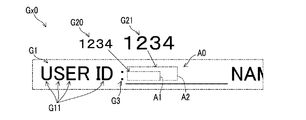
次に、有効空き領域判定部7Eが、一次画像Gx0におけるキーワード画像G1の位置を基準にした前記相対位置に有効空き領域A0が存在するか否かを判定する(図6参照)。有効空き領域A0は、工程S205で特定された前記最小領域サイズ以上の無画像領域である。
<Step S207>
Next, the effective empty area determination unit 7E determines whether or not the effective empty area A0 exists at the relative position based on the position of the keyword image G1 in the primary image Gx0 (see FIG. 6). The effective empty area A0 is a non-image area that is equal to or larger than the minimum area size specified in step S205.
図6には、前記最小領域サイズの範囲を表す第1空き領域A1と、前記基準領域サイズの範囲を表す第2空き領域A2とが仮想線で示されている。 In FIG. 6, a first free area A1 representing the range of the minimum area size and a second free area A2 representing the range of the reference area size are indicated by virtual lines.
工程S206において、非文字画像G3がキーワード画像G1の近傍に存在するとの判定結果が得られた場合に、有効空き領域判定部7Eは、キーワード画像G1の近傍の非文字画像G3の位置を基準にした前記相対位置に、有効空き領域A0が存在するか否かを判定する。 If it is determined in step S206 that the non-character image G3 is present in the vicinity of the keyword image G1, the valid empty area determination unit 7E uses the position of the non-character image G3 in the vicinity of the keyword image G1 as a reference. It is determined whether or not an effective free area A0 exists at the relative position.
図6に示される例では、有効空き領域判定部7Eは、キーワード画像G1の右の近傍に存在する”:”の画像の位置を基準にした右方の位置に、有効空き領域A0が存在するか否かを判定する。 In the example shown in FIG. 6, the valid free space determination unit 7E has a valid free space A0 at the right position with reference to the position of the “:” image in the vicinity of the right side of the keyword image G1. It is determined whether or not.
工程S207において、有効空き領域判定部7Eは、有効空き領域A0が前記基準領域サイズ以上の領域であるか否かを判定する。即ち、有効空き領域判定部7Eは、有効空き領域A0が存在すると判定した場合に、その有効空き領域A0が第2空き領域A2を包含する領域であるか否かを判定する。 In step S207, the effective empty area determination unit 7E determines whether the effective empty area A0 is an area equal to or larger than the reference area size. That is, when it is determined that the valid free area A0 exists, the valid free area determination unit 7E determines whether the valid free area A0 includes the second free area A2.
図6に示される有効空き領域A0は、前記基準領域サイズ以上の領域、即ち、第2空き領域A2を包含する領域である。一方、図8に示される有効空き領域A0は、前記基準領域サイズ未満の領域、即ち、第2空き領域A2よりも小さな領域である。 An effective empty area A0 shown in FIG. 6 is an area including the second empty area A2 or more, that is, an area larger than the reference area size. On the other hand, the effective empty area A0 shown in FIG. 8 is an area smaller than the reference area size, that is, an area smaller than the second empty area A2.
有効空き領域判定部7Eは、キーワード画像G1に対応する有効空き領域A0が存在しないと判定した場合、処理を後述する工程S113へ移行させる。また、有効空き領域判定部7Eは、キーワード画像G1に対応する有効空き領域A0が前記基準領域サイズ以上の領域であると判定した場合、処理を後述する工程S209へ移行させる。また、有効空き領域判定部7Eは、キーワード画像G1に対応する有効空き領域A0が前記基準領域サイズ未満の領域であると判定した場合、処理を次の工程S208へ移行させる。 If the valid free area determination unit 7E determines that there is no valid free area A0 corresponding to the keyword image G1, the process proceeds to step S113 described later. On the other hand, when the effective empty area determination unit 7E determines that the effective empty area A0 corresponding to the keyword image G1 is an area equal to or larger than the reference area size, the process proceeds to step S209 described later. On the other hand, when the valid free area determination unit 7E determines that the valid free area A0 corresponding to the keyword image G1 is an area smaller than the reference area size, the process proceeds to the next step S208.
<工程S208>
有効空き領域A0が前記基準領域サイズ未満の領域であるとの判定結果が得られた場合(図8参照)、MPU(1A)が、操作部8Aに対するサイズ設定操作に従って、前記挿入文字列の指定サイズを設定する。
<Step S208>
When the determination result that the effective empty area A0 is an area smaller than the reference area size is obtained (see FIG. 8), the MPU (1A) specifies the insertion character string according to the size setting operation on the
但し、MPU(1A)は、前記指定サイズの前記挿入文字列を表す挿入画像G2が有効空き領域A0に収まる範囲で前記指定サイズを設定する。その後、MPU(1A)は、処理を工程S208から後述する工程S210へ移行させる。 However, the MPU (1A) sets the designated size within a range in which the insertion image G2 representing the insertion character string having the designated size is within the effective empty area A0. Thereafter, the MPU (1A) shifts the process from step S208 to step S210 described later.
例えば、MPU(1A)は、キーワード画像G1および有効空き領域A0に合成されたおよび挿入画像G2を含むプレビュー画像を表示部8Bに表示させつつ前記指定サイズを設定する処理を実行する。この場合、MPU(1A)は、操作部8Aに対する前記サイズ設定操作に従って設定される前記指定サイズの前記挿入文字列を表す挿入画像G2を含む前記プレビュー画像を表示部8Bに表示させる。
For example, the MPU (1A) executes a process of setting the specified size while displaying a preview image including the inserted image G2 combined with the keyword image G1 and the effective empty area A0 on the
工程S208の処理は、サイズ指定プログラムPr5を実行するMPU(1A)によって実現される。工程S208の処理を実行するMPU(1A)は、サイズ指定部の一例である。 The process of step S208 is realized by the MPU (1A) that executes the size designation program Pr5. The MPU (1A) that executes the process of step S208 is an example of a size designation unit.
<工程S209>
有効空き領域A0が前記基準領域サイズ以上の領域であるとの判定結果が得られた場合(図6参照)、MPU(1A)は、工程S205で特定された前記基準文字サイズを前記指定サイズとして設定する。その後、MPU(1A)は、処理を工程S209から次の工程S210へ移行させる。
<Step S209>
When the determination result that the effective empty area A0 is an area larger than the reference area size is obtained (see FIG. 6), the MPU (1A) sets the reference character size specified in step S205 as the specified size. Set. Thereafter, the MPU (1A) shifts the process from step S209 to the next step S210.
工程S209の処理も、サイズ指定プログラムPr5を実行するMPU(1A)によって実現される。 The process of step S209 is also realized by the MPU (1A) that executes the size designation program Pr5.
<工程S210>
工程S210において、画像合成部7Fが、一次画像Gx0における有効空き領域A0に、前記指定サイズの前記挿入文字列を表す挿入画像G2が合成された二次画像Gy0を表す二次画像データDy0を生成する(図7,9,10参照)。
<Step S210>
In step S210, the image composition unit 7F generates secondary image data Dy0 representing the secondary image Gy0 in which the insertion image G2 representing the insertion character string having the specified size is synthesized in the effective empty area A0 in the primary image Gx0. (See FIGS. 7, 9, and 10).
工程S207において、有効空き領域A0が前記基準領域サイズ以上の領域であるとの判定結果が得られた場合、前記指定サイズは前記基準文字サイズである。従って、有効空き領域A0が前記基準領域サイズ以上の領域であるとの判定結果が得られた場合、二次画像データDy0は、一次画像Gx0における有効空き領域A0に、前記基準文字サイズの文字で前記挿入文字列を表す挿入画像G2が合成された二次画像Gy0を表す画像データである(図9参照)。 If it is determined in step S207 that the effective empty area A0 is an area equal to or larger than the reference area size, the designated size is the reference character size. Therefore, when the determination result that the effective empty area A0 is an area larger than the reference area size is obtained, the secondary image data Dy0 is stored in the effective empty area A0 in the primary image Gx0 with characters of the reference character size. This is image data representing a secondary image Gy0 synthesized with an insertion image G2 representing the insertion character string (see FIG. 9).
一方、有効空き領域A0が前記基準領域サイズ未満の領域であるとの判定結果が得られた場合、二次画像データDy0は、一次画像Gx0における有効空き領域A0に、工程S208で設定された前記指定サイズの文字で前記挿入文字列を表す挿入画像G2が合成された二次画像Gy0を表す画像データである(図9参照)。 On the other hand, when the determination result that the effective empty area A0 is an area smaller than the reference area size is obtained, the secondary image data Dy0 is stored in the effective empty area A0 in the primary image Gx0 in the step S208. This is image data representing a secondary image Gy0 obtained by synthesizing an insertion image G2 representing the insertion character string with characters of a specified size (see FIG. 9).
<工程S211>
次に、画像合成部7Fは、前記第1動作モードが前記繰り返しモードおよび前記1回モードのいずれであるかに応じて、処理の移行先を選択する。
<Step S211>
Next, the image composition unit 7F selects a processing transfer destination according to whether the first operation mode is the repeat mode or the one-time mode.
即ち、前記第1動作モードが前記繰り返しモードである場合、画像合成部7Fは、処理を工程S212へ移行させ、前記第1動作モードが前記1回モードである場合、処理を工程S213へ移行させる。 That is, when the first operation mode is the repeat mode, the image composition unit 7F shifts the process to step S212, and when the first operation mode is the one-time mode, shifts the process to step S213. .
<工程S212>
工程S212において、キーワード検出部7Bが、一次画像Gx0から検出可能な全てのキーワード画像G1について、工程S205〜S210の処理が実行されたか否かに応じて、処理の移行先を選択する。
<Step S212>
In step S212, the
即ち、一次画像Gx0から検出可能な全てのキーワード画像G1について工程S205〜S210の処理が実行された場合、キーワード検出部7Bは、処理を工程S213へ移行させ、そうでない場合、キーワード検出部7Bは、処理を工程S204へ移行させる。
That is, when the processes of steps S205 to S210 are executed for all the keyword images G1 that can be detected from the primary image Gx0, the
従って、前記繰り返しモードが選択された場合、一次画像Gx0から検出可能な全てのキーワード画像G1について、工程S205〜S210の処理が実行される。換言すれば、前記繰り返しモードが選択された場合、画像合成部7Fは、キーワード検出部7Bが一次画像Gx0から検出できた全てのキーワード画像G1に対応する有効空き領域A0に前記挿入文字列を表す挿入画像G2を合成する(210)。
Therefore, when the repeat mode is selected, the processes in steps S205 to S210 are executed for all keyword images G1 that can be detected from the primary image Gx0. In other words, when the repetition mode is selected, the image composition unit 7F represents the insertion character string in the effective empty area A0 corresponding to all the keyword images G1 that the
<工程S213>
工程S213において、キーワード検出部7Bは、工程S203の処理によって全ての前記キーワードが選択されたか否かに応じて、処理の移行先を選択する。ここで、工程S202で得られた全ての項目データD1が、選択可能な全ての前記キーワードである。
<Step S213>
In step S213, the
即ち、全ての前記キーワードが選択された場合、キーワード検出部7Bは、処理を工程S214へ移行させ、そうでない場合、キーワード検出部7Bは、処理を工程S203へ移行させる。
That is, when all the keywords are selected, the
<工程S214>
工程S214において、印刷制御部5が、画像合成部7Fにより生成された二次画像データDy0に基づく二次画像Gy0をシート901に形成する印刷処理を、画像形成部4に実行させる。その後、印刷制御部5は、前記文字列画像合成処理を終了させる。
<Step S214>
In step S214, the
図10は、前記第1動作モードが前記1回モードである場合に生成される二次画像Gy0が形成されたシート901の一例である。図10に示される二次画像Gy0は、ユーザーID(D1a)に対応する個人データD2を表す第1挿入画像G2aと、名前D1bに対応する個人データD2を表す第2挿入画像G2bと、部署D1cに対応する個人データD2を表す第3挿入画像G2cとを含む。
FIG. 10 is an example of a
画像処理装置10が採用されれば、名前または部署などの既知の個別情報を定型用紙900xに記入する手間を省くことができる。
If the
また、画像処理装置10において、有効空き領域A0のサイズが十分に大きければ、画像合成部7Fは、一次画像Gx0における有効空き領域A0に、キーワード画像G1における文字画像と同等のサイズの文字で前記挿入文字列を表す挿入画像G2が合成された二次画像Gy0を表す二次画像データDy0を生成する(図7,10参照)。
In the
従って、キーワード画像G1と挿入画像G2との間で文字サイズが統一され、違和感がなく見やすい二次画像Gy0が得られる。 Therefore, the character size is unified between the keyword image G1 and the insertion image G2, and a secondary image Gy0 that is easy to see without feeling uncomfortable is obtained.
一方、有効空き領域A0のサイズが小さい場合、画像合成部7Fは、一次画像Gx0における有効空き領域A0に、ユーザーにより設定された前記指定サイズの文字で前記挿入文字列を表す挿入画像G2が合成された二次画像Gy0を表す二次画像データDy0を生成する(図9参照)。これにより、多様な定型用紙900xに対応することができる。
On the other hand, when the size of the effective empty area A0 is small, the image composition unit 7F synthesizes the insertion image G2 representing the insertion character string with the character of the specified size set by the user in the effective empty area A0 in the primary image Gx0. Secondary image data Dy0 representing the generated secondary image Gy0 is generated (see FIG. 9). Thereby, it can respond to various fixed
また、画像処理装置10において、複数の候補位置の中から、有効空き領域A0の有無の判定に用いられる前記相対位置を選択することができる(図4のS102)。これにより、キーワード画像G1と記入欄F0との位置関係が異なる多様な定型用紙900xに対応することができる。
Further, the
また、有効空き領域判定部7Eは、キーワード画像G1の近傍に非文字画像G3が存在する場合、その非文字画像G3の位置を基準にした前記相対位置に有効空き領域A0が存在するか否かを判定する。これにより、キーワード画像G1と記入欄F0との間にコロン”:”もしくはハイフン”−”などの記号、罫線またはノイズ画像が存在する場合にも、挿入画像G2が、一次画像Gx0における非文字画像G3と重ならない適切な位置に合成される。 In addition, when the non-character image G3 exists in the vicinity of the keyword image G1, the effective empty area determination unit 7E determines whether or not the effective empty area A0 exists at the relative position based on the position of the non-character image G3. Determine. Thus, even when a symbol, ruled line, or noise image such as a colon “:” or a hyphen “−” exists between the keyword image G1 and the entry field F0, the inserted image G2 is a non-character image in the primary image Gx0. It is synthesized at an appropriate position that does not overlap with G3.
また、前記繰り返しモードが前記第1動作モードとして選択された場合、画像合成部7Fは、キーワード検出部7Bが一次画像Gx0から検出できた全てのキーワード画像G1に対応する有効空き領域A0に挿入画像G2を合成する。
Further, when the repetition mode is selected as the first operation mode, the image composition unit 7F inserts an image into the effective empty area A0 corresponding to all the keyword images G1 that the
一方、前記1回モードが前記第1動作モードとして選択された場合、画像合成部7Fは、選択された前記キーワードごとに、キーワード検出部7Bが一次画像Gx0から最初に検出したキーワード画像G1に対応する有効空き領域A0にのみ挿入画像G2を合成する。
On the other hand, when the one-time mode is selected as the first operation mode, the image composition unit 7F corresponds to the keyword image G1 first detected by the
画像処理装置10は、前記第1動作モードに応じて処理を切り替えることが可能であるため、多様な用途に適用可能である。
Since the
[付加画像生成処理]
次に、前記準備処理において前記原稿追記モードが前記第2動作モードとして設定された場合に実行される前記付加画像生成処理の手順の一例について説明する。
[Additional image generation processing]
Next, an example of the procedure of the additional image generation process that is executed when the document additional recording mode is set as the second operation mode in the preparation process will be described.
以下の説明において、S301,S302,…は、前記付加画像生成処理において実行される工程の識別符号を表す。 In the following description, S301, S302,... Represent process identification codes executed in the additional image generation process.
図11に示される工程S301〜S314において、工程S310および工程S314を除く残りの工程S301〜S309,S311〜S313は、図5に示される工程S201〜S209,S211〜S213と同じである。即ち、図11に示される前記付加画像生成処理の手順は、図5に示される前記文字列画像合成処理の手順を基にして工程S210および工程S214が工程S310および工程S314に置き換えられた手順である。 In steps S301 to S314 shown in FIG. 11, the remaining steps S301 to S309 and S311 to S313 except for steps S310 and S314 are the same as steps S201 to S209 and S211 to S213 shown in FIG. That is, the procedure of the additional image generation process shown in FIG. 11 is a procedure in which steps S210 and S214 are replaced with steps S310 and S314 based on the procedure of the character string image composition process shown in FIG. is there.
以下、前記付加画像生成処理における前記文字列画像合成処理と異なる点について説明する。画像処理部7は、前記付加画像生成処理を実行するために、付加画像生成部7Gをさらに備える。
Hereinafter, differences from the character string image composition processing in the additional image generation processing will be described. The
<工程S310>
工程S310の処理は、MPU(1A)が、処理を工程S308から工程S310へ移行させた場合、または、MPU(1A)が、処理を工程S309から工程S310へ移行させた場合に実行される。
<Step S310>
The process of step S310 is executed when the MPU (1A) shifts the process from step S308 to step S310, or when the MPU (1A) shifts the process from step S309 to step S310.
工程S310において、付加画像生成部7Gが、一次画像Gx0における有効空き領域A0の位置と同じ位置に前記挿入文字列を表す挿入画像G2のみを含む付加画像Gz0を表す付加画像データDz0を生成する(図1参照)。
In step S310, the additional
図12に示されるように、付加画像Gz0は、一次画像Gx0に挿入画像G2が合成された画像ではなく、挿入画像G2のみを含む新たな画像である。但し、付加画像Gz0における挿入画像G2の位置は、一次画像Gx0における記入欄F0の位置に対応している(図3参照)。 As illustrated in FIG. 12, the additional image Gz0 is not an image obtained by combining the insertion image G2 with the primary image Gx0, but is a new image including only the insertion image G2. However, the position of the insertion image G2 in the additional image Gz0 corresponds to the position of the entry field F0 in the primary image Gx0 (see FIG. 3).
なお、工程S310の処理は、前記原稿追記モードが前記第2動作モードとして設定され、かつ、一次画像Gx0に有効空き領域A0が存在するとの判定結果が得られた場合に実行される。 Note that the process of step S310 is executed when the document additional recording mode is set as the second operation mode and a determination result that an effective empty area A0 exists in the primary image Gx0 is obtained.
工程S303の処理によって全ての前記キーワードが選択された場合、キーワード検出部7Bは、処理を工程S313から工程S314へ移行させる。
When all the keywords are selected by the process of step S303, the
また、MPU(1A)は、処理が工程S313から工程S314へ移行する前に、原稿900(定型用紙900x)を画像処理装置10のシート供給部にシート901としてセットすることを促すメッセージを表示部8Bに表示させる。
Further, the MPU (1A) displays a message that prompts the user to set the original 900 (
さらに、原稿900(定型用紙900x)が前記シート供給部にセットされたことを確認する操作が操作部8Aに行われた後に、MPU(1A)は、工程S314への処理の移行を許容する。
Further, after an operation for confirming that the document 900 (
<工程S314>
工程S314において、印刷制御部5が、付加画像生成部7Gにより生成された付加画像データDz0に基づく付加画像Gz0をシート901に形成する印刷処理を、画像形成部4に実行させる。その後、印刷制御部5は、前記付加画像生成処理を終了させる。
<Step S314>
In step S314, the
前記付加画像生成処理が実行されることにより得られる出力シートは、記入欄F0に挿入画像G2が追記された定型用紙900xである。
The output sheet obtained by executing the additional image generation process is the
前記付加画像生成処理は、定型用紙900x自体に付加画像Gz0を付加したい場合に有効である。
The additional image generation process is effective when it is desired to add the additional image Gz0 to the
[応用例]
以上に示された画像処理装置10の前記文字列画像合成処理において、二次画像Gy0をシート901に形成する前記印刷処理が実行される代わりに、二次画像データDy0を通信部6を通じて他装置へ送信する処理が実行されることも考えられる。
[Application example]
In the character string image synthesizing process of the
また、画像処理装置10において、画像処理部7が、画像読取部2を通じて一次画像データDx0を得る代わりに、外部装置から通信部6を通じて一次画像データDx0を得ることも考えられる。
In the
なお、本発明に係る画像処理装置は、各請求項に記載された発明の範囲において、以上に示された実施形態及び応用例を自由に組み合わせること、或いは実施形態及び応用例を適宜、変形する又は一部を省略することによって構成されることも可能である。 The image processing apparatus according to the present invention can be freely combined with the above-described embodiments and application examples, or can be appropriately modified within the scope of the invention described in each claim. Alternatively, it may be configured by omitting a part.
また、画像処理装置10において、登録データD0が、外部装置が有するハードディスクドライブなどの二次記憶部に記憶されていることも考えられる。この場合、登録情報取得部7Aは、前記外部装置の前記二次記憶部から通信部6を通じて登録データD0を取得する。なお、前記外部装置の前記二次記憶部は、コンピューター読み取り可能な不揮発性の記憶部の一例である。
In the
1 :主制御部
1A :MPU
1C :二次記憶部
2 :画像読取部
3 :読取制御部
4 :画像形成部
5 :印刷制御部
6 :通信部
7 :画像処理部
7A :登録情報取得部
7B :キーワード検出部
7C :領域サイズ特定部(最小領域サイズ特定部、標準領域サイズ特定部)
7D :近傍非文字判定部
7E :有効空き領域判定部
7F :画像合成部
7G :付加画像生成部
8 :操作表示部
8A :操作部
8B :表示部
9 :バス
10 :画像処理装置
12 :RAM
100 :通信回線
900 :原稿
900x :定型用紙
901 :シート
A0 :有効空き領域
A1 :第1空き領域
A2 :第2空き領域
D0 :登録データ(登録情報)
D1 :項目データ(キーワード)
D1b :名前
D1c :部署
D2 :個人データ(挿入文字列)
Dx0 :一次画像データ
Dy0 :二次画像データ
Dz0 :付加画像データ
F0 :記入欄
G1 :キーワード画像
G1a :第1キーワード画像
G1b :第2キーワード画像
G1c :第3キーワード画像
G2 :挿入画像
G2a :第1挿入画像
G2b :第2挿入画像
G2c :第3挿入画像
G3 :非文字画像
Gx0 :一次画像
Gy0 :二次画像
Gz0 :付加画像
Pr1 :認証プログラム
Pr2 :相対位置選択プログラム
Pr3 :第1動作モード選択プログラム
Pr4 :第2動作モード設定プログラム
Pr5 :サイズ指定プログラム
1:
1C: Secondary storage unit 2: Image reading unit 3: Reading control unit 4: Image forming unit 5: Print control unit 6: Communication unit 7:
7D: Neighboring non-character determining unit 7E: Effective empty region determining unit 7F:
100: Communication line 900:
D1: Item data (keyword)
D1b: Name D1c: Department D2: Personal data (inserted character string)
Dx0: primary image data Dy0: secondary image data Dz0: additional image data F0: entry field G1: keyword image G1a: first keyword image G1b: second keyword image G1c: third keyword image G2: insertion image G2a: first Inserted image G2b: Second inserted image G2c: Third inserted image G3: Non-character image Gx0: Primary image Gy0: Secondary image Gz0: Additional image Pr1: Authentication program Pr2: Relative position selection program Pr3: First operation mode selection program Pr4: second operation mode setting program Pr5: size designation program
Claims (8)
入力画像データが表す一次画像から前記キーワードに相当するキーワード画像を検出するキーワード検出部と、
予め定められた最小サイズの文字で前記挿入文字列を表す画像が収まるサイズである最小領域サイズを特定する最小領域サイズ特定部と、
前記一次画像における前記キーワード画像の位置を基準にした予め設定された相対位置に、前記最小領域サイズ以上の無画像領域である有効空き領域が存在するか否かを判定する有効空き領域判定部と、
前記有効空き領域が存在するとの判定結果が得られた場合に、前記一次画像における前記有効空き領域に、前記挿入文字列を表す画像が合成された二次画像を表す出力画像データを生成する画像合成部と、を備える画像処理装置。 A registration information acquisition unit for acquiring registration information including a keyword and an insertion character string corresponding to the keyword from a non-volatile storage unit;
A keyword detection unit for detecting a keyword image corresponding to the keyword from a primary image represented by input image data;
A minimum area size specifying unit that specifies a minimum area size that is a size in which an image representing the insertion character string can be accommodated with a predetermined minimum size character;
An effective empty area determination unit that determines whether an effective empty area that is a non-image area equal to or larger than the minimum area size exists at a preset relative position with respect to the position of the keyword image in the primary image; ,
An image that generates output image data representing a secondary image in which an image representing the insertion character string is combined with the effective space in the primary image when a determination result that the effective space is present is obtained And an image processing apparatus.
前記有効空き領域判定部は、前記有効空き領域が前記基準領域サイズ以上の領域であるか否かを判定し、
前記有効空き領域が前記基準領域サイズ以上の領域であるとの判定結果が得られた場合に、前記画像合成部は、前記一次画像における前記有効空き領域に、前記基準文字サイズの文字で前記挿入文字列を表す画像が合成された前記二次画像を表す前記出力画像データを生成する、請求項1に記載の画像処理装置。 A reference area size specifying unit that specifies a reference character size that is a size of a character image included in the keyword image and specifies a reference area size that is a size in which an image representing the insertion character string is accommodated by characters of the reference character size In addition,
The effective free space determination unit determines whether or not the effective free space is an area larger than the reference area size,
When the determination result that the effective empty area is an area equal to or larger than the reference area size is obtained, the image composition unit inserts the reference character size character into the effective empty area in the primary image. The image processing apparatus according to claim 1, wherein the output image data representing the secondary image combined with an image representing a character string is generated.
前記指定サイズが設定された場合に、前記画像合成部は、前記一次画像における前記有効空き領域に、前記指定サイズの前記挿入文字列を表す画像が合成された前記二次画像を表す前記出力画像データを生成する、請求項2に記載の画像処理装置。 A size specification that sets the specified size of the inserted character string in accordance with a size setting operation for an operation unit that receives a user operation when a determination result is obtained that the effective empty area is an area smaller than the reference area size Further comprising
When the designated size is set, the image composition unit outputs the output image representing the secondary image in which the image representing the insertion character string of the designated size is synthesized with the effective empty area in the primary image. The image processing apparatus according to claim 2, which generates data.
前記非文字画像が前記キーワード画像の近傍に存在するとの判定結果が得られた場合に、前記有効空き領域判定部は、前記キーワード画像の近傍の前記非文字画像の位置を基準にした前記相対位置に前記有効空き領域が存在するか否かを判定する、請求項1から請求項4のいずれか1項に記載の画像処理装置。 A proximity non-character determining unit that determines whether or not a non-character image exists in the vicinity of the keyword image at the relative position based on the position of the keyword image;
When the determination result that the non-character image exists in the vicinity of the keyword image is obtained, the effective empty area determination unit determines the relative position based on the position of the non-character image in the vicinity of the keyword image. 5. The image processing apparatus according to claim 1, wherein the image processing apparatus determines whether or not the effective free area exists.
前記1回モードが選択された場合、前記画像合成部は、前記キーワード検出部が前記一次画像から最初に検出した前記キーワード画像に対応する前記有効空き領域にのみ前記挿入文字列を表す画像を合成し、前記繰り返しモードが選択された場合、前記画像合成部は、前記キーワード検出部が前記一次画像から検出できた全ての前記キーワード画像に対応する前記有効空き領域に前記挿入文字列を表す画像を合成する、請求項1から請求項5のいずれか1項に記載の画像処理装置。 According to a mode designating operation for an operation unit that accepts a user operation, the apparatus further includes a mode selection unit that can select one of a once mode and a repeat mode as an operation mode.
When the one-time mode is selected, the image synthesis unit synthesizes an image representing the insertion character string only in the effective empty area corresponding to the keyword image first detected from the primary image by the keyword detection unit. When the repetition mode is selected, the image composition unit displays an image representing the inserted character string in the effective empty area corresponding to all the keyword images detected by the keyword detection unit from the primary image. The image processing apparatus according to claim 1, wherein the image processing apparatus performs synthesis.
前記画像合成部により生成された前記出力画像データに基づく前記二次画像をシートに形成する画像形成部と、をさらに備える請求項1から請求項6のいずれか1項に記載の画像処理装置。 An image reading unit that reads the primary image formed on a document and generates the input image data representing the primary image;
The image processing apparatus according to claim 1, further comprising: an image forming unit that forms the secondary image based on the output image data generated by the image combining unit on a sheet.
前記原稿追記モードが設定され、かつ、前記有効空き領域が存在するとの判定結果が得られた場合に、前記一次画像における前記有効空き領域の位置と同じ位置に前記挿入文字列を表す画像のみを含む付加画像を表す付加画像データを生成する付加画像生成部と、をさらに備え、
前記原稿追記モードが設定された場合に、前記画像形成部は、前記付加画像生成部により生成された前記付加画像データに基づく前記付加画像を前記シートとして供給される前記原稿に形成する、請求項7に記載の画像処理装置。 A document appending mode setting unit capable of setting, as an operation mode, a document appending mode in which the document is used as the sheet for image formation in accordance with a setting operation on an operation unit that receives a user operation;
When the document appending mode is set and the determination result that the effective empty area exists is obtained, only the image representing the inserted character string is displayed at the same position as the position of the effective empty area in the primary image. An additional image generation unit that generates additional image data representing the additional image to be included,
The image forming unit forms the additional image based on the additional image data generated by the additional image generating unit on the original supplied as the sheet when the original writing mode is set. 8. The image processing apparatus according to 7.
Priority Applications (1)
| Application Number | Priority Date | Filing Date | Title |
|---|---|---|---|
| JP2016179130A JP6558331B2 (en) | 2016-09-14 | 2016-09-14 | Image processing device |
Applications Claiming Priority (1)
| Application Number | Priority Date | Filing Date | Title |
|---|---|---|---|
| JP2016179130A JP6558331B2 (en) | 2016-09-14 | 2016-09-14 | Image processing device |
Publications (2)
| Publication Number | Publication Date |
|---|---|
| JP2018045402A JP2018045402A (en) | 2018-03-22 |
| JP6558331B2 true JP6558331B2 (en) | 2019-08-14 |
Family
ID=61694754
Family Applications (1)
| Application Number | Title | Priority Date | Filing Date |
|---|---|---|---|
| JP2016179130A Expired - Fee Related JP6558331B2 (en) | 2016-09-14 | 2016-09-14 | Image processing device |
Country Status (1)
| Country | Link |
|---|---|
| JP (1) | JP6558331B2 (en) |
Families Citing this family (3)
| Publication number | Priority date | Publication date | Assignee | Title |
|---|---|---|---|---|
| JP2020155070A (en) * | 2019-03-22 | 2020-09-24 | 富士ゼロックス株式会社 | Information processing equipment and programs |
| JP7419942B2 (en) * | 2020-04-08 | 2024-01-23 | 京セラドキュメントソリューションズ株式会社 | Image processing device and image forming device |
| JP7543855B2 (en) | 2020-11-09 | 2024-09-03 | 京セラドキュメントソリューションズ株式会社 | Image processing device and image processing system |
Family Cites Families (2)
| Publication number | Priority date | Publication date | Assignee | Title |
|---|---|---|---|---|
| JP4084707B2 (en) * | 2003-06-03 | 2008-04-30 | ティービー株式会社 | Form printing auxiliary program and computer-readable recording medium on which it is recorded |
| JP4194501B2 (en) * | 2004-01-30 | 2008-12-10 | キヤノン株式会社 | Document processing method, document processing apparatus, and document processing program |
-
2016
- 2016-09-14 JP JP2016179130A patent/JP6558331B2/en not_active Expired - Fee Related
Also Published As
| Publication number | Publication date |
|---|---|
| JP2018045402A (en) | 2018-03-22 |
Similar Documents
| Publication | Publication Date | Title |
|---|---|---|
| JP6558331B2 (en) | Image processing device | |
| JP4107339B2 (en) | Data processing apparatus and program | |
| JP6926709B2 (en) | Image forming device and program | |
| JP2009301159A (en) | Print instruction device, print instruction method, and program | |
| US20120287456A1 (en) | Image forming system | |
| JP6876561B2 (en) | Image processing equipment and programs | |
| JP2009230230A (en) | Data processing apparatus, image forming apparatus, and program | |
| CN105991863A (en) | Image processing method and image processing apparatus | |
| JP2007013288A (en) | Image forming apparatus and image forming system | |
| JP2010087855A (en) | Image forming apparatus, print control device, and printer driver program | |
| JP6551680B2 (en) | Image forming device | |
| JP6885105B2 (en) | Information processing programs and information processing equipment | |
| JP4784635B2 (en) | Image processing apparatus, image forming apparatus, and program | |
| JP2021030638A (en) | Image formation apparatus | |
| JP6197712B2 (en) | Information processing apparatus, image reading apparatus, and program | |
| JP7422471B2 (en) | Information processing device, control method for information processing device, and program | |
| JP2007265087A (en) | Keyboard management device and keyboard management program | |
| JP2010109653A (en) | Image reader, image forming apparatus, image reading method, and image reading program | |
| JP4150040B2 (en) | Image processing apparatus, image forming apparatus, image processing program, and image processing method | |
| JP2007086948A (en) | Image formation apparatus | |
| JP2006287609A (en) | Image composite apparatus and image composite processing program | |
| JP6635079B2 (en) | Image forming apparatus and image data generating apparatus | |
| JP2009212684A (en) | Image forming apparatus | |
| JP5051095B2 (en) | Image processing apparatus and background image synthesis program | |
| JP6446926B2 (en) | Image processing program and image processing apparatus |
Legal Events
| Date | Code | Title | Description |
|---|---|---|---|
| A621 | Written request for application examination |
Free format text: JAPANESE INTERMEDIATE CODE: A621 Effective date: 20180731 |
|
| A977 | Report on retrieval |
Free format text: JAPANESE INTERMEDIATE CODE: A971007 Effective date: 20190520 |
|
| TRDD | Decision of grant or rejection written | ||
| A01 | Written decision to grant a patent or to grant a registration (utility model) |
Free format text: JAPANESE INTERMEDIATE CODE: A01 Effective date: 20190618 |
|
| A61 | First payment of annual fees (during grant procedure) |
Free format text: JAPANESE INTERMEDIATE CODE: A61 Effective date: 20190701 |
|
| R150 | Certificate of patent or registration of utility model |
Ref document number: 6558331 Country of ref document: JP Free format text: JAPANESE INTERMEDIATE CODE: R150 |
|
| LAPS | Cancellation because of no payment of annual fees |