JP5284464B2 - System and method for pre-boot login - Google Patents
System and method for pre-boot login Download PDFInfo
- Publication number
- JP5284464B2 JP5284464B2 JP2011510467A JP2011510467A JP5284464B2 JP 5284464 B2 JP5284464 B2 JP 5284464B2 JP 2011510467 A JP2011510467 A JP 2011510467A JP 2011510467 A JP2011510467 A JP 2011510467A JP 5284464 B2 JP5284464 B2 JP 5284464B2
- Authority
- JP
- Japan
- Prior art keywords
- password
- user
- bios
- boot
- keyboard
- Prior art date
- Legal status (The legal status is an assumption and is not a legal conclusion. Google has not performed a legal analysis and makes no representation as to the accuracy of the status listed.)
- Expired - Fee Related
Links
Images


Classifications
-
- G—PHYSICS
- G06—COMPUTING OR CALCULATING; COUNTING
- G06F—ELECTRIC DIGITAL DATA PROCESSING
- G06F21/00—Security arrangements for protecting computers, components thereof, programs or data against unauthorised activity
- G06F21/30—Authentication, i.e. establishing the identity or authorisation of security principals
- G06F21/45—Structures or tools for the administration of authentication
- G06F21/46—Structures or tools for the administration of authentication by designing passwords or checking the strength of passwords
-
- G—PHYSICS
- G06—COMPUTING OR CALCULATING; COUNTING
- G06F—ELECTRIC DIGITAL DATA PROCESSING
- G06F21/00—Security arrangements for protecting computers, components thereof, programs or data against unauthorised activity
- G06F21/30—Authentication, i.e. establishing the identity or authorisation of security principals
- G06F21/31—User authentication
-
- G—PHYSICS
- G06—COMPUTING OR CALCULATING; COUNTING
- G06F—ELECTRIC DIGITAL DATA PROCESSING
- G06F21/00—Security arrangements for protecting computers, components thereof, programs or data against unauthorised activity
- G06F21/50—Monitoring users, programs or devices to maintain the integrity of platforms, e.g. of processors, firmware or operating systems
- G06F21/57—Certifying or maintaining trusted computer platforms, e.g. secure boots or power-downs, version controls, system software checks, secure updates or assessing vulnerabilities
-
- G—PHYSICS
- G06—COMPUTING OR CALCULATING; COUNTING
- G06F—ELECTRIC DIGITAL DATA PROCESSING
- G06F21/00—Security arrangements for protecting computers, components thereof, programs or data against unauthorised activity
- G06F21/50—Monitoring users, programs or devices to maintain the integrity of platforms, e.g. of processors, firmware or operating systems
- G06F21/57—Certifying or maintaining trusted computer platforms, e.g. secure boots or power-downs, version controls, system software checks, secure updates or assessing vulnerabilities
- G06F21/575—Secure boot
-
- G—PHYSICS
- G06—COMPUTING OR CALCULATING; COUNTING
- G06F—ELECTRIC DIGITAL DATA PROCESSING
- G06F3/00—Input arrangements for transferring data to be processed into a form capable of being handled by the computer; Output arrangements for transferring data from processing unit to output unit, e.g. interface arrangements
- G06F3/01—Input arrangements or combined input and output arrangements for interaction between user and computer
- G06F3/02—Input arrangements using manually operated switches, e.g. using keyboards or dials
- G06F3/023—Arrangements for converting discrete items of information into a coded form, e.g. arrangements for interpreting keyboard generated codes as alphanumeric codes, operand codes or instruction codes
Landscapes
- Engineering & Computer Science (AREA)
- Theoretical Computer Science (AREA)
- Computer Security & Cryptography (AREA)
- General Engineering & Computer Science (AREA)
- Computer Hardware Design (AREA)
- Software Systems (AREA)
- Physics & Mathematics (AREA)
- General Physics & Mathematics (AREA)
- Human Computer Interaction (AREA)
- Input From Keyboards Or The Like (AREA)
- Stored Programmes (AREA)
- Storage Device Security (AREA)
Description
現在では、コンピュータを操作可能にする前にユーザにログインを求めることがよくある。通常、そうしたログインはオペレーティングシステム環境で実行される。即ち、コンピュータがブート(起動)した後にログインが実行され、オペレーティングシステムが動作する。したがって、ログインを制御して、ユーザを認証するのは、オペレーティングシステムか、オペレーティングシステム環境で動作するプログラムかになる。 Currently, users are often asked to log in before they can operate a computer. Typically, such logins are performed in the operating system environment. That is, after the computer boots (starts up), login is executed and the operating system operates. Therefore, it is the operating system or the program that runs in the operating system environment that controls the login and authenticates the user.
近年、BIOS(Basic Input/Output System)の制御下でコンピュータをブートする前に、セキュリティログインを行うことが提案されている。ブート前段階でログインを実行することで、非認証ユーザが、オペレーティングシステムだけではなく、ハードドライブ等のコンピュータのハードウェアにもアクセスするのを阻止できる。ブート前ログインは魅力的だが、その実装に関しては 問題がある。例えば、オペレーティングシステム環境で使用可能であるユニコード(Unicode)のパスワードが、BIOS環境で完全に対応できるわけではない。具体的には、パスワードの文字をユーザが物理的なキーボードを使用して直接入力できなければ、ユーザがパスワードをBIOS環境で入力できない。その場合、コンピュータはブートせず、機能しない可能性がある。 In recent years, it has been proposed to perform security login before booting a computer under the control of a BIOS (Basic Input / Output System). By performing login at the pre-boot stage, unauthenticated users can be prevented from accessing not only the operating system but also computer hardware such as a hard drive. Pre-boot login is attractive, but there are problems with its implementation. For example, a Unicode password that can be used in the operating system environment is not completely compatible with the BIOS environment. Specifically, if the user cannot directly input the password characters using a physical keyboard, the user cannot input the password in the BIOS environment. In that case, the computer may not boot and may not function.
開示したシステム及び方法について、図面を参照して一層よく理解できるであろう。図面にあるコンポーネントは、必ずしも正確な縮尺ではない。
上述したように、認証ユーザが、オペレーティングシステム環境内で選択したパスワードをBIOS環境に入力できなければ、ブート前ログインが求められた場合、ユーザはコンピュータシステムをブートできない。後述するように、パスワード選択時に、実際にユーザのキーボードでパスワードを直接入力できるかを確認することで、そうした状況を回避できる。また、実施形態によっては、仮想又は「ソフト」キーボードを表示して、仮定キーボード配列がユーザの実際のキーボード配列と一致しない状況をユーザに説明してもよい。 As described above, if the authenticated user cannot input the password selected in the operating system environment into the BIOS environment, the user cannot boot the computer system when a pre-boot login is requested. As will be described later, such a situation can be avoided by confirming whether or not the password can be directly input by the user's keyboard when the password is selected. Also, in some embodiments, a virtual or “soft” keyboard may be displayed to explain to the user the situation where the assumed keyboard layout does not match the user's actual keyboard layout.
図面(同一番号は複数の図面を通して同等の部品を表す)を参照すると、図1では、ブート前ログインに対応するコンピュータシステム100の例を示す。用語「ブート前ログイン」は、本明細書では、コンピュータシステムがブートを完了する前で且つオペレーティングシステムが立ち上がり作動する前にBIOSの制御下で実行するログイン処理のこととする。
Referring to the drawings (same numbers represent equivalent parts throughout the drawings), FIG. 1 shows an example of a
コンピュータシステム100は、ありとあらゆる構成を有することができる。例えば、システム100を、数例を挙げると、デスクトップコンピュータ、ノートパソコン、サーバコンピュータ、携帯型コンピュータデバイスとして、構成できる。とにかく、図1の実施形態では、コンピュータシステム100は、処理装置102と、メモリ104と、ユーザインタフェース106と、少なくとも1つのI/Oデバイス108とを備え、夫々をローカルインタフェース110に接続する。処理装置102は、メモリ104に保存されたコマンドを実行する中央演算処理装置(CPU)又は半導体ベースのマイクロプロセッサを備えることができる。メモリ104は、揮発性メモリ素子(例えば、RAMモジュール)又は不揮発性メモリ素子(例えば、ハードディスク、ROMモジュール等)又はこれらの組み合わせを含む。
The
ユーザインタフェース106は、ユーザがコンピュータシステム100と相互に作用するコンポーネントを備える。ユーザインタフェース106は、例えばキーボード、マウス、液晶ディスプレイ(LCD)等のディスプレイを備えてもよい。1つ又は複数のI/Oデバイス108は、他のデバイスと容易に通信できるように構成し、変/復調装置(例えば、モデム)、ワイヤレス機器(例えば、RFトランシーバ)、ネットワークカード等の通信コンポーネントの1つ又は複数を含んでもよい。
The
メモリ104は、BIOS112、オペレーティングシステム114、オペレーティングシステム環境で実行するように構成された1つ又は複数のユーザアプリケーションを含む、様々なプログラム(即ち、ロジック)を備える。BIOS112は通常、コンピュータシステム100をブートし、オペレーティングシステム114等の他のプログラムがシステム制御を担うことを可能にする機能を果たす。図1で示すように、BIOS112は、以下で更に詳述するように、コンピュータシステム100でブート前ログインに対応するセキュリティマネージャ118を含む。実施形態によっては、セキュリティマネージャ118が、オペレーティングシステム114のセキュリティマネージャ122と協働動作して、確実に、ユーザがブート前ログイン処理用に選択したパスワードを受付可能にする。実施形態によっては、BIOSセキュリティマネージャ118が、BIOS112のキーボード配列表120を参照して、その判定を行なう。また後述するように、BIOSセキュリティマネージャ118は、実施形態によっては、BIOSセキュリティマネージャ118が仮定したキーボード配列がユーザの実際の物理的キーボード配列又は地域によるバリエーションと一致しない場合に、仮想又はソフトキーボードをユーザに対して表示して、ユーザが自分のパスワードを通信可能にできる。
The
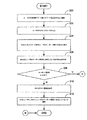
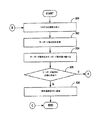
図2A及び図2Bでは、ブート前ログインに対応する方法の例を説明している。図2Aのブロック200から始めると、ユーザはオペレーティングシステム環境で、ブート前パスワード設定を選択する。一例として、ユーザは、ここで初めて、ユーザのコンピュータシステム100をブートする前にBIOS112が要求するパスワードを確立してもよい。或いはまた、ユーザは既存のブート前ログインパスワードを変更してもよい。いずれの場合でも、ブロック202で示すように、ユーザはオペレーティングシステム114で、例えばオペレーティングシステム「ウィザード」又は同様のユーティリティを用いて、パスワードを入力する。ユーザは、様々な方法を用いてパスワードを入力できる。例えば、ユーザは単にパスワードをタイプしてもよい。或いはまた、ユーザは、所定のソース(例えば、ドキュメント、ウェブページ等)からパスワードをコピーして、オペレーティングシステムが提示した入力ブロックにパスワードを貼付けてもよい。
2A and 2B illustrate an example of a method corresponding to pre-boot login. Beginning with
次にブロック204を参照すると、パスワードを入力したなら、オペレーティングシステム114はユーザのキーボード配列の表示をパスワードと共にBIOS112に転送する。その情報を用いて、ブロック206で示すように、BIOS112は、BIOSがユーザのキーボード配列に対応するか否かを判定できる。即ち、BIOS112により、BIOS112がユーザの物理的なキーボードの配列に関する記述を、例えば、BIOS112のキーボード配列表120に保存するか否かを判定できる。キーボード配列に関する相違の例としては、文字「Nにティルデをつけたもの(エニェ)」を必要とするスペイン語のキーボードと、当該文字を使用しない英語のキーボードとの間の相違がある。従って、2つの異なるキーボードは異なる文字群、異なる物理的位置にある共通文字群、及び/又は異なるキー数を有する可能性があり、その結果夫々エンドユーザは異なる方法でタイプすることになる。決定ブロック208を参照すると、キーボード配列が対応していた場合、フローは図2Bのブロック214へと続く。他方、キーボード配列にBIOS112が対応していない場合、フローはブロック210に続き、ブロック210では、BIOSがオペレーティングシステム114に警報を送り、ユーザのキーボード配列に対応していないことをオペレーティングシステムに通知する。オペレーティングシステム114は、次に、ブロック212で示すように、その事実についてユーザに通知できる。その時点で、ユーザは、自分のキーボード配列を変更してパスワード選択を再度試せる、或いは単にブート前ログイン機能を使用しないことを選択できる。
Referring now to block 204, if a password is entered, the operating system 114 transfers the user keyboard layout display along with the password to the
BIOS112がユーザのキーボード配列に対応しているとすると、次に、BIOSは、ユーザが入力したパスワードを、図2Bのブロック214で示したように、ユーザのキーボードを用いて直接入力できるか否かを判定する。間接的に入力するのとは対照的に、指定したキーボード配列の1つ又は複数のキーボードキーを選択することで、パスワードの各文字を入力できる(即ち、タイプできる)か否かを特に判定する。間接的に入力する例としては、貼付けた文字列の個々の文字を実際にタイプせず、代わりに、BIOS環境では利用不可能な別のソースからコピーする、コピー/貼付け機能を使用することが挙げられる。間接的に入力する更なる例としては、ユーザに提示する文字又は記号(例えば、漢字の語句)を選択する前に、そうした提示をトリガする1つ又は複数のキーボードのキーを入力することが挙げられる。その状況では、文字や記号もユーザは実際にタイプせず、そうした機能もBIOS環境で利用不可能である。従って、各文字が、ユーザがタイプできBIOS112が認識できるものであるか否かを判定する。とりわけ、オペレーティングシステム114を、数千又は数万ものユニコード文字を認識するように構成してもよいが、BIOS112の能力は遥かに制限されるかも知れない。拒否される可能性がある文字の例としては、ユーザが英語(例えば、米国式)のキーボードを使用している場合の漢字があるが、これはかかるキーボードでは、漢字を提示できないからである。
If the
次に決定ブロック216を参照し、キーボードを使用してパスワードの文字群全てを直接入力でき、従ってBIOS112が認識できたとすると、フローは後述するブロック226へと続く。しかしながら、これらの文字の1つ又は複数を、キーボードを使用して直接入力できない場合は、フローは、BIOS112がオペレーティングシステム114に、パスワードがブート前ログイン用に受付できないと伝える警報を送るブロック218へと続く。その後、オペレーティングシステム114は、ブロック220に示すように、ユーザに新たなパスワードを選択するよう促すことができる。任意には、オペレーティングシステムは、ユーザのキーボードを使用して直接入力できる(即ち、タイプできる)文字のパスワードを選択するようユーザに更に要求できる。
Referring now to decision block 216, if the entire character group of the password can be entered directly using the keyboard and thus the
ユーザが更にパスワードを設定したいと望む場合、ブロック222で示すように、ユーザはオペレーティングシステム114で更なるパスワードを入力でき、またブロック224で示すように、オペレーティングシステムは再びBIOS112にパスワードを転送できる。次に、フローは、BIOS112が再びパスワードを検討するブロック214に戻ることができる。ユーザが選択した新たなパスワードが受付可能だとすれば、フローは、BIOS112がオペレーティングシステム114に受付を送信するブロック226に続く。受付を受信したなら、ブロック228に示すように、ブート前ログインを次にコンピュータシステム100を起動する際に実行できるように、オペレーティングシステム114は新たなブート前パスワードを設定できる。
If the user wishes to set more passwords, the user can enter additional passwords at the operating system 114, as shown at
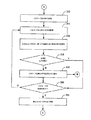
図3A及び図3Bでは、ブート前ログインに対応する際の、BIOSセキュリティマネージャ118(図1)の実施例について説明している。図3Aのブロック300から始めると、BIOSセキュリティマネージャ118は、オペレーティングシステム114から、例えばオペレーティングシステムのセキュリティマネージャ122からの通信を待つ。ブロック302では、BIOSセキュリティマネージャ118は、オペレーティングシステム114からキーボード配列IDを受信する。一例として、当該IDを、オペレーティングシステム環境でユーザが実行したブート前ログインのセットアップ手順の一部として、BIOSセキュリティマネージャ118に提示する。次にBIOSセキュリティマネージャ118は、ブロック304で示すように、キーボード配列表120のキーボード配列IDを調べて、ユーザのキーボード配列IDにBIOS112が対応しているか否かを判定する。決定ブロック306を参照すると、キーボード配列IDが表120に存在しない場合、BIOSセキュリティマネージャ118は、ブロック308で示すように、拒否通知をオペレーティングシステム114に送信し、ブート前ログインがユーザの現在のキーボード配列で不可能ならば、セッションのフローを終了する。
3A and 3B describe an example of the BIOS security manager 118 (FIG. 1) when dealing with pre-boot login. Beginning with
決定ブロック306を更に参照すると、キーボード配列IDがキーボード表120に存在する、つまり、BIOS112が当該配列に対応している場合、フローは、BIOSセキュリティマネージャ118が、オペレーティングシステム114からユーザが選択したパスワードを受信するブロック310に続く。パスワードの受信をキーボード配列IDの受信とは別だとして記述したが、両情報は、BIOSセキュリティマネージャ118に提供されると同時にBIOSセキュリティマネージャ118が受信できる点に注意されたい。とにかく、BIOSセキュリティマネージャ118がパスワードを受信したなら、ブロック312で示すように、BIOSセキュリティマネージャはパスワードの文字を識別する。次に、ブロック314を参照すると、BIOSセキュリティマネージャ118は、ユーザのキーボードで直接その文字を入力できるか否かを判定する。特に、その文字を、単一のキーを選択して、又は、例えば「Shift」、「Ctrl」「Alt」キーを含む複数のキーを同時に選択して、キーボードで直接タイプできるか否かを判定する。決定ブロック316を参照すると、文字を直接入力できる場合、フローは、当該文字がパスワードの最後の文字であるか否かを判定する決定ブロック320に続く。文字を直接入力できない場合、フローは、パスワードの次の文字を検討するブロック312に戻る。しかしながら、文字を入力できない場合、フローは、パスワードを受付不可能とオペレーティングシステム114に通知するブロック318に続く。次に、BIOSセキュリティマネージャ118がオペレーティングシステムからの更なる通信を待つ図3Aのブロック300に、フローは戻ることができる。
With further reference to decision block 306, if the keyboard layout ID is present in the keyboard table 120, ie, the
決定ブロック320に戻ると、パスワードの各文字が受付可能な場合、フローは、ユーザの選択したパスワードがブート前ログイン処理に対して受付可能であることを示す受付可能メッセージをBIOSセキュリティマネージャ118がオペレーティングシステム114に送信するブロック322に続く。 Returning to decision block 320, if each character of the password is acceptable, the flow causes the BIOS security manager 118 to receive an acceptable message indicating that the password selected by the user is acceptable for the pre-boot login process. Continuing to block 322 for transmission to the system 114.
図2及び図3に関連し上述した処理を通して、ユーザの選択したパスワードは、ブート前ログイン中にBIOS112により確実に受信され認識されるステップを経ることになる。しかしながら、何らかの理由で、BIOS112がユーザのキーボード配列であると考えるものと、ユーザの実際のキーボード配列とが食い違った場合、ユーザは、自分が正しいパスワードだと信じるものを入力したときでも、コンピュータシステム100へのアクセスを拒否される可能性がある。標準的な英語キーボード配列を使用して、ユーザが自分のブート前パスワードを設定する実施例について検討してみる。そのような場合には、BIOSには、ユーザが標準的な英語キーボード配列を使用していることが通知され、そのためBIOSはそれに応じてキーストロークを解釈する。しかしながら、もしユーザがその後自分のキーボード配列を変更したなら、BIOSが有効なパスワードを無効なパスワードとして解釈するという結果になるミスマッチが起こり得る。例えば、ユーザが自分のキーボード配列を標準的なフランス語キーボード配列へ変更するならば、「q」と「a」キーの物理的な位置が逆になる。そのため、ユーザのパスワードが「quark123」であれば、BIOSは「auqrk123」としてユーザの入力を解釈して、ユーザアクセスを拒否するであろう。
Through the processing described above in connection with FIGS. 2 and 3, the user selected password will go through steps that are reliably received and recognized by the
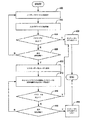
結果として永久にシステムをロックしてしまう可能性があるそうした状況を防止するために、コンピュータシステムのディスプレイに仮想又は「ソフト」キーボードをユーザに対して表示して、ユーザがマウス等のポインティングデバイスを使用して自分のパスワードの文字を選択可能にするように、BIOSセキュリティマネージャ118を構成する。そのような状況では、BIOSがユーザのキーボード配列だと考えるものとユーザの実際のキーボード配列とのミスマッチによって、ユーザがコンピュータシステム100にログインできなくなる、使用できなくなるといったことがなくなる。図4は、そうした役割を果たすBIOSセキュリティマネージャ118の動作例を提供している。
To prevent such situations that could permanently lock the system as a result, a virtual or “soft” keyboard is displayed to the user on the display of the computer system and the user places a pointing device such as a mouse. The BIOS security manager 118 is configured to be used to select the character of his password. In such a situation, the mismatch between what the BIOS thinks is the user's keyboard layout and the user's actual keyboard layout does not prevent the user from logging into or using the
図4のブロック400から始めると、BIOSセキュリティマネージャ118がユーザにパスワードを入力させる。特に、BIOSセキュリティマネージャ118は、コンピュータシステム100の電源を入れた後の、コンピュータシステムをブートする前、従ってオペレーティングシステム114が立ち上がり作動する前に、ユーザに自分のパスワードを入力させる。ブロック402に示すように、入力されたパスワードを受信し、パスワードが正しい(即ち、有効である)か否かを判定する。決定ブロック404を参照すると、パスワードが正しければ、BIOS112は、ブロック406で示すように、コンピュータシステム100をブートする。一方、パスワードが正しくなければ(即ち、無効であれば)、フローを、最大試行回数まで使用したか否かを判定する決定ブロック408に続ける。最大試行回数まで達していなければ、ブローは、ユーザに再度パスワードを入力するように促すブロック400に戻る。
Beginning with
許可された最大試行回数(例えば、3回試行)で、ユーザが正しいパスワードを入力できない場合、ブロック410で示すように、BIOSセキュリティマネージャ118は、仮想又はソフトキーボードをユーザに表示する。ソフトキーボードは、例えば、各文字をユーザのキーボードを用いて直接入力できる画面上のボタンとして表示される個別表示「キー」、及び1つ又は複数の物理的なキーボードキーを用いる配列を含む。従って、上記の英語対フランス語の例に関しては、ソフトキーボードは、ユーザが自分の物理的なキーボードで「q」キーの位置の如何に関わらず選択できる、「q」のキーを含む。ソフトキーボードが表示されたなら、BIOSセキュリティマネージャ118は、ユーザに、ブロック412で示すように、ポインティングデバイスを使用して様々な文字の自分のパスワードを選択するように促せる。一例として、ポインティングデバイスは、マウスを含んでよい。コンピュータシステム100がタッチ式画面を備える場合には、ポインティングデバイスは、スタイラスペン又はユーザの指を含んでよい。
If the maximum number of attempts allowed (e.g., 3 attempts) and the user cannot enter the correct password, the BIOS security manager 118 displays a virtual or soft keyboard to the user, as shown at
次に、決定ブロック414を参照すると、BIOSセキュリティマネージャ118は、パスワードが正しいか否かを判定する。パスワードが正しくなければ、フローは、最大試行回数(例えば、3回試行)が使用されたか否かを判定する決定ブロック416に続く。最大試行回数でなければ、フローは、ユーザに再びパスワードの入力を促すブロック412に戻る。最大試行回数であれば、ブロック418で示すように、コンピュータシステム100をブートしない。しかしながら、ユーザが、ポインティングデバイスを用いてパスワードの各文字を個別に選択して、正しいパスワードを入力したとすると、フローは、コンピュータシステム100がブートするブロック406に続く。
Next, with reference to decision block 414, the BIOS security manager 118 determines whether the password is correct. If the password is not correct, flow continues to decision block 416 where it is determined whether a maximum number of attempts (eg, 3 attempts) has been used. If not, the flow returns to block 412 where the user is prompted again for a password. If it is the maximum number of attempts, the
図4に関して説明した機能を可能にするには、ユーザが使用するキーボード配列の各文字を、BIOS112が表示できなければならない。つまり、BIOS112が、それら各文字のフォントグリフをレンダリング(表現)する能力を備えねばならない、そうでなければ、フォントグリフがない文字は、キーボード配列に関わらず有効な文字としての検証を通過しない。BIOS112にそうしたフォントレンダリング能力があることを確実にするために、BIOSセキュリティマネージャ118はまた、BIOSが、図2及び図3に関して記述した処理中に選択されたパスワードの各文字をレンダリング可能かについても、確認できる。
To enable the functionality described with respect to FIG. 4, the
様々なプログラム(ロジック)について本明細書では記述した。そうしたプログラムは、任意のコンピュータ関連システム又は方法によって、或いは任意のコンピュータ関連システム又は方法との関連で使用されるコンピュータ可読な媒体に保存できる点に注意されたい。本明細書の文脈では、「コンピュータ可読な媒体」は、電子、磁気、光学等の物理的デバイス、又はコンピュータ関連システム若しくは方法によって、又はコンピュータ関連システム若しくは方法との関連で使用されるコンピュータプログラムを含むか保存する手段とする。これらのプログラムを、例えばコンピュータベースのシステム、プロセッサを含むシステム、又は命令実行システム、又は装置若しくはデバイスからの命令をフェッチして命令を実行できる他のシステム、等の命令実行システム、装置又はデバイスによって、或いはそれらと関連して使用する任意のコンピュータ可読な媒体において、具現化できる。 Various programs (logic) have been described herein. It should be noted that such a program can be stored on a computer readable medium used by any computer related system or method or in connection with any computer related system or method. In the context of this specification, a “computer-readable medium” refers to a physical device such as an electronic, magnetic, optical, or computer program used by or in connection with a computer-related system or method. Means to contain or store. These programs may be executed by an instruction execution system, apparatus, or device, such as a computer-based system, a system that includes a processor, or an instruction execution system, or other system that can fetch instructions from an apparatus or device and execute the instructions. Or any computer-readable medium used in connection therewith.
Claims (19)
ブート前ログインにおいて使用するためにユーザによってオペレーティングシステム環境内において選択された選択パスワードを、前記コンピュータシステムのBIOSによって前記コンピュータシステムのオペレーティングシステムから受け取り、
前記ユーザにより使用されているキーボード配列の識別子を前記BIOSによって受け取って、該キーボード配列が前記BIOSによりサポートされているのかどうかを前記BIOSによって判定し、
前記キーボード配列が前記BIOSによってサポートされている場合には、前記コンピュータシステムのブートが完了する前に前記ユーザのキーボードを用いて、前記選択パスワードが直接入力され得るのかどうかを、前記BIOSによって判定し、
前記ブートが完了する前に前記ユーザのキーボードを用いて、前記選択パスワードが直接入力されることが不可能である場合には、前記選択パスワードが受け付け不可能であるという信号を前記BIOSによって前記オペレーティングシステムに対して送り、及び、
前記ブートが完了する前に前記ユーザのキーボードを用いて、前記選択パスワードが直接入力されることが可能である場合には、受け付けたことを前記オペレーティングシステムに対して前記BIOSによって通知して、前記選択パスワードをブート前パスワードとして前記オペレーティングシステムによって設定する
ことを含む、方法。 A method for supporting pre-boot login on a computer system, comprising:
Selected password selected in the operating system environment by a user for use in pre-boot log in, receives from the operating system of the computer system by the BIOS of the computer system,
Receiving an identifier of a keyboard layout used by the user by the BIOS and determining by the BIOS whether the keyboard layout is supported by the BIOS;
If the keyboard layout is supported by the BIOS, using the keyboard of the user before booting of the computer system is completed, whether the said selected password can be entered directly, as determined by the BIOS ,
Using the keyboard of the user before the boot is complete, wherein when selection password is not be directly input, the signal that the selected password is impossible Installing accepted BIOS Ri feed to the operating system by, and,
If the selection password can be directly input using the user's keyboard before the boot is completed, the operating system is notified of the acceptance by the BIOS, and <br/> and a this, a method of setting by the operating system selection password as a pre-boot password.
前記ブート前パスワードとして入力された前記パスワードが、前記設定したブート前パスワードに一致するのかどうかを前記BIOSにより判定し、及び、
前記ブート前パスワードとして入力された前記パスワードが、前記設定したブート前パスワードに一致しない場合には、前記設定したブート前パスワードの文字を前記ユーザが選択できるソフトキーボードを、前記BIOSにより前記ユーザに対して表示する
ことを更に含むことからなる、請求項1乃至3の何れかに記載の方法。 Before the computer system has completed booting, receiving a password entered as the pre-boot password using the keyboard of the user by a user by the BIOS,
The pre-boot the password entered as a password, to determine the constant by the whether the matching BIOS boot password before you the setting, and,
The password entered as the pre-boot password, if that does not match the pre-boot password the settings, a soft keyboard characters pre-boot password the settings the user can select, to the user by the BIOS The method according to claim 1, further comprising displaying.
ブート前ログインにおいて使用するためにユーザによって、前記コンピュータシステムのオペレーティングシステム環境内において選択された選択パスワードを、該オペレーティングシステムから受け取るよう構成されたロジックと、
前記ユーザによって使用されているキーボード配列の識別子を受け取って、該キーボード配列が前記BIOSによりサポートされているのかどうかを判定するよう構成されたロジックと、
前記キーボード配列が前記BIOSによってサポートされている場合には、前記コンピュータシステムのブートが完了する前に、前記ユーザのキーボードを用いて前記選択パスワードが直接入力され得るのかどうかを判定するよう構成されたロジックと、
前記ブートが完了する前に前記ユーザのキーボードを用いて、前記選択パスワードが直接入力されることが不可能である場合には、前記選択パスワードが受け付け不可能であるという信号を前記オペレーティングシステムに対して送るよう構成されたロジックと、
前記ブートが完了する前に前記ユーザのキーボードを用いて、前記選択パスワードが直接入力されることが可能である場合には、受け付けたことを前記オペレーティングシステムに対して通知して、それにより、前記選択パスワードをブート前パスワードとして前記オペレーティングシステムが設定することとなるようにするよう構成されたロジック
とを含むことからなる、コンピュータ可読媒体。 A computer usable 読媒 body that stores a basic input output system for use on a computer system (BIOS), the BIOS is,
By a user for use in pre-boot log in, selectivity password selected in the operating system environment of the computer system, a logic that is by the Hare configuration receives from the operating system,
Logic configured to receive an identifier of a keyboard layout used by the user and determine whether the keyboard layout is supported by the BIOS;
When said keyboard layout is supported by the BIOS, before booting of the computer system is completed, by the Hare structure wherein selecting a password to determine whether the may be directly input by using the keyboard of the user and formed by the logic,
Using the keyboard of the user before the boot is complete, when the selection password is not to be input directly, the selection password the signals say that it is not possible only with accepted and logic that is by cormorants configuration send for the operating system,
If the selected password can be directly entered using the user's keyboard before the boot is completed, the operating system is notified of the acceptance, thereby the consists include logic <br/> and configured to allow the operating system is to be set, computer-usable 読媒 member selected password as a pre-boot password.
前記ブート前パスワードとして入力された前記パスワードが、前記設定したブート前パスワードに一致するのかどうかを判定するよう構成されたロジックと、
前記ブート前パスワードとして入力された前記パスワードが、前記設定したブート前パスワードに一致しない場合には、前記設定したブート前パスワードの前記文字を前記ユーザが選択できるソフトキーボードを、前記ユーザに対して表示するよう構成されたロジック
とを更に含むことからなる、請求項9乃至11の何れかに記載のコンピュータ可読媒体。 Before the computer system has completed booting, and logic that is by the Hare configuration receiving an input password as a pre-boot password using the keyboard of the user by a user,
And logic that the password that is entered as the pre-boot password has been by cormorants configuration to determine whether or not to match the pre-boot password that was the setting,
Display the password entered as the pre-boot password, if that does not match the pre-boot password the settings, a soft keyboard and the character of the pre-boot password the settings the user can select, to the user I cormorant configuration is logic to
Preparative consists in further comprising a computer-friendly 読媒 body according to any one of claims 9 to 11.
処理装置と、
BIOSとオペレーティングシステムとを格納するメモリであって、該BIOSが、
ブート前ログインにおいて使用するためにユーザによってオペレーティングシステム環境内において選択された選択パスワードを受け取り、
前記ユーザにより使用されているキーボード配列の識別子を受け取って、該キーボード配列が前記BIOSによりサポートされているのかどうかを判定し、
前記キーボード配列が前記BIOSによってサポートされている場合には、前記コンピュータシステムのブートが完了する前に前記ユーザのキーボードを用いて前記選択パスワードが直接入力され得るのかどうかを判定し、
前記ブートが完了する前に前記ユーザのキーボードを用いて、前記選択パスワードが直接入力されることが不可能である場合には、前記選択パスワードが受け付け不可能であるという信号を前記オペレーティングシステムに送り、及び、
前記ブートが完了する前に前記ユーザのキーボードを用いて、前記選択パスワードが直接入力されることが可能である場合には、受け付けたことを前記オペレーティングシステムに対して通知して、それにより、前記選択パスワードをブート前パスワードとして前記オペレーティングシステムが設定することとなるようにする
よう構成されていることからなる、メモリ
とを備える、コンピュータシステム。 A computer system,
A processing device;
A memory for storing a BIOS and operating system, the BIOS is,
Receives a selected password selected by the user within the operating system environment for use in pre-boot login,
Receiving an identifier of a keyboard layout used by the user and determining whether the keyboard layout is supported by the BIOS;
If the keyboard layout is supported by the BIOS, the selected password to determine whether the may be directly input by using the keyboard of the user before booting of the computer system is complete,
Using the keyboard of the user before the boot is complete, when the selection password is not to be input directly, the operating signal of the selected password is impossible Installing accepted Ri sent to the system, and,
If the selected password can be directly entered using the user's keyboard before the boot is completed, the operating system is notified of the acceptance, thereby consists of the operating system have been made <br/> by cormorants structure made to be possible to set the selected password as pre-boot password, memory
A computer system comprising:
前記コンピュータシステムがブートを完了する前に、あるユーザによって該ユーザのキーボードを用いてブート前パスワードとして入力されたパスワードを受け取り、
前記ブート前パスワードとして入力された前記パスワードが、前記設定したブート前パスワードに一致するのかどうかを判定し、及び、
前記ブート前パスワードとして入力された前記パスワードが、前記設定したブート前パスワードに一致しない場合には、前記設定したブート前パスワードの前記文字を前記ユーザが選択できるソフトキーボードを前記ユーザに対して表示する
よう更に構成されていることからなる、請求項15又は16に記載のコンピュータシステム。 The BIOS is
Before the computer system has completed booting, receiving a password entered as pre-boot password using the keyboard of the user by a user,
The password entered as the pre-boot password determines whether the matching pre-boot password the setting, and,
The password entered as the pre-boot password, if that does not match the pre-boot password the setting displays a soft keyboard which the character of the pre-boot password the settings the user can select for the user consists in being <br/> by cormorants further configured, the computer system according to claim 15 or 16.
Applications Claiming Priority (1)
| Application Number | Priority Date | Filing Date | Title |
|---|---|---|---|
| PCT/US2008/064085 WO2009142618A1 (en) | 2008-05-19 | 2008-05-19 | Systems and methods for supporting pre-boot log in |
Related Child Applications (1)
| Application Number | Title | Priority Date | Filing Date |
|---|---|---|---|
| JP2013036846A Division JP5490933B2 (en) | 2013-02-27 | 2013-02-27 | System and method for pre-boot login |
Publications (2)
| Publication Number | Publication Date |
|---|---|
| JP2011524040A JP2011524040A (en) | 2011-08-25 |
| JP5284464B2 true JP5284464B2 (en) | 2013-09-11 |
Family
ID=41340385
Family Applications (1)
| Application Number | Title | Priority Date | Filing Date |
|---|---|---|---|
| JP2011510467A Expired - Fee Related JP5284464B2 (en) | 2008-05-19 | 2008-05-19 | System and method for pre-boot login |
Country Status (8)
| Country | Link |
|---|---|
| US (1) | US8881267B2 (en) |
| JP (1) | JP5284464B2 (en) |
| KR (1) | KR101446377B1 (en) |
| CN (1) | CN102037442B (en) |
| BR (1) | BRPI0822354B1 (en) |
| DE (1) | DE112008003876T5 (en) |
| GB (1) | GB2474142B (en) |
| WO (1) | WO2009142618A1 (en) |
Families Citing this family (10)
| Publication number | Priority date | Publication date | Assignee | Title |
|---|---|---|---|---|
| US8272049B2 (en) * | 2009-01-15 | 2012-09-18 | Hewlett-Packard Development Company, L.P. | Multi-domain computer password management |
| US8490167B2 (en) * | 2011-05-27 | 2013-07-16 | International Business Machines Corporation | Preventing password presentation by a computer system |
| US8763112B2 (en) | 2011-07-02 | 2014-06-24 | Intel Corporation | Systems and methods for power-on user authentication |
| NZ702169A (en) | 2012-05-25 | 2016-10-28 | Berg Llc | The use of heat shock protein 90 (hsp90) modulators for the treatment of metabolic syndrome |
| CN103809837B (en) * | 2012-11-13 | 2017-12-15 | 联想(北京)有限公司 | A kind of method and electronic equipment for calling dummy keyboard |
| US20150254449A1 (en) * | 2014-03-05 | 2015-09-10 | Google Inc. | Coordinated Passcode Challenge for Securing a Device |
| WO2015188198A2 (en) | 2014-06-06 | 2015-12-10 | Berg Llc | Methods of treating a metabolic syndrome by modulating heat shock protein (hsp) 90-beta |
| CN108959912A (en) | 2018-06-29 | 2018-12-07 | 郑州云海信息技术有限公司 | A kind of method, device and equipment of BIOS and operating system multiplexing password |
| US11922173B2 (en) * | 2021-05-14 | 2024-03-05 | Dell Products L.P. | Systems and methods for automating pre-boot soft keyboard behavior based on system context |
| JP2024154444A (en) * | 2023-04-19 | 2024-10-31 | 富士通クライアントコンピューティング株式会社 | Information processing apparatus |
Family Cites Families (24)
| Publication number | Priority date | Publication date | Assignee | Title |
|---|---|---|---|---|
| JPH0887367A (en) | 1994-07-20 | 1996-04-02 | Fujitsu Ltd | Key code output device and keyboard |
| JP3626280B2 (en) | 1996-05-02 | 2005-03-02 | 株式会社東芝 | Computer system and system setting method |
| JP2000056927A (en) | 1998-08-06 | 2000-02-25 | Casio Comput Co Ltd | Keyboard display device and display method thereof |
| US6237100B1 (en) * | 1998-12-02 | 2001-05-22 | International Business Machines Corporation | Power passwords within a data processing system for controlling a supply of system power |
| WO2001077792A2 (en) | 2000-04-07 | 2001-10-18 | Rsa Security Inc. | System and method for authenticating a user |
| US6823463B1 (en) * | 2000-05-16 | 2004-11-23 | International Business Machines Corporation | Method for providing security to a computer on a computer network |
| JP2002041223A (en) * | 2000-07-17 | 2002-02-08 | Internatl Business Mach Corp <Ibm> | Computer system, method of generating on-screen keyboard, method of checking power-on password and memory |
| US7814532B2 (en) | 2001-05-02 | 2010-10-12 | Lenovo (Singapore) Pte. Ltd. | Data processing system and method for password protecting a boot device |
| US7308652B2 (en) | 2001-06-08 | 2007-12-11 | Lenovo Singapore Pte. Ltd | Entry of a password through a touch-sensitive computer screen |
| US7849301B2 (en) | 2001-12-12 | 2010-12-07 | Intel Corporation | Providing a user input interface prior to initiation of an operating system |
| KR20040005505A (en) * | 2002-07-10 | 2004-01-16 | 삼성전자주식회사 | Computer system and method for controlling booting thereof |
| US6996641B2 (en) | 2002-10-30 | 2006-02-07 | Intel Corporation | Apparatus and methods for keyboard data normalization |
| CN1297908C (en) | 2003-08-25 | 2007-01-31 | 联想(北京)有限公司 | Method for back-up protection of CMOS data |
| CN1256678C (en) | 2003-10-14 | 2006-05-17 | 联想(北京)有限公司 | Computer information protection method and device |
| US20050228993A1 (en) * | 2004-04-12 | 2005-10-13 | Silvester Kelan C | Method and apparatus for authenticating a user of an electronic system |
| JP2005011381A (en) | 2004-09-27 | 2005-01-13 | Toshiba Corp | Computer system |
| JP4439002B2 (en) | 2005-03-01 | 2010-03-24 | Necフィールディング株式会社 | Computer with information leakage prevention function and security enhancement program |
| JP2006344113A (en) | 2005-06-10 | 2006-12-21 | Matsushita Electric Ind Co Ltd | Security apparatus and security method for information processing apparatus |
| US7619544B2 (en) | 2005-10-27 | 2009-11-17 | Hewlett-Packard Development Company, L.P. | BIOS password security using modified scan codes |
| JP2007272662A (en) | 2006-03-31 | 2007-10-18 | Matsushita Electric Ind Co Ltd | Password authentication method and password authentication apparatus |
| CN100495416C (en) * | 2006-09-01 | 2009-06-03 | 厦门好旺角信息技术开发有限公司 | Password input method and device for improving password security |
| US20080177920A1 (en) * | 2007-01-24 | 2008-07-24 | Dell Products L.P. | Methods for Handling Keyboard Inputs |
| US20090064318A1 (en) * | 2007-08-27 | 2009-03-05 | Inventec Corporation | Method of inputting booting password |
| US8166540B2 (en) * | 2008-02-21 | 2012-04-24 | Lenovo (Singapore) Pte. Ltd. | Hardware password alignment system apparatus and methods |
-
2008
- 2008-05-19 JP JP2011510467A patent/JP5284464B2/en not_active Expired - Fee Related
- 2008-05-19 WO PCT/US2008/064085 patent/WO2009142618A1/en not_active Ceased
- 2008-05-19 DE DE112008003876T patent/DE112008003876T5/en not_active Ceased
- 2008-05-19 GB GB1019584.0A patent/GB2474142B/en not_active Expired - Fee Related
- 2008-05-19 CN CN200880129324.8A patent/CN102037442B/en not_active Expired - Fee Related
- 2008-05-19 KR KR1020107025864A patent/KR101446377B1/en not_active Expired - Fee Related
- 2008-05-19 BR BRPI0822354-8A patent/BRPI0822354B1/en not_active IP Right Cessation
- 2008-05-19 US US12/993,503 patent/US8881267B2/en not_active Expired - Fee Related
Also Published As
| Publication number | Publication date |
|---|---|
| KR20110021787A (en) | 2011-03-04 |
| CN102037442A (en) | 2011-04-27 |
| GB2474142A (en) | 2011-04-06 |
| KR101446377B1 (en) | 2014-10-01 |
| GB2474142B (en) | 2012-09-05 |
| GB201019584D0 (en) | 2010-12-29 |
| CN102037442B (en) | 2015-09-23 |
| BRPI0822354B1 (en) | 2020-11-10 |
| WO2009142618A1 (en) | 2009-11-26 |
| US8881267B2 (en) | 2014-11-04 |
| DE112008003876T5 (en) | 2013-06-06 |
| BRPI0822354A2 (en) | 2019-09-10 |
| JP2011524040A (en) | 2011-08-25 |
| US20110072511A1 (en) | 2011-03-24 |
Similar Documents
| Publication | Publication Date | Title |
|---|---|---|
| JP2011524040A (en) | System and method for pre-boot login | |
| US8272049B2 (en) | Multi-domain computer password management | |
| US7484173B2 (en) | Alternative key pad layout for enhanced security | |
| CN103080873B (en) | Expansion subrack for Input Method Editor | |
| JP4528866B1 (en) | Electronics | |
| US7432831B2 (en) | Handheld electronic device having reduced keyboard and multiple password access, and associated methods | |
| US20130321267A1 (en) | Dynamically changing a character associated with a key of a keyboard | |
| US8694885B2 (en) | Keyboard input method and assistant system thereof | |
| JP2022509469A (en) | Multi-factor based password authentication | |
| JP7142961B2 (en) | multilingual keyboard system | |
| US10354193B2 (en) | Run-time image display on a device | |
| EP2990925A1 (en) | Apparatus and method for displaying a virtual keyboard | |
| JP5490933B2 (en) | System and method for pre-boot login | |
| US20100057440A1 (en) | Multi-language support in preboot environment | |
| US20180046797A1 (en) | Method for inputting a secure password, sheet, set of sheets, input unit, and uses thereof | |
| CA2536993C (en) | Handheld electronic device having reduced keyboard and multiple password access, and associated methods | |
| JP7477683B2 (en) | Information processing device, information processing method, and program | |
| GB2488944A (en) | Using a soft keyboard when a pre-boot password is entered incorrectly | |
| JP7858274B2 (en) | Information processing device, control method for information processing device, and program | |
| JP2007122262A (en) | Password conversion device | |
| Bresnahan et al. | Exam 102-500 Part |
Legal Events
| Date | Code | Title | Description |
|---|---|---|---|
| A621 | Written request for application examination |
Free format text: JAPANESE INTERMEDIATE CODE: A621 Effective date: 20101227 |
|
| RD03 | Notification of appointment of power of attorney |
Free format text: JAPANESE INTERMEDIATE CODE: A7423 Effective date: 20120203 |
|
| RD04 | Notification of resignation of power of attorney |
Free format text: JAPANESE INTERMEDIATE CODE: A7424 Effective date: 20120210 |
|
| A977 | Report on retrieval |
Free format text: JAPANESE INTERMEDIATE CODE: A971007 Effective date: 20120829 |
|
| A131 | Notification of reasons for refusal |
Free format text: JAPANESE INTERMEDIATE CODE: A131 Effective date: 20120911 |
|
| A601 | Written request for extension of time |
Free format text: JAPANESE INTERMEDIATE CODE: A601 Effective date: 20121211 |
|
| A602 | Written permission of extension of time |
Free format text: JAPANESE INTERMEDIATE CODE: A602 Effective date: 20121218 |
|
| A521 | Request for written amendment filed |
Free format text: JAPANESE INTERMEDIATE CODE: A523 Effective date: 20130227 |
|
| TRDD | Decision of grant or rejection written | ||
| A01 | Written decision to grant a patent or to grant a registration (utility model) |
Free format text: JAPANESE INTERMEDIATE CODE: A01 Effective date: 20130514 |
|
| A61 | First payment of annual fees (during grant procedure) |
Free format text: JAPANESE INTERMEDIATE CODE: A61 Effective date: 20130529 |
|
| R150 | Certificate of patent or registration of utility model |
Ref document number: 5284464 Country of ref document: JP Free format text: JAPANESE INTERMEDIATE CODE: R150 |
|
| R250 | Receipt of annual fees |
Free format text: JAPANESE INTERMEDIATE CODE: R250 |
|
| R250 | Receipt of annual fees |
Free format text: JAPANESE INTERMEDIATE CODE: R250 |
|
| R250 | Receipt of annual fees |
Free format text: JAPANESE INTERMEDIATE CODE: R250 |
|
| R250 | Receipt of annual fees |
Free format text: JAPANESE INTERMEDIATE CODE: R250 |
|
| R250 | Receipt of annual fees |
Free format text: JAPANESE INTERMEDIATE CODE: R250 |
|
| R250 | Receipt of annual fees |
Free format text: JAPANESE INTERMEDIATE CODE: R250 |
|
| LAPS | Cancellation because of no payment of annual fees |