JP4239642B2 - Control program - Google Patents
Control program Download PDFInfo
- Publication number
- JP4239642B2 JP4239642B2 JP2003087850A JP2003087850A JP4239642B2 JP 4239642 B2 JP4239642 B2 JP 4239642B2 JP 2003087850 A JP2003087850 A JP 2003087850A JP 2003087850 A JP2003087850 A JP 2003087850A JP 4239642 B2 JP4239642 B2 JP 4239642B2
- Authority
- JP
- Japan
- Prior art keywords
- program
- version
- printer driver
- controller
- version information
- Prior art date
- Legal status (The legal status is an assumption and is not a legal conclusion. Google has not performed a legal analysis and makes no representation as to the accuracy of the status listed.)
- Expired - Fee Related
Links
- 230000002093 peripheral effect Effects 0.000 claims description 52
- 230000010365 information processing Effects 0.000 claims description 45
- 230000005540 biological transmission Effects 0.000 claims description 26
- 230000004044 response Effects 0.000 claims description 17
- 238000000034 method Methods 0.000 description 35
- 238000010586 diagram Methods 0.000 description 14
- 238000009434 installation Methods 0.000 description 5
- 102220465380 NF-kappa-B inhibitor beta_S23A_mutation Human genes 0.000 description 4
- 230000004048 modification Effects 0.000 description 4
- 238000012986 modification Methods 0.000 description 4
- 238000004891 communication Methods 0.000 description 3
- 230000003287 optical effect Effects 0.000 description 3
- 238000006243 chemical reaction Methods 0.000 description 2
- 230000006870 function Effects 0.000 description 2
- 239000004065 semiconductor Substances 0.000 description 1
- 230000008054 signal transmission Effects 0.000 description 1
Images






Landscapes
- Stored Programmes (AREA)
- Accessory Devices And Overall Control Thereof (AREA)
- Information Transfer Between Computers (AREA)
Description
【0001】
【発明の属する技術分野】
この発明は、制御プログラムに関し、特に、周辺装置に接続された情報処理装置で実行される制御プログラムに関する。
【0002】
【従来の技術】
パーソナルコンピュータ(以下、「パソコン」という)とプリンタ等の周辺機器とは、それぞれがネットワークに接続されて使用されることが多い。この接続形態では、複数のパソコンで周辺機器を共有することができる。このような接続形態においても、パソコンと周辺機器とをネットワークを利用せずに直接接続する場合と同様に、パソコンには周辺機器を制御するための制御プログラムが搭載され、周辺機器ではパソコンから受信した実行ジョブを実行するための処理プログラムが搭載される。周辺機器がプリンタの場合には、制御プログラムはプリンタドライバプログラムであり、処理プログラムはプリントジョブを実行してラスタデータを生成するラスタライザプログラムである。
【0003】
一方、パソコンに制御プログラムがインストールされた後に、制御プログラムがバージョンアップされた場合には、すべてのパソコンにバージョンアップ後の制御プログラムを搭載するのが好ましい。また、処理プログラムがバージョンアップされた場合には、プリンタにバージョンアップ後の処理プログラムを搭載するのが好ましい。これらのバージョンアップされた制御プログラムのパソコンへのインストール、または、処理プログラムのプリンタへのインストールは、主にユーザに任せられている。
【0004】
制御プログラムと処理プログラムとをインターネット上のウェブ(Web)サーバからダウンロードしてそれぞれインストールする印刷システムが、特開2001−27940号公報(特許文献1)に記載されている。特許文献1に記載の印刷システムによれば、プリンタからインターネット上のウェブサーバにアクセスして最新バージョンの制御プログラムおよび処理プログラムをダウンロードする。そして、制御プログラムをパソコンにインストールし、処理プログラムをプリンタにインストールする。
【0005】
【特許文献1】
特開2001−27940号公報
【0006】
【発明が解決しようとする課題】
特許文献1における印刷システムにおいては、プリンタ側からパソコンに最新バージョンの制御プログラムを送信する。このため、プリンタ側から、ウェブサーバおよびパソコンにアクセスするために、ウェブサイトとパソコンのネットワークアドレスをプリンタに記憶させておく必要がある。ネットワークアドレスが記憶されていないパソコンには、制御プログラムを送信することができないといった問題があった。
【0007】
この発明は上述した問題点を解決するためになされたもので、この発明の目的の1つは、周辺装置で実行される処理プログラムを容易に更新することが可能な制御プログラムを提供することである。
【0008】
この発明の他の目的は、制御プログラムが変更されたことをユーザに知らせることが可能な制御プログラムを提供することである。
【0009】
この発明のさらに他の目的は、制御プログラムを容易に更新することが可能な制御プログラムを提供することである。
【0010】
【課題を解決するための手段】
上述した目的を達成するためにこの発明のある局面によれば、制御プログラムは、周辺装置に接続された、周辺装置を制御するための情報処理装置のコンピュータで実行される制御プログラムであって、周辺装置で実行される、記憶手段に記憶された第1の処理プログラムのバージョン情報を周辺装置に送信するステップと、周辺装置が有する第2の処理プログラムのバージョン情報と送信された第1の処理プログラムのバージョン情報との比較に基づく送信要求に応じて、記憶手段に記憶された第1の処理プログラムを周辺装置に送信するステップとを含む。第1の処理プログラムのバージョン情報を周辺装置に送信するステップは、第1の処理プログラムのバージョン情報とともに周辺装置において第2の処理プログラムにより実行されるジョブを送信するステップを含む。
【0011】
この発明に従えば、制御プログラムは、周辺装置に接続された情報処理装置で実行されると、情報処理装置に記憶されている処理プログラムのバージョン情報を周辺装置に送信させ、周辺装置からの送信要求に応じて、処理プログラムを送信させる。このため、周辺装置では、情報処理装置に記憶されている処理プログラムのバージョンと、周辺装置に記憶している処理プログラムのバージョンとを比較することができる。そして、周辺装置において処理プログラムを更新する必要がある場合には、情報処理装置から処理プログラムが送信される。このため、情報処理装置に最新バージョンの処理プログラムを記憶しておけば、周辺装置で実行される処理プログラムが最新のものに更新される。その結果、周辺装置で実行される処理プログラムを容易に更新することが可能な制御プログラムを提供することができる。
【0012】
この発明の他の局面によれば、制御プログラムは、ネットワークを介して画像形成装置に接続された、画像形成装置を使用するための情報処理装置のコンピュータで実行される制御プログラムであって、記憶手段に記憶された、画像形成装置において実行される第1の処理プログラムのバージョン情報を取得するステップと、取得した第1の処理プログラムのバージョン情報を画像形成装置へ送信するステップと、画像形成装置が有する第2の処理プログラムのバージョン情報と送信された第1の処理プログラムのバージョン情報との比較に基づく画像形成装置からの第1の処理プログラムの送信要求を受信すると、コンピュータに記憶されている第1の処理プログラムを画像形成装置へ送信するステップとを含む。第1の処理プログラムのバージョン情報を画像形成装置へ送信するステップは、第1の処理プログラムのバージョン情報とともに画像形成装置において第2の処理プログラムにより実行されるジョブを送信するステップを含む。
【0019】
この発明に従えば、情報処理装置が実行ジョブを周辺装置に送信する際に、バージョン情報が送信される。このため、実行ジョブを送信する際に、処理プログラムまたは制御プログラムの更新を開始することができる。その結果、情報処理装置と周辺装置との間の通信に既存のプロトコルを採用することができ、特別な通信プロトコルを必要としない。
【0020】
【発明の実施の形態】
以下本発明の実施の形態について図面を参照して説明する。以下の説明では、同一の部品には同一の符号を付してある。それらの名称および機能も同じである。したがってそれらについての詳細な説明は繰返さない。
【0021】
[第1の実施の形態]
図1は、本発明の第1の実施の形態における印刷システムの全体概要を示すブロック図である。図1を参照して、印刷システムは、3台のパーソナルコンピュータ(PC)1A,1B,1Cと、コントローラ2とプリンタエンジン3とを含む。PC1A,1B,1Cと、コントローラ2とはローカルエリアネットワーク(LAN)4にそれぞれが接続されている。したがって、PC1A,1B,1Cは、コントローラ2との間でデータの送受信を行なうことが可能である。コントローラ2とプリンタエンジン3とは専用線で接続されている。コントローラ2は、PC1A,1B,1Cのいずれかから受信した印刷ジョブをプリンタエンジン3に送信するためのラスタデータに変換する。この変換処理は、通常コントローラ2にインストールされているラスタライザプログラムが実行されることにより行なわれる。
【0022】
コントローラ2は、印刷ジョブが変換されたラスタデータをプリンタエンジン3に送信する。プリンタエンジン3では、コントローラ2から受信されたラスタデータに基づいて、紙などの記録媒体に画像を形成する。
【0023】
クライアントPC1A,1B,1Cは、外部記憶装置を備え、記録媒体5に記録された制御プログラムであるプリンタドライバプログラム11を読取り、PC1A,1B,1Cに内蔵された中央演算装置(CPU)において読取ったプリンタドライバプログラムを実行する。記録媒体5は、CD−ROM(Compact Disc-Read Only Memory)、FD(Flexible Disk)などの記録媒体である。一般的に、PC1A,1B,1Cで実行されるプリンタドライバプログラム11は、記録媒体5に記録されて流通する。そして、PC1A,1B,1Cが備えるCD−ROMドライブまたはFDドライブにより読取られ、PC1A,1B,1Cが備えるハードディスクに不揮発的に記憶される。PC1A,1B,1Cでは、ハードディスクに記憶されたプリンタドライバプログラム11をランダムアクセスメモリ(RAM)に読取り、CPUで実行する。これにより、PC1A,1B,1CそれぞれのCPUにプリンタドライバが形成される。プリンタドライバプログラム11は、コントローラ2を制御するためのプログラムであり、CPUで実行されるとコントローラ2に対応した印刷ジョブを生成する。
【0024】
このように、PC1A,1B,1Cに、プリンタドライバプログラム11を記憶させてCPUで実行可能な状態におくことを、インストールという。コントローラ2へのラスタライザプログラム10のインストールも同様であるので、ここでは説明を繰返さない。
【0025】
PC1A,1B,1Cそれぞれにプリンタドライバプログラム11がインストールされてプリンタドライバが形成され、コントローラ2にラスタライザプログラム10がインストールされてラスタライザが形成される。PC1A,1B,1Cに形成されたプリンタドライバで生成される印刷ジョブは、コントローラ2に形成されたラスタライザにより解釈され、ラスタデータに変換される。PC1Aに形成されたプリンタドライバにより生成された印刷ジョブは、コントローラ2にLAN4を介して送信され、コントローラ2で受信される。このため、プリンタドライバプログラム11とラスタライザプログラム10とは、機能上密接な関係を有する。
【0026】
上述したようにPC1A,1B,1Cは、一般的なパーソナルコンピュータである。そのハード構成および動作は周知であるので、ここではその詳細な説明は繰返さない。
【0027】
なお、記録媒体5としては、CD−ROM、FD、ハードディスクに限られず、磁気テープ、カセットテープ、光ディスク(MO(Magnetic Optical Disk)/MD(Mini Disk)/DVD(Digital Versatile Disk))、ICカード(メモリカードを含む)、光カード、マスクROM、EPROM、EEPROM、フラッシュROMなどの半導体メモリを含む。
【0028】
また、ここでいうプログラムとは、PC1A,1B,1CのCPUにより直接実行可能なプログラムだけでなく、ソースプログラム形式のプログラム、圧縮処理されたプログラム、暗号化されたプログラム等を含む概念である。
【0029】
なお、図1では、3台のPC1A,1B,1CがLAN4に接続されている例を示したが、台数はこれに限られず、1台以上あればよい。また、コントローラ2およびプリンタエンジン3の台数もこれに限られず、複数台あってもよい。さらに、コントローラ2とプリンタエンジン3とを別体の装置として示したが、コントローラ2とプリンタエンジン3とを一体に形成した画像形成装置とすることもできる。このような画像形成装置は、PC1A,1B,1Cの周辺装置であり、プリンタに限られず、ファクシミリ、プリンタ、複写機を組合せたマルチファンクションプロダクト(MFP)などであってもよい。また、接続は、LANケーブルによる接続に限らず、無線LANなどの無線方式でLANに接続するようにしてもよい。
【0030】
PC1A,1B,1Cにそれぞれインストールされているプリンタドライバプログラム11は、バージョン1.0である。また、コントローラ2にインストールされているラスタライザプログラム10は、バージョン1.0である。一般的に、プログラムは新規機能追加等により改良されるものであり、改良されるごとにバージョン情報が付加される。このバージョン情報を見ることにより、プログラムの新旧を判断することができる。
【0031】
本実施の形態における印刷システムは、コントローラ2にインストールされているラスタライザプログラム10が改良された場合に、コントローラ2にその改良された新たなバージョンのラスタライザプログラムをインストールする。これを説明するため、図1に示すように、PC1Aに、新しいバージョン1.1のラスタライザプログラム10Aが記録媒体5から読取られ、PC1Aのハードディスクに記録された場合について説明する。
【0032】
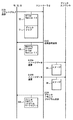
図2は、第1の実施の形態における印刷システムでのラスタライザプログラム更新処理の概要を示す図である。図2では、PC1Aで実行される処理、コントローラ2で実行される処理、プリンタエンジン3で実行される処理をそれぞれ別々に示し、PC1Aとコントローラ2との間で送受信されるデータ、コントローラ2とプリンタエンジン3との間で送受信されるデータを示している。
【0033】
図2を参照して、PC1Aから、コントローラ2へプリントジョブ31が送信される(S101)。プリントジョブ31には、ヘッダ32が付加されて送信される。このプリントジョブ31は、コントローラ2およびプリンタエンジン3で実行される実行ジョブである。ヘッダ32には、PC1Aが記憶するプリンタドライバプログラム11のバージョン情報(バージョン1.0)と、ラスタライザプログラム10Aのバージョン情報(バージョン1.1)が含まれる。プリントジョブ31およびヘッダ32は、PC1Aからコントローラ2に対してプリントジョブを送信する際に、従来用いられるプロトコルを用いて送信される。
【0034】
コントローラ2では、ヘッダに含まれるラスタライザプログラム10Aのバージョン情報(バージョン1.1)と、コントローラ2が既に記憶しているラスタライザプログラム10のバージョン情報(バージョン1.0)とを比較して、既に記憶しているラスタライザプログラム10のバージョンが古い場合には、要求信号33をPC1Aに送信する(S102)。要求信号33は、送信を要求するラスタライザプログラム10Aの名称とそのバージョン情報(バージョン1.1)および送信を要求するコマンドを含み、バージョン1.1のラスタライザプログラム10Aの送信を要求する信号である。
【0035】
PC1Aでは、要求信号33を受信すると、ハードディスクに記憶しているラスタライザプログラム10Aをコントローラ2へ送信する(S103)。ラスタライザプログラム10Aは、ヘッダ34が付加されて送信される。このヘッダ34には、ラスタライザプログラム10Aのバージョン情報(バージョン1.1)と、ラスタライザプログラム10Aを送信することを示すコマンド(download)とが含まれる。
【0036】
このときPC1Aからコントローラ2へラスタライザプログラム10Aを送信するときのプロトコルは、プリントジョブを送信する際に、従来用いられているプロトコルが用いられる。プリントジョブを送信する際のプロトコルを用いて、ヘッダ34にラスタライザプログラム10Aを送信することを示すコマンド(download)およびラスタライザプログラム10Aのバージョン情報を含め、プリントジョブに代えてラスタライザプログラム10Aを送信するものである。このため、コントローラ2では、従来のプロトコルでラスタライザプログラム10Aを受信することができ、ヘッダ34からプリントジョブ31でないことを判別できるため、ラスタライザプログラム10Aを印刷する処理を禁止することができる。また、ヘッダ44に含まれるコマンドに従って、受信されたラスタライザプログラム10Aをインストールすることが可能となる。
【0037】
コントローラ2では、インストールされているラスタライザプログラム10Aを実行して、S101において受信したプリントジョブ31をラスタデータに変換して送信する(S104A,S104B)。これによりラスタデータであるイメージデータ35,36が、プリンタエンジン3に送信される。プリンタエンジン3では、受信したイメージデータ35,36にしたがって、紙などの記録媒体に画像を形成する処理を実行する。
【0038】
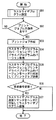
図3は、第1の実施の形態におけるPCで実行される処理の流れを示すフローチャートである。PC1A,1B,1Cそれぞれで実行される処理は同じなので、ここではPC1Aで実行される処理を例に説明する。図3に示す処理は、PC1Aでプリンタドライバプログラム11が実行されることにより行なわれる処理である。
【0039】
図3を参照して、PC1Aは、まず、新しいバージョン1.1のラスタライザプログラム10Aを記録媒体5から読取り、ハードディスクに記録する(ステップS01)。この処理は、PC1Aのユーザの指示によりなされる。本実施の形態における印刷システムにおいては、ユーザの行う作業は、PC1Aを操作して、新しいバージョン1.1のラスタライザプログラム10Aを記録媒体5から読取らせて、PC1Aのハードディスクに記憶させるステップS01の処理のみである。
【0040】
PC1Aにインストールされているプリンタドライバプログラム11は、PC1Aで実行されると、ハードディスクの所定の位置に記憶されているラスタライザプログラム10Aを認識する。所定の位置は、たとえばプリンタドライバプログラム11が記憶されているのと同じフォルダとすることができる。または、同じフォルダ内に下位フォルダを作成したり、別途専用のフォルダを作成し、そこに記憶するようにしてもよい。また、ラスタライザプログラム10Aをハードディスクの所定の位置に記憶させるのに代えて、ユーザがPC1Aで実行されるプリンタドライバプログラム11に、ラスタライザプログラム10Aが記憶されている位置を指示するようにしてもよい。これは、プリンタドライバプログラム11を実行するPC1Aに、設定画面を出力させ、その設定画面にラスタライザの記憶された位置およびバージョンの入力を受付けるようにすることで実現できる。これにより、PC1Aで実行されるプリンタドライバプログラム11は、PC1Aのハードディスクのどのアドレスにラスタライザプログラム10Aが記憶されているのかを知ることができるとともに、そのラスタライザプログラム10Aのバージョン情報を得ることができる。
【0041】
次に、プリントジョブを出力させるための指示があったか否かが判断される(ステップS02)。プリントジョブは、PC1Aで実行される文書作成プログラム等のアプリケーションプログラムが出力するデータに基づき生成される。ユーザがPC1Aを操作して、実行されるアプリケーションプログラムに印刷を指示した場合に、そのアプリケーションプログラムで生成されたデータが、プリンタドライバプログラム11に出力される。プリンタドライバプログラム11では、アプリケーションプログラムからのデータの受信により、プリントジョブの出力指示があったものと判断される。プリントジョブの出力指示があった場合にはステップS03へ進み、そうでない場合には待機状態となる。
【0042】
ステップS03では、プリントジョブの作成が行なわれる。そして、PC1Aに記憶されているラスタライザプログラム10Aのバージョン情報と、プリンタドライバプログラム11のバージョン情報とが取得される(ステップS04)。このラスタライザプログラム10Aのバージョン情報は、ステップS01で設定された情報である。プリンタドライバプログラム11のバージョン情報は、プリンタドライバプログラム11自身が有する。
【0043】
そして次のステップS05では、ラスタライザプログラム10Aのバージョン情報と、プリンタドライバプログラムのバージョン情報とを含むヘッダとプリントジョブとをコントローラ2へ送信する。
【0044】
そして、コントローラ2により、ラスタライザの送信を要求する要求信号33が受信されたか否かが判断される(ステップS06)。要求信号が受信された場合にはステップS07に進み、そうでない場合にはステップS07をスキップして処理を終了する。ステップS07では、ラスタライザプログラム10Aを送信することを示すコマンド(download)を含むヘッダとラスタライザプログラム10Aとをコントローラ2へ送信する。
【0045】
図4は、第1の実施の形態におけるコントローラ2で実行される処理の流れを示すフローチャートである。図4を参照して、PC1Aよりプリントジョブが受信されたか否かが判断される(ステップS21)。受信された場合にはステップS22へ進み、そうでない場合には待機状態となる。ステップS22では、受信されたデータからヘッダを取得する。そして、取得したヘッダから、ラスタライザプログラム10Aのバージョン情報(バージョン1.1)を取得する(ステップS23)。
【0046】
次のステップS24では、ステップS23で取得されたラスタライザプログラム10Aのバージョン情報(バージョン1.1)と、コントローラ2で記憶しているラスタライザプログラム10のバージョン情報(バージョン1.0)とを比較し、コントローラ2で記憶しているラスタライザプログラム10が古いと判断した場合にはステップS25へ進み、そうでない場合にはステップS28へ進む。
【0047】
ステップS25では、最新のバージョンのラスタライザプログラム10Aの送信を要求する要求信号33をPC1Aに送信する。そして、最新のバージョンのラスタライザプログラム10Aを受信する(ステップS26)。ステップS26では、ラスタライザプログラム10Aとともにヘッダ34が受信される。ヘッダにはラスタライザプログラム10Aをダウンロードすることを示すコマンド(Download)が含まれるため、受信されたラスタライザプログラム10Aがプリントジョブでないことが判別されるとともに、受信されたラスタライザプログラム10Aをインストールすることが可能となる。
【0048】
そして、コントローラ2に記憶されているラスタライザプログラム10を受信した最新のバージョンのラスタライザプログラム10Aと置き換えることにより更新する(ステップS27)。これにより、最新のバージョンのラスタライザプログラム10Aがインストールされる。
【0049】
次のステップS28では、コントローラ2では、インストールされたラスタライザプログラム10Aを実行して、S21において受信したプリントジョブをラスタデータに変換して、プリンタエンジン3に送信する。これによりラスタデータであるイメージデータ35,36が、プリンタエンジン3に送信される。プリンタエンジンでは、受信したイメージデータ35,36にしたがって、紙などの記録媒体に画像を形成する処理を実行する。
【0050】
なお、ステップS28をステップS21の直後に実行するようにしてもよい。そうすることで、プリンタエンジン3にイメージデータ35,36が即座に送信されるので、プリントされる時間を短くすることができる。この場合には、ステップS28では、既に記憶されているラスタライザプログラム10を実行して、S21において受信したプリントジョブをラスタデータに変換して、プリンタエンジン3に送信することになる。
【0051】
以上説明したように、本実施の形態における印刷システムにおいては、PC1A,1B,1Cのいずれかにおいて、最新バージョンのラスタライザプログラム10Aをプリンタドライバプログラム11に設定すれば、そのPCからプリントジョブが送信される際に、コントローラ2のラスタライザプログラムが更新される。このため、コントローラ2へ最新バージョンのラスタライザプログラムを容易にインストールすることができる。
【0052】
また、コントローラ2にラスタライザプログラムを直接インストールする必要がない。さらに、PC1A,1B,1Cとコントローラ2との間の通信は、プリントジョブ送信のための従来のプロトコルが用いられるので、新たなプロトコルを用いる必要がない。
【0053】
[第2の実施の形態]
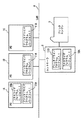
図5は、第2の実施の形態における印刷システムの全体概要を示すブロック図である。第2の実施の形態における印刷システムでは、PC1A,1B,1Cのプリンタドライバプログラムの更新を可能とするものである。第2の実施の形態における印刷システムでは、PC1A,1B,1Cのいずれかでプリンタドライバプログラムが新しいバージョンに更新されると、他のPCでもプリンタドライバプログラムが最新のバージョンに更新される。
【0054】
第1の実施の形態における印刷システムと異なる点は、コントローラ2がプリンタドライバプログラム11を記憶する点である。ここでは、PC1A,1B,1Cおよびコントローラ2に、バージョン1.0のプリンタドライバプログラム11が記憶されている状態から、PC1Aにバージョン1.1のプリンタドライバプログラム11Aがインストールされた場合を例に説明する。バージョン1.1のプリンタドライバプログラム11Aは、バージョン1.0のプリンタドライバプログラム11よりも新しいバージョンである。
【0055】
図6および図7は、第2の実施の形態における印刷システムでのプリンタドライバ更新処理の概要を示す図である。図6は、バージョン1.1のプリンタドライバプログラム11AがインストールされたPC1Aからコントローラ2にプリンタドライバプログラム11Aが送信される処理を示す。図6では、PC1Aで実行される処理、コントローラ2で実行される処理、プリンタエンジン3で実行される処理をそれぞれ別々に示し、PC1Aとコントローラ2との間で送受信されるデータ、コントローラ2とプリンタエンジン3との間で送受信されるデータを示している。
【0056】
図6を参照して、PC1Aにおいて、プリントジョブ31がコントローラ2へ送信される(S111)。この際、プリントジョブ31にはプリンタドライバプログラム11Aのバージョン情報を含むヘッダ42が付加されて送信される。コントローラ2では、プリントジョブ31を受信すると、ヘッダ42に含まれるプリンタドライバプログラム11Aのバージョン情報(バージョン1.1)と、コントローラ2に予め記憶しているプリンタドライバプログラム11のバージョン情報(バージョン1.0)とを比較し、予め記憶しているプリンタドライバプログラム11が古い場合には、プリンタドライバプログラム11Aの送信を要求する要求信号43をPC1Aに送信する(S112)。要求信号43は、送信を要求するプリンタドライバプログラム11Aの名称とそのバージョン情報(バージョン1.1)および送信を要求するコマンドを含み、バージョン1.1のプリンタドライバプログラム11Aの送信を要求する信号である。
【0057】
PC1Aは、要求信号43を受信すると、バージョン1.1のプリンタドライバプログラム11Aをコントローラ2へ送信する(S113)。プリンタドライバプログラム11Aは、プリンタドライバプログラムを送信する旨を示すコマンド(download)を含むヘッダ44が付加されて送信される。このヘッダ44には、プリンタドライバプログラム11Aのバージョン情報(バージョン1.1)と、プリンタドライバプログラム11Aを送信することを示すコマンド(download)が含まれる。
【0058】
PC1Aからコントローラ2へプリンタドライバプログラム11Aを送信するときのプロトコルは、プリントジョブを送信する際に、従来用いられているプロトコルが用いられる。プリントジョブを送信する際のプロトコルを用いて、ヘッダ44にプリンタドライバプログラム11Aを送信することを示すコマンド(download)およびプリンタドライバプログラム11Aのバージョン情報を含め、プリントジョブに代えてプリンタドライバプログラム11Aを送信するものである。このため、コントローラ2では、従来のプロトコルでプリンタドライバプログラム11Aを受信することができる。また、ヘッダ44からプリントジョブ31でないことを判別できるため、プリンタドライバプログラム11Aを印刷する処理を禁止することができる。また、ヘッダ44に含まれるコマンドに従って、受信されたプリンタドライバプログラム11Aを記憶することが可能となる。
【0059】
コントローラ2では、既にインストールされているラスタライザプログラム10を実行して、S111において受信したプリントジョブ31をラスタデータに変換して送信する(S114A,S114B)。これによりラスタデータであるイメージデータ35,36が、プリンタエンジン3に送信される。プリンタエンジン3では、受信したイメージデータ35,36にしたがって、紙などの記録媒体に画像を形成する処理を実行する。
【0060】
図7は、バージョン1.1のプリンタドライバプログラム11Aが記憶されたコントローラ2からPC1B,1Cにプリンタドライバプログラム11Aが送信される処理を示す。図7では、PC1B,1Cで実行される処理、コントローラ2で実行される処理、プリンタエンジン3で実行される処理をそれぞれ別々に示し、PC1B,1Cとコントローラ2との間で送受信されるデータ、コントローラ2とプリンタエンジン3との間で送受信されるデータを示している。
【0061】
PC1BとPC1Cとで実行される処理は同様なので、ここではPC1Bで実行される処理を例に説明する。図7を参照して、PC1Bでは、プリントジョブ31をコントローラ2へ送信する(S121)。この際、プリントジョブ31は、PC1Bにインストールされているプリンタドライバプログラム11のバージョン情報(バージョン1.0)を含むヘッダ52が付加されて送信される。
【0062】
コントローラ2では、プリントジョブ31を受信すると、ヘッダ52に含まれるプリンタドライバプログラム11のバージョン情報(バージョン1.0)と、コントローラ2に予め記憶しているプリンタドライバプログラム11Aのバージョン情報(バージョン1.1)とを比較し、ヘッダ52に含まれるプリンタドライバプログラム11のバージョン情報が古い場合には、応答信号45をPC1Bに送信する(S122)。図6において説明したように、コントローラ2には、PC1Aからダウンロードしたバージョン1.1のプリンタドライバプログラム11Aが記憶されている。一方、PC1Bには、インストールされているプリンタドライバプログラムはバージョン1.0である。このため、PC1Bには、応答信号45が送信される。この応答信号45は、コントローラに記憶されているプリンタドライバプログラム11Aの名称とそのバージョン情報(バージョン1.1)および警告を示すコマンド(Warning)を含み、PC1Bにインストールされているプリンタドライバプログラム11が古いバージョンであることを示す信号、または、インストールするべき新しいバージョンのプリンタドライバプログラム11Aを指定する信号である。
【0063】
一方、コントローラ2は、S121で受信したプリントジョブ31に基づいて、ラスタデータであるイメージデータ35,36を生成し、生成したイメージデータをプリンタエンジン3に出力する(S123A,S123B)。
【0064】
その後、コントローラ2は、PC1Bに対して、バージョン1.1のプリンタドライバプログラム11Aを送信する(S124)。PC1Bでは、受信したバージョン1.1のプリンタドライバプログラム11Aを既に記憶しているバージョン1.0のプリンタドライバプログラム11と置き換えることにより更新する。これにより、PC1Bでは、プリントジョブを送信すると、最新バージョンのプリンタドライバプログラムがPC1Bにインストールされることになる。
【0065】
図8は、第2の実施の形態における印刷システムでのプリンタドライバプログラム更新処理を実行した後の状態を示す図である。図8は、PC1Aにバージョン1.1のプリンタドライバプログラム11Aがインストールされた後プリントジョブの送信が行なわれ、その後PC1B,1Cでそれぞれプリントジョブの送信が行なわれた後の状態を示す。図8を参照して、PC1A,1B,1Cのいずれにもバージョン1.1のプリンタドライバプログラム11Aがインストールされる。また、コントローラ2にもバージョン1.1のプリンタドライバプログラム11Aが記憶さる。
【0066】
図9は、第2の実施の形態におけるPCで実行される処理流れを示すフローチャートである。図9では、図3に示したのと同じ処理に付いては同じ符号を付している。ここでは、図3で説明したのと異なる点を主に説明する。
【0067】
ステップS06において、コントローラ2よりラスタライザプログラム10Aの送信を要求する要求信号33が受信されたか否かが判断され、受信された場合にはステップS07へ進み、ない場合にはステップS08に進む。
【0068】
ステップS08では、コントローラ2よりプリンタドライバプログラム11Aの送信を要求する要求信号43が受信されたか否かが判断される。要求信号43が受信された場合にはステップS09に進み、そうでない場合にはステップS10へ進む。
【0069】
ステップS09では、ヘッダ44とバージョン1.1のプリンタドライバプログラム11Aをコントローラ2へ送信する。ヘッダ44にはプリンタドライバプログラムを送信する旨を示すコマンド(download)を含む。
【0070】
ステップS08において、要求信号43を受信する場合は、コントローラ2に記憶されているプリンタドライバプログラム11のバージョンが、PC1Aにインストールされているプリンタドライバプログラム11Aのバージョンよりも古い場合である。このため、ステップS09で、最新バージョンのプリンタドライバプログラム11Aをコントローラ2へ送信することにより、コントローラ2には、最新バージョンのプリンタドライバプログラムが記憶されることになる。
【0071】
一方、ステップS10では、応答信号45が受信されたか否かが判断される。応答信号45は、PC1A,1B,1Cにインストールされているプリンタドライバプログラムのバージョンが、コントローラ2に記憶されているプリンタドライバプログラムのバージョンよりも古い場合に受信される信号である。したがって、応答信号45を受信した場合にはステップS11において、PC1A,1B,1Cにおいて現在インストールされているプリンタドライバプログラムのバージョンが古いことを示す警告メッセージを含む画面が表示される。
【0072】
図10は、この警告画面の一例を示す図である。図10を参照して、警告画面には、「コントローラに新しいversionのPrinter Driverが存在してします。更新して下さい。」のメッセージと、「する」および「しない」の文字が表示されたボタンが表示されている。ここで、ユーザがマウス等のポインティングデバイスを用いて「する」のボタンを指示すると、新しいバージョンのプリンタドライバプログラムをダウンロードする指示が受付けられる。
【0073】
図9に戻って、ステップS12で、ダウンロード指示が受付けられたか否かが判断される。ダウンロード指示が受付けられた場合にはステップS13へ進み、そうでない場合には処理を終了する。
【0074】
ステップS13では、コントローラ2より最新バージョンのプリンタドライバプログラム11Aが受信され、受信したプリンタドライバプログラム11Aを既に記憶しているプリンタドライバプログラムと置き換えることにより更新する(ステップS14)。
【0075】
以上説明したように、第2の実施の形態における印刷システムにおいては、PC1A,1B,1Cのいずれかに最新バージョンのプリンタドライバプログラム11Aをインストールすることにより、他のPCでプリントジョブを送信する際に、既にインストールしているプリンタドライバプログラム11のバージョンが古いことを示す警告メッセージが表示される。このため、そのユーザは、最新バージョンのプリンタドライバをインストールする必要があることを認識することができる。その警告メッセージが表示された画面において、ダウンロードを指示することにより、最新バージョンのプリンタドライバプログラム11Aに更新することができる。
【0076】
このため、PC1A,1B,1Cのいずれかに最新バージョンのプリンタドライバプログラム11Aをインストールするだけで、他のPCに容易に最新バージョンのプリンタドライバプログラム11Aをインストールすることができる。
【0077】
図11は、第2の実施の形態におけるコントローラ2で実行される処理の流れを示すフローチャートである。図11では、図4に示した処理と同じ処理については同じ記号を付してある。ここでは図4と異なる処理について説明する。
【0078】
図11を参照して、ステップS23Aでは、コントローラ2に記憶されているラスタライザプログラム10Aのバージョン情報(バージョン1.1)と、プリンタドライバプログラム11のバージョン情報(バージョン1.0)とが取得される。
【0079】
そして、ステップS24においては、ステップS22で取得されたヘッダに含まれるラスタライザプログラムのバージョン情報と、ステップS23Aで取得されたラスタライザプログラムのバージョン情報とが比較される。すなわち、コントローラ2に記憶されているラスタライザプログラムのバージョン情報と、プリントジョブを送信したPCに記憶されているラスタライザプログラムのバージョン情報とが比較されることになる。
【0080】
ステップS29では、ステップS23Aで取得されたプリンタドライバプログラム11のバージョン情報(バージョン1.0)と、ステップS22で取得されたヘッダに含まれるプリンタドライバプログラム11Aのバージョン情報(バージョン1.1)とが比較され、ステップS23Aで取得されたバージョン情報がステップS22で取得されたバージョン情報より古い場合にはステップS30に進み、新しい場合にはステップS33に進み、同じ場合はステップS28に進む。すなわち、コントローラ2に記憶しているプリンタドライバプログラム11のバージョン情報(バージョン1.0)と、プリントジョブを送信したPCに記憶されているプリンタドライバプログラム11Aのバージョン情報(バージョン1.1)とが比較される。そして、コントローラ2に記憶されているプリンタドライバプログラムのバージョンが古い場合には、プリントジョブを送信したPCに対して、要求信号43が送信される(ステップS30)。そして、PCから最新バージョンのプリンタドライバプログラム11Aが受信され(ステップS31)、コントローラ2に記憶しているプリンタドライバプログラム11をステップS31で受信したプリンタドライバプログラム11Aと置き換えることにより更新する(ステップS32)。これにより、コントローラ2には、最新バージョンのプリンタドライバプログラムが記憶されることになる。
【0081】
ステップS29において、コントローラ2に記憶されているプリンタドライバのバージョンが、プリントジョブを送信したPCにインストールされているプリンタドライバのバージョンよりも新しいとされた場合には、プリントジョブを送信したPCに対して応答信号45が送信される(ステップS33)。この応答信号45は、上述したように、PCにインストールされているプリンタドライバプログラムが古いバージョンであることを示す信号、または、インストールするべき新しいバージョンのプリンタドライバプログラム11Aを指定する信号である。
【0082】
ステップS34では、そのPCからプリンタドライバプログラムの送信要求が受信されたか否かが判断され、受信された場合にはステップS35に進み、そうでない場合には処理を終了する。ステップS35では、コントローラ2に記憶されているプリンタドライバプログラム11Aをプリントジョブを送信したPCに送信する。
【0083】
このように、第2の実施の形態における印刷システムにおいては、PC1Aに最新バージョンのプリンタドライバプログラム11Aをインストールした後プリントジョブを送信すれば、コントローラ2にバージョン1.1のプリンタドライバプログラム11Aが記憶されることになる。その後、他のPC1B,1Cでプリントジョブの送信が行なわれると、PC1B,1Cに対してコントローラ2から応答信号45が送信される。この際、PC1B,1Cのディスプレイに、インストールされているプリンタドライバプログラム11のバージョンが古いことを示す警告メッセージが表示されるので、PC1B,1Cのユーザは、インストールされているプリンタドライバプログラム11が古いバージョンであること、および最新バージョンのプリンタドライバプログラム11Aをインストールする必要があることを認識することができる。
【0084】
また、PC1B,1Cのユーザによるインストール指示が入力されると、コントローラ2より最新バージョンのプリンタドライバプログラム11Aがダウンロードされるので、操作が容易である。
【0085】
<変形例>
第2の実施の形態においては、PC1A,1B,1Cにインストールされているプリンタドライバプログラムが、コントローラ2に記憶されているプリンタドライバプログラムよりも古い場合には、コントローラ2から応答信号がPCに送信されるようにした。この応答信号を送信するのに代えて、プリンタドライバプログラムを送信するものである。これにより、PC1A,1B,1Cでは、ユーザに特定の操作を要求することなく、ユーザの知らない間に、最新のバージョンのプリンタドライバプログラムが自動的にインストールされる。
【0086】
図12は、変形例における印刷システムでのプリンタドライバ更新処理の概要を示す図である。図12を参照して、PC1Bからプリントジョブ31をコントローラ2へ送信する(S131)。この際、プリントジョブ31は、PC1Bにインストールされているプリンタドライバプログラム11のバージョン情報(バージョン1.0)を含むヘッダ52が付加されて送信される。
【0087】
コントローラ2では、プリントジョブ31を受信すると、ヘッダ52に含まれるプリンタドライバプログラム11のバージョン情報(バージョン1.0)と、コントローラ2に予め記憶しているプリンタドライバプログラム11Aのバージョン情報(バージョン1.1)とを比較し、ヘッダ52に含まれるプリンタドライバプログラム11のバージョン情報が古い場合には、予め記憶しているプリンタドライバプログラム11AをPC1Bに送信する(S132)。この際、プリンタドライバプログラム11Aには、送信するデータがプリンタドライバプログラムであることを示すコマンド(download)を含むヘッダ54が付加されて送信される。また、ヘッダ54には、送信されるプリンタドライバプログラム11Aの名称およびバージョン情報を含めるようにしてもよい。
【0088】
その後、コントローラ2は、S131で受信したプリントジョブに基づいてラスタデータであるイメージデータ35,36を生成し、プリンタエンジン3に出力する(S133A,S133B)。
【0089】
この変形例においては、図9に示したPC1A,1B,1Cにおける処理および、図11に示したコントローラ2で実行される処理を用いることができる。この際、図9においては、ステップS11およびステップS12は不用であり、ステップS10においては、受信されたデータにコマンド(download)を含むヘッダ54が付加されているか否かが判断され、そのようなヘッダが付加されている場合にステップS13に進み、そうでない場合は処理を終了する。また、図11においては、ステップS33およびステップS34は不要であり、ステップS35においては、プリンタドライバプログラムに、コマンド(download)を含むヘッダ54が付加されて送信される。
【0090】
(1) 以上説明した本実施の形態における印刷システムにおいて、PC1A,1B,1Cは情報処理装置であり、コントローラ2はPC1A,1B,1C周辺機器である。
【0091】
情報処理装置と接続可能な周辺装置で実行される処理プログラムは、
前記周辺装置の記憶手段に記憶されており、
前記情報処理装置から処理プログラムのバージョン情報を受信するステップと、
前記受信したバージョン情報に基づき、前記記憶されている処理プログラムが古いと判断した場合に、前記バージョン情報を送信した情報処理装置に対して新しいバージョンの処理プログラムの送信を要求するステップと、
前記記憶手段に記憶されている処理プログラムを、前記情報処理装置から受信した新しいバージョンの処理プログラムと置き換えるステップとを含む、処理プログラム。
【0092】
(2) 情報処理装置と接続可能な周辺装置で実行される処理プログラムであって、
前記周辺装置の記憶手段には、前記情報処理装置で実行される制御プログラムが記憶されており、
前記情報処理装置から制御プログラムのバージョン情報を受信するステップと、
前記受信したバージョン情報に基づき、前記記憶された制御プログラムのバージョンが古いと判断した場合に、前記バージョン情報を送信した情報処理装置に対して新しいバージョンの制御プログラムの送信を要求するステップと、
前記記憶手段に記憶されている制御プログラムを、前記情報処理装置から受信した新しいバージョンの制御プログラムと置き換えるステップとを含む、処理プログラム。
【0093】
(3) 情報処理装置と接続可能な周辺装置で実行される処理プログラムであって、
前記周辺装置の記憶手段には、前記情報処理装置で実行される制御プログラムが記憶されており、
前記情報処理装置から制御プログラムのバージョン情報を受信するステップと、
前記受信したバージョン情報に基づき、前記記憶された制御プログラムが新しいと判断した場合に、前記バージョン情報が古いことを示す応答信号を送信するステップを含む、処理プログラム。
【0094】
(4) 情報処理装置と接続可能な周辺装置で実行される処理プログラムであって、
前記周辺装置の記憶手段には、前記情報処理装置で実行される制御プログラムが記憶されており、
前記情報処理装置から制御プログラムのバージョン情報を受信するステップと、
前記受信したバージョン情報に基づき、前記記憶された制御プログラムが新しいと判断した場合に、前記記憶手段に記憶されている制御プログラムを送信するステップとを含む、処理プログラム。
【0095】
(5) 情報処理装置と接続可能な周辺装置であって、
前記情報処理装置から受信した実行ジョブを処理するための処理プログラムを記憶する記憶手段と、
前記情報処理装置から処理プログラムのバージョン情報を受信するバージョン情報受信手段と、
前記受信したバージョン情報に基づき、前記記憶されている処理プログラムが古いと判断した場合に、前記バージョン情報を送信した情報処理装置に対して新しいバージョンの処理プログラムの送信を要求する送信要求手段と、
前記記憶手段に記憶されている処理プログラムを、前記情報処理装置から受信した新しいバージョンの処理プログラムと置き換える置換手段とを備えた、周辺装置。
【0096】
(6) 情報処理装置と接続可能な周辺装置であって、
前記情報処理装置で実行される制御プログラムを記憶する記憶手段と、
前記情報処理装置から制御プログラムのバージョン情報を受信するバージョン情報受信手段と、
前記受信したバージョン情報に基づき、前記記憶された制御プログラムが古いと判断した場合に、前記バージョン情報を送信した情報処理装置に対して新しいバージョンの制御プログラムの送信を要求する送信要求手段と、
前記記憶手段に記憶されている制御プログラムを、前記情報処理装置から受信した新しいバージョンの制御プログラムと置き換える置換手段とを備えた、周辺装置。
【0097】
(7) 情報処理装置と接続可能な周辺装置であって、
前記情報処理装置で実行される制御プログラムを記憶する記憶手段と、
前記情報処理装置から制御プログラムのバージョン情報を受信するバージョン情報受信手段と、
前記受信したバージョン情報に基づき、前記記憶された制御プログラムが新しいと判断した場合に、前記バージョン情報が古いことを示す応答信号を送信する応答信号送信手段とを備えた、周辺装置。
【0098】
(8) 情報処理装置と接続可能な周辺装置であって、
前記情報処理装置で実行される制御プログラムを記憶する記憶手段と、
前記情報処理装置から制御プログラムのバージョン情報を受信するバージョン情報受信手段と、
前記受信したバージョン情報に基づき、前記記憶された制御プログラムが新しいと判断した場合に、前記記憶手段に記憶されている制御プログラムを送信する制御プログラム送信手段とを備えた、周辺装置。
【0099】
(9) (5)〜(8)において、画像を形成するための画像形成手段をさらに備え、
前記情報処理装置から受信した実行ジョブを前記画像形成手段で処理可能なデータに変換する変換手段とをさらに備える。
【0100】
(10) コンピュータにおいて実行され、ネットワークを介して画像形成装置を使用するためのプリンタドライバプログラムであって、
当該コンピュータに記憶されている、前記画像形成装置において実行される処理プログラムのバージョン情報を取得するステップと、
取得したバージョン情報を前記画像形成装置へ送信するステップと、
前記画像形成装置からの処理プログラムの送信要求を受信すると、当該コンピュータに記憶されている処理プログラムを前記画像形成装置へ送信するステップとを含む、プリンタドライバプログラム。
【0101】
(11) コンピュータにおいて実行され、ネットワークを介して画像形成装置を使用するためのプリンタドライバプログラムであって
当該コンピュータに記憶されているプリンタドライバプログラムのバージョン情報を取得するステップと、
取得したバージョン情報を前記画像形成装置へ送信するステップと、
前記画像形成装置からのプログラム送信要求を受信すると、当該コンピュータに記憶されているプリンタドライバプログラムを前記画像形成装置へ送信するステップとを含む、プリンタドライバプログラム。
【0102】
(12) コンピュータにおいて実行され、ネットワークを介して画像形成装置を使用するためのプリンタドライバプログラムであって、
当該コンピュータに記憶されているプリンタドライバプログラムのバージョン情報を取得するステップと、
取得したバージョン情報を前記画像形成装置へ送信するステップと、
前記画像形成装置から前記バージョン情報より新しいバージョンのプログラムが送信されてくると、当該コンピュータに記憶されているプリンタドライバプログラムを新しいバージョンのプログラムに置き換えるステップとを含む、プリンタドライバプログラム。
【0103】
(13) (10)〜(12)において、前記バージョン情報を送信する処理は、プリントジョブと一緒に送信される。
【0104】
今回開示された実施の形態はすべての点で例示であって制限的なものではないと考えられるべきである。本発明の範囲は上記した説明ではなくて特許請求の範囲によって示され、特許請求の範囲と均等の意味および範囲内でのすべての変更が含まれることが意図される。
【図面の簡単な説明】
【図1】 本発明の第1の実施の形態における印刷システムの全体概要を示すブロック図である。
【図2】 第1の実施の形態における印刷システムでのラスタライザプログラム更新処理の概要を示す図である。
【図3】 第1の実施の形態におけるPCで実行される処理の流れを示すフローチャートである。
【図4】 第1の実施の形態におけるコントローラで実行される処理の流れを示すフローチャートである。
【図5】 第2の実施の形態における印刷システムにおける全体概要を示す図である。
【図6】 第2の実施の形態における印刷システムでのプリンタドライバプログラム更新処理の概要を示す第1の図である。
【図7】 第2の実施の形態における印刷システムでのプリンタドライバプログラム更新処理の概要を示す第2の図である。
【図8】 第2の実施の形態における印刷システムでのプリンタドライバプログラム更新処理を実行した後の状態を示す図である。
【図9】 第2の実施の形態におけるPCで実行される処理の流れを示すフローチャートである。
【図10】 第2の実施の形態におけるPCに表示される警告画面の一例を示す図である。
【図11】 第2の実施の形態におけるコントローラで実行される処理の流れを示すフローチャートである。
【図12】 第2の実施の形態における変形された印刷システムで実行されるプリンタドライバ更新処理の概要を示す図である。
【符号の説明】
PC1A,1B,1C パーソナルコンピュータ、2 コントローラ
3 プリンタエンジン、5 記録媒体、10,10A ラスタライザプログラム、11,11A プリンタドライバプログラム。[0001]
BACKGROUND OF THE INVENTION
The present invention relates to a control program, and more particularly, to a control program executed by an information processing apparatus connected to a peripheral device.
[0002]
[Prior art]
Personal computers (hereinafter referred to as “personal computers”) and peripheral devices such as printers are often used connected to a network. In this connection form, peripheral devices can be shared by a plurality of personal computers. Even in such a connection mode, the personal computer and the peripheral device are equipped with a control program for controlling the peripheral device as in the case where the personal computer and the peripheral device are directly connected without using the network. A processing program for executing the executed job is installed. When the peripheral device is a printer, the control program is a printer driver program, and the processing program is a rasterizer program that executes a print job and generates raster data.
[0003]
On the other hand, when the control program is upgraded after the control program is installed in the personal computer, it is preferable to install the upgraded control program in all the personal computers. Further, when the processing program is upgraded, it is preferable to install the upgraded processing program in the printer. Installation of these upgraded control programs on a personal computer or installation of a processing program on a printer is mainly left to the user.
[0004]
A printing system that downloads a control program and a processing program from a Web server on the Internet and installs them is described in Japanese Patent Laid-Open No. 2001-27940 (Patent Document 1). According to the printing system described in Patent Document 1, the latest version of the control program and processing program is downloaded from a printer by accessing a web server on the Internet. Then, the control program is installed in the personal computer, and the processing program is installed in the printer.
[0005]
[Patent Document 1]
JP 2001-27940 A
[0006]
[Problems to be solved by the invention]
In the printing system in Patent Document 1, the latest version of the control program is transmitted from the printer side to the personal computer. For this reason, in order to access the web server and the personal computer from the printer side, it is necessary to store the website and the network address of the personal computer in the printer. There is a problem that a control program cannot be transmitted to a personal computer that does not store a network address.
[0007]
The present invention has been made to solve the above-described problems, and one object of the present invention is to provide a control program that can easily update a processing program executed in a peripheral device. is there.
[0008]
Another object of the present invention is to provide a control program capable of notifying the user that the control program has been changed.
[0009]
Still another object of the present invention is to provide a control program capable of easily updating the control program.
[0010]
[Means for Solving the Problems]
According to one aspect of the present invention to achieve the above-described object, a control program is connected to a peripheral device. Executed by a computer of an information processing device for controlling peripheral devices A control program, The first stored in the storage means executed by the peripheral device Transmitting version information of the processing program to the peripheral device; In response to the transmission request based on the comparison between the version information of the second processing program of the peripheral device and the transmitted version information of the first processing program, the first processing program stored in the storage means is stored in the peripheral device. Sending step and Including. The step of transmitting the version information of the first processing program to the peripheral device includes the step of transmitting a job executed by the second processing program in the peripheral device together with the version information of the first processing program. including.
[0011]
According to the present invention, when the control program is executed by the information processing device connected to the peripheral device, the control program causes the peripheral device to transmit the version information of the processing program stored in the information processing device, and the transmission from the peripheral device. In response to the request, the processing program is transmitted. Therefore, the peripheral device can compare the version of the processing program stored in the information processing device with the version of the processing program stored in the peripheral device. When the processing program needs to be updated in the peripheral device, the processing program is transmitted from the information processing device. For this reason, if the latest version of the processing program is stored in the information processing apparatus, the processing program executed in the peripheral device is updated to the latest version. As a result, it is possible to provide a control program that can easily update the processing program executed in the peripheral device.
[0012]
According to another aspect of the present invention, the control program is A control program executed by a computer of an information processing apparatus for using an image forming apparatus connected to the image forming apparatus via a network, the control program being executed in the image forming apparatus stored in a storage unit The step of acquiring version information of one processing program, the step of transmitting the acquired version information of the first processing program to the image forming apparatus, and the version information of the second processing program of the image forming apparatus are transmitted. Receiving a transmission request for the first processing program from the image forming apparatus based on the comparison with the version information of the first processing program, transmitting the first processing program stored in the computer to the image forming apparatus; including. The step of transmitting the version information of the first processing program to the image forming apparatus is a step of transmitting a job executed by the second processing program in the image forming apparatus together with the version information of the first processing program. including.
[0019]
According to the present invention, the version information is transmitted when the information processing apparatus transmits the execution job to the peripheral device. For this reason, when the execution job is transmitted, the update of the processing program or the control program can be started. As a result, an existing protocol can be adopted for communication between the information processing device and the peripheral device, and no special communication protocol is required.
[0020]
DETAILED DESCRIPTION OF THE INVENTION
Embodiments of the present invention will be described below with reference to the drawings. In the following description, the same parts are denoted by the same reference numerals. Their names and functions are also the same. Therefore, detailed description thereof will not be repeated.
[0021]
[First Embodiment]
FIG. 1 is a block diagram showing an overall outline of a printing system according to a first embodiment of the present invention. Referring to FIG. 1, the printing system includes three personal computers (PCs) 1A, 1B, and 1C, a
[0022]
The
[0023]
The
[0024]
In this way, storing the
[0025]
A
[0026]
As described above, the
[0027]
The
[0028]
In addition, the program here is a concept including not only a program that can be directly executed by the CPUs of the
[0029]
Although FIG. 1 shows an example in which three
[0030]
The
[0031]
When the
[0032]
FIG. 2 is a diagram showing an overview of rasterizer program update processing in the printing system according to the first embodiment. In FIG. 2, the processing executed by the
[0033]
Referring to FIG. 2, a
[0034]
The
[0035]
Upon receiving the
[0036]
At this time, as a protocol for transmitting the
[0037]
The
[0038]
FIG. 3 is a flowchart showing a flow of processing executed by the PC in the first embodiment. Since the processes executed by the
[0039]
Referring to FIG. 3, the
[0040]
When the
[0041]
Next, it is determined whether or not there is an instruction to output a print job (step S02). The print job is generated based on data output from an application program such as a document creation program executed on the
[0042]
In step S03, a print job is created. Then, the version information of the
[0043]
In the next step S05, the header including the version information of the
[0044]
Then, the
[0045]
FIG. 4 is a flowchart showing a flow of processing executed by the
[0046]
In the next step S24, the version information (version 1.1) of the
[0047]
In step S25, a
[0048]
The
[0049]
In the next step S28, the
[0050]
Note that step S28 may be executed immediately after step S21. By doing so, the
[0051]
As described above, in the printing system according to the present embodiment, if the latest version of the
[0052]
Further, it is not necessary to directly install the rasterizer program in the
[0053]
[Second Embodiment]
FIG. 5 is a block diagram showing an overall outline of a printing system according to the second embodiment. In the printing system according to the second embodiment, the printer driver program of the
[0054]
The difference from the printing system in the first embodiment is that the
[0055]
6 and 7 are diagrams illustrating an overview of printer driver update processing in the printing system according to the second embodiment. FIG. 6 shows a process in which the
[0056]
Referring to FIG. 6,
[0057]
Upon receiving the request signal 43, the
[0058]
As a protocol for transmitting the
[0059]
The
[0060]
FIG. 7 shows processing for transmitting the
[0061]
Since the processes executed by the
[0062]
When the
[0063]
On the other hand, the
[0064]
Thereafter, the
[0065]
FIG. 8 is a diagram illustrating a state after executing a printer driver program update process in the printing system according to the second embodiment. FIG. 8 shows a state after the print job is transmitted after the
[0066]
FIG. 9 is a flowchart illustrating a processing flow executed by the PC according to the second embodiment. In FIG. 9, the same processes as those shown in FIG. 3 are denoted by the same reference numerals. Here, different points from those described in FIG. 3 will be mainly described.
[0067]
In step S06, it is determined whether or not the
[0068]
In step S08, it is determined whether or not a request signal 43 requesting transmission of the
[0069]
In step S09, the header 44 and the version 1.1
[0070]
When the request signal 43 is received in step S08, the version of the
[0071]
On the other hand, in step S10, it is determined whether or not the
[0072]
FIG. 10 is a diagram showing an example of this warning screen. Referring to Fig. 10, the warning screen displays the message "A new version of the Printer Driver exists on the controller. Please update." And the characters "Yes" and "No". The button is displayed. Here, when the user instructs a “Yes” button using a pointing device such as a mouse, an instruction to download a new version of the printer driver program is accepted.
[0073]
Returning to FIG. 9, it is determined in step S12 whether a download instruction has been accepted. If a download instruction is accepted, the process proceeds to step S13, and if not, the process ends.
[0074]
In step S13, the latest version of the
[0075]
As described above, in the printing system according to the second embodiment, when the latest version of the
[0076]
For this reason, the latest version of the
[0077]
FIG. 11 is a flowchart showing a flow of processing executed by the
[0078]
Referring to FIG. 11, in step S23A, the version information (version 1.1) of
[0079]
In step S24, the version information of the rasterizer program included in the header acquired in step S22 is compared with the version information of the rasterizer program acquired in step S23A. That is, the version information of the rasterizer program stored in the
[0080]
In step S29, the version information (version 1.0) of the
[0081]
If it is determined in step S29 that the version of the printer driver stored in the
[0082]
In step S34, it is determined whether a printer driver program transmission request is received from the PC. If received, the process proceeds to step S35, and if not, the process ends. In step S35, the
[0083]
As described above, in the printing system according to the second embodiment, if the latest version of the
[0084]
Further, when an installation instruction is input by the user of the
[0085]
<Modification>
In the second embodiment, if the printer driver program installed in the
[0086]
FIG. 12 is a diagram illustrating an overview of printer driver update processing in the printing system according to the modification. Referring to FIG. 12,
[0087]
When the
[0088]
Thereafter, the
[0089]
In this modification, the processing in the
[0090]
(1) In the printing system according to the present embodiment described above,
[0091]
The processing program executed by the peripheral device that can be connected to the information processing device is:
Stored in the storage means of the peripheral device,
Receiving version information of a processing program from the information processing apparatus;
Requesting the information processing apparatus that has transmitted the version information to transmit a new version of the processing program when it is determined that the stored processing program is old based on the received version information;
Replacing the processing program stored in the storage means with a new version of the processing program received from the information processing apparatus.
[0092]
(2) A processing program executed by a peripheral device connectable to the information processing device,
The storage device of the peripheral device stores a control program executed by the information processing device,
Receiving version information of a control program from the information processing apparatus;
Requesting the information processing apparatus that has transmitted the version information to transmit a new version of the control program when it is determined that the version of the stored control program is old based on the received version information;
Replacing the control program stored in the storage means with a new version of the control program received from the information processing apparatus.
[0093]
(3) A processing program executed by a peripheral device connectable to the information processing device,
The storage device of the peripheral device stores a control program executed by the information processing device,
Receiving version information of a control program from the information processing apparatus;
A processing program comprising a step of transmitting a response signal indicating that the version information is old when it is determined that the stored control program is new based on the received version information.
[0094]
(4) A processing program executed by a peripheral device connectable with the information processing device,
The storage device of the peripheral device stores a control program executed by the information processing device,
Receiving version information of a control program from the information processing apparatus;
And a step of transmitting the control program stored in the storage means when it is determined that the stored control program is new based on the received version information.
[0095]
(5) A peripheral device connectable with the information processing device,
Storage means for storing a processing program for processing an execution job received from the information processing apparatus;
Version information receiving means for receiving version information of a processing program from the information processing apparatus;
Based on the received version information, when it is determined that the stored processing program is old, a transmission request unit that requests the information processing apparatus that has transmitted the version information to transmit a new version of the processing program;
A peripheral device comprising replacement means for replacing the processing program stored in the storage means with a new version of the processing program received from the information processing apparatus.
[0096]
(6) A peripheral device connectable with the information processing device,
Storage means for storing a control program executed by the information processing apparatus;
Version information receiving means for receiving version information of a control program from the information processing apparatus;
Based on the received version information, when it is determined that the stored control program is old, a transmission request unit that requests the information processing apparatus that has transmitted the version information to transmit a control program of a new version;
A peripheral device comprising replacement means for replacing the control program stored in the storage means with a new version of the control program received from the information processing apparatus.
[0097]
(7) A peripheral device connectable with the information processing device,
Storage means for storing a control program executed by the information processing apparatus;
Version information receiving means for receiving version information of a control program from the information processing apparatus;
A peripheral device comprising: response signal transmission means for transmitting a response signal indicating that the version information is old when it is determined that the stored control program is new based on the received version information.
[0098]
(8) A peripheral device connectable with the information processing device,
Storage means for storing a control program executed by the information processing apparatus;
Version information receiving means for receiving version information of a control program from the information processing apparatus;
A peripheral device comprising: control program transmission means for transmitting the control program stored in the storage means when it is determined that the stored control program is new based on the received version information.
[0099]
(9) In (5) to (8), further comprising an image forming means for forming an image,
The image processing apparatus further includes conversion means for converting the execution job received from the information processing apparatus into data that can be processed by the image forming means.
[0100]
(10) A printer driver program that is executed in a computer and uses an image forming apparatus via a network,
Acquiring version information of a processing program stored in the computer and executed in the image forming apparatus;
Transmitting the acquired version information to the image forming apparatus;
And a step of transmitting a processing program stored in the computer to the image forming apparatus upon receiving a processing program transmission request from the image forming apparatus.
[0101]
(11) A printer driver program that is executed in a computer and for using an image forming apparatus via a network.
Obtaining version information of a printer driver program stored in the computer;
Transmitting the acquired version information to the image forming apparatus;
And a step of transmitting a printer driver program stored in the computer to the image forming apparatus upon receiving a program transmission request from the image forming apparatus.
[0102]
(12) A printer driver program that is executed in a computer and uses an image forming apparatus via a network,
Obtaining version information of a printer driver program stored in the computer;
Transmitting the acquired version information to the image forming apparatus;
A printer driver program comprising: a step of replacing a printer driver program stored in the computer with a new version of a program when a version of the program that is newer than the version information is transmitted from the image forming apparatus.
[0103]
(13) In (10) to (12), the process of transmitting the version information is transmitted together with the print job.
[0104]
The embodiment disclosed this time should be considered as illustrative in all points and not restrictive. The scope of the present invention is defined by the terms of the claims, rather than the description above, and is intended to include any modifications within the scope and meaning equivalent to the terms of the claims.
[Brief description of the drawings]
FIG. 1 is a block diagram showing an overall outline of a printing system according to a first embodiment of the present invention.
FIG. 2 is a diagram illustrating an outline of rasterizer program update processing in the printing system according to the first embodiment.
FIG. 3 is a flowchart showing a flow of processing executed by the PC in the first embodiment.
FIG. 4 is a flowchart showing a flow of processing executed by the controller in the first embodiment.
FIG. 5 is a diagram illustrating an overall outline of a printing system according to a second embodiment.
FIG. 6 is a first diagram illustrating an overview of printer driver program update processing in the printing system according to the second embodiment;
FIG. 7 is a second diagram illustrating an overview of printer driver program update processing in the printing system according to the second embodiment.
FIG. 8 illustrates a state after executing a printer driver program update process in the printing system according to the second embodiment.
FIG. 9 is a flowchart showing a flow of processing executed by a PC in the second embodiment.
FIG. 10 is a diagram showing an example of a warning screen displayed on a PC in the second embodiment.
FIG. 11 is a flowchart showing a flow of processing executed by a controller in the second embodiment.
FIG. 12 is a diagram showing an overview of printer driver update processing executed in a modified printing system according to the second embodiment.
[Explanation of symbols]
PC1A, 1B, 1C Personal computer, 2 controller
3 Printer engine, 5 recording medium, 10, 10A rasterizer program, 11, 11A printer driver program.
Claims (2)
前記周辺装置で実行される、記憶手段に記憶された第1の処理プログラムのバージョン情報を前記周辺装置に送信するステップと、
前記周辺装置が有する第2の処理プログラムのバージョン情報と前記送信された第1の処理プログラムのバージョン情報との比較に基づく送信要求に応じて、前記記憶手段に記憶された第1の処理プログラムを前記周辺装置に送信するステップとを含み、
前記第1の処理プログラムのバージョン情報を前記周辺装置に送信するステップは、前記第1の処理プログラムのバージョン情報とともに前記周辺装置において前記第2の処理プログラムにより実行されるジョブを送信するステップを含む、処理を実行させる制御プログラム。 A control program connected to a peripheral device and executed by a computer of an information processing device for controlling the peripheral device ,
Transmitting the version information of the first processing program stored in the storage means, which is executed in the peripheral device, to the peripheral device;
In response to a transmission request based on a comparison between the version information of the second processing program of the peripheral device and the version information of the transmitted first processing program, the first processing program stored in the storage means Transmitting to the peripheral device ,
The step of transmitting the version information of the first processing program to the peripheral device includes the step of transmitting a job executed by the second processing program in the peripheral device together with the version information of the first processing program. , A control program that executes processing .
記憶手段に記憶された、前記画像形成装置において実行される第1の処理プログラムのバージョン情報を取得するステップと、
前記取得した第1の処理プログラムのバージョン情報を前記画像形成装置へ送信するステップと、
前記画像形成装置が有する第2の処理プログラムのバージョン情報と前記送信された第1の処理プログラムのバージョン情報との比較に基づく前記画像形成装置からの前記第1の処理プログラムの送信要求を受信すると、前記コンピュータに記憶されている第1の処理プログラムを前記画像形成装置へ送信するステップとを含み、
前記第1の処理プログラムのバージョン情報を前記画像形成装置へ送信するステップは、前記第1の処理プログラムのバージョン情報とともに前記画像形成装置において前記第2の処理プログラムにより実行されるジョブを送信するステップを含む、処理を実行させる制御プログラム。 A control program executed by a computer of an information processing apparatus for using the image forming apparatus connected to the image forming apparatus via a network,
Obtaining version information of a first processing program stored in a storage unit and executed in the image forming apparatus;
Transmitting the acquired version information of the first processing program to the image forming apparatus;
When receiving the transmission request for the first processing program from the image forming apparatus based on the comparison between the version information of the second processing program of the image forming apparatus and the version information of the transmitted first processing program. Transmitting a first processing program stored in the computer to the image forming apparatus,
The step of transmitting the version information of the first processing program to the image forming apparatus includes the step of transmitting a job executed by the second processing program in the image forming apparatus together with the version information of the first processing program. A control program for executing processing including
Priority Applications (1)
| Application Number | Priority Date | Filing Date | Title |
|---|---|---|---|
| JP2003087850A JP4239642B2 (en) | 2003-03-27 | 2003-03-27 | Control program |
Applications Claiming Priority (1)
| Application Number | Priority Date | Filing Date | Title |
|---|---|---|---|
| JP2003087850A JP4239642B2 (en) | 2003-03-27 | 2003-03-27 | Control program |
Related Child Applications (1)
| Application Number | Title | Priority Date | Filing Date |
|---|---|---|---|
| JP2008281214A Division JP2009110524A (en) | 2008-10-31 | 2008-10-31 | Control program |
Publications (2)
| Publication Number | Publication Date |
|---|---|
| JP2004295550A JP2004295550A (en) | 2004-10-21 |
| JP4239642B2 true JP4239642B2 (en) | 2009-03-18 |
Family
ID=33402139
Family Applications (1)
| Application Number | Title | Priority Date | Filing Date |
|---|---|---|---|
| JP2003087850A Expired - Fee Related JP4239642B2 (en) | 2003-03-27 | 2003-03-27 | Control program |
Country Status (1)
| Country | Link |
|---|---|
| JP (1) | JP4239642B2 (en) |
-
2003
- 2003-03-27 JP JP2003087850A patent/JP4239642B2/en not_active Expired - Fee Related
Also Published As
| Publication number | Publication date |
|---|---|
| JP2004295550A (en) | 2004-10-21 |
Similar Documents
| Publication | Publication Date | Title |
|---|---|---|
| KR101337160B1 (en) | Information processing apparatus, information processing method and storage medium | |
| US9342476B2 (en) | Image processing apparatus, information processing apparatus, and information processing system | |
| JP4182094B2 (en) | Information processing apparatus, control method therefor, and program | |
| KR101650731B1 (en) | Management apparatus and method for managing device driver of management apparatus | |
| JP2001337817A (en) | Multifunction machine version upgrade device | |
| JP2006107476A (en) | Image forming apparatus and image forming apparatus setting method | |
| CN102170506B (en) | Information processing apparatus and method of installing a printer driver | |
| JP5396847B2 (en) | Printing apparatus and control method thereof | |
| JP2006109459A (en) | Print support apparatus, print processing apparatus, document processing system, print support apparatus control method, print support control program, and computer-readable recording medium | |
| US11089176B2 (en) | Control of apps providing same or similar services in image forming device supporting multiple platforms | |
| JP4792744B2 (en) | Image processing device | |
| JP4239642B2 (en) | Control program | |
| JP6256417B2 (en) | PRINT CONTROL DEVICE, PROGRAM, AND PRINT SYSTEM | |
| JP2010157134A (en) | Apparatus, method and system for information processing | |
| JP2007200247A (en) | Device driver installation method, information processing apparatus, and image processing system | |
| JP2021043547A (en) | Information processing device and control method for information processing device, and program | |
| JP2009110524A (en) | Control program | |
| US11327693B2 (en) | Computer-readable medium, information processing device, and Method for installing appropriate program | |
| JP5273222B2 (en) | Apparatus, information processing method, program, and recording medium | |
| US20210096782A1 (en) | Firmware update system, electronic apparatus, and non-transitory computer-readable recording medium having stored thereon firmware update program | |
| JP2010198059A (en) | Setting support system | |
| JP6987541B2 (en) | Image forming apparatus and control method of image forming apparatus | |
| JP2003099223A (en) | Information processing apparatus, printing apparatus, print control apparatus, printing system, information processing method, print control method, program, and recording medium | |
| JP4933794B2 (en) | Image forming apparatus, information processing method, program, and recording medium | |
| JP2006293994A (en) | Image forming apparatus, information processing method, program, and recording medium |
Legal Events
| Date | Code | Title | Description |
|---|---|---|---|
| A711 | Notification of change in applicant |
Free format text: JAPANESE INTERMEDIATE CODE: A712 Effective date: 20050614 |
|
| A621 | Written request for application examination |
Free format text: JAPANESE INTERMEDIATE CODE: A621 Effective date: 20050920 |
|
| RD03 | Notification of appointment of power of attorney |
Free format text: JAPANESE INTERMEDIATE CODE: A7423 Effective date: 20051122 |
|
| A977 | Report on retrieval |
Free format text: JAPANESE INTERMEDIATE CODE: A971007 Effective date: 20080325 |
|
| A131 | Notification of reasons for refusal |
Free format text: JAPANESE INTERMEDIATE CODE: A131 Effective date: 20080902 |
|
| A521 | Written amendment |
Free format text: JAPANESE INTERMEDIATE CODE: A523 Effective date: 20081031 |
|
| TRDD | Decision of grant or rejection written | ||
| A01 | Written decision to grant a patent or to grant a registration (utility model) |
Free format text: JAPANESE INTERMEDIATE CODE: A01 Effective date: 20081202 |
|
| A01 | Written decision to grant a patent or to grant a registration (utility model) |
Free format text: JAPANESE INTERMEDIATE CODE: A01 |
|
| A61 | First payment of annual fees (during grant procedure) |
Free format text: JAPANESE INTERMEDIATE CODE: A61 Effective date: 20081215 |
|
| FPAY | Renewal fee payment (event date is renewal date of database) |
Free format text: PAYMENT UNTIL: 20120109 Year of fee payment: 3 |
|
| R150 | Certificate of patent or registration of utility model |
Free format text: JAPANESE INTERMEDIATE CODE: R150 |
|
| FPAY | Renewal fee payment (event date is renewal date of database) |
Free format text: PAYMENT UNTIL: 20130109 Year of fee payment: 4 |
|
| S111 | Request for change of ownership or part of ownership |
Free format text: JAPANESE INTERMEDIATE CODE: R313111 |
|
| R350 | Written notification of registration of transfer |
Free format text: JAPANESE INTERMEDIATE CODE: R350 |
|
| LAPS | Cancellation because of no payment of annual fees |