JP4237461B2 - Homepage automatic update system - Google Patents
Homepage automatic update system Download PDFInfo
- Publication number
- JP4237461B2 JP4237461B2 JP2002284121A JP2002284121A JP4237461B2 JP 4237461 B2 JP4237461 B2 JP 4237461B2 JP 2002284121 A JP2002284121 A JP 2002284121A JP 2002284121 A JP2002284121 A JP 2002284121A JP 4237461 B2 JP4237461 B2 JP 4237461B2
- Authority
- JP
- Japan
- Prior art keywords
- homepage
- data
- banner
- user terminal
- html
- Prior art date
- Legal status (The legal status is an assumption and is not a legal conclusion. Google has not performed a legal analysis and makes no representation as to the accuracy of the status listed.)
- Expired - Fee Related
Links
Images



Classifications
-
- G—PHYSICS
- G06—COMPUTING OR CALCULATING; COUNTING
- G06F—ELECTRIC DIGITAL DATA PROCESSING
- G06F16/00—Information retrieval; Database structures therefor; File system structures therefor
- G06F16/90—Details of database functions independent of the retrieved data types
- G06F16/95—Retrieval from the web
- G06F16/958—Organisation or management of web site content, e.g. publishing, maintaining pages or automatic linking
Landscapes
- Engineering & Computer Science (AREA)
- Databases & Information Systems (AREA)
- Theoretical Computer Science (AREA)
- Data Mining & Analysis (AREA)
- Physics & Mathematics (AREA)
- General Engineering & Computer Science (AREA)
- General Physics & Mathematics (AREA)
- Information Transfer Between Computers (AREA)
- Information Retrieval, Db Structures And Fs Structures Therefor (AREA)
- Management, Administration, Business Operations System, And Electronic Commerce (AREA)
Description
【0001】
【発明の属する技術分野】
本発明は、ホームページを容易に自動更新することのできるホームページ自動更新システムに関する。
【0002】
【従来の技術】
従来、ホームページを更新する場合には、例えば○月○日はAという情報を更新し、○月×日はBという情報を更新するというように、所定の日程に予め更新データを対応付けてデータベースに格納しておき、その更新データをスケジュールに合わせて読み出しホームページを自動更新する手法があった。(特許文献1参照)。
【0003】
【特許文献1】
特開平10−40148号公報
【0004】
【発明が解決しようとする課題】
しかしながら、前述した方法では、更新データの登録は常に定期的に行わなければならず、単に所定の時間だけ先取りしてアップロードすべきデータを事前に登録するだけであった。従って、ホームページの更新に必要なデータ入力作業は、リアルタイムでホームページを更新するのとほとんど変わりなかった。
【0005】
本発明は上記課題を解決するためになされたもので、その目的とするところは、ホームページを容易に自動更新できるホームページ自動更新システムを提供することにある。
【0006】
【課題を解決するための手段】
この発明の一の観点によれば、ユーザ端末と、前記ユーザ端末とネットワークを介して接続され、前記ユーザ端末からのホームページの表示要求に応答して、この要求に対応するホームページのHTML文書を前記ユーザ端末に送信するホームページ管理サーバと、前記ユーザ端末及び前記ホームページ管理サーバとネットワークを介して接続され、前記ユーザ端末から送られてくるメールを格納するメールサーバと、前記ホームページ管理サーバとネットワークを介して接続され、前記ホームページ管理サーバによって管理されるホームページに埋め込まれるバナーデータを作成する管理端末とを具備するホームページ自動更新システムにおいて、前記ホームページ管理サーバは、前記管理端末から送られてくるホームページのHTML文書及び前記ホームページに表示されるバナーデータを格納するホームページデータベースと、前記管理端末から送られてくるホームページのHTML文書に含められるべきバナーデータを格納するスケジュールデータベースと、前記ユーザ端末からのホームページの表示要求に応答して、前記ユーザ端末から要求されたホームページの識別情報を含むバナーデータを、前記メールサーバ、前記管理端末、前記ホームページデータベース及び前記スケジュールデータベースを予め定められた順序で巡回検索して抽出し、最初にバナーデータが抽出された際に巡回検索を終了する巡回検索手段と、前記抽出されたバナーデータからバナーHTMLデータを生成するバナー生成手段と、前記生成されたバナーHTMLデータを対応するホームページのHTML文書にリンクして、この生成されたバナーHTMLデータがリンクされたホームページのHTML文書を前記ホームページの表示要求を行なったユーザ端末に送信する手段とを具備することを特徴とするホームページ自動更新システム、である。
【0007】
また、システム(装置)に係る本発明は、その装置により実現される方法の発明としても成立する。
【0008】
また、装置または方法に係る本発明は、コンピュータに当該発明に相当する手順を実行させるための(あるいはコンピュータを当該発明に相当する手段として機能させるための、あるいはコンピュータに当該発明に相当する機能を実現させるための)プログラム、このプログラムを記録したコンピュータ読取り可能な記録媒体としても成立する。
【0009】
【発明の実施の形態】
以下、図面を参照しながら本発明の実施形態を説明する。以下の実施形態では、商店街のホームページの自動更新を管理する場合を例に説明する。なお、本実施形態でホームページ(WEBページ)とは、WWWサーバにアクセスした場合にWWWサーバから提供されるHTML文書に基づく最初の画面のみならず、その最初の画面に続く情報画面も含まれる。
【0010】
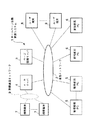
図1は本発明の一実施形態に係るホームページ自動更新システムの全体構成を示す図である。
【0011】
図1に示すように、ホームページ自動更新システム1は、通信ネットワーク2に接続されたページ管理サーバ3と、メールサーバ4と、管理者用パーソナルコンピュータ5と、参加者用パーソナルコンピュータ6から構成される。また、メールサーバ4では、無線通信ネットワーク9を介して送信された携帯端末7からのメールを格納できるようになっている。また、ページ管理サーバ3は、ユーザ端末8からの要求に応答してHTMLファイルをユーザ端末8に送信する。
【0012】
ページ管理サーバ3は、このホームページ自動更新システム1の運用主体が運用するサーバである。メールサーバ4は、運用主体と他の端末やサーバの間で送受信されるメールを管理するサーバである。管理者用パーソナルコンピュータ5は管理者により利用される端末であり、参加者用パーソナルコンピュータ6は参加者により利用される端末である。管理者とは、商店街のホームページを一括管理する者を指し、例えば商店街から選出した代表者などが該当する。参加者とは、商店街のホームページによる宣伝広告を希望する者であり、商店街に属する店主などが該当する。携帯端末7は、例えば参加者や管理者が利用する携帯型の電話端末や携帯情報端末(PDA)などである。ユーザ端末8は、ホームページを閲覧するユーザが利用する端末である。
【0013】
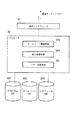
図2はページ管理サーバ3の詳細な構成を示す図である。図2に示すように、ページ管理サーバ3は、通信インタフェース31と、通信インタフェース31に接続されたプロセッサ32から構成される。また、プロセッサ32は、プロセッサ32に接続されたプログラムデータベース(DB)331に格納されたプログラムを読み出すことにより、ホームページ管理手段32a、巡回検索手段32b及びバナー生成手段32cとして機能する。なお、プログラムデータベース331からプログラムを読み出す以外に、図示しないプロセッサ32に接続された記録媒体読取装置により記録媒体に格納されたプログラムを読み取ることにより各手段32a〜32cとして機能させるようにしてもよい。また、プロセッサ32には、ホームページデータベース332及びスケジュールデータベース333が接続されている。
【0014】
ホームページ管理手段32aは、WEBブラウザからの要求に応答してHTML文書を送信するWEBサーバとしての機能を実行する手段であり、例えばCGI(Common Gateway Interface)などにより構成される。
【0015】
より具体的には、ホームページ管理手段32aは、ユーザ端末8のブラウザからのURLアドレス送信を伴う要求に応じてその要求に応じたHTMLデータを読み出しユーザ端末8に送信する。ユーザ端末8では、その受信したHTMLファイルがブラウザにより読み出され、ホームページが表示される。このホームページ管理手段32aによる機能は、通常のWEBサーバにより実行される機能である。
【0016】
要求に応じたHTMLデータは管理者や参加者により登録された通りに送信されるのではなく、登録されたHTML文書にバナー広告が埋め込まれたファイルが送信される。具体的には、別途生成されたバナー広告を表示させるためのバナーHTMLデータがHTMLデータに付加されてユーザ端末8に送信される。ユーザ端末8では、要求したHTMLデータが読み出され、ユーザ端末8に備え付けのディスプレイに表示される。
【0017】
また、ホームページ管理手段32aは、管理者用パーソナルコンピュータ5あるいは参加者用パーソナルコンピュータ6からのページ更新要求に応じてホームページを更新する。具体的には、管理者用パーソナルコンピュータ5あるいは参加者用パーソナルコンピュータ6から送信されたHTMLファイルにより既存のHTMLファイルを更新する。更新前のHTMLファイルは、巡回検索のためにホームページデータベース332に保存される。
【0018】
また、ホームページ管理手段32aは、バナー生成手段32cで生成されたバナーHTMLデータを、HTML文書に付加してユーザ端末8に送信する。
【0019】
巡回検索手段32bは、ホームページに埋め込まれるバナー広告に用いられる更新情報を巡回検索する。この巡回検索処理は、4種類のデータリソースから広告生成のための更新データを検索する。
【0020】
巡回検索処理は、予め定められた優先順位に基づき巡回順序が決定される。以下では、優先順位が高い順にメールサーバ4、ホームページ、PC、スケジュールデータというように巡回順序が設定された場合で説明する。
【0021】
まず、優先順位の最も高いメールサーバ4への検索処理を実行する。具体的には、メールサーバ4に備えられたメールボックス内を検索する。例えばある商店街のホームページに埋め込むバナー広告の巡回検索処理の場合、その商店街のホームページに関連する識別情報が関連づけられたメールが格納されていないかその識別情報を基に検索する。識別情報は、例えばIDやパスワード、URLアドレスなど、その商店街のホームページに関連するメールであることを確認できるデータであればよい。検索の結果、その商店街の関連するメールを発見した場合には、そのメールに含まれる文書データ、静止画ファイル、動画ファイルなどに基づくバナーHTMLデータが生成される。検索の結果、メールを発見できない場合には、次の巡回順序として設定されているホームページの検索処理を実行する。
【0022】
なお、メール検索の際に、メールを抽出する基準としてメールの送信日時などを利用してもよい。例えば、メールの送信日時が48時間を超える場合にはそのメールに基づくバナー生成は行わないように設定することができる。これにより、古い情報に基づくバナー広告生成は行われず、常に最新の情報に基づくバナーが生成される。
【0023】
ホームページの検索処理では、商店街により登録されたホームページの更新部分の抽出処理を実行する。この抽出処理では、その更新時刻を抽出基準に設定し、古い更新時刻の更新部分の抽出は行わないように設定することができる。これにより、常に最新の更新情報に基づくバナーが生成される。より具体的には、一つの例としては、更新前のHTML文書と更新後のHTML文書を比較し、両者に一致しないデータ項目があるか否かを例えばタグ毎に判定する。そして、一致しないデータ項目がある場合には、そのデータ項目が更新されたデータであると判定し、抽出される。そして、その抽出された更新データに基づきバナー広告が生成される。更新前のHTML文書の更新時刻が例えば更新時よりも48時間以上前であれば、更新とはみなされず、データ抽出はなされない。例えば更新前のHTML文書の更新時刻が48時間以上前であった場合には、更新部分の抽出がされないため、次の巡回順序として設定されているパーソナルコンピュータ5あるいは6の検索処理を実行する。
【0024】
パーソナルコンピュータ5あるいは6の検索処理では、パーソナルコンピュータ5あるいは6に予め指定されたファイルが格納されているか否かを判定する。格納されている場合には、そのファイルをパーソナルコンピュータ5あるいは6から受信する。その受信データに基づきバナーHTMLデータが生成される。パーソナルコンピュータ5あるいは6の検索の手法は、例えば予め通信ネットワーク2を介したパーソナルコンピュータ5あるいは6へのアクセス権を取得し(具体的には例えばIDやパスワードの取得)、そのアクセス権に基づきパーソナルコンピュータ5あるいは6にファイル検索命令を送信する。パーソナルコンピュータ5あるいは6は、受信したファイル検索命令に基づき、予め指定されたファイルが格納されているか備え付けのハードディスクや記録媒体読取装置で読取可能に設定された記録媒体などを検索する。検索の結果、命令の対象とするファイルが存在する場合には、そのファイルをページ管理サーバ3に送信する。存在しない場合には、ファイルが存在しない旨の検索結果をページ管理サーバ3に送信する。ファイルを受信したばあいには、そのファイルに基づきバナーHTMLデータが生成される。ファイルが存在しない旨の検索結果を受信した場合には、次の巡回順序であるスケジュールデータの検索処理を実行する。
【0025】
スケジュールデータの検索処理では、その検索時刻に対応するスケジュールに組み込まれた広告データを抽出する。その広告データに基づきバナーHTMLデータが生成される。
【0026】
このスケジュールデータは、パーソナルコンピュータ5あるいは6からのデータ登録により登録可能である。巡回検索手段32bは、このスケジュールデータのデータ登録処理を実行する。具体的には、パーソナルコンピュータ5あるいは6からのデータ登録要求があると、例えば図3に示すようなデータ登録画面をパーソナルコンピュータ5あるいは6に提供する。図3の例では、例えば本日と明日の登録データ欄が、また月曜から日曜までの日替わりで1週間で循環する登録データ欄が表示される。パーソナルコンピュータ5あるいは6によりこれら登録データ欄に、同図に示すような「本日の特価 ひまわり 1本 100円」などと入力し、登録要求ボタンをクリックすると、その入力データはページ管理サーバ3に送信される。ページ管理サーバ3は、受信した入力データを本日用データや、明日用データ、月曜用データなどとして、予め定められたスケジュールに対応付けて格納する。なお、データ登録は、携帯端末7から行ってもよい。
【0027】
このように入力されたデータは、スケジュールデータの検索処理に巡回順序が回ってきた場合に、その検索処理時の現在時刻に一致するスケジュールにおけるデータが読み出され、その読み出されたデータに基づきバナーHTMLデータが生成される。
【0028】
このスケジュールデータの概念図を図4に示す。図4に示すように、あたかも回転する円筒形フィルムのようにスケジュールデータが埋め込まれている。円筒の円周方向にスケジュールが設定され、そのスケジュールが現在時刻に対応した場合にそのフィルムに相当するスケジュールデータが読み出される。このように、最初からストーリーが決まっており、それを巡回検索手段32bが巡回しスケジュール調整を行う。これにより、従来のように、日時を決めて更新ホームページをアップロードするのと異なり、未来のすべての日付に対応してエンドレスに新たなスケジュールデータを登録する煩雑さが無くなり、ホームページの更新作業が極めて簡単になる。
【0029】
バナー生成手段32cは、巡回検索手段32bによる検索結果に基づきバナーHTMLデータを生成する。生成されたバナーHTMLデータは、ユーザが要求したHTML文書とともにユーザ端末8に送信される。これにより、ユーザ端末8のディスプレイに表示されるホームページには、バナー生成手段32cで生成されたバナー広告も表示される。
【0030】
次に、上述したホームページ自動更新システム1の動作を説明する。
【0031】
例えばある商店街の店主を参加者とし、その店主の中から管理者を選出する。管理者は、その各商店の紹介を含めたホームページをHTML文書により生成し、ホームページに表示すべき他の静止画ファイル、動画ファイル、音声ファイルなどの添付ファイルとともにページ管理サーバ3に送信する。ページ管理サーバ3のホームページ管理手段32aは、受信したHTML文書及び添付ファイルにその商店街の識別コード(商店街識別コード)を関連づけて、かつそのデータに登録日付を関連づけてホームページデータベース332に格納する。なお、管理者は、このHTML文書及び添付ファイルの登録をいつでも行うことができる。ページ管理サーバ3は、この登録毎に登録日付を付して新旧のデータを格納する。これにより、最新のHTML文書から、更新前のHTML文書を検索することができる。
【0032】
ページ管理サーバ3は、例えば図3に示すデータ登録画面を管理者用パーソナルコンピュータ5や参加者用パーソナルコンピュータ6に送信し、スケジュールデータの入力を促す。管理者あるいは参加者は、パーソナルコンピュータ5あるいは6により、図3に示すような本日及び明日に表示するためのスケジュールデータや、月曜〜日曜までの週単位で表示されるスケジュールデータなどを入力する。入力されたスケジュールデータはページ管理サーバ3に送信される。ページ管理サーバ3は、受信したスケジュールデータをそのスケジュールデータを表示するスケジュールに関連づけ、かつ送信元の商店街を識別する識別コードに関連づけてスケジュールデータベース333に格納する。スケジュールデータの入力は商店毎に実行してもよい。商店毎の登録の場合、商店街を識別する識別コードのみならず、商店を識別する識別コードを関連づけて格納する。
【0033】
また、管理者あるいは参加者は、携帯端末7を用いたメールにより更新情報を登録することができる。メールによる更新情報の登録では、携帯端末7に設けられたメール生成機能を用いてメールを生成する。生成されるメールは、巡回検索手段32bにより予め定められたフォーマットに従う。例えば、文書データとして図3に示すように「本日、休業日 明日、営業します」というデータとともに、そのデータのアップロードを希望するスケジュールを記述すればよい。もちろん、例えばスケジュールの無い場合には即時表示されるという設定をしておくこともできる。メールには、例えば静止画ファイルや動画ファイル、音声ファイルなどの添付ファイルを含めることができる。また、メールの差出人として、商店街の識別コードあるいは商店の識別コード、あるいはそれら双方の識別コードを含める。生成されたメールは、無線通信ネットワーク9を介してメールサーバ4に送信される。メールサーバ4は、受信メールを商店街の識別コードや商店の識別コードに関連づけてメールボックスに格納する。これにより、メールによる更新情報の登録が完了する。もちろん、携帯端末7に限らず、デスクトップ型の端末からの登録も同様に可能である。
【0034】
また、管理者あるいは参加者は、管理者用パーソナルコンピュータ5あるいは参加者用パーソナルコンピュータ6による更新情報の登録を行うこともできる。例えば、管理者用パーソナルコンピュータ5あるいは参加者用パーソナルコンピュータ6の記録媒体読取装置に、更新情報を含めたファイルを記録した記録媒体を設定しておく。更新情報を含めたファイルは、巡回検索手段32bによる巡回検索が可能なフォーマットで格納される。具体的には、ホームページへのアップロードを希望する文書などのデータに、商店街や商店を識別する識別コードと、アップロードを希望するスケジュールを所定のフォーマットで付加したファイルとする。なお、予め巡回検索する場所として、記録媒体読取装置以外の他の磁気ディスクなどの記憶装置の所定のディレクトリを設定してもよい。
【0035】
以上により、巡回検索に必要なデータの登録等の準備が完了する。
【0036】
ユーザ端末8からページ管理サーバ3に商店街のURLとともにホームページの送信要求を行うと、ページ管理サーバ3は、そのURLに対応付けられたホームページを表示させるためのHTML文書の生成を行う。
【0037】
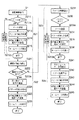
HTML文書の生成の手順を図5のフローチャートを用いて説明する。
【0038】
まず、ホームページ管理手段32aは、巡回検索手段32bに対して巡回検索命令を行う(s1)
巡回検索手段32bは、巡回検索命令の対象となる商店街の識別コードに基づき、予め定められた巡回検索順序に基づき巡回検索処理を実行する(s2)。例えば、メール検索、ホームページ検索、PC検索、スケジュールデータ検索の順に巡回検索順序が設定されている場合、巡回検索手段32bは、まずメール検索を実行する(s21)。メール検索では、巡回検索手段32bは、メールサーバ4に通信ネットワーク2を介してメール送信要求を行う。これに応答してメールサーバ4は、そのメール送信要求の対象とする商店街あるいは商店の識別コードが付されたメールがあるか否かを判定する(s211)。メールがあれば、そのメールをページ管理サーバ3に送信する(s212a)。メールがなければ、メールが無い旨を示す判定結果をページ管理サーバ3に送信し(s212b)、次の巡回検索処理(s22)に進む。
【0039】
(s212a)のようにメールがあると判定された場合、巡回検索手段32bは、受信したメールに含まれる更新情報に基づくバナー生成命令をバナー生成手段32cに行う。バナー生成手段32cは、このバナー生成命令に基づき、メールに含まれる更新情報を画像とし、あるいは添付ファイルに含まれる静止画や動画、音声などに基づきバナーHTMLデータを生成する(s213)。また、このバナーデータには、例えば対象とする商店街や商店の詳細情報のリソースを示すURLなどをハイパーリンク情報として設定しておく。
【0040】
ホームページ管理手段32aは、生成されたバナーHTMLデータを、予めホームページデータベース332に格納されたHTML文書に埋め込む等によりリンクさせ、バナーデータを含むHTML文書をユーザ端末8に送信する(s214)。ユーザ端末8に設けられたWEBブラウザは、受信したHTML文書に基づきディスプレイにホームページを表示させる(s215)。この際、バナーデータがHTML文書に含まれているため、メールにより指定された更新情報がバナー広告として表示される。図6はユーザ端末8の表示画面の一例を示す図である。図6に示すように、商店街のホームページに、メールで予め登録された更新情報として「本日、休業日 明日、営業します」と記されたバナー広告が表示されている。
【0041】
このバナー広告をディスプレイ上で選択すると、そのバナー広告に予め対応付けられた商店街あるいは商店の詳細情報を示すホームページのファイルの送信要求がユーザ端末8からページ管理サーバ3に送信され、その詳細情報のホームページが表示される。
【0042】
(s212b)に示すようにメールが無かった場合、(s22)に進み、巡回検索手段32bによりホームページ検索が実行される。具体的には、該当する商店街あるいは商店を識別する識別コードが関連づけられたHTML文書等をホームページデータベース332から読み出す。ホームページデータベース332には、更新前のHTML文書も格納されている。そこで、まずHTML文書の更新日時に基づき最新のHTML文書を読み出す(s221)。そして、現在時刻から予め定められた時間だけ遡った時刻(例えば現在時刻から48時間前)までが更新時刻として示されているHTML文書があるか否かを判定する(s222)。ある場合にはそれらHTML文書の各々と一致しないデータ部分を抽出する(s223a)。無い場合には、(s23)に進む。データ部分の抽出は、例えばHTML文書中のタグ単位などで実行される。また、一致・不一致の判定は、HTML文書のみならず、静止画ファイルや動画ファイルなどの添付ファイルについても実行される。添付ファイルの場合には、例えばファイル名やファイル容量などを基準として一致・不一致の判定を行えばよい。不一致のデータ部分の抽出が終了すると、巡回検索手段32bは、その不一致のデータ部分において新たに更新された情報を更新情報とするバナー生成命令をバナー生成手段32cに行う。バナー生成手段32cは、このバナー生成命令に基づき、(s213)と同様にバナーHTMLデータを生成する(s224)。また、このバナーデータには、例えば対象とする商店街や商店の詳細情報のリソースを示すURLなどをハイパーリンク情報として設定しておく。
【0043】
ホームページ管理手段32aは、生成されたバナーHTMLデータを、予めホームページデータベース332に格納されたHTML文書に埋め込む等によりリンクさせ、バナーデータを含むHTML文書をユーザ端末8に送信する(s225)。ユーザ端末8に設けられたWEBブラウザは、受信したHTML文書に基づきディスプレイにホームページを表示させる。この際、バナーデータがHTML文書に含まれているため、メールにより指定された更新情報がバナー広告として例えば図6のように表示される(s226)。
【0044】
(s222)で更新されたHTML文書が無かった場合、(s23)に進み、巡回検索手段32bによりPC検索が実行される。具体的には、該当する商店街あるいは商店を識別する識別コードが割り当てられた管理者用パーソナルコンピュータ5や参加者用パーソナルコンピュータ6に対してファイル検索要求を行う(s231)。このファイル検索要求に応答して、予め指定されたフォーマットのファイルが格納されているか、備え付けの記録媒体読取装置の記録媒体などの所定のディレクトリを検索し、ファイルがあるか否かを判定する(s232)。予め指定されたフォーマットとは、例えばCSV形式のデータなどが該当する。目的のファイルが見つかった場合には、そのファイルをページ管理サーバ3に送信する(s233a)。見つからない場合には、見つからない旨の判定結果をページ管理サーバ3に送信する(s233b)。(s233b)の場合、ページ管理サーバ3における処理は(s24)のスケジュールデータ検索処理に進む。
【0045】
(s233a)でファイルを受信した巡回検索手段32bは、受信したファイルに含まれる情報を更新情報とするバナー生成命令をバナー生成手段32cに行う。バナー生成手段32cは、このバナー生成命令に基づき、(s213)などと同様にバナーHTMLデータを生成する(s234)。また、このバナーデータには、例えば対象とする商店街や商店の詳細情報のリソースを示すURLなどをハイパーリンク情報として設定しておく。
【0046】
ホームページ管理手段32aは、生成されたバナーHTMLデータを、予めホームページデータベース332に格納されたHTML文書に埋め込む等によりリンクさせ、バナーデータを含むHTML文書をユーザ端末8に送信する(s235)。ユーザ端末8に設けられたWEBブラウザは、受信したHTML文書に基づきディスプレイにホームページを表示させる。この際、バナーデータがHTML文書に含まれているため、メールにより指定された更新情報がバナー広告として例えば図6のように表示される(s236)。
【0047】
(s24)ではまず、巡回検索手段32bは、スケジュールデータベース333に格納されたスケジュールデータのうち、現在時刻に対応するスケジュールが対応づけられたデータを読み出す(s241)。巡回検索手段32bは、読み出したデータを更新情報とするバナー生成命令をバナー生成手段32cに行う(s242)。バナー生成手段32cは、このバナー生成命令に基づき、(s213)などと同様にバナーHTMLデータを生成する(s243)。また、このバナーデータには、例えば対象とする商店街や商店の詳細情報のリソースを示すURLなどをハイパーリンク情報として設定しておく。
【0048】
ホームページ管理手段32aは、生成されたバナーHTMLデータを、予めホームページデータベース332に格納されたHTML文書に埋め込む等によりリンクさせ、バナーデータを含むHTML文書をユーザ端末8に送信する(s244)。ユーザ端末8に設けられたWEBブラウザは、受信したHTML文書に基づきディスプレイにホームページを表示させる。この際、バナーデータがHTML文書に含まれているため、メールにより指定された更新情報がバナー広告として例えば図6のように表示される(s245)。
【0049】
以上に示される処理が繰り返されることにより、ホームページが自動更新される。
【0050】
このように本実施形態によれば、メールやホームページの更新、PCへのデータ登録、スケジュールデータ登録など、簡単なデータの登録のみで、ホームページを自動更新することができる。また、予め更新されるデータの優先順位を定め、その優先順位に定められた順序に更新データを巡回検索することにより、より鮮度の高い情報を用いたホームページの更新が可能となる。このように、鮮度の高い情報を常にアップロードできる状態にしておくことにより、ホームページへの訪問者を飽きさせず、アクセス数を向上させることができる。また、更新が容易であるため、複数のホームページの自動更新を同時に実行することも可能である。
【0051】
本発明は上記実施形態に限定されるものではない。
【0052】
更新データに基づきホームページに埋め込み表示されるバナー広告を表示する例を示したが、バナー広告以外の文書や画像などのホームページの一部を更新させることも可能である。具体的には、更新データを含むHTML文書を生成したり、更新データに添付された添付ファイルをHTML文書にリンクさせる等である。
【0053】
また、サーバと端末との情報の送受信は無線通信でも有線通信でもよい。
【0054】
また、マークアップ言語としてHTMLを用いる例を示したが、これに限定されず、XML、SGMLなど、他のマークアップ言語にも適用可能であることはもちろんである。
【0055】
また、上述の実施形態で示される識別コードは、商店街や商店を識別するURLなどが適用可能である。
【0056】
また、図4では、スケジュールデータを概念図として示したが、管理者用パーソナルコンピュータ5、参加者用パーソナルコンピュータ6やユーザ端末8などからのアクセスに応答して概念図に対応する画像を提供し、これらパーソナルコンピュータ5や6、ユーザ端末8のディスプレイに表示してもよい。具体的には、ホームページ管理手段32aは、図4に示すような円筒形状の立体画像の外周にスケジュール及びそのスケジュールにおける更新データを時系列に割り当てた画像データを生成してパーソナルコンピュータ5、6あるいはユーザ端末8に送信する。画像データを受信したパーソナルコンピュータ5,6あるいはユーザ端末8側では、画像データに基づきスケジュールの概念画像をディスプレイに表示させることができる。また、これらパーソナルコンピュータ5,6あるいはユーザ端末8側におけるマウスやキーボードなどの入力装置を用いた操作により、円筒画像を回転させることができる。この場合、入力装置からの回転操作により円筒画像を回転させるプログラムをパーソナルコンピュータ5,6あるいはユーザ端末8側で起動させるのが望ましい。このようなプログラムは、パーソナルコンピュータ5,6あるいはユーザ端末8からの要求に基づきページ管理サーバ3が送信するようにしてもよい。このように、回転画像を表示することにより、スケジュール設定についての話題が提供され、テレビゲームの裏技感覚でのスケジュール設定あるいは確認が可能となる。また、ユーザ端末8からの要求に応じて、スケジュールを設定した商店の店主などの情報をユーザ端末8に提供し、ユーザ端末8側で表示させるようにしてもよい。
【0057】
また、上記実施形態では特に示さなかったが、巡回検索手段32bによる巡回時刻、巡回順序、巡回回数、巡回のオンオフ設定などは、管理者用パーソナルコンピュータ5や、参加者用パーソナルコンピュータ6などから、管理者、参加者により自由に設定できる。これら設定データはページ管理サーバ3に送信され、図示しないデータベースに格納される。プロセッサ32は、このデータベースに格納された設定データに示される条件に従ったホームページの管理、巡回検索等を実行する。
【0058】
【発明の効果】
以上詳述したように本発明によれば、ホームページの自動更新を容易に行うことができる。
【図面の簡単な説明】
【図1】本発明の一実施形態に係るホームページ自動更新システムの全体構成を示す図。
【図2】同実施形態に係るページ管理サーバの詳細な構成を示す図。
【図3】同実施形態に係るデータ登録画面の一例を示す図。
【図4】同実施形態に係るスケジュールデータの概念図。
【図5】同実施形態に係るHTML文書の生成の手順のフローチャートを示す図。
【図6】同実施形態に係るユーザ端末の表示画面の一例を示す図。
【符号の説明】
1…ホームページ自動更新システム
2…通信ネットワーク
3…ページ管理サーバ
4…メールサーバ
5…管理者用パーソナルコンピュータ
6…参加者用パーソナルコンピュータ
7…携帯端末
8…ユーザ端末
9…無線通信ネットワーク
31…通信インタフェース
32…プロセッサ
331…プログラムデータベース
332…ホームページデータベース
333…スケジュールデータベース[0001]
BACKGROUND OF THE INVENTION
The present invention relates to a homepage automatic update system that can automatically update a homepage easily.
[0002]
[Prior art]
Conventionally, when updating a homepage, for example, the information “A” is updated for ○ month ○ day, and the information “B” is updated for ○ month × day. There is a method of storing the update data in advance and automatically updating the homepage by reading the update data in accordance with the schedule. (See Patent Document 1).
[0003]
[Patent Document 1]
Japanese Patent Laid-Open No. 10-40148
[0004]
[Problems to be solved by the invention]
However, in the above-described method, update data must be registered regularly, and only data that should be uploaded in advance for a predetermined time is registered in advance. Therefore, the data input work required for updating the home page is almost the same as updating the home page in real time.
[0005]
The present invention has been made to solve the above-described problems, and an object of the present invention is to provide a homepage automatic update system capable of automatically updating a homepage easily.
[0006]
[Means for Solving the Problems]
According to one aspect of the invention,A home page management server connected to the user terminal via the network and transmitting an HTML document of the home page corresponding to the request to the user terminal in response to a home page display request from the user terminal; Connected to the user terminal and the homepage management server via a network, stores a mail server storing mail sent from the user terminal, and connected to the homepage management server via the network, and is managed by the homepage management server In the homepage automatic update system comprising a management terminal for creating banner data embedded in a homepage to be embedded, the homepage management server displays the HTML document of the homepage sent from the management terminal and the homepage In response to a home page display request from the user terminal, a home page database storing banner data to be stored, a schedule database storing banner data to be included in the HTML document of the home page sent from the management terminal, Banner data including homepage identification information requested from the user terminal is extracted by cyclic searching the mail server, the management terminal, the homepage database, and the schedule database in a predetermined order. A cyclic search means for terminating the cyclic search when extracted, a banner generation means for generating banner HTML data from the extracted banner data, and the generated banner HTML data is linked to the HTML document of the corresponding home page. And A home automatic update system, which is characterized in that the home page HTML document that is generated banner HTML data are linked to and means for transmitting to the user terminal that performs a display request of the home page.
[0007]
Further, the present invention relating to the system (apparatus) is also established as an invention of a method realized by the apparatus.
[0008]
Further, the present invention relating to an apparatus or a method has a function for causing a computer to execute a procedure corresponding to the invention (or for causing a computer to function as a means corresponding to the invention, or for a computer to have a function corresponding to the invention. The program is also realized as a computer-readable recording medium on which the program is recorded.
[0009]
DETAILED DESCRIPTION OF THE INVENTION
Hereinafter, embodiments of the present invention will be described with reference to the drawings. In the following embodiment, a case will be described as an example in which automatic updating of a shopping street homepage is managed. In this embodiment, the homepage (WEB page) includes not only the first screen based on the HTML document provided from the WWW server when accessing the WWW server, but also an information screen following the first screen.
[0010]
FIG. 1 is a diagram showing an overall configuration of a homepage automatic update system according to an embodiment of the present invention.
[0011]
As shown in FIG. 1, the homepage
[0012]
The
[0013]
FIG. 2 is a diagram showing a detailed configuration of the
[0014]
The homepage management means 32a is a means for executing a function as a WEB server that transmits an HTML document in response to a request from a WEB browser, and is configured by, for example, a CGI (Common Gateway Interface).
[0015]
More specifically, the
[0016]
The HTML data in response to the request is not transmitted as registered by the administrator or the participant, but a file in which a banner advertisement is embedded in the registered HTML document is transmitted. Specifically, banner HTML data for displaying a separately generated banner advertisement is added to the HTML data and transmitted to the
[0017]
The homepage managing means 32a updates the homepage in response to a page update request from the administrator
[0018]
Further, the
[0019]
The patrol search means 32b patrols search for update information used for the banner advertisement embedded in the homepage. In this cyclic search process, update data for advertisement generation is searched from four types of data resources.
[0020]
In the cyclic search process, the cyclic order is determined based on a predetermined priority order. In the following, a case will be described where the circulation order is set such as the
[0021]
First, search processing for the
[0022]
Note that, when searching for mail, the date and time of mail transmission may be used as a reference for extracting mail. For example, when the mail transmission date and time exceeds 48 hours, it can be set not to generate a banner based on the mail. Thereby, the banner advertisement generation based on the old information is not performed, and the banner based on the latest information is always generated.
[0023]
In the homepage search process, an update process of the updated part of the homepage registered by the shopping street is executed. In this extraction process, the update time can be set as an extraction reference, and an update part with an old update time can be set not to be extracted. Thereby, a banner based on the latest update information is always generated. More specifically, as one example, an HTML document before update and an HTML document after update are compared, and it is determined, for example, for each tag whether there is a data item that does not match both. If there is a data item that does not match, the data item is determined to be updated data and extracted. Then, a banner advertisement is generated based on the extracted update data. If the update time of the HTML document before update is, for example, 48 hours or more before the update time, it is not regarded as update and data extraction is not performed. For example, when the update time of the HTML document before update is 48 hours or more ago, the update part is not extracted, and therefore the search processing of the
[0024]
In the search process of the
[0025]
In the schedule data search process, advertisement data incorporated in a schedule corresponding to the search time is extracted. Banner HTML data is generated based on the advertisement data.
[0026]
This schedule data can be registered by data registration from the
[0027]
The data input in this way is read out in the schedule that matches the current time at the time of the search process when the cyclic order is reached in the search process of the schedule data, and based on the read data Banner HTML data is generated.
[0028]
A conceptual diagram of this schedule data is shown in FIG. As shown in FIG. 4, schedule data is embedded as if it were a rotating cylindrical film. When a schedule is set in the circumferential direction of the cylinder and the schedule corresponds to the current time, schedule data corresponding to the film is read out. Thus, the story is decided from the beginning, and the patrol search means 32b patrols and adjusts the schedule. As a result, unlike the conventional method of uploading an updated homepage with a fixed date and time, there is no need to register new schedule data endlessly in response to all future dates, making it extremely difficult to update the homepage. It will be easy.
[0029]
The
[0030]
Next, the operation of the homepage
[0031]
For example, a store owner in a certain shopping street is a participant, and an administrator is selected from the store owners. The administrator generates a homepage including the introduction of each store by an HTML document, and transmits it to the
[0032]
For example, the
[0033]
Further, the administrator or the participant can register the update information by e-mail using the
[0034]
Further, the administrator or the participant can register update information by the administrator
[0035]
Thus, preparations such as registration of data necessary for the patrol search are completed.
[0036]
When the
[0037]
The procedure for generating an HTML document will be described with reference to the flowchart of FIG.
[0038]
First, the homepage management means 32a issues a cyclic search command to the cyclic search means 32b (s1).
The patrol search means 32b executes a patrol search process based on a predetermined patrol search order based on the identification code of the shopping street that is the target of the patrol search command (s2). For example, when the cyclic search order is set in the order of mail search, homepage search, PC search, and schedule data search, the cyclic search means 32b first executes a mail search (s21). In the mail search, the patrol search means 32 b makes a mail transmission request to the
[0039]
When it is determined that there is a mail as in (s212a), the
[0040]
The homepage management means 32a links the generated banner HTML data by embedding it in an HTML document stored in the
[0041]
When this banner advertisement is selected on the display, a transmission request for a homepage file indicating detailed information of a shopping street or a shop associated in advance with the banner advertisement is transmitted from the
[0042]
When there is no mail as shown in (s212b), the process proceeds to (s22), and the homepage search is executed by the patrol search means 32b. Specifically, an HTML document or the like associated with an identification code for identifying the corresponding shopping street or store is read from the
[0043]
The homepage management means 32a links the generated banner HTML data by embedding it in an HTML document stored in the
[0044]
If there is no HTML document updated in (s222), the process proceeds to (s23), and the PC search is executed by the cyclic search means 32b. Specifically, a file search request is made to the administrator
[0045]
The
[0046]
The homepage management means 32a links the generated banner HTML data by embedding it in an HTML document stored in the
[0047]
In (s24), first, the patrol search means 32b reads data associated with the schedule corresponding to the current time from among the schedule data stored in the schedule database 333 (s241). The patrol search means 32b issues a banner generation command using the read data as update information to the banner generation means 32c (s242). Based on the banner generation command, the
[0048]
The homepage management means 32a links the generated banner HTML data by embedding it in an HTML document stored in the
[0049]
The homepage is automatically updated by repeating the processing described above.
[0050]
As described above, according to the present embodiment, the homepage can be automatically updated only by simple data registration such as e-mail and homepage update, data registration to the PC, and schedule data registration. In addition, by setting the priority order of data to be updated in advance and performing a cyclic search for the update data in the order determined in the priority order, the homepage can be updated using information with higher freshness. In this way, it is possible to improve the number of accesses without getting tired of visitors to the homepage by making it possible to always upload information with high freshness. In addition, since updating is easy, it is possible to simultaneously update a plurality of home pages.
[0051]
The present invention is not limited to the above embodiment.
[0052]
Although an example of displaying a banner advertisement embedded and displayed on the homepage based on the update data has been shown, it is possible to update a part of the homepage such as a document or an image other than the banner advertisement. Specifically, an HTML document including update data is generated, or an attached file attached to the update data is linked to the HTML document.
[0053]
Further, transmission / reception of information between the server and the terminal may be wireless communication or wired communication.
[0054]
Moreover, although the example which uses HTML as a markup language was shown, it is not limited to this, Of course, it can apply also to other markup languages, such as XML and SGML.
[0055]
Further, as the identification code shown in the above-described embodiment, a URL for identifying a shopping street or a store can be applied.
[0056]
In FIG. 4, the schedule data is shown as a conceptual diagram, but an image corresponding to the conceptual diagram is provided in response to an access from the administrator
[0057]
Although not particularly shown in the above embodiment, the tour time, the tour order, the number of tours, the tour on / off setting, etc. by the tour search means 32b are set from the administrator
[0058]
【The invention's effect】
As described above in detail, according to the present invention, automatic updating of a home page can be easily performed.
[Brief description of the drawings]
FIG. 1 is a diagram showing an overall configuration of a homepage automatic update system according to an embodiment of the present invention.
FIG. 2 is a diagram showing a detailed configuration of a page management server according to the embodiment.
FIG. 3 is a view showing an example of a data registration screen according to the embodiment.
FIG. 4 is a conceptual diagram of schedule data according to the embodiment.
FIG. 5 is a flowchart showing a procedure for generating an HTML document according to the embodiment;
FIG. 6 is an exemplary view showing an example of a display screen of the user terminal according to the embodiment.
[Explanation of symbols]
1 ... Homepage automatic update system
2. Communication network
3 ... Page management server
4 ... Mail server
5 ... Administrator personal computer
6 ... Participants' personal computers
7 ... Mobile devices
8 ... User terminal
9. Wireless communication network
31 ... Communication interface
32. Processor
331 ... Program database
332 ... Homepage database
333 ... Schedule database
Claims (2)
前記ユーザ端末とネットワークを介して接続され、前記ユーザ端末からのホームページの表示要求に応答して、この要求に対応するホームページのHTML文書を前記ユーザ端末に送信するホームページ管理サーバと、
前記ユーザ端末及び前記ホームページ管理サーバとネットワークを介して接続され、前記ユーザ端末から送られてくるメールを格納するメールサーバと、
前記ホームページ管理サーバとネットワークを介して接続され、前記ホームページ管理サーバによって管理されるホームページに埋め込まれるバナーデータを作成する管理端末とを具備するホームページ自動更新システムにおいて、
前記ホームページ管理サーバは、
前記管理端末から送られてくるホームページのHTML文書及び前記ホームページに表示されるバナーデータを格納するホームページデータベースと、
前記管理端末から送られてくるホームページのHTML文書に含められるべきバナーデータを格納するスケジュールデータベースと、
前記ユーザ端末からのホームページの表示要求に応答して、前記ユーザ端末から要求されたホームページの識別情報を含むバナーデータを、前記メールサーバ、前記管理端末、前記ホームページデータベース及び前記スケジュールデータベースを予め定められた順序で巡回検索して抽出し、最初にバナーデータが抽出された際に巡回検索を終了する巡回検索手段と、
前記抽出されたバナーデータからバナーHTMLデータを生成するバナー生成手段と、
前記生成されたバナーHTMLデータを対応するホームページのHTML文書にリンクして、この生成されたバナーHTMLデータがリンクされたホームページのHTML文書を前記ホームページの表示要求を行なったユーザ端末に送信する手段と
を具備することを特徴とするホームページ自動更新システム。 A user terminal,
A homepage management server connected to the user terminal via a network and transmitting an HTML document of the homepage corresponding to the request to the user terminal in response to a homepage display request from the user terminal;
A mail server that is connected to the user terminal and the homepage management server via a network and stores mail sent from the user terminal;
In a homepage automatic update system comprising a management terminal connected to the homepage management server via a network and creating banner data embedded in a homepage managed by the homepage management server,
The homepage management server
A homepage database for storing a homepage HTML document sent from the management terminal and banner data displayed on the homepage;
A schedule database for storing banner data to be included in the HTML document of the homepage sent from the management terminal;
In response to a homepage display request from the user terminal, the mail server, the management terminal, the homepage database, and the schedule database are determined in advance as banner data including identification information of the homepage requested from the user terminal. A cyclic search means for performing a cyclic search in the order in which the data is extracted and terminating the cyclic search when banner data is first extracted;
Banner generation means for generating banner HTML data from the extracted banner data;
Means for linking the generated banner HTML data to an HTML document of a corresponding home page, and transmitting the HTML document of the home page linked with the generated banner HTML data to the user terminal that has requested display of the home page; <br/> A homepage automatic update system characterized by comprising:
前記巡回検索手段による前記スケジュールデータベースの検索によるバナーデータの抽出は、前記スケジュールデータベースの検索処理時の日時に対応するバナーデータが抽出されることを特徴とする請求項1記載のホームページ自動更新システム。 2. The homepage automatic update system according to claim 1, wherein the banner data is extracted by searching the schedule database by the patrol search means, and banner data corresponding to the date and time when the schedule database is searched is extracted.
Priority Applications (2)
| Application Number | Priority Date | Filing Date | Title |
|---|---|---|---|
| JP2002284121A JP4237461B2 (en) | 2002-09-27 | 2002-09-27 | Homepage automatic update system |
| US10/672,622 US7953700B2 (en) | 2002-09-27 | 2003-09-26 | Home page automatic update system and home page automatic update method |
Applications Claiming Priority (1)
| Application Number | Priority Date | Filing Date | Title |
|---|---|---|---|
| JP2002284121A JP4237461B2 (en) | 2002-09-27 | 2002-09-27 | Homepage automatic update system |
Publications (2)
| Publication Number | Publication Date |
|---|---|
| JP2004118729A JP2004118729A (en) | 2004-04-15 |
| JP4237461B2 true JP4237461B2 (en) | 2009-03-11 |
Family
ID=32025288
Family Applications (1)
| Application Number | Title | Priority Date | Filing Date |
|---|---|---|---|
| JP2002284121A Expired - Fee Related JP4237461B2 (en) | 2002-09-27 | 2002-09-27 | Homepage automatic update system |
Country Status (2)
| Country | Link |
|---|---|
| US (1) | US7953700B2 (en) |
| JP (1) | JP4237461B2 (en) |
Families Citing this family (14)
| Publication number | Priority date | Publication date | Assignee | Title |
|---|---|---|---|---|
| US6889224B2 (en) * | 2001-05-16 | 2005-05-03 | International Business Machines Corporation | Method for storing, accessing embedded web pages during manufacturing phase on personal digital device |
| US20100100442A1 (en) * | 2003-12-03 | 2010-04-22 | Cbs Interactive, Inc. | Methods and Systems for Programmably Generating Electronic Aggregate Creatives for Display on an Electronic Network |
| US7664819B2 (en) | 2004-06-29 | 2010-02-16 | Microsoft Corporation | Incremental anti-spam lookup and update service |
| US8090776B2 (en) * | 2004-11-01 | 2012-01-03 | Microsoft Corporation | Dynamic content change notification |
| US7620996B2 (en) * | 2004-11-01 | 2009-11-17 | Microsoft Corporation | Dynamic summary module |
| US8290903B2 (en) | 2005-10-04 | 2012-10-16 | Sony Ericsson Mobile Communications Ab | Updating a portable communication device with media files |
| JP2007156546A (en) | 2005-11-30 | 2007-06-21 | Toshiba Corp | Content list providing apparatus and content list providing method |
| JP4589281B2 (en) * | 2006-09-08 | 2010-12-01 | 株式会社東芝 | Information processing device |
| US20090070125A1 (en) * | 2007-09-06 | 2009-03-12 | Doron Geva | Updating of an electronic periodical |
| JP2010020412A (en) * | 2008-07-08 | 2010-01-28 | Chiiki Joho Bank Kk | Browsing object rewrite program, recording medium, and browsing object rewrite server |
| US8904277B2 (en) | 2010-08-31 | 2014-12-02 | Cbs Interactive Inc. | Platform for serving online content |
| JP5966368B2 (en) * | 2012-01-11 | 2016-08-10 | 株式会社リコー | Information processing apparatus, device management system, and program |
| JP5942717B2 (en) * | 2012-09-10 | 2016-06-29 | カシオ計算機株式会社 | Information notification apparatus and program |
| CN113221049B (en) * | 2021-04-27 | 2023-09-01 | 北京奇艺世纪科技有限公司 | Page updating method and device, electronic equipment and storage medium |
Family Cites Families (12)
| Publication number | Priority date | Publication date | Assignee | Title |
|---|---|---|---|---|
| JP3594740B2 (en) | 1996-07-24 | 2004-12-02 | 株式会社日立情報システムズ | Homepage management system |
| US5937160A (en) * | 1997-05-01 | 1999-08-10 | Reedy Creek Technologies, Inc. | Systems, methods and computer program products for updating hypertext documents via electronic mail |
| JP2000276417A (en) | 1999-03-26 | 2000-10-06 | Casio Comput Co Ltd | Web page creation system, web page creation method, server, and recording medium |
| CA2303466A1 (en) * | 2000-03-30 | 2001-09-30 | Softv.Net | Automatically updating template based web pages with trigger events and scheduling |
| JP2001350690A (en) | 2000-04-07 | 2001-12-21 | Peer To Peer:Kk | Homepage update system and method |
| JP2001325144A (en) | 2000-05-16 | 2001-11-22 | Nec Soft Ltd | System for automatically generating hyperlink |
| JP2002007463A (en) | 2000-06-21 | 2002-01-11 | Kimimasa Yamakawa | Contents distribution system and method for distributing document file of distribution server |
| JP2002109357A (en) | 2000-09-27 | 2002-04-12 | Casio Comput Co Ltd | Web page advertisement system and advertisement management method, management server used therefor, and recording medium |
| US9047609B2 (en) * | 2000-11-29 | 2015-06-02 | Noatak Software Llc | Method and system for dynamically incorporating advertising content into multimedia environments |
| US20020082914A1 (en) * | 2000-12-26 | 2002-06-27 | Gil Beyda | Hybrid network based advertising system and method |
| US7174305B2 (en) * | 2001-01-23 | 2007-02-06 | Opentv, Inc. | Method and system for scheduling online targeted content delivery |
| JP2002091864A (en) | 2001-04-12 | 2002-03-29 | System Consultants Kk | System and method for automatically updating contents |
-
2002
- 2002-09-27 JP JP2002284121A patent/JP4237461B2/en not_active Expired - Fee Related
-
2003
- 2003-09-26 US US10/672,622 patent/US7953700B2/en not_active Expired - Fee Related
Also Published As
| Publication number | Publication date |
|---|---|
| JP2004118729A (en) | 2004-04-15 |
| US20040064446A1 (en) | 2004-04-01 |
| US7953700B2 (en) | 2011-05-31 |
Similar Documents
| Publication | Publication Date | Title |
|---|---|---|
| US10242004B2 (en) | Method for automatically tagging documents with matrix barcodes and providing access to a plurality of said document versions | |
| JP4237461B2 (en) | Homepage automatic update system | |
| CN101916252B (en) | Navigation of the content space of a document set | |
| US7475341B2 (en) | Converting the format of a portion of an electronic document | |
| US7606840B2 (en) | Version control in a distributed computing environment | |
| US7120664B2 (en) | Web page providing method, server machine, web page providing program, and computer readable medium | |
| US20070150804A1 (en) | Method, system, and computer program product for propagating remotely configurable posters of host site content | |
| US20040015479A1 (en) | Management of source and derivative image data | |
| US20070162459A1 (en) | System and method for creating searchable user-created blog content | |
| CN101427229A (en) | Techniques for modifying the presentation of information displayed to an end user of a computer system | |
| JP2012018457A (en) | Signage display information providing apparatus, signage display information providing method, and signage display information providing program | |
| US20060031235A1 (en) | Expression and time-based data creation and creator-controlled organizations | |
| WO2002065359A1 (en) | Electronic information management system | |
| US20050278627A1 (en) | Editing an image representation of a text | |
| US20050149859A1 (en) | System and method for on-line definition of web pages | |
| JP2005352980A (en) | Document difference display system, document difference display server and document difference display method and its program | |
| WO2006015352A2 (en) | System and method for creating distributed application | |
| CN117132239B (en) | Dynamic interactive comprehensive management system and method for data resources | |
| JP2000298646A (en) | WWW server system | |
| JP3644167B2 (en) | Electronic bulletin system and electronic bulletin method | |
| JP5085861B2 (en) | Search server, search method | |
| JP2002366478A (en) | How to update the homepage | |
| JP4804893B2 (en) | Web construction system, web construction device, and computer program | |
| Collier Jr et al. | Playing in the sandbox: EAC-CPF projects at Duke university | |
| Abraham | Unlocking the door to special collections: Using the web combination |
Legal Events
| Date | Code | Title | Description |
|---|---|---|---|
| A621 | Written request for application examination |
Free format text: JAPANESE INTERMEDIATE CODE: A621 Effective date: 20050706 |
|
| A131 | Notification of reasons for refusal |
Free format text: JAPANESE INTERMEDIATE CODE: A131 Effective date: 20080916 |
|
| A521 | Request for written amendment filed |
Free format text: JAPANESE INTERMEDIATE CODE: A523 Effective date: 20081105 |
|
| TRDD | Decision of grant or rejection written | ||
| A01 | Written decision to grant a patent or to grant a registration (utility model) |
Free format text: JAPANESE INTERMEDIATE CODE: A01 Effective date: 20081209 |
|
| A01 | Written decision to grant a patent or to grant a registration (utility model) |
Free format text: JAPANESE INTERMEDIATE CODE: A01 |
|
| A61 | First payment of annual fees (during grant procedure) |
Free format text: JAPANESE INTERMEDIATE CODE: A61 Effective date: 20081218 |
|
| R150 | Certificate of patent or registration of utility model |
Ref document number: 4237461 Country of ref document: JP Free format text: JAPANESE INTERMEDIATE CODE: R150 Free format text: JAPANESE INTERMEDIATE CODE: R150 |
|
| FPAY | Renewal fee payment (event date is renewal date of database) |
Free format text: PAYMENT UNTIL: 20111226 Year of fee payment: 3 |
|
| FPAY | Renewal fee payment (event date is renewal date of database) |
Free format text: PAYMENT UNTIL: 20121226 Year of fee payment: 4 |
|
| R250 | Receipt of annual fees |
Free format text: JAPANESE INTERMEDIATE CODE: R250 |
|
| FPAY | Renewal fee payment (event date is renewal date of database) |
Free format text: PAYMENT UNTIL: 20131226 Year of fee payment: 5 |
|
| R250 | Receipt of annual fees |
Free format text: JAPANESE INTERMEDIATE CODE: R250 |
|
| R250 | Receipt of annual fees |
Free format text: JAPANESE INTERMEDIATE CODE: R250 |
|
| R250 | Receipt of annual fees |
Free format text: JAPANESE INTERMEDIATE CODE: R250 |
|
| R250 | Receipt of annual fees |
Free format text: JAPANESE INTERMEDIATE CODE: R250 |
|
| R250 | Receipt of annual fees |
Free format text: JAPANESE INTERMEDIATE CODE: R250 |
|
| R250 | Receipt of annual fees |
Free format text: JAPANESE INTERMEDIATE CODE: R250 |
|
| LAPS | Cancellation because of no payment of annual fees |