JP4138340B2 - How to detect and give feedback on auxiliary controls in a computer system - Google Patents
How to detect and give feedback on auxiliary controls in a computer system Download PDFInfo
- Publication number
- JP4138340B2 JP4138340B2 JP2002069360A JP2002069360A JP4138340B2 JP 4138340 B2 JP4138340 B2 JP 4138340B2 JP 2002069360 A JP2002069360 A JP 2002069360A JP 2002069360 A JP2002069360 A JP 2002069360A JP 4138340 B2 JP4138340 B2 JP 4138340B2
- Authority
- JP
- Japan
- Prior art keywords
- user
- display
- input device
- detection
- computer
- Prior art date
- Legal status (The legal status is an assumption and is not a legal conclusion. Google has not performed a legal analysis and makes no representation as to the accuracy of the status listed.)
- Expired - Fee Related
Links
Images









Classifications
-
- G—PHYSICS
- G06—COMPUTING OR CALCULATING; COUNTING
- G06F—ELECTRIC DIGITAL DATA PROCESSING
- G06F3/00—Input arrangements for transferring data to be processed into a form capable of being handled by the computer; Output arrangements for transferring data from processing unit to output unit, e.g. interface arrangements
- G06F3/01—Input arrangements or combined input and output arrangements for interaction between user and computer
- G06F3/048—Interaction techniques based on graphical user interfaces [GUI]
- G06F3/0481—Interaction techniques based on graphical user interfaces [GUI] based on specific properties of the displayed interaction object or a metaphor-based environment, e.g. interaction with desktop elements like windows or icons, or assisted by a cursor's changing behaviour or appearance
- G06F3/04812—Interaction techniques based on cursor appearance or behaviour, e.g. being affected by the presence of displayed objects
-
- B—PERFORMING OPERATIONS; TRANSPORTING
- B60—VEHICLES IN GENERAL
- B60K—ARRANGEMENT OR MOUNTING OF PROPULSION UNITS OR OF TRANSMISSIONS IN VEHICLES; ARRANGEMENT OR MOUNTING OF PLURAL DIVERSE PRIME-MOVERS IN VEHICLES; AUXILIARY DRIVES FOR VEHICLES; INSTRUMENTATION OR DASHBOARDS FOR VEHICLES; ARRANGEMENTS IN CONNECTION WITH COOLING, AIR INTAKE, GAS EXHAUST OR FUEL SUPPLY OF PROPULSION UNITS IN VEHICLES
- B60K35/00—Instruments specially adapted for vehicles; Arrangement of instruments in or on vehicles
- B60K35/10—Input arrangements, i.e. from user to vehicle, associated with vehicle functions or specially adapted therefor
-
- G—PHYSICS
- G05—CONTROLLING; REGULATING
- G05G—CONTROL DEVICES OR SYSTEMS INSOFAR AS CHARACTERISED BY MECHANICAL FEATURES ONLY
- G05G9/00—Manually-actuated control mechanisms provided with one single controlling member co-operating with two or more controlled members, e.g. selectively, simultaneously
- G05G9/02—Manually-actuated control mechanisms provided with one single controlling member co-operating with two or more controlled members, e.g. selectively, simultaneously the controlling member being movable in different independent ways, movement in each individual way actuating one controlled member only
- G05G9/04—Manually-actuated control mechanisms provided with one single controlling member co-operating with two or more controlled members, e.g. selectively, simultaneously the controlling member being movable in different independent ways, movement in each individual way actuating one controlled member only in which movement in two or more ways can occur simultaneously
- G05G9/047—Manually-actuated control mechanisms provided with one single controlling member co-operating with two or more controlled members, e.g. selectively, simultaneously the controlling member being movable in different independent ways, movement in each individual way actuating one controlled member only in which movement in two or more ways can occur simultaneously the controlling member being movable by hand about orthogonal axes, e.g. joysticks
-
- G—PHYSICS
- G06—COMPUTING OR CALCULATING; COUNTING
- G06F—ELECTRIC DIGITAL DATA PROCESSING
- G06F3/00—Input arrangements for transferring data to be processed into a form capable of being handled by the computer; Output arrangements for transferring data from processing unit to output unit, e.g. interface arrangements
- G06F3/01—Input arrangements or combined input and output arrangements for interaction between user and computer
- G06F3/02—Input arrangements using manually operated switches, e.g. using keyboards or dials
- G06F3/0202—Constructional details or processes of manufacture of the input device
-
- G—PHYSICS
- G06—COMPUTING OR CALCULATING; COUNTING
- G06F—ELECTRIC DIGITAL DATA PROCESSING
- G06F3/00—Input arrangements for transferring data to be processed into a form capable of being handled by the computer; Output arrangements for transferring data from processing unit to output unit, e.g. interface arrangements
- G06F3/01—Input arrangements or combined input and output arrangements for interaction between user and computer
- G06F3/02—Input arrangements using manually operated switches, e.g. using keyboards or dials
- G06F3/0202—Constructional details or processes of manufacture of the input device
- G06F3/0219—Special purpose keyboards
-
- G—PHYSICS
- G06—COMPUTING OR CALCULATING; COUNTING
- G06F—ELECTRIC DIGITAL DATA PROCESSING
- G06F3/00—Input arrangements for transferring data to be processed into a form capable of being handled by the computer; Output arrangements for transferring data from processing unit to output unit, e.g. interface arrangements
- G06F3/01—Input arrangements or combined input and output arrangements for interaction between user and computer
- G06F3/03—Arrangements for converting the position or the displacement of a member into a coded form
- G06F3/033—Pointing devices displaced or positioned by the user, e.g. mice, trackballs, pens or joysticks; Accessories therefor
- G06F3/0354—Pointing devices displaced or positioned by the user, e.g. mice, trackballs, pens or joysticks; Accessories therefor with detection of two-dimensional [2D] relative movements between the device, or an operating part thereof, and a plane or surface, e.g. 2D mice, trackballs, pens or pucks
- G06F3/03543—Mice or pucks
-
- G—PHYSICS
- G06—COMPUTING OR CALCULATING; COUNTING
- G06F—ELECTRIC DIGITAL DATA PROCESSING
- G06F3/00—Input arrangements for transferring data to be processed into a form capable of being handled by the computer; Output arrangements for transferring data from processing unit to output unit, e.g. interface arrangements
- G06F3/01—Input arrangements or combined input and output arrangements for interaction between user and computer
- G06F3/03—Arrangements for converting the position or the displacement of a member into a coded form
- G06F3/033—Pointing devices displaced or positioned by the user, e.g. mice, trackballs, pens or joysticks; Accessories therefor
- G06F3/0354—Pointing devices displaced or positioned by the user, e.g. mice, trackballs, pens or joysticks; Accessories therefor with detection of two-dimensional [2D] relative movements between the device, or an operating part thereof, and a plane or surface, e.g. 2D mice, trackballs, pens or pucks
- G06F3/03547—Touch pads, in which fingers can move on a surface
-
- G—PHYSICS
- G06—COMPUTING OR CALCULATING; COUNTING
- G06F—ELECTRIC DIGITAL DATA PROCESSING
- G06F3/00—Input arrangements for transferring data to be processed into a form capable of being handled by the computer; Output arrangements for transferring data from processing unit to output unit, e.g. interface arrangements
- G06F3/01—Input arrangements or combined input and output arrangements for interaction between user and computer
- G06F3/03—Arrangements for converting the position or the displacement of a member into a coded form
- G06F3/033—Pointing devices displaced or positioned by the user, e.g. mice, trackballs, pens or joysticks; Accessories therefor
- G06F3/0354—Pointing devices displaced or positioned by the user, e.g. mice, trackballs, pens or joysticks; Accessories therefor with detection of two-dimensional [2D] relative movements between the device, or an operating part thereof, and a plane or surface, e.g. 2D mice, trackballs, pens or pucks
- G06F3/03549—Trackballs
-
- G—PHYSICS
- G06—COMPUTING OR CALCULATING; COUNTING
- G06F—ELECTRIC DIGITAL DATA PROCESSING
- G06F3/00—Input arrangements for transferring data to be processed into a form capable of being handled by the computer; Output arrangements for transferring data from processing unit to output unit, e.g. interface arrangements
- G06F3/01—Input arrangements or combined input and output arrangements for interaction between user and computer
- G06F3/03—Arrangements for converting the position or the displacement of a member into a coded form
- G06F3/033—Pointing devices displaced or positioned by the user, e.g. mice, trackballs, pens or joysticks; Accessories therefor
- G06F3/038—Control and interface arrangements therefor, e.g. drivers or device-embedded control circuitry
-
- G—PHYSICS
- G06—COMPUTING OR CALCULATING; COUNTING
- G06F—ELECTRIC DIGITAL DATA PROCESSING
- G06F3/00—Input arrangements for transferring data to be processed into a form capable of being handled by the computer; Output arrangements for transferring data from processing unit to output unit, e.g. interface arrangements
- G06F3/01—Input arrangements or combined input and output arrangements for interaction between user and computer
- G06F3/048—Interaction techniques based on graphical user interfaces [GUI]
- G06F3/0481—Interaction techniques based on graphical user interfaces [GUI] based on specific properties of the displayed interaction object or a metaphor-based environment, e.g. interaction with desktop elements like windows or icons, or assisted by a cursor's changing behaviour or appearance
-
- G—PHYSICS
- G06—COMPUTING OR CALCULATING; COUNTING
- G06F—ELECTRIC DIGITAL DATA PROCESSING
- G06F3/00—Input arrangements for transferring data to be processed into a form capable of being handled by the computer; Output arrangements for transferring data from processing unit to output unit, e.g. interface arrangements
- G06F3/01—Input arrangements or combined input and output arrangements for interaction between user and computer
- G06F3/048—Interaction techniques based on graphical user interfaces [GUI]
- G06F3/0481—Interaction techniques based on graphical user interfaces [GUI] based on specific properties of the displayed interaction object or a metaphor-based environment, e.g. interaction with desktop elements like windows or icons, or assisted by a cursor's changing behaviour or appearance
- G06F3/0482—Interaction with lists of selectable items, e.g. menus
-
- G—PHYSICS
- G06—COMPUTING OR CALCULATING; COUNTING
- G06F—ELECTRIC DIGITAL DATA PROCESSING
- G06F3/00—Input arrangements for transferring data to be processed into a form capable of being handled by the computer; Output arrangements for transferring data from processing unit to output unit, e.g. interface arrangements
- G06F3/01—Input arrangements or combined input and output arrangements for interaction between user and computer
- G06F3/048—Interaction techniques based on graphical user interfaces [GUI]
- G06F3/0487—Interaction techniques based on graphical user interfaces [GUI] using specific features provided by the input device, e.g. functions controlled by the rotation of a mouse with dual sensing arrangements, or of the nature of the input device, e.g. tap gestures based on pressure sensed by a digitiser
- G06F3/0489—Interaction techniques based on graphical user interfaces [GUI] using specific features provided by the input device, e.g. functions controlled by the rotation of a mouse with dual sensing arrangements, or of the nature of the input device, e.g. tap gestures based on pressure sensed by a digitiser using dedicated keyboard keys or combinations thereof
-
- A—HUMAN NECESSITIES
- A63—SPORTS; GAMES; AMUSEMENTS
- A63F—CARD, BOARD, OR ROULETTE GAMES; INDOOR GAMES USING SMALL MOVING PLAYING BODIES; VIDEO GAMES; GAMES NOT OTHERWISE PROVIDED FOR
- A63F13/00—Video games, i.e. games using an electronically generated display having two or more dimensions
- A63F13/20—Input arrangements for video game devices
- A63F13/21—Input arrangements for video game devices characterised by their sensors, purposes or types
-
- A—HUMAN NECESSITIES
- A63—SPORTS; GAMES; AMUSEMENTS
- A63F—CARD, BOARD, OR ROULETTE GAMES; INDOOR GAMES USING SMALL MOVING PLAYING BODIES; VIDEO GAMES; GAMES NOT OTHERWISE PROVIDED FOR
- A63F13/00—Video games, i.e. games using an electronically generated display having two or more dimensions
- A63F13/20—Input arrangements for video game devices
- A63F13/21—Input arrangements for video game devices characterised by their sensors, purposes or types
- A63F13/212—Input arrangements for video game devices characterised by their sensors, purposes or types using sensors worn by the player, e.g. for measuring heart beat or leg activity
-
- A—HUMAN NECESSITIES
- A63—SPORTS; GAMES; AMUSEMENTS
- A63F—CARD, BOARD, OR ROULETTE GAMES; INDOOR GAMES USING SMALL MOVING PLAYING BODIES; VIDEO GAMES; GAMES NOT OTHERWISE PROVIDED FOR
- A63F13/00—Video games, i.e. games using an electronically generated display having two or more dimensions
- A63F13/20—Input arrangements for video game devices
- A63F13/21—Input arrangements for video game devices characterised by their sensors, purposes or types
- A63F13/214—Input arrangements for video game devices characterised by their sensors, purposes or types for locating contacts on a surface, e.g. floor mats or touch pads
-
- A—HUMAN NECESSITIES
- A63—SPORTS; GAMES; AMUSEMENTS
- A63F—CARD, BOARD, OR ROULETTE GAMES; INDOOR GAMES USING SMALL MOVING PLAYING BODIES; VIDEO GAMES; GAMES NOT OTHERWISE PROVIDED FOR
- A63F13/00—Video games, i.e. games using an electronically generated display having two or more dimensions
- A63F13/20—Input arrangements for video game devices
- A63F13/24—Constructional details thereof, e.g. game controllers with detachable joystick handles
-
- A—HUMAN NECESSITIES
- A63—SPORTS; GAMES; AMUSEMENTS
- A63F—CARD, BOARD, OR ROULETTE GAMES; INDOOR GAMES USING SMALL MOVING PLAYING BODIES; VIDEO GAMES; GAMES NOT OTHERWISE PROVIDED FOR
- A63F13/00—Video games, i.e. games using an electronically generated display having two or more dimensions
- A63F13/25—Output arrangements for video game devices
- A63F13/28—Output arrangements for video game devices responding to control signals received from the game device for affecting ambient conditions, e.g. for vibrating players' seats, activating scent dispensers or affecting temperature or light
- A63F13/285—Generating tactile feedback signals via the game input device, e.g. force feedback
-
- A—HUMAN NECESSITIES
- A63—SPORTS; GAMES; AMUSEMENTS
- A63F—CARD, BOARD, OR ROULETTE GAMES; INDOOR GAMES USING SMALL MOVING PLAYING BODIES; VIDEO GAMES; GAMES NOT OTHERWISE PROVIDED FOR
- A63F13/00—Video games, i.e. games using an electronically generated display having two or more dimensions
- A63F13/55—Controlling game characters or game objects based on the game progress
- A63F13/56—Computing the motion of game characters with respect to other game characters, game objects or elements of the game scene, e.g. for simulating the behaviour of a group of virtual soldiers or for path finding
-
- A—HUMAN NECESSITIES
- A63—SPORTS; GAMES; AMUSEMENTS
- A63F—CARD, BOARD, OR ROULETTE GAMES; INDOOR GAMES USING SMALL MOVING PLAYING BODIES; VIDEO GAMES; GAMES NOT OTHERWISE PROVIDED FOR
- A63F13/00—Video games, i.e. games using an electronically generated display having two or more dimensions
- A63F13/60—Generating or modifying game content before or while executing the game program, e.g. authoring tools specially adapted for game development or game-integrated level editor
- A63F13/67—Generating or modifying game content before or while executing the game program, e.g. authoring tools specially adapted for game development or game-integrated level editor adaptively or by learning from player actions, e.g. skill level adjustment or by storing successful combat sequences for re-use
-
- A—HUMAN NECESSITIES
- A63—SPORTS; GAMES; AMUSEMENTS
- A63F—CARD, BOARD, OR ROULETTE GAMES; INDOOR GAMES USING SMALL MOVING PLAYING BODIES; VIDEO GAMES; GAMES NOT OTHERWISE PROVIDED FOR
- A63F2300/00—Features of games using an electronically generated display having two or more dimensions, e.g. on a television screen, showing representations related to the game
- A63F2300/10—Features of games using an electronically generated display having two or more dimensions, e.g. on a television screen, showing representations related to the game characterized by input arrangements for converting player-generated signals into game device control signals
- A63F2300/1012—Features of games using an electronically generated display having two or more dimensions, e.g. on a television screen, showing representations related to the game characterized by input arrangements for converting player-generated signals into game device control signals involving biosensors worn by the player, e.g. for measuring heart beat, limb activity
-
- A—HUMAN NECESSITIES
- A63—SPORTS; GAMES; AMUSEMENTS
- A63F—CARD, BOARD, OR ROULETTE GAMES; INDOOR GAMES USING SMALL MOVING PLAYING BODIES; VIDEO GAMES; GAMES NOT OTHERWISE PROVIDED FOR
- A63F2300/00—Features of games using an electronically generated display having two or more dimensions, e.g. on a television screen, showing representations related to the game
- A63F2300/10—Features of games using an electronically generated display having two or more dimensions, e.g. on a television screen, showing representations related to the game characterized by input arrangements for converting player-generated signals into game device control signals
- A63F2300/1037—Features of games using an electronically generated display having two or more dimensions, e.g. on a television screen, showing representations related to the game characterized by input arrangements for converting player-generated signals into game device control signals being specially adapted for converting control signals received from the game device into a haptic signal, e.g. using force feedback
-
- A—HUMAN NECESSITIES
- A63—SPORTS; GAMES; AMUSEMENTS
- A63F—CARD, BOARD, OR ROULETTE GAMES; INDOOR GAMES USING SMALL MOVING PLAYING BODIES; VIDEO GAMES; GAMES NOT OTHERWISE PROVIDED FOR
- A63F2300/00—Features of games using an electronically generated display having two or more dimensions, e.g. on a television screen, showing representations related to the game
- A63F2300/10—Features of games using an electronically generated display having two or more dimensions, e.g. on a television screen, showing representations related to the game characterized by input arrangements for converting player-generated signals into game device control signals
- A63F2300/1043—Features of games using an electronically generated display having two or more dimensions, e.g. on a television screen, showing representations related to the game characterized by input arrangements for converting player-generated signals into game device control signals being characterized by constructional details
-
- A—HUMAN NECESSITIES
- A63—SPORTS; GAMES; AMUSEMENTS
- A63F—CARD, BOARD, OR ROULETTE GAMES; INDOOR GAMES USING SMALL MOVING PLAYING BODIES; VIDEO GAMES; GAMES NOT OTHERWISE PROVIDED FOR
- A63F2300/00—Features of games using an electronically generated display having two or more dimensions, e.g. on a television screen, showing representations related to the game
- A63F2300/10—Features of games using an electronically generated display having two or more dimensions, e.g. on a television screen, showing representations related to the game characterized by input arrangements for converting player-generated signals into game device control signals
- A63F2300/1068—Features of games using an electronically generated display having two or more dimensions, e.g. on a television screen, showing representations related to the game characterized by input arrangements for converting player-generated signals into game device control signals being specially adapted to detect the point of contact of the player on a surface, e.g. floor mat, touch pad
-
- A—HUMAN NECESSITIES
- A63—SPORTS; GAMES; AMUSEMENTS
- A63F—CARD, BOARD, OR ROULETTE GAMES; INDOOR GAMES USING SMALL MOVING PLAYING BODIES; VIDEO GAMES; GAMES NOT OTHERWISE PROVIDED FOR
- A63F2300/00—Features of games using an electronically generated display having two or more dimensions, e.g. on a television screen, showing representations related to the game
- A63F2300/30—Features of games using an electronically generated display having two or more dimensions, e.g. on a television screen, showing representations related to the game characterized by output arrangements for receiving control signals generated by the game device
- A63F2300/308—Details of the user interface
-
- A—HUMAN NECESSITIES
- A63—SPORTS; GAMES; AMUSEMENTS
- A63F—CARD, BOARD, OR ROULETTE GAMES; INDOOR GAMES USING SMALL MOVING PLAYING BODIES; VIDEO GAMES; GAMES NOT OTHERWISE PROVIDED FOR
- A63F2300/00—Features of games using an electronically generated display having two or more dimensions, e.g. on a television screen, showing representations related to the game
- A63F2300/60—Methods for processing data by generating or executing the game program
- A63F2300/6027—Methods for processing data by generating or executing the game program using adaptive systems learning from user actions, e.g. for skill level adjustment
-
- A—HUMAN NECESSITIES
- A63—SPORTS; GAMES; AMUSEMENTS
- A63F—CARD, BOARD, OR ROULETTE GAMES; INDOOR GAMES USING SMALL MOVING PLAYING BODIES; VIDEO GAMES; GAMES NOT OTHERWISE PROVIDED FOR
- A63F2300/00—Features of games using an electronically generated display having two or more dimensions, e.g. on a television screen, showing representations related to the game
- A63F2300/60—Methods for processing data by generating or executing the game program
- A63F2300/66—Methods for processing data by generating or executing the game program for rendering three dimensional images
- A63F2300/6607—Methods for processing data by generating or executing the game program for rendering three dimensional images for animating game characters, e.g. skeleton kinematics
-
- B—PERFORMING OPERATIONS; TRANSPORTING
- B60—VEHICLES IN GENERAL
- B60K—ARRANGEMENT OR MOUNTING OF PROPULSION UNITS OR OF TRANSMISSIONS IN VEHICLES; ARRANGEMENT OR MOUNTING OF PLURAL DIVERSE PRIME-MOVERS IN VEHICLES; AUXILIARY DRIVES FOR VEHICLES; INSTRUMENTATION OR DASHBOARDS FOR VEHICLES; ARRANGEMENTS IN CONNECTION WITH COOLING, AIR INTAKE, GAS EXHAUST OR FUEL SUPPLY OF PROPULSION UNITS IN VEHICLES
- B60K2360/00—Indexing scheme associated with groups B60K35/00 or B60K37/00 relating to details of instruments or dashboards
- B60K2360/141—Activation of instrument input devices by approaching fingers or pens
-
- G—PHYSICS
- G05—CONTROLLING; REGULATING
- G05G—CONTROL DEVICES OR SYSTEMS INSOFAR AS CHARACTERISED BY MECHANICAL FEATURES ONLY
- G05G9/00—Manually-actuated control mechanisms provided with one single controlling member co-operating with two or more controlled members, e.g. selectively, simultaneously
- G05G9/02—Manually-actuated control mechanisms provided with one single controlling member co-operating with two or more controlled members, e.g. selectively, simultaneously the controlling member being movable in different independent ways, movement in each individual way actuating one controlled member only
- G05G9/04—Manually-actuated control mechanisms provided with one single controlling member co-operating with two or more controlled members, e.g. selectively, simultaneously the controlling member being movable in different independent ways, movement in each individual way actuating one controlled member only in which movement in two or more ways can occur simultaneously
- G05G9/047—Manually-actuated control mechanisms provided with one single controlling member co-operating with two or more controlled members, e.g. selectively, simultaneously the controlling member being movable in different independent ways, movement in each individual way actuating one controlled member only in which movement in two or more ways can occur simultaneously the controlling member being movable by hand about orthogonal axes, e.g. joysticks
- G05G2009/04766—Manually-actuated control mechanisms provided with one single controlling member co-operating with two or more controlled members, e.g. selectively, simultaneously the controlling member being movable in different independent ways, movement in each individual way actuating one controlled member only in which movement in two or more ways can occur simultaneously the controlling member being movable by hand about orthogonal axes, e.g. joysticks providing feel, e.g. indexing means, means to create counterforce
-
- G—PHYSICS
- G05—CONTROLLING; REGULATING
- G05G—CONTROL DEVICES OR SYSTEMS INSOFAR AS CHARACTERISED BY MECHANICAL FEATURES ONLY
- G05G9/00—Manually-actuated control mechanisms provided with one single controlling member co-operating with two or more controlled members, e.g. selectively, simultaneously
- G05G9/02—Manually-actuated control mechanisms provided with one single controlling member co-operating with two or more controlled members, e.g. selectively, simultaneously the controlling member being movable in different independent ways, movement in each individual way actuating one controlled member only
- G05G9/04—Manually-actuated control mechanisms provided with one single controlling member co-operating with two or more controlled members, e.g. selectively, simultaneously the controlling member being movable in different independent ways, movement in each individual way actuating one controlled member only in which movement in two or more ways can occur simultaneously
- G05G9/047—Manually-actuated control mechanisms provided with one single controlling member co-operating with two or more controlled members, e.g. selectively, simultaneously the controlling member being movable in different independent ways, movement in each individual way actuating one controlled member only in which movement in two or more ways can occur simultaneously the controlling member being movable by hand about orthogonal axes, e.g. joysticks
- G05G2009/04774—Manually-actuated control mechanisms provided with one single controlling member co-operating with two or more controlled members, e.g. selectively, simultaneously the controlling member being movable in different independent ways, movement in each individual way actuating one controlled member only in which movement in two or more ways can occur simultaneously the controlling member being movable by hand about orthogonal axes, e.g. joysticks with additional switches or sensors on the handle
-
- G—PHYSICS
- G06—COMPUTING OR CALCULATING; COUNTING
- G06F—ELECTRIC DIGITAL DATA PROCESSING
- G06F2203/00—Indexing scheme relating to G06F3/00 - G06F3/048
- G06F2203/048—Indexing scheme relating to G06F3/048
- G06F2203/04804—Transparency, e.g. transparent or translucent windows
-
- G—PHYSICS
- G06—COMPUTING OR CALCULATING; COUNTING
- G06F—ELECTRIC DIGITAL DATA PROCESSING
- G06F2203/00—Indexing scheme relating to G06F3/00 - G06F3/048
- G06F2203/048—Indexing scheme relating to G06F3/048
- G06F2203/04805—Virtual magnifying lens, i.e. window or frame movable on top of displayed information to enlarge it for better reading or selection
Landscapes
- Engineering & Computer Science (AREA)
- General Engineering & Computer Science (AREA)
- Theoretical Computer Science (AREA)
- Physics & Mathematics (AREA)
- General Physics & Mathematics (AREA)
- Human Computer Interaction (AREA)
- Automation & Control Theory (AREA)
- Chemical & Material Sciences (AREA)
- Combustion & Propulsion (AREA)
- Transportation (AREA)
- Mechanical Engineering (AREA)
- Position Input By Displaying (AREA)
- User Interface Of Digital Computer (AREA)
- Input From Keyboards Or The Like (AREA)
Description
【0001】
【発明の属する技術分野】
技術分野
本発明は、コンピュータシステム用の入力装置に関する。より詳細には、本発明は、コンピュータシステムにおけるタッチ検出可能(タッチセンシティブと以下表現する)な入力装置の使用に関する。
【0002】
本出願は、1998年9月14日に出願され、連続番号09/152,434を割り振られ、本出願の譲受人に譲渡された、Hinckley他による「Proximity Sensor in a Computer Input Device」という名称の同時係属米国特許出願の一部係属出願である。この出願は参照により本明細書に組み込む。本出願はまた、1998年9月14日に出願され、連続番号09/152,432を割り振られ、本出願の譲受人に譲渡された、Hinckleyによる「A Techinique For Implementing a Two−Handed Desktop Use Interface For a Computer」という名称の同時係属米国特許出願の一部係属出願である。この出願は参照により本明細書に組み込む。本出願はさらに、1998年9月14日に出願され、連続番号09/152,443を割り振られ、本出願の譲受人に譲渡された、Hinckley他による「Method of Interacting With a Computer Using a Proximity Sensor in a Computer Input Device」という名称の同時係属米国特許出願の一部係属出願である。この出願は参照により本明細書に組み込む。
【0003】
さらに、本出願は、1998年11月25日に出願され、連続番号09/200,325を割り振られ、本出願の譲受人に譲渡されたHinckleyによる「A Technique For Implementing an On−Demand Display Widget Through Controlled Fading Initiated By User Contact With a Touch Sensitive Input Device」という名称の同時係属米国特許出願の一部係属出願である。この出願は参照により本明細書に組み込むが、この出願は、1998年9月14に出願され、連続番号60/100,261を割り当てられた「Toolglass Improvements−On−Demand Tool Sheet;Gesturing Through Tool Sheets」という名称の米国仮特許出願に対する優先権を主張している。本出願はまた、1998年11月25日に出願され、連続番号09/200,321を割り振られ、本出願の譲受人に譲渡された、Hinckleyによる「A Technique For Implementing an On−Demand Tool Glass For Use in a Desktop User Interface」という名称の同時係属米国特許出願の一部係属出願である。この出願は参照により本明細書に組み込むが、この出願は、1998年9月14日に出願され連続番号60/100,261を割り振られた「Toolglass Improvements−On−Demand Tool Sheet;Gesturing Through Tool Sheets」という名称の米国仮特許出願に対する優先権を主張している。
【0004】
本出願は、2000年4月5日に出願され、連続番号09/543,723を割り当てられ、本出願の譲受人に譲渡されたHinckley他による「Method of Interacting With a Computer Using a Proximity Sensor in a Computer Input Device」という名称の同時係属米国特許出願に関連する。この出願は参照により本明細書に組み込むが、この出願は、上記に示した米国特許出願番号09/152,443の係属出願である。
【0005】
【従来の技術】
関連技術
キーボード、タッチパッド、トラックボール、ゲームコントローラおよびマウスなどのコンピュータシステム用の入力装置は、ジョイスティック、タッチパッド、トラックボール、ヘッドセット、マイクロフォン、ボタン、つまみ、ロッカースイッチ、トリガ、スライダ、ホイール、生物測定学を応用したセンサなど、1つまたは複数の補助用コントロールを含むことが多い。補助用コントロールは単独で使用することも、入力装置および他の補助用コントロールと合わせて使用することも可能である。
【0006】
入力装置の大半は、トランスデューサまたはスイッチを用いて入力信号を生成する。スイッチは通例、キーボードのキーや、マウスのボタン、ジョイスティック、およびゲームコントローラの中にある。トランスデューサはマウスおよびトラックボールの中にあり、そのような装置の内部にあるボールの動きに基づくか、または表面上での装置の移動を光学的に検出することによって電気信号を生成している。トランスデューサはヘッドセットの中にもあり、この場合は音声信号を電気信号に変換する。タッチパッドは、ユーザがタッチパッドに触れると電気信号を提供するセンサを用いて入力信号を生成するが、この信号は、タッチパッド内で接触の行われた位置を含んでいる。
【0007】
入力装置およびその補助用コントロールがコンピュータに提供することのできる情報の量を増加することが望まれるが、入力装置に追加することのできるトランスデューサおよびスイッチの数は、ユーザが特定のトランスデューサやスイッチが行う機能をすべて記憶するための能力からおのずと制限され、また入力装置(例えばキーボードやマウス)にスイッチおよびトランスデューサを配置するのに利用できる面積(real estate)、あるいは少なくとも実行可能な形で利用することのできる面積という実用面から制限される。ユーザが1つ1つの補助用コントロールの機能を決定することができるが、この能力も一般には、その補助用コントロールが本来持つ、あるいはそれに近い固定した機能(static label)に制限されてしまい、それぞれの補助用コントロールを起動し、ボタンをクリックし、メニューオプションを選択して、ヘルプファイルを要求するか、ユーザマニュアルを読むことになる。さらに補助用コントロールの機能は、ゲームあるいはアプリケーションごとに変わる場合がある。したがって、ある補助用コントロールの固定機能は、その入力装置とその補助用コントロールの機能およびステータスがアプリケーションごとに変わる場合にはほとんど価値のないものになる。これに関して、ユーザが、あるゲームまたはアプリケーションにおけるボタンおよび他のコントロールの割り当てを覚えたとしても、別のゲームまたはアプリケーションでは、同じボタンまたはコントロールに異なる機能が割り当てられる可能性がある。同様に、補助用コントロールが制御する機能のステータスは、一般にはそのコントロールを起動することでしか決定することができない。
【0008】
【発明が解決しようとする課題】
したがって、補助用コントロールの機能およびステータスを、そのコンテクスト(例えばアクティブな状態にあるアプリケーションやゲーム)に関係なく、より容易に決定できる能力をユーザに提供することが必要とされている。
【0009】
この必要性に対応するために、LEDや小型LCDなどの表示器を入力装置およびその補助用コントロールに直接組み込んで、フィードバックまたは状態情報を提供することが可能である。しかし、LEDやLCDを個々の補助用コントロールと関連付けると、消費電力量および入力装置のコストがいずれも増大する。さらに、LEDおよびLCDの出力形態は非常に限られており、またメインの表示(例えばコンピュータモニタ)から離れているので、ユーザは、コントロールの機能やステータスを決定するのに、常に画面から補助用コントロールに視線を移動しなければならない。このように常に注意力の対象を移動していると、その時点のコンテクストを繰り返し把握し直さなければならないので、ユーザは精神的に疲労しかねない。したがって、コンピュータシステムで入力装置の補助用コントロールの機能および/またはステータスを決定するための、より効率的で、簡便かつ/または費用効果の高い方式を提供することが必要とされている。
【0010】
【課題を解決するための手段】
本発明は、物理的な存在を感知し、画面上の表示やコントロール自体における視覚的フィードバック、聴覚的なフィードバック(例えば音声や音楽)、あるいは触覚によるフィードバック(例えばバイブレーション)を提供する、タッチセンシティブな補助用コントロールを有するタッチセンシティブ式入力装置を提供することにより、既存の入力装置に見られる欠点の多くを克服する。
【0011】
本発明の一態様では、キーボード、タッチパッド、トラックボール、ゲームコントローラ、モニタ、ジョイスティック、ステアリングホイール、ヘッドセット、あるいはマウスといった入力装置の、キー、ボタン、つまみ、ロッカースイッチ、あるいはその他の補助用コントロールに、ユーザの手との接触、あるいはその著しい近接状態(proximity)を検出するセンサを補うことができる。別の態様によると、補助用コントロールの感知信号により、ユーザが起動する(例えば、押す、回す、回転する、あるいはその他の方法で)ことなく接触したコントロールに関するステータス、状態情報、ツールのヒント(tips)、ヘルプテキスト、またはその他のフィードバックの画面上表示をユーザに提供することができる。あるいは、画面上表示によって提供するフィードバックに代えて、またはそれに加えて、聴覚あるいは触覚を利用したフィードバックをユーザに提供することもできる。したがって、ユーザは様々なボタンやその他のコントロールに触れるだけで、それらの機能の割り当てやステータスを知ることができ、あるいは他のフィードバックを得ることができる。ユーザはそのようなフィードバックにより、ユーザがそれに続いてコントロールの起動を選択した場合にそのボタンまたはコントロールが行う動作の結果をより正確に理解することができる。また、ユーザは、迅速かつ気軽にステータス情報を見ることができるようになる。
【0012】
本発明の態様は、ユーザの手の検出に応答して、補助用コントロールについてのコンテクストに即したフィードバックを表示ウィジェット(display widget)(例えばグラフィカルユーザインタフェース(GUI))などの画面上表示に提供することを含む。このように、タッチセンシティブなコントロールを使用して、ユーザの行為のコンテクストを予測することができる。状況のコンテクストは、コントロールをつかむ、コントロールに触れる、あるいは接近するといったユーザによる予備段階の行為によって確定することができる。行為のコンテクストを知ると、コンピュータは動作を開始し、ユーザの意思を予測することができる。
【0013】
本発明の別の態様によると、補助用コントロールのコンテクストには、ゲーム、ユーティリティ、および生産性管理(productivity)のアプリケーションなど各種アプリケーションを含むことができるがこれらに限定しない。また、コンテクストは、アプリケーションまたはゲームの様々な部分ごとに変えることもできる。
【0014】
本発明の別の態様では、補助用コントロールに近接した物理的存在、または接触した物理的存在の検出に応答してGUIが表示されると、ユーザは、別の補助用コントロールまたは入力装置を用いてそのGUIと対話することができる。この入力装置には、マウス、タッチパッド、あるいはキーパッドが含まれるがこれらに限定しない。例えば、音量コントロール用のGUIが表示されると、ユーザはマウスで音量を調節することができる。
【0015】
本発明の別の態様では、その補助用コントロールを含む入力装置は、物理的存在(例えばユーザ)がその装置またはそのコントロールに触れると、それを直接検出するタッチセンサを備えることができ、これにより、例えばユーザが装置と手との物理的な接触状態を確立または解除した時など、「オンデマンド」方式でフィードバックの表示および消去(dismissal)を提供することができる。
【0016】
例えば、ユーザが指で装置に触れるなどして装置またはコントロールへの接触を行ったことを反映した、装置が提供する接触表示の変化があると、ツールヒントを表示することができる。装置から指を持ち上げるなどユーザが装置との物理的接触を解除したことを示す変化があると、そのツールヒントをディスプレイから消すことができる。本発明の一態様では、ユーザの注意をそらさないように、このような変化が検出されるとそれに対応する所定のアニメーションシーケンスを開始することができる。このシーケンスは規定の時間にわたって行われるが、ここではユーザによる接触が始まると直ちにフィードバックが次第に見えるようになり始め(通例は見えない状態、つまり完全に透明な状態から、最終的には所定の半透明または非透明な状態になる)、そして例えばユーザが手を装置から持ち上げるなど装置とのユーザ接触が解除されると、フィードバックは直ちに次第に消え始める(すなわち最終的には元の見えない状態に戻る。)
【0017】
本発明の別の態様では、ツールバー、スクロールバーなどは、物理的存在の検出に応答してのみ表示画面に表示することができる。例を挙げると、起動は行わずに補助用コントロールに触れるとツールバーを画面上に表示することができ、コントロールとの接触を解除するとツールバーを消すことができる。本発明の一態様では、ユーザは、所望の場合には片方の手で補助用コントロールまたは入力装置を使用してツールバーとのインタフェースをとりながら、ツールバーを画面上に表示させた補助用コントロールへの接触を続けることができる。この態様によると、ディスプレイ上の乱雑さを低減することができ、プログラムを実行する際の適切な時に、ユーザの行為に一致し、かつそれによって制御する方式で、利用可能なアプリケーション画面の範囲を拡大することができる。この際、それを行うための著しい負担が認識される形でユーザにかかることはない。これにより、「ユーザ経験」が大幅に改善されるものと思われる。
【0018】
当業者には、本発明の上記およびその他の新奇の利点、詳細、実施形態、特徴、および目的が、以下の本発明の詳細な説明、頭記の特許請求の範囲、および添付図面から明らかになろう。本明細書に記載するこれらの事項は本発明を説明するのに有用である。
【0019】
【発明の実施の形態】
本発明の例証的実施形態によると、入力装置の補助用コントロールは、物理的存在(例えばユーザの手やスタイラス)がコントロールに触れるとそれを感知するように構成して、それにより「オンデマンド」方式で表示ウィジェットの表示および消去を提供することができる。表示ウィジェットはグラフィカルユーザインタフェース(GUI)でよく、機能(例えばツールヒント)および/またはステータス情報などの情報を「オンデマンド」方式で含むことができる。表示ウィジェットの例示的なものには、ツールバー、ツールグラスシート、スクロールバー、ウィンドウフレームおよびウィンドウ装飾、タイトルバー、フローティングツールパレット、モーダルおよび非モーダルのダイアログボックス、リストまたはコンボボックス、コントロール、ボタンの設定、テキスト入力領域などが含まれる。
【0020】
コントロールに指で触れるなどユーザが補助用コントロールとの物理的接触を行ったことを反映した、入力装置が提供する接触表示の変化は、表示ウィジェットを表示させることができる。コントロールから指を持ち上げるなどユーザが補助用コントロールとの接触を解除したことを示す変化は、表示ウィジェットを消すことができる。ユーザの注意をそらさないように、こうした検出された変化があると、それに対応する所定のアニメーションシーケンスを開始することができる。このアニメーションは規定の時間にわたって行われるが、ここではユーザの接触が開始すると、直ちに表示ウィジェットが徐々に見えるようになり始め(通例は、見えない状態、つまり完全に透明な状態から、最終的には所定の半透明の状態になる)、そしてユーザが指をコントロールから持ち上げるなど補助用コントロールとのユーザ接触が解除されると、直ちに表示ウィジェットが徐々に消え始める(すなわち最終的には元の見えない状態に戻る)。さらに、使用する特定のタッチセンシティブな補助用コントロールによっては、短い時間遅延、すなわち「冷却期間」が経過した後にフェーディングを始めることが好ましい場合がある。例えば、ユーザはタッチパッドの端まで達すると、手を「再クラッチ」して(例えば、短時間指を持ち上げてからパッドの中心部に置き直すなど)ポインタとしての動きを続ける場合がある。このようなことが起きたとき、直ちにフェーディングを開始するのは表示ウィジェットにとって厄介であることが考えられる。フェーディングの開始前に、継続的な指の接触感知と組み合わせて短時間の時間遅延(例えば、約0.5〜1.0秒間)を置くと、画面表示を全く変化させずに上記のような短時間の再クラッチを行えるようになる。同様に、ユーザが補助用コントロールに十分に長い時間触れていない場合は、フェードインの開始前に、ユーザ接触の解除の感知と組み合わせて同じような時間遅延を置くと、不注意にわずかな時間接触したことによって表示ウィジェットがフェードインしてからフェードアウトし、ユーザを別の点でいらだたせるのを防ぐことができる。
【0021】
さらに、本発明によると、表示ウィジェット(例えばツールバー)を「オンデマンド」で表示および消去するためには、接触によって引き起こされる表示および消去も容易に使用することができる。これは、ユーザの都合のいい方の(preferred)手と、別のタッチセンシティブな補助用コントロール、またはタッチセンシティブなマウスなどの入力装置との接触を感知することによって行う。接触の検出、具体的にはユーザが補助用コントロールまたは入力装置をつかんだことの検出に応答して表示ウィジェットを表示することにより、補助用コントロールまたは入力装置に手を伸ばし、それをつかんだ際のユーザの行動に潜在的にあった表示ウィジェットを利用したいというユーザの要望を活用することができる。表示ウィジェットは、例えば接触(touch contact)をやめたときなど、ユーザが補助用コントロールまたは入力装置から手を離すと消える。このような方式で表示ウィジェットを表示および消去すると、ユーザにさらにかかる認識可能な負担が生じたとしてもごくわずかで済む点が好都合である。
【0022】
図1およびそれに関連する説明は、本発明を実施することができる適切なコンピューティング環境の全般的な説明を簡潔に提供するものである。本発明は少なくとも部分的には、プログラムモジュールなどパーソナルコンピュータで実行されるコンピュータ実行可能命令の一般的な文脈で説明するが、それが必須である訳ではない。一般にプログラムモジュールには、特定のタスクを実行する、または特定の抽象データタイプを実施するルーチンプログラム、オブジェクト、構成要素、データ構造などが含まれる。さらに、当業者には、本発明は他のコンピュータシステム構成でも実施できることが理解されよう。これには、携帯用デバイス、マルチプロセッサシステム、マイクロプロセッサベースまたはプログラマブルな消費者家電製品、ネットワークPC、ミニコンピュータ、メインフレームコンピュータなどが含まれる。本発明はまた、通信ネットワークを通じてリンクされた遠隔処理装置によってタスクを実行する分散型コンピューティング環境で実施してもよい。分散型コンピューティング環境の場合、プログラムモジュールはローカルおよびリモートどちらのメモリ記憶装置に置いてもよい。
【0023】
図1を参照すると、本発明を実施するための例示的システムは、処理装置(CPU)21と、システムメモリ22と、システムメモリ22を含む各種のシステム構成要素を処理装置21に結合するシステムバス23とを含んだ従来型パーソナルコンピュータ20を用いる例証的コンピュータシステムを含む。システムバス23は、各種のバスアーキテクチャのうち任意のものを使用したメモリバスまたはメモリコントローラ、周辺バス、ローカルバスを含む何種類かのバス構造の任意のものでよい。システムメモリ22は、読み出し専用メモリ(ROM)24およびランダムアクセスメモリ(RAM)25を含む。基本入出力(BIOS)26は、起動時などにパーソナルコンピュータ20内の要素間の情報転送を助ける基本ルーチンを含んでおり、ROM24に記憶されている。パーソナルコンピュータ20はさらに、ハードディスク(図示せず)との読み出しおよびそこへの書き込みを行うハードディスクドライブ27、取り外し可能な磁気ディスク29との読み出しおよび書き込みを行う磁気ディスクドライブ28、およびCD ROMまたはその他の光媒体など取り外し可能な光ディスク31との読み出しまたは書き込みを行う光ディスクドライブ30を含む。ハードディスクドライブ27、磁気ディスクドライブ28、光ディスクドライブ30はそれぞれ、ハードディスクドライブインタフェース32、磁気ディスクドライブインタフェース33、および光ディスクドライブインタフェース34によりシステムバス23に接続されている。これらドライブおよびそれに関連するコンピュータ可読媒体は、コンピュータ可読命令、データ構造、プログラムモジュール、およびその他パーソナルコンピュータ20のデータの不揮発性記憶を提供する。
【0024】
本明細書に示す例示的環境ではハードディスク、取り外し可能磁気ディスク29、および取り外し可能光ディスク31を用いているが、当業者は、磁気カセット、フラッシュメモリカード、デジタルビデオディスク、ベルヌーイカートリッジ、ランダムアクセスメモリ(RAM)、読み出し専用メモリ(ROM)など、コンピュータからのアクセスが可能なデータを記憶することができる他種のコンピュータ可読媒体もこの例示的動作環境で使用できることを理解されよう。
【0025】
ハードディスク、磁気ディスク29、光ディスク31、ROM24またはRAM25には、オペレーティングシステム35、1つまたは複数のアプリケーションプログラム36、他のプログラムモジュール37、プログラムデータ38、およびデバイスドライバ60を含む複数のプログラムモジュールを記憶することができる。デバイスドライバ60は、ユーザが入力装置43を通じて入力したコマンドおよび情報を処理する。入力装置には、キーボード、マウス、ゲームコントローラ、トラックボール、タッチパッドなどが含まれる。またこれらの入力装置は、ジョイスティック、ゲームパッド、タッチパッド、トラックボール、キー、ヘッドセット、モニタ、マイクロフォン、ボタン、つまみ、ロッカースイッチ、トリガ、スライダ、ホイール、レバー、タッチストリップ、生物測定学を応用したセンサなどの補助用コントロールも有することができる。入力装置43は、有線式または無線によりパーソナルコンピュータ20に結合することができる。
【0026】
本発明の例示的実施形態によると、上記のような入力装置の少なくとも1つはタッチセンサ40を含み、マウスなどの入力装置は、タッチセンサ40および移動トランスデューサ42の両方を有することができる。タッチセンサ40は、ユーザの手などの物理的存在が、入力装置43自体の1つあるいはその補助用コントロールに触れるとそれを示す信号を生成することができる。移動トランスデューサ42は、ユーザが入力装置の一部を動かすとそれを示す信号を生成することができる。タッチセンサ40および移動トランスデューサ42が生成した信号は、システムバス23に結合されたシリアルポートインタフェース46を通じ、処理装置21に接続された導線に沿って渡すことができるが、接続はサウンドカード、パラレルポート、ゲームポートあるいはユニバーサルシリアルバス(USB)など他のインタフェースによって行ってもよい。
【0027】
モニタ47または他タイプの表示装置も、ビデオアダプタ48などのインタフェースを介してシステムバス23に接続することができる。パーソナルコンピュータは通例、モニタ47以外にも、スピーカ45およびプリンタ(図示せず)など他の周辺出力装置を含むことができる。
【0028】
パーソナルコンピュータ20は、リモートコンピュータ49など1つまたは複数のリモートコンピュータへの論理接続を使用したネットワーク環境で動作することができる。リモートコンピュータ49は、別のパーソナルコンピュータ、携帯用デバイス、サーバ、ルータ、ネットワークPC、ピアデバイスまたは他のネットワークノードでよく、また図1にはメモリ記憶装置50しか示していないが、通例は上記でパーソナルコンピュータ20に関連して説明した要素の多数またはすべてを含んでいる。図1に示す論理接続は、ローカルエリアネットワーク(LAN)51およびワイドエリアネットワーク(WAN)52を含む。このようなネットワーキング環境は、オフィス、企業規模のコンピュータネットワーク、イントラネット、およびインターネットで一般的に見られるものである。
【0029】
LANネットワーキング環境で使用する場合、パーソナルコンピュータ20は、ネットワークインタフェースすなわちアダプタ53を通じてローカルエリアネットワーク51に接続する。WANネットワーキング環境で使用する場合、パーソナルコンピュータ20は通例、インターネットなどのワイドエリアネットワーク52を介した通信を確立するためのモデム54またはその他の手段を含む。モデム54は外付け式でも内蔵型でもよく、シリアルポートインタフェース46を介してシステムバス23に接続される。ネットワーク環境では、パーソナルコンピュータ20との関連で説明したプログラムモジュール、またはその一部を、リモートのメモリ記憶装置に記憶することができる。ここに示すネットワーク接続は例示的なものであり、コンピュータ間に通信リンクを確立する他の手段を使用できることは理解されよう。例えば、ネットワークの1つまたは複数の部分間にワイヤレスの通信リンクを設定することができる。
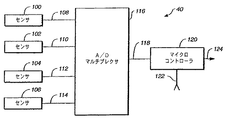
【0030】
図2は、図1の入力装置43の一実施形態の一部を拡大したブロック図である。入力装置43は、4つのタッチセンサ100、102、104、および106の配列を含む。これらのセンサは、入力装置の4つの補助コントロールに対応することができる。各センサは、個々の導線108、110、112、および114を通じて電気信号を生成し、この導線は、アナログからデジタルへの変換器およびマルチプレクサ116に接続されている。タッチセンサ100、102、104、および106は、ユーザとセンサの一部との実際の接触に基づいて、あるいはユーザとセンサとの著しい近接状態に基づいて各々の電気信号を生成する。接触に依拠するタッチセンサを接触センサと呼び、近接に依拠するタッチセンサを近接センサと呼ぶ。この応用例のコンテクストでは、タッチセンサに触れるとは、接触センサの場合にはそれに接触したときであり、近接センサの場合にはユーザが十分にセンサに接近したときである。本発明によると、センサは、「接触」と「接触解除(release)」ではそれぞれに必要とされる接触の度合いが異なるように構成できることを理解されたい。例えば、「接触」のイベントを検出するためには接触が必要とされるのに対し、「接触解除」のイベントを感知するには、接触が解除され近接状態がなくなることが必要とされるなどである。同様に、純粋な近接センサの実施形態では、「接触」イベントを感知するには非常に近づいた近接状態が必要とされるが、「接触解除」イベントの感知に必要とされる閾値(距離)はより高くすることができる。
【0031】
いくつかの接触センサの実施形態では、タッチセンサは、触れるとキャパシタンスが変化する導電性フィルムを含んでいる。このセンサはまた、導電性フィルムのキャパシタンスの変化に基づいて電気信号を生成する容量性測定回路も含む。当業者は、フォトダイオードセンサ、圧電材料を利用したセンサ、および容量性圧力センサなど、他の接触センサ技術も利用できることを認識されよう。これらのセンサはいずれも本発明のコンテクストで使用することができる。近接センサの一実施形態では、タッチセンサは、LEDからの反射光を使用してユーザがセンサに接近するとそれを検出する。この例示的実施形態によりLEDを駆動し、反射光を感知するのに使用するチップは、ニュージャージー州ブリッジウォーターのHamamatsu Corporationで製造することができる。別の近接センサの実施形態では、入力装置近くの電界または磁界の変化を用いて、ユーザが装置に接近するとそれを判定する。
【0032】
本発明の実施形態では、タッチセンサは、タッチセンサのどこでユーザが入力装置に触れるかや、ユーザがセンサのどの部分に接近するかに関係なく、同じ情報を提供することができる。このように、これらのタッチセンサは接触データと位置データを分離する。図2は、このタイプのタッチセンサを備えた例証的入力装置を示している。
【0033】
別の実施形態、例えばタッチパッド、タッチスクリーン、およびタッチタブレットを用いる実施形態では、所与のタッチセンサは、ユーザがそのタッチセンサのどこで接触を行ったか、あるいはユーザがそのタッチセンサのどこでタッチセンサに最も近づいたかを示す位置情報を提供することができる。このような装置では、装置に触れずに位置データを指定することはできない。また、位置を指定することなく装置に触れることもできない。このように、これらの装置では接触の感知と位置の感知が密接に結びついている。
【0034】
図2を参照すると、アナログからデジタルへの変換器およびマルチプレクサ116は、導線108、110、112、および114にあるアナログの電気信号を、線118で搬送されるデジタル値に変換する。線118はマイクロコントローラ120に接続されており、マイクロコントローラはマルチプレクサ116を制御して4つのタッチセンサの状態を選択的に監視する。マイクロコントローラ120はまた、入力装置の他の各種センサからの入力も受け取る。図を簡潔にするために、これらの入力はまとめて入力122として示している。当業者は、異なる入力装置および補助用コントロールは、その入力装置中の運動センサの種類に応じて、異なる入力信号を提供することを認識されよう。運動センサの例には、スイッチを閉じるのに必要な運動を表す信号を提供するスイッチ、音声信号によって生じる空気の動きを表す信号を提供するマイクロフォン、マウスボール、トラックボールあるいはマウスホイールの動きを表す信号を提供するエンコーダホイール、およびジョイスティックの動きを表す電気信号を提供する抵抗ワイパ、が含まれる。これらの運動センサはそれぞれ、コンピュータシステムに送る入力情報を生成することができる入力生成器として機能する。この入力情報は特定の入力生成器に応じて、押すことのできるキーの状態、押すことのできるボタンの状態、サウンド情報、あるいは動きの情報を含むことができる。
【0035】
当業者には、マイクロコントローラ120に連結する入力線の数は、入力装置のセンサ数と入力装置の構成に応じて決まることも認識されよう。例えば、キーボードの場合、マイクロコントローラは入力線を使用して、補助用コントロールのいずれかが起動されていないかどうかを判定する。マイクロコントローラは、マルチプレクサ(図示せず)を使用して、キーボード上の各補助用コントロールの状態を逐次テストすることによりこの判定を行う。これらの補助用コントロールの状態の投入を検出するのに使用する技術は、キーボードの技術分野ではよく知られている。
【0036】
マウスまたはトラックボールでは、入力線122は、スイッチの投入を検出するための線と、エンコーダホイールの回転を検出するための線を含む。スイッチは、マウスまたはトラックボールのボタンの下に配置されている。エンコーダホイールは、マウスボールまたはトラックボールの動きを把握する。通例、1つのエンコーダホイールがX方向の動きを把握し、もう1つのエンコーダホイールがY方向の動きを把握する。大半の実施形態では、各エンコーダホイールは、それ自体に関連付けられたマイクロコントローラ120への入力線を持っている。マウスによっては、さらに別のエンコーダホイールがマウスの上部にあるホイールの回転を把握する。
【0037】
一部のマウスでは、線122を通じてマイクロコントローラ120に接続された、個別の光マイクロコントローラによってマウスのXおよびY方向の動きを把握する。光マイクロコントローラは、光データを使用してマウスの動きを判定する。光マイクロコントローラはこの光データを運動値に変換し、これを入力線122に沿ってマイクロコントローラ120に伝送する。
【0038】
ゲームパッドなどのゲームコントローラでは、入力線122は、ゲームパッド上の複数スイッチの投入を検出するための線と、ゲームパッドのホイールの回転を検出するための線を含む。ジョイスティックの場合、入力線122は、ジョイスティックの抵抗ワイパとジョイスティックのスイッチに接続された線を含むことができる。ヘッドセットでは、線122は、マイクロフォンによって生成されたアナログ電気信号の大きさを表すマルチビットのデジタル値を搬送する複数の線を含む。通例は、アナログからデジタルに変換する変換器がこのデジタル値を生成する。ヘッドセットの重量を減らすために、アナログからデジタルへの変換器およびマイクロコントローラ120は、コンピュータ中に位置するサウンドボードの上に配置することができる。ヘッドセットの重量をさらに減らすために、図2のマルチプレクサおよびA/D変換器116もサウンドボードの上に実施することができる。
【0039】
マイクロコントローラ120は出力124を生成し、これを図1のシリアルポートインタフェース46に提供する。通例、出力124はシリアルのデジタル値であり、どの運動センサまたはタッチセンサが起動されたかを表す。キーボードの場合、このデジタル値は、起動されたキーや、キーボード上の他の補助用コントロールまたはタッチセンサを一意に識別するスキャンコードを含んでいる。マウスの場合、このデジタル値はマウスパケットを含んでおり、これはマウスの各スイッチおよび各タッチセンサの現在の状態と、前回のマウスパケットが送信されてからマウスホイールおよびマウスボールが移動した距離を記述する。
【0040】
図3は、本発明のヘッドセット150の透視図である。ヘッドセット150は、マイクロフォン152、支持ピース154、タッチセンサ156、および出力線158を含む。支持ピース154は、ユーザの耳の周囲で輪を描き、マイクロフォン152がユーザの口の前に来るようにヘッドセットを支える設計になっている。
【0041】
出力線158は、マイクロフォン152およびタッチセンサ156からの信号を伝搬する。いくつかの実施形態では、ヘッドセット150を、音声認識システムを含んだコンピュータシステムに接続する。そのような実施形態では、音声認識システムは、ユーザがヘッドセット150に触れていることをタッチセンサ156が示さない限り非アクティブになっている。音声認識システムの起動は、ユーザが最初にヘッドセット150に触れた際に、音声認識システムをランダムアクセスメモリにロードすることを含む。また、ランダムアクセスメモリ中にある音声認識システムが入力音声信号を処理できるように、それに指示を出すことも含むことができる。いずれの場合も、本発明は、ユーザがヘッドセットに触れていることをヘッドセット150が示したときにのみ音声認識システムを起動することにより、関係のない音声が音声認識システムで処理される可能性を低減している。
【0042】
図4Aは、本発明の例証的実施形態によるマウス170の一実施形態の透視図である。マウス170は、パームレスト172、左ボタン174、右ボタン176、ホイール178、側面180、および出力線182を含む。パームレスト172、左ボタン174、側面180の2つの側面領域184および186は、別々の導電性フィルムで被覆されている。この導電性フィルムはそれぞれ、図2のセンサ100、102、104および106など別々のセンサに接続され、その一部をなす。
【0043】
図4Bは、マウス170の下面図を示す。マウス170は、トラックボールネスト192の中に置かれたトラックボール190を含む。パームレスト172、側面180、左ボタン174、あるいは右ボタン176に加わる力によってマウス170を面上で動かすと、トラックボール190がネスト192中で回転する。図4Cを参照すると、1対のエンコーダホイール194および196がこの回転を検出している。
【0044】
図4Cは、マウス170の内部電子回路189の一部の透視図である。図が見やすいように、図4Cではトラックボール190を省略している。内部の電子回路189は、エンコーダ194および196を含み、これが2つの直角方向のトラックボール190の動きを検出する。エンコーダホイールはマイクロコントローラ200に提供する電気信号を生成する。マイクロコントローラ200は、左ボタン174および右ボタン176の下にそれぞれ配置されたスイッチ202および204からの入力も受け取る。スイッチ202および204はそれぞれ、左ボタン174および右ボタン176がユーザによって押されるとそれを示す。マイクロコントローラ200は、ホイール178が押されたときにそれを示すスイッチ201からの信号、およびホイール178の回転運動を表すエンコーダホイール203からの信号も受け取る。マイクロコントローラ200は、図4Aのパームレスト172、左ボタン174、および側面領域184および186上の導電性フィルムに取り付けられた4つのセンサからの電気信号も受け取る。図4Cでは、これら4つのセンサをまとめてセンサ配列206としている。左ボタン174と側面領域184および186は、押すと起動して機能を実行する補助用コントロールであってよい。
【0045】
このように、本発明の例示的実施形態によるマウスは、マウスの特定の領域が触れられたとき、およびマウスの一部あるいはマウス全体が動かされたときに、それを検出することができる。具体的には、パームレスト172、左ボタン174、および側面領域184および186上の導電性フィルムは、ユーザがこれらの領域に触れるとそれを示す。ユーザがマウスを動かしたりボタンを押したりしなくとも、図4Aの導電性フィルムと関連付けられたセンサは、ユーザがマウスに触れると電気信号を発生することに留意されたい。エンコーダホイール194および196は、ユーザがマウスを動かすと1種類の(a separate)信号を発生し、スイッチ202、204、および201は、ユーザがボタン174および176、およびホイール178をそれぞれ押すと個別の電気信号を発生する。このように、本発明による例示的マウスは、そのコントロールを操作するのに必要な手先の器用さをさらに必要とすることなく機能を付加する。
【0046】
本発明の代替実施形態では、トラックボール190およびエンコーダホイール194および196の代わりに、マウスが移動した表面の画像を収集してマウスの位置の変化を判定する固体位置追跡装置を用いる。この例示的実施形態によると、マウスは通例、表面に光を当てるのに使用する光源と、表面の画像を収集するのに使用する光学システムと、様々な画像を比較して、マウスが移動しているか、また移動している場合にはどの方向に移動しているかを判定するのに使用するプロセッサとを含む。固体位置追跡装置は運動を電気信号に変換することから、洗練されたトランスデューサまたは運動センサと見なすことができる。
【0047】
図5、6A〜6D、7A〜7B、8A〜8B、9A〜9C、10A〜10H、11A〜11B、12A〜12B、13A〜13D、および14A〜14Dは、本発明の例証的実施形態によるマウスの代替構成を示している。図5は、そのパームレスト600だけにタッチセンサを有するマウスの上面図である。図6Aおよび6Bはそれぞれ、パームレストと、マウスの左側面にセンサを有する別個の例証的マウスの実施形態を示している。側面図である図6Aでは、単一のセンサ602がパームレストおよびマウスの左側面の両方を覆っている。図6Bも側面図であるが、この場合は1つのセンサがパームレスト604を覆い、別のセンサが左側面606を覆っている。
【0048】
図6Cおよび6Dは、それぞれパームレストとマウスの右側面にセンサを有する、本発明の別々の例証的マウス実施形態を示している。右側面図である図6Cでは、単一のセンサ603が右側面およびパームレストの両方を覆っている。図6Dも右側面図であるが、この場合は1つのセンサ605がパームレストを覆い、別のセンサ607が右側面を覆っている。
【0049】
図7Aおよび7Bはそれぞれ、パームレストおよびマウスの左側面に単一のセンサ608を有し、マウスの左ボタン上に別のセンサ610を有する例示的マウス実施形態の側面図と上面図である。図8Aおよび8Bはそれぞれ、パームレストおよびマウスの左側面の単一のタッチセンサ612、マウスの左ボタンのタッチセンサ614、マウスの右ボタンのタッチセンサ616を有する例示的マウス実施形態の側面図と上面図を示している。
【0050】
図9A〜9Cはそれぞれ、本発明の例証的マウス690の左側面図、上面図、および右側面図を示している。マウス690は、左側面センサ692、パームセンサ694、右側面センサ696、およびボタンセンサ698を含む。マウス690では、右側面センサ696および左側面センサ692は、パームセンサ694とは別のものである。本発明の別の例証的実施形態では、この3センサを単一のセンサとして形成することができる。
【0051】
図10A〜10Hは、様々な例示的マウス実施形態の上面図を示すものであるが、マウスの左ボタンのタッチセンサに可能な構成を示している。これらのボタン構成は、マウスの上に単独で配置しても、あるいはマウスの他部分にある他のセンサと組み合わせて配置してもよい。図10Aは、左ボタン全体にわたる単一の固体センサ618を示す。図10Bは、6つのセンサストリップ620からなるセットを示しており、それぞれのセンサストリップは触れられると個別の電気信号を生成する。図10Cは、隆起部628で分離された2つの領域624および626を示す。領域624および626はどちらも、ボタン622の前端627で終わっている。図10Dは、隆起部636で分離された2つの領域634および637を示しているが、領域634および637はどちらもボタン630の側端631で終わっている。ボタン622および630の構成は、下記で述べるように文書を順に見ていく際に特に有用である。図10Eは、四角形641、642、643、および644として形成された4つの個別のセンサ領域を有するボタン640のボタン構成を示している。いくつかの実施形態では、4つのセンサ領域を分ける線は、センサ領域とは異なる形状的特徴を有する隆起部として形成する。図10Fも、ボタン646上の4つの個別のセンサを示している。図10Fでは、センサ領域650、651、および652の3つがボタン646の前端部にあり、残りのセンサ648がボタン646の残りの部分を覆っている。図10Gは、キーパッドに似たレイアウトで9つのセンサ領域を配置したボタン660を示している。図10Hは、中央センサ674を囲む8つのセンサ672からなる外側の円を有するボタン670を示している。ボタン670の構成は、放射状のメニューを操作する際に特に有用である。
【0052】
図11Aおよび11Bは、マウスの両ボタンに別々のセンサを含む例証的マウス実施形態を示している。図11Aでは、ボタン700および702にはセンサがあるが、パームレスト704にはセンサがない。図11Bでは、ボタン706および708およびパームレスト710が個別のセンサを有する。
【0053】
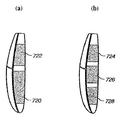
図12Aおよび12Bは、マウスの右側面に沿って複数のセンサがある例示的マウス実施形態を示す。図12Aは右側面図であるが、右側面上に2つのセンサ720および722がある。図12Bでは、右側面に3つのセンサ724、726、および728がある。
【0054】
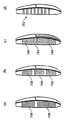
図13A〜13Dは、マウスの左側面に複数のセンサがある例示的マウス実施形態の側面図を示す。図13Aのマウスは、左側面に2つのセンサ734および736を有する。図13Bのマウスは、それぞれ一定の間隔で分離された3つのタッチセンサ738、740、および742を有する。図13Cのマウスも左側面に3つのタッチセンサを有する。ただし図13Cでは、センサ746と748の間に位置する真中のタッチセンサ744は、表面が一段高くなっており、センサ746と748間の隆起部として形成されている。センサ744の表面を高くすることにより、触覚によるフィードバックをユーザに提供して、ユーザがマウスを見ずに親指の位置を決められるようにしている。図13Dは、マウスの左側面に複数のストリップ752があるマウス実施形態を示す。
【0055】
図12A〜12Bおよび図13A〜13Dの例示的実施形態はすべて、パームレストに置いたセンサ、および/または左ボタンに置いたセンサ、および/または右ボタンに置いたセンサと合わせて実施できることに留意されたい。
【0056】
図14A〜14Dは、タッチセンサがマウスのホイールに近接した例証的マウス実施形態の上面図である。図14Aでは、ホイール760の上に直接タッチセンサを置いている。図14Bでは、ホイール764の前部に1つのタッチセンサ762を置き、ホイール764の後部に1つのタッチセンサ766を置いている。図14Bの実施形態では、ホイール764にはタッチセンサがない。図14Cでは、ホイール768の前部に1つのタッチセンサ770を置き、ホイール768の後部に1つのタッチセンサ772を置いている。さらに、ホイール768がタッチセンサを含む。図14Dの実施形態では、ホイール774、ホイール774の前の前部領域776、ホイール774の後ろの後部領域778、およびパームレスト780にタッチセンサを配置している。
【0057】
特に図5、6A〜6D、7A〜7B、8A〜8B、9A〜9C、10A〜10H、11A〜11B、12A〜12B、13A〜13D、および14A〜14Dにおけるタッチセンサの位置に関して様々な例示的実施形態を説明したが、センサはこの他の位置に含んでもよいことに留意されたい。例えば、一実施形態で例示したタッチセンサの一部またはすべてを、別の実施形態で例示したタッチセンサの一部またはすべてと組み合わせることが可能である。さらに、図5、6A〜6D、7A〜7B、8A〜8B、9A〜9C、10A〜10H、11A〜11B、12A〜12B、13A〜13D、および14A〜14Dに示すマウスの側面を含むがこれらに限定しないタッチセンサ位置の多くは、補助用コントロールの上にある導電性フィルムでよく、この場合そのコントロールを押すと起動して機能を実行することができることを理解されたい。この例では、コントロールに触れると1セットの電気信号が生成され、コントロールを起動すると第2の電気信号セットが生成される。本発明の特定の例証的実施形態では、その補助用コントロール(例えばボタン、ホイール)を含む各種のマウスは、そのタッチセンシティブな表面に触れる物理的存在(例えば指)、すなわち、表示ウィジェットを表示画面上に表示すること、および/またはその他の(例えば音声や触覚による)フィードバックを生成することを求める明示的なユーザ要求を表す物理的存在を検出することができる。このフィードバックは、ステータス情報、コントロールの機能、およびヘルプテキストといった情報をユーザに提供することができる。この情報はアプリケーションごとに異なってよい。本発明のいくつかの実施形態では、表示画面上の表示ウィジェットの位置は、タッチセンシティブな表面上での物理的存在の動きの通りに表示することができる。
【0058】
図15は、本発明の例証的トラックボール220の透視図である。トラックボール220は、基部222、ボタン224および226、およびボール228を含む。本発明の一実施形態では、トラックボール228は、基部222中の回転する3つの金属製ホイール(図示せず)と接触する導電性フィルムで被覆することができる。金属製ホイールの1つには、ホイールの後部に位置し、スプリング力によってホイールに押し付けられる導電性シートが接触する。導電性シートはさらにタッチセンサに接続され、ユーザがトラックボール228に触れるとこのタッチセンサが電気信号を生成する。基部222中の他の2つのホイールは、2つの直角方向の運動センサ(図示せず)を形成し、基部222中のトラックボール228の回転運動を把握することができる。基部222はボタン224および226の下に2つのスイッチを含んでおり、これはユーザがボタン224および226を押すと電気信号を生成することができる。このように、トラックボール220は、ユーザが単にボール228に触れることに基づいて1種類の電気信号を提供し、ユーザがトラックボール228を動かすか、あるいはボタン224または226を押すのに基づいて別の電気信号を提供することができる。また、起動すると機能を実行することのできる1つまたは複数の補助用コントロールを、基部222上のトラックボール228の周囲に配置してもよい。この補助用コントロールは、その表面にタッチセンシティブな導電性フィルムを有することができ、ユーザがコントロールを押すのに応答して起動し、機能を実行することができる。したがって、コントロールが触れられると1セットの電気信号を生成し、コントロールが起動されると第2の電気信号セットを生成する。本発明の例示的実施形態では、トラックボールおよびその補助用コントロール(例えばボタン)は、そのタッチセンシティブな表面に触れる物理的存在(例えば指)、すなわち、表示ウィジェットを表示画面上に表示すること、および/またはその他の(例えば音声、触覚による)フィードバックを生成することを求める明示的なユーザ要求を表す物理的存在を検出することができる。フィードバックは、ステータス情報、コントロールの機能、およびヘルプテキストといった情報をユーザに提供することができる。この情報はアプリケーションごとに異なってよい。本発明のいくつかの実施形態では、表示画面上の表示ウィジェットの位置は、タッチセンシティブな表面上での物理的存在の動きの通りに表示することができる。
【0059】
図16はジョイスティックを備えた例証的ゲームコントローラの透視図であり、これは、基部242、ハンドル244、トリガ246、およびボタン248、250、252を含む。本発明の一実施形態では、トリガ246は、基部242中のタッチセンサに接続された導電性フィルムで被覆することができる。さらに別の実施形態では、ボタン248も、基部242中でそれとは別のタッチセンサに接続された導電性フィルムで被覆することができる。トリガ246、およびボタン248、250、252はさらに、ユーザが個々のボタンまたはトリガを押すと個別の電気信号を提供するスイッチに接続してもよい。ハンドル244は、基部242に対するハンドル244の相対運動を追跡する1組のトランスデューサに接続することができる。このように、このゲームコントローラは、ユーザがトリガ246またはボタン248に触れると1セットの電気信号を提供し、ユーザがハンドル244、またはトリガ246、ボタン248、250、252を動かすと別の電気信号セットを提供することができる。
【0060】
図17は、本発明による別の例証的ゲームコントローラの透視図である。図17には、ゲームパッド260の形態のゲームコントローラを表している。ゲームパッド260は、サイドボタン262および264、左手ボタン266、268、270、272、274、276、および右手ボタン278、280、282、284、286、288を有する。さらにゲームパッド260は、開始ボタン290および選択ボタン292を有する。本発明のいくつかの実施形態では、サイドボタン262および264はそれぞれ、ゲームパッド260中で別々のタッチセンサに接続した導電性フィルムで被覆することができる。ゲームパッド260はゲームパッドのボタンごとに1つの複数のスイッチも含むことができる。したがって、いくつかの実施形態では、ゲームパッド260は、ユーザがサイドボタン262および264に触れたときにはそれを示す1セットの信号を提供することができ、ユーザがゲームパッド260のボタンを押すとそれを示す第2の電気信号セットを提供することができる。
【0061】
本発明の例証的実施形態では、その補助用コントロール(例えばボタン、ジョイスティック、トリガ)を含む図16および17のようなゲームコントローラは、そのタッチセンシティブな表面に触れる物理的存在(例えば指)、すなわち、表示ウィジェットを表示画面に表示すること、および/または(例えば音声、触覚による)その他のフィードバックを生成することを求める明示的なユーザ要求を表す物理的存在を検出することができる。フィードバックは、ステータス情報、コントロールの機能、およびヘルプテキストなどの情報をユーザに提供することができる。この情報はアプリケーションごとに異なってよい。本発明のいくつかの実施形態では、表示画面上の表示ウィジェットの位置は、タッチセンシティブな表面上での物理的存在の動きの通りに表示することができる。
【0062】
図18Aは、本発明の例示的実施形態によるキーボード300を示している。キーボード300は、キーボードの左側に一般的なQWERTY配列302を有し、右側に数字キーパッド304を有する。数字キーパッド304は数字0〜9を含んでおり、この数字0〜9は3x3の枠に並んでいる。いくつかの実施形態では、これら9つのキーすべてを導電性フィルムで被覆することができる。別の実施形態では、キーボードの他のキーおよび補助用コントロールを導電性フィルムで被覆することができる。各キーの導電性フィルムは、キーボード300中の別々のタッチセンサに接続され、その一部をなす。各キーが導電性フィルムを有するということは、それぞれのキーが2種類の信号を提供できることを意味する。1つの信号は、ユーザがキーを押さずに触れたときに提供することができ、第2の信号はユーザがキーを押したときに提供することができる。
【0063】
タッチセンサをさらに、キーボードケース(casing)301の、スペースバー308の下の部分306および307、矢印キー310の下の部分309、およびキーパッド304の下の部分311に配置することができる。矢印キー310は通例、ユーザが表示中でカーソルを動かすのに使用する。キーの上、および部分306、307、309、311にタッチセンサを備えたキーボード300を示しているが、本発明の別の例示的実施形態では、キーだけにタッチセンサを有するか、または部分306、307、309、311の1つだけにタッチセンサを有してもよい。別の例示的実施形態では、こうしたタッチセンサを別の組み合わせでキーボード300に配置することができる。さらに、部分306、307、309、311のタッチセンサの一部またはすべてを近接センサにしてもよい。タッチセンサ306、307、309、311は、ジョイスティック、ゲームパッド、タッチパッド、トラックボール、ボタン、つまみ、ロッカースイッチ、トリガ、スライダ、ホイール、レバーなどを含むがこれらに限定しない多種の補助用コントロールを表すことができる。近接センサは、ユーザの手がセンサに近づくとそれを検出することができ、手が実際にセンサに接触する必要はない。一般的に、ユーザが補助用コントロールに触れるがそれを起動(例えば、押す、回す、回転する)しないと1種類の信号が提供され、ユーザが補助用コントロールを起動すると第2の信号が提供される。本発明の例示的実施形態では、その補助用コントロールを含むキーボードは、そのタッチセンシティブな表面に触れる物理的存在(例えば指)、すなわち、表示ウィジェットを表示画面上に表示すること、および/または(例えば音声、触覚による)その他のフィードバックを生成することを求める明示的なユーザ要求を表す物理的存在を検出することができる。フィードバックは、ステータス情報、コントロールの機能、およびヘルプテキストなどの情報をユーザに提供することができる。この情報はアプリケーションごとに異なってよい。本発明のいくつかの実施形態では、表示画面上の表示ウィジェットの位置は、タッチセンシティブな表面上での物理的存在の動きの通りに表示することができる。
【0064】
図18Bは、本発明による別の例証的キーボードの一部を示しており、これはボタン312A〜312G、およびタッチセンシティブなコントロール用つまみ314を含む補助用コントロール入力を有する。ボタン312A〜312Gにはそれぞれタッチセンサがついている。図18Cは本発明によるさらに別の例証的キーボードを示すが、これはタッチセンシティブなロッカースイッチ315、および各々タッチセンシティブなボタン312A〜312Gを備える。
【0065】
図19は、本発明による例証的タッチパッド2000の透視図である。このタッチパッドは、現在カリフォルニア州サンホセのSynaptics Corporationから入手可能な従来型のタッチパッドでよく、変更を加える必要はない。タッチパッド2000は、タッチセンシティブな表面(タブレット)2100からなっており、この表面は、ユーザの指が表面に接触しその上を移動すると、指の2次元の位置と接触領域(表面領域)を感知する。さらにタッチパッド2000は、タッチセンシティブな表面の周辺に位置するボタン2220、2240、2260、2280を含んでいる。ボタン2220、2240、2260、2280の1つまたは複数はタッチセンシティブでよい。このタッチパッドの出力は、図1に示すようなコンピュータシステムに送る(route)ことができる。本発明の実施形態では、その補助用コントロールを含むタッチパッドは、そのタッチセンシティブな表面に触れる物理的存在(例えば指)、すなわち、表示画面上に表示ウィジェットを表示すること、および/または(例えば音声、触覚による)その他のフィードバックを生成することを要求する明示的なユーザ要求を表す物理的存在を検出することができる。フィードバックは、ステータス情報、コントロールの機能、およびヘルプテキストなどの情報をユーザに提供することができる。この情報はアプリケーションごとに異なってよい。本発明のいくつかの実施形態では、表示画面上の表示ウィジェットの位置は、タッチセンシティブな表面上での物理的存在の動きの通りに表示することができる。
【0066】
以上の説明のように、入力装置のキー、ボタン、つまみ、ロッカースイッチ、あるいはその他の補助用コントロールは、ユーザの手(例えば、指や手のひら)あるいはスタイラスを含むがこれに限定しない物理的存在の接触、またはその著しい近接状態を検出するセンサで補うことができる。ここまで、マウス(図4A〜14B)、トラックボール(図15)、ゲームコントローラ(図16および17)、キーボード(図18A〜18C)、およびタッチパッド(図19)を含む例証的な入力装置を示し、それについて説明した。本発明の実施形態によると、上記のような感知された信号を使用することにより、ユーザが触れたコントローラに関連するステータスの画面表示、状態情報、またはその他のフィードバックをユーザに提供することができる。
【0067】
図20は、本発明の例示的実施形態によるメッセージルーティングシステムを説明するのに有用な、コンピュータ20のより詳細なブロック図である。図20で、入力装置43は、シリアルの2進信号をシリアルインタフェース46に提供する。入力装置43は、上記で説明した、タッチセンサを有する入力装置およびその補助用コントロールのどれを含んでもよい。
【0068】
シリアルインタフェース46は、入力装置43からのシリアルの2進信号をパラレルのマルチビット値に変換し、それをデバイスドライバ60に渡す。本発明の多くの実施形態では、デバイスドライバ60は、図1のCPU21で実行するソフトウェアルーチンとして実施することができる。そのような実施形態では、デバイスドライバ60は入力装置固有のものにし、指定プロトコルに基づいて特定の入力装置およびその補助用コントロールと対話するように設計することができる。したがって、入力装置43がマウスである場合には、デバイスドライバ60は、マウスが生成したマウスパケットをマウスパケットプロトコルを用いて受信するように設計されたマウスドライバになる。入力装置43がキーボードである場合、デバイスドライバ60は、キーが押されていることまたはタッチセンサが触れられていることを表すキーボードスキャンコードを受信するように設計されたキーボードドライバになる。
【0069】
デバイスドライバ60は、指定のプロトコルに基いてマルチビット値をデバイスメッセージに変換し、それをオペレーティングシステム35に渡す。このデバイスメッセージは、入力装置でどのようなイベントが起こったかを表す。例えばマウスのタッチセンサが触れられた場合、このメッセージは特定のセンサが触れられていることを示す。タッチセンサから手が離れると、タッチセンサから手が離れたことを示す別のメッセージがデバイスドライバ60によって生成される。
【0070】
デバイスドライバ60によって生成されたメッセージは、このメッセージのルーティングを制御するオペレーティングシステム35に提供される。例証的実施形態によると、デバイスメッセージは通常フォーカスアプリケーション812に送信される。フォーカスアプリケーションとは、通例、ディスプレイで一番上にあるウィンドウを有するアプリケーションである。
【0071】
いくつかの例証的実施形態では、オペレーティングシステム35は、そのオペレーティングシステムに登録されたメッセージフックプロシージャのリストを維持している。そのような例証的実施形態では、オペレーティングシステム35は、デバイスメッセージをフォーカスアプリケーション812に送信する前に、それをリストにある各メッセージフックプロシージャに逐次渡す。このようなメッセージフックプロシージャを、図20のメッセージフックプロシージャ810として包括的に示している。メッセージフックプロシージャの大半は、単にデバイスメッセージを評価して、何らかの措置を講ずるべきかどうかを判定するものである。メッセージフックプロシージャは、デバイスメッセージを評価すると値をオペレーティングシステム35に戻し、オペレーティングシステムがそのデバイスメッセージをリスト中の次のプロシージャに渡すことを示す。メッセージフックプロシージャの中にはデバイスメッセージを「食べる」能力を有するものもあり、これは、オペレーティングシステムがそのデバイスメッセージを他のメッセージフックプロシージャまたはフォーカスアプリケーションに渡すべきでないことを示す値をオペレーティングシステム35に戻すことによって行う。
【0072】
メッセージフックプロシージャおよびフォーカスアプリケーションは、特にタッチセンサが触れられたことを示すデバイスメッセージを使用して、下記で説明する各種の機能を開始する。
【0073】
例えば、図21および22が示すのは、図4Aおよび図15それぞれのマウス170またはトラックボール220など、本発明の例証的実施形態による入力装置からの信号に基づいて生成されるデバイスメッセージを利用する、本発明の各種のアプリケーションが表示する画面の画像である。図21は、仮想デスクトップ322を示す画面320の画像を表している。仮想デスクトップ322は、アイコン324および326の画像、ならびに開いたウィンドウ328を含んでいる。開いたウィンドウ328は、ワシントン州レドモンドのマイクロソフト社製造のMicrosoft Word(登録商標)として知られるワードプロセッシングアプリケーションに関連するものである。
【0074】
ウィンドウ328で、開いた文書の文章中にカレット330が置かれている。カレット330の位置は、マウス170、またはトラックボール220のボール228を動かすことによって決めることができる。図21で、カレット330は、2本のより短い水平線の間を延びる垂直線として表示されている。当業者は、カレット330は様々な形状にすることができ、通例デスクトップ322上では矢印として表示されることを認識されよう。
【0075】
ウィンドウ328の文章中でのカレット330の位置によって、ツールヒント332が表示される。ツールヒント332は、カレット330の下にある単語を誰が入力したのかを示している。
【0076】
ウィンドウ328は、ウィンドウ328の文書中に絵を書く際に使用することのできる描画ツールを含んだツールバー334も含む。
【0077】
図21に示すような本発明の例示的実施形態によると、カレット330、ツールヒント332、およびツールバー334は、ユーザが、このワードプロセッシングのアプリケーションであるツールヒントを提供することを割り当てられた補助用コントロール(例えば、ボタンやボタンの組み合わせ)など入力装置の一部に触れている間にのみ、ウィンドウ328中に表示される。ユーザがその入力装置に触れていないと、カレット330、ツールヒント332、およびツールバー334は消える。図22は、ユーザが入力装置の一部に触れていないときのディスプレイ320の画像を示している。ユーザが入力装置に触れていないときにはツールバー334、カレット330、およびツールヒント332をなくすことにより、本発明は、ウィンドウ328に見られる乱雑さを低減し、ユーザがウィンドウ328に示される文書を容易に読めるようにする。
【0078】
当業者には、ユーザが入力装置に触れていない際のカレット330、ツールヒント332、およびツールバー334の消去は個別に制御できることが認識されよう。したがって、ユーザはウィンドウ328をカスタマイズして、ユーザが入力装置から手を離すとツールヒント332およびツールバー334は消えるが、カレット330は表示したままにすることが可能である。さらに、アイテムが表示および再表示される際の速度も制御することができる。したがって、ユーザが入力装置から手を離してから触れると、画像が表示から徐々に消え、そして徐々に表示上に戻すことが可能である。本発明のいくつかの例証的実施形態では、なるべくユーザの気を散らさないように、フェードアウト期間は0.7〜1.0秒にし、カレットのフェードイン期間は0秒にして瞬時に表示されるようにし、ツールバーのフェードイン期間は0.3秒にする。ある実施形態では、フェードアウト時間は、ユーザが規定のデフォルト期間を用いて設定できる変数にすることが可能である。
【0079】
図23〜25は、図18Aのキーボード300からのキーボードメッセージの結果表示することのできるプルダウンメニューを含んだ、一連の例証的表示画面を示している。詳細には、図23の画面画像350では、アプリケーションが、プルダウンメニュー356の画像を含んだアクティブウィンドウ352を仮想デスクトップ354上に生成している。プルダウンメニュー356は、メニューバー358にある「Tools」の名のメニュー見出しと関連付けられている。プルダウンメニュー356は、ユーザがキーボード300の数字キーパッド304のキーの1つに触れているが押してはいないことを示すキーボードメッセージに応答して表示される。
【0080】
別の例示的実施形態では、ユーザは、数字キーパッド304の数「4」および「6」を表すキーを使用することにより、メニューバー358を左右に移動することができる。ユーザがメニューバー358を横に移動すると、それぞれのメニュー見出しについての異なるプルダウンメニューを表示することができる。具体的には、ユーザは数「4」を表すキーに触れることによりキーボードメッセージをアプリケーションに送信させ、アプリケーションは、ヘッダメニュー358中で現在のメニュー見出しの左にあるメニュー見出しを表示するように表示を変更する。したがって、現在ウィンドウ352でメニュー見出し「Tools」についてのプルダウンメニューが表示されている場合、数「4」を表すキーに触れると、メニュー見出し「Insert」と関連付けられたプルダウンメニューが表示される。同様に、ユーザは数字キーパッド304の数「6」を表すキーに触れることにより、現在のメニュー見出しの右のメニュー見出しのプルダウンメニューを表示させることができる。したがって、現在表示されているプルダウンメニューがメニュー見出し「Tools」に関連づけられたもので、ユーザが数「6」を表すキーに触れた場合は、ヘッダメニュー358中のメニュー見出し「Format」と関連付けられたプルダウンメニューが表示されることになる。これを図24に示しているが、メニュー見出し「Format」358についてのプルダウンメニュー360が表示されている。
【0081】
ユーザは、数字キーパッド304で数「2」および「8」を表すキーに触れることにより、プルダウンメニュー360などのプルダウンメニュー中で上下にも移動することができる。ユーザがプルダウンメニュー中を移動すると、プルダウンメニューの異なるアイテムがハイライト表示される。ハイライト表示した項目の一例は図25の項目362であるが、この図ではプルダウンウィンドウ360の項目「Tabs」が現在の項目としてハイライト表示されている。項目362が現在の項目であるときにユーザが数「8」を表すキーに触れると、それに関連付けられたキーボードメッセージを受信するアプリケーションが、項目362の上に位置する項目364を現在の項目としてハイライト表示する。項目362が現在の項目であるときにユーザが数「2」を表すキーに触れると、項目362の下の項目366が現在の項目としてハイライト表示される。
【0082】
図24は、本発明の別の実施形態の説明にも使用することができる。詳細には、プルダウンウィンドウ360は、カレットをメニュー見出し「Format」の上に置き、図4Aおよび図15それぞれのマウス170またはトラックボール220などのポインティングデバイスの選択ボタンを押すことによっても起動することができる。ユーザは、ポインティングデバイスを項目のリスト中で下方に移動することにより、プルダウンウィンドウ360中の項目を選択することができる。ユーザが入力装置を移動すると、リスト中の個々の項目がハイライト表示される。
【0083】
従来技術では、カレットをプルダウンメニュー自体の外側に置いてもプルダウンメニュー360は引き続き表示される。このプルダウンメニューを消す唯一の方法は、メニュー自体の外側の領域でクリックすることである。しかし本発明の例証的実施形態によると、プルダウンメニューを生成するアプリケーションは、ユーザがポインティングデバイスから手を離したことを示すマウスメッセージを受け取ると直ちにそのプルダウンメニューを取り除く。これは、ユーザがヘッダメニュー358と関連付けられたプルダウンウィンドウを閉じるために行わなければならない動きを減らすことによりユーザの効率を改善する。
【0084】
図26は、本発明の別の例示的実施形態によって表示される、放射状メニュー370を含む表示画面の画像である。放射状メニュー370は、キャンセルボタン372の周囲に円形に配置された8つの項目371を含んでいる。放射状メニュー370は例えば、図18Aのキーボード300か、または図10Hのマウスのボタン670の上についたタッチセンサを使用して操作することができる。
【0085】
キーボード300を使用する場合、フォーカスアプリケーションは、ユーザがキーパッド304のキーの1つに触れたことを示すキーボードメッセージを受け取ると放射状メニュー370を表示する。ユーザが特定の項目をハイライト表示させるには、その項目と空間的に関連づけられたキーパッド304中のキーに触れる。例えば放射状メニュー370の項目373をハイライト表示するには、ユーザは、数「5」を表す中央キーのすぐ上に位置する数「8」を表すキーに触れる。これは、キー「5」に対するキー「8」の空間的な位置づけが、項目373とキャンセルボタン372の空間的関係と同じであるためである。ユーザが項目を選択するには、その項目をハイライト表示させるキーを押す。放射状メニューを消すには、ユーザはキー「5」を押す。
【0086】
図10Hのマウスのボタン670のタッチセンサを使用して放射状メニューを操作するには、ユーザは単に放射状メニューの項目に対応するタッチセンサに触れればよい。単に対応するタッチセンサに触れるだけで、その項目がハイライト表示される。対応するタッチセンサに触れながらボタン670を押すとその項目が選択される。アプリケーションは、2つの個別のマウスメッセージに基づいて、2つのイベントが起こったことを判定する。第1のマウスメッセージは、どのタッチセンサが現在触れられているかを示す。第2のマウスメッセージは左ボタンが押されたことを示す。
【0087】
本発明の例証的実施形態によると、タッチセンシティブなコントロールおよび装置の使用は、ユーザにとって透過にすることができる。状況のコンテクストは、コントロール装置をつかむ、装置に触れる、あるいは接近するといった、コントロールとのユーザの前段階的な行動によって示される。図18Bを参照し、例として、コントロール用つまみ314の現在の機能が、メディアに関連する音声の音量のコントロールであるとする(システムで生成される他の音声の音量のコントロールに対して)。この例で、ユーザが音量を変えたい場合には、その手をコントロール用つまみ314に近づけるか、あるいはつまみに触れることが考えられる。ユーザがつまみを回してコントロール用つまみ314を起動する前に、図27に示すように、画面による音量表示の形態の音量のステータスを含んだ音量コントロール用GUIを画面に表示することができる。するとユーザはコントロール用つまみ314を回して音量を調節するか、またはコントロール用つまみ314を回さずにそれに触れながら、キー(例えば矢印キー)、マウス、あるいはその他のポインティングデバイスなど別のコントロールを用いてポインタ(例えばカレットや矢印)をGUIの中に移動し、音量を変えることができる。GUIが表示された状態でユーザがコントロール用つまみ314に触れ、そしてキーまたはポインティングデバイスを使用して音量を変えた場合、音量状態の変化は直ちにGUI、または表示画面上の他の場所に表示することができる。ユーザがコントロール用つまみ314から手を離すと、システムはそのGUIがもはや必要でないことを知り、知覚可能な遅延を置かずにGUIを消すことができる。実施形態によっては、ポインティングデバイスがGUIとの対話を続ける限り、あるいはカーソルがGUIの上にある限りGUIは表示されている。
【0088】
本発明の別の例証的実施形態では、ユーザが、その起動は行わずにコントロール用つまみ314に接近するか、または触れると、瞬時にツールヒントなどの表示ウィジェットを表示画面に表示することができ、これによりコントロール用つまみ314の現在の機能を識別することができる。ツールヒントは例えば、次のような機能の1つを示すことができるが、機能はこれに限定するものではない。1)オーディオおよびビデオアプリケーションを含む多種アプリケーションのチューニング、2)メディアアプリケーションの音量コントロール、3)システムで生成されるサウンドの音量コントロール、および4)複数の設定(例えば、輝度、トリミング(cropping)、色など)を有する多数の機能のコントロール。別の例証的実施形態では、ユーザがコントロール用つまみ314などのコントロールに接近すると、LEDまたはLCD単体により、あるいは表示画面の表示ウィジェットに加えて、視覚的フィードバックを実際のコントロール用つまみに提供することができる。さらに別の例証的実施形態では、聴覚または触覚(例えばバイブレーション)によるフィードバックを単独で、または表示画面、入力装置および/またはコントロールへの視覚的フィードバックに加えて、または相互に提供することができる。したがって、入力装置またはコントロールは、ホストコンピュータを関係させ、あるいはホストコンピュータと情報を共用して、またはそのようなことは行わずに、直接フィードバック(例えば音声によるフィードバック)を提供することができる。さらに別の例示的実施形態では、コントロール用つまみ314などのコントロールの1つまたは複数の部分(例えば上面や側面)が独自に接触やユーザの近接状態を検出し、コントロールのどの部分が触れられているかに基づいてホストコンピュータに対して独自のメッセージを生成することができる。
【0089】
図18Cのキーボード入力装置に基づく本発明の別の例証的実施形態では、タッチセンシティブなロッカースイッチ315を提供することができる。あるコンテクストでは、ワシントン州レドモンドのマイクロソフト社製造のWindows(登録商標)98などのオペレーティングシステムで現在使用されている「Alt」キーと「Tab」キーの組み合わせを使用するのと同様に、ロッカースイッチ315によりユーザがアプリケーションを切り替えることができる。すなわち、ロッカースイッチ315により、ユーザは実行中のアプリケーション間を移動することができる。具体的には、ユーザがロッカースイッチ315に触れるか、あるいは接近すると、現在実行中のアプリケーション各々のアイコンを示す画面上表示が示され、図28に示すように最前面にある(ウィンドウが重なる順序で一番上にある)アプリケーションがハイライト表示される。ユーザは、ロッカースイッチ315を押すことにより、ディスプレイの最前面に持って行きたい所望のアプリケーションをハイライト表示するために、アプリケーション間を移動することができる。この順序は、アルファベット順、あるいは前回各アプリケーションがディスプレイの最前面にあった時など、複数の方式で決定することができる。ロッカースイッチ315から手を離すとハイライト表示されたアプリケーションが選択され、ディスプレイの最前面に来る。タッチセンシティブなロッカースイッチ315は、この他にも多数の応用例で使用できることを理解されたい。これには、スイッチへのユーザ接触あるいは著しい近接状態に応答して様々なアイテムを表示すること、スイッチを押すのに応答してアイテムをハイライト表示すること、およびスイッチの接触状態の解除、あるいはスイッチから遠ざかることによりリストからアイテムを選択すること、が含まれる。
【0090】
例示的なキーボード入力装置の各種の補助用コントロール、およびその接触に対するコンテクストに即した反応の例示的な実施を下の表1ないし表5に列記する。各種のコントロールおよび反応は、ゲームコントローラ、トラックボール、マウス、タッチパッドなど他の入力装置にも応用できることを理解されたい。
【0091】
【表1】

【表2】
【表3】
【表4】
【表5】
以下の表6では、本発明による例示的マウス入力装置への接触に対する、コンテクストに即した反応の例示的な技術について説明する。
【0097】
【表6】
タッチセンシティブなコントロールへのユーザの接触に応答して画面に提供できる各種の視覚的フィードバックに加えて、いまひとつの可能性は、キーの組み合わせまたは他のコントロールに、それぞれコピー機能(例えば「Ctrl」キーと「c」キーを同時に)、およびペースト機能(例えば「Ctrl」キーと「v」キーを同時に)を実行させるように設定する場合に、図29Aおよび29Bに示すような標準的なツールヒントを表示することである。すなわち、ユーザが「Ctrl」キーと「c」キーに同時に触れると、図29Aに表示する「Copy」のツールヒントが画面に現れ、ユーザが「Ctrl」キーと「v」キーに同時に触れると、図29Bに示す「Paste」のツールヒントが画面に現れる。
【0099】
通例、画面上表示は、ユーザが触れる入力装置に関係なくその時点のカーソルまたはポインタ(例えばカレット)位置の近くに配置することができる。例えば、キーボードのツールヒントをカーソルの隣に表示することができる。画面上表示を上記の現在のカーソル位置の右上に表示する(pop up)ことは有益である。これは、ワシントン州レドモンドのマイクロソフト社製造のWindows(登録商標)オペレーティングシステムで、ユーザがポインタをアイコンの上に乗せた状態で停止している時に表示される、従来のツールヒントとその画面上表示が重なら(conflict with)ないからである(従来のツールヒントは、ポインタまたはカーソルの右下に表示される)。ツールヒントは、ユーザがポインティングデバイス(例えばマウス)によりカーソルまたはポインタを移動すると、カーソルまたはポインタの後をたどって行くようにすることも、またはそれが最初に表示された点に静止したままにすることもできる。ツールヒントをカーソルとともに移動するよりも、それが表示される場所にツールヒントを維持しておく方が実施が容易であり、かつより効率的であり、ユーザにも受け入れられやすいと考えられる。本発明の別の例示的実施形態によると、表示ウィジェットは、画面中央、その時アクティブな(「フォーカス」)アプリケーションまたはウィジェット(例えばテキスト入力ボックス)の中央、画面下部、あるいはシステムトレーアイコンの上部、に表示することができる。
【0100】
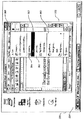
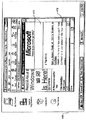
図30Aおよび30Bは、別の例示的な表示ウィジェット(画面上表示)を示しているが、この図では、本発明の例証的実施形態により、ユーザがプログラマブルなキーボードホットキーおよびファンクション「F」キーに触れるのに応答して表示することのできる、各アプリケーションについてのキーボードコントロール機能を例示している。ユーザが単にキーに触れただけで起動しないと、画面上表示は、そのキーが何であるか、および/またはそのキーが行う動作を示すことができ、その機能は実際には実行されない。図30Aは、ユーザがキーに触れるのに応答する、キーボードホットキーの設定をカスタマイズする、あるいは見るための(例えばマウスや他のポインティング装置によって)選択可能なオプションを含んだキーボードホットキーのGUIの画面上表示の例を示している。すなわち、ユーザはこのGUIの「Reassign HotKey」の領域をクリックして、そのホットキー(キーの組み合わせでもよい)の現在の機能を見、そのホットキーの機能を割り当てを変えることができる。図30Bには、ユーザがあるキーに触れるのに応答した、キーボードホットキーの設定をカスタマイズする、あるいは見るための選択可能なオプションを含んだキーボードホットキー用のGUIの画面上表示の別の例を提供する。図30Bが図30Aと異なるのは、そのキーが何であるか、およびその動作(例えば「マイコンピュータ」アプリケーションの起動)についてのより詳しい情報をユーザに提供する点である。実施形態によっては、触れることによって起動されるGUIは、ユーザがそれに関連付けられたコントロールに触れると直ちにキーボードフォーカスを受け取ることができる。これにより、ユーザは即座に上記の例「Reassign HotKey」の「R」のキーを打って、それに代わる機能を起動することができる。別の実施形態では、接触によって起動するGUIはキーボードフォーカスを受け取らない。ユーザは、マウスでGUIをクリックするか、例えば「Alt」キーと「Tab」キーの組み合わせや、上層の(top level)切り替えるための別の方法を用いてキーボードフォーカスに切り替えなければならない。この後者の実施形態は、ユーザがそれに受け取らせるつもりでないキーボード入力を、接触で起動するGUIが受け取らないようにしている。好ましい実施形態は、特定の入力装置、その装置のタッチセンシティブなコントロール、現在のアプリケーション、あるいはユーザの嗜好の詳細に応じて決まる。
【0101】
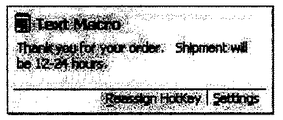
本発明の別の例示的実施形態では、各ホットキーにテキストマクロを割り当てることができ、この場合はホットキーを起動すると、例えば画面上のカーソル位置にテキストのブロックが挿入される。このようなコンテクストで使用する場合、あるホットキーに触れると、図31に示すようにそのホットキーに割り当てられたテキストマクロの全文ではなくとも少なくとも始めの部分あるいはその他の部分が表示される。画面上表示のウィンドウは、テキスト全文を表示するために、そのテキストマクロに割り当てられたテキスト量に応じて自動的にサイズを調整することができる。このコンテクストはスクロールコントロールと合わせて使用することもでき、ユーザがそのテキストマクロを割り当てられたホットキーに触れている間そのテキストをスクロールすることができる。
【0102】
先に述べたように、本発明のいくつかの例示的実施形態によると聴覚または触覚によるフィードバックを利用することができる。聴覚または触覚によるフィードバックは、ディスプレイ上の視覚的なフィードバックと合わせて、あるいはそれとは別に使用することができる。場合によっては、その際実行中のアプリケーション、その際使用している入力装置、あるいはユーザの好みにより、視覚的なフィードバックが適当ではなく聴覚によるフィードバックが望ましい場合もある。
【0103】
本発明のある実施形態によると、ユーザがあるコントロールに触れると、適切なキュートーン(cue tone)やその他のサウンドなど聴覚によるフィードバックを生成することができる。所望のオーディオキュートーンを、特定の機能またはコントロールに割り当て(map)ることができる。音量、音の高低、および音色を調整して、音声で生成されるコントロール機能の通知など所望のサウンドをまねた適切なキューを作ることができる。キューサウンドは、パラメトリックなサウンドイベント要求を受け取り、MIDIウェーブテーブルシンセサイザ662を使用し、音声生成装置640(例えば、Creative Labs AWE64 Goldカードサウンドボード)でそれを順番に配列することによって生成することができる(図6参照)。音声キューごとに正確な音声パラメータを設定し、その音声キューを適切に合成し、キューをそれに対応するコントロールおよび/または機能と関連付けるための具体的な技術はすべて当業者には容易に明らかになるものであり、また本発明の一部を形成するものではないので説明の簡略化のために省略している。
【0104】
機能およびその他の情報を識別するための聴覚的フィードバックは、ワシントン州レドモンドのマイクロソフト社製造のMS Game Voice(商標)などゲームのアプリケーションおよび製品に特に有用である。例えば、ゲーム製品は、パック(puck)に取り付けられたヘッドセットマイクロフォンの組み合わせを含むことがある。ユーザは、パックにより、自分が一緒にプレーしている人々およびチームの複数の組み合わせと選択的に話をすることができる。各々の者には、コード(1、2、3...)およびチーム(A、B、C...)が自動的に割り当てられる。問題が生じうるのは、プレーヤがどのコードがどのプレーヤおよびチームに対応しているのかを記憶しておかなければならない場合である。ユーザがあるボタンが誰に割り当てられているかについての確認(reminder)が欲しい場合は、あるコントロール(例えば数字キー)に触れると、そのコードに割り当てられた者の名前の聴覚フィードバックを自分のヘッドセットを通じて受け取ることができる。
【0105】
表1ないし表5に明らかにした本発明の一例示的実施形態では、入力装置上の複数の接触領域を使用することにより、インターネットブラウザによって提供されるウェブページ間を移動することができる。複数のタッチセンシティブな領域を有し、ページ間を移動するのに有用な入力装置の例には、特に図10C、10D、12A、12B、13A、13B、および13Cのマウスが含まれる。図10Cの場合、領域624に触れてから領域626に触れるとページを戻る機能が開始され、領域626に触れてから領域624に触れるとページを進む機能が開始される。図10Dでは、領域637に触れてから領域634に触れるとページを戻る機能が開始され、領域634に触れてから領域637に触れるとページを進む機能が開始される。図12Aおよび12Bでは、それぞれ領域722および724に触れてから、それぞれ領域720および728に触れるとページを進む機能が開始され、それぞれ流域720および728に触れてから、それぞれ領域722および724に触れるとページを戻る機能が開始される。図13A、13B、および13Cでは、それぞれ領域734、738、746に触れてから、それぞれ領域736、742、748に触れるとページを進む機能が開始され、それぞれ領域736、742、748に触れてから、それぞれ領域734、738、746に触れるとページを戻る機能が開始される。
【0106】
本発明の例証的実施形態によるマウスは、2つのタッチセンサに連続して触れる代わりに1つのタッチセンサに触れるだけで、ページ間移動機能を開始するように構成できることに留意されたい。したがって、図10Cでは、領域624に触れるとページを進む機能が開始され、領域626に触れるとページを戻る機能を開始することができる。同様に、図13Aの領域734に触れることによりページを進む機能を開始し、図13Aの領域736に触れることによりページを戻る機能を開始することができる。これに関連して、本発明のタッチセンサは、1998年9月14日に出願された米国特許出願第09/153,148号「INPUT DEVICE WITH FORWARD/BACKWARD CONTROL」に記載されるサイドスイッチの機能を提供するものである。上記発明の発明者は本発明の譲受人にその出願を譲渡する義務を負っていた。
【0107】
上記のようなタッチエリアを使用して行うページ間移動機能を図32〜34に示す。図32のディスプレイ460は、現在のページ464を表示したインターネットブラウザウィンドウ462を示している。ユーザは、現在のページ464の前に表示されていたインターネットページに戻ることにより、図33のインターネットブラウザウィンドウ472に示す過去のページ470を表示することができる。ユーザは、上記のようなタッチセンサの組み合わせを使用して、図34のディスプレイ480のブラウザウィンドウ478に示す次のページ476に進むことができる。次のページ476に進むためには、ユーザはどこかの時点で次のページ476から現在のページ464に戻らなければならない。
【0108】
タッチセンシティブなコントロールへの接触、あるいは著しい近接状態に対する様々な反応は組み合わせて使用できることを理解されたい。例えば、ユーザがあるボタンに最初に接触した際にはそのボタンの機能を表示することができる。一実施では、ユーザが規定の時間量(例えば5秒間)よりも長くそのボタンへの接触を続けると、より詳細なステータス情報を表示するか、あるいはユーザがGUIを利用できるようにすることが可能である。あるいは、所定の時間内にわたって同じボタンに継続的に接触すると、そのボタンの機能が表示されその後GUIが現れるなど異なるタイプの情報を表示させることができる。最初の接触の後に触覚または聴覚によるフィードバックを提供することもでき、所定の時間内に2度目の接触があるか、規定の時間にわたって接触が検出されると、1度目と同じ情報あるいはより詳細な情報の表示が現れる。
【0109】
入力装置またはその装置の補助用コントロールとユーザとの接触、または近接状態が検出されるのに応答して、表示ウィジェットの画面上表示が瞬時に起こるようにすることが可能である。しばしば、例えばユーザが単に触れるのではなくある機能を起動するためにコントロールまたは装置を起動する場合に、表示ウィジェットが画面にすぐに現れて消えないように、画面への表示ウィジェットの表示をわずかに遅らせることが望ましい場合がある。表示ウィジェットの表示を所定の時間量遅らせることにより、アクティブ状態のアプリケーションや、入力装置およびその補助用コントロールの動作に精通しており、ある機能を起動するために装置またはそのコントロールを直ちに起動する(例えばボタンを押すなど)ユーザに対して、例えばツールヒント情報を含んだ表示ウィジェットを不必要に表示しないようにすることができる。表示の制御に対応するための本発明によるいくつかの例示的技術について以下で説明する。
【0110】
本発明の一実施形態では、およそ0.3秒間の短い時間を使用する。この例では、ユーザがこの短時間以下にわたって、キーまたはその他のコントロールに接触するが、それを起動しないと画面上表示が表示される。この短い時間に達する前にユーザがコントロールを起動した場合は、ユーザがコントロールに接触したのに応答する画面上表示は表示されない。
【0111】
本発明のいくつかの実施形態によると、コントロールを起動する(例えばつまみを回す)と、制御されている機能の状態(例えば音量)が変化し、ユーザが状態(例えば音量設定)を変えると(例えば音量設定用の)GUIを表示することができる。これに対し、短時間全体にわたって起動せずに触れた場合は、その機能の既存の状態(例えば現在の音量)を表すGUIを表示させることができ、その状態は変化しない。
【0112】
同様に、本発明の実施形態によると、ユーザがコントロールとの接触をやめた際の、画面上表示の消去またはフェードアウトの制御にも短い時間を使用することができる。この例では、画面上表示は短い時間中には表示されたままで、その時間を過ぎると、画面上表示は消えるか、またはフェードアウトする。短い時間に達する前にユーザが再度コントロールに触れると、画面上表示は表示されたままになる。これと同様の時間は、ユーザによるコントロールへの接触を検出すると表示ウィジェットを消去し(すなわち消えるか、またはフェードアウトする)、コントロールとの接触をやめると表示ウィジェットが再び現れるか、あるいはフェードインするような本発明の実施形態に応用できることを理解されたい。
【0113】
本発明の例証的実施形態によると、ツールヒントまたはその他の情報を含んだ表示ウィジェットを表示する際、その表示の方式は、コントロール、タイムアウト、およびマウスの動きなど他の情報を含む複数の基準に基づくことができる。図35A〜35Cは、ツールヒントのような表示ウィジェットを表示画面に表示させるタッチセンシティブなマウスに関連する時間設定(timing)および条件についての、3つの例示的な代替案を図式的に示したものである。
【0114】
図35Aは、短いタイムアウト(Δt)の後にボタンのツールヒントが表示画面に表示される例示的実施形態の時間設定図を示している。図でボタンに触れる時間が短いタイムアウト期間(Δt)未満になっているように、ユーザがわずかな間ボタンに触れるか、起動する前にわずかな間ボタンに触れるか、あるいはうっかりタッチセンサをかすった場合でも、タイムアウトがボタンツールを抑制している。また、図に示すように、短いタイムアウト(Δt)よりも長くボタンに触れるとツールヒントが表示される。このツールヒントは、ユーザがボタンとの接触を解除するまで表示されている。この例では、マウスの動きはツールヒントの表示にまったく影響を与えない。
【0115】
本発明の例証的実施形態の図35Bの時間設定図によると、ボタンのツールヒントは、ユーザがボタンに触れ(起動はしない)、マウスを動かした時には表示されない。ユーザが、タイムアウト期間(Δt)にわたってボタンへの接触を続け、マウスの移動をやめると、そのボタンのヒントが表示される。図35Aのように、ツールヒントはユーザがボタンとの接触を解除するまで表示されている。
【0116】
図35Cに示す時間設定図では、ユーザがボタンに触れマウスが静止しているときに、ユーザがタイムアウト期間(Δt)にわたってそのボタンに触れ続け、マウスを動かさないとツールヒントが表示される。図35Aおよび35Bと同様に、このツールヒントはユーザがボタンとの接触を解除するまで表示されている。
【0117】
タッチセンシティブな入力用コントロールについての表示の表示方式の別の態様は、ユーザによるボタンまたは他の入力用コントロールの起動に対する、ツールヒントまたは他の表示ウィジェットの反応に関連するものである。ユーザはコントロールを起動してしまうと、もはやフィードバック(起動の結果行われる動作、その他についての)を希望しない場合がある。例えば、ユーザがあるボタンをクリックした(ボタンダウンイベント)時に、そのボタンのツールヒントを瞬時に消す(またはフェードアウトする)ことができる。また、ユーザがボタンへの接触を続けていてボタンアップイベントが発生したときには、ボタンのツールヒントを再度表示しても、または隠したままにしてもよい。このコンピュータシステムでは、ツールヒントが消える前に、そのボタンクリックをツールヒントに表示される情報と関連付ける視覚的フィードバックを表示することもできる。図36Aに示す時間設定図で表すような例証的実施形態によると、ボタンクリックによってボタンダウンイベントが起こると、ユーザがそのボタンを離し、起動せずにそのボタンに再度触れてから期間Δtが経過するまで、そのボタンのツールヒントは再び表示されない。別の表現で説明すると、図36Aに示すように、あるボタンの起動後、そのボタンのタッチセンサの次の立ち上がりエッジの後そのボタンのツールヒントは表示されない。図36Bの時間設定図によって表す本発明の別の実施形態によると、ボタンダウンイベントの後にボタンアップイベントがあった後、タイムアウトΔtの経過時にユーザがそのボタンとの接触を維持していればボタンのツールヒントが再び表示される。
【0118】
本発明の別の実施形態は、1つの入力装置の複数のコントロールへの同時の接触に関するものである。ユーザが第2のコントロールに触れながら、1つのコントロールとの接触を維持した場合は、第2コントロールについての画面上表示または他のフィードバックが生成される。あるいは、例えばキーの組み合わせなどのコントロールの組み合わせによって、特定の機能を定義することができる。この例では、その組み合わせ(例えばキーの組み合わせ)のツールヒントは、2つのキーが同時に触れられ起動されないときに表示されるが、第1のキーへの接触に関連付けられたツールヒントがある場合には、その上に重なる形で表示される。ユーザがコントロールの1つから手を離すと、画面上表示は完全に消え、もう一方の触れられているコントロールについてのフィードバックを元の状態に戻すことができる。
【0119】
本発明の別の実施形態では、GUIの形態の画面上表示が表示される、あるいはフェードインすると、そのGUIは、カーソルまたはポインタ(例えばマウスの動きによる)をその中に置いても、ユーザがそのGUIを表示させたコントロール(例えばタッチセンシティブなマウスのボタン)との接触をやめても表示されている。この例のGUIは、最終的には、そのGUIの外側でのカーソルの動き(例えばマウスの動き)や別のコントロールの起動に応答して、または、コンピュータがマウスの動きなどの入力を全く受信しない所定の非アクティブ期間(例えば5秒間)の後に消えることができる。
【0120】
本発明の例証的実施形態によると、画面上表示は、アニメーションによる変化を使用してフェードインおよびフェードアウトすることができる。画面上表示の表示および消去を制御する技術は、単独で使用しても組み合わせて使用してもよいことを理解されたい。以下で、アニメーションによる変化を提供する本発明の一実施形態について図37との関連で説明する。
【0121】
図37は、PC20内に位置し、Tool Glassシートまたはツールバーのような表示ウィジェットをオンデマンド方式で表示および消去するための、高レベルのソフトウェアおよびハードウェア構成要素の簡略化ブロック図900を表している。図37に示すように、これらの構成要素には、アプリケーション36、オペレーティングシステム35、ビデオアダプタ48、ディスプレイ47、入力インタフェース46、および入力装置43が含まれる。アプリケーションプログラム36(例えばワードプロセッシングまたは表計算のプログラム)はその中にGUI910を含むことができ、そのGUIの中に、フェードイン/フェードアウトアニメーションプロセス915と、ビットマップジェネレータ920を含むことができる。ビットマップジェネレータ920は、Tool Glassパターン922、ツールバーパターン924、およびその他の表示ウィジェットパターン926を含んでいる。他の構成要素には、オペレーティングシステム35内の入力装置ドライバ60、およびグラフィックAPI(アプリケーションプログラミングインタフェース)940が含まれる。
【0122】
入力装置43から提供される接触出力は、それぞれ線(lead)903および907で表すように入力インタフェース46に加えることができる。このインタフェースは、各入力装置のそれぞれのタッチセンシティブな構成要素(例えば補助用コントロール)の接触センサによってその時に接触が感知されているかまたはされていないかを反映した個別の信号を生成することができる。これらの信号は、線905で表すように、オペレーティングシステム35内で構成要素を形成している入力装置ドライバ60に送ることができる。このデバイスドライバは入力装置が生成した信号を解釈し、それに応答して適切なイベントを生成する。接触に関しては、このイベントで、特定の入力装置と、例えば手の接触が検出されるかなどそれに対応するタッチセンサの状態を指示することができる。このイベントはオペレーティングシステム35によりアプリケーション36に渡し、最終的にはそのアプリケーションの中のGUIプロセス910に渡すことができる。このプロセス中で、イベントは、フェードイン/フェードアウトアニメーションプロセス915によって処理される。アニメーションプロセスは、各入力装置の状態変化の発生、すなわちその装置が手の接触の感知を開始したばかりであるかまたは接触の感知をやめたところであるか、および表示ウィジェット(例えばTool Glassまたはツールバー)が現在表示されているかいないかに応答して、表示ウィジェットを制御可能な方式でフェードインまたはフェードアウトするための所定のアニメーションシーケンスを生成する。
【0123】
ビットマップジェネレータ920は、通例はテクスチャマップである所定のパターン922、924、および926を記憶しているが、これらはそれぞれTool Glassシート、所定のツールバー、および/または他の表示ウィジェットを含む各種の表示ウィジェット用である。通例、これらのパターンは別々のファイルとしてアプリケーション内に記憶されている。アプリケーションプログラム36が起動されると、そのアプリケーションは、初期化中、またはウィジェットの変更があればその後に、線930を介してこのパターンをグラフィックAPI940にダウンロードする。グラフィックAPI940はこのパターンをグラフィックアクセラレータ(図示せず)に送り、その中にあるローカルストレージにテクスチャマップとして記憶させることができる。あるいは、このダウンロードはオペレーティングシステム35が提供するサービスによって管理してもよい。
【0124】
それに続く表示中に、アクセラレータはそのローカルストアから上記のマップを読み出し、それを適切に多角形に埋め、その結果得られるマップを埋めたパターンをディスプレイ47に描画する。次いで、制御されたフェードインまたはフェードアウト動作のためにこのマップをダウンロードすると、アニメーションプロセス915は、グラフィックアクセラレータがそれに対応する表示ウィジェットのマップを埋めたパターンを描画する際のアルファ透明値を変える。ツールバーの場合、アルファ透明値は透明値の範囲全体にわたって変化させる(すなわち、0〜1αの線形目盛でおよそ0αから1.0αの間。この場合0αが完全な透明で、1.0αが完全な不透明になる)。Tool Glassシートの場合、アルファ透明値は、通例0αからおよそ0.7αの範囲で変化させる。つまり、最大の不透明度で描画したTool Glassシートでも、その下にある文書オブジェクトはなおシートを通して(多少ぼやけて)見ることができる。
【0125】
基本的に、フェードインまたはフェードアウトの動作の場合、アニメーションプロセス915は、所定の時間間隔にわたって一連の命令を発する。この命令は具体的には、異なる表示フレームそれぞれに対する、特定の表示ウィジェットを表示する際にアルファ透明値を連続的に変えさせる命令である。同じく線930で表すように、この命令はオペレーティングシステム35に対して発行され、オペレーティングシステムは次いでそれをグラフィックAPI940に渡し、最終的にはグラフィックアクセラレータに渡される。
【0126】
フェードインは、およそ0.3〜0.5秒など比較的短い時間(interval of time)にわたって行うべきである。しかし、ユーザの気を散らさないように、フェードアウトは約0.7〜1.0秒など比較的長い時間をかけて行う方がよい。特にフェードインの際には、この時間の間にアルファ透明値を一般には非線形の方式で変化させる。経験により、一般に画面アニメーションで使用される従来のスローイン/スローアウト技術を利用することを選択した。この技術では、不透明度は最初、完全には透明でなくとも実質的に透明な状態(つまり実質的に目に見えない状態)からやや遅い速度で中間値まで変化し、次いでやや速度を速めて別の中間値まで増加し、さらに速度を増すと再び速度を落として最大の不透明度(例えばツールバーの場合は1α、Tool Glassシートの場合は0.7α)に達する。これは、時間の関数であるほぼ「S」字型の不透明度曲線になる。これと同じ透明度の変化を、表示ウィジェットをフェードアウトさせる際に使用する(ただし方向は逆になる)。フェードインおよびフェードアウト期間中に不透明度を変化させるために、線形関数など、他の時間ベースの不透明度関数を使用できることは言うまでもない。最終的には、選択する特定の関数(フェードアウトとフェードインに異なる関数を使用することもできる。実際、所望の場合には異なる表示ウィジェットに上記のように異なる関数を使用することができる)は、適切なユーザによる試験を通じて経験的に決定する可能性が高い。
【0127】
さらに、人間の目は、通常の輝度では、青の色調など他の色調よりも例えば赤の色調など特定の色に対して高い感度を示す。このため、前者のような色を含む表示ウィジェットをフェードインさせると、比較的低い輝度であってもユーザの気を散らす可能性があり、特にそのような色が鮮明になるのに従ってより気を散らす可能性がある。このようにユーザの気を散らすのを回避するために、表示ウィジェットは、所望の配色および輝度による最終的なマップを表示するまでは、特に人間の目が最も高い感度を示す色について、異なるあるいは変化する配色および輝度による数種のテクスチャマップによって表現することができる。この場合、最初にそのウィジェットの白黒のテクスチャマップを表示し、次いでフェードイン中の適切な時に、同じウィジェット用のテクスチャマップで、望ましい配色を有し輝度が増したテクスチャマップ(さらに言えば異なる配色でもよい)を描画し、そしてフェードイン期間の最後に、最終的な配色および輝度を有するテクスチャマップを描写する。フェードアウトはこれと同様の方式で行うことができるが、その順序は逆になる。例えば、表示ウィジェットは、次第に輝度が低下する有色のテクスチャマップの連続を使用して白黒のマップまでフェードアウトし、その後白黒のマップがそれ自体で完全な透明までフェードアウトすることができる。あるいはフェードアウトの始めに、ウィジェットの白黒マップに変化し、そこから完全な透明までフェードアウトすることができる。
【0128】
グラフィックアクセラレータを使用しない場合は、線955で表すように、グラフィックAPI940が、グラフィック出力を直接ビデオアダプタ48(具体的には、図示していないがその中にある標準的なビデオカード)に提供することができる。するとビデオアダプタ48は適切なビデオ信号を生成し、それをディスプレイ47に加える。この例では、コンピュータシステムは、ソフトウェア中のグラフィックアクセラレータから提供されるであろう適切なグラフィック機能を実施するのに十分な速度で動作できる必要がある。さらに、フェードインおよびフェードアウトのグラフィック機能がサポートされない場合には、他の視覚技術によって表示ウィジェットの表示および消去を行うことができる。この技術には、例えば、ウィジェットを画面外の位置から画面の上にスライドまたは移動(shuffle)することにより、単にウィジェットを平行移動する技術、ツールを瞬間的かつ完全に表示または消去する技術、ウィジェットを回転させ(例えば、ツールバーが3Dの面上にあり、回転して所定の位置につく場合など)、かつ/またはインタフェースツールまたは文書の一部を徐々に拡大する、あるいは徐々に縮小する技術、が含まれる。ただし、これらの技術では、ツールバーおよびTool Glassシートのような表示ウィジェットは完全に不透明な表示に限られる。これらの技術はいずれも、アルファ透明度をサポートするグラフィックアクセラレータによるフェーディングと合わせて使用することもできる。
【0129】
アルファ透明機能は、既存の幅広いグラフィックアクセラレータでサポートされているが、この機能は、D3D(WINDOWS(登録商標)オペレーティングシステムの標準コンポーネントとして、現在マイクロソフト社によって製造されている3DグラフィックAPI)、OpenGL(当技術分野で現在入手可能)、またはGDI(歴史的には2Dの低レベルグラフィック処理レイヤに過ぎない。現在マイクロソフト社が製造しており、WINDOWS(登録商標)オペレーティングシステムの標準コンポーネントとして内蔵されている)、など従来の2D(2次元)および3D(3次元)のグラフィックAPIにより、よく知られる方式で容易にソフトウェアでシミュレートすることができる。
【0130】
表示画面が、ツールバーとTool Glassシートの両方(あるいは他の表示ウィジェットの組み合わせ)を同時に表示する場合が考えられる。このような場合は、意図しない対話を行ったことによって、両方のツールがフェードインまたはフェードアウトする可能性がある。このような対話、およびそれに伴うユーザのフラストレーションを防ぐために、当技術の範囲内にある適切な決定プロセスをアニメーションプロセス915に組み込んで、2つの表示ウィジェットの両方ではなく1つだけをフェードインまたはフェードアウトさせることができる。例えば、両方のツールが表示されていて、ユーザがタッチマウス(TouchMouse)を操作した場合は、Tool Glassだけをフェードアウトさせ、ツールバーは完全に表示された状態を保つ。特定の決定プロセスは、同時に表示することができる特定のウィジェットによって制御され、それらのウィジェットの1つまたは複数の表示を継続する必要性は、その時に実行中の動作、およびウィジェット間の相対的な表示優先順位を含む、そのアプリケーションのその時点のコンテクスト設定に基づく。
【0131】
本発明は、接触の感知以外にも他の感知技術を利用してオンデマンドの動作を起動することができることを理解されたい。そのような感知技術には、例えば、皮膚電気反応、非接触の近接センサ、圧力センサ、キーボード上のタッチ/近接センサからのイベント、GPS(全地球測位システム)受信機からのデータ(ユーザの位置、またはモバイルコンピュータの位置)、カメラからのビデオデータ、およびマイクロフォンからの音声データなどである。
【0132】
本発明の特定の実施形態について説明し、図示したが、当業者はこれに修正変更を行うことができることから、本発明はそれに限定されるものではないことを理解されたい。本出願は、本明細書に開示し、特許請求する基礎となる発明の精神および範囲内にある変更修正すべてを意図している。
【図面の簡単な説明】
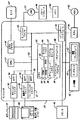
【図1】本発明の例証的実施形態によるコンピュータシステムのブロック図である。
【図2】本発明による入力装置の例示的実施形態のより詳細なブロック図である。
【図3】本発明の例証的実施形態によるヘッドセットの透視図である。
【図4】(A)は本発明の例証的実施形態によるマウスの透視図であり、(B)は(A)のマウスの下面図であり、(C)は(A)のマウスの例示的な回路基板の透視図である。
【図5】本発明によるマウスの別の例証的実施形態の上面図である。
【図6】(A)および(B)は本発明によるマウスの別の例証的実施形態の左側面図であり、(C)および(D)は本発明によるマウスの別の例証的実施形態の右側面図である。
【図7】(A)および(B)はそれぞれ、本発明によるマウスの別の例証的実施形態の左側面図および上面図である。
【図8】(A)および(B)はそれぞれ、本発明によるマウスの別の例証的実施形態の左側面図および上面図である。
【図9】(A)〜(C)は順に(respectively)、本発明によるマウスの別の例証的実施形態の左側面図、上面図、および右側面図である。
【図10】(A)〜(H)は本発明によるマウスボタンの各種例示的実施形態の上面図である。
【図11】(A)は本発明によるマウスの別の例証的実施形態の上面図であり、(B)は本発明によるマウスの別の例証的実施形態の上面図である。
【図12】(A)および(B)は本発明によるマウスの異なる例示的実施形態の右側面図である。
【図13】(A)〜(D)は本発明によるマウスの異なる例示的実施形態の左側面図である。
【図14】(A)〜(D)は本発明による、ホイールに近接したタッチセンサを示したマウスの各種例示的実施形態の上面図である。
【図15】本発明による例証的トラックボールの透視図である。
【図16】本発明によるジョイスティックを有する例示的ゲームコントローラの透視図である。
【図17】本発明による例示的ゲームコントローラの透視図である。
【図18】(A)は本発明による例証的キーボードの透視図であり、(B)および(C)は本発明による例証的キーボードの一部を示す図である。
【図19】本発明による例証的タッチパッドの透視図である。
【図20】図1のコンピュータのより詳細なブロック図である。
【図21】本発明の入力装置に触れる前に表示することのできる例証的画面表示の図である。
【図22】本発明の入力装置に触れた後の例証的画面表示の画像の図である。
【図23】本発明により起動されたプルダウンメニューを示した例証的画面表示の画像の図である。
【図24】本発明により開かれた第2のプルダウンメニューを示した例証的画面表示の画像の図である。
【図25】本発明によりプルダウンメニュー中で選択されたアイテムを示した例証的画面表示の画像の図である。
【図26】本発明による放射状メニューを示す例証的画面表示の画像の図である。
【図27】本発明の例示的実施形態により表示画面に表示することのできる例証的グラフィカルユーザインタフェースの図である。
【図28】本発明の例示的実施形態により表示画面に表示することのできる例証的な画面上表示の図である。
【図29】(A)および(B)は本発明の例示的実施形態により表示画面に表示することのできる例証的なツールヒントの視覚的フィードバックの図である。
【図30】(A)および(B)は本発明の例示的実施形態により表示画面に表示することのできる例証的な視覚的フィードバックの図である。
【図31】本発明の例示的実施形態により表示画面に表示することのできる例証的な視覚的フィードバックの図である。
【図32】現在のページを含んだウェブブラウザを示す例証的画面表示の画像の図である。
【図33】以前閲覧したページを含んだウェブブラウザを示す例証的画面表示の画像の図である。
【図34】次のページを含んだウェブブラウザを示す例証的画面表示の画像の図である。
【図35】(A)〜(C)は本発明の例証的実施形態による、ツールヒントの表示を制御するための例証的時間設定図である。
【図36】(A)および(B)は本発明の例証的実施形態による、ツールヒントの表示を制御するための例証的時間設定図である。
【図37】PC20内に位置し、本発明の例示的実施を集合的に形成するソフトウェアおよびハードウェア構成要素を簡略化した高レベルのブロック図900である。
【符号の説明】
20 パーソナルコンピュータ
21 処理装置(CPU)
22 システムメモリ
23 システムバス
24 読み出し専用メモリ
25 ランダムアクセスメモリ
26 BIOS
27 ハードディスクドライブ
28 磁気ディスクドライブ
29 取り外し可能磁気ディスク
30 光ディスクドライブ
31 光ディスク
32 ハードディスクドライブインタフェース
33 磁気ディスクドライブインタフェース
34 光ディスクドライブインタフェース
35 オペレーティングシステム
36 アプリケーションプログラム
37 プログラムモジュール
38 プログラムデータ
40 タッチセンサ
42 移動トランスデューサ
43 入力装置
45 スピーカ
46 シリアルポートインタフェース
47 モニタ
48 ビデオアダプタ
49 リモートコンピュータ
50 メモリ記憶装置
51 LAN
52 WAN
53 アダプタ
54 モデム
60 デバイスドライバ
100、102、104、106 タッチセンサ
108、110、112、114 導線
116 A/D変換器およびマルチプレクサ
118 線
120、200 マイクロコントローラ
122 入力(入力線、線)
124 出力
150 ヘッドセット
152 マイクロフォン
154 支持ピース
156 タッチセンサ
158 出力線
170、690 マウス
172、600、604、704、710、780 パームレスト
174 左ボタン
176 右ボタン
178、764、768、774 ホイール
180 側面
182 出力線
184、186 側面領域
189 電子回路
190、220、228 トラックボール(ボール)
192 トラックボールネスト
194、196、203 エンコーダホイール
201、202、204 スイッチ
206 センサ配列
222、242 基部
224、226、248、250、252、312A〜312G ボタン
244 ハンドル
246 トリガ
260 ゲームパッド
262、264 サイドボタン
266、268、270、272、274、276 左手ボタン
278、280、282、284、286、288 右手ボタン
290 開始ボタン
292 選択ボタン
300 キーボード
301 キーボードケース
302 QWERTY配列
304 数字キーパッド
306、307、309、311 部分
308 スペースバー
310 矢印キー
314 コントロール用つまみ
315 ロッカースイッチ
320、350 画面
322、354 仮想デスクトップ
328、352 ウィンドウ(アクティブウィンドウ)
324、326 アイコン
330 カレット
332 ツールヒント
334 ツールバー
356、360 プルダウンメニュー(プルダウンウィンドウ)
358 メニューバー(ヘッダメニュー)
362、364、366、371、373 項目
370 放射状メニュー
372 キャンセルボタン
460、480 ディスプレイ
462、472、478 インターネットブラウザウィンドウ
464、470、476 ページ
602、603、605、607、608、610、612、614、616、624、626、634、637 648、672、720、722、724、726、728、734、736、738、740、742、744、746、748、762、766、770、772 センサ(タッチセンサ、領域)
606 左側面
618 固体センサ
620、752 センサストリップ(ストリップ)
640 音声生成装置
662 MIDIウェーブテーブルシンセサイザ
224、226、622、630、646、660、700、702、706、708、2220、2240、2260、2280 ボタン
613 側端
627 前端
628、636 隆起部
641、642、643、644、650、651、652 センサ領域
674 中央センサ
692 左側面センサ
694 パームセンサ
696 右側面センサ
698 ボタンセンサ
776 前部領域
778 後部領域
810 メッセージフックプロシージャ
812 フォーカスアプリケーション
900 ブロック図
903、905、907、930 線
910 GUI
915 フェードイン/フェードアウトアニメーションプロセス
920 ビットマップジェネレータ
922、924、926 パターン
940 グラフィックAPI
2000 タッチパッド
2100 表面(タブレット)[0001]
BACKGROUND OF THE INVENTION
Technical field
The present invention relates to an input device for a computer system. More particularly, the present invention relates to the use of an input device capable of touch detection (hereinafter referred to as touch-sensitive) in a computer system.
[0002]
This application was filed on Sep. 14, 1998, assigned serial number 09 / 152,434, and assigned to the assignee of the present application, named “Proximity Sensor in a Computer Input Device” by Hickley et al. This is a partially pending application of a co-pending US patent application. This application is incorporated herein by reference. This application is also filed on September 14, 1998, assigned serial number 09 / 152,432, and assigned to the assignee of this application by Hickley, “A Technique for Implementing a Two-Handed Desktop Use Interface. A co-pending application of a co-pending US patent application entitled “For a Computer”. This application is incorporated herein by reference. This application is further filed on September 14, 1998, assigned serial number 09 / 152,443, and assigned to the assignee of this application by “Method of Interacting a Computer Proximity Sensor” by Hickley et al. This is a partially pending application of a co-pending US patent application entitled “in a Computer Input Device”. This application is incorporated herein by reference.
[0003]
In addition, this application was filed on November 25, 1998, assigned serial number 09 / 200,325, and assigned to the assignee of this application by Hickley, “A Technology For Implementing an On-Demand Display Width Through. This is a partially pending application of a co-pending US patent application entitled “Controlled Fading Initiated By User Contact With a Touch Sensitive Input Device”. This application is incorporated herein by reference, which was filed on Sep. 14, 1998 and assigned the
[0004]
This application was filed on April 5, 2000, assigned serial number 09 / 543,723, and assigned to the assignee of this application by “Method of Interacting with a Proximity Sensor in aa” by Hickley et al. Related to a co-pending US patent application entitled “Computer Input Device”. This application is incorporated herein by reference, which is a pending application of the above-mentioned US patent application Ser. No. 09 / 152,443.
[0005]
[Prior art]
Related technology
Input devices for computer systems such as keyboards, touchpads, trackballs, game controllers and mice include joysticks, touchpads, trackballs, headsets, microphones, buttons, knobs, rocker switches, triggers, sliders, wheels, biometrics Often includes one or more auxiliary controls, such as an applied sensor. The auxiliary controls can be used alone or in conjunction with the input device and other auxiliary controls.
[0006]
Most input devices use transducers or switches to generate input signals. Switches are typically found in keyboard keys, mouse buttons, joysticks, and game controllers. The transducer is in the mouse and trackball and generates an electrical signal based on the movement of the ball inside such a device or by optically detecting the movement of the device on the surface. The transducer is also in the headset, which converts the audio signal into an electrical signal. The touchpad generates an input signal using a sensor that provides an electrical signal when the user touches the touchpad, which includes the location where the contact was made in the touchpad.
[0007]
While it is desirable to increase the amount of information that the input device and its auxiliary controls can provide to the computer, the number of transducers and switches that can be added to the input device depends on the particular transducer or switch that the user has. Naturally limited by the ability to memorize all the functions to be performed, and to be used in a real state, or at least in a viable form, for placing switches and transducers on input devices (eg keyboards and mice) It is limited from the practical aspect of the area that can be formed. The user can determine the function of each auxiliary control, but this capability is also generally limited to the static function that the auxiliary control originally has or is close to. Activate the auxiliary controls, click a button, select a menu option, request a help file, or read the user manual. Further, the function of the auxiliary control may change for each game or application. Thus, the fixed function of an auxiliary control is of little value if the input device and the function and status of the auxiliary control vary from application to application. In this regard, even if a user learns to assign buttons and other controls in one game or application, another game or application may be assigned different functions to the same button or control. Similarly, the status of a function controlled by an auxiliary control can generally be determined only by activating that control.
[0008]
[Problems to be solved by the invention]
Therefore, there is a need to provide the user with the ability to more easily determine the function and status of the auxiliary control regardless of its context (eg, an active application or game).
[0009]
To address this need, indicators such as LEDs and small LCDs can be directly incorporated into the input device and its auxiliary controls to provide feedback or status information. However, associating LEDs and LCDs with individual auxiliary controls increases both power consumption and input device costs. In addition, the output form of LEDs and LCDs is very limited and away from the main display (eg computer monitor), so the user can always use the screen to assist in determining control functions and status. You have to move your line of sight to the control. If the object of attention is always moved in this way, the user must be re-recognized at that point in time, and the user may be mentally fatigued. Accordingly, there is a need to provide a more efficient, convenient and / or cost effective way to determine the function and / or status of auxiliary controls for input devices in a computer system.
[0010]
[Means for Solving the Problems]
The present invention senses the physical presence and provides touch-sensitive feedback (eg, vibration) that provides visual feedback, on-screen feedback or audio feedback (eg, voice or music), or tactile feedback (eg, vibration). By providing a touch sensitive input device with auxiliary controls, it overcomes many of the disadvantages found in existing input devices.
[0011]
In one aspect of the present invention, keys, buttons, knobs, rocker switches, or other auxiliary controls on an input device such as a keyboard, touchpad, trackball, game controller, monitor, joystick, steering wheel, headset, or mouse. In addition, a sensor that detects contact with the user's hand or its proximity can be supplemented. According to another aspect, the auxiliary control's sensing signal provides status, status information, tool tips regarding the control that the user has touched without activation (eg, pushing, turning, rotating, or otherwise). ), An on-screen display of help text, or other feedback may be provided to the user. Alternatively, instead of or in addition to the feedback provided by the on-screen display, feedback using auditory or tactile sensation can be provided to the user. Thus, the user can know their function assignments and status or get other feedback by simply touching various buttons and other controls. Such feedback allows the user to more accurately understand the result of the action performed by the button or control when the user subsequently selects activation of the control. In addition, the user can view the status information quickly and easily.
[0012]
Aspects of the present invention provide context-sensitive feedback about auxiliary controls in response to detection of a user's hand on an on-screen display such as a display widget (eg, a graphical user interface (GUI)). Including that. In this way, touch-sensitive controls can be used to predict the context of user actions. The context of the situation can be determined by preliminary actions by the user, such as grabbing, touching or approaching the control. Knowing the context of the action, the computer can begin to operate and predict the user's will.
[0013]
According to another aspect of the present invention, the context of auxiliary controls can include, but is not limited to, various applications such as games, utilities, and productivity applications. The context can also change for different parts of the application or game.
[0014]
In another aspect of the invention, when the GUI is displayed in response to detection of a physical presence in proximity to or in contact with an auxiliary control, the user uses another auxiliary control or input device. You can interact with the GUI. This input device includes, but is not limited to, a mouse, touchpad, or keypad. For example, when a volume control GUI is displayed, the user can adjust the volume with the mouse.
[0015]
In another aspect of the invention, an input device that includes the auxiliary control can include a touch sensor that directly detects when a physical entity (eg, a user) touches the device or the control, thereby For example, feedback display and dismissal can be provided in an “on-demand” manner, such as when a user establishes or releases a physical contact between the device and the hand.
[0016]
For example, a tooltip can be displayed when there is a change in the contact display provided by the device that reflects that the user has touched the device with a finger or made contact with the device or control. If there is a change indicating that the user has released physical contact with the device, such as lifting a finger from the device, the tooltip can be removed from the display. In one aspect of the present invention, when such a change is detected, a predetermined animation sequence corresponding to the change can be started so as not to distract the user. This sequence takes place over a specified period of time, where feedback begins to gradually appear as soon as contact by the user begins (usually from the invisible state, i.e. completely transparent, eventually to a predetermined half-time). When the user's contact with the device is released, e.g. the user lifts his hand from the device, the feedback begins to disappear immediately (i.e. eventually returns to the original invisible state) .)
[0017]
In another aspect of the invention, toolbars, scroll bars, etc. can be displayed on the display screen only in response to detection of physical presence. For example, you can display the toolbar on the screen by touching the auxiliary control without activating it, and you can erase the toolbar by releasing the contact with the control. In one aspect of the invention, a user can access an auxiliary control that displays the toolbar on the screen while interfacing with the toolbar using an auxiliary control or input device with one hand if desired. You can continue to touch. According to this aspect, it is possible to reduce the clutter on the display, and at the appropriate time when executing the program, the range of application screens that can be used is matched with the user's actions and controlled accordingly. Can be enlarged. At this time, the user is not burdened in such a way that a significant burden for doing so is recognized. This is expected to greatly improve the “user experience”.
[0018]
These and other novel advantages, details, embodiments, features, and objects of the present invention will become apparent to those skilled in the art from the following detailed description of the invention, the appended claims, and the accompanying drawings. Become. These items described herein are useful for illustrating the present invention.
[0019]
DETAILED DESCRIPTION OF THE INVENTION
According to an exemplary embodiment of the present invention, the auxiliary control of the input device is configured to sense when a physical entity (eg, a user's hand or stylus) touches the control, thereby “on demand”. The display widget can be displayed and cleared in a manner. The display widget may be a graphical user interface (GUI) and may include information such as functionality (eg, tool tips) and / or status information in an “on-demand” manner. Exemplary display widgets include toolbars, tool glass sheets, scroll bars, window frames and window decorations, title bars, floating tool palettes, modal and non-modal dialog boxes, list or combo boxes, controls, button settings , Text input area and so on.
[0020]
A change in the contact display provided by the input device that reflects the user's physical contact with the auxiliary control, such as touching the control with a finger, can cause a display widget to be displayed. A change indicating that the user has released contact with the auxiliary control, such as lifting a finger from the control, can turn off the display widget. To avoid diverting the user's attention, such a detected change can initiate a corresponding predetermined animation sequence. This animation takes place over a specified period of time, but as soon as the user begins to touch, the display widget begins to gradually appear (usually from the invisible state, that is, completely transparent, to the final And the display widget begins to fade away as soon as the user's contact with the auxiliary control, such as lifting the finger off the control, is released (ie, finally the original appearance) Return to no state). Furthermore, depending on the particular touch-sensitive auxiliary control used, it may be preferable to begin fading after a short time delay or “cooling period” has elapsed. For example, when the user reaches the end of the touchpad, the user may “re-clutch” the hand (eg, lift the finger for a short time and then reposition it at the center of the pad) to continue the movement as a pointer. When this happens, it may be cumbersome for the display widget to start fading immediately. If a short time delay (for example, about 0.5 to 1.0 seconds) is put in combination with continuous finger contact sensing before fading starts, the screen display will not change at all as described above. Can be re-clutched in a short time. Similarly, if the user hasn't touched the auxiliary controls for a long enough time, putting a similar time delay in combination with the detection of user contact release before the fade-in has started inadvertently takes a small amount of time. It can prevent the display widget from fading in after touching and then fading out, frustrating the user at another point.
[0021]
Further, according to the present invention, display and erasure caused by touch can also be easily used to display and erase display widgets (eg, toolbars) “on demand”. This is done by sensing contact between the user's preferred hand and another touch-sensitive auxiliary control, or an input device such as a touch-sensitive mouse. When reaching and grabbing an auxiliary control or input device by displaying a display widget in response to detecting contact, specifically detecting that the user has grabbed the auxiliary control or input device The user's desire to use a display widget that potentially matches the user's behavior can be utilized. The display widget disappears when the user removes his / her hand from the auxiliary control or input device, for example, when the contact is stopped. Displaying and erasing the display widget in this manner is advantageous in that it requires very little if any additional recognizable burden is incurred on the user.
[0022]
FIG. 1 and the description associated therewith provide a concise description of a suitable computing environment in which the invention may be implemented. Although the invention will be described, at least in part, in the general context of computer-executable instructions, such as program modules, being executed on a personal computer, it is not required. Generally, program modules include routine programs, objects, components, data structures, etc. that perform particular tasks or implement particular abstract data types. Moreover, those skilled in the art will appreciate that the invention may be practiced with other computer system configurations. This includes portable devices, multiprocessor systems, microprocessor-based or programmable consumer electronics, network PCs, minicomputers, mainframe computers, and the like. The invention may also be practiced in distributed computing environments where tasks are performed by remote processing devices that are linked through a communications network. In a distributed computing environment, program modules may be located in both local and remote memory storage devices.
[0023]
With reference to FIG. 1, an exemplary system for implementing the invention includes a processing unit (CPU) 21, a
[0024]
Although the exemplary environment shown herein uses a hard disk, a removable
[0025]
The hard disk,
[0026]
According to an exemplary embodiment of the present invention, at least one of the input devices as described above includes a
[0027]
A
[0028]
[0029]
When used in a LAN networking environment, the
[0030]
FIG. 2 is an enlarged block diagram of a part of an embodiment of the
[0031]
In some touch sensor embodiments, the touch sensor includes a conductive film that changes capacitance when touched. The sensor also includes a capacitive measurement circuit that generates an electrical signal based on a change in the capacitance of the conductive film. One skilled in the art will recognize that other contact sensor technologies can also be used, such as photodiode sensors, sensors utilizing piezoelectric materials, and capacitive pressure sensors. Any of these sensors can be used in the context of the present invention. In one embodiment of the proximity sensor, the touch sensor uses reflected light from the LED to detect when the user approaches the sensor. The chip used to drive LEDs and sense reflected light according to this exemplary embodiment can be manufactured at Hamamatsu Corporation, Bridgewater, NJ. In another proximity sensor embodiment, a change in the electric or magnetic field near the input device is used to determine when a user approaches the device.
[0032]
In embodiments of the present invention, the touch sensor can provide the same information regardless of where on the touch sensor the user touches the input device and what part of the sensor the user approaches. Thus, these touch sensors separate contact data and position data. FIG. 2 shows an exemplary input device with this type of touch sensor.
[0033]
In another embodiment, for example, an embodiment using a touchpad, touch screen, and touch tablet, the given touch sensor is where the user made contact with the touch sensor or where the user touched the touch sensor. It is possible to provide position information indicating the closest position to the location. In such a device, position data cannot be specified without touching the device. Also, the device cannot be touched without specifying the position. Thus, in these devices, contact sensing and position sensing are intimately coupled.
[0034]
Referring to FIG. 2, analog to digital converter and
[0035]
Those skilled in the art will also recognize that the number of input lines coupled to the
[0036]
In a mouse or trackball, the
[0037]
In some mice, the movement of the mouse in the X and Y directions is captured by a separate optical microcontroller connected to the
[0038]
In a game controller such as a game pad, the
[0039]
The
[0040]
FIG. 3 is a perspective view of the
[0041]
[0042]
FIG. 4A is a perspective view of one embodiment of a
[0043]
FIG. 4B shows a bottom view of the
[0044]
FIG. 4C is a perspective view of a portion of the internal
[0045]
Thus, a mouse according to an exemplary embodiment of the present invention can detect when a particular area of the mouse is touched and when a portion of the mouse or the entire mouse is moved. Specifically, the conductive film on the
[0046]
In an alternative embodiment of the invention, instead of the
[0047]
Figures 5, 6A-6D, 7A-7B, 8A-8B, 9A-9C, 10A-10H, 11A-11B, 12A-12B, 13A-13D, and 14A-14D are mice according to exemplary embodiments of the invention. An alternative configuration is shown. FIG. 5 is a top view of a mouse having a touch sensor only on the palm rest 600. 6A and 6B each show a palm rest and a separate illustrative mouse embodiment with a sensor on the left side of the mouse. In FIG. 6A, which is a side view, a
[0048]
FIGS. 6C and 6D show separate illustrative mouse embodiments of the invention having sensors on the palm rest and the right side of the mouse, respectively. In FIG. 6C, which is a right side view, a
[0049]
FIGS. 7A and 7B are side and top views, respectively, of an exemplary mouse embodiment with a
[0050]
9A-9C show a left side view, a top view, and a right side view, respectively, of an
[0051]
FIGS. 10A-10H show top views of various exemplary mouse embodiments, but illustrate possible configurations for a left-button touch sensor of a mouse. These button configurations may be placed alone on the mouse or in combination with other sensors on other parts of the mouse. FIG. 10A shows a single
[0052]
FIGS. 11A and 11B show an exemplary mouse embodiment that includes separate sensors for both buttons of the mouse. In FIG. 11A,
[0053]
12A and 12B show an exemplary mouse embodiment with multiple sensors along the right side of the mouse. FIG. 12A is a right side view, but there are two
[0054]
13A-13D show side views of an exemplary mouse embodiment with multiple sensors on the left side of the mouse. The mouse of FIG. 13A has two
[0055]
It is noted that the exemplary embodiments of FIGS. 12A-12B and FIGS. 13A-13D can all be implemented with sensors placed on the palm rest and / or sensors placed on the left button and / or sensors placed on the right button. I want.
[0056]
14A-14D are top views of an illustrative mouse embodiment with the touch sensor proximate to the mouse wheel. In FIG. 14A, the touch sensor is placed directly on the
[0057]
Various exemplary particularly with respect to the position of the touch sensor in FIGS. 5, 6A-6D, 7A-7B, 8A-8B, 9A-9C, 10A-10H, 11A-11B, 12A-12B, 13A-13D, and 14A-14D Although the embodiments have been described, it should be noted that the sensors may be included in other locations. For example, some or all of the touch sensors exemplified in one embodiment can be combined with some or all of the touch sensors exemplified in another embodiment. In addition, these include the mouse sides shown in FIGS. 5, 6A-6D, 7A-7B, 8A-8B, 9A-9C, 10A-10H, 11A-11B, 12A-12B, 13A-13D, and 14A-14D. It should be understood that many non-limiting touch sensor locations can be a conductive film overlying an auxiliary control, in which case pressing that control can be activated to perform a function. In this example, a set of electrical signals is generated when the control is touched, and a second set of electrical signals is generated when the control is activated. In a particular illustrative embodiment of the invention, various mice, including their auxiliary controls (eg, buttons, wheels), display a physical entity (eg, a finger) that touches its touch-sensitive surface, ie, a display widget. A physical presence can be detected that represents an explicit user request to display above and / or generate other (eg, audible or tactile) feedback. This feedback can provide the user with information such as status information, control capabilities, and help text. This information may vary from application to application. In some embodiments of the present invention, the position of the display widget on the display screen can be displayed as a physical presence movement on the touch-sensitive surface.
[0058]
FIG. 15 is a perspective view of an
[0059]
FIG. 16 is a perspective view of an illustrative game controller with a joystick, which includes a
[0060]
FIG. 17 is a perspective view of another illustrative game controller in accordance with the present invention. FIG. 17 shows a game controller in the form of a
[0061]
In an exemplary embodiment of the invention, a game controller, such as FIGS. 16 and 17, that includes its auxiliary controls (eg, buttons, joysticks, triggers) is a physical entity (eg, a finger) that touches its touch-sensitive surface, ie, A physical presence representing an explicit user request to display a display widget on the display screen and / or to generate other feedback (eg, by voice, haptics) can be detected. Feedback can provide the user with information such as status information, control capabilities, and help text. This information may vary from application to application. In some embodiments of the present invention, the position of the display widget on the display screen may be displayed according to the physical presence movement on the touch-sensitive surface.
[0062]
FIG. 18A illustrates a
[0063]
Touch sensors can also be placed on
[0064]
FIG. 18B shows a portion of another exemplary keyboard according to the present invention, which has auxiliary control
[0065]
FIG. 19 is a perspective view of an
[0066]
As described above, the keys, buttons, knobs, rocker switches, or other auxiliary controls on the input device are physical entities that include, but are not limited to, the user's hand (eg, finger or palm) or stylus. It can be supplemented with a sensor that detects contact, or its significant proximity. Up to now, illustrative input devices including a mouse (FIGS. 4A-14B), a trackball (FIG. 15), a game controller (FIGS. 16 and 17), a keyboard (FIGS. 18A-18C), and a touchpad (FIG. 19). Showed and explained about it. According to an embodiment of the present invention, the sensed signal as described above can be used to provide the user with a screen display of status, status information, or other feedback related to the controller touched by the user. .
[0067]
FIG. 20 is a more detailed block diagram of the
[0068]
The
[0069]
The
[0070]
The message generated by the
[0071]
In some exemplary embodiments,
[0072]
The message hook procedure and focus application initiate various functions described below using a device message specifically indicating that the touch sensor has been touched.
[0073]
For example, FIGS. 21 and 22 utilize a device message generated based on a signal from an input device according to an illustrative embodiment of the invention, such as
[0074]
In
[0075]
[0076]
[0077]
According to the exemplary embodiment of the present invention as shown in FIG. 21,
[0078]
Those skilled in the art will recognize that erasure of
[0079]
FIGS. 23-25 show a series of illustrative display screens that include pull-down menus that can be displayed as a result of keyboard messages from the
[0080]
In another exemplary embodiment, the user can move
[0081]
The user can move up and down in a pull-down menu such as pull-
[0082]
FIG. 24 can also be used to describe another embodiment of the present invention. Specifically, the pull-down
[0083]
In the prior art, the pull-
[0084]
FIG. 26 is an image of a display screen including a
[0085]
When using the
[0086]
To operate the radial menu using the touch sensor of the
[0087]
According to an exemplary embodiment of the present invention, the use of touch sensitive controls and devices can be transparent to the user. The context of the situation is indicated by the user's previous actions with the control, such as grabbing the control device, touching or approaching the device. Referring to FIG. 18B, by way of example, assume that the current function of
[0088]
In another illustrative embodiment of the present invention, a display widget, such as a tooltip, can be instantly displayed on the display screen when the user approaches or touches the
[0089]
In another illustrative embodiment of the invention based on the keyboard input device of FIG. 18C, a touch-
[0090]
An exemplary implementation of the various auxiliary controls of the exemplary keyboard input device and the contextual response to that contact is listed in Tables 1 through 5 below. It should be understood that the various controls and reactions can be applied to other input devices such as game controllers, trackballs, mice, touch pads, and the like.
[0091]
[Table 1]
[Table 2]
[Table 3]
[Table 4]
[Table 5]
Table 6 below describes an exemplary technique for contextual response to contact with an exemplary mouse input device according to the present invention.
[0097]
[Table 6]
In addition to the various visual feedback that can be provided to the screen in response to user touch to touch-sensitive controls, another possibility is that each key combination or other control has a copy function (eg, a “Ctrl” key). And “c” key at the same time), and a paste function (eg, “Ctrl” key and “v” key at the same time) are set to execute standard tool tips as shown in FIGS. 29A and 29B. Is to display. That is, when the user touches the “Ctrl” key and the “c” key simultaneously, the “Copy” tooltip displayed in FIG. 29A appears on the screen, and when the user touches the “Ctrl” key and the “v” key simultaneously, A tool tip “Paste” shown in FIG. 29B appears on the screen.
[0099]
Typically, the on-screen display can be placed near the current cursor or pointer (eg, caret) position regardless of the input device that the user touches. For example, a keyboard tooltip can be displayed next to the cursor. It is beneficial to display the on-screen display at the top right of the current cursor position. This is a traditional operating tooltip and its on-screen display that appears when the user pauses with the pointer resting on an icon in the Windows operating system manufactured by Microsoft Corporation in Redmond, Washington. This is because there is no conflict with (conventional tool tips are displayed at the lower right of the pointer or cursor). Tooltips can either follow the cursor or pointer as the user moves the cursor or pointer with a pointing device (eg, a mouse), or remain stationary at the point where it was first displayed You can also. Rather than moving the tooltip with the cursor, keeping the tooltip where it is displayed is easier to implement, more efficient, and acceptable to the user. According to another exemplary embodiment of the present invention, the display widget is located at the center of the screen, the center of the currently active (“focus”) application or widget (eg, text entry box), the bottom of the screen, or the top of the system tray icon. Can be displayed.
[0100]
FIGS. 30A and 30B illustrate another exemplary display widget (on-screen display), in which a user-programmable keyboard hotkey and function “F” key are shown according to an illustrative embodiment of the invention. 2 illustrates a keyboard control function for each application that can be displayed in response to touching. If the user simply touches a key and does not activate, the on-screen display can indicate what the key is and / or what action the key performs, and the function is not actually performed. FIG. 30A illustrates a keyboard hotkey GUI that includes selectable options for responding to a user touching a key, customizing keyboard hotkey settings, or viewing (eg, with a mouse or other pointing device). An example of on-screen display is shown. That is, the user can click on the “Reassign HotKey” area of this GUI to see the current function of the hot key (which may be a key combination) and change the assignment of the function of the hot key. FIG. 30B illustrates another example of an on-screen display of a keyboard hotkey GUI that includes selectable options for customizing or viewing keyboard hotkey settings in response to a user touching a key. I will provide a. FIG. 30B differs from FIG. 30A in that it provides the user with more detailed information about what the key is and its operation (eg, launching the “My Computer” application). In some embodiments, a GUI that is activated by touch can receive keyboard focus as soon as the user touches the control associated with it. As a result, the user can immediately press the “R” key of the above-mentioned example “Reassign HotKey” to activate an alternative function. In another embodiment, the GUI activated by touch does not receive keyboard focus. The user must click on the GUI with the mouse, or switch to keyboard focus using, for example, a combination of “Alt” and “Tab” keys, or another method for switching to the top level. This latter embodiment prevents the touch activated GUI from receiving keyboard input that the user does not intend to receive. The preferred embodiment depends on the details of the particular input device, the touch-sensitive control of the device, the current application, or user preferences.
[0101]
In another exemplary embodiment of the present invention, a text macro can be assigned to each hot key, where activation of the hot key inserts a block of text, for example at the cursor position on the screen. When used in such a context, when a certain hot key is touched, as shown in FIG. 31, at least the first part or other part of the text macro assigned to the hot key is displayed. The on-screen display window can be automatically sized according to the amount of text assigned to the text macro to display the entire text. This context can also be used in conjunction with the scroll control to scroll the text while the user touches the hotkey assigned to the text macro.
[0102]
As noted above, auditory or tactile feedback can be utilized according to some exemplary embodiments of the present invention. Auditory or tactile feedback can be used in conjunction with or separately from visual feedback on the display. In some cases, visual feedback is not appropriate and auditory feedback may be desirable depending on the application being executed, the input device being used, or the user's preference.
[0103]
According to certain embodiments of the invention, when a user touches a control, auditory feedback, such as an appropriate cue tone or other sound, can be generated. The desired audio cue tone can be mapped to a particular function or control. By adjusting the volume, pitch, and tone, it is possible to create an appropriate cue that mimics the desired sound, such as a notification of a control function generated by voice. A cue sound can be generated by receiving a parametric sound event request and using a MIDI wavetable synthesizer 662 and arranging it in sequence on an audio generator 640 (eg, Creative Labs AWE64 Gold card sound board). (See FIG. 6). All specific techniques for setting accurate voice parameters for each voice cue, properly synthesizing that voice cue, and associating the cue with its corresponding controls and / or functions will be readily apparent to those skilled in the art. However, since it does not form part of the present invention, it is omitted for the sake of simplicity.
[0104]
Auditory feedback to identify functionality and other information is particularly useful for gaming applications and products such as MS Game Voice ™ manufactured by Microsoft Corporation of Redmond, Washington. For example, a gaming product may include a combination of headset microphones attached to a puck. The pack allows the user to selectively talk to multiple combinations of people and teams that they play with. Each person is automatically assigned a code (1, 2, 3 ...) and a team (A, B, C ...). A problem can arise when a player has to remember which code corresponds to which player and team. If a user wants a reminder of who a button is assigned to, touching a control (eg, a numeric key) gives an auditory feedback of the name of the person assigned to that code to their headset. Can be received through.
[0105]
In one exemplary embodiment of the present invention as shown in Tables 1-5, it is possible to navigate between web pages provided by an Internet browser by using multiple contact areas on the input device. Examples of input devices that have multiple touch-sensitive areas and are useful for moving between pages include the mice of FIGS. 10C, 10D, 12A, 12B, 13A, 13B, and 13C, among others. In the case of FIG. 10C, the function of returning the page is started when the
[0106]
It should be noted that a mouse according to an exemplary embodiment of the present invention can be configured to initiate a page-to-page move function by simply touching one touch sensor instead of touching two touch sensors sequentially. Accordingly, in FIG. 10C, the function of moving forward the page is started when the
[0107]
A page-to-page moving function performed using the touch area as described above is shown in FIGS. The
[0108]
It should be understood that touch sensitive control contacts or various responses to significant proximity conditions can be used in combination. For example, when the user first touches a button, the function of the button can be displayed. In one implementation, if the user continues to touch the button for longer than a specified amount of time (eg 5 seconds), more detailed status information can be displayed or the user can use the GUI. It is. Alternatively, different types of information can be displayed, such as continuously touching the same button for a predetermined period of time and displaying the function of that button followed by a GUI. Tactile or auditory feedback can also be provided after the first contact, and if there is a second contact within a given time or if a contact is detected over a specified time, the same information or more detailed information than the first contact An information display appears.
[0109]
In response to detection of contact or proximity of the input device or its auxiliary controls with the user, the on-screen display of the display widget can occur instantaneously. Often the display widget is displayed slightly on the screen so that the display widget does not appear and disappear immediately on the screen, for example when the user activates a control or device to activate a function rather than just touching It may be desirable to delay. By delaying the display widget display by a predetermined amount of time, you are familiar with the active application, the operation of the input device and its auxiliary controls, and immediately activate the device or its controls to activate a function ( For example, a display widget including tooltip information can be prevented from being displayed unnecessarily to the user (for example, pressing a button). Several exemplary techniques according to the present invention for accommodating display control are described below.
[0110]
In one embodiment of the invention, a short time of approximately 0.3 seconds is used. In this example, the user touches a key or other control for less than this short time, but if it is not activated, an on-screen display is displayed. If the user activates the control before this short time is reached, no on-screen display is displayed in response to the user touching the control.
[0111]
According to some embodiments of the present invention, activating a control (eg, turning a knob) changes the state (eg, volume) of the function being controlled and changes the state (eg, volume setting) ( For example, a GUI for volume setting can be displayed. On the other hand, when touching without starting for the whole short time, the GUI showing the existing state (for example, current volume) of the function can be displayed, and the state does not change.
[0112]
Similarly, according to the embodiment of the present invention, it is possible to use a short time for erasing the display on the screen or controlling the fade-out when the user stops touching the control. In this example, the on-screen display remains displayed for a short time, after which the on-screen display disappears or fades out. If the user touches the control again before the short time is reached, the on-screen display remains displayed. The same amount of time will cause the display widget to disappear (ie, disappear or fade out) when a user touches the control, and the display widget will reappear or fade in when contact with the control is stopped. It should be understood that the present invention can be applied to various embodiments of the present invention.
[0113]
According to an exemplary embodiment of the present invention, when displaying a display widget that includes tool tips or other information, the method of display may be based on multiple criteria including other information such as controls, timeouts, and mouse movements. Can be based. FIGS. 35A-35C schematically illustrate three exemplary alternatives for timing and conditions associated with a touch-sensitive mouse that causes a display widget such as a tooltip to be displayed on the display screen. It is.
[0114]
FIG. 35A shows a time setting diagram of an exemplary embodiment in which a button tooltip is displayed on the display screen after a short timeout (Δt). The user touches the button briefly, touches the button briefly before starting, or inadvertently touches the touch sensor so that the button touch time in the figure is less than the short timeout period (Δt) Even if the timeout is suppressing the button tool. Also, as shown in the figure, a tool tip is displayed when the button is touched longer than a short timeout (Δt). This tool tip is displayed until the user releases the contact with the button. In this example, mouse movement has no effect on the display of tooltips.
[0115]
According to the time setting diagram of FIG. 35B of an exemplary embodiment of the present invention, the button tooltip is not displayed when the user touches the button (does not activate) and moves the mouse. When the user continues to touch the button for the timeout period (Δt) and stops moving the mouse, a hint for that button is displayed. As shown in FIG. 35A, the tool hint is displayed until the user releases the contact with the button.
[0116]
In the time setting diagram shown in FIG. 35C, when the user touches the button and the mouse is stationary, the user continues to touch the button for the timeout period (Δt), and a tool tip is displayed unless the mouse is moved. Similar to FIGS. 35A and 35B, the tooltip is displayed until the user releases the contact with the button.
[0117]
Another aspect of the display display scheme for touch-sensitive input controls relates to the response of tool tips or other display widgets to user activation of buttons or other input controls. Once the user activates the control, he or she may no longer want feedback (on actions taken as a result of activation, etc.). For example, when the user clicks a button (button down event), the tooltip for that button can be instantly turned off (or faded out). Also, when the user continues to touch the button and a button up event occurs, the button tooltip may be displayed again or left hidden. The computer system can also display visual feedback that associates the button click with the information displayed in the tooltip before the tooltip disappears. According to an illustrative embodiment as represented in the time diagram of FIG. 36A, when a button down event occurs due to a button click, the period Δt has elapsed since the user released the button and touched it again without activating it. Until you do that, the tooltip for that button is not displayed again. In other words, as shown in FIG. 36A, after the activation of a button, the tool tip for that button is not displayed after the next rising edge of the touch sensor for that button. According to another embodiment of the present invention represented by the time setting diagram of FIG. 36B, if there is a button up event after a button down event and the user maintains contact with that button after a timeout Δt, The tooltip is displayed again.
[0118]
Another embodiment of the invention relates to the simultaneous contact of multiple controls of one input device. If the user touches the second control and maintains contact with one control, an on-screen display or other feedback is generated for the second control. Alternatively, a specific function can be defined by a combination of controls such as a key combination. In this example, the tooltip for that combination (eg key combination) is displayed when two keys are touched simultaneously and not activated, but there is a tooltip associated with touching the first key Is displayed in an overlapping manner. When the user releases his / her hand from one of the controls, the on-screen display disappears completely and the feedback on the other touched control can be restored.
[0119]
In another embodiment of the present invention, when an on-screen display in the form of a GUI is displayed or faded in, the GUI can be used by the user even if the cursor or pointer (eg, due to mouse movement) is placed therein. Even if the contact with the control (for example, a touch-sensitive mouse button) that displays the GUI is stopped, the GUI is displayed. The GUI in this example will eventually respond in response to cursor movement outside the GUI (eg mouse movement), activation of another control, or the computer will receive no input such as mouse movement. Can disappear after a predetermined period of inactivity (eg, 5 seconds).
[0120]
According to an exemplary embodiment of the present invention, the on-screen display can be faded in and out using animated changes. It should be understood that the techniques for controlling the display and erasure of the on-screen display may be used alone or in combination. In the following, an embodiment of the present invention that provides animation changes will be described in the context of FIG.
[0121]
FIG. 37 depicts a simplified block diagram 900 of high-level software and hardware components for displaying and erasing a display widget, such as a Tool Glass sheet or toolbar, located on
[0122]
Contact output provided from
[0123]
[0124]
During the subsequent display, the accelerator reads the map from its local store, fills it appropriately with polygons, and draws the resulting filled pattern on the
[0125]
Basically, for a fade-in or fade-out operation, the
[0126]
The fade-in should occur over a relatively short time, such as approximately 0.3 to 0.5 seconds. However, it is better to perform the fade-out over a relatively long time such as about 0.7 to 1.0 seconds so as not to distract the user. In particular, when fading in, the alpha transparency value is generally changed in a non-linear manner during this time. Experience has chosen to utilize traditional throw-in / throw-out techniques commonly used in screen animation. In this technique, the opacity is initially changed from a substantially transparent state (ie, substantially invisible) to a medium value at a slightly slower rate, but then at a slightly higher rate. Increasing to another intermediate value and further increasing the speed again slows to reach maximum opacity (eg 1α for toolbars, 0.7α for Tool Glass sheets). This results in an approximately “S” shaped opacity curve that is a function of time. This same change in transparency is used when fading out the display widget (but the direction is reversed). Of course, other time-based opacity functions, such as linear functions, can be used to change the opacity during fade-in and fade-out periods. Ultimately, the specific function you choose (you can use different functions for fade out and fade in. In fact, you can use different functions as described above for different display widgets if you want) It is likely to be determined empirically through appropriate user testing.
[0127]
Furthermore, the human eye exhibits higher sensitivity to a specific color such as a red color tone than normal color tone such as a blue color tone at normal luminance. For this reason, fading in display widgets that include colors like the former can distract users even at relatively low brightness, especially as such colors become clearer. There is a possibility of scattering. To avoid distracting the user in this way, the display widget is different, especially for the color that the human eye is most sensitive to, until the final map with the desired color scheme and brightness is displayed. It can be represented by several texture maps with varying color schemes and brightness. In this case, the widget's black and white texture map is displayed first, then at the appropriate time during the fade-in, the texture map for the same widget with the desired color scheme and increased brightness (or different color schemes for that matter) And at the end of the fade-in period, draw a texture map with the final color scheme and brightness. Fade out can be done in a similar manner, but the order is reversed. For example, a display widget can fade out to a black and white map using a series of colored texture maps with progressively decreasing brightness, and then the black and white map itself fades out to full transparency. Or at the beginning of the fade-out, you can change to a black and white map of the widget from which you can fade out to full transparency.
[0128]
If a graphics accelerator is not used, as represented by
[0129]
The alpha transparency feature is supported by a wide range of existing graphics accelerators, but this feature is supported by D3D (a 3D graphics API currently manufactured by Microsoft as a standard component of the WINDOWS® operating system), OpenGL ( Currently available in the art), or GDI (historically only a 2D low-level graphics processing layer, currently manufactured by Microsoft and embedded as a standard component of the WINDOWS® operating system. The conventional 2D (2D) and 3D (3D) graphic APIs can be easily simulated in software in a well-known manner.
[0130]
It is conceivable that the display screen displays both a toolbar and a Tool Glass sheet (or a combination of other display widgets) at the same time. In such cases, both tools may fade in or out due to unintended interaction. To prevent such interaction and the accompanying user frustration, an appropriate decision process within the skill of the art is incorporated into the
[0131]
It should be understood that the present invention can use other sensing techniques besides touch sensing to trigger on-demand operations. Such sensing techniques include, for example, electrodermal reactions, non-contact proximity sensors, pressure sensors, touch / proximity sensors on the keyboard, data from GPS (Global Positioning System) receivers (user location Or the location of a mobile computer), video data from a camera, and audio data from a microphone.
[0132]
While specific embodiments of the present invention have been described and illustrated, it should be understood that the invention is not limited thereto, as those skilled in the art can make modifications and variations thereto. This application is intended to cover all modifications and variations that fall within the spirit and scope of the underlying invention disclosed and claimed herein.
[Brief description of the drawings]
FIG. 1 is a block diagram of a computer system according to an illustrative embodiment of the invention.
FIG. 2 is a more detailed block diagram of an exemplary embodiment of an input device according to the present invention.
FIG. 3 is a perspective view of a headset according to an illustrative embodiment of the invention.
4 (A) is a perspective view of a mouse according to an illustrative embodiment of the invention, (B) is a bottom view of the mouse of (A), and (C) is an exemplary mouse of (A). FIG. FIG.
FIG. 5 is a top view of another illustrative embodiment of a mouse according to the present invention.
6 (A) and (B) are left side views of another exemplary embodiment of a mouse according to the present invention, and (C) and (D) are other exemplary embodiments of a mouse according to the present invention. It is a right view.
7 (A) and (B) are a left side view and a top view, respectively, of another exemplary embodiment of a mouse according to the present invention.
FIGS. 8A and 8B are a left side view and a top view, respectively, of another exemplary embodiment of a mouse according to the present invention.
9 (A)-(C) are, in order, left side, top and right views of another exemplary embodiment of a mouse according to the present invention.
FIGS. 10A-H are top views of various exemplary embodiments of mouse buttons according to the present invention. FIGS.
11A is a top view of another exemplary embodiment of a mouse according to the present invention, and FIG. 11B is a top view of another exemplary embodiment of a mouse according to the present invention.
Figures 12 (A) and (B) are right side views of different exemplary embodiments of mice according to the present invention.
13A-D are left side views of different exemplary embodiments of mice according to the present invention.
14A-D are top views of various exemplary embodiments of a mouse showing a touch sensor proximate to a wheel according to the present invention. FIG.
FIG. 15 is a perspective view of an exemplary trackball according to the present invention.
FIG. 16 is a perspective view of an exemplary game controller having a joystick according to the present invention.
FIG. 17 is a perspective view of an exemplary game controller according to the present invention.
18A is a perspective view of an exemplary keyboard according to the present invention, and FIGS. 18B and 13C show a portion of an exemplary keyboard according to the present invention. FIG.
FIG. 19 is a perspective view of an exemplary touchpad according to the present invention.
FIG. 20 is a more detailed block diagram of the computer of FIG.
FIG. 21 is a diagram of an illustrative screen display that can be displayed before touching the input device of the present invention.
FIG. 22 is an exemplary screen display image after touching the input device of the present invention.
FIG. 23 is an exemplary screen display image showing a pull-down menu activated in accordance with the present invention.
FIG. 24 is an exemplary screen display image showing a second pull-down menu opened in accordance with the present invention.
FIG. 25 is an exemplary screen display image showing an item selected in a pull-down menu according to the present invention.
FIG. 26 is an exemplary screen display image showing a radial menu according to the present invention.
FIG. 27 is a diagram of an illustrative graphical user interface that can be displayed on a display screen according to an illustrative embodiment of the invention.
FIG. 28 is an exemplary on-screen display that can be displayed on a display screen according to an exemplary embodiment of the present invention.
FIGS. 29A and 29B are visual feedback diagrams of illustrative tool tips that can be displayed on a display screen according to an exemplary embodiment of the present invention. FIGS.
FIGS. 30A and 30B are diagrams of illustrative visual feedback that can be displayed on a display screen according to an exemplary embodiment of the present invention. FIGS.
FIG. 31 is a diagram of illustrative visual feedback that can be displayed on a display screen according to an illustrative embodiment of the invention.
FIG. 32 is an exemplary screen display image showing a web browser including a current page.
FIG. 33 is an exemplary screen display image showing a web browser including a previously viewed page.
FIG. 34 is an exemplary screen display image showing a web browser including the next page.
FIGS. 35A-35C are exemplary time settings for controlling the display of tool tips according to an exemplary embodiment of the present invention. FIGS.
FIGS. 36A and 36B are exemplary time settings for controlling the display of tool tips, according to an illustrative embodiment of the invention. FIGS.
FIG. 37 is a high-level block diagram 900 that simplifies software and hardware components that are located within
[Explanation of symbols]
20 Personal computer
21 Processing unit (CPU)
22 System memory
23 System bus
24 Read-only memory
25 Random access memory
26 BIOS
27 Hard disk drive
28 Magnetic disk drive
29 Removable magnetic disk
30 Optical disk drive
31 Optical disc
32 Hard disk drive interface
33 Magnetic disk drive interface
34 Optical disk drive interface
35 Operating system
36 Application programs
37 program modules
38 Program data
40 Touch sensor
42 Moving transducer
43 Input device
45 Speaker
46 Serial port interface
47 Monitor
48 video adapter
49 Remote computer
50 Memory storage
51 LAN
52 WAN
53 Adapter
54 Modem
60 device drivers
100, 102, 104, 106 Touch sensor
108, 110, 112, 114 Conductor
116 A / D converter and multiplexer
118 lines
120, 200 Microcontroller
122 input (input line, line)
124 outputs
150 headset
152 microphone
154 Support piece
156 touch sensor
158 output line
170, 690 mice
172, 600, 604, 704, 710, 780 Palm rest
174 Left button
176 right button
178, 764, 768, 774 wheels
180 side
182 output line
184, 186 Side area
189 electronic circuit
190, 220, 228 Trackball (ball)
192 Trackball nest
194, 196, 203 Encoder wheel
201, 202, 204 switch
206 Sensor array
222, 242 Base
224, 226, 248, 250, 252, 312A-312G buttons
244 Handle
246 Trigger
260 Gamepad
262, 264 Side buttons
266, 268, 270, 272, 274, 276 Left hand button
278, 280, 282, 284, 286, 288 Right hand button
290 start button
292 Select button
300 keyboard
301 keyboard case
302 QWERTY array
304 numeric keypad
306, 307, 309, 311 parts
308 Space bar
310 arrow keys
314 Control knob
315 Rocker switch
320, 350 screen
322, 354 virtual desktop
328, 352 windows (active windows)
324, 326 icon
330 Caret
332 Tooltip
334 Toolbar
356, 360 pull-down menu (pull-down window)
358 Menu bar (header menu)
362, 364, 366, 371, 373 items
370 radial menu
372 Cancel button
460, 480 display
462, 472, 478 Internet browser window
464, 470, 476 pages
602, 603, 605, 607, 608, 610, 612, 614, 616, 624, 626, 634, 637 648, 672, 720, 722, 724, 726, 728, 734, 736, 738, 740, 742, 744 , 746, 748, 762, 766, 770, 772 Sensor (touch sensor, area)
606 Left side
618 Solid state sensor
620, 752 sensor strip (strip)
640 voice generation device
662 MIDI Wavetable Synthesizer
224, 226, 622, 630, 646, 660, 700, 702, 706, 708, 2220, 2240, 2260, 2280 buttons
613 side edge
627 front end
628, 636 Raised part
641, 642, 643, 644, 650, 651, 652 Sensor area
674 Center sensor
692 Left side sensor
694 Palm Sensor
696 Right side sensor
698 Button sensor
776 front region
778 Rear area
810 Message hook procedure
812 Focus application
900 block diagram
903, 905, 907, 930 lines
910 GUI
915 Fade In / Fade Out Animation Process
920 Bitmap Generator
922, 924, 926 patterns
940 Graphic API
2000 Touchpad
2100 Surface (tablet)
Claims (3)
前記第1の検知手段の前記ユーザの検知に応答して前記表示器の表示画面に、前記入力デバイスによりデータを入力するためのグラフィカルユーザインタフェースを表示する手段として動作し、
前記コンピュータシステムはさらに複数のキーによりデータを入力するためのキーボードを有し、該キーボード上の前記複数のキーには前記ユーザを検知するための複数の第2の検知手段が設けられ、当該複数の第2の検知手段に対して複数の異なる情報処理が関連付けられており、前記1つまたは複数の第2の検知手段による前記ユーザの検知に応じて、前記コンピュータは検知を行った第2の検知手段に対応する情報処理を実行し、
前記複数のキーの中の1つの特定のキーの第2の検知手段による前記ユーザの検知に応じて前記コンピュータは特定のアプリケーションを起動し、その後、前記特定のキーそのものの前記ユーザの操作に応じて前記コンピュータにより前記アプリケーションを前記表示器の表示画面上の最前面に移動し、前記特定のキーの操作の解除に応じて前記アプリケーションを後ろに移動することを特徴とする方法。 A method in a computer system comprising: an input device for inputting data; a display; a computer that processes data input from the input device; and a first detection unit that detects a user of the input device, Computer
In response to detection by the user of the first detection means, the display device operates as a means for displaying a graphical user interface for inputting data by the input device on the display screen;
The computer system further includes a keyboard for inputting data using a plurality of keys, and the plurality of keys on the keyboard are provided with a plurality of second detection means for detecting the user. A plurality of different information processings are associated with the second detection unit, and the computer performs detection according to the detection of the user by the one or more second detection units. Execute information processing corresponding to the detection means,
The computer activates a specific application in response to the user's detection by the second detection means of one specific key of the plurality of keys, and then responds to the user's operation of the specific key itself The computer moves the application to the foreground on the display screen of the display, and moves the application backward in response to the release of the operation of the specific key.
前記第1の検知手段の前記ユーザの検知に応答して前記表示器の表示画面に、前記入力デバイスによりデータを入力するためのグラフィカルユーザインタフェースを表示する手段として動作し、
前記コンピュータシステムはさらに複数のキーによりデータを入力するためのキーボードを有し、該キーボード上の前記複数のキーには前記ユーザを検知するための複数の第2の検知手段が設けられ、当該複数の第2の検知手段に対して複数の異なる情報処理が関連付けられており、前記1つまたは複数の第2の検知手段による前記ユーザの検知に応じて、前記コンピュータは検知を行った第2の検知手段に対応する情報処理を実行し、
前記複数のキーの中には複数の異なる四則演算キーが設けられており、
前記コンピュータが表計算またはワードプロセッシングのアプリケーションを実行中にセルの範囲が選択されたときに、特定の四則演算キーの第2の検知手段のユーザの検知に応じて、前記コンピュータは選択されたセルについて、検知を行った第2の検知手段に対応する四則演算キーの示す演算を行って演算の結果の表示のみ行うことを特徴とする方法。 A method in a computer system comprising: an input device for inputting data; a display; a computer that processes data input from the input device; and a first detection unit that detects a user of the input device, Computer
In response to detection by the user of the first detection means, the display device operates as a means for displaying a graphical user interface for inputting data by the input device on the display screen;
The computer system further includes a keyboard for inputting data using a plurality of keys, and the plurality of keys on the keyboard are provided with a plurality of second detection means for detecting the user. A plurality of different information processings are associated with the second detection unit, and the computer performs detection according to the detection of the user by the one or more second detection units. Execute information processing corresponding to the detection means,
A plurality of different arithmetic operation keys are provided in the plurality of keys,
When a range of cells is selected while the computer is executing a spreadsheet or word processing application, the computer selects the selected cell in response to a user's detection of the second detecting means of a particular arithmetic key The method of performing only the display of the calculation result by performing the calculation indicated by the four arithmetic keys corresponding to the second detection means that has performed the detection.
前記第1の検知手段の前記ユーザの検知に応答して前記表示器の表示画面に、前記入力デバイスによりデータを入力するためのグラフィカルユーザインタフェースを表示する手段として動作し、
前記第1の検知手段の前記ユーザの検知時間が所定時間を過ぎると、前記コンピュータは前記グラフィカルユーザインターフェースの表示を消去し、
前記コンピュータはさらに、前記グラフィカルユーザインタフェースの表示を消去した後、前記第1の検知手段により前記ユーザを検知しなくなったことに応答して消去したグラフィカルユーザインターフェースを再表示することを特徴とする方法。 A method in a computer system comprising: an input device for inputting data; a display; a computer that processes data input from the input device; and a first detection unit that detects a user of the input device, Computer
In response to detection by the user of the first detection means, the display device operates as a means for displaying a graphical user interface for inputting data by the input device on the display screen;
When the detection time of the user of the first detection means exceeds a predetermined time, the computer erases the display of the graphical user interface,
The computer further erases the display of the graphical user interface and then redisplays the erased graphical user interface in response to the first sensing means no longer detecting the user. .
Applications Claiming Priority (2)
| Application Number | Priority Date | Filing Date | Title |
|---|---|---|---|
| US09/804,383 US7358956B2 (en) | 1998-09-14 | 2001-03-13 | Method for providing feedback responsive to sensing a physical presence proximate to a control of an electronic device |
| US09/804,383 | 2001-03-13 |
Publications (3)
| Publication Number | Publication Date |
|---|---|
| JP2002287862A JP2002287862A (en) | 2002-10-04 |
| JP2002287862A5 JP2002287862A5 (en) | 2005-09-08 |
| JP4138340B2 true JP4138340B2 (en) | 2008-08-27 |
Family
ID=25188821
Family Applications (1)
| Application Number | Title | Priority Date | Filing Date |
|---|---|---|---|
| JP2002069360A Expired - Fee Related JP4138340B2 (en) | 2001-03-13 | 2002-03-13 | How to detect and give feedback on auxiliary controls in a computer system |
Country Status (3)
| Country | Link |
|---|---|
| US (1) | US7358956B2 (en) |
| EP (1) | EP1241558A3 (en) |
| JP (1) | JP4138340B2 (en) |
Families Citing this family (143)
| Publication number | Priority date | Publication date | Assignee | Title |
|---|---|---|---|---|
| US7808479B1 (en) * | 2003-09-02 | 2010-10-05 | Apple Inc. | Ambidextrous mouse |
| US7265494B2 (en) | 1998-10-09 | 2007-09-04 | Azoteq Pty Ltd. | Intelligent user interface with touch sensor technology |
| US9501178B1 (en) * | 2000-02-10 | 2016-11-22 | Intel Corporation | Generating audible tooltips |
| US6859196B2 (en) * | 2001-01-12 | 2005-02-22 | Logitech Europe S.A. | Pointing device with hand detection |
| US20050183017A1 (en) * | 2001-01-31 | 2005-08-18 | Microsoft Corporation | Seekbar in taskbar player visualization mode |
| US7079110B2 (en) * | 2001-04-30 | 2006-07-18 | Microsoft Corporation | Input device including a wheel assembly for scrolling an image in multiple directions |
| DE10121693C2 (en) * | 2001-05-04 | 2003-04-30 | Bosch Gmbh Robert | Method and device for detecting the contact of hands with the steering wheel |
| US6661410B2 (en) * | 2001-09-07 | 2003-12-09 | Microsoft Corporation | Capacitive sensing and data input device power management |
| JP2003140823A (en) * | 2001-11-08 | 2003-05-16 | Sony Computer Entertainment Inc | Information input device and information processing program |
| US20050179667A1 (en) * | 2002-04-03 | 2005-08-18 | Leif Nilsson | Method of navigating in a virtual three-dimensional environment and an electronic device employing such method |
| JP4098054B2 (en) | 2002-10-04 | 2008-06-11 | カルソニックカンセイ株式会社 | Information display device |
| US7219308B2 (en) * | 2002-06-21 | 2007-05-15 | Microsoft Corporation | User interface for media player program |
| US7656393B2 (en) | 2005-03-04 | 2010-02-02 | Apple Inc. | Electronic device having display and surrounding touch sensitive bezel for user interface and control |
| US11275405B2 (en) | 2005-03-04 | 2022-03-15 | Apple Inc. | Multi-functional hand-held device |
| US20060256081A1 (en) * | 2002-07-27 | 2006-11-16 | Sony Computer Entertainment America Inc. | Scheme for detecting and tracking user manipulation of a game controller body |
| US9393487B2 (en) | 2002-07-27 | 2016-07-19 | Sony Interactive Entertainment Inc. | Method for mapping movements of a hand-held controller to game commands |
| US8570378B2 (en) | 2002-07-27 | 2013-10-29 | Sony Computer Entertainment Inc. | Method and apparatus for tracking three-dimensional movements of an object using a depth sensing camera |
| US8313380B2 (en) | 2002-07-27 | 2012-11-20 | Sony Computer Entertainment America Llc | Scheme for translating movements of a hand-held controller into inputs for a system |
| US7958455B2 (en) * | 2002-08-01 | 2011-06-07 | Apple Inc. | Mode activated scrolling |
| US7358963B2 (en) | 2002-09-09 | 2008-04-15 | Apple Inc. | Mouse having an optically-based scrolling feature |
| US7046234B2 (en) * | 2002-11-21 | 2006-05-16 | Bloomberg Lp | Computer keyboard with processor for audio and telephony functions |
| WO2004059424A2 (en) * | 2002-12-16 | 2004-07-15 | Microsoft Corporation | Systems and methods for interfacing with computer devices |
| AU2003297076A1 (en) | 2002-12-16 | 2004-07-29 | Microsoft Corporation | Systems and methods for interfacing with computer devices |
| EP1573494A4 (en) * | 2002-12-16 | 2011-11-02 | Microsoft Corp | Systems and methods for interfacing with computer devices |
| JP4895609B2 (en) * | 2002-12-16 | 2012-03-14 | マイクロソフト コーポレーション | System and method for interfacing with a computer device |
| JP2004237658A (en) * | 2003-02-07 | 2004-08-26 | Minolta Co Ltd | Electric device |
| US7075516B2 (en) | 2003-03-07 | 2006-07-11 | Microsoft Corporation | Scroll wheel assembly for scrolling an image in multiple directions |
| US8042049B2 (en) * | 2003-11-03 | 2011-10-18 | Openpeak Inc. | User interface for multi-device control |
| US8850327B2 (en) * | 2003-04-30 | 2014-09-30 | Lenovo (Singapore) Pte Ltd. | Method and apparatus for dynamic sorting and displaying of listing data composition and automating the activation event |
| US7757182B2 (en) | 2003-06-25 | 2010-07-13 | Microsoft Corporation | Taskbar media player |
| US7512884B2 (en) | 2003-06-25 | 2009-03-31 | Microsoft Corporation | System and method for switching of media presentation |
| JP2005070898A (en) * | 2003-08-20 | 2005-03-17 | Toshiba Corp | Information processing apparatus and display control method |
| US7620915B2 (en) | 2004-02-13 | 2009-11-17 | Ludwig Lester F | Electronic document editing employing multiple cursors |
| KR100585492B1 (en) * | 2004-04-22 | 2006-06-07 | 주식회사 유창이엔에스 | Mouse |
| US20050253813A1 (en) * | 2004-05-14 | 2005-11-17 | Sieg Philip M | Enhanced visibility character identification system |
| JP2005339229A (en) * | 2004-05-27 | 2005-12-08 | Nec Corp | Input device and input system |
| US20060001657A1 (en) * | 2004-07-02 | 2006-01-05 | Logitech Europe S.A. | Scrolling device |
| US8113517B2 (en) | 2004-07-30 | 2012-02-14 | Wms Gaming Inc. | Gaming machine chair |
| US7443382B2 (en) * | 2004-08-27 | 2008-10-28 | Microsoft Corporation | Scroll wheel carriage |
| US20060050167A1 (en) * | 2004-09-07 | 2006-03-09 | Vincent Skurdal | Photo navigation on a digital camera |
| JP2006113859A (en) * | 2004-10-15 | 2006-04-27 | Nec Corp | Portable information terminal and display control method therefor |
| US7417622B2 (en) * | 2004-12-15 | 2008-08-26 | Yankee Technology Co., Ltd. | Mouse scroll device |
| US20060192772A1 (en) * | 2005-02-28 | 2006-08-31 | Ko Kambayashi | Data control pen device |
| DE102005014774A1 (en) * | 2005-03-31 | 2006-10-05 | Siemens Ag | Procedure for input preview and user interface with input preview |
| US20060236264A1 (en) * | 2005-04-18 | 2006-10-19 | Microsoft Corporation | Automatic window resize behavior and optimizations |
| JP4653561B2 (en) * | 2005-05-31 | 2011-03-16 | 株式会社東芝 | Information processing apparatus and display control method |
| US7710397B2 (en) | 2005-06-03 | 2010-05-04 | Apple Inc. | Mouse with improved input mechanisms using touch sensors |
| US8799802B2 (en) * | 2005-06-30 | 2014-08-05 | Nokia Corporation | Apparatus, method and computer program product enabling zoom function with multi-function key input that inhibits focus on a textually-responsive element |
| US20070008293A1 (en) * | 2005-07-06 | 2007-01-11 | International Business Machines Corporation | Touch sensitive device and display |
| US7646378B2 (en) * | 2005-09-01 | 2010-01-12 | David Hirshberg | System and method for user interface |
| US20100026652A1 (en) * | 2005-09-01 | 2010-02-04 | David Hirshberg | System and method for user interface |
| CN102841713A (en) * | 2005-09-15 | 2012-12-26 | 苹果公司 | System and method for processing raw data of track pad device |
| JP2009521173A (en) | 2005-12-22 | 2009-05-28 | コーニンクレッカ フィリップス エレクトロニクス エヌ ヴィ | User interaction apparatus and method |
| AU2006101096B4 (en) * | 2005-12-30 | 2010-07-08 | Apple Inc. | Portable electronic device with multi-touch input |
| US8312372B2 (en) * | 2006-02-10 | 2012-11-13 | Microsoft Corporation | Method for confirming touch input |
| US20070198141A1 (en) * | 2006-02-21 | 2007-08-23 | Cmc Electronics Inc. | Cockpit display system |
| WO2007122444A1 (en) * | 2006-04-21 | 2007-11-01 | Nokia Corporation | Touch sensitive display |
| JP4285500B2 (en) * | 2006-04-25 | 2009-06-24 | トヨタ自動車株式会社 | Operating device |
| EP2460570B1 (en) * | 2006-05-04 | 2013-10-23 | Sony Computer Entertainment America LLC | Scheme for Detecting and Tracking User Manipulation of a Game Controller Body and for Translating Movements Thereof into Inputs and Game Commands |
| WO2007130833A2 (en) | 2006-05-04 | 2007-11-15 | Sony Computer Entertainment America Inc. | Scheme for detecting and tracking user manipulation of a game controller body and for translating movements thereof into inputs and game commands |
| US8564544B2 (en) | 2006-09-06 | 2013-10-22 | Apple Inc. | Touch screen device, method, and graphical user interface for customizing display of content category icons |
| US8310656B2 (en) | 2006-09-28 | 2012-11-13 | Sony Computer Entertainment America Llc | Mapping movements of a hand-held controller to the two-dimensional image plane of a display screen |
| US8781151B2 (en) * | 2006-09-28 | 2014-07-15 | Sony Computer Entertainment Inc. | Object detection using video input combined with tilt angle information |
| USRE48417E1 (en) | 2006-09-28 | 2021-02-02 | Sony Interactive Entertainment Inc. | Object direction using video input combined with tilt angle information |
| US7801721B2 (en) | 2006-10-02 | 2010-09-21 | Google Inc. | Displaying original text in a user interface with translated text |
| US7890863B2 (en) * | 2006-10-04 | 2011-02-15 | Immersion Corporation | Haptic effects with proximity sensing |
| WO2008049659A1 (en) * | 2006-10-27 | 2008-05-02 | Bang & Olufsen A/S | An apparatus and a method for a user to select one or more pieces of information |
| US7831923B2 (en) * | 2006-11-28 | 2010-11-09 | International Business Machines Corporation | Providing visual keyboard guides according to a programmable set of keys |
| US7921370B1 (en) * | 2006-11-29 | 2011-04-05 | Adobe Systems Incorporated | Object-level text-condition indicators |
| KR101314737B1 (en) * | 2006-11-29 | 2013-10-08 | 레이저 유에스에이 리미티드 | Customizable Computer Input Device |
| US8120584B2 (en) * | 2006-12-21 | 2012-02-21 | Cypress Semiconductor Corporation | Feedback mechanism for user detection of reference location on a sensing device |
| US8689132B2 (en) | 2007-01-07 | 2014-04-01 | Apple Inc. | Portable electronic device, method, and graphical user interface for displaying electronic documents and lists |
| EP1973029B1 (en) * | 2007-03-22 | 2010-07-21 | Research In Motion Limited | Input device for continuous gesturing within a user interface |
| KR20080095085A (en) | 2007-04-23 | 2008-10-28 | 삼성전자주식회사 | Method and device for user interface using rotatable input means |
| US20080284726A1 (en) * | 2007-05-17 | 2008-11-20 | Marc Boillot | System and Method for Sensory Based Media Control |
| US8078984B2 (en) * | 2007-06-19 | 2011-12-13 | Microsoft Corporation | Virtual keyboard text replication |
| DE202007017303U1 (en) | 2007-08-20 | 2008-04-10 | Ident Technology Ag | computer mouse |
| FR2922035B1 (en) * | 2007-10-08 | 2016-09-30 | Dav | METHOD FOR CONTROLLING A TOUCH-SURFACE CONTROL DEVICE AND ELECTRICAL CONTROL DEVICE WITH A TOUCH-SURFACE HAVING MEANS FOR CARRYING OUT SAID METHOD |
| DE102008051757A1 (en) * | 2007-11-12 | 2009-05-14 | Volkswagen Ag | Multimodal user interface of a driver assistance system for entering and presenting information |
| CN101878463B (en) | 2007-11-29 | 2013-07-31 | 皇家飞利浦电子股份有限公司 | Method of providing a user interface |
| US8300013B2 (en) | 2007-12-08 | 2012-10-30 | Duc Phu Truong | Mouse with a finger triggered sensor |
| US20090172516A1 (en) * | 2008-01-02 | 2009-07-02 | Oracle International Corporation | Providing Enhanced Information When a Pointing Device Points to a Specific Area In a Graphical User Interface |
| US9335868B2 (en) | 2008-07-31 | 2016-05-10 | Apple Inc. | Capacitive sensor behind black mask |
| US20100077335A1 (en) * | 2008-09-23 | 2010-03-25 | Action Star Enterprise Co., Ltd. | Method for transferring a file through a km device between associated computers |
| US8502785B2 (en) * | 2008-11-12 | 2013-08-06 | Apple Inc. | Generating gestures tailored to a hand resting on a surface |
| US8229509B2 (en) | 2009-02-27 | 2012-07-24 | Microsoft Corporation | Protective shroud for handheld device |
| US9317140B2 (en) * | 2009-03-30 | 2016-04-19 | Microsoft Technology Licensing, Llc | Method of making a multi-touch input device for detecting touch on a curved surface |
| US20100281268A1 (en) * | 2009-04-30 | 2010-11-04 | Microsoft Corporation | Personalizing an Adaptive Input Device |
| US20100315335A1 (en) * | 2009-06-16 | 2010-12-16 | Microsoft Corporation | Pointing Device with Independently Movable Portions |
| US9703398B2 (en) * | 2009-06-16 | 2017-07-11 | Microsoft Technology Licensing, Llc | Pointing device using proximity sensing |
| TW201101117A (en) * | 2009-06-26 | 2011-01-01 | Ibm | Handheld device, method and computer program product for user selecting control unit of application program |
| US9737796B2 (en) | 2009-07-08 | 2017-08-22 | Steelseries Aps | Apparatus and method for managing operations of accessories in multi-dimensions |
| US8719714B2 (en) | 2009-07-08 | 2014-05-06 | Steelseries Aps | Apparatus and method for managing operations of accessories |
| US8654524B2 (en) | 2009-08-17 | 2014-02-18 | Apple Inc. | Housing as an I/O device |
| JP5548270B2 (en) * | 2009-08-21 | 2014-07-16 | アップル インコーポレイテッド | Capacitive sensing method and apparatus |
| US8261211B2 (en) * | 2009-10-01 | 2012-09-04 | Microsoft Corporation | Monitoring pointer trajectory and modifying display interface |
| US9513798B2 (en) * | 2009-10-01 | 2016-12-06 | Microsoft Technology Licensing, Llc | Indirect multi-touch interaction |
| US20110138284A1 (en) * | 2009-12-03 | 2011-06-09 | Microsoft Corporation | Three-state touch input system |
| JP2011142066A (en) * | 2009-12-11 | 2011-07-21 | Sanyo Electric Co Ltd | Lithium secondary battery |
| JP5053428B2 (en) * | 2010-08-18 | 2012-10-17 | ギガ−バイト テクノロジー カンパニー リミテッド | Mouse and touch input coupling device |
| US9326116B2 (en) | 2010-08-24 | 2016-04-26 | Rhonda Enterprises, Llc | Systems and methods for suggesting a pause position within electronic text |
| AU2011323805A1 (en) * | 2010-10-25 | 2013-05-23 | Uico, Inc. | Control system with solid state touch sensor for complex surface geometry |
| US20120159318A1 (en) * | 2010-12-15 | 2012-06-21 | Microsoft Corporation | Full screen view reading and editing user interface |
| USD659706S1 (en) * | 2011-01-04 | 2012-05-15 | Microsoft Corporation | Display screen with graphical user interface |
| US9547428B2 (en) | 2011-03-01 | 2017-01-17 | Apple Inc. | System and method for touchscreen knob control |
| US20130063368A1 (en) * | 2011-09-14 | 2013-03-14 | Microsoft Corporation | Touch-screen surface temperature control |
| US20130069874A1 (en) * | 2011-09-19 | 2013-03-21 | Bokam Engineering, Inc. | Game-style universal computer controller |
| US8678927B2 (en) | 2011-10-04 | 2014-03-25 | Microsoft Corporation | Game controller on mobile touch-enabled devices |
| DE102011055319B4 (en) * | 2011-11-14 | 2015-08-27 | Visteon Global Technologies Inc. | Operating device of a multifunction system for motor vehicles |
| US20130207715A1 (en) * | 2012-02-13 | 2013-08-15 | Nokia Corporation | Method, Apparatus, Computer Program, Cable and System |
| US9329678B2 (en) | 2012-08-14 | 2016-05-03 | Microsoft Technology Licensing, Llc | Augmented reality overlay for control devices |
| US8713433B1 (en) | 2012-10-16 | 2014-04-29 | Google Inc. | Feature-based autocorrection |
| US9423874B2 (en) | 2013-03-15 | 2016-08-23 | Steelseries Aps | Gaming accessory with sensory feedback device |
| US9687730B2 (en) | 2013-03-15 | 2017-06-27 | Steelseries Aps | Gaming device with independent gesture-sensitive areas |
| US9604147B2 (en) | 2013-03-15 | 2017-03-28 | Steelseries Aps | Method and apparatus for managing use of an accessory |
| US9645655B2 (en) | 2013-03-29 | 2017-05-09 | International Business Machines Corporation | Integrated touchpad and keyboard |
| US20150082238A1 (en) * | 2013-09-18 | 2015-03-19 | Jianzhong Meng | System and method to display and interact with a curve items list |
| US9463955B2 (en) | 2014-02-14 | 2016-10-11 | Thyssenkrupp Elevator Corporation | Elevator operator interface with virtual activation |
| GB201416410D0 (en) * | 2014-09-17 | 2014-10-29 | Bond Adam | Navigation system for a menu-driven graphical user interface |
| EP3040838B1 (en) * | 2014-12-29 | 2021-04-21 | Dassault Systèmes | Setting a parameter |
| EP3040831A1 (en) * | 2014-12-29 | 2016-07-06 | Dassault Systèmes | Setting a parameter |
| EP3040832A1 (en) * | 2014-12-29 | 2016-07-06 | Dassault Systèmes | Setting a parameter |
| CN106293486B (en) * | 2015-05-29 | 2020-08-25 | 腾讯科技(深圳)有限公司 | Interaction method and device between terminals |
| US10250645B1 (en) * | 2015-06-30 | 2019-04-02 | Securus Technologies, Inc. | Intelligent controlled-environment facility resident communication and media device interfaces with multitasking |
| US10324607B2 (en) * | 2015-09-29 | 2019-06-18 | Hexagon Technology Center Gmbh | Message ribbon user interface for presenting real-time information and allowing user-selected redirection within a computer program |
| WO2017150128A1 (en) | 2016-03-04 | 2017-09-08 | 株式会社ソニー・インタラクティブエンタテインメント | Control device and control program |
| US10881953B2 (en) * | 2016-07-21 | 2021-01-05 | Sony Interactive Entertainment Inc. | Operating device and control system |
| WO2018020794A1 (en) | 2016-07-26 | 2018-02-01 | 株式会社ソニー・インタラクティブエンタテインメント | Operation device and operation device control method |
| WO2018020778A1 (en) | 2016-07-26 | 2018-02-01 | 株式会社ソニー・インタラクティブエンタテインメント | Information processing system, operation device, and method for controlling operation device |
| GB2553769A (en) * | 2016-09-08 | 2018-03-21 | Sony Interactive Entertainment Inc | Input device and method |
| CA2975040A1 (en) * | 2017-03-13 | 2018-09-13 | Wikipad, Inc. | Combination computing device and game controller with touch screen input |
| CN107422938A (en) * | 2017-06-21 | 2017-12-01 | 网易(杭州)网络有限公司 | Information processing method, device, electronic equipment and storage medium |
| CN107688421A (en) * | 2017-08-29 | 2018-02-13 | 上海与德科技有限公司 | A kind of control method and system that 3D interfaces are shown on touch control device |
| US10649555B2 (en) * | 2017-09-28 | 2020-05-12 | Htc Corporation | Input interface device, control method and non-transitory computer-readable medium |
| WO2019070249A1 (en) | 2017-10-04 | 2019-04-11 | Hewlett-Packard Development Company, L.P. | User interfaces with strike sensors |
| WO2019082386A1 (en) | 2017-10-27 | 2019-05-02 | 株式会社ソニー・インタラクティブエンタテインメント | Manipulation device |
| CN108153432A (en) * | 2017-12-25 | 2018-06-12 | 重庆迪铭科技有限公司 | Multifunctional wireless mouse |
| US11135030B2 (en) | 2018-06-15 | 2021-10-05 | Verb Surgical Inc. | User interface device having finger clutch |
| CN109874060B (en) * | 2019-01-04 | 2021-04-27 | 烽火通信科技股份有限公司 | Error prompting method and system for browser nested hidden page |
| US11086413B2 (en) * | 2019-02-26 | 2021-08-10 | Yong Wang | Context-dependent wheels and buttons |
| US11003255B2 (en) * | 2019-02-26 | 2021-05-11 | Yong Wang | Context-dependent touchbands |
| WO2022189001A1 (en) * | 2021-03-12 | 2022-09-15 | Telefonaktiebolaget Lm Ericsson (Publ) | Button with mechanical switch, electromagnetic sensor and haptic feedback, and method |
| US11731048B2 (en) * | 2021-05-03 | 2023-08-22 | Sony Interactive Entertainment LLC | Method of detecting idle game controller |
Family Cites Families (80)
| Publication number | Priority date | Publication date | Assignee | Title |
|---|---|---|---|---|
| GB1479584A (en) | 1973-07-14 | 1977-07-13 | Solartron Electronic Group | Data terminals and data processing apparatus incorporating such terminals |
| US4317956A (en) | 1980-11-10 | 1982-03-02 | Bell Telephone Laboratories, Incorporated | Remote chalkboard automatic cursor |
| US4403777A (en) * | 1981-01-08 | 1983-09-13 | Mattel, Inc. | Electronic game using phototransducer |
| JPS6197732A (en) | 1984-10-17 | 1986-05-16 | Sony Corp | Key input device |
| JPH0322259A (en) * | 1989-03-22 | 1991-01-30 | Seiko Epson Corp | Small-sized data display and reproducing device |
| US5252951A (en) * | 1989-04-28 | 1993-10-12 | International Business Machines Corporation | Graphical user interface with gesture recognition in a multiapplication environment |
| US5309172A (en) | 1989-06-14 | 1994-05-03 | Fox Charles S | Computer data and command entry device |
| US6040821A (en) | 1989-09-26 | 2000-03-21 | Incontrol Solutions, Inc. | Cursor tracking |
| US4977397A (en) | 1989-10-13 | 1990-12-11 | Sysgration Ltd. | Touch-control computer house |
| JPH05506112A (en) * | 1990-05-01 | 1993-09-02 | ウォング・ラボラトリーズ・インコーポレーテッド | hands-free hardware keyboard |
| US5208903A (en) | 1990-09-10 | 1993-05-04 | Eastman Kodak Company | Video image display for predicting color hardcopy image quality |
| JPH04357521A (en) * | 1990-10-10 | 1992-12-10 | Fuji Xerox Co Ltd | Information processor |
| US5347295A (en) * | 1990-10-31 | 1994-09-13 | Go Corporation | Control of a computer through a position-sensed stylus |
| US5311175A (en) | 1990-11-01 | 1994-05-10 | Herbert Waldman | Method and apparatus for pre-identification of keys and switches |
| DE69129364T2 (en) * | 1991-02-01 | 1998-10-22 | Philips Electronics Nv | Device for the interactive treatment of objects |
| US6005496A (en) * | 1991-04-10 | 1999-12-21 | Kinesis Corporation | Ergonomic keyboard apparatus |
| US5250929A (en) * | 1991-07-29 | 1993-10-05 | Conference Communications, Inc. | Interactive overlay-driven computer display system |
| US5666113A (en) * | 1991-07-31 | 1997-09-09 | Microtouch Systems, Inc. | System for using a touchpad input device for cursor control and keyboard emulation |
| JP2827612B2 (en) * | 1991-10-07 | 1998-11-25 | 富士通株式会社 | A touch panel device and a method for displaying an object on the touch panel device. |
| JPH05158600A (en) | 1991-12-03 | 1993-06-25 | Sharp Corp | Information processing equipment |
| WO1993014454A1 (en) * | 1992-01-10 | 1993-07-22 | Foster-Miller, Inc. | A sensory integrated data interface |
| US5818800A (en) * | 1992-04-06 | 1998-10-06 | Barker; Bruce J. | Voice recording device having portable and local modes of operation |
| US6100875A (en) | 1992-09-03 | 2000-08-08 | Ast Research, Inc. | Keyboard pointing device |
| FR2697935B1 (en) * | 1992-11-12 | 1995-01-13 | Sextant Avionique | Compact and ergonomic communication terminal with proximity detection surfaces. |
| JP3939366B2 (en) * | 1992-12-09 | 2007-07-04 | 松下電器産業株式会社 | Keyboard input device |
| US5355148A (en) * | 1993-01-14 | 1994-10-11 | Ast Research, Inc. | Fingerpoint mouse |
| DE69432199T2 (en) * | 1993-05-24 | 2004-01-08 | Sun Microsystems, Inc., Mountain View | Graphical user interface with methods for interfacing with remote control devices |
| CA2124505C (en) * | 1993-07-21 | 2000-01-04 | William A. S. Buxton | User interface having simultaneously movable tools and cursor |
| US6097371A (en) | 1996-01-02 | 2000-08-01 | Microsoft Corporation | System and method of adjusting display characteristics of a displayable data file using an ergonomic computer input device |
| JP2866591B2 (en) * | 1994-01-10 | 1999-03-08 | インターナショナル・ビジネス・マシーンズ・コーポレイション | Method and apparatus for notifying availability of an object |
| US5982302A (en) | 1994-03-07 | 1999-11-09 | Ure; Michael J. | Touch-sensitive keyboard/mouse |
| JP2939119B2 (en) | 1994-05-16 | 1999-08-25 | シャープ株式会社 | Handwritten character input display device and method |
| US5530455A (en) * | 1994-08-10 | 1996-06-25 | Mouse Systems Corporation | Roller mouse for implementing scrolling in windows applications |
| US5559301A (en) | 1994-09-15 | 1996-09-24 | Korg, Inc. | Touchscreen interface having pop-up variable adjustment displays for controllers and audio processing systems |
| US5457480A (en) * | 1994-10-03 | 1995-10-10 | Dell Usa | Integrated mouse and numerical keypad device |
| US5805144A (en) * | 1994-12-14 | 1998-09-08 | Dell Usa, L.P. | Mouse pointing device having integrated touchpad |
| US5572238A (en) * | 1995-01-27 | 1996-11-05 | Xerox Corporation | Computer user interface for non-dominant hand assisted control |
| JP2859559B2 (en) * | 1995-05-26 | 1999-02-17 | インターナショナル・ビジネス・マシーンズ・コーポレイション | Computer network system, computer system, and clipboard control method |
| US6166723A (en) * | 1995-11-17 | 2000-12-26 | Immersion Corporation | Mouse interface device providing force feedback |
| US6016520A (en) * | 1995-07-14 | 2000-01-18 | Microsoft Corporation | Method of viewing at a client viewing station a multiple media title stored at a server and containing a plurality of topics utilizing anticipatory caching |
| US5793356A (en) * | 1995-07-31 | 1998-08-11 | Microsoft Corporation | System and method for the software emulation of a computer joystick |
| US5694153A (en) * | 1995-07-31 | 1997-12-02 | Microsoft Corporation | Input device for providing multi-dimensional position coordinate signals to a computer |
| US5666499A (en) * | 1995-08-04 | 1997-09-09 | Silicon Graphics, Inc. | Clickaround tool-based graphical interface with two cursors |
| US5675361A (en) * | 1995-08-23 | 1997-10-07 | Santilli; Donald S. | Computer keyboard pointing device |
| WO1997009709A1 (en) * | 1995-09-01 | 1997-03-13 | Hunter Digital, Ltd. | System for steering an electronically responsive device |
| US5767457A (en) | 1995-11-13 | 1998-06-16 | Cirque Corporation | Apparatus and method for audible feedback from input device |
| US5847695A (en) | 1996-01-04 | 1998-12-08 | Siemens Business Communication Systems, Inc. | Method and apparatus for implementing a dialpad on the surface of a mouse input device |
| US5914702A (en) | 1996-03-04 | 1999-06-22 | Hewlett-Packard Company | Pointing device with wrap-around buttons |
| US5825356A (en) | 1996-03-18 | 1998-10-20 | Wall Data Incorporated | Help system with semitransparent window for disabling controls |
| US5831597A (en) * | 1996-05-24 | 1998-11-03 | Tanisys Technology, Inc. | Computer input device for use in conjunction with a mouse input device |
| US5841425A (en) * | 1996-07-31 | 1998-11-24 | International Business Machines Corporation | Ambidextrous computer input device |
| JP2000517445A (en) | 1996-08-28 | 2000-12-26 | ヴィーア・インコーポレイテッド | Touch screen device and method |
| JPH1069346A (en) * | 1996-08-28 | 1998-03-10 | Alps Electric Co Ltd | Coordinate input device and its control method |
| JPH1091307A (en) | 1996-09-12 | 1998-04-10 | Nec Software Ltd | Touch typing keyboard device |
| US5854624A (en) * | 1996-09-12 | 1998-12-29 | Innovative Device Technologies, Inc. | Pocket-sized user interface for internet browser terminals and the like |
| US5877750A (en) | 1996-09-17 | 1999-03-02 | International Business Machines Corporation | Method and apparatus for in-place line width selection for graphics applications |
| FR2753868A1 (en) * | 1996-09-25 | 1998-03-27 | Technical Maintenance Corp | METHOD FOR SELECTING A RECORDING ON AN AUDIOVISUAL DIGITAL REPRODUCTION SYSTEM AND SYSTEM FOR IMPLEMENTING THE METHOD |
| US5905493A (en) * | 1996-11-13 | 1999-05-18 | Unalink Communications, Inc. | Color coded instructional scheme for computers and the like system, method and article of manufacture |
| US6686911B1 (en) * | 1996-11-26 | 2004-02-03 | Immersion Corporation | Control knob with control modes and force feedback |
| KR100243031B1 (en) | 1996-11-27 | 2000-02-01 | 구자홍 | Computer cursor controls |
| US5983245A (en) * | 1996-12-27 | 1999-11-09 | Apple Computer, Inc. | Method and apparatus for implementing universal resource locator menus |
| US5973670A (en) * | 1996-12-31 | 1999-10-26 | International Business Machines Corporation | Tactile feedback controller for computer cursor control device |
| US6246405B1 (en) * | 1997-06-06 | 2001-06-12 | Mci Communications Corporation | Method and apparatus for managing a plurality of objects on a graphical user interface |
| US5910802A (en) | 1997-06-11 | 1999-06-08 | Microsoft Corporation | Operating system for handheld computing device having taskbar auto hide |
| US5910800A (en) | 1997-06-11 | 1999-06-08 | Microsoft Corporation | Usage tips for on-screen touch-sensitive controls |
| US5943052A (en) * | 1997-08-12 | 1999-08-24 | Synaptics, Incorporated | Method and apparatus for scroll bar control |
| US5973622A (en) * | 1997-09-12 | 1999-10-26 | Acer Peripherals, Inc. | Keyboard with a two-dimensional actuator for generating direction signals |
| US5995101A (en) * | 1997-10-29 | 1999-11-30 | Adobe Systems Incorporated | Multi-level tool tip |
| US5977952A (en) * | 1997-10-29 | 1999-11-02 | International Business Machines Corporation | Method and system for an ambidextrous mouse |
| US6046728A (en) | 1997-12-05 | 2000-04-04 | Dell Usa, L.P. | Keyboard actuated pointing device |
| US6232968B1 (en) * | 1998-03-31 | 2001-05-15 | International Business Machines Corporation | Data processor controlled display system with a plurality of switchable customized basic function interfaces for the control of varying types of operations |
| US6118450A (en) * | 1998-04-03 | 2000-09-12 | Sony Corporation | Graphic user interface that is usable as a PC interface and an A/V interface |
| US6133916A (en) * | 1998-04-08 | 2000-10-17 | International Business Machines Corporation | Graphical user interface providing access to files downloaded over a network |
| US6456275B1 (en) * | 1998-09-14 | 2002-09-24 | Microsoft Corporation | Proximity sensor in a computer input device |
| US6396477B1 (en) * | 1998-09-14 | 2002-05-28 | Microsoft Corp. | Method of interacting with a computer using a proximity sensor in a computer input device |
| JP2000132316A (en) | 1998-10-28 | 2000-05-12 | Alps Electric Co Ltd | Input device using keyboard device |
| US5977397A (en) * | 1999-04-14 | 1999-11-02 | Spohn; Ronald | Removal of an impurity from a mixture with a codistillant |
| TW546583B (en) * | 1999-05-13 | 2003-08-11 | Sony Corp | Information processing method and apparatus and medium |
| CN1282186A (en) | 1999-07-23 | 2001-01-31 | 电话通有限公司 | Soft key function asymptotically-collocating method for simplified soft keys and its equipment |
| US6680677B1 (en) * | 2000-10-06 | 2004-01-20 | Logitech Europe S.A. | Proximity detector to indicate function of a key |
-
2001
- 2001-03-13 US US09/804,383 patent/US7358956B2/en not_active Expired - Fee Related
-
2002
- 2002-03-12 EP EP02005645A patent/EP1241558A3/en not_active Ceased
- 2002-03-13 JP JP2002069360A patent/JP4138340B2/en not_active Expired - Fee Related
Also Published As
| Publication number | Publication date |
|---|---|
| JP2002287862A (en) | 2002-10-04 |
| EP1241558A2 (en) | 2002-09-18 |
| US20010011995A1 (en) | 2001-08-09 |
| EP1241558A3 (en) | 2007-01-24 |
| US7358956B2 (en) | 2008-04-15 |
Similar Documents
| Publication | Publication Date | Title |
|---|---|---|
| JP4138340B2 (en) | How to detect and give feedback on auxiliary controls in a computer system | |
| JP4737912B2 (en) | Method for displaying information in response to sensing physical presence in proximity to a computer input device | |
| US6333753B1 (en) | Technique for implementing an on-demand display widget through controlled fading initiated by user contact with a touch sensitive input device | |
| US6232957B1 (en) | Technique for implementing an on-demand tool glass for use in a desktop user interface | |
| US10353570B1 (en) | Thumb touch interface | |
| US7091954B2 (en) | Computer keyboard and cursor control system and method with keyboard map switching | |
| JP4763695B2 (en) | Mode-based graphical user interface for touch-sensitive input devices | |
| US8638315B2 (en) | Virtual touch screen system | |
| US20200333994A1 (en) | Systems and Methods for Initiating and Interacting with a Companion-Display Mode for an Electronic Device with a Touch-Sensitive Display | |
| CN102122230B (en) | Multi-finger gesture | |
| US10509549B2 (en) | Interface scanning for disabled users | |
| EP2214088A2 (en) | Information processing | |
| KR20140112418A (en) | Method and devices for displaying graphical user interfaces based on user contact | |
| JP2004038927A (en) | Display and touch screen | |
| EP1969450A1 (en) | Mobile device and operation method control available for using touch and drag | |
| CN102884498A (en) | Off-screen gestures to create on-screen input | |
| CN106293351A (en) | Menu arrangements method and device | |
| JP2011159089A (en) | Information processor | |
| JP5414134B1 (en) | Touch-type input system and input control method | |
| US20150049020A1 (en) | Devices and methods for electronic pointing device acceleration | |
| JP5065838B2 (en) | Coordinate input device | |
| US12353671B2 (en) | Virtual mouse for electronic touchscreen display | |
| HK1103143B (en) | Gestures for touch sensitive input devices | |
| HK1103143A (en) | Gestures for touch sensitive input devices |
Legal Events
| Date | Code | Title | Description |
|---|---|---|---|
| A521 | Request for written amendment filed |
Free format text: JAPANESE INTERMEDIATE CODE: A523 Effective date: 20050314 |
|
| A621 | Written request for application examination |
Free format text: JAPANESE INTERMEDIATE CODE: A621 Effective date: 20050314 |
|
| RD04 | Notification of resignation of power of attorney |
Free format text: JAPANESE INTERMEDIATE CODE: A7424 Effective date: 20050314 |
|
| A977 | Report on retrieval |
Free format text: JAPANESE INTERMEDIATE CODE: A971007 Effective date: 20070531 |
|
| A131 | Notification of reasons for refusal |
Free format text: JAPANESE INTERMEDIATE CODE: A131 Effective date: 20070703 |
|
| A521 | Request for written amendment filed |
Free format text: JAPANESE INTERMEDIATE CODE: A523 Effective date: 20071003 |
|
| A02 | Decision of refusal |
Free format text: JAPANESE INTERMEDIATE CODE: A02 Effective date: 20071120 |
|
| A521 | Request for written amendment filed |
Free format text: JAPANESE INTERMEDIATE CODE: A523 Effective date: 20080218 |
|
| RD13 | Notification of appointment of power of sub attorney |
Free format text: JAPANESE INTERMEDIATE CODE: A7433 Effective date: 20080219 |
|
| A521 | Request for written amendment filed |
Free format text: JAPANESE INTERMEDIATE CODE: A821 Effective date: 20080219 |
|
| A911 | Transfer to examiner for re-examination before appeal (zenchi) |
Free format text: JAPANESE INTERMEDIATE CODE: A911 Effective date: 20080326 |
|
| TRDD | Decision of grant or rejection written | ||
| A01 | Written decision to grant a patent or to grant a registration (utility model) |
Free format text: JAPANESE INTERMEDIATE CODE: A01 Effective date: 20080509 |
|
| A01 | Written decision to grant a patent or to grant a registration (utility model) |
Free format text: JAPANESE INTERMEDIATE CODE: A01 |
|
| A61 | First payment of annual fees (during grant procedure) |
Free format text: JAPANESE INTERMEDIATE CODE: A61 Effective date: 20080605 |
|
| R150 | Certificate of patent or registration of utility model |
Free format text: JAPANESE INTERMEDIATE CODE: R150 |
|
| FPAY | Renewal fee payment (event date is renewal date of database) |
Free format text: PAYMENT UNTIL: 20110613 Year of fee payment: 3 |
|
| FPAY | Renewal fee payment (event date is renewal date of database) |
Free format text: PAYMENT UNTIL: 20110613 Year of fee payment: 3 |
|
| FPAY | Renewal fee payment (event date is renewal date of database) |
Free format text: PAYMENT UNTIL: 20120613 Year of fee payment: 4 |
|
| FPAY | Renewal fee payment (event date is renewal date of database) |
Free format text: PAYMENT UNTIL: 20120613 Year of fee payment: 4 |
|
| FPAY | Renewal fee payment (event date is renewal date of database) |
Free format text: PAYMENT UNTIL: 20130613 Year of fee payment: 5 |
|
| R250 | Receipt of annual fees |
Free format text: JAPANESE INTERMEDIATE CODE: R250 |
|
| S111 | Request for change of ownership or part of ownership |
Free format text: JAPANESE INTERMEDIATE CODE: R313113 |
|
| R350 | Written notification of registration of transfer |
Free format text: JAPANESE INTERMEDIATE CODE: R350 |
|
| LAPS | Cancellation because of no payment of annual fees |