JP3711552B2 - Print control method of document printer - Google Patents
Print control method of document printer Download PDFInfo
- Publication number
- JP3711552B2 JP3711552B2 JP24837697A JP24837697A JP3711552B2 JP 3711552 B2 JP3711552 B2 JP 3711552B2 JP 24837697 A JP24837697 A JP 24837697A JP 24837697 A JP24837697 A JP 24837697A JP 3711552 B2 JP3711552 B2 JP 3711552B2
- Authority
- JP
- Japan
- Prior art keywords
- document
- printing
- data
- printer
- Prior art date
- Legal status (The legal status is an assumption and is not a legal conclusion. Google has not performed a legal analysis and makes no representation as to the accuracy of the status listed.)
- Expired - Fee Related
Links
Images

Landscapes
- Accessory Devices And Overall Control Thereof (AREA)
- Record Information Processing For Printing (AREA)
Description
【0001】
【発明の属する技術分野】
本発明はドキュメントプリンタに関するもので、コンピュータあるいはサーバからプリンタにドキュメントデータとドキュメント配布制御データを送り、プリンタ内でドキュメントを配布先に応じて自動的に必要なセクションを選別し、指定したセクションの順序で指定部数を印刷・配布可能とするように制御するドキュメントプリンタの印刷制御方法に関するものである。
【0002】
【従来の技術】
従来、複数の配布先に宛ててドキュメントをプリンタで印刷する場合には、複数の宛先毎に印刷する情報をコンピュータあるいはサーバーから転送し、プリンタは送信された情報のまま印刷するのが一般的であった。しかし、この方法では重複した情報、例えばドキュメントを3部印刷する場合、従来の簡便な方法では1ページ目を3枚、2ページ目を3枚という具合に各ページ毎に3枚の印刷をおこなって、後で人手でそろえるのが一般的であったが、この方法では印刷後に多大の人手が必要になる。最近では処理技術の向上によってページ順に複数部の印刷を行うことが可能になったが、その場合に於いてもコンピュータあるいはサーバーから同じ情報を3回プリンタに転送する必要があり、転送量が非常に多くの無駄を含んでいる。
【0003】
この問題を解決するために、特願平7−50855では、ドキュメントを構成するすべてのセクションをたった一度だけプリンタに転送すると同時に、配布先毎にどのセクションを必要とするかという情報をプリンタに転送し、プリンタがそのリストを解釈して配布先毎にページ順に整列したドキュメントを印刷する方法が提案されている。
【0004】
しかし、近年、例えばセクションの開始を奇数ページからというように制御するとか、配布先毎にセクションの順序を変更するといった詳細な制御が要求されるようになった。
【0005】
【発明が解決しようとする課題】
本発明の目的の一つは、各セクション毎に開始ページを、今までの設定を引継ぐか、奇数ページあるいは偶数ページの開始を指定するかを選択できるドキュメントプリンタを提供することである。
【0006】
本発明の他の目的は、ドキュメントの配布先毎に配布部数を独立に任意に設定できること、また配布先に応じてドキュメントのセクションの印刷順序を変更できるようにすることである。
【0007】
【発明が解決するための手段】
本発明に従えば、ドキュメントの印刷に際しては、コンピュータあるいはサーバーはプリンタに対して、ドキュメントのすべてのセクションの印刷データと、ドキュメント制御データからなるリスト(ドキュメント制御リスト)を印刷開始前にプリンタに転送する。
【0008】
ドキュメント制御リストはドキュメントのセクション毎にそのドキュメントの配布先部署毎のパラメータを保持でき、そのパラメータには、各部署毎の配布部数、セクションの印刷順序、各セクションの開始ページのページ制御が指定できる。
【0009】
プリンタは転送されたドキュメントの各セクションのページデータを記憶装置に格納すると同時に格納位置のポインターデータを認識する。次にプリンタはドキュメント制御リストを解釈して、配布先毎に印刷するセクションを印刷順序に並べ替えて配布先ごとの処理手順リストを作成する。そして、その処理手順リストに従って各セクションの印刷データにアクセスして印刷が実行される。
【0010】
【発明の実施の形態】
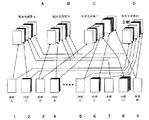
以下に本発明の詳細を図面を用いて説明する。図1は本発明のドキュメントプリンタの印刷制御方法の一実施例である配布先別ドキュメント配布方法の概要を示す原理図である。A、B、C、Dはそれぞれ配布先の部署を表す。1から9までの番号は一つのドキュメントのセクションを表している。このセクションの中には印刷を行わないで特殊なトレイから用紙だけを排出する表紙や区切り用紙の挿入のような場合も含まれている。
【0011】
図1の例では、配布先部署Aにはドキュメントのセクション1、2およびセクション7、8、9が1部配布される。配布先部署Bにはドキュメントのセクション3、4およびセクション7、8、9が1部配布される。また、配布先部署Cにはドキュメントのセクション3からセクション9まで連続したセクションが3部配布される。配布先部署Dにはドキュメントのセクション1、2とセクション5、6およびセクション9が2部配布される。
【0012】
このように同じような内容のドキュメントでその一部が配布先によって異なるような場合は、プリンタにはそのドキュメントの全体を包括するデータと、どの配布先部署にはドキュメントのどのセクションをどういう順番で組み立てて新たなドキュメントとして構成するかという情報の含まれている印刷順序リストとが転送される。
【0013】
図2はプリンタの制御内容を図示したブロックダイアグラムである。
【0014】
コンピュータあるいはサーバーからの印刷信号はケーブル11、インターフェイス12を介して、プリンタコントローラ10に取り込まれる。通常、前記印刷信号はページ記述言語のコードリストとドキュメント制御リスト15であり、その印刷信号は一旦、補助記憶装置13に格納される。前記ページ記述言語はラスターイメージプロセッサ14により印刷イメージに展開され、画像データとして変換される。その画像データは再び補助記憶装置13に格納されるが、その際に画像データの格納されているアドレスが画像データと対応して記憶される。
【0015】
一方、プリンタに取り込まれたドキュメント制御リスト15は、主記憶装置22内に格納され、ディスプレイ20やキーボード19を備えるユーザ入力インターフェイス18でユーザの設定を受け付ける。ユーザがドキュメント制御リスト15を決定すると、そのドキュメント制御リスト15から処理手順リスト16が生成される。処理手順リスト16は先頭から順次解釈されて、給紙トレイの選択、ポインターデータから印刷ページデータへのアクセスおよび取得、必要に応じての白紙頁の挿入などの操作を順次行う。このようにして一連の操作が行われると頁イメージデータ21が作成され、ドキュメントが1部プリンタエンジン17に印刷出力される。配布先に複数部のドキュメントを印刷する必要のある場合にはこのような手順を複数回行う。
【0016】
表1はドキュメント制御リストの一実施例を示すものである。
【0017】
【表1】

このリストは、ユーザが指定するさまざまな情報が格納されている。その情報には配布先部署、ドキュメントの部署毎に配布部数、セクションの構成順序、各セクションの開始ページを奇数ページにするか、偶数ページにするか、前のセクションを継承するかの印刷制御コードなどが含まれる。
【0019】
各セクション毎に、その内容、印刷用紙の入っているトレイ、各部署毎の印刷制御コードと印刷順序が記入される。また便宜上、いくつかの連続したセクションはグループ化することが可能である。グループ化されたセクションは一塊として扱われるので印刷順序の指定はグループ内の一つのセクションを指定すればよい。
【0020】
内容の欄はユーザが自分の覚えのためにメモを記入する欄である。表紙とか第1章とかいうようにメモを記入することができる。この内容は印刷されない。トレイの欄はプリンタのどのトレイの用紙を使用して印刷するかを指定するものである。指定にあたってはユーザの混乱を避けるため、トレイを示したプリンタの図を示してトレイの位置をユーザがポインタで指し示すことで入力するようにできる。このようなグラフィカルユーザインターフェイスを用意することが重要である。
【0021】
各配布先毎にユーザは印刷順序を指定することができる。その際にユーザは、印刷制御コードにより、印刷開始ページを偶数ページにするか奇数ページにするかあるいは今までの印刷の次のページから継続するかの指定ができる。このことにより新しく章を起こすときにそれが必ず奇数ページあるいは偶数ページから始まるようにできる。
【0022】
その他に、途中に区切り用紙を挟んだりする場合には、このような指定は意味を成さない。その時には印刷順序が指定された時点で前のセクションとはトレイが変わったことが分かるため、自動的に「自動」と指定され、新しいトレイから給紙された用紙に最初のページから印刷される。このような場合でも区切り用紙の裏側を印刷したいといった要求が起こるが、その場合には自動の個所をユーザが偶数ページ/奇数ページの指定ができる。
【0023】
表2はプリンタ内部での処理の概要を表す処理手順表である。
【0024】
【表2】
表2の例は前記表1に於いて部署Dへの配布ドキュメントを印刷することをシミュレートしている。部署Dへはセクション1、2およびセクション5、6それにセクション9からなるドキュメントを2部配布するように記述されている。
【0026】
表2において左蘭はステップを表し、右欄は処理内容を表している。最初にプリンタは印刷するドキュメント名、ドキュメントの作成者、作成年月日等ドキュメントに関するプロパティを認識する(ステップ1から4まで)。これは本発明とは直接関係がないので詳述はしない。
【0027】
ステップ5で印刷を開始する諸手続きを行う。セクション1ではトレイ4から用紙を給紙して印刷するようにしてされているのでステップ6でトレイ4を選択する。ステップ7ではセクション1の格納されているアドレスにアクセスするためセクション1へのポインタをセットする。ステップ8でそのアドレスに格納されているデータで印刷を実行する。
【0028】
同様にしてセクション2ではトレイ1の用紙で印刷を行う(ステップ9−11)。
【0029】
次の印刷はセクションの5である。ここではトレイ4から用紙を給紙して印刷するがその際の印刷制御データは奇数頁になっている。したがって、ステップ12、13でトレイ4を選択し、セクション5へのポインタをセットした後、頁カウンタをみて、もしも次のセクションが偶数ページで始まる場合には1枚の白紙ページを追加する必要がある(ステップ14)。
【0030】
次にセクション6が印刷される。この場合、用紙はトレイ2を利用するのでトレイ2を選択し(ステップ16)、印刷する(ステップ17−18)。
【0031】
セクション9では頁制御として偶数ページが指定されている。従ってステップ14と同様の考え方で次のセクションが奇数ページで始まる場合には1枚の白紙ページを追加する必要がある(ステップ21)。次のステップ22でドキュメントの第1部目の印刷が完了する。ところで部署Dへはドキュメントを2部印刷する必要があるので、前記ステップ6から22までをもう一度繰り返す必要がある。このような場合、ループ構造で制御するのがプログラム経験者には一般的であるが、このようにステップ展開する場合は一連の操作として展開する方が間違いが少なくなり、異常処理が割り込まれた場合の対応も容易になる。そのような思想のもとに前記ステップ6から22まではステップ24から39までにそっくりコピーされる。
【0032】
本実施例ではその前に印刷の部数ごとの区切りを、明確にするため、第1部目の印刷が終了した時点で出力トレイにオフセットをかける(ステップ23)。このことにより第1部目とは少しずれた位置に第2部目が出力されるため、ユーザは印刷後の処理が非常に楽になる。このようにオフセットをかける他に、高級なプリンタシステムではポストプリント処理として一部の印刷が終了するたびにホッチキス止めや糊付け処理等の製本処理を行わせることが可能である。
【0033】
【発明の効果】
上記の説明で明らかなように、本発明に従えば一度のドキュメント全体を包括するデータと、配布先部署に応じてどのように新しいドキュメントを構成するかという情報の含まれている印刷順序リストを印刷開始前にプリンタに転送するだけでデータの転送操作は完了し、その後の印刷はプリンタ内部でのデータの解釈によりプリンタが行うので、転送経路を短時間で開放することができる。
【図面の簡単な説明】
【図1】 本発明の一実施例であるドキュメントプリンタの印刷制御方法の配布先別ドキュメント配布の概要を示す原理図である。
【図2】 ドキュメントプリンタの制御内容を図示したブロックダイアグラムである。
【符号の説明】
10・・・ プリンタコントローラ、11・・・ ケーブル、12・・・ インターフェイス、13・・・ 補助記憶装置、14・・・ ラスターイメージプロセッサ、15・・・ ドキュメント制御リスト、16・・・ 処理手順リスト、17・・・ プリンタエンジン、18・・・ ユーザ入力インターフェイス、19・・・ キーボード、20・・・ ディスプレイ、21・・・ 頁イメージデータ、22・・・ 主記憶装置。[0001]
BACKGROUND OF THE INVENTION
The present invention relates to a document printer, and sends document data and document distribution control data from a computer or server to a printer, automatically selects necessary sections according to the distribution destination in the printer, and specifies the order of the specified sections. The present invention relates to a printing control method for a document printer that controls printing and distribution of a specified number of copies.
[0002]
[Prior art]
Conventionally, when printing a document to a plurality of distribution destinations with a printer, it is common to transfer information to be printed for each of a plurality of destinations from a computer or a server, and the printer prints the transmitted information as it is. there were. However, in this method, when printing 3 copies of duplicate information, for example, a document, the conventional simple method prints 3 pages for each page, such as 3 pages for the first page, 3 pages for the second page, etc. However, this method generally requires manual labor after printing, but this method requires a great deal of manual labor after printing. Recently, it has become possible to print multiple copies in page order due to improvements in processing technology. Even in this case, it is necessary to transfer the same information from the computer or server to the printer three times, and the transfer amount is very large. Contains a lot of waste.
[0003]
In order to solve this problem, in Japanese Patent Application No. 7-50855, all sections constituting the document are transferred to the printer only once, and at the same time, information on which section is required for each distribution destination is transferred to the printer. A method has been proposed in which a printer interprets the list and prints a document arranged in page order for each distribution destination.
[0004]
However, in recent years, there has been a demand for detailed control such as, for example, controlling the start of a section from an odd page or changing the order of sections for each distribution destination.
[0005]
[Problems to be solved by the invention]
One of the objects of the present invention is to provide a document printer that can select whether to take over the previous setting for each section, or to specify the start of an odd page or an even page.
[0006]
Another object of the present invention is to be able to arbitrarily and arbitrarily set the number of distributions for each distribution destination of the document, and to change the printing order of the sections of the document according to the distribution destination.
[0007]
[Means for Solving the Invention]
According to the present invention, when printing a document, the computer or server transfers to the printer a print data list of all sections of the document and a list (document control list) consisting of document control data to the printer before starting printing. To do.
[0008]
The document control list can hold parameters for each section of the document for each department to which the document is distributed, and the parameters can specify the number of copies for each department, the printing order of the sections, and the page control for the start page of each section. .
[0009]
The printer stores the page data of each section of the transferred document in the storage device and recognizes the storage location pointer data. Next, the printer interprets the document control list, rearranges the sections to be printed for each distribution destination in the printing order, and creates a processing procedure list for each distribution destination. Then, printing is executed by accessing the print data of each section according to the processing procedure list.
[0010]
DETAILED DESCRIPTION OF THE INVENTION
Details of the present invention will be described below with reference to the drawings. FIG. 1 is a principle diagram showing an outline of a document distribution method according to distribution destination, which is an embodiment of a print control method for a document printer of the present invention. A, B, C, and D represent distribution destination departments.
[0011]
In the example of FIG. 1, one section of the
[0012]
In this way, if a document has the same contents, and some of the documents differ depending on the distribution destination, the printer contains the data that contains the entire document, and which section of the document is in which distribution section in which order. A print order list including information on whether to compose and compose as a new document is transferred.
[0013]
FIG. 2 is a block diagram illustrating the control contents of the printer.
[0014]
Print signals from the computer or server are taken into the
[0015]
On the other hand, the document control list 15 captured by the printer is stored in the
[0016]
Table 1 shows an example of the document control list.
[0017]
[Table 1]
This list stores various information specified by the user. The information includes the distribution destination department, the number of distributions for each document department, the section configuration order, and the print control code that indicates whether the start page of each section is odd, even, or inherits the previous section. Etc. are included.
[0019]
For each section, the contents, the tray containing the printing paper, the printing control code and the printing order for each department are entered. Also for convenience, several consecutive sections can be grouped. Since the grouped sections are handled as a lump, the print order can be specified by specifying one section in the group.
[0020]
The content column is a column in which a user writes a memo for his / her own reminder. You can write notes like the cover page or chapter one. This content is not printed. The tray column designates which tray of the printer is used for printing. In order to avoid confusion for the user, the printer can be input by pointing the position of the tray with a pointer by showing a diagram of the printer showing the tray. It is important to have such a graphical user interface.
[0021]
The user can specify the printing order for each distribution destination. At that time, the user can specify whether the print start page is an even page or an odd page or to continue from the next page of the print so far by the print control code. This ensures that when starting a new chapter it always starts on an odd or even page.
[0022]
In addition, such a specification does not make sense when a separator sheet is inserted in the middle. At that time, when the printing order is specified, it can be seen that the tray has changed from the previous section, so it is automatically specified as "automatic" and printed from the first page on the paper fed from the new tray . Even in such a case, there is a request to print the back side of the separator sheet. In this case, the user can specify an even page / odd page as an automatic part.
[0023]
Table 2 is a processing procedure table showing an outline of processing in the printer.
[0024]
[Table 2]
The example of Table 2 simulates printing the distribution document to the department D in Table 1. The department D is described so that two copies of the document consisting of
[0026]
In Table 2, the left orchid represents a step, and the right column represents the processing content. First, the printer recognizes document-related properties such as a document name to be printed, a document creator, and a creation date (
[0027]
In
[0028]
Similarly, in
[0029]
The next print is
[0030]
Next,
[0031]
In section 9, even pages are designated as the page control. Therefore, if the next section starts with an odd number of pages in the same way as in
[0032]
In this embodiment, in order to clarify the division for each number of copies before printing, an offset is applied to the output tray when printing of the first copy is completed (step 23). As a result, the second part is output at a position slightly deviated from the first part, so that the user can easily perform processing after printing. In addition to applying an offset as described above, a high-grade printer system can perform a bookbinding process such as a stapler process or a gluing process every time a part of printing is completed as a post-print process.
[0033]
【The invention's effect】
As is clear from the above description, according to the present invention, a print order list including data including the entire document at once and information on how to compose a new document according to the distribution destination department is provided. The data transfer operation is completed simply by transferring to the printer before starting printing, and the subsequent printing is performed by the printer by interpreting the data inside the printer, so that the transfer path can be opened in a short time.
[Brief description of the drawings]
FIG. 1 is a principle diagram showing an outline of document distribution by distribution destination in a printing control method for a document printer according to an embodiment of the present invention;
FIG. 2 is a block diagram illustrating control contents of a document printer.
[Explanation of symbols]
DESCRIPTION OF
Claims (4)
前記ドキュメントデータの全てのセクションと配布先部署別ドキュメント制御データとを印刷開始前にプリンタに転送し、
前記配布先部署別ドキュメント制御データは、配布先部署毎のドキュメント配布部数と、ドキュメントの内でその部署に配布されるセクションと、各セクション毎の開始ページが偶数ページ/奇数ページ/前ページの継承/自動設定のいずれであるかを指定するコードと、各セクションのプリント順序を指定するコードとから構成されていることを特徴とするドキュメントプリンタの印刷制御方法。Receives document data to be printed from the competent-menu data, and a document data management means for managing, and printing means for printing the document data from the document data management unit into a predetermined form, distribution destination department received from the computer based on another document control data, the print control method of a document printer provided with the distribution destination by the print control means is associated with each of the distribution destination departments to control the necessary pages of print,
Transfer all sections of the document data and document control data for each department to the printer before starting printing ,
The document control data for each distribution destination department includes the number of document distribution copies for each distribution destination department, the section distributed to that department in the document, and the start page for each section inherits even pages / odd pages / previous pages. / A print control method for a document printer, characterized in that it is composed of a code for designating whether the setting is automatic or a code for designating the print order of each section .
前記ドキュメントデータの全てのセクションと配布先部署別ドキュメント制御データとを印刷開始前にプリンタに転送し、Transfer all sections of the document data and document control data for each department to the printer before starting printing,
前記配布先別プリント制御手段は、その中に記載されている配布先部署毎のドキュメント配布部数と、ドキュメントの内でその部署に配布されるセクションと、各セクション毎の開始ページが偶数ページ/奇数ページ/前ページの継承/自動設定のいずれであるかを指定するコードと、各セクションのプリント順序のデータから一旦プリント処理手順リストを作成し、そのプリント処理手順リストを元にドキュメントデータを印刷をすることを特徴とするドキュメントプリンタの印刷制御方法。The distribution destination-specific print control means includes the number of document distribution copies for each distribution destination department described therein, the sections distributed to the department in the document, and even pages / odd number of start pages for each section. Create a print processing procedure list once from the code that specifies whether it is page / previous page inheritance / automatic setting and the print order data of each section, and print the document data based on the print processing procedure list A print control method for a document printer.
Priority Applications (1)
| Application Number | Priority Date | Filing Date | Title |
|---|---|---|---|
| JP24837697A JP3711552B2 (en) | 1997-09-12 | 1997-09-12 | Print control method of document printer |
Applications Claiming Priority (1)
| Application Number | Priority Date | Filing Date | Title |
|---|---|---|---|
| JP24837697A JP3711552B2 (en) | 1997-09-12 | 1997-09-12 | Print control method of document printer |
Publications (2)
| Publication Number | Publication Date |
|---|---|
| JPH1185427A JPH1185427A (en) | 1999-03-30 |
| JP3711552B2 true JP3711552B2 (en) | 2005-11-02 |
Family
ID=17177189
Family Applications (1)
| Application Number | Title | Priority Date | Filing Date |
|---|---|---|---|
| JP24837697A Expired - Fee Related JP3711552B2 (en) | 1997-09-12 | 1997-09-12 | Print control method of document printer |
Country Status (1)
| Country | Link |
|---|---|
| JP (1) | JP3711552B2 (en) |
Families Citing this family (3)
| Publication number | Priority date | Publication date | Assignee | Title |
|---|---|---|---|---|
| JP5288990B2 (en) * | 2008-10-24 | 2013-09-11 | キヤノン株式会社 | Information processing apparatus and staple attribute setting method |
| JP5907609B2 (en) * | 2012-01-16 | 2016-04-26 | キヤノン株式会社 | Information processing apparatus, printing apparatus, printing system, printing control method, and program |
| JP7343349B2 (en) | 2019-10-09 | 2023-09-12 | ファナック株式会社 | How to determine the position of the robot, measurement jig, and tool tip |
-
1997
- 1997-09-12 JP JP24837697A patent/JP3711552B2/en not_active Expired - Fee Related
Also Published As
| Publication number | Publication date |
|---|---|
| JPH1185427A (en) | 1999-03-30 |
Similar Documents
| Publication | Publication Date | Title |
|---|---|---|
| JP4143426B2 (en) | Document processing apparatus and method | |
| US7385712B2 (en) | Print control method and apparatus | |
| US6616359B1 (en) | Print control method and apparatus | |
| JP3397865B2 (en) | Job printing method | |
| JP3970137B2 (en) | Document processing method and apparatus | |
| JP4564693B2 (en) | Document processing apparatus and method | |
| US7103837B2 (en) | Information processing system and display method | |
| US7535591B2 (en) | Print control method, apparatus and program for displaying a preview image | |
| US20050105116A1 (en) | Document processing apparatus and document processing method | |
| JP5100350B2 (en) | Print control apparatus, print control method, and print control program | |
| JP3937777B2 (en) | Document processing system, information processing apparatus, setting method thereof, program, and recording medium | |
| JP2004252665A (en) | Document processing method | |
| US8144345B2 (en) | Information-processing apparatus and method | |
| JPH11255374A (en) | Printing system for sequenced paper sheets | |
| JP4756796B2 (en) | Information processing apparatus, information processing method, program, and storage medium | |
| US20040158655A1 (en) | Automatic insertion of special pages into black & white digital printing jobs | |
| US7090417B2 (en) | Method of programming pages within a document to be printed on different output devices | |
| US6621993B2 (en) | Image processing apparatus, image-forming apparatus, image forming system, and image-job linking method | |
| US20150242165A1 (en) | Print transformation process and techniques for the purpose of providing enhanced printing capabilities including sequential and reverse printing formats. | |
| JP2001130083A (en) | Print control method and apparatus | |
| JPH1185427A (en) | Document printer print control method | |
| JP2010113596A (en) | Document processing system | |
| JP3793187B2 (en) | Information processing apparatus, information processing method, and program | |
| JP2005149212A (en) | Document processing method and document processing apparatus | |
| JP2005174226A (en) | Printing control method and information processing apparatus |
Legal Events
| Date | Code | Title | Description |
|---|---|---|---|
| A977 | Report on retrieval |
Free format text: JAPANESE INTERMEDIATE CODE: A971007 Effective date: 20050317 |
|
| A131 | Notification of reasons for refusal |
Free format text: JAPANESE INTERMEDIATE CODE: A131 Effective date: 20050328 |
|
| A521 | Written amendment |
Free format text: JAPANESE INTERMEDIATE CODE: A523 Effective date: 20050513 |
|
| TRDD | Decision of grant or rejection written | ||
| A01 | Written decision to grant a patent or to grant a registration (utility model) |
Free format text: JAPANESE INTERMEDIATE CODE: A01 Effective date: 20050725 |
|
| A61 | First payment of annual fees (during grant procedure) |
Free format text: JAPANESE INTERMEDIATE CODE: A61 Effective date: 20050807 |
|
| R150 | Certificate of patent or registration of utility model |
Free format text: JAPANESE INTERMEDIATE CODE: R150 |
|
| FPAY | Renewal fee payment (event date is renewal date of database) |
Free format text: PAYMENT UNTIL: 20090826 Year of fee payment: 4 |
|
| FPAY | Renewal fee payment (event date is renewal date of database) |
Free format text: PAYMENT UNTIL: 20090826 Year of fee payment: 4 |
|
| S111 | Request for change of ownership or part of ownership |
Free format text: JAPANESE INTERMEDIATE CODE: R313111 |
|
| FPAY | Renewal fee payment (event date is renewal date of database) |
Free format text: PAYMENT UNTIL: 20090826 Year of fee payment: 4 |
|
| R350 | Written notification of registration of transfer |
Free format text: JAPANESE INTERMEDIATE CODE: R350 |
|
| FPAY | Renewal fee payment (event date is renewal date of database) |
Free format text: PAYMENT UNTIL: 20090826 Year of fee payment: 4 |
|
| FPAY | Renewal fee payment (event date is renewal date of database) |
Free format text: PAYMENT UNTIL: 20100826 Year of fee payment: 5 |
|
| FPAY | Renewal fee payment (event date is renewal date of database) |
Free format text: PAYMENT UNTIL: 20100826 Year of fee payment: 5 |
|
| FPAY | Renewal fee payment (event date is renewal date of database) |
Free format text: PAYMENT UNTIL: 20110826 Year of fee payment: 6 |
|
| FPAY | Renewal fee payment (event date is renewal date of database) |
Free format text: PAYMENT UNTIL: 20110826 Year of fee payment: 6 |
|
| FPAY | Renewal fee payment (event date is renewal date of database) |
Free format text: PAYMENT UNTIL: 20120826 Year of fee payment: 7 |
|
| FPAY | Renewal fee payment (event date is renewal date of database) |
Free format text: PAYMENT UNTIL: 20120826 Year of fee payment: 7 |
|
| FPAY | Renewal fee payment (event date is renewal date of database) |
Free format text: PAYMENT UNTIL: 20130826 Year of fee payment: 8 |
|
| LAPS | Cancellation because of no payment of annual fees |