JP3655152B2 - Software editing apparatus and storage medium - Google Patents
Software editing apparatus and storage medium Download PDFInfo
- Publication number
- JP3655152B2 JP3655152B2 JP33871499A JP33871499A JP3655152B2 JP 3655152 B2 JP3655152 B2 JP 3655152B2 JP 33871499 A JP33871499 A JP 33871499A JP 33871499 A JP33871499 A JP 33871499A JP 3655152 B2 JP3655152 B2 JP 3655152B2
- Authority
- JP
- Japan
- Prior art keywords
- processing
- editing
- software
- information file
- computer
- Prior art date
- Legal status (The legal status is an assumption and is not a legal conclusion. Google has not performed a legal analysis and makes no representation as to the accuracy of the status listed.)
- Expired - Fee Related
Links
Images
Classifications
-
- G—PHYSICS
- G06—COMPUTING OR CALCULATING; COUNTING
- G06F—ELECTRIC DIGITAL DATA PROCESSING
- G06F9/00—Arrangements for program control, e.g. control units
- G06F9/06—Arrangements for program control, e.g. control units using stored programs, i.e. using an internal store of processing equipment to receive or retain programs
- G06F9/46—Multiprogramming arrangements
- G06F9/461—Saving or restoring of program or task context
-
- G—PHYSICS
- G06—COMPUTING OR CALCULATING; COUNTING
- G06F—ELECTRIC DIGITAL DATA PROCESSING
- G06F8/00—Arrangements for software engineering
- G06F8/20—Software design
Landscapes
- Engineering & Computer Science (AREA)
- Software Systems (AREA)
- Theoretical Computer Science (AREA)
- General Engineering & Computer Science (AREA)
- Physics & Mathematics (AREA)
- General Physics & Mathematics (AREA)
- Stored Programmes (AREA)
Description
【0001】
【発明の属する技術分野】
本発明はソフトウェア編集装置及び記憶媒体に係り、特に情報処理装置で用いるソフトウェアの編集を行うソフトウェア編集装置及びコンピュータにそのようなソフトウェアの編集を行わせるプログラムが格納されたコンピュータ読み取り可能な記憶媒体に関する。
【0002】
本明細書では、ソフトウェアの編集とは、ソフトウェアの修正及び更新を含むものとする。例えば、ソフトウェアの修正は、ソフトウェアにバグ等が存在する場合に行われ、ソフトウェアの更新は、ソフトウェアのバージョンを最新のものに変更する場合に行われる。
【0003】
【従来の技術】
コンピュータシステム等の情報処理装置で用いるソフトウェアが編集可能な場合は、編集ソフトウェアやパッチソフトウェア等を提供することで、ソフトウェアの編集を行えば良い。
ここで、情報処理装置で用いるソフトウェアとは、オペレーティングシステム、アプリケーション、ゲームソフトウェア、プログラム、及びこれらのソフトウェアを情報処理装置にインストールする際にユーザを支援するインストール支援ツール等の各種ソフトウェアを含む。
【0004】
これに対し、情報処理装置で用いるソフトウェアがCD−ROM等の編集不可能な記録媒体に格納されている場合には、編集ソフトウェアやパッチソフトウェアを提供しても、直接ソフトウェアの編集を行うことはできない。従って、このような場合には、編集済みのソフトウェアが格納された記録媒体を新たに提供することで、編集済みのソフトウェアを使用する。
【0005】
【発明が解決しようとする課題】
しかし、編集ソフトウェアやパッチソフトウェア等を用いてソフトウェアを直接編集する場合、編集する必要のある部分を効率良く、且つ、正確に編集することは、熟練者でないと難しい。
他方、編集済みのソフトウェアが格納された記録媒体を新たに提供する場合、編集済みのソフトウェアを使用するため、正確な編集が保証されており、熟練者を必要としない。ところが、この場合には、既存のが格納された記録媒体が全く無駄になってしまうという問題があった。
【0006】
又、現在、ソフトウェアは複数のファイル(モジュール)で構成されている。一般的に、あるソフトウェアにおいて編集が必要であるファイルが複数個ある場合には、それら全てを編集の対象として処理が行われている。
従って、ソフトウェアの編集処理にファイル個数分の編集時間が必要になる。更に、編集処理によってファイルの容量が大きくなり、実行時(運用時)にそのソフトウェアによるメモリ(主記憶)の占有量も大きくなる。
【0007】
このようなことから、このソフトウェア自体の処理速度が低下したり、リソース不足による他ソフトウェアの実行の妨げ、処理速度低下の原因となっている。そこで、本発明は、ソフトウェアが直接編集不可能な形態で提供される場合でも、ソフトウェアの実行時に編集を可能とし、既存のソフトウェアをそのまま使用可能とすることで、資源を有効に利用できるようにした情報処理装置及び記憶媒体を提供することを目的とする。
【0008】
【課題を解決するための手段】
上記の課題は、直接編集不可能な形態で提供されるソフトウェアに対し、編集箇所及び編集内容を含む情報ファイルを入力する入力手段と、該ソフトウェアの運用時に、該情報ファイルに基づいて該ソフトウェアを編集して実行する編集実行手段とを備えたソフトウェア編集装置によって達成される。
【0009】
前記編集実行手段は、前記ソフトウェアのうち、実行する部分の編集箇所のみを編集する構成であっても良い。
前記入力手段は、前記情報ファイルを記録媒体又は通信媒体を介して入力する構成であっても良い。
上記の課題は、コンピュータに、直接編集不可能な形態で提供されるソフトウェアに対する編集を行わせるプログラムが格納されたコンピュータ読み取り可能な記憶媒体であって、コンピュータに、該ソフトウェアの編集箇所及び編集内容を含む情報ファイルを入力する入力手順と、コンピュータに、該ソフトウェアの運用時に、該情報ファイルに基づいて該ソフトウェアを編集して実行する編集実行手順とを実行させるプログラムを格納した記憶媒体によっても達成される。
【0010】
前記編集実行手順は、コンピュータに、前記ソフトウェアのうち、実行する部分の編集箇所のみを編集させても良い。
前記入力手順は、コンピュータに、前記情報ファイルを記録媒体又は通信媒体を介して入力させても良い。
記憶媒体は、前記情報ファイルを更に格納しても良い。
【0011】
従って、本発明によれば、ソフトウェアが直接編集不可能な形態で提供される場合でも、ソフトウェアの実行時に編集を可能とし、既存のソフトウェアをそのまま使用可能とすることで、資源を有効に利用できるようにすることができる。上記の課題は、複数の処理形態を規定した運用情報、およびソフトウェアに対する編集内容を規定した編集情報を入力する入力手段と、前記ソフトウェアの運用のために選択された処理形態での処理に必要な前記ソフトウェアの編集内容を特定する特定手段と、前記特定された編集内容によりソフトウェアを編集する編集手段とを備えたソフトウェア編集装置によっても達成される。
【0012】
前記ソフトウェアは直接編集不可能な形態で提供され、前記編集手段は、前記ソフトウェアの運用時に該ソフトウェアを編集するようにしても良い。
上記の課題は、コンピュータに、複数の処理形態を規定した運用情報、およびソフトウェアに対する編集内容を規定した編集情報を入力する入力手順と、前記ソフトウェアの運用にために選択された処理形態での処理に必要な前記ソフトウェアの編集内容を特定する特定手順と、前記特定された編集内容によりソフトウェアを編集する編集手順とを実行させるプログラムを格納したコンピュータ読み取り可能な記憶媒体によっても達成される。
【0013】
前記ソフトウェアは直接編集不可能な形態で提供され、前記編集手順は、前記ソフトウェアの運用時に該ソフトウェアを編集するようにしても良い。
本発明においては、ソフトウェアを構成する全てのファイルのうち編集が必要な全てのファイルについて編集処理を行うのではなく、実行に必要な部分のみを編集の対象とする、即ち、選択された処理形態において使用されるソフトウェアの構成ファイルのみを編集の対象としている。このため、その編集にかかる時間を削減することが可能となり、メモリ占有率の増大を抑えることができる。
【0014】
【発明の実施の形態】
以下、本発明になるソフトウェア編集装置の実施例及び本発明になるコンピュータ読み取り可能な記憶媒体の実施例を、図面と共に説明する。
【0015】
【実施例】
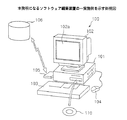
図1は、本発明になるソフトウェア編集装置の一実施例を示す斜視図である。ソフトウェア編集装置の本実施例では、本発明がコンピュータシステムに適用されている。
図1に示すコンピュータシステム100は、大略CPUやディスクドライブ装置等を内蔵した本体部101、本体部101からの指示により、表示画面102a上に画像を表示するディスプレイ102、コンピュータシステム100に種々の情報を入力するためのキーボード103、ディスプレイ102の表示画面102a上の任意の位置を指定するマウス104、及び外部のデータベースなどにアクセスして他のコンピュータシステムに記憶されているプログラム等をダウンロードするモデム105を有する。
【0016】
ディスク110等の可搬型記録媒体に格納されるか、モデム105等の通信装置を使って他のコンピュータシステムの記録媒体106からダウンロードされる、コンピュータシステム100にソフトウェア編集機能をもたせるプログラム(ソフトウェア)は、コンピュータシステム100に入力されてコンパイルされる。本発明になる記憶媒体は、プログラムを格納した、例えばディスク110等の記録媒体からなる。本発明になる記憶媒体を構成する記録媒体は、ディスク110、ICカードメモリ、フロッピーディスク、光磁気ディスク、CD−ROM等の可搬型記録媒体に限定されるものではなく、モデム105やLAN等の通信装置や通信手段を介して接続されるコンピュータシステムでアクセス可能な各種記録媒体を含む。
【0017】
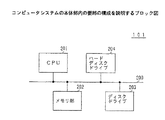
図2は、コンピュータシステム100の本体部101内の要部の構成を説明するブロック図である。同図中、本体部101は、大略バス200により接続されたCPU201と、RAMやROM等からなるメモリ部202と、ディスク110用のディスクドライブ203と、ハードディスクドライブ204とからなる。例えば、ディスクドライブ203は、フロッピーディスク用のドライブ部と、CD−ROM用のドライブ部とからなる構成であっても良い。ディスプレイ102、キーボード103、マウス104等は、バス200を介してCPU201に接続されていても、直接CPU201に接続されていても良い。
【0018】
尚、コンピュータシステム100の構成は、図1及び図2に示す構成に限定されるものではなく、代わりに各種周知の構成を使用しても良い。又、コンピュータシステム100はデスクトップ型であるが、携帯型であっても良いことは、言うまでもない。
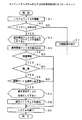
先ず、コンピュータシステム100がソフトウェアの編集を行う場合の動作を説明する。図3は、本実施例におけるコンピュータシステム100のCPU201の処理を説明するフローチャートである。図3に示す処理は、本発明になる記憶媒体の一実施例に格納されたプログラムに対応する。
【0019】
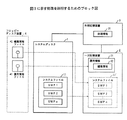
又、図4は、図3に示す処理を説明するためのブロック図である。図4において、システムディスク1は、CD−ROM等の、編集の対象となるソフトウェア(以下、システムファイルと言う)11を格納している記録媒体である。このシステムディスク1内のシステムファイル11は、直接編集不可能である。一次記憶装置2は、例えば図2に示すメモリ部202に対応し、一次記憶装置2内に格納された情報は、コンピュータシステム100の再起動により消去される。記憶装置3は、例えば図2に示すハードディスクドライブ204に対応し、コンピュータシステム100が実行したシステムファイルに関する処理情報31を格納する。フロッピーディスク装置4は、例えば図2に示すディスクドライブ203内のフロッピーディスク用のドライブ部に対応する。尚、説明の便宜上、システムディスク1は、図2に示すディスクドライブ203内のCD−ROM用のドライブ部(図示せず)により読み取られるものとする。本実施例では、編集の対象となるシステムファイル11は、例えばオペレーティングシステムをコンピュータシステム100にインストールする際に、ユーザを支援するインストール支援ツールであるものとする。
【0020】
図3において、コンピュータシステム100がシステムディスク1により起動されると、ステップS1は、システムディスク1内のシステムファイル11を一次記憶装置2内に複写して、システムファイル11’を複製する。システムファイル11は、ソフトウェア部SWP1〜SWPnを含み、複製されたシステムファイル11’もソフトウェア部SWP1〜SWPnを含む。これにより、コンピュータシステム100が一次記憶装置2内のシステムファイル11’に基づいて動作可能な環境が構築される。
【0021】
ステップS2は、オペレーティングシステムのインストール処理中であるか否かを判定する。この判定は、例えばインストール処理中にのみフラグを設定する構成とし、このフラグが設定されているか否かをチェックすることで行うことができる。ステップS2の判定結果がNOであると、ステップS3は初期画面の表示を行い、処理はコンピュータシステム100の通常の処理へ進む。
【0022】
他方、ステップS2の判定結果がYESであると、ステップS4は、ユーザに、運用情報ファイル41が格納されたフロッピーディスクをフロッピーディスク装置4に挿入するよう促すメッセージを、ディスプレイ102上に表示する。ユーザがフロッピーディスクをフロッピーディスク装置4に挿入すると、ステップS5は、運用情報ファイル41を読み込み、一次記憶装置2内へ運用情報21として格納する。運用情報ファイル41には、編集箇所を示すソフトウェア編集情報22等が含まれる。
【0023】
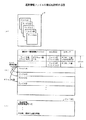
図5は、運用情報ファイル41の構成を説明する図である。同図中、(a)は運用情報ファイル41の概略構成を模式的示し、(b)は運用情報ファイル41のデータ構造を示し、(c)は運用情報ファイル41の1つの情報ファイルDを示す。
図5(a)に示すように、運用情報ファイル41は、コンピュータシステム100の動作に必要な複数の情報ファイルA,B,...からなる。具体的には、運用情報ファイル41は、図5(b)に示すようなデータ構造を有し、運用情報ファイル41の識別子、インデックスサイズ、リザーブ、各ファイル名及びそのオフセット値、各ファイルA,B,...からなる。又、図5(c)に示すように、例えば1つのファイルDには、全ての処理形態を示す処理形態番号▲1▼,...と、その他の運用に必要な情報が記述されている。
【0024】
図3の説明に戻ると、ステップS6は、運用情報21内にソフトウェア編集情報22が含まれているか否かを判定する。ステップS6の判定結果がNOであると、処理はステップS11へ進んでシステムファイル11’の所望のソフトウェア部を実行し、処理は終了する。
ステップS6の判定結果がYESであると、ステップS7は、運用情報21に基づいて、システムファイル11’のうち、実行するべき所望のソフトウェア部の編集が必要であるか否かを判定する。ステップS7の判定結果がNOであると、処理はステップS11へ進んでシステムファイル11’の所望のソフトウェア部を実行し、処理は終了する。
【0025】
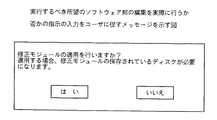
ステップS7の判定結果がYESであると、ステップS8は、システムファイル11’のうち、実行するべき所望のソフトウェア部の編集を実際に行うか否かを判定する。ステップS8の判定は、実行するべき所望のソフトウェア部の編集を実際に行うか否かの指示の入力をユーザに促す図6に示す如きメッセージを、ディスプレイ102上に表示し、ユーザの入力に基づいて行われる。ユーザが図6のメッセージに対して「いいえ」のボタンをマウス104等で選択すると、ステップS8の判定結果はNOとなり、処理はステップS11へ進んでシステムファイル11’の所望のソフトウェア部を実行し、処理は終了する。
【0026】
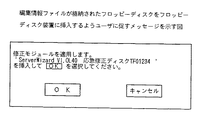
他方、ユーザが図6のメッセージに対して「はい」のボタンをマウス104等で選択すると、ステップS8の判定結果はYESとなり、処理はステップS9へ進む。ステップS9は、ユーザに、編集内容を示す編集情報ファイル42が格納されたフロッピーディスクをフロッピーディスク装置4に挿入するよう促す図7に示す如きメッセージをディスプレイ102上に表示する。尚、編集情報ファイル42が格納されたフロッピーディスクと、運用情報ファイル41が格納されたフロッピーディスクとは、同一のフロッピーディスクであっても良いことは、言うまでもない。
【0027】
ユーザがフロッピーディスクをフロッピーディスク装置4に挿入して図7のメッセージに対して「実行」のボタンをマウス104等で選択すると、ステップS10は、編集情報ファイル42を読み込み、一次記憶装置2内のシステムファイル11’のうち、実行するべき所望のソフトウェア部の編集を、外部記憶装置3内の処理情報31と運用情報21内の編集情報22との比較に基づいて行う。そしてこの場合、ステップS11は、システムファイル11’の編集された所望のソフトウェア部を実行し、処理は終了する。
【0028】
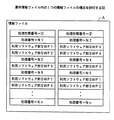
図8は、運用情報ファイル41内の1つの情報ファイルAの構成を説明する図である。同図に示すように、図5(b)に示す情報ファイルAは、各処理形態番号に対して、利用ソフトウェア情報を編集情報22として格納している。同図に示すように、例えば処理形態番号▲1▼に対しては、処理番号N1と対応させて利用ソフトウェア部SWP1,SWP2、処理番号N2と対応させて利用ソフトウェア部SWP3、処理番号N5と対応させて利用ソフトウェア部SWP1,SWP3等が、各利用ソフトウェア部の編集の要否と共に格納されている。又、処理形態番号▲2▼に対しては、処理番号N2と対応させて利用ソフトウェア部SWP3,SWP4、処理番号N4と対応させて利用ソフトウェア部SWP3、処理番号N5と対応させて利用ソフトウェア部SWP1,SWP2等が、各利用ソフトウェア部の編集の要否と共に格納されている。
【0029】
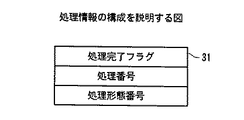
図9は、外部記憶装置3に格納される処理情報31の構成を説明する図である。同図に示すように、処理情報31は、処理完了フラグ、処理番号及び処理形態番号を含む。処理完了フラグは、各処理形態番号の処理が終了しているか否か、及び、各処理形態番号の各処理番号の処理が終了しているか否かを示すように、順次書き直される。従って、処理情報31から、システムファイル11の各処理の処理形態と処理状況を判断することができる。
【0030】
つまり、図3に示すステップS10において、外部記憶装置3内に格納されている処理情報31と、一次記憶装置2内に格納されている運用情報21内の編集情報22とを比較することで、どの処理形態番号のどの処理番号まで処理が進んだかと、これから処理する処理番号で実行するべきソフトウェア部で編集するべきものがあるか否かを知ることができる。又、処理情報31から、編集するべきソフトウェア部で、未編集のものと、編集済みのものを判別することもできる。そこで、これから処理する処理番号で実行するべきソフトウェア部で編集するべきもので未編集のものがあれば、編集情報ファイル42内の編集内容に従って必要なソフトウェア部のみを編集し、運用情報21に従って処理を実行すれば良い。
【0031】
尚、上記実施例では、運用情報ファイル41及び編集情報ファイル42を夫々フロッピーディスクから一次記憶装置2内に読み込んでいるが、記録媒体はフロッピーディスクに限定されない。
又、運用情報ファイル41及び編集情報ファイル42の少なくとも一方を記録媒体又は通信媒体を介して一次記憶装置2内に読み込むようにしても良い。この場合の通信媒体は、インターネット等のネットワークと、図1に示すモデム105等を含む。通信媒体を介してファイルを読み込む場合、迅速にシステムファイル11の編集情報をユーザに提供できると共に、編集済みの情報システムファイル全体を通信媒体を介して読み込む場合と比較すると、処理時間等の面でユーザへの負担が大幅に軽減できる。
【0032】
尚、接続されるネットワークが電話回線ではなくLANやインターネットなどであれば、モデムではなくネットワークカードを利用すれば良い。
更に、運用情報ファイル41及び編集情報ファイル42の少なくとも一方を、通信媒体を介してフロッピーディスク等の記録媒体に一旦格納してから、一次記憶装置2内に読み込むようにしても良い。この場合、一度使用したファイルは、再度通信媒体を介して読み込む必要がなく、フロッピーディスク等の記録媒体から簡単に読み込める。
【0033】
以上、本発明を実施例により説明したが、本発明は上記実施例に限定されるものではなく、本発明の範囲内で種々の変形及び改良が可能であることは、言うまでもない。
【0034】
【発明の効果】
本発明によれば、ソフトウェアが直接編集不可能な形態で提供される場合でも、ソフトウェアの実行時に編集を可能とし、既存のソフトウェアが格納された記録媒体をそのまま使用可能とすることで、資源を有効に利用できるようにすることができる。
【0035】
又、本発明においては、ソフトウェアを構成する全てのファイルのうち編集が必要な全てのファイルについて編集処理を行うのではなく、実行に必要な部分のみを編集の対象とする、即ち、選択された処理形態において使用されるソフトウェアの構成ファイルのみを編集の対象としている。このため、その編集にかかる時間を削減することが可能となり、メモリ占有率の増大を抑えることができる。
【図面の簡単な説明】
【図1】本発明になるソフトウェア編集装置の一実施例を示す斜視図である。
【図2】コンピュータシステムの本体部内の要部の構成を説明するブロック図である。
【図3】コンピュータシステムのCPUの処理を説明するフローチャートである。
【図4】図3に示す処理を説明するためのブロック図である。
【図5】運用情報ファイルの構成を説明する図である。
【図6】実行するべき所望のソフトウェア部の編集を実際に行うか否かの指示の入力をユーザに促すメッセージを示す図である。
【図7】編集情報ファイルが格納されたフロッピーディスクをフロッピーディスク装置に挿入するようユーザに促すメッセージを示す図である。
【図8】運用情報ファイル内の1つの情報ファイルの構成を説明する図である。
【図9】処理情報の構成を説明する図である。
【符号の説明】
1 システムディスク
2 一次記憶装置
3 外部記憶装置
4 フロッピーディスク装置
11,11’ システムファイル
21 運用情報
22 編集情報
31 処理情報
41 運用情報ファイル
42 編集情報ファイル[0001]
BACKGROUND OF THE INVENTION
The present invention relates to a software editing apparatus and a storage medium, and more particularly, to a software editing apparatus that edits software used in an information processing apparatus and a computer-readable storage medium that stores a program that causes a computer to edit such software. .
[0002]
In this specification, software editing includes correction and update of software. For example, the software is corrected when a bug or the like exists in the software, and the software update is performed when the software version is changed to the latest version.
[0003]
[Prior art]
When software used in an information processing apparatus such as a computer system can be edited, the software may be edited by providing editing software, patch software, or the like.
Here, the software used in the information processing apparatus includes various software such as an operating system, an application, game software, a program, and an installation support tool for assisting a user when installing these software in the information processing apparatus.
[0004]
On the other hand, if the software used in the information processing apparatus is stored in a non-editable recording medium such as a CD-ROM, editing the software directly even if editing software or patch software is provided Can not. Therefore, in such a case, the edited software is used by newly providing a recording medium storing the edited software.
[0005]
[Problems to be solved by the invention]
However, when software is directly edited using editing software, patch software, or the like, it is difficult to edit a portion that needs to be edited efficiently and accurately unless it is an expert.
On the other hand, when a new recording medium storing edited software is provided, since the edited software is used, accurate editing is guaranteed, and an expert is not required. However, in this case, there is a problem that the recording medium storing the existing is completely wasted.
[0006]
Currently, software is composed of a plurality of files (modules). In general, when there are a plurality of files that need to be edited in a certain software, all of them are processed for editing.
Therefore, editing time for the number of files is required for the software editing process. Furthermore, the file capacity is increased by the editing process, and the amount of memory (main memory) occupied by the software at the time of execution (operation) is also increased.
[0007]
For this reason, the processing speed of the software itself is reduced, the execution of other software is hindered due to lack of resources, and the processing speed is reduced. Therefore, the present invention enables effective use of resources by enabling editing at the time of execution of software and allowing existing software to be used as it is even when the software is provided in a form that cannot be directly edited. It is an object of the present invention to provide an information processing apparatus and a storage medium.
[0008]
[Means for Solving the Problems]
The above-mentioned problem is that, with respect to software provided in a form that cannot be directly edited, input means for inputting an information file including an edit location and edit contents, and the software based on the information file when the software is operated This is achieved by a software editing apparatus including editing execution means for editing and executing.
[0009]
The editing execution means may be configured to edit only the editing portion of the portion to be executed in the software.
The input unit may be configured to input the information file via a recording medium or a communication medium.
The above-mentioned problem is a computer-readable storage medium storing a program for causing a computer to edit software provided in a form that cannot be directly edited. The present invention is also achieved by a storage medium storing a program for executing an input procedure for inputting an information file including a program and an editing execution procedure for editing and executing the software based on the information file when the software is operated. Is done.
[0010]
The editing execution procedure may cause the computer to edit only the editing portion of the portion to be executed in the software.
The input procedure may cause the computer to input the information file via a recording medium or a communication medium.
The storage medium may further store the information file.
[0011]
Therefore, according to the present invention, even when software is provided in a form that cannot be directly edited, it is possible to edit resources when the software is executed, and resources can be used effectively by allowing existing software to be used as it is. Can be. The above-described problems are necessary for processing in the processing mode selected for operating the software, and input means for inputting operation information that defines a plurality of processing modes and editing information that defines editing contents for the software. The present invention is also achieved by a software editing apparatus comprising specifying means for specifying the editing contents of the software and editing means for editing software based on the specified editing contents.
[0012]
The software may be provided in a form that cannot be directly edited, and the editing means may edit the software during operation of the software.
The above-described problems include an input procedure for inputting operation information defining a plurality of processing forms and editing information defining editing contents for software to a computer, and processing in a processing form selected for the operation of the software. The present invention is also achieved by a computer-readable storage medium storing a program for executing a specific procedure for specifying the software editing contents necessary for the editing and an editing procedure for editing the software according to the specified editing contents.
[0013]
The software may be provided in a form that cannot be directly edited, and the editing procedure may be to edit the software during operation of the software.
In the present invention, the editing process is not performed on all the files that need to be edited among all the files constituting the software, but only the portion necessary for the execution is to be edited. That is, the selected processing mode Only the configuration file of the software used in is edited. For this reason, it is possible to reduce the time required for the editing, and it is possible to suppress an increase in the memory occupation rate.
[0014]
DETAILED DESCRIPTION OF THE INVENTION
Hereinafter, an embodiment of a software editing apparatus according to the present invention and an embodiment of a computer-readable storage medium according to the present invention will be described with reference to the drawings.
[0015]
【Example】
FIG. 1 is a perspective view showing an embodiment of a software editing apparatus according to the present invention. In this embodiment of the software editing apparatus, the present invention is applied to a computer system.
A
[0016]
A program (software) that causes the
[0017]
FIG. 2 is a block diagram illustrating a configuration of a main part in the
[0018]
Note that the configuration of the
First, an operation when the
[0019]
FIG. 4 is a block diagram for explaining the processing shown in FIG. In FIG. 4, a
[0020]
In FIG. 3, when the
[0021]
In step S2, it is determined whether or not the operating system is being installed. This determination can be made, for example, by setting a flag only during the installation process and checking whether this flag is set. If the decision result in the step S2 is NO, a step S3 displays an initial screen, and the process proceeds to a normal process of the
[0022]
On the other hand, if the decision result in the step S2 is YES, a step S4 displays a message on the
[0023]
FIG. 5 is a diagram for explaining the configuration of the
As shown in FIG. 5A, the
[0024]
Returning to the description of FIG. 3, in step S <b> 6, it is determined whether or not the software editing information 22 is included in the
If the decision result in the step S6 is YES, a step S7 decides whether or not editing of a desired software part to be executed in the
[0025]
If the decision result in the step S7 is YES, a step S8 decides whether or not editing of a desired software part to be executed is actually performed in the
[0026]
On the other hand, if the user selects the “Yes” button for the message in FIG. 6 with the
[0027]
When the user inserts a floppy disk into the floppy disk device 4 and selects the “execute” button for the message in FIG. 7 with the
[0028]
FIG. 8 is a diagram for explaining the configuration of one information file A in the
[0029]
FIG. 9 is a diagram for explaining the configuration of the
[0030]
That is, by comparing the
[0031]
In the above embodiment, the
Further, at least one of the
[0032]
If the network to be connected is not a telephone line but a LAN or the Internet, a network card may be used instead of a modem.
Furthermore, at least one of the
[0033]
Although the present invention has been described with reference to the embodiments, it is needless to say that the present invention is not limited to the above-described embodiments, and various modifications and improvements can be made within the scope of the present invention.
[0034]
【The invention's effect】
According to the present invention, even when software is provided in a form that cannot be directly edited, editing can be performed at the time of execution of the software, and a recording medium storing existing software can be used as it is. It can be used effectively.
[0035]
Also, in the present invention, the editing process is not performed for all files that need to be edited among all the files constituting the software, but only the portion necessary for execution is selected, that is, selected. Only software configuration files used in the processing mode are subject to editing. For this reason, it is possible to reduce the time required for the editing, and it is possible to suppress an increase in the memory occupation rate.
[Brief description of the drawings]
FIG. 1 is a perspective view showing an embodiment of a software editing apparatus according to the present invention.
FIG. 2 is a block diagram illustrating a configuration of a main part in a main body of the computer system.
FIG. 3 is a flowchart illustrating processing of a CPU of a computer system.
4 is a block diagram for explaining the processing shown in FIG. 3; FIG.
FIG. 5 is a diagram illustrating a configuration of an operation information file.
FIG. 6 is a diagram showing a message that prompts the user to input an instruction as to whether or not to actually edit a desired software part to be executed.
FIG. 7 is a diagram showing a message prompting the user to insert a floppy disk in which an editing information file is stored into a floppy disk device.
FIG. 8 is a diagram illustrating the configuration of one information file in an operation information file.
FIG. 9 is a diagram illustrating a configuration of processing information.
[Explanation of symbols]
DESCRIPTION OF
Claims (5)
該入力手段により入力された運用情報ファイルを格納する一次記憶手段と、 Primary storage means for storing the operation information file input by the input means;
該運用情報ファイルが有する各ファイル名で示される各情報ファイルは、複数の処理形態番号の各々に対して複数の処理番号と、各処理番号の処理で実行するべき利用ソフトウェア部の情報と、各利用ソフトウェア部が編集を要するか否かを示す情報とを関連付けて持ち、 Each information file indicated by each file name included in the operation information file includes a plurality of processing numbers for each of a plurality of processing form numbers, information on a software section to be executed in processing of each processing number, It has information related to whether or not the used software part needs editing,
該運用情報ファイルの各情報ファイルが持つ各処理形態番号に対する処理番号の処理で実行するべき利用ソフトウェア部が編集を要するか否かを示す情報と、前記編集情報ファイルが持つ編集内容とに基づいて、選択された処理形態番号についての各処理の処理番号に対応する利用ソフトウェア部に対する編集内容を特定する特定手段と、 Based on information indicating whether or not the use software unit to be executed in the processing of the processing number corresponding to each processing mode number included in each information file of the operation information file requires editing, and the editing content of the editing information file A specifying means for specifying the editing content for the use software part corresponding to the processing number of each processing for the selected processing form number;
前記特定された編集内容に応じて、前記選択された処理形態番号についての各処理の処理番号に対応する利用ソフトウェア部の編集を要する箇所のみを編集する編集手段と、 Editing means for editing only the portion that requires editing of the use software part corresponding to the processing number of each processing for the selected processing form number according to the specified editing content,
該運用情報ファイルの各情報ファイルに含まれる各処理形態番号についての各処理の処理番号に対応する利用ソフトウェア部の実行が終了しているか否かを示す処理完了フラグを有する処理情報を格納する格納手段と、 A storage for storing process information having a process completion flag indicating whether or not the execution of the use software unit corresponding to the process number of each process for each process type number included in each information file of the operation information file has been completed Means,
各処理番号の処理が終了すると前記格納手段の該処理完了フラグを当該処理番号の処理が終了していることを示すように順次書き直す手段とを備え、 Means for sequentially rewriting the processing completion flag of the storage means to indicate that the processing of the processing number has been completed when the processing of each processing number is completed,
前記編集手段は、前記ソフトウェアのうち、前記運用情報ファイルの各情報ファイルが持つ各利用ソフトウェア部が編集の要するか否を示す情報と前記処理情報が有する利用ソフトウェア部の実行が終了しているか否かを示す処理完了フラグとを参照して、前記編集手段が実行するべき処理の処理番号に対応する利用ソフトウェア部のうち、処理が完了していない利用ソフトウェア部の編集を要する箇所のみを編集する、ソフトウェア編集装置。 The editing means includes, in the software, information indicating whether or not each usage software part included in each information file of the operation information file needs to be edited and whether or not execution of the usage software part included in the processing information has been completed. With reference to the process completion flag indicating whether or not the editing unit only edits the part of the usage software part corresponding to the processing number of the process to be executed by the editing means that requires editing of the usage software part that has not been processed. Software editing device.
該コンピュータに、該コンピュータの動作に必要な複数の情報ファイルからなる運用情報ファイルと、該ソフトウェアの編集内容を示す編集情報ファイルとを入力させる入力手順と、 An input procedure for causing the computer to input an operation information file composed of a plurality of information files necessary for the operation of the computer and an edit information file indicating the edit contents of the software;
該コンピュータに、該入力手順により入力させた運用情報ファイルを格納させる一次記憶手順と、 A primary storage procedure for causing the computer to store the operation information file input by the input procedure;
該運用情報ファイルが有する各ファイル名で示される各情報ファイルは、複数の処理形態番号の各々に対して複数の処理番号と、各処理番号の処理で実行するべき利用ソフトウェア部の情報と、各利用ソフトウェア部が編集を要するか否かを示す情報とを関連付けて持ち、 Each information file indicated by each file name included in the operation information file includes a plurality of processing numbers for each of a plurality of processing form numbers, information on a software section to be executed in processing of each processing number, It has information related to whether or not the used software part needs editing,
該コンピュータに、該運用情報ファイルの各情報ファイルが持つ処理形態番号に対する処理番号の処理で実行するべき利用ソフトウェア部が編集を要するか否かを示す情報と、前記編集情報ファイルが持つ編集内容とに基づいて、選択された処理形態番号についての各処理の処理番号に対応する利用ソフトウェア部に対する編集内容を特定させる特定手順と、 Information indicating whether or not the use software part to be executed in the process of the process number corresponding to the process type number included in each information file of the operation information file needs to be edited in the computer; A specific procedure for specifying the editing content for the use software part corresponding to the processing number of each processing for the selected processing form number,
該コンピュータに、前記特定させた編集内容に応じて、前記選択された処理形態についての各処理の処理番号に対応する利用ソフトウェア部の編集を要する箇所のみを編集させる編集手順と、 An editing procedure for causing the computer to edit only a portion that requires editing of the use software part corresponding to the processing number of each processing for the selected processing mode, according to the specified editing content;
該コンピュータに、該運用情報ファイルの各情報ファイルに含まれる各処理形態番号に In the computer, each processing mode number included in each information file of the operation information file ついての各処理の処理番号に対応する利用ソフトウェア部の実行が終了しているか否かを示す処理完了フラグを有する処理情報を格納させる格納手順と、A storage procedure for storing processing information having a processing completion flag indicating whether or not execution of the use software unit corresponding to the processing number of each processing is completed;
該コンピュータに、各処理番号の処理が終了すると前記格納手順に格納させた該処理完了フラグを当該処理番号の処理が終了していることを示すように順次書き直させる手順とを実行させるプログラムを格納しており、 When the processing for each processing number is completed, the computer stores a program for executing a procedure for sequentially rewriting the processing completion flag stored in the storage procedure to indicate that the processing for the processing number has been completed. And
前記編集手順は、該コンピュータに、前記ソフトウェアのうち、前記運用情報ファイルの各情報ファイルが持つ各利用ソフトウェア部が編集を要するか否かを示す情報と前記処理情報が有する利用ソフトウェア部の実行が終了しているか否かを示す処理完了フラグとを参照して、前記編集手順が実行させるべき処理の処理番号に対応する利用ソフトウェア部のうち、処理が完了していない利用ソフトウェア部の編集を要する箇所のみを編集させる、コンピュータ読み取り可能な記憶媒体。 In the editing procedure, information indicating whether or not each used software unit included in each information file of the operation information file among the software needs to be edited and execution of the used software unit included in the processing information are stored in the computer. With reference to the process completion flag indicating whether or not the process has been completed, it is necessary to edit the use software part that has not been processed among the use software parts corresponding to the process number of the process to be executed by the editing procedure. A computer-readable storage medium that allows only the location to be edited.
Priority Applications (2)
| Application Number | Priority Date | Filing Date | Title |
|---|---|---|---|
| JP33871499A JP3655152B2 (en) | 1999-11-29 | 1999-11-29 | Software editing apparatus and storage medium |
| US09/645,503 US6915512B1 (en) | 1999-11-29 | 2000-08-25 | Software editing with indication of format and processing state of each process of the software |
Applications Claiming Priority (1)
| Application Number | Priority Date | Filing Date | Title |
|---|---|---|---|
| JP33871499A JP3655152B2 (en) | 1999-11-29 | 1999-11-29 | Software editing apparatus and storage medium |
Publications (2)
| Publication Number | Publication Date |
|---|---|
| JP2001154838A JP2001154838A (en) | 2001-06-08 |
| JP3655152B2 true JP3655152B2 (en) | 2005-06-02 |
Family
ID=18320778
Family Applications (1)
| Application Number | Title | Priority Date | Filing Date |
|---|---|---|---|
| JP33871499A Expired - Fee Related JP3655152B2 (en) | 1999-11-29 | 1999-11-29 | Software editing apparatus and storage medium |
Country Status (2)
| Country | Link |
|---|---|
| US (1) | US6915512B1 (en) |
| JP (1) | JP3655152B2 (en) |
Families Citing this family (9)
| Publication number | Priority date | Publication date | Assignee | Title |
|---|---|---|---|---|
| US7562350B2 (en) * | 2000-12-15 | 2009-07-14 | Ricoh Company, Ltd. | Processing system and method using recomposable software |
| EP1696321A1 (en) | 2005-02-23 | 2006-08-30 | Deutsche Thomson-Brandt Gmbh | Method and apparatus for executing software applications |
| US9178957B2 (en) * | 2007-09-27 | 2015-11-03 | Adobe Systems Incorporated | Application and data agnostic collaboration services |
| US9420014B2 (en) | 2007-11-15 | 2016-08-16 | Adobe Systems Incorporated | Saving state of a collaborative session in an editable format |
| US8464273B2 (en) | 2007-11-19 | 2013-06-11 | Ricoh Company, Ltd. | Information processing apparatus, information processing method, and computer-readable program |
| JP5353169B2 (en) * | 2007-11-19 | 2013-11-27 | 株式会社リコー | Information processing apparatus, information processing method, and program |
| US7945622B1 (en) | 2008-10-01 | 2011-05-17 | Adobe Systems Incorporated | User-aware collaboration playback and recording |
| US9294291B2 (en) | 2008-11-12 | 2016-03-22 | Adobe Systems Incorporated | Adaptive connectivity in network-based collaboration |
| JP6099365B2 (en) * | 2012-11-15 | 2017-03-22 | 任天堂株式会社 | Information processing system, information processing apparatus, information processing program, application execution method, and storage medium |
Family Cites Families (52)
| Publication number | Priority date | Publication date | Assignee | Title |
|---|---|---|---|---|
| JPS61234433A (en) * | 1985-04-10 | 1986-10-18 | Sony Corp | Software load device |
| JPS63109558A (en) | 1986-10-28 | 1988-05-14 | Nec Corp | Program load system |
| JPS63115234A (en) | 1986-10-31 | 1988-05-19 | Nec Corp | Automatic program patching system |
| JPS63178325A (en) * | 1987-01-20 | 1988-07-22 | Fujitsu Ltd | System level up method |
| JPS6437621A (en) * | 1987-07-20 | 1989-02-08 | Ibm | Updating of program |
| JPH01131925A (en) | 1987-11-17 | 1989-05-24 | Fujitsu Ltd | Program patch system |
| US5237688A (en) * | 1987-11-18 | 1993-08-17 | International Business Machines Corporation | Software packaging structure having hierarchical replaceable units |
| JPH01201728A (en) | 1988-02-08 | 1989-08-14 | Nec Corp | Program correcting system |
| US5155847A (en) * | 1988-08-03 | 1992-10-13 | Minicom Data Corporation | Method and apparatus for updating software at remote locations |
| US5339430A (en) * | 1992-07-01 | 1994-08-16 | Telefonaktiebolaget L M Ericsson | System for dynamic run-time binding of software modules in a computer system |
| US5307498A (en) * | 1992-12-04 | 1994-04-26 | International Business Machines Corporation | Automated method for adding hooks to software |
| JPH06242990A (en) | 1993-02-12 | 1994-09-02 | Fujitsu Ltd | Memory patch device |
| US5481713A (en) * | 1993-05-06 | 1996-01-02 | Apple Computer, Inc. | Method and apparatus for patching code residing on a read only memory device |
| US5546586A (en) * | 1993-05-06 | 1996-08-13 | Apple Computer, Inc. | Method and apparatus for vectorizing the contents of a read only memory device without modifying underlying source code |
| US5619698A (en) * | 1995-05-05 | 1997-04-08 | Apple Computer, Inc. | Method and apparatus for patching operating systems |
| US5732272A (en) * | 1995-07-31 | 1998-03-24 | Apple Computer, Inc. | Subroutine execution time tracer |
| US6161218A (en) * | 1996-01-16 | 2000-12-12 | Sun Microsystems Inc. | Software patch architecture |
| US6049672A (en) * | 1996-03-08 | 2000-04-11 | Texas Instruments Incorporated | Microprocessor with circuits, systems, and methods for operating with patch micro-operation codes and patch microinstruction codes stored in multi-purpose memory structure |
| US6074434A (en) * | 1996-06-07 | 2000-06-13 | International Business Machines Corporation | Selection of code updates, data updates or new data for client |
| JP3747973B2 (en) * | 1997-01-14 | 2006-02-22 | 株式会社リコー | User computer system |
| US5938766A (en) * | 1997-03-21 | 1999-08-17 | Apple Computer, Inc. | System for extending functionality of a digital ROM using RAM/ROM jump tables and patch manager for updating the tables |
| US6134614A (en) * | 1997-05-13 | 2000-10-17 | Micron Electronics, Inc. | Method for facilitating the replacement or insertion of devices in a computer system through the use of a graphical user interface |
| US6189145B1 (en) * | 1997-05-28 | 2001-02-13 | International Business Machines Corporation | Concurrent patch to logical partition manager of a logically partitioned system |
| US6135651A (en) * | 1997-05-29 | 2000-10-24 | Cirrus Logic, Inc. | Patching apparatus and method for upgrading modem software code |
| US5920721A (en) * | 1997-06-11 | 1999-07-06 | Digital Equipment Corporation | Compiler generating functionally-alike code sequences in an executable program intended for execution in different run-time environments |
| US5920725A (en) * | 1997-07-02 | 1999-07-06 | Adaptivity Inc. | Run-time object-synthesis and transparent client/server updating of distributed objects using a meta server of all object descriptors |
| CA2295479C (en) * | 1997-07-15 | 2003-12-30 | Pocket Soft, Inc. | System for finding differences between two computer files and updating the computer files |
| US6202199B1 (en) * | 1997-07-31 | 2001-03-13 | Mutek Solutions, Ltd. | System and method for remotely analyzing the execution of computer programs |
| US5974470A (en) * | 1997-09-03 | 1999-10-26 | Chicago-Soft, Ltd. | System for reducing conflicts among dynamic link library modules by aliasing modules |
| US6684397B1 (en) * | 1997-09-08 | 2004-01-27 | Novell, Inc. | Auto-install apparatus and method |
| US6138274A (en) * | 1998-01-23 | 2000-10-24 | Lucent Technologies, Inc. | Method and apparatus for updating an online computer program |
| US6202207B1 (en) * | 1998-01-28 | 2001-03-13 | International Business Machines Corporation | Method and a mechanism for synchronized updating of interoperating software |
| GB2333864B (en) * | 1998-01-28 | 2003-05-07 | Ibm | Distribution of software updates via a computer network |
| US6052531A (en) * | 1998-03-25 | 2000-04-18 | Symantec Corporation | Multi-tiered incremental software updating |
| US6230316B1 (en) * | 1998-04-17 | 2001-05-08 | Symantec Corporation | Patching rebased and realigned executable files |
| US6167407A (en) * | 1998-06-03 | 2000-12-26 | Symantec Corporation | Backtracked incremental updating |
| US6216175B1 (en) * | 1998-06-08 | 2001-04-10 | Microsoft Corporation | Method for upgrading copies of an original file with same update data after normalizing differences between copies created during respective original installations |
| US6289509B1 (en) * | 1998-09-01 | 2001-09-11 | Pkware, Inc. | Software patch generator |
| US6202208B1 (en) * | 1998-09-29 | 2001-03-13 | Nortel Networks Limited | Patching environment for modifying a Java virtual machine and method |
| US6298481B1 (en) * | 1998-10-30 | 2001-10-02 | Segasoft, Inc. | System for modifying the functionality of compiled computer code at run-time |
| US6314567B1 (en) * | 1998-11-13 | 2001-11-06 | Hewlett-Packard Company | Apparatus and method for transferring state data when performing on-line replacement of a running program code and data |
| US6308326B1 (en) * | 1999-01-08 | 2001-10-23 | Apple Computer, Inc. | Run-time modules for dynamically adjusting computer operation |
| US6427236B1 (en) * | 1999-03-03 | 2002-07-30 | Microsoft Corporation | Method for installing a patch based on patch criticality and software execution format |
| US6425125B1 (en) * | 1999-03-30 | 2002-07-23 | Microsoft Corporation | System and method for upgrading client software |
| US6477703B1 (en) * | 1999-06-29 | 2002-11-05 | Hewlett-Packard Company | Software patch selection tool |
| US6295644B1 (en) * | 1999-08-17 | 2001-09-25 | Hewlett-Packard Company | Method and apparatus for patching program text to improve performance of applications |
| US6363524B1 (en) * | 1999-09-10 | 2002-03-26 | Hewlett-Packard Company | System and method for assessing the need for installing software patches in a computer system |
| US6496977B1 (en) * | 1999-10-21 | 2002-12-17 | International Business Machines Corporation | Method and system for implementing network filesystem-based aid for computer operating system upgrades |
| US6779176B1 (en) * | 1999-12-13 | 2004-08-17 | General Electric Company | Methods and apparatus for updating electronic system programs and program blocks during substantially continued system execution |
| GB2359385B (en) * | 2000-02-16 | 2004-04-07 | Data Connection Ltd | Method for upgrading running software processes without compromising fault-tolerance |
| US6681391B1 (en) * | 2000-06-21 | 2004-01-20 | Microsoft Corporation | Method and system for installing software on a computer system |
| US6629315B1 (en) * | 2000-08-10 | 2003-09-30 | International Business Machines Corporation | Method, computer program product, and system for dynamically refreshing software modules within an actively running computer system |
-
1999
- 1999-11-29 JP JP33871499A patent/JP3655152B2/en not_active Expired - Fee Related
-
2000
- 2000-08-25 US US09/645,503 patent/US6915512B1/en not_active Expired - Fee Related
Also Published As
| Publication number | Publication date |
|---|---|
| JP2001154838A (en) | 2001-06-08 |
| US6915512B1 (en) | 2005-07-05 |
Similar Documents
| Publication | Publication Date | Title |
|---|---|---|
| JP3838840B2 (en) | Computer | |
| JP2001521254A (en) | Mobile device application installation management system and method | |
| US8145604B2 (en) | Method and apparatus for relocating an active five system journal | |
| JP2001154838A (en) | Software editing device and storage medium | |
| JP2007149065A (en) | Information processing apparatus, BIOS processing method, and program | |
| JP3538292B2 (en) | Runtime program translation method | |
| JP2004013536A (en) | Flash memory rewrite control system, flash memory rewrite control method, program for executing each step of flash memory rewrite control method, and information recording medium | |
| JP2504024B2 (en) | Programmable controller program creation support device | |
| JP2004206353A (en) | Installation method of software | |
| JP4986598B2 (en) | Application management system and control method thereof | |
| JPH11272451A (en) | Software installation control system and method, and recording medium recording the program | |
| EP0867811B1 (en) | Accounting-information outputting device | |
| JPH1027095A (en) | Software version control system | |
| JP2000020157A (en) | Host-linked processing device with hibernation processing function | |
| JP3433355B2 (en) | Document processing device | |
| JP4137413B2 (en) | Electronic data content certification method and information processing apparatus | |
| JP3525693B2 (en) | Software installation method and recording medium | |
| JP2004341781A (en) | Firmware update method, firmware update device, and flash ROM | |
| JP2000112722A (en) | Version number management system, management method, and storage medium | |
| JP3652878B2 (en) | Transaction synchronous replacement method for secondary load modules | |
| JPH04369745A (en) | Backup file generation/management system and number of edition management system | |
| JP2001265572A (en) | Source program management device and method, and recording medium recording the program | |
| JP3554154B2 (en) | Font data management method, font data management device, and storage medium | |
| JPH07219747A (en) | Software installation method | |
| CN118626313A (en) | Module upgrade method, device, equipment and medium |
Legal Events
| Date | Code | Title | Description |
|---|---|---|---|
| A977 | Report on retrieval |
Free format text: JAPANESE INTERMEDIATE CODE: A971007 Effective date: 20040316 |
|
| A131 | Notification of reasons for refusal |
Free format text: JAPANESE INTERMEDIATE CODE: A131 Effective date: 20040413 |
|
| A521 | Written amendment |
Free format text: JAPANESE INTERMEDIATE CODE: A523 Effective date: 20040611 |
|
| A131 | Notification of reasons for refusal |
Free format text: JAPANESE INTERMEDIATE CODE: A131 Effective date: 20040824 |
|
| A521 | Written amendment |
Free format text: JAPANESE INTERMEDIATE CODE: A523 Effective date: 20041014 |
|
| A02 | Decision of refusal |
Free format text: JAPANESE INTERMEDIATE CODE: A02 Effective date: 20041207 |
|
| A521 | Written amendment |
Free format text: JAPANESE INTERMEDIATE CODE: A523 Effective date: 20050207 |
|
| A911 | Transfer to examiner for re-examination before appeal (zenchi) |
Free format text: JAPANESE INTERMEDIATE CODE: A911 Effective date: 20050210 |
|
| TRDD | Decision of grant or rejection written | ||
| A01 | Written decision to grant a patent or to grant a registration (utility model) |
Free format text: JAPANESE INTERMEDIATE CODE: A01 Effective date: 20050301 |
|
| A61 | First payment of annual fees (during grant procedure) |
Free format text: JAPANESE INTERMEDIATE CODE: A61 Effective date: 20050302 |
|
| R150 | Certificate of patent or registration of utility model |
Free format text: JAPANESE INTERMEDIATE CODE: R150 |
|
| FPAY | Renewal fee payment (event date is renewal date of database) |
Free format text: PAYMENT UNTIL: 20080311 Year of fee payment: 3 |
|
| FPAY | Renewal fee payment (event date is renewal date of database) |
Free format text: PAYMENT UNTIL: 20090311 Year of fee payment: 4 |
|
| FPAY | Renewal fee payment (event date is renewal date of database) |
Free format text: PAYMENT UNTIL: 20100311 Year of fee payment: 5 |
|
| FPAY | Renewal fee payment (event date is renewal date of database) |
Free format text: PAYMENT UNTIL: 20100311 Year of fee payment: 5 |
|
| FPAY | Renewal fee payment (event date is renewal date of database) |
Free format text: PAYMENT UNTIL: 20110311 Year of fee payment: 6 |
|
| LAPS | Cancellation because of no payment of annual fees |