JP2012123788A - File management method in web storage system - Google Patents
File management method in web storage system Download PDFInfo
- Publication number
- JP2012123788A JP2012123788A JP2011243026A JP2011243026A JP2012123788A JP 2012123788 A JP2012123788 A JP 2012123788A JP 2011243026 A JP2011243026 A JP 2011243026A JP 2011243026 A JP2011243026 A JP 2011243026A JP 2012123788 A JP2012123788 A JP 2012123788A
- Authority
- JP
- Japan
- Prior art keywords
- file
- user terminal
- information
- file management
- management server
- Prior art date
- Legal status (The legal status is an assumption and is not a legal conclusion. Google has not performed a legal analysis and makes no representation as to the accuracy of the status listed.)
- Pending
Links
Images
Classifications
-
- G—PHYSICS
- G06—COMPUTING OR CALCULATING; COUNTING
- G06F—ELECTRIC DIGITAL DATA PROCESSING
- G06F16/00—Information retrieval; Database structures therefor; File system structures therefor
- G06F16/90—Details of database functions independent of the retrieved data types
- G06F16/95—Retrieval from the web
- G06F16/958—Organisation or management of web site content, e.g. publishing, maintaining pages or automatic linking
-
- G—PHYSICS
- G06—COMPUTING OR CALCULATING; COUNTING
- G06F—ELECTRIC DIGITAL DATA PROCESSING
- G06F16/00—Information retrieval; Database structures therefor; File system structures therefor
- G06F16/10—File systems; File servers
- G06F16/18—File system types
- G06F16/182—Distributed file systems
Landscapes
- Engineering & Computer Science (AREA)
- Theoretical Computer Science (AREA)
- Databases & Information Systems (AREA)
- Data Mining & Analysis (AREA)
- Physics & Mathematics (AREA)
- General Engineering & Computer Science (AREA)
- General Physics & Mathematics (AREA)
- Information Retrieval, Db Structures And Fs Structures Therefor (AREA)
- Storage Device Security (AREA)
Abstract
Description
本発明は、ウェブストレージシステムにおけるファイル管理方法に関し、さらに詳細には、ウェブストレージシステムに接続してファイルを生成、変更、保存する場合に、ローカルPC(Personal Computer)から特定の種類のファイルをすべて削除し、ファイル管理システムにのみ保存させることによって、ローカルPCにはファイルに関するデータを保存させないウェブストレージシステムにおけるファイル管理方法に関する。 The present invention relates to a file management method in a web storage system, and more specifically, when a file is created, modified, and saved by connecting to the web storage system, all files of a specific type from a local PC (Personal Computer). The present invention relates to a file management method in a web storage system in which data relating to a file is not saved in a local PC by deleting and saving only in the file management system.
企業において大部分の業務がコンピュータによって行われているが、一般的に企業のコンピュータ環境は、サーバーに複数のクライアント端末が連結されて構成される。そして、クライアント端末で生成される電子ファイルはクライアント端末またはサーバーに保存される。 Although most businesses are performed by computers in a company, generally a computer environment of a company is configured by connecting a plurality of client terminals to a server. The electronic file generated at the client terminal is stored in the client terminal or server.
近年、会社内のクライアント端末に保存された電子ファイルの流出事故が急増している。したがって、クライアント端末で生成及び編集される電子ファイルに対するファイル管理装置、方法及びシステムが必要である。 In recent years, accidents of leaking electronic files stored in client terminals in a company have increased rapidly. Therefore, there is a need for a file management apparatus, method, and system for electronic files that are generated and edited at a client terminal.
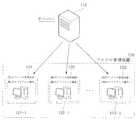
図1は、従来技術によるファイル管理装置及びサーバーの全体的な構成を示す概念図である。 FIG. 1 is a conceptual diagram showing an overall configuration of a file management apparatus and a server according to the prior art.
図1に示すように、従来技術によるファイル管理方法は、サーバー110と連結された一つ以上の第1ないし第Nのファイル管理装置121、122、123で構成されるファイル管理装置120によって行われる。ファイル管理装置120は、ファイル管理方法を行うために第1ないし第Nのクライアント端末121-1, 122-1, 123-1に設けられたクライアントファイル管理プログラムモジュール、あるいは、クライアントファイル管理プログラムモジュールを備えるクライアント端末を用いることができる。
As shown in FIG. 1, the conventional file management method is performed by a
それぞれのファイル管理装置120には管理政策部が備えられ、管理政策部はサーバー110から所定の管理政策を受信する。管理政策は、所定の電子ファイルの拡張子情報(例えば、doc、hwp、xlsなど)と所定のキーワード情報を含む。
Each
クライアント端末は、サーバー110からクライアント端末のユーザによるサーバー110の保存スペースである管理スペースを提供される。
The client terminal is provided with a management space which is a storage space of the
クライアント端末では、ユーザの業務結果物である電子ファイルに対する保存イベントが発生し得るが、例えば、クライアント端末のユーザがワードを利用して文書を生成した後、Cドライブのマイドキュメント(my document)フォルダに保存する保存イベントを発生させることができる。 In the client terminal, a storage event for an electronic file, which is a business result of the user, may occur. For example, after the user of the client terminal generates a document using a word, the My Document folder in the C drive A save event can be generated to save to.
ファイル管理装置120に備えられた判断部は、クライアント端末で生成または編集されて保存されるはずの作業ファイルが管理の対象である管理対象ファイルであるか否かを、管理政策を参照して判断する。
The determination unit provided in the
例えば、管理政策が所定の拡張子情報として“doc、hwp、xls”情報を含む場合、保存イベントが発生した作業ファイルがワードファイル(すなわち、docを拡張子として有するファイル)であるか否かから、作業ファイルが管理対象ファイルであるか否かを判断する。 For example, when the management policy includes “doc, hwp, xls” information as predetermined extension information, whether or not the work file in which the save event has occurred is a word file (that is, a file having doc as an extension). Then, it is determined whether or not the work file is a management target file.
また、管理政策が所定のキーワード情報として“対外秘、会計、財務”情報を含む場合、保存イベントが発生した作業ファイルの内容に“対外秘、会計、財務”が含まれるか否かのフィルタリングを行い、そのフィルタリングの結果から該当作業ファイルが管理対象ファイルであるか否かを判断する。 In addition, when the management policy includes “confidential, accounting, and finance” information as predetermined keyword information, filtering whether or not “confidential, accounting, and finance” is included in the contents of the work file in which the save event has occurred is filtered. And determine whether the corresponding work file is a management target file from the filtering result.
判断部の判断結果、クライアント端末で保存イベントが発生した作業ファイルが管理対象ファイルではない場合、クライアント端末のユーザが指定した保存スペースに作業ファイルが保存される。しかし、管理対象ファイルである場合には、管理対象ファイルがクライアント端末の保存スペースに保存されないように制御する。 As a result of the determination by the determination unit, when the work file in which the save event has occurred in the client terminal is not the management target file, the work file is saved in the save space designated by the user of the client terminal. However, if the file is a management target file, control is performed so that the management target file is not stored in the storage space of the client terminal.
従来技術では、ローカルPC(クライアント端末)に特定の種類のファイルが保存されることを防止することによって、ファイルの流出、コピー、または盗用を防止することができたが、基本的にローカルPCで文書の生成及び変更作業が行われるときに発生する臨時的な保存過程は防止することはできなかったため、根本的にローカルPCにこれらのファイルに関するデータを一切残さないということはできなかった。 In the prior art, it was possible to prevent a file from being leaked out, copied, or stolen by preventing a specific type of file from being stored on the local PC (client terminal). Since a temporary storage process that occurs when a document is created and changed can not be prevented, it is impossible to fundamentally leave no data about these files on the local PC.
また、ローカルPCで作業した資料をUSBメモリにコピーして搬出しようとしたり、電子メールに添付して他のユーザに送信しようとしたりする場合に、どのような承認過程を経るかについての説明がないため、ファイルの伝達及び共有が難しいという問題点があった。 In addition, there is an explanation of what approval process goes through when trying to copy a document that has been worked on the local PC to a USB memory, or to send it to another user by attaching it to an e-mail. There is a problem that it is difficult to transmit and share files.
前述の問題点を解決するための本発明は、ウェブストレージサービスを提供するファイル管理システムに接続した状態で、ファイルの生成及び保存作業を行うユーザのユーザ端末に特定の種類のファイルが全く保存されないように、ファイルの保存スペースを監視し、ファイルを削除するウェブストレージシステムにおけるファイル管理方法を提供することを目的とする。 According to the present invention for solving the above-described problems, a specific type of file is not stored at all in a user terminal of a user who performs generation and storage of a file while connected to a file management system that provides a web storage service. Thus, an object of the present invention is to provide a file management method in a web storage system that monitors a file storage space and deletes a file.
また、本発明は、特定の種類のファイルは、ユーザ端末ではない、ファイル管理システムにのみ保存されるようにし、ファイル名、保存位置、属性についての情報を別途のデータとして生成して、DBMS(Database Management System)によって管理させるウェブストレージシステムにおけるファイル管理方法を提供することを目的とする。 In addition, the present invention allows a specific type of file to be stored only in a file management system, not a user terminal, and generates information on file names, storage positions, and attributes as separate data, so that the DBMS ( It is an object of the present invention to provide a file management method in a web storage system managed by Database Management System).
また、本発明は、ユーザがユーザ端末で特定のファイルを検索して開き、ファイルの内容を変更する作業を行う場合に、ファイル管理システムがファイルの開閉、変更に対するすべての権限を保有した状態で、作業の開始から終了(保存)までの過程を一つのトランザクションで処理することによって、ユーザ端末にはファイルに関するデータを一切残さないウェブストレージシステムにおけるファイル管理方法を提供することを目的とする。 In addition, the present invention allows the user to search for and open a specific file on the user terminal and change the contents of the file in a state where the file management system has all authority to open / close and change the file. An object of the present invention is to provide a file management method in a web storage system in which the process from the start to the end (save) of work is processed in one transaction, so that no data relating to the file is left in the user terminal.
また、本発明は、ユーザがファイル管理システムに保存されたファイルをUSBメモリにコピーまたは電子メールに添付して他のユーザに送信しようとするとき、管理者の決裁を得て初めてファイルのコピーやファイルの添付を可能にするウェブストレージシステムにおけるファイル管理方法を提供することを目的とする。 In addition, the present invention can copy a file stored in a file management system to a USB memory or attach it to an e-mail and send it to another user after the administrator's approval is obtained. It is an object of the present invention to provide a file management method in a web storage system that enables file attachment.
前述の課題を解決するためになされた本発明は、ネットワークに連結された第1ユーザ端末200が生成したファイルを保存するウェブストレージサービスを提供するファイル管理システム100が前記第1ユーザ端末200に特定の種類のファイルを保存しないように管理する方法であって、前記第1ユーザ端末200がLANまたはインターネット400を介して前記ファイル管理システム100に接続すれば、前記ファイル管理システム100に備えられたファイル管理サーバー102が前記第1ユーザ端末200にファイル管理クライアントプログラムを転送してインストールするステップと、前記クライアントプログラムが前記第1ユーザ端末200で行われるファイル管理政策を設定して保存した後、前記第1ユーザ端末200に対するファイル監視を開始するステップと、前記クライアントプログラムが前記第1ユーザ端末200を監視しつつ、前記ファイル管理政策で監視対象として設定された拡張子を有するファイルを発見すれば、前記クライアントプログラムが前記ファイルを前記ファイル管理システム100に転送した後、前記ファイルを前記第1ユーザ端末200から削除するステップと、前記ファイル管理サーバー102は、転送された前記ファイルをファイルDB104に保存し、前記ファイルを検索することができる情報をDBMSに記録するステップと、前記第1ユーザ端末200が前記ファイル管理システム100に接続して、保存された特定のファイルを要請すれば、前記ファイル管理サーバー102は、前記第1ユーザ端末200がネットワークファイルシステムドライバーを介して前記ファイルDB104に接続して、前記特定のファイルを開くように許容するステップと、前記第1ユーザ端末200が前記ファイルの内容または属性を変更して保存を要請すれば、前記ファイル管理サーバー102は、前記ファイルの修正及び保存を一つのトランザクションで処理して、前記修正された事項を前記ファイルDB104に保存するステップと、を含む。
The present invention, which has been made to solve the above-mentioned problems, identifies the
また、本発明は、前記クライアントプログラムがインストールされた第1ユーザ端末200から特定のファイルに対するUSBメモリ搬出申し込みが前記ファイル管理システム100に受け付けられれば、搬出情報管理サーバー106が決裁申し込み情報を決裁情報DB108に保存するステップと、管理者が管理者端末300を通じてファイル搬出を承認すれば、前記決裁情報DBを更新するステップと、第1ユーザ端末200にUSBメモリを連結し、作業者がファイルダウンロードボタンをクリックすれば、前記クライアントプログラムは前記ファイル管理システム100に接続して、決裁情報とコピーの対象になるファイルについての情報を転送するステップと、前記搬出情報管理サーバー106は、前記決裁が正常に行われたか否かを確認し、前記ファイルが保存された位置についての情報を前記クライアントプログラムに伝達するステップと、前記ファイル管理サーバー102が前記ファイルに対する保安を解除すれば、前記クライアントプログラムが前記ファイルをダウンロードして前記USBメモリに保存するステップと、ファイル搬出が完了すれば、前記ファイル管理サーバー102は該当ファイルに対する保安を再設定するステップと、をさらに含んでいてもよい。
In addition, according to the present invention, when the
あるいは、本発明は、前記クライアントプログラムがインストールされた第1ユーザ端末200から特定のファイルに対する電子メール搬出申し込みが前記ファイル管理システム100に受け付けられれば、搬出情報管理サーバー106が決裁申し込み情報を決裁情報DB108に保存するステップと、管理者が管理者端末300を介してファイル搬出を承認すれば、前記搬出情報管理サーバー106が前記決裁情報DBを更新するステップと、ファイル搬出が承認されれば、前記搬出情報管理サーバー106が前記第1ユーザ端末200に搬出対象になるファイルが保存された位置のURL情報であるファイルリンク情報を伝達するステップと、前記第1ユーザ端末200が前記ファイルリンク情報を添付した電子メールを作成して受信者に転送するステップと、前記受信者が第2ユーザ端末500を利用してメールを受け付けた後、添付された前記ファイルリンク情報をクリックしてインターネット400を介して前記ファイル管理システム100に接続すれば、前記ファイル管理サーバー102は前記ファイルリンク情報に対応するファイルを、インターネット400を介して前記第2ユーザ端末500に転送するステップと、をさらに含むように構成してもよい。
Alternatively, according to the present invention, when the
さらに、本発明において、前記ファイル管理政策で監視対象として設定される拡張子を有するファイルは、ワープロファイル、プレゼンテーションファイル、スプレッドシートファイル、ポストスクリプトファイル、圧縮ファイル、CADファイル、動画イメージファイル、静止画イメージファイル、オーディオファイルのうち何れか一つ以上であることを特徴とする。 Further, in the present invention, the file having the extension set as the monitoring target in the file management policy is a word profile, presentation file, spreadsheet file, postscript file, compressed file, CAD file, moving image file, still image. It is one or more of an image file and an audio file.
本発明によれば、ウェブストレージシステムを利用してファイルの生成及び保存を行うとき、遠隔地のユーザ端末には保安上の問題になり得るファイルに関するデータが一切残っていないため、ファイルの流出問題を解消することができる。 According to the present invention, when a file is generated and stored using a web storage system, there is no data remaining on the user terminal at a remote location that may cause a security problem. Can be eliminated.
また、本発明によれば、ウェブストレージシステムに保存されたファイルを他のユーザに転送するとき、決裁権限を有する管理者の承認を得た後にファイルのコピーやファイルの添付を可能にすることによってコンピュータファイルの流出を防止することができ、保安事故が発生したとき、責任を明らかにすることができる。 In addition, according to the present invention, when a file stored in the web storage system is transferred to another user, it is possible to copy the file or attach the file after obtaining the approval of the administrator having the authorization authority. Computer files can be prevented from leaking, and responsibility can be clarified when a security accident occurs.
以下、図面を参照して本発明の実施形態によるウェブストレージシステムにおけるファイル管理方法(以下、ファイル管理方法と称す)を説明する。 Hereinafter, a file management method (hereinafter referred to as a file management method) in a web storage system according to an embodiment of the present invention will be described with reference to the drawings.
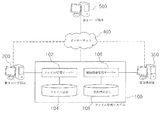
図2は、本発明の実施形態によるファイル管理システムの連結状態を示すブロック図である。 FIG. 2 is a block diagram illustrating a connection state of the file management system according to the embodiment of the present invention.
本発明のファイル管理方法を具現化するためには、LANまたはインターネット400などで相互に連結されたファイル管理システム100、ユーザ端末200、500、及びファイル管理システム100と連結された管理者端末300が必要である。
In order to embody the file management method of the present invention, a
ファイル管理システム100は、ネットワークに連結された端末で生成されたファイルを保存し、保存されたファイルを正当なユーザに提供するウェブストレージサービスを提供する。ユーザは、ネットワークに連結さえすれば自身が生成したファイルをファイル管理システム100に保存することが可能であり、いつでも所望のファイルを検索して作業を行うことができる。
The
ファイル管理システム100は、特定の種類のファイルをユーザ端末200、500に保存させずにファイル管理システム100にのみ残るように監視する。ファイル管理システム100は、ユーザがユーザ端末200、500で作業して生成したファイルを受けて保存する。ユーザがそのファイルを再要請する場合、ファイルを開いてユーザ端末200、500に転送することによってファイルの変更作業を可能にする。ユーザがファイル作業を終了すれば、ユーザ端末200、500にファイルに関するデータを一切残さず、変更されたファイルをファイル管理システム100に保存する。
The
ファイル管理システム100には、ユーザ端末200、500で生成及び保存されるファイルを監視して制御するファイル管理サーバー102と、所定の種類のファイルを保存するファイルDB104とが備えられる。
The
そして、ファイルDB104に保存されたファイルを他のユーザに送信するとき、決裁情報を確認してファイル搬出を承認する搬出情報管理サーバー106と、管理者が承認した内訳を保存する決裁情報DB108とをさらに備える。
Then, when the file stored in the
ファイル管理サーバー102は、ユーザ端末200、500にファイル管理クライアントプログラムをインストールし、ユーザ端末200、500との通信を通じて特定のファイルに対する保存作業を制御する。
The
ファイル管理クライアントプログラムは、それぞれのユーザ端末200、500にインストールされ、端末上で行われるファイルの生成、変更、保存作業を監視しつつ、特定の種類のファイルが発見されれば、設定された内容によってファイルの転送、削除、保存作業を行う。
The file management client program is installed in each of the
本発明では、第1ユーザ端末200にファイル管理クライアントプログラムがインストールされ、このプログラムが第1ユーザ端末200で実行されつつ特定のファイルの監視、転送、削除動作を行う。
In the present invention, a file management client program is installed in the
作業者は、第1ユーザ端末200を利用して各種の文書やワークシート、マルチメディアファイルを生成、変更、保存する。このとき、特定の種類のファイルは、保安上の理由により第1ユーザ端末200に保存しないことが好ましい。機密や対外秘として取り扱われるべきファイルが作業者の端末に残らないように、クライアントプログラムが監視及び管理を行う。
The worker uses the
第1ユーザ端末200に残さないファイルの種類は多様な基準によって設定可能であるが、本発明では、一例として、ファイル名の拡張子を基準にする。すなわち、マイクロソフト社のワード文書を示す‘*.doc’を拡張子として有するファイルをすべて削除するか、動画データを示す‘*.mpeg’を拡張子として有するファイルはすべてファイル管理システム100に転送する方法を選択することができる。
The types of files that are not left in the
本発明のクライアントプログラムが管理可能なファイルの拡張子は多様な種類の拡張子を含む。ワープロファイル(doc、hwpなど)、プレゼンテーションファイル(pptなど)、スプレッドシートファイル(xlsなど)、ポストスクリプトファイル(pdfなど)、圧縮ファイル(zip、alzなど)、CADファイル(cadなど)、動画イメージファイル(asf、avi、mpegなど)、静止画イメージファイル(bmp、jpeg、phg、pstなど)、オーディオファイル(mp3、wmvなど)が代表的である。 The file extensions that can be managed by the client program of the present invention include various types of extensions. Word profiles (doc, hwp, etc.), presentation files (ppt, etc.), spreadsheet files (xls, etc.), postscript files (pdf, etc.), compressed files (zip, alz, etc.), CAD files (cad, etc.), video images A file (asf, avi, mpeg, etc.), a still image file (bmp, jpeg, phg, pst, etc.), and an audio file (mp3, wmv, etc.) are representative.
管理対象になるファイルの拡張子は、管理者の選択によって多様に含めることができ、クライアントプログラムの設定変更を通じて削除や変更が可能である。 The extension of a file to be managed can be variously included depending on the selection of the administrator, and can be deleted or changed by changing the setting of the client program.
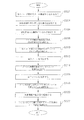
以下、図3を参照して具体的なファイル管理方法を説明する。 Hereinafter, a specific file management method will be described with reference to FIG.
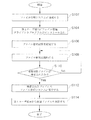
図3は、ユーザ端末でのファイル管理方法の動作過程を示すフローチャートである。 FIG. 3 is a flowchart showing an operation process of the file management method in the user terminal.
まず、ユーザ(作業者)の第1ユーザ端末200がLANまたはインターネット400を介してファイル管理システム100に接続する(S102)。一般的には、会社内に設けられたPCなどを利用して作業が行われ、会社内の保安のために本発明が適用される場合が多いと思われる。第1ユーザ端末200は、主にLANを介してファイル管理システム100に接続する。しかし、例えば、在宅勤務または外部出張中に行われる作業に対しても管理するためには、第1ユーザ端末200がインターネット400を利用して接続可能である必要がある。
First, the
第1ユーザ端末200にファイル管理クライアントプログラムがインストールされている場合には、ファイル作業及び監視が直ちに行われるが、プログラムがインストールされていない場合には、プログラムを先にインストールしなければならない(S104)。ファイル管理サーバー102は、ファイル管理システム100に接続した端末にプログラムがインストールされているか否かを確認して、インストール過程が行われるように制御する。
When the file management client program is installed in the
ファイル管理クライアントプログラムは、第1ユーザ端末200で行われるファイル管理政策を設定して保存する(S106)。クライアントプログラムは、第1ユーザ端末200から削除されるべきファイルの種類を、拡張子を基準にして設定する。監視対象ファイルの種類は、第1ユーザ端末200のユーザではない、ファイル管理システム100によって選択されることが好ましい。すなわち、削除対象になるファイルの拡張子は、ファイル管理サーバー102が定め、第1ユーザ端末200のユーザは、特定の種類のファイルに対して管理対象になるように追加する作業のみを可能にする。
The file management client program sets and stores a file management policy performed at the first user terminal 200 (S106). The client program sets the file type to be deleted from the
ファイルの監視及び削除は拡張子を基準にするため、実際は他の形式のファイルであるが、拡張子が同一である場合(例えば、ハングル文書のファイルに‘doc’拡張子を付けて保存した場合)にもファイルの削除は行われる。 Since the monitoring and deletion of files is based on the extension, they are actually in other formats, but the extension is the same (for example, when the file of the Hangul document is saved with the 'doc' extension) ) Is also deleted.
ファイル管理クライアントプログラムがインストールされ、監視政策の設定が完了すれば、第1ユーザ端末200に対するクライアントプログラムのファイル監視が開始される(S108)。
When the file management client program is installed and the setting of the monitoring policy is completed, file monitoring of the client program for the
ファイルの監視は、管理者の設定によって多様な方法によって行われる。すなわち、第1ユーザ端末200全体の保存スペースを検索して特定ファイルを検索する方法が一般的であるが、特定のフォルダのみを検索するように指定することも可能である。また、保存された既存のファイルすべてを対象として検索することも可能であるが、新たに生成または保存されるファイルに対してのみ監視を行うことも可能である。
File monitoring is performed in various ways depending on the settings of the administrator. That is, a method of searching for a specific file by searching the storage space of the entire
クライアントプログラムは、第1ユーザ端末200で行われるファイルの生成及び保存作業を監視しつつ、所定の種類の監視対象ファイル(特定の拡張子を有するファイル)が検索されれば、それをファイル管理システム100に転送する(S110、S112)。転送されたファイルはファイルDB104に保存され、ファイル管理サーバー102は該当ファイルを検索することができる情報(ファイルの位置、ファイル名、作成時間、ファイルのサイズなど)を別途のDBMSで管理する。
The client program monitors a file generation and storage operation performed on the
もし、削除対象に相当するファイルが検索された場合、該当ファイルが他のプログラムによって使用中であれば、そのプログラムの作業が終了し、保存が終了した後にファイルを転送することが好ましい。 If a file corresponding to an object to be deleted is searched and the file is in use by another program, it is preferable to transfer the file after the work of the program is completed and the storage is completed.
最後に、クライアントプログラムは、第1ユーザ端末200から該当ファイルを永久的に削除する(S114)。ファイルの削除は、ファイル管理サーバー102への転送と同時に行うことも可能である。
Finally, the client program permanently deletes the corresponding file from the first user terminal 200 (S114). The file can be deleted simultaneously with the transfer to the
ユーザがファイル管理システム100に転送されたファイル(監視政策の対象になる種類のファイル)を再検索して作業することを希望する場合には、ファイル管理システム100に接続してユーザの認証を受けた後、ファイルDB104に保存された該当ファイルを検索して作業を行う。従来技術では、ファイル作業が完了すれば、ローカル端末にファイルを一旦保存した後、中央サーバーに送るが、その過程でローカル端末に保存されたファイルが流出される恐れがある。
When the user wishes to search again and work on the file transferred to the file management system 100 (the type of file subject to the monitoring policy), he / she connects to the
本発明では、このような‘ファイルの開き−修正−閉じ’過程をネットワークファイルシステムと同様に、一つのトランザクションで処理して、第1ユーザ端末200にファイル関するデータが一切保存されないようにする。
In the present invention, such a “file open-modify-close” process is processed in one transaction in the same manner as in the network file system, so that no file-related data is stored in the
第1ユーザ端末200がファイル管理システム100に接続して特定のファイルを要請すれば、トランザクションが開始され、接続したユーザの権限を確認した後、ファイルが保存された位置についての情報を呼び出す。呼び出された情報に基づいてファイルを検索して第1ユーザ端末200に提供するが、第1ユーザ端末200のユーザはネットワークファイルシステムドライバーを介してファイルDB104に直接アクセスする。ユーザが作業を終えながらファイルの閉じを選択すれば、ファイル管理サーバー102のDBMSは修正された事項を直接ファイルDB104に記録しつつ保存する。ファイルを閉じると同時に、第1ユーザ端末200のメモリ上に臨時にアップロードされていたデータはすべて削除される。
When the
このようなすべての過程は、一つのトランザクションで処理され、ファイルの内容変更についての事項はDBMSに記録される。 All of these processes are processed in one transaction, and items regarding file content changes are recorded in the DBMS.
クライアントプログラムによってファイル管理システム100に保存されたファイルはユーザによって呼び出されて使用されるが、他人に伝達するためには伝達媒体を利用せねばならない。本発明ではUSBメモリを利用した保存と電子メールを利用した伝達方法を例示する。これらを以下に説明する。
A file stored in the
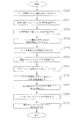
図4は、USBメモリによるファイルのコピー過程を示すフローチャートである。 FIG. 4 is a flowchart showing a file copying process using the USB memory.
USBメモリにファイルをコピーして外部に搬出するためには、ユーザ端末にインストールされているファイル管理クライアントプログラムにより、搬出についての決裁情報を認識し、連結されたUSBメモリが認証された媒体であるか否かを確認せねばならない。本発明では、ファイル管理クライアントプログラムがインストールされた第1ユーザ端末200に基づいて説明する。
In order to copy a file to a USB memory and carry it out, the file management client program installed in the user terminal recognizes decision information about the carry-out, and the connected USB memory is an authenticated medium. You have to check whether or not. The present invention will be described based on the
まず、ファイルをコピーして搬出しようとする作業者がユーザ端末200でクライアントプログラムを利用してUSB搬出申し込みを行う(S202)。 First, an operator who wants to copy and carry out a file makes a USB carry-out application using the client program on the user terminal 200 (S202).
搬出申し込みがファイル管理システム100に受け付けられれば、搬出情報管理サーバー106は生成された承認インデックスをキー(key)として有する決裁情報テーブルにファイルのインデックスなどのその他の決裁申し込み情報を記録し、それを決裁情報DB108に保存する(S204)。
If the file application is accepted by the
ファイル搬出申し込み情報は、ファイル管理システム100によって管理者端末300に転送されて、決裁待機状態になる(S206)。
The file carry-out application information is transferred to the
管理者が管理者端末300を介してファイル搬出を承認すれば、決裁情報DBのテーブルに承認如何情報を更新する(S208)。
If the administrator approves file export via the
ファイルの搬出が承認されれば、搬出情報管理サーバー106は、ユーザ端末200にファイル搬出申し込みに対する決裁が完了したことを通知する(S210)。このような通知は、クライアントプログラムを通じてユーザに告知することができる。
If the file export is approved, the export
作業者がファイルをコピーするUSBメモリをユーザ端末200に連結すれば、連結された媒体の識別番号と、保安プログラムがインストールされているか否かを確認する(S212)。USBメモリに対する識別番号と保安プログラムを確認することは、承認された媒体のみを使用可能にするためのことであり、状況によっては未確認媒体を使用するように承認することも可能である。
If the operator connects the USB memory for copying the file to the
作業者は、ユーザ端末200でファイルのダウンロード及びUSBメモリ保存ボタンをクリックする(S214)。クライアントプログラムは、ファイルダウンロード確認ボタンを別途の入力ウィンドウに具現化することができる。 The worker clicks a file download and USB memory storage button on the user terminal 200 (S214). The client program can implement a file download confirmation button in a separate input window.
クライアントプログラムは、ファイル管理システム100に接続して、承認が行われた決裁情報と、その他のコピーの対象になるファイルについての情報を転送する(S216)。搬出情報管理サーバー106は、転送された決裁情報を決裁情報DB108に保存された決裁情報テーブルと比較して、正常に決裁承認が行われたか否かを確認する。そして、搬出情報管理サーバー106は、該当ファイルが保存されている位置についての情報(ファイルDBの位置など)をクライアントプログラムに伝達する。
The client program connects to the
クライアントプログラムは、Active Xを通じてウェブから情報を受け、Active Xによって実行されたブローカープロセス(例えば、USBDownloader.exe)は、Active Xが有する情報を受ける。 The client program receives information from the web through Active X, and a broker process (for example, USBDownloader.exe) executed by Active X receives information included in Active X.
ブローカープロセスは、作業者がダウンロード確認ボタンを押す瞬間、ファイル管理システム100とpipe通信を行い、ファイル管理サーバー102は、瞬時にブローカープロセスがダウンロードを行うことができるように、該当ファイルに対する保安(ロック)を解除する(S218)。
The broker process performs pipe communication with the
クライアントプログラムは、ファイルDB104で該当ファイルを検索してダウンロードした後、連結されたUSBメモリに保存する(S220)。
The client program searches and downloads the corresponding file in the
ファイルの搬出が完了すれば、ブローカープロセスは、ファイルの保存が完了したことをファイル管理サーバー102に通知し、ファイル管理サーバー102は、該当ファイルに対する保安(ロック)を再設定することによって、ファイルの搬出過程が完了する(S222)。
When the file export is completed, the broker process notifies the
一方、図5は、電子メールによるファイルの添付過程を示すフローチャートである。 On the other hand, FIG. 5 is a flowchart showing a process for attaching a file by e-mail.
電子メールによるファイルの転送は、クライアントプログラムがインストールされた第1ユーザ端末200と、プログラムがインストールされていない第2ユーザ端末500との間で行われる。
The file transfer by e-mail is performed between the
まず、作業者が第1ユーザ端末200でメールによるファイルの搬出を搬出情報管理サーバー106に申し込む(S302)。メールによる搬出申し込みもクライアントプログラムを通じて行われる。
First, the worker applies to the carry-out
搬出情報管理サーバー106は、決裁情報DB108に搬出申し込み情報を記録し、申し込み内容を管理者端末300に転送して決裁を要請する(S304、S306)。
The carry-out
管理者が管理者端末300を介して電子メールによるファイルの搬出を承認すれば、決裁情報DBのテーブルに承認如何情報を更新する(S308)。
If the administrator approves the export of the file by e-mail via the
ファイル搬出の申し込みと決裁情報の記録、管理者の決裁及び決裁情報の更新などの過程は、USBメモリの搬出過程と同一である。 The process of file export application and approval information recording, administrator approval, and update of the approval information is the same as the USB memory export process.
電子メールによるファイルの搬出が承認されれば、搬出情報管理サーバー106は、第1ユーザ端末200にファイル搬出の申し込みに対する決裁が完了したことを通知しつつ、決裁情報とファイルリンク情報を伝達する(S310)。
If the file export by e-mail is approved, the export
ファイルリンク情報は、ファイルが保存された位置のURL(Uniform Resource Locator)情報であって、メールを受信したユーザがインターネット400を介して該当位置のサーバーに接続して直接ファイルをダウンロード可能にするための情報である。電子メールに大容量またはマルチメディアファイルのリンク情報を添付して、受信者が直接接続してダウンロード可能にする技術は、出願人によって既に公開された技術であるため、その詳細な説明を省略する。
The file link information is URL (Uniform Resource Locator) information at the location where the file is stored, and the user who receives the mail can connect to the server at the corresponding location via the
第1ユーザ端末200の作業者は、電子メールを作成し、メールに決裁情報及びファイルリンク情報を添付した後、メールを受信者に転送する(S312、S314、S316)。
The worker of the
第1ユーザ端末200の作業者が送ったメールは、受信者(第2ユーザ端末500のユーザ)に転送され、受信者は決裁情報またはリンク情報をクリックすることによってファイル管理システム100の搬出情報管理サーバー106に接続する(S318)。第2ユーザ端末500は、インターネット400を介して搬出情報管理サーバー106に接続する。
The mail sent by the worker of the
搬出情報管理サーバー106は、第2ユーザ端末500から転送された決裁情報を分析して正当な決裁過程を経て、搬出承認が行われたファイルであるか否かを確認する(S320)。
The carry-out
決裁情報が確認されれば、ファイル管理システム100は、第2ユーザ端末500がファイルDB104に接続するように許可し、ファイル管理サーバー102は、ファイルリンク情報に対応するファイルを、インターネット400を介して第2ユーザ端末500に転送する(S322)。転送されたファイルは、第2ユーザ端末500の保存スペースに永久的に保存される。
If the approval information is confirmed, the
以上、添付図面を参照して本発明の好ましい実施形態を説明したが、前述の本発明の技術的構成は、当業者が本発明のその技術的思想や必須の特徴を変更せずに他の具体的な形態に実施され得るということを理解できるであろう。したがって、前述の実施形態は、すべての面において例示的なものであり、限定的なものではないものとして理解されるべきであり、本発明の範囲は、前記詳細な説明よりは、後述する特許請求の範囲によって示され、特許請求の範囲の意味及び範囲、そしてその等価概念から導出されるすべての変更または変形された形態が本発明の範囲に含まれると解釈されなければならない。 The preferred embodiments of the present invention have been described above with reference to the accompanying drawings, but the above-described technical configuration of the present invention is not limited to those skilled in the art without changing the technical idea and essential features of the present invention. It will be understood that it can be implemented in a specific form. Accordingly, the above-described embodiments are to be understood as illustrative in all aspects and not restrictive, and the scope of the present invention is not limited to the above-described detailed description. All modifications or variations that are indicated by the scope of the claims and derived from the meaning and scope of the claims and their equivalents should be construed as being included within the scope of the present invention.
100 ファイル管理システム
102 ファイル管理サーバー
104 ファイルDB
106 搬出情報管理サーバー
108 決裁情報DB
200 第1ユーザ端末
300 管理者端末
400 インターネット
500 第2ユーザ端末
100
106 Unloading
200
Claims (4)
前記第1ユーザ端末(200)がLANまたはインターネット(400)を介して前記ファイル管理システム(100)に接続すれば、前記ファイル管理システム(100)に備えられたファイル管理サーバー(102)が前記第1ユーザ端末(200)にファイル管理クライアントプログラムを転送してインストールするステップと、
前記クライアントプログラムが前記第1ユーザ端末(200)で行われるファイル管理政策を設定して保存した後、前記第1ユーザ端末(200)に対するファイル監視を開始するステップと、
前記クライアントプログラムが前記第1ユーザ端末(200)を監視しつつ、前記ファイル管理政策で監視対象として設定された拡張子を有するファイルを発見すれば、前記クライアントプログラムが前記ファイルを前記ファイル管理システム(100)に転送した後、前記ファイルを前記第1ユーザ端末(200)から削除するステップと、
前記ファイル管理サーバー(102)は、転送された前記ファイルをファイルDB(104)に保存し、前記ファイルを検索することができる情報をDBMSに記録するステップと、
前記第1ユーザ端末(200)が前記ファイル管理システム(100)に接続して、保存された特定のファイルを要請すれば、前記ファイル管理サーバー(102)は、前記第1ユーザ端末(200)がネットワークファイルシステムドライバーを介して前記ファイルDB(104)に接続して、前記特定のファイルを開くように許容するステップと、
前記第1ユーザ端末(200)が前記ファイルの内容または属性を変更して保存を要請すれば、前記ファイル管理サーバー(102)は、前記ファイルの修正及び保存を一つのトランザクションで処理して、前記修正された事項を前記ファイルDB(104)に保存するステップと、
を含むウェブストレージシステムにおけるファイル管理方法。 A file management system (100) that provides a web storage service for storing a file generated by a first user terminal (200) connected to a network may not store a specific type of file in the first user terminal (200). It is a method to manage,
When the first user terminal (200) is connected to the file management system (100) via a LAN or the Internet (400), the file management server (102) provided in the file management system (100) is the first user terminal (200). Transferring and installing a file management client program to one user terminal (200);
After the client program sets and saves a file management policy performed at the first user terminal (200), and starts monitoring a file for the first user terminal (200);
If the client program finds a file having an extension set as a monitoring target in the file management policy while monitoring the first user terminal (200), the client program uses the file management system ( And 100), deleting the file from the first user terminal (200),
The file management server (102) stores the transferred file in a file DB (104), and records information in the DBMS so that the file can be searched;
When the first user terminal (200) connects to the file management system (100) and requests a specific file stored, the file management server (102) is connected to the first user terminal (200). Connecting to the file DB (104) via a network file system driver and allowing the specific file to be opened;
If the first user terminal 200 changes the content or attribute of the file and requests storage, the file management server 102 processes the file correction and storage in one transaction, and Storing the corrected items in the file DB (104);
File management method in a web storage system.
管理者が管理者端末(300)を通じてファイル搬出を承認すれば、前記決裁情報DBを更新するステップと、
第1ユーザ端末(200)にUSBメモリを連結し、作業者がファイルダウンロードボタンをクリックすれば、前記クライアントプログラムは前記ファイル管理システム(100)に接続して、決裁情報とコピーの対象になるファイルについての情報を転送するステップと、
前記搬出情報管理サーバー(106)は、前記決裁が正常に行われたか否かを確認し、前記ファイルが保存された位置についての情報を前記クライアントプログラムに伝達するステップと、
前記ファイル管理サーバー(102)が前記ファイルに対する保安(ロック)を解除すれば、前記クライアントプログラムが前記ファイルをダウンロードして前記USBメモリに保存するステップと、
ファイル搬出が完了すれば、前記ファイル管理サーバー(102)は該当ファイルに対する保安(ロック)を再設定するステップと、
をさらに含むことを特徴とする請求項1に記載のウェブストレージシステムにおけるファイル管理方法。 If a USB memory export application for a specific file is received by the file management system (100) from the first user terminal (200) in which the client program is installed, the export information management server (106) converts the approval application information into the approval information. Saving to DB (108);
If the administrator approves file export through the administrator terminal (300), updating the decision information DB;
When a USB memory is connected to the first user terminal (200) and the operator clicks the file download button, the client program connects to the file management system (100) to determine the decision information and the file to be copied. Transferring information about, and
The unloading information management server (106) confirms whether the decision has been made normally, and transmits information about a location where the file is stored to the client program;
If the file management server (102) releases the security (lock) for the file, the client program downloads the file and stores it in the USB memory;
If the file export is completed, the file management server (102) resets the security (lock) for the file;
The file management method in the web storage system according to claim 1, further comprising:
管理者が管理者端末(300)を介してファイル搬出を承認すれば、前記搬出情報管理サーバー(106)が前記決裁情報DBを更新するステップと、
ファイル搬出が承認されれば、前記搬出情報管理サーバー(106)が前記第1ユーザ端末(200)に搬出対象になるファイルが保存された位置のURL情報であるファイルリンク情報を伝達するステップと、
前記第1ユーザ端末(200)が前記ファイルリンク情報を添付した電子メールを作成して受信者に転送するステップと、
前記受信者が第2ユーザ端末(500)を利用してメールを受け付けた後、添付された前記ファイルリンク情報をクリックしてインターネット(400)を介して前記ファイル管理システム(100)に接続すれば、前記ファイル管理サーバー(102)は前記ファイルリンク情報に対応するファイルを、インターネット(400)を介して前記第2ユーザ端末(500)に転送するステップと、
をさらに含むことを特徴とする請求項1に記載のウェブストレージシステムにおけるファイル管理方法。 When the file management system (100) accepts an e-mail export application for a specific file from the first user terminal (200) in which the client program is installed, the export information management server (106) converts the approval application information into the approval information. Saving to DB (108);
If the administrator approves file export via the administrator terminal (300), the export information management server (106) updates the decision information DB;
If file export is approved, the export information management server (106) transmits to the first user terminal (200) file link information that is URL information of a location where the file to be exported is stored;
The first user terminal (200) creating an e-mail attached with the file link information and transferring it to a recipient;
If the recipient receives the mail using the second user terminal (500) and clicks the attached file link information to connect to the file management system (100) via the Internet (400) The file management server (102) transfers a file corresponding to the file link information to the second user terminal (500) via the Internet (400);
The file management method in the web storage system according to claim 1, further comprising:
Applications Claiming Priority (2)
| Application Number | Priority Date | Filing Date | Title |
|---|---|---|---|
| KR1020100124046A KR101191914B1 (en) | 2010-12-07 | 2010-12-07 | File management method in the web storage system |
| KR10-2010-0124046 | 2010-12-07 |
Publications (1)
| Publication Number | Publication Date |
|---|---|
| JP2012123788A true JP2012123788A (en) | 2012-06-28 |
Family
ID=46163256
Family Applications (1)
| Application Number | Title | Priority Date | Filing Date |
|---|---|---|---|
| JP2011243026A Pending JP2012123788A (en) | 2010-12-07 | 2011-11-07 | File management method in web storage system |
Country Status (3)
| Country | Link |
|---|---|
| US (1) | US8533242B2 (en) |
| JP (1) | JP2012123788A (en) |
| KR (1) | KR101191914B1 (en) |
Cited By (1)
| Publication number | Priority date | Publication date | Assignee | Title |
|---|---|---|---|---|
| JP2020504385A (en) * | 2016-12-30 | 2020-02-06 | エムダブリューストーリー カンパニー リミテッド | File synchronization and centralization system and file synchronization and centralization method |
Families Citing this family (11)
| Publication number | Priority date | Publication date | Assignee | Title |
|---|---|---|---|---|
| US9460148B2 (en) * | 2011-07-06 | 2016-10-04 | International Business Machines Corporation | Completing distribution of multi-media content to an accessing device |
| KR101373542B1 (en) * | 2012-08-06 | 2014-03-12 | (주)소만사 | System for Privacy Protection which uses Logical Network Division Method based on Virtualization |
| JP5813606B2 (en) * | 2012-09-26 | 2015-11-17 | 株式会社日立情報通信エンジニアリング | File management system and method, program |
| US8924443B2 (en) * | 2012-10-05 | 2014-12-30 | Gary Robin Maze | Document management systems and methods |
| JP6038628B2 (en) | 2012-12-12 | 2016-12-07 | 株式会社日立情報通信エンジニアリング | File management system and method |
| TW201445497A (en) * | 2013-05-16 | 2014-12-01 | Fong-Yuan Chang | Device-aware file synchronizing method |
| JP2015076072A (en) * | 2013-10-11 | 2015-04-20 | キヤノン株式会社 | Monitoring device, monitoring method, and program |
| KR101636802B1 (en) * | 2016-03-02 | 2016-07-07 | (주)지란지교소프트 | File management method and system for preventing security incident by portable memory |
| WO2019178820A1 (en) * | 2018-03-22 | 2019-09-26 | 深圳达闼科技控股有限公司 | Method and system for uploading substance detection information, method and system for determining upload permission for substance detection information, and devices |
| CN110704375B (en) * | 2019-09-26 | 2020-10-23 | 深圳前海大数金融服务有限公司 | File management method, device, device and computer storage medium |
| KR102292761B1 (en) * | 2021-03-11 | 2021-08-25 | 최동성 | File approving system |
Citations (6)
| Publication number | Priority date | Publication date | Assignee | Title |
|---|---|---|---|---|
| JP2001312422A (en) * | 2000-05-02 | 2001-11-09 | Nri & Ncc Co Ltd | Document batch management method, document batch management device, and recording medium |
| JP2007058357A (en) * | 2005-08-23 | 2007-03-08 | Bank Of Tokyo-Mitsubishi Ufj Ltd | File deletion system and file deletion method for client terminal used for online transaction |
| JP2007115192A (en) * | 2005-10-24 | 2007-05-10 | Chial & Associates:Kk | File management system, information processing apparatus, authentication system, and file usage authority setting system |
| JP2009015645A (en) * | 2007-07-05 | 2009-01-22 | Sharp Corp | File server apparatus, file management system, file management method, file management control program, and recording medium recording the program |
| JP2009237997A (en) * | 2008-03-27 | 2009-10-15 | Chugoku Electric Power Co Inc:The | Data management system |
| JP2010266933A (en) * | 2009-05-12 | 2010-11-25 | Ri Co Ltd | Document management program, document management system, and document management method |
Family Cites Families (4)
| Publication number | Priority date | Publication date | Assignee | Title |
|---|---|---|---|---|
| KR20040070382A (en) | 2003-02-03 | 2004-08-09 | (주)디지탈센스 | System and method for preventing outflow of document |
| KR100740682B1 (en) | 2006-11-30 | 2007-07-19 | (주)필라넷 | Secure file server system to prevent data storage in local PC and method and method for recording computer program therefor |
| KR100905434B1 (en) | 2008-08-08 | 2009-07-02 | (주)이스트소프트 | File upload method with real-time index information extraction and web storage system using the same |
| US20100332401A1 (en) * | 2009-06-30 | 2010-12-30 | Anand Prahlad | Performing data storage operations with a cloud storage environment, including automatically selecting among multiple cloud storage sites |
-
2010
- 2010-12-07 KR KR1020100124046A patent/KR101191914B1/en active Active
-
2011
- 2011-11-07 JP JP2011243026A patent/JP2012123788A/en active Pending
- 2011-12-01 US US13/308,987 patent/US8533242B2/en active Active
Patent Citations (6)
| Publication number | Priority date | Publication date | Assignee | Title |
|---|---|---|---|---|
| JP2001312422A (en) * | 2000-05-02 | 2001-11-09 | Nri & Ncc Co Ltd | Document batch management method, document batch management device, and recording medium |
| JP2007058357A (en) * | 2005-08-23 | 2007-03-08 | Bank Of Tokyo-Mitsubishi Ufj Ltd | File deletion system and file deletion method for client terminal used for online transaction |
| JP2007115192A (en) * | 2005-10-24 | 2007-05-10 | Chial & Associates:Kk | File management system, information processing apparatus, authentication system, and file usage authority setting system |
| JP2009015645A (en) * | 2007-07-05 | 2009-01-22 | Sharp Corp | File server apparatus, file management system, file management method, file management control program, and recording medium recording the program |
| JP2009237997A (en) * | 2008-03-27 | 2009-10-15 | Chugoku Electric Power Co Inc:The | Data management system |
| JP2010266933A (en) * | 2009-05-12 | 2010-11-25 | Ri Co Ltd | Document management program, document management system, and document management method |
Non-Patent Citations (2)
| Title |
|---|
| CSND200401088001; 福田 崇男: '"怪しい"パソコンを安全に使う' 日経コンピュータ 第601号, 20040531, pp.18-19, 日経BP社 * |
| JPN6013023791; 福田 崇男: '"怪しい"パソコンを安全に使う' 日経コンピュータ 第601号, 20040531, pp.18-19, 日経BP社 * |
Cited By (1)
| Publication number | Priority date | Publication date | Assignee | Title |
|---|---|---|---|---|
| JP2020504385A (en) * | 2016-12-30 | 2020-02-06 | エムダブリューストーリー カンパニー リミテッド | File synchronization and centralization system and file synchronization and centralization method |
Also Published As
| Publication number | Publication date |
|---|---|
| KR20120063040A (en) | 2012-06-15 |
| US20120143930A1 (en) | 2012-06-07 |
| US8533242B2 (en) | 2013-09-10 |
| KR101191914B1 (en) | 2012-10-17 |
Similar Documents
| Publication | Publication Date | Title |
|---|---|---|
| KR101191914B1 (en) | File management method in the web storage system | |
| US7958148B2 (en) | Systems and methods for filtering file system input and output | |
| US7809699B2 (en) | Systems and methods for automatically categorizing digital assets | |
| US7849328B2 (en) | Systems and methods for secure sharing of information | |
| US8037036B2 (en) | Systems and methods for defining digital asset tag attributes | |
| US7680801B2 (en) | Systems and methods for storing meta-data separate from a digital asset | |
| US20070208685A1 (en) | Systems and Methods for Infinite Information Organization | |
| US20070113289A1 (en) | Systems and Methods for Cross-System Digital Asset Tag Propagation | |
| US9916322B2 (en) | Virtual private cloud that provides enterprise grade functionality and compliance | |
| US7757270B2 (en) | Systems and methods for exception handling | |
| CN108234539A (en) | A kind of file upload, download, transmission method and device | |
| US20070113288A1 (en) | Systems and Methods for Digital Asset Policy Reconciliation | |
| US20070112784A1 (en) | Systems and Methods for Simplified Information Archival | |
| US8635198B1 (en) | Centralized, server-less content management | |
| CN110637294A (en) | Data Distributed Integrated Management System | |
| JP2014153746A (en) | File sharing system and file sharing method | |
| KR20210031241A (en) | System for managing Drawings for using authentication key | |
| KR20210031235A (en) | System for managing drawings for using DRM | |
| WO2025000817A1 (en) | Method and apparatus for obtaining document cognition, and computing device |
Legal Events
| Date | Code | Title | Description |
|---|---|---|---|
| A977 | Report on retrieval |
Free format text: JAPANESE INTERMEDIATE CODE: A971007 Effective date: 20130510 |
|
| A131 | Notification of reasons for refusal |
Free format text: JAPANESE INTERMEDIATE CODE: A131 Effective date: 20130520 |
|
| A601 | Written request for extension of time |
Free format text: JAPANESE INTERMEDIATE CODE: A601 Effective date: 20130820 |
|
| A602 | Written permission of extension of time |
Free format text: JAPANESE INTERMEDIATE CODE: A602 Effective date: 20130823 |
|
| A521 | Written amendment |
Free format text: JAPANESE INTERMEDIATE CODE: A523 Effective date: 20130917 |
|
| A02 | Decision of refusal |
Free format text: JAPANESE INTERMEDIATE CODE: A02 Effective date: 20140324 |