JP2012011663A - Information processing apparatus, information processing system, control method of information processing apparatus, and program - Google Patents
Information processing apparatus, information processing system, control method of information processing apparatus, and program Download PDFInfo
- Publication number
- JP2012011663A JP2012011663A JP2010150259A JP2010150259A JP2012011663A JP 2012011663 A JP2012011663 A JP 2012011663A JP 2010150259 A JP2010150259 A JP 2010150259A JP 2010150259 A JP2010150259 A JP 2010150259A JP 2012011663 A JP2012011663 A JP 2012011663A
- Authority
- JP
- Japan
- Prior art keywords
- information processing
- web browser
- type
- operation screen
- transition
- Prior art date
- Legal status (The legal status is an assumption and is not a legal conclusion. Google has not performed a legal analysis and makes no representation as to the accuracy of the status listed.)
- Granted
Links
Images
Classifications
-
- H—ELECTRICITY
- H04—ELECTRIC COMMUNICATION TECHNIQUE
- H04N—PICTORIAL COMMUNICATION, e.g. TELEVISION
- H04N1/00—Scanning, transmission or reproduction of documents or the like, e.g. facsimile transmission; Details thereof
- H04N1/0035—User-machine interface; Control console
- H04N1/00405—Output means
- H04N1/00408—Display of information to the user, e.g. menus
- H04N1/00464—Display of information to the user, e.g. menus using browsers, i.e. interfaces based on mark-up languages
-
- H—ELECTRICITY
- H04—ELECTRIC COMMUNICATION TECHNIQUE
- H04N—PICTORIAL COMMUNICATION, e.g. TELEVISION
- H04N1/00—Scanning, transmission or reproduction of documents or the like, e.g. facsimile transmission; Details thereof
- H04N1/00127—Connection or combination of a still picture apparatus with another apparatus, e.g. for storage, processing or transmission of still picture signals or of information associated with a still picture
- H04N1/00204—Connection or combination of a still picture apparatus with another apparatus, e.g. for storage, processing or transmission of still picture signals or of information associated with a still picture with a digital computer or a digital computer system, e.g. an internet server
- H04N1/00244—Connection or combination of a still picture apparatus with another apparatus, e.g. for storage, processing or transmission of still picture signals or of information associated with a still picture with a digital computer or a digital computer system, e.g. an internet server with a server, e.g. an internet server
-
- H—ELECTRICITY
- H04—ELECTRIC COMMUNICATION TECHNIQUE
- H04N—PICTORIAL COMMUNICATION, e.g. TELEVISION
- H04N1/00—Scanning, transmission or reproduction of documents or the like, e.g. facsimile transmission; Details thereof
- H04N1/0035—User-machine interface; Control console
- H04N1/00405—Output means
- H04N1/00477—Indicating status, e.g. of a job
-
- H—ELECTRICITY
- H04—ELECTRIC COMMUNICATION TECHNIQUE
- H04N—PICTORIAL COMMUNICATION, e.g. TELEVISION
- H04N1/00—Scanning, transmission or reproduction of documents or the like, e.g. facsimile transmission; Details thereof
- H04N1/0035—User-machine interface; Control console
- H04N1/00405—Output means
- H04N1/0048—Indicating an illegal or impossible operation or selection to the user
-
- H—ELECTRICITY
- H04—ELECTRIC COMMUNICATION TECHNIQUE
- H04N—PICTORIAL COMMUNICATION, e.g. TELEVISION
- H04N1/00—Scanning, transmission or reproduction of documents or the like, e.g. facsimile transmission; Details thereof
- H04N1/0035—User-machine interface; Control console
- H04N1/00405—Output means
- H04N1/0049—Output means providing a visual indication to the user, e.g. using a lamp
-
- H—ELECTRICITY
- H04—ELECTRIC COMMUNICATION TECHNIQUE
- H04N—PICTORIAL COMMUNICATION, e.g. TELEVISION
- H04N1/00—Scanning, transmission or reproduction of documents or the like, e.g. facsimile transmission; Details thereof
- H04N1/0035—User-machine interface; Control console
- H04N1/00501—Tailoring a user interface [UI] to specific requirements
- H04N1/00506—Customising to the data to be displayed
Landscapes
- Engineering & Computer Science (AREA)
- Multimedia (AREA)
- Signal Processing (AREA)
- Human Computer Interaction (AREA)
- Computing Systems (AREA)
- General Engineering & Computer Science (AREA)
- Facsimiles In General (AREA)
- User Interface Of Digital Computer (AREA)
- Accessory Devices And Overall Control Thereof (AREA)
Abstract
【課題】Webブラウザに実際に表示されている操作画面の種別に応じて、デバイスを制御可能とする。
【解決手段】Webサーバ(102)から提供される、種別が異なる複数の操作画面を保持可能であり、かつ、該複数の操作画面のいずれかをユーザの指示により切り替えて表示可能であるWebブラウザ(440)と、ユーザに対して予め定めた操作が許可されているか否かに関する情報を提示するデバイス(509)と、操作画面の種別に対応するデバイス(509)が移行すべき移行後の状態を予め記憶する記憶手段(453)とを備える情報処理装置(101)であって、Webブラウザ(440)に実際に表示されている操作画面の種別を認識し、該認識された操作画面の種別に対応する記憶手段(453)に記憶された移行後の状態にデバイス(509)を移行させる制御手段(450)を備える。
【選択図】図4A device can be controlled according to the type of operation screen actually displayed on a Web browser.
A Web browser provided from a Web server (102) capable of holding a plurality of operation screens of different types and switching any one of the plurality of operation screens according to a user instruction. (440), a device (509) that presents information on whether or not a predetermined operation is permitted for the user, and a post-transition state to which the device (509) corresponding to the type of the operation screen should transition Is an information processing apparatus (101) having storage means (453) for storing the information in advance, and recognizes the type of the operation screen actually displayed on the Web browser (440), and recognizes the type of the recognized operation screen Is provided with control means (450) for shifting the device (509) to the post-transition state stored in the storage means (453) corresponding to.
[Selection] Figure 4
Description
本発明は、情報処理装置、情報処理システム、情報処理装置の制御方法及びプログラムに関する。 The present invention relates to an information processing apparatus, an information processing system, a control method for the information processing apparatus, and a program.
PC等の情報処理装置がネットワーク上のWebサーバに接続され、Webサーバにより提供される操作画面を、情報処理装置が備えるWebブラウザ上に表示することが知られている。この場合、まず、情報処理装置のWebブラウザが、Webサーバに対して操作画面を要求(リクエスト)する。そして、Webサーバ上のWebアプリケーションが情報処理装置からの要求に応えて、Webブラウザに操作画面を表示させるためのHTMLデータを情報処理装置に応答(レスポンス)する。情報処理装置のWebブラウザは、受信したHTMLデータを解析し、HTMLデータの記述に基づいた操作画面を表示する。更に、Webブラウザに表示された操作画面を介してユーザが指示を入力すると、入力された指示をWebブラウザがWebサーバに対して通知する。そして、この通知を受けたWebサーバ上のWebアプリケーションは、入力された指示に従って処理を実行する。 It is known that an information processing apparatus such as a PC is connected to a Web server on a network, and an operation screen provided by the Web server is displayed on a Web browser provided in the information processing apparatus. In this case, first, the Web browser of the information processing apparatus requests (requests) an operation screen from the Web server. In response to a request from the information processing apparatus, the Web application on the Web server responds to the information processing apparatus with HTML data for displaying an operation screen on the Web browser. The Web browser of the information processing apparatus analyzes the received HTML data and displays an operation screen based on the description of the HTML data. Further, when the user inputs an instruction via the operation screen displayed on the Web browser, the Web browser notifies the input instruction to the Web server. The Web application on the Web server that has received this notification executes processing in accordance with the input instruction.
ところで、最近では、スキャナやプリンタを備えたMFP(Multi Function Peripheral)の中にも、上述したようなWebブラウザを備えるものがある。そして、MFPは、上述した手順を用いてWebサーバにより提供される操作画面をMFPのWebブラウザに表示し、ユーザからの各種指示を受け付ける。 By the way, recently, some MFPs (Multi Function Peripherals) equipped with a scanner and a printer are equipped with a Web browser as described above. Then, the MFP displays an operation screen provided by the Web server using the above-described procedure on the Web browser of the MFP, and accepts various instructions from the user.
また、特許文献1に開示された技術によれば、MFPが備える各機能を利用するための指示を入力する操作画面と、操作に応じてMFPを制御するための制御スクリプトをWebサーバが提供する。即ち、MFPのユーザは、Webブラウザ上に表示された操作画面を介して、MFPに対する指示を入力する。そして、入力された指示に応じて制御スクリプトが実行される。制御スクリプトは、ユーザから入力された指示の内容に従って、MFPに対して各種処理の実行を依頼する。そして、この依頼を受けたMFPは、依頼された処理を実行する。これにより、MFPを操作するための全てのメニューデータをMFP内で保持しておく必要がなくなり、またメニューデータの変更もWebサーバ上で容易に行うことができるようになる。
According to the technique disclosed in
また、特許文献2に開示された技術によれば、ユーザの操作と非同期に発生するMFPの各種のイベント(例えば、異常発生等)に連動して画面の制御を行うために、MFPの制御部と非同期に通信を行うためのWebブラウザのプラグインを備える。 Further, according to the technique disclosed in Patent Document 2, in order to control the screen in conjunction with various MFP events (for example, occurrence of an abnormality) that occur asynchronously with the user's operation, the control unit of the MFP Web browser plug-in for asynchronously communicating with the client.
また、1つのWebブラウザが複数のWebページを保持し、表示/非表示をタブで切り替え可能なタブブラウザがある。 In addition, there is a tab browser in which one Web browser holds a plurality of Web pages and can be switched between display / non-display using tabs.
ここで、特許文献1では、HTMLデータのスクリプトに基づいてMFPの制御が行われる。一方、特許文献2では、ユーザによる操作画面の操作に関わらずに発生するイベントに基づいて画面の制御が行われる。また、これ以外にもHTMLデータのロードを完了したタイミングで画面の制御が行われる場合もある。
Here, in
しかしながら、MFPのWebブラウザをタブブラウザで実現した場合、HTMLデータのロードを完了したタイミングで行われるスクリプトの実行は、実行されるスクリプトを含むHTMLデータが実際に表示されている時であるとは限らない。このため、スキャンの実行開始のために利用されるスタートボタン押下の可否状況を示すタリーランプのように、表示状態と連動する必要があるMFPの資源の制御で不整合が生じてしまう場合がある。例えば、スキャン動作を利用しないアプリケーションのタブを表示している際に、タリーランプが、スタートボタンが押下可能であることを示す状態になることがある。 However, when the web browser of the MFP is realized by a tab browser, the execution of the script performed at the timing when the loading of the HTML data is completed is when the HTML data including the script to be executed is actually displayed. Not exclusively. For this reason, inconsistency may occur in the control of MFP resources that need to be linked to the display state, such as a tally lamp that indicates whether or not the start button can be pressed, which is used to start scanning. . For example, when a tab of an application that does not use the scan operation is displayed, the tally lamp may enter a state indicating that the start button can be pressed.
本発明は、上記課題に鑑みてなされたものであり、Webブラウザに実際に表示されている操作画面の種別に応じて、デバイスを制御可能とする仕組みを提供するものである。 The present invention has been made in view of the above problems, and provides a mechanism that allows a device to be controlled in accordance with the type of operation screen that is actually displayed on a Web browser.
上記課題を解決するため、本発明に係る情報処理装置は、Webサーバから提供される、種別が異なる複数の操作画面を保持可能であり、かつ、該複数の操作画面のいずれかをユーザの指示により切り替えて表示可能であるWebブラウザと、ユーザに対して予め定めた操作が許可されているか否かに関する情報を提示するデバイスと、前記操作画面の種別に対応する前記デバイスが移行すべき移行後の状態を予め記憶する記憶手段とを備える情報処理装置であって、前記Webブラウザに実際に表示されている操作画面の種別を認識し、該認識された操作画面の種別に対応する前記記憶手段に記憶された移行後の状態に前記デバイスを移行させる制御手段を備える。 In order to solve the above-described problem, the information processing apparatus according to the present invention can hold a plurality of operation screens of different types provided from a Web server, and any one of the plurality of operation screens is instructed by a user. A web browser that can be switched and displayed by the user, a device that presents information about whether or not a predetermined operation is permitted for the user, and the device that corresponds to the type of the operation screen after the transition An information processing apparatus comprising: a storage unit that preliminarily stores the state of the operation unit, wherein the storage unit recognizes a type of an operation screen that is actually displayed on the Web browser, and corresponds to the recognized type of the operation screen Control means for transferring the device to the post-transition state stored in.
本発明によれば、Webブラウザに実際に表示されている操作画面の種別に応じて、デバイスを制御可能とすることができる。 According to the present invention, the device can be controlled according to the type of operation screen actually displayed on the Web browser.
以下、図面を参照して本発明の実施形態を詳細に説明する。なお、以下の実施形態は特許請求の範囲を限定するものでなく、また、実施形態で説明される特徴の組み合わせの全てが発明の解決手段に必須のものとは限らない。 Hereinafter, embodiments of the present invention will be described in detail with reference to the drawings. The following embodiments do not limit the scope of the claims, and all combinations of features described in the embodiments are not necessarily essential to the solution means of the invention.
(第1の実施形態)
本実施形態では、MFPのブラウザで処理された制御スクリプトが実行された場合に、画面の状態とMFPの資源の状態の整合性をもたせることを可能にする。
(First embodiment)
In this embodiment, when a control script processed by the browser of the MFP is executed, it is possible to make the screen state consistent with the resource state of the MFP.
<情報処理システムのハードウェア構成(図1〜図3)>
[全体構成(図1)]
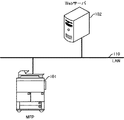
本実施形態に係る情報処理システムは、MFP101と、Webサーバ102とを備える。MFP101及びWebサーバ102は、LAN110等のネットワークに接続され、互いに通信可能に構成される。
<Hardware configuration of information processing system (FIGS. 1 to 3)>
[Overall configuration (Fig. 1)]
The information processing system according to the present embodiment includes an MFP 101 and a
[MFPのハードウェア構成(図2(a))]
CPU211を含む制御部210は、MFP101全体の動作を制御する。CPU211は、ROM212に記憶された制御プログラムを読み出して読取制御や送信制御等の各種制御を行う。RAM213は、CPU211の主メモリ、ワークエリア等の一時記憶領域として用いられる。HDD214は、画像データや各種プログラム、或いは後述する各種情報テーブルを記憶する。操作部I/F215は、操作部219と制御部210とを接続する。MFP101は後述するWebブラウザ機能を備える。MFP101のWebブラウザは、Webサーバ102から受信したHTMLデータを解析し、受信したHTMLデータの記述に基づく操作画面を操作部219の液晶表示部に表示する。プリンタI/F216は、プリンタ220と制御部210とを接続する。プリンタ220で印刷すべき画像データはプリンタI/F216を介して制御部210から転送され、プリンタ220において記録媒体上に印刷される。スキャナI/F217は、スキャナ221と制御部210とを接続する。スキャナ221は、原稿上の画像を読み取って画像データを生成し、スキャナI/F217を介して生成した画像データを制御部210に出力する。ネットワークI/F218は、制御部210(MFP101)をLAN110に接続する。ネットワークI/F218は、LAN110上の外部装置(例えば、Webサーバ102)に画像データや情報を送信したり、LAN110上の外部装置から各種情報を受信したりする。
[Hardware Configuration of MFP (FIG. 2A)]
A
(操作部の詳細構成(図2(b)))
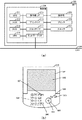
操作部219は、スタートキー503、ストップキー504、リセットキー505、ガイドキー506、トップメニューキー507及び数値キー508等の各種ハードキーを備える。また、操作部219は、聴覚的なユーザインターフェース機能として、ブザー、音声による操作案内を行う機能を備える。スタートキー503は、原稿画像の読み取り動作の開始を指示するためのキーであり、スタートキー503の中央部には、緑と赤の2色の発光ダイオードを有する2色LED表示部509(点灯ランプ)が設けられる。2色LED表示部509は、その色によってスタートキー503が使用可能な状態にあるか否かを表す。つまり、2色LED表示部509は、ユーザに対して予め定めた操作が許可されているか否かに関する情報を提示するデバイスとして機能する。また、2色LED表示部509は、スタートキー503に近接する位置(本実施形態では、スタートキー503に重なる位置)に配設されている。ストップキー504は、稼働中の動作を止めるためのキーである。リセットキー505は、設定を初期化するときに用いられるキーである。ガイドキー506は、MFP101の使用方法を表示するためのキーである。トップメニューキー507は、MFP101の機能を選択させるためのトップメニュー画面を表示するためのキーである。数値キー508は、数値を入力するためのキーである。
(Detailed configuration of the operation unit (FIG. 2B))
The
[Webサーバのハードウェア構成(図3)]
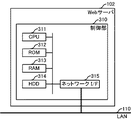
CPU311を含む制御部310は、Webサーバ102全体の動作を制御する。CPU311は、ROM312に記憶された制御プログラムを読み出して各種制御処理を実行する。RAM313は、CPU311の主メモリ、ワークエリア等の一時記憶領域として用いられる。HDD314は、画像データや各種プログラム、或いは後述する各種情報テーブルを記憶する。ネットワークI/F315は、制御部310(Webサーバ102)をLAN110に接続する。ネットワークI/F315は、LAN110に接続された他の装置との間で各種情報を送受信する。
[Hardware configuration of Web server (FIG. 3)]
A
<情報処理システムのソフトウェア構成(図4)>
[MFPのソフトウェア構成]
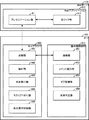
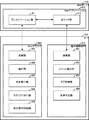
MFP101は、Webブラウザ440及び操作部制御部450を備える。Webブラウザ440及び操作部制御部450は、MFP101のCPU211が制御プログラムを実行することにより実現される。Webブラウザ440は、Webサーバから提供される、種別が異なる複数の操作画面を保持可能であり、かつ、該複数の操作画面のいずれかをユーザの指示により切り替えて表示可能である。Webブラウザ440は、通信部441、解析部442、画面表示部443、スクリプト実行部444及び画面操作制御部445を有する。
<Software configuration of information processing system (FIG. 4)>
[MFP software configuration]
The
通信部441は、HTTPプロトコルに従ってWebアプリケーション410のプレゼンテーション部411と通信する。より具体的には、通信部441は、Webブラウザ440で表示する操作画面をWebアプリケーション410に対して要求する。また、通信部441は、Webアプリケーション410から送信されるレスポンス(処理結果)を受信する。更に、通信部441は、操作部制御部450の通信部451に対して機能の実行依頼を送信する。
The
解析部442は、Webアプリケーション410から受信したレスポンスを解析する。レスポンスには、HTMLデータ及び制御スクリプトが含まれる。HTMLデータには、Webブラウザ440に表示すべき操作画面の内容を示す記述が含まれる。制御スクリプトには、MFP101の機能を制御するための記述が含まれる。画面表示部443は、HTMLデータの解析結果に基づいて、操作部219に操作画面を表示する。
The
スクリプト実行部444は、制御スクリプトの解析結果に基づいて処理を行う。制御スクリプトにはMFP101の機能を制御するために操作部制御部450へ指示を出すコードや、操作部制御部450のレスポンスに応じて画面更新等の処理を行うコードが含まれる。画面操作制御部445は、Webブラウザ440が備えるユーザインタフェースの制御を行う。ユーザインタフェースの制御としては、入力ボタンの有効化/無効化、表示/非表示といった制御が挙げられる。
The
操作部制御部450(制御手段)は、Webブラウザ440に実際に表示されている操作画面の種別を認識し、該認識された操作画面の種別に対応するタグ管理部453に記憶された移行後の状態に2色LED表示部を移行させる。すなわち、操作部制御部450は、通信部451、コマンド実行部452、タブ管理部453及び制御判定部454を有する。通信部451は、Webブラウザ440の通信部441から処理依頼、通知を受け付ける。コマンド実行部452は、処理依頼に対応したMFP101の制御コマンドを生成して実行する。タブ管理部453は、Webブラウザ440のタブごとに、タブで表示されている画面に対応して、2色LED表示部509等の操作部がどのような状態にあるべきかを管理する。制御判定部454は、タブ管理部453で管理されている情報やタブの表示状態等をもとにMFPの資源の制御を決定し、コマンド実行部452に対して、制御コマンド実行を指示する。なお、タブ管理部453及び制御判定部454は、Webブラウザ440に存在しても良いし、操作部制御部450に存在しても良い。
The operation unit control unit 450 (control unit) recognizes the type of the operation screen actually displayed on the
[Webサーバのソフトウェア構成]
Webサーバ102は、Webアプリケーション410を有する。Webアプリケーション410は、Webサーバ102のCPU311が制御プログラムを実行することにより実現される。
[Web server software configuration]
The
Webアプリケーション410は、Webブラウザ440からリクエストとして送信される情報を受信し、受信した情報に基づいて処理を実行する。処理結果は、Webアプリケーション410からWebブラウザ440に対してレスポンスとして送信される。
The
Webアプリケーション410は、プレゼンテーション部411及びロジック部412を有する。プレゼンテーション部411は、通信部441と通信し、MFP101からの送信されるリクエストを受信する。次に、プレゼンテーション部411は、受信したリクエストをロジック部412へ通知し、ロジック部412からの応答を待つ。ロジック部412からの応答を受け取ったプレゼンテーション部411は、応答内容に従ってMFP101のWebブラウザ440で表示すべき操作画面に対応するHTMLデータ及び制御スクリプトをレスポンスとして送信する。
The
ロジック部412は、プレゼンテーション部411から通知されるリクエストに応じて各種処理を実行すると共に、MFP101で表示する画面情報のHTMLとMFP101で実行する処理の制御スクリプトを生成する。具体的には、MFP101のプリンタ220による印刷処理の実行や、スキャナ221による読み取り処理の実行、あるいはネットワークI/F218を介した送信処理の実行を依頼するための制御スクリプトである。MFP101に対して処理の実行を依頼する場合、ロジック部412はプレゼンテーション部411に対してMFP101にレスポンスするHTMLと制御スクリプトを渡す。
The logic unit 412 executes various processes in response to a request notified from the
<情報処理システムの処理手順>
[全体的な処理手順(図5)]
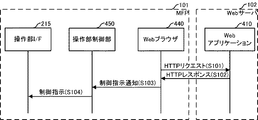
MFP101のWebブラウザ440がユーザにより起動されると、Webブラウザ440は、HTTPのリクエストをWebアプリケーション410に行う(S101)。リクエストを受けたWebアプリケーション410は、Webブラウザ440で表示する画面のHTMLとWebブラウザ440で実行する制御スクリプトを生成し、Webブラウザ440にレスポンスを返す(S102)。例えば、HTTPのリクエストがスキャン実行画面のリクエストであれば、スキャン画面表示用のHTMLとスキャン実行用の制御スクリプトをレスポンスする。なお、この処理の詳細については、図6、7を用いて後述する。Webブラウザ440は、受信したHTMLの解析を行い画面の表示を行う。また、受信した制御スクリプトを解析し、操作部制御部450に操作部資源の制御の実行を通知する(S103)。上記例のスキャン実行用の制御スクリプトには、スキャンジョブ実行のための記述があり、ジョブ実行の処理が別途行われるが、本発明の本質とは関係ないので説明を省略する。操作部制御部450は、S103の通知を受けて、制御判定部454で判定を行い、必要があれば制御の実行を操作部I/F215に指示する(S104)。
<Processing procedure of information processing system>
[Overall processing procedure (FIG. 5)]
When the
(Webブラウザの画面遷移の一例(図6))
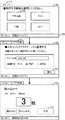
最初にタブ710にメニュー画面701が表示され、機能が選択されると新しいタブ711に選択された機能の画面が表示される。この際、表示されているタブが変更された旨の通知が操作部制御部450に行われる。新しく表示されたタブ711では、FTP送信設定画面702及びスキャン画面703で処理が進められる。それぞれの画面は、Webブラウザ440で表示され、ユーザ操作や制御スクリプトによって遷移していく。
(Example of screen transition of Web browser (Fig. 6))
First, a
メニュー画面701は、MFP101の機能を利用するに当たり、どの機能を選択するかを選択する画面である。この画面では、スタートキー503(ユーザからの入力操作を受け付けるための操作ボタン)は押下できないため、2色LED表示部509は使用不可を示す赤である必要がある。この画面より機能を選択すると、選択した機能に対応した画面に遷移する。FTP送信設定画面702は、メニュー画面701でユーザがFTP送信ボタン706を押下し、FTP送信機能を利用する場合の画面である。ユーザは、本画面でFTP送信のための設定を行い、FTP送信機能の実行を指示する。この画面では、スタートキー503は押下できるため、2色LED表示部509は使用不可を示す緑となる。スキャン画面703は、FTP送信設定画面702でユーザが実行ボタン707を押下し、FTP送信機能が開始した場合の画面である。本画面では制御スクリプトがスキャンのジョブを制御しており、紙の連続読み込み等の制御を行う。
A
720はステータス表示行である。メニュー画面701の例では、“ID: ichiro”で“ichiro”というユーザ名がログイン中であることを示し、“紙詰まり中です。”で、MFPのプリントエンジンの状態を表示している。この2つの表示は、MFPの状態であり、制御部210が状態を取得し表示制御指示を行う。スキャン画面703では、Webアプリケーションから表示指示を行い、“原稿読み込み中”を表示している。
(HTML及び制御スクリプトの一例(図7))
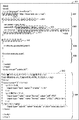
図7で示すHTML及び制御スクリプト801は、MFP101からの要求に応じて動的に生成され、FTP送信設定画面702を表示するために用いられる。ブロック802では、操作部219を制御するためのパラメータの一部がセットされる。endpoint_led変数807には、2色LED表示部509の制御のために操作部制御部450へリクエストを出すためのエンドポイントとしてURL情報がセットされる。
(Example of HTML and control script (Fig. 7))
The HTML and
ブロック803では、実際に2色LED表示部509の制御のために操作部制御部450を呼び出すための処理が記述される。本例ではSOAPを利用して操作部制御部450を呼び出す場合の一例であり、invoke_ws_update_led関数808が定義されている。SoapParameter関数809はSOAP形式のパラメータを生成するための関数で、本例では“String”型のデータとして、2色LEDの色を設定している。また、create_soap_message関数810では、エンドポイントに対して実行を指示するSOAPメッセージの生成を行う。更に、send_soap_message関数811で、実際に操作部制御部450に対してSOAPのリクエストを実行する。
In
ブロック804では、update_ui関数812が定義されており、引数に緑色を指定して、invoke_ws_update_led関数808を呼び出す処理を行う。ブロック805では、execute_scan関数が定義されており、表示されている画面でユーザが設定し、実行ボタンが押された際の、スキャンジョブのための処理を行う。ブロック806は、Webブラウザ440に表示する画面である。画面に表示する内容に加え、ユーザの入力フォーム813が定義されている。フォーム813では、FTP送信するファイルの名称の入力と、ファイル形式の選択が可能であり、実行ボタンを押下するとブロック805のexecute_scan関数を呼び出す。
In
(タブ管理部453が管理している情報の一例(図8))
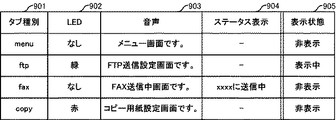
タブ種別901は、タブの種別を示すWebアプリケーションの名称である。LED902では、Webブラウザが表示しているタブ種別901に応じて2色LED表示部509が移行すべき移行後の状態を管理している。音声903では、画面の状態を音声で読み上げる音声読み上げ機能によって読み上げられるメッセージを管理する。音声読み上げ機能は例えば画面遷移する度に画面の名称を読み上げる。ステータス表示904では、ステータス表示行で各Webアプリケーションが表示指示した文章の管理を行う。表示状態905は、タブ種別901のうちのいずれのタブがWebブラウザ440に表示されているかを管理している。タブ管理部453は、図8の901〜904で示す情報を記憶しており、表示状態905のみが随時更新されていく。
(Example of information managed by tab management unit 453 (FIG. 8))
The
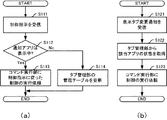
[操作部制御部の処理手順(図9)]
(制御指示を受信した場合(図9(a)))
操作部制御部450がWebブラウザ440から制御指示通知を受信すると(S111(図5のS103に対応))、制御判定部454は、制御指示を行ったアプリケーションを表示しているタブが表示中であるか否かを判定する(S112)。表示中であれば、コマンド実行部452に制御指示に従った制御を実行するように依頼する(S113)。一方、表示中でなければ、タブ管理部453に管理テーブルを更新するように依頼する(S114)。
[Processing procedure of operation unit control unit (FIG. 9)]
(When a control instruction is received (FIG. 9A))
When the operation
(表示タブ変更通知を受信した場合(図9(b)))
操作部制御部450がWebブラウザ440から表示中のタブが変更された旨の通知を受信すると(S121)、タブ管理部453から、表示されているアプリケーションの状態と対応してあるべきMFP101の資源の制御状態を取得し(S122)、コマンド実行部452に制御実行を依頼する(S123)。
(When a display tab change notification is received (FIG. 9B))
When the operation
以上述べた通り、本実施形態によれば、Webブラウザの最前面に実際に表示されている操作画面(タブ)の種別に応じて、LEDの点灯制御を可能とすることができる。 As described above, according to the present embodiment, it is possible to perform LED lighting control according to the type of the operation screen (tab) actually displayed on the forefront of the Web browser.
(第2の実施形態)
第2の実施形態では、MFPの資源の制御をWebブラウザからではなく、Webサーバ上のWebアプリケーションから行う。
(Second Embodiment)
In the second embodiment, MFP resources are controlled not from a Web browser but from a Web application on a Web server.
<情報処理システムのソフトウェア構成(図10)>
Webアプリケーション410は、Webブラウザからの指示の内容によってMFP101に対して処理の実行を依頼する。その際、ロジック部412が操作部制御部450の通信部451を介して、制御の依頼を行う。そのため、Webブラウザ440に返信するHTMLデータには、MFP101制御のためのスクリプトは含まれず、Webブラウザ440から操作部制御部445に制御の依頼が行われることはない。ただし、表示されているタブが変更されたときの通知は行われる。操作部制御部445は、送信元が異なるが制御通知を通信部451で受信すると、第1の実施形態と同様の動作を行う。
<Software configuration of information processing system (FIG. 10)>
The
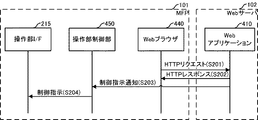
<情報処理システムの全体的な処理手順(図11)>
MFP101のWebブラウザ440がユーザにより起動されると、Webブラウザ440は、HTTPのリクエストをWebアプリケーション410に行う(S201)。リクエストを受けたWebアプリケーション410は、Webブラウザ440で表示する画面のHTMLとWebブラウザ440で実行する制御スクリプトを生成し、Webブラウザ440にレスポンスを返す(S202)。例えば、HTTPのリクエストがスキャン実行画面のリクエストであれば、スキャン画面表示用のHTMLとスキャン実行用の制御スクリプトをレスポンスする。そして、Webアプリケーション410のロジック部412が制御スクリプトを生成し、生成した制御スクリプトを操作部制御部450に送信する(S203)。そして、操作部制御部450は、S203の通知を受けて、制御判定部454で判定を行い、必要があれば制御の実行を操作部I/F215に指示する(S204)。
<Overall Processing Procedure of Information Processing System (FIG. 11)>
When the
(他の実施形態)
本発明は、以下の処理を実行することによっても実現される。即ち、上述した実施形態の機能を実現するソフトウェア(プログラム)をネットワーク又は各種記憶媒体を介してシステム或いは装置に供給し、そのシステム或いは装置のコンピュータ(又はCPUやMPU等)がプログラムコードを読み出して実行する処理である。この場合、そのプログラム、及び該プログラムを記憶した記憶媒体は本発明を構成することになる。
(Other embodiments)
The present invention is also realized by executing the following processing. That is, software (program) that realizes the functions of the above-described embodiments is supplied to a system or apparatus via a network or various storage media, and a computer (or CPU, MPU, etc.) of the system or apparatus reads the program code. It is a process to be executed. In this case, the program and the storage medium storing the program constitute the present invention.
Claims (6)
前記Webブラウザに実際に表示されている操作画面の種別を認識し、該認識された操作画面の種別に対応する前記記憶手段に記憶された移行後の状態に前記デバイスを移行させる制御手段を備えることを特徴とする情報処理装置。 A Web browser provided from a Web server that can hold a plurality of operation screens of different types and can switch and display any of the plurality of operation screens according to a user instruction, An information processing apparatus comprising: a device that presents information regarding whether or not a predetermined operation is permitted; and a storage unit that preliminarily stores a post-transition state to be shifted by the device corresponding to the type of the operation screen. And
Control means for recognizing the type of the operation screen actually displayed on the Web browser and causing the device to shift to the state after the transition stored in the storage unit corresponding to the recognized type of the operation screen. An information processing apparatus characterized by that.
点灯ランプと、
ユーザからの入力操作を受け付けるための操作ボタンと、を備え、
前記記憶手段は、前記操作画面の種別に対応する前記点灯ランプが移行すべき移行後の状態を予め記憶し、
前記制御手段は、前記Webブラウザに実際に表示されている操作画面の種別を認識し、該認識された操作画面の種別に対応する前記記憶手段に記憶された移行後の状態に前記点灯ランプを移行させることを特徴とする請求項1に記載の情報処理装置。 The device is
A lit lamp,
An operation button for accepting an input operation from the user,
The storage means stores in advance a state after the transition to which the lighting lamp corresponding to the type of the operation screen should transition,
The control means recognizes the type of the operation screen that is actually displayed on the Web browser, and sets the lighting lamp to the state after the transition stored in the storage means corresponding to the recognized type of the operation screen. The information processing apparatus according to claim 1, wherein the information processing apparatus is migrated.
前記Webサーバは、前記Webブラウザに実際に表示されている操作画面の種別を認識し、該認識された操作画面の種別に対応する前記記憶手段に記憶された移行後の状態に前記デバイスを移行させる制御手段を備えることを特徴とする情報処理システム。 A web server, a web browser provided from the web server, capable of holding a plurality of operation screens of different types, and capable of switching and displaying any of the plurality of operation screens according to a user instruction; A device that presents information regarding whether or not a predetermined operation is permitted to the user, and a storage unit that preliminarily stores a post-transition state to which the device corresponding to the type of the operation screen should be shifted An information processing system comprising an information processing device,
The Web server recognizes the type of the operation screen actually displayed on the Web browser, and shifts the device to the post-migration state stored in the storage unit corresponding to the recognized type of the operation screen. An information processing system comprising control means for causing
前記情報処理装置が備える制御手段が、前記Webブラウザに実際に表示されている操作画面の種別を認識し、該認識された操作画面の種別に対応する前記記憶手段に記憶された移行後の状態に前記デバイスを移行させる制御工程を備えることを特徴とする制御方法。 A Web browser provided from a Web server that can hold a plurality of operation screens of different types and can switch and display any of the plurality of operation screens according to a user instruction, Control of an information processing apparatus comprising: a device that presents information regarding whether or not a predetermined operation is permitted; and a storage unit that preliminarily stores a post-transition state that the device corresponding to the type of the operation screen should transition to A method,
The transition means stored in the storage means corresponding to the recognized type of the operation screen is recognized by the control means included in the information processing apparatus, and the type of the operation screen actually displayed on the Web browser is recognized. And a control step of transferring the device to a control method.
Webサーバから提供される、種別が異なる複数の操作画面を保持可能であり、かつ、該複数の操作画面のいずれかをユーザの指示により切り替えて表示可能であるWebブラウザと、ユーザに対して予め定めた操作が許可されているか否かに関する情報を提示するデバイスと、前記操作画面の種別に対応する前記デバイスが移行すべき移行後の状態を予め記憶する記憶手段とを備える情報処理装置における、
前記Webブラウザに実際に表示されている操作画面の種別を認識し、該認識された操作画面の種別に対応する前記記憶手段に記憶された移行後の状態に前記デバイスを移行させる制御手段として機能させることを特徴とするプログラム。 Computer
A Web browser provided from a Web server that can hold a plurality of operation screens of different types and can switch and display any of the plurality of operation screens according to a user instruction, In an information processing apparatus comprising: a device that presents information regarding whether or not a defined operation is permitted; and a storage unit that preliminarily stores a state after the transition to which the device corresponding to the type of the operation screen should be migrated.
Function as control means for recognizing the type of operation screen actually displayed on the Web browser and causing the device to transition to the state after the transition stored in the storage means corresponding to the recognized type of operation screen A program characterized by letting
Priority Applications (3)
| Application Number | Priority Date | Filing Date | Title |
|---|---|---|---|
| JP2010150259A JP5761934B2 (en) | 2010-06-30 | 2010-06-30 | Information processing apparatus, information processing apparatus control method, and program |
| US13/159,765 US20120005579A1 (en) | 2010-06-30 | 2011-06-14 | Information processing apparatus, control method thereof, and program |
| CN2011101820150A CN102316238A (en) | 2010-06-30 | 2011-06-27 | Information processor and control method thereof |
Applications Claiming Priority (1)
| Application Number | Priority Date | Filing Date | Title |
|---|---|---|---|
| JP2010150259A JP5761934B2 (en) | 2010-06-30 | 2010-06-30 | Information processing apparatus, information processing apparatus control method, and program |
Publications (3)
| Publication Number | Publication Date |
|---|---|
| JP2012011663A true JP2012011663A (en) | 2012-01-19 |
| JP2012011663A5 JP2012011663A5 (en) | 2014-01-23 |
| JP5761934B2 JP5761934B2 (en) | 2015-08-12 |
Family
ID=45400700
Family Applications (1)
| Application Number | Title | Priority Date | Filing Date |
|---|---|---|---|
| JP2010150259A Expired - Fee Related JP5761934B2 (en) | 2010-06-30 | 2010-06-30 | Information processing apparatus, information processing apparatus control method, and program |
Country Status (3)
| Country | Link |
|---|---|
| US (1) | US20120005579A1 (en) |
| JP (1) | JP5761934B2 (en) |
| CN (1) | CN102316238A (en) |
Cited By (1)
| Publication number | Priority date | Publication date | Assignee | Title |
|---|---|---|---|---|
| JP2017201542A (en) * | 2017-06-13 | 2017-11-09 | キヤノン株式会社 | Information processing apparatus, control method thereof, and program |
Families Citing this family (7)
| Publication number | Priority date | Publication date | Assignee | Title |
|---|---|---|---|---|
| JP5684766B2 (en) * | 2012-09-19 | 2015-03-18 | 株式会社東芝 | MFPs and systems |
| JP6178567B2 (en) * | 2012-12-10 | 2017-08-09 | キヤノン株式会社 | Image forming apparatus, control method and program thereof, and information processing system |
| JP6298288B2 (en) | 2013-12-20 | 2018-03-20 | キヤノン株式会社 | Information processing apparatus, information processing method, and program |
| JP6740632B2 (en) * | 2016-02-22 | 2020-08-19 | 株式会社リコー | Information processing system, screen display information generation method, electronic device and browser program |
| CN106354372A (en) * | 2016-09-08 | 2017-01-25 | 珠海市魅族科技有限公司 | Information preview method and device |
| CN106527954B (en) * | 2016-11-28 | 2020-07-03 | 北京小米移动软件有限公司 | Equipment control method and device and mobile terminal |
| JP6942541B2 (en) | 2017-07-03 | 2021-09-29 | キヤノン株式会社 | Image forming device, its control method, and program |
Citations (5)
| Publication number | Priority date | Publication date | Assignee | Title |
|---|---|---|---|---|
| JP2007240962A (en) * | 2006-03-09 | 2007-09-20 | Canon Inc | Image forming apparatus |
| JP2007280239A (en) * | 2006-04-11 | 2007-10-25 | Sony Corp | Indicator light control program, information processing apparatus, and indicator light control method |
| JP2008003833A (en) * | 2006-06-22 | 2008-01-10 | Ricoh Co Ltd | Image processing apparatus, information processing apparatus, server apparatus, display control system, and display control method |
| JP2008158493A (en) * | 2006-11-30 | 2008-07-10 | Ricoh Co Ltd | Image forming apparatus, content display method, and program |
| JP2008180833A (en) * | 2007-01-24 | 2008-08-07 | Kyocera Mita Corp | Operation display device, operation display program and electronic equipment |
Family Cites Families (13)
| Publication number | Priority date | Publication date | Assignee | Title |
|---|---|---|---|---|
| US8062134B2 (en) * | 1996-11-14 | 2011-11-22 | Bally Gaming, Inc. | Browser manager for a networked gaming system and method |
| JP3522635B2 (en) * | 1999-08-03 | 2004-04-26 | ヴィジョンアーツ株式会社 | Computer-readable recording medium recording an image file, apparatus for creating this recording medium, medium recording an image file creation program, image file transmitting apparatus, image file processing apparatus, medium recording image file processing program |
| US7038795B2 (en) * | 2000-06-12 | 2006-05-02 | Canon Kabushiki Kaisha | Image input/output apparatus, method of controlling image input/output apparatus, image input/output system, and storage media |
| JP4458326B2 (en) * | 2002-07-30 | 2010-04-28 | キヤノン株式会社 | Information processing apparatus, information processing method, and control program |
| US7154862B2 (en) * | 2003-12-31 | 2006-12-26 | Openpeak Inc. | Device control system, method, and apparatus for server-based or peer-to-peer network environments |
| US7227492B1 (en) * | 2004-02-10 | 2007-06-05 | Zilog, Inc. | Interpreting a common script block to output various forms of data according to a common protocol |
| TWI405142B (en) * | 2004-08-12 | 2013-08-11 | Ati Technologies Inc | Method in a system that renders a screen space, apparatus that renders a screen space, method and apparatus for providing rendering of subsections of a screen space, and graphic processor |
| JP2006155522A (en) * | 2004-12-01 | 2006-06-15 | Canon Inc | WEB browser operation method and operation device |
| JP2006203808A (en) * | 2005-01-24 | 2006-08-03 | Canon Inc | Image processing apparatus, information processing apparatus, information processing system, information processing method, program, and storage medium |
| US7873915B2 (en) * | 2006-06-16 | 2011-01-18 | Microsoft Corporation | Suppressing dialog boxes |
| US7793226B2 (en) * | 2006-08-14 | 2010-09-07 | International Business Machines Corporation | Method and system for grouping and stacking tab user interface objects with icon status indicators |
| WO2010037168A1 (en) * | 2008-10-01 | 2010-04-08 | Binu Pty Ltd | Systems, methods, and computer readable media for providing applications style functionality to a user |
| CN101477558B (en) * | 2009-01-15 | 2010-11-10 | 腾讯科技(深圳)有限公司 | Browser label management method and multi-page browsing system |
-
2010
- 2010-06-30 JP JP2010150259A patent/JP5761934B2/en not_active Expired - Fee Related
-
2011
- 2011-06-14 US US13/159,765 patent/US20120005579A1/en not_active Abandoned
- 2011-06-27 CN CN2011101820150A patent/CN102316238A/en active Pending
Patent Citations (5)
| Publication number | Priority date | Publication date | Assignee | Title |
|---|---|---|---|---|
| JP2007240962A (en) * | 2006-03-09 | 2007-09-20 | Canon Inc | Image forming apparatus |
| JP2007280239A (en) * | 2006-04-11 | 2007-10-25 | Sony Corp | Indicator light control program, information processing apparatus, and indicator light control method |
| JP2008003833A (en) * | 2006-06-22 | 2008-01-10 | Ricoh Co Ltd | Image processing apparatus, information processing apparatus, server apparatus, display control system, and display control method |
| JP2008158493A (en) * | 2006-11-30 | 2008-07-10 | Ricoh Co Ltd | Image forming apparatus, content display method, and program |
| JP2008180833A (en) * | 2007-01-24 | 2008-08-07 | Kyocera Mita Corp | Operation display device, operation display program and electronic equipment |
Cited By (1)
| Publication number | Priority date | Publication date | Assignee | Title |
|---|---|---|---|---|
| JP2017201542A (en) * | 2017-06-13 | 2017-11-09 | キヤノン株式会社 | Information processing apparatus, control method thereof, and program |
Also Published As
| Publication number | Publication date |
|---|---|
| US20120005579A1 (en) | 2012-01-05 |
| JP5761934B2 (en) | 2015-08-12 |
| CN102316238A (en) | 2012-01-11 |
Similar Documents
| Publication | Publication Date | Title |
|---|---|---|
| JP5436187B2 (en) | Image processing apparatus, control method therefor, and program | |
| JP5761934B2 (en) | Information processing apparatus, information processing apparatus control method, and program | |
| JP5591040B2 (en) | Image processing apparatus, image processing apparatus control method, and program | |
| JP5599038B2 (en) | Information processing apparatus and method, and program | |
| JP6410584B2 (en) | Image processing apparatus, image processing apparatus control method, and program | |
| JP5743671B2 (en) | Information processing apparatus and control method thereof | |
| JP2012103990A (en) | Information processing device, method for controlling screen display and computer program | |
| JP5395578B2 (en) | Image forming system, image forming apparatus, screen display method, control method, and program | |
| JP2008278071A (en) | Image processor, method for testing work flow, and test program of work flow | |
| JP2013014079A (en) | Information processing apparatus, control method therefor, and program | |
| JP2011035849A (en) | Information processing system, control method therefor, and program | |
| JP5669460B2 (en) | Information processing apparatus, information processing system, information processing apparatus control method, and program | |
| JP2012038166A (en) | Information processor, and method and program for controlling the same | |
| JP5623129B2 (en) | Information processing apparatus, information processing apparatus control method, and program | |
| JP4415810B2 (en) | Image processing apparatus, control method thereof, and control program | |
| JP5316835B2 (en) | Information processing apparatus, information processing apparatus operation instruction system, and information processing apparatus operation instruction program | |
| JP2010269563A (en) | Image forming apparatus and program | |
| JP2015118437A (en) | Image forming system | |
| US8527875B2 (en) | Information processing apparatus and method of controlling the same | |
| JP5698827B2 (en) | Image processing apparatus, control method therefor, and program | |
| JP6618593B2 (en) | Image processing apparatus, image processing apparatus control method, and program | |
| JP2015217672A (en) | Image formation device, control method thereof, and program | |
| JP6383463B2 (en) | Information processing apparatus, control method thereof, and program | |
| JP6341016B2 (en) | Image forming system, image forming apparatus, and program | |
| JP2010050620A (en) | Image formation device and system |
Legal Events
| Date | Code | Title | Description |
|---|---|---|---|
| A621 | Written request for application examination |
Free format text: JAPANESE INTERMEDIATE CODE: A621 Effective date: 20130627 |
|
| A521 | Request for written amendment filed |
Free format text: JAPANESE INTERMEDIATE CODE: A523 Effective date: 20131202 |
|
| A977 | Report on retrieval |
Free format text: JAPANESE INTERMEDIATE CODE: A971007 Effective date: 20140314 |
|
| A131 | Notification of reasons for refusal |
Free format text: JAPANESE INTERMEDIATE CODE: A131 Effective date: 20140404 |
|
| A521 | Request for written amendment filed |
Free format text: JAPANESE INTERMEDIATE CODE: A523 Effective date: 20140602 |
|
| A131 | Notification of reasons for refusal |
Free format text: JAPANESE INTERMEDIATE CODE: A131 Effective date: 20150220 |
|
| A521 | Request for written amendment filed |
Free format text: JAPANESE INTERMEDIATE CODE: A523 Effective date: 20150415 |
|
| TRDD | Decision of grant or rejection written | ||
| A01 | Written decision to grant a patent or to grant a registration (utility model) |
Free format text: JAPANESE INTERMEDIATE CODE: A01 Effective date: 20150511 |
|
| A61 | First payment of annual fees (during grant procedure) |
Free format text: JAPANESE INTERMEDIATE CODE: A61 Effective date: 20150609 |
|
| LAPS | Cancellation because of no payment of annual fees |