JP2010146052A - Printer driver - Google Patents
Printer driver Download PDFInfo
- Publication number
- JP2010146052A JP2010146052A JP2008319295A JP2008319295A JP2010146052A JP 2010146052 A JP2010146052 A JP 2010146052A JP 2008319295 A JP2008319295 A JP 2008319295A JP 2008319295 A JP2008319295 A JP 2008319295A JP 2010146052 A JP2010146052 A JP 2010146052A
- Authority
- JP
- Japan
- Prior art keywords
- document
- printer driver
- code image
- setting
- printer
- Prior art date
- Legal status (The legal status is an assumption and is not a legal conclusion. Google has not performed a legal analysis and makes no representation as to the accuracy of the status listed.)
- Withdrawn
Links
- 230000010365 information processing Effects 0.000 abstract description 16
- 238000000034 method Methods 0.000 description 31
- 230000008569 process Effects 0.000 description 29
- 238000010586 diagram Methods 0.000 description 12
- 230000008859 change Effects 0.000 description 8
- 230000006870 function Effects 0.000 description 4
- 230000009467 reduction Effects 0.000 description 4
- 230000005540 biological transmission Effects 0.000 description 2
- 238000004891 communication Methods 0.000 description 2
- 238000004590 computer program Methods 0.000 description 1
- 230000009466 transformation Effects 0.000 description 1
Images

Abstract
【課題】ドキュメント作成者の意図を反映した印刷が可能なプリンタドライバを提供する
。
【解決手段】情報処理装置200は、プリンタドライバ220の設定情報が埋め込まれた
画像の生成指示を受け付ける手段と、生成指示を受け付けた場合に、プリンタドライバ2
20の設定情報が埋め込まれた画像データを生成する手段と、生成した画像データを保存
する手段と、を備える。また、印刷対象のドキュメントを作成するアプリケーション21
0から、作成したドキュメントを取得する手段と、ドキュメントの中から、プリンタドラ
イバ220の設定情報が埋め込まれた画像データを特定する手段と、特定した画像データ
から、プリンタドライバの設定情報を取得する手段と、取得した設定情報の内容に従って
、ドキュメントの印刷をプリンタ100により実行する手段と、を備える。
【選択図】図1A printer driver capable of printing reflecting the intention of a document creator.
An information processing apparatus receives a generation instruction for an image in which setting information of a printer driver is embedded, and a printer driver when receiving the generation instruction.
Means for generating image data embedded with 20 setting information, and means for storing the generated image data. An application 21 that creates a document to be printed
Means for acquiring the created document from 0, means for specifying the image data in which the setting information of the printer driver 220 is embedded from the document, and means for acquiring the setting information of the printer driver from the specified image data And means for executing printing of the document by the printer 100 in accordance with the contents of the acquired setting information.
[Selection] Figure 1
Description
本発明は、プリンタを制御するプリンタドライバに関する。 The present invention relates to a printer driver that controls a printer.
ユーザから設定の変更を受け付けて、変更された設定に従って、印刷を実行するプリン
タドライバがある(特許文献1参照)。例えば、拡大・縮小など、ユーザは、プリンタド
ライバの設定を自由に変更して、設定内容に従った印刷を行うことができる。
しかし、文書の作成者の意図に反する印刷が実行されると、不都合が生じる場合がある
。例えば、バーコードが含まれた印刷データをユーザに印刷させる場合を考える。従来の
プリンタドライバでは、ユーザは勝手に、プリンタドライバの設定を変更して、解像度を
変更したり、拡大/縮小したりして印刷することができる。しかし、印刷されたバーコー
ドは、その大きさや品質が低下してしまい、バーコード読取装置では読み込めないことが
ある。
However, inconvenience may occur if printing is executed against the intention of the document creator. For example, consider a case where a user prints print data including a barcode. With the conventional printer driver, the user can change the setting of the printer driver and change the resolution or enlarge / reduce the print without permission. However, the size and quality of the printed barcode may be reduced and may not be read by the barcode reader.
本発明の目的は、文書作成者の意図を反映した印刷が可能なプリンタドライバを提供す
ることにある。
An object of the present invention is to provide a printer driver capable of printing reflecting the intention of a document creator.
上記課題を解決するための本願発明は、プリンタを制御するプリンタドライバであって
、前記プリンタドライバの設定情報が埋め込まれた画像の生成指示を受け付ける手段と、
前記生成指示を受け付けた場合に、前記プリンタドライバの設定情報が埋め込まれた画像
データを生成する手段と、生成した前記画像データを保存する手段と、を備える。
The present invention for solving the above problems is a printer driver for controlling a printer, and means for receiving an instruction to generate an image in which setting information of the printer driver is embedded;
And a means for generating image data in which setting information of the printer driver is embedded, and a means for storing the generated image data when the generation instruction is received.
以下、本発明の実施形態の一例を図面を参照して説明する。 Hereinafter, an example of an embodiment of the present invention will be described with reference to the drawings.
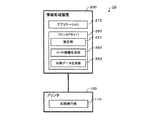
図1は、本発明の一実施形態が適用された印刷システム10の機能構成の一例を示すブ
ロック図である。図示するように、印刷システム10は、プリンタ100と、情報処理装
置200と、を備える。プリンタ100と情報処理装置200は、例えば、USBケーブ
ル等のケーブルを介して相互に接続されている。しかし、本発明はこれに限定されず、例
えば、プリンタ100と情報処理装置200は、インターネットやLAN等のコンピュー
タネットワークを介して、相互に通信可能に接続されていてもよい。
FIG. 1 is a block diagram illustrating an example of a functional configuration of a printing system 10 to which an embodiment of the present invention is applied. As illustrated, the printing system 10 includes a
情報処理装置200は、例えば、不図示の、CPU(Central Processing Unit)と、
RAM(Random Access Memory)と、ROM(Read Only Memory)と、ハードディスクと
、ディスプレイ等の表示装置と、キーボードやマウス等からなる入力装置と、プリンタ1
00とデータの送受信を行う通信インタフェースと、などを備えた一般的なコンピュータ
(パーソナルコンピュータ)で実現される。
The
RAM (Random Access Memory), ROM (Read Only Memory), a hard disk, a display device such as a display, an input device such as a keyboard and a mouse, and the printer 1
00 and a general computer (personal computer) provided with a communication interface for transmitting and receiving data.
情報処理装置200上には、図示するように、アプリケーション210と、プリンタド
ライバ220と、が少なくとも構築される。アプリケーション210、及び、プリンタド
ライバ220は、情報処理装置200が備えるROMなどからRAMにロードされたコン
ピュータプログラムを、CPUが実行することにより構築される。
On the
アプリケーション210は、印刷対象のドキュメントデータ(以下では、「ドキュメン
ト」とよぶ)を作成する処理を行う。ここで、ドキュメントは、文書作成ソフトウェアが
生成するデータ(例えば、ワード(登録商標)ファイル)や、表計算ソフトウェアが生成
するデータ(例えば、エクセル(登録商標)ファイル)や、描画ソフトウェアが生成する
データ(例えば、パワーポイント(登録商標)ファイル)などを含む。アプリケーション
210は、情報処理装置200にインストールされた、一般的なドキュメント作成プログ
ラムに従って機能する。このドキュメント作成プログラムには、例えば、ワード、エクセ
ル、パワーポイントなどが含まれる。
The
プリンタドライバ220は、図示するように、設定部221と、コード画像生成部22
2と、印刷データ生成部223と、を有し、プリンタ100の印刷制御を行う。
The
2 and a print
設定部221は、プリンタ100での印刷に関する各種設定(解像度、拡大/縮小、色
、など)を行う。例えば、設定部221は、設定画面を表示装置等に表示して、ユーザか
らの指示を受け付ける。
The
コード画像生成部222は、印刷に関する各種設定(設定部221が行った設定)内容
を記録したコード画像を生成する。ここで、コード画像は、アプリケーション210が作
成するドキュメントに埋め込み(貼り付け)可能なデータであれば、いかなる形式のデー
タであってもよい。例えば、コード画像は、ビットマップ画像やJPEGなどのイメージ
データでよい。ただし、多くのドキュメントに貼り付け可能な点から、ビットマップ画像
が好ましい。
The code
印刷データ生成部223は、印刷対象のデータ(例えば、アプリケーション210が作
成したドキュメント)に基づいて、プリンタ100で印刷可能な印刷データを生成する。
そして、印刷データ生成部223は、プリンタ100を制御するための印刷コマンドと、
生成した印刷データと、をプリンタ100に送信して印刷させる。
The print
The print
The generated print data is transmitted to the
また、印刷データ生成部223は、コード画像が埋め込まれたドキュメントを印刷する
場合には、ドキュメントに埋め込まれたコード画像を特定し、特定したコード画像に記録
されている設定内容に従って印刷データを生成する。
In addition, when printing a document in which a code image is embedded, the print
次に、プリンタ100について説明する。
Next, the
プリンタ100は、例えば、不図示の、CPUと、RAMと、ROMと、情報処理装置
200とデータの送受信を行う通信インタフェースと、印刷エンジンと、入力装置(操作
パネル、タッチパネルなど)と、表示装置(表示パネル、タッチパネルなど)と、を備え
ている。ただし、プリンタ100の構成はこれに限定されるものではなく、例えば、特定
の処理を行うASIC(Application Specific Integrated Circuit)などを備えていて
もよい。また、プリンタ100は、プリンタに限定されず、例えば、FAX機能やスキャ
ナ機能を有する複合機などでもよい。
The
プリンタ100上には、少なくとも印刷実行部110が構築される。印刷実行部110
は、印刷エンジンが動作することにより構築される。
On the
Is constructed by the operation of the print engine.
印刷実行部110は、情報処理装置200から送信された印刷データを印刷する。具体
的には、印刷実行部110は、情報処理装置200から通知された印刷コマンドに従って
印刷エンジンを制御し、情報処理装置200から送信された印刷データの印刷を実行する
。
The
なお、本実施形態では、ドキュメント作成者がドキュメントを作成して、ドキュメント
利用者(印刷者)に配布し、ドキュメント利用者がそのドキュメントを印刷する。従って
、印刷システム10は、ドキュメント作成者及びドキュメント利用者がそれぞれ独自に有
していてもよいし、一部又は全部を共用するものであってもよい。
In this embodiment, a document creator creates a document, distributes it to a document user (printer), and the document user prints the document. Therefore, the printing system 10 may be individually owned by the document creator and the document user, or may be shared in part or in whole.
<コード画像生成処理>
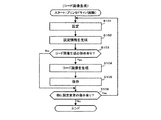
次に、上記構成からなる印刷システム10の特徴的な動作について説明する。図2は、
情報処理装置200で行われるコード画像生成処理のフローチャートである。
<Code image generation processing>
Next, a characteristic operation of the printing system 10 having the above configuration will be described. FIG.
3 is a flowchart of a code image generation process performed by the
プリンタドライバ220は、ユーザ(ドキュメント作成者)から当該プリンタドライバ
を起動する指示(コード画像作成のための指示)がなされると、コード画像生成処理を開
始する。
When the user (document creator) gives an instruction to start the printer driver (an instruction for creating a code image), the
コード画像生成処理を開始すると、プリンタドライバ220の設定部221は、印刷に
関する各種設定を受け付ける(ステップS101)。具体的には、設定部221は、設定
画面300を表示装置に表示し、ドキュメント作成者からの指示に基づいて、用紙サイズ
や給紙装置の設定などに関する基本設定や、解像度や拡大/縮小の設定などに関する応用
設定や、印刷用紙における印字範囲の設定などに関する拡張設定や、コード画像を作成す
るか否かの設定などに関するユーティリティ設定などを受け付ける。
When the code image generation process is started, the
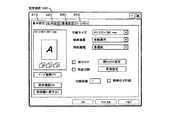
図3は、設定画面300の表示例を示す図である。図示するように、設定画面300に
は、基本設定などを受け付けるための基本設定タブ310と、応用設定などを受け付ける
ための応用設定タブ320と、拡張設定などを受け付けるための環境設定タブ330と、
ユーティリティ設定などを受け付けるためのユーティリティタブ340と、が設けられる
。
FIG. 3 is a diagram illustrating a display example of the
A
設定部221は、ドキュメント作成者によって選択されたタブ(310〜340のいず
れか)を、設定画面300上の最前面に表示し、選択されているタブ(310〜340の
いずれか)ごとに設定を受け付ける。
The
基本設定タブ310が選択されている(或いは、いずれのタブも選択されていない)場
合には、設定部221は、図示するような設定画面300を表示し、基本設定を受け付け
る。また、基本設定タブ310以外のタブが選択された場合にも、同様に、設定部221
は、各種設定を受け付ける。
When the
Accepts various settings.
設定部221は、印刷に関する各種設定を受け付けると、受け付けた設定内容を記憶す
る(ステップS102)。具体的には、設定部221は、設定画面300で受け付けた各
種設定内容を記述した設定情報400を生成し、ハードディスク等の記憶装置に記憶する
。
Upon receiving various settings relating to printing, the
図4(A)は、設定情報400の概略データ構造の一例を示す図である。図示するよう
に、設定情報400は、設定項目ごとのレコード430からなる。設定可能な全ての設定
項目にそれぞれ対応する各レコード430は、予め設定情報400に格納されている。各
レコード430には、設定項目410と、設定値420と、が対応付けて格納されている
。
FIG. 4A is a diagram illustrating an example of a schematic data structure of the setting information 400. As illustrated, the setting information 400 includes a
設定項目410は、設定項目を特定する情報であり、例えば、「解像度」、「拡大/縮
小」、「色(カラー、グレースケール、等)」などといった、それぞれの設定項目を識別
し得る文字列(数字列を含む)からなる。
The setting
設定値420は、各設定項目410に対応する設定内容を特定する情報であり、例えば
、「480dpi」、「80%」といった、設定値を示す文字列(数字列を含む)からな
る。
The setting
なお、設定部221は、ドキュメント作成者から設定内容の変更を受け付ける毎に、設
定内容が変更された設定項目について、設定情報400の設定値420を書き換える。
Note that the
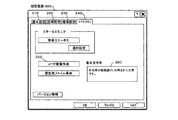
また、設定部221は、ユーティリティタブ340が選択されると図5に示すような設
定画面300を表示し、ユーティリティ設定を受け付ける。
When the
図5は、ユーティリティタブ340が選択されている場合における設定画面300の表
示例を示す図である。図示するように、設定画面300には、コード画像の生成を要求す
るためのコード画像作成ボタン350と、コード画像の代わりに(或いは、コード画像と
共に)印刷する文字列を入力するための表示文字列欄360と、が設けられる。なお、表
示文字列欄360に文字列が入力された場合には、設定部221は、表示文字列欄360
に入力された文字列を印刷する旨の設定内容と、当該文字列を印刷する場合に、実際に印
刷する文字列(例えば、「作成者の意図通りに印刷された文章です。」など)と、を設定
情報400に記憶する。
FIG. 5 is a diagram illustrating a display example of the
The setting contents to print the character string entered in, and the character string to be actually printed when the character string is printed (for example, “This is a sentence printed according to the intention of the creator.”) Are stored in the setting information 400.
設定部221は、図5に示すようなユーティリティタブ340を、設定画面300の最
前面に表示している間、コード画像生成の要求の有無を判別する(ステップS103)。
具体的には、設定部221は、図5に示すコード画像作成ボタン350の操作を受け付け
た場合に、コード画像生成の要求が有ったと判定する。一方、画像作成ボタン350の操
作を受け付けずに、他の要求(操作)を受け付けた場合には、コード画像生成の要求は無
かったと判定する。
The
Specifically, the
設定部221は、コード画像生成の要求が無いと判定した場合には(ステップS103
;No)、処理を、後述するステップS106に移行する。一方、コード画像生成の要求
が有ると判定した場合には(ステップS103;Yes)、処理をステップS104に移
行する。
If the
No), the process proceeds to step S106 described later. On the other hand, if it is determined that there is a request for code image generation (step S103; Yes), the process proceeds to step S104.
処理がステップS104に移行すると、コード画像生成部222は、設定情報400を
記録したコード画像500を生成する(ステップS104)。
When the process proceeds to step S104, the code
具体的には、設定部221は、まず、生成するコード画像のデータ形式、及び、保存先
を決定する処理を行う。例えば、設定部221は、コード画像作成ボタン350が操作さ
れたときに、生成するコード画像のデータ形式の候補(ビットマップやJPEGといった
複数個の候補)を提示し、提示した候補の中から、ドキュメント作成者からの選択を受け
付ける。さらに、設定部221は、生成したコード画像を保存する場所について、ドキュ
メント作成者からの指示を受け付ける。
Specifically, the
生成するコード画像のデータ形式、及び、保存先を決定すると、コード画像生成部22
2は、コード画像500を生成する処理を開始する。例えば、コード画像生成部222は
、記憶装置に記憶されている設定情報400を読み出し、読み出した設定情報400を、
ドキュメント作成者から選択されたデータ形式(例えば、ビットマップ画像)のコード画
像500に変換する。ここで、コード画像生成部222は、例えば、設定情報400のバ
イナリデータを、2値ビットマップの画素データとして割り当てることによって、コード
画像500を生成する。
When the data format of the code image to be generated and the storage destination are determined, the code image generation unit 22
2 starts the process of generating the code image 500. For example, the code
The data is converted into a code image 500 in a data format (for example, a bitmap image) selected by the document creator. Here, the code
図4(B)は、コード画像生成部222が生成するコード画像500の一例を示す図で
ある。図示するように、コード画像500は、設定情報400から、ユーザにとっては設
定内容が理解できないビットマップ画像に変換される。
FIG. 4B is a diagram illustrating an example of the code image 500 generated by the code
コード画像500を生成すると、コード画像生成部222は、生成したコード画像50
0を保存する(ステップS105)。具体的には、コード画像生成部222は、ステップ
S104で生成したコード画像500を、ドキュメント作成者に指示された保存先(記憶
装置)に記憶する。その後、コード画像生成部222は、処理をステップS106に移行
する。
When the code image 500 is generated, the code
0 is stored (step S105). Specifically, the code
ステップS106に処理が移行すると、設定部221は、他の設定変更の指示がドキュ
メント作成者からされたか否か判別する(ステップS106)。ここで、他の設定変更の
指示がされたと判定した場合には(ステップS106;Yes)、処理をステップS10
1に戻し、コード画像生成後にも設定変更を行うことができる。一方、他の設定変更の指
示がされなかったと判定した場合(例えば、設定画面300の「OKボタン」や「キャン
セルボタン」が操作された場合)には(ステップS106;No)、本フロー(コード画
像生成処理)を終了する。
When the process proceeds to step S106, the
Returning to 1, the setting can be changed even after the code image is generated. On the other hand, when it is determined that no other setting change instruction has been given (for example, when the “OK button” or “cancel button” on the
以上のコード画像生成処理を、プリンタドライバ220が行うことにより、印刷に関す
る各種設定を記録したコード画像を生成し、保存しておくことができる。
By performing the above code image generation processing by the
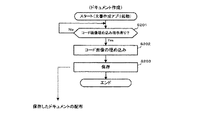
<ドキュメント作成処理>
次に、印刷システム10における別の特徴的な動作について説明する。図6は、情報処
理装置200で行われるドキュメント作成処理のフローチャートである。
<Document creation process>
Next, another characteristic operation in the printing system 10 will be described. FIG. 6 is a flowchart of document creation processing performed by the
アプリケーション210は、ユーザ(ドキュメント作成者)から当該アプリケーション
を起動する指示がなされると、ドキュメント作成処理を開始する。
The
ドキュメント作成処理を開始すると、アプリケーション210は、一般的なドキュメン
トを作成する場合と同様に、ドキュメント作成者の指示に従って、文書データ、画像デー
タ、プログラムデータなどの各種データを含むようなドキュメントを作成する。
When the document creation process is started, the
そして、アプリケーション210は、ドキュメントの作成中、コード画像を作成中のド
キュメントに埋め込む(貼り付ける)指示がされたか否か判別する(ステップS201)
。具体的には、アプリケーション210は、ドキュメント作成者の指示に基づいて、コー
ド画像を作成中のドキュメント上にドロップする操作がなされると、コード画像を埋め込
む指示がされたと判定する。ただし、コード画像を埋め込む指示については、これ以外の
方法で行われてもよく、例えば、所定の埋め込みコマンドなどを発行する操作によって、
指示されてもよい。なお、いずれの方法を用いるにせよ、ドキュメントにコード画像を埋
め込む指示には、埋め込む対象のコード画像を特定する情報と、コード画像を埋め込む位
置(ドキュメント上)を特定する情報と、が含まれている。
Then, the
. Specifically, the
You may be instructed. Regardless of which method is used, the instruction to embed a code image in the document includes information for specifying the code image to be embedded and information for specifying the position (on the document) where the code image is to be embedded. Yes.
アプリケーション210は、作成中のドキュメントにコード画像を埋め込む指示がされ
たと判定するまでは、一般的なドキュメントの作成と同様の処理を続ける(ステップS2
01;No)。
The
01; No).
一方、アプリケーション210は、作成中のドキュメントにコード画像を埋め込む指示
がされたと判定すると(ステップS201;Yes)、処理をステップS202に移行し
て、実際にコード画像をドキュメントに埋め込む(貼り付ける)処理を行う(ステップS
202)。具体的には、アプリケーション210は、ステップS201でドキュメント作
成者から指示されたコード画像を、上記のステップS105で保存しておいた記憶装置か
ら読み出す。さらに、読み出したコード画像を、ステップS201でドキュメント作成者
から指示された位置(ドキュメント上)に埋め込む。
On the other hand, when the
202). Specifically, the
そして、アプリケーション210は、ドキュメント作成者からの指示に応じて、コード
画像を埋め込んだドキュメントを保存する(ステップS203)。具体的には、アプリケ
ーション210は、コード画像を埋め込んだドキュメントを、ドキュメント作成者によっ
て指定された所定の場所(記憶装置)に記憶する。
Then, the
ドキュメントの保存後、アプリケーション210は、本フロー(ドキュメント作成処理
)を終了する。
After saving the document, the
以上のドキュメント作成処理を、アプリケーション210が行うことにより、ドキュメ
ント作成者が前もって作成しておいたコード画像を、ドキュメントに埋め込むことができ
る。
By performing the above document creation processing by the
なお、上記のドキュメント作成処理によって作成されたドキュメントは、電子メールや
可搬性記憶媒体(ユーザ間での手渡し)などを介して、ドキュメント印刷者に配布される
。
The document created by the above document creation process is distributed to the document printer via e-mail, a portable storage medium (hand-over between users), and the like.
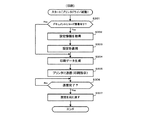
<印刷処理>
次に、印刷システム10における別の特徴的な動作について説明する。図7は、情報処
理装置200で行われる印刷処理のフローチャートである。
<Print processing>
Next, another characteristic operation in the printing system 10 will be described. FIG. 7 is a flowchart of print processing performed by the
ドキュメントが配布されたユーザ(ドキュメント印刷者)は、アプリケーション210
などを利用して、当該ドキュメントを表示装置に表示することができる。
A user (document printing person) to whom the document is distributed receives the
For example, the document can be displayed on the display device.
ここで、ドキュメント印刷者から当該プリンタドライバを起動する指示(印刷のために
起動する指示)がなされると、プリンタドライバ220は、印刷処理を開始する。
Here, when an instruction to start the printer driver (instruction to start for printing) is issued from the document printer, the
印刷処理を開始すると、プリンタドライバ220は、印刷対象のドキュメント内に、コ
ード画像が埋め込まれているか否か判別する(ステップS301)。具体的には、プリン
タドライバ220は、印刷対象のドキュメントをアプリケーション210から取得し、取
得したドキュメントから、コード画像を識別する所定の識別子(例えば、ビットマップイ
メージの識別子)を検索することにより判別する。
When the printing process is started, the
プリンタドライバ220は、コード画像が埋め込まれていないと判定した場合には(ス
テップS301;No)、通常の印刷処理を行うために、処理をステップS304に移行
する。一方、コード画像が埋め込まれていると判定した場合には(ステップS301;Y
es)、処理をステップ302に移行する。
If the
es), the process proceeds to step 302.
処理がステップS302に移行すると、プリンタドライバ220は、コード画像500
に記録された設定内容(設定情報400)を取得する(ステップS302)。例えば、プ
リンタドライバ220は、ステップS301で検索したコード画像500に所定の処理(
設定情報400からコード画像500を生成する処理と逆の処理、など)を施して、設定
情報400を抽出する。
When the process proceeds to step S302, the
The setting content (setting information 400) recorded in (1) is acquired (step S302). For example, the
The setting information 400 is extracted by performing a process reverse to the process of generating the code image 500 from the setting information 400.
コード画像500に記録された設定内容を取得すると、プリンタドライバ220は、取
得した設定内容(設定情報400)を、プリンタドライバ220の印刷設定に適用する(
ステップS303)。具体的には、プリンタドライバ220は、ステップS302で抽出
した設定情報400から、設定項目ごとの設定値420を読み出す。そして、読み出した
設定値420を、プリンタドライバ220の印刷設定(既定値)に上書きする。
When the setting contents recorded in the code image 500 are acquired, the
Step S303). Specifically, the
その後、プリンタドライバ220は、処理をステップS304に移行して、印刷データ
を生成する(ステップS304)。具体的には、プリンタドライバ220は、ステップS
303において更新されたプリンタドライバ220の印刷設定(ただし、ステップS30
1からステップS304に処理が直接移行した場合には既定値)に従って、印刷対象のド
キュメントの印刷データを生成する。これにより、プリンタドライバ220は、ドキュメ
ント作成者が意図した印刷設定でしか、ドキュメントの印刷を行うことができなくなる。
Thereafter, the
The print setting of the
The print data of the document to be printed is generated according to the default value when the process directly moves from 1 to step S304. As a result, the
また、ここで、プリンタドライバ220は、コード画像500に記録された設定内容に
したがった印刷データとともに、コード画像500に記録された設定内容にしたがった印
刷コマンドも生成する。例えば、プリンタドライバ220は、ドキュメントの一部に埋め
込まれた(貼り付けられた)コード画像500を、ドキュメントとともにそのまま出力(
印刷)するための印刷コマンドを生成する。また、プリンタドライバ220は、表示文字
列欄360に入力された文字列を印刷する旨の設定内容がコード画像500に含まれてい
る場合には、コード画像500に代えて当該文字列を出力(印刷)するための印刷コマン
ドを生成する。
Here, the
A print command for printing is generated. If the code image 500 includes the setting contents for printing the character string input in the display
そして、プリンタドライバ220は、ステップS304で生成した印刷データと、印刷
コマンドと、をプリンタ100に送信する(ステップS305)。なお、ステップS30
4で生成した印刷コマンドは、印刷データに含めてプリンタ100に送信してもよいし、
印刷データとは別個にプリンタ100に送信してもよい。
Then, the
The print command generated in step 4 may be included in the print data and transmitted to the
It may be transmitted to the
プリンタドライバ220は、印刷データの送信が完了するまで、印刷データをプリンタ
100に送信する(ステップS306;No)。そして、印刷データの送信が完了すると
(ステップS306;Yes)、プリンタドライバ220は、ステップS303で変更し
た印刷設定(値)を既定値に戻す(ステップ307)。これにより、ドキュメント印刷者
は、印刷設定を手動で既定値に戻す必要がなくなる。特に、ドキュメント印刷者は、コー
ド画像500にしたがって変更された印刷設定の内容について知らない場合もあるため、
印刷データを送信後に、印刷設定を既定値に戻すことは、ドキュメント印刷者にとって便
利な機能である。
The
Returning the print setting to the default value after sending the print data is a convenient function for the document printer.
そして、プリンタドライバ220は、本フロー(印刷処理)を終了する。
Then, the
ここで、プリンタ100の印刷実行部110は、プリンタドライバ220から送信され
た印刷データ及び印刷コマンドを受信すると、受信した印刷コマンドに従って印刷データ
を印刷する。
Here, when the
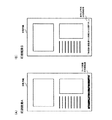
図8(A)(B)は、プリンタ100での印刷結果の例を示す図である。
FIGS. 8A and 8B are diagrams illustrating examples of printing results obtained by the
図8(A)は、コード画像500に記録された設定内容に従って印刷されており、ドキ
ュメントに埋め込まれたコード画像500がそのまま印刷される場合の印刷結果を示す図
である。
FIG. 8A is a diagram showing a printing result when the code image 500 printed according to the setting contents recorded in the code image 500 and printed in the document is printed as it is.
図8(B)は、同じく、コード画像500に記録された設定内容に従って印刷されてお
り、ドキュメントに埋め込まれたコード画像500が表示文字列360に入力された文字
列で置換されて印刷される場合の印刷結果を示す図である。
8B is also printed according to the setting contents recorded in the code image 500, and the code image 500 embedded in the document is replaced with the character string input to the
以上の印刷処理を、プリンタドライバ220が行うことにより、ドキュメント作成者が
作成したドキュメントを、ドキュメント作成者が意図した印刷設定でのみ印刷可能にする
ことができる。
The
なお、本発明は、上記実施形態に限定されず、種々の変形、応用が可能である。 In addition, this invention is not limited to the said embodiment, A various deformation | transformation and application are possible.
例えば、上記実施形態では、プリンタドライバ220は、ドキュメントをプリンタ10
0で印刷させたときに、コード画像500或いはコード画像500に代えた文字列が出力
されるようにしている。しかし、本発明は、これに限定されない。例えば、プリンタドラ
イバ220は、コード画像500も文字列も出力されない印刷データを生成してもよい。
また、プリンタドライバ220は、コード画像500と文字列が共に出力される印刷デー
タを生成するようにしてもよい。また、プリンタドライバ220は、コード画像500の
色が薄く表示される印刷データを生成するようにしてもよい。また、プリンタドライバ2
20は、コード画像500に代えた他の画像データが出力される印刷データを生成するよ
うにしてもよい。
For example, in the above embodiment, the
When printing is performed at 0, the code image 500 or a character string substituted for the code image 500 is output. However, the present invention is not limited to this. For example, the
Further, the
20 may generate print data in which other image data instead of the code image 500 is output.
また、上記実施形態では、ドキュメント利用者(印刷者)から何の承諾も得ずに、コー
ド画像500に記録された設定内容を、プリンタドライバ220の印刷設定に適用してい
る。しかし、本発明は、これに限定されない。例えば、プリンタドライバ220は、ステ
ップS302において設定情報400を取得後、設定情報400をプリンタドライバ22
0の印刷設定に適用してもよいかどうかについて、ドキュメント利用者(印刷者)からの
承諾を受け付けるようにしてもよい。そして、プリンタドライバ220は、承諾を受け付
けた場合に、ステップS303において設定情報400をプリンタドライバ220の印刷
設定に適用する処理を行う。また、プリンタドライバ220は、これとともに、設定情報
400を表示装置に表示してもよい。
In the above embodiment, the setting content recorded in the code image 500 is applied to the print setting of the
You may make it accept the consent from a document user (printer) about whether to apply to 0 print setting. When accepting the approval, the
10・・・印刷システム、100・・・プリンタ、110・・・印刷実行部、200・
・・情報処理装置、210・・・アプリケーション、220・・・プリンタドライバ、2
21・・・設定部、222・・・コード画像生成部、223・・・印刷データ生成部、3
00・・・設定画面、350・・・コード画像作成ボタン、360・・・表示文字列欄、
400・・・設定情報、410・・・設定項目、420・・・設定値、500・・・コー
ド画像。
DESCRIPTION OF SYMBOLS 10 ... Printing system, 100 ... Printer, 110 ... Print execution part, 200.
..
21... Setting
00 ... setting screen, 350 ... code image creation button, 360 ... display character string field,
400 ... setting information, 410 ... setting item, 420 ... setting value, 500 ... code image.
Claims (6)
前記プリンタドライバの設定情報が埋め込まれた画像の生成指示を受け付ける手段と、
前記生成指示を受け付けた場合に、前記プリンタドライバの設定情報が埋め込まれた画
像データを生成する手段と、
生成した前記画像データを保存する手段と、
を備えることを特徴とするプリンタドライバ。 A printer driver for controlling the printer,
Means for receiving an instruction to generate an image in which setting information of the printer driver is embedded;
Means for generating image data in which setting information of the printer driver is embedded when the generation instruction is received;
Means for storing the generated image data;
A printer driver comprising:
印刷対象のドキュメントを作成するアプリケーションから、前記ドキュメントを取得す
る手段と、
前記ドキュメントの中から、前記プリンタドライバの設定情報が埋め込まれた画像デー
タを特定する手段と、
特定した前記画像データから、前記プリンタドライバの設定情報を取得する手段と、
取得した前記設定情報の内容に従って、前記ドキュメントの印刷を前記プリンタにより
実行する印刷実行手段と、
を備えることを特徴とするプリンタドライバ。 The printer driver according to claim 1,
Means for obtaining the document from an application for creating a document to be printed;
Means for identifying image data in which the setting information of the printer driver is embedded from the document;
Means for acquiring setting information of the printer driver from the identified image data;
Print execution means for executing printing of the document by the printer according to the content of the acquired setting information;
A printer driver comprising:
印刷対象のドキュメントを作成するアプリケーションから、前記ドキュメントを取得す
る手段と、
前記ドキュメントの中から、前記プリンタドライバの設定情報が埋め込まれた画像デー
タを特定する手段と、
特定した前記画像データから、前記プリンタドライバの設定情報を取得する手段と、
取得した前記設定情報の内容に従って、前記ドキュメントの印刷を前記プリンタにより
実行する印刷実行手段と、
を備えることを特徴とするプリンタドライバ。 A printer driver for controlling the printer,
Means for obtaining the document from an application for creating a document to be printed;
Means for identifying image data in which the setting information of the printer driver is embedded from the document;
Means for acquiring setting information of the printer driver from the identified image data;
Print execution means for executing printing of the document by the printer according to the content of the acquired setting information;
A printer driver comprising:
前記印刷実行手段は、
取得した前記設定情報の内容に従って、前記画像データがそのまま出力される前記ドキ
ュメントの印刷を実行する、
ことを特徴とするプリンタドライバ。 A printer driver according to claim 2 or 3,
The print execution means includes
According to the content of the acquired setting information, print the document in which the image data is output as it is.
A printer driver characterized by that.
前記印刷実行手段は、
取得した前記設定情報の内容に従って、前記画像データの代わりに所定の文字列が出力
される前記ドキュメントの印刷を実行する、
ことを特徴とするプリンタドライバ。 A printer driver according to claim 2 or 3,
The print execution means includes
Printing the document in which a predetermined character string is output instead of the image data in accordance with the content of the acquired setting information;
A printer driver characterized by that.
前記印刷実行手段は、
取得した前記設定情報の内容に従って、前記画像データが出力されない前記ドキュメン
トの印刷を実行する、
ことを特徴とするプリンタドライバ。 A printer driver according to claim 2 or 3,
The print execution means includes
Printing the document in which the image data is not output according to the content of the acquired setting information;
A printer driver characterized by that.
Priority Applications (1)
| Application Number | Priority Date | Filing Date | Title |
|---|---|---|---|
| JP2008319295A JP2010146052A (en) | 2008-12-16 | 2008-12-16 | Printer driver |
Applications Claiming Priority (1)
| Application Number | Priority Date | Filing Date | Title |
|---|---|---|---|
| JP2008319295A JP2010146052A (en) | 2008-12-16 | 2008-12-16 | Printer driver |
Publications (1)
| Publication Number | Publication Date |
|---|---|
| JP2010146052A true JP2010146052A (en) | 2010-07-01 |
Family
ID=42566479
Family Applications (1)
| Application Number | Title | Priority Date | Filing Date |
|---|---|---|---|
| JP2008319295A Withdrawn JP2010146052A (en) | 2008-12-16 | 2008-12-16 | Printer driver |
Country Status (1)
| Country | Link |
|---|---|
| JP (1) | JP2010146052A (en) |
-
2008
- 2008-12-16 JP JP2008319295A patent/JP2010146052A/en not_active Withdrawn
Similar Documents
| Publication | Publication Date | Title |
|---|---|---|
| US10108584B2 (en) | Host apparatus and screen capture control method thereof | |
| JP7293684B2 (en) | Support program, information processing device, and printing method | |
| JP6454213B2 (en) | Image output system, image processing apparatus, image output apparatus, method and program therefor | |
| CN101739224A (en) | Thumbnail creation method and image forming apparatus | |
| JP6216235B2 (en) | Image forming apparatus, control method therefor, and program | |
| JP2010146248A (en) | Information processor, print control method, program, and storage medium | |
| JP7517506B2 (en) | SUPPORT PROGRAM, INFORMATION PROCESSING APPARATUS, AND PRINTING METHOD | |
| KR20120014518A (en) | Image Forming Device and E-Book Creation Method | |
| US8320001B2 (en) | Information processing method and apparatus for banner printing | |
| KR101825484B1 (en) | Host device and work form system, method for generating workform and method for performing workform | |
| JP2009237705A (en) | Management system, information processing device, data processing method, program, and storage medium | |
| US20040036903A1 (en) | Printing apparatus | |
| US20120092683A1 (en) | Image forming apparatus and document editing method | |
| US20150029547A1 (en) | Printing system, information processing device, and non-transitory computer readable recording medium | |
| JP5169632B2 (en) | Image processing apparatus and program | |
| JP2009020553A (en) | Device and program for managing electronic file | |
| JP6489319B2 (en) | Pull print system | |
| US7978374B2 (en) | Printing system to optimize printing workflow | |
| US7973956B2 (en) | High speed printing method and apparatus | |
| US9430446B2 (en) | Information processing apparatus, method and storage medium including a function for establishing exceptions applied to print settings when specified conditions are met | |
| JP2019093559A (en) | Image formation apparatus, control method and program thereof | |
| JP2010152601A (en) | Printer driver | |
| JP2010146052A (en) | Printer driver | |
| JP2009276919A (en) | Image information processor, image formation processor and program | |
| US20120044508A1 (en) | E-book device, method and computer-readable medium printing contents thereof |
Legal Events
| Date | Code | Title | Description |
|---|---|---|---|
| A300 | Withdrawal of application because of no request for examination |
Free format text: JAPANESE INTERMEDIATE CODE: A300 Effective date: 20120306 |