JP2005293496A - Data processing device - Google Patents
Data processing device Download PDFInfo
- Publication number
- JP2005293496A JP2005293496A JP2004111287A JP2004111287A JP2005293496A JP 2005293496 A JP2005293496 A JP 2005293496A JP 2004111287 A JP2004111287 A JP 2004111287A JP 2004111287 A JP2004111287 A JP 2004111287A JP 2005293496 A JP2005293496 A JP 2005293496A
- Authority
- JP
- Japan
- Prior art keywords
- print job
- error
- data processing
- output
- Prior art date
- Legal status (The legal status is an assumption and is not a legal conclusion. Google has not performed a legal analysis and makes no representation as to the accuracy of the status listed.)
- Pending
Links
Images




Abstract
【課題】 エラー状態となった複数の印刷ジョブの出力先によらず、同一の画面で共通の操作によりその複数の印刷ジョブを同時に削除することができるデータ処理装置を提供する。
【解決手段】 入力部からの指示に基づいて所定の印刷ジョブを印刷部又はネットワークに接続された複数のプリンタのうち指定されたプリンタに出力するデータ処理装置において、出力した印刷ジョブの状態を監視し、この監視する印刷ジョブがエラーであるか否かを判断し(ST13)、エラーであると判断した印刷ジョブが複数あるときに、その印刷ジョブの出力先及びエラーの状態を示すエラー情報を印刷ジョブ毎に切換可能に表示部に表示する(ST23)。そして、表示部にいずれのエラー情報が表示されていても、エラーであると判断された複数の印刷ジョブの削除を入力部の操作を受付けて同時に行う(ST22)。
【選択図】 図5PROBLEM TO BE SOLVED: To provide a data processing apparatus capable of simultaneously deleting a plurality of print jobs by a common operation on the same screen regardless of output destinations of the plurality of print jobs in an error state.
In a data processing apparatus that outputs a predetermined print job to a designated printer among a plurality of printers connected to a printing unit or a network based on an instruction from an input unit, the status of the output print job is monitored. Then, it is determined whether or not the monitored print job is an error (ST13), and when there are a plurality of print jobs that are determined to be in error, error information indicating the output destination of the print job and the error status is displayed. It is displayed on the display unit so that it can be switched for each print job (ST23). Then, regardless of which error information is displayed on the display unit, a plurality of print jobs determined to be errors are deleted simultaneously with the operation of the input unit (ST22).
[Selection] Figure 5
Description
本発明は、入力部からの指示に基づいてデータを印刷ジョブとして印刷部又はネットワークに接続された複数のプリンタのうち指定されたプリンタに出力するデータ処理装置に関する。 The present invention relates to a data processing apparatus that outputs data as a print job to a designated printer among a plurality of printers connected to a printing unit or a network based on an instruction from an input unit.
複数のホストがネットワークを介して接続したプリンタを共有するプリンタシステムが知られている。このようなプリンタシステムにおいて、プリンタの動作異常が検出されると、その検出後、所定の時間が経過すると、動作異常が解消したかどうかを監視し、複数のホストの内、例えば、動作異常検出時に処理していたプリントデータを送信したホストや、それ以前或はそれ以後にプリントデータを送信したホスト等を動作異常に対応したエラー情報を送信する対象となるホストとして選択して、その選択されたホストに対してエラー情報を送信するものが知られている。このようにエラー状態が送信されたホストは、設定されているモードに対応したメッセージをホストの画面上に表示する。(例えば、特許文献1参照。)
ネットワークに接続する機能を有するとともに帳票等へ印字を行うための例えばドットプリンタである印刷部を有する事務用コンピュータ装置等のデータ処理装置が知られている。このようなデータ処理装置は、ワープロ原稿等の印刷データはネットワークを介して接続された例えばレーザプリンタへ出力して印刷し、帳票等の印刷データは内部のドットプリンタで印刷する等の使い分けが行われている。また、データ処理装置は、ネットワークに複数のプリンタが接続されている場合にはプリンタの設置場所やプリンタの性能によって印刷を実行するプリンタを使い分ける場合もある。このためデータ処理装置から出力される印刷ジョブは、その印刷を行うデータの種類、プリンタの設置場所及び性能等に応じて出力先が異なる場合がある。 2. Description of the Related Art A data processing device such as an office computer device having a function of connecting to a network and having a printing unit that is, for example, a dot printer for printing on a form or the like is known. In such a data processing apparatus, print data such as a word processor original is output to a laser printer, for example, connected via a network and printed, and print data such as a form is printed using an internal dot printer. It has been broken. In addition, when a plurality of printers are connected to the network, the data processing apparatus may use different printers that execute printing depending on the installation location of the printer and the performance of the printer. For this reason, the print job output from the data processing apparatus may have different output destinations depending on the type of data to be printed, the installation location and performance of the printer, and the like.
したがって、データ処理装置から出力される印刷ジョブはそれぞれ異なる出力先へ出力されている状態となり、各印刷ジョブが同時にエラー状態となってしまう場合もある。この場合、複数のエラーを示す情報が印刷ジョブの出力先から個々に送信されるためデータ処理装置上で印刷ジョブのスプーラ画面を個々に開き印刷ジョブの状況を確認し、各画面の表示内容に応じて印刷ジョブを削除する作業を行う必要がある。 Accordingly, print jobs output from the data processing apparatus are output to different output destinations, and each print job may be in an error state at the same time. In this case, since information indicating multiple errors is sent individually from the print job output destination, the print job spooler screen is individually opened on the data processing device to check the status of the print job, and the display contents of each screen are displayed. Accordingly, it is necessary to delete the print job.
また、入力部を操作して出力した印刷ジョブを削除する処理を行っても印刷プログラムは消去されずに実行しているため、その印刷プログラムが取消されるまではデータ処理装置は継続的に印刷ジョブを出力してしまう。この場合、印刷ジョブのエラーの原因となったエラー状態が解消されていない場合は再び印刷ジョブがエラー状態となってしまう。すなわち、エラー状態によっては再度の印刷ジョブの出力を中止したい場合があるが、この場合にも印刷ジョブが出力されてしまい、再度スプーラ画面を開いて削除するという同じ操作を繰返すこととなりユーザの使い勝手が悪いものとなっている。特に、上述のように複数の印刷ジョブがエラー状態となってしまった場合はさらに使い勝手が悪くなる。 In addition, even if the print job output by operating the input unit is deleted, the print program is executed without being deleted. Therefore, the data processing apparatus continuously prints until the print program is canceled. The job is output. In this case, if the error state that caused the error of the print job has not been eliminated, the print job again enters the error state. In other words, depending on the error status, it may be desired to cancel the output of the print job again. In this case, the print job is output, and the same operation of opening and deleting the spooler screen again is repeated, which is convenient for the user. Is bad. In particular, when a plurality of print jobs are in an error state as described above, the usability is further deteriorated.
本発明は上記事情に鑑みてなされたものであって、その目的は、エラー状態となった複数の印刷ジョブの出力先によらず、同一の画面で共通の操作によりその複数の印刷ジョブを同時に削除することができるデータ処理装置を提供することにある。 The present invention has been made in view of the above circumstances, and an object thereof is to simultaneously execute a plurality of print jobs by a common operation on the same screen regardless of output destinations of the plurality of print jobs in an error state. An object of the present invention is to provide a data processing apparatus that can be deleted.
本発明は、例えばキーボードである入力部からの指示に基づいて所定の印刷ジョブを印刷部又はネットワークに接続された複数のプリンタのうち指定されたプリンタに出力するデータ処理装置において、出力した印刷ジョブの状態を監視し、この監視する印刷ジョブがエラーであるか否かを判断し、エラーであると判断した印刷ジョブが複数あるときに、その印刷ジョブの出力先及びエラーの状態を示すエラー情報を印刷ジョブ毎に切換可能に例えばモニタである表示手段に表示する。そして、表示手段にいずれのエラー情報が表示されていても、エラーであると判断された複数の印刷ジョブの削除を入力部の処理の操作を受付けて同時に行うものである。 The present invention provides a print job output in a data processing apparatus that outputs a predetermined print job to a designated printer among a plurality of printers connected to a printing unit or a network based on an instruction from an input unit such as a keyboard. Error status information indicating the output destination of the print job and the error status when there are multiple print jobs that have been determined to be in error. Are displayed on display means such as a monitor so as to be switchable for each print job. Then, regardless of which error information is displayed on the display means, a plurality of print jobs determined to be in error are deleted at the same time by accepting the processing operation of the input unit.
本発明によると、エラー状態となった複数の印刷ジョブの出力先によらず、同一の画面で共通の操作によりその複数の印刷ジョブを同時に削除することができるデータ処理装置を提供できる。 According to the present invention, it is possible to provide a data processing apparatus capable of simultaneously deleting a plurality of print jobs by a common operation on the same screen regardless of output destinations of the plurality of print jobs in an error state.
以下、本発明の一実施の形態について図面を参照して説明する。
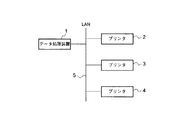
図1は、ネットワーク構成を概略的に示す図である。例えば事務処理用のオフィスコンピュータ装置であるデータ処理装置1及び例えばレーザプリンタであるプリンタ2,3,4をLAN(ローカル・エリア・ネットワーク)5を介して通信可能に接続している。
Hereinafter, an embodiment of the present invention will be described with reference to the drawings.
FIG. 1 is a diagram schematically showing a network configuration. For example, a
図2は、データ処理装置1の要部構成を示すブロック図である。データ処理装置1は、制御部本体としてのCPU11、CPU11が実行する各種プログラムや固定データ等を記憶したROM12、電源のバックアップを受けてデータを保持するとともにワークエリアを有するRAM13、ユーザからデータの入力及び各種機能を実行するための指示を受付けるためのキーボードを有する入力部14、ユーザに各種情報を表示する表示部15、業務に関するデータ等の各種データ等を記憶する記憶部16、セットされた帳票等の用紙を搬送するとともに所定データに基づいて搬送された用紙へ印字を行う例えばドットプリンタである印刷部17、LAN5と接続してプリンタ2,3,4と通信を行うための通信インタフェース18を有している。なお、CPU11と、ROM12、RAM13、入力部14、表示部15、記憶部16、印刷部17、通信インタフェース18とはデータバス等のバスライン19を介して接続している。
FIG. 2 is a block diagram showing a main configuration of the
ROM12に記憶されるプログラムは例えば、ワードプロセッサ用のアプリケーションソフト等のプログラム、事務処理を行うための帳票処理等の業務プログラム、アプリケーションソフトや業務プログラム上から印刷を行うための印刷プログラム、後述する印刷ジョブを監視する印刷ジョブ監視処理を行うためのプログラムであり、固定データは例えば、送信した印刷ジョブがエラー状態となったときに表示するエラーメッセージのデータである。図3はエラーメッセージの内容を示すテーブルTaである。この実施の形態では、印刷部17で用紙を検出できない場合の「用紙がありません。用紙をセットしてください。」、各プリンタ2,3,4がオフラインとなっている場合の「プリンタがオフラインです。オンラインにしてください。」、各プリンタ2,3,4が例えばジャムやトナー切れ等のプリンタにエラーがある場合の「プリンタがエラー状態です。エラーを解除してください。」の3つのエラーメッセージのデータが記憶されている。
Programs stored in the
RAM13に記憶されるデータは、例えば、上述のアプリケーションソフトや業務プログラムで一時的に用いるデータである。またRAM13には、上述の印刷ジョブ監視処理を実行する際にエラー状態である印刷ジョブを、その印刷ジョブを出力する印刷プログラムが取消されるまで再度指定された出力先へ出力することを禁止する印刷禁止モード(印刷ジョブ出力禁止手段)を設定するための印刷禁止フラグのデータを記憶するエリアを設けている。この印刷禁止フラグは、この実施の形態では、「1」のときに印刷禁止モードが有効となり、「0」のときに印刷禁止モードが無効となることとする。
The data stored in the
入力部14のキーボードには、文字を入力するための文字入力キー、数値を入力するための値数キー、各種機能を実行させるための「Delete」キー,「Alt」キー,「PageUp」キー,「PageDown」キー,「Enter」キー等の機能キー,表示部15に表示された複数の項目から実行する項目を選択するためのカーソル15dを上下に移動させる「↑」キー,「↓」キー等の各種キーを設けている。これら各種キーを用いてユーザは、データ及び各種指示等を入力する構成となっている。
The keyboard of the
このように構成されたデータ処理装置1は、ユーザによる入力部14の指示に基づいて、業務プログラムやアプリケーションソフトを起動し所望の印刷設定を受付け、プリンタ2,3,4又は印刷部17から1つを指定し、印刷プログラムにより印刷ジョブを作成してプリンタスプーラに格納した後、指定された出力先へ印刷ジョブを送信する。プリンタスプーラは、印刷プログラムにより作成した印刷ジョブを指定された出力先へ出力するまでの間格納するものであり、印刷ジョブを出力可能な出力先毎にRAM13上に設けている(図示しない。)。なお、この各プリンタスプーラの名称は、出力先に設定されているプリンタ名及び印刷部17の名称とする。
The
このように出力された印刷ジョブを各プリンタ2,3,4のいずれかがネットワークを介して受信すると、それぞれ印刷を実行するための各部を動作させて印刷を実行する。この際、印刷ジョブを実行できないエラー状態となっているときは、その旨を示す情報をデータ処理装置1へ送信する。また、プリンタがオフラインとなっているため印刷ジョブを送信できない場合にはそのプリンタがオフラインとなっていること及び印刷部17にエラーが発生したこと等をデータ処理装置1は検出する。データ処理装置1は、送信された情報及び検出した情報等に基づいて、エラー状態となった印刷ジョブの状態をプリンタスプーラに記憶させる。このようにデータ処理装置1は、印刷ジョブが正常に動作しているかエラー状態となっているか等の出力した印刷ジョブの状態を各プリンタスプーラにより監視できるようになっている(監視手段)。
When one of the
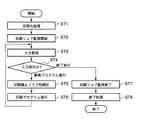
続いて、データ処理装置1のCPU11が実行する例えば業務プログラムである印刷プログラムを実行する処理について説明する。図4は、この業務プログラムを実行するときの印刷処理を示すフローチャートである。
Next, a process for executing a print program, for example, a business program executed by the CPU 11 of the
CPU11は、例えば図示しない電源スイッチにより電源が投入されると各部の初期化処理を行う(ST1)。この初期化処理により、RAM13上に出力先として設定しているプリンタ2,3,4及び印刷部17に対応するスプリンタスプーラをそれぞれプリンタ2,3,4名及び印刷部17を名称として設定する。初期化処理が終了すると、印刷ジョブ監視処理を開始する(ST2)。この印刷ジョブ監視処理については後述する。そして、CPU11は待機状態となる。
For example, when the power is turned on by a power switch (not shown), the CPU 11 performs an initialization process for each unit (ST1). By this initialization process, the
待機状態となっているCPU11は、入力部14から入力を取得した場合は(ST3)、その入力が電源を落とすための終了処理を実行させるものであるか業務プログラムを実行するものであるか否かを判断する(ST4)。業務プログラムを実行する指示であると判断した場合は、CPU11は、RAM13に設けられた印刷禁止フラグを初期化、すなわち、「0」に設定し(ST5)、入力に応じた業務プログラムをROM12から読出し実行する(ST6)。例えば、帳票への印字処理であれば、印刷部17を動作させて帳票へ所定のデータを印字する。一方、ステップST4において終了処理を実行する指示であると判断した場合は、CPU11は、印刷ジョブ監視処理を終了し(ST7)、各種データの保存等の終了処理を行い(ST8)、処理を終了する。
When the CPU 11 in the standby state acquires an input from the input unit 14 (ST3), whether the input is to execute a termination process for turning off the power or to execute a business program. (ST4). When determining that the instruction is to execute the business program, the CPU 11 initializes the print prohibition flag provided in the
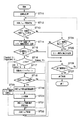
次に、印刷ジョブ監視処理について説明する。印刷ジョブ監視処理は、データ処理装置1が起動してから終了するまで定期的にRAM13上の各プリンタスプーラを監視する処理を行うものである。監視対象となるプリンタスプーラは、例えばRAM13に設けられる図示しない監視対象テーブルに設定された印刷ジョブの全ての出力先から予め選択されたプリンタスプーラを対象とする。この実施の形態では、出力先であるLAN5に接続されたプリンタ2,3,4及び印刷部17に対応する全てのプリンタスプーラが選択されている場合で説明する。図5はデータ処理装置1のCPU11が実行する印刷ジョブ監視処理を示すフローチャートである。以下、このフローチャートに沿って説明する。
Next, the print job monitoring process will be described. The print job monitoring process is a process for periodically monitoring each printer spooler on the
上述したステップST2において印刷ジョブ監視が指示されると、CPU11は、監視対象テーブルを参照して、監視対象として選択されているプリンタスプーラから情報を読出す初期化処理を行い(ST11)、印刷ジョブの状態等に関する印刷ジョブ情報を取得する(ST12)。そして、この取得した印刷ジョブ情報が示す印刷ジョブの状態からエラー状態との印刷ジョブがあるか否かを判断する(ST13,判断手段)。 When print job monitoring is instructed in step ST2 described above, the CPU 11 refers to the monitoring target table and performs initialization processing to read information from the printer spooler selected as the monitoring target (ST11). The print job information relating to the status of the image is acquired (ST12). Then, it is determined whether there is a print job in an error state from the state of the print job indicated by the acquired print job information (ST13, determination means).
ステップST13において、エラー状態の印刷ジョブがあると判断した場合は、表示部15を制御してエラー画面を表示し、又は既にエラー画面が表示されている場合はエラー画面を更新する(ST14,表示手段)。このエラー画面は、その印刷ジョブの出力先及びエラー状態に対応するROM12に記憶しているエラーメッセージを表示画面の所定領域に表示するとともに、エラー状態であると判断された印刷ジョブが1つであるか複数あるかにより次のような情報を表示する。エラー状態となった印刷ジョブが1つの場合に表示される情報は、印刷ジョブを削除する処理を行う旨の例えば「印刷を中止する。」であるメッセージ、印刷ジョブを削除するととともに印刷禁止モードを設定する旨の例えば「印刷を中止し印刷禁止モードとする。」であるメッセージ及びその入力方法(例えば、それぞれ「Delete」キー,「Alt」キー+「Delete」キーの入力)とを関連付けたものである。エラー状態となった印刷ジョブが複数ある場合に表示される情報は、印刷ジョブが1つの場合の情報に加え、エラー画面を切換えることができる旨の例えば「エラー画面を切換えます。」であるメッセージとその入力方法(例えば、「PageUp」キー,「PageDown」キーの入力)とを関連付けたものである。
If it is determined in step ST13 that there is an error print job, the
このエラー画面の表示を行った後、CPU11は例えば3秒のように予め決められた一定時間内に入力部14から入力があったか否かを判断し(ST15)、一定時間内に入力があった場合には、その入力がどのような指示であるかを判断する(ST16)。
After displaying this error screen, the CPU 11 determines whether or not there is an input from the
このステップST16の判断で、印刷を中止し印刷禁止モードを設定するための指示(例えば、「Alt」キー+「Delete」キーの入力)と判断した場合には、CPU11は、RAM13の印刷禁止フラグのエリアを「1」に設定する(ST17)。ステップST16の判断で、印刷中止の指示(例えば、「Delete」キーの入力)と判断した場合には、このステップST17の処理はパスされる。
If it is determined in step ST16 that the instruction is to stop printing and set the print prohibition mode (for example, input of “Alt” key + “Delete” key), the CPU 11 prints a print prohibition flag in the
続いて、CPU11は、エラー状態となっている印刷ジョブが複数あるか否かを判断する(ST18)。印刷ジョブが複数あると判断した場合は、印刷ジョブ削除選択画面を表示する(ST19)。この印刷ジョブ削除選択画面は、エラー状態となっている複数の印刷ジョブのうち、自ユーザの印刷ジョブを全て削除するか、全てのユーザの印刷ジョブを削除するかの項目を選択させるための表示である。全てのユーザの印刷ジョブを削除する場合は例えば、ユーザの印刷ジョブがエラー状態となっているとともに、LAN5に接続された図示しないコンピュータ装置や他のデータ処理装置から送信された印刷ジョブが印刷部17に対応するプリンタスプーラに記憶され、その印刷ジョブがエラー状態となっている場合である。また、印刷ジョブ削除選択画面はいずれかの項目を選択するためのカーソルの移動を「↑」キー,「↓」キーの入力、その実行は「Enter」キーの入力であることも表示する。なお、自ユーザとは、データ処理装置1を使用しているユーザを表し、全ユーザとはLAN5全体のユーザも含めた全てのユーザを表している。そして、CPU11は削除の指示入力(「Enter」キーの入力)を取得すると(ST20)、印刷ジョブ削除選択画面を消去し(ST21)、カーソルにより選択された項目に応じてエラー状態となっている印刷ジョブを削除する処理を行う(ST22)。このステップST19からST22により処理手段を構成する。なお、ステップST18において印刷ジョブが1つであると判断した場合はステップST19からST21の処理はパスされステップST22において直ちにその印刷ジョブは削除される。
Subsequently, the CPU 11 determines whether there are a plurality of print jobs in an error state (ST18). If it is determined that there are a plurality of print jobs, a print job deletion selection screen is displayed (ST19). This print job deletion selection screen is a display for selecting an item to delete all of the user's print jobs or all user's print jobs from among a plurality of print jobs in an error state. It is. When deleting all the user's print jobs, for example, the user's print job is in an error state, and a print job transmitted from a computer apparatus or other data processing apparatus (not shown) connected to the
また、ステップST16の判断でエラー画面を切換えるための指示(「PageUp」キー又は「PageDown」キーの入力)と判断した場合には、エラー画面を他のエラー状態の印刷ジョブに切換える(ST23,表示切換手段)。 If it is determined in step ST16 that an instruction for switching the error screen (input of “PageUp” key or “PageDown” key) is detected, the error screen is switched to a print job in another error state (ST23, display). Switching means).
一方、ステップST13においてエラー状態の印刷ジョブがないと判断した場合は、CPU11は、エラー画面の表示を行っているか否かを判断し(ST24)、エラー画面の表示を行っている場合はそのエラー画面の表示を消去する(ST25)。なお、エラー画面の表示を行っていなければ、ステップST25の処理はパスされる。 On the other hand, if it is determined in step ST13 that there is no print job in an error state, the CPU 11 determines whether an error screen is displayed (ST24). If an error screen is displayed, the error is indicated. The display on the screen is erased (ST25). If the error screen is not displayed, the process of step ST25 is passed.
ステップST15において一定時間内に入力が無かったと判断した場合、ステップST22において印刷ジョブを削除する処理を行った場合、ステップST23においてエラー画面を切換えた場合、ステップST24においてエラー画面を表示していないと判断した場合及びST25においてエラー画面の表示を消去する処理を行った場合は、CPU11は、上述のステップST7で説明した印刷ジョブ監視処理の終了要求があったか否かを判断する(ST26)。終了要求がないと判断すると処理はステップST12へ戻り上述した処理を繰り返し、終了要求があったと判断すると印刷ジョブ監視監視処理を終了するための処理等の終了処理を行い(ST27)、印刷ジョブ監視処理を終了する。 If it is determined in step ST15 that there is no input within a certain period of time, if a process for deleting a print job is performed in step ST22, if an error screen is switched in step ST23, an error screen is not displayed in step ST24. When the determination is made and when the error screen display is deleted in ST25, the CPU 11 determines whether or not there is a request for termination of the print job monitoring process described in step ST7 (ST26). If it is determined that there is no termination request, the process returns to step ST12, and the above-described processing is repeated. If it is determined that there is a termination request, termination processing such as processing for terminating the print job monitoring monitoring processing is performed (ST27). The process ends.
続いて、このように構成されたデータ処理装置1によりユーザがプリンタ2へ印刷指示を出し、また、印刷部17を用いて帳票への印字等の業務を実行する場合において、プリンタ2及びデータ処理装置1の印刷部17でエラーが発生したときの作用について説明する。
Subsequently, when the user issues a print instruction to the
このようにプリンタ2にエラーが発生するとプリンタ2及び印刷部17に対応するプリンタスプーラにエラー状態が登録される。そして、プリンタスプーラを定期的に監視するCPUによりエラー状態と判断され、表示部15の画面の所定領域にエラーが発生したプリンタ名、エラーに対応するエラーメッセージの内容及びその入力方法が表示される。図6は、このときのエラー画面15aの表示を示す図である。図示のように、プリンタ2がエラー状態となっていることが表示されるとともに、「Delete」キーで印刷を中止すること、「Alt」キー+「Delete」キーで印刷を中止し印刷禁止モードとなること、「PageUp」キー,「PageDown」キーでエラー画面を切換可能であることを示す情報が表示される。
When an error occurs in the
ユーザは、このエラー画面15aを視認してプリンタ2への印刷指示がエラーとなったこと、エラー画面を切換えることができることから他にもエラーが発生していることがわかる。そしてユーザは、他のエラーを確認するために、例えば、「PageUp」キーを入力する。この「PageUp」キーの入力を受付けると、データ処理装置1は、エラー画面を切換える。図7は、切換えられたときのエラー画面15bの表示を示す図である。図示のように、印刷部17がエラー状態となっていることが表示されるとともに、図6において説明した情報が表示される。このように、ユーザは画面を切換えることができることを示す表示により複数の印刷ジョブが同時にエラー状態となっていることが認識でき、エラー画面を切換えることにより、それぞれの印刷ジョブに対するエラー状態を確認できる。
The user visually recognizes this
このように各印刷ジョブのエラー状態を確認した後、ユーザは、エラー状態等に合わせて「Delete」キー又は「Alt」キー+「Delete」キーを入力する。例えば、プリンタ2及び印刷部17のエラー状態が直ぐに解消しないエラーである場合は印刷指示自体を取消す必要がある。この印刷指示が取消されるまで印刷ジョブを再度出力しないようにするには、「Alt」キー+「Delete」キーを入力して上述した印刷禁止モードとする。これにより、印刷指示が取消されるまでデータ処理装置1が印刷ジョブをプリンタ2及び印刷部17に再出力してしまうことを防止できる。なお、印刷指示が取消された後は当然印刷ジョブは出力されない。
After confirming the error state of each print job in this way, the user inputs a “Delete” key or an “Alt” key + “Delete” key in accordance with the error state or the like. For example, if the error state of the
データ処理装置1は、「Alt」キー+「Delete」キーが入力されると、自ユーザの印刷ジョブを削除するか、全てのユーザの印刷ジョブを削除するかを選択するための表示及びその入力方法を印刷ジョブ削除選択画面として表示する。図8は、印刷ジョブ削除選択画面15cを示す図である。図示のように、「自ユーザの印刷ジョブを削除します。」「全てのユーザの印刷ジョブを削除します。」との表示がされ、「↑」キー,「↓」キーによりカーソル15dを移動させて選択し、「Enter」キーの入力により実行することが表示されている。
When the “Alt” key + “Delete” key is input, the
ユーザは、例えば、「自ユーザの印刷ジョブを削除します。」を選択して「Enter」キーを入力することにより、プリンタ2へ出力した印刷ジョブと印刷部17へ出力した印刷ジョブを同時に削除することができる。また、印刷禁止モードが設定されているため印刷指示が取消されるまでは、再度印刷ジョブが出力されることはない。
For example, when the user selects “Delete print job of own user” and inputs the “Enter” key, the print job output to the
このようにデータ処理装置1によると、プリンタ2及び印刷部17等の複数のエラー状態となった印刷ジョブの出力先によらず、印刷ジョブ削除選択画面15cで「自ユーザの印刷ジョブを削除します。」にカーソル15dを合わせて、「Enter」キーを入力することにより、すなわち、同一の画面で共通の操作によりその複数の印刷ジョブを同時に削除することができる。
As described above, according to the
また、再度の印刷ジョブの出力を中止したい場合に印刷禁止モードで印刷を中止することにより、再度印刷ジョブが出力されなくなる。したがって、再度印刷ジョブを削除する操作をする必要がなく、ユーザの使い勝手を向上させることができる。 Further, when it is desired to cancel the output of the print job again, the print job is not output again by canceling the printing in the print prohibit mode. Therefore, it is not necessary to delete the print job again, and user convenience can be improved.
なお、この実施の形態では監視対象となるプリンタをネットワークに接続されて全てのプリンタ及び印刷部17としているが、これに限られず、予め監視対象テーブルを入力部14の操作により選択しておけば、初期化処理時にその選択された出力先に対応するプリンタスプーラだけを監視する。このように監視対象となる印刷ジョブの出力先を予め選択しておくことにより、全ての出力先に対するプリンタスプーラの監視を行う必要が無くなり、データ処理装置1の監視負担を軽減し、他の処理を行う際の処理効率の向上を図ることができる。
In this embodiment, the printers to be monitored are connected to the network and all printers and the
また、LAN5にはプリンタ2,3,4が接続されている構成で説明しているが、他の事務処理用のデータ処理装置1等のデータ処理装置1やコンピュータ装置が接続されている構成でも良い。また、プリンタ2と印刷部17とで印刷ジョブのエラー状態が生じた場合で説明しているが、プリンタ同士、プリンタと他のデータ処理装置1へ出力した印刷ジョブに同時エラー状態が発生した場合、或は3つ以上の出力した印刷ジョブに同時にエラー状態が生じた場合にも同様な効果を奏することができるものである。
The
さらに、この発明は、上述した実施の形態そのままに限定されるものではなく、実施段階ではその要旨を逸脱しない範囲で構成要素を変形して具体化できるものである。 Furthermore, the present invention is not limited to the above-described embodiments as they are, and can be embodied by modifying the constituent elements without departing from the scope of the invention in the implementation stage.
1…データ処理装置,2〜4…プリンタ,11…CPU,12…ROM,13…RAM,14…入力部,15…表示部,17…印刷部,18…通信インタフェース
DESCRIPTION OF
Claims (3)
前記出力した印刷ジョブの状態を監視する監視手段と、
この監視手段により監視する印刷ジョブがエラーであるか否かを判断する判断手段と、
この判断手段によりエラーであると判断された印刷ジョブの出力先及びエラーの状態を示すエラー情報を表示する表示手段と、
前記判断手段でエラーであると判断した印刷ジョブが複数あるときに、前記表示手段に表示されるエラー情報を前記印刷ジョブ毎に切換えて表示する表示切換手段と、
この表示切換手段によりいずれのエラー情報が表示されていても、エラーであると判断された複数の印刷ジョブの削除を同時に行う処理手段とを具備したことを特徴とするデータ処理装置。 In a data processing apparatus that outputs a predetermined print job to a designated printer among a plurality of printers connected to a printing unit or a network based on an instruction from an input unit,
Monitoring means for monitoring the status of the output print job;
Determination means for determining whether or not the print job monitored by the monitoring means is an error;
Display means for displaying error information indicating the output destination and error status of the print job determined to be an error by the determination means;
Display switching means for switching the error information displayed on the display means for each print job when there are a plurality of print jobs determined to be errors by the determination means;
What is claimed is: 1. A data processing apparatus comprising: processing means for simultaneously deleting a plurality of print jobs determined to be errors regardless of which error information is displayed by the display switching means.
Priority Applications (1)
| Application Number | Priority Date | Filing Date | Title |
|---|---|---|---|
| JP2004111287A JP2005293496A (en) | 2004-04-05 | 2004-04-05 | Data processing device |
Applications Claiming Priority (1)
| Application Number | Priority Date | Filing Date | Title |
|---|---|---|---|
| JP2004111287A JP2005293496A (en) | 2004-04-05 | 2004-04-05 | Data processing device |
Publications (1)
| Publication Number | Publication Date |
|---|---|
| JP2005293496A true JP2005293496A (en) | 2005-10-20 |
Family
ID=35326321
Family Applications (1)
| Application Number | Title | Priority Date | Filing Date |
|---|---|---|---|
| JP2004111287A Pending JP2005293496A (en) | 2004-04-05 | 2004-04-05 | Data processing device |
Country Status (1)
| Country | Link |
|---|---|
| JP (1) | JP2005293496A (en) |
Cited By (1)
| Publication number | Priority date | Publication date | Assignee | Title |
|---|---|---|---|---|
| JP2019117531A (en) * | 2017-12-27 | 2019-07-18 | セイコーエプソン株式会社 | Printer program, terminal, and method of controlling terminal |
-
2004
- 2004-04-05 JP JP2004111287A patent/JP2005293496A/en active Pending
Cited By (1)
| Publication number | Priority date | Publication date | Assignee | Title |
|---|---|---|---|---|
| JP2019117531A (en) * | 2017-12-27 | 2019-07-18 | セイコーエプソン株式会社 | Printer program, terminal, and method of controlling terminal |
Similar Documents
| Publication | Publication Date | Title |
|---|---|---|
| JP4054755B2 (en) | Proxy printing system, information processing apparatus, and control method | |
| JP2009048299A (en) | Printing system, program and printer | |
| JP4737263B2 (en) | Display control apparatus, image forming apparatus, and program | |
| JP2004318255A (en) | Monitoring method and program for job | |
| JP2015155174A (en) | Image formation device, control method of the same and program | |
| JP2003170643A (en) | Printing system | |
| US8514450B2 (en) | Image processing apparatus displaying an interface for changing print settings, print control method, and print control program | |
| US20080100863A1 (en) | Printer Controller, Computer Program Product and Printer | |
| JP4584731B2 (en) | Printer device | |
| JP2005293496A (en) | Data processing device | |
| JP2006163954A (en) | Conflict guide display method and program | |
| JP2006189920A (en) | User interface apparatus, display method for user interface, and program | |
| JP5700966B2 (en) | PRINT CONTROL DEVICE, ITS CONTROL METHOD, AND PROGRAM | |
| JP2001134388A (en) | Controller for image forming device and printing job monitoring method | |
| JPH10269038A (en) | Print data receiving terminal, print system, and their control method | |
| JP4463889B2 (en) | Print server, print system, client thereof, and print control method thereof | |
| US6894795B1 (en) | Method and apparatus for enhancing the perceptual performance of a post-printing application environment | |
| JPH07219727A (en) | Printer, system thereof, and control method thereof | |
| JP2007148613A (en) | Printing system, printing apparatus and printing control program | |
| JP2009163634A (en) | Printing apparatus, printing system, printing management method, printing management program, and recording medium | |
| JP2008230001A (en) | Image forming system | |
| JP3348703B2 (en) | Network printing system and printing device | |
| JP7757833B2 (en) | Printing Control Program | |
| JP2020112912A (en) | System, control device, control method, and program | |
| JP2003173250A (en) | Printer system |