JP2005292918A - Portable terminal device - Google Patents
Portable terminal device Download PDFInfo
- Publication number
- JP2005292918A JP2005292918A JP2004103204A JP2004103204A JP2005292918A JP 2005292918 A JP2005292918 A JP 2005292918A JP 2004103204 A JP2004103204 A JP 2004103204A JP 2004103204 A JP2004103204 A JP 2004103204A JP 2005292918 A JP2005292918 A JP 2005292918A
- Authority
- JP
- Japan
- Prior art keywords
- icon
- icon image
- image information
- selection
- terminal device
- Prior art date
- Legal status (The legal status is an assumption and is not a legal conclusion. Google has not performed a legal analysis and makes no representation as to the accuracy of the status listed.)
- Pending
Links
Images

Landscapes
- Digital Computer Display Output (AREA)
- User Interface Of Digital Computer (AREA)
- Telephone Function (AREA)
Abstract
【課題】
従来、携帯型端末装置においては、複数の画像を順次切り替えることによって動画を実現することが行われている。しかし、切り替えに用いる複数の画像を携帯型端末装置内に蓄積しておくことが必要となるという課題がある。
【解決手段】
本発明は、選択が検知されたアイコンに対応する選択前アイコン画像から、選択後アイコン画像へ段階的に遷移する様子を見せるための複数の新アイコン画像からなる遷移時表示アイコン画像群を生成し、これに基づいてアイコン画像を連続表示する携帯型端末装置である。このとき、表示終了後遷移時表示アイコン画像群情報が消去されるとし、生成後の新アイコン画像情報等は携帯型端末装置に保持しないため、携帯端末装置の少ないメモリを消費することはない。
【選択図】 図2
【Task】
Conventionally, in a portable terminal device, moving images are realized by sequentially switching a plurality of images. However, there is a problem that it is necessary to store a plurality of images used for switching in the portable terminal device.
[Solution]
The present invention generates a transition-time display icon image group including a plurality of new icon images for showing a state in which a pre-selection icon image corresponding to an icon for which selection has been detected transitions to an after-selection icon image in a stepwise manner. This is a portable terminal device that continuously displays icon images based on this. At this time, it is assumed that the display icon image group information at the time of transition is deleted after the display is completed, and the new icon image information and the like after generation are not held in the portable terminal device, so the memory of the portable terminal device is not consumed.
[Selection] Figure 2
Description
本発明は、携帯型端末装置に関するものである。 The present invention relates to a portable terminal device.
従来、携帯型端末装置においては、アイコンが動くことでそのアイコンが選択されたことを示す場合には、複数の画像を順次切り替えることによって動画を実現することが行われている。 また、アイコン画像と付加情報を外部のサーバなどからネットワークを介してダウンロードし、そのアイコン画像を付加情報に基づいて表示、変更等させるアイコン設定システムはすでに存在する(特許文献1参照。)。 Conventionally, in a portable terminal device, when an icon moves to indicate that the icon has been selected, moving images are realized by sequentially switching a plurality of images. There is already an icon setting system in which an icon image and additional information are downloaded from an external server or the like via a network, and the icon image is displayed and changed based on the additional information (see Patent Document 1).
しかしながら、上記複数の画像を順次切り替える手法によれば、切り替えに用いる複数の画像を携帯型端末装置内に蓄積しておくことが必要であり、有限の資源のうちの相当部分をこの画像の蓄積に費やすことになるという課題がある。 また、すでに蓄積されている画像を用いてアイコンが動画として実現されるのみであり、利用者にとって既製の画像は飽きが生じやすいといえるが、利用者が独自に撮影・創作等した画像を用いてオリジナルのアイコンの動画を作成し利用することは困難である。 一方、付加情報に基づいてアイコン画像を表示、変更等する手法によれば、アイコンの変更等を行いたい場合にネットワークを介してサーバから必要なデータをダウンロードすることが必要であり、煩雑である。 However, according to the method of sequentially switching the plurality of images, it is necessary to store a plurality of images used for switching in the portable terminal device, and a considerable part of the limited resources is stored in the image. There is a problem that it will be spent on. In addition, icons can only be realized as videos using images that have already been stored, and it can be said that ready-made images are likely to get bored for the user, but use images that the user has originally taken and created. Therefore, it is difficult to create and use an original icon movie. On the other hand, according to the technique for displaying and changing icon images based on the additional information, it is necessary to download necessary data from the server via the network when it is desired to change the icons, which is complicated. .
本発明は、かかる実情に鑑み、選択が検知されたアイコンに対応する選択前アイコン画像情報から、選択後アイコン画像情報へ段階的に遷移する様子を見せるための複数の新アイコン画像情報からなる遷移時表示アイコン画像群を生成し、この新アイコン画像情報に基づいてアイコン画像を連続表示する携帯型端末装置である。このとき、アイコン画像の一表示ごとに遷移時表示アイコン画像群情報が順次生成され、表示終了後消去されるとし、生成後の新アイコン画像情報等は携帯型端末装置に保持しないため、携帯端末装置の少ないメモリを消費することはない。 一方、携帯型端末装置で撮影等して取得することで、アイコンを表示するためのアイコン画像情報を取得することも可能である。単一のアイコン画像情報に基づいて動画の表示を実現できることから、利用者は撮影等して取得した画像を用いて、自由にアイコンを作成し、動画として表示させることができる。取得したアイコン画像情報は、選択後アイコン画像情報、選択前アイコン画像情報のいずれにも利用することができる。また、選択によってアイコンの画像が段階的に遷移する様子としては、ディゾルブ、フェード、スライド、スレッド、ターン、スピンなどの機能を用いて表示することができる。 他方、取得したアイコン画像情報を加工した加工済取得アイコン画像情報を選択前アイコン画像情報として利用する場合もある。加工としては、取得したカラーのアイコン画像情報を半透明化、あるいは、モノクロ化する処理をすることができる。利用者は単一の画像を準備するだけで選択前後のアイコンの画像が生成され、様々な遷移方法にてアイコンを動画として表示することが可能となる。 In view of such circumstances, the present invention provides a transition composed of a plurality of new icon image information for showing a state in which the pre-selection icon image information corresponding to the detected icon is transitioned to the post-selection icon image information in a stepwise manner. The portable terminal device generates a time display icon image group and continuously displays icon images based on the new icon image information. At this time, the display icon image group information at the time of transition is sequentially generated for each display of the icon image, and is erased after the display is completed. Since the new icon image information and the like after generation are not held in the portable terminal device, the portable terminal It does not consume the memory of the device. On the other hand, it is also possible to acquire icon image information for displaying an icon by capturing the image with a portable terminal device. Since the display of a moving image can be realized based on single icon image information, the user can freely create an icon and display it as a moving image using an image acquired by photographing or the like. The acquired icon image information can be used for both the icon image information after selection and the icon image information before selection. In addition, the state in which the icon image transitions step by step can be displayed using functions such as dissolve, fade, slide, thread, turn, and spin. On the other hand, processed acquired icon image information obtained by processing acquired icon image information may be used as pre-selection icon image information. As processing, the acquired color icon image information can be made translucent or monochrome. The user can prepare icon images before and after the selection only by preparing a single image, and can display the icon as a moving image by various transition methods.
以上、説明したように本件発明のいずれか一又は二以上の発明に係る携帯型端末装置は、選択されたアイコンが回転する等の視覚的効果を伴い表示されるため、携帯端末装置の小さな表示画面であっても、どのアイコンが選択されたのか判別しやすい。また、生成された新アイコン画像情報等は携帯型端末装置に保持しないことから、携帯端末装置の少ないメモリを消費することなく動画の表示を実現でき、効率的である。 また、携帯型端末装置で撮影等して取得した画像を用いて、利用者が自由にアイコンを作成し、動画として表示することも可能となることで、利用者を飽きさせることなく携帯型端末装置の利用度を高める効果を有する。取得したアイコン画像情報が、選択後アイコン画像情報として利用される場合には、特に利用者によるアイコンの選択処理が促進される効果が期待できる。 As described above, since the portable terminal device according to any one or more of the present invention is displayed with a visual effect such as rotation of the selected icon, a small display of the portable terminal device Even on the screen, it is easy to determine which icon has been selected. In addition, since the generated new icon image information or the like is not held in the portable terminal device, it is possible to display a moving image without consuming a small amount of memory in the portable terminal device, which is efficient. In addition, it is possible for a user to freely create an icon and display it as a video using an image acquired by photographing with a portable terminal device, etc., so that the portable terminal is not bored. It has the effect of increasing the utilization of the device. When the acquired icon image information is used as the icon image information after selection, an effect of promoting the icon selection process by the user can be expected.
さらに、取得したアイコン画像情報を加工した加工済取得アイコン画像情報を選択前アイコン画像情報として利用することで、利用者は単一の画像を準備するだけで選択前後のアイコンの画像が生成され、様々な遷移方法にてアイコンを動画として表示することが可能となるため、利便性が高い。加えて、半透明化、あるいは、モノクロ化した画像を選択前アイコン画像とし、このアイコンが選択されることで、もとのアイコン画像の状態になる場合には、選択されているアイコンをより際立たせ、判別しやすくする効果がある。 Furthermore, by using the processed acquired icon image information obtained by processing the acquired icon image information as pre-selection icon image information, the user can generate icon images before and after the selection just by preparing a single image, Since the icon can be displayed as a moving image by various transition methods, the convenience is high. In addition, if a semi-transparent or monochrome image is used as the pre-selection icon image, and this icon is selected and the original icon image state is obtained, the selected icon is more prominent. It has the effect of making it stand and easy to distinguish.
以下に、各発明を実施するための最良の形態を説明する。なお、本発明はこれら実施の形態に何ら限定されるものではなく、その要旨を逸脱しない範囲において、種々なる態様で実施しうる。 実施形態1は、主に請求項1、10などについて説明する。 実施形態2は、主に請求項2などについて説明する。 実施形態3は、主に請求項3などについて説明する。 実施形態4は、主に請求項4などについて説明する。 実施形態5は、主に請求項5などについて説明する。 実施形態6は、主に請求項6などについて説明する。実施形態7は、主に請求項7などについて説明する。 実施形態8は、主に請求項8などについて説明する。 実施形態9は、主に請求項9などについて説明する。
The best mode for carrying out each invention will be described below. Note that the present invention is not limited to these embodiments, and can be implemented in various modes without departing from the spirit of the present invention. The first embodiment will mainly describe
<<実施形態1>>
<<
<実施形態1:概要> 実施形態1について説明する。本実施形態は、選択が検知されたアイコンに対応する選択前アイコン画像情報から、選択後アイコン画像情報へ段階的に遷移する様子を見せるための複数の新アイコン画像情報からなる遷移時表示アイコン画像群を生成し、この新アイコン画像情報に基づいてアイコン画像を連続表示する携帯型端末装置である。
<Embodiment 1: Overview>
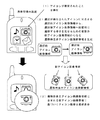
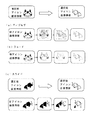
図1は、本実施形態の概念の一例を示すものである。図で示した携帯型端末装置の画面上には、4つのアイコンが表示されている。今、利用者が携帯型端末装置のボタンを操作し、右上に位置するカメラのアイコンを選択したとする。携帯型端末装置は、アイコンが選択されたことを検知する(1)。 携帯型端末装置は、選択が検知されたカメラのアイコンに対応する選択前アイコン画像情報から、選択後アイコン画像情報へ段階的に遷移する様子を見せるための複数の新アイコン画像情報からなる遷移時表示アイコン画像群を生成する(2)。ここでは、選択前アイコン画像情報で示されるカメラのアイコンのイメージと、選択後アイコン画像情報で示される180度回転したカメラのアイコンのイメージとに基づいて、変化中の段階的に遷移する様子を見せるために、例えば、もとの位置から45度、90度、135度回転したカメラのアイコンのイメージを表示できる新アイコン画像情報を生成する。 さらに、生成された選択時表示アイコン画像群情報に含まれる新アイコン画像情報に基づくアイコン画像を連続表示する(3)。選択されたアイコンが180度回転する視覚的効果が得られる。 なお、もとのアイコン画像情報から生成される新アイコン画像情報や、複数の新アイコン画像情報からなる遷移時表示アイコン画像群情報は、携帯型端末装置内部に保存しないため、メモリを消費することはない、 FIG. 1 shows an example of the concept of this embodiment. Four icons are displayed on the screen of the portable terminal device shown in the figure. Now, assume that the user operates the button of the portable terminal device and selects the camera icon located in the upper right. The portable terminal device detects that an icon has been selected (1). The portable terminal device has a plurality of new icon image information for showing a state in which the pre-selection icon image information corresponding to the camera icon whose selection has been detected transitions to the post-selection icon image information in stages. A display icon image group is generated (2). Here, based on the image of the camera icon indicated by the pre-selection icon image information and the image of the camera icon rotated by 180 degrees indicated by the post-selection icon image information, the state of transition in stages during the change is shown. For example, new icon image information that can display an image of a camera icon rotated by 45 degrees, 90 degrees, and 135 degrees from the original position is generated. Further, icon images based on the new icon image information included in the generated icon image group information at the time of selection are continuously displayed (3). A visual effect is obtained in which the selected icon is rotated 180 degrees. Note that the new icon image information generated from the original icon image information and the transition-time display icon image group information consisting of a plurality of new icon image information are not stored inside the portable terminal device, and therefore consume memory. No,
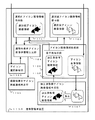
<実施形態1:構成> 本実施形態での機能ブロックの一例を図2に示した。 <Embodiment 1: Configuration> FIG. 2 shows an example of functional blocks in the present embodiment.
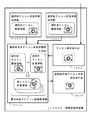
図2に示す本実施形態の「携帯端末装置」(0200)は、「選択前アイコン画像情報保持部」(0201)と、「選択後アイコン画像情報保持部」(0202)と、「アイコン選択検知部」(0203)と、「遷移時表示アイコン画像群情報生成部」(0204)と、「選択時表示アイコン画像連続表示部」(0205)とからなる。 The “portable terminal device” (0200) of the present embodiment shown in FIG. 2 includes a “pre-selection icon image information holding unit” (0201), a “post-selection icon image information holding unit” (0202), and an “icon selection detection”. Part "(0203)," transition display icon image group information generation part "(0204), and" selection display icon image continuous display part "(0205).
本件発明の構成要素である各部は、ハードウエア、ソフトウエア、ハードウエアとソフトウエアの両者、のいずれかによって構成される。たとえば、これらを実現する一例として、コンピュータを利用する場合には、CPU、メモリ、バス、インターフェイス、周辺装置などから構成されるハードウエアと、これらのハードウエア上にて実行可能なソフトウエアを挙げることができる。 具体的には、メモリ上に展開されたプログラムを順次実行することで、メモリ上のデータや、インターフェイスを介して入力されるデータの加工、蓄積、出力などにより各部の機能が実現される。(本明細書の全体を通じて同様である。) Each unit, which is a component of the present invention, is configured by either hardware, software, or both hardware and software. For example, as an example for realizing these, when a computer is used, hardware composed of a CPU, a memory, a bus, an interface, a peripheral device, and the like and software executable on these hardware are listed. be able to. Specifically, the functions of the respective units are realized by sequentially executing the programs developed on the memory, by processing, storing, and outputting data on the memory and data input through the interface. (The same applies throughout this specification.)
「携帯端末装置」(0200)は、画面上にアイコンを表示することが可能な携帯型の情報端末のことで、携帯電話やPDAなどが該当する。 The “portable terminal device” (0200) is a portable information terminal capable of displaying an icon on a screen, and corresponds to a mobile phone, a PDA, or the like.
「選択前アイコン画像情報保持部」(0201)は、前記画面上に表示すべきアイコンが選択される前の画像情報を保持する。アイコンは、処理の対象や内容を記号などで表したものであり、先の例ではカメラなどのイメージが該当する。また、アイコンの画像情報は、アイコンのイメージを画面上に表示するために必要な情報などが該当する。アイコンは選択されることで、その表示態様を変えることが想定されており、選択される前のアイコンの画像情報が保持される。 The “pre-selection icon image information holding unit” (0201) holds image information before an icon to be displayed on the screen is selected. The icon represents a processing target and contents by a symbol or the like, and an image of a camera or the like corresponds to the above example. The icon image information corresponds to information necessary for displaying an icon image on the screen. It is assumed that the display mode of the icon is changed when the icon is selected, and image information of the icon before the selection is held.
「選択後アイコン画像情報保持部」(0202)は、前記画面上に表示すべきアイコンが選択された後の画像情報を保持する。アイコンは選択されることで、その表示態様を変えることが想定されており、選択された後のアイコンの画像情報が保持される。なお、選択前アイコン画像情報と、選択後アイコン画像情報とが同一であることを妨げるものではない。 ここで、選択前アイコン画像情報保持部、選択後アイコン画像情報保持部に保持されるのは、先の例では4つのアイコンについてのアイコン画像情報のみであり、派生して得られる新アイコン画像情報等は保持しない。 The “selected icon image information holding unit” (0202) holds image information after an icon to be displayed on the screen is selected. It is assumed that the display mode of the icon is changed when the icon is selected, and image information of the icon after the selection is held. Note that the pre-selection icon image information and the post-selection icon image information are not prevented from being the same. Here, in the previous example, only the icon image information for four icons is held in the pre-selection icon image information holding unit and the post-selection icon image information holding unit, and new icon image information obtained by derivation is obtained. Etc. are not retained.
「アイコン選択検知部」(0203)は、前記画面上のアイコンが選択されたことを検知する。利用者が携帯型端末装置のボタンを操作し、いずれかのアイコンを選択した場合に、どのアイコンが選択されたのかを検知することができる。 The “icon selection detection unit” (0203) detects that an icon on the screen is selected. When the user operates a button of the portable terminal device and selects any icon, it is possible to detect which icon is selected.
「遷移時表示アイコン画像群情報生成部」(0204)は、遷移時表示アイコン画像群情報を生成する。「選択時表示アイコン画像群情報」は、アイコン選択検知部(0203)で選択が検知されたアイコンに対応する選択前アイコン画像情報から、同じくアイコン選択検知部(0203)で選択が検知されたアイコンに対応する選択後アイコン画像情報へ段階的に遷移する様子を見せるための複数の新アイコン画像情報からなる情報であり、遷移時表示アイコン画像連続表示部(0205)にて動画として表示できる。 The “transition display icon image group information generation unit” (0204) generates transition display icon image group information. “Selected icon image group information” is an icon whose selection is detected by the icon selection detection unit (0203) from the pre-selection icon image information corresponding to the icon detected by the icon selection detection unit (0203). The information is composed of a plurality of new icon image information for showing a state of transitioning to the icon image information after selection corresponding to, and can be displayed as a moving image in the display icon image continuous display unit (0205) during transition.
「遷移時表示アイコン画像連続表示部」(0205)は、前記遷移時表示アイコン画像群情報生成部(0204)で生成された遷移時表示アイコン画像群情報に含まれる新アイコン画像情報に基づくアイコン画像を連続表示する。これにより、例えば、選択されたアイコンが連続的に遷移し、回転している態様を動画として表示することができる(図10(b)参照)。なお、選択前アイコン画像情報と、選択後アイコン画像情報とが同一である場合には、アイコンが連続的に遷移し、結局もとに戻る表示態様となる。 The “transition display icon image continuous display section” (0205) is an icon image based on new icon image information included in the transition display icon image group information generated by the transition display icon image group information generation section (0204). Is displayed continuously. Thereby, for example, the selected icon can be continuously changed and displayed as a moving image (see FIG. 10B). When the pre-selection icon image information and the post-selection icon image information are the same, the display mode is such that the icons transition continuously and eventually return to the original state.
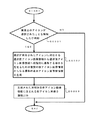
<実施形態1:処理の流れ> 図3は、実施形態1での処理の流れの一例を示したものである。画面上に表示すべきアイコンが選択される前の画像情報を保持する選択前アイコン画像情報保持部と、前記画面上に表示すべきアイコンが選択された後の画像情報を保持する選択後アイコン画像情報保持部と、を有する携帯型端末装置の動作方法は、以下に示すステップよりなる。 まず、前記画面上のアイコンが選択されたことを検知するための処理を行う(アイコン選択検知ステップ S0301)。このとき、検知されたかどうかの判断を行い、検知したとの判断結果の場合には以下のステップを処理し、検知していないとの判断結果の場合には処理を終了するとしてもよい。 次に、前記アイコン選択検知ステップ(S0301)で選択が検知されたアイコンに対応する選択前アイコン画像情報から、前記アイコン選択検知ステップ(S0301)で選択が検知されたアイコンに対応する選択後アイコン画像情報へ段階的に遷移する様子を見せるための複数の新アイコン画像情報からなる遷移時表示アイコン画像群情報を生成する(遷移時表示アイコン画像群情報生成ステップ S0302)。 最後に、前記遷移時アイコン画像群情報生成ステップ(S0302)にて生成された遷移時表示アイコン画像群情報に含まれる新アイコン画像を連続出力する(遷移時表示アイコン画像連続表示ステップ S0303)。 以上の処理は、計算機に実行させるためのプログラムで実行することができ、また、このプログラムを計算機によって読み取り可能な記録媒体に記録することができる。(本明細書の全体を通して同様である。) <Embodiment 1: Process Flow> FIG. 3 shows an example of the process flow in the first embodiment. A pre-selection icon image information holding unit for holding image information before an icon to be displayed on the screen is selected, and a post-selection icon image for holding image information after the icon to be displayed on the screen is selected The operation method of the portable terminal device having the information holding unit includes the following steps. First, processing for detecting that an icon on the screen has been selected is performed (icon selection detection step S0301). At this time, it may be determined whether or not it has been detected, and in the case of a determination result that it has been detected, the following steps may be processed, and in the case of a determination result that it has not been detected, the processing may be terminated. Next, the post-selection icon image corresponding to the icon detected in the icon selection detection step (S0301) from the pre-selection icon image information corresponding to the icon detected in the icon selection detection step (S0301). A transition time display icon image group information composed of a plurality of new icon image information for showing a state of transition to information stepwise is generated (transition time display icon image group information generation step S0302). Finally, new icon images included in the transition icon image group information generated in the transition icon image group information generation step (S0302) are continuously output (transition icon image continuous display step S0303). The above processing can be executed by a program to be executed by a computer, and this program can be recorded on a recording medium readable by the computer. (The same applies throughout the specification.)
<実施形態1:効果> 本実施形態は、選択が検知されたアイコンに対応して、選択前アイコン画像情報から、選択後アイコン画像情報へ段階的に遷移する様子を見せるための複数の新アイコン画像情報からなる遷移時表示アイコン画像群を生成し、この新アイコン画像情報に基づいてアイコン画像を連続表示する携帯型端末装置である。携帯端末装置の表示画面は小さく、どのアイコンが選択されたのかが見えづらい場合があるが、本携帯端末装置によれば、選択されたアイコンが回転する等の視覚的効果を伴い表示されるため、使いやすい。 また、加工後の新アイコン画像情報等は携帯型端末装置に保持しないことから、携帯端末装置の少ないメモリを消費することなく動画の表示を実現でき、効率的である。 <Embodiment 1: Effect> In the present embodiment, a plurality of new icons for showing a state of transitioning from pre-selection icon image information to post-selection icon image information in a stepwise manner corresponding to an icon for which selection has been detected. This is a portable terminal device that generates a transition icon image group composed of image information and continuously displays icon images based on the new icon image information. The display screen of the mobile terminal device is small and it may be difficult to see which icon has been selected. However, according to this mobile terminal device, the selected icon is displayed with a visual effect such as rotation. ,Easy to use. In addition, since the processed new icon image information or the like is not held in the portable terminal device, a moving image can be displayed without consuming a small memory of the portable terminal device, which is efficient.
<<実施形態2>>
<<
<実施形態2:概要> 実施形態2について説明する。本実施形態は、アイコン画像の一表示ごとに遷移時表示アイコン画像群情報が順次生成され、表示終了後消去されることに特徴を有する携帯型端末装置である。
<Embodiment 2: Overview>
<実施形態2:構成> 本実施形態での機能ブロックの一例は図2と同様である。 <Embodiment 2: Configuration> An example of functional blocks in the present embodiment is the same as in FIG.
図2に示す「携帯端末装置」(0200)は、「選択前アイコン画像情報保持部」(0201)と、「選択後アイコン画像情報保持部」(0202)と、「アイコン選択検知部」(0203)と、「遷移時表示アイコン画像群情報生成部」(0204)と、「遷移時表示アイコン画像連続表示部」(0205)とからなる。 2 includes a “pre-selection icon image information holding unit” (0201), a “post-selection icon image information holding unit” (0202), and an “icon selection detection unit” (0203). ”,“ Transition display icon image group information generation unit ”(0204), and“ transition display icon image continuous display unit ”(0205).
「遷移時表示アイコン画像群情報生成部」(0204)は、遷移時表示アイコン画像連続表示部(0205)での一表示ごとに遷移時表示アイコン画像群情報を順次生成し、表示終了後消去する。 The “transition-time display icon image group information generation unit” (0204) sequentially generates the transition-time display icon image group information for each display in the transition-time display icon image continuous display unit (0205), and erases it after the display ends. .
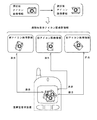
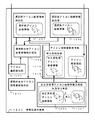
図4は、表示終了後消去される遷移時表示アイコン画像群情報の一例を示した。遷移時表示アイコン画像群情報が表示終了後消去されるため、携帯端末装置の少ないメモリを消費することなく、遷移時表示アイコン画像連続表示部(0205)にて動画の表示を実現できる。 その他各部の処理は実施形態1と同様である。 FIG. 4 shows an example of the display-time icon image group information that is deleted after the display is completed. Since the transition-time display icon image group information is deleted after the display is completed, the moving-image display can be realized in the transition-time display icon image continuous display unit (0205) without consuming a small memory of the mobile terminal device. The processing of each other part is the same as in the first embodiment.
<実施形態2:効果> 本実施形態は、アイコン画像の一表示ごとに遷移時表示アイコン画像群情報が順次生成され、表示終了後消去されることに特徴を有する携帯型端末装置である。表示終了後に遷移時表示アイコン画像群情報が消去され携帯型端末装置に保持しないことから、携帯端末装置の少ないメモリを消費することなく動画の表示を実現でき、効率的である。 また、単一のアイコン画像情報に基づいて動画の表示を実現できることから、利用者が撮影等した画像を用いてオリジナルのアイコンを作成し動画として表示することも可能となり、携帯型端末装置の付加的機能として利用価値があるといえる。 <Embodiment 2: Effect> This embodiment is a portable terminal device characterized in that display icon image group information at the time of transition is sequentially generated for each display of icon images and is erased after the display is completed. Since the display icon image group information at the time of transition is erased after the display is completed and is not held in the portable terminal device, it is possible to efficiently display a moving image without consuming a small amount of memory of the portable terminal device. In addition, since it is possible to display a moving image based on single icon image information, it is possible to create an original icon using an image taken by a user and display it as a moving image. It can be said that it has utility value as a functional function.
<<実施形態3>>
<<
<実施形態3:概要> 実施形態3について説明する。本実施形態は、アイコンを表示するためのアイコン画像情報を取得するアイコン画像情報取得部を有することに特徴を有する携帯型端末装置である。
<Embodiment 3: Overview>
<実施形態3:構成> 本実施形態での機能ブロックの一例を図5に示す。 <Embodiment 3: Configuration> FIG. 5 shows an example of functional blocks in the present embodiment.
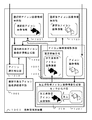
図5に示す本実施形態の「携帯端末装置」(0500)は、「選択前アイコン画像情報保持部」(0501)と、「選択後アイコン画像情報保持部」(0502)と、「アイコン選択検知部」(0503)と、「遷移時表示アイコン画像群情報生成部」(0504)と、「遷移時表示アイコン画像連続表示部」(0505)と、さらに、「アイコン画像情報取得部」(0506)とからなる。 The “portable terminal device” (0500) of this embodiment shown in FIG. 5 includes a “pre-selection icon image information holding unit” (0501), a “post-selection icon image information holding unit” (0502), and an “icon selection detection”. Part "(0503)," transition display icon image group information generation part "(0504)," transition display icon image continuous display part "(0505), and" icon image information acquisition part "(0506) It consists of.
「アイコン画像情報取得部」(0506)は、アイコンを表示するための情報であるアイコン画像情報を取得する。アイコン画像は、携帯端末装置に備えられたカメラ機能などを用いての撮影や、携帯端末装置の機能を用いての作成、画像が添付されたメールの受信などによって入手することが想定できる。これらの画像からアイコンを表示するためのアイコン画像情報を取得する。 図では、カメラで撮影した猫をアイコン画像とする例を示した。ここでは、猫と金魚を撮影したとする。猫の画像から取得したアイコン画像情報を選択前アイコン画像情報とし、金魚の画像から取得したアイコン画像情報を選択後アイコン画像情報としてそれぞれ保持部(0501、0502)に保持する。アイコンの選択が行われていない通常時においては、携帯端末装置の画面上には、他のアイコンとともに猫のアイコンも表示されることになる。 猫のアイコンの選択がアイコン選択検知部(0503)にて検知された場合には、遷移時表示アイコン画像群情報生成部(0504)にて猫の画像の選択前アイコン画像情報から、金魚の画像の選択後アイコン画像情報へと段階的に遷移する様子を見せるための複数の新アイコン画像情報からなる遷移時表示アイコン画像群情報を生成する。例えば、複数の新アイコン画像情報のうち、前半は猫のアイコン画像の色を薄くし、後半は金魚のアイコンの画像の色を濃くする。これにより、遷移時表示アイコン画像連続表示部(0505)では、猫のアイコン画像が徐々にぼやけ、入れ替わるように金魚のアイコン画像が表れるような表示が行われ、フェードによる視覚的効果が得られる(図9(b)参照)。 なお、ここではアイコン画像を2種類取得する例を示したが、選択前アイコン画像情報、あるいは、選択後アイコン画像情報とするとしてもよい。これについては実施形態4、5にて説明する。また、段階的に遷移する様子としてはフェード以外にも手法があるが、これについては実施形態6にて説明する。 その他各部の処理は実施形態1、2と同様である。
The “icon image information acquisition unit” (0506) acquires icon image information which is information for displaying an icon. It can be assumed that the icon image is obtained by photographing using a camera function or the like provided in the mobile terminal device, creating using the function of the mobile terminal device, receiving a mail attached with the image, or the like. Icon image information for displaying an icon is acquired from these images. The figure shows an example in which a cat photographed with a camera is used as an icon image. Here, it is assumed that cats and goldfish are photographed. The icon image information acquired from the cat image is used as pre-selection icon image information, and the icon image information acquired from the goldfish image is stored in the storage units (0501, 0502) as post-selection icon image information. During normal times when no icon is selected, a cat icon is displayed on the screen of the mobile terminal device together with other icons. When the selection of the cat icon is detected by the icon selection detection unit (0503), the goldfish image is obtained from the pre-selection icon image information of the cat image by the transition display icon image group information generation unit (0504). The icon image group information at the time of transition which consists of several new icon image information for showing a mode that it changes to icon image information in steps after selection is produced | generated. For example, among the plurality of new icon image information, the first half makes the color of the cat icon image light, and the second half makes the color of the goldfish icon image darker. As a result, in the transition display icon image continuous display section (0505), the display is such that the icon image of the goldfish appears so that the cat icon image gradually blurs and is replaced, and a visual effect by fading is obtained ( (See FIG. 9B). Although an example in which two types of icon images are acquired is shown here, it may be pre-selection icon image information or post-selection icon image information. This will be described in
<実施形態3:効果> 本実施形態は、アイコンを表示するためのアイコン画像情報を取得することに特徴を有する携帯型端末装置である。携帯型端末装置で撮影等して取得した画像を用いて、利用者が自由にアイコンを作成することができ、利用者を飽きさせることなく携帯型端末装置の利用度を高める効果を有する。また、アイコンが選択されると、動的な視覚的効果を伴いながら表示されるので、小さな画面しか備わっていない携帯型端末装置であっても、そのアイコンが選択されたのかを容易に判別できる。 <Embodiment 3: Effect> This embodiment is a portable terminal device characterized by acquiring icon image information for displaying an icon. The user can freely create an icon using an image acquired by photographing with the portable terminal device, and the use of the portable terminal device is increased without getting tired of the user. Also, when an icon is selected, it is displayed with a dynamic visual effect, so even a portable terminal device having only a small screen can easily determine whether the icon is selected. .
<<実施形態4>>
<<
<実施形態4:概要> 実施形態4について説明する。本実施形態は、取得したアイコン画像情報を、選択後アイコン画像情報保持部に格納することに特徴を有する携帯型端末装置である。
<Embodiment 4: Overview>
<実施形態4:構成> 本実施形態での機能ブロックの一例を図6に示す。 <Embodiment 4: Configuration> FIG. 6 shows an example of functional blocks in the present embodiment.
図6に示す本実施形態の「携帯端末装置」(0600)は、「選択前アイコン画像情報保持部」(0601)と、「選択後アイコン画像情報保持部」(0602)と、「アイコン選択検知部」(0603)と、「遷移時表示アイコン画像群情報生成部」(0604)と、「遷移時表示アイコン画像連続表示部」(0605)と、「アイコン画像情報取得部」(0606)とからなり、さらに、アイコン画像情報取得部(0606)は「第一格納手段」(0607)を有する。 The “portable terminal device” (0600) of the present embodiment shown in FIG. 6 includes a “pre-selection icon image information holding unit” (0601), a “post-selection icon image information holding unit” (0602), and an “icon selection detection”. Part "(0603)," transition display icon image group information generation part "(0604)," transition display icon image continuous display part "(0605), and" icon image information acquisition part "(0606) Furthermore, the icon image information acquisition unit (0606) has a “first storage unit” (0607).
「第一格納手段」(0607)は、取得したアイコン画像情報を、選択後アイコン画像情報保持部に格納する。ここでは、カメラで撮影した金魚をアイコン画像として取得する例を示した。この金魚の画像から取得したアイコン画像情報は選択後アイコン画像情報として選択後アイコン画像情報保持部(0602)に格納される。また、選択前アイコン画像情報保持部(0601)は、既存のアイコンを表示するためのアイコン画像情報などが保持されている。 他方、選択後アイコン画像情報として保持された金魚のアイコン画像に基づいて選択前アイコン画像情報を生成するとしてもよい。図では、もとの金魚の画像と縦軸で対称な画像を生成し選択前アイコン画像情報とした。なお、取得したアイコン画像に加工を加えて選択前アイコン画像情報を生成することについては、実施形態7にて詳述する。 対応するアイコンの選択が検知された場合には、遷移時表示アイコン画像群情報生成部(0604)にて、複数の新アイコン画像情報からなる遷移時表示アイコン画像群情報を生成する。ここでは、右向きの金魚の選択前アイコン画像情報から、左向きの金魚の選択後アイコン画像情報へと段階的に遷移する様子を見せるための複数の新アイコン画像情報の一例として、右側から左へと左向きの金魚の選択後アイコン画像がスライドする場合を示した。このとき、複数の新アイコン画像情報のうち、前半は左向きの金魚の頭部分が、右向きの金魚の頭部分にかぶさり、後半にいくにつれてかぶさる範囲が広がり、最後は右向きの金魚は消え、左向きの金魚の尻尾部分まで表示される。これにより、遷移時表示アイコン画像連続表示部(0605)では、右向きの金魚のアイコン画像が徐々に消え、入れ替わるように左向きの金魚のアイコン画像が徐々に表れるような表示が行われ、スライドによる視覚的効果が得られる(図9(c)参照)。 その他各部の処理は実施形態3と同様である。
The “first storage unit” (0607) stores the acquired icon image information in the selected icon image information holding unit. Here, the example which acquires the goldfish image | photographed with the camera as an icon image was shown. The icon image information acquired from the goldfish image is stored in the post-selection icon image information holding unit (0602) as post-selection icon image information. The pre-selection icon image information holding unit (0601) holds icon image information for displaying existing icons. On the other hand, the pre-selection icon image information may be generated based on the goldfish icon image held as the post-selection icon image information. In the figure, an image symmetrical with the original goldfish image and the vertical axis is generated and used as pre-selection icon image information. It should be noted that generation of pre-selection icon image information by processing the acquired icon image will be described in detail in
<実施形態4:効果> 本実施形態は、取得したアイコン画像情報を、選択後アイコン画像情報保持部に格納することに特徴を有する携帯型端末装置である。携帯型端末装置で撮影等して取得した画像を、アイコンが選択された後の選択後アイコン画像情報として利用できるため、利用者のアイコンの選択処理が促進される効果が期待できる。また、利用者自身が自由にアイコンを作成できるため、携帯型端末装置の利用度が高まる。 <Embodiment 4: Effect> This embodiment is a portable terminal device characterized by storing the acquired icon image information in a post-selection icon image information holding unit. Since an image acquired by photographing with a portable terminal device can be used as post-selection icon image information after the icon is selected, an effect of promoting the user's icon selection process can be expected. In addition, since the user can freely create icons, the degree of use of the portable terminal device is increased.
<<実施形態5>>
<<
<実施形態5:概要> 実施形態5について説明する。本実施形態は、取得したアイコン画像情報を、選択前アイコン画像情報保持部に格納することに特徴を有する携帯型端末装置である。
<Embodiment 5: Overview>
<実施形態5:構成> 本実施形態での機能ブロックの一例を図7に示す。 <Embodiment 5: Configuration> FIG. 7 shows an example of functional blocks in the present embodiment.
図7に示す本実施形態の「携帯端末装置」(0700)は、「選択前アイコン画像情報保持部」(0701)と、「選択後アイコン画像情報保持部」(0702)と、「アイコン選択検知部」(0703)と、「遷移時表示アイコン画像群情報生成部」(0704)と、「遷移時表示アイコン画像連続表示部」(0705)と、「アイコン画像情報取得部」(0706)とからなり、さらに、アイコン画像情報取得部(0706)は「第二格納手段」(0707)を有する。 The “portable terminal device” (0700) of the present embodiment shown in FIG. 7 includes a “pre-selection icon image information holding unit” (0701), a “post-selection icon image information holding unit” (0702), and an “icon selection detection”. Part "(0703)," transition display icon image group information generation part "(0704)," transition display icon image continuous display part "(0705), and" icon image information acquisition part "(0706) In addition, the icon image information acquisition unit (0706) includes a “second storage unit” (0707).
「第二格納手段」(0707)は、取得したアイコン画像情報を、選択前アイコン画像情報保持部に格納する。ここでは、カメラで撮影した猫をアイコン画像として取得する例を示した。この猫の画像から取得したアイコン画像情報は選択前アイコン画像情報として選択前アイコン画像情報保持部(0701)に格納される。また、選択後アイコン画像情報保持部(0702)は、既存のアイコンを表示するためのアイコン画像情報などが保持されている。 他方、選択前アイコン画像情報として保持された猫のアイコン画像に基づいて選択後アイコン画像情報を生成するとしてもよい。図では、もとの猫の画像を拡大した画像を生成し選択後アイコン画像情報とした。なお、取得したアイコン画像に加工を加えて選択前アイコン画像情報を生成することについては、実施形態7にて詳述する。 対応するアイコンの選択が検知された場合には、遷移時表示アイコン画像群情報生成部(0704)にて、複数の新アイコン画像情報からなる遷移時表示アイコン画像群情報を生成する。ここでは、普通サイズのアイコンの選択前アイコン画像情報から、拡大したアイコンの選択後アイコン画像情報へと段階的に遷移する様子を見せるための複数の新アイコン画像情報の一例として、上側から下へと拡大したアイコンの選択後アイコン画像がスレッドする場合を示した。このとき、複数の新アイコン画像情報のうち、前半は上から拡大したアイコンの猫の画像がスライドし、もとのアイコンの猫の画像を押し出し、後半にいくにつれてその範囲が広がり、最後はもとのアイコンの猫は消え、拡大したアイコンの猫が表示される。これにより、遷移時表示アイコン画像連続表示部(0705)では、もとのアイコンの猫の画像が徐々に消え、入れ替わるように拡大したアイコンの猫の画像が徐々に表れるような表示が行われ、スレッドによる視覚的効果が得られる。 その他各部の処理は実施形態3と同様である。
The “second storage unit” (0707) stores the acquired icon image information in the pre-selection icon image information holding unit. Here, the example which acquires the cat image | photographed with the camera as an icon image was shown. The icon image information acquired from the cat image is stored in the pre-selection icon image information holding unit (0701) as pre-selection icon image information. Further, the post-selection icon image information holding unit (0702) holds icon image information for displaying existing icons. On the other hand, post-selection icon image information may be generated based on the cat icon image held as pre-selection icon image information. In the figure, an enlarged image of the original cat image is generated and used as icon image information after selection. It should be noted that generation of pre-selection icon image information by processing the acquired icon image will be described in detail in
<実施形態5:効果> 本実施形態は、取得したアイコン画像情報を、選択前アイコン画像情報保持部に格納することに特徴を有する携帯型端末装置である。携帯型端末装置で撮影等して取得した画像を、アイコンが選択される前の選択前アイコン画像情報として利用できることによって、利用者は通常携帯型端末装置の画面に表示されるアイコンを自身でオリジナルに生成できるため、利用者にとって好ましいといえ、さらに携帯型端末装置の利用度が高まることが期待できる。 <Embodiment 5: Effect> This embodiment is a portable terminal device characterized by storing acquired icon image information in a pre-selection icon image information holding unit. By using an image acquired by shooting with a portable terminal device as pre-selection icon image information before the icon is selected, the user can normally create an original icon displayed on the screen of the portable terminal device. Therefore, it is preferable for the user, and it can be expected that the usage of the portable terminal device is further increased.
<<実施形態6>>
<<
<実施形態6:概要> 実施形態6について説明する。本実施形態は、前記遷移時表示アイコン画像群により段階的に遷移する様子として、ディゾルブ、フェード、スライド、スレッド、ターン、スピンのいずれかを実現することに特徴を有する携帯型端末装置である。 <Sixth Embodiment: Overview> A sixth embodiment will be described. The present embodiment is a portable terminal device characterized by realizing any one of dissolve, fade, slide, thread, turn, and spin as a state of transition in stages by the display icon image group at the time of transition.
<実施形態6:構成> 本実施形態での機能ブロックの一例を図8に示す。ここでは実施形態3における機能ブロックを基本とした。 <Embodiment 6: Configuration> FIG. 8 shows an example of functional blocks in the present embodiment. Here, the functional blocks in the third embodiment are used as a basis.
図8に示す本実施形態の「携帯端末装置」(0800)は、「選択前アイコン画像情報保持部」(0801)と、「選択後アイコン画像情報保持部」(0802)と、「アイコン選択検知部」(0803)と、「遷移時表示アイコン画像群情報生成部」(0804)と、「遷移時表示アイコン画像連続表示部」(0805)と、「アイコン画像情報取得部」(0806)とからなり、さらに、遷移時表示アイコン画像群情報生成部(0804)は「ディゾルブ等実現手段」(0807)を有する。 The “portable terminal device” (0800) of the present embodiment shown in FIG. 8 includes a “pre-selection icon image information holding unit” (0801), a “post-selection icon image information holding unit” (0802), and an “icon selection detection”. Part "(0803)," transition display icon image group information generation part "(0804)," transition display icon image continuous display part "(0805), and" icon image information acquisition part "(0806) Furthermore, the transition display icon image group information generation unit (0804) includes a “dissolve realization unit” (0807).
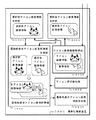
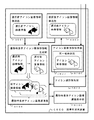
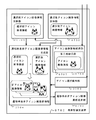
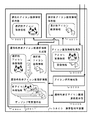
「ディゾルブ等実現手段」(0807)は、前記遷移時表示アイコン画像群により段階的に遷移する様子として、ディゾルブ、ターン、フェード、スライド、スレッド、スピンのいずれかを実現するための処理を行う。これらの一例について、図9、10に図示した。 The “dissolve realizing means” (0807) performs processing for realizing any one of dissolve, turn, fade, slide, thread, and spin as a state in which the transition is performed stepwise by the display icon group at the time of transition. Examples of these are shown in FIGS.
「ディゾルブ」とは、アイコンの選択の検知により、選択前アイコン画像を、徐々に選択後アイコン画像へと切り替える画像の表示方法をいう。ディゾルブは、例えば、画像が粒状に拡散、集結する切り替え方法や、色や輝度の変換などによって様々な表示が可能である。図9(a)では、画像が粒状に拡散、集結するディゾルブの実現を示した。 “Dissolve” refers to an image display method in which an icon image before selection is gradually switched to an icon image after selection upon detection of icon selection. The dissolve can be displayed in various ways, for example, by a switching method in which images are diffused and collected in a granular manner, or by conversion of color and brightness. FIG. 9A shows the realization of a dissolve in which an image is diffused and collected in a granular manner.
「フェード」とは、アイコンの選択の検知により、選択前アイコン画像が消えていくにつれ、選択後アイコン画像が表示される画像の表示方法をいう。フェードは、画像をオーバーラップさせる方法や、色や輝度の変換などによって様々な表示が可能である。図9(b)では、選択前アイコン画像が徐々にぼやけ、選択後アイコン画像が表示されるフェードの実現を示した。 “Fade” refers to an image display method in which an icon image after selection is displayed as the icon image before selection disappears upon detection of icon selection. Fade can be displayed in various ways, such as by overlapping images, or by converting colors and brightness. FIG. 9B shows the realization of the fade in which the pre-selection icon image is gradually blurred and the post-selection icon image is displayed.
「スライド」とは、アイコンの選択の検知により、選択前アイコン画像に対して、同サイズの選択後アイコン画像がすべりこむように表示される画像の表示方法をいう。スライドは、選択後アイコン画像がスライドする際に、選択前アイコン画像が押し出されるのか、あるいは、選択前アイコン画像の上に重なるのかの別や、選択後アイコン画像がスライドしてくる方向、速度などにより様々な表示が可能である。図9(c)では、右側から選択後アイコン画像がスライドする際に、選択前アイコン画像の上に重なって表示されるスライドの実現を示した。 “Slide” refers to an image display method in which an icon image after selection of the same size is slipped with respect to an icon image before selection upon detection of selection of the icon. Whether the pre-selection icon image is pushed out or overlaps the pre-selection icon image when the post-selection icon image slides, the direction in which the post-selection icon image slides, the speed, etc. Various displays are possible. FIG. 9C shows the realization of the slide that is displayed so as to overlap the pre-selection icon image when the post-selection icon image slides from the right side.
「スレッド」とは、アイコンの選択の検知により、選択前アイコン画像に対して、縮小されたサイズの選択後アイコン画像がすべりこむように表示され、しかる後にもとのサイズまで拡大する画像の表示方法をいう。スライドと同様スレッドも、選択後アイコン画像がスレッドする際に、選択前アイコン画像が押し出されるのか、あるいは、選択前アイコン画像の上に重なるのかの別や、選択後アイコン画像がスレッドしてくる方向、速度などにより様々な表示が可能である。図10(a)では、左側から選択後アイコン画像がスレッドする際に、選択前アイコン画像の上に重なって表示されるスライドの実現を示した。 “Thread” is a method of displaying an image that is displayed so that the reduced-size icon image is slipped with respect to the pre-selection icon image upon detection of the icon selection, and then enlarged to the original size. Say. As with the slide, the thread for the selected icon image is threaded, whether the pre-selected icon image is pushed out or overlaid on the pre-selected icon image, and the direction in which the selected icon image is threaded. Various displays are possible depending on the speed. FIG. 10A shows the realization of the slide displayed on the icon image before selection when the icon image after selection is threaded from the left side.
「ターン」とは、アイコンの選択の検知により、選択前アイコン画像に対して、軸を中心として回転し、選択後アイコン画像が表示される画像の表示方法をいう。ターンは、回転の方向、角度、速度、軸の違いにより様々な表示が可能である。図10(b)では、画像が左回りで180度回転するターンの実現を示した。 “Turn” refers to an image display method in which an icon image after selection is displayed by rotating around an axis with respect to the icon image before selection upon detection of selection of the icon. The turn can be displayed in various ways depending on the direction of rotation, angle, speed, and axis. FIG. 10B shows the realization of a turn in which the image rotates 180 degrees counterclockwise.
「スピン」とは、アイコンの選択の検知により、選択前アイコン画像の中心を画像が回転し、選択後アイコン画像が表示される画像の表示方法をいう。スピンは、回転の方向、角度、速度の違いにより様々な表示が可能である。図10(c)では、画像が左回りで180度回転するスピンの実現を示した。 なお、スライドなど方向性をもつ機能においては、携帯端末装置のボタン操作などでそのスライド等される方向を指示することができるとしてもよい。例えば、下向きの矢印のキーを押した場合には上から選択後アイコン画像が下りてくる場合などが想定される。 その他各部の処理は実施形態1から5と同様である。 “Spin” refers to an image display method in which an image is rotated around the center of the pre-selection icon image upon detection of selection of the icon, and the post-selection icon image is displayed. Spins can be displayed in various ways depending on the direction of rotation, angle, and speed. FIG. 10C shows the realization of a spin in which the image rotates 180 degrees counterclockwise. It should be noted that in a function having directionality such as sliding, it may be possible to instruct the direction of sliding or the like by operating a button of the mobile terminal device. For example, when a down arrow key is pressed, a case where the icon image after selection comes down from above is assumed. The processing of other parts is the same as in the first to fifth embodiments.
<実施形態6:効果> 本実施形態は、遷移時表示アイコン画像群により段階的に遷移する様子として、ディゾルブ、フェード、スライド、スレッド、ターン、スピンのいずれかを実現することに特徴を有する携帯型端末装置である。様々な遷移方法でアイコンを動画として表示することで、携帯型端末装置の小さな画面であっても選択されたアイコンを判別しやすくする効果が期待できる。 <Embodiment 6: Effect> This embodiment is characterized in that any one of a dissolve, a fade, a slide, a thread, a turn, and a spin is realized as a state of transition in a stepwise manner by a display icon group at the time of transition. Type terminal device. By displaying icons as moving images by various transition methods, it is possible to expect an effect that makes it easy to distinguish the selected icon even on a small screen of the portable terminal device.
<<実施形態7>>
<<
<実施形態7:概要> 実施形態7について説明する。本実施形態は、取得したアイコン画像情報を加工した加工済取得アイコン画像情報を選択前アイコン画像情報保持部に格納することに特徴を有する携帯型端末装置である。
<Embodiment 7: Overview>
<実施形態7:構成> 本実施形態での機能ブロックの一例を図11に示す。 <Embodiment 7: Configuration> FIG. 11 shows an example of functional blocks in the present embodiment.
図11に示す本実施形態の「携帯端末装置」(1100)は、「選択前アイコン画像情報保持部」(1101)と、「選択後アイコン画像情報保持部」(1102)と、「アイコン選択検知部」(1103)と、「遷移時表示アイコン画像群情報生成部」(1104)と、「遷移時表示アイコン画像連続表示部」(1105)と、「アイコン画像情報取得部」(1106)と、さらに、「加工済取得アイコン画像情報生成部」(1107)とからなる。また、アイコン画像情報取得部(1106)は「第三格納手段」(1108)を有する。 The “portable terminal device” (1100) of this embodiment shown in FIG. 11 includes a “pre-selection icon image information holding unit” (1101), a “post-selection icon image information holding unit” (1102), and an “icon selection detection”. Part "(1103)," transition display icon image group information generation part "(1104)," transition display icon image continuous display part "(1105)," icon image information acquisition part "(1106), Further, it includes a “processed acquired icon image information generation unit” (1107). The icon image information acquisition unit (1106) includes a “third storage unit” (1108).
「加工済取得アイコン画像情報生成部」(1107)は、アイコン画像情報取得部(1106)が取得したアイコン画像情報を加工して加工済取得アイコン画像情報を生成する。加工は、もとのアイコン画像情報に手を加えて変化させることであり、一例としてはアイコン画像の切断、縮小・拡大、回転、エッジ強調、輝度調整、半透明化、モノクロ(白黒化、セピア化)等が該当する。半透明化と、モノクロ化については、実施形態8、9にて説明する。 The “processed acquired icon image information generating unit” (1107) processes the icon image information acquired by the icon image information acquiring unit (1106) to generate processed acquired icon image information. Processing is to modify the original icon image information by way of example. For example, icon image cutting, reduction / enlargement, rotation, edge enhancement, brightness adjustment, translucency, monochrome (monochrome, sepia) )). The translucency and monochrome conversion will be described in the eighth and ninth embodiments.
「第三格納手段」(1108)は、前記加工済取得アイコン画像情報生成部(1107)で生成された加工済取得アイコン画像情報を、前記選択前アイコン画像情報保持部(1101)に格納する。加工してできたアイコン画像を選択前アイコン画像とする一方、加工前のもとのアイコン画像は選択後アイコン画像としてもよい。 その他各部の処理については、実施形態3と同様である。 The “third storage unit” (1108) stores the processed acquired icon image information generated by the processed acquired icon image information generating unit (1107) in the pre-selection icon image information holding unit (1101). While the processed icon image is used as the pre-selection icon image, the original icon image before processing may be the post-selection icon image. The processing of each other part is the same as in the third embodiment.
<実施形態7:効果> 本実施形態は、取得したアイコン画像情報を加工した加工済取得アイコン画像情報を選択前アイコン画像情報保持部に格納することに特徴を有する携帯型端末装置である。利用者は単一の画像を準備するだけで選択前後のアイコンの画像を生成され、様々な遷移方法にてアイコンを動画として表示することが可能となるため、便利である。 <Embodiment 7: Effect> This embodiment is a portable terminal device characterized in that processed acquired icon image information obtained by processing acquired icon image information is stored in a pre-selection icon image information holding unit. This is convenient because the user can generate icons for the icons before and after the selection simply by preparing a single image and display the icons as moving images by various transition methods.
<<実施形態8>>
<<
<実施形態8:概要> 実施形態8について説明する。本実施形態は、加工として、取得したアイコン画像情報を半透明化する処理をすることに特徴を有する携帯型端末装置である。
<Embodiment 8: Overview>
<実施形態8:構成> 本実施形態での機能ブロックの一例を図12に示す。 <Eighth Embodiment: Configuration> FIG. 12 shows an example of functional blocks in the present embodiment.
図12に示す本実施形態の「携帯端末装置」(1200)は、「選択前アイコン画像情報保持部」(1201)と、「選択後アイコン画像情報保持部」(1202)と、「アイコン選択検知部」(1203)と、「遷移時表示アイコン画像群情報生成部」(1204)と、「遷移時表示アイコン画像連続表示部」(1205)と、「アイコン画像情報取得部」(1206)と、「加工済取得アイコン画像情報生成部」(1207)とからなる。また、アイコン画像情報取得部(1206)は「第三格納手段」(1208)を有し、さらに、加工済取得アイコン画像情報生成部(1207)は「半透明化処理手段」(1209)を有する。 The “portable terminal device” (1200) of this embodiment shown in FIG. 12 includes a “pre-selection icon image information holding unit” (1201), a “post-selection icon image information holding unit” (1202), and an “icon selection detection”. Part "(1203)," transition display icon image group information generation part "(1204)," transition display icon image continuous display part "(1205)," icon image information acquisition part "(1206), “Processed acquisition icon image information generation unit” (1207). In addition, the icon image information acquisition unit (1206) includes a “third storage unit” (1208), and the processed acquired icon image information generation unit (1207) includes a “translucent processing unit” (1209). .
「半透明化処理手段」(1209)は、加工として、取得したアイコン画像情報を半透明化する処理をする。半透明化とは、透明と不透明の中間の状態とすることをいう。アイコン画像情報のうち、色や、輝度などの情報を変更することにより半透明化を実現する。 The “semi-transparent processing means” (1209) performs a process of translucent the acquired icon image information as processing. Translucent means to make the state between transparent and opaque. Translucency is realized by changing information such as color and brightness in the icon image information.
選択前には半透明であったアイコン画像は選択されることで、もとのアイコン画像の状態になる場合などが想定される。 その他各部の処理については、実施形態7と同様である。 It is assumed that an icon image that has been translucent before selection is selected to be in the state of the original icon image. The processing of each other part is the same as in the seventh embodiment.
<実施形態8:効果> 本実施形態は、加工として、取得したアイコン画像情報を半透明化する処理をすることに特徴を有する携帯型端末装置である。半透明化した画像を選択前アイコン画像とし、このアイコンが選択されることで、もとのアイコン画像の状態になる場合には、選択されているアイコンをより際立たせる効果がある。 <Embodiment 8: Effect> This embodiment is a portable terminal device characterized in that processing is performed to make the acquired icon image information translucent. The semi-transparent image is used as the pre-selection icon image, and when this icon is selected, when the original icon image state is obtained, the selected icon is more prominent.
<<実施形態9>> << Embodiment 9 >>
<実施形態9:概要> 実施形態9について説明する。本実施形態は、加工として、取得したカラーのアイコン画像情報をモノクロ化する処理をすることに特徴を有する携帯型端末装置である。 <Ninth Embodiment: Overview> A ninth embodiment will be described. The present embodiment is a portable terminal device characterized in that as processing, the acquired color icon image information is processed into monochrome.
<実施形態9:構成> 本実施形態での機能ブロックの一例を図13に示す。 <Embodiment 9: Configuration> FIG. 13 shows an example of functional blocks in this embodiment.
図13に示す本実施形態の「携帯端末装置」(1300)は、「選択前アイコン画像情報保持部」(1301)と、「選択後アイコン画像情報保持部」(1302)と、「アイコン選択検知部」(1303)と、「遷移時表示アイコン画像群情報生成部」(1304)と、「遷移時表示アイコン画像連続表示部」(1305)と、「アイコン画像情報取得部」(1306)と、「加工済取得アイコン画像情報生成部」(1307)とからなる。また、アイコン画像情報取得部(1306)は「第三格納手段」(1308)を有し、さらに、加工済取得アイコン画像情報生成部(1307)は「モノクロ化処理手段」(1309)を有する。 The “portable terminal device” (1300) of this embodiment shown in FIG. 13 includes a “pre-selection icon image information holding unit” (1301), a “post-selection icon image information holding unit” (1302), and an “icon selection detection”. Part "(1303)," transition display icon image group information generation part "(1304)," transition display icon image continuous display part "(1305)," icon image information acquisition part "(1306), “Processed acquisition icon image information generation unit” (1307). The icon image information acquisition unit (1306) has a “third storage unit” (1308), and the processed acquisition icon image information generation unit (1307) has a “monochrome processing unit” (1309).
「モノクロ化処理手段」(1309)は、加工として、取得したカラーのアイコン画像情報をモノクロ化する処理をする。モノクロ化とは、カラーの画像を単色化することをいい、白黒、セピアなどが含まれる場合がある。アイコン画像情報のうち、色や、輝度などの情報を変更することによりモノクロ化を実現する。 選択前にはモノクロであったアイコン画像は選択されることで、もとのアイコン画像の状態になる場合などが想定される。 “Monochrome processing means” (1309) performs processing for monochrome processing of the acquired color icon image information as processing. Monochrome refers to making a color image monochromatic, and may include black and white, sepia, and the like. By changing information such as color and brightness in the icon image information, monochromeization is realized. It is assumed that an icon image that has been monochrome before selection is selected to be in the state of the original icon image.
その他各部の処理については、実施形態7と同様である。 The processing of each other part is the same as in the seventh embodiment.
<実施形態9:効果> 本実施形態は、加工として、取得したカラーのアイコン画像情報をモノクロ化する処理をすることに特徴を有する携帯型端末装置である。モノクロ化した画像を選択前アイコン画像とし、このアイコンが選択されることで、もとのアイコン画像の状態になる場合には、選択されているアイコンをより際立たせる効果がある。 <Embodiment 9: Effect> This embodiment is a portable terminal device characterized in that as processing, the acquired color icon image information is processed into monochrome. When the monochrome image is used as the pre-selection icon image, and this icon is selected, when the original icon image state is obtained, there is an effect of making the selected icon more prominent.
0200 携帯型端末装置
0201 選択前アイコン画像情報保持部
0202 選択後アイコン画像情報保持部
0203 アイコン選択検知部
0204 遷移時表示アイコン画像群情報生成部
0205 遷移時表示アイコン画像連続表示部
0200 Portable terminal device 0201 Pre-selection icon image
Claims (10)
前記画面上に表示すべきアイコンが選択される前の画像情報を保持する選択前アイコン画像情報保持部と、
前記画面上に表示すべきアイコンが選択された後の画像情報を保持する選択後アイコン画像情報保持部と、
前記画面上のアイコンが選択されたことを検知するためのアイコン選択検知部と、
前記アイコン選択検知部で選択が検知されたアイコンに対応する選択前アイコン画像情報から、前記アイコン選択検知部で選択が検知されたアイコンに対応する選択後アイコン画像情報へ段階的に遷移する様子を見せるための複数の新アイコン画像情報からなる遷移時表示アイコン画像群を生成する遷移時表示アイコン画像群情報生成部と、
前記遷移時表示アイコン画像群情報生成部で生成された遷移時表示アイコン画像群情報に含まれる新アイコン画像情報に基づくアイコン画像を連続表示する遷移時表示アイコン画像連続表示部と、
を有する携帯型端末装置。 A portable terminal device that displays an icon on a screen,
A pre-selection icon image information holding unit for holding image information before an icon to be displayed on the screen is selected;
A post-selection icon image information holding unit for holding image information after an icon to be displayed on the screen is selected;
An icon selection detection unit for detecting that the icon on the screen is selected;
A state in which the pre-selection icon image information corresponding to the icon whose selection has been detected by the icon selection detection unit gradually changes to the post-selection icon image information corresponding to the icon whose selection has been detected by the icon selection detection unit. A transition-time display icon image group information generation unit that generates a transition-time display icon image group including a plurality of new icon image information to be shown;
A transition-time display icon image continuous display unit that continuously displays icon images based on new icon image information included in the transition-time display icon image group information generated by the transition-time display icon image group information generation unit;
A portable terminal device.
前記遷移時表示アイコン画像連続表示部での一表示ごとに順次生成され、表示終了後消去される請求項1に記載の携帯型端末装置。 The generation in the transition icon image group information generation unit,
The portable terminal device according to claim 1, wherein the portable terminal device is sequentially generated for each display in the display icon image continuous display section at the time of transition and is erased after the display is completed.
前記アイコン画像情報取得部は、前記加工済取得アイコン画像情報生成部で生成された加工済取得アイコン画像情報を、前記選択前アイコン画像情報保持部に格納する第三格納手段を有する請求項3に記載の携帯型端末装置。 A processed acquisition icon image information generation unit that processes the icon image information acquired by the icon image information acquisition unit to generate processed acquisition icon image information;
The said icon image information acquisition part has a 3rd storage means to store the processed acquired icon image information produced | generated in the said processed acquired icon image information generation part in the said pre-selection icon image information holding part. The portable terminal device described.
前記画面上のアイコンが選択されたことを検知するためのアイコン選択検知ステップと、
前記アイコン選択検知ステップにて選択が検知されたアイコンに対応する選択前アイコン画像情報から、前記アイコン選択検知ステップにて選択が検知されたアイコンに対応する選択後アイコン画像情報へ段階的に遷移する様子を見せるための複数の新アイコン画像情報からなる遷移時表示アイコン画像群を生成する遷移時表示アイコン画像群情報生成ステップと、
前記遷移時表示アイコン画像群情報生成ステップにて生成された遷移時表示アイコン画像群情報に含まれる新アイコン画像情報に基づくアイコン画像を連続表示する遷移時表示アイコン画像連続表示ステップと、
を有する携帯型端末装置の動作方法。 A pre-selection icon image information holding unit for holding image information before an icon to be displayed on the screen is selected, and a post-selection icon for holding image information after the icon to be displayed on the screen is selected An operation method of a portable terminal device having an image information holding unit and displaying an icon on a screen,
An icon selection detecting step for detecting that an icon on the screen is selected;
Transition from the pre-selection icon image information corresponding to the icon detected in the icon selection detection step to the post-selection icon image information corresponding to the icon detected in the icon selection detection step. A transition-time display icon image group information generation step for generating a transition-time display icon image group composed of a plurality of new icon image information for showing a state;
A transition time display icon image continuous display step for continuously displaying icon images based on new icon image information included in the transition time display icon image group information generated in the transition time display icon image group information generation step;
A method for operating a portable terminal device.
Priority Applications (1)
| Application Number | Priority Date | Filing Date | Title |
|---|---|---|---|
| JP2004103204A JP2005292918A (en) | 2004-03-31 | 2004-03-31 | Portable terminal device |
Applications Claiming Priority (1)
| Application Number | Priority Date | Filing Date | Title |
|---|---|---|---|
| JP2004103204A JP2005292918A (en) | 2004-03-31 | 2004-03-31 | Portable terminal device |
Publications (1)
| Publication Number | Publication Date |
|---|---|
| JP2005292918A true JP2005292918A (en) | 2005-10-20 |
Family
ID=35325821
Family Applications (1)
| Application Number | Title | Priority Date | Filing Date |
|---|---|---|---|
| JP2004103204A Pending JP2005292918A (en) | 2004-03-31 | 2004-03-31 | Portable terminal device |
Country Status (1)
| Country | Link |
|---|---|
| JP (1) | JP2005292918A (en) |
Cited By (7)
| Publication number | Priority date | Publication date | Assignee | Title |
|---|---|---|---|---|
| WO2007091298A1 (en) * | 2006-02-06 | 2007-08-16 | Creative Link Corporation | Display processing device, display processing method and computer program |
| JPWO2007061003A1 (en) * | 2005-11-24 | 2009-05-07 | シャープ株式会社 | Information processing apparatus, information processing apparatus control method, information processing apparatus control program, and recording medium on which information processing apparatus control program is recorded |
| JP2014085779A (en) * | 2012-10-23 | 2014-05-12 | Konica Minolta Inc | Thumbnail display device, thumbnail display method, and computer program |
| JP2014137742A (en) * | 2013-01-17 | 2014-07-28 | Nikon Corp | Display device, imaging device, and display control program |
| JP2015049694A (en) * | 2013-08-30 | 2015-03-16 | ヤフー株式会社 | Distribution device, terminal device, distribution method, and distribution program |
| JP2016053681A (en) * | 2014-09-04 | 2016-04-14 | シャープ株式会社 | Image display system, information processing apparatus, information processing method, and program |
| JP2016136406A (en) * | 2016-03-07 | 2016-07-28 | 富士ゼロックス株式会社 | Display control device, service device, and program |
-
2004
- 2004-03-31 JP JP2004103204A patent/JP2005292918A/en active Pending
Cited By (10)
| Publication number | Priority date | Publication date | Assignee | Title |
|---|---|---|---|---|
| JPWO2007061003A1 (en) * | 2005-11-24 | 2009-05-07 | シャープ株式会社 | Information processing apparatus, information processing apparatus control method, information processing apparatus control program, and recording medium on which information processing apparatus control program is recorded |
| JP4704442B2 (en) * | 2005-11-24 | 2011-06-15 | シャープ株式会社 | Information processing apparatus, information processing apparatus control method, information processing apparatus control program, and recording medium on which information processing apparatus control program is recorded |
| WO2007091298A1 (en) * | 2006-02-06 | 2007-08-16 | Creative Link Corporation | Display processing device, display processing method and computer program |
| JPWO2007091298A1 (en) * | 2006-02-06 | 2009-06-25 | 株式会社クリエイティヴ・リンク | Display processing apparatus, display processing method, and computer program |
| JP4560554B2 (en) * | 2006-02-06 | 2010-10-13 | 株式会社クリエイティヴ・リンク | Display processing apparatus, display processing method, and computer program |
| JP2014085779A (en) * | 2012-10-23 | 2014-05-12 | Konica Minolta Inc | Thumbnail display device, thumbnail display method, and computer program |
| JP2014137742A (en) * | 2013-01-17 | 2014-07-28 | Nikon Corp | Display device, imaging device, and display control program |
| JP2015049694A (en) * | 2013-08-30 | 2015-03-16 | ヤフー株式会社 | Distribution device, terminal device, distribution method, and distribution program |
| JP2016053681A (en) * | 2014-09-04 | 2016-04-14 | シャープ株式会社 | Image display system, information processing apparatus, information processing method, and program |
| JP2016136406A (en) * | 2016-03-07 | 2016-07-28 | 富士ゼロックス株式会社 | Display control device, service device, and program |
Similar Documents
| Publication | Publication Date | Title |
|---|---|---|
| US11460984B2 (en) | Browsing and selecting content items based on user gestures | |
| US11223771B2 (en) | User interfaces for capturing and managing visual media | |
| EP3833002B1 (en) | User interfaces for capturing and managing visual media | |
| KR102197517B1 (en) | Display method and terminal | |
| JP7568378B2 (en) | Image display method, device, equipment, and medium | |
| JPWO2005101172A1 (en) | Movie icon display device | |
| US9300876B2 (en) | Fill with camera ink | |
| BR102013030675A2 (en) | equipment and method of managing a plurality of objects displayed on a touchscreen | |
| CN112637507A (en) | Shooting method, shooting device, electronic equipment and readable storage medium | |
| JP6143678B2 (en) | Information processing apparatus, information processing method, and program | |
| CN110572572A (en) | Method, device, mobile terminal and storage medium for selecting shooting parameters | |
| JP2005292918A (en) | Portable terminal device | |
| CN1938674A (en) | Electronic device | |
| CN120268042B (en) | Display methods, electronic devices, and computer-readable media | |
| JP2006139443A (en) | Portable terminal device having scenario type icon system | |
| CN121008768A (en) | Display control methods, devices, electronic equipment, and storage media | |
| KR100669610B1 (en) | Video editing method of mobile terminal | |
| CN120302147A (en) | Interface interaction method and electronic device | |
| CN119449978A (en) | Image display method and device | |
| JP2007019637A (en) | Portable electronic devices |
Legal Events
| Date | Code | Title | Description |
|---|---|---|---|
| A621 | Written request for application examination |
Free format text: JAPANESE INTERMEDIATE CODE: A621 Effective date: 20060125 |
|
| A131 | Notification of reasons for refusal |
Free format text: JAPANESE INTERMEDIATE CODE: A131 Effective date: 20071226 |
|
| A521 | Request for written amendment filed |
Free format text: JAPANESE INTERMEDIATE CODE: A523 Effective date: 20080225 |
|
| A02 | Decision of refusal |
Free format text: JAPANESE INTERMEDIATE CODE: A02 Effective date: 20080314 |