JP2005123769A - Compound machine - Google Patents
Compound machine Download PDFInfo
- Publication number
- JP2005123769A JP2005123769A JP2003354683A JP2003354683A JP2005123769A JP 2005123769 A JP2005123769 A JP 2005123769A JP 2003354683 A JP2003354683 A JP 2003354683A JP 2003354683 A JP2003354683 A JP 2003354683A JP 2005123769 A JP2005123769 A JP 2005123769A
- Authority
- JP
- Japan
- Prior art keywords
- function
- user
- setting
- determination
- mode
- Prior art date
- Legal status (The legal status is an assumption and is not a legal conclusion. Google has not performed a legal analysis and makes no representation as to the accuracy of the status listed.)
- Pending
Links
Images

Landscapes
- Control Or Security For Electrophotography (AREA)
- Facsimiles In General (AREA)
Abstract
【課題】ユーザが適切な設定操作を行えるようにした複合機を提供すること目的とする。
【解決手段】複数の装置機能を1つの装置本体に統合してなる複合機において、上記複数の装置機能の制御処理を統合化した1つのソフトウェアで実現するシステム制御手段を備え、いずれかの装置機能について、ユーザが対応する設定操作を入力する際、当該設定操作入力を許可するか否かを判定するようにした。これにより、ユーザが操作しようとする設定操作の内容に関係のない動作を行っている場合には、当該設定操作を行うことができるので、ユーザの使い勝手が大幅に向上するという効果を得る。
【選択図】 図1An object of the present invention is to provide a multi-function machine in which a user can perform an appropriate setting operation.
In a multi-function peripheral in which a plurality of device functions are integrated into a single device body, system control means for realizing the control processing of the plurality of device functions with a single integrated software is provided. Regarding the function, when the corresponding setting operation is input by the user, it is determined whether or not the setting operation input is permitted. As a result, when an operation not related to the content of the setting operation to be operated by the user is performed, the setting operation can be performed, so that the user's convenience is greatly improved.
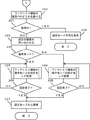
[Selection] Figure 1
Description
本発明は、複数の装置機能を1つの装置本体に統合してなる複合機に関する。 The present invention relates to a multi-function peripheral formed by integrating a plurality of device functions into one device body.
従来、複数の装置機能を1つの装置本体に統合してなる複合機は、例えば、コピー、ファクシミリ、スキャナ、および、プリンタそれぞれの装置機能ごとにアプリケーションプログラムがそれぞれ別々につくられていた。 2. Description of the Related Art Conventionally, in a multi-function apparatus in which a plurality of apparatus functions are integrated into one apparatus main body, for example, application programs are created separately for each apparatus function of a copy, facsimile, scanner, and printer.
一方、近年では、複数の機能を1つのアプリケーションプログラムに統合したものが考案されている。 On the other hand, in recent years, a system in which a plurality of functions are integrated into one application program has been devised.
また、複合機には動作時のデフォルト値、時刻、および、宛先表など各種の設定操作をユーザが行うことができる設定モードがあり、この設定モードでは動作に関係する値が変更できるので、動作中には設定モードに入れないようにしたり、設定モード中には動作しないようにしている。 In addition, the MFP has a setting mode that allows the user to perform various setting operations such as the default value, time, and destination table during operation. In this setting mode, values related to the operation can be changed. During the setting mode, it is not allowed to enter the setting mode or not to operate during the setting mode.
機能ごとにアプリケーションプログラムが動作している場合は、設定モードに入れるかどうかは各アプリケーション毎に判断ができ、例えば、ファクシミリ機能が動いている時でもコピー機能が動いていなければコピー機能の設定モードに入って設定を変更したりすることが可能である。
しかしながら、複数の装置機能処理を統合化した1つのアプリケーションプログラム(ソフトウェア)では、ユーザが操作しようとする設定内容とは関係の無い設定項目であってもアプリケーションプログラムが動作中であるために、実行できないという不具合を生じていた。例えば、ファクシミリ動作中にコピーに関連する設定を変更することができないといった不都合が生じてしまう。 However, in one application program (software) that integrates a plurality of device function processes, even if the setting item has no relation to the setting contents that the user wants to operate, the application program is in operation. There was a problem that it was not possible. For example, there arises a disadvantage that settings relating to copying cannot be changed during the facsimile operation.
本発明は、かかる実情に鑑みてなされたものであり、ユーザが適切な設定操作を行えるようにした複合機を提供すること目的とする。 The present invention has been made in view of such a situation, and an object of the present invention is to provide a multi-function machine that allows a user to perform an appropriate setting operation.
本発明は、複数の装置機能を1つの装置本体に統合してなる複合機において、上記複数の装置機能の制御処理を統合化した1つのソフトウェアで実現するシステム制御手段を備え、いずれかの装置機能について、ユーザが対応する設定操作を入力する際、当該設定操作入力を許可するか否かを判定するようにしたものである。 The present invention relates to a multi-function apparatus in which a plurality of device functions are integrated into a single device body, and includes a system control unit that realizes the control processing of the plurality of device functions with a single piece of software, Regarding the function, when the user inputs a corresponding setting operation, it is determined whether or not the setting operation input is permitted.
また、複数の装置機能を1つの装置本体に統合してなる複合機において、上記複数の装置機能の制御処理を統合化した1つのソフトウェアで実現するシステム制御手段を備え、いずれかの装置機能について、ユーザが対応する設定操作を入力する際、そのときに選択された装置機能処理を実行中でない場合に限り、当該設定操作入力を許可するようにしたものである。 In addition, in a multi-function peripheral in which a plurality of device functions are integrated into a single device body, the system control means for realizing the control processing of the plurality of device functions with a single software is provided. When the user inputs a corresponding setting operation, the setting operation input is permitted only when the apparatus function process selected at that time is not being executed.
また、前記設定操作は、通常設定に関するものと、保守設定に関するものの2種類があり、保守設定に関する設定操作が選択された場合には、操作権に関する認証を行うようにしたものである。 Further, there are two types of setting operations, those related to normal settings and those related to maintenance settings. When a setting operation related to maintenance settings is selected, authentication related to operation rights is performed.
したがって、本発明によれば、ユーザが操作しようとする設定操作の内容に関係のない動作を行っている場合には、当該設定操作を行うことができるので、ユーザの使い勝手が大幅に向上するという効果を得る。 Therefore, according to the present invention, when an operation irrelevant to the content of the setting operation to be operated by the user is performed, the setting operation can be performed, so that the user's convenience is greatly improved. Get the effect.
以下、添付図面を参照しながら、本発明の実施の形態を詳細に説明する。 Hereinafter, embodiments of the present invention will be described in detail with reference to the accompanying drawings.
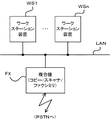
図1は、本発明の一実施例にかかる装置システムを示している。 FIG. 1 shows an apparatus system according to an embodiment of the present invention.
同図において、ローカルエリアネットワークLANには、複数のワークステーション装置WS1〜WSn、および、複合機FXが接続されている。 In the figure, a plurality of workstation devices WS1 to WSn and a multi-function device FX are connected to the local area network LAN.
この複合機FXは、コピー装置機能、スキャナ装置機能、および、ファクシミリ装置機能を備えており、スキャナ装置機能とファクシミリ装置機能は、ローカルエリアネットワークLANを介し、ワークステーション装置WS1〜WSnより利用可能になっている。 This multifunction machine FX has a copy apparatus function, a scanner apparatus function, and a facsimile apparatus function. The scanner apparatus function and the facsimile apparatus function can be used from the workstation apparatuses WS1 to WSn via the local area network LAN. It has become.
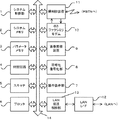
図2は、複合機FXの構成例を示している。 FIG. 2 shows a configuration example of the MFP FX.
同図において、システム制御部1は、この複合機FXの各部の制御処理、コピー装置機能制御処理、スキャナ装置機能制御処理、および、ファクシミリ装置機能制御処理などの各種制御処理を行うものである。ここで、システム制御部1が実行するコピー装置機能制御処理、スキャナ装置機能制御処理、および、ファクシミリ装置機能制御処理は、1つの装置機能アプリケーションプログラム(ソフトウェア)で実行される。
In FIG. 1, a
また、システムメモリ2は、システム制御部1が実行する制御処理プログラム、および、処理プログラムを実行するときに必要な各種データなどを記憶するとともに、システム制御部1のワークエリアを構成するものであり、パラメータメモリ3は、この複合機FXに固有な各種の情報を記憶するためのものであり、時計回路4は、現在時刻情報を出力するものである。
The
スキャナ5は、所定の解像度で原稿画像を読み取るためのものであり、プロッタ6は、所定の解像度で画像を記録出力するためのものであり、操作表示部7は、この複合機FXを操作するためのもので、各種の操作キー、および、各種の表示器からなる。
The
符号化復号化部8は、画信号を符号化圧縮するとともに、符号化圧縮されている画情報を元の画信号に復号化するためのものであり、画像蓄積装置9は、符号化圧縮された状態の画情報を多数記憶するためのものである。 The encoding / decoding unit 8 encodes and compresses the image signal, and also decodes the encoded and compressed image information into the original image signal. The image storage device 9 performs encoding and compression. This is for storing a large number of image information in the selected state.
グループ3ファクシミリモデム10は、グループ3ファクシミリのモデム機能を実現するためのものであり、伝送手順信号をやりとりするための低速モデム機能(V.21モデム)、および、おもに画情報をやりとりするための高速モデム機能(V.17モデム、V.34モデム、V.29モデム、V.27terモデムなど)を備えている。
The group 3
網制御装置11は、この複合機FXをアナログ公衆回線網PSTNに接続するためのものであり、自動発着信機能を備えている。
The
ローカルエリアネットワークインターフェース回路12は、この複合機FXをローカルエリアネットワークLANに接続するためのものであり、ローカルエリアネットワーク伝送制御部13は、ローカルエリアネットワークLANを介して、他のデータ端末装置との間で種々のデータをやりとりするための各種所定のプロトコルスイートの通信制御処理を実行するためのものである。
The local area network interface circuit 12 is for connecting the MFP FX to the local area network LAN, and the local area network
これらの、システム制御部1、システムメモリ2、パラメータメモリ3、時計回路4、スキャナ5、プロッタ6、操作表示部7、符号化復号化部8、画像蓄積装置9、グループ3ファクシミリモデム10、網制御装置11、および、ローカルエリアネットワーク伝送制御部13は、内部バス14に接続されており、これらの各要素間でのデータのやりとりは、主としてこの内部バス14を介して行われている。
The
また、網制御装置11とグループ3ファクシミリモデム10との間のデータのやりとりは、直接行なわれている。
Data exchange between the
ここで、本実施例において、基本的には、ローカルエリアネットワークLANに接続されている端末相互間でのデータのやりとりは、いわゆるTCP/IPと呼ばれるトランスポートレイヤまでの伝送プロトコルと、それ以上の上位レイヤの通信プロトコルとの組み合わせ(いわゆるプロトコルスイート)が適用して行われる。例えば、電子メールのデータのやりとりでは上位レイヤの通信プロトコルとしてSMTP(Simple Mail Transfer Protocol)という通信プロトコルが適用される。 Here, in the present embodiment, basically, data exchange between terminals connected to the local area network LAN is a transmission protocol up to a transport layer called TCP / IP, and more. This is performed by applying a combination with a higher layer communication protocol (so-called protocol suite). For example, in the exchange of e-mail data, a communication protocol called SMTP (Simple Mail Transfer Protocol) is applied as an upper layer communication protocol.
そして、複合機FXの機能のうち、例えば、ネットワークスキャナ機能を利用すると、複合機FXのスキャナ5で読み取って得た画像データを、ローカルエリアネットワークLANを介して、指定されたワークステーション装置WS1〜WSnへ送信することができる。また、ワークステーション装置WS1〜WSnへ送信する画像データの画像形式(画像フォーマット;TIFF,JPEGなど)を適宜に指定することもできる。
Of the functions of the multifunction machine FX, for example, when the network scanner function is used, the image data obtained by reading with the
ここで、複合機FXからワークステーション装置WS1〜WSnへのデータ送信については、電子メールを利用したり、適宜なピア・ツー・ピアのプロトコルを利用することができる。 Here, for data transmission from the multifunction machine FX to the workstation devices WS1 to WSn, an electronic mail or an appropriate peer-to-peer protocol can be used.
また、複合機FXの機能のうち、例えば、ネットワークファクシミリ機能を利用すると、ワークステーション装置WS1〜WSnで作成した送信文書を、ローカルエリアネットワークLANを介して複合機FXへ送信するとともに、ワークステーション装置WS1〜WSnより複合機FXへ送信宛先を指定し、その指定した送信宛先に対し、送信文書をファクシミリ送信するように指令することができる。 When the network facsimile function is used, for example, among the functions of the multifunction machine FX, the transmission document created by the workstation apparatuses WS1 to WSn is transmitted to the multifunction machine FX via the local area network LAN. It is possible to designate a transmission destination from WS1 to WSn to the MFP FX and to instruct the designated transmission destination to perform facsimile transmission of the transmission document.
ここで、ワークステーション装置WS1〜WSnから複合機FXへのデータ伝送は、例えば、FTPを利用したり、適宜なピア・ツー・ピアのプロトコルを利用することができる。 Here, the data transmission from the workstation devices WS1 to WSn to the MFP FX can use, for example, FTP or an appropriate peer-to-peer protocol.
さて、本実施例では、ユーザは、複合機FXの操作表示部7を適宜に操作することで、設定モードを要求することができ、コピー装置機能、スキャナ装置機能、および、ファクシミリ装置機能に関する種々の設定操作を行うことができる。なお、これらの各装置機能に関する設定機能の内容は、あらかじめそれぞれの装置機能について定められている。 In the present embodiment, the user can request the setting mode by appropriately operating the operation display unit 7 of the multifunction machine FX, and various functions relating to the copy apparatus function, the scanner apparatus function, and the facsimile apparatus function can be requested. Can be set. The contents of the setting functions relating to these device functions are determined in advance for each device function.
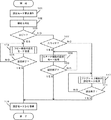
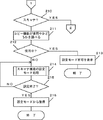
図3は、ユーザが設定モードを要求操作したときに、システム制御部1が実行する処理の一例を示している。なお、この処理は、基本的には、上述した装置機能アプリケーションプログラムに組み込まれているものである。
FIG. 3 shows an example of processing executed by the
まず、ユーザが設定モードを要求操作を行うと(処理101)、指定された装置機能を判定する(処理102)。次に、その判定した装置機能がコピー装置機能であるかどうかを調べ(判断103)、コピー装置機能である場合には(判断103の結果がYES)、対応するコピー装置機能についての設定モード処理を、ユーザの設定操作が終了するまで行う(処理104、判断105のNOループ)。
First, when the user performs an operation for requesting the setting mode (process 101), the designated device function is determined (process 102). Next, it is checked whether or not the determined device function is a copy device function (decision 103). If it is a copy device function (the result of
そして、ユーザが設定操作を終了して、判断105の結果がYESになると、設定モードから通常の動作モードへ復帰し(処理106)、このときの処理を終了する。
When the user ends the setting operation and the result of
また、処理102で判定した装置機能がコピー装置機能ではなく、判断103の結果がNOになるときには、スキャナ装置機能であるかどうかを調べる(判断107)。
If the device function determined in the
判断107の結果がYESになるときには、対応するスキャナ装置機能についての設定モード処理を、ユーザの設定操作が終了するまで行う(処理108、判断109のNOループ)。
When the result of
そして、ユーザが設定操作を終了して、判断109の結果がYESになると、処理106へ移行し、設定モードから通常の動作モードへ復帰して、このときの処理を終了する。
When the user finishes the setting operation and the result of
また、処理102で判定した装置機能がコピー装置機能でもスキャナ装置機能でもなく、判断107の結果がNOになるときには、処理102で判定した装置機能は、ファクシミリ装置機能である。そこで、この場合には、対応するファクシミリ装置機能についての設定モード処理を、ユーザの設定操作が終了するまで行う(処理110、判断111のNOループ)。
When the device function determined in
そして、ユーザが設定操作を終了して、判断111の結果がYESになると、処理106へ移行し、設定モードから通常の動作モードへ復帰して、このときの処理を終了する。
When the user finishes the setting operation and the result of
ところで、コピー装置機能、ファクシミリ装置機能(ファクシミリ送信機能およびファクシミリ受信機能)、および、スキャナ装置機能で必要とする入力リソースと、出力リソースは、例えば、図4に示したように一定している。 Incidentally, the input resources and output resources required for the copy device function, facsimile device function (facsimile transmission function and facsimile reception function), and scanner device function are constant as shown in FIG. 4, for example.
一方、複合機FXは、リソースの競合がない限り、複数の装置機能を同時並列的に実行することが可能であり、上述した装置機能アプリケーションプログラムでは、このような動作を行うことができる。 On the other hand, as long as there is no resource contention, the multi-function peripheral FX can execute a plurality of device functions simultaneously and in parallel, and the above-described device function application program can perform such operations.
また、入力リソースおよび出力リソースの占有状況に基づいて、どの装置機能が現在実行されているかを判断することができる。 Further, it is possible to determine which device function is currently being executed based on the occupation status of the input resource and the output resource.
そこで、上述した設定モードの作業を行う際、入力リソースおよび出力リソースの占有状況に基づいて、どの装置機能が現在実行されているかを判断し、要求された設定モードの内容と装置機能が競合する場合には、当該設定モード要求操作を禁止する一方、要求された設定モードの内容と装置機能が競合する場合しない場合には、当該設定モード要求操作を許可するようにすることで、要求された設定モードを適切に実行することができる。 Therefore, when performing the above-described setting mode operation, it is determined which device function is currently executed based on the occupation status of the input resource and the output resource, and the content of the requested setting mode conflicts with the device function. In such a case, the requested setting mode request operation is prohibited, and if the requested setting mode content and the device function do not conflict, the requested setting mode request operation is permitted. The setting mode can be appropriately executed.
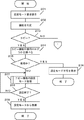
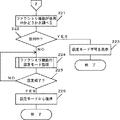
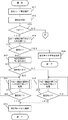
図5〜図7は、この場合に、ユーザが設定モードを要求操作したときに、システム制御部1が実行する処理の一例を示している。なお、この処理は、基本的には、上述した装置機能アプリケーションプログラムに組み込まれているものである。
5 to 7 show an example of processing executed by the
まず、ユーザが設定モードを要求操作を行うと(処理201)、指定された装置機能を判定する(処理202)。次に、その判定した装置機能がコピー装置機能であるかどうかを調べ(判断203)、コピー装置機能である場合には(判断203の結果がYES)、上述したように入力リソースと出力リソースの占有状況を調べて、コピー装置機能が使用中であるかどうかを調べる(処理204)。
First, when the user performs a setting mode request operation (process 201), the designated device function is determined (process 202). Next, it is checked whether or not the determined device function is a copy device function (decision 203). If it is a copy device function (the result of
コピー装置機能が使用中であり、判断205の結果がYESになるときには、ユーザに対して、要求された設定モードの操作を実行できない旨を、操作表示部7に表示して(処理206)、この処理を終了する。
When the copying apparatus function is in use and the result of
また、コピー装置機能が使用中ではなく、判断205の結果がNOになるときには、対応するコピー装置機能についての設定モード処理を、ユーザの設定操作が終了するまで行う(処理207、判断208のNOループ)。
If the copy device function is not in use and the result of
そして、ユーザが設定操作を終了して、判断208の結果がYESになると、設定モードから通常の動作モードへ復帰し(処理209)、このときの処理を終了する。
When the user ends the setting operation and the result of
また、処理202で判定した装置機能がコピー装置機能ではなく、判断203の結果がNOになるときには、スキャナ装置機能であるかどうかを調べる(判断210)。
If the device function determined in the
判断210の結果がYESになるときには、上述したように入力リソースと出力リソースの占有状況を調べて、スキャナ装置機能が使用中であるかどうかを調べる(処理211)。
When the result of
スキャナ装置機能が使用中であり、判断212の結果がYESになるときには、ユーザに対して、要求された設定モードの操作を実行できない旨を、操作表示部7に表示して(処理213)、この処理を終了する。
When the scanner device function is in use and the result of
また、スキャナ装置機能が使用中ではなく、判断205の結果がNOになるときには、対応するスキャナ装置機能についての設定モード処理を、ユーザの設定操作が終了するまで行う(処理214、判断215のNOループ)。
If the scanner device function is not in use and the result of
そして、ユーザが設定操作を終了して、判断215の結果がYESになると、設定モードから通常の動作モードへ復帰して(処理216)、このときの処理を終了する。
When the user ends the setting operation and the result of
また、処理202で判定した装置機能がコピー装置機能でもスキャナ装置機能でもなく、判断210の結果がNOになるときには、処理202で判定した装置機能は、ファクシミリ装置機能である。
When the device function determined in
そこで、この場合には、上述したように入力リソースと出力リソースの占有状況を調べて、ファクシミリ装置機能(ファクシミリ送信機能またはファクシミリ受信機能)が使用中であるかどうかを調べる(処理221)。 Therefore, in this case, as described above, the occupation state of the input resource and the output resource is checked to check whether the facsimile apparatus function (facsimile transmission function or facsimile reception function) is in use (processing 221).
ファクシミリ装置機能が使用中であり、判断222の結果がYESになるときには、ユーザに対して、要求された設定モードの操作を実行できない旨を、操作表示部7に表示して(処理223)、この処理を終了する。
When the facsimile apparatus function is in use and the result of
また、ファクシミリ装置機能が使用中ではなく、判断222の結果がNOになるときには、対応するファクシミリ装置機能についての設定モード処理を、ユーザの設定操作が終了するまで行う(処理224、判断225のNOループ)。
If the facsimile apparatus function is not in use and the result of
そして、ユーザが設定操作を終了して、判断225の結果がYESになると、設定モードから通常の動作モードへ復帰して(処理226)、このときの処理を終了する。
When the user ends the setting operation and the result of
このようにして、本実施例では、ユーザが設定操作を要求した装置機能が使用されている場合には、当該設定操作を許可せず、ユーザが設定操作を要求した装置機能が使用されていない場合に限って、当該設定操作を許可するようにしているので、適切な設定操作が可能となる。 Thus, in this embodiment, when the device function requested by the user for the setting operation is used, the setting operation is not permitted, and the device function requested by the user for the setting operation is not used. Since the setting operation is permitted only in the case, an appropriate setting operation can be performed.
ところで、設定モードで設定操作可能な項目については、通常のユーザが操作可能な項目と、特別なユーザ、例えば、サービスマンのみが操作可能な項目に分かれている場合がある。なお、これらの項目およびその区別については、それぞれの装置機能についてあらかじめ適宜に設定指されている。 By the way, the items that can be set and operated in the setting mode may be divided into items that can be operated by a normal user and items that can be operated only by a special user, for example, a service person. Note that these items and their distinctions are appropriately set in advance for each device function.
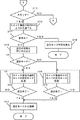
図8〜図10は、この場合に、ユーザが設定モードを要求操作したときに、システム制御部1が実行する処理の一例を示している。なお、この処理は、基本的には、上述した装置機能アプリケーションプログラムに組み込まれているものである。
8 to 10 show an example of processing executed by the
まず、ユーザが設定モードを要求操作を行うと(処理301)、指定された装置機能を判定する(処理302)。次に、その判定した装置機能がコピー装置機能であるかどうかを調べ(判断303)、コピー装置機能である場合には(判断303の結果がYES)、上述したように入力リソースと出力リソースの占有状況を調べて、コピー装置機能が使用中であるかどうかを調べる(処理304)。
First, when the user performs a setting mode request operation (process 301), the designated device function is determined (process 302). Next, it is checked whether or not the determined device function is a copy device function (decision 303). If it is a copy device function (the result of
コピー装置機能が使用中であり、判断305の結果がYESになるときには、ユーザに対して、要求された設定モードの操作を実行できない旨を、操作表示部7に表示して(処理306)、この処理を終了する。
When the copy apparatus function is in use and the result of
また、コピー装置機能が使用中ではなく、判断305の結果がNOになるときには、ユーザに対して、実行する設定モードが通常モードであるか保守モードであるかを問い合わせる(処理307)。ここで、通常モードとは、サービスマンではない通常のユーザに許可されている設定項目を設定操作できる設定モードをあらわし、また、保守モードとは、サービスマンに許可されている設定項目を設定操作できる設定モードをあらわす。
If the copy apparatus function is not in use and the result of
次いで、そのときに指定された設定モードが通常モードであるか否かを調べる(判断308)。判断308の結果がYESになるときには、対応するコピー装置機能についての通常モードの設定モード処理を、ユーザの設定操作が終了するまで行う(処理309、判断310のNOループ)。
Next, it is checked whether or not the setting mode designated at that time is the normal mode (decision 308). When the result of
そして、ユーザが設定操作を終了して、判断310の結果がYESになると、設定モードから通常の動作モードへ復帰し(処理311)、このときの処理を終了する。
When the user ends the setting operation and the result of
また、処理307で指定された設定モードが、保守モードであり、判断308の結果がNOになるときには、対応するコピー装置機能についての保守モードの設定モード処理を、ユーザの設定操作が終了するまで行う(処理312、判断313のNOループ)。
When the setting mode specified in the
そして、ユーザが設定操作を終了して、判断313の結果がYESになると、処理311へ移行して、設定モードから通常の動作モードへ復帰し、このときの処理を終了する。
When the user finishes the setting operation and the result of
また、処理302で判定した装置機能がコピー装置機能ではなく、判断303の結果がNOになるときには、スキャナ装置機能であるかどうかを調べる(判断315)。
If the device function determined in
判断315の結果がYESになるときには、上述したように入力リソースと出力リソースの占有状況を調べて、スキャナ装置機能が使用中であるかどうかを調べる(処理316)。
When the result of
スキャナ装置機能が使用中であり、判断317の結果がYESになるときには、ユーザに対して、要求された設定モードの操作を実行できない旨を、操作表示部7に表示して(処理318)、この処理を終了する。
When the scanner device function is in use and the result of
また、スキャナ装置機能が使用中ではなく、判断317の結果がNOになるときには、ユーザに対して、実行する設定モードが通常モードであるか保守モードであるかを問い合わせる(処理319)。
If the scanner device function is not in use and the result of
次いで、そのときに指定された設定モードが通常モードであるか否かを調べる(判断320)。指定された設定モードが通常モードであり、判断320の結果がYESになるときには、対応するスキャナ装置機能についての通常モードの設定モード処理を、ユーザの設定操作が終了するまで行う(処理321、判断322のNOループ)。
Next, it is checked whether or not the setting mode designated at that time is the normal mode (decision 320). When the designated setting mode is the normal mode and the result of
そして、ユーザが設定操作を終了して、判断322の結果がYESになると、設定モードから通常の動作モードへ復帰して(処理323)、このときの処理を終了する。
When the user ends the setting operation and the result of
また、処理319で指定された設定モードが保守モードであり、判断320の結果がNOになるときには、対応するスキャナ装置機能についての保守モードの設定モード処理を、ユーザの設定操作が終了するまで行う(処理324、判断325のNOループ)。
When the setting mode specified in the
そして、ユーザが設定操作を終了して、判断325の結果がYESになると、処理323へ移行し、設定モードから通常の動作モードへ復帰して、このときの処理を終了する。
When the user finishes the setting operation and the result of
また、処理302で判定した装置機能がコピー装置機能でもスキャナ装置機能でもなく、判断315の結果がNOになるときには、処理302で判定した装置機能は、ファクシミリ装置機能である。
If the device function determined in
そこで、この場合には、上述したように入力リソースと出力リソースの占有状況を調べて、ファクシミリ装置機能(ファクシミリ送信機能またはファクシミリ受信機能)が使用中であるかどうかを調べる(処理330)。 Therefore, in this case, as described above, the occupation state of the input resource and the output resource is checked to check whether the facsimile apparatus function (facsimile transmission function or facsimile reception function) is in use (process 330).
ファクシミリ装置機能が使用中であり、判断331の結果がYESになるときには、ユーザに対して、要求された設定モードの操作を実行できない旨を、操作表示部7に表示して(処理332)、この処理を終了する。
When the facsimile apparatus function is in use and the result of
また、ファクシミリ装置機能が使用中ではなく、判断331の結果がNOになるときには、ユーザに対して、実行する設定モードが通常モードであるか保守モードであるかを問い合わせる(処理333)。
If the facsimile apparatus function is not in use and the result of
次いで、そのときに指定された設定モードが通常モードであるか否かを調べる(判断334)。指定された設定モードが通常モードであり、判断334の結果がYESになるときには、対応するファクシミリ装置機能についての通常モードの設定モード処理を、ユーザの設定操作が終了するまで行う(処理335、判断336のNOループ)。
Next, it is checked whether or not the setting mode designated at that time is the normal mode (decision 334). When the designated setting mode is the normal mode and the result of
そして、ユーザが設定操作を終了して、判断336の結果がYESになると、設定モードから通常の動作モードへ復帰して(処理337)、このときの処理を終了する。
When the user ends the setting operation and the result of
また、処理333で指定された設定モードが保守モードであり、判断334の結果がNOになるときには、対応するファクシミリ装置機能についての保守モードの設定モード処理を、ユーザの設定操作が終了するまで行う(処理338、判断339のNOループ)。
When the setting mode specified in the
そして、ユーザが設定操作を終了して、判断339の結果がYESになると、処理337へ移行し、設定モードから通常の動作モードへ復帰して、このときの処理を終了する。
When the user finishes the setting operation and the result of
なお、上述した処理処理307,319,333において、設定の種類を問い合わせる際、保守モードが指定された場合には、適宜な認証を行い、当該認証を通過した場合のみ、次の処理ステップに進むように制御することもできる。 In the processing processes 307, 319, and 333 described above, when the maintenance mode is designated when inquiring the type of setting, appropriate authentication is performed, and only when the authentication is passed, the process proceeds to the next processing step. It can also be controlled.
ところで、上述した実施例では、複合機FXとして、コピー装置機能、スキャナ装置機能、および、ファクシミリ装置機能が統合された場合について説明したが、それ以外の装置機能の統合態様を備えた複合機についても、本発明を同様にして適用することができる。 By the way, in the above-described embodiments, the case where the copying apparatus function, the scanner apparatus function, and the facsimile apparatus function are integrated as the MFP FX has been described. However, the MFP having an integration mode of other apparatus functions is described. Also, the present invention can be applied in the same manner.
1 システム制御部
2 システムメモリ
3 パラメータメモリ
1
Claims (3)
上記複数の装置機能の制御処理を統合化した1つのソフトウェアで実現するシステム制御手段を備え、
いずれかの装置機能について、ユーザが対応する設定操作を入力する際、当該設定操作入力を許可するか否かを判定するようにしたことを特徴とする複合機。 In a multifunction device that integrates multiple device functions into one device body,
System control means for realizing the control processing of the plurality of apparatus functions with a single integrated software;
A multifunction device, wherein when a user inputs a corresponding setting operation for any device function, whether or not the setting operation input is permitted is determined.
上記複数の装置機能の制御処理を統合化した1つのソフトウェアで実現するシステム制御手段を備え、
いずれかの装置機能について、ユーザが対応する設定操作を入力する際、そのときに選択された装置機能処理を実行中でない場合に限り、当該設定操作入力を許可するようにしたことを特徴とする複合機。 In a multifunction device that integrates multiple device functions into one device body,
System control means for realizing the control processing of the plurality of apparatus functions with a single integrated software;
For any device function, when the user inputs a corresponding setting operation, the setting operation input is permitted only when the device function process selected at that time is not being executed. Compound machine.
Priority Applications (1)
| Application Number | Priority Date | Filing Date | Title |
|---|---|---|---|
| JP2003354683A JP2005123769A (en) | 2003-10-15 | 2003-10-15 | Compound machine |
Applications Claiming Priority (1)
| Application Number | Priority Date | Filing Date | Title |
|---|---|---|---|
| JP2003354683A JP2005123769A (en) | 2003-10-15 | 2003-10-15 | Compound machine |
Publications (1)
| Publication Number | Publication Date |
|---|---|
| JP2005123769A true JP2005123769A (en) | 2005-05-12 |
Family
ID=34612518
Family Applications (1)
| Application Number | Title | Priority Date | Filing Date |
|---|---|---|---|
| JP2003354683A Pending JP2005123769A (en) | 2003-10-15 | 2003-10-15 | Compound machine |
Country Status (1)
| Country | Link |
|---|---|
| JP (1) | JP2005123769A (en) |
Cited By (1)
| Publication number | Priority date | Publication date | Assignee | Title |
|---|---|---|---|---|
| JP2014068305A (en) * | 2012-09-27 | 2014-04-17 | Brother Ind Ltd | Radio communication system, radio communication device and communication control program |
-
2003
- 2003-10-15 JP JP2003354683A patent/JP2005123769A/en active Pending
Cited By (1)
| Publication number | Priority date | Publication date | Assignee | Title |
|---|---|---|---|---|
| JP2014068305A (en) * | 2012-09-27 | 2014-04-17 | Brother Ind Ltd | Radio communication system, radio communication device and communication control program |
Similar Documents
| Publication | Publication Date | Title |
|---|---|---|
| JP2001027986A (en) | Data processing device and processing unit selection method | |
| JP2004171515A (en) | Image forming apparatus and image data transfer method | |
| JP4367516B2 (en) | Image processing device | |
| JP2007079684A (en) | Processor | |
| JP2004350020A (en) | Image conversion service method and image conversion device | |
| JP2005024594A (en) | Network peripherals and printer drivers | |
| US7739458B2 (en) | Image forming apparatus, shared data management method and shared data management system | |
| JP2006209504A (en) | Network-compatible image forming apparatus | |
| JP2005123769A (en) | Compound machine | |
| JP2005176159A (en) | Compound machine | |
| JP2004104605A (en) | Image processing complex system, server device and scanner | |
| JP2011055289A (en) | Image forming apparatus, and method of acquiring operation screen | |
| JP2008098978A (en) | Multifunction machine and image storage method | |
| US8264713B2 (en) | Image forming apparatus, image forming method, and information processing apparatus | |
| JP2004282379A (en) | Facsimile machine and system | |
| JP2005173816A (en) | Image forming apparatus and authentication method | |
| JP2007098786A (en) | Image formation device and image forming system | |
| JP2003345713A (en) | Image forming apparatus, stored document output method, and stored document output system | |
| JP4605021B2 (en) | Document management device | |
| JP3936945B2 (en) | Image forming apparatus and program | |
| JP4334547B2 (en) | Image forming apparatus | |
| JP2000196845A (en) | Facsimile apparatus and control method thereof | |
| JP3742396B2 (en) | Image forming apparatus, thumbnail printing method, thumbnail output method, thumbnail printing system, and thumbnail output system | |
| JP2003264706A (en) | Network facsimile machine | |
| JP2003169169A (en) | Document transmission device |