JP2004246453A - Image system forming program, and image evaluation device - Google Patents
Image system forming program, and image evaluation device Download PDFInfo
- Publication number
- JP2004246453A JP2004246453A JP2003033395A JP2003033395A JP2004246453A JP 2004246453 A JP2004246453 A JP 2004246453A JP 2003033395 A JP2003033395 A JP 2003033395A JP 2003033395 A JP2003033395 A JP 2003033395A JP 2004246453 A JP2004246453 A JP 2004246453A
- Authority
- JP
- Japan
- Prior art keywords
- image
- comment
- area
- metadata
- point
- Prior art date
- Legal status (The legal status is an assumption and is not a legal conclusion. Google has not performed a legal analysis and makes no representation as to the accuracy of the status listed.)
- Pending
Links
- 238000011156 evaluation Methods 0.000 title claims description 26
- 230000015572 biosynthetic process Effects 0.000 claims 1
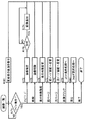
- 230000002596 correlated effect Effects 0.000 abstract 1
- 238000000034 method Methods 0.000 description 55
- 241000699666 Mus <mouse, genus> Species 0.000 description 51
- 238000012545 processing Methods 0.000 description 29
- 238000010586 diagram Methods 0.000 description 8
- 238000012544 monitoring process Methods 0.000 description 6
- 238000013461 design Methods 0.000 description 4
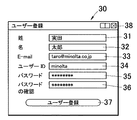
- 230000006870 function Effects 0.000 description 3
- 230000001174 ascending effect Effects 0.000 description 2
- 238000012217 deletion Methods 0.000 description 2
- 230000037430 deletion Effects 0.000 description 2
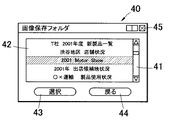
- 125000002066 L-histidyl group Chemical group [H]N1C([H])=NC(C([H])([H])[C@](C(=O)[*])([H])N([H])[H])=C1[H] 0.000 description 1
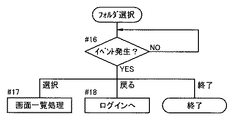
- 241000699670 Mus sp. Species 0.000 description 1
- 230000003915 cell function Effects 0.000 description 1
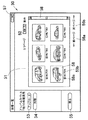
- 239000003086 colorant Substances 0.000 description 1
- 238000012790 confirmation Methods 0.000 description 1
- 230000000694 effects Effects 0.000 description 1
Images


Landscapes
- Processing Or Creating Images (AREA)
- User Interface Of Digital Computer (AREA)
Abstract
Description
【0001】
【発明の属する技術分野】
本発明は、コンピュータにより画像の評価を行う画像システム形成プログラム及び画像評価装置に関し、特に、インターネットなどにおいて画像の閲覧者からのコメントに基づいて画像を評価するための画像システム形成プログラム及び画像評価装置に関する。
【0002】
【従来の技術】
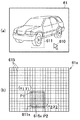
近年、デジタルカメラの普及により、撮影した画像を整理するための画像データベースの利用が拡大してきている。これらの画像データベースは、コンピュータにインストールされたプログラムにより検索や閲覧が行えるようになっている。また、画像を整理する際には、それぞれの画像に対応するコメントを入力し、それぞれの画像とそれに対応するコメントとを同時に表示画面に表して閲覧することができるようになっている。
【0003】
また、インターネットにアクセス可能なサーバ上に画像データを登録して、利用者がインターネットを通じて画像を閲覧できるサイト(フォトサイト)が多く開設されている。この場合において、上記画像の検索や閲覧を行うためのプログラムは、上記サーバ上に配され、各利用者は、当該フォトサイトにアクセスすることにより、上記画像データベースを操作することができる。
【0004】
これらのフォトサイトでは、不特定の者が、登録されている画像を閲覧して、各画像に対するコメントを送信することができる。そして、不特定の者からコメントと画像とを対応付けて同時に表示して閲覧できるようになっている。
【0005】
例えば、特許文献1には、画像に対する注釈を付す場合に、画像の特定の領域を決定し、アイコンと対応付けられたメタデータを当該領域と対応付けすることにより、画像全体の中の一部に注釈を付す技術が開示されている。したがって、不特定の者によって多くの注釈が付された領域は、多数の者が意見を入力したこととなり、これを当該画像についての注目度として観念することができる。
【0006】
上記技術においては、領域にアイコンが付されることにより領域と注釈の対応づけが行われているため、当該領域にいくつのアイコンが付されているかにより、注釈の数を識別することができる。しかしながら、このような注釈の数をカウントすることだけでは、注目度をわかりやすく表示することができなかった。特に特定の領域をユーザーが任意に設定できるような場合、複数の領域がまったく同じ形状、大きさを有する場合はほとんどないため、1つの領域に関連付けられたコメントの数のみがカウントされることとなる。すなわち、注釈を付す者によって決定された領域を基準として、その領域ごとの評価となっていた。また、異なる複数の領域が部分的に重なり部分を有する場合、その重なり部分については、いずれかの領域の一部として注釈の数をカウントされることとなり、注釈が付される際に重なって評価されているという事実を勘案して正確に評価することは困難であった。
【0007】
【特許文献1】
特開2002−55748号公報
【0008】
【発明が解決しようとする課題】
したがって、本発明が解決しようとする技術的課題は、画像の一部分に付された注釈を用いて画像についての注目度をわかりやすくかつ正確に出力することができる画像システム形成プログラム及び画像評価装置を提供することである。
【0009】
【課題を解決するための手段】
本発明は、上記技術的課題を解決するために、本発明の画像システム形成プログラムは、画像評価を行うためにコンピュータを、画像と前記画像内の一部分である指定領域について関連付けられたメタデータとの対応付けを行うメタデータ管理手段、前記画像を細分化したセルとして分割して領域管理する画像分割管理手段、前記メタデータ管理手段により指定された指定領域と共通する領域に属するセルを選択するセル選択手段、前記メタデータに基づいて前記セル選択手段により選択された前記セルごとにポイント情報を作成するポイント作成手段、前記ポイント作成手段により作成されたポイント情報を集計して各セルごとに出力するポイント出力手段、として機能させる。
【0010】
上記構成において、画像の一部分の指定領域に注釈として付されたメタデータは、当該画像について閲覧者が関心を持った部分を判断する指標として用いることができると考えた。上記構成においては、当該メタデータと対応付けられている画像の一部分である指定領域は、細分化されたセルの集合として概念する。画像のうちセルとして細分化されて管理される部分は、画像の全域であってもよいし、一部分であってもよい。すなわち、一律にあるいは、利用者が自由に選択して、当該画像について評価したい領域について細分化すればよい。例えば、画像の全域について評価したい場合は、全域について細分化する。
【0011】
メタデータ管理手段によって、画像の一部の指定領域について、注釈であるメタデータが対応付けて管理されている。当該指定領域と共通する領域を有する1以上のセルについて、メタデータに基づいてセルごとにポイント情報が作成される。ポイント情報は、メタデータの数、閲覧開数、閲覧時間などの情報に基づいて作成されることが好ましい。また、このポイント情報を作成するための情報はユーザーの操作により、適宜選択することができるように構成されていることが好ましい。
【0012】
ポイント情報は、各セルごとに集計される。例えば、1つのセルが複数の指定領域に属する場合は、それぞれの指定領域に対応付けられたメタデータに基づいて作成される複数のポイント情報を集計する。セルごとに集計されたポイント情報は、各セルごとに分けて出力される。出力例としては、集計されたポイント情報が各セルごとに分布されたポイント分布マップとして出力することが好ましい。
【0013】
上記構成によれば、画像の一部分の指定領域に注釈として付されたメタデータを当該画像について閲覧者が関心を持った部分を判断する指標とすることができる。したがって、例えば、webサーバのような多人数でコメントを付すような場合、客観的に画像中のどの領域(画像に写っている被写体)にどういう関心が集まっているかについて集計することができ、これをわかりやすく出力することができる。
【0014】
本発明の画像システム形成プログラムは、具体的には以下のように種々の態様で構成することができる。
【0015】
好ましくは、前記メタデータは、文字情報、音声情報、画像情報の少なくとも2種以上を含む。
【0016】
また、上記構成において好ましくは、前記ポイント出力手段は、前記メタデータの種類を区別してポイント情報を集計する。
【0017】
上記構成によれば、メタデータの種類別にポイント情報を得ることができ、種類別に関心度を判断することができる。また、例えば、ポイント情報の作成に際して、これらの情報を自由に選択することができるようにしてもよい。
【0018】
また、前記メタデータ管理手段は、指定領域を矩形とし、その対角点を特定することにより、指定領域を対応付けすることが好ましい。上記構成によれば、指定領域を特定するための情報量を少なくすることができ、処理を簡潔かつ迅速に行うことができる。
【0019】
前記画像分割管理手段は、前記画像を構成するピクセルごとに、それぞれのセルを分割してもよい。上記構成によれば、各セルの情報を画像のピクセルと一致させることができるため、各セルと画像の領域の対応づけを容易に行うことができ、また、各セルが小さく構成されるため、ポイント情報をより詳細に作成することができる。
【0020】
また、本発明は、画像と前記画像内の一部分である指定領域について関連付けられたメタデータとの対応付けを行うメタデータ管理手段と、前記画像の全域を細分化したセルとして分割して領域管理する画像分割管理手段と、前記メタデータ管理手段により指定された指定領域と共通する領域に属するセルを選択するセル選択手段と、前記メタデータに基づいて、前記セル選択手段により選択された前記セルごとにポイント情報を作成するポイント作成手段と、前記ポイント作成手段により作成されたポイント情報に基づいて各セルごとに出力するポイント出力手段と、を備える画像評価装置を提供する。
【0021】
【発明の実施の形態】
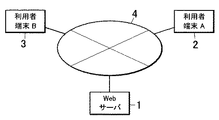
以下、本発明の一実施形態にかかる画像評価システムについて、図面を参照しながら説明する。図1は、本実施形態にかかる画像評価システムの構成図である。本実施形態にかかる画像評価システムは、インターネット4に接続されたネットワークシステムである。画像評価システムは、本発明の画像評価装置として機能するwebサーバ1と、当該サーバ1にインターネット4を通じて接続可能な複数の利用者端末2,3から構成されている。それぞれの利用者端末2、3からは、webサーバ1上に開設されたサイトにインターネットを通じてアクセスして、当該サーバ1を操作することができるようになっている。
【0022】
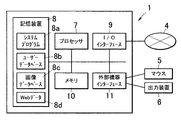
図2は、図1にかかる画像評価システムのwebサーバの構成を示すブロック図である。webサーバ1は、外部機器としてマウス5及びディスプレイやプリンタなどの出力機器6と接続して用いることができる。当該外部機器と接続される場合は、外部機器インターフェース11が司る。また、インターネット4との接続を司るI/Oインターフェース9、webサーバ1の処理全体を司るプロセッサ7、プロセッサの演算領域などとして機能するメモリ10及び、画像システム形成プログラム及びデータベースなどを格納する記憶装置8とを備え、それぞれは、バス12で互いに接続されている。
【0023】
記憶装置8は、以下の複数のプログラム及びデータベースを備えており、これらが適宜起動することによりwebサーバのプロセッサ7に以下に示す種々の機能を実行させる。システムプログラム8aは、webサーバ1が画像評価装置として機能する場合の主な処理、演算を実行させるための画像システム形成プログラムである。ユーザーデータベースは、当該システムプログラム8aを操作することができるユーザーを管理するためのデータベースである。画像データベース8cは、webサイト上に配する画像及び当該画像に付された注釈であるメタデータの管理を行うためのデータベースである。webデータ8dは、webサーバ1に配されるサイトに用いられるwebデータである。
【0024】
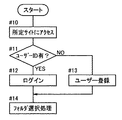
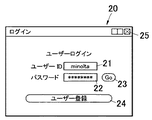
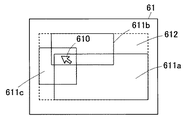
次に本実施形態にかかる画像評価システムの処理の流れについて説明する。図3は、画像評価システムにおける動作処理のフローチャートである。まず、ユーザーは、自己の利用者端末2,3を操作して、任意のwebブラウザにより、当該webサーバに開設されたサイトにインターネット4を通じてアクセスする(#10)。これにより、サーバ1に格納されているプログラムが起動され、図4に示すようなログイン画面20が利用者端末の表示画面に表示される。
【0025】
ユーザーがすでにユーザーIDを取得している場合は、ユーザーは、ユーザーID及びパスワードをそれぞれテキストボックス21、22に入力した後、GOボタン23を選択することによりログインすることができる(#12)。これにより、ステップ#14に移行して、図6に示すフォルダ選択処理が呼び出される。なお、ログイン画面20において、終了ボタン25を選択すると、当該プログラムが終了する。
【0026】
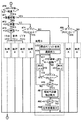
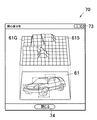
一方、ユーザーがユーザーIDをまだ取得していない場合は、ユーザー登録ボタン24を選択することにより、ステップ#13に移行し、図5に示すユーザー登録画面30が表示画面に表示される。ユーザーは、ユーザー登録画面30において、姓、名、メールアドレスをテキストボックス31、32、33にそれぞれ入力する。
【0027】
また、ユーザーが所望するユーザーID及びパスワードをそれぞれテキストボックス34、35に入力する。その後、確認のためテキストボックス36に再度パスワードを入力する。これらの入力が終了したのち、ユーザー登録ボタン37を選択すると、これらの情報がwebサーバ1に送信され、webサーバ1は、ユーザーデータベースに当該入力されたユーザーIDが取得されているかについて照会する。入力されたユーザーIDがユーザーデータベースにおいて、未使用のものである場合は、ログインすることができ、ステップ#14に移行して図6に示すフォルダ選択処理が呼び出される。
【0028】
一方、同一のユーザーIDがすでに取得されている場合は、その旨を警告後、ユーザーIDのテキストボックス34を空白にして再びユーザー登録画面を表示して、新しいユーザーIDの入力を促す。
【0029】
なお、ユーザー登録画面30において、任意のタイミングで終了ボタン38を選択すると、プログラムが終了する。
【0030】
フォルダ選択処理では、図7に示すようなフォルダ選択画面40が表示される。フォルダ選択画面40内には、リストボックス42が設けられる。リストボックス42には、画像ファイルが保存されたフォルダの名称の一覧が表示され、ユーザーは、必要に応じてスクロールバー41を操作してスクロールしてフォルダの閲覧を行う。
【0031】
図6はフォルダ選択画面での処理の流れを示すフロー図である。フォルダ選択画面では、ステップ#16において、ユーザーの操作によりイベントが発生したか否かが監視される。イベントが発生すると、各イベントに応じた処理が行われる。ユーザーは、当該画面において、上述のように必要に応じてスクロールバー41を操作し、リストボックス42の表示をスクロールして、任意のフォルダを選択する。その後、選択ボタン43を選択すると、ステップ#17に移行し、画像一覧処理に移行し、画像一覧画面が表示される。
【0032】
フォルダ選択画面40において、戻るボタンを選択すると、ステップ#18によりログイン画面20に戻る。また、終了ボタン45を選択すると、当該プログラムが終了する。
【0033】
図8は、画像一覧画面の画面表示例である。画像一覧画面50には、先のステップで選択されたフォルダに格納されている画像ファイルが一覧表示される。画像一覧画面50内には、リストボックス51が設けられる。リストボックス51には、webサーバ1内の画像データベース8cに保存された画像ファイルの画像が、サムネイル表示される。ユーザーは、必要に応じてスクロールバー58を操作することにより、リストボックス51に表示される画像をスクロールして、画像を閲覧することができる。
【0034】
図9は、画像一覧画面での処理の流れを示すフロー図である。画像一覧画面では、ステップ#171において、ユーザーの操作によりイベントが発生したか否かが監視される。イベントが発生すると、各イベントに応じた処理が行われる。
【0035】
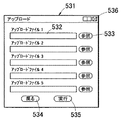
アップロードボタン53を選択すると、ステップ#172に移行して、図10に示すファイル指定画面531が表示される。ファイル指定画面531は、webサーバ1の画像データベース8cに登録される画像ファイルの指定ができるようになっている。
【0036】
ファイル指定画面531には、webサーバ1にアップロードする画像ファイルのファイル名を入力する複数のテキストボックス532が設けられている。ユーザーは、自己が操作するユーザー端末2、3のローカルフォルダに保存された画像ファイルのファイル名をテキストボックス532に入力する(#172)。この際、参照ボタン533を操作することにより、自己のユーザー端末のローカルフォルダ内から画像ファイルを検索して、テキストボックス532にファイル名を入力することができる。
【0037】
テキストボックス532にファイル名を入力したのち、実行ボタン535を選択すると、ステップ#173で指定ファイルがアップロードされ、フォルダ選択画面40で選択したフォルダ内に画像ファイルが追加され、ステップ#181により画像ファイルが追加された変更後の状態で図8に示す画像一覧画面50が表示される。一方、ステップ#172、#173において、戻るボタン534を選択すると、アップロードが行われずに、ステップ#181を経て画像一覧画面50が表示される。また、終了ボタン536を選択すると、当該プログラムが終了する。
【0038】
画像一覧画面50のイベント監視状態(#171)から削除ボタン54が選択されると、ステップ#175により画像ファイルの削除が行われる。具体的には、リストボックス51に表示された画像58には、チェックボックス59a及びファイル名59bが付記されており、チェックボックス59aに予めチェックされた画像ファイルが削除ボタン54の選択により、画像データベースから削除される。そして、画像一覧画面50は、当該画像ファイルが削除された変更後の状態で表示される(#181)。
【0039】
画像一覧画面50のイベント監視状態(#171)から表示枚数変更のコンボボックス52を操作すると、ステップ#176へ移行する。コンボボックスは、1画面のリストボックス51に一度に表示可能な画像ファイルの枚数を指定するものであり、ステップ#176において、コンボボックス52により選択された枚数の画像ファイルが、リストボックス51に表示される。そして、画像一覧画面50は、当該画像ファイルの表示枚数が変更された変更後の状態で表示される(#181)。なお、画像ファイルの表示枚数が多く、1枚のリストボックス51内にすべてを表示することができない場合は、スクロールバー58を操作することにより、リストボックス51内の画像をスクロールして表示させることができる。
【0040】
画像一覧画面50のイベント監視状態(#171)から前ページリンク56a又は次ページリンク56bを選択すると、それぞれ、ステップ#177、ステップ#178へ移行して前ページ又は次ページの画面に切り換わり、画像一覧画面50は、当該画像ファイルが前ページ又は次ページに表示される画像データに切り換わった変更後の状態で表示される(#181)。
【0041】
画像一覧画面50のイベント監視状態(#171)からリストボックス51内の画像をクリック又はダブルクリックなどの操作を行うと、ステップ#179に移行して、コメント掲示板処理が呼び出され、図11に示すコメント掲示板画面が表示される。
【0042】
画像一覧画面50のイベント監視状態(#171)から戻るボタン55を選択すると、ステップ#14のフォルダ選択処理が呼び出され、図7に示すフォルダ選択画面が表示される。
【0043】
また、画像一覧画面50において、任意のタイミングで終了ボタン57を選択すると、プログラムが終了する。
【0044】
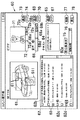
図11にコメント掲示板画面の画面表示例を示す。コメント掲示板画面60には、画像一覧画面50において指定された画像ファイルの画像61、コメントを入力するテキストボックス64、掲示板に公開されたコメントの一覧を表示するリストボックス62、ビデオ画像によりコメントが付された場合に当該ビデオを再生する再生画面71、ビデオデータによるコメントの再生、録画などの処理を行うためのビデオツールバー72、音声データによるコメントの再生、録音などの処理を行うための音声ツールバー68、当該画像に付されたコメントに基づいて集計される関心度の表示を行うための関心度表示ボタン75、関心度表示を行う場合の集計方法を選択するコンボボックス76などが表示されている。
【0045】
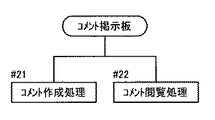
コメント掲示板画面60では、図12に示すように、大きく分けてステップ#21のコメント作成処理(既登録のコメントを削除する処理も含む。)及びステップ#22のコメント閲覧処理(画像の関心度表示の処理も含む。)の2つの処理が行われる。まず、コメント作成処理(#21)について説明する。
【0046】
図13は、コメント作成処理の初期処理の流れを示すフロー図である。コメント作成処理においては、コメント掲示板画面において、ユーザーの操作によりイベントが発生したか否かが監視される(#23)。イベントが発生すると、以下に示す処理が行われる。
【0047】
図14(a)は、コメント掲示板画面60に表示される画像を示す図である。画像61は、1枚の画像データから構成されると共に、図14(b)に示すように、当該画像の全域が、小さいセル615に分割された状態で管理されている。すなわち、画像上の任意の点がいずれのセルに属するかが一律に決定される。なお、セルは、画像61の領域管理を行うための概念的なものであるため、図14(b)に示されたセルに分割された画像は、コメント掲示板画面60には表示されていない。また、セルの大きさは、例えば、画像の大きさ(ピクセル数)に応じて適宜設定することができ、例えば、最小単位として画像を構成するピクセル自体をセルとしてもよいし、数ピクセルごとに1つのセルとして領域管理してもよい。
【0048】
ユーザーがマウスなどのポインティングデバイスを操作し、コメント掲示板画面60においてポインタ610を移動させて画像61上をでドラッグ(#24)すると、ドラッグの始点および終点を対角点(図14においては、左上点P1及び右下点P2)とする入力候補の矩形マーク610を作成し、画像上に表示する。このときに表示される矩形マークは、点滅表示される。なお、すでに画像61に未確定の矩形マーク(図示なし)が表示されている場合は、新たに画像上においてドラッグが開始されることにより、先に表示されている矩形マークは消去され、現在ドラッグされている矩形マークが作成、表示される。
【0049】
矩形マークは、図14(b)に示すように、その対角点P1、P2の画像上の座標(x1、y1)及び(x2、y2)により画一的に決定される。そして、この矩形マーク611xと共通する領域に存在するセル615xが抽出され、当該矩形マーク611に対応するセルが決定する。
【0050】
このようにして、選択領域が指定されると(#25)、所望の選択領域ごとにコメントを関連付けることができるようになっている。このコメントを入力するための処理として、メタデータ入力処理(#26)が行われる。なお、本実施形態におけるメタデータとして、テキストデータ、音声データ、ビデオデータの3種類を用いることができ、それぞれ以下のようにして入力される。
【0051】
図15は、メタデータ入力処理の流れを示すフロー図である。メタデータ入力処理(#26)は、入力されるメタデータの種類に応じて、その処理及び画面上において操作するボタンが異なる。
【0052】
まず、入力するメタデータとして、テキストデータを用いる場合について説明する。テキストデータの入力(#126)において、ユーザーは、入力したいテキストデータをテキストボックス64に入力する(#127)。このとき入力ミスや、再入力をした場合などは、クリアボタン67を選択(#128)することにより、テキストボックス64内のテキストデータが消去される(#130)ので、テキストボックス64にテキストデータを再入力する。
【0053】
テキストボックス64内へのテキストデータの入力が終了し、当該テキストデータをコメントとして登録したい場合、ユーザーは、追加ボタン65を選択する(#129)。追加ボタン65の選択により、以下に示す登録のための処理が開始される。
【0054】
次に、入力するメタデータとして、音声データを用いる場合について説明する。音声データの入力(#226)において、ユーザーが音声ツールバー68の録音ボタン68aを選択すると、利用者端末に対して、ローカルのサウンド入力デバイスを駆動させて録音が開始される。音声データは、最大録音時間が予め決定されており、残りの録音可能時間については、音声ツールバー68のインジケータ68dによって確認することができる。インジケータ68dが図11において右端に移動した場合、最大録音可能時間が経過したことにより、自動的に録音が終了するが、ユーザーが任意のタイミングで停止ボタン68cを選択することにより、録音を途中で停止することができる。録音された音声データは、利用者端末のテンポラリフォルダに保存され、音声ツールバー68の近傍に録音済み音声データが存在していることを示すアイコン68eが表示される。
【0055】
録音済の音声データが、利用者端末のテンポラリーフォルダに格納されている場合において、当該音声データを消去する場合には、クリアボタン70を選択(#228)することにより、当該音声データが消去され、同時にアイコン68eを消去する(#230)。
【0056】
録音された音声データを確認したい場合は、音声ツールバー68の再生ボタン68bを選択する。音声データの再生は、インジケータ68dのスライドを任意の場所に移動した後で再生ボタン68bを選択することにより、任意の位置から再生を行うことができる。音声データの再生中に、停止ボタン68cを選択することにより再生を停止することができる。
【0057】
録音された音声データを登録したい場合には、ユーザーは、追加ボタン69を選択する(#229)追加ボタン69の選択により、以下に示す登録のための処理が開始される。
【0058】
次にメタデータとして、ビデオデータを用いる場合について説明する。ビデオデータの入力(#326)において、ユーザーがビデオツールバー72の録画ボタン72aを選択すると、利用者端末に対して、ローカルのビデオ入力デバイスを駆動させて録画が開始される。ビデオデータは、最大録画時間が予め決定されており、残りの録画可能時間については、ビデオツールバー72のインジケータ72dによって確認することができる。インジケータ72dが図11において右端に移動した場合、最大録画可能時間が経過したことにより、自動的に録画が終了するが、ユーザーが任意のタイミングで停止ボタン72cを選択することにより、録画を途中で停止することができる。録画されたビデオデータは、利用者端末のテンポラリフォルダに保存され、再生画面71に先頭画像が表示される。
【0059】
録画済のビデオデータが、利用者端末のテンポラリーフォルダに格納されている場合において、当該ビデオデータを消去する場合には、クリアボタン74を選択(#328)することにより、当該ビデオデータが消去され、同時に再生画面71に表示されている先頭画像が消去される(#330)。
【0060】
録画されたビデオデータを確認したい場合は、ビデオツールバー72の再生ボタン72bを選択する。ビデオデータの再生は、インジケータ72dのスライドを任意の場所に移動した後で再生ボタン72bを選択することにより、任意の位置から再生を行うことができる。ビデオデータの再生中に、停止ボタン72cを選択することにより再生を停止することができる。
【0061】
録画されたビデオデータを登録したい場合には、ユーザーは、追加ボタン73を選択する(#329)追加ボタン73の選択により、以下に示す登録のための処理が開始される。
【0062】
上記のように、登録したいメタデータの入力が種類に応じて終了し、それぞれのメタデータの種類に対応した登録のための追加ボタン65、69、73が選択されると(#129、#229、#329)、上記のステップ#25において決定した指定領域を取得し(#31)、webサーバ1の画像データベースに登録され、コメント掲示板画面においては、画像61中の指定領域に関連するコメントとして掲示板に追加される。
【0063】
リストボックス62内におけるコメントの表示位置については、リストボックス62中のチェックボックス63にチェックがされているか否かによって決定される。具体的には、いずれかの既登録のコメントに対するチェックボックス63にチェックがされている場合は、チェックが入っている当該コメントの下層に追加する(#33)。チェックボックス63は、1つのみチェックすることができる。一方。チェックボックス63にチェックがされていない場合は、当該登録されるコメントは、最上位のコメントとして追加される(#34)。このとき、画像データベース8cには、当該コメントが示す領域及び入力されたメタデータが対応付けて記憶される。指定領域の情報としては、上述のように、2つの対角点の画像上の座標値を用いる。
【0064】
リストボックス62にコメントとして登録されたメタデータは、その種類によってリストボックス62内での表示形態が異なる。コメントがテキストデータの場合は、その文字情報62bが直接表示される。コメントが音声データの場合は、上記のステップ#33,#34により決定した位置に音声アイコン62cを表示する。コメントがビデオデータの場合は、上記のステップ#33,#34により決定した位置に、ビデオアイコン62dを表示する。
【0065】
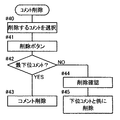
次に、登録されたコメントを削除する処理について説明する。図16は、コメント削除の処理フロー図である。コメント削除は、自己が登録したコメントのみを削除できるように限定してもよいし、任意の者があらゆるコメントを削除できるようにしてもよい。
【0066】
画面にコメント掲示板画面が表示されている場合は、上述のようにイベント監視状態となっている。この状態において、既登録のコメントを削除する場合は、まず、削除するコメントを選択する(#40)。具体的には、マウスなどを操作して、削除したいコメントのチェックボックス63をチェックする。削除したいコメントが決定すると、削除ボタン77を選択する(#41)ことにより、当該選択されたコメントが削除される。コメントの削除においては、選択されたコメントがどの層に設けられているかにより処理が異なる。すなわち、削除されるコメントが最下層のコメントである場合は、削除ボタン77の選択によりそのまま当該コメントを削除する(#43)。一方、最下層のコメントではない場合は、選択されたコメントよりも下層に存在するコメントと共に削除するかどうかの確認を行い(#44)、ユーザーの確認が取れたことを条件として、下位のコメントと共に削除する。
【0067】
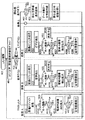
次にコメント掲示板画面60におけるステップ#22のコメント閲覧処理(画像の関心度表示の処理も含む。)について説明する。図18及び図19は、コメント閲覧処理の流れを示すフロー図である。
【0068】
リストボックス62はその大きさに応じて、一画面に表示することができるコメントの数が限られている。リストボックス62に表示しきれないコメントは、リストボックス62のスクロールバー62aの操作によりスクロールすることにより切り替える表示することができる。画像61中には、リストボックス62に表示されているコメントに関連付けられている指定領域枠611のみが表示されており、スクロールバー62aの操作に伴い、リストボックス62に表示されるコメントが切り換わることによって、指定領域枠611の表示も切り換わって表示される。
【0069】
登録されたコメントを閲覧する操作としては、リストボックス62に表示されているコメント又はアイコンを操作して閲覧する方法と、画像61の領域を選択して表示する方法がある。いずれの場合においても、リストボックス62中のコメントと画像61の指定領域は連働しており、いずれかが選択された場合は、対応する他方が強調表示される。
【0070】
まず、リストボックス62内のコメントが選択された場合についての閲覧処理について説明する。
【0071】
マウスポインタ610(図14参照)が画像61及びリストボックス62のいずれにも存在しない場合、イベント発生待ちの状態となっており、コメント62b、アイコン62c、62d及び関連する指定領域の枠線の色はデフォルトの状態となっており(#51)、コメント文字は黒色表示、アイコンは標準時の表示色(黒色)、指定領域の枠線は黒色表示されている。
【0072】
テキストコメントの閲覧においては、マウスポインタがリストボックスのテキストコメント上に移動すると、そのコメントに関連するオブジェクト(当該テキストコメント及び当該コメントの指定領域枠)が赤色に変色する(#153)。マウスポインタをテキストコメントの外へ移動することなく(#154のNo)、マウスをクリックすると(#155)、関連領域を抽出して、再生画面71に拡大表示する(#156)。マウスを再度クリック(#157)すると、再生画面71が全体画像に戻り(#158)、テキストコメントの閲覧が終了する。
【0073】
一方、これらの処理のいずれかのタイミングで、マウスポインタが、テキストコメントから外れると、テキストコメントと指定領域枠の色が元の黒色に戻り、閲覧処理が終了してイベント待ちの状態となる。
【0074】
音声コメントの閲覧においては、マウスポインタを音声アイコン上に移動させることにより行うことができる。
【0075】
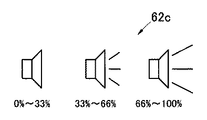
リストボックス62内の音声コメントのアイコン62cは、音声コメントが再生された時間の割合の平均によって当該コメントの重要度が判定され、当該重要度に応じてリストボックス62内のアイコンのデザインを変えて表示する。具体的には、(ユーザー画実際に再生した時間)/(コメントの録音時間)の平均で重要度を判定し、重要度が、0〜33%未満、33〜66%未満、66〜100%の3段階に分けて、図17に示すように3種類のアイコンを表示する。ユーザーは、アイコンデザインから、当該音声データを実際に再生することなく、事前にその重要度を判断でき、どの音声コメントから再生すればよいかの指標とすることができる。
【0076】
マウスポインタが音声アイコン上に移動すると、関連オブジェクトである音声アイコン及び当該コメントの指定領域枠が赤色に変色する(#253)。その後、当該音声データの再生が開始される(#254)。マウスポインタを音声アイコン62cの外へ移動することなく(#255のNo)、マウスをクリックすると(#256)、関連領域を抽出して、再生画面71に拡大表示する(#257)。マウスを再度クリック(#258)すると、再生画面71が全体画像に戻り(#259)、音声コメントの閲覧が終了する。
【0077】
一方、これらの処理のいずれかのタイミングで、マウスポインタが、音声アイコンから外れると、音声データの再生が終了すると共に、音声アイコンと指定領域枠の色が元の黒色に戻り、閲覧処理が終了してイベント待ちの状態となる。
【0078】
ビデオコメントの閲覧においては、マウスポインタをビデオアイコン上に移動させることにより行うことができる。
【0079】
リストボックス62内のビデオコメントのアイコンは、音声アイコンと同様に、ビデオコメントが再生された時間の割合の平均によって当該コメントの重要度が判定され、当該重要度に応じてリストボックス62内のアイコンのデザインを変えて表示される。よって、ユーザーは、アイコンデザインから、当該ビデオデータを実際に再生することなく、事前にその重要度を判断でき、どのビデオコメントから再生すればよいかの指標とすることができる。
【0080】
マウスポインタがビデオアイコン上に移動すると、関連オブジェクトであるビデオアイコン及び当該コメントの指定領域枠が赤色に変色する(#353)。その後、当該ビデオデータの再生が開始される(#354)。マウスポインタをビデオアイコン62cの外へ移動することなく(#355のNo)、マウスをクリックすると(#356)、関連領域を抽出して、再生画面71に拡大表示する(#357)。マウスを再度クリック(#358)すると、再生画面71が全体画像に戻り(#359)、テキストコメントの閲覧が終了する。
【0081】
一方、これらの処理のいずれかのタイミングで、マウスポインタが、ビデオアイコンから外れると、ビデオデータの再生が終了すると共に、ビデオアイコンと指定領域枠の色が元の黒色に戻り、閲覧処理が終了してイベント待ちの状態となる。
【0082】
次に、画像61の指定領域が選択された場合についての閲覧処理について説明する。画像の指定領域が選択された場合のコメントの閲覧は、1つの指定領域に複数のコメント(階層的に付されたコメントを含む)が付されている場合や、画像上のある点が複数の指定領域に重なっている場合などがあることから、上記のリストボックス62のコメントが選択される場合と処理手順が以下のように異なっている。
【0083】
上述のように、コメント掲示板画面において、イベント発生待ちの状態となっている場合は、コメント62b、アイコン62c、62d及び関連する指定領域の枠線の色はデフォルトの状態となっている(#51)。この状態で、マウスポインタが、画像61に上に移動すると、その位置がコメントが付された指定領域であるか否かについて判断される(#70)。指定領域ではない場合は、閲覧に関する処理は行われることなく、イベント待機状態が継続する。
【0084】
マウスポインタが移動された点が指定領域である場合は、当該点に複数の指定領域が存在するか否かについて判断される(#71)。複数の指定領域ではない場合は(#71のNo)、当該指定領域に対応付けられたコメントが1つであるか複数であるかについて判断される(#72)。当該指定領域に対応付けられたコメントが単数である場合(#72のYes)は、コメントの種類に応じて、それぞれ以下のように処理がなされる。
【0085】
指定領域に対応付けられたコメントがテキストコメントである場合は、上述のテキストコメントの閲覧と同様の処理Aがなされる(図18ステップ#153〜#158参照)。すなわち、指定領域に関連づけられたテキストコメント及び指定領域枠が赤色に変色し、マウスで当該領域をクリックすることによって、当該領域が拡大表示される。マウスポインタが当該領域から外れると、指定領域枠及びリストボックス62内のテキストコメントが元の黒色に変化する。
【0086】
指定領域に対応付けられたコメントが音声コメントである場合は、上述の音声コメントの閲覧と同様の処理Bがなされる(図18ステップ#253〜#259参照)。すなわち、指定領域に関連づけられた音声アイコン及び指定領域枠が赤色に変色し、音声データが再生されると共に、マウスで当該領域をクリックすることによって、当該領域が拡大表示される。マウスポインタが当該領域から外れると、音声データの再生が終了すると共に、指定領域枠及びリストボックス62内の音声アイコンが元の色に変化する。
【0087】
指定領域に対応付けられたコメントがビデオコメントである場合は、上述のビデオコメントの閲覧と同様の処理Cがなされる(図18ステップ#353〜#359参照)。すなわち、指定領域に関連づけられたビデオアイコン及び指定領域枠が赤色に変色し、マウスポインタが当該領域に存在する間ビデオデータが再生されると共に、マウスで当該領域をクリックすることによって、当該領域が拡大表示される。マウスポインタが当該領域から外れると、ビデオデータの再生が終了すると共に、指定領域枠及びリストボックス62内のビデオアイコンが元の色に変化する。
【0088】
指定領域に対応付けられたコメントが複数である場合(#72のNo)は、当該複数のコメントがすべてテキストコメントであるか否が判断され(#74)、それぞれ以下のように処理がなされる。
【0089】
指定領域に対応付けられた複数のコメントがすべてテキストコメントである場合(#74のYes)、上述のテキストコメントの閲覧と同様の処理Aがなされる(図18ステップ#153〜#158参照)。すなわち、指定領域に関連づけられたすべてのテキストコメント及び指定領域枠が赤色に変色し、マウスで当該領域をクリックすることによって、当該領域が拡大表示される。マウスポインタが当該領域から外れると、指定領域枠及びリストボックス62内のすべてのテキストコメントが元の黒色に変化する。
【0090】
指定領域に対応付けられた複数のコメントがすべてテキストコメントでない場合(#74のNo)、すなわち、テキストコメントと音声コメント又はビデオコメントが存在する場合、又は音声コメント又はビデオコメントのみの場合は、関連オブジェクトである当該指定領域に関連付けられたすべてのコメント(テキストコメント、音声アイコン及びビデオアイコン)と指定領域枠が赤色に変色する(#75)。そして、当該対応付けられたコメントのうち、音声データ及びビデオデータについては、コメントが付された日時が古い順に順次再生を開始する(#76)。
【0091】
音声データ及びビデオデータの再生途中において、当該コメントの再生を中止したい場合は、そのままマウスをダブルクリックする(#78)と、次のコメントについて再生が開始される(#79)。また、音声データ及びビデオデータの再生途中において、そのままマウスをクリックすると、関連領域の画像を抽出して、再生画面71に拡大表示する(#81)。マウスを再度クリック(#82)すると、再生画面71が全体画像に戻り(#83)、コメントの閲覧が終了する。
【0092】
一方、これらの処理のいずれかのタイミングで、マウスポインタが、指定領域から外れると、音声データ及びビデオデータの再生が終了すると共に、指定領域枠及びリストボックス62内のコメントが元の色に戻り、閲覧処理が終了してイベント待ちの状態となる。
【0093】
次に、マウスポインタが移動された点に複数の指定領域が存在する場合(#71のYes)について説明する。この場合は、マウスポインタが存在する点に含まれるすべての指定領域枠に関連付けられたコメントがすべてテキストコメントであるか否かについて判断され(#85)、それぞれ以下のように処理がなされる。
【0094】
マウスポインタが移動された点に存在する複数の指定領域に対応付けられたすべてのコメントがすべてテキストコメントである場合(#85のYes)、上述のテキストコメントの閲覧と同様の処理Aがなされる(図18ステップ#153〜#158参照)。すなわち、指定領域に関連づけられたすべてのテキストコメント及びマウスポインタが移動された点に存在するすべての指定領域枠が赤色に変色する。
【0095】
この位置でマウスをクリックすることによって、当該領域が拡大表示される。このとき拡大表示される画像の範囲は、図20に示すようにバウンディングボックス612内の画像である。バウンディングボックス612は、複数の指定領域に外接する矩形領域である。すなわち、マウスポインタ610が存在する位置において、3つの指定領域611a〜611cが存在する場合は、その3つの指定領域に外接する矩形領域612がバウンディングボックスとなる。マウスポインタが移動していずれかの指定領域から外れると、当該指定領域枠及びリストボックス62内のすべてのテキストコメントが元の色に変化する。すなわち、すべての指定領域の重複位置からマウスポインタが外れると、すべての指定領域枠及びコメントが元の色に戻る。
【0096】
指定領域に対応付けられた複数のコメントがすべてテキストコメントでない場合(#85のNo)、すなわち、テキストコメントと音声コメント又はビデオコメントが存在する場合、又は音声コメント又はビデオコメントのみの場合は、上述の処理Dと同様の処理(図19ステップ#75〜#84参照)がなされる。すなわち、関連オブジェクトである当該指定領域に関連付けられたすべてのコメント(テキストコメント、音声アイコン及びビデオアイコン)と指定領域枠が赤色に変色する。そして、当該対応付けられたコメントのうち、音声データ及びビデオデータについては、コメントが付された日時が古い順に順次再生を開始する。
【0097】
音声データ及びビデオデータの再生途中において、当該コメントの再生を中止したい場合は、そのままマウスをダブルクリックすると、次のコメントについて再生が開始される。また、音声データ及びビデオデータの再生途中において、そのままマウスをクリックすると、関連領域の画像を抽出して、再生画面71に拡大表示する。拡大表示される画像の範囲は、上述の通りバウンディングボックス612の範囲である。マウスを再度クリックすると、再生画面71が全体画像に戻り、コメントの閲覧が終了する。
【0098】
一方、これらの処理のいずれかのタイミングで、マウスポインタが、指定領域から外れると、音声データ及びビデオデータの再生が終了すると共に、指定領域枠及びリストボックス62内のコメントが元の色に戻り、閲覧処理が終了してイベント待ちの状態となる。
【0099】
次にコメント掲示板画面60において関心度表示ボタン75を選択した場合について説明する。関心度表示ボタン75を選択した場合は、サーバは所定の評価基準によりセル615(図14参照)ごとの関心度(ポイント)を集計し、その結果をグラフの形にして表示する関心度分布画面(図21参照)を利用者端末2、3に表示させる。具体的には以下のような処理が行われる。
【0100】
まず、利用者は、関心度分布画面70を表示させる場合、関心度評価基準をコンボボックス76から選択する。関心度評価基準としては、登録されたコメントの数、閲覧回数、閲覧時間の累計などが例示される。1つのセルが、複数の指定領域に属したり、同じ指定領域に複数のコメントが付されているような場合は、当該指定領域に付されたコメントによって与えられる関心度(ポイント)が累積的に合計して集計することもできる。
【0101】
また、コメントデータの種類ごとに分類して集計することができるように構成されている。例えば、音声コメント及びビデオコメントについての関心度は、音声データ及びビデオデータの総再生時間に対するユーザーが実際に再生した時間の割合などを用いて評価してもよい。また、複数の項目を組み合わせて評価してもよく、例えば、「閲覧回数+閲覧時間の順位×3」などのように何らかの演算を行って関心度を算出してもよい。
【0102】
コンボボックス76の操作により関心度評価基準が決定すると、webサーバ1は、この情報を取得する。(#61)。次いで、当該基準にしたがって、各セルごとにデータ集計を行い、集計したセルごとのポイントデータを用いて、分布図を作成する(#62)。分布図の作成が終了すると、これらの情報を利用者端末へ出力し、これを受けた利用者端末が、別ウインドウを開いて関心度分布画面70を表示する(#63)。
【0103】
表示画面は、図21に示すように各セルごとに関心度のポイントに応じた面グラフ61Gなどが好適に用いられる。すなわち、各セルごとのポイントに応じて、各セル615の高さが異なるようにグラフ化する。なお、グラフの例としては、図21に示すもののほか、例えば、画像61自体をエンボス的に変形させてもよい。また、文字情報だけもしくは音声だけなどコメントの種類ごとの情報から分布を表示できるようにしてもよい。
【0104】
関心度分布画面70において、閉じるボタン74又は終了ボタン73を選択することにより、関心度分布画面が閉じ、コメント掲示板画面60に戻り、イベント待機の状態となる。
【0105】
以上説明したように、上記構成の画像評価システムによれば、サイトに掲載された写真について、不特定多数の者が当該写真の一部領域について、マルチメディアデータを用いてコメントを付すことができる。また、サイトに掲載された写真は、セルに分割されており、当該領域と共通するセルごとに、付されたコメントに基づいて関心度を集計することができる。したがって、比較的大きい範囲で指定される指定領域ごとに行う評価に対して、より詳細に画像のどの部分により大きい関心度を有するかを確認することができる。すなわち、画像の一部分の指定領域に注釈として付されたメタデータを当該画像について閲覧者が関心を持った部分を判断する指標とすることができる。したがって、例えば、webサーバのような多人数でコメントを付すような場合、客観的に画像中のどの領域(画像に写っている物)にどういう関心が集まっているかについて集計することができ、これをわかりやすく出力することができる。
【0106】
なお、本発明は上記実施形態に限定されるものではなく、その他種々の態様で実施可能である。
【0107】
例えば、本画像評価システムはインターネットを用いたネットワークシステムで構成されているが、例えば、ネットワークを用いずに本実施形態のwebサーバと同様の機能を備えた装置を単独で使用してもよい。例えば、この場合、店頭などにユーザーが写真画像を登録することができると共に、第三者が同じ装置を用いてコメントを付すことができるようにすることもできる。
【0108】
また、セルは、図14(b)のように格子状に分割される場合に限定されるものではなく、例えば、6角形に分割されていてもよい。
【0109】
また、例えば、コメント閲覧において、マウスポインタを指定領域上に移動させた場合、コメントを赤色変色させるだけでなく、当該マウスポインタが存在する位置を含むすべての指定領域に関連付けされたコメントのみを検索してリストボックス62内へ表示させるようにしてもよい。この際、マウスポインタが存在する位置を含む指定領域が複数存在するような場合は、指定領域ごとに枠線の色を変化させ、当該コメントを関連付けられた指定領域の枠線の色に合わせて変色させることもできる。
【0110】
さらに、関心度の情報表示を拡大表示可能にしてもよい。これにより、より判りやすい表示が可能になる。
【図面の簡単な説明】
【図1】本実施形態にかかる画像評価システムの構成図である。
【図2】図1にかかる画像評価システムのwebサーバの構成を示すブロック図である。
【図3】実施形態にかかる画像評価システムにおける動作処理のフローチャートである。
【図4】ログイン画面の画面表示例である。
【図5】ユーザー登録画面の画面表示例である。
【図6】フォルダ選択画面での処理の流れを示すフロー図である。
【図7】フォルダ選択画面の画面表示例である。
【図8】画像一覧画面の画面表示例である。
【図9】画像一覧画面での処理の流れを示すフロー図である。
【図10】ファイル指定画面の画面表示例である。
【図11】コメント掲示板画面の画面表示例である。
【図12】コメント掲示板画面での処理の流れを示すフロー図である。
【図13】コメント作成処理の初期処理の流れを示すフロー図である。
【図14】コメント掲示板画面に用いられる画像を示す図であり、(a)は、コメント掲示板画面に表示される画像を示す図であり、(b)は(a)の画像をセルに分割した状態を示す図である。
【図15】メタデータ入力処理の流れを示すフロー図である。
【図16】コメント削除の処理フロー図である。
【図17】コメント掲示板画面のリストボックスに表示される音声コメントのアイコンを示す図である。
【図18】コメント閲覧処理の流れを示すフロー図である。
【図19】コメント閲覧処理の流れを示すフロー図である。
【図20】バウンディングボックスの説明図である。
【図21】関心度分布画面の画面表示例である。
【符号の説明】
1 webサーバ
2、3 利用者端末
4 インターネット
5 マウス
6 出力装置
7 プロセッサ
8 記憶装置
20 ログイン画面
30 ユーザー登録画面
40 フォルダ選択画面
50 画像一覧画面
60 コメント掲示板画面
61 画像
61G 関心度分布グラフ
61x セル分割画像
611 指定領域枠
611x 指定領域
615 セル
70 関心度分布画面[0001]
TECHNICAL FIELD OF THE INVENTION
The present invention relates to an image system forming program and an image evaluating apparatus for evaluating an image by a computer, and more particularly to an image system forming program and an image evaluating apparatus for evaluating an image based on a comment from a viewer of the image on the Internet or the like. About.
[0002]
[Prior art]
In recent years, with the spread of digital cameras, the use of image databases for organizing captured images has been expanding. These image databases can be searched and browsed by a program installed in a computer. When arranging images, a comment corresponding to each image is input, and each image and its corresponding comment can be displayed on a display screen at the same time and browsed.
[0003]
In addition, there are many sites (photo sites) in which image data is registered on a server accessible to the Internet so that users can browse images through the Internet. In this case, a program for searching for and browsing the images is provided on the server, and each user can operate the image database by accessing the photo site.
[0004]
In these photo sites, an unspecified person can browse registered images and transmit a comment on each image. Then, comments and images can be displayed and browsed simultaneously by unspecified persons in association with each other.
[0005]
For example, in
[0006]
In the above-described technology, since an area is associated with an annotation by attaching an icon to the area, the number of annotations can be identified based on how many icons are attached to the area. However, simply by counting the number of such annotations, the degree of attention could not be displayed in an easily understandable manner. In particular, when the user can arbitrarily set a specific area, it is rare that two or more areas have exactly the same shape and size, so only the number of comments associated with one area is counted. Become. That is, the evaluation is performed for each area based on the area determined by the person giving the annotation. When a plurality of different areas partially overlap each other, the number of annotations is counted as a part of any of the overlapping areas, and the overlapping evaluation is performed when the annotation is added. It was difficult to make an accurate assessment in view of the fact that
[0007]
[Patent Document 1]
JP-A-2002-55748
[0008]
[Problems to be solved by the invention]
Accordingly, a technical problem to be solved by the present invention is to provide an image system forming program and an image evaluation device capable of easily and accurately outputting a degree of attention to an image using an annotation added to a part of the image. To provide.
[0009]
[Means for Solving the Problems]
The present invention provides, in order to solve the above technical problem, an image system forming program according to the present invention, which performs an image evaluation on a computer with metadata associated with an image and a designated area which is a part of the image. Metadata management means for associating the image, image division management means for dividing the image into subdivided cells and managing the area, and selecting cells belonging to an area common to the designated area specified by the metadata management means Cell selection means, point creation means for creating point information for each of the cells selected by the cell selection means based on the metadata, point information created by the point creation means are totaled and output for each cell Function as point output means.
[0010]
In the above configuration, the inventors considered that the metadata annotated to the specified area of a part of the image can be used as an index for determining a part of the image that the viewer was interested in. In the above configuration, the designated area which is a part of the image associated with the metadata is conceptualized as a set of subdivided cells. The part of the image that is subdivided and managed as a cell may be the entire area of the image or a part thereof. In other words, the region to be evaluated for the image may be subdivided uniformly or freely selected by the user. For example, when it is desired to evaluate the whole area of the image, the whole area is subdivided.
[0011]
Metadata, which is a comment, is managed in association with a part of the specified area of the image by the metadata management means. For one or more cells having an area common to the designated area, point information is created for each cell based on the metadata. It is preferable that the point information is created based on information such as the number of metadata, the number of browsing, and the browsing time. Further, it is preferable that the information for creating the point information is configured to be appropriately selectable by a user operation.
[0012]
Point information is tabulated for each cell. For example, when one cell belongs to a plurality of designated areas, a plurality of point information created based on metadata associated with each designated area is totaled. The point information totalized for each cell is output separately for each cell. As an output example, it is preferable to output the aggregated point information as a point distribution map distributed for each cell.
[0013]
According to the above configuration, metadata annotated to a designated area of a part of the image can be used as an index for determining a part of the image that the viewer is interested in. Therefore, for example, when a comment is added by a large number of people, such as a web server, it is possible to objectively sum up what area in the image (the subject in the image) and what kind of interest is gathered. Can be output easily.
[0014]
The image system forming program of the present invention can be specifically configured in various modes as described below.
[0015]
Preferably, the metadata includes at least two types of character information, audio information, and image information.
[0016]
Further, in the above configuration, preferably, the point output means counts the point information while distinguishing the type of the metadata.
[0017]
According to the above configuration, point information can be obtained for each type of metadata, and the degree of interest can be determined for each type. Further, for example, when creating the point information, such information may be freely selected.
[0018]
Further, it is preferable that the metadata management unit associates the designated area by specifying the designated area as a rectangle and specifying a diagonal point thereof. According to the above configuration, the amount of information for specifying the designated area can be reduced, and the processing can be performed simply and quickly.
[0019]
The image division management means may divide each cell for each pixel constituting the image. According to the above configuration, since the information of each cell can be matched with the pixel of the image, it is possible to easily associate each cell with the image area, and since each cell is configured to be small, Point information can be created in more detail.
[0020]
Also, the present invention provides a metadata management means for associating an image with metadata associated with a designated area that is a part of the image, and managing the area by dividing the entire area of the image into subdivided cells. Image division management means, cell selection means for selecting a cell belonging to an area common to the designated area specified by the metadata management means, and the cell selected by the cell selection means based on the metadata The present invention provides an image evaluation apparatus comprising: point creation means for creating point information for each cell; and point output means for outputting each cell based on the point information created by the point creation means.
[0021]
BEST MODE FOR CARRYING OUT THE INVENTION
Hereinafter, an image evaluation system according to an embodiment of the present invention will be described with reference to the drawings. FIG. 1 is a configuration diagram of an image evaluation system according to the present embodiment. The image evaluation system according to the present embodiment is a network system connected to the
[0022]
FIG. 2 is a block diagram showing a configuration of a web server of the image evaluation system according to FIG. The
[0023]
The
[0024]
Next, a processing flow of the image evaluation system according to the present embodiment will be described. FIG. 3 is a flowchart of an operation process in the image evaluation system. First, the user operates his / her
[0025]
If the user has already acquired the user ID, the user can log in by selecting the
[0026]
On the other hand, if the user has not yet acquired the user ID, the user proceeds to step # 13 by selecting the
[0027]
Also, the user inputs the desired user ID and password into the
[0028]
On the other hand, if the same user ID has already been acquired, a warning to that effect is made, the user
[0029]
Note that if the end button 38 is selected at an arbitrary timing on the
[0030]
In the folder selection process, a
[0031]
FIG. 6 is a flowchart showing the flow of processing on the folder selection screen. On the folder selection screen, in
[0032]
When the return button is selected on the
[0033]
FIG. 8 is a screen display example of the image list screen. The
[0034]
FIG. 9 is a flowchart showing the flow of processing on the image list screen. On the image list screen, in
[0035]
When the upload
[0036]
The
[0037]
When the
[0038]
When the
[0039]
When the
[0040]
When the
[0041]
When an operation such as clicking or double-clicking on an image in the
[0042]
When the
[0043]
When the
[0044]
FIG. 11 shows a display example of the comment bulletin board screen. The comment
[0045]
12, on the comment
[0046]
FIG. 13 is a flowchart showing the flow of the initial processing of the comment creation processing. In the comment creation processing, whether or not an event has occurred by a user operation is monitored on the comment bulletin board screen (# 23). When an event occurs, the following processing is performed.
[0047]
FIG. 14A is a diagram showing an image displayed on the comment
[0048]
When the user operates a pointing device such as a mouse and moves the
[0049]
As shown in FIG. 14B, the rectangular mark is uniformly determined by the coordinates (x1, y1) and (x2, y2) of the diagonal points P1 and P2 on the image. Then, a
[0050]
In this way, when a selection area is designated (# 25), a comment can be associated with each desired selection area. As a process for inputting the comment, a metadata input process (# 26) is performed. Note that, as metadata in the present embodiment, three types of text data, audio data, and video data can be used, and each is input as follows.
[0051]
FIG. 15 is a flowchart showing the flow of the metadata input process. In the metadata input processing (# 26), the processing and buttons to be operated on the screen differ depending on the type of input metadata.
[0052]
First, a case where text data is used as input metadata will be described. In inputting text data (# 126), the user inputs text data to be input into the text box 64 (# 127). At this time, if an input error or re-input is made, the text data in the text box 64 is deleted by selecting the clear button 67 (# 128) (# 130). Enter again.
[0053]
When the input of the text data in the text box 64 is completed and the text data is to be registered as a comment, the user selects the add button 65 (# 129). When the
[0054]
Next, a case where audio data is used as input metadata will be described. When the user selects the
[0055]
When the recorded audio data is stored in the temporary folder of the user terminal and the audio data is to be deleted, the
[0056]
When the user wants to check the recorded voice data, he or she selects the
[0057]
When the user wants to register the recorded voice data, the user selects the add button 69 (# 229). When the
[0058]
Next, a case where video data is used as metadata will be described. In the input of video data (# 326), when the user selects the
[0059]
When the recorded video data is stored in the temporary folder of the user terminal and the video data is to be deleted, the user selects the clear button 74 (# 328) to delete the video data. At the same time, the first image displayed on the
[0060]
If the user wants to check the recorded video data, the user selects the
[0061]
When the user wants to register the recorded video data, the user selects the add button 73 (# 329). When the
[0062]
As described above, when the input of the metadata to be registered ends according to the type, and the
[0063]
The display position of the comment in the
[0064]
The metadata registered as a comment in the
[0065]
Next, a process of deleting a registered comment will be described. FIG. 16 is a processing flowchart of comment deletion. The comment may be deleted so that only the comment registered by the user can be deleted, or an arbitrary person may be able to delete any comment.
[0066]
When the comment bulletin board screen is displayed on the screen, it is in the event monitoring state as described above. In this state, when deleting a registered comment, first, a comment to be deleted is selected (# 40). Specifically, the user operates the mouse or the like to check the
[0067]
Next, the comment browsing process (including the process of displaying the degree of interest of an image) in
[0068]
According to the size of the
[0069]
The operation of browsing the registered comments includes a method of browsing by operating a comment or an icon displayed in the
[0070]
First, the browsing process when a comment in the
[0071]
When the mouse pointer 610 (refer to FIG. 14) does not exist in either the
[0072]
In browsing the text comment, when the mouse pointer moves over the text comment in the list box, the object related to the comment (the text comment and the designated area frame of the comment) turns red (# 153). When the mouse is clicked without moving the mouse pointer out of the text comment (No in # 154) (# 155), the related area is extracted and enlarged and displayed on the reproduction screen 71 (# 156). When the mouse is clicked again (# 157), the
[0073]
On the other hand, if the mouse pointer deviates from the text comment at any timing of these processes, the color of the text comment and the designated area frame returns to the original black, the browsing process ends, and a state of waiting for an event is set.
[0074]
The reading of the voice comment can be performed by moving the mouse pointer over the voice icon.
[0075]
The
[0076]
When the mouse pointer moves over the voice icon, the voice icon as a related object and the designated area frame of the comment turn red (# 253). Thereafter, reproduction of the audio data is started (# 254). When the mouse is clicked without moving the mouse pointer out of the
[0077]
On the other hand, if the mouse pointer deviates from the audio icon at any timing of these processes, the reproduction of the audio data ends, the color of the audio icon and the designated area frame returns to the original black, and the browsing process ends. And enters the event waiting state.
[0078]
Viewing a video comment can be done by moving the mouse pointer over the video icon.
[0079]
Similar to the audio icon, the video comment icon in the
[0080]
When the mouse pointer moves over the video icon, the video icon as a related object and the designated area frame of the comment turn red (# 353). Thereafter, the reproduction of the video data is started (# 354). When the mouse pointer is clicked without moving the mouse pointer out of the
[0081]
On the other hand, if the mouse pointer deviates from the video icon at any timing of these processes, the reproduction of the video data ends, the color of the video icon and the designated area frame returns to the original black, and the browsing process ends. And enters the event waiting state.
[0082]
Next, the browsing process when the designated area of the
[0083]
As described above, in the comment bulletin board screen, when an event occurrence is waiting, the color of the
[0084]
If the point where the mouse pointer is moved is the designated area, it is determined whether or not a plurality of designated areas exist at the point (# 71). If it is not a plurality of designated areas (No in # 71), it is determined whether the number of comments associated with the designated area is one or more (# 72). When the number of comments associated with the designated area is singular (Yes in # 72), the following processing is performed according to the type of comment.
[0085]
If the comment associated with the designated area is a text comment, the same processing A as that for reading the text comment is performed (see steps # 153 to # 158 in FIG. 18). That is, the text comment and the designated area frame associated with the designated area turn red, and the area is enlarged and displayed by clicking the area with the mouse. When the mouse pointer leaves the area, the text comment in the designated area frame and the
[0086]
If the comment associated with the designated area is a voice comment, the same processing B as that for browsing the voice comment is performed (see steps # 253 to # 259 in FIG. 18). That is, the audio icon and the specified area frame associated with the specified area turn red, the audio data is reproduced, and the area is enlarged and displayed by clicking the area with the mouse. When the mouse pointer moves out of the area, the reproduction of the audio data ends, and the audio icon in the designated area frame and the
[0087]
If the comment associated with the designated area is a video comment, the same processing C as that for browsing the video comment is performed (see steps # 353 to # 359 in FIG. 18). That is, the video icon associated with the designated area and the designated area frame turn red, the video data is played while the mouse pointer is in the area, and the area is clicked with the mouse to change the area. Enlarged display. When the mouse pointer moves out of the area, the reproduction of the video data ends, and the video icon in the designated area frame and the
[0088]
When there are a plurality of comments associated with the designated area (No in # 72), it is determined whether all of the plurality of comments are text comments (# 74), and the respective processes are performed as follows. .
[0089]
When all of the plurality of comments associated with the designated area are text comments (Yes in # 74), the same processing A as that for browsing the text comments is performed (see steps # 153 to # 158 in FIG. 18). That is, all the text comments and the specified area frame associated with the specified area turn red, and the area is enlarged and displayed by clicking the area with the mouse. When the mouse pointer moves out of the area, all the text comments in the designated area frame and the
[0090]
If all of the plurality of comments associated with the designated area are not text comments (No in # 74), that is, if there is a text comment and an audio comment or a video comment, or if there is only an audio comment or a video comment, the related All comments (text comments, audio icons, and video icons) associated with the specified area as the object and the specified area frame turn red (# 75). Then, among the associated comments, the audio data and the video data are sequentially played back in ascending order of the date and time when the comment was added (# 76).
[0091]
If it is desired to stop the reproduction of the comment during the reproduction of the audio data and the video data, the mouse is double-clicked (# 78), and the reproduction of the next comment is started (# 79). When the mouse is clicked during the reproduction of the audio data and the video data, the image of the related area is extracted and enlarged and displayed on the reproduction screen 71 (# 81). When the mouse is clicked again (# 82), the
[0092]
On the other hand, if the mouse pointer goes out of the designated area at any timing of these processes, the reproduction of the audio data and the video data ends, and the comment in the designated area frame and the
[0093]
Next, a case where a plurality of designated areas exist at the point where the mouse pointer is moved (Yes in # 71) will be described. In this case, it is determined whether or not all the comments associated with all the specified area frames included in the point where the mouse pointer is present are text comments (# 85), and the respective processes are performed as follows.
[0094]
When all the comments associated with the plurality of designated areas existing at the point where the mouse pointer is moved are all text comments (Yes in # 85), the same processing A as the above-described browsing of the text comments is performed. (See steps # 153 to # 158 in FIG. 18). That is, all the text comments associated with the specified area and all the specified area frames existing at the point where the mouse pointer is moved are changed to red.
[0095]
By clicking the mouse at this position, the area is enlarged and displayed. At this time, the range of the image enlarged and displayed is the image in the
[0096]
If all of the plurality of comments associated with the designated area are not text comments (No in # 85), that is, if there is a text comment and an audio comment or a video comment, or if there is only an audio comment or a video comment, (See steps # 75 to # 84 in FIG. 19). In other words, all the comments (text comments, audio icons, and video icons) associated with the specified area, which is a related object, and the specified area frame turn red. Then, among the associated comments, the audio data and the video data are sequentially reproduced in ascending order of the date and time when the comment was added.
[0097]
If it is desired to stop the reproduction of the comment during the reproduction of the audio data and the video data, the mouse is double-clicked as it is, and the reproduction of the next comment is started. When the mouse is clicked during the reproduction of the audio data and the video data, the image of the related area is extracted and enlarged and displayed on the
[0098]
On the other hand, if the mouse pointer goes out of the designated area at any timing of these processes, the reproduction of the audio data and the video data ends, and the comment in the designated area frame and the
[0099]
Next, a case where the interest
[0100]
First, when displaying the interest
[0101]
In addition, the comment data is configured to be classified and totaled for each type. For example, the degree of interest in the audio comment and the video comment may be evaluated using a ratio of the time actually reproduced by the user to the total reproduction time of the audio data and the video data. Further, a plurality of items may be combined and evaluated, and for example, the degree of interest may be calculated by performing some kind of calculation such as “number of browsing times + rank of browsing time × 3”.
[0102]
When the interest level evaluation criterion is determined by operating the
[0103]
As the display screen, as shown in FIG. 21, an
[0104]
When the
[0105]
As described above, according to the image evaluation system having the above-described configuration, an unspecified number of persons can comment on a part of the photograph posted on the site using multimedia data. . In addition, the photos posted on the site are divided into cells, and the degree of interest can be totaled based on the comment attached to each cell common to the region. Therefore, it is possible to confirm in more detail which part of the image has a higher degree of interest in the evaluation performed for each specified region specified in a relatively large range. That is, metadata annotated to a designated area of a part of an image can be used as an index for determining a part of the image that the viewer is interested in. Therefore, for example, when a comment is added by a large number of people such as a web server, it is possible to objectively sum up what kind of interest (what is shown in the image) in the image and what kind of interest is gathered. Can be output easily.
[0106]
The present invention is not limited to the above embodiment, but can be implemented in various other modes.
[0107]
For example, although the image evaluation system is configured by a network system using the Internet, for example, an apparatus having the same function as the web server of the present embodiment may be used alone without using a network. For example, in this case, a user can register a photographic image at a store or the like, and a third party can use the same device to add a comment.
[0108]
Further, the cells are not limited to the case where the cells are divided into a lattice as shown in FIG. 14B, and may be, for example, divided into hexagons.
[0109]
Also, for example, when the mouse pointer is moved over a designated area in comment viewing, not only the comment is discolored in red, but also only the comments associated with all designated areas including the position where the mouse pointer is located are searched. May be displayed in the
[0110]
Further, the information display of the degree of interest may be enlarged and displayed. As a result, a display that is easier to understand becomes possible.
[Brief description of the drawings]
FIG. 1 is a configuration diagram of an image evaluation system according to an embodiment.
FIG. 2 is a block diagram showing a configuration of a web server of the image evaluation system according to FIG. 1;
FIG. 3 is a flowchart of an operation process in the image evaluation system according to the embodiment.
FIG. 4 is a screen display example of a login screen.
FIG. 5 is a screen display example of a user registration screen.
FIG. 6 is a flowchart showing the flow of processing on a folder selection screen.
FIG. 7 is a screen display example of a folder selection screen.
FIG. 8 is a screen display example of an image list screen.
FIG. 9 is a flowchart showing the flow of processing on an image list screen.
FIG. 10 is a screen display example of a file designation screen.
FIG. 11 is a screen display example of a comment bulletin board screen.
FIG. 12 is a flowchart showing a flow of processing on a comment bulletin board screen.
FIG. 13 is a flowchart showing the flow of initial processing of comment creation processing.
14A and 14B are diagrams illustrating images used on a comment bulletin board screen, in which FIG. 14A is a view illustrating an image displayed on a comment bulletin board screen, and FIG. 14B is a view obtained by dividing the image in FIG. It is a figure showing a state.
FIG. 15 is a flowchart showing the flow of metadata input processing.
FIG. 16 is a processing flowchart of comment deletion.
FIG. 17 is a diagram showing audio comment icons displayed in a list box of the comment bulletin board screen.
FIG. 18 is a flowchart showing the flow of a comment browsing process.
FIG. 19 is a flowchart showing the flow of a comment browsing process.
FIG. 20 is an explanatory diagram of a bounding box.
FIG. 21 is a screen display example of a degree of interest distribution screen.
[Explanation of symbols]
1 web server
2,3 user terminal
4 Internet
5 mice
6 Output device
7 processor
8 Storage device
20 Login screen
30 User registration screen
40 Folder selection screen
50 Image list screen
60 Comment bulletin board screen
61 images
61G interest distribution graph
61x cell split image
611 Designated area frame
611x designated area
615 cells
70 Interest distribution screen
Claims (5)
画像と前記画像内の一部分である指定領域について関連付けられたメタデータとの対応付けを行うメタデータ管理手段、
前記画像を細分化したセルとして分割して領域管理する画像分割管理手段、
前記メタデータ管理手段により指定された指定領域と共通する領域に属するセルを選択するセル選択手段、
前記メタデータに基づいて、前記セル選択手段により選択された前記セルごとにポイント情報を作成するポイント作成手段、
前記ポイント作成手段により作成されたポイント情報を集計して各セルごとに出力するポイント出力手段、として機能させるための画像システム形成プログラム。A metadata management unit that associates the computer with an image and metadata associated with a designated area that is a part of the image,
Image division management means for dividing the image into subdivided cells and managing areas;
Cell selection means for selecting cells belonging to an area common to the specified area specified by the metadata management means;
Point creation means for creating point information for each of the cells selected by the cell selection means, based on the metadata;
An image system forming program for functioning as point output means for totalizing the point information created by the point creation means and outputting the information for each cell.
前記画像の全域を細分化したセルとして分割して領域管理する画像分割管理手段と、
前記メタデータ管理手段により指定された指定領域と共通する領域に属するセルを選択するセル選択手段と、
前記メタデータに基づいて、前記セル選択手段により選択された前記セルごとにポイント情報を作成するポイント作成手段と、
前記ポイント作成手段により作成されたポイント情報を集計して各セルごとに出力するポイント出力手段と、を備えたことを特徴とする画像評価装置。Metadata management means for associating an image with metadata associated with a designated area that is a part of the image,
Image division management means for dividing the entire area of the image into subdivided cells and managing the area,
Cell selection means for selecting cells belonging to an area common to the specified area specified by the metadata management means,
Point creation means for creating point information for each of the cells selected by the cell selection means, based on the metadata,
An image evaluation device, comprising: point output means for totalizing point information created by the point creation means and outputting the result for each cell.
Priority Applications (1)
| Application Number | Priority Date | Filing Date | Title |
|---|---|---|---|
| JP2003033395A JP2004246453A (en) | 2003-02-12 | 2003-02-12 | Image system forming program, and image evaluation device |
Applications Claiming Priority (1)
| Application Number | Priority Date | Filing Date | Title |
|---|---|---|---|
| JP2003033395A JP2004246453A (en) | 2003-02-12 | 2003-02-12 | Image system forming program, and image evaluation device |
Publications (1)
| Publication Number | Publication Date |
|---|---|
| JP2004246453A true JP2004246453A (en) | 2004-09-02 |
Family
ID=33019379
Family Applications (1)
| Application Number | Title | Priority Date | Filing Date |
|---|---|---|---|
| JP2003033395A Pending JP2004246453A (en) | 2003-02-12 | 2003-02-12 | Image system forming program, and image evaluation device |
Country Status (1)
| Country | Link |
|---|---|
| JP (1) | JP2004246453A (en) |
Cited By (2)
| Publication number | Priority date | Publication date | Assignee | Title |
|---|---|---|---|---|
| JP2015194859A (en) * | 2014-03-31 | 2015-11-05 | 株式会社富士通アドバンストエンジニアリング | Display control program, method, and apparatus |
| JP2023138764A (en) * | 2019-09-30 | 2023-10-02 | シャープ株式会社 | Display device, program and display method |
-
2003
- 2003-02-12 JP JP2003033395A patent/JP2004246453A/en active Pending
Cited By (3)
| Publication number | Priority date | Publication date | Assignee | Title |
|---|---|---|---|---|
| JP2015194859A (en) * | 2014-03-31 | 2015-11-05 | 株式会社富士通アドバンストエンジニアリング | Display control program, method, and apparatus |
| JP2023138764A (en) * | 2019-09-30 | 2023-10-02 | シャープ株式会社 | Display device, program and display method |
| JP7520195B2 (en) | 2019-09-30 | 2024-07-22 | シャープ株式会社 | Display device, program and display method |
Similar Documents
| Publication | Publication Date | Title |
|---|---|---|
| US7437005B2 (en) | Rapid visual sorting of digital files and data | |
| US7725837B2 (en) | Digital image browser | |
| RU2468424C2 (en) | Collecting and presenting time-based action information | |
| CN1822653B (en) | Image management tool with calendar interface | |
| US7737995B2 (en) | Graphical user interface system and process for navigating a set of images | |
| JP7111632B2 (en) | Image candidate determination device, image candidate determination method, program for controlling image candidate determination device, and recording medium storing the program | |
| CN1804838B (en) | Document management system with timeline-based data representation | |
| US8190639B2 (en) | Ordering content in social networking applications | |
| CN101957730B (en) | Messaging device and information processing method | |
| US9524090B1 (en) | Methods and apparatus for managing and exchanging information using information objects | |
| CN107229474B (en) | Method and device for rapidly configuring Java interface and chart service based on visual interface | |
| US20020070982A1 (en) | Method and system for presenting digital media | |
| KR20060052116A (en) | Content management system and content management method, computer program | |
| JP2007527065A (en) | Method for generating an icon representing an image group, a computer system configured to perform the method, a computer program product and a data carrier | |
| Xie et al. | Learning user interest for image browsing on small-form-factor devices | |
| JP2004246454A (en) | Image forming program, and image forming device | |
| US20100057770A1 (en) | System and method of file management, and recording medium storing file management program | |
| JP4669912B2 (en) | Content browsing system, program, and content browsing method | |
| US20150339325A1 (en) | Method, an apparatus for labelling images, and a non-transitory computer-readable medium | |
| JP2009284070A (en) | Image browsing apparatus, and program | |
| JP5146282B2 (en) | Information processing apparatus, display control method, and program | |
| Patel et al. | An evaluation of techniques for browsing photograph collections on small displays | |
| JP5049880B2 (en) | Information processing device | |
| JP2003256428A (en) | Image forming program and image forming device | |
| JP4378942B2 (en) | Information management method, information management apparatus, program for causing computer to execute information management method, and recording medium recording this program |
Legal Events
| Date | Code | Title | Description |
|---|---|---|---|
| A711 | Notification of change in applicant |
Free format text: JAPANESE INTERMEDIATE CODE: A712 Effective date: 20050615 |
|
| A521 | Request for written amendment filed |
Free format text: JAPANESE INTERMEDIATE CODE: A821 Effective date: 20050704 |
|
| RD02 | Notification of acceptance of power of attorney |
Free format text: JAPANESE INTERMEDIATE CODE: A7422 Effective date: 20050704 |