EP4579474A1 - Elektronische vorrichtung, verfahren und nichttransitorisches computerlesbares speichermedium zur gemeinsamen dateinutzung - Google Patents
Elektronische vorrichtung, verfahren und nichttransitorisches computerlesbares speichermedium zur gemeinsamen dateinutzung Download PDFInfo
- Publication number
- EP4579474A1 EP4579474A1 EP23875077.2A EP23875077A EP4579474A1 EP 4579474 A1 EP4579474 A1 EP 4579474A1 EP 23875077 A EP23875077 A EP 23875077A EP 4579474 A1 EP4579474 A1 EP 4579474A1
- Authority
- EP
- European Patent Office
- Prior art keywords
- electronic device
- file
- keyword
- display
- processor
- Prior art date
- Legal status (The legal status is an assumption and is not a legal conclusion. Google has not performed a legal analysis and makes no representation as to the accuracy of the status listed.)
- Pending
Links
Images







Classifications
-
- H—ELECTRICITY
- H04—ELECTRIC COMMUNICATION TECHNIQUE
- H04L—TRANSMISSION OF DIGITAL INFORMATION, e.g. TELEGRAPHIC COMMUNICATION
- H04L67/00—Network arrangements or protocols for supporting network services or applications
- H04L67/01—Protocols
- H04L67/06—Protocols specially adapted for file transfer, e.g. file transfer protocol [FTP]
-
- G—PHYSICS
- G06—COMPUTING OR CALCULATING; COUNTING
- G06F—ELECTRIC DIGITAL DATA PROCESSING
- G06F16/00—Information retrieval; Database structures therefor; File system structures therefor
- G06F16/10—File systems; File servers
- G06F16/17—Details of further file system functions
- G06F16/176—Support for shared access to files; File sharing support
-
- G—PHYSICS
- G06—COMPUTING OR CALCULATING; COUNTING
- G06F—ELECTRIC DIGITAL DATA PROCESSING
- G06F16/00—Information retrieval; Database structures therefor; File system structures therefor
- G06F16/90—Details of database functions independent of the retrieved data types
- G06F16/95—Retrieval from the web
- G06F16/955—Retrieval from the web using information identifiers, e.g. uniform resource locators [URL]
- G06F16/9566—URL specific, e.g. using aliases, detecting broken or misspelled links
-
- G—PHYSICS
- G06—COMPUTING OR CALCULATING; COUNTING
- G06F—ELECTRIC DIGITAL DATA PROCESSING
- G06F3/00—Input arrangements for transferring data to be processed into a form capable of being handled by the computer; Output arrangements for transferring data from processing unit to output unit, e.g. interface arrangements
- G06F3/01—Input arrangements or combined input and output arrangements for interaction between user and computer
- G06F3/048—Interaction techniques based on graphical user interfaces [GUI]
- G06F3/0481—Interaction techniques based on graphical user interfaces [GUI] based on specific properties of the displayed interaction object or a metaphor-based environment, e.g. interaction with desktop elements like windows or icons, or assisted by a cursor's changing behaviour or appearance
- G06F3/0482—Interaction with lists of selectable items, e.g. menus
-
- G—PHYSICS
- G06—COMPUTING OR CALCULATING; COUNTING
- G06F—ELECTRIC DIGITAL DATA PROCESSING
- G06F3/00—Input arrangements for transferring data to be processed into a form capable of being handled by the computer; Output arrangements for transferring data from processing unit to output unit, e.g. interface arrangements
- G06F3/01—Input arrangements or combined input and output arrangements for interaction between user and computer
- G06F3/048—Interaction techniques based on graphical user interfaces [GUI]
- G06F3/0484—Interaction techniques based on graphical user interfaces [GUI] for the control of specific functions or operations, e.g. selecting or manipulating an object, an image or a displayed text element, setting a parameter value or selecting a range
- G06F3/04842—Selection of displayed objects or displayed text elements
-
- G—PHYSICS
- G06—COMPUTING OR CALCULATING; COUNTING
- G06F—ELECTRIC DIGITAL DATA PROCESSING
- G06F3/00—Input arrangements for transferring data to be processed into a form capable of being handled by the computer; Output arrangements for transferring data from processing unit to output unit, e.g. interface arrangements
- G06F3/01—Input arrangements or combined input and output arrangements for interaction between user and computer
- G06F3/048—Interaction techniques based on graphical user interfaces [GUI]
- G06F3/0487—Interaction techniques based on graphical user interfaces [GUI] using specific features provided by the input device, e.g. functions controlled by the rotation of a mouse with dual sensing arrangements, or of the nature of the input device, e.g. tap gestures based on pressure sensed by a digitiser
- G06F3/0488—Interaction techniques based on graphical user interfaces [GUI] using specific features provided by the input device, e.g. functions controlled by the rotation of a mouse with dual sensing arrangements, or of the nature of the input device, e.g. tap gestures based on pressure sensed by a digitiser using a touch-screen or digitiser, e.g. input of commands through traced gestures
-
- G—PHYSICS
- G06—COMPUTING OR CALCULATING; COUNTING
- G06F—ELECTRIC DIGITAL DATA PROCESSING
- G06F9/00—Arrangements for program control, e.g. control units
- G06F9/06—Arrangements for program control, e.g. control units using stored programs, i.e. using an internal store of processing equipment to receive or retain programs
- G06F9/44—Arrangements for executing specific programs
- G06F9/451—Execution arrangements for user interfaces
-
- H—ELECTRICITY
- H04—ELECTRIC COMMUNICATION TECHNIQUE
- H04M—TELEPHONIC COMMUNICATION
- H04M1/00—Substation equipment, e.g. for use by subscribers
- H04M1/72—Mobile telephones; Cordless telephones, i.e. devices for establishing wireless links to base stations without route selection
- H04M1/724—User interfaces specially adapted for cordless or mobile telephones
- H04M1/72403—User interfaces specially adapted for cordless or mobile telephones with means for local support of applications that increase the functionality
-
- H—ELECTRICITY
- H04—ELECTRIC COMMUNICATION TECHNIQUE
- H04L—TRANSMISSION OF DIGITAL INFORMATION, e.g. TELEGRAPHIC COMMUNICATION
- H04L67/00—Network arrangements or protocols for supporting network services or applications
- H04L67/01—Protocols
- H04L67/02—Protocols based on web technology, e.g. hypertext transfer protocol [HTTP]
-
- H—ELECTRICITY
- H04—ELECTRIC COMMUNICATION TECHNIQUE
- H04N—PICTORIAL COMMUNICATION, e.g. TELEVISION
- H04N21/00—Selective content distribution, e.g. interactive television or video on demand [VOD]
- H04N21/20—Servers specifically adapted for the distribution of content, e.g. VOD servers; Operations thereof
- H04N21/27—Server based end-user applications
- H04N21/274—Storing end-user multimedia data in response to end-user request, e.g. network recorder
- H04N21/2743—Video hosting of uploaded data from client
Definitions
- a method is provided.
- the method may be executed in an electronic device including communication circuitry and a display.
- the method may comprise displaying, via the display, in a user interface (UI) of a software application for sharing a file, a text input field for setting a path part in a uniform resource identifier (URI).
- the method may comprise transmitting, to a server, through the communication circuitry, first data indicating a keyword inputted to the text input field.
- the method may comprise receiving, from the server, through the communication circuitry, second data indicating a URI including the path part that consists of the keyword and numerals, the numerals identified with respect to the keyword.
- the method may comprise, after the second data is received, uploading, through the communication circuitry, at least one file, for sharing.
- the uploaded at least one file may be accessible using the URI including the path part that consists of the keyword and the numerals.
- a non-transitory computer readable medium may store one or more programs.
- the one or more programs may include instructions which, when executed by a processor of an electronic device comprising communication circuitry and a display, cause the electronic device to display, via the display, in a user interface (UI) of a software application for sharing a file, a text input field for setting a path part in a uniform resource identifier (URI).
- the one or more programs may include instructions which, when executed by the processor, cause the electronic device to transmit, to a server, through the communication circuitry, first data indicating a keyword inputted to the text input field.
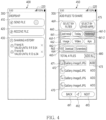
- FIG. 1 illustrates an example of an environment including an exemplary electronic device.
- an environment 100 may include an electronic device 101, another electronic device 102, a first external electronic device 103 (e.g., a server), and a second external electronic device 104 (e.g., another server).
- a first external electronic device 103 e.g., a server
- a second external electronic device 104 e.g., another server
- the environment 100 may be an environment for providing a file 150 stored in the electronic device 101 to the other electronic device 102.
- the electronic device 101 may transmit the file 150 to the second external electronic device 104 through the first external electronic device 103 or directly to the second external electronic device 104.
- the second external electronic device 104 may store the file 150.
- the other electronic device 102 may obtain the file 150 based on accessing the file 150 stored in the second external electronic device 104.
- the access of the other electronic device 102 to the file 150 may be executed using a uniform resource identifier (URI) 160 obtained from the electronic device 101.
- URI uniform resource identifier
- the electronic device 101 may communicate with the first external electronic device 103 through a connection 110 to obtain the URI 160.
- the electronic device 101 may transmit first data indicating a keyword to the first external electronic device 103 through the connection 110.
- the first external electronic device 103 may obtain the URI 160 including a path part consisting of the keyword and numerals identified with respect to the keyword (or identified for the keyword) based on the first data.
- the first external electronic device 103 may transmit second data indicating the URI 160 to the electronic device 101.
- the electronic device 101 may upload the file 150 based on the second data.
- the file 150 may be directly uploaded to the second external electronic device 104.
- the electronic device 101 may receive information for accessing the second external electronic device 104 from the first external electronic device 103 through the connection 110.
- the electronic device 101 may transmit information on the file 150 and information on the URI 160 to the second external electronic device 104 through a connection 130 based on the information.
- the second external electronic device 104 may store the file 150 based on the URI 160.
- the file 150 stored in the second external electronic device 104 may be accessible using the URI 160.
- the electronic device 101 may transmit information on the URI 160 to the other electronic device 102 through the connection 140.
- the other electronic device 102 may receive the file 150 from the second external electronic device 104 through a connection 145, based on accessing the file 150 stored in the second external electronic device 104 using the URI 160.
- the electronic device 101 may enhance accessibility of the other electronic devices 102 to the file 150, through the URI 160 obtained through communication with the first external electronic device 103 and a user interface displayed within the electronic device 101 for obtaining the URI 160.
- the URI 160 and the UI will be illustrated through the following descriptions.
- FIG. 1 illustrates an example in which the first external electronic device 103 and the second external electronic device 104 are implemented as different devices, the first external electronic device 103 and the second external electronic device 104 may be implemented as a single device.
- a third external electronic device for authenticating the access of the electronic device 101 to the first external electronic device 103 and/or the second external electronic device 104 may be included in the environment 100.
- the third external electronic device may be used to manage a user account used for the upload of the file 150 through the URI 160.
- the third external electronic device may be used to manage profile information of a user of the electronic device 101.
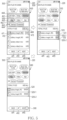
- FIG. 2 is a simplified block diagram of an exemplary electronic device.
- an electronic device 101 may include a processor 210, a display 220, and communication circuitry 230.
- the processor 210 may include at least a portion of a processor 1420 of FIG. 14 .
- the display 220 may include at least a portion of a display module 1460 of FIG. 14 .
- the communication circuitry 230 may include at least a portion of a communication module 1490 of FIG. 14 .
- the electronic device 101 may further include memory (e.g., at least a portion of memory 1430 of FIG. 14 ) configured to store one or more programs including instructions for executing operations to be illustrated below. The instructions may be executed by the processor 210. However, it is not limited thereto.
- the processor 210 may be operably coupled to each of the display 220 and the communication circuitry 230.
- the processor 210 being operably coupled to each of the display 220 and the communication circuitry 230 may indicate that the processor 210 is directly connected to each of the display 220 and the communication circuitry 230.
- the processor 210 being operably coupled to each of the display 220 and the communication circuitry 230 may indicate that the processor 210 is connected to each of the display 220 and the communication circuitry 230 through another component of the electronic device 101.
- the processor 210 being operably coupled to each of the display 220 and the communication circuitry 230 may indicate that each of the display 220 and the communication circuitry 230 operates based on instructions executed by the processor 210.
- the processor 210 being operably coupled to each of the display 220 and the communication circuitry 230 may indicate that each of the display 220 and the communication circuitry 230 is controlled by the processor 210.
- the processor 210 may execute operations for sharing the file 150.
- the processor 210 may execute operations to obtain the URI 160 used to access the file 150.
- the operations to obtain the URI 160 may be executed through a user interface of a software application for sharing files.
- the processor 210 may display, through the display 220, a text input field for setting a path part in a uniform resource identifier (URI) (e.g., the URI 160) within the UI of the software application.
- URI uniform resource identifier
- the text input field in the UI may be illustrated through FIG. 3 .
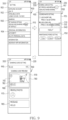
- FIG. 3 illustrates an example of a text input field for setting a path part in a uniform resource identifier (URI).
- URI uniform resource identifier
- the processor 210 may display a user interface 300.
- the user interface 300 may be used to set a URI 310.
- the URI 310 may be used to access the file to be uploaded to the second external electronic device 104.
- the URI 310 may include a protocol part 311, a host part 312, and a path part 313.
- the protocol part 311 may include a name of a protocol used for accessing the file to be uploaded by the electronic device 101, such as "http", "https", “gofer”, "telnet", “ftp", or "usenet”.
- the host part 312 may include a name of a host and/or a domain in which the file is stored to be uploaded by the electronic device 101.
- the path part 313 may indicate a location of the file to be uploaded to the host (or to be stored in the host).
- the host part 312 and the path part 313 may be separated by a delimiter (or separator) "/".
- the path part 313 may include the delimiter. However, it is not limited thereto.
- the path part 313 of the URI 310 may be randomly set to indicate a location of the file. Directly inputting the path part 313 of the randomly set URI 310 using an input means (e.g., a virtual keyboard or a physical keyboard) may cause inconvenience. For example, since the path part 313 of the randomly set URI 310 does not have a meaning recognized by a user, the path part of the randomly set URI 310 may cause inconvenience.
- the user interface 300 may include a text input field 320 for setting the path part 313 of the URI 310 to reduce this inconvenience.
- the processor 210 may transmit the first data indicating the keyword at least partially changed from the recommended keyword to the first external electronic device 103, based at least in part on the text input field 320 to which the keyword at least partially changed from the recommended keyword is inputted, in response to at least one touch input received through the virtual keyboard 330.
- the processor 210 may transmit the first data indicating the keyword at least partially changed from the recommended keyword to the first external electronic device 103, based at least in part on the text input field 320 to which the keyword at least partially changed from the recommended keyword is inputted, in response to at least one touch input received through the virtual keyboard 330.
- the processor 210 may receive a user input 600 for the executable object 470.
- the processor 210 may change the state 450 to a state 610, in response to a user input 600.
- the user interface 300 may include visual objects 620 respectively indicating folders included in the electronic device 101.
- each of the visual objects 620 may include information 621 that indicates a name of each of the folders and the number of files included in each of the folders, and an executable object 622 for adding an item indicating each of the folders to the third set of items 463.
- the processor 210 may receive a user input 630 for an executable object 622 of a visual object indicating one folder (e.g., "Movies" folder) from among the folders.
- the processor 210 may change the state 610 to a state 640, in response to the user input 630.
- the processor 210 may include a third set of items 463 further including an item 641.
- the item 641 may include an executable object 642 for removing an item 651 from the third set of items 463.
- the user interface 300 may include an executable object 491, an executable object 492, and an executable object 493.
- the executable object 491 may be used for restoration to the state 540.
- the executable object 492 may further include an indicator 715 (e.g., badge) indicating the number of the at least one file.
- the executable object 429 may be used to change the state 700 to another state. The other state will be illustrated through FIG. 10 .
- the executable object 493 may be used to change the state 700 to another state being after the state 700.
- the other state will be illustrated through FIG. 11 .
- the user interface 300 may include an executable object 720.
- the processor 210 may receive a user input 730 for the executable object 720 in the state 700.
- the processor 210 may change the state 700 to a state 750, in response to the user input 730.
- the user interface 300 may include a text input field 320.
- the user interface 300 may include a URI 310.
- the user interface 300 may include a URI 755 reduced with respect to the URI 310.
- the URI 755 in the state 750 may include a path part 756 including only numerals.
- the numerals in the path part 756 in the state 750 may be intended to guide or inform a configuration of the path part 756, like the numerals in the area 315 illustrated through the description of FIG. 3 .
- the numerals in the path part 756 may be unique numerals identified by the first external electronic device 103 when the state 750 is provided.
- the processor 210 may change the state 930 to a state 960 in response to a user input 975.
- the user interface 300 may include a field 970 for providing a preview of the executable object 780 set in the state 960.
- the user interface 300 may include the field 975 for setting a profile image 783 within the executable object 780.
- the profile image set through the field 975 may be displayed or reflected in the profile image 783 in the executable object 780 in the field 970.
- the user interface 300 may include a field 985 for setting a message 980 within the executable object 780.
- the processor 210 may display a virtual keyboard (e.g., the virtual keyboard 330).
- the message inputted through the virtual keyboard may be displayed or reflected in the message 980 in the field 970.
- the thumbnail image 782 in the executable object 780 may be set through a user input indicating to select the thumbnail image 782 in the field 970.
- the user interface 300 may include a field 990 for setting whether to activate the executable object 780.
- the user interface 300 may include an executable object 790 for completing the setting for uploading the at least one file.
- the processor 210 may receive a user input 795 for the executable object 790.
- FIG. 10 illustrates an example of modifying a file to be uploaded.
- the processor 210 may change the state 750 to a state 1000 in response to the user input 795.
- the user interface 300 may be similar to the state 700 of FIG. 7 .
- the user interface 300 may include at least one visual object 710 indicating the at least one file.
- the user interface 300 may include an executable object 491, an executable object 492, and an executable object 493.
- the user interface 300 may include text 1001 indicating uploading the at least one file identified through the state 750, for sharing.
- the processor 210 may receive a user input 1010 for the executable object 492 in the state 1000.
- the processor 210 may change the state 1000 to a state 1050 in response to the user input 1010.
- the user interface 300 may include at least one visual object 1060 indicating the at least one file.
- the at least one visual object 1060 may include a visual object 1061 and a visual object 1062.
- the visual object 1061 may include an executable object 1063 for ceasing uploading a file indicated by the visual object 1061.
- the visual object 1062 may include an executable object 1064 for ceasing uploading a file indicated by the visual object 1062.
- the processor 210 may cease uploading at least a portion of files, based on a user input received through the user interface 300 displayed in the state 1050.
- the user interface 300 may include an executable object 1090 for receiving a user input indicating to upload the at least one file.
- the processor 210 may change or restore the state 1950 to the state 1000, in response to the user input 1095 for the executable object 1090.
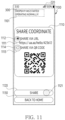
- the screen 1110 may include an object 1112 for receiving a user input 1111 indicating to represent the information using text and an object 1113 for receiving a user input 1113 indicating to represent the information using a QR code.
- the user interface 300 may include an executable object 1120 for transmitting the information.
- the processor 210 may transmit the information represented as text to a reception device based on the user input 1121 for the executable object 1120 that is received after the user input 1111 is received, and transmit the information represented as a QR code to the reception device based on the user input 1121 for the executable object 1120 that is received after the user input 1113 is received.
- the QR code may be obtained based on the user input 1121.
- the user interface 300 may include an executable object 1130 for changing the state 1100 to the state 400.
- FIG. 12 illustrates an example of a list of software applications usable for transmitting information indicating a URI.
- the processor 210 may change the state 1100 to a state 1200, in response to the user input 1121.
- the user interface 300 may include a list 1210 of software applications usable for transmission of the information.
- a portion 1211 of executable objects in the list 1210 indicating each of the software applications may be configured to further identify a reception device in accordance with a history of past file sharing.
- the list 1210 may be displayed together with items 1220 for filtering at least a portion of the executable objects in the list 1210.
- the processor 210 may receive a user input 1222 for an item 1221 among the items 1220.
- the processor 210 may change the state 1200 to a state 1230, in response to the user input 1222.
- the processor 210 may display a user interface 300 including at least a portion 1235 of the executable objects related to a software application corresponding to the item 1221.
- the processor 210 may receive a user input 1250 indicating to select an executable object among at least a portion 1235 of the executable objects.
- the user interface 1260 may include the information.
- the information when the user input 1111 is received, the information may be represented as text 1270.
- the information when the user input 1113 is received, the information may be represented as a QR code 1280.
- the user interface 1260 may include an executable object 780.
- the executable object 780 may be displayed in the user interface 1260 with the text 1270 or the QR code 1280.
- the executable object 780 may be used to access the uploaded at least one file using the URI 310.
- the reception device may display a user interface corresponding to the user interface 1260 displayed in the state 1250, based on receiving the information.
- the reception device may access the at least one file by inputting the URI 310 through the user interface 300 of the software application installed in the reception device. The access may be illustrated through FIG. 13 .
- FIG. 13 illustrates an example of accessing at least one item using information indicating a URI.
- a processor of the reception device may display the user interface 300 through a display of the reception device, as in the state 1300.
- the user interface 300 in the state 1300 may at least partially correspond to the user interface 300 in the state 400.
- the user interface 300 may include an executable object 410 and an executable object 420.
- the processor may receive a user input 1310 for the executable object 420.
- the processor may change the state 1300 to a state 1320 based on the user input 1310.
- the user interface 300 may include an area 1321 and an area 1322 of the path part 313 of the URI 310.
- the processor may display a text input field 1330 for inputting the keyword in the area 1321, in response to a user input for the area 1321 or a change to the state 1320.
- the processor may display a virtual keyboard 1340 together with the user interface 300, in response to a user input for the text input field 1330 or in response to display of the text input field 1330.
- the processor may input the keyword identified through the virtual keyboard 1340 into each of the text input field 1330 and the area 1321.
- the processor may receive a user input for the area 1322.
- the processor may change the state 1320 to a state 1350, in response to the user input.
- the processor may display the user interface 300 that includes an input field 1360 for inputting the numerals into the area 1322, and a virtual keyboard 1370.
- the virtual keyboard 1370 may be in a state for inputting the numerals.
- the input field 1360 may indicate remaining numerals that are not inputted through the virtual keyboard 1370.
- the processor may display a web page identified using the URI 310 that includes the path part 313 consisting of the keyword and the numerals.
- the processor may change the state 1350 to a state 1370.
- the processor may display, in the user interface 300, at least one visual object 1380 indicating the uploaded at least one file in the web page.
- the processor may download the at least one file, in response to a user input for at least one visual object 1380.
- the electronic device 101 may provide a service for sharing a file stored in the electronic device 101 through a URI that includes a path part consisting of a keyword and numerals, and a user interface for setting the URI. Since the service is executed based on a web, enhanced compatibility may be provided. Since the service is executed through the URI that includes a path part consisting of the keyword capable of recognizing meaning and numerals capable of being easily remembered, the service may provide an enhanced user experience. Since the service may set an executable object through the UI, the service may provide a customized user experience.
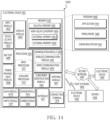
- the electronic device 101 and the receiving device may include at least a portion of components of the electronic device 1401 exemplified in FIG. 14 .
- the electronic device 1401 in the network environment 1400 may communicate with an electronic device 1402 via a first network 1498 (e.g., a short-range wireless communication network), or at least one of an electronic device 1404 or a server 1408 via a second network 1499 (e.g., a long-range wireless communication network).
- a first network 1498 e.g., a short-range wireless communication network
- a second network 1499 e.g., a long-range wireless communication network
- the electronic device 1401 may communicate with the electronic device 1404 via the server 1408.
- the electronic device 1401 may include a processor 1420, memory 1430, an input module 1450, a sound output module 1455, a display module 1460, an audio module 1470, a sensor module 1476, an interface 1477, a connecting terminal 1478, a haptic module 1479, a camera module 1480, a power management module 1488, a battery 1489, a communication module 1490, a subscriber identification module(SIM) 1496, or an antenna module 1497.
- at least one of the components e.g., the connecting terminal 1478
- some of the components e.g., the sensor module 1476, the camera module 1480, or the antenna module 1497) may be implemented as a single component (e.g., the display module 1460).
- the auxiliary processor 1423 may control at least some of functions or states related to at least one component (e.g., the display module 1460, the sensor module 1476, or the communication module 1490) among the components of the electronic device 1401, instead of the main processor 1421 while the main processor 1421 is in an inactive (e.g., sleep) state, or together with the main processor 1421 while the main processor 1421 is in an active state (e.g., executing an application).
- the auxiliary processor 1423 e.g., an image signal processor or a communication processor
- the battery 1489 may supply power to at least one component of the electronic device 1401.
- the battery 1489 may include, for example, a primary cell which is not rechargeable, a secondary cell which is rechargeable, or a fuel cell.
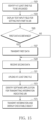
- the processor 210 may identify at least one file to be uploaded.
- the at least one file may be identified through the user interface 300 exemplified through FIGS. 4 to 6 .
- the at least one file may be identified through another software application (e.g., a software application for image management) distinct from a software application providing the user interface 300.
- another software application e.g., a software application for image management
- the processor 210 may execute operation 1507 based on identifying that the first data is obtained, and may execute operation 1509 based on identifying that the first data is not obtained.
- the processor 210 may transmit the first data to a server, based on obtaining the first data.
- the first data may be transmitted to obtain numerals forming the path part together with the keyword.
- the server may receive the first data.
- the processor 210 may receive second data from the server.
- the second data may be transmitted from the server, in response to the first data.
- the second data may indicate the URI including the path part consisting of the keyword and the numerals identified based on the keyword (or assigned based on the keyword).
- the second data may be transmitted from the server, in response to a signal from the electronic device 101 that indicates not obtaining the first data.
- the second data may indicate the URI including the path part consisting of only numerals identified by the server.
- the processor 210 may identify a software application for transmitting information indicating the URI.
- the application may be identified through the user interface 300 exemplified through FIG. 12 .
- the processor 210 may transmit the information to the reception device based on the identification and display an executable object for accessing the at least one file using the URI.
- the executable object may be displayed in the user interface of the identified software application.
- the executable object may include at least one visual element indicating the number of the at least one file and a period accessible to the at least one file, and a thumbnail image.
- the executable object may further include a message inputted through the user interface 300.
- the thumbnail image in the executable object may at least partially represent a preview of the at least one file.
- the thumbnail image may at least partially represent a type of the at least one file. However, it is not limited thereto.
- the electronic device 101 may provide a service for sharing a file in the electronic device 101 with another electronic device, through the user interface 300. Since the user interface 300 may provide a function of selecting at least one file to be shared, a function of including a keyword in a URI for accessing the at least one file, and a function of selecting a software application for transmitting information indicating the URI, the electronic device 101 may provide an enhanced user experience through the user interface 300.
- an electronic device may comprise communication circuitry (e.g., the communication circuitry 230), a display (e.g., the display 220), and a processor (e.g., the processor 210).
- the processor may be configured to display, via the display, in a user interface (UI) of a software application for sharing a file, a text input field for setting a path part in a uniform resource identifier (URI).
- UI user interface
- URI uniform resource identifier
- the processor may be configured to transmit, to a server, through the communication circuitry, first data indicating a keyword inputted to the text input field.
- the processor may be configured to receive, from the server, through the communication circuitry, second data indicating a URI including the path part that consists of the keyword and numerals, the numerals identified with respect to the keyword.
- the processor may be configured to, after the second data is received, upload, through the communication circuitry, at least one file, for sharing.
- the uploaded at least one file may be accessible using the URI including the path part that consists of the keyword and the numerals.
- the processor may be configured to display, via the display, in the UI, items for respectively indicating search keywords for identifying, from among a plurality of files stored in the electronic device, a file to be uploaded.
- the processor may be configured to, based at least in part on a user input indicating to select at least a portion of the items, identify the at least one file from among the files.
- the processor may be configured to, after the at least one file is identified, display, via the display, the text input filed in the UI.
- the processor may be configured to identify a type of the at least one file identified based at least in part on the user input. According to an embodiment, the processor may be configured to, based on the identified type, identify a recommended keyword. According to an embodiment, the processor may be configured to display, via the display, the text input field to which the recommended keyword is inputted. According to an embodiment, the processor may be configured to, based at least in part on a user input received while the text input field to which the recommended keyword is inputted is displayed, transmit, to the server, through the communication circuitry, the first data indicating the recommended keyword as the keyword.
- the processor may be configured to receive a touch input on the text input field to which the recommended keyword is inputted.
- the processor may be configured to, in response to the touch input, display a virtual keyboard partially superimposed on the UI.
- the processor may be configured to, in response to at least one touch input received via the virtual keyboard, display, via the display, the text input field to which the keyword at least partially changed from the recommended keyword is inputted.
- the processor may be configured to transmit, to the server, through the communication circuitry, the first data indicating the keyword at least partially changed from the recommended keyword.
- the processor may be configured to display, in the UI, a list of software applications that are usable for transmitting information indicating the URI including the path part consisting of the keyword and the numerals.
- the processor may be configured to, using another software application identified from among the software applications based at least in part on a user input on the list, transmit, to a reception device, the information.
- the processor may be configured to display, in another UI of the other software application, an executable object for accessing the at least one file using the URI including the path part consisting of the keyword and the numerals.
- the executable object may include at least one visual element indicating a number of the at least one file, and a period accessible to the at least one file and a thumbnail image.
- the processor may be configured to display a preview field of the executable object, with the text input field, in the UI.
- the executable object displayed in the other UI may include a profile image of a user of the electronic device, that is inputted through the UI.
- the executable object displayed in the other UI may include a message inputted through the UI.
- the QR code may be obtained based on the second user input.
- each of such phrases as “A or B,” “at least one of A and B,” “at least one of A or B,” “A, B, or C,” “at least one of A, B, and C,” and “at least one of A, B, or C,” may include any one of or all possible combinations of the items enumerated together in a corresponding one of the phrases.
- such terms as “1st” and “2nd,” or “first” and “second” may be used to simply distinguish a corresponding component from another, and does not limit the components in other aspect (e.g., importance or order).
- Various embodiments as set forth herein may be implemented as software (e.g., the program 1440) including one or more instructions that are stored in a storage medium (e.g., internal memory 1436 or external memory 1438) that is readable by a machine (e.g., the electronic device 1401).
- a processor e.g., the processor 1420
- the machine e.g., the electronic device 1401
- the one or more instructions may include a code generated by a complier or a code executable by an interpreter.
- the machine-readable storage medium may be provided in the form of a non-transitory storage medium.
- non-transitory simply means that the storage medium is a tangible device, and does not include a signal (e.g., an electromagnetic wave), but this term does not differentiate between a case in which data is semi-permanently stored in the storage medium and a case in which the data is temporarily stored in the storage medium.
- a method may be included and provided in a computer program product.
- the computer program product may be traded as a product between a seller and a buyer.
- the computer program product may be distributed in the form of a machine-readable storage medium (e.g., compact disc read only memory (CD-ROM)), or be distributed (e.g., downloaded or uploaded) online via an application store (e.g., PlayStore TM ), or between two user devices (e.g., smart phones) directly. If distributed online, at least part of the computer program product may be temporarily generated or at least temporarily stored in the machine-readable storage medium, such as memory of the manufacturer's server, a server of the application store, or a relay server.
- CD-ROM compact disc read only memory
- an application store e.g., PlayStore TM
- two user devices e.g., smart phones
Landscapes
- Engineering & Computer Science (AREA)
- Theoretical Computer Science (AREA)
- General Engineering & Computer Science (AREA)
- Physics & Mathematics (AREA)
- General Physics & Mathematics (AREA)
- Human Computer Interaction (AREA)
- Software Systems (AREA)
- Computer Networks & Wireless Communication (AREA)
- Signal Processing (AREA)
- Databases & Information Systems (AREA)
- Data Mining & Analysis (AREA)
- Information Transfer Between Computers (AREA)
Applications Claiming Priority (3)
| Application Number | Priority Date | Filing Date | Title |
|---|---|---|---|
| KR20220127415 | 2022-10-05 | ||
| KR1020220130881A KR20240047866A (ko) | 2022-10-05 | 2022-10-12 | 파일을 공유하는 전자 장치, 방법, 및 비일시적 컴퓨터 판독가능 저장 매체 |
| PCT/KR2023/013285 WO2024076008A1 (ko) | 2022-10-05 | 2023-09-05 | 파일을 공유하는 전자 장치, 방법, 및 비일시적 컴퓨터 판독가능 저장 매체 |
Publications (2)
| Publication Number | Publication Date |
|---|---|
| EP4579474A1 true EP4579474A1 (de) | 2025-07-02 |
| EP4579474A4 EP4579474A4 (de) | 2025-12-31 |
Family
ID=90608559
Family Applications (1)
| Application Number | Title | Priority Date | Filing Date |
|---|---|---|---|
| EP23875077.2A Pending EP4579474A4 (de) | 2022-10-05 | 2023-09-05 | Elektronische vorrichtung, verfahren und nichttransitorisches computerlesbares speichermedium zur gemeinsamen dateinutzung |
Country Status (3)
| Country | Link |
|---|---|
| US (1) | US20250233908A1 (de) |
| EP (1) | EP4579474A4 (de) |
| WO (1) | WO2024076008A1 (de) |
Family Cites Families (8)
| Publication number | Priority date | Publication date | Assignee | Title |
|---|---|---|---|---|
| US9338197B2 (en) * | 2010-11-01 | 2016-05-10 | Google Inc. | Social circles in social networks |
| US9922096B2 (en) * | 2011-07-08 | 2018-03-20 | Yahoo Holdings, Inc. | Automated presentation of information using infographics |
| KR20130055794A (ko) * | 2011-11-21 | 2013-05-29 | 주식회사 케이티 | Qr 코드 정보의 공유를 위한 사용자 단말, 및 사용자 단말을 이용한 qr 코드 정보의 공유 방법 |
| US20140067929A1 (en) * | 2012-08-28 | 2014-03-06 | Ivan Kirigin | Uploading one or more files from a shared file link |
| US10275609B2 (en) * | 2012-12-07 | 2019-04-30 | Benedict Ow | File sharing system and method |
| US9882991B2 (en) * | 2013-09-30 | 2018-01-30 | Rakuten, Inc. | URL issuing device, URL issuing method, and URL issuing program |
| KR102476290B1 (ko) * | 2016-06-03 | 2022-12-09 | 삼성전자주식회사 | 파일 공유 방법 및 이를 구현한 전자 장치 |
| WO2019021048A1 (en) * | 2017-07-24 | 2019-01-31 | Yogesh Chunilal Rathod | EPHEMER CONTENT SHARING AND USER CONNECTION BASED ON SINGLE LINK SHARING FROM 3R PART APPLICATIONS AND STORING AND ASSOCIATING A SINGLE CODE OR IDENTITY OF A USER SHARING A LINK WITH A USER ACCESSING A LINK |
-
2023
- 2023-09-05 EP EP23875077.2A patent/EP4579474A4/de active Pending
- 2023-09-05 WO PCT/KR2023/013285 patent/WO2024076008A1/ko not_active Ceased
-
2025
- 2025-04-01 US US19/097,203 patent/US20250233908A1/en active Pending
Also Published As
| Publication number | Publication date |
|---|---|
| US20250233908A1 (en) | 2025-07-17 |
| EP4579474A4 (de) | 2025-12-31 |
| WO2024076008A1 (ko) | 2024-04-11 |
Similar Documents
| Publication | Publication Date | Title |
|---|---|---|
| US12147726B2 (en) | Electronic device displaying widget and method for controlling the same | |
| US11899897B2 (en) | Method for controlling application of external electronic device and electronic device supporting same | |
| US20230004288A1 (en) | Method and electronic device for configuring user interface based on input field | |
| US20240231855A1 (en) | Method and electronic device for using data of external electronic device | |
| EP4651068A1 (de) | Elektronische vorrichtung zur bereitstellung von leistungsinhalt in virtueller realität und steuerungsverfahren dafür | |
| US12323265B2 (en) | Electronic device for providing personalized group service, and control method of same | |
| US12457487B2 (en) | Electronic device and method for installing eSIM profile in electronic device | |
| EP4579474A1 (de) | Elektronische vorrichtung, verfahren und nichttransitorisches computerlesbares speichermedium zur gemeinsamen dateinutzung | |
| US12432652B2 (en) | Method and electronic device for communicating based on access point | |
| EP4243462A1 (de) | Elektronische vorrichtung zur verarbeitung einer nachricht und betriebsverfahren dafür | |
| EP4580226A1 (de) | Elektronische vorrichtung, verfahren und nichttransitorisches computerlesbares speichermedium zur verarbeitung von werbepaketen aus einer externen elektronischen vorrichtung in einer drahtlosen umgebung | |
| EP4647887A1 (de) | Elektronische vorrichtung zur verarbeitung eines bildes und verfahren zum betrieb davon | |
| EP4546830A1 (de) | Dateiübertragungssystem, elektronische vorrichtung und dateiübertragungsverfahren durch diese elektronische vorrichtung | |
| EP4614305A1 (de) | Elektronische vorrichtung zur gemeinsamen nutzung von bildschirmeinstellungen und steuerungsverfahren dafür | |
| US12038815B2 (en) | Electronic device and operation method thereof | |
| EP4597355A1 (de) | Elektronische vorrichtung und verfahren zur verarbeitung von kollaborativen bearbeitungsanweisungen | |
| EP4344192A1 (de) | Elektronische vorrichtung und verfahren zur erzeugung zusätzlicher informationen einer datei in einer elektronischen vorrichtung | |
| EP4589923A1 (de) | Vorrichtung und verfahren zur anpassung von softwarebereitstellung | |
| EP4664867A1 (de) | System zur identifizierung einer externen elektronischen vorrichtung, elektronische vorrichtung und verfahren zur identifizierung einer externen elektronischen vorrichtung | |
| EP4354918B1 (de) | Elektronische vorrichtung zur datenübertragung unter verwendung von drahtloser nahbereichskommunikation und betriebsverfahren dafür | |
| EP4258114A1 (de) | Dienstbetriebsverfahren und elektronische vorrichtung zur unterstützung davon | |
| EP4373206A1 (de) | Verfahren zur durchführung von drahtloser kommunikation und elektronische vorrichtung zur unterstützung davon | |
| EP4651426A1 (de) | Elektronische vorrichtung und verfahren zur übertragung von zeichenkettendaten mit gesicherter privatsphäre durch eine elektronische vorrichtung | |
| EP4625948A2 (de) | Elektronische vorrichtung zur steuerung von onboarding und betriebsverfahren dafür | |
| EP4328768A1 (de) | Elektronische vorrichtung zur durchführung verschiedener anmeldungsprozesse gemäss der authentifizierungsart und steuerungsverfahren dafür |
Legal Events
| Date | Code | Title | Description |
|---|---|---|---|
| STAA | Information on the status of an ep patent application or granted ep patent |
Free format text: STATUS: THE INTERNATIONAL PUBLICATION HAS BEEN MADE |
|
| PUAI | Public reference made under article 153(3) epc to a published international application that has entered the european phase |
Free format text: ORIGINAL CODE: 0009012 |
|
| STAA | Information on the status of an ep patent application or granted ep patent |
Free format text: STATUS: REQUEST FOR EXAMINATION WAS MADE |
|
| 17P | Request for examination filed |
Effective date: 20250326 |
|
| AK | Designated contracting states |
Kind code of ref document: A1 Designated state(s): AL AT BE BG CH CY CZ DE DK EE ES FI FR GB GR HR HU IE IS IT LI LT LU LV MC ME MK MT NL NO PL PT RO RS SE SI SK SM TR |
|
| A4 | Supplementary search report drawn up and despatched |
Effective date: 20251128 |
|
| RIC1 | Information provided on ipc code assigned before grant |
Ipc: G06F 16/176 20190101AFI20251124BHEP Ipc: G06F 16/955 20190101ALI20251124BHEP Ipc: G06F 3/0482 20130101ALI20251124BHEP Ipc: G06F 3/04842 20220101ALI20251124BHEP Ipc: G06F 3/0488 20220101ALI20251124BHEP Ipc: H04L 67/02 20220101ALI20251124BHEP Ipc: H04L 67/06 20220101ALI20251124BHEP Ipc: H04M 1/72403 20210101ALI20251124BHEP Ipc: H04N 21/2743 20110101ALI20251124BHEP |
|
| DAV | Request for validation of the european patent (deleted) | ||
| DAX | Request for extension of the european patent (deleted) |