EP4579415A1 - Anzeigeverfahren, anzeigevorrichtung und elektronische vorrichtung - Google Patents
Anzeigeverfahren, anzeigevorrichtung und elektronische vorrichtung Download PDFInfo
- Publication number
- EP4579415A1 EP4579415A1 EP23915842.1A EP23915842A EP4579415A1 EP 4579415 A1 EP4579415 A1 EP 4579415A1 EP 23915842 A EP23915842 A EP 23915842A EP 4579415 A1 EP4579415 A1 EP 4579415A1
- Authority
- EP
- European Patent Office
- Prior art keywords
- input
- menu
- level
- window
- transparent window
- Prior art date
- Legal status (The legal status is an assumption and is not a legal conclusion. Google has not performed a legal analysis and makes no representation as to the accuracy of the status listed.)
- Pending
Links
Images





Classifications
-
- G—PHYSICS
- G06—COMPUTING OR CALCULATING; COUNTING
- G06F—ELECTRIC DIGITAL DATA PROCESSING
- G06F3/00—Input arrangements for transferring data to be processed into a form capable of being handled by the computer; Output arrangements for transferring data from processing unit to output unit, e.g. interface arrangements
- G06F3/01—Input arrangements or combined input and output arrangements for interaction between user and computer
- G06F3/048—Interaction techniques based on graphical user interfaces [GUI]
- G06F3/0481—Interaction techniques based on graphical user interfaces [GUI] based on specific properties of the displayed interaction object or a metaphor-based environment, e.g. interaction with desktop elements like windows or icons, or assisted by a cursor's changing behaviour or appearance
- G06F3/0482—Interaction with lists of selectable items, e.g. menus
-
- G—PHYSICS
- G06—COMPUTING OR CALCULATING; COUNTING
- G06F—ELECTRIC DIGITAL DATA PROCESSING
- G06F3/00—Input arrangements for transferring data to be processed into a form capable of being handled by the computer; Output arrangements for transferring data from processing unit to output unit, e.g. interface arrangements
- G06F3/01—Input arrangements or combined input and output arrangements for interaction between user and computer
- G06F3/048—Interaction techniques based on graphical user interfaces [GUI]
- G06F3/0481—Interaction techniques based on graphical user interfaces [GUI] based on specific properties of the displayed interaction object or a metaphor-based environment, e.g. interaction with desktop elements like windows or icons, or assisted by a cursor's changing behaviour or appearance
-
- G—PHYSICS
- G06—COMPUTING OR CALCULATING; COUNTING
- G06F—ELECTRIC DIGITAL DATA PROCESSING
- G06F3/00—Input arrangements for transferring data to be processed into a form capable of being handled by the computer; Output arrangements for transferring data from processing unit to output unit, e.g. interface arrangements
- G06F3/01—Input arrangements or combined input and output arrangements for interaction between user and computer
- G06F3/048—Interaction techniques based on graphical user interfaces [GUI]
- G06F3/0481—Interaction techniques based on graphical user interfaces [GUI] based on specific properties of the displayed interaction object or a metaphor-based environment, e.g. interaction with desktop elements like windows or icons, or assisted by a cursor's changing behaviour or appearance
- G06F3/0483—Interaction with page-structured environments, e.g. book metaphor
-
- G—PHYSICS
- G06—COMPUTING OR CALCULATING; COUNTING
- G06F—ELECTRIC DIGITAL DATA PROCESSING
- G06F3/00—Input arrangements for transferring data to be processed into a form capable of being handled by the computer; Output arrangements for transferring data from processing unit to output unit, e.g. interface arrangements
- G06F3/01—Input arrangements or combined input and output arrangements for interaction between user and computer
- G06F3/048—Interaction techniques based on graphical user interfaces [GUI]
- G06F3/0487—Interaction techniques based on graphical user interfaces [GUI] using specific features provided by the input device, e.g. functions controlled by the rotation of a mouse with dual sensing arrangements, or of the nature of the input device, e.g. tap gestures based on pressure sensed by a digitiser
- G06F3/0488—Interaction techniques based on graphical user interfaces [GUI] using specific features provided by the input device, e.g. functions controlled by the rotation of a mouse with dual sensing arrangements, or of the nature of the input device, e.g. tap gestures based on pressure sensed by a digitiser using a touch-screen or digitiser, e.g. input of commands through traced gestures
-
- G—PHYSICS
- G06—COMPUTING OR CALCULATING; COUNTING
- G06F—ELECTRIC DIGITAL DATA PROCESSING
- G06F2203/00—Indexing scheme relating to G06F3/00 - G06F3/048
- G06F2203/048—Indexing scheme relating to G06F3/048
- G06F2203/04804—Transparency, e.g. transparent or translucent windows
Definitions
- Embodiments of this application relate to the field of electronic devices, and more specifically, to a display method, a display apparatus, and an electronic device.
- a multi-level menu can accommodate a large quantity of options for a user to select, and therefore is widely applied to mainstream operating systems.
- a main implementation solution of a current multi-level menu is to trigger creation of a new window by using an event, to accommodate a new level of menu.
- creating a window is resource-intensive each time and power consumption of a device is increased, high performance load is caused for a device with a low configuration.
- a user performs the first input in a first window
- the first input may be a user input used to expand the n th level of menu in the multi-level menu
- n is a positive integer
- the n th level of menu may be a first level of menu, or may be another level of menu above the first level of menu.
- the first input may be, for example, a click input on a control in the first window, or the first input may be, for example, a mouse right-click input on a blank area in the first window (where a touch input may correspond to a touch and hold tap input in the first window).
- the first window is a window on which the user input is performed when the first level of menu is expanded.
- the first input may be a hover input or a click input of the user on an option of an (n-1) th level of menu.
- the transparent window is dedicated to displaying the multi-level menu in a form of the user interface control.
- the transparent window is invisible, and the multi-level menu in the form of the user interface control is visible. In this way, because various levels of menus in the multi-level menu are user interface controls, instead of creating a new window each time one level of menu is expanded, overheads and power consumption of displaying the multi-level menu can be reduced.
- the multi-level menu is the user interface control in the transparent window instead of a control in the first window, and a size and a location of the transparent window may be freely set based on a requirement, display of the multi-level menu is not limited to the first window, so that display effect is better, and user experience is improved.
- the first input is used to expand the first level of menu in the multi-level menu, the first input is located in the first window, and before the displaying a user interface control in a transparent window, the method further includes: creating the transparent window on the first window based on the first input.
- the first input when the first input is used to expand the first level of menu in the multi-level menu, the first input is located in the first window, and the multi-level menu is triggered by the user by clicking the control or performing a right-click on the blank area in the first window.
- the electronic device creates the transparent window on the first window, and "on" means that a z level of the transparent window is higher than that of the first window. Therefore, the multi-level menu is displayed at a top layer (with a highest z level and on the first window) as the user interface control in the transparent window.
- the transparent window is created to display the multi-level menu.
- the method further includes: determining an input hot area of the multi-level menu, where the input hot area is a set of areas occupied by various levels of menus that are expanded in the multi-level menu; receiving a second input of the user on the transparent window; and when the second input is located inside the input hot area, performing, on the multi-level menu based on the second input, an operation corresponding to the second input; or when the second input is located outside the input hot area and the second input is a click input, closing the multi-level menu and the transparent window based on the second input, and activating a window with a highest z level under the transparent window at a location of the second input based on the second input.
- the current level of menu may be expanded in another manner.
- the user clicks an option corresponding to a specific instruction the corresponding instruction may be triggered.
- another window a window with a highest z level under the transparent window at a location of the click input
- the click input may simultaneously close the transparent window and the user interface control (various levels of menus in the multi-level menu) in the transparent window.
- an area occupied by the transparent window is greater than or equal to a possible display area of the multi-level menu.
- the possible display area of the multi-level menu is related to the location of the input for triggering expansion of the first level of menu in the multi-level menu.
- the area occupied by the transparent window may also be related to the location of the input.
- the transparent window may be set to be consistent with a display interface of the electronic device.
- the multi-level menu triggered or managed by the first window may be displayed in an entire area of the display without being affected by a boundary of the first window. Therefore, display effect of the multi-level menu is better. For example, if the first window is small, when the multi-level menu is all displayed within a range of the first window, locations of some levels of menus in the multi-level menu may need to overlap, which affects the display effect.
- the first window is a non-full-screen display window, and a partial area of the transparent window is outside an area occupied by the first window.
- the partial area of the transparent window is outside the area occupied by the first window, and the multi-level menu may alternatively be displayed outside the first window, so that the display effect of the multi-level menu is better.
- the user interface control is displayed based on a rendering result of the transparent window.
- an operating system of the electronic device when the multi-level menu is displayed, an operating system of the electronic device only needs to render the transparent window instead of rendering a window of each level of menu in the multi-level menu, so that power consumption of displaying the multi-level menu can be reduced.
- the operating system of the electronic device is a Windows operating system, an Android operating system, an iOS operating system, or a Linux operating system.
- the first input when n is 1, the first input is a click operation performed by the user on a first control in the first window, or the first input is a mouse right-click operation or a touch and hold tap operation performed by the user on a blank area in the first window; and when n is greater than or equal to 2, the first input is an operation of hovering over an option of an (n-1) th level of menu in the multi-level menu for more than preset duration, or the first input is a click operation on an option of an (n-1) th level of menu in the multi-level menu.
- the first level of menu may be expanded by clicking the control or performing the right-click on the blank area in the first window.
- the click operation on the first control may be a mouse click (for example, a mouse right-click or a mouse left-click), or may be a touch click operation (for example, a short press click operation or a touch and hold tap operation on the first control).
- the n th level of menu When the n th level of menu is a second level of menu or a menu above the second level of menu, the n th level of menu may be triggered by clicking or performing mouse hovering over a specific option of the (n-1) th level of menu.
- a display apparatus includes one or more processors and one or more memories.
- the one or more memories store one or more computer programs, the one or more computer programs include instructions, and when the instructions are executed by the one or more processors, the display apparatus is enabled to perform the following steps: receiving a first input used to expand an n th level of menu in a multi-level menu; and displaying a user interface control in a transparent window in response to the first input, where the user interface control is the n th level of menu in the multi-level menu.
- the first input is used to expand a first level of menu in the multi-level menu
- the first input is located in the first window
- the display apparatus is enabled to perform the following step: creating the transparent window on the first window based on the first input.
- the display apparatus when the instructions are executed by the one or more processors, the display apparatus is enabled to perform the following steps: determining an input hot area of the multi-level menu, where the input hot area is a set of areas occupied by various levels of menus that are expanded in the multi-level menu; receiving a second input of a user on the transparent window; and when the second input is located inside the input hot area, performing, on the multi-level menu based on the second input, an operation corresponding to the second input; or when the second input is located outside the input hot area and the second input is a click input, closing the multi-level menu and the transparent window based on the second input, and activating a window with a highest z level under the transparent window at a location of the second input based on the second input.
- an area occupied by the transparent window is greater than or equal to a possible display area of the multi-level menu.
- the possible display area of the multi-level menu is related to a location of the input for triggering expansion of the first level of menu in the multi-level menu.
- the area occupied by the transparent window is consistent with a screen display area of the display apparatus.
- the first window is a non-full-screen display window, and a partial area of the transparent window is outside an area occupied by the first window.
- the user interface control is displayed based on a rendering result of the transparent window.
- an operating system of the display apparatus is a Windows operating system, an Android operating system, an iOS operating system, or a Linux operating system.
- the first input when n is 1, the first input is a click operation performed by the user on a first control in the first window, or the first input is a mouse right-click operation or a touch and hold tap operation performed by the user on a blank area in the first window; and when n is greater than or equal to 2, the first input is an operation of hovering over an option of an (n-1) th level of menu in the multi-level menu for more than preset duration, or the first input is a click operation on an option of an (n-1) th level of menu in the multi-level menu.
- a display apparatus including: a processing unit, configured to receive a first input used to expand an n th level of menu in a multi-level menu; and a display unit, configured to display a user interface control in a transparent window in response to the first input, where the user interface control is the n th level of menu in the multi-level menu.
- the first input is used to expand a first level of menu in the multi-level menu
- the first input is located in the first window
- the processing unit is further configured to create the transparent window on the first window based on the first input.
- the processing unit is further configured to determine an input hot area of the multi-level menu, where the input hot area is a set of areas occupied by various levels of menus that are expanded in the multi-level menu; receive a second input of a user on the transparent window; and when the second input is located inside the input hot area, perform, on the multi-level menu based on the second input, an operation corresponding to the second input; or when the second input is located outside the input hot area and the second input is a click input, close the multi-level menu and the transparent window based on the second input, and activate a window with a highest z level under the transparent window at a location of the second input based on the second input.
- an area occupied by the transparent window is greater than or equal to a possible display area of the multi-level menu.
- the possible display area of the multi-level menu is related to a location of the input for triggering expansion of the first level of menu in the multi-level menu.
- the user interface control is displayed based on a rendering result of the transparent window.
- an operating system of the display apparatus is a Windows operating system, an Android operating system, an iOS operating system, or a Linux operating system.
- the first input when n is 1, the first input is a click operation performed by the user on a first control in the first window, or the first input is a mouse right-click operation or a touch and hold tap operation performed by the user on a blank area in the first window; and when n is greater than or equal to 2, the first input is an operation of hovering over an option of an (n-1) th level of menu in the multi-level menu for more than preset duration, or the first input is a click operation on an option of an (n-1) th level of menu in the multi-level menu.
- an electronic device includes the display apparatus according to any one of the second aspect or the implementations of the second aspect and the display apparatus according to any one of the third aspect or the implementations of the third aspect.
- an electronic device includes: a memory, configured to store computer instructions; and a processor, configured to execute the computer instructions stored in the memory, to enable the electronic device to perform the method according to any one of the first aspect or the implementations of the first aspect.
- a chip system includes at least one processor.
- the at least one processor is enabled to perform the method according to any one of the first aspect or the implementations of the first aspect.
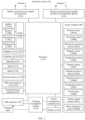
- FIG. 1 is a diagram of a hardware structure of an electronic device according to an embodiment of this application.
- the controller may be a nerve center and a command center of the electronic device 100.
- the controller may generate an operation control signal based on an instruction operation code and a time sequence signal, to complete control over instruction fetching and instruction execution.
- a memory may be further disposed in the processor 110, and is configured to store instructions and data.
- the memory in the processor 110 is a cache.
- the memory may store instructions or data that has been used or cyclically used by the processor 110. If the processor 110 needs to use the instructions or the data again, the processor 110 may directly invoke the instructions or the data from the memory, to avoid repeated access and reduce waiting time of the processor 110, thereby improving system efficiency.
- the processor 110 may communicate with a touch sensor 180E through the I2C bus interface, to implement a touch function of the electronic device 100.
- the processor 110 may communicate with the camera 191 through the CSI interface, to implement a photographing function of the electronic device 100.
- the processor 110 may communicate with the display 192 through the DSI interface, to implement a display function of the electronic device 100.
- an interface connection relationship between the modules shown in this embodiment of this application is merely an example for description, and constitutes no limitation on the structure of the electronic device 100.
- the electronic device 100 may alternatively use an interface connection manner different from an interface connection manner in this embodiment, or use a combination of a plurality of interface connection manners.
- the charging management module 140 is configured to receive a charging input from a charger.
- the power management module 141 is configured to connect to the battery 142. When charging the battery 142, the charging management module 140 may further supply power to the electronic device 100 through the power management module 141.
- the power management module 141 may be further configured to monitor a parameter such as a battery capacity, a quantity of battery cycles, and a battery health status.
- a wireless communication function of the electronic device 100 may be implemented through the antenna 1, the antenna 2, the mobile communication module 150, the wireless communication module 160, the modem processor, the baseband processor, and the like.
- the antenna 1 and the antenna 2 are configured to transmit and receive an electromagnetic wave signal.
- Each antenna in the electronic device 100 may be configured to cover one or more communication frequency bands. Different antennas may be further multiplexed, to improve antenna utilization.
- the antenna 1 may be multiplexed as a diversity antenna in a wireless local area network. In some other embodiments, the antenna may be used in combination with a tuning switch.
- the mobile communication module 150 may provide a wireless communication solution that is applied to the electronic device 100 and that includes 2G/3G/4G/5G, or the like.
- the mobile communication module 150 may include at least one filter, a switch, a power amplifier, a low noise amplifier (low noise amplifier, LNA), and the like.
- the mobile communication module 150 may receive an electromagnetic wave through the antenna 1, perform processing such as filtering and amplification on the received electromagnetic wave, and transmit a processed electromagnetic wave to the modem processor for demodulation.
- the mobile communication module 150 may further amplify a signal modulated by the modem processor, and convert the signal into an electromagnetic wave for radiation through the antenna 1.
- at least some functional modules of the mobile communication module 150 may be disposed in the processor 110.
- at least some functional modules of the mobile communication module 150 and at least some modules of the processor 110 may be disposed in a same device.
- the wireless communication module 160 may provide a wireless communication solution that is applied to the electronic device 100 and that includes a wireless local area network (wireless local area network, WLAN) (for example, a wireless fidelity (wireless fidelity, Wi-Fi) network), Bluetooth (Bluetooth, BT), a global navigation satellite system (global navigation satellite system, GNSS), frequency modulation (frequency modulation, FM), a near field communication (near field communication, NFC) technology, an infrared (infrared, IR) technology, or the like.
- the wireless communication module 160 may be one or more components integrating at least one communication processor module.
- the wireless communication module 160 receives an electromagnetic wave through the antenna 2, performs frequency modulation and filtering processing on the electromagnetic wave signal, and sends a processed signal to the processor 110.
- the wireless communication module 160 may further receive a to-be-sent signal from the processor 110, perform frequency modulation and amplification on the signal, and convert the signal into an electromagnetic wave through the antenna 2 for radiation.
- the electronic device 100 may implement a display function through the GPU, the display 192, the application processor, and the like.
- the GPU is a microprocessor for image processing, and is connected to the display 192 and the application processor.
- the GPU is configured to: perform mathematical and geometric computation, and render an image.
- the processor 110 may include one or more GPUs that execute program instructions to generate or change display information.
- the display 192 is configured to display an image, a video, and the like.
- the display 192 includes a display panel.
- the display panel may be a liquid crystal display (liquid crystal display, LCD), an organic light emitting diode (organic light emitting diode, OLED), an active-matrix organic light emitting diode (active-matrix organic light emitting diode, AMOLED), a flexible light emitting diode (flex light emitting diode, FLED), a mini-LED, a micro-LED, a micro-OLED, a quantum dot light emitting diode (quantum dot light emitting diodes, QLED), or the like.
- the electronic device 100 may include one or N displays 192, where N is a positive integer greater than 1.
- the electronic device 100 may implement a photographing function through the ISP, the camera 191, the video codec, the GPU, the display 192, the application processor, and the like.
- the ISP is configured to process data fed back by the camera 191.
- the camera 191 is configured to capture a static image or a video. An optical image of an object is generated through the lens, and is projected onto the photosensitive element.
- the photosensitive element may be a charge coupled device (charge coupled device, CCD) or a complementary metal-oxide-semiconductor (complementary metal-oxide-semiconductor, CMOS) phototransistor.
- the electronic device 100 may include one or N cameras 191, where N is a positive integer greater than 1.
- the video codec is configured to compress or decompress a digital video.
- the electronic device 100 may support one or more video codecs. Therefore, the electronic device 100 may play or record videos in a plurality of coding formats, for example, moving picture experts group (moving picture experts group, MPEG)-1, MPEG-2, MPEG-3, and MPEG-4.
- MPEG moving picture experts group
- the memory 120 is configured to store data and/or instructions.
- the memory 120 may include an internal memory.
- the internal memory is configured to store computer-executable program code, and the executable program code includes instructions.
- the processor 110 performs various function applications and data processing of the electronic device 100 by running the instructions stored in the internal memory.
- the internal memory may include a program storage area and a data storage area.
- the program storage area may store an operating system.
- the program storage area may further store one or more applications (for example, a gallery or a contact) and the like.
- the data storage area may store data (for example, an image or a contact) or the like created during use of the electronic device 100.
- the internal memory may include a high-speed random access memory, and may further include a non-volatile memory, for example, one or more disk storage devices, a flash device, or a universal flash storage (universal flash storage, UFS).
- the processor 110 may run the instructions stored in the internal memory and/or the instructions stored in the memory disposed in the processor 110, to enable the electronic device 100 to perform the card sharing method provided in embodiments of this application.
- the memory 120 may further include an external memory, for example, a micro SD card, to extend a storage capability of the electronic device 100.
- the external memory may communicate with the processor 110 through an external memory interface, to implement a data storage function. For example, files such as music and videos are stored in the external memory.
- the electronic device 100 may implement an audio function, for example, audio playing and recording, through the audio module 170, the speaker 170A, the receiver 170B, the microphone 170C, the headset jack 170D, the application processor.
- an audio function for example, audio playing and recording, through the audio module 170, the speaker 170A, the receiver 170B, the microphone 170C, the headset jack 170D, the application processor.
- the sensor module 180 may include a pressure sensor 180A, a gyroscope sensor 180B, an acceleration sensor 180C, a distance sensor 180D, a touch sensor 180E, some other sensors, and the like.
- the pressure sensor 180A is configured to sense a pressure signal, and can convert the pressure signal into an electrical signal.
- the pressure sensor 180A may be disposed on the display 192.
- the capacitive pressure sensor may include at least two parallel plates made of conductive materials.
- the electronic device 100 may also calculate a touch location based on a detection signal of the pressure sensor 180A.
- touch operations that are performed at a same touch location but have different touch operation intensity may correspond to different operation instructions. For example, when a touch operation whose touch operation intensity is less than a first pressure threshold is performed on an application icon "Messages", an instruction for viewing an SMS message is executed. When a touch operation whose touch operation intensity is greater than or equal to the first pressure threshold is performed on the application icon "Messages", an instruction for creating a new SMS message is executed.
- the electronic device may further determine a location of the input, when the location of the input is inside the input hot area, determine that the user input is performed on the multi-level menu, and therefore determine, based on the user input, whether to invoke a function of a corresponding option, expand a next level of menu, or collapse one or more levels of menus.
- the location of the input is outside the input hot area, for example, when the input is a click input, the input may be used to activate another window.
- the electronic device may correspondingly activate the another window under the transparent window (a window with a highest z level under the transparent window at a click location), and close the transparent window and the multi-level menu in the transparent window, so that the transparent window generated for the multi-level menu does not bring adverse impact on user experience.
- the click input may be directly transferred to a corresponding window, and an application corresponding to the window determines whether to further execute another instruction.
- the click location can trigger a corresponding instruction or invoke a corresponding function (when there is a control in the window at the click location, or the like).
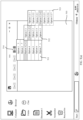
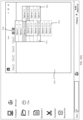
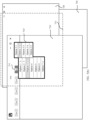
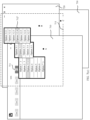
- the user input may be within the range of the input hot area 712, the user input may be a click input on an option 3 of the first level of menu or mouse hovering over the option 3 whose time exceeds a preset threshold, and the user input may be transferred to the application to which the window 710 belongs.
- the application determines that an objective of the input is to trigger starting of a next level of menu, and a user interface control corresponding to the next level of menu may be generated.
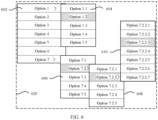
- the input hot area is updated to a thick box 712' as the second level of menu is displayed, and is a combined area of areas occupied by the two levels of menus.
- the electronic device may create independent transparent windows for the multi-level menus, and transparent windows corresponding to different multi-level menus may have different sizes and locations.
- expansion and collapse of the multi-level menu and execution of a specific instruction are actually determined by an application to which a window for triggering the multi-level menu belongs.
- the multi-level menu is a user interface control in the transparent window, the multi-level menu is actually managed by the application to which the window for triggering the multi-level menu belongs.
- the multi-level menu is displayed to the user in the form of the user interface control in the transparent window, and the size of the transparent window may be determined based on a display requirement of the menu. Therefore, on one hand, display of the multi-level menu is not limited by a boundary of the first window for triggering or managing the multi-level menu, and when the size of the transparent window is set to be appropriate and the first window is a non-full-screen display window, a part of the transparent window may be outside the area occupied by the first window, and the multi-level menu may be correspondingly displayed outside the first window.
- FIG. 8 shows a display apparatus 800 according to an embodiment of this application.
- the display apparatus 800 includes a processing unit 810 and a display unit 820.
- the processing unit 810 may be configured to perform step 410 in the method embodiment shown in FIG. 4 .
- the display unit 820 may be configured to perform step S420 in the method embodiment shown in FIG. 4 .
- the display apparatus 800 includes: the processing unit 810, configured to receive a first input used to expand an n th level of menu in a multi-level menu; and the display unit 820, configured to display a user interface control in a transparent window in response to the first input, where the user interface control is the n th level of menu in the multi-level menu.
- an area occupied by the transparent window is greater than or equal to a possible display area of the multi-level menu.
- the possible display area of the multi-level menu is related to a location of the input for triggering expansion of the first level of menu in the multi-level menu.
- the area occupied by the transparent window is consistent with a screen display area of the electronic device.
- the first window is a non-full-screen display window, and a partial area of the transparent window is outside an area occupied by the first window.
- the user interface control is displayed based on a rendering result of the transparent window.
- an operating system of the display apparatus 800 is a Windows operating system, an Android operating system, an iOS operating system, or a Linux operating system.
- the first input when n is 1, the first input is a click operation performed by the user on a first control in the first window, or the first input is a mouse right-click operation or a touch and hold tap operation performed by the user on a blank area in the first window; and when n is greater than or equal to 2, the first input is an operation of hovering over an option of an (n-1) th level of menu in the multi-level menu for more than preset duration, or the first input is a click operation on an option of an (n-1) th level of menu in the multi-level menu.
- FIG. 9 shows a display apparatus according to an embodiment of this application.
- a display apparatus 900 shown in FIG. 9 may correspond to the display apparatus described above.
- the display apparatus 900 may be a specific example of the display apparatus in FIG. 8 .
- the display apparatus 900 includes a processor 920.
- the processor 920 is configured to implement a corresponding control and management operation.
- the processor 920 is configured to support the display apparatus 900 in performing the method, operation, or function in the foregoing embodiments.
- the display apparatus 900 may further include a memory 910 and a communication interface 930.
- the processor 920, the communication interface 930, and the memory 910 may be connected to each other or connected to each other through a bus 940.
- the communication interface 930 is configured to support the display apparatus in communicating with another device and the like.
- the memory 910 is configured to store program code and data of the display apparatus.
- the processor 920 invokes the code or the data stored in the memory 910 to implement a corresponding operation.
- the memory 910 may be or may not be coupled to the processor.
- the coupling in this embodiment of this application may be an indirect coupling or a communication connection between display apparatuses, units, or modules in an electrical form, a mechanical form, or another form, and is used for information exchange between the display apparatuses, the units, or the modules.
- the bus 940 may be a peripheral component interconnect (peripheral component interconnect, PCI) bus, an extended industry standard architecture (extended industry standard architecture, EISA) bus, or the like.
- PCI peripheral component interconnect
- EISA extended industry standard architecture
- the bus may be classified into an address bus, a data bus, a control bus, and the like. For ease of representation, only one thick line is for representing the bus in FIG. 9 , but this does not mean that there is only one bus or only one type of bus.
- the disclosed system, apparatus, and method may be implemented in other manners.
- the described apparatus embodiments are merely examples.
- division into the units is merely logical function division, and may be other division during actual implementation.
- a plurality of units or components may be combined or may be integrated into another system, or some features may be ignored or not performed.
- the displayed or discussed mutual couplings or direct couplings or communication connections may be implemented through some interfaces.
- the indirect couplings or communication connections between the apparatuses or the units may be implemented in electrical, mechanical, or another form.
- the units described as separate parts may or may not be physically separate, and parts displayed as units may or may not be physical units, may be located in one place, or may be distributed on a plurality of network units. Some or all of the units may be selected based on actual requirements to achieve the objectives of the solutions of embodiments.
- the functions When the functions are implemented in a form of a software functional unit and sold or used as an independent product, the functions may be stored in a computer-readable storage medium. Based on such an understanding, the technical solutions of this application essentially, or the part contributing to the conventional technology, or a part of the technical solutions may be implemented in a form of a software product.
- the computer software product is stored in a storage medium and includes several instructions for instructing a computer device (which may be a personal computer, a server, a network device, or the like) to perform all or some of the steps of the methods described in embodiments of this application.
- the foregoing storage medium includes any medium that can store program code, such as a USB flash drive, a removable hard disk, a read-only memory (read-only memory, ROM), a random access memory (random access memory, RAM), a magnetic disk, or an optical disc.
- program code such as a USB flash drive, a removable hard disk, a read-only memory (read-only memory, ROM), a random access memory (random access memory, RAM), a magnetic disk, or an optical disc.
Landscapes
- Engineering & Computer Science (AREA)
- General Engineering & Computer Science (AREA)
- Theoretical Computer Science (AREA)
- Human Computer Interaction (AREA)
- Physics & Mathematics (AREA)
- General Physics & Mathematics (AREA)
- User Interface Of Digital Computer (AREA)
- Controls And Circuits For Display Device (AREA)
- Digital Computer Display Output (AREA)
- Power Sources (AREA)
Applications Claiming Priority (2)
| Application Number | Priority Date | Filing Date | Title |
|---|---|---|---|
| CN202310072062.2A CN118331464A (zh) | 2023-01-12 | 2023-01-12 | 显示方法、显示装置和电子设备 |
| PCT/CN2023/143194 WO2024149089A1 (zh) | 2023-01-12 | 2023-12-29 | 显示方法、显示装置和电子设备 |
Publications (2)
| Publication Number | Publication Date |
|---|---|
| EP4579415A1 true EP4579415A1 (de) | 2025-07-02 |
| EP4579415A4 EP4579415A4 (de) | 2026-02-11 |
Family
ID=91772972
Family Applications (1)
| Application Number | Title | Priority Date | Filing Date |
|---|---|---|---|
| EP23915842.1A Pending EP4579415A4 (de) | 2023-01-12 | 2023-12-29 | Anzeigeverfahren, anzeigevorrichtung und elektronische vorrichtung |
Country Status (4)
| Country | Link |
|---|---|
| US (1) | US20250264976A1 (de) |
| EP (1) | EP4579415A4 (de) |
| CN (1) | CN118331464A (de) |
| WO (1) | WO2024149089A1 (de) |
Family Cites Families (7)
| Publication number | Priority date | Publication date | Assignee | Title |
|---|---|---|---|---|
| US8351989B2 (en) * | 2007-02-23 | 2013-01-08 | Lg Electronics Inc. | Method of displaying menu in a mobile communication terminal |
| CN101052108A (zh) * | 2007-03-21 | 2007-10-10 | 林羽明 | 一种显示动画菜谱的装置和方法 |
| CN100489756C (zh) * | 2007-05-31 | 2009-05-20 | 腾讯科技(深圳)有限公司 | 一种自定义右键菜单的方法及系统 |
| US9639983B2 (en) * | 2009-07-22 | 2017-05-02 | Behr Process Corporation | Color selection, coordination and purchase system |
| CN114201097B (zh) * | 2020-09-16 | 2024-06-11 | 华为技术有限公司 | 一种多应用程序之间的交互方法 |
| CN114690893A (zh) * | 2020-12-31 | 2022-07-01 | 华为技术有限公司 | 一种显示方法及电子设备 |
| CN115145447A (zh) * | 2021-03-30 | 2022-10-04 | 华为技术有限公司 | 一种窗口的显示方法以及相关装置 |
-
2023
- 2023-01-12 CN CN202310072062.2A patent/CN118331464A/zh active Pending
- 2023-12-29 EP EP23915842.1A patent/EP4579415A4/de active Pending
- 2023-12-29 WO PCT/CN2023/143194 patent/WO2024149089A1/zh not_active Ceased
-
2025
- 2025-05-07 US US19/201,158 patent/US20250264976A1/en active Pending
Also Published As
| Publication number | Publication date |
|---|---|
| EP4579415A4 (de) | 2026-02-11 |
| CN118331464A (zh) | 2024-07-12 |
| US20250264976A1 (en) | 2025-08-21 |
| WO2024149089A1 (zh) | 2024-07-18 |
Similar Documents
| Publication | Publication Date | Title |
|---|---|---|
| CN112269527B (zh) | 应用界面的生成方法及相关装置 | |
| US12449960B2 (en) | Interface display method and device | |
| WO2021227770A1 (zh) | 应用窗口显示方法和电子设备 | |
| WO2021057830A1 (zh) | 一种信息处理方法及电子设备 | |
| WO2021244443A1 (zh) | 分屏显示方法、电子设备及计算机可读存储介质 | |
| WO2021120914A1 (zh) | 一种界面元素的显示方法及电子设备 | |
| WO2021115194A1 (zh) | 一种应用图标的显示方法及电子设备 | |
| US12429992B2 (en) | Operation method and electronic device for displaying content of an application in an accessible window | |
| CN115033333B (zh) | 一种悬浮窗显示方法、电子设备和存储介质 | |
| WO2023005751A1 (zh) | 渲染方法及电子设备 | |
| EP4280058B1 (de) | Informationsanzeigeverfahren und elektronische vorrichtung | |
| WO2023040666A1 (zh) | 键盘显示方法、折叠屏设备和计算机可读存储介质 | |
| CN110780929A (zh) | 调用硬件接口的方法及电子设备 | |
| CN117519864A (zh) | 界面显示方法、电子设备及存储介质 | |
| US12118369B2 (en) | Display method and electronic device | |
| WO2023169276A1 (zh) | 投屏方法、终端设备及计算机可读存储介质 | |
| CN115643485A (zh) | 拍摄的方法和电子设备 | |
| WO2021052488A1 (zh) | 一种信息处理方法及电子设备 | |
| EP4579415A1 (de) | Anzeigeverfahren, anzeigevorrichtung und elektronische vorrichtung | |
| CN116737291B (zh) | 桌面应用的处理方法和电子设备 | |
| WO2024099206A1 (zh) | 一种图形界面处理方法以及装置 | |
| WO2024037346A1 (zh) | 页面管理方法及电子设备 | |
| CN116719587A (zh) | 屏幕显示方法、电子设备及计算机可读存储介质 | |
| CN116225274A (zh) | 触控操作的识别方法、装置、电子设备及存储介质 | |
| CN118363691A (zh) | 一种窗口管理方法以及电子设备 |
Legal Events
| Date | Code | Title | Description |
|---|---|---|---|
| STAA | Information on the status of an ep patent application or granted ep patent |
Free format text: STATUS: THE INTERNATIONAL PUBLICATION HAS BEEN MADE |
|
| PUAI | Public reference made under article 153(3) epc to a published international application that has entered the european phase |
Free format text: ORIGINAL CODE: 0009012 |
|
| STAA | Information on the status of an ep patent application or granted ep patent |
Free format text: STATUS: REQUEST FOR EXAMINATION WAS MADE |
|
| 17P | Request for examination filed |
Effective date: 20250328 |
|
| AK | Designated contracting states |
Kind code of ref document: A1 Designated state(s): AL AT BE BG CH CY CZ DE DK EE ES FI FR GB GR HR HU IE IS IT LI LT LU LV MC ME MK MT NL NO PL PT RO RS SE SI SK SM TR |
|
| REG | Reference to a national code |
Ref country code: DE Ref legal event code: R079 Free format text: PREVIOUS MAIN CLASS: G06F0003048200 Ipc: G06F0003048100 |
|
| A4 | Supplementary search report drawn up and despatched |
Effective date: 20260112 |
|
| RIC1 | Information provided on ipc code assigned before grant |
Ipc: G06F 3/0481 20220101AFI20260105BHEP Ipc: G06F 3/0482 20130101ALI20260105BHEP |
|
| DAV | Request for validation of the european patent (deleted) | ||
| DAX | Request for extension of the european patent (deleted) |