EP4564800A1 - Information processing apparatus that causes display device, when executing remote process, to display screen not including detail of remote processing, and image forming apparatus - Google Patents
Information processing apparatus that causes display device, when executing remote process, to display screen not including detail of remote processing, and image forming apparatus Download PDFInfo
- Publication number
- EP4564800A1 EP4564800A1 EP24214834.4A EP24214834A EP4564800A1 EP 4564800 A1 EP4564800 A1 EP 4564800A1 EP 24214834 A EP24214834 A EP 24214834A EP 4564800 A1 EP4564800 A1 EP 4564800A1
- Authority
- EP
- European Patent Office
- Prior art keywords
- screen
- remote
- display
- external device
- controller
- Prior art date
- Legal status (The legal status is an assumption and is not a legal conclusion. Google has not performed a legal analysis and makes no representation as to the accuracy of the status listed.)
- Pending
Links
Images



Classifications
-
- H—ELECTRICITY
- H04—ELECTRIC COMMUNICATION TECHNIQUE
- H04N—PICTORIAL COMMUNICATION, e.g. TELEVISION
- H04N1/00—Scanning, transmission or reproduction of documents or the like, e.g. facsimile transmission; Details thereof
- H04N1/00127—Connection or combination of a still picture apparatus with another apparatus, e.g. for storage, processing or transmission of still picture signals or of information associated with a still picture
- H04N1/00344—Connection or combination of a still picture apparatus with another apparatus, e.g. for storage, processing or transmission of still picture signals or of information associated with a still picture with a management, maintenance, service or repair apparatus
-
- H—ELECTRICITY
- H04—ELECTRIC COMMUNICATION TECHNIQUE
- H04N—PICTORIAL COMMUNICATION, e.g. TELEVISION
- H04N1/00—Scanning, transmission or reproduction of documents or the like, e.g. facsimile transmission; Details thereof
- H04N1/00127—Connection or combination of a still picture apparatus with another apparatus, e.g. for storage, processing or transmission of still picture signals or of information associated with a still picture
- H04N1/00204—Connection or combination of a still picture apparatus with another apparatus, e.g. for storage, processing or transmission of still picture signals or of information associated with a still picture with a digital computer or a digital computer system, e.g. an internet server
-
- G—PHYSICS
- G06—COMPUTING OR CALCULATING; COUNTING
- G06F—ELECTRIC DIGITAL DATA PROCESSING
- G06F3/00—Input arrangements for transferring data to be processed into a form capable of being handled by the computer; Output arrangements for transferring data from processing unit to output unit, e.g. interface arrangements
- G06F3/12—Digital output to print unit, e.g. line printer, chain printer
- G06F3/1201—Dedicated interfaces to print systems
- G06F3/1202—Dedicated interfaces to print systems specifically adapted to achieve a particular effect
- G06F3/1203—Improving or facilitating administration, e.g. print management
- G06F3/1204—Improving or facilitating administration, e.g. print management resulting in reduced user or operator actions, e.g. presetting, automatic actions, using hardware token storing data
-
- G—PHYSICS
- G06—COMPUTING OR CALCULATING; COUNTING
- G06F—ELECTRIC DIGITAL DATA PROCESSING
- G06F3/00—Input arrangements for transferring data to be processed into a form capable of being handled by the computer; Output arrangements for transferring data from processing unit to output unit, e.g. interface arrangements
- G06F3/12—Digital output to print unit, e.g. line printer, chain printer
- G06F3/1201—Dedicated interfaces to print systems
- G06F3/1223—Dedicated interfaces to print systems specifically adapted to use a particular technique
- G06F3/1237—Print job management
- G06F3/1253—Configuration of print job parameters, e.g. using UI at the client
-
- G—PHYSICS
- G06—COMPUTING OR CALCULATING; COUNTING
- G06F—ELECTRIC DIGITAL DATA PROCESSING
- G06F3/00—Input arrangements for transferring data to be processed into a form capable of being handled by the computer; Output arrangements for transferring data from processing unit to output unit, e.g. interface arrangements
- G06F3/12—Digital output to print unit, e.g. line printer, chain printer
- G06F3/1201—Dedicated interfaces to print systems
- G06F3/1278—Dedicated interfaces to print systems specifically adapted to adopt a particular infrastructure
- G06F3/1285—Remote printer device, e.g. being remote from client or server
-
- G—PHYSICS
- G06—COMPUTING OR CALCULATING; COUNTING
- G06F—ELECTRIC DIGITAL DATA PROCESSING
- G06F3/00—Input arrangements for transferring data to be processed into a form capable of being handled by the computer; Output arrangements for transferring data from processing unit to output unit, e.g. interface arrangements
- G06F3/14—Digital output to display device ; Cooperation and interconnection of the display device with other functional units
- G06F3/1454—Digital output to display device ; Cooperation and interconnection of the display device with other functional units involving copying of the display data of a local workstation or window to a remote workstation or window so that an actual copy of the data is displayed simultaneously on two or more displays, e.g. teledisplay
-
- H—ELECTRICITY
- H04—ELECTRIC COMMUNICATION TECHNIQUE
- H04N—PICTORIAL COMMUNICATION, e.g. TELEVISION
- H04N1/00—Scanning, transmission or reproduction of documents or the like, e.g. facsimile transmission; Details thereof
- H04N1/00002—Diagnosis, testing or measuring; Detecting, analysing or monitoring not otherwise provided for
- H04N1/00026—Methods therefor
- H04N1/00058—Methods therefor using a separate apparatus
- H04N1/00061—Methods therefor using a separate apparatus using a remote apparatus
-
- H—ELECTRICITY
- H04—ELECTRIC COMMUNICATION TECHNIQUE
- H04N—PICTORIAL COMMUNICATION, e.g. TELEVISION
- H04N1/00—Scanning, transmission or reproduction of documents or the like, e.g. facsimile transmission; Details thereof
- H04N1/00127—Connection or combination of a still picture apparatus with another apparatus, e.g. for storage, processing or transmission of still picture signals or of information associated with a still picture
-
- H—ELECTRICITY
- H04—ELECTRIC COMMUNICATION TECHNIQUE
- H04N—PICTORIAL COMMUNICATION, e.g. TELEVISION
- H04N1/00—Scanning, transmission or reproduction of documents or the like, e.g. facsimile transmission; Details thereof
- H04N1/00127—Connection or combination of a still picture apparatus with another apparatus, e.g. for storage, processing or transmission of still picture signals or of information associated with a still picture
- H04N1/00204—Connection or combination of a still picture apparatus with another apparatus, e.g. for storage, processing or transmission of still picture signals or of information associated with a still picture with a digital computer or a digital computer system, e.g. an internet server
- H04N1/00209—Transmitting or receiving image data, e.g. facsimile data, via a computer, e.g. using e-mail, a computer network, the internet, I-fax
-
- H—ELECTRICITY
- H04—ELECTRIC COMMUNICATION TECHNIQUE
- H04N—PICTORIAL COMMUNICATION, e.g. TELEVISION
- H04N1/00—Scanning, transmission or reproduction of documents or the like, e.g. facsimile transmission; Details thereof
- H04N1/0035—User-machine interface; Control console
- H04N1/00405—Output means
- H04N1/00408—Display of information to the user, e.g. menus
-
- H—ELECTRICITY
- H04—ELECTRIC COMMUNICATION TECHNIQUE
- H04N—PICTORIAL COMMUNICATION, e.g. TELEVISION
- H04N1/00—Scanning, transmission or reproduction of documents or the like, e.g. facsimile transmission; Details thereof
- H04N1/0035—User-machine interface; Control console
- H04N1/00501—Tailoring a user interface [UI] to specific requirements
- H04N1/00503—Customising to a particular machine or model, machine function or application
-
- H—ELECTRICITY
- H04—ELECTRIC COMMUNICATION TECHNIQUE
- H04N—PICTORIAL COMMUNICATION, e.g. TELEVISION
- H04N1/00—Scanning, transmission or reproduction of documents or the like, e.g. facsimile transmission; Details thereof
- H04N1/0035—User-machine interface; Control console
- H04N1/00501—Tailoring a user interface [UI] to specific requirements
- H04N1/00509—Personalising for a particular user or group of users, e.g. a workgroup or company
- H04N1/00514—Personalising for a particular user or group of users, e.g. a workgroup or company for individual users
-
- H—ELECTRICITY
- H04—ELECTRIC COMMUNICATION TECHNIQUE
- H04N—PICTORIAL COMMUNICATION, e.g. TELEVISION
- H04N1/00—Scanning, transmission or reproduction of documents or the like, e.g. facsimile transmission; Details thereof
- H04N1/44—Secrecy systems
-
- H—ELECTRICITY
- H04—ELECTRIC COMMUNICATION TECHNIQUE
- H04N—PICTORIAL COMMUNICATION, e.g. TELEVISION
- H04N1/00—Scanning, transmission or reproduction of documents or the like, e.g. facsimile transmission; Details thereof
- H04N1/44—Secrecy systems
- H04N1/4406—Restricting access, e.g. according to user identity
- H04N1/4433—Restricting access, e.g. according to user identity to an apparatus, part of an apparatus or an apparatus function
-
- G—PHYSICS
- G06—COMPUTING OR CALCULATING; COUNTING
- G06F—ELECTRIC DIGITAL DATA PROCESSING
- G06F3/00—Input arrangements for transferring data to be processed into a form capable of being handled by the computer; Output arrangements for transferring data from processing unit to output unit, e.g. interface arrangements
- G06F3/12—Digital output to print unit, e.g. line printer, chain printer
- G06F3/1201—Dedicated interfaces to print systems
- G06F3/1223—Dedicated interfaces to print systems specifically adapted to use a particular technique
- G06F3/1236—Connection management
-
- H—ELECTRICITY
- H04—ELECTRIC COMMUNICATION TECHNIQUE
- H04N—PICTORIAL COMMUNICATION, e.g. TELEVISION
- H04N1/00—Scanning, transmission or reproduction of documents or the like, e.g. facsimile transmission; Details thereof
- H04N1/44—Secrecy systems
- H04N1/4406—Restricting access, e.g. according to user identity
- H04N1/4413—Restricting access, e.g. according to user identity involving the use of passwords, ID codes or the like, e.g. PIN
-
- H—ELECTRICITY
- H04—ELECTRIC COMMUNICATION TECHNIQUE
- H04N—PICTORIAL COMMUNICATION, e.g. TELEVISION
- H04N2201/00—Indexing scheme relating to scanning, transmission or reproduction of documents or the like, and to details thereof
- H04N2201/0008—Connection or combination of a still picture apparatus with another apparatus
-
- H—ELECTRICITY
- H04—ELECTRIC COMMUNICATION TECHNIQUE
- H04N—PICTORIAL COMMUNICATION, e.g. TELEVISION
- H04N2201/00—Indexing scheme relating to scanning, transmission or reproduction of documents or the like, and to details thereof
- H04N2201/0008—Connection or combination of a still picture apparatus with another apparatus
- H04N2201/0034—Details of the connection, e.g. connector, interface
- H04N2201/0037—Topological details of the connection
- H04N2201/0039—Connection via a network
-
- H—ELECTRICITY
- H04—ELECTRIC COMMUNICATION TECHNIQUE
- H04N—PICTORIAL COMMUNICATION, e.g. TELEVISION
- H04N2201/00—Indexing scheme relating to scanning, transmission or reproduction of documents or the like, and to details thereof
- H04N2201/0008—Connection or combination of a still picture apparatus with another apparatus
- H04N2201/0074—Arrangements for the control of a still picture apparatus by the connected apparatus
- H04N2201/0075—Arrangements for the control of a still picture apparatus by the connected apparatus by a user operated remote control device, e.g. receiving instructions from a user via a computer terminal or mobile telephone handset
-
- H—ELECTRICITY
- H04—ELECTRIC COMMUNICATION TECHNIQUE
- H04N—PICTORIAL COMMUNICATION, e.g. TELEVISION
- H04N2201/00—Indexing scheme relating to scanning, transmission or reproduction of documents or the like, and to details thereof
- H04N2201/0077—Types of the still picture apparatus
- H04N2201/0091—Digital copier; digital 'photocopier'
-
- H—ELECTRICITY
- H04—ELECTRIC COMMUNICATION TECHNIQUE
- H04N—PICTORIAL COMMUNICATION, e.g. TELEVISION
- H04N2201/00—Indexing scheme relating to scanning, transmission or reproduction of documents or the like, and to details thereof
- H04N2201/0077—Types of the still picture apparatus
- H04N2201/0094—Multifunctional device, i.e. a device capable of all of reading, reproducing, copying, facsimile transception, file transception
Definitions
- the present invention relates to an information processing apparatus and an image forming apparatus that are remotely operable.
- a remote maintenance function for an image forming apparatus is widely known.
- the image forming apparatus transmits image data representing an operation screen displayed on a display device of the image forming apparatus, via a network, to a remotely connected external device, such as a personal computer (PC) operated by a service person in charge of the maintenance work, to thereby share the screen between the image forming apparatus and the external device.
- a remotely connected external device such as a personal computer (PC) operated by a service person in charge of the maintenance work
- the invention proposes further improvement of the foregoing technique.
- the invention provides an information processing apparatus including an operation device, a display device, a communication device, and a control device.
- an operation device an instruction from a user is inputted.
- the communication device performs data communication with an external device.
- the control device includes a processor, and acts as a controller when the processor executes a control program.
- the controller causes the display device to display an operation screen, according to the instruction inputted to the operation device.
- the controller establishes remote connection with the external device through the communication device, and executes a remote process according to a remote instruction transmitted from the remotely connected external device, transmits image data representing a remote screen, serving as the operation screen to be displayed on the display device when the remote process is executed, to the external device, and executes, at a predetermined timing while the information processing apparatus is in operation in remote connection with the external device, a concealing display operation including causing the display device to display a predetermined substitute screen not containing an operation detail related to the remote process, instead of causing the display device to display the remote screen.
- the invention provides an image forming apparatus including the foregoing information processing apparatus, and an image forming device.
- the image forming device forms an image on a recording medium.
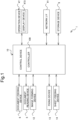
- Fig. 1 is a functional block diagram schematically showing an essential internal configuration of an image forming apparatus 1 according to a first embodiment of the invention.
- the image forming apparatus 1 is a multifunction peripheral having a plurality of functions, such as copying, printing, scanning, and facsimile transmission.
- the image forming apparatus 1 includes a control device 10, a document feeding device 6, a document reading device 5, an image forming device 12, a fixing device 13, a sheet feeding device 14, an operation device 47, a network interface (I/F) 91, and a storage device 8.
- a control device 10 a document feeding device 6, a document reading device 5, an image forming device 12, a fixing device 13, a sheet feeding device 14, an operation device 47, a network interface (I/F) 91, and a storage device 8.
- the document feeding device 6 is openably connected to the upper face of the document reading device 5, for example via a hinge.
- the document feeding device 6 serves as a document retention cover, when a document placed on a platen glass is to be read.
- the document feeding device 6 is what is known as an automatic document feeder (ADF).
- ADF automatic document feeder
- the document feeding device 6 includes a document tray, to supply the document placed thereon to the document reading device 5.
- the document reading device 5 includes a scanner.
- the document reading device 5 reads the document delivered from the document feeding device 6, or a document placed on the platen glass.
- the image forming apparatus 1 operates as follows.
- the document reading device 5 optically reads the image on the document delivered from the document feeding device 6 to the document reading device 5, or placed on the platen glass, and generates image data.
- the image data generated by the document reading device 5 is stored, for example, in an image memory.
- the image forming apparatus 1 operates as follows.
- the image forming device 12 includes a photoconductor drum, a charging device, an exposure device, a developing device, and a primary transfer device for each of the colors.
- the image forming device 12 includes a mechanism that forms an image on a recording sheet, exemplifying the recording medium in the invention, by means of secondary transfer via an intermediate transfer belt.
- the image forming device 12 forms a toner image on the recording sheet delivered from the sheet feeding device 14, thereby producing a printed material, on the basis of the image data generated through the document reading operation, image data stored in the image memory, or image data received from a computer connected via the network.
- the sheet feeding device 14 includes a sheet cassette, and also a pickup roller, a transport roller, a transport route, and a drive mechanism for each of the rollers, which are configured to draws out the recording sheet from the sheet cassette and transport the recording sheet to the image forming device 12.
- the fixing device 13 includes a heat roller, a pressure roller, and a drive mechanism therefor.
- the fixing device 13 heats and presses the recording sheet on which the toner image has been formed by the image forming device 12, at a nip region defined between the heat roller and the pressure roller, to thereby fix the toner image onto the recording sheet.
- the recording sheet that has undergone the fixing process is delivered to an output tray.
- the operation device 47 includes various hard keys to be operated by the user.
- the operation device 47 receives the user's instructions inputted with the hard keys, to execute the functions and operations that the image forming apparatus 1 is configured to perform, for example the image forming operation.
- the operation device 47 also receives, through a touch panel provided on a display device 473, the user's instruction based on the touch operation performed by the user on the screen displayed on the display device 473.
- the display device 473 having a rectangular shape, is constituted of, for example, a liquid crystal display (LCD).
- LCD liquid crystal display
- the network I/F 91 is a communication interface that transmits and receives various types of data to and from an external device (e.g., a server or a PC) inside a local area, or on the internet.
- the network I/F 91 exemplifies the communication device in the invention.
- the storage device 8 is a large-capacity storage device such as a hard disk drive (HDD) or a solid-state drive (SSD), and contains various control programs.
- HDD hard disk drive
- SSD solid-state drive
- the control device 10 includes a processor, a random-access memory (RAM), a read-only memory (ROM), and an exclusive hardware circuit.
- the processor is, for example, a central processing unit (CPU), an application specific integrated circuit (ASIC), or a micro processing unit (MPU).
- the control device 10 acts as a controller 100, when the processor operates according to the control program stored in the storage device 8.
- the controller 100 may be constituted in the form of a hardware circuit, instead of being realized by the operation of the control device 10 according to the control program. This also applies to other embodiments, unless otherwise specifically noted.
- the controller 100 serves to control the overall operation of the image forming apparatus 1.
- the controller 100 is connected to the document feeding device 6, the document reading device 5, the image forming device 12, the fixing device 13, the sheet feeding device 14, the operation device 47, the network I/F 91, and the storage device 8, and controls the operation of the mentioned components.
- the controller 100 executes some processings required for the image forming operation to be performed by the image forming apparatus 1, including causing the display device 473 to display an operation screen, on the basis of operation data indicating the user's instruction inputted to the operation device 47.
- the image forming apparatus 1 is configured to establish remote connection with an external device ED (see Fig. 2 ) through a server SV (see Fig. 2 ) through the network, and receive a remote operation from the external device ED now remotely connected.
- an instruction to the image forming apparatus 1 transmitted from the remotely connected external device ED (remote instruction), through the network I/F 91, the controller 100 executes various types of remote process, according to the remote instruction received.
- the controller 100 transmits the image data representing the operation screen (remote screen), to be displayed on the display device 473 when the remote process is executed, to the external device ED. At this point, the external device ED becomes able to execute the remote operation with respect to the image forming apparatus 1.
- the controller 100 operates the image forming apparatus 1, either in a normal mode or in a maintenance mode.
- the maintenance mode includes causing the image forming apparatus 1 to execute a predetermined maintenance operation and maintenance process.
- the normal mode includes causing the image forming apparatus 1 to execute operations other than the maintenance operation and the maintenance process, in other words the regular operations such as an image forming operation, a scanning operation, a transmitting operation, and a facsimile operation according to the user's instruction inputted to the operation device 47, or the image forming operation according to print data and print instruction transmitted from the external device.
- the controller 100 executes, at a predetermined timing while being remotely connected to the external device ED, a concealing display operation including causing the display device 473 to display a predetermined substitute screen not containing an operation detail to be displayed when the remote process is executed according to the remote instruction, instead of causing the display device 473 to display the operation screen (remote screen) represented by the image data transmitted to the external device ED.
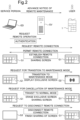
- Fig. 2 is a schematic diagram for explaining a process through which the remote connection is established between the image forming apparatus 1 and the external device ED, the image forming apparatus 1 transits to the maintenance mode, and the remote connection with the external device ED is disconnected.
- a service person in charge of the maintenance work, requests the server SV that builds the remote connection environment using the external device ED such as a PC, to execute the remote operation with respect to the device being managed by the server SV, the image forming apparatus 1 inclusive.
- the external device ED such as a PC
- a log-in process for authentication is executed between the external device ED and the server SV.
- the operation screen for selecting a target device of the remote operation is displayed on (the display of) the external device ED.
- the external device ED transmits a request for remote connection, to the image forming apparatus 1 through the server SV.
- the controller 100 of the image forming apparatus 1 Upon receipt of the request for remote connection through the network I/F 91 (exemplifying the communication device), the controller 100 of the image forming apparatus 1 causes the display device 473 to display a screen indicating the receipt of the request for remote connection.
- the controller 100 transmits a permission signal to the external device ED, through the network I/F 91.
- the remote connection is established between the image forming apparatus 1 and the external device ED, and the screen is shared therebetween.
- an operation screen G1 shown in Fig. 3 is displayed on the display device 473 of the image forming apparatus 1, and the image data representing the operation screen G1 is transmitted from the image forming apparatus 1 to the external device ED, so that the same operation screen G1 is also displayed on the external device ED.
- the image forming apparatus 1 switches the operation mode from the normal mode to the maintenance mode.
- the image forming apparatus 1 starts the concealing display operation, at the time of the transition (exemplifying the predetermined timing in the invention).
- the concealing display operation includes, as described above, causing the display device 473 to display the predetermined substitute screen not containing an operation detail to be displayed when the remote process is executed according to the remote instruction, instead of causing the display device 473 to display the operation screen represented by the image data transmitted to the external device ED.
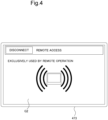
- the image forming apparatus 1 displays an exclusive screen G2 shown in Fig. 4 on the display device 473, as the predetermined substitute screen.
- the operation screen e.g., maintenance screen
- the operation screen displayed on the external device ED during the operation in the maintenance mode, is kept from being displayed on the display device 473 of the image forming apparatus 1, so that the user of the image forming apparatus 1 is disabled from viewing the remote operation detail in the maintenance mode.
- the controller 100 of the image forming apparatus 1 Upon receipt of a request for cancellation of the maintenance mode (transition to the normal mode) from the external device ED, through the network I/F 91, the controller 100 of the image forming apparatus 1 switches the operation mode to the normal mode. At this point, the controller 100 erases the exclusive screen G2 from the display device 473, and transmits the image data representing the operation screen supposed to be displayed in the normal mode (normal screen such as operation screen G1), to the external device ED through the network I/F 91.
- the same operation screen as that displayed on the external device ED (e.g., operation screen G1) is also displayed on the display device 473 of the image forming apparatus 1. Therefore, the screen is shared between the image forming apparatus 1 and the external device ED.
- the controller 100 of the image forming apparatus 1 disconnects the remote connection with the external device ED. Accordingly, the screen is no longer shared between the image forming apparatus 1 and the external device ED. Therefore, a screen different from the one displayed on the image forming apparatus 1 (e.g., operation screen G1) is displayed on the external device ED.
- Fig. 5 is a flowchart showing the remote connection process according to the first embodiment.
- the remote connection process is executed when the controller 100 receives the remote connection request from the external device ED, through the network I/F 91.
- the controller 100 Upon receipt of the request for the remote connection, the controller 100 causes the display device 473 to display a screen indicating that the request for the remote connection has been received (step S1). Accordingly, the user is made aware that the remote connection request has been received from the external device ED.
- the controller 100 executes the operation for establishing the remote connection with the external device ED (step S3).
- the controller 100 transmits the image data representing the operation screen displayed on the display device 473, to the external device ED through the network I/F 91. Accordingly, the operation screen is also displayed on the display device of the external device ED, so that the screen is shared between the image forming apparatus 1 and the external device ED.
- the controller 100 finishes the remote connection process.
- step S3 the controller 100 decides whether a transit request, requesting for transition of the operation mode to the maintenance mode, from the remotely connected external device ED (step S4).
- step S4 the controller 100 executes the log-in process for the transition to the maintenance mode (step S5), and decides whether the operator of the external device ED is a legitimate service person (qualified for executing the maintenance work) (step S6). In other words, the controller 100 executes the authentication process.
- the controller 100 Upon deciding that the operator of the external device ED is the legitimate service person (YES at step S6), the controller 100 switches the operation mode of the image forming apparatus 1 to the maintenance mode (step S7). Upon switching the operation mode of the image forming apparatus 1 to the maintenance mode, the controller 100 causes the display device 473 to display the exclusive screen G2 shown in Fig. 4 (step S8).
- step S8 the controller 100 decides whether a cancel request of the maintenance mode has been received, from the remotely connected external device ED (step S9). Upon deciding that the cancel request has been received (YES at step S9), the controller 100 switches the operation mode to the normal mode (step S10).
- the controller 100 erases the exclusive screen G2 from the display device 473 (step S11), and displays the normal screen (e.g., operation screen G1). Further, the controller 100 transmits the image data representing the normal screen to the external device ED, through the network I/F 91. Therefore, the normal screen is shared between the image forming apparatus 1 and the external device ED.
- step S9 the controller 100 repeats the operation of step S9.
- the controller 100 decides whether the request for disconnection of the remote connection, which may be transmitted from the remotely connected external device ED, has been received (step S12). Until deciding that the disconnection request has been received (NO at step S12), the controller 100 repeats the operation of step S4 to step S12.
- step S12 Upon deciding that the disconnection request has been received (YES at step S12), the controller 100 disconnects the remote connection with the external device ED (step S13). After step S13, the controller 100 finishes the remote connection process.
- step S6 In the case of deciding that the request for transition to the maintenance mode has not been received (NO at step S4), and deciding that the operator of the external device ED is not a legitimate service person (NO at step S6), the controller 100 proceeds to step S12.
- the operation mode of the existing information processing apparatus includes the normal mode for realizing regular operations to be utilized by general users, and the maintenance mode to be utilized only by limited persons, such as the service person in charge of the maintenance work.
- the information processing apparatus is provided with settings that can be modified only in the maintenance mode.
- the service person is required to input confidential information such as a personal identification number (PIN) code.
- PIN personal identification number
- a screen not supposed to be displayed in the normal mode may be displayed in the maintenance mode.
- the confidential information such as the PIN code
- the screen is shared, in the remote maintenance operation, between the information processing apparatus (target of the maintenance work) and the external device being operated by the service person, the information that should not be disclosed to the general user, such as the confidential information, may be exposed to the general user.
- the operation screen represented by the image data transmitted to the remotely connected external device ED
- the predetermined substitute screen (exclusive screen G2), different from the operation screen, is displayed on the display device 473. Therefore, while the image forming apparatus 1 is in operation in the maintenance mode, the confidential information such as the PIN code to be inputted to carry out the maintenance operation, and the screen supposed to be displayed only in the maintenance operation, are not displayed on the display device 473.
- the arrangement according to the first embodiment enables the remote operation to be executed with sufficient confidentiality, without exposing to the general user at least a part of the information indicating the detail of the remote operation, while the image forming apparatus 1 is in remote operation.
- the remote connection may be accidentally disconnected, for some reason such as communication failure, against the intention of the service person or the user.
- the controller 100 erases the exclusive screen G2 from the display device 473, and displays the operation screen supposed to be displayed on the display device 473 in the maintenance mode (e.g., maintenance screen), the confidential information inputted for the remote maintenance operation, and the operation detail in the maintenance mode, may be exposed to the user.
- the maintenance mode e.g., maintenance screen
- the controller 100 may be configured to maintain the display of the exclusive screen G2 on the display device 473, even when the remote connection with the external device ED is disconnected while the exclusive screen G2 is displayed on the display device 473. Such an arrangement further assures that the confidential information is kept from being exposed to the general user.
- the controller 100 may be configured to switch the operation mode from the maintenance mode to the normal mode, and switch the screen on the display device 473 from the exclusive screen G2 to the normal screen (e.g., operation screen G1), when the remote connection with the external device ED is disconnected while the exclusive screen G2 is displayed on the display device 473.
- the normal screen e.g., operation screen G1
- the second embodiment is different from the first embodiment, in that the controller 100 executes the concealing display operation, upon receipt of a predetermined concealment request from the remotely connected external device ED, through the network I/F 91 (exemplifying the predetermined timing in the invention). For example, the service person transmits a concealment request command, from the external device ED to the image forming apparatus 1.
- Fig. 6 is a flowchart showing the second embodiment of the remote connection process. Referring to Fig. 6 , the remote connection process according to the second embodiment will be described. The remote connection process is started when the controller 100 receives the remote connection request from the external device ED, through the network I/F 91.
- the controller 100 Upon receipt of the request for the remote connection, the controller 100 causes the display device 473 to display a screen indicating that the request for the remote connection has been received (step S21).
- the controller 100 executes the operation for establishing the remote connection with the external device ED (step S23).
- the controller 100 transmits the image data representing the operation screen displayed on the display device 473 (remote screen), to the external device ED through the network I/F 91. Accordingly, the operation screen is also displayed on the display device of the external device ED, so that the screen is shared between the image forming apparatus 1 and the external device ED. At this point, the controller 100 causes the display device 473 to display, for example, the maintenance screen displayed in the maintenance mode.
- the controller 100 finishes the remote connection process.
- controller 100 Upon deciding, after step S23, that the predetermined concealment request has been received from the remotely connected external device ED (YES at step S24), controller 100 executes the concealing display operation, thereby causing the display device 473 to display the exclusive screen G2 shown in Fig. 4 (step S25).
- step S25 the controller 100 decides whether the request for disconnection of the remote connection has been received, from the remotely connected external device ED (step S26).
- the controller 100 erases the exclusive screen G2 from the display device 473, and causes the display device 473 to display the operation screen to be displayed at this point according to the operation status of the image forming apparatus 1, in other words the operation screen represented by the image data transmitted at this point to the external device ED (i.e., the latest operation screen displayed on the external device ED) (step S27).
- step S27 the controller 100 disconnects the remote connection with the external device ED (step S28).
- step S28 the controller 100 finishes the remote connection process.
- the controller 100 repeats the operation of step S26.
- the controller 100 Upon deciding that the concealment request has not been received (NO at step S24), the controller 100 decides whether the request for disconnection of the remote connection has been received from the remotely connected external device ED (step S29).
- step S29 Upon deciding that the disconnection request has been received (YES at step S29), the controller 100 disconnects the remote connection with the external device ED (step S28). At this point, for example the maintenance screen is displayed on the display device 473. After step S28, the controller 100 finishes the remote connection process. In contrast, in the case of deciding that the disconnection request has not been received (NO at step S29), controller 100 returns to step S24.
- the mentioned arrangement according to the second embodiment enables the service person operating the external device ED to restrict the display device 473 of the image forming apparatus 1 from displaying the maintenance screen, at a desired timing, while the image forming apparatus 1 is in remote operation. Therefore, the remote operation can be executed with high confidentiality, without allowing the general user to view the detail of the remote operation.
- the exclusive screen G2 shown in Fig. 4 is adopted as the substitute screen to be displayed on the display device 473 of the image forming apparatus 1, to prevent, for example, the maintenance screen from being displayed on the display device 473 of the image forming apparatus 1.
- the controller 100 causes the display device 473 to display, as the substitute screen, a prohibition screen that accepts an input of an instruction related to the operation executed in the normal mode, but rejects an input of an instruction related to the remote process (e.g., maintenance process).
- the controller 100 causes the image forming apparatus 1 to execute the operation in the normal mode, according to the user's instruction received by the operation device 47, in parallel with the maintenance process. Therefore, an instruction related to an operation that interferes with the ongoing maintenance process can be rejected, so that the continued execution of the maintenance operation, and the operation in the normal mode can both be realized.
- Fig. 7 is a flowchart showing the third embodiment of the remote connection process for the remote operation of the image forming apparatus 1. Referring to Fig. 7 , the remote connection process according to the third embodiment will be described. In the remote connection process shown in Fig. 7 , step S8A and step S1 1A are different, when compared with the remote connection process shown in Fig. 5 .
- the controller 100 causes the display device 473 to display, as the substitute screen, the prohibition screen that accepts an input of an instruction related to the normal mode, but rejects an input of an instruction related to the remote process (e.g., maintenance process).
- the controller 100 erases the prohibition screen from the display device 473, and also causes the display device 473 to display the operation screen to be displayed at this point according to the operation status of the image forming apparatus 1, in other words the operation screen represented by the image data transmitted at this point to the external device ED (i.e., the latest operation screen displayed on the external device ED).
- the controller 100 does not execute an operation that interferes with the ongoing maintenance operation. For example, while such a maintenance operation as adjusting the count value of the printed sheets is being executed, the controller 100 does not execute the operation related to the printing job, despite an instruction related to the printing job having been instructed by the user, but executes the operation independent from the printing operation, such as the operation related to the scanner, or display or editing of the address book.
- the controller 100 executes the concealing display operation, thereby causing the display device 473 to display the exclusive screen G2 (see Fig. 4 ), or the prohibition screen
- the confidential information required for the remote maintenance operation, and the operation detail in the maintenance mode can be kept from being exposed to the general user, while either of the mentioned screens is displayed.
- the exclusive screen G2 or the prohibition screen is displayed on the display device 473, the confidential information may be exposed to the general user.
- the controller 100 may keep from displaying characters received through the network I/F 91 from the remotely connected external device ED, on the display device 473.
- the controller 100 may substitute the numerals or characters representing the PIN code, transmitted from the external device ED, with symbols such as an asterisk (*).
- the controller 100 causes the display device 473, while executing the operation according to the remote instruction (exemplifying the predetermined timing in the invention), to display, as the substitute screen, the operation screen (remote screen) represented by the image data transmitted to the external device ED at the time of the remote connection, and in such operation screen (remote screen), the character information received from the remotely connected external device ED through the network I/F 91 is kept from being displayed.
- the controller 100 causes the display device 473, while executing the operation according to the remote instruction (exemplifying the predetermined timing in the invention), to display, as the substitute screen, the operation screen (remote screen) represented by the image data transmitted to the external device ED at the time of the remote connection, and in such operation screen (remote screen), the character information received from the remotely connected external device ED through the network I/F 91 is kept from being displayed.
- Such an arrangement can also prevent the confidential information required for the maintenance operation from being exposed to the general user.
- the invention may be modified in various manners, without limitation to the foregoing embodiments. Further, the configurations and processings described in the embodiments with reference to Fig. 1 to Fig. 7 are merely exemplary, and in no way intended to limit the invention to those configuration.
Landscapes
- Engineering & Computer Science (AREA)
- Multimedia (AREA)
- Signal Processing (AREA)
- Theoretical Computer Science (AREA)
- Human Computer Interaction (AREA)
- General Engineering & Computer Science (AREA)
- Physics & Mathematics (AREA)
- General Physics & Mathematics (AREA)
- Computing Systems (AREA)
- Health & Medical Sciences (AREA)
- Biomedical Technology (AREA)
- General Health & Medical Sciences (AREA)
- Facsimiles In General (AREA)
- Control Or Security For Electrophotography (AREA)
- Accessory Devices And Overall Control Thereof (AREA)
Abstract
An information processing apparatus (1) includes an operation device (47), a display device (473), a communication device (91), and a control device (10) that acts as a controller (100). The controller (100) establishes remote connection with an external device through the communication device (91), and executes a remote process according to a remote instruction transmitted from the remotely connected external device, transmits image data representing a remote screen, serving as an operation screen to be displayed on the display device (473) when the remote process is executed, to the external device, and executes, at a predetermined timing while the information processing apparatus (1) is in operation in remote connection with the external device, a concealing display operation including causing the display device (473) to display a predetermined substitute screen not containing an operation detail related to the remote process, instead of causing the display device (473) to display the remote screen.
Description
- The present invention relates to an information processing apparatus and an image forming apparatus that are remotely operable.
- A remote maintenance function for an image forming apparatus is widely known. For example, the image forming apparatus transmits image data representing an operation screen displayed on a display device of the image forming apparatus, via a network, to a remotely connected external device, such as a personal computer (PC) operated by a service person in charge of the maintenance work, to thereby share the screen between the image forming apparatus and the external device.
- The invention proposes further improvement of the foregoing technique.
- In an aspect, the invention provides an information processing apparatus including an operation device, a display device, a communication device, and a control device. To the operation device, an instruction from a user is inputted. The communication device performs data communication with an external device. The control device includes a processor, and acts as a controller when the processor executes a control program. The controller causes the display device to display an operation screen, according to the instruction inputted to the operation device. The controller establishes remote connection with the external device through the communication device, and executes a remote process according to a remote instruction transmitted from the remotely connected external device, transmits image data representing a remote screen, serving as the operation screen to be displayed on the display device when the remote process is executed, to the external device, and executes, at a predetermined timing while the information processing apparatus is in operation in remote connection with the external device, a concealing display operation including causing the display device to display a predetermined substitute screen not containing an operation detail related to the remote process, instead of causing the display device to display the remote screen.
- In another aspect, the invention provides an image forming apparatus including the foregoing information processing apparatus, and an image forming device. The image forming device forms an image on a recording medium.
-
-
Fig. 1 is a functional block diagram schematically showing an essential internal configuration of an image forming apparatus; -
Fig. 2 is a schematic diagram for explaining a flow from establishment of remote connection to disconnection thereof; -
Fig. 3 is a schematic drawing showing an example of an operation screen; -
Fig. 4 is a schematic drawing showing an example of an exclusive screen; -
Fig. 5 is a flowchart showing an example of a remote connection process; -
Fig. 6 is a flowchart showing another example of the remote connection process; and -
Fig. 7 is a flowchart showing still another example of the remote connection process. - Hereafter, an information processing apparatus according to some embodiments of the invention will be described, with reference to the drawings. The information processing apparatus according the embodiments of the invention is, for example, an image forming apparatus.
Fig. 1 is a functional block diagram schematically showing an essential internal configuration of animage forming apparatus 1 according to a first embodiment of the invention. Theimage forming apparatus 1 is a multifunction peripheral having a plurality of functions, such as copying, printing, scanning, and facsimile transmission. - The
image forming apparatus 1 includes acontrol device 10, adocument feeding device 6, adocument reading device 5, animage forming device 12, afixing device 13, asheet feeding device 14, anoperation device 47, a network interface (I/F) 91, and a storage device 8. - The
document feeding device 6 is openably connected to the upper face of thedocument reading device 5, for example via a hinge. Thedocument feeding device 6 serves as a document retention cover, when a document placed on a platen glass is to be read. Thedocument feeding device 6 is what is known as an automatic document feeder (ADF). Thedocument feeding device 6 includes a document tray, to supply the document placed thereon to thedocument reading device 5. - The
document reading device 5 includes a scanner. Thedocument reading device 5 reads the document delivered from thedocument feeding device 6, or a document placed on the platen glass. - To perform the document reading operation, the
image forming apparatus 1 operates as follows. Thedocument reading device 5 optically reads the image on the document delivered from thedocument feeding device 6 to thedocument reading device 5, or placed on the platen glass, and generates image data. The image data generated by thedocument reading device 5 is stored, for example, in an image memory. - To perform the image forming operation, the
image forming apparatus 1 operates as follows. Theimage forming device 12 includes a photoconductor drum, a charging device, an exposure device, a developing device, and a primary transfer device for each of the colors. Theimage forming device 12 includes a mechanism that forms an image on a recording sheet, exemplifying the recording medium in the invention, by means of secondary transfer via an intermediate transfer belt. Theimage forming device 12 forms a toner image on the recording sheet delivered from thesheet feeding device 14, thereby producing a printed material, on the basis of the image data generated through the document reading operation, image data stored in the image memory, or image data received from a computer connected via the network. - The
sheet feeding device 14 includes a sheet cassette, and also a pickup roller, a transport roller, a transport route, and a drive mechanism for each of the rollers, which are configured to draws out the recording sheet from the sheet cassette and transport the recording sheet to theimage forming device 12. - The
fixing device 13 includes a heat roller, a pressure roller, and a drive mechanism therefor. Thefixing device 13 heats and presses the recording sheet on which the toner image has been formed by theimage forming device 12, at a nip region defined between the heat roller and the pressure roller, to thereby fix the toner image onto the recording sheet. The recording sheet that has undergone the fixing process is delivered to an output tray. - The
operation device 47 includes various hard keys to be operated by the user. Theoperation device 47 receives the user's instructions inputted with the hard keys, to execute the functions and operations that theimage forming apparatus 1 is configured to perform, for example the image forming operation. Theoperation device 47 also receives, through a touch panel provided on adisplay device 473, the user's instruction based on the touch operation performed by the user on the screen displayed on thedisplay device 473. - The
display device 473, having a rectangular shape, is constituted of, for example, a liquid crystal display (LCD). When the user touches a button or a key displayed on the screen, the touch panel receives the instruction corresponding to the touched position. In this case, the touch panel acts as a part of the operation device. - The network I/
F 91 is a communication interface that transmits and receives various types of data to and from an external device (e.g., a server or a PC) inside a local area, or on the internet. The network I/F 91 exemplifies the communication device in the invention. - The storage device 8 is a large-capacity storage device such as a hard disk drive (HDD) or a solid-state drive (SSD), and contains various control programs.
- The
control device 10 includes a processor, a random-access memory (RAM), a read-only memory (ROM), and an exclusive hardware circuit. The processor is, for example, a central processing unit (CPU), an application specific integrated circuit (ASIC), or a micro processing unit (MPU). - The
control device 10 acts as acontroller 100, when the processor operates according to the control program stored in the storage device 8. Here, thecontroller 100 may be constituted in the form of a hardware circuit, instead of being realized by the operation of thecontrol device 10 according to the control program. This also applies to other embodiments, unless otherwise specifically noted. - The
controller 100 serves to control the overall operation of theimage forming apparatus 1. Thecontroller 100 is connected to thedocument feeding device 6, thedocument reading device 5, theimage forming device 12, thefixing device 13, thesheet feeding device 14, theoperation device 47, the network I/F 91, and the storage device 8, and controls the operation of the mentioned components. For example, thecontroller 100 executes some processings required for the image forming operation to be performed by theimage forming apparatus 1, including causing thedisplay device 473 to display an operation screen, on the basis of operation data indicating the user's instruction inputted to theoperation device 47. - The
image forming apparatus 1 is configured to establish remote connection with an external device ED (seeFig. 2 ) through a server SV (seeFig. 2 ) through the network, and receive a remote operation from the external device ED now remotely connected. Upon receipt of an instruction to theimage forming apparatus 1, transmitted from the remotely connected external device ED (remote instruction), through the network I/F 91, thecontroller 100 executes various types of remote process, according to the remote instruction received. - The
controller 100 transmits the image data representing the operation screen (remote screen), to be displayed on thedisplay device 473 when the remote process is executed, to the external device ED. At this point, the external device ED becomes able to execute the remote operation with respect to theimage forming apparatus 1. - The
controller 100 operates theimage forming apparatus 1, either in a normal mode or in a maintenance mode. The maintenance mode includes causing theimage forming apparatus 1 to execute a predetermined maintenance operation and maintenance process. The normal mode includes causing theimage forming apparatus 1 to execute operations other than the maintenance operation and the maintenance process, in other words the regular operations such as an image forming operation, a scanning operation, a transmitting operation, and a facsimile operation according to the user's instruction inputted to theoperation device 47, or the image forming operation according to print data and print instruction transmitted from the external device. - The
controller 100 executes, at a predetermined timing while being remotely connected to the external device ED, a concealing display operation including causing thedisplay device 473 to display a predetermined substitute screen not containing an operation detail to be displayed when the remote process is executed according to the remote instruction, instead of causing thedisplay device 473 to display the operation screen (remote screen) represented by the image data transmitted to the external device ED. -
Fig. 2 is a schematic diagram for explaining a process through which the remote connection is established between theimage forming apparatus 1 and the external device ED, theimage forming apparatus 1 transits to the maintenance mode, and the remote connection with the external device ED is disconnected. - A service person, in charge of the maintenance work, requests the server SV that builds the remote connection environment using the external device ED such as a PC, to execute the remote operation with respect to the device being managed by the server SV, the
image forming apparatus 1 inclusive. - Then a log-in process for authentication is executed between the external device ED and the server SV. When the service person is qualified to execute the remote operation by the server SV, the operation screen for selecting a target device of the remote operation is displayed on (the display of) the external device ED. When the service person inputs, through the operation screen, an instruction for selecting the
image forming apparatus 1 as the target device of the remote operation, the external device ED transmits a request for remote connection, to theimage forming apparatus 1 through the server SV. - Upon receipt of the request for remote connection through the network I/F 91 (exemplifying the communication device), the
controller 100 of theimage forming apparatus 1 causes thedisplay device 473 to display a screen indicating the receipt of the request for remote connection. When theoperation device 47 receives the instruction to permit the request from the user, thecontroller 100 transmits a permission signal to the external device ED, through the network I/F 91. - After the permission signal is transmitted, the remote connection is established between the
image forming apparatus 1 and the external device ED, and the screen is shared therebetween. For example, an operation screen G1 shown inFig. 3 is displayed on thedisplay device 473 of theimage forming apparatus 1, and the image data representing the operation screen G1 is transmitted from theimage forming apparatus 1 to the external device ED, so that the same operation screen G1 is also displayed on the external device ED. - When the external device ED requests the
image forming apparatus 1 to transit to the maintenance mode, while the remote connection is maintained therebetween, theimage forming apparatus 1 switches the operation mode from the normal mode to the maintenance mode. Theimage forming apparatus 1 starts the concealing display operation, at the time of the transition (exemplifying the predetermined timing in the invention). - The concealing display operation includes, as described above, causing the
display device 473 to display the predetermined substitute screen not containing an operation detail to be displayed when the remote process is executed according to the remote instruction, instead of causing thedisplay device 473 to display the operation screen represented by the image data transmitted to the external device ED. - For example, the
image forming apparatus 1 displays an exclusive screen G2 shown inFig. 4 on thedisplay device 473, as the predetermined substitute screen. Thus, the operation screen (e.g., maintenance screen) displayed on the external device ED during the operation in the maintenance mode, is kept from being displayed on thedisplay device 473 of theimage forming apparatus 1, so that the user of theimage forming apparatus 1 is disabled from viewing the remote operation detail in the maintenance mode. - Upon receipt of a request for cancellation of the maintenance mode (transition to the normal mode) from the external device ED, through the network I/
F 91, thecontroller 100 of theimage forming apparatus 1 switches the operation mode to the normal mode. At this point, thecontroller 100 erases the exclusive screen G2 from thedisplay device 473, and transmits the image data representing the operation screen supposed to be displayed in the normal mode (normal screen such as operation screen G1), to the external device ED through the network I/F 91. - Accordingly, the same operation screen as that displayed on the external device ED (e.g., operation screen G1) is also displayed on the
display device 473 of theimage forming apparatus 1. Therefore, the screen is shared between theimage forming apparatus 1 and the external device ED. Upon receipt of a request to disconnect the remote connection from the external device ED, thecontroller 100 of theimage forming apparatus 1 disconnects the remote connection with the external device ED. Accordingly, the screen is no longer shared between theimage forming apparatus 1 and the external device ED. Therefore, a screen different from the one displayed on the image forming apparatus 1 (e.g., operation screen G1) is displayed on the external device ED. - Hereunder, the remote connection process according to the first embodiment, to be executed when the
image forming apparatus 1 is in the remote operation, will be described.Fig. 5 is a flowchart showing the remote connection process according to the first embodiment. The remote connection process is executed when thecontroller 100 receives the remote connection request from the external device ED, through the network I/F 91. - Upon receipt of the request for the remote connection, the
controller 100 causes thedisplay device 473 to display a screen indicating that the request for the remote connection has been received (step S1). Accordingly, the user is made aware that the remote connection request has been received from the external device ED. - When the
operation device 47 receives the user's instruction to permit the remote connection request (YES at step S2), thecontroller 100 executes the operation for establishing the remote connection with the external device ED (step S3). To be more specific, thecontroller 100 transmits the image data representing the operation screen displayed on thedisplay device 473, to the external device ED through the network I/F 91. Accordingly, the operation screen is also displayed on the display device of the external device ED, so that the screen is shared between theimage forming apparatus 1 and the external device ED. - Here, in the case where the
operation device 47 receives the user's instruction to reject the remote connection request (NO at step S2), thecontroller 100 finishes the remote connection process. - After step S3, the
controller 100 decides whether a transit request, requesting for transition of the operation mode to the maintenance mode, from the remotely connected external device ED (step S4). Upon deciding that the transit request has been received (YES at step S4), thecontroller 100 executes the log-in process for the transition to the maintenance mode (step S5), and decides whether the operator of the external device ED is a legitimate service person (qualified for executing the maintenance work) (step S6). In other words, thecontroller 100 executes the authentication process. - Upon deciding that the operator of the external device ED is the legitimate service person (YES at step S6), the
controller 100 switches the operation mode of theimage forming apparatus 1 to the maintenance mode (step S7). Upon switching the operation mode of theimage forming apparatus 1 to the maintenance mode, thecontroller 100 causes thedisplay device 473 to display the exclusive screen G2 shown inFig. 4 (step S8). - After step S8, the
controller 100 decides whether a cancel request of the maintenance mode has been received, from the remotely connected external device ED (step S9). Upon deciding that the cancel request has been received (YES at step S9), thecontroller 100 switches the operation mode to the normal mode (step S10). - At this point, the
controller 100 erases the exclusive screen G2 from the display device 473 (step S11), and displays the normal screen (e.g., operation screen G1). Further, thecontroller 100 transmits the image data representing the normal screen to the external device ED, through the network I/F 91. Therefore, the normal screen is shared between theimage forming apparatus 1 and the external device ED. - Here, upon deciding that the cancel request has not been received (NO at step S9), the
controller 100 repeats the operation of step S9. - The
controller 100 decides whether the request for disconnection of the remote connection, which may be transmitted from the remotely connected external device ED, has been received (step S12). Until deciding that the disconnection request has been received (NO at step S12), thecontroller 100 repeats the operation of step S4 to step S12. - Upon deciding that the disconnection request has been received (YES at step S12), the
controller 100 disconnects the remote connection with the external device ED (step S13). After step S13, thecontroller 100 finishes the remote connection process. - In the case of deciding that the request for transition to the maintenance mode has not been received (NO at step S4), and deciding that the operator of the external device ED is not a legitimate service person (NO at step S6), the
controller 100 proceeds to step S12. - Now, the operation mode of the existing information processing apparatus, such as the image forming apparatus, includes the normal mode for realizing regular operations to be utilized by general users, and the maintenance mode to be utilized only by limited persons, such as the service person in charge of the maintenance work.
- The information processing apparatus is provided with settings that can be modified only in the maintenance mode. To modify such settings, the service person is required to input confidential information such as a personal identification number (PIN) code. In addition, on the display device of the information processing apparatus, a screen not supposed to be displayed in the normal mode may be displayed in the maintenance mode.
- It is not desirable that the confidential information such as the PIN code, and the screen to be displayed only in the maintenance mode, are disclosed to the general user. However, in the case where the screen is shared, in the remote maintenance operation, between the information processing apparatus (target of the maintenance work) and the external device being operated by the service person, the information that should not be disclosed to the general user, such as the confidential information, may be exposed to the general user.
- According to the first embodiment, in contrast, the operation screen, represented by the image data transmitted to the remotely connected external device ED, is not displayed on the
display device 473, but the predetermined substitute screen (exclusive screen G2), different from the operation screen, is displayed on thedisplay device 473. Therefore, while theimage forming apparatus 1 is in operation in the maintenance mode, the confidential information such as the PIN code to be inputted to carry out the maintenance operation, and the screen supposed to be displayed only in the maintenance operation, are not displayed on thedisplay device 473. - As result, the confidential information, and the operation detail for the maintenance mode are kept from being exposed to the general user, during the remote maintenance operation of the
image forming apparatus 1. Consequently, the arrangement according to the first embodiment enables the remote operation to be executed with sufficient confidentiality, without exposing to the general user at least a part of the information indicating the detail of the remote operation, while theimage forming apparatus 1 is in remote operation. - Here, the remote connection may be accidentally disconnected, for some reason such as communication failure, against the intention of the service person or the user. In the case where, when the remote connection with the external device ED is disconnected, the
controller 100 erases the exclusive screen G2 from thedisplay device 473, and displays the operation screen supposed to be displayed on thedisplay device 473 in the maintenance mode (e.g., maintenance screen), the confidential information inputted for the remote maintenance operation, and the operation detail in the maintenance mode, may be exposed to the user. - Accordingly, as a variation of the first embodiment, the
controller 100 may be configured to maintain the display of the exclusive screen G2 on thedisplay device 473, even when the remote connection with the external device ED is disconnected while the exclusive screen G2 is displayed on thedisplay device 473. Such an arrangement further assures that the confidential information is kept from being exposed to the general user. - As another variation, the
controller 100 may be configured to switch the operation mode from the maintenance mode to the normal mode, and switch the screen on thedisplay device 473 from the exclusive screen G2 to the normal screen (e.g., operation screen G1), when the remote connection with the external device ED is disconnected while the exclusive screen G2 is displayed on thedisplay device 473. - Hereunder, a second embodiment of the remote connection process, to be executed for the remote operation of the
image forming apparatus 1, will be described. The second embodiment is different from the first embodiment, in that thecontroller 100 executes the concealing display operation, upon receipt of a predetermined concealment request from the remotely connected external device ED, through the network I/F 91 (exemplifying the predetermined timing in the invention). For example, the service person transmits a concealment request command, from the external device ED to theimage forming apparatus 1. -
Fig. 6 is a flowchart showing the second embodiment of the remote connection process. Referring toFig. 6 , the remote connection process according to the second embodiment will be described. The remote connection process is started when thecontroller 100 receives the remote connection request from the external device ED, through the network I/F 91. - Upon receipt of the request for the remote connection, the
controller 100 causes thedisplay device 473 to display a screen indicating that the request for the remote connection has been received (step S21). When theoperation device 47 receives the user's instruction to permit the remote connection request (YES at step S22), thecontroller 100 executes the operation for establishing the remote connection with the external device ED (step S23). - To be more specific, the
controller 100 transmits the image data representing the operation screen displayed on the display device 473 (remote screen), to the external device ED through the network I/F 91. Accordingly, the operation screen is also displayed on the display device of the external device ED, so that the screen is shared between theimage forming apparatus 1 and the external device ED. At this point, thecontroller 100 causes thedisplay device 473 to display, for example, the maintenance screen displayed in the maintenance mode. - In contrast, upon deciding that the
operation device 47 has receives the user's instruction to reject the remote connection request (NO at step S22), thecontroller 100 finishes the remote connection process. - Upon deciding, after step S23, that the predetermined concealment request has been received from the remotely connected external device ED (YES at step S24),
controller 100 executes the concealing display operation, thereby causing thedisplay device 473 to display the exclusive screen G2 shown inFig. 4 (step S25). - After step S25, the
controller 100 decides whether the request for disconnection of the remote connection has been received, from the remotely connected external device ED (step S26). Upon deciding that the disconnection request has been received (YES at step S26), thecontroller 100 erases the exclusive screen G2 from thedisplay device 473, and causes thedisplay device 473 to display the operation screen to be displayed at this point according to the operation status of theimage forming apparatus 1, in other words the operation screen represented by the image data transmitted at this point to the external device ED (i.e., the latest operation screen displayed on the external device ED) (step S27). - After step S27, the
controller 100 disconnects the remote connection with the external device ED (step S28). After step S28, thecontroller 100 finishes the remote connection process. Here, upon deciding at step S26 that the disconnection request has not been received (NO at step S26), thecontroller 100 repeats the operation of step S26. - Upon deciding that the concealment request has not been received (NO at step S24), the
controller 100 decides whether the request for disconnection of the remote connection has been received from the remotely connected external device ED (step S29). - Upon deciding that the disconnection request has been received (YES at step S29), the
controller 100 disconnects the remote connection with the external device ED (step S28). At this point, for example the maintenance screen is displayed on thedisplay device 473. After step S28, thecontroller 100 finishes the remote connection process. In contrast, in the case of deciding that the disconnection request has not been received (NO at step S29),controller 100 returns to step S24. - The mentioned arrangement according to the second embodiment enables the service person operating the external device ED to restrict the
display device 473 of theimage forming apparatus 1 from displaying the maintenance screen, at a desired timing, while theimage forming apparatus 1 is in remote operation. Therefore, the remote operation can be executed with high confidentiality, without allowing the general user to view the detail of the remote operation. - Here, in the first and second embodiments, the exclusive screen G2 shown in
Fig. 4 is adopted as the substitute screen to be displayed on thedisplay device 473 of theimage forming apparatus 1, to prevent, for example, the maintenance screen from being displayed on thedisplay device 473 of theimage forming apparatus 1. - In a third embodiment, in contrast, while the remote process according to the remote instruction (e.g., maintenance process) is being executed in the maintenance mode, by the
image forming apparatus 1, thecontroller 100 causes thedisplay device 473 to display, as the substitute screen, a prohibition screen that accepts an input of an instruction related to the operation executed in the normal mode, but rejects an input of an instruction related to the remote process (e.g., maintenance process). - In this case, the
controller 100 causes theimage forming apparatus 1 to execute the operation in the normal mode, according to the user's instruction received by theoperation device 47, in parallel with the maintenance process. Therefore, an instruction related to an operation that interferes with the ongoing maintenance process can be rejected, so that the continued execution of the maintenance operation, and the operation in the normal mode can both be realized. -
Fig. 7 is a flowchart showing the third embodiment of the remote connection process for the remote operation of theimage forming apparatus 1. Referring toFig. 7 , the remote connection process according to the third embodiment will be described. In the remote connection process shown inFig. 7 , step S8A and step S1 1A are different, when compared with the remote connection process shown inFig. 5 . - At step S8A, the
controller 100 causes thedisplay device 473 to display, as the substitute screen, the prohibition screen that accepts an input of an instruction related to the normal mode, but rejects an input of an instruction related to the remote process (e.g., maintenance process). At step S11A, thecontroller 100 erases the prohibition screen from thedisplay device 473, and also causes thedisplay device 473 to display the operation screen to be displayed at this point according to the operation status of theimage forming apparatus 1, in other words the operation screen represented by the image data transmitted at this point to the external device ED (i.e., the latest operation screen displayed on the external device ED). - Therefore, the user can operate the
image forming apparatus 1, even during the remote maintenance period. However, thecontroller 100 does not execute an operation that interferes with the ongoing maintenance operation. For example, while such a maintenance operation as adjusting the count value of the printed sheets is being executed, thecontroller 100 does not execute the operation related to the printing job, despite an instruction related to the printing job having been instructed by the user, but executes the operation independent from the printing operation, such as the operation related to the scanner, or display or editing of the address book. - According to the second and third embodiments, when the
controller 100 executes the concealing display operation, thereby causing thedisplay device 473 to display the exclusive screen G2 (seeFig. 4 ), or the prohibition screen, the confidential information required for the remote maintenance operation, and the operation detail in the maintenance mode can be kept from being exposed to the general user, while either of the mentioned screens is displayed. However, until the exclusive screen G2 or the prohibition screen is displayed on thedisplay device 473, the confidential information may be exposed to the general user. - Accordingly, as still another variation, the
controller 100 may keep from displaying characters received through the network I/F 91 from the remotely connected external device ED, on thedisplay device 473. For example, thecontroller 100 may substitute the numerals or characters representing the PIN code, transmitted from the external device ED, with symbols such as an asterisk (*). - In other words, according to such variation, the
controller 100 causes thedisplay device 473, while executing the operation according to the remote instruction (exemplifying the predetermined timing in the invention), to display, as the substitute screen, the operation screen (remote screen) represented by the image data transmitted to the external device ED at the time of the remote connection, and in such operation screen (remote screen), the character information received from the remotely connected external device ED through the network I/F 91 is kept from being displayed. Such an arrangement can also prevent the confidential information required for the maintenance operation from being exposed to the general user. - The invention may be modified in various manners, without limitation to the foregoing embodiments. Further, the configurations and processings described in the embodiments with reference to
Fig. 1 to Fig. 7 are merely exemplary, and in no way intended to limit the invention to those configuration.
Claims (9)
- An information processing apparatus (1) comprising:an operation device (47) to which an instruction from a user is inputted;a display device (473);a communication device (91) that performs data communication with an external device; anda control device (10) including a processor, and configured to act, when the processor executes a control program, as a controller (100) that causes the display device (473) to display an operation screen, according to the instruction inputted to the operation device (47),wherein the controller (100) is configured to:establish remote connection with the external device through the communication device (91), and execute a remote process according to a remote instruction transmitted from the remotely connected external device;transmit image data representing the remote screen, serving as the operation screen to be displayed on the display device (473) when the remote process is executed, to the external device; andexecute, at a predetermined timing while the information processing apparatus (1) is in operation in remote connection with the external device, a concealing display operation including causing the display device (473) to display a predetermined substitute screen not containing an operation detail related to the remote process, instead of causing the display device (473) to display the remote screen.
- The information processing apparatus (1) according to claim 1,wherein the controller (100) is configured to:operate the information processing apparatus (1) in an operation mode either a normal mode or a maintenance mode; andexecute the concealing display operation at the predetermined timing, defined as when a transition instruction from the normal mode to the maintenance mode is received through the operation device (47), while being remotely connected to the external device.
- The information processing apparatus (1) according to claim 2,
wherein the controller (100) switches the operation mode from the maintenance mode to the normal mode, when the remote connection with the external device is disconnected while the substitute screen is displayed on the display device (473), and causes the display device (473) to switch a display screen from the substitute screen to a normal screen, corresponding to the operation screen to be displayed during an operation in the normal mode. - The information processing apparatus (1) according to claim 2,
wherein, when the remote process is being executed in the maintenance mode, the controller (100) causes the display device (473) to display, as the substitute screen, a prohibition screen that accepts an instruction related to a normal operation executed in the normal mode, but rejects an instruction related to the remote process. - The information processing apparatus (1) according to claim 1,
wherein the controller (100) executes the concealing display operation, at the predetermined timing defined as when a predetermined concealment request is received from the remotely connected external device, through the communication device (91). - The information processing apparatus (1) according to claim 1,
wherein the controller (100) continues with displaying the substitute screen on the display device (473), despite the remote connection with the external device having been disconnected, while the substitute screen is displayed on the display device (473). - The information processing apparatus (1) according to claim 1,
wherein the controller (100) is configured to:define the predetermined timing as when the remote process is being executed;cause the display device (473) to display the remote screen as the substitute screen; anderase character information received from the remotely connected external device through the communication device (91), from the remote screen. - The information processing apparatus (1) according to claim 2,
wherein the controller (100) is configured to:execute a log-in process upon receipt of an instruction to transit to the maintenance mode through the operation device (47);execute the concealing display operation upon deciding that an operator of the external device is a legitimate service person; andkeep from executing the concealing display operation, upon deciding that the operator of the external device is not a legitimate service person. - An image forming apparatus (1) comprising:the information processing apparatus (1) according to any of claims 1 to 8; andan image forming device (12) that forms an image on a recording medium.
Applications Claiming Priority (1)
| Application Number | Priority Date | Filing Date | Title |
|---|---|---|---|
| JP2023203832A JP2025088957A (en) | 2023-12-01 | 2023-12-01 | Information processing apparatus and image forming apparatus |
Publications (1)
| Publication Number | Publication Date |
|---|---|
| EP4564800A1 true EP4564800A1 (en) | 2025-06-04 |
Family
ID=93648135
Family Applications (1)
| Application Number | Title | Priority Date | Filing Date |
|---|---|---|---|
| EP24214834.4A Pending EP4564800A1 (en) | 2023-12-01 | 2024-11-22 | Information processing apparatus that causes display device, when executing remote process, to display screen not including detail of remote processing, and image forming apparatus |
Country Status (3)
| Country | Link |
|---|---|
| US (1) | US20250184435A1 (en) |
| EP (1) | EP4564800A1 (en) |
| JP (1) | JP2025088957A (en) |
Citations (3)
| Publication number | Priority date | Publication date | Assignee | Title |
|---|---|---|---|---|
| JP2017005286A (en) * | 2015-06-04 | 2017-01-05 | コニカミノルタ株式会社 | Image forming apparatus, image formation remote control system, and image formation remote control method |
| JP2017219787A (en) * | 2016-06-10 | 2017-12-14 | シャープ株式会社 | Information processing apparatus, remote operation apparatus, remote operation system, remote operation method, program for remote operation, and information masking method |
| JP2022137026A (en) * | 2017-07-04 | 2022-09-21 | 富士フイルムビジネスイノベーション株式会社 | Information processing apparatus, remote control system, and program |
Family Cites Families (5)
| Publication number | Priority date | Publication date | Assignee | Title |
|---|---|---|---|---|
| JP6319214B2 (en) * | 2015-07-13 | 2018-05-09 | 京セラドキュメントソリューションズ株式会社 | Remote maintenance system and remote maintenance method |
| JP6726968B2 (en) * | 2016-01-19 | 2020-07-22 | キヤノン株式会社 | Remote support system, image forming apparatus, external terminal, control method thereof, and program |
| JP7452198B2 (en) * | 2020-03-31 | 2024-03-19 | ブラザー工業株式会社 | Function execution device and computer program for the function execution device |
| JP7484336B2 (en) * | 2020-03-31 | 2024-05-16 | ブラザー工業株式会社 | Image forming apparatus, image forming system and program |
| JP2022113038A (en) * | 2021-01-22 | 2022-08-03 | キヤノン株式会社 | Image processing device, method, and program |
-
2023
- 2023-12-01 JP JP2023203832A patent/JP2025088957A/en active Pending
-
2024
- 2024-11-22 EP EP24214834.4A patent/EP4564800A1/en active Pending
- 2024-11-27 US US18/962,585 patent/US20250184435A1/en active Pending
Patent Citations (3)
| Publication number | Priority date | Publication date | Assignee | Title |
|---|---|---|---|---|
| JP2017005286A (en) * | 2015-06-04 | 2017-01-05 | コニカミノルタ株式会社 | Image forming apparatus, image formation remote control system, and image formation remote control method |
| JP2017219787A (en) * | 2016-06-10 | 2017-12-14 | シャープ株式会社 | Information processing apparatus, remote operation apparatus, remote operation system, remote operation method, program for remote operation, and information masking method |
| JP2022137026A (en) * | 2017-07-04 | 2022-09-21 | 富士フイルムビジネスイノベーション株式会社 | Information processing apparatus, remote control system, and program |
Also Published As
| Publication number | Publication date |
|---|---|
| JP2025088957A (en) | 2025-06-12 |
| US20250184435A1 (en) | 2025-06-05 |
Similar Documents
| Publication | Publication Date | Title |
|---|---|---|
| US8325354B2 (en) | Image data processing apparatus and image forming apparatus displaying, controlling job icons indicative of the presence of a received job | |
| JP4659845B2 (en) | Document reading apparatus and image forming apparatus | |
| US20130069891A1 (en) | Operation Panel with Hardware Key | |
| JP2018206147A (en) | Print system and program | |
| JP2020145493A (en) | Image reading device and image reading method | |
| US9019515B2 (en) | Display input device having a program function, image forming apparatus having a program function, and display method for display input device having a program function | |
| JP6457818B2 (en) | Information processing apparatus and information processing system | |
| JP2007011081A (en) | Image forming apparatus and image forming apparatus management method | |
| US11614907B2 (en) | Image forming apparatus that forms image according to instruction from remote location | |
| US20250184435A1 (en) | Information processing apparatus that causes display device, when executing remote process, to display screen not including detail of remote processing, and image forming apparatus | |
| JP5202881B2 (en) | Image forming apparatus | |
| US10567610B2 (en) | Image forming apparatus that executes correlated operation correlated with document placement on document placement plate or contact glass | |
| JP5401437B2 (en) | Image forming apparatus | |
| US11050900B2 (en) | Electronic apparatus and image forming apparatus causing display to display operation procedure | |
| JP7147981B2 (en) | job processing system | |
| JP2014134954A (en) | Operation mode management device and operation mode management method | |
| US20260075155A1 (en) | Image forming apparatus switching between approving or rejecting use of function | |
| JP2009232316A (en) | Image forming apparatus | |
| US20250272370A1 (en) | Electronic device and operation control method capable of suppressing continued use of administrator password when administrator password is initial password | |
| JP2004325470A (en) | Image forming apparatus | |
| EP4625152A2 (en) | Updating device and image forming apparatus | |
| JP5094689B2 (en) | Printer driver, program and recording medium | |
| JP2010125664A (en) | Image forming apparatus | |
| US10341511B2 (en) | Data transfer apparatus, image forming apparatus, and image reading apparatus | |
| US20220057975A1 (en) | Printed matter management device, printed matter management system, and program |
Legal Events
| Date | Code | Title | Description |
|---|---|---|---|
| PUAI | Public reference made under article 153(3) epc to a published international application that has entered the european phase |
Free format text: ORIGINAL CODE: 0009012 |
|
| STAA | Information on the status of an ep patent application or granted ep patent |
Free format text: STATUS: THE APPLICATION HAS BEEN PUBLISHED |
|
| AK | Designated contracting states |
Kind code of ref document: A1 Designated state(s): AL AT BE BG CH CY CZ DE DK EE ES FI FR GB GR HR HU IE IS IT LI LT LU LV MC ME MK MT NL NO PL PT RO RS SE SI SK SM TR |
|
| STAA | Information on the status of an ep patent application or granted ep patent |
Free format text: STATUS: REQUEST FOR EXAMINATION WAS MADE |
|
| 17P | Request for examination filed |
Effective date: 20251121 |