EP4539059A2 - Systeme und verfahren zur anzeige aggregierter gesundheitsdatensätze - Google Patents
Systeme und verfahren zur anzeige aggregierter gesundheitsdatensätze Download PDFInfo
- Publication number
- EP4539059A2 EP4539059A2 EP25159768.8A EP25159768A EP4539059A2 EP 4539059 A2 EP4539059 A2 EP 4539059A2 EP 25159768 A EP25159768 A EP 25159768A EP 4539059 A2 EP4539059 A2 EP 4539059A2
- Authority
- EP
- European Patent Office
- Prior art keywords
- health
- category
- user
- display
- records
- Prior art date
- Legal status (The legal status is an assumption and is not a legal conclusion. Google has not performed a legal analysis and makes no representation as to the accuracy of the status listed.)
- Pending
Links
Images































Classifications
-
- G—PHYSICS
- G16—INFORMATION AND COMMUNICATION TECHNOLOGY [ICT] SPECIALLY ADAPTED FOR SPECIFIC APPLICATION FIELDS
- G16H—HEALTHCARE INFORMATICS, i.e. INFORMATION AND COMMUNICATION TECHNOLOGY [ICT] SPECIALLY ADAPTED FOR THE HANDLING OR PROCESSING OF MEDICAL OR HEALTHCARE DATA
- G16H40/00—ICT specially adapted for the management or administration of healthcare resources or facilities; ICT specially adapted for the management or operation of medical equipment or devices
- G16H40/60—ICT specially adapted for the management or administration of healthcare resources or facilities; ICT specially adapted for the management or operation of medical equipment or devices for the operation of medical equipment or devices
-
- G—PHYSICS
- G06—COMPUTING OR CALCULATING; COUNTING
- G06F—ELECTRIC DIGITAL DATA PROCESSING
- G06F3/00—Input arrangements for transferring data to be processed into a form capable of being handled by the computer; Output arrangements for transferring data from processing unit to output unit, e.g. interface arrangements
- G06F3/01—Input arrangements or combined input and output arrangements for interaction between user and computer
- G06F3/048—Interaction techniques based on graphical user interfaces [GUI]
- G06F3/0481—Interaction techniques based on graphical user interfaces [GUI] based on specific properties of the displayed interaction object or a metaphor-based environment, e.g. interaction with desktop elements like windows or icons, or assisted by a cursor's changing behaviour or appearance
- G06F3/0482—Interaction with lists of selectable items, e.g. menus
-
- G—PHYSICS
- G16—INFORMATION AND COMMUNICATION TECHNOLOGY [ICT] SPECIALLY ADAPTED FOR SPECIFIC APPLICATION FIELDS
- G16H—HEALTHCARE INFORMATICS, i.e. INFORMATION AND COMMUNICATION TECHNOLOGY [ICT] SPECIALLY ADAPTED FOR THE HANDLING OR PROCESSING OF MEDICAL OR HEALTHCARE DATA
- G16H10/00—ICT specially adapted for the handling or processing of patient-related medical or healthcare data
- G16H10/60—ICT specially adapted for the handling or processing of patient-related medical or healthcare data for patient-specific data, e.g. for electronic patient records
-
- G—PHYSICS
- G16—INFORMATION AND COMMUNICATION TECHNOLOGY [ICT] SPECIALLY ADAPTED FOR SPECIFIC APPLICATION FIELDS
- G16H—HEALTHCARE INFORMATICS, i.e. INFORMATION AND COMMUNICATION TECHNOLOGY [ICT] SPECIALLY ADAPTED FOR THE HANDLING OR PROCESSING OF MEDICAL OR HEALTHCARE DATA
- G16H20/00—ICT specially adapted for therapies or health-improving plans, e.g. for handling prescriptions, for steering therapy or for monitoring patient compliance
- G16H20/10—ICT specially adapted for therapies or health-improving plans, e.g. for handling prescriptions, for steering therapy or for monitoring patient compliance relating to drugs or medications, e.g. for ensuring correct administration to patients
-
- G—PHYSICS
- G16—INFORMATION AND COMMUNICATION TECHNOLOGY [ICT] SPECIALLY ADAPTED FOR SPECIFIC APPLICATION FIELDS
- G16H—HEALTHCARE INFORMATICS, i.e. INFORMATION AND COMMUNICATION TECHNOLOGY [ICT] SPECIALLY ADAPTED FOR THE HANDLING OR PROCESSING OF MEDICAL OR HEALTHCARE DATA
- G16H40/00—ICT specially adapted for the management or administration of healthcare resources or facilities; ICT specially adapted for the management or operation of medical equipment or devices
- G16H40/20—ICT specially adapted for the management or administration of healthcare resources or facilities; ICT specially adapted for the management or operation of medical equipment or devices for the management or administration of healthcare resources or facilities, e.g. managing hospital staff or surgery rooms
-
- G—PHYSICS
- G16—INFORMATION AND COMMUNICATION TECHNOLOGY [ICT] SPECIALLY ADAPTED FOR SPECIFIC APPLICATION FIELDS
- G16H—HEALTHCARE INFORMATICS, i.e. INFORMATION AND COMMUNICATION TECHNOLOGY [ICT] SPECIALLY ADAPTED FOR THE HANDLING OR PROCESSING OF MEDICAL OR HEALTHCARE DATA
- G16H80/00—ICT specially adapted for facilitating communication between medical practitioners or patients, e.g. for collaborative diagnosis, therapy or health monitoring
Definitions
- personally identifiable information should follow privacy policies and practices that are generally recognized as meeting or exceeding industry or governmental requirements for maintaining the privacy of users.
- personally identifiable information data should be managed and handled so as to minimize risks of unintentional or unauthorized access or use, and the nature of authorized use should be clearly indicated to users.
- the device is a desktop computer.
- the device is portable (e.g., a notebook computer, tablet computer, or handheld device).
- the device is a personal electronic device (e.g., a wearable electronic device, such as a watch).
- the device has a touchpad.
- the device has a touch-sensitive display (also known as a "touch screen” or "touch-screen display").
- the plurality of representations of categories of health records also include the second representation of the second category of the plurality of categories, wherein selection of the second representation of the second category while the electronic device is associated with the first health care provider and the second health care provider causes the electronic device to display, on the display, one or more health records in the second category from the first health care provider and one or more health records in the second category from the second health care provider.
- the plurality of representation of categories of health records include a first representation of a first category of the plurality of categories, wherein selection of the first representation of the first category while the electronic device is associated with the first health care provider and not associated with the second health care provider causes the electronic device to display, on the display, a plurality of health records in the first category from the first health care provider.
- the plurality of representations of categories of health records also include a second representation of a second category of the plurality of categories, wherein selection of the second representation of the second category while the electronic device is associated with the first health care provider and not associated with the second health care provider causes the electronic device to display, on the display, a plurality of health records in the second category from the first health care provider.
- the instructions also cause the electronic device to, after receiving the request to mark the first ongoing health condition as inactive, receive, via the one or more input devices, a request to display ongoing health conditions for the user.
- the instructions also cause the electronic device to, in response to receiving the request to display ongoing health conditions for the user, concurrently displaying, on the display, a second representation of the second ongoing health condition of the user from the plurality of ongoing health conditions indicated by health record information from the one or more health care providers and a third representation of the third ongoing health condition of the user from the plurality of ongoing health conditions indicated by health record information from the one or more health care providers without displaying the first representation of the first ongoing health condition of the user as an active health condition.
- first means "first,” “second,” etc. to describe various elements, these elements should not be limited by the terms. These terms are only used to distinguish one element from another.
- a first touch could be termed a second touch, and, similarly, a second touch could be termed a first touch, without departing from the scope of the various described embodiments.
- the first touch and the second touch are both touches, but they are not the same touch.
- the device is a portable communications device, such as a mobile telephone, that also contains other functions, such as PDA and/or music player functions.
- portable multifunction devices include, without limitation, the iPhone ® , iPod Touch ® , and iPad ® devices from Apple Inc. of Cupertino, California.
- Other portable electronic devices such as laptops or tablet computers with touch-sensitive surfaces (e.g., touch screen displays and/or touchpads), are, optionally, used.
- the device is not a portable communications device, but is a desktop computer with a touch-sensitive surface (e.g., a touch screen display and/or a touchpad).
- an electronic device that includes a display and a touch-sensitive surface is described. It should be understood, however, that the electronic device optionally includes one or more other physical user-interface devices, such as a physical keyboard, a mouse, and/or a joystick.
- the device typically supports a variety of applications, such as one or more of the following: a drawing application, a presentation application, a word processing application, a website creation application, a disk authoring application, a spreadsheet application, a gaming application, a telephone application, a video conferencing application, an e-mail application, an instant messaging application, a workout support application, a photo management application, a digital camera application, a digital video camera application, a web browsing application, a digital music player application, and/or a digital video player application.
- applications such as one or more of the following: a drawing application, a presentation application, a word processing application, a website creation application, a disk authoring application, a spreadsheet application, a gaming application, a telephone application, a video conferencing application, an e-mail application, an instant messaging application, a workout support application, a photo management application, a digital camera application, a digital video camera application, a web browsing application, a digital music player application, and/or a digital video player application.
- the various applications that are executed on the device optionally use at least one common physical user-interface device, such as the touch-sensitive surface.
- One or more functions of the touch-sensitive surface as well as corresponding information displayed on the device are, optionally, adjusted and/or varied from one application to the next and/or within a respective application.
- a common physical architecture (such as the touch-sensitive surface) of the device optionally supports the variety of applications with user interfaces that are intuitive and transparent to the user.
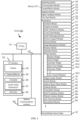
- FIG. 1A is a block diagram illustrating portable multifunction device 100 with touch-sensitive display system 112 in accordance with some embodiments.
- Touch-sensitive display 112 is sometimes called a "touch screen” for convenience and is sometimes known as or called a "touch-sensitive display system.”
- Device 100 includes memory 102 (which optionally includes one or more computer-readable storage mediums), memory controller 122, one or more processing units (CPUs) 120, peripherals interface 118, RF circuitry 108, audio circuitry 110, speaker 111, microphone 113, input/output (I/O) subsystem 106, other input control devices 116, and external port 124.
- Device 100 optionally includes one or more optical sensors 164.
- Device 100 optionally includes one or more contact intensity sensors 165 for detecting intensity of contacts on device 100 (e.g., a touch-sensitive surface such as touch-sensitive display system 112 of device 100).
- Device 100 optionally includes one or more tactile output generators 167 for generating tactile outputs on device 100 (e.g., generating tactile outputs on a touch-sensitive surface such as touch-sensitive display system 112 of device 100 or touchpad 355 of device 300). These components optionally communicate over one or more communication buses or signal lines 103.
- the substitute measurements for contact force or pressure are used directly to determine whether an intensity threshold has been exceeded (e.g., the intensity threshold is described in units corresponding to the substitute measurements).
- the substitute measurements for contact force or pressure are converted to an estimated force or pressure, and the estimated force or pressure is used to determine whether an intensity threshold has been exceeded (e.g., the intensity threshold is a pressure threshold measured in units of pressure).
- the term "tactile output” refers to physical displacement of a device relative to a previous position of the device, physical displacement of a component (e.g., a touch-sensitive surface) of a device relative to another component (e.g., housing) of the device, or displacement of the component relative to a center of mass of the device that will be detected by a user with the user's sense of touch.
- a component e.g., a touch-sensitive surface
- another component e.g., housing
- a tactile output is described as corresponding to a particular sensory perception of a user (e.g., an "up click,” a “down click,” “roughness")
- the generated tactile output corresponds to physical displacement of the device or a component thereof that will generate the described sensory perception for a typical (or average) user.
- RF circuitry 108 optionally communicates with networks, such as the Internet, also referred to as the World Wide Web (WWW), an intranet and/or a wireless network, such as a cellular telephone network, a wireless local area network (LAN) and/or a metropolitan area network (MAN), and other devices by wireless communication.
- the RF circuitry 108 optionally includes well-known circuitry for detecting near field communication (NFC) fields, such as by a short-range communication radio.
- NFC near field communication
- input controller(s) 160 are, optionally, coupled to any (or none) of the following: a keyboard, an infrared port, a USB port, and a pointer device such as a mouse.
- the one or more buttons optionally include an up/down button for volume control of speaker 111 and/or microphone 113.
- the one or more buttons optionally include a push button (e.g., 206, FIG. 2 ).
- a quick press of the push button optionally disengages a lock of touch screen 112 or optionally begins a process that uses gestures on the touch screen to unlock the device, as described in U.S. Patent Application 11/322,549, "Unlocking a Device by Performing Gestures on an Unlock Image," filed December 23, 2005 , U.S. Pat. No. 7,657,849 , which is hereby incorporated by reference in its entirety.
- a longer press of the push button e.g., 206) optionally turns power to device 100 on or off.
- the functionality of one or more of the buttons are, optionally, user-customizable.
- Touch screen 112 is used to implement virtual or soft buttons and one or more soft keyboards.
- Touch-sensitive display 112 provides an input interface and an output interface between the device and a user.
- Display controller 156 receives and/or sends electrical signals from/to touch screen 112.
- Touch screen 112 displays visual output to the user.
- the visual output optionally includes graphics, text, icons, video, and any combination thereof (collectively termed "graphics"). In some embodiments, some or all of the visual output optionally corresponds to user-interface objects.
- a touch-sensitive display in some embodiments of touch screen 112 is, optionally, analogous to the multi-touch sensitive touchpads described in the following U.S. Patents: 6,323,846 (Westerman et al. ), 6,570,557 (Westerman et al. ), and/or 6,677,932 (Westerman ), and/or U.S. Patent Publication 2002/0015024A1 , each of which is hereby incorporated by reference in its entirety.
- touch screen 112 displays visual output from device 100, whereas touch-sensitive touchpads do not provide visual output.
- Power system 162 for powering the various components.
- Power system 162 optionally includes a power management system, one or more power sources (e.g., battery, alternating current (AC)), a recharging system, a power failure detection circuit, a power converter or inverter, a power status indicator (e.g., a light-emitting diode (LED)) and any other components associated with the generation, management and distribution of power in portable devices.
- power sources e.g., battery, alternating current (AC)
- AC alternating current
- a recharging system e.g., a recharging system
- a power failure detection circuit e.g., a power failure detection circuit
- a power converter or inverter e.g., a power converter or inverter
- a power status indicator e.g., a light-emitting diode (LED)
- an optical sensor is located on the front of the device so that the user's image is, optionally, obtained for video conferencing while the user views the other video conference participants on the touch screen display.
- the position of optical sensor 164 can be changed by the user (e.g., by rotating the lens and the sensor in the device housing) so that a single optical sensor 164 is used along with the touch screen display for both video conferencing and still and/or video image acquisition.
- At least one contact intensity sensor is collocated with, or proximate to, a touch-sensitive surface (e.g., touch-sensitive display system 112). In some embodiments, at least one contact intensity sensor is located on the back of device 100, opposite touch screen display 112, which is located on the front of device 100.
- a touch-sensitive surface e.g., touch-sensitive display system 112
- at least one contact intensity sensor is located on the back of device 100, opposite touch screen display 112, which is located on the front of device 100.
- Device 100 optionally also includes one or more proximity sensors 166.
- FIG. 1A shows proximity sensor 166 coupled to peripherals interface 118. Alternately, proximity sensor 166 is, optionally, coupled to input controller 160 in I/O subsystem 106. Proximity sensor 166 optionally performs as described in U.S. Patent Application Nos.
- the proximity sensor turns off and disables touch screen 112 when the multifunction device is placed near the user's ear (e.g., when the user is making a phone call).
- Device/global internal state 157 includes one or more of: active application state, indicating which applications, if any, are currently active; display state, indicating what applications, views or other information occupy various regions of touch screen display 112; sensor state, including information obtained from the device's various sensors and input control devices 116; and location information concerning the device's location and/or attitude.
- Operating system 126 e.g., Darwin, RTXC, LINUX, UNIX, OS X, iOS, WINDOWS, or an embedded operating system such as VxWorks
- Operating system 126 includes various software components and/or drivers for controlling and managing general system tasks (e.g., memory management, storage device control, power management, etc.) and facilitates communication between various hardware and software components.
- Contact/motion module 130 optionally detects contact with touch screen 112 (in conjunction with display controller 156) and other touch-sensitive devices (e.g., a touchpad or physical click wheel).
- Contact/motion module 130 includes various software components for performing various operations related to detection of contact, such as determining if contact has occurred (e.g., detecting a finger-down event), determining an intensity of the contact (e.g., the force or pressure of the contact or a substitute for the force or pressure of the contact), determining if there is movement of the contact and tracking the movement across the touch-sensitive surface (e.g., detecting one or more finger-dragging events), and determining if the contact has ceased (e.g., detecting a finger-up event or a break in contact).
- contact/motion module 130 uses a set of one or more intensity thresholds to determine whether an operation has been performed by a user (e.g., to determine whether a user has "clicked" on an icon).
- at least a subset of the intensity thresholds are determined in accordance with software parameters (e.g., the intensity thresholds are not determined by the activation thresholds of particular physical actuators and can be adjusted without changing the physical hardware of device 100). For example, a mouse "click" threshold of a trackpad or touch screen display can be set to any of a large range of predefined threshold values without changing the trackpad or touch screen display hardware.
- Contact/motion module 130 optionally detects a gesture input by a user.
- Different gestures on the touch-sensitive surface have different contact patterns (e.g., different motions, timings, and/or intensities of detected contacts).
- a gesture is, optionally, detected by detecting a particular contact pattern.
- detecting a finger tap gesture includes detecting a finger-down event followed by detecting a finger-up (liftoff) event at the same position (or substantially the same position) as the finger-down event (e.g., at the position of an icon).
- detecting a finger swipe gesture on the touch-sensitive surface includes detecting a finger-down event followed by detecting one or more finger-dragging events, and subsequently followed by detecting a finger-up (liftoff) event.
- Graphics module 132 includes various known software components for rendering and displaying graphics on touch screen 112 or other display, including components for changing the visual impact (e.g., brightness, transparency, saturation, contrast, or other visual property) of graphics that are displayed.
- graphics includes any object that can be displayed to a user, including, without limitation, text, web pages, icons (such as user-interface objects including soft keys), digital images, videos, animations, and the like.
- contacts module 137 are, optionally, used to manage an address book or contact list (e.g., stored in application internal state 192 of contacts module 137 in memory 102 or memory 370), including: adding name(s) to the address book; deleting name(s) from the address book; associating telephone number(s), e-mail address(es), physical address(es) or other information with a name; associating an image with a name; categorizing and sorting names; providing telephone numbers or e-mail addresses to initiate and/or facilitate communications by telephone 138, video conference module 139, e-mail 140, or IM 141; and so forth.
- an address book or contact list e.g., stored in application internal state 192 of contacts module 137 in memory 102 or memory 370
- video conference module 139 includes executable instructions to initiate, conduct, and terminate a video conference between a user and one or more other participants in accordance with user instructions.
- workout support module 142 includes executable instructions to create workouts (e.g., with time, distance, and/or calorie burning goals); communicate with workout sensors (sports devices); receive workout sensor data; calibrate sensors used to monitor a workout; select and play music for a workout; and display, store, and transmit workout data.
- create workouts e.g., with time, distance, and/or calorie burning goals
- communicate with workout sensors sports devices
- receive workout sensor data calibrate sensors used to monitor a workout
- select and play music for a workout and display, store, and transmit workout data.
- camera module 143 includes executable instructions to capture still images or video (including a video stream) and store them into memory 102, modify characteristics of a still image or video, or delete a still image or video from memory 102.
- image management module 144 includes executable instructions to arrange, modify (e.g., edit), or otherwise manipulate, label, delete, present (e.g., in a digital slide show or album), and store still and/or video images.
- modify e.g., edit
- present e.g., in a digital slide show or album
- the widget creator module 150 are, optionally, used by a user to create widgets (e.g., turning a user-specified portion of a web page into a widget).
- video and music player module 152 includes executable instructions that allow the user to download and play back recorded music and other sound files stored in one or more file formats, such as MP3 or AAC files, and executable instructions to display, present, or otherwise play back videos (e.g., on touch screen 112 or on an external, connected display via external port 124).
- device 100 optionally includes the functionality of an MP3 player, such as an iPod (trademark of Apple Inc.).
- notes module 153 includes executable instructions to create and manage notes, to-do lists, and the like in accordance with user instructions.
- map module 154 are, optionally, used to receive, display, modify, and store maps and data associated with maps (e.g., driving directions, data on stores and other points of interest at or near a particular location, and other location-based data) in accordance with user instructions.
- maps e.g., driving directions, data on stores and other points of interest at or near a particular location, and other location-based data
- online video module 155 includes instructions that allow the user to access, browse, receive (e.g., by streaming and/or download), play back (e.g., on the touch screen or on an external, connected display via external port 124), send an e-mail with a link to a particular online video, and otherwise manage online videos in one or more file formats, such as H.264.
- instant messaging module 141 rather than e-mail client module 140, is used to send a link to a particular online video.
- modules and applications corresponds to a set of executable instructions for performing one or more functions described above and the methods described in this application (e.g., the computer-implemented methods and other information processing methods described herein).
- modules e.g., sets of instructions
- video player module is, optionally, combined with music player module into a single module (e.g., video and music player module 152, FIG. 1A ).
- memory 102 optionally stores a subset of the modules and data structures identified above. Furthermore, memory 102 optionally stores additional modules and data structures not described above.
- device 100 is a device where operation of a predefined set of functions on the device is performed exclusively through a touch screen and/or a touchpad.
- a touch screen and/or a touchpad as the primary input control device for operation of device 100, the number of physical input control devices (such as push buttons, dials, and the like) on device 100 is, optionally, reduced.
- the predefined set of functions that are performed exclusively through a touch screen and/or a touchpad optionally include navigation between user interfaces.
- the touchpad when touched by the user, navigates device 100 to a main, home, or root menu from any user interface that is displayed on device 100.
- a "menu button" is implemented using a touchpad.
- the menu button is a physical push button or other physical input control device instead of a touchpad.
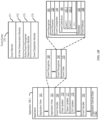
- FIG. 1B is a block diagram illustrating exemplary components for event handling in accordance with some embodiments.
- memory 102 FIG. 1A
- 370 FIG. 3
- event sorter 170 e.g., in operating system 126
- application 136-1 e.g., any of the aforementioned applications 137-151, 155, 380-390.
- Event monitor 171 receives event information from peripherals interface 118.
- Event information includes information about a sub-event (e.g., a user touch on touch-sensitive display 112, as part of a multi-touch gesture).
- Peripherals interface 118 transmits information it receives from I/O subsystem 106 or a sensor, such as proximity sensor 166, accelerometer(s) 168, and/or microphone 113 (through audio circuitry 110).
- Information that peripherals interface 118 receives from I/O subsystem 106 includes information from touch-sensitive display 112 or a touch-sensitive surface.
- event sorter 170 also includes a hit view determination module 172 and/or an active event recognizer determination module 173.
- Hit view determination module 172 provides software procedures for determining where a sub-event has taken place within one or more views when touch-sensitive display 112 displays more than one view. Views are made up of controls and other elements that a user can see on the display.
- Hit view determination module 172 receives information related to sub-events of a touch-based gesture.
- hit view determination module 172 identifies a hit view as the lowest view in the hierarchy which should handle the sub-event. In most circumstances, the hit view is the lowest level view in which an initiating sub-event occurs (e.g., the first sub-event in the sequence of sub-events that form an event or potential event).
- the hit view typically receives all sub-events related to the same touch or input source for which it was identified as the hit view.
- Active event recognizer determination module 173 determines which view or views within a view hierarchy should receive a particular sequence of sub-events. In some embodiments, active event recognizer determination module 173 determines that only the hit view should receive a particular sequence of sub-events. In other embodiments, active event recognizer determination module 173 determines that all views that include the physical location of a sub-event are actively involved views, and therefore determines that all actively involved views should receive a particular sequence of sub-events. In other embodiments, even if touch sub-events were entirely confined to the area associated with one particular view, views higher in the hierarchy would still remain as actively involved views.
- a respective event handler 190 includes one or more of: data updater 176, object updater 177, GUI updater 178, and/or event data 179 received from event sorter 170.
- Event handler 190 optionally utilizes or calls data updater 176, object updater 177, or GUI updater 178 to update the application internal state 192.
- one or more of the application views 191 include one or more respective event handlers 190.
- one or more of data updater 176, object updater 177, and GUI updater 178 are included in a respective application view 191.
- Event receiver 182 receives event information from event sorter 170.
- the event information includes information about a sub-event, for example, a touch or a touch movement.
- the event information also includes additional information, such as location of the sub-event.
- the event information optionally also includes speed and direction of the sub-event.
- events include rotation of the device from one orientation to another (e.g., from a portrait orientation to a landscape orientation, or vice versa), and the event information includes corresponding information about the current orientation (also called device attitude) of the device.
- Event comparator 184 compares the event information to predefined event or sub-event definitions and, based on the comparison, determines an event or sub-event, or determines or updates the state of an event or sub-event.
- event comparator 184 includes event definitions 186.
- Event definitions 186 contain definitions of events (e.g., predefined sequences of sub-events), for example, event 1 (187-1), event 2 (187-2), and others.
- sub-events in an event (187) include, for example, touch begin, touch end, touch movement, touch cancellation, and multiple touching.
- the definition for event 1 (187-1) is a double tap on a displayed object.
- event definition 187 includes a definition of an event for a respective user-interface object.
- event comparator 184 performs a hit test to determine which user-interface object is associated with a sub-event. For example, in an application view in which three user-interface objects are displayed on touch-sensitive display 112, when a touch is detected on touch-sensitive display 112, event comparator 184 performs a hit test to determine which of the three user-interface objects is associated with the touch (sub-event). If each displayed object is associated with a respective event handler 190, the event comparator uses the result of the hit test to determine which event handler 190 should be activated. For example, event comparator 184 selects an event handler associated with the sub-event and the object triggering the hit test.
- the definition for a respective event (187) also includes delayed actions that delay delivery of the event information until after it has been determined whether the sequence of sub-events does or does not correspond to the event recognizer's event type.
- a respective event recognizer 180 determines that the series of sub-events do not match any of the events in event definitions 186, the respective event recognizer 180 enters an event impossible, event failed, or event ended state, after which it disregards subsequent sub-events of the touch-based gesture. In this situation, other event recognizers, if any, that remain active for the hit view continue to track and process sub-events of an ongoing touch-based gesture.
- a respective event recognizer 180 includes metadata 183 with configurable properties, flags, and/or lists that indicate how the event delivery system should perform sub-event delivery to actively involved event recognizers.
- metadata 183 includes configurable properties, flags, and/or lists that indicate how event recognizers interact, or are enabled to interact, with one another.
- metadata 183 includes configurable properties, flags, and/or lists that indicate whether sub-events are delivered to varying levels in the view or programmatic hierarchy.
- event delivery instructions 188 include sub-event delivery instructions that deliver event information about a sub-event without activating an event handler. Instead, the sub-event delivery instructions deliver event information to event handlers associated with the series of sub-events or to actively involved views. Event handlers associated with the series of sub-events or with actively involved views receive the event information and perform a predetermined process.
- event handler(s) 190 includes or has access to data updater 176, object updater 177, and GUI updater 178.
- data updater 176, object updater 177, and GUI updater 178 are included in a single module of a respective application 136-1 or application view 191. In other embodiments, they are included in two or more software modules.
- Device 100 optionally also include one or more physical buttons, such as "home" or menu button 204.
- menu button 204 is, optionally, used to navigate to any application 136 in a set of applications that are, optionally, executed on device 100.
- the menu button is implemented as a soft key in a GUI displayed on touch screen 112.
- Device 300 includes input/output (I/O) interface 330 comprising display 340, which is typically a touch screen display.
- I/O interface 330 also optionally includes a keyboard and/or mouse (or other pointing device) 350 and touchpad 355, tactile output generator 357 for generating tactile outputs on device 300 (e.g., similar to tactile output generator(s) 167 described above with reference to FIG. 1A ), sensors 359 (e.g., optical, acceleration, proximity, touch-sensitive, and/or contact intensity sensors similar to contact intensity sensor(s) 165 described above with reference to FIG. 1A ).
- sensors 359 e.g., optical, acceleration, proximity, touch-sensitive, and/or contact intensity sensors similar to contact intensity sensor(s) 165 described above with reference to FIG. 1A ).
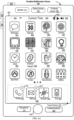
- FIG. 4A illustrates an exemplary user interface for a menu of applications on portable multifunction device 100 in accordance with some embodiments. Similar user interfaces are, optionally, implemented on device 300.
- user interface 400 includes the following elements, or a subset or superset thereof:
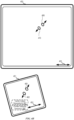
- the device detects inputs on a touch-sensitive surface that is separate from the display, as shown in FIG. 4B .
- the touch-sensitive surface e.g., 451 in FIG. 4B
- the touch-sensitive surface has a primary axis (e.g., 452 in FIG. 4B ) that corresponds to a primary axis (e.g., 453 in FIG. 4B ) on the display (e.g., 450).
- the device detects contacts (e.g., 460 and 462 in FIG.
- finger inputs e.g., finger contacts, finger tap gestures, finger swipe gestures
- one or more of the finger inputs are replaced with input from another input device (e.g., a mouse-based input or stylus input).
- a swipe gesture is, optionally, replaced with a mouse click (e.g., instead of a contact) followed by movement of the cursor along the path of the swipe (e.g., instead of movement of the contact).
- a tap gesture is, optionally, replaced with a mouse click while the cursor is located over the location of the tap gesture (e.g., instead of detection of the contact followed by ceasing to detect the contact).
- multiple user inputs are simultaneously detected, it should be understood that multiple computer mice are, optionally, used simultaneously, or a mouse and finger contacts are, optionally, used simultaneously.
- FIG. 5A illustrates exemplary personal electronic device 500.
- Device 500 includes body 502.
- device 500 can include some or all of the features described with respect to devices 100 and 300 (e.g., FIGS. 1A-4B ).
- device 500 has touch-sensitive display screen 504, hereafter touch screen 504.
- touch screen 504 optionally includes one or more intensity sensors for detecting intensity of contacts (e.g., touches) being applied.
- the one or more intensity sensors of touch screen 504 (or the touch-sensitive surface) can provide output data that represents the intensity of touches.
- the user interface of device 500 can respond to touches based on their intensity, meaning that touches of different intensities can invoke different user interface operations on device 500.
- device 500 has one or more input mechanisms 506 and 508.
- Input mechanisms 506 and 508, if included, can be physical. Examples of physical input mechanisms include push buttons and rotatable mechanisms.
- device 500 has one or more attachment mechanisms. Such attachment mechanisms, if included, can permit attachment of device 500 with, for example, hats, eyewear, earrings, necklaces, shirts, jackets, bracelets, watch straps, chains, trousers, belts, shoes, purses, backpacks, and so forth. These attachment mechanisms permit device 500 to be worn by a user.
- the non-transitory computer-readable storage medium can include, but is not limited to, magnetic, optical, and/or semiconductor storages. Examples of such storage include magnetic disks, optical discs based on CD, DVD, or Blu-ray technologies, as well as persistent solid-state memory such as flash, solid-state drives, and the like.
- Personal electronic device 500 is not limited to the components and configuration of FIG. 5B , but can include other or additional components in multiple configurations.
- a detected contact on the touch screen acts as a "focus selector" so that when an input (e.g., a press input by the contact) is detected on the touch screen display at a location of a particular user interface element (e.g., a button, window, slider, or other user interface element), the particular user interface element is adjusted in accordance with the detected input.
- an input e.g., a press input by the contact
- a particular user interface element e.g., a button, window, slider, or other user interface element
- a focus selector e.g., a cursor, a contact, or a selection box
- a press input is detected on the touch-sensitive surface (e.g., a touchpad or touch screen) will indicate that the user is intending to activate the respective button (as opposed to other user interface elements shown on a display of the device).
- the term "characteristic intensity" of a contact refers to a characteristic of the contact based on one or more intensities of the contact.
- the characteristic intensity is based on multiple intensity samples.
- the characteristic intensity is, optionally, based on a predefined number of intensity samples, or a set of intensity samples collected during a predetermined time period (e.g., 0.05, 0.1, 0.2, 0.5, 1, 2, 5, 10 seconds) relative to a predefined event (e.g., after detecting the contact, prior to detecting liftoff of the contact, before or after detecting a start of movement of the contact, prior to detecting an end of the contact, before or after detecting an increase in intensity of the contact, and/or before or after detecting a decrease in intensity of the contact).
- a predefined time period e.g., 0.05, 0.1, 0.2, 0.5, 1, 2, 5, 10 seconds
- a portion of a gesture is identified for purposes of determining a characteristic intensity.
- a touch-sensitive surface optionally receives a continuous swipe contact transitioning from a start location and reaching an end location, at which point the intensity of the contact increases.
- the characteristic intensity of the contact at the end location is, optionally, based on only a portion of the continuous swipe contact, and not the entire swipe contact (e.g., only the portion of the swipe contact at the end location).
- a smoothing algorithm is, optionally, applied to the intensities of the swipe contact prior to determining the characteristic intensity of the contact.
- the smoothing algorithm optionally includes one or more of: an unweighted sliding-average smoothing algorithm, a triangular smoothing algorithm, a median filter smoothing algorithm, and/or an exponential smoothing algorithm.
- these smoothing algorithms eliminate narrow spikes or dips in the intensities of the swipe contact for purposes of determining a characteristic intensity.
- the intensity of a contact on the touch-sensitive surface is, optionally, characterized relative to one or more intensity thresholds, such as a contact-detection intensity threshold, a light press intensity threshold, a deep press intensity threshold, and/or one or more other intensity thresholds.
- the light press intensity threshold corresponds to an intensity at which the device will perform operations typically associated with clicking a button of a physical mouse or a trackpad.
- the deep press intensity threshold corresponds to an intensity at which the device will perform operations that are different from operations typically associated with clicking a button of a physical mouse or a trackpad.
- the device when a contact is detected with a characteristic intensity below the light press intensity threshold (e.g., and above a nominal contact-detection intensity threshold below which the contact is no longer detected), the device will move a focus selector in accordance with movement of the contact on the touch-sensitive surface without performing an operation associated with the light press intensity threshold or the deep press intensity threshold.
- a characteristic intensity below the light press intensity threshold e.g., and above a nominal contact-detection intensity threshold below which the contact is no longer detected
- these intensity thresholds are consistent between different sets of user interface figures.
- one or more operations are performed in response to detecting a gesture that includes a respective press input or in response to detecting the respective press input performed with a respective contact (or a plurality of contacts), where the respective press input is detected based at least in part on detecting an increase in intensity of the contact (or plurality of contacts) above a press-input intensity threshold.
- the respective operation is performed in response to detecting the increase in intensity of the respective contact above the press-input intensity threshold (e.g., a "down stroke" of the respective press input).
- the device employs intensity hysteresis to avoid accidental inputs sometimes termed "jitter," where the device defines or selects a hysteresis intensity threshold with a predefined relationship to the press-input intensity threshold (e.g., the hysteresis intensity threshold is X intensity units lower than the press-input intensity threshold or the hysteresis intensity threshold is 75%, 90%, or some reasonable proportion of the press-input intensity threshold).
- the hysteresis intensity threshold is X intensity units lower than the press-input intensity threshold or the hysteresis intensity threshold is 75%, 90%, or some reasonable proportion of the press-input intensity threshold.
- the press input includes an increase in intensity of the respective contact above the press-input intensity threshold and a subsequent decrease in intensity of the contact below the hysteresis intensity threshold that corresponds to the press-input intensity threshold, and the respective operation is performed in response to detecting the subsequent decrease in intensity of the respective contact below the hysteresis intensity threshold (e.g., an "up stroke" of the respective press input).
- the descriptions of operations performed in response to a press input associated with a press-input intensity threshold or in response to a gesture including the press input are, optionally, triggered in response to detecting either: an increase in intensity of a contact above the press-input intensity threshold, an increase in intensity of a contact from an intensity below the hysteresis intensity threshold to an intensity above the press-input intensity threshold, a decrease in intensity of the contact below the press-input intensity threshold, and/or a decrease in intensity of the contact below the hysteresis intensity threshold corresponding to the press-input intensity threshold.
- the operation is, optionally, performed in response to detecting a decrease in intensity of the contact below a hysteresis intensity threshold corresponding to, and lower than, the press-input intensity threshold.
- FIGS. 6A-6Q' illustrate exemplary user interfaces for displaying aggregated health records to a user, in accordance with some embodiments.
- the health records will be described herein as health records of the user.
- the health records could be health records of a family member or other individuals associated with the user of the exemplary user interfaces.
- the user interfaces in these figures are used to illustrate the processes described below, including the processes in FIGS. 7A-7F .
- the device detects inputs on a touch-sensitive surface 451 that is separate from the display 450, as shown in FIG. 4B .
- the processes described herein may be implemented with devices having physical user interfaces, voice interfaces, or other suitable interfaces. For convenience of explanation, the embodiments described below will be discussed with reference to operations performed on a device with a touch-sensitive display system 112.
- a focus selector is, optionally: a respective finger or stylus contact, a representative point corresponding to a finger or stylus contact (e.g., a centroid of a respective contact or a point associated with a respective contact), or a centroid of two or more contacts detected on the touch-sensitive display system 112.
- analogous operations are, optionally, performed on a device with a display 450 and a separate touch-sensitive surface 451 in response to detecting the contacts on the touch-sensitive surface 451 while displaying the user interfaces discussed below, along with a focus selector.
- the user accesses one or more user interfaces ("onboarding user interfaces") that are not illustrated herein to initiate, continue, or complete an onboarding process with a health care provider.
- onboarding user interfaces user interfaces
- the user accesses the onboarding user interfaces by interacting with a health care providers affordance 5302.
- the user may periodically access the onboarding user interfaces to initiate the onboarding process of a new health care provider, to review information about an existing health care provider with whom the user has completed the onboarding process, to contact a health care provider, to update information about a health care provider, or to remove a health care provider.
- device 100 obtains access to the user's health records from the health care provider and displays the health records of the health care provider on display 112.
- device 100 in response to a determination that the onboarding process is complete, displays the user interface illustrated in FIG. 6A on display 112.
- onboarding user interfaces include a toolbar 5029 with a health data affordance 5029A as illustrated in Fig. 6A . In such embodiments, the user interacts with health data affordance 5029A to access FIG. 6A .
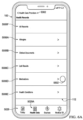
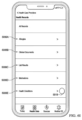
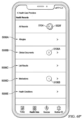
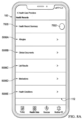
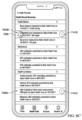
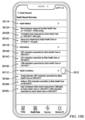
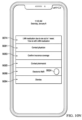
- FIG. 6A illustrates one embodiment of displaying representations of categories of health records of a user from one or more health care providers.
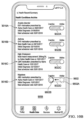
- FIG. 6A includes category representations 5006A, 5006B, 5006C, 5006D, and 5006E, and an all records representation 5006F that is associated with all of the health records of the user.
- category representation 5006A is associated with allergy health records
- category representation 5006B is associated with clinical documents
- category representation 5006C is associated with lab results
- category representation 5006D is associated with medications
- category representation 5006E is associated with health conditions.
- Each of category representations 5006A-5006E is an affordance that includes text identifying that such affordance is associated with health records from a particular category.
- Each of category representations 5006A-5006E is selectable by the user to view health records of the user from the associated category.
- category representations 5006A-5006E also include a description of the corresponding category, a summary of the health records included in the corresponding category, or other information regarding the corresponding category.
- category representation 5006E may include information summarizing different ongoing health conditions of the user.
- All records representation 5006F is an affordance that includes text indicating that such affordance is associated with all health records. All records representation 5006F is selectable by a user to view all health records of the user.
- FIGS. 6A-6B illustrate detecting a tap gesture (e.g., tap gesture with contact 5502, FIG.
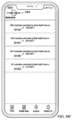
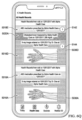
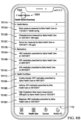
- FIG. 6B illustrates the display of health records associated with category representation 5006D illustrated in FIG. 6A for medications. More particularly, medication records 5018A and 5018B (ABC medication and DEF medication) are displayed.
- medication records 5018A and 5018B are health records of medication taken by the user and include text identifying the name of the medication (ABC and DEF medications respectively), the health care provider that prescribed the medication (Alpha Health Care for both records), and the date the medication was prescribed (October 1, 2017 and September 1, 2017, respectively).
- a health care provider may be a designation of one or more of an individual physician, the name of a healthcare organization such as a home health care organization or hospital group, or a specific facility or location at which treatment was obtained, such as a particular hospital or clinic location.
- medication records 5018A and 5018B such as the pharmacy dispensing the medication, the refill or expiration date of the medication, instructions or affordances to refill the medication, dosages, directions, warnings, adverse drug interactions, active ingredients, images of the medication, a fact sheet regarding the medication, or any other suitable information.
- medication records 5018A and 5018B are arranged in order of most recent prescription date.
- medication records 5018A and 5018B are arranged listing daily medications before other medications, in an alphabetical order, or in another suitable order for organizing medication.
- FIG. 6B also illustrates a health records affordance 5304, which is an affordance the user interacts with to view category representations 5006A-5006E (allergies, clinical documents, lab results, medications, and health conditions categories, respectively) illustrated in FIG. 6A .
- FIG. 6B further illustrates detection of a tap gesture with contact 5504 over health records affordance 5304 to display category representations 5006A-5006E in FIG. 6C .
- medication records 5018A and 5018B are both health records provided by Alpha Health Care.
- medication records containing information about medications provided by all health care providers of the user are concurrently displayed on display 112.
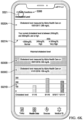
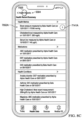
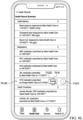
- FIG. 6B' illustrates an alternative embodiment where the user has completed the onboarding process with Alpha Health Care and Beta Health Care.
- FIG. 6B' in response to detecting the tap gesture with contact 5502 over category representation 5006D in FIG.
- medication records 5018C and 5018D (for GHI and JKL medications, respectively) prescribed by Beta Health Care are concurrently displayed with medication records 5018A and 5018B prescribed by Alpha Health Care.
- a user may review all of the user's prescriptions from user's health care providers in one interface.
- medication records 5018A-5018D are organized by prescription date.
- medication records included in FIGS. 6A-6Q' may be organized by health care provider, by treated condition, or in any other suitable manner.
- FIG. 6D further illustrates detection of a tap gesture with contact 5508 over sub-category representation 5015A associated with x-ray images to display x-ray records 5016A and 5016B in FIG. 6E.
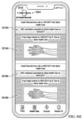
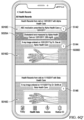
- FIG. 6E illustrates the display of health records associated with sub-category representation 5015A (e.g., sub-category of "X-Ray Images," Figure 6D ). More particularly, x-ray records 5016A and 5016B are displayed.
- x-ray records 5016A and 5016B are records of x-ray images of the user and include text identifying the providers that ordered or conducted the x-ray exams (Dr. Doe and Alpha Health Care for both records).
- both a physician (which may be a physician ordering or reviewing the x-ray image) and the facility are identified as providers.
- a health care professional and organization or facility associated with a health record may both be identified in a health record.
- multiple physicians may be listed to identify the physician ordering the x-ray, or the physician reviewing the x-ray.
- both a health care provider organization, and a facility are identified to give the user additional information.
- Each of x-ray records 5016A and 5016B also include text identifying the date the x-ray image was taken (October 1, 2017 and September 1, 2017 respectively) and an image file 5036A or 5036B containing a picture of the x-ray image.
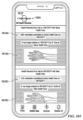
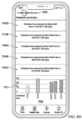
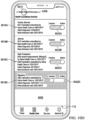
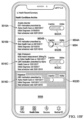
- health condition record 5020B is a health record containing information about the user's chronic migraines, the medication prescribed to the user, the date of the prescription, and the health care provider that provided the prescription to the user.
- health condition record 5020C is a health record containing information about the user's anxiety disorder, the medication prescribed to the user, the date of the prescription, as well as the name of the health care provider that provided the prescription to the user.
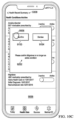
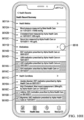
- FIG. 6K' illustrates displaying additional information regarding health condition record 5020A from both Alpha Health Care and Beta Health Care.
- a historical health record 5030D obtained from Beta Health Care on September 15, 2017 is displayed with historical health records 5030B and 5030C (the user's cholesterol levels measured on September 1, 2016 and January 1, 2016, respectively) previously described in FIG. 6K .
- the user's cholesterol level measured on September 15, 2017 is between 200mg/dL and 300mg/dL and is assigned a third color (e.g., orange).
- cholesterol representation 5021B includes bar graphs of the user's historical cholesterol levels obtained from both Alpha Health Care and Beta Health Care.
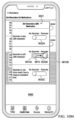
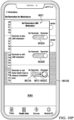
- total update badge 5104 indicates that three updates to health records have been received that have not been reviewed, and each of category updates 5106A-5106C indicates that one update to a health record within the corresponding health record category has been received that has not been reviewed.
- FIGS. 6K and 6K' each further illustrate detecting a tap gesture with contact 5521 or 5521' respectively over health conditions affordance 5306, which is an affordance the user selects to return to the user interface illustrated in FIGS. 6J and 6J' .
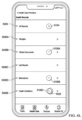
- FIG. 6L illustrates one embodiment of the display of update badges to indicate updates to a user's health records
- other text, symbols, graphics, or displayed effect of any size, shape, color, or design may be used to indicate as an update badge to indicate an update or the number of updates.
- an update badge may be a highlighted or flashing category representation or displaying the time or date of an update.
- total update badge 5104 and category update badges such as category update badges 5106A-5106C (indicating updates to clinical documents records, medication records, and health conditions records, respectively) are not concurrently displayed.
- only category update badges are displayed on display 112.
- only total update badge 5104 is displayed on display 112.
- a user may receive a notification of all updates via onscreen alerts, text messages, or audio or video notifications.
- notifications may be based on whether particular health records are designated by a user or health care provider as being urgent.
- device 100 may be preconfigured with, or configurable by a user to set, one or more thresholds for one or more types of health records. If an update to a health record is received having a particular result, measurement, value, reading, or other measurable aspect that exceeds an established threshold or otherwise satisfies a criterion, one or more notifications to the user are automatically generated on device 100.
- FIG. 6L' illustrates an alternate embodiment of FIG. 6L after the user has completed the onboarding process with both Alpha Health Care and Beta Health Care.
- total update badge 5104 indicates that four total updates have been received that have not been reviewed
- category update badge 5106A indicates that two updates to clinical records have been received but not yet reviewed
- category update badge 5106B indicates that one update to medication records has been received that has not been reviewed
- category update badge 5106C indicates that one update to health conditions records has been received that has not been reviewed.
- FIG. 6L' further illustrates detecting a tap gesture with contact 5522' over category update badge 5106C to display an update to health condition record 5020A in FIG. 6M' .
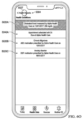
- FIGS. 6M and 6M' illustrate displaying an update to health condition record 5020A (the user's cholesterol level) in response to detecting the tap gesture with contact 5522 or 5522' respectively over category update badge 5106C.
- the user's cholesterol level has been updated to reflect a new measurement of cholesterol made by Alpha Health Care on December 1, 2017.
- a health record update badge 5140 is displayed with health condition record 5020A to indicate that health condition record 5020A has been updated.
- Health condition record 5020A is displayed in a color indicating a severity of the user's cholesterol level.
- a recommendation affordance 5240A containing a recommended action to visit a doctor is displayed with health condition record 5020A.
- the recommendation affordance is a recommendation to engage in exercise, change the user's diet, or engage in other suitable actions that reduce the user's cholesterol levels.
- recommendation affordance 5240A also includes content indicating the importance of the update or the severity of the user's condition.
- the user may self-designate the importance of certain types of health records as well as updates to certain types of health records. For example, the user may designate all updates to the user's cholesterol level as urgent updates. In one or more of such embodiments, the user designates the importance of certain types of health records based on the amount of positive or negative change to the user's health condition.
- the user may designate the importance of an update to the user's cholesterol level based on the amount of change to the user's cholesterol level.
- the health care provider may designate the importance of certain updates.
- FIGS. 6M and 6M' above are directed to updates to and recommendations based on the user's cholesterol, the foregoing paragraphs also apply to other types of health records. For example, where the user has received a new measurement of serum iron, a recommendation affordance recommending the user to change the user's diet to increase sources of iron may be displayed on display 112.
- FIGS. 6O and 6O' each illustrate displaying an update to recommendation affordance 5240A.
- recommendation affordance 5240A for health condition record 5020A has been updated to include text indicative of the date of the appointment and the name of the doctor the user is scheduled to meet.
- device 100 will designate a time to display or otherwise announce a notification to remind the user about the upcoming appointment.
- FIGS. 6O and 6O' also illustrate detecting a tap gesture with contact 5527 or 5527' respectively over health records affordance 5304 to display any remaining updates to health records in FIGS. 6P and 6P' respectively.
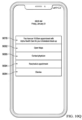
- FIGS. 6P and 6P' illustrate category representations 5006A-5006E (allergies, clinical documents, lab results, medications, and health conditions categories respectively) and the display of remaining updates to the user's health records.
- total update badge 5104 which indicates the total number of updates received by device 100 but have not been reviewed by the user, has been updated from three updates to two updates to indicate the remaining number of updates that the user has yet to review.
- Category update badge 5106C which was previously displayed with representation category 5006E (health conditions category) in FIG. 6L , is no longer displayed since the user has reviewed the update to health condition record 5020A.
- representation category 5006E health conditions category
- FIG. 6Q' also illustrates displaying medication record 5018E of ABC medication, health conditions record 5020A of the user's cholesterol level, and x-ray record 5016D of an x-ray image ordered on December 1, 2017.
- FIG. 6Q' includes updates from Beta Health Care and therefore displays a third update of a new x-ray record 5016E taken at Beta Health Care on November 15, 2017 with health record update badge 5146.
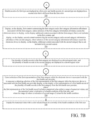
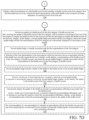
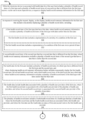
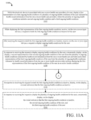
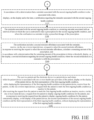
- FIGS. 7A-7F are a flow diagrams illustrating a method for displaying aggregated health records of a user using an electronic device in accordance with some embodiments.
- FIGS. 7A-7F are flow diagrams illustrating a method for displaying aggregated health records for a user, using, for example, the user interfaces of FIGS. 6A-6Q' .
- method 700 can be utilized to display aggregated health records from one or from multiple health care providers of the user.
- Method 700 is performed at a device, (e.g., device 100, 300, 500 illustrated in FIGS. 1 , 3 , and 5A , respectively).
- display 112 is a touch screen display and the touch-sensitive surface is on or integrated with display 112. In some embodiments, display 112 is separate from the touch-sensitive surface. In other embodiments, the processes described herein may be implemented with devices having physical user-interfaces, voice interfaces, or other suitable interfaces. Some operations in the method 700 are, optionally, combined. Additionally, the order of some operations is, optionally, changed.
- method 700 provides an intuitive way for displaying aggregated health records obtained from a health care provider of the user.
- Method 700 also provides an intuitive way for concurrently displaying aggregated health records obtained from multiple health care providers of the user.
- the method reduces the cognitive burden on a user when the user is viewing health records of the user obtained from the one or more health care providers of the user, thereby creating a more efficient human-machine interface.
- the method also increases efficiency of the user by concurrently displaying health records obtained from multiple health care providers. For battery-operated computing devices, enabling a user to review health records obtained from a health care provider or multiple health care providers faster and more efficiently conserves power and increases the time between battery charge
- a user can visualize health records in a common interface.
- the use of such a common interface avoids the risk that a user may be viewing less than all health information relative to a particular concern or question. For example, a user may be unaware that blood tests taken by two different providers tested for a particular condition and give a hospital or other subsequent provider inaccurate information.
- the use of device 100 to store health records across multiple providers for viewing by a user in a common interface may offer the user a readily available source of comprehensive information regarding the user's health over a period of time even if a user has moved or changed providers.
- FIGS. 7A-7F are flow diagrams illustrating a method for displaying aggregated health records for a user, using, for example, the user interfaces of FIGS. 6A-6Q' .
- method 700 can be utilized to display aggregated health records from one or from multiple health care providers of the user.
- Method 700 is performed at a device, (e.g., device 100, 300, 500).
- display 112 is a touch screen display and the touch-sensitive surface is on or integrated with display 112.
- display 112 is separate from the touch-sensitive surface.
- the processes described herein may be implemented with devices having physical user-interfaces, voice interfaces, or other suitable interfaces.
- a user can visualize health records in a common interface.
- the use of such a method avoids the risk that a user may be viewing less than all health information relative to a particular concern or question. For example, a user may be unaware that blood tests taken by two different providers tested for a particular condition and give a hospital or other subsequent provider inaccurate information.
- the use of the method on a device such as device 100 to store health records across multiple providers for viewing by a user in a common interface may offer the user a readily available source of comprehensive information regarding the user's health over a period of time even if a user has moved or changed providers.
- storing and displaying such health records using such a method on a device such as device 100 and offering a single interface to allow a user to view and browse all of such health records avoids the need for a user to use the device to communicate with multiple health care providers with back-and-forth voice calls (often with lengthy hold times), interactive telephone systems, voice mails, emails, and other electronic messaging platforms in order to piece together health records from several source.
- Half-a-day or more of required use of such a device to piece together the foregoing information can now be substituted with the use of such a method requiring only a few clicks on a device by a user, resulting in a considerable savings of bandwidth, battery life, and energy that were previously wasted.
- device 100 while device 100 is associated with a first health care provider and not associated with a second health care provider, device 100 receives (702), via one or more input devices, a first request to display health records for a user.
- the request to display health records is automatically transmitted to device 100.
- the user selects health data affordance 5029A illustrated in FIG. 6A or an affordance displayed in an onboarding user interface to request device 100 to display health records for the user.
- the request to display health records is a request to display health records of multiple users, such as the health records of a family.
- Device 100 in response to receiving the first request to display health records for the first user, displays (704), on display 112, a plurality of representations of categories of health records.
- FIG. 6A shows five categories of health records (e.g., category representations 5006A-5006E).
- the plurality of representation of categories include a first representation of a first category of the plurality of categories (706).
- FIG. 6A shows category representation 5006D, which is associated with medications of the user. Further, selection of the first representation of the first category while device 100 is associated with the first health care provider and not associated with the second health care provider causes device 100 to display (706), on display 112, a plurality of health records in the first category from the first health care provider.
- the user is only associated with Alpha Health Care and not associated with Beta Health Care.
- FIG. 6B shows an embodiment where only medication records 5018A-5018B (ABC medication and DEF medication) from only Alpha Health Care are displayed on device 100.
- the plurality of representations also include a second representation of a second category of the plurality of categories (708).
- FIG. 6I shows category representation 5006E, which is associated with health conditions of the user. Further, selection of the second representation of the second category while device 100 is associated with the first health care provider and not associated with the second health care provider causes device 100 to display (708), on display 112, a plurality of health records in the second category from the first health care provider.
- FIG. 6J shows two health condition records 5020A and 5020B (cholesterol level and chronic migraines) in response to detecting the tap gesture shown in FIG. 6I over category representation 5006E.
- the health records of a first type are displayed in a first color and the health records of a second type are displayed in a second color that is different from the first color (718).
- FIG. 6H illustrates displaying x-ray records 5016A and 5016B (ordered on October 1, 2017 and September 1, 2017, respectively) in a first color and displaying medication records 5018A and 5018B (ABC medication and DEF medication) in a second color.
- Different types of health records are displayed in different colors to help the user differentiate health records that belong to different categories (or sub-categories).
- the user may rely on colors alone to determine which category (or sub-category) a health record belongs to.
- the user may also rely on colors to differentiate different health records from different health care providers. Further, displaying different types of health records in different colors also reduces user mistakes (such as incorrectly identifying a health record, or failing to identify a health record) when the user is browsing through the user's health records.
- the foregoing enhances the operability of the device and makes the user-device interface more efficient by allowing the user to differentiate different types of health records based on color.
- the method also increases efficiency of the user by allowing the user to identify a health record by a color assigned to the type of the health record. For battery-operated computing devices, enabling a user to browse through the user's health records faster and more efficiently conserves power and increases the time between battery charges.
- device 100 displays (720), on display 112, first content summarizing the first category and a first category information affordance associated with the first category, where selection of the first category information affordance causes device 100 to display, on display 112, additional content associated with the first category that is not included in the first content.
- category representation 5006E (health conditions category) in FIG. 6I includes a summary affordance that contains content summarizing a particular health condition of the user. Further, device 100, in response to detecting a user selection of the summary affordance, displays additional information about the health conditions of the user, such as the cause of the health condition, how to identify symptoms of the health conditions, non-medicinal treatments to alleviate the health condition, as well as other helpful information about the health condition.
- the plurality of health records in the first category are displayed in a chronological order (722).
- FIG. 6B' shows medication records 5018A-5018B (ABC medication and DEF medication) arranged based on the prescription date.
- the plurality of health records in the second category are displayed in a chronological order (722).
- FIG. 6J shows health condition records 5020A-5020C (associated with cholesterol level, chronic migraines, and anxiety disorder, respectively) arranged based on the prescription dates of medications prescribed for the health conditions.
- Presenting the health records in a chronological order allows a user to view health records of the user based on date increases efficiency of the user. For battery-operated computing devices, enabling a user to browse through the user's health records faster and more efficiently conserves power and increases the time between battery charges.
- the first representation of the first health record includes a numerical value within a range of numerical values, and the numerical value is indicative of a health condition of the first user, where the range of values is indicative of normal range of values for the health condition (724).
- Health conditions record 5020A illustrated in FIG. 6J contains a value of the user's cholesterol level, which is 269 mg/dL.
- health condition record 5020A also includes values that represent a range of cholesterols, such as between 0-400mg/dL. The method reduces the cognitive burden on a user by providing the user with a numerical value that allows the user to determine a severity of a health condition based on the numerical value, thereby creating a more efficient human-machine interface.
- the plurality of health records in the first category from the first health care provider include a first health record in the first category from the first health care provider and a second health record in the first category from the first health care provider (730).
- FIG. 6B shows two medication records 5018A and 5018B (ABC medication and DEF medication) obtained from Alpha Health Care.
- the method also allows the user to view different health records from different health care providers in a common interface, thereby increasing the efficiency of the user and making the user-device interface more efficient.
- the first health record in the first category from the first health care provider and the second health record in the first category from the first health care provider are displayed in a first color (732).
- FIG. 6H shows medication record 5018A (ABC medication) and x-ray record 5016A ordered on October 1, 2017 in a first color.
- the third health record in the second category from the first health care provider and the fourth health record in the second category from the first health care provider are displayed in a second color that is different from the first color (732).
- FIG. 6H shows medication record 5018B (DEF medication) and x-ray record 5016B ordered on September 1, 2017 in a second color that is different than the first color. Displaying different categories of health records in different colors allows the user to quickly differentiate different health records, which creates a more efficient human-machine interface. The method also increases efficiency of the user by allowing the user to identify a health record based on color. For battery-operated computing devices, enabling a user to browse through the user's health records faster and more efficiently conserves power and increases the time between battery charges.
- device 100 receives (738) an update to a health record of the first category of health records.
- FIG. 6L illustrates receiving multiple updates from Alpha Health Care (e.g., updates to category representation 5006B for clinical documents, category representation 5006D for medications, and category representation 5006E for health conditions).
- device 100 displays (738), on display 112, a second update badge associated with the first category, where the second update badge and the first representation of the first category are concurrently displayed in a first region of display 112.
- the second update badge is visually associated with the first representation of the first category (740).
- FIG. 6L shows category update badge 5106C and category representation 5006E (health conditions category) in a region of display 112.
- category update badge 5106C is appended to category representation 5006E.
- the method reduces the cognitive burden on a user by allowing the user to identify which categories contain updates to the user's health records, which creates a more efficient human-machine interface.
- the method also increases efficiency of the user by allowing the user to quickly identify which health records have been updated. For battery-operated computing devices, enabling a user to identify health records that have been updated faster and more efficiently conserves power and increases time between battery charges.
- selection of the first representation of the first category while device 100 is associated with the first health care provider causes device 100 to display (742), on display 112, a representation of the health record of the first category of health records, and where the second update badge is visually associated with the representation of the health record of the first category of health records.
- FIG. 6M shows health record update badge 5140 and health condition record 5020A (associated with the user's cholesterol level) in the same region.
- health record update badge 5140 is appended to health condition record 5020A. The method reduces the cognitive burden on a user by allowing the user to identify which categories contain updates to the user's health records.
- the method reduces the cognitive burden on a user by allowing the user to identify which categories contain updates to the user's health records, which creates a more efficient human-machine interface.
- the method also increases efficiency of the user by allowing the user to quickly identify which health records have been updated. For battery-operated computing devices, enabling a user to identify health records that have been updated faster and more efficiently conserves power and increases time between battery charges.
- the second update badge includes content of the update to the health record on the second update badge (744).
- content of an update such as a summary of the update, is displayed on an update badge, such as category update badge 5106A, 5106B, or 5106C, health record update badge 5140, or total update badge 5104 shown in FIGS. 6L and 6M .
- the method reduces the cognitive burden on a user by allowing the user to identify the content of the update or a summary of the content of the update without having to perform further actions, which creates a more efficient human-machine interface.
- the method also increases efficiency of the user by allowing the user to quickly identify a change in a health condition associated with the updated health record. For battery-operated computing devices, enabling a user to identify a change in the user's health condition faster and more efficiently conserves power and increases time between battery charges.
- device 100 receives (746), via the one or more input devices, a request to select the second update badge.
- total update badge 5104 shown in FIG. 6L and category update badges 5106A-5106C (each shown in FIG. 6L ) include update affordances, which are affordances the user selects to view updates to the corresponding health records.
- FIG. 6L shows a tap gesture with contact 5522 over category update badge 5106C.
- device 100 displays (746), on display 112, the update to the health record of the first category of health records.
- FIG. 6L shows a tap gesture with contact 5522 over category update badge 5106C.
- FIG. 6M shows an update to health condition record 5020A (health record of the user's cholesterol level) in response to detecting the tap gesture illustrated in FIG. 6L .
- health condition record 5020A has been updated to indicate the user's cholesterol level on December 1, 2017.
- the method reduces the cognitive burden on a user by allowing the user to identify which categories contain updates to the user's health records.
- the method reduces the cognitive burden on a user by allowing the user to access an update to a health record by selecting an update badge, which creates a more efficient human-machine interface.
- the method also increases efficiency of the user by allowing the user to easily access the update by selecting the update badge. For battery-operated computing devices, enabling a user to access updates to the user's health records that have been updated faster and more efficiently conserves power and increases time between battery charges.
- FIG. 6N shows calendar affordance 5241 in response to the gesture illustrated in FIG. 6M .
- the recommended action is to schedule an appointment with a doctor.
- content describing or illustrating the recommended action is also displayed with recommendation affordance 5240A.
- FIG. 6M shows recommendation affordance 5240A containing a text of a recommended action to visit a doctor.
- the method reduces the cognitive burden on a user by providing recommendations without user input, thereby creating a more efficient human-machine interface.
- the method also increases efficiency of the user by automatically providing the user with response strategies. For battery-operated computing devices, enabling a user to determine whether the user should respond to an update to the user's health record, as well as how to respond to the update, faster and more efficiently conserves power and increases time between battery charges.
- the recommendation is a recommendation to schedule an appointment with the first health care provider (750).
- displaying the recommended action includes concurrently displaying the recommended action and a scheduling affordance (750).
- FIG. 6N for example shows calendar affordance 5241 in response to the gesture illustrated in FIG. 6M .
- the recommended action is to schedule an appointment with a doctor.
- the method reduces the cognitive burden on a user by providing recommendations without user input, thereby creating a more efficient human-machine interface.
- the method also increases efficiency of the user by automatically providing the user with response strategies. For battery-operated computing devices, enabling a user to determine whether the user should respond to an update to the user's health record, as well as how to respond to the update, faster and more efficiently conserves power and increases time between battery charges.
- device 100 receives (752) an update to a health record of the first category of health records.
- FIG. 6L illustrates receiving multiple updates from Alpha Health Care (e.g., updates to category representation 5006B for clinical documents, category representation 5006D for medications, and category representation 5006E for health conditions).
- device 100 in response to receiving the update to the health record and in accordance with a determination that a significance of the update is greater than a threshold value, displays (752), on display 112, a notification of the update.
- Recommendation affordance 5240A of FIG. 6M for example, includes the text "Urgent! to indicate the significance to the change in the user's cholesterol.
- a notification of the update and the significance of the update overlays a portion of display 112 even when user interfaces illustrated in FIG. 6A-6Q' are not displayed on display.
- the notification is a text based notification.
- Device 100 in accordance with a determination that a significance of the update is less than the threshold value, forgoes (752) displaying, on display 112, the notification of the update.
- recommendation affordance 5240A of FIG. 6M or 6M' is not displayed on display 112.
- the method reduces the cognitive burden on a user by notifying the user about important updates, thereby creating a more efficient human-machine interface.
- the method also increases efficiency of the user by allowing the user to determine, based on the presence or lack of a notification, whether an update is an important update. For battery-operated computing devices, enabling a user to determine whether an update is an important update faster and more efficiently conserves power and increases time between battery charges.
- device 100 After device 100 has processed the user's request to display health records obtained from two or more health care providers, device 100, receives a second request from the user to display the user's health records. Device 100, in response to receiving the second request to display health records for the first user, displays (712), on display 112, the plurality of representations of categories of health records.
- FIG. 6A shows five category representations 5006A-5006E (allergies, clinical documents, lab results, medications, and health conditions categories, respectively).
- the plurality of representations of categories of health records also include the second representation of the second category of the plurality of categories (716).
- FIG. 6I shows category representation 5006E (health conditions category), which is associated with health conditions of the user.
- FIG. 6J' shows health condition records 5020A-5020C (cholesterol level, chronic migraines, and anxiety disorder) from Alpha Health Care and health condition record 5020D (arthritis) from Beta Health Care in response to detecting the tap gesture shown in FIG. 6I over category representation 5006E.
- device 100 receives (754), via the one or more input devices, a first selection of the first representation of the first category.
- FIG. 6C shows the tap gesture with contact 5506 over category representation 5006B (clinical documents category).
- selection of the first representation of the first category while device 100 is associated with the first health care provider and not associated with the second health care provider causes device 100 to display (760), on display 112, historical health records associated with the first category from the first health care provider, and where the historical health records associated with the first category include the plurality of health records in the first category from the first health care provider.
- FIG. 6K shows historical health records of the user's cholesterol level obtained from Alpha Health Care (e.g., cholesterol representations 5030B-5030C of the user's cholesterol level measured on September 1, 2016 and January 1,2016) in response to detecting the gesture illustrated in FIG. 6J .
- the method reduces the number of inputs required to obtain historical health records by allowing the user to access the user's historical health records associated with a health record by allowing the user to access the historical health records by selecting the health record, thereby creating a more efficient human-machine interface.
- the method allows the user to easily access the user's historical health records for a particular record by selecting the health record, thereby increasing the user's efficiency. For battery-operated computing devices, allowing a user to view the user's historical health records faster and more efficiently conserves power and increases the time between battery charges.
- FIGS. 7A-7F The particular order in which the operations in FIGS. 7A-7F have been described is merely exemplary and is not intended to indicate that the described order is the only order in which the operations could be performed.
- One of ordinary skill in the art would recognize various ways to reorder the operations described herein.
- details of the processes described above with respect to method 700 e.g., FIGS. 7A-7F ) are also applicable in an analogous manner to the methods described below.
- methods 900 and 1100 optionally include one or more of the characteristics of the various methods described above with reference to method 700.
- the methods for displaying aggregated health records described above with reference to 700 are optionally used by method 900 to display current and historical health records in a dashboard user interface.
- FIGS. 8A-8N illustrate exemplary dashboard user interfaces having aggregated health records, in accordance with some embodiments.
- FIGS. 8A-8N allow the display of a single dashboard view of a comprehensive summary of a user's current health care data using health records obtained from each health care provider of such user.
- the health records will be described herein as health records of a user of device 100.
- the health records could be health records of a family member or other individuals associated with the user of the exemplary user interfaces.
- the user has completed the onboarding process with Alpha Health Care and Beta Health Care or otherwise has health records from Alpha Health Care and Beta Health Care that are managed using the dashboard user interfaces of FIGS. 8A-8N or that are otherwise stored on or accessible by device 100.
- the user interfaces in these figures are used to illustrate the processes described below, including the processes in FIGS. 9A-9D .
- FIG. 8A illustrates category representations 5006A-5006E (allergies, clinical documents, lab results, medications, and health conditions categories, respectively) and a health record summary representation 7005.
- Health record summary representation 7005 is an affordance that includes text indicating that such affordance is associated with a health record summary.
- Health record summary representation 7005 is selectable by the user to view the health record summary.
- FIGS. 8A-8B illustrate detecting a tap gesture with contact 7502 on health record summary representation 7005 in FIG. 8A and, in response to the tap gesture, displaying the health record summary on display 112 in the dashboard of FIG. 8B .
- health metric records 7012A-7012C are displayed in a group with health metrics affordance 7011A in alphabetical order based on the type of health metric record.
- Health metric record 7012A contains a current measurement of the user's blood pressure measured on November 1, 2017 by Beta Health Care.
- the November 1, 2017 measurement is the user's most recent blood pressure measurement from both Alpha Health Care and Beta Health Care.
- Health metric record 7012B contains a current measurement of the user's cholesterol level measured on October 1, 2017 by Alpha Health Care.
- Health metric record 7012C contains a current measurement of the user's serum iron level measured on October 1, 2017 by Alpha Health Care.
- Health condition records 7016A-7016D are displayed in a group with health conditions affordance 7011C in alphabetical order based on the type of health condition.
- Health condition records 7016A-7016D are health records of the user's current health conditions of anxiety disorder, asthma, high cholesterol, and migraines respectively.
- health condition records 7016A-7016B and 7016D also include information on medications most recently prescribed for the corresponding health conditions (anxiety disorder, asthma, and migraines), even if such medications are separately identified in a medications group.
- the health record summary may include a different number of current health records of the user. Further, in some embodiments, not all of the current health records included in the health record summary are concurrently displayed on display 112. In one or more of such embodiments, the user performs a gesture to scroll through the current health records displayed in the health record summary.
- health records displayed in the illustrated embodiments are grouped by category and arranged in an alphabetical order, in other embodiments, health records may be grouped or ordered by date, provider, similarity, criticality, relevant biologic function or system (for example, all cardiology measurements followed by all endocrine measurements), or any other suitable criteria or based on any suitable factor.
- FIG. 8B also illustrates detecting a tap gesture with contact 7503 on health records affordance 5304 to return to the user interface illustrated in FIG. 8A .
- chart 7712 may illustrate where the user's blood pressure level falls relative to a range of blood pressure levels indicative of the normalcy or severity of the user's blood pressure.
- health metric record 7012A also includes a legend or other explanation of how to analyze chart 7712 or information about the significance of user's blood pressure level to help the user assess the user's blood pressure level.
- Health metric record 7012B contains a bar graph 7714 illustrating the user's cholesterol level (269 md/dL) within a range of cholesterol levels.
- the numerical value of the user's cholesterol level is placed at a position on chart 7714 proximate to where the measured cholesterol falls within the range.
- the bar containing the numerical value of the user's cholesterol level is displayed in a color that indicates the normalcy or severity of the user's cholesterol level. For example, the bar may be green, yellow, or red if the user's cholesterol level is under 200mg/dL, between 200mg/dL and 300mg/dL, or above 300mg/dL, respectively.
- health metric record 7012A includes a blood pressure level that is displayed in a larger font of text than other text displayed in health metric record 7012A. In such a manner, important information such as testing measurements or lab results may be emphasized to highlight such information for the user.
- health metric record 7012B the measurement of the user's cholesterol level is also displayed in a larger font to help the user identify the most recent measurement of the user's cholesterol level.
- text containing measurements of the user's health metrics are highlighted, displayed in a different color, bolded, italicized or formatted in other suitable ways to allow a user to quickly identify the user's health metrics.
- FIG. 8B' also illustrates detecting a tap gesture with contact 7504 on health records affordance 5304 to return to the user interface illustrated in FIG. 8A .
- FIG. 8C' illustrates an alternate embodiment of the dashboard of FIG. 8C .
- health metric record 7052A with a new blood pressure measurement that is illustrated in FIG. 8C has not been received by device 100.
- health metric record 7052B has been received by device 100 with a more recent cholesterol measurement than health metric record 7012B illustrated in FIG. 8B .
- FIG. 8C' therefore illustrates that health metric record 7052B is displayed in the health record summary in lieu of health metric record 7012B illustrated in FIG. 8B .
- an update may affect multiple health records displayed in the health record summary. In such embodiments, all of the affected health records displayed in the health record summary may be updated.
- FIG. 8C' further illustrates detecting a tap gesture with contact 7506 on health metric record 7052B and, in response to the tap gesture, displaying a health record archive 7058 in FIG. 8D .
- FIG. 8D illustrates one embodiment of health record archive 7058 containing historical health records of the user's cholesterol level.
- a health record archive is a user interface for the display of historical health records.
- health record archive 7058 contains health metric record 7052B, which contains the current measurement of the user's cholesterol level, health metric record 7012B, displayed in the health record summary illustrated in FIG. 8B before device 100 received health metric record 7052B, and further health metric records 7056A-7056C.
- Health metric records 7056A-7056C contain measurements of the user's cholesterol level measured on September 15, 2017, September 1, 2016, and January 1, 2016 by Alpha Health Care or Beta Health Care.
- a graph 7021 of the user's cholesterol level over time is also displayed in health record archive 7058.
- FIG. 8H also displays an embodiment of a dashboard of a health record summary after receiving an update to the user's health records.
- health records provided by health care providers are incomplete.
- An incomplete health record is a health record that is missing information, such as a hospital visitation date, the name of a physician, a prescription date, or other information that allows the user to adequately comprehend the health record.
- Health records may be flagged as incomplete by a health care provider, by a user directly, or automatically by device 100 in response to determining that a field in a received health record that is expected for the type of the received health record is missing.
- FIG. 8J also displays a health record summary after receiving an update to the user's health records.
- Device 100 occasionally determines that, although a health record is not missing any information, the authenticity or accuracy of a health record should be verified by the user.
- Device 100 may make such determination in response to a determination that information in the health record is unexpected or does not fall within an established range of values, includes data that varies drastically from data included in a prior health record, is from a health care provider that the user has not received a health record from for a long period of time, or for any other suitable reason.
- device 100 makes a determination that a health record should be verified if the health record appears to conflict or contradict other health records.
- FIG. 8J further illustrates detecting a tap gesture with contact 7514 on verification affordance 7022B and, in response to the tap gesture, displaying a notification 7252 in FIG. 8K about the information in health condition record 7056A (anxiety disorder) that the user is requested to verify.
- notification 7252 is overlaid on the dashboard of the health record summary of FIG. 8J as illustrated in FIG. 8K .
- Notification 7252 contains text requesting the user to confirm that DEF medication was prescribed for anxiety disorder.
- Notification 7252 also contains a confirm affordance 7155 and a mark inaccurate affordance 7154. The user interacts with confirm affordance 7155 to confirm the accuracy of the corresponding health record. Alternatively, the user interacts with mark inaccurate affordance 7154 to indicate that the information is inaccurate.
- FIG. 8J further illustrates detecting a tap gesture with contact 7514 on verification affordance 7022B and, in response to the tap gesture, displaying a notification 7252 in FIG. 8K about the information in health condition record 7056A (anxiety disorder
- 8K further illustrates detecting a tap gesture with contact 7516 on confirm affordance 7155.
- device 100 designates the information in both medication record 7054B (DEF medication) and health condition record 7056A illustrated in FIG. 8J as accurate and removes verification affordances 7022A and 7022B from the dashboard of the health records summary illustrated in FIG. 8J .
- FIG. 8L further illustrates detecting a tap gesture with contact 7518 on verification affordance 7122C and, in response to the tap gesture, displaying a notification 7253 in FIG. 8M about the information in health condition record 7014E (XYZ medication) of FIG. 8L that the user is requested to verify.
- notification 7253 is overlaid on the dashboard of the health record summary of FIG. 8L as illustrated in FIG. 8M .
- Notification 7253 contains text requesting the user to confirm that XYZ medication was prescribed by Omega Health Care on January 15, 2018.
- Notification 7253 also contains confirm affordance 7155 and mark inaccurate affordance 7154.
- FIG. 8M further illustrates detecting a tap gesture from a user with contact 7520 on mark inaccurate affordance 7154.
- Device 100 while being associated with health data for a first user that includes a plurality of health record items of a first type and a plurality of health record items of a second type that is different from the first type, receives (902), via the one or more input devices, a request to display health record summary information for the user.
- FIG. 8A shows detecting a tap gesture with contact 7502 on health record summary representation 7005.
- the plurality of health record items also includes a second health record item of the second type that has a second date that is different from the first date, where health record summary information excludes a plurality of health record items of the second type that have a date that is earlier than the second date (912).
- FIG. 8B shows displaying medication record 7014A.
- Medication record 7014A is a health record of the user's prescription for ABC medication, which was prescribed to the user on October 1, 2017. Prior prescriptions of ABC medication that predates October 1, 2017 are not included in the health record summary.
- the health record summary information excludes a plurality of health record items of the third type with dates earlier than the third date (914).
- Health condition record 7016D contains information about ABC medication, which was prescribed to the user on October 1, 2017. Prior health condition records about the user's migraine condition are not included in the health record summary.
- medication record 7014C of FIG. 8B is a health record of the user's prescription for GHI medication, which was prescribed to the user on September 15, 2017. Prior prescriptions of GHI medication that predates September 15, 2017 are also not included in the health record summary. Displaying multiple types of health records in a common interface allows the user to browse multiple types of health records without having to navigate between multiple user interfaces, thereby creating a more efficient human-machine interface. For battery-operated computing devices, enabling a user to browse through the user's records faster and more efficiently conserves power and increases the time between battery charges.
- device 100 after receiving the third health record item, receives (920), via the one or more input devices, a second request to display health record summary information for the first user.
- the user interface illustrated in FIG. 8A is displayed on display 112 at the time device 100 received health metric record 7052A.
- the user performs a gesture similar to the tap gesture shown in FIG. 8A (with contact on health record summary representation 7005) to view the health record summary illustrated in FIG. 8C .
- device 100 after displaying the health record that includes the first health record item and the second health record item, receives (922) a new health record item of the health data for the first user, where the new health record item has a date that is more recent than the first date and the second date.
- device 100 receives medication record 7014D (JKL medication) illustrated in FIG. 8H prior to displaying medication record 7014D in the health record summary illustrated in FIG. 8H .
- device 100 after receiving the new health record item, receives (922), via the one or more input devices, a third request to display health record summary information for the first user.
- the user interface illustrated in FIG. 8A is displayed on display 112 at the time device 100 received medication record 7014D. In such embodiments, the user performs a gesture similar to the tap gesture shown in FIG. 8A to view the health record summary illustrated in FIG. 8H .
- device 100 in response to receiving the third request, displays (922) on the display, an updated health record summary for the first user that includes concurrently displaying the first health record item, the second health record item, and the new health record item.
- FIG. 8H shows displaying an updated health record summary containing health metric record 7012A (blood pressure level), medication record 7014A (ABC medication), and medication record 7014D (JKL medication). Displaying a health record summary that is updated over time to include new health records of the user allows the user to access user's updates in a common interface without having to navigate through multiple user interfaces to obtain the up-to-date health records of the user.
- the method also reduces the cognitive burden on a user by allowing the user to access current health records through the health record summary, thereby creating a more efficient human-machine interface.
- the method increases the user's efficiency by allowing the user to access the user's current health records through the health record summary. For battery-operated computing devices, allowing a user to view the user's current health records faster and more efficiently conserves power and increases the time between battery charges.
- device (100) receives (924), via the one or more input devices, a first request to display the plurality of health record items of the first type that are not displayed in the summary.
- FIG. 8C' shows a tap gesture with contact 7506 on health metric record 7052B (cholesterol level).
- device (100) in response to receiving the first request to display the plurality of health record items of the first type that are not displayed in the summary, displays (924) on the display, a plurality of health record items of the first type with dates earlier than the first date.
- FIG. 8D shows displaying health metric records 7056A-7056C (cholesterol levels) in response to detecting the tap gesture illustrated in FIG. 8C' .
- device (100) in response to receiving the first request to display the plurality of health record items of the first type that are not displayed in the summary, displays (926), on display 112, a health record archive for the first user that includes concurrently displaying a health record item of the first type with a most recent date and one or more of the plurality of health record items of the first type with dates earlier than the first date.
- FIG. 8D illustrates concurrently displaying health metric record 7052B, which contains the user's most recent cholesterol measurement measured on December 1, 2017and health metric records 7056A-7056C, which contain earlier measurements of the user's cholesterol level.
- Concurrently displaying the user's current and historical health records avoids the need to navigate through multiple user interfaces in order to obtain both the user's current health records and the user's historical health records.
- the method reduces the cognitive burden on a user by allowing the user to view the user's current and historical health records in one user interface, thereby creating a more efficient human-machine interface.
- the method increases the user's efficiency by allowing the user to view the user's current and historical health records without having to navigate to different user interfaces to view current and historical health records. For battery-operated computing devices, allowing a user to view the user's current and historical health records faster and more efficiently conserves power and increases the time between battery charges.
- device 100 in response to receiving the first request to display the plurality of health record items of the first type not displayed in the summary, displays (928), on display 112, a fourth health record item of the first type in the health record archive.
- FIG. 8D illustrates displaying graph 7021 of the user's cholesterol level over time in response to detecting the tap gesture illustrated in FIG. 8C' .
- the fourth health record item includes a representation of a health metric measured on a fourth date earlier than the first date (928).
- Graph 7021 includes current and previous measurements of the user's cholesterol level.
- 8D also contain a representation (such as a bar graph, or a scale) of the user's prior cholesterol level.
- Displaying a representation of a historical health metric allows the user to determine the user's health metric over time without having to contact the user's health care provider, thereby freeing up communications systems, reducing bandwidth on networks, and preserving energy.
- a representation of a historical health metric allows the user to determine the user's health metric over time without having to contact the user's health care provider, thereby freeing up communications systems, reducing bandwidth on networks, and preserving energy.
- For battery-operated computing devices allowing a user to obtain historical information about the user's health metric faster and more efficiently conserves power and increases the time between battery charges.
- device 100 after displaying health record summary information with the first health record and the second health record, receives (930) a third health record item of a third type that has a third date that is more recent than the first date and the second date.
- Health condition record 7016E (JKL medication) of FIG. 8H was received by device 100 after device 100 received health metric record 7012A (blood pressure level) and medication record 7014A (ABC medication) of FIG. 8B .
- Health condition record 7016E contains information about the user's arthritis condition and information about JKL medication, which was prescribed to the user on November 15, 2017. The date of health condition record 7016E is more recent than the date of health metric record 7012A (November 1, 2017) and the date of medication record 7014A (October 1, 2017).
- device 100 in response to the request to display health record summary information, in accordance with a determination that a health record item of the health data for the first user is incomplete, displays (932) an incomplete record affordance in health record summary information.
- FIG. 8H shows displaying incomplete affordance 7020A with medication record 7014D (JKL medication) after determining that medication record 7014D is missing information.
- the method reduces the number of mistakes caused by the user relying on records that are missing information.
- the method reduces the cognitive burden on a user by identifying, to the user, health records that are missing information.
- the method increases the user's efficiency by allowing the user to optionally ignore records that are missing information while the user reviews the user's health records. For battery-operated computing devices, allowing a user to review the user's health records faster and more efficiently conserves power and increases the time between battery charges.
- device 100 receives (934), via the one or more input devices, a user verification of an accuracy of a health record item of the plurality of health record items displayed in health record summary information.
- FIG. 8K shows detection of a tap gesture with contact 7516 on confirm affordance 7155 to confirm that DEF medication was prescribed for anxiety disorder.
- Device 100 in response to receiving the user verification of the accuracy of the health record item, provides (934) the user verification to a health care provider associated with the health record item.
- device 100 in response to detecting the user's input illustrated in FIG. 8J , automatically notifies Alpha Health Care that DEF medication has been verified by the user as a medication the user is taking to treat the user's anxiety disorder.
- device 100 receives (936), via the one or more input devices, a first user indication that a health record item of the plurality of health record items included in health record summary information is inaccurate.
- FIG. 8M shows detection of a tap gesture with contact 7520 on mark inaccurate affordance 7154 to mark medication record 7014E (XYZ medication) of FIG. 8L as inaccurate.
- device 100 in response to receiving the first user indication, excludes (936) the health record item from health record summary information, where the health record item is no longer included in health record summary information after being excluded from health record summary information.
- FIG. 8N shows an updated health record summary after the tap gesture illustrated in FIG. 8M was performed. As shown in FIG.
- device 100 in response to receiving the first user indication, automatically, without further user input, transmits (938) to a request for updated information for the health record item from a health care provider computer system.
- device 100 upon detecting an interaction with mark as inaccurate affordance 7154 of FIG. 8K to designate a health record as an inaccurate health record, automatically transmits a request to the health care provider of the health record. Automatically notifying an electronic system of a health care provider that a health record from the health care provider is inaccurate reduces a need for the user to manually contact (using the device or other telecommunication means) the health care provider to request the health care provider to update the inaccurate health record. The foregoing frees up communications systems, reduces bandwidth on networks, and preserves energy. Further, updated information may also be received from the health care provider before the user has an option to update the missing information. For battery-operated computing devices, updating inaccurate health records faster and more efficiently conserves power and increases the time between battery charges.
- a tap gesture with a contact over edit affordance 7152 or dismiss affordance 7153 of FIG. 8I also constitutes as a request to display the health record summary.
- device 100 in response to receiving the request to display health record summary information for the first user, displays (940) an updated health record summary for the first user including concurrently displaying an updated first health record item that reflects the changes to the first health record item and the second health record item.
- FIG. 8J shows an updated health record summary containing information about medication record 7014D that was previously missing from the health record summary illustrated in FIG. 8H .
- FIGS. 9A-9D The particular order in which the operations in FIGS. 9A-9D have been described is merely exemplary and is not intended to indicate that the described order is the only order in which the operations could be performed.
- One of ordinary skill in the art would recognize various ways to reorder the operations described herein.
- details of the processes described above with respect to method 900 e.g., FIGS. 9A-9D ) are also applicable in an analogous manner to the methods described above and below.
- methods 700 and 1100 optionally include one or more of the characteristics of the various methods described above with reference to method 900.
- FIGS. 10A-10Q illustrate an exemplary health record manager in accordance with some embodiments. More particularly, 10A-10Q illustrate the display of a health record manager that allows the user to designate the status of and manage activities associated with certain health records through the health record manager.
- the user interfaces in these figures are used to illustrate the processes described below, including the processes in FIGS. 11A-11E .
- the device detects inputs on a touch-sensitive surface 451 that is separate from the display 450, as shown in FIG. 4B .
- the processes described herein may be implemented with devices having physical user-interfaces, voice interfaces, or other suitable interfaces. For convenience of explanation, the embodiments described below will be discussed with reference to operations performed on a device with a touch-sensitive display system 112.
- a focus selector is, optionally: a respective finger or stylus contact, a representative point corresponding to a finger or stylus contact (e.g., a centroid of a respective contact or a point associated with a respective contact), or a centroid of two or more contacts detected on the touch-sensitive display system 112.
- analogous operations are, optionally, performed on a device with a display 450 and a separate touch-sensitive surface 451 in response to detecting the contacts on the touch-sensitive surface 451 while displaying the user interfaces discussed below, along with a focus selector.
- a notification in response to a change in status of a health record from active to inactive, a notification is automatically generated and transmitted by device 100 to a health care provider of the user. Similarly, in response to a change in status of a health record from inactive to active, a notification is also automatically generated and transmitted by device to a health care provider of the user.
- FIG. 10A illustrates displaying a dashboard of a health record summary that includes health record summary information containing multiple types of health records on display 112.
- Health records in the illustrated embodiment are current health records obtained from both Alpha Health Care and Beta Health Care.
- the health metric summary includes health metric records 9012A-9012C (blood pressure, cholesterol level, and serum iron level, respectively), medication records 9014A-9014D (ABC medication, DEF medication, GHI medication, and LMN medication, respectively), and health condition records 9016A-9016D (anxiety disorder, asthma, high cholesterol, and migraines, respectively).
- FIG. 10A illustrates displaying a dashboard of a health record summary that includes health record summary information containing multiple types of health records on display 112.
- Health records in the illustrated embodiment are current health records obtained from both Alpha Health Care and Beta Health Care.
- the health metric summary includes health metric records 9012A-9012C (blood pressure, cholesterol level, and serum iron level, respectively), medication records 9014A-9014D (ABC medication,
- each of health metrics affordance 9011A, medications affordance 9011B, and health conditions affordance 9011C is selectable by the user to view a health metrics archive, a medications archive, and a health conditions archive respectively.
- each of the health metrics archive, medications archive, and health conditions archive is a health record archive that contains current health records and historical health records belonging to the corresponding category.
- medication records 9014A-9014D are displayed in alphabetical order based on the type of medication.
- Medication health records 9014A-9014D are the user's current medication prescriptions for ABC medication, DEF medication, GHI medication, and LMN medication respectively.
- Each of medication health records 9014A-9014D also identifies a prescription date for the corresponding medication and the health care provider that prescribed the medication.
- health condition records 9016A-9016D are displayed in alphabetical order based on the type of health condition.
- Health condition records 9016A-9016D include information about current health conditions of the user, including anxiety disorder, asthma, high cholesterol, and migraines respectively.
- health condition records 9016A-9016D also include information on medications most recently prescribed for the corresponding health conditions (anxiety disorder, asthma, high cholesterol, and migraines), even if such medications are separately identified in a medications group.
- FIG. 10A further illustrates detecting a tap gesture with contact 9502 on health conditions affordance 9011C and, in response to the tap gesture, displaying a health conditions archive 9058 in FIG. 10B .
- FIG. 10B illustrates an embodiment of a health conditions archive 9058 containing health records of the user's health conditions and status toggles to designate the health records as active or inactive.
- health conditions archive 9058 contains health condition records 9016A-9016D (anxiety disorder, asthma, high cholesterol, and migraines, respectively).
- health condition record 9016A contains information about the user's anxiety disorder, the medication (DEF medication) prescribed to treat the user's anxiety disorder, the date of the initial diagnosis, and the next scheduled visit with Alpha Health Care regarding the user's anxiety disorder.
- status toggles 9022A-9022D are not displayed in health conditions archive 9058.
- health conditions archive 9058 contains a designate status affordance (not shown), which is an affordance the user interacts with to access status toggles 9022A-9022D.
- device 100 in response to detecting a gesture to select the designate status affordance, overlays another user interface containing status toggles 9022A-9022D on a portion of the user interface displayed in FIG. 10B .
- status toggles are displayed with the corresponding health records in the health record summary to allow the user to designate the status of particular health conditions without having to drill down to health conditions archive 9058.
- status toggles 9022A-9022C indicate that the corresponding health conditions are active.
- FIG. 10B further illustrates detecting a swipe gesture with contact 9602 on status toggle 9022D (for migraines) and movement of contact from position 9602A to position 9602B to designate migraines as an inactive health condition.
- FIG. 10C illustrates displaying notification 9252 requesting the user to confirm the user's decision to designate migraines as an inactive condition.
- Notification 9252 contains a confirm affordance 9153, which is an affordance the user interacts with to confirm the designation of migraines as an inactive condition, and a dismiss affordance 9154, which is an affordance the user interacts with to cancel the designation of migraines as an inactive condition.
- FIG. 10C further illustrates detecting a tap gesture with contact 9506 on confirm affordance 9153 and, in response to the tap gesture, designating migraines as an inactive health condition in FIG. 10D .
- FIG. 10E illustrates displaying the updated health record summary on display 112.
- the updated health record summary does not contain medication record 9014A (ABC medication) illustrated in FIG. 10A , which contains information about medication prescribed to treat migraines, or health condition record 9016D (migraines) illustrated in FIG. 10A , which contains information about migraines.
- medication record 9014A ABSC medication
- health condition record 9016D migraines
- the user may access a health record archive of a category of health records (such as health conditions archive 9058 illustrated in FIG. 10B ) to view inactive records belonging to the corresponding category.
- FIG. 10B a category of health records
- the health record summary contains both active and inactive health records. However, inactive health records are greyed out or displayed in a different color than active health records.
- the updated health record summary contains a view inactive health record affordance (not shown), which is an affordance the user interacts with to view all inactive health records, or a similar affordance that the user interacts with to view inactive health records in the health record summary.
- device 100 after detecting a user interaction with the view inactive health records affordance, displays the inactive health records in the health record summary.
- FIG. 10E further illustrates detecting a tap gesture with contact 9512 on health conditions affordance 9011C and, in response to the tap gesture, displaying health conditions archive 9058 in FIG. 10F .
- FIG. 10F also illustrates displaying health condition records 9016A-9016D (anxiety disorder, asthma, high cholesterol, and migraines, respectively) having status toggles 9022A-9022D in health conditions archive 9058.
- FIG. 10F further illustrates detecting a swipe gesture with contact 9604 on status toggle 9022B and movement of contact from position 9604A to position 9604B to designate asthma as an inactive health condition.
- FIG. 10G further illustrates detecting a tap gesture with contact 9516 on health record summary 5308 and, in response to the tap gesture, displaying an updated health record summary in FIG. 10H .
- the displayed order of medication records 9014A-9014D (ABC medication, DEF medication, GHI medication, and LMN medication, respectively) and the order of health condition records 9016A-9016D (anxiety disorder, asthma, high cholesterol, and migraines, respectively) have been rearranged to group active health records together and to group inactive health records together.
- health records within each group are arranged in an alphabetical order by the names of the corresponding medications (for medication records) or by the names of the corresponding health conditions (for health condition records).
- all inactive health records are grouped together regardless of the category, or are grouped in another order or identified in another manner that allows the user to differentiate active health records from inactive health records.
- FIG. 10H further illustrates detecting a tap gesture with contact 9518 on medications affordance 9011B and, in response to the tap gesture, displaying a medications archive 9057 in FIG. 10I .
- FIG. 10I illustrates medications archive 9057 containing medication records 9014A-9014D of ABC medication, DEF medication, GHI medication, and LMN medication respectively.
- Each of medication records 9014A-9014D also includes information about the health condition the medication is prescribed for, the health care provider that provided a prescription of the medication, and a recommended dosage amount.
- medication records 9014A-9014D also include additional information about the corresponding medications, such as warnings, directions, locations of the nearest pharmacies, as well as other information about the medications.
- medication records 9014A and 9014C are displayed together and greyed out to indicate that ABC medication and GHI medication are prescribed for inactive health conditions.
- inactive medication records 9014A and 9014C are displayed together and ordered alphabetically by the name of the corresponding health conditions. In other embodiments, inactive medication records are organized alphabetically by the name of the medications, or by other methods that help the user identify inactive health records.
- the user may directly designate medication records 9014A-9014D (ABC medication, DEF medication, GHI medication, and LMN medication, respectively) as active or inactive.
- DEF medication is prescribed for an active health condition (anxiety disorder)
- the user may designate DEF medication as an inactive medication if the user is no longer taking DEF medication (such as due to an allergic reaction to DEF medication, receiving a prescription for an alternative medication to treat anxiety, or due to any other reason).
- status toggles similar to toggle status toggles 9022A-9022D (for anxiety disorder, asthma, high cholesterol, and migraines, respectively) illustrated in FIG. 10B are displayed with medication records 9014A-9014D.
- medications archive 9057 also includes a set reminders affordance 9020, which is an affordance the user selects to designate reminders about certain health records.
- FIG. 10I further illustrates detecting a tap gesture with contact 9520 on set reminders affordance 9020 and, in response to the tap gesture, displaying medication records 9014A-9014D in FIG. 10J .
- FIG. 10J illustrates the display of medication records 9014A-9014D (ABC medication, DEF medication, GHI medication, and LMN medication, respectively) to allow the user to set reminders for medications.
- Medication records 9014B and 9014D are displayed with reminder toggles 9024A and 9024B.
- a reminder toggle is an affordance the user selects to set up one or more types of reminders about a corresponding health record. Examples of types of reminders include, reminders to take a medication, reminders to refill a medication, reminders to schedule an appointment with a physician, reminders to submit an insurance claim, reminders about an upcoming appointment with a physician, reminders to have lab tests done, or any other suitable reminder regarding a corresponding health record.
- reminder toggles are not displayed with medication records 9014A and 9014C as medication records 9014A and 9014C are designated as inactive health records.
- reminder toggles are also displayed with inactive medication records to allow the user to set reminders for corresponding medications (such as a reminder to renew an expired prescription or a reminder to contact a physician about a health condition associated with an expired prescription).
- FIG. 10J illustrates displaying medication records 9014A-9014D and reminder toggles 9024A and 9024B in a user interface 9060 that is separate from the medications archive shown in FIG. 10I .
- medication records in medications archive 9057 contains medication records and corresponding reminder toggles.
- FIG. 10J further illustrates detecting a swipe gesture with contact 9606 on reminder toggle 9024B and movement of contact from position 9606A to position 9606B to set a reminder for LMN medication in FIG. 10K .
- FIG. 10K illustrates one embodiment of displaying a set reminders notification 9021 to set one or more reminders for LMN medication.
- set reminders notification 9021 is overlaid on a portion of user interface 9060 of FIG. 10J and includes a reminder toggle 9032A to set a reminder to take LMN medication, a reminder toggle 9032B to set a reminder to refill LMN medication, and a reminder toggle 9032C to set up a reminder to visit Alpha Health Care (or a physician at Alpha Health Care) about the user's cholesterol level, which is a health condition LMN medication is prescribed to treat.
- Alpha Health Care or a physician at Alpha Health Care
- FIG. 10K further illustrates detecting a swipe gesture with contact 9608 on reminder toggle 9032A and movement of contact from position 9608A to position 9608B to set a reminder to take LMN medication.
- the user also specifies a time (or multiple times) during a day to receive a reminder.
- device 100 automatically determines a suitable time for displaying the reminder a default such as 10 p.m. or 15 minutes after a user's daily alarm goes off in the morning.
- device 100 after receiving a designated time to display a reminder to take LMN medication, automatically calculates other suitable times for displaying reminders to take LMN medication. For example, if a medication is supposed to be taken three times a day and the user sets 11 p.m. for a first reminder, device 100 will automatically designate 7 a.m. and 3 p.m. for additional reminders.
- device 100 has access to the user's calendar schedule and automatically designates a time (or multiple times) to display reminders to the user based on such calendar schedule.
- device 100 upon receiving a designated time to display a reminder to take LMN medication, continues to display the reminder at the designated time until the user changes such time or until the corresponding health record has been designated as an inactive health record.
- notification 9072 also contains additional information about LMN medication, such as warnings, drug facts, ingredients, or other useful information about LMN medication.
- Notification 9072 also includes a task complete affordance 9082, which is an affordance the user selects to indicate that the user has taken LMN medication, and a dismiss affordance 9084, which dismisses notification 9072.
- FIG. 10L further illustrates detecting a tap gesture with contact 9522 on task complete affordance 9082.
- device 100 automatically keeps track of the amount of LMN medication left.
- device 100 in response to detecting the tap gesture with contact 9522 on task complete affordance 9082, automatically deducts the amount of remaining LMN medication by the prescribed dosage (2 tablets).
- the user performs another tap gesture with contact on dismiss affordance 9084 to dismiss notification 9072.
- device 100 dismisses notification 9072 in response to detecting a tap gesture with contact on notification 9072 or a tap gesture in a region of display 112 not covered by notification 9072.
- notification 9072 is displayed at 10:00am on Saturday, January 8th.
- the user may use notification 9072 to delay or designate a different time (not shown) to receive notification 9072.
- device 100 determines the user's schedule and delays a scheduled notification to a time that is convenient for the user.
- device 100 calculates an estimated remaining amount of LMN medication each time the user selects task complete affordance 9082 of FIG. 10L to indicate that the user has taken the prescribed dosage, in each case based on the number of prescribed dosages provided in the medication and the date the medication was last filled.
- device 100 estimates a date on which the medication will run out based on such calculation and determines one or more predetermined times to remind the user to refill the prescription before or on such estimated date.
- device 100 periodically queries the user to determine the amount of remaining LMN medication.
- the user sets how far in advance of the date on which such medication is estimated to run out such reminder is to be given.
- FIG. 10N illustrates displaying a notification 9074 reminding the user to refill LMN medication in response to the user setting a refill reminder as described in FIG. 10M .
- Notification 9074 contains multiple affordances the user may interact with to refill LMN medication or to obtain more information about LMN medication before refilling LMN medication.
- the user may select contact physician affordance 9081 to contact a physician who prescribed LMN medication.
- the user may select confirm insurance coverage affordance 9083 to determine the user's insurance coverage and the cost of refilling LMN medication.
- the user may also select contact pharmacist affordance 9085 to contact a pharmacist to refill LMN medication or to determine the nearest pharmacy with LMN medication available for pick-up.
- notification 9074 contains other types of affordances that the user may interact with to perform other tasks related to refilling LMN medication.
- notification 9074 is displayed on device 100 one week prior to the date on which LMN medication is estimated to run out.
- the user may designate a different time to receive notification 9074 (such as two weeks before LMN medication is estimated to run out) as well as the frequency at which the user wishes to receive notification 9074 (such as, for example, once a day, once a week, or any other period of time).
- FIG. 10N further illustrates detecting a tap gesture with contact 9524 on electronic refill affordance 9086 to refill LMN medication.
- device 100 automatically initiates the electronic refill process after detecting a tap gesture with contact on electronic refill affordance 9086.
- device 100 displays notification 9076 in FIG. 10O indicating that an electronic refill request has been processed.
- device 100 in response to detecting the tap gesture, displays a user interface through which the user may initiate the electronic refill process.
- FIG. 10Q illustrates displaying a notification 9078 reminding the user about an upcoming appointment with (a physician at) Alpha Health Care in response to the user setting an appointment reminder as described in FIG. 10P .
- Notification 9078 contains multiple affordances that the user may interact with to obtain directions to the location of the appointment, contact a physician regarding the upcoming appointment, or reschedule the upcoming appointment.
- the user may select maps affordance 9092 to open a map affordance containing directions to Alpha Health Care.
- the user may select contact physician affordance 9085 to contact the physician to discuss preparations for the upcoming appointment.
- the user may select a reschedule appointment affordance 9094 to reschedule a time of the upcoming appointment.
- FIGS. 11A-11E are flow diagrams illustrating a method for using an electronic device to display a health record manager that allows the user to designate the status of and manage activities associated with certain health records through the health record manager in accordance with some embodiments. More particularly, FIGS. 11A-11E are flow diagrams illustrating a method for displaying a health record manager of the user, using, for example, the user interfaces of FIGS. 10A-10Q . As described in reference to FIGS. 10A-10Q , method 1100 can be utilized to display a health record manager that allows the user to designate the status of certain health records. Method 1100 is performed at a device, (e.g., device 100, 300, 500 illustrated in FIGS. 1 , 3 , and 5A respectively).
- a device e.g., device 100, 300, 500 illustrated in FIGS. 1 , 3 , and 5A respectively.
- display 112 is a touch screen display and the touch-sensitive surface is on or integrated with display 112. In some embodiments, display 112 is separate from the touch-sensitive surface. In other embodiments, the processes described herein may be implemented with devices having physical user-interfaces, voice interfaces, or other suitable interfaces. Some operations in the method 1100 are, optionally, combined. Additionally, the order of some operations is, optionally, changed.
- Device 100 while displaying the first representation of the first ongoing health condition, receives (1104), via the one or more input devices, a request to mark the first ongoing health condition as inactive for the user.
- FIG. 10B shows a swipe gesture with contact with contact 9602 on status toggle 9022D (for migraines) and movement of contact from position 9602A to position 9602B to designate migraines as an inactive health condition.
- the swipe gesture is detected by device 100 and causes device 100 to perform actions illustrated in FIGS. 10C and 10D .
- device 100 in response to receiving the request to mark the first ongoing health condition as inactive, displays (1110), on display 112, a visual indication that the first ongoing health condition as inactive.
- device 100 displays an inactive health record affordance (not shown), which is an affordance the user interacts with to view inactive health records, or a similar affordance that the user interacts with to view inactive health records in the health record summary.
- the health record summary includes a badge or another item that indicates one or more health records have been marked inactive and are not displayed in the health record summary.
- a badge is appended to health metrics affordance 9011A of FIG.
- Device 100 in response to receiving the request to display the plurality of ongoing health conditions for the user, concurrently displays (1112), on display 112 the visual indication that the first ongoing health condition is inactive, the second ongoing health condition of the user, and the third ongoing health condition of the user.
- the view inactive health record affordance and the badge described in the foregoing paragraph is displayed in the health record summary illustrated in FIG. 10E with health condition records 9016A-9016C (anxiety disorder, asthma, and high cholesterol, respectively).
- the method reduces the cognitive burden on a user by keeping track of the current status of the health record, thereby creating a more efficient human-machine interface. The method avoids the need to navigate through multiple user interfaces to obtain active health records.
- Device 100 after receiving the request to mark the first ongoing health condition as inactive, receives (1114), via the one or more input devices, a second request to mark the first health condition as active.
- a second request to mark the first health condition as active the user performs a swipe gesture with contact on status toggle 9022D (for migraines) and movement of contact in a direction that toggles status toggle 9022D from an inactive designation to an active designation.
- device 100 in response to receiving the second request to mark the first health condition as active, updates (1114) the first representation of the first ongoing health condition to indicate that the first ongoing health condition is active.
- device 100 in response to detecting inputs containing the swipe gesture to toggle status toggle 9022D from an inactive designation to an active designation, updates health condition record 9016D as an active health condition.
- device 100 after updating the first representation of the first ongoing health condition as active, receives (1114) a second request to display the plurality of ongoing health conditions for the user.
- FIG. 10G shows a tap gesture with contact 9516 over health record summary affordance 5308.
- device 100 in response to receiving the second request to display the plurality of ongoing health conditions for the user, concurrently displays (1114), on display 112, a representation of the updated first ongoing health condition, the second representation of the second ongoing health condition, and the third representation of the third ongoing health condition.
- device 100 after receiving an update to the first ongoing health condition, receives (1118), via the one or more input devices, a third request to display ongoing health conditions for the user.
- health condition record 9016D (migraines) is designated as an inactive health record
- device 100 receives a request from the user to update the status of health condition record 9016D.
- device 100 receives an update from a health care provider updating the status of the health record (such as updating the prescription of a previously expired prescription for a medication).
- device 100 in response to receiving the update to the first ongoing health condition, sends (1122) the update to a computer system associated with a health care provider that is associated with the first ongoing health condition.
- device 100 after receiving an update provided by the user, transmits, to a computer system of Alpha Health Care, an indication that health condition record 9016D (migraines) has been updated.
- device 100 also transmits data indicative of the update to the computer system.
- the method reduces a need for the user to communicate with a health care provider about the status of a health record updated by the user, thereby reducing the strain on the existing network, which frees up communications systems, reduces bandwidth on networks, and preserves energy.
- the method also increases efficiency of the user by automatically providing the status of a health record to an electronic system of a health care provider, thereby creating a more efficient human-machine interface.
- device 100 in response to a determination of a set of dates associated with the second ongoing health condition, displays (1124), on display 112, a notification regarding the second ongoing health condition on each date of the set of dates.
- FIG. 10L shows displaying notification 9072 reminding the user to take LMN medication after detecting the swipe gesture illustrated in FIG. 10K .
- device 100 displays notification 9072 on display 112 at least once a day, every day.
- the method reduces the cognitive burden on a user by keeping track of a set of days associated with the health condition and by automatically displaying the notification on the days associated with the health condition.
- the method also increases efficiency of the user by helping the user keep track of days associated with the health condition, and by automatically providing notifications on the days associated with the health condition, thereby creating a more efficient human-machine interface.
- the method reduces the cognitive burden on a user by anticipating when a medication is below a threshold.
- the method also increases efficiency of the user by helping the user to determine when to refill a prescription, thereby creating a more efficient human-machine interface.
- the method also reduces the strain on an electronic system of a health care provider tasked to remind the user to refill the user's prescription, thereby freeing up communication systems, reducing bandwidth on networks, and preserving energy.
- notification 9074 reminding the user to refill LMN medication after detecting the swipe gesture illustrated in FIG. 10M .
- notification 9074 is provided to the user one week prior to the date LMN medication is scheduled to run out.
- the threshold is the amount of LMN medication that would last the user for more than one week.
- the method reduces the cognitive burden on a user by anticipating when a medication is below a threshold and automatically transmits a request to the health care provider to refill the prescription.
- the method also increases efficiency of the user by automatically submitting a request to refill a prescription without requiring the user to keep track of the remaining amount of the prescription, thereby creating a more efficient human-machine interface. Reducing the amount of time a user needs to spend on their device reduces power usages and improves battery life of the device.
- device 100 requests (1130), on the second date, a health care provider of the one or more health care providers to refill the prescription, where the health care provider is associated with the second ongoing health condition.
- FIG. 10N shows displaying notification 9074 reminding the user to refill LMN medication after detecting the swipe gesture illustrated in FIG. 10M .
- notification 9074 is provided to the user one week prior to the date LMN medication is scheduled to run out.
- device 100 requests the health care provider to refill LMN prescription in response to detecting the gesture illustrated in FIG. 10N over electronic refill affordance 9086.
- device 100 automatically initiates a request to refill LMN medication.
- the method reduces the cognitive burden on a user by automatically requesting a health care provider to refill a prescription.
- the method also increases efficiency of the user by reducing a need for the user to communicate with the health care provider, thereby creating a more efficient human-machine interface.
- automatically requesting the health care provider to fill a prescription reduces a need for the user to use the device to perform such task via the device, thereby conserving power and increasing the time between battery charges.
- device 100 receives (1132), via the one or more input devices, an update to a remaining amount of a prescription for the second ongoing health condition. In some embodiments, device 100 periodically queries the user to provide an estimate of the amount of remaining prescription medication. In some embodiments, device 100, in accordance with a determination that the remaining amount of the prescription is below a threshold, displays (1132), on display 112, a notification to refill the prescription. In some embodiments, notification 9074 illustrated in FIG. 10N is displayed in response to a determination that a user inputted amount of remaining medication is under the threshold (such as less than or equal to one week).
- the method reduces the cognitive burden on a user by helping the user keep track of the remaining amount of the user's prescription, thereby creating a more efficient human-machine interface.
- the method also increases efficiency of the user by helping the user to determine when to refill a prescription, thereby creating a more efficient human-machine interface.
- the method also reduces the strain on an electronic system of a health care provider tasked to remind the user to refill the user's prescription, thereby freeing up communication systems, reducing bandwidth on networks, and preserving energy. For battery-operated computing devices, allowing the user to determine the remaining amount of a prescription faster and more efficiently conserves power and increases the time between battery charges.
- the set of dates associated with the second ongoing health condition includes a third date, where the third date is a scheduled date to visit a health care provider of the one or more health care providers, and where the health care provider is associated with the second ongoing health condition (1134).
- FIG. 10Q shows displaying notification 9078 reminding the user about a scheduled appointment with Alpha Health Care on the date of the appointment.
- the method reduces the cognitive burden on a user by keeping track of an upcoming appointment with a health care provider.
- the method also reduces power usage and improves battery life of the device by reducing the likelihood that the device would need to perform additional tasks to re-schedule an appointment with the health care provider.
- the method further reduces the need for the health care provider to remind the user about the upcoming appointment or to contact the user regarding a missed appointment, thereby freeing up communications systems, reducing bandwidth on networks, and preserving energy.
- device 100 displays (1136), on display 112, a first reminder affordance associated with the second ongoing health condition.
- FIG. 10K shows displaying reminder toggle 9032A to set up a reminder to take LMN medication.
- device 100 while displaying the first reminder affordance, receives (1136), via the one or more input devices, a request to select the first reminder affordance.
- FIG. 10K further illustrates detecting the swipe gesture with contact 9608 on reminder toggle 9032A and movement of contact from position 9608A to position 9608B to set up a reminder to take LMN medication.
- the method reduces the cognitive burden on a user by helping a user set up reminder about a health condition of the user and by helping the user keep track of the health condition.
- the method also increases efficiency of the user by helping the user keep track of health condition, thereby creating a more efficient human-machine interface.
- the method also reduces the likelihood that the user forgets about the health condition, and reduces the likelihood that the user will experience complications caused by ignoring the health condition. For battery-operated computing devices, allowing the user to helping the user keep track of a health condition easier and more efficiently conserves power and increases the time between battery charges.
- device 100 in accordance with a determination that a reminder associated with the second ongoing health condition is also associated with a time, displays (1137), on display 112, and at the time, a notification regarding the reminder associated with the second ongoing health condition.
- the user designates a time (such as 10:00am) to receive reminders to take LMN medication.
- Device 100 displays notifications to take LMN medication at the designated time.
- FIG. 10L shows displaying notification 9072 to take LMN medication at 10:00am.
- the method reduces the cognitive burden on a user by reminding the user when to take the medication.
- the method also increases efficiency of the user by helping the user keep track of when to take the medication, thereby creating a more efficient human-machine interface.
- the method also reduces the likelihood that the user forgets to take the medication, or takes the medication at the wrong time, and reduces the likelihood that the user will experience complications caused by not taking the medication. For battery-operated computing devices, allowing the user to determine when to take the medication faster and more efficiently conserves power and increases the time between battery charges.
- the reminder associated with the second ongoing health condition is a recurring reminder associated with an interval of time at which the user is instructed to take a prescription for the second ongoing health condition, and where the notification is a reminder to take a prescribed dosage of the prescription (1138).
- LMN medication is scheduled to be taken every day.
- notification 9072 to take LMN medication is a recurring notification.
- notification 9072 is displayed on display 112 at 10:00am and at 4:00pm each day.
- the method reduces the cognitive burden on a user by reminding the user when to take the medication.
- the method also increases efficiency of the user by helping the user keep track of when to take the medication, thereby creating a more efficient human-machine interface.
- the method also reduces the likelihood that the user forgets to take the medication, or takes the medication at the wrong time, and reduces the likelihood that the user will experience complications caused by not taking the medication. For battery-operated computing devices, allowing the user to determine when to take the medication faster and more efficiently conserves power and increases the time between battery charges.
- device 100 automatically deducts the amount of remaining LMN medication by the prescribed dosage (two tablets).
- device 100 in accordance with a determination that the remaining amount of the prescription is below a threshold, displays (1140), on display 112, a second notification regarding the second ongoing health condition, where the second notification is a reminder to refill the prescription.
- device 100 after determining that the remaining amount of LMN prescription is below the threshold (more than one week of supply), displays notification 9074 illustrated in FIG. 10N to remind the user to refill LMN medication.
- the method reduces the cognitive burden on a user by helping the user keep track of the remaining amount of the user's prescription, thereby creating a more efficient human-machine interface.
- the method also increases efficiency of the user by helping the user to determine when to refill a prescription, thereby creating a more efficient human-machine interface.
- the method also reduces the strain on an electronic system of a health care provider tasked to remind the user to refill the user's prescription, thereby freeing up communication systems, reducing bandwidth on networks, and preserving energy.
- allowing the user to determine the remaining amount of a prescription faster and more efficiently conserves power and increases the time between battery charges.
- the user is a patient and device 100 is a device of the patient.
- Device 100 is a user device.
- device 100 is the device of a patient.
- the patient device is associated with one or more health care providers of the patient
- device 100 displays (1142) on display 112 of the patient device, the first representation of the first ongoing health condition.
- FIGS. 10A and 10B show four health condition records 9016A-9016D (anxiety disorder, asthma, high cholesterol, and migraines, respectively).
- device 100 while displaying the representation of the first ongoing health condition on the patient device, receives (1142) from the patient, via the one or more input devices, a request from the patient to mark the first ongoing health condition as inactive for the patient.
- FIG. 10B shows a swipe gesture with contact 9602 on status toggle 9022D (for migraines) and movement of contact from position 9602A to position 9602B to designate migraines as an inactive health condition.
- the swipe gesture is detected by device 100 and causes device 100 to perform actions illustrated in FIGS. 10C and 10D .
- device 100 after receiving the request from the patient to mark the first ongoing health condition as inactive, receives (1142), via the one or more input devices, a request from the patient to display ongoing health conditions for the patient.
- FIGS. 10D and 10E for example, show detecting a tap gesture with contact 9510 on health record summary affordance 5308 and, in response to the tap gesture, displaying an updated health record summary on display 112.
- the tap gesture illustrated in FIG. 10D is one example of a request to display ongoing health conditions.
- device 100 in response to receiving the request from the patient to display ongoing health conditions for the patient, concurrently displays (1142), on display 112 of the patient device, the second representation of the second ongoing health condition and the third representation of the third ongoing health condition, without displaying the representation of the first ongoing health condition.
- FIG. 10E shows concurrently displaying health condition records 9016A, 9016B, and 9016C (anxiety disorder, asthma, and high cholesterol, respectively) without displaying health condition record 9016D (migraines), which was designated by the user as an inactive health record.
- the method reduces the cognitive burden on a patient by allowing the patient to differentiate between active health records and inactive health records, thereby creating a more efficient human-machine interface. For battery-operated computing devices, enabling a patient to browse through the user's active and inactive health records faster and more efficiently conserves power and increases the time between battery charges.
- FIGS. 11A-11E The particular order in which the operations in FIGS. 11A-11E have been described is merely exemplary and is not intended to indicate that the described order is the only order in which the operations could be performed.
- One of ordinary skill in the art would recognize various ways to reorder the operations described herein.
- details of the processes described above with respect to method 1100 e.g., FIGS. 11A-11E ) are also applicable in an analogous manner to the methods described above.
- methods 700 and 900 optionally include one or more of the characteristics of the various methods described above with reference to method 1100.
- the methods for displaying health records designated by the user as active or inactive described above with reference to 1100 are optionally used by method 700 to display aggregated health records, and are optionally used by method 900 to display health records in dashboard user interfaces. For brevity, these details are not repeated below.
- this gathered data may include personal information data that uniquely identifies or can be used to contact or locate a specific person.
- personal information data can include demographic data, location-based data, telephone numbers, email addresses, home addresses, or any other identifying information.
- the present disclosure recognizes that the use of such personal information data, in the present technology, can be used to the benefit of users.
- the personal information data can be used to deliver targeted content that is of greater interest to the user. Accordingly, use of such personal information data enables calculated control of the delivered content. Further, other uses for personal information data that benefit the user are also contemplated by the present disclosure.
- the present disclosure further contemplates that the entities responsible for the collection, analysis, disclosure, transfer, storage, or other use of such personal information data will comply with well-established privacy policies and/or privacy practices.
- such entities should implement and consistently use privacy policies and practices that are generally recognized as meeting or exceeding industry or governmental requirements for maintaining personal information data private and secure.
- personal information from users should be collected for legitimate and reasonable uses of the entity and not shared or sold outside of those legitimate uses. Further, such collection should occur only after receiving the informed consent of the users.
- such entities would take any needed steps for safeguarding and securing access to such personal information data and ensuring that others with access to the personal information data adhere to their privacy policies and procedures. Further, such entities can subject themselves to evaluation by third parties to certify their adherence to widely accepted privacy policies and practices.
- the present disclosure also contemplates embodiments in which users selectively block the use of, or access to, personal information data. That is, the present disclosure contemplates that hardware and/or software elements can be provided to prevent or block access to such personal information data.
- the present technology can be configured to allow users to select to "opt in” or "opt out” of participation in the collection of personal information data during registration for services.
- users can select not to provide location information for targeted content delivery services.
- users can select to not provide precise location information, but permit the transfer of location zone information.
- the present disclosure broadly covers use of personal information data to implement one or more various disclosed embodiments, the present disclosure also contemplates that the various embodiments can also be implemented without the need for accessing such personal information data. That is, the various embodiments of the present technology are not rendered inoperable due to the lack of all or a portion of such personal information data.
- content can be selected and delivered to users by inferring preferences based on non-personal information data or a bare minimum amount of personal information, such as the content being requested by the device associated with a user, other non-personal information available to the content delivery services, or publicly available information.
Landscapes
- Engineering & Computer Science (AREA)
- Health & Medical Sciences (AREA)
- Medical Informatics (AREA)
- Epidemiology (AREA)
- General Health & Medical Sciences (AREA)
- Primary Health Care (AREA)
- Public Health (AREA)
- Business, Economics & Management (AREA)
- General Business, Economics & Management (AREA)
- Biomedical Technology (AREA)
- General Engineering & Computer Science (AREA)
- Theoretical Computer Science (AREA)
- Human Computer Interaction (AREA)
- Physics & Mathematics (AREA)
- General Physics & Mathematics (AREA)
- Pathology (AREA)
- Chemical & Material Sciences (AREA)
- Bioinformatics & Cheminformatics (AREA)
- Medicinal Chemistry (AREA)
- Medical Treatment And Welfare Office Work (AREA)
- User Interface Of Digital Computer (AREA)
- Measuring And Recording Apparatus For Diagnosis (AREA)
Applications Claiming Priority (4)
| Application Number | Priority Date | Filing Date | Title |
|---|---|---|---|
| US201862620455P | 2018-01-22 | 2018-01-22 | |
| US16/249,627 US20190228847A1 (en) | 2018-01-22 | 2019-01-16 | Systems and methods for displaying aggregated health records |
| EP19703582.7A EP3743920A1 (de) | 2018-01-22 | 2019-01-18 | System und verfahren zur anzeige aggregierter krankenakten |
| PCT/US2019/014215 WO2019143952A1 (en) | 2018-01-22 | 2019-01-18 | Systems and methods for displaying aggregated health records |
Related Parent Applications (1)
| Application Number | Title | Priority Date | Filing Date |
|---|---|---|---|
| EP19703582.7A Division EP3743920A1 (de) | 2018-01-22 | 2019-01-18 | System und verfahren zur anzeige aggregierter krankenakten |
Publications (2)
| Publication Number | Publication Date |
|---|---|
| EP4539059A2 true EP4539059A2 (de) | 2025-04-16 |
| EP4539059A3 EP4539059A3 (de) | 2025-06-25 |
Family
ID=67299381
Family Applications (2)
| Application Number | Title | Priority Date | Filing Date |
|---|---|---|---|
| EP19703582.7A Withdrawn EP3743920A1 (de) | 2018-01-22 | 2019-01-18 | System und verfahren zur anzeige aggregierter krankenakten |
| EP25159768.8A Pending EP4539059A3 (de) | 2018-01-22 | 2019-01-18 | Systeme und verfahren zur anzeige aggregierter gesundheitsdatensätze |
Family Applications Before (1)
| Application Number | Title | Priority Date | Filing Date |
|---|---|---|---|
| EP19703582.7A Withdrawn EP3743920A1 (de) | 2018-01-22 | 2019-01-18 | System und verfahren zur anzeige aggregierter krankenakten |
Country Status (7)
| Country | Link |
|---|---|
| US (2) | US20190228847A1 (de) |
| EP (2) | EP3743920A1 (de) |
| JP (4) | JP6986169B2 (de) |
| KR (5) | KR102458143B1 (de) |
| CN (2) | CN118588222A (de) |
| AU (3) | AU2019210192B2 (de) |
| WO (1) | WO2019143952A1 (de) |
Families Citing this family (23)
| Publication number | Priority date | Publication date | Assignee | Title |
|---|---|---|---|---|
| US12080421B2 (en) | 2013-12-04 | 2024-09-03 | Apple Inc. | Wellness aggregator |
| US20160019360A1 (en) | 2013-12-04 | 2016-01-21 | Apple Inc. | Wellness aggregator |
| US10475123B2 (en) * | 2014-03-17 | 2019-11-12 | Chicago Mercantile Exchange Inc. | Coupon blending of swap portfolio |
| US10956838B2 (en) * | 2017-08-24 | 2021-03-23 | Target Brands, Inc. | Retail store information technology incident tracking mobile application |
| US11010024B2 (en) | 2018-03-29 | 2021-05-18 | Cerner Innovation, Inc. | Intelligent user interface and application rendering |
| DK201970532A1 (en) | 2019-05-06 | 2021-05-03 | Apple Inc | Activity trends and workouts |
| US11152100B2 (en) | 2019-06-01 | 2021-10-19 | Apple Inc. | Health application user interfaces |
| US11209957B2 (en) | 2019-06-01 | 2021-12-28 | Apple Inc. | User interfaces for cycle tracking |
| US12002588B2 (en) | 2019-07-17 | 2024-06-04 | Apple Inc. | Health event logging and coaching user interfaces |
| CN114286975A (zh) | 2019-09-09 | 2022-04-05 | 苹果公司 | 调查研究用户界面 |
| JP7538437B2 (ja) * | 2020-03-31 | 2024-08-22 | 日本電信電話株式会社 | 情報提供システム、情報管理装置及び情報提供方法 |
| DK181037B1 (en) | 2020-06-02 | 2022-10-10 | Apple Inc | User interfaces for health applications |
| US11698710B2 (en) | 2020-08-31 | 2023-07-11 | Apple Inc. | User interfaces for logging user activities |
| US11515035B1 (en) | 2020-10-16 | 2022-11-29 | Express Scripts Strategic Development, Inc. | Automated device efficacy determination systems for health monitoring devices |
| US11929163B1 (en) * | 2020-10-16 | 2024-03-12 | Express Scripts Strategic Development, Inc. | Automated device efficacy determination systems for health monitoring devices |
| US12086160B2 (en) * | 2021-09-23 | 2024-09-10 | Oracle International Corporation | Analyzing performance of resource systems that process requests for particular datasets |
| USD1048099S1 (en) * | 2022-08-25 | 2024-10-22 | Interactive Brokers Llc | Display screen or portion thereof with a graphical user interface |
| USD1048057S1 (en) * | 2022-08-25 | 2024-10-22 | Interactive Brokers Llc | Display screen or portion thereof with a graphical user interface |
| USD1089245S1 (en) * | 2023-07-24 | 2025-08-19 | Bold Limited | Display screen with graphical user interface |
| USD1077849S1 (en) * | 2023-07-24 | 2025-06-03 | Bold Limited | Display screen with graphical user interface |
| USD1081691S1 (en) * | 2023-08-09 | 2025-07-01 | Forward Lending, Inc. | Display screen with graphical user interface |
| CN116895039B (zh) * | 2023-09-11 | 2023-11-17 | 中国空气动力研究与发展中心低速空气动力研究所 | 一种结冰云雾伪颗粒图像识别及特征参数测量方法 |
| US20260120824A1 (en) * | 2024-09-27 | 2026-04-30 | Apple Inc. | Health information user interfaces |
Citations (10)
| Publication number | Priority date | Publication date | Assignee | Title |
|---|---|---|---|---|
| US3859005A (en) | 1973-08-13 | 1975-01-07 | Albert L Huebner | Erosion reduction in wet turbines |
| US4826405A (en) | 1985-10-15 | 1989-05-02 | Aeroquip Corporation | Fan blade fabrication system |
| US6323846B1 (en) | 1998-01-26 | 2001-11-27 | University Of Delaware | Method and apparatus for integrating manual input |
| US6570557B1 (en) | 2001-02-10 | 2003-05-27 | Finger Works, Inc. | Multi-touch system and method for emulating modifier keys via fingertip chords |
| US6677932B1 (en) | 2001-01-28 | 2004-01-13 | Finger Works, Inc. | System and method for recognizing touch typing under limited tactile feedback conditions |
| US20050190059A1 (en) | 2004-03-01 | 2005-09-01 | Apple Computer, Inc. | Acceleration-based theft detection system for portable electronic devices |
| US20060017692A1 (en) | 2000-10-02 | 2006-01-26 | Wehrenberg Paul J | Methods and apparatuses for operating a portable device based on an accelerometer |
| US7657849B2 (en) | 2005-12-23 | 2010-02-02 | Apple Inc. | Unlocking a device by performing gestures on an unlock image |
| WO2013169849A2 (en) | 2012-05-09 | 2013-11-14 | Industries Llc Yknots | Device, method, and graphical user interface for displaying user interface objects corresponding to an application |
| WO2014105276A1 (en) | 2012-12-29 | 2014-07-03 | Yknots Industries Llc | Device, method, and graphical user interface for transitioning between touch input to display output relationships |
Family Cites Families (34)
| Publication number | Priority date | Publication date | Assignee | Title |
|---|---|---|---|---|
| US20100161353A1 (en) * | 1994-10-26 | 2010-06-24 | Cybear, Llc | Prescription management system |
| KR20000076025A (ko) * | 1997-03-07 | 2000-12-26 | 인포메딕스 인코포레이티드 | 환자 건강 상태 및 의료적 치료 요법의 실시간 감시 및 관리를 위한 방법, 장치 및 운영 체제 |
| JP2004533662A (ja) * | 2000-11-17 | 2004-11-04 | シーメンス メディカル ソリューションズ ユーエスエー インコーポレイテッド | 複数日にわたって取得された患者の医療情報を処理するためのシステムおよび方法 |
| JP3935328B2 (ja) * | 2001-06-27 | 2007-06-20 | カシオ情報機器株式会社 | 医薬品服用督促通知システムおよび方法、センタ装置、及びプログラム |
| US7647320B2 (en) * | 2002-01-18 | 2010-01-12 | Peoplechart Corporation | Patient directed system and method for managing medical information |
| US9842188B2 (en) | 2002-10-29 | 2017-12-12 | Practice Velocity, LLC | Method and system for automated medical records processing with cloud computing |
| JP2006107134A (ja) * | 2004-10-05 | 2006-04-20 | Japan Science & Technology Agency | 健康情報提供システム及びその方法 |
| JP5342113B2 (ja) * | 2007-06-11 | 2013-11-13 | 株式会社ニデック | 医療情報管理システム |
| US8099332B2 (en) * | 2008-06-06 | 2012-01-17 | Apple Inc. | User interface for application management for a mobile device |
| JP5419417B2 (ja) * | 2008-10-29 | 2014-02-19 | 京セラ株式会社 | 携帯端末および表示制御プログラム |
| US20110184748A1 (en) | 2009-03-04 | 2011-07-28 | Michael Fierro | Self-administered patient healthcare management system |
| US20110106557A1 (en) * | 2009-10-30 | 2011-05-05 | iHAS INC | Novel one integrated system for real-time virtual face-to-face encounters |
| US20120059664A1 (en) * | 2010-09-07 | 2012-03-08 | Emil Markov Georgiev | System and method for management of personal health and wellness |
| WO2012122434A2 (en) * | 2011-03-09 | 2012-09-13 | Humetrix.Com, Inc. | Mobile device-based system for automated, real time health record exchange |
| WO2013112558A1 (en) | 2012-01-23 | 2013-08-01 | Ferrara Michael N Jr | Secure wireless access to medical data |
| US10037820B2 (en) * | 2012-05-29 | 2018-07-31 | Medical Avatar Llc | System and method for managing past, present, and future states of health using personalized 3-D anatomical models |
| JP6173316B2 (ja) * | 2012-07-05 | 2017-08-02 | パナソニックヘルスケアホールディングス株式会社 | 生活習慣病改善支援システム、生活習慣病改善支援方法、生活習慣病改善支援用コンピュータプログラム、及び、生活習慣病改善支援用コンピュータプログラムを格納したコンピュータ読み取り可能な記録媒体 |
| US20140019162A1 (en) * | 2012-07-12 | 2014-01-16 | Keona Health, Inc. | Methods, systems, and devices for online triage |
| WO2014105752A1 (en) * | 2012-12-28 | 2014-07-03 | Revon Systems, Llc | Systems and methods for using electronic medical records in conjunction with patient apps |
| US9466024B2 (en) | 2013-03-15 | 2016-10-11 | Northrop Grumman Systems Corporation | Learning health systems and methods |
| KR101573512B1 (ko) * | 2013-06-20 | 2015-12-01 | 주식회사 인포피아 | 그룹 구성원들을 위한 약물 복용 관리 장치 |
| CN114520039A (zh) | 2013-12-04 | 2022-05-20 | 苹果公司 | 生理数据的呈现 |
| US9740825B2 (en) * | 2013-12-31 | 2017-08-22 | Cerner Innovation, Inc. | Dynamic presentation of actionable content items |
| JP6442859B2 (ja) | 2014-04-18 | 2018-12-26 | 凸版印刷株式会社 | 薬服用リマインドシステム |
| CN106415559B (zh) * | 2014-05-30 | 2019-07-26 | 苹果公司 | 健康数据聚合器 |
| WO2015191259A1 (en) | 2014-06-13 | 2015-12-17 | Microdose Therapeutx Inc. | Medical device communication |
| JP6074390B2 (ja) * | 2014-07-15 | 2017-02-01 | 富士フイルム株式会社 | 診療支援装置、診療支援装置の作動方法及びプログラム、並びに診療支援システム |
| US20160132645A1 (en) * | 2014-11-07 | 2016-05-12 | Qsi Management, Llc | System and architecture for providing shared patient data notifications |
| US20160210434A1 (en) * | 2015-01-15 | 2016-07-21 | Umm Al-Qura University | Health information monitoring device and method |
| US10318525B2 (en) * | 2015-06-07 | 2019-06-11 | Apple Inc. | Content browsing user interface |
| US10671704B2 (en) * | 2015-07-23 | 2020-06-02 | PrioBio, LLC | Predicting immune response |
| US10692593B1 (en) * | 2016-02-26 | 2020-06-23 | Allscripts Software, Llc | Identifying events in a badge of a graphical user interface |
| US20170300643A1 (en) * | 2016-04-18 | 2017-10-19 | Mobile Health Consumer, Inc. | Systems for facilitating user engagement and behavior to improve health outcomes |
| CN107545930A (zh) * | 2016-06-24 | 2018-01-05 | 蓝荣培 | 一种基于网上个人专有健康档案的健康服务及教育的方法和系统 |
-
2019
- 2019-01-16 US US16/249,627 patent/US20190228847A1/en active Pending
- 2019-01-18 JP JP2020560883A patent/JP6986169B2/ja active Active
- 2019-01-18 EP EP19703582.7A patent/EP3743920A1/de not_active Withdrawn
- 2019-01-18 KR KR1020207023277A patent/KR102458143B1/ko active Active
- 2019-01-18 KR KR1020257036589A patent/KR20250159078A/ko active Pending
- 2019-01-18 KR KR1020237034892A patent/KR102719430B1/ko active Active
- 2019-01-18 CN CN202410671852.7A patent/CN118588222A/zh active Pending
- 2019-01-18 KR KR1020247034316A patent/KR102881258B1/ko active Active
- 2019-01-18 EP EP25159768.8A patent/EP4539059A3/de active Pending
- 2019-01-18 CN CN201980018078.7A patent/CN111837192B/zh active Active
- 2019-01-18 WO PCT/US2019/014215 patent/WO2019143952A1/en not_active Ceased
- 2019-01-18 AU AU2019210192A patent/AU2019210192B2/en active Active
- 2019-01-18 KR KR1020227036381A patent/KR102590279B1/ko active Active
-
2021
- 2021-11-26 JP JP2021192437A patent/JP7299295B2/ja active Active
-
2022
- 2022-03-16 AU AU2022201823A patent/AU2022201823B2/en active Active
-
2023
- 2023-06-15 JP JP2023098692A patent/JP7587641B2/ja active Active
-
2024
- 2024-01-03 AU AU2024200029A patent/AU2024200029A1/en not_active Abandoned
- 2024-11-08 JP JP2024196021A patent/JP7848289B2/ja active Active
-
2025
- 2025-01-17 US US19/030,907 patent/US20250166759A1/en active Pending
Patent Citations (11)
| Publication number | Priority date | Publication date | Assignee | Title |
|---|---|---|---|---|
| US3859005A (en) | 1973-08-13 | 1975-01-07 | Albert L Huebner | Erosion reduction in wet turbines |
| US4826405A (en) | 1985-10-15 | 1989-05-02 | Aeroquip Corporation | Fan blade fabrication system |
| US6323846B1 (en) | 1998-01-26 | 2001-11-27 | University Of Delaware | Method and apparatus for integrating manual input |
| US20020015024A1 (en) | 1998-01-26 | 2002-02-07 | University Of Delaware | Method and apparatus for integrating manual input |
| US20060017692A1 (en) | 2000-10-02 | 2006-01-26 | Wehrenberg Paul J | Methods and apparatuses for operating a portable device based on an accelerometer |
| US6677932B1 (en) | 2001-01-28 | 2004-01-13 | Finger Works, Inc. | System and method for recognizing touch typing under limited tactile feedback conditions |
| US6570557B1 (en) | 2001-02-10 | 2003-05-27 | Finger Works, Inc. | Multi-touch system and method for emulating modifier keys via fingertip chords |
| US20050190059A1 (en) | 2004-03-01 | 2005-09-01 | Apple Computer, Inc. | Acceleration-based theft detection system for portable electronic devices |
| US7657849B2 (en) | 2005-12-23 | 2010-02-02 | Apple Inc. | Unlocking a device by performing gestures on an unlock image |
| WO2013169849A2 (en) | 2012-05-09 | 2013-11-14 | Industries Llc Yknots | Device, method, and graphical user interface for displaying user interface objects corresponding to an application |
| WO2014105276A1 (en) | 2012-12-29 | 2014-07-03 | Yknots Industries Llc | Device, method, and graphical user interface for transitioning between touch input to display output relationships |
Also Published As
| Publication number | Publication date |
|---|---|
| CN111837192A (zh) | 2020-10-27 |
| AU2019210192A1 (en) | 2020-08-13 |
| KR20250159078A (ko) | 2025-11-07 |
| KR20230147766A (ko) | 2023-10-23 |
| US20190228847A1 (en) | 2019-07-25 |
| JP6986169B2 (ja) | 2021-12-22 |
| KR20220147707A (ko) | 2022-11-03 |
| AU2022201823A1 (en) | 2022-04-07 |
| KR20200123114A (ko) | 2020-10-28 |
| KR20240154098A (ko) | 2024-10-24 |
| JP7299295B2 (ja) | 2023-06-27 |
| JP2023134451A (ja) | 2023-09-27 |
| KR102719430B1 (ko) | 2024-10-21 |
| JP2025032105A (ja) | 2025-03-11 |
| US20250166759A1 (en) | 2025-05-22 |
| JP7587641B2 (ja) | 2024-11-20 |
| JP7848289B2 (ja) | 2026-04-20 |
| KR102590279B1 (ko) | 2023-10-19 |
| KR102881258B1 (ko) | 2025-11-05 |
| EP3743920A1 (de) | 2020-12-02 |
| AU2022201823B2 (en) | 2023-10-05 |
| AU2019210192B2 (en) | 2021-12-16 |
| AU2024200029A1 (en) | 2024-01-25 |
| JP2021518791A (ja) | 2021-08-05 |
| WO2019143952A1 (en) | 2019-07-25 |
| KR102458143B1 (ko) | 2022-10-25 |
| CN118588222A (zh) | 2024-09-03 |
| CN111837192B (zh) | 2024-06-11 |
| EP4539059A3 (de) | 2025-06-25 |
| JP2022068135A (ja) | 2022-05-09 |
| WO2019143952A9 (en) | 2020-09-10 |
Similar Documents
| Publication | Publication Date | Title |
|---|---|---|
| AU2022201823B2 (en) | Systems and methods for displaying aggregated health records | |
| US20250295358A1 (en) | User interfaces for managing health data | |
| US11915805B2 (en) | User interfaces for shared health-related data | |
| US20240161888A1 (en) | User interfaces for shared health-related data | |
| AU2023233077B2 (en) | User interfaces for health applications | |
| EP4352737B1 (de) | Benutzerschnittstellen für gemeinsam genutzte gesundheitsbezogene daten | |
| US20220218292A1 (en) | User interfaces for monitoring health | |
| US20260069222A1 (en) | User interfaces for monitoring health | |
| CN116724359A (zh) | 用于监视健康的用户界面 |
Legal Events
| Date | Code | Title | Description |
|---|---|---|---|
| PUAI | Public reference made under article 153(3) epc to a published international application that has entered the european phase |
Free format text: ORIGINAL CODE: 0009012 |
|
| STAA | Information on the status of an ep patent application or granted ep patent |
Free format text: STATUS: REQUEST FOR EXAMINATION WAS MADE |
|
| 17P | Request for examination filed |
Effective date: 20250224 |
|
| AC | Divisional application: reference to earlier application |
Ref document number: 3743920 Country of ref document: EP Kind code of ref document: P |
|
| AK | Designated contracting states |
Kind code of ref document: A2 Designated state(s): AL AT BE BG CH CY CZ DE DK EE ES FI FR GB GR HR HU IE IS IT LI LT LU LV MC MK MT NL NO PL PT RO RS SE SI SK SM TR |
|
| REG | Reference to a national code |
Ref country code: DE Ref legal event code: R079 Free format text: PREVIOUS MAIN CLASS: G16H0040200000 Ipc: G16H0010600000 |
|
| PUAL | Search report despatched |
Free format text: ORIGINAL CODE: 0009013 |
|
| AK | Designated contracting states |
Kind code of ref document: A3 Designated state(s): AL AT BE BG CH CY CZ DE DK EE ES FI FR GB GR HR HU IE IS IT LI LT LU LV MC MK MT NL NO PL PT RO RS SE SI SK SM TR |
|
| RIC1 | Information provided on ipc code assigned before grant |
Ipc: G16H 40/20 20180101ALI20250521BHEP Ipc: G16H 10/60 20180101AFI20250521BHEP |