EP4496321A1 - Anwendungsoptimierungsverfahren und elektronische vorrichtung - Google Patents
Anwendungsoptimierungsverfahren und elektronische vorrichtung Download PDFInfo
- Publication number
- EP4496321A1 EP4496321A1 EP23791138.3A EP23791138A EP4496321A1 EP 4496321 A1 EP4496321 A1 EP 4496321A1 EP 23791138 A EP23791138 A EP 23791138A EP 4496321 A1 EP4496321 A1 EP 4496321A1
- Authority
- EP
- European Patent Office
- Prior art keywords
- video
- user
- application
- queue
- scenario
- Prior art date
- Legal status (The legal status is an assumption and is not a legal conclusion. Google has not performed a legal analysis and makes no representation as to the accuracy of the status listed.)
- Pending
Links
Images













Classifications
-
- H—ELECTRICITY
- H04—ELECTRIC COMMUNICATION TECHNIQUE
- H04N—PICTORIAL COMMUNICATION, e.g. TELEVISION
- H04N21/00—Selective content distribution, e.g. interactive television or video on demand [VOD]
- H04N21/40—Client devices specifically adapted for the reception of or interaction with content, e.g. set-top-box [STB]; Operations thereof
- H04N21/43—Processing of content or additional data, e.g. demultiplexing additional data from a digital video stream; Elementary client operations, e.g. monitoring of home network or synchronising decoder's clock; Client middleware
- H04N21/44—Processing of video elementary streams, e.g. splicing a video clip retrieved from local storage with an incoming video stream or rendering scenes according to encoded video stream scene graphs
- H04N21/44004—Processing of video elementary streams, e.g. splicing a video clip retrieved from local storage with an incoming video stream or rendering scenes according to encoded video stream scene graphs involving video buffer management, e.g. video decoder buffer or video display buffer
-
- G—PHYSICS
- G06—COMPUTING OR CALCULATING; COUNTING
- G06F—ELECTRIC DIGITAL DATA PROCESSING
- G06F16/00—Information retrieval; Database structures therefor; File system structures therefor
- G06F16/10—File systems; File servers
- G06F16/17—Details of further file system functions
- G06F16/172—Caching, prefetching or hoarding of files
-
- G—PHYSICS
- G06—COMPUTING OR CALCULATING; COUNTING
- G06F—ELECTRIC DIGITAL DATA PROCESSING
- G06F16/00—Information retrieval; Database structures therefor; File system structures therefor
- G06F16/90—Details of database functions independent of the retrieved data types
- G06F16/95—Retrieval from the web
- G06F16/957—Browsing optimisation, e.g. caching or content distillation
- G06F16/9574—Browsing optimisation, e.g. caching or content distillation of access to content, e.g. by caching
-
- H—ELECTRICITY
- H04—ELECTRIC COMMUNICATION TECHNIQUE
- H04L—TRANSMISSION OF DIGITAL INFORMATION, e.g. TELEGRAPHIC COMMUNICATION
- H04L65/00—Network arrangements, protocols or services for supporting real-time applications in data packet communication
- H04L65/80—Responding to QoS
-
- H—ELECTRICITY
- H04—ELECTRIC COMMUNICATION TECHNIQUE
- H04N—PICTORIAL COMMUNICATION, e.g. TELEVISION
- H04N21/00—Selective content distribution, e.g. interactive television or video on demand [VOD]
- H04N21/40—Client devices specifically adapted for the reception of or interaction with content, e.g. set-top-box [STB]; Operations thereof
- H04N21/43—Processing of content or additional data, e.g. demultiplexing additional data from a digital video stream; Elementary client operations, e.g. monitoring of home network or synchronising decoder's clock; Client middleware
- H04N21/433—Content storage operation, e.g. storage operation in response to a pause request, caching operations
- H04N21/4331—Caching operations, e.g. of an advertisement for later insertion during playback
-
- H—ELECTRICITY
- H04—ELECTRIC COMMUNICATION TECHNIQUE
- H04N—PICTORIAL COMMUNICATION, e.g. TELEVISION
- H04N21/00—Selective content distribution, e.g. interactive television or video on demand [VOD]
- H04N21/40—Client devices specifically adapted for the reception of or interaction with content, e.g. set-top-box [STB]; Operations thereof
- H04N21/41—Structure of client; Structure of client peripherals
- H04N21/414—Specialised client platforms, e.g. receiver in car or embedded in a mobile appliance
- H04N21/41407—Specialised client platforms, e.g. receiver in car or embedded in a mobile appliance embedded in a portable device, e.g. video client on a mobile phone, PDA, laptop
-
- H—ELECTRICITY
- H04—ELECTRIC COMMUNICATION TECHNIQUE
- H04N—PICTORIAL COMMUNICATION, e.g. TELEVISION
- H04N21/00—Selective content distribution, e.g. interactive television or video on demand [VOD]
- H04N21/40—Client devices specifically adapted for the reception of or interaction with content, e.g. set-top-box [STB]; Operations thereof
- H04N21/45—Management operations performed by the client for facilitating the reception of or the interaction with the content or administrating data related to the end-user or to the client device itself, e.g. learning user preferences for recommending movies, resolving scheduling conflicts
- H04N21/4508—Management of client data or end-user data
- H04N21/4524—Management of client data or end-user data involving the geographical location of the client
Definitions
- This application relates to the field of computer technologies, and in particular, to an application optimization method and an electronic device.
- Embodiments of this application disclose an application optimization method and an electronic device, so that a user can normally use applications in a travel scenario, which improves user experience.
- this application provides an application optimization method, applied to an electronic device, where the method includes: buffering data of a first video and playing the first video based on a first queue, and buffering video data based on a second queue; and when frame freezing occurs during video playback based on the first queue, playing a second video based on data that is of the second video and that is buffered in the second queue.
- the buffering data of a first video and playing the first video based on a first queue may be understood as “playing while downloading” or may be understood as that the first queue is used to buffer data of an online video.
- the buffering video data based on a second queue and the playing a second video based on data that is of the second video and that is buffered in the second queue may be understood as “playing after downloading is completed” or may be understood as that the second queue is used to buffer data of an offline video.
- the electronic device may buffer an online video based on a first buffer queue, and buffer an offline video based on a second buffer queue.
- the offline video may be played. In this way, playback and downloading of the online video are not affected when the offline video is being downloaded, and user experience in watching videos is effectively improved.
- the buffering video data based on a second queue includes: buffering video data based on the second queue when determining that a user is in a preset scenario.
- the preset scenario is a travel scenario
- the determining that a user is in a preset scenario includes: determining that the user is in a first travel location, where the first travel location is any one of an airport, a railway station, a high-speed railway station, a bus station, a subway station, a bus stop, a highway entrance/exit, or a dock; and when the first travel location is not a habitual activity location of the user, determining that the user is in the travel scenario.
- the electronic device may add a second buffer queue that is to be maintained, to buffer the offline video.
- the electronic device may play the offline video buffered in the second buffer queue. Even if the user in the travel scenario may pass through an area with weak network coverage or an area without network coverage, the user can watch the video normally, which effectively improves user experience.
- the method further includes: displaying first information when determining that the user is in the preset scenario, where the first information is used to prompt the user to buffer an offline video, or the first information indicates that an offline video is being buffered currently, and the second queue is used to buffer the offline video.
- the electronic device may display the first information when determining that the user is in the travel scenario, to prompt the user to buffer the offline video or inform the user that the offline video is being buffered currently, so that the user is aware of a buffering status of video data, which further improves user experience.
- the second queue includes a short-term queue and a long-term queue, a quantity of the short-term queue is less than a quantity of the long-term queue, and a buffering priority of the short-term queue is higher than a buffering priority of the long-term queue; and the playing a second video based on data that is of the second video and that is buffered in the second queue includes: when duration of frame freezing during video playback based on the first queue is less than or equal to first duration, playing the second video based on data that is of the second video and that is buffered in the short-term queue included in the second queue; or when duration of frame freezing during video playback based on the first queue is greater than or equal to second duration, playing the second video based on data that is of the second video and that is buffered in the long-term queue included in the second queue, where the first duration is the same as or different from the second duration.
- a video is played based on the short-term queue with a relatively small quantity of queues and a relatively high buffering priority; and because a case in which playback frame freezing duration is relatively long seldom occurs and in this case, a relatively large amount of video data is required, the video is played based on the long-term queue with a relatively large quantity of queues and a relatively low buffering priority.
- buffering and playback are controlled based on different service scenarios, for improving device resource utilization and product availability.
- the method further includes: displaying second information when playing the second video based on the data that is of the second video and that is buffered in the second queue, where the second information indicates that the second video is an offline video.
- the electronic device when playing video buffered in the second queue, may display the second information, to inform the user that the currently played video is an offline video, so that the user is aware of a playback status of the video, which further improves user experience.
- the method further includes: displaying second information when the second video is played based on the data that is of the second video and that is buffered in the long-term queue, where the second information indicates that the second video is an offline video.
- the second information when the video is played based on the short-term queue, the second information may not be displayed, so that the user is unaware of impact of short-term frame freezing on video playback as much as possible.
- the second information When the video is played based on the long-term queue, the second information may be displayed, so that the user is aware of long-term frame freezing and a playback status of the video. In this way, different display manners are used for different cases, to better meet actual requirements of the user, thereby further improving user experience.
- the preset scenario is the travel scenario
- the method further includes: releasing the second queue when determining that the user arrives at a destination in the travel scenario.
- the method further includes: deleting a third video from the second queue when storage duration of the third video that is buffered in the second queue is greater than or equal to third duration.
- the preset scenario is the travel scenario
- the determining that the user is in the preset scenario includes: determining that the user is in a first travel location, where the first travel location is any one of an airport, a railway station, a high-speed railway station, a bus station, a subway station, a bus stop, a highway entrance/exit, or a dock; and when the first travel location is not a habitual activity location of the user, determining that the user is in the travel scenario.
- the electronic device when determining that the user is in the travel scenario, may obtain the original content of the first message from the network device, and even if the user in the travel scenario performs the user operation for the first message when passing through an area with weak network coverage or the area without network coverage, the electronic device can normally obtain and display the original content of the first message, thereby effectively improving user experience.
- a "timeout deletion” mechanism is performed on a message stored in the first buffer, so that the first buffer can buffer a message that is "updated” and "more meets a user requirement” for viewing, thereby further improving user experience.
- the electronic device may obtain the offline data when determining that the user is in the preset scenario. Subsequently, even if the electronic device cannot obtain online data used to display the first content, the electronic device may display the first content based on the offline data, thereby effectively improving user experience.
- the offline data and the first content for example, the offline data may be previously buffered, or may be currently buffered), which can be greatly applied to different application scenarios, and therefore, universality is relatively high.
- the preset scenario is a travel scenario
- the determining that a user is in a preset scenario includes: determining that the user is in a first travel location, where the first travel location is any one of an airport, a railway station, a high-speed railway station, a bus station, a subway station, a bus stop, a highway entrance/exit, or a dock; and when the first travel location is not a habitual activity location of the user, determining that the user is in the travel scenario.
- the electronic device may obtain the offline data when determining that the user is in the travel scenario. Even if the user in the travel scenario may pass through an area with weak network coverage or the area without network coverage, and consequently the electronic device cannot obtain the online data used to display the first content, the electronic device may display the first content based on the offline data, thereby effectively improving user experience.
- the obtaining offline data includes: buffering the video data based on the second queue.
- the electronic device may buffer an online video based on a first buffer queue, and buffer an offline video based on a second buffer queue.
- the offline video may be played. In this way, playback and downloading of the online video are not affected when the offline video is downloaded, and user experience in watching videos is effectively improved.
- the method further includes: displaying first information when determining that the user is in the preset scenario, where the first information is used to prompt the user to buffer an offline video, or the first information indicates that an offline video is being buffered currently.
- the electronic device may display the first information when determining that the user is in the preset scenario, to prompt the user to buffer the offline video or inform the user that the offline video is being buffered currently, so that the user is aware of a buffering status of video data, which further improves user experience.
- the second queue includes a short-term queue and a long-term queue, a quantity of the short-term queue is less than a quantity of the long-term queue, and a buffering priority of the short-term queue is higher than a buffering priority of the long-term queue; and the displaying first content based on the offline data includes: when duration of frame freezing during video playback based on the first queue is less than or equal to first duration, displaying the first content based on offline data in the short-term queue included in the second queue; or when duration of frame freezing during video playback based on the first queue is greater than or equal to second duration, displaying the first content based on offline data in the long-term queue included in the second queue, where the first duration is the same as or different from the second duration.
- the method further includes: displaying second information when displaying the first content based on the offline data, where the second information indicates that the first content is an offline video.
- the electronic device when playing the offline data in the second queue, may display the second information, to inform the user that the currently played video is the offline video, so that the user is aware of a playback status of the video, which further improves user experience.
- the method further includes: displaying second information when the first content is displayed based on the offline data in the long-term queue, where the second information indicates that the first content is an offline video.
- the second information when the video is played based on the short-term queue, the second information may not be displayed, so that the user is unaware of impact of short-term frame freezing on video playback as much as possible.
- the second information When the video is played based on the long-term queue, the second information may be displayed, so that the user is aware of long-term frame freezing and a playback status of the video. In this way, different display manners are used for different cases, to better meet actual requirements of the user, thereby further improving user experience.
- the preset scenario is the travel scenario
- the method further includes: releasing the second queue when determining that the user arrives at a destination in the travel scenario.
- the method further includes: deleting a second video from the second queue when storage duration of the second video that is buffered in the second queue is greater than or equal to fourth duration.
- a "timeout deletion” mechanism is performed on video data stored in the second queue, so that the second queue can buffer an offline video that is “updated” and that "more meets a user requirement” for playing, thereby further improving user experience.
- the preset scenario is a travel scenario
- the predicting that the user is in the preset scenario within first duration includes: obtaining first travel information of the user; and when a difference between a current time and a departure time in the first travel information is less than or equal to the first duration, predicting that the user is in the travel scenario within the first duration.
- the electronic device when predicting that the user is about to be in the travel scenario, the electronic device may buffer the offline data, and when determining that the user is in the travel scenario, the electronic device may indicate the buffered application data (namely, the offline data) by using the first content, to accurately prompt the user. Therefore, convenience and probability of using the buffered application data by the user in the travel scenario are improved, and product functions better meet user requirements. In addition, even if the user in the travel scenario may pass through an area with weak network coverage or an area without network coverage, the user can normally use the buffered application data, which effectively improves user experience.
- the first travel information is travel information with an earliest travel time in travel information of the user.
- the first travel information is information about a latest travel that is not made, and it is more accurate and reliable to predict, based on the first travel information, whether the user is about to be in the travel scenario.
- the first message is determined according to a preset rule
- a parameter involved the preset rule includes at least one of a travel location in the preset scenario when being the travel scenario, predicted duration of being in an area with weak network coverage or an area without network coverage in the preset scenario, a chat time, a chat frequency, a type of a chat message, or a size of a chat message.
- the electronic device may obtain the original content of the first message (namely, the offline data) from the network device, and store the original content in the local first buffer.
- the electronic device may directly obtain the original content of the first message from the first buffer and display the first content.
- the electronic device may receive compressed content of a plurality of messages, and the first message may be determined by the electronic device from the plurality of messages according to the preset rule. In other words, the electronic device does not download all messages locally, but selectively locally downloads some predicted messages that are more likely to be viewed by the user subsequently. This ensures user experience and reduces storage load and communication load of a device.
- the method further includes: deleting original content of a second message in the first buffer when storage duration of the original content of the second message in the first buffer is greater than or equal to fifth duration.
- a "timeout deletion” mechanism is performed on a message stored in the first buffer, so that the first buffer can buffer a message that is "updated” and "more meets a user requirement” for viewing, thereby further improving user experience.
- this application provides an electronic device, including one or more processors and one or more memories, where the one or more memories are coupled to the one or more processors, the one or more memories are configured to store computer program code, the computer program code includes computer instructions, and when the one or more processors execute the computer instructions, the electronic device is enabled to perform the application optimization method according to any one of the implementations of the first aspect in embodiments of this application.
- this application provides a computer storage medium, including computer instructions.
- the computer instructions When the computer instructions are run on an electronic device, the electronic device is enabled to perform the application optimization method according to any one of the implementations of the first aspect in embodiments of this application.
- this application provides a computer program product.
- the computer program product runs on an electronic device, the electronic device is enabled to perform the application optimization method according to any one of the implementations of the first aspect in embodiments of this application.
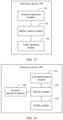
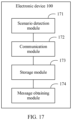
- this application provides an electronic device, including one or more functional modules, where the one or more functional modules are used for the application optimization method according to any implementation of the first aspect in embodiments of this application.
- an embodiment of this application provides an electronic device.
- the electronic device includes the method or apparatus for performing any embodiment of this application.
- the electronic device is a chip.
- first and second are merely intended for a purpose of description, and shall not be understood as an indication or implication of relative importance or implicit indication of a quantity of indicated technical features. Therefore, a feature limited by “first” and “second” may explicitly or implicitly include one or more features. In the descriptions of embodiments of this application, unless otherwise specified, "a plurality of" means two or more.
- Embodiments of this application provide an application optimization method, and the method may be applied to an electronic device.
- the electronic device may notify an application of an indication that a user is going to travel, and the application may execute a corresponding optimization strategy based on the indication, for example, buffer application data, or prompt the user to use previously buffered application data.
- the power management module 141 is configured to connect the battery 142 and the charging management module 140 to the processor 110.
- the power management module 141 receives an input of the battery 142 and/or the charging management module 140, and supplies power to the processor 110, the internal memory 121, the external memory, the display 194, the camera 193, the wireless communication module 160, and the like.
- the power management module 141 may be further configured to monitor parameters such as a battery capacity, a battery cycle quantity, and a battery health status (electric leakage and impedance).
- the power management module 141 may alternatively be disposed in the processor 110.
- the power management module 141 and the charging management module 140 may be alternatively disposed in a same component.
- the mobile communication module 150 may provide a wireless communication solution that is applied to the electronic device 100 and that includes 2G, 3G, 4G, 5G, and the like.
- the mobile communication module 150 may include at least one filter, a switch, a power amplifier, a low noise amplifier (low noise amplifier, LNA), and the like.
- the mobile communication module 150 may receive an electromagnetic wave through the antenna 1, perform processing such as filtering and amplification on the received electromagnetic wave, and transmit a processed electromagnetic wave to the modem processor for demodulation.
- the mobile communication module 150 may further amplify a signal modulated by the modem processor, and convert the signal into an electromagnetic wave for radiation through the antenna 1.
- at least some functional modules in the mobile communication module 150 may be disposed in the processor 110.
- at least some functional modules of the mobile communication module 150 and at least some modules of the processor 110 may be disposed in a same component.
- the modem processor may include a modulator and a demodulator.
- the modulator is configured to modulate a to-be-sent low-frequency baseband signal into a medium-high frequency signal.
- the demodulator is configured to demodulate a received electromagnetic wave signal into a low-frequency baseband signal. Then, the demodulator transmits the low-frequency baseband signal obtained through demodulation to the baseband processor for processing.
- the low-frequency baseband signal is processed by the baseband processor and then transmitted to the application processor.
- the application processor outputs a sound signal by using an audio device (which is not limited to the speaker 170A, the receiver 170B, or the like), or displays an image or a video on the display 194.
- the modem processor may be an independent component.
- the modem processor may be independent of the processor 110, and is disposed in the same component with the mobile communication module 150 or another functional module.
- the wireless communication module 160 may provide a wireless communication solution that is applied to the electronic device 100, and that includes a wireless local area network (wireless local area network, WLAN) (for example, a wireless fidelity (wireless fidelity, Wi-Fi) network), Bluetooth (Bluetooth, BT), a global navigation satellite system (global navigation satellite system, GNSS), frequency modulation (frequency modulation, FM), a near field communication (near field communication, NFC) technology, an infrared (infrared, IR) technology, or the like.
- the wireless communication module 160 may be one or more components integrating at least one communication processing module.
- the wireless communication module 160 receives an electromagnetic wave through the antenna 2, performs frequency modulation and filtering on an electromagnetic wave signal, and sends a processed signal to the processor 110.
- the wireless communication module 160 may further receive a to-be-sent signal from the processor 110, perform frequency modulation and amplification on the signal, and convert the signal into an electromagnetic wave for radiation through the antenna 2.
- the antenna 1 and the mobile communication module 150 in the electronic device 100 are coupled, and the antenna 2 and the wireless communication module 160 in the electronic device 100 are coupled, so that the electronic device 100 can communicate with a network and another device by using a wireless communication technology.
- the wireless communication technology may include a global system for mobile communications (global system for mobile communications, GSM), a general packet radio service (general packet radio service, GPRS), code division multiple access (code division multiple access, CDMA), wideband code division multiple access (wideband code division multiple access, WCDMA), time-division code division multiple access (time-division code division multiple access, TD-CDMA), long term evolution (long term evolution, LTE), BT, a GNSS, a WLAN, NFC, FM, an IR technology, and/or the like.
- GSM global system for mobile communications
- GPRS general packet radio service
- code division multiple access code division multiple access
- CDMA wideband code division multiple access
- WCDMA wideband code division multiple access
- the electronic device 100 may implement a display function by using the GPU, the display 194, the application processor, and the like, for example, display web page content.
- the GPU is a microprocessor for image processing, and is connected to the display 194 and the application processor.
- the GPU is configured to perform mathematical and geometric computation, and render an image.
- the processor 110 may include one or more GPUs, which execute program instructions to generate or change display information.
- the display 194 is configured to display an image, a video, and the like.
- the display 194 includes a display panel.
- the display panel may be a liquid crystal display (liquid crystal display, LCD).
- the display panel may be further an organic light-emitting diode (organic light-emitting diode, OLED), an active-matrix organic light-emitting diode (active-matrix organic light-emitting diode, AMOLED), a flexible light-emitting diode (flexible light-emitting diode, FLED), a mini-LED, a micro-LED, a micro-OLED, a quantum dot light-emitting diode (quantum dot light-emitting diode, QLED), or the like.
- the electronic device 100 may include one or N displays 194, where N is a positive integer greater than 1.
- the ISP is configured to process data fed back by the camera 193. For example, during photographing, a shutter is pressed, a ray of light is transmitted to a photosensitive element of the camera through a lens, and an optical signal is converted into an electrical signal.
- the photosensitive element of the camera transmits the electrical signal to the ISP for processing, to convert the electrical signal into a visible image.
- the ISP may further perform algorithm optimization on noise, brightness, and the like of the image.
- the ISP may further optimize parameters such as exposure and a color temperature of a photographing scenario.
- the ISP may be disposed in the camera 193.
- the digital signal processor is configured to process a digital signal.
- the digital signal processor may further process another digital signal.
- the digital signal processor is configured to perform Fourier transform and the like on frequency energy.
- the video codec is configured to compress or decompress a digital video.
- the electronic device 100 may support one or more video codecs. In this way, the electronic device 100 can play or record videos in a plurality of coding formats, for example, moving picture experts group (moving picture experts group, MPEG)-1, MPEG-2, MPEG-3, and MPEG-4.
- MPEG moving picture experts group
- the external memory interface 120 may be configured to connect to an external memory card, for example, a micro SD card, to extend a storage capability of the electronic device 100.
- the external memory card communicates with the processor 110 through the external memory interface 120, to implement a data storage function. For example, files such as music and videos are stored in the external memory card.
- the internal memory 121 may be configured to store computer-executable program code, and the executable program code includes instructions.
- the processor 110 runs the instructions stored in the internal memory 121 to perform various function applications of the electronic device 100 and data processing.
- the internal memory 121 may include a program storage area and a data storage area.
- the program storage area may store an operating system, an application required by at least one function (for example, a voice playing function or an image playing function), and the like.
- the data storage area may store data (such as audio data and a phone book) created during use of the electronic device 100, and the like.
- the internal memory 121 may include a high-speed random access memory, and may further include a nonvolatile memory, for example, at least one magnetic disk storage device, a flash storage device, or a universal flash storage (universal flash storage, UFS).
- the electronic device 100 may implement an audio function, for example, music playing and recording, through the audio module 170, the speaker 170A, the receiver 170B, the microphone 170C, the headset jack 170D, the application processor, and the like.
- an audio function for example, music playing and recording
- the audio module 170 is configured to convert digital audio information into an analog audio signal for output, and is also configured to convert analog audio input into a digital audio signal.
- the audio module 170 may be further configured to code and decode audio signals.
- the speaker 170A also referred to as a "loudspeaker" is configured to convert an audio electrical signal into a sound signal.
- the receiver 170B also referred to as an "earpiece”, is configured to convert an electrical audio signal into a sound signal.
- the microphone 170C also referred to as a "mike” or a “mic”, is configured to convert a sound signal into an electrical signal.
- the headset jack 170D is configured to connect to a wired headset.
- the pressure sensor 180A is configured to sense a pressure signal, and can convert the pressure signal into an electrical signal.
- the pressure sensor 180A may be disposed on the display 194.
- the capacitive pressure sensor may include at least two parallel plates made of conductive materials.
- the electronic device 100 determines pressure intensity based on a change of the capacitance.
- the electronic device 100 detects intensity of the touch operation through the pressure sensor 180A.
- the electronic device 100 may also calculate a touch location based on a detection signal of the pressure sensor 180A. In some embodiments, touch operations that are performed in a same touch location but have different touch operation intensity may correspond to different operation instructions.
- the gyroscope sensor 180B may be configured to determine a motion posture of the electronic device 100. In some embodiments, an angular velocity of the electronic device 100 around three axes (namely, axes x, y, and z) may be determined through the gyroscope sensor 180B.
- the barometric pressure sensor 180C is configured to measure barometric pressure.
- the magnetic sensor 180D includes a Hall sensor.
- the electronic device 100 may detect opening and closing of a flip cover by using the magnetic sensor 180D.
- the acceleration sensor 180E may detect accelerations in various directions (usually on three axes) of the electronic device 100. When the electronic device 100 is still, magnitude and a direction of gravity may be detected.
- the acceleration sensor 180E may be further configured to recognize a posture of the electronic device, and is used in screen switching between a landscape mode and a portrait mode, a pedometer, or another application.
- the distance sensor 180F is configured to measure a distance.
- the electronic device 100 may measure the distance by using infrared light or a laser.
- the optical proximity sensor 180G may include, for example, a light-emitting diode (LED) and an optical detector, for example, a photodiode.
- the light-emitting diode may be an infrared light-emitting diode.
- the electronic device 100 emits infrared light through the light-emitting diode.
- the electronic device 100 detects infrared reflected light from a nearby object through the photodiode. When sufficient reflected light is detected, the electronic device 100 may determine that there is an object near the electronic device 100. When insufficient reflected light is detected, the electronic device 100 may determine that there is no object near the electronic device 100.
- the fingerprint sensor 180H is configured to collect a fingerprint.
- the electronic device 100 may use a feature of the collected fingerprint to implement fingerprint-based unlocking, application lock access, fingerprint-based photographing, fingerprint-based call answering, and the like.
- the temperature sensor 180J is configured to detect a temperature.
- the touch sensor 180K is also referred to as a "touch panel”.
- the touch sensor 180K may be disposed on the display 194, and the touch sensor 180K and the display 194 form a touchscreen, which is also referred to as a "touch screen”.
- the touch sensor 180K is configured to detect a touch operation performed on or near the touch sensor.
- the touch sensor may transfer the detected touch operation to the application processor to determine a type of a touch event.
- Visual output related to the touch operation may be provided through the display 194.
- the touch sensor 180K may alternatively be disposed on a surface of the electronic device 100 at a location different from that of the display 194.
- the bone conduction sensor 180M may obtain a vibration signal.
- the button 190 includes a power button, a volume button, and the like.
- the motor 191 may generate a vibration prompt.
- the indicator 192 may be an indicator light, and may be configured to indicate a charging status and a power change, or may be configured to indicate a message, a missed call, a notification, and the like.
- the SIM card interface 195 is configured to connect to a SIM card.
- a software system of the electronic device 100 may use a layered architecture, an event-driven architecture, a microkernel architecture, a micro service architecture, or a cloud architecture.
- a software system of the layered architecture may be an Android (Android) system, or may be a Harmony (Harmony) operating system (operating system, OS), or another software system.
- the Android system of the layered architecture is used as an example to describe the software structure of the electronic device 100.
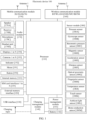
- FIG. 2 shows an example of a diagram of a software architecture of the electronic device 100.
- the layered architecture software is divided into several layers, and each layer has a clear role and task.
- the layers communicate with each other through a software interface.
- the Android system is divided into four layers: an application layer, an application framework layer, an Android runtime (Android runtime) and system library, and a kernel layer from top to bottom.
- the application layer may include a series of application packages.
- the application package may include applications such as Camera, Phone, Music, Gallery, Leftmost screen, Video, Short video, and Instant messaging.
- the application framework layer provides an application programming interface (application programming interface, API) and a programming framework for an application at the application layer.
- the application framework layer includes some predefined functions.
- the application framework layer may include a window manager, a content provider, a view system, a phone manager, a resource manager, a notification manager, and the like.
- the window manager is configured to manage a window program.
- the window manager may obtain a size of the display, determine whether there is a status bar, perform screen locking, take a screenshot, and the like.
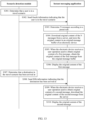
- the scenario detection module determines that the user is in a travel scenario.
- the OK control 315A is configured to enable the intelligent offline mode
- the cancel control 315B is configured to cancel enabling of the intelligent offline mode.
- the electronic device may receive a user operation performed on the OK control 315A, and in response to the user operation, enable the intelligent offline mode and perform S104.
- the short video application may download the video data to the second buffer queue.
- the short video application downloads the video data to the second buffer queue, if the video data needs to be downloaded to the first buffer queue (for example, when an instruction for playing a next short video is received, video data of the short video needs to be downloaded), the video data is preferentially downloaded to the first buffer queue.
- S105 The short video application performs frame freezing detection.
- the electronic device may display the user interface 430 shown in FIG. 4C .
- prompt information may be displayed.
- the prompt information is used to prompt the user to watch a next short video.
- the short video application may play the short video based on the second buffer queue when receiving a user operation used to watch a next short video.
- the electronic device may display the user interface 450 shown in FIG. 4E , and the user interface 450 is configured to play the short video 3.
- the signal identifier 451 on the user interface 450 indicates that the electronic device 100 currently accesses a 5G network with five signal bars (namely, full signal bars), that is, the electronic device 100 is in the scenario in which network performance is relatively good.
- the short video application may display prompt information to prompt the user that all offline short videos have been finished.
- the electronic device may display the user interface 440 shown in FIG. 4D .
- the signal identifier 441 on the user interface 440 indicates that the electronic device currently accesses a 2G network with two signal bars, that is, the electronic device is in the scenario with weak network coverage. In this case, the short video application detects that frame freezing occurs.
- the user interface 440 further includes the prompt information 443 ("No more offline short videos") used to prompt the user that there is no other offline short video that can be played currently.
- the long-term frame freezing is a frame freezing case in which duration of frame freezing is greater than or equal to second duration (for example, 30 seconds).
- the first duration is less than or equal to the second duration.
- the low-priority queue is the second buffer queue
- the short-term queue includes the buffer queue 5 to a buffer queue 7
- the long-term queue includes a buffer queue 8 to the buffer queue 12.
- the short video application may determine, based on the travel location, whether to classify the added second buffer queue into a short-term queue and a long-term queue.
- the added second buffer queue is classified into the short-term queue and the long-term queue.
- the travel location is a second preset location
- the added second buffer queue is not classified into the short-term queue and the long-term queue.
- the low-priority queue (namely, the second buffer queue) shown in FIG. 8 may be maintained, and the short-term queue and the long-term queue are not distinguished.
- the short video application may switch to playing a short video by using the low-priority queue.
- the short video application may directly play the short video based on the second buffer queue without distinguishing between the short-term queue and the long-term queue.
- a manner of determining whether to distinguish between the short-term queue and the long-term queue is not limited in this application.
- the method further includes the following steps.
- the scenario detection module determines that a destination in the travel scenario has been arrived at.
- the scenario detection module may detect, based on a transportation number, whether the user arrives at a travel destination.
- the transportation number may indicate a travel line and corresponding number of a transport means taken by the user.
- the transportation number may indicate a travel route that starts from a start location, passes through a plurality of locations, and ends at a destination location.
- the transportation number used to detect whether the user arrives at the travel destination may be determined based on the travel location that is of the user and that is determined in S102.
- One of the start location, the plurality of locations passed through on the way, and the destination location that are indicated by the transportation number may correspond to the travel location that is of the user and that is determined in S102. This is not limited thereto.
- the transportation number may be further determined with reference to other information (for example, travel information, a time at which the electronic device enables an airplane mode, and a time at which the user arrives at the travel location).
- the travel location that is of the user and that is determined in S102 is Tianhe Airport in Wuhan
- the time at which the electronic device enables an airplane mode is 6:00 a.m. on March 29.
- the transportation number used to detect whether the user arrives at the travel destination may be an airplane travel line whose start location is Tianhe Airport in Wuhan and whose departure time is a latest time after 6:00 a.m.
- S108 when the scenario detection module detects that the user arrives at the travel destination, S108 may be performed.
- the scenario detection module sends, to the short video application, second information indicating that the destination has been arrived at.
- the short video application may cancel maintenance of the second buffer queue, which may also be referred to as disabling the second buffer queue, or may be referred to as releasing the second buffer queue.
- the short video application may maintain a buffer queue shown in FIG. 8 .
- the buffer queue shown in FIG. 8 includes a high-priority queue (namely, the first buffer queue, including the buffer queue 1 to the buffer queue 4) and a low-priority queue (namely, the second buffer queue, including the buffer queue 5 to the buffer queue 12).
- the short video application may maintain a buffer queue shown in FIG. 9 .
- the buffer queue shown in FIG. 9 includes the buffer queue 1 to the buffer queue 4 (namely, the high-priority queue shown in FIG. 8 ).
- the short video application may play the short video based on the first buffer queue.
- the scenario detection module may perform signal fingerprint recognition, and recognize that the user is currently in the preset travel location.
- the scenario detection module may further perform habitual signal fingerprint recognition, and recognize that the travel location is not a habitual location.
- the scenario detection module may perform scenario determining by using a decision tree based on the foregoing recognition that the user is currently located in the preset travel location and the travel location is not the habitual location.
- the scenario detection module may determine that the user is currently in the travel scenario, and indicate, to the short video application through a scenario interface, that the user is currently in the travel scenario.
- the short video application may perform buffer control based on the indication of the scenario detection module, that is, enable the low-priority queue.
- the buffer queue maintained by the short video application may include the high-priority queue (the buffer queue 1 to the buffer queue 4) and the low-priority queue.
- the high-priority queue refer to the description of S101.
- the low-priority queue includes the short-term queue (the buffer queue 5 to the buffer queue 7) and the long-term queue (the buffer queue 8 to the buffer queue 12).
- the short video application may perform frame freezing detection.
- the short video application may perform playback control based on a frame freezing detection result.
- a short video is played based on the high-priority queue.
- a short video is played based on the short-term queue in the low-priority queue.
- a short video is played based on the long-term queue in the low-priority queue.
- the scenario detection module may perform arrival detection based on the transportation number, and recognize that the user arrives at the travel destination.
- the scenario detection module may perform scenario determining by using the decision tree based on the foregoing recognition that the user arrives at the travel destination.
- the scenario detection module may determine that the user arrives at the travel destination currently, and indicate, to the short video application through the scenario interface, that the user arrives at the destination currently.
- the short video application may perform buffer control based on the indication of the scenario detection module, that is, disable the low-priority queue.
- the short video application maintains the buffer queue 1 to the buffer queue 4, namely, the high-priority queue shown in FIG. 8 .
- the short video application may play a short video based on the buffer queue 1 to the buffer queue 4.
- FIG. 8 and FIG. 9 are merely used as an example of an optimization procedure for the short video application, and should not constitute a limitation.
- a quantity of buffer queues included in the high-priority queue, the low-priority queue, the short-term queue, or the long-term queue may be more or less.
- the short video application may add the second buffer queue that is to be maintained and that corresponds to the offline video without affecting maintenance of the first buffer queue corresponding to the online video, which may be understood as that extra mobile data is used to download the offline video. This does not affect the playback and download of the online video.
- the short video application may play the short video based on the second buffer queue when it is detected that frame freezing occurs, and play the short video based on the first buffer queue when the travel destination has been arrived at or when a network is recovered. In this way, the user can normally use the short video application in the travel scenario (which may include the scenario with weak network coverage or the scenario without network coverage), which improves user experience.
- the short video application is used as an example to describe a procedure of the application optimization method.
- a procedure of an application optimization method corresponding to a video application is similar to the procedure shown in FIG. 7 .
- the following uses the video application as an example for description.
- the application optimization method may include but is not limited to the following steps.
- the video application may buffer (or download) video data in a queue structure.
- the buffered video data is stored in a buffer queue, which may also be referred to as the video application maintaining the buffer queue, and the video data stored in the buffer queue is used by the video application to play a video.
- any buffer queue maintained by the video application is used to store video data of a video.
- the third buffer queue is a buffer queue.
- the video application may play existing video data in the third buffer queue, which may be understood as "playing while downloading”.
- a video that is being played currently can be understood as an online video.
- that the video application maintains a third buffer queue may include: when playback duration of downloaded video data in the third buffer queue is less than or equal to first preset duration (for example, 30 seconds), downloading video data whose playback duration is second preset duration (for example, 5 minutes) to the third buffer queue.
- the video application when receiving an indication for playing a next video, may clear video data in the third buffer queue, download video data of the next video to the third buffer queue, and play the video based on the third buffer queue.
- a scenario detection module determines that a user is in a travel scenario.
- Description of this step is similar to the description of S102 in FIG. 7 .
- Description of this step refer to the description of S102 in FIG. 7 .
- the scenario detection module sends, to the video application, first information indicating that the user is in the travel scenario/the user is going to travel.
- Description of this step is similar to the description of S103 in FIG. 7 .
- Description of this step refer to the description of S103 in FIG. 7 .
- the video application maintains, based on the first information, a fourth buffer queue corresponding to an offline video.
- Description of this step is similar to the description of S104 in FIG. 7 .
- the first buffer queue is replaced with the third buffer queue
- the second buffer queue is replaced with the fourth buffer queue.
- any video buffered in the fourth buffer queue may be different from a video buffered in the third buffer queue.
- a video buffered in the fourth buffer queue is a video recommended by the video application.
- the video application may recommend a video to the user based on user information such as a playback history and personal information, news and hotspot, and the like. 5.
- the video application may perform frame freezing detection.
- Description of this step is similar to the description of S105 in FIG. 7 .
- Description of this step refer to the description of S105 in FIG. 7 .
- the video application plays a video based on the third buffer queue; or when detecting that frame freezing occurs, the video application plays a video based on the fourth buffer queue.
- that the video application plays the video data in the third buffer queue may be understood as playing an online video.
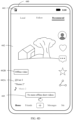
- the electronic device may display the user interface 340 shown in FIG. 3D .
- the signal identifier 341 on the user interface 340 indicates that the electronic device currently accesses a 5G network with five signal bars (namely, full signal bars). That is, the electronic device is in a scenario in which network performance is relatively good. In this case, the video application detects that no frame freezing occurs.
- the user interface 340 is configured to play the ninth episode of the online "Video a".
- that the video application plays the video data in the fourth buffer queue may be understood as playing an offline video.
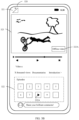
- the electronic device may display the user interface 320 shown in FIG. 3B .
- the signal identifier 321 on the user interface 320 indicates that the electronic device 100 currently cannot access a network. That is, the electronic device is in a scenario without network coverage. In this case, the video application detects that frame freezing occurs.
- the user interface 320 further includes the video identifier 323A used to indicate that a currently played video (the eighth episode of the "Video a") is an offline video. This is not limited to the foregoing examples.
- the video application may display prompt information when detecting that frame freezing occurs during playback of an online video.
- the prompt information is used to prompt the user to watch an offline video.
- the video application may play the video data in the fourth buffer queue when receiving a user operation used to watch an offline video.
- the video application may display prompt information to prompt the user that all offline videos have been finished.
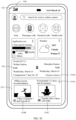
- the electronic device may display the user interface 330 shown in FIG. 3C .
- the signal identifier on the user interface 330 is consistent with the signal identifier 321 on the user interface 320, and indicates that the electronic device 100 currently cannot access a network. That is, the electronic device is in a scenario without network coverage. In this case, the video application detects that frame freezing occurs.
- the user interface 330 further includes the prompt information 322 ("All offline videos have been finished. Waiting to get online ") used to prompt the user that there is no other offline video that can be played currently.
- the method further includes the following steps.
- the scenario detection module determines that a destination in the travel scenario has been arrived at.
- Description of this step is similar to the description of S 107 in FIG. 7 .
- Description of this step refer to the description of S 107 in FIG. 7 .
- the scenario detection module sends, to the video application, second information indicating that the destination has been arrived at.
- Description of this step is similar to the description of S 108 in FIG. 7 .
- Description of this step refer to the description of S 108 in FIG. 7 .
- the video application cancels maintenance of the fourth buffer queue based on the second information.
- Description of this step is similar to the description of S 109 in FIG. 7 .
- the first buffer queue is replaced with the third buffer queue
- the second buffer queue is replaced with the fourth buffer queue.
- FIG. 10 is a schematic flowchart of another application optimization method according to an embodiment of this application.
- the electronic device 100 includes a scenario detection module and a leftmost screen application is used for description.
- the scenario detection module and the leftmost screen application refer to descriptions of the scenario detection module and the leftmost screen application in FIG. 2 .
- the method may include, but is not limited to, the following steps.
- the leftmost screen application obtains travel information of a user.
- the leftmost screen application may identify data in a first application, to obtain unmade-travel information of the user.
- the leftmost screen application may identify an SMS message received in an SMS message application.
- the leftmost screen application may identify information recorded in a calendar application, a schedule application, or a memo application.
- the leftmost screen application may identify order information in a travel application or a ticket buying application.
- the leftmost screen application may be granted permission for obtaining the data in the first application. For example, on an operating system start interface (out-of-box experience, OOBE) of the electronic device or a setting interface of the electronic device, the electronic device grants, based on a received user operation, the permission for obtaining the data in the first application to the leftmost screen application.
- OOBE operating system start interface
- the electronic device grants, based on a received user operation, the permission for obtaining the data in the first application to the leftmost screen application.
- the scenario detection module determines that the user is in a travel scenario.
- S204 is similar to the description of S102 in FIG. 7 .
- S102 in FIG. 7 For details, refer to the description of S102 in FIG. 7 .
- S205 when the scenario detection module detects that the user is currently in the travel scenario/the user is going to travel, S205 may be performed.
- the leftmost screen application displays a second widget (indicating the buffered application data) based on the third information.
- the leftmost screen application may display the second widget.
- the second widget may indicate the buffered application data.
- the second widget may indicate the application data of the at least one application that is buffered in S203.
- the leftmost screen application may determine, with reference to the unmade-travel information of the user and the third information, whether to display the second widget. For example, after the leftmost screen application receives the third information, the leftmost screen application may determine whether a difference between a departure time in the latest piece of travel information and the current time is less than or equal to a preset difference (for example, two hours), and display the second widget if a determining result is yes.
- a preset difference for example, two hours
- the second widget is the offline recommendation widget 533 on the user interface 530 shown in FIG. 5C .
- the offline recommendation widget 533 is configured to display the buffered application data: the application data 533B (namely, the video data in the video application: the seventh episode and the eighth episode of the "Video a"), and the application data 533C (namely, the short video data in the short video application, where the total size of the short video data is 426 MB).
- the leftmost screen application may display, based on the travel information, a widget (namely, the first widget) configured to recommend downloading an offline video, for example, after the user buys a D-train ticket (the travel widget 512 on the user interface 510 shown in FIG. 5A may be generated based on information about the D-train ticket), when a departure time in the D-train ticket arrives 24 hours later, the leftmost screen application may display the user interface 510 shown in FIG. 5A .
- the user interface 510 includes the offline recommendation widget 513 to prompt the user to download an offline video.
- the leftmost screen application may download the offline video.
- the leftmost screen application displays the user interface 520 shown in FIG. 5B .
- the scenario detection module may perform signal fingerprint recognition, and recognize that the user is currently in a preset travel location.
- the scenario detection module may further perform habitual signal fingerprint recognition, and recognize that the travel location is not a habitual location.
- the scenario detection module may perform scenario determining by using a decision tree based on the foregoing recognition that the user is currently located in the preset travel location and the travel location is not the habitual location.
- the scenario detection module may determine that the user is currently in the travel scenario, and indicate, to the short video application through a scenario interface, that the user is currently in the travel scenario.
- the leftmost screen application may display, based on the indication of the scenario detection module, a widget (namely, the second widget) indicating a downloaded offline video. For example, after the user arrives at Wuhan Station, the leftmost screen application displays the user interface 530 shown in FIG. 5C .
- the user interface 530 includes the offline recommendation widget 533 to display the downloaded offline video.
- the leftmost screen application may prompt, by using the first widget at an earlier time before the user leaves, the user to download the application data.
- the downloaded application data is displayed by using the second widget, to accurately prompt the user. This helps the user use the application data in the travel scenario, and increases a probability that the user uses the application data. A product function better meets a user requirement.
- FIG. 12 shows an example of a diagram of an architecture of a communication system.
- the communication system may be configured to transmit a chat message (referred to as an instant message for short) in an instant messaging application.
- a chat message referred to as an instant message for short
- the communication system may include an electronic device 100, an electronic device 200, and a server 300.
- the electronic device 100 may be the electronic device 100 shown in FIG. 1 , or may be the electronic device 100 shown in FIG. 2 .
- the electronic device 200 is similar to the electronic device 100.
- the server 300 may include at least one server.
- the server 300 is a server cluster including a plurality of servers, and any one server in the at least one server may be a hardware server or a cloud server.
- An instant messaging application is installed on the electronic device 100 and the electronic device 200, and the server 300 is, for example, an application server that provides a service for the instant messaging application.
- the electronic device 100 may communicate with the server 300 over an internet, the electronic device 200 may communicate with the server 300 over the internet, and the electronic device 100 may communicate with the electronic device 200 through the server 300.
- the internet may include communication links such as a wired link and a wireless link, and network devices such as a base station, a router, and an access point (access point, AP).
- the wired link includes, for example, a high definition multimedia interface (high definition multimedia interface, HDMI), a universal serial bus (universal serial bus, USB), a coaxial cable, and an optical fiber.
- the wireless link includes, for example, Bluetooth, Wi-Fi, sidelink, NFC, UWB, and infrared.
- a communication process is described by using an example in which a user 1 sends, through the electronic device 200, an instant message 1 to a user 2 using the electronic device 100.
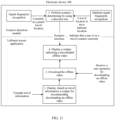
- the electronic device 200 may first send an original message 1 to the server 300.
- the server 300 may store the original message 1 (for example, store the original message 1 in content management of the server 300), and may compress the original message 1 to obtain a compressed message 1.
- the server 300 may send the compressed message 1 to the electronic device 100.
- the server 300 may delete the stored compressed message 1.
- compression is used as an example for description.
- key information for example, a title, a keyword, a type, a size, a thumbnail, or an icon
- the electronic device 100 may display the compressed message 1, for example, display key information in the message 1.
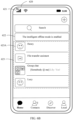
- the electronic device 100 may display the user interface 610 shown in FIG. 6A .
- the user interface 610 includes a plurality of compressed chat messages.
- the message 613 on the user interface 610 is a thumbnail and indicates an original message in a video form.
- the message 614 on the user interface 610 is a thumbnail and indicates an original message in a picture form.
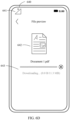
- the message 615 on the user interface 610 includes a document icon, a document name, and a document size, and indicates an original message in a document form.
- the electronic device 100 may receive a user operation used to obtain original content of the message 1, and obtain the original content of the message 1 from the server 300 in response to the user operation.
- the electronic device 100 may display the original content of the message 1. For example, when receiving a user operation performed on the message 614 on the user interface 610 shown in FIG. 6A , the electronic device 100 may display original content of the message 614, that is, a picture 632 on the user interface 630 shown in FIG. 6C .
- the server 300 may delete the stored compressed message 1.
- the server 300 may have a timeout release mechanism. To be specific, after storing the original message 1, the server 300 may delete the original message 1 after preset duration (for example, 24 hours).
- FIG. 13 is a schematic flowchart of another application optimization method according to an embodiment of this application.
- the electronic device 100 includes a scenario detection module and an instant messaging application is used for description.
- the scenario detection module and the instant messaging application refer to the descriptions of the scenario detection module and the instant messaging application in FIG. 2 .
- the method may include, but is not limited to, the following steps.
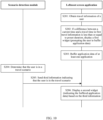
- the scenario detection module determines that a user is in a travel scenario.
- S301 is similar to the description of S102 in FIG. 7 .
- S102 in FIG. 7 For details, refer to the description of S102 in FIG. 7 .
- S302 when the scenario detection module detects that the user is currently in the travel scenario/the user is going to travel, S302 may be performed.
- the scenario detection module sends, to the instant messaging application, fourth information indicating that the user is in the travel scenario/the user is going to travel.
- the fourth information further includes a travel location that is of the user and that is determined by the scenario detection module in S301.
- the instant messaging application determines N messages (N is a positive integer) according to a preset rule.
- the instant messaging application may determine N to-be-downloaded messages according to the preset rule.
- Parameters in the preset rule include, for example, but are not limited to: the travel location in the fourth information, predicted duration of being in a scenario with weak network coverage or a scenario without network coverage in the travel scenario, a chat time, a chat frequency, a type of an instant message (for example, a picture type, a video type, or a document type); or a size of an instant message.
- the instant messaging application may set a buffer threshold according to the preset rule, and a sum of sizes of the N messages is less than or equal to the buffer threshold.
- the buffer threshold may be determined based on the travel location in the fourth information.
- the buffer threshold may be determined based on the predicted duration of being in a scenario with weak network coverage or a scenario without network coverage in the travel scenario. For example, if the travel location in the fourth information is an airport, the buffer threshold may be 500 MB. If the travel location included in the fourth information is a railway station/D-train station, the buffer threshold may be 200 MB.
- the instant messaging application may set a download sequence according to the preset rule, and subsequently download instant messages in the download sequence.
- the N messages are first N downloaded messages.
- a specific example is as follows.
- the download sequence may be determined based on the type of an instant message. For example, a message of a picture type is preferentially downloaded, then a message of a document type is downloaded, a message of a video type is downloaded, and finally a message of another type is downloaded.
- the download sequence may be determined based on the size of an instant message. For example, instant messages are downloaded in ascending order.
- the download sequence may be determined based on the chat time. For example, instant messages in a chat are downloaded in descending order of chat times.
- the download sequence may be determined based on the chat frequency. For example, instant messages in a chat are downloaded in descending order of chat frequencies.
- the N messages may be instant messages of X chats with the latest chat time and the highest chat frequency, and for one of the chats, the instant messaging application buffers the first Z instant messages whose sizes are relatively small in the latest Y instant messages, where X, Y, and Z are all positive integers, X, Y, and Z may be determined based on the buffer threshold, and the total size of N buffered messages is less than or equal to the buffer threshold.
- the N messages may be instant messages of X chats with the latest chat time and the highest chat frequency, and for one of the chats, the instant messaging application buffers the latest Y instant messages.
- a specific manner of how to determine the N to-be-downloaded messages is not limited in this application.
- S304 The instant messaging application downloads original content of the N messages from a server, and stores the original content in an original message buffer of the electronic device.
- the electronic device when determining that the electronic device is currently in a travel scenario/the user is going to travel, the electronic device may establish the original message buffer to store the original content of the N messages.
- S304 may also be understood as pulling the original content of the N messages in the server to a local buffer of the electronic device, where pulling is downloading data stored in the server to a local memory of the electronic device.
- the instant messaging application may perform S303 and S304, and display prompt information.
- the electronic device may display the user interface 620 shown in FIG. 6B .
- the signal identifier 621 on the user interface 620 indicates that the electronic device 100 currently accesses a 5G network with five signal bars (namely, full signal bars) and accesses a Wi-Fi network, that is, the electronic device is in a scenario in which network performance is relatively good.
- the user interface 620 includes prompt information 622 ("The intelligent offline mode is enabled"), indicating that the intelligent offline mode is enabled.
- the instant messaging application performs S303 and S304 only when the intelligent offline mode is enabled.
- the server may reduce timeout periods corresponding to the N original messages, which reduces storage load of the server. For example, before the instant messaging application downloads the original content of the N messages from the server, the server deletes the original content of the N messages when a storage time exceeds 24 hours. After the instant messaging application downloads the original content of the N messages from the server, the server deletes the original content of the N messages when the storage time exceeds 12 hours.
- the first message is any one of the N messages stored in the original message buffer of the electronic device.
- S305 may be understood as adjusting a download path corresponding to an instant message.
- the instant messaging application obtains the original content of the first message from an adjusted download path (namely, the original message buffer).
- the download path before adjustment is the server.
- S306 The instant messaging application displays the original content of the first message.
- the first message is the message 614 on the user interface 610 shown in FIG. 6A .
- the electronic device 100 may receive a user operation (for example, a tap operation) performed on the message 614, and in response to the user operation, display the user interface 630 shown in FIG. 6C .
- the user interface 630 includes the signal identifier 631 and the picture 632.
- the signal identifier 631 indicates that the electronic device currently cannot access a network, that is, the electronic device is in a scenario without network coverage.
- the picture 632 is the original content of the message 614, that is, the original picture of the message 614 in the picture form.
- the electronic device may delete the message.
- the message may be stored in a memory of the electronic device, and the message stored in the original message buffer is deleted. If the electronic device does not receive a user operation used to obtain the original content of the message, the electronic device may delete, when a storage time is greater than or equal to the preset duration (for example, 24 hours), the message stored in the original message buffer.
- the preset duration for example, 24 hours
- the method further includes the following steps.
- the scenario detection module determines that a destination in the travel scenario has been arrived at.
- S307 is similar to S107 in FIG. 7 .
- S102 is replaced with S301.
- S308 when the scenario detection module detects that the user arrives at the travel destination, S308 may be performed.
- the scenario detection module sends, to the instant messaging application, fifth information indicating that the destination has been arrived at.
- S307 may be understood as: when determining that the destination has been arrived at, restoring the download path corresponding to the instant message to the download path (namely, the server) before adjustment.
- the instant messaging application obtains the original content of the second message from the download path before adjustment.
- the second message is a message other than the N messages described in S304, that is, the original content of the second message is not stored in the original message buffer.
- S310 The instant messaging application displays the original content of the second message.
- S307 and S308 may also be replaced with the following: The instant messaging application detects that the network is recovered.
- the electronic device may directly obtain the original content of the second message from the original message buffer.
- the scenario detection module of the electronic device 100 may perform signal fingerprint recognition, and recognize that the electronic device 100 is currently in the preset travel location.
- the scenario detection module may further perform habitual signal fingerprint recognition, and recognize that the travel location is not a habitual location.
- the scenario detection module may perform scenario determining by using a decision tree based on the foregoing recognition that the user is currently located in the preset travel location and the travel location is not the habitual location.
- the scenario detection module may determine that the user is currently in the travel scenario, and indicate, to the instant messaging application through a scenario interface, that the user is currently in the travel scenario.
- the instant messaging application may adjust a download strategy from an online download strategy to an offline download strategy based on an indication of the scenario detection module.
- the online download strategy refer to the description of the communication process shown in FIG. 12 . Details are not described again.
- the instant messaging application works based on the offline download strategy, (2) the original content of the N messages may be downloaded from the server 300 to the original message buffer; and (3) when the electronic device receives a user operation used to obtain original content of a message 3, the original content of the message 3 may be obtained from the original message buffer, and (4) the original content of the message 3 is displayed.
- the instant messaging application may download the original content of the N messages to the original message buffer.
- the electronic device When receiving the user operation used to obtain the original content of any one of the N messages, the electronic device does not download the original content of the message from the server, but obtains the original content of the message from the original message buffer for display. In this way, the user can normally view the instant message in the travel scenario (which may include a scenario with weak network coverage or a scenario without network coverage), which improves user experience.
- the electronic device when determining that the electronic device is in the travel scenario, may increase a charging speed. For example, a more aggressive charging strategy is used to obtain more power, so that the user can normally use the electronic device in the travel scenario.
- FIG. 15 shows an example of a diagram of a software structure of the electronic device 100.
- the electronic device 100 includes a scenario detection module 151, a buffer control module 152, and a video playback module 153, where any two of the modules may be connected to and communicate with each other.
- the scenario detection module 151 is configured to determine whether a user is in a preset travel scenario. For a specific example, refer to the description of S102 in FIG. 7 . When determining that the user is in a travel scenario, the scenario detection module 151 may notify the buffer control module 152 and optionally the video playback module 153. In some embodiments, the scenario detection module 151 is further configured to determine whether the user arrives at a destination in the travel scenario. For a specific example, refer to the description of S107 in FIG. 7 . When determining that the user arrives at the destination in the travel scenario, the scenario detection module 151 may notify the buffer control module 152 and optionally the video playback module 153.
- the buffer control module 152 is configured to buffer video data based on at least one buffer queue based on a notification sent by the scenario detection module 151, which may be referred to as maintaining the at least one buffer queue.
- the video playback module 153 is configured to play a video based on a buffer queue maintained by the buffer control module 152.
- the buffer control module 152 may maintain a first buffer queue corresponding to an online video.
- the video playback module 153 may play the video based on the first buffer queue, which may be understood as "playing while downloading".
- the high-priority queue shown in FIG. 8 is the first buffer queue, and includes the buffer queue 1 to the buffer queue 4.
- the video playback module 153 plays the first video based on the buffer queue 1.
- the buffer control module 152 buffers the data of the first video based on the buffer queue 1 in the first buffer queue.
- the buffer control module 152 after receiving the notification that is sent by the scenario detection module 151 and that indicates that the user is in the travel scenario, the buffer control module 152 adds a second buffer queue that corresponds to an offline video and that is to be maintained, that is, when the user is in the travel scenario, the buffer control module buffers video data of the online video based on the first buffer queue, and buffers video data of the offline video based on the second buffer queue.
- a second buffer queue that corresponds to an offline video and that is to be maintained, that is, when the user is in the travel scenario, the buffer control module buffers video data of the online video based on the first buffer queue, and buffers video data of the offline video based on the second buffer queue.
- the video playback module 153 may perform frame freezing detection. For a specific example, refer to the description of S105 in FIG. 7 .
- the video playback module 153 may play a video buffered in the second buffer queue.
- the low-priority queue shown in FIG. 8 is the second buffer queue, including the buffer queue 5 to the buffer queue 12. Data of the second video is buffered in the buffer queue 5, and the video playback module 153 plays the second video based on the buffer queue 5.
- the video playback module 153 may play the video based on the first buffer queue when a network is recovered or the user arrives at the destination in the travel scenario.
- S106 in FIG. 7 .
- the second buffer queue maintained by the buffer control module 152 when the user is in the travel scenario may include a short-term queue and a long-term queue.
- a quantity of the short-term queue is less than a quantity of the long-term queue.
- a buffering priority of the short-term queue is higher than a buffering priority of the long-term queue.
- the video playback module 153 may play a video buffered in the short-term queue when duration of frame freezing during video playback based on the first buffer queue is less than or equal to first duration, or play a video buffered in the long-term queue when duration of frame freezing during video playback based on the first buffer queue is greater than or equal to second duration.
- the first duration and the second duration are the same or different. For a specific example, refer to the descriptions of the short-term queue and the long-term queue in S106 in FIG. 7 .
- the buffer control module 152 releases the second buffer queue. For a specific example, refer to the description of S109 in FIG. 7 .
- the electronic device 100 further includes a display module.
- the display module may display first content, where the first content is used to prompt the user to buffer an offline video, or the first content indicates that an offline video is being buffered currently.
- the first content refer to the description of the prompt information displayed after the first information is received in S104 in FIG. 7 .
- the electronic device 100 further includes a display module.
- the display module may display second content when the video playback module 153 plays the video buffered in the second buffer queue, where the second content indicates that a currently played video is an offline video.
- the second content refer to the description of the information indicating that a played short video is an offline video in S106 in FIG. 7 .
- the buffer control module 152 may delete the third video from the second buffer queue, to buffer another video into the second buffer queue.
- the buffer control module 152 may store the third video in another buffer of the electronic device 100.
- the buffer control module 152 and the video playback module 153 in FIG. 15 are modules included in a short video application or a video application.
- FIG. 16 shows an example of a diagram of another software structure of the electronic device 100.
- the electronic device 100 includes a travel identification module 161, a display module 162, a buffer module 163, and a scenario detection module 164, where any two of the modules may be connected to and communicate with each other.
- the travel identification module 161 is configured to obtain unmade-travel information of a user. For a specific example, refer to the description of S201 in FIG. 10 .
- the travel identification module 161 is further configured to predict, according to travel information, whether the user is in a preset travel scenario within preset duration. In some embodiments, when a difference between a current time and a departure time in first travel information is less than or equal to the preset duration, the travel identification module 161 predicts that the user is in a travel scenario within the preset duration.
- the first travel information is travel information with an earliest departure time in the unmade-travel information. For a specific example, refer to the description of S202 in FIG. 10 .
- the travel identification module 161 may notify the display module 162.
- the display module 162 is configured to display third content after receiving a notification that is sent by the travel identification module 161 and that indicates that the user is in the travel scenario within the preset duration.
- the third content is used to prompt the user to buffer application data.
- the third content refer to the description of the first widget in S202 in FIG. 10 .
- the buffer module 163 is configured to buffer application data of at least one application.
- the buffer module 163 may buffer the application data of the at least one application.
- the scenario detection module 164 is configured to determine whether the user is in the preset travel scenario. For a specific example, refer to the description of S102 in FIG. 7 . When determining that the user is in the travel scenario, the scenario detection module 164 may notify the display module 162.
- the display module 162 is further configured to display fourth content after receiving the notification that is sent by the scenario detection module 164 and that indicates that the user is in the travel scenario.
- the fourth content indicates the application data that is of the at least one application and that is buffered by the buffer module 163.
- the fourth content refer to the description of the second widget in S206 in FIG. 10 .
- the travel identification module 161, the display module 162, and the buffer module 163 in FIG. 16 are modules included in a leftmost screen application.
- FIG. 17 shows an example of a diagram of another software structure of the electronic device 100.
- the electronic device 100 includes a scenario detection module 171, a communication module 172, a storage module 173, and a message obtaining module 174, where any two of the modules may be connected to and communicate with each other.
- the scenario detection module 171 is configured to determine whether a user is in a preset travel scenario. For a specific example, refer to the description of S102 in FIG. 7 . When determining that the user is in a travel scenario, the scenario detection module 171 may notify the communication module 172.
- the communication module 172 is configured to communicate with a network device.
- the communication module 172 may receive a compressed instant message (which may also be referred to as compressed content of the instant message, for example, a title, a keyword, a type, a size, a thumbnail, or an icon) sent by the network device.
- the compressed instant message may be used to be displayed on the electronic device 100.
- the communication module 172 is further configured to: after receiving a notification that is sent by the scenario detection module 164 and that indicates that the user is in the travel scenario, obtain original content of at least one instant message from the network device, and stores the obtained original content of the at least one instant message into the storage module 173.
- the at least one instant message is a message of corresponding compressed content previously received by the communication module 172.
- the at least one instant message is determined according to a preset rule, and a parameter involved the preset rule includes but is not limited to at least one of a travel location in the travel scenario, predicted duration of being in an area with weak network coverage or an area without network coverage in the travel scenario, a chat time, a chat frequency, a type of a chat message, or a size of a chat message.
- a parameter involved the preset rule includes but is not limited to at least one of a travel location in the travel scenario, predicted duration of being in an area with weak network coverage or an area without network coverage in the travel scenario, a chat time, a chat frequency, a type of a chat message, or a size of a chat message.
- a parameter involved the preset rule includes but is not limited to at least one of a travel location in the travel scenario, predicted duration of being in an area with weak network coverage or an area without network coverage in the travel scenario, a chat time, a chat frequency, a type of a chat message, or a size of a chat message
- the storage module 173 is configured to store the original content of the at least one instant message obtained by the communication module 172. In some embodiments, when storage duration of original content of a second message in the storage module 173 is greater than or equal to preset duration, the original content of the second message in the storage module 173 is deleted. Optionally, the electronic device 100 may store the original content of the second message in another storage module.
- the message obtaining module 174 is configured to obtain original content of a first message from the storage module 173 when receiving a user operation for the first message.
- the first message is any instant message whose original content is stored in the storage module 173.
- the original content of the first message may be displayed on the electronic device 100. For a specific example, refer to the descriptions of S305 and S306 in FIG. 13 .
- the communication module 172, the storage module 173, and the message obtaining module 174 in FIG. 17 are modules included in an instant messaging application.
- the electronic device may perform scenario identification, to determine whether the electronic device is in the travel scenario.
- different applications execute different optimization strategies.
- an optimization strategy of the short video application refer to the embodiments shown in FIG. 7 to FIG. 9 and FIG. 15 .
- For an optimization strategy of the leftmost screen application refer to the embodiments shown in FIG. 10 , FIG. 11 , and FIG. 16 .
- For an optimization strategy of the instant messaging application refer to the embodiments shown in FIG. 13 , FIG. 14 , and FIG. 17 .
- the user can normally use the applications in the travel scenario (including the scenario with weak network coverage or the scenario without network coverage), which improves user experience.
- the short video application, the video application, the leftmost screen application, and the instant messaging application are used as examples for description.
- the short video application, the video application, the leftmost screen application, or the instant messaging application may alternatively be another application. This is not limited in this application.
- All or a part of the method provided in embodiments of this application may be implemented through software, hardware, firmware, or any combination thereof.
- the software is used to implement the embodiments, all or a part of the embodiments may be implemented in a form of a computer program product.
- the computer program product includes one or more computer instructions.
- the computer may be a general-purpose computer, a dedicated computer, a computer network, a network device, user equipment, or another programmable apparatus.
- the computer instructions may be stored in a computer-readable storage medium or may be transmitted from a computer-readable storage medium to another computer-readable storage medium.
- the computer instructions may be transmitted from a website, computer, server, or data center to another website, computer, server, or data center in a wired (for example, a coaxial cable, an optical fiber, or a digital subscriber line (digital subscriber line, DSL)) or wireless (for example, infrared, radio, or microwave) manner.
- the computer-readable storage medium may be any usable medium accessible by a computer, or a data storage device, for example, a server or a data center, integrating one or more usable media.
- the usable medium may be a magnetic medium (for example, a floppy disk, a hard disk, or a magnetic tape), an optical medium (for example, a digital video disc (digital video disc, DVD)), a semiconductor medium (for example, a solid state drive (solid state drive, SSD)), or the like.
- a magnetic medium for example, a floppy disk, a hard disk, or a magnetic tape
- an optical medium for example, a digital video disc (digital video disc, DVD)
- a semiconductor medium for example, a solid state drive (solid state drive, SSD)
Landscapes
- Engineering & Computer Science (AREA)
- Multimedia (AREA)
- Signal Processing (AREA)
- Databases & Information Systems (AREA)
- Theoretical Computer Science (AREA)
- General Engineering & Computer Science (AREA)
- Data Mining & Analysis (AREA)
- Physics & Mathematics (AREA)
- General Physics & Mathematics (AREA)
- Computer Networks & Wireless Communication (AREA)
- Two-Way Televisions, Distribution Of Moving Picture Or The Like (AREA)
Applications Claiming Priority (2)
| Application Number | Priority Date | Filing Date | Title |
|---|---|---|---|
| CN202210408333.2A CN116962794A (zh) | 2022-04-19 | 2022-04-19 | 应用优化方法及电子设备 |
| PCT/CN2023/088384 WO2023202483A1 (zh) | 2022-04-19 | 2023-04-14 | 应用优化方法及电子设备 |
Publications (2)
| Publication Number | Publication Date |
|---|---|
| EP4496321A1 true EP4496321A1 (de) | 2025-01-22 |
| EP4496321A4 EP4496321A4 (de) | 2025-07-16 |
Family
ID=88419168
Family Applications (1)
| Application Number | Title | Priority Date | Filing Date |
|---|---|---|---|
| EP23791138.3A Pending EP4496321A4 (de) | 2022-04-19 | 2023-04-14 | Anwendungsoptimierungsverfahren und elektronische vorrichtung |
Country Status (4)
| Country | Link |
|---|---|
| US (1) | US20250039497A1 (de) |
| EP (1) | EP4496321A4 (de) |
| CN (1) | CN116962794A (de) |
| WO (1) | WO2023202483A1 (de) |
Families Citing this family (1)
| Publication number | Priority date | Publication date | Assignee | Title |
|---|---|---|---|---|
| CN118714411A (zh) * | 2024-06-06 | 2024-09-27 | 北京字跳网络技术有限公司 | 一种视频处理方法、装置、设备及存储介质 |
Family Cites Families (21)
| Publication number | Priority date | Publication date | Assignee | Title |
|---|---|---|---|---|
| US7769269B2 (en) * | 2004-11-03 | 2010-08-03 | Sony Corporation | High performance storage device access for non-linear editing systems |
| GB0622823D0 (en) * | 2006-11-15 | 2006-12-27 | British Broadcasting Corp | Accessing content |
| US9398347B2 (en) * | 2011-05-30 | 2016-07-19 | Sandvine Incorporated Ulc | Systems and methods for measuring quality of experience for media streaming |
| US9338233B2 (en) * | 2012-03-10 | 2016-05-10 | Headwater Partners Ii Llc | Distributing content by generating and preloading queues of content |
| WO2015127465A1 (en) * | 2014-02-24 | 2015-08-27 | Opanga Networks, Inc. | Playback of content pre-delivered to a user device |
| US10431180B1 (en) * | 2014-09-29 | 2019-10-01 | Amazon Technologies, Inc. | Predictive pre-rendering of content and updating of pre-rendered content prior to display |
| EP3771215A1 (de) * | 2018-05-02 | 2021-01-27 | Spotify AB | Prädiktives zwischenspeichern |
| CN109004972B (zh) * | 2018-07-13 | 2020-09-15 | 深圳市道通智能航空技术有限公司 | 无人机系统的数据传输方法、装置、系统和地面图传模块 |
| WO2020029215A1 (en) * | 2018-08-10 | 2020-02-13 | Chongqing University Of Posts And Telecommunications | Methods, systems and devices for determining buffer status report |
| US10848819B2 (en) * | 2018-09-25 | 2020-11-24 | Rovi Guides, Inc. | Systems and methods for adjusting buffer size |
| BE1026657B1 (nl) * | 2018-09-28 | 2020-04-29 | Newtec Cy N V | Satellietcommunicatiesysteem |
| US11265597B2 (en) * | 2018-10-23 | 2022-03-01 | Rovi Guides, Inc. | Methods and systems for predictive buffering of related content segments |
| CN109890067B (zh) * | 2019-02-21 | 2021-03-30 | 华为技术有限公司 | 对特定路线上的特定位置进行识别的方法及电子设备 |
| CN110225393A (zh) * | 2019-05-29 | 2019-09-10 | 阿里巴巴集团控股有限公司 | 视频缓存方法以及装置 |
| CN110765383A (zh) * | 2019-10-21 | 2020-02-07 | 支付宝(杭州)信息技术有限公司 | 资源缓存方法以及装置 |
| CN113127774B (zh) * | 2019-12-30 | 2023-12-12 | 中国移动通信集团辽宁有限公司 | 移动应用的内容预缓存方法及装置 |
| EP4128592B1 (de) * | 2020-04-02 | 2025-09-10 | Qualcomm Incorporated | Vorladen von anwendungsdaten basierend auf der vorhersage des netzstatus und des datenzugriffsverhaltens |
| CN112399190B (zh) * | 2020-10-16 | 2023-05-09 | 北京达佳互联信息技术有限公司 | 音视频数据获取方法及其装置 |
| CN112466440B (zh) * | 2020-12-08 | 2023-07-21 | 深圳平安智慧医健科技有限公司 | 医学影像的加载方法、装置、电子设备及存储介质 |
| CN113163255B (zh) * | 2021-03-31 | 2022-07-15 | 成都欧珀通信科技有限公司 | 视频播放方法、装置、终端及存储介质 |
| US11586788B2 (en) * | 2021-07-02 | 2023-02-21 | Ansys, Inc. | Efficient shape-accurate finite element mesh visualization |
-
2022
- 2022-04-19 CN CN202210408333.2A patent/CN116962794A/zh active Pending
-
2023
- 2023-04-14 EP EP23791138.3A patent/EP4496321A4/de active Pending
- 2023-04-14 WO PCT/CN2023/088384 patent/WO2023202483A1/zh not_active Ceased
-
2024
- 2024-10-11 US US18/914,019 patent/US20250039497A1/en active Pending
Also Published As
| Publication number | Publication date |
|---|---|
| WO2023202483A1 (zh) | 2023-10-26 |
| EP4496321A4 (de) | 2025-07-16 |
| US20250039497A1 (en) | 2025-01-30 |
| CN116962794A (zh) | 2023-10-27 |
Similar Documents
| Publication | Publication Date | Title |
|---|---|---|
| EP3923634B1 (de) | Verfahren zur identifizierung einer bestimmten position auf einer bestimmten route und elektronische vorrichtung | |
| CN110708086B (zh) | 一种分屏显示方法与电子设备 | |
| EP4160596B1 (de) | Videosyntheseverfahren und -vorrichtung, elektronische vorrichtung und speichermedium | |
| US12149754B2 (en) | Method for sharing camera by plurality of applications and electronic device | |
| US20200249821A1 (en) | Notification Handling Method and Electronic Device | |
| EP4273687B1 (de) | Bildteilungsverfahren und elektronische vorrichtung | |
| WO2021017901A1 (zh) | 一种屏幕显示方法及电子设备 | |
| US20220358089A1 (en) | Learning-Based Keyword Search Method and Electronic Device | |
| EP4086780A1 (de) | Verfahren und system zur gemeinsamen dateinutzung und zugehörige vorrichtung | |
| WO2021052415A1 (zh) | 资源调度方法及电子设备 | |
| CN110636554B (zh) | 数据传输方法及装置 | |
| CN111104209A (zh) | 一种处理任务的方法及相关设备 | |
| WO2021115112A1 (zh) | 安装包的下载方法、分发方法、终端设备、服务器及系统 | |
| US12164759B2 (en) | Control moving method and electronic device | |
| US20240237115A1 (en) | Message Push Method and Apparatus | |
| EP4084515A1 (de) | Informationsweitergabeverfahren für einen szenarium-intelligenzdienst und zugehörige vorrichtung | |
| CN113243126B (zh) | 一种用于终端的网络管理方法和终端 | |
| WO2022100141A1 (zh) | 插件管理方法、系统及装置 | |
| US20250039497A1 (en) | Application optimization method and electronic device | |
| CN111249728A (zh) | 一种图像处理方法及图像处理装置 | |
| CN111475363A (zh) | 卡死识别方法及电子设备 | |
| WO2023051094A1 (zh) | 内存回收方法、装置、电子设备及可读存储介质 | |
| EP4336357A1 (de) | Nachrichtenverarbeitungsverfahren und zugehörige vorrichtung | |
| CN113970965B (zh) | 消息显示方法和电子设备 | |
| CN115269167A (zh) | 资源调度方法和电子设备 |
Legal Events
| Date | Code | Title | Description |
|---|---|---|---|
| STAA | Information on the status of an ep patent application or granted ep patent |
Free format text: STATUS: THE INTERNATIONAL PUBLICATION HAS BEEN MADE |
|
| PUAI | Public reference made under article 153(3) epc to a published international application that has entered the european phase |
Free format text: ORIGINAL CODE: 0009012 |
|
| STAA | Information on the status of an ep patent application or granted ep patent |
Free format text: STATUS: REQUEST FOR EXAMINATION WAS MADE |
|
| 17P | Request for examination filed |
Effective date: 20241017 |
|
| AK | Designated contracting states |
Kind code of ref document: A1 Designated state(s): AL AT BE BG CH CY CZ DE DK EE ES FI FR GB GR HR HU IE IS IT LI LT LU LV MC ME MK MT NL NO PL PT RO RS SE SI SK SM TR |
|
| A4 | Supplementary search report drawn up and despatched |
Effective date: 20250617 |
|
| RIC1 | Information provided on ipc code assigned before grant |
Ipc: H04N 21/433 20110101AFI20250611BHEP Ipc: H04W 48/16 20090101ALI20250611BHEP |
|
| DAV | Request for validation of the european patent (deleted) | ||
| DAX | Request for extension of the european patent (deleted) |