EP4472218A1 - Spielsteuerungsverfahren und -vorrichtung sowie elektronische vorrichtung und speichermedium - Google Patents
Spielsteuerungsverfahren und -vorrichtung sowie elektronische vorrichtung und speichermedium Download PDFInfo
- Publication number
- EP4472218A1 EP4472218A1 EP23834796.7A EP23834796A EP4472218A1 EP 4472218 A1 EP4472218 A1 EP 4472218A1 EP 23834796 A EP23834796 A EP 23834796A EP 4472218 A1 EP4472218 A1 EP 4472218A1
- Authority
- EP
- European Patent Office
- Prior art keywords
- video
- playing
- playback page
- display
- playback
- Prior art date
- Legal status (The legal status is an assumption and is not a legal conclusion. Google has not performed a legal analysis and makes no representation as to the accuracy of the status listed.)
- Pending
Links
Images

Classifications
-
- H—ELECTRICITY
- H04—ELECTRIC COMMUNICATION TECHNIQUE
- H04N—PICTORIAL COMMUNICATION, e.g. TELEVISION
- H04N21/00—Selective content distribution, e.g. interactive television or video on demand [VOD]
- H04N21/80—Generation or processing of content or additional data by content creator independently of the distribution process; Content per se
- H04N21/81—Monomedia components thereof
-
- H—ELECTRICITY
- H04—ELECTRIC COMMUNICATION TECHNIQUE
- H04N—PICTORIAL COMMUNICATION, e.g. TELEVISION
- H04N21/00—Selective content distribution, e.g. interactive television or video on demand [VOD]
- H04N21/40—Client devices specifically adapted for the reception of or interaction with content, e.g. set-top-box [STB]; Operations thereof
- H04N21/41—Structure of client; Structure of client peripherals
- H04N21/422—Input-only peripherals, i.e. input devices connected to specially adapted client devices, e.g. global positioning system [GPS]
- H04N21/42204—User interfaces specially adapted for controlling a client device through a remote control device; Remote control devices therefor
- H04N21/42206—User interfaces specially adapted for controlling a client device through a remote control device; Remote control devices therefor characterized by hardware details
- H04N21/42224—Touch pad or touch panel provided on the remote control
-
- H—ELECTRICITY
- H04—ELECTRIC COMMUNICATION TECHNIQUE
- H04N—PICTORIAL COMMUNICATION, e.g. TELEVISION
- H04N21/00—Selective content distribution, e.g. interactive television or video on demand [VOD]
- H04N21/40—Client devices specifically adapted for the reception of or interaction with content, e.g. set-top-box [STB]; Operations thereof
- H04N21/47—End-user applications
- H04N21/472—End-user interface for requesting content, additional data or services; End-user interface for interacting with content, e.g. for content reservation or setting reminders, for requesting event notification, for manipulating displayed content
- H04N21/47217—End-user interface for requesting content, additional data or services; End-user interface for interacting with content, e.g. for content reservation or setting reminders, for requesting event notification, for manipulating displayed content for controlling playback functions for recorded or on-demand content, e.g. using progress bars, mode or play-point indicators or bookmarks
-
- H—ELECTRICITY
- H04—ELECTRIC COMMUNICATION TECHNIQUE
- H04M—TELEPHONIC COMMUNICATION
- H04M1/00—Substation equipment, e.g. for use by subscribers
- H04M1/72—Mobile telephones; Cordless telephones, i.e. devices for establishing wireless links to base stations without route selection
- H04M1/724—User interfaces specially adapted for cordless or mobile telephones
- H04M1/72448—User interfaces specially adapted for cordless or mobile telephones with means for adapting the functionality of the device according to specific conditions
- H04M1/72454—User interfaces specially adapted for cordless or mobile telephones with means for adapting the functionality of the device according to specific conditions according to context-related or environment-related conditions
-
- H—ELECTRICITY
- H04—ELECTRIC COMMUNICATION TECHNIQUE
- H04M—TELEPHONIC COMMUNICATION
- H04M1/00—Substation equipment, e.g. for use by subscribers
- H04M1/72—Mobile telephones; Cordless telephones, i.e. devices for establishing wireless links to base stations without route selection
- H04M1/724—User interfaces specially adapted for cordless or mobile telephones
- H04M1/72469—User interfaces specially adapted for cordless or mobile telephones for operating the device by selecting functions from two or more displayed items, e.g. menus or icons
-
- H—ELECTRICITY
- H04—ELECTRIC COMMUNICATION TECHNIQUE
- H04N—PICTORIAL COMMUNICATION, e.g. TELEVISION
- H04N21/00—Selective content distribution, e.g. interactive television or video on demand [VOD]
- H04N21/20—Servers specifically adapted for the distribution of content, e.g. VOD servers; Operations thereof
- H04N21/23—Processing of content or additional data; Elementary server operations; Server middleware
- H04N21/238—Interfacing the downstream path of the transmission network, e.g. adapting the transmission rate of a video stream to network bandwidth; Processing of multiplex streams
- H04N21/2387—Stream processing in response to a playback request from an end-user, e.g. for trick-play
-
- H—ELECTRICITY
- H04—ELECTRIC COMMUNICATION TECHNIQUE
- H04N—PICTORIAL COMMUNICATION, e.g. TELEVISION
- H04N21/00—Selective content distribution, e.g. interactive television or video on demand [VOD]
- H04N21/40—Client devices specifically adapted for the reception of or interaction with content, e.g. set-top-box [STB]; Operations thereof
- H04N21/47—End-user applications
- H04N21/482—End-user interface for program selection
-
- H—ELECTRICITY
- H04—ELECTRIC COMMUNICATION TECHNIQUE
- H04N—PICTORIAL COMMUNICATION, e.g. TELEVISION
- H04N21/00—Selective content distribution, e.g. interactive television or video on demand [VOD]
- H04N21/40—Client devices specifically adapted for the reception of or interaction with content, e.g. set-top-box [STB]; Operations thereof
- H04N21/47—End-user applications
- H04N21/485—End-user interface for client configuration
-
- H—ELECTRICITY
- H04—ELECTRIC COMMUNICATION TECHNIQUE
- H04M—TELEPHONIC COMMUNICATION
- H04M2250/00—Details of telephonic subscriber devices
- H04M2250/22—Details of telephonic subscriber devices including a touch pad, a touch sensor or a touch detector
Definitions
- the embodiment of the present disclosure relates to the technical field of computer technology, in particular to a method, an apparatus, an electronic device and a storage medium for playback control.
- a user may switch into an audio playback mode to only listen to audio of the video he/she is currently watching without watching video screens.
- the embodiment of the present disclosure provides a method and an apparatus for playback control, an electronic device and a storage medium, to simplify the operations required for switching to an audio playing mode.
- An embodiment of the present disclosure provides a method for playback control, which includes: playing a first video in a video playback page; and in response to target triggering on the video playback page, stopping displaying a video screen of the first video, and playing audio data of the first video, wherein the target triggering is at least one of sliding and multi-finger touching.
- An embodiment of the present disclosure further provides an apparatus for playback control, including: a video playing module configured to play a first video in a video playback page; and an audio playing module configured to stop display a video screen of the first video, and play audio data of the first video, in response to target triggering on the video playback page, wherein the target triggering is at least one of sliding and multi-finger touching.
- An embodiment of the present disclosure further provides an electronic device, including: at least one processor; and a memory configured to store at least one program, where when executed by the at least one processor, the at least one computer program causes the at least one processor to implement the method for playback control according to the embodiments of the present disclosure.
- An embodiment of the present disclosure further provides a computer-readable storage medium having a computer program stored thereon, the program, when executed by a processor, implements the method for playback control according to the embodiments of the present disclosure.
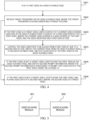
- FIG. 1 is a schematic flowchart of a method for playback control according to an embodiment of the present disclosure.
- the method may be performed by an apparatus for playback control, and the apparatus may be implemented by software and/or hardware, and may be configured in an electronic device, for example, may be configured in a mobile phone or a tablet computer.
- the method for playback control provided by the embodiment of the present disclosure is suitable for a scene of listening to audio data of a video. As shown in FIG. 1 , the method for playback control provided in this embodiment may include the following steps.
- a first video is played in a video playback page.
- the first video may be understood as a video currently being played in the video playback page, that is, the currently played video.
- the video playback page is a video playback page corresponding to a video, that is, when the video playback page is a video playback page (for example, a detail page of a video) used to play a video only
- the first video may be the video played in the video playback page;
- the video playback page is a video playback page corresponding to a plurality of videos, that is, when the video playback page has a corresponding video stream
- the first video may be a video currently being played in the video playback page in the video stream.
- the video may be played in the video playback page, and the video currently being played may be taken as the first video.
- playing the video may be understood as displaying the video screen of the video while playing the audio data of the video.
- the target triggering may be understood as triggering to instruct the electronic device to play only audio data of the video.
- the target triggering may be sliding and/or multi-finger touching, for example, the sliding may include sliding along a preset direction and/or a preset trajectory, and the multi-finger touching may be, for example, multi-finger clicking or a multi-finger sliding.
- the target sliding may be a multi-finger sliding, for example, the target triggering may be multi-finger pinching.
- the multi-finger pinching may be, for example, two-finger pinching or three-finger pinching, or the like.
- the target triggering may directly act on the video playback page, for example, directly act on the video playing area where the first video is located or the video screen of the first video displayed in the video playback page, without having to act in the panel or window displayed by the video playback page.
- the target triggering may be performed, for example, multi-finger pinching is performed in the video playback page.
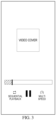
- the electronic device may stop displaying the video screen of the first video and play only the audio data of the first video in response to the target triggering, for example, cancelling the display of the video screen of the first video directly in the video playback page, and playing the audio data of the first video, and at this time, the current page is still the video playback page; or switching the current page from the video playback page to an audio playback page, and play the audio data of the first video in the audio playback page, as shown in FIG. 3 , in this case, the current page is an audio playback page.
- the user may directly perform the target triggering in the video playback page to control the electronic device to stop displaying the video screen of the first video, that is, the user may perform triggering to switch from the video playback mode to the audio playback mode, and there is no need to switch into the audio playback mode by instructing the electronic device to firstly display a panel/window, then trigger an audio playback mode control within the panel/window after instructing the electronic device through corresponding triggering, thereby simplifying the operation required to switch into the audio playback mode, and reducing the operation cost of the user.
- the first video when the first video is played in the video playback page, the first video may be in a playback state or in a paused state, that is, no matter whether the first video is in a playing state or a paused state, the first video would be considered as being played in the video playback page.
- the audio data of the first video when the audio data of the first video is played, the audio data may also be in a playback state or in a pause state, so that no matter the audio data is in the playback state or in the pause state, the audio data of the first video would be considered as being played.
- the audio data when the first video is in the playback state in the video playback page, the audio data may be adjusted to the playing state when the audio data of the first video is played in response to the target triggering; and when the first video is in the paused state in the video playback page, the audio data may be adjusted to the playing state or the paused state when the audio data of the first video is played in response to the target triggering, which may be set as needed.
- the audio data of the first video is played in response to the target triggering
- the audio data is adjusted to a paused state, which is different from pausing the playing of the first video only.
- the user only needs to click the playback control to continue to listen to the audio data.
- the playback of the first video is paused, no matter whether a video screen of the first video is displayed in the video playback page after the first video is paused, after clicking the play control, the electronic device will display the video screen of the first video again and at the same time plays the audio data of the first video.
- the currently being played audio data may be switched based on switching of the user, for example, the currently being played audio data is switched according to the arrangement sequence of the video streams corresponding to the plurality of videos (for example, the plurality of target videos) in the video playback page.
- the video corresponding to the currently being played audio data may be played in the video playback page.
- the first video is played in the video playback page; in response to the target triggering on the video playback page, display of the video screen of the first video is stopped, and the audio data of the first video is played, where the target triggering is sliding and/or multi-finger touching.
- FIG. 4 is a schematic flowchart of another method for playback control according to an embodiment of the present disclosure.
- the solution in this embodiment may be combined with one or more optional solutions in the foregoing embodiments.
- stopping displaying the video screen of the first video includes: switching display of a current video screen displayed in the video playback page to display of a video identifier of the first video, where the current video screen is a video screen of the first video, and the video identifier has a first display size.
- the method further includes, after switching the display of the current video screen of the first video displayed in the video playback page to the display of the video identifier of the first video: controlling the video identifier to be scaled from the first display size to a second display size.
- playing the audio data of the first video includes: switching a current page from the video playback page to an audio playback page, and playing the audio data of the first video in the audio playback page.
- stopping displaying the video screen of the first video and playing the audio data of the first video includes: if the first video is the target video, stopping displaying the video screen of the first video, and playing the audio data of the first video.
- the method for playback control provided in this embodiment further includes: if the first video is not a target video, keeping playing the first video in the video playback page, and displaying second prompt information, where the second prompt information is used to prompt that audio data of the first video cannot be listened to; or if the first video is not a target video, stopping playing the first video, and playing audio data of a second video, where the second video is a target video.
- the method for playback control provided in this embodiment may include the following steps.
- a first video is played in a video playback page.
- target triggering on the video playback page is received, then S203, S205, or S206 is perform, where the target triggering is sliding and/or multi-finger touching.
- the first video is a target video
- display of a current video screen displayed in the video playback page is switched to display of a video identifier of the first video, where the current video screen is a video screen of the first video, and the video identifier has a first display size.
- the target video may be understood as a video meeting a preset condition.
- the preset condition may be set as needed, for example, the preset condition may be set as a specific type of video that has been authorized by the publisher and composed of consecutive video frames (rather than independent pictures).
- the specific type of video may include, for example, a non-interaction video, a non-advertisement video, and/or a non-live streaming preview video with video duration reaching a preset duration.
- the current video screen may be a video screen of the first video displayed in the video playback page when switching to the video identifier of the first video.
- the video identifier of the first video may include, for example, a video name of the first video, a video cover, and/or a video frame in the first video, and the like.
- the first display size may be understood as a display size of the video identifier of the first video when the current video screen is initially switched to the video identifier of the first video.
- the first display size is consistent with a display size of the current video screen, a size of a video playback area where the current video screen is located, or a size of the video playback page.
- display of the current video screen may be switched to a video identifier having a size the same as the display size of the current video screen, the size of the video playback area, or the size of the video playback page.
- the video identifier may be displayed according to the position of the current video screen before switching, the position of the video playback area, or the video playback page.
- the video screen of the first video may be stopped to be displayed by switching the current video screen of the first video to the video identifier of the first video.
- the video cover as an example of the video identifier and the display size of the current video screen as an example of the first display size
- it may be determined whether the first video is the target video for example, it is determined whether the first video meets a preset condition, if it is determined that the first video is the target video, the display of the current video screen displayed in the video playback page may be stopped, and the video cover of the first video is displayed according to the display size and the display position of the current video screen.
- the current video screen after receiving the target triggering, for example, when it is determined that the first video is the target video, the current video screen may not be controlled to be scaled, and the display of the current video screen is directly switched to the display of the video identifier of the first video.
- the current video screen may be firstly controlled to be scaled, for example, the current video screen is gradually scaled to the third display size, and when the display size of the current video screen is scaled to the third display size, the display of the current video screen is switched to the display of the video identifier of the first video.
- the method further includes, before switching the display of the current video screen displayed in the video playback page to the display of the video identifier of the first video: controlling a display size of the current video screen displayed in the video playback page to be scaled to a third display size; switching the current video screen displayed in the video playback page to the video identifier of the first video includes: when the display size of the current video screen is scaled to the third display size, switching the display of the current video screen to the display of the video identifier of the first video.
- the third display size may be a preset size or a size corresponding to the target triggering, which may be greater than or less than the initial display size of the video screen of the first video in the video play page before the target triggering is received.
- the third display size may be smaller than an initial display size of the video screen of the first video, so that the change of the display size of the video screen matches the gesture change of the user.
- the third display size and the first display size may be the same or different.
- the current video screen of the first video may be first controlled to be scaled from the initial display size to the third display size, and when the current video screen of the first video is scaled to the third display size, the display of the current video screen of the first video is switched to the display of the video identifier of the current video.
- the first video in the process of controlling the current video screen to be scaled to the third display size, the first video may be played or paused, and correspondingly, the picture content of the current video screen may be changed or kept unchanged in the scaling process.
- the video identifier is controlled to be scaled from a first display size to a second display size, the current page is switched from the video playback page to an audio playback page, and audio data of the first video is played in the audio playback page.
- the video identifier of the first video may be scaled from the first display size to the second display size, for example, when the second display size is greater than the first display size, the video identifier of the first video is controlled to be enlarged from the first display size to the second display size, and when the second display size is smaller than the first display size, the video identifier of the first video is controlled to be reduced from the first display size to the second display size.
- the current page is switched from the video playback page to the audio playback page, the audio data of the first video is played in the audio playback page, and the video identifier of the first video may be displayed in the audio playback page, as shown in FIG. 3 (an example in which the video identifier is a video cover is illustrated in the drawing).
- the current page can be switched from the video playback page to the audio playback page before or after the video identifier of the first video is controlled to be scaled, which may be set as needed.
- the user may not be allowed to switch to the audio playback mode if the first video played in the video playback page when the target triggering is received is not the target video.
- the first video when the first video is not the target video, the first video may continue to be played in the video playback page, and the second prompt information is displayed, and the second prompt information is used to prompt the user that the first video does not support separately listening to the audio data.
- the second video may be a target video.
- the second video may be a target video associated with the first video; or may be a target video in a video stream corresponding to the video playback page, for example, a target video that is closest to the first video and located after the first video in the video stream corresponding to the video playback page.
- the user when the first video played in the video playback page at the time the target triggering is received is not the target video, the user may be allowed to switch to the audio playback mode, at this time, after entering the audio playback mode, the audio data of the first video may not be played, but the audio data of the target video (for example, the second video) is played.
- one target video associated with the first video or one target video in the video stream corresponding to the video playback page may be obtained as the second video
- the first video is stopped to be played, that is, the video screen of the first video is stopped to be displayed and the audio data of the first video is stopped to be played
- the audio data of the second video is played (without displaying the video screen of the second video).
- the method for playback control provided in this embodiment may further include: in response to a preset prompt condition being met, displaying first prompt information, the first prompt information being configured to prompt to listen to the audio data using the target triggering, where the preset prompting condition comprises at least one of the following: exiting the audio playback page after switching into the audio playback page in response to other triggering than the target triggering, the number of times the first video being played reaching a preset number of times threshold, current time being within a preset time period, and a playing progress of the first video reaching a preset playing progress threshold.
- the first prompt information may be further displayed to prompt the user to switch to the audio playback mode by using the target triggering.
- the preset prompting condition may include: exiting the audio playback page after switching to the audio playback page in response to other triggering than the target triggering, the number of times the first video being played reaching a preset number of times threshold, current time being within a preset time period, and a playing progress of the first video reaching a preset playing progress threshold, and/or the number of times of the first prompt information being displayed being less than a set display times threshold, etc.
- the number of times the first video being played may be the total number of times or the continuous number of times the first video being played
- the preset number of time threshold may be, for example, 3 or 5.
- the preset time period may be a preset time period corresponding to night, such as 22: 00 -6: 00.
- the preset play progress threshold may be, for example, 50% or 80%.
- the set display times threshold may be, for example, 1 or 2.
- the preset prompting condition may include: exiting the audio playback page after switching to the audio playback page in response to other triggering than the target triggering, the number of times the first video being played reaching a preset number of times threshold, or current time being within a preset time period and a playing progress of the first video reaching a preset playing progress threshold; and the number of times of the first prompt information being displayed being less than a set display times threshold.
- the first prompt information may be automatically stopped to be displayed when the display duration of the first prompt information reaches the preset duration (for example, 3s); or the first prompt information may be stopped to be displayed upon the target triggering, switching the currently played video, closing the first prompt information (for example, triggering the closing control for the first prompt information).
- the preset duration for example, 3s
- the first prompt information may be stopped to be displayed upon the target triggering, switching the currently played video, closing the first prompt information (for example, triggering the closing control for the first prompt information).
- the response mode of the target triggering and the continuity of the picture change when responding to the target triggering can be enriched while the operations required for switching to the audio playing mode are simplified, avoiding a situation in which the picture change is too abrupt, and thus improving the user experience.
- FIG. 5 is a structural block diagram of an apparatus for playback control according to an embodiment of the present disclosure.
- the apparatus may be implemented by software and/or hardware, and may be configured in an electronic device, for example, may be configured in a mobile phone or a tablet computer, and may separately play audio data of the video through a method for playback control.
- the apparatus for playback control provided in this embodiment may include a video playing module 501 and an audio playing module 502.
- the audio playing module 502 is configured to stop display a video screen of the first video, and play audio data of the first video, in response to target triggering on the video playback page, where the target triggering is at least one of sliding and multi-finger touching.
- the audio playing module 502 may be configured to: switch display of a current video screen displayed in the video playback page to display of a video identifier of the first video, where the current video screen is a video screen of the first video, and the video identifier has a first display size.
- the audio playing module 502 may be configured to: before switching the display of the current video screen displayed in the video playback page to the display of the video identifier of the first video, control a display size of the current video screen displayed in the video playback page to be scaled to a third display size; and in response to the display size of the current video screen being scaled to the third display size, switching the display of the current video screen to the display of the video identifier of the first video.
- the audio playing module 502 may be configured to stop displaying the video screen of the first video and play the audio data of the first video if the first video is the target video.
- the audio playing module 502 may be further configured to: if the first video is not a target video, keep playing the first video in the video playback page, and displaying second prompt information, where the second prompt information is configured to prompt that audio data of the first video is not able to be listened to; or if the first video is not a target video, stop playing the first video and playing audio data of a second video, where the second video is a target video.
- the target triggering may be multi-finger pinching.
- the play control device provided by the embodiment of the present disclosure may execute the play control method provided by any embodiment of the present disclosure, and has a function module corresponding to the play control method.
- a function module corresponding to the play control method For technical details not described in this embodiment, reference may be made to the playback control method provided by any embodiment of the present disclosure.
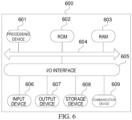
- FIG. 6 it is a schematic structural diagram of an electronic device (for example, a terminal device) 600 suitable for implementing the embodiments of the present disclosure.
- the terminal device in the embodiments of the present disclosure may include, but is not limited to, a mobile terminal such as a mobile phone, a notebook computer, a digital broadcast receiver, a personal digital assistant (PDA), a tablet computer (PAD), a portable multimedia player (PMP), an in-vehicle terminal (for example, an in-vehicle navigation terminal), and a fixed terminal such as a digital television (TV), a desktop computer, or the like.
- PDA personal digital assistant
- PAD tablet computer
- PMP portable multimedia player
- TV digital television
- TV digital television
- desktop computer or the like.
- the electronic device shown in FIG. 6 is merely an example.
- the electronic device 600 may include a processing device (for example, a central processing unit, a graphics processor, etc.) 601, which may perform various appropriate actions and processing according to a program stored in a read-only memory (ROM) 602 or a program loaded into a random-access memory (RAM) 603 from a storage device 608.
- a processing device for example, a central processing unit, a graphics processor, etc.
- RAM random-access memory
- various programs and data required by operation of the electronic device 600 are also stored.
- the processing device 601, the ROM 602, and the RAM 603 are connected to each other through a bus 604.
- An input/output (I/O) interface 605 is also connected to the bus 604.
- I/O interface 605 input devices 606 including, for example, touch screens, touchpads, keyboards, mice, cameras, microphones, accelerometers, gyroscopes, etc.; output devices 607 including liquid crystal displays (LCDs), speakers, vibrators, etc.; storage devices 608 including magnetic tapes, hard disks, etc.; and a communication device 609.
- the communication device 609 may allow the electronic device 500 to communicate with other devices wirelessly or wirelessly to exchange data.
- FIG. 6 shows an electronic device 600 with a plurality of devices, it shall be understood that it is not required to implement or have all the devices shown. More or fewer devices can be implemented or provided instead.
- an embodiment of the present disclosure includes a computer program product that includes a computer program carried on a non-transitory computer-readable medium, where the computer program includes program code for performing the method shown in the flowchart.
- the computer program can be downloaded and installed from a network through the communication device 609, or installed from the storage device 608, or installed from the ROM 602.
- the processing device 601 the above functions defined in the method of the embodiment of the present disclosure are performed.
- the computer-readable medium described above can be a computer-readable signal medium or a computer-readable storage medium, or any combination thereof.
- the computer-readable storage medium can be, for example, but not limited to, an electrical, magnetic, optical, electromagnetic, infrared, or semiconductor system, apparatus, or device, or any combination thereof.
- Examples of computer-readable storage media may include but are not limited to: an electrical connection with one or more wires, a portable computer disk, a hard disk, RAM (Random Access Memory), ROM (Read-Only Memory), an Erasable Programmable Read-Only Memory (EPROM) or flash memory, an optical fiber, a portable Compact Disk Read-Only Memory (CD-ROM), an optical storage device, a magnetic storage device, or any suitable combination thereof.
- a computer-readable storage medium may be any tangible medium containing or storing a program that can be used by an instruction execution system, apparatus, or device, or can be used in combination with an instruction execution system, apparatus, or device.
- a computer-readable signal medium can include a data signal propagated in baseband or as part of a carrier wave, which carries computer-readable program code therein. Such propagated data signals may take many forms, including but not limited to electromagnetic signals, optical signals, or any suitable combination thereof.
- a computer-readable signal medium may also be any computer-readable medium other than a computer-readable storage medium, which can send, propagate, or transmit programs for use by or in conjunction with instruction execution systems, apparatus, or devices.
- the program code contained on the computer-readable medium may be transmitted using any suitable medium, including but not limited to: wires, optical cables, radio frequency (RF), etc., or any suitable combination thereof.
- clients and servers can communicate using any currently known or future developed network protocol such as Hypertext Transfer Protocol (HTTP), and can be interconnected with any form or medium of digital data communication (such as communication networks).
- HTTP Hypertext Transfer Protocol
- Examples of communication networks include Local Area Networks ("LANs”), Wide Area Networks ("WANs”), internetworks (such as the Internet), and end-to-end networks (such as ad hoc end-to-end networks), as well as any currently known or future developed networks.
- LANs Local Area Networks
- WANs Wide Area Networks
- Internet such as the Internet
- end-to-end networks such as ad hoc end-to-end networks
- the computer-readable medium can be included in the electronic device, or it can exist alone without being assembled into the electronic device.
- the above-mentioned computer-readable medium carries one or more programs, and when the above-mentioned one or more programs are executed by the electronic device, the electronic device: play a first video in a video playback page; and in response to target triggering on the video playback page, stop displaying a video screen of the first video, and play audio data of the first video, where the target triggering is at least one of sliding and multi-finger touching.
- Computer program codes for performing the operations of the present disclosure may be written in one or more programming languages or a combination thereof, including but not limited to Object Oriented programming languages - such as Java, Smalltalk, C++, and also conventional procedural programming languages - such as "C" or similar programming languages.
- the program code may be executed entirely on the user's computer, partially executed on the user's computer, executed as a standalone software package, partially executed on the user's computer and partially on a remote computer, or entirely on a remote computer or server.
- the remote computer may be any kind of network - including LAN (Local Area Network) or WAN (Wide Area Network) - connected to the user's computer, or may be connected to an external computer (e.g., through an Internet service provider to connect via the Internet).
- LAN Local Area Network
- WAN Wide Area Network
- each block in a flowchart or block diagram may represent a module, program segment, or portion of code that contains one or more executable instructions for implementing a specified logical function.
- the functions marked in the blocks may occur in a different order than those marked in the drawings. For example, two consecutive blocks may actually be executed in parallel, or they may sometimes be executed in reverse order, depending on the function involved.
- each block in the block diagrams and/or flowcharts, as well as combinations of blocks in the block diagrams and/or flowcharts, may be implemented using a dedicated hardware-based system that performs the specified function or operations, or may be implemented using a combination of dedicated hardware and computer instructions.
- the units described in the embodiments of the present disclosure may be implemented by means of software or hardware.
- the name of the module does not constitute a limitation on the unit itself in a certain case.
- FPGAs Field Programmable Gate Arrays
- ASICs Application Specific Integrated Circuits
- ASSPs Application Specific Standard Parts
- SOCs System on Chip
- CPLDs Complex Programmable Logic Devices
- a machine-readable medium can be a tangible medium that may contain or store programs for use by or in conjunction with instruction execution systems, apparatuses, or devices.
- a machine-readable medium may be a machine-readable signal medium or a machine-readable storage medium.
- a machine-readable medium may include, but are not limited to, electronic, magnetic, optical, electromagnetic, infrared, or semiconductor systems, apparatuses, or devices, or any suitable combination thereof.
- Specific examples of the machine-readable storage medium may include electrical connections based on one or more wires, portable computer disks, hard disks, RAM, ROM, EPROM or flash memory, optical fibers, CD-ROM, optical storage devices, magnetic storage devices, or any suitable combination thereof.
- an example 1 provides a method for playback control, including:
- stopping displaying the video screen of the first video includes: switching display of a current video screen displayed in the video playback page to display of a video identifier of the first video, where the current video screen is a video screen of the first video, and the video identifier has a first display size.
- the method further includes, after switching the display of the current video screen of the first video displayed in the video playback page to the display of the video identifier of the first video: controlling the video identifier to be scaled from the first display size to a second display size.
- the first display size is consistent with a display size of the current video screen, a size of a video playback area where the current video screen is located, or a size of the video playback page.
- the method further includes, before switching the display of the current video screen displayed in the video playback page to the display of the video identifier of the first video:
- playing the audio data of the first video includes: switching a current page from the video playback page to an audio playback page, and playing the audio data of the first video in the audio playback page.
- the method further includes:
- stopping displaying the video screen of the first video and playing the audio data of the first video includes: in response to the first video being a target video, stopping displaying the video screen of the first video, and playing the audio data of the first video.
- the method further includes:
- the target triggering is multi-finger pinching.
- an example 11 provides an apparatus for playback control, including:
- an example 12 provides an electronic device, including:
- an example 13 provides a computer-readable storage medium having stored thereon a computer program, the program, when executed by a processor, implements the method for playback control according to any one of examples 1-10.
Landscapes
- Engineering & Computer Science (AREA)
- Signal Processing (AREA)
- Human Computer Interaction (AREA)
- Multimedia (AREA)
- Computer Networks & Wireless Communication (AREA)
- Databases & Information Systems (AREA)
- Environmental & Geological Engineering (AREA)
- User Interface Of Digital Computer (AREA)
- Two-Way Televisions, Distribution Of Moving Picture Or The Like (AREA)
- Studio Devices (AREA)
Applications Claiming Priority (2)
| Application Number | Priority Date | Filing Date | Title |
|---|---|---|---|
| CN202210804127.3A CN115190368B (zh) | 2022-07-07 | 2022-07-07 | 播放控制方法、装置、电子设备和存储介质 |
| PCT/CN2023/105467 WO2024008029A1 (zh) | 2022-07-07 | 2023-07-03 | 播放控制方法、装置、电子设备和存储介质 |
Publications (2)
| Publication Number | Publication Date |
|---|---|
| EP4472218A1 true EP4472218A1 (de) | 2024-12-04 |
| EP4472218A4 EP4472218A4 (de) | 2025-03-19 |
Family
ID=83516721
Family Applications (1)
| Application Number | Title | Priority Date | Filing Date |
|---|---|---|---|
| EP23834796.7A Pending EP4472218A4 (de) | 2022-07-07 | 2023-07-03 | Spielsteuerungsverfahren und -vorrichtung sowie elektronische vorrichtung und speichermedium |
Country Status (5)
| Country | Link |
|---|---|
| US (1) | US12356043B2 (de) |
| EP (1) | EP4472218A4 (de) |
| JP (1) | JP7739634B2 (de) |
| CN (1) | CN115190368B (de) |
| WO (1) | WO2024008029A1 (de) |
Families Citing this family (2)
| Publication number | Priority date | Publication date | Assignee | Title |
|---|---|---|---|---|
| CN115190368B (zh) * | 2022-07-07 | 2025-02-11 | 北京字跳网络技术有限公司 | 播放控制方法、装置、电子设备和存储介质 |
| CN118283379A (zh) * | 2024-04-25 | 2024-07-02 | 北京字跳网络技术有限公司 | 用于多媒体内容控制的方法、装置、设备、介质和产品 |
Family Cites Families (32)
| Publication number | Priority date | Publication date | Assignee | Title |
|---|---|---|---|---|
| US7778492B2 (en) | 2006-04-04 | 2010-08-17 | Oldford Group Limited | System and method for scaling digital images |
| TWM361674U (en) | 2009-02-19 | 2009-07-21 | Sentelic Corp | Touch control module |
| US8750677B2 (en) * | 2011-08-23 | 2014-06-10 | Microsoft Corporation | Method for transferring media playback from a different device |
| US20130239063A1 (en) | 2012-03-06 | 2013-09-12 | Apple Inc. | Selection of multiple images |
| CN103024490A (zh) * | 2012-12-26 | 2013-04-03 | 北京奇艺世纪科技有限公司 | 一种支持音频和视频独立播放的方法及设备 |
| US9253229B1 (en) * | 2013-01-07 | 2016-02-02 | Cox Communications, Inc. | Correlating video quality with video playback view |
| WO2014207910A1 (ja) * | 2013-06-28 | 2014-12-31 | 株式会社 東芝 | テレビジョン装置、及びリモートコントローラ |
| CN104581320A (zh) * | 2013-10-16 | 2015-04-29 | 中兴通讯股份有限公司 | 一种切换播放模式的方法、装置和终端 |
| US9558787B2 (en) * | 2014-01-29 | 2017-01-31 | Google Inc. | Media application backgrounding |
| US9665248B2 (en) | 2014-07-15 | 2017-05-30 | Google Inc. | Adaptive background playback behavior |
| WO2016149928A1 (zh) * | 2015-03-26 | 2016-09-29 | 华为技术有限公司 | 视频播放模式切换方法、装置和终端 |
| CN105843531B (zh) * | 2015-07-23 | 2019-08-16 | 维沃移动通信有限公司 | 一种屏幕模式的切换方法和装置 |
| US10659845B2 (en) * | 2015-08-06 | 2020-05-19 | Google Llc | Methods, systems, and media for providing video content suitable for audio-only playback |
| CN107360458B (zh) * | 2017-06-30 | 2020-02-14 | Oppo广东移动通信有限公司 | 播放控制方法、装置、存储介质及终端 |
| US10225621B1 (en) * | 2017-12-20 | 2019-03-05 | Dish Network L.L.C. | Eyes free entertainment |
| US10776905B2 (en) | 2018-02-28 | 2020-09-15 | Microsoft Technology Licensing, Llc | Adaptive interface transformation across display screens |
| US10783929B2 (en) * | 2018-03-30 | 2020-09-22 | Apple Inc. | Managing playback groups |
| CN109688460B (zh) * | 2018-12-24 | 2021-05-18 | 深圳创维-Rgb电子有限公司 | 一种数字电视画面的辅音输出方法、数字电视及存储介质 |
| CN111510755A (zh) * | 2019-01-30 | 2020-08-07 | 上海哔哩哔哩科技有限公司 | 音视频的切换方法、装置、计算机设备及可读存储介质 |
| CN111510756A (zh) * | 2019-01-30 | 2020-08-07 | 上海哔哩哔哩科技有限公司 | 音视频的切换方法、装置、计算机设备及可读存储介质 |
| US11025976B2 (en) * | 2019-03-18 | 2021-06-01 | At&T Intellectual Property I, L.P. | System and method for state based content delivery to a client device |
| CN110166820B (zh) | 2019-05-10 | 2021-04-09 | 华为技术有限公司 | 音视频的播放方法、终端及装置 |
| CN110336923B (zh) * | 2019-07-16 | 2021-06-18 | 网易(杭州)网络有限公司 | 一种播放模式的切换方法、装置、电子设备及存储介质 |
| CN111711838B (zh) * | 2020-06-23 | 2023-03-31 | 广州酷狗计算机科技有限公司 | 视频切换方法、装置、终端、服务器及存储介质 |
| CN112000267A (zh) * | 2020-08-24 | 2020-11-27 | 北京字节跳动网络技术有限公司 | 信息显示方法、装置、设备及存储介质 |
| US12143666B2 (en) | 2020-08-26 | 2024-11-12 | Mediatek Singapore Pte. Ltd. | Multimedia device and related method for a video mute mode |
| CN112347273A (zh) * | 2020-11-05 | 2021-02-09 | 北京字节跳动网络技术有限公司 | 音频播放方法、装置、电子设备及存储介质 |
| CN112839255B (zh) * | 2020-12-31 | 2021-11-02 | 北京达佳互联信息技术有限公司 | 视频播放方法、装置、电子设备及计算机可读存储介质 |
| TW202244749A (zh) * | 2021-05-10 | 2022-11-16 | 明基電通股份有限公司 | 播放模式切換方法及其影音播放設備 |
| CN113259740A (zh) * | 2021-05-19 | 2021-08-13 | 北京字跳网络技术有限公司 | 一种多媒体处理方法、装置、设备及介质 |
| US12075115B2 (en) * | 2021-06-04 | 2024-08-27 | Rovi Guides, Inc. | Supplemental audio generation system in an audio-only mode |
| CN115190368B (zh) * | 2022-07-07 | 2025-02-11 | 北京字跳网络技术有限公司 | 播放控制方法、装置、电子设备和存储介质 |
-
2022
- 2022-07-07 CN CN202210804127.3A patent/CN115190368B/zh active Active
-
2023
- 2023-07-03 JP JP2024550708A patent/JP7739634B2/ja active Active
- 2023-07-03 WO PCT/CN2023/105467 patent/WO2024008029A1/zh not_active Ceased
- 2023-07-03 EP EP23834796.7A patent/EP4472218A4/de active Pending
-
2024
- 2024-09-04 US US18/824,805 patent/US12356043B2/en active Active
Also Published As
| Publication number | Publication date |
|---|---|
| US12356043B2 (en) | 2025-07-08 |
| US20240430533A1 (en) | 2024-12-26 |
| JP7739634B2 (ja) | 2025-09-16 |
| WO2024008029A1 (zh) | 2024-01-11 |
| JP2025514590A (ja) | 2025-05-09 |
| CN115190368B (zh) | 2025-02-11 |
| CN115190368A (zh) | 2022-10-14 |
| EP4472218A4 (de) | 2025-03-19 |
Similar Documents
| Publication | Publication Date | Title |
|---|---|---|
| US12356043B2 (en) | Method, apparatus, electronic device and storage medium for playback control | |
| CN114154012B (zh) | 一种视频推荐方法、装置、电子设备和存储介质 | |
| EP4468720A1 (de) | Videoabspielverfahren und -vorrichtung sowie elektronische vorrichtung, speichermedium und programmprodukt | |
| WO2021052255A1 (zh) | 热点推荐弹窗的控制方法、装置、介质及电子设备 | |
| CN112394892A (zh) | 投屏方法、投屏设备、移动终端、存储介质 | |
| JP7743647B2 (ja) | ライブ配信ページの表示方法、装置、デバイス、記憶媒体及びプログラム製品 | |
| EP4589961A1 (de) | Wiedergabesteuerungsverfahren und -vorrichtung, elektronische vorrichtung und speichermedium | |
| JP7787333B2 (ja) | メディア内容を制御する方法、装置、電子デバイスおよび記憶媒体 | |
| JP7797681B2 (ja) | インタラクション方法、装置、電子機器、および記憶媒体 | |
| EP4531387A1 (de) | Medienwiedergabeverfahren und -vorrichtung | |
| JP2025522335A (ja) | コメント情報の投稿方法、装置、電子機器、記憶媒体及びコンピュータプログラム | |
| JP2025502809A (ja) | ビデオ再生方法、装置、電子デバイス、記憶媒体及びプログラム製品 | |
| US20250016398A1 (en) | Method and apparatus for displaying information, electronic device, and storage medium | |
| WO2023134559A1 (zh) | 评论提示方法、装置、电子设备、存储介质和程序产品 | |
| CN115639934A (zh) | 内容分享方法、装置、设备、计算机可读存储介质及产品 | |
| CN109600655A (zh) | 应用客户端中弹幕显示的方法、应用客户端及电子设备 | |
| EP4679835A1 (de) | Verfahren und vorrichtung zur anzeige von live-rundfunkseiten, vorrichtung, speichermedium und programmprodukt | |
| WO2023155708A1 (zh) | 视角的切换方法、装置、电子设备、存储介质和程序产品 | |
| EP4468717A1 (de) | Videointeraktionsverfahren und -vorrichtung, elektronische vorrichtung und speichermedium | |
| CN112181249A (zh) | 播放控制方法、装置、电子设备和存储介质 | |
| CN119149840A (zh) | 一种页面切换方法、装置、电子设备及存储介质 | |
| CN121209753A (zh) | 媒体内容的展示方法、装置、电子设备、存储介质和程序产品 |
Legal Events
| Date | Code | Title | Description |
|---|---|---|---|
| STAA | Information on the status of an ep patent application or granted ep patent |
Free format text: STATUS: THE INTERNATIONAL PUBLICATION HAS BEEN MADE |
|
| PUAI | Public reference made under article 153(3) epc to a published international application that has entered the european phase |
Free format text: ORIGINAL CODE: 0009012 |
|
| STAA | Information on the status of an ep patent application or granted ep patent |
Free format text: STATUS: REQUEST FOR EXAMINATION WAS MADE |
|
| 17P | Request for examination filed |
Effective date: 20240829 |
|
| AK | Designated contracting states |
Kind code of ref document: A1 Designated state(s): AL AT BE BG CH CY CZ DE DK EE ES FI FR GB GR HR HU IE IS IT LI LT LU LV MC ME MK MT NL NO PL PT RO RS SE SI SK SM TR |
|
| A4 | Supplementary search report drawn up and despatched |
Effective date: 20250214 |
|
| RIC1 | Information provided on ipc code assigned before grant |
Ipc: G06F 3/0488 20220101ALI20250210BHEP Ipc: H04N 21/485 20110101ALI20250210BHEP Ipc: H04N 21/482 20110101ALI20250210BHEP Ipc: H04N 21/81 20110101AFI20250210BHEP |
|
| DAV | Request for validation of the european patent (deleted) | ||
| DAX | Request for extension of the european patent (deleted) | ||
| STAA | Information on the status of an ep patent application or granted ep patent |
Free format text: STATUS: EXAMINATION IS IN PROGRESS |