EP4468720A1 - Videoabspielverfahren und -vorrichtung sowie elektronische vorrichtung, speichermedium und programmprodukt - Google Patents
Videoabspielverfahren und -vorrichtung sowie elektronische vorrichtung, speichermedium und programmprodukt Download PDFInfo
- Publication number
- EP4468720A1 EP4468720A1 EP23755719.4A EP23755719A EP4468720A1 EP 4468720 A1 EP4468720 A1 EP 4468720A1 EP 23755719 A EP23755719 A EP 23755719A EP 4468720 A1 EP4468720 A1 EP 4468720A1
- Authority
- EP
- European Patent Office
- Prior art keywords
- feedback
- video
- current video
- current
- control
- Prior art date
- Legal status (The legal status is an assumption and is not a legal conclusion. Google has not performed a legal analysis and makes no representation as to the accuracy of the status listed.)
- Pending
Links
Images
Classifications
-
- H—ELECTRICITY
- H04—ELECTRIC COMMUNICATION TECHNIQUE
- H04M—TELEPHONIC COMMUNICATION
- H04M1/00—Substation equipment, e.g. for use by subscribers
- H04M1/72—Mobile telephones; Cordless telephones, i.e. devices for establishing wireless links to base stations without route selection
- H04M1/724—User interfaces specially adapted for cordless or mobile telephones
- H04M1/72403—User interfaces specially adapted for cordless or mobile telephones with means for local support of applications that increase the functionality
- H04M1/7243—User interfaces specially adapted for cordless or mobile telephones with means for local support of applications that increase the functionality with interactive means for internal management of messages
- H04M1/72439—User interfaces specially adapted for cordless or mobile telephones with means for local support of applications that increase the functionality with interactive means for internal management of messages for image or video messaging
-
- H—ELECTRICITY
- H04—ELECTRIC COMMUNICATION TECHNIQUE
- H04N—PICTORIAL COMMUNICATION, e.g. TELEVISION
- H04N21/00—Selective content distribution, e.g. interactive television or video on demand [VOD]
- H04N21/40—Client devices specifically adapted for the reception of or interaction with content, e.g. set-top-box [STB]; Operations thereof
- H04N21/45—Management operations performed by the client for facilitating the reception of or the interaction with the content or administrating data related to the end-user or to the client device itself, e.g. learning user preferences for recommending movies, resolving scheduling conflicts
- H04N21/466—Learning process for intelligent management, e.g. learning user preferences for recommending movies
- H04N21/4668—Learning process for intelligent management, e.g. learning user preferences for recommending movies for recommending content, e.g. movies
-
- H—ELECTRICITY
- H04—ELECTRIC COMMUNICATION TECHNIQUE
- H04N—PICTORIAL COMMUNICATION, e.g. TELEVISION
- H04N21/00—Selective content distribution, e.g. interactive television or video on demand [VOD]
- H04N21/40—Client devices specifically adapted for the reception of or interaction with content, e.g. set-top-box [STB]; Operations thereof
- H04N21/43—Processing of content or additional data, e.g. demultiplexing additional data from a digital video stream; Elementary client operations, e.g. monitoring of home network or synchronising decoder's clock; Client middleware
- H04N21/442—Monitoring of processes or resources, e.g. detecting the failure of a recording device, monitoring the downstream bandwidth, the number of times a movie has been viewed, the storage space available from the internal hard disk
- H04N21/44204—Monitoring of content usage, e.g. the number of times a movie has been viewed, copied or the amount which has been watched
-
- H—ELECTRICITY
- H04—ELECTRIC COMMUNICATION TECHNIQUE
- H04N—PICTORIAL COMMUNICATION, e.g. TELEVISION
- H04N21/00—Selective content distribution, e.g. interactive television or video on demand [VOD]
- H04N21/40—Client devices specifically adapted for the reception of or interaction with content, e.g. set-top-box [STB]; Operations thereof
- H04N21/43—Processing of content or additional data, e.g. demultiplexing additional data from a digital video stream; Elementary client operations, e.g. monitoring of home network or synchronising decoder's clock; Client middleware
- H04N21/443—OS processes, e.g. booting an STB, implementing a Java virtual machine in an STB or power management in an STB
- H04N21/4438—Window management, e.g. event handling following interaction with the user interface
-
- H—ELECTRICITY
- H04—ELECTRIC COMMUNICATION TECHNIQUE
- H04N—PICTORIAL COMMUNICATION, e.g. TELEVISION
- H04N21/00—Selective content distribution, e.g. interactive television or video on demand [VOD]
- H04N21/40—Client devices specifically adapted for the reception of or interaction with content, e.g. set-top-box [STB]; Operations thereof
- H04N21/47—End-user applications
- H04N21/472—End-user interface for requesting content, additional data or services; End-user interface for interacting with content, e.g. for content reservation or setting reminders, for requesting event notification, for manipulating displayed content
-
- H—ELECTRICITY
- H04—ELECTRIC COMMUNICATION TECHNIQUE
- H04N—PICTORIAL COMMUNICATION, e.g. TELEVISION
- H04N21/00—Selective content distribution, e.g. interactive television or video on demand [VOD]
- H04N21/40—Client devices specifically adapted for the reception of or interaction with content, e.g. set-top-box [STB]; Operations thereof
- H04N21/47—End-user applications
- H04N21/475—End-user interface for inputting end-user data, e.g. personal identification number [PIN], preference data
-
- H—ELECTRICITY
- H04—ELECTRIC COMMUNICATION TECHNIQUE
- H04N—PICTORIAL COMMUNICATION, e.g. TELEVISION
- H04N21/00—Selective content distribution, e.g. interactive television or video on demand [VOD]
- H04N21/40—Client devices specifically adapted for the reception of or interaction with content, e.g. set-top-box [STB]; Operations thereof
- H04N21/47—End-user applications
- H04N21/475—End-user interface for inputting end-user data, e.g. personal identification number [PIN], preference data
- H04N21/4756—End-user interface for inputting end-user data, e.g. personal identification number [PIN], preference data for rating content, e.g. scoring a recommended movie
-
- H—ELECTRICITY
- H04—ELECTRIC COMMUNICATION TECHNIQUE
- H04M—TELEPHONIC COMMUNICATION
- H04M1/00—Substation equipment, e.g. for use by subscribers
- H04M1/72—Mobile telephones; Cordless telephones, i.e. devices for establishing wireless links to base stations without route selection
- H04M1/724—User interfaces specially adapted for cordless or mobile telephones
- H04M1/72469—User interfaces specially adapted for cordless or mobile telephones for operating the device by selecting functions from two or more displayed items, e.g. menus or icons
Definitions
- the present disclosure relate to a field of computer technology, for example, to a video playing method, apparatus, electronic device, storage medium, and program product.
- the present disclosure provides a method, apparatus, electronic device, storage medium, and program product for playing videos, aiming to enrich the feedback methods for videos.
- the present disclosure provides a video playing method, comprising:
- the present disclosure provides a video play apparatus, comprising:
- the present disclosure provides an electronic device, comprising:
- embodiments of the present disclosure provide a computer-readable storage medium, with computer programs stored thereon, and the video playing method described above is performed when the computer program is executed by a processor.
- embodiments of the present disclosure provide a computer program product, wherein the video playing method as described above is performed when the computer program product is executed by a computer.
- the steps of the method embodiments of the present disclosure can be performed in different orders, and/or in parallel.
- the method embodiments can comprise additional steps and/or omit to perform the steps as shown.
- the scope of the present disclosure is not limited in this respect.
- the term “comprise” and its variants is an inclusion in an open mode, that is, “comprising, but being not limited to”.
- the term “based on” means “at least partially based on”.
- the term “an/one embodiment” represents “at least one embodiment”; the term “another embodiment” represents “at least one additional embodiment”; and the term “some embodiments” represents “at least some embodiments”.
- the related definitions of other terms are provided in the following description.
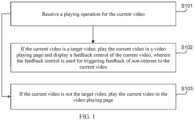
- FIG. 1 is a schematic flowchart of a video playing method provided in an embodiment of the present disclosure.
- the method may be performed by a video play apparatus.
- the apparatus may be implemented with software and/or hardware, and may be configured in an electric equipment.
- the apparatus may be configured in a mobile phone or a tablet computer.
- the video playing method provided in the embodiments of the present disclosure is applicable to scenarios where a feedback control is displayed on the video play page of a part of the videos.
- the video playing method provided in this embodiment may comprise: S101: Receiving a play operation for a current video. Then the process forwards to S102 or S103.
- the play operation may be an operation for playing a video, e.g., an operation for triggering a play control for a video, or an operation of switching videos.
- the current video may be a video which the play operation instructs to play.
- the current video may be any type of video, for example, the current video may be a recommended video.
- a user may perform a play operation for the current video, e.g., triggering a play control corresponding to the current video, or switching from another video currently being played to the current video, when the user intends to play the current video.
- S102 Playing the current video on a video play page and displaying a feedback control for the current video when the current video is a target video, wherein the feedback control is configured to trigger a non-interest feedback on the current video.
- the target video may refer to a video that meets a preset condition.
- the preset condition may be set according to needs.
- the preset condition may be set such that a feedback score is greater than or equal to a preset score threshold.
- the electronic device determines whether or not the current video is the target video, upon receipt of the play operation for the current video.
- the electronic device determines whether or not the current video satisfies the preset condition for the target video.
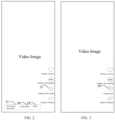
- the feedback score of the current video is obtained from a server, and it determines whether or not the feedback score is greater than or equal to the preset score threshold; or determines whether or not the current video has a target identification. If the feedback score is greater than or equal to the preset score threshold or if the current video has a target identification, the current video is determined as the target video, and the current video is played on a video play page, and a feedback control 20 associated with the current video is displayed on the video play page, as shown in FIG. 2 and FIG.
- the target identification can be configured to identify the target video. That is, when a video has the target identification, it means that the video is a target video; and when a video does not have the target identification, it means that the video is not the target video.
- the target identification may be added by a server to a target video that satisfies the preset condition.
- the display format of the feedback control 20 on the video play page can be flexibly configured.
- the feedback control 20 can be displayed in the form of a feedback bar 21, or displayed within the feedback bar 21 itself (as shown in FIG. 2 ). Alternatively, it can also be displayed in the form of an icon (as shown in FIG. 3 ).
- a cancel control 22 can be displayed, as shown in FIG. 2 .
- the user can instruct the electronic device to cancel the display of the feedback control 20 by activating the cancel control 22, e.g., instructing the electronic device to cease displaying the feedback bar 21 or to no longer display the feedback control 20.
- the user can also provide a non-interest feedback on the current video in other ways when the feedback control is displayed on the video play page.
- the user can perform a long-press operation within the video display page to instruct the electronic device to display a long-press panel for the current video, and trigger the feedback control displayed on the long-press panel to provide a non-interest feedback on the current video.
- the user can instruct the electronic device to display a share panel for the current video by triggering a share control associated with the current video displayed on the video play page and triggering the feedback control displayed on the share panel to provide a non-interest feedback on the current video.
- the electronic device can display the feedback control for the current video on a panel, such as, a long-press panel or a share panel, enabling the user to provide a non-interest feedback for the current video.
- a panel such as, a long-press panel or a share panel
- the feedback control is displayed on the video play page only during the process of playing some videos (e.g., recommended videos with feedback score greater than the preset score threshold), while for other videos (e.g., recommended videos with feedback score greater than the preset score threshold), the feedback control is not displayed on the video playback page. That is, different methods are employed to display feedback controls for videos satisfying different conditions.
- the user can provide a non-interest feedback on the video being currently played by triggering the feedback control, or instruct the electronic device to display a corresponding panel provided with the feedback control (such as, a long-press panel or a share panel), and trigger the feedback control to provide the non-interest feedback on the corresponding video.
- the user can instruct the electronic device to display a corresponding panel provided with the feedback control, and trigger the feedback control to provide a non-interest feedback on the video being currently played.
- the feedback control can not only enrich the methods of giving feedbacks to videos, but also shorten the feedback path of the videos, simplify the operations required by providing non-interest feedbacks on the videos, and improve the user experience.
- the displaying the feedback control for the current video comprising: displaying the feedback control for the current video and a preset control; or replacing the preset control with the feedback control for the current video for display purposes.
- the preset control can be a control constantly displayed on the video play page in the process of playing different videos; and can also be a control corresponding merely to the current video, such as, a like control, a comment control, a favorite control, or a share control for the current video.
- the display mode of the feedback control 20 for the current video can be flexibly configured.
- the feedback control 20 for the current video can be additionally displayed on the video play page, as shown in FIG. 2 .
- the preset control displayed on the video play page can be switched to display the feedback control 20 for the current video, that is, the feedback control 20 for the current video is displayed at a display position of the preset control on the video play page, while the preset control is no longer displayed on the video play page until the current video changes.
- This approach aims to prevent the feedback control 20 from causing obstructions to the video images of the current video during playing the current video on the video play page, thereby improving the user's video viewing experience.
- the feedback control 20 and the favorite control 23 for the current video can be simultaneously displayed on the video play page during the process of playing the current video, as shown in FIG. 2 .
- the feedback control 20 for the current video can also be displayed at the preset display position of the favorite control 23 for the current video on the video play page, while the favorite control 23 for the current video is no longer displayed, as shown in FIG. 3 .
- the play operation for the current video is received; the current video is played on the video play page and the feedback control for the current video is displayed when the current video is the target video, wherein the feedback control is configured to trigger a non-interest feedback on the current video; and the current video is played on the video play page when the current video is not the target video.
- the feedback control is displayed for some videos during the process of playing the corresponding videos, which can not only enrich the modes of providing non-interest feedbacks on the videos, but also shorten the feedback path of the videos, simplify the operations required by providing non-interest feedbacks on the videos, thereby improving the user experience.
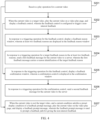
- FIG. 4 is a schematic flowchart of another video playing method provided in an embodiment of the present disclosure.
- the solution in the present embodiment can be combined with one or more solutions in the above embodiments.
- the method further comprises: in response to a triggering operation for the feedback control, displaying a feedback-reason window in which at least two feedback reasons are displayed; and in response to a triggering operation for a target feedback reason of the at least two feedback reasons, sending a first feedback message on the current video to a server, wherein the first feedback message carries a reason identification of the target feedback reason.
- the method further comprises: in response to the triggering operation for the feedback control, displaying a feedback confirmation window in which a confirmation control is displayed; and in response to a triggering operation for the confirmation control, sending a second feedback message on the current video to the server.
- the playing the current video on the video play page when the current video is not the target video comprises: playing the current video on the video play page and displaying a feedback prompt message, when the current video is not the target video and the current condition satisfies a preset display condition of the feedback prompt message, wherein the feedback prompt message is configured to prompt a feedback path for providing non-interest feedbacks.
- the video playing method provided in the present embodiment may comprise:
- the feedback-reason window may be a window configured to display feedback reasons for user's selection, in which at least two feedback reasons are displayed.
- Different feedback reasons may correspond to the same or different feedback dimensions, which comprises, for example, dimensions of video content, video author, background music of the video and/or video category (such as, the theme), or the like.
- different feedback reasons correspond to different feedback dimensions including a dimension of background music of the video.
- the electronic device displays the feedback control 20 for the current video on the video play page when playing the current video.
- the user can trigger the feedback control 20 when he/she wants to provide a non-interest feedback on the current video.
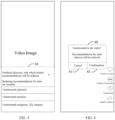
- the electronic device may display a feedback-reason window 50 in which at least two feedback reasons are displayed, as shown in FIG. 5 .
- S204 In response to a triggering operation for a target feedback reason of the at least two feedback reasons, sending a first feedback message on the current video to a server, and ending the operation, wherein the first feedback message carries a reason identification of the target feedback reason.
- the target feedback reason can be the feedback reason triggered by the user.
- the reason identification of the target feedback reason may uniquely identify the target feedback reason, such as, a reason identifier (ID) or content of the target feedback reason.
- the first feedback message may be a feedback message on the current video, which may carry the reason identification of the target feedback reason, and may carry a video identification of the current video.
- the electronic device when the user wants to select a certain feedback reason in the feedback-reason window, he/she triggers the certain feedback reason, to provide the non-interest feedback.
- the electronic device upon detecting that the user triggers the feedback reason, the electronic device will generate a feedback message (i.e., the first feedback message) carrying the video identification of the current video and the reason identification of the feedback reason, and send this feedback reason to the server.
- the electronic device may close the feedback-reason window upon detecting that the user triggers a certain feedback reason, and display a feedback success prompt message to prompt the user that the feedback has been successfully submitted.
- multiple feedback reasons can be displayed for the user's selection when the user triggers the feedback control. Consequently, this enables the user to provide a targeted non-interest feedback, and based on the user's feedback, this can reduce recommendations for videos corresponding to the selected reasons, thereby improving the user experience.
- S205 In response to a triggering operation for the feedback control, displaying a feedback confirmation window in which a confirmation control is displayed.
- the electronic device when playing the current video, displays the feedback control 20 for the current video on the video play page. Consequently, the user may trigger the feedback control 20 when he/she is not interested in the current video and wants to provide a non-interest feedback on the current video.
- the electronic device may display a feedback confirmation window 60 in which a cancel control 61 and a confirmation control 62 can be displayed, as shown in FIG. 6 , so as to prompt the user to confirm again whether he/she indeed wants to provide the non-interest feedback on the current video or not, thus preventing accidental feedback due to the user's mistaken touches.
- the second feedback message can be a feedback message on the current video.
- the second feedback message may carry the video identification of the current video, without carrying any reason why the user provides non-interest feedback.
- the user can trigger the confirmation control 62 in the feedback confirmation window 60 when the user confirms that he/she wants to provide the non-interest feedback.
- the electronic device generates a feedback message (i.e., the second feedback message) carrying the video identification of the current video when detecting that the user triggers the confirmation control 62, and send this feedback message to the server.
- the electronic device can close the feedback confirmation window 60 when detecting that the user triggers the confirmation control 62, and display a feedback success prompt message to prompt the user that the feedback is successfully submitted.
- the user can trigger the cancel control 61 in the feedback confirmation window 60 when the user confirms that he/she does not want to give the non-interest feedback.
- the electronic device can close the feedback confirmation window 60 when detecting that the user triggers the cancel control 61.
- the electronic device can also directly generate a feedback message (i.e., the second feedback message) carrying the video identification of the current video when detecting that the user triggers the feedback control, and send the feedback message to the server without displaying the feedback-reason window or the feedback confirmation window, thus simplifying the operations required the user to do when giving non-interest feedbacks.
- a feedback message i.e., the second feedback message
- the electronic device may determine whether the total number of times that the user provides non-interest feedbacks is less than or equal to a preset number threshold or not, when detecting that the user triggers the feedback control. If the total number of times that the user provides non-interest feedbacks is less than or equal to a preset number threshold, the process proceeds to S205-S206. Otherwise, if the total number of times that the user provides non-interest feedbacks is greater than a preset number threshold, the second feedback message is directly generated and sent to the server.
- the video being currently played can also be switched, e.g., from the current video to the next video to be played.
- a prompt for the feedback path can be provided to the user, thus preventing situations where the user is unable to provide non-interest feedbacks due to his/her unawareness of the existence of such a non-interest feedback function of the application or his/her lack of knowledge on how to provide such non-interest feedbacks, thereby improving the user experience.
- the preset condition can be set as needed.
- the preset condition can be set so that the user has not provided a non-interest feedback within a preset number of days, and/or the user has consecutively skipped n videos (that is, the actual play duration of each of the n consecutive videos are all less than the preset duration) and the like.
- the preset number of days, the value of n, and the preset duration threshold can all be set as needed.
- the preset number of days can be set as 20 days or 30 days or the like; n can be set as 3 or 5 or the like; and the preset duration threshold can be set as 1s (1 second) or 2s (2 seconds) or the like.
- the actual play duration of a video may be the time duration for which the video is actually played on the video play page, that is, the duration for which the user watches the video.
- the feedback path can be a triggering path for providing a non-interest feedback on the video.
- the electronic device may determine whether the current condition satisfies the preset display condition of the feedback prompt message or not, when determining that the current video is not the target video. If the current condition satisfies the preset display condition of the feedback prompt message, the current video is played on the video play page and the feedback prompt message 70 is displayed, as shown in FIG. 7 . Otherwise, if the current condition does not satisfy the preset display condition of the feedback prompt message, only the current video is played on the video play page, while the feedback prompt message 70 is not displayed.
- the preset display condition comprises that the number of times of displaying the feedback prompt message does not reach the current preset number threshold, and after displaying the feedback prompt message, the method further comprises: canceling displaying the feedback prompt message in response to a cancel prompt operation for the feedback prompt message, wherein the current preset number threshold decreases after canceling displaying the feedback prompt message.
- the current preset number threshold can be a threshold of total number of times of displaying the feedback prompt message or a number threshold of displaying the feedback prompt message within a preset duration.
- the cancel prompt operation can be an operation instructing the electronic device to cancel the display of the feedback prompt message, e.g., an operation of triggering a close control 71 corresponding to the feedback prompt message (as shown in FIG. 7 ).
- the feedback prompt message when determining whether to display the feedback prompt message, it is also possible to consider the number of times the feedback prompt message has been displayed. For example, the feedback prompt message can be displayed only when the user has not provided any non-interest feedback in the preset number of recent days, and/or when the actual play duration of each of the last n videos played on the video play page prior to the current video is less than the preset duration threshold, and the number of times of displaying the feedback prompt message does not reach the preset number threshold.
- the user can instruct the electronic device to stop displaying the feedback prompt message by triggering the cancel prompt operation, and the electronic device can reduce the current preset number threshold of the feedback prompt message depending on whether the user has triggered the cancel prompt operation, thereby avoiding excessive display of feedback prompt message that may interfere with the user's video viewing experience.
- the user can perform the cancel prompt operation when he/she wants to close the feedback prompt message displayed by the electronic device.
- the electronic device can cancel displaying the feedback prompt message upon receiving the cancel prompt operation performed by the user, and reduce the current preset number threshold for the feedback prompt message.
- the electronic device can reduce the current preset number threshold every time when the user performs the cancel prompt operation for the feedback prompt message, until the current preset number threshold equals to zero.
- the electronic device can reduce the current preset number threshold only when the user performs the operation for the first time or for many times (e.g., when the performing number reaches a preset number), until the current preset number threshold equals to zero.
- the electronic device can also automatically stop displaying the feedback prompt message when a preset condition is satisfied. For example, the electronic device can automatically stop displaying the feedback prompt message when the video being currently played changes, and/or, when the display duration of the feedback prompt message reaches the preset duration (such as, 3 seconds or 5 seconds) to facilitate the user's viewing of the video being currently played.
- the preset duration such as, 3 seconds or 5 seconds
- the video playing method provided in this embodiment prompts the user to provide non-interest feedbacks in different ways, and provides responses in different ways when the user triggers the feedback control, thereby enriching the triggering methods and the response types, and thus improving the user experience.
- FIG. 8 is a structural block diagram of a video play apparatus provided in an embodiment of the present disclosure.
- the apparatus can be implemented with software and/or hardware, and can be configured in an electric equipment, for example, the apparatus can be configured in a mobile phone or a tablet computer.
- the apparatus can display a feedback control on the video play page of some videos by performing the video playing method.
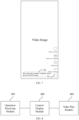
- the video play apparatus provided in the present embodiment comprises: an operation receiving module 801, a control display module 802, and a video play module 803.
- the operation receiving module 801 is configured to receive a play operation for a current video.
- the control display module 802 is configured to play the current video on a video play page and display a feedback control for the current video when the current video is a target video, wherein the feedback control is configured to trigger a non-interest feedback on the current video.
- the video play module 803 is configured to display the current video on the video play page when the current video is not the target video.
- the video play apparatus receives a play operation for the current video by the operation receiving module 801; plays the current video on a video play page and displays a feedback control for the current video when the current video is a target video by the control display module 802, wherein the feedback control is configured to trigger a non-interest feedback on the current video; and plays the current video on the video play page by the video play module 803 when the current video is not the target video.
- feedback control is displayed for some videos during the process of playing the corresponding videos, which can not only enrich the modes of providing non-interest feedbacks to videos, but also shorten the feedback path of the videos, simplify the operations required to provide non-interest feedbacks on the videos, and thus improving the user experience.
- control display module 802 can be configured to display the feedback control for the current video and a preset control; or replace the preset control with the feedback control for the current video for display purposes.
- the video play apparatus provided in this embodiment can further comprise a reason window display module and a first sending module.
- the reason window display module is configured to display a feedback-reason window in response to a triggering operation for the feedback control after displaying the feedback control for the current video, wherein at least two feedback reasons are displayed in the feedback-reason window.
- the first sending module is configured to send a first feedback message on the current video to a server in response to a triggering operation for a target feedback reason of the at least two feedback reasons, wherein the first feedback message carries a reason identification of the target feedback reason.
- different feedback reasons can correspond to different feedback dimensions, wherein the different feedback dimensions include a dimension of background music.
- the video play apparatus can further comprise: a confirmation window display module and a second sending module.
- the confirmation window display module is configured to display a feedback confirmation window in response to a triggering operation on the feedback control after displaying the feedback control for the current video, wherein a confirmation control is displayed in the feedback confirmation window.
- the second sending module is configured to send a second feedback message on the current video to the server in response to a triggering operation on the confirmation control.
- the video play module 803 can be configured to play the current video on the video play page and display a feedback prompt message when the current video is not the target video and the current condition satisfies a preset display condition of the feedback prompt message, wherein the feedback prompt message is used to prompt a feedback path for giving a non-interest feedback.
- the preset display condition includes that the number of times of displaying the feedback prompt message has not reached the current preset number threshold.
- the video play apparatus provided in this embodiment can further comprise a cancel display module, which is configured to cancel the display of the feedback prompt message in response to a cancel prompt operation for the feedback prompt message after displaying the feedback prompt message, wherein the current preset number threshold decreases after canceling the display of the feedback prompt message.
- the video play apparatus provided in the embodiments of the present disclosure can perform the video playing method provided in any embodiment of the present disclosure, and possess corresponding functional modules and beneficial effects for performing the video playing method.
- the technical details not exhaustively described in this embodiment may be referred to the video playing methods provided in any embodiment of the present disclosure.
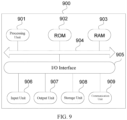
- FIG. 9 shows a structural schematic diagram of an electronic device (e.g., a terminal device) 900 that is applicable to implement the embodiment of the present disclosure.
- the terminal device in the embodiment of the present disclosure can comprise, but is not limited to, mobile terminal such as mobile phone, laptop, digital broadcast receiver, Personal Digital Assistant (PDA), Portable Android Device (PAD), Portable Media Player (PMP), and vehicle terminal (e.g., vehicle navigator terminal) and fixed terminals such as digital television (TV), desktop computer and etc.
- PDA Personal Digital Assistant
- PDA Portable Android Device
- PMP Portable Media Player
- vehicle terminal e.g., vehicle navigator terminal
- TV digital television
- TV digital television
- the electronic device 900 shown in FIG. 9 is merely an example, and should not bring any limitation to the function and application scope of the embodiment of the present disclosure.
- the electronic device 900 can comprise a processing unit (e.g., a central processing unit, a graphics processing unit and etc.) 901, which can perform various appropriate actions and processes according to a program stored in a read only memory (ROM) 902 or a program loaded from a storage unit 908 into a random-access memory (RAM) 903.
- the RAM 903 further stores various programs and data required to operate the electronic device 900.
- the processing unit 901, ROM 902 and RAM 903 are interconnected with each other via a bus 904.
- An input/output (I/O) interface 905 is also connected to the bus 904.
- the following units can be connected to the I/O interface 905: an input unit 906 including, e.g., a touch screen, a touch pad, a keyboard, a mouse, a camera, a microphone, an accelerometer, a gyroscope, and etc.; an output unit 907 including, e.g., a liquid crystal display (LCD), a speaker, a vibrator, and etc.; a storage unit 908 including, e.g., a magnetic tape, a hard disc, and etc.; and a communication unit 909.
- the communication unit 909 can allow the electronic device 900 to communicate with other devices in a wired or wireless manner to exchange data.
- FIG. 9 shows the electronic device 900 with various units, it is not necessary to implement or include all the units as shown. Alternatively, the electronic device may be implemented with or have more or less units.
- an embodiment of the present disclosure comprises a computer program product comprising a computer program carried on a non-transitory computer-readable medium, wherein the computer program comprises program codes configured to execute the method shown in the flowchart.
- the computer program can be downloaded and installed via the communication unit 909 from the Internet, or installed from the storage unit 908, or installed from the ROM 902.
- the processing unit 901 the functions defined in the method of determining a video fluency of the embodiment of the present disclosure are performed.
- the above computer-readable medium in the present disclosure can be a computer-readable signal medium, or a computer-readable storage medium, or any combination thereof.
- the computer-readable storage medium can be, but is not limited to, an electric, magnetic, optical, electromagnetic, infrared or semiconductor system, apparatus, device, or any combination thereof.
- Examples of the computer-readable storage medium can comprise, but are not limited to: electric connection with one or more wires, portable computer magnetic disc, hard disc, random accessible memory (RAM), read-only memory (ROM), erasable programmable read-only memory (EPROM or flash memory), optical fiber, portable compact disc read-only memory (CD-ROM), optical storage device, magnetic storage device, or any suitable combination thereof.
- the computer-readable storage medium can be any tangible medium containing or storing a program that can be used by or in combination with an instruction execution system, apparatus or device.
- the computer-readable signal medium can comprise a data signal propagated in baseband or as a part of carrier wave, which carries computer-readable program codes. Such propagated data signal can be in many forms, including, but being not limited to, electromagnetic signal, optical signal, or any suitable combination thereof.
- the computer-readable signal medium can also be any computer-readable medium in addition to the computer-readable storage medium, which can send, propagate, or transmit a program used by or in combination with an instruction execution system, apparatus, or device.
- the program codes contained in the computer-readable medium can be transmitted by any suitable medium including, but being not limited to, electric wire, optical cable, radio frequency (RF), or any suitable combination thereof.
- the user and the server can communicate by using any network protocol that is currently known or will be developed in future, such as, hypertext transfer protocol (HTTP), and can be interconnected with a digital data communication in any form or medium (e.g., communication network).
- HTTP hypertext transfer protocol
- Examples of the communication network comprise Local Area Network ("LAN”), Wide Area Network ("WAN"), Internet work (e.g., the Internet) and end-to-end network (e.g., ad hoc end-to-end network), and any network that is currently known or will be developed in future.
- LAN Local Area Network
- WAN Wide Area Network
- Internet work e.g., the Internet
- end-to-end network e.g., ad hoc end-to-end network
- the above computer-readable medium can be contained in the above electronic device; or it can also be independently present and is not assembled in the electronic device.
- the above computer-readable medium carries one or more programs, and the one or more programs, when executed by the electronic device, enable the electronic device to receive a play operation for a current video; plays the current video and displays a feedback control for the current video on a video play page when the current video is a target video, wherein the feedback control is configured to trigger a non-interest feedback on the current video; and plays the current video on the video play page when the current video is not the target video.
- the computer program codes for performing the operations of the present disclosure may be written in one or more programming languages or a combination thereof.
- the above-mentioned programming languages include but are not limited to object-oriented programming languages, such as, Java, Smalltalk, C++, and also include conventional procedural programming languages such as the "C" programming language or similar programming languages.
- the program codes may be executed entirely on the user's computer, partly on the user's computer, as a stand-alone software package, partly on the user's computer and partly on a remote computer, or entirely on the remote computer or server.
- the remote computer may be connected to the user's computer through any type of network, including LAN or WAN, or the remote computer may be connected to an external computer (for example, through the Internet, by using an Internet service provider).
- each block in the flowcharts or block diagrams may represent a module, a program segment, or a portion of codes, including one or more executable instructions for implementing specified logical functions.
- the functions noted in the blocks may also occur out of the order noted in the accompanying drawings. For example, two blocks shown in succession may, in fact, can be executed substantially concurrently, or the two blocks may sometimes be executed in a reverse order, depending upon the functionality involved.
- each block of the block diagrams and/or flowcharts, and combinations of blocks in the block diagrams and/or flowcharts may be implemented by a dedicated hardware-based system that performs the specified functions or operations, or may also be implemented by a combination of dedicated hardware and computer instructions.
- the modules or units involved in the embodiments of the present disclosure may be implemented in software or hardware. Among them, the name of the module or unit does not constitute a limitation of the module or unit itself.
- FPGA field programmable gate array
- ASIC application specific integrated circuit
- ASSP application specific standard product
- SOC system on chip
- CPLD complex programmable logical device
- the machine-readable medium may be a tangible medium that may include or store a program for use by or in combination with an instruction execution system, apparatus or device.
- the machine-readable medium may be a machine-readable signal medium or a machine-readable storage medium.
- the machine-readable medium includes, but is not limited to, an electrical, magnetic, optical, electromagnetic, infrared, or semi-conductive system, apparatus or device, or any suitable combination of the foregoing.
- Examples of machine-readable storage medium include electrical connection with one or more wires, portable computer disk, RAM, ROM, EPROM or flash memory, optical fiber, CD-ROM, optical storage device, magnetic storage device, or any suitable combination of the foregoing.
- example 1 provides a video playing method comprising:
- example 2 provides a method according to example 1, wherein the displaying the feedback control for the current video comprises:
- example 3 provides a method according to example 1, further comprising, after the displaying the feedback control for the current video:
- example 4 provides a method according to example 3, wherein different feedback reasons correspond to different feedback dimensions including a background music dimension.
- example 5 provides a method according to example 1, further comprising, after the displaying the feedback control for the current video:
- example 6 provides a method according to any one of examples 1 to 5, wherein the playing the current video on the video play page when the current video is not the target video comprises: playing the current video on the video play page and displaying a feedback prompt message when the current video is not the target video and a current condition satisfies a preset display condition of the feedback prompt message, wherein the feedback prompt message is used to prompt a feedback path for providing a non-interest feedback.
- example 7 provides a method according to example 6, wherein the preset display condition comprises that a number of times of displaying the feedback prompt message does not reach a current preset number threshold, and after displaying the feedback prompt message, the method further comprises: in response to a cancel prompt operation for the feedback prompt message, canceling the display of the feedback prompt message, wherein the current preset number threshold decreases after canceling the display of the feedback prompt message.
- example 8 provides a video playing apparatus, comprising:
- example 9 provides an electronic device, comprising:
- example 10 provides a computer-readable storage medium with a computer program stored thereon, wherein when the program is executed by a processor, the computer is caused to perform the method according to any of examples 1 to 7.
- example 11 provides a computer program product, wherein when the computer program product is executed by a computer, the computer is caused to perform the video playing method according to any of examples 1 to 7.
Landscapes
- Engineering & Computer Science (AREA)
- Multimedia (AREA)
- Signal Processing (AREA)
- Databases & Information Systems (AREA)
- Human Computer Interaction (AREA)
- Computer Networks & Wireless Communication (AREA)
- Software Systems (AREA)
- Business, Economics & Management (AREA)
- General Business, Economics & Management (AREA)
- User Interface Of Digital Computer (AREA)
- Two-Way Televisions, Distribution Of Moving Picture Or The Like (AREA)
Applications Claiming Priority (2)
| Application Number | Priority Date | Filing Date | Title |
|---|---|---|---|
| CN202210147573.1A CN114531614B (zh) | 2022-02-17 | 2022-02-17 | 视频播放方法、装置、电子设备和存储介质 |
| PCT/CN2023/074944 WO2023155716A1 (zh) | 2022-02-17 | 2023-02-08 | 视频播放方法、装置、电子设备、存储介质和程序产品 |
Publications (2)
| Publication Number | Publication Date |
|---|---|
| EP4468720A1 true EP4468720A1 (de) | 2024-11-27 |
| EP4468720A4 EP4468720A4 (de) | 2025-03-19 |
Family
ID=81623110
Family Applications (1)
| Application Number | Title | Priority Date | Filing Date |
|---|---|---|---|
| EP23755719.4A Pending EP4468720A4 (de) | 2022-02-17 | 2023-02-08 | Videoabspielverfahren und -vorrichtung sowie elektronische vorrichtung, speichermedium und programmprodukt |
Country Status (5)
| Country | Link |
|---|---|
| US (2) | US12368926B2 (de) |
| EP (1) | EP4468720A4 (de) |
| JP (1) | JP2025508422A (de) |
| CN (1) | CN114531614B (de) |
| WO (1) | WO2023155716A1 (de) |
Families Citing this family (9)
| Publication number | Priority date | Publication date | Assignee | Title |
|---|---|---|---|---|
| CN114531614B (zh) | 2022-02-17 | 2023-09-15 | 北京字跳网络技术有限公司 | 视频播放方法、装置、电子设备和存储介质 |
| CN115453895A (zh) * | 2022-08-17 | 2022-12-09 | 青岛海尔科技有限公司 | 终端的控制方法、装置、存储介质及电子装置 |
| CN116028724A (zh) * | 2022-11-10 | 2023-04-28 | 北京字跳网络技术有限公司 | 用于用户交互的方法、装置、设备和存储介质 |
| CN119719472A (zh) * | 2023-09-27 | 2025-03-28 | 脸萌有限公司 | 数据分发方法、装置和计算机可读存储介质 |
| CN119719471A (zh) * | 2023-09-27 | 2025-03-28 | 脸萌有限公司 | 信息反馈方法、装置和计算机可读存储介质 |
| CN120179858A (zh) * | 2023-12-20 | 2025-06-20 | 北京字跳网络技术有限公司 | 媒体内容的反馈方法、装置、电子设备和存储介质 |
| CN118354153A (zh) * | 2024-03-26 | 2024-07-16 | 北京达佳互联信息技术有限公司 | 页面交互方法、装置及存储介质 |
| CN119450134B (zh) * | 2024-10-25 | 2025-11-07 | 北京达佳互联信息技术有限公司 | 信息显示方法、装置、设备及存储介质 |
| CN119893189A (zh) * | 2025-01-08 | 2025-04-25 | 北京达佳互联信息技术有限公司 | 视频播放方法、装置、可读存储介质及电子设备 |
Family Cites Families (30)
| Publication number | Priority date | Publication date | Assignee | Title |
|---|---|---|---|---|
| US8387093B2 (en) * | 2002-08-23 | 2013-02-26 | Microsoft Corporation | Media recommendations based on negative feedback |
| KR100763900B1 (ko) * | 2004-08-28 | 2007-10-05 | 삼성전자주식회사 | 사용자 시선정보에 기반한 텔레비전 프로그램 녹화/재생방법 및 그 장치 |
| US20070288966A1 (en) * | 2006-04-04 | 2007-12-13 | Sasha Javid | Method and system for personalized media players |
| JP2009272850A (ja) * | 2008-05-07 | 2009-11-19 | Victor Co Of Japan Ltd | コンテンツ再生装置 |
| US8176510B2 (en) * | 2008-11-12 | 2012-05-08 | United Video Properties, Inc. | Systems and methods for detecting inconsistent user actions and providing feedback |
| WO2013149220A1 (en) * | 2012-03-30 | 2013-10-03 | Xen, Inc. | Centralized tracking of user interest information from distributed information sources |
| US8996530B2 (en) * | 2012-04-27 | 2015-03-31 | Yahoo! Inc. | User modeling for personalized generalized content recommendations |
| CN103092603B (zh) * | 2012-12-10 | 2016-08-10 | 乐视网信息技术(北京)股份有限公司 | 播放器配置方法和系统以及相应的播放器 |
| US20150326688A1 (en) * | 2013-01-29 | 2015-11-12 | Nokia Corporation | Method and apparatus for providing segment-based recommendations |
| JP5647709B2 (ja) * | 2013-04-30 | 2015-01-07 | 株式会社Tbsテレビ | データ放送システム |
| US9326030B2 (en) * | 2013-07-30 | 2016-04-26 | Google Inc. | Systems and methods for triggering user notifications of media content items |
| US20150332335A1 (en) * | 2014-05-15 | 2015-11-19 | International Business Machines Corporation | Interactive advertisements |
| US10750245B1 (en) * | 2014-11-25 | 2020-08-18 | Clarifai, Inc. | User interface for labeling, browsing, and searching semantic labels within video |
| US20160156951A1 (en) * | 2014-12-02 | 2016-06-02 | Sling Media Pvt Ltd | Intelligent auto-tuning for a video services system |
| US20180130075A1 (en) * | 2015-03-16 | 2018-05-10 | Amazon Technologies, Inc. | Analysis of media consumption for new media production |
| CN108134950B (zh) * | 2017-12-07 | 2022-05-06 | 广州锐竞信息科技有限责任公司 | 一种智能视频推荐方法及系统 |
| CN108932103A (zh) * | 2018-06-29 | 2018-12-04 | 北京微播视界科技有限公司 | 标识用户兴趣的方法、装置、终端设备及存储介质 |
| KR102713283B1 (ko) * | 2019-01-09 | 2024-10-04 | 삼성전자 주식회사 | 네트워크를 이용한 단말에서의 오디오 음질 제어 방법 및 장치 |
| CN110222233B (zh) * | 2019-06-14 | 2021-01-15 | 北京达佳互联信息技术有限公司 | 视频推荐方法、装置、服务器及存储介质 |
| CN110287372B (zh) * | 2019-06-26 | 2021-06-01 | 广州市百果园信息技术有限公司 | 用于负反馈的标签确定方法、视频推荐方法及其装置 |
| CN110598016B (zh) * | 2019-09-11 | 2021-08-17 | 腾讯科技(深圳)有限公司 | 一种多媒体信息推荐的方法、装置、设备和介质 |
| CN111177575B (zh) * | 2020-04-07 | 2020-07-24 | 腾讯科技(深圳)有限公司 | 一种内容推荐方法、装置、电子设备和存储介质 |
| CN111447239B (zh) * | 2020-04-13 | 2023-07-04 | 抖音视界有限公司 | 视频流播放控制方法、设备及存储介质 |
| CN111736746A (zh) * | 2020-08-21 | 2020-10-02 | 北京达佳互联信息技术有限公司 | 多媒体资源的处理方法、装置、电子设备及存储介质 |
| CN113032682B (zh) * | 2021-04-22 | 2023-07-21 | 中国平安人寿保险股份有限公司 | 基于协同过滤的产品推荐方法、装置、设备及存储介质 |
| CN113449144B (zh) * | 2021-06-01 | 2023-10-27 | 北京百度网讯科技有限公司 | 视频处理方法、装置和电子设备 |
| CN113542853A (zh) * | 2021-07-20 | 2021-10-22 | 北京字跳网络技术有限公司 | 视频互动方法、装置、电子设备和存储介质 |
| KR20230023954A (ko) * | 2021-08-11 | 2023-02-20 | 삼성전자주식회사 | 아이템을 사용자에게 추천하기 위한 전자 장치 및 방법 |
| CN114297470B (zh) * | 2021-10-26 | 2025-11-18 | 腾讯科技(深圳)有限公司 | 内容的推荐方法、装置、设备、介质及计算机程序产品 |
| CN114531614B (zh) * | 2022-02-17 | 2023-09-15 | 北京字跳网络技术有限公司 | 视频播放方法、装置、电子设备和存储介质 |
-
2022
- 2022-02-17 CN CN202210147573.1A patent/CN114531614B/zh active Active
-
2023
- 2023-02-08 EP EP23755719.4A patent/EP4468720A4/de active Pending
- 2023-02-08 JP JP2024548585A patent/JP2025508422A/ja active Pending
- 2023-02-08 WO PCT/CN2023/074944 patent/WO2023155716A1/zh not_active Ceased
-
2024
- 2024-08-19 US US18/809,080 patent/US12368926B2/en active Active
-
2025
- 2025-07-02 US US19/258,729 patent/US20250330678A1/en active Pending
Also Published As
| Publication number | Publication date |
|---|---|
| JP2025508422A (ja) | 2025-03-26 |
| US20250330678A1 (en) | 2025-10-23 |
| US20240414402A1 (en) | 2024-12-12 |
| US12368926B2 (en) | 2025-07-22 |
| EP4468720A4 (de) | 2025-03-19 |
| WO2023155716A1 (zh) | 2023-08-24 |
| CN114531614B (zh) | 2023-09-15 |
| CN114531614A (zh) | 2022-05-24 |
Similar Documents
| Publication | Publication Date | Title |
|---|---|---|
| EP4468720A1 (de) | Videoabspielverfahren und -vorrichtung sowie elektronische vorrichtung, speichermedium und programmprodukt | |
| EP4178188A1 (de) | Landschaftsinteraktionsverfahren und -vorrichtung, elektronische vorrichtung und speichermedium | |
| EP4425313A1 (de) | Datenaustauschverfahren und -vorrichtung, elektronische vorrichtung, speichermedium und programmprodukt | |
| US20240251133A1 (en) | Content presentation method and apparatus, device, and storage medium | |
| JP7778935B2 (ja) | レビュー提示方法、装置、電子機器、記憶媒体及びプログラム製品 | |
| CN114707092A (zh) | 直播内容显示方法、装置、设备、可读存储介质及产品 | |
| US20250077247A1 (en) | Interface display method and apparatus, device, computer-readable storage medium, and product | |
| WO2023061230A1 (zh) | 内容展示方法、装置、设备及存储介质 | |
| EP4682693A1 (de) | Informationsanzeigeverfahren und -vorrichtung, informationssendeverfahren und -vorrichtung, vorrichtung und speichermedium | |
| US12489941B2 (en) | Method, apparatus, electronic device and storage medium for controlling media content | |
| US20250348195A1 (en) | Video posting method, electronic device, and storage medium | |
| US12356043B2 (en) | Method, apparatus, electronic device and storage medium for playback control | |
| CN111290819A (zh) | 显示操作提示的方法、装置和电子设备 | |
| WO2024099384A1 (zh) | 直播画面的展示方法、装置、电子设备和存储介质 | |
| WO2022160605A1 (zh) | 音乐应用中的播客推荐方法及设备 | |
| CN115639934A (zh) | 内容分享方法、装置、设备、计算机可读存储介质及产品 | |
| CN114390360A (zh) | 直播投票的方法、装置、电子设备、存储介质和程序产品 | |
| EP4492227A1 (de) | Aufforderungsverfahren und -vorrichtung | |
| CN111246245A (zh) | 视频聚合页面的推送方法、装置,服务器及终端设备 | |
| CN117177010A (zh) | 媒体内容展示方法、装置及电子设备 | |
| WO2024027648A1 (zh) | 信息的显示方法、装置、电子设备和存储介质 | |
| EP4679835A1 (de) | Verfahren und vorrichtung zur anzeige von live-rundfunkseiten, vorrichtung, speichermedium und programmprodukt | |
| WO2025061054A1 (zh) | 直播间数据的展示方法、装置、设备、介质和程序产品 | |
| CN116795266A (zh) | 交互方法、装置、电子设备和存储介质 | |
| CN111246242A (zh) | 基于播放视频的搜索方法、装置,应用服务器及终端设备 |
Legal Events
| Date | Code | Title | Description |
|---|---|---|---|
| STAA | Information on the status of an ep patent application or granted ep patent |
Free format text: STATUS: THE INTERNATIONAL PUBLICATION HAS BEEN MADE |
|
| PUAI | Public reference made under article 153(3) epc to a published international application that has entered the european phase |
Free format text: ORIGINAL CODE: 0009012 |
|
| STAA | Information on the status of an ep patent application or granted ep patent |
Free format text: STATUS: REQUEST FOR EXAMINATION WAS MADE |
|
| 17P | Request for examination filed |
Effective date: 20240819 |
|
| AK | Designated contracting states |
Kind code of ref document: A1 Designated state(s): AL AT BE BG CH CY CZ DE DK EE ES FI FR GB GR HR HU IE IS IT LI LT LU LV MC ME MK MT NL NO PL PT RO RS SE SI SK SM TR |
|
| A4 | Supplementary search report drawn up and despatched |
Effective date: 20250213 |
|
| RIC1 | Information provided on ipc code assigned before grant |
Ipc: H04M 1/72469 20210101ALN20250207BHEP Ipc: H04M 1/72439 20210101ALI20250207BHEP Ipc: H04N 21/443 20110101ALI20250207BHEP Ipc: H04N 21/466 20110101ALI20250207BHEP Ipc: H04N 21/472 20110101ALI20250207BHEP Ipc: H04N 21/475 20110101ALI20250207BHEP Ipc: H04N 21/442 20110101AFI20250207BHEP |
|
| DAV | Request for validation of the european patent (deleted) | ||
| DAX | Request for extension of the european patent (deleted) | ||
| STAA | Information on the status of an ep patent application or granted ep patent |
Free format text: STATUS: EXAMINATION IS IN PROGRESS |
|
| 17Q | First examination report despatched |
Effective date: 20250925 |