EP4471584A1 - Adaptives anzeigeverfahren einer schnittstelle und endgerätevorrichtung - Google Patents
Adaptives anzeigeverfahren einer schnittstelle und endgerätevorrichtung Download PDFInfo
- Publication number
- EP4471584A1 EP4471584A1 EP23773676.4A EP23773676A EP4471584A1 EP 4471584 A1 EP4471584 A1 EP 4471584A1 EP 23773676 A EP23773676 A EP 23773676A EP 4471584 A1 EP4471584 A1 EP 4471584A1
- Authority
- EP
- European Patent Office
- Prior art keywords
- control
- terminal device
- interface
- size
- layout
- Prior art date
- Legal status (The legal status is an assumption and is not a legal conclusion. Google has not performed a legal analysis and makes no representation as to the accuracy of the status listed.)
- Pending
Links
Images








Classifications
-
- G—PHYSICS
- G06—COMPUTING OR CALCULATING; COUNTING
- G06F—ELECTRIC DIGITAL DATA PROCESSING
- G06F9/00—Arrangements for program control, e.g. control units
- G06F9/06—Arrangements for program control, e.g. control units using stored programs, i.e. using an internal store of processing equipment to receive or retain programs
- G06F9/44—Arrangements for executing specific programs
- G06F9/451—Execution arrangements for user interfaces
-
- G—PHYSICS
- G06—COMPUTING OR CALCULATING; COUNTING
- G06F—ELECTRIC DIGITAL DATA PROCESSING
- G06F3/00—Input arrangements for transferring data to be processed into a form capable of being handled by the computer; Output arrangements for transferring data from processing unit to output unit, e.g. interface arrangements
- G06F3/01—Input arrangements or combined input and output arrangements for interaction between user and computer
- G06F3/048—Interaction techniques based on graphical user interfaces [GUI]
- G06F3/0484—Interaction techniques based on graphical user interfaces [GUI] for the control of specific functions or operations, e.g. selecting or manipulating an object, an image or a displayed text element, setting a parameter value or selecting a range
- G06F3/04845—Interaction techniques based on graphical user interfaces [GUI] for the control of specific functions or operations, e.g. selecting or manipulating an object, an image or a displayed text element, setting a parameter value or selecting a range for image manipulation, e.g. dragging, rotation, expansion or change of colour
-
- G—PHYSICS
- G06—COMPUTING OR CALCULATING; COUNTING
- G06F—ELECTRIC DIGITAL DATA PROCESSING
- G06F1/00—Details not covered by groups G06F3/00 - G06F13/00 and G06F21/00
- G06F1/16—Constructional details or arrangements
- G06F1/1613—Constructional details or arrangements for portable computers
- G06F1/1615—Constructional details or arrangements for portable computers with several enclosures having relative motions, each enclosure supporting at least one I/O or computing function
- G06F1/1616—Constructional details or arrangements for portable computers with several enclosures having relative motions, each enclosure supporting at least one I/O or computing function with folding flat displays, e.g. laptop computers or notebooks having a clamshell configuration, with body parts pivoting to an open position around an axis parallel to the plane they define in closed position
- G06F1/1618—Constructional details or arrangements for portable computers with several enclosures having relative motions, each enclosure supporting at least one I/O or computing function with folding flat displays, e.g. laptop computers or notebooks having a clamshell configuration, with body parts pivoting to an open position around an axis parallel to the plane they define in closed position the display being foldable up to the back of the other housing with a single degree of freedom, e.g. by 360° rotation over the axis defined by the rear edge of the base enclosure
-
- G—PHYSICS
- G06—COMPUTING OR CALCULATING; COUNTING
- G06F—ELECTRIC DIGITAL DATA PROCESSING
- G06F3/00—Input arrangements for transferring data to be processed into a form capable of being handled by the computer; Output arrangements for transferring data from processing unit to output unit, e.g. interface arrangements
- G06F3/01—Input arrangements or combined input and output arrangements for interaction between user and computer
- G06F3/048—Interaction techniques based on graphical user interfaces [GUI]
- G06F3/0481—Interaction techniques based on graphical user interfaces [GUI] based on specific properties of the displayed interaction object or a metaphor-based environment, e.g. interaction with desktop elements like windows or icons, or assisted by a cursor's changing behaviour or appearance
-
- G—PHYSICS
- G06—COMPUTING OR CALCULATING; COUNTING
- G06F—ELECTRIC DIGITAL DATA PROCESSING
- G06F3/00—Input arrangements for transferring data to be processed into a form capable of being handled by the computer; Output arrangements for transferring data from processing unit to output unit, e.g. interface arrangements
- G06F3/01—Input arrangements or combined input and output arrangements for interaction between user and computer
- G06F3/048—Interaction techniques based on graphical user interfaces [GUI]
- G06F3/0481—Interaction techniques based on graphical user interfaces [GUI] based on specific properties of the displayed interaction object or a metaphor-based environment, e.g. interaction with desktop elements like windows or icons, or assisted by a cursor's changing behaviour or appearance
- G06F3/04817—Interaction techniques based on graphical user interfaces [GUI] based on specific properties of the displayed interaction object or a metaphor-based environment, e.g. interaction with desktop elements like windows or icons, or assisted by a cursor's changing behaviour or appearance using icons
-
- G—PHYSICS
- G06—COMPUTING OR CALCULATING; COUNTING
- G06F—ELECTRIC DIGITAL DATA PROCESSING
- G06F3/00—Input arrangements for transferring data to be processed into a form capable of being handled by the computer; Output arrangements for transferring data from processing unit to output unit, e.g. interface arrangements
- G06F3/01—Input arrangements or combined input and output arrangements for interaction between user and computer
- G06F3/048—Interaction techniques based on graphical user interfaces [GUI]
- G06F3/0481—Interaction techniques based on graphical user interfaces [GUI] based on specific properties of the displayed interaction object or a metaphor-based environment, e.g. interaction with desktop elements like windows or icons, or assisted by a cursor's changing behaviour or appearance
- G06F3/0482—Interaction with lists of selectable items, e.g. menus
-
- G—PHYSICS
- G06—COMPUTING OR CALCULATING; COUNTING
- G06F—ELECTRIC DIGITAL DATA PROCESSING
- G06F3/00—Input arrangements for transferring data to be processed into a form capable of being handled by the computer; Output arrangements for transferring data from processing unit to output unit, e.g. interface arrangements
- G06F3/01—Input arrangements or combined input and output arrangements for interaction between user and computer
- G06F3/048—Interaction techniques based on graphical user interfaces [GUI]
- G06F3/0487—Interaction techniques based on graphical user interfaces [GUI] using specific features provided by the input device, e.g. functions controlled by the rotation of a mouse with dual sensing arrangements, or of the nature of the input device, e.g. tap gestures based on pressure sensed by a digitiser
- G06F3/0488—Interaction techniques based on graphical user interfaces [GUI] using specific features provided by the input device, e.g. functions controlled by the rotation of a mouse with dual sensing arrangements, or of the nature of the input device, e.g. tap gestures based on pressure sensed by a digitiser using a touch-screen or digitiser, e.g. input of commands through traced gestures
-
- G—PHYSICS
- G06—COMPUTING OR CALCULATING; COUNTING
- G06F—ELECTRIC DIGITAL DATA PROCESSING
- G06F3/00—Input arrangements for transferring data to be processed into a form capable of being handled by the computer; Output arrangements for transferring data from processing unit to output unit, e.g. interface arrangements
- G06F3/01—Input arrangements or combined input and output arrangements for interaction between user and computer
- G06F3/048—Interaction techniques based on graphical user interfaces [GUI]
- G06F3/0487—Interaction techniques based on graphical user interfaces [GUI] using specific features provided by the input device, e.g. functions controlled by the rotation of a mouse with dual sensing arrangements, or of the nature of the input device, e.g. tap gestures based on pressure sensed by a digitiser
- G06F3/0488—Interaction techniques based on graphical user interfaces [GUI] using specific features provided by the input device, e.g. functions controlled by the rotation of a mouse with dual sensing arrangements, or of the nature of the input device, e.g. tap gestures based on pressure sensed by a digitiser using a touch-screen or digitiser, e.g. input of commands through traced gestures
- G06F3/04886—Interaction techniques based on graphical user interfaces [GUI] using specific features provided by the input device, e.g. functions controlled by the rotation of a mouse with dual sensing arrangements, or of the nature of the input device, e.g. tap gestures based on pressure sensed by a digitiser using a touch-screen or digitiser, e.g. input of commands through traced gestures by partitioning the display area of the touch-screen or the surface of the digitising tablet into independently controllable areas, e.g. virtual keyboards or menus
-
- H—ELECTRICITY
- H04—ELECTRIC COMMUNICATION TECHNIQUE
- H04M—TELEPHONIC COMMUNICATION
- H04M1/00—Substation equipment, e.g. for use by subscribers
- H04M1/72—Mobile telephones; Cordless telephones, i.e. devices for establishing wireless links to base stations without route selection
- H04M1/724—User interfaces specially adapted for cordless or mobile telephones
-
- H—ELECTRICITY
- H04—ELECTRIC COMMUNICATION TECHNIQUE
- H04M—TELEPHONIC COMMUNICATION
- H04M1/00—Substation equipment, e.g. for use by subscribers
- H04M1/72—Mobile telephones; Cordless telephones, i.e. devices for establishing wireless links to base stations without route selection
- H04M1/724—User interfaces specially adapted for cordless or mobile telephones
- H04M1/72448—User interfaces specially adapted for cordless or mobile telephones with means for adapting the functionality of the device according to specific conditions
- H04M1/72454—User interfaces specially adapted for cordless or mobile telephones with means for adapting the functionality of the device according to specific conditions according to context-related or environment-related conditions
-
- H—ELECTRICITY
- H04—ELECTRIC COMMUNICATION TECHNIQUE
- H04M—TELEPHONIC COMMUNICATION
- H04M1/00—Substation equipment, e.g. for use by subscribers
- H04M1/02—Constructional features of telephone sets
- H04M1/0202—Portable telephone sets, e.g. cordless phones, mobile phones or bar type handsets
- H04M1/0206—Portable telephones comprising a plurality of mechanically joined movable body parts, e.g. hinged housings
- H04M1/0241—Portable telephones comprising a plurality of mechanically joined movable body parts, e.g. hinged housings using relative motion of the body parts to change the operational status of the telephone set, e.g. switching on/off, answering incoming call
Definitions
- This application relates to the field of terminal technologies, and in particular, to an adaptive interface display method and a terminal device.
- screen sizes for example, aspect ratios
- a layout of an interface like an application (application, app) interface (an application interface for short) is pre-developed.
- layouts of a same interface (for example, an application interface) on a plurality of terminal devices may be different. In this case, some layouts may be unreasonable, such as insufficient content display and distorted images, which compromise user experience.
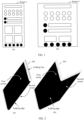
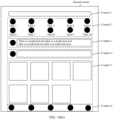
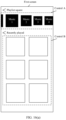
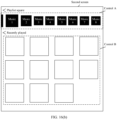
- FIG. 1 when a same interface is displayed, because sizes of a screen 1 and a screen 2 are different, a layout of the interface on the screen 1 shown in (a) in FIG. 1 is different from a layout of the interface on the screen 2 shown in (b) in FIG. 1 . As shown in (b) in FIG. 1 , because a pre-developed interface layout does not adapt to the size of the screen 2, less content is displayed when the interface is laid out on the screen 2 shown in (b) in FIG. 1 .
- This application provides an adaptive interface display method and a terminal device, to enable a same interface to adapt to terminal devices with different aspect ratios.
- an adaptive interface display method includes: A terminal device initially displays a first interface on a first screen, where a size of the first screen is a first size, and the first interface includes one or more controls and elements; after detecting that the screen size changes from the first size to a second size, the terminal device obtains a layout type of the control and a type of the element on the first interface; and the terminal device arranges and draws the control and the element on the first interface based on the layout type of the control and the type of the element by using a corresponding adaptive algorithm on a canvas of the second size.
- control included in the first interface is a menu bar, a menu, a search box, or a search button. This is not limited in this application.
- the element included in the first interface is a child control, an icon, or a character (for example, a text). This is not limited in this application.
- control included in the first interface further includes one or more elements.
- the terminal device may use different policies such as stretching, translation, and alignment for different types of controls and elements on a to-be-displayed interface, to continuously display the interface on a changed screen by using an adapted layout. For example, when the screen size is larger, a problem that an amount of information displayed on the interface is less is avoided. For another example, when the screen size is smaller, a problem that information displayed on the interface is overcrowded is avoided.
- the method enables one interface that has been developed to adapt to terminal devices with different aspect ratios by using a general adaptive algorithm (for example, a free stretching algorithm, a proportional stretching algorithm, a grid equal division algorithm, an alignment algorithm, a translation algorithm, or a text control filling and rearrangement algorithm), which saves extra efforts of an application developer from a heavy workload of screen-based interface resizing, and has a wider application coverage, higher adaptability, and stronger universality.
- a general adaptive algorithm for example, a free stretching algorithm, a proportional stretching algorithm, a grid equal division algorithm, an alignment algorithm, a translation algorithm, or a text control filling and rearrangement algorithm
- the layout type of the control includes one or more of the following: a common layout, a grid layout, and a list layout.
- the terminal device may use different policies such as stretching, translation, and alignment to adapt to a changed screen size, to obtain a more reasonable interface layout effect.
- the first interface includes a first control, a layout type of the first control is a grid layout, and the first control includes a plurality of elements arranged at equal intervals; and that the terminal device arranges and draws the control and the element on the first interface based on the layout type of the control and the type of the element by using a corresponding adaptive algorithm on a canvas of the second size specifically includes:
- the terminal device stretches, based on a width-height stretch factor (w s , h s ), a width and a height of a region corresponding to the first control by a corresponding multiple;
- the terminal device stretches, based on the width-height stretch factor (w s , h s ), a width and a height of a control region occupied by the elements in the first control by a corresponding multiple;
- the terminal device proportionally stretches the elements in the first control based on a minimum value min(w s , h s ) of the width-height stretch factor; and the terminal device
- the free stretching algorithm is used, so that it can be ensured that a control body of the grid layout adapts to the changed screen size.
- the proportional stretching algorithm is used, so that it can be ensured that elements in the grid are displayed in an original aspect ratio and are not distorted.
- the first interface includes a second control
- a layout type of the second control is a list layout
- the second control includes a plurality of elements presented in a dynamic loading manner
- the terminal device arranges and draws the control and the element on the first interface based on the layout type of the control and the type of the element by using a corresponding adaptive algorithm on a canvas of the second size specifically includes: The terminal device stretches, based on the width-height stretch factor (w s , h s ), a width and a height of a region corresponding to the second control by a corresponding multiple; the terminal device adjusts a quantity of rows and/or a quantity of columns of the elements in the second control based on the width-height stretch factor (w s , h s ); and the terminal device displays, based on an adjusted quantity of rows and/or an adjusted quantity of columns, the elements in the second control in a stretched region corresponding to the second control.
- the free stretching algorithm is used, so that it can be ensured that the control body of the grid layout adapts to the changed screen size.
- a quantity of rows and/or a quantity of columns of elements in a list control are/is adaptively adjusted, so that it can be ensured that the elements in the list control are displayed in a reasonable layout that better adapts to the changed screen size.
- the first interface includes a third control, and a layout type of the third control is a common layout; and that the terminal device arranges and draws the control and the element on the first interface based on the layout type of the control and the type of the element by using a corresponding adaptive algorithm on a canvas of the second size specifically includes:
- the terminal device stretches a width and a height of the third control by a corresponding multiple based on the width-height stretch factor.
- the free stretching algorithm may be used to adjust the controls to adapt to the changed screen size.
- the first interface includes a preset icon; and that the terminal device arranges and draws the control and the element on the first interface based on the layout type of the control and the type of the element by using a corresponding adaptive algorithm on a canvas of the second size specifically includes:
- the terminal device proportionally stretches the preset icon based on the minimum value min(w s , h s ) of the width-height stretch factor. For controls or elements that may be visually distorted, the proportional stretching algorithm may be used to ensure that the controls or elements are displayed in an original aspect ratio and are not distorted.
- the first interface includes a text box, and the text box includes a multi-line text; and that the terminal device arranges and draws the control and the element on the first interface based on the layout type of the control and the type of the element by using a corresponding adaptive algorithm on a canvas of the second size specifically includes:
- the terminal device stretches, based on the width-height stretch factor (w s , h s ), a width and a height of the text box by a corresponding multiple;
- the terminal device calculates a layout manner of the multi-line text based on a stretched text box, where the layout manner represents a quantity of rows and a quantity of columns of the multi-line text; and the terminal device adjusts the height of the text box based on the layout manner of the multi-line text.
- Text control filling and rearrangement can avoid a problem that a text box and a text display size are uncoordinated or a screen display region is wasted due to mismatch between text re-layout and text box stretching caused by a screen
- the width-height stretch factor (w s , h s ) represents a size relationship between the second size and the first size. For example, it is assumed that the first size indicates that a width is a and a height is b, and the second size indicates that a width is 2a and a height is b. In this case, the width-height stretch factor is (2a/a, b/b), that is, (2, 1). When a control or an element is adaptively stretched, a specific change degree of the screen size is considered, so that it can be ensured that the control or the element adapts to a changed screen size.
- the first interface includes a fourth control and a fifth control
- the terminal device displays the first interface on the first screen
- the fourth control is aligned with the fifth control in a first alignment manner
- the terminal device arranges and draws the control and the element on the first interface based on the layout type of the control and the type of the element by using a corresponding adaptive algorithm on a canvas of the second size specifically includes: The terminal device performs control stretching and element stretching separately based on layout types of the fourth control and the fifth control and types of elements in the controls by using the corresponding adaptive algorithm; and the terminal device adjusts a position of the fourth control and/or a position of the fifth control, so that the fourth control is aligned with the fifth control in the first alignment manner.
- the first alignment manner includes: left alignment, right alignment, or center alignment.
- the terminal device is a foldable device
- the first size is a screen size of the terminal device in a first state
- the second size is a screen size of the terminal device in a second state.
- the solution provided in this application may be applied to a foldable device, for example, applied to a scenario in which a foldable mobile phone switches from a folded state to an unfolded state, or applied to a scenario in which a foldable mobile phone switches from an unfolded state to a folded state, to avoid a problem of unreasonable interface display caused by a screen size change.
- the first state is a folded state
- the second state is an unfolded state
- the first size is less than the second size.
- the solution provided in this application may be applied to a scenario in which a foldable device switches from a folded state to an unfolded state, to avoid a problem of unreasonable interface display caused by a screen size change.
- a terminal device configured to display a first interface on a first screen when the terminal device is in a first state, where a size of the display is a first size when the terminal device is in the first state, and the first interface includes one or more controls and elements; a detection unit, configured to detect a status of the terminal device or a size change of the display; and a processing unit, configured to: after the detection unit detects that the screen size changes from the first size to a second size, obtain a layout type of the control and a type of the element on the first interface; and arrange and draw the control and the element on the first interface based on the layout type of the control and the type of the element by using a corresponding adaptive algorithm on a canvas of the second size.
- the detection unit may be configured to detect a status of the terminal device. Further, when the detection unit detects that the status of the terminal device changes, the processing unit may determine that the screen size changes from the first size to the second size.
- the detection unit may be configured to directly detect a size change of the display.
- the terminal device may use different policies such as stretching, translation, and alignment for different types of controls and elements on a to-be-displayed interface, to continuously display the interface on a changed screen by using an adapted layout. For example, when the screen size is larger, a problem that an amount of information displayed on the interface is less is avoided. For another example, when the screen size is smaller, a problem that information displayed on the interface is overcrowded is avoided.
- the method enables one interface that has been developed to adapt to terminal devices with different aspect ratios by using a general adaptive algorithm (for example, a free stretching algorithm, a proportional stretching algorithm, a grid equal division algorithm, an alignment algorithm, a translation algorithm, or a text control filling and rearrangement algorithm), which saves extra efforts of an application developer from a heavy workload of screen-based interface resizing, and has a wider application coverage, higher adaptability, and stronger universality.
- a general adaptive algorithm for example, a free stretching algorithm, a proportional stretching algorithm, a grid equal division algorithm, an alignment algorithm, a translation algorithm, or a text control filling and rearrangement algorithm
- the layout type of the control includes one or more of the following: a common layout, a grid layout, and a list layout.
- the terminal device may use different policies such as stretching, translation, and alignment to adapt to a changed screen size, to obtain a more reasonable interface layout effect.
- the first interface includes a first control, a layout type of the first control is a grid layout, and the first control includes a plurality of elements arranged at equal intervals; and that the processing unit arranges and draws the control and the element on the first interface based on the layout type of the control and the type of the element by using the corresponding adaptive algorithm on the canvas of the second size specifically includes:
- the processing unit stretches, based on a width-height stretch factor (w s , h s ), a width and a height of a region corresponding to the first control by a corresponding multiple;
- the processing unit stretches, based on the width-height stretch factor (w s , h s ), a width and a height of a control region occupied by the elements in the first control by a corresponding multiple;
- the processing unit proportionally stretches the elements in the first control based on a minimum value min(w s , h s ) of the width-height stretch factor; and the processing unit displays the
- the free stretching algorithm is used, so that it can be ensured that a control body of the grid layout adapts to the changed screen size.
- the proportional stretching algorithm is used, so that it can be ensured that elements in the grid are displayed in an original aspect ratio and are not distorted.
- the first interface includes a second control
- a layout type of the second control is a list layout
- the second control includes a plurality of elements presented in a dynamic loading manner
- the processing unit arranges and draws the control and the element on the first interface based on the layout type of the control and the type of the element by using the corresponding adaptive algorithm on the canvas of the second size specifically includes:
- the processing unit stretches, based on the width-height stretch factor (w s , h s ), a width and a height of a region corresponding to the second control by a corresponding multiple; the processing unit adjusts a quantity of rows and/or a quantity of columns of the elements in the second control based on the width-height stretch factor (w s , h s ); and the processing unit displays, based on an adjusted quantity of rows and/or an adjusted quantity of columns, the elements in the second control in a stretched region corresponding to the second control.
- the free stretching algorithm is used, so that it can be ensured that the control body of the grid layout adapts to the changed screen size.
- a quantity of rows and/or a quantity of columns of elements in a list control are/is adaptively adjusted, so that it can be ensured that the elements in the list control are displayed in a reasonable layout that better adapts to the changed screen size.
- the first interface includes a third control, and a layout type of the third control is a common layout; and that the processing unit arranges and draws the control and the element on the first interface based on the layout type of the control and the type of the element by using the corresponding adaptive algorithm on the canvas of the second size specifically includes:
- the processing unit stretches a width and a height of the third control by a corresponding multiple based on the width-height stretch factor. For controls that do not affect visual deformation, the free stretching algorithm may be used to adjust the controls to adapt to the changed screen size.
- the first interface includes a preset icon; and that the processing unit arranges and draws the control and the element on the first interface based on the layout type of the control and the type of the element by using the corresponding adaptive algorithm on the canvas of the second size specifically includes:
- the processing unit proportionally stretches the preset icon based on the minimum value min(w s , h s ) of the width-height stretch factor. For controls or elements that may be visually distorted, the proportional stretching algorithm may be used to ensure that the controls or elements are displayed in an original aspect ratio and are not distorted.
- the first interface includes a text box, and the text box includes a multi-line text; and that the processing unit arranges and draws the control and the element on the first interface based on the layout type of the control and the type of the element by using the corresponding adaptive algorithm on the canvas of the second size specifically includes:
- the processing unit stretches, based on the width-height stretch factor (w s , h s ), a width and a height of the text box by a corresponding multiple; the processing unit calculates a layout manner of the multi-line text based on a stretched text box, where the layout manner represents a quantity of rows and a quantity of columns of the multi-line text; and the processing unit adjusts the height of the text box based on the layout manner of the multi-line text.
- Text control filling and rearrangement can avoid a problem that a text box and a text display size are uncoordinated or a screen display region is wasted due to mismatch between text re-layout and text box stretching caused by a screen size change.
- the width-height stretch factor (w s , h s ) represents a size relationship between the second size and the first size. For example, it is assumed that the first size indicates that a width is a and a height is b, and the second size indicates that a width is 2a and a height is b. In this case, the width-height stretch factor is (2a/a, b/b), that is, (2, 1). When a control or an element is adaptively stretched, a specific change degree of the screen size is considered, so that it can be ensured that the control or the element adapts to a changed screen size.
- the first interface includes a fourth control and a fifth control
- the fourth control is aligned with the fifth control in a first alignment manner
- the processing unit arranges and draws the control and the element on the first interface based on the layout type of the control and the type of the element by using the corresponding adaptive algorithm on the canvas of the second size specifically includes: The processing unit performs control stretching and element stretching separately based on layout types of the fourth control and the fifth control and types of elements in the controls by using the corresponding adaptive algorithm; and the processing unit adjusts a position of the fourth control and/or a position of the fifth control, so that the fourth control is aligned with the fifth control in the first alignment manner.
- the first alignment manner includes: left alignment, right alignment, or center alignment.
- the terminal device is a foldable device
- the second size is a screen size of the terminal device in a second state.
- the solution provided in this application may be applied to a foldable device, for example, applied to a scenario in which a foldable mobile phone switches from a folded state to an unfolded state, or applied to a scenario in which a foldable mobile phone switches from an unfolded state to a folded state, to avoid a problem of unreasonable interface display caused by a screen size change.
- the first state is a folded state
- the second state is an unfolded state
- the first size is less than the second size.
- the solution provided in this application may be applied to a scenario in which a foldable device switches from a folded state to an unfolded state, to avoid a problem of unreasonable interface display caused by a screen size change.
- a terminal device includes: a communication interface, configured to send and receive a radio signal; a display, configured to display an interface (for example, a first interface); a memory, configured to store computer program instructions; and a processor, configured to execute the computer program instructions, to support the terminal device in implementing the method in any possible implementation of the first aspect.
- a computer-readable storage medium stores computer program instructions.
- the computer program instructions are executed by a processor, the method in any possible implementation of the first aspect is implemented.
- a chip system includes a processor and a memory.
- the memory stores computer program instructions, and when the computer program instructions are executed by the processor, the method in any possible implementation of the first aspect is implemented.
- the chip system may include a chip, or may include a chip and another discrete component.
- first and second mentioned below are merely intended for a purpose of description, and shall not be understood as an indication or implication of relative importance or implicit indication of a quantity of indicated technical features. Therefore, a feature limited by “first” or “second” may explicitly or implicitly include one or more features. In the descriptions of embodiments, unless otherwise specified, "a plurality of" means two or more.
- an interface may include but is not limited to an application interface, an applet interface, a function interface, and the like. It may be understood that layouts of interfaces such as the application interface, the applet interface, and the function interface are usually developed in advance.
- the application interface and the applet interface are usually developed in advance by an application developer, for example, developed in advance according to a mainstream aspect ratio of a terminal device in the market.
- the function interface is usually developed in advance by an operating system developer, for example, developed in advance according to a mainstream aspect ratio of a terminal device in the market.
- a manner of developing a plurality of corresponding interface layouts for a plurality of aspect ratios may be used.
- the foregoing targeted adaptation has a heavy workload and a long period, can be performed only for an existing terminal device, and therefore is delayed.
- embodiments of this application provide an adaptive interface display method.
- different policies such as stretching, translation, and alignment are used for different types of controls on an interface, to adapt to a screen size.
- the method enables one interface that has been developed to adapt to terminal devices with different aspect ratios, to improve user experience.
- the adaptive interface display method provided in embodiments of this application may be applied to a scenario in which a foldable terminal switches from a folded state to an unfolded state, or applied to a scenario in which a foldable terminal switches from an unfolded state to a folded state.
- the foldable terminal is a flexible foldable terminal.
- the foldable terminal may include an outward foldable terminal and an inward foldable terminal.
- a touchscreen of the outward foldable terminal may be folded into a first screen and a second screen along a folding edge, and the first screen and the second screen of the folded foldable terminal face outward.
- the inward foldable terminal may include an outer screen and an inner screen. After the inward foldable terminal is folded along a folding edge, the folded inward foldable terminal includes an outward-facing outer screen and a folded inner screen. After the inward foldable terminal is unfolded along the folding edge, one surface of the unfolded inward foldable terminal includes the outer screen, and the other surface includes an unfolded inner screen.
- a size of the inner screen of the inward foldable terminal is greater than a size of the outer screen.
- the outward foldable terminal is used as an example. After the foldable terminal switches from a folded state to an unfolded state, a size of a screen usually increases. After the foldable terminal switches from the unfolded state to the folded state, the size of the screen usually decreases. Further, in some cases, after the foldable terminal switches from the folded state to the unfolded state, and after the foldable terminal switches from the unfolded state to the folded state, an aspect ratio of the screen usually changes.
- FIG. 2 is a diagram of a form of foldable terminal according to an embodiment of this application by using a foldable mobile phone 200 as an example
- (a) in FIG. 2 is a diagram of a form of the mobile phone 200 after being folded along a folding edge.
- the mobile phone 200 may be folded into a first screen and a second screen after being folded along the folding edge.
- (b) in FIG. 2 is a diagram of a form of the mobile phone 200 after being unfolded (semi-unfolded) along the folding edge. Refer to (b) in FIG. 2 . After the mobile phone 200 is unfolded along the folding edge, the first screen and the second screen form a screen. Black regions shown in (a) in FIG.
- FIG. 2 and (b) in FIG. 2 are screens of the mobile phone 200.
- a size of the screen changes (is wider), and an aspect ratio of the screen changes (is larger).
- the adaptive interface display method provided in embodiments of this application may be applied to a cross-device interface projection scenario (for example, a scenario in which a first device projects a screen to a second device). Screen sizes of the first device and the second device are different.
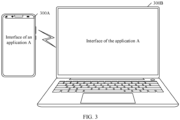
- the adaptive interface display method provided in embodiments of this application may be applied to a scenario in which a mobile phone 300A (namely, the first device) projects an interface of an application A to a notebook computer 300B (namely, the second device) shown in FIG. 3 .
- a communication connection is established between the mobile phone 300A and the notebook computer 300B shown in FIG. 3 .
- a size of a screen for displaying the interface of the application A changes (is longer and wider), and an aspect ratio of the screen changes (is larger).
- the adaptive interface display method provided in embodiments of this application may be applied to an interface projection scenario in an in-vehicle background.
- the first device is a driver screen device in a vehicle
- the second device is a front passenger display device or a rear display device.
- the driver screen device may perform interface projection to the front passenger display device and/or the rear display device.
- the terminal device may include but is not limited to a smartphone (for example, a foldable mobile phone), a netbook, a tablet computer, a vehicle-mounted device, a wearable device (for example, a smartwatch, a smart band, or smart glasses), a camera (for example, a single-lens reflex camera or a card camera), a personal computer (personal computer, PC), a palmtop computer, a smart television, a personal digital assistant (personal digital assistant, PDA), a portable multimedia player (portable multimedia player, PMP), a projection device, a smart screen device, an augmented reality (augmented reality, AR) device/a virtual reality (virtual reality, VR) device, a mixed reality (mixed reality, MR) device, a television, a somatosensory game console in a human-computer interaction scenario, or the like.
- a smartphone for example, a foldable mobile phone
- a netbook for example, a tablet computer
- a vehicle-mounted device for example, a wearable device
- FIG. 4 is a diagram of a hardware structure of a terminal device according to an embodiment of this application by using a foldable mobile phone as an example.
- the terminal device may include a processor 410, an external memory interface 420, an internal memory 421, a universal serial bus (universal serial bus, USB) interface 430, a charging management module 440, a power management module 441, a battery 442, an antenna 1, an antenna 2, a mobile communication module 450, a wireless communication module 460, an audio module 470, a speaker 470A, a receiver 470B, a microphone 470C, a headset jack 470D, a sensor module 480, a button 490, a motor 491, an indicator 492, a camera 493, a display 494, a subscriber identification module (subscriber identification module, SIM) card interface 495, and the like.
- SIM subscriber identification module
- the sensor module 480 may include a pressure sensor 480A, a gyroscope sensor 480B, a barometric pressure sensor 480C, a magnetic sensor 480D, an acceleration sensor 480E, a distance sensor 480F, an optical proximity sensor 480G, a fingerprint sensor 480H, a temperature sensor 480J, a touch sensor 480K, an ambient light sensor 480L, a bone conduction sensor 480M, and the like.
- the terminal device may include more or fewer components than those shown in the figure, or some components may be combined, or some components may be split, or different component arrangements may be used.
- the components shown in the figure may be implemented by using hardware, software, or a combination of software and hardware.
- the processor 410 may include one or more processing units.
- the processor 410 may include an application processor (application processor, AP), a modem processor, a graphics processing unit (graphics processing unit, GPU), an image signal processor (image signal processor, ISP), an audio processor/digital processor (audio processor), a controller, a memory, a video codec, an audio codec, a digital signal processor (digital signal processor, DSP), a baseband processor, a neural-network processing unit (neural-network processing unit, NPU), and/or the like.
- Different processing units may be independent components, or may be integrated into one or more processors.
- the controller may be a nerve center and a command center of the terminal device.
- the controller may generate an operation control signal based on an operation code of a user operation instruction and a time sequence signal, to complete control of instruction reading and instruction execution.
- a memory may be further disposed in the processor 410, and is configured to store instructions and data.
- the memory in the processor 410 is a cache memory.
- the memory may store instructions or data just used or cyclically used by the processor 410. If the processor 410 needs to use the instructions or data again, the processor 410 may directly invoke the instructions or data from the memory. This avoids repeated access and reduces waiting time of the processor 410, thereby improving system efficiency.
- the processor 410 may include one or more interfaces.
- the interface may include an inter-integrated circuit (inter-integrated circuit, I2C) interface, an inter-integrated circuit sound (inter-integrated circuit sound, I2S) interface, a pulse code modulation (pulse code modulation, PCM) interface, a universal asynchronous receiver/transmitter (universal asynchronous receiver/transmitter, UART) interface, a mobile industry processor interface (mobile industry processor interface, MIPI), a general-purpose input/output (general-purpose input/output, GPIO) interface, a subscriber identification module interface, a universal serial bus interface, and/or the like.
- I2C inter-integrated circuit
- I2S inter-integrated circuit sound
- PCM pulse code modulation
- PCM pulse code modulation
- UART universal asynchronous receiver/transmitter
- MIPI mobile industry processor interface
- GPIO general-purpose input/output
- subscriber identification module interface a universal serial bus interface, and/or the like
- the I2C interface is a bidirectional synchronization serial bus, and includes one serial data line (serial data line, SDA) and one serial clock line (serial clock line, SCL).
- the processor 410 may include a plurality of groups of I2C buses.
- the processor 410 may be separately coupled to the touch sensor 480K, a microphone, the camera 493, and the like through different I2C bus interfaces.
- the processor 410 may be coupled to the touch sensor 480K through the I2C interface, so that the processor 410 communicates with the touch sensor 480K through the I2C bus interface, to implement a touch function of the terminal device.
- an interface connection relationship between modules illustrated in embodiments of this application is merely an illustrative description, and does not constitute a limitation on a structure of the terminal device.
- the terminal device may alternatively use an interface connection manner different from that in the foregoing embodiment, or use a combination of a plurality of interface connection manners.
- the charging management module 440 is configured to receive a charging input from a charger.
- the power management module 441 is configured to connect the battery 442, the charging management module 440, and the processor 410.
- the power management module 441 receives an input of the battery 442 and/or the charging management module 440, to supply power to the processor 410, the internal memory 421, an external memory, the display 494, the camera 493, the wireless communication module 463, and the like.
- a wireless communication function of the terminal device may be implemented through the antenna 1, the antenna 2, the mobile communication module 450, the wireless communication module 460, the modem processor, the baseband processor, and the like.
- the antenna 1 and the antenna 2 are configured to transmit and receive an electromagnetic wave signal.
- Each antenna in the terminal device may be configured to cover one or more communication frequency bands. Different antennas may be further multiplexed, to improve antenna utilization.
- the mobile communication module 450 may provide a wireless communication solution that is applied to the terminal device and that includes 2G/3G/4G/5G or the like.
- the modem processor may include a modulator and a demodulator.
- the modulator is configured to modulate a to-be-sent low-frequency baseband signal into a medium-high frequency signal.
- the demodulator is configured to demodulate a received electromagnetic wave signal into a low-frequency baseband signal.
- the wireless communication module 460 may provide a wireless communication solution that is applied to the terminal device and that includes a wireless local area network (wireless local area network, WLAN) (for example, a wireless fidelity (wireless fidelity, Wi-Fi) network), Bluetooth (Bluetooth, BT), a BeiDou navigation satellite system (BeiDou navigation satellite system, BDS), a global navigation satellite system (global navigation satellite system, GNSS), frequency modulation (frequency modulation, FM), a near field communication (near field communication, NFC) technology, an infrared (infrared, IR) technology, or the like.
- WLAN wireless local area network
- the terminal device implements a display function by using the graphics processing unit (graphics processing unit, GPU), the display 494, the application processor, and the like.
- the GPU is a microprocessor for image processing, and is connected to the display 494 and the application processor.
- the GPU is configured to perform data and geometric computation for graphic rendering.
- the processor 410 may include one or more GPUs that execute program instructions to generate or change display information.
- the display 494 is configured to display an image, a video, and the like.
- the display 494 includes a display panel.
- the display panel may be a liquid crystal display (liquid crystal display, LCD), an organic light-emitting diode (organic light-emitting diode, OLED), an active-matrix organic light emitting diode (active-matrix organic light emitting diode, AMOLED), a flexible light-emitting diode (flexible light-emitting diode, FLED), a quantum dot light emitting diode (quantum dot light emitting diode, QLED), or the like.
- LCD liquid crystal display
- OLED organic light-emitting diode
- AMOLED active-matrix organic light emitting diode
- FLED flexible light-emitting diode
- QLED quantum dot light emitting diode
- the display 494 may be configured to display an interface (for example, an application interface, an applet interface, or a function interface).
- an interface for example, an application interface, an applet interface, or a function interface.
- the terminal device may implement an image shooting function by using the image signal processor (image signal processor, ISP), the camera 493, the video codec, the GPU, the display 494, the application processor, and the like.
- the camera 493 may include a front-facing camera and a rear-facing camera of the terminal device, and may be an optical zoom lens or the like. This is not limited in this application.
- the external memory interface 420 may be configured to connect to an external storage card, for example, a micro SD card, to expand a storage capability of the terminal device.
- the external storage card communicates with the processor 410 through the external memory interface 420, to implement a data storage function. For example, files such as audios or videos are stored in the external storage card.
- the internal memory 421 may be configured to store executable program code of a computer program.
- the computer program may include an operating system program and an application program.
- the operating system may include but is not limited to operating systems such as Symbian ® (Symbian ® ), Android ® (Android ® ), Microsoft ® Windows ® , Apple iOS ® , Blackberry ® (Blackberry ® ), and Harmony ® (Harmony ® ) OS.
- the executable program code includes instructions.
- the processor 410 runs the instructions stored in the internal memory 421, to perform various function applications and data processing of the terminal device.
- the internal memory 421 may include a program storage region and a data storage region.
- the program storage region may store an operating system, and an application required by at least one function (for example, an audio playing function or an image playing function).
- the data storage region may store data (for example, application data or user data) created when the terminal device is used, and the like.
- the internal memory 421 may include a high-speed random access memory, and may further include a nonvolatile memory, for example, at least one magnetic disk storage device, a flash memory, or a universal flash storage (universal flash storage, UFS).
- the terminal device may implement an audio function, for example, audio playing and recording, by using the audio module 470, the speaker 470A, the receiver 470B, the microphone 470C, the headset jack 470D, the application processor, and the like.
- an audio function for example, audio playing and recording, by using the audio module 470, the speaker 470A, the receiver 470B, the microphone 470C, the headset jack 470D, the application processor, and the like.
- the touch sensor 480K is also referred to as a "touch panel”.
- the touch sensor 480K may be disposed on the display 494.
- the touch sensor 480K and the display 494 form a touchscreen, which is also referred to as a "touch screen”.
- the touch sensor 480K is configured to detect a touch operation performed on or near the touch sensor.
- the touch sensor may transfer a detected touch operation (including information such as a touch position, touch strength, a contact area, and touch duration) to the processor (for example, the DSP), to determine a touch event type.
- a visual output related to the touch operation may be provided on the display 494.
- the touch sensor 480K may alternatively be disposed on a surface of the terminal device at a position different from that of the display 494.
- the terminal device may detect, by using the touch sensor 480K, an operation performed by the user to indicate to open an application/applet/function, an operation performed by the user on an application/applet/function interface, and the like.
- the terminal device may include more or fewer components than those shown in the figure, or some components may be combined, or some components may be split, or different component arrangements may be used.
- the components shown in the figure may be implemented by using hardware, software, or a combination of software and hardware.
- FIG. 5 is a block diagram of a software structure of a terminal device according to an embodiment of this application by using an Android ® system as an example.
- the software may be divided into several layers based on a layered architecture, and each layer has a clear role and task. The layers communicate with each other through a software interface.
- the Android ® system may be divided into an application layer, an application framework (Framework) layer, an Android runtime (Android runtime) and a system library, and a kernel layer from top to bottom based on a layered architecture.
- an application framework Framework
- Android runtime Android runtime
- the application layer may include a series of applications. As shown in FIG. 5 , applications such as Camera, Gallery, Calendar, Phone, Maps, Navigation, WLAN, Bluetooth, Music, Videos, and Messages may be included.
- applications shown in FIG. 5 is merely used as an example, and the application may alternatively be a third-party application.
- the application framework (Framework) layer is configured to provide an application programming interface (application programming interface, API) and a programming framework for an application at the application layer.
- the application framework layer includes some predefined functions. As shown in FIG. 5 , the application framework layer may include a window manager, a content provider, a view system, a phone manager, a resource manager, a notification manager, and the like.
- the window manager is configured to manage a window program.
- the window manager may obtain a size of the display, determine whether there is a status bar, perform screen locking, take a screenshot, and the like.
- the content provider is configured to: store and obtain data, and enable the data to be accessed by an application.
- the data may include a video, an image, an audio, calls that are made and received, a browsing history, a bookmark, an address book, and the like.
- the view system includes visual controls such as a control for displaying a text and a control for displaying an image.
- the view system may be configured to construct an application interface.
- a display interface may include one or more views.
- a display interface including an SMS message notification icon may include a text display view and an image display view.
- the phone manager is configured to provide a communication function of the terminal device, for example, management of a call status (including answering, declining, or the like).
- the resource manager provides various resources such as a localized character string, an icon, an image, a layout file, and a video file for an application.
- the notification manager enables an application to display notification information in the status bar, may be configured to convey a notification message, and may automatically disappear after a short pause without requiring a user interaction.
- the notification manager is configured to notify download completion, give a message notification, and the like.
- the notification manager may alternatively be a notification that appears in a top status bar of the system in a form of a graph or a scroll bar text, for example, a notification of an application running on a background, or may be a notification that appears on the screen in a form of a dialog window.
- text information is displayed in the status bar, an announcement is given, the device vibrates, or the indicator light blinks.
- the Android runtime includes a kernel library and a virtual machine.
- the Android ® runtime is responsible for scheduling and management of the Android ® system.
- the kernel library includes two parts: a function that needs to be called in Java language and a kernel library of Android ® .
- the system library may include a plurality of functional modules, for example, a surface manager (surface manager), a media library (media library), a three-dimensional graphics processing library (for example, OpenGL ES), and a 2D graphics engine (for example, SGL).
- a surface manager surface manager
- media library media library
- three-dimensional graphics processing library for example, OpenGL ES
- 2D graphics engine for example, SGL
- the surface manager is configured to manage a display subsystem and provide fusion of 2D and 3D layers for a plurality of applications.
- the media library supports playback and recording in a plurality of commonly used audio and video formats, static image files, and the like.
- the media library may support a plurality of audio and video encoding formats, for example, MPEG-4, H.264, MP3, AAC, AMR, JPG, and PNG.
- the three-dimensional graphics processing library is configured to implement three-dimensional graphics drawing, image rendering, composition, layer processing, and the like.
- the 2D graphics engine is a drawing engine for 2D drawing.
- the kernel layer is a layer between a hardware layer and the foregoing software layer.
- the kernel layer may include a display driver, an input/output device driver (for example, a driver for a keyboard, a touchscreen, a headset, a speaker, or a microphone), a camera driver, an audio driver, a sensor driver, and the like.
- the user performs an input operation by using an input device (for example, a touchscreen, a keyboard, or a microphone), and the kernel layer may generate a corresponding input event based on the input operation.
- step 1 to step 5 need to be performed for display of an interface.
- Step 1 is measurement, which is used to calculate a display size of each control and/or element on the interface, for example, obtain and save a size of a control and/or a size of an element on the interface according to settings of control and/or element attributes in an xml layout file and code of an application.
- the element on the interface is a child control, an icon, or a character (for example, a text).
- a child control an icon, or a character (for example, a text).
- the control is a menu bar, a menu, a search box, or a search button. This is not limited in this application.
- Step 2 is layout, which is used to determine a specific position range of the control and/or element on the interface based on information obtained through measurement.
- Step 3 is drawing, which is used to: draw each control and/or element on a canvas (canvas) after the position range of the control and/or element on the interface is determined, and construct a drawing instruction.
- Step 4 is rendering, which is used to adjust brightness, contrast, saturation, and the like of a drawn layer.
- Step 5 is displaying, which is used to display a rendered layer on a display.
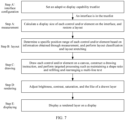
- step A to step E need to be performed for display of an interface.
- Step A measurement.
- the measurement phase is further used to perform layout restoration.
- a terminal device may modify a screen size-related parameter, for example, modify the parameter to an initial size, so that a system considers that the interface is to be displayed on a screen of the initial size.
- the initial size is, for example, an original screen size predefined during application/applet/function development.
- the initial size is, for example, a screen size used when an application/applet/function interface is displayed last time (for example, before folding, before unfolding, or before projection). This is not specifically limited in this application.
- Step B layout.
- the layout phase is further used to perform layout classification and layout stretching.
- the layout classification refers to identifying and classifying a layout type of each control and/or element on a current interface, to determine a subsequent stretching policy.
- the layout stretching refers to executing an adaptive policy like stretching, alignment, or translation based on a layout type classification result, and invoking a corresponding adaptive algorithm to modify a position, a size, an alignment manner, and the like of the control and/or element.
- the adaptive algorithm and the like may be preset in an operating system, for example, preset in an application framework layer of the terminal device.
- Step C drawing.
- the drawing phase is used to: draw each control and/or element on a canvas (canvas) after the position range of the control and/or element on the interface is determined, and construct a drawing instruction.
- the drawing phase is further used to perform targeted processing such as maintaining a shape ratio and filling and rearranging a multi-line text on a special element.
- the special element is a control including multi-line text content, or a control including a special shape.
- Step D rendering.
- the rendering phase is used to adjust brightness, contrast, saturation, and the like of a drawn layer.
- Step E displaying.
- the displaying phase is used to display a rendered layer on a display.
- the drawing phase may be further improved, to implement filling and rearrangement of elements such as a control including multi-line text content and a list-type control, thereby implementing a more friendly interface display effect.
- an interface display process further includes step A'.
- Step A' interface configuration.
- the interface configuration phase is used to set an adaptive display capability trustlist. For example, if an application/applet/function is set in the adaptive display capability trustlist, the application/applet/function may perform step A to step E shown in FIG. 7 to perform adaptive interface display. If the application/applet/function is not set in the adaptive display capability trustlist, or is set in an adaptive display capability blocklist, the application/applet/function performs step A to step E shown in FIG. 6B to display an interface.
- step A to step E may be implemented based on an application framework layer (the view system shown in FIG. 5 ) of a terminal device.
- an application framework layer the view system shown in FIG. 5
- the interface is an application interface.
- FIG. 8 and FIG. 9 show a comparison effect between a conventional application interface display process and an application interface display process provided in embodiments of this application when a size of a display screen changes.
- FIG. 8 is a diagram of the conventional application interface display process.
- a terminal device first creates a view tree (ViewTree (also referred to as Tree View)).
- ViewTree also referred to as Tree View
- an application creates a view tree (ViewTree) by traversing an xml layout file of the application.
- the terminal device traverses the view tree (ViewTree) to perform measurement, layout, drawing, and subsequent processing (such as rendering and displaying) on each control in the view tree (ViewTree).
- the ViewTree is a tree structure formed by combining and nesting different View components (ViewItems) and/or View groups (ViewGroups).
- a ViewItem or a ViewGroup in the ViewTree is used to present a control or an element on a ViewTree user interface (user interface, UI) (a UI interface for short).
- the ViewGroup may contain a group of ViewItems and/or ViewGroups, and the ViewGroup is an extension of a View.
- the ViewItem or the ViewGroup is customized and preset based on an actual application interface requirement.
- the ViewItem is a statically defined tree, a dynamically constructed tree, or a data-bound tree. This is not limited in this application.
- the ViewItem is used to present a menu, a search button, an icon, a character (for example, a text), and the like on the UI.
- the ViewGroup is used to present a menu bar, a search bar, a text box, and the like on the UI.
- the ViewTree includes three basic component types: a root component, a parent component, and a leaf component.
- the root component is a top-level parent node in the ViewTree.
- the root component is a node that has a child node and whose Parent attribute value is empty in the ViewTree.
- the parent component is a specific node in the ViewTree, and the parent component has a child node.
- the leaf component is a node that does not have a child node in the ViewTree.
- the root component is used to present the menu bar on the UI
- the parent component is used to present a menu in the menu bar
- the leaf component is used to present a text corresponding to the menu.
- a position and a size of a control are mainly represented by a parameter A, a parameter B, a parameter C, and a parameter D.
- a current control is a control A
- the control A is a child node of a control B.
- the parameter A indicates a distance between a leftmost end of a layoutable region of the current control and a leftmost end of a parent component, and the parameter A is, for example, a left parameter.
- the parameter B indicates a distance between the top of the layoutable region of the current control and the top of the parent component, and the parameter B is, for example, a top parameter.
- the parameter C indicates a distance between a rightmost end of the layoutable region of the current control and the leftmost end of the parent component, and the parameter C is, for example, a right parameter.
- the parameter D indicates a distance between the bottom of the layoutable region of the current control and the top of the parent component, and the parameter D is, for example, a bottom parameter.
- a rectangular region described by (the parameter A, the parameter B, the parameter C, and the parameter D) is a region in which the current control A can be laid out in the parent component (namely, the control B).
- a position and a size of a control may alternatively be represented by the parameter A, the parameter B, a parameter E, and a parameter F.
- the parameter E indicates a width of a current control
- the parameter E is, for example, a width parameter
- the parameter F indicates a height of the current control
- the parameter F is, for example, a height parameter.
- a position and a size of a control may alternatively be represented by the parameter C, the parameter D, the parameter E, and the parameter F.
- a position and a size of a control may alternatively be represented by the parameter A, the parameter D, the parameter E, and the parameter F.
- a position and a size of a control may alternatively be represented by the parameter C, the parameter B, the parameter E, and the parameter F.
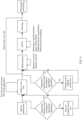
- the application interface display method provided in embodiments of this application may include the following steps.
- a terminal device creates a view tree (ViewTree). For example, an application creates a view tree (ViewTree) by traversing an xml layout file of the application.
- the terminal device traverses the view tree (ViewTree) to perform control measurement and layout restoration on each control in the view tree (ViewTree), so that a system considers that an interface is to be displayed on a screen of an initial size.
- the terminal device determines a specific position range of the control, determines layout classification, and performs layout stretching. For example, the terminal device may determine, by analyzing a type, a size, a layout parameter, and the like of each node in the view tree (ViewTree), an adaptive scenario and a stretch factor corresponding to each node. Further, the terminal device may perform adaptive adjustment on a corresponding node based on the determined adaptive scenario and stretch factor, including modification of a position, a size, an alignment manner, and the like.
- view tree ViewTree
- the terminal device may perform adaptive adjustment on a corresponding node based on the determined adaptive scenario and stretch factor, including modification of a position, a size, an alignment manner, and the like.
- the terminal device draws an interface and performs subsequent processing (such as rendering and displaying).
- the terminal device may further determine whether to execute an adaptive interface procedure, that is, determine whether to start an adaptive adjustment algorithm.
- the terminal device may determine whether to start the adaptive adjustment algorithm. If it is determined to start the adaptive adjustment algorithm, the terminal device saves a screen size obtained before the screen size changes (an original screen size for short), and performs a subsequent step of creating a view tree (ViewTree); or if it is determined not to start the adaptive adjustment algorithm, the terminal device performs a subsequent step of creating a view tree (ViewTree).
- the terminal device saves a screen size obtained before the screen size changes (an original screen size for short), and performs a subsequent step of creating a view tree (ViewTree); or if it is determined not to start the adaptive adjustment algorithm, the terminal device performs a subsequent step of creating a view tree (ViewTree).
- the terminal device may determine again whether to start the adaptive adjustment algorithm. If it is determined to start the adaptive adjustment algorithm, the terminal device modifies a screen size-related parameter to the original screen size, and performs a subsequent step of traversing the view tree (ViewTree) to perform measurement; or if it is determined not to start the adaptive adjustment algorithm, the terminal device performs a subsequent step of traversing the view tree (ViewTree) to perform measurement.
- the terminal device may determine to execute the adaptive interface procedure when the screen size (for example, a screen aspect ratio) changes.
- the screen size for example, a screen aspect ratio
- the terminal device may determine to execute the adaptive interface procedure when the screen size (for example, a screen aspect ratio) changes and an application/applet/function to which a current interface belongs is in an adaptive display capability trustlist.
- the screen size for example, a screen aspect ratio
- the terminal device may determine to execute the adaptive interface procedure when the screen size (for example, a screen aspect ratio) changes and an application/applet/function to which a current interface belongs is not in an adaptive display capability blocklist.
- the screen size for example, a screen aspect ratio
- a screen of a foldable terminal switches from a folded state to an unfolded state. It is assumed that at an initial moment, the foldable terminal in the folded state displays an interface on the folded screen. After the screen switched from the folded state to the unfolded state, the foldable terminal performs the adaptive interface display method provided in embodiments of this application, to adaptively display the interface on the unfolded screen.
- a screen of a foldable terminal switches from an unfolded state to a folded state. It is assumed that at an initial moment, the foldable terminal in the unfolded state displays an interface on the unfolded screen. After the screen switched from the unfolded state to the folded state, the foldable terminal performs the adaptive interface display method provided in embodiments of this application, to adaptively display the interface on the folded screen.
- an adaptive interface display method provided in embodiments of this application may include the following S1101 to S1104.
- the foldable terminal displays a first interface on a first screen, where a size of the first screen is a first size, and the first interface includes one or more controls and/or elements.
- the first interface may be an application interface (including a light application, a quick application, and the like), an applet interface, a function interface, or the like. This is not limited in this application.
- the element is a child control, an icon (icon), or a character (for example, a text).
- the child control is a menu bar, a menu, a search box, or a search button. This is not limited in this application.
- the first interface is an interface shown in FIG. 12 .
- the first interface includes a plurality of controls: a control 1 to a control 6.
- the control 1 includes a search box; the control 2 includes a plurality of icons, and each icon corresponds to a text; the control 3 includes an icon and a text box, and the text box includes a multi-line text; the control 4 includes an icon and a text box; the control 5 includes a plurality of icons; and the control 6 includes a plurality of icons.
- the first screen is a folded screen. If the foldable terminal is in an unfolded state at the initial moment, the first screen is an unfolded screen.
- the foldable terminal modifies the screen size-related parameter, so that the initial canvas size of the interface is a size of the folded screen in the folded state, that is, the first size is a size of the folded screen.
- the second size is a size of the unfolded screen.
- the foldable terminal modifies the screen size-related parameter, so that the initial canvas size of the interface is a size of the unfolded screen in the unfolded state, that is, the first size is a size of the unfolded screen.
- the second size is a size of the folded screen.
- the foldable terminal may traverse a view tree (ViewTree) to perform measurement and layout restoration on each control and element in the view tree (ViewTree), so that a system considers that the interface is to be displayed on a screen of an initial size (namely, the first screen).
- the screen size-related parameter may be located in DisplayMetrics.
- the foldable terminal may modify the screen size-related parameter in DisplayMetrics to the size of the original screen (namely, the first screen), so that the initial canvas size of the interface is the first size.
- DisplayMetrics is a class in an operating system (for example, an Android ® system). DisplayMetrics is used to provide general information about display, such as a display size, a resolution, and a font. For a specific description of DisplayMetrics, refer to a conventional technology. Details are not described in embodiments of this application.
- the foldable terminal obtains a layout type of the control and a type of the element on the first interface, where the layout type includes but is not limited to a common layout, a grid layout, and a list layout, and the type of the element includes but is not limited to a special shape, a multi-line text, and a child control.
- the common layout refers to a layout manner that can support free stretching.
- a control in the common layout is usually not deformed due to free stretching.
- layout types of the control 1, the control 3, and the control 4 in FIG. 12 are the common layout.
- the grid layout means that limited elements are displayed in a control (for example, n elements are displayed, where n is a positive integer, and n ⁇ 2), and all elements are displayed in the control, where the n elements are of an equal size.
- the n elements in the control in the grid layout may also be arranged at equal intervals.
- layout types of the control 2 and the control 6 in FIG. 12 are the grid layout.
- the list layout means that elements displayed in a control are presented in a dynamically loaded list and are not completely displayed in the control.
- a layout type of the control 5 in FIG. 12 is the list layout.
- a special shape is, for example, an element that needs to maintain a ratio (for example, an aspect ratio) of the element.
- a ratio for example, an aspect ratio
- special icons in the control 3 and the control 4 in FIG. 12 need to maintain aspect ratios of the elements, and are special shapes.
- the special shape may be a user avatar.
- the multi-line text is text content in the control 3 in FIG. 12 .
- S 1104 The foldable terminal arranges and draws the control and the element on the first interface based on the obtained layout type of the control and the type of the element by using a corresponding adaptive algorithm on a canvas of the second size.
- the second size is a size of the second screen.
- the foldable terminal may execute an adaptive policy like stretching, alignment, or translation of a corresponding control based on a layout type of the foregoing one or more controls and the type of the element, and invoke a corresponding adaptive algorithm to modify a position, a size, an alignment manner, and the like of the control.
- a position of the control may be modified by using a translation operation
- a position and a size of the control may be modified by using a stretching operation
- an alignment manner may be modified by using an alignment operation.
- the alignment manner may include but is not limited to a left alignment manner, a right alignment manner, and a center alignment manner.
- the following describes the corresponding adaptive algorithm based on a specific layout type of the control or the type of the element.
- an aspect ratio of the control When an aspect ratio of the first size is different from an aspect ratio of the second size, after free stretching, an aspect ratio of the control usually changes, as shown in controls 1 in FIG. 14(a) and FIG. 14(b) . However, this change in the aspect ratio does not cause visual deformation.
- the width-height stretch factor is related to the size of the first screen (namely, the first size) and the size of the second screen (namely, the second size).
- the screen of the foldable terminal switches from the folded state to the unfolded state.
- a width of the first screen is a and a height of the first screen is b
- a width of the second screen is 2a and a height of the second screen is b.
- the width-height stretch factor is (2a/a, b/b), that is, (2, 1).
- the screen of the foldable terminal switches from the unfolded state to the folded state.
- a width of the first screen is 2a and a height of the first screen is b
- a width of the second screen is a and a height of the second screen is b.
- the width-height stretch factor is (a/2a, b/b), that is, (0.5, 1).
- the parameter A, the parameter B, the parameter C, and the parameter D are respectively parameters of the control before stretching.
- a control region occupied by an element for example, a child control
- a region corresponding to the control may be first determined based on a grid equal division policy, and then each element is stretched proportionally and is displayed in the center of the control region in which the element is located.
- the foldable terminal may first obtain, through calculation according to the free stretching algorithm, the control region occupied by the element in the region corresponding to the control. Then, each element is stretched proportionally according to a proportional stretching algorithm. Finally, the corresponding element is displayed in the center of the control region in which each element is located.
- a core concept of the proportional stretching algorithm is stretching an element in a region corresponding to a control based on a smaller value min(w s , h s ) (namely, a smaller value in w s and h s ) of the width-height stretch factor. For example, it is assumed that the width-height stretch factor is (1, 2). In this case, an element in a region corresponding to a control is stretched based on a width-height stretch factor 1 (namely, min(1, 2)).
- a core concept of the grid equal division policy is as follows: First, a region corresponding to a control (for example, a region 1 in an initial state shown in FIG. 15 ) is freely stretched based on a width-height stretch factor (w s , h s ) (for example, (2, 1)). Then, elements (for example, a control a, a control b, and a control c in an initial state shown in FIG.
- w s , h s width-height stretch factor
- the elements for example, the control a, the control b, and the control c in the intermediate state shown in FIG. 15 ) in the region corresponding to the control are translated rightward by offset, to obtain an effect of centering the elements in a final state shown in FIG. 15 .
- offset (w s - 1)/2 * (Parameter C - Parameter A).
- a child control in the control corresponds to a text
- the text corresponding to the child control is processed by using a policy consistent with that of the child control.
- a text and a corresponding child control may be stretched proportionally as a whole and displayed in the center of a control region in which the child control is located, to obtain a display effect of the control 2 shown in FIG. 14(b) .
- the control may maintain an alignment manner in the initial state.
- Center alignment is used as an example.
- a center point of a control may be used to anchor a control position to implement center alignment of the control.
- center alignment of the control may be implemented by using the following calculation formula 1.1 to calculation formula 1.6:
- Parameter E ′ Parameter E * min w s h s
- Parameter F ′ Parameter F * min w s h s
- a ′ Parameter A * min w s h s + Parameter E * min w s h s ⁇ Parameter E ′
- Parameter B ′ Parameter B * min w s h s + Parameter F * min w s h s ⁇ Parameter F ′
- Parameter C ′ Parameter A ′ + Parameter E ′
- Parameter D ′ Parameter B ′ + Parameter F ′
- Left alignment is used as an example.
- a vertex in an upper left corner of a control may be used to anchor a control position to implement left alignment of the control.
- left alignment of the control may be implemented by using the following calculation formula 2.1 to calculation formula 2.6:
- Parameter E ′ Parameter E * min w s h s
- Parameter F ′ Parameter F * min w s h s
- a ′ Parameter A * min w s h s
- Parameter B ′ Parameter B * min w s h s
- Parameter C ′ Parameter A ′ + Parameter E ′
- Parameter D ′ Parameter B ′ + Parameter F ′
- a vertex in an upper right corner of a control may be used to anchor a control position to implement right alignment of the control.
- right alignment of the control may be implemented by using the following calculation formula 3.1 to calculation formula 3.6:
- a quantity of displayed columns/rows of the control may be scaled exponentially based on a scaling policy of the quantity of displayed columns/rows, so that more/fewer elements are displayed based on an actual screen size.
- the foldable terminal may first freely stretch a region corresponding to a control based on a width-height stretch factor, and then modify a quantity of columns/rows displayed in the control based on the width-height stretch factor, to display more/fewer elements. For example, if the width-height stretch factor is (2, 1), the quantity of columns is doubled.
- the adaptive processing method for a control in the list layout is not only applicable to a list control presented in a dynamic loading manner of sliding up and down, but also applicable to a list layout control presented in a dynamic loading manner of sliding left and right.
- a parameter used to determine a quantity of columns/rows displayed in a control is, for example, spanCount. Based on this, in embodiments of this application, the quantity of columns/rows displayed in the control may be changed by modifying the parameter spanCount.
- a list control 5 presented in a dynamic loading manner of sliding up and down shown in FIG. 14(a) is used as an example. After a region corresponding to the control 5 is freely stretched based on a width-height stretch factor, and a parameter (for example, spanCount) of a quantity of displayed columns is doubled based on a width-height stretch factor (2, 1), the control 5 displays a display effect of the control 5 shown in FIG. 14(b) .
- a parameter for example, spanCount
- a list control B presented in a dynamic loading manner of sliding up and down shown in FIG. 16(a) is used as an example.
- a region corresponding to the control B is freely stretched based on a width-height stretch factor, and a parameter (for example, spanCount) of a quantity of displayed columns is doubled based on a width-height stretch factor (2, 1)
- the control B displays a display effect of the control B shown in FIG. 16(b) .
- a list layout control A presented in a dynamic loading manner of sliding left and right shown in FIG. 16(a) is used as an example.
- the foldable terminal may first freely stretch a region corresponding to the control A based on a width-height stretch factor. Then, after a parameter (for example, spanCount) of a quantity of displayed columns is doubled based on a width-height stretch factor (2, 1), the control displays a display effect of the control A shown in FIG. 16(b) .
- a parameter for example, spanCount
- targeted processing may be performed based on a specific situation.
- a special shape is an icon (icon) that needs to maintain a ratio (for example, an aspect ratio) of the element.
- proportional stretching may be performed on the element according to the proportional stretching algorithm, to keep the aspect ratio of the element unchanged.
- the foldable terminal may first freely stretch, based on a width-height stretch factor, a region corresponding to the control and a text layoutable region in the control, and then proportionally stretch a left circle in the control according to the proportional stretching algorithm.
- a region corresponding to a control and a text layoutable region in the control may be first freely stretched based on a width-height stretch factor.
- a text layout manner is recalculated based on the new layoutable region, a quantity of text lines is determined, and an actual height of the text is further determined.
- heights of the control and the text layoutable region are updated based on the calculated text layout manner.
- updating the heights of the control and the text layoutable region based on the calculated text layout manner may include but is not limited to: keeping widths of the control and the text layoutable region in an initial state unchanged, and recalculates the heights of the control and the text layoutable region based on the text layout manner (for example, a quantity of text lines).
- a horizontal multi-line text is used as an example.
- a horizontal multi-line text layout depends on a width of a text layoutable region. Therefore, in embodiments of this application, a core concept of performing text control filling and rearrangement is as follows: First, a region corresponding to a control (for example, a region 1 in an initial state shown in FIG. 17 ) and a text layoutable region (for example, a region 2 in the initial state shown in FIG. 17 ) in the control are freely stretched based on a width-height stretch factor (w s , h s ), to obtain a region corresponding to the control in an intermediate state in FIG. 17 (for example, a region 1 in the intermediate state shown in FIG.
- a text layoutable region for example, a region 2 in the intermediate state shown in FIG. 17
- a quantity of texts in each line is determined based on a new text layoutable region (for example, the region 2 in the intermediate state shown in FIG. 17 ), to determine a quantity of text lines, and further determine an actual text height.
- heights (for example, reduced to heights in an original state) of the region corresponding to the control and the text layoutable region are adjusted based on the determined quantity of text lines, to obtain a region corresponding to the control in a final state in FIG. 17 (for example, a region 1 in the final state shown in FIG.
- a text layoutable region for example, a region 2 in the final state shown in FIG. 17
- the text is displayed as a multi-line text.
- the text layoutable region is wider, and the text is displayed in a single line. Therefore, the heights of the region corresponding to the control and the text layoutable region need to be adjusted based on the determined quantity of text lines, to obtain a more reasonable display effect.
- the adaptive algorithm (for example, the free stretching algorithm, the proportional stretching algorithm, the grid equal division algorithm, an alignment algorithm, a translation algorithm, or a text control filling and rearrangement algorithm) may be preset in an operating system, for example, preset in an application framework layer of a terminal device.
- a screen size for example, an aspect ratio
- a layout of an interface on an initial screen is different from a layout of an interface on a final screen.
- FIG. 1 is used. Because a width of a final screen is twice a width of an initial screen, but screen heights are the same, an application layout is relatively sensitive to a screen width. Therefore, when an interface is laid out on the final screen, a size of each element is twice that in the initial screen. As a result, although the screen size increases, an amount of information displayed on the interface is about 50% of that displayed in the initial screen. For another example, based on a conventional interface display method, problems such as distortion of a control or an element of a special shape and an unreasonable text line layout may be caused.
- the terminal device may use different policies such as stretching, translation, and alignment for different types of controls on an interface, to adapt to a screen size. For example, when the screen size is larger, a problem that an amount of information displayed on the interface is less is avoided. For another example, when the screen size is smaller, a problem that information displayed on the interface is overcrowded is avoided.
- the adaptive interface display effect shown in FIG. 14(a) and FIG. 14(b) is used as an example.
- the control 2 and the control 6 are laid out in a form of occupying a reasonable region on the premise that no distortion occurs and the layout is even;
- the control 3 is laid out in a form of occupying a reasonable region on the premise that a layout of a quantity of rows is reasonable;
- the control 5 is laid out in a form of occupying a reasonable region to display more elements on the premise that no distortion occurs and the layout is even.
- an adaptive interface display effect shown in FIG. 16(a) and FIG. 16(b) is used as an example.
- control A and the control B are laid out in a form of occupying a reasonable region to display more elements on the premise that no distortion occurs and the layout is even.
- the method resolves an adaptation problem from a system layer while saving extra efforts of an application developer from a heavy workload of screen-based interface resizing.
- the method enables one interface that has been developed to adapt to terminal devices with different aspect ratios by using a general adaptive algorithm (for example, the free stretching algorithm, the proportional stretching algorithm, the grid equal division algorithm, the alignment algorithm, the translation algorithm, or the text control filling and rearrangement algorithm), and has a wider application coverage, higher adaptability, and stronger universality.
- a general adaptive algorithm for example, the free stretching algorithm, the proportional stretching algorithm, the grid equal division algorithm, the alignment algorithm, the translation algorithm, or the text control filling and rearrangement algorithm
- FIG. 13 to FIG. 17 of this application only an example in which a screen size is larger is used.
- a screen size is smaller, refer to the method described in the foregoing embodiments of this application.
- the control may be scaled down exponentially according to the free stretching algorithm and based on a width-height stretch factor.
- a control region occupied by an element in a region corresponding to the control may be first determined according to the proportional stretching algorithm, and then each element is scaled down proportionally.
- a quantity of displayed columns/rows of the control may be reduced exponentially, so that fewer elements are displayed based on an actual screen size.
- the element may be scaled down proportionally according to the proportional stretching algorithm, to keep the aspect ratio of the element unchanged.
- a region corresponding to a control and a text layoutable region in the control may be first freely scaled down based on a width-height stretch factor.
- a text layout manner is recalculated based on the new layoutable region, to determine a quantity of text lines (for example, increase a quantity of text lines), and further determine an actual text height.
- heights of the control and the text layoutable region are updated (for example, the heights are increased) based on the calculated text layout manner.
- the second device may obtain a layout type of one or more controls on a projection interface and a type of an element in a region corresponding to the control, to arrange and draw the control on the projection interface on a canvas of the second size based on the layout type of the one or more controls and the type of the element in the control by using a corresponding adaptive algorithm.
- the first device is a mobile phone
- the second device is a notebook computer.
- the first device is a driver screen device in a vehicle
- the second device is a front passenger display device or a rear display device.
- sequence numbers of the foregoing processes do not mean execution sequences in various embodiments of this application.
- the execution sequences of the processes should be determined based on functions and internal logic of the processes, and should not be construed as any limitation on the implementation processes of embodiments of this application.
- the terminal device includes a corresponding hardware structure and/or software module for executing each function.
- this application may be implemented by hardware or a combination of hardware and computer software. Whether a function is performed by hardware or hardware driven by computer software depends on particular applications and design constraints of the technical solutions. A person skilled in the art may use different methods to implement the described functions for each particular application, but it should not be considered that the implementation goes beyond the scope of this application.
- the terminal device may be divided into functional modules.
- each functional module corresponding to each function may be obtained through division, or two or more functions may be integrated into one processing module.
- the integrated module may be implemented in a form of hardware, or may be implemented in a form of a software functional module. It should be noted that, in embodiments of this application, module division is an example, and is merely a logical function division. In an actual implementation, another division manner may be used.
- FIG. 18 is a block diagram of a structure of a terminal device according to an embodiment of this application.
- the input device may include a display 1810, a communication unit 1820, a processing unit 1830, and a storage unit 1840.
- the display 1810 is configured to support the terminal device in displaying an interface, for example, displaying a first interface and/or another interface related to this embodiment of this application.
- the communication unit 1820 is configured to support the terminal device in receiving and sending a radio signal, for example, sending or receiving projection data and/or a projectionrelated instruction, and/or another process related to this embodiment of this application.
- the processing unit 1830 is configured to: support the terminal device in obtaining a layout type of a control and a type of an element on the first interface, determine a corresponding adaptive algorithm based on the layout type of the control and the type of the element, arrange and draw the control and the element on the first interface on a canvas of a second size according to the determined adaptive algorithm, and/or perform another process related to this embodiment of this application.
- the storage unit 1840 is configured to store computer program instructions and related data that are related to this embodiment of this application.
- the communication unit 1820 may include a radio frequency circuit.
- the terminal device may receive and send radio signals through the radio frequency circuit.
- the radio frequency circuit usually includes but is not limited to an antenna, at least one amplifier, a transceiver, a coupler, a low noise amplifier, a duplexer, and the like.
- the radio frequency circuit may further communicate with another device through wireless communication.
- the wireless communication may use any communication standard or protocol, including but not limited to a global system for mobile communications, a general packet radio service, code division multiple access, wideband code division multiple access, long term evolution, an e-mail message, a short message service, and the like.
- each module in the terminal device may be implemented in a form of software and/or hardware. This is not specifically limited herein.
- the input device is presented in a form of a functional module.
- the "module” herein may be an application-specific integrated circuit ASIC, a circuit, a processor that executes one or more software or firmware programs and a memory, an integrated logic circuit, and/or another component that can provide the foregoing functions.
- the data transmission may be completely or partially implemented in a form of a computer program product.
- the computer program product includes one or more computer instructions. When the computer program instructions are loaded and executed on a computer, the procedures or functions according to embodiments of this application are completely or partially implemented.
- the computer may be a general-purpose computer, a dedicated computer, a computer network, or other programmable apparatuses.
- the computer instructions may be stored in a computer-readable storage medium or may be transmitted from a computer-readable storage medium to another computer-readable storage medium.
- the computer instructions may be transmitted from a website, computer, server, or data center to another website, computer, server, or data center in a wired manner (for example, a coaxial cable, an optical fiber, or a digital subscriber line (digital subscriber line, DSL)) or a wireless manner (for example, infrared, radio, or microwave).
- the computer-readable storage medium may be any usable medium accessible by the computer, or a data storage device, for example, a server or a data center, integrating one or more usable media.
- the usable medium may be a magnetic medium (for example, a floppy disk, a hard disk, or a magnetic tape), an optical medium (for example, a digital video disk (digital video disk, DVD)), a semiconductor medium (for example, a solid state disk (solid state disk, SSD)), or the like.
- a magnetic medium for example, a floppy disk, a hard disk, or a magnetic tape
- an optical medium for example, a digital video disk (digital video disk, DVD)
- a semiconductor medium for example, a solid state disk (solid state disk, SSD)
- the software instructions may include a corresponding software module.
- the software module may be stored in a RAM memory, a flash memory, a ROM memory, an EPROM memory, an EEPROM memory, a register, a hard disk, a removable hard disk, a CD-ROM memory, or a storage medium in any other form well-known in the art.
- a storage medium is coupled to a processor, so that the processor can read information from the storage medium and write information into the storage medium.
- the storage medium may be a component of the processor.
- the processor and the storage medium may be disposed in an ASIC.
- the ASIC may be located in an electronic device.
- the processor and the storage medium may exist in the terminal device as discrete components.
Landscapes
- Engineering & Computer Science (AREA)
- Theoretical Computer Science (AREA)
- General Engineering & Computer Science (AREA)
- Human Computer Interaction (AREA)
- Physics & Mathematics (AREA)
- General Physics & Mathematics (AREA)
- Software Systems (AREA)
- Computer Networks & Wireless Communication (AREA)
- Signal Processing (AREA)
- Computer Hardware Design (AREA)
- Mathematical Physics (AREA)
- Environmental & Geological Engineering (AREA)
- User Interface Of Digital Computer (AREA)
- Digital Computer Display Output (AREA)
Applications Claiming Priority (2)
| Application Number | Priority Date | Filing Date | Title |
|---|---|---|---|
| CN202210302733.5A CN116841663A (zh) | 2022-03-25 | 2022-03-25 | 一种界面的自适应显示方法及终端设备 |
| PCT/CN2023/081679 WO2023179428A1 (zh) | 2022-03-25 | 2023-03-15 | 一种界面的自适应显示方法及终端设备 |
Publications (2)
| Publication Number | Publication Date |
|---|---|
| EP4471584A1 true EP4471584A1 (de) | 2024-12-04 |
| EP4471584A4 EP4471584A4 (de) | 2025-04-23 |
Family
ID=87798483
Family Applications (1)
| Application Number | Title | Priority Date | Filing Date |
|---|---|---|---|
| EP23773676.4A Pending EP4471584A4 (de) | 2022-03-25 | 2023-03-15 | Adaptives anzeigeverfahren einer schnittstelle und endgerätevorrichtung |
Country Status (4)
| Country | Link |
|---|---|
| US (1) | US20250013359A1 (de) |
| EP (1) | EP4471584A4 (de) |
| CN (2) | CN116680023A (de) |
| WO (1) | WO2023179428A1 (de) |
Families Citing this family (5)
| Publication number | Priority date | Publication date | Assignee | Title |
|---|---|---|---|---|
| CN117348827B (zh) * | 2023-09-19 | 2024-10-18 | 荣耀终端有限公司 | 显示模式切换时的显示方法及电子设备 |
| CN117389672B (zh) * | 2023-10-31 | 2024-05-17 | 江苏缤原力科技有限公司 | 一种页面自适应适配方法、电子设备及计算机可读介质 |
| CN117557682B (zh) * | 2024-01-09 | 2024-04-19 | 腾讯科技(深圳)有限公司 | 数据处理方法、装置、产品、设备和介质 |
| CN117891552A (zh) * | 2024-01-18 | 2024-04-16 | 维沃移动通信有限公司 | 界面显示方法、装置、电子设备及可读存储介质 |
| CN119254869B (zh) * | 2024-02-26 | 2025-10-03 | 荣耀终端股份有限公司 | 显示方法、外折叠屏设备以及存储介质 |
Family Cites Families (9)
| Publication number | Priority date | Publication date | Assignee | Title |
|---|---|---|---|---|
| US20110099494A1 (en) * | 2009-10-22 | 2011-04-28 | Microsoft Corporation | Dynamic graphical user interface layout |
| CN109918165B (zh) * | 2019-03-12 | 2022-07-01 | 北京小米移动软件有限公司 | 界面显示方法、装置和存储介质 |
| CN110597510B (zh) * | 2019-08-09 | 2021-08-20 | 华为技术有限公司 | 一种界面的动态布局方法及设备 |
| CN113687743A (zh) * | 2020-05-18 | 2021-11-23 | Oppo广东移动通信有限公司 | 显示控制方法、装置、存储介质及电子设备 |
| CN114077429A (zh) * | 2020-08-18 | 2022-02-22 | 华为技术有限公司 | 一种显示界面的布局方法及电子设备 |
| CN114115769B (zh) * | 2020-08-31 | 2023-09-29 | 华为技术有限公司 | 一种显示方法及电子设备 |
| CN112114928B (zh) * | 2020-09-28 | 2023-12-22 | 西安万像电子科技有限公司 | 显示页面的处理方法和装置 |
| CN112558951B (zh) * | 2020-12-24 | 2022-04-29 | 大唐互联科技(武汉)有限公司 | 一种可折叠屏网页适配方法、设备及存储设备 |
| CN113849254A (zh) * | 2021-09-06 | 2021-12-28 | 掌阅科技股份有限公司 | 页面布局的自适应调整方法及计算设备 |
-
2022
- 2022-03-25 CN CN202310572149.6A patent/CN116680023A/zh active Pending
- 2022-03-25 CN CN202210302733.5A patent/CN116841663A/zh active Pending
-
2023
- 2023-03-15 EP EP23773676.4A patent/EP4471584A4/de active Pending
- 2023-03-15 WO PCT/CN2023/081679 patent/WO2023179428A1/zh not_active Ceased
-
2024
- 2024-09-24 US US18/894,702 patent/US20250013359A1/en active Pending
Also Published As
| Publication number | Publication date |
|---|---|
| CN116680023A (zh) | 2023-09-01 |
| US20250013359A1 (en) | 2025-01-09 |
| WO2023179428A1 (zh) | 2023-09-28 |
| EP4471584A4 (de) | 2025-04-23 |
| CN116841663A (zh) | 2023-10-03 |
Similar Documents
| Publication | Publication Date | Title |
|---|---|---|
| EP4471584A1 (de) | Adaptives anzeigeverfahren einer schnittstelle und endgerätevorrichtung | |
| CN113553014B (zh) | 多窗口投屏场景下的应用界面显示方法及电子设备 | |
| US10853979B2 (en) | Electronic device and method for displaying screen thereof | |
| WO2023130921A1 (zh) | 一种适配多设备的页面布局的方法及电子设备 | |
| US20090276730A1 (en) | Techniques for navigation of hierarchically-presented data | |
| CN114237778B (zh) | 界面显示方法及电子设备 | |
| US12561149B2 (en) | Interface display method and electronic device | |
| CN113360122B (zh) | 移动终端及其文本显示方法 | |
| EP4216560A1 (de) | Projektionsverfahren für bildschirm einer elektronischen vorrichtung, medium dafür und elektronische vorrichtung | |
| US11989385B2 (en) | Cursor display method and electronic device | |
| EP3680765A1 (de) | Verfahren und vorrichtung zur steuerung einer navigationsleiste | |
| WO2023198010A1 (zh) | 显示方法及电子设备 | |
| WO2025167740A1 (zh) | 显示方法、用户界面及相关装置 | |
| US20180225261A1 (en) | Electronic device and operating method thereof | |
| WO2023217142A1 (zh) | 窗口尺寸调整方法、相关装置及通信系统 | |
| CN117519858A (zh) | 一种应用显示方法及电子设备 | |
| EP4462238A1 (de) | Fensteranzeigeverfahren, elektronische vorrichtung und computerlesbares speichermedium | |
| WO2024193215A1 (zh) | 一种自适应应用页面显示方法及设备 | |
| WO2025130059A9 (zh) | 一种界面显示方法、电子设备及存储介质 | |
| CN116719587A (zh) | 屏幕显示方法、电子设备及计算机可读存储介质 | |
| CN115509661A (zh) | 一种显示设备及osd界面绘制方法 | |
| EP4650923A1 (de) | Anzeigeverfahren und elektronische vorrichtung | |
| EP4517520A1 (de) | Anzeigeverfahren und elektronische vorrichtung | |
| EP4650956A1 (de) | Anzeigeverfahren für elektronische vorrichtung, elektronische vorrichtung und speichermedium | |
| EP4468184A1 (de) | Verfahren und vorrichtung zur visualisierung von anwendungssymbolen |
Legal Events
| Date | Code | Title | Description |
|---|---|---|---|
| STAA | Information on the status of an ep patent application or granted ep patent |
Free format text: STATUS: THE INTERNATIONAL PUBLICATION HAS BEEN MADE |
|
| PUAI | Public reference made under article 153(3) epc to a published international application that has entered the european phase |
Free format text: ORIGINAL CODE: 0009012 |
|
| STAA | Information on the status of an ep patent application or granted ep patent |
Free format text: STATUS: REQUEST FOR EXAMINATION WAS MADE |
|
| 17P | Request for examination filed |
Effective date: 20240828 |
|
| AK | Designated contracting states |
Kind code of ref document: A1 Designated state(s): AL AT BE BG CH CY CZ DE DK EE ES FI FR GB GR HR HU IE IS IT LI LT LU LV MC ME MK MT NL NO PL PT RO RS SE SI SK SM TR |
|
| A4 | Supplementary search report drawn up and despatched |
Effective date: 20250324 |
|
| RIC1 | Information provided on ipc code assigned before grant |
Ipc: G06F 3/0482 20130101ALI20250318BHEP Ipc: H04M 1/72454 20210101ALI20250318BHEP Ipc: H04M 1/02 20060101ALI20250318BHEP Ipc: G06F 3/04886 20220101ALI20250318BHEP Ipc: G06F 3/0488 20220101ALI20250318BHEP Ipc: G06F 3/04817 20220101ALI20250318BHEP Ipc: G06F 3/0481 20220101ALI20250318BHEP Ipc: G06F 1/16 20060101ALI20250318BHEP Ipc: H04M 1/724 20210101ALI20250318BHEP Ipc: G06F 9/451 20180101AFI20250318BHEP |
|
| DAV | Request for validation of the european patent (deleted) | ||
| DAX | Request for extension of the european patent (deleted) |