EP4412221A1 - Verfahren und vorrichtung zur vorschau von live-rundfunkaktivität sowie elektronische vorrichtung und speichermedium - Google Patents
Verfahren und vorrichtung zur vorschau von live-rundfunkaktivität sowie elektronische vorrichtung und speichermedium Download PDFInfo
- Publication number
- EP4412221A1 EP4412221A1 EP22885360.2A EP22885360A EP4412221A1 EP 4412221 A1 EP4412221 A1 EP 4412221A1 EP 22885360 A EP22885360 A EP 22885360A EP 4412221 A1 EP4412221 A1 EP 4412221A1
- Authority
- EP
- European Patent Office
- Prior art keywords
- event
- live
- streamed
- user
- stream
- Prior art date
- Legal status (The legal status is an assumption and is not a legal conclusion. Google has not performed a legal analysis and makes no representation as to the accuracy of the status listed.)
- Pending
Links
Images











Classifications
-
- H—ELECTRICITY
- H04—ELECTRIC COMMUNICATION TECHNIQUE
- H04N—PICTORIAL COMMUNICATION, e.g. TELEVISION
- H04N21/00—Selective content distribution, e.g. interactive television or video on demand [VOD]
- H04N21/80—Generation or processing of content or additional data by content creator independently of the distribution process; Content per se
- H04N21/81—Monomedia components thereof
- H04N21/8126—Monomedia components thereof involving additional data, e.g. news, sports, stocks, weather forecasts
- H04N21/8133—Monomedia components thereof involving additional data, e.g. news, sports, stocks, weather forecasts specifically related to the content, e.g. biography of the actors in a movie, detailed information about an article seen in a video programme
-
- H—ELECTRICITY
- H04—ELECTRIC COMMUNICATION TECHNIQUE
- H04N—PICTORIAL COMMUNICATION, e.g. TELEVISION
- H04N21/00—Selective content distribution, e.g. interactive television or video on demand [VOD]
- H04N21/20—Servers specifically adapted for the distribution of content, e.g. VOD servers; Operations thereof
- H04N21/21—Server components or server architectures
- H04N21/218—Source of audio or video content, e.g. local disk arrays
- H04N21/2187—Live feed
-
- H—ELECTRICITY
- H04—ELECTRIC COMMUNICATION TECHNIQUE
- H04N—PICTORIAL COMMUNICATION, e.g. TELEVISION
- H04N21/00—Selective content distribution, e.g. interactive television or video on demand [VOD]
- H04N21/20—Servers specifically adapted for the distribution of content, e.g. VOD servers; Operations thereof
- H04N21/25—Management operations performed by the server for facilitating the content distribution or administrating data related to end-users or client devices, e.g. end-user or client device authentication, learning user preferences for recommending movies
- H04N21/266—Channel or content management, e.g. generation and management of keys and entitlement messages in a conditional access system, merging a VOD unicast channel into a multicast channel
- H04N21/2668—Creating a channel for a dedicated end-user group, e.g. insertion of targeted commercials based on end-user profiles
-
- H—ELECTRICITY
- H04—ELECTRIC COMMUNICATION TECHNIQUE
- H04N—PICTORIAL COMMUNICATION, e.g. TELEVISION
- H04N21/00—Selective content distribution, e.g. interactive television or video on demand [VOD]
- H04N21/40—Client devices specifically adapted for the reception of or interaction with content, e.g. set-top-box [STB]; Operations thereof
- H04N21/43—Processing of content or additional data, e.g. demultiplexing additional data from a digital video stream; Elementary client operations, e.g. monitoring of home network or synchronising decoder's clock; Client middleware
- H04N21/431—Generation of visual interfaces for content selection or interaction; Content or additional data rendering
- H04N21/4312—Generation of visual interfaces for content selection or interaction; Content or additional data rendering involving specific graphical features, e.g. screen layout, special fonts or colors, blinking icons, highlights or animations
-
- H—ELECTRICITY
- H04—ELECTRIC COMMUNICATION TECHNIQUE
- H04N—PICTORIAL COMMUNICATION, e.g. TELEVISION
- H04N21/00—Selective content distribution, e.g. interactive television or video on demand [VOD]
- H04N21/40—Client devices specifically adapted for the reception of or interaction with content, e.g. set-top-box [STB]; Operations thereof
- H04N21/43—Processing of content or additional data, e.g. demultiplexing additional data from a digital video stream; Elementary client operations, e.g. monitoring of home network or synchronising decoder's clock; Client middleware
- H04N21/431—Generation of visual interfaces for content selection or interaction; Content or additional data rendering
- H04N21/4312—Generation of visual interfaces for content selection or interaction; Content or additional data rendering involving specific graphical features, e.g. screen layout, special fonts or colors, blinking icons, highlights or animations
- H04N21/4316—Generation of visual interfaces for content selection or interaction; Content or additional data rendering involving specific graphical features, e.g. screen layout, special fonts or colors, blinking icons, highlights or animations for displaying supplemental content in a region of the screen, e.g. an advertisement in a separate window
-
- H—ELECTRICITY
- H04—ELECTRIC COMMUNICATION TECHNIQUE
- H04N—PICTORIAL COMMUNICATION, e.g. TELEVISION
- H04N21/00—Selective content distribution, e.g. interactive television or video on demand [VOD]
- H04N21/40—Client devices specifically adapted for the reception of or interaction with content, e.g. set-top-box [STB]; Operations thereof
- H04N21/45—Management operations performed by the client for facilitating the reception of or the interaction with the content or administrating data related to the end-user or to the client device itself, e.g. learning user preferences for recommending movies, resolving scheduling conflicts
- H04N21/466—Learning process for intelligent management, e.g. learning user preferences for recommending movies
- H04N21/4668—Learning process for intelligent management, e.g. learning user preferences for recommending movies for recommending content, e.g. movies
-
- H—ELECTRICITY
- H04—ELECTRIC COMMUNICATION TECHNIQUE
- H04N—PICTORIAL COMMUNICATION, e.g. TELEVISION
- H04N21/00—Selective content distribution, e.g. interactive television or video on demand [VOD]
- H04N21/40—Client devices specifically adapted for the reception of or interaction with content, e.g. set-top-box [STB]; Operations thereof
- H04N21/47—End-user applications
-
- H—ELECTRICITY
- H04—ELECTRIC COMMUNICATION TECHNIQUE
- H04N—PICTORIAL COMMUNICATION, e.g. TELEVISION
- H04N21/00—Selective content distribution, e.g. interactive television or video on demand [VOD]
- H04N21/80—Generation or processing of content or additional data by content creator independently of the distribution process; Content per se
- H04N21/83—Generation or processing of protective or descriptive data associated with content; Content structuring
- H04N21/84—Generation or processing of descriptive data, e.g. content descriptors
- H04N21/8405—Generation or processing of descriptive data, e.g. content descriptors represented by keywords
-
- H—ELECTRICITY
- H04—ELECTRIC COMMUNICATION TECHNIQUE
- H04N—PICTORIAL COMMUNICATION, e.g. TELEVISION
- H04N21/00—Selective content distribution, e.g. interactive television or video on demand [VOD]
- H04N21/80—Generation or processing of content or additional data by content creator independently of the distribution process; Content per se
- H04N21/85—Assembly of content; Generation of multimedia applications
- H04N21/854—Content authoring
-
- H—ELECTRICITY
- H04—ELECTRIC COMMUNICATION TECHNIQUE
- H04N—PICTORIAL COMMUNICATION, e.g. TELEVISION
- H04N21/00—Selective content distribution, e.g. interactive television or video on demand [VOD]
- H04N21/80—Generation or processing of content or additional data by content creator independently of the distribution process; Content per se
- H04N21/85—Assembly of content; Generation of multimedia applications
- H04N21/854—Content authoring
- H04N21/8549—Creating video summaries, e.g. movie trailer
-
- H—ELECTRICITY
- H04—ELECTRIC COMMUNICATION TECHNIQUE
- H04N—PICTORIAL COMMUNICATION, e.g. TELEVISION
- H04N21/00—Selective content distribution, e.g. interactive television or video on demand [VOD]
- H04N21/80—Generation or processing of content or additional data by content creator independently of the distribution process; Content per se
- H04N21/85—Assembly of content; Generation of multimedia applications
- H04N21/858—Linking data to content, e.g. by linking an URL to a video object, by creating a hotspot
Definitions
- the present disclosure relates to the technical field of computer applications, and in particular to a live-stream event preview method, apparatus, electronic device and storage medium.
- the anchor Before the live-stream, the anchor usually promotes the live-stream event to attract more users to watch the live-stream.
- anchors mainly promote live-stream activities by recording videos. Specifically, after the anchor creates a live-stream event, he/she will orally promote his/her upcoming live-stream event when recording short videos later.
- the present disclosure provides a live-stream event preview method, apparatus, electronic device and storage medium.
- the embodiment of the present disclosure provides a live-stream event preview method, which comprises:
- the embodiment of the present disclosure provides a live-stream event preview method, which comprises:
- the embodiment of the present disclosure provides a live-stream event preview apparatus, which comprises:
- the embodiment of the present disclosure provides a live-stream event preview apparatus, which comprises:
- the embodiment of the present disclosure provides an electronic device, which comprises: a processor; and a memory, configured to store executable instructions of the processor; the processor is configured to read the executable instructions from the memory and execute the instructions to realize the live-stream event preview method provided by the embodiment of the present disclosure.
- the embodiment of the present disclosure provides a computer-readable storage medium, a computer program is stored on the storage medium, and the computer program is configured to execute the live-stream event preview method provided by the embodiment of the present disclosure.
- the embodiment of the present disclosure provides a computer program product, which comprises computer program/instructions, the computer program/instructions, when executed by a processor, realize the live-stream event preview method provided by the embodiment of the present disclosure.
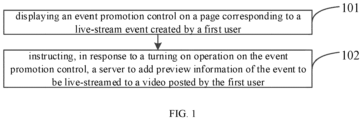
- FIG. 1 is a flowchart of a live-stream event preview method provided by an embodiment of the present disclosure.
- the method can be executed by a live-stream event preview apparatus, wherein the apparatus can be implemented by software and/or hardware and can generally be integrated into an electronic device.
- the electronic device can be a client device held by an anchor (the first user in the following embodiments) who needs to promote a live-stream event, and the client device includes but is not limited to a smart phone, a tablet computer, a wearable device or the like, with live-stream software installed thereon.
- the live-stream event preview method can include the following steps:
- Step 101 displaying an event promotion control on a page corresponding to a live-stream event created by a first user.
- the first user refers to an anchor who is currently creating an event to be live-streamed, and any user on the live-stream software can be the first user.
- the page corresponding to the live-stream event refers to a page related to the live-stream event, which can be a live-stream event page generated after the current newly-created live-stream event has been created, or any other page including the created live-stream event, such as a live-stream event list page, and so on.
- the present embodiment is illustrated below by taking displaying the event promotion control on the live-stream event page as an example.
- the first user when the first user wants to perform live-stream, he/she can enter an event creating page through a live-stream event creating entry provided by the live-stream software, so as to set relevant information of the live-stream event, such as the name of the live-stream event, live-stream time and introduction information of the live-stream event, etc.
- the client generates a live-stream event page according to the relevant information set by the first user, and the live-stream event page can include the name of the live-stream event, live-stream time, the introduction information of the live-stream event, and the anchor of the live-stream event, etc.
- An event promotion control is displayed in the associated region of the live-stream event page, and the event promotion control is used for users to enable the live-stream event promotion function. When the user activates the event promotion control, it indicates that the user agrees to promote the currently created live-stream event.
- the associated region on the live-stream event page can be a preset region on the live-stream event page, such as the bottom of the live-stream event page, and can also be a pop-up window region popped up on the live-stream event page, which is not limited in the present disclosure.
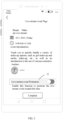
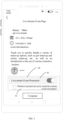
- FIG. 2 is an example diagram of displaying an event promotion control in an associated region on a live-stream event page provided by an embodiment of the present disclosure.
- an event promotion control 21 is displayed at the bottom of the live-stream event page, and the state of the event promotion control 21 is deactivated by default (as shown in FIG. 2 , when the circle is on the left, it is in a deactivated state), and a prompt message of "Enable this function to promote the live-stream event created this time" is displayed below the event promotion control 21 to remind the first user of the function of the event promotion control 21.
- FIG. 2 is only used as an example to explain the present disclosure, but not as a limitation to the present disclosure.
- Step 102 instructing, in response to an turning on operation on the event promotion control, a server to add preview information of the event to be live-streamed to a video posted by the first user.
- the video posted by the first user can be all the videos posted by the first user in the past, can also be some of the videos posted in the past with the number of views, sharing times, likes, etc., reaching a threshold, and can also be a video designated by the first user to promote the live-stream event, and so on, which is not limited in the present disclosure.
- the client when the first user activates the event promotion control displayed on the page corresponding to the live-stream event, the client, in response to the turning on operation on the event promotion control, instructs the server to add preview (or forecast) information of the event to be live-streamed in the video posted by the first user. Further, when the server obtains the preview information of the event to be live-streamed, it adds the preview information of the event to be live-streamed in the video posted by the first user.
- the preview information of the event to be live-streamed can be but not limited to an event link corresponding to the event to be live-streamed, a preview keyword of the event to be live-streamed, and a combination of the event link and the preview keyword of the event to be live-streamed, which is not limited in the present disclosure.
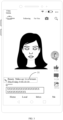
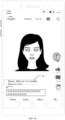
- FIG. 3 is an example diagram of adding preview information of an event to be live-streamed in a previous video provided by an embodiment of the present disclosure. As shown in FIG. 3 , the video was posted 10 days ago, and the preview information 31 of the event to be live-streamed is displayed above the publisher of the video.
- the preview information 31 is a link and carries the preview keywords of "Beauty Make-up Live-stream" and "9:00-10:30, this Friday", so that other users can know relevant information about the live-stream event according to the preview keywords. It can be understood that FIG. 3 is only used as an example to explain the present disclosure, but not as a limitation to the present disclosure.
- the event promotion control is displayed on the page corresponding to the live-stream event created by the first user, and in response to the turning on operation on the event promotion control, the server is instructed to add the preview information of the event to be live-streamed in the video posted by the first user, so that the server can add the preview information of the event to be live-streamed in the video posted by the first user.
- the user can promote the preview information of a video to be live-streamed in the video posted by the user by triggering the event promotion control, thus realizing the one-click promotion of the event to be live-streamed, and improving the convenience for the user to promote the live-stream event; moreover, by promoting the event to be live-streamed in the videos posted by the user, the user's live-stream event can be promoted by using the popularity of the user's previous videos, which is beneficial to improving the distribution efficiency of the live-stream event preview and improving the promotion effect of the live-stream event.
- the displaying the event promotion control on the page corresponding to the live-stream event created by the first user includes:
- the guidance information can be guidance information that guides the user to add the live-stream event promotion function, and the guidance information can be shown in the form of a pop-up window page.
- the client when it is detected that the first user has finished creating the current newly-created live-stream event, for example, when the first user clicks on the "Create" button on the event creating page, or when the calendar pop-up window is closed after the first user finishes setting the live-stream time, or in other scenes, the client confirms that the first user has finished creating the current newly-created live-stream event, and then display, in response to the first user's completing operation of the current newly-created live-stream event, guidance information for determining whether to add an event promotion function through a pop-up window page on the current newly-created live-stream event page, and the pop-up window page is displayed on an upper layer of the current newly-created live-stream event page. If the first user confirms to add the event promotion function, the first event promotion control is displayed in the first preset region on the current newly-created live-stream event page in response to the adding operation of the event promotion function in the pop-up window page by the first user.
- the first preset region can be automatically configured by the live-stream software, and for example, the first preset region can be the bottom of the newly-created live-stream event page.
- the first event promotion control is used to instruct whether to enable a promotion function for the current newly-created live-stream event.
- the first user activates the first event promotion control, it means that the first user agrees to promote the current newly-created live-stream event, and the preview information of the current newly-created live-stream event is added in the previous video posted by the first user.
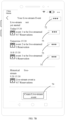
- FIG. 4A is an example diagram of an event creating page provided by an embodiment of the present disclosure. It can be understood that FIG. 4A is only used as an example to explain the content of the present disclosure, but not as a limitation to the present disclosure.
- the first user after filling in the relevant information such as the live-stream name, live-stream time and live-stream event introduction information, etc., of the current newly-created live-stream event on the event creating page, can click on the "Create" button at the bottom of the page, so as to finish creating the current newly-created live-stream event.
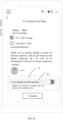
- the page jumps to the live-stream event page corresponding to the current newly-created live-stream event as shown in FIG. 4B , and a pop-up window page 41 will automatically pop up on the live-stream event page.
- the pop-up window page 41 displays guidance information for determining whether to add the event promotion function, and is provided with an "Add” button and a "Don't Add Now” button for the first user to select. If the first user clicks on the "Add” button, the first event promotion control 43 is displayed in the first preset region 42 of the current newly-created live-stream event page in response to the first user's clicking operation on the "Add” button. As shown in FIG.
- the default state of the first event promotion control 43 is deactivated (the circle is on the left), and a prompt message of "Enable this function to promote the live-stream event created this time" is displayed below the first event promotion control 43.
- the first user when prompted by the prompt message, can choose to activate the first event promotion control 43 or not to activate the first event promotion control 43 according to the first user's needs.
- the guidance information for determining whether to add the event promotion function is displayed, and then whether to display the first event promotion control is determined according to the user's selecting operation.
- the first event promotion control is displayed in the first preset region on the live-stream event page corresponding to the current newly-created live-stream event, so that the corresponding event promotion control can be displayed only when the user has the live-stream event promotion demand, and the event promotion control is not displayed when the user has no promotion demand.
- the display of the event promotion control matches the user's needs and the flexibility is strong.
- the method further includes:
- the threshold can be automatically configured by the live-stream software.
- the threshold can be 2, 5, etc., which is not limited in the present disclosure.
- the pop-up window page 41 is provided with an "Add” button and a "Don't Add Now” button for the first user to select. If the first user does not want to promote the current newly-created live-stream event for the time being, he/she can click on the "Don't Add Now” button, and in response to the first user's clicking operation on the "Don't Add Now” button (that is, rejecting operation of the event promotion function), the cumulative number of rejecting operations is increased by 1. And it is detected whether the current cumulative number of rejecting operations reaches a preset threshold, and if the cumulative number reaches the threshold, the page for determining whether to add an event promotion function is not displayed for a subsequent newly-created live-stream event.
- the page for determining whether to add the event promotion function is no longer displayed for the first user's subsequent newly-created live-stream event, so that the first user is not repeatedly asked whether to add the event promotion function when the first user has no promotion demand for a newly-created live-stream event, thus avoiding the disturbance caused by repeated inquiries to the user and being helpful to improve the user experience.
- the method further includes: displaying a second event promotion control in a second preset region on the live-stream event page, wherein the second event promotion control is used to instruct the server whether to enable a promotion function for a subsequent newly-created live-stream event.
- the second preset region can be set below the first preset region, or can be set in the first preset region, which is not limited in the present disclosure.
- the second event promotion control may be displayed after the first event promotion control is activated.
- the first event promotion control 43 is in a deactivated state, and the second event promotion control is not displayed in the first preset region 42 at this time.
- the second event promotion control 51 is displayed in the first preset region 42, as shown in FIG. 5.
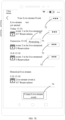
- FIG. 5 is an example diagram of displaying a second event promotion control on a live-stream event page provided by an embodiment of the present disclosure. It can be understood that FIG. 5 is only used as an example to explain the content of the present disclosure, but not as a limitation to the present disclosure. As shown in FIG.
- the state of the first event promotion control 43 is activated (the circle is on the right); at this time, the second event promotion control 51 is displayed in the second preset region, and the second preset region is set in the first preset region 42.
- the second event promotion control 51 includes control description information of "Whether to promote the newly-created live-stream event in the future?", and a check box of the control description information.
- the second event promotion control 51 is in an unchecked state by default, which is as shown in FIG. 5 .
- the first user can enable the promotion function for subsequent newly-created live-stream activities in the future.
- " ⁇ " can be displayed in the check box to indicate being checked.
- the second event promotion control can be displayed simultaneously with the first event promotion control, that is, the first event promotion control and the second event promotion control are displayed simultaneously in the preset region of the current newly-created live-stream event page in response to the adding operation of the event promotion function in the pop-up window page.
- FIG. 6 is an example diagram of displaying a second event promotion control on a live-stream event page provided by another embodiment of the present disclosure. It can be understood that FIG. 6 is only used as an example to explain the content of the present disclosure, but not as a limitation to the present disclosure. As shown in FIG.
- the first event promotion control 62 and the second event promotion control 63 are simultaneously displayed in the preset region 61 of the live-stream event page corresponding to the current newly-created live-stream event.
- the state of the first event promotion control 62 is deactivated (the circle is on the left), and the default state of the second event promotion control 63 is unchecked.
- a prompt message of "Whether to enable the promotion function for this newly-created live-stream event" is displayed above the first event promotion control 62 to remind the first user of the function of the first event promotion control 62.
- the method further includes: in response to a triggering operation on the second event promotion control, not displaying guidance information for determining whether to add an event promotion function for a subsequent newly-created live-stream event.
- a triggering operation such as a checking operation
- a checking operation can be performed on the second event promotion control
- guidance information for determining whether to add an event promotion function is no longer displayed for the subsequent newly-created live-stream event.
- the second event promotion control for instructing whether to enable the promotion function for the subsequent newly-created live-stream event is displayed in the preset region on the current newly-created live-stream event page, so that the first user can choose whether to enable the promotion function for the subsequent newly-created live-stream event according to his/her own needs, and the flexibility is strong.
- the guidance information for determining whether to add the event promotion function is not displayed for the subsequent newly-created live-stream event in response to the triggering operation on the second event promotion control; in this way, it can avoid displaying a page for determining whether to add the event promotion function for each newly-created live-stream event of the first user, so that the first user, after finishing creating the subsequent newly-created live-stream event, can promote the live-stream event in the previous video of the first user; and it is not necessary to ask the first user again whether to add the event promotion function, and it is not necessary for the first user to activate the first event promotion control again, thus saving the promotion process of the subsequent newly-created live-stream event.
- the live-stream platform can further provide a live-stream event list.
- the live-stream activities that have not been started can be displayed in the live-stream event list, and the first user can also select the live-stream event that need to be promoted through the live-stream event list.
- the displaying the event promotion control in the associated region on the live-stream event page created by the first user can include:
- the third preset region on the live-stream event list page can be automatically configured by the live-stream software, and the third preset region on the live-stream event list page can be a certain blank region on the live-stream event list page, or a pop-up window region displayed on the upper layer of the live-stream event list page, or a new page displayed on the upper layer of the live-stream event list page, and so on, which is not limited in the present disclosure.
- a viewing entry of the live-stream event list can be displayed on the personal homepage of the first user in the live-stream platform.
- the first user is user A
- a viewing entry 71 of the live-stream event list is displayed on the personal homepage of user A.
- the live-stream event list page created by user A is displayed in response to the triggering operation on the viewing entry 71 of the live-stream event list.
- a first entry identifier 72 is set on the live-stream event list page.
- the first entry identifier is represented by "" in FIG. 7B , and can also be represented by other symbols or icons.
- a third event promotion control 73 is displayed in the third preset region on the live-stream event list page (a new page on the upper layer of the live-stream event list page) in response to the triggering operation of user A on the first entry identifier 72, as shown in FIG. 7C .
- the third event promotion control 73 includes control description information of "Enable the promotion of the live-stream event?" and a control switch, and the control switch is in a deactivated state by default (the circle is on the left). User A can choose whether to activate the control switch of the third event promotion control 73 according to his/her own needs.
- the live-stream event list page also displays an entry 74 of "Create Live-stream Event". When user A clicks on the entry 74, the page jumps to the event creating page for user A to create a new live-stream event.
- the third event control can also be used to instruct the server whether to enable a promotion function for the live-stream event that have been created but not yet started, as well as the subsequent newly-created live-stream event.
- the user A activates the control switch of the third event promotion control 73, the live-stream activities newly created by user A and the live-stream activities that have been created but not yet started will all be promoted.
- a live-stream event list page created by the first user is displayed in response to a viewing operation on the live-stream event list, and a first entry identifier is set on the live-stream event list page; a third event promotion control is displayed in a third preset region on the live-stream event list page in response to a triggering operation on the first entry identifier, and the third event promotion control is used to instruct the server whether to enable a promotion function for a subsequent newly-created live-stream event, thus providing an entry for the user to enable the promotion function for the subsequent newly-created live-stream event.
- the user can enable the promotion function for the subsequent newly-created live-stream event at any time through the first entry identifier, so that there is no need to create a new live-stream event, the flexibility is strong, and the convenience for the user to enable the promotion function for the subsequent newly-created live-stream event is also improved.
- the live-stream event list page further includes information of a plurality of activities to be live-streamed, wherein information of each event to be live-streamed is correspondingly provided with a second entry identifier
- the method further includes: displaying, in response to a triggering operation on the second entry identifier corresponding to information of any event to be live-streamed, a fourth event promotion control corresponding to the information of the event to be live-streamed in a fourth preset region on the live-stream event list page, wherein the fourth event promotion control is used to instruct the server whether to enable a promotion function for the information of the any event to be live-streamed.
- the event 1 to be live-streamed, event 2 to be live-streamed and event 3 to be live-streamed, which have not yet been started, are displayed on the live-stream event list page.
- a corresponding second entry identifier 75 is displayed, and the second entry identifier is represented by "".
- a fourth event promotion control 76 corresponding to the event information of the event 2 to be live-streamed is displayed in a fourth preset region on the live-stream event list page (a new page on the upper layer of the live-stream event list page).
- the fourth event promotion control 76 includes control description information of "Whether to enable the promotion of event 2 to be live-streamed?" and a control switch, and the default state of the control switch is deactivated (the circle is on the left). If user A activates the control switch of the fourth event promotion control 76, the event 2 to be live-streamed is promoted.
- the live-stream event list page includes information of a plurality of activities to be live-streamed, information of each event to be live-streamed is correspondingly provided with a second entry identifier; in response to a triggering operation on the second entry identifier corresponding to information of any event to be live-streamed, a fourth event promotion control corresponding to the information of the event to be live-streamed is displayed in a fourth preset region on the live-stream event list page, and the fourth event promotion control is used to instruct the server whether to enable a promotion function for the information of the any event to be live-streamed, so that the first user can select the live-stream event needing to be promoted on the live-stream event list page for promotion, and the first user can enable the promotion function for the event to be live-streamed at any time, and the flexibility is strong.
- the method further includes: displaying, for an event to be live-streamed with an activated event promotion control, a promotion identifier in a title region of the event to be live-streamed on the live-stream event list page.
- user A selects to activate the control switch of the fourth event promotion control 76 in FIG. 7D , and then a promotion identifier is displayed in the title region of the event 2 to be live-streamed on the live-stream event list page, such as the promotion identifier 77 shown in FIG. 7E .
- a promotion identifier is displayed in the title region of the event to be live-streamed on the live-stream event list page, such as the promotion identifier 77 shown in FIG. 7E .
- the first user can know the live-stream event that is being promoted. It can be understood that the cancelled live-stream event can be deleted from the live-stream event list page, and the completed live-stream can be deleted from the live-stream event list page or displayed behind the live-stream event that has not been started on the live-stream event list page, which is not limited in the present disclosure.
- the instructing, in response to the turning on operation on the event promotion control, the server to add the preview information of the event to be live-streamed in the video posted by the first user includes:
- the video show scene can include, but is not limited to, at least one of the following: a video of a type or theme designated by the first user, a video whose number of comments or likes or shares reaches a preset value, a video of the first user included in the popular list, and so on. Accordingly, the number of the first target videos can be one or more.
- the client in response to the turning on operation on the event promotion control, filters out the first target video with the same theme as the video to be live-streamed from all the videos posted by the first user according to the theme information of the event to be live-streamed, and instructs to add the preview information of the event to be live-streamed in the first target video.
- the client instructs the server to add the preview information of the event to be live-streamed in the beauty make-up videos posted by the first user in history.
- the client in response to the turning on operation on the event promotion control, obtains the number of shares corresponding to each video posted by the first user, selects all videos whose number of shares reaches 100 as the first target videos, and instructs the server to add the preview information of the event to be live-streamed in the first target videos.
- the client in response to the turning on operation on the event promotion control, obtains the popular list, judges whether the video of the first user is included in the popular list, and if so, takes all the videos of the first user included in the popular list as the first target videos.
- the video show scene set by the first user is obtained, and in response to the turning on operation on the event promotion control, the server is instructed to add the preview information of the event to be live-streamed in the first target video, and the first target video is a video satisfying the video show scene, so that the first user can independently select the video used for promoting the event to be live-streamed, and the promotion of the live-stream event is more in line with the promotion needs of the first user.
- the method further includes: obtaining a video filtering scene set by the first user, and determining a second target video posted by the first user and satisfying the video filtering scene; instructing the server to cancel adding the preview information of the event to be live-streamed in the second target video.
- the video filtering scene can include, but is not limited to, at least one of the following: a video that the first user designates not to add, a video in which the object involved has a competitive relationship with the object involved in the live-stream event, etc. Accordingly, the number of the second target videos can be one or more.
- FIG. 8A is an example diagram of a live-stream event page provided by another embodiment of the present disclosure. As shown in FIG. 8A , a designated video region 81 is provided in the live-stream event page, and the designated video region 81 is provided with a video adding entry 82, and description information of "The designated video is not used for promoting live-stream activities" is displayed.
- the first user can add a video by clicking on the video adding entry 82, which supports adding multiple videos.
- the video switching symbols " ⁇ " 83 (forward) and ">” 84 (backward) are displayed in the designated video region 81, and the first user can switch the videos displayed in the region by triggering " ⁇ " 83 or ">” 84.
- the video added by the first user through the video adding entry 82 will not be added with the preview information of the event to be live-streamed.
- the video filtering scene set by the first user is a video in which the object involved has a competitive relationship with the object involved in the live-stream event.
- the event to be-streamed is a promotion event of clothes of brand A
- the video posted by the first user with the content about the competitor of brand A is determined as the second target video; and in response to the turning on operation on the event promotion control, the server is instructed to cancel adding the preview information of the event to be live-stream in the determined second target video.
- this video is determined as the second target video, and the server is instructed not to add the preview information about the promotion event of the clothes of brand A in this video.
- the video filtering scene set by the first user is obtained, the second target video posted by the first user and satisfying the video filtering scene is determined, and the server is instructed to cancel adding the preview information of the event to be live-streamed in the second target video, so that the first user can independently select the video not used for promoting the event to be live-streamed, and the promotion of the live-stream event is more in line with the promotion needs of the first user.
- the instructing the server to add the preview information of the event to be live-streamed in the video posted by the first user includes:
- FIG. 9A is an example diagram of adding an event link in a video posted by a first user provided by an embodiment of the present disclosure.
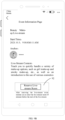
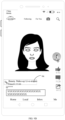
- an event link 91 is displayed in the video picture, and other users watching the video can enter an event information page of the event to be live-streamed associated with the event link by clicking on the event link 91, and the event information page of the event to be live-streamed is shown in FIG. 9B .
- the event information page displays the name, live-stream time, anchor and detailed introduction information of the event to be live-streamed, and further displays an event reservation entry 92.
- the live-stream platform reminds users to enter the live-stream room to participate in the event to be live-streamed before the start of the event to be live-streamed (for example, 10 minutes before the start).
- FIG. 9C is an example diagram of adding a preview keyword to a video posted by a first user provided by an embodiment of the present disclosure. It can be understood that FIG. 9C is only used as an example to explain the present disclosure, but not as a limitation to the present disclosure.
- a preview keyword 93 is displayed in the video picture, and the preview keyword 93 includes the name of the live-stream event "Beauty Make-up Live-stream" and the start time of the live-stream event "10.3 9:00".
- the preview keyword can also be other keywords and is not limited to the keywords in the above example.
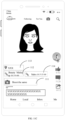
- FIG. 9D is an example diagram of adding an event link identified with a preview keyword of an event to be live-streamed to a video posted by a first user provided by an embodiment of the present disclosure.
- an event link 94 identified with a preview keyword of the event to be live-streamed is displayed in the video picture, and other users watching the video can enter the event information page of the event to be live-streamed associated with the event link as shown in FIG. 9B by clicking on the event link 94 identified with the preview keyword of the event to be live-streamed.
- instructing the server to add the event link or the preview keyword or the event link identified with the preview keyword of the event to be live-streamed in the video posted by the first user can be automatically configured by the live-stream platform or set by the first user in the live-stream platform, which is not limited in the present disclosure.
- both the event link and the preview keyword can be added in the video posted by the first user, or both the event link identified with the preview keyword of the event to be live-streamed and the preview keyword can be added in the video posted by the first user, which is not limited in the present disclosure.
- the server is instructed to add an event link in the video posted by the first user, or the server is instructed to add a preview keyword of the event to be live-streamed in the video posted by the first user, or the server is instructed to add an event link identified with a preview keyword of the event to be live-streamed in the video posted by the first user, and the event link is associated with the event information page of the event to be live-streamed, so that the server can be instructed to add corresponding content in the posted video to promote the associated event to be live-streamed, and the promotion form of the preview information of the event to be live-streamed can be enriched.
- the start time of the event to be live-streamed currently newly added by the first user can be far from the current time.
- the start time of the newly-created live-stream event of the first user is one month later, and there is still enough time to promote the event.
- the live-stream event may not be promoted first, and the event to be live-streamed which is closer to the current time may be promoted preferentially, so as to increase the number of viewers of the event to be live-streamed which is closer to the current time as much as possible. Therefore, in some implementations of the present disclosure, the preview information of the event to be live-streamed includes:
- the preset time period can be automatically configured by the live-stream platform or preset by the first user, which is not limited in the present disclosure.
- the preset time period can be, for example, the following 2 days, this week, and so on.
- the event to be live-streamed can be an event to be live-streamed with a start time closest to the current time
- the preview information of the event to be live-streamed can be preview information of the event to be live-streamed with the start time closest to the current time
- the event to be live-streamed can also be one or a plurality of activities to be live-streamed with a distance between the start time and the current time being within a preset time period
- the preview information of the event to be live-streamed can be preview information of the one or plurality of activities to be live-streamed with a distance between the start time and the current time being within a preset time period.
- the client filters out all the live-stream activities within this week from all live-stream activities that are created by the first user and have not been started as the event to be live-streamed for promotion preview according to the current time. If the current time is Sunday, that is, the last day of this week, and there are no activities to be live-streamed on that day, the promotion of live-stream activities will not be carried out for the time being. When a new week comes, the activities to be live-streamed in this new week will be obtained for promotion preview.
- the server after instructing the server to add the preview information of the event to be live-streamed in the video posted by the first user, in response to a cancelling operation or ending operation of the event to be live-streamed, the server is instructed to cancel the added preview information corresponding to the event to be live-streamed in the video. Therefore, it can avoid continuing to promote the cancelled or ended live-stream activities to other users, and avoid disturbing users caused by continuing to promote the cancelled or ended live-stream activities.
- FIG. 10 is a flowchart of a live-stream event preview method provided by another embodiment of the present disclosure.
- the method can be executed by a live-stream event preview apparatus provided by the embodiment of the present disclosure, and the apparatus can be implemented by software and/or hardware and can generally be integrated into a server.
- the server communicates with the client described in the foregoing embodiment to complete the flow of live-stream event preview.
- the live-stream event preview method can include the following steps:
- the client when the first user performs a triggering operation on the event promotion control of an event to be live-streamed through the client, the client generates preview information of the event to be live-streamed in response to the triggering operation, and the server obtains the preview information of the event to be live-streamed sent by the client.
- the server adds the obtained preview information of the event to be live-streamed in the video posted by the first user.
- the server can add the preview information of the event to be live-streamed in all previous videos posted by the first user.
- the server obtains the preview information of the event to be live-stream sent by the client, the preview information of the event to be live-stream is generated by the client after receiving the triggering operation on the event promotion control of the event to be live-streamed by the first user, and the preview information of the event to be live-stream is added in the video posted by the first user.
- the user can promote the preview information of a video to be live-streamed in the video posted by the user by triggering the event promotion control, thus realizing the one-click promotion of the event to be live-streamed, and improving the convenience for the user to promote the live-stream event; moreover, by promoting the event to be live-streamed in the videos posted by the user, the user's live-stream event can be promoted by using the popularity of the user's previous videos, which is beneficial to improving the distribution efficiency of the live-stream event preview and improving the promotion effect of the live-stream event.
- the adding the preview information of the event to be live-streamed in the video posted by the first user includes: adding the preview information of the event to be live-streamed in a first target video.
- the first target video can be a video satisfying a preset video show scene among the predetermined videos posted by the first user.
- the preset video show scene can include, but is not limited to, at least one of the following: a video of a type or theme designated by the first user, a video whose number of comments or likes or shares reaches a preset value, a video of the first user included in the popular list, and so on. Accordingly, the number of the first target videos can be one or more.
- the first target video can include at least one of the following:
- the preset recommendation condition can be, for example, that the theme of the video is related to the theme of the event to be live-streamed, or that the theme of the video is a preset theme, and so on, which is not limited in the present disclosure.
- the personal information page of the first user can store some or all of the videos posted by the first user, and the video shown on the personal information page can be used as the first target video.
- the preset hotspot condition can be, for example, that the number of comments or likes or shares reaches a preset value, or existing in a popular list, and so on, which is not limited in the present disclosure.
- the server filters out the video with the theme of food from all videos posted by the first user as the first target video according to the preset recommendation condition.
- the server obtains the comment data of all videos posted by the first user according to the preset hotspot condition, and filters out the video with the number of comments not less than 100 as the first target video.
- a video filtering scene can be further set to filter out the video in which the preview information of the event to be live-streamed is not added, and thus, the method further includes: cancelling adding the preview information of the event to be live-streamed in a second target video.
- the second target video can be a video satisfying the preset video filtering scene among all videos posted by the first user.
- the preset video filtering scene can include, but is not limited to, at least one of the following: a video that the first user designates not to add, a video in which the object involved has a competitive relationship with the object involved in the live-stream event, etc.
- the second target video can include at least one of the following:
- the preset filtering keyword can be, for example, competition, opponents, etc.
- the server detects the content of videos posted by the first user, and if the content of one or some videos are related to clothes of other brands, it is determined that this or these videos satisfy the preset filtering keyword "competition", and this or these videos are determined as the second target video.
- the event video stored in the target region on the event detail page of the event to be live-streamed can also be determined as the second target videos.
- the designated video region 81 i.e., the target region
- all the videos added in this region are determined as the second target videos.
- the adding the preview information of the event to be live-streamed in the video posted by the first user includes:
- an event link 91 is displayed in the video picture.
- a preview keyword 93 is displayed in the video picture, and the preview keyword 93 includes the theme of the live-stream event "Beauty Make-up Live-stream” and the start time of the live-stream event "10.3 9:00". It can be understood that FIG. 9C is only used as an example to explain the present disclosure, but not as a limitation to the present disclosure, and the preview keyword can also be other keywords.
- an event link 94 identified with a preview keyword of the event to be live-streamed is displayed in the video picture.
- an event link is added in the video posted by the first user, or a preview keyword of the event to be live-streamed is added in the video posted by the first user, or an event link identified with a preview keyword of the event to be live-streamed is added in the video posted by the first user, and the event link is associated with the event information page of the event to be live-streamed, so that the promotion form of the preview information of the event to be live-streamed can be enriched.
- the video posted by the first user further includes: a video special effect link and/or a first user demand link; wherein the priority of the event link is higher than that of the video special effect link, and/or the priority of the event link is lower than that of the first user demand link.
- the first user demand link can be, but is not limited to, a geographical location link, a commodity link, etc.
- the different links when showing different links, can be sorted and displayed in order of priority from top to bottom.
- the link with rich content can be selected for display according to the content richness of different links corresponding to the event to be live-streamed.
- the links of different activities to be live-streamed can be displayed on a same line, or can be sorted and displayed from top to bottom in the video picture according to the start time of the activities to be live-streamed from near to far, and so on, which is not limited in the present disclosure.
- FIG. 11A is a first example diagram of showing a plurality of links in a video provided by an embodiment of the present disclosure.
- a video special effect link 111, an event link 112 and a first user demand link 113 are displayed in the video picture, and the first user demand link 113 is illustratively a geographical location link.
- the first user demand link 113 is The first user requirement link 113 is displayed in priority and displayed in the first one, the event link 112 is displayed below the first user demand link 113, and the video special effect link 111 is displayed below the event link 112.
- FIG. 11B is a second example diagram of showing a plurality of links in a video provided by an embodiment of the present disclosure.
- a video special effect link 111, event links 112 and 114, and a first user demand link 113 are displayed in the video picture, wherein the event link 112 and the event link 114 are links corresponding to different live-stream activities, the start time of the live-stream event corresponding to the event link 112 is at 9: 00 am on October 3rd, which is earlier than the start time of the live-stream event corresponding to the event link 114 at 3: 00 pm on October 5th, so the priority of the event link 112 is higher than that of the event link 114, and the event link 112 is displayed above the event link 114; or, the event link 112 and the event link 114 can be displayed on one line, and the event link 112 is displayed in front of the event link 114, as shown in FIG. 11C .
- an event information page of the event to be live-streamed corresponding to the event link is displayed in response to a triggering operation on the event link by a second user via a client, wherein the event link is associated with the event information page of the event to be live-streamed.
- the second user is any user who watches the video.
- the second user watches the video through the client, if an event link corresponding to an event to be live-streamed is displayed in the video picture, the second user can trigger the event link, and the server displays the event information page of the event to be live-streamed associated with the event link in response to the triggering operation of the event link by the second user. Therefore, it is convenient for the second user to know the relevant information of the event to be live-streamed corresponding to the event link.
- an event link 91 is displayed in the video picture.
- the server in response to the triggering operation, displays the event information page of the event to be live-streamed associated with the event link 91, as shown in FIG. 9B .
- the method after adding the preview information of the event to be live-streamed in the video posted by the first user, the method further includes:
- cancelling in response to a cancelling operation of the event to be live-streamed by the first user through the client or detecting an ending operation of the event to be live-streamed, the added preview information corresponding to the event to be live-streamed in the video.
- the added preview information corresponding to the event to be live-streamed is cancelled. Therefore, it can avoid continuing to promote the cancelled or ended live-stream activities to other users, and avoid disturbing users caused by continuing to promote the cancelled or ended live-stream activities.
- FIG. 12 is a schematic structural diagram of a live-stream event preview apparatus provided by an embodiment of the present disclosure.
- the apparatus can be implemented by software and/or hardware, and can generally be integrated into an electronic device.
- the electronic device can be a client device held by an anchor (the first user in the following embodiments) who needs to promote a live-stream event, and the client device includes but is not limited to a smart phone, a tablet computer, a wearable device or the like, with live-stream software installed thereon.
- the live-stream event preview apparatus 30 can include:
- the live-stream event preview apparatus provided by the embodiment of the present disclosure can execute the live-stream event preview method provided by any embodiment of the present disclosure, and has corresponding functional modules for executing the method and corresponding beneficial effects.
- FIG. 13 is a schematic structural diagram of another live-stream event preview apparatus provided by an embodiment of the present disclosure.
- the apparatus can be implemented by software and/or hardware and can generally be integrated into a server.
- the server communicates with the client described in the foregoing embodiment to complete the flow of live-stream event preview.
- the live-stream event preview apparatus 40 can include:
- the live-stream event preview apparatus provided by the embodiment of the present disclosure can execute the live-stream event preview method provided by any embodiment of the present disclosure, and has corresponding functional modules for executing the method and corresponding beneficial effects.
- the present disclosure further provides a computer program product which includes computer program/instructions, and the computer program/instructions, when executed by a processor, realize the live-stream event preview method described in the above embodiments.
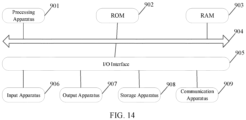
- FIG. 14 is a schematic structural diagram of an electronic device provided by an embodiment of the present disclosure.
- FIG. 14 illustrates a schematic structural diagram of an electronic device 900 suitable for implementing the embodiment of the present disclosure.
- the electronic device 900 in the embodiment of the present disclosure can include, but is not limited to, a mobile terminal such as a mobile phone, a notebook computer, a digital broadcast receiver, a PDA (Personal Digital Assistant), a PAD (tablet computer), a PMP (Portable Multimedia Player), a vehicle-mounted terminal (e.g., vehicle-mounted navigation terminal), etc., and a fixed terminal such as a digital TV, a desktop computer, etc.
- a mobile terminal such as a mobile phone, a notebook computer, a digital broadcast receiver, a PDA (Personal Digital Assistant), a PAD (tablet computer), a PMP (Portable Multimedia Player), a vehicle-mounted terminal (e.g., vehicle-mounted navigation terminal), etc., and a fixed terminal such as a digital TV, a desktop computer, etc.
- the electronic device shown in FIG. 14 is only an example, and
- the electronic device 900 can include a processing apparatus (e.g., central processing unit, graphics processing unit, etc.) 901, which can execute various suitable actions and processes according to a program stored in a read-only memory (ROM) 902 or a program loaded from a storage apparatus 908 into a random access memory (RAM) 903.
- a processing apparatus e.g., central processing unit, graphics processing unit, etc.
- RAM random access memory
- various programs and data necessary for the operations of the electronic device 900 are also stored.
- the processing apparatus 901, the ROM 902, and the RAM 903 are connected to each other through a bus 904.
- An input/output (I/O) interface 905 is also connected to the bus 904.
- an input apparatus 906 including, for example, a touch screen, a touch pad, a keyboard, a mouse, a camera, a microphone, an accelerometer, a gyroscope, etc.
- an output apparatus 907 including, for example, a liquid crystal display (LCD), a speaker, a vibrator, etc.
- a storage apparatus 908 including, for example, a magnetic tape, a hard disk, etc.
- the communication apparatus 909 can allow the electronic device 900 to perform wireless or wired communication with another device to exchange data. While FIG. 14 illustrates the electronic device 900 with various apparatuses, it should be understood that all illustrated apparatuses are not required to be implemented or provided. More or fewer apparatuses can be alternatively implemented or provided.
- an embodiment of the present disclosure includes a computer program product including a computer program carried on a non-transitory computer-readable medium, and the computer program contains program codes for performing the method illustrated by the flowcharts.
- the computer program can be downloaded and installed from a network via the communication apparatus 909, or installed from the storage apparatus 908, or installed from the ROM 902.
- the computer program When executed by the processing apparatus 401, the computer program performs the above functions defined in the live-stream event preview method according to the embodiment of the present disclosure.
- the above computer-readable medium of the present disclosure can be a computer-readable signal medium or a computer-readable storage medium or any combination thereof.
- the computer-readable storage medium can be, for example, but not limited to, an electronic, magnetic, optical, electromagnetic, infrared, or semiconductor system, apparatus, or device, or any combination of the above.
- the computer-readable storage medium can include, but are not limited to: an electrical connection having one or more wires, a portable computer diskette, a hard disk, a random access memory (RAM), a read-only memory (ROM), an erasable programmable read-only memory (EPROM or flash memory), an optical fiber, a portable compact disc read-only memory (CD-ROM), an optical storage device, a magnetic storage device, or any suitable combination of the above.
- the computer-readable storage medium can be any tangible medium containing or storing a program, wherein the program can be used by or in conjunction with an instruction execution system, apparatus, or device.
- the computer-readable signal medium can include a data signal propagated in baseband or as part of a carrier wave, in which computer-readable program code is carried. Such a propagated data signal can take a variety of forms, including but not limited to an electro-magnetic signal, an optical signal, or any suitable combination of the above.
- the computer-readable signal medium can be any computer-readable medium other than the computer-readable storage medium, and the computer-readable signal medium can send, propagate, or transmit a program for use by or in conjunction with an instruction execution system, apparatus, or device.
- Program codes contained on the computer-readable medium can be transmitted using any suitable medium, including but not limited to: an electrical wire, an optical cable, RF (radio frequency), etc., or any suitable combination of the above.
- a client and a server can communicate using any currently known or future developed network protocol, such as HTTP (Hyper Text Transfer Protocol), etc., and can be interconnected with any form or medium of digital data communication (e.g., a communication network).
- a communication network examples include a local area network ("LAN”), a wide area network (“WAN”), an internet (e.g., the Internet), and a peer-to-peer network (e.g., ad hoc peer-to-peer network), as well as any currently known or future developed network.
- the computer-readable medium can be contained in the above electronic device; or can exist alone and not be assembled into the electronic device.
- the above computer-readable medium has thereon carried one or more programs which, when executed by the electronic device, cause the electronic device to: display an event promotion control on a page corresponding to a live-stream event created by a first user; and instruct, in response to an turning on operation of the event promotion control, a server to add preview information of the event to be live-streamed to a video posted by the first user; or cause the electronic device to: obtain preview information of an event to be live-streamed sent by a client, wherein the preview information of the event to be live-streamed is generated by the client after receiving a triggering operation of an event promotion control of the event to be live-streamed by a first user; and add the preview information of the event to be live-streamed to a video posted by the first user.
- Computer program codes for performing operations of the present disclosure can be written in one or more programming languages or a combination thereof, wherein the programming language includes, but is not limited to, an object-oriented programming language such as Java, Smalltalk, C++, and also includes a conventional procedural programming language such as a "C" language or similar programming language.
- the program codes can be executed entirely on a user computer, partly on the user computer, as a stand-alone software package, partly on the user computer and partly on a remote computer, or entirely on the remote computer or server.
- the remote computer can be connected to the user computer through any type of network, including a local area network (LAN) or a wide area network (WAN), or can be connected to an external computer (for example, through the Internet using an Internet service provider).
- LAN local area network
- WAN wide area network
- each block in the flowcharts or block diagrams can represent one module, program segment, or portion of code, which contains one or more executable instructions for implementing the specified logic function.
- functions noted in blocks can occur in an order different from an order noted in the drawings. For example, two blocks shown in succession can, in fact, be executed substantially concurrently, and they can sometimes be executed in a reverse order, which depends upon functions involved.
- each block in the block diagrams and/or flowcharts, and a combination of blocks in the block diagrams and/or flowcharts can be implemented by a dedicated hardware-based system that performs a specified function or operation, or a combination of dedicated hardware and computer instructions.
- the involved unit described in the embodiment of the present disclosure can be implemented by software or hardware.
- the name of the unit does not, in some cases, constitute a limitation on the unit itself.
- an exemplary type of hardware logic component includes: a field programmable gate array (FPGA), an application specific integrated circuit (ASIC), an application specific standard product (ASSP), a system on a chip (SOC), a complex programmable logic device (CPLD), and so on.
- FPGA field programmable gate array
- ASIC application specific integrated circuit
- ASSP application specific standard product
- SOC system on a chip
- CPLD complex programmable logic device
- a machine-readable medium can be a tangible medium, which can contain or store a program for use by or in conjunction with an instruction execution system, apparatus, or device.
- the machine-readable medium can be a machine-readable signal medium or a machine-readable storage medium.
- the machine-readable medium can include, but is not limited to, an electronic, magnetic, optical, electromagnetic, infrared, or semiconductor system, apparatus, or device, or any suitable combination of the above.
- machine-readable storage medium More specific examples of the machine-readable storage medium would include an electrical connection based on one or more wires, a portable computer diskette, a hard disk, a random access memory (RAM), a read-only memory (ROM), an erasable programmable read-only memory (EPROM or flash memory), an optical fiber, a portable compact disc read-only memory (CD-ROM), an optical storage device, a magnetic storage device, or any suitable combination of the above.
- RAM random access memory
- ROM read-only memory
- EPROM or flash memory erasable programmable read-only memory
- CD-ROM portable compact disc read-only memory
- magnetic storage device or any suitable combination of the above.
- the present disclosure provides a live-stream event preview method, which includes:
- the displaying the event promotion control on the page corresponding to the live-stream event created by the first user includes:
- the method further includes:
- the method further includes: displaying a second event promotion control in a second preset region on the live-stream event page, wherein the second event promotion control is used to instruct the server whether to enable a promotion function for a subsequent newly-created live-stream event.
- the method further includes: in response to a triggering operation on the second event promotion control, not displaying the guidance information for determining whether to add an event promotion function for a subsequent newly-created live-stream event.
- the displaying the event promotion control on the page corresponding to the live-stream event created by the first user includes:
- the live-stream event list page further includes information of a plurality of activities to be live-streamed, wherein information of each event to be live-streamed is correspondingly provided with a second entry identifier
- the method further includes: displaying, in response to a triggering operation on the second entry identifier corresponding to information of any event to be live-streamed, a fourth event promotion control corresponding to the information of the event to be live-streamed in a fourth preset region on the live-stream event list page, wherein the fourth event promotion control is used to instruct the server whether to enable a promotion function for the information of the any event to be live-streamed.
- the method further includes: displaying, for an event to be live-streamed with an activated event promotion control, a promotion identifier in a title region of the event to be live-streamed on the live-stream event list page.
- the instructing, in response to the turning on operation on the event promotion control, the server to add the preview information of the event to be live-streamed in the video posted by the first user includes:
- the method further includes:
- the instructing the server to add the preview information of the event to be live-streamed in the video posted by the first user includes:
- the preview information of the event to be live-streamed includes:
- the method further includes: instructing, in response to a cancelling operation or ending operation of the event to be live-streamed, the server to cancel the added preview information corresponding to the event to be live-streamed in the video.
- the present disclosure provides a live-stream event preview method, which includes:
- the adding the preview information of the event to be live-streamed in the video posted by the first user includes:
- the method further includes:
- the adding the preview information of the event to be live-streamed in the video posted by the first user includes:
- the video posted by the first user further includes: a video special effect link and/or a first user demand link; wherein the priority of the event link is higher than that of the video special effect link, and/or the priority of the event link is lower than that of the first user demand link.
- the method further includes: displaying, in response to a triggering operation on the event link by a second user via a client, an event information page of an event to be live-streamed corresponding to an event link, wherein the event link is associated with the event information page of the event to be live-streamed.
- the method further includes: cancelling, in response to a cancelling operation of the event to be live-streamed by the first user through the client or detecting an ending operation of the event to be live-streamed, the added preview information corresponding to the event to be live-streamed in the video.
- the present disclosure provides a live-stream event preview apparatus, which includes:
- the promotion control display module includes:
- the apparatus further includes:
- the apparatus further includes: a first display module, configured to display a second event promotion control in a second preset region on the live-stream event page, wherein the second event promotion control is used to instruct the server whether to enable a promotion function for a subsequent newly-created live-stream event.
- the apparatus further includes: a stop inquiry module, configured to not display the guidance information for determining whether to add an event promotion function for a subsequent newly-created live-stream event in response to a triggering operation on the second event promotion control.
- the promotion control display module includes:
- the live-stream event list page further includes information of a plurality of activities to be live-streamed, wherein information of each event to be live-streamed is correspondingly provided with a second entry identifier
- the apparatus further includes: a second display module, configured to display, in response to a triggering operation on the second entry identifier corresponding to information of any event to be live-streamed, a fourth event promotion control corresponding to the information of the event to be live-streamed in a fourth preset region on the live-stream event list page, wherein the fourth event promotion control is used to instruct the server whether to enable a promotion function for the information of the any event to be live-streamed.
- the apparatus further includes: an identifier display module, configured to display, for an event to be live-streamed with an activated event promotion control, a promotion identifier in a title region of the event to be live-streamed on the live-stream event list page.
- the instructing module includes:
- the apparatus further includes:
- the instructing module is further configured to:
- the preview information of the event to be live-streamed includes:
- the apparatus further includes: an instructing cancelling preview information module, configured to instruct, in response to a cancelling operation or ending operation of the event to be live-streamed, the server to cancel the added preview information corresponding to the event to be live-streamed in the video.
- an instructing cancelling preview information module configured to instruct, in response to a cancelling operation or ending operation of the event to be live-streamed, the server to cancel the added preview information corresponding to the event to be live-streamed in the video.
- the present disclosure provides a live-stream event preview apparatus, which includes:
- the preview information adding module is specifically configured to:
- the apparatus further includes:
- the preview information adding module is further configured to:
- the video posted by the first user further includes: a video special effect link and/or a first user demand link; wherein the priority of the event link is higher than that of the video special effect link, and/or the priority of the event link is lower than that of the first user demand link.
- the apparatus further includes: an event information show module, configured to display, in response to a triggering operation on the event link by a second user via a client, an event information page of an event to be live-streamed corresponding to an event link, wherein the event link is associated with the event information page of the event to be live-streamed.
- an event information show module configured to display, in response to a triggering operation on the event link by a second user via a client, an event information page of an event to be live-streamed corresponding to an event link, wherein the event link is associated with the event information page of the event to be live-streamed.
- the apparatus further includes: a cancelling module, configured to cancel, in response to a cancelling operation of the event to be live-streamed by the first user through the client or detecting an ending operation of the event to be live-streamed, the added preview information corresponding to the event to be live-streamed in the video.
- a cancelling module configured to cancel, in response to a cancelling operation of the event to be live-streamed by the first user through the client or detecting an ending operation of the event to be live-streamed, the added preview information corresponding to the event to be live-streamed in the video.
- the present disclosure provides an electronic device, which includes:
- the present disclosure provides a computer-readable storage medium, a computer program is stored on the storage medium, and the computer program is configured to execute any one of the live-stream event preview methods provided in the present disclosure.
Landscapes
- Engineering & Computer Science (AREA)
- Multimedia (AREA)
- Signal Processing (AREA)
- Databases & Information Systems (AREA)
- Computer Security & Cryptography (AREA)
- Business, Economics & Management (AREA)
- Marketing (AREA)
- Two-Way Televisions, Distribution Of Moving Picture Or The Like (AREA)
- Information Transfer Between Computers (AREA)
Applications Claiming Priority (2)
| Application Number | Priority Date | Filing Date | Title |
|---|---|---|---|
| CN202111278254.6A CN116074542A (zh) | 2021-10-30 | 2021-10-30 | 直播活动预告方法、装置、电子设备及存储介质 |
| PCT/CN2022/113867 WO2023071461A1 (zh) | 2021-10-30 | 2022-08-22 | 直播活动预告方法、装置、电子设备及存储介质 |
Publications (2)
| Publication Number | Publication Date |
|---|---|
| EP4412221A1 true EP4412221A1 (de) | 2024-08-07 |
| EP4412221A4 EP4412221A4 (de) | 2024-12-25 |
Family
ID=86160198
Family Applications (1)
| Application Number | Title | Priority Date | Filing Date |
|---|---|---|---|
| EP22885360.2A Pending EP4412221A4 (de) | 2021-10-30 | 2022-08-22 | Verfahren und vorrichtung zur vorschau von live-rundfunkaktivität sowie elektronische vorrichtung und speichermedium |
Country Status (5)
| Country | Link |
|---|---|
| US (1) | US20240284015A1 (de) |
| EP (1) | EP4412221A4 (de) |
| JP (1) | JP7787307B2 (de) |
| CN (1) | CN116074542A (de) |
| WO (1) | WO2023071461A1 (de) |
Families Citing this family (4)
| Publication number | Priority date | Publication date | Assignee | Title |
|---|---|---|---|---|
| CN115802091A (zh) * | 2022-11-07 | 2023-03-14 | 北京字跳网络技术有限公司 | 一种活动信息展示方法、装置、设备及存储介质 |
| CN119946314B (zh) * | 2024-01-12 | 2025-10-28 | 书行科技(北京)有限公司 | 直播交互方法、装置、计算机设备及计算机可读存储介质 |
| CN119127014B (zh) * | 2024-08-20 | 2026-03-10 | 北京达佳互联信息技术有限公司 | 信息显示方法、装置、设备及存储介质 |
| CN119697448A (zh) * | 2024-12-10 | 2025-03-25 | 北京字跳网络技术有限公司 | 界面交互的方法、装置、设备、存储介质和程序产品 |
Family Cites Families (10)
| Publication number | Priority date | Publication date | Assignee | Title |
|---|---|---|---|---|
| US7788686B1 (en) * | 2000-03-01 | 2010-08-31 | Andrews Christopher C | Method of and apparatus for describing, promoting, publishing, aggregating, distributing and accessing live content information |
| CN105915932A (zh) * | 2015-12-15 | 2016-08-31 | 乐视致新电子科技(天津)有限公司 | 一种推送预约消息的方法及装置 |
| CN109151604A (zh) * | 2017-06-27 | 2019-01-04 | 武汉斗鱼网络科技有限公司 | 一种弹幕显示方法及装置 |
| WO2019171128A1 (en) * | 2018-03-06 | 2019-09-12 | Yogesh Chunilal Rathod | In-media and with controls advertisement, ephemeral, actionable and multi page photo filters on photo, automated integration of external contents, automated feed scrolling, template based advertisement post and actions and reaction controls on recognized objects in photo or video |
| JP6587725B1 (ja) * | 2018-08-20 | 2019-10-09 | ヤフー株式会社 | 情報処理プログラム、情報処理装置及び情報処理方法 |
| JP2020191620A (ja) * | 2018-12-20 | 2020-11-26 | 株式会社アドパック | 映像配信方法、映像配信装置、及びコンピュータプログラム |
| CN111327916B (zh) * | 2020-03-04 | 2022-06-07 | 北京三快在线科技有限公司 | 基于地理对象的直播管理方法、装置、设备及存储介质 |
| CN111918085B (zh) * | 2020-08-06 | 2024-05-28 | 腾讯科技(深圳)有限公司 | 直播处理方法、装置、电子设备及计算机可读存储介质 |
| CN112468866B (zh) * | 2020-11-25 | 2022-12-27 | 北京达佳互联信息技术有限公司 | 直播方法、装置、终端、服务器及介质 |
| CN113015012B (zh) * | 2021-02-26 | 2023-05-02 | 北京达佳互联信息技术有限公司 | 直播数据处理方法、装置、计算机设备以及存储介质 |
-
2021
- 2021-10-30 CN CN202111278254.6A patent/CN116074542A/zh active Pending
-
2022
- 2022-08-22 EP EP22885360.2A patent/EP4412221A4/de active Pending
- 2022-08-22 JP JP2024525598A patent/JP7787307B2/ja active Active
- 2022-08-22 WO PCT/CN2022/113867 patent/WO2023071461A1/zh not_active Ceased
-
2024
- 2024-04-30 US US18/651,444 patent/US20240284015A1/en active Pending
Also Published As
| Publication number | Publication date |
|---|---|
| WO2023071461A1 (zh) | 2023-05-04 |
| CN116074542A (zh) | 2023-05-05 |
| JP2024539346A (ja) | 2024-10-28 |
| JP7787307B2 (ja) | 2025-12-16 |
| US20240284015A1 (en) | 2024-08-22 |
| EP4412221A4 (de) | 2024-12-25 |
Similar Documents
| Publication | Publication Date | Title |
|---|---|---|
| EP4412221A1 (de) | Verfahren und vorrichtung zur vorschau von live-rundfunkaktivität sowie elektronische vorrichtung und speichermedium | |
| EP4429252A1 (de) | Vorschauverfahren und -vorrichtung für live-streaming sowie vorrichtung, programmprodukt und medium | |
| CN111510760B (zh) | 视频信息展示方法和装置、存储介质和电子设备 | |
| US11930252B2 (en) | Video recommendation method and apparatus, electronic device, and storage medium | |
| US12363400B2 (en) | Multimedia information processing method and apparatus, electronic device and storage medium | |
| CN113783997B (zh) | 一种视频发布方法、装置、电子设备及存储介质 | |
| EP2961172A1 (de) | Verfahren und vorrichtung zur informationserfassung | |
| EP4345591B1 (de) | Verfahren und vorrichtung zur prop-verarbeitung sowie vorrichtung und medium | |
| US20250278172A1 (en) | Method for multimedia resource interaction, medium and electronic device | |
| CN113573129A (zh) | 商品对象展示视频处理方法及装置 | |
| US10798460B2 (en) | Device and method for crowd-sourcing movie screenings | |
| CN111147885B (zh) | 直播间互动方法、装置、可读介质及电子设备 | |
| EP4621596A1 (de) | Verfahren und vorrichtung zur empfehlung von medieninhalten, vorrichtung, lesbares speichermedium und produkt | |
| US20150382077A1 (en) | Method and terminal device for acquiring information | |
| KR20230026321A (ko) | 복합 비디오 촬상, 전자 장치 및 컴퓨터 판독가능 매체를 위한 방법 및 장치 | |
| EP4446859A1 (de) | Videoanzeige und interaktionsverfahren und -vorrichtung, elektronische vorrichtung und speichermedium | |
| EP4343513B1 (de) | Informationspräsentationsverfahren und -vorrichtung sowie elektronische vorrichtung und speichermedium | |
| JP7791362B2 (ja) | メディアコンテンツ処理方法、装置、デバイス、可読記憶媒体、及び製品 | |
| CN109889869A (zh) | 视频数据的加载方法、装置、设备及存储介质 | |
| US20250159310A1 (en) | Image processing method and apparatus, and device and storage medium | |
| CN113225483A (zh) | 图像融合方法、装置、电子设备和存储介质 | |
| WO2022193867A1 (zh) | 一种视频处理方法、装置、电子设备及存储介质 | |
| CN116048337A (zh) | 一种页面展示方法、装置、设备和存储介质 | |
| WO2025036417A1 (zh) | 基于展示单元的用户互动方法、装置、设备及存储介质 | |
| CN114979747A (zh) | 一种直播方法、装置、设备、介质及程序产品 |
Legal Events
| Date | Code | Title | Description |
|---|---|---|---|
| STAA | Information on the status of an ep patent application or granted ep patent |
Free format text: STATUS: THE INTERNATIONAL PUBLICATION HAS BEEN MADE |
|
| PUAI | Public reference made under article 153(3) epc to a published international application that has entered the european phase |
Free format text: ORIGINAL CODE: 0009012 |
|
| STAA | Information on the status of an ep patent application or granted ep patent |
Free format text: STATUS: REQUEST FOR EXAMINATION WAS MADE |
|
| 17P | Request for examination filed |
Effective date: 20240502 |
|
| AK | Designated contracting states |
Kind code of ref document: A1 Designated state(s): AL AT BE BG CH CY CZ DE DK EE ES FI FR GB GR HR HU IE IS IT LI LT LU LV MC MK MT NL NO PL PT RO RS SE SI SK SM TR |
|
| A4 | Supplementary search report drawn up and despatched |
Effective date: 20241126 |
|
| RIC1 | Information provided on ipc code assigned before grant |
Ipc: H04N 21/2187 20110101AFI20241121BHEP |
|
| DAV | Request for validation of the european patent (deleted) | ||
| DAX | Request for extension of the european patent (deleted) | ||
| STAA | Information on the status of an ep patent application or granted ep patent |
Free format text: STATUS: EXAMINATION IS IN PROGRESS |
|
| 17Q | First examination report despatched |
Effective date: 20250910 |