EP4394572A1 - Schnittstellenanzeigeverfahren und -vorrichtung - Google Patents
Schnittstellenanzeigeverfahren und -vorrichtung Download PDFInfo
- Publication number
- EP4394572A1 EP4394572A1 EP23829778.2A EP23829778A EP4394572A1 EP 4394572 A1 EP4394572 A1 EP 4394572A1 EP 23829778 A EP23829778 A EP 23829778A EP 4394572 A1 EP4394572 A1 EP 4394572A1
- Authority
- EP
- European Patent Office
- Prior art keywords
- elements
- terminal device
- layer
- target element
- location
- Prior art date
- Legal status (The legal status is an assumption and is not a legal conclusion. Google has not performed a legal analysis and makes no representation as to the accuracy of the status listed.)
- Pending
Links
Images
















Classifications
-
- G—PHYSICS
- G06—COMPUTING OR CALCULATING; COUNTING
- G06F—ELECTRIC DIGITAL DATA PROCESSING
- G06F3/00—Input arrangements for transferring data to be processed into a form capable of being handled by the computer; Output arrangements for transferring data from processing unit to output unit, e.g. interface arrangements
- G06F3/01—Input arrangements or combined input and output arrangements for interaction between user and computer
- G06F3/048—Interaction techniques based on graphical user interfaces [GUI]
- G06F3/0481—Interaction techniques based on graphical user interfaces [GUI] based on specific properties of the displayed interaction object or a metaphor-based environment, e.g. interaction with desktop elements like windows or icons, or assisted by a cursor's changing behaviour or appearance
- G06F3/04817—Interaction techniques based on graphical user interfaces [GUI] based on specific properties of the displayed interaction object or a metaphor-based environment, e.g. interaction with desktop elements like windows or icons, or assisted by a cursor's changing behaviour or appearance using icons
-
- G—PHYSICS
- G06—COMPUTING OR CALCULATING; COUNTING
- G06F—ELECTRIC DIGITAL DATA PROCESSING
- G06F3/00—Input arrangements for transferring data to be processed into a form capable of being handled by the computer; Output arrangements for transferring data from processing unit to output unit, e.g. interface arrangements
- G06F3/01—Input arrangements or combined input and output arrangements for interaction between user and computer
- G06F3/048—Interaction techniques based on graphical user interfaces [GUI]
- G06F3/0481—Interaction techniques based on graphical user interfaces [GUI] based on specific properties of the displayed interaction object or a metaphor-based environment, e.g. interaction with desktop elements like windows or icons, or assisted by a cursor's changing behaviour or appearance
-
- G—PHYSICS
- G06—COMPUTING OR CALCULATING; COUNTING
- G06F—ELECTRIC DIGITAL DATA PROCESSING
- G06F3/00—Input arrangements for transferring data to be processed into a form capable of being handled by the computer; Output arrangements for transferring data from processing unit to output unit, e.g. interface arrangements
- G06F3/01—Input arrangements or combined input and output arrangements for interaction between user and computer
- G06F3/048—Interaction techniques based on graphical user interfaces [GUI]
- G06F3/0484—Interaction techniques based on graphical user interfaces [GUI] for the control of specific functions or operations, e.g. selecting or manipulating an object, an image or a displayed text element, setting a parameter value or selecting a range
-
- G—PHYSICS
- G06—COMPUTING OR CALCULATING; COUNTING
- G06F—ELECTRIC DIGITAL DATA PROCESSING
- G06F3/00—Input arrangements for transferring data to be processed into a form capable of being handled by the computer; Output arrangements for transferring data from processing unit to output unit, e.g. interface arrangements
- G06F3/01—Input arrangements or combined input and output arrangements for interaction between user and computer
- G06F3/048—Interaction techniques based on graphical user interfaces [GUI]
- G06F3/0484—Interaction techniques based on graphical user interfaces [GUI] for the control of specific functions or operations, e.g. selecting or manipulating an object, an image or a displayed text element, setting a parameter value or selecting a range
- G06F3/04845—Interaction techniques based on graphical user interfaces [GUI] for the control of specific functions or operations, e.g. selecting or manipulating an object, an image or a displayed text element, setting a parameter value or selecting a range for image manipulation, e.g. dragging, rotation, expansion or change of colour
-
- G—PHYSICS
- G06—COMPUTING OR CALCULATING; COUNTING
- G06F—ELECTRIC DIGITAL DATA PROCESSING
- G06F3/00—Input arrangements for transferring data to be processed into a form capable of being handled by the computer; Output arrangements for transferring data from processing unit to output unit, e.g. interface arrangements
- G06F3/01—Input arrangements or combined input and output arrangements for interaction between user and computer
- G06F3/048—Interaction techniques based on graphical user interfaces [GUI]
- G06F3/0484—Interaction techniques based on graphical user interfaces [GUI] for the control of specific functions or operations, e.g. selecting or manipulating an object, an image or a displayed text element, setting a parameter value or selecting a range
- G06F3/0486—Drag-and-drop
-
- G—PHYSICS
- G06—COMPUTING OR CALCULATING; COUNTING
- G06F—ELECTRIC DIGITAL DATA PROCESSING
- G06F3/00—Input arrangements for transferring data to be processed into a form capable of being handled by the computer; Output arrangements for transferring data from processing unit to output unit, e.g. interface arrangements
- G06F3/01—Input arrangements or combined input and output arrangements for interaction between user and computer
- G06F3/048—Interaction techniques based on graphical user interfaces [GUI]
- G06F3/0487—Interaction techniques based on graphical user interfaces [GUI] using specific features provided by the input device, e.g. functions controlled by the rotation of a mouse with dual sensing arrangements, or of the nature of the input device, e.g. tap gestures based on pressure sensed by a digitiser
- G06F3/0488—Interaction techniques based on graphical user interfaces [GUI] using specific features provided by the input device, e.g. functions controlled by the rotation of a mouse with dual sensing arrangements, or of the nature of the input device, e.g. tap gestures based on pressure sensed by a digitiser using a touch-screen or digitiser, e.g. input of commands through traced gestures
- G06F3/04883—Interaction techniques based on graphical user interfaces [GUI] using specific features provided by the input device, e.g. functions controlled by the rotation of a mouse with dual sensing arrangements, or of the nature of the input device, e.g. tap gestures based on pressure sensed by a digitiser using a touch-screen or digitiser, e.g. input of commands through traced gestures for inputting data by handwriting, e.g. gesture or text
-
- G—PHYSICS
- G06—COMPUTING OR CALCULATING; COUNTING
- G06F—ELECTRIC DIGITAL DATA PROCESSING
- G06F2203/00—Indexing scheme relating to G06F3/00 - G06F3/048
- G06F2203/048—Indexing scheme relating to G06F3/048
- G06F2203/04806—Zoom, i.e. interaction techniques or interactors for controlling the zooming operation
-
- G—PHYSICS
- G06—COMPUTING OR CALCULATING; COUNTING
- G06F—ELECTRIC DIGITAL DATA PROCESSING
- G06F3/00—Input arrangements for transferring data to be processed into a form capable of being handled by the computer; Output arrangements for transferring data from processing unit to output unit, e.g. interface arrangements
- G06F3/01—Input arrangements or combined input and output arrangements for interaction between user and computer
- G06F3/048—Interaction techniques based on graphical user interfaces [GUI]
- G06F3/0487—Interaction techniques based on graphical user interfaces [GUI] using specific features provided by the input device, e.g. functions controlled by the rotation of a mouse with dual sensing arrangements, or of the nature of the input device, e.g. tap gestures based on pressure sensed by a digitiser
- G06F3/0488—Interaction techniques based on graphical user interfaces [GUI] using specific features provided by the input device, e.g. functions controlled by the rotation of a mouse with dual sensing arrangements, or of the nature of the input device, e.g. tap gestures based on pressure sensed by a digitiser using a touch-screen or digitiser, e.g. input of commands through traced gestures
Definitions
- This application relates to the field of terminal technologies, and in particular, to an interface display method and apparatus.
- the terminal device may quickly drag or move the element in response to an accidental touch operation of the user, and consequently, the user may be unable to notice, in a timely manner, the element that is moved during the accidental touch.
- Embodiments of this application provide an interface display method and apparatus.
- a terminal device may produce a ripple effect around the target element, so that a user can notice, in a timely manner, the target element that may be moved.
- an embodiment of this application provides an interface display method, and the method includes: A terminal device displays a first interface, where the first interface includes a plurality of elements; the terminal device receives a first operation for a target element in the plurality of elements; the terminal device moves the target element from a first location to a second location in response to the first operation; and the terminal device scales down and/or scales up a first layer of elements around the second location in the plurality of elements for display.
- the terminal device may produce a ripple effect around the target element, so that a user can notice, in a timely manner, the target element that may be moved.
- the first location may be a start location of the target element, and the second location may be a location at which ripples are produced for the target element, or may be understood as the target location described in this embodiment of this application.
- the first location may be the same as or different from the second location.
- the first operation may be a target operation described in embodiments of this application.
- the method further includes: The terminal device scales down and/or scales up a second layer of elements around the second location in the plurality of elements for display, where the second layer of elements and the first layer of elements are all elements centered on the second location, and the second layer of elements are elements on an outer side of the first layer of elements.
- the terminal device may form a ripple effect with two layers of ripples around the target element based on fluctuation of the first layer of elements and the second layer of elements, so that the user can notice, in a timely manner, the target element that may be moved.
- that the terminal device scales down and/or scales up a second layer of elements around the second location in the plurality of elements for display includes: The terminal device scales down and/or scales up the second layer of elements for display after a first time threshold after the terminal device scales down and/or scales up the first layer of elements for display.
- the terminal device may fluctuate the second layer of elements after a time period threshold after fluctuation of the first layer of elements, and form a water ripple-like effect by using a time difference of fluctuation of the two layers of elements, so that a ripple effect is more vivid.
- the method further includes: The terminal device scales down and/or scales up an N th layer of elements around the second location in the plurality of elements for display, where the N th layer of elements and the second layer of elements are all elements centered on the second location, the N th layer of elements are elements on an outer side of the second layer of elements, and N is greater than 2.
- the terminal device may form, based on N layers of elements, a ripple effect with N layers of ripples around the target element, so that the user can notice, in a timely manner, the target element that may be moved.
- the method further includes: When an M th layer of elements include an element in a dock bar, the terminal device scales down and/or scales up the element in the dock bar for display, where M is less than or equal to N. In this way, when the M th layer of elements include the element in the dock bar, the terminal device can also scale the element in the dock bar for display, so that a ripple effect can also be presented for the element in the dock bar.
- a scaling down proportion to which the N th layer of elements are scaled down for display is greater than a scaling down proportion to which the second layer of elements are scaled down for display, and a scaling up proportion to which the N th layer of elements are scaled up for display is less than a scaling up proportion to which the second layer of elements are scaled up for display.
- the terminal device may adjust scaling proportions of different layers of elements to present a dynamic effect in which waveforms successively attenuate, so that a ripple effect is more vivid.
- that the terminal device scales down and/or scales up a first layer of elements around the second location in the plurality of elements for display includes: The terminal device scales down the first layer of elements at a first moment, and displays the scaled-down first layer of elements; the terminal device scales up the scaled-down first layer of elements at a second moment, and displays the scaled-up first layer of elements; and the terminal device scales down the scaled-up first layer of elements at a third moment, and displays the first layer of elements.
- the terminal device may scale the first layer of elements by zooming out an image first and then zooming in the image and then zooming out the image, so that a dynamic effect is presented for the first layer of elements.
- a size of the scaled-down first layer of elements is less than a size of the first layer of elements, and a size of the scaled-up first layer of elements is greater than the size of the first layer of elements.
- that the terminal device scales down and/or scales up a first layer of elements around the second location in the plurality of elements for display includes: The terminal device inwardly scales down and/or outwardly scales up the first layer of elements around the second location in the plurality of elements for display by using the second location as a center.
- the first layer of elements may present a dynamic effect of fluctuating outwardly by using the target element at the second location as a center.
- that the terminal device moves the target element from a first location to a second location in response to the first operation includes: In response to the first operation, the terminal device scales down the target element, and displays the scaled-down target element; if the first operation continuously acts on the target element, the terminal device scales up the scaled-down target element, and displays the scaled-up target element; and the terminal device moves the scaled-up target element from the first location to the second location.
- the terminal device may scale down and scale up the target element, so that the user can notice the triggered target element.
- that the terminal device moves the scaled-up target element from the first location to the second location includes: When it is determined that there is a first element at the second location in a process in which the terminal device moves the scaled-up target element from the first location to the second location, the terminal device moves the first element to a third location, and moves the scaled-up target element from the first location to the second location. In this way, when determining there is an element at the second location, the terminal device may move the element to another location, and trigger a ripple effect when the target element is moved to the second location.
- a size of the target element is positively correlated with a quantity of layers around the second location in the plurality of elements.
- a larger size of the target element leads to more ripples presented by the terminal device, so that a dynamic effect that when objects of different sizes are thrown into water, a larger area and larger mass of an object lead to a larger range of formed ripples and larger amplitude of waveforms is simulated.
- the target element includes an application icon, a card, a widget, a folder, a card set, an image icon, or an album icon.
- the processing unit is specifically configured to scale down the first layer of elements at a first moment
- the display unit is specifically configured to display the scaled-down first layer of elements.
- the processing unit is specifically configured to scale up the scaled-down first layer of elements at a second moment
- the display unit is specifically configured to: display the scaled-up first layer of elements, scale down the scaled-up first layer of elements at a third moment, and display the first layer of elements.
- an embodiment of this application provides a computer-readable storage medium.
- the computer-readable storage medium stores instructions, and when the instructions are executed, a computer is enabled to perform the method according to the first aspect or any implementation of the first aspect.
- the terminal device may also be referred to as a terminal (terminal), user equipment (user equipment, UE), a mobile station (mobile station, MS), a mobile terminal (mobile terminal, MT), and the like.
- the terminal device may be a mobile phone (mobile phone) with a touchscreen, a smart TV, a wearable device, a tablet computer (Pad), a computer with a wireless sending/receiving function, a virtual reality (virtual reality, VR) terminal device, an augmented reality (augmented reality, AR) terminal device, a wireless terminal in industrial control (industrial control), a wireless terminal in self-driving (self-driving), a wireless terminal in remote medical surgery (remote medical surgery), a wireless terminal in a smart grid (smart grid), a wireless terminal in transportation safety (transportation safety), a wireless terminal in a smart city (smart city), a wireless terminal in a smart home (smart home), or the like.
- a specific technology and a specific device form that are used by the terminal device
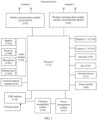
- the USB interface 130 is an interface that complies with USB standard specifications, and may be specifically a Mini USB interface, a Micro USB interface, a USB Type C interface, or the like.
- the USB interface 130 may be configured to connect to a charger to charge the terminal device, or may be configured to transmit data between the terminal device and a peripheral device, or may be configured to connect to a headset to play audio by using the headset.
- the interface may be alternatively configured to connect to another terminal device, such as an AR device.
- the internal memory 121 may be configured to store computer-executable program code, and the executable program code includes instructions.
- the internal memory 121 may include a program storage area and a data storage area.
- the internal memory 121 is configured to store executable program code corresponding to the interface display method described in embodiments of this application, and further, the processor 110 executes and invokes the executable program code.
- the audio module 170 is configured to convert digital audio information into an analog audio signal for output, and is also configured to convert an analog audio input into a digital audio signal.
- the speaker 170A also referred to as a "loudspeaker” is configured to convert an audio electrical signal into a sound signal.
- the terminal device may listen to music or answer a call in a hands-free mode by using the speaker 170A.
- the receiver 170B also referred to as an "earpiece”, is configured to convert an audio electrical signal into a sound signal. When the terminal device receives a call or a voice message, the receiver 170B can be placed close to an ear to receive the voice.
- the headset jack 170D is configured to connect to a wired headset.
- the sensor module 180 may include the following one or more sensors, such as a pressure sensor, a gyroscope sensor, a barometric pressure sensor, a magnetic sensor, an acceleration sensor, a distance sensor, an optical proximity sensor, a fingerprint sensor, a temperature sensor, a touch sensor, an ambient light sensor, or a bone conduction sensor (not shown in FIG. 1 ).
- sensors such as a pressure sensor, a gyroscope sensor, a barometric pressure sensor, a magnetic sensor, an acceleration sensor, a distance sensor, an optical proximity sensor, a fingerprint sensor, a temperature sensor, a touch sensor, an ambient light sensor, or a bone conduction sensor (not shown in FIG. 1 ).
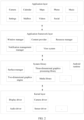
- the window manager is configured to determine a display manner of a first element on a home screen based on a screen touching operation of a user, for example, moving the first element to a lower area of a screen, or scaling down the first element and moving the first element to the lower area of the screen.
- the view system includes visual controls such as a text display control and a picture display control.
- the view system may be configured to construct an application.
- a display interface may include one or more views.
- a display interface including an SMS notification icon may include a view for displaying text and a view for displaying a picture.
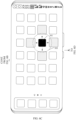
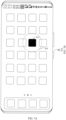
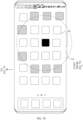
- the terminal device may perform scaling processing on the elements around the target element when receiving the target operation of the user, so that a ripple effect of a relatively small range (for example, two or three waveforms are generated around the 1 ⁇ 1 element) is produced for the elements around the target element.
- a ripple effect of a relatively small range for example, two or three waveforms are generated around the 1 ⁇ 1 element
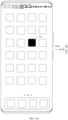
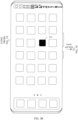
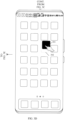
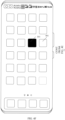
- the terminal device may highlight the target element 301 (for example, scale up the target element 301 for display; for example, a size of the target element 301 in the interface shown in FIG. 3C is 110% of a size of the target element 301 in the interface shown in FIG. 3A ).
- the terminal device may display an interface shown in FIG. 3D .
- the target element 301 in the interface may keep in a highlighted state, and a dashed-line box 302 is displayed at a start location from which the target element 301 is dragged.
- the dashed-line box 302 is used to indicate a location to which the target element 301 is returned when the user releases a finger.
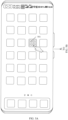
- the terminal device may sequentially display a ripple effect for elements around the target element 301 in a direction (for example, a pointing direction of an arrow) from the inside to the outside by using the target element 301 as a center.
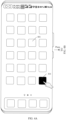
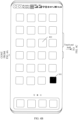
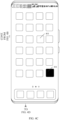
- the terminal device may preferentially perform scaling processing (for a specific scaling processing process, refer to an embodiment corresponding to FIG. 6A to FIG. 6D ) on elements other than the target element 301 in a first range 303 of the target element 301 (and that the first range 303 passes through).
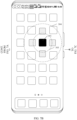
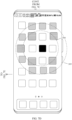
- the terminal device may perform scaling processing on elements in a second range 304 (and that the second range 304 passes through) around the target element 301 other than the first range 303.
- the elements in the second range 304 other than the first range 303 may include an element 320, an element 321, an element 322, an element 323, and an element 324. Elements corresponding to each range are centered on a location of the target element.
- An element corresponding to the second range 304 may be any element around the target element 301 for which a distance between a center of the element and the center of the target element 301 is greater than or equal to the first distance threshold and is less than a second distance threshold.
- the element corresponding to the second range 304 may be an element other than the elements in the first range 303 in a range in which a circle that is centered on the target element 301 and whose radius is R2 is located, where R2 is greater than R1.
- the elements in the first range 303 may include the element corresponding to the first range 303 and the target element 301.
- the element corresponding to the third range 305 may be any element around the target element 301 for which a distance between a center of the element and the center of the target element 301 is greater than or equal to the second distance threshold and less than a third distance threshold. A difference between the third distance threshold and the second distance threshold and a difference between the third distance threshold and the second distance threshold may be the same or different.
- the element corresponding to the third range 305 may be an element other than the elements in the second range 304 in a range in which a circle that is centered on the target element 301 and whose radius is R3 is located, where R3 is greater than R2.
- the elements in the second range 304 may include the target element, the elements corresponding to the first range 303, and the elements corresponding to the second range 304.
- a value of the time period threshold may be a value such as 50 ms, 60 ms, or 80 ms. This is not limited in this embodiment of this application.
- the terminal device may successively perform scaling processing on elements corresponding to the ranges in a sequence of the first range 303, the second range 304, and the third range 305, so that scaling of elements in any range presents a waveform.
- FIG. 4A to FIG. 4F are a schematic diagram of another interface in which a ripple effect is triggered according to an embodiment of this application.
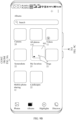
- the interface may include a target element 301 and an element 401.
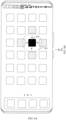
- the terminal device may scale down the target element 301 shown in FIG. 4A , and display an interface shown in FIG. 4B .
- the terminal device may highlight the target element 301, for example, display an interface shown in FIG. 4C .
- the terminal device may display an interface shown in FIG. 4D .
- the target element 301 in the interface may keep in a highlighted state, a location of the target element 301 does not exceed a specific range centered on the target element 301, and a dashed-line box is displayed at a start location from which the target element 301 is dragged.
- the terminal device may first move the element 401, for example, move the element 401 to the right by a location of one icon, so that a location of the element 401 in the interface shown in FIG. 4D may be reserved for the target element 301, for example, the terminal device displays an interface shown in FIG. 4E .
- a dashed-line box may be displayed at a location at which the element 401 is located before the element 401 is moved.
- the terminal device may place the target element 301 at a location of the dashed-line box, and display an interface shown in FIG. 4F .
- the interface shown in FIG. 4F highlighting of the target element 301 is canceled, and the target element 301 is restored to a display status and a size in the interface shown in FIG. 4A .
- the terminal device may first squeeze, based on the location of the target element, an element at a target location at which the target element may be displayed when the user releases the finger, and then move the target element to the target location when the user releases the finger.
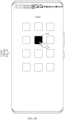
- FIG. 5A to FIG. 5D are a schematic diagram of an interface in which a ripple effect is triggered in a folder according to an embodiment of this application.
- the terminal device may place the target element 502 at a location of the dashed-line box, and display an interface shown in FIG. 5D .
- the interface shown in FIG. 5D highlighting of the target element 502 is canceled, and the target element 502 is restored to a display status and a size in the interface shown in FIG. 5B .
- the terminal device may successively perform scaling processing on elements in the folder that are corresponding to the ranges centered on the location of the target element.
- the terminal device may scale down the element corresponding to the first range 303.
- the terminal device may gradually scale down the element that is corresponding to the first range 303 and that is in the first state, for example, scale down the element corresponding to the first range 303 to a value such as 96%, so that the terminal device displays an interface shown in FIG. 6B .
- the scaled-down element in a value such as 96% may be understood as a second state of the element.
- the terminal device may scale up the scaled-down element corresponding to the first range 303.
- the terminal device may gradually scale up the element that is corresponding to the first range 303 and that is in the second state, for example, scale up the element corresponding to the first range 303 to a value such as 103%, so that the terminal device displays an interface shown in FIG. 6C .
- the scaled-up element in a value such as 103% may be understood as a third state of the element.
- all elements corresponding to the first range 303 may be scaled up in a direction away from the target element 301 (which may be alternatively understood as being scaled up outwardly by using the target element 301 as a center), or any one of elements corresponding to the first range 303 may be scaled up by using the element as a center.
- a scaling up manner is not specifically limited in this embodiment of this application.
- the terminal device may implement scaling on the elements corresponding to the first range 303 based on the embodiment corresponding to FIG. 6A to FIG. 6D , so that after the elements corresponding to the first range 303 present the first waveform, the first waveform is repeatedly displayed, and display of the waveform ends and an interface shown in FIG. 6D is displayed when any operation performed by the user on the home screen is received.
- the terminal device may set different display duration for the waveforms, or set different values for display time intervals between the waveforms. This is not limited in this embodiment of this application.
- a larger difference (which is alternatively referred to as a scaling difference) between a scaling down proportion and a scaling up proportion of a waveform leads to larger scaling amplitude and larger waveform amplitude.
- amplitude of the first waveform is greater than amplitude of the second waveform
- the amplitude of the second waveform is greater than amplitude of the third waveform, so that a dynamic effect that waveforms successively attenuate is presented.
- the terminal device may scale down, after 50 ms after the second waveform is displayed, an element corresponding to a third range 305 in the interface shown in FIG. 7C .
- the terminal device may scale down the element corresponding to the third range 305 based on the scaling down proportion 99.5% in Table 1, and present the third waveform, so that the terminal device displays an interface shown in FIG. 7D .
- the terminal device may scale up the scaled-down element corresponding to the second range 304 based on the scaling up proportion 101% in Table 1, and continue to present the second waveform, so that the terminal device displays the interface shown in FIG.
- the terminal device may scale up the scaled-down element corresponding to the third range 305 based on the scaling up proportion 100.5% in Table 1, so that the terminal device displays an interface shown in FIG. 7E , and continues to present the third waveform.
- the terminal device may scale down, to 100%, the element that is corresponding to the second range 304 and that is scaled up to 101%, and continue to present the second waveform, so that the terminal device displays the interface shown in FIG. 7E .
- FIG. 8A to FIG. 8C are a schematic diagram of still another interface in which a ripple effect is triggered according to an embodiment of this application.
- the terminal device sets different scaling proportions for different waveforms of the 2 ⁇ 2 target element.
- Table 2 is a schematic table of a scaling proportion of a waveform when the target element is 2 ⁇ 2 according to an embodiment of this application. Four waveforms are used as an example for description.
- a scaling difference of the first waveform of the 1 ⁇ 1 target element in Table 1 may be 7%, and a scaling difference of the first waveform of the 2 ⁇ 2 target element in Table 2 may be 9%. Therefore, a larger size of the target element leads to larger amplitude of a waveform and a larger quantity of waveforms.
- the terminal device may also implement a ripple effect based on the album icon.
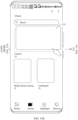
- FIG. 9A to FIG. 9F are a schematic diagram of an interface in which a ripple effect is triggered based on an album icon according to an embodiment of this application.
- the terminal device may display an interface shown in FIG. 9A .
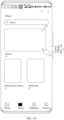
- the interface may include a text box used to search for an album, a control used to create an album, a control used to view another function in a camera application, a control used to view a photo, a control used to view an album (the control used to view an album is in a selected state), a control used to view photos based on a time dimension, a control used to view photos based on an album category, and a plurality of albums.
- the terminal device may also implement a ripple effect based on the photo icon, and the ripple effect is similar to the ripple effect of the album icon in the embodiment corresponding to FIG. 9A to FIG. 9F , and details are not described herein again.
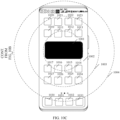
- the terminal device may perform scaling processing on elements around the target element when receiving the target operation of the user, so that a ripple effect of a relatively large range (for example, four or five waveforms are generated around the 2 ⁇ 4 element) is produced for the elements around the target element.
- a ripple effect of a relatively large range for example, four or five waveforms are generated around the 2 ⁇ 4 element
- FIG. 10A to FIG. 10C are a schematic diagram of yet another interface in which a ripple effect is triggered according to an embodiment of this application.
- the terminal device displays an interface shown in FIG. 10A , and the interface may include a card 1001 (which is alternatively referred to as a target element 1001).
- the terminal device may perform scaling processing on elements corresponding to a second range 1003, and the elements corresponding to the second range 1003 may include an element 1020, an element 1021, an element 1022, an element 1023, an element 1024, an element 1025, an element 1026, and an element 1027.
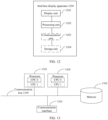
- the display unit 1201 is further configured to scale down and/or scale up the element in the dock bar for display, where M is less than or equal to N.
- the display unit 1201 is specifically configured to inwardly scale down and/or outwardly scale up the first layer of elements around the second location in the plurality of elements for display by using the second location as a center.
- the size of the target element is positively correlated with a range covered by the first layer.
- the computer-executable instructions in this embodiment of this application may also be referred to as application program code. This is not specifically limited in the embodiments of this application.
- the computer-readable storage medium may be any available medium accessible by the computer, or a data storage device such as a server or a data center integrating one or more available media.
- the available medium may include a magnetic medium (for example, a floppy disk, a hard disk, or a magnetic tape), an optical medium (for example, a digital versatile disc (digital versatile disc, DVD)), a semiconductor medium (for example, a solid state disk (solid state disk, SSD)), or the like.
- a magnetic disk and an optical disc include a compact disc (CD), a laser disc, an optical disc, a digital versatile disc (digital versatile disc, DVD), a floppy disk, and a Blu-ray disc.
- the magnetic disk usually reproduces data in a magnetic manner, and the optical disc reproduces data optically by using laser.
Landscapes
- Engineering & Computer Science (AREA)
- General Engineering & Computer Science (AREA)
- Theoretical Computer Science (AREA)
- Human Computer Interaction (AREA)
- Physics & Mathematics (AREA)
- General Physics & Mathematics (AREA)
- User Interface Of Digital Computer (AREA)
Applications Claiming Priority (2)
| Application Number | Priority Date | Filing Date | Title |
|---|---|---|---|
| CN202210764666.9A CN117369695A (zh) | 2022-06-30 | 2022-06-30 | 界面显示方法和装置 |
| PCT/CN2023/094895 WO2024001592A1 (zh) | 2022-06-30 | 2023-05-17 | 界面显示方法和装置 |
Publications (2)
| Publication Number | Publication Date |
|---|---|
| EP4394572A1 true EP4394572A1 (de) | 2024-07-03 |
| EP4394572A4 EP4394572A4 (de) | 2025-01-22 |
Family
ID=89383178
Family Applications (1)
| Application Number | Title | Priority Date | Filing Date |
|---|---|---|---|
| EP23829778.2A Pending EP4394572A4 (de) | 2022-06-30 | 2023-05-17 | Schnittstellenanzeigeverfahren und -vorrichtung |
Country Status (5)
| Country | Link |
|---|---|
| US (1) | US20240411423A1 (de) |
| EP (1) | EP4394572A4 (de) |
| JP (1) | JP7842249B2 (de) |
| CN (1) | CN117369695A (de) |
| WO (1) | WO2024001592A1 (de) |
Family Cites Families (13)
| Publication number | Priority date | Publication date | Assignee | Title |
|---|---|---|---|---|
| US7434177B1 (en) * | 1999-12-20 | 2008-10-07 | Apple Inc. | User interface for providing consolidation and access |
| US7614018B1 (en) * | 2006-02-13 | 2009-11-03 | Google Inc. | Web based user interface for selecting options |
| US8429530B2 (en) * | 2009-06-11 | 2013-04-23 | Apple Inc. | User interface for media playback |
| JP2011018356A (ja) * | 2010-09-01 | 2011-01-27 | Sharp Corp | 携帯型電話機、情報処理プログラム、および情報処理プログラムを記録した記録媒体 |
| US9916072B2 (en) * | 2013-02-20 | 2018-03-13 | Lg Electronics Inc. | Application and notification window display management in a mobile terminal |
| KR102090964B1 (ko) * | 2013-02-22 | 2020-03-19 | 삼성전자주식회사 | 터치 스크린에 디스플레이되는 아이콘을 제어하는 휴대 단말 및 방법 |
| JP6369937B2 (ja) * | 2014-09-08 | 2018-08-08 | 株式会社河合楽器製作所 | アイコン表示装置及びアイコン表示プログラム |
| CN106802751A (zh) * | 2016-11-30 | 2017-06-06 | 努比亚技术有限公司 | 一种终端和屏幕显示方法 |
| CN112987987A (zh) * | 2019-12-13 | 2021-06-18 | 华为技术有限公司 | 一种应用图标的显示方法及电子设备 |
| EP4231126A3 (de) * | 2020-03-10 | 2023-11-15 | Apple Inc. | Vorrichtungen, verfahren und grafische benutzeroberflächen zur interaktion mit benutzeroberflächenobjekten |
| CN113568549A (zh) * | 2021-04-20 | 2021-10-29 | 华为技术有限公司 | 图形界面显示方法、电子设备、介质以及程序产品 |
| CN115904160A (zh) * | 2021-09-30 | 2023-04-04 | 华为技术有限公司 | 一种图标移动方法、相关图形界面及电子设备 |
| CN116048361B (zh) * | 2022-06-24 | 2024-04-12 | 荣耀终端有限公司 | 交互方法、可读存储介质和电子设备 |
-
2022
- 2022-06-30 CN CN202210764666.9A patent/CN117369695A/zh active Pending
-
2023
- 2023-05-17 JP JP2024561681A patent/JP7842249B2/ja active Active
- 2023-05-17 US US18/699,128 patent/US20240411423A1/en active Pending
- 2023-05-17 EP EP23829778.2A patent/EP4394572A4/de active Pending
- 2023-05-17 WO PCT/CN2023/094895 patent/WO2024001592A1/zh not_active Ceased
Also Published As
| Publication number | Publication date |
|---|---|
| EP4394572A4 (de) | 2025-01-22 |
| JP2025515441A (ja) | 2025-05-15 |
| JP7842249B2 (ja) | 2026-04-07 |
| CN117369695A (zh) | 2024-01-09 |
| WO2024001592A1 (zh) | 2024-01-04 |
| WO2024001592A9 (zh) | 2024-05-16 |
| US20240411423A1 (en) | 2024-12-12 |
Similar Documents
| Publication | Publication Date | Title |
|---|---|---|
| US11687235B2 (en) | Split-screen method and electronic device | |
| US12299461B2 (en) | User interface layout method and electronic device | |
| WO2020221063A1 (zh) | 切换父页面和子页面的方法、相关装置 | |
| EP4404038B1 (de) | Schnittstellenanzeigeverfahren und -vorrichtung | |
| WO2020062294A1 (zh) | 系统导航栏的显示控制方法、图形用户界面及电子设备 | |
| US12204919B2 (en) | Interface display method and electronic device | |
| WO2021110133A1 (zh) | 一种控件的操作方法及电子设备 | |
| US20240427486A1 (en) | Icon moving method, related graphical interface, and electronic device | |
| EP4447424A1 (de) | Tapeteneinstellungsverfahren und elektronische vorrichtung | |
| JP7654936B2 (ja) | 表示方法および関連装置 | |
| US12572373B2 (en) | Quick interface return method and electronic device | |
| EP4394572A1 (de) | Schnittstellenanzeigeverfahren und -vorrichtung | |
| EP4579413A1 (de) | Anwendungssymbolverwaltungsverfahren und elektronische vorrichtung | |
| CN116166156A (zh) | 图标移动方法及相关装置 | |
| US20260044258A1 (en) | Response method for electronic device, electronic device, and storage medium | |
| EP4708039A1 (de) | Anzeigeverfahren und elektronische vorrichtung | |
| US20250203267A1 (en) | Earphone state detection method, electronic device, and storage medium | |
| WO2025201354A9 (zh) | 一种文件夹的交互方法及相关装置 | |
| WO2025201355A9 (zh) | 一种交互方法及相关装置 | |
| CN116661616A (zh) | 设备操作方法、电子设备系统、设备和存储介质 | |
| WO2023160455A1 (zh) | 删除对象的方法及电子设备 | |
| WO2024250736A1 (zh) | 交互方法和电子设备 | |
| CN121056560A (zh) | 一种应用控制方法、装置和电子设备 | |
| CN114296616A (zh) | 界面滚动的方法和电子设备 |
Legal Events
| Date | Code | Title | Description |
|---|---|---|---|
| STAA | Information on the status of an ep patent application or granted ep patent |
Free format text: STATUS: THE INTERNATIONAL PUBLICATION HAS BEEN MADE |
|
| PUAI | Public reference made under article 153(3) epc to a published international application that has entered the european phase |
Free format text: ORIGINAL CODE: 0009012 |
|
| STAA | Information on the status of an ep patent application or granted ep patent |
Free format text: STATUS: REQUEST FOR EXAMINATION WAS MADE |
|
| 17P | Request for examination filed |
Effective date: 20240326 |
|
| AK | Designated contracting states |
Kind code of ref document: A1 Designated state(s): AL AT BE BG CH CY CZ DE DK EE ES FI FR GB GR HR HU IE IS IT LI LT LU LV MC ME MK MT NL NO PL PT RO RS SE SI SK SM TR |
|
| REG | Reference to a national code |
Ref country code: DE Ref legal event code: R079 Free format text: PREVIOUS MAIN CLASS: G06F0003048600 Ipc: G06F0003048100 |
|
| A4 | Supplementary search report drawn up and despatched |
Effective date: 20241220 |
|
| RIC1 | Information provided on ipc code assigned before grant |
Ipc: G06F 3/04883 20220101ALI20241216BHEP Ipc: G06F 3/0488 20220101ALI20241216BHEP Ipc: G06F 3/04845 20220101ALI20241216BHEP Ipc: G06F 3/0486 20130101ALI20241216BHEP Ipc: G06F 3/0484 20220101ALI20241216BHEP Ipc: G06F 3/04817 20220101ALI20241216BHEP Ipc: G06F 3/0481 20220101AFI20241216BHEP |
|
| STAA | Information on the status of an ep patent application or granted ep patent |
Free format text: STATUS: EXAMINATION IS IN PROGRESS |
|
| 17Q | First examination report despatched |
Effective date: 20250624 |
|
| DAV | Request for validation of the european patent (deleted) | ||
| DAX | Request for extension of the european patent (deleted) | ||
| GRAP | Despatch of communication of intention to grant a patent |
Free format text: ORIGINAL CODE: EPIDOSNIGR1 |
|
| STAA | Information on the status of an ep patent application or granted ep patent |
Free format text: STATUS: GRANT OF PATENT IS INTENDED |