EP4144559A1 - Method, computer program and apparatus for controlling display of information in a motor vehicle - Google Patents
Method, computer program and apparatus for controlling display of information in a motor vehicle Download PDFInfo
- Publication number
- EP4144559A1 EP4144559A1 EP21195116.5A EP21195116A EP4144559A1 EP 4144559 A1 EP4144559 A1 EP 4144559A1 EP 21195116 A EP21195116 A EP 21195116A EP 4144559 A1 EP4144559 A1 EP 4144559A1
- Authority
- EP
- European Patent Office
- Prior art keywords
- motor vehicle
- user device
- mobile user
- control button
- display
- Prior art date
- Legal status (The legal status is an assumption and is not a legal conclusion. Google has not performed a legal analysis and makes no representation as to the accuracy of the status listed.)
- Pending
Links
Images


Classifications
-
- B—PERFORMING OPERATIONS; TRANSPORTING
- B60—VEHICLES IN GENERAL
- B60K—ARRANGEMENT OR MOUNTING OF PROPULSION UNITS OR OF TRANSMISSIONS IN VEHICLES; ARRANGEMENT OR MOUNTING OF PLURAL DIVERSE PRIME-MOVERS IN VEHICLES; AUXILIARY DRIVES FOR VEHICLES; INSTRUMENTATION OR DASHBOARDS FOR VEHICLES; ARRANGEMENTS IN CONNECTION WITH COOLING, AIR INTAKE, GAS EXHAUST OR FUEL SUPPLY OF PROPULSION UNITS IN VEHICLES
- B60K35/00—Instruments specially adapted for vehicles; Arrangement of instruments in or on vehicles
- B60K35/80—Arrangements for controlling instruments
-
- B—PERFORMING OPERATIONS; TRANSPORTING
- B60—VEHICLES IN GENERAL
- B60K—ARRANGEMENT OR MOUNTING OF PROPULSION UNITS OR OF TRANSMISSIONS IN VEHICLES; ARRANGEMENT OR MOUNTING OF PLURAL DIVERSE PRIME-MOVERS IN VEHICLES; AUXILIARY DRIVES FOR VEHICLES; INSTRUMENTATION OR DASHBOARDS FOR VEHICLES; ARRANGEMENTS IN CONNECTION WITH COOLING, AIR INTAKE, GAS EXHAUST OR FUEL SUPPLY OF PROPULSION UNITS IN VEHICLES
- B60K35/00—Instruments specially adapted for vehicles; Arrangement of instruments in or on vehicles
- B60K35/80—Arrangements for controlling instruments
- B60K35/81—Arrangements for controlling instruments for controlling displays
-
- B—PERFORMING OPERATIONS; TRANSPORTING
- B60—VEHICLES IN GENERAL
- B60K—ARRANGEMENT OR MOUNTING OF PROPULSION UNITS OR OF TRANSMISSIONS IN VEHICLES; ARRANGEMENT OR MOUNTING OF PLURAL DIVERSE PRIME-MOVERS IN VEHICLES; AUXILIARY DRIVES FOR VEHICLES; INSTRUMENTATION OR DASHBOARDS FOR VEHICLES; ARRANGEMENTS IN CONNECTION WITH COOLING, AIR INTAKE, GAS EXHAUST OR FUEL SUPPLY OF PROPULSION UNITS IN VEHICLES
- B60K35/00—Instruments specially adapted for vehicles; Arrangement of instruments in or on vehicles
- B60K35/10—Input arrangements, i.e. from user to vehicle, associated with vehicle functions or specially adapted therefor
-
- B—PERFORMING OPERATIONS; TRANSPORTING
- B60—VEHICLES IN GENERAL
- B60K—ARRANGEMENT OR MOUNTING OF PROPULSION UNITS OR OF TRANSMISSIONS IN VEHICLES; ARRANGEMENT OR MOUNTING OF PLURAL DIVERSE PRIME-MOVERS IN VEHICLES; AUXILIARY DRIVES FOR VEHICLES; INSTRUMENTATION OR DASHBOARDS FOR VEHICLES; ARRANGEMENTS IN CONNECTION WITH COOLING, AIR INTAKE, GAS EXHAUST OR FUEL SUPPLY OF PROPULSION UNITS IN VEHICLES
- B60K35/00—Instruments specially adapted for vehicles; Arrangement of instruments in or on vehicles
- B60K35/20—Output arrangements, i.e. from vehicle to user, associated with vehicle functions or specially adapted therefor
- B60K35/21—Output arrangements, i.e. from vehicle to user, associated with vehicle functions or specially adapted therefor using visual output, e.g. blinking lights or matrix displays
- B60K35/23—Head-up displays [HUD]
-
- B—PERFORMING OPERATIONS; TRANSPORTING
- B60—VEHICLES IN GENERAL
- B60K—ARRANGEMENT OR MOUNTING OF PROPULSION UNITS OR OF TRANSMISSIONS IN VEHICLES; ARRANGEMENT OR MOUNTING OF PLURAL DIVERSE PRIME-MOVERS IN VEHICLES; AUXILIARY DRIVES FOR VEHICLES; INSTRUMENTATION OR DASHBOARDS FOR VEHICLES; ARRANGEMENTS IN CONNECTION WITH COOLING, AIR INTAKE, GAS EXHAUST OR FUEL SUPPLY OF PROPULSION UNITS IN VEHICLES
- B60K35/00—Instruments specially adapted for vehicles; Arrangement of instruments in or on vehicles
- B60K35/20—Output arrangements, i.e. from vehicle to user, associated with vehicle functions or specially adapted therefor
- B60K35/28—Output arrangements, i.e. from vehicle to user, associated with vehicle functions or specially adapted therefor characterised by the type of the output information, e.g. video entertainment or vehicle dynamics information; characterised by the purpose of the output information, e.g. for attracting the attention of the driver
-
- B—PERFORMING OPERATIONS; TRANSPORTING
- B60—VEHICLES IN GENERAL
- B60K—ARRANGEMENT OR MOUNTING OF PROPULSION UNITS OR OF TRANSMISSIONS IN VEHICLES; ARRANGEMENT OR MOUNTING OF PLURAL DIVERSE PRIME-MOVERS IN VEHICLES; AUXILIARY DRIVES FOR VEHICLES; INSTRUMENTATION OR DASHBOARDS FOR VEHICLES; ARRANGEMENTS IN CONNECTION WITH COOLING, AIR INTAKE, GAS EXHAUST OR FUEL SUPPLY OF PROPULSION UNITS IN VEHICLES
- B60K35/00—Instruments specially adapted for vehicles; Arrangement of instruments in or on vehicles
- B60K35/60—Instruments characterised by their location or relative disposition in or on vehicles
-
- B—PERFORMING OPERATIONS; TRANSPORTING
- B60—VEHICLES IN GENERAL
- B60K—ARRANGEMENT OR MOUNTING OF PROPULSION UNITS OR OF TRANSMISSIONS IN VEHICLES; ARRANGEMENT OR MOUNTING OF PLURAL DIVERSE PRIME-MOVERS IN VEHICLES; AUXILIARY DRIVES FOR VEHICLES; INSTRUMENTATION OR DASHBOARDS FOR VEHICLES; ARRANGEMENTS IN CONNECTION WITH COOLING, AIR INTAKE, GAS EXHAUST OR FUEL SUPPLY OF PROPULSION UNITS IN VEHICLES
- B60K35/00—Instruments specially adapted for vehicles; Arrangement of instruments in or on vehicles
- B60K35/65—Instruments specially adapted for specific vehicle types or users, e.g. for left- or right-hand drive
-
- B—PERFORMING OPERATIONS; TRANSPORTING
- B60—VEHICLES IN GENERAL
- B60K—ARRANGEMENT OR MOUNTING OF PROPULSION UNITS OR OF TRANSMISSIONS IN VEHICLES; ARRANGEMENT OR MOUNTING OF PLURAL DIVERSE PRIME-MOVERS IN VEHICLES; AUXILIARY DRIVES FOR VEHICLES; INSTRUMENTATION OR DASHBOARDS FOR VEHICLES; ARRANGEMENTS IN CONNECTION WITH COOLING, AIR INTAKE, GAS EXHAUST OR FUEL SUPPLY OF PROPULSION UNITS IN VEHICLES
- B60K35/00—Instruments specially adapted for vehicles; Arrangement of instruments in or on vehicles
- B60K35/85—Arrangements for transferring vehicle- or driver-related data
-
- B—PERFORMING OPERATIONS; TRANSPORTING
- B60—VEHICLES IN GENERAL
- B60K—ARRANGEMENT OR MOUNTING OF PROPULSION UNITS OR OF TRANSMISSIONS IN VEHICLES; ARRANGEMENT OR MOUNTING OF PLURAL DIVERSE PRIME-MOVERS IN VEHICLES; AUXILIARY DRIVES FOR VEHICLES; INSTRUMENTATION OR DASHBOARDS FOR VEHICLES; ARRANGEMENTS IN CONNECTION WITH COOLING, AIR INTAKE, GAS EXHAUST OR FUEL SUPPLY OF PROPULSION UNITS IN VEHICLES
- B60K2360/00—Indexing scheme associated with groups B60K35/00 or B60K37/00 relating to details of instruments or dashboards
- B60K2360/11—Instrument graphical user interfaces or menu aspects
- B60K2360/111—Instrument graphical user interfaces or menu aspects for controlling multiple devices
-
- B—PERFORMING OPERATIONS; TRANSPORTING
- B60—VEHICLES IN GENERAL
- B60K—ARRANGEMENT OR MOUNTING OF PROPULSION UNITS OR OF TRANSMISSIONS IN VEHICLES; ARRANGEMENT OR MOUNTING OF PLURAL DIVERSE PRIME-MOVERS IN VEHICLES; AUXILIARY DRIVES FOR VEHICLES; INSTRUMENTATION OR DASHBOARDS FOR VEHICLES; ARRANGEMENTS IN CONNECTION WITH COOLING, AIR INTAKE, GAS EXHAUST OR FUEL SUPPLY OF PROPULSION UNITS IN VEHICLES
- B60K2360/00—Indexing scheme associated with groups B60K35/00 or B60K37/00 relating to details of instruments or dashboards
- B60K2360/143—Touch sensitive instrument input devices
- B60K2360/1434—Touch panels
-
- B—PERFORMING OPERATIONS; TRANSPORTING
- B60—VEHICLES IN GENERAL
- B60K—ARRANGEMENT OR MOUNTING OF PROPULSION UNITS OR OF TRANSMISSIONS IN VEHICLES; ARRANGEMENT OR MOUNTING OF PLURAL DIVERSE PRIME-MOVERS IN VEHICLES; AUXILIARY DRIVES FOR VEHICLES; INSTRUMENTATION OR DASHBOARDS FOR VEHICLES; ARRANGEMENTS IN CONNECTION WITH COOLING, AIR INTAKE, GAS EXHAUST OR FUEL SUPPLY OF PROPULSION UNITS IN VEHICLES
- B60K2360/00—Indexing scheme associated with groups B60K35/00 or B60K37/00 relating to details of instruments or dashboards
- B60K2360/146—Instrument input by gesture
- B60K2360/1468—Touch gesture
-
- B—PERFORMING OPERATIONS; TRANSPORTING
- B60—VEHICLES IN GENERAL
- B60K—ARRANGEMENT OR MOUNTING OF PROPULSION UNITS OR OF TRANSMISSIONS IN VEHICLES; ARRANGEMENT OR MOUNTING OF PLURAL DIVERSE PRIME-MOVERS IN VEHICLES; AUXILIARY DRIVES FOR VEHICLES; INSTRUMENTATION OR DASHBOARDS FOR VEHICLES; ARRANGEMENTS IN CONNECTION WITH COOLING, AIR INTAKE, GAS EXHAUST OR FUEL SUPPLY OF PROPULSION UNITS IN VEHICLES
- B60K2360/00—Indexing scheme associated with groups B60K35/00 or B60K37/00 relating to details of instruments or dashboards
- B60K2360/16—Type of output information
- B60K2360/162—Visual feedback on control action
-
- B—PERFORMING OPERATIONS; TRANSPORTING
- B60—VEHICLES IN GENERAL
- B60K—ARRANGEMENT OR MOUNTING OF PROPULSION UNITS OR OF TRANSMISSIONS IN VEHICLES; ARRANGEMENT OR MOUNTING OF PLURAL DIVERSE PRIME-MOVERS IN VEHICLES; AUXILIARY DRIVES FOR VEHICLES; INSTRUMENTATION OR DASHBOARDS FOR VEHICLES; ARRANGEMENTS IN CONNECTION WITH COOLING, AIR INTAKE, GAS EXHAUST OR FUEL SUPPLY OF PROPULSION UNITS IN VEHICLES
- B60K2360/00—Indexing scheme associated with groups B60K35/00 or B60K37/00 relating to details of instruments or dashboards
- B60K2360/16—Type of output information
- B60K2360/164—Infotainment
-
- B—PERFORMING OPERATIONS; TRANSPORTING
- B60—VEHICLES IN GENERAL
- B60K—ARRANGEMENT OR MOUNTING OF PROPULSION UNITS OR OF TRANSMISSIONS IN VEHICLES; ARRANGEMENT OR MOUNTING OF PLURAL DIVERSE PRIME-MOVERS IN VEHICLES; AUXILIARY DRIVES FOR VEHICLES; INSTRUMENTATION OR DASHBOARDS FOR VEHICLES; ARRANGEMENTS IN CONNECTION WITH COOLING, AIR INTAKE, GAS EXHAUST OR FUEL SUPPLY OF PROPULSION UNITS IN VEHICLES
- B60K2360/00—Indexing scheme associated with groups B60K35/00 or B60K37/00 relating to details of instruments or dashboards
- B60K2360/16—Type of output information
- B60K2360/166—Navigation
-
- B—PERFORMING OPERATIONS; TRANSPORTING
- B60—VEHICLES IN GENERAL
- B60K—ARRANGEMENT OR MOUNTING OF PROPULSION UNITS OR OF TRANSMISSIONS IN VEHICLES; ARRANGEMENT OR MOUNTING OF PLURAL DIVERSE PRIME-MOVERS IN VEHICLES; AUXILIARY DRIVES FOR VEHICLES; INSTRUMENTATION OR DASHBOARDS FOR VEHICLES; ARRANGEMENTS IN CONNECTION WITH COOLING, AIR INTAKE, GAS EXHAUST OR FUEL SUPPLY OF PROPULSION UNITS IN VEHICLES
- B60K2360/00—Indexing scheme associated with groups B60K35/00 or B60K37/00 relating to details of instruments or dashboards
- B60K2360/40—Hardware adaptations for dashboards or instruments
- B60K2360/46—Electrical connections
- B60K2360/47—Electrical connections using wireless power transfer or transmission.
-
- B—PERFORMING OPERATIONS; TRANSPORTING
- B60—VEHICLES IN GENERAL
- B60K—ARRANGEMENT OR MOUNTING OF PROPULSION UNITS OR OF TRANSMISSIONS IN VEHICLES; ARRANGEMENT OR MOUNTING OF PLURAL DIVERSE PRIME-MOVERS IN VEHICLES; AUXILIARY DRIVES FOR VEHICLES; INSTRUMENTATION OR DASHBOARDS FOR VEHICLES; ARRANGEMENTS IN CONNECTION WITH COOLING, AIR INTAKE, GAS EXHAUST OR FUEL SUPPLY OF PROPULSION UNITS IN VEHICLES
- B60K2360/00—Indexing scheme associated with groups B60K35/00 or B60K37/00 relating to details of instruments or dashboards
- B60K2360/55—Remote control arrangements
- B60K2360/56—Remote control arrangements using mobile devices
- B60K2360/566—Mobile devices displaying vehicle information
-
- B—PERFORMING OPERATIONS; TRANSPORTING
- B60—VEHICLES IN GENERAL
- B60K—ARRANGEMENT OR MOUNTING OF PROPULSION UNITS OR OF TRANSMISSIONS IN VEHICLES; ARRANGEMENT OR MOUNTING OF PLURAL DIVERSE PRIME-MOVERS IN VEHICLES; AUXILIARY DRIVES FOR VEHICLES; INSTRUMENTATION OR DASHBOARDS FOR VEHICLES; ARRANGEMENTS IN CONNECTION WITH COOLING, AIR INTAKE, GAS EXHAUST OR FUEL SUPPLY OF PROPULSION UNITS IN VEHICLES
- B60K2360/00—Indexing scheme associated with groups B60K35/00 or B60K37/00 relating to details of instruments or dashboards
- B60K2360/55—Remote control arrangements
- B60K2360/56—Remote control arrangements using mobile devices
- B60K2360/573—Mobile devices controlling vehicle functions
-
- B—PERFORMING OPERATIONS; TRANSPORTING
- B60—VEHICLES IN GENERAL
- B60K—ARRANGEMENT OR MOUNTING OF PROPULSION UNITS OR OF TRANSMISSIONS IN VEHICLES; ARRANGEMENT OR MOUNTING OF PLURAL DIVERSE PRIME-MOVERS IN VEHICLES; AUXILIARY DRIVES FOR VEHICLES; INSTRUMENTATION OR DASHBOARDS FOR VEHICLES; ARRANGEMENTS IN CONNECTION WITH COOLING, AIR INTAKE, GAS EXHAUST OR FUEL SUPPLY OF PROPULSION UNITS IN VEHICLES
- B60K2360/00—Indexing scheme associated with groups B60K35/00 or B60K37/00 relating to details of instruments or dashboards
- B60K2360/589—Wireless data transfers
-
- B—PERFORMING OPERATIONS; TRANSPORTING
- B60—VEHICLES IN GENERAL
- B60K—ARRANGEMENT OR MOUNTING OF PROPULSION UNITS OR OF TRANSMISSIONS IN VEHICLES; ARRANGEMENT OR MOUNTING OF PLURAL DIVERSE PRIME-MOVERS IN VEHICLES; AUXILIARY DRIVES FOR VEHICLES; INSTRUMENTATION OR DASHBOARDS FOR VEHICLES; ARRANGEMENTS IN CONNECTION WITH COOLING, AIR INTAKE, GAS EXHAUST OR FUEL SUPPLY OF PROPULSION UNITS IN VEHICLES
- B60K2360/00—Indexing scheme associated with groups B60K35/00 or B60K37/00 relating to details of instruments or dashboards
- B60K2360/731—Instruments adaptations for specific vehicle types or users by comprising user programmable systems
-
- B—PERFORMING OPERATIONS; TRANSPORTING
- B60—VEHICLES IN GENERAL
- B60K—ARRANGEMENT OR MOUNTING OF PROPULSION UNITS OR OF TRANSMISSIONS IN VEHICLES; ARRANGEMENT OR MOUNTING OF PLURAL DIVERSE PRIME-MOVERS IN VEHICLES; AUXILIARY DRIVES FOR VEHICLES; INSTRUMENTATION OR DASHBOARDS FOR VEHICLES; ARRANGEMENTS IN CONNECTION WITH COOLING, AIR INTAKE, GAS EXHAUST OR FUEL SUPPLY OF PROPULSION UNITS IN VEHICLES
- B60K2360/00—Indexing scheme associated with groups B60K35/00 or B60K37/00 relating to details of instruments or dashboards
- B60K2360/828—Mounting or fastening exchangeable modules
- B60K2360/834—Docking arrangements
Definitions
- the present invention is related to a method, a computer program, and an apparatus for controlling display of information in a motor vehicle.
- the invention is further related to a mobile user device for use in such a method and to a motor vehicle, which makes use of such a method or apparatus.
- Modern motor vehicles are provided with an ever-increasing number of assistance systems. While such assistance systems increase the safety during operation of the motor vehicle, they come at the cost that an increasing amount of information needs to be conveyed to an operator of the motor vehicle.
- the operator needs to be able to control settings of at least some of these assistance systems, which means that an increasing number of control elements needs to be provided.
- the settings can be controlled using menus or submenus provided by an infotainment system. While this reduced the number of required control elements, finding a desired setting in a menu structure may be cumbersome.
- DE 10 2010 047 778 A1 discloses a method implemented in an operating system for controlling a plurality of driver assistance systems in a vehicle.
- the operating system comprises an operating device for detecting user inputs and a control device for actuating the driver assistance systems.
- the control device is designed to detect activation information for the plurality of driver assistance systems on the basis of the user inputs.
- DE 10 2019 119 135 A1 discloses a method for using a control unit of a steering wheel of a motor vehicle for a first control target and/or a second control target. After receiving a first signal representing a request to assign a control element of the control unit to the first control destination, the control element is assigned to the first control destination. When a second signal representing a request to assign the control element to the second control destination is received, the control element is assigned to the second control destination.
- DE 10 2013 006 496 A1 discloses a method for operating a motor vehicle by means of a driver assistance system.
- the driver assistance system comprises a display device and an input element.
- the display device comprises a head-up display and a screen.
- a selection element is first displayed only by means of the head-up display. The selection element may be shifted by means of the input element in the direction of the screen and onto the screen.
- a method for controlling display of information in a motor vehicle comprises:
- a computer program comprises instructions, which, when executed by a computer, cause the computer to perform the following steps for controlling display of information in a motor vehicle:
- the term computer has to be understood broadly. In particular, it also includes electronic control units, embedded systems, and other processor-based data processing devices.
- the computer program can, for example, be made available for electronic retrieval or stored on a computer-readable storage medium.
- an apparatus for controlling display of information in a motor vehicle comprises:
- a mobile user device is coupled with the motor vehicle in such a way that at least one control button of the motor vehicle is assigned to operate the mobile user device.
- the user is able to modify information displayed by an application running on the mobile user device without the need to interact directly with the mobile user device, i.e., without the need to pick up the device. This leads to a pleasant user experience and to an increased safety when the mobile user device is operated during operation of the motor vehicle.
- the connection between the mobile user device and the motor vehicle is established responsive to placing the mobile user device in a dedicated area in a dashboard of the motor vehicle.
- This solution has the advantage that the user does not need to establish a connection manually. It is sufficient if the mobile user device is placed in a designated area. In case the user does not want to establish a connection, they may simply place the mobile user device somewhere else. Of course, the mobile user device needs to be paired once with the motor vehicle so that it is automatically recognized from then on.
- the dedicated area in the dashboard of the motor vehicle is a magnetic area. In this way, the mobile user device is reliably secured in the dedicated area and will not be inadvertently moved out of the dedicated area during operation of the motor vehicle.
- a second control button of the motor vehicle is associated with a head-up display of the motor vehicle when the connection between the mobile user device and the motor vehicle is established. Information displayed by the head-up display is then modified responsive to a user input via the second control button. In this way, the user has the possibility to easily modify the way that information is displayed by the head-up display without the need to access any particular menus provided by an infotainment system of the motor vehicle.
- the first control button and the second control button are arranged in a steering wheel of the motor vehicle.
- Modern motor vehicles are usually equipped with a variety of control buttons in the steering wheel. Operators of such motor vehicles are thus accustomed to controlling system settings with those control buttons.
- control buttons arranged in the steering wheel have the advantage that they can be operated while maintaining attention on the surrounding traffic, i.e., the user does not need to direct their attention to the control button they want to operate.
- the first control button and the second control button are configured to be operated by swiping movements. Users are well accustomed to using swiping movements for operating smartphones and tablets. The transfer of this operating principle to control actions in a motor vehicle therefore has the advantage that the user can intuitively control the system.
- modifying information displayed by the application running on the mobile user device comprises switching between different application screens.
- the different application screens include at least a media screen and a navigation screen. In this way, the user is able to easily switch between the applications screens that are most relevant to the user.
- modifying information displayed by the head-up display comprises increasing or reducing an amount of information displayed by the head-up display.
- the user is able to reduce distraction caused by the information displayed by the head-up display by simply reducing the amount of information that is displayed. If the user has the need to obtain additional information, they can easily increase the amount of information that is displayed.
- content displayed by the head-up display is also modified responsive to a user input via a user interface of the mobile user device.
- Users today are accustomed to operating all kinds of devices using applications running on their own mobile devices. The users are thus able to easily adapt the content displayed by the head-up display, e.g. information provided by different assistance systems, according to their needs and preferences.
- a mobile user device is configured to be used in a method according to the invention.
- the mobile user device is configured to be connected to a motor vehicle and to modify information displayed by an application running on the mobile user device responsive to a user input via a first control button of the motor vehicle.
- the mobile user device may be a smartphone or a tablet.
- Using a button of the motor vehicle for controlling information displayed by the mobile user device has the advantage that the distraction of the user caused by operating the mobile user device is reduced.
- a motor vehicle comprises an apparatus according to the invention or is configured to perform a method according to the invention for controlling display of information in the motor vehicle.
- the motor vehicle may be a car, a bus, or a commercial vehicle, e.g. a truck. More generally, the invention can be used in land vehicles, rail vehicles, watercrafts, and aircrafts.
- processor or “controller” should not be construed to refer exclusively to hardware capable of executing software, and may implicitly include, without limitation, digital signal processor (DSP) hardware, read only memory (ROM) for storing software, random access memory (RAM), and nonvolatile storage.
- DSP digital signal processor
- ROM read only memory
- RAM random access memory
- any switches shown in the figures are conceptual only. Their function may be carried out through the operation of program logic, through dedicated logic, through the interaction of program control and dedicated logic, or even manually, the particular technique being selectable by the implementer as more specifically understood from the context.
- any element expressed as a means for performing a specified function is intended to encompass any way of performing that function including, for example, a combination of circuit elements that performs that function or software in any form, including, therefore, firmware, microcode or the like, combined with appropriate circuitry for executing that software to perform the function.
- the disclosure as defined by such claims resides in the fact that the functionalities provided by the various recited means are combined and brought together in the manner which the claims call for. It is thus regarded that any means that can provide those functionalities are equivalent to those shown herein.
- Fig. 1 schematically illustrates a method according to the invention for controlling display of information in a motor vehicle.
- a connection between a mobile user device and the motor vehicle is established 10.
- the connection is established 10 responsive to placing the mobile user device in a dedicated area in a dashboard of the motor vehicle, e.g. a magnetic area.
- At least a first control button of the motor vehicle is then associated 11 with an application running on the mobile user device.
- a second control button of the motor vehicle may be associated 12 with a head-up display of the motor vehicle.
- the first control button and the second control button are arranged in a steering wheel of the motor vehicle. Preferably, they are configured to be operated by swiping movements.
- information displayed by the application running on the mobile user device is modified 13. For example, a switching between different application screens may be performed, such as between a media screen and a navigation screen. Accordingly, responsive to a user input via the second control button, information displayed by the head-up display may be modified 14. For example, an amount of information displayed by the head-up display may be increased or reduced.
- content displayed by the head-up display may also be modified responsive to a user input via a user interface of the mobile user device.
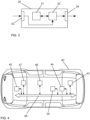
- Fig. 2 schematically illustrates a block diagram of a first embodiment of an apparatus 20 according to the invention for controlling display of information in a motor vehicle.
- the apparatus 20 has an interface 21, via which a connecting unit 22 establishes a connection between a mobile user device 50 and the motor vehicle.
- the connection is established responsive to placing the mobile user device in a dedicated area in a dashboard of the motor vehicle, e.g. a magnetic area.
- a processing unit 23 is configured to associate at least a first control button 410 of the motor vehicle with an application running on the mobile user device 50, and to modify information displayed by the application running on the mobile user device 50 responsive to a user input UI via the first control button 410.
- the processing unit 23 may provide a respective control signal CS to the mobile user device 50 via the interface 21. For example, a switching between different application screens may be performed, such as between a media screen and a navigation screen.
- the processing unit 23 may further be configured to associate a second control button 411 of the motor vehicle with a head-up display 43 of the motor vehicle, and to modify information displayed by the head-up display 43 responsive to a user input UI via the second control button 411.
- the processing unit 23 may provide a respective control signal CS to the head-up display 43 via the interface 21. For example, an amount of information displayed by the head-up display may be increased or reduced.
- content displayed by the head-up display 43 may also be modified responsive to a user input UI via a user interface of the mobile user device 50.
- a local storage unit 25 is provided, e.g. for storing data during processing.
- the interface 21 may likewise be spilt into an input and an output.
- the first control button 410 and the second control button 411 are arranged in a steering wheel of the motor vehicle. Preferably, they are configured to be operated by swiping movements.
- the connecting unit 22 and the processing unit 23 may be controlled by a control unit 24.
- a user interface 26 may be provided for enabling a user to modify settings of the connecting unit 22, the processing unit 23, or the control unit 24.
- the various units 22-24 can be embodied as dedicated hardware units. Of course, they may likewise be fully or partially combined into a single unit or implemented as software running on a processor, e.g. a CPU or a GPU.
- FIG. 3 A block diagram of a second embodiment of an apparatus 30 according to the invention for controlling display of information in a motor vehicle is illustrated in Fig. 3 .
- the apparatus 30 comprises a processing device 31 and a memory device 32.
- the apparatus 30 may be a computer, an embedded system, or an electronic control unit.
- the memory device 32 has stored instructions that, when executed by the processing device 31, cause the apparatus 30 to perform steps according to one of the described methods.
- the instructions stored in the memory device 32 thus tangibly embody a program of instructions executable by the processing device 31 to perform program steps as described herein according to the present principles.
- the apparatus 30 has an input 33 for receiving data. Data generated by the processing device 31 are made available via an output 34. In addition, such data may be stored in the memory device 32.
- the input 33 and the output 34 may be combined into a single bidirectional interface.
- the processing device 31 as used herein may include one or more processing units, such as microprocessors, digital signal processors, or a combination thereof.
- the local storage unit 25 and the memory device 32 may include volatile and/or non-volatile memory regions and storage devices such as hard disk drives, optical drives, and/or solid-state memories.
- Fig. 4 shows a motor vehicle 40 suitable for use with the described solution.
- the motor vehicle 40 is a car.
- the motor vehicle 40 comprises a head-up display 43 that is configured to provide information to an operator of the motor vehicle.
- the motor vehicle 40 further comprises a plurality of sensor units 44, e.g. a camera, a radar sensor, and an ultrasound sensor.
- sensor units 44 e.g. a camera, a radar sensor, and an ultrasound sensor.
- other types of sensor units may likewise be used, such as a laser scanner or a lidar sensor.
- a data transmission unit 45 is provided, e.g. for exchanging data with other motor vehicles or with a service provider.
- the data transmission unit 45 may make use of known communication technologies, such as IEEE802.11p or 3GPP C-V2X.
- a local storage unit 46 For storing data, a local storage unit 46 is provided.
- the various components of the motor vehicle 40 may be controlled by a control unit 47. Data exchange between the components of the motor vehicle 40 is performed via a network 48.
- an apparatus 20 For controlling display of information in the motor vehicle 40, an apparatus 20 according to the invention is provided.
- Fig. 5 shows an interior of the motor vehicle 40 of Fig. 4 .
- a user has placed a mobile user device 50 in a dedicated magnetic area 420 of a dashboard 42 of the motor vehicle 40.
- a connection has been established between the mobile user device 50 and the motor vehicle 40.
- a first control button 410 arranged in a steering wheel 41 of the motor vehicle 40 has been associated with an application running on the mobile user device 50, as indicated by the arrow between the first control button 410 and the mobile user device 50.
- a second control button 411 arranged in the steering wheel 41 has been associated with a head-up display 43 of the motor vehicle 40, as indicated by the arrow between the second control button 411 and a display area 430 of the head-up display 43.
- Both control buttons 410, 411 are preferably configured to be operated by swiping movements.
- the user can easily control the information that is displayed by the mobile user device 50 and in the display area 430 of the head-up display 43.
- the main view of the application can be switched, i.e., the application screen, e.g. between a navigation screen and a media screen.
- the amount of information displayed in the display area 430 of the head-up display 43 can be increased or reduced.
- the content displayed in the display area 430 i.e., the desired features of the assistance systems available in the motor vehicle 40, can be controlled by the application running on the mobile user device 50. This is indicated by the arrow between the mobile user device 50 and the display area 430.
- Fig. 6 shows a mobile user device 50 suitable for use with the described solution.
- the mobile user device 50 is a smartphone.
- the mobile user device 50 shows a user interface HMI with a number of buttons 51 for various application screens of an application running on the mobile user device 50.
- buttons 51 for selecting a navigation screen, a media screen, and a connectivity screen can be activated.
- the currently active screen is the navigation screen.
- Further buttons 51 may be available by scrolling the buttons 51 to the left or to the right, as indicated by a scroll bar 52.
- the relevant information for a given application screen is depicted in an information window 53 of the user interface HMI.
- the mobile user device 50 is configured to be connected to a motor vehicle and to modify the information displayed in the information window 53 responsive to a user input via a first control button of the motor vehicle. For example, a switching between the different application screens may be performed.
- content displayed by a head-up display may be modified responsive to a user input via the user interface HMI of the mobile user device 50.
- the user interface HMI comprises further buttons 54, which may be used for increasing or reducing the amount of information displayed in the display area of the head-up display, e.g. by activating a "minimum information" mode, in which only the most basic information is shown.
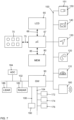
- Fig. 7 schematically shows a block diagram of a board electronics system of a motor vehicle.
- an infotainment system which comprises a touch-sensitive display unit 65, a computing device 67, an input unit 70, and a memory device 80.
- the display unit 65 is connected to the computing device 67 via a data line 66 and includes both a display area for displaying variable graphical information and an operator interface (touch-sensitive layer) arranged above the display area for inputting commands by a user.
- the input unit 70 is connected to the computing device 67 via a data line 75.
- the memory device 80 is connected to the computing device 67 via a data line 85.
- a pictogram directory and/or symbol directory is deposited with pictograms and/or symbols for possible overlays of additional information.
- the other parts of the infotainment system such as a camera 150, radio 140, navigation device 130, telephone 120 and instrument cluster 110 are connected via a data bus 100 with the computing device 60.
- data bus 100 the high-speed variant of the CAN (Controller Area Network) bus according to ISO standard 11898-2 may be used.
- an Ethernet-based bus system such as IEEE 802.03cg can be used.
- Bus systems implementing the data transmission via optical fibers are also usable. Examples are the MOST Bus (Media Oriented System Transport) or the D2B Bus (Domestic Digital Bus).
- MOST Bus Media Oriented System Transport
- D2B Bus Domestic Digital Bus
- the vehicle is equipped with an on-board connectivity module 160. It can be used for mobile communication, e.g. mobile communication according to the 5G standard.
- Reference numeral 172 denotes an engine control unit.
- Reference numeral 174 denotes an ESC (electronic stability control) unit, whereas reference numeral 176 denotes a transmission control unit.
- Modern vehicles may comprise additional components, such as further sensors for scanning the surroundings, like a LIDAR sensor 186 or a RADAR sensor 182 and additional video cameras 151, e.g. a front camera, a rear camera or side cameras. Such sensors are increasingly used in vehicles for observation of the environment. Further control devices, such as an ADC (automatic driving control) unit 184, etc., may be provided in the vehicle.
- the RADAR and LIDAR sensors 182, 186 may have a scanning range of up to 250 m, whereas the cameras 150, 151 may cover a range from 30 m to 120 m.
- the components 182 to 186 are connected to another communication bus 102, e.g. an Ethernet-Bus due to its higher bandwidth for data transport.
- V2V Vehicle-to-Vehicle
- Reference numeral 190 denotes an on-board diagnosis interface, which is connected to another communication bus 106.
- a gateway 90 For the purpose of transmitting the vehicle-relevant sensor data via the an on-board connectivity module 160 to another vehicle or to a control center computer, a gateway 90 is provided. This gateway 90 is connected to the different bus systems 100, 102, 104 and 106. The gateway 90 is adapted to convert the data it receives via one bus to the transmission format of another bus so that it can be distributed using the packets specified for the respective other bus. For forwarding this data to the outside, i.e. to another vehicle or to the control central computer, the an on-board connectivity module 160 is equipped with a communication interface to receive these data packets and, in turn, to convert them into the transmission format of the appropriate mobile radio standard.
Landscapes
- Engineering & Computer Science (AREA)
- Chemical & Material Sciences (AREA)
- Combustion & Propulsion (AREA)
- Transportation (AREA)
- Mechanical Engineering (AREA)
- Instrument Panels (AREA)
Abstract
Description
- The present invention is related to a method, a computer program, and an apparatus for controlling display of information in a motor vehicle. The invention is further related to a mobile user device for use in such a method and to a motor vehicle, which makes use of such a method or apparatus.
- Modern motor vehicles are provided with an ever-increasing number of assistance systems. While such assistance systems increase the safety during operation of the motor vehicle, they come at the cost that an increasing amount of information needs to be conveyed to an operator of the motor vehicle. In addition, the operator needs to be able to control settings of at least some of these assistance systems, which means that an increasing number of control elements needs to be provided. Alternatively, the settings can be controlled using menus or submenus provided by an infotainment system. While this reduced the number of required control elements, finding a desired setting in a menu structure may be cumbersome.
- In this regard,
DE 10 2010 047 778 A1 discloses a method implemented in an operating system for controlling a plurality of driver assistance systems in a vehicle. The operating system comprises an operating device for detecting user inputs and a control device for actuating the driver assistance systems. The control device is designed to detect activation information for the plurality of driver assistance systems on the basis of the user inputs. -
DE 10 2019 119 135 A1 discloses a method for using a control unit of a steering wheel of a motor vehicle for a first control target and/or a second control target. After receiving a first signal representing a request to assign a control element of the control unit to the first control destination, the control element is assigned to the first control destination. When a second signal representing a request to assign the control element to the second control destination is received, the control element is assigned to the second control destination. - One possibility to convey information to an operator of a motor vehicle is the use of a head-up-display. For example,
DE 10 2013 006 496 A1 discloses a method for operating a motor vehicle by means of a driver assistance system. The driver assistance system comprises a display device and an input element. The display device comprises a head-up display and a screen. For a simple operation of the driver assistance system, a selection element is first displayed only by means of the head-up display. The selection element may be shifted by means of the input element in the direction of the screen and onto the screen. - Apart from the increasing number of assistance systems, modern motor vehicles often offer the possibility to connect mobile user devices to the vehicle, such as smartphones or tablets, e.g. in order to access audio files stored on such devices or to enable phone calls. However, the operation of such mobile user devices by the operator of the motor vehicle causes a distraction of the operator, which poses a potential security risk.
- It is an object of the present invention to provide improved solutions for controlling display of information in a motor vehicle.
- This object is achieved by a method according to claim 1, by a computer program according to
claim 11, which implements such a method, and by an apparatus according toclaim 12. This object is further achieved by a mobile user device according toclaim 13 and a motor vehicle according toclaim 14. The dependent claims include advantageous further developments and improvements of the present principles as described below. - According to a first aspect, a method for controlling display of information in a motor vehicle comprises:
- establishing a connection between a mobile user device and the motor vehicle;
- associating at least a first control button of the motor vehicle with an application running on the mobile user device; and
- modifying information displayed by the application running on the mobile user device responsive to a user input via the first control button.
- Accordingly, a computer program comprises instructions, which, when executed by a computer, cause the computer to perform the following steps for controlling display of information in a motor vehicle:
- establishing a connection between a mobile user device and the motor vehicle;
- associating at least a first control button of the motor vehicle with an application running on the mobile user device; and
- modifying information displayed by the application running on the mobile user device responsive to a user input via the first control button.
- The term computer has to be understood broadly. In particular, it also includes electronic control units, embedded systems, and other processor-based data processing devices.
- The computer program can, for example, be made available for electronic retrieval or stored on a computer-readable storage medium.
- According to another aspect, an apparatus for controlling display of information in a motor vehicle comprises:
- a connecting unit configured to establish a connection between a mobile user device and the motor vehicle; and
- a processing unit configured to associate at least a first control button of the motor vehicle with an application running on the mobile user device, and to modify information displayed by the application running on the mobile user device responsive to a user input via the first control button.
- According to the invention, a mobile user device is coupled with the motor vehicle in such a way that at least one control button of the motor vehicle is assigned to operate the mobile user device. In this way, the user is able to modify information displayed by an application running on the mobile user device without the need to interact directly with the mobile user device, i.e., without the need to pick up the device. This leads to a pleasant user experience and to an increased safety when the mobile user device is operated during operation of the motor vehicle.
- In an advantageous embodiment, the connection between the mobile user device and the motor vehicle is established responsive to placing the mobile user device in a dedicated area in a dashboard of the motor vehicle. This solution has the advantage that the user does not need to establish a connection manually. It is sufficient if the mobile user device is placed in a designated area. In case the user does not want to establish a connection, they may simply place the mobile user device somewhere else. Of course, the mobile user device needs to be paired once with the motor vehicle so that it is automatically recognized from then on.
- In an advantageous embodiment, the dedicated area in the dashboard of the motor vehicle is a magnetic area. In this way, the mobile user device is reliably secured in the dedicated area and will not be inadvertently moved out of the dedicated area during operation of the motor vehicle.
- In an advantageous embodiment, a second control button of the motor vehicle is associated with a head-up display of the motor vehicle when the connection between the mobile user device and the motor vehicle is established. Information displayed by the head-up display is then modified responsive to a user input via the second control button. In this way, the user has the possibility to easily modify the way that information is displayed by the head-up display without the need to access any particular menus provided by an infotainment system of the motor vehicle.
- In an advantageous embodiment, the first control button and the second control button are arranged in a steering wheel of the motor vehicle. Modern motor vehicles are usually equipped with a variety of control buttons in the steering wheel. Operators of such motor vehicles are thus accustomed to controlling system settings with those control buttons. In addition, control buttons arranged in the steering wheel have the advantage that they can be operated while maintaining attention on the surrounding traffic, i.e., the user does not need to direct their attention to the control button they want to operate.
- In an advantageous embodiment, the first control button and the second control button are configured to be operated by swiping movements. Users are well accustomed to using swiping movements for operating smartphones and tablets. The transfer of this operating principle to control actions in a motor vehicle therefore has the advantage that the user can intuitively control the system.
- In an advantageous embodiment, modifying information displayed by the application running on the mobile user device comprises switching between different application screens. Preferably, the different application screens include at least a media screen and a navigation screen. In this way, the user is able to easily switch between the applications screens that are most relevant to the user.
- In an advantageous embodiment, modifying information displayed by the head-up display comprises increasing or reducing an amount of information displayed by the head-up display. In this way, the user is able to reduce distraction caused by the information displayed by the head-up display by simply reducing the amount of information that is displayed. If the user has the need to obtain additional information, they can easily increase the amount of information that is displayed.
- In an advantageous embodiment, content displayed by the head-up display is also modified responsive to a user input via a user interface of the mobile user device. Users today are accustomed to operating all kinds of devices using applications running on their own mobile devices. The users are thus able to easily adapt the content displayed by the head-up display, e.g. information provided by different assistance systems, according to their needs and preferences.
- Advantageously, a mobile user device is configured to be used in a method according to the invention. To this end, the mobile user device is configured to be connected to a motor vehicle and to modify information displayed by an application running on the mobile user device responsive to a user input via a first control button of the motor vehicle. For example, the mobile user device may be a smartphone or a tablet. Using a button of the motor vehicle for controlling information displayed by the mobile user device has the advantage that the distraction of the user caused by operating the mobile user device is reduced.
- Advantageously, a motor vehicle comprises an apparatus according to the invention or is configured to perform a method according to the invention for controlling display of information in the motor vehicle. For example, the motor vehicle may be a car, a bus, or a commercial vehicle, e.g. a truck. More generally, the invention can be used in land vehicles, rail vehicles, watercrafts, and aircrafts.
- Further features of the present invention will become apparent from the following description and the appended claims in conjunction with the figures.
- Fig. 1
- schematically illustrates a method for controlling display of information in a motor vehicle;
- Fig. 2
- schematically illustrates a first embodiment of an apparatus for controlling display of information in a motor vehicle;
- Fig. 3
- schematically illustrates a second embodiment of an apparatus for controlling display of information in a motor vehicle;
- Fig. 4
- shows a motor vehicle suitable for use with the described solution;
- Fig. 5
- shows an interior of the motor vehicle of
Fig. 4 ; - Fig. 6
- shows a mobile user device suitable for use with the described solution; and
- Fig. 7
- shows a block diagram of an electronics system of a motor vehicle.
- The present description illustrates the principles of the present disclosure. It will thus be appreciated that those skilled in the art will be able to devise various arrangements that, although not explicitly described or shown herein, embody the principles of the disclosure.
- All examples and conditional language recited herein are intended for educational purposes to aid the reader in understanding the principles of the disclosure and the concepts contributed by the inventor to furthering the art, and are to be construed as being without limitation to such specifically recited examples and conditions.
- Moreover, all statements herein reciting principles, aspects, and embodiments of the disclosure, as well as specific examples thereof, are intended to encompass both structural and functional equivalents thereof. Additionally, it is intended that such equivalents include both currently known equivalents as well as equivalents developed in the future, i.e., any elements developed that perform the same function, regardless of structure.
- Thus, for example, it will be appreciated by those skilled in the art that the diagrams presented herein represent conceptual views of illustrative circuitry embodying the principles of the disclosure.
- The functions of the various elements shown in the figures may be provided through the use of dedicated hardware as well as hardware capable of executing software in association with appropriate software. When provided by a processor, the functions may be provided by a single dedicated processor, by a single shared processor, or by a plurality of individual processors, some of which may be shared. Moreover, explicit use of the term "processor" or "controller" should not be construed to refer exclusively to hardware capable of executing software, and may implicitly include, without limitation, digital signal processor (DSP) hardware, read only memory (ROM) for storing software, random access memory (RAM), and nonvolatile storage.
- Other hardware, conventional and/or custom, may also be included. Similarly, any switches shown in the figures are conceptual only. Their function may be carried out through the operation of program logic, through dedicated logic, through the interaction of program control and dedicated logic, or even manually, the particular technique being selectable by the implementer as more specifically understood from the context.
- In the claims hereof, any element expressed as a means for performing a specified function is intended to encompass any way of performing that function including, for example, a combination of circuit elements that performs that function or software in any form, including, therefore, firmware, microcode or the like, combined with appropriate circuitry for executing that software to perform the function. The disclosure as defined by such claims resides in the fact that the functionalities provided by the various recited means are combined and brought together in the manner which the claims call for. It is thus regarded that any means that can provide those functionalities are equivalent to those shown herein.
-
Fig. 1 schematically illustrates a method according to the invention for controlling display of information in a motor vehicle. In a first step, a connection between a mobile user device and the motor vehicle is established 10. Advantageously, the connection is established 10 responsive to placing the mobile user device in a dedicated area in a dashboard of the motor vehicle, e.g. a magnetic area. At least a first control button of the motor vehicle is then associated 11 with an application running on the mobile user device. Furthermore, a second control button of the motor vehicle may be associated 12 with a head-up display of the motor vehicle. Advantageously, the first control button and the second control button are arranged in a steering wheel of the motor vehicle. Preferably, they are configured to be operated by swiping movements. Responsive to a user input via the first control button, information displayed by the application running on the mobile user device is modified 13. For example, a switching between different application screens may be performed, such as between a media screen and a navigation screen. Accordingly, responsive to a user input via the second control button, information displayed by the head-up display may be modified 14. For example, an amount of information displayed by the head-up display may be increased or reduced. Advantageously, content displayed by the head-up display may also be modified responsive to a user input via a user interface of the mobile user device. -
Fig. 2 schematically illustrates a block diagram of a first embodiment of anapparatus 20 according to the invention for controlling display of information in a motor vehicle. Theapparatus 20 has aninterface 21, via which a connectingunit 22 establishes a connection between amobile user device 50 and the motor vehicle. Advantageously, the connection is established responsive to placing the mobile user device in a dedicated area in a dashboard of the motor vehicle, e.g. a magnetic area. Aprocessing unit 23 is configured to associate at least afirst control button 410 of the motor vehicle with an application running on themobile user device 50, and to modify information displayed by the application running on themobile user device 50 responsive to a user input UI via thefirst control button 410. For this purpose, theprocessing unit 23 may provide a respective control signal CS to themobile user device 50 via theinterface 21. For example, a switching between different application screens may be performed, such as between a media screen and a navigation screen. Theprocessing unit 23 may further be configured to associate asecond control button 411 of the motor vehicle with a head-updisplay 43 of the motor vehicle, and to modify information displayed by the head-updisplay 43 responsive to a user input UI via thesecond control button 411. For this purpose, theprocessing unit 23 may provide a respective control signal CS to the head-updisplay 43 via theinterface 21. For example, an amount of information displayed by the head-up display may be increased or reduced. Advantageously, content displayed by the head-updisplay 43 may also be modified responsive to a user input UI via a user interface of themobile user device 50. Alocal storage unit 25 is provided, e.g. for storing data during processing. Theinterface 21 may likewise be spilt into an input and an output. Advantageously, thefirst control button 410 and thesecond control button 411 are arranged in a steering wheel of the motor vehicle. Preferably, they are configured to be operated by swiping movements. - The connecting
unit 22 and theprocessing unit 23 may be controlled by acontrol unit 24. Auser interface 26 may be provided for enabling a user to modify settings of the connectingunit 22, theprocessing unit 23, or thecontrol unit 24. The various units 22-24 can be embodied as dedicated hardware units. Of course, they may likewise be fully or partially combined into a single unit or implemented as software running on a processor, e.g. a CPU or a GPU. - A block diagram of a second embodiment of an
apparatus 30 according to the invention for controlling display of information in a motor vehicle is illustrated inFig. 3 . Theapparatus 30 comprises aprocessing device 31 and amemory device 32. For example, theapparatus 30 may be a computer, an embedded system, or an electronic control unit. Thememory device 32 has stored instructions that, when executed by theprocessing device 31, cause theapparatus 30 to perform steps according to one of the described methods. The instructions stored in thememory device 32 thus tangibly embody a program of instructions executable by theprocessing device 31 to perform program steps as described herein according to the present principles. Theapparatus 30 has aninput 33 for receiving data. Data generated by theprocessing device 31 are made available via anoutput 34. In addition, such data may be stored in thememory device 32. Theinput 33 and theoutput 34 may be combined into a single bidirectional interface. - The
processing device 31 as used herein may include one or more processing units, such as microprocessors, digital signal processors, or a combination thereof. - The
local storage unit 25 and thememory device 32 may include volatile and/or non-volatile memory regions and storage devices such as hard disk drives, optical drives, and/or solid-state memories. -
Fig. 4 shows amotor vehicle 40 suitable for use with the described solution. In this example, themotor vehicle 40 is a car. Themotor vehicle 40 comprises a head-updisplay 43 that is configured to provide information to an operator of the motor vehicle. Themotor vehicle 40 further comprises a plurality ofsensor units 44, e.g. a camera, a radar sensor, and an ultrasound sensor. Of course, other types of sensor units may likewise be used, such as a laser scanner or a lidar sensor. Adata transmission unit 45 is provided, e.g. for exchanging data with other motor vehicles or with a service provider. For this purpose, thedata transmission unit 45 may make use of known communication technologies, such as IEEE802.11p or 3GPP C-V2X. For storing data, alocal storage unit 46 is provided. The various components of themotor vehicle 40 may be controlled by acontrol unit 47. Data exchange between the components of themotor vehicle 40 is performed via anetwork 48. For controlling display of information in themotor vehicle 40, anapparatus 20 according to the invention is provided. -
Fig. 5 shows an interior of themotor vehicle 40 ofFig. 4 . As can be seen, a user has placed amobile user device 50 in a dedicatedmagnetic area 420 of adashboard 42 of themotor vehicle 40. As a result, a connection has been established between themobile user device 50 and themotor vehicle 40. Afirst control button 410 arranged in asteering wheel 41 of themotor vehicle 40 has been associated with an application running on themobile user device 50, as indicated by the arrow between thefirst control button 410 and themobile user device 50. Asecond control button 411 arranged in thesteering wheel 41 has been associated with a head-updisplay 43 of themotor vehicle 40, as indicated by the arrow between thesecond control button 411 and adisplay area 430 of the head-updisplay 43. Bothcontrol buttons control buttons mobile user device 50 and in thedisplay area 430 of the head-updisplay 43. For example, with a swiping movement on thefirst control button 410, the main view of the application can be switched, i.e., the application screen, e.g. between a navigation screen and a media screen. Similarly, with a swiping movement on thesecond control button 411, the amount of information displayed in thedisplay area 430 of the head-updisplay 43 can be increased or reduced. Advantageously, the content displayed in thedisplay area 430, i.e., the desired features of the assistance systems available in themotor vehicle 40, can be controlled by the application running on themobile user device 50. This is indicated by the arrow between themobile user device 50 and thedisplay area 430. -
Fig. 6 shows amobile user device 50 suitable for use with the described solution. In this example, themobile user device 50 is a smartphone. Themobile user device 50 shows a user interface HMI with a number ofbuttons 51 for various application screens of an application running on themobile user device 50. As can be seen,buttons 51 for selecting a navigation screen, a media screen, and a connectivity screen can be activated. The currently active screen is the navigation screen.Further buttons 51 may be available by scrolling thebuttons 51 to the left or to the right, as indicated by ascroll bar 52. The relevant information for a given application screen is depicted in aninformation window 53 of the user interface HMI. Themobile user device 50 is configured to be connected to a motor vehicle and to modify the information displayed in theinformation window 53 responsive to a user input via a first control button of the motor vehicle. For example, a switching between the different application screens may be performed. Advantageously, also content displayed by a head-up display may be modified responsive to a user input via the user interface HMI of themobile user device 50. In this example, the user interface HMI comprisesfurther buttons 54, which may be used for increasing or reducing the amount of information displayed in the display area of the head-up display, e.g. by activating a "minimum information" mode, in which only the most basic information is shown. -
Fig. 7 schematically shows a block diagram of a board electronics system of a motor vehicle. Part of the board electronics system is an infotainment system, which comprises a touch-sensitive display unit 65, acomputing device 67, aninput unit 70, and amemory device 80. Thedisplay unit 65 is connected to thecomputing device 67 via adata line 66 and includes both a display area for displaying variable graphical information and an operator interface (touch-sensitive layer) arranged above the display area for inputting commands by a user. Theinput unit 70 is connected to thecomputing device 67 via adata line 75. - The
memory device 80 is connected to thecomputing device 67 via adata line 85. In thememory device 80, a pictogram directory and/or symbol directory is deposited with pictograms and/or symbols for possible overlays of additional information. - The other parts of the infotainment system, such as a
camera 150,radio 140,navigation device 130,telephone 120 andinstrument cluster 110 are connected via adata bus 100 with the computing device 60. Asdata bus 100, the high-speed variant of the CAN (Controller Area Network) bus according to ISO standard 11898-2 may be used. Alternatively, an Ethernet-based bus system such as IEEE 802.03cg can be used. Bus systems implementing the data transmission via optical fibers are also usable. Examples are the MOST Bus (Media Oriented System Transport) or the D2B Bus (Domestic Digital Bus). For inbound and outbound wireless communication, the vehicle is equipped with an on-board connectivity module 160. It can be used for mobile communication, e.g. mobile communication according to the 5G standard. -
Reference numeral 172 denotes an engine control unit.Reference numeral 174 denotes an ESC (electronic stability control) unit, whereasreference numeral 176 denotes a transmission control unit. The networking of such control units, all of which are allocated to the category of the drive train, typically occurs with aCAN bus 104. Since various sensors are installed in the motor vehicle and these are no longer only connected to individual control units, such sensor data are also distributed via thebus system 104 to the individual control devices. - Modern vehicles may comprise additional components, such as further sensors for scanning the surroundings, like a
LIDAR sensor 186 or aRADAR sensor 182 andadditional video cameras 151, e.g. a front camera, a rear camera or side cameras. Such sensors are increasingly used in vehicles for observation of the environment. Further control devices, such as an ADC (automatic driving control)unit 184, etc., may be provided in the vehicle. The RADAR andLIDAR sensors cameras components 182 to 186 are connected to anothercommunication bus 102, e.g. an Ethernet-Bus due to its higher bandwidth for data transport. One Ethernet-bus adapted to the special needs of car communication is standardized in the IEEE 802.1Q specification. Moreover, a lot of information about the environment may be received via V2V (Vehicle-to-Vehicle) communication from other vehicles. Particularly for those vehicles that are not in line of sight to the observing vehicle, it is very advantageous to receive the information about their position and motion via V2V communication. -
Reference numeral 190 denotes an on-board diagnosis interface, which is connected to anothercommunication bus 106. - For the purpose of transmitting the vehicle-relevant sensor data via the an on-
board connectivity module 160 to another vehicle or to a control center computer, agateway 90 is provided. Thisgateway 90 is connected to thedifferent bus systems gateway 90 is adapted to convert the data it receives via one bus to the transmission format of another bus so that it can be distributed using the packets specified for the respective other bus. For forwarding this data to the outside, i.e. to another vehicle or to the control central computer, the an on-board connectivity module 160 is equipped with a communication interface to receive these data packets and, in turn, to convert them into the transmission format of the appropriate mobile radio standard. -
- 10
- Establish connection between mobile user device and motor vehicle
- 11
- Associate first control button of motor vehicle with application running on mobile user device
- 12
- Associate second control button of motor vehicle with head-up display of motor vehicle
- 13
- Modify information displayed by application responsive to user input via first control button
- 14
- Modify information displayed by head-up display responsive to user input via second control button
- 20
- Apparatus
- 21
- Interface
- 22
- Connecting unit
- 23
- Processing unit
- 24
- Control unit
- 25
- Local storage unit
- 26
- User interface
- 30
- Apparatus
- 31
- Processing device
- 32
- Memory device
- 33
- Input
- 34
- Output
- 40
- Motor vehicle
- 41
- Steering wheel
- 42
- Dashboard
- 43
- Head-up display
- 44
- Sensor units
- 45
- Data transmission unit
- 46
- Local storage unit
- 47
- Control unit
- 48
- Network
- 50
- Mobile user device
- 51
- Button
- 52
- Scroll bar
- 53
- Information window
- 54
- Further button
- 65
- Display Unit
- 66
- Data line to display unit
- 67
- Computing device
- 70
- Input unit
- 75
- Data line to input unit
- 80
- Memory unit
- 85
- Data line to memory unit
- 90
- Gateway
- 100
- First data bus
- 102
- Second data bus
- 104
- Third data bus
- 106
- Fourth data bus
- 110
- Instrument cluster
- 120
- Telephone
- 130
- Navigation device
- 140
- Radio
- 150
- Camera
- 151
- Further cameras
- 160
- On-board connectivity module
- 172
- Engine control unit
- 174
- Electronic stability control unit
- 176
- Transmission control unit
- 182
- RADAR sensor
- 184
- Automatic driving control unit
- 186
- LIDAR sensor
- 190
- On-board diagnosis interface
- 410
- First control button
- 411
- Second control button
- 420
- Dedicated area
- 430
- Display area
- CS
- Control signal
- HMI
- User interface
- Ul
- User input
Claims (14)
- A method for controlling display of information in a motor vehicle (40), the method comprising:- establishing (10) a connection between a mobile user device (50) and the motor vehicle (40);- associating (11) at least a first control button (410) of the motor vehicle (40) with an application running on the mobile user device (50); and- modifying (13) information displayed by the application running on the mobile user device (50) responsive to a user input (UI) via the first control button (410).
- The method according to claim 1, wherein the connection between the mobile user device (50) and the motor vehicle (40) is established (10) responsive to placing the mobile user device (50) in a dedicated area (420) in a dashboard (42) of the motor vehicle (40).
- The method according to claim 2, wherein the dedicated area (420) in the dashboard (42) of the motor vehicle (40) is a magnetic area.
- The method according to one of claims 1 to 3, further comprising:- associating (12) a second control button (411) of the motor vehicle (40) with a head-up display (43) of the motor vehicle (40); and- modifying (14) information displayed by the head-up display (43) responsive to a user input (UI) via the second control button (411).
- The method according to claim 4, wherein the first control button (410) and the second control button (411) are arranged in a steering wheel (41) of the motor vehicle (40).
- The method according to claim 4 or 5, wherein the first control button (410) and the second control button (411) are configured to be operated by swiping movements.
- The method according to one of the preceding claims, wherein modifying (13) information displayed by the application running on the mobile user device (50) comprises switching between different application screens.
- The method according to claim 7, wherein the different application screens include at least a media screen and a navigation screen.
- The method according to one of claims 4 to 6, wherein modifying (14) information displayed by the head-up display (43) comprises increasing or reducing an amount of information displayed by the head-up display (43).
- The method according one of claims 4 to 6, further comprising modifying content displayed by the head-up display (43) responsive to a user input (Ul) via a user interface (HMI) of the mobile user device (50).
- A computer program comprising instructions, which, when executed by a computer, cause the computer to perform a method according to any of claims 1 to 10 for controlling display of information in a motor vehicle (40).
- An apparatus (20) for controlling display of information in a motor vehicle (40), the apparatus (20) comprising:- a connecting unit (22) configured to establish (10) a connection between a mobile user device (50) and the motor vehicle (40); and- a processing unit (23) configured to associate (11) at least a first control button (410) of the motor vehicle (40) with an application running on the mobile user device (50), and to modify (13) information displayed by the application running on the mobile user device (50) responsive to a user input (UI) via the first control button (410).
- A mobile user device (50) for use in a method according to any of claims 1 to 10, wherein the mobile user device (50) is configured to be connected (10) to a motor vehicle (40) and to modify (13) information displayed by an application running on the mobile user device (50) responsive to a user input (UI) via a first control button (410) of the motor vehicle (40).
- A motor vehicle (40), wherein the motor vehicle (40) comprises an apparatus (20) according to claim 12 or is configured to perform a method according to any of claims 1 to 10 for controlling display of information in the motor vehicle (40).
Priority Applications (1)
| Application Number | Priority Date | Filing Date | Title |
|---|---|---|---|
| EP21195116.5A EP4144559A1 (en) | 2021-09-06 | 2021-09-06 | Method, computer program and apparatus for controlling display of information in a motor vehicle |
Applications Claiming Priority (1)
| Application Number | Priority Date | Filing Date | Title |
|---|---|---|---|
| EP21195116.5A EP4144559A1 (en) | 2021-09-06 | 2021-09-06 | Method, computer program and apparatus for controlling display of information in a motor vehicle |
Publications (1)
| Publication Number | Publication Date |
|---|---|
| EP4144559A1 true EP4144559A1 (en) | 2023-03-08 |
Family
ID=77640615
Family Applications (1)
| Application Number | Title | Priority Date | Filing Date |
|---|---|---|---|
| EP21195116.5A Pending EP4144559A1 (en) | 2021-09-06 | 2021-09-06 | Method, computer program and apparatus for controlling display of information in a motor vehicle |
Country Status (1)
| Country | Link |
|---|---|
| EP (1) | EP4144559A1 (en) |
Citations (8)
| Publication number | Priority date | Publication date | Assignee | Title |
|---|---|---|---|---|
| DE102010047778A1 (en) | 2010-10-08 | 2012-04-12 | Volkswagen Ag | Operating system for multiple driver assistance systems in vehicle, particularly road vehicle, comprises operating unit for detecting user inputs, and control unit for driving driver assistance systems |
| DE102013006496A1 (en) | 2013-04-16 | 2014-10-16 | Continental Automotive Gmbh | Method for operating a motor vehicle and motor vehicle for carrying out the method |
| EP2858334A1 (en) * | 2013-10-03 | 2015-04-08 | BlackBerry Limited | NFC-capable holder for mobile communications device |
| US20160320900A1 (en) * | 2014-01-06 | 2016-11-03 | Kabushiki Kaisha Tokai Rika Denki Seisakusho | Operating device |
| US20180001767A1 (en) * | 2016-06-29 | 2018-01-04 | Toyota Motor Engineering & Manufacturing North America, Inc. | Instrument cluster arrangements for vehicles |
| US10027759B2 (en) * | 2016-08-05 | 2018-07-17 | Toyota Motor Engineering & Manufacturing North America, Inc. | Vehicle human-machine interface (HMI) device operation of a handheld mobile device |
| US20180273050A1 (en) * | 2014-06-25 | 2018-09-27 | Tomtom International B.V. | Vehicular human machine interfaces |
| DE102019119135A1 (en) | 2019-07-15 | 2021-01-21 | Bayerische Motoren Werke Aktiengesellschaft | Method, device and means of locomotion for using an operating unit of a steering wheel of a means of locomotion for a first operating target and / or a second operating target |
-
2021
- 2021-09-06 EP EP21195116.5A patent/EP4144559A1/en active Pending
Patent Citations (8)
| Publication number | Priority date | Publication date | Assignee | Title |
|---|---|---|---|---|
| DE102010047778A1 (en) | 2010-10-08 | 2012-04-12 | Volkswagen Ag | Operating system for multiple driver assistance systems in vehicle, particularly road vehicle, comprises operating unit for detecting user inputs, and control unit for driving driver assistance systems |
| DE102013006496A1 (en) | 2013-04-16 | 2014-10-16 | Continental Automotive Gmbh | Method for operating a motor vehicle and motor vehicle for carrying out the method |
| EP2858334A1 (en) * | 2013-10-03 | 2015-04-08 | BlackBerry Limited | NFC-capable holder for mobile communications device |
| US20160320900A1 (en) * | 2014-01-06 | 2016-11-03 | Kabushiki Kaisha Tokai Rika Denki Seisakusho | Operating device |
| US20180273050A1 (en) * | 2014-06-25 | 2018-09-27 | Tomtom International B.V. | Vehicular human machine interfaces |
| US20180001767A1 (en) * | 2016-06-29 | 2018-01-04 | Toyota Motor Engineering & Manufacturing North America, Inc. | Instrument cluster arrangements for vehicles |
| US10027759B2 (en) * | 2016-08-05 | 2018-07-17 | Toyota Motor Engineering & Manufacturing North America, Inc. | Vehicle human-machine interface (HMI) device operation of a handheld mobile device |
| DE102019119135A1 (en) | 2019-07-15 | 2021-01-21 | Bayerische Motoren Werke Aktiengesellschaft | Method, device and means of locomotion for using an operating unit of a steering wheel of a means of locomotion for a first operating target and / or a second operating target |
Similar Documents
| Publication | Publication Date | Title |
|---|---|---|
| EP4144560B1 (en) | Method, computer program and apparatus for controlling operation of two or more configurable systems of a motor vehicle | |
| US11370300B2 (en) | Method of adjusting the operation of a transportation vehicle control system, apparatus for use in the method, and transportation vehicle and computer program | |
| US9919598B2 (en) | Mobile terminal, image display apparatus mounted in vehicle and data processing method using the same | |
| CN102883036B (en) | Display apparatus, mobile communication terminal and display system | |
| JP2016509767A (en) | Vehicle system and communication method | |
| CN109532725B (en) | Vehicle-mounted system | |
| CN107844235A (en) | User interface, the method and storage medium that user interface is provided | |
| KR20220052624A (en) | Apparatus and method for displaying vehicle information | |
| EP3301889A1 (en) | Display method, display apparatus and driving recorder | |
| US20130268581A1 (en) | Method of acquiring vehicle contents, method of displaying vehicle contents, system for displaying vehicle contents, and automotive electronic device | |
| JP7557916B2 (en) | On-vehicle device, on-vehicle device control method, and on-vehicle system | |
| CN118182476A (en) | Vehicle linkage control method, device and vehicle | |
| KR20240113493A (en) | Sharing of externally captured content in communications | |
| JP6979722B2 (en) | Programs for self-driving cars and self-driving cars | |
| JP2022088089A (en) | Control device, vehicle and program | |
| EP3537712A1 (en) | Method, system and computer program product for controlling a video call while driving a vehicle | |
| JP2019117637A (en) | Automatic drive vehicle, and program for automatic drive vehicle | |
| JP7274779B2 (en) | Self-driving cars and programs for self-driving cars | |
| US20180054570A1 (en) | Systems for effecting progressive driver-distraction-avoidance actions at a vehicle | |
| KR101082679B1 (en) | Vehicle remote control method using telematics system | |
| EP4163141A1 (en) | Control element for a display device, method, computer program and apparatus for controlling operation of a display device | |
| CN116546069A (en) | Vehicle control method, device, vehicle, adapter, terminal and medium | |
| KR20220053088A (en) | Apparatus and method for displaying vehicle information | |
| KR20220053087A (en) | Apparatus and method for displaying vehicle information | |
| KR20220052627A (en) | Apparatus and method for displaying vehicle information |
Legal Events
| Date | Code | Title | Description |
|---|---|---|---|
| PUAI | Public reference made under article 153(3) epc to a published international application that has entered the european phase |
Free format text: ORIGINAL CODE: 0009012 |
|
| STAA | Information on the status of an ep patent application or granted ep patent |
Free format text: STATUS: THE APPLICATION HAS BEEN PUBLISHED |
|
| AK | Designated contracting states |
Kind code of ref document: A1 Designated state(s): AL AT BE BG CH CY CZ DE DK EE ES FI FR GB GR HR HU IE IS IT LI LT LU LV MC MK MT NL NO PL PT RO RS SE SI SK SM TR |
|
| STAA | Information on the status of an ep patent application or granted ep patent |
Free format text: STATUS: REQUEST FOR EXAMINATION WAS MADE |
|
| 17P | Request for examination filed |
Effective date: 20230908 |
|
| RBV | Designated contracting states (corrected) |
Designated state(s): AL AT BE BG CH CY CZ DE DK EE ES FI FR GB GR HR HU IE IS IT LI LT LU LV MC MK MT NL NO PL PT RO RS SE SI SK SM TR |
|
| STAA | Information on the status of an ep patent application or granted ep patent |
Free format text: STATUS: EXAMINATION IS IN PROGRESS |
|
| 17Q | First examination report despatched |
Effective date: 20241211 |