EP4131982A1 - Aktualisierungsrateneinstellverfahren und elektronische vorrichtung - Google Patents
Aktualisierungsrateneinstellverfahren und elektronische vorrichtung Download PDFInfo
- Publication number
- EP4131982A1 EP4131982A1 EP22793369.4A EP22793369A EP4131982A1 EP 4131982 A1 EP4131982 A1 EP 4131982A1 EP 22793369 A EP22793369 A EP 22793369A EP 4131982 A1 EP4131982 A1 EP 4131982A1
- Authority
- EP
- European Patent Office
- Prior art keywords
- electronic device
- frame rate
- video source
- source file
- refresh rate
- Prior art date
- Legal status (The legal status is an assumption and is not a legal conclusion. Google has not performed a legal analysis and makes no representation as to the accuracy of the status listed.)
- Granted
Links
Images







Classifications
-
- H—ELECTRICITY
- H04—ELECTRIC COMMUNICATION TECHNIQUE
- H04N—PICTORIAL COMMUNICATION, e.g. TELEVISION
- H04N21/00—Selective content distribution, e.g. interactive television or video on demand [VOD]
- H04N21/40—Client devices specifically adapted for the reception of or interaction with content, e.g. set-top-box [STB]; Operations thereof
- H04N21/43—Processing of content or additional data, e.g. demultiplexing additional data from a digital video stream; Elementary client operations, e.g. monitoring of home network or synchronising decoder's clock; Client middleware
- H04N21/44—Processing of video elementary streams, e.g. splicing a video clip retrieved from local storage with an incoming video stream or rendering scenes according to encoded video stream scene graphs
- H04N21/4402—Processing of video elementary streams, e.g. splicing a video clip retrieved from local storage with an incoming video stream or rendering scenes according to encoded video stream scene graphs involving reformatting operations of video signals for household redistribution, storage or real-time display
- H04N21/440281—Processing of video elementary streams, e.g. splicing a video clip retrieved from local storage with an incoming video stream or rendering scenes according to encoded video stream scene graphs involving reformatting operations of video signals for household redistribution, storage or real-time display by altering the temporal resolution, e.g. by frame skipping
-
- G—PHYSICS
- G09—EDUCATION; CRYPTOGRAPHY; DISPLAY; ADVERTISING; SEALS
- G09G—ARRANGEMENTS OR CIRCUITS FOR CONTROL OF INDICATING DEVICES USING STATIC MEANS TO PRESENT VARIABLE INFORMATION
- G09G5/00—Control arrangements or circuits for visual indicators common to cathode-ray tube indicators and other visual indicators
- G09G5/003—Details of a display terminal, the details relating to the control arrangement of the display terminal and to the interfaces thereto
- G09G5/005—Adapting incoming signals to the display format of the display terminal
-
- G—PHYSICS
- G06—COMPUTING OR CALCULATING; COUNTING
- G06F—ELECTRIC DIGITAL DATA PROCESSING
- G06F3/00—Input arrangements for transferring data to be processed into a form capable of being handled by the computer; Output arrangements for transferring data from processing unit to output unit, e.g. interface arrangements
- G06F3/14—Digital output to display device ; Cooperation and interconnection of the display device with other functional units
-
- H—ELECTRICITY
- H04—ELECTRIC COMMUNICATION TECHNIQUE
- H04N—PICTORIAL COMMUNICATION, e.g. TELEVISION
- H04N21/00—Selective content distribution, e.g. interactive television or video on demand [VOD]
- H04N21/40—Client devices specifically adapted for the reception of or interaction with content, e.g. set-top-box [STB]; Operations thereof
- H04N21/41—Structure of client; Structure of client peripherals
- H04N21/414—Specialised client platforms, e.g. receiver in car or embedded in a mobile appliance
- H04N21/41407—Specialised client platforms, e.g. receiver in car or embedded in a mobile appliance embedded in a portable device, e.g. video client on a mobile phone, PDA, laptop
-
- H—ELECTRICITY
- H04—ELECTRIC COMMUNICATION TECHNIQUE
- H04N—PICTORIAL COMMUNICATION, e.g. TELEVISION
- H04N21/00—Selective content distribution, e.g. interactive television or video on demand [VOD]
- H04N21/40—Client devices specifically adapted for the reception of or interaction with content, e.g. set-top-box [STB]; Operations thereof
- H04N21/41—Structure of client; Structure of client peripherals
- H04N21/422—Input-only peripherals, i.e. input devices connected to specially adapted client devices, e.g. global positioning system [GPS]
- H04N21/42203—Input-only peripherals, i.e. input devices connected to specially adapted client devices, e.g. global positioning system [GPS] sound input device, e.g. microphone
-
- H—ELECTRICITY
- H04—ELECTRIC COMMUNICATION TECHNIQUE
- H04N—PICTORIAL COMMUNICATION, e.g. TELEVISION
- H04N21/00—Selective content distribution, e.g. interactive television or video on demand [VOD]
- H04N21/40—Client devices specifically adapted for the reception of or interaction with content, e.g. set-top-box [STB]; Operations thereof
- H04N21/43—Processing of content or additional data, e.g. demultiplexing additional data from a digital video stream; Elementary client operations, e.g. monitoring of home network or synchronising decoder's clock; Client middleware
- H04N21/442—Monitoring of processes or resources, e.g. detecting the failure of a recording device, monitoring the downstream bandwidth, the number of times a movie has been viewed, the storage space available from the internal hard disk
- H04N21/44213—Monitoring of end-user related data
-
- H—ELECTRICITY
- H04—ELECTRIC COMMUNICATION TECHNIQUE
- H04N—PICTORIAL COMMUNICATION, e.g. TELEVISION
- H04N21/00—Selective content distribution, e.g. interactive television or video on demand [VOD]
- H04N21/40—Client devices specifically adapted for the reception of or interaction with content, e.g. set-top-box [STB]; Operations thereof
- H04N21/43—Processing of content or additional data, e.g. demultiplexing additional data from a digital video stream; Elementary client operations, e.g. monitoring of home network or synchronising decoder's clock; Client middleware
- H04N21/443—OS processes, e.g. booting an STB, implementing a Java virtual machine in an STB or power management in an STB
- H04N21/4436—Power management, e.g. shutting down unused components of the receiver
-
- G—PHYSICS
- G09—EDUCATION; CRYPTOGRAPHY; DISPLAY; ADVERTISING; SEALS
- G09G—ARRANGEMENTS OR CIRCUITS FOR CONTROL OF INDICATING DEVICES USING STATIC MEANS TO PRESENT VARIABLE INFORMATION
- G09G2320/00—Control of display operating conditions
- G09G2320/06—Adjustment of display parameters
- G09G2320/0613—The adjustment depending on the type of the information to be displayed
-
- G—PHYSICS
- G09—EDUCATION; CRYPTOGRAPHY; DISPLAY; ADVERTISING; SEALS
- G09G—ARRANGEMENTS OR CIRCUITS FOR CONTROL OF INDICATING DEVICES USING STATIC MEANS TO PRESENT VARIABLE INFORMATION
- G09G2340/00—Aspects of display data processing
- G09G2340/04—Changes in size, position or resolution of an image
- G09G2340/0407—Resolution change, inclusive of the use of different resolutions for different screen areas
- G09G2340/0435—Change or adaptation of the frame rate of the video stream
-
- G—PHYSICS
- G09—EDUCATION; CRYPTOGRAPHY; DISPLAY; ADVERTISING; SEALS
- G09G—ARRANGEMENTS OR CIRCUITS FOR CONTROL OF INDICATING DEVICES USING STATIC MEANS TO PRESENT VARIABLE INFORMATION
- G09G2354/00—Aspects of interface with display user
Definitions
- This application relates to the field of video display, and in particular, to a refresh rate adjustment method and an electronic device.
- a frame rate of a video source is greater than a frame rate corresponding to a refresh rate of a display of the terminal, a video playback frame loss occurs in the terminal and user experience is poor.
- a frame rate of a video source is less than a frame rate corresponding to a refresh rate of a display of the terminal, an invalid frame refresh occurs, and energy consumption of the terminal is increased.
- the refresh rate of the display of the terminal is low, once a user performs an interaction operation in a video watching process, the frame rate corresponding to the refresh rate of the display may be less than a frame rate required for an animation effect corresponding to the interaction operation. Therefore, the user obviously perceives stalling.
- This application provides a refresh rate adjustment method and an electronic device, to properly adjust a refresh rate of a display of the electronic device during video playing, and improve user experience.
- this application provides a refresh rate adjustment method.
- the method can be applied to an electronic device.
- the electronic device may receive a first operation used to trigger the electronic device to play at least one video source file; and play the at least one video source file at a first refresh rate in response to the first operation, and obtain a first frame rate of the at least one video source file and a play status of each of the at least one video source file, where the play status includes a playing state or a playing stop state, and the first refresh rate is less than or equal to a maximum refresh rate of a display of the electronic device.
- the electronic device plays the at least one video source file at a second refresh rate, where the second refresh rate is less than or equal to the maximum refresh rate of the display of the electronic device, and a frame rate corresponding to the second refresh rate is within a preset range of a frame rate required for an animation effect corresponding to the interaction operation.
- the electronic device When the electronic device does not receive the interaction operation again within preset duration from a time point of receiving the first operation or a previous interaction operation, and the at least one video source file includes a video source file that is being played, if the first frame rate is greater than a frame rate corresponding to a third refresh rate, the electronic device plays the at least one video source file at the third refresh rate; and if the first frame rate is less than or equal to the frame rate corresponding to the third refresh rate, the electronic device plays the at least one video source file at a refresh rate corresponding to the first frame rate, where the third refresh rate is less than or equal to the maximum refresh rate of the display of the electronic device.
- the first refresh rate, the second refresh rate, and the third refresh rate may be preset in the electronic device after being obtained based on an actual investigation result, or may be set by a user in a plurality of setting manners.
- the electronic device adjusts the refresh rate of the display based on three factors, that is, the first frame rate of the at least one video source file currently played, the play status of each video source file, and whether the user operation is received.
- the frame rate of the video source file determines a proper refresh rate required when the video source file is played, whether the video source file is being played directly determines whether there is content that needs to be displayed by the display through refreshing currently, and the animation effect required for the interaction operation performed by the user can be displayed without stalling only when there is a higher refresh rate.
- the refresh rate of the display at which the video source file is played can be properly adjusted, so that the refresh rate of the display of the electronic device and the refresh rate required in the video source file playback process are closer or equal.
- Whether the video source file is played smoothly is determined by a similarity between the refresh rate required in the video source file playback process and the refresh rate of the display. A closer similarity indicates a smoother playback process, more power-saving, and better user experience. Therefore, in conclusion, according to the technical solution provided in this application, user experience can be improved when the electronic device plays the video source file.
- the method further includes: if the electronic device does not receive the interaction operation again within the preset duration from the time point of receiving the first operation or the previous interaction operation, and the at least one video source file does not include the video source file that is being played, adjusting the refresh rate of the display of the electronic device based on to-be-displayed content of the electronic device.
- the electronic device if the electronic device does not receive the interaction operation again within the preset duration from the time point of previously receiving an operation (the first operation or the previous interaction operation) performed by the user on the electronic device, and all the video source files stop to be played, it indicates that the user may no longer perform the interaction operation currently. Therefore, the refresh rate of the display in this case may no longer be the frame rate used to match the animation effect corresponding to the interaction operation, and the display does not need to play the video source files. In this case, the electronic device only needs to refresh the display when there is content that needs to be displayed (to-be-displayed content), and does not refresh the display once there is no content that needs to be displayed. In this case, the refresh rate of the display can be 0, energy consumption of the electronic device can be reduced, and user experience can be improved.
- the user after controlling the electronic device to play a video, the user is more likely to further perform a specific interaction operation based on preferences of the user.
- the first operation may be considered as an interaction operation, and the first refresh rate may be set to be the same as the second refresh rate. In this way, an action of switching the refresh rate once is reduced, and some discomfort caused because the user perceives a change of the refresh rate in the video watching process is avoided, thereby improving user experience.
- the obtaining a first frame rate of the at least one video source file may include: The electronic device obtains a frame rate of each of the at least one video source file. The electronic device determines the first frame rate of the at least one video source file according to a preset rule and based on frame rates of all of the at least one video source file.
- the preset rule may be as follows: The electronic device uses a maximum frame rate in the frame rates of all of the at least one video source file as a second frame rate. Alternatively, the electronic device uses an average value of the frame rates of all of the at least one video source file as a second frame rate. Alternatively, when receiving a selection operation performed by the user on the frame rates of all of the at least one video source file, the electronic device uses a frame rate selected by the user as a second frame rate. The electronic device determines the first frame rate based on the second frame rate.
- the first frame rate of the at least one video source file currently played by the electronic device is determined according to a specific rule, and the first frame rate is used to represent the frame rates of all of the at least one video source file. Subsequently, the refresh rate of the display that is determined by the electronic device based on the first frame rate can match all the video source files to some extent, so that a watching effect of the user is better.
- the determining the first frame rate based on the second frame rate includes: if the second frame rate is within a preset frame rate range, using the second frame rate as the first frame rate.
- a minimum value in the preset frame rate range may be a frame rate of the video source file at which a human eye can perceive obvious picture switching (stalling) when the video source file is played, and a maximum value in the preset frame rate range may be a preset maximum frame rate.
- the preset maximum frame rate may be greater than a frame rate corresponding to the maximum refresh rate of the display of the electronic device.
- the second frame rate is determined as the first frame rate only when the second frame rate is within a proper frame rate range (the preset frame rate range). This ensures that the electronic device smoothly plays the video source file, and ensures watching experience of the user (without perceiving stalling) in the playback process.
- the finally obtained second frame rate is not within the preset frame rate range, that is, the second frame rate does not exist, or is greater than a preset maximum frame rate, or is less than a frame rate of the video source file at which a human eye can perceive obvious picture switching (stalling) when the video source file is played.
- the frame rate corresponding to the third refresh rate may be used as the first frame rate, to ensure that the electronic device smoothly plays the video source file.
- that the electronic device obtains a frame rate of each of the at least one video source file may include: The electronic device performs the following operation on each of the at least one video source file, to obtain the frame rate of each of the at least one video source file: When attribute information of a first video source file includes frame rate information, the electronic device may obtain a frame rate in the attribute information of the first video source file.
- the frame rate of each of the at least one video source file can be quickly obtained to provide data support for subsequent adjustment of the refresh rate.
- that the electronic device obtains a frame rate of each of the at least one video source file may include: The electronic device performs the following operation on each of the at least one video source file, to obtain the frame rate of each of the at least one video source file: When attribute information of a first video source file does not include frame rate information, the electronic device may search a search platform for the first video source file, to obtain a frame rate of the first video source file from the search platform.
- the frame rate of each of the at least one video source file can be quickly obtained to provide data support for subsequent adjustment of the refresh rate.
- a frame loss often occurs in some video source files (such as live videos), and therefore an actual frame rate at which the video source file is played is different from the frame rate indicated in the attribute information of the video source file. Therefore, to more accurately obtain the actual frame rate of the video source file, that the electronic device obtains a frame rate of each of the at least one video source file may include: The electronic device performs the following operation on each of the at least one video source file, to obtain the frame rate of each of the at least one video source file: When a type of a first video source file is a preset type, the electronic device calculates the frame rate of the first video source file based on a characteristic parameter of the first video source file, where the characteristic parameter includes a size, duration, and resolution, and the first video source file is any one of the at least one video source file.
- the resolution coefficient is determined based on different specifications of resolution. For example, a resolution coefficient corresponding to resolution 720P is 50, a resolution coefficient corresponding to resolution 480P is 5, and a resolution coefficient corresponding to resolution 1080P is 75.
- the second refresh rate and the third refresh rate are pre-configured refresh rates.
- the second refresh rate and the third refresh rate are set by the electronic device in response to a setting operation of the user.
- the pre-configured refresh rates may be obtained based on a result of actually investigating a large quantity of videos and electronic devices, so that the electronic device plays the video source file at the second refresh rate or the third refresh rate, thereby ensuring user experience of the electronic device.
- the second refresh rate and the third refresh rate may be pre-configured to be more than 60 frames.
- the second refresh rate and the third refresh rate may be pre-configured to be approximately or even less than 60 frames.
- the user may set the second refresh rate and the third refresh rate required by the user in any feasible interaction scenario.
- the user may set the second refresh rate and the third refresh rate through a setting menu of the electronic device before the video source file is triggered to be played.
- the user may set the second refresh rate and the third refresh rate in a setting menu of an application corresponding to the video source file.
- the electronic device displays a pop-up box to indicate the user to set the second refresh rate and the third refresh rate.
- the user may set the second refresh rate and the third refresh rate through a voice instruction. In this way, user requirements can be ensured, the video source file can be played at different refresh rates based on different user requirements, and user experience can be improved.
- the frame rate corresponding to the second refresh rate is a maximum value in a preset range of the frame rate required for the animation effect corresponding to the interaction operation.
- a refresh rate corresponding to the maximum value in the preset range of the frame rate required for the animation effect corresponding to the interaction operation is used as the second refresh rate, so that the animation effect presented by the interaction operation performed by the user in the process in which the user watches the video source file played by the electronic device can be smoother, and interaction experience of the user can be better.
- the third refresh rate is greater than the second refresh rate.
- this application provides an electronic device.
- the electronic device includes a display, a memory, and one or more processors.
- the display and the memory are coupled to the processor.
- the memory stores computer program code, and the computer program code includes computer instructions.
- the electronic device is enabled to perform the refresh rate adjustment method according to any one of the first aspect or the possible designs of the first aspect.
- this application provides an electronic device.
- the electronic device includes a display, a memory, and one or more processors.
- the display and the memory are coupled to the processor.
- the memory stores computer program code, and the computer program code includes computer instructions.
- the electronic device is enabled to perform the following steps: The electronic device receives a first operation, where the first operation is used to trigger the electronic device to play at least one video source file.
- the processor controls the display to play the at least one video source file at a first refresh rate, and obtain a first frame rate of the at least one video source file and a play status of each of the at least one video source file, where the play status includes a playing state or a playing stop state, and the first refresh rate is less than or equal to a maximum refresh rate of the display of the electronic device.
- the processor adjusts the refresh rate of the display of the electronic device to a second refresh rate, where the second refresh rate is less than or equal to the maximum refresh rate of the display of the electronic device, and a frame rate corresponding to the second refresh rate is within a preset range of a frame rate required for an animation effect corresponding to the interaction operation.
- the processor adjusts the refresh rate of the display of the electronic device to the third refresh rate. If the first frame rate is less than or equal to the frame rate corresponding to the third refresh rate, the controller adjusts the refresh rate of the display of the electronic device to a refresh rate corresponding to the first frame rate, where the third refresh rate is less than or equal to the maximum refresh rate of the display of the electronic device.
- the electronic device when the computer instructions are executed by the processor, the electronic device is enabled to further perform the following step: If the electronic device does not receive the interaction operation again within the preset duration from the time point of receiving the first operation or the previous interaction operation, and the at least one video source file does not include the video source file that is being played, the processor adjusts the refresh rate of the display of the electronic device based on to-be-displayed content of the electronic device.
- the first refresh rate is equal to the second refresh rate.
- the electronic device when the computer instructions are executed by the processor, the electronic device is enabled to specifically perform the following steps:
- the processor obtains a frame rate of each of the at least one video source file.
- the processor uses a maximum frame rate in frame rates of all of the at least one video source file as a second frame rate.
- the processor uses an average value of frame rates of all of the at least one video source file as a second frame rate.
- the processor uses a frame rate selected by the user as a second frame rate.
- the processor determines the first frame rate based on the second frame rate.
- the electronic device when the computer instructions are executed by the processor, the electronic device is enabled to specifically perform the following step: If the second frame rate is within a preset frame rate range, the processor uses the second frame rate as the first frame rate.
- the electronic device when the computer instructions are executed by the processor, the electronic device is enabled to further specifically perform the following step: If the second frame rate is not within the preset frame rate range, the processor uses the frame rate corresponding to the third refresh rate as the first frame rate.
- the electronic device when the computer instructions are executed by the processor, the electronic device is enabled to specifically perform the following steps:
- the processor performs the following operations on each of the at least one video source file, to obtain the frame rate of each of the at least one video source file:
- the processor obtains a frame rate in attribute information of a first video source file.
- the processor searches a search platform for the first video source file, to obtain a frame rate of the first video source file from the search platform.
- the processor calculates the frame rate of the first video source file based on a characteristic parameter of the first video source file, where the characteristic parameter includes a size, duration, and resolution, and the first video source file is any one of the at least one video source file.
- the second refresh rate and the third refresh rate are pre-configured refresh rates.
- the second refresh rate and the third refresh rate are set by the electronic device in response to a setting operation of the user.
- the frame rate corresponding to the second refresh rate is a maximum value within the preset range of the frame rate required for the animation effect corresponding to the interaction operation.
- the third refresh rate is greater than the second refresh rate.
- this application provides a computer-readable storage medium.
- the computer-readable storage medium includes computer instructions.
- the computer instructions When the computer instructions are run on an electronic device, the electronic device is enabled to perform the refresh rate adjustment method according to any one of the first aspect or the possible designs of the first aspect.
- this application provides a computer program product.
- the computer program product runs on a computer
- the computer is enabled to perform the refresh rate adjustment method according to any one of the first aspect or the possible designs of the first aspect.
- the computer may be the foregoing electronic device.
- first and second are merely used for description, but it shall not be understood as an indication or implication of relative importance or an implicit indication of a quantity of indicated technical features. Therefore, features limited by “first” and “second” may explicitly or implicitly include one or more features. In the descriptions of embodiments, "a plurality of means two or more, unless otherwise specified.
- the frame rate is a frequency (rate) at which bitmap images in units of frames appear continuously on a display.
- the frame rate may also be referred to as a frame frequency, and is represented in hertz (Hz).
- the refresh rate is a refresh frequency, and refers to a speed at which the screen is refreshed.
- the refresh rate is usually a vertical refresh rate.
- the vertical refresh rate represents a quantity of times that an image on the screen image is redrawn per second, that is, a quantity of times that the screen is refreshed per second, and is in units of Hz (hertz).
- a higher refresh rate indicates a more stable image, more natural and clear image display, and less impact on an eye.
- a lower refresh frequency indicates severer image flickers and jitters, and faster eye fatigues.
- this application provides a refresh rate adjustment method.
- the method can be applied to an electronic device.
- the electronic device may play a video source file (for example, at least one video source file) in response to a user operation, and then may determine a first frame rate of the at least one video source file and a play status of each video source file. Then, the electronic device may determine, based on whether the interaction operation and the foregoing obtained related data (for example, the first frame rate and the play status) are received, which refresh rate to be used to play the at least one video source file. In this way, because the refresh rate is determined by combining a plurality of factors that can affect user experience, playing the video file at the refresh rate brings better visual experience to the user.
- the electronic device in this embodiment of this application may be a device that can play a video, such as a mobile phone, a tablet computer, a wearable device (for example, a smart watch or a smart band), an ultra-mobile personal computer (ultra-mobile personal computer, UMPC), a netbook, a cellular phone, a personal digital assistant (personal digital assistant, PDA), or an augmented reality (augmented reality, AR)/virtual reality (virtual reality, VR) device.
- a specific form of the electronic device is not specially limited in this embodiment of this application.
- the electronic device is a mobile phone.
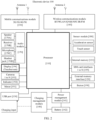
- the electronic device may include a processor 110, an external memory interface 120, an internal memory 121, a universal serial bus (universal serial bus, USB) port 130, a charging management module 140, a power management module 141, a battery 142, an antenna 1, an antenna 2, a mobile communications module 150, a wireless communications module 160, an audio module 170, a speaker 170A, a receiver 170B, a microphone 170C, a headset jack 170D, a sensor module 180, a button 190, a motor 191, an indicator 192, a camera 193, a display 194, a subscriber identification module (subscriber identification module, SIM) card interface 195, and the like.
- SIM subscriber identification module
- the sensor module 180 may include a pressure sensor, a gyro sensor, a barometric pressure sensor, a magnetic sensor, an acceleration sensor, a distance sensor, an optical proximity sensor, a temperature sensor, a touch sensor, an ambient light sensor, a bone conduction sensor, and the like.
- the structure shown in this embodiment of this application does not constitute a specific limitation on the electronic device 100.
- the electronic device 100 may include more or fewer components than those shown in the figure, or combine some components, or split some components, or have different component arrangements.
- the components shown in the figure may be implemented in hardware, software, or a combination of software and hardware.
- the processor 110 may include one or more processing units.
- the processor 110 may include an application processor (application processor, AP), a modem processor, a graphics processing unit (graphics processing unit, GPU), an image signal processor (image signal processor, ISP), a controller, a memory, a video codec, a digital signal processor (digital signal processor, DSP), a baseband processor, a neural-network processing unit (neural-network processing unit, NPU), a micro controller unit (micro controller unit, MCU), and/or the like.
- Different processing units may be independent devices, or may be integrated into one or more processors.
- the controller may be a nerve center and a command center of the electronic device 100.
- the controller may generate an operation control signal based on an instruction operation code and a time sequence signal, to complete control of instruction reading and instruction execution.
- a memory may be further disposed in the processor 110, and is configured to store instructions and data.
- the memory in the processor 110 is a cache memory.
- the memory may store instructions or data just used or cyclically used by the processor 110. If the processor 110 needs to use the instructions or the data again, the processor 110 may directly invoke the instructions or the data from the memory. This avoids repeated access, and reduces a waiting time of the processor 110, to improve system efficiency.
- the processor 110 may include one or more interfaces.
- the interface may include an inter-integrated circuit (inter-integrated circuit, I2C) interface, a serial peripheral interface (serial peripheral interface, SPI), an inter-integrated circuit sound (inter-integrated circuit sound, I2S) interface, a pulse code modulation (pulse code modulation, PCM) interface, a universal asynchronous receiver/transmitter (universal asynchronous receiver/transmitter, UART) interface, a mobile industry processor interface (mobile industry processor interface, MIPI), a general-purpose input/output (general-purpose input/output, GPIO) interface, a subscriber identification module (subscriber identification module, SIM) interface, a universal serial bus (universal serial bus, USB) port, and/or the like.
- I2C inter-integrated circuit
- SPI serial peripheral interface
- I2S inter-integrated circuit sound
- PCM pulse code modulation
- PCM pulse code modulation
- UART universal asynchronous receiver/transmitter
- the interface connection relationship between the modules shown in this embodiment of this application is merely an example for description, and does not constitute a limitation on the structure of the electronic device 100.
- the electronic device 100 may also use an interface connection manner different from that in the foregoing embodiment or a combination of a plurality of interface connection manners.
- the charging management module 140 is configured to receive a charging input from a charger.
- the power management module 141 is configured to connect the battery 142 and the charging management module 140 to the processor 110.
- the power management module 141 receives an input/inputs from the battery 142 and/or the charging management module 140, and supplies power to the processor 110, the internal memory 121, the external memory, the display 194, the camera 193, the wireless communications module 160, and the like.
- the power management module 141 and the charging management module 140 may alternatively be disposed in a same device.
- a wireless communication function of the electronic device 100 may be implemented by the antenna 1, the antenna 2, the mobile communications module 150, the wireless communications module 160, the modem processor, the baseband processor, and the like.
- the antenna 1 and the antenna 2 are configured to: transmit and receive electromagnetic wave signals.
- Each antenna in the electronic device 100 may be used to cover one or more communication bands. Different antennas may be further multiplexed to improve antenna utilization.
- the antenna 1 may be multiplexed as a diversity antenna in a wireless local area network.
- the antenna may be used in combination with a tuning switch.
- the mobile communications module 150 may provide a wireless communication solution that includes 2G/3G/4G/5G or the like and that is applied to the electronic device 100.
- the wireless communications module 160 may provide a wireless communication solution that includes a wireless local area network (wireless local area network, WLAN) (for example, a Wi-Fi network), Bluetooth (Bluetooth, BT), a global navigation satellite system (global navigation satellite system, GNSS), frequency modulation (frequency modulation, FM), NFC, an infrared (infrared, IR) technology, and the like and that is applied to the electronic device 100.
- WLAN wireless local area network
- WLAN wireless local area network
- Bluetooth Bluetooth
- GNSS global navigation satellite system
- FM frequency modulation
- NFC an infrared (infrared, IR) technology
- the electronic device 100 implements a display function through the GPU, the display 194, the application processor, and the like.
- the GPU is a microprocessor for image processing, and is connected to the display 194 and the application processor.
- the GPU is configured to perform mathematical and geometric calculation and graphics rendering.
- the processor 110 may include one or more GPUs that execute program instructions to generate or change display information.
- the display 194 is configured to display an image, a video, and the like.
- the display may be a touchscreen.
- the electronic device 100 may include one or N displays 194, where N is a positive integer greater than 1.
- the electronic device 100 may implement a photographing function through the ISP, the camera 193, the video codec, the GPU, the display 194, the application processor, and the like.
- the ISP is configured to process data fed back by the camera 193.
- the camera 193 is configured to capture a static image or a video.
- the electronic device 100 may include one or N cameras 193, where N is a positive integer greater than 1.
- the NPU is a neural-network (neural-network, NN) computing processor.
- the NPU quickly processes input information by referring to a structure of a biological neural network, for example, by referring to a transfer mode between human brain neurons, and can further perform continuous self-learning.
- the NPU can implement applications such as intelligent cognition of the electronic device 100, for example, film state recognition, image repair, image recognition, facial recognition, speech recognition, and text understanding.
- the external memory interface 120 may be configured to connect an external storage card, such as a micro SD card, to extend a storage capability of the electronic device 100.
- the external storage card communicates with the processor 110 through the external memory interface 120 to implement a data storage function. For example, files such as music and video are stored in the external storage card.
- the internal memory 121 may be configured to store computer-executable program code, where the executable program code includes instructions.
- the processor 110 performs various function applications of the electronic device 100 and data processing by running the instructions stored in the internal memory 121.
- the internal memory 121 may include a program storage area and a data storage area.
- the program storage area may store an operating system, an application required by at least one function (such as a sound playing function or an image playing function), and the like.
- the data storage area may store data (such as audio data or an address book) created during use of the electronic device 100.
- the internal memory 121 may include a high-speed random access memory, and may further include a nonvolatile memory, for example, at least one disk storage device, a flash memory device, or a universal flash storage (universal flash storage, UFS),
- the electronic device 100 may implement an audio function, for example, music playing or recording, through the audio module 170, the speaker 170A, the receiver 170B, the microphone 170C, the headphone jack 170D, the application processor, and the like.
- an audio function for example, music playing or recording
- the touch sensor is also referred to as a "touch panel (TP)".
- the touch sensor may be disposed on the display 194, and the touch sensor and the display 194 form a touchscreen.
- the touch sensor is configured to detect a touch operation performed on or near the touch sensor.
- the touch sensor may transfer the detected touch operation to the application processor to determine a type of a touch event.
- a visual output related to the touch operation may be provided through the display 194.
- the touch sensor may also be disposed on a surface of the electronic device 100 at a location different from that of the display 194.
- the button 190 includes a power-on button, a volume button, and the like.
- the motor 191 may generate a vibration prompt.
- the indicator 192 may be an indicator light, and may be used to indicate a charging status and a battery level change, or may be used to indicate a message, a missed call, a notification, and the like.
- the SIM card interface 195 is configured to connect to a SIM card.
- An embodiment of this application provides a refresh rate adjustment method.
- the method can be applied to an electronic device including a display.
- the electronic device is a mobile phone.
- the refresh rate adjustment method may include 301 to 310.
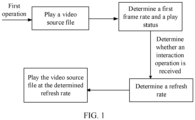
- the mobile phone receives a first operation, and plays at least one video source file at a first refresh rate in response to the first operation.
- the first operation is used to trigger the mobile phone to play the at least one video source file, and the first refresh rate is less than or equal to a maximum refresh rate of a display of the electronic device.
- the first refresh rate may be preset in the mobile phone after being obtained based on an empirical value in advance, or may be set by a user (set in various interaction manners, where for details, refer to related descriptions of the following setting manners of a second refresh rate and a third refresh rate).
- the first operation may be taping a video in an application on a touchscreen of the mobile phone, or may be an operation that the user wakes up a smart assistant of the mobile phone by using a voice and issues a corresponding voice instruction to open a video in an application, or may be any other feasible manner.
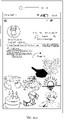
- the mobile phone displays a preview interface of an application A shown in FIG. 4(a) .
- the preview interface may include thumbnails of a plurality of videos.
- the first operation may be a tap operation performed by the user on a video B in the preview interface.
- the mobile phone plays the video B at the first refresh rate.
- a maximum refresh rate supported by the mobile phone is 90 Hz, and the first refresh rate may be 60 Hz.
- the first operation may be a voice instruction that is spoken by the user to the mobile phone and that is used to indicate to play the video source file.
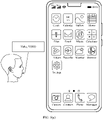
- the mobile phone may first use a microphone of the mobile phone to receive a wakeup instruction, for example, "Hello, YOYO", of a smart assistant that is spoken by the user, and then the mobile phone displays a smart assistant interface shown in FIG. 5(b) .
- the smart assistant of the mobile phone invokes the microphone of the mobile phone to obtain and recognize a next voice instruction of the user, for example, "Open the video B by using the application A", and display the voice instruction in the smart assistant interface.
- the smart assistant of the mobile phone jumps to a video playback interface of the application A and plays the video B at the first refresh rate.
- the wakeup instruction of the voice assistant may be determined based on designs of different mobile phones, and the voice instruction entered/spoken by the user may alternatively be any voice instruction that can indicate that the video B needs to be opened by using the A application.
- the first operation may be a tap operation on a video request decline icon.
- the mobile phone displays a video request decline icon C1 and a video request accept icon C2 in an interface in response to the request.
- the mobile phone may display video call interfaces (C3, C4, C5, and C6) of all members and play a video image through a plurality of small screens at the first refresh rate in response to a tap operation on the video request accept icon C2.
- the first operation may be a tap operation on an icon of a video call request sent by the user to a friend of the user when the user watches a video source file.
- the mobile phone displays a video call request icon D in the interface in response to a video call request sent by a mobile phone of another user.
- the mobile phone may display a video call interface E through a small screen at the first refresh rate in response to the tap operation performed by the user on the video call request icon D.
- the mobile phone needs to determine, based on the refresh rate adjustment method provided in this embodiment of this application, a refresh rate of playing the video A.
- the mobile phone obtains the first frame rate of the at least one video source file and the play status of each of the at least one video source file.
- the play status includes a playing state or a playing stop state, and the playing stop state may include a pause state or a playing end state.
- the first frame rate is used in this application to represent an overall frame rate of all of the at least one video source file, and may be specifically determined based on a frame rate of each of the at least one video source file.
- step 302 may specifically include 3021 to 3024.
- the mobile phone obtains the play status of each of the at least one video source file.
- the mobile phone may determine the play status of each video source file by listening to a related status parameter of an application for playing the video source file or in any other feasible manner. This is not specifically limited in this application.
- the mobile phone obtains a frame rate of each of at least one video source file.
- 3022 may be specifically implemented in the following manners:
- the mobile phone performs the following operation on each of the at least one video source file, to obtain the frame rate of each of the at least one video source file:
- attribute information of a first video source file includes frame rate information
- the mobile phone may obtain a frame rate in the attribute information of the first video source file.
- the first video source file may be any one of the at least one video source file.
- a method in which the mobile phone obtains the frame rate of each of the at least one video source file is described by using an example in which a frame rate of the first video source file is obtained.
- the following first video source file is the same as that in this embodiment.
- the mobile phone can quickly obtain the frame rate of each of the at least one video source file, and provide data support for subsequent adjustment of the refresh rate.
- the mobile phone performs the following operation on each of the at least one video source file, to obtain the frame rate of each of the at least one video source file:
- the mobile phone may search a search platform for the first video source file, to obtain a frame rate of the first video source file from the search platform.
- the mobile phone may quickly obtain the frame rate of each of the at least one video source file to provide data support for subsequent adjustment of the refresh rate.
- the mobile phone may perform the following operation on each of the at least one video source file, to obtain the frame rate of each of the at least one video source file:
- a type of a first video source file is a preset type (for example, a video source file in which frame drop easily occurs such as a live broadcast type)
- the mobile phone calculates the frame rate of the first video source file based on a characteristic parameter of the first video source file, where the characteristic parameter includes a size, duration, and resolution, and the first video source file is any one of the at least one video source file.
- the resolution coefficient is determined based on different specifications of resolution. For example, a resolution coefficient corresponding to resolution 720P is 50, a resolution coefficient corresponding to resolution 480P is 35, and a resolution coefficient corresponding to resolution 1080P is 75.
- the mobile phone determines a second frame rate according to a preset rule and based on frame rates of all of the at least one video source file.
- the preset rule may be any one of the following three feasible solutions: a first solution in which a maximum frame rate in the frame rates of all of the at least one video source file is used as the second frame rate, a second solution in which an average value of the frame rates of all of the at least one video source file is used as the second frame rate, and a third solution in which when a selection operation performed by the user on the frame rates of all of the at least one video source file is received, a frame rate selected by the user is used as the second frame rate.
- the second frame rate can be well compatible with the frame rates of all the video source files, thereby ensuring experience of watching all the video source files by the user after the refresh rate of the display is subsequently adjusted based on the first frame rate determined based on the second frame rate.
- the second frame rate is set to be high, and the refresh rate finally determined based on the first frame rate determined based on the second frame rate may be high, thereby causing an unnecessary increase in energy consumption of the mobile phone.
- An advantage of the second solution is that the average value of the frame rates of all the video source files can be used to represent the frame rates of all the video source files to some extent, and the final second frame rate is not too high when only an individual frame rate is large in the frame rates of all the video source files, thereby reducing energy consumption of the mobile phone.
- An advantage of the third solution is that selection of the second frame rate is completely determined by the user, and the final refresh rate of the display is controlled by the user, so that user requirements can be well ensured.
- the at least one video source file includes a first video source file, a second video source file, and a third video source file.
- the mobile phone when playing the at least one video source file, may display a pop-up box on the display, where the pop-up box may include three control options: "Frame rate -60 Hz of the first video source file", "Frame rate -50 Hz of the second video source file", and "Frame rate -55 Hz of the third video source file".
- the user may choose to tap one of the control options based on a user requirement, and the mobile phone can determine the final second frame rate in response to the tap operation of the user.
- the mobile phone may first issue a voice instruction to the user to prompt the user to speak the second frame rate selected by the user, for example, "Please speak which currently displayed video that you expect to use to represent all displayed videos", then receive a voice instruction spoken by the user based on a user requirement (for example, "I select a frame rate of the ancient idol drama as the frame rates of all the videos"), and finally select, as the second frame rate after recognizing the voice instruction, the frame rate of the video source file that is determined by the user.
- a voice instruction for example, "Please speak which currently displayed video that you expect to use to represent all displayed videos”
- receive a voice instruction spoken by the user based on a user requirement for example, "I select a frame rate of the ancient idol drama as the frame rates of all the videos”
- the mobile phone determines the first frame rate based on the second frame rate.
- the first frame rate of the at least one video source file currently played by the electronic device is determined according to a specific rule, and the first frame rate is used to represent the frame rates of all of the at least one video source file. Subsequently, the refresh rate of the display that is determined by the electronic device based on the first frame rate can match all the video source files to some extent, so that a watching effect of the user is better. It should be noted that step 3021 may be before or after any one of steps 3022 to 3024.
- FIG. 8A and FIG. 8B show only a possible implementation, and may be any other feasible implementation in actual application.
- the second frame rate may be directly determined as the first frame rate.
- step 3024 may include 30241 to 30243.
- the mobile phone determines whether the second frame rate is within a preset frame rate range.
- a minimum value in the preset frame rate range may be a frame rate (24 Hz) of the video source file at which a human eye can perceive obvious picture switching (stalling) when the video source file is played, and a maximum value in the preset frame rate range may be a preset maximum frame rate (for example, 400 Hz).
- the second frame rate is not within the preset frame rate range or does not exist, it indicates that there may be improperness of a rule of obtaining the second frame rate in an obtaining process or an error existing when the frame rate of the video source is obtained.
- the second frame rate obtained in this case is abnormal and does not belong to a frame rate range of a normal video source. Therefore, the second frame rate in this case cannot be used as a basis for determining the first frame rate.
- step 30241 may not exist in actual application.
- the mobile phone directly performs 30242 when the second frame rate is within the preset frame rate range, and performs 30243 when the second frame rate is not within the preset frame rate range.
- the mobile phone uses the second frame rate as the first frame rate.
- the mobile phone uses a frame rate corresponding to the third refresh rate as the first frame rate.
- the third refresh rate is less than or equal to a maximum refresh rate supported by the display of the mobile phone, and the third refresh rate may be a pre-configured refresh rate, for example, preset in the mobile phone after a proper refresh rate is determined based on related data that the user watches the video in actual application (for example, a maximum frame rate in frame rates of all videos watched by a plurality of users), or may be set by the mobile phone in response to a setting operation of the user.
- the second frame rate is determined as the first frame rate only when the second frame rate is within a proper frame rate range (the preset frame rate range).
- a proper frame rate range the preset frame rate range.
- the pre-configured refresh rate may be obtained based on a result of actually investigating a large quantity of videos and electronic devices, so that the electronic device plays the video source file at the third refresh rate, thereby ensuring user experience of the electronic device.
- the third refresh rate may be pre-configured to be more than 60 frames.
- the third refresh rate may be pre-configured to be approximately or even less than 60 frames.
- the user may set the third refresh rate through a setting function of the mobile phone.
- the mobile phone may receive a tap operation performed by the user on a third refresh rate setting option in a setting interface.
- the mobile phone may display several values (“50 Hz", "60 Hz", and "90 Hz” are used as examples in the figured) that can be set for the third refresh rate.
- a mobile phone manufacturer may recommend the user to select an option that can not only ensure use experience but also does not consume very much power, for example, "Recommended” may be marked in the upper right corner of the "60 Hz" shown in FIG. 10(b) to give the user some selection suggestion.
- the mobile phone may display a slider 20 on which a slider bar 21 may exist, and a preset area 22 may exist above the slider 20 for displaying a refresh rate corresponding to a current location of the slider bar 21.
- a refresh rate corresponding to a location of the slider bar 21 may be a preset minimum value (for example, 25 Hz).
- the corresponding frame rate gradually increases, and when the slider bar 21 slides to a rightmost end of the slider, the corresponding refresh rate is a maximum refresh rate (for example, 144 Hz) supported by the mobile phone.
- the user may set the third refresh rate in a setting interface of an application for playing a video source file.
- the mobile phone may display all optional values of third refresh rates (which can be similar to all optional values of third refresh rates in FIG. 10(b) ) or a selection control (which can be similar to the slider and slider bar in FIG. 10(c) ) of a third refresh rate. Then, the mobile phone determines the third refresh rate in response to the related operation of the user.
- third refresh rates which can be similar to all optional values of third refresh rates in FIG. 10(b)
- a selection control which can be similar to the slider and slider bar in FIG. 10(c)
- the user may set the third refresh rate through a smart assistant of the mobile phone.
- the mobile phone may first display a smart assistant interface in response to a wakeup instruction of the smart assistant that is spoken by the user. Then, in response to the related voice instruction for setting the third refresh rate that is spoken by the user (for example, "setting the third refresh rate (in actual application, to facilitate user understanding, the third refresh rate may be a normal refresh rate) to 60 Hz"), the mobile phone determines the third refresh rate.
- the related voice instruction for setting the third refresh rate may be any recognizable voice instruction. This is not specifically limited in this application.
- the mobile phone when starting to play the video source file, may guide the user to set the third refresh rate. Specifically, as shown in FIG. 11(a) , the mobile phone may display a pop-up window 31 when starting to play the video source file, where the pop-up window may include "Please enter a refresh rate (a minimum refresh rate 25 Hz, a maximum refresh rate 144 Hz) at which the video is played".
- Content in () is intended to prompt for a feasible range of the refresh rate entered by the user
- the minimum refresh rate 25 Hz is a refresh rate corresponding to a video frame rate at which a human eye cannot perceive picture switching
- the maximum refresh rate 144 Hz is a maximum refresh rate that can be displayed by the display of the mobile phone.
- the prompt displayed at the beginning of the pop-up window can disappear after the user taps the inside of the pop-up window. Then, the mobile phone may determine the third refresh rate based on a value entered by the user in the pop-up window, for example, "60 Hz" shown in FIG. 11(b) .
- the pop-up window may alternatively be any other feasible type, provided that the user can enter or select a selection value of the third refresh rate.
- the mobile phone determines whether an interaction operation is currently received.
- the interaction operation may be an interaction operation (for example, a sliding operation or a bullet sending operation) on a playback interface of any one of the at least one video source file, or may be an interaction operation (for example, a voice instruction or a button pressing operation) on a specific video source file.
- an interaction operation for example, a sliding operation or a bullet sending operation
- an interaction operation for example, a voice instruction or a button pressing operation
- the mobile phone performs 304. If the mobile phone does not receive the interaction operation, the mobile phone performs 305.
- the interaction operation includes but is not limited to any one of the following: a screen touch and sliding operation, a tap operation, a voice control operation, a button pressing operation, a mid-air gesture, a remote control operation, a mouse operation, a keyboard operation, a visual control operation, a facial expression recognition operation.
- the mobile phone may determine, based on various sensors disposed in the mobile phone, such as a touch sensor and a pressure sensor under a button, whether the mobile phone receives an interaction operation.
- the mobile phone Because the interaction operation mostly requires a specific animation effect, and the animation effect usually requires a high frame rate, the mobile phone also needs to determine, when determining a refresh rate to be used to play the video source file, whether the interaction operation is received.
- step 303 may not be performed in actual application.
- the mobile phone may directly perform 304 when the mobile phone does not currently receive the interaction operation, and may perform 305 when the mobile phone currently receives the interaction operation.
- the mobile phone adjusts the refresh rate of the display of the mobile phone to the second refresh rate.
- the second refresh rate is less than or equal to a maximum refresh rate of the display of the electronic device, and the frame rate corresponding to the second refresh rate is within a preset range of a frame rate required for an animation effect corresponding to the interaction operation.
- the second refresh rate may be preset by the mobile phone, or may be set by the mobile phone in response to a setting operation of the user.
- a specific implementation of setting the second refresh rate is the same as that of setting the third refresh rate. For details, refer to the foregoing descriptions of a specific scenario of setting the third refresh rate. The details are not described herein again.
- the frame rate corresponding to the second refresh rate may be a maximum value in a preset range of a frame rate required for the animation effect corresponding to the interaction operation, to make interaction experience better in a process in which the user performs the interaction operation.
- the preset range is 60 Hz to 90 Hz
- the second refresh rate may be a refresh rate corresponding to the frame rate of 90 Hz.
- a refresh rate corresponding to the maximum value in the preset range of the frame rate required for the animation effect corresponding to the interaction operation is used as the second refresh rate, so that the animation effect presented by the interaction operation performed by the user in the process in which the user watches the video source file played by the electronic device can be smoother, and interaction experience of the user can be better.
- the user after controlling the electronic device to play a video, the user is more likely to further perform a specific interaction operation based on preferences of the user.
- the first operation may be considered as an interaction operation, and the first refresh rate may be set to be the same as the second refresh rate. In this way, an action of switching the refresh rate once is reduced, and some visual discomfort caused because the user perceives a change of the refresh rate in the video watching process is avoided, thereby improving user experience.
- the third refresh rate is greater than the second refresh rate.
- the mobile phone determines whether target duration from a moment of receiving the first operation or a previous interaction operation on the video source file to a current moment is greater than or equal to preset duration.
- Step 305 may be specifically understood as determining whether the mobile phone does not receive the interaction operation again within preset duration from a time point of receiving the first operation or a previous interaction operation.
- Step 305 is performed to achieve the following objective: Because the mobile phone needs to determine, based on the interaction operation performed by the user on the video source file, the first frame rate, and the play status of the video source file, the refresh rate for playing the video source file, refresh rates determined when there is an interaction operation and when there is no interaction operation are different. If the user has continuously performs the interaction operation at an interval of few minutes, the mobile phone may repeatedly adjust the refresh rate, which not only increases a possibility that the user perceives a change of the refresh rate (reduces user experience), but also increases power consumption of the mobile phone. Therefore, preset duration may be set herein.
- the refresh rate of the display of the mobile phone can be reliably increased to a corresponding refresh rate when there is no interaction operation.
- an implementation of step 305 may be that the mobile phone sets a timer that keeps timing.
- the timer resets to restart timing when the mobile phone receives the first operation or each time the mobile phone receives the interaction operation.
- the mobile phone may determine, based on the timing time of the timer, whether the mobile phone does not receive the interaction operation again within the preset duration from the time point of receiving the first operation or the previous interaction operation. If the timing duration of the timer reaches the preset duration, it indicates that the mobile phone does not receive the interaction operation again within the preset duration from the time point of receiving the first operation or the previous interaction operation. If the timing duration of the timer does not reach the preset duration, it indicates that the mobile phone does not receive the interaction operation again within the preset duration from the time point of receiving the first operation or the previous interaction operation.
- step 305 may not be performed in actual application.
- the mobile phone directly performs 306 when the mobile phone determines that the target duration is greater than or equal to the preset duration, and the mobile phone performs 305 again when the mobile phone determines that the target duration is less than the preset duration.
- the mobile phone determines whether the at least one video source file includes a video source file that is being played.
- the mobile phone determines that the at least one video source file includes the video source file that is being played, the mobile phone performs 307.
- the mobile phone determines that the at least one video source file does not include the video source file that is being played, the mobile phone performs 308.
- Step 306 has the following meanings: If the current mobile phone does not need to play any video source file and does not need to play an animation corresponding to the interaction operation, the display can be refreshed only when there is to-be-displayed content, and is not refreshed when there is no to-be-displayed content, to implement power saving, and improve user experience.
- step 306 may not performed in actual application.
- the mobile phone directly performs 307 when the mobile phone determines that the at least one video source file includes the video source file that is being played, and the mobile phone performs 308 when the mobile phone determines that the at least one video source file does not include the video source file that is being played.
- the mobile phone determines whether the first frame rate is greater than a frame rate corresponding to the third refresh rate.
- the mobile phone determines that the first frame rate is greater than the frame rate corresponding to the third refresh rate.
- the mobile phone determines that the first frame rate is less than or equal to the frame rate corresponding to the third refresh rate, the mobile phone performs 310.
- the at least one video source file is directly played at the third refresh rate, so that a user requirement can be met with low power consumption (step 309).
- the at least one video source file can be played at the refresh rate corresponding to the first frame rate (step 310), which not only improves user experience, but also avoids an invalid frame refresh and saves power.
- step 307 may not be performed in actual application.
- the mobile phone directly performs 309 when the mobile phone determines that the first frame rate is greater than the frame rate corresponding to the third refresh rate, and the mobile phone performs 310 when the mobile phone determines that the first frame rate is less than or equal to the frame rate corresponding to the third refresh rate.
- the mobile phone adjusts the refresh rate of the display of the mobile phone based on to-be-displayed content of the mobile phone.
- the refresh rate of the display may be 0, which greatly saves power.
- the mobile phone adjusts the refresh rate of the display of the mobile phone to the third refresh rate.
- the mobile phone adjusts the refresh rate of the display of the mobile phone to the refresh rate corresponding to the first frame rate.
- the electronic device adjusts the refresh rate of the display based on three factors, that is, the first frame rate of the at least one video source file currently played, the play status of each video source file, and whether the user operation is received.
- the frame rate of the video source file determines a proper refresh rate required when the video source file is played, whether the video source file is being played directly determines whether there is content that needs to be displayed by the display through refreshing currently, and the animation effect required for the interaction operation performed by the user can be displayed without stalling only when there is a higher refresh rate.
- the refresh rate of the display at which the video source file is played can be properly adjusted, so that the refresh rate of the display of the electronic device and the refresh rate required in the video source file playback process are closer or equal.
- Whether the video source file is played smoothly is determined by a similarity between the refresh rate required in the video source file playback process and the refresh rate of the display. A closer similarity indicates a smoother playback process, more power-saving, and better user experience. Therefore, in conclusion, according to the technical solution provided in this application, user experience can be improved when the electronic device plays the video source file.
- the device or the like includes corresponding hardware structures and/or software modules for performing the functions.
- a person skilled in the art should be easily aware that units, algorithms, and steps in the examples described with reference to embodiments disclosed in this specification can be implemented in embodiments of this application in a form of hardware or a combination of hardware and computer software. Whether the functions are performed by hardware or computer software driven hardware depends on particular applications and design constraints of the technical solutions. A person skilled in the art may use different methods to implement the described functions for each particular application, but it should not be considered that the implementation goes beyond the scope of embodiments of this application.
- the electronic device may be divided into functional modules based on the foregoing method examples, for example, each functional module may be obtained through division for each corresponding function, or two or more functions may be integrated into one processing module.
- the integrated module may be implemented in a form of hardware or a software functional module. It should be noted that division into the modules in embodiments of this application is an example and is merely logical function division, and may be other division mode in an actual implementation.
- an embodiment of this application provides an electronic device 12, including an interaction detection module 121, a frame rate resolution module 122, a status detection module 123, a configuration module 124, and a control module 125.
- the modules in the electronic device 12 may be combined to implement the refresh rate adjustment method provided in the foregoing embodiment.
- a specific working principle is as follows: After a user performs a first operation on the electronic device 12, the electronic device 12 starts playing at least one video source file at a first refresh rate in response to the first operation. Then, the interaction detection module 121, the frame rate resolution module 122, the status detection module 123, the configuration module 124, and the control module 125 are enabled by the electronic device.
- the interaction detection module 121 reports, to the control module 125 in real time, an interaction instruction received by the electronic device.
- the frame rate resolution module 122 obtains a first frame rate of the at least one video source file and report the first frame rate to the control module 125, that is, obtains the first frame rate of the at least one video source file in step 302 in the foregoing embodiment. This may specifically include steps such as 3022, 3023, and 3024 (including 30241 to 30243) in the foregoing embodiment.
- the status detection module 123 reports a play status of each of the at least one video source file to the control module, that is, obtaining the play status of each of the at least one video source file in step 302 in the foregoing embodiment.
- the configuration module 124 reports a second refresh rate, a third refresh rate, and preset duration to the control module 125.
- the second refresh rate and the third refresh rate may be preset in the configuration module 124.
- the configuration module 124 may perform a specific process of setting the second refresh rate and the third refresh rate by the user in the foregoing embodiment.
- the control module 125 determines a refresh rate based on all data reported by the interaction detection module 121, the frame rate resolution module 122, the status detection module 123, and the configuration module 124, and may specifically perform steps 303 to 310 in the foregoing embodiment. As shown in FIG. 12 , the following cases are specifically included.
- An embodiment of this application further provides an electronic device.
- the electronic device includes a display, a memory, and one or more processors.
- the display and the memory are coupled to the processor.
- the memory stores computer program code, the computer program code includes computer instructions, and when the computer instructions are executed by the processor, the electronic device is enabled to perform the refresh rate adjustment method provided in the foregoing embodiment.
- the electronic device For a specific result of the electronic device, refer to the structure of the electronic device 100 shown in FIG. 1 .
- the electronic device when the computer instructions are executed by the processor, the electronic device is enabled to perform the following steps:
- the electronic device receives a first operation, where the first operation is used to trigger the electronic device to play at least one video source file.
- the processor controls the display to play the at least one video source file at a first refresh rate, and obtain a first frame rate of the at least one video source file and a play status of each of the at least one video source file, where the play status includes a playing state or a playing stop state, and the first refresh rate is less than or equal to a maximum refresh rate of the display of the electronic device.
- the processor adjusts the refresh rate of the display of the electronic device to a second refresh rate, where the second refresh rate is less than or equal to the maximum refresh rate of the display of the electronic device, and a frame rate corresponding to the second refresh rate is within a preset range of a frame rate required for an animation effect corresponding to the interaction operation.
- the processor adjusts the refresh rate of the display of the electronic device to the third refresh rate. If the first frame rate is less than or equal to the frame rate corresponding to the third refresh rate, the controller adjusts the refresh rate of the display of the electronic device to a refresh rate corresponding to the first frame rate, where the third refresh rate is less than or equal to the maximum refresh rate of the display of the electronic device.
- the electronic device when the computer instructions are executed by the processor, the electronic device is enabled to further perform the following step: If the electronic device does not receive the interaction operation again within the preset duration from the time point of receiving the first operation or the previous interaction operation, and the at least one video source file does not include the video source file that is being played, the processor adjusts the refresh rate of the display of the electronic device based on to-be-displayed content of the electronic device.
- the first refresh rate is equal to the second refresh rate.
- the electronic device when the computer instructions are executed by the processor, the electronic device is enabled to specifically perform the following steps:
- the processor obtains a frame rate of each of the at least one video source file.
- the processor uses a maximum frame rate in frame rates of all of the at least one video source file as a second frame rate.
- the processor uses an average value of frame rates of all of the at least one video source file as a second frame rate.
- the processor uses a frame rate selected by the user as a second frame rate.
- the processor determines the first frame rate based on the second frame rate.
- the electronic device when the computer instructions are executed by the processor, the electronic device is enabled to specifically perform the following step: If the second frame rate is within a preset frame rate range, the processor uses the second frame rate as the first frame rate.
- the electronic device when the computer instructions are executed by the processor, the electronic device is enabled to further specifically perform the following step: If the second frame rate is not within the preset frame rate range, the processor uses the frame rate corresponding to the third refresh rate as the first frame rate.
- the electronic device when the computer instructions are executed by the processor, the electronic device is enabled to specifically perform the following steps:
- the processor performs the following operations on each of the at least one video source file, to obtain the frame rate of each of the at least one video source file:
- the processor obtains a frame rate in attribute information of a first video source file.
- the processor searches a search platform for the first video source file, to obtain a frame rate of the first video source file from the search platform.
- the processor calculates the frame rate of the first video source file based on a characteristic parameter of the first video source file, where the characteristic parameter includes a size, duration, and resolution, and the first video source file is any one of the at least one video source file.
- the second refresh rate and the third refresh rate are pre-configured refresh rates.
- the second refresh rate and the third refresh rate are set by the electronic device in response to a setting operation of the user.
- the third refresh rate is greater than the second refresh rate.
- An embodiment of this application further provides a computer-readable storage medium.
- the computer-readable storage medium includes computer instructions.
- the electronic device is enabled to perform the refresh rate adjustment method according to the foregoing embodiments, or the electronic device is enabled to perform the functions or the steps performed by the mobile phone in the foregoing embodiments.
- An embodiment of this application further provides a computer program product.
- the computer program product runs on a computer
- the computer is enabled to perform the refresh rate adjustment method according to the foregoing embodiments, or the electronic device is enabled to perform the functions or the steps performed by the mobile phone in the foregoing embodiments.
- the computer may be the foregoing electronic device
- the disclosed apparatus and method may be implemented in another manner.
- the foregoing apparatus embodiments are merely examples.
- division into the modules or the units is merely logical function division and may be other division in an actual implementation.
- a plurality of units or components may be combined or integrated into another apparatus, or some features may be ignored or not performed.
- the displayed or discussed mutual couplings or direct couplings or communication connections may be implemented through some interfaces.
- the indirect couplings or communication connections between the apparatuses or units may be implemented in electrical, mechanical, or other forms.
- the units described as separate parts may or may not be physically separate, and parts displayed as units may be one or more physical units, and may be located in one position, or may be distributed in a plurality of different positions. Some or all of the units may be selected based on an actual requirement to achieve the objectives of the solutions of embodiments.
- functional units in embodiments of this application may be integrated into one processing unit, or each of the units may exist alone physically, or two or more units may be integrated into one unit.
- the integrated unit may be implemented in a form of hardware or a software functional unit.
- the integrated unit When the integrated unit is implemented in a form of a software functional unit and sold or used as an independent product, the integrated unit may be stored in a readable storage medium.
- the software product is stored in a storage medium, and includes several instructions for instructing a device (which may be a microcontroller, a chip, or the like) or a processor (processor) to perform all or some of the steps of the methods described in embodiments of this application.
- the storage medium includes any medium that can store program code such as a USB flash drive, a removable hard disk, a read-only memory (read-only memory, ROM), a random access memory (random access memory, RAM), a magnetic disk, or an optical disc.
Landscapes
- Engineering & Computer Science (AREA)
- Signal Processing (AREA)
- Multimedia (AREA)
- Theoretical Computer Science (AREA)
- General Engineering & Computer Science (AREA)
- General Physics & Mathematics (AREA)
- Physics & Mathematics (AREA)
- Health & Medical Sciences (AREA)
- General Health & Medical Sciences (AREA)
- Social Psychology (AREA)
- Computer Networks & Wireless Communication (AREA)
- Databases & Information Systems (AREA)
- Computer Hardware Design (AREA)
- Software Systems (AREA)
- Human Computer Interaction (AREA)
- Controls And Circuits For Display Device (AREA)
- Two-Way Televisions, Distribution Of Moving Picture Or The Like (AREA)
- Digital Computer Display Output (AREA)
Applications Claiming Priority (2)
| Application Number | Priority Date | Filing Date | Title |
|---|---|---|---|
| CN202110548052.2A CN113438552B (zh) | 2021-05-19 | 2021-05-19 | 一种刷新率调整方法和电子设备 |
| PCT/CN2022/072608 WO2022242213A1 (zh) | 2021-05-19 | 2022-01-18 | 一种刷新率调整方法和电子设备 |
Publications (3)
| Publication Number | Publication Date |
|---|---|
| EP4131982A1 true EP4131982A1 (de) | 2023-02-08 |
| EP4131982A4 EP4131982A4 (de) | 2023-12-20 |
| EP4131982B1 EP4131982B1 (de) | 2026-04-22 |
Family
ID=77802463
Family Applications (1)
| Application Number | Title | Priority Date | Filing Date |
|---|---|---|---|
| EP22793369.4A Active EP4131982B1 (de) | 2021-05-19 | 2022-01-18 | Aktualisierungsrateneinstellverfahren und elektronische vorrichtung |
Country Status (5)
| Country | Link |
|---|---|
| US (1) | US12394392B2 (de) |
| EP (1) | EP4131982B1 (de) |
| JP (2) | JP7532556B2 (de) |
| CN (2) | CN113438552B (de) |
| WO (1) | WO2022242213A1 (de) |
Cited By (1)
| Publication number | Priority date | Publication date | Assignee | Title |
|---|---|---|---|---|
| WO2024238866A1 (en) * | 2023-05-17 | 2024-11-21 | Google Llc | Energy-aware rendering and display pipeline for a multi-stream user interface |
Families Citing this family (11)
| Publication number | Priority date | Publication date | Assignee | Title |
|---|---|---|---|---|
| CN113438552B (zh) | 2021-05-19 | 2022-04-19 | 荣耀终端有限公司 | 一种刷新率调整方法和电子设备 |
| CN114327127B (zh) * | 2021-11-27 | 2022-12-23 | 荣耀终端有限公司 | 滑动丢帧检测的方法和装置 |
| CN119545092A (zh) | 2021-12-16 | 2025-02-28 | 荣耀终端股份有限公司 | 刷新率的设置方法及相关设备 |
| CN119545096A (zh) * | 2021-12-16 | 2025-02-28 | 荣耀终端股份有限公司 | 刷新率的设置方法及相关设备 |
| CN116501210B (zh) * | 2022-01-10 | 2024-06-11 | 荣耀终端有限公司 | 一种显示方法、电子设备及存储介质 |
| CN115842941A (zh) * | 2022-11-24 | 2023-03-24 | 北京小米移动软件有限公司 | 视频播放方法、装置、存储介质以及终端 |
| CN116229863B (zh) * | 2022-12-30 | 2026-04-03 | 海信视像科技股份有限公司 | 显示设备、终端设备和交互方法 |
| CN118331475A (zh) * | 2023-01-10 | 2024-07-12 | 荣耀终端有限公司 | 刷新率调整方法及电子设备 |
| CN119277143A (zh) * | 2023-07-04 | 2025-01-07 | 荣耀终端有限公司 | 调整屏幕刷新率的方法、装置及终端设备 |
| CN116980672B (zh) * | 2023-07-06 | 2025-08-22 | 浙江多模医疗科技有限公司 | 视频信号叠加方法、装置、设备及存储介质 |
| CN120032606A (zh) * | 2023-11-23 | 2025-05-23 | 北京小米移动软件有限公司 | 屏幕刷新率调节方法、装置及存储介质 |
Family Cites Families (33)
| Publication number | Priority date | Publication date | Assignee | Title |
|---|---|---|---|---|
| US7327329B2 (en) | 2004-01-27 | 2008-02-05 | Genesis Microchip Inc. | Dynamically selecting either frame rate conversion (FRC) or pixel overdrive in an LCD panel based display |
| US7898535B2 (en) * | 2006-10-31 | 2011-03-01 | Dell Products, Lp | System and method for providing dynamic refresh rates for displays |
| US8334857B1 (en) | 2007-12-14 | 2012-12-18 | Nvidia Corporation | Method and system for dynamically controlling a display refresh rate |
| TW201026021A (en) * | 2008-12-17 | 2010-07-01 | Wistron Corp | Method for processing video and apparatus therefor |
| US9589540B2 (en) * | 2011-12-05 | 2017-03-07 | Microsoft Technology Licensing, Llc | Adaptive control of display refresh rate based on video frame rate and power efficiency |
| US8884977B2 (en) | 2012-08-24 | 2014-11-11 | Analogix Semiconductor, Inc. | Panel self refreshing with changing dynamic refresh rate |
| US9858899B2 (en) | 2013-06-13 | 2018-01-02 | Microsoft Technology Licensing, Llc | Managing transitions of adaptive display rates for different video playback scenarios |
| CN104091579B (zh) | 2014-05-30 | 2017-01-04 | 西安中兴新软件有限责任公司 | 一种调整屏幕刷新率的方法及终端 |
| US10032430B2 (en) | 2014-09-17 | 2018-07-24 | Mediatek Inc. | Processor for use in dynamic refresh rate switching and related electronic device |
| CN104347049A (zh) * | 2014-09-24 | 2015-02-11 | 广东欧珀移动通信有限公司 | 一种调整屏幕刷新频率的方法及装置 |
| US10275070B2 (en) * | 2015-01-05 | 2019-04-30 | Synaptics Incorporated | Time sharing of display and sensing data |
| US9940896B2 (en) | 2015-03-03 | 2018-04-10 | Apple Inc. | Telecine judder removal systems and methods |
| CN105007443B (zh) * | 2015-07-08 | 2019-01-08 | 福州瑞芯微电子股份有限公司 | 一种视频变频播放方法及装置 |
| CN105869560B (zh) * | 2016-04-01 | 2019-04-26 | Oppo广东移动通信有限公司 | 一种显示屏刷新帧率调整方法及装置 |
| US10133403B2 (en) | 2016-06-29 | 2018-11-20 | Apple Inc. | System and method for variable frame duration control in an electronic display |
| CN106250085A (zh) | 2016-07-29 | 2016-12-21 | 北京小米移动软件有限公司 | 刷新率调整方法及装置 |
| JP6288882B1 (ja) * | 2016-12-12 | 2018-03-07 | 株式会社コナミデジタルエンタテインメント | ゲーム制御装置、ゲームシステム、及びプログラム |
| CN108933952A (zh) | 2017-05-26 | 2018-12-04 | 中兴通讯股份有限公司 | 一种视频播放方法、装置、计算机设备及计算机可读介质 |
| US10475405B2 (en) * | 2017-12-07 | 2019-11-12 | Qualcomm Incorporated | Dynamic control of display refresh rate based on user interface activity |
| CN110875978A (zh) * | 2018-08-31 | 2020-03-10 | 努比亚技术有限公司 | 一种终端显示的控制方法、终端及计算机可读存储介质 |
| CN109640168B (zh) * | 2018-11-27 | 2020-07-24 | Oppo广东移动通信有限公司 | 视频处理方法、装置、电子设备和计算机可读介质 |
| CN109688461B (zh) * | 2019-01-16 | 2022-05-10 | 京东方科技集团股份有限公司 | 视频播放方法及装置 |
| US10861424B2 (en) * | 2019-02-07 | 2020-12-08 | Intel Corporation | Adjusting display refresh rates based on user activity |
| CN110377251A (zh) | 2019-06-06 | 2019-10-25 | 努比亚技术有限公司 | 一种屏幕刷新率调整方法、终端及计算机可读存储介质 |
| CN112445315B (zh) * | 2019-08-28 | 2024-11-05 | 北京小米移动软件有限公司 | 屏幕刷新帧率的控制方法、装置及存储介质 |
| CN111324235A (zh) | 2020-02-26 | 2020-06-23 | 维沃移动通信有限公司 | 一种屏幕刷新频率调整方法及电子设备 |
| CN113362783B (zh) * | 2020-03-06 | 2022-04-05 | 华为技术有限公司 | 刷新率切换方法和电子设备 |
| CN111583886A (zh) | 2020-04-29 | 2020-08-25 | 珠海市魅族科技有限公司 | 一种屏幕刷新率的调整方法、装置、设备及介质 |
| CN111767013A (zh) * | 2020-06-01 | 2020-10-13 | Oppo(重庆)智能科技有限公司 | 控制方法、控制装置、电子装置、计算机可读存储介质 |
| CN111782458B (zh) | 2020-06-01 | 2025-01-03 | Oppo(重庆)智能科技有限公司 | 屏幕刷新率调节方法、装置、存储介质与电子设备 |
| CN111899680B (zh) | 2020-07-14 | 2023-04-18 | 青岛海信医疗设备股份有限公司 | 一种显示设备及其设置方法 |
| US12164358B2 (en) | 2020-12-24 | 2024-12-10 | Intel Corporation | Technologies for self-refresh display power saving |
| CN113438552B (zh) * | 2021-05-19 | 2022-04-19 | 荣耀终端有限公司 | 一种刷新率调整方法和电子设备 |
-
2021
- 2021-05-19 CN CN202110548052.2A patent/CN113438552B/zh active Active
-
2022
- 2022-01-18 JP JP2022573569A patent/JP7532556B2/ja active Active
- 2022-01-18 CN CN202280003539.5A patent/CN115552916B/zh active Active
- 2022-01-18 EP EP22793369.4A patent/EP4131982B1/de active Active
- 2022-01-18 US US17/998,910 patent/US12394392B2/en active Active
- 2022-01-18 WO PCT/CN2022/072608 patent/WO2022242213A1/zh not_active Ceased
-
2024
- 2024-07-31 JP JP2024124910A patent/JP2024167205A/ja active Pending
Cited By (1)
| Publication number | Priority date | Publication date | Assignee | Title |
|---|---|---|---|---|
| WO2024238866A1 (en) * | 2023-05-17 | 2024-11-21 | Google Llc | Energy-aware rendering and display pipeline for a multi-stream user interface |
Also Published As
| Publication number | Publication date |
|---|---|
| WO2022242213A1 (zh) | 2022-11-24 |
| JP2023529589A (ja) | 2023-07-11 |
| JP2024167205A (ja) | 2024-12-03 |
| US20240221701A1 (en) | 2024-07-04 |
| EP4131982A4 (de) | 2023-12-20 |
| US12394392B2 (en) | 2025-08-19 |
| CN113438552A (zh) | 2021-09-24 |
| WO2022242213A9 (zh) | 2023-11-16 |
| CN115552916A (zh) | 2022-12-30 |
| CN113438552B (zh) | 2022-04-19 |
| CN115552916B (zh) | 2023-11-07 |
| JP7532556B2 (ja) | 2024-08-13 |
| EP4131982B1 (de) | 2026-04-22 |
Similar Documents
| Publication | Publication Date | Title |
|---|---|---|
| EP4131982B1 (de) | Aktualisierungsrateneinstellverfahren und elektronische vorrichtung | |
| CN112331145B (zh) | 显示屏变频方法、ddic芯片、显示屏模组及终端 | |
| US11416062B2 (en) | Terminal control method and terminal | |
| AU2014230175B2 (en) | Display control method and apparatus | |
| EP4273684A1 (de) | Aufnahmeverfahren und elektronische vorrichtung | |
| US12603068B2 (en) | Screen brightness adjustment method, electronic device, and computer-readable storage medium | |
| US11165950B2 (en) | Method and apparatus for shooting video, and storage medium | |
| CN115344173A (zh) | 一种分屏显示的操作方法及电子设备 | |
| CN114338952A (zh) | 一种基于垂直同步信号的图像处理方法及电子设备 | |
| WO2021027678A1 (zh) | 一种基于垂直同步信号的图像处理方法及电子设备 | |
| US12493443B2 (en) | Projection display method and electronic device for immersive display effect synchronization | |
| CN113325948B (zh) | 隔空手势的调节方法及终端 | |
| WO2023040593A1 (zh) | 图像数据传输方法、装置、终端及介质 | |
| US12401888B2 (en) | Video recording method and electronic device | |
| WO2021179829A1 (zh) | 一种人机交互方法及设备 | |
| WO2025237236A1 (zh) | 一种图像数据传输方法、装置、显示装置和存储介质 | |
| CN113038232A (zh) | 视频播放方法、装置、设备、服务器及存储介质 | |
| CN116027919A (zh) | 触摸屏的控制方法、电子设备、芯片及存储介质 | |
| WO2023045921A1 (zh) | 显示方法、装置和电子设备 | |
| CN115695699A (zh) | 显示帧率调整方法及装置、终端及存储介质 | |
| WO2025148999A1 (zh) | 图像显示方法及电子设备 | |
| RU2811924C1 (ru) | Способ регулирования частоты обновления и электронное устройство | |
| CN115640046B (zh) | 命令的发送方法、存储介质和设备 | |
| EP4611397A1 (de) | Lautsprechersteuerungsverfahren und elektronische vorrichtung | |
| WO2025147876A1 (zh) | 图像显示方法及电子设备 |
Legal Events
| Date | Code | Title | Description |
|---|---|---|---|
| STAA | Information on the status of an ep patent application or granted ep patent |
Free format text: STATUS: UNKNOWN |
|
| STAA | Information on the status of an ep patent application or granted ep patent |
Free format text: STATUS: THE INTERNATIONAL PUBLICATION HAS BEEN MADE |
|
| PUAI | Public reference made under article 153(3) epc to a published international application that has entered the european phase |
Free format text: ORIGINAL CODE: 0009012 |
|
| STAA | Information on the status of an ep patent application or granted ep patent |
Free format text: STATUS: REQUEST FOR EXAMINATION WAS MADE |
|
| 17P | Request for examination filed |
Effective date: 20221102 |
|
| AK | Designated contracting states |
Kind code of ref document: A1 Designated state(s): AL AT BE BG CH CY CZ DE DK EE ES FI FR GB GR HR HU IE IS IT LI LT LU LV MC MK MT NL NO PL PT RO RS SE SI SK SM TR |
|
| A4 | Supplementary search report drawn up and despatched |
Effective date: 20231116 |
|
| RIC1 | Information provided on ipc code assigned before grant |
Ipc: H04N 21/442 20110101ALI20231110BHEP Ipc: H04N 21/4402 20110101AFI20231110BHEP |
|
| STAA | Information on the status of an ep patent application or granted ep patent |
Free format text: STATUS: EXAMINATION IS IN PROGRESS |
|
| 17Q | First examination report despatched |
Effective date: 20240725 |
|
| DAV | Request for validation of the european patent (deleted) | ||
| DAX | Request for extension of the european patent (deleted) | ||
| GRAP | Despatch of communication of intention to grant a patent |
Free format text: ORIGINAL CODE: EPIDOSNIGR1 |
|
| STAA | Information on the status of an ep patent application or granted ep patent |
Free format text: STATUS: GRANT OF PATENT IS INTENDED |
|
| INTG | Intention to grant announced |
Effective date: 20250625 |
|
| GRAJ | Information related to disapproval of communication of intention to grant by the applicant or resumption of examination proceedings by the epo deleted |
Free format text: ORIGINAL CODE: EPIDOSDIGR1 |
|
| STAA | Information on the status of an ep patent application or granted ep patent |
Free format text: STATUS: EXAMINATION IS IN PROGRESS |
|
| GRAP | Despatch of communication of intention to grant a patent |
Free format text: ORIGINAL CODE: EPIDOSNIGR1 |
|
| STAA | Information on the status of an ep patent application or granted ep patent |
Free format text: STATUS: GRANT OF PATENT IS INTENDED |
|
| INTC | Intention to grant announced (deleted) | ||
| INTG | Intention to grant announced |
Effective date: 20251117 |
|
| GRAS | Grant fee paid |
Free format text: ORIGINAL CODE: EPIDOSNIGR3 |
|
| GRAA | (expected) grant |
Free format text: ORIGINAL CODE: 0009210 |
|
| STAA | Information on the status of an ep patent application or granted ep patent |
Free format text: STATUS: THE PATENT HAS BEEN GRANTED |
|
| AK | Designated contracting states |
Kind code of ref document: B1 Designated state(s): AL AT BE BG CH CY CZ DE DK EE ES FI FR GB GR HR HU IE IS IT LI LT LU LV MC MK MT NL NO PL PT RO RS SE SI SK SM TR |
|
| REG | Reference to a national code |
Ref country code: CH Ref legal event code: F10 Free format text: ST27 STATUS EVENT CODE: U-0-0-F10-F00 (AS PROVIDED BY THE NATIONAL OFFICE) Effective date: 20260422 Ref country code: GB Ref legal event code: FG4D |
|
| REG | Reference to a national code |
Ref country code: DE Ref legal event code: R096 Ref document number: 602022035145 Country of ref document: DE |