EP4114087B1 - Bildschirmprojektionsverfahren, empfangsseitige vorrichtung und sendeseitige vorrichtung - Google Patents
Bildschirmprojektionsverfahren, empfangsseitige vorrichtung und sendeseitige vorrichtung Download PDFInfo
- Publication number
- EP4114087B1 EP4114087B1 EP21761385.0A EP21761385A EP4114087B1 EP 4114087 B1 EP4114087 B1 EP 4114087B1 EP 21761385 A EP21761385 A EP 21761385A EP 4114087 B1 EP4114087 B1 EP 4114087B1
- Authority
- EP
- European Patent Office
- Prior art keywords
- end device
- screen projection
- sending end
- receiving end
- sending
- Prior art date
- Legal status (The legal status is an assumption and is not a legal conclusion. Google has not performed a legal analysis and makes no representation as to the accuracy of the status listed.)
- Active
Links
Images


Classifications
-
- G—PHYSICS
- G06—COMPUTING OR CALCULATING; COUNTING
- G06F—ELECTRIC DIGITAL DATA PROCESSING
- G06F3/00—Input arrangements for transferring data to be processed into a form capable of being handled by the computer; Output arrangements for transferring data from processing unit to output unit, e.g. interface arrangements
- G06F3/14—Digital output to display device ; Cooperation and interconnection of the display device with other functional units
- G06F3/1454—Digital output to display device ; Cooperation and interconnection of the display device with other functional units involving copying of the display data of a local workstation or window to a remote workstation or window so that an actual copy of the data is displayed simultaneously on two or more displays, e.g. teledisplay
-
- H—ELECTRICITY
- H04—ELECTRIC COMMUNICATION TECHNIQUE
- H04W—WIRELESS COMMUNICATION NETWORKS
- H04W4/00—Services specially adapted for wireless communication networks; Facilities therefor
- H04W4/80—Services using short range communication, e.g. near-field communication [NFC], radio-frequency identification [RFID] or low energy communication
-
- H—ELECTRICITY
- H04—ELECTRIC COMMUNICATION TECHNIQUE
- H04W—WIRELESS COMMUNICATION NETWORKS
- H04W76/00—Connection management
- H04W76/10—Connection setup
- H04W76/14—Direct-mode setup
-
- H—ELECTRICITY
- H04—ELECTRIC COMMUNICATION TECHNIQUE
- H04W—WIRELESS COMMUNICATION NETWORKS
- H04W8/00—Network data management
- H04W8/005—Discovery of network devices, e.g. terminals
-
- G—PHYSICS
- G09—EDUCATION; CRYPTOGRAPHY; DISPLAY; ADVERTISING; SEALS
- G09G—ARRANGEMENTS OR CIRCUITS FOR CONTROL OF INDICATING DEVICES USING STATIC MEANS TO PRESENT VARIABLE INFORMATION
- G09G2358/00—Arrangements for display data security
-
- G—PHYSICS
- G09—EDUCATION; CRYPTOGRAPHY; DISPLAY; ADVERTISING; SEALS
- G09G—ARRANGEMENTS OR CIRCUITS FOR CONTROL OF INDICATING DEVICES USING STATIC MEANS TO PRESENT VARIABLE INFORMATION
- G09G2370/00—Aspects of data communication
- G09G2370/04—Exchange of auxiliary data, i.e. other than image data, between monitor and graphics controller
-
- G—PHYSICS
- G09—EDUCATION; CRYPTOGRAPHY; DISPLAY; ADVERTISING; SEALS
- G09G—ARRANGEMENTS OR CIRCUITS FOR CONTROL OF INDICATING DEVICES USING STATIC MEANS TO PRESENT VARIABLE INFORMATION
- G09G2370/00—Aspects of data communication
- G09G2370/16—Use of wireless transmission of display information
-
- H—ELECTRICITY
- H04—ELECTRIC COMMUNICATION TECHNIQUE
- H04W—WIRELESS COMMUNICATION NETWORKS
- H04W48/00—Access restriction; Network selection; Access point selection
- H04W48/16—Discovering, processing access restriction or access information
-
- H—ELECTRICITY
- H04—ELECTRIC COMMUNICATION TECHNIQUE
- H04W—WIRELESS COMMUNICATION NETWORKS
- H04W76/00—Connection management
- H04W76/10—Connection setup
Definitions
- the present application relates to the technical field of the Internet, and in particular, to a screen projection method, a receiving end device and a sending end device.
- Screen projection refers to projecting media files in a sending end device onto a receiving end device for display. Screen projection is also called multi-screen interaction. For example, a video in a mobile phone can be played on a smart TV, so that users can browse the video in the mobile phone on the smart TV
- a receiving end device is configured with a screen projection code. After learning a screen projection code of the receiving end device, the user enters the screen projection code on the sending end device and selects to start screen projection. At this time, the sending end device will send local media file to the receiving end device, and the receiving end device will play and display the media file.
- the screen projection code of the receiving end device has a certain period of validity.
- the period of validity expires, the screen projection code will be invalid, and it is necessary to refresh the screen projection code.
- the user can learn the refreshed screen projection code again, and then enter the screen projection code and select to start the screen projection. It can be seen that the above screen projection method requires complicated manual operation, which leads to poor timeliness of screen projection operation.
- US 2019/362314A1 discloses a method including obtaining preset environment data by a client terminal of a mobile group office platform; and performing, by the client terminal, collaborative processing on a preset office event according to the preset environment data.
- US 2018/196596A1 relates to a mobile terminal for controlling the screen output state of at least one external device outputted on a display device, and a control method therefor, the mobile terminal comprising: a display unit including a first display area and a second display area; a wireless communication unit for transmitting/receiving signals to/from a display device; and a control unit for performing control so as to output, to the first display area, the current screen division state of the at least one external device being outputted on the display device, and to output, to the second display area, at least one screen division option for the at least one external device.
- the embodiments of the present application aim to provide a screen projection method, a receiving end device and a sending end device, so as to improve the timeliness of screen projection operation.
- the technical solutions are as follows.
- Embodiments of the present application provide a screen projection method, a receiving end device and a sending end device.
- the receiving end device searches for a sending end device by using a preset wireless scanning technology, establishes a wireless connection with the sending end device when the sending end device is found, and the receiving end device acquires a screen projection code and sends the screen projection code to the connected sending end device.
- the connected sending end device displays the screen projection code to prompt a screen projection operation.
- the receiving end device actively scans and searches for a sending end device wirelessly, and when the sending end device is found , establishes a wireless connection with the sending end device; and once the wireless connection is established, the receiving end device automatically sends a screen projection code to the connected sending end device, and the sending end device may prompt a user to perform a screen projection operation by means of displaying the screen projection code.
- the sending end device can automatically acquire the screen projection code and prompt the user to perform the screen projection operation in time, thus improving the timeliness of the screen projection operation.
- the embodiments of the present application provide a screen projection method, a receiving end device and a sending end device.
- the following first introduces the screen projection method provided by an embodiment of the present application.
- the execution subject of a screen projection method provided by an embodiment of the present application may be a screen projection system, which includes a receiving end device (such as a smart TV, a projector, a conference tablet, etc.) for displaying media files and a sending end device (such as a mobile phone, a personal computer, etc.) for requesting screen projection.
- a receiving end device such as a smart TV, a projector, a conference tablet, etc.
- a sending end device such as a mobile phone, a personal computer, etc.
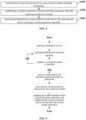
- a screen projection method applied to a receiving end device includes the following steps.
- the receiving end device actively scans and searches for a sending end device wirelessly, and when the sending end device is found, it establishes a wireless connection with the sending end device; and once the wireless connection is established, the receiving end device automatically sends a screen projection code to the connected sending end device, and the sending end device may prompt a user to perform a screen projection operation by means of displaying the screen projection code.
- the sending end device can automatically acquire the screen projection code and prompt the user to perform the screen projection operation in time, thus improving the timeliness of the screen projection operation.
- Wireless scanning technology is a wireless technology for searching devices, including WiFi (Wireless Fidelity) scanning technology, Bluetooth scanning technology, etc.
- the wireless scanning technology adopted by the receiving end device generally depends on what kind of wireless module is installed on the receiving end device. If the receiving end device is installed with a WiFi module, the WiFi scanning technology may be used to search for the sending end device, and once a sending end device enters a scanning range and its WiFi function is enabled, the receiving end device may scan the sending end device. If the receiving end device is installed with a Bluetooth module, the Bluetooth scanning technology may be used to search for the sending end device, and once a sending end device enters a scanning range and its Bluetooth function is enabled, the receiving end device may scan the sending end device. In one implementation, if the receiving end device is installed with both WiFi module and Bluetooth module, the Bluetooth function will be enabled first, and the Bluetooth scanning technology is used to search for the sending end device.
- S101 may specifically include: enabling a Bluetooth service, and periodically searching for a sending end device by using a Bluetooth scanning technology.
- the receiving end device can use the Bluetooth scanning technology to search for a device by enabling the Bluetooth service of the Bluetooth module, and in order to effectively utilize the device resources, the searching may be performed periodically.
- the embodiment of the present application adopts the classic Bluetooth technology, which is a global standard open for wireless data and voice communication, and is a special short-range wireless technology connection based on low-cost short-range wireless connection to establish a communication environment for fixed and mobile devices.
- the receiving end device finds a sending end device, it means that the sending end device enables the same wireless function as that of the receiving end device, and the distance from the receiving end device is within a certain range, and the receiving end device may actively establish a wireless connection with the sending end device.
- the specific way of establishing wireless connection may be as follows: the receiving end device sends a request packet to the scanned sending end device, and the request packet carries verification information; after receiving the request packet, the sending end device verifies the verification information, if the verification is passed, it will feed back a response packet allowing connection to the receiving end device; after receiving the response packet, the receiving end device may establish a wireless connection with the sending end device.
- Screen projection software is installed on the sending end device. Specifically, the screen projection software on the sending end device interacts with the receiving end device to realize wireless connection between the sending end device and the receiving end device.
- the wireless function of the sending end device may be controlled by the screen projection software, that is to say, a sending end device may only be controlled to enable the wireless function by the screen projection software only when the screen projection software is opened.
- the sending end device scanned by the receiving end device must have already opened the screen projection software, and the receiving end device can establish a connection with the sending end device directly when the sending end device is found.
- the screen projection software installed on the sending end device may also be integrated with a wireless pairing strategy.
- S102 specifically includes: sending a request packet to the sending end device when the sending end device is found; receiving a response packet fed back by the sending end device, wherein the response packet carries identification information indicating whether the sending end device has opened a screen projection software; establishing a wireless connection with the sending end device when it is determined that the sending end device has opened the screen projection software based on the identification information.
- the receiving end device when the receiving end device searches for a sending end device, it will send a request packet to the sending end device for requesting to establish a wireless connection with the sending end device.
- the screen projection software After the sending end device performs the above-mentioned verification operation, the screen projection software identifies the status that whether the current screen projection software is opened in the request packet, and it identifies whether the screen projection software has been opened; and when the sending end device feeds back the response packet to the receiving end device, the packet carries the identification information indicating whether the screen projection software has been opened.
- a designated bit in the response packet may be preset as 1, which means that the sending end device has opened the screen projection software, and if the designated bit ID is 0, it means that the sending end device has not opened the screen projection software.
- the designated bit may be any reserved bit in the response packet based on a specific transmission protocol, and the designated bit identification may be specifically set by a program running in a memory. According to the identification information, the receiving end device may determine whether the sending end device has opened the screen projection software, and establish wireless connection with the sending end device when it is determined that the screen projection software has been opened. If the sending end device does not open the screen projection software, it will not establish a wireless connection with the sending end device, that is, it will not trigger the screen projection operation.
- the sending end device if it does not install the screen projection software, it will not respond to the request packet sent by the receiving end device. After the receiving end device sends the request packet to the sending end device, if it has not received a response packet within a period of time, it may be determined that the sending end device has not installed the screen projection software and will not establish a wireless connection with the sending end device , that is, the screen projection operation will not be triggered.
- the receiving end device After the wireless connection between the receiving end device and the sending end device is established, the receiving end device automatically acquires the screen projection code.
- the screen projection code may be randomly generated locally by the receiving end device or pre-configured by the user on the receiving end device.
- the receiving end device sends the acquired screen projection code to the connected sending end device.
- the sending end device may display the screen projection code on a local display interface to prompt the user that the screen projection code has been learned and that the user may select to start the screen projection operation. The user may click and select on the interface to trigger the screen projection operation.
- the receiving end device may also display the acquired screen projection code on the local display interface, and the user may determine whether the screen projection codes obtained by the receiving end device and the sending end device are the same by viewing the display contents of the two devices, so as to verify whether the communication between the two devices is abnormal. If the screen projection codes displayed by the two devices are different, the communication between the two devices is abnormal.
- an embodiment of the present application provides another screen projection method applied to the receiving end device, as shown in FIG. 2 , which may include the following steps.
- the receiving end device After one screen projection code expires, the receiving end device will update the screen projection code. In order to cope with the change of the screen projection code, the receiving end device may regularly detect whether the screen projection code changes after establishing a wireless connection with the sending end device. The receiving end device acquires the locally recorded screen projection code at certain intervals. If the current screen projection code acquired in a certain period is different from that acquired in the previous period, it means that the current screen projection code has changed. Once it is detected the current screen projection code changes, the changed current screen projection code will be acquired, and then the acquired screen projection code will be sent to the connected sending end device, which ensures that the sending end device may learn the changed screen projection code in real time and reliably, and further ensures the timeliness of the screen projection operation.
- the method provided by the embodiment of the present application may also include: if the current screen projection code does not change, return to S201.
- the receiving end device will not repeatedly send the screen projection code to the sending end device, but will circularly execute the above screen projection method until the screen projection code changes, and then send the changed screen projection code to the sending end device.
- the conference tablet is a large-screen interactive display device applied to conferences, education and other scenarios.
- the screen projection method applied to the conference tablet may include the following steps.
- Step 1 enabling a Bluetooth service on the conference tablet.
- the conference tablet is provided with a Bluetooth module. Before screen projection, the Bluetooth function of the Bluetooth module in the conference tablet should be enabled first.
- Step 2 performing Bluetooth scanning regularly.
- an operating system of the conference tablet After the Bluetooth is enabled, an operating system of the conference tablet will return a message indicating that the Bluetooth is enabled successfully, and after confirming that the Bluetooth is enabled successfully, it will automatically start a scheduled Bluetooth scanning to search for personal computers, mobile phones and other sending end devices for screen projection in a conference room.
- Step 3 determining whether a screen projection sending end device is searched, if yes, execute Step 4, otherwise, return to Step 2.
- Step 4 determining whether the searched screen projection sending end device has opened a screen projection software, if yes, execute step 5, otherwise, return to Step 2.
- the conference tablet sends a request packet to the sending end device, and the sending end device feeds back a response packet carrying identification information indicating whether the sending end device has opened a screen projection software, and then the conference tablet determines whether the searched sending end device has opened the screen projection software according to the identification information in the received response packet.
- Step 5 actively connecting with the searched screen projection sending end device.
- the user enters the conference room with a screen projection sending end device that has opened the screen projection software, and the projection sending end device enables the Bluetooth function, and is within the Bluetooth search range of the conference tablet; in the response packet received by the conference tablet, the identification information indicates that the sending end device has opened the screen projection software, and then the conference tablet directly establishes Bluetooth connection with the screen projection sending end device.
- Step 6 detecting whether the current screen projection code changes, if yes, execute Step 7, otherwise, return to execute Step 2.
- Step 7 acquiring the current screen projection code.
- Step 8 sending the screen projection code to the connected screen projection sending end device.
- Step 9 determining whether the sending is successful, if not, return to Step 8.
- the conference tablet After the conference tablet establishes a Bluetooth connection with the screen projection sending end device, the conference tablet actively sends the changed screen projection code to the screen projection sending end device. After receiving the screen projection code, the screen projection sending end device will display the received screen projection code in the screen projection software to prompt the user to start the screen projection. If the conference tablet is connected to the screen projection sending end device for the first time, and the conference tablet sends the screen projection code to the screen projection sending end device for the first time, the conference tablet may directly send the screen projection code to the connected screen projection sending end device without determining whether the screen projection code is changed.
- the present application also provides a screen projection method applied to a sending end device, as shown in FIG. 4 , which includes the following steps.
- the sending end device actively scans and searches for a receiving end device, and when the receiving end device is found, it establishes a wireless connection with the receiving end device; and after the wireless connection is established, the sending end device will receive the screen projection code sent by the receiving end device, display the received screen projection code, and prompt the user to perform the screen projection operation by displaying the screen projection code.
- the sending end device can automatically acquire the screen projection code and prompt the user to perform the screen projection operation in time, thus improving the timeliness of the screen projection operation.
- S401 may be specifically configured for: enabling a Bluetooth service, and periodically searching for a receiving end device by using a Bluetooth scanning technology.
- the sending end device may search for a device through a Bluetooth scanning technology by enabling the Bluetooth service of the Bluetooth module, and in order to effectively utilize the device resources, the searching operation may be performed periodically.
- the sending end device finds the receiving end device, it means that the receiving end device has enabled the same wireless function as that of the sending end device, and the distance from the sending end device is within a certain range, and the sending end device may actively establish a wireless connection with the receiving end device.
- the specific process of establishing a wireless connection may be realized by the interaction between the screen projection software installed on the sending end device and the receiving end device.
- the receiving end device After the wireless connection between the sending end device and the receiving end device is established, the receiving end device will send the screen projection code to the sending end device.
- the sending end device may display the screen projection code on a local display interface to prompt the user that the screen projection code has been learned and that the user may select to start the screen projection operation. The user may click and select on the interface to trigger the screen projection operation.
- S403 may specifically include: receiving the screen projection code sent by the receiving end device; displaying a main interface of the screen projection software, and displaying the screen projection code on the main interface to prompt the screen projection operation.
- the sending end device may pop up the main interface of the screen projection software, the main interface displays the screen projection code, and the user may see the screen projection code on the main interface of the screen projection software. After sees the screen projection code, the user may determine that the connection between the sending end device and the receiving end device has been established. At this time, the user may click and select on the interface to trigger the screen projection operation.
- the screen projection method applied to the sending end device may include the following steps.
- Step 1 enabling a Bluetooth service.
- the sending end device is provided with a Bluetooth module.
- the Bluetooth function of the Bluetooth module should be enabled first.
- the screen projection software installed on the sending end device may automatically enable the Bluetooth function of the Bluetooth module and set it to a detectable state.
- Step 2 performing Bluetooth scanning regularly.
- the sending end device After the Bluetooth is enabled, the sending end device actively and circularly performs Bluetooth scanning to search for a conference tablet.
- Step 3 determining whether a conference tablet is searched, if yes, execute Step 4, otherwise, return to execute Step 2.
- Step 4 actively connecting to the searched conference tablet via Bluetooth.
- the sending end device When the sending end device finds a conference tablet nearby, it will actively connect to the conference tablet via Bluetooth.
- the sending end device sends a connection request packet that carries identification information indicating whether the sending end device has opened the screen projection software to the conference tablet, and the conference tablet determines whether the sending end device has opened the screen projection software according to the identification information in the received connection request packet. If the identification information indicates that the sending end device has opened the screen projection software, the sending end device directly establishes Bluetooth connection with the conference tablet.
- Step 5 receiving the screen projection code sent by the conference tablet.
- the conference tablet After the sending end device establishes a Bluetooth connection with the conference tablet, the conference tablet will send the screen projection code to the sending end device.
- Step 6 popping up a main interface of the screen projection software, and displaying the screen projection code to prompt the user to start screen projection.
- the sending end device After successfully receiving the screen projection code, the sending end device will actively pop up the main interface of the screen projection software and display the received screen projection code on the main interface. After the user sees the screen projection code on the main interface, the user may determine that the connection between the sending end device and the receiving end device has been established. At this time, the user may click and select on the interface to trigger the screen projection operation.
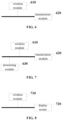
- the present application provides a receiving end device, as shown in FIG. 6 , which includes a wireless module 610 and a transmission module 620,
- the wireless module 610 is specifically configured for: enabling a Bluetooth service, and periodically searching for the sending end device by using a Bluetooth scanning technology.
- the wireless module 610 is specifically configured for: sending a request packet to the sending end device when the sending end device is found; receiving a response packet fed back by the sending end device, wherein the response packet carries identification information indicating whether the sending end device has opened a screen projection software; establishing the wireless connection with the sending end device when it is determined that the sending end device has opened the screen projection software based on the identification information.
- the receiving end device further includes:
- the wireless module 610 is specifically configured for: when the current screen projection code does not changed, searching for the sending end device by using the preset wireless scanning technology.
- the receiving end device actively scans and searches for a sending end device, and when the sending end device is found , it establishes a wireless connection with the sending end device; and once the wireless connection is established, the receiving end device automatically sends a screen projection code to the connected sending end device, and the sending end device may prompt a user to perform a screen projection operation by means of displaying the screen projection code.
- the sending end device can automatically acquire the screen projection code and prompt the user to perform the screen projection operation in time, thus improving the timeliness of the screen projection operation.
- the present application also provides a receiving end device, as shown in FIG. 7 , which includes a wireless module 610, a transmission module 620 and a processing module 630,
- the present application also provides a sending end device, as shown in FIG. 8 , which includes a wireless module 710 and a display screen 720,
- the wireless module 710 is specifically configured for: enabling a Bluetooth service, and performing periodically searching for the receiving end device by using a Bluetooth scanning technology.
- the sending end device has opened a screen projection software; the display screen 720 is specifically configured for: receiving the screen projection code sent by the receiving end device; displaying a main interface of the screen projection software, and displaying the screen projection code on the main interface to prompt the screen projection operation.
- the sending end device actively scans and searches for a receiving end device, and when the receiving end device is found, it establishes a wireless connection with the receiving end device; and after the wireless connection is established, the sending end device will receive the screen projection code sent by the receiving end device, display the received screen projection code, and prompt the user to perform the screen projection operation by displaying the screen projection code.
- the sending end device can automatically acquire the screen projection code and prompt the user to perform the screen projection operation in time, thus improving the timeliness of the screen projection operation.
- the wireless module may be a Bluetooth module, a WiFi module, etc., which is not specifically limited in the embodiment of the present application.
- the content of the methods involved are basically similar to the above method embodiments, so the description is relatively simple. Please refer to the partial descriptions of the method embodiments for the relevant details.
Landscapes
- Engineering & Computer Science (AREA)
- Computer Networks & Wireless Communication (AREA)
- Signal Processing (AREA)
- Theoretical Computer Science (AREA)
- Databases & Information Systems (AREA)
- Human Computer Interaction (AREA)
- Physics & Mathematics (AREA)
- General Engineering & Computer Science (AREA)
- General Physics & Mathematics (AREA)
- Mobile Radio Communication Systems (AREA)
- Controls And Circuits For Display Device (AREA)
- Telephone Function (AREA)
Claims (13)
- Bildschirmprojektionsverfahren, das durch eine Empfangsendvorrichtung ausgeführt wird, dadurch gekennzeichnet, dass das Verfahren umfasst:Suchen nach einer Sendeendvorrichtung mithilfe einer vorgegebenen drahtlosen Abtasttechnologie (S101; S201);Einrichten einer drahtlosen Verbindung mit der Sendeendvorrichtung, wenn die Sendeendvorrichtung gefunden wird, die dieselbe drahtlose Funktion wie diejenige der Empfangsendvorrichtung aktiviert hat, und ein Abstand von der Empfangsendvorrichtung innerhalb eines bestimmten Bereichs liegt (S102; S202); wobei das Einrichten einer drahtlosen Verbindung mit der Sendeendvorrichtung, wenn die Sendeendvorrichtung gefunden wird (S102; S202), umfasst: Senden eines Anforderungspakets an die Sendeendvorrichtung, wenn die Sendeendvorrichtung gefunden wird; Empfangen eines Antwortpakets, das von der Sendeendvorrichtung zurückgegeben wird, wobei das Antwortpaket Erkennungsinformationen trägt, die angeben, ob die Sendeendvorrichtung eine Bildschirmprojektionssoftware geöffnet hat; und Einrichten der drahtlosen Verbindung mit der Sendeendvorrichtung, wenn bestimmt wird, dass die Sendeendvorrichtung die Bildschirmprojektionssoftware geöffnet hat, beruhend auf den Erkennungsinformationen;Erlangen eines Bildschirmprojektionscodes und Senden des Bildschirmprojektionscodes an die angeschlossene Sendeendvorrichtung, so dass die angeschlossene Sendeendvorrichtung den Bildschirmprojektionscode zum Auslösen eines Bildschirmprojektionsvorgangs anzeigt (S103).
- Verfahren nach Anspruch 1, wobei das Suchen nach einer Sendeendvorrichtung mithilfe einer vorgegebenen drahtlosen Abtasttechnologie (S101; S201) umfasst:
Aktivieren eines Bluetooth-Dienstes und periodisches Suchen nach der Sendeendvorrichtung mithilfe einer Bluetooth-Abtasttechnologie. - Verfahren nach Anspruch 1, wobei nach dem Einrichten der drahtlosen Verbindung mit der Sendeendvorrichtung, wenn die Sendeendvorrichtung gefunden wird (S102; S202), das Verfahren darüber hinaus umfasst:Erfassen, ob sich der aktuelle Bildschirmprojektionscode ändert (S203);wobei das Erlangen eines Projektionscodes umfasst:
wenn sich der aktuelle Bildschirmprojektionscode ändert, Erlangen des geänderten aktuellen Bildschirmprojektionscodes. - Verfahren nach Anspruch 3, wobei nach dem Erfassen, ob sich der aktuelle Projektionscode ändert, das Verfahren darüber hinaus umfasst:
wenn sich der aktuelle Bildschirmprojektionscode nicht ändert, Zurückkehren zu der Suche nach einer Sendeendvorrichtung mithilfe einer vorgegebenen drahtlosen Abtasttechnologie. - Bildschirmprojektionsverfahren, das durch eine Sendeendvorrichtung durchgeführt wird, dadurch gekennzeichnet, dass das Verfahren umfasst:Suchen nach einer Empfangsendvorrichtung mithilfe einer vorgegebenen drahtlosen Abtasttechnologie (S401);Einrichten einer drahtlosen Verbindung mit der Empfangsendvorrichtung, wenn die Empfangsendvorrichtung gefunden wird (S402); wobei das Einrichten einer drahtlosen Verbindung mit der Empfangsendvorrichtung, wenn die Empfangsendvorrichtung gefunden wird, die dieselbe drahtlose Funktion wie diejenige der Empfangsendvorrichtung aktiviert hat, und ein Abstand von der Empfangsendvorrichtung innerhalb eines bestimmten Bereichs liegt (S402), umfasst: Senden, an die Empfangsendvorrichtung, eines Verbindungsanforderungspakets, das Erkennungsinformationen trägt, die angeben, ob die Sendeendvorrichtung eine Bildschirmprojektionssoftware geöffnet hat; und Einrichten der drahtlosen Verbindung mit der Empfangsendvorrichtung, wenn die Erkennungsinformationen anzeigen, dass die Sendeendvorrichtung die Bildschirmprojektionssoftware geöffnet hat; undEmpfangen und Anzeigen eines Bildschirmprojektionscodes zum Auslösen eines Bildschirmprojektionsvorgangs, der von der Empfangsendvorrichtung gesendet wurde (S403).
- Verfahren nach Anspruch 5, wobei das Suchen nach einer Empfangsendvorrichtung mithilfe einer vorgegebenen drahtlosen Abtasttechnologie (S401) umfasst:
Aktivieren eines Bluetooth-Dienstes und periodisches Suchen nach der Empfangsendvorrichtung mithilfe einer Bluetooth-Abtasttechnologie. - Verfahren nach Anspruch 5, wobei die Sendeendvorrichtung eine Bildschirmprojektionssoftware geöffnet hat;wobei das Empfangen und Anzeigen eines Bildschirmprojektionscodes zum Auslösen eines Bildschirmprojektionsvorgangs, der von der Empfangsendvorrichtung gesendet wurde (S403), umfasst:Empfangen des Bildschirmprojektionscodes, der von der Empfangsendvorrichtung gesendet wurde;Anzeigen einer Hauptschnittstelle der Bildschirmprojektionssoftware und Anzeigen des Bildschirmprojektionscodes auf der Hauptschnittstelle zum Auslösen des Bildschirmprojektionsvorgangs.
- Empfangsendvorrichtung, die ein drahtloses Modul (610) und ein Übertragungsmodul (620) aufweist, dadurch gekennzeichnet, dass:das drahtlose Modul (610) ausgelegt ist zum Suchen nach einer Sendeendvorrichtung mithilfe einer vorgegebenen drahtlosen Abtasttechnologie und zum Einrichten einer drahtlosen Verbindung mit der Sendeendvorrichtung, wenn die Sendeendvorrichtung gefunden wird, die dieselbe drahtlose Funktion wie diejenige der Empfangsendvorrichtung aktiviert hat, und ein Abstand von der Empfangsendvorrichtung innerhalb eines bestimmten Bereichs liegt, wobei das drahtlose Modul (610) darüber hinaus ausgelegt ist zum: Senden eines Anforderungspakets an die Sendeendvorrichtung, wenn die Sendeendvorrichtung gefunden wird; Empfangen eines Antwortpakets, das von der Sendeendvorrichtung zurückgegeben wurde, wobei das Antwortpaket Erkennungsinformationen trägt, die angeben, ob die Sendeendvorrichtung eine Bildschirmprojektionssoftware geöffnet hat; und Einrichten der drahtlosen Verbindung mit der Sendeendvorrichtung, wenn bestimmt wird, dass die Sendeendvorrichtung die Bildschirmprojektionssoftware geöffnet hat, beruhend auf den Erkennungsinformationen;das Übertragungsmodul (620) ausgelegt ist zum Erlangen eines Bildschirmprojektionscodes und Senden des Bildschirmprojektionscodes an die angeschlossene Sendeendvorrichtung, so dass die angeschlossene Sendeendvorrichtung den Bildschirmprojektionscode zum Auslösen eines Bildschirmprojektionsvorgangs anzeigt.
- Empfangsendvorrichtung nach Anspruch 8, wobei das drahtlose Modul (610) darüber hinaus ausgelegt ist zum:
Aktivieren eines Bluetooth-Dienstes und periodisches Suchen nach der Sendeendvorrichtung mithilfe einer Bluetooth-Abtasttechnologie. - Empfangsendvorrichtung nach Anspruch 8, wobei die Empfangsendvorrichtung darüber hinaus umfasst:ein Erfassungsmodul, das dafür ausgelegt ist, zu erfassen, ob sich der aktuelle Bildschirmprojektionscode ändert;wobei das Übertragungsmodul (620) darüber hinaus ausgelegt ist zum:
Erlangen des geänderten aktuellen Bildschirmprojektionscodes, wenn sich der aktuelle Bildschirmprojektionscode ändert. - Empfangsendvorrichtung nach Anspruch 10, wobei das drahtlose Modul (610) darüber hinaus ausgelegt ist zum:
Suchen nach der Sendeendvorrichtung mithilfe der vorgegebenen drahtlosen Abtasttechnologie, wenn sich der aktuelle Bildschirmprojektionscode nicht ändert. - Sendeendvorrichtung, die ein drahtloses Modul (710) und einen Anzeigebildschirm (720) aufweist, dadurch gekennzeichnet, dassdas drahtlose Modul (710) ausgelegt ist zum Suchen nach einer Empfangsendvorrichtung mithilfe einer vorgegebenen drahtlosen Abtasttechnologie; und Einrichten einer drahtlosen Verbindung mit der Empfangsendvorrichtung, wenn die Empfangsendvorrichtung gefunden wird, die dieselbe drahtlose Funktion wie diejenige der Empfangsendvorrichtung aktiviert hat, und ein Abstand von der Empfangsendvorrichtung innerhalb eines bestimmten Bereichs liegt; wobei das drahtlose Modul (710) darüber hinaus ausgelegt ist zum: Senden, an die Empfangsendvorrichtung, eines Verbindungsanforderungspakets, das Erkennungsinformationen trägt, die angeben, ob die Sendeendvorrichtung eine Bildschirmprojektionssoftware geöffnet hat; Einrichten der drahtlosen Verbindung mit der Empfangsendvorrichtung, wenn die Erkennungsinformationen anzeigen, dass die Sendeendvorrichtung die Bildschirmprojektionssoftware geöffnet hat;der Anzeigebildschirm (720) ausgelegt ist zum Empfangen und Anzeigen eines Bildschirmprojektionscodes zum Auslösen eines Bildschirmprojektionsvorgangs, der von der Empfangsendvorrichtung gesendet wurde.
- Sendeendvorrichtung nach Anspruch 12, wobei die Sendeendvorrichtung eine Bildschirmprojektionssoftware geöffnet hat;
wobei der Anzeigebildschirm (720) darüber hinaus ausgelegt ist zum:Empfangen des Bildschirmprojektionscodes, der von der Empfangsendvorrichtung gesendet wurde;Anzeigen einer Hauptschnittstelle der Bildschirmprojektionssoftware und Anzeigen des Bildschirmprojektionscodes auf der Hauptschnittstelle zum Auslösen des Bildschirmprojektionsvorgangs.
Applications Claiming Priority (2)
| Application Number | Priority Date | Filing Date | Title |
|---|---|---|---|
| CN202010120292.8A CN113316128B (zh) | 2020-02-26 | 2020-02-26 | 一种投屏方法、接收端设备及发送端设备 |
| PCT/CN2021/077209 WO2021169907A1 (zh) | 2020-02-26 | 2021-02-22 | 一种投屏方法、接收端设备及发送端设备 |
Publications (3)
| Publication Number | Publication Date |
|---|---|
| EP4114087A1 EP4114087A1 (de) | 2023-01-04 |
| EP4114087A4 EP4114087A4 (de) | 2023-08-23 |
| EP4114087B1 true EP4114087B1 (de) | 2025-01-01 |
Family
ID=77370051
Family Applications (1)
| Application Number | Title | Priority Date | Filing Date |
|---|---|---|---|
| EP21761385.0A Active EP4114087B1 (de) | 2020-02-26 | 2021-02-22 | Bildschirmprojektionsverfahren, empfangsseitige vorrichtung und sendeseitige vorrichtung |
Country Status (4)
| Country | Link |
|---|---|
| US (1) | US11778442B2 (de) |
| EP (1) | EP4114087B1 (de) |
| CN (1) | CN113316128B (de) |
| WO (1) | WO2021169907A1 (de) |
Families Citing this family (6)
| Publication number | Priority date | Publication date | Assignee | Title |
|---|---|---|---|---|
| CN111629371B (zh) * | 2020-05-06 | 2021-09-03 | 上海幻电信息科技有限公司 | 投屏方法和系统 |
| CN114040233B (zh) * | 2021-11-04 | 2023-04-11 | 深圳小湃科技有限公司 | 投屏服务调整方法、设备及存储介质 |
| CN113918110A (zh) * | 2021-12-13 | 2022-01-11 | 荣耀终端有限公司 | 投屏交互方法、设备、系统、存储介质和产品 |
| CN117083865A (zh) * | 2021-12-21 | 2023-11-17 | 广州视源电子科技股份有限公司 | 投屏方法、装置、存储介质及电子设备 |
| CN116614659A (zh) * | 2022-02-08 | 2023-08-18 | 海信视像科技股份有限公司 | 一种投屏方法、显示设备及智能设备 |
| CN115328420A (zh) * | 2022-08-10 | 2022-11-11 | 深圳创维-Rgb电子有限公司 | 公共投屏方法、装置、电子设备及可读存储介质 |
Family Cites Families (24)
| Publication number | Priority date | Publication date | Assignee | Title |
|---|---|---|---|---|
| US7933955B2 (en) * | 2006-07-11 | 2011-04-26 | Igor Khalatian | One-click universal screen sharing |
| US10608864B2 (en) * | 2011-08-24 | 2020-03-31 | Barco Limited | Method of establishing paid connection using screen mirroring application between multi-platforms |
| US9141264B2 (en) * | 2011-12-14 | 2015-09-22 | International Business Machines Corporation | Variable refresh rates for portions of shared screens |
| JP6024167B2 (ja) | 2012-04-09 | 2016-11-09 | 株式会社リコー | 要求処理システム |
| US20150170212A1 (en) * | 2013-09-24 | 2015-06-18 | Peter McGie | Remotely Connected Digital Messageboard System and Method |
| TWI604375B (zh) * | 2014-06-23 | 2017-11-01 | 緯創資通股份有限公司 | 螢幕分享方法以及使用該方法的裝置 |
| CN105991962B (zh) * | 2015-02-03 | 2020-08-18 | 阿里巴巴集团控股有限公司 | 连接方法、信息展示方法、装置及系统 |
| WO2017022931A1 (ko) * | 2015-08-06 | 2017-02-09 | 엘지전자 주식회사 | 이동단말기 및 그 제어방법 |
| CN106534547A (zh) * | 2016-11-15 | 2017-03-22 | 努比亚技术有限公司 | 移动终端及屏幕投影连接方法 |
| CN107079383B (zh) * | 2016-12-16 | 2021-01-08 | 深圳前海达闼云端智能科技有限公司 | 用于投影的方法、装置、系统及电子设备 |
| US20180183840A1 (en) * | 2016-12-23 | 2018-06-28 | Samsung Display Co., Ltd. | Method and apparatus for screen mirroring and casting using nfc connection |
| US10678566B2 (en) * | 2017-01-20 | 2020-06-09 | International Business Machines Corporation | Cognitive screen sharing with contextual awareness |
| CN108428027B (zh) * | 2017-02-14 | 2022-04-19 | 钉钉控股(开曼)有限公司 | 事件处理方法及装置 |
| CN108736981A (zh) * | 2017-04-19 | 2018-11-02 | 阿里巴巴集团控股有限公司 | 一种无线投屏方法、装置及系统 |
| CN110515573B (zh) * | 2018-05-21 | 2022-07-22 | 腾讯科技(深圳)有限公司 | 投屏方法、装置、系统和计算机设备 |
| CN108920116A (zh) * | 2018-06-12 | 2018-11-30 | 广州视源电子科技股份有限公司 | 投屏设备的控制方法、装置、设备及存储介质 |
| CN108901024A (zh) * | 2018-06-25 | 2018-11-27 | 北京小鱼在家科技有限公司 | 控制投屏接收设备连网及投屏接收设备连网方法、设备 |
| CN108920937A (zh) * | 2018-07-03 | 2018-11-30 | 广州视源电子科技股份有限公司 | 投屏系统、投屏方法和装置 |
| CN110740288B (zh) * | 2018-07-20 | 2022-02-01 | 钉钉控股(开曼)有限公司 | 投屏网络的管理方法、接入方法及装置 |
| CN109525990B (zh) * | 2018-10-31 | 2022-02-08 | 同程网络科技股份有限公司 | 无线投屏方法、装置、计算机设备和存储介质 |
| CN209017200U (zh) * | 2018-12-12 | 2019-06-21 | 深圳创维数字技术有限公司 | 投屏码接收机构及投屏设备 |
| CN109862404B (zh) * | 2019-02-21 | 2021-02-02 | 深圳创维-Rgb电子有限公司 | 一种智能电视的交互方法、存储介质及智能电视 |
| US11284256B2 (en) * | 2019-03-25 | 2022-03-22 | Nanning Fugui Precision Industrial Co., Ltd. | Method and system for automatic access to WI-FI network |
| US20210034318A1 (en) * | 2019-07-31 | 2021-02-04 | Vspatial, Inc. | Shared volume computing architecture of a virtual reality environment and related systems and methods |
-
2020
- 2020-02-26 CN CN202010120292.8A patent/CN113316128B/zh active Active
-
2021
- 2021-02-22 WO PCT/CN2021/077209 patent/WO2021169907A1/zh not_active Ceased
- 2021-02-22 US US17/904,739 patent/US11778442B2/en active Active
- 2021-02-22 EP EP21761385.0A patent/EP4114087B1/de active Active
Also Published As
| Publication number | Publication date |
|---|---|
| KR20220147586A (ko) | 2022-11-03 |
| EP4114087A1 (de) | 2023-01-04 |
| CN113316128A (zh) | 2021-08-27 |
| CN113316128B (zh) | 2022-04-05 |
| WO2021169907A1 (zh) | 2021-09-02 |
| US20230083485A1 (en) | 2023-03-16 |
| EP4114087A4 (de) | 2023-08-23 |
| US11778442B2 (en) | 2023-10-03 |
Similar Documents
| Publication | Publication Date | Title |
|---|---|---|
| US11778442B2 (en) | Screen projection method, receiving end device, and sending end device | |
| EP3206362B1 (de) | Kontoanmeldeverfahren und vorrichtung | |
| JP6228676B2 (ja) | 接続状態プロンプティング方法および装置 | |
| EP2769309B1 (de) | Verfahren und vorrichtung zur gemeinsamen nutzung von inhalten zwischen vorrichtungen | |
| US8612636B2 (en) | Method and apparatus for generating or using interaction activity information | |
| US9307375B2 (en) | Methods for connecting devices and devices using the same | |
| KR20160117411A (ko) | Wifi 목록을 디스플레이하는 방법 및 디바이스 | |
| CN112351417B (zh) | 设备发现方法、装置以及计算机设备 | |
| US11470151B2 (en) | System, mobile terminal and method for storing data into web storage using wireless LAN | |
| US9857963B2 (en) | Method and apparatus for generating or using interaction activity information | |
| EP1589723B1 (de) | Gerät welches sein Verhalten an es umgebende Geräte anpassen kann | |
| CN115396708B (zh) | 显示设备、控制装置和设备名称更新方法 | |
| KR100689774B1 (ko) | 텔레매틱스 단말기와 컴퓨터간 동기화 서비스를 제공하는홈 텔레매틱스 시스템 및 그 방법 | |
| CN115834755B (zh) | 显示设备、智能设备及来电展示方法 | |
| CN117614758A (zh) | 一种电子设备、终端设备及设备配网方法 | |
| US20130273842A1 (en) | Methods for exchanging information between electronic devices, and electronic devices | |
| KR20110117843A (ko) | 영상표시 시스템 및 이벤트 공유 방법 | |
| CN112347275B (zh) | 媒体文件推送方法、装置、设备及计算机可读存储介质 | |
| US12175155B2 (en) | Wireless transmission system and method thereof | |
| US9232281B2 (en) | Communication management apparatus, terminal, communication management system, communication management method, program, and information storage medium | |
| CN114554259B (zh) | 控制设备、显示设备和设备信息获取方法 | |
| CN114063960A (zh) | 大小屏互动方法、装置和计算机可读存储介质 | |
| CN119421111A (zh) | 控制设备、智能设备配网方法及计算机可读存储介质 | |
| US20130148540A1 (en) | Method and apparatus for call set-up based on network available to receiver | |
| CN117596431A (zh) | 一种基于无线投屏的跨设备控制方法、系统及智能电视 |
Legal Events
| Date | Code | Title | Description |
|---|---|---|---|
| STAA | Information on the status of an ep patent application or granted ep patent |
Free format text: STATUS: THE INTERNATIONAL PUBLICATION HAS BEEN MADE |
|
| PUAI | Public reference made under article 153(3) epc to a published international application that has entered the european phase |
Free format text: ORIGINAL CODE: 0009012 |
|
| STAA | Information on the status of an ep patent application or granted ep patent |
Free format text: STATUS: REQUEST FOR EXAMINATION WAS MADE |
|
| 17P | Request for examination filed |
Effective date: 20220825 |
|
| AK | Designated contracting states |
Kind code of ref document: A1 Designated state(s): AL AT BE BG CH CY CZ DE DK EE ES FI FR GB GR HR HU IE IS IT LI LT LU LV MC MK MT NL NO PL PT RO RS SE SI SK SM TR |
|
| DAV | Request for validation of the european patent (deleted) | ||
| DAX | Request for extension of the european patent (deleted) | ||
| REG | Reference to a national code |
Ref country code: DE Ref legal event code: R079 Free format text: PREVIOUS MAIN CLASS: H04W0048000000 Ref country code: DE Ref legal event code: R079 Ref document number: 602021024299 Country of ref document: DE Free format text: PREVIOUS MAIN CLASS: H04W0048000000 Ipc: G06F0003140000 |
|
| A4 | Supplementary search report drawn up and despatched |
Effective date: 20230721 |
|
| RIC1 | Information provided on ipc code assigned before grant |
Ipc: H04W 76/10 20180101ALN20230717BHEP Ipc: H04W 48/16 20090101ALN20230717BHEP Ipc: H04W 4/80 20180101ALN20230717BHEP Ipc: H04W 8/00 20090101ALI20230717BHEP Ipc: G06F 3/14 20060101AFI20230717BHEP |
|
| GRAP | Despatch of communication of intention to grant a patent |
Free format text: ORIGINAL CODE: EPIDOSNIGR1 |
|
| STAA | Information on the status of an ep patent application or granted ep patent |
Free format text: STATUS: GRANT OF PATENT IS INTENDED |
|
| RIC1 | Information provided on ipc code assigned before grant |
Ipc: H04W 76/10 20180101ALN20240523BHEP Ipc: H04W 48/16 20090101ALN20240523BHEP Ipc: H04W 4/80 20180101ALN20240523BHEP Ipc: H04W 8/00 20090101ALI20240523BHEP Ipc: G06F 3/14 20060101AFI20240523BHEP |
|
| INTG | Intention to grant announced |
Effective date: 20240617 |
|
| GRAJ | Information related to disapproval of communication of intention to grant by the applicant or resumption of examination proceedings by the epo deleted |
Free format text: ORIGINAL CODE: EPIDOSDIGR1 |
|
| STAA | Information on the status of an ep patent application or granted ep patent |
Free format text: STATUS: REQUEST FOR EXAMINATION WAS MADE |
|
| GRAP | Despatch of communication of intention to grant a patent |
Free format text: ORIGINAL CODE: EPIDOSNIGR1 |
|
| STAA | Information on the status of an ep patent application or granted ep patent |
Free format text: STATUS: GRANT OF PATENT IS INTENDED |
|
| INTC | Intention to grant announced (deleted) | ||
| RIC1 | Information provided on ipc code assigned before grant |
Ipc: H04W 76/10 20180101ALN20240801BHEP Ipc: H04W 48/16 20090101ALN20240801BHEP Ipc: H04W 4/80 20180101ALN20240801BHEP Ipc: H04W 8/00 20090101ALI20240801BHEP Ipc: G06F 3/14 20060101AFI20240801BHEP |
|
| INTG | Intention to grant announced |
Effective date: 20240814 |
|
| GRAS | Grant fee paid |
Free format text: ORIGINAL CODE: EPIDOSNIGR3 |
|
| GRAA | (expected) grant |
Free format text: ORIGINAL CODE: 0009210 |
|
| STAA | Information on the status of an ep patent application or granted ep patent |
Free format text: STATUS: THE PATENT HAS BEEN GRANTED |
|
| AK | Designated contracting states |
Kind code of ref document: B1 Designated state(s): AL AT BE BG CH CY CZ DE DK EE ES FI FR GB GR HR HU IE IS IT LI LT LU LV MC MK MT NL NO PL PT RO RS SE SI SK SM TR |
|
| REG | Reference to a national code |
Ref country code: GB Ref legal event code: FG4D |
|
| REG | Reference to a national code |
Ref country code: DE Ref legal event code: R096 Ref document number: 602021024299 Country of ref document: DE |
|
| REG | Reference to a national code |
Ref country code: CH Ref legal event code: EP |
|
| REG | Reference to a national code |
Ref country code: IE Ref legal event code: FG4D |
|
| REG | Reference to a national code |
Ref country code: NL Ref legal event code: FP |
|
| P01 | Opt-out of the competence of the unified patent court (upc) registered |
Free format text: CASE NUMBER: APP_9553/2025 Effective date: 20250226 |
|
| PGFP | Annual fee paid to national office [announced via postgrant information from national office to epo] |
Ref country code: AT Payment date: 20250417 Year of fee payment: 5 |
|
| REG | Reference to a national code |
Ref country code: LT Ref legal event code: MG9D |
|
| REG | Reference to a national code |
Ref country code: AT Ref legal event code: MK05 Ref document number: 1756946 Country of ref document: AT Kind code of ref document: T Effective date: 20250101 |
|
| PG25 | Lapsed in a contracting state [announced via postgrant information from national office to epo] |
Ref country code: FI Free format text: LAPSE BECAUSE OF FAILURE TO SUBMIT A TRANSLATION OF THE DESCRIPTION OR TO PAY THE FEE WITHIN THE PRESCRIBED TIME-LIMIT Effective date: 20250101 |
|
| PG25 | Lapsed in a contracting state [announced via postgrant information from national office to epo] |
Ref country code: PL Free format text: LAPSE BECAUSE OF FAILURE TO SUBMIT A TRANSLATION OF THE DESCRIPTION OR TO PAY THE FEE WITHIN THE PRESCRIBED TIME-LIMIT Effective date: 20250101 |
|
| PG25 | Lapsed in a contracting state [announced via postgrant information from national office to epo] |
Ref country code: ES Free format text: LAPSE BECAUSE OF FAILURE TO SUBMIT A TRANSLATION OF THE DESCRIPTION OR TO PAY THE FEE WITHIN THE PRESCRIBED TIME-LIMIT Effective date: 20250101 |
|
| PG25 | Lapsed in a contracting state [announced via postgrant information from national office to epo] |
Ref country code: IS Free format text: LAPSE BECAUSE OF FAILURE TO SUBMIT A TRANSLATION OF THE DESCRIPTION OR TO PAY THE FEE WITHIN THE PRESCRIBED TIME-LIMIT Effective date: 20250501 Ref country code: NO Free format text: LAPSE BECAUSE OF FAILURE TO SUBMIT A TRANSLATION OF THE DESCRIPTION OR TO PAY THE FEE WITHIN THE PRESCRIBED TIME-LIMIT Effective date: 20250401 |
|
| PG25 | Lapsed in a contracting state [announced via postgrant information from national office to epo] |
Ref country code: HR Free format text: LAPSE BECAUSE OF FAILURE TO SUBMIT A TRANSLATION OF THE DESCRIPTION OR TO PAY THE FEE WITHIN THE PRESCRIBED TIME-LIMIT Effective date: 20250101 |
|
| PG25 | Lapsed in a contracting state [announced via postgrant information from national office to epo] |
Ref country code: PT Free format text: LAPSE BECAUSE OF FAILURE TO SUBMIT A TRANSLATION OF THE DESCRIPTION OR TO PAY THE FEE WITHIN THE PRESCRIBED TIME-LIMIT Effective date: 20250502 Ref country code: LV Free format text: LAPSE BECAUSE OF FAILURE TO SUBMIT A TRANSLATION OF THE DESCRIPTION OR TO PAY THE FEE WITHIN THE PRESCRIBED TIME-LIMIT Effective date: 20250101 |
|
| PG25 | Lapsed in a contracting state [announced via postgrant information from national office to epo] |
Ref country code: BG Free format text: LAPSE BECAUSE OF FAILURE TO SUBMIT A TRANSLATION OF THE DESCRIPTION OR TO PAY THE FEE WITHIN THE PRESCRIBED TIME-LIMIT Effective date: 20250101 Ref country code: GR Free format text: LAPSE BECAUSE OF FAILURE TO SUBMIT A TRANSLATION OF THE DESCRIPTION OR TO PAY THE FEE WITHIN THE PRESCRIBED TIME-LIMIT Effective date: 20250402 |
|
| PG25 | Lapsed in a contracting state [announced via postgrant information from national office to epo] |
Ref country code: AT Free format text: LAPSE BECAUSE OF FAILURE TO SUBMIT A TRANSLATION OF THE DESCRIPTION OR TO PAY THE FEE WITHIN THE PRESCRIBED TIME-LIMIT Effective date: 20250101 |
|
| PG25 | Lapsed in a contracting state [announced via postgrant information from national office to epo] |
Ref country code: CZ Free format text: LAPSE BECAUSE OF FAILURE TO SUBMIT A TRANSLATION OF THE DESCRIPTION OR TO PAY THE FEE WITHIN THE PRESCRIBED TIME-LIMIT Effective date: 20250101 |
|
| PG25 | Lapsed in a contracting state [announced via postgrant information from national office to epo] |
Ref country code: SE Free format text: LAPSE BECAUSE OF FAILURE TO SUBMIT A TRANSLATION OF THE DESCRIPTION OR TO PAY THE FEE WITHIN THE PRESCRIBED TIME-LIMIT Effective date: 20250101 |
|
| REG | Reference to a national code |
Ref country code: CH Ref legal event code: PL |
|
| REG | Reference to a national code |
Ref country code: DE Ref legal event code: R097 Ref document number: 602021024299 Country of ref document: DE |
|
| PG25 | Lapsed in a contracting state [announced via postgrant information from national office to epo] |
Ref country code: SM Free format text: LAPSE BECAUSE OF FAILURE TO SUBMIT A TRANSLATION OF THE DESCRIPTION OR TO PAY THE FEE WITHIN THE PRESCRIBED TIME-LIMIT Effective date: 20250101 |
|
| PG25 | Lapsed in a contracting state [announced via postgrant information from national office to epo] |
Ref country code: DK Free format text: LAPSE BECAUSE OF FAILURE TO SUBMIT A TRANSLATION OF THE DESCRIPTION OR TO PAY THE FEE WITHIN THE PRESCRIBED TIME-LIMIT Effective date: 20250101 |
|
| PG25 | Lapsed in a contracting state [announced via postgrant information from national office to epo] |
Ref country code: MC Free format text: LAPSE BECAUSE OF FAILURE TO SUBMIT A TRANSLATION OF THE DESCRIPTION OR TO PAY THE FEE WITHIN THE PRESCRIBED TIME-LIMIT Effective date: 20250101 |
|
| PG25 | Lapsed in a contracting state [announced via postgrant information from national office to epo] |
Ref country code: IT Free format text: LAPSE BECAUSE OF FAILURE TO SUBMIT A TRANSLATION OF THE DESCRIPTION OR TO PAY THE FEE WITHIN THE PRESCRIBED TIME-LIMIT Effective date: 20250101 Ref country code: LU Free format text: LAPSE BECAUSE OF NON-PAYMENT OF DUE FEES Effective date: 20250222 |
|
| PG25 | Lapsed in a contracting state [announced via postgrant information from national office to epo] |
Ref country code: CH Free format text: LAPSE BECAUSE OF NON-PAYMENT OF DUE FEES Effective date: 20250228 |
|
| PG25 | Lapsed in a contracting state [announced via postgrant information from national office to epo] |
Ref country code: EE Free format text: LAPSE BECAUSE OF FAILURE TO SUBMIT A TRANSLATION OF THE DESCRIPTION OR TO PAY THE FEE WITHIN THE PRESCRIBED TIME-LIMIT Effective date: 20250101 |
|
| PG25 | Lapsed in a contracting state [announced via postgrant information from national office to epo] |
Ref country code: RO Free format text: LAPSE BECAUSE OF FAILURE TO SUBMIT A TRANSLATION OF THE DESCRIPTION OR TO PAY THE FEE WITHIN THE PRESCRIBED TIME-LIMIT Effective date: 20250101 |
|
| PG25 | Lapsed in a contracting state [announced via postgrant information from national office to epo] |
Ref country code: SK Free format text: LAPSE BECAUSE OF FAILURE TO SUBMIT A TRANSLATION OF THE DESCRIPTION OR TO PAY THE FEE WITHIN THE PRESCRIBED TIME-LIMIT Effective date: 20250101 |
|
| PLBE | No opposition filed within time limit |
Free format text: ORIGINAL CODE: 0009261 |
|
| STAA | Information on the status of an ep patent application or granted ep patent |
Free format text: STATUS: NO OPPOSITION FILED WITHIN TIME LIMIT |
|
| REG | Reference to a national code |
Ref country code: BE Ref legal event code: MM Effective date: 20250228 |
|
| 26N | No opposition filed |
Effective date: 20251002 |
|
| PG25 | Lapsed in a contracting state [announced via postgrant information from national office to epo] |
Ref country code: BE Free format text: LAPSE BECAUSE OF NON-PAYMENT OF DUE FEES Effective date: 20250228 |
|
| PG25 | Lapsed in a contracting state [announced via postgrant information from national office to epo] |
Ref country code: IE Free format text: LAPSE BECAUSE OF NON-PAYMENT OF DUE FEES Effective date: 20250222 |
|
| PGFP | Annual fee paid to national office [announced via postgrant information from national office to epo] |
Ref country code: NL Payment date: 20260127 Year of fee payment: 6 |
|
| PGFP | Annual fee paid to national office [announced via postgrant information from national office to epo] |
Ref country code: GB Payment date: 20260219 Year of fee payment: 6 |
|
| PGFP | Annual fee paid to national office [announced via postgrant information from national office to epo] |
Ref country code: DE Payment date: 20260206 Year of fee payment: 6 |
|
| PGFP | Annual fee paid to national office [announced via postgrant information from national office to epo] |
Ref country code: FR Payment date: 20260227 Year of fee payment: 6 |