EP4091854B1 - Display system - Google Patents
Display system Download PDFInfo
- Publication number
- EP4091854B1 EP4091854B1 EP22172261.4A EP22172261A EP4091854B1 EP 4091854 B1 EP4091854 B1 EP 4091854B1 EP 22172261 A EP22172261 A EP 22172261A EP 4091854 B1 EP4091854 B1 EP 4091854B1
- Authority
- EP
- European Patent Office
- Prior art keywords
- screen
- display
- user
- manipulation
- displayed
- Prior art date
- Legal status (The legal status is an assumption and is not a legal conclusion. Google has not performed a legal analysis and makes no representation as to the accuracy of the status listed.)
- Active
Links
Images




Classifications
-
- G—PHYSICS
- G06—COMPUTING OR CALCULATING; COUNTING
- G06F—ELECTRIC DIGITAL DATA PROCESSING
- G06F3/00—Input arrangements for transferring data to be processed into a form capable of being handled by the computer; Output arrangements for transferring data from processing unit to output unit, e.g. interface arrangements
- G06F3/01—Input arrangements or combined input and output arrangements for interaction between user and computer
- G06F3/03—Arrangements for converting the position or the displacement of a member into a coded form
- G06F3/041—Digitisers, e.g. for touch screens or touch pads, characterised by the transducing means
- G06F3/0412—Digitisers structurally integrated in a display
-
- G—PHYSICS
- G06—COMPUTING OR CALCULATING; COUNTING
- G06F—ELECTRIC DIGITAL DATA PROCESSING
- G06F3/00—Input arrangements for transferring data to be processed into a form capable of being handled by the computer; Output arrangements for transferring data from processing unit to output unit, e.g. interface arrangements
- G06F3/01—Input arrangements or combined input and output arrangements for interaction between user and computer
- G06F3/048—Interaction techniques based on graphical user interfaces [GUI]
- G06F3/0487—Interaction techniques based on graphical user interfaces [GUI] using specific features provided by the input device, e.g. functions controlled by the rotation of a mouse with dual sensing arrangements, or of the nature of the input device, e.g. tap gestures based on pressure sensed by a digitiser
- G06F3/0488—Interaction techniques based on graphical user interfaces [GUI] using specific features provided by the input device, e.g. functions controlled by the rotation of a mouse with dual sensing arrangements, or of the nature of the input device, e.g. tap gestures based on pressure sensed by a digitiser using a touch-screen or digitiser, e.g. input of commands through traced gestures
- G06F3/04886—Interaction techniques based on graphical user interfaces [GUI] using specific features provided by the input device, e.g. functions controlled by the rotation of a mouse with dual sensing arrangements, or of the nature of the input device, e.g. tap gestures based on pressure sensed by a digitiser using a touch-screen or digitiser, e.g. input of commands through traced gestures by partitioning the display area of the touch-screen or the surface of the digitising tablet into independently controllable areas, e.g. virtual keyboards or menus
-
- G—PHYSICS
- G06—COMPUTING OR CALCULATING; COUNTING
- G06F—ELECTRIC DIGITAL DATA PROCESSING
- G06F3/00—Input arrangements for transferring data to be processed into a form capable of being handled by the computer; Output arrangements for transferring data from processing unit to output unit, e.g. interface arrangements
- G06F3/14—Digital output to display device ; Cooperation and interconnection of the display device with other functional units
-
- B—PERFORMING OPERATIONS; TRANSPORTING
- B60—VEHICLES IN GENERAL
- B60K—ARRANGEMENT OR MOUNTING OF PROPULSION UNITS OR OF TRANSMISSIONS IN VEHICLES; ARRANGEMENT OR MOUNTING OF PLURAL DIVERSE PRIME-MOVERS IN VEHICLES; AUXILIARY DRIVES FOR VEHICLES; INSTRUMENTATION OR DASHBOARDS FOR VEHICLES; ARRANGEMENTS IN CONNECTION WITH COOLING, AIR INTAKE, GAS EXHAUST OR FUEL SUPPLY OF PROPULSION UNITS IN VEHICLES
- B60K35/00—Instruments specially adapted for vehicles; Arrangement of instruments in or on vehicles
- B60K35/10—Input arrangements, i.e. from user to vehicle, associated with vehicle functions or specially adapted therefor
-
- B—PERFORMING OPERATIONS; TRANSPORTING
- B60—VEHICLES IN GENERAL
- B60K—ARRANGEMENT OR MOUNTING OF PROPULSION UNITS OR OF TRANSMISSIONS IN VEHICLES; ARRANGEMENT OR MOUNTING OF PLURAL DIVERSE PRIME-MOVERS IN VEHICLES; AUXILIARY DRIVES FOR VEHICLES; INSTRUMENTATION OR DASHBOARDS FOR VEHICLES; ARRANGEMENTS IN CONNECTION WITH COOLING, AIR INTAKE, GAS EXHAUST OR FUEL SUPPLY OF PROPULSION UNITS IN VEHICLES
- B60K35/00—Instruments specially adapted for vehicles; Arrangement of instruments in or on vehicles
- B60K35/65—Instruments specially adapted for specific vehicle types or users, e.g. for left- or right-hand drive
-
- G—PHYSICS
- G06—COMPUTING OR CALCULATING; COUNTING
- G06F—ELECTRIC DIGITAL DATA PROCESSING
- G06F3/00—Input arrangements for transferring data to be processed into a form capable of being handled by the computer; Output arrangements for transferring data from processing unit to output unit, e.g. interface arrangements
- G06F3/01—Input arrangements or combined input and output arrangements for interaction between user and computer
- G06F3/011—Arrangements for interaction with the human body, e.g. for user immersion in virtual reality
- G06F3/013—Eye tracking input arrangements
-
- G—PHYSICS
- G06—COMPUTING OR CALCULATING; COUNTING
- G06F—ELECTRIC DIGITAL DATA PROCESSING
- G06F3/00—Input arrangements for transferring data to be processed into a form capable of being handled by the computer; Output arrangements for transferring data from processing unit to output unit, e.g. interface arrangements
- G06F3/01—Input arrangements or combined input and output arrangements for interaction between user and computer
- G06F3/017—Gesture based interaction, e.g. based on a set of recognized hand gestures
-
- G—PHYSICS
- G06—COMPUTING OR CALCULATING; COUNTING
- G06F—ELECTRIC DIGITAL DATA PROCESSING
- G06F3/00—Input arrangements for transferring data to be processed into a form capable of being handled by the computer; Output arrangements for transferring data from processing unit to output unit, e.g. interface arrangements
- G06F3/01—Input arrangements or combined input and output arrangements for interaction between user and computer
- G06F3/048—Interaction techniques based on graphical user interfaces [GUI]
- G06F3/0487—Interaction techniques based on graphical user interfaces [GUI] using specific features provided by the input device, e.g. functions controlled by the rotation of a mouse with dual sensing arrangements, or of the nature of the input device, e.g. tap gestures based on pressure sensed by a digitiser
- G06F3/0488—Interaction techniques based on graphical user interfaces [GUI] using specific features provided by the input device, e.g. functions controlled by the rotation of a mouse with dual sensing arrangements, or of the nature of the input device, e.g. tap gestures based on pressure sensed by a digitiser using a touch-screen or digitiser, e.g. input of commands through traced gestures
-
- B—PERFORMING OPERATIONS; TRANSPORTING
- B60—VEHICLES IN GENERAL
- B60K—ARRANGEMENT OR MOUNTING OF PROPULSION UNITS OR OF TRANSMISSIONS IN VEHICLES; ARRANGEMENT OR MOUNTING OF PLURAL DIVERSE PRIME-MOVERS IN VEHICLES; AUXILIARY DRIVES FOR VEHICLES; INSTRUMENTATION OR DASHBOARDS FOR VEHICLES; ARRANGEMENTS IN CONNECTION WITH COOLING, AIR INTAKE, GAS EXHAUST OR FUEL SUPPLY OF PROPULSION UNITS IN VEHICLES
- B60K2360/00—Indexing scheme associated with groups B60K35/00 or B60K37/00 relating to details of instruments or dashboards
- B60K2360/143—Touch sensitive instrument input devices
- B60K2360/1438—Touch screens
-
- B—PERFORMING OPERATIONS; TRANSPORTING
- B60—VEHICLES IN GENERAL
- B60K—ARRANGEMENT OR MOUNTING OF PROPULSION UNITS OR OF TRANSMISSIONS IN VEHICLES; ARRANGEMENT OR MOUNTING OF PLURAL DIVERSE PRIME-MOVERS IN VEHICLES; AUXILIARY DRIVES FOR VEHICLES; INSTRUMENTATION OR DASHBOARDS FOR VEHICLES; ARRANGEMENTS IN CONNECTION WITH COOLING, AIR INTAKE, GAS EXHAUST OR FUEL SUPPLY OF PROPULSION UNITS IN VEHICLES
- B60K2360/00—Indexing scheme associated with groups B60K35/00 or B60K37/00 relating to details of instruments or dashboards
- B60K2360/146—Instrument input by gesture
Definitions
- US 2015/185999 A1 discloses a display control apparatus which includes a body information detector for determining a body type of a driver.
- a controller is configured to receive the body information and position information to reposition the graphical user interface area in an operating area where the driver can easily operate the screen.
- the invention relates to a display system according to the appended claims. Embodiments are disclosed in the dependent claims.
- a display system in the present invention, that displays a screen for a user has: a touch panel display that displays the screen and accepts a manipulation performed on the screen, a position at which to display the screen being variable; and a display control means for controlling a display of the screen on the touch panel display.
- the display control means decides whether the screen to be displayed has visual content for appreciation according to a predetermined criterion. When the screen to be displayed includes no visual content for appreciation, the display control means displays the screen at a suitable-for-manipulation position comparatively close to the user. When the screen to be displayed has visual content for appreciation, the display control means displays the screen at a suitable-for-manipulation position comparatively distant from the user. Particularly, this position is more distant from the user than when displaying the screen at a suitable-for-manipulation position comparatively close to the user.
- the display system may have a gesture detection means for detecting a gesture of the user with the screen displayed at the suitable-for-manipulation position, when the user is to perform a manipulation on the screen.
- the display control means may move the position of the displayed screen to the suitable-for-manipulation position.
- the screen including visual content for appreciation may be a screen including a moving picture.
- the vehicle-mounted system has a touch panel display 1, a speaker 2, an in-vehicle camera 3, an input/output control unit 4, a screen placement setting unit 5, an in-vehicle monitoring system 6, and a plurality of source devices 7.
- the source devices 7 are an audio visual (AV) player, a broadcast receiver, a car navigation device, and other devices.
- AV audio visual
- the touch panel display 1 is used to accept a display output and a user's manipulation through the input/output control unit 4.
- the in-vehicle camera 3 is attached to, for example, the ceiling of the automobile interior, as illustrated in Figs. 2A and 2B .
- the in-vehicle camera 3 takes a picture of the state of the user sitting on the rear-right seat.
- the in-vehicle camera 3 may be an infrared camera and is preferably a stereo camera that can measure a three-dimensional position.
- the in-vehicle monitoring system 6 monitors various situation in the automobile interior from pictures taken by the in-vehicle camera 3.
- the in-vehicle monitoring system 6 also geometrically measures the body of the user sitting on the rear-right seat. In this geometrical measurement, the in-vehicle monitoring system 6 measures the position P1 of the user's eye, the position P2 of the user's shoulder, the position P3 of the user's waist, the position P4 of the user's elbow, and the position P5 of the user's hand, as illustrated in Fig. 3 .
- the position of the waist is substantially constant with respect to the surface of the seat, regardless of the user's body build. Therefore, the constant position may be set in advance as the position P3 of the waist.
- the input/output control unit 4 is notified of screen information about the selected screen from the source device 7 from which the selected screen is output. However, the input/output control unit 4 may analyze the structure of the selected screen and may be notified of screen information. Alternatively, the input/output control unit 4 may set screen information in advance for each type of screen to be output from the relevant source device 7.
- the screen placement setting unit 5 decides, from content information included in the screen information, whether visual content for appreciation is included in the selected screen (step 406).
- Visual content for appreciation is a type of visual content intended for appreciation.
- the screen placement setting unit 5 decides that visual content for appreciation is included in the screen.
- the screen placement setting unit 5 may decide that visual content for appreciation is included in the screen.
- the screen placement setting unit 5 may decide that visual content for appreciation is included in the screen when a slideshow is included, besides when a moving picture is included. In this case as well, only when the included slideshow has a display size larger than a predetermined value or a ratio with which the included slideshow occupies the screen is larger than a predetermined value, the screen placement setting unit 5 may decide that visual content for appreciation is included in the screen.
- the screen placement setting unit 5 may decide that visual content for appreciation is included in the screen only when a still picture has a screen size larger than a predetermined size and also has a resolution higher than a predetermined value.
- the position of the elbow on the armrest is calculated as the standard elbow position without alteration.
- the screen placement setting unit 5 decides whether a handwritten input acceptance box is included in the selected screen, according to the acquired screen information (step 508).
- the handwritten input acceptance box refers to an area, on the screen, where a handwritten input is accepted from the user.
- step 512 the process proceeds to step 512.
- the screen position when a handwritten input acceptance box is included in the screen is 10 cm above the screen position when no handwritten input acceptance box is included is to bring the handwriting position closer to the face so that a handwriting operation by the user is eased.
- the screen placement setting unit 5 monitors whether a screen placement setting request has been received from the input/output control unit 4 (step 416) and whether a manipulation gesture has occurred (step 418).
- the manipulation gesture is a type of gesture performed by the user sitting on the rear-right seat to attempt to manipulate the screen displayed on the touch panel display 1.
- the screen placement setting unit 5 decides that a manipulation gesture has occurred when, for example, the hand's position that is being measured by the in-vehicle monitoring system 6 has moved through a predetermined distance or more toward the displayed screen.
- the screen placement setting unit 5 may detect the line of vision of the user sitting on the rear-right seat from a picture taken by the in-vehicle camera 3. Then, processing in step 418 in screen placement setting processing may be to monitor the occurrence of the line of vision of the user who gazes at a display object, in the displayed screen, intended to accept the user's manipulation, instead of or together with monitoring a manipulation gesture.
- the screen 500 When the screen 500 includes visual content for appreciation, the screen 500 is displayed at a position slightly distant from the user so that the position is suitable for viewing visual content for appreciation, as illustrated in Figs. 6C and 6D .
- Figs. 6C and 6D The visual content for appreciation in Figs. 6C and 6D is included in the screen 500 with the same display size and at the same position on the screen 500.
- Fig. 6C illustrates screen placement when the visual content for appreciation has high resolution
- Fig. 6d illustrates screen placement when the visual content for appreciation has low resolution.
- the screen 500 is placed so that the distance from the user to the screen 500 is suitable for viewing the visual content, having the resolution, for appreciation.
- the position at which the screen 500 is placed varies with the resolution. Placement of the screen 500 including visual content for appreciation is set depending on not only the resolution of the visual content for appreciation but also the display size, as described above.
- the touch panel display 1 that is long in a horizontal direction, matching the front-back direction of the automobile, of the display area may be disposed, for example, between the rear-right seat and rear-left seat of the automobile as illustrated in Figs. 7A1 and 7A2 .
- the screen 500 When the screen 500 includes visual content for appreciation, the screen 500 is displayed at a position more distant from the user as illustrated in Figs. 7B3 and 7B4 , the position being suitable for the user to view the visual content for appreciation, than when the screen 500 includes no visual content for appreciation as illustrated in Figs. 7B1 and 7B2 .
- the screen 500 According to the resolution and display size of visual content for appreciation, the visual content being included in the screen 500, the screen 500 is displayed so that the distance from the user to the screen 500 is suitable for viewing the visual content, having the resolution and display size, for appreciation.
- the position at which the screen 500 is displayed varies with the resolution and display size.
Landscapes
- Engineering & Computer Science (AREA)
- Theoretical Computer Science (AREA)
- General Engineering & Computer Science (AREA)
- Human Computer Interaction (AREA)
- Physics & Mathematics (AREA)
- General Physics & Mathematics (AREA)
- Chemical & Material Sciences (AREA)
- Combustion & Propulsion (AREA)
- Transportation (AREA)
- Mechanical Engineering (AREA)
- User Interface Of Digital Computer (AREA)
- Controls And Circuits For Display Device (AREA)
- Position Input By Displaying (AREA)
- Fittings On The Vehicle Exterior For Carrying Loads, And Devices For Holding Or Mounting Articles (AREA)
Description
- The present invention relates to a display system having a touch panel display.
- In a known technology related to a display system having a touch panel display, the posture of the user sitting on a seat in an automobile is detected, after which the touch panel display is moved within arm's reach of the user according to the detected posture (see
JP 2018-184024 A -
US 2020/055396 A1 discloses an assembly of a graphical user interface in a transportation vehicle with a transportation vehicle seat to which a range is assigned and having a touchscreen wherein a first sub-region of the touchscreen is arranged within the range and a second sub-region is arranged outside of the range. The assembly includes a control unit by which a virtual operating surface with an application region and an information region are generated. The virtual operating surface is output on the touchscreen so the application region extends substantially over the first sub-region of the touchscreen and the information region extends substantially over the second sub-region of the touchscreen. During the output process, a first section of the virtual operating surface is displayed on the touchscreen. -
US 2015/185999 A1 discloses a display control apparatus which includes a body information detector for determining a body type of a driver. A controller is configured to receive the body information and position information to reposition the graphical user interface area in an operating area where the driver can easily operate the screen. -
US 2008/192024 A1 discloses an operator distinguishing device which has a display part, an operation part provided in a touch panel arranged in front of the display part, and a control part. - A touch panel display mounted in an automobile is often used to, for example, display visual content for appreciation, such as a movie, besides being used to accept the user's manipulation.
- If the touch panel display is within arm's reach of the user while this type visual content for appreciation is displayed, the user may not view the visual content for appreciation comfortably because the distance is too short.
- The present invention provides addresses the above problem with the object of providing a display system in which a touch panel display can be used more comfortably.
- The invention relates to a display system according to the appended claims. Embodiments are disclosed in the dependent claims.
- According to an aspect a display system, in the present invention, that displays a screen for a user has: a touch panel display that displays the screen and accepts a manipulation performed on the screen, a position at which to display the screen being variable; and a display control means for controlling a display of the screen on the touch panel display. The display control means decides whether the screen to be displayed has visual content for appreciation according to a predetermined criterion. When the screen to be displayed includes no visual content for appreciation, the display control means displays the screen at a suitable-for-manipulation position comparatively close to the user. When the screen to be displayed has visual content for appreciation, the display control means displays the screen at a suitable-for-manipulation position comparatively distant from the user. Particularly, this position is more distant from the user than when displaying the screen at a suitable-for-manipulation position comparatively close to the user.
- According to an embodiment, the display system may be configured so that the display control means calculates, as the suitable-for-manipulation position, a position distant from the user by a distance suitable for viewing the visual content, included in the screen, for appreciation, the distance being obtained from the resolution and display size of the visual content for appreciation.
- According to an embodiment, the display system may have a gesture detection means for detecting a gesture of the user with the screen displayed at the suitable-for-manipulation position, when the user is to perform a manipulation on the screen. When the gesture detection means detects the gesture with the screen displayed at the suitable-for-manipulation position, the display control means may move the position of the displayed screen to the suitable-for-manipulation position.
- According to an embodiment, the display system may have a line-of-vision detection means for detecting the line of vision of the user with the screen displayed at the suitable-for-manipulation position, when the user gazes at a display object on the displayed screen, the display object being intended to accept the user's manipulation. When the line-of-vision detection means detects the line of vision with the screen displayed at the suitable-for-manipulation position, the display control means may move the position of the displayed screen to the suitable-for-manipulation position.
- According to an embodiment, the display system may have a measurement means for geometrically measuring the body of the user. The display control means may calculate, as the suitable-for-manipulation position, a position, obtained from a geometrically measurement result from the measurement means, at which the user can easily perform a manual manipulation.
- According to an embodiment, the display system may be configured so that when the screen to be displayed accepts a handwritten input, the display control means calculates, as the suitable-for-manipulation position, a position closer to the face of the user than when the screen to be displayed does not accept a handwritten input.
- According to an embodiment, the display system may be configured so that the display control means displays the screen at the suitable-for-manipulation position in such a way that the more distant the position at which to display the screen is from the user, the larger the size of the screen is.
- According to an embodiment of the display system, the screen including visual content for appreciation may be a screen including a moving picture.
- According to an embodiment, the display system described herein may be a display system mounted in an automobile. The touch panel display may be a touch panel display on which the position at which to display the screen is variable in the front-back direction of the automobile.
- According to an embodiment of the display system, a screen including no visual content for appreciation is displayed at a position comparatively close to the user, making it easy for the user to perform a manipulation on the screen. By contrast, a screen including visual content for appreciation is displayed at a position comparatively distant from the user. Therefore, the user can comfortably view the visual content for appreciation without being subject to stress that would otherwise be caused because the screen is too close to the user.
- As described above, the present invention can provide a display system in which a touch panel display can be used more comfortably.
-
Fig. 1 is a block diagram illustrating the structure of a vehicle-mounted system according to an embodiment of the present invention; -
Figs 2A and 2B illustrate placement in the vehicle-mounted system according to the embodiment of the present invention; -
Fig. 3 illustrates positions at which measurement is performed in the embodiment of the present invention; -
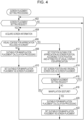
Fig. 4 is a flowchart illustrating screen placement setting processing according to the embodiment of the present invention; -
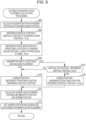
Fig. 5 is a flowchart illustrating suitable-for-manipulation placement calculation processing according to the embodiment of the present invention; -
Figs. 6A to 6D illustrate an example of screen placement setting processing according to the embodiment of the present invention; and -
Figs. 7A1 and 7A2 and 7B1 to 7B4 illustrate another example of the structure of the vehicle-mounted system according to the embodiment of the present invention. - An embodiment of the present invention will be described below by taking application to a vehicle-mounted system in an automobile as an example.
-
Fig. 1 illustrates the structure of a vehicle-mounted system. - As illustrated in the drawing, the vehicle-mounted system has a
touch panel display 1, a speaker 2, an in-vehicle camera 3, an input/output control unit 4, a screenplacement setting unit 5, an in-vehicle monitoring system 6, and a plurality of source devices 7. - The source devices 7 are an audio visual (AV) player, a broadcast receiver, a car navigation device, and other devices. In the operation of each source device 7, the
touch panel display 1 is used to accept a display output and a user's manipulation through the input/output control unit 4. - The
touch panel display 1 has adisplay 11 and atouch panel 12 that detects the user's touch on the display screen of thedisplay 11. - Now, this embodiment will be described by taking, as an example, a case in which the
touch panel display 1 is long in a horizontal direction, matching the front-back direction of the automobile, of the display area and is placed on the side surface of the automobile interior on the right side of the rear-right seat in the automobile, as illustrated inFigs. 2A and 2B . - The in-
vehicle camera 3 is attached to, for example, the ceiling of the automobile interior, as illustrated inFigs. 2A and 2B . The in-vehicle camera 3 takes a picture of the state of the user sitting on the rear-right seat. The in-vehicle camera 3 may be an infrared camera and is preferably a stereo camera that can measure a three-dimensional position. - Referring again to
Fig. 1 , the in-vehicle monitoring system 6 monitors various situation in the automobile interior from pictures taken by the in-vehicle camera 3. - The in-vehicle monitoring system 6 also geometrically measures the body of the user sitting on the rear-right seat. In this geometrical measurement, the in-vehicle monitoring system 6 measures the position P1 of the user's eye, the position P2 of the user's shoulder, the position P3 of the user's waist, the position P4 of the user's elbow, and the position P5 of the user's hand, as illustrated in
Fig. 3 . The position of the waist is substantially constant with respect to the surface of the seat, regardless of the user's body build. Therefore, the constant position may be set in advance as the position P3 of the waist. - The in-vehicle monitoring system 6 also calculates the length from the shoulder to the elbow, the length from the elbow to the hand, and the direction from the shoulder toward the waist, from the measured positions.
- Referring again to
Fig. 1 , the screenplacement setting unit 5 accepts a screen placement setting request from the input/output control unit 4, after which the screen placement settingunit 5 sets, as screen placement, a position at which to display the screen on thetouch panel display 1 and the size of the screen to be displayed in the input/output control unit 4. Operation for this screen placement setting will be described later in detail. - The input/output control unit 4 performs control to display a screen output from the relevant source device 7 on the
touch panel display 1, output a voice output from the relevant source device 7 to the speaker 2, and accept, from the relevant source device 7, the user's manipulation performed by using thetouch panel display 1. - When a switchover is made to select a screen to be displayed on the
touch panel display 1 in response to the user's manipulation or the like, the input/output control unit 4 issues a screen placement setting request and accepts a screen placement setting from the screenplacement setting unit 5. The input/output control unit 4 then displays the selected screen at the position, on thetouch panel display 1, matching the screen placement set by the screenplacement setting unit 5 and with the size matching the screen placement. - Operation performed by the screen
placement setting unit 5 to set screen placement in the input/output control unit 4 will be described below. -
Fig. 4 illustrates a procedure for screen placement setting processing performed by the screenplacement setting unit 5. - As illustrated in the drawing, if the screen
placement setting unit 5 accepts, in screen placement setting processing, a screen placement setting request from the input/output control unit 4 (Yes in step 402), the screenplacement setting unit 5 issues a screen information request to the input/output control unit 4 and acquires screen information (step 404). - When the input/output control unit 4 issues a screen placement setting request during the selection of a screen to be displayed on the
touch panel display 1, if the input/output control unit 4 receives a screen information request from the screenplacement setting unit 5, the input/ output control unit 4 submits information about the selected screen to the input/output control unit 4 as screen information. Screen information includes the size of the screen and information about content included in the screen. Information about content includes the type of each piece of content and its attributes. As types of content, there are a moving picture, a still picture, a slideshow, a virtual manipulator, text, and a handwritten input acceptance box. When content is a moving picture, still picture, or slideshow, the display size of the content and its resolution are included as the attributes of the content. The input/output control unit 4 is notified of screen information about the selected screen from the source device 7 from which the selected screen is output. However, the input/output control unit 4 may analyze the structure of the selected screen and may be notified of screen information. Alternatively, the input/output control unit 4 may set screen information in advance for each type of screen to be output from the relevant source device 7. - Next, when the screen
placement setting unit 5 acquires screen information (step 404), the screenplacement setting unit 5 decides, from content information included in the screen information, whether visual content for appreciation is included in the selected screen (step 406). Visual content for appreciation is a type of visual content intended for appreciation. When, instep 406, the content information indicates that a moving picture is included in the screen, the screenplacement setting unit 5 decides that visual content for appreciation is included in the screen. However, only when the included moving picture has a display size larger than a predetermined value or a ratio with which the included moving picture occupies the screen is larger than a predetermined value, the screenplacement setting unit 5 may decide that visual content for appreciation is included in the screen. - When the display system displays a slideshow as well, the screen
placement setting unit 5 may decide that visual content for appreciation is included in the screen when a slideshow is included, besides when a moving picture is included. In this case as well, only when the included slideshow has a display size larger than a predetermined value or a ratio with which the included slideshow occupies the screen is larger than a predetermined value, the screenplacement setting unit 5 may decide that visual content for appreciation is included in the screen. - When the display system displays a still picture for appreciation, such as a photo, as well, the screen
placement setting unit 5 may decide that visual content for appreciation is included in the screen only when a still picture has a screen size larger than a predetermined size and also has a resolution higher than a predetermined value. - Alternatively, types of screens to be output from source devices 7 may have been stored in correspondence to indication as to whether the screen is intended to submit visual content for appreciation. When the correspondence indicates that the type of selected screen is intended to submit visual content for appreciation, the screen
placement setting unit 5 may decide that visual content for appreciation is included in the screen. - If visual content for appreciation is not included in the selected screen (No in step 406), the screen
placement setting unit 5 performs suitable-for-manipulation placement calculation processing (step 408). -
Fig. 5 illustrates a procedure for this suitable-for-manipulation placement calculation processing. - As illustrated in the drawing, in suitable-for-manipulation placement calculation processing, the screen
placement setting unit 5 first calculates, as a standard elbow position, a position distant from the position of the shoulder, the position being measured by the in-vehicle monitoring system 6, by an amount equal to the length from the shoulder to the elbow in the direction from the shoulder toward the waist (step 502). This standard elbow position is equivalent to the position of the elbow when the user is in a standard posture in which the user's upper arm is along the body. However, the elbow position measured by the in-vehicle monitoring system 6 may be calculated as the standard elbow position without alteration. When the rear-right seat has an armrest and the user is in a posture in which the elbow is on the armrest or in the standard posture, the position of the elbow on the armrest, the position being measured by the in-vehicle monitoring system 6, is calculated as the standard elbow position without alteration. - The screen
placement setting unit 5 then sets a position in the vertical direction, the position being 10 cm above the standard elbow position in the vertical position, as a reference vertical position (step 504). This reference vertical position is substantially the same as the position of the elbow in the vertical position when the elbow is slightly raised upward from the standard posture in which the user's upper arm is along the body. - The screen
placement setting unit 5 also sets a position in the front-back direction, the position being ahead of the standard elbow position in the front-back direction by an amount equal to the length from the elbow to the hand and then 10 cm behind the position ahead of the standard elbow position (step 506), as a reference front-back position. This reference front-back position is substantially the same as the position of the hand in the front-back direction when the user slightly raises the elbow upward from the standard posture in which the user's upper arm is along the body and then naturally stretches the arm forward and up. - Next, the screen
placement setting unit 5 decides whether a handwritten input acceptance box is included in the selected screen, according to the acquired screen information (step 508). The handwritten input acceptance box refers to an area, on the screen, where a handwritten input is accepted from the user. - If no handwritten input acceptance box is included (No in step 508), the screen
placement setting unit 5 sets, as a screen position, a position located in the display area on thetouch panel display 1, the position being equivalent to a front-back vertical position, the front-back position of which is the reference front-back position and the vertical position of which is the reference vertical position (step 510). Then, the process proceeds to step 512. - If a handwritten input acceptance box is included (Yes in step508), the screen
placement setting unit 5 checks whether the vertical eye's position, which is being measured by the in-vehicle monitoring system 6, is above the vertical center position of the touch panel display 1 (step 516). If the vertical eye's position is not above the vertical center position (No in step 516), the screenplacement setting unit 5 sets, as the screen position, a position located in the display area on thetouch panel display 1, the position being equivalent to a front-back vertical position, the front-back position of which is the reference front-back position and the vertical position of which is the reference vertical position (step 510). Then, the process proceeds to step 512. - If the vertical eye's position is above the vertical center position of the touch panel display 1 (Yes in step 516), the screen
placement setting unit 5 sets, as the screen position, a position located in the display area on thetouch panel display 1, the position being equivalent to a front-back vertical position, the front-back position of which is the reference front-back position and the vertical position of which is 10 cm above the reference vertical position (step 518). If theposition 10 cm above the reference vertical position is above the vertical eye's position, however, the screenplacement setting unit 5 sets, as the screen position, a position located in the display area on thetouch panel display 1, the position being equivalent to a front-back vertical position, the front-back position of which is the reference front-back position and the vertical position of which is the vertical eye's position. - Then, the process proceeds to step 512.
- The reason why, as described above, the screen position when a handwritten input acceptance box is included in the screen is 10 cm above the screen position when no handwritten input acceptance box is included is to bring the handwriting position closer to the face so that a handwriting operation by the user is eased.
- After the screen position has been set in
step placement setting unit 5 sets a screen size according to distance between the set screen position and the eye's position measured by the in-vehicle monitoring system 6 so that the longer the distance is, the larger the screen size is within a range in which the screen fits in the display area on thetouch panel display 1. - The screen
placement setting unit 5 sets the set screen position and screen size as suitable-for-manipulation placement (step 514). Then, the process returns to screen placement setting processing. -
Fig. 4 will be referenced again. After having performed suitable-for-manipulation placement calculation processing instep 408, the screenplacement setting unit 5 sets suitable-for-manipulation in the input/output control unit 4 as screen placement (step 410). Then, the process returns to processing starting fromstep 402. - If visual content for appreciation is included in the selected screen (Yes in step 406), the screen
placement setting unit 5 sets, as the screen position, a position in the display area on thetouch panel display 1, the position being suitable for viewing visual content, included in the screen, for appreciation, according to the eye's position measured by the in-vehicle monitoring system 6 and to the display size and resolution, which are attributes, of the visual content for appreciation (step 412). The position suitable for viewing visual content for appreciation is, for example, the position at which the distance between the eye and the screen is n times the vertical size of the visual content for appreciation. The screenplacement setting unit 5 sets the number n of n times according to the resolution so that the lower the resolution of the visual content for appreciation is, the larger the number n is. - The screen
placement setting unit 5 sets the set, as screen placement, screen position and original screen size in the input/output control unit 4 (step 414). The original screen size, which is the size of the original screen, is of a type in which the resolution and display size of the displayed visual content for appreciation remain unchanged. - After having set screen placement in
step 414, the screenplacement setting unit 5 monitors whether a screen placement setting request has been received from the input/output control unit 4 (step 416) and whether a manipulation gesture has occurred (step 418). - The manipulation gesture is a type of gesture performed by the user sitting on the rear-right seat to attempt to manipulate the screen displayed on the
touch panel display 1. Instep 418, the screenplacement setting unit 5 decides that a manipulation gesture has occurred when, for example, the hand's position that is being measured by the in-vehicle monitoring system 6 has moved through a predetermined distance or more toward the displayed screen. - If a screen placement setting request has been received (Yes in step 416), the process returns to processing starting from
step 404. - If a gesture has occurred (Yes in step 418), the screen
placement setting unit 5 performs suitable-for-manipulation placement calculation processing illustrated inFig. 5 to calculate suitable-for-manipulation placement (step 420), and sets the set suitable-for-manipulation placement in the input/output control unit 4 as screen placement (step 422). Then, the process returns to processing starting fromstep 402. - When suitable-for-manipulation placement is set as screen placement in
step 422, the input/output control unit 4 changes the position and size of the displayed screen according the set screen placement. As a result, the displayed screen moves to a position, closer to the user, at which the user can perform manipulation easily, in response to the user's operation to attempt to perform manipulation. - This completes the description of screen placement setting processing performed by the screen
placement setting unit 5. - In the in-vehicle monitoring system 6, the screen
placement setting unit 5 may detect the line of vision of the user sitting on the rear-right seat from a picture taken by the in-vehicle camera 3. Then, processing instep 418 in screen placement setting processing may be to monitor the occurrence of the line of vision of the user who gazes at a display object, in the displayed screen, intended to accept the user's manipulation, instead of or together with monitoring a manipulation gesture. - The display object intended to accept the user's manipulation is a display object that accepts the user's manipulation, the display object being one of display objects, which are part of elements constituting the screen. Examples of this type of display object include a handwritten input acceptance box and a virtual manipulator such as a button or key.
- When, in
step 418, the screenplacement setting unit 5 monitors the occurrence of the line of vision of the user who gazes at a display object intended to accept the user's manipulation, instead of monitoring a manipulation gesture, if the screenplacement setting unit 5 detects the occurrence of the line of vision instep 418, the process proceeds to step 420. If not, the process returns to step 416. When, instep 418, the screenplacement setting unit 5 monitors the occurrence of the line of vision of the user who gazes at a display object intended to accept the user's manipulation, together with monitoring a manipulation gesture, if the screenplacement setting unit 5 detects the occurrence of either of a gesture and the line of vision instep 418, the process proceeds to step 420. If the screenplacement setting unit 5 detects the occurrence of neither a gesture nor the line of vision, the process returns to step 416. - This completes the description of operation performed by the screen
placement setting unit 5 to set screen placement in the input/output control unit 4. - In this operation performed by the screen
placement setting unit 5, when the screen includes no visual content for appreciation, ascreen 500 is displayed at a position, close to the user, at which the user can manipulate thescreen 500 with a natural operation, as illustrated inFigs. 6A and 6B . -
Fig. 6A illustrates screen placement when thescreen 500 includes no handwritten input acceptance box.Fig. 6B illustrates screen placement when thescreen 500 includes a handwritteninput acceptance box 501. As illustrated in these drawings, when thescreen 500 includes the handwritteninput acceptance box 501, thescreen 500 is positioned slightly close to the face, making it easy for the user to enter a handwritten input. - When the
screen 500 includes visual content for appreciation, thescreen 500 is displayed at a position slightly distant from the user so that the position is suitable for viewing visual content for appreciation, as illustrated inFigs. 6C and 6D . - The visual content for appreciation in
Figs. 6C and 6D is included in thescreen 500 with the same display size and at the same position on thescreen 500. However,Fig. 6C illustrates screen placement when the visual content for appreciation has high resolution, andFig. 6d illustrates screen placement when the visual content for appreciation has low resolution. As illustrated in these drawings, according to the resolution of visual content included in thescreen 500 for appreciation, thescreen 500 is placed so that the distance from the user to thescreen 500 is suitable for viewing the visual content, having the resolution, for appreciation. The position at which thescreen 500 is placed varies with the resolution. Placement of thescreen 500 including visual content for appreciation is set depending on not only the resolution of the visual content for appreciation but also the display size, as described above. - This completes the description of the embodiment of the present invention.
- In this embodiment, as described above, a screen including no visual content for appreciation is displayed at a position comparatively close to the user, making it easy for the user to perform a manipulation on the screen. By contrast, a screen including visual content for appreciation is displayed at a position comparatively distant from the user. Therefore, the user can comfortably view the visual content for appreciation without being subject to stress that would otherwise be caused because the screen is too close to the user.
- The above embodiment has been described for a case in which a single
touch panel display 1 is placed only on the side surface of the automobile interior on the right side of the rear-right seat in the automobile. However, the number of touch panel displays 1 and their placement can have various aspects. - For example, the
touch panel display 1 may be placed on the side surface of the automobile interior on the left side of the rear-left seat. Alternatively, touch panel displays 1 may be placed on the side surface of the automobile interior on the right side of the rear-right seat and the side surface of the automobile interior on the left side of the rear-left seat, one for each side surface. - Alternatively, the
touch panel display 1 that is long in a horizontal direction, matching the front-back direction of the automobile, of the display area may be disposed, for example, between the rear-right seat and rear-left seat of the automobile as illustrated inFigs. 7A1 and 7A2 . - In this case as well, when the
screen 500 includes no visual content for appreciation, thescreen 500 is displayed on thetouch panel display 1 so that thescreen 500 is placed at a position, close to the user, at which the user can naturally manipulate thescreen 500, as illustrated inFigs. 7B1 and 7B2 . When thescreen 500 includes the handwritteninput acceptance box 501, thescreen 500 is displayed so that it is brought slightly closer to the user, who is using thetouch panel display 1, in the left-right direction as illustrated inFig. 7B2 , than when thescreen 500 includes no handwritteninput acceptance box 501 as illustrated inFig. 7B1 . This makes it easy for the user to enter a handwritten input. - When the
screen 500 includes visual content for appreciation, thescreen 500 is displayed at a position more distant from the user as illustrated inFigs. 7B3 and 7B4 , the position being suitable for the user to view the visual content for appreciation, than when thescreen 500 includes no visual content for appreciation as illustrated inFigs. 7B1 and 7B2 . According to the resolution and display size of visual content for appreciation, the visual content being included in thescreen 500, thescreen 500 is displayed so that the distance from the user to thescreen 500 is suitable for viewing the visual content, having the resolution and display size, for appreciation. The position at which thescreen 500 is displayed varies with the resolution and display size. - In the above embodiment, screen placement has been varied by varying the display position of the screen in the display area on the
touch panel display 1. However, screen placement may be varied by moving thetouch panel display 1 itself.
Claims (9)
- A display system that displays a screen (500) for a user, the system comprising:a touch panel display (1) configured to display the screen (500) and accept a manipulation performed on the screen (500), a position at which to display the screen (500) being variable; anda display control means configured to control a display of the screen (500) on the touch panel display (1);characterized in that the display control means decides whether the screen (500) to be displayed has visual content for appreciation according to a predetermined criterion; if the screen (500) to be displayed includes no visual content for appreciation, the display control means displays the screen (500) at a suitable-for-manipulation position comparatively close to the user; if the screen (500) to be displayed has visual content for appreciation, the display control means displays the screen (500) at a suitable-for-manipulation position comparatively distant from the user.
- The display system according to Claim 1, wherein the display control means is configured to calculate, as the suitable-for-manipulation position, a position distant from the user by a distance suitable for viewing the visual content, included in the screen (500), for appreciation, the distance being obtained from a resolution of the visual content for appreciation and a display size of the visual content for appreciation.
- The display system according to Claim 1 or 2, further comprising a gesture detection means (5) configured to detect a gesture of the user with the screen (500) displayed at the suitable-for-manipulation position, when the user is to perform a manipulation on the screen (500), the system being configured such that
when the gesture detection means (5) detects the gesture with the screen (500) displayed at the suitable-for-manipulation position, the display control means is configured to move a position of the displayed screen (500) to the suitable-for-manipulation position. - The display system according to Claim 1, 2, or 3, further comprising a line-of-vision detection means (5) configured to detect a line of vision of the user with the screen (500) displayed at the suitable-for-manipulation position, when the user gazes at a display object on the displayed screen (500), the display object being intended to accept a user's manipulation, the system being configured such that
when the line-of-vision detection means (5) detects the line of vision with the screen (500) displayed at the suitable-for-manipulation position, the display control means is configured to move a position of the displayed screen (500) to the suitable-for-manipulation position. - The display system according to Claim 1, 2, 3, or 4 further comprising a measurement means (6) configured to geometrically measure a body of the user, the system being configured such that
the display control means calculates, as the suitable-for-manipulation position, a position, obtained from a geometrically measurement result from the measurement means (6), at which the user is able to easily perform a manual manipulation. - The display system according to one of Claims 1-5, wherein when the screen (500) to be displayed accepts a handwritten input, the display control means is configured to calculate, as the suitable-for-manipulation position, a position closer to the face of the user than when the screen (500) to be displayed does not accept a handwritten input.
- The display system according to Claim 6, wherein the display control means is configured to display the screen (500) at the suitable-for-manipulation position in such a way that the more distant the position at which to display the screen (500) is from the user, the larger a size of the screen (500) is.
- The display system according to one of Claims 1-7, wherein the screen (500) including visual content for appreciation is a screen including a moving picture.
- The display system according to one of Claims 1-8, wherein:the display system is a display system mounted in an automobile; andthe touch panel display (1) is a touch panel display on which the position at which to display the screen (500) is variable in a front-back direction of the automobile.
Applications Claiming Priority (1)
| Application Number | Priority Date | Filing Date | Title |
|---|---|---|---|
| JP2021083806A JP7612304B2 (en) | 2021-05-18 | 2021-05-18 | Display System |
Publications (2)
| Publication Number | Publication Date |
|---|---|
| EP4091854A1 EP4091854A1 (en) | 2022-11-23 |
| EP4091854B1 true EP4091854B1 (en) | 2025-04-16 |
Family
ID=81595781
Family Applications (1)
| Application Number | Title | Priority Date | Filing Date |
|---|---|---|---|
| EP22172261.4A Active EP4091854B1 (en) | 2021-05-18 | 2022-05-09 | Display system |
Country Status (4)
| Country | Link |
|---|---|
| US (1) | US11630628B2 (en) |
| EP (1) | EP4091854B1 (en) |
| JP (1) | JP7612304B2 (en) |
| CN (1) | CN115373539A (en) |
Families Citing this family (1)
| Publication number | Priority date | Publication date | Assignee | Title |
|---|---|---|---|---|
| US12141376B2 (en) * | 2021-07-08 | 2024-11-12 | Hyundai Mobis Co., Ltd. | Display control system using knobs |
Citations (1)
| Publication number | Priority date | Publication date | Assignee | Title |
|---|---|---|---|---|
| US20150268840A1 (en) * | 2014-03-20 | 2015-09-24 | Nokia Corporation | Determination of a program interaction profile based at least in part on a display region |
Family Cites Families (18)
| Publication number | Priority date | Publication date | Assignee | Title |
|---|---|---|---|---|
| JPH08249110A (en) * | 1995-03-13 | 1996-09-27 | Hitachi Ltd | Information processing device |
| JP2007235335A (en) | 2006-02-28 | 2007-09-13 | Victor Co Of Japan Ltd | Display unit with rotary mechanism, and method for correcting distortion of video signal in display unit with rotary mechanism |
| JP2008129689A (en) | 2006-11-17 | 2008-06-05 | Xanavi Informatics Corp | Input device equipped with touch panel and its input reception method |
| JP2008197934A (en) * | 2007-02-14 | 2008-08-28 | Calsonic Kansei Corp | Operator determining method |
| WO2010064387A1 (en) | 2008-12-04 | 2010-06-10 | 三菱電機株式会社 | Display input device |
| JP2010215194A (en) | 2009-03-19 | 2010-09-30 | Hyundai Motor Co Ltd | Operating device for onboard apparatuses |
| JP5316387B2 (en) | 2009-12-04 | 2013-10-16 | ソニー株式会社 | Information processing apparatus, display method, and program |
| JP2013096736A (en) | 2011-10-28 | 2013-05-20 | Denso Corp | Vehicular display device |
| KR101542973B1 (en) * | 2013-12-30 | 2015-08-07 | 현대자동차 주식회사 | Display control system and control method for vehicle |
| DE102014016222A1 (en) * | 2014-10-31 | 2016-05-04 | Audi Ag | Method and system for operating a touch-sensitive display device of a motor vehicle |
| KR101687543B1 (en) * | 2015-04-27 | 2016-12-19 | 엘지전자 주식회사 | Display apparatus and method for controlling the same |
| CN106572389A (en) | 2015-10-08 | 2017-04-19 | 小米科技有限责任公司 | Method and apparatus for adjusting display image |
| DE102016121107A1 (en) * | 2016-11-04 | 2018-05-09 | Volkswagen Ag | Arrangement of a graphical user interface in a vehicle and method for providing a graphical user interface in a vehicle |
| US11150486B2 (en) | 2017-02-15 | 2021-10-19 | Pure Depth Inc. | Method and system for object rippling in a display system including multiple displays |
| JP2018184024A (en) | 2017-04-24 | 2018-11-22 | 日産自動車株式会社 | Display movable method and display movable device |
| JP6557385B1 (en) | 2018-06-26 | 2019-08-07 | 京セラ株式会社 | ELECTRONIC DEVICE, MOBILE BODY, PROGRAM, AND CONTROL METHOD |
| JP2020044956A (en) | 2018-09-19 | 2020-03-26 | 三菱自動車工業株式会社 | Vehicle system |
| JP6781239B2 (en) | 2018-12-10 | 2020-11-04 | ソフトバンク株式会社 | Display device, display method and display program |
-
2021
- 2021-05-18 JP JP2021083806A patent/JP7612304B2/en active Active
-
2022
- 2022-05-09 EP EP22172261.4A patent/EP4091854B1/en active Active
- 2022-05-10 US US17/740,892 patent/US11630628B2/en active Active
- 2022-05-17 CN CN202210534521.XA patent/CN115373539A/en active Pending
Patent Citations (1)
| Publication number | Priority date | Publication date | Assignee | Title |
|---|---|---|---|---|
| US20150268840A1 (en) * | 2014-03-20 | 2015-09-24 | Nokia Corporation | Determination of a program interaction profile based at least in part on a display region |
Also Published As
| Publication number | Publication date |
|---|---|
| US11630628B2 (en) | 2023-04-18 |
| CN115373539A (en) | 2022-11-22 |
| JP7612304B2 (en) | 2025-01-14 |
| JP2022177503A (en) | 2022-12-01 |
| US20220374184A1 (en) | 2022-11-24 |
| EP4091854A1 (en) | 2022-11-23 |
Similar Documents
| Publication | Publication Date | Title |
|---|---|---|
| CN110626237B (en) | Automatically regulated central control platform with arm detects | |
| EP1837748B1 (en) | Display apparatus | |
| US20060066507A1 (en) | Display apparatus, and method for controlling the same | |
| KR101052017B1 (en) | Vehicle display device | |
| JP5115136B2 (en) | Vehicle rear monitoring device | |
| US6707448B1 (en) | Touch control position determining method control pad | |
| KR101732765B1 (en) | Method and apparatus for providing a user interfacein particular in a vehicle | |
| US20080192024A1 (en) | Operator distinguishing device | |
| JP2017211884A (en) | Motion detection system | |
| US10168786B2 (en) | Gesture guidance device for moving platform, gesture guidance system for moving platform, and gesture guidance method for moving platform | |
| US20090327977A1 (en) | Interactive control device and method for operating the interactive control device | |
| US20100238280A1 (en) | Apparatus for manipulating vehicular devices | |
| US10261653B2 (en) | Method and device for making available a user interface, in particular in a vehicle | |
| JP2006522397A (en) | Multi-view display | |
| US7782299B2 (en) | Apparatus and method for inputting commands | |
| EP4091854B1 (en) | Display system | |
| JP2007045169A (en) | Information processor for vehicle | |
| JP6791108B2 (en) | Face position detector | |
| JP2014197252A (en) | Gesture operation apparatus, program thereof, and vehicle mounted with gesture operation apparatus | |
| JP2009265768A (en) | Operation device | |
| JP2012179682A (en) | Mobile robot system, mobile robot control device, and moving control method and moving control program to be used for the control device | |
| JP2006088722A (en) | VEHICLE DISPLAY DEVICE AND VEHICLE DISPLAY METHOD | |
| US8599145B2 (en) | Operation system with right seat or left seat operator determination | |
| KR20230168289A (en) | Vehicle monitoring system and method | |
| JP2008052536A (en) | Touch panel type input device |
Legal Events
| Date | Code | Title | Description |
|---|---|---|---|
| PUAI | Public reference made under article 153(3) epc to a published international application that has entered the european phase |
Free format text: ORIGINAL CODE: 0009012 |
|
| STAA | Information on the status of an ep patent application or granted ep patent |
Free format text: STATUS: THE APPLICATION HAS BEEN PUBLISHED |
|
| AK | Designated contracting states |
Kind code of ref document: A1 Designated state(s): AL AT BE BG CH CY CZ DE DK EE ES FI FR GB GR HR HU IE IS IT LI LT LU LV MC MK MT NL NO PL PT RO RS SE SI SK SM TR |
|
| STAA | Information on the status of an ep patent application or granted ep patent |
Free format text: STATUS: REQUEST FOR EXAMINATION WAS MADE |
|
| 17P | Request for examination filed |
Effective date: 20230522 |
|
| RBV | Designated contracting states (corrected) |
Designated state(s): AL AT BE BG CH CY CZ DE DK EE ES FI FR GB GR HR HU IE IS IT LI LT LU LV MC MK MT NL NO PL PT RO RS SE SI SK SM TR |
|
| REG | Reference to a national code |
Ref country code: DE Ref legal event code: R079 Free format text: PREVIOUS MAIN CLASS: B60K0037060000 Ipc: G06F0003048860 Ref country code: DE Ref legal event code: R079 Ref document number: 602022013108 Country of ref document: DE Free format text: PREVIOUS MAIN CLASS: B60K0037060000 Ipc: G06F0003048860 |
|
| GRAP | Despatch of communication of intention to grant a patent |
Free format text: ORIGINAL CODE: EPIDOSNIGR1 |
|
| STAA | Information on the status of an ep patent application or granted ep patent |
Free format text: STATUS: GRANT OF PATENT IS INTENDED |
|
| RIC1 | Information provided on ipc code assigned before grant |
Ipc: B60K 35/65 20240101ALI20241101BHEP Ipc: B60K 35/10 20240101ALI20241101BHEP Ipc: G06F 3/04886 20220101AFI20241101BHEP |
|
| INTG | Intention to grant announced |
Effective date: 20241118 |
|
| GRAS | Grant fee paid |
Free format text: ORIGINAL CODE: EPIDOSNIGR3 |
|
| GRAA | (expected) grant |
Free format text: ORIGINAL CODE: 0009210 |
|
| STAA | Information on the status of an ep patent application or granted ep patent |
Free format text: STATUS: THE PATENT HAS BEEN GRANTED |
|
| AK | Designated contracting states |
Kind code of ref document: B1 Designated state(s): AL AT BE BG CH CY CZ DE DK EE ES FI FR GB GR HR HU IE IS IT LI LT LU LV MC MK MT NL NO PL PT RO RS SE SI SK SM TR |
|
| P01 | Opt-out of the competence of the unified patent court (upc) registered |
Free format text: CASE NUMBER: APP_11896/2025 Effective date: 20250311 |
|
| REG | Reference to a national code |
Ref country code: GB Ref legal event code: FG4D |
|
| REG | Reference to a national code |
Ref country code: CH Ref legal event code: EP Ref country code: DE Ref legal event code: R096 Ref document number: 602022013108 Country of ref document: DE |
|
| REG | Reference to a national code |
Ref country code: IE Ref legal event code: FG4D |
|
| PGFP | Annual fee paid to national office [announced via postgrant information from national office to epo] |
Ref country code: DE Payment date: 20250521 Year of fee payment: 4 |
|
| PGFP | Annual fee paid to national office [announced via postgrant information from national office to epo] |
Ref country code: FR Payment date: 20250610 Year of fee payment: 4 |
|
| PGFP | Annual fee paid to national office [announced via postgrant information from national office to epo] |
Ref country code: AT Payment date: 20250721 Year of fee payment: 4 |
|
| REG | Reference to a national code |
Ref country code: NL Ref legal event code: MP Effective date: 20250416 |
|
| PG25 | Lapsed in a contracting state [announced via postgrant information from national office to epo] |
Ref country code: NL Free format text: LAPSE BECAUSE OF FAILURE TO SUBMIT A TRANSLATION OF THE DESCRIPTION OR TO PAY THE FEE WITHIN THE PRESCRIBED TIME-LIMIT Effective date: 20250416 |
|
| REG | Reference to a national code |
Ref country code: AT Ref legal event code: MK05 Ref document number: 1786191 Country of ref document: AT Kind code of ref document: T Effective date: 20250416 |
|
| PG25 | Lapsed in a contracting state [announced via postgrant information from national office to epo] |
Ref country code: FI Free format text: LAPSE BECAUSE OF FAILURE TO SUBMIT A TRANSLATION OF THE DESCRIPTION OR TO PAY THE FEE WITHIN THE PRESCRIBED TIME-LIMIT Effective date: 20250416 Ref country code: PT Free format text: LAPSE BECAUSE OF FAILURE TO SUBMIT A TRANSLATION OF THE DESCRIPTION OR TO PAY THE FEE WITHIN THE PRESCRIBED TIME-LIMIT Effective date: 20250818 Ref country code: ES Free format text: LAPSE BECAUSE OF FAILURE TO SUBMIT A TRANSLATION OF THE DESCRIPTION OR TO PAY THE FEE WITHIN THE PRESCRIBED TIME-LIMIT Effective date: 20250416 |
|
| REG | Reference to a national code |
Ref country code: LT Ref legal event code: MG9D |
|
| PG25 | Lapsed in a contracting state [announced via postgrant information from national office to epo] |
Ref country code: NO Free format text: LAPSE BECAUSE OF FAILURE TO SUBMIT A TRANSLATION OF THE DESCRIPTION OR TO PAY THE FEE WITHIN THE PRESCRIBED TIME-LIMIT Effective date: 20250716 Ref country code: GR Free format text: LAPSE BECAUSE OF FAILURE TO SUBMIT A TRANSLATION OF THE DESCRIPTION OR TO PAY THE FEE WITHIN THE PRESCRIBED TIME-LIMIT Effective date: 20250717 |
|
| PG25 | Lapsed in a contracting state [announced via postgrant information from national office to epo] |
Ref country code: PL Free format text: LAPSE BECAUSE OF FAILURE TO SUBMIT A TRANSLATION OF THE DESCRIPTION OR TO PAY THE FEE WITHIN THE PRESCRIBED TIME-LIMIT Effective date: 20250416 |
|
| PG25 | Lapsed in a contracting state [announced via postgrant information from national office to epo] |
Ref country code: BG Free format text: LAPSE BECAUSE OF FAILURE TO SUBMIT A TRANSLATION OF THE DESCRIPTION OR TO PAY THE FEE WITHIN THE PRESCRIBED TIME-LIMIT Effective date: 20250416 |
|
| PG25 | Lapsed in a contracting state [announced via postgrant information from national office to epo] |
Ref country code: HR Free format text: LAPSE BECAUSE OF FAILURE TO SUBMIT A TRANSLATION OF THE DESCRIPTION OR TO PAY THE FEE WITHIN THE PRESCRIBED TIME-LIMIT Effective date: 20250416 Ref country code: AT Free format text: LAPSE BECAUSE OF FAILURE TO SUBMIT A TRANSLATION OF THE DESCRIPTION OR TO PAY THE FEE WITHIN THE PRESCRIBED TIME-LIMIT Effective date: 20250416 |
|
| PG25 | Lapsed in a contracting state [announced via postgrant information from national office to epo] |
Ref country code: RS Free format text: LAPSE BECAUSE OF FAILURE TO SUBMIT A TRANSLATION OF THE DESCRIPTION OR TO PAY THE FEE WITHIN THE PRESCRIBED TIME-LIMIT Effective date: 20250716 |
|
| PG25 | Lapsed in a contracting state [announced via postgrant information from national office to epo] |
Ref country code: IS Free format text: LAPSE BECAUSE OF FAILURE TO SUBMIT A TRANSLATION OF THE DESCRIPTION OR TO PAY THE FEE WITHIN THE PRESCRIBED TIME-LIMIT Effective date: 20250816 |
|
| PG25 | Lapsed in a contracting state [announced via postgrant information from national office to epo] |
Ref country code: LV Free format text: LAPSE BECAUSE OF FAILURE TO SUBMIT A TRANSLATION OF THE DESCRIPTION OR TO PAY THE FEE WITHIN THE PRESCRIBED TIME-LIMIT Effective date: 20250416 |
|
| REG | Reference to a national code |
Ref country code: CH Ref legal event code: H13 Free format text: ST27 STATUS EVENT CODE: U-0-0-H10-H13 (AS PROVIDED BY THE NATIONAL OFFICE) Effective date: 20251223 |
|
| PG25 | Lapsed in a contracting state [announced via postgrant information from national office to epo] |
Ref country code: SM Free format text: LAPSE BECAUSE OF FAILURE TO SUBMIT A TRANSLATION OF THE DESCRIPTION OR TO PAY THE FEE WITHIN THE PRESCRIBED TIME-LIMIT Effective date: 20250416 Ref country code: DK Free format text: LAPSE BECAUSE OF FAILURE TO SUBMIT A TRANSLATION OF THE DESCRIPTION OR TO PAY THE FEE WITHIN THE PRESCRIBED TIME-LIMIT Effective date: 20250416 |
|
| PG25 | Lapsed in a contracting state [announced via postgrant information from national office to epo] |
Ref country code: LU Free format text: LAPSE BECAUSE OF NON-PAYMENT OF DUE FEES Effective date: 20250509 |
|
| PG25 | Lapsed in a contracting state [announced via postgrant information from national office to epo] |
Ref country code: CH Free format text: LAPSE BECAUSE OF NON-PAYMENT OF DUE FEES Effective date: 20250531 |
|
| REG | Reference to a national code |
Ref country code: DE Ref legal event code: R097 Ref document number: 602022013108 Country of ref document: DE |
|
| PG25 | Lapsed in a contracting state [announced via postgrant information from national office to epo] |
Ref country code: CZ Free format text: LAPSE BECAUSE OF FAILURE TO SUBMIT A TRANSLATION OF THE DESCRIPTION OR TO PAY THE FEE WITHIN THE PRESCRIBED TIME-LIMIT Effective date: 20250416 |
|
| PG25 | Lapsed in a contracting state [announced via postgrant information from national office to epo] |
Ref country code: EE Free format text: LAPSE BECAUSE OF FAILURE TO SUBMIT A TRANSLATION OF THE DESCRIPTION OR TO PAY THE FEE WITHIN THE PRESCRIBED TIME-LIMIT Effective date: 20250416 |
|
| PG25 | Lapsed in a contracting state [announced via postgrant information from national office to epo] |
Ref country code: SK Free format text: LAPSE BECAUSE OF FAILURE TO SUBMIT A TRANSLATION OF THE DESCRIPTION OR TO PAY THE FEE WITHIN THE PRESCRIBED TIME-LIMIT Effective date: 20250416 |
|
| PG25 | Lapsed in a contracting state [announced via postgrant information from national office to epo] |
Ref country code: IT Free format text: LAPSE BECAUSE OF FAILURE TO SUBMIT A TRANSLATION OF THE DESCRIPTION OR TO PAY THE FEE WITHIN THE PRESCRIBED TIME-LIMIT Effective date: 20250416 |
|
| REG | Reference to a national code |
Ref country code: BE Ref legal event code: MM Effective date: 20250531 |
|
| PG25 | Lapsed in a contracting state [announced via postgrant information from national office to epo] |
Ref country code: MC Free format text: LAPSE BECAUSE OF FAILURE TO SUBMIT A TRANSLATION OF THE DESCRIPTION OR TO PAY THE FEE WITHIN THE PRESCRIBED TIME-LIMIT Effective date: 20250416 |
|
| PG25 | Lapsed in a contracting state [announced via postgrant information from national office to epo] |
Ref country code: RO Free format text: LAPSE BECAUSE OF FAILURE TO SUBMIT A TRANSLATION OF THE DESCRIPTION OR TO PAY THE FEE WITHIN THE PRESCRIBED TIME-LIMIT Effective date: 20250416 |
|
| PLBE | No opposition filed within time limit |
Free format text: ORIGINAL CODE: 0009261 |
|
| STAA | Information on the status of an ep patent application or granted ep patent |
Free format text: STATUS: NO OPPOSITION FILED WITHIN TIME LIMIT |
|
| REG | Reference to a national code |
Ref country code: CH Ref legal event code: L10 Free format text: ST27 STATUS EVENT CODE: U-0-0-L10-L00 (AS PROVIDED BY THE NATIONAL OFFICE) Effective date: 20260225 |
|
| 26N | No opposition filed |
Effective date: 20260119 |
|
| PG25 | Lapsed in a contracting state [announced via postgrant information from national office to epo] |
Ref country code: IE Free format text: LAPSE BECAUSE OF NON-PAYMENT OF DUE FEES Effective date: 20250509 |
|
| PG25 | Lapsed in a contracting state [announced via postgrant information from national office to epo] |
Ref country code: BE Free format text: LAPSE BECAUSE OF NON-PAYMENT OF DUE FEES Effective date: 20250531 |