EP4053687A1 - Information processing apparatus, information processing program and information processing system - Google Patents
Information processing apparatus, information processing program and information processing system Download PDFInfo
- Publication number
- EP4053687A1 EP4053687A1 EP21192773.6A EP21192773A EP4053687A1 EP 4053687 A1 EP4053687 A1 EP 4053687A1 EP 21192773 A EP21192773 A EP 21192773A EP 4053687 A1 EP4053687 A1 EP 4053687A1
- Authority
- EP
- European Patent Office
- Prior art keywords
- user
- shared
- work region
- personal
- display
- Prior art date
- Legal status (The legal status is an assumption and is not a legal conclusion. Google has not performed a legal analysis and makes no representation as to the accuracy of the status listed.)
- Granted
Links
Images





Classifications
-
- G—PHYSICS
- G06—COMPUTING OR CALCULATING; COUNTING
- G06F—ELECTRIC DIGITAL DATA PROCESSING
- G06F3/00—Input arrangements for transferring data to be processed into a form capable of being handled by the computer; Output arrangements for transferring data from processing unit to output unit, e.g. interface arrangements
- G06F3/01—Input arrangements or combined input and output arrangements for interaction between user and computer
- G06F3/048—Interaction techniques based on graphical user interfaces [GUI]
- G06F3/0481—Interaction techniques based on graphical user interfaces [GUI] based on specific properties of the displayed interaction object or a metaphor-based environment, e.g. interaction with desktop elements like windows or icons, or assisted by a cursor's changing behaviour or appearance
- G06F3/0482—Interaction with lists of selectable items, e.g. menus
-
- H—ELECTRICITY
- H04—ELECTRIC COMMUNICATION TECHNIQUE
- H04N—PICTORIAL COMMUNICATION, e.g. TELEVISION
- H04N1/00—Scanning, transmission or reproduction of documents or the like, e.g. facsimile transmission; Details thereof
- H04N1/0035—User-machine interface; Control console
- H04N1/00501—Tailoring a user interface [UI] to specific requirements
- H04N1/00509—Personalising for a particular user or group of users, e.g. a workgroup or company
- H04N1/00511—Personalising for a particular user or group of users, e.g. a workgroup or company for a group of users, e.g. a workgroup, company, or a service provider
-
- G—PHYSICS
- G06—COMPUTING OR CALCULATING; COUNTING
- G06F—ELECTRIC DIGITAL DATA PROCESSING
- G06F3/00—Input arrangements for transferring data to be processed into a form capable of being handled by the computer; Output arrangements for transferring data from processing unit to output unit, e.g. interface arrangements
- G06F3/01—Input arrangements or combined input and output arrangements for interaction between user and computer
- G06F3/048—Interaction techniques based on graphical user interfaces [GUI]
- G06F3/0481—Interaction techniques based on graphical user interfaces [GUI] based on specific properties of the displayed interaction object or a metaphor-based environment, e.g. interaction with desktop elements like windows or icons, or assisted by a cursor's changing behaviour or appearance
- G06F3/0483—Interaction with page-structured environments, e.g. book metaphor
-
- G—PHYSICS
- G06—COMPUTING OR CALCULATING; COUNTING
- G06F—ELECTRIC DIGITAL DATA PROCESSING
- G06F3/00—Input arrangements for transferring data to be processed into a form capable of being handled by the computer; Output arrangements for transferring data from processing unit to output unit, e.g. interface arrangements
- G06F3/01—Input arrangements or combined input and output arrangements for interaction between user and computer
- G06F3/048—Interaction techniques based on graphical user interfaces [GUI]
- G06F3/0481—Interaction techniques based on graphical user interfaces [GUI] based on specific properties of the displayed interaction object or a metaphor-based environment, e.g. interaction with desktop elements like windows or icons, or assisted by a cursor's changing behaviour or appearance
-
- G—PHYSICS
- G06—COMPUTING OR CALCULATING; COUNTING
- G06F—ELECTRIC DIGITAL DATA PROCESSING
- G06F3/00—Input arrangements for transferring data to be processed into a form capable of being handled by the computer; Output arrangements for transferring data from processing unit to output unit, e.g. interface arrangements
- G06F3/01—Input arrangements or combined input and output arrangements for interaction between user and computer
- G06F3/048—Interaction techniques based on graphical user interfaces [GUI]
- G06F3/0481—Interaction techniques based on graphical user interfaces [GUI] based on specific properties of the displayed interaction object or a metaphor-based environment, e.g. interaction with desktop elements like windows or icons, or assisted by a cursor's changing behaviour or appearance
- G06F3/04817—Interaction techniques based on graphical user interfaces [GUI] based on specific properties of the displayed interaction object or a metaphor-based environment, e.g. interaction with desktop elements like windows or icons, or assisted by a cursor's changing behaviour or appearance using icons
-
- G—PHYSICS
- G06—COMPUTING OR CALCULATING; COUNTING
- G06Q—INFORMATION AND COMMUNICATION TECHNOLOGY [ICT] SPECIALLY ADAPTED FOR ADMINISTRATIVE, COMMERCIAL, FINANCIAL, MANAGERIAL OR SUPERVISORY PURPOSES; SYSTEMS OR METHODS SPECIALLY ADAPTED FOR ADMINISTRATIVE, COMMERCIAL, FINANCIAL, MANAGERIAL OR SUPERVISORY PURPOSES, NOT OTHERWISE PROVIDED FOR
- G06Q10/00—Administration; Management
- G06Q10/10—Office automation; Time management
- G06Q10/101—Collaborative creation, e.g. joint development of products or services
-
- H—ELECTRICITY
- H04—ELECTRIC COMMUNICATION TECHNIQUE
- H04L—TRANSMISSION OF DIGITAL INFORMATION, e.g. TELEGRAPHIC COMMUNICATION
- H04L65/00—Network arrangements, protocols or services for supporting real-time applications in data packet communication
- H04L65/40—Support for services or applications
- H04L65/403—Arrangements for multi-party communication, e.g. for conferences
-
- H—ELECTRICITY
- H04—ELECTRIC COMMUNICATION TECHNIQUE
- H04N—PICTORIAL COMMUNICATION, e.g. TELEVISION
- H04N1/00—Scanning, transmission or reproduction of documents or the like, e.g. facsimile transmission; Details thereof
- H04N1/0035—User-machine interface; Control console
- H04N1/00405—Output means
- H04N1/00408—Display of information to the user, e.g. menus
- H04N1/00413—Display of information to the user, e.g. menus using menus, i.e. presenting the user with a plurality of selectable options
- H04N1/00416—Multi-level menus
- H04N1/00419—Arrangements for navigating between pages or parts of the menu
- H04N1/00424—Arrangements for navigating between pages or parts of the menu using a list of graphical elements, e.g. icons or icon bar
-
- H—ELECTRICITY
- H04—ELECTRIC COMMUNICATION TECHNIQUE
- H04N—PICTORIAL COMMUNICATION, e.g. TELEVISION
- H04N1/00—Scanning, transmission or reproduction of documents or the like, e.g. facsimile transmission; Details thereof
- H04N1/0035—User-machine interface; Control console
- H04N1/00405—Output means
- H04N1/00408—Display of information to the user, e.g. menus
- H04N1/00413—Display of information to the user, e.g. menus using menus, i.e. presenting the user with a plurality of selectable options
- H04N1/00416—Multi-level menus
- H04N1/00419—Arrangements for navigating between pages or parts of the menu
- H04N1/00432—Arrangements for navigating between pages or parts of the menu using tabs
-
- H—ELECTRICITY
- H04—ELECTRIC COMMUNICATION TECHNIQUE
- H04N—PICTORIAL COMMUNICATION, e.g. TELEVISION
- H04N1/00—Scanning, transmission or reproduction of documents or the like, e.g. facsimile transmission; Details thereof
- H04N1/0035—User-machine interface; Control console
- H04N1/00501—Tailoring a user interface [UI] to specific requirements
- H04N1/00506—Customising to the data to be displayed
-
- H—ELECTRICITY
- H04—ELECTRIC COMMUNICATION TECHNIQUE
- H04N—PICTORIAL COMMUNICATION, e.g. TELEVISION
- H04N1/00—Scanning, transmission or reproduction of documents or the like, e.g. facsimile transmission; Details thereof
- H04N1/0035—User-machine interface; Control console
- H04N1/00501—Tailoring a user interface [UI] to specific requirements
- H04N1/00509—Personalising for a particular user or group of users, e.g. a workgroup or company
- H04N1/00514—Personalising for a particular user or group of users, e.g. a workgroup or company for individual users
Definitions
- the present disclosure relates to an information processing apparatus, a recording medium for recording an information processing program and an information processing system.
- Patent Literature 1 discloses a device that enables a user to customize a user interface (UI) including operation buttons, tabs, and the like displayed on a display screen, and that distributes the customized UI to plural users so that the plural users may share the customized UI.
- UI user interface
- Patent Literature 1 JP-A-2004-192641
- a shared work region is provided to plural users.
- the shared work region is a shared work region that may be accessed by the plural users and in which the plural users may execute work in cooperation.
- a shared operation element used by the plural users in a shared manner and used by each user to input a processing command is displayed on a display screen of each terminal device used by each user.
- Each user may input a processing command in the shared work region by operating the shared operation element.
- the user may want to use an operation element other than the shared operation element.
- an operation element other than the shared operation element is not displayed on a display screen of the shared work region, there is a problem that the user's operation before using of an operation element other than the shared operation element in the shared work region becomes complicated.
- a case is considered where some user (referred to as a user A) needs to perform work specific to the user A in a shared work region for performing work related to an electronic document.
- the work specific to the user A is, for example, to assign a stamp bearing a name of the user A to the electronic document.
- the stamp is an object to be assigned to an electronic document.
- the user A may operate an operation element associated with processing related to the work.
- an operation element associated with processing related to the work.
- the operation element related to the work specific to the user A needs to be displayed, as an operation element other than the shared operation element, in a personal work region that may be used exclusively by the user A. Then, since the user A may not perform the work specific to the user A in the shared work region, the user A needs to move the electronic document to his/her personal work region and then operate the operation element displayed in the personal work region to perform the work specific to the user A.
- Non-limiting embodiments of the present disclosure relate to reduction of the number of operations performed by a user before an operation element other than a shared operation element is used in a shared work region, which is a common work region, as compared with a case where the operation element other than the shared operation element shared between users is not displayed in the shared work region.
- an information processing apparatus including a processor configured to display, on a display screen of a terminal device used by a user, a shared work region as a common work region that is accessed by plural users and that enables the plural users to execute work in cooperation, and an operation element for the user using the terminal device to input an instruction related to work in the shared work region, in which the processor is configured to display the operation element of a different type according to the user.
- the operation element is a personal operation element for inputting an instruction of work specific to the user.
- the processor is configured to determine, in accordance with an instruction from the user, content of the instruction input through the personal operation element of the user.
- the processor is configured to determine, in accordance with the instruction from the user, whether to display the personal operation element on the display screen of the terminal device used by the user.
- the processor is configured to determine whether to display the personal operation element of a specific user among the plural users on a display screen of the terminal device used by the specific user, according to a display state of the personal operation element of users except the specific user among the plural users.
- the processor is configured to display, on the display screen, a shared operation element that is allowed to be shared and used by the plural users, and display the personal operation element on the display screen when a title assigned to the shared operation element indicates work specific to the user.
- the information processing apparatus in which the processor is configured to provide each user with a personal work region that is a work region dedicated to the user, and the personal operation element displayed on the display screen of the terminal device used by the user includes an operation element of a same type as a personal work region operation element that is displayed when the user accesses the personal work region.
- an information processing program that causes a computer to display, on a display screen of a terminal device used by a user, a shared work region as a common work region that is accessed by a plural users and that enables the plural users to execute work in cooperation, and an operation element for the user using the terminal device to input an instruction related to work in the shared work region, in which the operation element of a different type is displayed according to the user.
- an information processing system including:
- the first, eighth or ninth aspect it is possible to reduce the number of operations performed by the user before using of an operation element other than the shared operation element in the shared work region serving as a common work region, as compared with a case where the operation element other than the shared operation element shared between the users is not displayed in the shared work region.
- the user may input an instruction of work specific to the user by operating the personal operation element displayed on the display screen of the shared work region.
- the user may determine the content of the instruction input through the personal operation element.
- the user may determine whether to display the personal operation element in the shared work region.
- the personal operation element of the user may be displayed in the shared work region according to the display state of the personal operation element of other users.
- the personal operation element of the user may be displayed in the shared work region according to the title assigned to the shared operation element.
- the user may perform, in the shared work region, work specific to the user that may only be performed in the personal work region.
- Fig. 1 is a schematic configuration diagram of an information processing system 10 according to a present exemplary embodiment.
- the information processing system 10 includes plural user terminals 12 serving as terminal devices used by users, and a work region providing server 14 serving as an information processing apparatus.
- the user terminal 12 and the work region providing server 14 are communicably connected to each other via a communication line 16 including, for example, the Internet line or a local area network (LAN).
- LAN local area network
- the information processing system 10 is a collaborative work system in which plural users accesses the work region providing server 14 from the user terminal 12, and thus work may be executed in cooperation in a shared work region.
- plural users cooperatively executes processing related to an electronic document in the shared work region.
- the electronic document processed in the information processing system 10 may be managed by the work region providing server 14. That is, the information processing system 10 may be a document management system that manages an electronic document.
- Fig. 2 is a schematic configuration diagram of the user terminal 12.
- the user terminal 12 is, for example, a personal computer or a tablet terminal such as a smartphone.
- the user terminal 12 may be a computer of any type as long as functions described below are implemented.
- a communication interface 20 includes, for example, a network adapter.
- the communication interface 20 implements a function of communicating with the work region providing server 14 via the communication line 16.
- An input interface 22 includes, for example, a touch panel, a button, a mouse, or a keyboard.
- the input interface 22 is used to input a user instruction to the user terminal 12.
- a display 24 includes, for example, a liquid crystal panel. Various display screens are displayed on the display 24. In particular, a display screen of a shared work region and a display screen of a personal work region (both will be described in detail later) that are provided from the work region providing server 14 are displayed on the display 24.
- a memory 26 includes, for example, a hard disk drive (HDD), a solid state drive (SSD), an embedded multi media card (eMMC), a read only memory (ROM), or a random access memory (RAM).
- HDD hard disk drive
- SSD solid state drive
- eMMC embedded multi media card
- ROM read only memory
- RAM random access memory
- a processor 28 refers to hardware in a broad sense. Examples of the processor include at least one of general-purpose processors (e.g., CPU: Central Processing Unit) and dedicated processors (e.g., GPU: Graphics Processing Unit, ASIC: Application Specific Integrated Circuit, FPGA: Field Programmable Gate Array, and programmable logic device).
- the processor 28 is broad enough to encompass one processor or plural processors in collaboration that are located physically apart from each other but may work cooperatively.
- the processor 28 controls each unit of the user terminal 12.
- Fig. 3 is a schematic configuration diagram of the work region providing server 14.
- the work region providing server 14 is configured with, for example, a server computer or the like.
- a communication interface 40 includes, for example, a network adapter.
- the communication interface 40 implements a function of communicating with the user terminal 12 via the communication line 16.
- a memory 42 includes, for example, an HDD, an SSD, an eMMC, a ROM, a RAM, or the like.
- the memory 42 stores an information processing program for causing each unit of the work region providing server 14 to function.
- the memory 42 stores a resource as a shared work region and a resource as a personal work region.
- the memory 42 stores an electronic document processed in the shared work region or the personal work region.
- the memory 42 stores a user DB 44. Content of the user DB 44 will be described later.
- a processor 46 refers to a processor in a broad sense. Examples of the processor include at least one of general-purpose processors (e.g., CPU) and dedicated processors (e.g., GPU, ASIC, FPGA, and programmable logic device).
- the processor 46 is broad enough to encompass one processor or plural processors in collaboration that are located physically apart from each other but may work cooperatively.
- the processor 46 functions as a work region providing unit 48 in accordance with the information processing program stored in the memory 42.
- the work region providing unit 48 authenticates a user registered in advance by authentication processing, and then provides a shared work region to the authenticated user.
- the shared work region is a common work region that is accessed by plural users and in which plural users may execute work in cooperation.
- the shared work region is a resource on the Internet, and when plural users access the resource, the plural users may cooperatively execute work on the resource.
- the work region providing unit 48 may also provide a personal work region to an authenticated user.
- the personal work region is a work region dedicated to an individual user. That is, the personal work region is provided for an individual user, and the individual user may access only his/her own personal work region and cannot access a personal work region of another individual user.
- the personal work region is also a resource on the Internet, and a user corresponding to the resource may execute work on the resource by accessing the resource.
- a user may execute work related to an electronic document in a shared work region or a personal work region.
- the electronic document to be worked on in the shared work region or the personal work region is an electronic document transmitted from each user terminal 12 to the work region providing server 14 and stored in the memory 42 of the work region providing server 14.
- the shared work region or the personal work region is a region in which work related to an electronic document is performed, but the shared work region or the personal work region according to the present disclosure is not limited to a region in which work related to an electronic document is performed.
- the shared work region or the personal work region may be a region in which plural users cooperatively executes work related to image data or music data.
- the work region providing unit 48 provides a user with a shared work region or a personal work region according to selection of the user. Specifically, in accordance with an access destination of a user who logs in to the work region providing server 14, the work region providing unit 48 causes the display 24 of the user terminal 12 used by the user to display a shared work region window, which is a display screen related to a shared work region, or a personal work region window, which is a display screen related to a personal work region.
- the shared work region window and the personal work region window are "places" where the user executes work on an electronic document.
- displaying a shared work region window (or a personal work region window) on the display 24 may be expressed simply as displaying a shared work region (or a personal work region) on the display 24.
- the work region providing unit 48 causing the display 24 of the user terminal 12 to display any display screen means that the work region providing unit 48 transmits a display instruction related to the display screen to the user terminal 12 to cause the processor 28 of the user terminal 12 to display the display screen on the display 24.
- FIG. 4 is a diagram illustrating a display example of a shared work region window 60 and a shared toolbar 70 on the display 24 of the user terminal 12.
- the shared work region window 60 is shared by plural users except for some exceptions. That is, when plural users access the shared work region from plural user terminals 12, the shared work region windows 60 having the same content are displayed on the respective displays 24 of the plural user terminals 12.
- the shared work region window 60 includes a document display region 62.
- a thumbnail T related to an electronic document to be worked on in the shared work region is displayed.
- a thumbnail T of one electronic document may be displayed in the document display region 62, or a thumbnail T of a binder in which plural electronic documents are collected may be displayed in the document display region 62.
- a thumbnail T related to an electronic document selected by a user is displayed in accordance with an instruction from the user who accesses the shared work region.
- an edit screen for editing the electronic document corresponding to the thumbnail T is displayed on the display 24 of the user terminal 12 of the user.
- the edit screen of the electronic document is not shared by the plural users but may be viewed only by a user who opens the edit screen.
- the edit screen may also be shared by plural users.
- the shared work region window 60 displays icons 64 indicating plural users who are accessing the shared work region (in other words, who are working in cooperation in the cooperative work region).
- Each icon 64 includes information allowing identifying each user, such as a name of each user. According to the icon 64, each user may grasp who is accessing the shared work region in addition to his/her own.
- an icon 66 indicating the user is displayed in association with the thumbnail T of the electronic document.
- the icon 66 is displayed in the vicinity of the thumbnail T or superimposed on the thumbnail T. Accordingly, another user may grasp who opens the edit screen of the electronic document related to the thumbnail T.
- the work region providing unit 48 displays the shared toolbar 70 on the display 24 of the user terminal 12 together with the above-described shared work region window 60.
- the shared toolbar 70 includes one or more shared operation buttons 72 as shared operation elements.
- the shared operation button 72 is an operation element for plural users to input an instruction related to work in the shared work region.
- processing related to an electronic document is associated with the shared operation button 72, and when a user operates the shared operation button 72, an instruction command for executing processing corresponding to the shared operation button 72 is input to the work region providing unit 48.
- the work region providing unit 48 executes the processing related to the electronic document in accordance with the instruction command.
- the shared toolbar 70 may include plural tabs 74.
- One tab 74 includes one or more shared operation buttons 72.
- a user may select one tab 74 from among plural tabs 74.
- the shared operation button 72 in the tab 74 selected by the user is displayed, and the shared operation button 72 in the tab 74 that is not selected by the user is not displayed.
- plural shared operation buttons 72 associated with the same type of instruction command are put together in one tab 74, or plural shared operation buttons 72 that are highly likely to be used in the same task are put together in one tab 74, so that each user may efficiently operate the shared operation button 72.
- the shared toolbar 70 (that is, the shared operation button 72) is shared and used by plural users who access the shared work region. Therefore, the same shared toolbars 70 are displayed on the respective displays 24 of the user terminals 12 used by plural users who access the same shared work region.
- the work region providing unit 48 may change content of the shared toolbar 70 in accordance with an instruction from each user. For example, the work region providing unit 48 may add the shared operation button 72 to the shared toolbar 70, delete the shared operation button 72 from the shared toolbar 70, change the shared operation button 72 in the shared toolbar 70 to another shared operation button 72 associated with another instruction command, change a title of the tab 74, and move the shared operation button 72 in one tab 74 to another tab 74. Since the shared toolbar 70 is shared by plural users, changed content of the shared toolbar 70 according to an instruction of a certain user is reflected to all the other users.
- the shared toolbar 70 when the content of the shared toolbar 70 is changed by a first user, the shared toolbar 70 whose content is changed by the first user is displayed on the user terminal 12 of a second user, who is another user, when the second user accesses the shared work region.
- non-display of the shared toolbar 70 (that is, the shared operation button 72) is not enabled.
- the display and non-display of the shared toolbar 70 may be switched for each user in accordance with an instruction from the user.
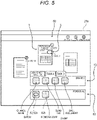
- Fig. 5 is a diagram illustrating a display example of the shared work region window 60, the shared toolbar 70, and a personal toolbar 80 on a display 24a of the user terminal 12 used by the first user.
- the work region providing unit 48 may display the personal toolbar 80 on the display 24a together with the shared work region window 60 and the shared toolbar 70 described above.
- the personal toolbar 80 includes one or more personal operation buttons 82 as personal operation elements. Similarly to the shared toolbar 70, the personal toolbar 80 may also include plural tabs.
- the personal operation button 82 is an operation element for the user to input an instruction related to work in the shared work region.
- Various types of processing related to an electronic document are associated with the personal operation buttons 82, and when the user operates one personal operation button 82, an instruction command for executing processing corresponding to the personal operation button 82 is input to the work region providing unit 48, and the work region providing unit 48 executes the processing related to the electronic document in accordance with the instruction command.
- the personal toolbar 80 (that is, the personal operation button 82) is not shared by plural users who access the shared work region, and is used exclusively by one user. Therefore, even if the first user and the second user access the same shared work region, the personal toolbar 80 for the first user is displayed only on the display 24a of the user terminal 12 of the first user, and is not displayed on the display 24 of the user terminal 12 of the second user.
- Each user may determine content of processing associated with his/her personal operation button 82 by himself/herself.
- the work region providing unit 48 may determine content of an instruction input by the personal operation button 82 of the user.
- the personal toolbar 80 may include the personal operation button 82 associated with processing related to work specific to a user who uses the personal toolbar 80 (hereinafter, the work may be referred to as a "personal task").
- a personal operation button 82a associated with processing of assigning a stamp (an object to be assigned to an electronic document) bearing a name of the first user to an electronic document
- a personal operation button 82b associated with processing of opening a memorandum related to processing on the electronic document that is edited in advance by the first user. Since the personal operation buttons 82a and 82b are not displayed on the display 24 of the user terminal 12 of a user other than the first user, there is no concern that the stamp bearing the name of the first user is assigned to an electronic document by another user, and there is no concern that the memorandum of the first user is seen by another user.
- the work region providing unit 48 may cause the display 24 of the user terminal 12 of each user to display different types of personal operation buttons 82 for plural users.
- the different types of personal operation buttons 82 mean the personal operation buttons 82 associated with different types of processing. For example, as illustrated in Fig. 5 , the display 24a of the user terminal 12 of the first user displays, together with the shared work region window 60, the personal operation button 82a associated with the processing of assigning the stamp bearing the name of the first user to an electronic document, and the personal operation button 82b associated with the processing of opening the memorandum of the first user, and as illustrated in Fig.
- a display 24b of the user terminal 12 of the second user accessing the same shared work region displays, together with the shared work region window 60, a personal operation button 82c associated with processing of assigning a stamp bearing a name of the second user to an electronic document.
- the personal operation button 82 is included in the personal toolbar 80 that is displayed separately from the shared toolbar 70, and alternatively the personal operation button 82 may be included in one tab 74a in the shared toolbar 70 as illustrated in Fig. 7 . Although the tab 74a is included in the shared toolbar 70, the tab 74a is not shared by other users as in the personal toolbar 80.
- the personal operation button 82 By including the personal operation button 82 in the tab 74a of the shared toolbar 70, it is not necessary to display the personal toolbar 80 in addition to the shared toolbar 70. Thus, display area is reduced accordingly and visibility of the shared work region window 60 is improved. In addition, by including the personal operation button 82 in the tab 74a, the user may grasp whether the user performs processing associated with the personal operation button 82 eventually or whether the user performs processing associated with the shared operation button 72.
- the tab 74a including the personal operation button 82 is displayed on the shared toolbar 70, it is possible to grasp that the processing associated with the personal operation button 82 is performed eventually, and if the tab 74 other than the tab 74a is displayed on the shared toolbar 70, it is possible to grasp that the processing associated with the shared operation button 72 is performed eventually.
- each user may switch between display and non-display of his/her personal toolbar 80 (that is, the personal operation button 82).
- the personal operation button 82 By setting the personal operation button 82 to non-display, it is possible to prevent the personal operation button 82 from being erroneously operated.
- the work region providing unit 48 may determine, in accordance with an instruction from each user, in what mode the personal operation button 82 is to be displayed and whether to display the personal operation button 82. For example, the work region providing unit 48 sends an inquiry to each user to select whether to include and display the personal operation button 82 in the personal toolbar 80 independent of the shared toolbar 70, whether to include and display the personal operation button 82 in one tab 74a of the shared toolbar 70, or whether not to display the personal operation button 82, and determines a display mode (including non-display) of the personal operation button 82 based on an answer of the user to the inquiry.
- the work region providing unit 48 stores information on the personal operation button 82 for each user in the user DB 44 in the memory 42.
- Fig. 8 is a conceptual table illustrating content of the user DB 44. As illustrated in Fig. 8 , in the user DB 44, a user ID indicating a user registered in the work region providing server 14, a display mode of the personal operation button 82 set by the user, and a type of the personal operation button 82 set by the user (content of processing associated with the personal operation button 82) are stored in association with one another. A type of a button used for the personal work region will be described later.
- the work region providing unit 48 refers to the user DB 44, specifies the display mode of the personal operation button 82 for each user and the type of each personal operation button 82, and then displays the personal operation button 82 on the display 24 of the user terminal 12 of each user.
- the work region providing unit 48 updates content of the user DB 44 in accordance with the change instruction.
- the work region providing unit 48 may determine whether to display the personal operation button 82 of a specific user among plural users accessing the same shared work region on the display 24 of the user terminal 12 used by the specific user, according to a display state of the personal operation button 82 of a user other than the specific user among the plural users.
- the work region providing unit 48 refers to the user DB 44, and displays the personal operation button 82 of the specific user on the display 24 of the user terminal 12 of the specific user, regardless of display mode setting of the personal operation button 82 of the specific user, when display mode setting of the personal operation button 82 of all the users except the specific user among users that access the same shared work region as the specific user is setting of displaying the personal operation button 82. This is because, if another user who accesses the same shared work region displays the personal operation button 82, it is considered that there is a high possibility that it is necessary for each user to perform a personal task in the shared work region.
- the work region providing unit 48 refers to the user DB 44, and displays the personal operation button 82 of the specific user when the display mode setting of the personal operation button 82 of all the users except the specific user among the users that access the same shared work region as the specific user is setting of displaying the personal operation button 82.
- the work region providing unit 48 may display the personal operation button 82 of the specific user.
- the work region providing unit 48 refers to the data base BD 44, and determines the display mode of the personal operation button 82 of the specific user in accordance with the display mode setting of the personal operation button 82 of the specific user when the display mode setting of the personal operation button 82 of all the users except the specific user (or users except the specific user being less than the predetermined proportion) among the users that access the same shared work region as the specific user is non-display of the personal operation button 82.
- the work region providing unit 48 may cause the personal operation button 82 to be displayed on the displays 24 of the user terminals 12 of plural users accessing the shared work region.
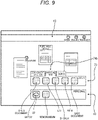
- the work region providing unit 48 causes the personal operation button 82 (in the example of Fig. 9 , the personal toolbar 80 including the personal operation button 82) to be displayed on the displays 24 of the user terminals 12 of the plural users who access the shared work region.
- a name indicating a personal task is not limited to a name containing "approval”, and may be a title containing "confirmation", for example.
- the work region providing unit 48 causes the personal operation button 82 to be displayed on the display 24 of each user terminal 12.
- the work region providing unit 48 may cause the personal operation button 82 to be displayed on the displays 24 of the user terminals 12 of plural users accessing the shared work region, at a timing when the tab 74b is selected by any one of the users accessing the shared work region.
- the work region providing unit 48 provides a user with the shared work region or the personal work region according to the selection of the user.
- a personal work region window and a personal work region operation button serving as a personal work region operation element are displayed.
- Fig. 10 is a diagram illustrating a display example of a personal work region window 90 and a personal work region operation button 92. Since the personal work region window 90 has substantially the same content as that of the shared work region window 60 shown in Fig. 4 , for example, a detailed description thereof will be omitted. However, as a matter of course, since the personal work region window 90 is not shared by plural users, the icons 64 and 66 (see Fig. 4 ) are not displayed in the personal work region window 90.
- each user may determine content of processing associated with the personal work region operation button 92 by himself/herself.
- the work region providing unit 48 may determine content of an instruction input through the personal work region operation button 92 of a user in accordance with an instruction from the user.
- the personal work region operation button 92 is not shared by plural users, the personal work region operation button 92 may be associated with processing related to a personal task that is work specific to the user.
- a type of the personal work region operation button 92 of each user (the content of the processing associated with the personal work region operation button 92) is stored in the user DB 44 in association with a user ID indicating the user (see Fig. 8 ).
- the personal operation button 82 (see Fig. 5 and the like) displayed together with the shared work region window 60 on the display 24 of the user terminal 12 used by a user who accesses the shared work region may include an operation element of the same type as the personal work region operation button 92 that is displayed on the display 24 when the user accesses the personal work region.
- the user may perform, in the shared work region, a personal task that may not be performed before the user moves a former electronic document to the personal work region temporarily.
- the personal operation button 82 may be of exactly the same type as the personal work region operation button 92. Accordingly, since the user may use the personal operation button 82 of exactly the same type as the personal work region operation button 92 in the shared work region, the user may perform work related to an electronic document in the shared work region in the same manner as performing the work in his/her own personal work region. In this case, it is not necessary to store information indicating the type of the personal operation button 82 in the user DB 44, and the work region providing unit 48 may cause the personal operation button 82 of each user to be displayed based on the type of the personal work region operation button 92 that is stored in the user DB 44.
- An outline of the work region providing server 14 according to the present exemplary embodiment is as described above.
- different types of personal operation buttons 82 are displayed among plural users who access the same shared work region. Accordingly, each user may immediately operate the personal operation button 82 without performing an unnecessary operation.
- by displaying the personal operation button 82 dedicated to a user together with the shared work region window 60 for example, it is not necessary to temporarily move an electronic document related to the thumbnail T displayed in the document display region 62 to the personal work region, and it is possible to perform work related to a personal task of the user on the electronic document in the shared work region window 60.
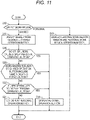
- step S10 a user obtains authentication from the work region providing server 14, and then accesses a shared work region or a personal work region.
- step S12 the work region providing unit 48 causes the personal work region window 90 and the personal work region operation button 92 to be displayed on the display 24 of the user terminal 12 of the user.
- the user performs work related to an electronic document in the personal work region dedicated to the user.
- step S14 the work region providing unit 48 causes the shared work region window 60 and the shared operation button 72 to be displayed on the display 24 of the user terminal 12 of the user.
- the shared toolbar 70 including the shared operation button 72 is displayed.
- step S16 the work region providing unit 48 refers to the user DB 44, and determines whether all of the other users accessing the shared work region accessed by the user cause the personal operation button 82 to be displayed.
- step S18 the work region providing unit 48 causes the shared work region window 60 and the shared operation button 72 as well as the personal operation button 82 to be displayed on the display 24 of the user terminal 12 of the user.
- step S20 the work region providing unit 48 determines whether a title indicating a personal task is included in titles of the shared toolbar 70 or the shared operation button 72 displayed in step S 14.
- the process proceeds to step S18.
- One example of a method for determining whether a title indicating a personal task is included in titles of the shared toolbar 70 or the shared operation button 72 is a method for determining whether the titles of the shared toolbar 70 or the shared operation button 72 includes a specific word such as "approval" and "confirmation”.
- step S22 the work region providing unit 48 refers to a display mode of the personal operation button 82 set by the user in the user DB 44, and determines whether user setting is setting of displaying the personal operation button 82.
- the process proceeds to step S18.
- step S24 the work region providing unit 48 does not cause the personal operation button 82 to be displayed on the display 24 of the user terminal 12 of the user.
Landscapes
- Engineering & Computer Science (AREA)
- Human Computer Interaction (AREA)
- Theoretical Computer Science (AREA)
- General Engineering & Computer Science (AREA)
- Multimedia (AREA)
- Signal Processing (AREA)
- Physics & Mathematics (AREA)
- General Physics & Mathematics (AREA)
- Business, Economics & Management (AREA)
- Entrepreneurship & Innovation (AREA)
- Human Resources & Organizations (AREA)
- Strategic Management (AREA)
- Computer Networks & Wireless Communication (AREA)
- Data Mining & Analysis (AREA)
- Economics (AREA)
- Marketing (AREA)
- Operations Research (AREA)
- Quality & Reliability (AREA)
- Tourism & Hospitality (AREA)
- General Business, Economics & Management (AREA)
- User Interface Of Digital Computer (AREA)
Abstract
Description
- The present disclosure relates to an information processing apparatus, a recording medium for recording an information processing program and an information processing system.
- Patent Literature 1 discloses a device that enables a user to customize a user interface (UI) including operation buttons, tabs, and the like displayed on a display screen, and that distributes the customized UI to plural users so that the plural users may share the customized UI.
- Patent Literature 1:
JP-A-2004-192641 - In the related art, a shared work region is provided to plural users. The shared work region is a shared work region that may be accessed by the plural users and in which the plural users may execute work in cooperation. When a user accesses such a shared work region, a shared operation element used by the plural users in a shared manner and used by each user to input a processing command is displayed on a display screen of each terminal device used by each user. Each user may input a processing command in the shared work region by operating the shared operation element.
- Here, in working in the shared work region, the user may want to use an operation element other than the shared operation element. In this case, when an operation element other than the shared operation element is not displayed on a display screen of the shared work region, there is a problem that the user's operation before using of an operation element other than the shared operation element in the shared work region becomes complicated.
- As an example, a case is considered where some user (referred to as a user A) needs to perform work specific to the user A in a shared work region for performing work related to an electronic document. Although not limited to this, it is assumed that the work specific to the user A is, for example, to assign a stamp bearing a name of the user A to the electronic document. The stamp is an object to be assigned to an electronic document.
- In order to perform the work specific to the user A, the user A may operate an operation element associated with processing related to the work. However, there is a situation in which it is difficult to display the operation element related to the work specific to the user A in a shared work region as a shared operation element. That is, if such an operation element is displayed in the shared work region as a shared operation element, the work specific to the user A may be performed by a user other than the user A.
- Therefore, the operation element related to the work specific to the user A needs to be displayed, as an operation element other than the shared operation element, in a personal work region that may be used exclusively by the user A. Then, since the user A may not perform the work specific to the user A in the shared work region, the user A needs to move the electronic document to his/her personal work region and then operate the operation element displayed in the personal work region to perform the work specific to the user A.
- Aspects of non-limiting embodiments of the present disclosure relate to reduction of the number of operations performed by a user before an operation element other than a shared operation element is used in a shared work region, which is a common work region, as compared with a case where the operation element other than the shared operation element shared between users is not displayed in the shared work region.
- According to a first aspect of the present disclosure, there is provided an information processing apparatus including a processor configured to display, on a display screen of a terminal device used by a user, a shared work region as a common work region that is accessed by plural users and that enables the plural users to execute work in cooperation, and an operation element for the user using the terminal device to input an instruction related to work in the shared work region, in which the processor is configured to display the operation element of a different type according to the user.
- According to a second aspect of the present disclosure, there is provided the information processing apparatus according to the first aspect, in which the operation element is a personal operation element for inputting an instruction of work specific to the user.
- According to a third aspect of the present disclosure, there is provided the information processing apparatus according to the second aspect, in which the processor is configured to determine, in accordance with an instruction from the user, content of the instruction input through the personal operation element of the user.
- According to a fourth aspect of the present disclosure, there is provided the information processing apparatus according to the second or third aspect, in which the processor is configured to determine, in accordance with the instruction from the user, whether to display the personal operation element on the display screen of the terminal device used by the user.
- According to a fifth aspect of the present disclosure, there is provided the information processing apparatus according to the fourth aspect, in which the processor is configured to determine whether to display the personal operation element of a specific user among the plural users on a display screen of the terminal device used by the specific user, according to a display state of the personal operation element of users except the specific user among the plural users.
- According to a sixth aspect of the present disclosure, there is provided the information processing apparatus according to the second or third aspect, in which the processor is configured to display, on the display screen, a shared operation element that is allowed to be shared and used by the plural users, and display the personal operation element on the display screen when a title assigned to the shared operation element indicates work specific to the user.
- According to a seventh aspect of the present disclosure, there is provided the information processing apparatus according to the second aspect, in which the processor is configured to provide each user with a personal work region that is a work region dedicated to the user, and the personal operation element displayed on the display screen of the terminal device used by the user includes an operation element of a same type as a personal work region operation element that is displayed when the user accesses the personal work region.
- According to an eighth aspect of the present disclosure, there is provided an information processing program that causes a computer to display, on a display screen of a terminal device used by a user, a shared work region as a common work region that is accessed by a plural users and that enables the plural users to execute work in cooperation, and an operation element for the user using the terminal device to input an instruction related to work in the shared work region, in which the operation element of a different type is displayed according to the user.
- According to a ninth aspect of the present disclosure, there is provided an information processing system including:
- a plurality of terminal devices used by a plurality of users and each having a display screen; and
- a work region providing server connected to the terminal devices, the work region providing server including a processor configured to:
- display, on the display screen of the terminal device:
- a shared work region as a common work region that is accessed by the terminal devices and that enables the users to execute work in cooperation; and
- an operation element for the user using the terminal device to input an instruction related to work in the shared work region, wherein
- the processor is configured to display the operation element of a different type according to the terminal device.
- display, on the display screen of the terminal device:
- According to the first, eighth or ninth aspect, it is possible to reduce the number of operations performed by the user before using of an operation element other than the shared operation element in the shared work region serving as a common work region, as compared with a case where the operation element other than the shared operation element shared between the users is not displayed in the shared work region.
- According to the second aspect, the user may input an instruction of work specific to the user by operating the personal operation element displayed on the display screen of the shared work region.
- According to the third aspect, the user may determine the content of the instruction input through the personal operation element.
- According to the fourth aspect, the user may determine whether to display the personal operation element in the shared work region.
- According to the fifth aspect, it is not necessary for the user to determine whether to display the personal operation element in the shared work region, and the personal operation element of the user may be displayed in the shared work region according to the display state of the personal operation element of other users.
- According to the sixth aspect, it is not necessary for the user to determine whether to display the personal operation element in the shared work region, and the personal operation element of the user may be displayed in the shared work region according to the title assigned to the shared operation element.
- According to the seventh aspect, the user may perform, in the shared work region, work specific to the user that may only be performed in the personal work region.
- Exemplary embodiment(s) of the present invention will be described in detail based on the following figures, wherein:
-
Fig. 1 is a schematic configuration diagram of an information processing system according to a present exemplary embodiment; -
Fig. 2 is a schematic configuration diagram of a user terminal; -
Fig. 3 is a schematic configuration diagram of a work region providing server; -
Fig. 4 is a diagram illustrating a display example of a shared work region window and a shared toolbar; -
Fig. 5 is a diagram illustrating a display example of a shared work region window, a shared toolbar, and a personal toolbar in a first user terminal used by a first user; -
Fig. 6 is a diagram illustrating a display example of a shared work region window, a shared toolbar, and a personal toolbar in a second user terminal used by a second user; -
Fig. 7 is a diagram illustrating an example in which a personal operation button is displayed in one tab of a shared toolbar; -
Fig. 8 is a conceptual table illustrating content of a user DB; -
Fig. 9 is a diagram illustrating an example in which a personal toolbar is displayed in accordance with a title of a shared toolbar; -
Fig. 10 is a diagram illustrating a display example of a personal work region window and a personal work region operation button; and -
Fig. 11 is a flowchart illustrating a flow of processing of a server. -
Fig. 1 is a schematic configuration diagram of aninformation processing system 10 according to a present exemplary embodiment. Theinformation processing system 10 includesplural user terminals 12 serving as terminal devices used by users, and a workregion providing server 14 serving as an information processing apparatus. Theuser terminal 12 and the workregion providing server 14 are communicably connected to each other via acommunication line 16 including, for example, the Internet line or a local area network (LAN). As will be described in detail later, theinformation processing system 10 is a collaborative work system in which plural users accesses the workregion providing server 14 from theuser terminal 12, and thus work may be executed in cooperation in a shared work region. In particular, in the present exemplary embodiment, in theinformation processing system 10, plural users cooperatively executes processing related to an electronic document in the shared work region. The electronic document processed in theinformation processing system 10 may be managed by the workregion providing server 14. That is, theinformation processing system 10 may be a document management system that manages an electronic document. -
Fig. 2 is a schematic configuration diagram of theuser terminal 12. Theuser terminal 12 is, for example, a personal computer or a tablet terminal such as a smartphone. Alternatively, theuser terminal 12 may be a computer of any type as long as functions described below are implemented. - A
communication interface 20 includes, for example, a network adapter. Thecommunication interface 20 implements a function of communicating with the workregion providing server 14 via thecommunication line 16. - An
input interface 22 includes, for example, a touch panel, a button, a mouse, or a keyboard. Theinput interface 22 is used to input a user instruction to theuser terminal 12. - A
display 24 includes, for example, a liquid crystal panel. Various display screens are displayed on thedisplay 24. In particular, a display screen of a shared work region and a display screen of a personal work region (both will be described in detail later) that are provided from the workregion providing server 14 are displayed on thedisplay 24. - A
memory 26 includes, for example, a hard disk drive (HDD), a solid state drive (SSD), an embedded multi media card (eMMC), a read only memory (ROM), or a random access memory (RAM). - A
processor 28 refers to hardware in a broad sense. Examples of the processor include at least one of general-purpose processors (e.g., CPU: Central Processing Unit) and dedicated processors (e.g., GPU: Graphics Processing Unit, ASIC: Application Specific Integrated Circuit, FPGA: Field Programmable Gate Array, and programmable logic device). Theprocessor 28 is broad enough to encompass one processor or plural processors in collaboration that are located physically apart from each other but may work cooperatively. Theprocessor 28 controls each unit of theuser terminal 12. -
Fig. 3 is a schematic configuration diagram of the workregion providing server 14. The workregion providing server 14 is configured with, for example, a server computer or the like. - A
communication interface 40 includes, for example, a network adapter. Thecommunication interface 40 implements a function of communicating with theuser terminal 12 via thecommunication line 16. - A
memory 42 includes, for example, an HDD, an SSD, an eMMC, a ROM, a RAM, or the like. Thememory 42 stores an information processing program for causing each unit of the workregion providing server 14 to function. In addition, thememory 42 stores a resource as a shared work region and a resource as a personal work region. Further, thememory 42 stores an electronic document processed in the shared work region or the personal work region. In addition, as illustrated inFig. 3 , thememory 42 stores auser DB 44. Content of theuser DB 44 will be described later. - A
processor 46 refers to a processor in a broad sense. Examples of the processor include at least one of general-purpose processors (e.g., CPU) and dedicated processors (e.g., GPU, ASIC, FPGA, and programmable logic device). Theprocessor 46 is broad enough to encompass one processor or plural processors in collaboration that are located physically apart from each other but may work cooperatively. Theprocessor 46 functions as a work region providing unit 48 in accordance with the information processing program stored in thememory 42. - The work region providing unit 48 authenticates a user registered in advance by authentication processing, and then provides a shared work region to the authenticated user. The shared work region is a common work region that is accessed by plural users and in which plural users may execute work in cooperation. Specifically, the shared work region is a resource on the Internet, and when plural users access the resource, the plural users may cooperatively execute work on the resource.
- The work region providing unit 48 may also provide a personal work region to an authenticated user. The personal work region is a work region dedicated to an individual user. That is, the personal work region is provided for an individual user, and the individual user may access only his/her own personal work region and cannot access a personal work region of another individual user. The personal work region is also a resource on the Internet, and a user corresponding to the resource may execute work on the resource by accessing the resource.
- In the present exemplary embodiment, a user may execute work related to an electronic document in a shared work region or a personal work region. The electronic document to be worked on in the shared work region or the personal work region is an electronic document transmitted from each
user terminal 12 to the workregion providing server 14 and stored in thememory 42 of the workregion providing server 14. In the present exemplary embodiment, the shared work region or the personal work region is a region in which work related to an electronic document is performed, but the shared work region or the personal work region according to the present disclosure is not limited to a region in which work related to an electronic document is performed. For example, the shared work region or the personal work region may be a region in which plural users cooperatively executes work related to image data or music data. - The work region providing unit 48 provides a user with a shared work region or a personal work region according to selection of the user. Specifically, in accordance with an access destination of a user who logs in to the work
region providing server 14, the work region providing unit 48 causes thedisplay 24 of theuser terminal 12 used by the user to display a shared work region window, which is a display screen related to a shared work region, or a personal work region window, which is a display screen related to a personal work region. The shared work region window and the personal work region window are "places" where the user executes work on an electronic document. In the present specification, displaying a shared work region window (or a personal work region window) on thedisplay 24 may be expressed simply as displaying a shared work region (or a personal work region) on thedisplay 24. In addition, the work region providing unit 48 causing thedisplay 24 of theuser terminal 12 to display any display screen means that the work region providing unit 48 transmits a display instruction related to the display screen to theuser terminal 12 to cause theprocessor 28 of theuser terminal 12 to display the display screen on thedisplay 24. - Hereinafter, a display screen displayed on the
display 24 of theuser terminal 12 when a user accesses a shared work region will be described.Fig. 4 is a diagram illustrating a display example of a sharedwork region window 60 and a sharedtoolbar 70 on thedisplay 24 of theuser terminal 12. The sharedwork region window 60 is shared by plural users except for some exceptions. That is, when plural users access the shared work region fromplural user terminals 12, the sharedwork region windows 60 having the same content are displayed on therespective displays 24 of theplural user terminals 12. - The shared
work region window 60 includes adocument display region 62. In thedocument display region 62, a thumbnail T related to an electronic document to be worked on in the shared work region is displayed. For example, a thumbnail T of one electronic document may be displayed in thedocument display region 62, or a thumbnail T of a binder in which plural electronic documents are collected may be displayed in thedocument display region 62. In thedocument display region 62, a thumbnail T related to an electronic document selected by a user is displayed in accordance with an instruction from the user who accesses the shared work region. - When the user operates (for example, clicks) the thumbnail T, an edit screen for editing the electronic document corresponding to the thumbnail T is displayed on the
display 24 of theuser terminal 12 of the user. In the present exemplary embodiment, as an exception to sharing of the sharedwork region window 60 between plural users, the edit screen of the electronic document is not shared by the plural users but may be viewed only by a user who opens the edit screen. The edit screen may also be shared by plural users. - In addition, the shared
work region window 60displays icons 64 indicating plural users who are accessing the shared work region (in other words, who are working in cooperation in the cooperative work region). Eachicon 64 includes information allowing identifying each user, such as a name of each user. According to theicon 64, each user may grasp who is accessing the shared work region in addition to his/her own. - When a user operates the thumbnail T to open an edit screen of an electronic document, an
icon 66 indicating the user is displayed in association with the thumbnail T of the electronic document. In the present exemplary embodiment, as illustrated inFig. 4 , theicon 66 is displayed in the vicinity of the thumbnail T or superimposed on the thumbnail T. Accordingly, another user may grasp who opens the edit screen of the electronic document related to the thumbnail T. - In addition, the work region providing unit 48 displays the shared
toolbar 70 on thedisplay 24 of theuser terminal 12 together with the above-described sharedwork region window 60. The sharedtoolbar 70 includes one or more sharedoperation buttons 72 as shared operation elements. The sharedoperation button 72 is an operation element for plural users to input an instruction related to work in the shared work region. Specifically, processing related to an electronic document is associated with the sharedoperation button 72, and when a user operates the sharedoperation button 72, an instruction command for executing processing corresponding to the sharedoperation button 72 is input to the work region providing unit 48. The work region providing unit 48 executes the processing related to the electronic document in accordance with the instruction command. - The shared
toolbar 70 may includeplural tabs 74. Onetab 74 includes one or more sharedoperation buttons 72. A user may select onetab 74 from amongplural tabs 74. The sharedoperation button 72 in thetab 74 selected by the user is displayed, and the sharedoperation button 72 in thetab 74 that is not selected by the user is not displayed. By dividing plural sharedoperation buttons 72 intoplural tabs 74, display area of the sharedtoolbar 70 including a large number of sharedoperation buttons 72 is reduced, and visibility of the sharedwork region window 60 is improved. In addition, for example, plural sharedoperation buttons 72 associated with the same type of instruction command are put together in onetab 74, or plural sharedoperation buttons 72 that are highly likely to be used in the same task are put together in onetab 74, so that each user may efficiently operate the sharedoperation button 72. - The shared toolbar 70 (that is, the shared operation button 72) is shared and used by plural users who access the shared work region. Therefore, the same shared
toolbars 70 are displayed on therespective displays 24 of theuser terminals 12 used by plural users who access the same shared work region. - The work region providing unit 48 may change content of the shared
toolbar 70 in accordance with an instruction from each user. For example, the work region providing unit 48 may add the sharedoperation button 72 to the sharedtoolbar 70, delete the sharedoperation button 72 from the sharedtoolbar 70, change the sharedoperation button 72 in the sharedtoolbar 70 to another sharedoperation button 72 associated with another instruction command, change a title of thetab 74, and move the sharedoperation button 72 in onetab 74 to anothertab 74. Since the sharedtoolbar 70 is shared by plural users, changed content of the sharedtoolbar 70 according to an instruction of a certain user is reflected to all the other users. In other words, when the content of the sharedtoolbar 70 is changed by a first user, the sharedtoolbar 70 whose content is changed by the first user is displayed on theuser terminal 12 of a second user, who is another user, when the second user accesses the shared work region. - In the present exemplary embodiment, non-display of the shared toolbar 70 (that is, the shared operation button 72) is not enabled. However, the display and non-display of the shared
toolbar 70 may be switched for each user in accordance with an instruction from the user. -
Fig. 5 is a diagram illustrating a display example of the sharedwork region window 60, the sharedtoolbar 70, and apersonal toolbar 80 on adisplay 24a of theuser terminal 12 used by the first user. The work region providing unit 48 may display thepersonal toolbar 80 on thedisplay 24a together with the sharedwork region window 60 and the sharedtoolbar 70 described above. Thepersonal toolbar 80 includes one or morepersonal operation buttons 82 as personal operation elements. Similarly to the sharedtoolbar 70, thepersonal toolbar 80 may also include plural tabs. Thepersonal operation button 82 is an operation element for the user to input an instruction related to work in the shared work region. Various types of processing related to an electronic document are associated with thepersonal operation buttons 82, and when the user operates onepersonal operation button 82, an instruction command for executing processing corresponding to thepersonal operation button 82 is input to the work region providing unit 48, and the work region providing unit 48 executes the processing related to the electronic document in accordance with the instruction command. - Unlike the shared toolbar 70 (that is, the shared operation button 72), the personal toolbar 80 (that is, the personal operation button 82) is not shared by plural users who access the shared work region, and is used exclusively by one user. Therefore, even if the first user and the second user access the same shared work region, the
personal toolbar 80 for the first user is displayed only on thedisplay 24a of theuser terminal 12 of the first user, and is not displayed on thedisplay 24 of theuser terminal 12 of the second user. - Each user may determine content of processing associated with his/her
personal operation button 82 by himself/herself. In other words, in accordance with an instruction from a user, the work region providing unit 48 may determine content of an instruction input by thepersonal operation button 82 of the user. Since thepersonal toolbar 80 is not shared by plural users, thepersonal toolbar 80 may include thepersonal operation button 82 associated with processing related to work specific to a user who uses the personal toolbar 80 (hereinafter, the work may be referred to as a "personal task"). For example, as processing related to work specific to the first user using thepersonal toolbar 80, thepersonal toolbar 80 illustrated inFig. 5 includes a personal operation button 82a associated with processing of assigning a stamp (an object to be assigned to an electronic document) bearing a name of the first user to an electronic document, and apersonal operation button 82b associated with processing of opening a memorandum related to processing on the electronic document that is edited in advance by the first user. Since thepersonal operation buttons 82a and 82b are not displayed on thedisplay 24 of theuser terminal 12 of a user other than the first user, there is no concern that the stamp bearing the name of the first user is assigned to an electronic document by another user, and there is no concern that the memorandum of the first user is seen by another user. - Since each user determines the content of processing associated with his/her own
personal operation button 82, the work region providing unit 48 may cause thedisplay 24 of theuser terminal 12 of each user to display different types ofpersonal operation buttons 82 for plural users. The different types ofpersonal operation buttons 82 mean thepersonal operation buttons 82 associated with different types of processing. For example, as illustrated inFig. 5 , thedisplay 24a of theuser terminal 12 of the first user displays, together with the sharedwork region window 60, the personal operation button 82a associated with the processing of assigning the stamp bearing the name of the first user to an electronic document, and thepersonal operation button 82b associated with the processing of opening the memorandum of the first user, and as illustrated inFig. 6 , adisplay 24b of theuser terminal 12 of the second user accessing the same shared work region displays, together with the sharedwork region window 60, apersonal operation button 82c associated with processing of assigning a stamp bearing a name of the second user to an electronic document. - In the examples of
Figs. 5 and6 , thepersonal operation button 82 is included in thepersonal toolbar 80 that is displayed separately from the sharedtoolbar 70, and alternatively thepersonal operation button 82 may be included in onetab 74a in the sharedtoolbar 70 as illustrated inFig. 7 . Although thetab 74a is included in the sharedtoolbar 70, thetab 74a is not shared by other users as in thepersonal toolbar 80. - By including the
personal operation button 82 in thetab 74a of the sharedtoolbar 70, it is not necessary to display thepersonal toolbar 80 in addition to the sharedtoolbar 70. Thus, display area is reduced accordingly and visibility of the sharedwork region window 60 is improved. In addition, by including thepersonal operation button 82 in thetab 74a, the user may grasp whether the user performs processing associated with thepersonal operation button 82 eventually or whether the user performs processing associated with the sharedoperation button 72. Specifically, if thetab 74a including thepersonal operation button 82 is displayed on the sharedtoolbar 70, it is possible to grasp that the processing associated with thepersonal operation button 82 is performed eventually, and if thetab 74 other than thetab 74a is displayed on the sharedtoolbar 70, it is possible to grasp that the processing associated with the sharedoperation button 72 is performed eventually. - In addition, each user may switch between display and non-display of his/her personal toolbar 80 (that is, the personal operation button 82). By setting the
personal operation button 82 to non-display, it is possible to prevent thepersonal operation button 82 from being erroneously operated. - The work region providing unit 48 may determine, in accordance with an instruction from each user, in what mode the
personal operation button 82 is to be displayed and whether to display thepersonal operation button 82. For example, the work region providing unit 48 sends an inquiry to each user to select whether to include and display thepersonal operation button 82 in thepersonal toolbar 80 independent of the sharedtoolbar 70, whether to include and display thepersonal operation button 82 in onetab 74a of the sharedtoolbar 70, or whether not to display thepersonal operation button 82, and determines a display mode (including non-display) of thepersonal operation button 82 based on an answer of the user to the inquiry. - The work region providing unit 48 stores information on the
personal operation button 82 for each user in theuser DB 44 in thememory 42.Fig. 8 is a conceptual table illustrating content of theuser DB 44. As illustrated inFig. 8 , in theuser DB 44, a user ID indicating a user registered in the workregion providing server 14, a display mode of thepersonal operation button 82 set by the user, and a type of thepersonal operation button 82 set by the user (content of processing associated with the personal operation button 82) are stored in association with one another. A type of a button used for the personal work region will be described later. - The work region providing unit 48 refers to the
user DB 44, specifies the display mode of thepersonal operation button 82 for each user and the type of eachpersonal operation button 82, and then displays thepersonal operation button 82 on thedisplay 24 of theuser terminal 12 of each user. When the user gives an instruction to change the display mode of thepersonal operation button 82 or the type of thepersonal operation button 82, the work region providing unit 48 updates content of theuser DB 44 in accordance with the change instruction. - In addition, the work region providing unit 48 may determine whether to display the
personal operation button 82 of a specific user among plural users accessing the same shared work region on thedisplay 24 of theuser terminal 12 used by the specific user, according to a display state of thepersonal operation button 82 of a user other than the specific user among the plural users. - For example, the work region providing unit 48 refers to the
user DB 44, and displays thepersonal operation button 82 of the specific user on thedisplay 24 of theuser terminal 12 of the specific user, regardless of display mode setting of thepersonal operation button 82 of the specific user, when display mode setting of thepersonal operation button 82 of all the users except the specific user among users that access the same shared work region as the specific user is setting of displaying thepersonal operation button 82. This is because, if another user who accesses the same shared work region displays thepersonal operation button 82, it is considered that there is a high possibility that it is necessary for each user to perform a personal task in the shared work region. In the present exemplary embodiment, the work region providing unit 48 refers to theuser DB 44, and displays thepersonal operation button 82 of the specific user when the display mode setting of thepersonal operation button 82 of all the users except the specific user among the users that access the same shared work region as the specific user is setting of displaying thepersonal operation button 82. Alternatively, when the display mode setting of thepersonal operation button 82 of a predetermined proportion or more of users except the specific user among the users that access the same shared work region as the specific user is setting of displaying thepersonal operation button 82, the work region providing unit 48 may display thepersonal operation button 82 of the specific user. - On the other hand, the work region providing unit 48 refers to the
data base BD 44, and determines the display mode of thepersonal operation button 82 of the specific user in accordance with the display mode setting of thepersonal operation button 82 of the specific user when the display mode setting of thepersonal operation button 82 of all the users except the specific user (or users except the specific user being less than the predetermined proportion) among the users that access the same shared work region as the specific user is non-display of thepersonal operation button 82. - When a title assigned to the shared
toolbar 70 or the sharedoperation button 72, which is a shared operation element displayed together with the sharedwork region window 60, indicates work specific to a user, the work region providing unit 48 may cause thepersonal operation button 82 to be displayed on thedisplays 24 of theuser terminals 12 of plural users accessing the shared work region. - For example, as illustrated in
Fig. 9 , when a title of atab 74b of the sharedtoolbar 70 is "approval task", it may be said that there is a high possibility that approval processing is performed in the sharedwork region window 60. Further, in many cases, the approval processing includes a personal task. Therefore, in such a case, the work region providing unit 48 causes the personal operation button 82 (in the example ofFig. 9 , thepersonal toolbar 80 including the personal operation button 82) to be displayed on thedisplays 24 of theuser terminals 12 of the plural users who access the shared work region. A name indicating a personal task is not limited to a name containing "approval", and may be a title containing "confirmation", for example. Similarly, when the title indicating a personal task is a title other than that of thetab 74 of the shared toolbar 70 (for example, a title of the shared operation button 72), the work region providing unit 48 causes thepersonal operation button 82 to be displayed on thedisplay 24 of eachuser terminal 12. When the title of thetab 74b of the sharedtoolbar 70 indicates a personal task, the work region providing unit 48 may cause thepersonal operation button 82 to be displayed on thedisplays 24 of theuser terminals 12 of plural users accessing the shared work region, at a timing when thetab 74b is selected by any one of the users accessing the shared work region. - As described above, the work region providing unit 48 provides a user with the shared work region or the personal work region according to the selection of the user. On the display screen displayed on the
display 24 of theuser terminal 12 when the user accesses the personal work region, a personal work region window and a personal work region operation button serving as a personal work region operation element are displayed. -
Fig. 10 is a diagram illustrating a display example of a personalwork region window 90 and a personal workregion operation button 92. Since the personalwork region window 90 has substantially the same content as that of the sharedwork region window 60 shown inFig. 4 , for example, a detailed description thereof will be omitted. However, as a matter of course, since the personalwork region window 90 is not shared by plural users, theicons 64 and 66 (seeFig. 4 ) are not displayed in the personalwork region window 90. - Since the personal work
region operation button 92 is also user-dedicated, each user may determine content of processing associated with the personal workregion operation button 92 by himself/herself. In other words, the work region providing unit 48 may determine content of an instruction input through the personal workregion operation button 92 of a user in accordance with an instruction from the user. Since the personal workregion operation button 92 is not shared by plural users, the personal workregion operation button 92 may be associated with processing related to a personal task that is work specific to the user. A type of the personal workregion operation button 92 of each user (the content of the processing associated with the personal work region operation button 92) is stored in theuser DB 44 in association with a user ID indicating the user (seeFig. 8 ). - Here, the personal operation button 82 (see
Fig. 5 and the like) displayed together with the sharedwork region window 60 on thedisplay 24 of theuser terminal 12 used by a user who accesses the shared work region may include an operation element of the same type as the personal workregion operation button 92 that is displayed on thedisplay 24 when the user accesses the personal work region. In this way, the user may perform, in the shared work region, a personal task that may not be performed before the user moves a former electronic document to the personal work region temporarily. - In particular, the
personal operation button 82 may be of exactly the same type as the personal workregion operation button 92. Accordingly, since the user may use thepersonal operation button 82 of exactly the same type as the personal workregion operation button 92 in the shared work region, the user may perform work related to an electronic document in the shared work region in the same manner as performing the work in his/her own personal work region. In this case, it is not necessary to store information indicating the type of thepersonal operation button 82 in theuser DB 44, and the work region providing unit 48 may cause thepersonal operation button 82 of each user to be displayed based on the type of the personal workregion operation button 92 that is stored in theuser DB 44. - An outline of the work
region providing server 14 according to the present exemplary embodiment is as described above. According to the present exemplary embodiment, different types ofpersonal operation buttons 82 are displayed among plural users who access the same shared work region. Accordingly, each user may immediately operate thepersonal operation button 82 without performing an unnecessary operation. In particular, by displaying thepersonal operation button 82 dedicated to a user together with the sharedwork region window 60, for example, it is not necessary to temporarily move an electronic document related to the thumbnail T displayed in thedocument display region 62 to the personal work region, and it is possible to perform work related to a personal task of the user on the electronic document in the sharedwork region window 60. - Hereinafter, a flow of processing of the work region providing unit 48 will be described with reference to a flowchart illustrated in
Fig. 11 . - In step S10, a user obtains authentication from the work
region providing server 14, and then accesses a shared work region or a personal work region. - The process proceeds to step S12 when the user accesses a personal work region. In step S12, the work region providing unit 48 causes the personal
work region window 90 and the personal workregion operation button 92 to be displayed on thedisplay 24 of theuser terminal 12 of the user. In this case, the user performs work related to an electronic document in the personal work region dedicated to the user. - The process proceeds to step S14 when the user accesses a shared work region. In step S14, the work region providing unit 48 causes the shared
work region window 60 and the sharedoperation button 72 to be displayed on thedisplay 24 of theuser terminal 12 of the user. Here, it is assumed that the sharedtoolbar 70 including the sharedoperation button 72 is displayed. - In step S16, the work region providing unit 48 refers to the
user DB 44, and determines whether all of the other users accessing the shared work region accessed by the user cause thepersonal operation button 82 to be displayed. - The process proceeds to step S18 when all the other users display the
personal operation button 82. In step S18, the work region providing unit 48 causes the sharedwork region window 60 and the sharedoperation button 72 as well as thepersonal operation button 82 to be displayed on thedisplay 24 of theuser terminal 12 of the user. - When any one of the other users does not display the
personal operation button 82, the process proceeds to step S20, and in step S20, the work region providing unit 48 determines whether a title indicating a personal task is included in titles of the sharedtoolbar 70 or the sharedoperation button 72 displayed instep S 14. When the title indicating a personal task is included in the titles of the sharedtoolbar 70 or the sharedoperation button 72, the process proceeds to step S18. One example of a method for determining whether a title indicating a personal task is included in titles of the sharedtoolbar 70 or the sharedoperation button 72 is a method for determining whether the titles of the sharedtoolbar 70 or the sharedoperation button 72 includes a specific word such as "approval" and "confirmation". - The process proceeds to step S22 when the title indicating a personal task is not included in titles of the shared
toolbar 70 or the sharedoperation button 72. In step S22, the work region providing unit 48 refers to a display mode of thepersonal operation button 82 set by the user in theuser DB 44, and determines whether user setting is setting of displaying thepersonal operation button 82. When the user setting is setting of displaying thepersonal operation button 82, the process proceeds to step S18. - The process proceeds to step S24 when the user setting is not setting of displaying the
personal operation button 82. In step S24, the work region providing unit 48 does not cause thepersonal operation button 82 to be displayed on thedisplay 24 of theuser terminal 12 of the user. - Although the exemplary embodiment according to the present disclosure is described above, the present disclosure is not limited to the above-described exemplary embodiment, and various modifications may be made without departing from the gist of the present disclosure.
- The foregoing description of the exemplary embodiments of the present invention has been provided for the purposes of illustration and description. It is not intended to be exhaustive or to limit the invention to the precise forms disclosed. Obviously, many modifications and variations will be apparent to practitioners skilled in the art. The embodiments were chosen and described in order to best explain the principles of the invention and its practical applications, thereby enabling others skilled in the art to understand the invention for various embodiments and with the various modifications as are suited to the particular use contemplated. It is intended that the scope of the invention be defined by the following claims and their equivalents.
Claims (9)
- An information processing apparatus comprising:a processor configured todisplay, on a display screen of a terminal device used by a user:a shared work region as a common work region that is accessed by a plurality of users and that enables the plurality of users to execute work in cooperation; andan operation element for the user using the terminal device to input an instruction related to work in the shared work region, whereinthe processor is configured to display the operation element of a different type according to the user.
- The information processing apparatus according to claim 1,
wherein the operation element is a personal operation element for inputting an instruction of work specific to the user. - The information processing apparatus according to claim 2,
wherein the processor is configured to determine, in accordance with an instruction from the user, content of the instruction input through the personal operation element of the user. - The information processing apparatus according to claim 2 or 3,
wherein the processor is configured to determine, in accordance with the instruction from the user, whether to display the personal operation element on the display screen of the terminal device used by the user. - The information processing apparatus according to claim 4,
wherein the processor is configured to determine whether to display the personal operation element of a specific user among the plurality of users on a display screen of the terminal device used by the specific user, according to a display state of the personal operation element of users except the specific user among the plurality of users. - The information processing apparatus according to claim 2 or 3,
wherein the processor is configured todisplay, on the display screen, a shared operation element that is allowed to be shared and used by the plurality of users, anddisplay the personal operation element on the display screen when a title assigned to the shared operation element indicates work specific to the user. - The information processing apparatus according to claim 2,wherein the processor is configured to provide each user with a personal work region that is a work region dedicated to the user, andwherein the personal operation element displayed on the display screen of the terminal device used by the user includes an operation element of a same type as a personal work region operation element that is displayed when the user accesses the personal work region.
- An information processing program causing a computer todisplay, on a display screen of a terminal device used by a user:a shared work region as a common work region that is accessed by a plurality of users and that enables the plurality of users to execute work in cooperation; andan operation element for the user using the terminal device to input an instruction related to work in the shared work region, whereinthe operation element of a different type is displayed according to the user.
- An information processing system comprising:a plurality of terminal devices used by a plurality of users and each having a display screen; anda work region providing server connected to the terminal devices, the work region providing server comprising a processor configured to:display, on the display screen of the terminal device:a shared work region as a common work region that is accessed by the terminal devices and that enables the users to execute work in cooperation; andan operation element for the user using the terminal device to input an instruction related to work in the shared work region, whereinthe processor is configured to display the operation element of a different type according to the terminal device.
Applications Claiming Priority (1)
| Application Number | Priority Date | Filing Date | Title |
|---|---|---|---|
| JP2021032848A JP7639404B2 (en) | 2021-03-02 | 2021-03-02 | Information processing device and information processing program |
Publications (2)
| Publication Number | Publication Date |
|---|---|
| EP4053687A1 true EP4053687A1 (en) | 2022-09-07 |
| EP4053687B1 EP4053687B1 (en) | 2026-04-01 |
Family
ID=77520498
Family Applications (1)
| Application Number | Title | Priority Date | Filing Date |
|---|---|---|---|
| EP21192773.6A Active EP4053687B1 (en) | 2021-03-02 | 2021-08-24 | Information processing apparatus, information processing program and information processing system |
Country Status (4)
| Country | Link |
|---|---|
| US (1) | US12278933B2 (en) |
| EP (1) | EP4053687B1 (en) |
| JP (1) | JP7639404B2 (en) |
| CN (1) | CN114995722A (en) |
Families Citing this family (2)
| Publication number | Priority date | Publication date | Assignee | Title |
|---|---|---|---|---|
| US11797320B2 (en) * | 2021-08-10 | 2023-10-24 | Dell Products L.P. | Systems and methods to manage screen sharing of displayed local system windows |
| WO2024147201A1 (en) * | 2023-01-06 | 2024-07-11 | 株式会社プログミー | Programming education method, programming education program, programming education server, and programming education terminal |
Citations (3)
| Publication number | Priority date | Publication date | Assignee | Title |
|---|---|---|---|---|
| WO2002017115A2 (en) * | 2000-08-21 | 2002-02-28 | Thoughtslinger Corporation | Simultaneous multi-user document editing system |
| JP2004192641A (en) | 2002-12-12 | 2004-07-08 | Xerox Corp | Customizable user interface |
| US20090249224A1 (en) * | 2008-03-31 | 2009-10-01 | Microsoft Corporation | Simultaneous collaborative review of a document |
Family Cites Families (13)
| Publication number | Priority date | Publication date | Assignee | Title |
|---|---|---|---|---|
| JP2000267968A (en) | 1999-03-16 | 2000-09-29 | Hitachi Ltd | Screen sharing system |
| JP4313654B2 (en) * | 2003-11-19 | 2009-08-12 | パナソニック株式会社 | Network system |
| JP5369702B2 (en) * | 2009-01-23 | 2013-12-18 | セイコーエプソン株式会社 | Shared information display device, shared information display method, and computer program |
| US10664772B1 (en) * | 2014-03-07 | 2020-05-26 | Steelcase Inc. | Method and system for facilitating collaboration sessions |
| US20160299676A1 (en) * | 2015-04-08 | 2016-10-13 | Samsung Electronics Co., Ltd. | Display apparatus and method for controlling the same |
| US20180309742A1 (en) * | 2017-04-25 | 2018-10-25 | Yoshinaga Kato | Shared terminal, communication method, and non-transitory computer-readable medium |
| US10785181B2 (en) * | 2017-12-19 | 2020-09-22 | Microsoft Technology Licensing, Llc | Sharing content to multiple public and private targets in a social network |
| US10983748B2 (en) * | 2018-02-28 | 2021-04-20 | Ricoh Company, Ltd. | Information management apparatus, information sharing system, and terminal |
| US20200104024A1 (en) * | 2018-09-28 | 2020-04-02 | Hiroshi Baba | Communication terminal, information sharing system, display control method, and non-transitory computer-readable medium |
| US11042275B2 (en) | 2019-04-08 | 2021-06-22 | Microsoft Technology Licensing, Llc | Calling attention to a section of shared data |
| JP2021033361A (en) * | 2019-08-14 | 2021-03-01 | 株式会社リコー | Information processing equipment, information processing methods and information processing systems |
| US11262886B2 (en) * | 2019-10-22 | 2022-03-01 | Microsoft Technology Licensing, Llc | Structured arrangements for tracking content items on a shared user interface |
| CN111107222B (en) * | 2019-12-18 | 2021-08-24 | 维沃移动通信有限公司 | Interface sharing method and electronic device |
-
2021
- 2021-03-02 JP JP2021032848A patent/JP7639404B2/en active Active
- 2021-07-26 US US17/385,309 patent/US12278933B2/en active Active
- 2021-08-24 EP EP21192773.6A patent/EP4053687B1/en active Active
- 2021-09-03 CN CN202111031252.7A patent/CN114995722A/en active Pending
Patent Citations (3)
| Publication number | Priority date | Publication date | Assignee | Title |
|---|---|---|---|---|
| WO2002017115A2 (en) * | 2000-08-21 | 2002-02-28 | Thoughtslinger Corporation | Simultaneous multi-user document editing system |
| JP2004192641A (en) | 2002-12-12 | 2004-07-08 | Xerox Corp | Customizable user interface |
| US20090249224A1 (en) * | 2008-03-31 | 2009-10-01 | Microsoft Corporation | Simultaneous collaborative review of a document |
Also Published As
| Publication number | Publication date |
|---|---|
| EP4053687B1 (en) | 2026-04-01 |
| JP7639404B2 (en) | 2025-03-05 |
| JP2022133902A (en) | 2022-09-14 |
| US12278933B2 (en) | 2025-04-15 |
| CN114995722A (en) | 2022-09-02 |
| US20220286570A1 (en) | 2022-09-08 |
Similar Documents
| Publication | Publication Date | Title |
|---|---|---|
| US11593055B2 (en) | Selective screen sharing | |
| KR20100028553A (en) | Integrated sharing of electronic documents | |
| EP3440540B1 (en) | User settings across programs | |
| US9804767B2 (en) | Light dismiss manager | |
| US9002808B1 (en) | Using a web application as the default handler of local content | |
| US20160173467A1 (en) | Document collaboration through networking credentials | |
| US11489806B2 (en) | Systems and methods for sorting unread messages in a group-based communication platform | |
| EP4053687B1 (en) | Information processing apparatus, information processing program and information processing system | |
| JP2020067977A (en) | Information processing apparatus and program | |
| WO2023246723A1 (en) | Object access method and apparatus, and electronic device, storage medium and program product | |
| WO2017058642A1 (en) | Conversation and version control for objects in communications | |
| US9836469B2 (en) | Techniques for processing digital assets for editing in a digital asset editing computer program | |
| US11588779B2 (en) | Systems and methods for sharing channels in a group-based communication platform | |
| US20210073464A1 (en) | Information processing apparatus and non-transitory computer readable medium | |
| EP4054166B1 (en) | Information processing apparatus, information processing program, and information processing method | |
| JP7673441B2 (en) | Information processing device and information processing program | |
| JP7790158B2 (en) | Information processing device and information processing program | |
| US20220391045A1 (en) | Information processing apparatus, non-transitory computer readable medium storing information processing program, and information processing method | |
| EP4246297A1 (en) | Information processing apparatus, information processing method, and program | |
| EP4250079B1 (en) | Information processing system and program | |
| JP7481743B2 (en) | Recruitment support method, recruitment support device, recruitment support program, and recording medium | |
| EP3635527B1 (en) | Magnified input panels | |
| Vandome | Windows 11 in easy steps | |
| Vandome | Windows 10 in easy steps: Covers the Windows 10 April 2018 Update | |
| JP2026020708A (en) | Document file approval system, document file approval system program |
Legal Events
| Date | Code | Title | Description |
|---|---|---|---|
| PUAI | Public reference made under article 153(3) epc to a published international application that has entered the european phase |
Free format text: ORIGINAL CODE: 0009012 |
|
| STAA | Information on the status of an ep patent application or granted ep patent |
Free format text: STATUS: REQUEST FOR EXAMINATION WAS MADE |
|
| 17P | Request for examination filed |
Effective date: 20210824 |
|
| AK | Designated contracting states |
Kind code of ref document: A1 Designated state(s): AL AT BE BG CH CY CZ DE DK EE ES FI FR GB GR HR HU IE IS IT LI LT LU LV MC MK MT NL NO PL PT RO RS SE SI SK SM TR |
|
| STAA | Information on the status of an ep patent application or granted ep patent |
Free format text: STATUS: EXAMINATION IS IN PROGRESS |
|
| 17Q | First examination report despatched |
Effective date: 20250528 |
|
| GRAP | Despatch of communication of intention to grant a patent |
Free format text: ORIGINAL CODE: EPIDOSNIGR1 |
|
| STAA | Information on the status of an ep patent application or granted ep patent |
Free format text: STATUS: GRANT OF PATENT IS INTENDED |
|
| INTG | Intention to grant announced |
Effective date: 20251027 |
|
| GRAS | Grant fee paid |
Free format text: ORIGINAL CODE: EPIDOSNIGR3 |
|
| GRAA | (expected) grant |
Free format text: ORIGINAL CODE: 0009210 |
|
| STAA | Information on the status of an ep patent application or granted ep patent |
Free format text: STATUS: THE PATENT HAS BEEN GRANTED |
|
| AK | Designated contracting states |
Kind code of ref document: B1 Designated state(s): AL AT BE BG CH CY CZ DE DK EE ES FI FR GB GR HR HU IE IS IT LI LT LU LV MC MK MT NL NO PL PT RO RS SE SI SK SM TR |
|
| REG | Reference to a national code |
Ref country code: CH Ref legal event code: F10 Free format text: ST27 STATUS EVENT CODE: U-0-0-F10-F00 (AS PROVIDED BY THE NATIONAL OFFICE) Effective date: 20260401 Ref country code: GB Ref legal event code: FG4D |
|
| REG | Reference to a national code |
Ref country code: IE Ref legal event code: FG4D |
|
| REG | Reference to a national code |
Ref country code: DE Ref legal event code: R096 Ref document number: 602021051004 Country of ref document: DE |